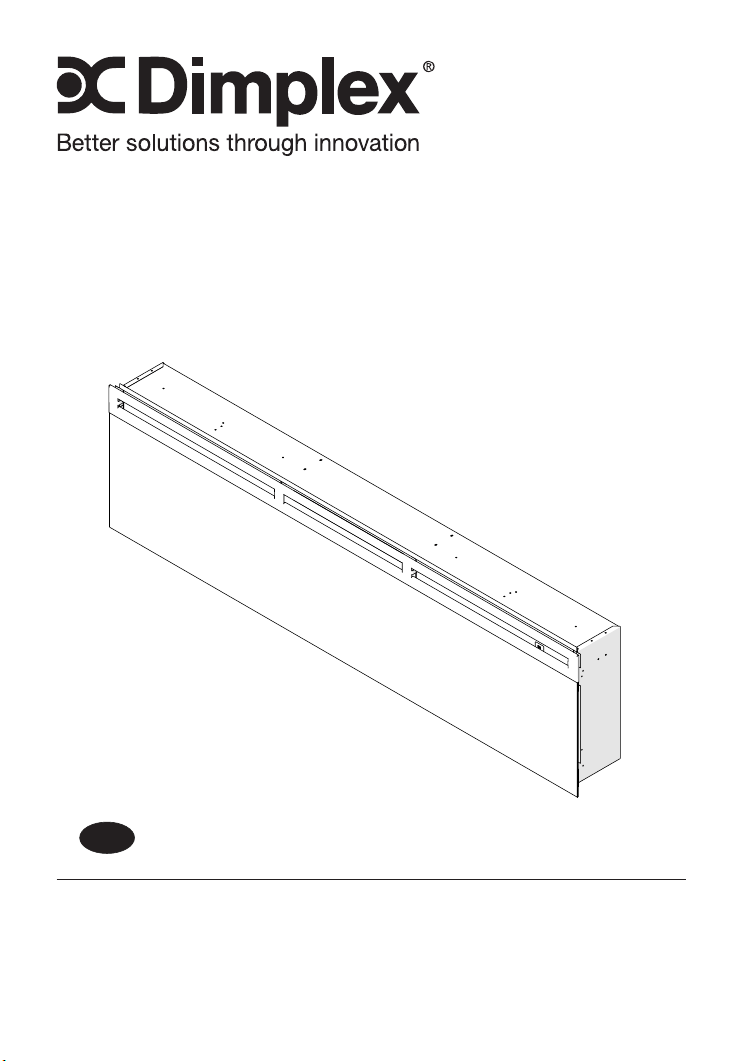
Owner’s Manual
Model
BLF7451-AU/
PRISM 74"
IMPORTANT SAFETY INFORMATION: Always read this manual rst
before attempting to install or use this replace. For your safety, always
comply with all warnings and safety instructions contained in this manual
to prevent personal injury or property damage.
EN
08/53543/0 (AU/NZ) Issue 2
OCN 10955
Table of Contents
Always use a qualied technician or
service agency to repair this replace.
!
NOTE: Procedures and tech-
niques that are considered important
enough to emphasize.
CAUTION: Procedures and tech-
niques which, if not carefully followed,
will result in damage to the equip-
ment.
WARNING: Procedures and
techniques which, if not carefully
followed, will expose the user to
the risk of re, serious injury, or
death.
Welcome & Congratulations ...................3
IMPORTANT INSTRUCTIONS ..................4
Quick Reference Guide ......................7
Fireplace Installation ........................... 8
Site Selection 8
Surface Installation 9
In-wall Recessed Installation - 100mm Deep 10
Flush Mounted Installation - 200mm Deep 11
Front Glass Installation 13
Operation ................................... 15
Maintenance ................................ 19
3
Welcome & Congratulations
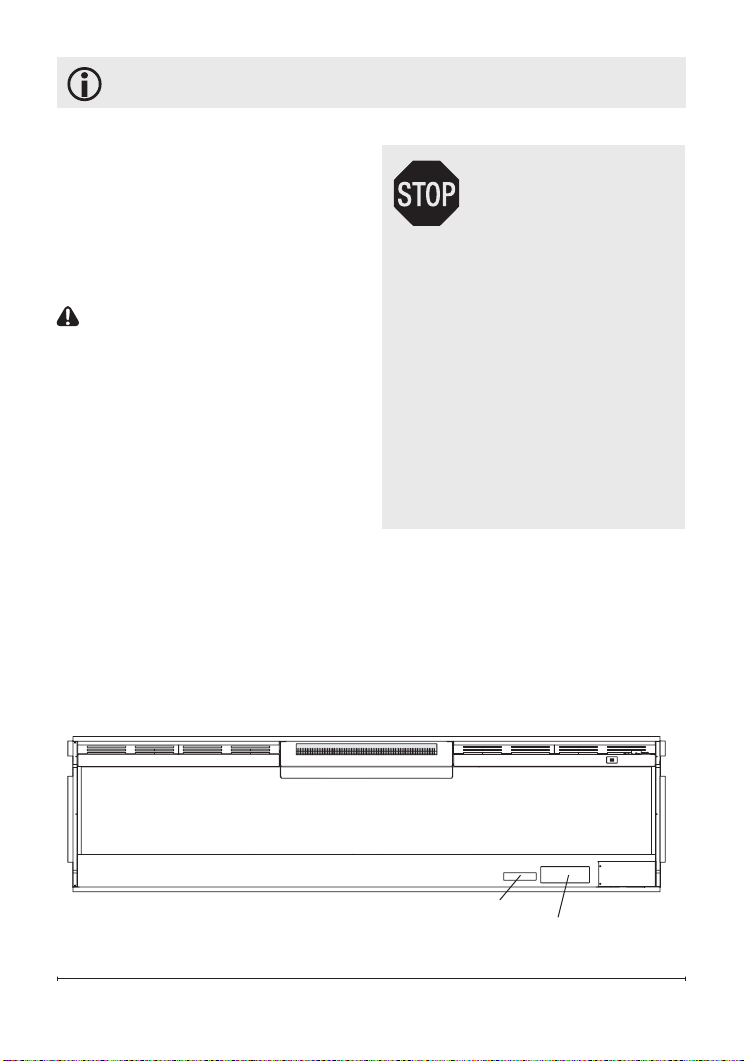
Serial Number
Label
Rating Label with
Model Number
Thank you and congratulations for
choosing to purchase an electric
replace from Dimplex, the world
leader in electric replaces.
Please carefully read and save
these instructions.
CAUTION: Read all
instructions and warnings
carefully before starting
installation. Failure to follow
these instructions may result
in a possible electric shock,
re hazard and will void
the warranty.
Please record your model and
serial numbers below for future
reference: model and serial
numbers can be found on the
Model and Serial Number Label
of your replace.
NO NEED TO RETURN
TO THE STORE
Questions With the Assembly?
Require Parts Information?
Product Under Manufacturer’s
Warranty?
Call 1300 556 816
Please have your model
number and product serial
number ready. (See below)

IMPORTANT SAFETY INSTRUCTIONS
Read all instructions before using this appliance.
When using electrical appliances, basic precautions should
always be followed to reduce the risk of re, electrical shock
and injury to persons, including the following:
1. If the appliance is damaged, check with the supplier
before installation and operation.
2. Do not use outdoors.
3. Do not use in the immediate surroundings of a bath,
shower or swimming pool.
4. Do not locate the appliance immediately below a xed
socket outlet or connection box.
5. This appliance can be used by children aged form 8
years and above and persons with reduced physical,
sensory or mental capabilities or lack of experience
and knowledge if they have been given supervision or
instruction concerning use of the appliance in a safe way
and understand the hazards involved. Children shall not
play with the appliance. Cleaning and user maintenance
shall not be made by Children without supervision.
6. Children of less than 3 years should be kept away unless
continuously supervised. Children aged from 3 years and
less than 8 years shall only switch on/off the appliance
provided that it has been placed or installed in its intended
normal operating position and they have been given
supervision or instruction concerning use of the appliance
in a safe way and understanding the hazards involved.
Children aged from 3 years and less than 8 years shall

5
IMPORTANT SAFETY INSTRUCTIONS
not plug in, regulate and clean the appliance or perform
user maintenance.
7. Do not use this appliance in series with a thermal control,
a program controller, a timer or any other device that
switches on the heat automatically, since a re risk exists
when the appliance is accidentally covered or displaced.
8. Ensure that furniture, curtains or other combustible
material are positioned no closer than 1 metre from the
appliance.
9. In the event of a fault unplug the appliance.
10. Unplug the appliance when not required for long periods.
11. Although this appliance complies with safety standards,
we do not recommend its use on deep pile carpets or on
long hair type of rugs.
12. The appliance must be positioned so that the plug is
accessible.
13. If the supply cord is damaged it must be replaced by
the manufacturer or service agent or a similarly qualied
person in order to avoid a hazard.
14. Keep the supply cord away from the front of the appliance.
WARNING: In order to avoid overheating, do not cover
the appliance. Do not place material or garments on
the appliance, or obstruct the air circulation around the
appliance, for instance by curtains or furniture, as this could
cause overheating and a re risk.
IMPORTANT SAFETY INSTRUCTIONS
SAVE THESE INSTRUCTIONS
The heater carries the Warning Symbol
indicating that it must not be covered
WARNING: In order to avoid a hazard due to inadvertent
resetting of the thermal cut-out, this appliance must not be
supplied through an external switching device, such as a
timer, or connected to a circuit that is regularly switched on
and off by the utility.
CAUTION: Some parts of this product can become very
hot and cause burns. Particular attention has to be given
where children and vulnerable people are present.
7
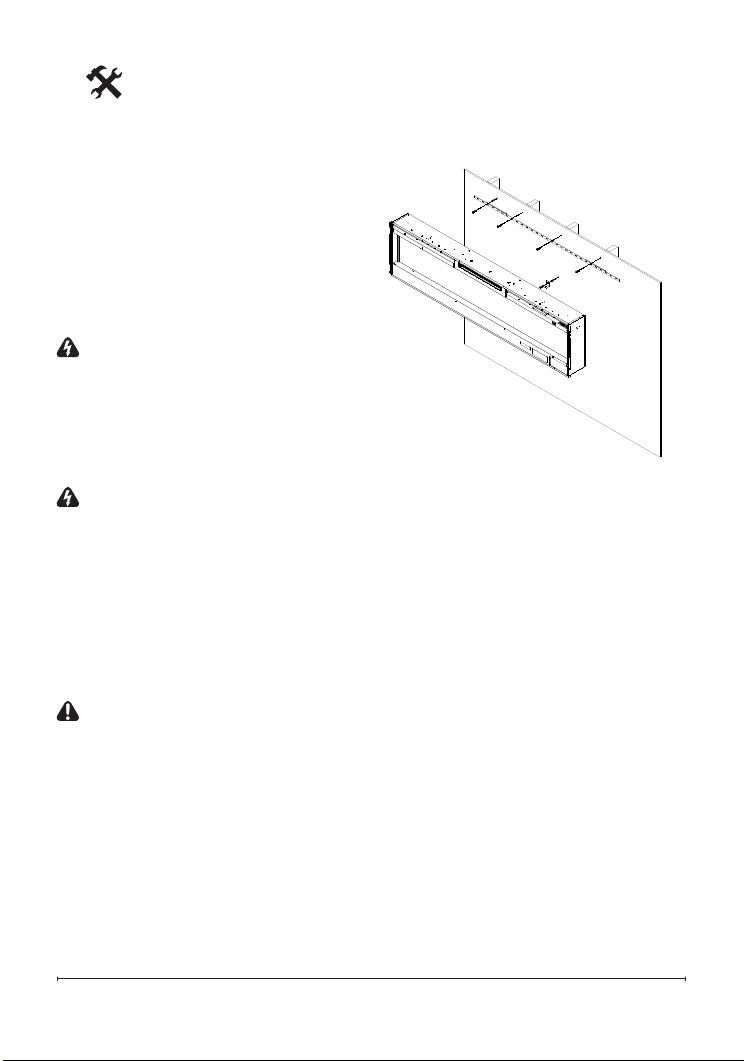
Quick Reference Guide
Figure 1
[7.1 in.]
467 mm
[18.4 in.]
1883 mm [74.1 in.]
493 mm
[19.4 in.]
187 mm
[7.3 in.]
1844 mm [72.6 in.]
① The electrical information
regarding your electric replace can
be found on the rating label located on
the front of the unit, behind the glass.
Before installation, please record your
replace's serial number below for
future reference.
② If you have any technical
questions or concerns regarding the
operation of your electric replace,
or require service contact customer
service.
③ For dimensions of your replace,
refer to Figure 1.

Site Selection
Review and consider all of the
following conditions for installation:
• Dimensions of the unit:
188.3cm x 49.5cm
• Unit requires a minimum of
three (3) wall studs in order to
ensure a secure installation
Three possible installation
methods:
• Installation method: Surface
mount; In-wall Recessed; or
Flush mount
• Hardwired or plug-in method
WARNING: Ensure the power
cord is not installed so that it
is pinched or against a sharp
edge and ensure that the
power cord is stored or secured
to avoid tripping or snagging to
reduce the risk of re, electric
shock or injury to persons.
Construction and electrical
outlet wiring must comply
with local building codes and
other applicable regulations to
reduce the risk of re, electric
shock and injury to persons.
1. Select a location that is not
susceptible to moisture and
is away from drapes, furniture
and high trafc.
Fireplace Installation
2. For ease of electrical
hook up you may wish to
locate the replace near an
existing outlet (for plug-in
convenience).
!
NOTE 1: A 10 Amp, 230-
240 Volt circuit is required. A
dedicated circuit is preferred
but not essential in all cases.
A dedicated circuit will be
required if, after installation,
the circuit breaker trips or
fuse blows on a regular basis
when the heater is operating.
Additional appliances on the
same circuit may exceed the
current rating of the circuit
breaker.
3. Remove replace, front
glass and hardware from box
and remove all packaging
materials before installation.
4. Store the replace in a safe,
dry and dust free location until
you are ready to install the
replace.
9
Fireplace Installation
The replace is packaged with
a three prong plug installed for
plug-in convenience. Hard wiring
the replace is also an option
by removing the plug from the
factory tted cord and completing
the wiring according to National
and Local Elecrical Codes.
WARNING: Do not attempt to
wire your own new outlets or
circuits. To reduce the risk of
re, electric shock or injury to
persons, always use a licensed
electrician.
WARNING: Ensure that the
3-Position Switch is set to the
Off position ("O") and that the
circuit on which the replace is
to be installed has the power
cut off at the service panel until
installation is complete.
Surface Installation
CAUTION: Two people will be
required for various steps of
this procedure.
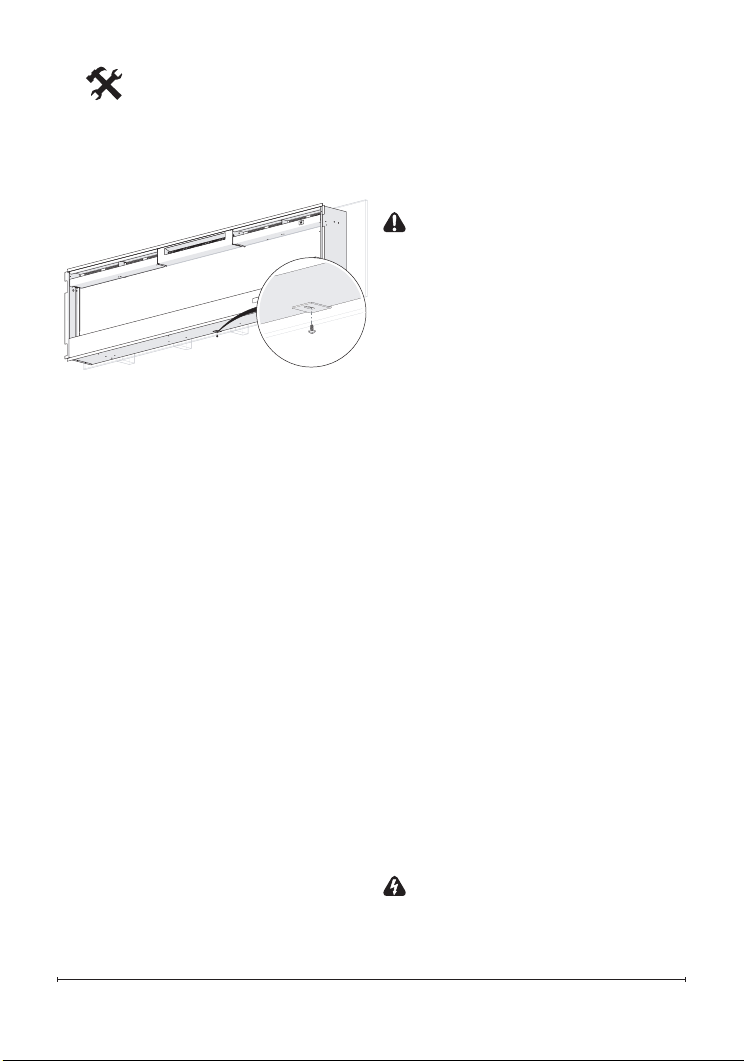
1. Determine the mounting
location of the unit so that the
wall-mounting bracket can be
installed into 3 wall studs.
!
NOTE: It is recommended that
the mounting bracket be installed
56 in. (142 cm) off of the ground
to maintain an optimized viewing
angle of the ame.
2. Hold the wall mounting brack-
et, with the bubble level on
the top, on the wall so that the
bubble on the level is centered
between the two black lines.
3. Mark the 4 mounting screw
locations, on the wall, ensur-
ing that the wall bracket stays
level. (Figure 2)
4. In locations where the screws
are being installed only into
drywall, install the supplied
wall anchors before installing
the screw (predrill if required).
5. Secure the wall bracket to the
wall using the supplied 1½ in.
(3.8 cm) mounting screws and
washers into the wall and/or
Figure 2
In-wall Recessed
Installation - 100mm Deep
CAUTION: Two people may
be required for various steps
of this procedure.
1. Prepare a wall with a framed
opening of 185.7cm wide x 47
cm high (Figure 4).
!
NOTE: The sizing has allowed
for 6.4mm around the replace
insert for ease of installation. This
replace does not require any
additional venting.
2. Choose your method of
supplying power to the unit:
• Plug in (you may run the
power cord out of the framed
wall opening to an existing
outlet or install an outlet on
a nearby wall stud within the
wall).
• Hard wire the replace.
!
NOTE: Hard wiring can
be done by removing the plug
from the factory tted cord and
completing the wiring according
to National and Local Elecrical
Codes.
WARNING: Do not attempt
to wire your own new outlets or
circuits. To reduce the risk of re,
electric shock or injury to persons,
always use a licensed electrician.
wall anchors.
6. Install the bottom support
bracket to the wall centered
with the wall mounting bracket,
using the appropriate mount-
ing hardware, 13 ¾" (35cm)
below the wall mounting brack-
et. (Figure 2)
7. Remove the center screw from
the bottom of the replace.
(Figure 3)
8. Hang the replace from the
bracket.
9. Install the removed screw
through the bottom support
bracket into the replace.
10. Refer to Front Glass Installa-
tion section nal installation
procedures.
Fireplace Installation
Figure 3
11
Fireplace Installation
Ensure that the 3-Position Switch is
set to the Off position ("O") and that
the circuit on which the replace is
to be installed has the power cut off
at the service panel until installation
is complete.
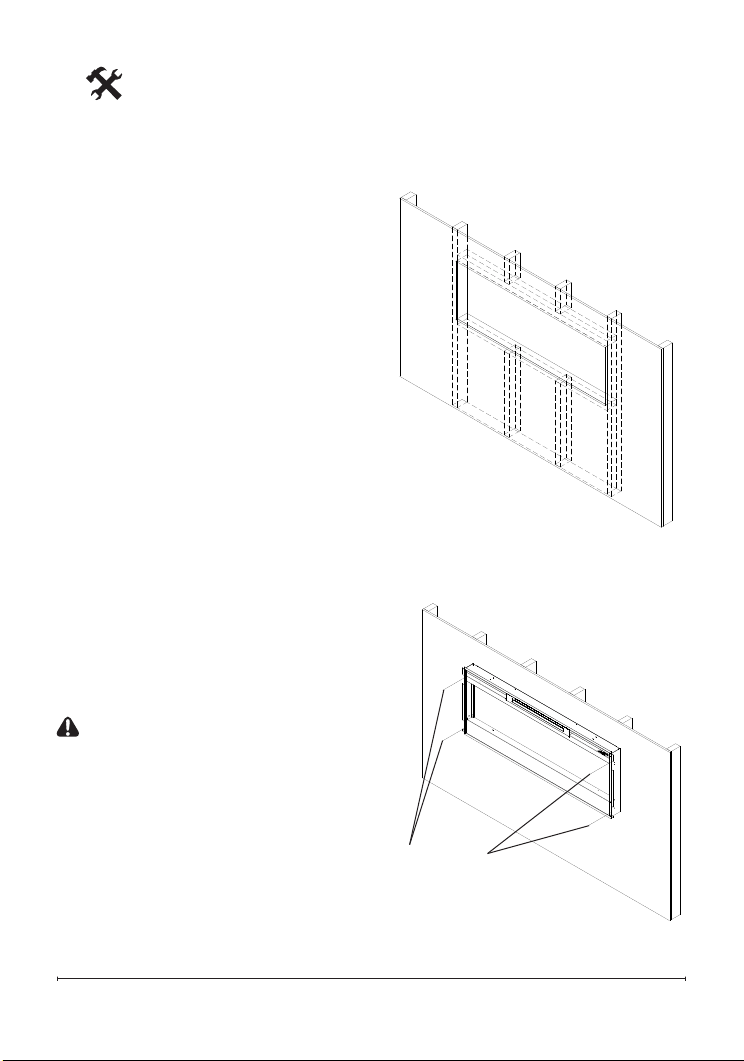
3. Lift replace and insert into
opening (Figure 5).
4. Use bubble level (supplied) to
level the replace within the
framing. Adjust as required.
5. Drive four (4) supplied
mounting screws through
the four (4) mounting holes
located in each corner of the
replace chassis, into wall
studs (Figure 6).
6. Refer to Front Glass
Installation section, for nal
installation procedures.
Flush Mounted
Installation - 200mm Deep
CAUTION: Two people may
be required for various steps
of this procedure.
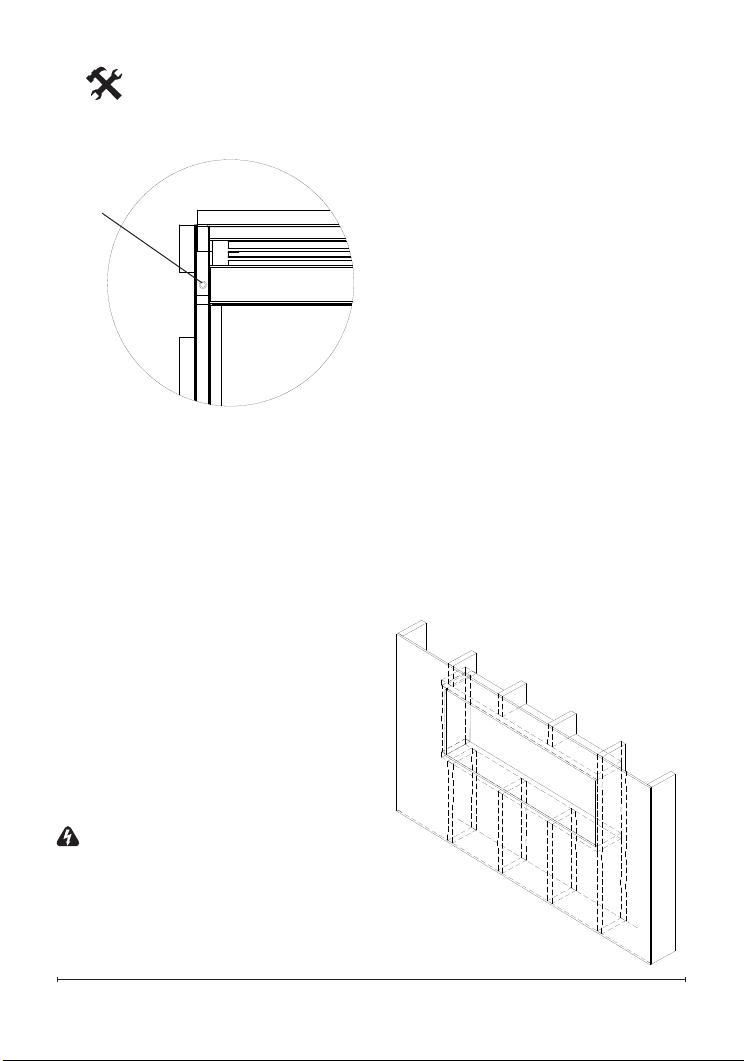
1. Prepare a wall with a framed
opening of 185.7 cm wide x
47 cm high (Figure 7).
!
NOTE: The sizing has allowed
for 6.4mm around the replace
insert for ease of installation. This
replace does not require any
Figure 5
Mounting
holes
Figure 4
Fireplace Installation
additional venting.
2. Choose your method of
supplying power to the unit:
• Plug in (you may run the
power cord out of the framed
wall opening to an existing
outlet or install an outlet on
a nearby wall stud within the
wall).
• Hard wire the replace.
!
NOTE: Hard wiring can
be done by removing the plug
from the factory tted cord and
completing the wiring according
to National and Local Elecrical
Codes.
WARNING: Do not attempt
to wire your own new outlets or
circuits. To reduce the risk of re,
electric shock or injury to persons,
always use a licensed electrician.
Ensure that the 3-Position Switch is
set to the Off position ("O") and that
the circuit on which the replace is
to be installed has the power cut off
at the service panel until installation
is complete.
3. Lift replace and insert into
opening. The replace's
mounting trim should be ush
against the wall (Figure 8).
4. Use bubble level (supplied) to
level the replace within the
framing. Adjust as required.
5. Drive four (4) supplied
mounting screws through the
four (4) mounting holes located
on the inside surface of the
Figure 6
Mounting
hole
Figure 7
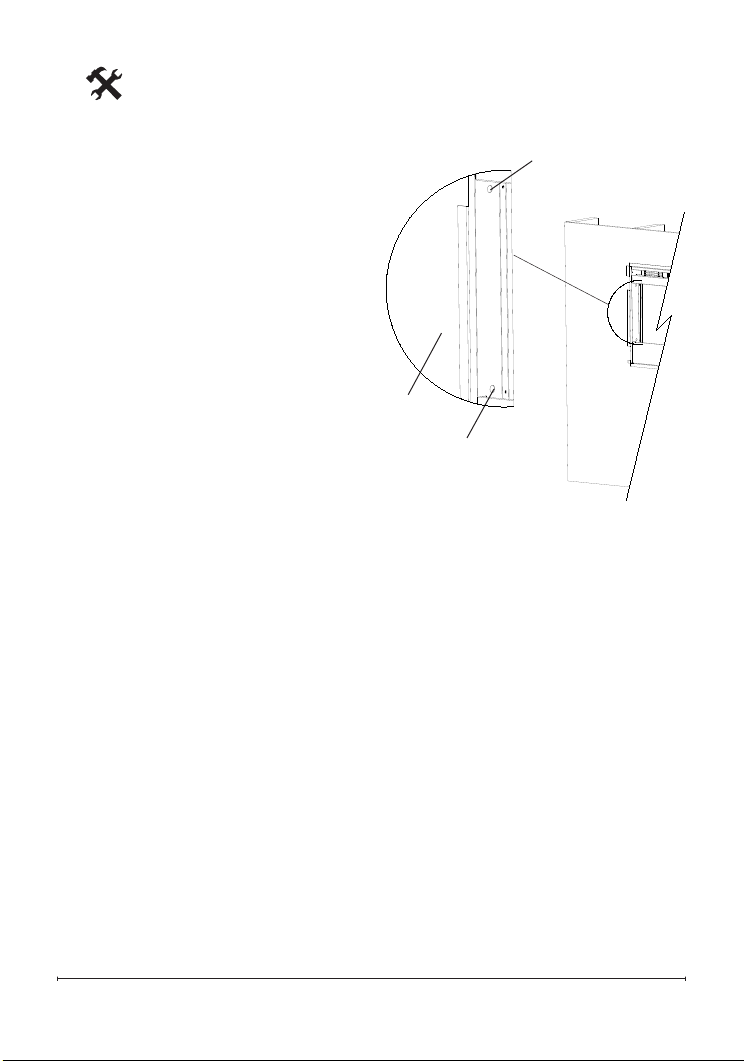
13
replace chassis, into wall
studs (Figure 8).
6. Refer to Front Glass
Installation section, for nal
installation procedures.
Front Glass Installation
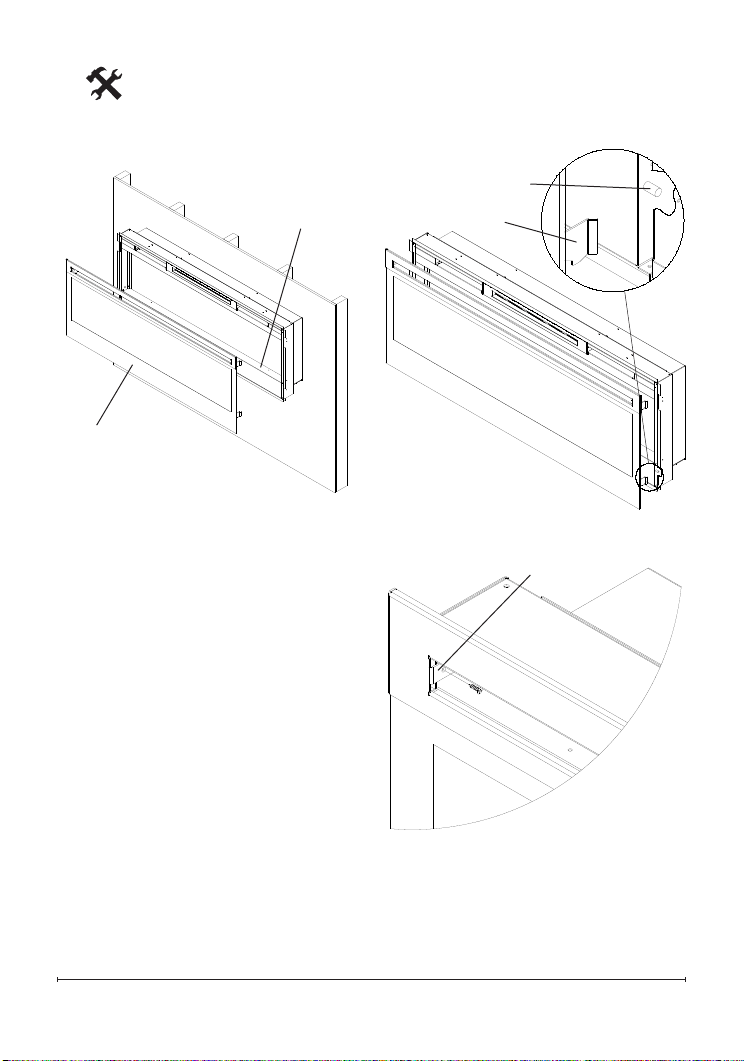
1. Evenly distribute supplied
glass rock on the front tray of
the fireplace (Figure 9).
2. Carefully mount front glass
assembly so that the front
glass hooks (4) hang on the
front glass mounts on the
fireplace (4) (Figure 10).
3. Use the supplied two (2)
Phillips sheet metal screws
to fasten the glass assembly
tabs to the fireplace (Figure
11).
4. Ensure the fireplace's
3-Position Switch is switched
to the Off position ("O").
5. If unit is not hard-wired, plug
fireplace into a 10 Amp, 230-
240 Volt outlet (refer to NOTE
1).
Fireplace Installation
Figure 8
Mounting hole
Mounting hole
Wall
surface
Fireplace Installation
Figure 9
Front tray
Front glass
assembly
Figure 10
Hooks (4)
Mounts (4)
Figure 11
Tab
15
Operation
functions that it was set to when
it was turned Off and the intake
temperature will be indicated on
the Floating Display
TM
.
!
NOTE: When any button is
pressed the intake temperature
will be displayed on the Floating
Display
TM
for 5 seconds.
B. Flame Effects
Turns the ame effect On and Off.
→ Activated by pressing the
button on the remote.
C. Heat ON/OFF
Turns the heater On and Off.
→ Activated by pressing the
button on the unit or the remote.
• Indicated by the
icon and
the intake temperature being
WARNING: This electric rebox
must be properly installed before
it is used.
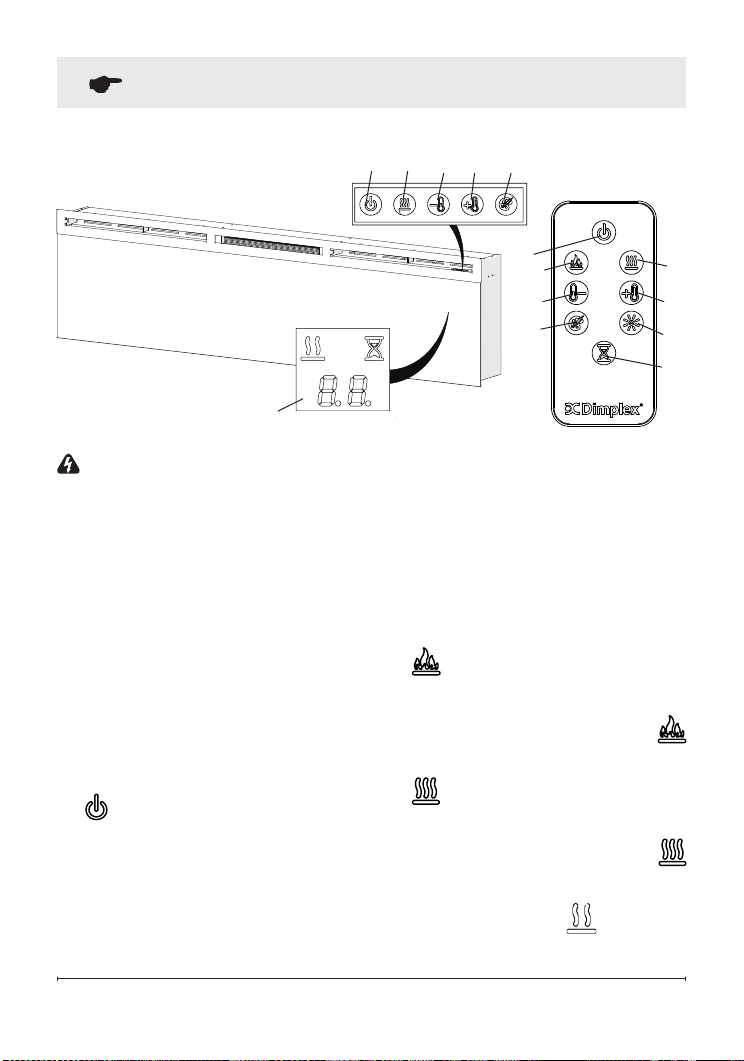
The unit can be controlled by
either the manual controls which
are located on the upper right of
the replace or the remote (Figure
12 & 13).
The replace is supplied with an IR
multifunction remote control.
!
NOTE: To operate correctly, the
remote control must be pointed
towards the Floating Display
TM
.
A. Standby
Turns the unit On and Off.
→ Activated by pressing the
Standby button on the remote
or the unit.
• The unit will turn on with the same
Figure 12
A C
D
E
F
Floating
Display
TM
Figure 13
A
D
B
C
E
G
H
F
Operation
displayed on the Floating
Display
TM
, for 5 seconds before
turning off.
!
NOTE: After the heater is
switched off, there is a 60 second
fan delay, where the fan will
continue running before turning off.
!
NOTE: The unit can be operated
in Heat Only Mode. When the unit
is only running with the heater,
the
icon will continuously be
displayed on the Floating Display
TM
.
!
NOTE: The heater may emit
a slight, harmless odor when
rst used. This odor is a normal
condition caused by initial heating
of internal heater parts and will not
occur again.
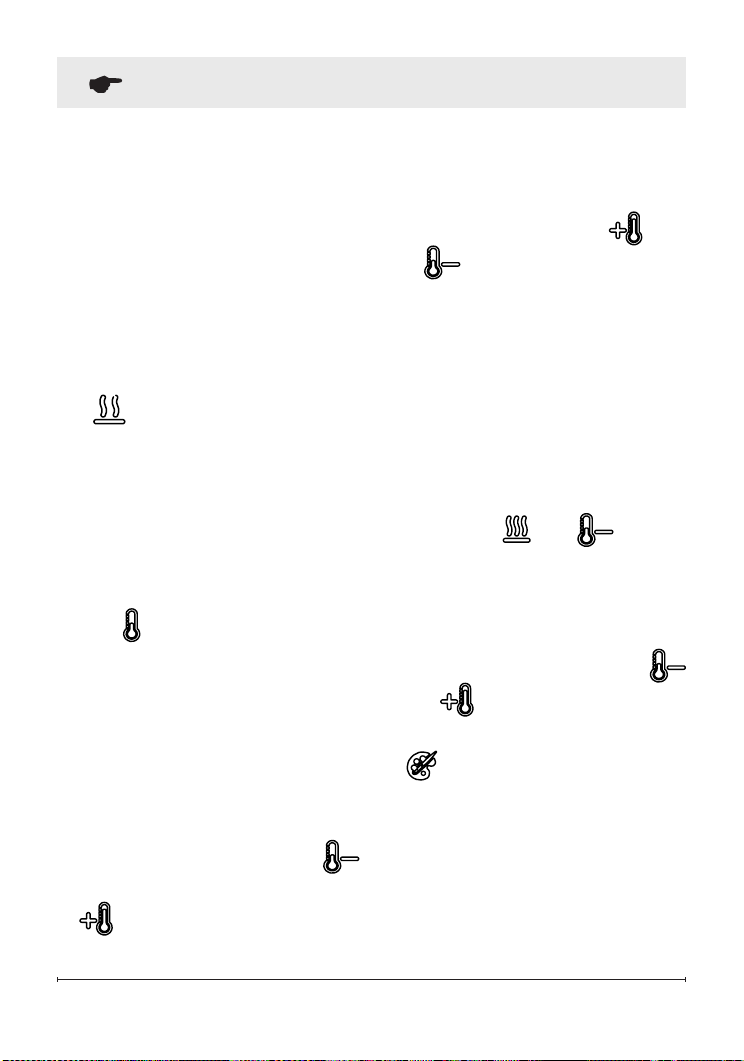
D & E.
Thermostat Controls
Adjusts the temperature set point
to your individual requirements.
Once the desired set temperature
is reached the heater will turn
off. The heater will cycle on
and off to maintain the desired
set temperature. The default
temperature setting is 72°F (22°C).
→ Adjusted by pressing the
to decrease the setpoint and the
to increase the setpoint on
the unit or the remote.
• The Floating Display
TM
will
indicate the temperature setpoint
as it is adjusted.
!
NOTE: Holding the and
the
buttons down for two
seconds, on the unit, will change
the temperature from °C to °F, or
vice versa.
Disable Heat
If desired, depending on the
season, the heater on the unit can
be disabled. The unit will operate in
the same fashion, with remainder of
the controls.
Pressing the and buttons
on the unit at the same time and
holding for 2 seconds will disable
and enable the heater.
!
NOTE: When the heater has
been disabled and either the
or the is pressed the Floating
Display
TM
will indicate "--".
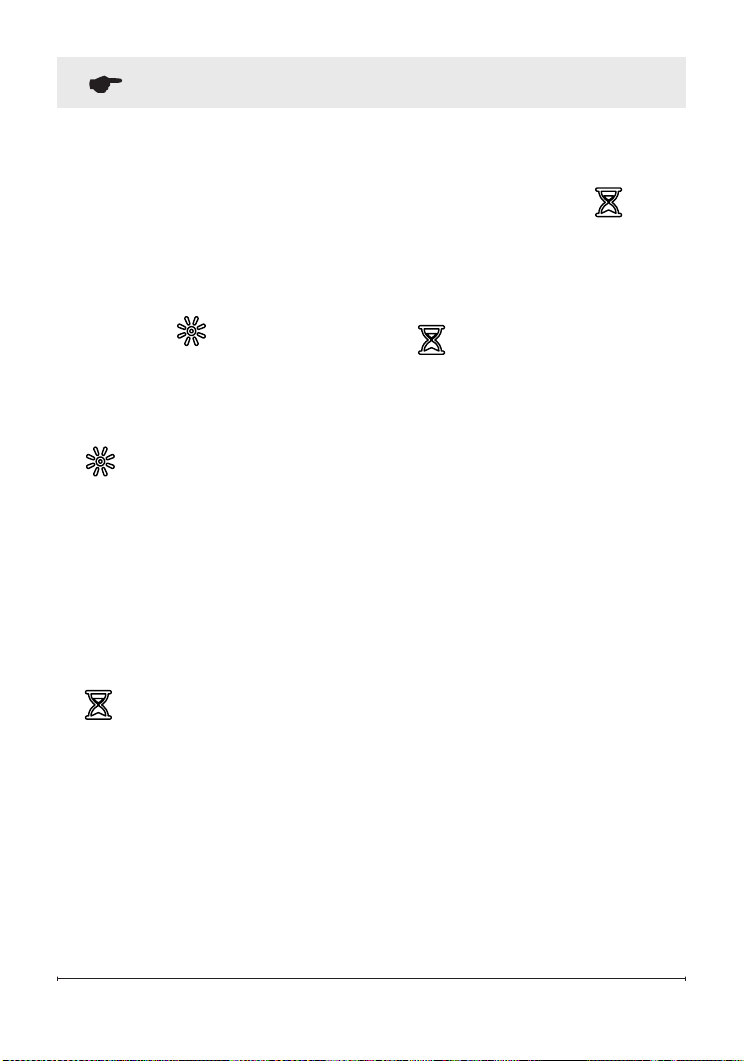
F. Color Themes
Different presets of ambient lighting
color combinations contained in
the unit.
→ Changed by repeatedly pressing
the corresponding button on the
remote or the unit.
• Cycles through the different
17
display the different times as it
is adjusted. Once the timer has
begun, pressing the button
will display the time remaining
before the unit turns Off.
!
NOTE: The Sleep Timer can be
cancelled at any time by pressing
the button repeatedly until the
sleep timer displays nothing.
Resetting the Temperature
Cutoff Switch
Should the heater overheat, an
automatic cut out will turn the whole
unit off and it will not come back
on without being reset. It can be
reset by turning the unit off at the
main disconnect panel and waiting
5 minutes before turning the unit
back on.
preset ambient lighting settings
of the unit, this includes different
combinations of colours of the
ame base and media lighting.
!
NOTE: The last theme of the
cycle is a prism where the unit
cycles through a variety of colours.
Pressing the
button stops the
cycling and holds the unit on the
preferred color, indicated by a "U"
- Unfreeze or a "F" - Freeze on the
display.
G.
Brightness
Changes the brightness of the
lights in the unit.
→ Adjusted by repeatedly pressing
the corresponding button on the
remote.
• Indicated by the second digit on
the Floating Display™ changing
to show: "H" (high), and "L" (low).
H. Sleep Timer
The Sleep Timer can be set to
automatically shut off the replace
after a preset time (from 30 minutes
to 8 hours).
→ To set the timer press the
timer button on the remote,
repeatedly, until the desired time
is displayed.
• The Floating Display
TM
will
Operation

Remote Control Battery
Replacement
To replace the battery:
1. Slide battery cover open on the
remote control.
2. Correctly install one 3 Volt
(CR2032 [longer life] or CR2025)
battery in the battery holder.
3. Close the battery cover.
Battery must be recycled or
disposed of properly. Check
with your Local
Authority or Retailer for recycling
advice in your area
Operation

19
Maintenance
WARNING: Disconnect
power before attempting any
maintenance or cleaning to
reduce the risk of re, electric
shock or damage to persons.
Partially Reective Glass
Cleaning
The partially reective glass is
cleaned in the factory during
the assembly operation. During
shipment, installation, handling,
etc., the partially reective glass
may collect dust particles; these
can be removed by dusting lightly
with a clean dry cloth.
To remove ngerprints or other
marks, the partially reective
glass can be cleaned with a damp
cloth. The partially reective glass
should be completely dried with
a lint free cloth to prevent water
spots. To prevent scratching, do
not use abrasive cleaners.
Fireplace Surface
Cleaning
Use only a damp cloth to clean
painted surfaces of the replace.
Do not use abrasive cleaners.
Servicing
Except for installation and
cleaning described in this
manual, an authorized service
representative should perform
any other servicing.
Contact Details
Glen Dimplex Australia Pty Ltd
1340 Ferntree Gully Road
Scoresby VIC 3179
Australia
Phone: 1300 556 816
Email: [email protected]
Web: www.dimplex.com.au
Glen Dimplex New Zealand Ltd
38 Harris Road
East Tamaki, Auckland
New Zealand
Ph: 09 274 8265
Email: [email protected]
Web: www.dimplex.co.nz