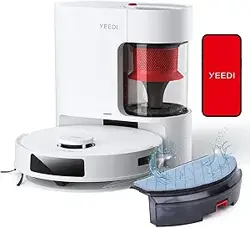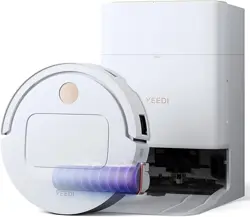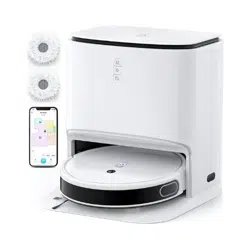

yeedi mop station
INSTRUCTION MANUAL
GEBRAUCHSANWEISUNG
MANUAL DE INSTRUCCIONES
MANUEL D’INSTRUCTION
MANUALE DI ISTRUZIONI
РУКОВОДСТВО ПО ЭКСПЛУАТАЦИИ

2
EN
1. Package Contents .............................................................................................................................................................8
2. Operating and Programming ..........................................................................................................................................12
3. Maintenance ....................................................................................................................................................................19
4. Troubleshooting ...............................................................................................................................................................25
5. Product Specifications ....................................................................................................................................................28
Instruction Manual ......................................................................................................................................................................................2
Gebrauchsanweisung ...............................................................................................................................................................................29
Manual de instrucciones...........................................................................................................................................................................57
Manuel d’instruction .................................................................................................................................................................................85
Manuale di istruzioni ............................................................................................................................................................................... 113
Руководство по эксплуатации ............................................................................................................................................................141
Contents
EN
DE
ES
FR
IT
RU

3
EN
1. This Appliance can be used by children
aged from 8 years and above and persons
with reduced physical, sensory or mental
capabilities or lack of experience and
knowledge if they have been given supervision
or instruction concerning use of the Appliance
in a safe way and understand the hazards
involved. Children shall not play with the
Appliance. Cleaning and user maintenance
shall not be made by children without
supervision.
2. Clear the area to be cleaned. Remove power
cords and small objects from the floor that
could entangle the Appliance. Tuck rug fringe
under the rug base, and lift items such as
curtains and tablecloths off the floor.
Important Safety Instructions
IMPORTANT SAFETY INSTRUCTIONS
When using an electrical appliance, basic
precautions should always be followed, including the
following:
READ ALL INSTRUCTIONS BEFORE
USING THIS APPLIANCE.
SAVE THESE INSTRUCTIONS
3. If there is a drop off in the cleaning area due
to a step or stairs, you should operate the
Appliance to ensure that it can detect the step
without falling over the edge. It may become
necessary to place a physical barrier at the
edge to keep the unit from falling. Make sure
the physical barrier is not a trip hazard.
4. Only use as described in this manual. Only
use attachments recommended or sold by the
manufacturer.
5. Please make sure your power supply source
voltage matches the power voltage marked on
the Self-cleaning Station.
6. For INDOOR household use ONLY. Do not
use the Appliance in outdoor, commercial or
industrial environments.
7. Use only the original rechargeable battery
and Self-cleaning Station provided with
the Appliance from the manufacturer. Non-
rechargeable batteries are prohibited.
For battery information, please refer to
Specifications section.
8. Do not use without dust bin and/or filters in
place.
9. Do not operate the Appliance in an area where
there are lit candles or fragile objects.
10. Do not use and store in extremely hot or

4
EN
cold environments (below -5˚C /23˚F or
above 40˚C/104˚F). Please charge the robot
in temperature above 0°C/32°F and below
40°C/104°F.
11. Keep hair, loose clothing, fingers, and all
parts of body away from any openings and
moving parts.
12. Do not operate the Appliance in a room
where an infant or child is sleeping.
13. Do not use Appliance on wet surfaces or
surfaces with standing water.
14. Do not allow the Appliance to pick up large
objects like stones, large pieces of paper or
any item that may clog the Appliance.
15. Do not use Appliance to pick up flammable
or combustible materials such as gasoline,
printer or copier toner, or use in areas where
they may be present.
16. Do not use Appliance to pick up anything
that is burning or smoking, such as
cigarettes, matches, hot ashes, or anything
that could cause a fire.
17. Do not put objects into the suction intake.
Do not use if the suction intake is blocked.
Keep the intake clear of dust, lint, hair, or
anything that may reduce air flow.
18. Take care not to damage the power cord.
Do not pull on or carry the Appliance or Self-
cleaning Station by the power cord, use the
power cord as a handle, close a door on the
power cord, or pull power cord around sharp
edges or corners. Do not run Appliance over
the power cord. Keep power cord away from
hot surfaces.
19. If the power cord is damaged, it must be
replaced by the manufacturer or its service
agent in order to avoid a hazard.
20. Do not use with a damaged power cord or
receptacle. Do not use the Appliance or Self-
cleaning Station if it is not working properly,
has been dropped, damaged, left outdoors,
or come in contact with water. It must be
repaired by the manufacturer or its service
agent in order to avoid a hazard.
21. Do not use with a damaged power cord or
receptacle. Do not use the Appliance or Self-
cleaning Station if it is not working properly,
has been dropped, damaged, left outdoors,
or come in contact with water. It must be
repaired by the manufacturer or its service
agent in order to avoid a hazard.
22. Turn OFF the power switch before cleaning
or maintaining the Appliance.
23. The plug must be removed from the

5
EN
receptacle before cleaning or maintaining
the Self-cleaning Station.
24. Remove the Appliance from the Self-
cleaning Station, and turn OFF the power
switch to the Appliance before removing the
battery for disposal of the Appliance.
25. The battery must be removed and discarded
according to local laws and regulations
before disposal of the Appliance.
26. Please dispose of used batteries according
to local laws and regulations.
27. Do not incinerate the Appliance even if it
is severely damaged. The batteries can
explode in a fire.
28. When not using the Self-cleaning Station for
a long period of time, please unplug it.
29. The Appliance must be used in accordance
with the directions in this Instruction Manual.
yeedi cannot be held liable or responsible for
any damages or injuries caused by improper
use.
30. The robot contains batteries that are only
replaceable by skilled persons. To replace
the robot’s battery, please contact Customer
Service.
31. If the robot will not be used for a long time,
power OFF the robot for storage and unplug
the Self-cleaning Station.
32. WARNING: For the purposes of recharging
the battery, only use the detachable supply
unit CH2028 provided with the Appliance.
33. Do not run the appliance over cables or
supply cords.
34. The plug must be removed from the socket-
outlet before cleaning or maintaining the
appliance.
35. Make sure the lid is tightened after filling up
the reservoir. An untightened lid may cause
water leakage.
6
EN
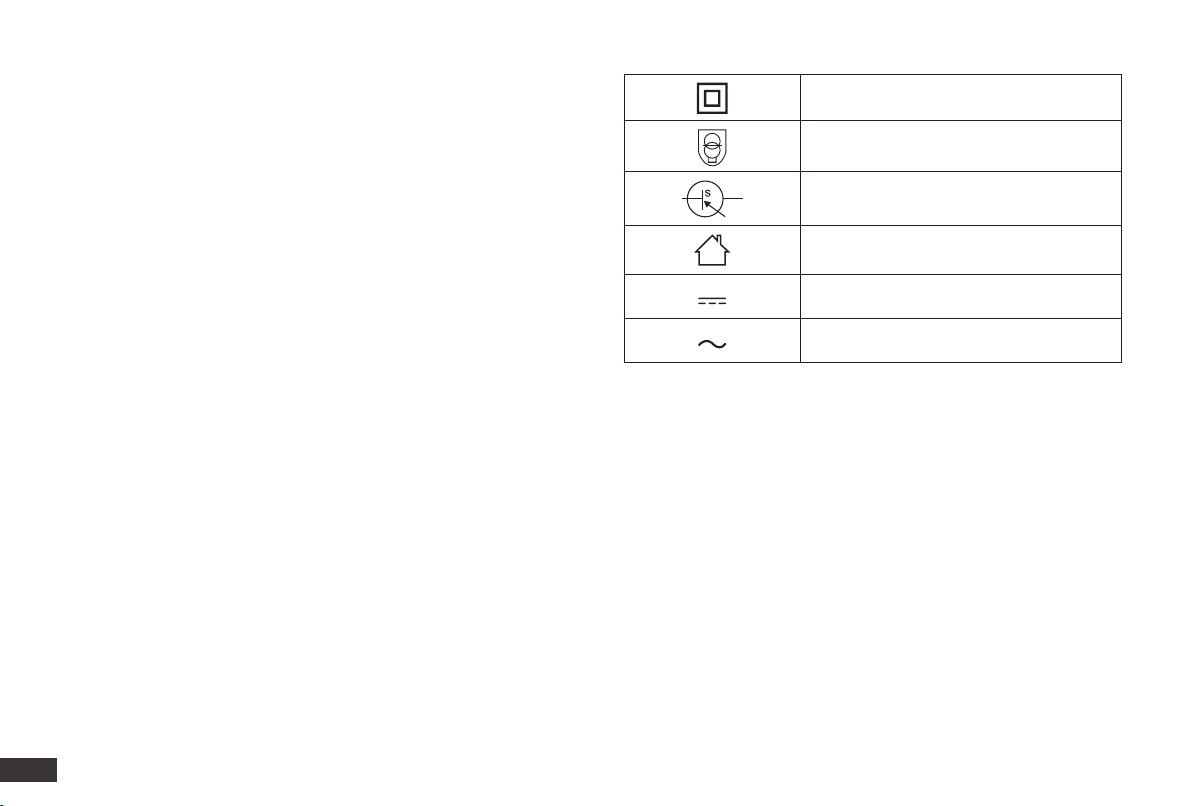
Class II
Short-circuit-proof safety isolating
transformer
Switch mode power supply
For indoor use only
Direct current
Alternating current
To satisfy RF exposure requirements, a separation
distance of 20 cm or more should be maintained
between this device and persons during device
operation.
To ensure compliance, operations at closer than this
distance is not recommended. The antenna used for
this transmitter must not be co-located in conjunction
with any other antenna or transmitter.

7
EN
Correct Disposal of this Product
This marking indicates that this product should not be disposed
of with other household waste throughout the EU. To prevent
possible harm to the environment or human health from
uncontrolled waste disposal, recycle it responsibly to promote
the sustainable reuse of material resources. To recycle your used
device, please use the return and collection systems or contact
the retailer where the product was purchased. They can safely
recycle this product.
Correct Disposal of the Battery
If the robot battery is to be discarded, please hand it over to
the nearest recycling station or after-sales service for correct
centralized disposal.
The following instructions are NOT for users, but for the
professional battery disposer.
The chemical substances contained in the battery could cause
pollutions. Before disposing of the robot, please remove the
battery in advance.
Removal of the Battery
The following instruction is only applicable when disposing of the
robot. It is NOT an operation instruction for use or maintenance.
The battery can only be removed when the battery is completely
exhausted. Under no circumstances should the battery come in
contact with metal objects.
Keep the robot powered ON when it is not on the docking station
until it is out of power.
Turn off the robot power switch.
Remove the screws on the battery cover.
Remove the battery cover.
Pull out the connector plug of the battery and remove it.
CAUTION
Leakage of the battery will cause human injury.
If the battery leaks, make sure to avoid contact with eyes or
skin. In case of accidental contact, flush immediately with large
amounts of clean water. If any irritation persists, please seek
medical attention.
For EU Countries
For EU Declaration of Conformity information, visit https://www.
yeedi.com/support
8
EN
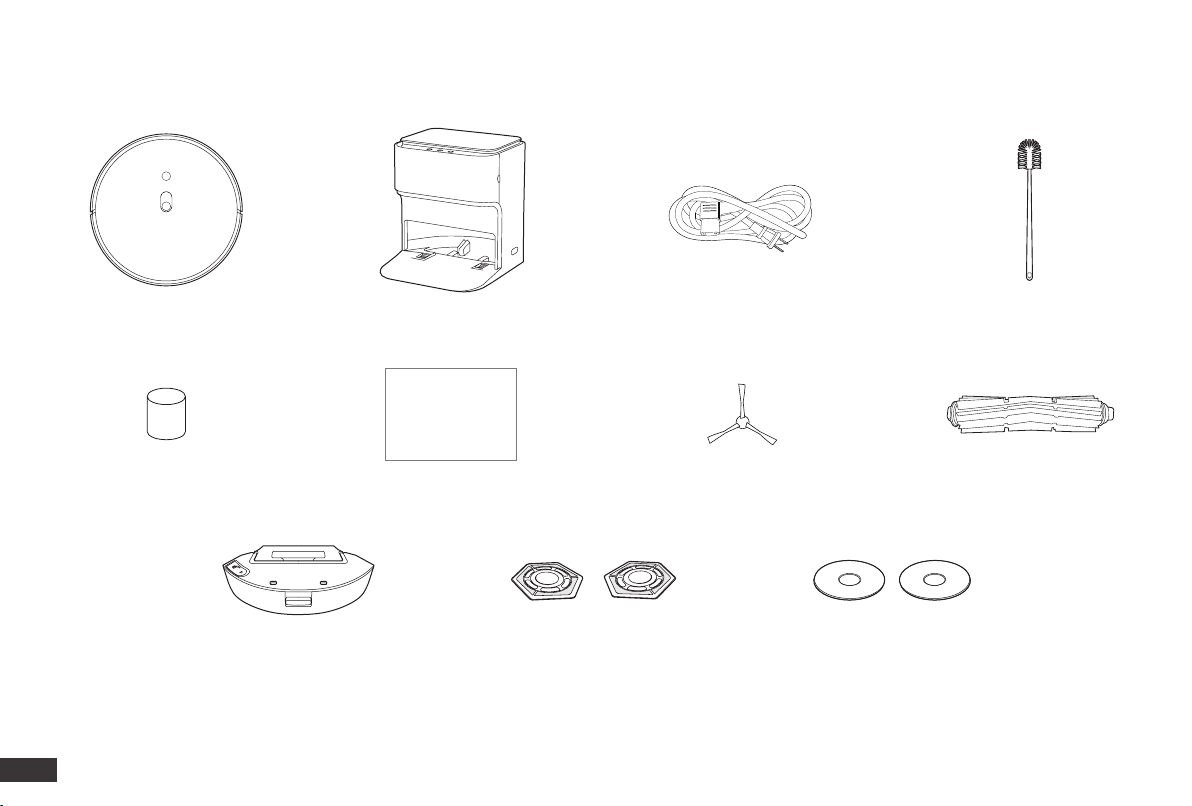
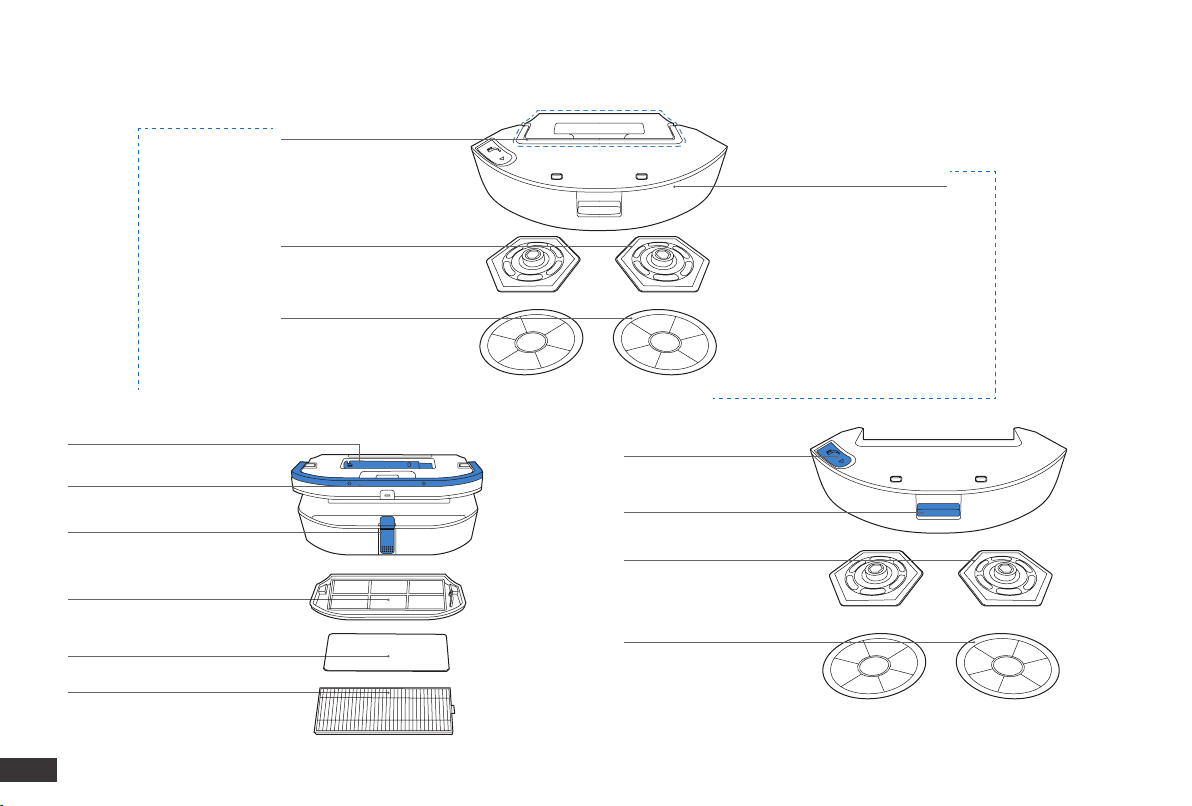
1. Package Contents/1.1 Package Contents
Robot
Dust Bin & Reservoir
Mopping Pad Plates
(Pre-installed)
Washable Mopping Pads
Instruction Manual Edge Brush
Main Brush
(Pre-installed)
Self-cleaning Station Power Cords Cleaning Tool
Note: Figures and illustrations are for reference only and may differ from actual product appearance.
Product design and specications are subject to changes without notice.
Instruction Manual
Clean Water Bucket Filter
(Pre-installed)
9
EN
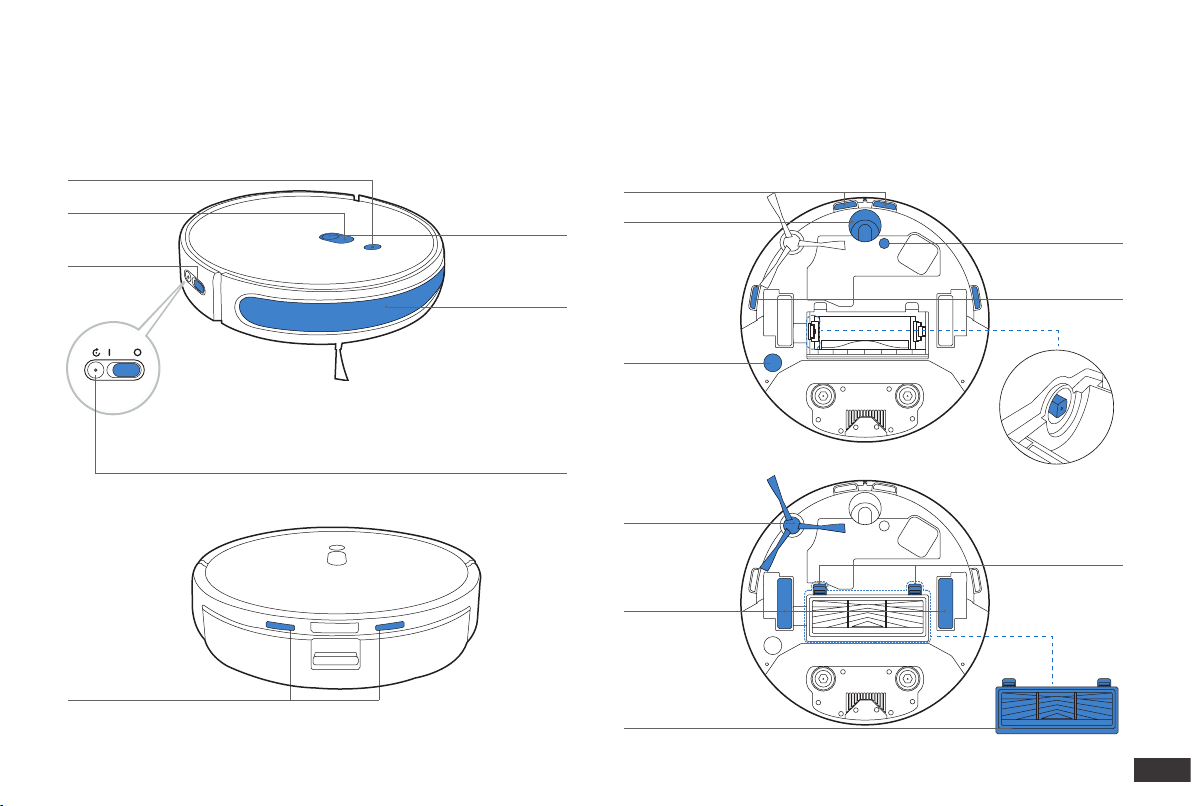
Mapping Sensor
Anti-drop Sensors
Universal Wheel
Main Brush
Edge Brush
Driving Wheels
Floor Tracking
Sensor
Anti-drop Sensors
Carpet Detection Sensor
Main Brush
Release Button
Shaft Sleeve
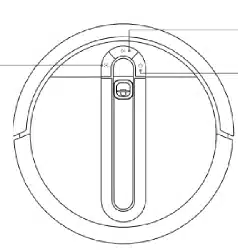
Wi-Fi Indicator
Power Switch
AUTO Mode Button
RESET Button
Anti-collision
Bumper
1. Package Contents/1.2 Product Diagram
Robot Bottom View
Charging Contacts
10
EN
Dust Bin
①
Reservoir
②
Dust Bin
①
Reservoir
②
Washable Mopping Pads
Mopping Pad Plates
Multi-function Cleaning Tool
Handle
Water Inlet
Release Button
Mopping Pad Plates
Washable Mopping Pads
Release Button
Filter Net
Sponge Filter
High-Efficiency Filter
Dust Bin & Reservoir
11
EN
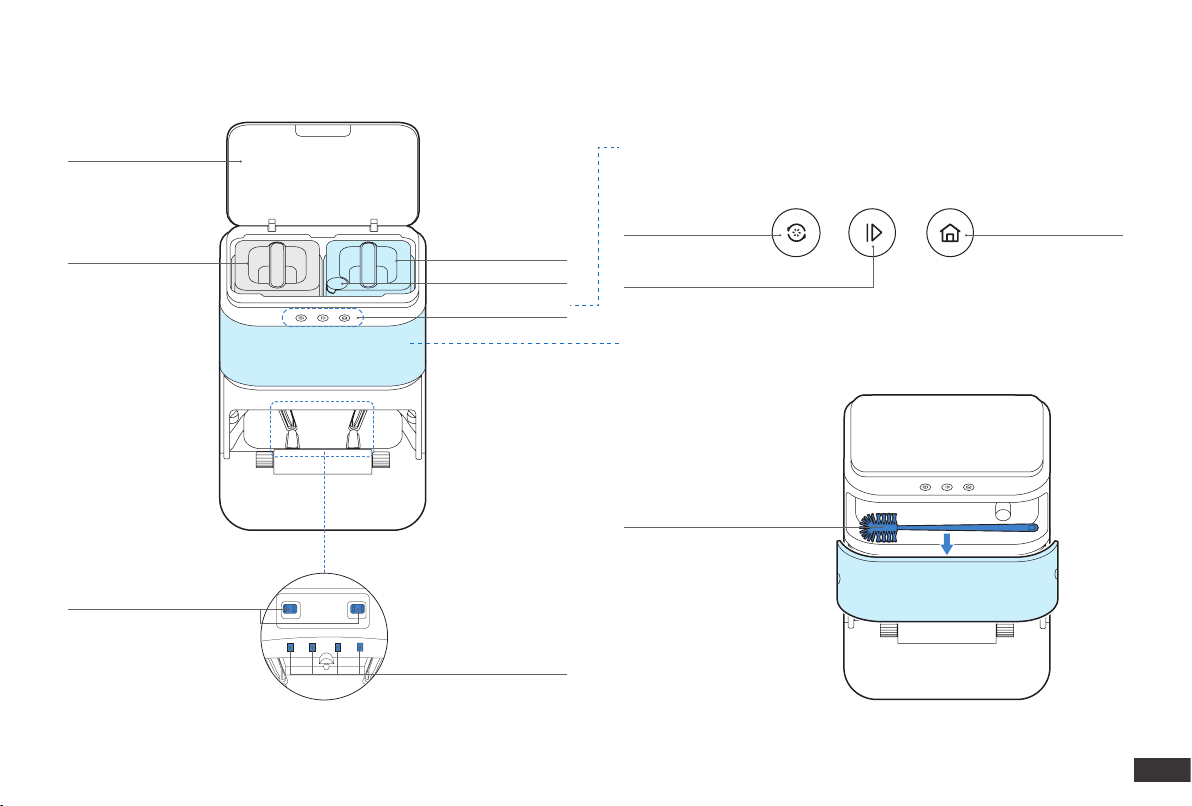
Top Cover
Wastewater Bucket
Self-cleaning Button
Start/Pause Button
Cleaning Tool
Recall/Exit Button
Clean Water Bucket
Control Panel
Water Level Sensor
Self-cleaning Station
Water Inlet
Control Panel
Storage
Self-cleaning Station Pins
12
EN
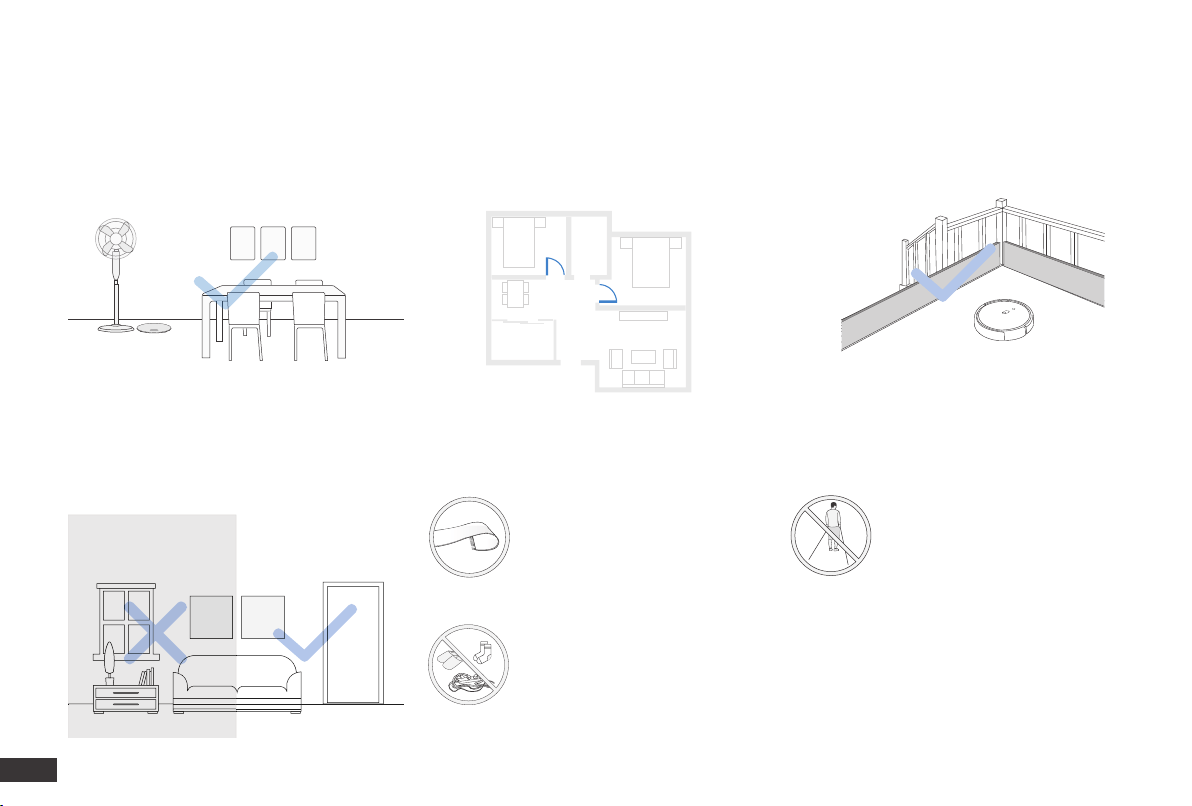
2. Operating and Programming/2.1 Notes Before Cleaning
Tidy up the area to be cleaned by putting
furniture, such as chairs, in their proper place.
Make sure areas to be cleaned are well
illuminated so Mapping Sensor works
properly.
During the rst use, make sure each room door is
open to help Robot fully explore your house.
It may be necessary to place a physical
barrier at the edge of a drop to stop the
unit from falling over the edge.
Put away objects including wires,
cloths and slippers, etc. on the
oor to improve the cleaning
efciency.
Before using the product on a rug
with tasseled edges, please fold
the rug edges under.
Please do not stand in narrow
spaces, such as hallways, and
make sure not to block the
Detection Sensor.
13
EN
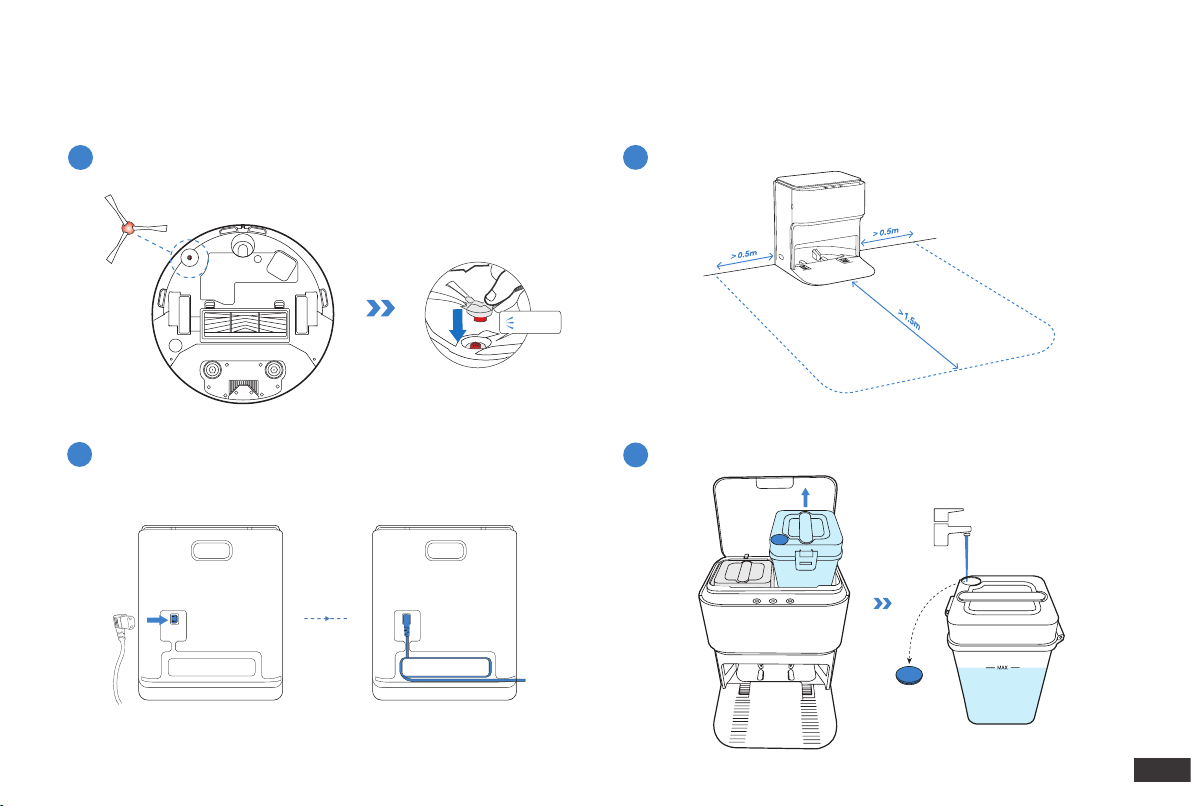
Assemble Self-cleaning Station
Self-cleaning Station Placement
Install Edge Brush
2
3
1
Before using Robot, please remove all protective films or protective strips on Robot and Self-cleaning Station.
2. Operating and Programming/2.2 Quick Start
Add Water to Clean Water Bucket
4
Click
Keep the area around the Station clear of objects and reective object
surfaces.
14
EN
6.5h
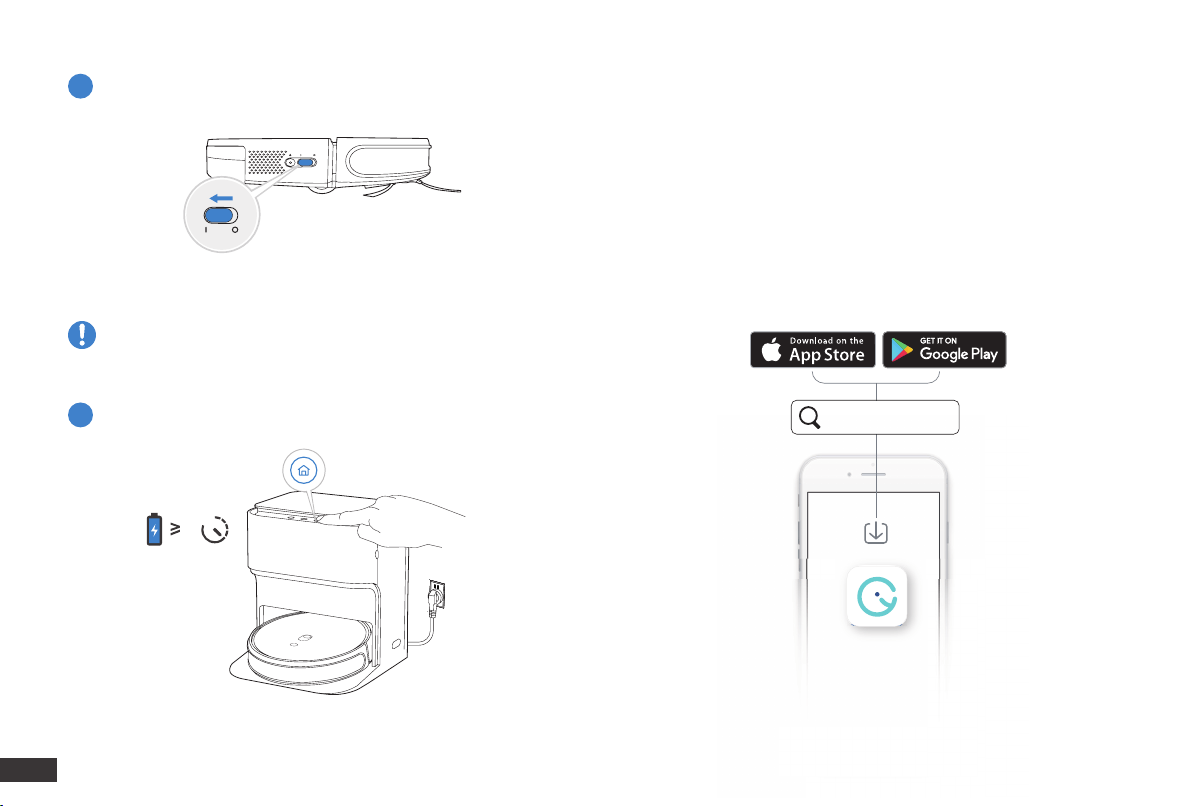
Power ON
Note: I = ON, O = OFF.
Robot cannot be charged when being powered OFF.
5
Charge Robot
6
2. Operating and Programming
/2.3 yeedi App
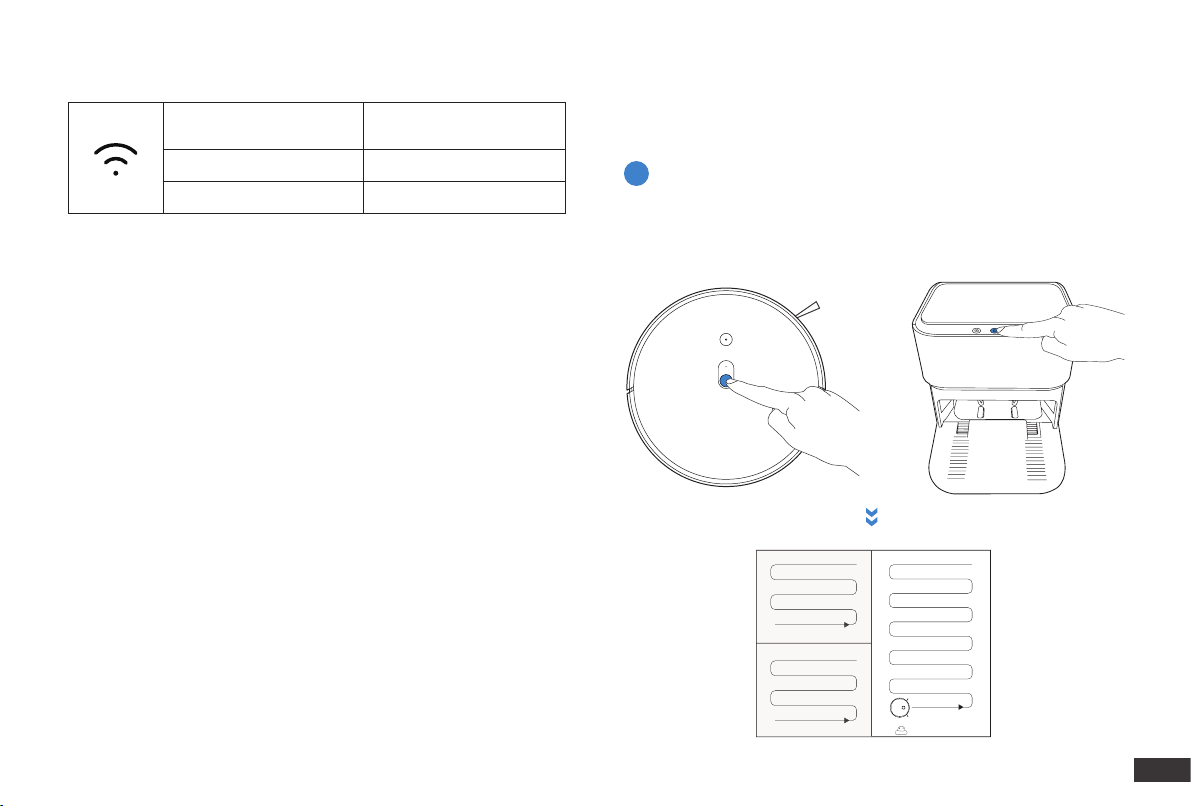
To enjoy all available features, it is recommended to control your
Robot via the yeedi App.
Before you start, make sure that:
• Your mobile phone is connected to a Wi-Fi network.
• The 2.4GHz band wireless signal is enabled on your router.
• The Wi-Fi indicator light on Robot is slowly ashing.
yeedi
15
EN
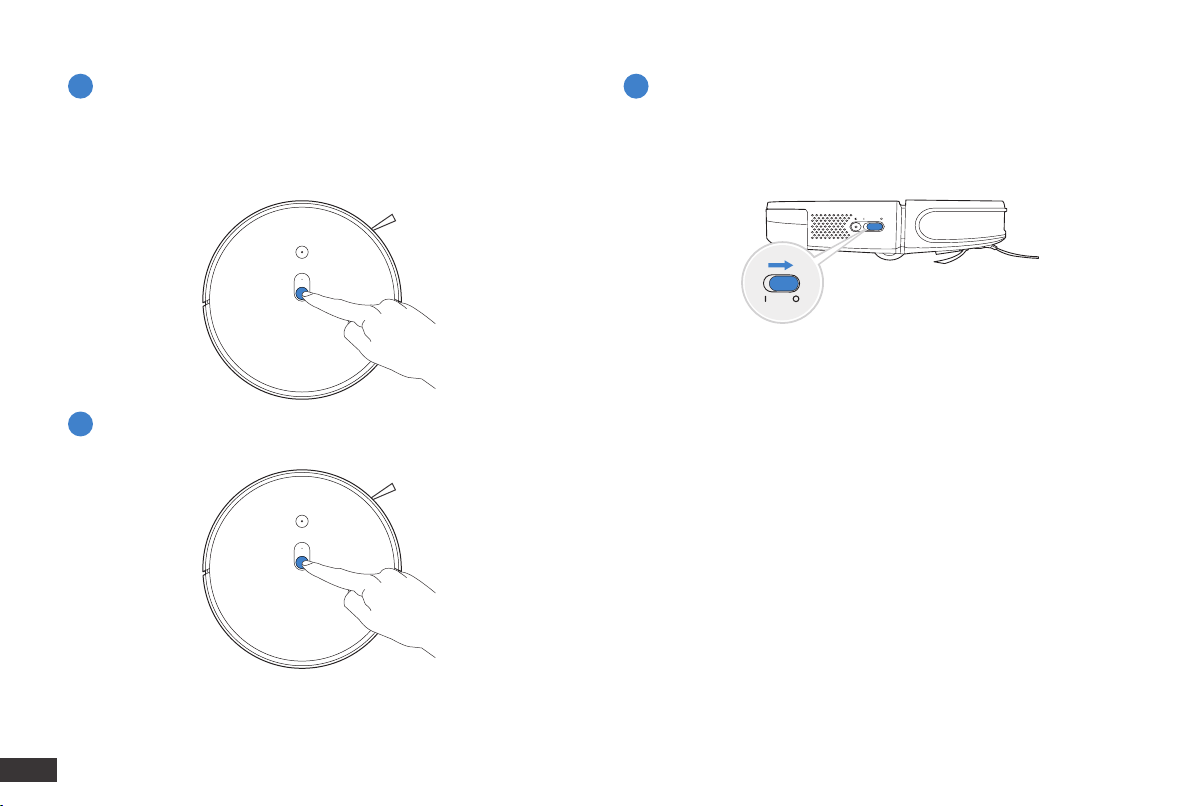
Wi-Fi Indicator Light
Tips:
If you have any problems during the Wi-Fi setup process, refer to the
Troubleshooting > Wi-Fi Connection section in this manual.
Please start mapping in Vacuum Mode to ensure efciency. Take off
the Mopping Pad Plates to switch to Vacuum Mode; Do not remove
the Reservoir.
Slowly flashing
Disconnected to Wi-Fi or
waiting for Wi-Fi connection
Rapidly flashing Connecting to Wi-Fi
Solid Connected to Wi-Fi
2. Operating and Programming
/2.4 Operating Robot
OR
Start
1
16
EN
Pause Power OFF
Wake Up
2 4
3
Note: The robot’s Control Panel stops glowing after the robot is
paused for a few minutes. Press the AUTO Mode Button on Robot to
wake it up.
Note: When Robot is not working, it is recommended to keep it
switched ON and charging.
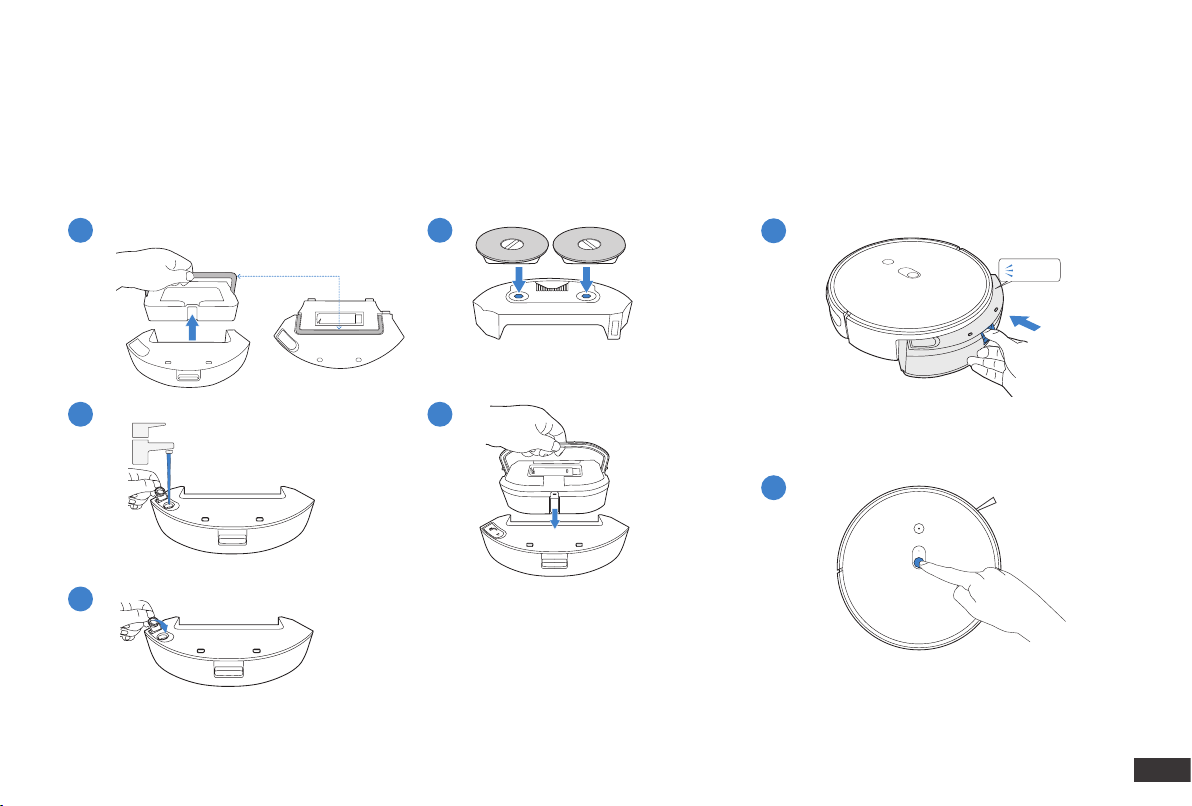
17
EN
2. Operating and Programming/2.5 Dust Bin & Reservoir
Note:
1. To prolong the service life of the reservoir, it is recommended to use puried water or softened water for the mopping system.
2. Empty the reservoir after Robot nishes mopping.
*Make sure the lid is tightened.
An untightened lid may cause water leakage.
Handle
1
2
2
1
5
3
4
Click
Add Water Install Dust Bin & Reservoir
18
EN
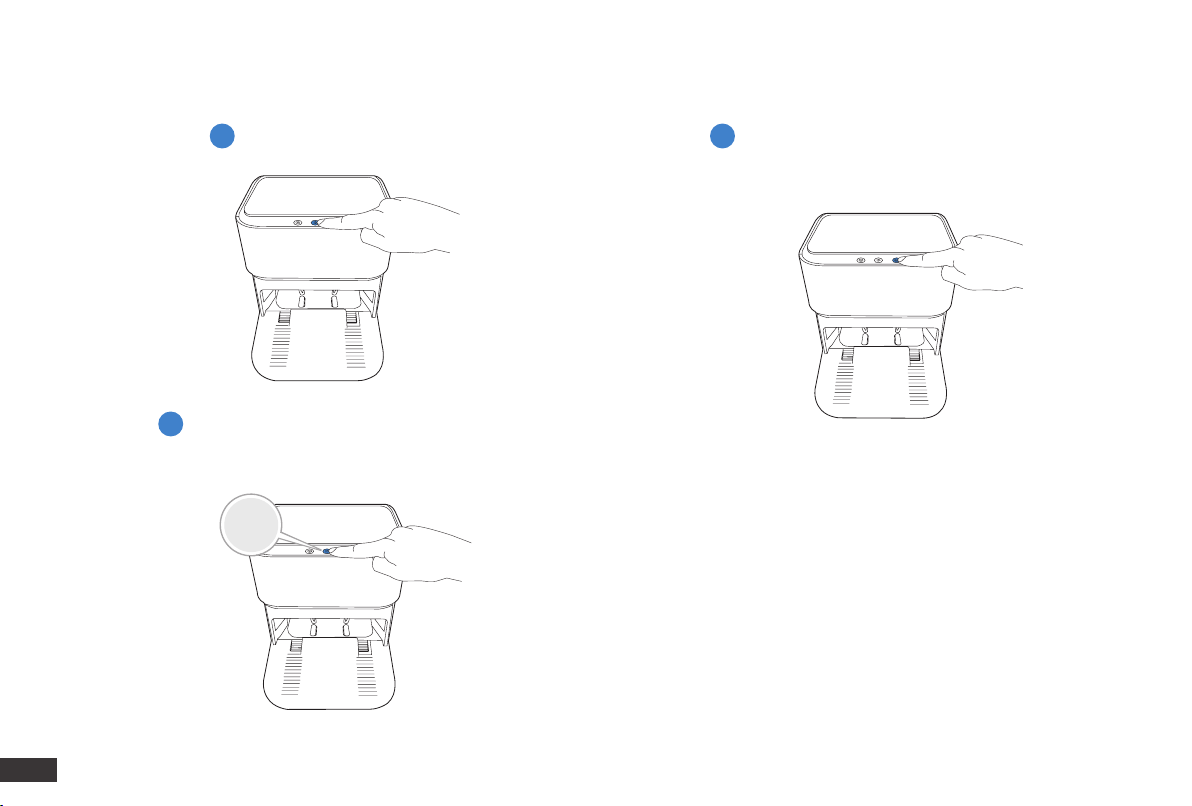
3s
2. Operating and Programming/2.6 Self-cleaning Station
Recall Robot/ Direct Robot to Exit
Self-cleaning Station
Start/Pause Robot
End Cleaning Task, Direct Robot
Back to Self-cleaning Station &
Start Cleaning Mopping Pads
3
1 2
19
EN
3. Maintenance/3.1 Regular Maintenance
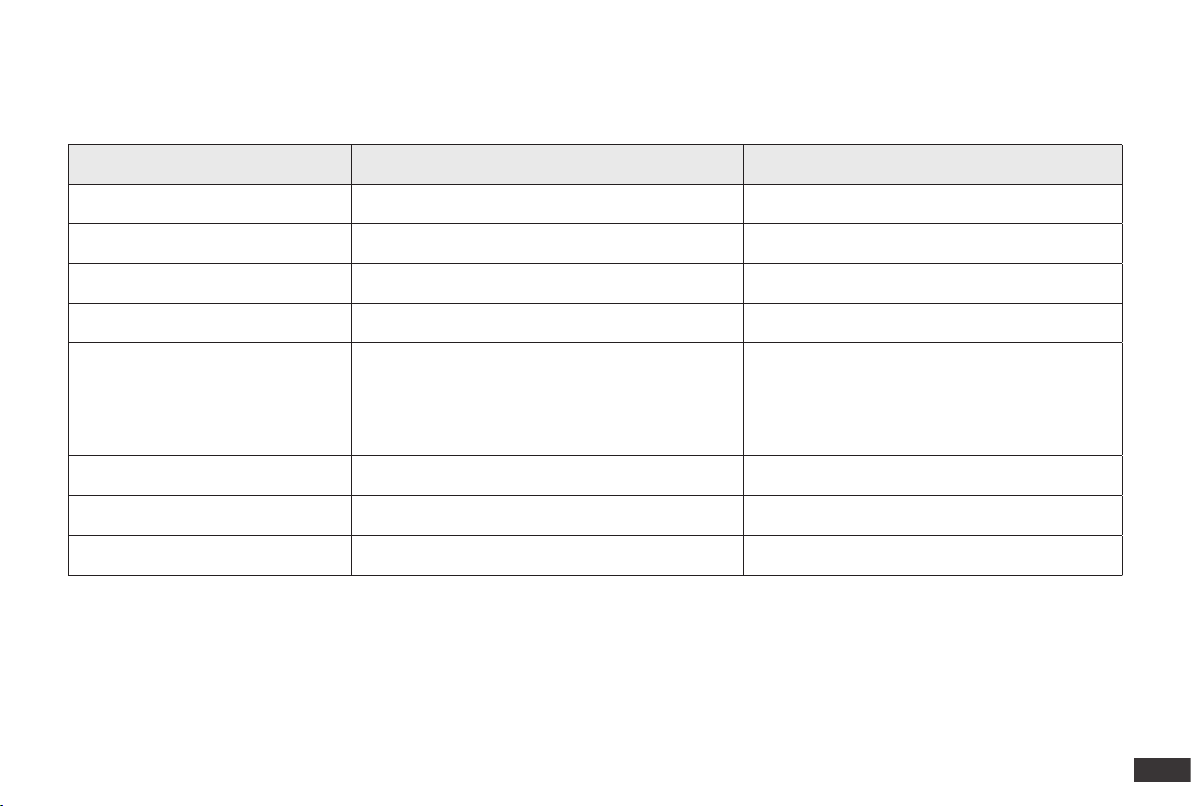
To keep Robot running at peak performance, perform maintenance tasks and replace parts with the following frequencies:
Note: yeedi manufactures various replacement parts and ttings. Please contact Customer Service for more information on replacement parts.
Robot Part Maintenance Frequency Replacement Frequency
Washable Mopping Pads / Every 3 months
Edge Brush Once every 2 weeks Every 3-6 months
Main Brush Once per week Every 6-12 months
Sponge Filter/High Efciency Filter Once per week Every 3-6 months
Mapping Sensor
Universal Wheel
Anti-Drop Sensors
Bumper
Charging Contacts
Slef-cleaning Station Pins
Once per week /
Cleaning Tank Once every 2 weeks /
Clean Water Bucket Once every 3 weeks /
Wastewater Bucket After each use /
A multi-function Cleaning Tool is provided for easy maintenance. Handle with care, this cleaning tool has sharp edges.
20
EN
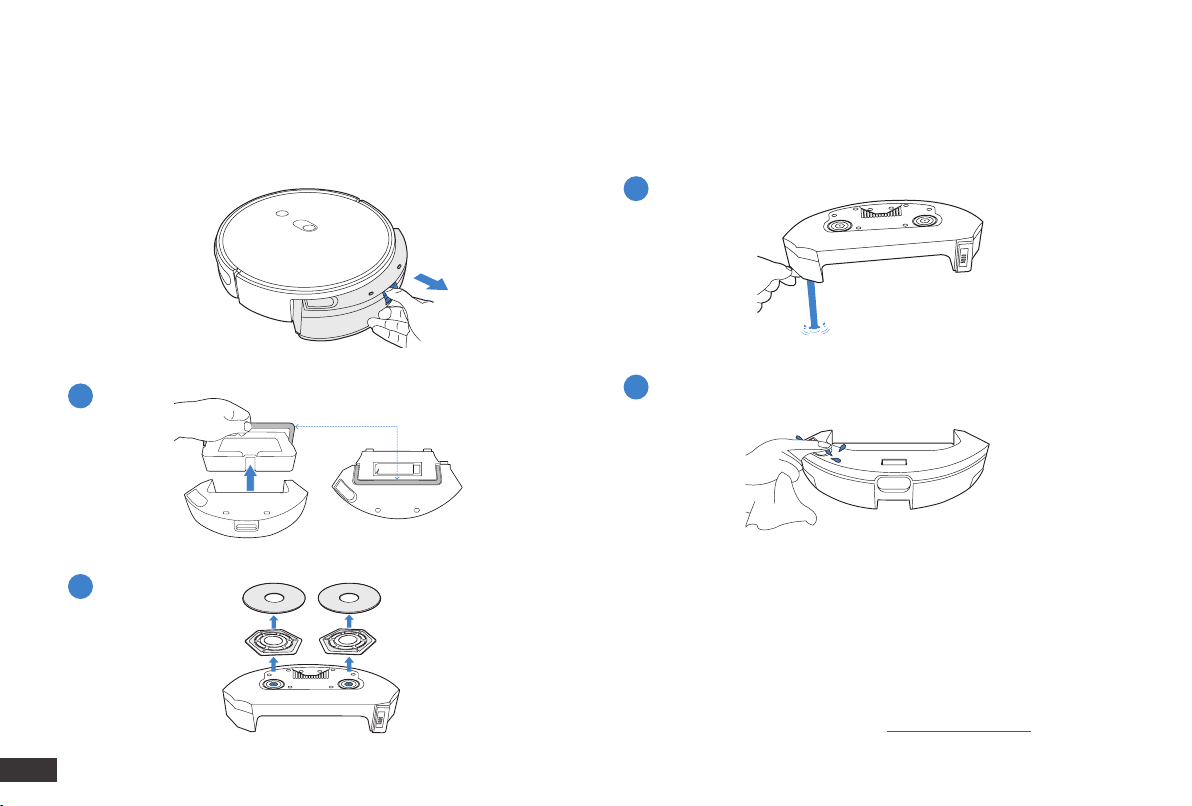
Before performing cleaning and maintenance tasks on Robot, turn the robot OFF and unplug Self-cleaning Station.
Note: After Robot nishes cleaning, empty the Reservoir.
Note:
1. Use the Self-cleaning Station to clean and dry the Washable Mopping
Pads. To extend the life of the Washable Mopping Pads, do not remove
them from the Mopping Pad Plates too often.
2. Rinse the Mopping Pad Plates with water. Do not use a cloth or any
other object to scrape the plates as this may shorten the life of its fastener.
3. Please replace the Washable Mopping Pads when yeedi APP prompts.
To purchase accessories, please visit https://us.yeedi.com.
3
4
1
2
3. Maintenance/3.2 Dust Bin & Reservoir
Reservoir
Handle
21
EN
1 4
2
5
3
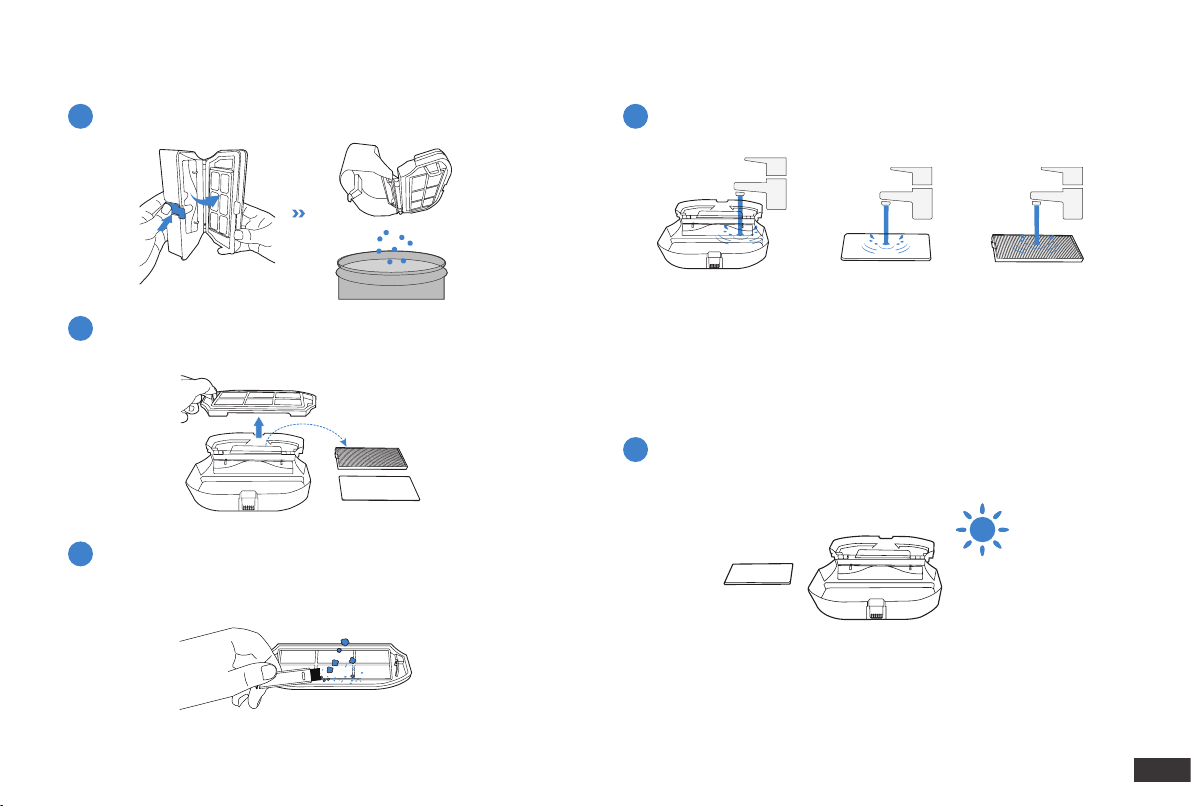
Dust Bin
Note:
1. Please rinse the lter with water as shown above.
2. Do not use nger or brush to clean the lter.
3. Be sure to dry out the lter for at least 24 hours after washing.
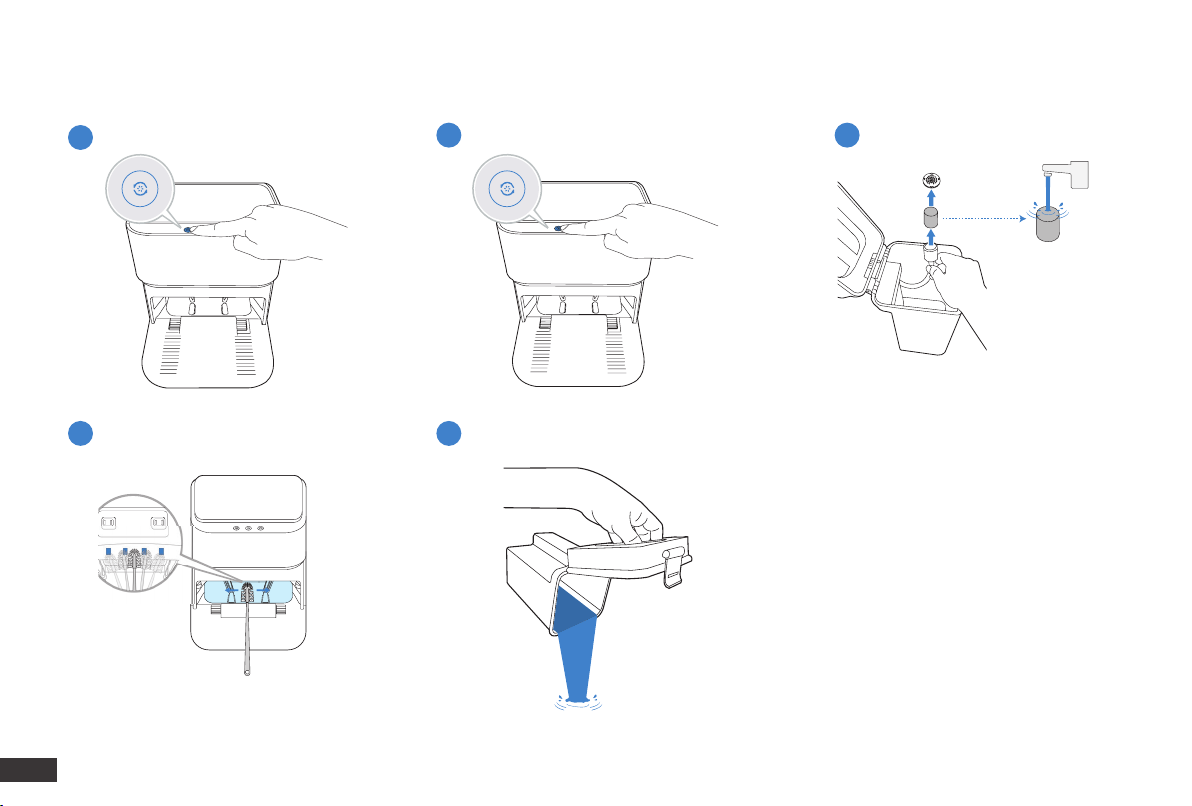
22
EN
Add Water to Cleaning Tank
Clean Cleaning Tank
Drain the Water Out of Cleaning Tank
1
42
53
3. Maintenance/3.3 Self-cleaning Station
Clean the Clean Water Bucket Filter
Empty Wastewater Bucket
23
EN
1 1
2
2
3
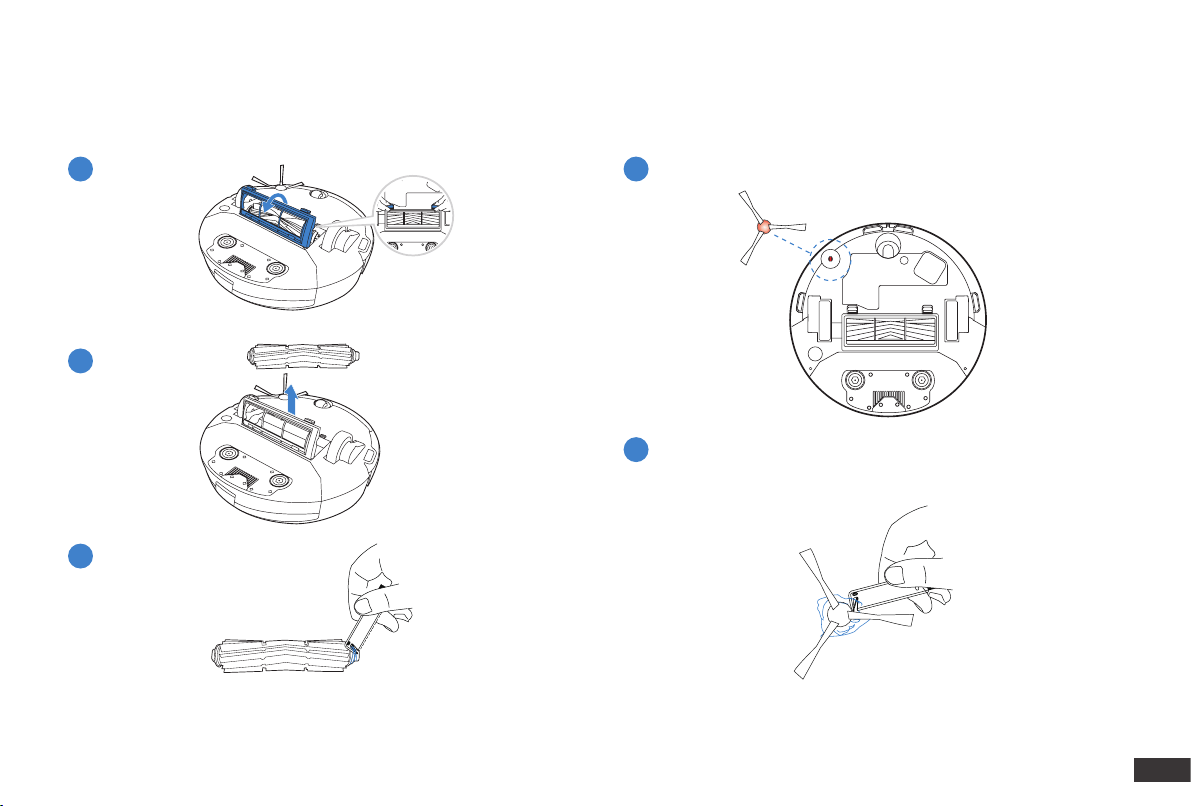
3. Maintenance/3.4 Main Brush & Edge Brush
Main Brush Edge Brush
Note: If Shaft Sleeve of the Main Brush falls off, please clean up the
debris and reinstall it.
24
EN
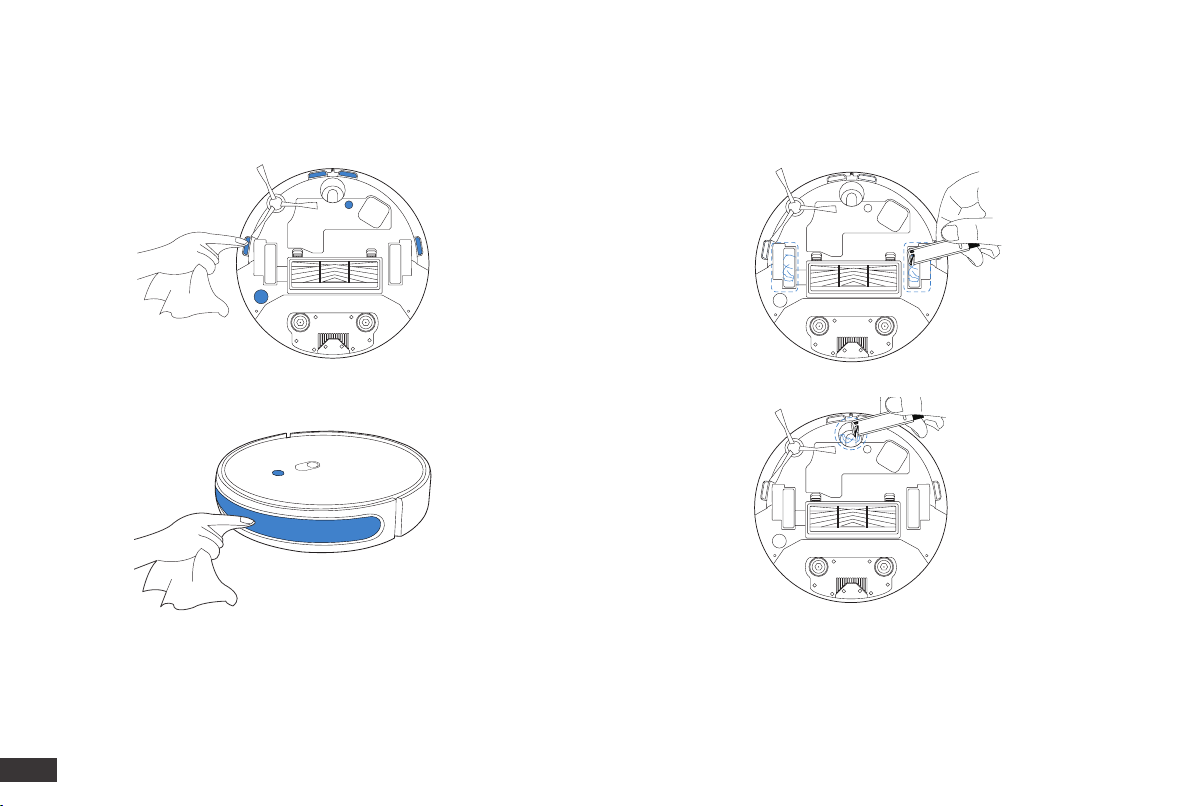
*Please wipe the components with a clean, dry cloth.
3. Maintenance/3.5 Other Components
Note: Please be alert that Universal Wheel may result in oor damage
if it is clogged with hair and debris.
When the Universal Wheel cannot rotate even after cleaning it, please
stop any further use of the device and immediately contact customer
service for help.
25
EN
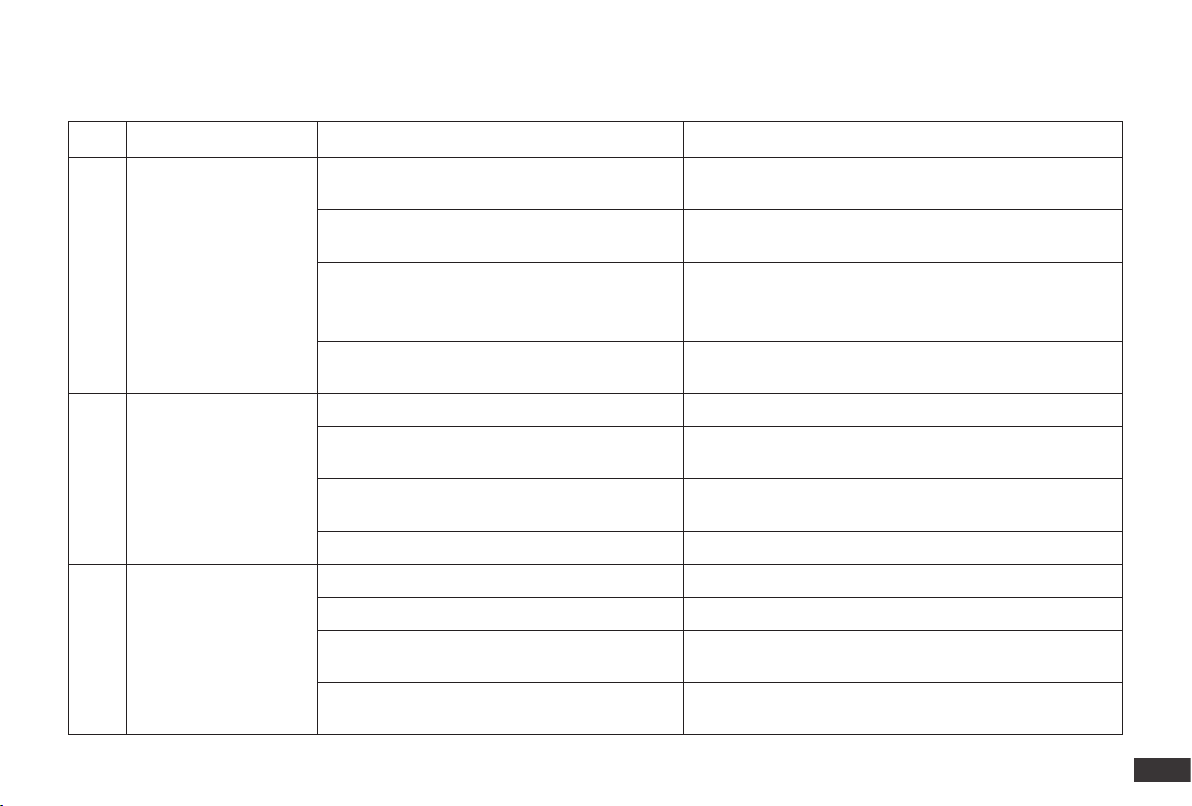
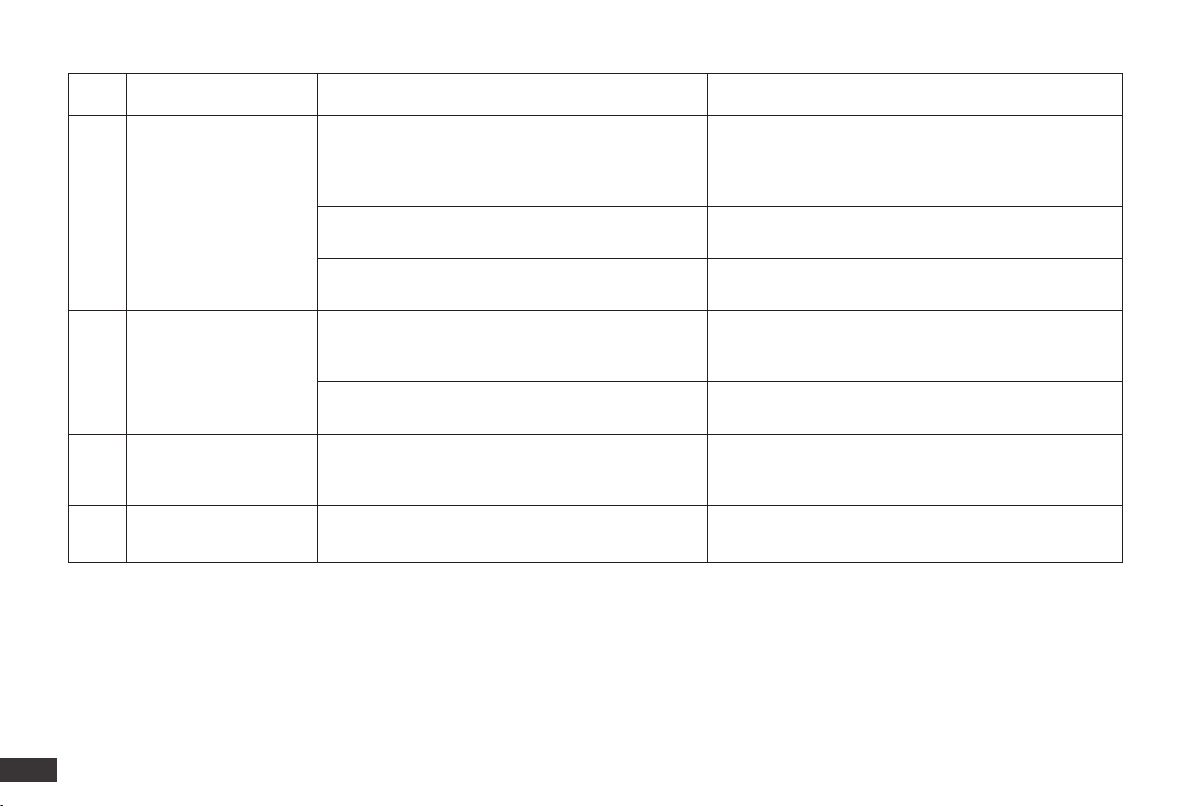
No. Scenario Possible Cause Solution
1
Robot is not able to
connect to the home
Wi-Fi network.
Incorrect home Wi-Fi username or password
entered.
Enter the correct home Wi-Fi username and password.
Robot is not within range of your home Wi-Fi
signal.
Make sure Robot is within range of your home Wi-Fi signal.
Network setup started before Robot was ready.
Turn ON Power Switch. Press the RESET Button for 3
seconds. Robot is ready for network setup when it plays a
musical tune and its Wi-Fi Indicator light flashes slowly.
Robot does not support 5 GHz Wi-Fi.
Make sure the robot has been connected with 2.4 GHz Wi-
Fi network.
2 Robot is not charging.
Robot is not switched ON. Switch ON Robot.
Robot has not connected to the Docking Station.
Be sure that the robot’s Charging Contacts have connected
to the Docking Station Pins.
The Docking Station is not connected to the
power supply.
Make sure the Docking Station is connected to the power
supply.
The battery is completely discharged. Please contact Customer Care for help.
3
Robot cannot return to
the Docking Station.
The Docking Station is not correctly placed. Refer to Section 2.2 correctly place the Docking Station.
The Docking Station is not correctly connected. Make sure the Docking Station is correctly connected.
The Docking Station is manually moved during
the cleaning.
It is suggested not to move the Docking Station during the
cleaning.
Robot did not start cleaning from the Docking
Station.
Make sure Robot starts cleaning from the Docking Station.
4. Troubleshooting/4.1 Troubleshooting
26
EN
No. Scenario Possible Cause Solution
4
Robot misses cleaning
spots to be cleaned,
or repeats cleaning the
area cleaned.
The cleaning cycle is interfered by small objects or
barriers on the floor.
Remove power cords and small objects from the floor
to ensure cleaning efficiency. Robot will automatically
clean the area missed, please avoid moving Robot
manually or block the path during the cleaning cycle.
Robot is working on slippery polished floors.
Make sure the floor wax is dried before Robot starts
cleaning.
Robot is unable to reach certain areas blocked by
furniture or barriers.
Tidy up the area to be cleaned by putting furniture and
small objects in their proper place.
5
Robot gets stuck while
working and stops.
Robot gets stuck while working and stops.
Robot will try various ways to free itself. If it is
unsuccessful, manually remove the obstacles and
restart.
Robot might be stuck under furniture with an
entrance of similar height.
Please set a physical barrier.
6
Robot is making too
much noise when
cleaning.
Robot is tangled or blocked with debris.
Clean Robot as described in section Maintenance and
restart. If the trouble persists, please contact Customer
Care.
7
Shaft Sleeve of the Main
Brush falls off.
Shaft Sleeve gets entangled by debris and falls off
during the cleaning.
Please clean up the debris and reinstall it.

27
EN
4. Troubleshooting/4.2 Wi-Fi Connection
Before Wi-Fi setup, make sure Robot, mobile phone, and Wi-Fi network meet the following requirements.
Robot and Mobile Phone Requirements
• Robot is fully charged and the power switch of Robot is turned on.
• Wi-Fi status light slowly ashes.
• Turn off mobile phone’s cellular data (you can turn it back on after setup).
Wi-Fi Network Requirements
• You are using a 2.4GHz or 2.4/5 GHz mixed network.
• Your router supports 802.11b/g/n and IPv4 protocol.
• Do not use a VPN (Virtual Private Network) or Proxy Server.
• Do not use a hidden network.
• WPA and WPA2 using TKIP, PSK, AES/CCMP encryption.
• WEP EAP (Enterprise Authentication Protocol) is not supported.
• Use Wi-Fi channels 1-11 in North America and channels 1-13 outside North America (refer to local regulatory agency).
• If you are using a network extender/repeater, the network name (SSID) and password are the same as your primary network.
28
EN
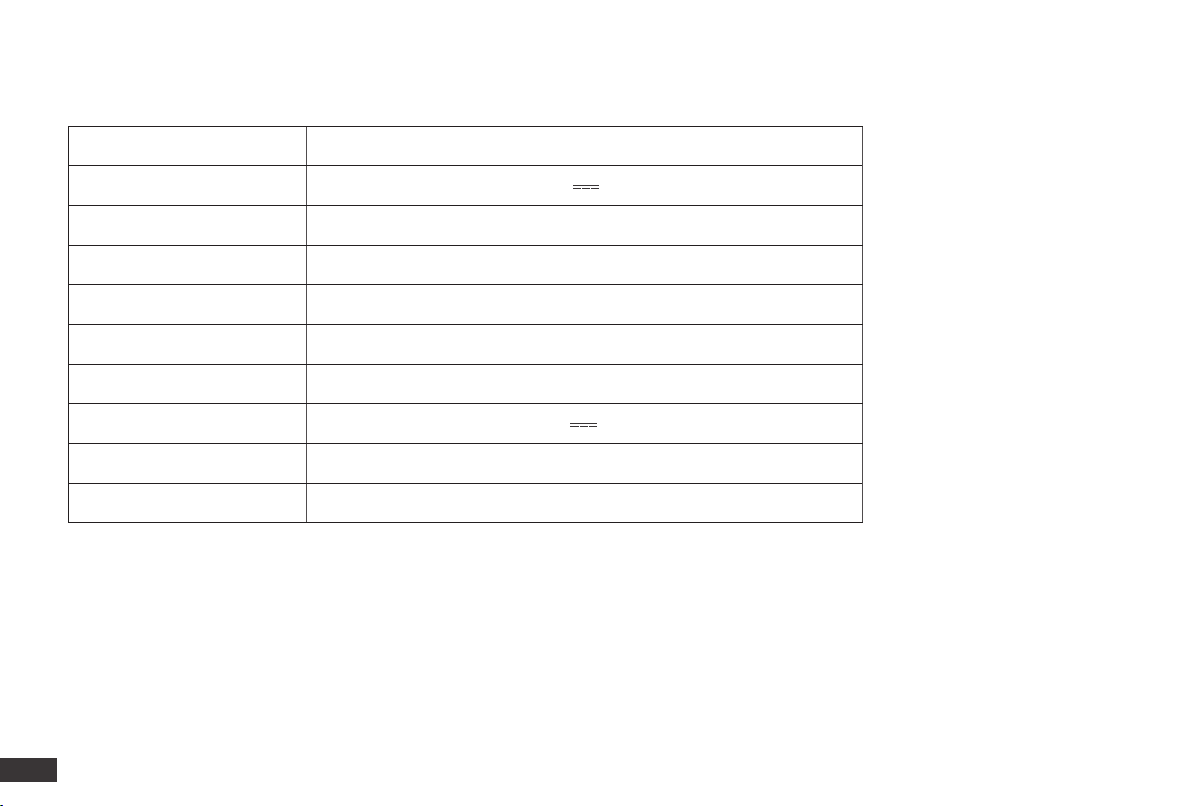
5. Product Specifications
Model DVX46
Rated Input 20V 2A
Battery RC02-LI-1440-5200
Nominal Voltage 14.4V
Watt Hour 69.12Wh
Self-cleaning Station Model CH2028
Rated Input 100-240V~ 50-60Hz 70W
Rated Output 20V 2A
Frequency bands 2400-2483.5MHz
Networked Standby Power Less than 2.00W
Output power of the Wi-Fi module is less than 100mW.
Output power of the 2.4G module is less than 10mW.
Note: Technical and design specications may be changed for continuous product improvement.