Use & Care Manual Dishwasher
DISHWASHER FEATURES
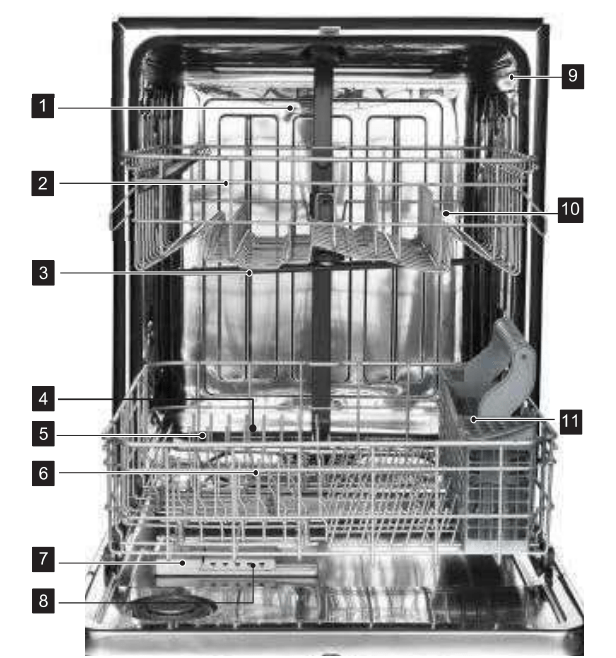
- Top Spray Arm
- Cup Shelf
- Upper Spray Arm
- Lower Spray Arm
- Bottom Rack
- Heating Element
- Rinse Aid Dispenser
- Detergent Dispenser
- Tub Gasket
- Adjustable Upper Rack
- Silverware Basket
OPERATING INSTRUCTIONS
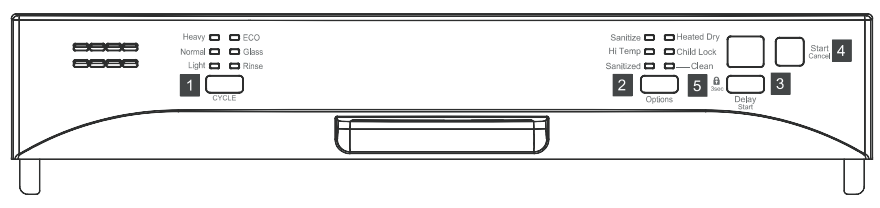
1 PRO
With the dishwasher door close, you can press the PRO button to select the wash cycle. A light on the display will indicate which cycle has been selected.
Wash Cycle Selections
Heavy wash
This cycle is for hard-to-clean, heavily soiled pots, pans and dishes.
Normal wash
This cycle is for regularly soiled dinner dishes or silverware.
Light wash
This cycle is for lightly soiled and pre-rinsed dishes and silverware.
Eco
This cycle is for all items. It can determine the condition of soil on the dishes and initiate the optimal cycle to obtain the best cleaning performance.
Glass
This cycle is for delicate dishes or glasses.
Rinse wash
This cycle is for pre-rinsing dishes or glasses.This is only a rinse that keeps food from drying on your dishes and reduces odor buildup in your dishwasher until you are ready to wash a full load. Do not use detergent.
2 Options
When the wash cycle has been selected, you can choose options by pressing the "Options" button.
Sanitize
To sanitize your dishes and glassware, select the Sanitize option. When selected, the light above the pad will turn on and remain on until end of cycle. The water temperature in the final rinse will be raised. The option is available in Heavy and Normal Wash.
Hi-Temp Wash
This option can increase the water temperature in the main wash and rinse. This increase in water temperature helps the dishwasher detergent remove food, grease and soil from dishes more effectively. The option is available in Heavy and Normal Wash.
Heated Dry
This option is available on all cycles except rinse only. The Heated Dry option in combination with rinse aid will enhance drying performance. You can turn off by pressing Heated Dry so that the light goes off during the period of the washing.
3 Delay Start
To delay the start of a selected cycle, press Delay /Start pad until the desired delay time shows in the LED indicator. It allows you to automatically start your dishwasher for a 1 to 24 hour delay.
To cancel the Delay Start option and begin the cycle before the delay period is over press the Start/Cancel pad.
4 Start/Cancel
Push door firmly closed. The door latches automatically. Select the wash cycle and options desired, the indicator light above the pad will turn on. To start press the Start/Cancel pad once, the light will flash and the wash action begins. To cancel when a cycle is running, press Start/Cancel pad once and the dishwasher will start a 60 second drain and then shut off. At the end of the drain, you can select the desired cycle. When you want to load more dishes or pause the dishwasher while it is already running, make sure to open the door slowly and carefully as there is a possibility of injury from the hot steam inside the dishwasher. You can add more dishes before the main wash starts. Open the door and check the detergent dispenser. If the main wash section of the detergent dispenser is still closed, you can add items. If the door is opened while the dishwasher is running, a safety mechanism is activated and stops the cycle.
5 Child Lock
You can lock all controls to prevent children from accidently changing the dishwasher cycle or starting the dishwasher. Press and hold the Delay Start pad for 3 Seconds the lock graphic light will turn on. To unlock the control press and hold the Heated Dry pad for 3 seconds, the lock graphic light will turn off.
Indicator light
Sanitize
When "sanitize" option is selected, the temperature of the water will reach a maximum of 70°C (158°F).
Certified residential dishwashers are not intended for licensed food establishments. The sanitize cycle is NSF certified.
Warning: The sanitize option is available with "Heavy" "Normal" "Light" and "ECO" cycle.
Clean
The clean light will turn on at the end of the cycle
Status Window
01-24
If the Delay Start option is selected, the number of delay start hours shows in the Status Window. If the dishwasher is working and the wash cycle time is more than a hour, number of hours and minutes left shows alternately in the Status Window.
CL
Flashes once the program has been entered and the Start/Cancel key is pressed. It also flashes if the door is opened during a wash cycle. Close the dishwasher door to begin or continue a wash cycle.
MINUTES
Number of minutes left in a cycle (0-59 or 1H-2H). It shows hours and minutes alternately.
NOTE The remaining time could suddenly increase or decrease by several minutes. This means the Smart Sensor has checked the soil level and adjusted for the appropriate water fill level.
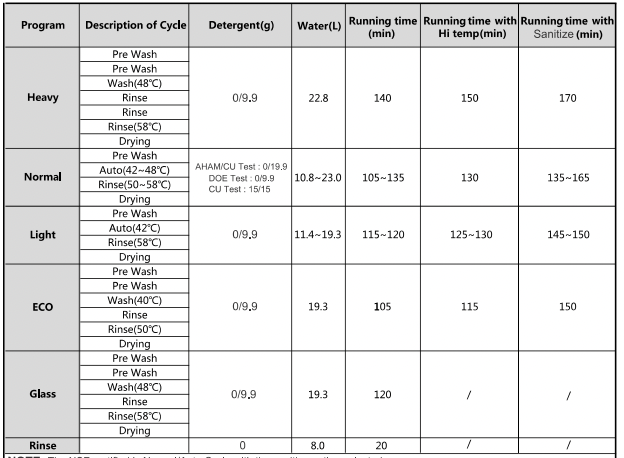
NOTE: The NSF certified is Normal/Auto Cycle with the sanitize option selected. The CU test is Normal Cycle with the hi temp option selected.
PREPARING AND LOADING DISHES
Dish preparation
Scrape away large pieces of food, bones, pits, toothpicks, etc. The continuous filtered wash system will remove the remaining food particles. Burned-on foods should be loosened before loading. Empty liquids from glasses and cups.
Foods such as mustard, mayonnaise, vinegar, lemon juice and tomato based products may cause discoloration of stainless steel and plastics if allowed to sit for a long period of time. Unless the dishwasher is to be operated at once it is best to rinse off these food soils.
If the dishwasher drains into a food disposer, be sure disposer is completely empty before starting dishwasher.
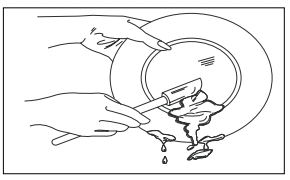
Loading the upper rack
The upper rack is designed for cups, glasses, small plates, bowls and plastic items marked "dishwasher safe" etc. For best results, place the bowls, cups, glasses, sauce pans with soiled surface facing down or toward the center. Tilt slightly for better drainage.

Make sure the loaded dishes do not interfere with the rotation of the middle spray arm, which is located at the bottom of the upper rack. (Check this by rotating the middle spray arm by hand.)
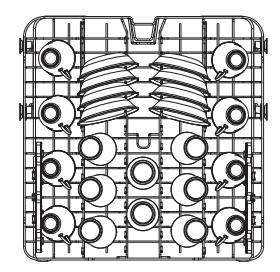
8 place settings standard loading pattern (For best washing performance, the upper rack should be in the raised position.)
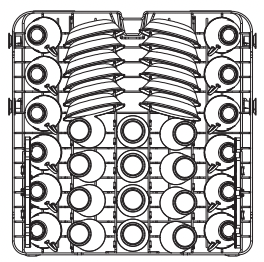
12 place settings standard loading pattern
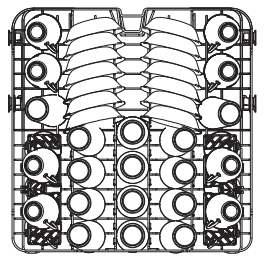
14 place settings standard loading pattern
Loading the Bottom Rack
The bottom rack is designed to load plates, soup bowls, plates, saucers and cookwares. The adjustable rack space will allow you to load maximum 13 inch items.
Large items should be placed along the edge so they do not interfere with the middle spray arm rotation, and make sure they do not prevent the detergent dispenser from opening. Large items should be turned so that the inside faces downward, and make sure these items do not interfere with the lower spray arm rotation.
The fold-down tines in the bottom rack make it easy to load those extra large and hard-to-fit items. The tines may be left up for normal use or folded down for more flexible loading. Fold down for more space to load large pots or pans.
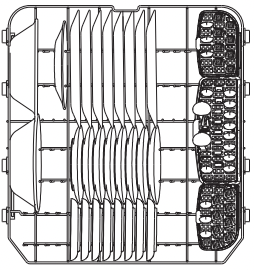
8 place settings standard loading
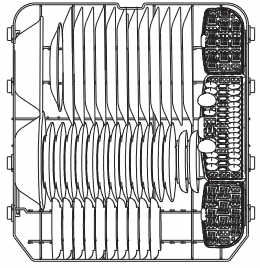
12 place settings standard loading pattern
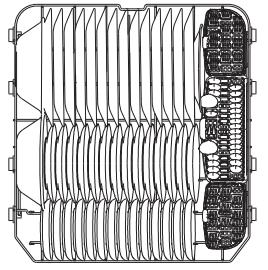
14 place settings standard loading pattern
Loading the Silverware Basket
The silverware basket could be divided into three separate modules that can be used in both upper and lower racks
- 1.spoons
- 2.knives
- 3.salad forks
- 4.forks
- 5.large spoons
- 6.large forks
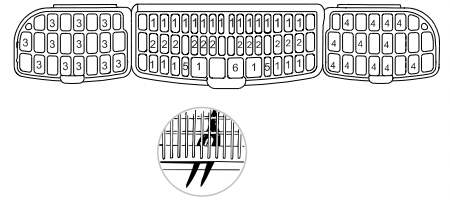
 WARNING! Do not let any item extend through bottom.
 Be sure nothing protrudes though bottom of the basket or rack to block the lower spray arm.
Adding A Dish
To add or remove items after wash cycle starts:
1 Open door slightly and wait a few seconds until wash action stops before completely opening.
2 Add the item.
3 Close door firmly to latch and cycle will automatically resume.
Adjustable Upper Rack
The upper rack height can be easily adjusted to accommodate loading taller dishes in either rack. To accommodate taller dishes in the bottom rack, there are 2 positions available:
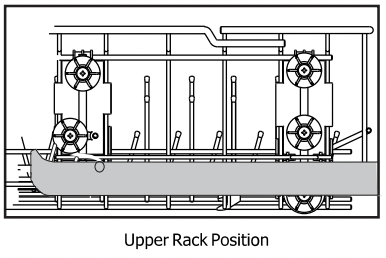
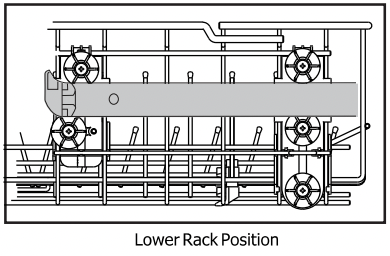
Note: Height should be adjusted without dishes in the racks.
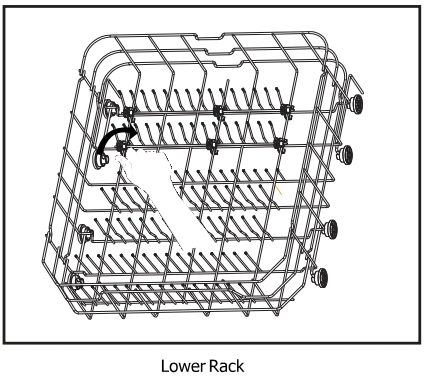
Fold-down Tines
The fold-down tines in the rack make easy loading for those extra large and hard-to-fit items. The tines may be left up for normal use or folded down for more flexible loading. Fold down for more space to load large pots or pans.
DISHWASHER DISPENSER & DETERGENTS
Filling the detergent dispenser
Rinse aid greatly improves drying and reduces water spots and filming. Rinse agent removes spots and prevents new film build up on your dishes, glasses, flatware, cookware and plastic. Without rinse aid your dishes and dishwasher interior will have excessive moisture. The Heated Dry option will not perform as well without rinse aid. The rinse aid dispenser, located next to the Detergent cup, automatically releases a measured amount of rinse aid during the last rinse.
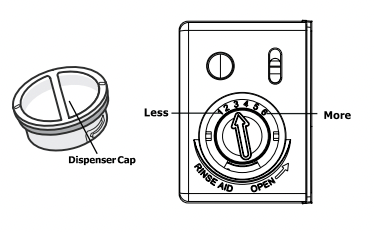
If spotting and poor drying is a problem, increase the amount of rinse aid dispensed by rotating the dial to a higher number. The dial is located under the dispenser cap.
If the rinse aid is low, the Rinse Aid light is illuminated at the beginning and end of the cycle indicating that it is time to refill.
Your dishwasher is designed to use liquid rinse aid. The use of rinse greatly improves drying performance after the final rinse. Do not use a solid or bar-type rinse aid. Under normal conditions, the rinse aid will last approximately one month, try to keep it full, but do not over fill.
Filling the Dispenser
- 1 Try to keep it full, but do not over fill.
- 2 Turn the dispenser cap to the left and lift it out.
- 3 Add rinse agent until the indicator window looks full.
- 4 Clean up any spilled rinse agent with a damp cloth.
- 5 Replace the dispenser cap.
Filling the rinse aid dispenser
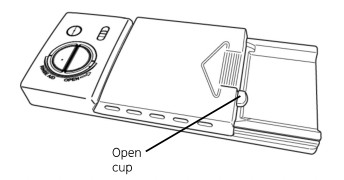
- 1. Push the dispenser cover latch downwards and open it.
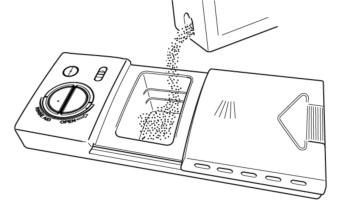
- 2. Add the detergent to the main wash compartment.
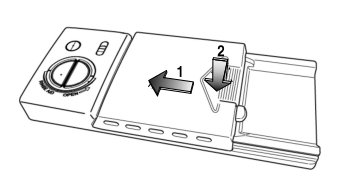
- 3. After pouring the detergent into the container, close the lid, first pushing (1) and then pressing on it (2) until hear the click.
CARE AND CLEANING
Clean the Stainless Steel Inner Door and Tub
The tub is made of Stainless Steel, it will not rust or corrode if the dishwasher should be scratched or dented.
Clean the Cylinder Filter
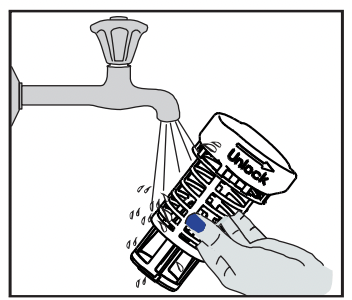
The Cylinder Filter is designed to collect some big items such as broken glass, bones and pits. The Cylinder Filter needs to be cleaned to maximize wash performance. Remove the lower rack, rotate the Cylinder Filter as shown, lift it out, empty and clean it by rinsing it under running water and replace.
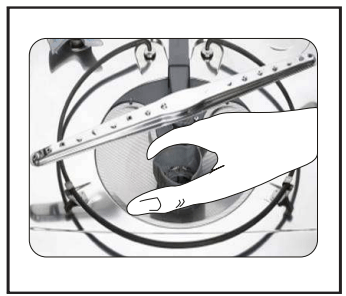
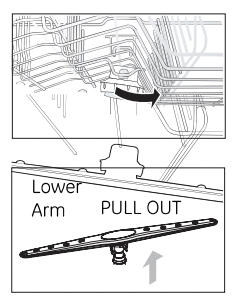
Because hard water chemicals will clog the spray arm jets and bearings, it is necessary to clean the spray arms regularly. Wash the arms in soapy, warm water and use a soft brush to clean the jets. Replace them after rinsing thoroughly.
To remove the upper or middle spray arm, unscrew the nut clockwise.
To remove the lower spray arm, pull upward.
Clean the spots on the steel inner door and tub with a damp nonabrasive cloth.
WARNING Burn Hazard Allow heating element to cool before cleaning the interior. Failure to do so can result in burns.
Clean the Fine Filter
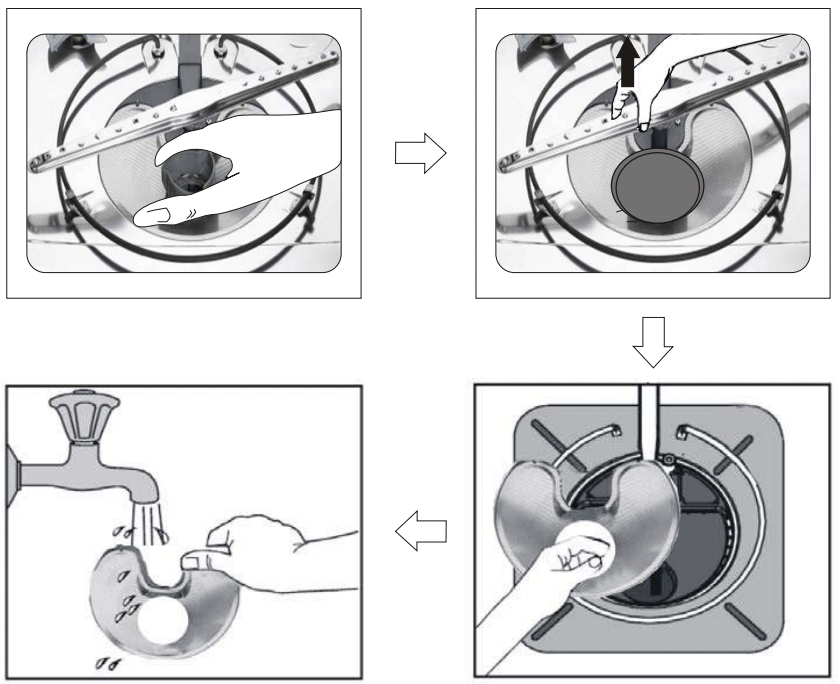
Take out the Cylinder Filter and remove the Fine Filter from the dishwasher tub bottom. To remove the Fine Filter you must first remove the bottom spray arm as shown below. Flush the Fine Filter by holding it under running water and replace.
SOLUTIONS TO COMMON DISHWASHING PROBLEMS
Dishwasher won't start
Door may not be closed properly
- Shut the door completely make sure it is latched
Power supply or power line is not connected
- Check and connect the power supply
Delay Start option has been selected
- Refer to Delay Start section in this manual to rese
Child Lock activated (selected models)
- Deactivate the child lock, refer to child lock section in this manual
Dishwasher beeps at the end of the cycle
It indicates the wash cycle finished, the dishwasher will beep
Rinse Aid light on
The rinse aid level is low
Dishwasher operates too long
The dishwasher is connected to cold water
- Check the dishwasher, make sure it connected to the hot water supply
The cycle time will vary due to the soil
- When heavy soil is detected, the , normal, cycle will automatically increase the cycle time
The sanitize option is selected
- When sanitize option is selected, the cycle time will be increase to meet the sanitized temperature request
Dishes are not clean enough
Water pressure is temporarily low
- Use you dishwasher when the water pressure is normal
The inlet water is low
- Make sure the dishwasher is connected to the hot water supply
- Try not use your dishwasher when hot water is being used elsewhere in the house
Dishes are loaded too close together
- Load the dishes again as the manual introduced
improper use of detergent
- Add detergent depending on the water hardness and the cycle you chose. Use fresh detergent.
The selected cycle is not suitable for food soil condition
- Choose anther cycle for longer washing time
Spay arms is blocked by some items er ea
- Make sure the spay arm is rotating freely
Dishes not drying enough
Rinse Aid dispenser is empty
- Fill rinse aid dispenser or increase the amount of rinse aid.
Improper loading of dishes
- Load the dishes again as the manual introduction
The cycle you chose did not included the drying.
- Choose the proper cycle with drying
Spots and filming on dishes
Water hardness is too high
- For extremely hard water install a water softener
Improper loading of dishes
- Load the dishes again as the manual indicates
Old or damp powder rinse aid is used
Rinse Aid dispenser empty
- Add rinse aid to the dispenser
Etching
Using too much detergent
- Use less detergent if you have soft water
The inlet water temperature exceeds 150 °F
- Lower the inlet water temperature
Detergent left in dispenser cup
Detergent may be too old
Spray arm is blocked
- Load the dishes. making sure the spray arms are not blocked.
Detergent dispenser will not shut
Improper operation of the detergent cover
- Add the detergent and rinse aid as indicated by the manual
Water remains in the dishwasher
Previous cycle has not finished or has been interrupted
- Select the proper cycle as indicated by the manual
Dishwasher does not drain properly
Drain is clogged
- Check the air gap if you have
- Make sure the disposer is empty if the dishwasher is connected to the disposer
Drain hose is kinked
- Make sure the drain hose is properly connected to the sink
Suds in the tub
Improper detergent is used
- Make sure to use only the automatic dishwasher detergent
Dishwasher leaks
Excessive suds caused by using the improper detergent
- Make sure to use only the automatic dishwasher detergent
Dishwasher is not level
- Leveling the dishwasher (see the installation manual)
Black or gray marks on dishes
Aluminum utensils have rubbed against dishes
- Chose a higher cycle
- Make sure the inlet water is no less than 120°F
Stained tub interior
Coffee and tea soil
- Using a spot cleaner to remove the soil
Reddish stain
- Some tomato food will cause this. use of the rinse only cycle right after loading this will decrease the staining
Noises
Detergent cup opening\Drain pump sound
A hard object has entered the wash module. When the object is ground up. the sound should stop.
- If the noise persists after a complete cycle. call for service.
Dishwasher won't fill
Water valve is turn off
- Check if the water valve is turn on
Door latch may not be properly seated
- Make sure the door is closed
Error Codes
When some malfunctions come on. the appliance will display error codes to warn you:
E1
Longer inlet time.
- Faucets is not opened. or water intake is restricted. r water pressure is too low.
E4
Overflow.
- Some element of dishwasher leaks .
WARNING!
- If overflow occurs. turn off the main water supply before calling a service.
- If there is water in the base pan because of an overfill or small leak. the water should be removed before restarting the dishwasher.