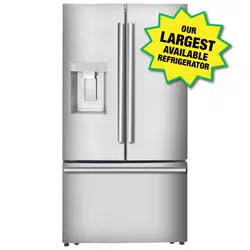
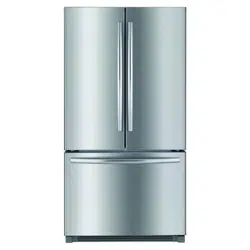
User ManualPARTS AND FEATURES
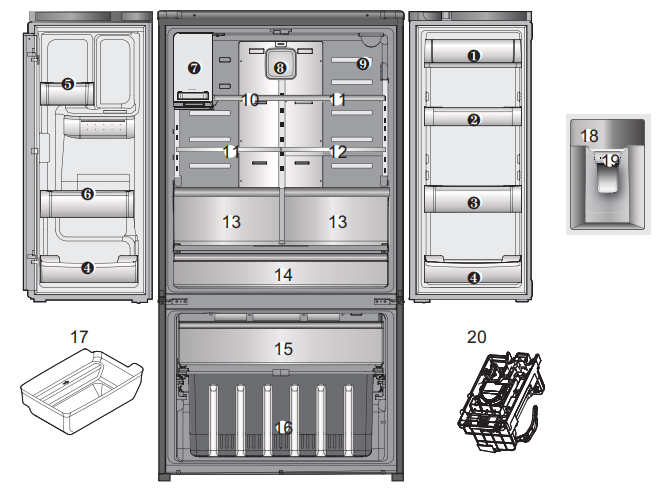
1. Covered Dairy Bin or Covered Storage Bin
for storing butter and cheese.
2. Low profile door storage bin
for items of medium to large size.
3. Gallon door storage bin
for items of medium to large size.
4. Low profile door storage bin
for items of medium size.
5. Small door storage bin
for small items.
6. Narrow door storage bin
for small items.
7. Icemaker/Ice cube bin
for making and holding ice for through-the-door dispenser.
8. Air filter
9. Water filter
10. Narrow Top Shelf
11. Adjustable glass shelf
12. Slide Shelf (*)
13. Humidity controlled crisper bin
for storage of fruits and vegetables
14. Temperature Control full width pantry drawer (*)
for storage of meat and fresh vegetables
15. Pull out freezer drawer
16. Lower freezer basket
for general freezer storage
17. Freezer Ice Storage Bin
18. Control and display panel
19. Ice/Water Dispenser
20. Freezer icemaker (*)
USING YOUR REFRIGERATOR
SETTING THE CONTROLS
Temperature Control
NOTE: When changing control settings, wait 24 hours before making additional adjustments. The controls are set correctly when milk or juice is as cold as you would like and when ice cream is firm. If the temperature in either compartment is too cold or too warm, change the setting one increment at a time. Wait 24 hours for the change to stabilize before adjusting again.
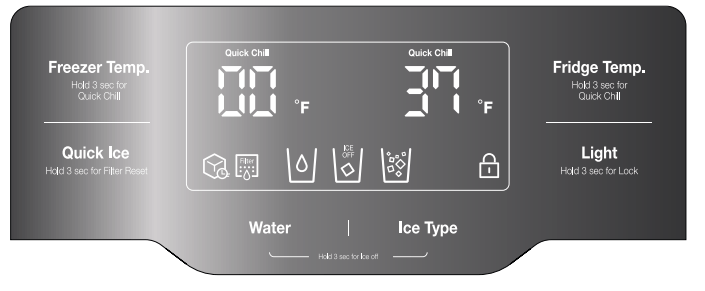
- The refrigerator temperature control is preset to 37 deg F (3 deg C) and the freezer control is preset to 0 deg F (-18 deg C). These are recommended temperature settings for normal use conditions.
Freezer Compartment
Push the Freezer Temp. button and the temperature setting changes in the sequence as shown below:

Quick Chill Freezer function:
To activate freezer Quick Chill, press and hold the Freezer Temp. button for 3 seconds. Quick Chill LED will turn on. Push the button again to cancel.
The Quick Chill function is useful to help quickly chill the freezer compartment when needed. For example: If a large quantity of warm food is placed inside the freezer, or if loading the freezer with new groceries which may not be as cold as normal freezer temperatures.
Quick Chill will automatically cancel (Quick Chill LED will turn off) after 50 hours.
Refrigerator Compartment
Push the Fridge Temp. button and the temperature setting changes in the sequence as shown below:

Quick Chill Refrigerator function:
To activate refrigerator Quick Chill, press and hold the Fridge Temp. button for 3 seconds. Quick Chill LED will turn on. Push the button again to cancel.
The Quick Chill function is useful to help quickly cool the refrigerator compartment when needed. For example: If a large quantity of warm food is placed inside the refrigerator, or if loading the refrigerator with new groceries which may not be as cold as normal refrigerator temperatures.
Quick Chill refrigerator function will automatically cancel (Quick Chill LED will turn off) after 6 hours
Control Panel
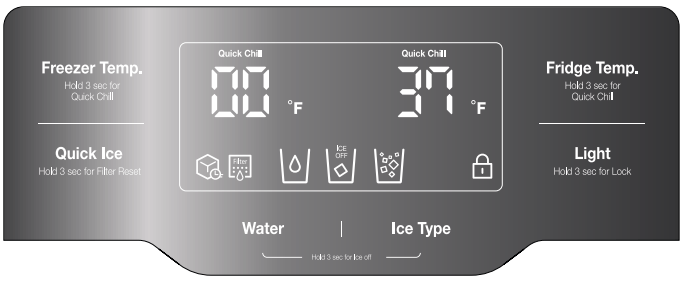
1. Freezer Temp. button 
Selection button for freezer compartment temperature.
2. Quick Ice button 
1) Press the Quick ice button once to turn on Quick Ice Mode.
Press the "Quick Ice" button one time to cancel Quick Ice feature (LED Off). This function increases ice-making capabilities for 24 hours.
2) Filter Reset
When the Filter Change icon turns on, you need to change the water filter. After changing the water filter, press and hold the Quick Ice button for 3 seconds to turn the indicator light off. You need to change the water filter approximately every 6 months.
3. Water / Ice Select 
Press either Water or Ice Type button according to your needs. Press Ice Type button again according to your ice preference. (Cube/Crushed)
4. Fridge Temp. button 
Selection button for fridge compartment temperature.
5. Light button 
1) Press to turn dispenser light on or off.
2) To lock the control panel: Press and hold light button for 3 seconds. Locked icon will appear. To unlock, press and hold Light button for 3 seconds. Locked icon will disappear.
6. Symbols on the display panel
Quick Ice 
Illuminates when Quick Ice function is ON.
Replace Filter 
When the Filter Change icon turns on, you need to change the water filter. After changing the water filter, press and hold the Quick Ice button for three seconds to turn the indicator light off. You need to change the water filter approximately every six months.
Panel lock 
Illuminates when the panel lock is on.
Ice Maker 
Illuminates when the Ice maker is off
Cubed/Crushed Ice 
Changes according to your ice preference (Ice Type button)
7. Temperature Mode Switch Function (°F ↔°C)
If you want to convert °F to °C or vice Versa:
1) Press and hold the Lock button for 3 seconds. The lock icon will illuminate.
2) Press and hold Freezer Temp. and Fridge Temp. buttons at same time for 5 seconds until temperature mode changes.
NOTE: If the lock icon is illuminated after performing this function, press and hold Light button for 3 seconds to turn control lock OFF
ICEMAKER
Turning on the icemaker
CFRR255WD** models have a dispenser connected icemaker located on the left side of the refrigerator compartment.
Whenever the refrigerator is plugged in after being unplugged, icemaking is automatically set to On. To turn icemaking Off or On, see the instructions in Shutting icemaking off.
NOTE: As long as icemaking is turned On in the control panel, if an icemaker stops production because the ice bin becomes full, production will resume operation once the ice bin is cleared of ice.
In case the icemaker doesn’t work
- Did you wait for 12 hours after installation of the water supply line before making ice?
- Is the water line connected and the shut-off valve opened?
- Is the freezer temperature too warm? Try setting the freezer temperature lower.
In case of power failure
In the event of a lengthy power failure, remove ice cubes in the storage bin as the ice may melt and flow down to the ice dispenser and leak out.
Place bin back in the icemaker assembly
Shutting icemaking off 
Important! If you do not intend to use any ice cubes for longer than one week (e.g. because you are going on holiday), shut off icemaking for that period to prevent ice cubes from freezing together.
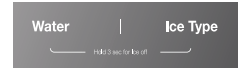
1. To turn OFF : Press and hold Water and Ice Type buttons at same time for 3 seconds until Ice Off illuminates in the control panel display.
To turn ON : Press and hold Water and Ice Type buttons at same time for 3 seconds until Ice Off ceases to illuminate in the control panel display.
2. Empty and clean the ice cube bin. To remove ice bin from dispenser icemaker, grasp front of ice bin and pull forward. To remove freezer ice bin, pull freezer drawer all the way forward and lift ice bin up and out of pullout drawer.
NOTE: There is a fingerhold indentation on the bottom front of the dispenser ice bin for ease of bin removal.
3. Return the ice cube bin into position.
NOTE: The ice bin should be emptied any time the icemaker is turned off.
WHEN TO SET ICEMAKER TO OFF
- When the water supply will be shut off for several hours.
- When the ice bin is removed for more than one or two minutes.
- When the refrigerator will not be used for several days.
NOTE: The ice bin should be emptied any time the icemaker is turned off.
PREPARING FOR VACATION
Shut off the water supply to the refrigerator.
To turn OFF :
Press and hold Water and Ice Select buttons at same time for 3 seconds until Ice Off illuminates in the control panel display.
To turn ON :
Press and hold Water and Ice Select buttons at same time for 3 seconds until Ice Off ceases to illuminate in the control panel display.
NOTE: The ice bin should be emptied any time the icemaker is turned off.
If the ambient temperature will drop below freezing, have a qualified technician drain the water supply system to prevent serious property damage due to flooding caused by ruptured water lines or connections.
How to use the Automatic Icemaker
The dispenser icemaker will produce 12 cubes per cycle. The freezer icemaker will produce 7 cubes per cycle.
- The dispenser icemaker will produce approximately 216 - 288 cubes (20 - 24 cycles a day) in a 24 hour period, depending on freezer compartment temperature, room temperature, number of door opening and other user conditions.
- The freezer icemaker will produce 50 to 70 ice cubes in a 24 hour period depending on the same conditions listed above.
- It is normal for the icemaker to make banging sounds when the ice cubes are falling into the ice storage bin
- To prevent bad odor smell, regularly clean the ice cube storage bin.
- If the amount of ice in the storage bin is not sufficient, the ice may not be dispensed. Wait a day or so to make more ice.
- If the ice does not dispense easily, ensure the dispenser outlet is not blocked.
- Throw away the first few batches of ice to allow the water line to clear. Be sure nothing interferes with the level of the optical sensor space at the dispenser icemaker base or the shutoff arm of the freezer icemaker.
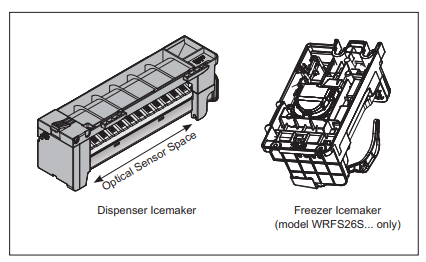
Icemaking will stop when the dispenser ice bin fills to the level of the optical sensor, or when the freezer ice bin fills and pushes the shutoff arm all the way up. Clear the bin of of excessive ice. If you remove bin for clearing, return bin correctly into place. Icemaking will resume after the ice bin is cleared to below the optical sensor in the dispenser icemaker, or cleared to allow the shutoff arm to lower in the freezer icemaker.
It is normal for several ice cubes to be joined together. If ice is not used frequently, old ice cubes will become shrunken, cloudy and taste stale. If you won't use ice frequently, shut icemaking off.
REFRIGERATOR SECTION
WATER OR ICE DISPENSER
To dispense water or ice, press the Water or Ice Type button on control panel and push on the dispenser lever with the side of your glass.
NOTE: The dispenser is equipped with a light that turns on when the dispenser lever is pressed.
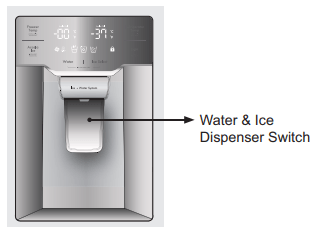
When Ice Select button is pressed once, cubed ice will dispense. Press Ice Select button a second time to dispense crushed ice.
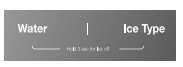
NOTE: Some ice may drop outside of cup during Ice dispensing.
Slowly remove glass from dispenser Lever before full to help prevent ice spillage.
A few uncrushed ice cubes may mix in with Crushed Ice when you dispense Crushed Ice.
Foldaway door bar (mullion bar)
- When closing the left refrigerator door, the mullion bar folds behind the right refrigerator door, forming a seal between the refrigerator doors.
- When opening the left refrigerator door, the mullion bar folds back to the left door automatically.
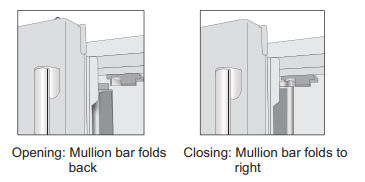
- The mullion bar may become damaged upon closing if it has been extended to the right while the door left door is open.
HUMIDITY CONTROLLED CRISPER
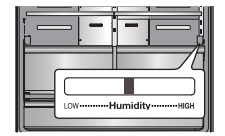
The crispers provide fresher tasting fruit and vegetables by letting you easily control humidity inside the drawer.
You can control the amount of humidity in the moisture sealed crispers crispers by adjusting the control to any setting between VEGETABLES and FRUIT.
- Slide the Humidity Control toward “hi” to keep moist air in crisper for best storage of fresh, leafy vegetables.
- Slide the Humidity Control toward “lo” to release moist air from crisper for best storage of fruit.
REMOVING THE HUMIDITY CONTROLLED CRISPER
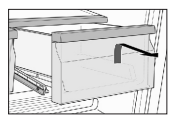
- To remove, pull the drawer out to full extension.
- Lift the front of the crisper up, then pull it straight out.
- To install, slightly tilt up the front, insert the drawer into the frame and push it back into place.
FREEZER SECTION
PULLOUT FREEZER DRAWER
1. To remove, pull the freezer drawer out to full extension. Lift out the ice bin if present. Tilt the front of the pullout freezer drawer up and then lift drawer out.
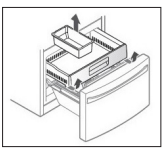
CAUTION: Pinch hazard! Keep hands and feet clear of the bottom of the freezer drawer when opening and closing.
To replace, hold pullout freezer drawer with back angled down. Insert the back rollers over the front edge of the runers built into the sides of the freezer cabinet. Slide the drawer back and into place. Fit ice bin back into pullout freezer drawer.
DOOR BIN
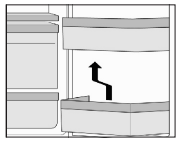
The door bins are removable for easy cleaning and adjustment.
1. To remove the bin, simply lift the bin up and pull straight out.
2. To replace the bin, slide it in above the desired support and push down until it snaps into place.
NOTE: Some bins may vary in appearance and will only fit in one location.
CONNECTING THE WATER LINE
WATER PRESSURE
The water pressure must be from 30 to 125 psi or 207-862 kPa or 2.1-8.8 kgf/cm2 . If the refrigerator is installed in an area with low water pressure “below 30 psi”, you can install a booster pump to compensate for the low pressure.
WATER SUPPLY KIT
* Connecting the water line to the refrigerator.
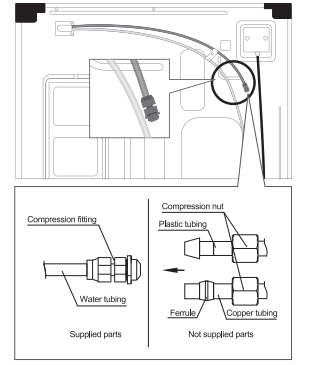
1. Connect water line to the compression fitting.
- If you are using copper tubing (not supplied), slip the compression nut (not supplied) and ferrule (not supplied) on copper tubing.
- If you are using plastic tubing (not supplied), insert the molded ending of the plastic tubing into the compression fitting.
2. Tighten the compression nut onto the compression fitting.
3. Turn the water on and check for any leakage.
CARE AND CLEANING
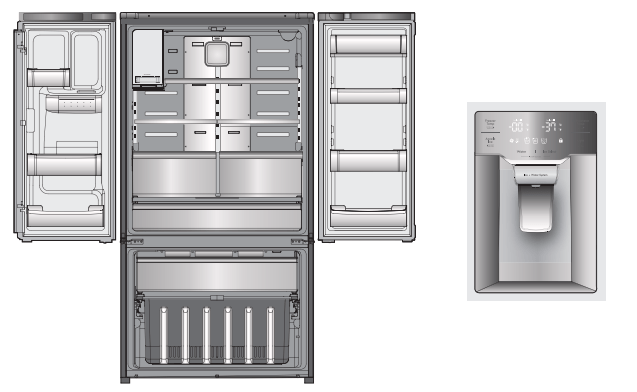
1. Water Dispenser
- Clean the water collecting tray with a sponge or absorbent cloth.
2. Ice Storage Bin
- Removing: Pull out and remove the ice cube bin
- Cleaning: Empty the ice cube bin and clean with lukewarm water. Thoroughly dry the bin and screw conveyor to prevent new ice cubes from sticking.
- Replacing: Push the ice cube bin all the way back onto the supports until it locks into position. If the bin cannot be pushed all the way back, rotate the ice auger a quarter turn and insert again.
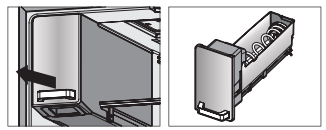
3. Freezer & Refrigerator Bins
- Hold both ends and pull up.
4. Refrigerator Shelves
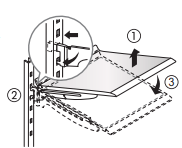
To remove a shelf: Lift up on front of shelf with one hand and with other hand push up on back of shelf to release attachment hooks from attachment slots. Pull the shelf out.
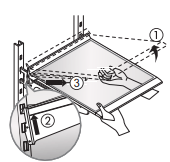
To reinstall a shelf: With front of shelf angled slightly up, engage hooks on back of shelf into attachment slots, and then lower front of shelf into place.
TROUBLESHOOTING GUIDE
It never gets cold inside. Freezing & refrigerating is not so good.
- Is the refrigerator unplugged?
- Plug in the refrigerator.
- Is the temperature set to [Low Mode]?
- Set the temperature mode to Middle or High.
- Is the refrigerator under direct sunlight or is a heat appliance placed near it?
- Move to a place where there is no direct sunlight, no heat appliances around.
- Is the space between the refrigerator back and the wall too close?
- Keep sufficient space (more than 2inches) between the back of the refrigerator and the wall.
Foods in the refrigerator get frozen.
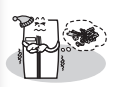
- Is temperature set to [High]?
- Set the temperature to [Middle] or [Low].
- Is the room temperature too low?
- Food can be frozen if ambient temperature is below 5°C. Move to a place where the temperature is over 5°C.
- Is food with moisture stored close to the cold air spout?
- Place food with moisture on the shelves close to the doors.
Strange sounds from the refrigerator.
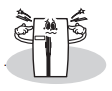
- Is the floor beneath the refrigerator uneven?
- Move the refrigerator to a level and even floor.
- Is the space between refrigerator back and the wall too close?
- Do any objects or other stuff touch the refrigerator?
- Remove any object which touches the refrigerator.
Odour or unpleasant smell from the inside.
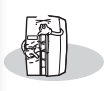
- Is the food stored uncovered or unwrapped?
- Be sure to cover and wrap the food.
- Are the shelves and pockets stained with food stuff?
- Clean them regularly. Once smell gets soaked into those parts, it is not easy to remove.
- Is the food stored too long?
- Do not store food for too long. A refrigerator is neither a perfect nor a permanent food keeper.
Problem Heat
- Front and side of refrigerator feels warm or hot.

- Pipes (refrigerant vessel) are placed beneath the Heat surface to prevent moisture forming on it.
Problem Heat
- Doors do not open easily.
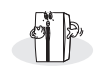
- When you close the door and then open again immediately, the door is not easy to open because warm air rushes in and creates the pressure difference. In this case wait for a minute, then it will open easily.
Problem Heat
- It sounds like water is flowing from the refrigerator.
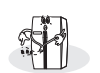
- When the compressor starts to run or stop, refrigerant which makes the inside cold flowing in the pipes can make such a sound.
- Defrosted water can also make such a sound. (This refrigerator adopts an automatic defrosting system.)
- Cracking or clicking sounds.
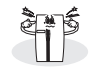
- Inside parts shrink and/or expand due to temperature change --- When the inside gets cold or when the door is open, such sounds can be made.
- Humming or buzzing sounds.
- Compressor or fans for cold air circulation can make such working sound. (If the refrigerator is not level, the sound can be louder.)
Problem Frost & Dew
- Dew or frost on the wall and/or food container surface in the freezer and refrigerator compartment.

- Frost and/or dew can be made in the following cases;
- High temperature and/or high humidity around the refrigerator.
- When doors are open too long.
- Food with much moisture are stored uncovered or unwrapped.
- You can see the same appearance when cold water is poured in a glass cup and dew is forming on the surface of it.
- Dew on the cabinet surface.
- If it is highly humid around the refrigerator, moisture in the air sticks to the surface to form dew