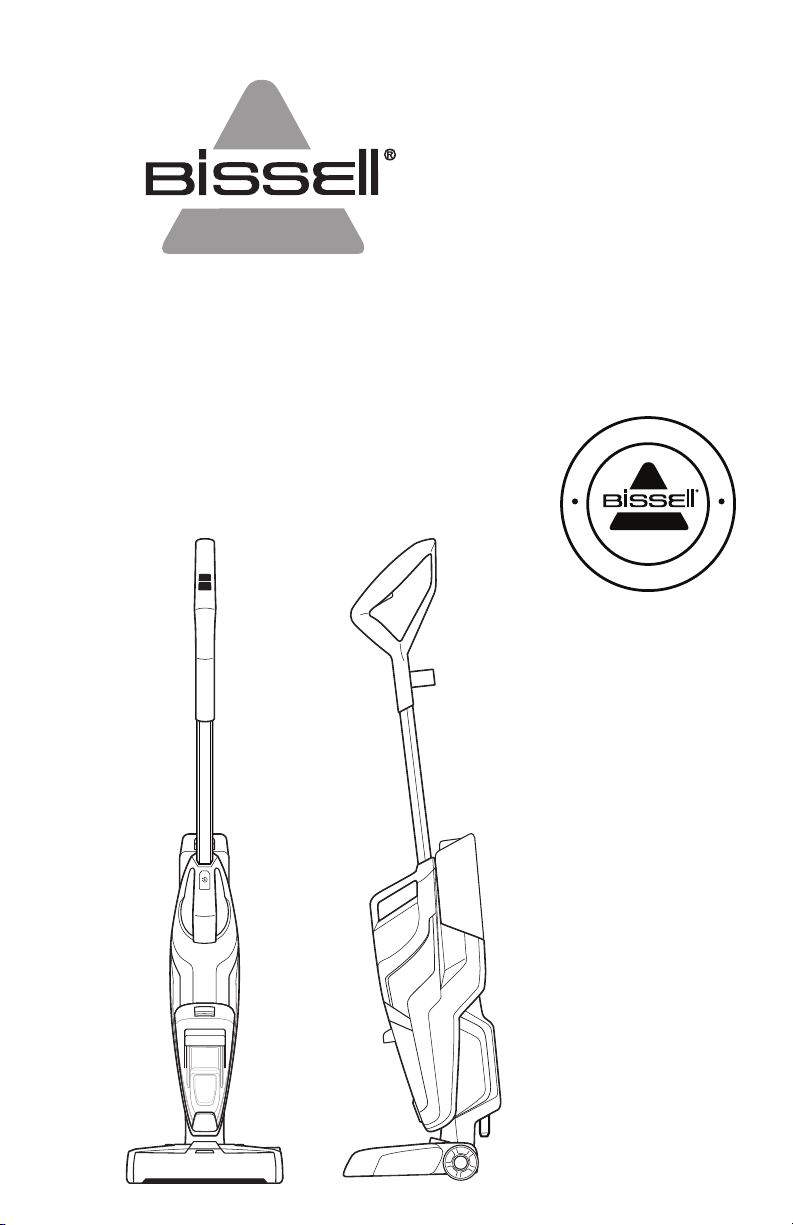
CROSSWAVE
®
CORDLESS
_______________
USER GUIDE
2588 SERIES
F
L
O
O
R
C
L
E
A
N
I
N
G
E
X
P
E
R
T
S
E
S
T
.
1
8
7
6
U
.
S
.
A
.

global.BISSELL.com
2
IMPORTANT SAFETY INSTRUCTIONS
WARNING
TO REDUCE THE RISK OF FIRE, ELECTRIC SHOCK OR INJURY:
» This appliance can be used by children aged from 8
years and above and persons with reduced physical,
sensory or mental capabilities or lack of experience
and knowledge if they have been given supervision
or instruction concerning use of the appliance in a safe
way and understand the hazards involved. Cleaning
and user maintenance shall not be made by children
without supervision.
» Children should be supervised to ensure that they do
not play with the appliance.
» Unplug from electrical socket when not in use, before
cleaning, maintaining, or servicing the appliance, and
if your appliance has an accessory tool with a moving
brush, before connecting or disconnecting the tool.
» Do not immerse in water or liquid.
» Keep hair, loose clothing, fingers, and all parts of
body away from openings and moving parts of the
appliance and its accessories.
» If the charger supply cable is damaged, it must be
replaced by the manufacturer, its service agent or
similarly qualified person in order to avoid a hazard.
» Do not incinerate the appliance even if it is severely
damaged. The batteries can explode in a fire.
» The battery is to be disposed of safely.
» This appliance contains batteries that are only
replaceable by skilled persons.
» Under abusive conditions, liquid may be ejected from
the battery; avoid contact. If contact accidentally
occurs, flush with water. If liquid contacts eyes,
additionally seek medical help. Liquid ejected from the
battery may cause irritation or burns.
» Use only with charger SIL, Model SSC-420085US.
» Recharge only with the charger specified by the
manufacturer. A charger that is suitable for one type of
battery pack may create a risk of fire when used with
another battery pack.
» Unplug charger from electrical socket when not in
use, before cleaning, maintaining or servicing the
appliance, and if your appliance has an accessory
tool with a moving brush, before connecting or
disconnecting the tool.
» This appliance contains batteries that are non-
replaceable.
» The battery must be removed from the appliance
before it is scrapped.
» Do not use with damaged cable or charger. If appliance
is not working as it should, has been dropped,
damaged, left outdoors, or dropped into water, return
it to a service center.
» Turn OFF all controls before unplugging.
» Do not pull or carry charger by cable, use cable as a handle, close door on
cable, or pull cable around sharp edges or corners.
» Keep charger cable away from heated surfaces.
» To unplug, grasp the charger plug, not the cable.
» Do not handle charger plug or appliance with wet hands.
» Battery pack and charger base output terminals are not to be short-circuited.
» Do not charge the unit outdoors.
» The appliance must be disconnected from the supply mains when removing
the battery.
» Do not recharge, disassemble, heat above 60°C, or incinerate.
» Keep batteries out of reach of children.
» Dispose of used batteries promptly.
» Never put batteries in mouth. If swallowed, contact your physician or local
poison control.
» Prevent unintentional starting. Ensure the switch is in the OFF-position
before picking up or carrying the appliance. Carrying the appliance with your
finger on the switch or energising appliance that have the switch on invites
accidents.
» Do not use appliance that is damaged or modified. Damaged or modified
batteries may exhibit unpredictable behavior resulting in fire, explosion or
risk of injury.
» Do not expose appliance to fire or excessive temperature. Exposure to fire or
temperature above 130°C may cause explosion.
» Follow all charging instructions and do not charge the appliance outside of
the temperature range specified in the instructions. Charging improperly or
at temperatures outside of the specified range may damage the battery and
increase the risk of fire.
» Have servicing performed by a qualified repair person using only identical
replacement parts. This will ensure that the safety of the product is
maintained.
» Do not modify or attempt to repair the appliance except as indicated in the
instructions for use and care.
» Keep the temperature range of between 4-40°C when charging battery,
storing unit or during use.
» Make sure the power switch is OFF and the battery pack removed from the
appliance before making any adjustments, changing accessories, or storing
appliance. Such preventive safety measures reduce the risk of starting the
appliance accidentally.
» Use appliances only with specifically designated battery packs. Use of any
other battery packs may create a risk of injury and fire.
» When battery pack is not in use, keep it away from other metal objects,
like paper clips, coins, keys, nails, screws or other small metal objects, that
can make a connection from one terminal to another. Shorting the battery
terminals together may cause burns or a fire.
» Use indoors only.
» Plastic film can be dangerous. To avoid danger of suffocation, keep away
from children.
» Use only as described in this user guide.
» Use only manufacturer’s recommended attachments.
» If appliance is not working as it should, has been dropped, damaged, left
outdoors, or dropped into water; do not attempt to operate it and have it
repaired at an authorised service center.
» Do not put any object into openings.
» Do not use with any opening blocked; keep free of dust, lint, hair, and
anything that may reduce air flow.
READ ALL INSTRUCTIONS BEFORE USING YOUR APPLIANCE.
When using an electrical appliance, basic precautions should be observed, including the following:
global.BISSELL.com
3
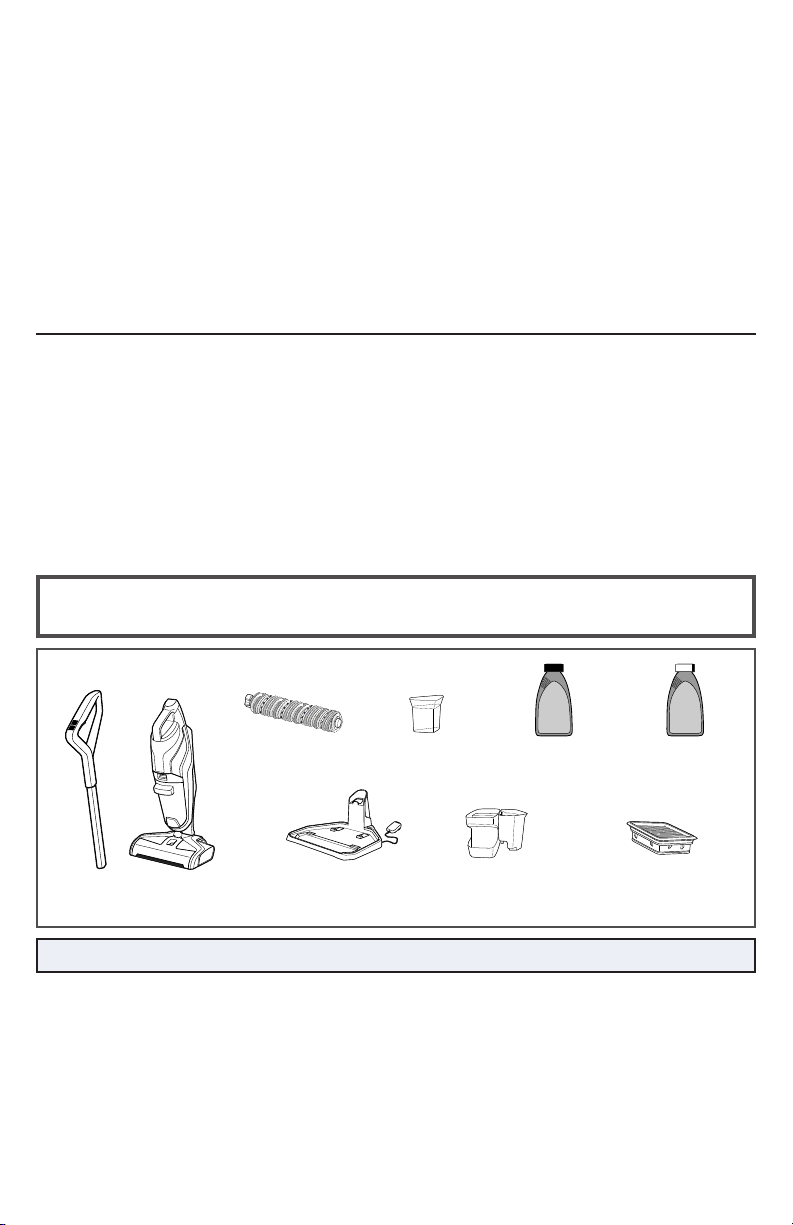
Brush Roll Drying
Tray with Rinse
Funnel
Vacuum Filter
Handle
Multi-Surface Tangle
Free Brush Roll
3-in-1 Docking
Station with Charging
Adapter Plug
Multi-Surface Pet
with Ambipur®
Formula
Wood Floor
Formula
Safety Instructions...........2
Product View................4
Assembly ...................5
Cleaning Formulas...........5
Operations ...............6-10
Maintenance & Care ......11-14
Troubleshooting ............15
Guarantee ..................16
Body
Rinse Cup
Thanks for buying a BISSELL
®
CrossWave
®
Cordless
We love to clean and we’re excited to share one of our innovative products with
you. We want your BISSELL® CrossWave® Cordless to work like new for the years
to come, so this guide has tips on how to use, maintain and, if there’s a problem,
troubleshoot.
Your BISSELL® CrossWave® Cordless needs a little assembly before getting to work,
so flip to the “operations” section and let’s get started!
What’s In The Box?
NOTE: Standard accessories may vary by model.
SAVE THESE INSTRUCTIONS
ORIGINAL INSTRUCTIONS. FOR OPERATION ON A 220-240 VOLT
A.C. 50-60 HZ POWER SUPPLY ONLY.
THIS MODEL IS FOR HOUSEHOLD USE ONLY.
IMPORTANT INFORMATION
» If your appliance has a motorised Brush Roll, do not leave machine running in the same spot without the handle fully upright.
» Use extra care when cleaning on stairs.
» Do not use to pick up flammable or combustible liquids, such as petroleum,
or use in areas where they may be present.
» Do not pick up toxic material (chlorine bleach, ammonia, drain cleaner, etc.).
» Do not use appliance in an enclosed space filled with vapours given off by
oil-based paint, paint thinner, some moth-proofing substances, flammable
dust, or other explosive or toxic vapours.
» Do not pick up hard or sharp objects such as glass, nails, screws, coins, etc.
» Do not pick up anything that is burning or smoking, such as cigarettes,
matches or hot ashes.
» Do not use without filters in place.
global.BISSELL.com
4
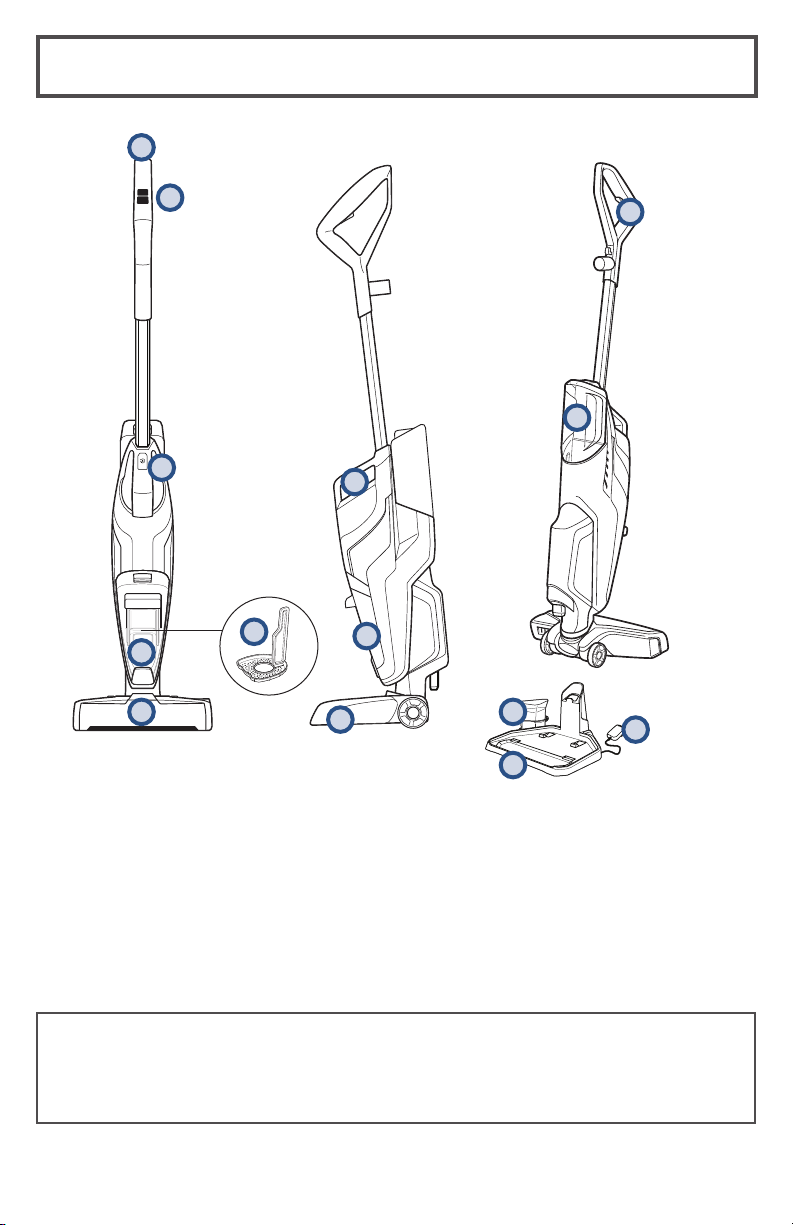
Getting to Know Your CrossWave
®
Cordless
Your BISSELL® CrossWave® Cordless
machine comes in three easy to assemble
components and does not require any tools
to assemble. The unit also comes with a
three-piece 3-in-1 Docking Station.
5
2
1
9
6
7
8
10
11
1 Upper Handle
2 SmartClean Fingertip Controls
3 Cleanout Cycle button and Battery Life
Indicator
4 Strainer
5 Float Stack
6 Easy Remove Brush Roll Window
7 Integrated Carry Handle
8 Dirty Water Tank
9 Foot
10 Solution Spray Trigger
11 Clean Water Tank
12 Rinse Cup
13 3-in-1 Docking Station
14 Charging Adapter Plug
13
12
4
3
• Handle
• Body
• Clean Water Tank
• 3-in-1 Docking Station
• Brush Roll Drying Tray with Rinse Cup
14
global.BISSELL.com
5
3
4
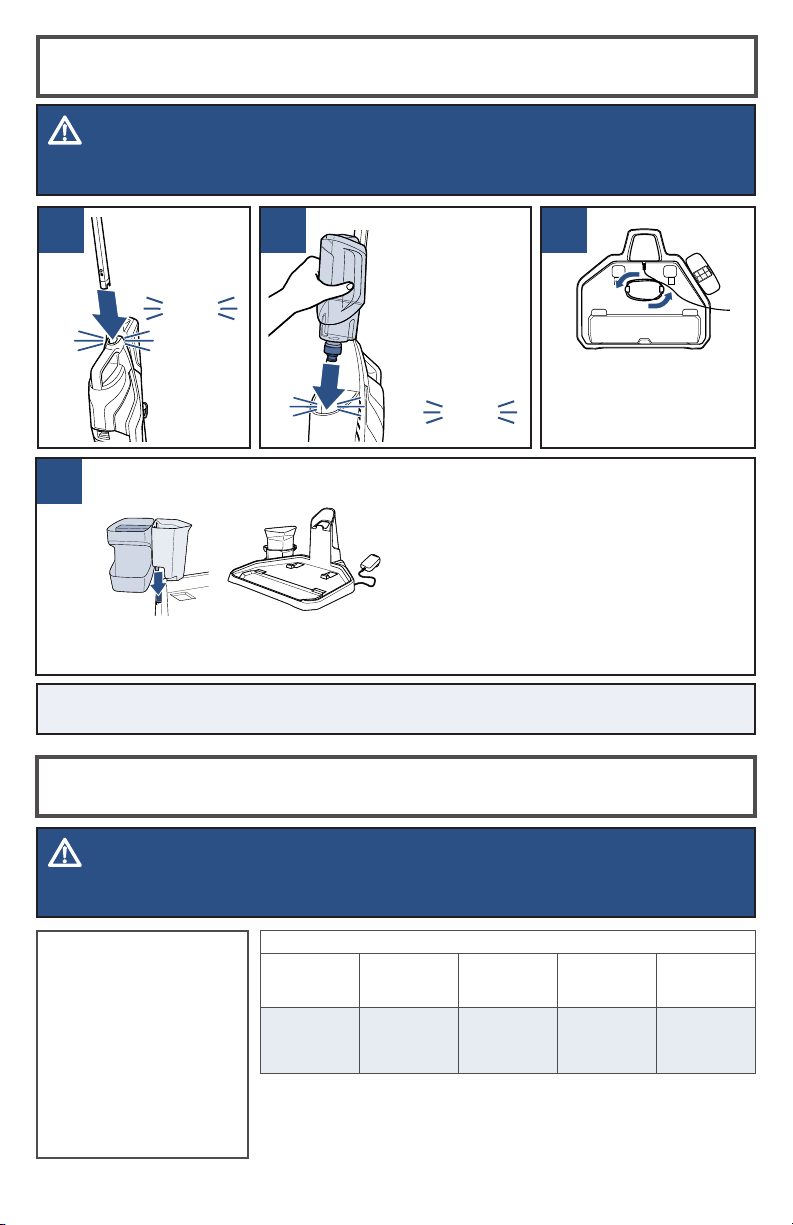
Assembly
Insert handle
into body of
unit until you
hear a “click”.
click
click
Slide the over hang in the middle of
the Brush Roll Drying Tray with Rinse
Funnel down into the opening on the
Storage Tray that is indicated with
arrows. Then, place the Rinse Cup
into the Rinse Funnel.
Wrap the charging
adapter cord around
the tabs on the
bottom of the 3-in-1
Docking station.
21
Then, on the
back of the
machine, align
Clean Water
Tank with the
grooves and
slide tank into
place until you
hear a “click”.
Keep plenty of
CrossWave® formulas
on hand so you can
clean your hard floors
and area rugs whenever
it fits your schedule.
Always use
CrossWave® formulas
in your machine. Other
solutions may harm the
machine and void the
warranty.
Cleaning Formulas
WARNING
To reduce the risk of fire and electric shock due to internal component damage, use only BISSELL®
cleaning fluids intended for use with the hard floor device.
WARNING
Do not plug in your CrossWave® Cordless until you are familiar with all instructions and
operating procedures.
NOTE: The 3-in-1 Docking Station functions as a Rinse and Clean Out Tray, Charging
Station, and Storage Tray for the machine and Brush Roll.
CROSSWAVE® FORMULAS
Multi-Surface
Formula
Wood Floor
Formula
Area Rug
Formula
Multi-Surface
Pet with
Ambipur®
Formula
Sanitise
Formula
Great for clean-
ing ALL sealed
floors and area
rugs
Restore your
wood floors’
natural shine
Removes stuck
on and embed-
ded dirt from
area rugs
Removes pet
odors to clean
and refresh
Kill 99.9% of
germs & bac-
teria on your
HARD floors
(ONLY!)
Certain trademarks are used under license from The Procter & Gamble Company or its affiliates.
global.BISSELL.com
6
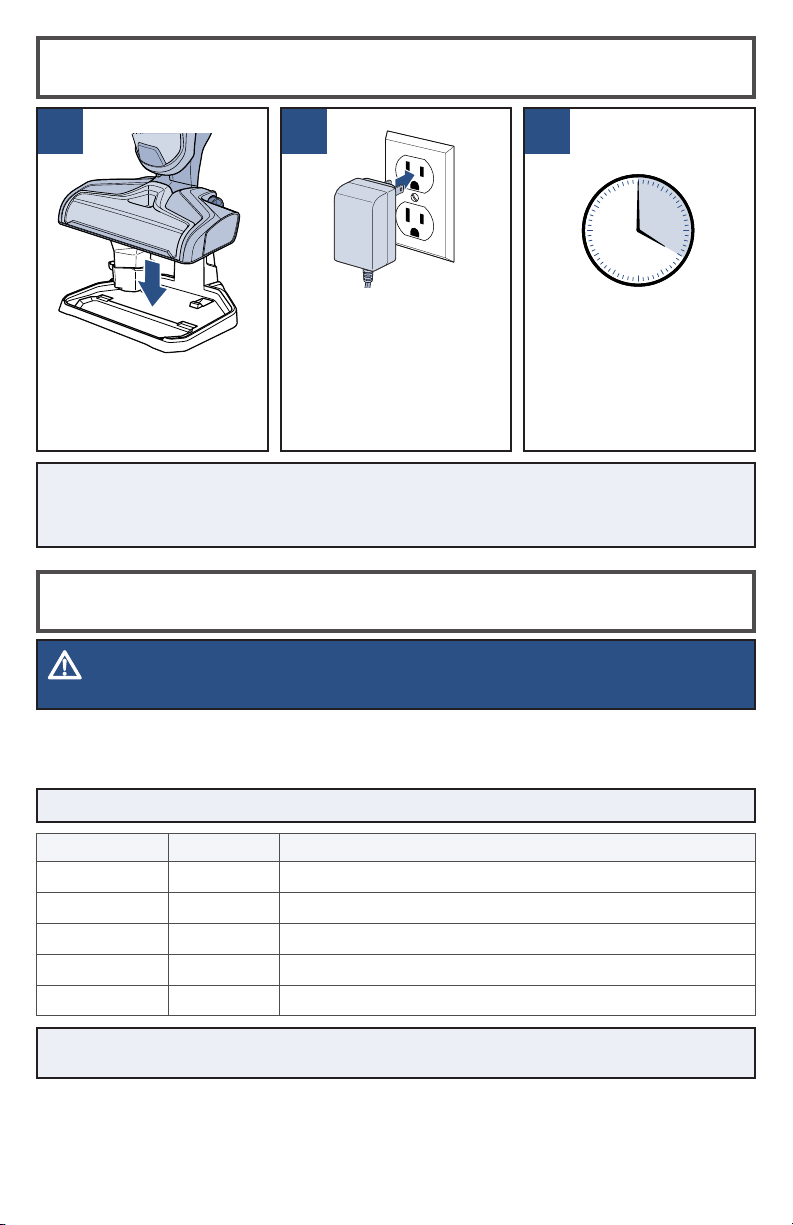
Charging the Battery
Charging LED Display
1 2 3
Lift and place your
CrossWave® Cordless
onto the 3-in-1 Docking
Station to charge.
Plug the adapter into a
suitable wall outlet. The
Battery Life Indicator
Lights will illuminate
when charging. If LED
lights do not turn on,
realign the unit on the
3-in-1 Docking Station.
For maximum run
time, charge unit for
4 hours prior to use.
Refer to chart below
to understand the
charging status.
NOTE: Make sure unit is fully charged before first use. To check the battery status,
remove the unit from the charging base and turn the unit ON by pressing either the
Area Rug or Hard Floor button. Battery is fully charged when all three white status
lights are illuminated.
NOTE: Keep the temperature range between 40-104 °F when charging the battery,
storing unit or during use.
WARNING
Overcharging may cause battery damage, fire or explosion.
TIP: Be sure to charge unit when there is less than 10% power left, one LED flashing red.
Your BISSELL® CrossWave® Cordless has an LED light display that will turn on when the unit
is on or charging to show the battery life status. The LED lights are white, but one will be
blinking red when the battery is at less than 10%.
Battery Status LED Color Light Behavior
100% to 70% White 3 lights on
69% to 40% White 2 lights on
39% to 10% White 1 light on
9% to 1% Red 1 light blinking, 2 second fade in and out
0% N/A Light off
4h
global.BISSELL.com
7
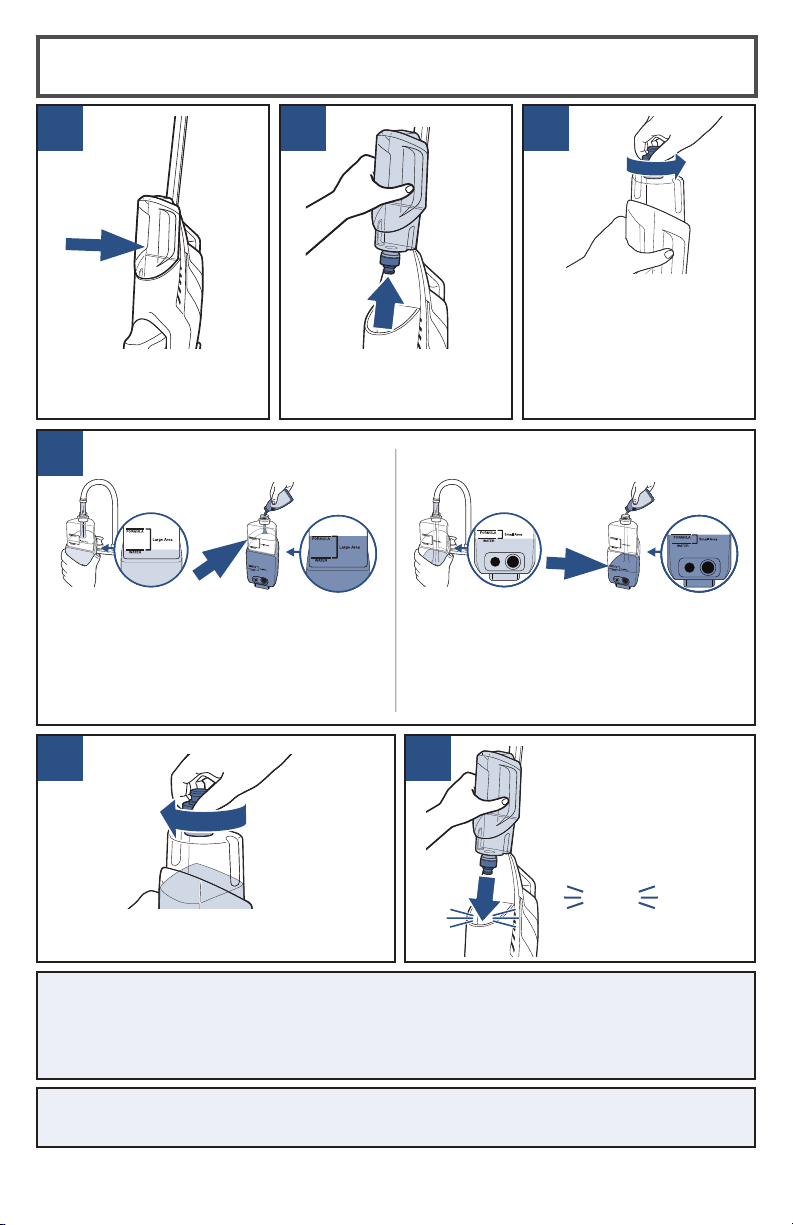
Filling the Clean Water Tank
1
4
2
5
Lift the Clean Water Tank
straight up to remove
from the machine.
The Clean Water Tank is
located on the back of
the machine.
For small area cleaning (32.5 sq m)
a. Fill Clean Water Tank with warm tap
water to the first water fill line.
b. Then add formula to the first formula
fill line.
A few notes about fi lling the Clean Water Tank:
• Fill with warm (140°F/60°C MAX) tap water and add the appropriate
BISSELL® solution. DO NOT USE BOILING WATER. DO NOT HEAT WATER
OR TANK IN MICROWAVE.
3
Unscrew the cap from the
Clean Water Tank.
The Clean Water Tank has
two measuring volumes
depending on the amount
of space you would like
to clean.
For large area cleaning (up to 65 sq m)
a. Fill Clean Water Tank with warm tap
water to the second water fill line.
b. Then add formula to the second
formula fill line.
6
On the back of the
machine, align Clean
Water Tank with the
grooves and slide tank
into place until you
hear a “click”.
Screw the cap back onto the Clean
Water Tank.
click
NOTE: Never put descaling, alcoholic, eucalyptus oil, or detergent products
into the cleaner, as this may damage it or make it unsafe for use.
global.BISSELL.com
8
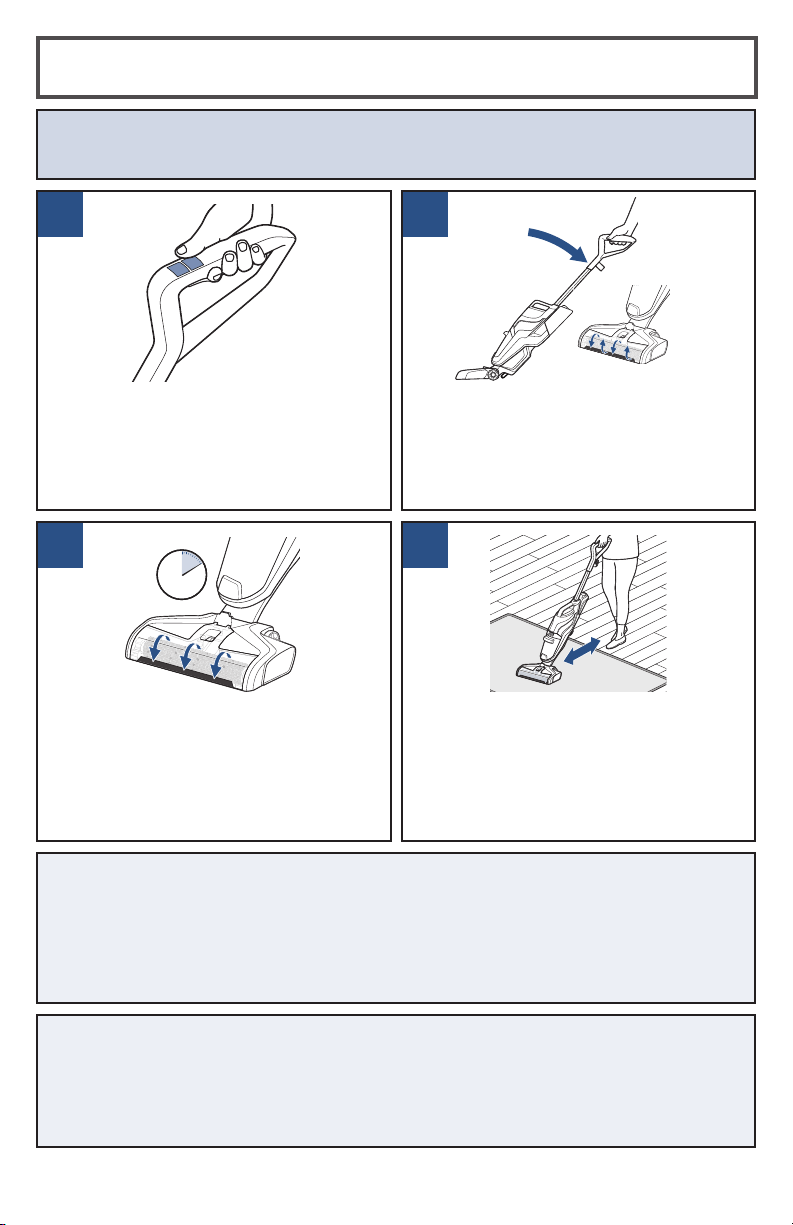
2
4
1
3
Before each use, hold the Solution Spray
Trigger for 10 seconds to prime the
system with cleaning solution. LED lights
illuminate when holding the trigger.
NOTE: When solution is flowing, you will
see bubbles forming at the edges of the
Brush Roll Window.
ATTENTION Do not over wet carpet. Be careful not to run over loose objects or edges
of area rugs. Stalling the brush may result in premature belt failure.
HARD FLOOR CLEANING TIPS:
• When cleaning excessively dirty or muddy hard floors, or if your Brush Roll
looks dirty, use the 3-in-1 Docking Station to rinse your Brush Roll before cleaning
your area rugs.
• For overly challenging and stuck-on messes on your hard floors, activate the RUG
mode and hold your CrossWave® Cordless over the mess. Using short passes while
holding the trigger allows the multi-surface brush to go to work.
RUG CLEANING TIPS:
• Before cleaning area rugs, test an inconspicuous area of the rug for colorfastness.
Also, please check manufacturer’s tag before cleaning area rugs for any specialized
cleaning instructions. Not for use on silk or delicate area rugs.
• The RUG button dispenses twice the solution of the HARD FLOOR button to help
with area rug cleaning.
To clean, hold the Solution Spray Trigger
to apply solution on both forward and
backward passes.
To dry hard floors faster, release the
trigger and clean a second pass without
dispensing solution.
To start cleaning your floors, turn the
machine ON by pressing the HARD
FLOOR or RUG button. Once the setting
is selected, the dry vacuum will turn on.
To turn OFF, press the setting button a
second time.
Recline the body of the machine
backward to start the Brush Roll
spinning. To stop the Brush Roll
spinning, you will need to stand the
machine upright.
Cleaning Your Floors
global.BISSELL.com
9
NOTE: The 3-in-1 Docking Station needs to be plugged into an outlet in order to run the
clean out cycle. If the Clean Out button is held down over a minute, the unit will stop
cleaning automatically.
NOTE: The unit will begin to charge once it is docked, assuming the 3-in-1 Docking
Station is plugged in. Charging will pause when running the Clean Out cycle. Once the
Clean Out cycle is complete, charging will resume.
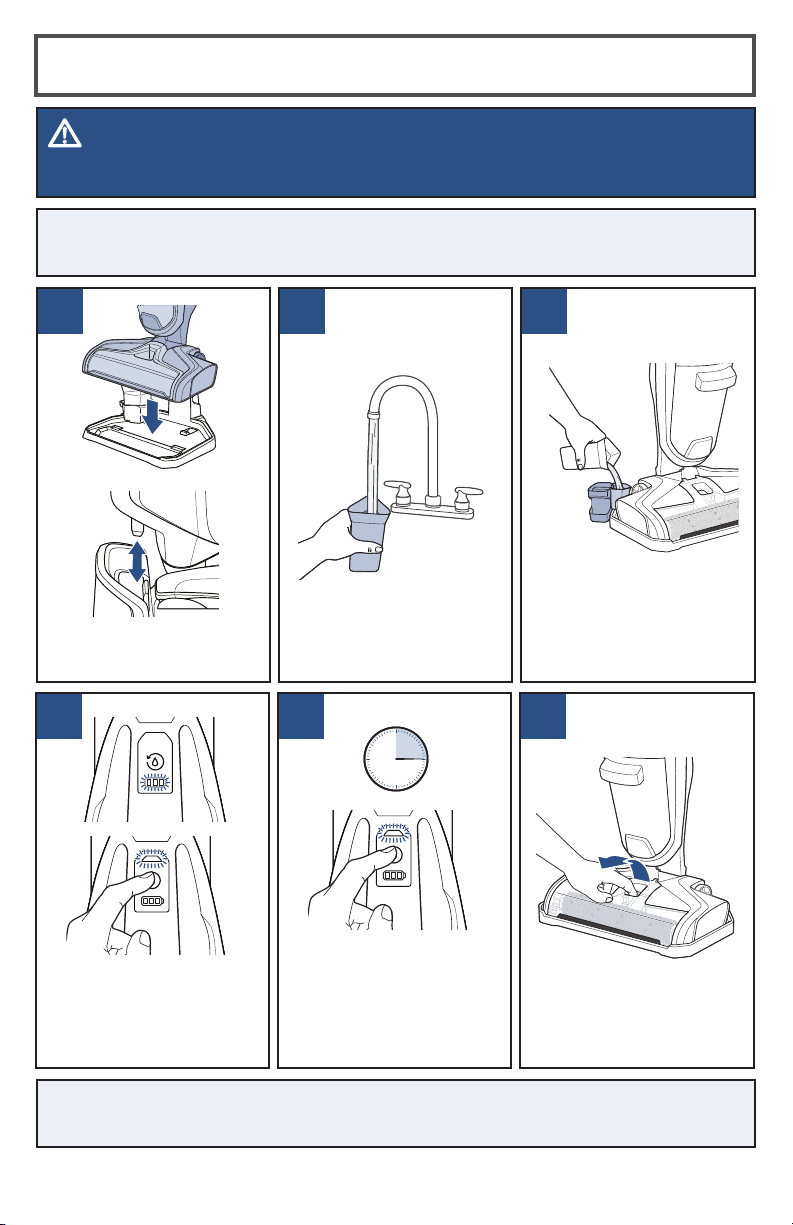
Using the 3-in-1 Docking Station
1 2 3
Place unit on 3-in-1
Docking Station.
Hold down Clean Out
button on top of the Carry
Handle. The cycle only
runs when the button is
held down.
Hold down Clean Out
button for about 10 to
15 seconds to allow unit
to flush out and pick up
all the water. Repeat as
needed.
Pour water into the Rinse
Funnel on the 3-in-1
Docking Station to the
MAX fill line.
Grasp Brush Roll Window
at the front of the window
face and pull upward to
remove.
4 5 6
Fill Rinse Cup with water.
WARNING
To reduce the risk of fi re, electric shock or injury, turn power OFF and disconnect plug from electrical
outlet before performing maintenance or troubleshooting.
15s
global.BISSELL.com
10
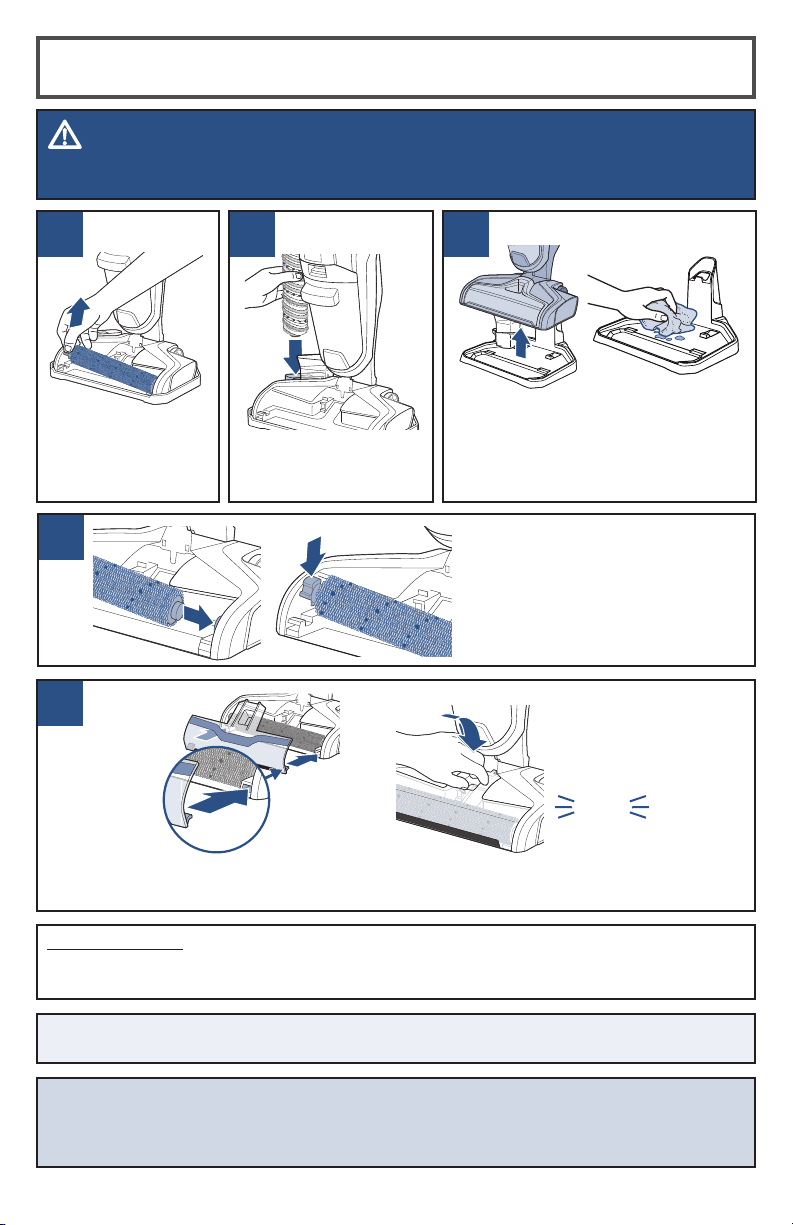
97 8
Pull Brush Roll out
by grabbing the
Brush Roll tab and
pulling upward.
Place the Brush Roll
upright in the Brush
Roll Drying Tray to dry.
Remove the unit from the 3-in-1
Docking Station and wipe out the
tray. Do NOT rinse under faucet
directly to avoid water going into
the charging plug for safety issues.
Using the 3-in-1 Docking Station (cont.)
WARNING
To reduce the risk of fi re, electric shock or injury, turn power OFF and disconnect plug from electrical
outlet before performing maintenance or troubleshooting.
11
10
Replace the Brush Roll Window by first lining up the window tabs with the edges of
the foot. Then press the window back into place until you hear a “click”.
Replace Brush Roll by inserting
the Brush Roll end into the
right side of the foot. Then
lock the pull tab into place by
pressing downward.
Machine Storage
Put the unit away in a closet or basement until the next use. Store cleaner in a protected,
dry area.
NOTE: Any solution remaining in the Clean Water Tank should be emptied prior to
machine storage.
click
NOTICE
To reduce the risk of a leaking condition, do not store unit where freezing may occur. Damage to internal
components may result.
global.BISSELL.com
11
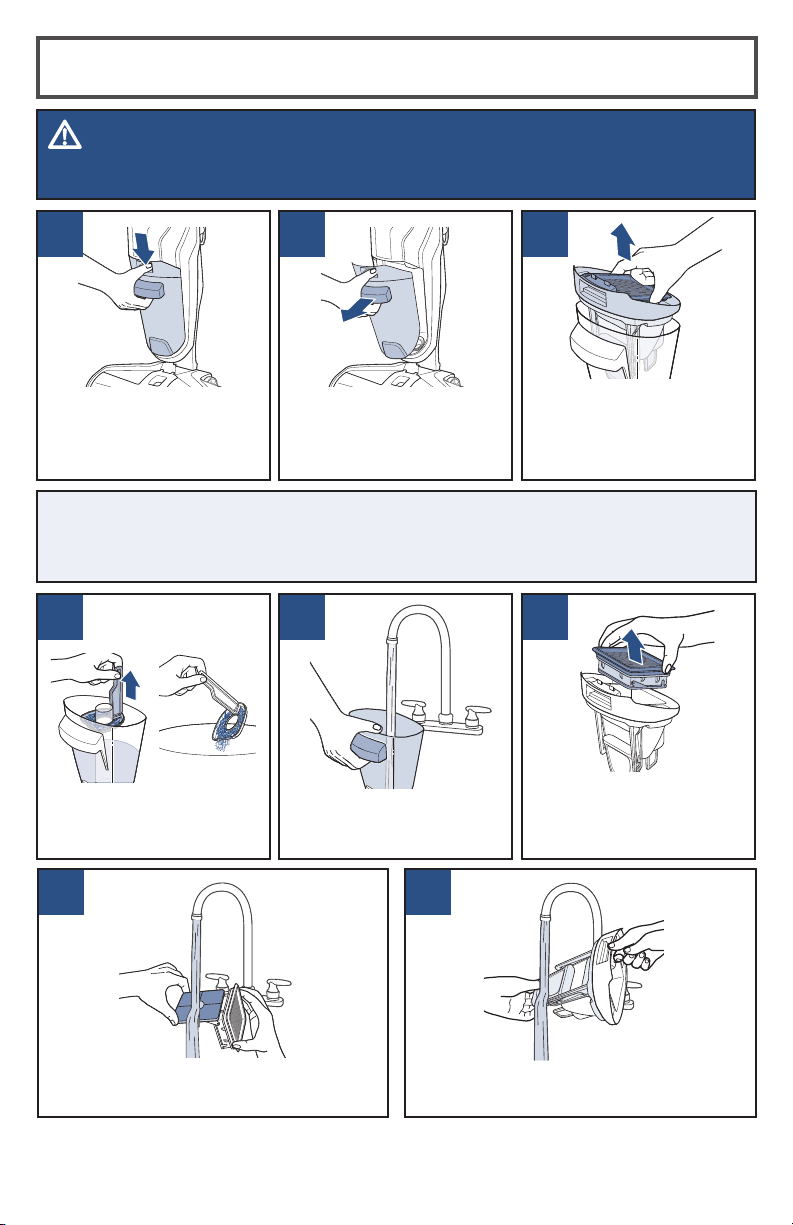
Emptying the Dirty Water Tank
1 2 3
To release Dirty Water
Tank, press down on
recessed button on the
top of the tank.
Grasp top of Dirty Water
Tank in recessed areas on
each side of the filter and
pull upward to remove the
top of the tank.
Pour dirty water out into
sink. Rinse the inside of
the Dirty Water Tank.
7
WARNING
To reduce the risk of fi re, electric shock or injury, turn power OFF and disconnect plug from electrical
outlet before performing maintenance or troubleshooting.
8
Grab the front handle while
pressing down on button
and pull Dirty Water Tank
away from the unit.
Hand wash the filter and screen with
warm water and mild detergent.
Rinse the float located at the bottom
of the top of the Dirty Water Tank.
Remove the filter from
the top of the Dirty Water
Tank by pulling it up.
Did You Know?
The float is what prevents your Dirty Water Tank from overflowing. When your Dirty
Water Tank is full, the float will shut off your suction motor creating a high-pitched
sound indicating it is time to empty your Dirty Water Tank.
4 5 6
Remove strainer from
Dirty Water Tank, then
throw debris in trash.
global.BISSELL.com
12
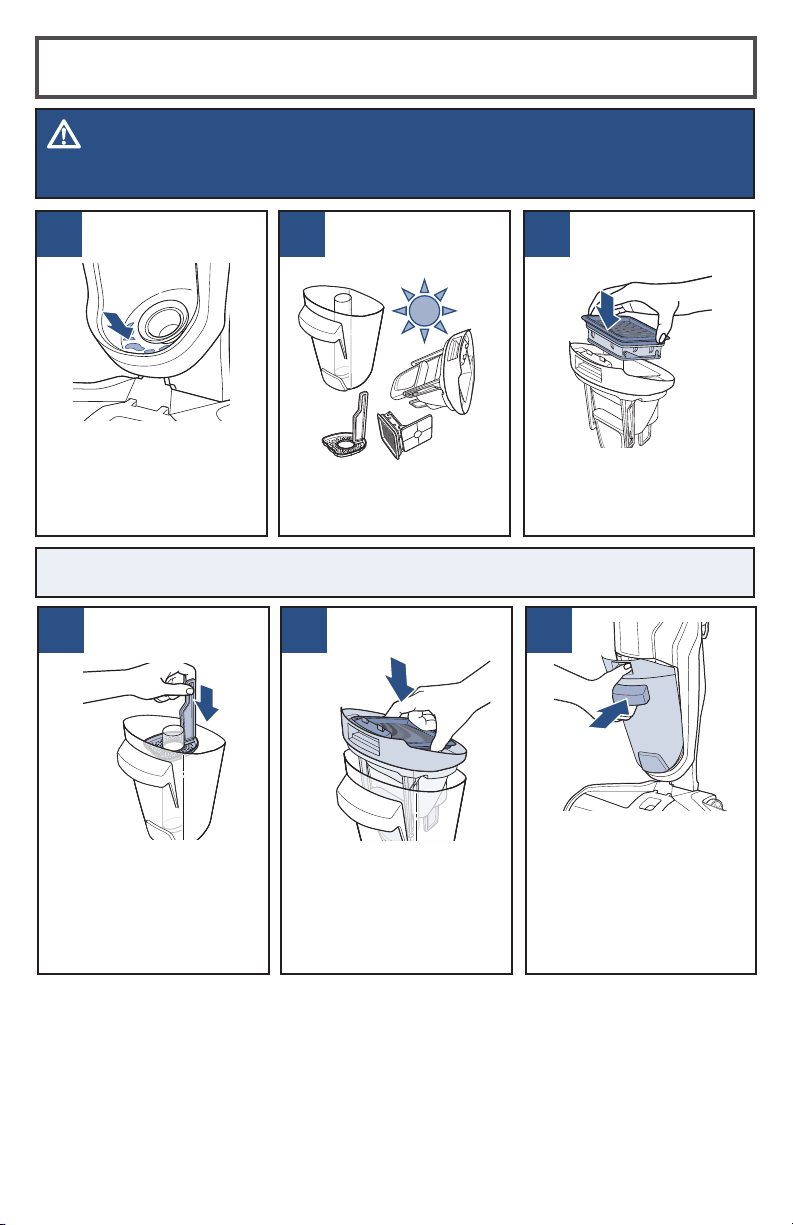
Emptying the Dirty Water Tank (cont.)
9
WARNING
To reduce the risk of fi re, electric shock or injury, turn power OFF and disconnect plug from electrical
outlet before performing maintenance or troubleshooting.
11
Angle the Dirty Water
Tank back into body
of machine inserting
bottom first. Then tilt
the top of the dirt tank
toward the machine and
push into place until you
hear a “click”.
Once parts are dry,
reassemble and
replace the top of
Dirty Water Tank.
Place filter assembly
back into the top of the
Dirty Water Tank.
If the inside area where
the Dirty Water Tank sits
is dirty, wipe it clean with
a rag or towel.
NOTE: Make sure to clean your Dirty Water Tank and let all components dry out after
each use to keep your product at its best.
10
Leave parts out to dry
before reassembling.
12 1413
Place strainer back
into Dirty Water Tank.
global.BISSELL.com
13
5
43
1
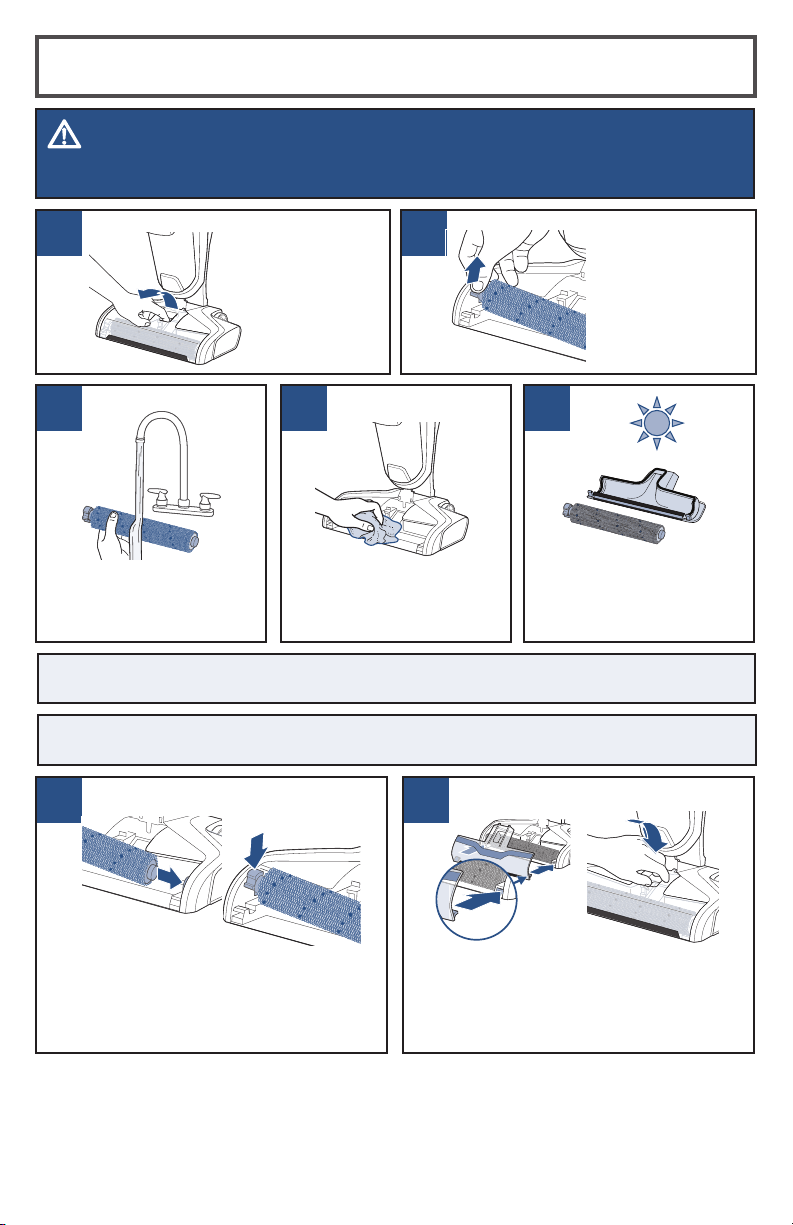
Cleaning the Brush Roll and Chamber
WARNING
To reduce the risk of fi re, electric shock or injury, turn power OFF and disconnect plug from electrical
outlet before performing maintenance or troubleshooting.
2
Grasp Brush
Roll Window
on the front
of its face and
pull upward to
remove.
With warm water, rinse
your Brush Roll Window
and Brush Roll.
Pull Brush Roll
out by grabbing
the Brush Roll
tab and pulling
upward.
If your Brush Roll
chamber is dirty, clean
with a rag or towel.
Let your Brush Roll and
Brush Roll Window
chamber dry before
reassembling.
6 7
Replace the Brush Roll Window by
first lining up both window tabs with
the edges of the foot. Then press the
window back into place until you hear
a “click”.
Replace Brush Roll by inserting the
Brush Roll end into the right side of the
foot. Then lock the pull tab into place by
pressing downward.
TIP: Running your machine with a wet Brush Roll will help the Brush Roll dry faster. The
trigger should not be pressed.
NOTE: The Brush Roll is not dishwasher or automatic washing machine safe. Please
follow cleaning instructions above.
global.BISSELL.com
14
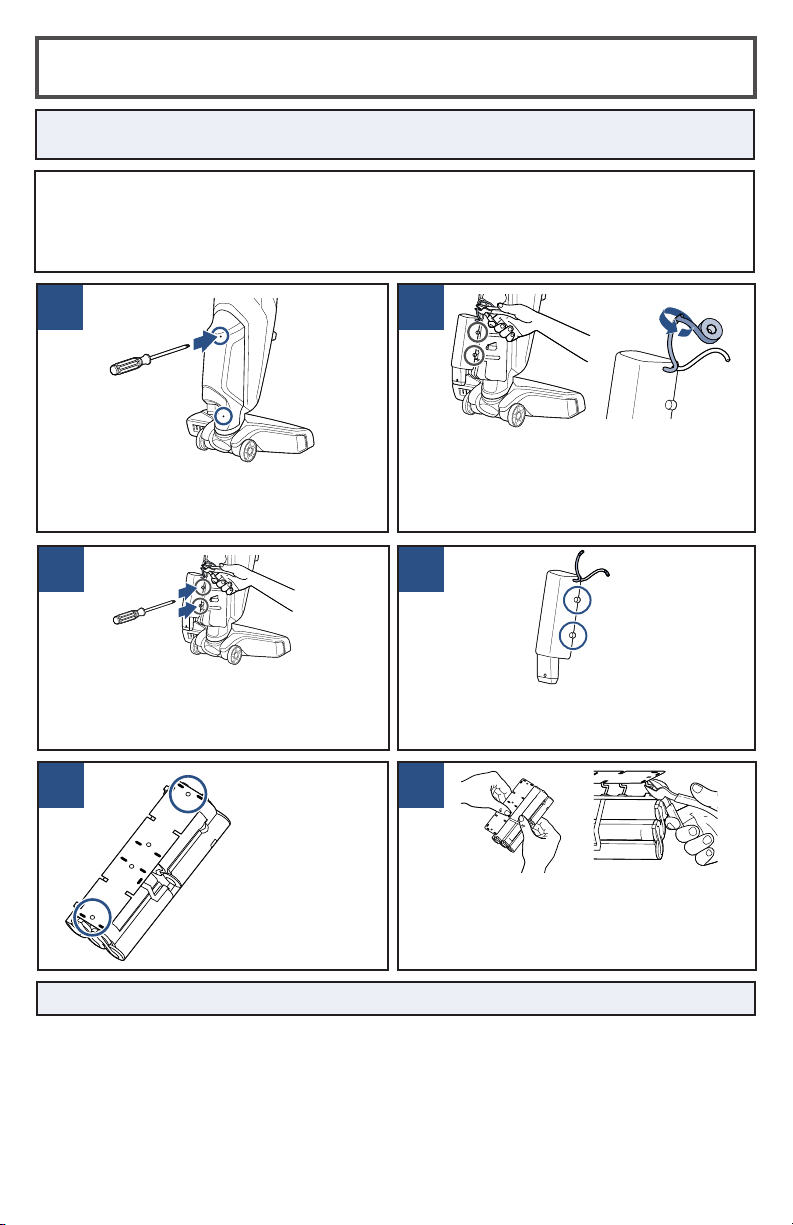
Disposing of the Batteries
NOTICE: Disconnecting the battery will destroy the appliance and invalidate
the warranty.
1 2
Cut the red positive (+) battery wire with
rubber handled wire cutters. Wrap the
end of the red cut wire with electrical
tape. Then, individually cut the remaining
battery wires.
With a Phillips-head screwdriver, remove
the 4 screws on the back of the unit.
Then, lift off the back cover.
Before proceeding, ensure that:
• The unit is disconnected from the 3-in-1 Docking Station
• The Clean and Dirty Water Tank are empty or removed from the unit.
• You have a Phillips-head screwdriver, electrical tape and rubber handled wire cutters.
All required for disassembly.
3 4
Remove the 4 screws from the battery
pack and lift off the top cover to expose
the control panel and battery cells.
Using a Phillips-head screwdriver,
remove the 4 screws on the sides of the
battery pack. Then, remove the battery
pack from the unit.
5 6
Remove
the last two
screws on the
control panel.
Pull the control panel back from the
battery pack. Then, with rubber handled
wire cutters, clip all the metal poles to
disconnect the battery pack from the
control panel.
NOTE: Keep Battery Pack together – DO NOT separate individual batteries.
global.BISSELL.com
15
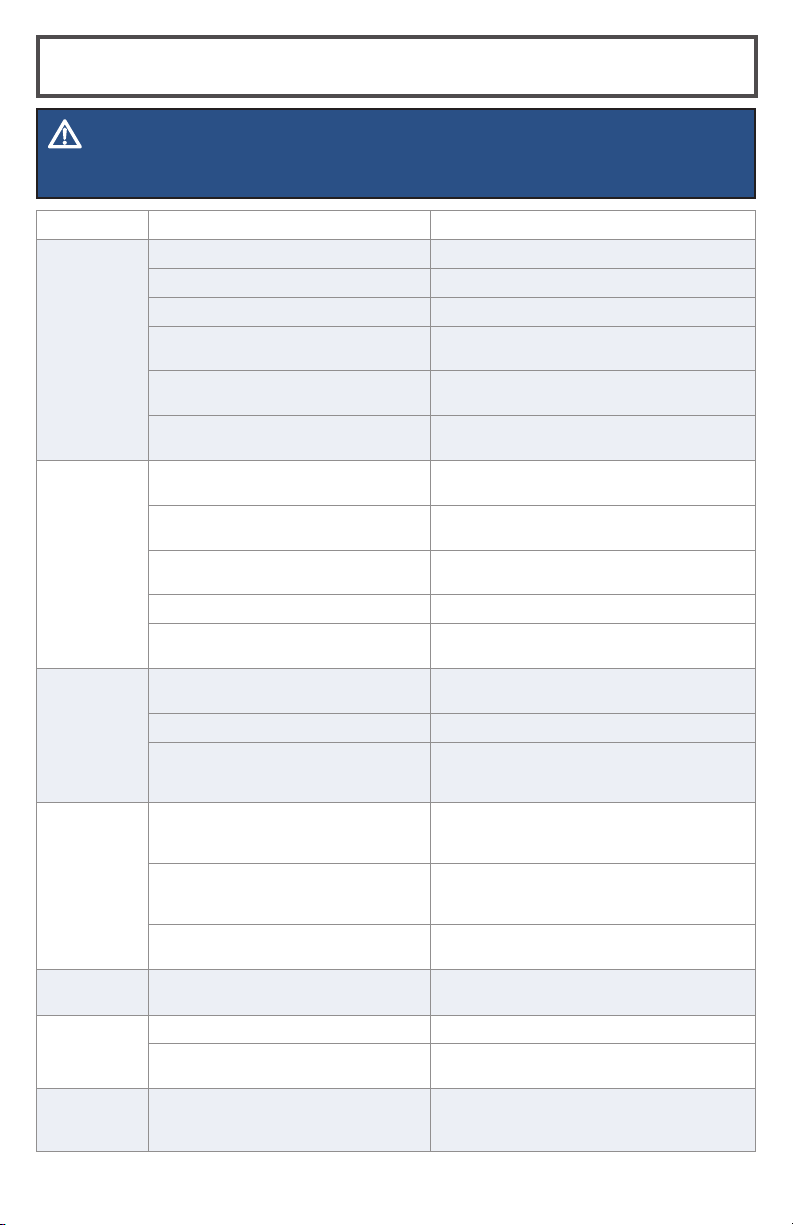
Problem Possible Causes Remedies
Reduced
spray OR
no spray
Clean Water Tank may be empty Refill tank
Clean Water Tank may not be seated completely Turn power OFF / Remove and reseat tank
System isn’t completely primed Hold trigger for 10 to 15 seconds
Brush Roll Window is not latched in place Turn power OFF / Unplug machine and re-install Brush
Roll Window
Not holding trigger to spray solution Hold Spray Solution Trigger continuously while using
the machine
Spray tips on foot clogged Use a pin to clean the spray tips located underneath the
Brush Roll Window
Loss of
suction
power
Tanks may not be seated properly Turn Power OFF / Remove both tanks and reseat them
so they fit properly
Dirty Water Tank has picked up maximum
amount of dirty water and has reached full line
Empty Dirty Water Tank and make sure to make slow
cleaning passes back and forth while cleaning
Brush Roll Window is not latched in place Turn Power OFF / Unplug machine and re-install Brush
Roll Window
Debris channel in foot is clogged Clean the channel with a paper towel
Filter clogged by debris Remove debris clogging the filter screen and clean the
filter
Brush Roll is
not turning
and/or
3 solid red
LED lights
Brush Roll is not installed properly Turn Power OFF / Unplug machine and follow
instructions on page 14 for replacing Brush Roll
Machine is standing upright Recline machine to turn the Brush Roll on
Obstruction has caused Brush Roll to stop
rotating
Turn Power OFF / Unplug machine and remove Brush
Roll Window and Brush Roll to clean hair and string off
of brush ends
Machine
won’t turn
on
Obstruction has caused Brush Roll to stop and
shut down machine indicated by 3 solid red
LED lights.
Unplug machine to reset the system. While the machine
is unplugged, remove the Brush Roll Window and Brush
Roll to clean hair and string off of brush ends
Handle not inserted properly into body of
machine
Remove the Handle and re-insert into the body of the
machine making sure to push down until you hear a
“click”
Battery is dead Place unit on 3-in-1 Docking Station and let charge for
4 hours.
Machine is
leaking
Cap of Clean Water Tank is not closed properly Remove the Clean Water Tank and re-apply the cap
Machine is
streaking
Too much water applied Go over area without spraying down water
Previous floor care products used Contact product manufacturer regarding how to
remove
2 or 3 LED
red lights
flashing
Internal error Restart unit. If issue does not resolve, contact
Consumer Care.
Troubleshooting
WARNING
To reduce the risk of electric shock, turn power switch OFF and disconnect plug from electrical outlet
before performing maintenance or troubleshooting checks.
16
©2019 BISSELL Inc.
Grand Rapids, Michigan
All rights reserved. Printed in China
Part Number 161-8461 05/19
Visit the BISSELL website: www.BISSELL.com.au
When contacting BISSELL, have model number of cleaner available.
Please record your Model Number:
Please record your Purchase Date:
NOTE: Please keep your original sales receipt. It provides proof of the date
of purchase in the event of a guarantee claim. See guarantee for details.
This guarantee gives you specific legal rights, in addition to rights you may
have under the Australian Consumer Law. If you need additional instruction
regarding this guarantee or have questions regarding what it may cover,
please contact your local BISSELL Consumer Services on the details set out
below.
Limited 2 Year Guarantee
(from the date of purchase by
original purchaser)
Subject to the *CONDITIONS identified below, BISSELL will repair or replace
(with new, refurbished, lightly used, or remanufactured components or
products), at BISSELL’s option, free of charge, any defective or malfunctioning
part due to manufacturer defect. This guarantee applies to product used for
personal purposes, and not commercial or rental service. This guarantee does
not apply to fans or routine maintenance or consumable components such as
filters, belts, brush rolls, etc., damage or malfunction caused by negligence,
abuse, neglect, unauthorized repair, or any other use not in accordance with
the user guide. BISSELL recommends that the original packaging be kept
for the duration of the guarantee period in case such need arises within the
guarantee period that the item needs re-packing and transportation.
It may be necessary to obtain some of your personal information, such as a
mailing address, to fulfill terms of this guarantee. Any personal data will be
handled pursuant to BISSELL’s Privacy Policy, which can be found at
www.BISSELL.eu.
*CONDITIONS OF THE GUARANTEE
Subject to whether such loss is reasonably foreseeable, BISSELL and its
in-country distributors are not liable for incidental or consequential damages
of any nature associated with the use of this product.
FOR AUSTRALIAN CONSUMERS ONLY:
OUR GOODS COME WITH GUARANTEES THAT CANNOT BE EXCLUDED UNDER
THE AUSTRALIAN CONSUMER LAW. YOU ARE ENTITLED TO A REPLACEMENT
OR REFUND FOR A MAJOR FAILURE AND FOR COMPENSATION FOR ANY OTHER
REASONABLY FORESEEABLE LOSS OR DAMAGE. YOU ARE ALSO ENTITLED
TO HAVE THE GOODS REPAIRED OR REPLACED IF THE GOODS FAIL TO BE OF
ACCEPTABLE QUALITY AND THE FAILURE DOES NOT AMOUNT TO A MAJOR
FAILURE.
THIS GUARANTEE IS IN ADDITION TO OTHER RIGHTS OR REMEDIES UNDER LAW.
NOTHING IN THIS GUARANTEE EXCLUDES, LIMITS OR MODIFIES ANY LIABILITY
OF BISSELL WHICH IS IMPOSED BY LAW, OR LIMITS OR MODIFIES ANY REMEDY
AVAILABLE TO THE CONSUMER WHICH IS GRANTED BY LAW. TO MAKE A CLAIM
UNDER THIS GUARANTEE CONTACT BISSELL AUSTRALIA PTY LTD (DETAILS
BELOW). CONTACT BISSELL PRIOR TO RETURNING ANY GOODS. WHERE AGREED,
BISSELL WILL REIMBUSE REASONABLE POSTAGE / HANDLING COSTS (IF ANY)
FOR RETURNING GOODS TO BISSELL. TO CLAIM EXPENSES INCURRED IN MAKING
A CLAIM UNDER THIS GUARANTEE PLEASE PROVIDE BISSELL WITH A COPY OF
THE RECEIPT OF THE EXPENSES BY EMAIL OR POST.
If your BISSELL® product should require service or to claim under our limited guarantee,
please contact us as follows:
Website and Email:
www.BISSELL.com.au
www.BISSELL.co.nz
Telephone:
Australia: 1300-247-735
New Zealand: 0800-247-735
Write:
BISSELL AUSTRALIA PTY LIMITED
42 Rocco Dr.
Scoresby 3179
Victoria
Australia
Replacement parts and accessories are available for purchase.
To purchase visit www.BISSELL.com.au.
Consumer Guarantee
Consumer Care