1. Overview
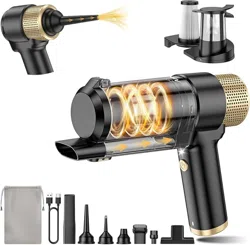
The AHNR LT-154 is a cordless, rechargeable handheld vacuum cleaner. It is designed for portable cleaning in cars, homes, and offices. The unit features a 4-in-1 functionality for vacuuming, blowing, inflating, and vacuum compression.

2. Package Contents
- Handheld Vacuum Cleaner (Main Unit)
- Multi-Accessories (7 pieces)
- Storage Bag
- Type-C Charging Cable
- User Manual
3. Product Features
3.1. Suction Power and Motor
The vacuum provides 16000PA of suction power with a motor speed of 84,000 rpm for removing pet hair, fine debris, and common dirt.
3.2. 4-in-1 Multifunction with Accessories
The unit performs four key functions using seven included accessories:
- Vacuuming: Use the floor brush and brush nozzle for pet hair and debris.
- Blowing: Use the suction nozzle and blowing nozzle to blow away surface debris and dust from gaps.
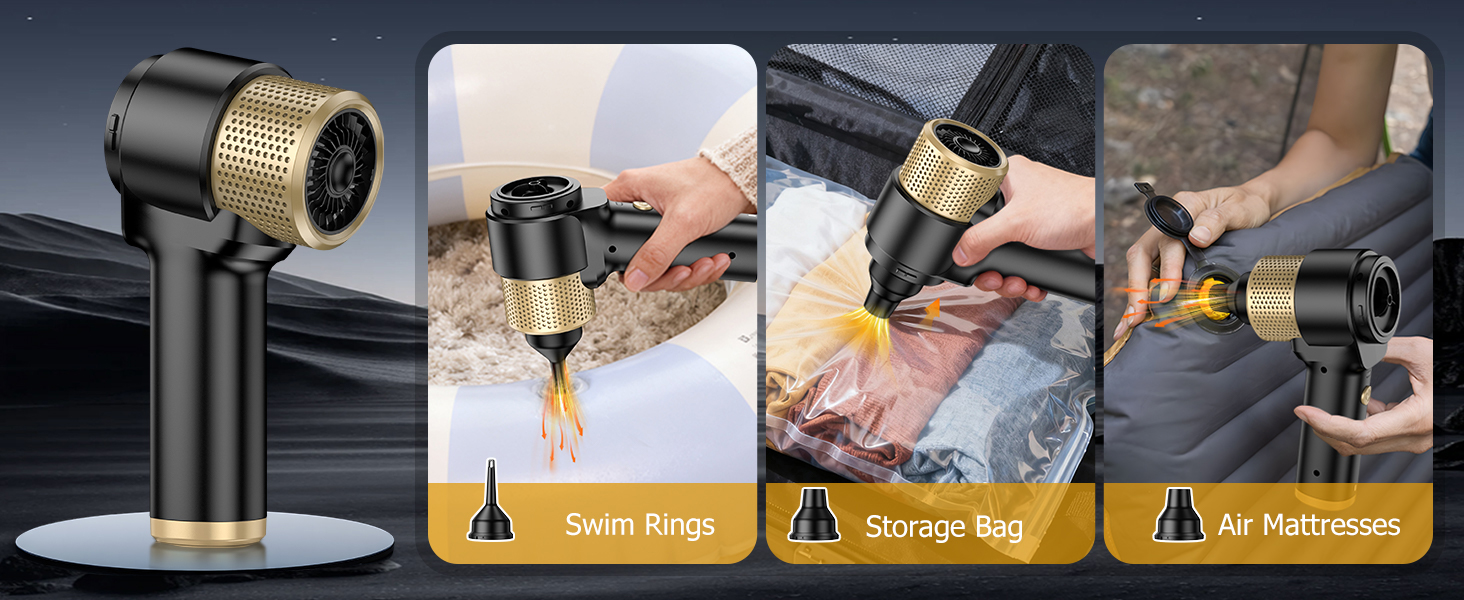
- Inflating: Use the inflatable mouth to inflate items like swimming rings.
- Vacuum Compression: Use the pumping nozzle to deflate items.


3.3. Battery and Charging
- Battery: 5200mAh rechargeable battery.
- Charging Port: Type-C interface.
- Charging Time: Approximately 3 hours to full charge.
- Runtime: Up to 30 minutes of continuous use on a full charge.
- Charging Indicator: Red light indicates charging. Green light indicates fully charged.
- Charging Sources: Can be charged using a standard wall adapter, car charger, or power bank.
3.4. Filtration System
The vacuum uses a dual-filter system:
- Metal Filter: Filters out larger impurity particles.
- HEPA Filter: Traps extremely fine dust. Can be cleaned and reused.
3.5. Physical Design
- Weight: 1.19 pounds (approx. 0.54 kg).
- Dimensions: 8.11" L x 2.91" W x 9.69" H.
- Dust Cup Capacity: 200 Milliliters.
- LED Light: Built-in light for cleaning in dimly lit areas.
- One-Touch Emptying: Press the release button to empty the dust cup.


4. Use Guide
4.1. Initial Setup
- Remove all components from the packaging.
- Fully charge the vacuum using the provided Type-C cable before first use.
- Ensure the dust cup and filters are correctly installed.
4.2. Attaching Accessories
Align the desired accessory with the nozzle on the front of the vacuum. Push firmly until it clicks into place. To remove, pull the accessory straight off.
4.3. Basic Operation
- Press and hold the power button to turn on the vacuum.
- Guide the nozzle over the area to be cleaned.
- Release the power button to turn off the vacuum.
- For blowing or inflation functions, attach the appropriate nozzle and turn on the unit. The motor will reverse airflow.
4.4. Emptying the Dust Cup
- Turn off and disconnect the vacuum from any power source.
- Press the dust cup release button, usually located near the top of the cup.
- Remove the dust cup and empty debris into a trash bin.
- Reattach the dust cup until it clicks securely.
4.5. Cleaning and Maintenance
- Regularly empty the dust cup after use to maintain suction power.
- Periodically remove and clean the metal and HEPA filters. Rinse with water if necessary and allow to dry completely before reinstalling.
- Wipe the exterior of the vacuum with a dry or slightly damp cloth. Do not submerge the main unit in water.
- Check the nozzle and accessories for blockages and clear any debris.
4.6. Charging the Vacuum
- Connect the Type-C cable to the charging port on the vacuum.
- Connect the other end of the cable to a USB power source (wall adapter, car charger, power bank).
- The indicator light will turn red. Charging is complete when the light turns green.
- Disconnect the cable after charging.
5. Specifications
- Model: LT-154
- Suction Power: 16000 PA
- Motor Speed: 84,000 rpm
- Battery Capacity: 5200mAh
- Voltage: 12V
- Run Time: Up to 30 minutes
- Charge Time: ~3 hours
- Dust Cup Capacity: 200 ml
- Weight: 1.19 lbs (0.54 kg)
- Product Dimensions: 8.11" x 2.91" x 9.69"
- Filter Type: Metal filter & HEPA filter
- Power Source: Rechargeable Battery (Cordless)
- Charging Port: Type-C
- Included Accessories: 7 pieces
6. Troubleshooting
- Vacuum does not turn on: Ensure the battery is charged. Check that the dust cup and filters are properly installed.
- Weak suction power: Empty the dust cup. Check and clean the filters. Inspect the hose and nozzle for blockages.
- Vacuum turns off during use: The battery may be depleted. Recharge the unit.
- Indicator light does not come on when charging: Check the Type-C cable connection at both ends. Try a different USB power source.
- Unusual noise or vibration: Turn off the vacuum immediately. Check for and remove any foreign object stuck in the brush roll or nozzle.
7. Safety Information
- Read all instructions before using the appliance.
- This appliance is for indoor use only.
- Do not use to pick up liquids, burning materials, or sharp, hard objects.
- Do not use the vacuum if the filter is missing or incorrectly installed.
- Do not block the air vents. Keep them free of dust, lint, and hair.
- Do not charge the vacuum near heat sources or in direct sunlight.
- Use only the provided Type-C cable for charging.
- Keep hair, loose clothing, fingers, and all parts of the body away from openings and moving parts.
- Unplug the charger from the outlet when not in use and before cleaning or maintenance.
- This product contains a rechargeable battery. Do not disassemble, short-circuit, or incinerate the battery.