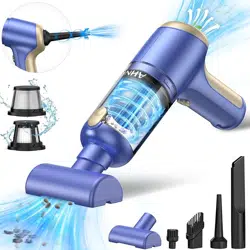
AHNR BLUE 02 Handheld Car Vacuum Cleaner Cordless with Brushless Motor, 20000PA High Power Vacuum Cleaner & Air Duster, 3 in 1 Keyboard Portable Vacuum, Mini Hand Held Vacuums Cleaner for Car Home

Product's Documents

Below are documents related to this product, you can read online or download:
BLUE 02 photo

1. Overview

The AHNR Handheld Car Vacuum Cleaner is a cordless, portable cleaning device designed for use in cars, homes, and offices. It functions as a 3-in-1 tool for vacuuming, blowing dust, and inflating small items.

AHNR Handheld Car Vacuum Cleaner main product image showing a blue and gold handheld vacuum with accessories.

2. Package Contents

  • AHNR Handheld Vacuum Cleaner (Main Unit)
  • Filter
  • Brush Nozzles
  • Long Nozzles
  • Type-C Charging Cable
  • User Manual

Please verify all items are present before use.

3. Key Features & Specifications

3.1. Physical Specifications

  • Weight: 0.95 lbs (approximately 1 pound)
  • Dimensions (L x W x H): 8.62" x 6.46" x 2.44"
  • Dust Cup Capacity: 100 Milliliters
  • Color: Blue & Gold
  • Form Factor: Handheld

3.2. Power & Performance

  • Motor Type: Brushless Motor
  • Motor Power: 120W, 0.161 horsepower
  • Suction Power: Up to 20,000 PA (Max Mode), 12,000 PA (Standard Mode)
  • Motor Speed: Up to 85,000 RPM
  • Power Source: Built-in Rechargeable Battery
  • Battery Capacity: 10,000 mAh
  • Charging Time: Approximately 2.5 hours (Fast Charge)
  • Runtime: 20-30 minutes after full charge
  • Voltage: 12 Volts
Diagram highlighting the high capacity 10000mAh battery and fast charging capability. Illustration showing the 20000PA powerful suction feature in action. Diagram showing the upgraded brushless motor technology for reduced wear and heat dissipation.

3.3. Filtration System

  • Filter Type: Dual Filtration System
  • Primary Filter: Steel mesh filter for large debris.
  • Secondary Filter: Washable and reusable HEPA filter for fine particles.

3.4. Operation & Controls

  • Controller Type: Push Button
  • Number of Speeds/Power Levels: 2 (Standard and Max)
  • Noise Level: ≤ 40 dB
  • One-Touch Dust Emptying: Yes

4. Product Components & Indicators

Labeled diagram of the handheld vacuum cordless cleaner showing its parts.
  1. Main Body/Handle: Ergonomic design for one-handed operation.
  2. Suction Intake: Where accessories attach for vacuuming.
  3. Blowing Outlet: The opposite end used for blowing air and inflation.
  4. Power Button: Used to turn the device on/off and switch between Standard and Max suction modes.
  5. Dust Cup Release Button: For one-touch emptying of collected debris.
  6. Charging Port: Type-C port for connecting the charging cable.
  7. Charging Indicator Light:
    • Flashing Red: Device is charging.
    • Solid Green: Device is fully charged.

5. Use Guide

5.1. Before First Use

  1. Unpack all components.
  2. Fully charge the vacuum cleaner using the provided Type-C cable. The indicator will turn green when charging is complete.
  3. Ensure the HEPA filter is correctly installed inside the dust cup.

5.2. Basic Operation for Vacuuming

  1. Select the appropriate suction accessory (e.g., brush nozzle, crevice tool) and attach it to the suction intake.
  2. Press the power button once to start the vacuum in Standard mode (12,000 PA).
  3. Press the power button again to switch to Max mode (20,000 PA) for deeper cleaning.
  4. A third press turns the device off.
  5. Move the nozzle slowly over the surface to be cleaned.
Handheld vacuum being used to clean a car seat. Handheld vacuum being used to clean a desktop keyboard.

5.3. Using the Blowing and Inflation Function

  1. Attach the long nozzle accessory to the blowing outlet (opposite end from the suction intake).
  2. Turn the vacuum on. The device will expel air from this nozzle.
  3. Use it to blow dust out of keyboards, electronics, or crevices.
  4. It can also be used to inflate small items like balloons or swim rings.

5.4. Emptying the Dust Cup

  1. Ensure the vacuum is turned off.
  2. Press the dust cup release button.
  3. The bottom of the dust cup will open, allowing debris to fall out without touching it.
  4. Close the dust cup securely before next use.
Note: The main machine body is not washable. Only the HEPA filter is washable.

5.5. Cleaning and Maintenance

  1. Empty the dust cup regularly after use.
  2. Clean the HEPA filter:
    • Remove the filter from the dust cup.
    • Rinse it gently with water and let it air dry completely before reinstalling.
    • Do not use the vacuum with a wet filter.
  3. Clean the steel mesh filter by tapping out any large debris.
  4. Wipe the exterior of the vacuum with a dry or slightly damp cloth.

5.6. Charging the Battery

  1. Connect the provided Type-C cable to the charging port on the vacuum.
  2. Connect the other end to a USB power adapter (not included) or a computer USB port.
  3. The charging indicator light will flash red.
  4. When the light turns solid green, charging is complete. Disconnect the cable.

6. Recommended Uses

  • Car Interiors (seats, floor mats, dashboards, cup holders)
  • Home Upholstery (sofas, chairs)
  • Desks and Keyboards
  • Hard Floors and Low-Pile Carpets
  • Blowing dust from electronics, shelves, or blinds
  • Inflating small air-filled items
Car vacuum being used to clean car floor mats and seats. Car vacuum cleaner being used in a vehicle. Car vacuum cleaner being used on a home carpet.

7. Troubleshooting

Problem Possible Cause Solution
Vacuum does not turn on. Battery is depleted. Charge the vacuum fully.
Weak suction power. Dust cup is full.
Filter is clogged.
Accessory or intake is blocked.
Empty the dust cup.
Clean or replace the HEPA filter.
Check for and remove blockages.
Vacuum stops during use. Battery is low.
Motor may have overheated.
Recharge the vacuum.
Turn off and let the device cool down for 15-20 minutes.
Charging indicator does not light up. Faulty cable or power source.
Charging port issue.
Try a different USB-C cable and power adapter.
Ensure the cable is firmly connected.
Debris is not collecting in the dust cup. Dust cup is not attached properly.
Filter is missing or incorrectly installed.
Ensure the dust cup is locked in place.
Check that the HEPA filter is correctly installed.

8. Safety Instructions

  • Read all instructions before using the appliance.
  • This appliance is for indoor use only.
  • Do not use to pick up liquids, burning materials, or sharp, hard objects.
  • Do not use the vacuum with a damaged cord or plug.
  • Do not block the air intakes or outlets.
  • Keep hair, loose clothing, fingers, and all parts of the body away from openings and moving parts.
  • Turn off the vacuum before emptying the dust cup or changing accessories.
  • Do not charge the vacuum near heat sources or in direct sunlight.
  • Use only the provided Type-C cable for charging.
  • Let the HEPA filter dry completely after washing before reusing.
  • Store the vacuum in a cool, dry place.

9. Specifications Summary

AttributeSpecification
Model Name/NumberVacuum brushless blue 02
BrandAHNR
Special Features2-Gear Mode, 20000PA Powerful Suction, Brushless Motor, Cordless, Portable
Filter TypeHEPA Filter
Power SourceBattery Powered (10,000 mAh)
Charging Time~2.5 hours
Runtime20-30 minutes
Noise Level≤ 40 dB
Weight0.95 lbs (1 lb)

Reference file: AHNR BLUE 02 Handheld Car Vacuum Cleaner Cordless with Brushless Motor, 20000PA High Power Vacuum Cleaner & Air Duster, 3 in 1 Keyboard Portable Vacuum, Mini Hand Held Vacuums Cleaner for Car Home

Specifications

AHNR BLUE 02 Questions and Answers

See other models: PJ-126 PLUS LT-156