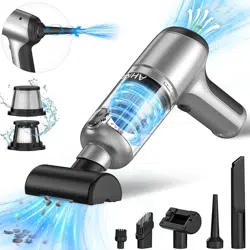
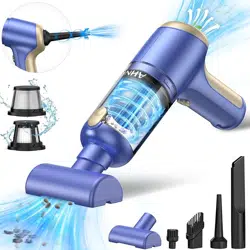
The AHNR PJ-126PLUS is a cordless, handheld vacuum cleaner designed for use in cars and homes. It functions as a 3-in-1 device for vacuuming, blowing dust, and inflating items. It is powered by a rechargeable battery and features a brushless motor.
Features and Specifications
Key Features
3-in-1 Function: Vacuum, blower, and inflator.
Brushless Motor: Provides up to 85,000 RPM with 120W power.
Dual Suction Modes: Standard (12,000PA) and Max (20,000PA).
Dual Filtration System: Includes a steel mesh filter and a washable HEPA filter.
Large Capacity Battery: 10,000mAh lithium-ion battery.
Low Noise: Operates at ≤40 dB.
One-Touch Dust Emptying.
Technical Specifications
Model: PJ-126PLUS
Color: Black & Silver
Power Source: Battery Powered (12V)
Charging Time: Approx. 2.5 hours
Runtime: 20-30 minutes after full charge
Charging Port: USB Type-C
Dust Canister Capacity: 100 Milliliters
Dimensions (L x W x H): 8.62" x 6.46" x 2.44"
Included Components: Vacuum cleaner, filter, brush nozzles, long nozzles, Type-C charging cable, manual.
Parts and Components
Main vacuum body
Suction intake / Blower outlet
Power/Mode button
Battery/charging indicator light
Dust canister release button
Dust canister
Steel mesh filter
HEPA filter
Accessory nozzles (brush, long nozzle, floor brush)
USB Type-C charging cable
Use Guide
Charging the Vacuum
Connect the provided USB Type-C cable to the charging port on the vacuum cleaner.
Connect the other end of the cable to a USB power adapter or port (5V/2A recommended).
The indicator light will flash red during charging.
When charging is complete, the indicator light will turn solid green. A full charge takes approximately 2.5 hours.
Note: Fully charge the vacuum before first use.
Vacuuming
Ensure the HEPA filter and steel mesh filter are correctly installed inside the dust canister.
Attach the desired suction accessory (e.g., brush nozzle) to the intake.
Press the power button once to start the vacuum in Standard mode (12,000PA).
Press the power button again to switch to Max mode (20,000PA) for stronger suction.
A third press turns the vacuum off.
Move the nozzle over the area to be cleaned.
Using the Blower/Inflator Function
Remove any accessory from the suction intake.
The opposite end of the device functions as a blower/inflator outlet.
Attach the long nozzle accessory to this outlet for targeted blowing.
Turn the vacuum on. The air will flow out from this end.
Use it to blow dust from keyboards, crevices, or to inflate balloons and swim rings.
Emptying the Dust Canister
Press the dust canister release button to detach the canister from the main body.
Hold the canister over a trash bin.
Press the one-touch dust release mechanism to open the bottom lid and empty debris.
Close the lid and reattach the canister to the main body until it clicks into place.
Warning: Do not wash the main motor body. Only the filters and dust canister are washable.
Cleaning and Maintenance
Cleaning the Filters
Remove the dust canister.
Take out the HEPA filter and the steel mesh filter.
Gently tap filters to remove loose dust.
Rinse the HEPA filter and steel mesh filter with clean water. Allow them to air dry completely before reinstalling.
Ensure filters are fully dry before using the vacuum again to prevent motor damage.
General Care
Store the vacuum in a cool, dry place.
Do not use it to vacuum liquids, burning materials, or sharp, hard objects.
Do not block the air intakes or outlets during operation.
Unplug the charger once the battery is fully charged.
Troubleshooting
Vacuum does not turn on: Check battery level and charge the vacuum. Ensure the filters are correctly installed and dry.
Weak suction power: Empty the dust canister. Check and clean the filters for clogs. Ensure the canister is properly attached and sealed.
Vacuum stops during use: The battery may be depleted. Recharge the vacuum. The motor may have overheated; turn off the vacuum and allow it to cool down.
Indicator light does not turn green when charging: Check the USB cable and power source connection. A full charge takes approximately 2.5 hours.
Unusual noise: Check for and remove any large obstructions in the intake, nozzle, or dust canister.
Safety Information
This appliance is for indoor use only.
Do not use the vacuum to clean up hazardous, flammable, or combustible materials.
Do not immerse the main body, battery, or charger in water or other liquids.
Keep hair, loose clothing, fingers, and all parts of the body away from openings and moving parts.
Use only the provided USB Type-C cable for charging. Use a standard 5V/2A USB adapter.
Do not use the vacuum if it is damaged or malfunctions.
The battery is not user-replaceable. Do not attempt to disassemble the unit.
Keep the vacuum away from heat sources and direct sunlight.