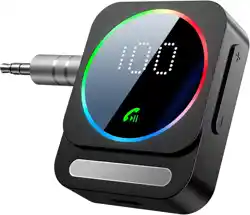
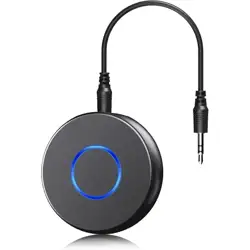
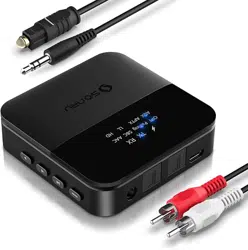
SONRU BT1011B Bluetooth 5.3 Receiver for Car, Wireless Audio Adapter

Product's Documents

Below are documents related to this product, you can read online or download:
BT1011B photo

Model: BT1011B-US

Overview

The SONRU Bluetooth 5.3 Receiver is a wireless audio adapter that adds Bluetooth connectivity to audio systems without built-in Bluetooth. It connects to devices via a 3.5mm AUX port or RCA inputs.

SONRU Bluetooth 5.3 Receiver for Car, main product image showing a black rectangular device with a screen and buttons.

Features

Bluetooth Connectivity

  • Bluetooth 5.3: Provides a stable connection with reduced audio delay compared to older Bluetooth versions.
  • Dual Device Pairing: Can connect to two Bluetooth source devices simultaneously.
  • Operating Range: Up to 33 feet (10 meters) in open space without obstacles.

Audio & Call Quality

  • CVC 8.0 Noise Reduction: Built-in microphone uses noise cancellation to filter background noise for clearer hands-free calls.
  • Stereo Audio Output: Supports two-channel audio.

Battery & Power

  • Battery Life: Up to 24 hours of use on a full charge.
  • Charging Time: Approximately 1.5 hours to full charge via the included USB Type-C cable.
  • Use While Charging: The device can be used while connected to a power source.

Physical Design

  • LED Display: Screen shows volume level and battery status.
  • Control Buttons: Includes buttons for power, play/pause, track navigation, and volume control.
  • Output Ports: Dual 3.5mm AUX output ports and RCA (red/white) output ports.
  • Material: Plastic enclosure.

What's in the Box

  • 1 x SONRU Bluetooth Receiver Adapter
  • 1 x 3.5mm AUX Plug-to-Plug Cable
  • 1 x 3.5mm Audio Cable
  • 1 x RCA Audio Cable (Red/White)
  • 1 x USB Type-C Charging Cable
  • 1 x User Manual (this document)

Use Guide

Initial Setup and Connection

  1. Charge the Device: Connect the USB Type-C cable to the receiver and a power source (e.g., USB wall adapter, car charger, or computer) to charge it fully.
  2. Connect to Your Audio System:
    • For systems with a 3.5mm AUX input, use the included AUX cable to connect the receiver's AUX OUT port to your system's AUX IN port.
    • For systems with RCA inputs, use the included RCA cable to connect the receiver's RCA OUT ports (red/white) to the corresponding inputs on your stereo.
  3. Power On: Press and hold the power button until the LED screen lights up. The device will enter pairing mode automatically on first use.
  4. Pair with Your Device:
    • On your smartphone, tablet, or computer, go to Bluetooth settings.
    • Look for "SONRU BT1011B" or a similar name in the list of available devices and select it to pair.
    • If prompted for a PIN, enter "0000".

Diagram showing the aux bluetooth adapter connected to a car stereo and a phone.

Device Controls and Indicators

The device has several buttons and an LED screen for control and status information.

  • Power Button: Press and hold to turn the device on or off. A short press may activate voice assistant on a connected phone.
  • Volume Buttons (+/-): Adjust the audio output volume. The current volume level is shown on the LED screen.
  • Play/Pause Button: A short press plays or pauses audio. A double-press may skip to the next track. A triple-press may go to the previous track.
  • LED Screen: Displays icons for connection status, battery level, and current volume.
  • Microphone: Located on the device for hands-free calls.

Close-up image of the bluetooth aux adapter for car, highlighting the buttons and LED screen.

Making and Receiving Calls

  1. When a call comes in on your paired phone, audio will route through the receiver to your connected speakers or headphones.
  2. Press the Play/Pause button once to answer the call. Press it again to end the call.
  3. Speak normally. The built-in microphone with CVC 8.0 will pick up your voice.

Pairing a Second Device

  1. Ensure the receiver is on and connected to the first device.
  2. On the second device, go to Bluetooth settings and select "SONRU BT1011B" from the list.
  3. The receiver can manage audio from two devices, but will typically play audio from the most recently active device.

Compatibility

This adapter is compatible with devices that have a 3.5mm AUX input or RCA audio inputs, including:

  • Car stereo systems
  • Home stereo systems and speakers
  • Wired headphones and earphones
  • Televisions
  • Laptops, PCs, MP3, and MP4 players
  • Airplane in-flight entertainment systems (where permitted)

Source Device Compatibility: Works with any Bluetooth-enabled audio source, such as smartphones, tablets, and computers.

Specifications

  • Model: BT1011B-US
  • Bluetooth Version: 5.3
  • Wireless Range: Up to 33 ft (10 m)
  • Battery Capacity: Not specified. Provides up to 24 hours playback.
  • Charging Port: USB Type-C
  • Outputs: Dual 3.5mm AUX, RCA (L/R)
  • Audio Codec Support: Information not specified in provided content.
  • Item Weight: 0.08 kg (2.82 oz)
  • Color Options: Black, Silver

Troubleshooting

  • No Power: Ensure the device is charged. Connect it to a power source using the Type-C cable.
  • Cannot Pair:
    • Ensure the receiver is in pairing mode (LED may flash). You may need to press and hold the power button for 5+ seconds to force pairing mode.
    • Move your Bluetooth source device closer to the receiver.
    • Restart both the receiver and your source device.
  • Audio Distortion or Dropouts:
    • Reduce the distance between the receiver and your source device.
    • Ensure there are no major obstacles or sources of wireless interference (like Wi-Fi routers) between the devices.
    • Check that the audio cables are fully inserted into both the receiver and your sound system.
  • Poor Call Quality: Ensure the microphone on the receiver is not obstructed. Speak in a normal tone. The CVC 8.0 technology is designed to reduce background noise.
  • Device Not Recognized by Car Stereo: If connected via AUX, ensure your car stereo's input source is set to "AUX" or "Line In".

Safety and Care

  • Use only the provided or certified USB Type-C cable for charging.
  • Do not expose the device to extreme temperatures, moisture, or direct sunlight for prolonged periods.
  • Keep the device away from liquids.
  • When using in a car, secure the device so it does not interfere with driving controls.

Reference file: SONRU BT1011B Bluetooth 5.3 Receiver for Car, Wireless Audio Adapter

Specifications

SONRU BT1011B Questions and Answers

See other models: B0DHTHZM34 BT1008 BT1011 C59 C48