1. Overview
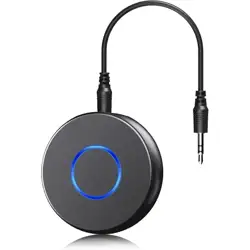
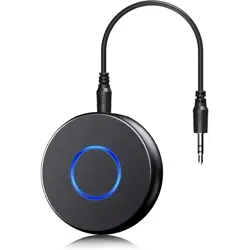
The SONRU Bluetooth 5.3 Adapter is a wireless audio receiver designed to add Bluetooth functionality to non-Bluetooth audio equipment. It connects to devices such as car stereos, home stereo systems, wired headphones, and speakers via 3.5mm AUX or RCA cables, allowing you to stream audio from your smartphone, tablet, or laptop.

Primary Function: Converts wired audio inputs to receive wireless Bluetooth audio signals from your source device.
Note: This product is a Bluetooth receiver. It pairs with source devices like phones and laptops. It cannot pair with other Bluetooth output devices like headphones or speakers.
2. Features & Specifications
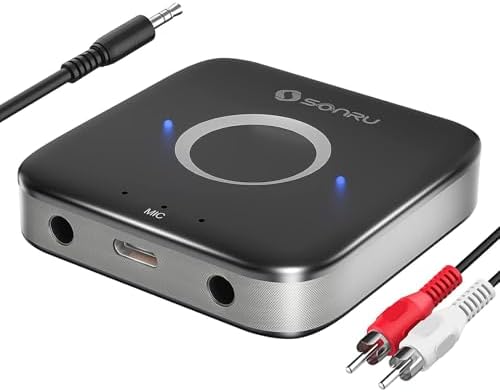
2.1 Key Features
- Bluetooth 5.3: Provides a stable connection with improved range and lower power consumption.
- Dual 3.5mm AUX Output Ports: Connect two audio devices simultaneously (e.g., a home stereo and wired headphones).
- Noise Cancellation: Built-in AEC (Acoustic Echo Cancellation) and ANC (Active Noise Cancellation) circuits for clearer audio during calls and music playback.
- Multi-Functional Button (MFB): A single button controls playback, call management, and other functions.
- Dual Connection: Can be paired with two phones at the same time.
- Automatic Pairing Memory: Remembers previously paired devices for automatic reconnection.
- Long Battery Life: Up to 15 hours of working time. Supports use while charging.
2.2 Physical Specifications
- Color: Black
- Item Weight: 0.11 kg
- Connector Type: 3.5mm Jack
- Audio Output Mode: Stereo
- Number of Channels: 2
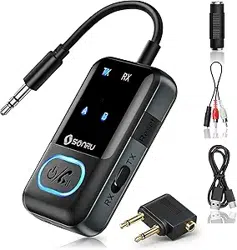
2.3 Package Contents
- SONRU Bluetooth 5.3 Adapter
- Two 3.5mm AUX cables
- One RCA cable
- Charging cable (USB to Micro-USB assumed)
- User manual
3. Use Guide
3.1 Device Overview & Indicators
The main device body contains the following elements:
- Multi-Functional Button (MFB): Used for power, pairing, and call/playback control.
- Dual 3.5mm AUX Output Ports: Labeled for connecting audio devices.
- Charging Port: Micro-USB port for charging the internal battery.
- Status LED: Indicates power, pairing mode, and battery status (specific colors/flashes are detailed in the operation section).
3.2 Initial Setup & Pairing
- Charge the Device: Connect the provided charging cable to the adapter's charging port and a USB power source. A full charge takes approximately 2.5 hours.
- Power On: Press and hold the MFB button for 3-5 seconds until the status LED flashes rapidly (usually blue and red), indicating it is in pairing mode.
- Connect to Audio System: Use one of the provided 3.5mm AUX cables or the RCA cable to connect the adapter's output port to the AUX input of your car stereo, home speaker, or headphones.
- Pair with Your Source Device:
- On your smartphone, tablet, or laptop, go to the Bluetooth settings.
- Look for a device named similar to "SONRU BT1008" or "BT1008" and select it to pair.
- If prompted for a PIN, enter "0000" or "1234".
- Play Audio: Once connected, play audio from your source device. The sound will output through your connected speakers or headphones.
3.3 Multi-Functional Button (MFB) Operations
- Power On/Off: Press and hold for 3-5 seconds.
- Enter Pairing Mode: When powered off, press and hold for 5-7 seconds until the LED flashes rapidly.
- During Music Playback:
- Short Press: Play/Pause.
- Double Press: Next track.
- Triple Press: Previous track.
- During a Call:
- Short Press: Answer an incoming call / End an ongoing call.
- Press and Hold: Reject an incoming call.
- Double Press: Redial the last number.
- Voice Assistant: Press and hold the button (when not in a call) to activate your phone's voice assistant (e.g., Siri, Google Assistant).
3.4 Connecting Two Devices (Dual Connection)
- Pair the first phone as described in section 3.2.
- Turn off Bluetooth on the first phone or move it out of range.
- Put the adapter back into pairing mode (press and hold MFB for 5-7 seconds).
- Pair the second phone from its Bluetooth settings.
- Once both are paired, the adapter will remember both devices. It can connect to both simultaneously, allowing you to receive calls from either phone while streaming audio from one.
3.5 Using with Navigation Apps
The adapter can broadcast voice guidance from navigation apps (like Google Maps or Waze) through your car speakers when connected via AUX. Ensure your phone's media audio is routed through the Bluetooth connection in its settings.
4. Troubleshooting
- No Sound:
- Ensure the adapter is powered on and the status LED is on.
- Check that your source device is connected to "SONRU BT1008" in Bluetooth settings.
- Verify the AUX or RCA cable is firmly connected to both the adapter and your audio system.
- Ensure your audio system's input source is set to AUX.
- Cannot Pair:
- Ensure the adapter is in pairing mode (LED flashing rapidly).
- Move your source device closer to the adapter.
- Restart the Bluetooth function on your source device.
- If previously paired, delete "SONRU BT1008" from your device's Bluetooth list and try pairing again.
- Poor Audio Quality or Interference:
- Keep the adapter and your source device within a reasonable range (avoid obstacles).
- Charge the adapter, as low battery can affect performance.
- Move away from other strong wireless signal sources.
- Adapter Not Charging:
- Try a different USB charging cable and power adapter.
- Ensure the charging port is clean and undamaged.
5. Safety & Care
- Use only the provided or recommended charging cable.
- Avoid exposing the adapter to extreme temperatures, moisture, or direct sunlight.
- Do not disassemble the device.
- For in-car use, secure the adapter so it does not interfere with driving controls.
- Use the hands-free calling feature responsibly while driving. Set up calls and audio before driving.
- Dispose of the product and battery according to local regulations.