1. Overview
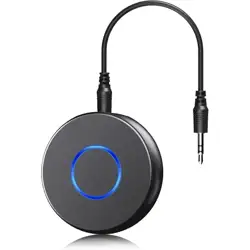
The SONRU Bluetooth 5.3 Aux Car Adapter is a wireless audio receiver designed to add Bluetooth connectivity to car stereos, home audio systems, or other devices equipped with a standard 3.5mm auxiliary (AUX) input jack.
It enables wireless streaming of music and hands-free calling from your smartphone or other Bluetooth-enabled devices to your car's audio system.
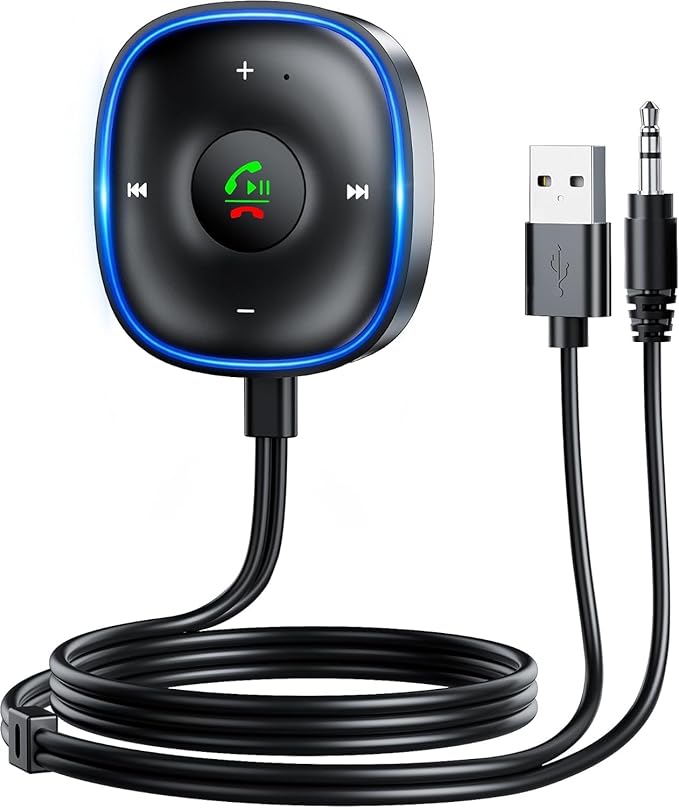
Primary Functions:
- Stream audio wirelessly from a Bluetooth device to an AUX input.
- Handle hands-free phone calls with a built-in microphone.
- Support dual-device connection.
- Control playback and calls via a multi-function button.
2. Package Contents
- SONRU Bluetooth 5.3 Aux Car Adapter (1x)
- 3.5mm AUX audio cable (1x)
- USB-C charging/power cable (1x)
- User manual (this guide)
Note: The specific contents may vary slightly. Please check your package upon arrival.
3. Product Features & Specifications
3.1 Key Features
- Bluetooth 5.3 Technology: Provides a faster, more stable, and lower-latency connection compared to older Bluetooth versions.
- Dual Connection: Can pair and remember two Bluetooth devices simultaneously. Music can be played from one connected device at a time.
- ENC (Environmental Noise Cancellation): The built-in microphone uses noise cancellation technology for clearer hands-free calls.
- Plug-and-Play Setup: Designed for simple connection to your car's AUX port and USB power source.
- Multi-Function Button with LED: A single button controls playback, volume, and call functions. An LED light provides status indication and visibility at night.
- Compact and Portable: Lightweight design for easy transport between vehicles or use with other audio equipment.

3.2 Technical Specifications
| Specification | Detail |
|---|---|
| Bluetooth Version | 5.3 |
| Wireless Range | Up to 10 meters (approx. 32 feet) |
| Audio Output | Stereo |
| Connection Interface | 3.5mm AUX, USB-C (for power) |
| Microphone | Built-in with ENC |
| Power Source | Powered via connected USB port (car charger or other USB power source). |
| Material | ABS Plastic |
| Color | Black |
4. Device Layout & Controls

4.1 Physical Components
- 3.5mm AUX Output Port: Connect the included AUX cable from this port to your car stereo's AUX input.
- USB-C Port: For providing power to the adapter. Connect to a car USB charger or other 5V USB power source.
- Multi-Function Button: The central button for controlling all functions.
- LED Indicator Light: Located near the button. Shows connection and power status.
- Microphone: Built into the unit for voice capture during calls.
4.2 LED Indicator States
- Flashing Blue: The adapter is in pairing mode, ready to connect to a new device.
- Solid Blue: The adapter is successfully connected to a Bluetooth device.
- Other Flashing/Static Patterns: May indicate low power, charging, or other statuses. Refer to the product's quick start guide for specific patterns.
5. Use Guide
5.1 Initial Setup & Pairing (Single Device)
- Power Connection: Plug the USB-C cable into the adapter and connect the other end to a powered USB port in your car (e.g., a car charger plugged into the 12V socket).
- Audio Connection: Plug one end of the included 3.5mm AUX cable into the adapter's AUX port. Plug the other end into your car stereo's AUX input jack.
- Power On: Start your car. The adapter should power on automatically. You will hear a voice prompt (e.g., "Power on") and the LED will flash blue, indicating it is in pairing mode.
- Pair from Your Device: On your smartphone or audio device, go to the Bluetooth settings menu. Enable Bluetooth and search for new devices. Select "J54" from the list of available devices.
- Connection Confirmation: Once paired, you will hear a "Connected" voice prompt and the LED will turn solid blue. Your device's audio will now route through your car speakers.

5.2 Pairing a Second Device (Dual Connection)
The adapter can store connections for two devices. Follow these steps to connect a second device:
- Ensure the first device is already paired and connected.
- On the first device, turn off its Bluetooth. The adapter's LED will begin flashing blue, entering pairing mode again.
- On the second device, enable Bluetooth, search for devices, and select "J54" to pair.
- Once the second device is connected, you can turn Bluetooth back on for the first device. It should automatically reconnect from its paired device history.
- The adapter is now connected to two devices. Note: Audio can only be played from one connected device at a time.
5.3 Using the Multi-Function Button
The central button controls various functions through different press patterns.
| Action | Function |
|---|---|
| Short Press (During Music Playback) | Play / Pause |
| Double Press | Next Track |
| Triple Press | Previous Track |
| Press and Hold "+" side | Volume Up |
| Press and Hold "-" side | Volume Down |
| Short Press (Incoming Call) | Answer Call |
| Press and Hold (During Call) | Reject / End Call |
| Double Press (After a Call) | Redial Last Number |
5.4 Making & Receiving Calls
- When a call comes in, the music will pause. Press the multi-function button once to answer.
- Speak normally. The ENC microphone is designed to pick up your voice and reduce background noise.
- Press and hold the button to end the call. Music playback should resume automatically.
- To initiate a call via voice assistant, activate Siri or Google Assistant on your phone as you normally would (e.g., long press home button or say "Hey Siri").
6. Troubleshooting
6.1 Common Issues & Solutions
No Sound or Very Low Sound
- Ensure the adapter is powered (LED is on).
- Check that the AUX cable is fully inserted into both the adapter and your car stereo.
- Increase the volume using the multi-function button (press and hold the "+" side).
- Increase the volume on your connected Bluetooth device (phone, tablet, etc.).
- Ensure your car stereo's input source is set to "AUX" or "Line In."
Cannot Pair / Bluetooth Connection Issues
- Ensure the adapter is in pairing mode (LED flashing blue). If not, you may need to reset it by disconnecting and reconnecting power.
- On your phone, delete/forget the "J54" device from your Bluetooth list and try pairing again.
- Ensure you are within the 10-meter range and that there are no major obstructions causing interference.
- Restart your phone's Bluetooth.
Audio Stuttering, Static, or Disconnection
- Keep the connected Bluetooth device within 10 meters and avoid physical obstructions.
- Move the device and adapter away from other potential sources of wireless interference (other Bluetooth devices, Wi-Fi routers).
- Ensure the USB power source provides stable current. Try a different USB port or car charger.
- Check the 3.5mm AUX cable and ports for damage, dirt, or corrosion. Try a different AUX cable if possible.
- Check your phone's cellular signal and network condition, as poor service can sometimes affect streaming stability.

Microphone Not Working During Calls
- Ensure the adapter is the selected audio input/output device for the call on your phone.
- Check that your phone's permissions allow the Bluetooth device to access the microphone.
- Speak clearly in the direction of the adapter, which is typically mounted near your car's dashboard.
7. Care & Maintenance
- Store the adapter in a cool, dry place when not in use.
- Use a soft, dry cloth to clean the exterior. Do not use harsh chemicals or abrasives.
- Avoid exposing the adapter to extreme temperatures, direct sunlight for prolonged periods, or moisture.
- Handle the AUX and USB-C ports carefully to avoid damaging the connectors.
8. Warranty & Support
The SONRU Bluetooth 5.3 Aux Car Adapter is backed by a 1-year limited warranty from the date of purchase.
Warranty Description: 1 YEAR
For product support or warranty claims: Please contact the seller (SONRU) through your Amazon order details or the seller's store page for assistance.