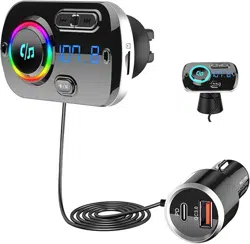
Bluetooth 5.0 FM Transmitter
User Manual

Bluetooth 5.0 FM Transmitter
Thank you for choosing and purchasing
our Bluetooth 5.0 FM transmitter! In order to
give full play to your functional use and normal
operation of this product, please read this
manual before use!
I. Product Profile
This product is a car-specific Bluetooth
hands-free car charger MP3 player. Using
high-performance Bluetooth 5.0 chip, the
product can transmit MP3 music in your
mobile phone to your car audio through
wireless transmission, also it can make hands-
free calling. You can enjoy the music and
answer the call in hand-free mode without
refitting your car, which ensure the driving
safety while enjoying music.
AI.
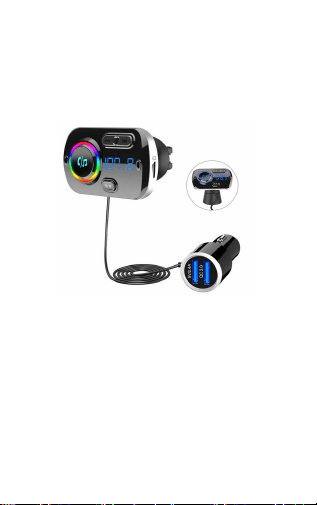
Product Appearance Diagram and
Introduction
1

BI. Schematic description:
1. Air conditioning mount
2. AUX interface (audio input)
3. Colorful light display
4. Short press for previous song; long press
for FM-
5. Short press for next song; long press for
FM+
6. Display window
7. Microphone
8. Muti-function button: short press pause/play,
long press to activate SIRI/GOOGLE voice
assistant, short press to answer/hang up the
phone after Bluetooth connected, double click
to redial, long press to reject, turn on the
phone and then press to turn privately to
answer .
9. Short press for color change (red, orange,
yellow, green, cyan,blue, purple, breathing
mode, etc.)
10. TF card slot
11. USB2 Qualcomm® Quick
Charge3.0 output 5V/3A MAX
12. USB1 OUT 5V/2.4A
13. Power input (inserted into the car cigarette
lighter)
14. Car center console fixed base
IV. Features:
1. Support FM full frequency transmission
2

function 87.5-108.0MHZ
2. Support large digital display
3. Support air vent or dashboard installation
4. Support TF card playing music
5. bluetooth answer, hang up, reject, redial
phone and other functions
6. bluetooth stereo music play
7. Support colorful light display
8. Support Qualcomm® Quick Charge3.0
output 5V/3A MAX
9. Automatic power-off memory function
10. Support AUX input function
11. Support private answering
12. Support SIRI/GOOGLE voice assistant
13. Support MP3, WMA,
WAV,FLAC,APE format music playback
14. Support navigation voice prompts
15.Support two mobile phones connection at
the same time
V. Operation Instructions
5.1 Bluetooth mode
1.Insert the product into the car cigarette
lighter, the machine automatically turns on,
enters the Bluetooth mode.Adjust the car
radio frequency the same as frequency of the
product.
2.Turn on the phone Bluetooth and search
pairing name "Carkit" , click the pairing name
to connect Bluetooth.
3.Turn on the phone music player to play
3

music on your phone via bluetooth, and click
the phone button to control the music to
pause/play.
4.Short press the phone button to
answer/hang up,long press to
reject.Double-click to re-dial the phone, and
long press the mode key to switch to private
answer in a call.
Note:Only the last call number on the call list
can be redialed.
5.2 TF Card playback
Insert the TF card into the TF card slot and the
product will switch to the TF card mode and play
the music file in the TF card automatically. Pause
music by clicking the phone button, and switch
music through the FM button.
5.3 AUX input mode
Insert the 3.5MM interface audio line with MP3
music into AUX input port, and automatically
switch to AUX mode to play MP3 music.Switch
to other modes by long pressing the phone
key.
5.4 Frequency adjustment
After starting up,long press the last/next song
button to enter the transmission frequency
adjustment.
4

Note: Long press to fast FM addition
adjustment, short press to fine tune.
5.5 Mode switching
Inserted the TF card/AUX(Line-in) while the
Bluetooth connection is successful, press the
“M” key to switch the mode.
Note: When mode switching and external
device insertion, the product will have
corresponding voice prompts to indicate the
current status of the device.
5.6 Light switch
After powering on, press “M” to switch the
color of the light. Switching sequence: red,
orange, yellow, green, cyan, blue, purple,
breathing light, etc.
5.7 Siri/Google voice assistant
After Bluetooth connected successfully,
long press the dial key 2S to activate the
voice assistant function,you can make the
phone call,play music,run the navigation of
mobile apps etc.(support phone model
iPhone/Samsung/original android system
phones)
Note: Some mobile phones may not
support voice assistant function
5.8. Charging recognition
5

Connect the mobile device with the
Qualcomm® Quick Charge3.0 interface, the
machine will automatically identify the type of
charging device, and shake hands with the
device through the corresponding charging
protocol to obtain the maximum charging
current, saving the charging time under the
premise of protecting the charging device.
Supports: QC3.0、QC2.0、FCP、BC1.2 etc
fast charging protocol.
VI. Power-off memory
Every time when you power off this product,
the system will memorize the FM
frequency,light and the song played. It will
continue to play this song recorded when you
start to use next time. When the storage
device is plugged out, changed or detected
wrong, the system will return to the first song
in the list.
VII.Technical Parameters
Rated working voltage
12V-24V
Limit working voltage
8-27V
USB output
USB1 5V/2.4A
USB2
Qualcomm®
Quick Charge3.0
Working temperature
0-60℃
6

Charging recognition
USB2 with
Qualcomm®
Quick Charge3.0
protocol
Music format
MP3
、
WMA
、
WAV
、
FLAC
、
APE
SNR
>60dB
Degree of distortion
<0
.
1%
Frequency response
20Hz-15Khz
Resolution of right and
〉60dB
left channel
Bluetooth version
Version5.0+EDR
Bluetooth sound
A2DP(Advance
processing
Audio Distribution
Profile)
Bluetooth transmission
<10M
distance
Effective distance of
0.5-2M
Bluetooth microphone
FM frequency
87.5-108.0MHZ
FM mode
Stereo digital PLL
frequency locking
VIII. Attentions
1. This product contains dual USB outputs. It
can charge two devices at the same time,
USB2 supports Qualcomm® Quick Charge3.0.
2. A built-in antenna is provided for the product,
7

so please avoid using the broadcasting station
frequency that is with strong signal so as to
get better sound effect.
3. The method to operate the Bluetooth
may differ due to the difference of the
phones applied.
4. Some phones may not support
automatic connection if they are powered
on after the power failure. If so, please
connect them by hand.
5. This product is compatible with more than
95% phones on the market but some are still
incompatible. Please pay attention to it when
purchasing our product.
6. The volume should be proper during the
call to avoid affecting the other party.
7. Do not use this product in the environment
with high temperature, dusts or moisture
8. Do not drop the product to avoid surface
damage or breakdown.
9.The Bluetooth of this product supports
background play. If there is a prompt tone when
playing music with TF card function, it will switch
to the Bluetooth hands-free mode. After finished
call, return to TF card function automatically.
IX. Package attachment
1. Host 2. User Manual 3. Aux cable
8

X. Contact US
For any questions or comments about our
products, or if there is a quality problem with
the product for which you wish to request a
REPLACEMENT or a REFUND, please
and we will reply you within 24 hours.
Our product has lifetime warranty!
9
