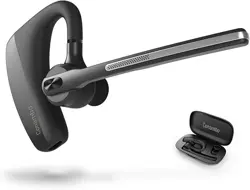
Overview
The Conambo K10C is a single-ear wireless Bluetooth headset designed for calls and communication. It features a charging case, noise cancellation technology, and is compatible with various devices including smartphones, laptops, and tablets.

What's in the Box
- K10C Bluetooth Headset
- Charging Case
- Type-C Charging Cable
- 9 Ear Tips (Various Sizes)
- User Manual
Features and Specifications
Technical Specifications
- Model: K10C-CBOX
- Bluetooth Version: 5.2
- Wireless Range: Up to 59 ft (18 m)
- Battery Life (Headset): Up to 16 hours talk time
- Total Battery with Case: Up to 80 hours talk time
- Charging Case Battery: 750mAh
- Charging Time: Approximately 3 hours
- Charging Port: Type-C
- Water Resistance: IPX4
- Noise Control: CVC8.0 Dual Microphone Active Noise Cancellation
- Chipset: Qualcomm QCC3040
- Audio Technology: aptX HD
- Multipoint Connection: Connect to two devices simultaneously
Physical Features
The headset is an in-ear, single earpiece design with a microphone boom. The charging case has an LED digital display to show remaining battery life.
- Earpiece: Includes an angled ear hook/wing for stability.
- Microphone Boom: Contains a dedicated mute button.
- Controls: Button controls on the earpiece.
- Ear Tips: 9 different sizes are included for a secure and comfortable fit.
Use Guide
Charging the Headset and Case
- Use the provided Type-C cable to charge the charging case. Connect the cable to the case's port and a USB power source.
- The LED display on the case will indicate the charging status and battery level.
- Place the headset into the charging case to charge it. Ensure the headset's charging contacts align with the pins in the case.
- A full charge for the headset takes approximately 3 hours.
Pairing with a Device (Bluetooth Connection)
- Remove the headset from the charging case. It will automatically enter pairing mode if it's not already connected to a device.
- On your smartphone, tablet, or computer, go to the Bluetooth settings menu.
- Enable Bluetooth on your device and search for available devices.
- Select "K10C" from the list of discovered devices.
- Follow any on-screen prompts to complete the pairing. A voice prompt or tone may confirm a successful connection.
Multipoint Connection: To connect a second device, put the headset in pairing mode again (usually by holding the power/multifunction button) and repeat the pairing process from the second device. The headset can manage connections with two devices at once.
Wearing the Headset
- Select the ear tip size that provides the most secure and comfortable seal in your ear.
- Attach the chosen ear tip to the earpiece.
- Place the earpiece in your ear and loop the ear hook over the top of your ear for stability.
- Adjust the microphone boom so the microphone is positioned near your mouth.
Using the Controls
The headset has button controls for managing calls and audio.
- Answer/End Call: Press the main multifunction button once.
- Reject Call: Press and hold the main multifunction button.
- Mute/Unmute: During a call, press the dedicated mute button on the microphone boom once.
- Voice Assistant: Press and hold the mute button for 3 seconds to activate Siri or Google Assistant.
- Volume Control: Adjust volume using the buttons on the earpiece (specific button functions may be detailed in the manual).
Using with Video Conferencing
The headset is compatible with common platforms like Microsoft Teams, Zoom, and Skype. Ensure the headset is selected as both the audio input (microphone) and output (speaker) device within the application's audio settings.
Care and Maintenance
- Clean the headset and ear tips with a soft, dry cloth. Do not use liquids or solvents.
- The headset has an IPX4 water resistance rating, meaning it is protected against water splashes from any direction. It is not waterproof and should not be submerged.
- Store the headset in the charging case when not in use to protect it and keep it charged.
- Use only the provided Type-C cable or a certified equivalent for charging.
Troubleshooting
- Headset won't turn on/pair: Place it in the charging case to ensure it has power. Reset the headset by placing it in the case and holding the button for 10+ seconds.
- Poor call quality or echo: Ensure you are within the 59 ft Bluetooth range. Try adjusting the ear tip for a better seal. Check that CVC noise cancellation is enabled in your device's Bluetooth settings for the headset.
- Device not connecting: Delete "K10C" from your device's Bluetooth paired devices list, then attempt pairing again.
- Short battery life: Fully charge the headset and case. Ensure the headset is properly seated in the case to charge.
- Charging case not charging: Try a different USB cable and power adapter. Ensure the Type-C port is free of debris.
Compatibility
This headset is compatible with devices supporting Bluetooth Hands-Free Profile (HFP) and Audio/Video Remote Control Profile (AVRCP), including:
- iOS phones (iPhone)
- Android phones
- Tablets
- Laptops and PCs with Bluetooth
- Common video conferencing software (Teams, Zoom, Skype)
Warranty and Support
For warranty information about this product, please click here.