1. Overview

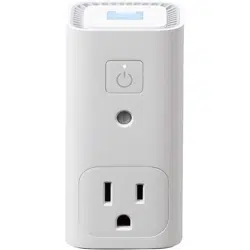
The Awair Glow C is a combined indoor air quality monitor and smart plug. It monitors key environmental factors and can automatically control connected devices based on air quality readings. The device also functions as a customizable night light.
Primary functions include:
- Monitoring airborne toxic chemicals (VOCs), humidity, and temperature.
- Automating connected appliances like humidifiers or air purifiers.
- Providing air quality feedback and tips via a smartphone app.
- Operating as a smart night light with customizable colors.
2. Features and Specifications
2.1. Monitored Parameters
- Volatile Organic Compounds (VOCs): Tracks levels of airborne toxic chemicals.
- Humidity: Measures relative humidity in the surrounding air.
- Temperature: Monitors ambient temperature.
Note: This device does not monitor carbon monoxide (CO), carbon dioxide (CO2), or particulate matter (PM2.5).
2.2. Smart Plug Functionality
- One grounded electrical outlet (plug).
- Can automatically power connected devices (e.g., air purifiers, fans, humidifiers) based on user-defined air quality thresholds.
- Manual and scheduled control is available via the app.
2.3. Physical Specifications
- Color: White
- Dimensions: Height: 3.69 inches
- Power Source: Corded Electric (plugs into a standard wall outlet).
- Included Components: Indoor air quality sensor unit.
- Model Number: AWAIR0PD2
2.4. Connectivity & Compatibility
- Control Method: Primary control via the Awair smartphone app.
- Controller Type: Compatible with iOS (8 or later) and Android (Jelly Bean 4.3 or later).
- Wi-Fi Requirement: Requires a 2.4 GHz Wi-Fi network.
- Smart Assistant Integration: Works with Amazon Alexa and Google Assistant for voice queries (e.g., "What's the temperature?").
2.5. Light Features
- Air Quality Status Light: Provides visual indication of current air quality.
- Customizable Night Light: Offers hundreds of LED color choices. Can be set to activate via motion or schedule.
3. Use Guide
3.1. Initial Setup
- Plug in the Device: Insert the Glow C into a standard wall outlet.
- Connect a Device (Optional): Plug an appliance (e.g., air purifier) into the Glow C's outlet.
- Download the App: Install the "Awair" app from the Apple App Store or Google Play Store on your smartphone.
- Create an Account & Add Device: Open the app, create an account, and follow the in-app instructions to add your Glow C to your Wi-Fi network (2.4 GHz required).
3.2. Understanding the App Interface
The Awair App is your central control hub. Key areas include:
- Dashboard: Displays real-time readings for VOCs, Humidity, and Temperature.
- Timeline/Graphs: View historical data trends for each parameter.
- Tips: The app provides personalized, actionable advice to improve your air quality based on the readings.
- Device Settings: Access settings for the smart plug automation, night light, and notifications.
3.3. Configuring Smart Plug Automation
- In the Awair app, navigate to your Glow C device settings.
- Find the automation or "Smart Plug" settings section.
- Select the air quality parameter (e.g., VOCs) you want to trigger the plugged-in device.
- Set the threshold level (e.g., turn on air purifier when VOCs reach "Unhealthy" level).
- You can also set schedules for the plugged-in device to operate at specific times, independent of air quality.
3.4. Setting Up the Night Light
- In the Glow C device settings within the app, find the "Light" or "Night Light" section.
- Choose a color from the available palette.
- Configure activation settings:
- Motion-Activated: Light turns on when motion is detected.
- Schedule: Set specific times for the light to be on.
- Always On/Off: Manual control.
3.5. Using Voice Commands
After setting up the device in the Awair app, you can link it to your Amazon Alexa or Google Home ecosystem.
- Example commands:
- "Alexa, what's the temperature in the living room?"
- "Hey Google, how is the humidity?"
Follow the standard process in your smart assistant's app to discover and link the Awair skill/action.
4. Safety and Maintenance
- Plug the device directly into a wall outlet. Do not use with extension cords or power strips if avoidable.
- Ensure the connected appliance's power rating does not exceed the Glow C's rated capacity (refer to the device's physical label for exact specifications).
- Do not block the vents or sensors on the device.
- Clean the exterior with a dry or slightly damp cloth. Do not use harsh chemicals or submerge the device.
- The device contains sensors that do not require user maintenance or filter replacement.
5. Troubleshooting
- Device won't connect to Wi-Fi:
- Ensure your smartphone is connected to a 2.4 GHz Wi-Fi network (not 5 GHz).
- Move the Glow C closer to your Wi-Fi router during setup.
- Restart your router and the Glow C.
- App not showing data:
- Check that your smartphone has an active internet connection.
- Ensure the Glow C is powered on and plugged in.
- Try logging out and back into the Awair app.
- Connected device does not turn on automatically:
- Verify the automation rule is correctly set up in the app.
- Check that the connected appliance is powered on at its own switch/button.
- Test the smart plug outlet manually via the app to confirm it can power the device.
- Night light not working:
- Check the light settings in the app to ensure it's not turned off.
- If using motion activation, ensure the sensor area is unobstructed.
6. Warranty and Support
Warranty Description: This device is covered by a 1-year limited warranty. The warranty is void if the device is used outside of the US or Canada, or if the device is tampered with.
Manufacturer: Awair
For technical support or warranty service, contact the manufacturer, Awair, through the support channels provided within the Awair mobile application or on the official Awair website.