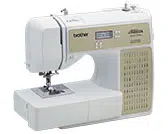
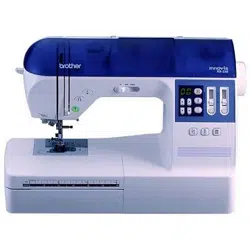
User Manual Sewing Machine
ACCESSORIES
*MEMO
| • About zigzag foot “J”; Press the black button when it is difficult for thick seams to be fed, for example, at the beginning of sewing thick fabrics. |
|
 |
Accessory compartment
|
For models equipped with a slide type flat bed attachment
Slide the flat bed attachment as illustrated below to open it.
|
|
For models equipped with an open type flat bed attachment
Open the compartment as illustrated below.
|
|

|
|

|
|
*NOTE
• Put the accessories in the bag, and then store the bag inside the compartment when they are not used. If the accessories are not in a bag, they may fall out, and be lost or damaged.
|
|
*NOTE
• Store the accessories in the compartment when they are not used.
|
MACHINE PARTS AND THEIR FUNCTIONS
The illustrations in this operation manual may differ from the actual machine.
Main parts

|
|
- Bobbin winder
- Upper tension-control dial
- Bobbin-winding thread guide and pre-tension disc
- Thread take-up lever
- Thread cutter
- Flat bed attachment with accessory compartment
- Operation buttons
- Operation panel
- Spool pin
- Handwheel
- This is used to manually raise and lower the needle.
- Air vent
- This vent allows the air surrounding the motor to circulate. Do not cover the air vent while the sewing machine is being used.
- Main power and sewing light switch
- Jack/socket connector
- Foot controller
- Foot controller jack/socket
- Feed dog position lever
- Presser foot lever
- Thread guide
- Thread guide cover
- Handle
- Carry the sewing machine by its handle when transporting the machine.
|
Needle and presser foot section

|
|
- Needle threader (for models equipped with the needle threader)
- Buttonhole lever
- Presser foot holder
- The presser foot is installed onto the presser foot holder.
- Presser foot holder screw
- Use the presser foot holder screw to hold the presser foot holder in place.
- Presser foot
- The presser foot applies pressure consistently on the fabric as the sewing takes place. Attach the appropriate presser foot for the selected stitching.
- Needle plate cover release
- Use when removing the needle plate cover.
- Needle plate cover
- Feed dogs
- The feed dogs feed the fabric in the sewing direction.
- Quick-set bobbin (for models equipped with the quickset bobbin)
- You can start sewing without pulling up the bobbin thread.
- Bobbin cover
- Needle plate
- The needle plate is marked with guides for sewing straight seams.
- Needle bar thread guide
- Presser foot lever
- Raises and lowers the presser foot.
- Needle clamp screw
|
Operation buttons
The operation buttons differ depending on the sewing machine model.

|
|
- Reverse/reinforcement stitch button
- Press this button to sew reverse stitches. Reverse stitches are sewn by keeping the button pressed down to sew in the opposite direction.
- Buttons provided on some models
- Start/stop button
- Press this button to start or stop sewing. The machine sews at a slow speed at the beginning of sewing while the button is pressed. When sewing is stopped, the needle is lowered in the fabric. For details, refer to "Starting to sew”
- Needle position button
- Press this button to raise or lower the needle.
- Sewing speed controller
- Slide this controller to adjust the sewing speed.
|
Operation panel
|
For models equipped with type A LCD
|
|
For models equipped with type B LCD
|
 |
|
 |
- LCD (liquid crystal display)
- The number of the selected stitch (1), the presser foot type to be used (2), the stitch length (mm) (3), and the stitch width (mm) (4) are displayed here.
- The display location of the presser foot type (2) differs depending on the model.
- This manual uses the illustrations of type A LCD.
- Stitch selection keys (Page 25)
- Select the number for the stitch that you wish to use.
- Stitch length adjustment key
- Press the “–” side to reduce the stitch length; press the “+” side to increase the stitch length.
- Stitch width adjustment key
- Press the “–” side to reduce the stitch width; press the “+” side to increase the stitch width.
Keys and indicators provided on some models
|

|
|
5. Stitch category selection key
- Press this key to select desired stitch category.
6. Utility stitch indicator
- Lights up when the utility stitch is selected with the stitch category selection key.
7. Mirror image stitch indicator
- Lights up when the mirror image stitch is selected with the stitch category selection key.
8. Character stitch indicator
- Lights up when the character stitch is selected with the character stitch key.
|
Spool pin
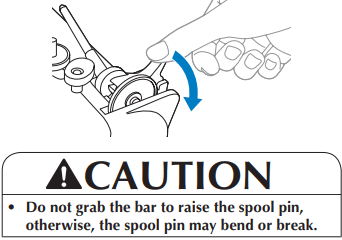
Press down on the spool pin lever to raise the spool pin.
| Storing the spool cap |
|
|
| The included spool cap (large, medium, small) can be stored by attaching it to the spool pin as illustrated below. |
|
 |
| Storing the spool pin |
|
|
| When placing the cover on the sewing machine or if the spool pin will not be used, return the spool pin to its storage position. |
|
 |
| Installing the spool pin |
|
|
| 1. Insert the tab on the spool pin into the hole. |
|
|
|
|
 |
| 2. Push the spool pin down until it locks into place. |
|
 |
USING YOUR SEWING MACHINE
Power supply
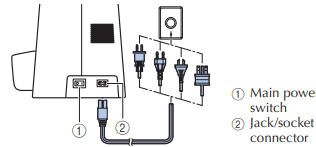
1. Insert the plug into a wall outlet.
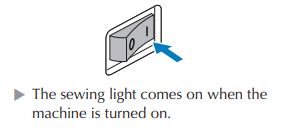
2. Set the main power switch to “I”.
*Memo
- When the machine is turned on, the needle and the feed dogs will make sound when they move; this is not a malfunction.
3. To turn off the machine, set the main power switch to “O”.
- The sewing light goes off when the machine is turned off.
*NOTE
- If a power outage occurs while the sewing machine is being operated, turn off the sewing machine and unplug the power supply cord.
(For U.S.A. only)
- This appliance has a polarized plug (one blade wider than the other). To reduce the risk of electric shock, this plug is intended to fit in a polarized outlet only one way. If the plug does not fit fully in the outlet, reverse the plug.
- If it still does not fit, contact a qualified electrician to install the proper outlet. Do not modify the plug in any way.
Foot controller
Insert the foot controller plug into its jack/socket.
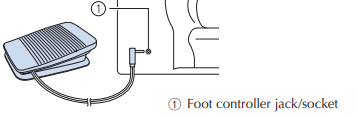
* CAUTION
- When connecting the foot controller, be sure to turn off the sewing machine in order to prevent the machine from accidentally being started.
Depress the foot controller to start sewing, and adjust the sewing speed by changing the pressing force. You should make sure that nothing is placed on the foot controller when the machine is not in use.
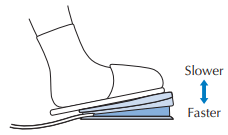
* CAUTION
- Do not allow pieces of cloth and dust to build up on the foot controller. Doing so could cause a fire or an electric shock.
* NOTE
- When the foot controller is plugged in, the start/ stop button cannot be used to start sewing (only for models equipped with the start/stop button).
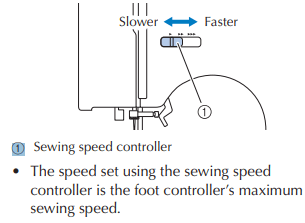
Sewing speed controller (for models equipped with the start/ stop button)
Slide the sewing speed controller to select the desired sewing speed.
Changing the needle stop position
Normally, the sewing machine is set to leave the needle in the fabric when sewing is stopped. Instead, the machine can be set to leave the needle raised when sewing is stopped.
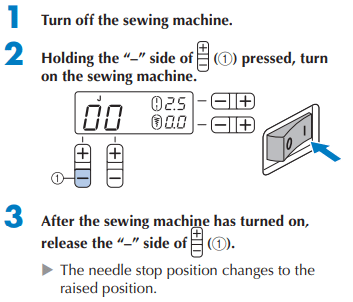
* NOTE
- Perform the same operation to change the needle stop position to the lowered position.
Changing the initial needle position
Normally, the straight stitch (left needle position) is automatically selected when the sewing machine is turned on. The initial needle position can be changed to the straight stitch (center needle position).
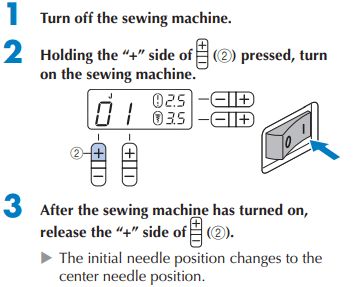
- The specified initial needle position is maintained after the machine is turned off.
- Perform the same operation to change the initial needle position to the left needle position.
Cancelling the operation beep
When the sewing machine is purchased, it is set to beep each time a key is pressed. This setting can be changed so that the machine does not beep.
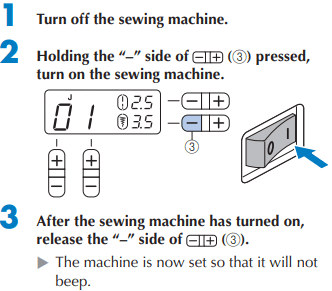
*NOTE
- Perform the same operation to change the setting so that machine beeps.
THREADING THE MACHINE
*NOTE
- Only use the bobbin that comes with this machine or bobbins of the same type (part code: SA156, SFB: XA5539-151). Using other bobbins may cause damage to the machine. SA156 is Class 15 type bobbin.
|
|
 |
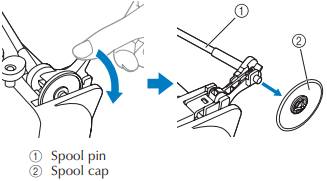
1. Press down on the spool pin lever to swing up the spool pin. Then remove the spool cap
*NOTE
- Do not grab the bar to raise the spool pin, otherwise, the spool pin may bend or break.
- Be sure to raise the spool pin when winding the bobbin. The thread may become tangled if the bobbin winder is used without raising the spool pin.
2. Fully insert the spool of thread for the bobbin, and then slide the spool cap onto the spool pin.
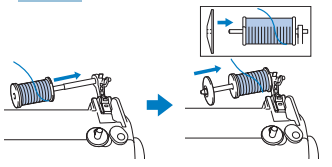
- The thread should be unwound from the bottom to the front.
*NOTE
- If the spool or the spool cap is not positioned correctly, the thread may become tangled around the spool pin or the machine may be damaged.
- Three spool cap sizes are available. Choose a spool cap that best fits the size of spool being used. If the spool cap is too small for the spool, the thread may catch on the slit in the spool or the machine may be damaged.
|
|
 |
*MEMO
- When sewing with fine, cross-wound thread, use the small spool cap, and leave a small space between the cap and the spool.
|
|
 |
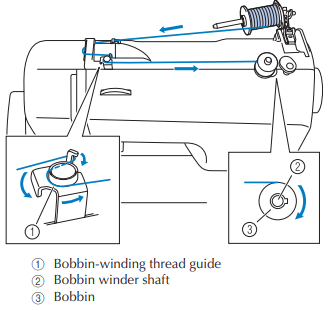
3. Pass the thread as illustrated bellow.
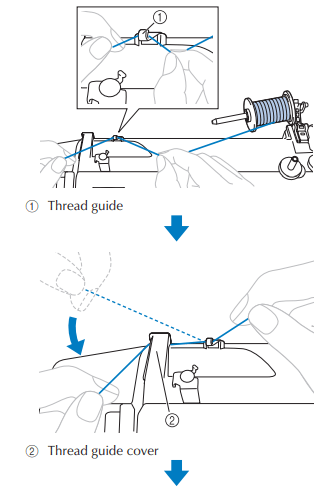
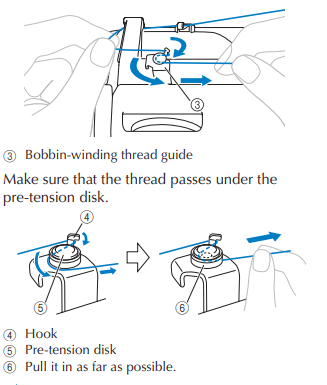
*NOTE
- Make sure that the thread is pulled as far as possible into the pre-tension disk, otherwise the bobbin may not be wound cleanly.
4. Put the bobbin onto the bobbin winder shaft and slide the bobbin winder shaft to the right. Turn the bobbin clockwise, by hand, until the spring on the shaft slides into the notch in the bobbin.
- Make sure to pull out 7 to 10 cm (2-3/4 to 3-15/16 inches) of thread.
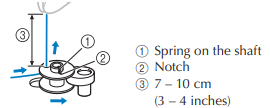
*CAUTION
- Pull the thread taut and hold the end of the thread straight up. If the thread is too short, not pulled taut or held at an angle, injuries may occur when the thread is wound around the bobbin.
5. Turn on the sewing machine.
6. While holding the end of the thread, gently press the foot controller or press (start/ stop button) (for models equipped with the start/stop button) to wind the thread around the bobbin a few times. Then stop the machine and trim the excess thread.
*NOTE
- When using the foot controller to operate the sewing machine, connect the foot controller before turning on the machine.
- When the foot controller is plugged in, the start/stop button is disabled (only for models equipped with the start/stop button).
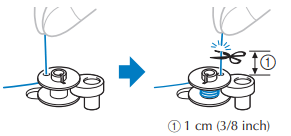
*CAUTION
- Make sure you follow the instructions carefully. If you do not cut the thread completely, and the bobbin is wound, when the thread runs low it may tangle around the bobbin and cause the needle to break.
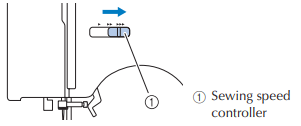
7. (For models equipped with the sewing speed controller) Slide the sewing speed controller to the right (to set the speed to fast).
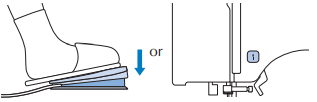
8. Press the foot controller to start.
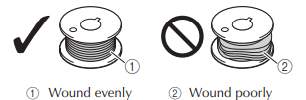
9. When the bobbin seems full and begins spinning slowly, take your foot off the foot controller
10. Cut the thread, slide the bobbin winder shaft to the left and remove the bobbin.
11. (For models equipped with the sewing speed controller) Slide the sewing speed controller back to its original position.
*MEMO
• When the sewing machine is started or the handwheel is turned after winding the thread around the bobbin, the machine will make a clicking sound; this is not a malfunction.
• The needle bar does not move when you slide the bobbin winding shaft to the right.
*CAUTION
- Not winding the bobbin properly may cause the thread tension to loosen, and may break the needle.
|
|

|
■ For models equipped with the fast bobbin winding system
1. Place the bobbin on the bobbin winder shaft so that the spring on the shaft fits into the notch in the bobbin. Then slide the shaft to the right.
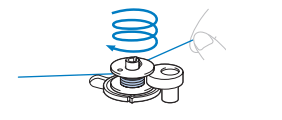
2. Follow steps 1 through 3 of the procedure in “Winding the bobbin” to pass the thread around the pre-tension disk
3. Wind the free end of the thread clockwise around the bobbin five or six times.
4. Pull the thread and pass it through the slit in the bobbin winder seat.
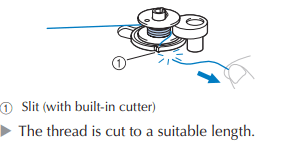
*CAUTION
- Be sure to cut the thread as described. If the bobbin is wound without cutting the thread using the cutter built into the slit, the thread may become tangled in the bobbin or the needle may bend or break when the bobbin thread starts to run out.
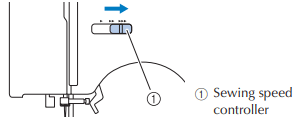
5. (For models equipped with the sewing speed controller) Slide the sewing speed controller to the right (to set the speed to fast).
6. Turn on the sewing machine.
7. Press the foot controller to start.
*NOTE
- When using the foot controller to operate the sewing machine, connect the foot controller before turning on the machine.
- When the foot controller is plugged in, the start/stop button cannot be used to start sewing (only for models equipped with the start/stop button).
8. When the bobbin begins spinning slowly, take your foot off the foot controller.
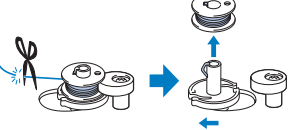
9. Cut the thread, slide the bobbin winder shaft to the left, and then remove the bobbin from the shaft.
10. (For models equipped with the sewing speed controller) Slide the sewing speed controller back to its original position.
*MEMO
- When the sewing machine is started or the handwheel is turned after winding the thread around the bobbin, the machine will make a clicking sound; this is not a malfunction.
- The needle bar does not move when you slide the bobbin winding shaft to the right.
Lower threading
Install the bobbin wound with thread.
*CAUTION
- Winding the bobbin improperly may cause the thread tension to loosen, breaking the needle and resulting in injury.
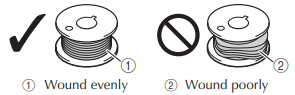
- Make sure you turn the power off while threading the machine. If you accidentally step on the foot controller and the machine starts to sew, you could be injured.
*MEMO
|
The direction for feeding the bobbin thread is indicated by marks on the needle plate cover. Be sure to thread the machine as indicated.
|
|
 |
1. Raise the needle to its highest position by turning the handwheel toward you (counterclockwise) or press (needle position button) (for models equipped with the needle position button), and raise the presser foot lever.
2. Turn off the sewing machine.
|
3. Slide the button and open the cover.
|
|
 |
|
4. Put the bobbin in so the thread comes out in the direction shown by the arrow.
|
|
 |
*CAUTION
- Make sure you set the bobbin so the thread unrolls in the right direction. If the thread unrolls in the wrong direction, it may cause the thread tension to be incorrect or break the needle.
|
5. Hold the end of the thread, push the bobbin down with your finger, and then pass the thread through the slit, as shown.
• If the thread is not correctly inserted, it may cause incorrect thread tension
|
|
 |
|
6. Replace the bobbin cover..
Replace the cover so that the end of the thread comes out from the left side of the cover (as shown by the line in the diagram).
|
|
 |
■ For models equipped with the quick-set bobbin
|
*MEMO
• The direction for feeding the bobbin thread is indicated by marks on the needle plate cover. Be sure to thread the machine as indicated.
|
|
 |
1. Raise the needle to its highest position by turning the handwheel toward you counterclockwise) or press (1), and raise the presser foot lever.
2. Turn off the sewing machine.
3. Slide the button and open the cover.
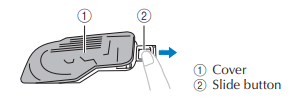
4. Put the bobbin in so the thread comes out in the direction shown by the arrow.
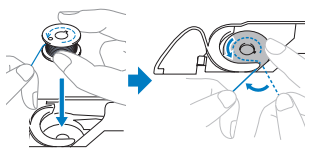
*CAUTION
- Make sure you set the bobbin so the thread unrolls in the right direction. If the thread unrolls in the wrong direction, it may cause the thread tension to be incorrect or break the needle.
5. While lightly holding down the bobbin, guide the thread through the slit (1 and 2).
• At this time, check that the bobbin easily rotates counterclockwise. Then, pull the thread toward you to cut it with the cutter (3).
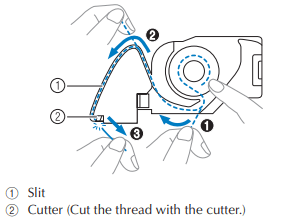
*NOTE
• If the thread is not correctly inserted through the tension-adjusting spring of the bobbin case, it may cause incorrect thread tension
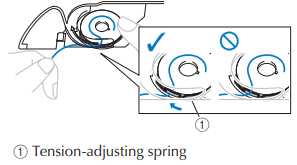
6.Replace the bobbin cover.
*MEMO
• You can begin sewing immediately without drawing up the bobbin thread. If you want to draw up the bobbin thread before you start to sew, follow to the procedure in “Drawing up the lower thread”.
Upper threading
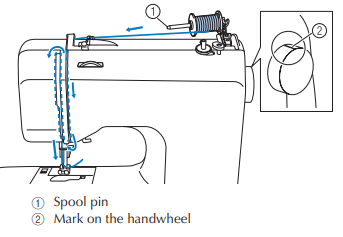
*CAUTION
- When threading the upper thread, carefully follow the instructions. If the upper threading is not correct, the thread may become tangled or the needle may bend or break.
- Never use a thread weight of 20 or lower.
- Use the needle and the thread in the correct combination. For details on the correct combination of needles and threads, refer to Needle types and their uses”
1. Turn on the sewing machine.
2. Raise the presser foot, using the presser foot lever.
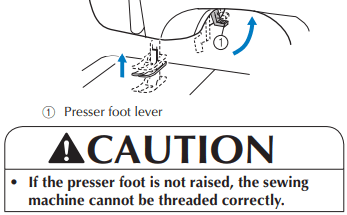
3. Raise the needle in the following way.
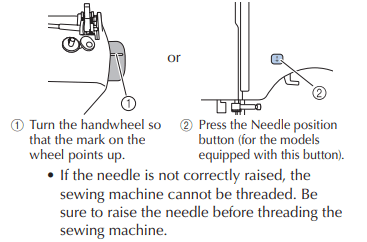
4. Press down on the spool pin lever to swing up the spool pin. Then remove the spool cap.
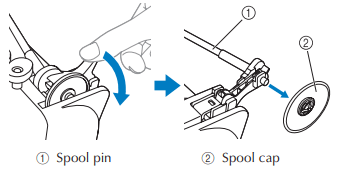
*CAUTION
- Do not grab the bar to raise the spool pin, otherwise, the spool pin may bend or break.
- Be sure to raise the spool pin when winding the bobbin. The thread may become tangled if the bobbin winder is used without raising the spool pin.
5. Fully insert the spool for the upper thread onto the spool pin. Slide the spool cap onto the spool pin.
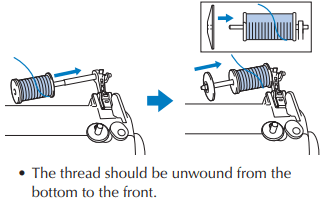
*CAUTION
• If the spool or the spool cap is not positioned correctly, the thread may become tangled around the spool pin or the machine may be damaged.
• Three spool cap sizes are available. Choose a spool cap that best fits the size of spool being used. If the spool cap is too small for the spool, the thread may catch on the slit in the spool or the machine may be damaged.
*MEMO
- When using the spool as shown below, use the small spool cap, and leave a small space between the cap and the spool.
|
|
 |
6. Pass the thread as illustrated below.
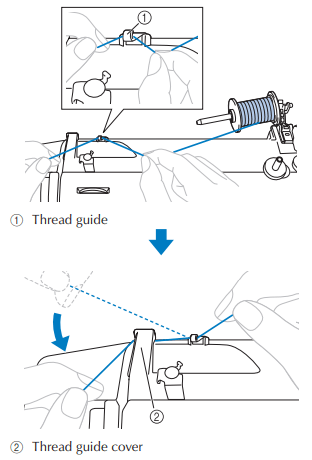
7. Feed the upper thread as illustrated below.
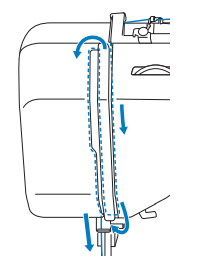
8. Make sure to guide the thread through the thread take-up lever from right to left.
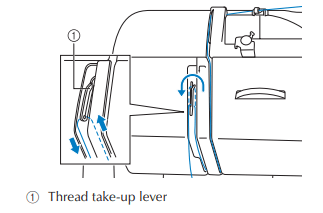
*MEMO
• If the needle is not raised, the thread takeup lever cannot be threaded. Be sure to raise the needle before threading the sewing machine.
9. Put the thread behind the needle bar thread guide.
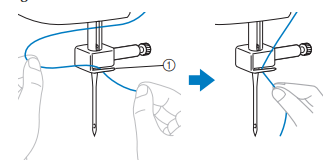
10. Turn off the sewing machine.
*CAUTION
- Make sure you turn the power off while threading the machine without using the needle threader (for models equipped with the needle threader). If you accidentally step on the foot controller and the machine starts to sew, you could be injured.
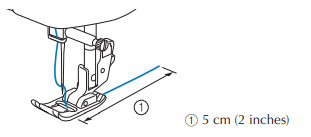
11. Thread the needle from front to back and pull out about 5 cm (2 inches) of thread.
*NOTE
• If the thread take-up lever is lowered, the upper thread cannot be wrapped around the thread take-up lever. Make sure you raise the presser foot lever and the thread take-up lever before you feed the upper thread.
• If you incorrectly feed the thread you may cause sewing problems.
■ Using the needle threader (for models equipped with the needle threader)
*CAUTION
- The needle threader can be used with a 75/11 through 100/16 home sewing machine needle. However, the needle threader cannot be used with a 65/9 home sewing machine needle. When using special thread such as transparent nylon thread or metallic thread, the needle threader cannot be used.
- Thread with a thickness of 130/120 or thicker cannot be used with the needle threader.
- The needle threader cannot be used with the wing needle or the twin needle.
- If the needle threader cannot be used, refer to Upper threading”
1. Follow steps 1 through 10 of the procedure in “Upper threading”.
2. Lower the presser foot lever.
3. While lowering the needle threader lever, hook the thread onto the guide.
|
|

|
| 4. Fully lower the needle threader lever. |
|
 |
| 5. Release the needle threader lever. Then pull the loop of the thread. |
|
 |
*CAUTION
• Be careful not to pull on the thread with force or it may bend the needle.
• If the thread does not pass through the eye of the needle, start from step 3 again.
| 6. Raise the presser foot lever. |
|
 |
| 7. Pass the end of the thread as illustrated bellow. |
|
 |
*NOTE
- If you incorrectly feed the thread you may cause sewing problems.
Drawing up the lower thread
| 1 Lightly hold the end of the upper thread. |
|
 |
| 2 While holding the end of the upper thread, raise the needle in the following way |
|
 |
| 3. Pull on the upper thread to draw up the lower thread. |
|
 |
| 4 Pull out about 10 cm (4 inches) of both threads and pull them toward the back of the machine under the presser foot. |
|
 |
■ For models equipped with the quick-set bobbin
You can begin sewing immediately without drawing up the bobbin thread. When sewing gathers or darts, you can draw up the lower thread by hand so that some thread will be left over. Before you draw up the lower thread, put the bobbin back in.
| 1. Pass the thread along the slit in the direction of the arrow, and leave it there without cutting it. |
|
 |
2 Draw up the lower thread as described in steps 1 to 4.
3. Replace the bobbin cover.
REPLACING THE NEEDLE
Needle types and their uses
The sewing machine needle that should be used depends on the fabric and thread thickness.
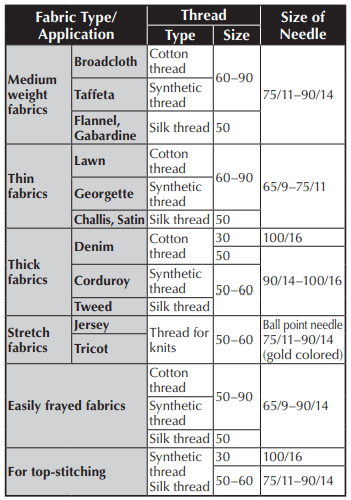
*NOTE
- Never use a thread of weight 20 or lower. It may cause malfunctions
*MENO
- The lower the thread number, the thicker the thread; and the higher the needle number, the thicker the needle.
■ Ball point needle
- Use the ball point needle when sewing on stretch fabrics or fabrics where skipped stitches easily occur. Use the ball point needle for best results when sewing patterns using monogramming foot “N”.
■ Transparent nylon thread
- Use a 90/14 to 100/16 needle, regardless of the fabric or thread.
*CAUTION
- The appropriate fabric, thread and needle combinations are shown in the table. If the combination of the fabric, thread and needle is not correct, particularly when sewing thick fabrics (such as denim) with thin needles (such as 65/9 to 75/11), the needle may bend or break. In addition, the stitching may be uneven or puckered or there may be skipped stitches.
Checking the needle
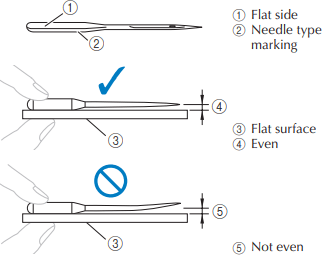
Sewing with a bent needle is extremely dangerous since the needle may break while the machine is being operated. Before using the needle, place the flat side of the needle on a flat surface and check that the distance between the needle and the flat surface is even.
Replacing the needle
| 1 Raise the needle in the following way. |
|
 |
| 2 Turn off the sewing machine |
|
|
| 3. Lower the presser foot lever. |
|
 |
*CAUTION
- Before replacing the needle, place fabric or paper under the presser foot to prevent the needle from falling into the hole in the needle plate.
| 4. Remove the needle by turning the needle clamp screw counterclockwise. |
|
 |
*NOTE
• If the needle clamp screw is loosened too much, the needle clamp (which holds the needle) may fall off. Therefore, do not loosen the needle clamp screw too much.
| • Do not apply strong force when loosening or tightening the needle clamp screw, otherwise certain parts of the sewing machine may be damaged. |
|
 |
| 5. With the flat side of the needle toward the rear of the machine, insert the needle until it touches the needle stopper. |
|
 |
| 6. Tighten the needle clamp screw by turning it clockwise. |
|
 |
*CAUTION
- Be sure to insert the needle until it touches the needle stopper and securely tighten the needle clamp screw with the disc-shaped screwdriver, otherwise the needle may break or damage may result.
Sewing with the twin needle
*CAUTION
- Use only twin needles that have been made for this machine (part code: 131096-121). Other needles could break, and damage the machine.
- Do not sew with bent needles. The needle could break and injure you.
- You cannot use the needle threader to thread the twin needle. Instead, thread the twin needle by hand, from front to back. Using the needle threader may damage the machine.
- When using the twin needle, be sure to select an appropriate stitch, otherwise the needle may break or the machine may be damaged.
- Select a stitch width of 5.0 mm (3/16 inch) or less, otherwise the needle may break or the machine may be damaged.
1. Install the twin needle.
2 Thread the upper thread for the left needle.
|
3 Manually thread the left needle with the upper thread.
- Pass the thread through the eye of the needle from the front to the back.
|
|

|
| 4. Insert the extra spool pin onto the end of the bobbin winder shaft. |
|
 |
5. Install the thread spool and thread the upper thread.
*MEMO
• When setting the thread spool, set it so that the thread winds off from the front of the spool.
| 6. Thread the upper thread for the right needle in the same way as the left needle. |
|
 |
| 7 Without passing the thread through the needle bar thread guide, manually thread the right needle. Pass the thread through the eye of the needle from the front to the back. |
|
 |
8. Attach zigzag foot “J”.
*NOTE
Models equipped with a needle threader
• You cannot use the needle threader to thread the twin needle. Instead, thread the twin needle by hand, from front to back. Using the needle threader may damage the machine.
*CAUTION
• When using the twin needle, be sure to attach zigzag foot “J”, otherwise the needle may break or the machine may be damaged.
9. Turn on the sewing machine.
10. Select a stitch.
Replacing the presser foot
*CAUTION
• Always turn off the power before you change the presser foot. If you leave the power on and step on the foot controller, the machine will start and you may be injured.
• Always use the correct presser foot for the stitch pattern you have chosen. If you use the wrong presser foot, the needle may strike the presser foot and bend or break, and may cause injury.
• Only use presser feet that have been designed to be used with this machine. Using other any presser feet may cause an accident or injury.
1. Raise the needle in the following way.
|
|

|
2. If the sewing machine has been turned on, turn it off.
*CAUTION
• Before replacing the presser foot, be sure to turn off the sewing machine, otherwise injuries may occur if the foot controller or the start/ stop button is accidentally pressed and the machine starts sewing.
3. Raise the presser foot lever.
| 4. Press the black button to release the presser foot. |
|

|
|
5. Place a different presser foot below the presser foot holder so that the presser foot pin is aligned with the shank in the holder.
Position the presser foot so the letter indicating the presser foot type (J, A, etc.) is positioned to be read.
|
|

|
*NOTE
| 6. Slowly lower the presser foot lever so that the pin snaps into the shank. |
|

|
7. Raise the presser foot lever to check that the presser foot is securely attached.
Removing the presser foot holder
Remove the presser foot holder when cleaning the sewing machine or when installing a presser foot that does not use the presser foot holder, such as the quilting foot. Use the disc-shaped screwdriver to remove the presser foot holder.
1. Remove the presser foot.
| 2. Loosen the presser foot holder screw. |
|

|
■ Attaching the presser foot holder
| 1. Align the presser foot holder with the lowerleft side of the presser bar. |
|

|
2. 2 Holding the presser foot holder in place, tighten the screw.
*NOTE
• If the presser foot holder is not correctly installed, the thread tension will be incorrect.
*CAUTION
- Be sure to securely tighten the presser foot holder screw, otherwise the presser foot holder may fall off and the needle may strike it, causing the needle to bend or break.
MAINTENANCE
Restrictions on oiling
- In order to prevent damaging this machine, it must not be oiled by the user.
- This machine was manufactured with the necessary amount of oil applied to ensure correct operation, making periodic oiling unnecessary.
- If problems occur, such as difficulty turning the handwheel or an unusual noise, immediately stop using the machine, and contact your authorized dealer or the nearest authorized service center.
Precautions on storing the machine
Do not store the machine in any of the locations described below, otherwise damage to the machine may result, for example, rust caused by condensation.
• Exposed to extremely high temperatures
• Exposed to extremely low temperatures
• Exposed to extreme temperature changes
• Exposed to high humidity or steam
• Near a flame, heater or air conditioner
• Outdoors or exposed to direct sunlight
• Exposed to extremely dusty or oily environments
*NOTE
In order to extend the life of this machine, periodically turn it on and use it. Storing this machine for an extended period of time without using it may reduce its efficiency.
Cleaning the machine surface
If the surface of the machine is dirty, lightly soak a cloth in neutral detergent, squeeze it out firmly, and then wipe the surface of the machine. After cleaning it once with a wet cloth, wipe it again with a dry cloth.
*CAUTION
Unplug the power supply cord before cleaning the machine, otherwise injuries or an electric shock may occur.
Cleaning the race
Sewing performance will suffer if dust collects in the race therefore, it should be cleaned periodically.
1. Switch the machine off and unplug it.
*CAUTION
• Make sure you unplug the machine before you clean it. Otherwise, you may get an electric shock or be injured.
2. Raise the needle and the presser foot.
3. Loosen the presser-foot screw and the needle clamp screw to remove the presser-foot holder and the needle.
|
|

|
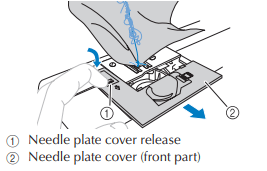
| 4. Slide the needle plate cover release toward you to remove the needle plate cover. |
|
 |
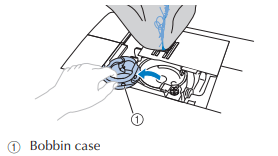
| 5. Remove the bobbin case. Grasp the bobbin case, and then pull it out. |
|
 |
| 6. Use the cleaning brush or a vacuum cleaner to remove any dust from the race and its surrounding area. |
|
 |
*NOTE • Do not put oil on the race
| 7. Insert the bobbin case so that the mark on the bobbin case aligns with the mark on the machine. |
|
 |
*CAUTION
- Never use a bobbin case that is scratched, otherwise the upper thread may become tangled, the needle may break or sewing performance may suffer. For a new bobbin case (part code: XE7560-001), contact your nearest authorized service center.
- Make sure that you fit the bobbin case properly, otherwise the needle may break.
| 8. .As shown, insert the tab on the needle plate cover into the hole in the needle plate, and then correctly position of the needle plate cover. |
|
 |
9. From the front, slide the needle plate cover back into position.
*CAUTION
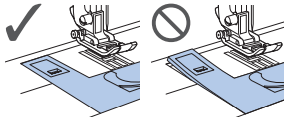
If the needle plate cover is not flush with the surface of the machine as shown below, remove the needle plate cover (step 4), and then install it again (steps 8 and 9). Sewing while the needle plate cover is not flush with the surface of the machine may cause the needle plate cover to come off of the machine, resulting in injuries if your fingers touch the race.
TROUBLESHOOTING
Upper thread tightened up
■ Symptom
- The upper thread appears as a single continuous line.
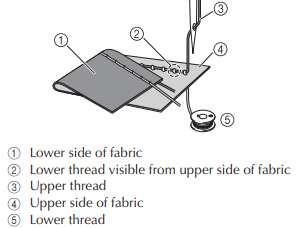
- The lower thread is visible from the upper side of the fabric. (Refer to the illustration below.)
- The upper thread has tightened up, and comes out when pulled.
- The upper thread has tightened up, and wrinkles appear in the fabric.
- The upper thread tension is tight, and the results do not change even after the thread tension is adjusted.
■ Cause
- Incorrect lower threading
- If the lower thread is incorrectly threaded, instead of the appropriate tension being applied to the lower thread, it is pulled through the fabric when the upper thread is pulled up. For this reason, the thread is visible from the upper side of the fabric.
■ Remedy/check details
- Correctly install the lower thread.
Tangled thread on wrong side of fabric
■ Symptom
• The thread becomes tangled on the lower side of the fabric.
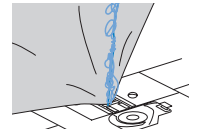
• After starting sewing, a rattling noise is made and sewing cannot continue.
• Looking under the fabric, there is tangled thread in the bobbin case.
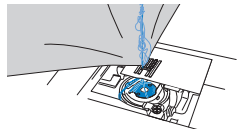
■ Cause
- Incorrect upper threading
- If the upper thread is incorrectly threaded, the upper thread passed through the fabric cannot be firmly pulled up and the upper thread becomes tangled in the bobbin case, causing a rattling noise.
■ Remedy/check details
- Remove the tangled thread, and then correct the upper threading.
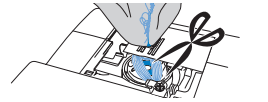
- Remove the tangled thread. If it cannot be removed, cut the thread with scissors.
- Remove the upper thread from the machine.
- Correct the upper threading
Incorrect thread tension
■ Symptoms
Symptom 1 : The lower thread is visible from the upper side of the fabric.
Symptom 2 : The upper thread appears as a straight line on the upper side of the fabric.
Symptom 3 : The upper thread is visible from the lower side of the fabric.
Symptom 4 : The lower thread appears as a straight line on the lower side of the fabric.
Symptom 5 : The stitching on the lower side of the fabric is loose or has slack.
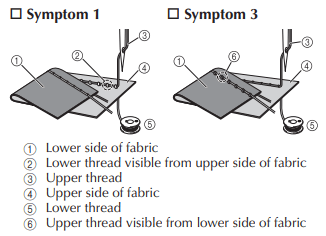
■ Cause/remedy/check details
- Cause 1: The machine is not correctly threaded.
- With symptoms 1 and 2 described above> The lower threading is incorrect.
- Return the upper tension-control dial to “4”, and then correct the threading.
- With symptoms 3 through 5 described above> The upper threading is incorrect.
- Return the upper tension-control dial to “4”, and then correct the upper threading.
- Cause 2: A needle and thread appropriate for the fabric are not being used.
- Check that a needle and thread appropriate for the fabric are being used.
- Cause 3: An appropriate setting on the upper tensioncontrol dial is not selected.
- Turn the upper tension-control dial to select an appropriate thread tension.
- Adjust the thread tension while test sewing on a piece of scrap fabric that is the same as that used in your project.
*NOTE
• If the upper threading and lower threading are incorrect, the thread tension cannot be adjusted correctly, even by turning the upper tension-control dial. Check the upper threading and lowe threading first, and then adjust the thread tension.
• When the lower thread is visible from the upper side of the fabric, turn the dial counterclockwise

• When the upper thread is visible from the lower side of the fabric, turn the dial clockwise.

Fabric is caught in the machine and cannot be removed
If the fabric is caught in the sewing machine and cannot be removed, the thread may have become tangled under the needle plate. Follow the procedure described below to remove the fabric from the machine. If the operation could not be completed according to the procedure, instead of attempting to complete it forcefully, contact your nearest authorized service center.
■ Removing the fabric from the machine
- Immediately stop the sewing machine.
- Turn off the sewing machine.
- Remove the needle.
- If the needle is lowered into the fabric, turn the handwheel away from you (clockwise) to raise the needle out of the fabric, and then remove the needle.
- Remove the presser foot and presser foot holder.
- Lift up the fabric and cut the threads below it.
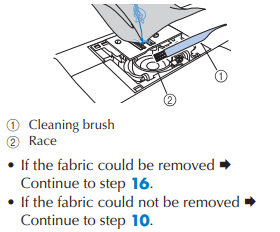
- If the fabric can be removed, remove it.
- Remove the needle plate cover.
- Cut out the tangled threads, and then remove the bobbin
- Remove the bobbin case. If threads remain in the bobbin case, remove them.
- Use the cleaning brush or a vacuum cleaner to remove any dust from the race and its surrounding area.
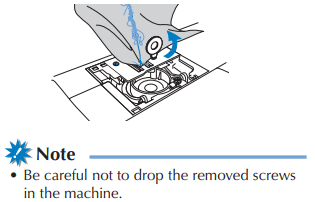
- Use the included disc-shaped screwdriver to loosen the two screws on the needle plate.
- Slightly lift up the needle plate, cut any tangled threads, and then remove the needle plate.
- Remove the fabric and threads from the needle plate.
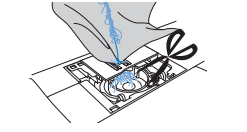
- If the fabric cannot be removed, even after completing these steps, contact your nearest authorized service center.
-
Remove any threads in the race and around the feed dogs.
-
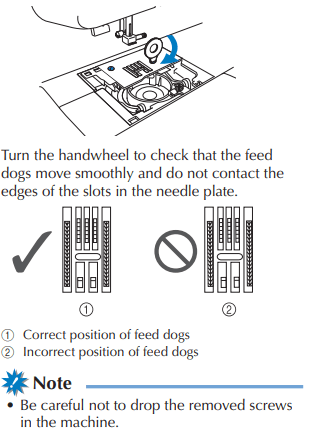
Turn the handwheel to raise the feed dogs.
-
Align the two screw holes in the needle plate with the two holes at the needle plate mounting base, and then fit the needle plate onto the machine.
-
Lightly finger-tighten the screw on the right side of the needle plate. Then, use the discshaped screwdriver to firmly tighten the screw on the left side. Finally, firmly tighten the screw on the right side.
-
Insert the bobbin case by following step 7 in Cleaning the race” (page 61).
-
Attach the needle plate cover by following steps 8 and 9 in “Cleaning the race” (page
-
Check the condition of the needle, and then install it.
* CAUTION
- Never use bent needles. Bent needles can easily break, possibly resulting in injuries.
*NOTE
- After completing this procedure, continue with the following procedure in “Checking machine operations” to check that the machine is operating correctly.
*MEMO
- Since the needle may have been damaged when the fabric was caught in the machine, we recommend replacing it with a new one.
1. Turn on the machine.
2. Select (middle needle position stitch).
*NOTE
- Do not yet install the presser foot and thread.
3. Slowly turn the handwheel toward you counterclockwise), and look from all sides to check that the needle falls at the center of the hole in the needle plate.
- If the needle contacts the needle plate, remove the needle plate, and then install it again
4. Select zigzag stitch. At this time, increase the stitch length and width to their maximum settings.
5. Slowly turn the handwheel toward you counterclockwise) and check that the needle bar and feed dogs operate correctly.
- If the needle or feed dogs contact the needle plate, the machine may be malfunctioning; therefore, contact your nearest authorized service center.
6. Turn off the machine, and then install the bobbin and presser foot.
7. Correctly thread the machine
*NOTE
The thread may have become tangled as a result of incorrect upper threading. Make sure that the machine is correctly threaded.
8 Perform trial sewing with normal fabric.
Error message “E6” appears in the LCD.
Symptom 1 : The machine rattles and then stops just after sewing is started.
■ Cause
• The upper thread is not threaded correctly.
• The thread take-up lever is not threaded.
* When the machine stops just after sewing is started, the upper thread may not be threaded correctly.
• If the needle is not raised, the upper thread cannot be threaded correctly. Be sure to raise the needle before threading the sewing machine.
■ Remedy
Thread the upper thread again correctly by following the procedure below.
- Turn off the machine.
- If the thread is tangled, remove the tangled thread.
- Remove the upper thread from the machine.
- Turn the handwheel toward you counterclockwise) to check if the handwheel moves smoothly.
- If the handwheel moves smoothly => Continue to step 8.
- If the handwheel does not move smoothly => Continue to step 5.
- Remove the needle plate cover, and then remove the bobbin and bobbin case.
- Insert the bobbin case, attach the needle plate cover, and then set the bobbin in the bobbin case.
- If the needle is bent, replace it with a new one.
- Turn on the machine, and then press the needle position button to raise the needle.
- Thread the machine correctly.
Symptom 2 : The upper thread is tangled, for example, in the race, or fabric is caught in the machine
■ Cause Thread is tangled below the needle plate.
■ Remedy Remove the fabric and reset the thread and bobbin by following the procedure below.
- Turn off the machine.
- Remove the fabric from the machine.
- Remove the upper thread, bobbin and then bobbin case.
- If threads remain in the bobbin case, remove it.
- Insert the bobbin case, attach the needle plate cover, and then set the bobbin in the bobbin case
- If the needle is bent, replace it with a new one.
- Turn on the machine, and then press the needle position button to raise the needle. Thread the machine correctly.
Symptom 3 : The needle breaks, or the needle bends and thus hits the needle plate.
■ Cause
You have not used the right combination of fabric, thread and needle.
■ Remedy
Choose a thread and needle that are appropriate for the type of fabric.
Symptom 4 : The fabric is not fed.
■ Cause
The thread has become clogged as the stitch is too fine.
■ Remedy
Lengthen the stitch length.