In this chapter, we will explain the indicators and controls. You will also find out about the various functions of your appliance.
Note: Depending on the appliance model, individual details and colours may differ.
Control panel
You can set your appliance's various functions on the control panel. Below, you will see an overview of the control panel and the layout of the controls.
Buttons and display
The buttons are touch keys with sensors underneath. Simply touch a symbol to select the function.
The display shows symbols for active functions and the time-setting options.
Function selector
Use the function selector to set the heating function or other functions.
You can turn the function selector clockwise or anti-clockwise from the "Off" position.
Temperature selector
Use the temperature selector to set the temperature for the heating function or select the setting for other functions.
You can also turn the temperature selector clockwise or anti-clockwise. It does not have an "Off" position.
Note: On some appliances, the control knobs can be pushed in. To push the control knob in and engage it or to release it again, turn it to the "Off" position.
Buttons and display
You can use the buttons to set various additional functions on your appliance. You will be able to see the values for these on the display.
Display
The cooking compartment temperature you set using the temperature selector will be shown on the display.
In addition, you can read the settings for the time-setting options. The value that can be set at the present time or that is elapsing will be shown in large digits on the display. To use the individual time-setting options, touch the button several times.If there is a red bar above or below a symbol, this means that the value being shown in large digits on the display refers to the function that this symbol represents.
Types of heating and functions
Use the function selector to set the types of heating and other functions.
To make sure you always use the right type of heating to cook your food, we have explained the differences and applications below.
Note: For each heating function, the appliance specifies a default temperature or level. You can accept this value or change it in the appropriate area.
Other functions
Your new oven has yet more functions; see below for a brief description of these.
Temperature
Use the temperature selector to set the temperature in the cooking compartment. It can also be used to select the grill and cleaning settings, for example.
The settings will appear on the display.
Notes
The temperature can be set in 1 degree increments up to 100 °C, and in 5 degree increments thereafter.
When cooking at very high temperatures, the appliance lowers the temperature slightly after an extended period.
Temperature indicator
The line at the bottom of the display turns red from left to right as the cooking compartment heats up.
When you are preheating the appliance, the optimal time to place your food in the cooking compartment is as soon as the entire line has turned red.
Residual heat
When the appliance is switched off, the temperature indicator shows the residual heat in the cooking compartment. The lower the temperature drops, the shorter the line.
Notes
The temperature indicator only shows the increasing temperature for heating functions for which a temperature is set. For grill settings, for example, the indicator shows a full line from the beginning.
If the temperature in the cooking compartment is too high when the appliance is started, will appear on the display for some heating functions. Switch off the appliance and allow it to cool down before switching it back on again.
Due to thermal inertia, the actual temperature inside the cooking compartment may differ slightly from the temperature that is displayed.
Cooking compartment
Various functions in the cooking compartment make your appliance easier to use. For example, the cooking compartment is well lit and a cooling fan prevents the appliance from overheating.
Opening the appliance door
If you open the appliance door when the appliance is in operation, the appliance will continue to operate as before.
Interior lighting
With most heating functions and other functions, the interior lighting in the cooking compartment will remain lit while the oven is in operation. Once the oven has finished cooking the food, the lighting will go out.
By pressing the button for the interior lighting, you can switch on the lighting without heating the oven. This makes it easier to clean your appliance, for example.
Cooling fan
The cooling fan switches on and off as required. The hot air escapes above the door.
Caution!
Do not cover the ventilation slots. Otherwise, the appliance may overheat.
So that the cooking compartment cools down more quickly after operation, the cooling fan continues to run for a certain period afterwards.
Accessories
Your appliance is accompanied by a range of accessories. Here, you can find an overview of the accessories included and information on how to use them correctly.
Control accessories
The accessories supplied may differ depending on the appliance model.
Only use original accessories. They are specially adapted for your appliance.
You can buy accessories from the after-sales service, from specialist retailers or online.
Note: The accessories may deform when they become hot. This does not affect their function. Once they have cooled down again, they regain their original shape.
Inserting accessories
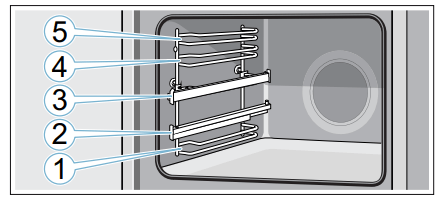
The cooking compartment has five shelf positions. The shelf positions are counted from the bottom up.
In some appliances, the highest shelf position is marked on the cooking compartment by the grill symbol.
Depending on the appliance model, your cooking compartment will have one or more pull-out rails or one or two clip-on pull-out rails.The pull-out rails are fixed in place and cannot be removed.The clip-on pull-out rails can be fitted as required to levels that are not currently being used.
Always insert accessories between the two guide rods for the shelf position.
Accessories can be pulled out approximately halfway without tipping. You can use the pull-out rails to pull the accessories out further.
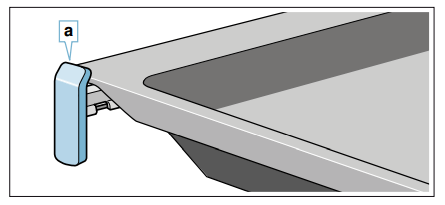
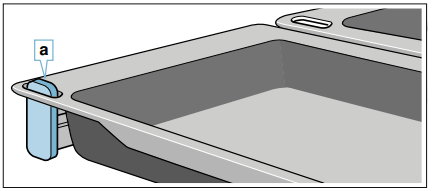
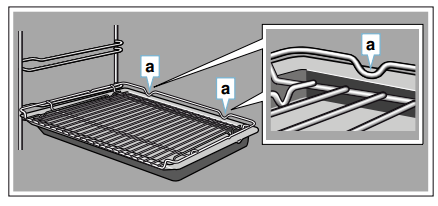
Make sure that the accessory is placed behind the lug a on the pull-out rail.
Example in the picture: Universal pan
Caution!
If you are using the two narrow universal pans, make sure that they are hooked over the lugs a on the left and right.
The pull-out rails lock in place when they are fully pulled out. This makes it easy to place the accessories in position.To unlock the pull-out rails, use a little force to push them back into the cooking compartment.
Notes
Make sure that you always insert the accessories into the cooking compartment the right way round.
Always insert the accessories fully into the cooking compartment so that they do not touch the appliance door.
Take any accessories that you will not be using out of the cooking compartment.
The shelf supports can be taken out of the cooking compartment for cleaning. → Page 25
Locking function
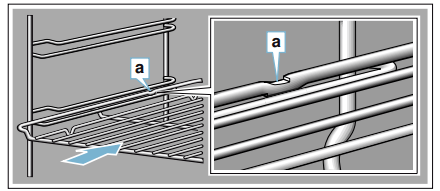
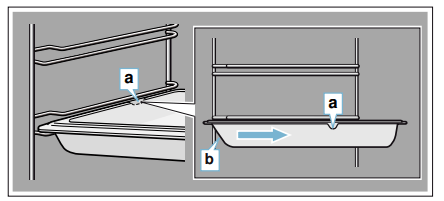
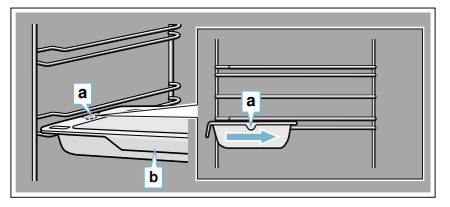
The accessories can be pulled out approximately halfway until they lock in place. The locking function prevents the accessories from tilting when they are pulled out. The accessories must be inserted into the cooking compartment correctly for the tilt protection to work properly.
When inserting the wire rack, ensure that the lug a is at the rear and is facing downwards. The open side must be facing the appliance door and the curvature must be at the bottom (i.e.).
When inserting baking trays, make sure that the lug a is at the rear and is facing downwards. The sloping edge of the accessory b must be facing towards the appliance door.
Example in the picture: Universal pan
Caution!
The tilt protection on the two narrow universal pans can be found at the middle a of each of these pans.When inserting the universal pans, make sure that the holding lip b is facing the appliance door.
Combining accessories
You can insert the wire rack and the universal pan at the same time to catch drops of liquid.
When inserting the wire rack, ensure that both spacers are at the rear edge. When inserting the universal pan a the wire rack is on top of the upper guide rod of the shelf position.
Example in the picture: Universal pan
Optional accessories
You can buy optional accessories from the after-sales service, from specialist retailers or online. *You will find a comprehensive range of products for your appliance in our brochures and online.
Both availability and whether it is possible to order online differ between countries. Please see your sales brochures for more details.
Note: Not all optional accessories are suitable for every appliance. When purchasing, please always quote the exact identification number (E-no.) of your appliance. → "Customer service" on page 29
Optional accessories
Wire rack
For cookware, cake tins and ovenproof dishes, and for roasts and grilled food.
Baking tray
For tray bakes and small baked items.
Universal pan
For moist cakes, baked items, frozen food and large roasts.
It can be used to catch dripping fat when you are grilling directly on the wire rack.
Wire insert
For meat, poultry and fish.
For inserting into the universal pan to catch dripping fat and meat juices.
Universal pan, non-stick
For moist cakes, baked items, frozen food and large roasts.
Allows baked items and roasts to be removed more easily from the universal pan.
Baking tray, non-stick
For tray bakes and small baked items.
Allows baked items to be removed more easily from the baking tray.
Two universal pans, narrow style
For moist cakes, baked items and frozen food.
Do not use the universal pans in conjunction with the clip-on pull-out rails or place them on the wire rack.
Professional pan
For preparing large quantities of food. Also ideal for moussaka, for example.
Professional pan with wire insert
For preparing large quantities of food.
Lid for the professional pan
The lid turns the professional pan into a professional roasting dish.
Pizza tray
For pizzas and large round cakes.
Grill tray
Use for grilling in place of the wire rack or as a splatter guard. Use in the universal pan only.
Baking stone
For home-made bread, bread rolls and pizzas that you wish to have a crispy base.
The baking stone must be preheated to the recommended temperature.
Glass roasting dish
For stews and bakes.
Glass tray
For large roasts, moist cakes and bakes.
Glass pan
For bakes, vegetable dishes and baked items.
Clip-on rail
The pull-out rails can be used at any level. Rails can be fitted on any and all free levels.
Pull-out system, one level
Fitting pull-out rails at position 2 will allow you to pull accessories out further without them tipping.
Pull-out system, two levels
Fitting pull-out rails at positions 2 and 3 will allow you to pull accessories out further without them tipping.
Pull-out system, three levels
Fitting pull-out rails at positions 1, 2 and 3 will allow you to pull accessories out further without them tipping.
Before using for the first time
Before you can use your new appliance, you must make some settings. You must also clean the cooking compartment and accessories.
Initial use
The time will appear on the display once the appliance is connected to the power supply. Set the current time.
Setting the time
Make sure that the function selector is set to the "Off" position.
The time starts at "12:00".
Use the + or - button to set the time.
Touch the button to confirm.
The current time will be shown on the display.
Cleaning the cooking compartment and accessories
Before using the appliance to prepare food for the first time, you must clean the cooking compartment and accessories.
Cleaning the cooking compartment
To eliminate the new-appliance smell, heat up the cooking compartment when it is empty and with the oven door closed.
Make sure that there is no leftover packaging, such as polystyrene pellets, in the cooking compartment and remove the adhesive tape that is in or on the appliance.
Before heating the appliance, wipe the smooth surfaces in the cooking compartment with a soft, damp cloth.
Keep the kitchen ventilated while the appliance is heating.
Apply the settings indicated below. You can find out how to set the heating function and the temperature in the next section. → "Operating the appliance" on page 15
Settings
Heating function: 3D Hotair
Temperature: maximum
Time: 1 hour
Switch off the appliance after the time indicated.
Once the cooking compartment has cooled down, clean the smooth surfaces with soapy water and a dish cloth.
Cleaning the accessories
Clean the accessories thoroughly using soapy water and a dish cloth or soft brush.
Operating the appliance
You have already learnt about the controls and how they work. Now we will explain how to apply settings on your appliance.
Switching the appliance on and off
Use the function selector to switch the appliance on or off. Turning the function selector to any position other than the "Off" position switches on the appliance. To switch off the appliance, always turn the function selector to the "Off" position.
Setting the heating function and temperature
The function selector and temperature selector make it very easy to apply the settings you require to your appliance. To find out which heating function is best for which type of food, please refer to the beginning of the instruction manual.
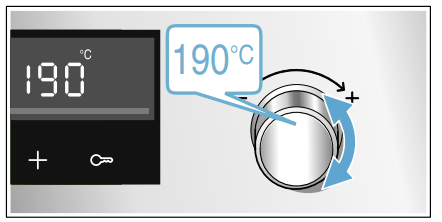
Example in the picture: Top/bottom heating at 190 °C.
Use the function selector to set the heating function.
Use the temperature selector to set the temperature or grill setting.
The appliance will start heating after a few seconds.
Once your food is cooked, turn the function selector to the "Off" position to switch the appliance off.
Note: You can set both a cooking time and an end time on the appliance. → "Time-setting options" on page 16
Changing
The heating function and temperature can be changed at any time using the relevant selector.
If you change the heating function, the temperature will be changed to the corresponding default value.
Rapid heating
With Rapid heating, you can shorten the heat-up time.
Suitable heating functions include:
3D hot air
Top/bottom heating
Only use Rapid heating when a temperature of over 100 °C has been selected.
To achieve an even cooking result, do not place your food into the cooking compartment until Rapid heating is complete.
Set the heating function and temperature.
Touch the button.
The symbol will appear on the display.
The oven will start heating after a few seconds.
Once Rapid heating is complete, an audible signal will sound and the c symbol will go out.Place your food in the cooking compartment.
Time-setting options
Your appliance has different time-setting options
Before you can call up the cooking time using the button, you will need to set a heating function.Once you have set a cooking time, the end time can be called up. The timer can be set at any time.
An audible signal will sound once the cooking time or timer duration has elapsed. You can cancel the audible signal early by touching the button.
Note: You can change how long the audible signal sounds for in the basic settings. → "Basic settings" on page 20
Setting the cooking time
You can set the cooking time for your food on the appliance. This prevents the food from accidentally being cooked for too long, and means that you do not have to stop what you are doing to switch off the oven.
The maximum time that can be set is 23 hours and 59 minutes. The cooking time can be set in 1-minute increments up to one hour, and then in 5-minute increments.
The cooking time will start at a different default value depending on which button you touch first: 10 minutes if you touch the - button and 30 minutes if you touch the + button.
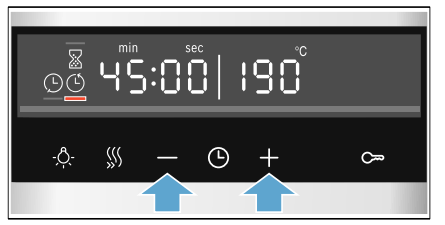
Example in the picture: Cooking time of 45 minutes.
Set the type of heating and temperature or setting.
Touch the button twice. The cooking time will be highlighted on the display.
Use the + or - button to set the cooking time.
The appliance will start heating after a few seconds. The remaining time will count down on the display.
The cooking time has elapsed
An audible signal will sound. The appliance will stop heating. The cooking time will be zero on the display.
Once the signal stops, you can touch the + button to set a new cooking time.
Once your food is cooked, turn the function selector to the "Off" position to switch the appliance off.
Changing and cancelling
You can use the + or - button to change the cooking time at any time.After a few seconds, the change will be applied.
To cancel, use the - button to reset the cooking time all the way to zero. The appliance will continue heating without a cooking time.
Checking time-setting options
If time-setting options have been set, the corresponding symbols are lit up on the display. The symbol for which the time is currently being displayed will be indicated.
To check the values for the different time-setting options, touch the button repeatedly until the required symbol is indicated.
Setting the end time
You can delay the time at which cooking is due to finish. You can, for example, put your food in the cooking compartment in the morning and set the cooking time so that it is ready at lunch time.
Notes
Make sure that food is not left in the cooking compartment for too long as it may spoil.
Do not adjust the end time once the appliance is already in operation. Otherwise the cooking result may no longer be satisfactory.
The end of the cooking time can be delayed by up to 23 hours and 59 minutes.
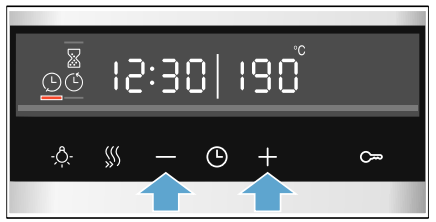
Example in the picture: The time is 10.30 a.m., a cooking time of 45 minutes has been set and you want the food to be ready at 12.30 p.m.
Set the type of heating and temperature or setting.
Touch the button twice and use the - or + button to set the cooking time.
Touch the button again. The end time will be highlighted on the display.
Use the + or - button to delay the end time.
The appliance will apply the settings after a few seconds. The end time will be shown on the display.
Once the appliance starts, the time will begin counting down.
The cooking time has elapsed
An audible signal will sound. The appliance will stop heating. The cooking time will be zero on the display.
Once the signal stops, you can touch the + button to set a new cooking time.
Once your food is cooked, turn the function selector to the "Off" position to switch the appliance off.
Changing and cancelling
You can use the + or - button to change the end time.
After a few seconds, the change will be applied. The end time cannot be changed once the cooking time has already started to count down. Otherwise the cooking result would no longer be satisfactory.
To cancel, use the - button to set the end time all the way back to the current time plus the cooking time. The appliance will start to heat and the cooking time will start to count down.
Checking time-setting options
If time-setting options have been set, the corresponding symbols are lit up on the display. The symbol for which the time is currently being displayed will be indicated.
To check the values for the different time-setting options, touch the button repeatedly until the required symbol is indicated.
Setting the timer
The timer runs alongside other settings. You can set it at any time, even if the appliance has been switched off.
It has its own audible signal so that you can tell whether it is the timer or a cooking time that has elapsed.
The maximum time that can be set is 23 hours and 59 minutes. Up to 10 minutes, the timer duration can be set in 30-second increments.Above 10 minutes, the time increments become longer the higher the value.
The timer duration will start at a different default value, depending on which button you touch first: minutes if you touch the - button and 10 minutes if you touch the + button.
Touch the button until the timer symbol t is underlined.
Use the - or + button to set the timer duration.
After a few seconds, the timer duration will start to count down.
Tip: If the set timer duration is the duration for which you wish to cook your food, use the cooking time. The appliance will then switch off automatically when it has finished cooking.
The timer duration has elapsed
An audible signal will sound. The timer duration will be zero on the display.
Touch any button to switch off the timer.
Changing and cancelling
You can use the - or + button to change the timer duration at any time. After a few seconds, the change will be applied.
To cancel, use the - button to reset the timer duration all the way to zero. The timer is now switched off.
Checking time-setting options
If time-setting options have been set, the corresponding symbols are lit up on the display. The symbol for which the time is currently being displayed will be indicated.
To check the values for the different time-setting options, touch the button repeatedly until the required symbol is indicated.
Setting the time
Once the appliance has been connected to the mains or following a power failure, the clock will flash on the display. Set the time.
The function selector must be set to the "Off" position.
Use the - or + button to set the time. The time will stop flashing.
Confirm by pressing the button.
The appliance will apply the time you have set.
Note: You can go to the basic settings to specify whether or not the time should be shown on the display.
Changing the time
You can change the time again when you need to, e.g. from summer to winter time.
To do this, when the appliance is switched off, touch the button until the symbol for the time is underlined, and use the - or + button to change the time.
Childproof lock
Your appliance is equipped with a childproof lock so that children cannot switch it on accidentally or change any settings.
Notes
You can go to the basic settings to specify whether you want the option to set the childproof lock.
If a hob is connected, it will not be affected by the childproof lock on the oven.
Activating and deactivating
To activate the childproof lock, the function selector must be set to the "Off" position.
Press and hold the button for approx. 4 seconds.
The symbol for this function will appear on the display.
The childproof lock is now activated.
Note: If a timer duration has been set, this will continue to count down. While the childproof lock is active, the timer duration cannot be changed.
To deactivate the childproof lock, press and hold the button again for approx. 4 seconds until the symbol goes out on the display.
Basic settings
There are various settings available to you in order to help use your appliance effectively and simply. You can change these settings as required.
List of basic settings
Depending on the features of your appliance, not all basic settings will be available.
Changing the basic settings
The function selector must be set to the "Off" position.
Press and hold the button for approximately 4 seconds. The first basic setting will appear on the display, e.g.
Turn the temperature selector to change the setting as required.
Use the + button to navigate to the next basic setting.
Using the - or + button, continue going through all the basic settings as described above, changing the settings if necessary using the temperature selector.
When you have finished, press and hold the button again for approximately 4 seconds to confirm the settings.
All basic settings have now been applied.
You can change the basic settings again at any time.
Note: Your changes to the basic settings will be retained even after a power failure.
Sabbath mode
Sabbath mode lets you set a cooking time of over 70 hours. This enables you to keep dishes in the cooking compartment warm without having to switch the appliance on or off.
Starting Sabbath mode
Before you can use Sabbath mode, you will need to activate it in the basic settings. → "Basic settings" on page 20
The appliance heats up with top/bottom heating. You can set a temperature between 85 °C and 140 °C. The cooking time can be adjusted to the nearest half hour between 24 and 72 hours.
Set the function selector to the programme. appears on the display.
Use the temperature selector to set the temperature.
Touch the button twice. The cooking time will be highlighted on the display.
Use the - or +button to set the cooking time.
Note: The end time cannot be delayed.
The appliance will start heating after a few seconds. The remaining time will count down on the display.
When the cooking time for Sabbath mode has ended, an audible signal will sound. The appliance will stop heating. The time on the display will be zero.
Switch the appliance off by turning the function selector to the "Off" position.
Changing and cancelling
The settings cannot be changed once the appliance has started.
If you would like to cancel Sabbath mode, switch the appliance off by turning the function selector to the "Off" position.
Cleaning
With good care and cleaning, your appliance will retain its appearance and remain fully functioning for a long time to come. We will explain here how you should correctly care for and clean your appliance.
Suitable cleaning agents
To ensure that the different surfaces are not damaged by using the wrong cleaning agent, observe the information in the table. Depending on the appliance model, not all of the areas listed may be on/in your appliance.
Caution!
Risk of surface damage
Do not use:
Harsh or abrasive cleaning agents,
Cleaning agents with a high alcohol content,
Hard scouring pads or cleaning sponges,
High-pressure cleaners or steam cleaners,
Special cleaners for cleaning the appliance while it is hot.
Wash new sponge cloths thoroughly before use.
Tip: Highly recommended cleaning and care products can be purchased through the after-sales service. Observe the respective manufacturer's instructions.
Warning – Risk of burns!
The appliance becomes very hot. Never touch the interior surfaces of the cooking compartment or the heating elements. Always allow the appliance to cool down. Keep children at a safe distance.
Appliance exterior
Stainless steel front
Hot soapy water:
Clean with a dish cloth and then dry with a soft cloth.
Remove flecks of limescale, grease, starch and albumin (e.g. egg white) immediately. Corrosion can form under such flecks.
Special stainless steel cleaning products suitable for hot surfaces are available from our after-sales service or from specialist retailers. Apply a very thin layer of the cleaning product with a soft cloth.
Plastic
Hot soapy water:
Clean with a dish cloth and then dry with a soft cloth.
Do not use glass cleaner or a glass scraper.
Painted surfaces
Hot soapy water:
Clean with a dish cloth and then dry with a soft cloth.
Control panel
Hot soapy water:
Clean with a dish cloth and then dry with a soft cloth.
Do not use glass cleaner or a glass scraper.
Door panels
Hot soapy water:
Clean with a dish cloth and then dry with a soft cloth.
Do not use a glass scraper or a stainless steel scouring pad.
Door handle
Hot soapy water:
Clean with a dish cloth and then dry with a soft cloth.
If descaler comes into contact with the door handle, wipe it off immediately. Otherwise, any stains will not be able to be removed.
Appliance interior
Enamelled surfaces
Hot soapy water or a vinegar solution:
Clean with a dish cloth and then dry with a soft cloth.
Soften baked-on food remnants with a damp cloth and soapy water. Use stainless steel wire wool or oven cleaner to remove stubborn dirt.
Caution!
Never use oven cleaner in the cooking compartment when it is still warm. This may damage the enamel. Remove all food remnants from the cooking compartment and the appliance door before you next heat up the appliance.
Leave the cooking compartment open to dry after cleaning it.
It is best to use the cleaning function. → "Cleaning function" on page 23
Note: Food residues can cause white deposits to form. These are harmless and do not affect how the appliance works.
Remove using lemon juice if required.
Glass cover for the interior lighting
Hot soapy water:
Clean with a dish cloth and then dry with a soft cloth.
If the cooking compartment is heavily soiled, use oven cleaner.
Door cover made from stainless steel:
Use stainless steel cleaner. Follow the manufacturers' instructions. Do not use stainless steel care products. made from plastic:
Clean using hot soapy water and a dish cloth. Dry with a soft cloth. Do not use glass cleaner or a glass scraper.
Remove the door cover for cleaning.
Rails
Hot soapy water:
Soak and clean with a dish cloth or brush.
Pull-out system
Hot soapy water:
Clean with a dish cloth or a brush.
Do not remove the lubricant while the pull-out rails are pulled out – it is best to clean them when they are pushed in. Do not clean in the dishwasher.
Accessories
Hot soapy water:
Soak and clean with a dish cloth or brush.
If there are heavy deposits of dirt, use a stainless steel scouring pad.
Meat thermometer
Hot soapy water:
Clean with a dish cloth or a brush.
Do not clean in the dishwasher.
Notes
Slight differences in colour on the front of the appliance are caused by the use of different materials, such as glass, plastic and metal.
Shadows on the door panels, which look like streaks, are caused by reflections made by the interior lighting.
Enamel is baked on at very high temperatures.This can cause some slight colour variation. This is normal and does not affect operation.
The edges of thin trays cannot be completely enamelled. As a result, these edges can be rough. This does not impair the anti-corrosion protection.
Keeping the appliance clean
Always keep the appliance clean and remove dirt immediately so that stubborn deposits of dirt do not build up.
Tips
Clean the cooking compartment after each use. This will ensure that dirt cannot be baked on.
Always remove flecks of limescale, grease, starch and albumin (e.g. egg white) immediately.
Use the universal pan for baking very moist cakes.
Use suitable ovenware for roasting, e.g. a roasting dish.
Cleaning function
Use the "Pyrolytic self-cleaning" function to clean the cooking compartment.
You can choose from three cleaning cycles.
Cycle
Cleaning performance
Length of cycle
1
Gentle
Approx. 1 hour and 15 minutes
2
Medium
Approx. 1 hour and 30 minutes
3
Intensive
Approx. 2 hours
The dirtier the cooking compartment and the longer the dirt has been there, the more powerful the cleaning cycle should be. It is sufficient to clean the cooking compartment every two to three months. You can clean it more frequently if necessary. Cleaning requires approx. 2.5-4.8 kilowatt hours.
Notes
For safety reasons, the appliance door locks automatically once a certain temperature is reached. You will not be able to open it again until the lock symbol on the display has gone out.
The interior lighting will not come on while the appliance is being cleaned.
Warning Risk of burns!
The cooking compartment becomes extremely hot during the cleaning function. Never open the appliance door. Allow the appliance to cool down. Keep children away from the appliance.
The appliance will become very hot on the outside during the cleaning function. Never touch the appliance door. Allow the appliance to cool down. Keep children away from the appliance.
Warning
Risk of harm to health!
The cleaning function heats up the cooking compartment to a very high temperature so that food remnants left over from roasting, grilling and baking will burn off.This process releases vapours, which can irritate the mucous membranes. While the cleaning function is running, keep the kitchen well ventilated. Do not remain in the room for long periods. Keep children and pets away. Follow the instructions even when using the Delayed start function with a delayed end time.
Before running the cleaning function
Make sure that the cooking compartment is empty. Remove any accessories, cookware or shelf rails from the cooking compartment. Please see the relevant section for information on how to remove the rails. → "Rails" on page 25
Clean the appliance door and along the edges of the cooking compartment in the area around the seal. Do not scrub or remove the seal.
Setting the cleaning function
Make sure you follow all the preparation instructions before setting the cleaning function.
The length of time each cleaning cycle runs for has been preset and cannot be changed.
Use the function selector to set Pyrolytic self- clean .
Use the temperature selector to set the cleaning cycle.
The length of each cycle will appear on the display. The cleaning function will start in a few seconds. The remaining time will count down on the display.
Ventilate the kitchen while the cleaning function is running.
The appliance door will lock shortly after the programme starts running. The symbol will appear on the display.
An audible signal will sound when the cleaning function has finished. The time on the display will be zero.
Switch the appliance off by turning the function selector to the "Off" position.
You will not be able to open the appliance door again until the cooking compartment has cooled down sufficiently and the lock symbol on the display has gone out.
Delaying the end time
You can delay the end time if required. Before starting, touch the button until the "End" symbol is highlighted on the display. Use the - button to delay the end time.
The appliance will switch to standby after it is started.
Changing and cancelling
The power of the cleaning cycle cannot be changed once it has started.
The end time can be changed while the appliance is on standby.
If you would like to cancel the cleaning function, switch the appliance off by turning the function selector to the "Off" position.
The appliance door will remain locked until the cooking compartment has cooled down sufficiently and the lock symbol on the display has gone out.
After running the cleaning function
Allow the cooking compartment to cool down. Use a damp cloth to wipe off the ash that has been left behind in the cooking compartment and around the appliance door.
Hook the rails back in.
Note: Very bad soiling may cause white deposits to remain on the enamel surfaces. This is residue from the food and is harmless. It does not affect performance. You can remove these residues using lemon juice if required.
Rails
With good care and cleaning, your appliance will retain its appearance and remain fully functional for a long time to come. This will tell you how to remove the shelves and clean them.
Detaching and refitting the rails
Warning – Risk of burns!
The rails become very hot. Never touch the hot rails. Always allow the appliance to cool down. Keep children away from the appliance.
Detaching the rails
Lift the rail slightly at the front a and detach it b (figure 1).
Then pull the whole rail towards you and take it out (figure 2).
Clean the rails with cleaning agent and a sponge. For stubborn deposits of dirt, use a brush.
Attaching the rails
The rails only fit on the right or the left side. The pull-out rails must pull out towards you.
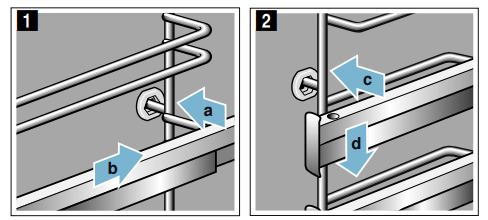
First, insert the rail in the middle of the rear socket a, until the rail rests against the cooking compartment wall, and push it back b (figure 1).
Then insert the rail into the front socket c, until the rail also rests against the cooking compartment wall here, and press it downwards d (figure 2).
Appliance door
With good care and cleaning, your appliance will retain its appearance and remain fully functional for a long time to come. This will tell you how to remove the appliance door and clean it.
Removing and fitting the appliance door
For cleaning purposes and to remove the door panels, you can detach the appliance door.
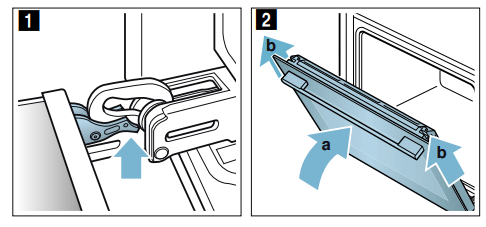
The appliance door hinges each have a locking lever. When the locking levers are closed (figure 1), the appliance door is secured in place. It cannot be detached.
When the locking levers are open in order to detach the appliance door (figure 2), the hinges are locked. They cannot snap shut.
Warning Risk of injury!
If the hinges are not locked, they can snap shut with great force. Ensure that the locking levers are always fully closed or, when detaching the appliance door, fully open.
The hinges on the appliance door move when opening and closing the door, and you may be trapped. Keep your hands away from the hinges.
Removing the appliance door
Open the appliance door fully and push it in the direction of the appliance.
Fold up the two locking levers on the left and right (figure 1).
Close the appliance door as far as it goes a. With both hands, grip the door on the left- and right-hand side and pull it up and out (figure 2).
Fitting the appliance door
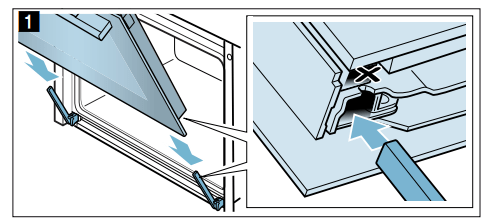
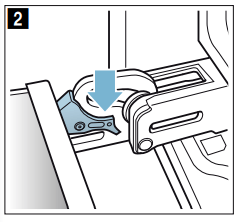
Reattach the appliance door in the opposite sequence to removal.
When attaching the appliance door, ensure that both hinges are inserted straight into the opening (figure 1) Place both hinges at the bottom on the outer panel and use this as a guide. Ensure that the hinges are inserted into the correct opening. You must be able to insert them easily and without resistance. If you can feel any resistance, check that the hinges are inserted into the correct opening.
Open the appliance door fully. Fold both locking levers closed again (figure 2).
Close the cooking compartment door.
Removing the door cover
The stainless steel inlay in the door cover may become discoloured. To carry out thorough cleaning, you can remove the cover. → "Cleaning" on page 22
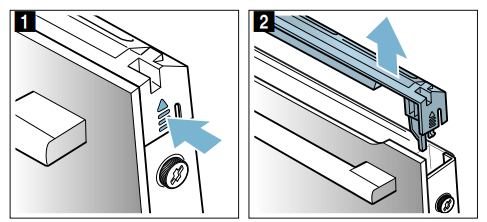
Open the appliance door slightly.
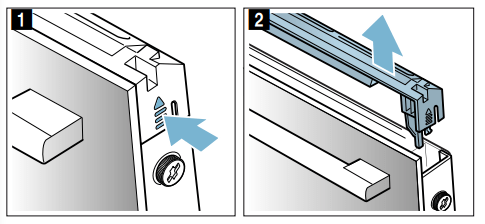
Press on the right and left side of the cover (figure 1)
Remove the cover (figure 2). Close the appliance door carefully. Note: Clean the stainless steel inlay in the cover with stainless steel cleaner. Clean the rest of the door cover with soapy water and a soft cloth.
Open the appliance door again slightly. Put the cover back in place and press on it until it clicks audibly into place (figure 3).
Close the appliance door.
Removing and installing the door panels
To facilitate cleaning, you can remove the glass panels from the appliance door.
Removing the door from the appliance
Open the appliance door slightly.
Press on the right and left side of the cover (figure 1)
Remove the cover (figure 2).
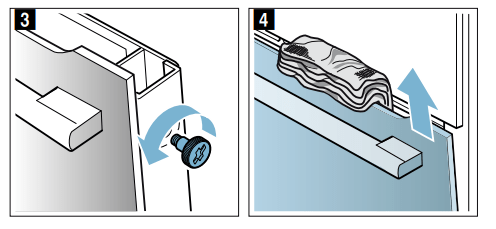
Loosen and remove the screws on the left and right of the appliance door (figure 3).
Before closing the door again, trap a tea towel which has been folded several times in the door (figure 4). Pull out the front panel upwards and lay it on a flat surface with the door handle facing downwards.
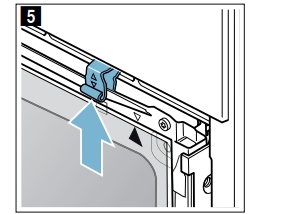
Push both retainers on the intermediate panel upwards, but do not remove it (figure 5). Hold the panel with one hand. Remove the panel.
Clean the panels with glass cleaner and a soft cloth.
Warning Risk of injury!
Scratched glass in the appliance door may develop into a crack. Do not use a glass scraper, sharp or abrasive cleaning aids or detergents. Risk of injury!
The hinges on the appliance door move when opening and closing the door, and you may be trapped. Keep your hands away from the hinges.
Fitting the door on the appliance
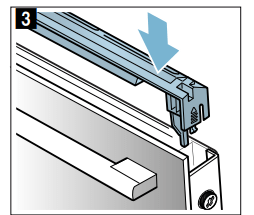
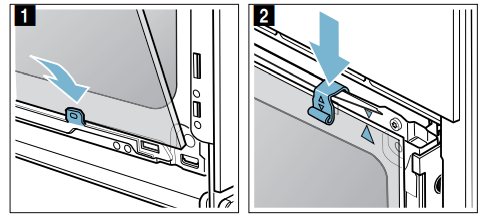
When fitting the intermediate panel, make sure that the arrow is in the top right of the panel and that it aligns with the arrow on the metal panel.
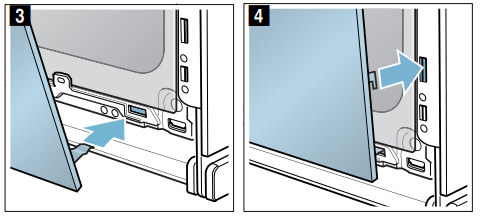
Insert the intermediate panel at the bottom into the retainer and push it in firmly at the top (figure 1).
Push both retainers downwards (figure 2).
Insert the front panel at the bottom into the retainers figure 3).
Close the front panel until both upper hooks are opposite the opening (figure 4).
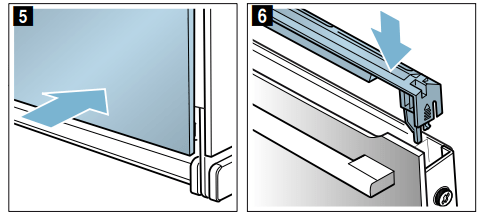
Press the front panel at the bottom until it clicks audibly into place (figure 5).
Open the appliance door again slightly and remove the tea towel.
Screw both screws back in on the left and right.
Put the cover back in place and press on it until it clicks audibly into place (figure 6).
Close the appliance door.
Caution!
Do not use the cooking compartment again until the panels have been correctly fitted.
Trouble shooting
If a fault occurs, there is often a simple explanation.
Before calling the after-sales service, please refer to the fault table and attempt to correct the fault yourself.
Rectifying faults yourself
You can often easily rectify technical faults with the appliance yourself.
If a dish does not turn out exactly as you wanted, you can find useful cooking tips and instructions at the end of this instruction manual. → "Tested for you in our cooking studio" on page 33
Fault
Possible cause
Notes/remedy
The appliance is not working.
Defective circuit breaker.
Check the circuit breaker in the fuse box.
Power failure
Check whether the kitchen light or other kitchen appliances are working.
The time is flash- ing on the display.
Power failure.
Reset the time.
The settings on the appliance cannot be config- ured. A key sym- bol has lit up on the display or .
The child- proof lock is activated.
Deactivate the childproof lock by pressing and holding the button with the key symbol for approx. 4 seconds.
The appliance door will not open. A key sym- bol has lit up on the display.
The appliance door is locked with the child- proof lock.
Deactivate the childproof lock by pressing and holding the button with the key symbol for approx. 4 seconds.
The lock can be switched off in the basic settings.
The appliance door will not open. A lock symbol has lit up on the display.
The appliance door is locked by the clean- ing function.
Wait until the cooking compart- ment has cooled down and the lock symbol has gone out.
After an operating mode is switched on, is flashing on the display.
The appliance has not cooled down sufficiently.
Switch off the appliance, allow it to cool down and switch on the operating mode again.
The appliance is not heating. The colon is flashing on the display. On some appliances, a will also appear on the dis- play.
Demo mode is activated.
Briefly disconnect the appliance from the mains (switch off the cir- cuit breaker in the fuse box) and then deactivate demo mode within approx. 5 minutes by changing the basic setting or to → "Basic settings" on page 20
Error messages on the display
If an error message with "" appears on the display, e.g. , touch the button. This will reset the error message. Reset the time, if necessary.
If the fault was a one-off, you can continue to use your appliance as normal. If the error message appears again, call our after-sales service and quote the exact error message and the E no. of your appliance. → "Customer service" on page 29
Maximum operating time
If you do not change the settings on your appliance for several hours, the appliance will stop heating automatically. This prevents unintentional continuous operation.
When the maximum operating time is reached depends on the various different settings that have been configured on the appliance.
Maximum operating time reached
appears on the display.
Turn the function selector to the "Off" position. You can configure new settings if required.
Tip: To prevent the appliance from switching off when you do not want it to, e.g. with an extremely long cooking time, you should always set a cooking time.
The appliance will heat up until the set cooking time has elapsed.
Replacing the bulb in the top of the cooking compartment
If the cooking compartment light bulb fails, it must be replaced. Heat-resistant, 25 watt, 230 V halogen bulbs are available from the after-sales service or specialist retailers.
When handling the halogen bulb, use a dry cloth. This will increase the service life of the bulb. Only use these bulbs.
Warning – Risk of burns!
The appliance becomes very hot. Never touch the interior surfaces of the cooking compartment or the heating elements. Always allow the appliance to cool down. Keep children at a safe distance.
Place a tea towel in the cold cooking compartment to prevent damage.
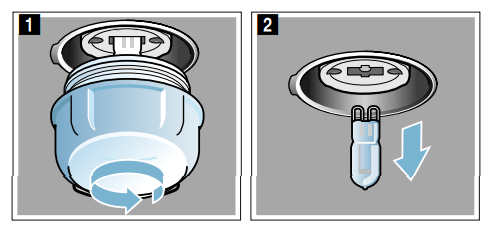
Turn the glass cover anti-clockwise to remove it (figure 1).
Pull out the bulb – do not turn it (figure 2). Insert the new bulb, making sure that the pins are in the correct position. Push the bulb in firmly.
Screw the glass cover back on. Depending on the appliance model, the glass cover may have a sealing ring. If the glass cover has a sealing ring, put it back in place before screwing the cover back on.
Remove the tea towel and switch on the circuit breaker.
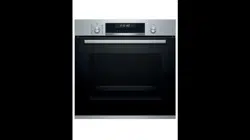
 Getting to know your appliance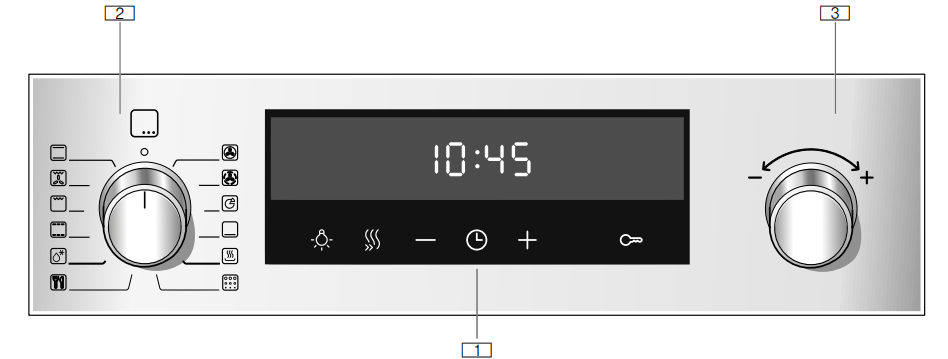
 Buttons and display
 Function selector
 Temperature selector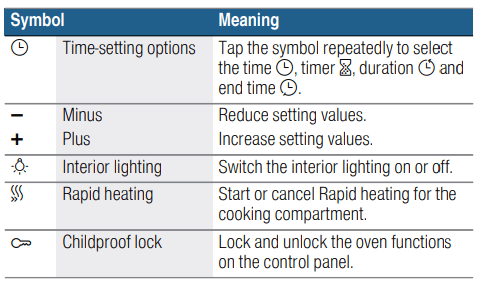
 button several times.If there is a red bar above or below a symbol, this means that the value being shown in large digits on the display refers to the function that this symbol represents.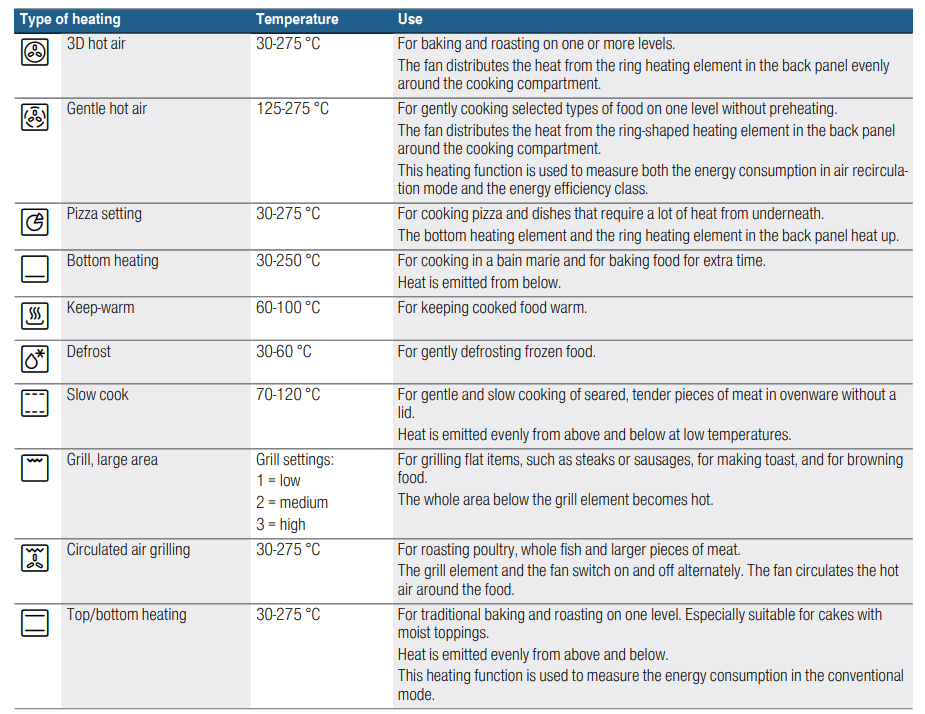


 will appear on the display for some heating functions. Switch off the appliance and allow it to cool down before switching it back on again.
 Accessories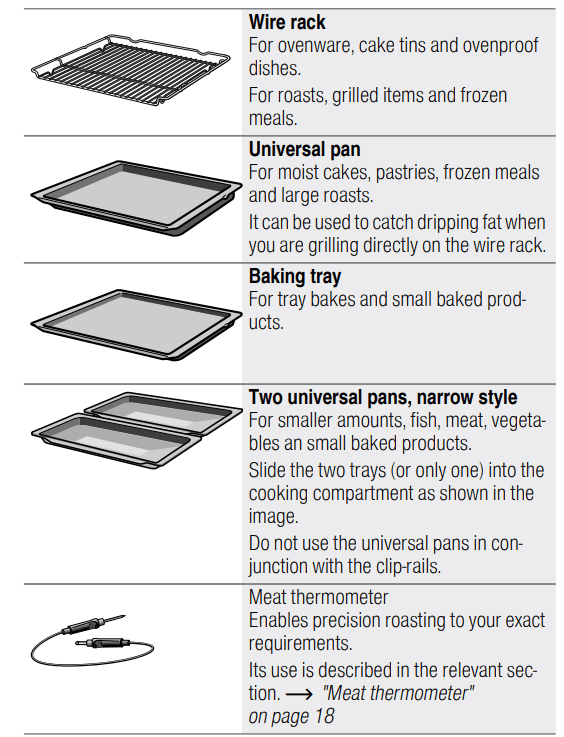
 ).
).
 Before using for the first time
 button to confirm.
 Operating the appliance
 at 190 °C.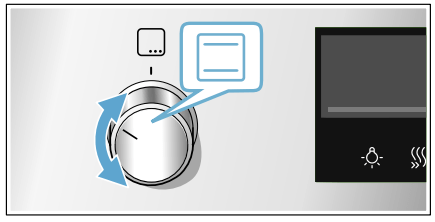
 3D hot air
 Top/bottom heating
 button.
 symbol will appear on the display.
 Time-setting options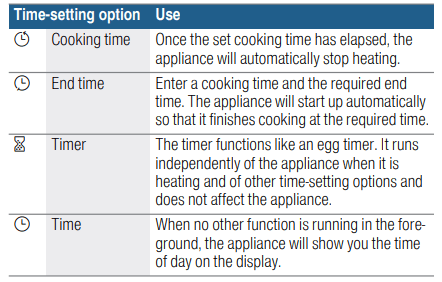
 button, you will need to set a heating function.Once you have set a cooking time, the end time can be called up. The timer can be set at any time.
 will be highlighted on the display.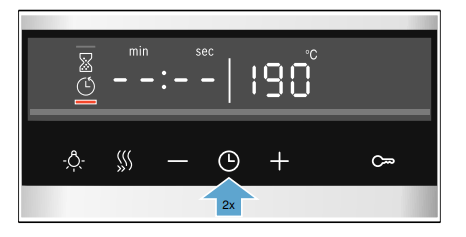
 will be highlighted on the display.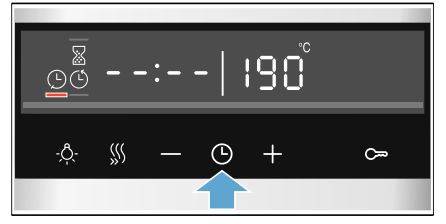
 button repeatedly until the required symbol is indicated.
 Childproof lock
 button for approx. 4 seconds.
 has been set, this will continue to count down. While the childproof lock is active, the timer duration cannot be changed.
 Basic settings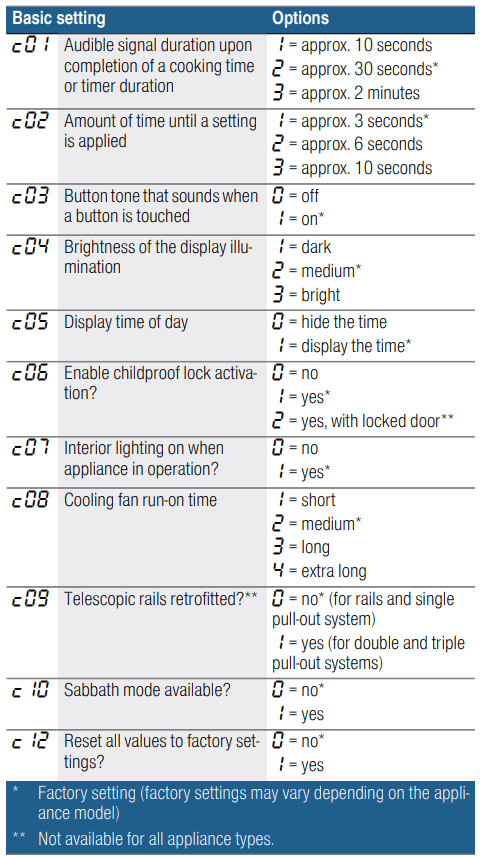
 button for approximately 4 seconds. The first basic setting will appear on the display, e.g.
 Sabbath mode
 programme.
 appears on the display.
 will be highlighted on the display.
 Cleaning
 Cleaning function
 on the display has gone out.
 The appliance will become very hot on the outside during the cleaning function. Never touch the appliance door. Allow the appliance to cool down. Keep children away from the appliance.
 .
. symbol will appear on the display.
 Rails
Rails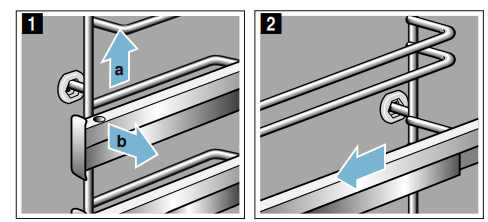
 Appliance door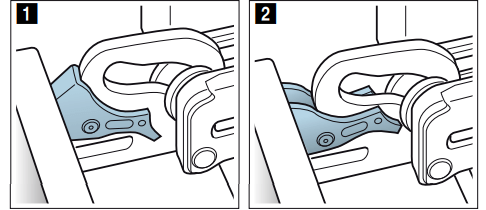
 Trouble shooting
 has lit up on the display.
 is flashing on the display.
 will also appear on the dis- play.
 or
or  to
to  → "Basic settings" on page 20
 " appears on the display, e.g.
  , touch the
  appears on the display.