10
en
Description
SOME NOTIONS ON HUMIDITY
Air always contains a certain quantity of water in the form of
vapour; this determines the degree of humidity in a room.
The capacity of air to contain water vapour increases as its
temperature increases.
This is why in our homes, as soon as the temperature drops,
the air releases the water vapour contained in it, turning into
condensation, which appears on all cold surfaces such as win-
dows, walls etc.
The dehumidier is an electric appliance that extracts humi-
dity from the air, avoiding the damage that it causes.
Studies have established that the ideal conditions for our
health and home are achieved when relative humidity is
between 40% and 60%.
With very low temperatures, you are recommended to heat
the room even minimally. This will increase the dehumidi-
fying capacity of the appliance considerably. This is the only
way, in fact, to allow the condensation that forms on the win-
dows and other cold surfaces to evaporate into the air and be
collected by the dehumidier.
The Extra Power mode included in this model makes it easier
to raise the temperature. The air released by the dehumidier
is, however, generally warmer than the air in the room.
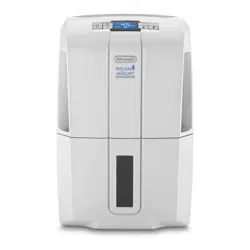
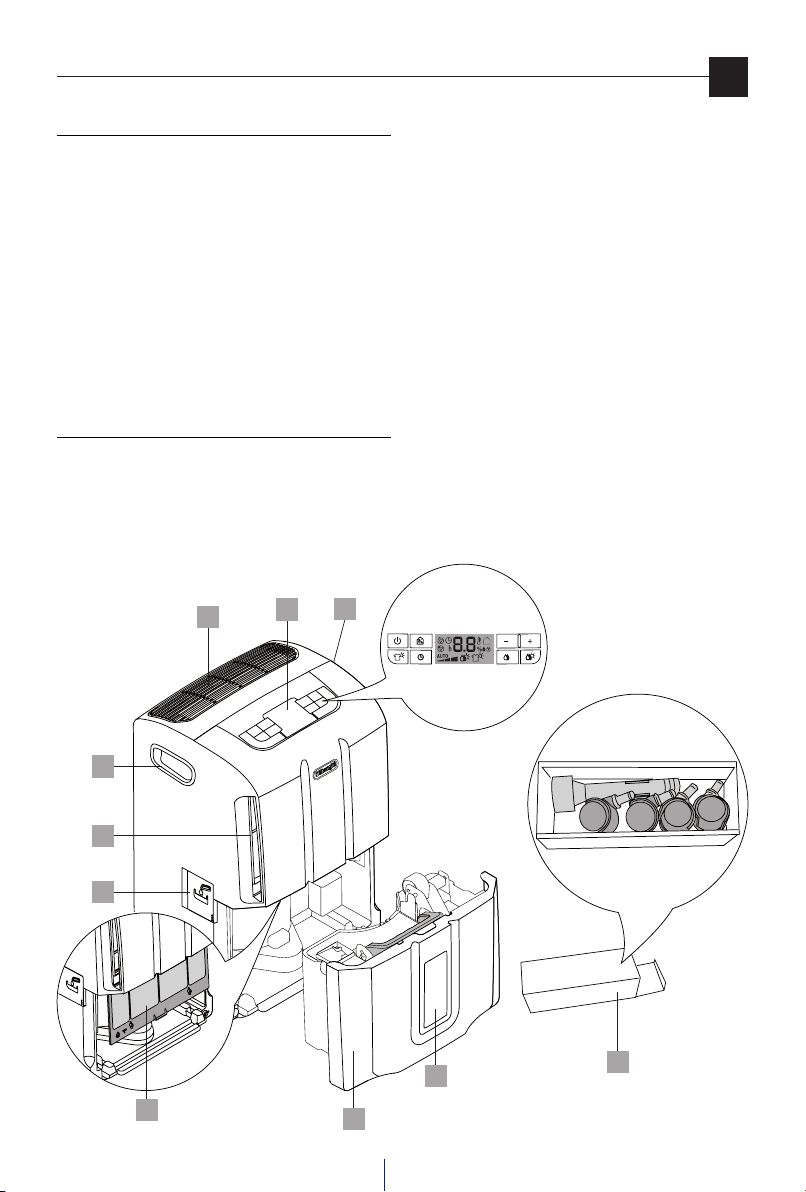
DESCRIPTION ACCESSORIES
1. Control panel
2. Water level viewing window
3. Condensate collection tank
4. Lifting handles
5. Air intake openings
6. Air lter
7. Air outlet grille
8. Accessory box containing condensate drain nozzle and 4
castors
9. Continuous drain door
2
3
4
4
5
9
6
7
1
8
11
en
INTRODUCTION
Thank you for choosing a De’Longhi product.
Take a few minutes to read these instructions for use.
This will avoid danger or damage to the machine.
Symbols used in these instructions
The important warnings are represented by the symbols li-
sted here below.
It is vital to observe these warnings.
Failure to observe the warnings provided may result in electric
shock, serious injury, burns, re or damage to the appliance.
Danger!
Failure to comply can be the cause of life-threatening injury
by electric shock.
Important!
Failure to comply can be or is cause of injury or damage to
the appliance.
Nota Bene :
This symbol highlights recommendations and important in-
formation for the user.
Problems and repairs
In the event of problems rst try and resolve them by fol-
lowing the warnings provided in the “Troubleshooting” chap-
ter on page 17.
For any repairs always contact a Technical Service Centre au-
thorised by the Manufacturer only.
Always insist on the use of original spare parts.
Repairs carried out by unqualied personnel can be dange-
rous and can invalidate the guarantee.
WARNINGS
Fundamental Safety Warnings
Danger! As this appliance runs on electrical current, it
is important to observe the following safety warnings:
• Donottouchtheappliancewithwethands.
• Donottouchtheplugwithwethands.
• Makesurethatthesocketusedcanalwaysbeeasilyrea-
ched, so that the plug can be removed when required.
• Ifyouwishtoremovetheplugfromthesocket,actdi-
rectly on the plug itself.
Never pull the power cable as it might be damaged.
• Todisconnecttheappliancecompletelyyoumustremo-
ve the plug from the socket.
• Do not attempt to repair the appliance if it breaks
down.
Switch the appliance o, remove the plug from the so-
cket and contact the After-Sales Technical Assistance.
• Donotmovetheappliancebypullingthepowercable.
• Itisdangeroustomodifyoralterthecharacteristicsof
the appliance in any way.
• Ifthepowercableisdamageditmustbereplacedbythe
manufacturer or an authorised technical service centre
in order to avoid all risk.
• Avoidtheuseofextensionleadsfortheelectricalpower
supply cable.
• Theappliancemustbeinstalledinaccordancewithna-
tional rules on household appliances.
• Theappliancemustbeconnected toanecientear-
thing system. Have a qualied electrician check your
electrical circuit.
• Thisapplianceisnotintendedforuseinthereclamation
of commercial or residential property damaged by wa-
ter.
Important! Keep the packaging material (plastic
bags, polystyrene foam) out of the reach of children.
Important! Do not allow the appliance to be used
by persons (also children) with reduced psycho-physical-
sensorialcapacitiesorthathaveinsucientexperienceand
knowledge, unless they are carefully monitored and trained
by a person responsible for their safety. Children must be su-
pervised to ensure they do not play with the appliance.
Warnings
12
en
Use
Use in compliance with its intended use
This appliance is intended for domestic use only.
Use this appliance only as described herein.
These instructions do not intend to cover every possible con-
dition and situation that may arise. Common sense and cau-
tion should be applied when installing, operating and storing
any appliance.
General safeguards
• Donotinstalltheapplianceinroomswheretheaircon-
tains gas, oil, sulphur or near sources of heat.
• Donotusetheapplianceonslopingsurfaces.
• Keeptheapplianceatleast50cmawayfromammable
substances (alcohol, etc.) or pressurised containers (e.g.
aerosol cans).
• Donotrestobjectsofanykindontopoftheappliance.
• Always transport the appliance upright or resting on
one side.
Drain the condensate tank before moving the appliance.
Wait at least 1 hour after transporting the appliance be-
fore starting it
• R134aisarefrigerantgasthatcomplieswithECenvi-
ronmental regulations, nevertheless avoid perforating
the refrigerant circuit of the appliance.
At the end of its service life, the air conditioner must be
disposed of at a suitable collection centre.
ENVIRONMENTAL INFORMATION: This unit contains
uorinatedgreenhousegasesprovidedforbytheKyo-
to Protocol. The maintenance and disposal operations
mustbecarriedoutbyqualiedpersonnelonly(R134a,
GWP=1300).
• Thematerialsusedforpackagingcanberecycled.You
are therefore advised to dispose of them in special die-
rentiated waste collection containers.
• Donotusetheapplianceoutdoors.
• Donotobstructtheairintakeoroutlet.
USE
Read these instructions carefully before using the appliance.
• Keeptheseinstructionscarefully.
If the appliance is transferred to other owners, they
must also be provided with these instructions for use.
• Failuretocomplywiththeseinstructionsmayresultin
injury and damage to the appliance.
The manufacturer is not liable for damage deriving from
the failure to comply with the instructions for use.
• Keepthe list ofTechnical ServiceCentres andidentify
the Centre nearest you.
Electrical connections
After having transported the appliance wait at least one hour
before starting it up.
Danger! Before plugging the appliance into the
mains, check the following:
• The mains power supply corresponds to the working
voltage indicated on the rating plate.
• Thepowersocketandtheelectricalcircuitareadequate
for the required load.
• Themainssocketissuitablefortheplug,otherwisehave
the plug replaced by a qualied electrician.
• Themainssocketisconnectedtoanecientearthing
system.
Setting it up for use
Position the appliance in the room to be dehumidied.
Itisessentialtoleaveafreespaceofatleast50cminfront
of and above the dehumidier, so as not to obstruct the air
intake and outlet.
Forecientventilationitisadvisabletoleaveaspaceofat
least5-10cmallaroundtheappliance.
Applying the castors
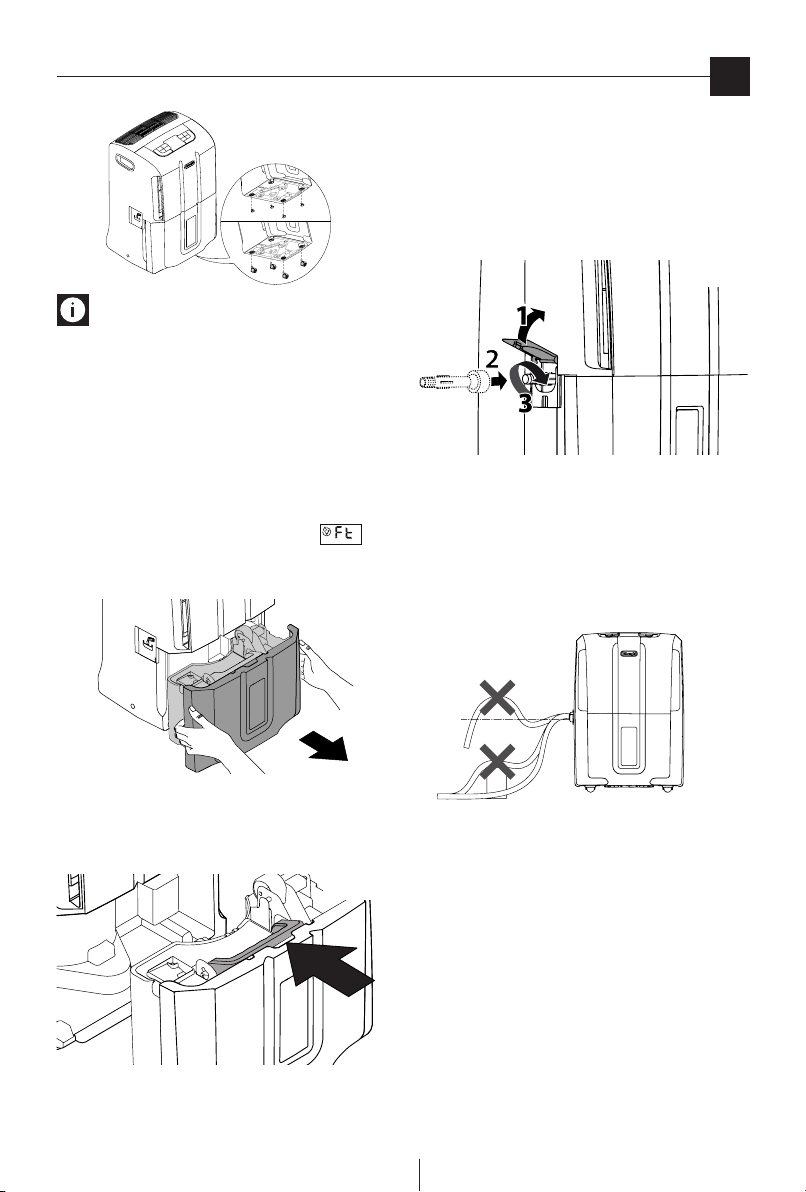
If you wish to apply the castors to the appliance, proceed as
follows:
1) Make sure the appliance is unplugged and the tank is
empty.
2) Remove the rubber caps from the base of the appliance
by pulling them out hard, using pliers if necessary (see
gure 1/a).
3) Applythecastorsbyinsertingtheirpinsintotheholes
(see gure 1/b).
13
en
Nota Bene: When carrying out these operations be
carefulnotoinclinetheappliancebymorethan45°;inany
case, once the castors have been assembled, wait at least one
hour before turning it on.
Draining the condensate water
The condensate can be drained in 2 ways:
a) Draining into the tank
The condensate can be drained directly into the tank.
With this draining system, when the tank is full, the applian-
ce stops and the screen displays the tank alarm .
When the tank is full, remove it as shown in g. 2 and empty
it into a sink or a bathtub.
When the operation is complete, put the tank back in correct-
lybeingcarefultopositionthehandleasshowingure3.
b) Continuous external draining
If you require the appliance to operate for a long period of
time without periodically emptying the tank we advise you
to set up continuous draining as follows:
• Open the door on the side of the appliance and screw
the nozzle onto the tting, as shown in gure 4.
• Insert a garden hose into the nozzle and lead the end of
thehosetoaoor-leveldrain.
Make sure the tank is inserted correctly.
• Makesurethehose isneverplaced ataheightabove
thelevelofthenozzle(g.5).Otherwisethewaterwill
continue to drain back into the tank.
Make sure there are no kinks in the hose.
Fig. 2
Use
a
b
Fig. 1
Fig.3
2
Fig. 4
Fig.5
NO
NO
YES
14
en
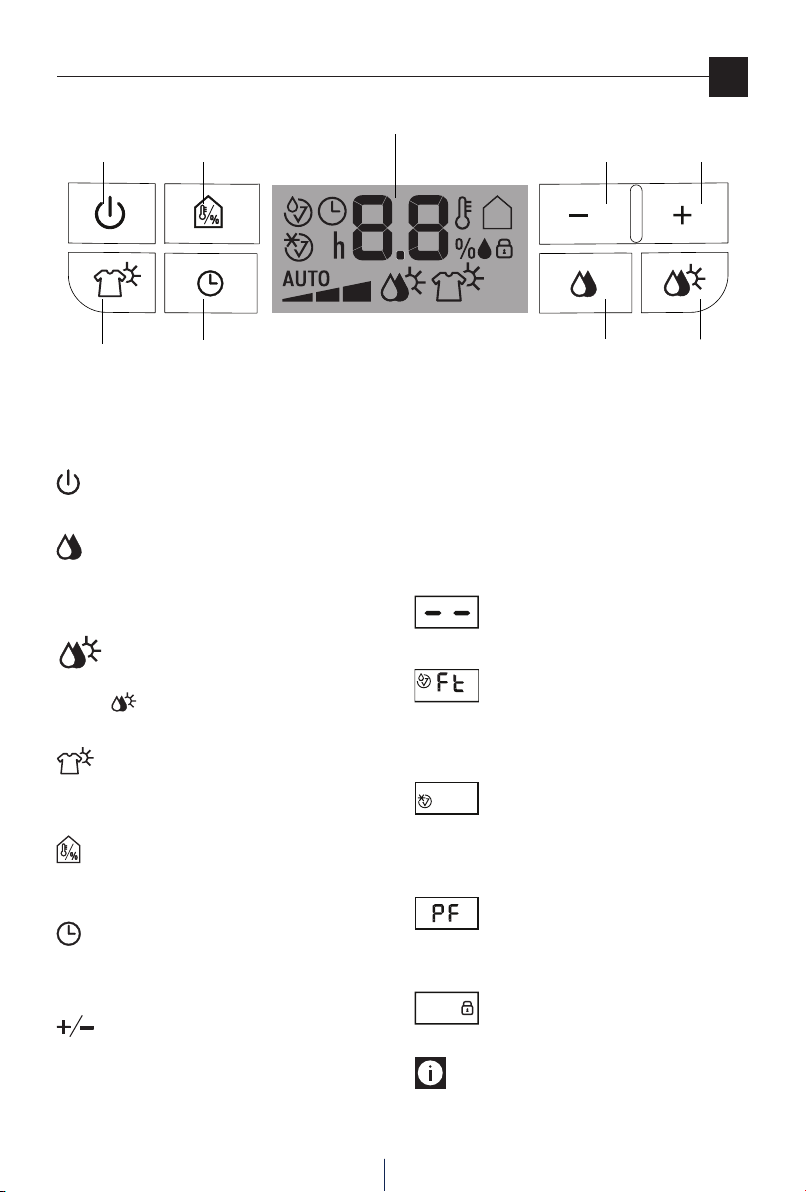
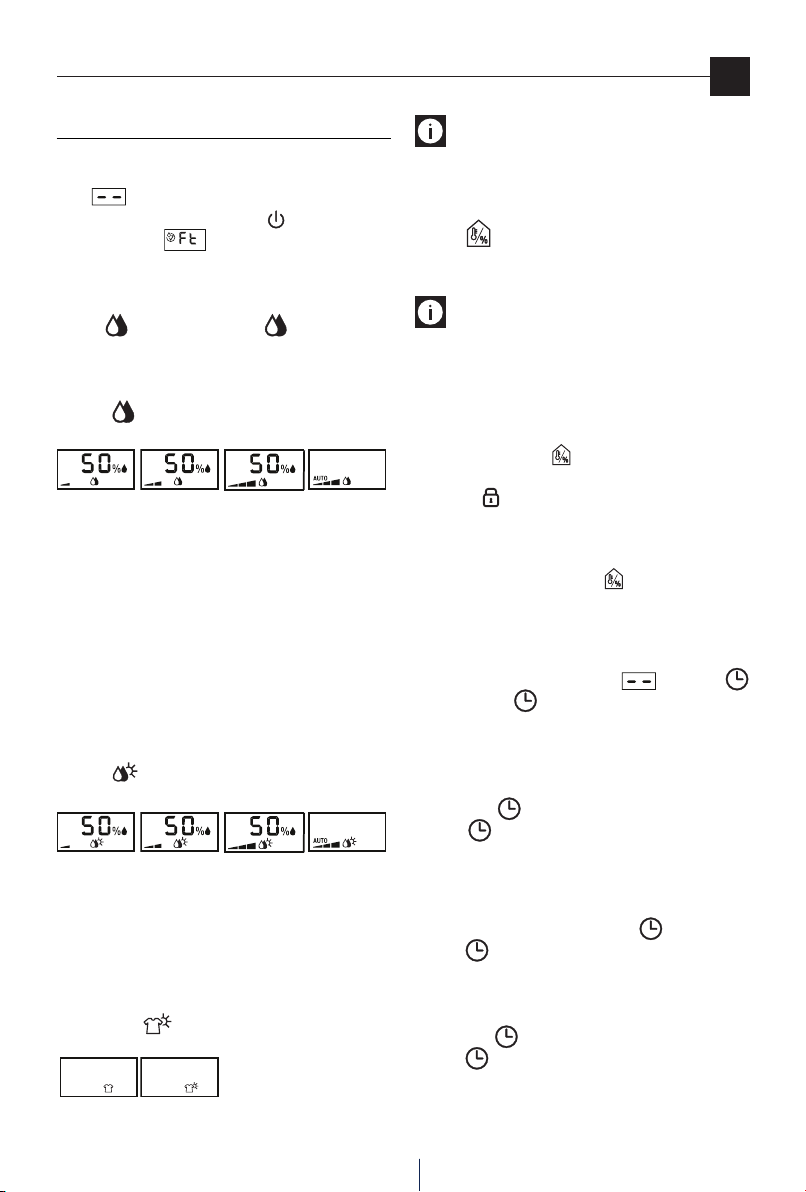
Control panel
ON/Stand-by
Button
Dehumidifying
Button
Timer Button
Decrease
Button
Display
Thermometer
/ Hygrometer
button
Increase
Button
Button descriptions
”ON/Stand-by” Button
This turns the appliance on / o.
Dehumidifying Button
This starts the dehumidifying mode. Press the button repe-
atedly to select the desired dehumidifying level (MIN/MED/
MAX/AUTO).
Dehumidifying Extra Power Button
This starts the dehumidifying Extra Power mode.
Press the button repeatedly to select the desired power
level (MIN/MED/MAX/AUTO).
Laundry / Laundry Extra Power Button
This starts the Laundry and Laundry Extra Power modes.
Press to select the mode you wish to use.
Hygrometer/Thermometer Button
This temporarily displays the temperature and the level of hu-
midity detected in the room where the appliance is installed.
Timer Button
This allows you to set the timer mode to delay when the ap-
pliance comes on or goes o.
Increase/Decrease Buttons
These allow you to set the percentage of humidity you wish
toachieveintheroom,byincreasingordecreasingitby5%
at a time. It is also possible to set the timer using these but-
tons.From0to10hthetimeisadjustedby30-minuteincre-
ments, and from 10 to 24 h the time is adjusted by 1-hour
increments.
Description of the Display
The meanings of the codes or symbols which may appear on
the display:
Stand-by
This indicates that the appliance is in Stand-by mode.
Tank Alarm
If this symbol appears it means that the tank is full, absent or
incorrectly positioned.
This alarm continues until the tank is correctly positioned.
Defrost alarm
At low temperatures, the appliance frequently carries out
defrost cycles.
During defrost this symbol will appear.
Sensor alarms
This indicates a possible malfunction of the sensors or that
the ambient humidity is too low to be detected.
Keyboard Lock
This symbol appears when the keyboard lock is enabled.
Nota Bene: with the aim of saving energy, after the
appliance has been in stand-by for a few minutes, the display
will go o.
Laundry/
Laundry Extra
Power Button
Dehumidifying
Extra Power
Button
15
en
Mode selection
MODE SELECTION
Plug the appliance into a mains socket.
The appliance will operate in the previously-set mode.
If the symbol appears on the display this means that
the appliance is in stand-by. Press the button to turn the
appliance on. If the symbol appears, it is necessary to
empty or position the tank correctly.
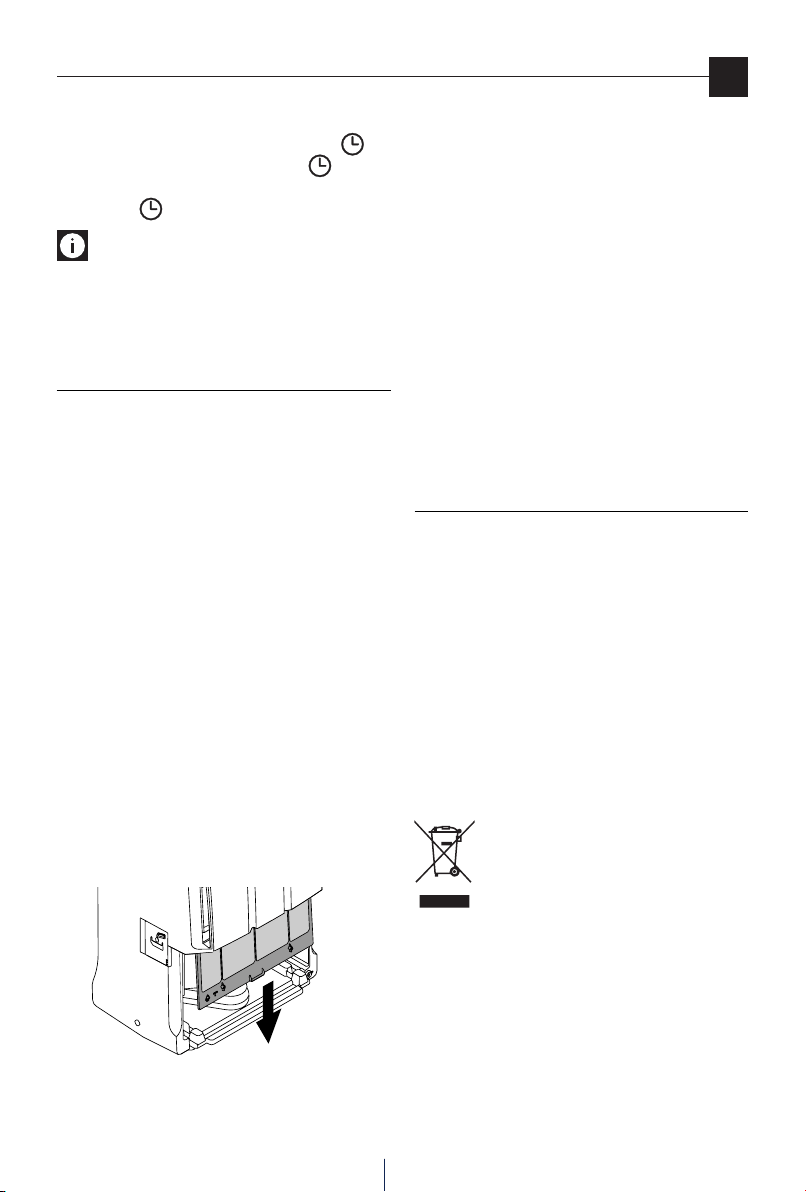
Dehumidifying Mode
Press the button. The display show and the previously-
set level of relative humidity. Press the + or - button to select
thedesiredlevelofhumidity(30%correspondstoadryenviron-
ment, 80% corresponds to a humid environment).
Press the button repeatedly to select the desired dehu-
midifying level (MIN/MED/MAX/AUTO).
MIN MED MAX AUTO
With the “AUTO” dehumidifying level the appliance independently
establishes the most suitable power and level of humidity, based
on the ambient conditions.
When the room has reached the set level of humidity, it will stop.
It will automatically begin dehumidifying as soon as the ambient
humidity exceeds the desired level.
Dehumidifying Extra Power Mode
This mode diers from the previous one as it switches on a
heating element that increases the dehumidifying capacity
of the appliance. In this mode the heating element can make
theroomtemperatureincreaseuptoamaximumof23°C.
Press the button repeatedly to select the desired dehu-
midifying Extra Power level (MIN/MED/MAX/AUTO).
MIN MED MAX AUTO
Laundry/Laundry Extra Power Mode
In Laundry mode the appliance operates at its maximum dehu-
midifying capacity only. The Laundry Extra Power mode adds
a heating element that further increases the dehumidifying
capacity of the appliance. In this case, the heating element
can make the room temperature increase up to a maximum of
28
°C
.
Press the button repeatedly to select Laundry or
Laundry Extra Power mode.
LAUNDRY LAUNDRY EXTRA POWER
Nota Bene:
In the extra power modes, upon rst start up
it is advisable to air out the room in order to eliminate the odour
that may be released by the appliance.
Hygrometer/Thermometer Function
Press the button. The screen temporarily displays: tem-
perature and level of humidity in the area surrounding the
appliance.
Nota Bene: the detected and displayed measurements
must be considered indicative.
Keyboard Lock Mode
This mode is used to lock the keyboard, with the aim of avoi-
ding unwanted tampering with the appliance. To enable or
disable this mode, with the appliance on (not in stand-by),
press and hold down the and -keysforatleast3seconds.
The appliance will emit an acoustic signal. When the mode is
enabled the symbol appears on the appliance.
Change temperature scale
Tochangethetemperaturescalefrom°Cto°Fandviceversa,
with the appliance on, press the button for at least 20
seconds. The appliance will emit an acoustic signal.
Timer Mode
How to programme delay ON
1)
With the appliance in stand-by , press the
button. The symbol will appear, together with the
number of hours of delay you wish the appliance to start
up.
2) With the + and - buttons set the number of hours requi-
red(0.5÷24h).
Press the
button to conrm.
The
symbol will stay on.
3) Whenthesettimehaspassed,theappliancewillstart
up.
How to programme delay OFF
1) While the appliance is on, press the
button.
The
symbol will appear, together with the number
of hours of delay you wish the appliance to switch o.
2) With the + and - buttons set the number of hours requi-
red(0.5÷24h).
Press the
button to conrm.
The
symbol will stay on.
3) Whenthesettimehaspassed,theappliancewillshut
down.
16
en
Changing or disabling the timer mode
If you wish to change the timer settings press the
key
once, and use the + and - buttons. Press the
button to
conrm. If you wish to disable the timer mode press the timer
key twice. The
symbol will switch o.
Nota Bene: at start up or when the power comes back
on, the appliance will start up in the last mode that was ena-
bled before the appliance was switched o.
In case of a power outage, any timer programming will be
deleted.
CLEANING AND MAINTENANCE
Always unplug the appliance from the power socket before
performing any cleaning or maintenance operations.
For safety reasons, never wash the dehumidier using a jet
of water.
Cleaning the cabinet
• Clean with a slightly damp cloth and dry with a dry
cloth.
• Donotusepetrol,alcoholorsolventstocleantheap-
pliance.
• Do not spray liquid insecticide or similar products as
they may deform the plastic.
Cleaning the air lter
If the lter is dirty, air circulation is compromised and conse-
quentiallytheeciencyofthedehumidierdecreases.
It is therefore good practice to clean the lter at regular in-
tervals. Frequency depends on the conditions and duration of
operation. If the appliance is used constantly or frequently it
is advisable to clean the lter once a week.
• Oncethetankhasbeentakenout,removethelterby
pulling it downwards (g. 6).
• Use a vacuum cleaner to remove dust accumulations
from the lter.
If the lter is very dirty, rinse it well with warm water.
Thetemperatureofthewatermustnotexceed40°C.
After washing the lter allow it to dry completely before
putting it back in place. The lter, in addition to trapping
dust particles, has an anti-bacterial action.
Furthermore, it considerably reduces other irritating
agents such as pollen and spores.
For long periods of downtime
• Afterunpluggingtheappliancefromthepowersocket,
empty the tank.
• Cleanthelterandputitbackin.
• Covertheappliancewithaplasticbagtoprotectitfrom
dust.
TECHNICAL SPECIFICATIONS
Power supply voltage See rating plate
Absorbed power “
Maximum absorbed power “
Maximum absorbed power in Extra Power “
Defrostdevice Yes
Hygrometer Yes
Fanspeed 3
Air lter Yes
Operating limits:
temperature 2°C-32°C
relativehumidity 30-90%
Disposing of the appliance
IncompliancewithEuropeandirective2002/96/
EC, the appliance must not be disposed of with
household waste, but taken to an authorised wa-
ste separation and recycling centre.
Fig. 6
Cleaning and maintenance /Features
17
en
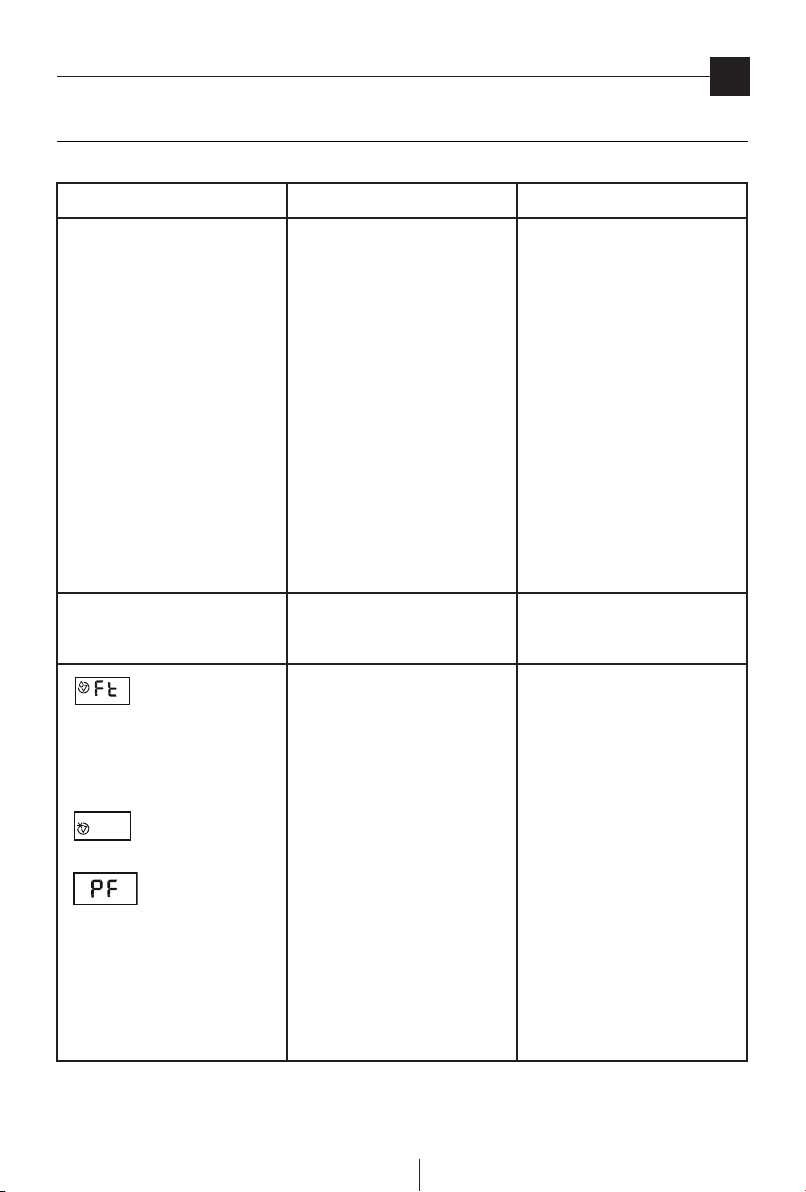
IF SOMETHING DOES NOT WORK
Check the following before calling the authorised Technical Service Centre operating in your area.
PROBLEMS CAUSES SOLUTION
The appliance is operating in dehumi-
difying mode but the humidity does
not decrease.
The lter is clogged.
Either the temperature or the humidi-
ty in the room is too low.
The room is too large for the dehu-
midifying power of the appliance, or
there are too many sources of humidi-
ty (boiling pots, etc.).
The set humidity value is too high.
Clean the lter.
In certain conditions it is normal for
the appliance not to dehumidify.
Check the operating limits of the
appliance in the “Technical Speci-
cations” chapter. In certain cases it is
advisable to heat the room you wish
to dehumidify. The Extra Power mode
included in this model makes it easier
to raise the temperature.
Decrease the set humidity value.
The appliance does not operate for ap-
proximately3minutesafterstartup.
The safety device has correctly made
the appliance trip.
Waitfor3minutestopass.
appears on the display
appears on the display
appears on the display
The tank is missing.
The tank is full.
The tank is positioned incorrectly.
The room temperature is very low.
One of the probes is faulty or the hu-
midity in the room is too low or too
high to be detected correctly.
Put the tank back in place.
Empty the tank.
Position the tank correctly.
Increase, if possible, the room tempe-
rature.
See if the appliance starts working
again when moved into another
room with a level of humidity within
the operating limits indicated in the
“Technical Specications” section.
If the problem persists, call the Service
Centre.
Troubleshooting