FILENA
BREVIL
A5 Inst
Model BK
Model BKC600XL Issue 2/07 Packaging Code: NA
Breville is a registered trademark of Breville Pty. Ltd.
Breville Customer Service Center
US Customers
✉
19400 S.Western Ave
Torrance
CA 90501-1119
☎
Service Center: 1 (866) BREVILLE
Email [email protected]
www.breville.com
Canada Customers
✉
Anglo Canadian
2555,Avenue Aviation
Pointe-Claire (Montréal) Québec
H9P 2Z2
☎
Service Center: 1 (866) BREVILLE
Fax (514) 683-5554
Email [email protected]
www.breville.com
© Copyright. Breville Pty. Ltd. 2007.
Keurig, Keurig Brewed, Brewing Excellence One Cup at a Time,
and K-Cups are trademarks or registered trademarks of Keurig, Incorporated.
Covered by U.S. Patents Numbers 7,165,488; D513572 and 5,840,189;
and other U.S. and foreign patents pending.
Due to continual improvements in design or otherwise, the product you purchase
may differ slightly from the one illustrated in this booklet.
BR9013 BKC600XL_IB_AMEND.qxp 11/10/07 21:43 Page a1
FILENAME: BKC600XL Book IB AMEND.qxp
BREVILLE > BR9013 > IW / GW /GC
A5 Instruction Booklet PMS 8403C and BLACK
ARTWORK SCALE 100%
PRINTED HERE AT 100%
Ver. 01
10.10.07
4:33PM
BLACK
PMS 8403C
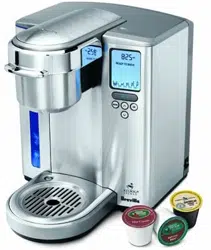
Gourmet Single
Cup Brewer
™
Model BKC600XL
ted.
urchase
BR9013 BKC600XL_IB_AMEND.qxp 11/10/07 21:43 Page 1
Co
on the
Contents
Page
Breville recommends safety first 4
Know your Breville Gourmet Single Cup Brewer™ 6
Operating your Breville Gourmet Single Cup Brewer™ 8
Installing the water filter 8
One-time priming process 9
Brewing a K-Cup
®10
Brewing with the My K-Cup
®
12
Stopping the brew process 15
Brewing hot water 15
Refilling the water tank 15
Purging the brewer 16
Menu and programming options 17
Setting the ‘CLOCK SET’ feature 17
Setting the ‘ON-OFF TIME’ feature 17
Setting the ‘AUTO OFF’ feature 19
Setting the ‘BREW TEMP’ feature 20
Setting the ‘BREW SIZE’ feature 20
Care and cleaning 22
Cleaning the brewer housing 22
Cleaning the K-Cup
®
holder 22
Cleaning the My K-Cup
®
22
Cleaning the water tank and lid 23
Cleaning the water filter 23
Descaling the brewer 23
Storage 24
Trouble shooting 25
One year limited warranty 27
French F1
2
Your Br
enginee
Enjoy y
of Keur
For mo
orderin
1-866-
BR9013 BKC600XL_IB_AMEND.qxp 11/10/07 21:43 Page 2
Congratulations
on the purchase of your new Breville Gourmet Single Cup Brewer™
ge
4
6
8
8
9
0
2
5
5
5
6
7
7
7
9
0
0
2
2
2
2
3
3
3
4
5
7
1
Your Brewer has been jointly designed and
engineered by Breville-Australia and Keurig-USA.
Enjoy your Breville Brewer with over 150 varieties
of Keurig K-Cups
®
from 13 gourmet partners.
For more information on K-Cups
®
or K-Cup
®
ordering, call Breville Customer Service on
1-866-BREVILLE or visit www.breville.com
BR9013 BKC600XL_IB_AMEND.qxp 11/10/07 21:43 Page 3
Breville recommends safety first
• This appliance is for household use only.
• Do not use this appliance for anything other than
its intended use. Do not use in moving vehicles or
boats. Do not use outdoors.
• To protect against fire, electrical shock and injury
to persons, do not immerse the appliance, cord or
plug in water or any other liquid.
• Do not leave the appliance unattended when in use.
• Close supervision is necessary when the appliance
is used by or near children.
• Always use the appliance on a dry, level surface.
• Do not place this appliance on or near a hot gas
or electric burner, or where it could touch a
heated oven.
• Do not touch hot surfaces. Use handles and knobs
where available.
• Do not let the cord hang over the edge of a table or
counter, touch hot surfaces or become knotted.
• The use of accessory attachments not
recommended by Breville may cause a risk of
injury to persons, fire or electric shock.
• Do not overfill the Water Tank.
• Always keep the Water Tank Lid on the Water Tank
unless you are refilling it.
• Use only water in this appliance. Do not put any
other liquids or foods in the Water Tank except as
instructed in Care and Cleaning (page 23).
• There are two sharp needles that puncture the
K-Cup
®
. One on the underside of the Brewing
Chamber Head, and the other in the base of the
K-Cup
®
Holder.To avoid risk of injury, do not
put your fingers in the Brewing Chamber or
K-Cup
®
Holder.
• There is extremely hot water in the K-Cup
®
Holder
during the brewing process.To avoid risk of injury,
do not raise the Safety Locking Arm or open the
Brewing Chamber during the brewing process.
• To turn off the appliance, press and release the
Power Switch on the lower back, right side of the
Brewer to the ‘OFF’ status and then remove the
plug from the wall outlet.
• Always switch the appliance to the ‘OFF’ status and
then remove the plug from the wall outlet when the
appliance is not being used and before cleaning.
Allow the appliance to cool before reassembling or
removing parts and before cleaning the appliance.
• Strictly follow the Care and Cleaning instructions
(page 22).
• This appliance is equipped with a power cord
having a grounding wire with a grounding plug.
The appliance must be grounded using a 3-hole
properly grounded outlet. In the event of an
electrical short circuit, grounding reduces the risk
of electrical shock.
• If the outlet is a standard 2-prong wall outlet, it
is your personal responsibility and obligation to
have it replaced with a properly grounded 3-prong
wall outlet.
4
SHOR
IMPORTANT SAFEGUARDS
We at Breville are very safety conscious.We design and manufacture consumer products with the safety of you,
our valued customer, foremost in mind.In addition we ask that you exercise a degree of care when using any
electrical appliance and adhere to the following precautions:
READ ALL INSTRUCTIONS AND SAVE THESE FOR
FUTURE REFERENCE
• Do not,
the third
use an a
• Consult
instructi
doubt ex
properly
• Regularl
actual a
if damag
malfunc
applianc
1-866-B
adjustm
• For any
Breville
Your Brevi
or property
children to
marked el
the applian
can be pu
grounding
BR9013 BKC600XL_IB_AMEND.qxp 11/10/07 21:43 Page 4
5
of the
not
or
p
®
Holder
of injury,
en the
cess.
se the
e of the
ve the
status and
when the
eaning.
mbling or
ppliance.
uctions
cord
plug.
3-hole
an
the risk
tlet, it
ion to
3-prong
SHORT CORD INSTRUCTIONS
ety of you,
ing any
• Do not, under any circumstances, cut or remove
the third (ground) prong from the power cord or
use an adapter.
• Consult a qualified electrician if the grounding
instructions are not completely understood, or if
doubt exists as to whether the appliance is
properly grounded.
• Regularly inspect the supply cord, plug and
actual appliance for any damage. Do not operate
if damaged in anyway or after the appliance
malfunctions. Immediately cease use of the
appliance and call Breville Customer Service at
1-866-BREVILLE for examination, repair or
adjustment.
• For any maintenance other than cleaning, call
Breville Customer Service at 1-866-BREVILLE.
Your Breville appliance comes with the unique
Assist™ Plug, conveniently designed with a finger
hole in the power plug for easy and safe removal
from the wall outlet. For safety reasons it is
recommended you plug your Breville appliance
directly into its own electrical outlet on a
dedicated circuit separate from other appliances.
If the electric circuit is overloaded with other
appliances, your Brewer may not function
properly. Use in conjunction with a power strip or
extension cord is not recommended.
Note
Your Breville appliance is fitted with a short power supply cord as a safety precaution to prevent personal injury
or property damage resulting from pulling, tripping or becoming entangled with a longer cord.Do not allow
children to use or be near this appliance without close adult supervision. If an extension cord is used, (1) the
marked electrical rating of the cord set or extension cord should be at least as great as the electrical rating of
the appliance, (2) the cord should be arranged so that it will not drape over the countertop or tabletop where it
can be pulled on by children or tripped over unintentionally and (3) the extension cord must include a 3-prong
grounding plug.
SAVE THESE INSTRUCTIONS.
FOR HOUSEHOLD USE ONLY.
TO REDUCE THE RISK OF FIRE OR ELECTRICAL SHOCK, DO NOT REMOVE THE BASE PANEL.
NO USER SERVICEABLE PARTS ARE INSIDE. REPAIR SHOULD BE DONE ONLY BY
AUTHORIZED PERSONNEL ONLY.
BR9013 BKC600XL_IB_AMEND.qxp 11/10/07 21:43 Page 5
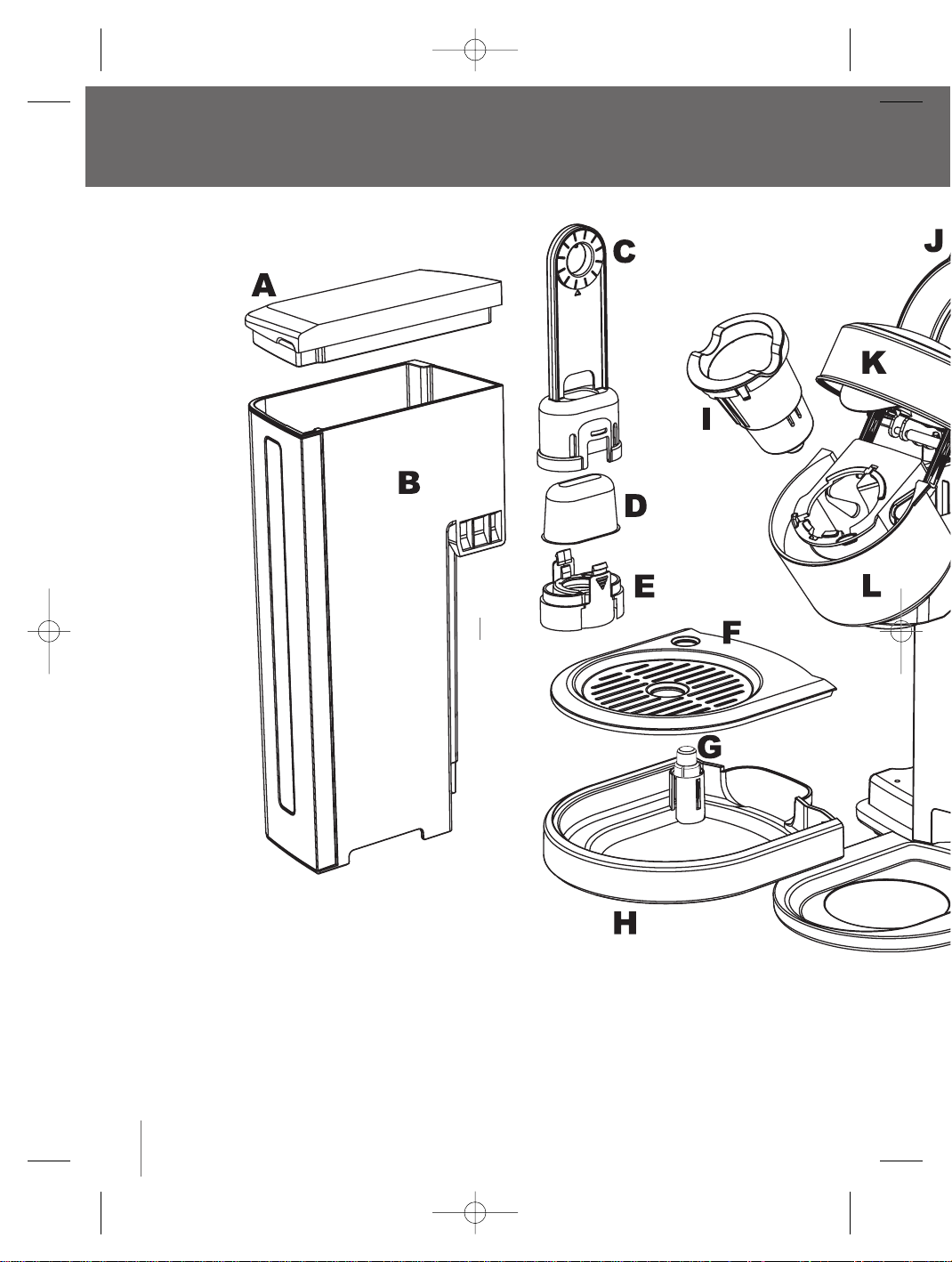
Know your Breville Gourmet Single Cup Brewer
™
6
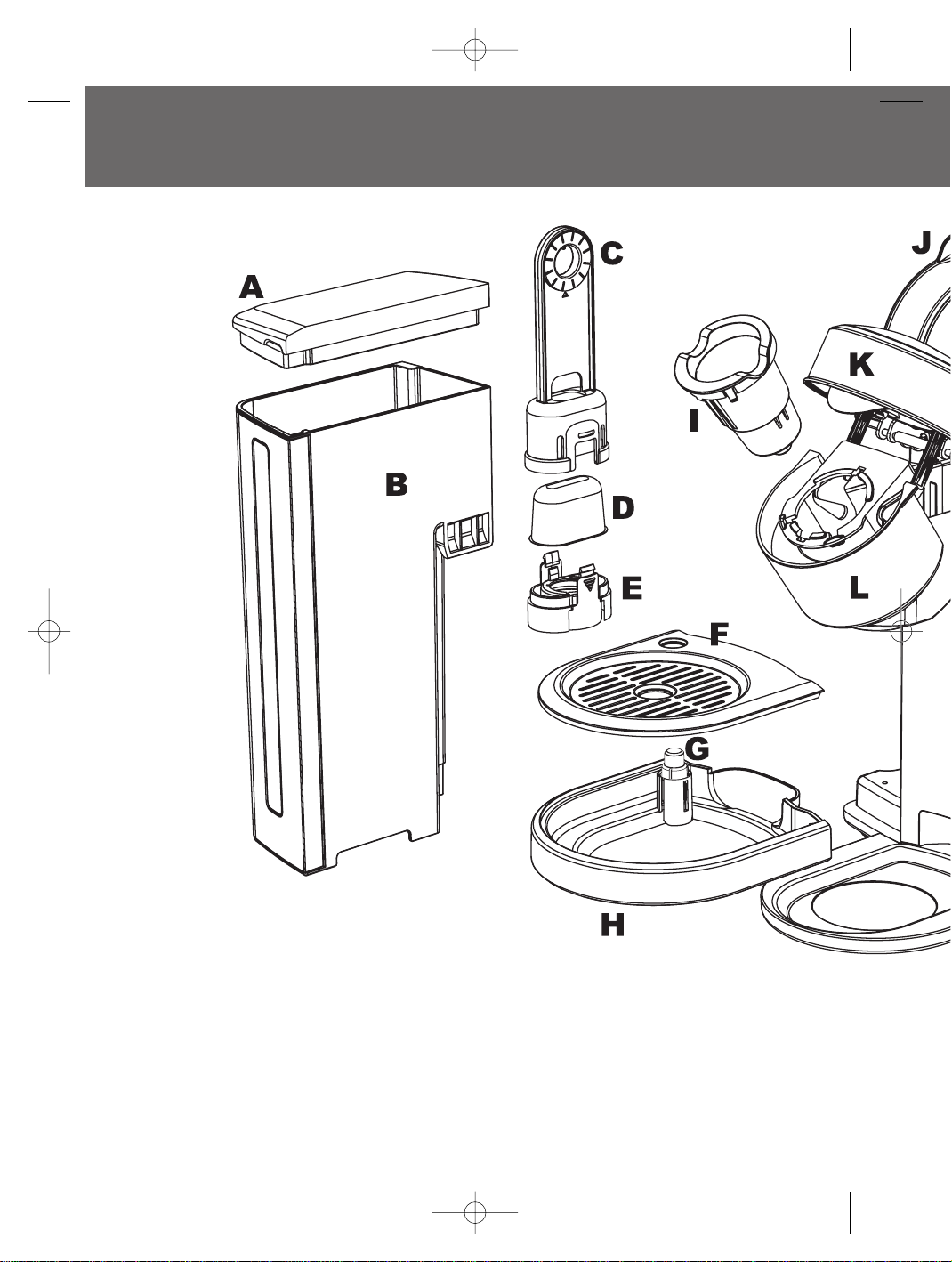
A Water tank lid
B Water tank
C Upper filter holder
D Replaceable charcoal filter
E Lower filter holder
F Drip tray plate
G Drip tray level indicator
H Drip tray
I K-Cup
®
holder
J Safety locking arm
K Brewing chamber head
L Brewing chamber
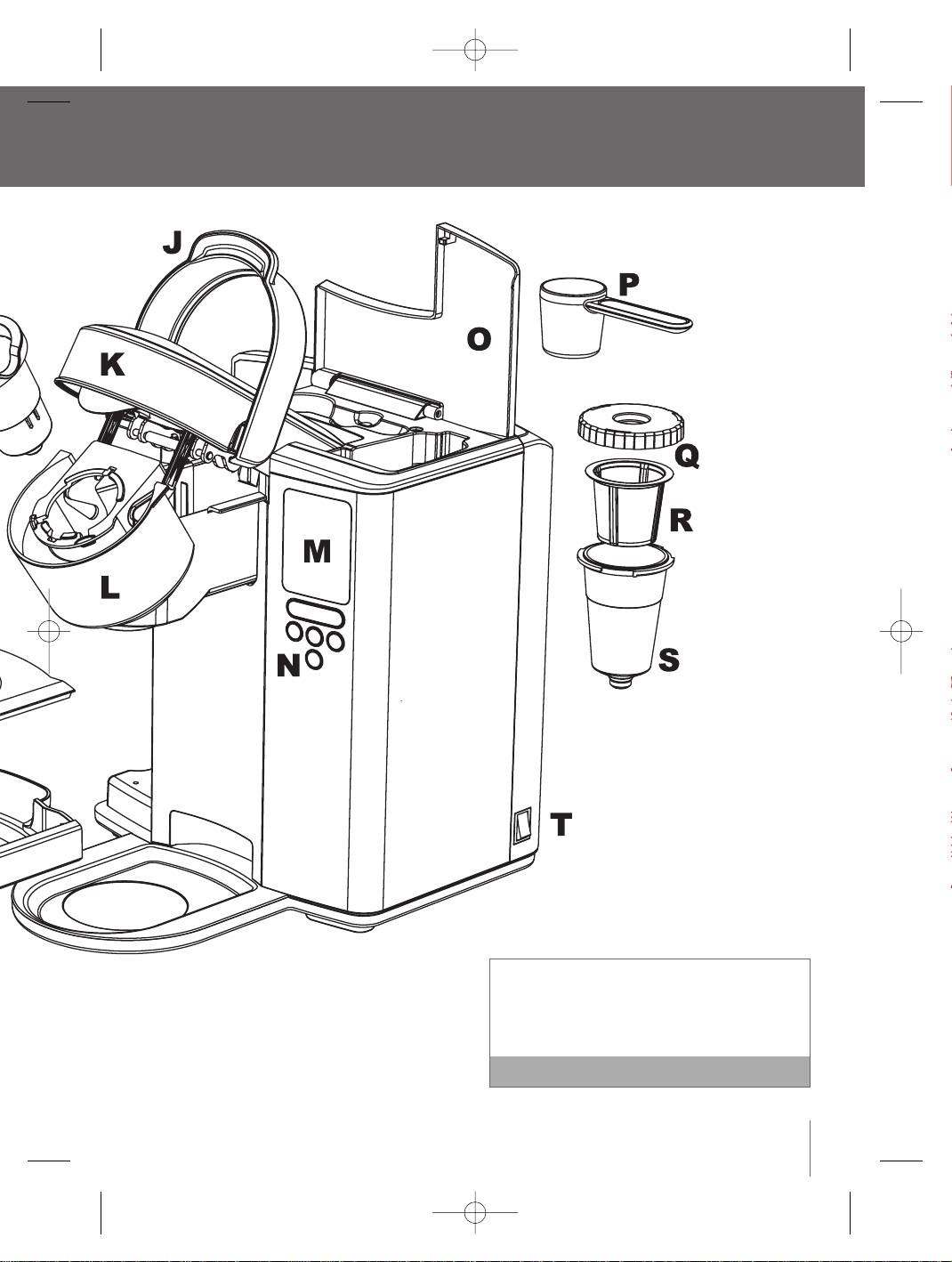
M LCD screen
N Control panel
O My K-Cup
®
/K-Cup
®
holder storage
P My K-C
Q My K-C
R My K-C
S My K-C
T Power S
BR9013 BKC600XL_IB_AMEND.qxp 11/10/07 21:43 Page 6

7
™
To order replacement Charcoal Filters, call
Breville Customer Service on 1-866-BREVILLE or
visit www.breville.com
Note
der storage
P My K-Cup
®
measuring scoop
Q My K-Cup
®
lid
R My K-Cup
®
filter basket
S My K-Cup
®
holder
T Power Switch
BR9013 BKC600XL_IB_AMEND.qxp 11/10/07 21:43 Page 7
Replace
60 tank
To order
Breville
visit ww
We reco
choose n
2 month
smell an
One-tim
Priming fil
the brewin
it has been
If the Br
below fr
hours to
A frozen
properly
1. Unwra
into a
2. Place
drip tr
accom
3. Fill the
approx
The W
a)
b)
Operating your Breville Gourmet Single Cup Brewer
™
Installing the water filter
For the best tasting gourmet coffee,tea or hot cocoa,
Breville recommends using bottled or filtered water.
The Water Filter provided with the Brewer can
significantly reduce substances that affect the smell
and taste of water such as free chlorine, certain
pesticides and organic impurities as well as traces of
heavy metals.
The Water Filter can be removed from the Brewer.
If you choose to install the Water Filter, it is
recommended to replace the Charcoal Filter
every 2 months or 60 tank refills, more often if
you have hard water.
We recommend removing the Water Filter if using
filtered water, or if you choose not to replace the
Charcoal Filter every 2 months, as the filter may
clog and affect the smell and taste of the water.
If you choose not to install the Water Filter, you
are ready to start the One-time Priming Process
(page 9).
Note
Follow these steps each time you install a new
Charcoal Filter to ensure it filters optimally.
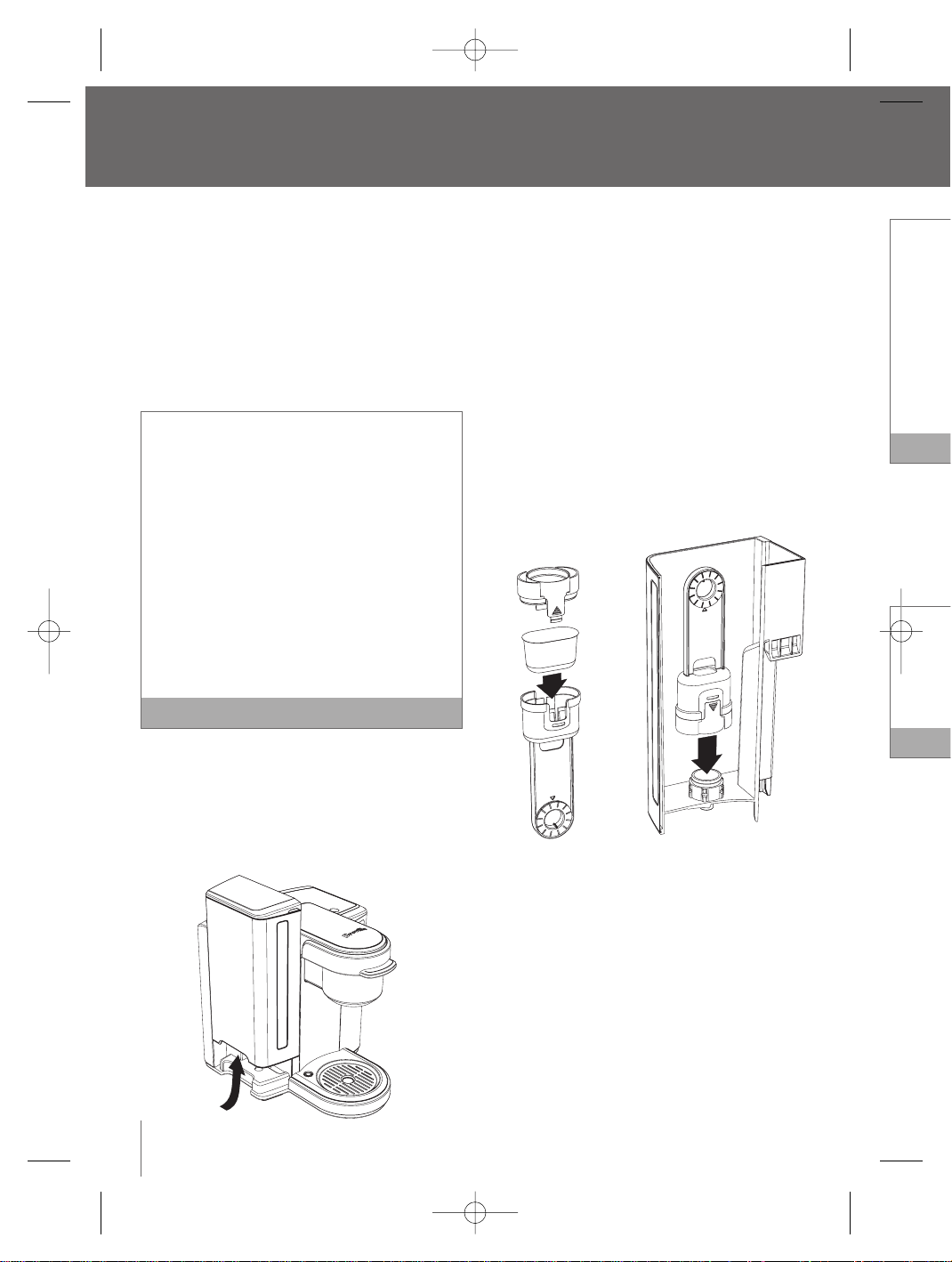
1. Remove the Water Tank from the Brewer by
gripping the handle located on the left side of the
Water Tank, then lift upwards.
2. Remove the Water Tank Lid.
3. Rinse the Water Tank with fresh water and
replace back onto the Brewer.
4. Remove the Upper and Lower Filter Holder and
Charcoal Filter from the polybag. Unwrap the
Charcoal Filter from its protective plastic.
5. Soak the Charcoal Filter for 5 minutes then rinse
for 30 seconds. It is normal to see a grey residue
after soaking the filter.
6. Wash the Lower Filter Holder, ensuring the
stainless steel mesh is free of residue.
7. Insert the Charcoal Filter into the Upper Filter
Holder, then attach the Lower Filter Holder so it
locks into place.
8. Set the date dial on the Upper Filter Holder
2 months ahead.This will remind you when the
Charcoal Filter will need to be replaced.
9. Place the assembled Filter Holder into the Water
Tank, aligning so the date dial is visible from
outside the Tank. Push down hard on the
assembled Filter Holder until it snaps into place.
10. Your Brewer is ready for the one-time
priming process.
8
BR9013 BKC600XL_IB_AMEND.qxp 11/10/07 21:43 Page 8
9
Replace the Charcoal Filter every 2 months, or
60 tank refills, more if you have hard water.
To order replacement Charcoal Filters, call
Breville Customer Service on 1-866-BREVILLE or
visit www.breville.com.
We recommend removing the Water Filter if you
choose not to replace the Charcoal Filter every
2 months, as the filter may clog and affect the
smell and taste of the water.
Note
One-time priming process
Priming fills the internal tank with water and cleanses
the brewing system.You cannot use your Brewer until
it has been primed for its first use.
If the Brewer has been exposed to temperatures
below freezing, allow the Brewer at least two
hours to reach room temperature before priming.
A frozen or extremely cold Brewer will not prime
properly and can cause damage.
Note
1. Unwrap the power cord and plug the Brewer
into a grounded outlet.
2. Place a 12 oz. mug on the Drip Tray Plate.The
drip tray plate and drip tray can be removed to
accomodate taller mugs and travel mugs.
3. Fill the Water Tank with water until it is
approximately 1 inch below the top edge.
The Water Tank can be filled in two ways:
a) Remove the Water Tank Lid and pour
water directly into the Water Tank while it
is still attached to the Brewer, then replace
the Lid.
b) Remove the Water Tank Lid, then gripping
the handle located on the left side of the
Water Tank, lift upwards. Fill with water.
Place the Water Tank back onto the Brewer
and replace the Lid.
4. Press and release the Power Switch located on
the lower back, right side of the Brewer.The
Power Switch is spring loaded and will return to
its original position.
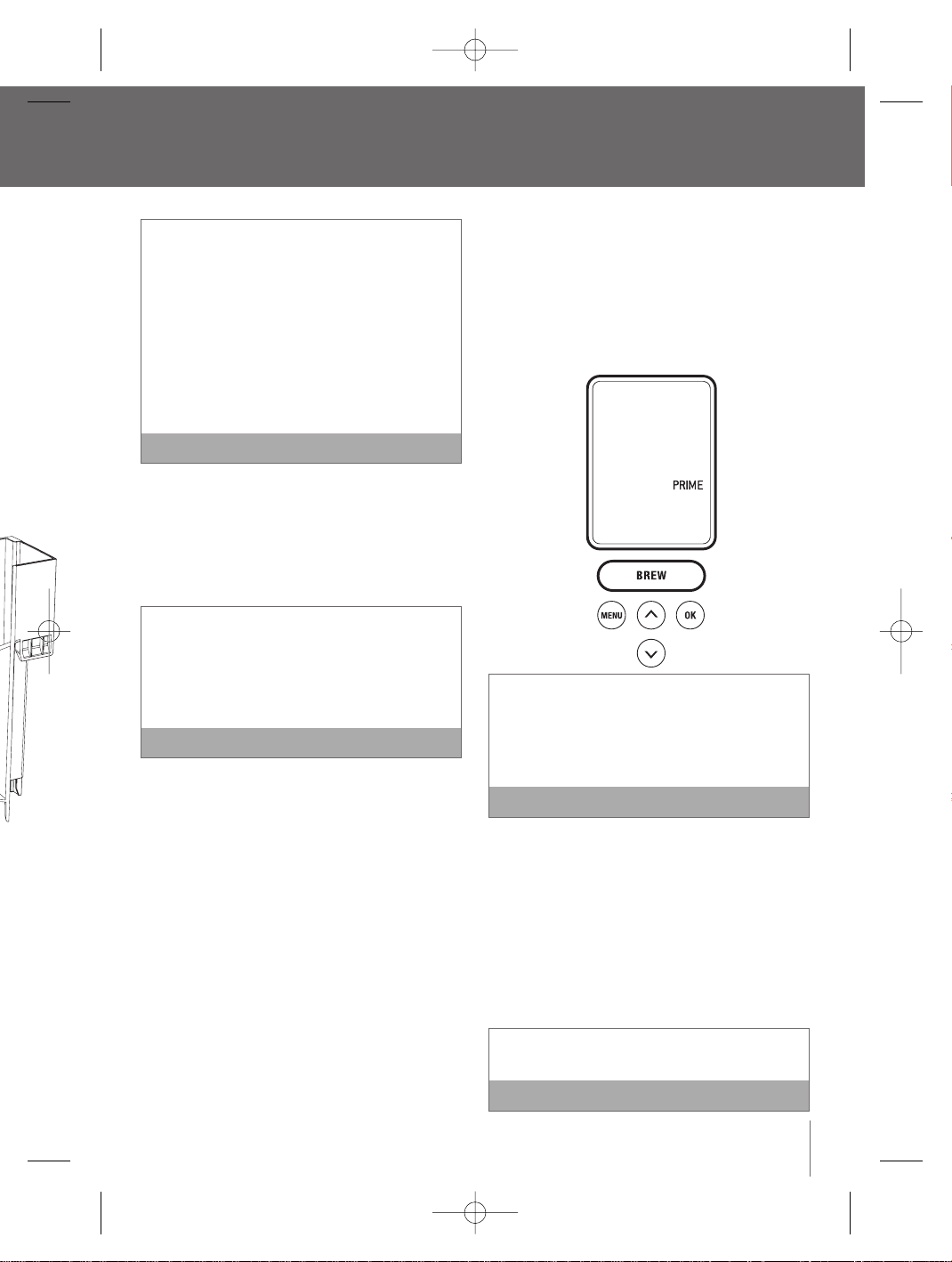
5. The Water Tank LED will illuminate.The LCD
screen will illuminate and indicate ‘PRIME’.The
‘BREW’ button will illuminate and flash.
If the Water Tank is empty or not in place on the
Brewer, the Water Tank LED’s will flash and the
LCD screen will indicate ‘REFILL TANK’. None of
the control panel buttons will be active until
water is added to the Water Tank.
Note
6. A K-Cup
®
should not be used for the one-time
priming process.
7. Press the ‘BREW’ button.
8. The Brewer will automatically fill with water and
make a vibrating sound.This is normal.The
Brewer will then cease to vibrate and begin
heating the water. This entire process will take
approximately 4 minutes. The LCD screen will
indicate 'HEATING' during this period.
The Brewer will take about 4 minutes to heat up
during the priming process.
Note
wer
™
and
der and
ap the
c.
hen rinse
ey residue
the
Filter
der so it
der
when the
he Water
from
e
to place.
BR9013 BKC600XL_IB_AMEND.qxp 11/10/07 21:43 Page 9
Operating your Breville Gourmet Single Cup Brewer
™
continued
9. Once the water is heated, the LCD screen will no
longer indicate ‘HEATING’.The ‘BREW’ button will
illuminate and flash for up to 60 seconds.
10. Press the 'BREW' button. This will start a
cleansing brew which will complete the priming
sequence. The LCD screen will no longer
indicate 'PRIMING'. Hot water will flow into your
mug.When the flow stops, discard the hot water.
11. The LCD screen will indicate ‘HEATING’ as the
Brewer heats the water for the next brew cycle.
Once the water is heated, the LCD screen may
indicate ‘REFILL TANK’.
12. Fill the Water Tank with water until it is
approximately 1 inch below the top edge.
13. The LCD screen will indicate ‘OPEN HEAD’.Open
the Brewing Chamber Head by raising and
lowering the Safety Locking Arm completely.The
LCD screen will indicate ‘READY TO BREW’.
14. The one-time priming process is now complete
and you are ready for your first K-Cup
®
brew
(page 10) or My K-Cup
®
brew (page 12).
Brewing a K-Cup
®
1. Follow the instructions, Installing the Water Filter
(page 8) and the One-time Priming Process (page
9).The Brewer should be turned on and the
Water Tank should be filled and illuminated.
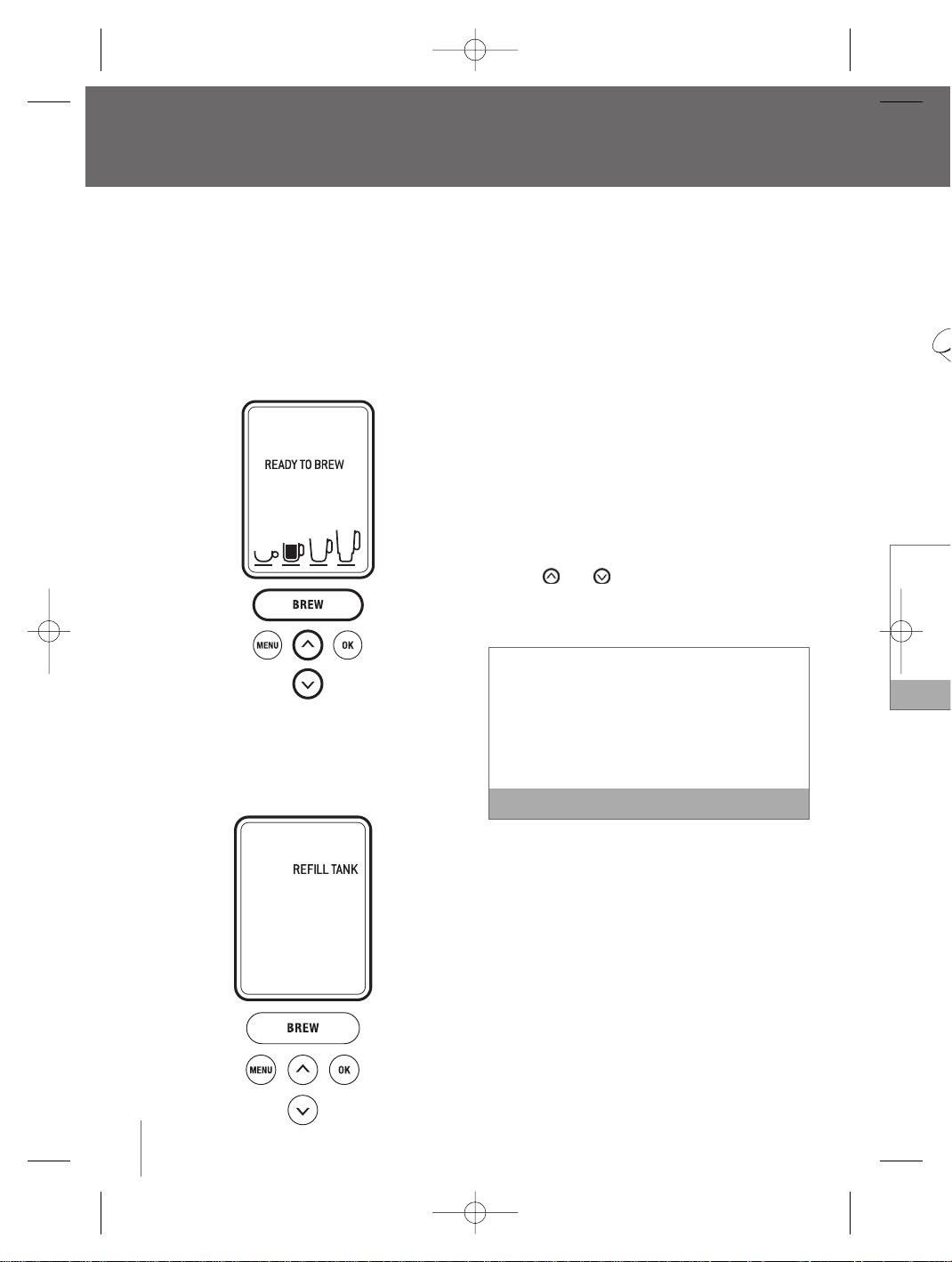
2. The LCD screen will indicate ‘READY TO BREW’.
The and buttons will illuminate and the
‘BREW’ button will illuminate and flash for up to
60 seconds.
If the ‘BREW’ button is not pressed in 60 seconds,
the LCD screen will indicate ‘OPEN HEAD’ and the
‘BREW’ button will be disabled to prevent accidental
activation.To re-activate the brew sequence, open
the Brewing Chamber Head by raising and lowering
the Safety Locking Arm completely.
Note
3. Place a cup or mug on the Drip Tray Plate.The
drip tray plate and drip tray can be removed to
accomodate taller mugs and travel mugs.
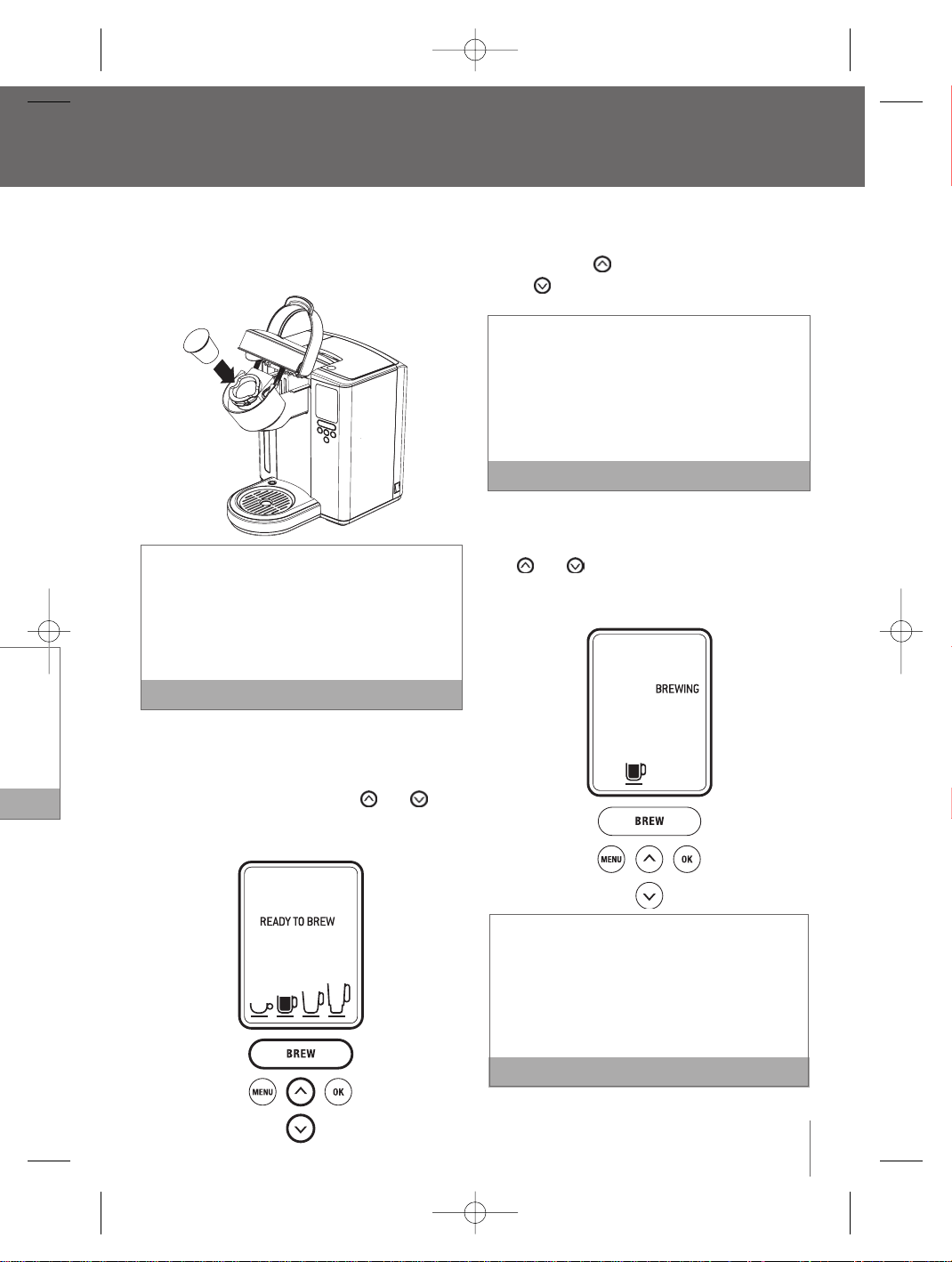
4. Raise the Safety Locking Arm.The Brewing
Chamber will open toward you.
5. Select a K-Cup
®
.
10
6. Place
in the
lid or
There ar
K-Cup
®
Chambe
K-Cup
®
put your
K-Cup
®
7. Lower
Brewin
When
indica
button
illumin
BR9013 BKC600XL_IB_AMEND.qxp 11/10/07 21:43 Page 10
11
™
continued
e.
AD’. Open
and
etely.The
EW’.
omplete
®
brew
2).
ater Filter
cess (page
the
ated.
O BREW’.
and the
for up to
conds,
nd the
ccidental
e, open
owering
Note
ate.The
oved to
gs.
wing
6. Place the K-Cup
®
in the K-Cup
®
Holder (located
in the Brewing Chamber). Do not remove the foil
lid or puncture the K-Cup
®
.
There are two sharp needles that puncture the
K-Cup
®
. One on the underside of the Brewing
Chamber Head and the other in the base of the
K-Cup
®
Holder.To avoid risk of injury, do not
put your fingers in the Brewing Chamber or
K-Cup
®
Holder.
Note
7. Lower the Safety Locking Arm to close the
Brewing Chamber Head over the K-Cup
®
Holder.
When closed completely, the LCD screen will
indicate ‘READY TO BREW’. The and
buttons will illuminate and the ‘BREW’ button will
illuminate and flash for up to 60 seconds
a) The LCD screen will indicate the default brew
size (7.25 oz.).To choose a different size,
press the button to go up in size or the
button to go down in size.
Select from a stronger small cup (5.25 oz. serving),
a small mug (7.25 oz. serving), a large mug (9.25
oz. serving) or a travel mug (11.25 oz. serving).
The small mug (7.25 oz. serving) is the default
brew size.To program your favorite brew size, refer
to Setting the ‘BREW SIZE’ feature (page 20).
Note
b) Once the brew size is selected,press the ‘BREW’
Button.The ‘BREW’ button will stop flashing, the
and buttons will no longer be lit.The
LCD screen will indicate ‘BREWING’ and the
selected brew size.
If the ‘BREW’ button is not pressed in 60 seconds,
the LCD screen will indicate ‘OPEN HEAD’ and the
‘BREW’ button will be disabled to prevent accidental
activation.To re-activate the brew sequence, open
the Brewing Chamber Head by raising and lowering
the Safety Locking Arm completely.
Note
BR9013 BKC600XL_IB_AMEND.qxp 11/10/07 21:43 Page 11

8. Use th
Filter B
coffee
tables
on the
tables
the am
prefer
more
the gr
there a
upper
to sea
1 level s
We reco
serving.
Or, if you
cup 5.25
If you gr
1. Start
Press
2. Expe
brew
3. Avoid
could
poor
9. Raise
chamb
10. Place
Brewin
a. Rem
Cha
the
on
b. Ins
the
the
the
Operating your Breville Gourmet Single Cup Brewer
™
continued
12
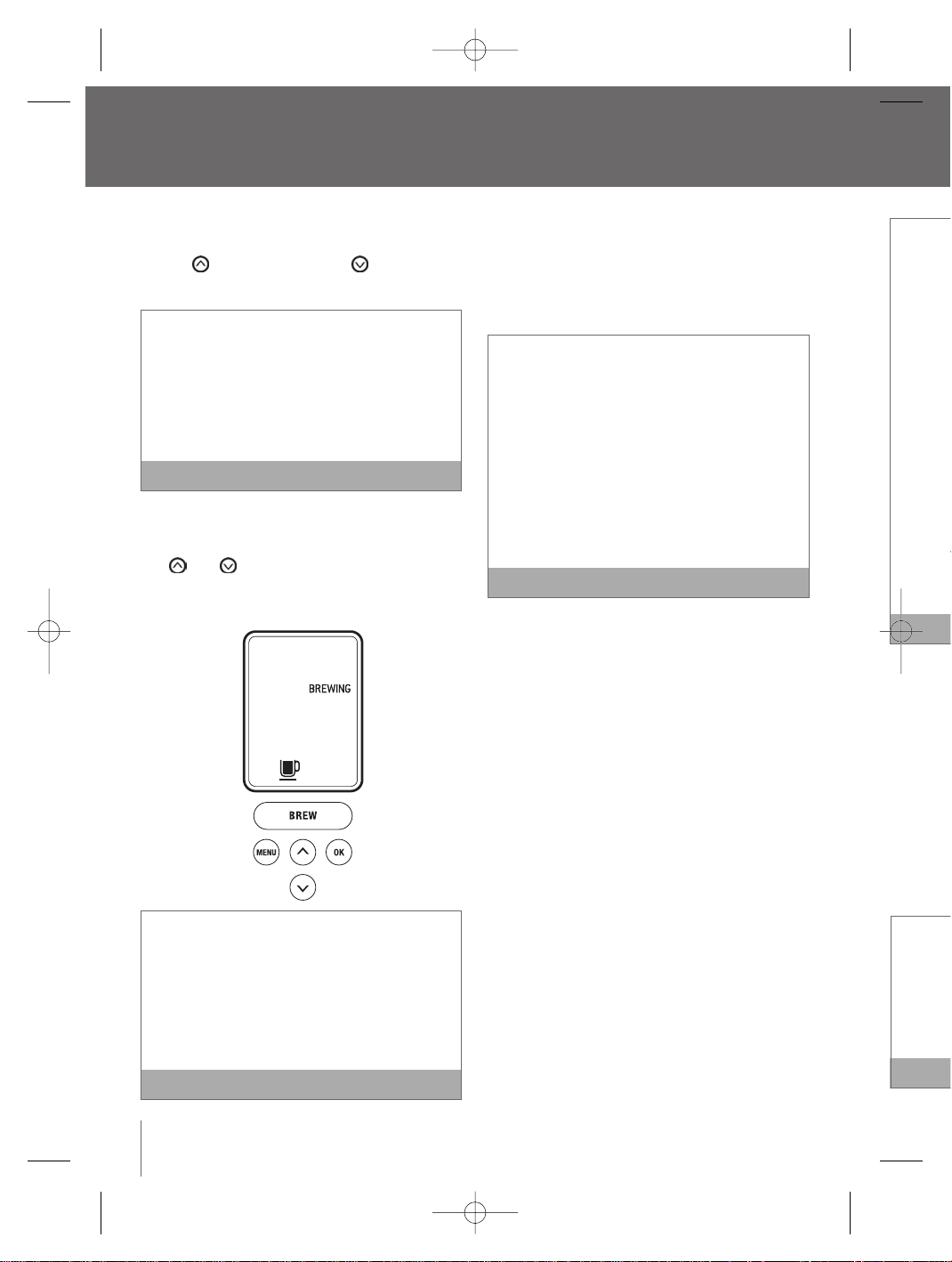
8. The LCD screen will indicate ‘BREWING’, however
there may be a short pause before the brewing
process begins.The process lasts about 60
seconds and ends with a burst of air to remove
all liquid from the K-Cup
®
.
There is extremely hot water in the K-Cup
®
Holder during the brewing process.To avoid risk of
injury, do not raise the Safety Locking Arm or open
the Brewing Chamber during the brewing process.
Following the brew, the LCD screen will indicate
‘HEATING’ as the Brewer heats the water for the
next brew cycle.This process lasts about 15
seconds.The pump will make a vibrating sound.
This is normal.
Note
9. Raise the Safety Locking Arm, remove and
dispose of the used K-Cup
®
. Use caution as the
K-Cup
®
will be hot.
10. Enjoy your first cup of gourmet coffee, tea or
hot cocoa!
11. The LCD screen will indicate ‘READY TO BREW’,
indicating that the next K-Cup
®
can be inserted
for the next brew cycle.
Brewing with the My K-Cup
®
Accessory
The Breville Gourmet Single Cup Brewer™ comes
with a My K-Cup
®
accessory. The dishwasher safe,
reusable My K-Cup
®
allows you to use your own
grind of coffee so you can adjust the amount and
type of coffee to suit your tastes.Along with the
included measuring scoop,this accessory
conveniently stores in the easy open compartment on
top of the brewer.
1. Follow the instructions, Installing the Water Filter
(page 8) and the One-time Priming Process (page
9).The Brewer should be turned on and the
Water Tank should be filled and illuminated.
2. The LCD screen will indicate ‘READY TO BREW’.
If the ‘BREW’ button is not pressed in 60
seconds, the LCD screen will indicate ‘OPEN
HEAD’ and the ‘BREW’ button will be disabled
to prevent accidental activation.To re-activate
the brew sequence, open the Brewing Chamber
Head by raising and lowering the Safety Locking
Arm completely.
Note
3. Place a cup or mug on the Drip Tray Plate.The
drip tray plate and drip tray can be removed to
accomodate taller mugs and travel mugs.
4. Open the storage compartment located on top of
the Brewer by pressing the finger indent on the
right side. Remove the My K-Cup
®
accessory.
5. Disassemble the My K-Cup
®
accessory by
removing the Lid from the Holder in a counter-
clockwise direction.Remove the Filter Basket
from the Holder.
6. Wash the My K-Cup
®
Lid, Filter Basket and
Holder in warm soapy water prior to first use.
Rinse and dry thoroughly.
7. Insert the Filter Basket into the Holder.
BR9013 BKC600XL_IB_AMEND.qxp 11/10/07 21:43 Page 12
13
8. Use the My K-Cup
®
Measuring Scoop to fill the
Filter Basket with 1 level scoop maximum of
coffee. 1 level scoop is equivalent to 2
tablespoons.Alternatively, there are line markings
on the inside of the Filter Basket that indicate 1
tablespoon and 2 tablespoons so you can adjust
the amount of coffee to your personal
preference. Do not fill the Filter Basket with
more than one level scoop of coffee or tamp
the grinds. Ensure the coffee remains loose and
there are no coffee grinds remaining on the
upper rim of the Filter Basket.Screw on the Lid
to seal.
1 level scoop = 2 tablespoons
We recommended this for the small mug 7.25 oz.
serving.
Or, if you like a stronger brew, select the small
cup 5.25 oz. serving.
If you grind your own beans:
1. Start with a coarser grind similar to a French
Press grind.
2. Experiment with grinds similar to drip
brewing grinds.
3. Avoid a fine espresso grind setting that
could clog the Filter Basket or result in
poor extraction.
Note
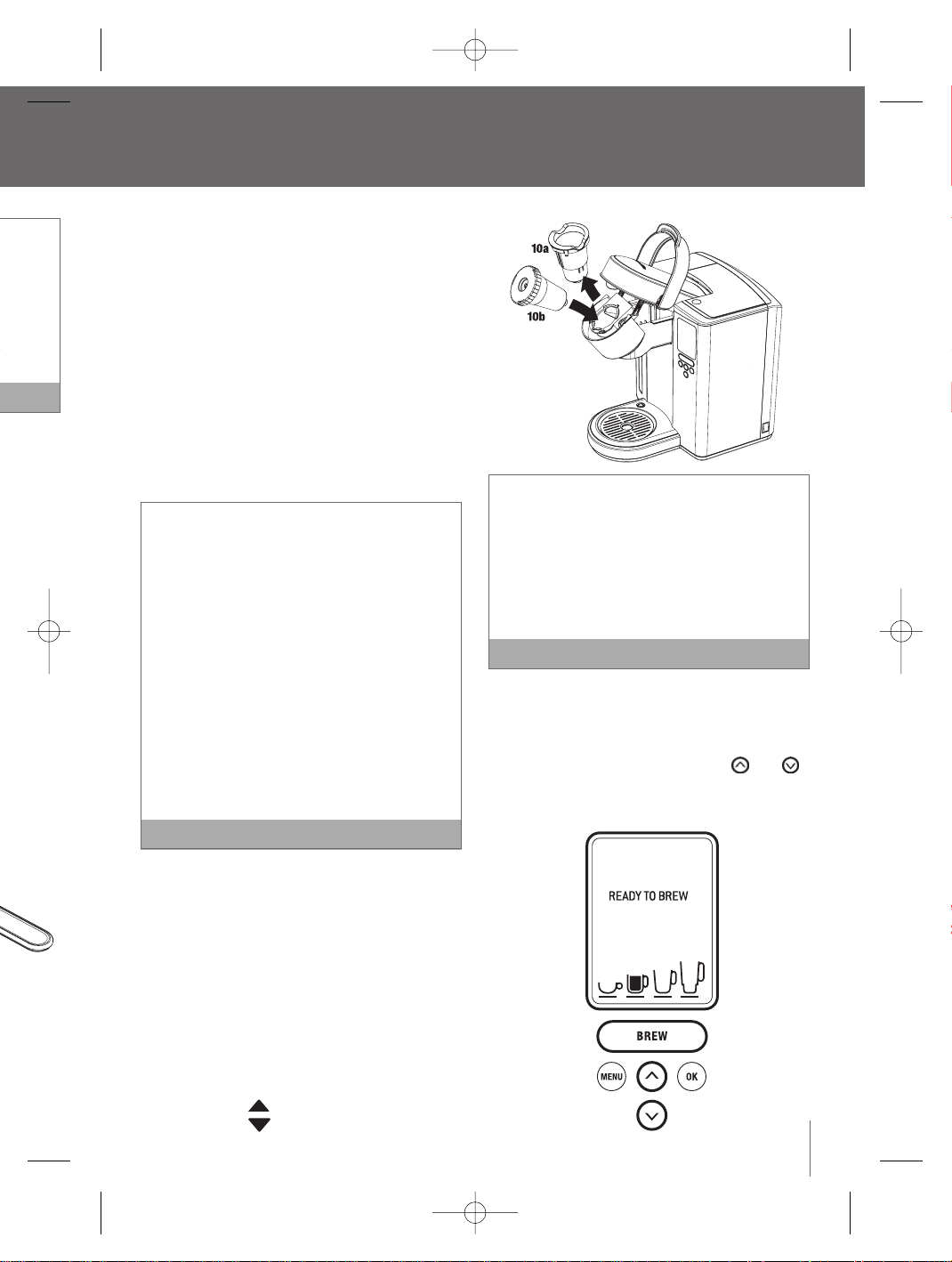
9. Raise the Safety Locking Arm.The Brewing
chamber will open toward you.
10. Place the assembled My K-Cup
®
Holder into the
Brewing Chamber.To do this:
a. Remove the K-Cup
®
Holder from the Brewing
Chamber (10a). Store the K-Cup
®
Holder in
the My K-Cup
®
Storage compartment located
on top of the Brewer.
b. Insert the assembled My K-Cup
®
Holder into
the Brewing Chamber (10b), ensuring to align
the arrow on the My K-Cup
®
Lid with
the arrow in the Brewing Chamber.
There are two sharp needles used to puncture
the K-Cup
®
and My K-Cup
®
Holder. One in
the base of the K-Cup
®
Holder, the other on the
underside of the Brewing Chamber Head.
To avoid risk of injury, use caution when inserting
or removing the K-Cup
®
, K-Cup
®
Holder, or My
K-Cup
®
Holder.
Note
11. Lower the Safety Locking Arm to close the
Brewing Chamber Head over the My K-Cup
®
Holder.When closed completely, the LCD screen
will indicate ‘READY TO BREW’.The and
buttons will illuminate and the ‘BREW’ button will
illuminate and flash for up to 60 seconds.
continued
EN
bled
vate
amber
Locking
Note
ate.The
oved to
gs.
on top of
t on the
essory.
y by
ounter-
Basket
and
st use.
BR9013 BKC600XL_IB_AMEND.qxp 11/10/07 21:43 Page 13
The My
ground
a) Use a
K-Cu
b) Use t
K-Cu
After bre
the K-Cu
Brewing
To replac
Locking
Insert K-
aligning
with the
Use caut
needle o
Head tha
Stopping
To stop bre
and releas
Brewer to
hot cocoa
and the LE
longer be
‘ON-OFF T
panel butto
back on.
You may
your nex
recomm
Brewing
then dis
the brew
Operating your Breville Gourmet Single Cup Brewer
™
continued
a. The LCD screen will indicate the default brew
size (7.25 oz.).To choose a different size, press
the to go up in size or the button to go
down in size.
Select from a stronger small cup (5.25 oz. serving),
a small mug (7.25 oz. serving), a large mug (9.25
oz. serving) or a travel mug (11.25 oz. serving).
The small mug (7.25 oz. serving) is the default
brew size.To program your favorite brew size,
refer to Setting the ‘BREW SIZE’ feature (page 20).
Note
b. Once the brew size is selected,press the ‘BREW’
Button.The ‘BREW’ button will stop flashing, the
and buttons will no longer be lit.The
LCD screen will indicate ‘BREWING’ and the
selected brew size.
If the ‘BREW’ button is not pressed in 60
seconds, the LCD screen will indicate ‘OPEN
HEAD’ and the ‘BREW’ button will be disabled to
prevent accidental activation.To re-activate the
brew sequence, open the Brewing Chamber
Head by raising and lowering the Safety Locking
Arm completely.
Note
12. The LCD screen will indicate ‘BREWING’,however
there may be a short pause before the brewing
process begins.The process lasts about 60
seconds and ends with a burst of air to remove
all liquid from the My K-Cup
®
Holder.
There is extremely hot water in the My K-Cup
®
Holder during the brewing process.To avoid risk
of injury, do not raise the Safety Locking Arm or
open the Brewing Chamber during the brewing
process.
Following the brew, the LCD screen will indicate
‘HEATING’ as the Brewer heats the water for the
next brew cycle.This process lasts about 15
seconds.The pump will make a vibrating sound.
This is normal.
Note
13. Raise the Safety Locking Arm, remove the
assembled My K-Cup
®
Holder. Use caution as
the My K-Cup
®
Holder will be hot.
14. Disassemble the My K-Cup
®
Holder by removing
the Lid from the Holder in a counter-clockwise
direction. Remove the Filter Basket from the
Holder, discard the grounds and rinse out the
Filter Basket and Holder.
15. Enjoy your first cup of gourmet coffee, tea or
hot cocoa!
14
BR9013 BKC600XL_IB_AMEND.qxp 11/10/07 21:43 Page 14

15
The My K-Cup
®
accessory is designed for
ground coffee only. Do not:
a) Use a K-Cup
®
or coffee pod in the My
K-Cup™ Filter Basket.
b) Use the My K-Cup
®
Filter Basket with the
K-Cup® Holder
After brewing with the My K-Cup
®
accessory,
the K-Cup
®
Holder must be inserted into the
Brewing Chamber in order to brew a K-Cup
®
.
To replace the K-Cup
®
Holder, raise the Safety
Locking Arm, and remove the My K-Cup
®
Holder.
Insert K-Cup
®
Holder into the Brewing Chamber,
aligning the arrow on the K-Cup
®
Holder
with the arrow in the Brewing Chamber.
Use caution when doing this as there is a sharp
needle on the underside of the Brewing Chamber
Head that punctures the K-Cup
®
.
Note
Stopping the brew process
To stop brewing after the process has started, press
and release the Power Switch on the right side of the
Brewer to the
‘
OFF’ status.The flow of coffee, tea or
hot cocoa will stop, the heating element will shut off
and the LED’s illuminating the Water Tank will no
longer be lit.The LCD screen will indicate the time,
‘ON-OFF TIME’ and ‘AUTO OFF’. None of the control
panel buttons will be active until the Brewer is turned
back on.
You may get less coffee, tea or hot cocoa during
your next brew. After a terminated brew, we
recommend that you follow the instructions for
Brewing hot water (page 15).Your next brew will
then dispense the correct volume according to
the brew size you have selected.
Note
Brewing hot water
The Brewer is able to dispense a cup of hot water
for making hot chocolate in a packet, for use in
cooking, for making soups, etc. Follow the
instructions Brewing a K-Cup
®
(page 10), without
inserting a K-Cup
®
.
After brewing a hot cocoa K-Cup
®
, or stopping
the brew process mid-cycle, we recommend
running a hot water brew cycle.
Note
Refilling the water tank
The LCD screen will indicate ‘REFILL TANK’ when the
water level in the Water Tank is low or if the Water
Tank has been removed.
1. Fill the Water Tank with water until it is
approximately 1 inch below the top edge.
The Water Tank can be filled in two ways:
a) Remove the Water Tank Lid and pour water
directly into the Water Tank while it is still
attached to the Brewer, then replace the Lid.
b) Remove the Water Tank Lid, then gripping the
handle located on the left side of the Water
Tank, lift upwards.Fill with water. Place the
Water Tank back onto the Brewer and replace
the Lid.
2. The LCD screen will indicate either:
a) ‘OPEN HEAD’. Raise and lower the Safety
Locking Arm completely.
b) ‘HEATING’ as the Brewer heats the water for
the next brew cycle.This process lasts about
15 seconds.The pump will make a vibrating
sound.This is normal.
3. Once the Safety Locking Arm is opened and
lowered, or the water is heated, the LCD screen
will indicate ‘READY TO BREW’,indicating the
brew cycle can begin.The and buttons
will illuminate and the ‘BREW’ button will
illuminate and flash for up to 60 seconds.
continued
’, however
brewing
t 60
remove
Cup
®
oid risk
Arm or
ewing
ndicate
for the
15
sound.
Note
he
tion as
removing
ckwise
m the
ut the
tea or
BR9013 BKC600XL_IB_AMEND.qxp 11/10/07 21:43 Page 15
Setting t
Setting the
the time w
You mus
TIME’ fe
1. Press
option
blinkin
2. Press
indica
3. Press
approp
indica
4. Once t
‘OK’ b
that th
5. Press
approp
6. Once t
the ‘O
menu
Operating your Breville Gourmet Single Cup Brewer
™
continued
Menu
If the ‘BREW’ button is not pressed in 60
seconds, the LCD screen will indicate ‘OPEN
HEAD’ and the ‘BREW’ button will be disabled to
prevent accidental activation.To re-activate the
brew sequence, open the Brewing Chamber Head
by raising and lowering the Safety Locking Arm
completely.
Do not remove the Water Tank during the
brewing process.
Note
Purging the brewer
If the Brewer has not been used for more than one
week, you should renew the water from the inner
tank by purging the brewer.
1. If there is water in the Water Tank, remove the
Water Tank Lid, then gripping the handle located
on the left side of the Water Tank, lift upwards.
Discard the water, rinse and refill with bottled or
filtered water. Place the Water Tank back onto the
Brewer and replace the Lid.
2. If there is no water in the Water Tank, refill with
water. Place the Water Tank back onto the
Brewer and replace the Lid.
3. Ensure the Brewer is turned on. Raise and lower
the Safety Locking Arm on the Brewer without
inserting a K-Cup
®
.
4. The LCD screen will indicate ‘READY TO BREW’
and the ‘BREW’ button will illuminate and flash.
5. The LCD screen will indicate the default brew
size (7.25 oz. serving unless programmed
otherwise). Select the largest brew size
(11.25 oz. serving) by pressing the button
on the control panel.
6. Place a 12 oz. mug on the Drip Tray Plate.The
drip tray plate and drip tray can be removed to
accomodate taller mugs and travel mugs.
7. Press the ‘BREW’ button. Hot water will flow
into your mug.When the flow stops, discard the
hot water.
8. Repeat this process 2 more times to completely
renew the water from inner tank.
16
BR9013 BKC600XL_IB_AMEND.qxp 11/10/07 21:43 Page 16
17
Setting the ‘CLOCK SET’ feature
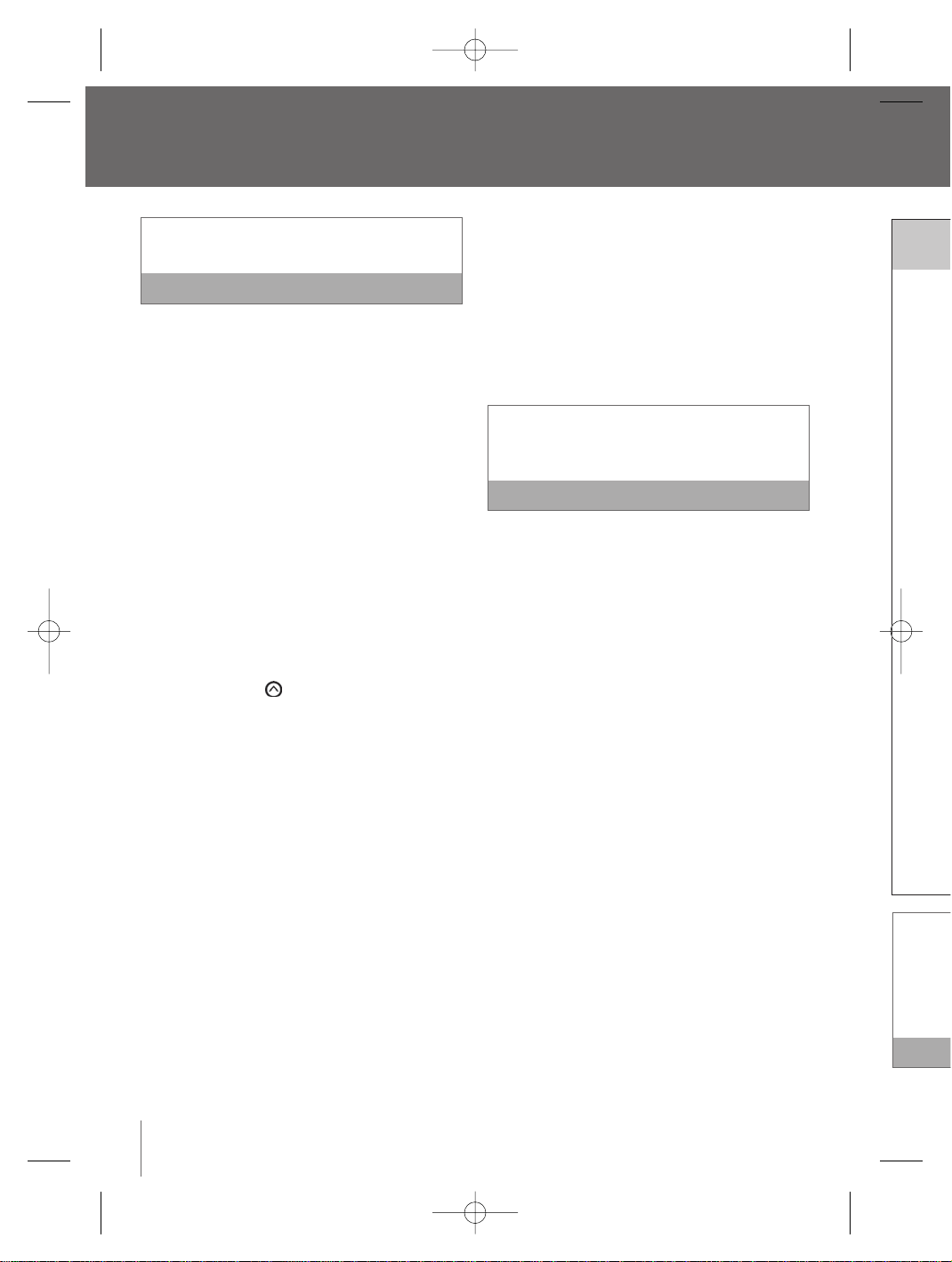
Setting the clock is optional.When the clock is set,
the time will appear on the LCD screen.
You must set the clock if using the ‘ON-OFF
TIME’ feature.
Note
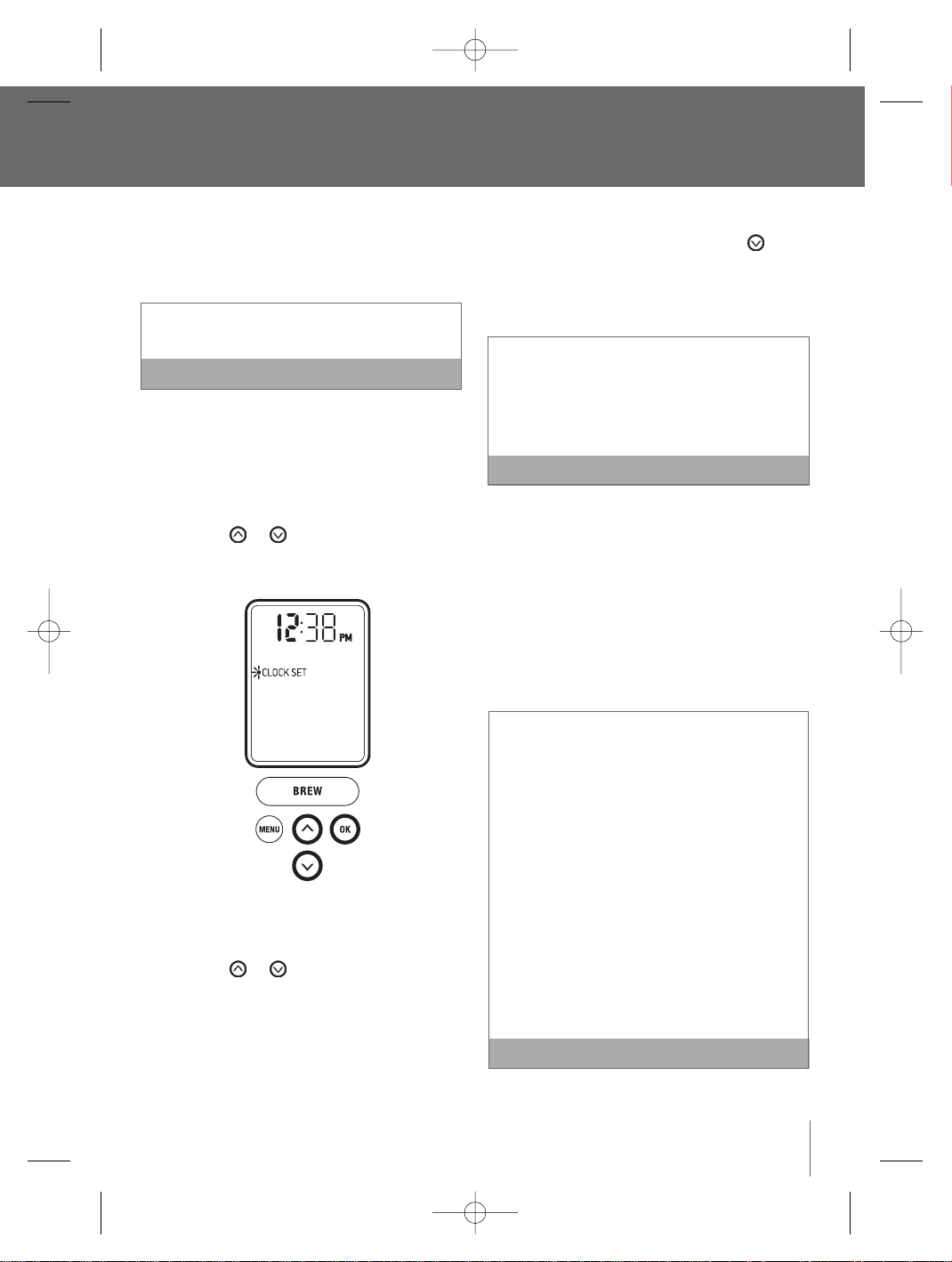
1. Press the ‘MENU’ button.The menu programming
options will appear on the LCD screen with a
blinking indicator on ‘CLOCK SET’.
2. Press the ‘OK’ button.The hour will blink,
indicating the hour is ready to be set.
3. Press the or button to reach the
appropriate hour. If the hour has passed 12, the
indicator switches from AM to PM.
4. Once the appropriate hour is reached, press the
‘OK’ button.The minutes will blink, indicating
that the minutes are ready to be set.
5. Press the or button to reach the
appropriate minute.
6. Once the appropriate minute is reached, press
the ‘OK’ button. The LCD screen will return to the
menu programming options.
7. To exit the menu programming options, press the
‘
MENU’ button.Alternatively, press the button
to reach ‘EXIT MENU’ and press the ‘OK’ button.
The LCD screen will return to the main screen
and indicate the time selected.
If power is interrupted to the Brewer, the clock
will need to be reset. Programmed brew size and
brew temperature settings are remembered and
restored automatically.All other settings will be
restored automatically after the clock is reset.
Note
Setting the ‘ON-OFF TIME’ feature
This feature allows you to program the specific time
when the Brewer will automatically turn on and/or
off. By programming your Brewer to automatically
turn on, you will not have to wait for the Brewer to
heat the water in the Water Tank. It will take the
Brewer approximately 3
1
/
2
minutes to heat the water
from room temperate.
You must set the clock if using the ‘ON-OFF TIME’
feature.
An alternative to setting the ‘ON-OFF TIME’ feature is
to leave the Brewer on all the time.We recommend
this so your Brewer is always ready to brew a fresh
cup of gourmet coffee,tea or hot cocoa.
To turn the Brewer off at any time, press and
release the Power Switch on the lower back,
right side of the Brewer.The clock will remain on
if set, however you can not activate the brew
cycle. Press and release the Power Switch again
to restore power to the Brewer.You will have to
wait for the water to heat up before the Brewer
is ready to brew.
Note
continued
Menu and programming options
t brew
ed
button
te.The
oved to
gs.
flow
card the
mpletely
BR9013 BKC600XL_IB_AMEND.qxp 11/10/07 21:43 Page 17
If you wa
‘OFF TIM
Switch o
Brewer t
the wate
to brew.
Setting t
This featur
2 hours fro
1. Press
option
blinkin
2. Press
3. Press
4. Press
two op
a) ‘AU
scr
Bre
the
scr
opt
Menu and programming options
continued
Setting the ‘ON-OFF TIME’ feature continued
1. Press the ‘MENU’ button.The menu programming
options will appear on the LCD screen with a
blinking indicator on ‘CLOCK SET’.
2. Press the button to reach
‘
ON-OFF TIME’.
3. Press the ‘OK’ button.
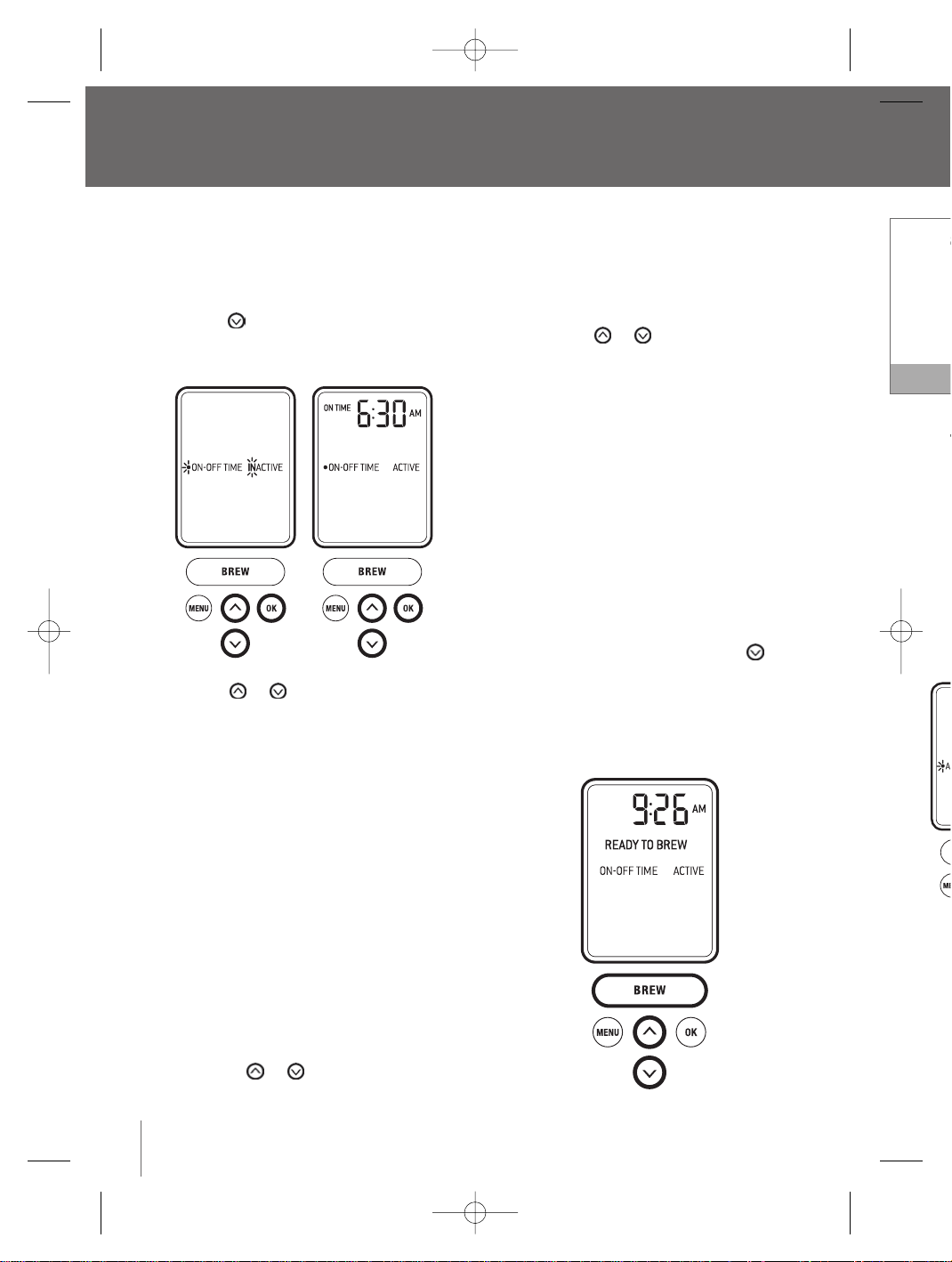
4. Press the or button to see the two
options:
a. ‘ON-OFF TIME’ will be ‘INACTIVE’, indicating that
the Brewer will not turn on or off automatically.
Press the ‘OK’ button to select this option.
The LCD screen will return to the menu
programming options.
b. ‘ON-OFF TIME’ will be ‘ACTIVE’, indicating the
Brewer will automatically turn on and/or off
according to the specific times you set.
Press the ‘OK’ button to select this option.
Setting the ‘ON TIME’
i. The LCD screen will display ‘ON TIME’,
indicating that the time you wish the Brewer
to automatically turn on is ready to be set.
The hour will blink, indicting the hour is ready
to be set.
ii. Press the or button to reach the
appropriate hour. If the hour has passed 12,
the indicator switches from AM to PM.
iii. Once the appropriate hour is reached, press
the ‘OK’ button. The minutes will blink,
indicating that the minutes are ready to
be set.
iv. Press the or button to reach the
appropriate minute.
v. Once the appropriate minute is reached, press
the ‘OK’ button.The LCD screen will display
‘OFF TIME’, indicating that the time you wish
the Brewer to automatically turn off is ready to
be set.
Setting the ‘OFF TIME’
i. Follow the instructions (ii to iv) for Setting the
‘ON TIME’.
ii. Once the appropriate time is reached, press
the ‘OK’ button. The LCD screen will return to
the menu programming options
5. To exit the menu programming options, press the
‘MENU’ button.Alternatively, press the button
to reach ‘EXIT MENU’ and press the ‘OK’ button.
The LCD screen will return to the main screen
and indicate whether you have activated the
‘ON-OFF TIME’ feature.
18
BR9013 BKC600XL_IB_AMEND.qxp 11/10/07 21:43 Page 18
19
If you want to brew outside the ‘ON TIME’ and
‘OFF TIME’ selected, press and release the Power
Switch on the lower back, right side of the
Brewer to restore power.You will have to wait for
the water to heat up before the Brewer is ready
to brew.
Note
Setting the ‘AUTO OFF’ Feature
This feature automatically turns the Brewer off after
2 hours from the last brew.
1. Press the ‘MENU’ button.The programming
options will appear on the LCD screen with a
blinking indicator on ‘CLOCK SET’.
2. Press the button to reach ‘AUTO OFF’.
3. Press the ‘OK’ button.
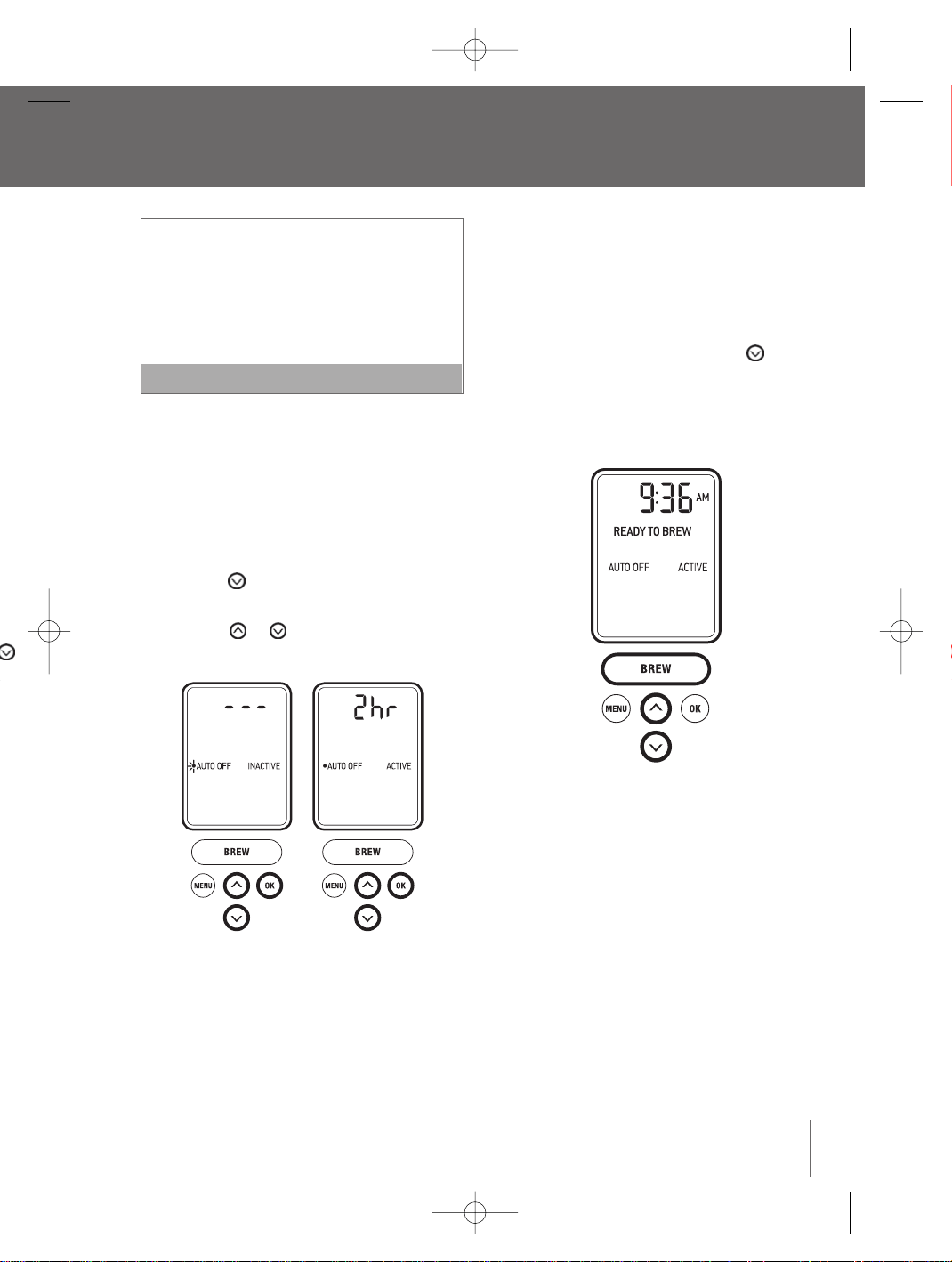
4. Press the or button to see the
two options:
a) ‘AUTO OFF’ will be ‘INACTIVE’ and the LCD
screen will display
‘
- - -’, indicating that the
Brewer will not turn off automatically. Press
the ‘OK’ button to select this option. The LCD
screen will return to the menu programming
options.
b) ‘AUTO OFF’ will be ‘ACTIVE’ and the LCD
screen will display ‘2 hr’, indicating the Brewer
will automatically turn off after 2 hours. Press
the ‘OK’ button.The LCD screen will return to
the menu programming options.
5. To exit the menu programming options, press the
‘MENU’ button.Alternatively, press the button
to reach ‘EXIT MENU’ and press the ‘OK’ button.
The LCD screen will return to the main screen
and indicate whether you have activated the
‘AUTO OFF’ feature.
M.
d, press
nk,
y to
the
ed, press
display
ou wish
s ready to
etting the
d, press
return to
press the
button
K’ button.
screen
d the
BR9013 BKC600XL_IB_AMEND.qxp 11/10/07 21:43 Page 19
3. Press
bu
Select fr
a small m
oz. servi
4. Once t
button
progra
5. To exit
‘MENU
to reac
The LC
and in
Menu and Programming Options
continued
Setting the
‘
BREW TEMP’ feature
The Brewer brews coffee at a preset temperature of
192°F.You can adjust this temperature down by 5°F
if you prefer a cooler cup of coffee, tea or hot cocoa.
1. Press the ‘MENU’ button.The programming
options will appear on the LCD screen with a
blinking indicator on ‘CLOCK SET’.
2. Press the button to reach ‘BREW TEMP’.
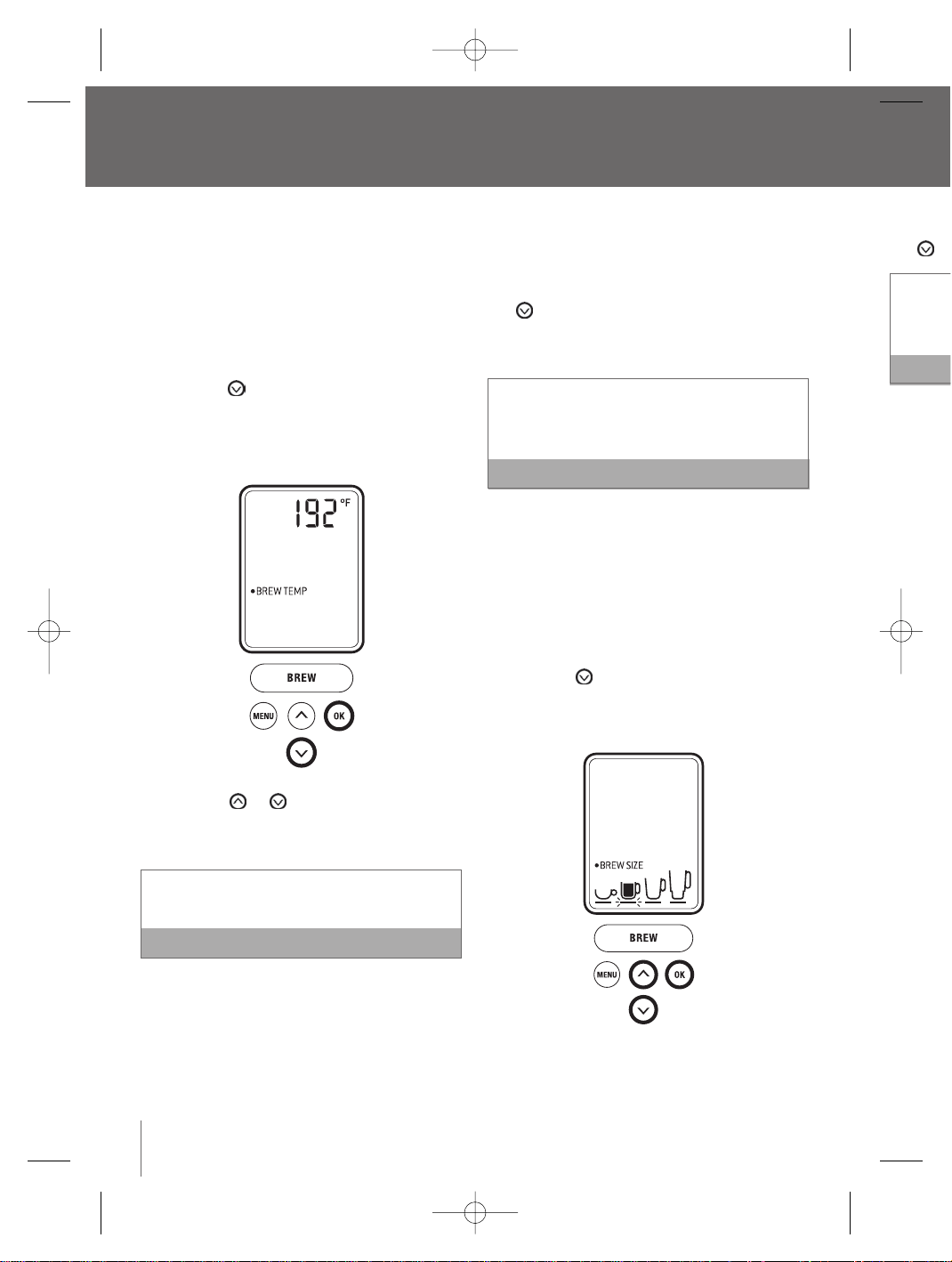
3. Press the ‘OK’ button.The LCD screen will
indicate the default brew temperature, 192°F
or the pre-programmed brew temperature.
4. Press the or button to reach the
appropriate brew temperature.The temperature
can only be set between 187°F and 192°F.
The Brewer will remain at the selected
temperature for subsequent brews
Note
5. Press the ‘OK’ button.The LCD screen will return
to the menu programming options.
6. To exit the menu programming options, press
the ‘MENU’ button. Alternatively, press the
button to reach ‘EXIT MENU’ and press the
‘OK’ button.The LCD screen will return to the
main screen.
When using the Brewer at high altitudes (over
5,000 feet), if boiling occurs, use the ‘BREW
TEMP’ feature to lower the temperature.
Note
Setting the ‘BREW SIZE’ feature
This feature allows you to avoid scrolling through
brew sizes if a particular size is chosen most often.
1. Press the ‘MENU’ button.The menu programming
options will appear on the LCD screen with a
blinking indicator on ‘CLOCK SET’.
2. Press the button to reach ‘BREW SIZE’.
Press the ‘OK’ button. The LCD screen will
indicate the default brew size (7.25 oz.).
20
BR9013 BKC600XL_IB_AMEND.qxp 11/10/07 21:43 Page 20
21
3. Press the button to go up in size or the
button to go down in size.
Select from a stronger small cup (5.25 oz. serving),
a small mug (7.25 oz. serving), a large mug (9.25
oz. serving) or a travel mug (11.25 oz. serving).
Note
4. Once the brew size is selected, press the ‘OK’
button.The LCD screen will return to the menu
programming options.
5. To exit the menu programming options, press the
‘MENU’ button.Alternatively, press the button
to reach ‘EXIT MENU’ and press the ‘OK’ button.
The LCD screen will return to the main screen
and indicate the brew size selected.
will return
press
he
ess the
to the
over
EW
Note
rough
st often.
gramming
with a
ZE’.
will
.
BR9013 BKC600XL_IB_AMEND.qxp 11/10/07 21:43 Page 21
2. Disass
the Lid
directi
Holder
3. Wash
soapy
thorou
shelf d
4. Store
My K-
of the
Cleaning
1. Wipe t
then d
into th
2. Wash
soft cl
dry the
remain
the dis
Rinse th
ensure t
remain a
supply in
Cleaning
Regular cle
We sugges
replaced e
1. Disass
Lower
Discar
2. Wash
soapy
thorou
dishw
Care and cleaning
Before cleaning,ensure the Brewer has been turned
off. Switch off at the wall outlet, unplug the power
cord and allow the machine to cool.
Cleaning the brewer housing
Regular cleaning of the Brewer’s housing and
external components is recommended.
1. Never immerse the Brewer in water or other
liquids.Wipe the housing with a soft, damp
cloth then dry thoroughly.
Do not use abrasive scouring pads or cleaners
when cleaning the housing as they may scratch
the surface.
Note
2. The Drip Tray and Drip Tray Plate can accumulate
up to 12 oz. of overflow.The water level indicator
visible through the Drip Tray Plate will pop up
when this occurs.The Drip Tray and Drip Tray
Plate should then be removed, emptied and
cleaned.To remove the Drip Tray assembly, slide
it toward you, keeping it level at all times to
avoid spilling.Wash both parts in warm soapy
water with a soft cloth, then rinse and dry
thoroughly.The Drip Tray and Drip Tray Plate are
also top-shelf dishwasher safe.
Cleaning the K-Cup
®
Holder
Regular cleaning of the K-Cup
®
Holder is
recommended.
1. Raise the Safety Locking Arm and remove the
K-Cup
®
Holder from the Brewing Chamber (refer to
Brewing with the My K-Cup
®
Accessory, page 12)
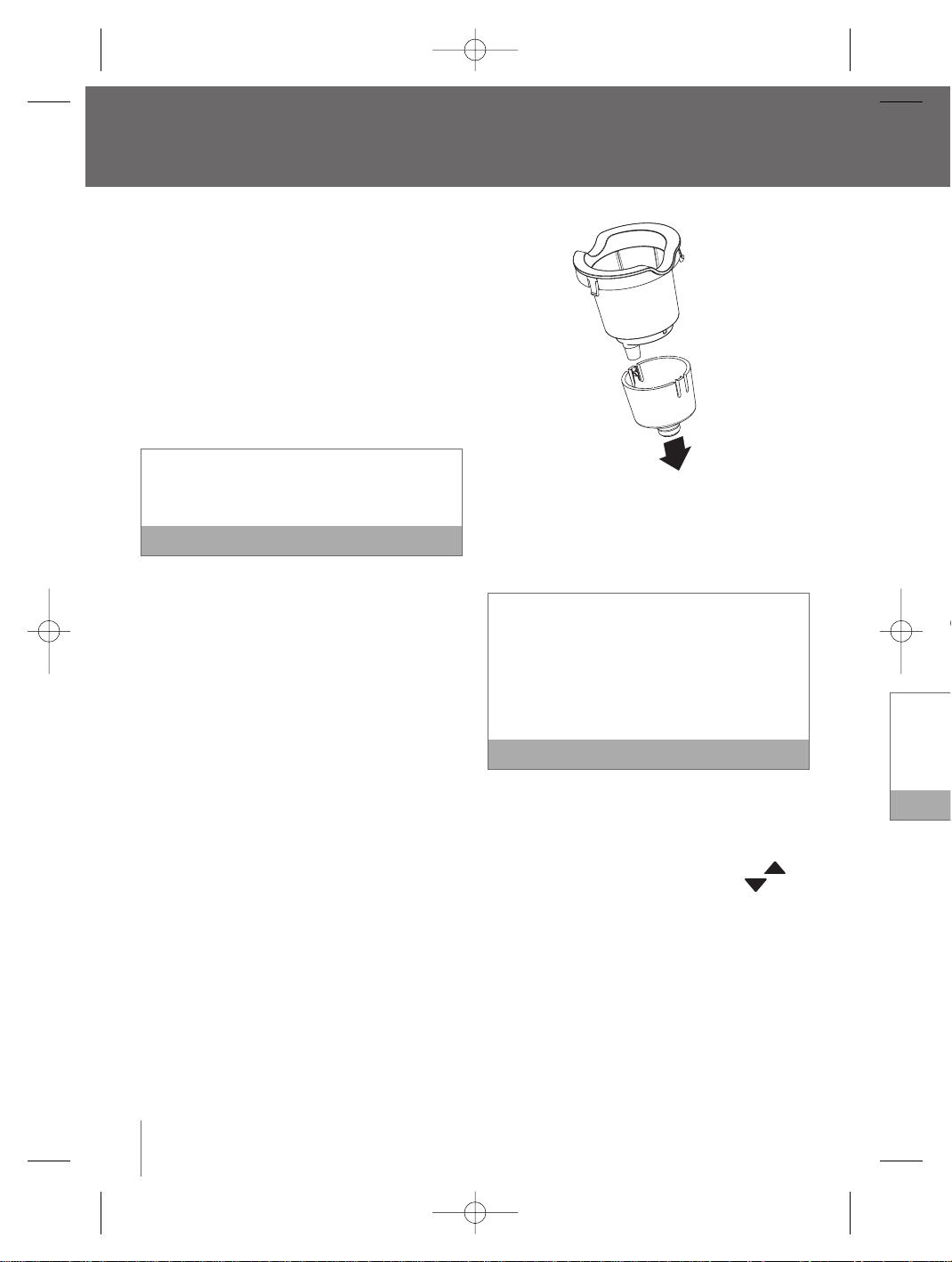
2. Disassemble the K-Cup
®
Holder buy pulling
downwards on the Funnel located at the base of
the Holder.
3. Wash both parts in warm soapy water with a
soft cloth,then rinse and dry thoroughly.The
K-Cup
®
Holder and Funnel are also top-shelf
dishwasher safe.
The K-Cup
®
Holder houses a needle in the inside
base. Should a clog arise due to coffee grinds, it
can be cleaned using a paper clip or similar tool.
Insert the paper clip into the Needle to loosen the
clog and push it out.To avoid risk of injury, do not
put your fingers in the K-Cup
®
Holder.
Note
4. After cleaning, place the Funnel back onto the
K-Cup
®
Holder.
5. Place the assembled K-Cup
®
Holder back into
the Brewing Chamber, aligning the arrow
on the K-Cup
®
Holder with the arrow in
the Brewing Chamber. Use caution when doing
this as there is a sharp needle on the underside
of the Brewing Chamber Head that punctures the
K-Cup
®
.
Cleaning the My K-Cup
®
accessory
Regular cleaning of the My K-Cup
®
accessory is
recommended.
1. Remove the assembled My K-Cup
®
Holder from
the Brewer by raising the Safety Locking Arm. Use
caution as the My K-Cup
®
Holder will be hot.
22
BR9013 BKC600XL_IB_AMEND.qxp 11/10/07 21:43 Page 22
23
2. Disassemble the My K-Cup
®
Holder by removing
the Lid from the Holder in a counter-clockwise
direction. Remove the Filter Basket from the
Holder, discard the grounds.
3. Wash the Lid, Filter Basket and Holder in warm
soapy water with a soft cloth, then rinse and dry
thoroughly.All parts K-Cup
®
Holder are also top-
shelf dishwasher safe.
4. Store the assembled My K-Cup
®
Holder in the
My K-Cup
®
Storage compartment located on top
of the Brewer.
Cleaning the water tank and lid
1. Wipe the Water Tank Lid with a soft, damp cloth
then dry thoroughly. The Lid should not be put
into the dishwasher.
2. Wash the Water Tank in warm soapy water with a
soft cloth,then rinse and dry thoroughly. Do not
dry the inside of the Tank with a cloth as lint may
remain. The Water Tank should not be put into
the dishwasher.
Rinse the Water Tank thoroughly after cleaning to
ensure that no cleaners or cleaning solutions
remain as they may contaminate the water
supply in the Brewer.
Note
Cleaning the water filter
Regular cleaning of the Water Filter is recommended.
We suggest doing this when the Charcoal Filter is
replaced every 2 months or 60 tank refills.
1. Disassemble the Water Filter by removing the
Lower Filter Holder from the Upper Filter Holder.
Discard the Charcoal Filter.
2. Wash the Upper and Lower Filter Holder in warm
soapy water with a soft cloth, then rinse and dry
thoroughly. Both parts are also top-shelf
dishwasher safe.
Replace the Charcoal Filter every 2 months, or 60
tank refills, more if you have hard water.
Note
To order replacement Charcoal Filters, call Breville
Customer Service on 1-866-BREVILLE or visit
www.breville.com.
We recommend removing the Water Filter if you
choose not to replace the Charcoal Filter every 2
months, as the filter may clog and affect the smell
and taste of the water.
Descaling the brewer
Mineral content in water varies from place to place.
Depending on the mineral content of the water in
your area, calcium deposits or scale may build up in
your Brewer. Scale is non-toxic,but left unattended, it
can hinder the Brewer’s performance. Descaling your
Brewer helps maintain the heating element, and
other internal parts of the Brewer that come in
contact with water.
The Brewer should be descaled every 3-6 months to
ensure optimal performance. It is possible for calcium
deposits to build up faster, making it necessary to
descale more often.
This Brewer is equipped with sensors to detect when
scale buildup is interfering with the performance of
the Brewer.When this is detected, the LCD screen
will indicate ’DESCALE’.
with a
y.The
p-shelf
e inside
nds, it
ar tool.
sen the
do not
Note
nto the
ack into
w
in
n doing
nderside
ctures the
ry
ory is
der from
Arm. Use
e hot.
BR9013 BKC600XL_IB_AMEND.qxp 11/10/07 21:43 Page 23
TroubCare and cleaning
continued
The Brewer will continue to operate even when
the LCD screen indicates ‘DESCALE’.
Note
However, if you do not descale the Brewer soon after
it is displayed, continued scale build-up could
damage the Brewer. If this occurs,‘DESCALE’ will
begin to flash, alerting you to the potential damage to
the Brewer if you do not descale immediately.
Promptly follow these steps each time the LCD
screen indicates ‘DESCALE’ to ensure the Brewer
functions optimally.
1. Empty the Water Tank.
2. Pour 60 oz.of vinegar into the Water Tank,filling to
just below the top edge of the clear viewing area.
3. Place a 12 oz. or larger ceramic cup (do not use
a plastic cup) on the Drip Tray.The Drip Tray and
Drip Tray Plate can be removed to accomodate
taller mugs and travel mugs
4. Select the largest brew size (11.25 oz. serving)
by pressing the button on the control panel.
5. Run a cleansing brew without a K-Cup
®
(refer to
Brewing Hot Water, page 15). Pour the contents
of the cup into the sink.
6. Repeat the cleansing brew process until the
Water Tank is empty, pouring the contents of the
cup into the sink after each cycle. Remember
to raise and lower the Safety Locking Arm
between each cycle so the control panel
buttons illuminate.
7. Let the Brewer stand for at least 4 hours while
still on.
8. Rinse the Water Tank thoroughly and fill with
fresh water.
9. Place a 12 oz. or larger ceramic cup (do not use
a plastic cup) on the Drip Tray.
10. Run a cleansing brew without a K-Cup
®
(refer to
Brewing Hot Water, page 15). Pour the contents
of the cup into the sink.
11. Repeat the cleansing brew process until the
Water Tank is empty, pouring the contents of the
cup into the sink after each cycle.You may need
to perform additional rinse cycles if you notice
any residual taste. Remember to raise and lower
the Safety Locking Arm between each cycle so
the control panel buttons illuminate.
12. The machine is now ready for use.
If the LCD screen continues to indicate
‘DESCALE’ after completing the process, repeat
the process above.
Note
Storage
Before cleaning or moving the Brewer to a different
location, ensure the Brewer has been turned off.
Switch off at the wall outlet, unplug the power cord
and allow the machine to cool.The Water Tank
should be emptied and dried thoroughly.
• Store your Brewer in its upright position to avoid
water leakage from the inner tank.
• Store your Brewer in a frost free environment.
Storing the Brewer in a cold environment runs the
risk of water freezing inside the Brewer and
causing damage. If your Brewer has been stored in
an environment below freezing, ensure to let it
warm to room temperature for at least 2 hours
before using.
• When preparing to use the Brewer after storage,
we recommend rinsing the Water Tank with fresh
water and running three cleansing brews without
a K-Cup
®
(refer to Brewing Hot Water, page 15).
24
Possib
Brewer
Brewer
Coffee
or wate
There a
from 13
on K-Cu
Custom
www.br
BR9013 BKC600XL_IB_AMEND.qxp 11/10/07 21:43 Page 24
Troubleshooting
25
l the
nts of the
may need
notice
and lower
cycle so
repeat
Note
different
d off.
wer cord
ank
o avoid
ment.
runs the
nd
stored in
let it
hours
torage,
th fresh
without
ge 15).
Possible problem Easy solution
Brewer will not switch on
Brewer will not brew
Coffee is too weak
or watery
• Plug the Brewer into an independent outlet.
• Check that the Brewer is plugged in securely.
• Plug into a different outlet.
• Reset circuit breaker if necessary.
• Make sure that the Power Switch has been turned on.The Water Tank
should be illuminated.The ‘BREW’ button, and buttons should be
illuminated.
• After placing the K-Cup
®
in the K-Cup
®
Holder, or the My K-Cup
®
Holder
into the Brewing Chamber, ensure the Safety Locking Arm is pushed down
securely.The LCD screen should indicate ‘READY TO BREW’.The and
buttons should illuminate and the 'BREW' button should illuminate and
flash for up to 60 seconds.
• If the LCD screen indicates ‘REFILL TANK’, add water to the Water Tank or
make sure the Water Tank is attached correctly to the Brewer (page 15).
• If the LCD screen indicates ‘REFILL TANK’ even after refilling, contact
Customer Service on 1-866-BREVILLE (1-866-273-8455).
• If the ‘BREW’ button is not pressed in 60 seconds, the LCD screen will
indicate ‘OPEN HEAD’ and the ‘BREW’ button will be disabled to prevent
accidental activation.To re-activate the brew sequence, open the Brewing
Chamber Head by raising and lowering the Safety Locking Arm completely.
• The Exit Needle may be clogged (refer Cleaning the K-Cup
®
Holder,
page 22).
• Reduce the brew size selection for a “stronger” tasting cup of coffee
(refer to Setting the ‘BREW SIZE’ feature, page 20).
• Try an Extra Bold K-Cup
®
.They have 30% more ground coffee in each
K-Cup
®
portion pack.
There are over 150 varieties of Keurig K-Cups
®
from 13 gourmet partners. For more information
on K-Cups
®
or K-Cup® ordering, call Breville
Customer Service on 1-866-BREVILLE, or visit
www.breville.com.
Note
BR9013 BKC600XL_IB_AMEND.qxp 11/10/07 21:43 Page 25
WarrTroubleshooting
continued
26
One yea
Breville
®
*
defects tha
workmans
date of ori
does not c
commercia
the printed
warranty f
basket, bla
disclaims a
for inciden
Some stat
or limitatio
the forego
ANY WARR
WITH RESP
TO THE ON
Some stat
of the imp
goods, so
to you.
This warra
may also h
state to sta
Possible problem Easy solution
Brewer dispenses a
partial cup
The time is not displayed
on the LCD screen
Brewer shuts off or turns
on automatically
The blue light in the
water tank is flashing
• The Exit Needle may be clogged (refer to Cleaning the K-Cup
®
Holder,
page 22).
• The Water Tank may have been removed during brewing. Replace the
Water Tank and perform a cleansing brew without a K-Cup
®
(refer to Brewing Hot Water, page 15).
• If the LCD screen indicates ‘DESCALE’,follow the instructions, Descaling
your Brewer (page 23)
• If you have repeated the descale procedure on your Brewer two times
and the message is still displayed, contact Customer Service on
1-866-BREVILLE (1-866-273-8455).
• The time will not be displayed on the LCD screen unless you have set it.
To set the clock, follow the instructions, Setting the ‘CLOCK SET’ feature
(page 17).
• If power is interrupted to the Brewer, you will need to set the clock again.
• Check to make sure that the ‘ON-OFF TIME’ and/or the ‘AUTO OFF’
features have not been set.To do this, press the ‘MENU’ button and scroll
through the programming options. Both the ‘ON-OFF TIME’ and ‘AUTO
OFF’ features should be ‘INACTIVE‘.If ‘INACTIVE’ is not displayed, follow
the instructions, Setting the ‘ON-OFF TIME’ feature (page 17) and Setting
the ‘AUTO OFF’ feature (page 19).
• The water level is low and a full cup cannot be brewed.Add water to
the Water Tank, following the instructions, Re-filling the Water Tank
(page 15).
BR9013 BKC600XL_IB_AMEND.qxp 11/10/07 21:43 Page 26
Warranty
27
One year limited warranty
Breville
®
* warrants this Breville
®
appliance against
defects that are due to faulty material or
workmanship for a period of one (1) year from the
date of original consumer purchase.This warranty
does not cover damage from abuse, neglect,use for
commercial purposes, or any other use not found in
the printed “Instructions for use” booklet.There is no
warranty for glass parts, glass containers, filter
basket, blades and agitators. HWI Breville
®
expressly
disclaims all responsibility for consequential damages
for incidental losses caused by use of this appliance.
Some states or provinces do not allow this exclusion
or limitation for incidental or consequential losses, so
the foregoing disclaimer may not apply to you.
ANY WARRANTY OF MERCHANTABILITY OR FITNESS
WITH RESPECT TO THIS PRODUCT IS ALSO LIMITED
TO THE ONE YEAR LIMITED WARRANTY PERIOD.
Some states or provinces do not allow disclaimer
of the implied warranty with respect to consumer
goods, so the foregoing disclaimer may not apply
to you.
This warranty gives you specific legal rights and you
may also have other legal rights which vary from
state to state or province to province.
If the appliance should become defective within the
warranty period, do not return the appliance to the
store. Please contact our Customer Service Center.
Toll free phone number:
1-866-BREVILLE (1-866-273-8455)
Internet email:
[email protected] (in Canada)
ORGINAL RECEIPT IS REQUIRED FOR ALL RETURNS
*HWI Breville
®
products are distributed in Canada by
Anglo Canadian Housewares, L.P. and in USA by
Metro/Thebe Inc.
older,
the
scaling
mes
set it.
eature
k again.
F’
nd scroll
UTO
follow
Setting
r to
k
BR9013 BKC600XL_IB_AMEND.qxp 11/10/07 21:43 Page 27
Model BK
Model BKC600XL Issue 1/07 Packaging Code:AM / CN
Breville est une marque enregistrée de Breville
Service à la clientèle Breville
Consommateurs des Etats-Unis
✉
19400 S.Western Ave
Torrance
CA 90501-1119
☎
Service Center: 1 (866) BREVILLE
Email [email protected]
www.breville.com
Clientèle du Canada
✉
Anglo Canadian Housewares L. P.
2555, avenue de l’Aviation
Pointe-Claire (Montréal) Québec
H9P 2Z2
☎
Téléphone sans frais:1 (866) BREVILLE
Télécopieur: (514) 683-5554
Courriel: [email protected]
www.breville.com
© Copyright. Breville Pty. Ltd. 2007
Keurig, Keurig Brewed, Brewing Excellence One Cup at a Time, et K-Cups sont des
marques de commerce ou des marques de commerce déposées de Keurig, inc.
Couvert par les brevets des États-Unis. 7 165 488; D513572 et 5 840 189; et autres
brevets en instance aux États-Unis. et à l’étranger.
En raison d’améliorations constantes apportées au design ou autres caractéristiques, le
produit que vous achetez peut différer légèrement de celui qui est illustré dans ce manuel.
Model BKC600XL Issue 2/07
BR9013 BKC600XL_IB_AMEND.qxp 11/10/07 21:43 Page 28
Système d’infusion
une tasse à la fois
Model BKC600XL
sont des
g, inc.
9; et autres
ctéristiques, le
dans ce manuel.
BR9013 BKC600XL_IB_AMEND.qxp 11/10/07 21:43 Page 29
Fé
Pour l’
Votre sy
conjoin
États-U
utilisan
fournis
Pour de
comma
visitez
Table des matières
Page
Breville recommande la sécurité avant tout 32
Composantes de votre système d’infusion une
tasse à la fois de Breville 34
Fonctionnement de votre système d’infusion une tasse à la
fois de Breville 35
Installation du filtre à eau 35
Processus de préparation initiale 37
Infusion d’un K-Cup
MD
38
Infusions avec l’ accessoire My K-Cup
MD
40
Arrêt du processus d’infusion 43
Infusion d’eau chaude 43
Remplissage du réservoir d’eau 43
Vidange du système d’infusion 44
Menu et options de programmation 45
Réglage de l’horloge ‘CLOCK SET’ 45
Réglage de mise en marche et d’arrêt automatique ‘ON-OFF’
45
Réglage de la fonction d’arrêt automatique ‘AUTO OFF’ 47
Réglage de la température d’infusion ‘BREW TEMP’ 48
Réglage du format d’infusion ‘BREW SIZE’ 48
Entretien et nettoyage 50
Nettoyage de la chambre d’infusion 50
Nettoyage du support à filtre K-Cup
MD
50
Nettoyage de l’accessoire My K-Cup
MD
50
Nettoyage du réservoir d’eau et du couvercle 51
Nettoyage du filtre à eau 51
Détartrage du système d’infusion 51
Entreposage 53
Dépannage 53
Garantie limitée d’un an 54
30
BR9013 BKC600XL_IB_AMEND.qxp 11/10/07 21:43 Page 30
Félicitations
Pour l’achat de votre nouvelle cafetière une tasse à la fois de Breville
Votre système a été conçu et fabriqué
conjointement par Breville-Australie et Keurig-
États-Unis. Profitez de votre système Breville en
utilisant plus de 150 variétés de K-Cups
MD
Keurig
fournis par nos 13 partenaires gourmets.
Pour de plus amples informations sur les
commandes de K-Cups
MD
ou K-Cup
MD
,
visitez le site http://www.breville.com .
ge
2
4
5
5
7
8
0
3
3
3
4
5
5
5
7
8
8
0
0
0
0
1
1
1
3
3
4
BR9013 BKC600XL_IB_AMEND.qxp 11/10/07 21:43 Page 31
INSTR
• Vous ne
broche (
un adapt
• Consulte
pas les i
des dout
électriqu
• Vérifiez r
pour rep
de bris o
l’utilisatio
clientèle
vérificati
• Pour tout
service à
Votre appa
blessures
d’autres a
est utilisée
l’appareil,
être tiré pa
Breville recommande la sécurité avant tout
• Cet appareil est destiné à un usage domestique
seulement.
• N’utilisez cet appareil que pour l’usage auquel il est
destiné.N’utilisez pas cet appareil à bord de véhicules
en déplacement ou d’embarcations. N’utilisez pas cet
appareil à l’extérieur.
• Pour vous protéger contre les incendies, les
décharges électriques ou les blessures,n’immergez
pas cet appareil, le cordon ou la fiche dans l’eau ou
dans tout autre liquide.
• Ne laissez pas l’appareil sans surveillance lors de
son utilisation.
• Lorsque l’appareil est utilisé en présence d’efont,
une supervision étroite est recommandée.
• Utilisez toujours cet appareil sur une surface sèche
et plate.
• Ne placez pas l’appareil à proximité d’une cuisinière
électrique ou au gaz chaude ou à proximité de la
chaleur du four.
• Ne touchez pas les surfaces chaudes. Utilisez les
poignées et les boutons lorsqu’il y en a.
• Ne laissez pas pendre le cordon au bord d’une table
ou d’un comptoir, ne laissez pas le cordon toucher
des surfaces chaudes ou s’entortiller.
• L’utilisation d’accessoires non recommandés par
Breville peut causer des blessures,provoquer des
incendies ou des décharges électriques.
• Respectez le niveau de remplissage maximum du
réservoir d’eau.
• Gardez toujours le couvercle sur le réservoir d’eau,
sauf au moment du remplissage.
• N’utilisez que de l’eau dans cet appareil. Ne mettez
aucun autre liquide ou nourriture dans le réservoir
d’eau sauf lors du processus d’entretien et de
nettoyage tel qu’expliqué à la page 50.
• Deux aiguilles pointues perforent les filtres K-Cup
MD
.
Une en dessous de la tête de la chambre d’infusion et
l’autre à la base du support à filtre K-Cup
MD
. Pour
éviter tout risque de blessure,ne mettez pas vos
doigts dans la chambre d’infusion ou dans le support
à filtre K-Cup
MD
.
• Durant le processus d’infusion, le support à filtre K-
Cup
MD
contient de l’eau extrêmement chaude.Pour
éviter tout risque de blessure,ne relevez pas le levier
de verrouillage de sécurité et n’ouvrez pas la chambre
d’infusion pendant le processus d’infusion.
• Pour éteindre l’appareil, appuyez sur l’interrupteur et
relâchez-le afin qu’il indique ‘OFF’. Il se trouve à la
base arrière,sur le côté droit de la cafetière. Ensuite,
débranchez l’appareil.
• Toujours éteindre et débrancher l’appareil lorsqu’il
n’est pas utilisé ou avant de le nettoyer. Laissez
l’appareil refroidir avant de remettre en place ou de
retirer des pièces et avant de le nettoyer.
• Respectez à la lettre les instructions d’entretien et de
nettoyage (page 50).
• Cet appareil est muni d’un cordon ayant un fil et une
prise de mise à la terre.Il doit être branché dans une
prise à trois trous.En cas de court-circuit, la mise à
terre réduit les risques de décharges électriques.
• Si la prise de courant n’a que deux trous, vous avez
l’obligation et la responsabilité de la remplacer par
une prise à trois trous.
32
IMPORTANTES MESURES DE SÉCURITÉ
Chez Breville, nous sommes soucieux de la sécurité. Nous concevons et fabriquons des produits en pensant
avant tout à la sécurité de nos clients. De plus, nous vous demandons d’utiliser les appareils électriques avec
soin, en prenant les précautions suivantes.
LISEZ TOUTES LES INSTRUCTIONS ET CONSERVEZ
-LES POUR CONSULTATIONS ULTÉRIEURES
BR9013 BKC600XL_IB_AMEND.qxp 11/10/07 21:43 Page 32
33
INSTRUCTIONS CONCERNANT LE CORDON COURT
• Vous ne devez JAMAIS couper ni retirer la troisième
broche (mise à terre) du cordon électrique ou utiliser
un adaptateur.
• Consultez un électricien qualifié si vous ne comprenez
pas les instructions de mise à terre ou si vous avez
des doutes quant à la conformité de la prise
électrique.
• Vérifiez régulièrement le cordon,la fiche et l’appareil
pour repérer les bris.N’utilisez pas l’appareil en cas
de bris ou de mauvais fonctionnement.Cessez
l’utilisation de l’appareil et appelez le service à la
clientèle de Breville au 1-866-BREVILLE pour une
vérification, une réparation ou un réglage.
• Pour tout entretien autre qu’un nettoyage, appelez le
service à la clientèle de Breville au 1-866-BREVILLE.
Votre appareil Breville comprend la fiche Assist
MC
Plug, conçue avec un trou de doigt pratique dans
la fiche pour faciliter le débranchement. Pour des
raisons de sécurité, il est recommandé de
brancher votre appareil Breville directement dans
sa propre prise électrique sur un circuit dédié,
séparément d’autres appareils. Si le circuit
électrique est surchargé par d’autres appareils,
votre cafetière peut ne pas fonctionner
correctement. L’utilisation d’une bande
d’alimentation ou d’une rallonge n’est pas
recommandée.
REMARQUE
Votre appareil Breville est muni d’un court cordon d’alimentation par mesure de sécurité, afin de prévenir les
blessures ou les dommages matériels. Un cordon plus long pourrait s’entortiller et provoquer des chutes ou
d’autres accidents. Ne laissez pas les enfants utiliser l’appareil sans la supervision d’un adulte. Si une rallonge
est utilisée, (1) le rendement électrique indiqué sur cette dernière doit être au moins aussi grand que celui de
l’appareil, (2) le cordon doit être placé de manière à ne pas tomber sur le comptoir ou la table,d’où il pourrait
être tiré par un enfant ou être la cause d’une chute, et (3) la rallonge doit comporter une fiche à trois broches.
CONSERVEZ CES DIRECTIVES.
UTILISATION DOMESTIQUE SEULEMENT.
AFIN DE RÉDUIRE LES RISQUES D’INCENDIE OU DE DÉCHARGES ÉLECTRIQUES, NE
RETIREZ PAS LA PLAQUE SITUÉE À LA BASE DE L’APPAREIL.AUCUNE PIÈCE UTILE À
L’UTILISATEUR NE SE TROUVE À L’INTÉRIEUR. LES RÉPARATIONS NE DEVRAIENT ÊTRE
EFFECTUÉES QUE PAR DU PERSONNEL QUALIFIÉ.
mettez
servoir
de
K-Cup
MD
.
infusion et
D
. Pour
s vos
e support
filtre K-
de. Pour
s le levier
a chambre
upteur et
ve à la
. Ensuite,
rsqu’il
ssez
ce ou de
tien et de
fil et une
dans une
a mise à
ques.
ous avez
cer par
ensant
es avec
BR9013 BKC600XL_IB_AMEND.qxp 11/10/07 21:43 Page 33
Q Couverc
R Panier p
S Support
T Interrup
Composantes de votre système d’infusion une
tasse à la fois de Breville
34
A Couvercle du réservoir d’eau
B Réservoir d’eau
C Support à filtre supérieur
D Filtre au charbon remplaçable
E Support à filtre inférieur
F Plateau d’égouttage
G Indicateur de niveau du plateau
ramasse-gouttes
H Plateau ramasse-gouttes
I Support à filtre K-Cup
MD
J Levier de verrouillage de sécurité
K Tête de la chambre d’infusion
L Chambre d’infusion
M Écran ACL
N Panneau de contrôle
O My K-Cup
MD
/ Rangement du
support K-Cup
MD
P Cuillère à mesurer My K-Cup
MD
BR9013 BKC600XL_IB_AMEND.qxp 11/10/07 21:43 Page 34
35
Pour commander des filtres au charbon de
remplacement, appelez le service à la clientèle
de Breville au 1-866-BREVILLE ou consultez le
site www.breville.com.
REMARQUE
Q Couvercle My K-Cup
MD
R Panier pour filtre My K-Cup
MD
S Support à filtre My K-Cup
MD
T Interrupteur
nt du
Cup
MD
BR9013 BKC600XL_IB_AMEND.qxp 11/10/07 21:43 Page 35

Remplac
ou après
votre ea
Pour com
remplac
la Client
visitez n
Nous rec
vous util
ne pas r
deux mo
obstruct
Process
La prépara
interne d’e
Vous ne po
subi le pro
Si le sys
tempéra
laissez-l
ambiant
initiale. S
l’appare
cela pou
1. Déliez
prise d
2. Placez
d'égou
ramas
d'acco
de voy
3. Rempl
cm (1
de deu
a) Ret
l’ea
est
rep
b) Ret
le r
le c
Rem
l’int
le c
Fonctionnement de votre système d’infusion une
tasse à la fois de Breville
Installation du filtre à eau
Pour obtenir un café,un thé ou un chocolat chaud
ayant le meilleur goût possible, Breville vous
recommande l’utilisation d’eau filtrée ou en bouteille.
Le filtre fourni avec le système d’infusion peut
réduire considérablement les substances pouvant
affecter le goût et l’odeur de l’eau, telles que le
chlore, certains pesticides et impuretés organiques,
ainsi que les traces de certains métaux lourds.
Le filtre à eau peut être retiré du système d’infusion.
Si vous choisissez d’installer le filtre à eau, il est
recommandé de remplacer le filtre au charbon tous
les deux mois ou après 60 remplissages du réservoir,
et plus souvent si votre eau est dure.
Nous recommandons de retirer le filtre à eau si vous
utilisez déjà de l’eau filtrée ou si vous choisissez de
ne pas remplacer le filtre au charbon tous les deux
mois, car le filtre pourrait provoquer une obstruction
et altérer le goût et l’odeur de l’eau.
Si vous choisissez de ne pas installer le filtre à eau,
vous êtes prêt à entreprendre le processus de
préparation initiale (page 37).
REMARQUE
Suivez ces étapes chaque fois que vous installez un
nouveau filtre au charbon afin d’en assurer le
fonctionnement optimal.
1. Pour retirer le réservoir d’eau du système d’infusion,
saisissez la poignée située sur le côté gauche du
réservoir d’eau, puis soulevez le réservoir.
2. Enlevez le couvercle du réservoir.
3. Rincez le réservoir d’eau à l’eau fraîche et
replacez le système d’infusion.
4. Enlevez les supports du porte-filtre du haut et du
bas, ainsi que le filtre à charbon du sac. Sortez le
filtre à charbon de son emballage protecteur.
5. Faites tremper le filtre au charbon durant 5
minutes puis rincez-le durant 30 secondes. Il est
normal de voir des résidus gris après avoir
trempé le filtre.
6. Lavez le support à filtre inférieur en vous assurant
que les mailles d’acier inoxydable soient propres.
7. Insérez le filtre au charbon dans le support à
filtre supérieur, puis fixez le support à filtre
inférieur afin qu’il soit bien en place.
8. Réglez la date du support à filtre supérieur à une
échéance de deux mois.Ceci vous rappellera à quel
moment le filtre au charbon doit être remplacé.
9. Placez le support à filtre réassemblé à l’intérieur du
réservoir d’eau de manière à ce que la date soit
visible de l’extérieur du réservoir. Poussez fort vers
le bas le support à filtre réassemblé jusqu'à ce qu'il
se bloque en place.
10. Votre système d’infusion est maintenant prêt pour
le processus de préparation initiale.
36
BR9013 BKC600XL_IB_AMEND.qxp 11/10/07 21:43 Page 36
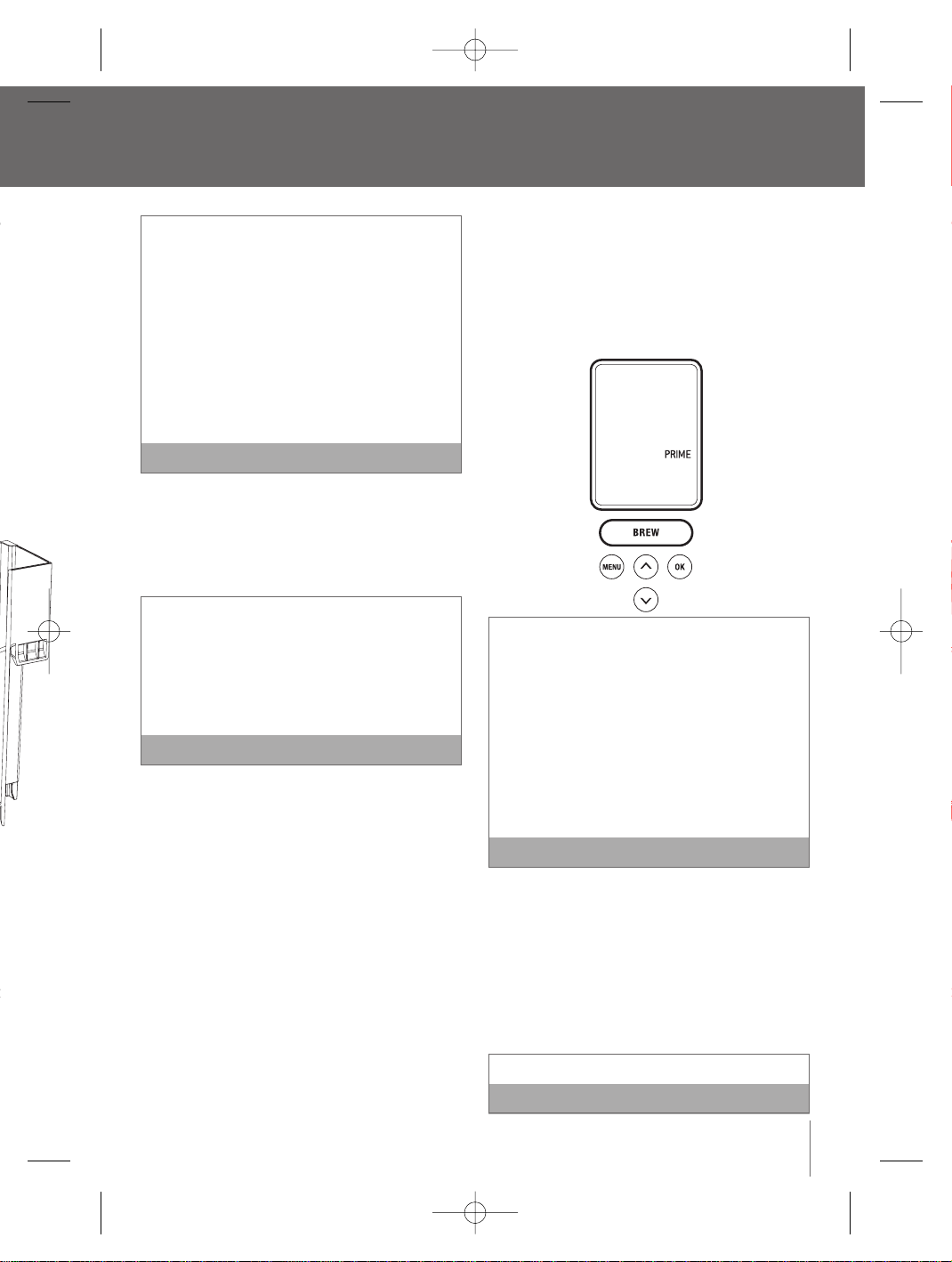
37
Remplacez le filtre à charbon tous les deux mois
ou après 60 remplissages, et plus souvent si
votre eau est dure.
Pour commander des filtres à charbon de
remplacement, vous pouvez appeler le Service à
la Clientèle de Breville au 1-866-BREVILLE ou
visitez notre site web www.breville.com
Nous recommandons de retirer le filtre à eau si
vous utilisez déjà de l'eau filtrée ou choisissez de
ne pas remplacer le filtre à charbon tous les
deux mois, car le filtre pourrait provoquer une
obstruction et altérer le goût et l'odeur de l'eau.
REMARQUE
Processus de préparation initiale
La préparation initiale consiste à remplir le réservoir
interne d’eau pour nettoyer le système d’infusion.
Vous ne pouvez pas utiliser le système s’il n’a pas
subi le processus de préparation initiale.
Si le système d’infusion a été exposé à des
températures sous le point de congélation,
laissez-le au moins deux heures à la température
ambiante avant de procéder à la préparation
initiale. Si le processus est entrepris alors que
l’appareil est trop froid, il ne sera pas efficace et
cela pourrait endommager l’appareil.
REMARQUE
1. Déliez le cordon électrique et branchez-le dans une
prise de courant
2. Placez une tasse de 355 ml (12 oz) sur le plateau
d'égouttage. Le plateau d'égouttage ainsi que le
ramasse-gouttes peuvent être retirés afin
d'accomoder des plus grandes tasses ou des tasses
de voyage.
3. Remplissez le réservoir d’eau jusqu’à environ à 2,5
cm (1 po) du rebord. Le réservoir peut être rempli
de deux façons :
a) Retirez le couvercle du réservoir et versez
l’eau directement dans le réservoir alors qu’il
est encore lié au système d’infusion puis
replacez le couvercle.
b) Retirez le couvercle du réservoir et puis retirez
le réservoir en saisissant la poignée située sur
le côté gauche, puis en soulevant le réservoir.
Remplissez-le d’eau. Replacez le réservoir à
l’intérieur du système d’infusion et remettez
le couvercle.
4. Appuyez sur l’interrupteur situé à la base en arrière,
sur le côté droit de l’appareil, et relâchez-le.
L’interrupteur est muni d’un mécanisme à ressort,
il reprendra sa position initiale.
5.
Les voyants ACL du réservoir d’eau s’allumeront.
L’écran ACL s’illuminera et indiquera ‘PRIME’. Le
bouton ‘BREW’ (INFUSION) s’allumera et clignotera.
Si le réservo
ir d’eau est vide ou s’il n’est pas bien
placé dans l’appareil, les voyants ACL clignoteront et
l’écran ACL indiquera ‘ REFILL TANK’ (REMPLIR LE
RÉSERVOIR.Aucun des boutons du panneau de
contrôle ne sera actif avant que l’eau ne soit ajoutée
dans le réservoir. Si le réservoir d’eau est vide ou s’il
n’est pas bien placé dans l’appareil, l’écran ACL
indiquera ‘REFILL TANK’ et les voyants ACL du
réservoir d’eau clignoteront.Aucun des boutons du
panneau de contrôle ne sera actif avant que l’eau ne
soit ajoutée dans le rése
rvoir.
REMARQUE
6. Le K-Cup
MD
ne devrait pas être utilisée lors du
processus de préparation initiale.
7. Appuyez sur le bouton ‘BREW’ (INFUSION).
8. Le système d’infusion se remplira automatiquement
d’eau (préparation) et commencera à réchauffer
l’eau.Au cours de la période de réchauffage, l’écran
ACL indiquera ‘HEATING’. La pompe fera un bruit de
vibration. Ceci est normal.
Ceci durera environ 4 minutes.
REMARQUE
e
e et
haut et du
. Sortez le
cteur.
nt 5
des. Il est
voir
assurant
propres.
port à
ltre
ur à une
lera à quel
placé.
ntérieur du
ate soit
z fort vers
u'à ce qu'il
prêt pour
BR9013 BKC600XL_IB_AMEND.qxp 11/10/07 21:43 Page 37
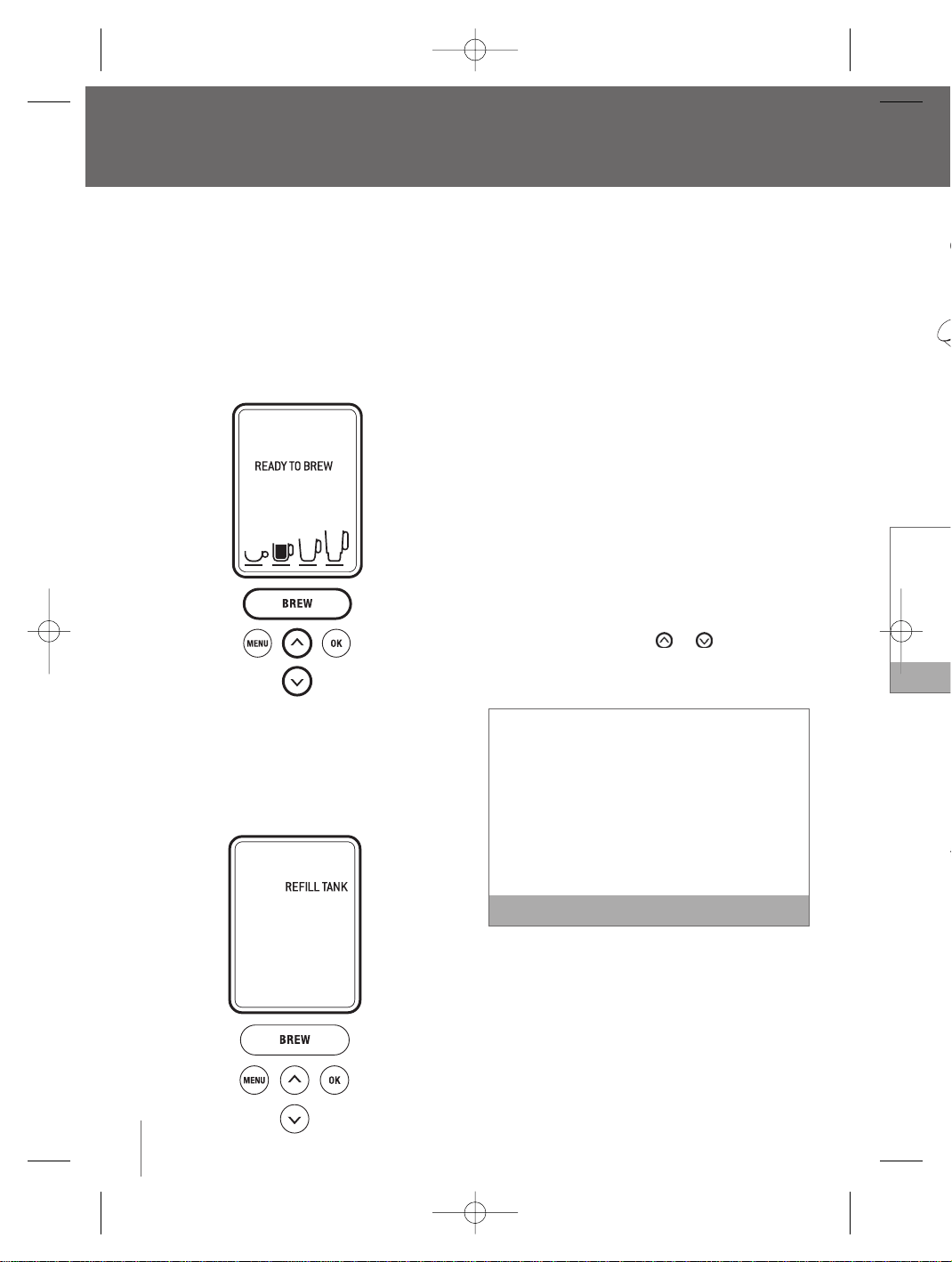
6. P
lacez
(situé d
le cou
Il y a deu
Cup
MD
.L
d’infusio
Cup
MD
.P
mettez p
ou dans
7. Abaiss
pour f
dessu
compl
‘READ
bouton
clignot
Fonctionnement de votre système d’infusion une
tasse à la fois de Breville
suite
9. Quand l’eau sera chaude, l’écran ACL indiquera
‘PRIME’ le bouton ‘BREW’ (INFUSION) s’allumera
aussi et il clignotera jusqu’à 60 secondes.
10. Pressez le bouton «BREW». Ceci commencera
une infusion de nettoyage qui complètera la
séquence. L'écran ACL n'indiquera plus
«PRIMING». L'eau chaude coulera dans votre
tasse. Lorsque l’écoulement arrêtera, jetez l’eau
chaude.
11. L’écran ACL indiquera 'HEATING' (CHAUFFAGE)
puisque la machine chauffe l'eau pour le
prochain cycle d'infusion. Une fois l'eau chauffée,
l'écran ACL affichera 'REFILL TANK'. (REMPLIR LE
RÉSERVOIR).
12. Remplissez le réservoir d’eau jusqu’à environ
2,5 cm (1 po) du rebord.
13. L’écran ACL indiquera 'OPEN HEAD' (TÊTE
OUVERTE).Ouvrez la tête de la chambre
d'infusion en remontant et abaissant le bras de
sécurité complètement. L'écran ACL indiquera
'READY TO BREW'. (PRÊT À INFUSER).
14. Le processus de préparation initiale est
maintenant terminé et vous êtes prêt pour
votre première infusion K-Cup
MD
(page 38) ou
My K-Cup
MD
(page 40).
Infusion d’un K-cup
MD
1. Suivez les instructions d’installation du filtre à
eau (page 36) et du processus de préparation
initiale (page 37). Le système d’infusion devrait
être en marche et le réservoir d’eau devrait être
rempli et illuminé.
2. L’écran ACL indiquera ‘READY TO BREW’ (PRÊT À
INFUSER). Les boutons et seront allumés
et le bouton ‘BREW’ (INFUSION) s’illuminera et
clignotera jusqu’à 60 secondes.
Si vous n’appuyez pas sur le bouton ‘BREW’
(INFUSION) dans les 60 secondes,l’écran ACL
affichera ‘OPEN HEAD’ et le bouton ‘BREW’ sera
mis hors fonction afin de prévenir une activation
accidentelle.Pour réactiver la séquence d’infusion,
ouvrez la tête de la chambre d’infusion en relevant
et en abaissant complètement le levier de
verrouillage de sécurité.
REMARQUE
3. Placez une petite tasse ou une grande tasse sur
le plateau ramasse-gouttese.
4. Relevez le levier de verrouillage de sécurité. La
chambre d’infusion s’ouvrira vers vous.
5. Sélectionnez un filtre ou un K-Cup
MD
.
38
BR9013 BKC600XL_IB_AMEND.qxp 11/10/07 21:43 Page 38
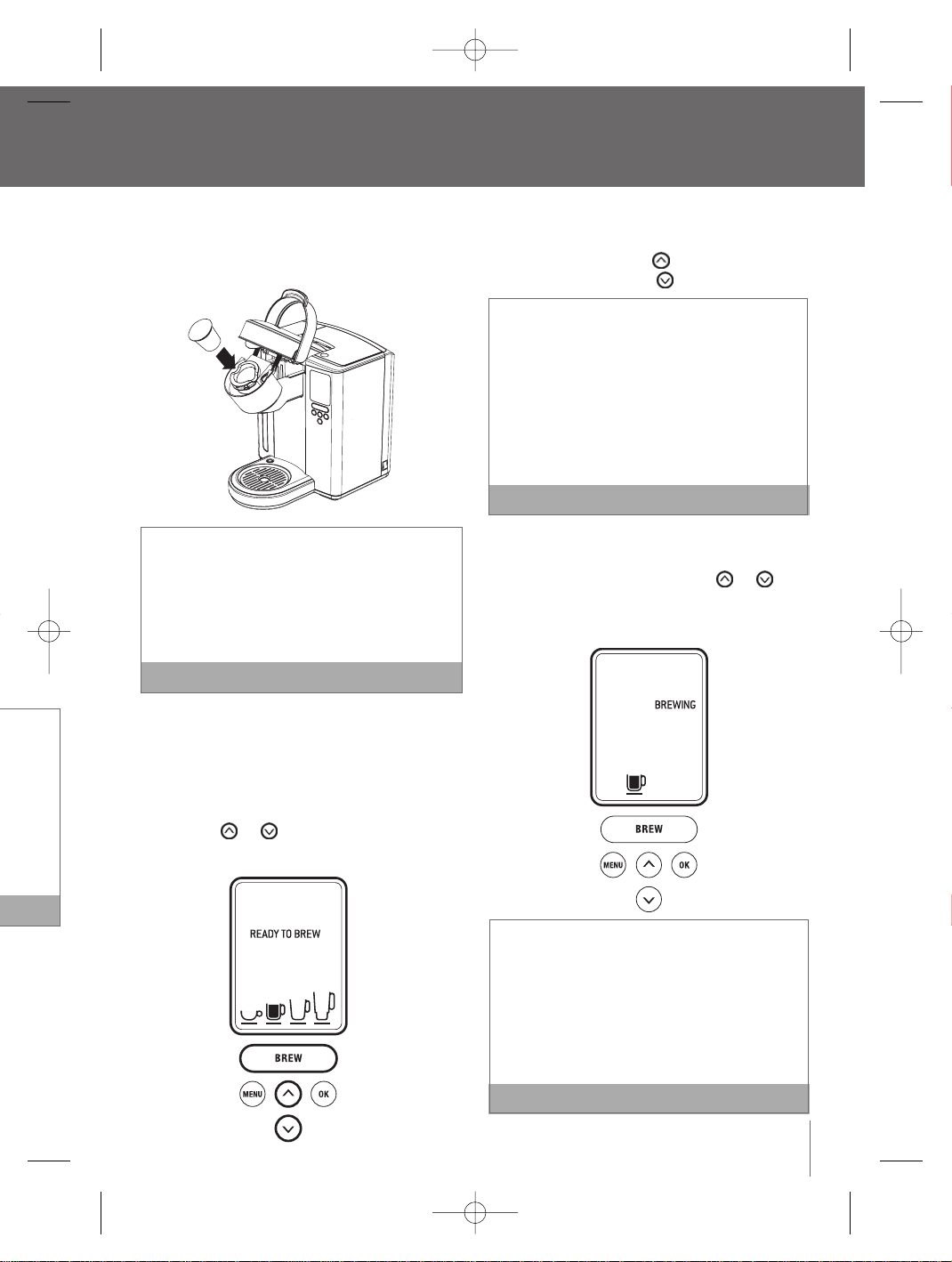
39
6. P
lacez le filtre K-Cup
MD
dans le support K-Cup
MD
(situé dans la chambre d’infusion). Ne retirez pas
le couvercle et ne percez pas le filtre K-Cup
MD
.
Il y a deux aiguilles pointues qui percent le filtre K-
Cup
MD
. L'une se trouve sous la tête de la chambre
d’infusion, l’autre à la base du support à filtre K-
Cup
MD
. Pour éviter tout risque de blessure, ne
mettez pas vos doigts dans la chambre d’infusion
ou dans le support à filtre K-Cup
MD
.
REMARQUE
7. Abaissez le levier de verrouillage de sécurité
pour fermer la tête de la chambre d’infusion au-
dessus du support à filtre K-CupMD. Lorsqu’il est
complètement fermé, l’écran ACL indiquera
‘READY TO BREW’ (PRÊT À INFUSER). Les
boutons et s’illumineront et
clignoteront jusqu’à 60 secondes.
a) L’écran ACL indiquera le format par défaut 240
ml (7,25 oz). Pour choisir un autre format,
appuyez sur le bouton pour augmenter le
format et sur le bouton pour le diminuer.
Faites votre choix entre une très petite tasse de
café plus corsé de 175 ml (5,25 oz), une petite
tasse de 240 ml (7,25 oz), une grande tasse de
300 ml (9,25 oz) ou une tasse de voyage de 370
ml (11,25 oz).
La petite tasse de 240 ml (7,25 oz) est le format
par défaut. Pour programmer votre format favori,
consultez les instructions relatives au réglage ‘
BREW SIZE’ (FORMAT D’INFUSION) (page 48).
REMARQUE
b) Quand le format d’infusion est sélectionné,
appuyez sur le bouton ‘BREW’ (INFUSION).Il
arrêtera de clignoter, les boutons et
ne seront plus illuminés. L’écran ACL indiquera
‘BREWING’ (EN COURS D’INFUSION) ainsi que
la sélection du format d’infusion.
Si vous n’appuyez pas sur le bouton ‘BREW’
(INFUSION) dans les 60 secondes,l’écran ACL
affichera ‘OPEN HEAD’ et le bouton ‘BREW’ (INFUSION)
sera hors fonction afin de prévenir une activation
accidentelle.Pour réactiver la séquence
‘BREW’ (INFUSION),ouvrez la tête de la chambre
d’infusion en relevant et en abaissant complètement
le levier de verrouillage de sécurité
.
REMARQUE
e
nviron
TE
e
e bras de
diquera
our
38) ou
filtre à
aration
n devrait
vrait être
W’ (PRÊT À
nt allumés
nera et
’
CL
sera
ation
fusion,
elevant
ARQUE
tasse sur
urité. La
BR9013 BKC600XL_IB_AMEND.qxp 11/10/07 21:43 Page 39
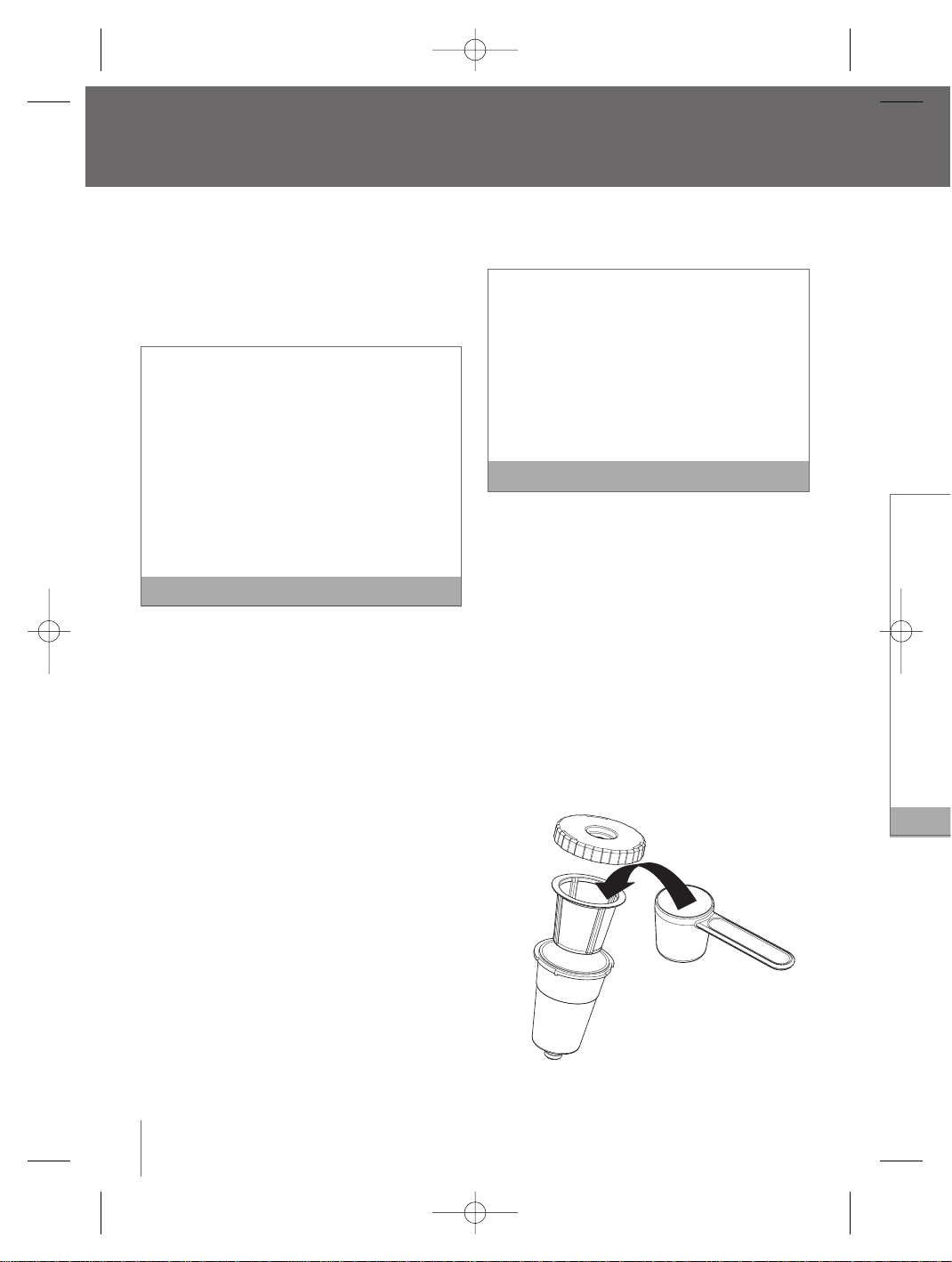
8. Utilise
emplir
pelleté
cuiller
de ma
indiqu
table p
convie
avec p
appla
Assure
qu'il n
supéri
couve
1 pelleté
Nous rec
format d
Si vous
le forma
Si vous
1. Com
du ty
2. Essa
utilis
3. Évite
peuv
de m
9. Releve
La cha
10. Placez
chamb
a. Ret
d’in
com
de
b. Ins
la c
d’a
K-C
d’in
Fonctionnement de votre système d’infusion une
tasse à la fois de Breville
suite
40
8. L’écran ACL indiquera ‘BREWING’ (INFUSION EN
COURS), toutefois il pourrait y avoir une courte
pause avant que le processus ne reprenne. Ce
processus dure environ 60 secondes et se
termine par un jet d’air qui sert à éliminer tout le
liquide du filtre K-Cup
MD
.
L’eau contenue dans le support à filtre K-Cup
MD
au cours du processus d’infusion est extrêmement
chaude.Afin d’éviter tout risque de blessures, ne
relevez pas le levier de verrouillage de sécurité et
n’ouvrez pas la chambre d’infusion durant le
processus.
Après l’infusion, l’écran ACL indiquera ‘HEATING’
au moment où l’eau est réchauffée pour le
prochain cycle d’infusion. Ce processus dure
environ 15 secondes. La pompe émettra un son
de vibration. C’est tout à fait normal.
REMARQUE
9. Relevez le levier de verrouillage de sécurité,
retirez et jetez le filtre K-Cup
MD
utilisé. Soyez
prudent, il sera encore chaud.
10. Savourez votre première tasse de café, de thé ou
de chocolat chaud de qualité supérieure!
11. L’écran ACL affichera ‘READY TO BREW’ (PRÊT À
INFUSER), indiquant que le prochain filtre K-
Cup
MD
peut être inséré pour le prochain cycle.
Infusions avec l’accessoire my K-cup
MD
Le système d’infusion une tasse à la fois de Breville
est accompagné de l’accessoire My K-Cup
MD
. Ils vont
au lave-vaisselle, sont réutilisables et vous
permettent d’utiliser votre propre mouture de café.
Vous pouvez alors choisir la quantité et le type de
café selon ce qui vous convient. Une cuillère à
mesurer est également incluse.Ces accessoires se
rangent aisément dans un compartiment prévu à cet
effet sur le dessus de l’appareil.
1. Suivez les instructions pour installer le filtre à
eau (page 36) et pour procéder à la préparation
initiale (page 37). Le système d’infusion devrait
être en marche et le réservoir d’eau devrait être
rempli et illuminé.
2. L’écran ACL indiquera ‘ READY TO BREW’
(PRÊT À INFUSER).
Si vous n’appuyez pas sur le bouton ‘BREW’
(INFUSION) dans les 60 secondes, l’écran ACL
affichera ‘OPEN HEAD’ et le bouton ‘BREW’
(INFUSION) sera mis hors fonction afin de
prévenir une activation accidentelle. Pour
réactiver la séquence d’infusion, ouvrez la tête
de la chambre d’infusion en relevant et en
abaissant complètement le levier de verrouillage
de sécurité.
REMARQUE
3. Placez une tasse sur le plateau ramasse-gouttes.
4. Ouvrez le compartiment de rangement situé en
haut de l'appareil en pressant sur le point du
côté droit. Enlevez l'accessoire My K-Cup
MD
5. Démontez l’accessoire My K-Cup
MD
en dévissant
le couvercle du support dans le sens antihoraire.
Retirer le panier du filtre du support.
6. Lavez le couvercle My K-Cup
MD
, le panier du
filtre et le support dans une eau tiède et
savonneuse avant l’utilisation initiale. Rincez et
séchez soigneusement.
7. Insérez le panier du filtre dans le support.
BR9013 BKC600XL_IB_AMEND.qxp 11/10/07 21:43 Page 40
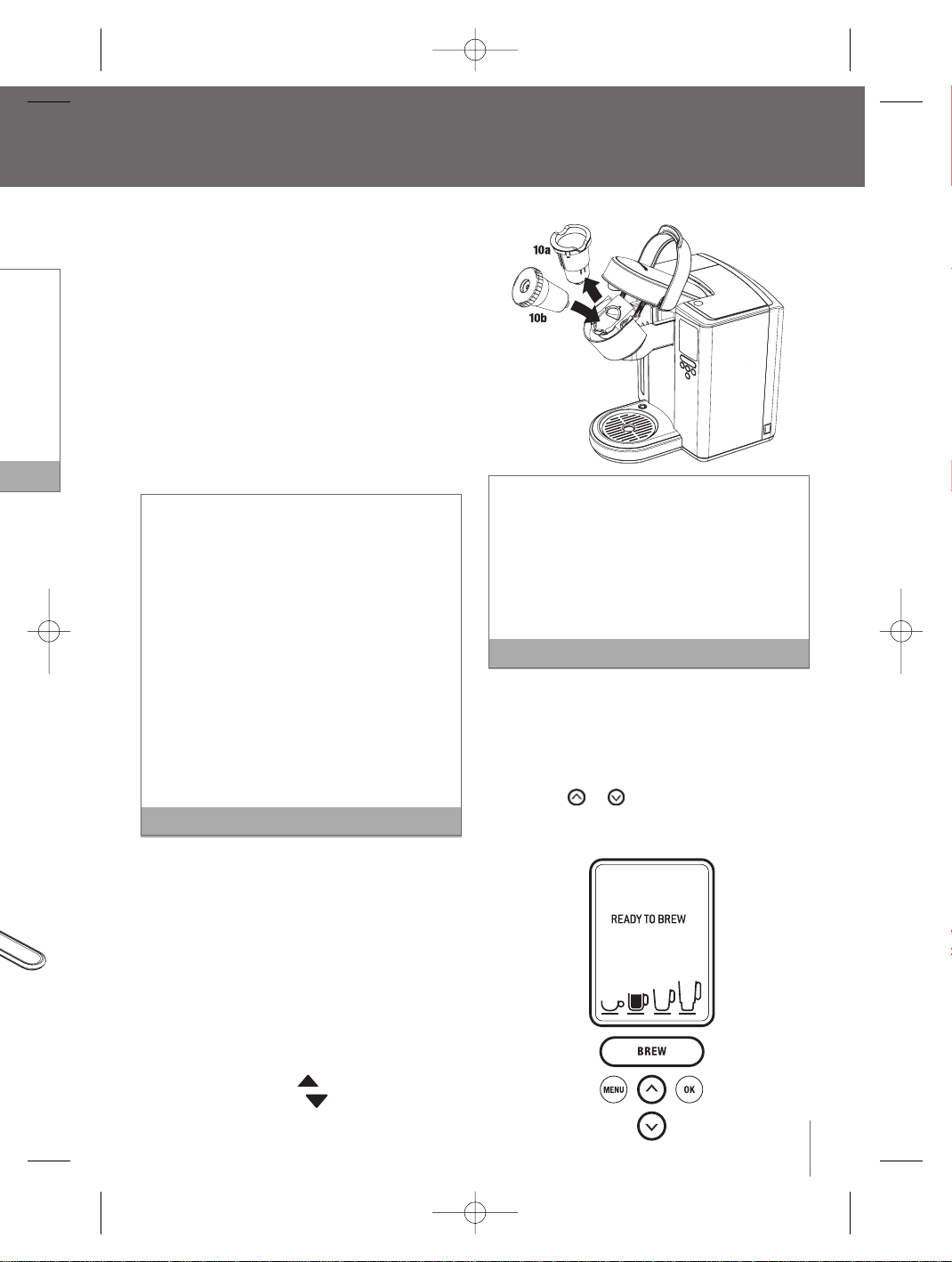
41
8. Utilisez la cuillère à mesurer My K-Cup
MD
pour
emplir le panier du filtre avec au maximum une
pelleté rase de café. 1 pelleté rase équivaut à 2
cuillerées à table. Sinon, servez-vous des traits
de marquage à l’intérieur du panier du filtre
indiquant 1 cuillerée à table ou 2 cuillerées à
table pour utiliser la quantité de café qui vous
convient. N'emplissez pas le panier du filtre
avec plus qu'une cuillerée de café ou
applatissez le café. Then in normal text:
Assurez-vous que le café ne soit pas écrasé et
qu'il n'y ait pas de grains de café sur le bord
supérieur du panier du filtre. Revissez le
couvercle pour sceller le tout.
1 pelletée rase = 2 cuillerées à table
Nous recommandons cette quantité pour le
format de 240 ml (7,25 oz).
Si vous préférez un café plus corsé, sélectionnez
le format de 175 ml (5,25 oz).
Si vous utilisez votre propre mouture :
1. Commencez par une mouture plus grosse,
du type utilisé dans les cafetières à piston.
2. Essayez des moutures similaires à celles
utilisées dans les cafetières filtres.
3. Évitez les moutures de type espresso, qui
peuvent obstruer le panier du filtre ou donner
de mauvais résultats.
REMARQUE
9. Relevez le levier de verrouillage de sécurité.
La chambre d’infusion s’ouvrira vers vous.
10. Placez le support My K-Cup
MD
assemblé dans la
chambre d’infusion comme suit :
a. Retirez le support K-Cup
MD
de la chambre
d’infusion (10a). Rangez-le dans le
compartiment My K-Cup
MD
situé au-dessus
de l’appareil.
b. Insérez le support My K-Cup
MD
assemblé dans
la chambre d’infusion (10b) en vous assurant
d’aligner la flèche sur le couvercle My
K-Cup
MD
avec celle de la chambre
d’infusion.
Il y a deux aiguilles pointues qui sont utilisées pour
perforer le K-Cup
MD
et le support à filtre My K-
Cup
MD
. Une à la base du support à K-Cup
MD
, l'autre
sous la tête de la chambre d'infusion. Pour éviter
des risques de blessures, faites attention lorsque
vous insérez le K-Cup
MD
, le support à K-Cup
MD
,ou
le panier à filtre My K-Cup
MD
.
REMARQUE
11. Abaissez le levier de verrouillage de sécurité
pour refermer la tête de la chambre d’infusion
au-dessus du support à filtre My K-Cup
MD
.
Lorsqu’elle est bien fermée, l’écran ACL indique
‘ READY TO BREW’ (PRÊT À INFUSER). Les
boutons et s’allumeront et le bouton
‘BREW’ (INFUSION) s’allumera et clignotera
jusqu’à 60 secondes.
e
W’
W’
ACL
W’
a tête
n
ouillage
ARQUE
e-gouttes.
situé en
int du
up
MD
dévissant
ntihoraire.
er du
t
incez et
rt.
BR9013 BKC600XL_IB_AMEND.qxp 11/10/07 21:43 Page 41

L‘access
moulu s
a)Utilisez
coque d
b)Utilisez
support
l'access
K-Cup
MD
d'infusio
de remp
le bras d
K-Cup
MD
Cup
MD
d
flèche
flèche
Arrêt du
P
our arrête
sur l’interru
relâchez-le
café, du th
chauffant s
d’eau seron
‘ON-OFF TI
panneau de
l’appareil n
Il se pou
de thé o
l’infusion
d’infusio
instructi
43).Ains
adéquat
sélection
Infusion
L’appareil
le chocolat
etc. Suivez
K-Cup
MD
Fonctionnement de votre système d’infusion une
tasse à la fois de Breville
suite
a. L’écran ACL indiquera le format par défaut de 240
ml (7,25 oz).Pour choisir un autre format, appuyez
sur le bouton pour augmenter la quantité ou
sur pour la diminuer.
Sélectionnez la très petite tasse de 175 ml (5,25 oz)
pour obtenir un café plus corsé, la petite tasse de
240 ml (7,25 oz), la grande tasse de 300 ml (9,25
oz) ou la tasse de voyage de 370 ml (11,25 oz).
La petite tasse de 240 ml (7,25 oz) est le format
par défaut. Pour programmer votre format préféré,
consultez les instructions relatives au réglage de
la fonction ‘BREW SIZE’ (FORMAT D’INFUSION)
(page 48).
REMARQUE
b. Lorsque la sélection du format sera faite, appuyez
sur le bouton ‘BREW’ (INFUSION) qui clignotera. Les
boutons et ne seront plus illuminés.
L’écran ACL indiquera ‘BREWING’ (INFUSION EN
COURS) ainsi que la sélection du format.
Si
vous n’appuyez pas sur le bouton ‘ BREW’
(INFUSION) dans les 60 secondes, l’écran ACL
affichera ‘OPEN HEAD’ et le bouton ‘ BREW’
(INFUSION) sera mis hors fonction afin de prévenir
une activation accidentelle. Pour réactiver la
séquence d’infusion, ouvrez la tête de la chambre
d’infusion en relevant et en abaissant complètement
le levier de verrouillage de sécurité.
REMARQUE
12. L’écran ACL indiquera ‘BREWING’ (INFUSION EN
COURS), toutefois il peut y avoir une courte
pause avant que le processus ne reprenne. Ce
processus dure environ 60 secondes et se
termine avec un jet d’air qui sert à éliminer tout
le liquide du support à filtre My K-Cup
MD
.
L’eau à l’intérieur du support à filtre My K-Cup
MD
est extrêmement chaude au cours du
processus. Pour éviter tout risque de blessure, ne
relevez pas le levier de verrouillage de sécurité
et n’ouvrez pas la chambre d’infusion durant le
processus d’infusion
Après l’infusion, l’écran ACL indiquera ‘HEATING’
alors que l’eau sera réchauffée pour le prochain
cycle. Ce processus dure environ 15 secondes.
La pompe émettra un bruit de vibration. Ceci est
tout à fait normal.
REMARQUE
13. Relevez le levier de verrouillage de sécurité,
retirez le support à filtre My K-Cup
MD
assemblé.
Soyez prudent, car il sera très chaud.
14. Démontez le support à filtre My K-Cup
MD
en
dévissant le couvercle du support dans le sens
antihoraire. Retirez le panier à filtre du support,
jetez le marc et rincez le panier à filtre ainsi que
le support.
15. Savourez votre première tasse de café, de thé ou
de chocolat chaud de qualité supérieure!
42
BR9013 BKC600XL_IB_AMEND.qxp 11/10/07 21:43 Page 42
43
L‘accessoire My K-Cup
MD
est conçu pour le café
moulu seulement.
a)Utilisezle pas de K-Cup
MD
ou du café en
coque dans le panier à filtre My K-Cup
MD
b)Utilisez le panier à filtre My K-Cup
MD
avec le
support à filtre K-Cup
MD
.Après l'infusion avec
l'accessoire My K-Cup
MD
, le support à filtre My
K-Cup
MD
doit être inséré dans la chambre
d'infusion pour pouvoir infuser un K-Cup
MD
.Afin
de remplacer le support à filtre K-Cup
MD
, relevez
le bras de sécurité, et enlevez le support à filtre
K-Cup
MD
. Insérez ensuite le support à filtre K-
Cup
MD
dans la chambre d'infusion, alignez la
flèche sur le support à filtre K-Cup
MD
avec la
flèche dans lachambre d'infusion.
REMARQUE
Arrêt du processus d’infusion
P
our arrêter le processus d’infusion en cours, appuyez
sur l’interrupteur situé sur le côté droit de l’appareil et
relâchez-le afin qu’il indique ‘OFF’. L’écoulement du
café, du thé ou du chocolat chaud cessera, l’élément
chauffant s’arrêtera et les voyants ACL du réservoir
d’eau seront éteints. L’écran ACL indiquera l’heure,
‘ON-OFF TIME’ et ‘AUTO OFF’.Aucun des boutons du
panneau de contrôle ne sera en fonction jusqu’à ce que
l’appareil ne soit remis en marche.
Il se pourrait que vous obteniez moins de café,
de thé ou de chocolat chaud au cours de
l’infusion suivante. Lorsqu’il y a eu interruption
d’infusion, nous recommandons de suivre les
instructions pour l’infusion d’eau chaude (page
43).Ainsi l’infusion qui suivra fournira le volume
adéquat en fonction du format que vous aurez
sélectionné.
REMARQUE
Infusion d’eau chaude
L’appareil peut fournir une tasse d’eau chaude pour
le chocolat chaud en sachet, la cuisson,les soupes,
etc. Suivez les instructions d’infusion pour le
K-Cup
MD
(page 37), sans y insérer de K-Cup
MD
.
Après l’infusion d’un chocolat chaud K-Cup
MD
,
ou l’arrêt du processus d’infusion au milieu du
cycle, nous recommandons de faire un cycle
d’infusion d’eau chaude.
REMARQUE
Remplissage du réservoir d’eau
L’écran ACL affichera ‘REFILL TANK’ (REMPLIR LE
RÉSERVOIR) lorsque le niveau d’eau dans le réservoir
est bas ou que ce dernier a été retiré.
1. Remplissez le réservoir d’eau jusqu’à environ 2,5
cm (1 po) du rebord. Le réservoir d’eau peut être
rempli de deux façons :
a) Retirez le couvercle du réservoir et versez
l’eau directement dans le réservoir alors qu’il
est encore lié au système d’infusion, puis
replacez le couvercle.
b) Retirez le couvercle du réservoir et puis retirez
le réservoir en saisissant la poignée située sur
le côté gauche, puis en soulevant le réservoir.
Remplissez-le d’eau. Replacez le réservoir à
l’intérieur du système d’infusion et remettez le
couvercle.
2. L'écran ACL indiquera soit:
a) 'OPEN HEAD' (TÊTE OUVERTE).Soulevez et
abaissez le bras de sécurité complètement.
b) 'HEATING' (CHAUFFAGE) alors que la machine
réchauffe l'eau pour le prochain cycle
d'infusion. Ce processus dure environ 15
secondes. La pompe fera un bruit de vibration.
Ceci est normal.
L'écran ACL indiquera soit:
a) 'OPEN HEAD' (TÊTE OUVERTE).Soulevez et
abaissez le bras de sécurité complètement.
3. Une fois le bras de sécurité levé et rabaissé, ou
que l'eau est chaude, l’écran ACL affiche
‘READY TO BREW’ (PRÊT À INFUSER), indiquant
que le cycle d’infusion peut reprendre. Les
boutons et seront illuminés et le bouton ‘
BREW’ (INFUSION) s’allumera et clignotera durant
60 secondes.
e
L
venir
mbre
tement
ARQUE
SION EN
urte
nne. Ce
se
iner tout
D
.
-Cup
sure, ne
curité
ant le
EATING’
ochain
ndes.
Ceci est
ARQUE
urité,
ssemblé.
MD
en
le sens
support,
ainsi que
de thé ou
e!
BR9013 BKC600XL_IB_AMEND.qxp 11/10/07 21:43 Page 43
Réglage
Il est option
programmé
Vous dev
fonction
ARRÊT A
1. Appuy
option
ACL ac
CLOCK
2. Appuy
indiqu
réglag
3. Appuy
l’heure
l’indic
4. Lorsqu
sur le
indiqu
5. Appuy
atteind
6. Lorsqu
bouton
option
Menu
Fonctionnement de votre système d’infusion une
tasse à la fois de Breville
suite
Si vous n’appuyez pas sur le bouton ‘BREW’
(INFUSION) dans les 60 secondes, l’écran ACL
affichera ‘ OPEN HEAD’ et le bouton ‘BREW’ sera
mis hors fonction afin de prévenir une activation
accidentelle. Pour réactiver la séquence
d’infusion, ouvrez la tête de la chambre
d’infusion en relevant et en abaissant
complètement le levier de verrouillage de
sécurité.
Ne retirez pas le réservoir d’eau durant le
processus d’infusion.
REMARQUE
Vidange du système d’infusion
Si l’appareil n’a pas été utilisé durant plus d’une
semaine, renouvelez l’eau qui se trouve dans le
réservoir interne en nettoyant le système.
1. S’il y a de l’eau dans le réservoir, retirez le
couvercle,prenez la poignée sur le côté gauche
du réservoir d’eau, puis soulevez le réservoir.
Jetez l’eau, rincez-le réservoir et remplissez-le
d’eau en bouteille ou filtrée. Replacez le réservoir
d’eau dans l’appareil et remettez le couvercle.
2. S’il n’y a pas d’eau dans le réservoir, remplissez-
le d’eau. Replacez le réservoir dans l’appareil et
remettez le couvercle.
3. Assurez-vous que l’appareil est en position de
marche. Relevez et abaissez le levier de
verrouillage de sécurité de l’appareil sans insérer
de K-Cup
MD
.
4. L’écran ACL indiquera «READY TO BREW» (PRÊT
À INFUSER) et le bouton «BREW» (INFUSION) sera
allumé et clignotera.
5. L’écran ACL indiquera le format par défaut (240
ml/7,25 oz) à moins qu’il n’ait été programmé
différemment). Sélectionnez le grand format de
370 ml (11,25 oz) en appuyant sur le bouton
du panneau de contrôle.
6. Placez une tasse de 400 ml (12 oz) sur le plateau
ramasse-gouttes. Le plateau d'égouttage ainsi
que le ramasse-gouttes peuvent être retirés afin
d'accomoder des plus grandes tasses ou des
tasses de voyage.
7. Appuyez sur le bouton ‘BREW’. L’eau chaude
s’écoulera dans la tasse. Lorsque l’écoulement
s’arrêtera, jetez l’eau chaude.
8. Répétez le processus encore deux fois pour
renouveler complètement l’eau du réservoir
interne.
44
BR9013 BKC600XL_IB_AMEND.qxp 11/10/07 21:43 Page 44
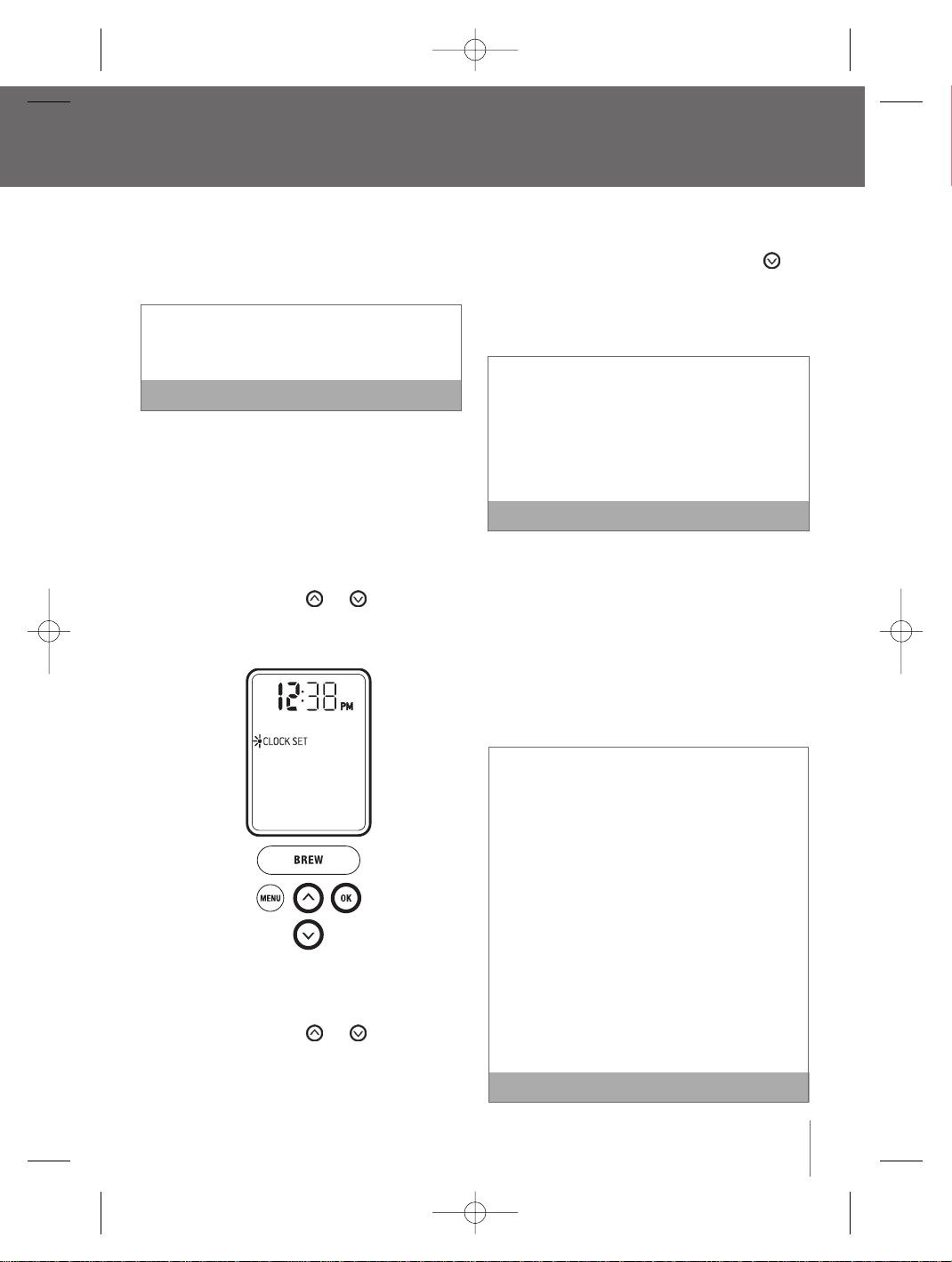
45
Réglage de l’horloge ‘Clock set’
Il est optionnel de programmer l'horloge. une fois l'horloge
programmée, l'heure s'affichera sur l'écran ACL
Vous devez régler l’horloge pour utiliser la
fonction «ON-OFF TIME» (MISE EN MARCHE ET
ARRÊT AUTOMATIQUE).
REMARQUE
1. Appuyez sur le bouton ‘MENU’. Le menu des
options de programmation apparaîtra sur l’écran
ACL accompagné d’un voyant clignotant sur ‘
CLOCK SET’ (RÉGLAGE DE L’HORLOGE).
2. Appuyez sur le bouton ‘OK’. L’heure clignotera,
indiquant que vous pouvez entreprendre le
réglage.
3. Appuyez sur le bouton ou pour atteindre
l’heure appropriée. S’il est plus tard que 12 h,
l’indicateur passera de AM à PM.
4. Lorsque l’heure appropriée est atteinte, appuyez
sur le bouton ‘OK’. Les minutes clignoteront,
indiquant que vous pouvez les régler.
5. Appuyez sur le bouton ou pour
atteindre les minutes appropriées.
6. Lorsqu’elles seront atteintes, appuyez sur le
bouton ‘OK’. L’écran ACL retournera au menu des
options de programmation.
7. Pour quitter le menu des options de
programmation, appuyez sur le bouton ‘ MENU’.
Vous pouvez aussi appuyer sur le bouton
pour atteindre ‘EXIT MENU’ (QUITTER LE MENU)
et sur le bouton ‘OK’. L’écran ACL retournera à
l’affichage principal, indiquant le temps
sélectionné.
Si le courant électrique est interrompu, l’horloge
devra être réglée à nouveau. Le format et la
température d’infusion sont conservés et
restaurés automatiquement.Tous les autres
réglages seront restaurés automatiquement une
fois que l’horloge aura été réglée à nouveau.
REMARQUE
Réglage de mise en marche et d’arrêt
automatiques ‘on-off’
Cette fonction vous permet de programmer l’heure à
laquelle l’appareil se mettra en marche et s’arrêtera
automatiquement. En programmant votre appareil pour
qu’il se mette en marche automatiquement, vous
n’aurez pas à attendre qu’il chauffe l’eau du réservoir.
Le système prendra environ 3 minutes pour réchauffer
l’eau lorsqu’elle est à la température ambiante.
Vous devez régler l’horloge si vous utilisez la
fonction ‘ON-OFF’.
Une solution de remplacement au réglage de la
fonction ‘ON-OFF’ est de laisser l’appareil en marche
en tout temps.Nous recommandons cette solution
afin que votre système soit toujours prêt à infuser une
tasse de café frais de qualité supérieure,un thé ou un
chocolat chaud.
Pour arrêter votre système,appuyez sur l’interrupteur
qui se trouve derrière,à la base, sur le côté droit,puis
relâchez-le.L’horloge conservera son réglage,
toutefois vous ne pourrez pas activer le cycle
d’infusion.Pour remettre l’appareil en marche,
appuyez sur l’interrupteur et relâchez-le à nouveau.
Vous devrez attendre que l’eau se réchauffe avant
qu’il ne soit prêt à entreprendre une nouvelle infusion.
REMARQUE
Menu et options de programmation
e
aut (240
rammé
rmat de
outon
le plateau
ge ainsi
tirés afin
ou des
aude
ulement
pour
rvoir
BR9013 BKC600XL_IB_AMEND.qxp 11/10/07 21:43 Page 45
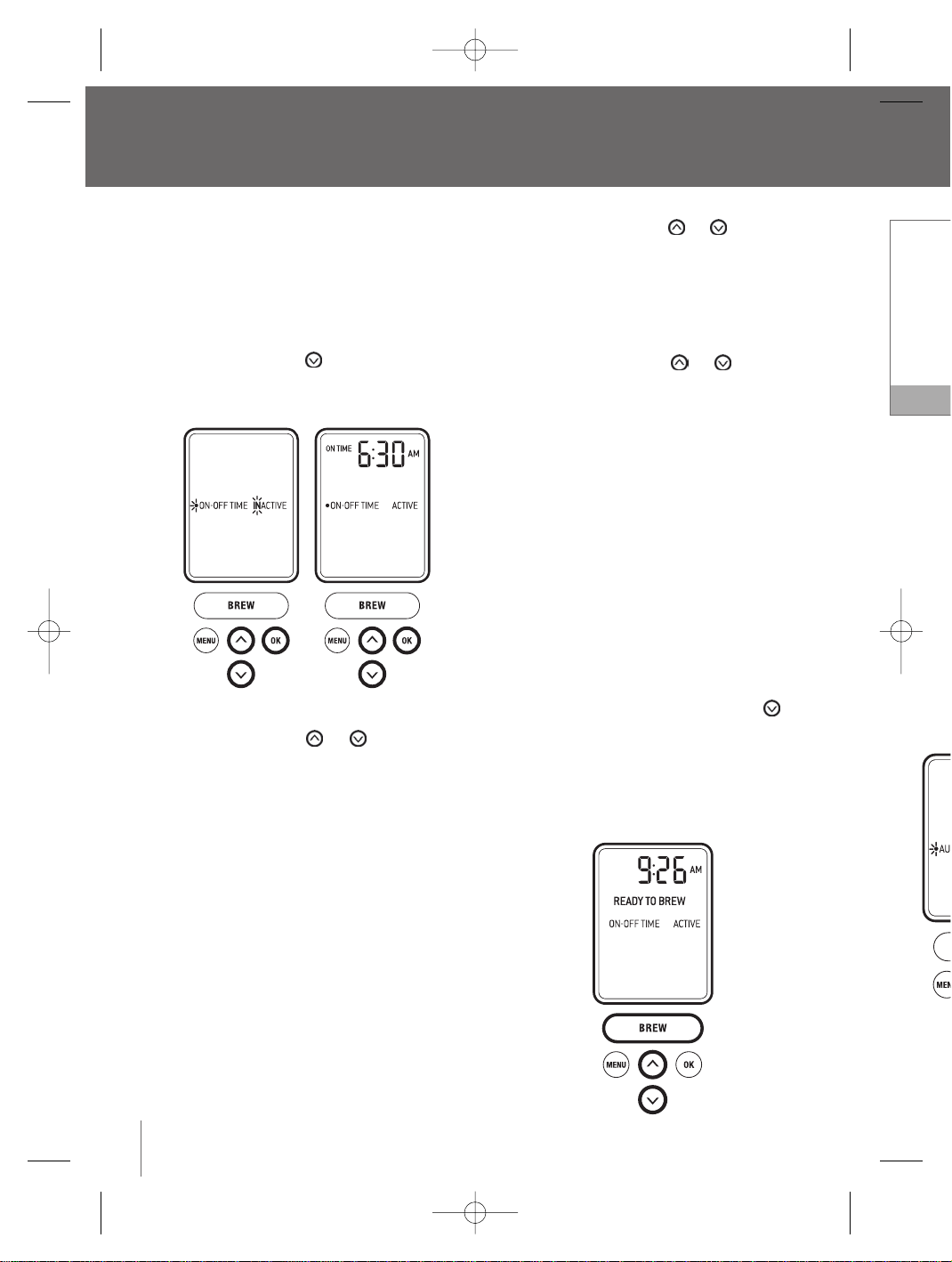
Si vous s
des péri
et d’arrê
l’interrup
côté dro
Vous dev
avant de
Réglage
automat
Cette fonc
après deux
1. Appuy
progra
un voy
DE L’H
2. Appuy
«AUTO
3. Appuy
4. Appuy
deux o
Menu et options de programmation
suite
Réglage de mise en marche et d’arrêt
automatiques ‘ON-OFF’
suite
1. Appuyez sur le bouton ‘MENU’. Le menu des
options de programmation apparaîtra sur l’écran
ACL et un voyant clignotera sur ‘CLOCK SET’
RÉGLAGE DE L’HORLOGE).
2. Appuyez sur le bouton our atteindre ‘ON-OFF
TIME’ (MISE EN MARCHE ET ARRÊT
AUTOMATIQUE).
3. Appuyez sur le bouton ‘OK’.
4. Appuyez sur le bouton ou pour voir les
deux options:
a. ‘ ON-OFF TIME’ affichera ‘INACTIVE’, indiquant
que l’appareil ne se mettra pas en marche
automatiquement.Appuyez sur le bouton ‘’OK’
pour sélectionner cette fonction. L’écran ACL
reviendra au menu des options de
programmation.
b. ‘ ON-OFF TIME’ affichera ‘ACTIVE’, indiquant que
l’appareil se mettra en marche et s’arrêtera
automatiquement aux heures que vous aurez
programmées.Appuyez sur le bouton ‘OK’ pour
sélectionner cette fonction.
Réglage d’ ‘on time’ (heure de la mise en marche)
i. L’écran ACL affichera ‘ON TIME’, indiquant
qu’il est temps de régler l’heure à laquelle
vous souhaitez la mise en marche
automatique. L’heure clignotera au moment de
procéder au réglage de l’heure.
ii. Appuyez sur le bouton ou pour
atteindre l’heure appropriée. S’il est plus tard
que 12 h, l’indicateur passera d’ ‘AM’ à ‘PM’.
iii. Lorsque l’heure désirée est atteinte, appuyez
sur le bouton ‘OK’. Les minutes clignoteront,
indiquant que vous pouvez procéder au réglage.
iv. Appuyez sur le bouton ou pour
atteindre les minutes appropriées.
v. Lorsque l’heure désirée est atteinte, appuyez
sur le bouton ‘OK’. L’écran ACL affichera ‘OFF
TIME’, indiquant que l’heure sélectionnée pour
la mise en marche et l’arrêt automatique est
programmée.
Réglage d’« OFF TIME’ (HEURE DE L’ARRÊT)
i. Suivez les instructions (ii a iv) pour le réglage
d’ ‘ON TIME’.
ii. Une fois l’heure désirée atteinte, appuyez sur
le bouton ‘OK’. L’écran ACL reviendra au menu
des options de programmation.
5. Pour quitter le menu des options de
programmation, appuyez sur le bouton ‘MENU’.
Vous pouvez aussi appuyer sur le bouton
pour atteindre ‘EXIT MENU’ (QUITTER LE MENU)
et appuyez sur le bouton ‘OK’.L’écran ACL
reviendra à l’affichage principal, indiquant si vous
avez activé la fonction ‘ON-OFF TIME’ (MISE EN
MARCHE ET ARRÊT AUTOMATIQUE).
46
BR9013 BKC600XL_IB_AMEND.qxp 11/10/07 21:43 Page 46
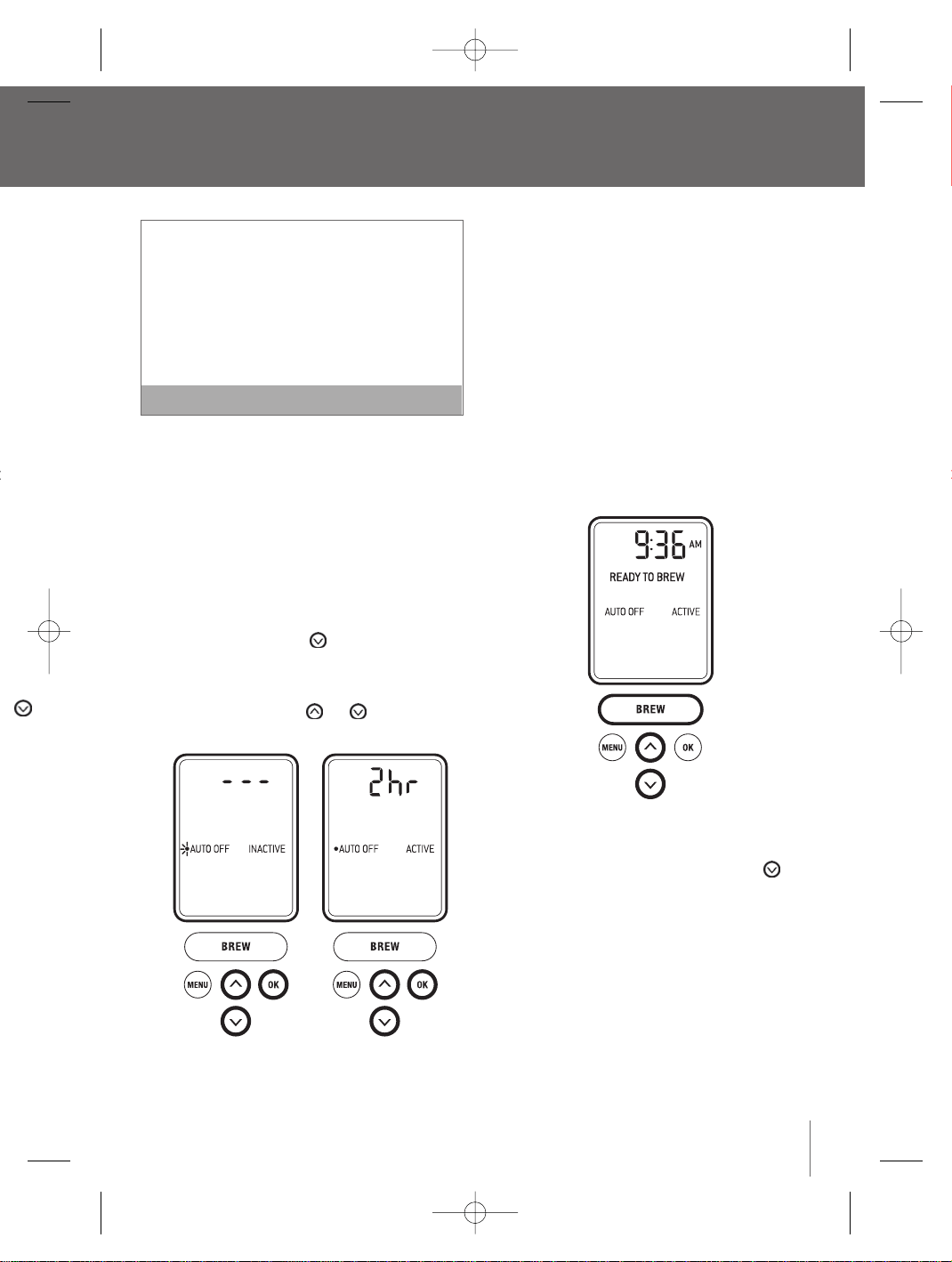
47
Si vous souhaitez faire des infusions en dehors
des périodes programmées de mise en marche
et d’arrêt automatique, appuyez et relâchez
l’interrupteur situé à la base, en arrière, sur le
côté droit pour remettre l’appareil en marche.
Vous devrez attendre que l’eau se réchauffe
avant de procéder à l’infusion.
REMARQUE
Réglage de la fonction d’arrêt
automatique ‘auto off’
Cette fonction arrête automatiquement le système
après deux heures de non-utilisation.
1. Appuyez sur le bouton ‘MENU’. Les options de
programmation apparaîtront sur l’écran ACL et
un voyant clignotera sur ‘CLOCK SET’ (RÉGLAGE
DE L’HORLOGE).
2. Appuyez sur le bouton pour atteindre ‘
«AUTO OFF».
3. Appuyez sur le bouton ‘OK’.
4. Appuyez sur le bouton ou pour voir les
deux options:
a) ‘ AUTO OFF’ affichera ‘INACTIVE’ et l’écran
ACL affichera ‘ --- ’, indiquant que le système
ne s’arrêtera pas automatiquement.Appuyez
sur ‘ OK’ pour sélectionner cette option.
L’écran ACL reviendra au menu des options
de programmation.
b) ‘ AUTO OFF’ affichera ‘ ACTIVE’ et l’écran ACL
affichera ‘2 h’, indiquant que le système
s’arrêtera automatiquement après deux
heures.Appuyez sur le bouton ‘OK’. L’écran
ACL reviendra au menu des options de
programmation.
5. Pour quitter le menu des options de
programmation, appuyez sur le bouton ‘MENU’.
Vous pouvez aussi appuyer sur le bouton
pour atteindre ‘EXIT MENU’ et appuyez sur le
bouton ‘OK’. L’écran ACL reviendra à l’affichage
principal, indiquant si la fonction ‘AUTO OFF’
(ARRÊT AUTOMATIQUE) est activée.
ur
plus tard
à ‘PM’.
appuyez
teront,
au réglage.
our
appuyez
hera ‘OFF
nnée pour
tique est
ÊT)
e réglage
puyez sur
a au menu
‘MENU’.
on
E MENU)
ACL
ant si vous
MISE EN
BR9013 BKC600XL_IB_AMEND.qxp 11/10/07 21:43 Page 47
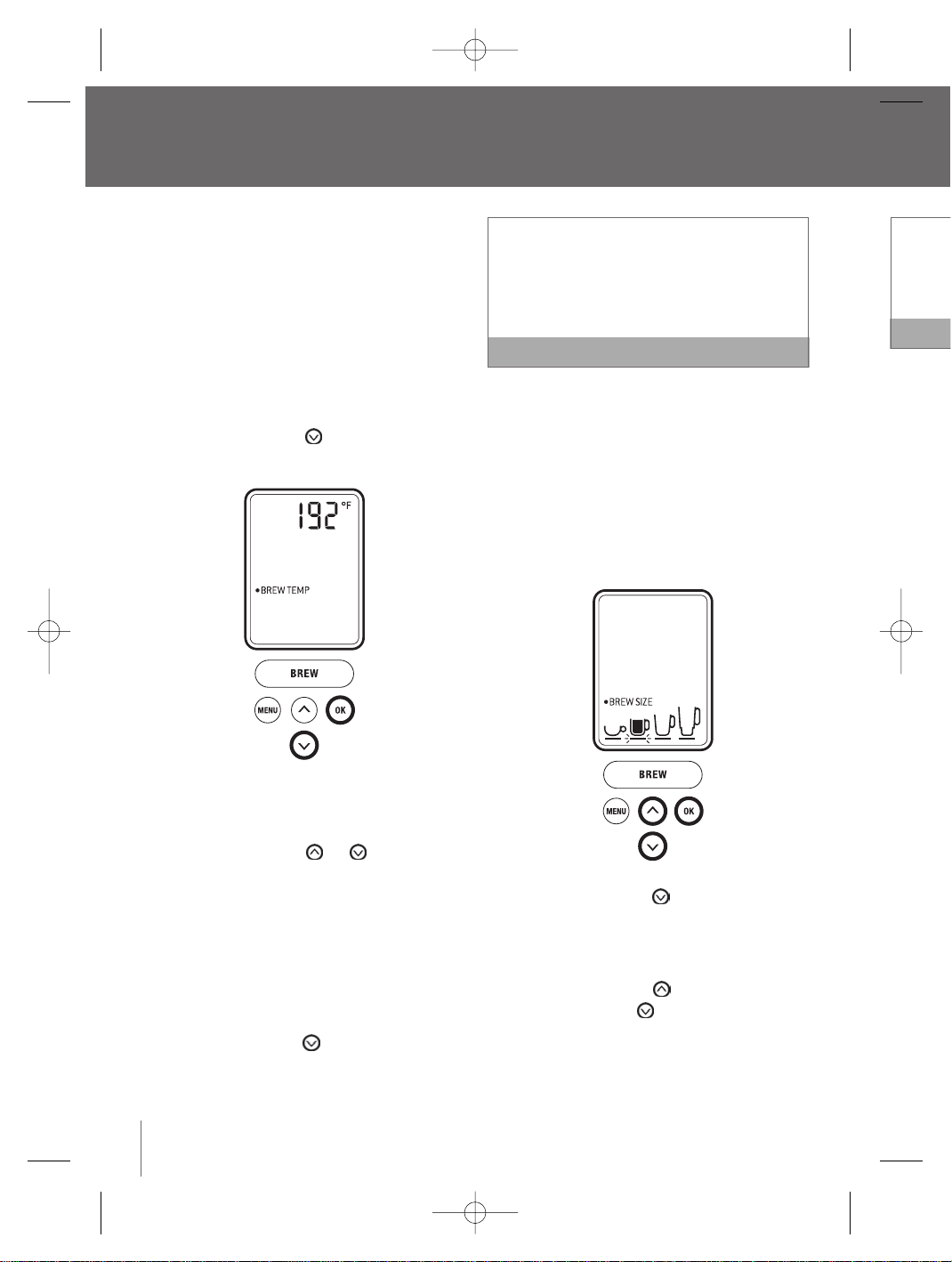
Sélection
corsé (17
ml/7,25
tasse de
5. Lorsqu
bouton
option
6. Pour q
progra
Vous p
pour a
bouton
princip
Menu et options de programmation
suite
Réglage de la température d’infusion
‘Brew temp’
Le système infuse le café à une température réglée à
192 °F (89 °C).Vous pouvez baisser cette
température de 5 °F (3 °C) si vous préférez une tasse
de café, de thé ou de chocolat chaud moins chaude.
1. Appuyez sur le bouton ‘MENU’. Les options de
programmation apparaîtront sur l’écran ACL et
un voyant clignotera sur ‘CLOCK SET’ (RÉGLAGE
DE L’HORLOGE).
2. Appuyez sur le bouton pour atteindre ‘ BREW
TEMP’ (TEMPÉRATURE D’INFUSION).
3. Appuyez sur le bouton ‘OK’. L’écran ACL affichera
la température par défaut, 192 °F, ou la
température d’infusion programmée.
4. Appuyez sur le bouton ou pour atteindre
la température d’infusion appropriée. Cette
température peut être réglée entre 187 °F
(86 °C) et 192 °F (89 °C).
5. Appuyez sur le bouton ‘OK’. L’écran ACL
reviendra au menu des options de
programmation.
6. Pour quitter les options de programmation,
appuyez sur le bouton ‘MENU’.Vous pouvez aussi
appuyer sur le bouton pour atteindre ‘EXIT
MENU’ et appuyez sur le bouton ‘OK’.L’écran
ACL reviendra à l’affichage principal.
Lorsque vous utilisez le système d’infusion à de
hautes altitudes (plus de 1500 m/5000 pi), s’il
advient que l’eau soit en ébullition, utilisez la
fonction «BREW TEMP» (TEMPÉRATURE
D’INFUSION) pour abaisser la température.
REMARQUE
Réglage du format d’infusion ‘Brew size’
Cette fonction vous permet d’éviter le parcours du
menu des formats si vous en avez un préféré.
1. Appuyez sur le bouton ‘MENU’. Le menu des
options de programmation apparaîtra sur l’écran
ACL et un voyant clignotera sur ‘CLOCK SET’
(RÉGLAGE DE L’HORLOGE).
2. Appuyez sur le bouton pour atteindre
‘BREW SIZE’ (FORMAT D’INFUSION).
3. Appuyez sur le bouton ‘OK’. L’écran ACL affichera
le format par défaut (240 ml/7,25 oz).
4. Appuyez sur le bouton pour augmenter le
format ou le bouton pour le diminuer.
48
BR9013 BKC600XL_IB_AMEND.qxp 11/10/07 21:43 Page 48
49
Sélectionnez la plus petite tasse pour un café plus
corsé (175 ml/5,25 oz), la petite tasse (240
ml/7,25 oz), la grande tasse (300 ml/9,25 oz) ou la
tasse de voyage (370 ml/11,25 oz).
REMARQUE
5. Lorsque le format est sélectionné, appuyez sur le
bouton ‘OK’. L’écran ACL reviendra au menu des
options de programmation.
6. Pour quitter le menu des options de
programmation, appuyez sur le bouton ‘MENU’.
Vous pouvez aussi appuyer sur le bouton
pour atteindre ‘EXIT MENU’ et appuyez sur le
bouton ‘OK’. L’écran ACL reviendra à l’affichage
principal et indiquera le format sélectionné.
n à de
), s’il
z la
e.
ARQUE
w size’
urs du
ré.
u des
ur l’écran
SET’
re
L affichera
nter le
er.
BR9013 BKC600XL_IB_AMEND.qxp 11/10/07 21:43 Page 49
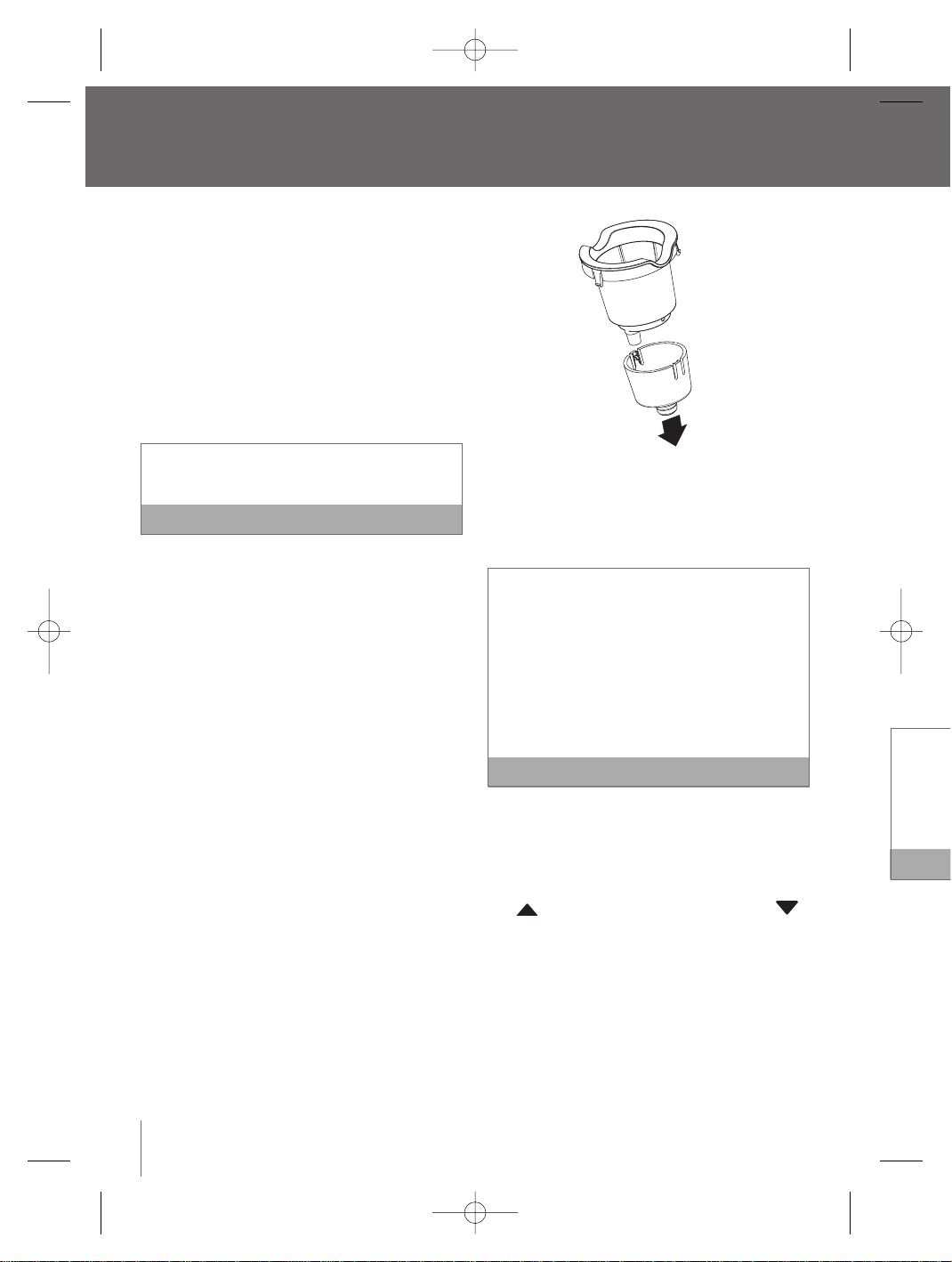
2. Démo
couve
panier
3. Nettoy
suppo
d’un c
soigne
suppo
4. Range
le com
de l’ap
Nettoyag
couverc
1. Lavez
chiffon
Le cou
lave-v
2. Nettoy
savon
séche
réserv
pourra
pas êt
Rincez c
nettoyag
nettoyan
contami
l’appare
Nettoyag
Un nettoya
recomman
moment o
chaque de
1. Démo
filtre in
le filtre
Entretien et nettoyage
Avant le nettoyage, assurez-vous que l’appareil est
éteint. Débranchez-le de la prise murale et attendez
qu’il ait refroidi.
Nettoyage de la chambre d’infusion
Un nettoyage régulier de la chambre d’infusion et de
ses composantes externes est recommandé.
1. N’immergez jamais l’appareil dans l’eau ou dans
tout autre liquide. Lavez la chambre à l’aide d’un
chiffon humide et essuyez soigneusement.
N’utilisez pas de tampons ou de nettoyants
abrasifs, car ils pourraient érafler la surface.
REMARQUE
2. Le plateau d'égouttage ainsi que le plateau
ramasse-gouttes peuvent contenir jusqu’à 400
ml/12 oz de liquide, L'indicateur du niveau d'eau,
visible à travers le plateau égouttoir se lèvera
quand le plateau sera plein. Le plateau égouttoir
et le ramasse-goutte devraient être alors vidés
et nettoyés.
Pour retirer les composantes du plateau
d’égouttage, glissez-le vers vous,en le
maintenant à niveau afin de ne pas renverser
d’eau. Nettoyez les deux parties dans de l’eau
tiède savonneuse à l’aide d’un chiffon doux, puis
rincez-les et séchez-les soigneusement. Le
plateau d’égouttage et le plateau ramasse-
gouttes vont au lave-vaisselle.
Nettoyage du support à filtre K-cup
MD
Un nettoyage régulier du support à filtre K-Cup
MD
est recommandé.
1. Relevez le levier de verrouillage de sécurité et
retirez le support à filtre K-Cup
MD
de la chambre
d’infusion (consultez les instructions relatives à
l’infusion avec l’accessoire My K-Cup
MD
à la
(page 40).
2. Démontez le support à filtre K-Cup
MD
en tirant par
le bas sur l’entonnoir situé à la base du support.
3. Nettoyez les deux parties dans de l’eau tiède
savonneuse, avec un chiffon doux,puis rincez
et séchez soigneusement. Le support à filtre
K-Cup
MD
et l’entonnoir vont au lave-vaisselle.
Le support à filtre K-Cup
MD
comporte une aiguille
à l’intérieur de la base. En cas d’obstruction
causée par le marc de café, vous pouvez vous
servir d’un trombone ou d’un instrument similaire,
que vous insérez dans l’aiguille pour dégager
l’obstruction.Afin d’éviter tout risque de blessure,
ne mettez pas vos doigts à l’intérieur du support à
filtre K-Cup
MD
.
REMARQUE
4. Après le nettoyage, replacez l’entonnoir à
l’intérieur du support à filtre K-Cup
MD
.
5. Replacez le support à filtre K-Cup
MD
à l’intérieur
de la chambre d’infusion, en alignant la flèche
du support à filtre K-Cup
MD
avec celle
de la chambre d’infusion.
Nettoyage de l’accessoire my K-cup
MD
Un nettoyage régulier de l’accessoire My K-Cup
MD
est recommandé.
1. Retirez le support My K-Cup
MD
assemblé de
l’appareil en relevant le levier de verrouillage de
sécurité. Soyez prudent, car le support My K-Cup
MD
sera chaud.
50
BR9013 BKC600XL_IB_AMEND.qxp 11/10/07 21:43 Page 50
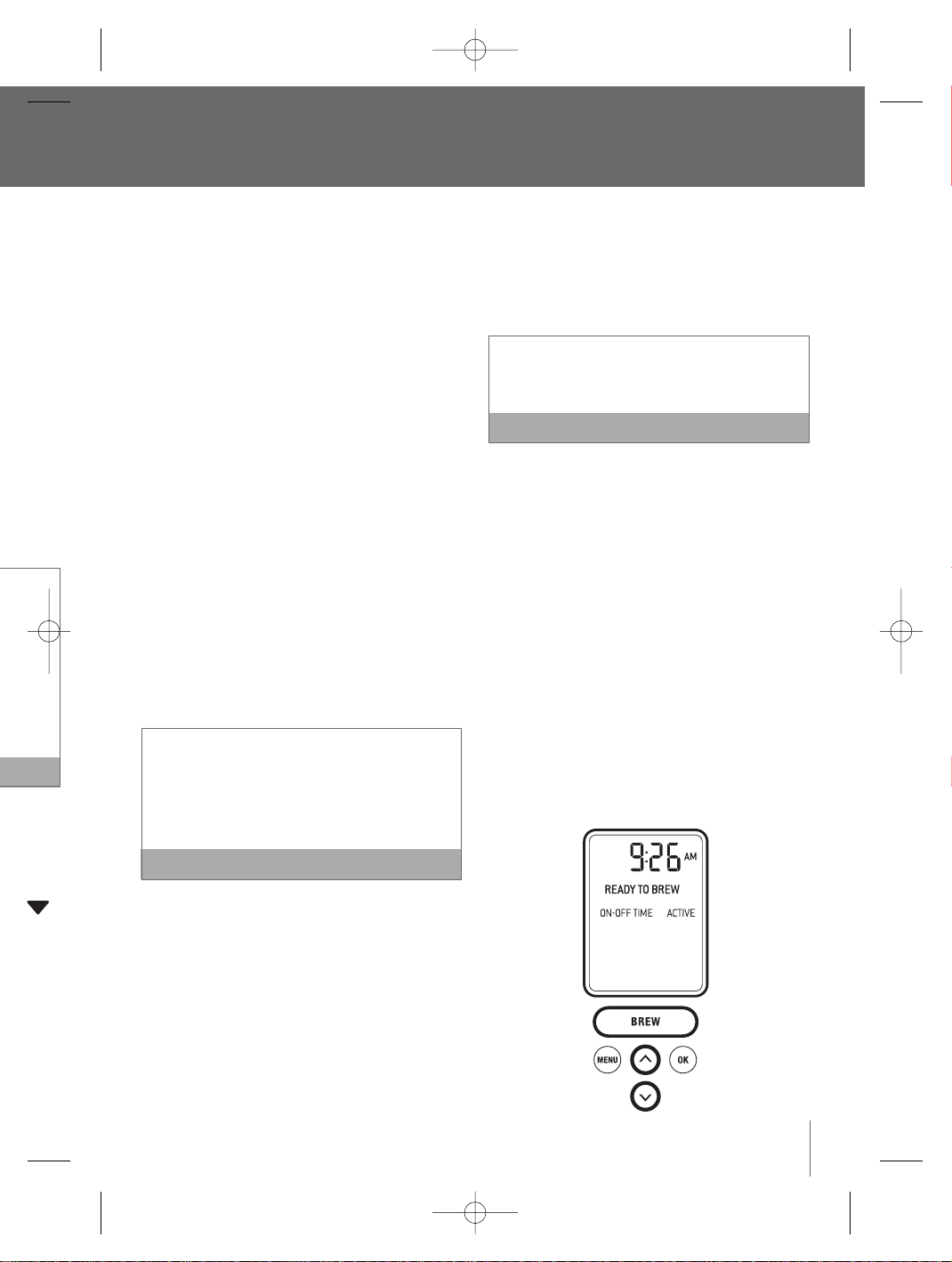
51
2. Démontez le support My K-Cup
MD
en dévissant le
couvercle dans le sens antihoraire.Retirez le
panier à filtre du support et jetez le marc.
3. Nettoyez le couvercle,le panier à filtre et le
support dans de l’eau tiède savonneuse, à l’aide
d’un chiffon doux, puis rincez et séchez
soigneusement.Toutes les composantes du
support My K-Cup
MD
vont au lave-vaisselle.
4. Rangez le support My K-Cup
MD
réassemblé dans
le compartiment My K-Cup
MD
situé sur le dessus
de l’appareil.
Nettoyage du réservoir d’eau et du
couvercle
1. Lavez le couvercle du réservoir d’eau avec un
chiffon humide, puis essuyez soigneusement.
Le couvercle ne doit pas être mis dans le
lave-vaisselle.
2. Nettoyez le réservoir d'eau dans de l'eau
savonneuse avec un chiffon doux, puis rincez et
séchez bien. Ne séchez pas l'intérieur du
réservoir avec du tissus puisque des peluches
pourraient rester. Le réservoir d'eau ne devrait
pas être lavée au lave-vaisselle.
Rincez complètement le réservoir d’eau après le
nettoyage pour qu’il n’y ait plus de résidus de
nettoyants ou de solution nettoyante qui pourrait
contaminer l’eau contenue dans le réservoir de
l’appareil.
REMARQUE
Nettoyage du filtre à eau
Un nettoyage régulier du filtre à eau est
recommandé. Nous vous suggérons de le faire au
moment où le filtre au charbon est remplacé, à
chaque deux mois ou après 60 remplissages.
1. Démontez le filtre à oú en séparant le support à
filtre inférieur du support à filtre supérieur. Jetez
le filtre au charbon.
2. Nettoyez la partie supérieure et la partie
inférieure du support à filtre dans de l’eau tiède
savonneuse, à l’aide d’un chiffon doux,puis
rincez et séchez soigneusement. Les deux
parties peuvent être placées sur le plateau
supérieur du lave-vaisselle.
Remplacez le filtre au charbon tous les deux
mois ou après 60 remplissages, plus souvent si
votre eau est dure.
REMARQUE
Pour commander des filtres au charbon de
remplacement, consultez le site www.breville.com.
Nous recommandons de retirer le filtre à eau si vous
choisissez de ne pas remplacer le filtre au charbon
après deux mois, car le filtre pourrait être obstrué et
altérer le goût et l’odeur de l’eau.
Détartrage du système d’infusion
Le contenu en minéraux varie d’un endroit à un
autre. Selon le type de minéraux contenus dans les
eaux de votre région, des dépôts de calcium ou de
tartre peuvent s’accumuler dans l’appareil. Le tartre
n’est pas toxique, mais s’il n’est pas enlevé, il nuira
au bon fonctionnement de l’appareil. Le détartrage du
système contribue à préserver l’élément chauffant
ainsi que les autres composantes internes du
système entrant en contact avec l’eau.
tiède
rincez
filtre
sselle.
aiguille
n
ous
milaire,
ger
essure,
upport à
ARQUE
à
’intérieur
flèche
elle
up
MD
Cup
MD
é de
illage de
My K-Cup
BR9013 BKC600XL_IB_AMEND.qxp 11/10/07 21:43 Page 51
Entretien et nettoyage
suite
Le système devrait être détartré tous les trois à six
mois pour assurer un fonctionnement optimal. Il est
possible que les dépôts de calcium se forment plus
rapidement, nécessitant un détartrage plus fréquent.
Le système d’infusion comporte des capteurs qui
détectent les dépôts de tartre nuisant au
fonctionnement de l’appareil. Lorsque des dépôts
sont détectés, l’écran ACL affiche ‘DESCALE’
(DÉTARTRAGE).
Le système d’infusion continuera à fonctionner
même si l’écran ACL affiche ‘DESCALE’
(DÉTARTRAGE).
Toutefois, si vous ne procédez pas au détartrage
assez rapidement après l’affichage, les dépôts
qui continueront à s’accumuler pourraient
endommager l’appareil. Si cela se produit,‘
DESCALE’ commencera à clignoter, vous
avertissant des dommages potentiels causés à
l’appareil si vous ne procédez pas au détartrage
immédiatement.
REMARQUE
Suivez rapidement ces étapes chaque fois que
l’écran ACL affiche ‘DESCALE’ (DÉTARTRAGE) afin
d’assurer le fonctionnement optimal de votre
appareil.
1. Videz le réservoir d’eau
2. Versez 2 L (60 oz) de vinaigre dans le réservoir
d’eau juste en dessous du rebord de la zone
transparente.
3. Placez une grande tasse de 400 ml (12 oz) en
céramique (et non en plastique) sur le plateau
d’égouttage.
4. Sélectionnez le plus grand format (370 ml/11,25
oz) en appuyant sur le bouton du panneau
de contrôle.
5. Démarrez une infusion de nettoyage sans K-Cup
MD
(consultez les instructions relatives au
processus d’infusion d’eau chaude, page 43).
Versez le contenu de la tasse dans l’évier.
6. Répétez le processus de nettoyage jusqu'à ce
que le réservoir d’eau soit vide.Versez dans
l’évier le contenu de la tasse à chaque cycle.
Rappelez-vous de relever et de rabaisser le levier
de verrouillage de sécurité entre chaque cycle
afin que les boutons du panneau de contrôle
s’allument.
7. Laissez l’appareil reposer au moins quatre
heures en le laissant en marche.
8. Rincez abondamment le réservoir d’eau et
remplissez-le d’eau fraîche.
9. Placez une grande tasse en céramique (et non en
plastique) de 400 ml (12 oz) sur le plateau
d’égouttage.
10. Démarrez une infusion de nettoyage sans
K-Cup
MD
(consultez les instructions relatives
au processus d’infusion d’eau chaude, page 43).
Versez le contenu de la tasse dans l’évier.
11. Répétez le processus de nettoyage jusqu'à ce
que le réservoir d’eau soit vide.Versez dans
l’évier le contenu de la tasse à chaque cycle.
Vous pourriez avoir à exécuter des cycles de
rinçage supplémentaires si vous détectez un goût
résiduel. Rappelez-vous de relever et de
rabaisser le levier de verrouillage de sécurité
entre chaque cycle afin que les boutons du
panneau de contrôle s’allument.
12. L’appareil est maintenant prêt à être utilisé.
Si l’écran ACL continue d’afficher ‘DESCALE’
(DÉTARTRAGE) après avoir complété le
processus, répétez les étapes apparaissant plus
haut.
REMARQUE
52
Entrepos
Avant de n
vous qu’il
murale et
réservoir d
soigneuse
• Rangez v
pour pré
• Rangez v
gel, sino
geler et
été rang
point de
réchauff
atteigne
• Lorsque
remisé,
d’eau à
infusions
MD
(cons
d’eau ch
BR9013 BKC600XL_IB_AMEND.qxp 11/10/07 21:43 Page 52
53
ns K-Cup
au
e 43).
er.
u'à ce
dans
cycle.
er le levier
e cycle
ntrôle
atre
et
(et non en
eau
ns
atives
page 43).
er.
u'à ce
dans
cycle.
es de
ez un goût
e
curité
s du
lisé.
LE’
nt plus
ARQUE
Entreposage
Avant de nettoyer ou de déplacer l’appareil, assurez-
vous qu’il est éteint. Débranchez-le de la prise
murale et laissez-lui le temps de refroidir. Le
réservoir d’eau doit être vidé et séché
soigneusement.
• Rangez votre système dans une position verticale
pour prévenir les écoulements du réservoir interne.
• Rangez votre système dans un endroit à l’abri du
gel, sinon l’eau qui se trouve à l’intérieur risque de
geler et d’endommager l’appareil. Si l’appareil a
été rangé dans un environnement au-dessous du
point de congélation, assurez-vous de le laisser se
réchauffer durant au moins deux heures pour qu’il
atteigne la température ambiante avant de l’utiliser.
• Lorsque vous utilisez l’appareil après qu’il ait été
remisé, nous recommandons de rincer le réservoir
d’eau à l’eau fraîche et de procéder à trois
infusions de rinçage sans utiliser de filtres K-Cup
MD
(consultez les instructions relatives à l’infusion
d’eau chaude, page 43).
BR9013 BKC600XL_IB_AMEND.qxp 11/10/07 21:43 Page 53
Dépannage
54
Problèmes possibles Solutions faciles
L’appareil ne se met
pas en marche
Le système d’infusion
de fonctionne pas lors
de l’usage initial
L’infusion ne se
produit pas
• Branchez l’appareil dans une prise indépendante.
• Vérifiez que le branchement est adéquat.
• Branchez-le dans une autre prise.
• Réarmez le disjoncteur si nécessaire.
• Assurez-vous que l’interrupteur est à ‘ON’. Le réservoir d’eau devrait être
illuminé. Les boutons ‘BREW’ (INFUSION), et devraient
être allumés.
• Le réservoir du système d’infusion doit être rempli d’eau avant le premier
usage. L’écran ACL affichera ‘PRIME’ (consultez les instructions relatives
au processus de préparation initiale, page 37).
• Si l’appareil a été exposé à des températures sous le point de congélation,
attendez au moins deux heures pour qu’il atteigne la température
ambiante avant de l’utiliser.
• Après avoir placé le filtre K-Cup
MD
dans le support K-Cup
MD
ou le support
My K-Cup
MD
dans la chambre d’infusion, vérifiez que le levier de
verrouillage de sécurité est rabaissé et verrouillé. L’écran ACL devrait
afficher ‘READY TO BREW’ (PRÊT À INFUSER). Les boutons et
devraient être allumés et le bouton ‘BREW’ (INFUSION) devrait également
être allumé et clignoter jusqu’à 60 secondes.
• Si l’écran ACL affiche ‘REFILL TANK’ (REMPLIR LE RÉSERVOIR), ajoutez
de l’eau dans le réservoir d’eau ou vérifiez s’il est bien fixé à l’appareil
(page 43).
• Si l’écran ACL affiche ‘REFILL TANK’ alors que le réservoir est plein,
contactez le service à la clientèle au 1-866-BREVILLE (1-866-273-8455).
• Si vous n’avez pas appuyé sur le bouton ‘BREW’ (INFUSION) dans les 60
secondes, l’écran ACL affichera ‘OPEN HEAD’ (DESSUS OUVERT) et le
bouton ‘BREW’ sera hors fonction afin d’éviter une activation accidentelle.
Pour réactiver la séquence d’infusion,ouvrez la tête de la chambre
d’infusion en relevant et en rabaissant complètement le levier de
verrouillage de sécurité.
• L’aiguille d’écoulement peut être obstruée (consultez les instructions
relatives au nettoyage du support à filtre K-Cup
MD
, page 50).
Il existe
chez nos
informat
www.br
Problè
Le café
ou trop
Le syst
remplit
la tasse
L’heure
sur l’éc
Le syst
se met
automa
Le voya
réservo
BR9013 BKC600XL_IB_AMEND.qxp 11/10/07 21:43 Page 54
55
ait être
premier
atives
gélation,
support
rait
ement
utez
areil
n,
-8455).
es 60
le
entelle.
e
ns
Il existe plus de 150 variétés de Keurig K-Cups
MD
chez nos 13 partenaires. Pour de plus amples
informations sur les K-Cup
MD
, visitez le site
www.breville.com.
REMARQUE
Problèmes possibles Solutions faciles
Le café est trop faible
ou trop léger
Le système d’infusion ne
remplit pas entièrement
la tasse
L’heure n’est pas affichée
sur l’écran ACL
Le système s’arrête et
se met en marche
automatiquement
Le voyant bleu du
réservoir d’eau clignote
• Réduisez le format de l’infusion pour obtenir un goût plus corsé
(référez-vous au réglage du format d’infusion, page 48).
• Essayez les K-Cup
MD
Extra Bold. Ils contiennent 30 % plus de mouture
de café dans chaque portion individuelle.
• L’aiguille d’écoulement peut être obstruée (consultez les instructions
relatives au nettoyage du support à filtre K-Cup
MD
, page 50).
• Le réservoir d’eau peut avoir été retiré durant l’infusion. Replacez-le et
procédez à une infusion de nettoyage sans filtre K-Cup
MD
(consultez les
instructions relatives à l’infusion d’eau chaude, page 43).
• Si l’écran ACL affiche ‘DESCALE’ (DÉTARTRAGE), suivez les instructions
de détartrage de l’appareil (page 51).
• Si vous avez répété la procédure de détartrage de l’appareil deux fois et
que le message apparaît toujours, contactez le service à la clientèle au
1-866-BREVILLE (1-866-273-8455).
• L’heure ne sera pas affichée sur l’écran ACL à moins que vous ne l’ayez
réglée. Pour effectuer le réglage, suivez les instructions relatives au
réglage de l’horloge (page 45).
• Si le courant est coupé, vous devrez régler à nouveau l’horloge.
• Assurez-vous que la fonction de mise en marche et d’arrêt automatique
‘ON-OFF TIME’ ou ‘ AUTO OFF’ n’est pas activée. Pour ce faire, appuyez
sur le bouton ‘MENU’ et faites défiler les options de programmation. Les
deux fonctions ‘ON-OFF TIME’ et ‘AUTO OFF’ devraient afficher
‘INACTIVE’. Si ce n’est pas ce qui est affiché, suivez les instructions
relatives aux réglages des fonctions ‘ON-OFF TIME’ et ‘AUTO OFF’,
aux pages 37, 45,46 et 47.
• Le niveau d’eau est bas et l’infusion d’une tasse entière est impossible.
Ajoutez de l’eau dans le réservoir d’eau en suivant les instructions
(page 43).
BR9013 BKC600XL_IB_AMEND.qxp 11/10/07 21:43 Page 55

Notes
Breville
MD
garantit cet appareil Breville
MD
contre les
défectuosités de fabrication durant une période d’un
(1) an à partir de la date d’achat par le
consommateur original. Cette garantie ne couvre pas
les dommages causés par l’usage abusif, la
négligence, l’usage à des fins commerciales ou tout
autre usage qui n’est pas prévu dans les instructions
contenues dans ce manuel. Ne sont pas garantis : les
composantes en verre, les récipients en verre, le
panier à filtre, les lames et agitateurs. HWI Breville
MD décline expressément toute responsabilité pour
les dommages causés accidentellement par l’usage
de cet appareil. Certains États ou provinces ne
permettent pas l’exclusion ou la limitation des pertes
ainsi induites ou causées.Aussi cette clause de non-
responsabilité ne s’applique pas dans ces endroits.
TOUTE GARANTIE DE VALEUR COMMERCIALE OU DE
BON FONCTIONNEMENT CONCERNANT CE PRODUIT
SONT ÉGALEMENT RESTREINTES À UNE PÉRIODE
D’UN AN DE GARANTIE LIMITÉE.
Certains États ou provinces ne permettent pas
l’exclusion ou les limitations prévues par cette
garantie concernant les biens de consommation,
aussi cette clause de non-responsabilité ne
s’applique pas dans ces endroits.
Cette garantie vous donne des droits légaux précis.
Vous pouvez également avoir d’autres droits légaux
qui peuvent varier d’un État à un autre ou d’une
province à un autre
Si cet appareil devait être défectueux avant que la
période de garantie n’arrive à échéance, ne le
retournez pas au magasin.Veuillez contacter le
Centre de service à la clientèle.
Numéro de téléphone sans frais :
1 866 BREVILLE (1 866 273-8455)
Courriel :
[email protected] (au Canada)
LE REÇU ORIGINAL EST REQUIS POUR TOUT RETOUR
DE MARCHANDISE
*Les produits HWI Breville
MD
sont distribués au
Canada par Anglo Canadian Housewares L.P. et aux
États-Unis par Metro/Thebe inc.
Garantie limitée d’un an
56
BR9013 BKC600XL_IB_AMEND.qxp 11/10/07 21:43 Page 56

Notes
57
x précis.
s légaux
’une
que la
le
r le
RETOUR
au
P. et aux
BR9013 BKC600XL_IB_AMEND.qxp 11/10/07 21:43 Page 57

NotesNotes
58
BR9013 BKC600XL_IB_AMEND.qxp 11/10/07 21:43 Page 58

Notes
59
BR9013 BKC600XL_IB_AMEND.qxp 11/10/07 21:43 Page 59