DESCRIPTION: OWNER’S MANUAL Part No. MFL62114704
MODEL DESCRIPTION:
Product: Electric (Slide In Oven) Project: Blueberry
Brand: LG Customer: LGEUS
PRINTING SPECIFICATION:
1. Trim Size (mm): 182 (W), 257 (H)
2. Printing Color: Black
3. Paper Type:
- Cover: Bond Paper
- Content: Bond Paper
4. Printing Method: Off Set
5. Bindery Type: Saddle Stitch
6. Language: English & Spanish
7. Number of Pages: 92
8. Number of Sheets: 46
NOTES:
1. The part should not contain prohibited substances (Pb, Cd, Hg, Cr+6, PBB, PBDE) and should comply
with standard LG (61)-A-9101.
LG Electronics Monterrey, México S.A. de C.V.
PART NUMBER: MFL62114704 DATE: July 9th, 2015

LSE3090ST
LSE3092ST
LSES302ST
www.lg.com
OWNER’S MANUAL
ELECTRIC RANGE
Please read this owner's manual thoroughly before
operating and keep it handy for reference at all times.
ENGLISH
ESPAÑOL
(REV.02 150709)

2
TABLE OF CONTENTS
TABLE OF CONTENTS
3
iMPORTANT SAFETY iNSTRUCTiONS
10 OVERViEW
10 Accessories
1 1 Range Overview
12 Control Panel Overview
13 FEATURES
13 Clock
14 Timer On/Off
14 Convection Auto Conversion
15 Oven Temperature Adjustment
15 Language
15 Preheating Alarm Light
15 Beeper Volume
15 Fahrenheit or Celsius
15 Oven Light
16 Lockout
16 Start Time
17 Cook Time
18 USiNG THE COOKTOP
18 Cooking Areas
20 Using the Proper Cookware
21 USiNG THE OVEN
21 Removing and Replacing the Oven Racks
22 Bake
23 Dual Convection Bake (on some models)
24 Convection Roast
25 Healthier Roast (on some models)
26 Broil
27 Recommended Broiling Guide
28 Favorite
29 Warm
29 Proof
30 Meat Probe (on some models)
31 LOWER OVEN CONTROLS
(ON SOME MOdELS)
31 Using the Lower Oven
32 CARE ANd CLEANiNG
32 Cleaning the Glass/Ceramic Cooktop
33 Self Clean
36 Cleaning the Exterior
36 Changing the Oven Light
37 Removing and Replacing the Oven Door and
Lower Oven Drawer
38 Optional Rear Filler
39 FAQs
40 TROUBLESHOOTiNG
40 Before Requesting Service
44 WARRANTY
3
ENGLISH
IMPORTANT SAFETY INSTRUCTIONS
IMPORTANT SAFETY INSTRUCTIONS
Read and follow all instructions before using your oven to prevent the risk of fire,
electric shock, personal injury, or damage when using the range. This guide does not
cover all possible conditions that may occur. Always contact your service agent or
manufacturer about problems that you do not understand.
Download this owner's manual at: http://www.lg.com.
This is the safety alert symbol. This symbol alerts you to potential hazards
that can result in property damage and/or serious bodily harm or death.
All safety messages will follow the safety alert symbol and either the word
WARNING or CAUTION. These words mean:
WARNING
Indicates a hazardous situation which, if not avoided, could result in death or serious
injury.
CAUTION
Indicates a hazardous situation which, if not avoided, could result in minor or
moderate injury.
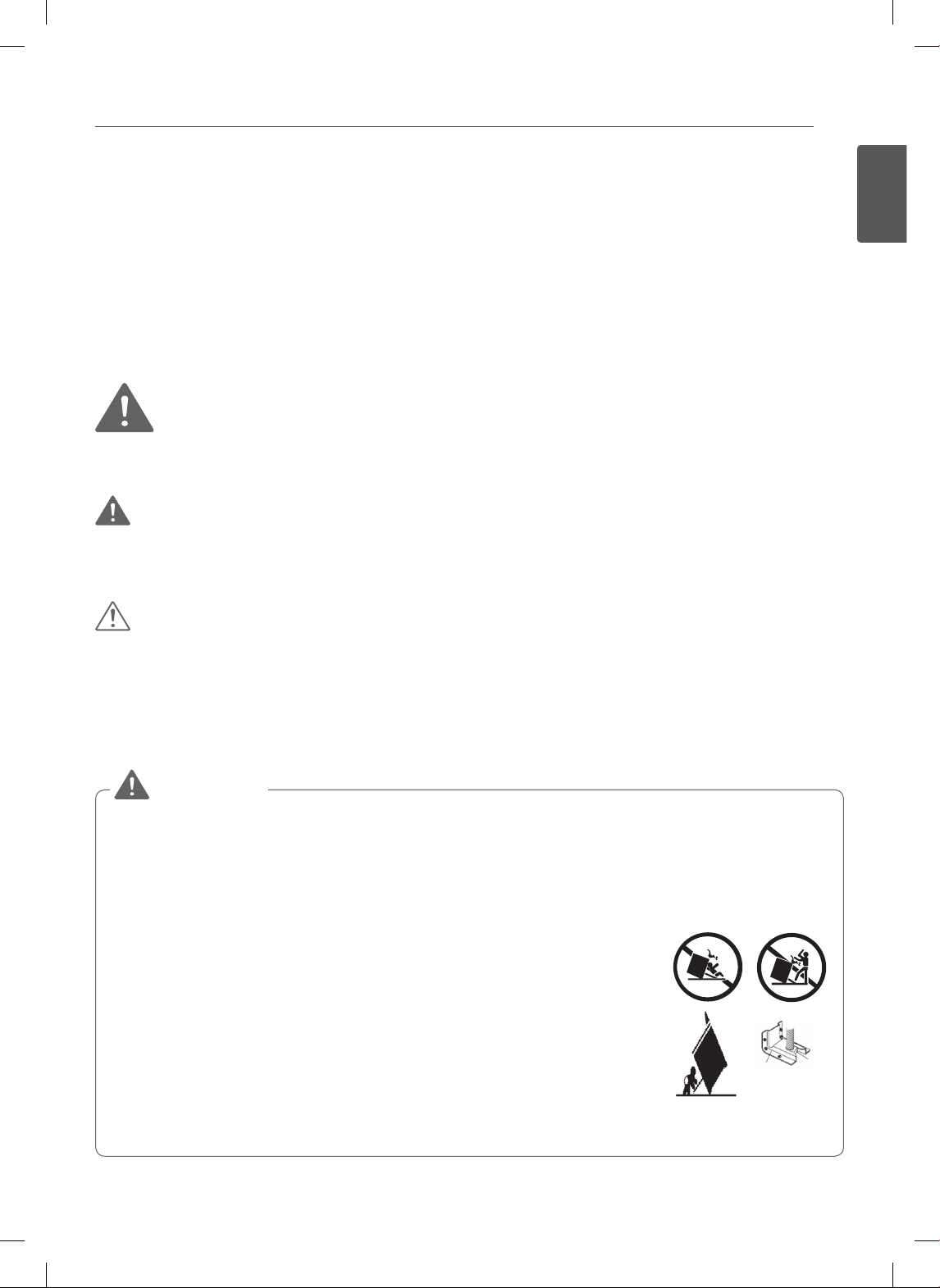
ANTI-TIP SAFETY PRECAUTIONS
• It is possible for a child or adult to tip the range and be killed.
• Verify that the anti-tip device has been properly installed and
engaged to the floor or wall and engaged to the leveling leg
of the range.
• Ensure the anti-tip device is reengaged when the range is
moved.
• To check that the anti-tip bracket is properly installed: Grasp
the top rear edge of the range back guard and carefully
attempt to tilt it forward. Verify that the anti-tip device is
engaged.
• Do not operate the range without the anti-tip device in place
and engaged.
• Failure to follow these instructions can result in death or
serious burns to children or adults.
WARNING
Anti-tip
bracket
Leveling
leg
4
IMPORTANT SAFETY INSTRUCTIONS
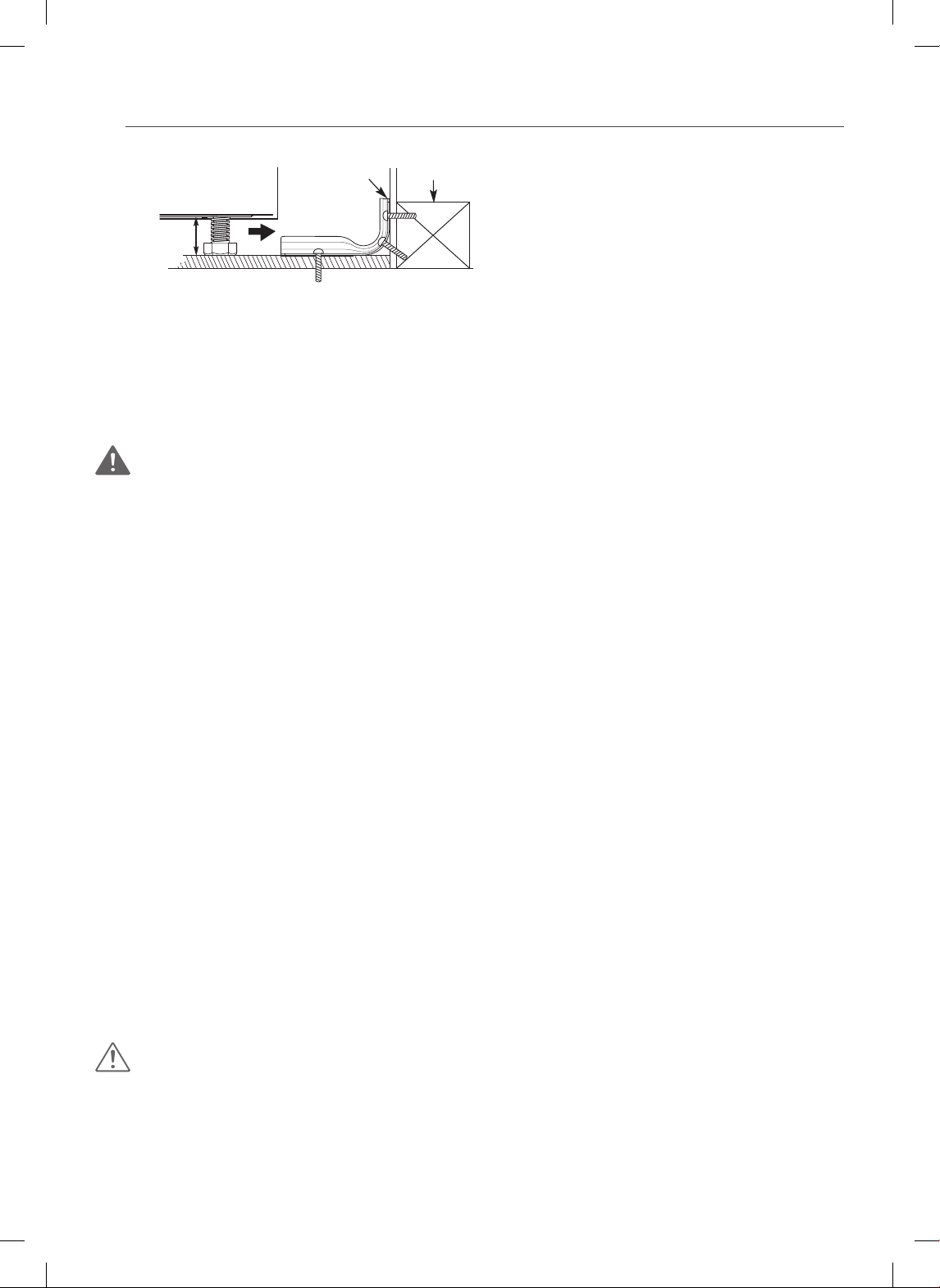
• Remove the warming or storage
drawers and visually inspect that the
rear leveling legs are fully inserted into
the anti-tip bracket.
•
Be certain that your appliance is properly installed and grounded by a qualified technician.
• Do not repair or replace any part of the appliance unless specifically recommended
in the manual. All other servicing should be performed by a qualified technician.
• Always disconnect power from the appliance before servicing.
SAFETY PRECAUTIONS
WARNING: This product contains chemicals known to the State of California to
cause cancer. Wash hands after handling.
• DO NOT TOUCH HEATING ELEMENTS OR INTERIOR SURFACES OF THE OVEN.
Heating elements may be hot even though they are dark in color. Interior surfaces
of an oven become hot enough to cause burns. During and after use, do not touch
or let clothing or other flammable materials contact heating elements or interior
surfaces of the oven until they have had sufficient time to cool. Other surfaces,
such as oven vent openings and surfaces near these openings, oven doors, and
windows of oven doors, also get hot and may cause burns if not cooled.
• Use care when opening the oven door. Let hot air or steam escape from the oven
before removing or replacing food in the oven.
• Do NOT heat unopened food containers. Pressure in the containers may cause
them to burst which may result in injury.
• DO NOT force the door open. This can damage the automatic door locking
system. Use care when opening the oven door after the self cleaning cycle. Stand
to the side of the oven when opening the door to allow hot air or steam to escape.
The oven may still be VERY HOT.
•
DO NOT use harsh etching, abrasive cleaners or sharp metal scrapers to clean the oven
door glass since they can scratch the surface. Scratches may cause the glass to shatter.
• Be careful when removing and lifting the door.
• DO NOT lift the door by the handle. The door is very heavy.
• DO NOT use utensils for removing refuse (ash, food etc.)
• Refer to the installation manual for proper anti-tip bracket installation.
• Never remove the oven legs. The range will not be secured to the anti-tip bracket if
the legs are removed.
CAUTION
• DO NOT line the oven walls, racks, bottom, or any other part of the oven with
aluminum foil or any other material. Doing so will disrupt heat distribution,
produce poor baking results and cause permanent damage to the oven interior
(aluminum foil will melt to the interior surface of the oven).
• Never attempt to dry a pet in the oven.
Anti-tip
bracket
approximately
0.65”(16.5mm)
Wall plate
Screw must
enter wood
or concrete

5
ENGLISH
IMPORTANT SAFETY INSTRUCTIONS
WARNING
• DO NOT step or sit on the oven door. Install the anti-tip bracket packed with the
range.
- The range could be tipped and injury might result from spilled hot liquid, food, or
the range itself.
- If the range is pulled away from the wall for cleaning, service, or any other reason,
ensure that the anti-tip bracket is properly re-engaged when the range is pushed
back against the wall.
- Do not rest large, heavy items such as whole turkeys on the open oven door. The
range could tip forward and cause injury.
• NEVER use your appliance for warming or heating the room.
• DO NOT use water on grease fires. Should an oven fire occur, leave the oven
door closed and turn the oven off. If the fire continues, throw baking soda on
the fire or use a fire extinguisher.
• Only use dry pot holders. Moist or damp pot holders on hot surfaces may
result in burns from steam. Do not let the pot holder touch hot heating
elements. Do not use a towel or other bulky cloth to remove food.
• If the door glass, cooktop glass, surface, or oven heating unit of the range are
damaged, discontinue use of the range and call for service.
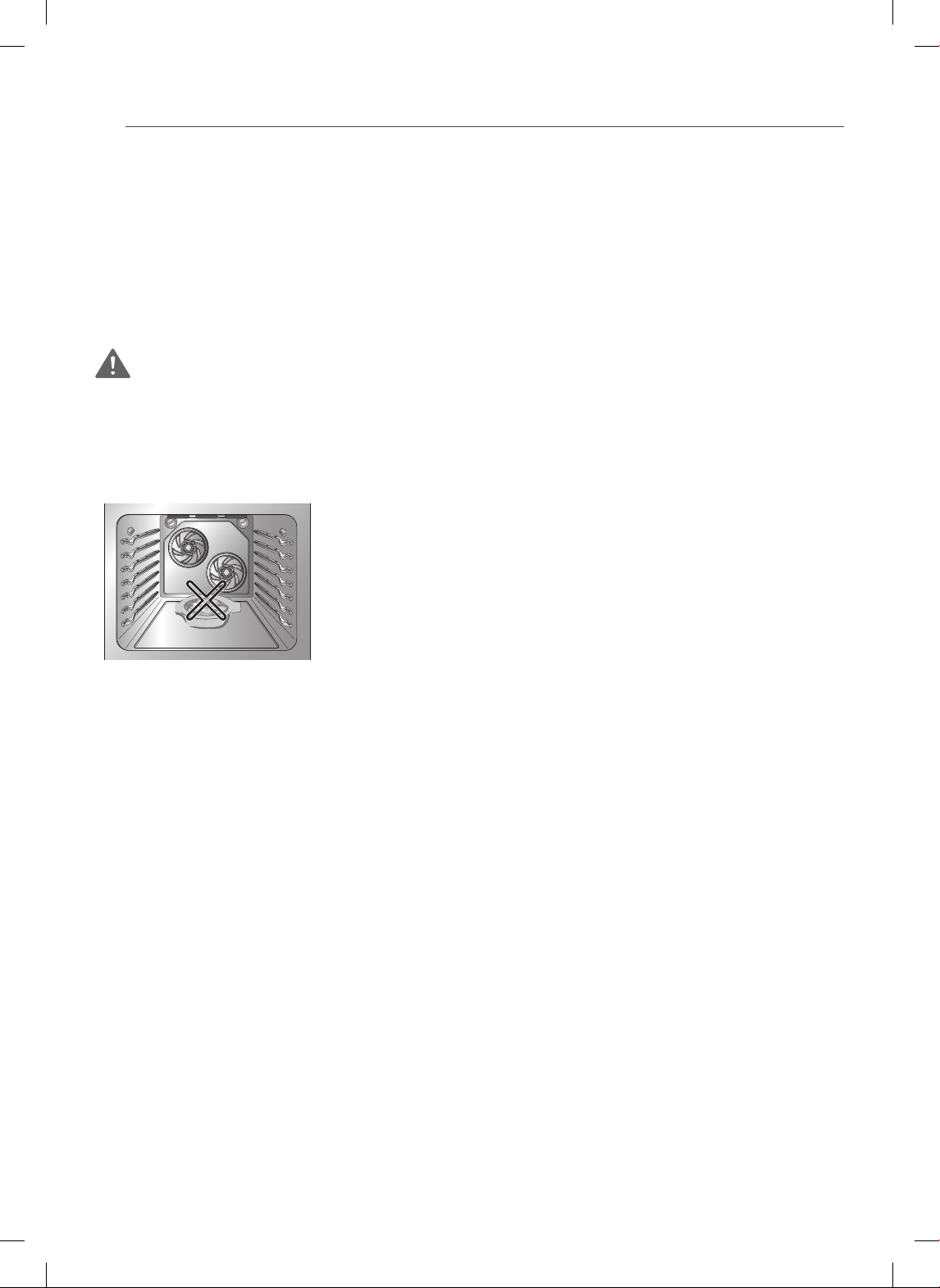
• Do not operate the oven without the charcoal heater mesh.
• Do not allow anyone to climb, stand or hang on the door, storage drawer or
cooktop. They could damage the range and even tip it over, causing severe
personal injury.
REMOVE FLAMMABLE AND EXPLOSIVE
MATERIAL FROM THE APPLIANCE
WARNING
• Be certain that all packing materials are removed from the appliance before operating.
Keep plastic, clothes, paper, and other flammable materials away from parts of the
appliance that may become hot.
• Do not store or use flammable material in the oven or near or on the cooktop.
Flammable materials include paper, plastic, pot holders, linens, wall coverings,
curtains, and gasoline or other flammable vapors and liquids such as grease or
cooking oil. These materials can be ignited when the oven and cooktop are in use.
• Wear Proper Apparel. Do not wear loose-fitting or hanging garments which may
ignite if they contact hot surfaces and cause severe burns.
• Metal objects such as unopened cans should not be left on the surface unit or
heated in the oven. Pressure in the containers may cause them to burst, resulting in
injury.
• Do not use the oven for drying clothes. Only use the oven for its intended purpose.
6
IMPORTANT SAFETY INSTRUCTIONS
ELECTRICAL SAFETY
•
Protective Liners. Do not use aluminum foil or any other material to line the oven
bottom. Improper installation of these liners may result in a risk of electric shock or fire.
• Do NOT allow aluminum foil or the temperature probe to contact heating elements.
• Before replacing your oven light bulb, switch off the electrical power to the
oven at the main fuse or circuit breaker panel. Failure to do so can result in
severe personal injury, death, or electrical shock.
WARNING
• Turn the POWER OFF before removing the warming oven drawer.
-- Failure to do so can result in severe personal injury, death, or electrical shock.
PAN PLACEMENT
• Do not place food or cookware on the bottom of the
oven cavity. Doing so will cause permanent damage to
the oven bottom finish.
• When warming food in the warming drawer, always
use a baking sheet or pan with 4 raised sides. This will
prevent food from sliding off.
DEEP FAT FRYERS
• Use extreme caution when moving or disposing of hot grease.
• Always heat fat slowly, and watch as it heats.
• If frying with a combinations of oils and fats, stir together before heating.
• Use a deep fat thermometer, if possible, to prevent overheating fat beyond the
smoking point.
• Use the least possible amount of fat for effective shallow or deep-fat frying. Filling
the pan with too much fat can cause spillovers when food is added.
SAFETY DURING USE
• Do not touch the oven racks while they are hot.
• If the rack must be moved while the oven is hot, do not let the potholder
contact the hot heating element in the oven.
• Always use pot holders or oven mitts when removing food from the oven or
the center warming element. Cookware will be hot.
•
Use caution with the TIMED BAKE or DELAYED TIMED BAKE features. Use the
automatic timer when cooking cured or frozen meats and most fruits and vegetables.
Foods that can easily spoil, such as milk, eggs, fish, meat or poultry, should be chilled
in the refrigerator first. Even when chilled, they should not stand in the oven for more
than 1 hour before cooking begins, and should be removed promptly when cooking
is complete. Eating spoiled food can result in sickness from food poisoning.
7
ENGLISH
IMPORTANT SAFETY INSTRUCTIONS
• Should an oven fire occur, leave the oven door closed and turn the oven off.
If the fire continues, throw baking soda on the fire or use a fire extinguisher.
• Should an oven fire occur, DO NOT put water or flour on the fire. Flour may be
explosive and water can cause a grease fire to spread and cause personal injury.
• DO NOT use the broiler pan without the grid. DO NOT cover the grid with
aluminum foil.
• Do not use plastic to cover food. Use foil or oven resistant lids only.
• If the oven is heavily soiled with oil, self clean the oven before using the oven
again. The oil could cause a risk of fire.
•
Wipe up heavy soil on the bottom of the oven before using the Self Clean function.
• Use proper pan sizes. For smaller pots and pans, use the smaller heating elements.
For larger pots and pans, use the larger heating elements. Select utensils that have
flat bottoms large enough to cover the heating elements. The use of undersized
utensils will expose a portion of the heating element to direct contact and may
result in ignition of clothing.
• Never leave surface units unattended at high heat settings. Boil overs cause
smoking and greasy spillovers that may ignite.
• Glazed cooking utensils. Only certain types of glass, glass/ceramic, ceramic,
earthenware, or other glazed utensils are suitable for range-top service without
breaking due to the sudden change in temperature.
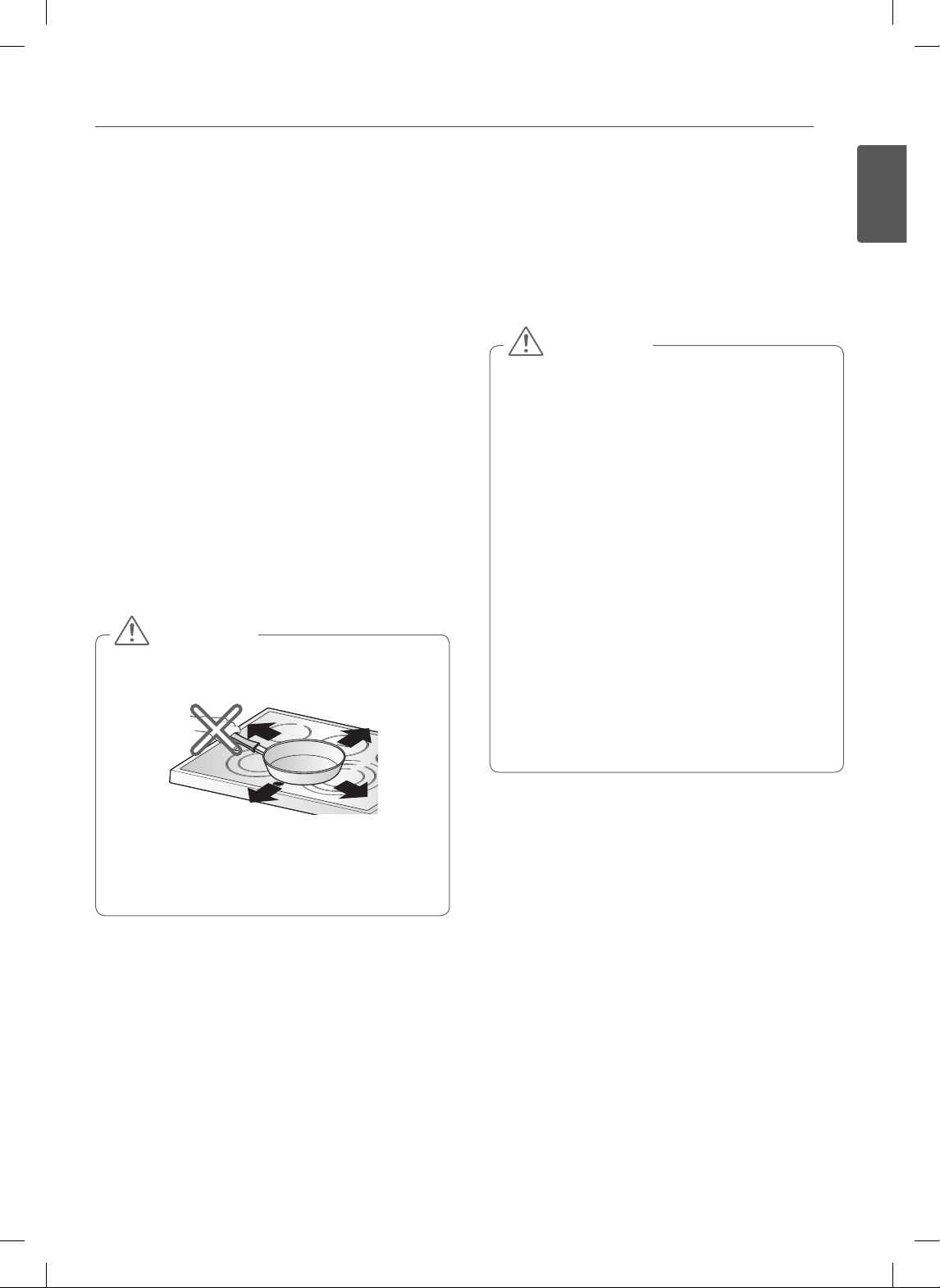
• Utensil handles should be turned inward and not extend over adjacent surface
units. To reduce the risk of burns, ignition of flammable materials, and spillage due to
unintentional contact with the utensil, the handle of a utensil should be positioned
so that it is turned inward, and does not extend over adjacent surface units.
CHILD SAFETY
WARNING
• Keep children and pets away from the oven.
• Accessible parts may become hot when the grill is in use.
• During normal operation (self-clean cycle, bake, etc.) DO NOT touch the hot
surface between the bottom of the oven door and the top of the drawer on the
front of the oven. Doing so is a burn hazard and will cause injury.
• Never let a child hang on the oven door.
• Do not allow children to crawl into the oven.
CAUTION
• DO NOT leave small children unattended near the oven.
• During the self clean cycle, the outside of the oven can become very hot to the
touch.
• NEVER leave children alone or unsupervised near the appliance when it is in
use or is still hot. Children should never be allowed to sit or stand on any part
of the appliance as they could be injured or burned.

8
IMPORTANT SAFETY INSTRUCTIONS
• NEVER store items of interest to children in cabinets above the range. Children
climbing on the range or on the oven door to reach items could be seriously
injured.
• Let hot utensils cool in a safe place, out of reach of small children.
• Children should not be allowed to play with controls or other parts of the
appliance.
GLASS/CERAMIC COOKING SURFACES
Stand to the side of the range when opening the oven door. The hot air and steam
that escape can cause burns to hands, face and eyes.
WARNING
• DO NOT TOUCH SURFACE UNITS OR AREAS NEAR UNITS.
• Surface units may be hot even though they are dark in color. Areas near surface
units may become hot enough to cause burns. During and after use, do not touch,
or let clothing or other flammable materials contact surface units or areas near
units until they have had sufficient time to cool. This includes the cooktop and the
area above the oven door.
• Do not cook on a broken cooktop. If the cooktop should break, cleaning solutions
and spillovers may penetrate the broken cooktop and create a risk of electric shock.
Contact a qualified technician immediately.
• Clean cooktop with Caution. Do not use sponges or a cloth to wipe up spills on a
hot cooking area. Use a proper metal scraper.
• DO NOT use the glass cooktop surface as a cutting board.
• DO NOT place or store items that can melt or catch fire on the glass cooktop, even
when it is not being used.
• DO NOT turn surface units on until after placing cookware.
• DO NOT store heavy items above the cooktop surface that could fall and damage it.
• DO NOT place aluminum foil or plastic items such as salt and pepper shakers, spoon
holders, or plastic wrappings or any other material on the range when it is in use.
• Be sure you know which control pads operate each surface unit. Make sure you
turned on the correct surface unit.
• NEVER cook directly on the glass. Always use cookware.
• Always place the pan in the center of the surface unit you are cooking on.
NEVER leave surface units unattended at high heat settings. Proper contact of
utensil to burner will also improve efficiency.
- Boil overs cause smoking and greasy spillovers that may catch on fire.
• Always turn the surface units off before removing cookware.
• DO NOT use plastic wrap to cover food.
- Plastic may melt onto the surface and be very difficult to remove.
• DO NOT touch surface units until they have cooled down.
• The surface elements may still be hot and burns may occur if the glass surface is
touched before it has cooled down sufficiently.
• Immediately clean spills on the cooking area to prevent a tough cleaning chore later.
9
ENGLISH
IMPORTANT SAFETY INSTRUCTIONS
• If cabinet storage is provided directly above the cooking surface, limit it to items that are
infrequently used and can be safely stored in an area subjected to heat. Temperatures may
be unsafe for items such as volatile liquids, cleaners or aerosol sprays.
• When warming foods, do not use containers that seal. Allow venting for heated air to
escape.
• Some cleaners can produce dangerous fumes if applied to a hot surface.
• DO NOT use a steel-wool pad to clean the surface.
- It will scratch the surface.
• DO NOT use scrub pads or abrasive cleaning pads.
- They may damage your glass cooktop surface.
• Cookware with rough edges or bottoms can mark or scratch the cooktop surface.
• Do not slide anything metal or glass across the cooktop.
• Do not use dirty cookware or cookware with dirt built-up on the bottom.
SAFETY WHEN CLEANING
CAUTION
• Open a window or turn on a ventilation fan or hood before self cleaning.
• Do Not Use Oven Cleaners. No commercial oven cleaner or oven liner protective
coating of any kind should be used in or around any part of the oven.
• Before self cleaning the oven. Remove broiler pan, all oven racks, meat probe and
any other utensils from the oven cavity.
• Never keep pet birds in the kitchen. The health of birds is extremely sensitive to
the fumes released during an oven self clean cycle. Fumes may be harmful or fatal
to birds. Move birds to a well-ventilated room.
• Clean in the self clean cycle only parts listed in this manual. Before self cleaning the
oven, remove the broiler pan and any utensils or foods from the oven.
• It is normal for the cooktop of the range to become hot during a self clean cycle.
Therefore, touching the cooktop during a clean cycle should be avoided.
•
Important Instruction. In the event the self clean error code F is displayed, and three long
beeps sound, the oven is malfunctioning in the self clean mode. Switch off the electrical
power to the main fuse or breaker and have the oven serviced by a qualified technician.
• Make sure oven lights are cool before cleaning.
• Never pour COLD water over a hot oven for cleaning. Doing so may cause the oven
to malfunction.
COOK MEAT AND POULTRY THOROUGHLY
To protect against food borne illnesses, cook meat and poultry thoroughly. The USDA
has indicated the following as safe minimum internal temperatures for consumption:
• Ground beef, veal, pork, or lamb: 160 °F
• Poultry: 165 °F
• Beef, veal, pork, or lamb: 145 °F
• Fish/seafood: 145 °F
10
OVERVIEW
OVERVIEW
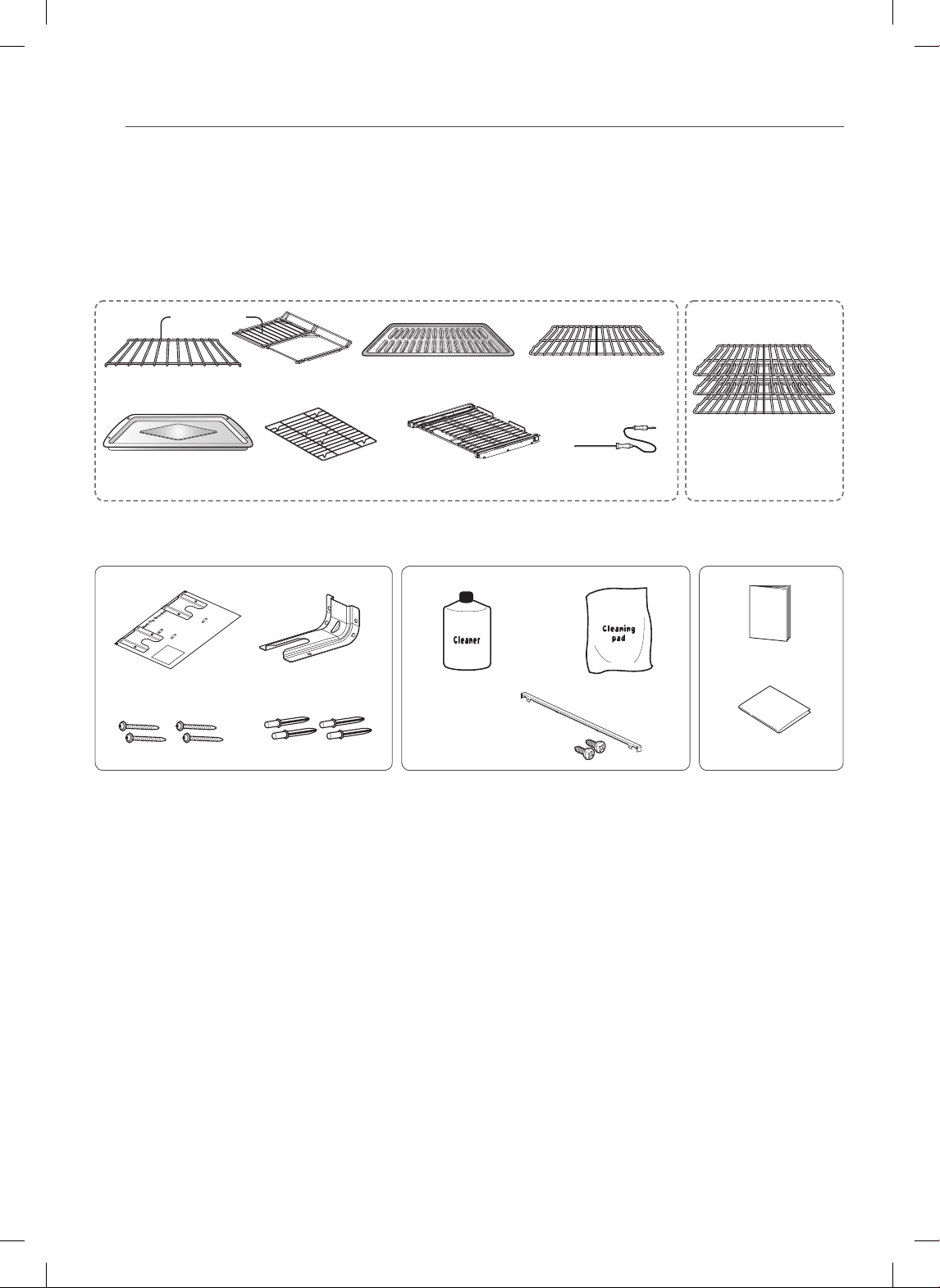
ACCESSORIES
Template (1ea) Cleaner (1ea)Anti-tip bracket (1ea) Cleaning pad (1ea)
1 Rear ller & 2 Screws
Screws (4ea)
Anchors (4ea)
Accessories for installation Accessories for maintenance
Accessories for cooking
Owner’s manual (1ea)
Installation manual (1ea)
For Model : LSE3092ST, LSES302ST For Model : LSE3090ST
Roast Rack (1ea)
Dual Purpose
Drawer Rack (1ea) Gliding rack (1ea) Meat Probe (1ea)Broiler Pan (1ea)
Split Rack (1ea) Broiler Pan Insert (1ea) Standard rack (1ea)
Standard racks (3ea)
11
ENGLISH
OVERVIEW
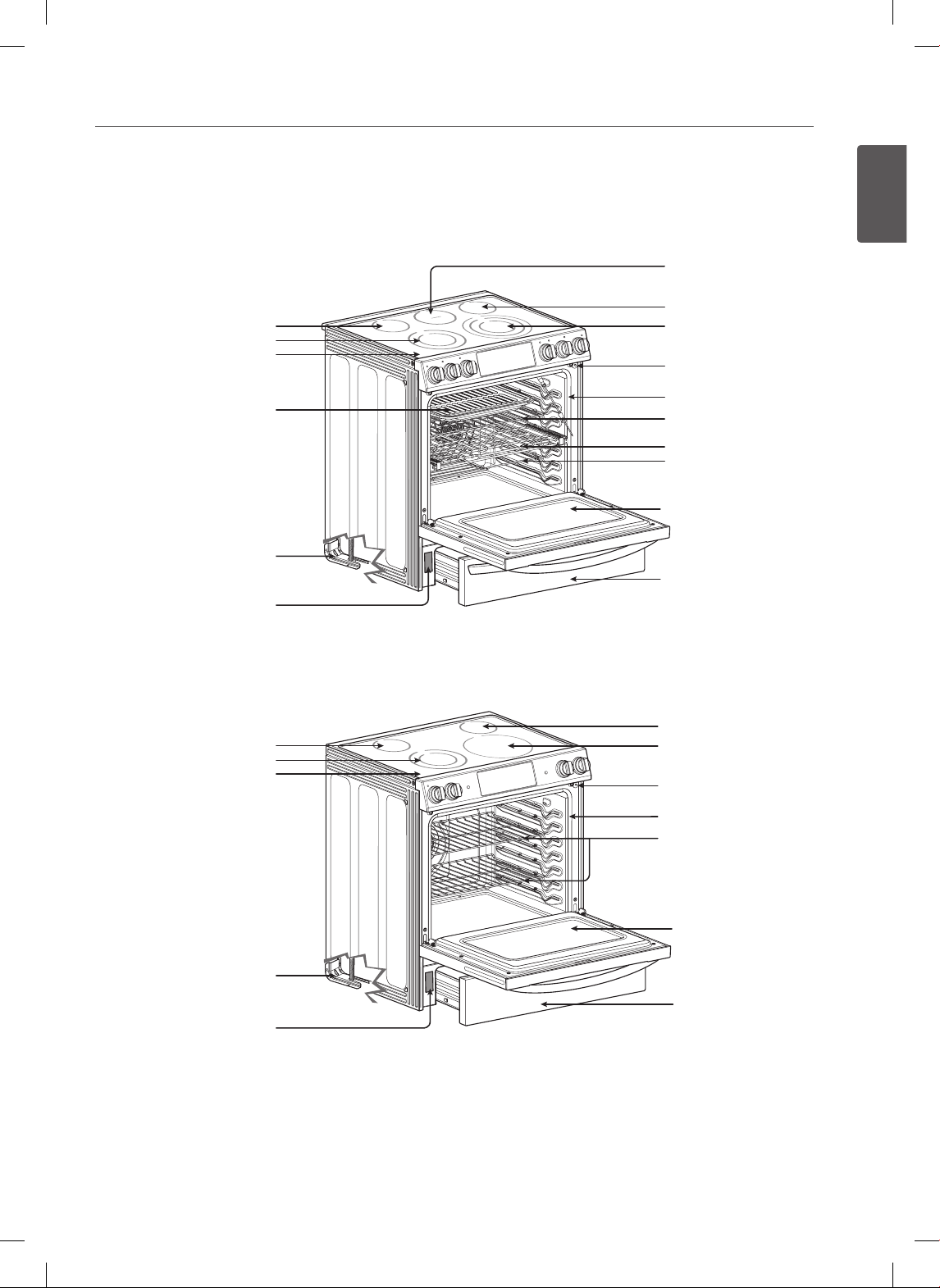
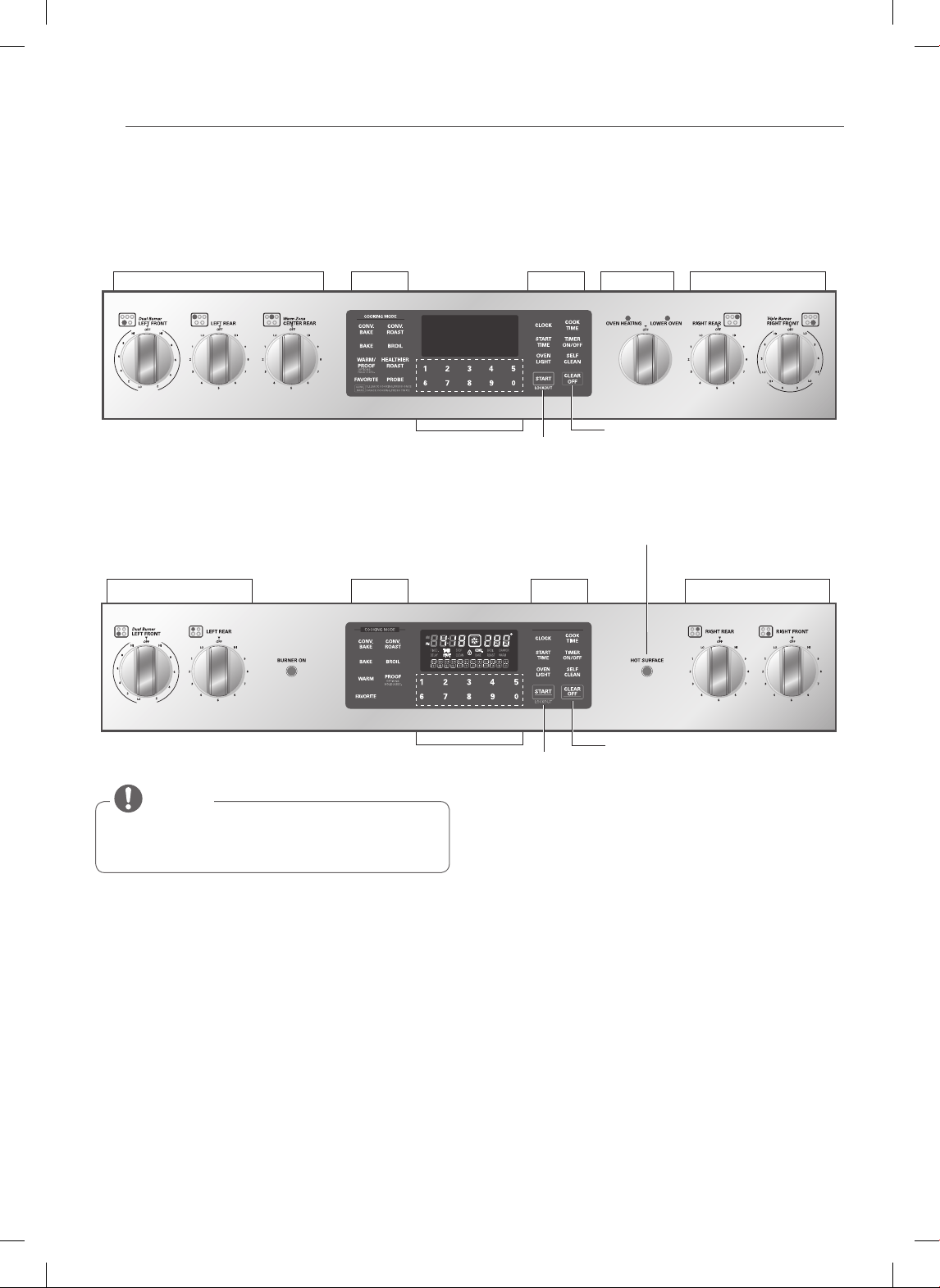
RANGE OVERVIEW
For model : LSE3092ST, LSES302ST
Warming Zone Element
Single element
Double element
Ceramic glass
Broiler pan &
Broiler Pan Insert
Anti-tip bracket
Model and serial number plate
Model and serial number plate
Single element
Triple element
Automatic oven light switch
Gasket
Standard rack
Gliding rack
Oven door
Split rack
Lower oven drawer
For model : LSE3090ST
Single element
Dual element
Ceramic glass
Anti-tip bracket
Single element
Single element
Automatic oven light switch
Gasket
Standard rack
Oven door
Storage drawer
12
OVERVIEW
Triple
Dual
Single
Dual
Single
200˚F
Warm
450˚F
400˚F
350˚F
300˚F
250˚F
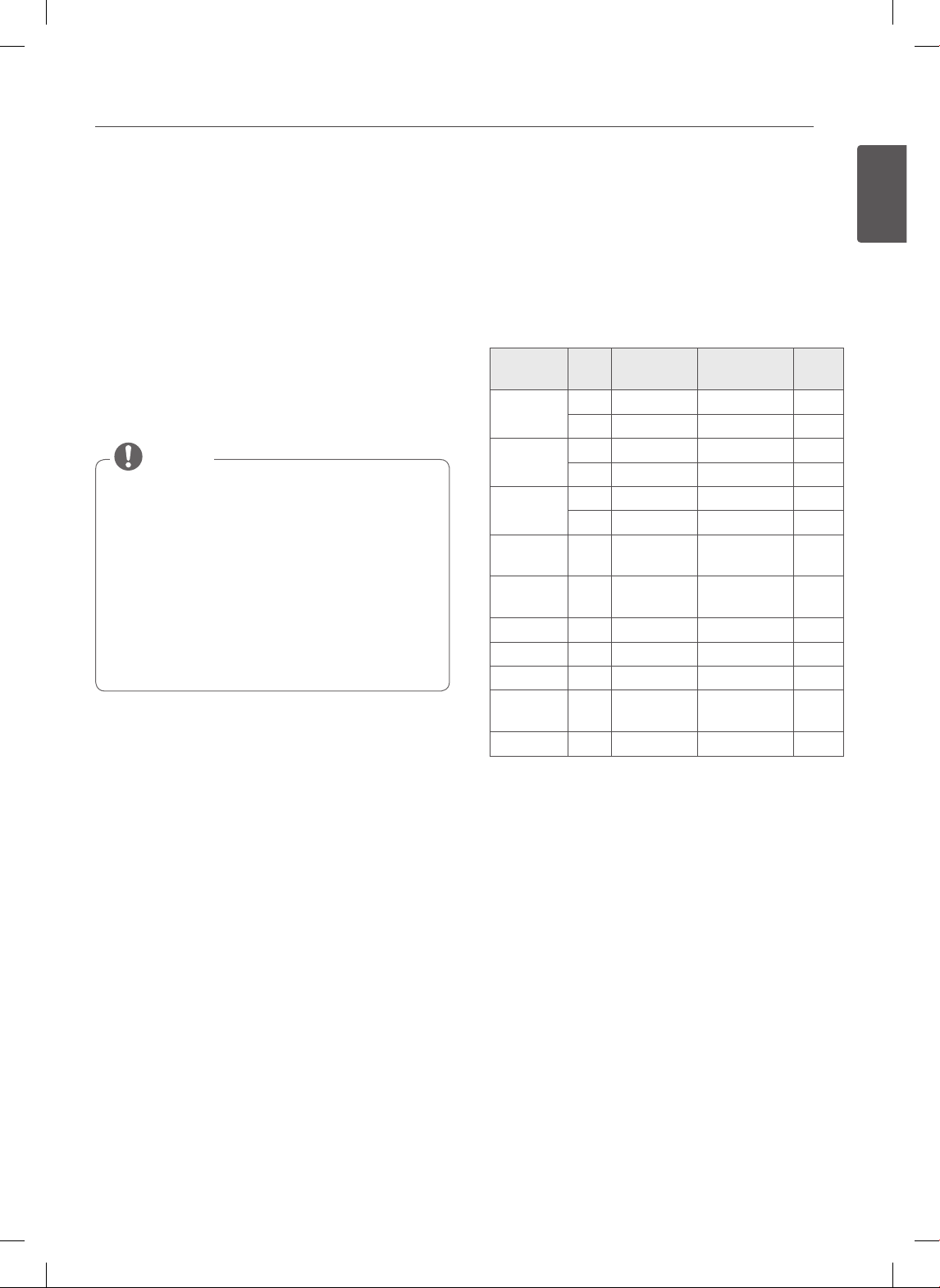
CONTROL PANEL OVERVIEW
Cooktop Element Oven Controls Features
Lower Oven
Controls Cooktop Element
Number Buttons
Number Buttons
Clear Off Button
Start/Lockout
Button
Cooktop Element Controls are set up in the same
order as the corresponding elements.
NOTE
ELEMENT ON/OFF INDICATOR LIGHT (On Some Models) :
Shows whether the surface elements are turned on/off.
Hot Surface Indicator
Hot surface indicator light will glow as long as any surface cooking area is too hot to touch.
It will remain on after the element is turned off and until the surface has cooled to approximately 150 ˚F.
Flashing Time
If your oven displays a flashing clock, press the “Clock” button and reset the time, or press any button to stop the flashing.
For model : LSE3092ST, LSES302ST
For model : LSE3090ST
Cooktop Element Cooktop ElementOven Controls
Hot Surface Indicator
Features
Dual
Single
Clear Off Button
Start/Lockout
Button
13
ENGLISH
FEATURES
FEATURES
CLOCK
The clock must be set to the correct time of day in order
for the automatic oven timing functions to work properly.
1. Press CLOCK.
2. Press the number buttons to enter the time.
For example, to set the clock for 10:30, press the
numbers: 1, 0, 3 and 0.
3. Press START.
• The time of day cannot be changed during a Timed
Baking or Self Clean cycle.
• To check the time of day when the display is
showing other information, simply press the
CLOCK button.
• If no buttons are pressed within 25 seconds of
pressing the CLOCK button, the display will revert
to its original setting.
• If the display time is blinking, you may have
experienced a power failure. Reset the time.
NOTE
Setting the hour mode on the clock
(12 or 24 hour.)
Your control is set to use a 12-hour clock. If you would
prefer to have a 24-hour time clock, follow the steps
below.
1. Press and hold the CLOCK button for 3 seconds.
2. Press the number 1 button to display a 12-hour clock
or the 2 button for a 24-hour clock.
3. Press the START button to accept the desired
change.
Minimum & Maximum default settings
All of the features listed have a minimum and a maximum
time or temperature setting that may be entered into the
control. An entry acceptance beep will sound each time a
control button is pressed.
An entry error tone (two short tones) will sound if the
entry of the temperature or time is below the minimum
or above the maximum setting for the feature.
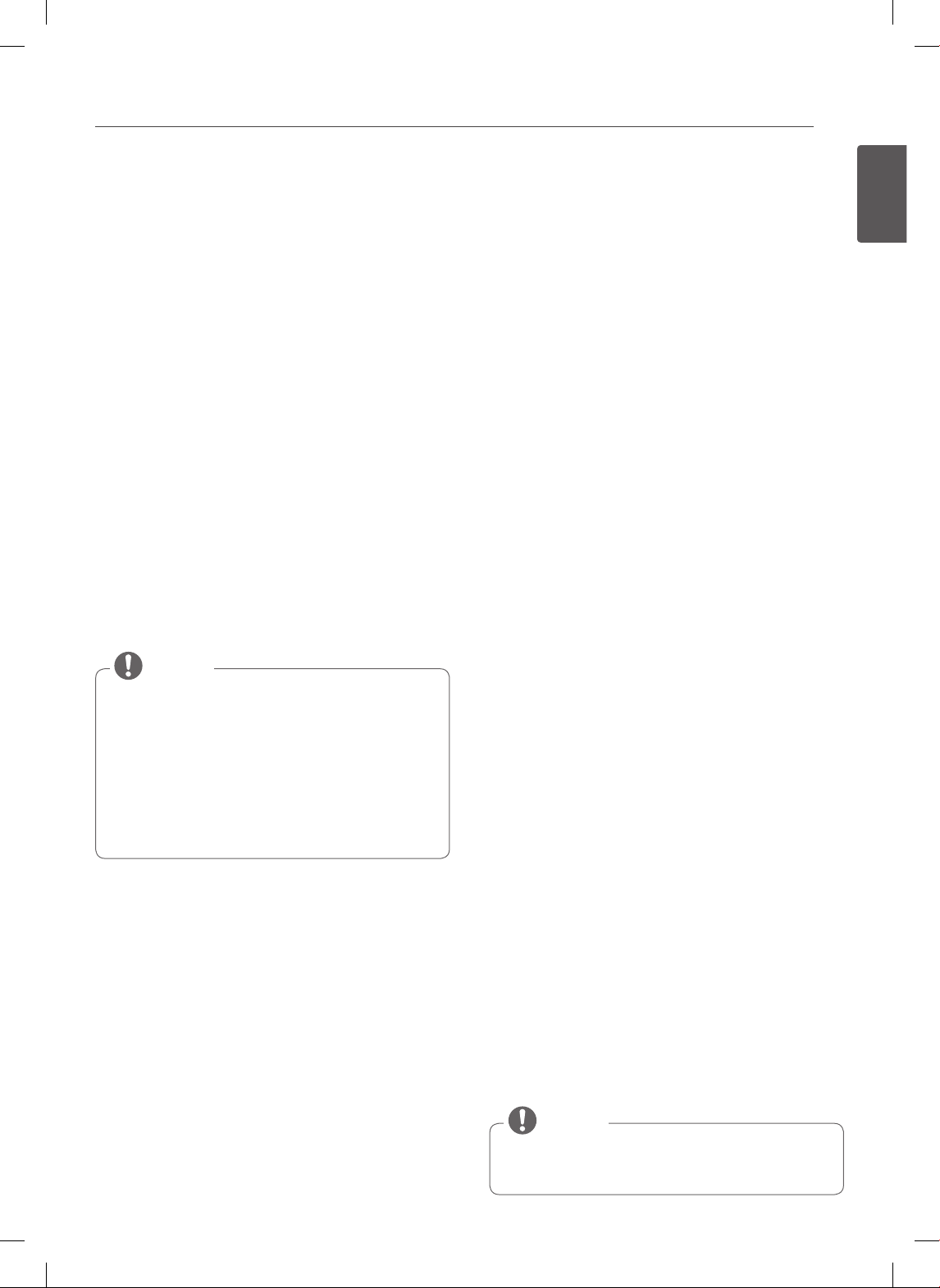
FEATURE
MIN. TEMP.
/TIME
MAX. TEMP.
/ TIME
Default
CLOCK
12 Hr. 1:00 Hr. / Min. 12:59 Hr. / Min.
24 Hr. 0:00 Hr. / Min. 23:59 Hr. / Min.
TIMER
12 Hr. 0:01 Min. 11:59 Hr. / Min.
24 Hr. 0:01 Min. 11:59 Hr. / Min
COOK TIME
12 Hr. 0:01 Min. 11:59 Hr. / Min
24 Hr. 0:01 Min. 11:59 Hr. / Min
CONVECTION
BAKE
300°F / 150°C 550°F / 285°C 12 Hr.
CONVECTION
ROAST
300°F / 150°C 550°F / 285°C 12 Hr.
BROIL Lo - 400°F Hi - 550°F 3 Hr.
BAKE 170°F / 75°C 550°F / 285°C 12 Hr.
PROOF 12 Hr.
WARM
170°F/75°C,
3 hours
SELF CLEAN 2 Hr. 4 Hr. 3 Hr.

14
FEATURES
TIMER ON/OFF
The TIMER ON/OFF serves as an extra timer in the
kitchen that will beep when the set time has run out.
It does not start or stop cooking.
The TIMER ON/OFF feature can be used during any of the
other oven control functions.
To set the Timer (example for 5 minutes):
1. Press TIMER ON/OFF once. 0:00 and HR inside the
O will appear and TIMER will flash in the display.
2. Press the 5 button.
0:05 will appear in the display.
3. Press the TIMER button to start the Timer. The time
will count down from 5:00 minutes and the time
remaining will show in the display.
If TIMER ON/OFF is not pressed, the timer will
return to the time of day.
NOTE
4. When the set time has run out, End will show in
the display. The indicator tones will sound every 15
seconds until TIMER ON/OFF is pressed.
If the remaining time is not in the display, recall the
remaining time by pressing the Timer ON/OFF button.
NOTE
• If you press TIMER ON/OFF twice, it allows you to
set the time in seconds.
For example, press TIMER ON/OFF once, and then
5, 0 for 50 seconds.
• If you press TIMER ON/OFF twice, it allows you to
set the time in minutes.
For example, press TIMER ON/OFF twice and then
the 5 button for 5 minutes.
NOTE
To cancel the Timer before the set time has run
out:
1. Press TIMER ON/OFF once.
The display will return to the time of day.
CONVECTION AUTO CONVERSION
When cooking using the convection cycle (Conv. bake
and roast), the oven temperature is automatically
reduced by 25°F. The display will show the changed
temperature.
This feature is called ”AUTO CONVERSION.” Your range
comes with this feature enabled.
To DISABLE the auto conversion feature :
1. Press and hold the WARM/PROOF button for
3 seconds. “AUTO” will appear in the display.
2. Press the 1 button to ENABLE or press the 2 button
to DISABLE.
3. Press the START button to accept the change.
15
ENGLISH
FEATURES
OVEN TEMPERATURE
ADJUSTMENT
You may find that your new oven cooks differently than
the one it replaced. Use your new oven for a few weeks
to become more familiar with it before changing the
temperature settings. If after familiarizing yourself with
the new oven, you still think that it is too hot or too cold,
you can adjust the thermostat yourself.
Adjusting the oven temperature
1. Press and hold the PROOF or WARM/PROOF button
for 3 seconds. “AUTO” will appear in the display.
2. Press the PROOF or WARM/PROOF button once and
“Adj" will appear in the display.
3. Using the number buttons, enter the amount you
wish to adjust the temperature.
For example, to adjust the oven temperature
15 degrees, press 1 and 5.
4. Press PROOF or WARM/PROOF once to increase (+)
or twice to decrease (-) the temperature.
5. Press the START button to accept the change.
• This adjustment will not affect the broiling or
Self Clean temperatures. The adjustment will be
retained in memory after a power failure. The oven
temperature can be increased (+) or decreased (-)
as much as 35°F or 19°C.
• Once the temperature is increased or decreased,
the display will show the adjusted temperature
until it readjusts.
NOTE
LANGUAGE
The default language of the display is English. It can be
changed to Spanish or French.
1. Press and hold the WARM/PROOF button for
3 seconds. “AUTO” will appear in the display.
2. Press the WARM/PROOF button 2 times and “Lng”
will appear in the display.
3. Press the 1 button for English, press the 2 button for
Spanish, press the 3 button for French.
4. Press the START button to accept the change.
PREHEATING ALARM LIGHT
When the oven reaches its set temperature the preheating
alarm light will flash until the oven door is opened.
You can activate or deactivate the preheating alarm light.
1. Press and hold the WARM/PROOF button for
3 seconds. “AUTO” will appear in the display.
2. Press the WARM/PROOF button 3 times and “PrE”
appear in the display.
3. Press the 1 button for ON or press the 2 button for
OFF.
4. Press the START button to accept the change.
BEEPER VOLUME
1. Press and hold the WARM/PROOF button for
3 seconds. “AUTO” will appear in the display.
2. Press the WARM/PROOF button 4 times and “BEEP"
will appear in the display.
3. Press the 1 button for LOUD, press the 2 button for
NORMAL, press the 3 button for LOW, and press the
4 button for MUTE.
4. Press the START button to accept the change.
FAHRENHEIT OR CELSIUS
The oven temperature settings can either be set to
Fahrenheit or Celsius. The oven defaults to Fahrenheit
unless changed by the user.
1. Press and hold the WARM/PROOF button for
3 seconds. “AUTO” will appear in the display.
2. Press the WARM/PROOF button 5 times and “UNIT”
will appear in the display.
3. Press the 1 button for F (Fahrenheit) or press the 2
button for C (Celsius).
4. Press the START button to accept the change.
OVEN LIGHT
The interior oven light automatically turns ON when the
door is opened. The oven light may also be manually
turned ON or OFF by pressing the OVEN LIGHT button.
The oven light cannot be turned on if the Self Clean
function is active.
NOTE
16
FEATURES
LOCKOUT
The Lockout feature automatically locks the oven door
and prevents most oven and cooktop controls from being
turned on. It does not disable the clock, timer or the
interior oven light.
Activate the Lockout feature:
1. Press and hold the START button for three seconds.
2. The Lock melody will sound, LOCKING will appear
in the display and DOOK LOCKED will flash in the
display. Once the oven door is locked, the DOOR
LOCKED indicator will stop flashing and remain on
along with the lock icon(
) light.
Reset normal oven operation:
1. Press and hold the START button for three seconds.
The Unlock melody will sound twice. DOOR LOCKED
will continue to flash in the display until the oven door
has completely unlocked and the lock icon(
) will
disappear from the display.
• The clock, kitchen timer and oven light will still
operate while the oven is in Lockout mode.
• If the oven door is open while in Lockout mode, the
display buttons will still not operate.
NOTE
START TIME (Delayed timed COOK)
The automatic timer of the DELAYED TIMED COOK
function will turn the oven ON and OFF at the time you
select. This feature can only be used with the: BAKE,
CONVECTION BAKE and CONVECTION ROAST modes.
To set the oven for Delayed Start (example, to
BAKE at 300°F and start operating the bake
mode at 4:30):
Make sure that the clock is set for the correct time of day.
1. Press the BAKE button. 350°F will appear in the
display.
2. Use the oven buttons to set the temperature:
Press 3, 0 and 0.
3. Press the START TIME button.
4. Set the start time: Press 4, 3 and 0 for 4:30.
5. Press the START button. A short beep will sound and
the oven will begin baking at the set time.
• To cancel the DELAYED TIMED COOK function, press
the CLEAR OFF button at any time.
• To change the cooking time, repeat steps 3-4 and
press the START button.
• If your oven clock is set as a 12 hour clock, you can
delay the cook time for 12 hours. If your oven clock
is set as a 24 hour clock, you can delay the cook
time for 24 hours.
NOTE
The oven will continue to cook for the set amount of time
and then turn off automatically. When the cooking time
has elapsed:
• END and the time of day will show in the display.
• The cook end indicator tone will sound every 60
seconds until the CLEAR OFF button is pressed.
• When WARM is set, the warming function is activated
after cooking for the set time.
• Use the automatic timer when cooking cured or
frozen meats and most fruits and vegetables. Foods
that can easily spoil, such as milk, eggs, fish, meat
or poultry, should be chilled in the refrigerator.
Even when chilled, they should not stand in the
oven for more than 1 hour before cooking begins,
and should be removed promptly when cooking is
completed.
• Eating spoiled food can result in sickness from food
poisoning.
CAUTION
17
ENGLISH
FEATURES
COOK TIME (TIMED COOK)
The TIMED COOK feature allows you to set the oven to
cook for a specific length of time. This feature can only be
used with the BAKE, CONVECTION BAKE, CONVECTION
ROAST and FAVORITE modes.
Setting the TIMED COOK function (example,
BAKE at 300°F for 30 minutes):
Make sure that the clock is set to the correct time of day.
1. Press the BAKE button. 350°F will appear in the
display.
2. Use the number buttons to set the temperature.
Press 3, 0 and 0.
3. Press the COOK TIME button. TIMED will flash.
BAKE, 0:00 and 300°F will appear in the display.
4. Set the baking time: Press 3 and 0 (for 30 minutes).
The baking time can be set for any amount of time
between 1 minute and 11 hours and 59 minutes.
5. Press the START button. The display will show the
cooking time countdown.
To set the WARM function to engage at the end of
the timed cook cycle, repeat steps 1-4 and then press
the WARM button. WARM will appear in the display.
(Refer to the "WARM" section for instruction.)
NOTE
The oven will continue to cook for the set amount of time
and then turn off automatically. When the cooking time
has elapsed:
• END and the time of day will show in the display.
• The cook end indicator tone will sound every 60
seconds until the CLEAR OFF button is pressed.
• When WARM is set, the warming function is activated
after cooking for the set time.
To change the cook time while operating the
oven (example, to change the cook time from
30 minutes to 1 hour and 30 minutes):
1. Press the COOK TIME button.
2. Press the number buttons to change the baking
time: 1, 3, 0.
3. Press the START button to accept the change.
• During oven operation, it is possible that the oven
cooling fan will operate to cool the control panel.
This is normal operation.
• It is normal for the air from the cooling fan to be
hot during oven use, and it will remain warm until
the oven is cooled.
NOTE
18
USING THE COOKTOP
USING THE COOKTOP
COOKING AREAS
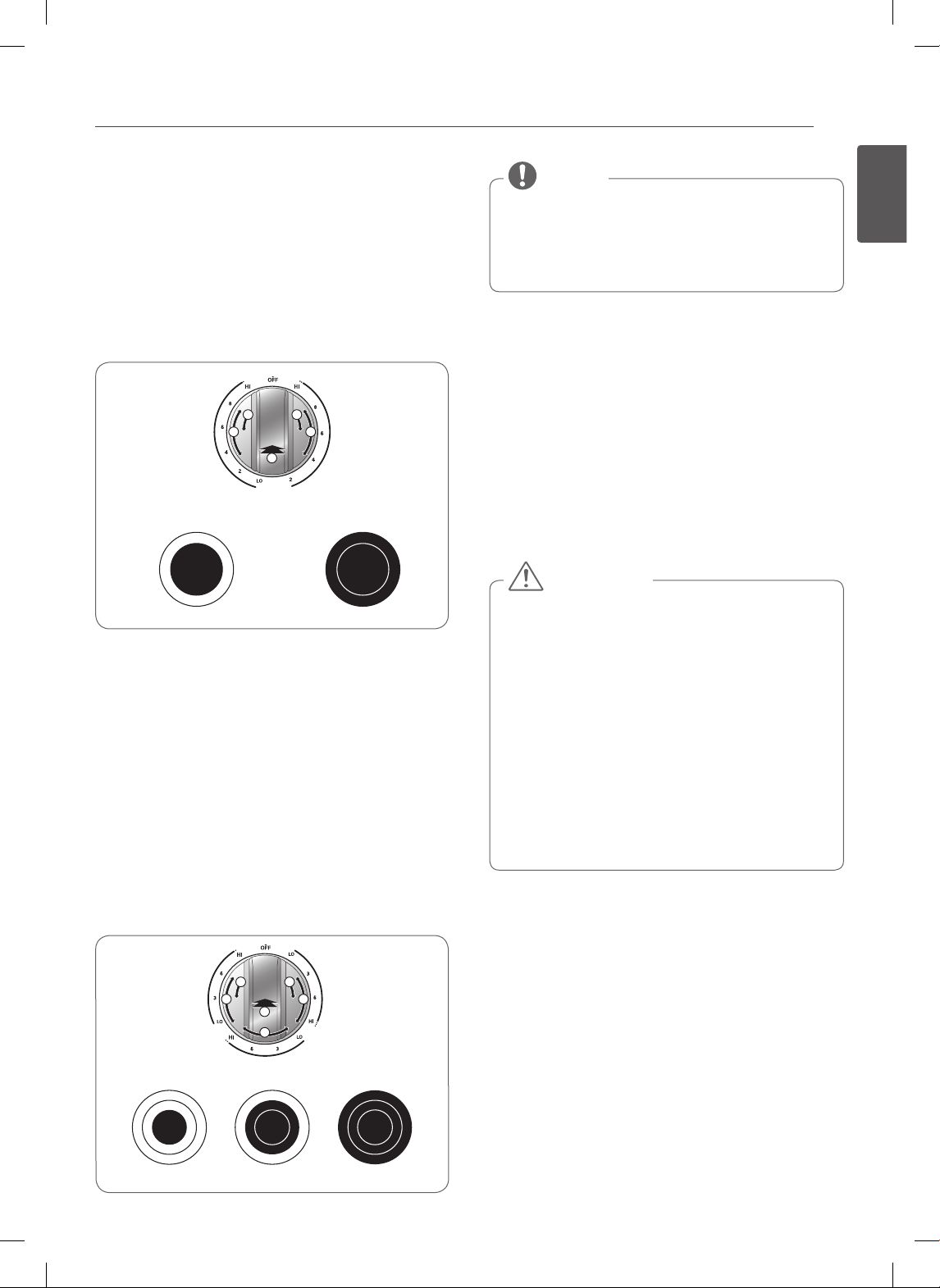
The cooking areas on your range are identified by
permanent circles on the glass cooktop surface. For the
most efficient cooking, fit the pan size to the element size.
Pans should not extend more than 1/2 to 1-inch
beyond the cooking area.
When a control is turned on, a glow can be seen through
the glass cooktop surface. The element will cycle on and
off to maintain the preset heat setting, even on Hi.
For model : LSE3092ST, LSES302ST
SINGLE
DUAL
TRIPLE
WARM
ZONE
SINGLE
Hot surface indicator light
For model : LSE3090ST
SINGLE
DUAL
SINGLE
SINGLE
Hot surface indicator (on some models)
The hot surface indicator light will glow as long as any
surface cooking area is too hot to touch.
It will remain on after the element is turned off and until
the surface has cooled to approximately 150°F.
It is normal for the surface elements to cycle on and
off during cooking, even on higher settings. This
will happen more frequently if cooking on a lower
temperature setting.
CAUTION
Using the cooktop elements
To turn on a SINGLE element (left and right rear
elements):
1. Push the single element knob in.
2.
Turn the knob in either direction to the setting you want.
The control knob clicks when it is positioned at both
OFF and HI.
For model : LSE3092ST, LSES302ST
Triple
Dual
Single
200˚F
Warm
450˚F
400˚F
350˚F
300˚F
250˚F
Dual
Single
Double Elemet
Single element
Warming zone
Triple Element
<Left side> <Right side>
For model : LSE3090ST
Single element Single element
<Left side> <Right side>
Double Elemet Single element
• Hi is the highest temperature available.
• Lo is the lowest temperature available.
NOTE
• NEVER leave food on the cooktop unattended. Spillovers
can cause smoke. Greasy spillovers may catch on fire.
• The oven surface element may appear to have cooled
after it has been turned OFF. The element may still be hot
and burns may occur if this element is touched before it
has cooled sufficiently.
CAUTION
19
ENGLISH
USING THE COOKTOP
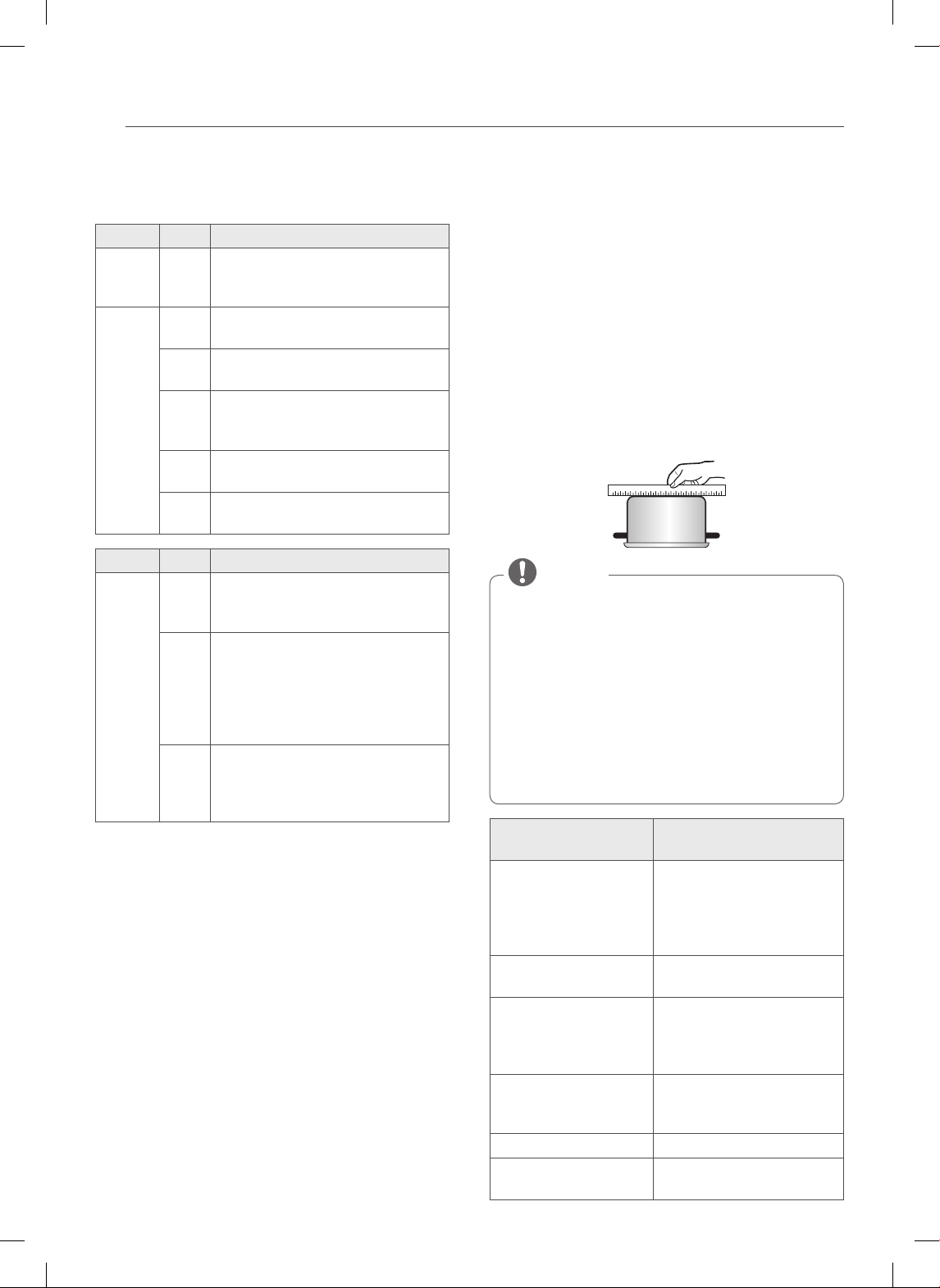
To turn on the DUAL element (left front element):
There is one dual element located in the left front position.
The dual element can be used as either a dual or a single
element.
1. Push in the appropriate knob.
2-A. Turn the knob counterclockwise to use it as a
SINGLE element.
2-B. Turn the knob clockwise to use it as a DUAL unit.
22
1
A B
BA
2
1
2
22
1
A B
SINGLE DUAL
Dual
Single
Heating with inner
(smaller) element only
Heating with both
elements together
To turn on a TRIPLE surface unit: (Right Front,
some models)
There is one triple element that can be used as either a
single, dual or triple element.
1. Push in the appropriate knob.
2-A. Turn the knob counterclockwise to use the
SINGLE element.
2-B. Turn the knob clockwise to the Dual position to
use as a DUAL element.
2-C. Turn the knob clockwise to the Triple position to
use as a triple element.
CAB
22
1
A C
B
Triple
Dual
Single
Single Dual Triple
• Hi is the highest temperature available.
• Lo is the lowest temperature available.
• Press and hold the + or – buttons to quickly scroll
through the temperature settings.
NOTE
To turn on the Warming Zone (center element,
some models):
Use the Warming Zone to keep food warm after it has
already been cooked.
The warming zone is not meant for cooking food.
Attempting to cook uncooked or cold food on the
warming zone could result in a food borne illness.
1. Push in the appropriate knob.
2. Turn the knob in either direction to the desired
setting.
• Only use cookware and dishes that are safe for
oven and cooktop use.
• Always use oven mitts when removing food from
the cooktop and oven.
• Do not place sealed containers on the cooktop.
• DO NOT use plastic wrap to cover food while on
the cooktop. Plastic may melt onto the surface and
be very difficult to clean.
• When using the warming zone, food should be
kept in its container and covered with a lid or
aluminum foil to maintain food quality.
• DO NOT leave food on the warming zone for more
than two hours.
CAUTION
20
USING THE COOKTOP
The recommended surface cooking
settings
Element Level Recommended Use
Dual
Triple
- • Large diameter cookware
• Large quantities of food
• Home canning
Single
Dual
Triple
HI • Bring liquid to a boil
• Start cooking
8 • Hold a rapid boil, frying, deep fat fry
• Quickly brown or sear food
5 • Maintain a slow boil
• Fry or saute foods
• Cook soups, sauces and gravies
2 • Stew or steam food
• Simmer
Lo • Keep food warm
• Melt chocolate or butter
Element Level To Keep Warm
Warm
(On
Some
Models)
Hi • Fried Foods
• Hot Beverage
• Soups (Liquid)
Med • Dinner Plate with Food
• Sauces
• Soups (Cream)
• Stew
• Vegetables
• Meats
Lo • Bread/Pastries
• Gravies
• Casseroles
• Eggs
Home canning tips
Be sure that the canner is centered over the surface
unit and flat on the bottom.
• The base must not be more than 1 inch larger than
the element. Use of water bath canners with rippled
bottoms may extend the time required to bring the
water to a boil and cooktops may be damaged.
• Some canners are designed with smaller bases for use
on smooth top surfaces.
• Use the high heat setting only until the water comes to
a boil or pressure is reached in the canner.
• Reduce to the lowest heat setting that maintains the
boil or pressure. If the heat is not turned down, the
cooktop may be damaged.
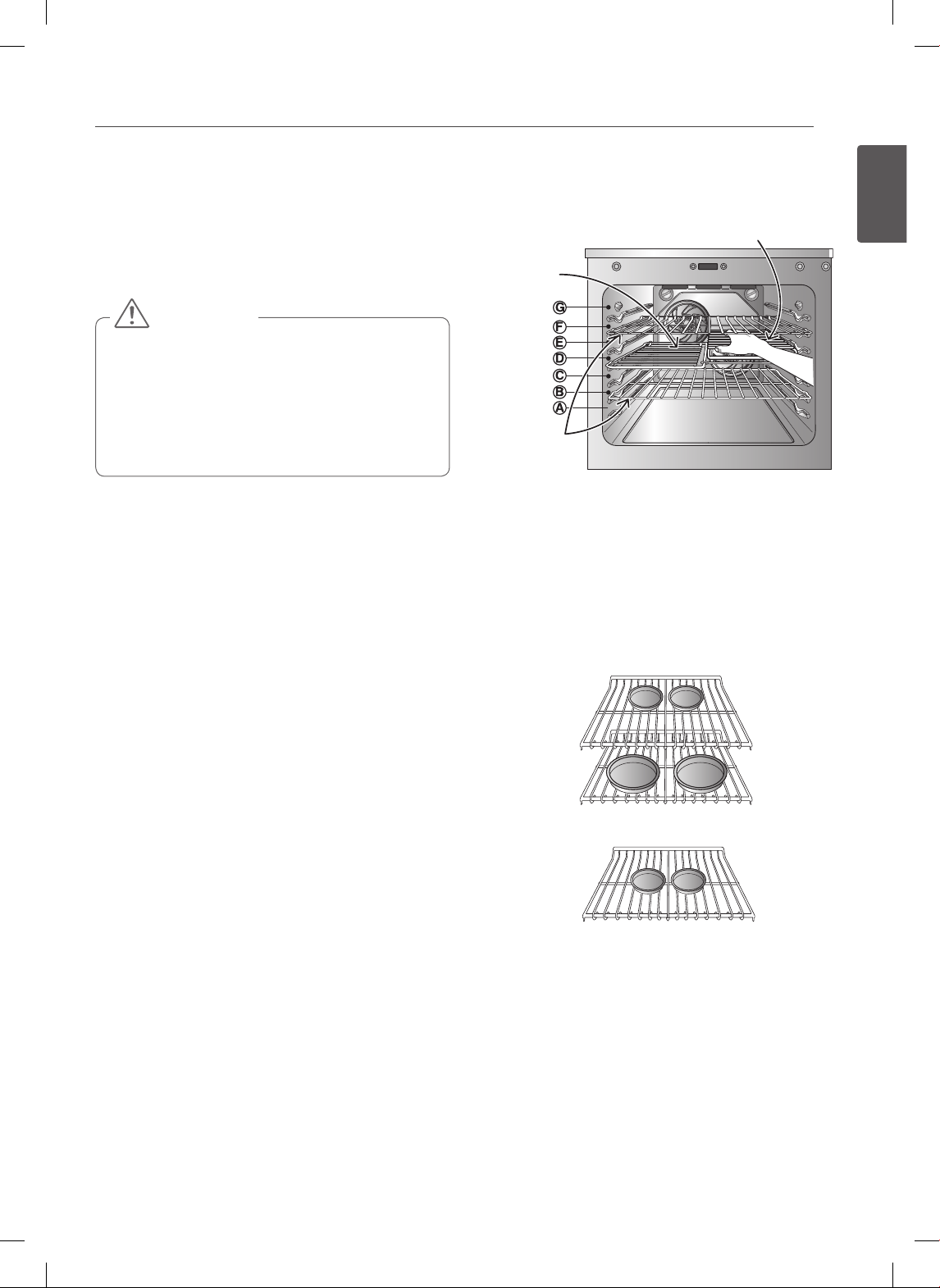
USING THE PROPER COOKWARE
Using the proper cookware can prevent many problems,
such as food taking longer to cook or achieving
inconsistent results. Proper pans will reduce cooking
times and cook food more evenly. Stainless steel is
recommended.
Check pans for flat bottoms by using a straight
edge or ruler
1. Place a ruler across the bottom of the pan.
2. Hold the arrangement up to the light.
3. No light should be visible between the ruler and the
bottom of the pan.
• Do not use a small pan on a large element. Not
only does this waste energy, but it can also result in
spillovers burning onto the cooking area.
• Only use flat bottomed cookware. Do not use
cookware that is oversized or uneven such as
round bottom woks, rippled bottom cookware, or
oversized canners and griddles.
• Do not use foil or foil-type containers. Foil may melt
onto the glass. Do not use the cooktop if metal has
melted on it. Call an authorized Service Center.
NOTE
Recommended
cookware
Do not use
Flat bottom and straight
sides.
Curved, grooved, or warped
pan bottoms. Pans with
uneven bottoms do not cook
eciently and sometimes
may not boil liquid.
Heavy-gauge pans. Very thin-gauge metal or
glass pans.
Pan sizes that match the
amount of food to be
prepared and the size of
the surface element.
Pans that are smaller or larger
than the element.
Weight of handle does
not tilt pan. Pan is well
balanced.
Cookware with loose or
broken handles. Heavy
handles that tilt the pan.
Tight-tting lids. Loose-tting lids.
Flat bottom woks. Woks with a ring-stand
bottom.
21
ENGLISH
USING THE OVEN
USING THE OVEN
REMOVING AND REPLACING THE
OVEN RACKS
• Replace oven racks before turning the oven on to
prevent burns.
• DO NOT cover the racks with aluminum foil, or any
other material, or place anything on the bottom of
the oven. Doing so will result in poor baking and
may damage the oven bottom.
• Only arrange oven racks when the oven is cool.
CAUTION
Removing the racks:
1. While wearing oven mitts, grasp the oven rack.
2. Pull the rack straight out until it stops.
3. Lift up the front of the rack.
4. Pull out the rack.
Replacing the racks:
1. While wearing oven mitts, place the end of the rack
on the support.
2. Tilt the front end of the rack up.
3. Push the rack in.
4. Check that the rack is properly in place.
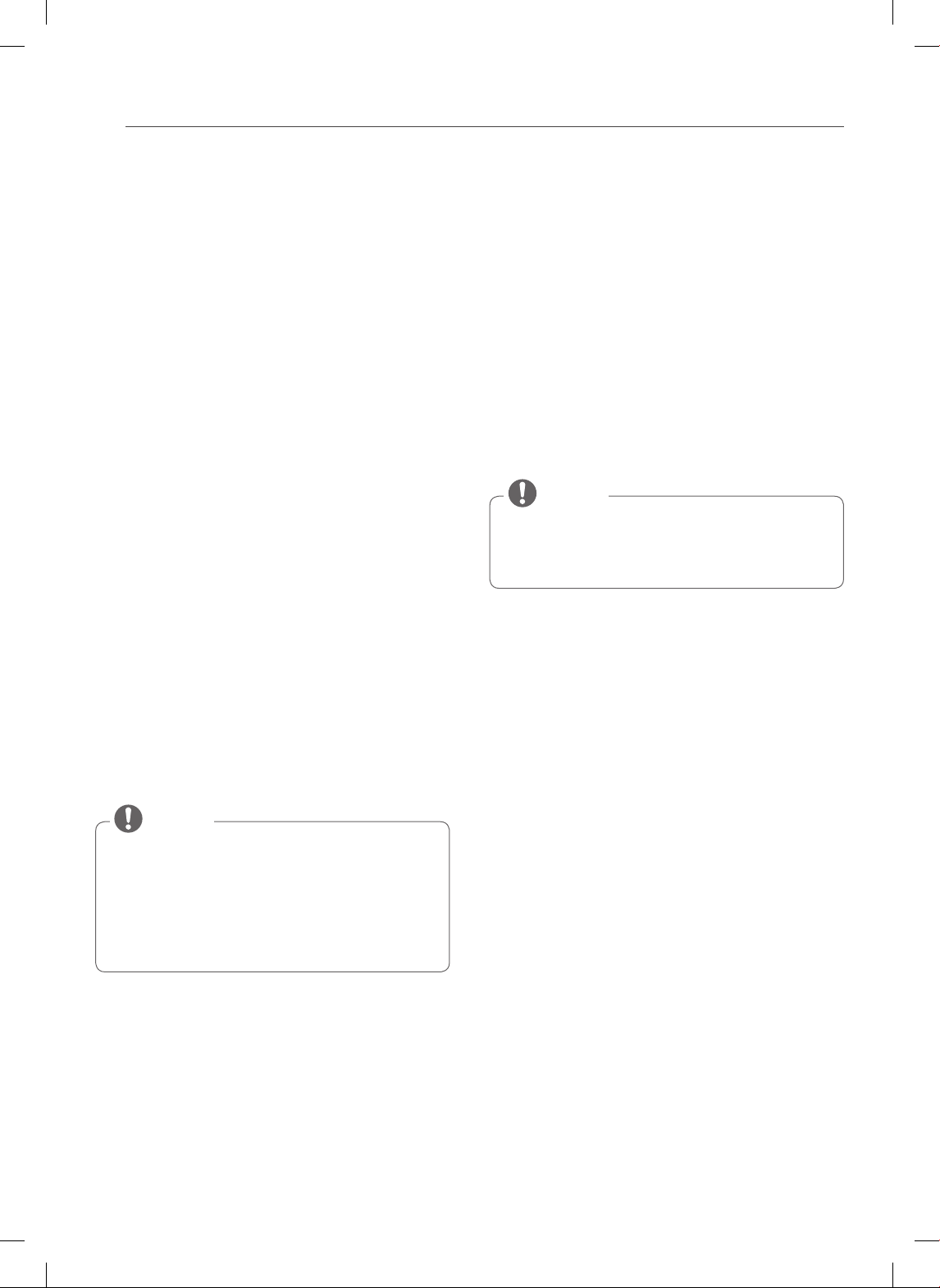
Rack and Pan Placement
(On Some Models)
Common use with Roasting rack
Split-rack
Heavy
duty rack
Baking results will be better if baking pans are centered
in the oven as much as possible. If baking with more than
one pan, place the pans so each has at least 1” to 1
1
/
2
” of
air space around it.
If cooking on multiple racks, place the oven racks in
positions B and D (for 2 racks). Place in positions B, D, and
F (for 3 racks). Place the cookware as shown in Fig.1, 2.
Fig. 1: Multiple rack baking (Position B, D)
Fig. 2: Single rack baking (Position D)
22
USING THE OVEN
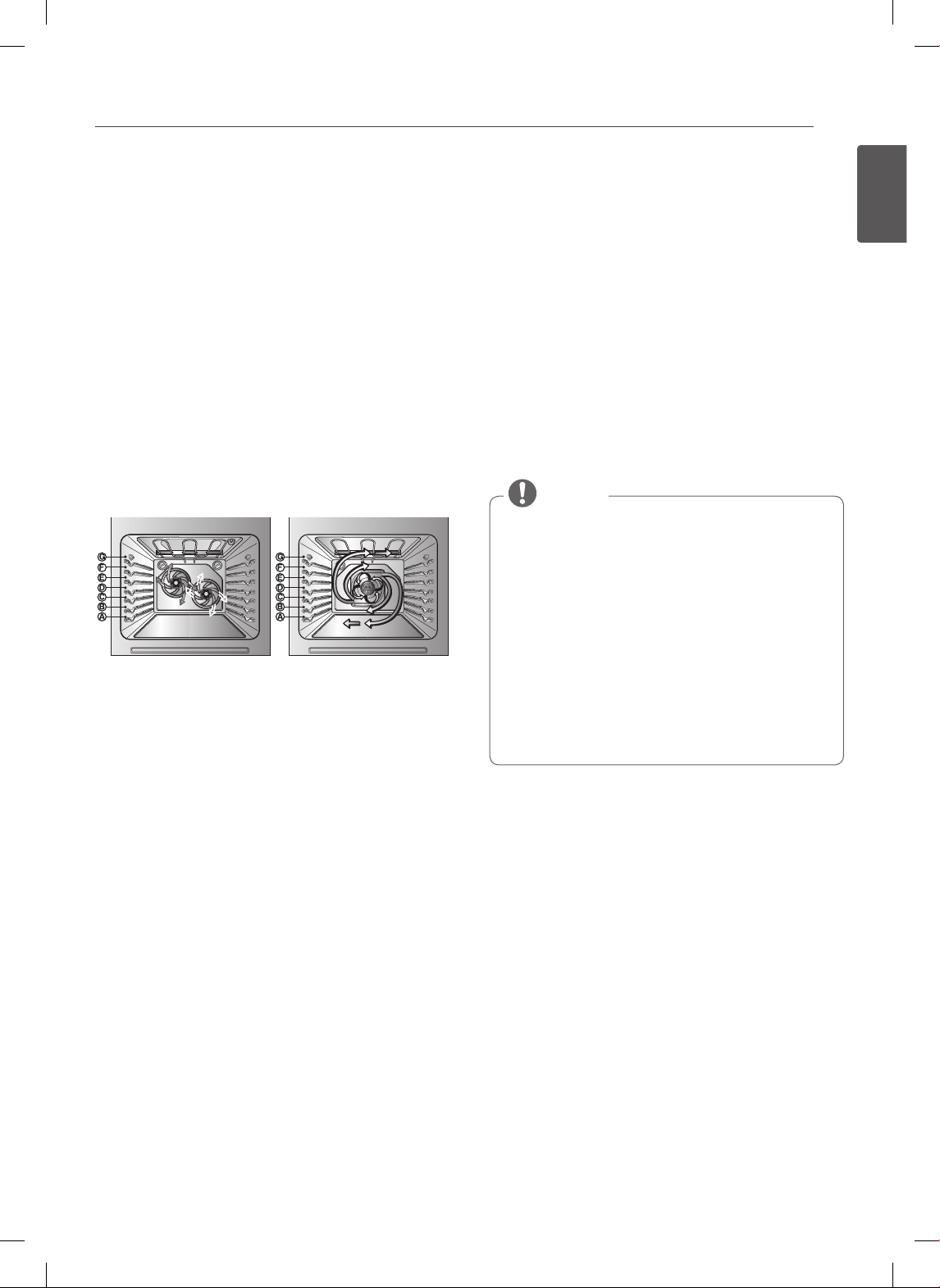
BAKE
BAKE is used to prepare foods such as pastries, breads
and casseroles. The oven can be programmed to bake at
any temperature from 170°F (77°C) to 550°F (288°C). The
default temperature is 350°F (177°C).
Setting the BAKE function (example, 375°F):
1. Press BAKE.
2. Set the oven temperature (Press 3, 7 and 5).
3. Press START.
PREHEATING and 100˚ will appear in the display. As the
oven preheats, the temperature will increase by 5 degree
increments. Once the oven reaches its set temperature, a
tone will sound and the oven light will flash on and off.
PREHEATING
Place the food in the oven after preheating.
Preheating is necessary for better cooking results.
4. When cooking is finished, press the CLEAR OFF
button.
5. Remove food from the oven.
To change the Bake Temperature while cooking
(example changing from 375°F to 425°F):
1. Press BAKE.
2. Set the oven temperature (Press 4, 2 and 5).
3. Press START.
• During oven operation, it is possible that the oven
cooling fan will operate to cool the control panel.
This is normal operation.
• It is normal for the air from the cooling fan to be
hot during oven use, and it will remain warm until
the oven is cooled.
NOTE
Tips for baking
Follow the recipe or convection food directions for
baking temperature, time and rack position. Baking time
and temperature will vary depending on the ingredients,
size, and shape of the baking pan used.
• For best results, food should be baked on a single rack
with at least 1” to 1
1
/
2
” of air space between the pans
and oven walls.
• Check for doneness at the minimum time.
• Use metal bakeware (with or without a nonstick finish),
heatproof glass-ceramic, ceramic or other bakeware
recommended for oven use.
• Dark metal pans or nonstick coatings will cook faster
with more browning. Insulated bake ware will slightly
lengthen the cooking time for most foods.
When using an oven thermometer in the oven
cavity, temperatures may differ from the actual set
oven temperature.
NOTE
23
ENGLISH
USING THE OVEN
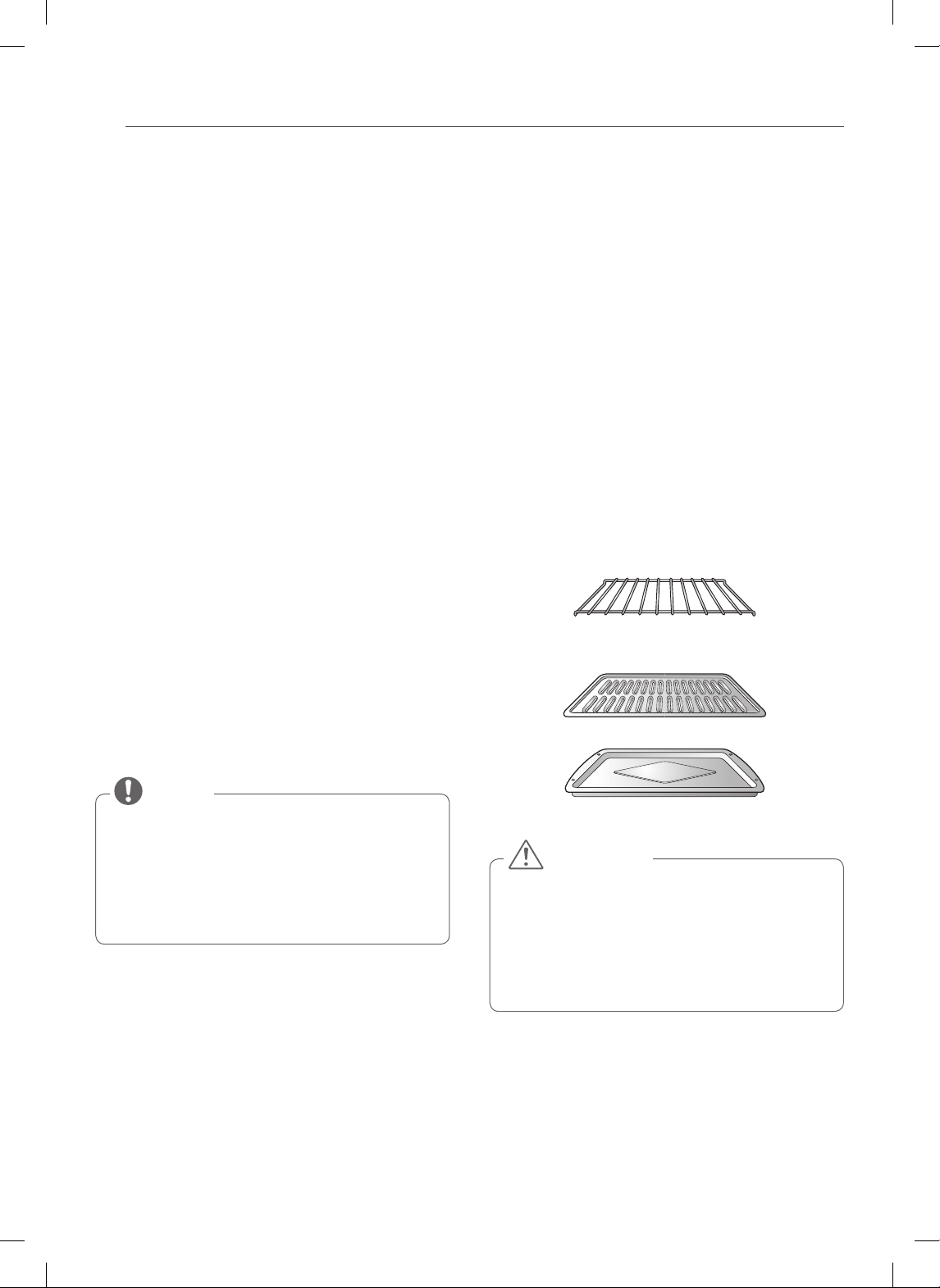
DUAL CONVECTION BAKE
(On Some Models)
Dual Convection baking uses two fans to circulate the
oven's heat evenly and continuously within the oven.
Improved heat distribution allows for even cooking and
excellent results using multiple racks at the same time.
Foods cooked on a single oven rack will generally cook
faster and more evenly with Dual Convection Bake.
Multiple oven rack cooking may slightly increase cook
times for some foods, but the overall result is time saved.
Benefits of Convection Bake:
• Foods cook more evenly with Convection Bake
compared to non-convection.
• Multiple rack baking.
• No special pans or bakeware needed.
(LSE3092ST, LSES302ST) (LSE3090ST)
The CONV. BAKE pad controls the Convection Bake
feature. Use the Convection Bake feature when cooking
speed is desired. The oven can be programmed for
Convection Bake at any temperature between 300°F
(150°C) to 550°F (285°C).
Setting the CONVECTION BAKE function
(example, 375°F):
1. Press CONV. BAKE. The display will flash 350 deg F.
2. Set the oven temperature (Press 3, 7 and 5).
3. Press START. The display will show CONV BAKE and
the converted temperature starting at 100°F. As the
oven preheats, the display will show the temperature
increasing in 5 degree increments. Once the oven
reaches the desired adjusted temperature, a tone
will sound and the oven light will flash on and off.
The display will show the auto converted oven
temperature 350 deg F, CONV BAKE and the fan
icon.
Press CLEAR/OFF to cancel Convection Bake at any time.
Tips for Convection Bake
• Time reductions will vary depending on the amount
and type of food to be cooked. Cookies and biscuits
should be baked on pans with no sides or very low
sides to allow heated air to circulate around the food.
Food baked on pans with a dark finish will cook faster.
• When using Convection Bake with a single rack, place
oven rack in position D. If cooking on multiple racks,
place the oven racks in positions B and D (for 2 racks).
Place in positions B, D, and F (for 3 racks).
• Cakes have better results when baked using the BAKE
function. (You can still use multiple racks when baking
multiple cake layers at the same time).
• Cookies, muffins, biscuits and other quick breads tend
to have very good results when using multiple racks.
• The convection fan stops during a convection bake
cycle to allow for more even heating. This is normal.
• During oven operation, it is possible that the oven
cooling fan will operate to cool the control panel.
This is normal operation.
• The oven fan will run while convection baking. The
fan will stop when the door is open, but the heat
will not turn off. In some cases, the fan may shut off
during a convection bake cycle.
• It is normal for the air from the cooling fan to be
hot during oven use, and it will remain warm until
the oven is cooled.
NOTE
To use 3-rack position mode (On Some Models)
Bake with three racks using the CONV BAKE function.
1. Press CONV.BAKE twice, and "3 rack" will appear in
the display.
2. Set the oven temperature.
3. Press START.
24
USING THE OVEN
CONVECTION ROAST
The Convection Roast feature is designed to give
optimum roasting performance. The Convection Roast
feature uses the convection fan while cooking to roast
meats and poultry. The heated air circulates around the
food from all sides, sealing in juices and flavors.
Foods are crispy brown on the outside while staying
moist on the inside.
• Convection Roast is especially good for large tender
cuts of meat, uncovered.
Setting the CONVECTION ROAST function
(example, 375°F):
1. Arrange oven racks and place food in oven.
2. Press CONV. ROAST. The display will flash
350 deg F.
3. Set the oven temperature (Press 3, 7 and 5).
4. Press START. The display will show CONV ROAST
and the changing temperature starting at 100°F.
As the oven preheats, the display will show the
temperature increasing in 5 degree increments. Once
the oven reaches the desired adjusted temperature,
a tone will sound and the oven light will flash on and
off. The display will show the auto converted oven
temperature 350 deg F, CONV BAKE and the fan
icon.
Press CLEAR/OFF to cancel this function at any time.
• During oven operation, it is possible that the oven
cooling fan will operate to cool the control panel.
This is normal operation.
• It is normal for the air from the cooling fan to be
hot during oven use, and it will remain warm until
the oven is cooled.
NOTE
Roasting Rack Instructions (On Some Models)
When preparing meats for convection roasting, use the
broiler pan and grid along with the roasting rack. The
broiler pan will catch grease spills and the grid will help
prevent grease splatters. The roasting rack will allow the
heat to circulate around the meat.
1. Place the oven rack on the bottom or next to the
bottom rack position.
2. Place the grid in the broiler pan. The roasting rack
fits on the grid allowing the heated air to circulate
under the food for even cooking and to help increase
browning on the underside.
Make sure the roasting rack is securely seated on the
grid in the broiler pan.
DO NOT use the broiler pan without the grid. DO NOT
cover the grid with aluminum foil.
3. Position food (fat side up) on the roasting rack.
4. Place the broiler pan on the oven rack.
Roasting rack
(Right side of the split rack)
Broiler Pan
Grid
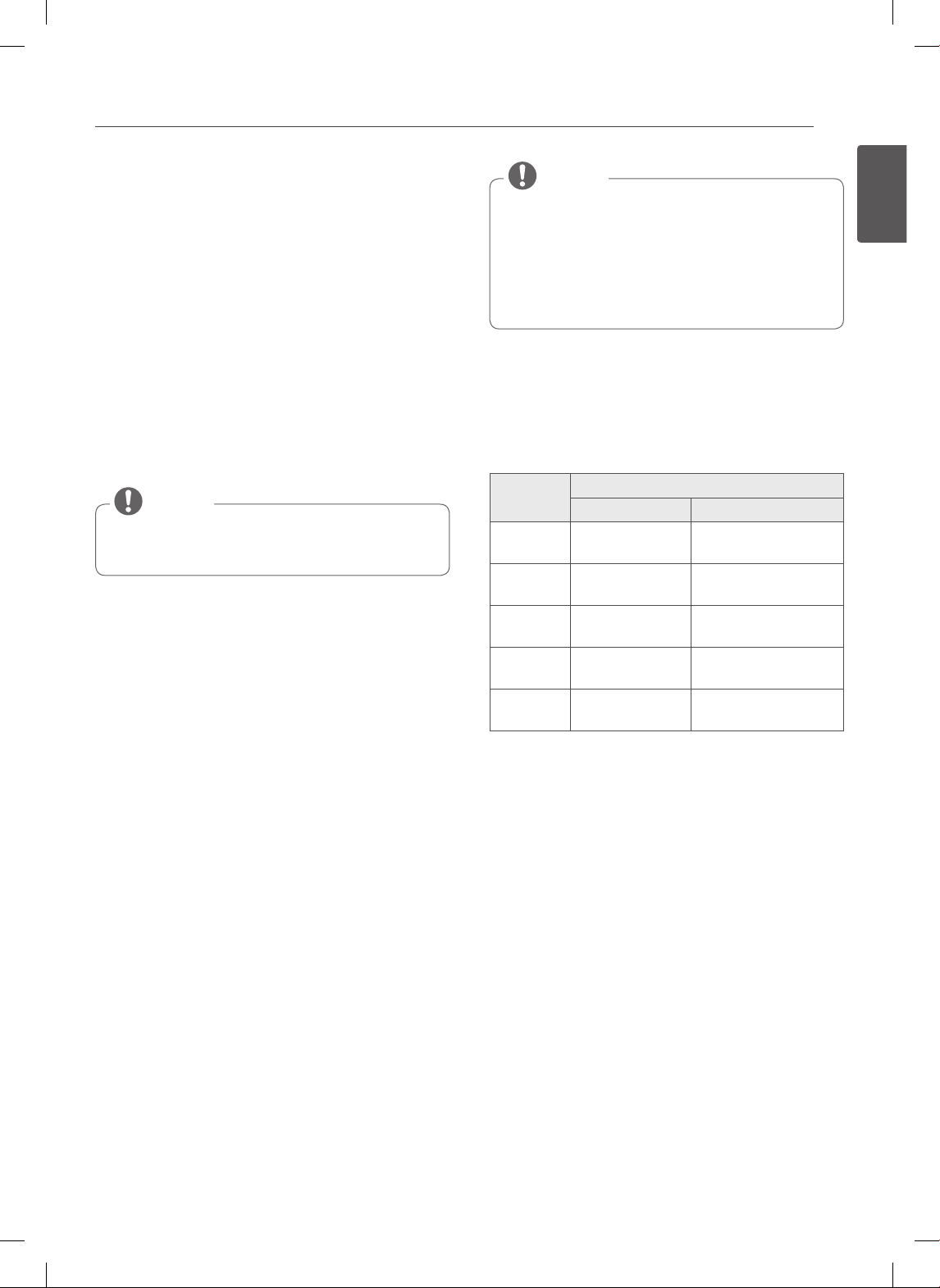
• DO NOT use the roasting rack when broiling.
This will help prevent food from coming in contact
with the broil element and grease from splattering.
• DO NOT use the broiler pan without the grid.
• DO NOT cover the grid with aluminum foil.
• Position food (fat side up) on the roasting rack.
CAUTION
25
ENGLISH
USING THE OVEN
HEALTHIER ROAST
(On Some Models)
The Healthier Roast function is designed to lower the fat
content of meat and poultry. Healthier Roast can reduce
fat up to 20% compared to regular roasting. The amount
of fat reduced from the meat may vary depending on the
type and cut of meat. Results are based on beef roasts
tested by a certified organization.
Preheating is not necessary for meats and poultry. The
heating system of the healthier roast feature heats the
food from all sides, sealing in juices and flavors. Foods are
crispy brown on the outside while staying moist on the
inside. Extra cooking time may be needed for this feature.
The meat probe should be used in this feature. (Refer to
the HEALTHIER ROASTING CHART.)
PROBE will flash in the display when the oven probe
is plugged into the socket.
NOTE
Setting the HEALTHIER ROAST function:
(example for Beef with probe temp 140°F):
1. Before using this feature, insert the meat probe into
the meat or poultry.
2. Press Healthier Roast.
3. Select the menu by pressing Healthier Roast
continuously until the type of meat you would like
to cook appears in the display. (Beef, Pork, Lamb,
Chicken, Turkey)
4. Set the probe temperature. (Press 1, 4 and 0.)
5. Press START to run this feature.
The display will show the current probe temperature.
6. When the meat probe temperature reaches the set
temperature, the roasting cycle is complete. The
indicator tones will sound and the display will show
End of Cycle. The indicator tones will sound every
minute until CLEAR/OFF is pressed.
• During oven operation, it is possible that the oven
cooling fan will operate to cool the control panel.
This is normal operation.
• It is normal for the air from the cooling fan to be
hot during oven use, and it will remain warm until
the oven is cooled.
NOTE
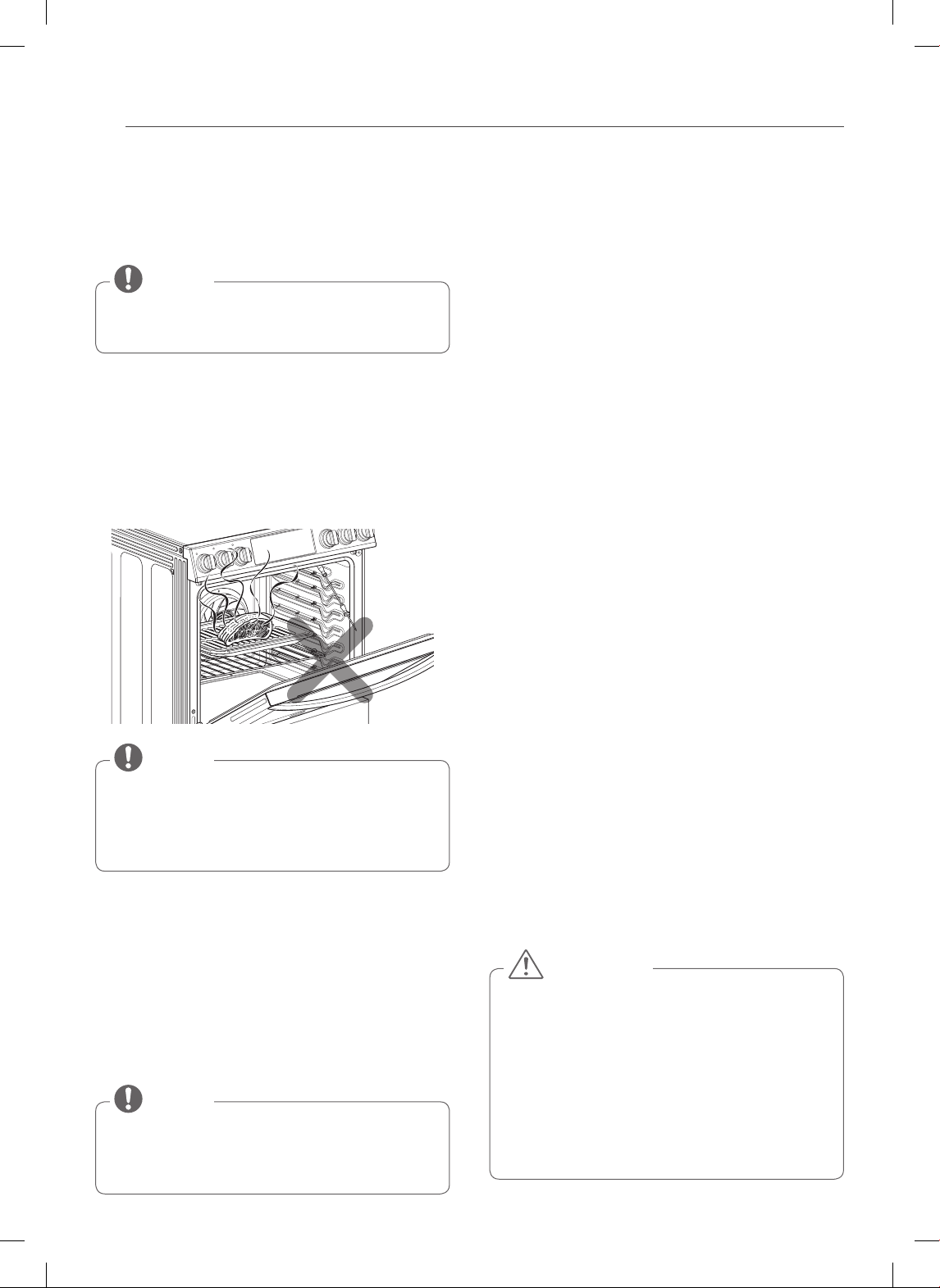
When preparing meats for roasting, use the broiler pan
and grid. The broiler pan will catch meat drippings and
prevent grease splatters.
Press CLEAR/OFF to cancel Healthier Roast at any time.
Healthier Roasting Chart
Menu
Meat Probe Temp.
Temp. range Default Temp.
1. Beef 140~170°F
(60~77°C)
160°F
(71°C)
2. Pork 160~190°F
(71~88°C)
170°F
(77°C)
3. Lamb 140~170°F
(60~77°C)
160°F
(71°C)
4. Chicken 165~180°F
(74~82°C)
180°F
(82°C)
5. Turkey 165~180°F
(74~82°C)
175°F
(79°C)
26
USING THE OVEN
BROIL
The Broil function uses intense heat from the upper
heating element to cook food. BROIL works best for
tender cuts of meat, fish, and thinly cut vegetables.
• Your oven is designed for CLOSED DOOR Broiling
• The meat probe cannot be used with this mode
NOTE
Before Broiling.
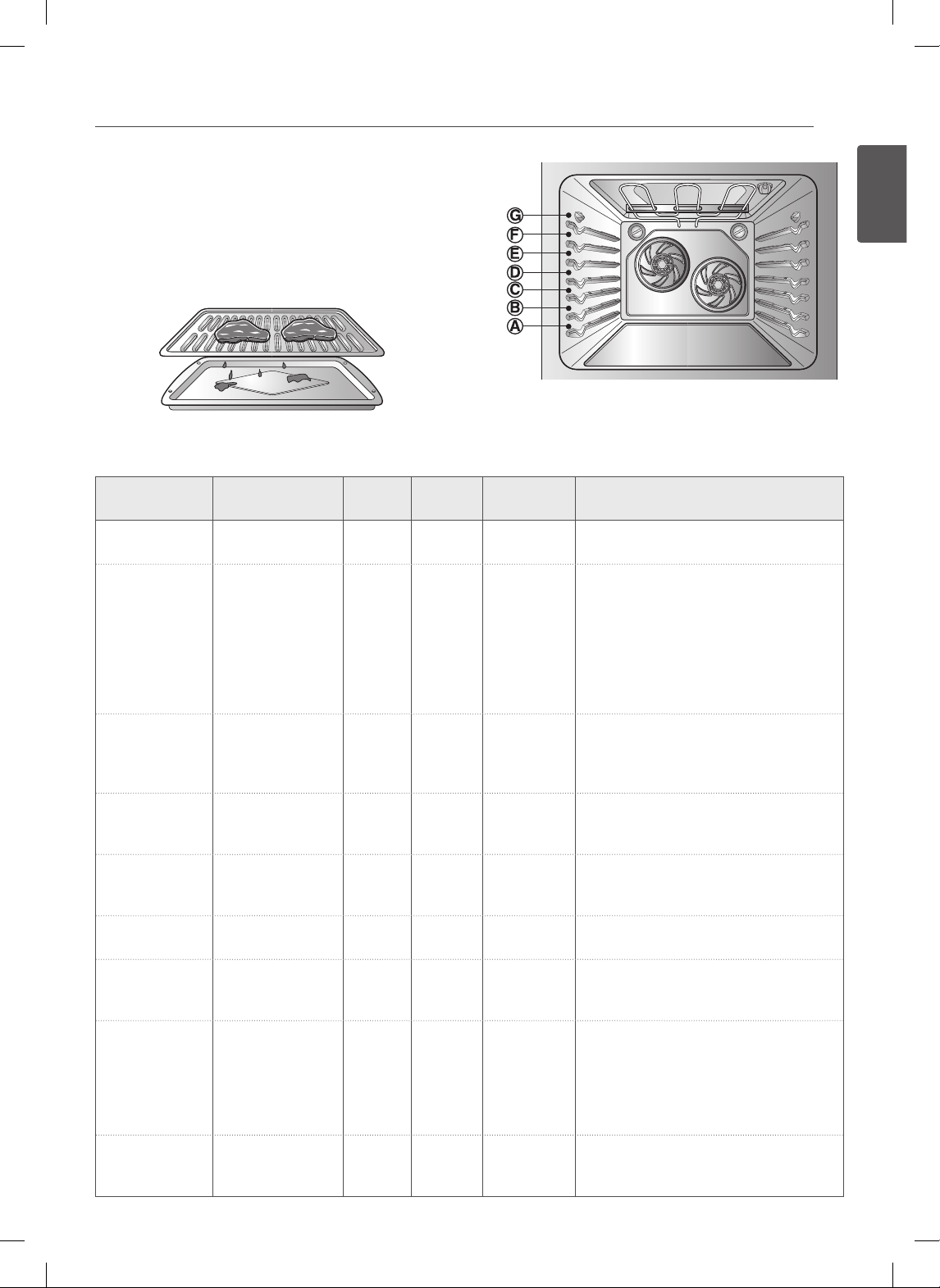
1. Place the meat or fish on the broiler grid of the
broiler pan.
2. Follow suggested shelf positions in the Broiling
Guide.
3. The oven door must be closed during broiling.
If the oven door is opened when broiling, the
control will display “Close the door to continue broil”
promptly. A warning beep will occur every 15
seconds until the door is closed.
NOTE
Setting the BROIL function
1. Press BROIL once for Hi broil or twice for Lo broil.
2. Press START. The oven will begin to broil.
3. Broil the food on one side until browned. Turn and
cook on the other side until browned.
4. When broiling is finished, press CLEAR/OFF.
Press CLEAR/OFF to cancel Broil at any time.
• During oven operation, it is possible that the oven
cooling fan will operate to cool the control panel.
This is normal operation.
NOTE
Smoking
Due to the intense heat associated with broiling, it is
normal to experience smoke during the cooking process.
This smoke is a natural byproduct of searing and should
not cause you to worry. If you are experiencing more
smoke than you are comfortable with, use the following
tips to reduce the amount of smoke in your oven.
1. Always use a broiler pan. Do not use sautee pans or
regular baking sheets for safety reasons.
2. NEVER use a broiler pan that is not thoroughly
cleaned and at room temperature at the beginning
of cooking.
3. ALWAYS run your cooktop ventilation system or vent
hood during broiling.
4. Keep the interior of your oven as clean as possible.
Left over debris from prior meals can burn or catch
fire.
5. Avoid fatty marinades and sugary glazes. Both
of these will increase the amount of smoke you
experience. If you would like to use a glaze, apply it
at the very end of cooking.
6. If you are experiencing significant smoke with any
food item, consider:
• Lowering the broiler to the LO setting.
• Lowering the rack position to cook the food farther
away from the broiler.
• Using the HI broil setting to achieve the level of
searing you desire, and then either switching to the
LO broil setting, or switching to the BAKE function.
7. As a rule, fattier cuts of meat and fish will produce
more smoke than leaner items.
8. Adhere to the recommended broil settings and
cooking guidelines in the chart on the following
page whenever possible.
• Should an oven fire occur, leave the oven
door closed and turn the oven off. If the fire
continues, throw baking soda on the fire or use
a fire extinguisher.
• DO NOT put water or plain flour on the fire.
- Flour may be explosive and water can cause a
grease fire to spread and cause personal injury.
• DO NOT use the broiler pan without the grid.
• DO NOT cover the grid with aluminum foil.
CAUTION
27
ENGLISH
USING THE OVEN
RECOMMENDED BROILING GUIDE
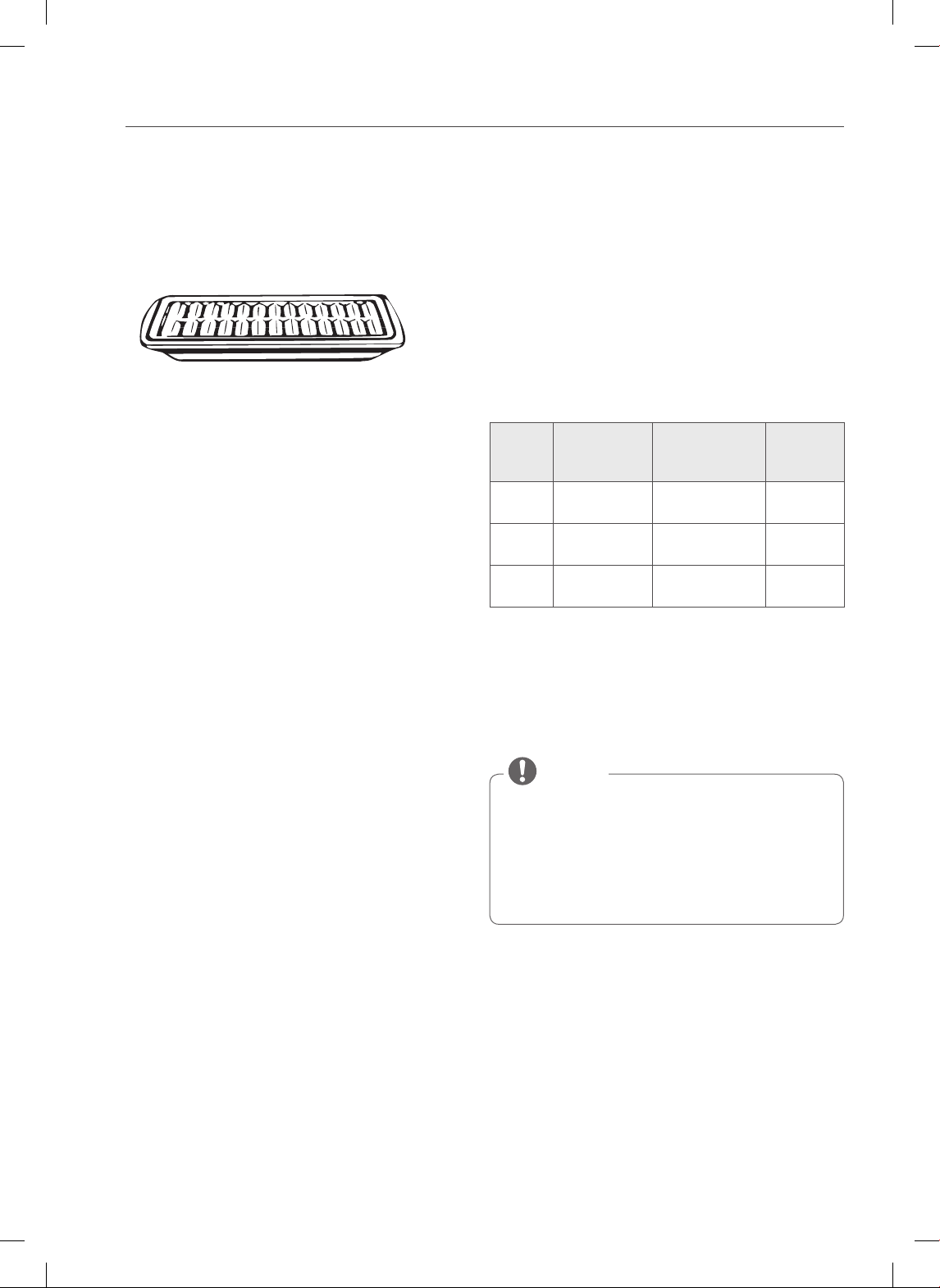
The size, weight, thickness, starting temperature, and
your preference of doneness will affect broiling times.
This guide is based on meats at refrigerator temperature.
For best results when broiling, use a pan designed for
broiling (refer to Fig.1)
Fig.1
Broiling Chart
Food
Quantity and/ or
Thickness
Shelf
Position
First Side
Time (min.)
Second Side
Time (min.)
Comments
Ground Beef
Well Done
1 lb. (4 patties)
½ to ¾” thick
F 7–9 3–5 Space evenly. Up to 8 patties may be
broiled at once.
Beef Steaks
Rare
Medium
Well Done
Rare
Medium
Well Done
1” thick
1 to 1½ lbs.
1½” thick
2 to 2½ lbs.
F
F
F
D
D
D
6
7
8
10
12
14
2–3
2–3
3–4
4–6
6–8
8–10
Steaks less than 1” thick cook through
before browning.
Pan frying is recommended. Slash fat.
Chicken 1 whole cut up
2 to 2½ lbs.,
split lengthwise
2 Breasts
C
C
20
20
6–8
6–10
Broil skin-side-down rst.
Lobster Tails 2–4
10 to 12 oz. each
C 12–14 Do not turn
over.
Cut through back of shell. Spread open.
Brush with melted butter before broiling
and after half of broiling time.
Fish Fillets ¼ to ½” thick E 5 3–4 Handle and turn very carefully. Brush with
lemon butter before and during cooking,
if desired.
Ham Slices
(precooked)
½” thick D 5 3–5 Increase time 5 to 10 minutes per side for
1½” thick or home-cured ham.
Pork Chops
Well Done
2 (½” thick)
2 (1” thick) about
1 lb.
E
D
7
9–10
6–8
7–9
Slash fat.
Lamb Chops
Medium
Well Done
Medium
Well Done
2 (1” thick) about
10 to 12 oz.
2 (1½” thick)
about 1 lb.
E
E
E
E
6
8
11
13
4–6
7–9
9
9–11
Slash fat.
Salmon Steaks 2 (1” thick)
4 (1” thick)
about 1 lb.
D
D
8
9
3–4
4–6
Grease pan. Brush steaks with melted
butter.
28
USING THE OVEN
Broiling Tips (On Some Models)
• Preheat oven 5~7 minutes for best broiling results.
• Brush fish and poultry with butter or oil to prevent
sticking.
• Always use the broiler pan and grid that came with
your oven. Do not cover the grid with aluminum foil.
The broiler grid is designed to prevent smoking and
spattering by trapping juices (fats and oils) from foods
in the lower part of the broiling pan.
• Use Broil LO to broil foods such as poultry and thick
cuts of meat to cook thoroughly without overcooking
them.
Beef
• Steaks and chops should always be allowed to rest for
five minutes before cutting into them and eating. This
allows the heat to distribute evenly through the food
and creates a more tender and juicy result.
• Consider removing thick pieces of meat from the
refrigerator 30 minutes prior to cooking. This will help
them cook more quickly and evenly, and will produce
less smoke when broiling. Please note that cooking
times will likely be shorter than the times indicated in
the Broiling Chart when using this method.
• For bone-in steaks or chops that have been “Frenched”
(all meat removed from around the bone), wrap the
exposed sections of bone in foil to reduce burning.
Seafood
• When broiling skin-on fish, always use the Medium
broil setting and always broil the skin side last.
• Seafood is best consumed immediately after cooking.
Allowing seafood to rest after cooking can cause the
food to dry out.
• It is a good idea to rub a thin coating of oil on the
surface of the broiling pan before cooking to reduce
sticking, especially with fish and seafood. You can also
use a light coating of non-stick pan spray.
Vegetables
• Toss your vegetables lightly in oil before cooking to
improve browning.
FAVORITE
The FAVORITE feature is used to record and recall your
favorite recipe settings. This feature can store and recall
up to three different settings. The Favorite Setting feature
can be used with the COOK TIME feature. This feature will
not work with any other function including the START
TIME feature.
1. Place the food in the oven.
2. Press FAVORITE once for Bread, twice for Meat, and
three times for Chicken. The default temperature will
appear and COOK will flash.
Category How to Select
Default Temp.
(may be changed
and recalled)
Operating
Feature
1. Bread Touch FAVORITE
button once.
375°F BAKE
2. Meat Touch FAVORITE
button twice.
325°F Convection
Roast
3. Chicken Touch FAVORITE
button 3 times.
350°F Convection
Roast
3. Press the number buttons to set the desired oven
temperature. This temperature will be stored and be
recalled on next use.
4. Press the START feature. The preheat indicator
tones will sound 3 times when the oven reaches the
programmed temperature.
• Only the temperature you selected will be stored,
not the cooking time.
• If the oven temperature is changed, the changed
temperature will be stored.
• The temperature will still be stored after a power
failure.
NOTE
29
ENGLISH
USING THE OVEN
WARM
The warm function will maintain an oven temperature
of 170°F and keep cooked food warm for serving up to 3
hours after cooking has finished. The Warm function may
be used without any other cooking operations or can
be used following the finish of TIMED BAKE or DELAYED
TIMED BAKE.
Setting the WARM function:
1. Press the WARM/PROOF button once.
2. Press START.
3. To turn Warm off, press CLEAR/OFF at any time.
To set the WARM function after timed cooking:
1. Set the cooking feature that you want to use: TIMED
(BAKE, CONV. BAKE, CONV. ROAST), DELAYED
TIMED (BAKE, CONV. BAKE, CONV. ROAST).
2. Press START.
3. Press WARM/PROOF once. COOK & WARM mode
is set to turn on automatically after completing the
TIMED COOKING or DELAYED TIMED COOKING.
4. To turn Cook & Warm off at any time press
CLEAR/OFF.
PROOF
The Proof feature maintains a warm environment for
rising yeast leavened products before baking. To avoid
lowering the oven temperature and lengthening proofing
time, do not open the oven door unnecessarily. Check
bread products early to avoid over-proofing.
Before Proof :
Place the covered dough in a dish in the oven on rack B or C.
For best results, cover the dough with a cloth or with
plastic wrap (the plastic may need to be anchored
underneath the container so the oven fan does not
blow it off).
NOTE
Setting the PROOF function:
1. Press PROOF or WARM/PROOF button until “PRF”
appears in the display.
2. Press START. The proof feature automatically
provides the optimum temperature for the proof
process, and therefore does not have a temperature
adjustment.
3. When proofing is finished, press CLEAR/OFF.
• Do not use the proofing mode for warming food or
keeping food hot. The proofing oven temperature is
not hot enough to hold food at a safe temperature.
Use the WARM feature to keep food warm.
•
Proofing will not operate when the oven temperature
is above 125°F. Oven is Hot will show in the display.
NOTE
30
USING THE OVEN
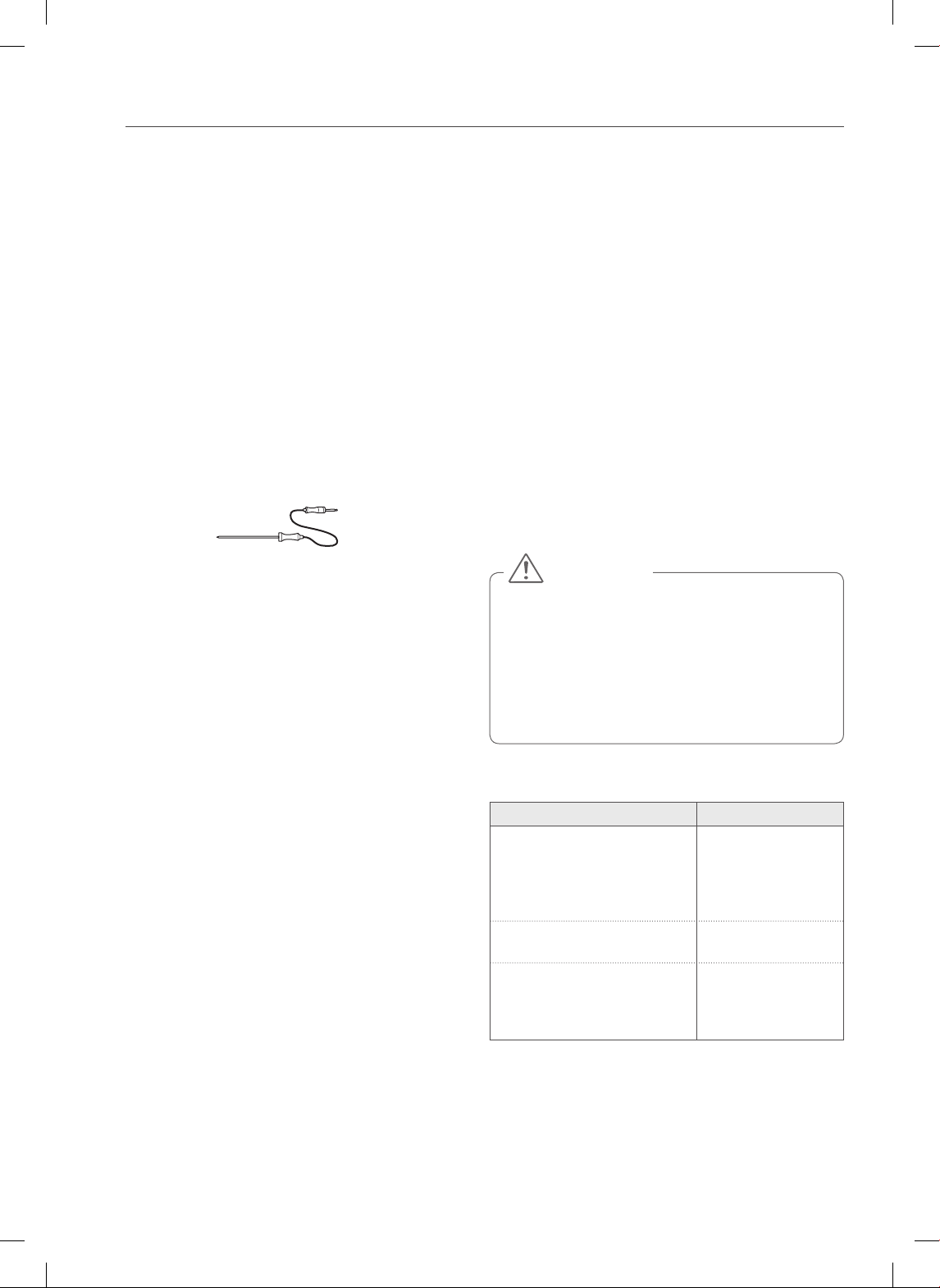
MEAT PROBE (On some models)
The meat probe accurately measures the internal
temperature of meat, poultry and casseroles. It should
not be used during broiling, self clean, warming or
proofing. Always unplug and remove the meat probe
from the oven when removing food. Before using, insert
the probe into the center of the thickest part of the meat
or into the inner thigh or breast of poultry, away from fat
or bones. Place food in the oven and connect the meat
probe to the jack. Keep the probe as far away from heat
sources as possible.
Setting the Meat Probe function: (example for
Roast 375°F with probe temp. 160°F)
1. Insert the meat probe into the meat.
2. Connect the meat probe to the jack.
Method 1
3-1. Press PROBE.
4-1. Set the probe temperature (Press 1, 6 and 0).
5-1. Select Cook mode (Press BAKE).
6-1. Set the oven temperature (Press 3, 7 and 5).
Method 2
3-2. Select cook mode (Press BAKE).
4-2. Set the oven temperature (Press 3, 7 and 5).
5-2. Set the probe temperature (Press 1, 6 and 0).
7. Press START.
The default probe temperature is 150°F (66°C), but can
be changed to any temperature between 80°F (27°C) and
210°F (99°C). The display will show the changing probe
temperature. When the set probe temperature is reached,
the probe will shut off automatically and End of Cycle
will appear on the display.
To change the Meat Probe temperature during
cooking:
1. Press PROBE.
2. Set the probe temperature.
3. Press START.
To change oven temperature during cooking:
1. Select cook function. (Press BAKE).
2. Set the oven temperature.
3. Press START.
IMPORTANT NOTE:
Press CLEAR/OFF to cancel the Meat Probe function at
any time. To avoid breaking the probe, make sure food is
completely defrosted before inserting.
•
Always use an oven mitt to remove the temperature
probe. Do NOT touch the broil element.
- Failure to obey this caution can result in severe
personal injury.
• To avoid damage to the meat probe, DO NOT use
tongs to pull on the probe when removing it.
• Do not store the meat probe in the oven.
CAUTION
Recommended Probe Temperature Chart
Doneness Probe Temp.
Beef, Lamb and Veal
Rare
Medium Rare
Medium
Well Done
140°F (60°C)
145°F (63°C)
160°F (71°C)
170°F (77°C)
Pork
Well Done 170°F (77°C)
Poultry
Breast, Well Done
Thigh, Well Done
Stung, Well Done
170°F (77°C)
180°F (82°C)
165°F (74°C)
31
ENGLISH
LOWER OVEN CONTROLS
LOWER OVEN CONTROLS
(On Some Models)
USING THE LOWER OVEN
The purpose of the lower oven is to bake foods using the
same cooking times and temperatures you would in a
standard oven. Foods ideal for baking in the lower oven
drawer include pizza, frozen foods, casseroles, biscuits,
rolls and many desserts.
Setting the Lower Oven function
1. Push in the appropriate knob.
2. Turn the knob to your desired setting (between
Warm and 450˚F).
200˚F
Warm
450˚F
400˚F
350˚F
300˚F
250˚F
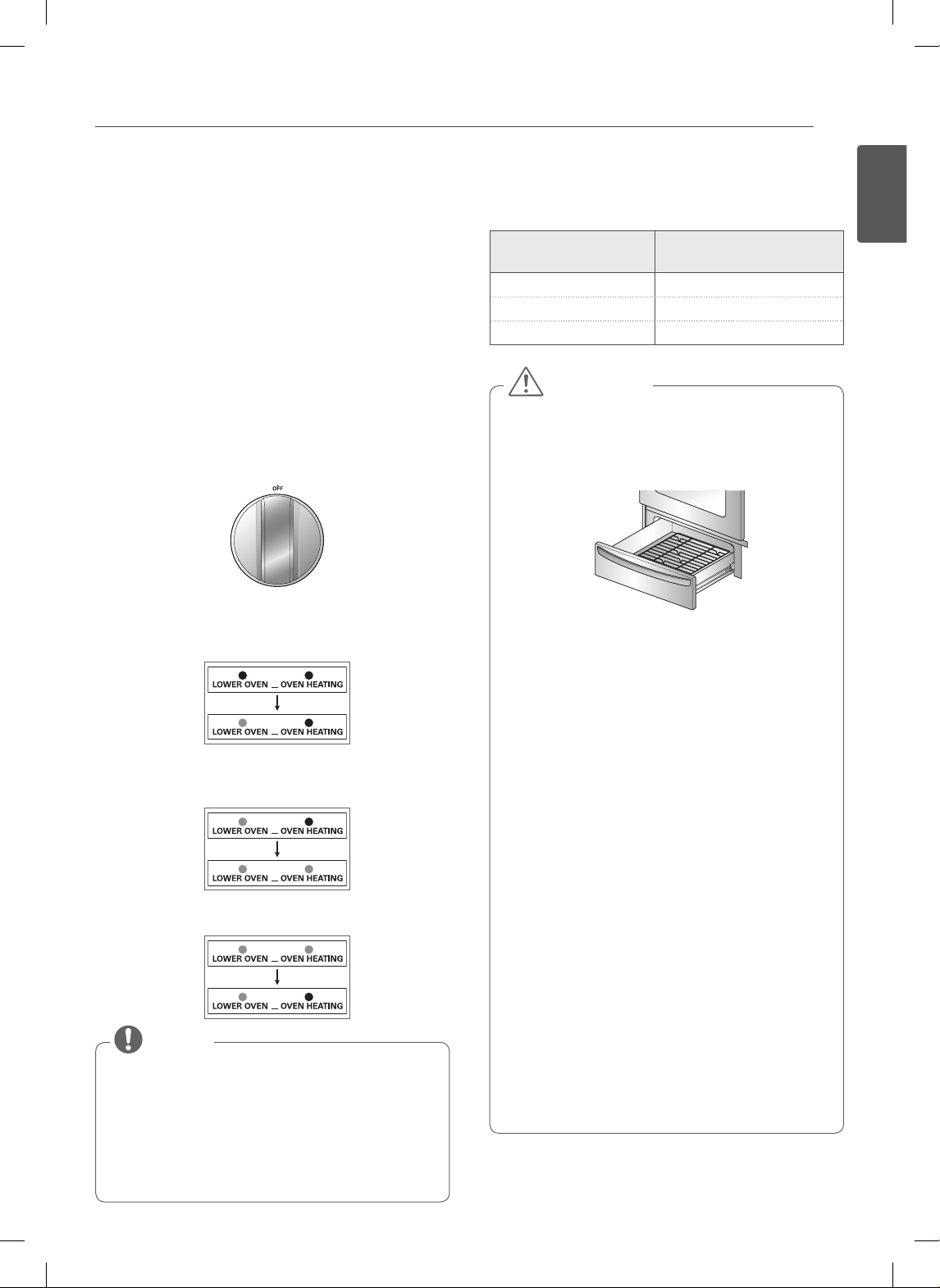
3. When the knob is in the on position, the “LOWER
OVEN” indicator light will illuminate. It remains ON
until the knob is moved to the OFF position.
4. The “OVEN HEATING” indicator light illuminates
when heating elements in the drawer are active. Food
can continue to cook when the indicator light is on.
5. Preheat is complete after the “OVEN HEATING” light
has turned off.
• The lower Oven does not shut off automatically.
• The maximum food height that can be placed in
the lower Oven is 4 inches.
• When turning the knob to use the WARM function,
make sure that the OVEN HEATING signal is ON.
• Opening the door may cause heat loss. Repeated
opening may result in poor cooking results.
NOTE
The lower oven uses less energy than a standard oven.
It takes more time for preheating than a standard oven.
Allow the following approximate times for preheating:
Lower oven
Temperature
Preheat Time
Warm 10 Minutes
350°F 20 minutes
425°F 30 minutes
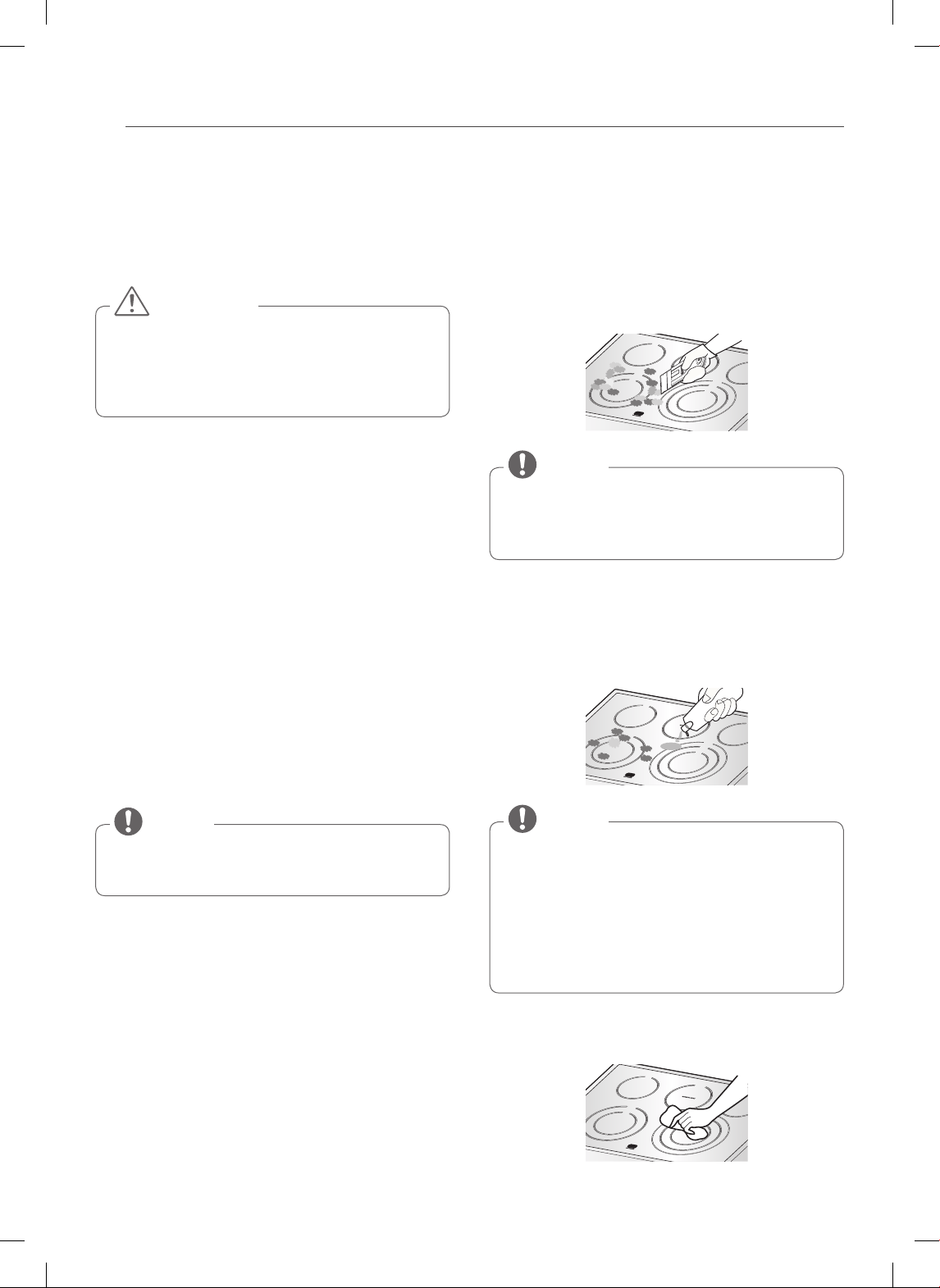
• Always use the drawer rack when using the
lower oven.
- This will provide for some air space between the
drawer and the food.
• When cooking food in the Lower oven always
use a baking sheet or pan with 4 raised sides.
- This will prevent food from sliding off.
• Always use pot holders or oven mitts when
removing food from the lower oven.
- You can be burned as cookware and plates will be
hot.
• Do not put food, foil or cookware directly on the
bottom of the lower oven.
- This may result in damage to your drawer.
• Do not use plastic wrap to cover food.
- Plastic may melt onto the drawer or surrounding
areas. It is very difficult to clean. Only use
aluminum foil or a lid able to withstand the baking
temperature.
• Do not put liquid or water in the lower oven.
• Never place plastics, paper, canned foods or
combustible material in the lower oven.
• Should a drawer fire occur, leave the drawer
closed and turn the drawer off. If the fire
continues, throw baking soda on the fire or use
a fire extinguisher.
• DO NOT put water or plain flour on the fire.
- Flour may be explosive and water can cause a
grease fire to spread and cause personal injury.
CAUTION
32
CARE AND CLEANING
CARE AND CLEANING
CLEANING THE GLASS/CERAMIC
COOKTOP
• DO NOT use scrub pads or abrasive cleaning pads.
They may damage your cooktop surface.
• For your safety, wear an oven mitt or potholder
while cleaning the hot cooking surface.
CAUTION
Use Ceramic Cooktop Cleaner on the glass cooktop.
Other creams my not be as effective or may scratch,
damage or stain the cooktop surface.
To maintain and protect the surface of the glass cooktop,
follow these steps:
1. Before using the cooktop for the first time, clean it
with a ceramic cooktop cleaner. This helps protect
the top and makes cleanup easier.
2. Daily use of ceramic cooktop cleaner will help keep
the cooktop looking new.
3. Shake the cleaning cream well. Apply a few drops of
the cleaner directly to the cooktop.
4. Use a paper towel to clean the entire cooktop
surface.
5. Rinse with clear water and use a dry cloth or paper
towel to remove all cleaning residue.
DO NOT heat the cooktop until it has been cleaned
thoroughly.
NOTE
Burned-On Residue
1. While the cooktop is still hot, remove any burnt-
on deposits or spilled food from the glass/ceramic
cooking surface with a suitable metal razor scraper
(similar to scraping paint off of a windowpane - it
will not damage the decorated cooking surface).
Hold the scraper at an approximate 30° angle to the
cooktop.
• Do not use a dull or nicked blade.
• To prevent burns, wear an oven mitt or potholder
while using the metal scraper.
NOTE
2. When the cooking surface has cooled down, apply a
few dabs (about the size of a dime) of an approved
cleaner in each burner area and work the cleaning
cream over the cooktop surface with a damp paper
towel.
Approved cleaners:
• Weiman CookTop Cleaning Cream
(www.weiman.com)
• Cerama Bryte (www.ceramabryte.com)
• Golden Ventures Cerama Bryte
• Easy-Off 3 in 1 Glass Top Cleaner Spray
(www.easyoff.us).
NOTE
3. Clean with clear water and wipe the cooktop surface
with a clean, dry paper towel.
33
ENGLISH
CARE AND CLEANING
IMPORTANT:
If any sugar or food containing sugar (preserves, ketchup,
tomato sauce, jellies, fudge, candy, syrups, chocolate, etc.),
plastic or foil melts on the cooktop, remove the molten
material IMMEDIATELY with a metal razor scraper (the
scraper will not damage the decorated cooking surface)
while the cooking surface is still hot to avoid the risk of
damage to the glass-ceramic surface. For your safety, use
an oven mitt or potholder while cleaning the hot cooking
surface.
Metal Marks and Scratches
1. Be careful not to slide pots and pans across the
cooktop. Doing so will leave metal markings on the
cooktop surface. To help remove these marks, use
a ceramic cooktop cleaner with a cleaning pad for
ceramic cooktops.
2. If pots with a thin overlay of aluminum or copper
are allowed to boil dry, the overlay may leave
black discoloration on the cooktop. This should be
removed immediately before heating again or the
discoloration may be permanent.
Cookware with rough or uneven bottoms can mark
or scratch the cooktop surface.
• Do not slide metal or glass across the cooktop
surface.
• Do not use cookware with any dirt buildup on the
bottom.
CAUTION
Cooktop Seal
To clean the cooktop seal around the edges of the glass,
lay a wet cloth on it for a few minutes, then wipe clean
with nonabrasive cleaners.
SELF CLEAN
The Self Clean cycle uses extremely hot temperatures
to clean the oven cavity. While running the Self Clean
cycle, you may notice smoking or an odor. This is normal;
especially if the oven is heavily soiled.
During Self Clean, the kitchen should be well ventilated
to minimize the odors from cleaning.
• DO NOT leave small children unattended near the
appliance. During the Self Clean cycle, the outside
of the range can become very hot to touch.
• If you have pet birds, move them to another well-
ventilated room. The health of some birds is
extremely sensitive to the fumes given off during
the Self Clean cycle of any range.
• DO NOT line the oven walls, racks, bottom or
any other part of the range with aluminum foil
or any other material. Doing so will destroy heat
distribution, produce poor baking results and
cause permanent damage to the oven interior
(aluminum foil will melt to the interior surface of
the oven).
• DO NOT force the door open. This can damage the
automatic door locking system. Use care when
opening the oven door after the Self Clean cycle.
Stand to the side of the oven when opening the
door to allow hot air or steam to escape. The oven
may still be VERY HOT.
CAUTION
Before Starting Self Clean:
• Remove the oven racks, broiler pan, broiler grid, all
cookware, aluminum foil or any other material from the
oven.
• The kitchen should be well ventilated to minimize the
odors from cleaning.
• Wipe any heavy spillovers on the bottom of the oven.
• Make sure that the oven light bulb cover is in place and
the oven light is off.
• The oven light cannot be turned on during a self clean
cycle. The oven light cannot be turned on until the
oven temperature has cooled below 500˚F (260˚C) after
a self clean cycle is complete.
34
CARE AND CLEANING
During the self clean cycle, the cooktop elements and
Lower oven drawer cannot be used.
• Remove oven racks and accessories before starting
the self clean cycle.
• If oven racks are left in the oven cavity during the
self clean cycle, they will discolor and become
difficult to slide in and out.
• Clean the frame of the oven and door with hot
soapy water. Rinse well.
• Do not clean the gasket. The fiberglass material of
the oven door gasket cannot withstand abrasion.
It is essential for the gasket to remain intact. If you
notice it becoming worn or frayed, replace it.
• Wipe up any heavy spillovers on the oven bottom.
• Make sure that the oven light bulb cover is in place
and the oven light is off.
NOTE
Setting Self Clean
Depending on your model, the Self- Clean function has
cycle times from 2 to 5 hours.
Self Clean Soil Guide
Soil Level
Cycle Setting
LSE3090ST
LSE3092ST
LSES302ST
Lightly Soiled Oven Cavity 3 Hour 2 Hour
Moderately Soiled Oven Cavity 4 Hour 3 Hour
Heavily Soiled Oven Cavity 5 Hour 4 Hour
1. Remove all racks and accessories from the oven.
2. Press the SELF CLEAN button. The oven defaults to
the recommended self clean for a moderately soiled
oven. Press twice for a shorter self-clean or three
times for a longer self-clean.
3. Press START.
4. Once the Self Clean is set, the oven door will lock
automatically and the lock icon will display. You will
not be able to open the oven door until the oven is
cooled. The lock will release automatically when the
oven has cooled.
DO NOT force the oven door open when the lock icon
is displayed. The oven door will remain locked until
the oven temperature has cooled. Forcing the door
open will damage the door.
CAUTION
Setting Self Clean with a Delayed Start
1. Remove all racks and accessories from the oven.
2. Press the SELF CLEAN button. The oven defaults to
the recommended self clean for a moderately soiled
oven. Press twice for a shorter self-clean or three
times for a longer self-clean.
3. Press the START TIME button.
4. Use the number buttons to enter the time of day you
would like the Self Clean to start.
5. Press the START button.
It may become necessary to cancel or interrupt a
self clean cycle due to excessive smoke or fire in the
oven. To cancel the Self Clean function, press the
CLEAR OFF button.
NOTE
35
ENGLISH
CARE AND CLEANING
During Self Clean
• The self clean cycle uses extremely hot temperatures
to clean the oven cavity. While running the Self Clean
cycle, you may notice smoking or an odor. This is
normal; especially if the oven is heavily soiled.
• As the oven heats, you may hear sounds of metal parts
expanding and contracting. This is normal and will not
damage the oven.
• Do not force the oven door open when LOCKED is
displayed. The oven door will remained locked until the
oven temperature has cooled. Forcing the door open
will damage the door.
• The Self Clean cycle cannot be started if the Lockout
feature is active.
• Once the Self Clean cycle is set, the oven door will
lock automatically. You will not be able to open the
oven door until the oven is cooled. The lock will
release automatically.
• Once the door has been locked, the LOCKED
indicator light will stop flashing and remain on.
Allow about 15 seconds for the oven door lock to
activate.
• If the clock is set for a 12 hour display (default) the
Delayed Self Clean can never be set to start more
than 12 hours in advance.
NOTE
After the Self Clean Cycle
• The oven door will remain locked until the oven
temperature has cooled.
• You may notice some white ash in the oven. Wipe it off
with a damp cloth or a soap-filled steel wool pad after
the oven cools. If the oven is not clean after one clean
cycle, repeat the cycle.
• If oven racks were left in the oven and do not slide
smoothly after a clean cycle, wipe racks and rack
supports with a small amount of vegetable oil to make
them glide more easily.
• Fine lines may appear in the porcelain because it went
through heating and cooling. This is normal and will
not affect performance.
• During oven operation, it is possible that the oven
cooling fan will operate to cool the control panel.
This is normal operation.
• It is normal for the air from the cooling fan to be
hot during oven use, and it will remain warm until
the oven is cooled.
NOTE
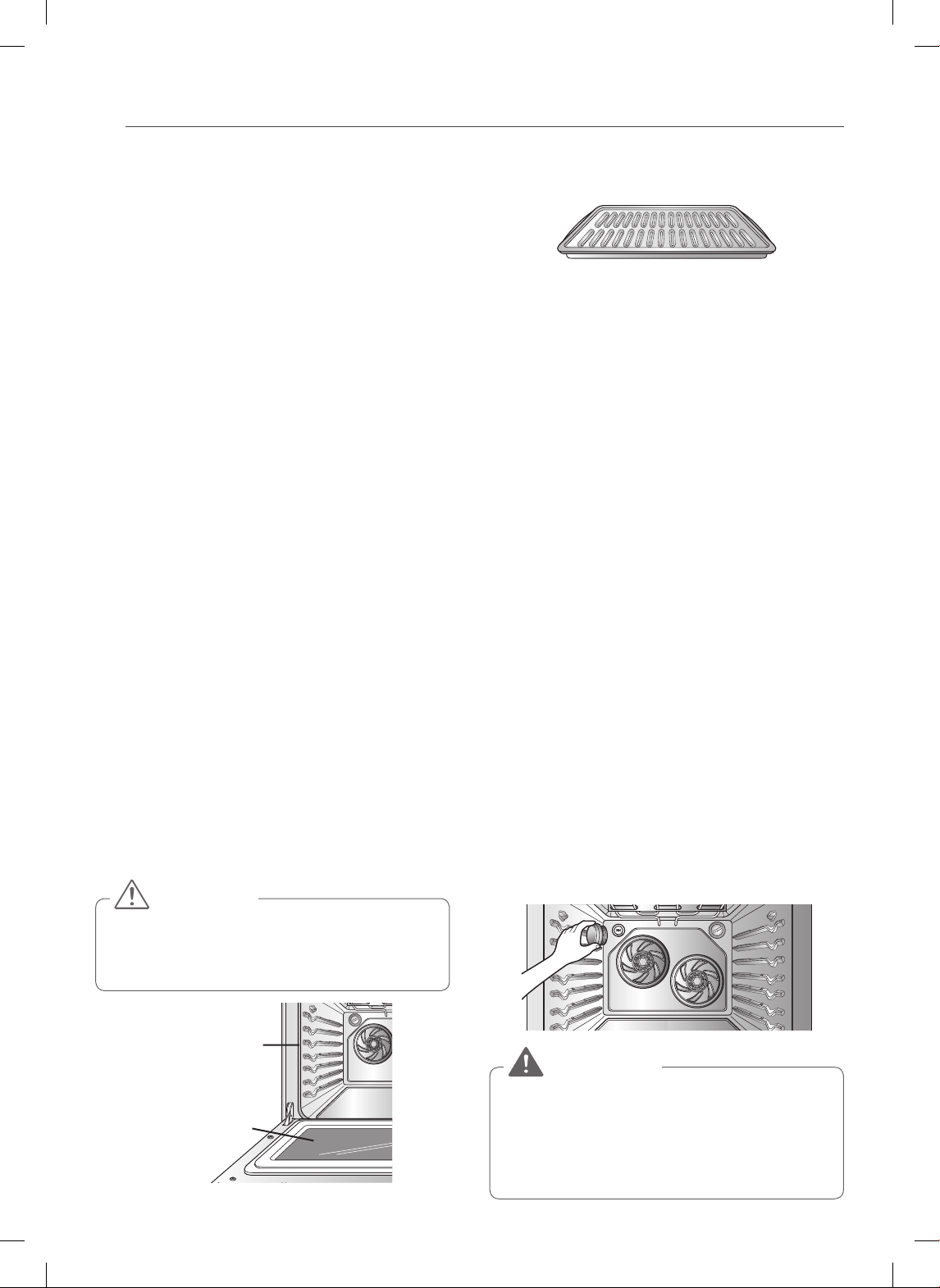
36
CARE AND CLEANING
CLEANING THE EXTERIOR
Painted and Decorative Trim
For general cleaning, use a cloth with hot soapy water.
For more difficult soils and built-up grease, apply a liquid
detergent directly onto the soil. Leave it on for 30 to 60
minutes. Rinse with a damp cloth and dry. Do not use
abrasive cleaners.
Stainless Steel Surfaces
(on some models)
To avoid scratches, do not use steel wool pads.
1. Place a small amount of stainless steel appliance
cleaner or polish on a damp cloth or paper towel.
2. Clean a small area, rubbing with the grain of the
stainless steel if applicable.
3. Dry and buff with a clean, dry paper towel or soft
cloth.
4. Repeat as necessary.
Oven door
• Use soapy water to thoroughly clean the oven door.
Rinse well. DO NOT immerse the door in water.
• You may use a glass cleaner on the outside glass of the
oven door. DO NOT spray water or glass cleaner on the
door vents.
• DO NOT use oven cleaners, cleaning powders, or harsh
abrasive cleaning materials on the outside of the oven
door.
• DO NOT clean the oven door gasket. The oven door
gasket is made of a woven material that is essential for
a good seal. Care should be taken not to rub, damage,
or remove this gasket.
Do not use harsh cleaners or harsh abrasive cleaning
materials on the outside of the oven door. Doing so
can cause damage.
CAUTION
Do not hand clean
oven door gasket
Remove any
debris from door
Broiler Pan and Grid (On Some Models)
• Do not store a soiled broiler pan or grid anywhere in
the range.
• Do not clean the broiler pan or grid in a self cleaning
mode.
• Remove the grid from the pan. Carefully pour out the
grease from the pan into a proper container.
• Wash and rinse the broiler pan and grid in hot water
with a soap-filled or plastic scouring pad.
• If food has burned on, sprinkle the grid with cleaner
while hot and cover with wet paper towels or a
dishcloth. Soaking the pan will remove burned-on
foods.
• Both the broiler pan and grid may be cleaned with a
commercial oven cleaner or in the dishwasher.
CHANGING THE OVEN LIGHT
The oven light is a standard 40-watt appliance bulb. It will
turn on when the oven door is open. When the oven door
is closed, press the OVEN LIGHT button to turn it on or
off.
1. Unplug the range or disconnect the power.
2. Turn the glass bulb cover in the back of the oven
counterclockwise to remove it.
3. Turn the bulb counterclockwise to remove it from
the socket.
4. Insert the new bulb and turn it clockwise.
5. Insert the glass bulb cover and turn it clockwise.
6. Plug in the range or reconnect the power.
• Make sure that the oven and bulb are cool.
• Disconnect the electrical power to the range at
the main fuse or circuit breaker panel. Failure to
do so can result in severe personal injury, death, or
electrical shock.
WARNING
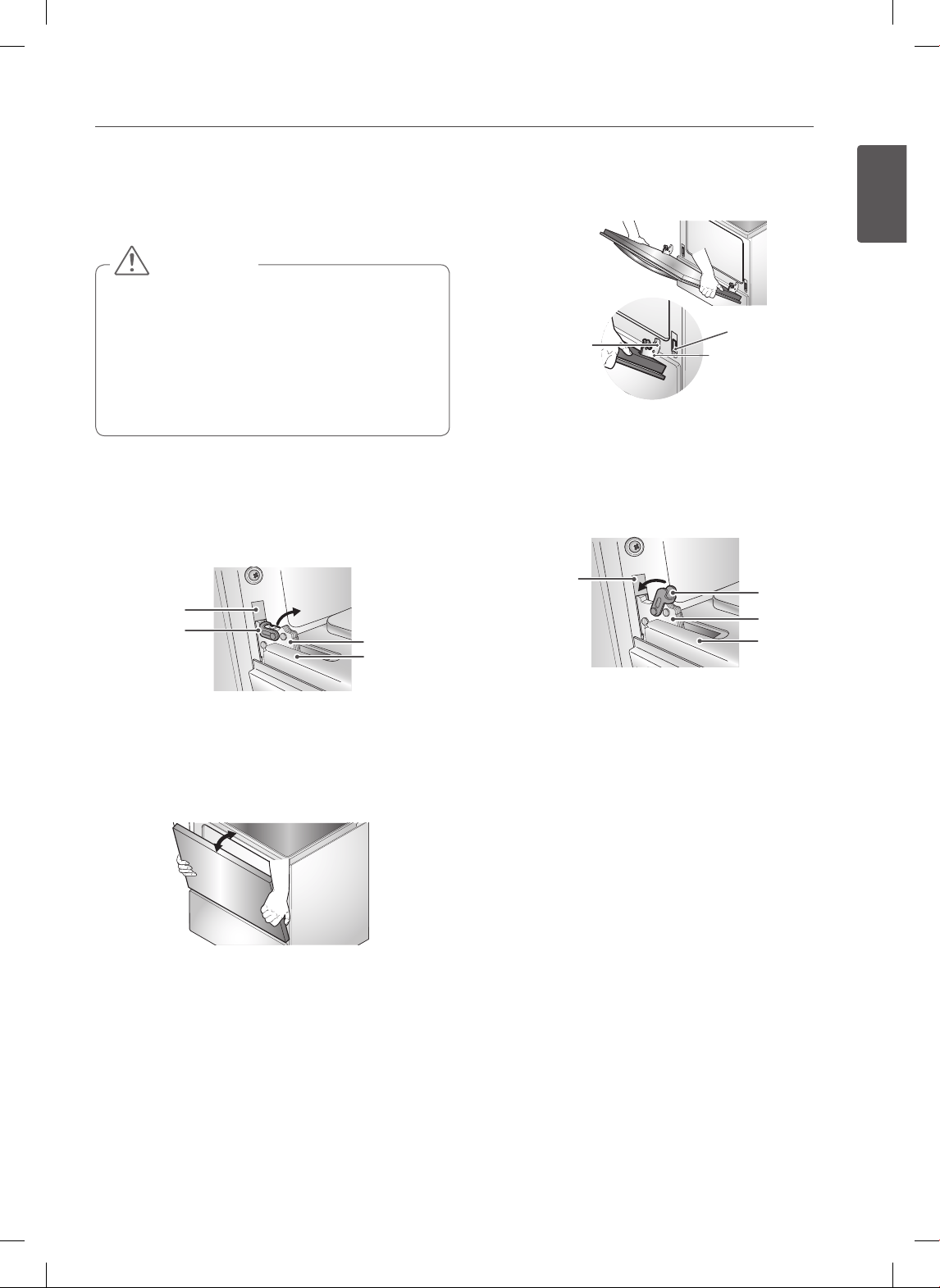
37
ENGLISH
CARE AND CLEANING
REMOVING AND REPLACING THE
OVEN DOOR AND LOWER OVEN
DRAWER
• Be careful when removing and lifting the door.
• DO NOT lift the door by the handle.
• DO NOT hit the glass with pots, pans, or any other
object.
• Scratching, hitting, jarring or stressing the glass
may weaken its structure, causing an increased risk
of breakage at a later time.
CAUTION
Removing the oven door
1. Fully open the door. Pull the hinge locks up toward
the door frame, to the unlocked position. A tool, such
as a small flat-blade screwdriver, may be required.
Slot
Hinge arm
Door frame
Hinge lock
Pull hinge locks down to unlock
2. Firmly grasp both sides of the door at the top.
Close the door to the removal position
(approximately five degrees open).
About 5°
Removal Position
3. Lift the door up and out until the hinge arm is clear
of the slot. Put the door on the floor.
Replacing the oven door
1. Firmly grasp both sides of the door at the top.
Hinge arm
Bottom edge
of slot
Indentation
2. With the door at the same angle as the removal
position, seat the indentation of the hinge arm into
the bottom edge of the hinge slot. The notch in the
hinge arm must be fully seated into the bottom of
the slot.
Hinge arm
Hinge lock
Door frame
Slot
Push hinge locks up to lock
3. Fully open the door. If the door will not fully open,
the indentation is not seated correctly in the bottom
edge of the slot.
4. Push the hinge locks down against the front frame
of the oven cavity to the locked position. Close the
oven door.
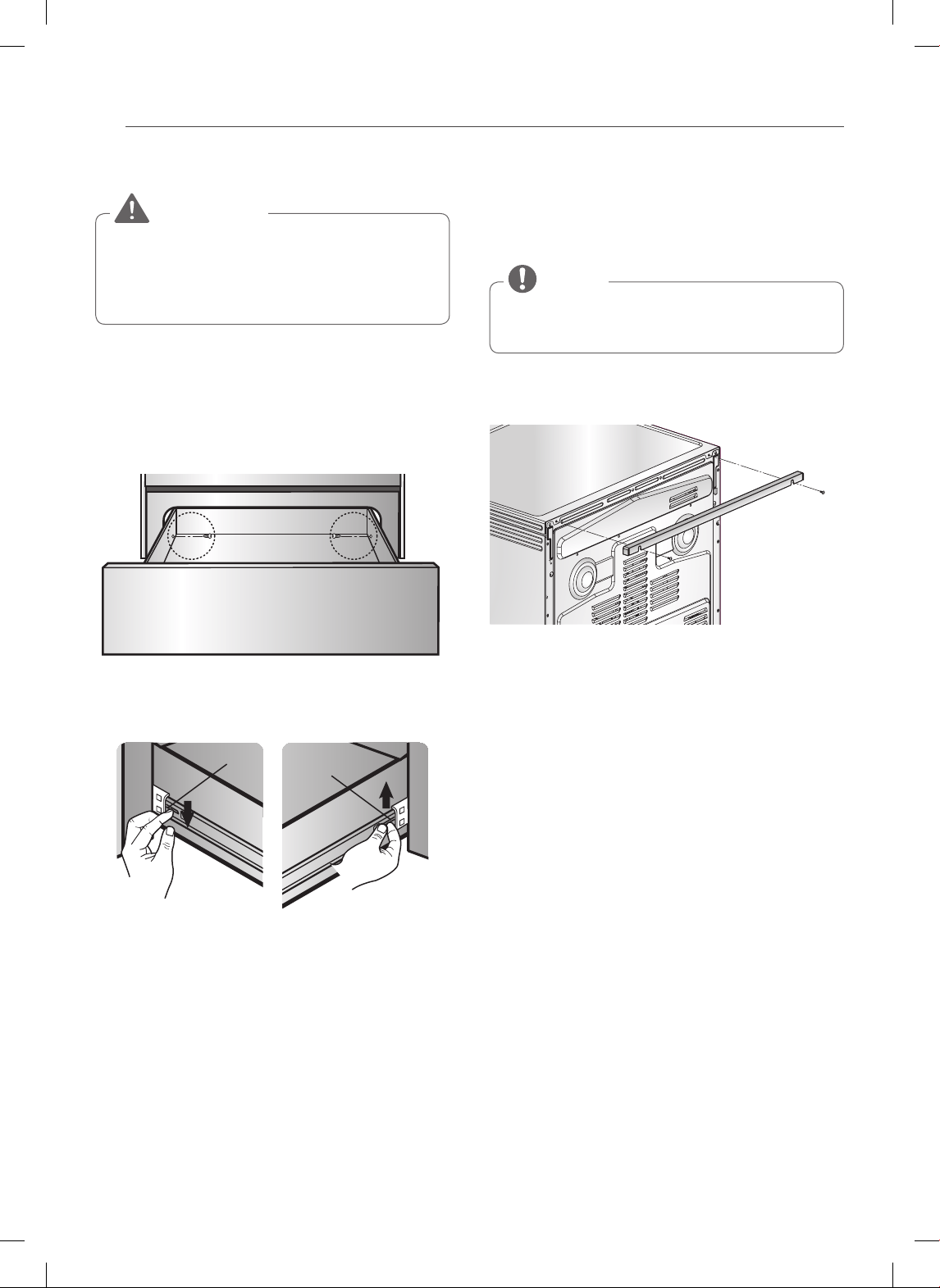
38
CARE AND CLEANING
Removing the Drawer
Disconnect the electrical power to the range at the
main fuse or circuit breaker panel before removing
the drawer. Failure to do so can result in severe
personal injury, death, or electrical shock.
WARNING
Most cleaning can be done with the drawer in place;
however, the drawer may be removed if further cleaning
is needed. Use warm water to thoroughly clean.
1. Fully open the drawer.
2. Remove the two screws.
Remove screws
3. Locate the glide lever on each side of the drawer.
Push down on the left glide lever and pull up on the
right glide lever.
Lever
Lever
Push down with finger Pull up with finger
4. Pull the drawer away from the range.
Replacing the Drawer
1. Pull the bearing glides to the front of the chassis
glide.
2. Align the glide on each side of the drawer with the
glide slots on the range.
3. Push the drawer into the range until levers “click ”
(approximately 2 inches).
4. Pull the drawer open again to seat the bearing glides
into position.
5. Replace the two screws.
OPTIONAL REAR FILLER
If the counter does not bridge the opening at the rear
wall the rear filler kit, that is provided with the slide in
range, will be needed.
If the countertop depth is greater than 25” there
will be a gap between the filler kit and the back wall.
NOTE
If the countertop depth is less than 24”, the control panel
will not sit flush with the countertop.

39
ENGLISH
FAQs
FAQs
What types of cookware are recommended
for use with my cook top?
• The pans must have a flat bottom and straight sides.
• Only use heavy- gauge pans.
• The pan size must match the amount of food to be
prepared and the size of the surface element.
• Use tight fitting lids.
• Only use flat bottom woks.
Why does “HS” appear on the cooktop
display? (on some models)
HS (Hot Surface) will appear in the display once the
element is turned off or during the self clean cycle. The
HS indicator will stay on until the surface has cooled to
approximately 150°F (66°C) or when the self clean cycle
ends.
Is it normal to hear a clicking noise coming
from the back of my oven when I am using
it?
Yes, this is normal. The controller has relays that open and
close during baking.
During convection cooking the fan stops
when I open the door. Is that normal?
Yes, this is normal. When the door is opened, the
convection fan will stop until the door is closed.
Can I use aluminum foil to catch drippings
in my oven cavity?
No. If aluminum foil is placed on the bottom of the oven
cavity, it will burn and you will not be able to remove
it. The heater for the oven is below the oven cavity and
provides direct heat to the bottom of the cavity. If you
already have burnt foil on the bottom, do not worry, as it
will not hinder the oven's performance.
Can I use aluminum foil on the racks?
Placing aluminum foil inside the oven cavity is not
recommended. Using foil on the racks will restrict air flow
which could lead to poor cooking results.
Can I leave my racks in the oven when
running a Self Clean cycle?
No. Although it will not damage the racks, it will discolor
them and may make them hard to slide in and out during
use. Remove all items from the oven before starting a Self
Clean cycle.
What should I do if my racks are sticky and
have become hard to slide in and out?
Over time, the racks may become hard to slide in and out.
Apply a small amount of olive oil to the ends of the racks.
This will work as a lubricant for easier gliding.
What should I do for hard to remove stains
on my cooktop?
The cooktop should be cleaned after every use to prevent
permanent staining. When cooking high sugar based
food, such as tomato sauce, cleaning the stain while the
cooktop is still warm is recommended. Use a safety mitt
when cleaning to prevent burns. Refer to the CARE AND
CLEANING section of this owner's manual for further
instruction.
Should I broil with the door opened or
closed?
Your electric range is designed for closed door broiling.
Why aren't the function buttons working?
Make sure that the range is not in Lockout mode. The lock
symbol
will show in the display if Lockout is activated.
To deactivate Lockout, press and hold the START button
for three seconds. The unlock melody will sound and
UNLOCKING will appear in the display until the controls
are unlocked.
Why is the time flashing?
This means that the product has just been plugged in,
or that it has experienced a power interruption. To clear
the flashing time, press any button and reset the clock if
needed.
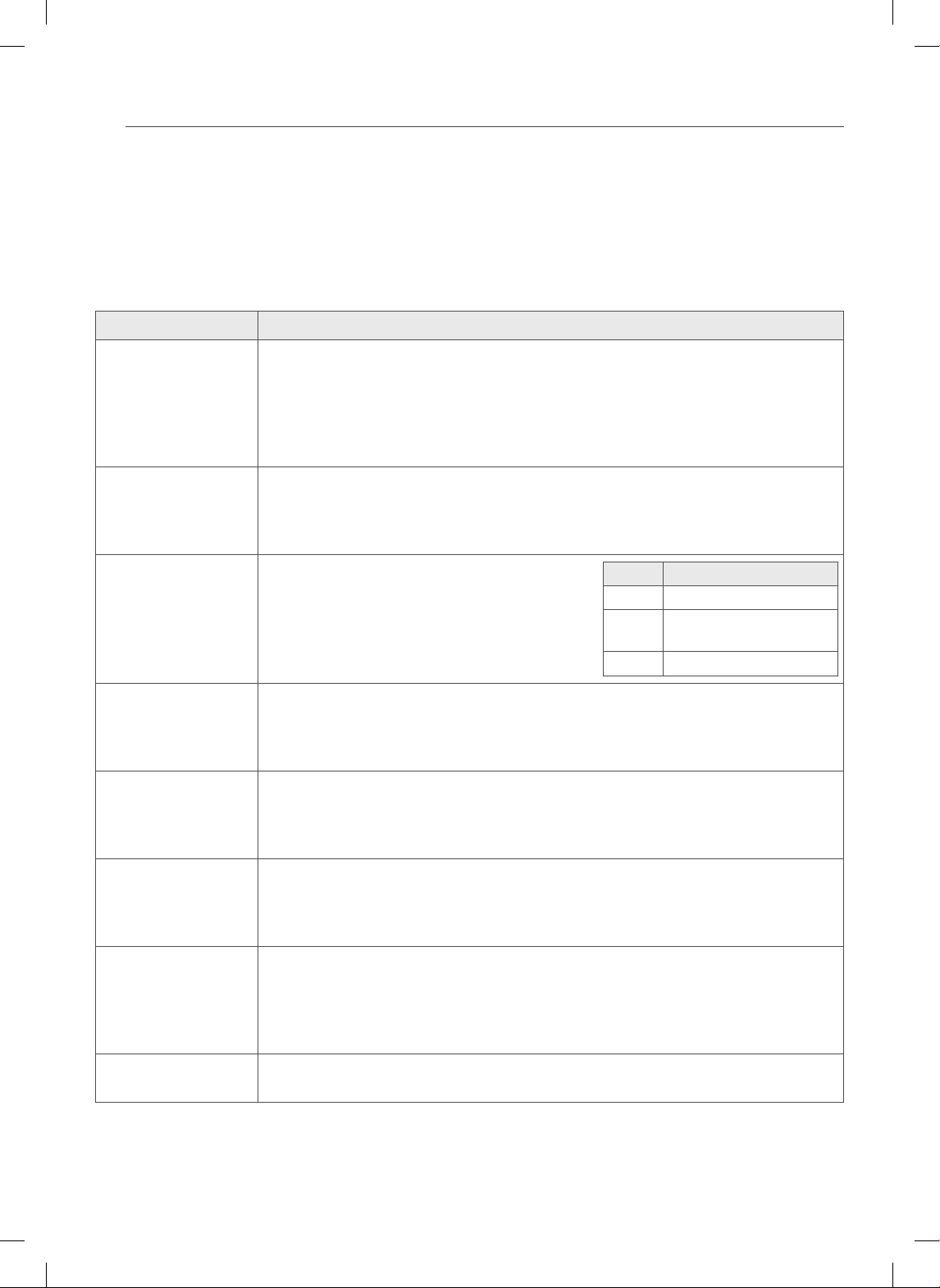
40
TROUBLESHOOTING
TROUBLESHOOTING
BEFORE REQUESTING SERVICE
Review this Troubleshooting section before calling for service. This section contains common occurrences that are not a
result of defective workmanship or materials.
Problem Possible Causes / Solutions
Range is not level. • Poor installation. Place oven rack in center of oven. Place a level on the oven rack.
Adjust leveling legs at base of range until the oven rack is level.
• Be sure oor is level and strong and stable enough to adequately support range.
• If oor is sagging or sloping, contact a carpenter to correct the situation.
• Kitchen cabinet alignment may make range appear unlevel. Be sure cabinets are square
and have sucient room for range clearance.
Cannot move appliance
easily.
Appliance must be
accessible for service.
• Cabinets not square or are built in too tightly. Contact builder or installer to make appliance
accessible.
• Carpet interferes with range. Provide sucient space so range can be lifted over carpet.
Oven control beeps
and displays any F code
error.
• Electronic control has detected a fault condition.
Press CLEAR/OFF to clear the display and stop
beeping. Reprogram oven.
If fault recurs, record fault number. Press CLEAR/
OFF and contact a service agent.
CODE CAUSE
F-3 Shorted keypad
F-10 Door locking system does
not operate
F-11 No heating
Surface units will not
maintain a rolling boil
or cooking is not fast
enough
• Improper cookware being used.
- Use pans which are at and match the diameter of the surface unit selected.
• In some areas, the power (voltage) may be low.
- Cover pan with a lid until desired heat is obtained.
Surface units do not
work properly
• A fuse in your home may be blown or the circuit breaker tripped.
- Replace the fuse or reset the circuit breaker.
• Cooktop controls improperly set.
- Check to see the correct control is set for the surface unit you are using.
Surface unit stops
glowing when
changed to a lower
setting
• This is normal. The unit is still on and hot.
Areas of discoloration
on the cooktop
• Food spillovers not cleaned before next use.
- See Cleaning the glass cooktop section.
• Hot surface on a model with a light-colored cooktop.
- This is normal. The surface may appear discolored when it is hot. This is temporary and will
disappear as the glass cools.
Frequent cycling on and
o of surface units
• This is normal.
- The element will cycle on and o to maintain the heat setting.
41
ENGLISH
TROUBLESHOOTING
Problem Possible Causes / Solutions
Oven will not work • Plug on range is not completely inserted in the electrical outlet.
- Make sure electrical plug is plugged into a live, properly grounded outlet.
• A fuse in your home may be blown or the circuit breaker tripped.
- Replace the fuse or reset the circuit breaker.
• Oven controls improperly set.
- See the Using the Oven section.
• Oven too hot.
- Allow the oven to cool to below locking temperature.
Appliance does not
operate.
• Make sure cord is plugged correctly into outlet. Check circuit breakers.
• Service wiring is not complete. Contact your appliance servicer for assistance.
• Power outage. Check house lights to be sure. Call your local electric company for service.
Oven light does not
work.
• Replace or tighten bulb. See the Changing Oven Light section in this Owner’s manual.
Oven smokes
excessively during
broiling.
• Control not set properly. Follow instructions under Setting Oven Controls, page 26.
• Meat too close to the element. Reposition the rack to provide proper clearance between
the meat and the element. Preheat broil element for searing.
• Meat not properly prepared. Remove excess fat from meat. Cut remaining fatty edges to
prevent curling.
• The broiler pan was placed in the oven with the wrong side facing up, resulting in the
grease is not draining. Always place grid on the broiler pan with ribs up and slots down to
allow grease to drip into pan.
• Grease has built up on oven surfaces. Regular cleaning is necessary when broiling
frequently.
Old grease or food spatters cause excessive smoking.
Food does not bake
or roast properly
• Oven controls improperly set, page 22-24.
• Rack position is incorrect or the rack is not level, page 21.
- See the Using the Oven section.
• Incorrect cookware or cookware of improper size being used.
- See the Using the Cooktop section, page 20.
• Oven sensor needs to be adjusted.
- See the Adjusting Your Oven Temperature in the Features section, page 15
Food does not broil
properly
• Oven controls improperly set.
- Make sure that the oven is set to BROIL by pressing the BROIL button.
• Improper rack position being used.
- See the Broiling Guide, page 27.
• Cookware not suited for broiling.
- Use the broiling pan and grid that came with your range.
42
TROUBLESHOOTING
Problem Possible Causes / Solutions
Food does not broil
properly
• Aluminum foil used on the the broiling pan and grid has not been tted properly and slit as
recommended.
- See the Using the Oven section, page 26.
• In some areas the power voltage may be low.
- Preheat the broil element for 5-7 minutes
- See the Broiling Guide, page 27.
Oven temperature too
hot or too cold
• Oven sensor needs to be adjusted.
- See Oven Temperature Adjustment in the Features section, page 15.
Scratches or abrasions
on cooktop surface
• Coarse particles such as salt or sand between cooktop and utensils can cause scratches.
Be sure cooktop surface and bottoms of utensils are clean before usage. Small scratches do
not aect cooking and will become less visible with time.
• Cleaning materials not recommended for ceramic-glass cooktop have been used.
See CLEANING THE GLASS/CERAMIC COOKTOP in the CARE AND CLEANING section,
page 32.
• Cookware with rough bottom has been used. Use smooth, at-bottomed cookware.
Metal marks • Scraping of metal utensils on cooktop surface. Do not slide metal utensils on cooktop
surface. Use a ceramic-glass cooktop cleaning cream to remove the marks.
See CLEANING THE GLASS/CERAMIC COOKTOP in the CARE AND CLEANING section,
page 32.
Brown streaks or specks • Boilovers are cooked onto surface. Use the blade scraper to remove soil.
See CLEANING THE GLASS/CERAMIC COOKTOP in the CARE AND CLEANING section,
page 32.
Areas of discoloration
with metallic sheen
• Mineral deposits from water and food. Remove using a ceramic-glass cooktop cleaning
cream. Use cookware with clean, dry bottoms.
Oven will not self clean • The oven temperature is too high to set a self clean operation.
- Allow the range to cool and reset the controls.
• Oven controls improperly set.
- See the Self Clean section, page 34.
• A self clean cycle cannot be started if the oven lockout feature is active.
“Crackling” or “popping”
sound
• This is the sound of the metal heating and cooling during both the cooking and Self Clean
functions.
- This is normal.
Fan noise • A convection fan may automatically turn on and o.
- This is normal.
Oven racks are dicult
to slide
• Apply a small amount of vegetable oil to a paper towel and wipe the edges of the oven
racks with the paper towel.
Convection fan stops • Convection fan stops during a convection bake cycle.
- This is normal and is done to allow for more even heating during the cycle.
This is not a failure of the range and should be considered normal operation.
43
ENGLISH
TROUBLESHOOTING
Problem Possible Causes / Solutions
Excessive smoking
during a self clean cycle
• Excessive soil.
- Press the CLEAR/OFF button. Open the windows to rid the room of smoke. Wait until the
self clean mode is cancelled. Wipe up the excess soil and reset the Self Clean function.
The oven door is not
opening after a Self
Clean cycle.
• Oven is too hot.
- Allow the oven to cool.
Oven not clean after a
self clean cycle
• Oven controls not properly set.
- See the Self Clean section, page 34.
• Oven was heavily soiled.
- Clean up heavy spillovers before starting the clean cycle. Heavily soiled ovens may need to
self clean again or for a longer period of time.
CLEAN and DOOR ash
in the display
• The self clean cycle has been selected but the door is not closed.
- Close the oven door.
LOCKED is on in the
display when you want
to cook
• The oven door is locked because the temperature inside the oven has not dropped below
the locking temperature.
- Touch the CLEAR/OFF button. Allow the oven to cool.
Burning or oily odor
emitting from the vent
• This is normal in a new oven and will disappear in time.
- To speed the process, set a self clean cycle for a minimum of 3 hours.
See the Self Clean section, page 34.
Oven racks are dicult
to slide
• The shiny, silver-colored racks were cleaned in a self clean cycle.
- Apply a small amount of vegetable oil to a paper towel and wipe the edges of the oven
racks with the paper towel.
Oven door will not
unlock after Self Clean
cycle
• Oven interior is still hot. Allow about one hour for the oven to cool after the completion of a
self clean cycle. The door can be opened when the LOCK indicator is not displayed.
• The controls and door may be locked.
Moisture collects on
oven window or steam
comes from oven vent.
• This is normal when cooking foods high in moisture.
• Excessive moisture was used when cleaning the window.
44
WARRANTY
WARRANTY (USA)
LG Electronics Inc.will repair or replace your product,at LG’s option,if it proves to be defective in material or workmanship
under normal use, during the warranty period set forth below, effective from the date of original consumer purchase of the
product. This limited warranty is good only to the original purchaser of the product and effective only when used in U.S.A.
WARRANTY PERIOD: HOW SERVICE IS HANDLED:
One Year
From the date of the original purchase
Any part of the oven which fails due to a defect in materials or
workmanship. During this full one-year warranty, LG will also provide, free
of charge, all labour and in-home service to replace the defective part.
THIS WARRANTY IS IN LIEU OF ANY OTHER WARRANTIES, EXPRESS OR IMPLIED, INCLUDING WITHOUT LIMITATION, ANY
WARRANTY OF MERCHANTABILITY OR FITNESS FOR A PARTICULAR PURPOSE. TO THE EXTENT ANY IMPLIED WARRANTY IS
REQUIRED BY LAW, IT IS LIMITED IN DURATION TO THE EXPRESS WARRANTY PERIOD ABOVE. LG WILL NOT BE LIABLE FOR
ANY CONSEQUENTIAL, INDIRECT, OR INCIDENTAL DAMAGES OF ANY KIND, INCLUDING LOST REVENUES OR PROFITS,IN
CONNECTION WITH THE PRODUCT. SOME STATES DO NOT ALLOW LIMITATION ON HOW LONG AN IMPLIED WARRANTY
LASTS OR THE EXCLUSION OF INCIDENTAL OR CONSEQUENTIAL DAMAGES, SO THE ABOVE LIMITATIONS OR EXCLUSIONS
MAY NOT APPLY TO YOU.
THIS LIMITED WARRANTY DOES NOT APPLY TO:
1. Service calls to correct the installation of your appliance, to instruct you how to use your appliance, to replace house
fuses or correct house wiring, or to replace owner-accessible light bulbs.
2. Repairs when your appliance is used in other than normal, single-family household use.
3. Pickup and delivery. Your appliance is designed to be repairable in the home.
4. Damage resulting from accident, alteration, misuse, abuse, fire, flood, improper installation, acts of God, or use of
products not approved by LG Corporation.
5. Repairs to parts or systems resulting from unauthorized modifications made to the appliance.
6. Replacement parts or repair labour costs for units operated outside the united states.
7. Any labour costs during the limited warranty period.
This warranty is extended to the original purchaser for products purchased for home use within the USA. In Alaska, the
warranty excludes the cost of shipping or service calls to your home.
Some states do not allow the exclusion or limitation of incidental or consequential damages, so this exclusion or limitation
may not apply to you. This warranty gives you specific legal rights, and you may also have other rights which vary from
states to states. To know what your legal rights are, consult your local or state consumer affairs or your state’s Attorney
General.
CUSTOMER ASSISTANCE INFORMATION:
To Prove Warranty Coverage Retain your Sales Receipt to prove date of
purchase.
A copy of your Sales Receipt must be submitted at
the time warranty service is provided.
To Obtain Nearest Authorized Service Center or Sales Dealer, or
to Obtain Product, Customer, or Service Assistance
Call 1-800-243-0000 (Phone answered 24 hours
- 365 days a year) and choose the appropriate
prompt from the menu; or visit our website at:
http://us.lgservice.com.

LSE3090ST
LSE3092ST
LSES302ST
P/No.: MFL62114704
www.lg.com
MANUAL DEL USUARIO
COCINA ELÉCTRICA
Lea atentamente este manual del usuario antes de poner el
electrodoméstico en funcionamiento y téngalo en todo momento a
mano para su referencia.
ESPAÑOL

2
ÍNDICE
ÍNDICE
3 IMPORTANTES INSTRUCCIONES
DE SEGURIDAD
12 DESCRIPCIÓN GENERAL
12 Accesorios
13 Descripción general de la cocina
14 Descripción general del panel de control
15 CARACTERÍSTICAS
15 Reloj
16 Temporizador encendido/apagado
16 Conversión automática de convección
17 Termostato
17 Idioma
17 Luz de alarma de precalentamiento
17 Volumen de la alerta sonora
17 Fahrenheit o celsius
17 Luz del horno
18 Bloqueo
18 Hora de inicio
19 Tiempo de cocción
20 USO DE LA ESTUFA
20 Áreas de cocción
22 Uso de los recipientes de cocción adecuados
23 USO DEL HORNO
23 Sacar y volver a colocar los estantes del horno
24 Horneado
25 Horneado por convección doble
(En algunos modelos)
26 Rostizado por convección
27 Rostizado más saludable (En algunos modelos)
28 Asado a la parrilla
29 Guía de asado recomendado
30 El favorito
31 Calentar
31 Leudar
32 Sonda para carne (En algunos modelos)
33
CONTROLES DEL HORNO INFERIOR
(EN ALGUNOS MODELOS)
33 Cómo usar el horno inferior
34 CUIDADO Y LIMPIEZA
34 Limpieza de la estufa de vitrocerámica
35 Auto-limpieza
38 Limpieza exterior
38 Reemplazo de la luz del horno
39 Sacar y volver a colocar la puerta del horno y
el horno inferior del cajón
40 Opcion de relleno posterior
41 PREGUNTAS FRECUENTES
42 IDENTIFICACIÓN Y SOLUCIÓN DE
PROBLEMAS
42 Antes de llamar al servicio técnico
46 GARANTÍA
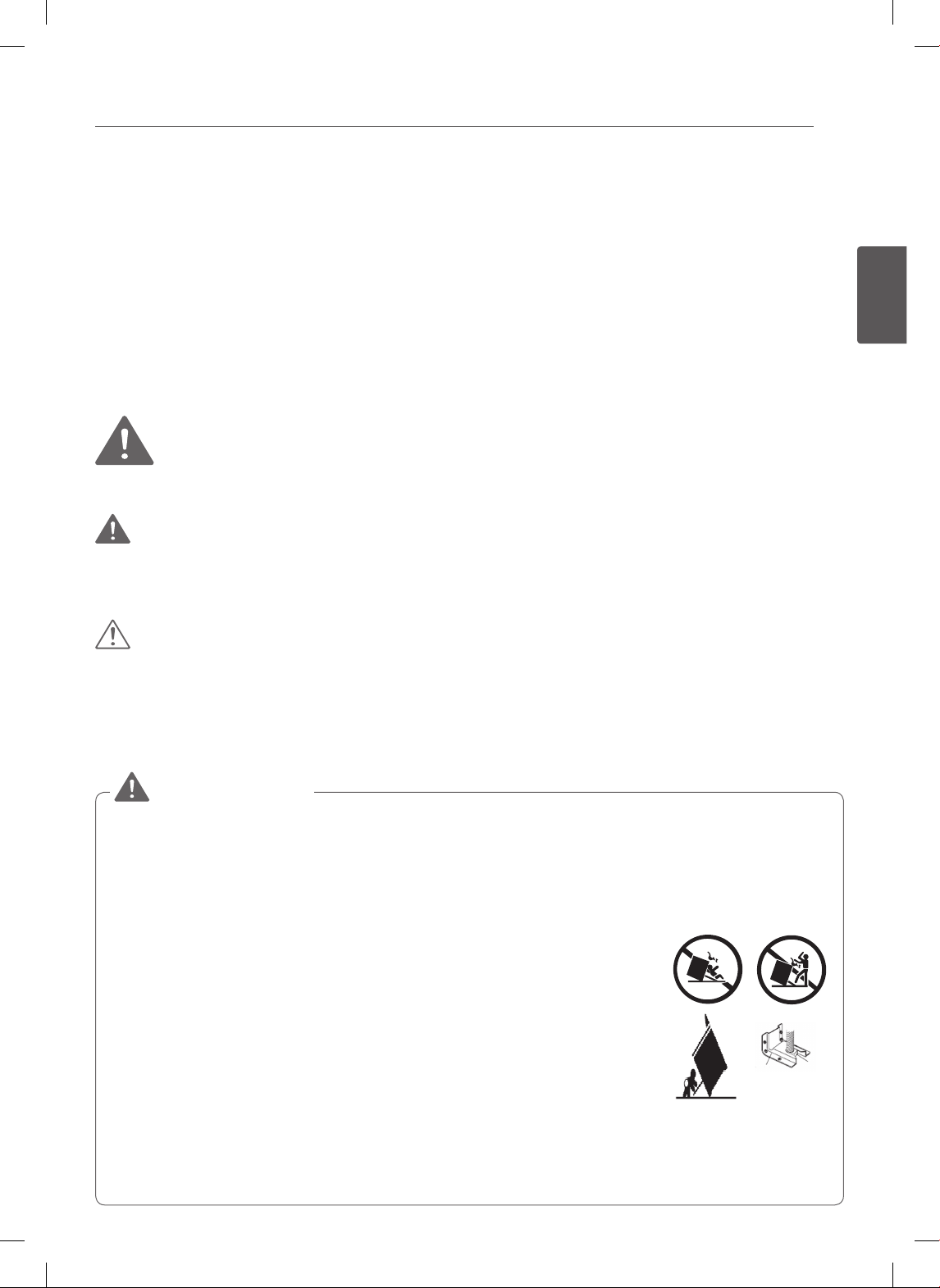
3
ESPAÑOL
IMPORTANTES INSTRUCCIONES DE SEGURIDAD
IMPORTANTES INSTRUCCIONES DE SEGURIDAD
Lea y siga todas las instrucciones antes de usar su horno para evitar riesgos de
incendios, descargas eléctricas, lesiones a las personas o daños al utilizar la cocina.
Esta guía no incluye todas las situaciones posibles que se podrían producir. Siempre
comuníquese con su agente de servicio técnico o con el fabricante cuando haya
problemas que no comprenda.
Usted puede descargar el manual de usuario en http://www.lg.com.
Este es el símbolo de alerta de seguridad. Este símbolo lo alerta sobre los
posibles riesgos que pueden causar daños a la propiedad y/o lesiones físicas
graves o la muerte. Todos los mensajes de seguridad estarán precedidos por el
símbolo de alerta de seguridad y la palabra «ADVERTENCIA» o «PRECAUCIÓN».
Estas palabras significan:
ADVERTENCIA
Indica una situación peligrosa que, de no evitarse, podría causar la muerte o lesiones
graves.
PRECAUCIÓN
Indica una situación peligrosa que, de no evitarse, podría causar una lesión menor o
moderada.
PRECAUCIONES DE SEGURIDAD ANTI-VUELCO
• Un niño o un adulto podría tumbar la cocina, causándole la
muerte.
• Verifique que el dispositivo anti-vuelco haya sido
correctamente instalado y esté fijo al piso o a la pared y
enganchado a la pata de nivelación de la cocina.
• Asegúrese de que se vuelva a colocar el dispositivo
antivuelco cuando se mueva la cocina.
• Para verif icar que el soporte anti-vuelco estén
correctamente instalados: Tome el borde superior
trasero de la protección posterior de la cocina e intente
cuidadosamente inclinarla hacia adelante verifique que el
soporte anti-vuelco estén enganchados.
• No ponga en funcionamiento la cocina sin el dispositivo
anti-vuelco colocado y enganchado.
• De no seguir estas instrucciones, podrían producirse la
muerte o quemaduras graves en niños o adultos.
ADVERTENCIA
Anti-tip
bracket
Leveling
leg
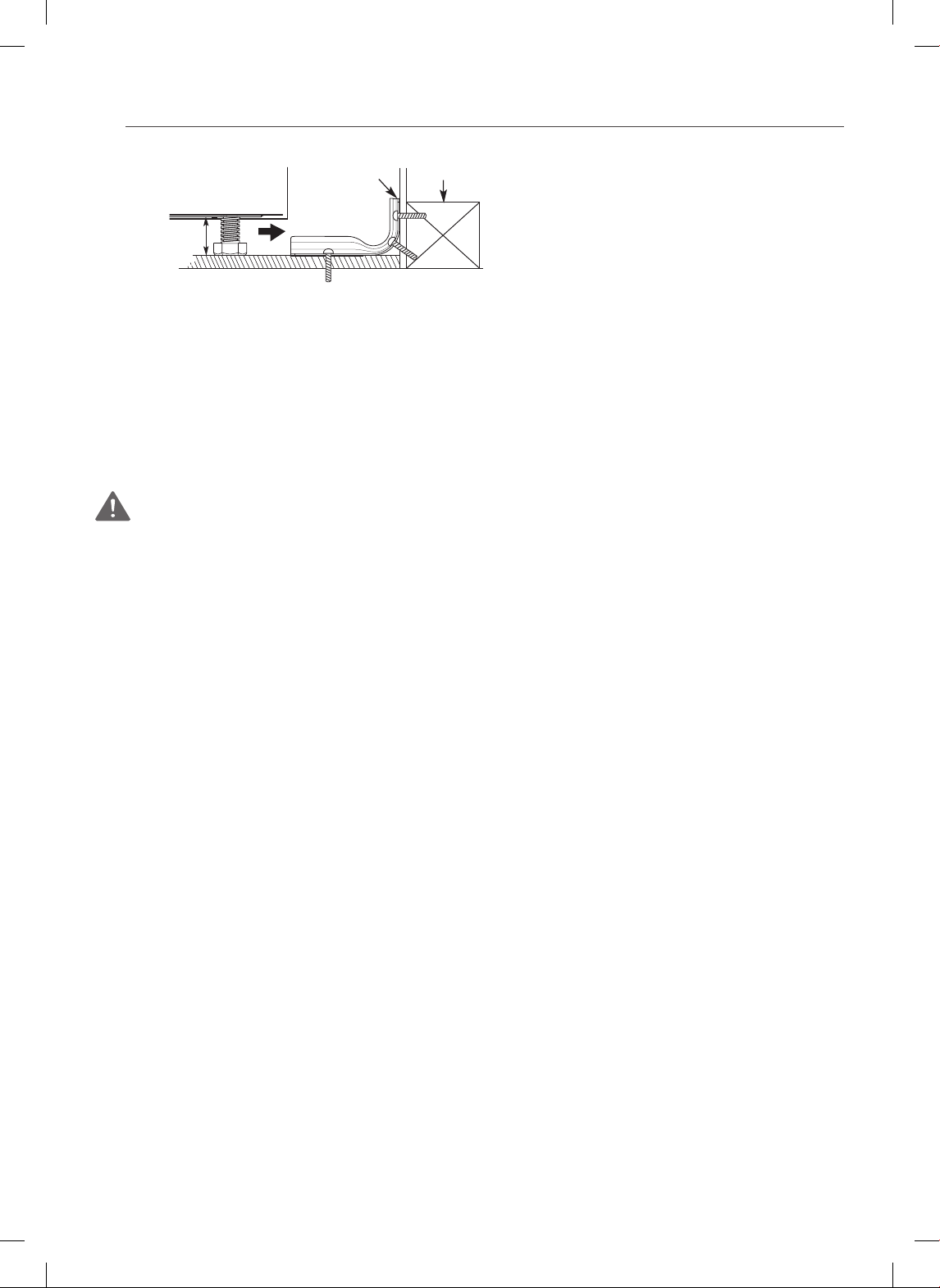
4
IMPORTANTES INSTRUCCIONES DE SEGURIDAD
• Retire el cajón calentador o de
almacenamiento y controle
visualmente que las patas de nivelación
traseras estén completamente
insertadas en el soporte anti-vuelco.
• Asegúrese de que un técnico calificado realice la instalación y puesta a tierra de este
electrodoméstico en forma adecuada.
• No repare ni reemplace ninguna parte del electrodoméstico, salvo que esté
específicamente recomendado en el manual. Cualquier otra reparación deberá ser
realizada por un técnico calificado.
•
Siempre desconecte la electricidad del electrodoméstico antes de realizar una reparación.
PRECAUCIONES DE SEGURIDAD
ADVERTENCIA: Este producto contiene químicos conocidos por el Estado de
California como causantes de cáncer. Lávese las manos después de usarlo.
• NO TOQUE LAS HORNALLAS NI LAS SUPERFICIES INTERIORES DEL HORNO.
Las hornallas podrían estar calientes incluso cuando presenten un color oscuro.
Las superficies interiores del horno se calientan lo suficiente como para causar
quemaduras. Durante y luego de su uso, no toque ni permita que la vestimento
u otro material inflamable entre en contacto con las hornallas o las superficies
interiores del horno hasta que hayan tenido tiempo suficiente para enfriarse. Otras
superficies, como los orificios de venteo del horno y la superficie cercana a estos
orificios, las puertas del horno, y las ventanas de las puertas del horno también se
calientan y podrían causar quemaduras si no se han enfriado.
• Abra la puerta del horno con cuidado. Permita que salga del horno el aire
caliente o el vapor antes de sacar o colocar nuevamente la comida en el horno.
• NO caliente envases de comida sin abrir. La presión de los envases podría hacerlos
explotar causando lesiones.
• NO fuerce la puerta del horno para abrirla. Esto podría dañar el sistema de
bloqueo automático de la puerta. Abra la puerta del horno con cuidado luego
del ciclo de autolimpieza. Manténgase a un costado del horno al abrir la puerta
para permitir que escape el aire caliente o el vapor. El horno podría estar aun MUY
CALIENTE.
• NO use limpiadores ásperos, abrasivos o raspadores metálicos filosos para
limpiar el vidrio de la puerta del horno ya que podrían rayar la superficie. Los
rayones podrían hacer que se quiebre el vidrio.
• Tenga cuidado al sacar y levantar la puerta.
• NO levante la puerta de la manija. La puerta es muy pesada.
• NO utilice utensilios para extraer restos (ceniza, comida, etc.)
• Consulte el manual para la correcta instalación del soporte anti-vuelco.
• Nunca quite las patas del horno. El rango no serán asegurados a el soporte anti-
vuelco, si las piernas se retiran.
Soporte
Anti-vuelco
Aproximadamente
0,65” (16,5 mm)
Pared
Debe introducirse
el tornillo en la
madera o en el
hormigón
5
ESPAÑOL
IMPORTANTES INSTRUCCIONES DE SEGURIDAD
PRECAUCIÓN
• NO cubra las paredes del horno, estantes, parte inferior, o cualquier otra parte
del horno con papel de aluminio o cualquier otro material. Hacerlo alterará
la distribución del calor, producirá malos resultados en la cocción y provocará un
daño permanente en el interior del horno (el papel de aluminio se derretirá en la
superficie interior del horno).
• Nunca intente secar una mascota en el horno.
ADVERTENCIA
• No pise ni se siente sobre la puerta del horno. Instale el soporte anti-vuelco que
se encuentra embalado junto con la cocina.
- La cocina podría tumbarse y el derrame de líquidos o alimentos calientes o la
caída de la cocina misma podrían provocar lesiones.
- Si se separa la cocina de la pared, para limpiarla, repararla, o por cualquier otro
motivo, asegúrese de que se coloque nuevamente el soporte anti-vuelco en
forma correcta cuando se vuelva a empujar la cocina contra la pared.
- No deje objetos grandes y pesados como por ejemplo, pavos enteros en la puerta
abierta del horno. La estufa podria volcar hacia adelante y causar heridas.
• NUNCA utilice su electrodoméstico para entibiar o calentar el ambiente.
• NO use agua en incendios producidos por grasa. Si se produce un incendio,
mantenga la puerta del horno cerrada y apague el horno. Si el fuego continúa,
arroje bicarbonato de sodio sobre el fuego o utilice un extinguidor.
• Utilice únicamente agarraderas secas. La humedad de las agarraderas sobre
las superficies calientes podría producir quemaduras de vapor. No permita
que las agarraderas entren en contacto con los elementos calentadores. No
utilice un repasador u otro paño grueso para quitar la comida.
• Si el vidrio de la puerta, el vidrio del cooktop, o cualquier otra parte del horno
que pueda calentarse esta dañada descontinue su uso y llame a servicio.
• No ponga en funcionamiento el horno sin la hornalla calentadora de carbón.
• No permita que nadie se suba, pare o cuelgue de la puerta, cajón de
almacenamiento o estufa de la cocina. Podrían dañar la cocina e incluso
tumbarla, causando lesiones personales graves.
ELIMINE CUALQUIER MATERIAL FLAMABLE Y
EXPLOSIVO DE SU HORNO
ADVERTENCIA
• Asegurese de retirar todos los materiales del embalaje antes de la puesta en
funcionamiento. Mantenga alejado de las partes del horno que puedan estar
calientes, plasticos y otros materiales flamables.
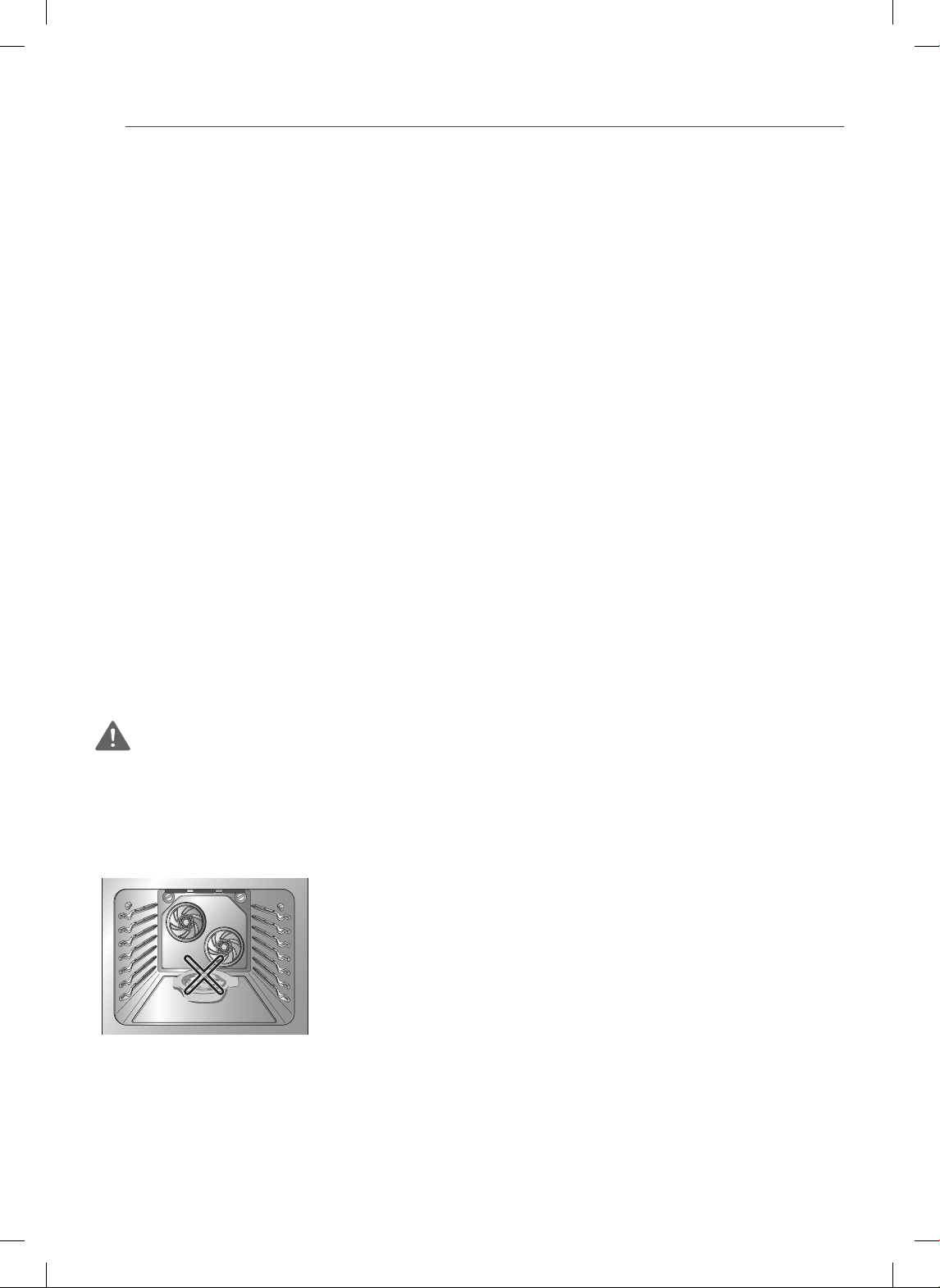
6
IMPORTANTES INSTRUCCIONES DE SEGURIDAD
• No almacene o use materiales flamables dentro del horno o cerca del cooktop.
Materiales flamables incluyen papel, plastico, guantes, ropa, revestimientos para
paredes, cortinas, gasolina u otros vapores flamables y liquidos como grasas o
aceite para cocinar. Estos materiales pueden hacer ignicion cuando el horno y el
cooktop estan en uso.
• Use prendas adecuadas. No lleve prendas sueltas o colgantes que pueden
encenderse si entran en contacto con superficies calientes y causen quemaduras
graves.
• Los objetos metálicos como latas sin abrir no se deben dejar en la superficie de
la unidad o ser calentados en el horno. La presión en los contenedores puede
hacerlos estallar y provocar lesiones.
• NO utilice el horno para secar ropa. Utilice el horno unicamente para el proposito
para el que fue disenado.
SEGURIDAD ELÉCTRICA
• Revestimiento Protector. No use aluminio o cualquier otro material para revestir
la parte inferior del horno. La instalación incorrecta de este revestimiento podría
causar riesgo de descarga eléctrica o incendio.
• No permita que papel de aluminio o la sonda de temperatura entren en contacto
con los elementos calentadores.
• Antes de reemplazar la lamparita de su horno, desconecte la energía eléctrica
del horno desde el fusible principal o el panel interruptor de circuitos. No
hacerlo podría causar lesiones graves, la muerte o descargas eléctricas.
ADVERTENCIA
• APAGUE antes de retirar el cajón inferior del horno.
- No hacerlo podría causar lesiones graves, la muerte o descargas eléctricas.
COLOCACIÓN DE LA BANDEJA
• No coloque comida o recipientes de cocción en la
parte inferior de la cavidad del horno. Hacerlo causará
un daño permanente en el acabado de la parte inferior
del horno.
• Al calentar alimentos en el horno inferior, utilice
siempre una bandeja para horno o bandeja con los
4 lados levantados. Esto evitará que los alimentos se
deslicen.
FREIDORAS
• Tenga extrema precaución al trasladar o desechar la grasa caliente.
• Siempre caliente la grasa lentamente, y contrólela mientras se calienta.
• Si va a freír una combinación de aceites y grasas, mézclelos antes de calentarlos.

7
ESPAÑOL
IMPORTANTES INSTRUCCIONES DE SEGURIDAD
• Utilice un termómetro para frituras para evitar que la grasa se caliente por encima
del punto de humeo.
• Utilice la menor cantidad posible de grasa para rehogar o freír de manera efectiva.
Llenar el recipiente con demasiada grasa podría causar derrames al agregar los
alimentos.
SEGURIDAD DURANTE SU USO
• No toque los estantes del horno cuando estén calientes.
• Si el bastidor debe ser movido mientras el horno está caliente, no permita
que la agarradera en contacto con el elemento de calentamiento en el horno
caliente.
• Siempre utilice agarraderas o guantes de cocina al retirar la comida del horno
o de la hornalla calentadora central. Los recipientes de cocción estarán calientes.
• Utilice con precaución las funciones TIMED BAKE (HORNEADO TEMPORIZADO)
o DELAYED TIMED BAKE (HORNEADO TEMPORIZADO RETARDADO). Utilice
el reloj temporizador automático al cocinar carnes curadas o congeladas y la
mayoría de las frutas y vegetales. Los alimentos que pueden echarse a perder
fácilmente como la leche, huevos, pescado, carne o aves deben ser primero
enfriados en el refrigerador. Incluso cuando hayan sido enfriados, no deben
permanecer en el horno durante más de 1 hora antes de iniciar la cocción y se
los debe retirar rápidamente luego de que la cocción haya terminado. Ingerir
alimentos en mal estado puede producir intoxicaciones.
• Si se produce un incendio, mantenga la puerta del horno cerrada y apague
el horno. Si el fuego continúa, arroje bicarbonato de sodio sobre el fuego o
utilice un extinguidor.
• Si se produce un incendio, NO ponga agua o harina en el fuego. La harina
podría ser explosiva y el agua podría causar que un incendio causado por grasa se
propague causando lesiones personales.
• NO utilice la asadera sin la rejilla. NO cubra la rejilla con papel de aluminio.
• No utilice plástico para cubrir los alimentos. Utilice únicamente papel aluminio o
tapas resistentes para horno.
• Si el horno se encuentra muy manchado de aceite, realizar una auto-limpieza
del horno antes de utilizarlo nuevamente. Esto podría generar un peligro de
incendio.
• Barra la suciedad del fondo del horno antes de utilizar la función de Auto-Limpieza.
• Utilice el tamaño adecuado de recipientes. Para ollas y sartenes más pequeñas,
utilice las hornallas más pequeñas. Para ollas y sartenes más grandes, utilice
las hornallas más grandes. Elija aquellos utensilios que tengan una base lo
suficientemente plana como para cubrir las hornallas. El uso de utensilios de
tamaño insuficiente, expondrá parte de la hornalla calentadora al contacto directo
y podría causar que se incendie la vestimenta.
• Nunca deje las hornallas de superficie desatendidas con configuraciones de
alta temperatura. La cocción excesiva causa derrames humeantes y grasosos que
podrían prenderse fuego.
8
IMPORTANTES INSTRUCCIONES DE SEGURIDAD
• Utensilios de cocina vidriados. Sólo ciertos tipos de vidrio, vitrocerámica, cerámica,
barro u otros tipos de utensilios vidriados son aptos para utilizar en la parte superior
de la cocina sin que se rompan debido al brusco cambio de temperatura.
• Las asas de los utensilios deben siempre apuntar hacia adentro y no
extenderse sobre las hornallas de superficie adyacentes. Para reducir el riesgo
de quemaduras, incendio de materiales inflamables y derrames debido al contacto
accidental con el utensilio, el asa del utensilio debe estar ubicado de manera tal que
apunte hacia adentro y no se extienda sobre las hornallas de superficie adyacentes.
SEGURIDAD DE LOS NIÑOS
ADVERTENCIA
• Mantenga a los niños y a las mascotas lejos del horno.
• Nunca permita que un niño se cuelgue de la puerta del horno.
• No permita que los niños se arrastren hacia adentro del horno.
• Las partes accesibles pueden calentarse cuando la parrilla está en uso.
• Durante la operación normal (auto-limpieza ciclo, hornear, etc) NO toque la
superficie caliente entre la parte inferior de la puerta del horno y la parte
superior del cajón en la parte frontal del horno. Si lo hace, es un riesgo de
quemaduras y provocar lesiones.
PRECAUCIÓN
• No deje a niños pequeños sin supervisión cerca del horno.
• Durante el ciclo de auto-limpieza, la parte externa del horno puede estar muy
caliente al tacto.
• NUNCA deje a los niños solos o sin supervisión cerca del electrodoméstico
cuando el mismo esté en uso o todavía esté caliente. Nunca se debe
permitir que los niños se sienten o paren en ninguna de las partes del
electrodoméstico, ya que podrían lastimarse o quemarse.
• NUNCA almacene objetos de interés para los niños en los gabinetes que se
encuentran sobre la cocina. Los niños que trepen a la cocina o a la puerta del
horno para alcanzar objetos, podrían sufrir lesiones graves.
• Permita que los utensilios calientes se enfríen en un lugar seguro, fuera del
alcance de los niños pequeños.
• No debería permitirse que los niños jueguen con los controles u otras partes
del electrodoméstico.

9
ESPAÑOL
IMPORTANTES INSTRUCCIONES DE SEGURIDAD
SUPERFICIES DE COCCIÓN DE VITROCERÁMICA
Manténgase a un costado de la cocina al abrir la puerta del horno. El aire caliente y el
vapor que escapan pueden causar quemaduras en las manos, el rostro y los ojos.
ADVERTENCIA
• NO TOQUE LAS HORNALLAS DE SUPERFICIE O ÁREAS CERCA DE LAS
HORNALLAS.
• Las hornallas de superficie podrían estar calientes incluso cuando presenten un
color oscuro. Las áreas cercanas a las hornallas de superficie podrían calentarse
lo suficiente como para causar quemaduras. Durante y luego de su uso, no toque
ni permita que la vestimenta u otro material inflamable entre en contacto con las
hornallas de superficie o las áreas cerca de las hornallas hasta que hayan tenido
tiempo suficiente para enfriarse. Esto incluye la estufa y el sector que se encuentra
sobre la puerta del horno.
• No cocine sobre una estufa rota. Si la estufa se rompiera, los líquidos de limpieza
y los derrames podrían penetrar por la estufa rota y provocar un peligro de
descarga eléctrica. Comuníquese con un técnico calificado inmediatamente.
• Limpie la estufa con precaución. No utilice esponjas o paños para limpiar
derrames en una superficie de cocción caliente. Utilice una espátula metálica
adecuada.
• NO utilice la superficie de vidrio de la estufa como tabla de cortar.
• NO coloque ni almacene sobre la estufa de vidrio objetos que podrían derretirse o
prenderse fuego, incluso cuando no se la esté usando.
• Siempre encienda las hornallas de superficie luego de colocar el recipiente de
cocción.
• NO almacene sobre la superficie de la estufa objetos pesados que podrían caerse y
dañarla.
• NO coloque papel de aluminio u objetos de plástico como saleros y pimenteros,
posa cucharas o envoltorios plásticos o cualquier otro material sobre la cocina
cuando esté en uso.
• Asegúrese de saber qué botones del control operan cada unidad de superficie.
Verifique haber encendido la unidad de superficie correcta.
• NUNCA cocine directamente sobre el vidrio. Use siempre recipientes de cocción.
• Siempre coloque el recipiente en el centro de la hornalla de superficie en la
que está cocinando. Nunca deje las hornallas de la superficie desatendidas
en configuraciones de alta temperatura. Contacto adecuado de utensilio y el
quemador también mejorará la eficiencia.
- La cocción excesiva causa derrames humeantes y grasosos que podrían
prenderse fuego.
• Siempre apague las hornallas de superficie antes de sacar el recipiente de
cocción.
• NO utilice envoltorios plásticos para cubrir los alimentos.
- El plástico podría derretirse sobre la superficie y resultar muy difícil de quitar.
10
IMPORTANTES INSTRUCCIONES DE SEGURIDAD
• NO toque las hornallas de superficie hasta que se hayan enfriado.
• Las hornallas de la superficie podrían todavía estar calientes y podrían producirse
quemaduras si se toca la superficie de vidrio antes de que se haya enfriado lo
suficiente.
• Limpie inmediatamente los derrames sobre el área de cocción para evitar una
posterior tarea intensa de limpieza.
• Si posee gabinetes de almacenamiento posicionados directamente sobre la
superficie de cocción, limítelos a objetos que se usen con poca frecuencia y
que puedan almacenarse de manera segura en un lugar expuesto al calor. Las
altas temperaturas pueden ser peligrosas para objetos como líquidos volátiles,
limpiadores o aerosoles.
• Al calentar alimentos, no utilice recipientes que se cierren al vacío. Permita que se
ventile para que escape el aire caliente.
• Algunos limpiadores pueden producir humos peligrosos si se aplica a una
superficie caliente.
• No utilice esponjas de acero para limpiar la superficie.
- Rayarán la superficie.
• NO utilice esponjas de bra o esponjas de limpieza abrasivas.
- Podrían dañar la supercie de vidrio de la estufa.
• Los recipientes de cocción con fondos ásperos podrían marcar o rayar la
supercie de la estufa.
• No deslice ningún objeto metálico o de vidrio por la estufa.
• No utilice recipientes de cocción sucios o con suciedad acumulada en la base.
SEGURIDAD AL LIMPIAR
PRECAUCIÓN
• Abra una ventana y encienda un ventilador o extractor antes de realizar la
autolimpieza.
• No Utilizar Limpiadores de Horno. No debe utilizarse ningún limpiador de
hornos o protector de recubrimiento del horno comercial de ningún tipo dentro o
alrededor de alguna parte del horno.
• Antes de realizar la auto-limpieza del horno. Retire la asadera, todos los estantes
del horno, el termómetro para carne y cualquier otro utensilio de la cavidad del
horno.
• Nunca mantenga aves domésticas en la cocina. La salud de las aves es
extremadamente sensible a los gases liberados durante un ciclo de auto-limpieza
del horno. Los gases podrían ser nocivos o fatales para las aves. Traslade las aves a
un ambiente bien ventilado.
• Limpie con el ciclo de auto-limpieza solo las partes indicadas en este manual. Antes
de realizar la auto-limpieza del horno, retire la asadera y cualquier otro utensilio de
cocina del horno.
• Es normal que la estufa de la cocina se caliente durante el ciclo de auto-limpieza.
Por lo tanto, debe evitar tocar la estufa durante un ciclo de limpieza.

11
ESPAÑOL
IMPORTANTES INSTRUCCIONES DE SEGURIDAD
• Instrucciones Importantes. En el caso de que aparezca el código de error de
autolimpieza F, y se escuchen tres tonos largos, el horno está funcionando mal
en el modo auto-limpieza. Desconecte la energía eléctrica del horno desde el
fusible principal o el panel interruptor de circuitos y hágalo reparar por un técnico
calificado.
• Asegúrese de que las luces del horno estén frías antes de limpiar.
• Nunca derrame AGUA FRÍA sobre un horno caliente para limpiarlo. Hacerlo podría
provocar el mal funcionamiento del horno.
COCINAR BIEN LA CARNE Y LAS AVES
Para evitar enfermedades transmitidas por los alimentos, cocine bien la carne y
las aves. La USDA ha indicado las siguientes temperaturas internas mínimas como
seguras para el consumo.
• Carne molida de vaca, ternera, cerdo o cordero: 160° F
• Aves 165° F
• Carne de vaca, ternera, cerdo o cordero: 145° F
• Pescado/Frutos del Mar 145° F
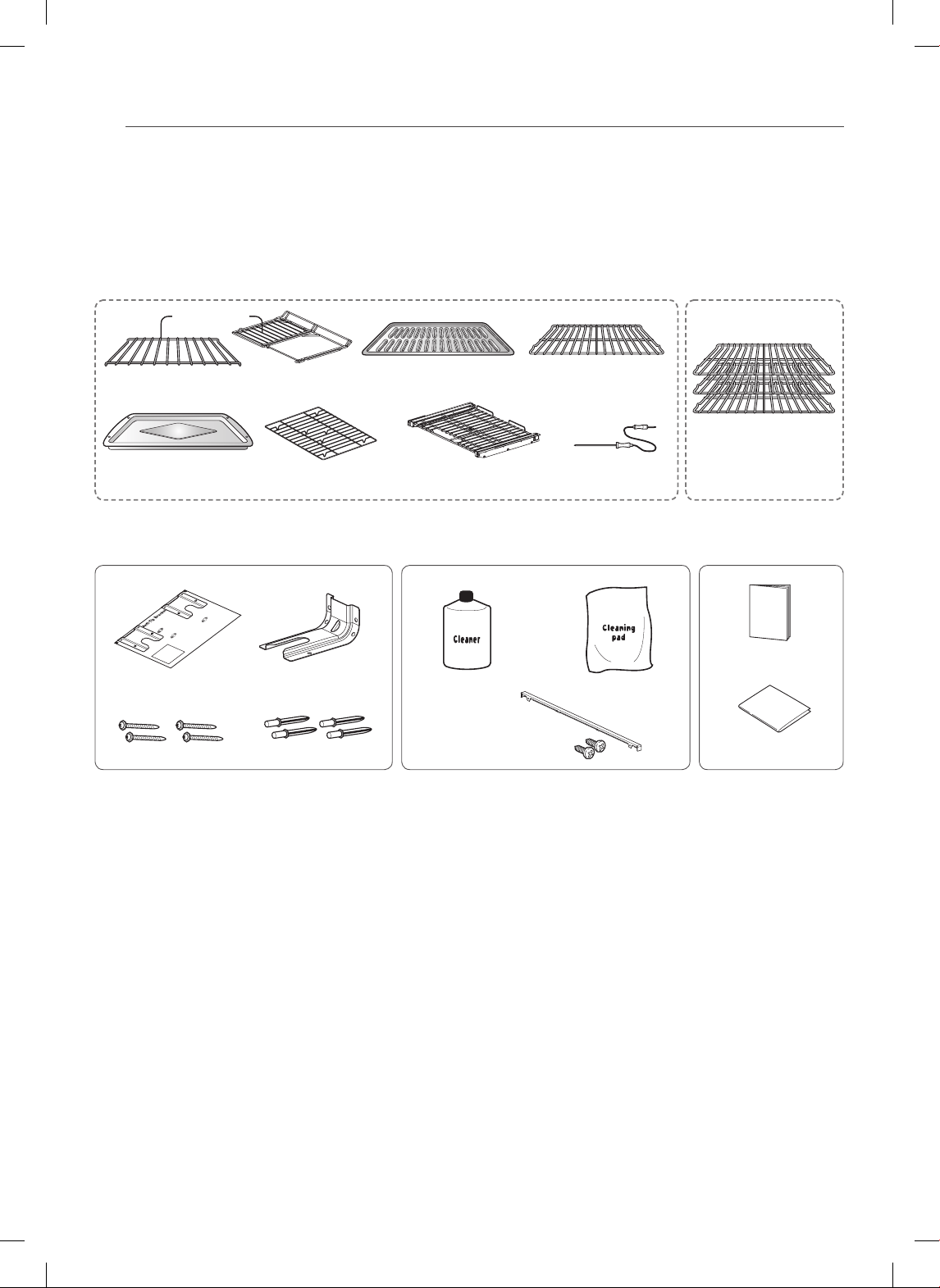
12
DESCRIPCIÓN GENERAL
DESCRIPCIÓN GENERAL
ACCESORIOS
Objetivo doble
Bandeja de rostizado
(1 de cada uno)
Asadera de inserción
(1 de cada uno)
Asadera
(1 de cada uno)
Bandeja deslizante
(1 de cada uno)
Plantilla (1 de cada uno)
Limpiador
(1 de cada uno)
Soporte anti-volcaduras
(1 de cada uno)
Paño de limpieza
(1 de cada uno)
1 Relleno trasero y 2 tornillos
Tornillos (4 de cada uno)
Anclajes (4 de cada uno)
Sonda para carne
(1 de cada uno)
Bandeja dividida
(1 de cada uno)
Bandeja estándar
(1 de cada uno)
Bandeja del cajón
(1 de cada uno)
Accesorios para la instalación Accesorios para Mantenimiento
Accesorios para cocinar
Manual del usuario
(1 de cada uno)
Manual de instalación
(1 de cada uno)
Para el modelo : LSE3092ST, LSES302ST Para el modelo : LSE3090ST
Bandeja estándar
(3 de cada uno)
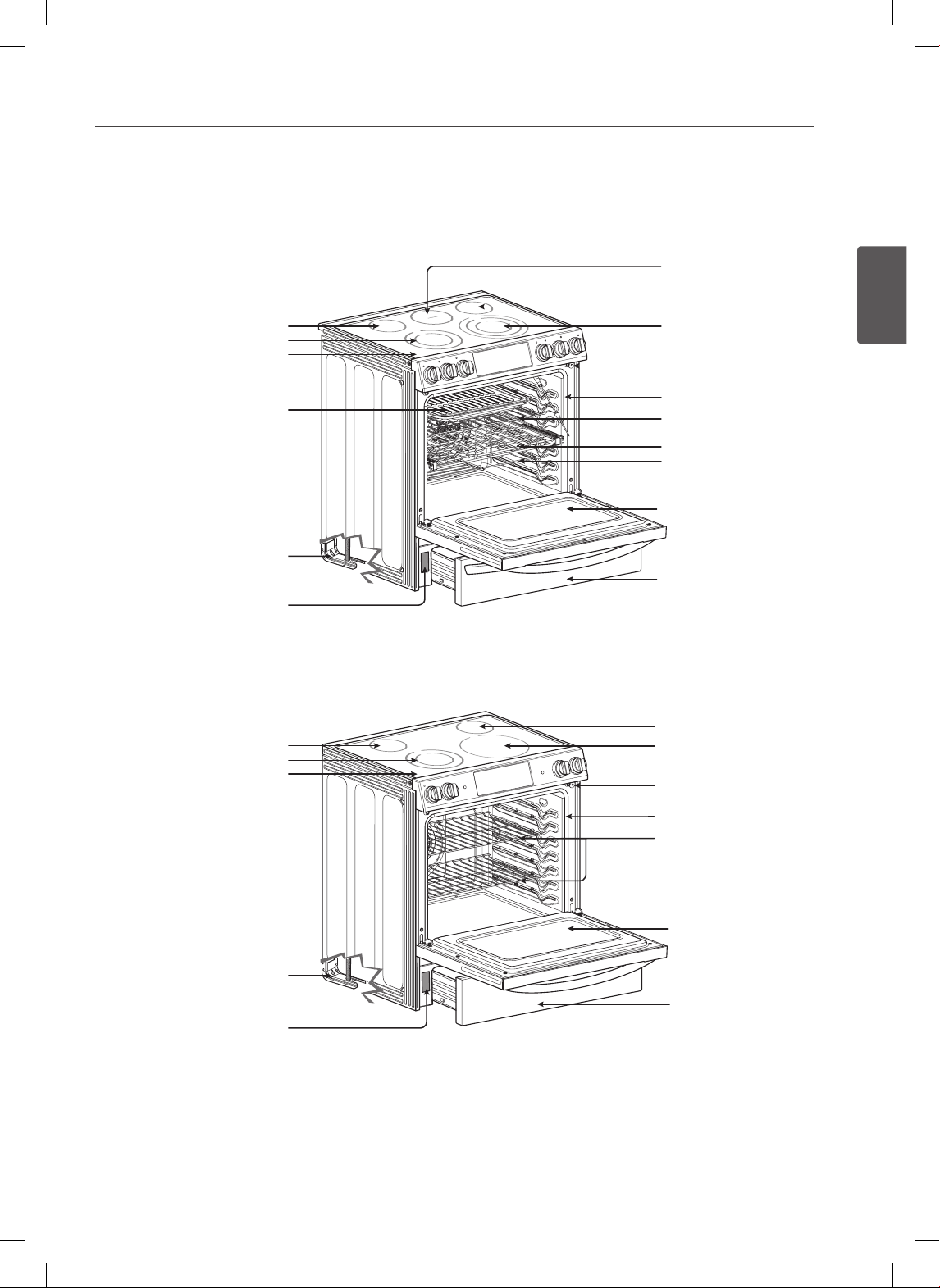
13
ESPAÑOL
DESCRIPCIÓN GENERAL
DESCRIPCIÓN GENERAL DE LA COCINA
Para el modelo : LSE3092ST, LSES302ST
Elemento de zona de
calentamiento
Elemento simple
Elemento doble
Vidrio cerámica
Asadera y de inserción
Soporte anti-volcaduras
Placa de modelo y número de serie
Placa de modelo y número de serie
Elemento simple
Elemento triple
Interruptor automático de la luz del horno
Empaque
Bandeja estándar
Bandeja plegable
Puerta del horno
Bandeja dividida
Cajón del horno inferior
Para el modelo : LSE3090ST
Elemento simple
Elemento doble
Vidrio cerámica
Soporte anti-volcaduras
Elemento simple
Elemento simple
Interruptor automático de la luz del horno
Empaque
Bandeja estándar
Puerta del horno
Cajón del horno inferior
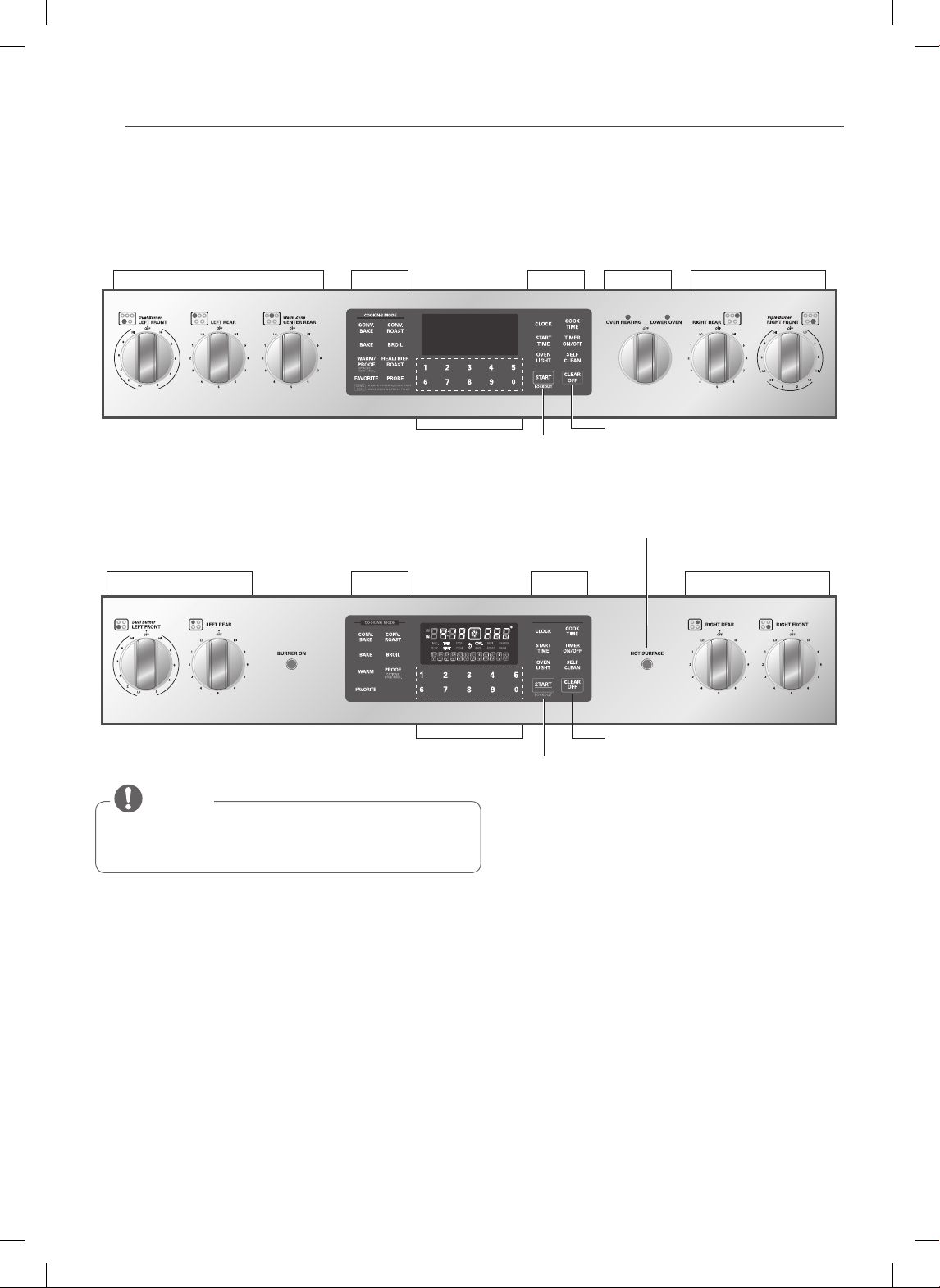
14
DESCRIPCIÓN GENERAL
Triple
Dual
Single
Dual
Single
200˚F
Warm
450˚F
400˚F
350˚F
300˚F
250˚F
DESCRIPCIÓN GENERAL DEL PANEL DE CONTROL
Control de la Hornalla de la Estufa Controles del Horno Características
Controles del Horno
Inferior
Control de la Hornalla
de la Estufa
Botones Numéricos
Botones Numéricos
Botón Clear Off (Borrar)
Botón Start/Lockout
(Inicio/Bloqueo)
Los Controles de las Hornallas de la Estufa están ubicados
en el mismo orden que las hornallas correspondientes.
NOTA
ELEMENTO ON/OFF LUZ INDICADORA (En algunos modelos):
Muestran si la superficie de la hornalla esta en estado apagado/encendido.
Indicador de Superficie Caliente
El error HS aparecerá en la pantalla cuando se haya apagado la hornalla o durante el ciclo de auto-limpieza.
El indicador HS permanecerá encendido hasta que la superficie se haya enfriado hasta aproximadamente 150˚F/66˚C o
cuando finalice el ciclo de auto-limpieza.
Reloj Parpadeando
Si su horno muestra un reloj parpadeando, presione la tecla “Clock" y reinicie el tiempo o presione cualquier tecla para
que deje de parpadear.
Para el modelo : LSE3092ST, LSES302ST
Para el modelo : LSE3090ST
Control de la Hornalla de la Estufa Control de la Hornalla de la EstufaControles del Horno
Indicador de superficie caliente
Características
Dual
Single
Botón Clear Off (Borrar)
Botón Start/Lockout
(Inicio/Bloqueo)
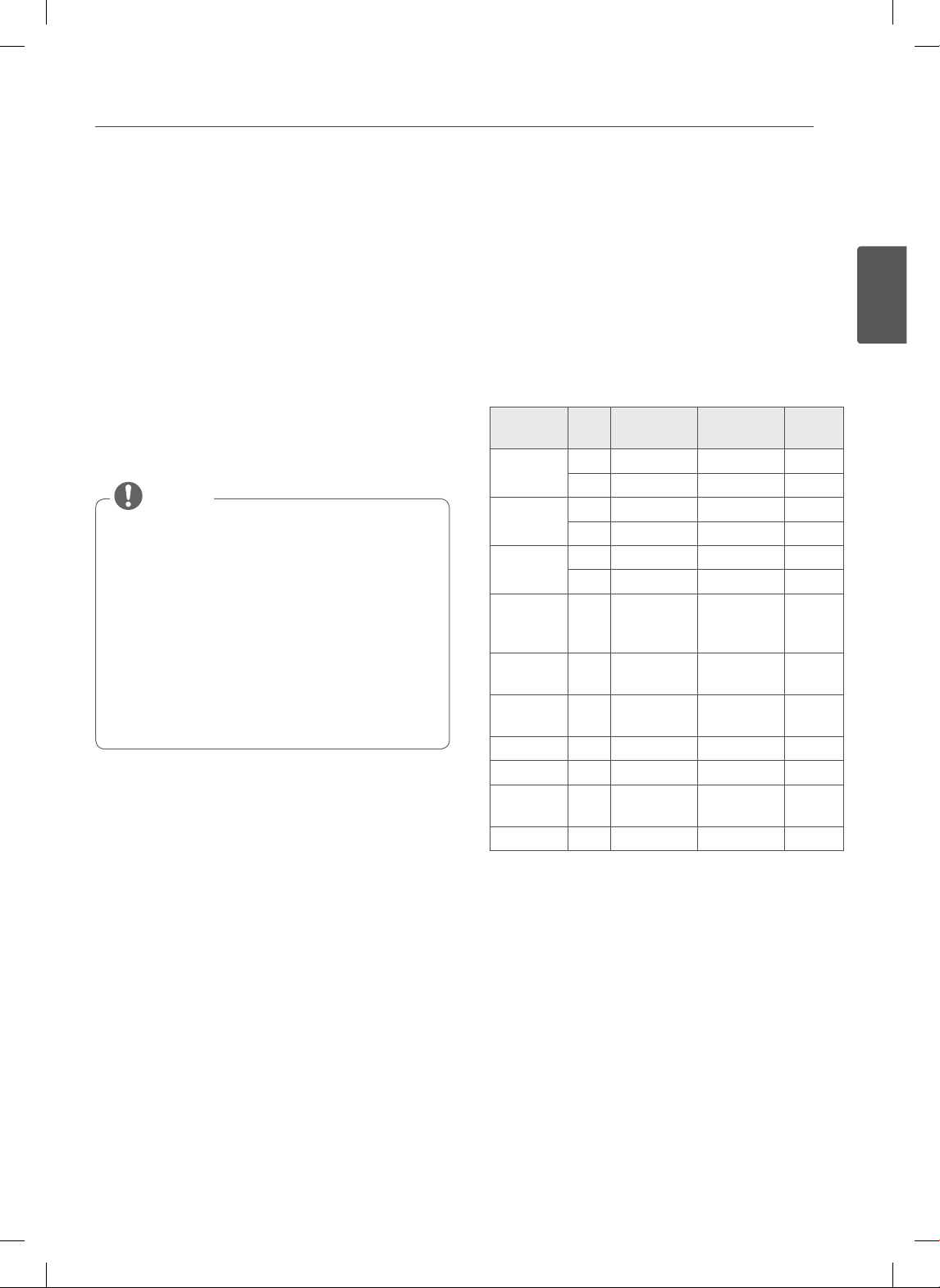
15
ESPAÑOL
CARACTERÍSTICAS
CARACTERÍSTICAS
RELOJ
Debe configurarse el reloj con la hora correcta del
día en el orden correcto para que las funciones de
temporización automática del horno funcionen
correctamente.
1. Presione CLOCK.
2. Presione los botones numéricos para ingresar la hora.
Por ejemplo, para poner el reloj a las 10:30, presione
los números: 1, 0, 3 y 0.
3. Presione START.
• No puede modif icarse la hora del día durante el
Horneado Temporizado o un ciclo de Auto-Limpieza.
• Para ver la hora del día cuando la pantalla está
mostrando otra información, simplemente
presione el botón CLOCK.
• Si no se presiona ningún botón luego de los 25
segundos de presionar el botón CLOCK, la pantalla
volverá a su configuración original.
• Si la hora de la pantalla está parpadeando, podría
haberse producido una interrupción eléctrica.
Vuelva a configurar la hora.
NOTA
Configurar el modo horario en el reloj
(12 o 24 horas.)
Su control está configurado para usar un reloj de 12
horas. Si usted prefiere tener un reloj de 24 horas, siga los
siguientes pasos.
1. Presione y mantenga el botón CLOCK durante tres
segundos.
2. Presione el botón 1 para 12 horas o el botón 2 para
24 horas.
3. Presione el botón START para aceptar el cambio
deseado.
Configuraciones Predeterminadas Mínimas y
Máximas
Todas las características enumeradas tienen una
configuración de tiempo o temperatura máxima que
puede ingresarse en el control. Un tono de aceptación
de la entrada sonará cada vez que presione una tecla del
control.
Un tono de error de entrada (dos tonos cortos) sonará
si la entrada de la temperatura o el tiempo están por
debajo del mínimo o por encima del máximo de las
configuraciones para la función.
CARACTERÍSTICA
MIN. TEMP./
TIEMPO
MAX. TEMP./
TIEMPO
Predeterminado
RELOJ
12 Hs. 1:00 Hs. / Min. 12:59 Hs. / Min.
24 Hs. 0:00 Hs. / Min. 23:59 Hs. / Min.
TEMPORIZADOR
12 Hs. 0:01 Min. 11:59 Hs. / Min.
24 Hs. 0:01 Min. 11:59 Hs. / Min.
TIEMPO DE
COCCIÓN
12 Hs. 0:01 Min. 11:59 Hs. / Min.
24 Hs. 0:01 Min. 11:59 Hs. / Min.
HORNEADO
POR
CONVECCIÓN
300°F / 150°C 550°F / 285°C 12 Hs.
ASADO POR
CONVECCIÓN
300°F / 150°C 550°F / 285°C 12 Hs.
ASADO A LA
PARRILLA
Lo - 400°F Hi - 550°F 3 Hs.
HORNEAR 170°F / 75°C 550°F / 285°C 12 Hs.
FERMENTAR 12 Hs.
CALENTAR
170°F/75°C,
3 hours
AUTOLIMPIEZA
2 Hs. 4 Hs. 3 Hs.
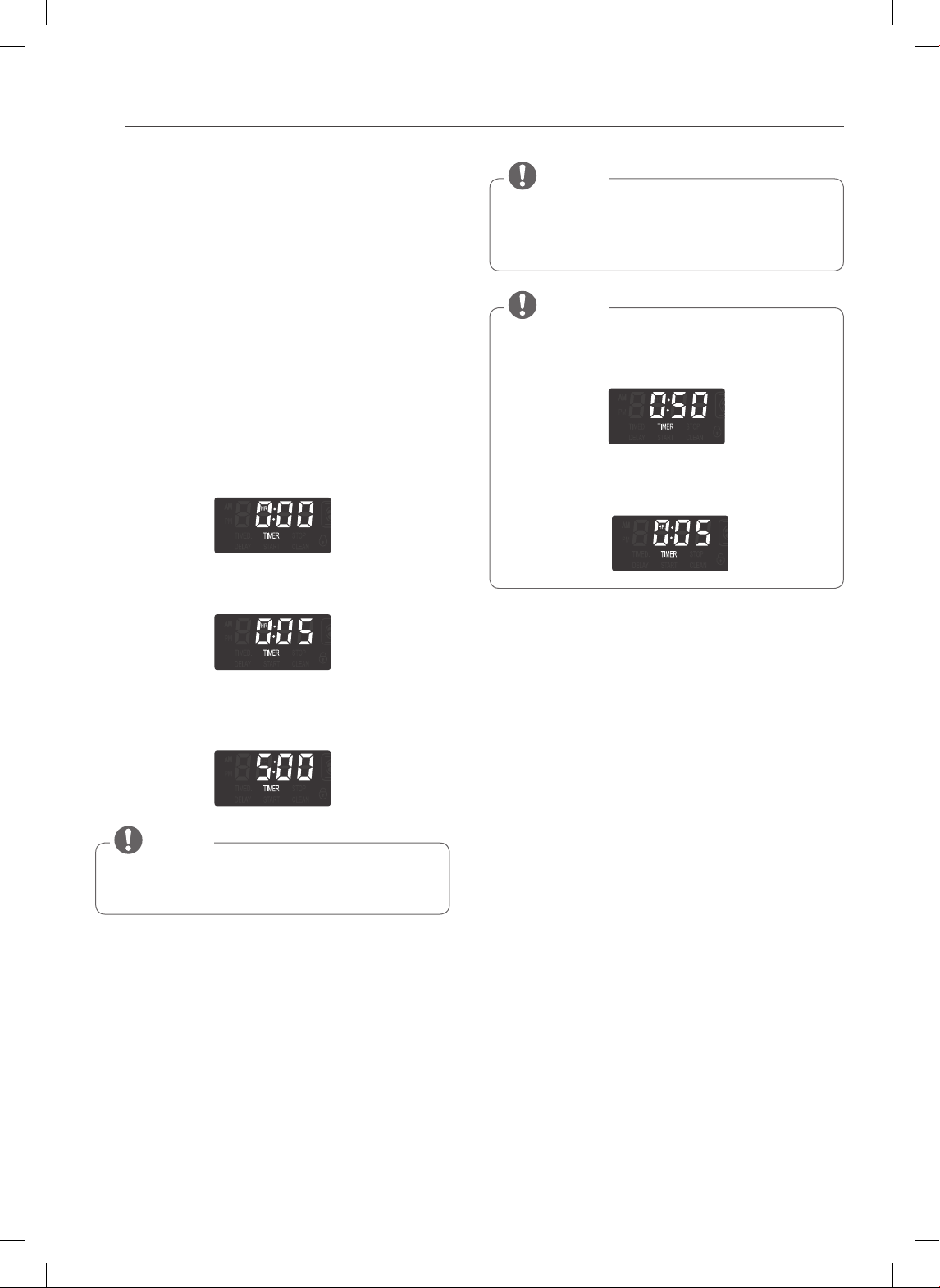
16
CARACTERÍSTICAS
TEMPORIZADOR ENCENDIDO/
APAGADO
TIMER ON/OFF (temporizador encendido/apagado)
funciona como un temporizador extra en la cocina que
emite un pitido cuando finaliza el tiempo configurado. No
inicia o detiene la cocción.
La característica TIMER ON/OFF (temporizador
encendido/apagado) puede utilizarse durante cualquiera
de las otras funciones de control del horno.
Para configurar el temporizador
(ejemplo de 5 minutos):
1. Presione TIMER ON/OFF una vez. 0:00 y HR dentro
de O aparecerán y TIMER (temporizador) destellará
en la pantalla.
2. Presione 5 en los botones numéricos.
Puede verse 0:05 en la pantalla.
3. Presione TIMER para iniciar el temporizador. Se
realizará una cuenta regresiva con 5:00 y el tiempo
aparecerá en la pantalla.
Si no se presiona TIMER ON/OFF, el temporizador
volverá a la hora actual.
NOTA
4. Cuando el tiempo configurado haya terminado, End
(fin) aparecerá en la pantalla. Los tonos indicadores
sonarán cada 15 segundos hasta que se presione
TIMER ON/OFF.
Si el tiempo restante no aparece en la pantalla,
visualice el tiempo restante presionando Timer ON/
OFF.
NOTA
• Si presiona TIMER ON/OFF dos veces, usted podrá
configurar el tiempo en segundos.
Por ejemplo: Si presiona 50, significa 50 segundos.
• Si presiona TIMER ON/OFF dos veces, usted podrá
configurar el tiempo en minutos.
Por ejemplo: Si presiona 5, significa 5 minutos.
NOTA
Para cancelar el temporizador antes de finalizar
el tiempo configurado:
1. Presione TIMER ON/OFF una vez.
La pantalla volverá a la hora actual.
CONVERSIÓN AUTOMÁTICA DE
CONVECCIÓN
Al cocinar con “ciclo de convección” (Conv. bake
and roast), la temperatura del horno se reduce
automáticamente a 25° F. La pantalla mostrará el cambio
de temperatura.A esta característica se le llama “AUTO
CONVERSION”(conversión automática).
Su estufa viene con esta característica “ENABLED“
(activada).
Para "DISABLE"(desactivar) la función de conversión
automática.
1. Presione y sostenga el botón WARM/PROOF
(calentar/leudar) durante 3 segundos. “AUTO”
aparecerá en la pantalla.
2. Presione el botón 1 para ACTIVAR o el 2 para
DESACTIVAR.
3. Presione el botón START (iniciar) para aceptar el
cambio deseado.
17
ESPAÑOL
CARACTERÍSTICAS
TERMOSTATO
Podría resultarle que el horno nuevo cocina distinto que
el que reemplazó. Utilice su nuevo horno durante unas
semanas parta familiarizarse con él antes de cambiar
las configuraciones de la temperatura. Si luego de
familiarizarse con su nuevo horno, usted todavía cree
que la temperatura es demasiado alta o demasiado baja,
puede ajustar usted mismo el termostato.
Configuración del Termostato
1. Presione y sostenga el botón WARM/PROOF
(calentar/leudar) durante 3 segundos. “AUTO”
aparecerá en la pantalla.
2. Presione el botón WARM/PROOF 1 vez y aparecerá
“Adj” en la pantalla.
3. Utilizando los botones numéricos, ingrese la
corrección de temperatura que desea ajustar.
Por ejemplo, para ajustar la temperatura del horno
en 15 grados, presione 1 y 5.
4. Presione WARM/PROOF una vez para aumentar (+) o
disminuir (-) la temperatura.
5. Presione el botón START (iniciar) para aceptar el
cambio deseado.
• Este ajuste no afectará las temperaturas de asado o
Auto-Limpieza. El ajuste se guardará en la memoria
incluso ante la falta de suministro eléctrico. La
temperatura del horno puede aumentarse (+) o
disminuirse (-) hasta 35°F o 19°C.
• U n a v e z que se a u m e n t e o dism i n u y a la
temperatura, la pantalla mostrará la temperatura
ajustada hasta que se ajuste nuevamente.
NOTA
IDIOMA
El idioma predeterminado de la pantalla es el inglés.
Puede cambiarse a español o francés.
1. Presione y sostenga el botón WARM/PROOF
(calentar/leudar) durante 3 segundos. “AUTO”
aparecerá en la pantalla.
2. Presione el botón WARM/PROOF 2 veces y aparecerá
“Lng” en la pantalla.
3. Presione el botón 1 para inglés, el 2 para español y, el
3 para francés.
4. Presione el botón START (iniciar) para aceptar el
cambio deseado.
LUZ DE ALARMA DE PRECALENTAMIENTO
Cuando el horno alcanza su temperatura programada,
la luz de alarma de precalentamiento parpadeará hasta
que se abra la puerta del horno. Usted puede activar o
desactivar la luz de alarma de precalentamiento.
1. Presione y sostenga el botón WARM/PROOF
(calentar/leudar) durante 3 segundos. “AUTO”
aparecerá en la pantalla.
2. Presione el botón WARM/PROOF 3 veces y aparecerá
“PrE” en la pantalla.
3. Presione el botón 1 para ON (encendido) y el 2 para
OFF (apagado).
4. Presione el botón START (iniciar) para aceptar el
cambio deseado.
VOLUMEN DE LA ALERTA SONORA
1. Presione y sostenga el botón WARM/PROOF
(calentar/leudar) durante 3 segundos. “AUTO”
aparecerá en la pantalla.
2. Presione el botón WARM/PROOF 4 veces y aparecerá
“BEEP” (alarma) en la pantalla.
3. Presione el botón 1 para ALTO, el 2 para NORMAL, el
3 para BAJO, y el 4 para SILENCIO.
4. Presione el botón START (iniciar) para aceptar el
cambio deseado.
FAHRENHEIT O CELSIUS
La temperatura del horno se puede conf igurar en
grados Fahrenheit o Celsius. El horno muestra en forma
predeterminada grados Fahrenheit salvo que sea
cambiado por el usuario.
1. Presione y sostenga el botón WARM/PROOF
(calentar/leudar) durante 3 segundos. “AUTO”
aparecerá en la pantalla.
2. Presione el botón WARM/PROOF 5 veces y aparecerá
“UNIT” en la pantalla.
3. Presione el botón 1 para F (Fahrenheit) o el 2 para C
(Celsius).
4. Presione el botón START (iniciar) para aceptar el
cambio deseado.
LUZ DEL HORNO
La luz interior del horno se enciende automáticamente
cuando se abre la puerta. También puede encenderse y
apagarse manualmente la luz del horno presionando el
botón OVEN LIGHT.
No se puede encender la luz del horno si está
activada la función Auto-limpieza.
NOTA
18
CARACTERÍSTICAS
BLOQUEO
La función de bloqueo bloquea el horno
automáticamente y evita que la mayoría de los
controles del horno se activen. No desactiva el reloj, el
temporizador ni la luz interior del horno.
Cómo activar la función de bloqueo:
1. Presione START (iniciar) durante 3 segundos.
2. Sonará la melodía de bloqueo. Se visualiza LOCKING
y DOOR LOCKED (puerta bloqueada) comienza a
destellar. En cuanto se bloquea la puerta, deja de
destellar el indicador DOOR LOCKED y el indicador se
queda encendido junto con la lámpara del icono de
bloqueo(
).
Cómo desactivar el funcionamiento normal del
horno:
1. Presione START (iniciar) durante 3 segundo. Sonará
la melodía de desbloqueo. DOOR LOCKED sigue
destellando hasta que se haya desbloqueado
totalmente la puerta del horno y se borre la lámpara
del icono de bloqueo(
).
• En caso de usar el modo de bloqueo de horno, las
funciones de reloj, temporizador de cocina y luz de
horno continúan funcionando.
• Aún si se abre la puerta, el bloqueo de horno puede
seguir funcionando debido al trabado de tecla.
NOTE
HORA DE INICIO (COCCIÓN
temporizada retardada)
El tempor izador automát ico de l a función COCCIÓN
TEMPORIZADA RETARDADA ENCENDERÁ y APAGARÁ
el horno en el horario que usted seleccione. Esta
función puede utilizarse únicamente con los: Modos
HORNEAR, HORNEADO POR CONVECCIÓN y ASADO POR
CONVECCIÓN.
Para configurar el horno para Inicio Retardado
(por ejemplo, para HORNEAR a 300°F y poner
en funcionamiento el modo hornear a las 4:30):
Asegúrese de que el reloj esté configurado en la hora
correcta del día.
1. Presione el botón BAKE. Aparecerá 350°F en la
pantalla.
2. Use los botones del horno para configurar la
temperatura: Presione 3, 0 y 0.
3. Presione el botón START TIME.
4. Configure la hora de inicio: Presione 4, 3 y 0 para
4:30.
5. Presione el botón START. Se escuchará un tono corto
y el horno comenzará a hornear.
• Para cancelar la función COCCIÓN TEMPORIZADA
RETARDADA, presione el botón CLEAR OFF en
cualquier momento.
• Para cambiar el horario de cocción, repita los pasos
3-4 y presione el botón START.
• Si el reloj de su horno está configurado en 12 horas,
usted podrá postergar el horario de cocción hasta
12 horas. Si el reloj de su horno está configurado
en 24 horas, usted podrá postergar el horario de
cocción hasta 24 horas.
NOTA
El horno continuará cocinando por la cantidad de tiempo
configurada y luego se apagará automáticamente.
Cuando haya transcurrido el tiempo de cocción:
• END y la hora del día se mostrará en la pantalla.
• El tono indicador de finalización de cocción sonará
cada 60 segundos hasta que se presione el botón
CLEAR OFF.
• Cuando se configura WARM, la función calentar se
activa luego de cocinar por el tiempo establecido.
• Utilice el reloj temporizador automático al cocinar
carnes curadas o congeladas y la mayoría de las
frutas y vegetales. Los alimentos que pueden
echarse a perder fácilmente como la leche, huevos,
pescado, carne o aves deben ser enfriados en el
refrigerador. Incluso cuando han sido enfriados,
no deben permanecer en el horno durante más
de 1 hora antes de iniciar la cocción, y se los debe
retirar rápidamente luego de que la cocción haya
terminado.
• Ingerir alimentos en mal estado puede producir
intoxicaciones.
PRECAUCIÓN
19
ESPAÑOL
CARACTERÍSTICAS
TIEMPO DE COCCIÓN (COCCIÓN
TEMPORIZADA)
La función COCCIÓN TEMPORIZADA le permite configurar
el horno para que cocine durante un período de tiempo
específico. Esta función puede utilizarse únicamente con
los modos HORNEAR, HORNEADO POR CONVECCIÓN
ASADO POR CONVECCIÓN y FAVORITOS.
Configuración de la función COCCIÓN
TEMPORIZADA (por ejemplo, HORNEAR a
300°F durante 30 minutos):
Asegúrese de que el reloj esté configurado en la hora
correcta del día.
1. Presione el botón BAKE. Aparecerá 350°F en la
pantalla.
2. Use los botones numéricos para configurar la
temperatura: Presione 3, 0 y 0.
3. Presione el botón COOK TIME. TIMED parpadeará.
BAKE, 0:00 y 300°F aparecerá en la pantalla.
4. Configuración del tiempo de horneado: Presione 3
y 0 (para 30 minutos). El tiempo de cocción puede
configurarse por cualquier cantidad de tiempo entre
1 minuto y 11 horas y 59 minutos.
5. Presione el botón START. La pantalla mostrará la
cuenta regresiva de la cocción.
Para configurar la función CALENTAR para que se
active al finalizar el ciclo de cocción temporizada,
repita los pasos 1-4 y luego presione el botón
WARM. Aparecerá WARM en la pantalla. (Remítase a
la sección «CALENTAR» en la página anterior)
NOTA
El horno continuará cocinando por la cantidad de tiempo
configurada y luego se apagará automáticamente.
Cuando haya transcurrido el tiempo de cocción:
• END y la hora del día se mostrará en la pantalla.
• El tono indicador de finalización de cocción sonará
cada 60 segundos hasta que se presione el botón
CLEAR OFF.
• Cuando se configura WARM, la función calentar se
activa luego de cocinar por el tiempo establecido.
Para cambiar el tiempo de cocción mientras
el horno está en funcionamiento (por ejemplo,
para cambiar el tiempo de cocción de 30
minutos a 1 hora y 30 minutos):
1. Presione el botón COOK TIME.
2. Presione las teclas numéricas para cambiar el tiempo
de horneado: 1, 3, 0.
3. Presione el botón START para aceptar el cambio.
• Durante el funcionamiento del horno, es posible
que el ventilador de refrigeración del horno se
encienda para refrigerar el panel de control.
Esto es una operación normal.
• Es normal que el ventilador de enfriamiento
expulse aire caliente durante el uso del horno, este
comportamiento persistirá hasta que el horno se
enfrié.
NOTE
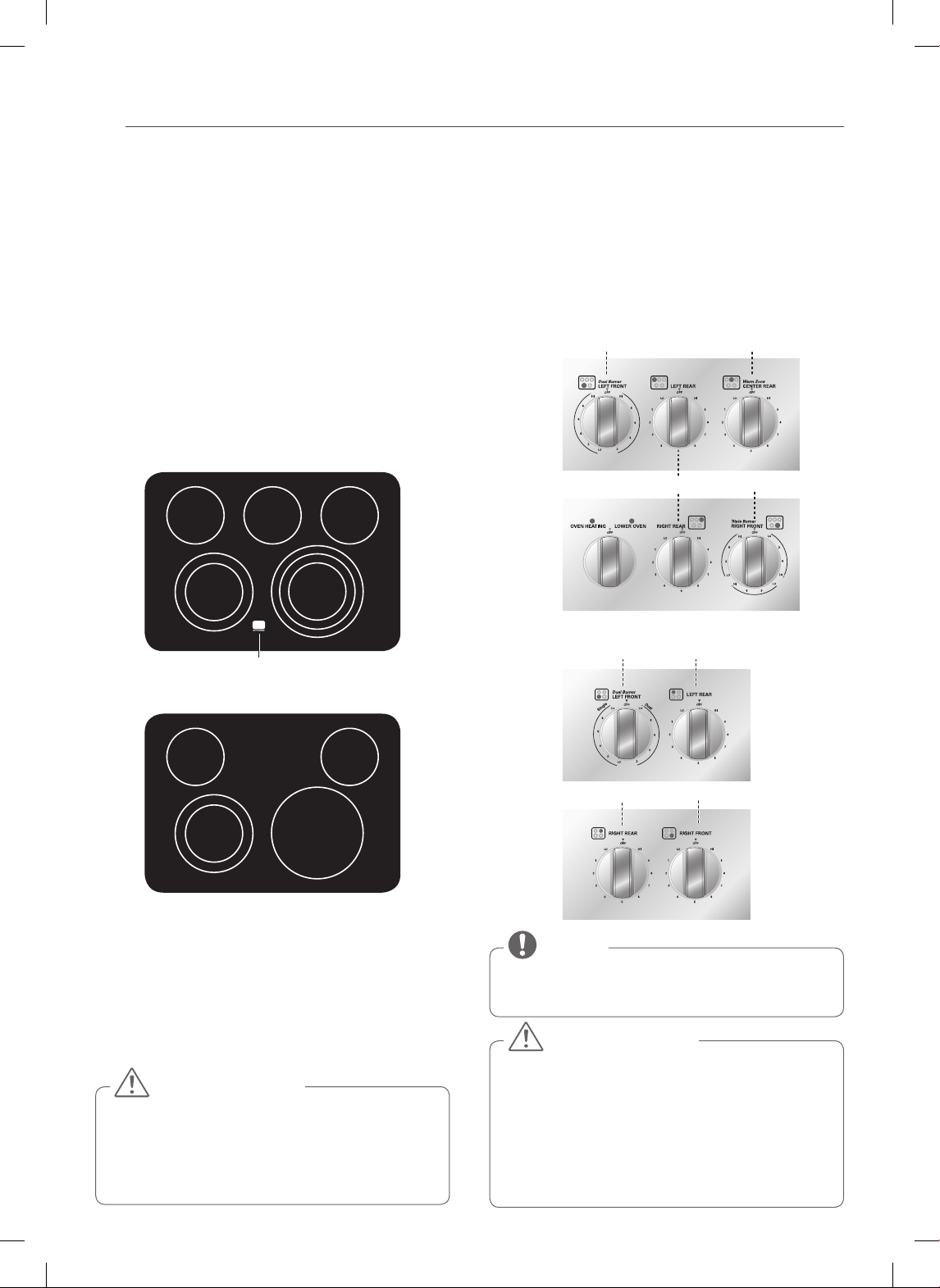
20
USO DE LA ESTUFA
USO DE LA ESTUFA
ÁREAS DE COCCIÓN
Las áreas de cocción de su cocina están identificadas por
círculos permanentes sobre la superficie de vidrio de la
estufa. Para una cocción más eficiente, haga coincidir el
tamaño del recipiente con el tamaño de la hornalla.
Los recipientes de cocción no deberían sobrepasar
más de 1/2 a 1 pulgada el área de cocción.
Cuando se enciende un control, puede verse un brillo a
través de la superficie de vidrio de la estufa. La hornalla
realizará ciclos de encendido y apagado para
mantener la configuración de calor preestablecida,
incluso cuando esté configurada en HI (Alta).
Para el modelo : LSE3092ST, LSES302ST
Sencillo
Doble
TRIPLE
Zona tibia Sencillo
Luz indicadora de supercie caliente
Para el modelo : LSE3090ST
Sencillo
Doble
Sencillo
Sencillo
Indicador de superficie caliente
(En algunos modelos)
El indicador de luz de superficie caliente, se encontrará
brillando siempre y cuando cualquier superficie este
demasiado caliente para el contacto.
Se mantendrá encendida hasta que el elemento
calentador se apague y hasta que se haya enfriado a una
temperatura aproximada de 150°F/66°C.
Es normal que las hornallas de la superficie realicen
ciclos de encendido y apagado durante la cocción,
incluso en las configuraciones más altas. Esto
ocurrirá con más frecuencia cuando se cocine con
una configuración de cocción más baja.
PRECAUCIÓN
Uso de las hornallas de la estufa
Para encender una hornalla SIMPLE (hornallas
posterior derecha e izquierda)
1. Presione la perilla hacia adentro.
2.
Gire la perilla en la dirección de la configuración que desee.
La perilla de control hace “clic” cuando se coloca en
las posiciones OFF (apagado) y HI (alta).
Para el modelo : LSE3092ST, LSES302ST
Triple
Dual
Single
200˚F
Warm
450˚F
400˚F
350˚F
300˚F
250˚F
Dual
Single
Elemento doble
Elemento sencillo
Calentador
Elemento triple
<Lado Izquierdo> <Lado Derecho>
Para el modelo : LSE3090ST
Elemento sencillo Elemento sencillo
<Lado Izquierdo> <Lado Derecho>
Elemento doble Elemento sencillo
• Hi es la temperatura más alta disponible.
• LO es la temperatura más baja disponible.
NOTA
• NUNCA deje comida en la estufa sin supervisión.
Los derrames pueden provocar humo. Los
derrames grasosos podrían prenderse fuego.
• La hornalla para asado a la parrilla del horno podría
parecer fría luego de que se la haya apagado. La
hornalla podría todavía estar caliente y podría
producirse una quemadura si se toca esta hornalla
antes de que se haya enfriado lo suficiente.
PRECAUCIÓN
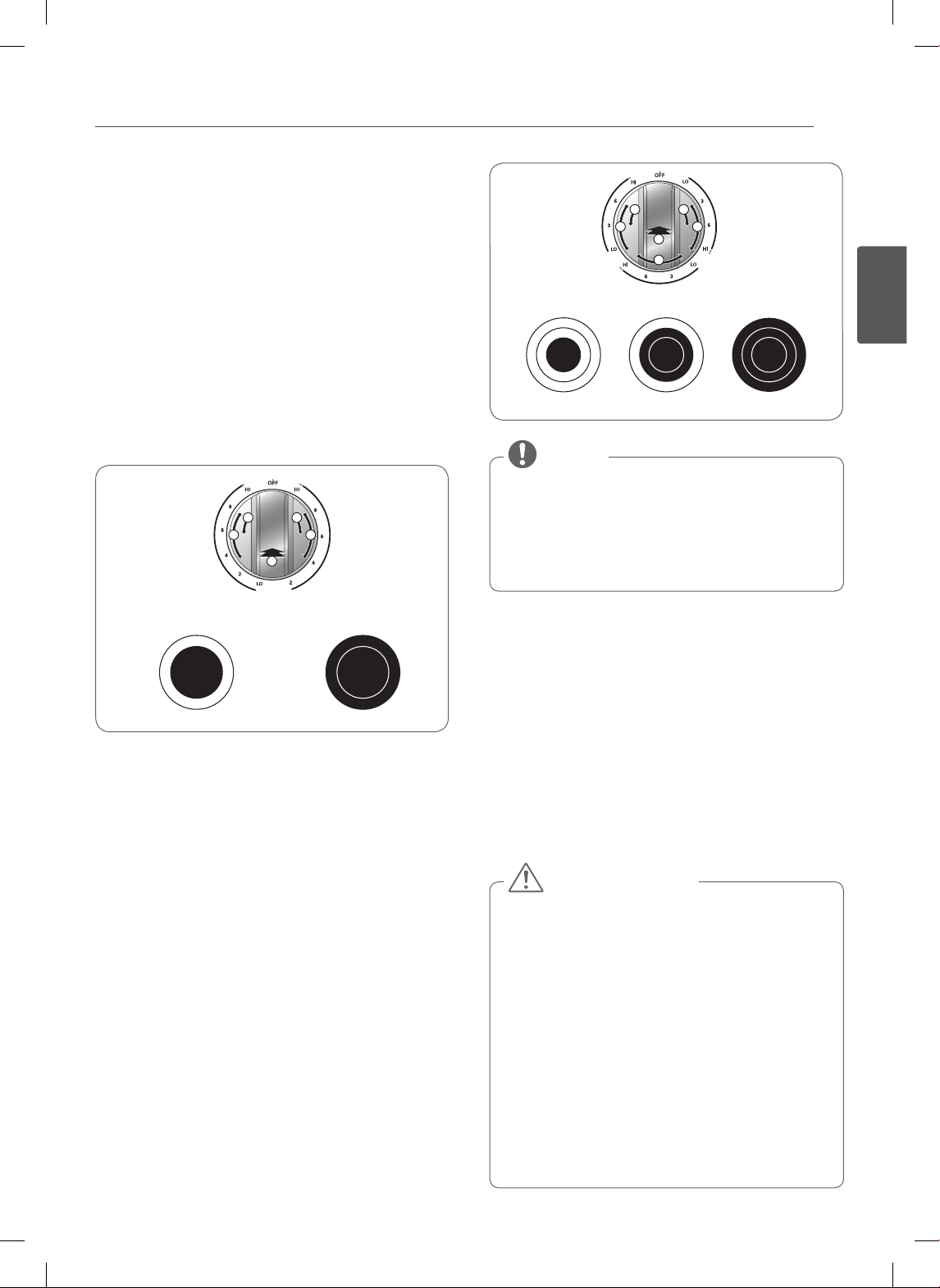
21
ESPAÑOL
USO DE LA ESTUFA
Encender una hornalla DUAL (hornallas anterior
derecha e izquierda):
Hay un elemento doble localizado en la parte frontal
derecha.
El elemento doble pueder ser usado como elemento
doble o como elemento simple.
1. Presione la perilla hacia adentro.
2-A. Gire la perilla en sentido contrario a las agujas del
reloj para alcanzar las configuraciones de unidades
de superficie SINGLE (sencillo).
2-B. Gire la perilla en sentido de las agujas del reloj
para alcanzar las configuraciones de unidades de
superficie DUAL (dobles).
22
1
A B
BA
2
1
2
22
1
A B
SINGLE DUAL
Dual
Single
Cocción sólo con un elemento
interno (más pequeño
Cocción con ambos
elementos juntos
Para encender una unidad de superficie
TRIPLE: (Frontal derecho, algunos modelos)
Hay un elemento triple ubicado en la posición frontal
derecha. Esto le permite cambiar el tamaño del elemento.
1. Presione la perilla hacia adentro.
2-A. Gire la perilla en sentido contrario a las agujas
del reloj para alcanzar las configuraciones de
unidades de superficie SINGLE (sencillo).
2-B. Gire la perilla en sentido de las agujas del reloj
o en sentido contrario a las agujas del reloj para
alcanzar las configuraciones de unidades de
superficie DUAL (dobles).
2-C. Gire la perilla en sentido de las agujas del reloj
para alcanzar las configuraciones de unidades de
superficie TRIPLE (triples).
CAB
22
1
A C
B
Triple
Dual
Single
Single (sencillo) Dual (doble) Triple (triple)
• Hi es la temperatura más alta disponible.
• LO es la temperatura más baja disponible.
• Presione y mantenga los botones + o – para
desplazarse rápidamente por las configuraciones
de temperatura.
NOTA
Encender la Zona de Calentamiento (hornalla
central, algunos modelos):
Use la Zona de Calentamiento para mantener la comida
caliente luego de que ya haya sido cocinada.
La zona de calentamiento no fue pensada para cocinar
alimentos. Intentar cocinar alimentos sin cocinar o
fríos en la zona de calentamiento puede provocar
enfermedades transmitidas por los alimentos.
1. Presione la perilla hacia adentro.
2. Gire la perilla en la dirección de la configuración que
desee.
• Utilice únicamente recipientes de cocción y platos
seguros para su uso en el horno y la estufa.
• Siempre utilice agarraderas al retirar la comida de
la estufa y del horno.
• No coloque recipientes sellados sobre la estufa.
• NO utilice envoltorios plásticos para cubrir los
alimentos cuando se encuentran sobre la estufa.
El plástico podría derretirse sobre la superficie y
resultar muy difícil de limpiar.
• Al utilizar la zona de calentamiento, debe
mantenerse la comida en su recipiente y cubrirla
con una tapa o papel aluminio para mantener la
calidad de la comida.
• NO dejar alimentos en la zona de calentamiento
durante más de dos horas.
PRECAUCIÓN
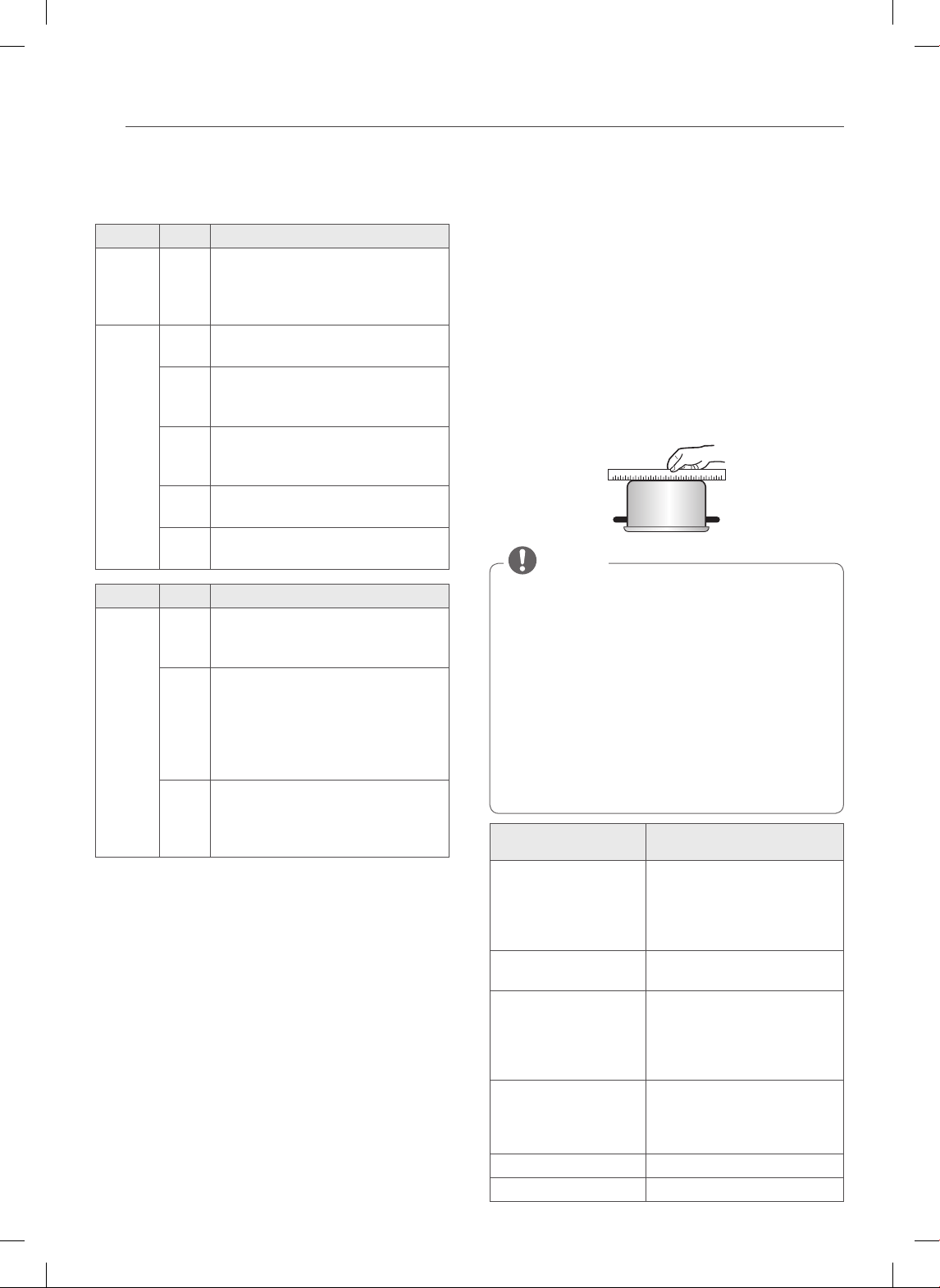
22
USO DE LA ESTUFA
Configuración de cocción de superficie
recomendada
Elemento
Nv Uso recomendad
Dual
(doble)
Triple
(triple)
- • Recipientes de cocción de diámetro
grande
• Grandes cantidades de alimentos
• Conservas caseras
Single
(sencillo)
Dual
(doble)
Triple
(triple)
HI
(alto)
• Llevar líquidos al hervor
• Iniciar la cocción
8 • Mantener un hervor rápido, freír,
freír con grasa
• Dorar o sellar alimentos con rapidez
5 • Mantener un hervor lento
• Freír o saltear alimentos
• Cocinar sopas, salsas y gravies
2 • Guisar o cocinar al vapor
• Cocinar a fuego lento
Lo
(bajo)
• Mantener alimentos calientes
• Derretir chocolate o manteca
Elemento
Nv Tipo de cocción
Warm
(calentar)
(en
algunos
modelos).
Hi
(alto)
• Alimentos fritos
• Bebidas calientes
• Sopas (líquidas)
Med
(mediano)
• Plato de cena con comida
• Salsas
• Sopas (cremosas)
• Estofado
• Vegetales
• Carnes
Lo
(bajo)
• Pan/pastelitos
• Gravies
• Guisos
• Huevos
Consejos para conservas caseras
Asegúrese de que la olla para conservas esté centrada
sobre la hornalla de superficie y que tenga una base plana.
• La base no debe ser más de 1 pulgada más grande que
la hornalla. El uso de ollas para conservas a baño maría
con bases onduladas podrían prolongar el período
necesario para que el agua entre en hervor y pueden
dañarse las estufas.
• Algunas ollas para conservas están diseñadas con
bases más pequeñas para utilizar sobre superficies de
vitrocerámica.
• Use la configuración de temperatura alta solo hasta que
el agua entre en hervor o la olla alcance la presión.
• Reduzca hasta la configuración de temperatura
más baja que mantenga el hervor o la presión. Si no
disminuye la temperatura, podría dañarse la estufa.
USO DE LOS RECIPIENTES DE
COCCIÓN ADECUADOS
El uso de los recipientes de cocción adecuados puede
evitar muchos problemas, tales como que la comida tarde
más tiempo en cocinarse o lograr resultados diferentes.
Los recipientes de cocción adecuados reducirán el tiempo
de cocción y cocinarán los alimentos en forma más pareja.
Se recomienda el uso de acero inoxidable.
Controle que los recipientes de cocción tengan
bases planas utilizando un borde recto o una regla
1. Coloque una regla a lo largo de la base del recipiente
de cocción.
2. Sosténgala a la luz.
3. No debe verse luz por debajo de la regla.
• No utilice un recipiente pequeño en una hornalla
grande. Esto no solo desperdicia energía, sino que
además puede provocar derrames que se quemen
en la zona de cocción.
• Use solo recipientes de cocción de base plana. No
utilice recipientes de cocción sobredimensionados
o desparejos, tales como woks de fondo redondo,
utensilios de fondo ondulado u ollas para
conservas y planchas sobredimensionadas.
• No utilice recipientes de papel de aluminio o
similares. El papel de aluminio podría derretirse
sobre el vidrio. No utilice la estufa si se ha derretido
metal sobre él. Llame a un Técnico autorizado.
NOTA
Recipientes de Cocción
Recomendados
No Utilizar
Base plana y lados rectos. Sartenes de base curva, ranurada
o deformada. Las sartenes con
bases desparejas no cocinan
ecazmente y a veces podrían no
hervir los líquidos.
Recipientes de cocción
de gran espesor.
Recipientes de cocción metálicos
de muy poco espesor o de vidrio.
Tamaño de los recipientes
de cocción adecuado para
la cantidad de comida a
preparar y el tamaño de la
hornalla.
Recipientes de cocción que sean
más pequeños o más grandes
que la hornalla.
El peso de las asas no
debe tumbar la sartén.
La sartén debe estar bien
equilibrada.
Recipientes de cocción con asas
sueltas o rotas. Asas pesadas que
tumben la sartén.
Tight-tting lids. Loose-tting lids.
Flat bottom woks. Woks with a ring-stand bottom.
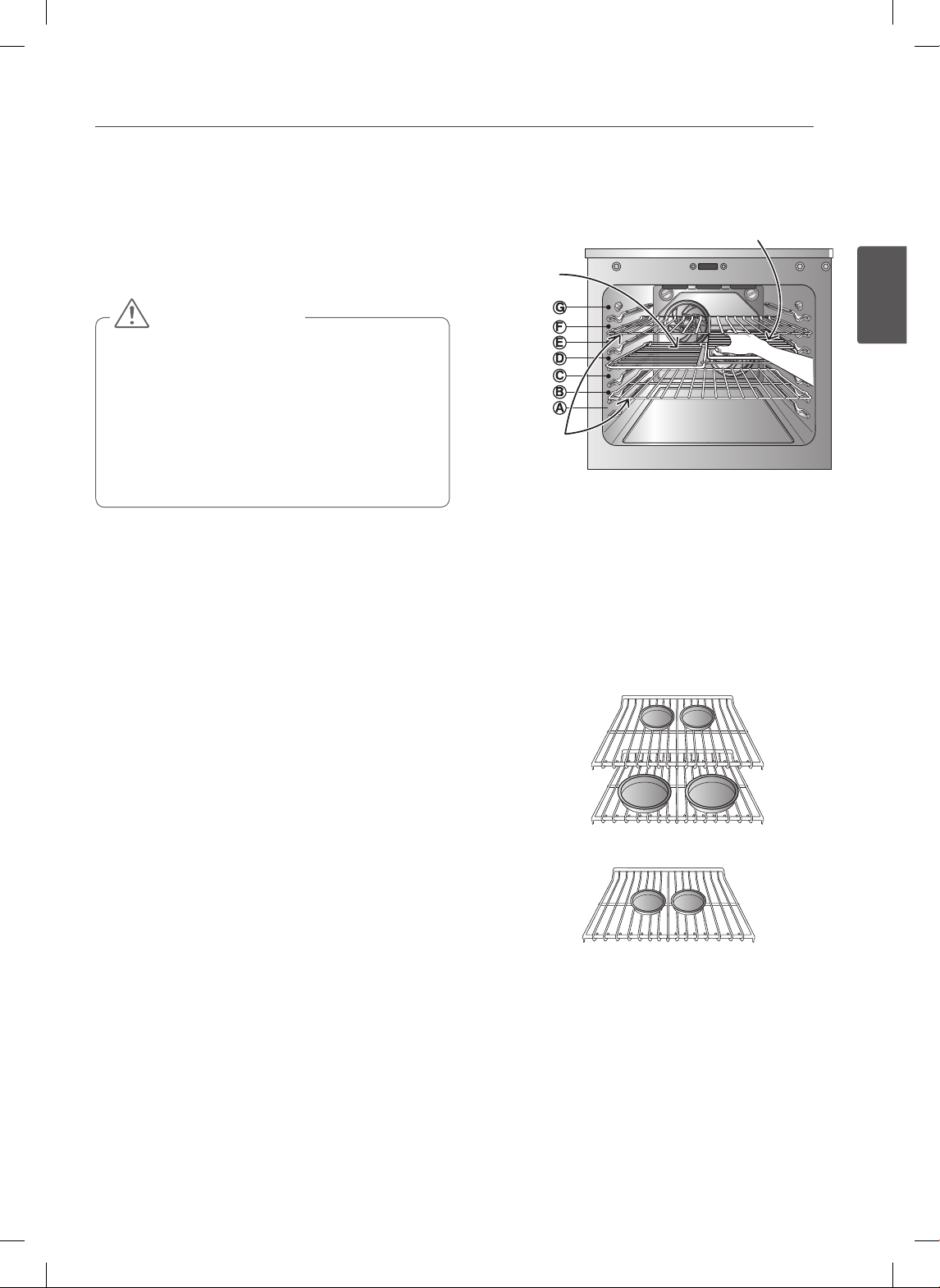
23
ESPAÑOL
USO DEL HORNO
USO DEL HORNO
SACAR Y VOLVER A COLOCAR LOS
ESTANTES DEL HORNO
• Volver a colocar los estantes del horno antes de
encender el horno para evitar quemaduras.
• NO cubra los estantes con papel de aluminio o
cualquier otro material, ni coloque nada sobre el
fondo del horno. Hacerlo podría causar un horneado
deficiente y podría dañar la parte inferior del horno.
• Acomode los estantes del horno únicamente
cuando el horno este frío.
PRECAUCIÓN
Retirar los estantes:
1. Usando guantes de cocina, agarre el estante del
horno.
2. Tire del estante hacia afuera en forma recta hasta
que haga tope.
3. Levante la parte delantera del estante.
4. Tire del estante hacia afuera.
Volver a colocar los estantes:
1. Usando guantes de cocina, coloque el extremo del
estante en el soporte.
2. Incline el extremo delantero del estante hacia arriba.
3. Empuje el estante hacia adentro.
4. Controle que el estante esté colocado
correctamente.
Colocación del Estante y la Bandeja
(En algunos modelos)
Uso común con la bandeja de rostizado
Bandeja
dividida
Bandeja de alta
resistencia
Los resultados de horneado serán mejores si los moldes
para hornear se centran en el horno. Si va a hornear con
más de un recipiente, colóquelos de modo que tengan un
espacio alrededor de por lo menos 1" a 1
1
/
2
”.
Si va a cocinar con bandejas múltiples, colóquelas en
las posiciones B y D (para 2 bandejas). Colóquelas en
las posiciones B, D y F (para 3 bandejas). Coloque los
recipientes como se indica en la Fig. 1, 2.
Fig.1: Horneado con parrillas múltiples (Posición B, D)
Fig.2: Estante estandar para hornear (Posición D)
24
USO DEL HORNO
BAKE (HORNEADO)
BAKE se usa para preparar alimentos tales como
pastelería panes, cazuelas. Puede programarse el horno
para que hornee a cualquier temperatura desde 170° F
(77° C) hasta 550°F (288° C).
La temperatura predeterminada es de 350° F (177° C).
Configuración de la función BAKE
(por ejemplo, 375°F):
1. Presione BAKE (hornear).
2. Configure la temperatura del horno.
(Presione 3, 7 y 5).
3. Presione START (iniciar).
Podrá verse la palabra PREHEATING (precalentando) y
100°.
A medida que se precalienta el horno, la pantalla
mostrará la temperatura en aumentos de 5 grados. Una
vez que el horno alcance la temperatura deseada, sonará
una alarma y la luz del horno se encenderá y apagará.
PRECALENTAMIENTO
Coloque los alimentos en el horno después del
precalentamiento.
El precalentamiento es necesario para lograr mejores
resultados de cocción.
4. Cuando haya terminado la cocción, presione CLEAR
OFF (borrar/apagado).
5. Quite los alimentos del horno.
Cómo cambiar la temperatura de horneado
mientras cocina (por ejemplo, cambiar de 375°F
a 425°F):
1. Presione BAKE (hornear).
2. Configure la temperatura del horno.
(Presione 4, 2 y 5).
3. Presione START (iniciar).
• Durante el funcionamiento del horno, es posible
que el ventilador de refrigeración del horno se
encienda para refrigerar el panel de control.
Esto es una operación normal.
• Es normal que el ventilador de enfriamiento
expulse aire caliente durante el uso del horno, este
comportamiento persistirá hasta que el horno se
enfrié.
NOTA
Consejos para hornear
Siga la receta o las instrucciones de cocción por
convección para temperatura de horneado, tiempo
y posición de la bandeja. El tiempo y temperatura de
horneado varían dependiendo de los ingredientes,
tamaño y forma de los recipientes de horneado.
• Para mejores resultados, los alimentos deben
hornearse en una única bandeja con por lo menos un
espacio de 1” a 1
1
/
2
” entre los recipientes y las paredes
del horno.
• Verifique el grado de cocción cuando se haya cumplido
el tiempo mínimo.
• Utilice recipientes de cocción de metal (con o sin un
acabado antiadherente), vidrio-cerámica resistente
al calor, cerámica u otros recipientes de horneado
recomendados para horno.
• Los recipientes de metal oscuro o los revestimientos
antiadherentes cocinan más rápido y doran mejor. Los
recipientes con aislación prolongan ligeramente el
tiempo de cocción en la mayoría de los alimentos.
Cuando se utiliza un termómetro de horno en la
cavidad del horno, la temperatura puede diferir de
la temperatura de ajuste real del horno.
NOTA
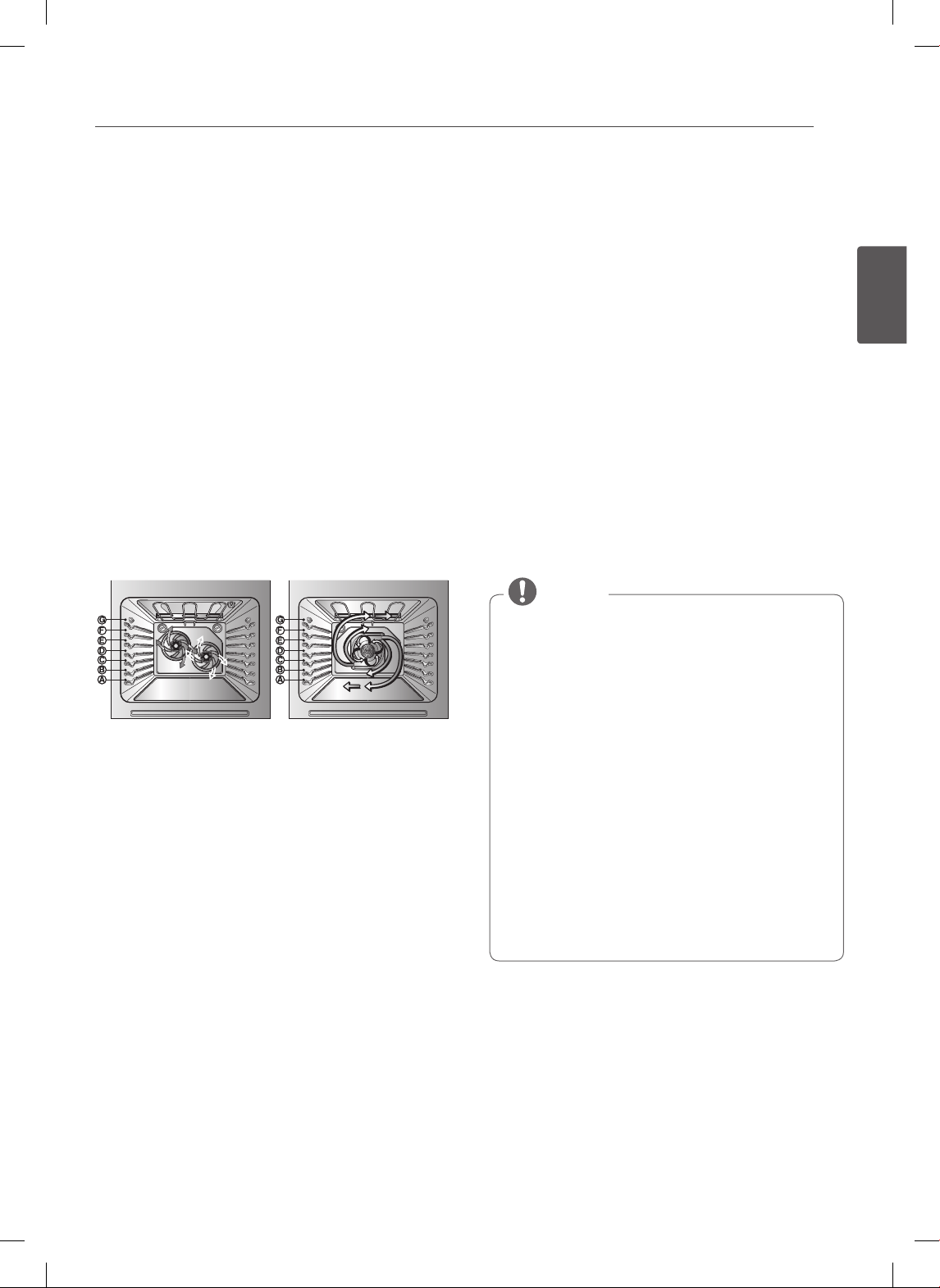
25
ESPAÑOL
USO DEL HORNO
HORNEADO POR CONVECCIÓN DOBLE
(En algunos modelos)
El horneado por convección doble utiliza dos ventiladores
para hacer circular el calor del horno en forma pareja
y continua dentro del horno. Esta distribución de
calor mejorada permite una cocción pareja y produce
resultados excelentes utilizando bandejas múltiples al
mismo tiempo. Los alimentos cocidos en una bandeja de
horno única generalmente se cocinarán más rápido y en
forma más pareja con el horneado por convección doble.
La cocción con bandejas múltiples puede incrementar un
poco los tiempos de cocción de algunos alimentos, pero el
resultado total es el ahorro de tiempo.
Beneficios del horneado por convección doble:
• Los alimentos se cocinan más homogéneamente con
el horneado por convección comparado con uno de sin
convección.
• Se puede cocinar en múltiples bandejas.
• No se necesitan ollas o artículos especiales para el
horneado.
(LSE3092ST, LSES302ST) (LSE3090ST)
El botón CONV. BAKE controla la función de horneado
por convección. Utilice la función del horneado por
convección cuando se desee un cocinado rápido. El
horno puede ser programado para el horneado por
convección a cualquier temperatura entre 300°F (150°C) a
550°F(285°C)
Configuración de la función CONVECTION
BAKE (por ejemplo, 375°F):
1. Presione CONV. BAKE (horneado por convección). En
la pantalla destellará 350 deg F.
2. Configure la temperatura del horno. (Presione 3, 7 y 5).
3.
Presione START (iniciar). En la pantalla podrá
verse CONV BAKE (horneado por convección) y la
temperatura convertida comenzando a 100°F.
A medida que se precalienta el horno, la pantalla
mostrará la temperatura en aumentos de 5 grados. Una
vez que el horno alcance la temperatura deseada, sonará
una alarma y la luz del horno se encenderá y apagará. La
pantalla mostrará la temperatura automática del horno
350 deg F, CONV BAKE y el ícono del ventilador.
Presione CLEAR/OFF (borrar/apagado) para cancelar el
horneado por convección en cualquier momento.
Consejos para horneado por convección
• Las reducciones de tiempo varían en base a la cantidad
y clase de alimentos que se cocinarán. Las galletas y
bizcochos deben hornearse en recipientes sin lados o
con lados muy bajos para permitir que el aire caliente
circule alrededor de los alimentos. Los alimentos
horneados en recipientes con un acabado oscuro se
cocinan más rápido.
• Cuando utilice el horneado por convección con una
sola bandeja, coloque la bandeja del horno en la
posición D. Si cocina con bandejas múltiples, coloque
las bandejas en la posición B y D (para 2 bandejas).
Colóquelas en las posiciones B, D y F (para 3 bandejas).
• Se obtienen mejores resultados cuando los pasteles
se hornean en la función Convection BAKE (hornear).
(Pueden usarse bandejas múltiples cuando hornee
varios pasteles de capas al mismo tiempo).
• Las galletas, muffins, bizcochos y otros panes rápidos
dan muy buenos resultados cuando se utilizan
bandejas múltiples.
• El ventilador por convección se detiene durante
un ciclo de horneado por convección para permitir
una cocción más pareja. Esto es normal.
• Durante el funcionamiento del horno, es posible
que el ventilador de refrigeración del horno se
encienda para refrigerar el panel de control. Esto es
una operación normal.
• Durante el horneado por convección operara el
ventilador del horno. El ventilador se detendrá al
momento de abrir la puerta, sin embargo el calor
permanecerá. En algunos casos, el ventilador
se detendrá durante el ciclo de horneado por
convección.
• Es normal que el ventilador de enfriamiento
expulse aire caliente durante el uso del horno, este
comportamiento persistirá hasta que el horno se
enfrié.
NOTA
Cómo usar el modo de posición de 3 bandejas
(En algunos modelos)
Cocinar utilizando 3 bandejas bajo la función CONV BAKE
(horneado por convección)
1. Presione CONV. BAKE dos veces, y luego podrá ver
“3 bandejas” en la pantalla.
2. Configure la temperatura del horno.
3. Presione START (iniciar).
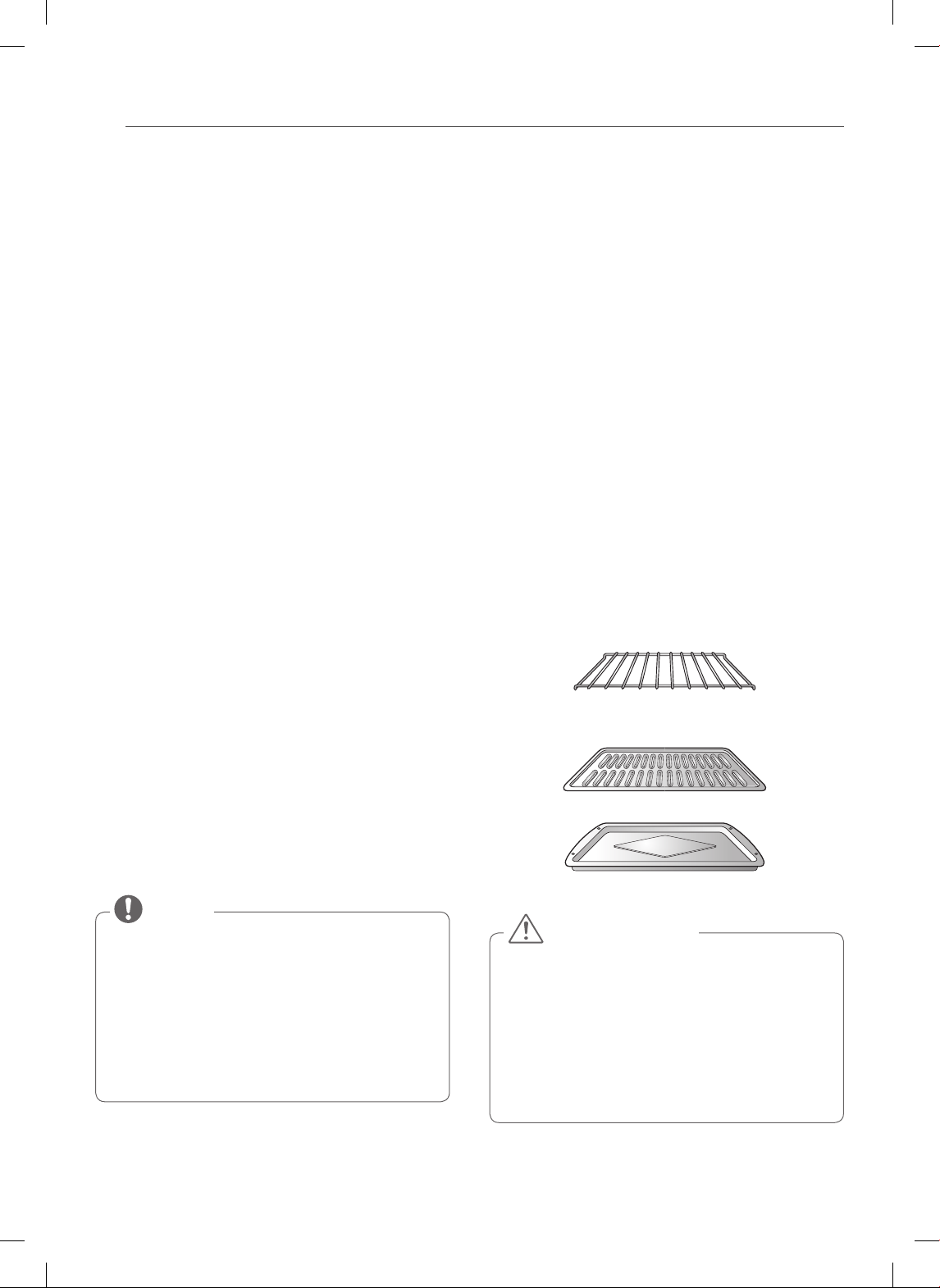
26
USO DEL HORNO
ROSTIZADO POR CONVECCIÓN
La característica CONV Roast (rostizado por convección)
se encuentra diseñada para ofrecer un óptimo
desempeño de rostizado. La característica de rostizado
por convección combina una cocción con el ventilador
de convección para rostizar carnes y aves. El aire caliente
circula alrededor de los alimentos por todos los lados,
sellando los jugos y sabores. Las comidas quedan doradas
y crujientes por afuera y jugosas por dentro.
• El rostizado por convección es especialmente bueno
para cortes de carne grandes y tiernos sin cubrir.
Configuración de la función CONVECTION
ROAST (por ejemplo, 375° F):
1. Arregle las bandejas del horno y coloque los
alimentos en el horno.
2. Presione CONV. ROAST (rostizado por convección).
En la pantalla destellará 350 deg F.
3. Configure la temperatura del horno.
(Presione 3, 7 y 5).
4. Presione START (iniciar). En la pantalla podrá
verse CONV ROAST (rostizado por convección) y
la temperatura convertida comenzando a 100°F.
A medida que se precalienta el horno, la pantalla
mostrará la temperatura en aumentos de 5 grados.
Una vez que el horno alcance la temperatura
deseada, sonará una alarma y la luz del horno
se encenderá y apagará. La pantalla mostrará la
temperatura automática del horno 350 deg F,
CONV BAKE (horneado por convección) el ícono del
ventilador.
Presione CLEAR/OFF (borrar/apagado) para cancelar
esta función en cualquier momento.
• Durante el funcionamiento del horno, es posible
que el ventilador de refrigeración del horno se
encienda para refrigerar el panel de control.
Esto es una operación normal.
• Es normal que el ventilador de enfriamiento
expulse aire caliente durante el uso del horno, este
comportamiento persistirá hasta que el horno se
enfrié.
NOTA
Instrucciones de la bandeja de rostizado
(En algunos modelos)
Cuando prepare carnes para rostizado por convección,
utilice la asadera y la rejilla junto con la bandeja de
rostizado.
La asadera retiene derrames de grasa y la rejilla ayuda
a evitar salpicaduras de grasa. La bandeja de rostizado
permite que el calor circule alrededor de la carne.
1. Coloque la bandeja del horno sobre el piso o cerca de
la posición de bandeja más baja.
2. Coloque la rejilla en la asadera. La bandeja de
rostizado entra en la rejilla permitiendo que el aire
caliente circule debajo de los alimentos para una
cocción pareja y ayuda a aumentar el dorado en la
parte inferior.
Asegúrese de que la bandeja de rostizado esté bien
colocada en la rejilla dentro de la asadera.
NO utilice la asadera sin la rejilla. NO cubra la rejilla
con papel de aluminio.
3. Coloque los alimentos (el lado de la grasa hacia
arriba) sobre la bandeja de rostizado.
4. Coloque la asadera sobre la bandeja del horno.
Bandeja de rostizado
(lado derecho de la bandeja dividida)
Asadera
Rejilla
• NO use la parrilla asadora cuando esté haciendo
asado a la parrilla. Esto evitará que la comida
entre en contacto con el elemento asador y que
salpique grasa.
• NO utilice la asadera sin la rejilla.
• NO cubra la rejilla con papel de aluminio.
• Coloque la comida (lado grasoso hacia arriba)
sobre la parrilla asadora.
PRECAUCIÓN
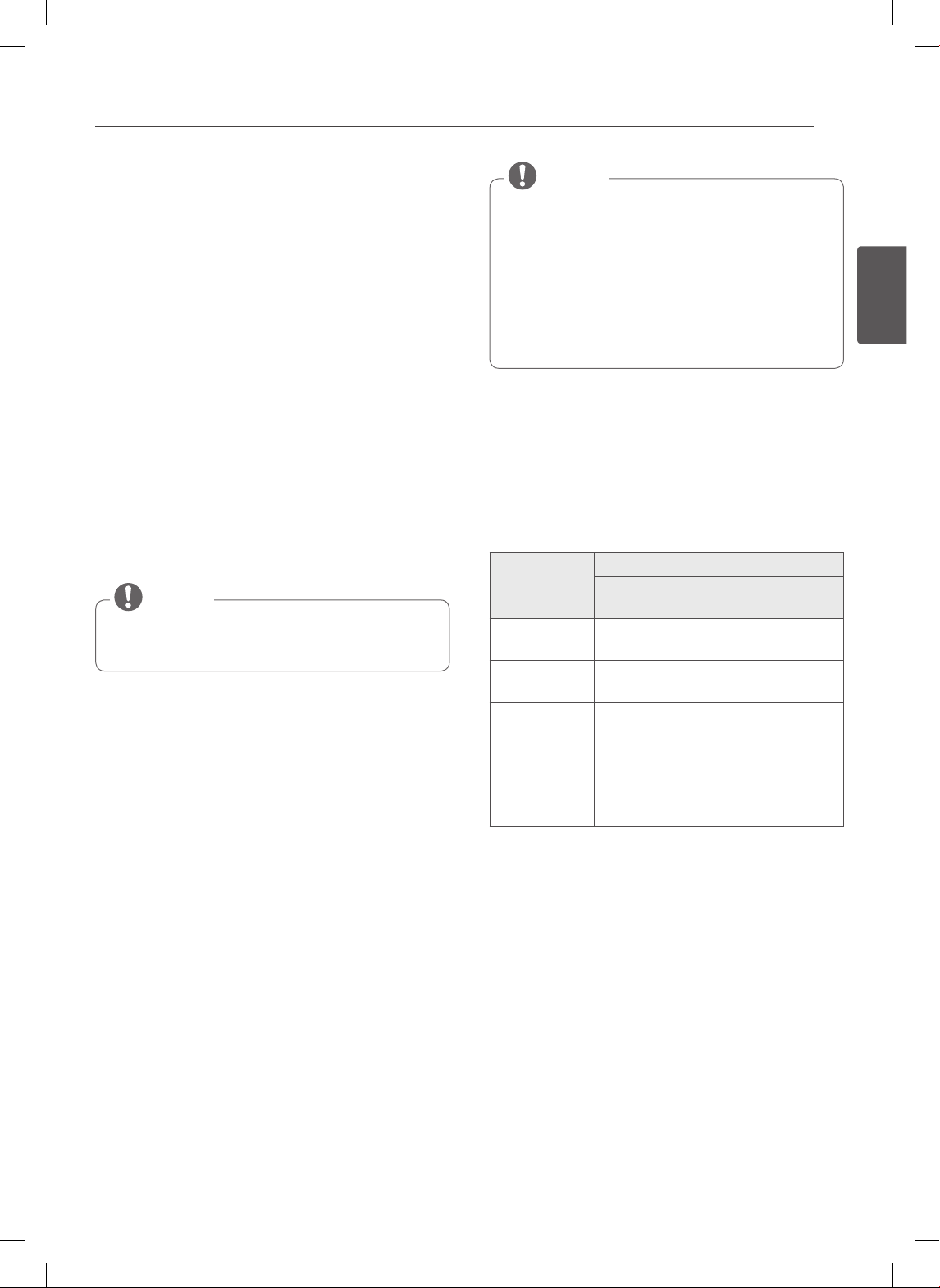
27
ESPAÑOL
USO DEL HORNO
ROSTIZADO MÁS SALUDABLE
(En algunos modelos)
Esta función de rostizado más saludable se encuentra
diseñada para brindar resultados de cocción bajos en
grasas para rostizar carnes rojas y de ave. El rostizado
más saludable puede reducir la grasa hasta en un 20%
en comparación con el rostizado regular. La cantidad
de grasa reducida puede variar dependiendo del tipo
y corte de carne. Los resultados de estas pruebas están
basados en asados de carne de res aprobados por una
organización de certificaciones.
No es necesario utilizar el precalentamiento para
carnes rojas y de ave. El sistema de calentamiento de
la característica de rostizado más saludable cocina los
alimentos de todos lados, sellando los jugos y los sabores.
Las comidas quedan doradas y crujientes por afuera y
jugosas por dentro. Puede necesitarse tiempo de cocción
extra para esta característica.
La sonda de carne debe utilizarse en esta característica.
(Consulte la TABLA DE ROSTIZADO MÁS SALUDABLE)
PROBE (sonda) aparecerá en la pantalla cuando se
enchufa la sonda del horno en el enchufe.
NOTA
Configuración de la función ROSTIZADO MÁS
SALUDABLE
(Ejemplo para Carne de Res a temperatura de
sonda 140°F):
1. Antes de utilizar esta característica, introduzca la
sonda para carne dentro de la carne de res o de ave.
2. Presione Healthier Roast (rostizado más saludable).
3. Seleccione el menú presionando Healthier Roast
(res, cerdo, cordero, pollo, pavo)
4. Configure la temperatura de la sonda.
(Presione 1, 4 y 0)
5. Presione START (iniciar) para activar esta
característica.
La pantalla mostrará la temperatura actual de la
sonda.
6. Cuando la temperatura de la sonda para carne
alcanza la temperatura configurada, se ha
completado el ciclo de rostizado. Los tonos
indicadores sonarán y en la pantalla podrá verse End
of Cycle (fin de ciclo). Los tonos indicadores sonarán
una vez por minuto hasta que se presione CLEAR/
OFF (borrar/apagado).
• Durante el funcionamiento del horno, es posible
que el ventilador de refrigeración del horno se
encienda para refrigerar el panel de control.
Esto es una operación normal.
• Es normal que el ventilador de enfriamiento
expulse aire caliente durante el uso del horno, este
comportamiento persistirá hasta que el horno se
enfrié.
NOTA
Cuando prepare carnes para rostizar, utilice la asadera y
la rejilla. La asadera retiene las salpicaduras de la carne y
evita los derrames de grasa.
Presione CLEAR/OFF (borrar/apagado) para cancelar
Healthier Roast (rostizado más saludable) en cualquier
momento.
Tabla de rostizado más saludable
Menú
Temp. de sonda para carne
Temp.
de la estufa
Temp.
predeterminada.
1. Carne de res 140~170°F
(60~77°C)
160°F
(71°C)
2. Cerdo 160~190°F
(71~88°C)
170°F
(77°C)
3. Cordero 140~170°F
(60~77°C)
160°F
(71°C)
4. Pollo 165~180°F
(74~82°C)
180°F
(82°C)
5. Pavo 165~180°F
(74~82°C)
175°F
(79°C)
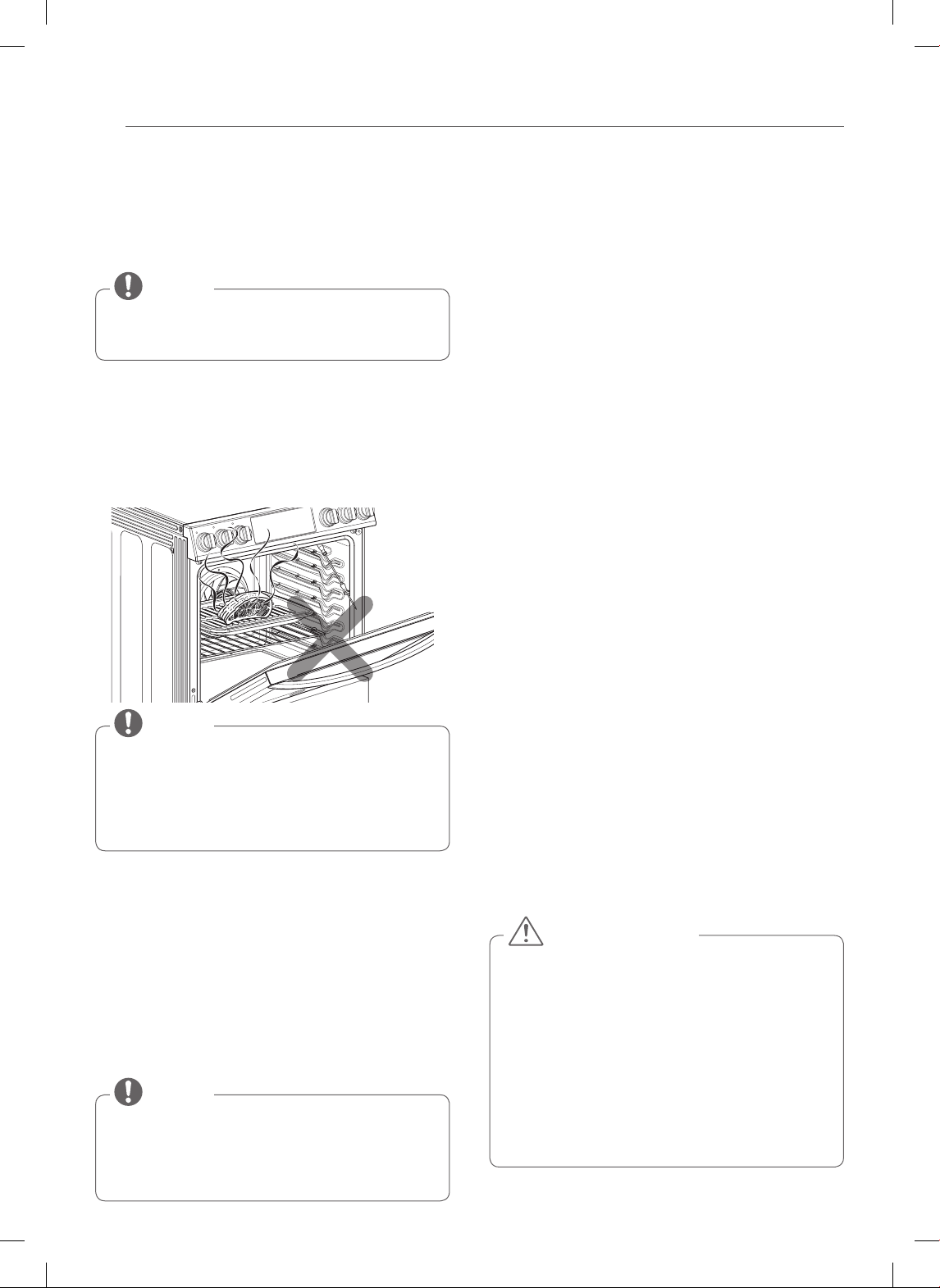
28
USO DEL HORNO
BROIL (ASADO A LA PARRILLA)
La función Asado a la parrilla utiliza el calor intenso de
la hornalla superior para cocinar la comida. El ASADO A
LA PARRILLA funciona mejor con cortes tiernos de carne,
pescado y vegetales finamente cortados.
•
Su horno está diseñado para asar con la PUERTA CERRADA.
•
La sonda para carne no puede utilizarse en este modo
NOTE
Antes de asar.
1. Coloque la carne o pescado sobre la rejilla dentro de
la asadera.
2. Siga las posiciones de estantes sugeridas en la Guía
de asado.
3. La puerta del horno debe estar cerrada cuando ase
alimentos.
Si la puerta del horno se abre durante el asado, el
control mostrará rápidamente “Close the door to
continue broil” (cierre la puerta para continuar el
asado). Una alarma de advertencia ocurrirá cada 15
segundos hasta que se cierre la puerta.
NOTA
Configuración de la función BROIL (Asado)
1. Presione BROIL (asar) una vez para asado alto (Hi) y
dos veces para asado bajo (Lo).
2. Presione START (iniciar). El horno comenzará a asar.
3. Ase sobre un lado hasta que los alimentos se doren;
dé vuelta y cocine del otro lado.
4. Cuando haya terminado de asar, presione CLEAR
OFF (borrar/apagado).
Presione CLEAR/OFF (borrar/apagado) para cancelar el
asado en cualquier momento.
• Durante el funcionamiento del horno, es posible
que el ventilador de refrigeración del horno se
encienda para refrigerar el panel de control.
Esto es una operación normal.
NOTE
Humo
Debido al calor intenso relacionado con el asado, es
normal notar humo durante el proceso de cocción. Este
humo es un resultado natural del sellado y no debería
preocuparle. Si usted nota una cantidad de humo que lo
hace sentir incómodo, siga los siguientes consejos para
reducir la cantidad de humo en su horno.
1. Utilice siempre una asadera. No utilice sartenes para
saltear o bandejas para horno convencionales por
cuestiones de seguridad.
2.
NUNCA utilice una asadera que no esté completamente
limpia y a temperatura ambiente al iniciar la cocción.
3. SIEMPRE ponga en funcionamiento el sistema de
ventilación de su estufa o campana de ventilación,
durante el asado.
4. Mantenga el interior de su horno tan limpio como
sea posible. Los restos de comidas anteriores pueden
quemarse o prenderse fuego.
5.
Evite las marinadas grasosas y los glaseados azucarados.
Ambos aumentarán la cantidad de humo que usted
percibirá.
Si usted desea realizar un glaseado, aplíquelo al final
de la cocción.
6. Si usted nota una cantidad impor tante de humo con
cualquier alimento, pruebe:
• Bajar el asador a la configuración LO (baja).
• Bajar la posición del estante para cocinar los
alimentos más lejos del asador.
• Use la configuración de asado HI (alta) para lograr
el nivel de sellado deseado y luego cambie a la
configuración de asado LO (baja), o cambie a la
función BAKE (hornear).
7. Como regla general, los cortes más grasosos de carne
y pescado producirán más humo que los elementos
más magros.
8. Siga las configuraciones de asado a la parrilla
recomendadas y pautas de cocina en el cuadro de la
página siguiente siempre que sea posible.
• Si ocurre un incendio en el horno, deje cerrada
la puerta del horno y apáguelo. Si el incendio
continúa, arroje bicarbonato de sodio o utilice
un extintor de incendios.
• NO eche agua o harina sobre el incendio.
- La harina puede ser explosiva y el agua puede
propagar un incendio de grasa y provocar
lesiones personales.
• NO utilice la asadera sin la rejilla.
• NO cubra la rejilla con papel de aluminio.
PRECAUCIÓN
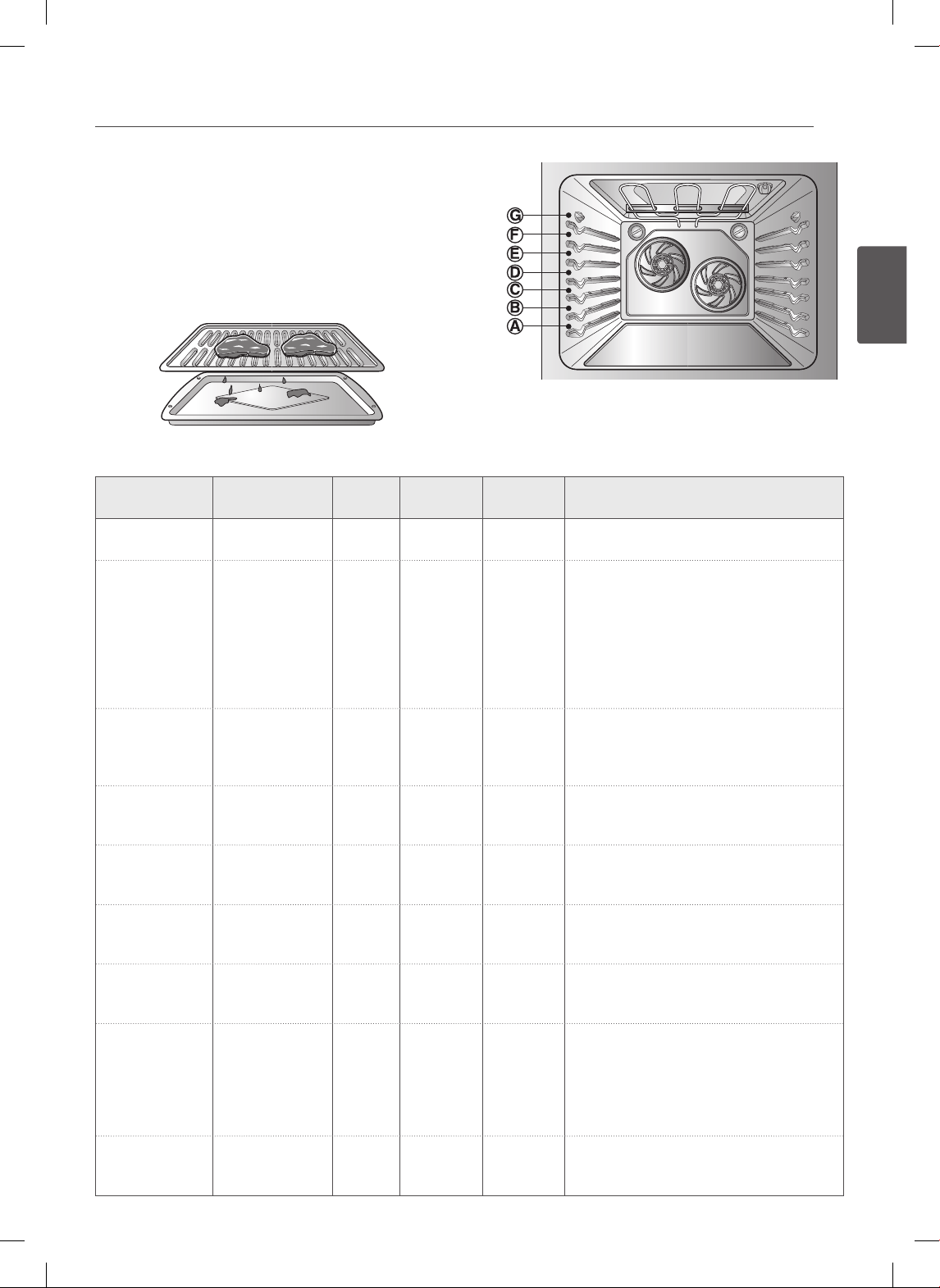
29
ESPAÑOL
USO DEL HORNO
GUÍA DE ASADO RECOMENDADO
El tamaño, peso, grosor, temperatura inicial y el punto de
cocción preferido afectarán los tiempos de asado.
Esta guía está basada en carnes a temperatura de
refrigerador.
Para mejores resultados durante el asado, utilice un
recipiente diseñado para asar (ver Fig. 1)
Fig.1
Tabla de asado
Alimento
Cantidad y/o
grosor
Posición
del estante
Tiempo del
primerlado (min.)
Tiempo del
segundo lado
Comentarios
Carne picada
Bien cocida
1 lb. (4 patties)
Grosor de ½ a ¾”
F 7–9 3–5 Espaciar uniformemente. Pueden asarse
hasta 8 hamburguessa al mismo tiempo.
Filetes de carne de res
Jugosa
A punto
Bien cocida
Jugosa
A punto
Bien cocida
Grosor de 1”
1 a 1½ lbs.
Grosor de 1½”
2 a 2½ lbs.
F
F
F
D
D
D
6
7
8
10
12
14
2–3
2–3
3–4
4–6
6–8
8–10
Los letes de menos de 1” de grosor se
cocinan antes de dorarse.
Se recomienda freír en sartén. Retire la
grasa.
Pollo 1 entero trozado
hasta 2 a 2½ lbs.,
a lo largo
2 pechugas
C
C
20
20
6–8
6–10
Asar sobre el lado de la piel primero.
Colas de
langosta
2–4
10 to 12 oz. cada
una
C 12–14 No las dé
vuelta.
Corte a través de la caparazón. Abra y extienda.
Pinte con mantequilla derretida antes de asar y
después de la mitad del tiempo de asado.
Filetes de
pescado
Grosor de ¼ a ½” E 5 3–4 Manipule y gire con mucho cuidado. Pinte
con manteca y limón antes y durante la
cocción si así lo desea.
Rebanadas de jamón
(precocidas)
Grosor de ½” D 5 3–5 Aumente el tiempo de 5 a 10 minutos por
lado para un jamón curado en casa de 1½”
de grosor.
Chuletas de cerdo
Bien cocidas
2 (grosor de ½”)
2 (
grosor de
1”)
alrededor de 1 lb.
E
D
7
9–10
6–8
7–9
Retire la grasa.
Chuletas de cordero
A punto
Bien cocida
A punto
Bien cocida
2 (
grosor de
1”)
alrededor de 10 a 12 oz.
2 (grosor de 1½”)
Alrededor de 1 lb.
E
E
E
E
6
8
11
13
4–6
7–9
9
9–11
Retire la grasa.
Filetes de
salmón
2 (grosor de 1”)
4 (grosor de 1”)
alrededor de 1 lb.
D
D
8
9
3–4
4–6
Aceite la sartén. Pinte los letes con
mantequilla derretida.
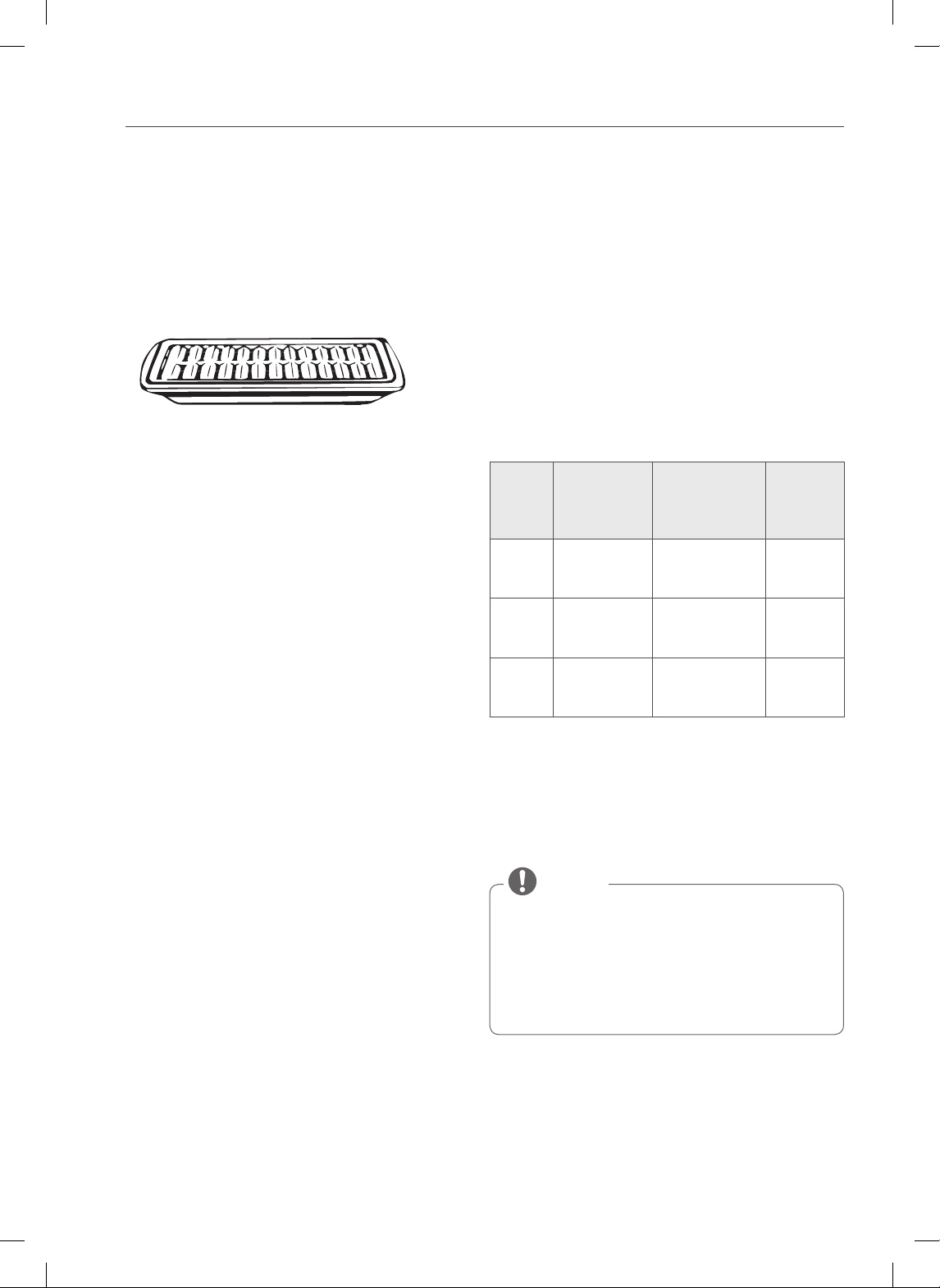
30
USO DEL HORNO
Consejos para el Asado a la Parrilla
(En algunos modelos)
• Precaliente el horno durante 5~7 minutos para mejores
resultados.
• Pinte el pescado y aves con manteca o aceite para
evitar que se peguen.
• Siempre use la asadera y rejilla que vinieron con su
horno. No cubra la rejilla con papel de aluminio.
La asadera está diseñada para evitar que los alimentos
echen humo y salpiquen al atrapar jugos (grasas y
aceites) en la parte inferior del recipiente de asado.
• Use Broil LO (asar bajo) para asar alimentos tales como
aves y cortes gruesos de carne para cocinar bien sin
que se pasen.
Carne vacuna
• Siempre debe dejarse descansar el lomo y las costillas
durante cinco minutos antes de cortarlos y comerlos.
Esto permite que el calor se distribuya en forma pareja
en toda la comida y brindando un resultado más tierno
y jugoso.
• Considere retirar los trozos anchos de carne del
refrigerador 30 minutos antes de la cocción. Esto
ayudará a que se cocinen más rápidamente y en forma
más pareja y se producirá menos humo al asarlos.
Note que los tiempos de cocción probablemente sean
más cortos que los tiempos indicados en el Cuadro de
Asado a la Parrilla.
• Los cortes de lomo con hueso y costillas con corte
francés (en el que se saca toda la carne de alrededor
del hueso), envolver las secciones expuestas del hueso
con papel de aluminio para reducir el quemado.
Frutos del Mar
• Al asar pescado con piel, siempre use la configuración
de asado a la parrilla Media y siempre ase el lado de la
piel al final.
• Es mejor consumir los frutos del mar inmediatamente
después de cocinarlos. Si se deja descansar los frutos
del mar después de cocinarlos la comida se secará.
• Es una buena idea frotar una delgada capa de aceite
sobre la superficie de la asadera antes de cocinar para
evitar que se peguen especialmente los pescados y
mariscos. Puede utilizar una delgada capa de rocío anti-
adherente para frituras.
Vegetales
• Mezcle sus vegetales levemente con aceite antes de
cocinarlos para lograr un mejor dorado.
EL FAVORITO
La característica de FAVORITO se utiliza para registrar
y recordar sus configuraciones de recetas favoritas.
Esta característica puede almacenar y recordar hasta 3
configuraciones diferentes. La configuración favorita
puede usarse con la función COOK TIME (tiempo de
cocción). Esta característica no funciona con ninguna otra
función incluyendo START TIME (tiempo de inicio)
1. Coloque los alimentos en el horno.
2. Presione FAVORITE (favorito) una vez para pan, dos
veces para carne y tres veces para pollo.
La temperatura predeterminada aparecerá y
destellará COOK (cocción).
Categoría
Cómo
seleccionar
Temp.
predeterminada
(puede cambiarse
y visualizarse)
Característ
ica de
operación
1. Pan Presione el
botón FAVORITE
una vez.
375°F BAKE
(hornear)
2. Carne
de res
Presione el
botón FAVORITE
dos veces.
325°F Rostizado
por
convección
3. Pollo Presione el
botón FAVORITE
3 veces.
350°F Rostizado
por
convección
3. Presione los botones numéricos para configurar la
temperatura deseada del horno. Esta temperatura se
almacenará y podrá accederse en el uso siguiente.
4. Presione START (iniciar). Los tonos indicadores de
precalentamiento sonarán 3 veces cuando el horno
alcance la temperatura programada.
• Sólo se almacenará la temperatura seleccionada,
no el tiempo de cocción.
• Si se cambia la temp eratu ra del h orno, la
temperatura modificada se conservará.
• La temperatura almacenada se conservará después
de un corte de energía.
NOTA
31
ESPAÑOL
USO DEL HORNO
CALENTAR
Esta función mantendrá el horno a una temperatura
de 170ºF. La función CALENTAR mantendrá caliente la
comida cocinada para servir hasta 3 horas después de
finalizada la cocción. La función Calentar puede utilizarse
sin ninguna otra función de cocción o puede utilizarse
luego de terminado el tiempo de cocción usando
HORNEADO TEMPORIZADO u HORNEADO TEMPORIZADO
RETARDADO.
Configuración de la función CALENTAR:
1. Presione el botón WARM/PROOF (calentar/leudar)
una vez.
2. Presione START (iniciar).
3. Para apagar esta función, presione CLEAR/OFF en
cualquier momento.
Para configurar la función CALENTAR luego de la
cocción temporizada:
1. Configure la característica de cocción que desee
utilizar: TIMED (BAKE, CONV. BAKE, CONV. ROAST)
(temporizada) (horneado, horneado por convección,
rostizado por convección), DELAYED TIMED (BAKE,
CONV. BAKE, CONV. ROAST) (temporizada diferida)
(horneado, horneado por convección, rostizado por
convección).
2. Presione START (iniciar).
3. Presione WARM/PROOF (calentar/leudar) una
vez. El modo COOK & WARM (cocinar y calentar)
se configura para encenderse automáticamente
después de completar la COCCIÓN TEMPORIZADA o
la COCCIÓN TEMPORIZADA DIFERIDA.
4. Para apagar la función Cook & Warm (cocinar y
calentar), presione CLEAR/OFF en cualquier
momento.
LEUDAR
La característica de leudado mantiene un medio tibio
que resulta útil para leudar productos con levadura antes
de hornear. Para evitar bajar la temperatura del horno y
prolongar el tiempo de leudado, no abra la puerta del
horno innecesariamente. Verifique que los productos
panificados no leuden de más.
Antes del leudado.
Coloque la masa cubierta en un recipiente dentro del horno
en las bandejas B o C.
Para mejores resultados, cubra la masa con un pa o
o un envoltorio pl stico (el pl stico puede colocarse
debajo del recipiente para que el ventilador del
horno no lo desplace).
NOTE
Configuración de la función LEUDAR:
1. Presione el botón PROOF o WARM/PROOF hasta
hasta que aparezca “PRF” en la pantalla.
2. Presione START (iniciar). La característica de leudado
brinda automáticamente la temperatura óptima para
el proceso de leudado, y por lo tanto no existe un
ajuste de temperatura.
3. Cuando haya finalizado de leudar, presione el botón
CLEAR/OFF (borrar/apagado).
• No utilice el modo de leudado para calentar
alimentos o para mantenerlos calientes. La
temperatura de leudado del horno no es lo
suficientemente elevada para conservar alimentos
a temperaturas seguras. Use la característica WARM
(calentar) para mantener los alimentos calientes.
• El leudado no funciona cuando el horno tiene una
temperatura mayor a 125°F. En la pantalla podrá
verse “Oven is Hot” (el horno está caliente).
NOTA
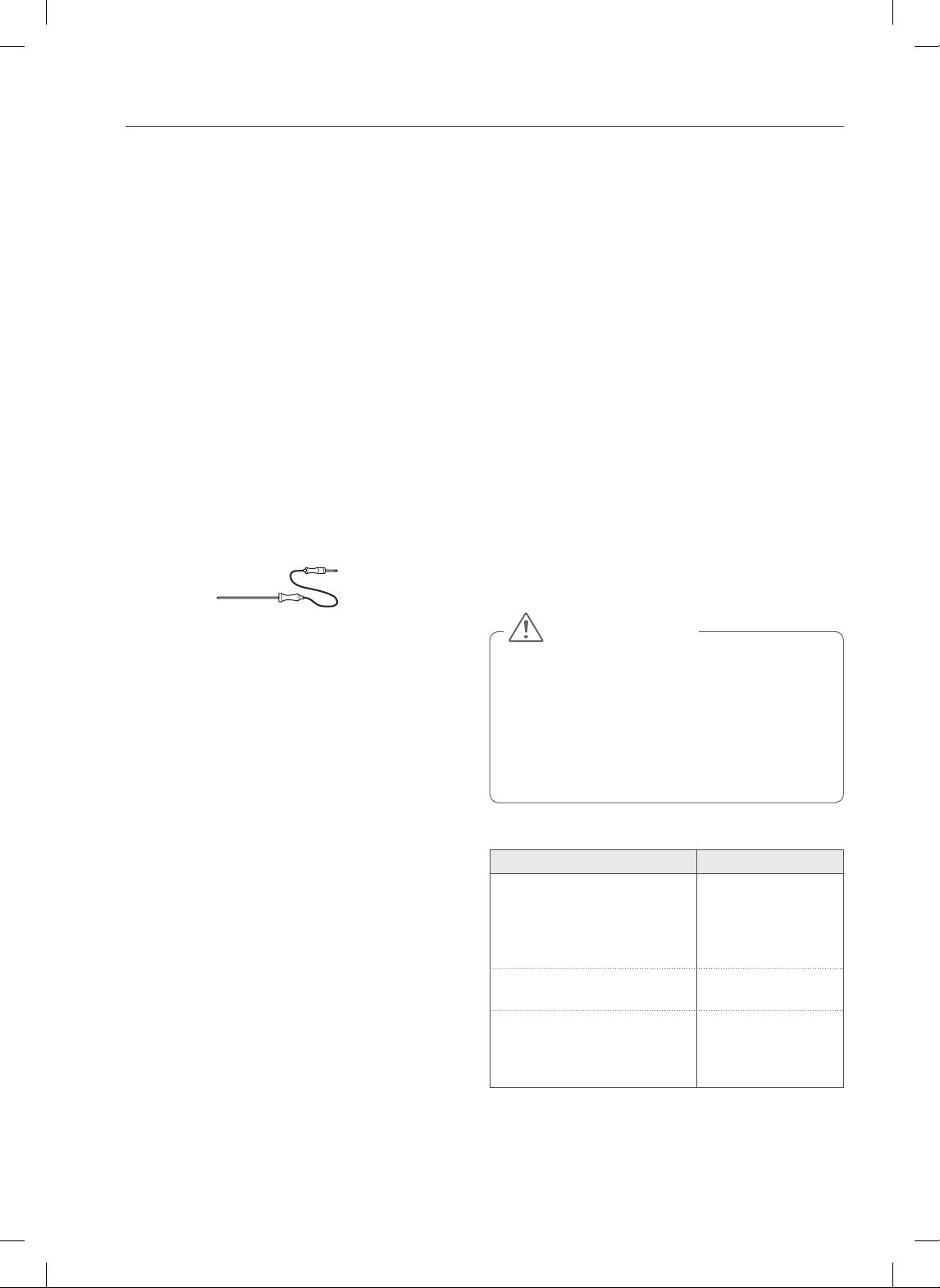
32
USO DEL HORNO
SONDA PARA CARNE
(En algunos modelos)
La sonda para carne mide con precisión la temperatura
interna de la carne de res, de ave y de los estofados. No
debe utilizarse durante el asado, la autolimpieza y las
funciones de calentar y leudado. Siempre desenchufe
y quite la sonda para carne del horno cuando quite la
comida. Antes de utilizarla, introduzca la sonda en el
centro de la parte más gruesa de la carne de res o dentro
del muslo o pechuga de la carne de ave, alejada de la
grasa o huesos. Coloque la comida en el horno y conecte
la sonda para carne en el enchufe. Mantenga la sonda lo
más lejos posible de una fuente de calor.
Configuración de la función Meat Probe (Sonda
dentro de la Carne)
(Ejemplo para Asado a temperatura de sonda
160°F):
1. Introduzca la sonda dentro de la carne.
2. Conecte la sonda para carne en el enchufe.
Método 1
3-1. Presione PROBE (sonda).
4-1. Configure la temperatura de la sonda.
(Presione 1, 6 y 0).
5-1. Seleccione el modo de cocción.
(Presione BAKE (hornear)).
6-1. Configure la temperatura del horno.
(Presione 3, 7 y 5).
Método 2
3-2. Seleccione el modo de cocción.
(Presione BAKE (hornear))
4-2. Configure la temperatura del horno.
(Presione 3, 7 y 5).
5-2. Configure la temperatura de la sonda.
(Presione 1, 6 y 0).
7. Presione START (iniciar).
La temperatura predeterminada de la sonda es de 150°F
(66°C), pero puede cambiarse a cualquier temperatura
entre 80°F (27°C) y 210°F (99°C). La pantalla mostrará la
nueva temperatura de la sonda. Cuando la temperatura
configurada de la sonda se apaga automáticamente,
aparecerá End Of Cycle (fin de ciclo) en la pantalla.
Para cambiar la temperatura de la sonda para
carne durante la cocción:
1. Presione PROBE (sonda).
2. Configure la temperatura de la sonda.
3. Presione START (iniciar).
Para cambiar la temperatura del horno durante
la cocción:
1. Seleccione la función de cocción.
(Presione BAKE (hornear)).
2. Configure la temperatura del horno.
3. Presione START (iniciar).
NOTA IMPORTANTE:
Presione CLEAR/OFF (borrar/apagado) para cancelar la
sonda para carne en cualquier momento. Para no romper
la sonda, verifique que los alimentos estén totalmente
descongelados antes de introducirla.
• Siempre use una agarradera para quitar la sonda
de temperatura. NO toque el elemento asador.
- No hacerlo puede provocar una lesión personal
grave.
• Para no dañar la sonda para carne, NO utilice
pinzas para tirar del cable cuando la quite.
• No almacene la sonda para carne en el horno.
PRECAUCIÓN
Recomendado Tabla de temperatura de la sonda
Nivel de cocción Temp. de la sonda.
Carne de res, cordero y ternera
Jugosa
Poco cocida
A punto
Bien cocida
140°F (60°C)
145°F (63°C)
160°F (71°C)
170°F (77°C)
Cerdo
Bien cocido 170°F (77°C)
Carne de ave
Pechuga, bien cocida
Muslo, bien cocido
Relleno, bien cocido
170°F (77°C)
180°F (82°C)
165°F (74°C)
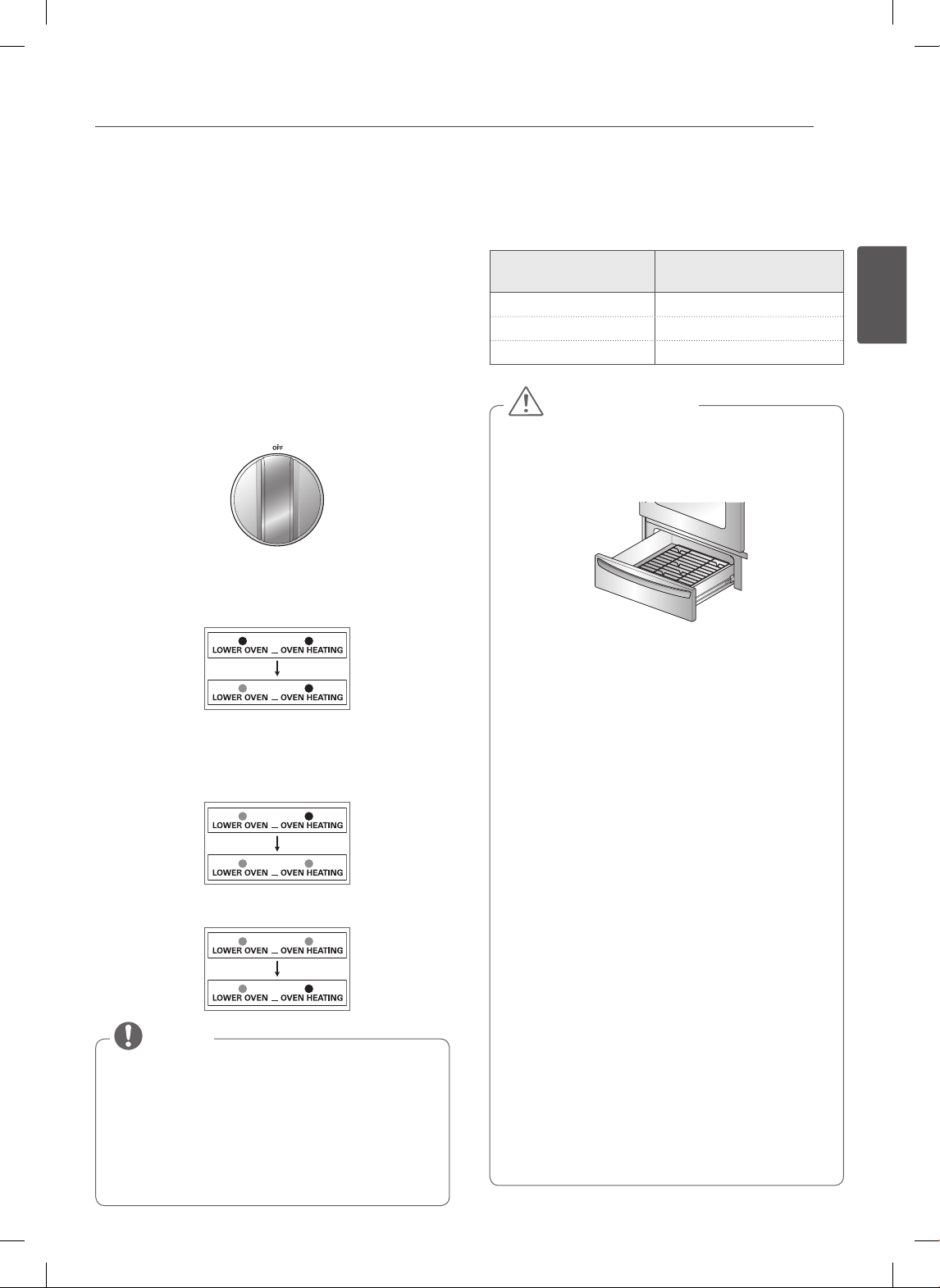
33
ESPAÑOL
CONTROLES DEL HORNO INFERIOR
CONTROLES DEL HORNO INFERIOR
(En algunos modelos)
CÓMO USAR EL HORNO INFERIOR
El objetivo del horno inferior es hornear alimentos utilizando
los mismos tiempos de cocción y temperaturas de un horno
estándar. Los alimentos ideales para hornear en el cajón del
horno inferior son pizza, alimentos congelados, estofados,
galletas, bollitos dulces y una variedad de postres.
Configuración de la función Lower Oven (Horno Inferior)
1. Presione la perilla hacia adentro.
2. Gire la perilla a cualquier configuración deseada
entre Warm (tibia) a 450°F.
200˚F
Warm
450˚F
400˚F
350˚F
300˚F
250˚F
3. Cuando la perilla se encuentra en la posición ON
(encendido), se encenderá la luz indicadora “LOWER
OVEN” (horno inferior). Permanece encendida hasta
que la perilla se mueve a la posición OFF (apagado).
4. La luz indicadora “OVEN HEATING” (horno
calentándose) se enciende cuando los elementos de
calentamiento del cajón se encuentran activos. Los
alimentos pueden seguir cocinándose cuando la luz
indicadora se halla encendida.
5. El precalentamiento se ha finalizado cuando se apaga
la señal “OVEN HEATING” (horno calentándose).
• El horno inferior no se apaga automáticamente.
• La altura máxima de alimentos que pueden
colocarse en el horno inferior es de 4 pulgadas.
• Cuando gire la perilla para utilizar la función WARM
(calentar), verifique si la señal “OVEN HEATING”
(horno calentándose) está encendida (ON).
•
Abrir la puerta puede provocar la pérdida de calor. Abrirla
muy seguido puede generar una cocción inadecuada.
NOTA
El horno inferior utiliza menos energía que un horno
estándar. Necesita más tiempo para precalentarse que
un horno estándar. Deje pasar los siguientes tiempos
aproximados para el precalentamiento:
Temperatura del
horno inferior
Tiempo de
precalentamiento
Warm (tibia) 10 minutos
350°F 20 minutos
425°F 30 minutos
• Siempre utilice la bandeja del cajón cuando use
el horno inferior.
- Esto le dará un poco de espacio entre el cajón y
los alimentos.
• Cuando cocine alimentos en el horno inferior
siempre utilice una plancha o recipiente de
horneado con 4 costados elevados.
- Esto evitará que los alimentos se deslicen.
• Siempre use agarraderas o guantes de cocina
cuando quite alimentos del horno inferior.
- Usted puede quemarse ya que los recipientes y
los platos estarán calientes.
• No coloque alimentos, papel de aluminio o
recipientes directamente en el piso del horno
inferior.
- Esto puede provocar daños al cajón.
• No utilice envoltorios plásticos para cubrir
alimentos.
- El plástico puede derretirse en el cajón o en las
áreas cercanas. Resulta muy difícil de limpiar. Use
sólo una tapa o papel de aluminio que puedan
soportar la temperatura de horneado.
• No coloque líquido o agua en el horno inferior.
• Nunca coloque plásticos, papel, alimentos
enlatados o material combustible en el horno
inferior.
• Si ocurre un incendio en el cajón, déjelo cerrado
y apáguelo. Si el incendio continúa, arroje
bicarbonato de sodio o utilice un extintor de
incendios.
• NO eche agua o harina sobre el incendio.
- La harina puede ser explosiva y el agua puede
propagar un incendio de grasa y provocar
lesiones personales.
PRECAUCIÓN
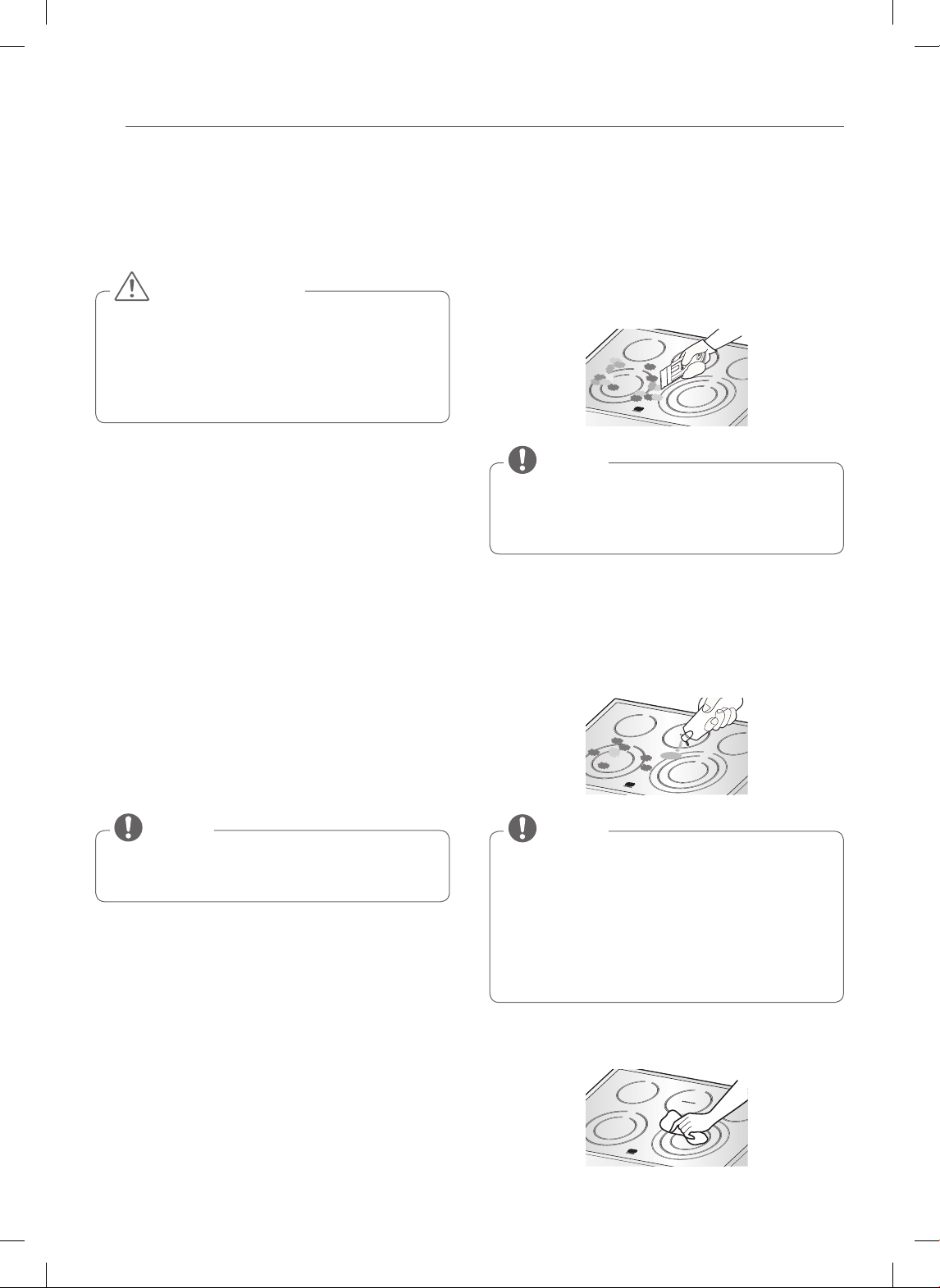
34
CUIDADO Y LIMPIEZA
CUIDADO Y LIMPIEZA
LIMPIEZA DE LA ESTUFA DE
VITROCERÁMICA
• NO utilice esponjas de fibra o esponjas de limpieza
abrasivas. Podrían dañar la superficie de su estufa.
• Para su seguridad, utilice un guante de cocina o
agarradera para limpiar la superficie caliente de la
estufa.
PRECAUCIÓN
Use Limpiador para Estufas Cerámicas sobre la estufa
de vidrio. Otras cremas podrían no ser tan efectivas o
podrían rayar, dañar o manchar la superficie de la estufa.
Para mantener y proteger la superficie de vidrio de la
estufa, siga los siguientes pasos:
1. Antes de usar la estufa por primera vez, límpiela
con limpiador para estufas cerámicas. Esto ayuda a
proteger la superficie y facilita la limpieza.
2. El uso diario de limpiador para estufas cerámicas
ayudará a que la estufa luzca como nueva.
3. Agite bien la crema de limpieza. Aplique unas pocas
gotas directamente sobre la estufa.
4. Utilice un paño de papel para limpiar toda la
superficie de la estufa.
5. Enjuague con agua limpia y use un paño seco o paño
de papel para retirar los residuos de la limpieza.
NO caliente la estufa hasta que la haya limpiado
completamente.
NOTA
Residuos Carbonizados
1. Mientras la estufa esté todavía caliente, quite todos
los depósitos carbonizados o comida derramada de
la superficie de la estufa de vitrocerámica con una
espátula metálica (similar a las que se usan para sacar
la pintura de una ventana - no dañará la superficie de
cocción decorada). Sostenga la espátula a unos 30º
aproximadamente de la estufa.
• No utilice una hoja roma o mellada.
• Para evitar quemaduras, utilice un guante de cocina
o agarradera mientras usa la espátula de metal.
NOTA
2. Cuando la superficie de cocción se haya enfriado,
aplique unas pocas gotas (aproximadamente del
tamaño de una moneda de diez centavos de dólar) de
un limpiador aprobado en el área de cada quemador
y frote la crema de limpieza sobre la superficie de la
estufa con un paño de papel húmedo.
Limpiadores aprobados:
• Weiman CookTop Cleaning Cream
(www.weiman.com)
• Cerama Bryte (www.ceramabryte.com)
• Golden Ventures Cerama Bryte
• Easy-Off 3 in 1 Glass Top Cleaner Spray
(www.easyoff.us).
NOTA
3. Limpie con agua y seque la superficie de la estufa con
un paño de papel limpio y seco. cuidado y limpieza.
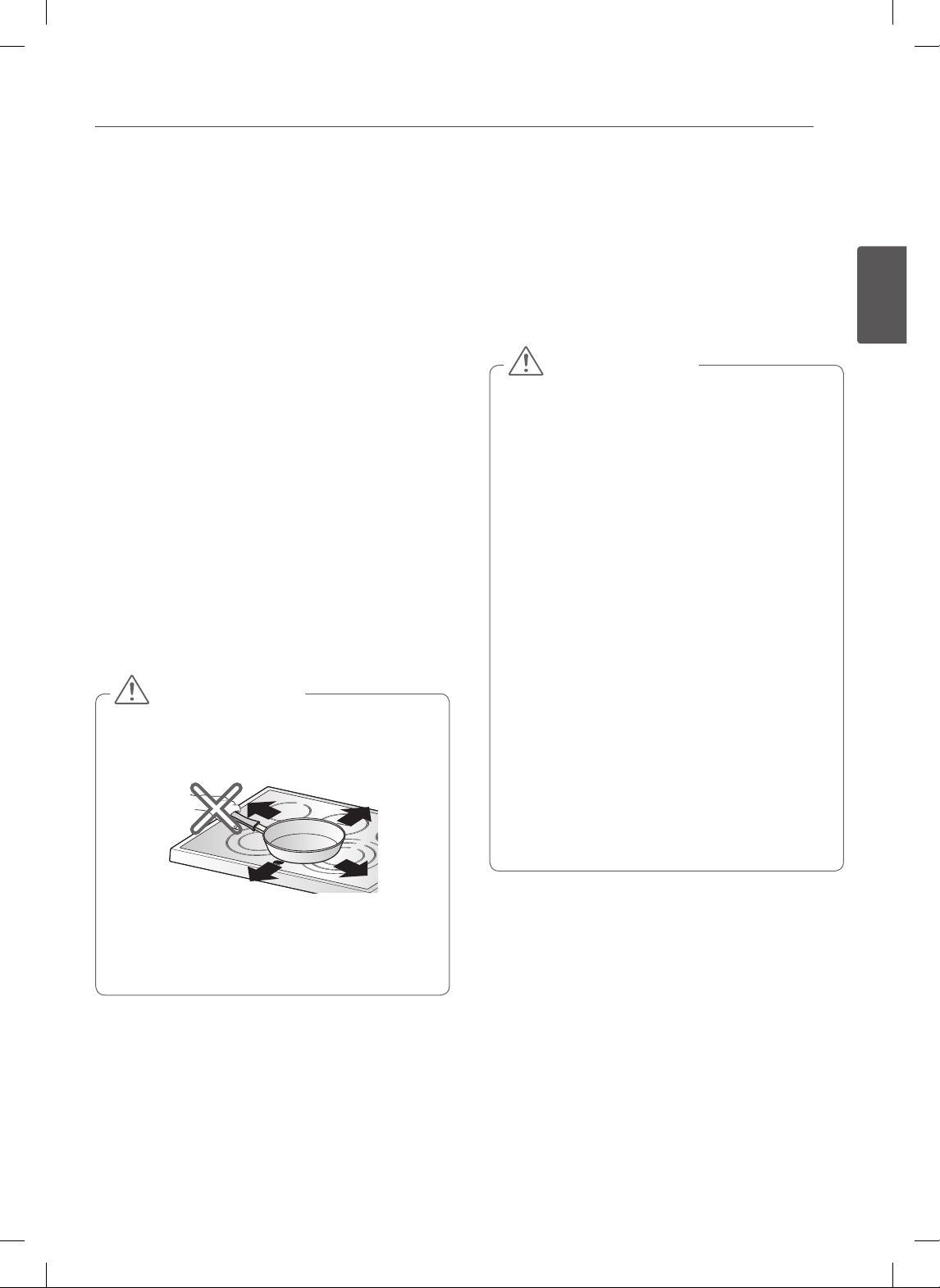
35
ESPAÑOL
CUIDADO Y LIMPIEZA
IMPORTANTE:
Si se derrite sobre la estufa azúcar o algún producto
que contenga azúcar (conservas, kétchup, salsa de
tomate, jaleas, crema de chocolate, dulces, jarabes,
chocolate, etc.), plástico o papel de aluminio, retire el
material derretido INMEDIATAMENTE con una espátula
metálica (la espatula no dañará la superficie de cocción
decorada) mientras la superficie de cocción esté todavía
caliente para evitar el riesgo de dañar la superficie de
vitrocerámica. Para su seguridad, utilice un guante de
cocina o agarradera para limpiar la superficie caliente de
la estufa.
Marcas de Metal y Rayones
1. Tenga cuidado de no deslizar ollas y sartenes por
la estufa. Si lo hace, dejará marcas de metal sobre
la superficie de la estufa. Para intentar quitar estas
marcas, utilice un limpiador para estufas cerámicas
con una esponja limpiadora para estufas cerámicas.
2. Si se deja una olla con una delgada capa de
revestimiento de aluminio o cobre que hierva hasta
secarse, el revestimiento podría dejar una coloración
negra sobre la estufa. Esto debería quitarse
inmediatamente antes de volver a calentar o la
coloración podría ser permanente.
Los recipientes de cocción con fondos ásperos o
desparejos podrían marcar o rayar la superficie de la
estufa.
• No deslice ningún objeto metálico o de vidrio
sobre la superficie de la estufa.
• No utilice recipientes de cocción con suciedad
acumulada en la base.
PRECAUCIÓN
Sello de la Estufa
Para limpiar el sello de la estufa alrededor de los bordes
del vidrio, coloque un paño húmedo durante unos
minutos, luego limpie con limpiadores no abrasivos.
Cuidado y limpieza.
AUTO-LIMPIEZA
El ciclo de auto-limpieza utiliza temperaturas
extremadamente elevadas para limpiar la cavidad del
horno. Al ejecutar el ciclo de Auto-Limpieza, puede
percibir humo u olores. Esto es normal; especialmente si
el horno está muy sucio.
Durante la Auto-Limpieza, la cocina debe estar bien
ventilada para minimizar los olores de la limpieza.
• NO deje a niños pequeños sin supervisión cerca
del electrodoméstico. Durante el ciclo de auto-
limpieza, la parte externa de la cocina puede estar
muy caliente al tacto.
• Si usted tiene aves domésticas, trasládelas a otro
ambiente bien ventilado. La salud de algunas aves
es extremadamente sensible a los gases liberados
durante un ciclo de auto-limpieza de cualquier
cocina.
• NO cubra las paredes del horno, estantes, parte
inferior o cualquier otra parte de la cocina con
papel de aluminio o cualquier otro material. Hacerlo
arruinará la distribución del calor, producirá malos
resultados en la cocción y provocará un daño
permanente en el interior del horno (el papel de
aluminio se derretirá en la superficie interior del
horno).
• NO fuerce la puerta del horno para abrirla. Esto
podría dañar el sistema de bloqueo automático
de la puerta. Abra la puerta del horno con cuidado
luego del ciclo de Auto-Limpieza. Manténgase a un
costado del horno al abrir la puerta para permitir
que escape el aire caliente o el vapor. El horno
podría estar aún MUY CALIENTE.
PRECAUCIÓN
Antes de iniciar la Auto-Limpieza:
• Quite los estantes del horno, la asadera, la rejilla para
asado a la parrilla, todos los recipientes de cocción, el
papel de aluminio y cualquier otro material del horno.
• La cocina debe estar bien ventilada para minimizar los
olores de la limpieza.
• Limpie los derrames grandes de la parte inferior del
horno.
• Asegúrese de que la cubierta de la bombilla del horno
esté colocada y que la luz del horno esté apagada.
• No se puede encender la luz del horno durante un
ciclo de auto-limpieza. No se puede encender la luz
del horno hasta que la temperatura del horno haya
descendido por debajo de los 500˚F (260˚C) luego de
que haya finalizado un ciclo de auto-limpieza.
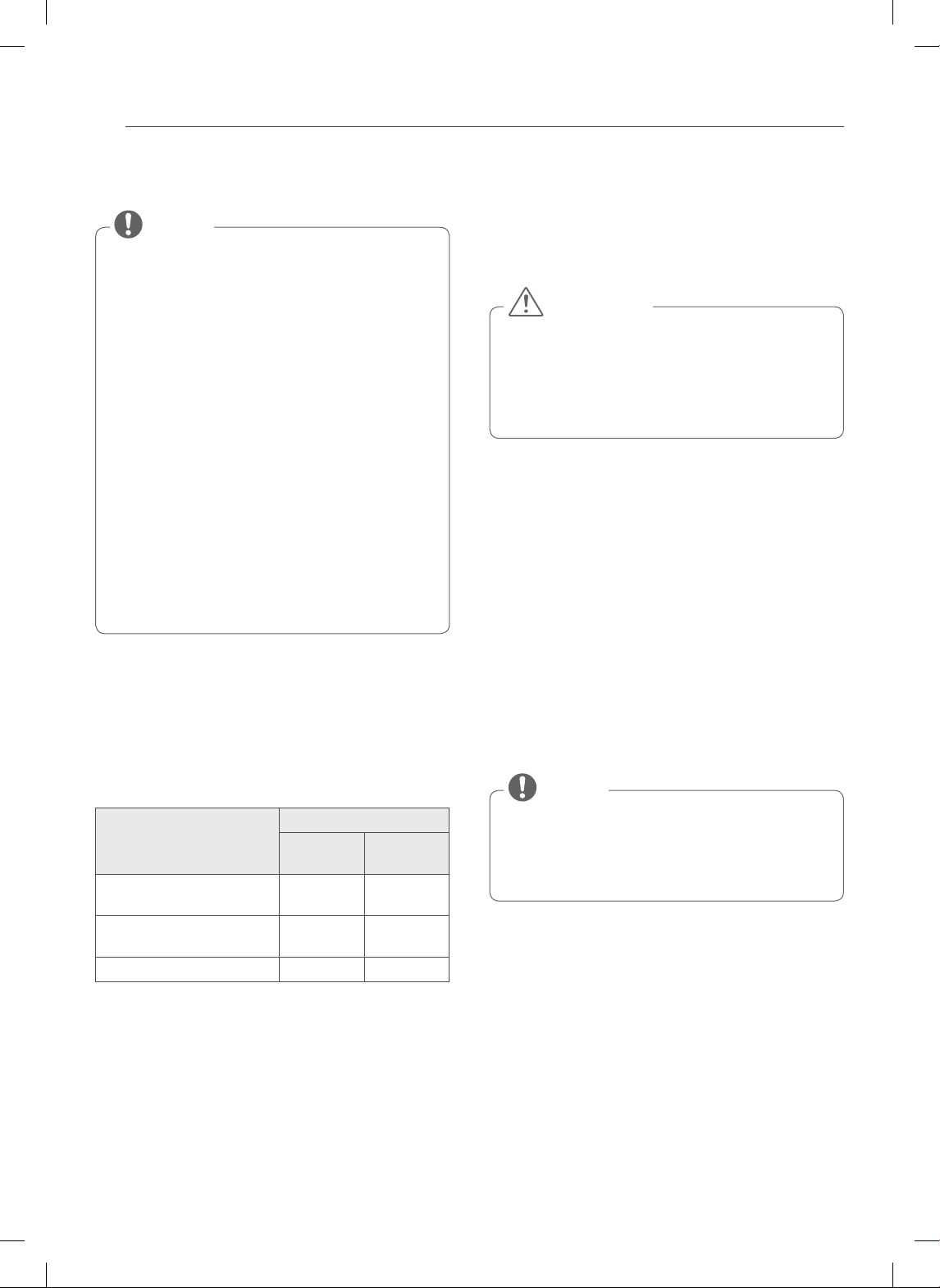
36
CUIDADO Y LIMPIEZA
Durante un ciclo de auto-limpieza no se podrán utilizar
las hornallas de la estufa ni el horno inferior del cajón.
• Retire los estantes del horno y los accesorios antes
de iniciar un ciclo de auto-limpieza.
• Si se dejan los estantes del horno en la cavidad
del horno durante un ciclo de auto-limpieza, se
decolorarán y será difícil deslizarlos hacia adentro y
hacia afuera.
• Limpie el marco de la cocina y la puerta con agua
jabonosa caliente. Enjuague bien.
• No limpie la junta. El material de fibra de vidrio
de la junta de la puerta del horno no soporta una
limpieza abrasiva.
Es esencial que la junta permanezca intacta. Si usted
nota que se está desgastando o deshilachando,
reemplácela.
• Limpie los derrames grandes de la parte inferior del
horno.
• Asegúrese de que la cubierta de la bombilla del
horno esté colocada y que la luz del horno esté
apagada.
NOTA
Configuración de la Auto-limpieza
Dependiendo de su modelo, la función de Auto-Limpieza
tiene ciclos que pueden durar 2, 3, 4, o 5 horas.
Guía de Suciedad para la Auto-limpieza
Nivel de Suciedad
Conguración del Ciclo
LSE3090ST
LSE3092ST
LSES302ST
Cavidad del horno
levemente sucia
3 horas 2 horas
Cavidad del horno
moderadamente sucia
4 horas 3 horas
Cavidad del horno muy sucia 5 horas 4 horas
1. Extraiga todos los estantes y accesorios del horno.
2. Presione el botón SELF CLEAN. En forma
predeterminada, el horno realiza la auto-limpieza
recomendada para un horno moderadamente sucio.
Presione dos veces para realizar una auto-limpieza
más corta o tres veces para una auto-limpieza más
larga.
3. Presione START.
4. Una vez que esté configurada la auto-limpieza, la
puerta del horno se bloqueará automáticamente
y aparecerá en la pantalla el ícono de bloqueo. No
podrá abrir la puerta del horno hasta que el horno
este frío. El bloqueo se liberará automáticamente
cuando el horno se haya enfriado.
NO fuerce la puerta del horno para abrirla cuando
aparezca en la pantalla el ícono de bloqueo. La
puerta del horno continuará bloqueada hasta que
haya descendido la temperatura del horno. Si fuerza
la puerta para abrirla, se dañará la puerta.
CAUTION
Configuración de la Auto-limpieza
con un Inicio Retardado
1. Extraiga todos los estantes y accesorios del horno.
2. Presione el botón SELF CLEAN. En forma
predeterminada, el horno realiza la auto-limpieza
recomendada para un horno moderadamente sucio.
Presione dos veces para realizar una auto-limpieza
más corta o tres veces para una auto-limpieza más
larga.
3. Presione el botón START TIME.
4. Use los botones numéricos para ingresar la hora del
día a la que desea que se inicie la Auto-Limpieza.
5. Presione el botón START.
Podría ser necesario cancelar o interrumpir un ciclo
de auto-limpieza debido a la presencia de humo
excesivo o fuego en el horno. Para cancelar la función
Auto-Limpieza, presione el botón CLEAR OFF.
NOTA
37
ESPAÑOL
CUIDADO Y LIMPIEZA
Durante La Auto-Limpieza
• El ciclo de auto - limpieza utiliza temperaturas
extremadamente elevadas para limpiar la cavidad del
horno. Al ejecutar el ciclo de Auto-Limpieza, puede
percibir humo u olores. Esto es normal; especialmente
si el horno está muy sucio.
• A medida que el horno se caliente, podría oír sonidos
de partes metálicas que se expanden y contraen. Esto
es normal y no dañará el horno.
• NO fuerce la puerta del horno para abrirla cuando
aparezca en la pantalla LOCKED (BLOQUEADO). La
puerta del horno continuará bloqueada hasta que
haya descendido la temperatura del horno. Si fuerza la
puerta para abrirla, se dañará la puerta.
• No se puede activar el ciclo de Auto-Limpieza si la
Función Bloqueo está activa.
• Una vez que esté configurada la auto-limpieza, la
puerta del horno se bloqueará automáticamente. No
podrá abrir la puerta del horno hasta que el horno
esté frío. El bloqueo se liberará automáticamente
cuando el horno se haya enfriado.
• Una vez que la puer ta se ha bloqueado, La luz
indicadora de BLOQUEO (LOCKED) dejará de
parpadear y permanecerá encendida. Espere
aproximadamente 15 segundos para que el
bloqueo de la puerta del horno se active.
• Si el reloj está configurado en la pantalla de 12 horas
(predeterminado) no se puede configurar la Auto-
Limpieza Retardada para que empiece más de 12
horas adelante.
NOTA
Luego del Ciclo de Auto-Limpieza
• La puerta del horno continuará bloqueada hasta que
haya descendido la temperatura del horno.
• Es posible que note algo de ceniza blanca en el horno.
Límpiela con un paño húmedo o una esponja de lana
de acero enjabonada luego de que el horno se enfríe.
Si el horno no queda limpio después de un ciclo de
limpieza, repita el ciclo.
• Si se hubieran dejado estantes del horno dentro del
horno y no se deslizan suavemente luego de un ciclo
de autolimpieza, limpie los estantes y los soportes
de los estantes con una pequeña cantidad de aceite
vegetal para que se deslicen más fácilmente.
• Es posible que aparezcan delgadas líneas en la
porcelana porque pasó del calor al frío. Esto es normal y
no afectará el funcionamiento.
• Durante el funcionamiento del horno, es posible
que el ventilador de refrigeración del horno se
encienda para refrigerar el panel de control.
Esto es una operación normal.
• Es normal que el ventilador de enfriamiento
expulse aire caliente durante el uso del horno, este
comportamiento persistirá hasta que el horno se
enfrié.
NOTA
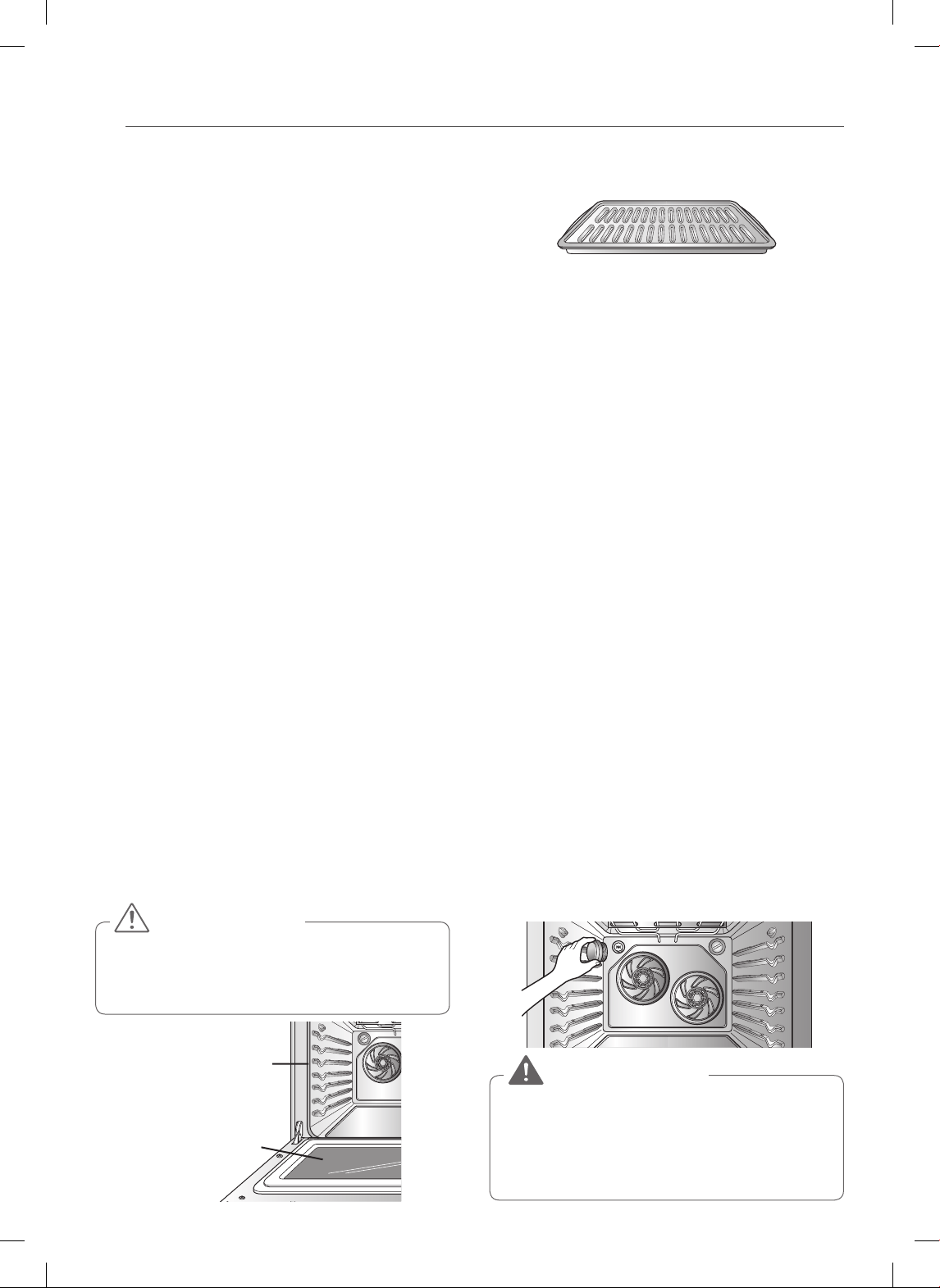
38
CUIDADO Y LIMPIEZA
LIMPIEZA EXTERIOR
Revestimiento Pintado y Decorativo
Para la limpieza general, utilice un paño con agua caliente
jabonosa. Para suciedades más difíciles y grasa acumulada,
aplique detergente líquido directamente sobre la suciedad.
Déjelo actuar de 30 a 60 minutos. Enjuague con un paño
empapado y seque. No utilice limpiadores abrasivos.
Superficies de Acero Inoxidable
(En algunos modelos)
Para evitar rayones, no utilice esponjas de lana
de acero.
1. Coloque una pequeña cant idad de limpiador de
electrodomésticos de acero inoxidable o lustre en un
paño húmedo o paño de papel.
2. Limpie un área pequeña, frotando en el sentido del
grano del acero inoxidable, si corresponde.
3. Seque y sacuda con un paño de papel limpio y seco
o un paño suave.
4. Repite cuantas veces sea necesario.
Puerta del horno
• Use agua jabonosa para limpiar completamente la puerta
del horno. Enjuague bien. NO sumerja la puerta en agua.
• Puede utilizar limpiavidrios en el vidrio externo de la
puerta del horno. NO rocíe agua o limpiavidrios en los
venteos de la puerta.
• NO utilice limpiadores de horno, polvos limpiadores,
o materiales ásperos de limpieza abrasiva en el lado
externo de la puerta del horno.
• NO limpie la junta de la puerta del horno. La junta de
la puerta del horno está confeccionada en un material
tejido que es esencial para un buen sellado. Debe
tenerse cuidado de no frotar, dañar, o quitar esta junta.
No utilice limpiadores ásperos o materiales ásperos
de limpieza abrasiva en el lado externo de la puerta
del horno. Hacerlo podría provocar daños.
PRECAUCIÓN
No limpie a mano
la junta de la
puerta del horno
Elimine cualquier
residuo de la puerta
Asadera y Rejilla (En algunos modelos)
• No guarde una asadera o rejilla sucia en ninguna parte
del horno.
• No limpie la asadera o la rejilla en el modo auto-limpieza.
• Quite la rejilla de la asadera. Con cuidado, vuelque la
grasa de la asadera en un recipiente adecuado.
• Lave y enjuague la asadera y la parrilla en agua caliente
con una esponja enjabonada o una esponja de plástico.
• Si se hubiera quemado comida, salpique la parrilla con
limpiador mientras todavía este caliente y cubra con
toallas de papel húmedas o un repasador. Sumerja la
asadera para quitar la comida quemada.
• Tanto la asadera como la parrilla pueden lavarse con un
limpiador de hornos comercial o en el lavavajillas.
REEMPLAZO DE LA LUZ DEL HORNO
La luz del horno es una bombilla para electrodomésticos
de 40 watts estándar. Se encenderá cuando la puerta del
horno esté abierta. Cuando la puerta del horno esté cerrada,
presione el botón OVEN LIGHT para encenderla o apagarla.
1. Desenchufe la cocina o desconecte el suministro
eléctrico.
2. Gire la cubierta de vidrio de la bombilla que se
encuentra en el fondo del horno en el sentido
contrario a las agujas del reloj para sacarla.
3. Gire la bombilla en el sentido contrario a las agujas
del reloj para sacarla del portalámparas.
4. Inserte la nueva bombilla y hágala girar en el sentido
de las agujas del reloj.
5. Inserte la cubierta de vidrio de la bombilla y hágala
girar en el sentido de las agujas del reloj.
6. Enchufe la cocina o conecte nuevamente el
suministro eléctrico.
• Asegúrese de que el horno y la bombilla estén fríos.
• Desconecte la energía eléctrica de la cocina
desde el fusible principal o el panel interruptor de
circuitos. No hacerlo podría causar lesiones graves,
la muerte o descargas eléctricas.
ADVERTENCIA
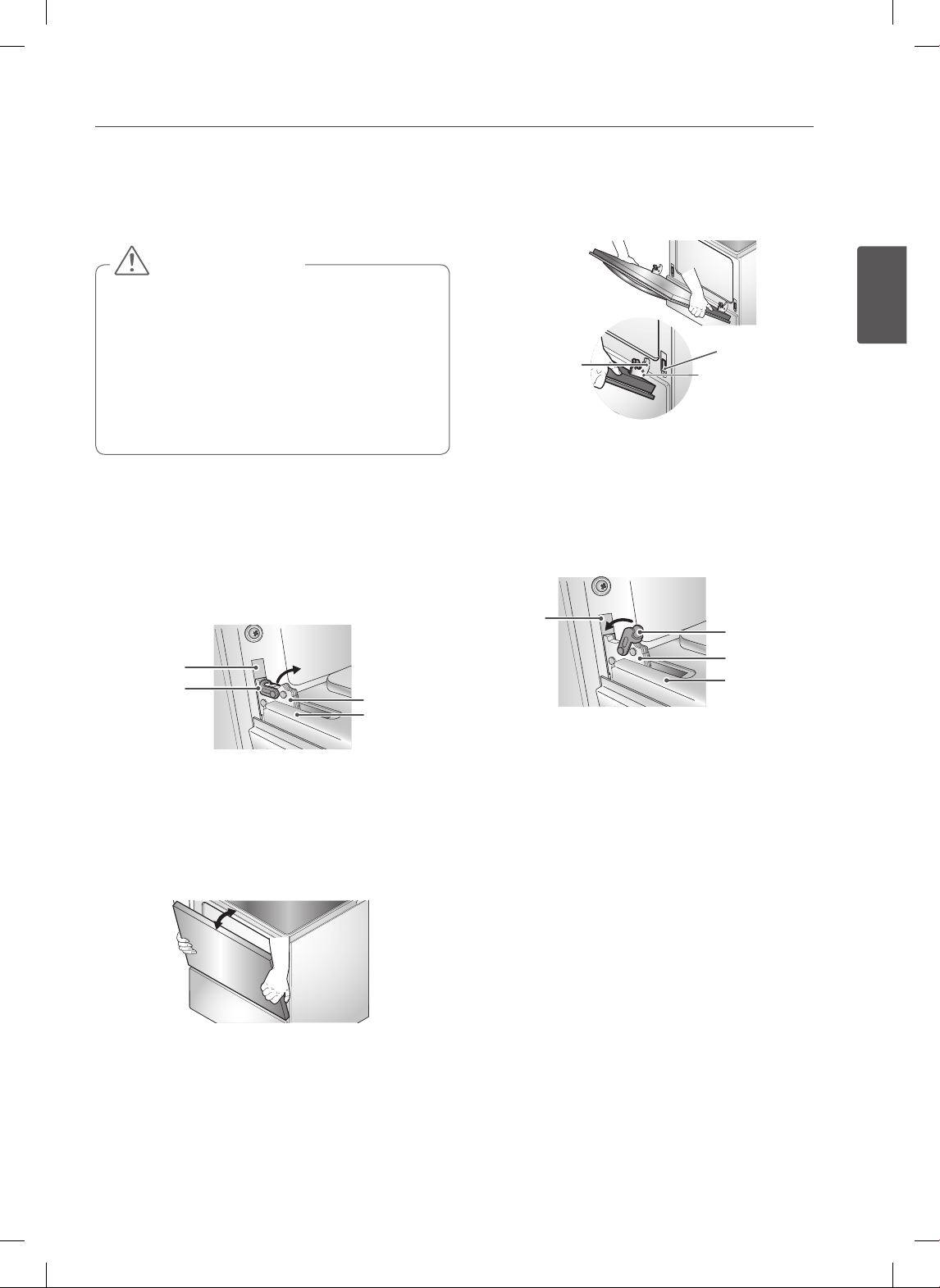
39
ESPAÑOL
CUIDADO Y LIMPIEZA
SACAR Y VOLVER A COLOCAR LA
PUERTA DEL HORNO Y EL HORNO
INFERIOR DEL CAJÓN
• La puerta es muy pesada. Tenga cuidado al
remover y levantar la puerta.
• NO levante la puerta de la manija.
• NO golpee el vidrio con ollas, sartenes o cualquier
otro objeto.
• Los rayones, golpes, choques bruscos o el tensado
del vidrio podrían debilitar su estructura, causando
mayor riesgo de rotura en el futuro.
PRECAUCIÓN
Sacar la puerta del horno
1. Abra completamente la puerta.Tire de los seguros
de la bisagra hacia el marco de la puerta, en la
posición de desbloqueo. Una herramienta, tal como
un pequeño desarmador de punta plana, puede ser
necesario.
Ranura
Brazo de la
bisagra
Marco de
la puerta
Traba de la
bisagra
Tirar de los seguros de la bisagra hacia
abajo para desbloquear.
2. Sostenga firmemente de la parte superior ambos
lados de la puerta. Cierre la puerta hasta la posición
de remoción (aproximadamente cinco grados).
Aproximadamente 5º
Posición para Remover
3. Levante la puerta hacia arriba y hacia afuera hasta
que el brazo de la bisagra haya salido de la ranura.
Ponga la puerta en el suelo.
Volver a colocar la puerta del horno
1. Sostenga firmemente de la parte superior ambos
lados de la puerta.
Brazo de
la bisagra
Extremo inferior
de la ranura
Muesca
2. Con la puerta en el mismo ángulo que la posición
de extracción, coloque la Muesca del brazo de la
bisagra en el borde inferior de la ranura de la bisagra.
La Muesca en el brazo de la bisagra debe estar
completamente asentado en la parte inferior de la
ranura.
Brazo de la bisagra
Traba de la bisagra
Marco de la puerta
Ranura
Empuje los seguros de la bisagra hacia arriba
para bloquear.
3. Abra completamente la puerta. Si la puerta no se
abre completamente, la Muesca no está posicionada
correctamente en el borde inferior de la ranura.
4. Empuje los seguros de la bisagra hacia arriba contra
el marco frontal de la cavidad del horno hasta la
posición de bloqueo. Cierre la puerta del horno.
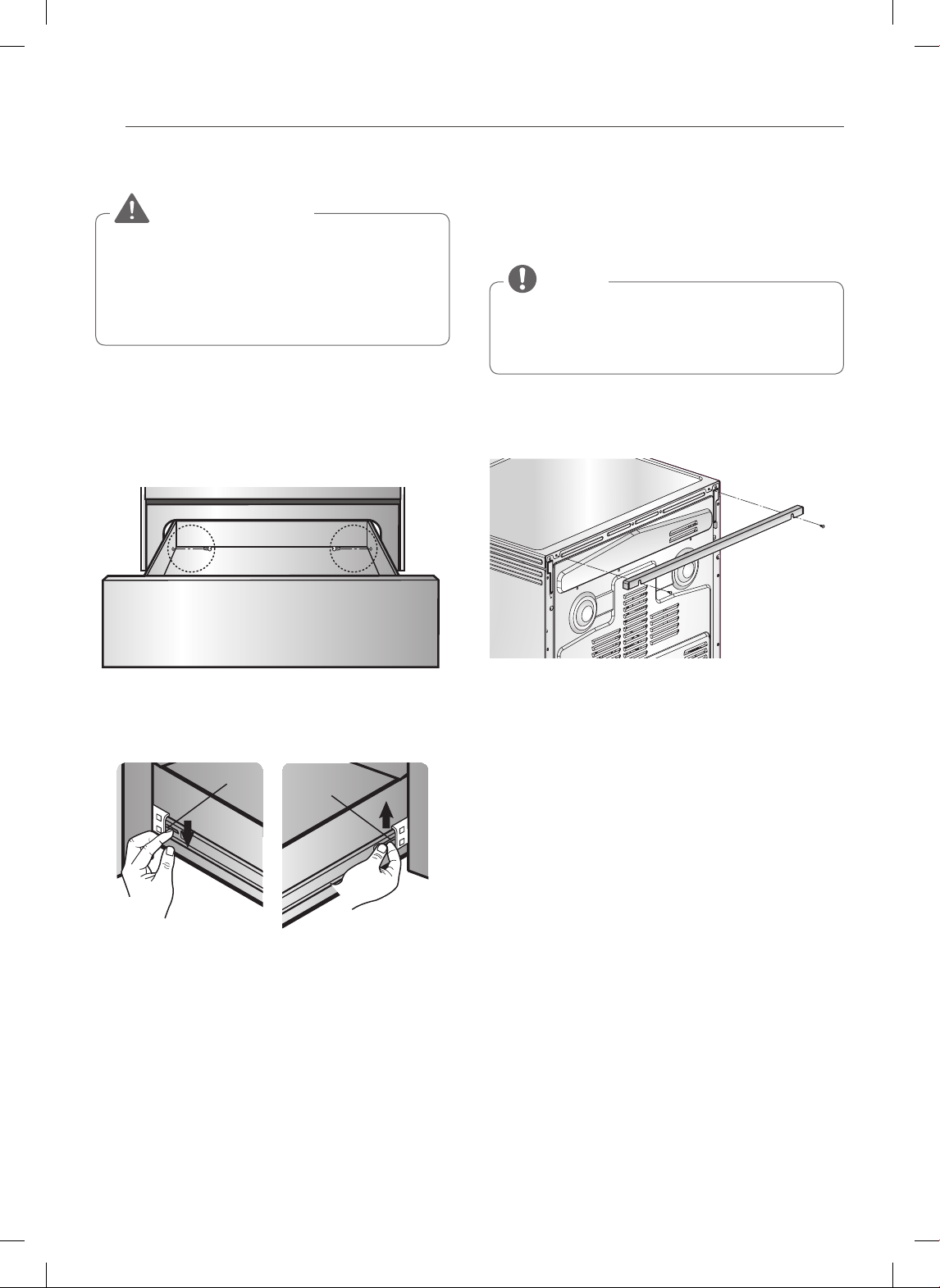
40
CUIDADO Y LIMPIEZA
Sacar el horno inferior del cajón
Desconecte la energía eléctrica de la cocina desde
el fusible principal o el panel interruptor de circuitos
antes de retirar el cajón.
No hacerlo podría causar lesiones graves, la muerte
o descargas eléctricas.
ADVERTENCIA
La mayor parte de la limpieza se puede realizar con el
cajón en su lugar; sin embargo, si es necesario se puede
sacar el cajón para realizar una limpieza más a fondo. Use
agua tibia para limpiar por completo.
1. Abra la puerta del cajón por completo.
2. Quite los dos tornillos.
Quite los tornillos
3. Localice la palanca deslizante a cada lado del cajón.
Presione hacia abajo sobre la palanca deslizante
izquierda y tire hacia arriba sobre la palanca
deslizante derecha.
Palanca
Palanca
Presione hacia abajo
con el dedo
Tire hacia arriba
con el dedo
4. Saque el cajón calentador de la cocina.
Volver a Colocar el horno inferior del cajón
1. Tire de los rieles portantes hacia el frente del bastidor
del riel.
2. Alinee la palanca deslizante a cada lado del cajón
con las ranuras de los rieles de la cocina.
3. Empuje el cajón dentro de la estufa hasta que las
palancas hagan “clic” (aproximadamente 2 pulgadas).
4. Abra el cajón de nuevo para que los deslizadores de
cojinete queden en su lugar.
5. Coloque nuevamente los dos tornillos.
OPCION DE RELLENO POSTERIOR
Si la encimera no reduce la distancia de la abertura de la
pared posterior, necesitará el kit de relleno posterior que
se suministra con la hornilla.
Si la profundidad de la encimera es superior a 635
mm, quedará un hueco entre el kit de relleno y la
pared posterior.
NOTA
Si la profundidad de la encimera es menor de 609 mm,
el panel de control no se ajustará correctamente con la
encimera.

41
ESPAÑOL
PREGUNTAS FRECUENTES
PREGUNTAS
FRECUENTES
¿Qué tipo de recipientes de cocción se
recomiendan para usar con mi estufa?
• Los recipientes deben tener base plana y lados rectos.
• Use únicamente recipientes de gran espesor.
• El tamaño de los recipientes de cocción debe ser el
adecuado para la cantidad de comida a preparar y el
tamaño de la hornalla.
• Use tapas bien ajustadas.
• Use solo woks de base plana.
¿Por qué aparece “HS” en la pantalla de la
estufa? (En algunos modelos)
Aparecerá HS (Superficie Caliente) en la pantalla
cuando se haya apagado la hornalla o durante el
ciclo de auto-limpieza. El indicador HS permanecerá
encendido hasta que la superficie se haya enfriado hasta
aproximadamente 150˚F/66˚C o cuando finalice el ciclo
de auto-limpieza.
¿Es normal oír un chasquido proveniente
de la parte trasera de mi horno cuando lo
estoy usando?
Sí, es normal. El controlador tiene relays que se abren y
cierran durante el horneado.
Durante la cocción por convección el
ventilador se detiene cuando abro la puerta.
¿Es eso normal?
Sí, es normal. Cuando se abre la puerta, el ventilador de
convección se detendrá hasta que la puerta se cierre.
¿Puedo usar papel de aluminio para retener
los goteos en la cavidad de mi horno?
No. Si se coloca papel de aluminio en la parte inferior de
la cavidad del horno, este se quemará y no podrá quitarlo.
El calentador del horno está debajo de la cavidad del
horno y brinda calor directo a la parte inferior de la
cavidad. Si usted ya ha quemado papel aluminio en
la parte inferior, no se preocupe, ya que no afectará el
rendimiento.
¿Puedo usar papel de aluminio en los
estantes?
No se recomienda colocar papel aluminio dentro de
la cavidad del horno. El uso de papel aluminio en los
estantes limitará el flujo de aire, lo que podría dar un
resultado de cocción deficiente.
¿Puedo dejar mis estantes en el horno
cuando se está ejecutando un ciclo de
Auto-Limpieza?
No. Si bien no dañará los estantes, los decolorará y podría
dificultar su deslizamiento hacia afuera y hacia adentro
durante su uso. Retire todos los elementos del horno
antes de iniciar un ciclo de Auto-Limpieza.
¿Qué debo hacer si mis estantes están
pegajosos y se ha vuelto difícil deslizarlos
hacia adentro y hacia afuera?
Con el tiempo es posible que sea difícil deslizar los
estantes hacia adentro y hacia afuera. Aplique una
pequeña cantidad de aceite de oliva en los extremos de
los estantes. Esto funcionará como un lubricante para un
deslizamiento más fácil.
¿Qué debo hacer con las manchas difíciles
de quitar sobre mi estufa?
Debe limpiarse la estufa después de cada uso para evitar
manchas permanentes. Cuando se cocinen alimentos
con un alto contenido de azúcar, tales como la salsa
de tomate, se recomienda limpiar las mancha cuando
la estufa todavía esté caliente. Use guantes de cocina
cuando limpie para evitar quemarse. Remítase a la
sección de CUIDADO Y LIMPIEZA de este manual del
usuario para mayores instrucciones.
¿Debo asar a la parrilla con el horno abierto
o cerrado?
Su cocina eléctrica ha sido diseñada para asar con la
puerta cerrada.
¿Por qué no funcionan los botones de
funciones?
Asegúrese de que la cocina no esté en el modo Lockout
(Bloqueo). El símbolo de bloqueo
se mostrará en la
pantalla si la función Bloqueo de Horno está activada.
Para desactivar la función Bloqueo, presione y mantenga
el botón START durante tres segundos. Sonará la melodía
de desbloqueo, y UNLOCKING (DESBLOQUEO) aparecerá
en la pantalla hasta que se desbloqueen los controles.
¿Por qué el reloj esta parpadeando?
Esto significa que el electrodoméstico ha sido conectado,
o que ha experimentado una interrupción en la
alimentación. Presione el botón "Clock" y reinicie el tiempo,
o presione cualquier botón para que deje de parpadear.
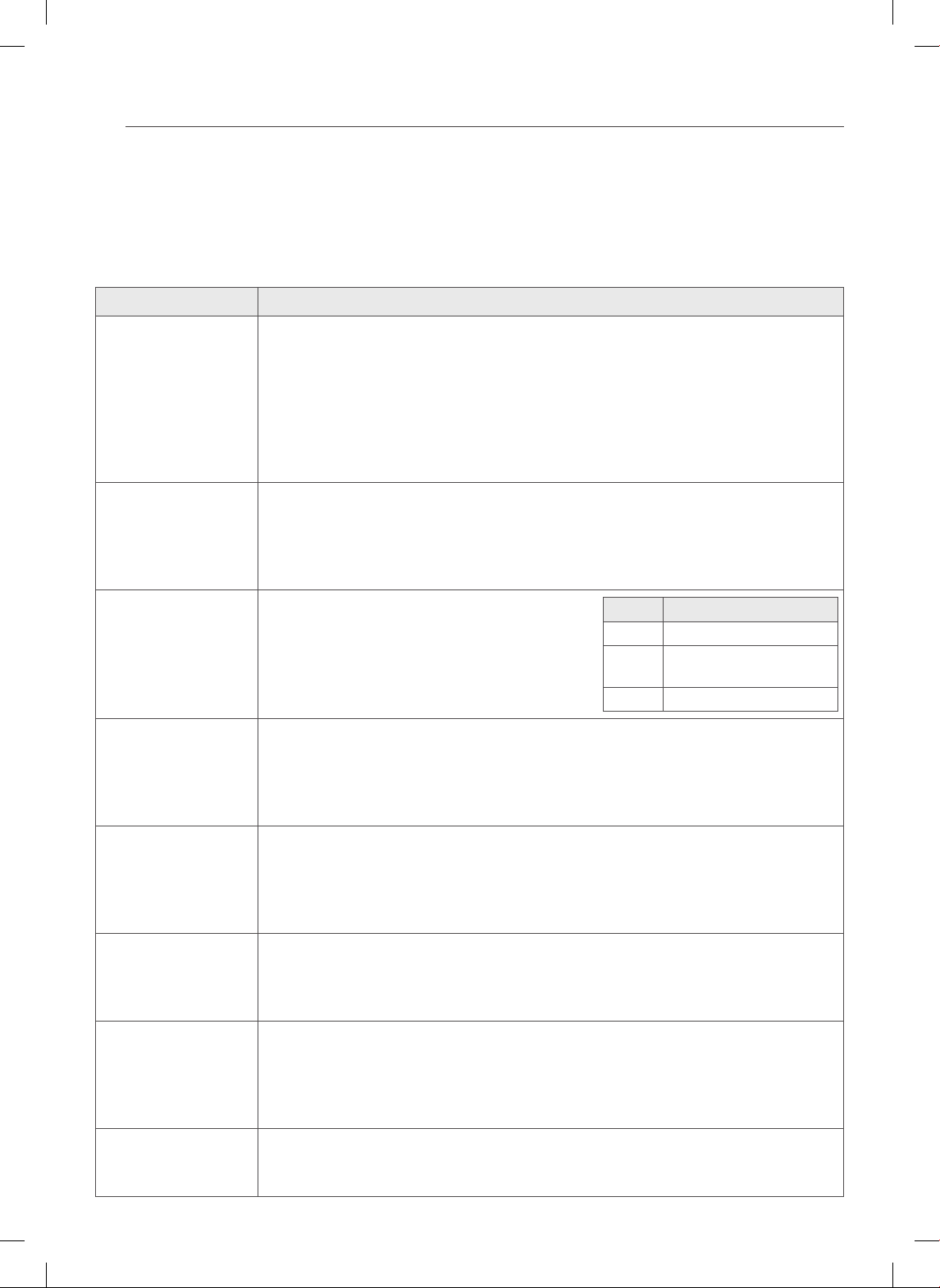
42
IDENTIFICACIÓN Y SOLUCIÓN DE PROBLEMAS
IDENTIFICACIÓN Y SOLUCIÓN DE PROBLEMAS
ANTES DE LLAMAR AL SERVICIO TÉCNICO
Antes de llamar al servicio técnico, examine esta lista. Puede ahorrarle tiempo y dinero. La lista incluye situaciones
comunes que no son el resultado de mano de obra o materiales defectuosos del aparato.
Problema Causas / Soluciones posibles
La estufa está
desnivelada.
• Una mala instalación. Coloque la bandeja del horno en el centro del horno. Coloque una
regla sobre la bandeja del horno. Ajuste las patas de nivelación de la base de la estufa hasta
que la bandeja del horno se encuentre niveladal.
• Asegúrese de que el piso esté nivelado y que sea lo sucientemente resistente y estable
como para sostener la estufa.
• Si el piso está hundido o combado, comuníquese con un carpintero para corregir la situación.
• La alineación de los gabinetes de cocina pueden hacer parecer desnivelada a la cocina.
Verique que los gabinetes estén derechos y tengan el espacio suciente para la estufa.
No se puede mover el
aparato fácilmente.
El aparato debe hallarse
en un lugar accesible
para el servicio técnico.
• Los gabinetes no están derechos o están muy ajustados entre sí. Comuníquese con un
constructor o instalador para que realice las modicaciones.
• La alfombra entorpece el funcionamiento de la estufa. Disponga de suciente espacio para
que la estufa pueda levantarse por sobre la alfombra.
El control del horno
emite un pitido y
muestra un error de
código F.
• El control eléctrico ha detectado una condición de
falla. Presione CLEAR/OFF (borrar/apagar) para
borrar la pantalla y detener el pitido. Reprograme
el horno. Si la falla vuelve a producirse, registre
el número de falla. Presione CLEAR/OFF y
comuníquese con un agente de servicio técnico.
CÓDIGO CAUSA
F-3 Teclado en corto
F-10 El sistema de bloqueo de
puerta no funciona
F-11 No calienta
Las unidades de
supercie no mantienen
un hervor constante o
la cocción es lenta
• Se están utilizando recipientes de cocción inadecuados.
- Use recipientes de base plana y que se ajusten al diámetro de la unidad de supercie
elegida.
• En algunas regiones la electricidad (voltaje) puede ser baja.
- Cubra el recipiente con una tapa hasta que se obtenga el calor deseado.
Los elementos de
supercie no funcionan
bien
• Un fusible puede haberse quemado o el interruptor de circuitos puede haber saltado.
- Cambie el fusible o recongure el interruptor de circuitos.
• Los controles de la estufa están mal congurados.
- Verique que se haya congurado el control correcto para el elemento de supercie que
está utilizando.
La unidad de supercie
deja de resplandecer
cuando se cambia a una
conguración menor
• Esto es normal. La unidad sigue encendida y caliente.
Áreas de decoloración
en la estufa
• No se limpiaron los derrames de alimentos antes del uso siguiente.
- Ver la sección Cómo limpiar la estufa de vidrio.
• Supercie caliente en un modelo con una estufa de color claro.
- Esto es normal. La supercie puede parecer decolorada cuando está caliente. Esto es
temporal y desaparecerá a medida que se enfría el vidrio.
Las unidades de supercie
se encienden y apagan
con mucha frecuencia
• Esto es normal.
- El elemento se enciende y apaga para mantener la conguración de calor.
43
ESPAÑOL
IDENTIFICACIÓN Y SOLUCIÓN DE PROBLEMAS
Problema Causas / Soluciones posibles
El horno no funciona • El enchufe de la estufa no está introducido del todo en el tomacorriente.
- Verique que el enchufe eléctrico esté conectado a un tomacorriente con tensión y
adecuada conexión a tierra.
• Un fusible puede haberse quemado o el interruptor de circuitos puede haber saltado.
- Cambie el fusible o recongure el interruptor de circuitos.
• Los controles del horno están mal congurados.
- Ver la sección “Cómo usar el horno”.
• El horno está muy caliente.
- Deje que el horno se enfríe por debajo de la temperatura de bloqueo.
El aparato no funciona. • Asegúrese de que el cable esté bien enchufado en un tomacorriente. Verique los
interruptores de circuitos.
• El cableado de servicio no está completo. Para obtener asistencia, comuníquese con el
reparador del aparato.
• Corte de energía. Controle las luces de su hogar para asegurarse. Llame a la compañía de
servicio eléctrico local.
La luz del horno no
funciona.
• Reemplace o ajuste la bombilla. Ver la sección Cómo cambiar la luz del horno de su
manual del propietario.
El horno produce humo
excesivo durante el
asado.
• Los controles no están congurados correctamente. Siga las instrucciones de la seccion
Uso del Horno, página 28.
• La carne se encuentra muy cerca del elemento. Cambie la posición de la bandeja para
brindar un espacio adecuado entre la carne y el elemento. Precaliente el elemento de asado
para sellar los jugos.
• No se ha preparado bien la carne. Quite el exceso de grasa de la carne. Corte la grasa
sobrante de los bordes para que la carne no se enrosque.
• La asadera está mal colocada y la grasa no escurre. Siempre coloque la rejilla sobre la
asadera con las estrías hacia arriba y las ranuras hacia abajo para que la grasa chorree
dentro de la asadera.
• Se ha acumulado grasa en las supercies del horno. Es necesaria una limpieza regular
cuando se asa frecuentemente. Grasa o salpicaduras antiguas provocan humo excesivo.
Los alimentos no se
hornean o rostizan
correctamente
• Los controles del horno están mal con˜gurados, página 24-26.
• La posición de la bandeja es incorrecta o no está nivelada, página 23.
- Ver la sección “Como usar el horno”.
• Se están utilizando recipientes de cocción incorrectos o de tamaño inapropiado.
- Ver la sección “Uso de la Estufa”, página 22.
• El sensor del horno debe ajustarse.
- Ver Termostato en la sección “Características”, página 17.
Los alimentos no
se asan de manera
adecuada
• Los controles del horno están mal congurados.
- Asegúrese de presionar la tecla BROIL (asar).
• Se está usando una posición de bandeja inadecuada.
- Ver Guía de asado, página 29.
• Los recipientes no son los adecuados para asar.
- Use la bandeja para asar y rejilla que vinieron con su estufa.
44
IDENTIFICACIÓN Y SOLUCIÓN DE PROBLEMAS
Problema Causas / Soluciones posibles
Los alimentos no
se asan de manera
adecuada
• El papel de aluminio usado en la asadera y la rejilla no se ha colocado de manera correcta y
no se han realizado los cortes recomendados.
- Ver la sección “Cómo usar el horno”, página 28.
• En algunas regiones el voltaje puede ser bajo.
- Precaliente el elemento de asado durante 5-7 minutos.
- Ver la Guía de asado, página 29.
La temperatura del
horno es muy alta o
muy baja
• El sensor del horno debe ajustarse.
- - Ver Termostato en la sección “Características”, página 17.
Rayones o abrasiones
en la supercie de la
estufa
• Ciertas partículas ásperas como sal o arena entre la estufa y los recipientes pueden
provocar rayones. Asegúrese de que la supercie de cocción y las bases de los utensilios
estén limpias antes del uso. Los rayones pequeños no afectan la cocción y resultan menos
visibles con el paso del tiempo.
• Se han utilizado materiales de limpieza no recomendados para las estufas de vidrio-cerámica.
Ver Cómo limpiar la estufa de vidrio en la sección MANTENIMIENTO, página 34.
• Se han utilizado recipientes con bases ásperas. Utilice recipientes de cocción con bases
planas y suaves.
Marcas metálicas • Se han raspado utensilios de metal sobre la supercie de la estufa. No deslice recipientes
metálicos sobre la supercie de la estufa. Use una crema de limpieza para estufas de vidrio-
cerámica para quitar las marcas.
Ver Cómo limpiar la estufa de vidrio en la sección MANTENIMIENTO, página 34.
Rayas o manchitas
marrones
• Los alimentos que hierven y se derraman se cocinaron en la supercie. Utilice un
raspador para quitar la suciedad. Ver Cómo limpiar la estufa de vidrio en la sección
MANTENIMIENTO, página 34.
Áreas de decoloración
con brillo metálico
• Depósitos minerales provenientes del agua y los alimentos. Quítelos utilizando una crema
de limpieza para estufas de vidrio-cerámica. Utilice recipientes de cocción con bases limpias
y secas.
El horno no realiza la
autolimpieza
• La temperatura del horno es demasiado elevada para ejecutar la función de autolimpieza.
- Permita que el horno se enfríe y reinicie los controles.
• Los controles del horno están ajustados incorrectamente.
- Examine la sección relativa a la autolimpieza del horno, página 36.
• No podrá ejecutarse un ciclo de autolimpieza si la función de bloqueo del horno está activa
o si las placas radiantes están PRENDIDAS.
Ruido de “crujidos” o
“chasquidos”
• Es el sonido del metal calentándose y enfriándose durante las funciones de cocción y
autolimpieza.
- Esto es normal.
Se oye un ventilador • Un ventilador de convección puede encenderse y apagarse automáticamente.
- Esto es normal.
Resulta difícil deslizar
las bandejas del horno
• Aplique una pequeña cantidad de aceite vegetal en una toalla de papel y frote los bordes
de las bandejas del horno.
El ventilador de
convección se detiene
• El ventilador de convección se detiene durante un ciclo de horneado por convección.
- Esto es normal y se realiza para lograr una cocción más pareja durante el ciclo.
Esto no representa una falla de la estufa y debe considerarse como una operación normal.
45
ESPAÑOL
IDENTIFICACIÓN Y SOLUCIÓN DE PROBLEMAS
Problema Causas / Soluciones posibles
Humo excesivo durante
el ciclo de autolimpieza
• Suciedad excesiva.
- Pulse el botón CLEAR/OFF. Abra la ventana para ventilar el humo de la estancia.
Espere hasta que el modo de autolimpieza sea cancelado. Limpie el exceso de suciedad y
reinicie el proceso de limpieza.
La puerta del horno no
se abre tras un ciclo de
autolimpieza
• El horno está excesivamente caliente.
- Permita que el horno se enfríe por debajo de la temperatura de bloqueo.
El horno no está
limpio tras un ciclo de
autolimpieza
• Los controles del horno no están ajustados correctamente.
- Examine la sección de autolimpieza, página 36.
• El horno estaba excesivamente sucio.
- Elimine el exceso de derrames antes de iniciar el ciclo de limpieza. En los hornos sucios
en exceso podría ser necesario volver a realizar el proceso de autolimpieza o prolongar el
período de duración del mismo.
CLEAN y puerta
parpadean en pantalla
• Ha sido escogido el ciclo de autolimpieza, pero la puerta no está cerrada.
- Cierre la puerta del horno.
Al cocinar aparece
activo en la pantalla
LOCKED
• La puerta del horno está bloqueada debido a que la temperatura interior del horno no ha
bajado por debajo de la temperatura de desbloqueo.
- Pulse el botón CLEAR/OFF. Permita que el horno se enfríe.
El conducto de
ventilación emite olor a
quemado o a aceite.
• Esto se considera normal en un horno nuevo e irá desapareciendo con el tiempo.
- Para acelerar el proceso, ajuste el ciclo de autolimpieza durante un período mínimo de
3 horas.
Examine la sección de autolimpieza, página 36.
Las rejillas del horno se
deslizan con dicultad
• Las rejillas niqueladas brillantes fueron limpiadas mediante el ciclo de autolimpieza.
- Aplique una pequeña cantidad de aceite vegetal sobre papel de cocina y limpie los bordes
de las rejillas del horno con el mismo.
La puerta del horno no
se desbloqueará tras el
ciclo de limpieza
• El interior del horno aún está caliente. Permita que transcurra un período de una hora
aproximadamente, para que el horno se enfríe una vez completado el ciclo de autolimpieza.
La puerta puede abrirse cuando el mensaje indicador LOCK deje de mostrarse.
• El control y la puerta pueden ser bloqueados.
Existen residuos de
humedad sobre la
ventana del horno o
se emite vapor por el
conducto de ventilación
del horno
• Esto es normal al cocinar alimentos con alto contenido de humedad.
• Se usó un exceso de agua al limpiar la ventana.
46
GARANTÍA
GARANTÍA (EE. UU.)
LG Electronics Inc. reparará o reemplazará su producto, a discreción de LG, si se comprueba que los materiales o su
confección presentaban defectos con el uso normal, durante el período de garantía establecido a continuación, vigente
a partir de la fecha de compra del producto por parte del comprador original. Esta garantía es válida únicamente para el
comprador original del producto y tendrá validez únicamente cuando se la use en los EE. UU.
PERÍODO DE GARANTÍA COMO SÉ MANEJA EL SERVICIO TÉCNICO
Un Año
A partir de la fecha original de compra.
Cualquier parte del horno que falle debido a materiales o confección
defectuosos. Durante esta garantía completa durante un año, LG además
brindará, sin cargo, la mano de obra y servicio técnico en el domicilio para
reemplazar la parte defectuosa.
ESTA GARANTÍA REEMPLAZA CUALQUIER OTRA GARANTÍA, EXPRESA O IMPLÍCITA, INCLUYENDO AUNQUE SIN LIMITACIÓN,
CUALQUIER GARANTÍA DE COMERCIABILIDAD O APTITUD PARA UN PROPÓSITO DETERMINADO. CUANDO LA LEY NO
EXIJA NINGUNA GARANTÍA EXPLÍCITA, LA DURACIÓN DE LA MISMA SE ENCUENTRA LIMITADA AL PERÍODO DE GARANTÍA
EXPRESA INDICADO ANTERIORMENTE. LG NO SERÁ RESPONSABLE POR LOS DAÑOS EMERGENTES, INDIRECTOS O
DIRECTOS, DE NINGÚN TIPO, INCLUYENDO LA PÉRDIDA DE INGRESOS O GANANCIAS, EN RELACIÓN AL PRODUCTO.
ALGUNOS ESTADOS NO PERMITEN LIMITACIONES EN CUANTO A LA DURACIÓN DE UNA GARANTÍA O LA EXCLUSIÓN DE
LOS DAÑOS INCIDENTALES O EMERGENTES, POR LO TANTO, LAS LIMITACIONES ANTERIORES PODRÍAN NO APLICARSE.
ESTA GARANTÍA LIMITADA NO INCLUYE:
1. Llamadas al servicio técnico para corregir la instalación de su electrodoméstico, para enseñarle a usar su producto, para
reemplazar los fusibles de la vivienda o corregir el cableado de la vivienda o para reemplazar bombillas de luz de fácil
acceso para el usuario.
2. Las reparaciones cuando su electrodoméstico se use para otro fin diferente del uso normal para un hogar de una sola
familia.
3. Recogida y entrega. Su electrodoméstico está diseñado para ser reparado en el hogar.
4. Daños causados por accidentes, modificaciones, uso indebido, abuso, incendios, inundaciones, instalación inadecuada,
desastres naturales o el uso de productos no aprobados por LG Corporation.
5. Las reparaciones de partes o sistemas como resultado de modificaciones no autorizadas realizadas al electrodoméstico.
6. Reemplazo de partes o costo de mano de obra para unidades usadas fuera de los Estados Unidos.
7. Todos los costos de mano de obra durante el período de garantía limitada.
Se extiende la presente garantía al comprador original para aquellos productos comprados para uso domiciliario dentro
de los EE. UU. En Alaska, la garantía excluye los gastos de envío o las llamadas por parte del servicio técnico a su domicilio.
Algunos estados no permiten exclusiones o limitaciones de los daños incidentales o emergentes, por lo tanto, esta
exclusión o limitación podría no aplicarse. La presente garantía le otorga derechos legales específicos, es posible que
usted tenga otros derechos que pueden variar entre estados. Para conocer cuáles son sus derechos, consulte con su
oficina de consumo estatal o local o con el Procurador General de su estado.
CENTRO DE ASISTENCIA AL CLIENTE:
Para Demostrar la Cobertura de la Garantía Conserve su Comprobante de Venta para demostrar
la fecha de compra.
Debe enviar una copia de su Comprobante de Venta
en el momento en que se presta servicio técnico bajo
la garantía.
Para Conocer el Centro de Servicios Técnicos Autorizado
o Representante de Ventas más Cercano, o para Obtener
Asistencia por Producto, Cliente o Servicio Técnico.
Llame al 1-800-243-0000 (Atendido las 24 horas, los
365 días del año) y elija la opción correcta del menú; o
visite nuestro sitio web en: http://us.lgservice.com.

NOTAS
Printed in Mexico
www.lg.com
Register your product Online!
LG Customer Information Center
1-800-243-0000
USA, Consumer User
1-888-542-2623
CANADA