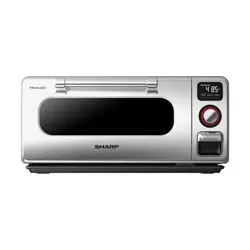
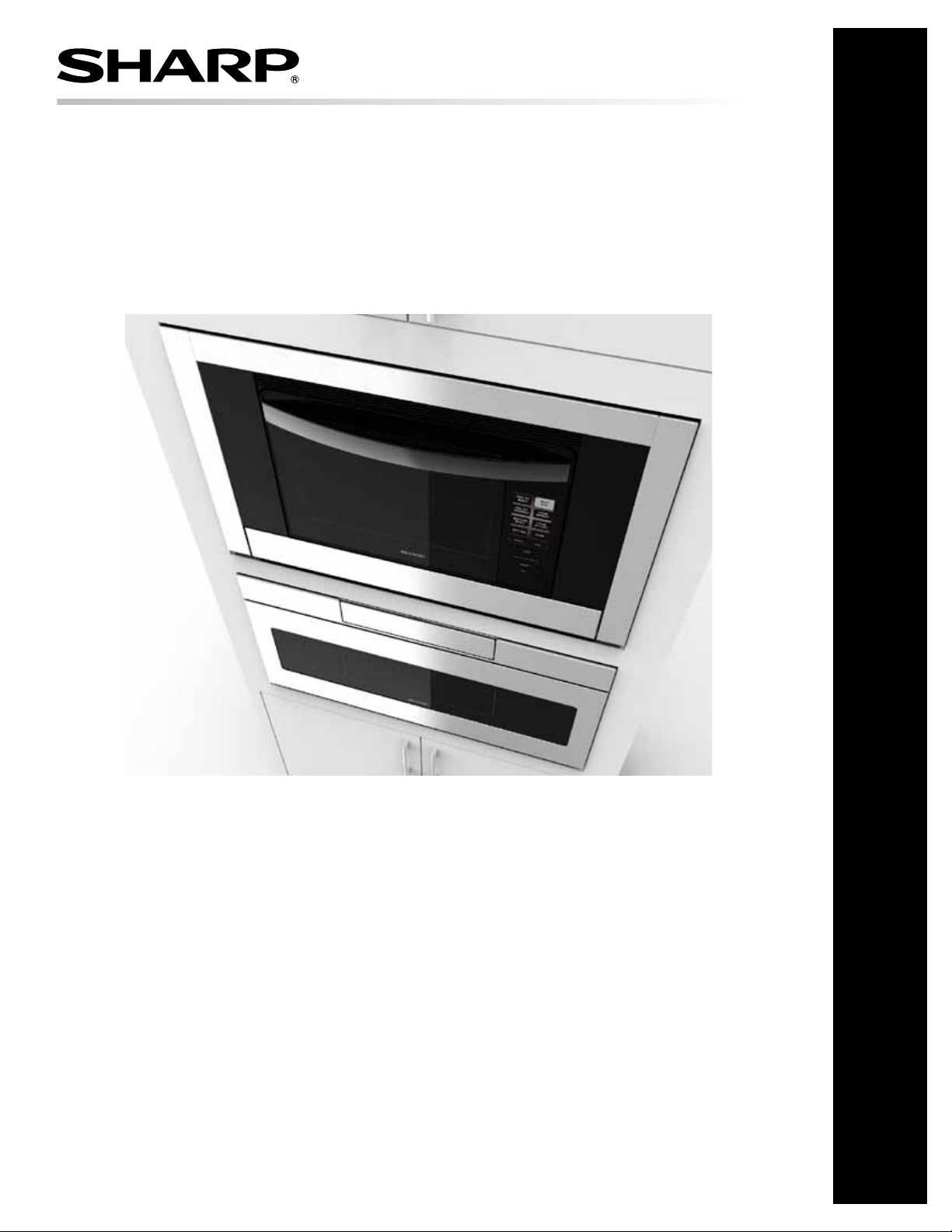
SuperSteam+
™
Oven: Model SSC3088AS
OPERATION MANUAL
SuperSteam+
™
Oven
MODEL
SSC3088AS
Customer AssistAnCe ......................................2
us Consumer LimiteD wArrAnty .........................3
CAnADA Consumer LimiteD wArrAnty ..................4
importAnt sAfety instruCtions .........................5
informAtion you neeD to know..... .................. 6-8
pArt nAmes..... ...............................................9
ControL ...................................................... 10
importAnt instruCtions ................................. 11
Before operAtinG .......................................... 12
new oVen CLeAn - Before first use ................... 12
CookinG funCtions ........................................ 13
AutomAtiC CookinG .................................... 14-16
tHe menus ............................................... 17-19
steAm options .............................................. 20
mAnuAL CookinG ........................................ 21-22
otHer feAtures ............................................ 23
CLeAninG AnD CAre .................................... 24-25
Before you CALL for serViCe ........................... 26
TINSKB206MRR0 E

Customer AssistAnCe
IMPORTANT! Register within 10 days of purchase.
Register ONLINE at www.sharpusa.com/productregistration
To aid in reporting this appliance, please record below the model number and serial number located on the unit. We also suggest you
record all the information listed and retain for future reference.
MODEL NUMBER SERIAL NUMBER
DATE OF PURCHASE / /
DEALER
TELEPHONE
SERvICER TELEPHONE
FOR US
TO PHONE: CALL 1-800-BE-SHARP (237-4277) for:
SERVICE (for your nearest Sharp Authorized Servicer)
PARTS (for your authorized parts distributor)
ADDITIONAL CUSTOMER INFORMATION
TO WRITE:
Sharp Electronics Corporation
Customer Assistance Center
Sharp Plaza Blvd
Memphis, Tennessee 38193
TO ACCESS INTERNET: www.sharpusa.com
Please provide the following information when you write or call: model number, serial number, date of purchase, your complete mailing
address (including zip code), your daytime telephone number (including area code) and description of the problem.
FOR CANADA
To obtain the name and address of the nearest Sharp Authorized Service Centre, please contact:
Sharp Electronics Of Canada Ltd.
335 Britannia Road East
Mississauga, Ontario
L4Z 1W9
(905) 568-7140
TO ACCESS INTERNET: www.sharp.ca
Please provide the following information when you write or call: model number, serial number, date of purchase, your complete
mailing address (including zip or postal code), your daytime telephone number (including area code) and description of the problem.
2E

us Consumer LimiteD wArrAnty
us Consumer LimiteD wArrAnty
E3
SHARP ELECTRONICS CORPORATION (“Sharp”) warrants to the rst consumer purchaser (“Purchaserˮ) that this SHARP brand
product (“Productˮ), when shipped in its original container and sold or distributed in the United States by Sharp or an authorized
Sharp dealer or reseller, will be free from defective workmanship and materials, and agrees that it will, at its option, either repair
the defect or replace the defective Product or part thereof with a new or remanufactured equivalent at no charge to the Purchaser for
parts or labor for the period(s) set forth below.
This limited warranty does not apply to any appearance items of the Product nor to the additional excluded item(s) set forth below
nor to any Product the exterior of which has been damaged or defaced, which has been subjected to misuse, abnormal service or
handling, or which has been altered or modied in design or construction.
In order to enforce the rights under this limited warranty, the Purchaser should follow the steps set forth below and provide proof of
purchase to the servicer.
The limited warranty described herein is in addition to whatever implied warranties may be granted to Purchasers by law. ALL
IMPLIED WARRANTIES INCLUDING THE WARRANTIES OF MERCHANTABILITY AND FITNESS FOR USE ARE
LIMITED TO THE PERIOD(S) FROM THE DATE OF PURCHASE SET FORTH BELOW. Some states do not allow limitations
on how long an implied warranty lasts, so the above limitation may not apply to you.
Neither the sales personnel of the seller nor any other person is authorized to make any warranties other than those described herein,
or to extend the duration of any warranties beyond the time period described above on behalf of Sharp.
The warranties described herein shall be the sole and exclusive warranties granted by Sharp and shall be the sole and exclusive
remedy available to the Purchaser. Correction of defects, in the manner and for the period of time described herein, shall constitute
complete fulllment of all liabilities and responsibilities of Sharp to the Purchaser with respect to the Product, and shall constitute
full satisfaction of all claims, whether based on contract, negligence, strict liability or otherwise. In no event shall Sharp be liable,
or in any way responsible, for any damages or defects in the Product which were caused by repairs or attempted repairs performed
by anyone other than an authorized servicer. Nor shall Sharp be liable or in any way responsible for any incident or consequential
economic or property damage. Some states do not allow the exclusion of incidental or consequential damages, so the above exclusion
may not apply to you.
THIS LIMITED WARRANTY GIVES YOU SPECIFIC LEGAL RIGHTS. YOU MAY ALSO HAVE OTHER RIGHTS WHICH
VARY FROM STATE TO STATE.
THIS LIMITED WARRANTY IS VALID ONLY IN THE FIFTY (50) UNITED STATES, THE DISTRICT OF COLUMBIA AND
PUERTO RICO.
Your product model number &
description
Model # SSC3088AS or Home Use SuperSteam+. (Be sure to have this information available
when you need service for your Product.)
Warranty period for this product: One (1) year parts and labor including in-home service.
Additional item(s) excluded from
warranty coverage (if any):
Non-functional accessories and light bulbs.
Where to obtain service: From a Sharp Authorized Servicer located in the United States. To nd the location of the
nearest Sharp Authorized Servicer, call Sharp toll free at 1-800-BE-SHARP (1-800-237-4277).
What to do to obtain service: In-home service is provided for one year from date of purchase. In-home service can be arranged
by calling 1-800-BE-SHARP. Be sure to have Proof of Purchase available.
TO OBTAIN SUPPLY, ACCESSORY OR PRODUCT INFORMATION, CALL 1-800-BE-SHARP or visit www.sharpusa.com.
SAVE THE PROOF OF PURCHASE AS IT IS NEEDED SHOULD YOUR OVEN EVER REQUIRE WARRANTY SERVICE.

CANADA CONSUMER LIMITED WARRANTY
Congratulations on your purchase!
Sharp Electronics of Canada Ltd. (“Sharp”) warrants to the rst purchaser for this Sharp brand product (“Product”), when shipped
in its original container and sold or distributed in Canada by Sharp or by an authorized Sharp dealer, and Product was not sold “as
is” or “sales nal” that the Product will during the applicable warranty period, be free from defects in material and workmanship,
and will within the applicable warranty period, either repair the defective Product or provide the rst purchaser a replacement of the
defective Product.
This warranty does not apply to any appearance items of the product nor to the additional excluded item(s) set forth below nor to any
product the exterior of which has been damaged or defaced, which has been subjected to improper voltage or other misuse, abnormal
service or handling, which has been altered or modied in design or construction, or if the serial number or model number afxed to
Product has been removed, defaced, changed, altered or tampered with.
How to get service: Should this Sharp product fail to operate during the warranty period, warranty service is provided by an Authorized
Sharp Service Centre or an Authorized Sharp Servicing Dealer. In home warranty service will be carried out to locations accessible
by on-road service vehicle and within 50 km of an authorized Sharp service centre. The servicer may if necessary take the unit for
repair at the servicer's facility. No other person (including any Sharp dealer or service centre) is authorized to extend, enlarge or
transfer this warranty on behalf of Sharp.
The express warranties in this limited warranty are, except for consumer purchasers domiciled in Quebec, in lieu of and, except to the
extent prohibited by applicable law, Sharp disclaims all other warranties and conditions, express or implied, whether arising by law,
statute, by course of dealing or usage of trade, including, without limitation, implied warranties or conditions of merchantability and/or
quality, tness for a particular use or purpose, and/or non-infringement. Limitations (not applicable to consumer purchasers domiciled
in Quebec to the extent prohibited under Quebec law): (a) Sharp shall not be liable for any incidental, special, consequential, economic,
exemplary or indirect damages of any kind or nature (including lost prots or damages for loss of time or loss of use or loss of data)
arising from or in any connection with the use or performance of a Product or a failure of a Product, even if Sharp is aware of or has
been advised of the possibility of such damages; (b) the remedies described in this limited warranty constitute complete fulllment
of all obligations and responsibilities of Sharp to the purchaser with respect to the Product and shall constitute full satisfaction of all
claims, whether based on contract, negligence, strict liability or otherwise. Some provinces may not allow the exclusion or limitation
of certain damages, or limits on the duration or voiding of implied warranties or conditions; in such provinces, the exclusions and
limits herein may not apply. This limited warranty is, except for consumer purchasers domiciled in Quebec, governed by the laws of
the Province in Canada in which the purchaser has purchased the Product. For consumer purchasers domiciled in Quebec this limited
warranty is governed by the laws of Quebec.
Your product model number &
description
Model # SSC3088AS Home Use SuperSteam+ Oven. (Be sure to have this information available
when you need service for your product).
Warranty period for this product: One (1) year parts and labor including in-home service.
Additional item(s) excluded from
warranty coverage (if any):
Non-functional accessories, reservoir, drip tray, base tray, rack, baking tray, perforated tray
and light bulb.
To obtain the name and address of the nearest Authorized Sharp Service Centre or Dealer, please contact:
SHARP ELECTRONICS OF CANADA LTD
335 Britannia Road East
Mississauga, Ontario
L4Z 1W9
(905) 568-7140
Website: www.sharp.ca
THIS LIMITED WARRANTY IS VALID ONLY IN CANADA
4E

E5
importAnt sAfety instruCtions
READ ALL INSTRUCTIONS BEFORE USING
When using the appliance, basic safety precautions should
be followed, including the following:
WARNING
To reduce the risk of burns, electric shock, re,
injury to persons:
1 Read all instructions before using the appliance.
2 Be sure your appliance is properly installed and
grounded by a qualied technician in accordance with
the provided Installation Manual.
3 Never use your appliance for warming or heating the
room.
4 Children should not be left alone or unattended in area
where appliance is in use. They should never be allowed
to sit or stand on any part of the appliance.
5 Wear proper apparel. Loose-tting or hanging garments
should never be worn while using the appliance.
6 Do not repair or replace any part of the appliance unless
specically recommended in the manual. All other
servicing should be referred to a qualied technician.
7 Flammable materials should not be stored in an oven
or near surface units.
8 DO NOT USE WATER ON GREASE FIRES!
Smother re or ame or use dry chemical or foam-type
extinguisher.
9 Use only dry potholders. Moist or damp potholders on
hot surfaces may result in burns from steam. Do not
let potholder touch hot heating elements. Do not use a
tower or other bulky cloth.
10 Use care when opening door. Let hot air or steam escape
before removing or replacing food.
11 Do not heat unopened food containers. Build-up of
pressure may cause container to burst and result in
injur y.
12 Keep oven vent ducts and all other openings on the
appliance unobstructed.
13 Always place oven racks in desired location while oven
is cool. If rack must be moved while oven is hot, do not
let potholder contact hot heating element in oven.
14 Use this appliance only for its intended use as described
in this manual. Do not use corrosive chemicals or vapors
in this appliance. This appliance is specically designed
to heat, cook or dry food. It is not designed for industrial
or laboratory use.
15 Do not operate this appliance if it has a damaged cord
or plug, if it is not working properly or if it has been
damaged or dropped.
16 Do not store or use this appliance outdoors. Do not use
this product near water—for example, near a kitchen
sink, in a wet basement, near a swimming pool or similar
locations.
17 Do not immerse cord or plug in water.
18 Keep cord away from heated surfaces.
19 Do not climb or sit on the appliance.
20 Keep ngers and other objects and materials away from
the door of the appliance when closing.
21 When cleaning appliance use only mild, nonabrasive
soaps or detergents applied with a sponge or soft cloth.
See cleaning instructions on pages 24-25.
22 To reduce the risk of re in the appliance cavity:
a Do not overcook food. Carefully attend appliance
when paper, plastic or other combustible materials
are placed inside the appliance to facilitate cooking.
b Remove wire twist-ties from paper or plastic bags
before placing bag in appliance.
c Do not use the appliance for storage purposes. Do
not leave paper products, cooking utensils, or food
in the appliance when not in use.
23 If the appliance light fails, consult a SHARP
AUTHORIZED SERVICER.
SAVE THESE INSTRUCTIONS
6E
ABOUT UNPACKING AND EXAMINING
YOUR OVEN
1 Remove all packing materials from inside the oven.
2 Remove the feature sticker, if there is one. Check the oven
for any damage, such as misaligned or bent oven, damaged
oven seals and sealing surfaces, broken or loose door hinges
and latches and dents inside the cavity or on the front side
of the oven. If there is any damage, do not operate the
oven and contact your dealer or a SHARP AUTHORIZED
SERVICER.
3 Install or locate this appliance only in accordance with
the provided Installation Manual.
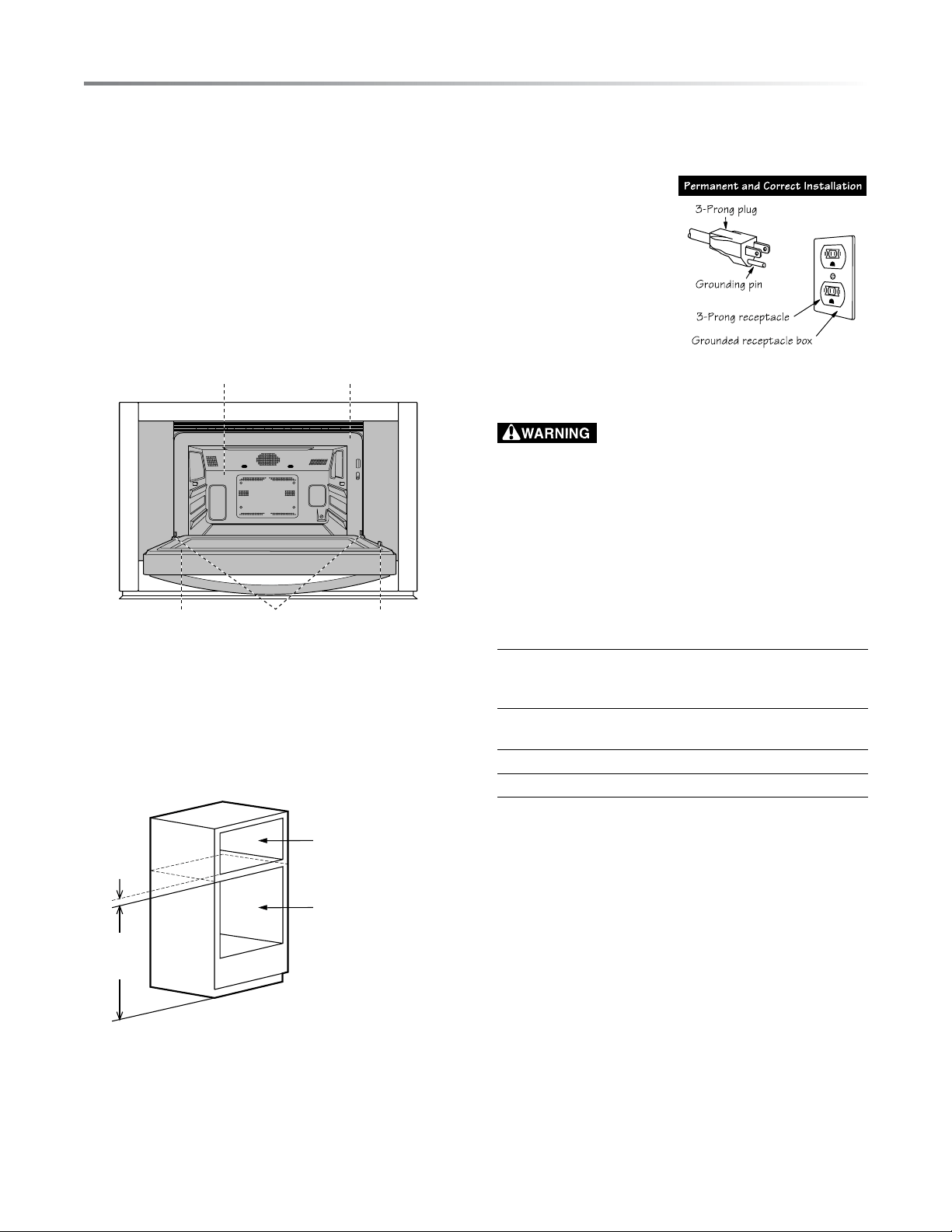
SEALING SURFACES OVEN CAVITY
DOOR SEALS DOOR L ATCHDOOR HINGES
CHOOSING A LOCATION FOR YOUR OVEN
You will use your oven frequently, so plan its location for ease
of use. Your oven can be built into a cabinet or wall by itself,
or above any electric wall oven, above Sharp's Microwave
Drawer model SMD3070AS or above other Sharp Microwave
Drawer models that specify the combination of this oven. It
cannot be built in above any gas wall oven.
Min.
2"
(5.1 cm)
SuperSteam+ Oven
Cutout
Electric Wall Oven /
Warming Drawer /
Microwave Drawer
Cutout
Min.
36"
(91.5 cm)
GROUNDING
INSTRUCTIONS
This appliance must be
grounded. The oven is
equipped with a cord having
a grounding wire with a
grounding plug. It must be
plugged into a wall
receptacle that is properly
installed and grounded in
accordance with the
National Electrical Code
and local codes and ordinances. In the event of an electrical
short circuit, grounding reduces risk of electric shock by
providing an escape wire for the electric current.
– Improper use of the grounding plug can
result in a risk of electric shock. Do not use an extension
cord. If the power supply cord is too short, have a
qualied electrician or serviceman install an outlet near
the appliance.
If you have any questions about the grounding or electrical
instructions, consult a qualied electrician or service person.
ABOUT SAFETY
• Check foods to see that they are cooked to the United States
Department of Agricultureʼs recommended temperatures.
160˚F / 71˚C - For fresh pork, ground meat, boneless white
poultry, sh, seafood, egg dishes and frozen
prepared food.
165˚F / 74˚C - For leftover, ready-to-reheat refrigerated;
deli and carry-out “fresh” food.
170˚F / 77˚C - White meat of poultry.
180˚F / 82˚C - Dark meat of poultry.
To test for doneness, insert a meat thermometer in a thick or
dense area away from fat or bone.
• Accessible parts (e.g. oven door, oven cavity, dishes and
accessories) may become hot during use. Use dry pot hold-
ers or oven mitts when removing container, food and oven
accessories from the oven and be careful not to touch the oven
cavity to prevent burns.
• Use care when opening door. Avoid steam burns by directing
steam away from the face and hands. Always stand back from
the oven when opening it.
• Slowly lift the farthest edge of a dish’s covering and oven
cooking bags away from the face.
• Stay near the oven while it's in use and check cooking progress
frequently so that there is no chance of overcooking food.
• NEVER use the cavity for storing cookbooks or other items.
informAtion you neeD to know

E7
• The oven should not be left unattended during operation. Oven
temperatures that are too high or cooking times that are too
long may overheat foods resulting in a re.
• Do not insert ngers or objects in the steam outlets or air vent
openings. This may damage the oven and cause an electric
shock or a hazard.
• If any objects drop inside the air vent openings, turn off the
oven immediately, unplug and consult a Sharp Authorized
Servicer.
• Do not touch the plug with wet hands when inserting or
removing from the outlet. Plug securely into the electric wall
receptacle and remove by gripping on the plug end. Never
pull using just the cord.
• During steaming, steam may come from the right side of
the vent.
• In the case of a grease re, DO NOT USE WATER. Smother
re or ame or use dry chemical or foam-type extinguisher.
• Never use your appliance for warming or heating the room.
• Loose-tting or hanging garments should never be worn while
using the appliance.
• Do not heat unopened food containers. Build-up of pressure
may cause container to burst and result in injury.
• Always place oven racks in desired location while oven is cool.
If rack must be moved while oven is hot, do not let potholder
contact hot heating element in oven.
ABOUT CHILDREN
Children below the age of 7 should use the oven with a
supervising person very near to them. Between the ages of 7
and 12, the supervising person should be in the same room.
The child must be able to reach the oven comfortably; if not, he/
she should stand on a sturdy stool.
At no time should anyone be allowed to lean or swing on the
oven door.
Children should be taught all safety precautions.
Don’t assume that because a child has mastered one cooking
skill he/she can cook everything.
Children need to learn that the oven is not a toy. Young children
should be supervised to ensure that they do not play with the
oven.
Children should not be left alone or unattended in area where
appliance is in use. They should never be allowed to sit or stand
on any part of the appliance.
informAtion you neeD to know
• Select, store and handle food carefully to preserve its high
quality and minimize the spread of foodborne bacteria.
• Use care when removing items from the oven so that the
utensil, your clothes or accessories do not touch the door
projection.
• Do not touch around the oven light. This area will become
hot when the oven light is on.
• To avoid burns, always be careful of splashing grease from
the baking tray when removing roasted or broiled meats
from the oven.
• To avoid burns, always test food and container temperature
and stir before serving. Pay special attention to the tempera-
ture of containers, foods and drinks. Do not drink beverage
or soup without checking the container’s temperature.
• Do not touch the oven door, outer cabinet, rear cabinet, oven
cavity, ventilation openings, accessories, dishes and the
escaping steam from the air vent openings during operation
because they will become hot.
• Do not operate the oven if reservoir cracks and water leaks.
Call a Sharp Authorized Service Centre to purchase a
replacement part.
• After use, condensed water may be inside oven cavity,
especially on the oven oor. Dry any liquid residue with a
sponge and wipe out to keep the oven clean.
• Do not move the oven during the operation. If the oven needs
to be moved, always drain all water inside the oven using the
DRAIN WATER function (See page 25). After draining,
empty the drip tray.
• To prevent condensation, which could corrode the appliance,
do not leave cooked food in the oven for an extended period.
• Clean the oven at regular intervals and remove any food
deposits in the oven or on the door.
• Do not use for deep frying.
• ALWAYS use potholders to prevent burns when handling
utensils that are in contact with hot food. Enough heat from
the food can transfer through utensils to cause skin burns. In
Supersteam, Steam and Convection modes, cabinet, interior
and door may be too hot to touch.
• Do not pour cold water on the tempered glass oven oor after
cooking as it might break.
• Do not pour cold water on the door as it might break.
• Do not touch hot surfaces.
• The use of accessory attachments not recommended by the
appliance manufacturer may cause injuries.
8E
ABOUT UTENSILS AND COVERINGS
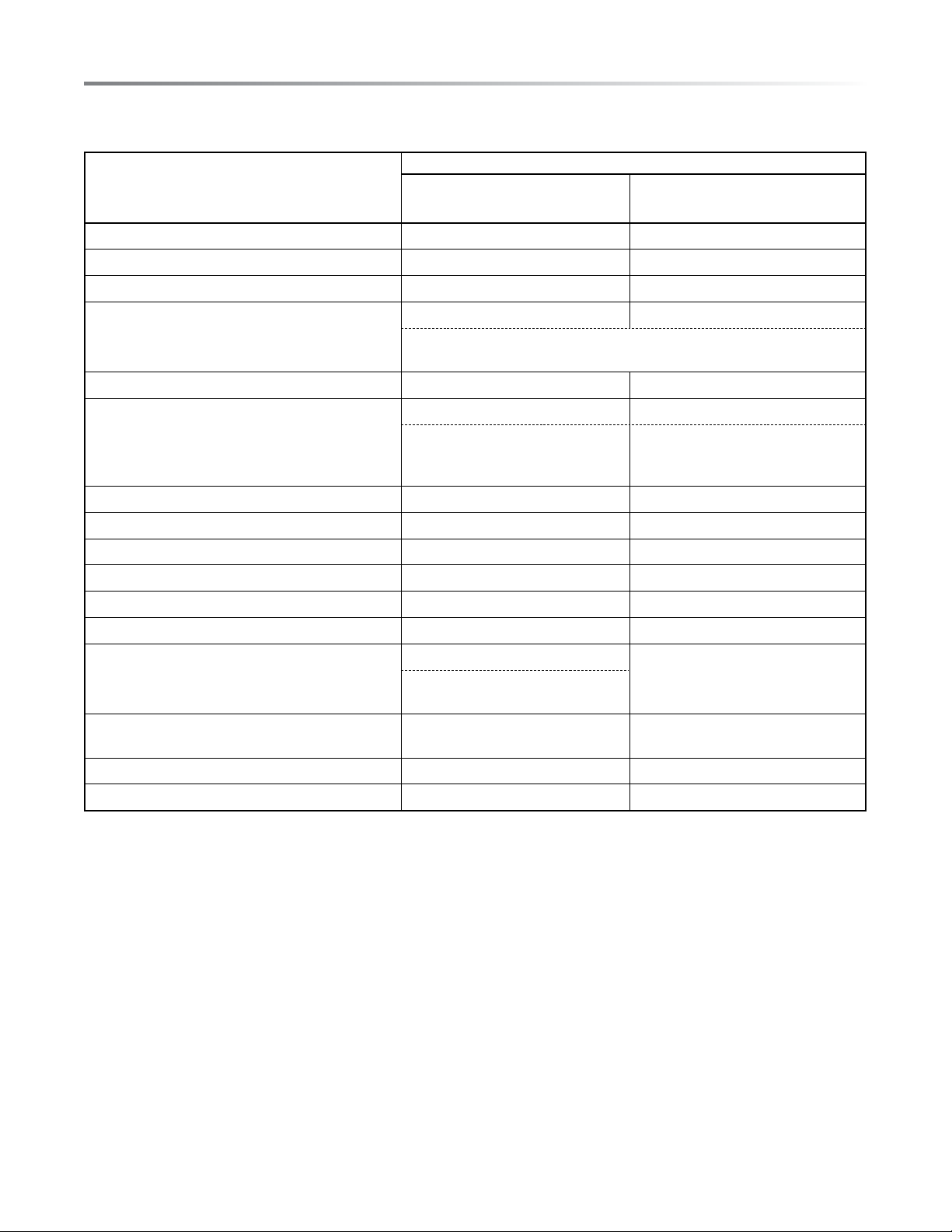
The chart below will help you decide what utensils and coverings should be used in each mode.
UTENSIlS - COvERINGS
COOKING MODE
SUPERHEATED STEAM
(STEAM ROAST & STEAM GRIll) /
CONvECTION
STEAM
Aluminium Foil, Foil Containers YES YES
Metal YES YES
China, Ceramics, Porcelain, Pottery, Stoneware YES YES
Heat-resistant Glassware e.g. Pyrex
®
YES YES
Care should be taken if using ne glassware as it can break or crack if heated
suddenly.
Non-heat-resistant Glassware NO NO
Heat-resistant Plastic/Polystyrene NO YES
Check manufacturer's temperature
range.
Care must be taken as some contain-
ers warp, melt or discolor at high
temperatures.
Plastic, Thermoset
®
NO YES
Microwave Plastic Wrap NO NO
Paper Towels, Paper Plates NO NO
Parchment Paper NO YES
Wax Paper NO NO
Roasting Rack YES NO
Roasting Bags YES NO
Roasting bags should only be used
with convection bake or roast.
Silver Dishes and Cooking Utensils or Containers
that might rust inside the oven.
NO NO
Low Rack, High Rack, Baking Tray, Steam Basket YES YES
Silicone-based cookware NO NO
ACCESSORIES
There are many heat-resistant accessories available for purchase. Evaluate carefully before you purchase so that they meet your needs.
Sharp is not responsible for any damage to the oven when accessories are used.
For automatic cooking, use the recommended container in the cooking chart in this operation manual.
informAtion you neeD to know
E9
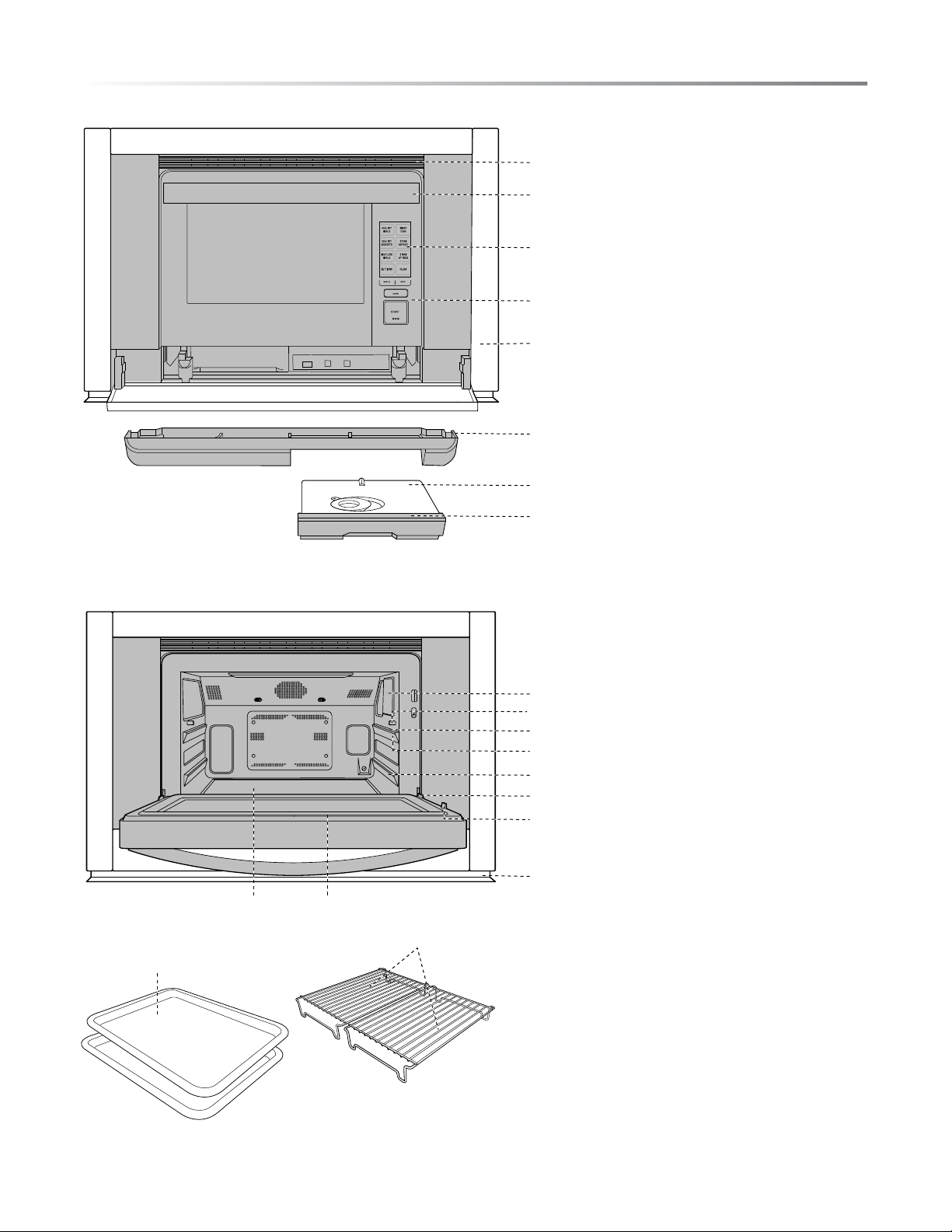
pArt nAmes
19
20
1
8
7
6
2
3
4
5
1 Air vent opening
2 Handle
3 LCD display
4 Control panel
5 Frame
6 Drip tray (see page 11)
7 Reservoir lid (see page 11)
8 Reservoir (see page 11)
9 Oven light
10 Anti-tip stubs
11 Tray guide
12 Upper level
13 Lower level
14 Door hinges
15 Latches
16 Air deector
17 Ceramic oven oor
18 Door gasket
ACCESSORIES
19 2 Trays
20 2 Racks
1817
9
14
16
11
10
12
13
15
10E
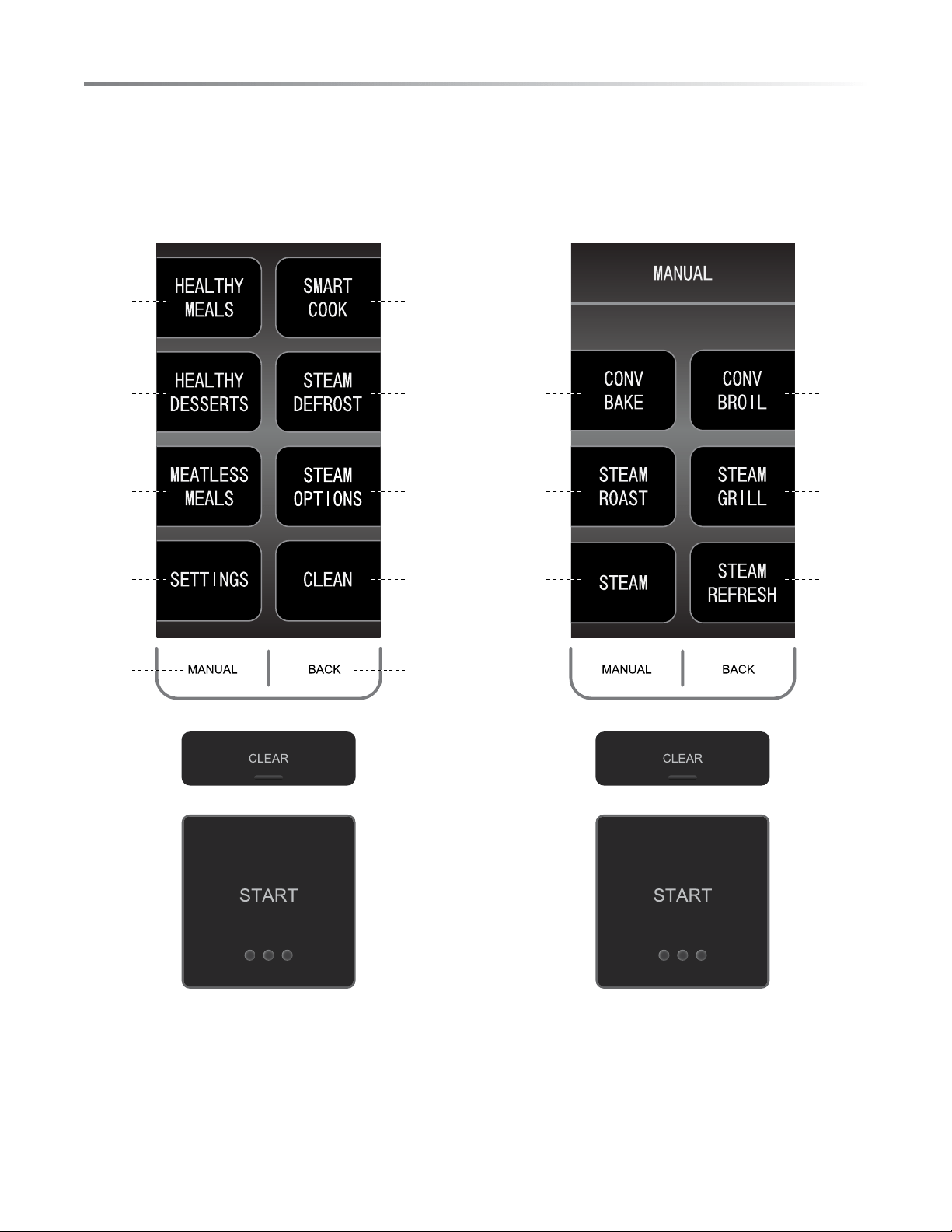
ControL
HOME PAGE MANUAl PAGE
17-19 14-16
17 2120 21
17 2120 21
23 2124 21
21 12
12
E11
importAnt instruCtions
READ CAREFULLY BEFORE COOKING
RESERVOIR
Filling the reservoir with fresh cold tap water is necessary for
all Steam functions in both Automatic and Manual Cooking.
Follow the directions below before cooking.
1 Pull the reservoir toward you to remove.
2 Wash the reservoir and lid for rst time use.
3 Fill the reservoir with fresh cold tap water through the lid
to the 2 mark each time you begin to cook. Do not ll the
reservoir over the 2 mark.
4 Close the lid tightly.
5 Reinstall the reservoir, pushing it rmly into place.
6 After cooking, empty the reservoir and wash the reservoir
and the lid.
NOTES:
1 Do not use distilled water or any other liquid.
2 An insufcient amount of water in the reservoir may cause
an undesired result.
3 We recommend that you empty the reservoir every time
after cooking. Do not leave the reservoir lled with water
in the oven over a day.
4 If any messages, such as “Fill water reservoir”, show in the
display during cooking, remove reservoir and rell water.
5 Do not drop or damage the reservoir. Heat may cause the
reservoir to change shape. Do not use a damaged reservoir.
Call a Sharp Authorized Service Centre to purchase a
replacement part.
6 There may be a few water drops when removing the
reservoir. Wipe the oven dry with a soft cloth.
7 Do not block the air holes on the lid of the reservoir. It will
cause trouble during cooking.
8 A small amount of water will drain into the drip tray when
the reservoir is removed. Empty after cooking.
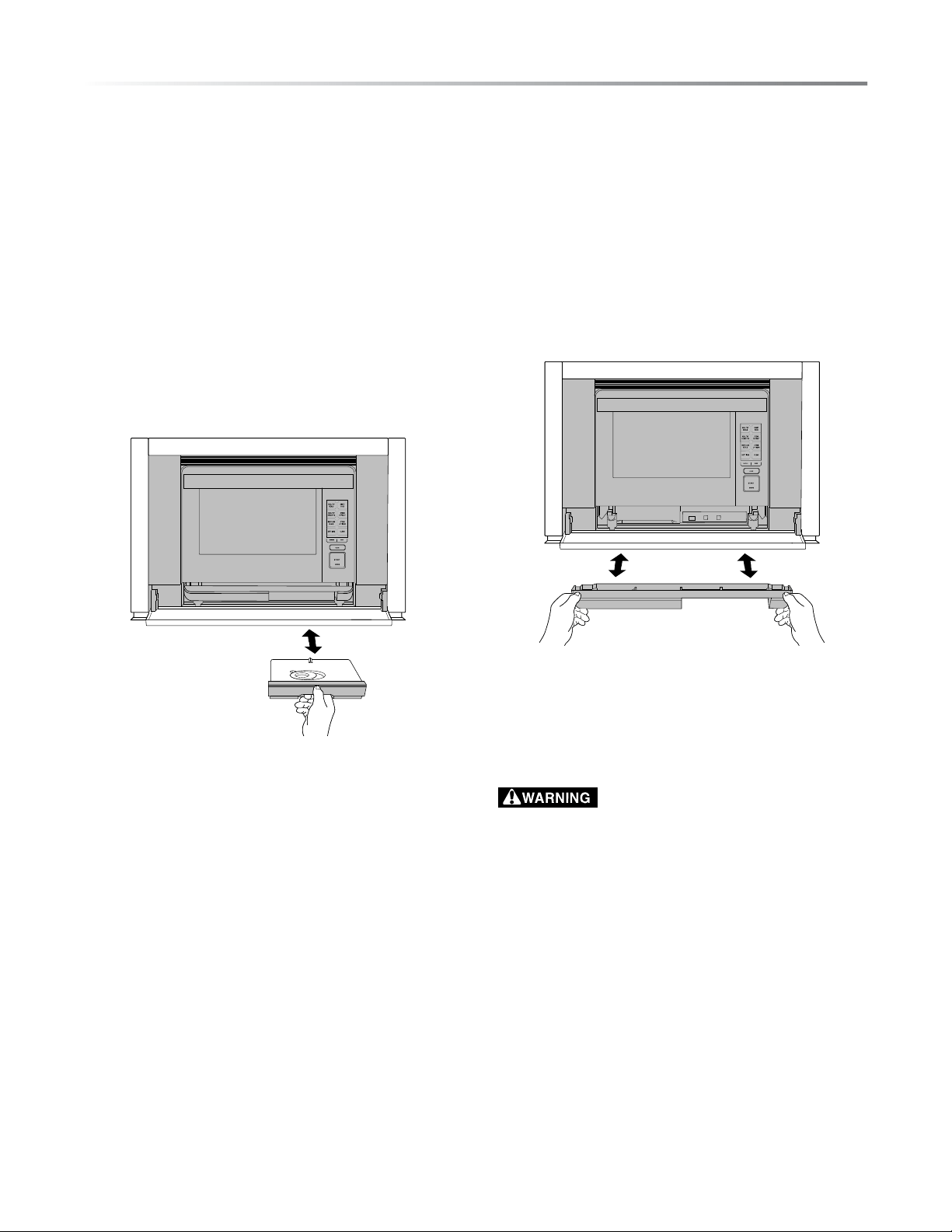
DRIP TRAY
The drip tray must be in the correct position while cooking.
For proper operation, follow the directions below.
The drip tray is packed with the oven. Place the drip tray
under the oven door as shown below. This drip tray collects the
condensation from the oven door.
To remove the drip tray: Pull the drip tray toward you with
both hands. Water should not be dripping before removing the
drip tray.
To replace the drip tray: Place the drip tray onto the right
and left hooks under the oven and push rmly as shown below.
If “Replace drip tray” or “Empty drip tray and replace” is shown
in the display, remove and replace the drip tray correctly.
Empty the drip tray after each time you cook. Empty, rinse
thoroughly, dry and replace. Cooking repeatedly without empty-
ing the drip tray may cause it to overow.
1 The oven will become very hot after cooking and draining
water function.
2 Do not open the oven with your face close to the oven.
Steam from the oven may cause burns.
3 Wait until the oven has cooled before emptying the reser-
voir and the drip tray. Then, wipe the oven cavity.
4 Do not touch the water directly as water in the drip tray
may be hot.

12E
Before operAtinG
new oVen CLeAn - Before first use
Before operating your new oven, read and understand this
operation manual completely.
Before the oven can be used, follow these steps:
1 Place the drip tray correctly. See page 11.
2 Close the door. Plug in the oven. Check that the display lights.
3 Follow directions below to clean the oven before rst use.
STANDBY POWER
To activate the oven, open and close door.
The U.S. Department of Energy has set forth standards for
standby power and energy consumption in appliances during
periods of nonuse. In order to comply with these requirements,
the display on this unit will not be visible or active in initial use
or in periods of inactivity. This unit’s display will need to be
activated by the action of opening and closing the door. Once
the opening and closing of the door has been performed, the
display will be fully visible and operational.
The steam generator heats the water which is used for cooking.
It should be cleaned before the rst use to get rid of any odor in
the oven cavity. Clean the oven with New Oven Clean in manual
operation for 20 minutes without preheat and food. You may
notice some smoke and odor during this process. This is normal.
The oven is not out of order.
PREPARATION
1 Ventilate the room.
2 Fill the reservoir with fresh cold tap water and install.
3 Install the empty drip tray.
CLEAR
Press the CLEAR pad to:
1 Return to Home Page.
2 Cancel a program during cooking.
BACK
Press Back if you want to go back to the previous page during
programming before pressing START.
After pressing START,
it is not possible to return to a previous page.
TO ClEAN THE OvEN BEFORE USE, FOllOW THESE
STEPS.
1 Select CLEAN from the home page.
2 Select NEW OVEN CLEAN from the list provided.
3 Insert all accessories (i.e. two trays, two racks) into the
oven.
4 Fill the reservoir with fresh cold water. Replace reservoir
and press START.
5 Once NEW OVEN CLEAN is complete, use caution in
opening the oven.
1 The oven door, outer cabinet and oven cavity will become hot.
2 Do not open the oven with your face close to the oven. Steam
from the oven may cause burns.
E13
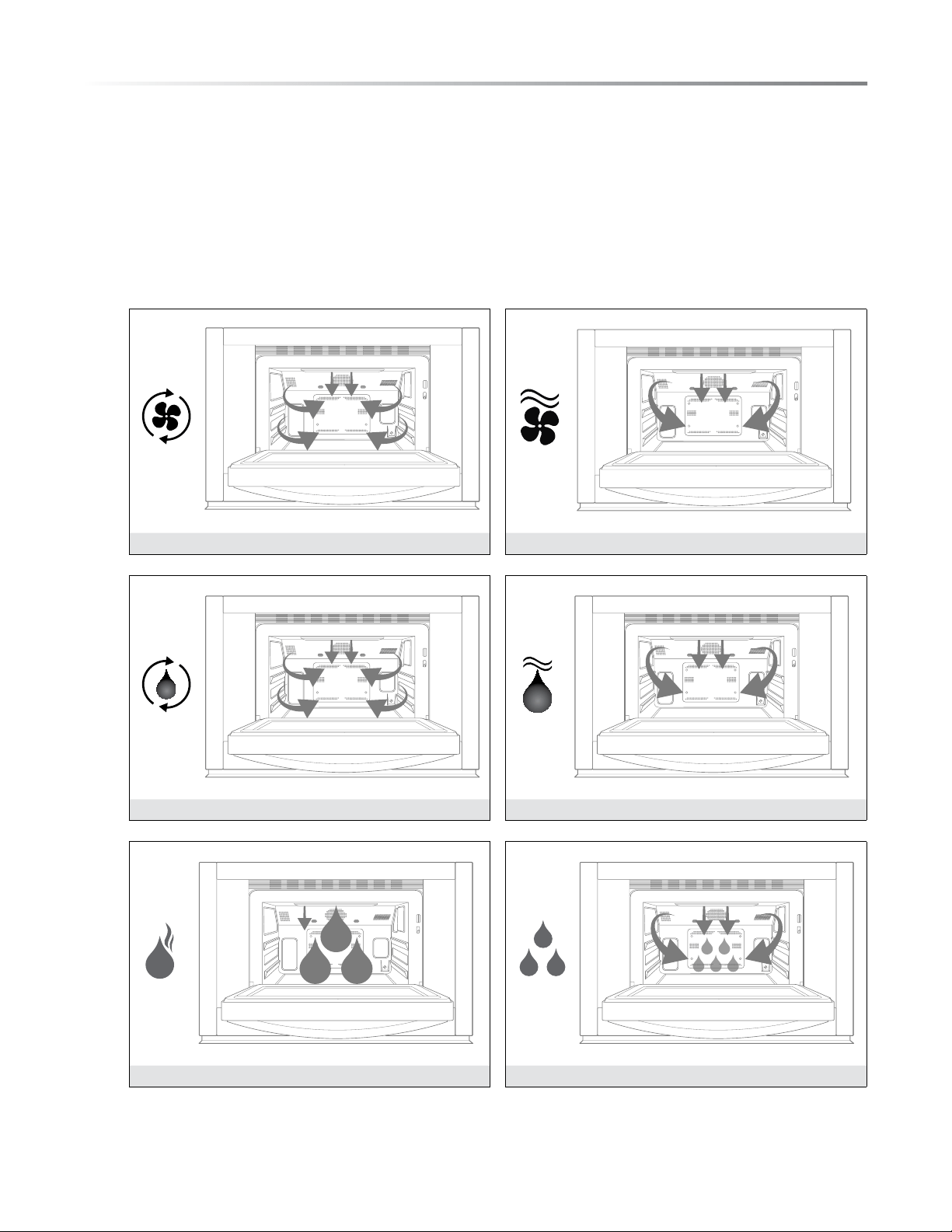
The SuperSteam+ oven encompasses multiple cooking functions to allow for exibility and high performance for the best results.
The array of functions range from traditional dry heat convection cooking to steam to superheated steam that provides moisture
and browning in tandem. Please see below for the categories and capabilities of this unique oven.
There are 3 categories.
1 Dry heat : Convection Bake, Convection Broil
2 Superheated steam : Steam Roast, Steam Grill
3 Steam
Note : See additional Steam options on page 20.
1
CONvECTION BAKE CONvECTION BROIl
2
STEAM ROAST STEAM GRIll
3
STEAM
STEAM REFRESH
CookinG funCtions
14E
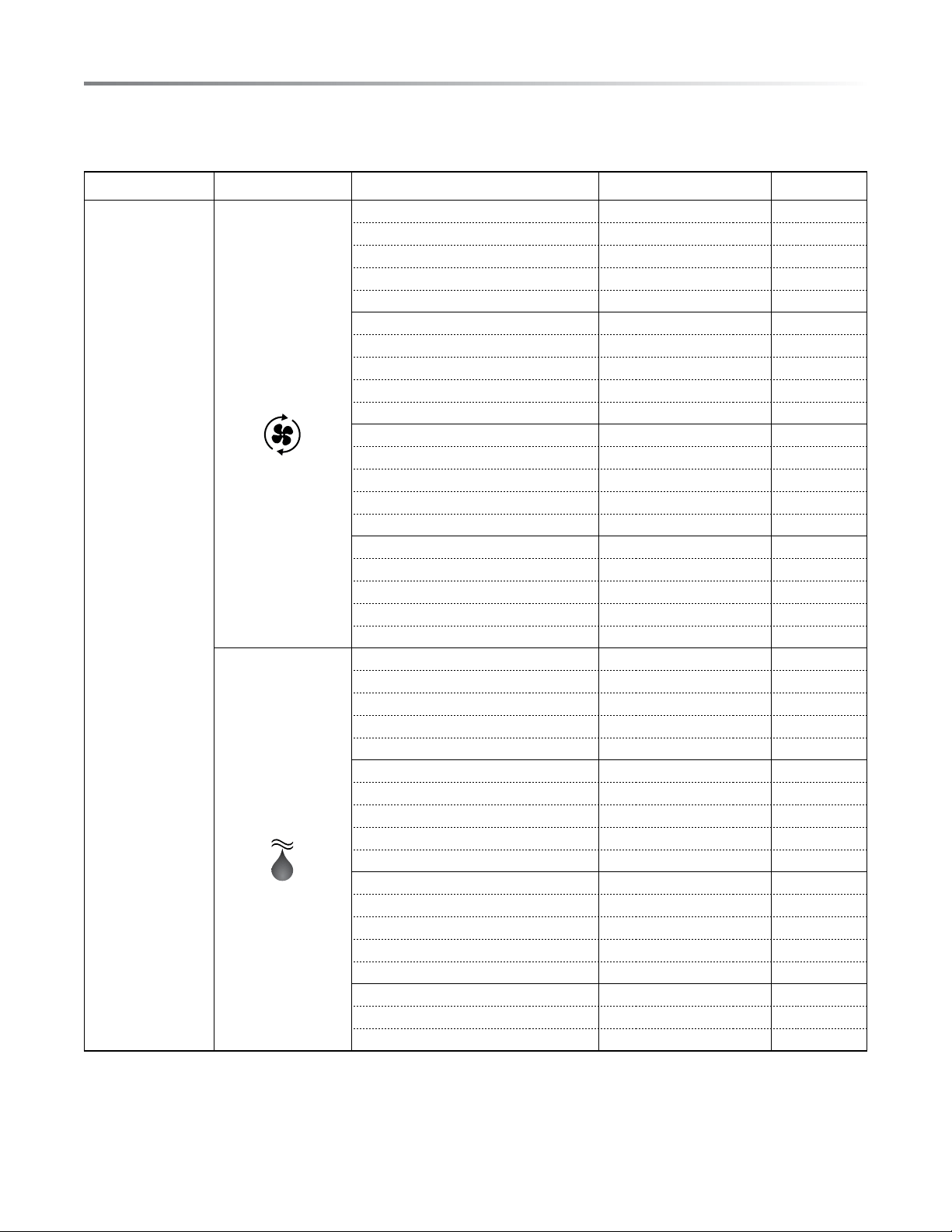
The menus included in the automatic cooking options include suggested amounts and average cooking times. Please note that different
brands of food items can vary in shape, size, quantity, and weight. Please be sure to monitor the food items during cooking to ensure
satisfactory completion of the selected automatic menu item.
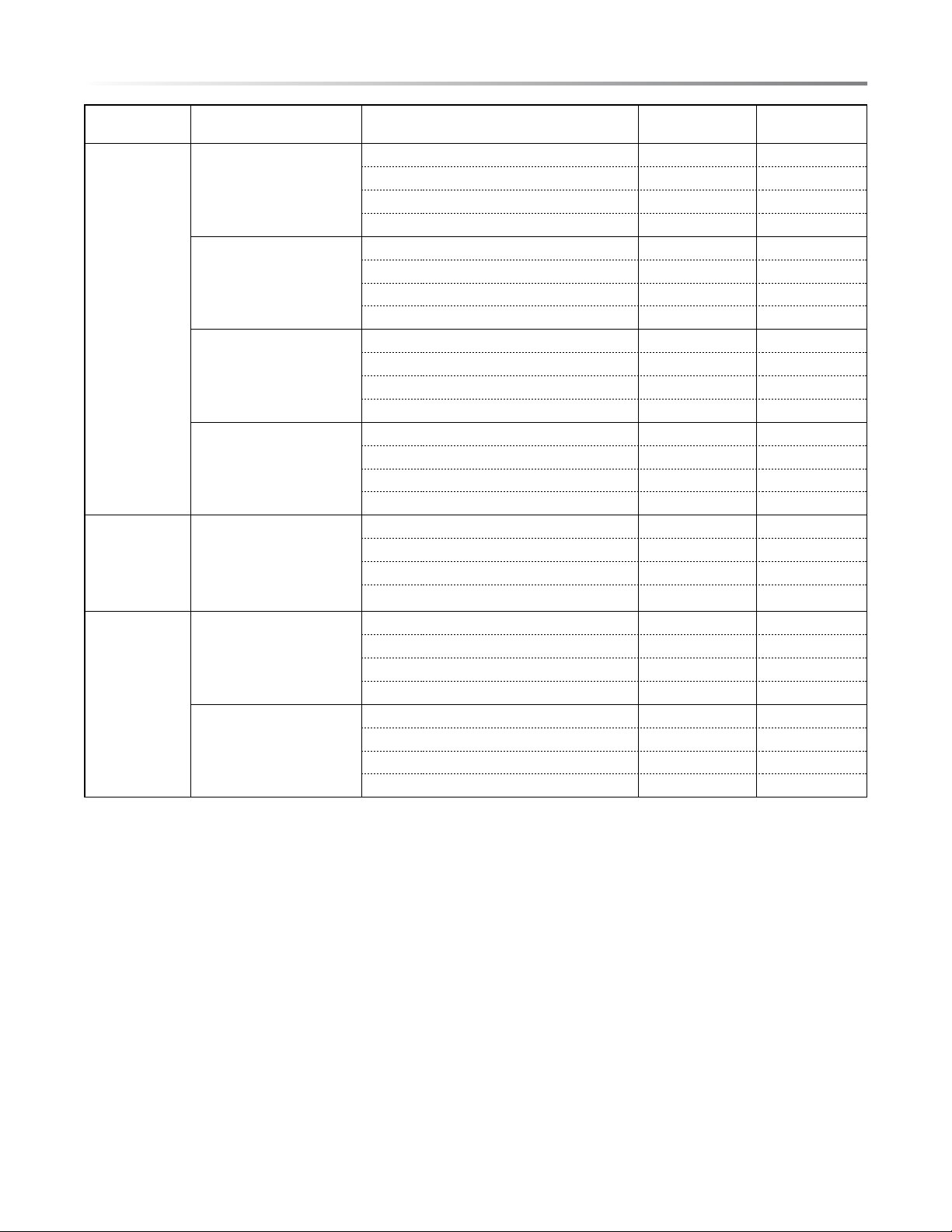
HOME PAGE COOKING OPTIONS MENUS SUGGESTED AMOUNT
PRE-SET
TIME COOK
SMART COOK
CONVEC BAKE
1. Bread
• Biscuit 8 - 16 12 mins.
• Mufn 12 20 mins.
• Crescent Roll 8 - 16 14 mins.
• Dinner Roll 1 pan or 6 - 8 large rolls 20 mins.
2. Desserts
• Cookies 12 - 24 12 mins.
• Brownies 1 pan 40 mins.
• Layer Cake 1 - 2 pans 27 mins.
• Pre-Made Pie 1 pie 45 mins.
3. Snacks
• Fish Sticks 25 25 mins.
• Chicken Nuggets 25 15 mins.
• French fries 75 30 mins.
• Tater Tots 60 20 mins.
4. Pizza
• Personal Pizza 1 15 mins.
• Thin Crust Pizza 1 15 mins.
• Thick Crust Pizza 1 20 mins.
• Fresh Pizza 1 20 mins.
STEAM GRILL
1. Beef
• Beef Fillet 2 13 mins.
• T-Bone 2 15 mins.
• Beef Sirloin 2 10 mins.
• Hamburger 4 14 mins.
2. Fish
• Tuna Steak 2 10 mins.
• Salmon 4 7 mins.
• Sea Scallops 14 8 mins.
• Jumbo Shrimp 20 5 mins.
3. Pork
• Pork Chop 4 12 mins.
• Bratwurst 4 8 mins.
• Ham Slice 2 12 mins.
• Bacon 6 10 mins.
4. Poultry
• Boneless Chicken Breast Halves 2 20 mins.
• Chicken Pieces 6 9 mins.
AutomAtiC CookinG
E15
AutomAtiC CookinG
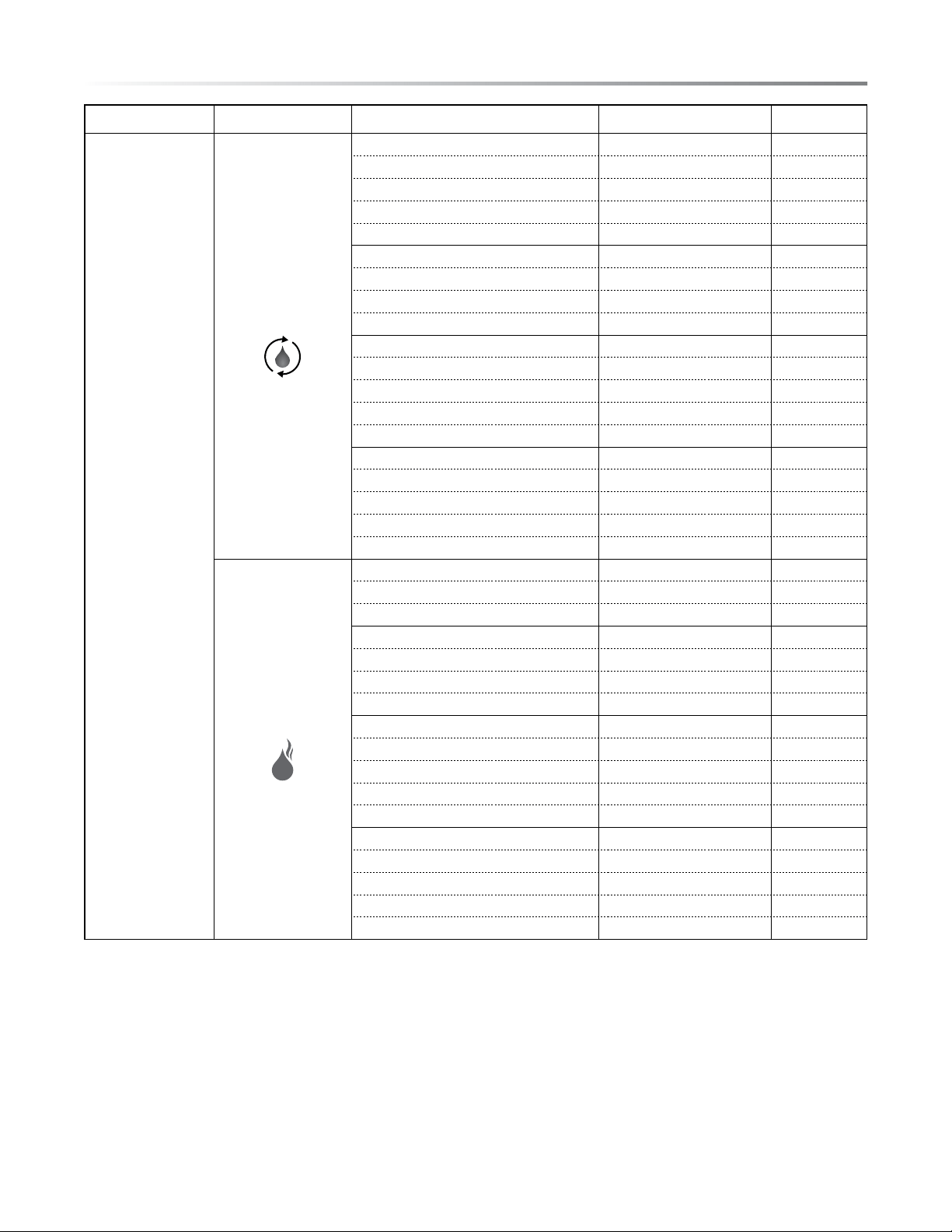
HOME PAGE COOKING OPTIONS MENUS SUGGESTED AMOUNT
PRE-SET
TIME COOK
SMART COOK
STEAM ROAST
1. Beef
• Eye of Round Roast 1 50 mins.
• Meat Loaf 1 40 mins.
• Rib Roast 1 30 mins.
• Tenderloin 1 50 mins.
2. Pork
• Boneless Ham 1 30 mins.
• Boneless Pork Loin Roast 1 1 hr.
• Pork Tenderloin 1 1 hr.
3. Poultry
• Cornish Hen 2 35 mins.
• Turkey Breast, Half 2 27 mins.
• Whole Chicken 1 55 mins.
• Chicken Pieces 6 9 mins.
4. Potatoes
• Sweet Potato 4 30 mins.
• Yam 2 40 mins.
• Backed Potato 2 50 mins.
• New Potato 13 25 mins.
STEAM
1. Eggs
• Poached Eggs 4 8 mins.
• Hard Boiled Eggs 7 15 mins.
2. Fish
• Salmon Fillet 4 15 mins.
• Tilapia 4 10 mins.
• Whitesh 2 12 mins.
3. Shellsh
• Clam in Shell 10 15 mins.
• Lobster 3 20 mins.
• Sea Scallops 14 10 mins.
• Shrimp 20 10 mins.
4. Vegetables Fresh
• Asparagus 30 8 mins.
• Broccoli 3 servings 8 mins.
• Green Beans 3 servings 8 mins.
• Squash 2 servings 10 mins.
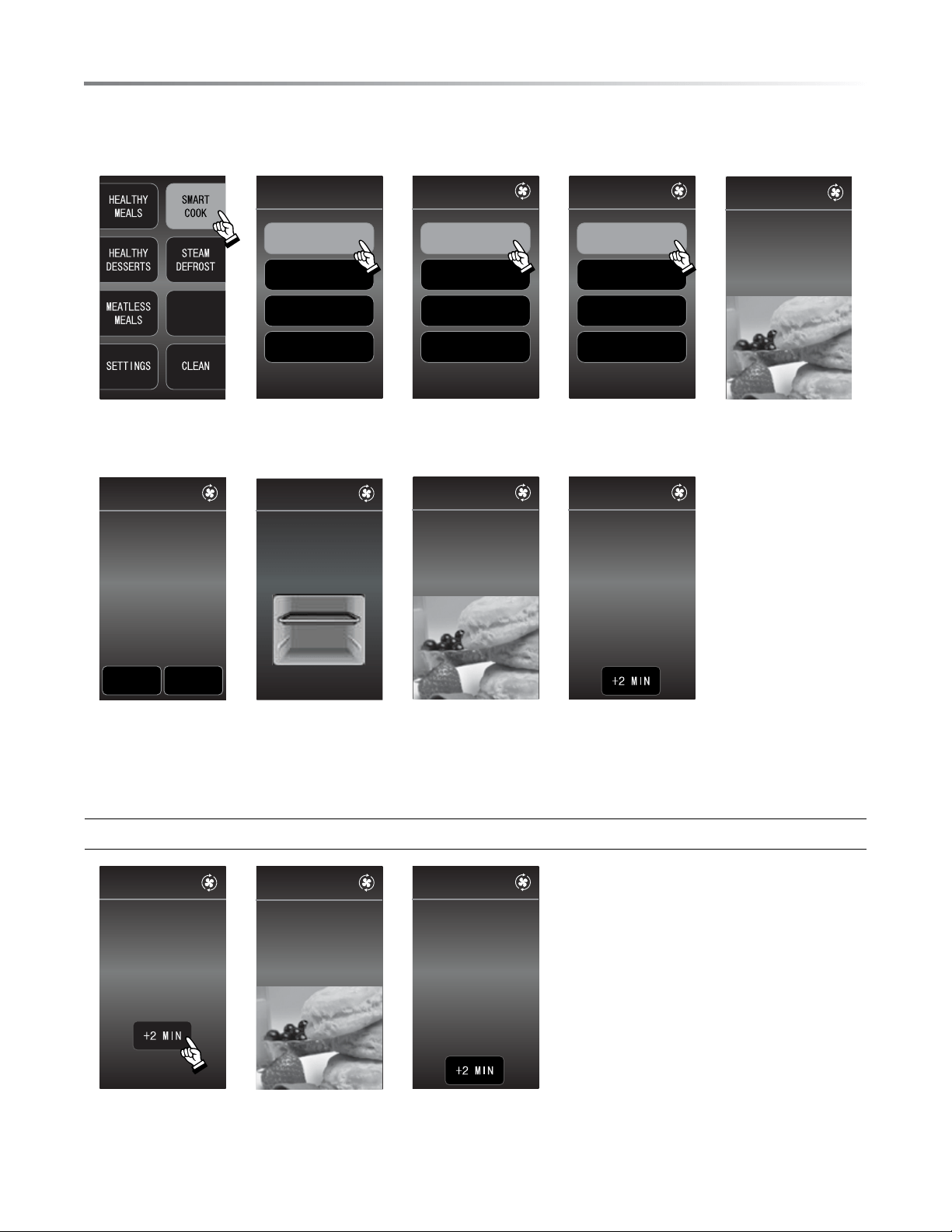
SMART COOK
• To automatically cook biscuits in Smart Cook:
STEAM
OPTIONS
SMARTCOOK
CONVBAKE
STEAMGRILL
STEAMROAST
STEAM
CONVBAKE
BREAD
DESSERTS
SNACKS
PIZZA
BREAD
BISCUITS
MUFFINS
CRESCENTROLLS
DINNERROLLS
BISCUITS
PRESSSTART
FORPREHEAT
1. Press
SMART COOK.
2. Press
CONV BAKE.
3. Press BREAD. 4. Press BISCUITS. 5. Press START.
350
˚
F
LESS MORE
PREHEATING
SETTO:
BISCUITS
PRESSSTART
BISCUITS
PREHEAT COMPLETE
PLACE BISCUITS
IN OVEN ON TRAY.
BISCUITS
350˚ F
11MIN
59SEC
BISCUITS
FINISHEDCOOKING
TAKEFOODOUT
CAUTION:HOT!
00
MIN
00
SEC
6. PREHEAT starts. 7. When PREHEAT
completes, place up
to 8 biscuits in pan
on upper level.
Press START.
8. Cooking time counts
down.
9. Finished cooking.
Option for more cooking time:
BISCUITS
PRESSSTART
02
MIN
00
SEC
BISCUITS
350˚ F
01
MIN
59
SEC
BISCUITS
FINISHCOOKING.
TAKEFOODOUT.
CAUTION:HOT!
00
MIN
00
SEC
10. Press +2 MIN to
add 2 minutes.
11. Cooking time
counts down.
12. Finished cooking.
16E
AutomAtiC CookinG
E17
tHe menus
HOME PAGE MENU OPTIONS MENUS SERvING SIZE
PRE-SET
TIME COOK
HEALTHY
MEALS
LOW CARB MENU
1. Basil Chicken Kabobs 6 7 mins
2. Salmon with Dilled Tomatoes 4 15 mins
3. Italian Stuffed Peppers 6 20 mins
4. Pesto Broiled Fish 4 14 mins
LOW SODIUM MENU
1. Marvelous Meat Loaf 8 50 mins
2. Baked Curried Salmon 4 15 mins
3. Apricot Glazed Pork Chops 4 17 mins
4. Herbed Fish Steaks 4 18 mins
FAMILY MEALS
1. Herbed Roasted Chicken 6 55 mins
2. Crustless Chicken Quiche 6 40 mins
3. Cajun Burgers 4 12 mins
4. Zesty Pork Loin 9 50 mins
MEALS FOR 2
1. Salmon 2 15 mins
2. Fajitas 2 15 mins
3. Pork 2 15 mins
4. Chicken 2 15 mins
HEALTHY
DESSERTS
1. Apple Berry Pie 8 25 mins
2. Chocolate Chip Zucchini Cake 9 35 mins
3. Pineapple-Orange Upside Down Cake 8 20 mins
4. Banana Apricot Bran Bread 12 50 mins
MEATLESS
MEALS
VEGAN
1. Korean BBQ Tofu Tacos 5 8 mins
2. Sweet Potato Black Bean Burger 4 27 mins
3. Stuffed Peppers 4 35 mins
4. Spaghetti Squash 6 50 mins
VEGETARIAN
1. Sweet Potato with Ricotta Kale 4 38 mins
2. Asparagus Mushroom Quiche 8 42 mins
3. Cuban Bowl 2 25 mins
4. Spring Roll 6 27 mins
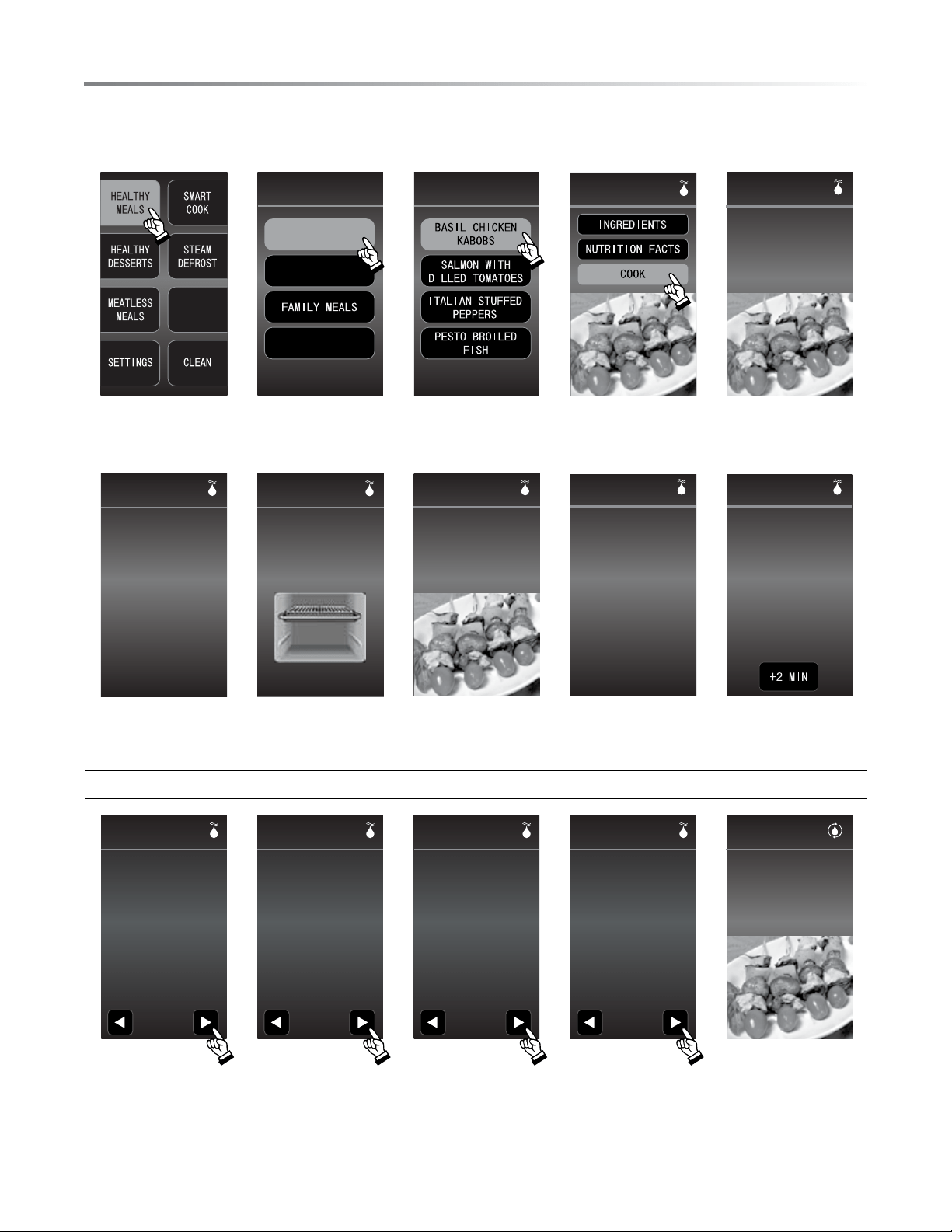
HEALTHY MEALS
• To cook basil chicken kabobs in HEALTHY MEALS:
STEAM
OPTIONS
LOWCARBMENU
MEALSFORTWO
HEALTHYMEALS
LOWSODIUMMENU
LOWCARBMENU
BASILCHICKEN
KABOBS
PRESSSTART
FORPREHEAT
BASILCHICKEN
KABOBS
1. Press
HEALTHY
MEALS.
2. Press LOW CARB
MENU.
3. Press BASIL
CHICKEN
KABOBS.
4. Press COOK. 5. Press START for
preheat.
485
˚
F
PREHEATING
SETTO:
BASILCHICKEN
KABOBS
PRESSSTART
PREHEAT COMPLETE
PLACE KABOBS IN OVEN
ON RACK IN TRAY.
BASILCHICKEN
KABOBS
485˚ F
7
MIN
0
SEC
BASILCHICKEN
KABOBS
485˚ F
3
MIN
30
SEC
OPENDOOR
FLIPFOODITEM
BASILCHICKEN
KABOBS
00
MIN
00
SEC
BASILCHICKEN
KABOBS
FINISHCOOKING
TAKEFOODOUT
CAUTION:HOT!
6. Preheating oven. 7. Place chicken kabobs
in pan on upper
level. Press START.
8. Cooking time counts
down.
9. When audible sound
is on, turn food over.
10. Finished cooking.
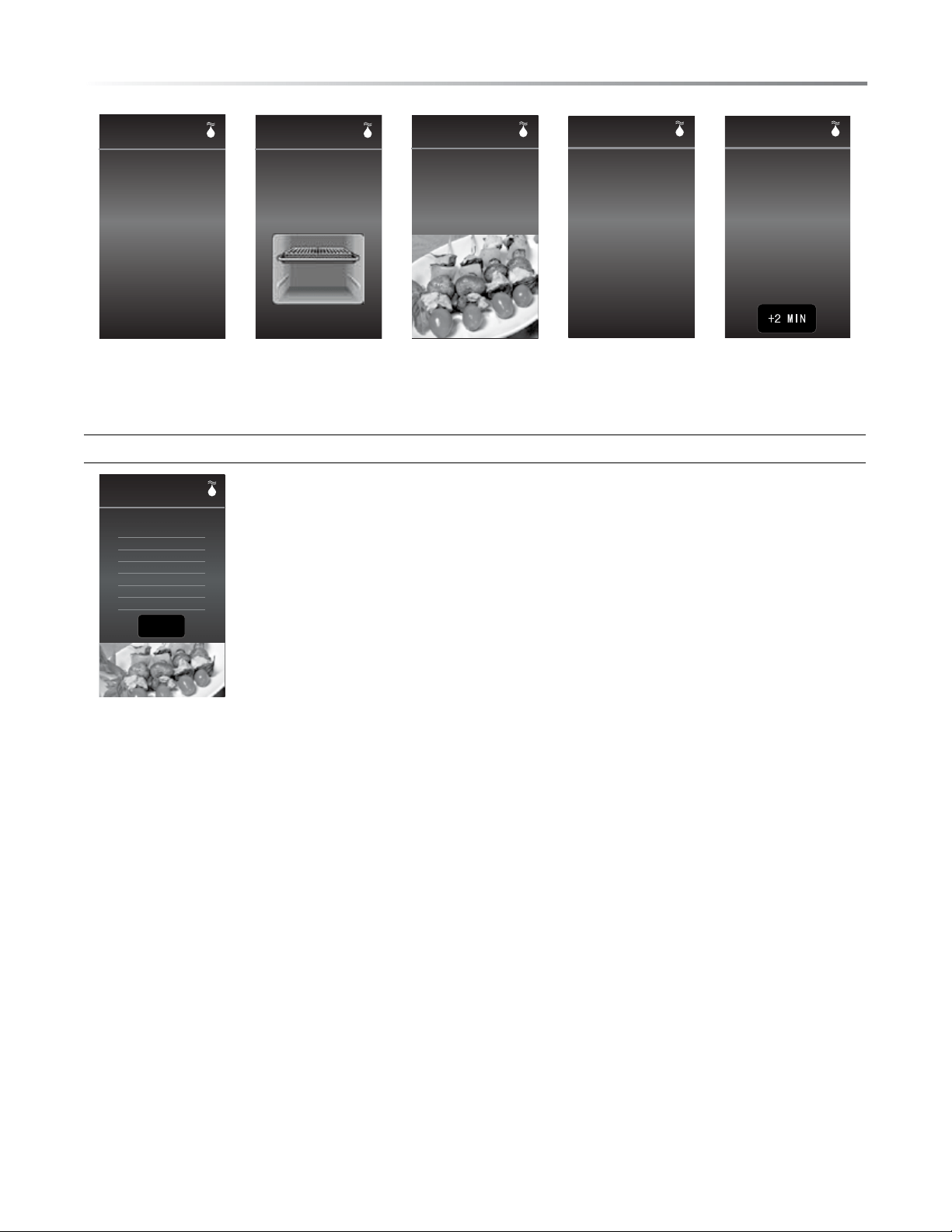
Option for BASIL CHICKEN KABOBS - INGREDIENTS:
• 1/2 lb boneless chicken
breast, cut into 12 cubes
• 12 large fresh basil leaves
• 1 yellow pepper, cut into
12 squares
• 6 medium white or brown
mushrooms, stemme d
• 6 cherry tomatoes
• 1/4 cup orange juice
• 1 tbsp walnut oil
1 2 3 4
INGREDIENTS
Makes 6 kabobs
BASILCHICKEN
KABOBS
INGREDIENTS
Cont.
• 1 tbsp balsamic vinegar
• 1 tbsp honey
• 1/2 tsp prepared mustard
• freshly ground pepper
BASILCHICKEN
KABOBS
1 2 3 4
BASILCHICKEN
KABOBS
INSTRUCTIONS
1. Wrap each chicken cube
with a basil leaf, thread onto
skewer with one each of a
pepper square, a mushroom
and another chicken cube
on each skewer.
2. Place on greased cooking
tray on upper level to begin
cooking.
3. While kabobs are cooking,
combine all remaining
ingredients in bowl for
sauce.
1 2 3 4
BASILCHICKEN
KABOBS
INSTRUCTIONS
Cont.
4. When kabobs are complete,
remove from oven and
place cherry tomato on end
of each skewer.
1 2 3 4
PRESSSTART
FORPREHEAT
BASILCHICKEN
KABOBS
5. At step 4 press
INGREDIENTS.
Press right arrow
to continue to next
page.
6. Press right arrow
to continue to next
page.
7. Press right arrow
to continue to next
page.
8. Press right arrow
to continue to next
page.
9. Press START for
preheat.
18E
tHe menus
E19
tHe menus
485˚
F
PREHEATING
SETTO:
BASILCHICKEN
KABOBS
PRESSSTART
PREHEAT COMPLETE
PLACE KABOBS IN OVEN
ON RACK IN TRAY.
BASILCHICKEN
KABOBS
485˚ F
7
MIN
0
SEC
BASILCHICKEN
KABOBS
485˚ F
3
MIN
30
SEC
OPENDOOR
FLIPFOODITEM
BASILCHICKEN
KABOBS
00MIN00SEC
BASILCHICKEN
KABOBS
FINISHCOOKING
TAKEFOODOUT
CAUTION:HOT!
10. Preheating oven. 11. Place chicken
kabobs in pan on
upper level. Press
START.
12. Cooking time
counts down.
13. When audible
sound is on, turn
food over.
14. Finished cooking.
Option for BASIL CHICKEN KABOBS - NUTRITION FACTS:
NUTRITION FACTS
Per Serving
Calories: 90
Fat: 3 g
Cholesterol: 20 mg
Sodium: 35 mg
Carbohydrate: 7 g
Protein: 9 g
BACK
BASILCHICKEN
KABOBS
5. At step 4 press
NUTRITION
FACTS.
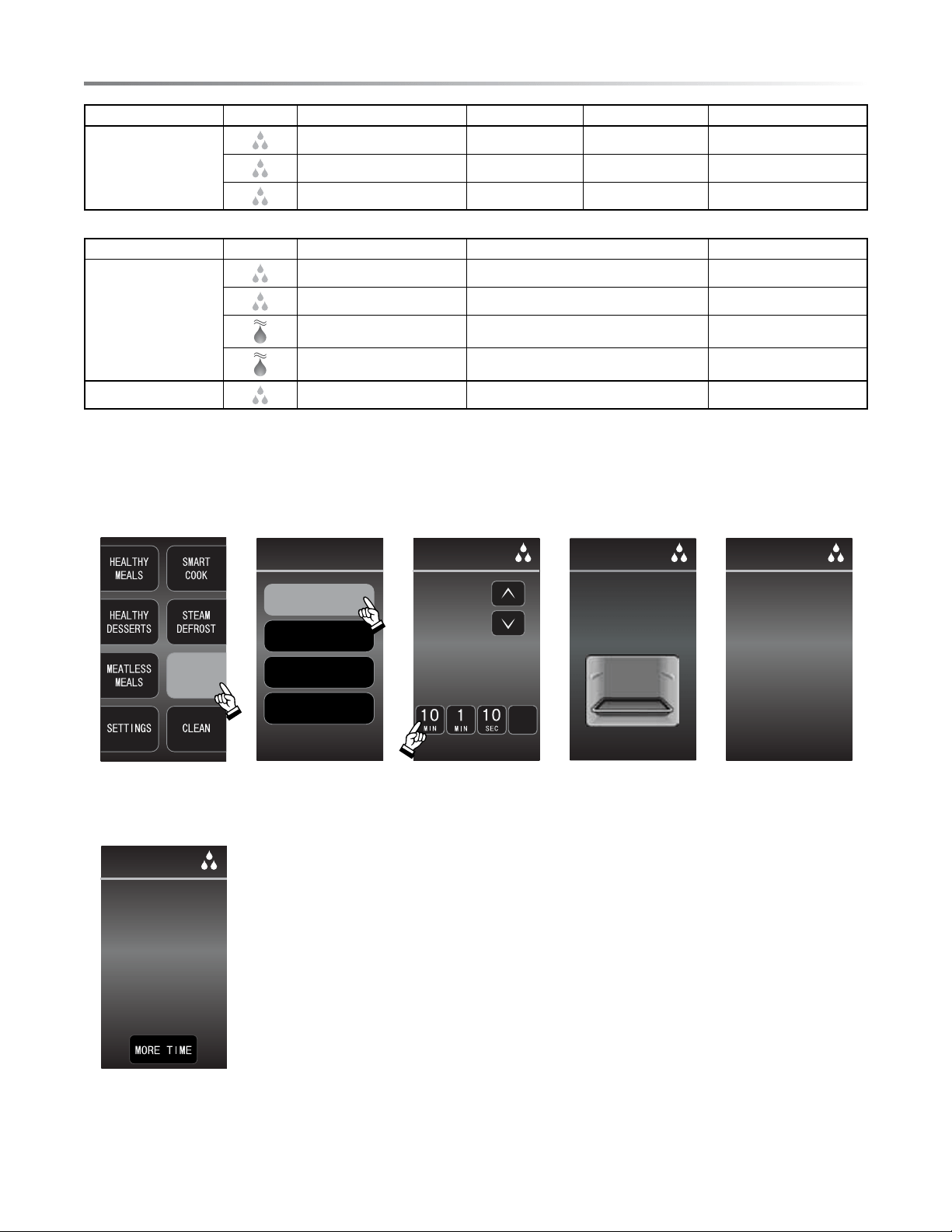
STEAM OPTIONS
• To use STEAM PROOF in STEAM OPTIONS:
STEAM
OPTIONS
KEEPWARM
STEAMPROOF
SIMMER
SAUTE
STEAMOPTIONS
PRESSSTART
STEAMPROOF
00
MIN
00
SEC
CLEAR
TEMP
TIME
100
˚F
PRESSSTART
PLACEFOODINOVEN
ONTRAY
STEAMPROOF
100˚F
STEAMPROOF
10
MIN
00
SEC
1. Press
STEAM OPTIONS.
2. Press STEAM
PROOF.
3. Enter desired time. 4. Press START. 5. Proong time counts
down.
00MIN
00SEC
FINISHEDCOOKING
TAKEFOODOUT
CAUTION:HOT!
STEAMPROOF
6. Finished proong.
20E
steAm options
HOME PAGE ICONS EXAMPlES WEIGHT TIME TEMP
STEAM
DEFROST
Chicken Breast 1 lb 40 - 50 mins 100˚F
Ground Beef 1 lb 40 - 50 mins 100˚F
Fish 1 lb 15 - 25 mins 100˚F
HOME PAGE ICONS MENU SETTING EXAMPlES TEMP SETTINGS
STEAM OPTIONS
STEAM PROOF Bread Dough 100˚F
KEEP WARM Dinner Plate 150˚F
SIMMER Casserole 400˚F - 200˚F
SAUTE Onion 475˚F
MANUAL
STEAM REFRESH Fresh Bread 100˚F

E21
MANUAL cookiNg
The Manual cooking option allows you the freedom to choose
and explore the full range of cooking features the SuperSteam+
oven has to offer. Each manual cooking option is equipped
with its specialized function to ensure optimum cooking
performance. Please see the below Manual cooking option
explanations to begin your exploration!
1 Convection Bake – In the convection bake function, dry
heated air is circulated to ensure even cooking throughout
the food of choice. This function is representative of tradi-
tional convection ovens and best used for baked goods or
convenience items.
Examples: cookies, cakes, biscuits, pizza, chicken nuggets
2 Convection Broil – The convection broil function incorpo-
rates dry heated air that is directed from above the food (top of
oven cavity). This broiling function allows for shorter cooking
times due to the concentration of the heat. This function is
best used for browning, searing, or melting.
Examples: cheese topping, steak, vegetables
3 Steam Roast – In this function, the steam that is injected into
the cavity is “superheated” steam. Typical steam temperature
is 212°F. With “superheated” steam, the temperature of the
steam is heightened to levels of up to 485°F; thus allowing
for the benets of steam moisture and the browning effect of
the high temperature. This “superheated” steam circulates in
the cavity to ensure even cooking. This function is best used
for meats, potatoes, or larger items that would require the
even cooking effects and browning or outer edge crispness.
Examples: chicken (whole), sweet potato, roast
4 Steam Grill – The steam grill function utilizes the “super-
heated” steam, but in a targeted manner, coming from above
in the oven cavity. This pinpoint guidance allows for the
benet of steam as well as being able to concentrate the
“superheated” steam temperature to accomplish browning
and multiple cooking options. With this function, you are
able to grill and sauté while enjoying the benets of steam.
Examples: sh, vegetables, onions, steak
5 Steam – The steam function consists of water vapor at a
temperature of 212°F injected into the oven cavity to allow for
a nutrient saving cooking option. Steaming provides moisture
and tenderness to foods that may otherwise dry out or become
tough by using traditional cooking methods. This function is
best used for vegetables, sh, or meats.
Examples: broccoli, salmon, cod, chicken
6 Steam Refresh – Steam Refresh utilizes low temperature
steam that brings back to life or “refreshes” food that may
be a day old or yesterday’s leftovers. The injection of gentle
steam can help to restore foods back to states of when they
were rst fresh. This function is best used with rm breads,
rice, noodles, vegetables, or meats.
Examples: French bread, brown rice, spaghetti noodles,
broccoli, hamburgers
22E
mAnuAL CookinG
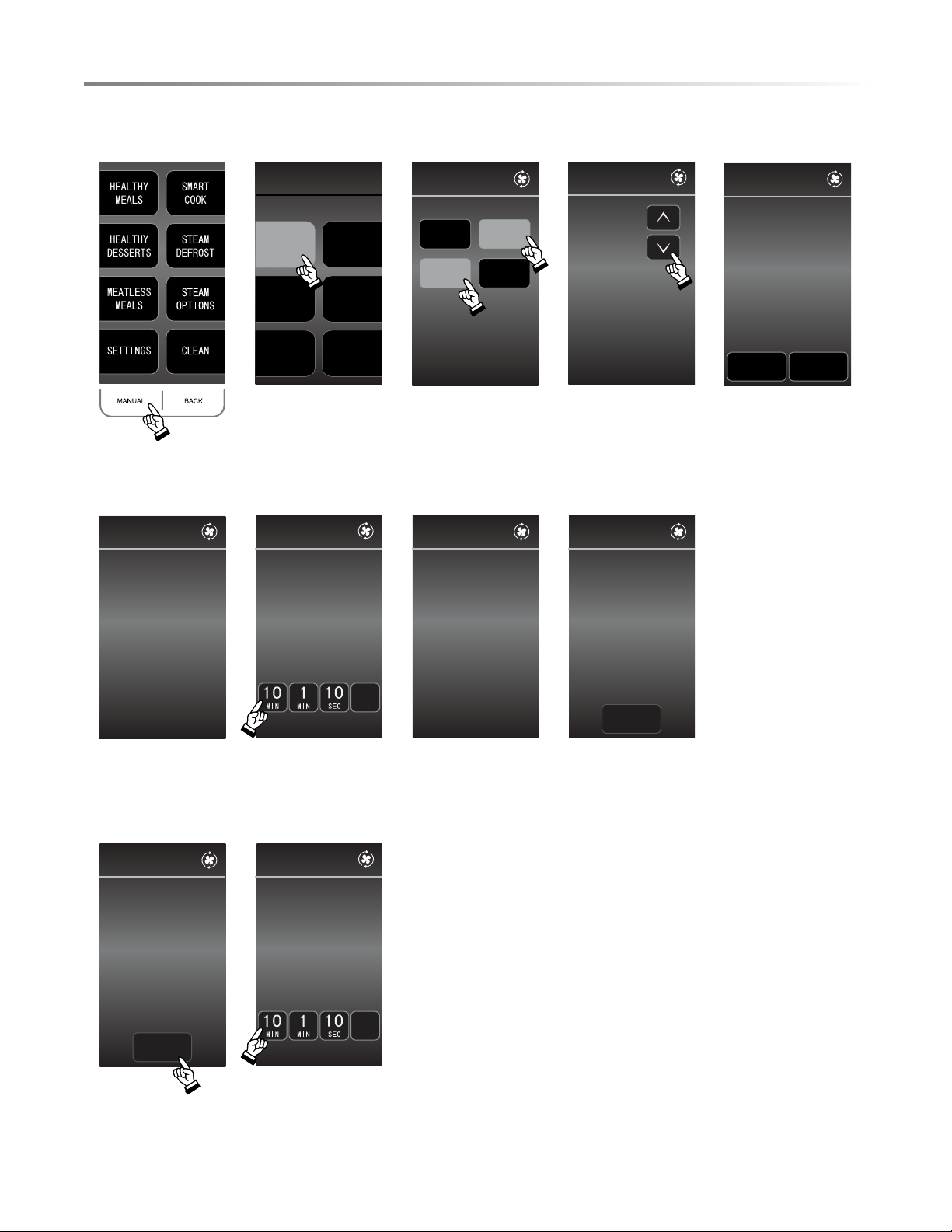
• To cook using CONV BAKE manually:
CONV
BAKE
CONV
BROIL
STEAM
ROAST
STEAM
GRILL
STEAM
MANUAL
STEAM
REFRESH
CONVBAKE
PREHEAT
NO
PREHEAT
2TRAYS
1TRAY
TEMP
CONVBAKE
300˚F
SELECT
TEMPERATURE
PRESSSTART
LESS MORE
PREHEATING
SETTO:
CONVBAKE
300
˚F
1. Press MANUAL. 2. Press CONV BAKE. 3. Select preheat
preference and
number of tray.
4. Select temperature
then press START.
5. Oven is preheating.
PREHEATINGCOMPLETE
PLACEFOODINOVEN
CAUTION:HOT!
CONVBAKE
300
˚F
300˚F
1TRAY
TIME
PRESSSTART
CONVBAKE
00
MIN
00
SEC
CLEAR
300˚ F
20MIN
00SEC
CONVBAKE
FINISHEDCOOKING
TAKEFOODOUT
CAUTION:HOT!
MORETIME
00
MIN
00
SEC
CONVBAKE
6. Place food in the
oven.
7. Set cooking time,
then press START.
8. Cooking time
counts down.
9. Finished cooking.
Option for more cooking time:
FINISHEDCOOKING
TAKEFOODOUT
CAUTION:HOT!
MORETIME
00
MIN0
0
SEC
CONVBAKE
PRESSSTART
CONVECBAKE
00
MIN
00
SEC
CLEAR
TIME
10. To add more
cooking time, press
MORE TIME.
11. Press numbers to
add more time, then
press START.

E23
SETTINGS
In the event that the electrical power supply to your oven should
be interrupted, your current input settings will be erased. Simply
reset this settings once power is reinstated to the oven.
AUDIBLE SIGNAL ELIMINATION
At the end of timed cook or touch of the screen, beeps will sound.
The audible signal can be turned off if you prefer quiet operation.
TO TURN SOUND OFF
1 Press SETTINGS.
2 Press SOUND ON/OFF.
3 Press OFF.
4 Press CLEAR to exit
TO RESTORE SOUND
1 Press SETTINGS.
2 Press SOUND ON/OFF.
3 Press ON.
4 Press CLEAR to exit.
CONTROL LOCK
The Control Lock prevents unwanted oven operation such as by
small children. The oven can be set so that the control panel is
deactivated or locked.
TO lOCK
1 Press SETTINGS.
2 Press CONTROL LOCK ON/OFF.
3 Hold BACK button for 3 seconds.
4 Display shows CONTROL LOCK IS ON.
5 Pending removal.
TO UNlOCK
1 Hold BACK button for 3 seconds.
2 Display shows CONTROL LOCK IS OFF.
3 Press CLEAR to exit.
DEMO MODE
TO ENTER DEMO MODE
1 At Home Page hold CLEAR until it beeps.
2 Press CLEAR 4 times.
3 The DEMO icon will appear on the screen.
4 Proceed in DEMO MODE.
TO EXIT DEMO MODE
1 Repeat steps 1 and 2.
2 The DEMO icon will be removed.
Note:
• Oven doesn’t heat in Demo Mode.
• Display counts down quickly.
LANGUAGE/TEMP
The oven comes set for English and ˚F. To change, press
SETTINGS then LANGUAGE/TEMP. Once selection is made,
press CLEAR to exit.
otHer feAtures
24E
CLeAninG AnD CAre
The Sharp SuperSteam+ Oven offers many options to keep the
oven clean. From initial cleaning of your new oven to periodic
cleaning, the CLEAN menu helps to keep the oven in peak opera-
tional condition and maintain a sparkling and fresh appearance.
NEW OVEN CLEAN
This is to be used initially to clean the cavity and the accessories
that come with this oven before actual cooking. It is recom-
mended to use New Oven Clean before cooking in the oven in
order to ensure starting with fresh, clean cooking instruments.
1 Select CLEAN from the home page.
2 Select NEW OVEN CLEAN from the list provided.
3 Insert all accessories (i.e. two trays, two racks) into the
oven.
4 Fill the reservoir with fresh cold water. Replace reservoir
and press START.
5 Once NEW OVEN CLEAN is complete, use caution in
opening the oven.
1 The oven door, outer cabinet and oven cavity will become hot.
2 Do not open the oven with your face close to the oven. Steam
from the oven may cause burns.
STERILE CLEANSE
The Sterile Cleanse functions assists in cleaning specic items
that require extra care in cleanliness. The chart below lists the
items that can be used during this function.
1 Select CLEAN from the home page.
2 Select STERILE CLEANSE from the list provided.
3 Select desired level. Please see chart below for suggested
items to cleanse on upper or lower level.
4 Fill the reservoir with fresh cold water. Replace reservoir
and press START.
5 Once STERILE CLEANSE is complete, use caution in
opening the oven. The door, cabinet, and oven may be very
hot. Do not open with your face close to the oven. The steam
from the oven may cause burns.
lEvEl SElECT
SUGGESTED ITEMS FOR
ClEANSING
Upper Level (Rack & Tray) Canning (Jars and Lids)
Lower Level (Tray)
Blanching
Small Cutting Boards
DESCALE FUNCTION
White or gray grains, also called scale, may form in the water
circuit inside the oven during steam generation, which could
cause the oven to malfunction. The Descale functions helps
to breakdown this scale and keep the oven clean and looking
like new.
1 Select CLEAN from the home page.
2 Select DESCALE from the list provided.
3 Fill the reservoir a mixture of either water and citric acid or
lemon juice. Please see chart below for suggested amounts.
Replace the reservoir and press START.
4 Once oven has completed the cycle, allow the oven to
cool down. Then, wipe away any residue remaining with
a damp cloth.
5 Remove the reservoir, empty, rinse, and rell with tap
water. Replace reservoir and press START.
6 Once the DESCALE function is complete, allow the oven
to cool down.
7 Once cool, wipe oven cavity to dry. Empty the drip tray.
MIXTURE AMOUNT
Water and Citric Acid
2-1/4 cups water and 1 tablespoon
citric acid crystals. Dissolve
crystals into water and pour into
reservoir.
Water and Lemon Juice
2-1/4 cups water and 1/3 cup
100% lemon juice (no pulp). If the
lemon juice contains pulp, please
strain. Stir well and pour into the
reservoir.
Please do not ll the reservoir with alternative cleaning agents
not specied in the chart above. Other cleaning agents may
damage your SuperSteam+ oven.
OVEN CLEANING - STEAM
Steam function helps to loosen any grease, oil or food residue.
The steam will make the oven easy to clean; however, it is not
a self-cleaning function.
1 Select CLEAN from the home page.
2 Select OVEN CLEANING – STEAM from the list provided.
3 Fill the reservoir with fresh, cold water. Press START.
4 Once the OVEN CLEANING – STEAM function is complete,
allow the oven to cool down.
5 Once cool, wipe any residue remaining with soft, damp cloth.

E25
CLeAninG AnD CAre
EXTERIOR
The outside surface is precoated metal and plastic. Clean the
outside with mild soap and water; rinse and dry with a soft
cloth. Do not use any type of household or abrasive cleaner.
STAINLESS STEEL SURFACE
The exterior should be wiped often with a soft damp cloth and
polished with a soft dry cloth to maintain its beauty. There
are also a variety of products designed especially for cleaning
and shining the stainless exterior of the oven. We recommend
that the cleaner be applied to a soft cloth and then carefully
used on the stainless exterior rather than sprayed directly on
to it. Follow package directions carefully.
FRONT SIDE OF THE OVEN
Wipe the window on both sides with a soft damp cloth to
remove any spills or spatters. Metal parts will be easier to
maintain if wiped frequently with a soft damp cloth. Avoid
the use of spray and other harsh cleaners as they may stain,
streak or dull the oven surface.
TOUCH CONTROL PANEL
If desired, the touch pads may be deactivated before cleaning.
See the Control Lock information on page 23 of this manual.
Wipe the panel with a cloth dampened slightly with water
only. Dry with a soft cloth. Do not scrub or use any sort of
chemical cleaners. Close oven and follow directions on page
23 for turning Control Lock off. Press CLEAR.
INTERIOR
Cleaning is easy because no heat is generated to the interior
surfaces; therefore, there is no baking and setting of spills
or spattering. To clean the interior surfaces, including oven
sealing surfaces, wipe with a soft damp cloth. DO NOT USE
ABRASIVE OR HARSH CLEANERS OR SCOURING
PADS. For heavier soil, use mild soap; wipe clean with a soft
damp cloth. Do not use any chemical oven cleaners.
ODOR REMOVAL
Occasionally, a cooking odor may remain in the oven. To
remove odor, combine 1 cup water with 1/3 cup lemon juice
in a 2-cup glass. Boil for several minutes. Leave in the oven
until water cools. Wipe interior with a soft cloth.
DRAIN WATER
In the event of excess water being in the SuperSteam+ oven
engine or a steam function is interrupted during operation, your
oven may need to drain to reset itself.
An ATTENTION message will be displayed alerting the need
for the oven to drain the water.
Ensure that there is an empty reservoir. If not, empty the
reservoir and replace.
The draining of the water into the reservoir will take approxi-
mately 1 minute.
Once complete, detach the reservoir and discard the water.

26E
Please check the following before calling for service. It may save you time and expense.
PROBlEM POSSIBlE CAUSE SOlUTION
1 Part or all of oven does
not operate.
• Power cord of oven is not completely con-
nected to the electrical outlet.
• Power outage.
• Fuse/circuit breaker at home doesn’t work.
• Oven is in Demo Mode.
• Make sure the power cord is tightly connected
to the outlet.
• Check house lights to be sure. Call your local
electric company for service.
• Replace the fuse or reset the circuit breaker.
• See page 23 for how to cancel Demo Mode.
2 Food in oven is not
heated.
• No power to the appliance.
• Oven controls improperly set.
• Oven is in Demo Mode.
• See SOLUTION for PROBLEM 1.
• Check if the controls have been properly set.
• See page 23.
3 Oven light does not
work.
• Light bulb is loose or burned out. • Call for service.
4 Touch controls will not
operate.
• Control Lock is on. • See page 23 to unlock.
5 Display ashes.
• Power failure. • Press Clear pad and reset the clock. If the oven
was in use, you must reset the cooking function.
Before you CALL for serViCe
SHARP ElECTRONICS CORPORATION • 1 Sharp Plaza, Suite 1 • Mahwah, New Jersey 07495-1123 • USA
SHARP ElECTRONICS OF CANADA lTD • 335 Britannia Road East • Mississauga, Ontario • L4Z 1W9 • Canada