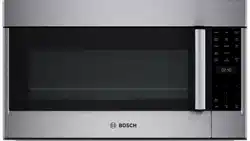
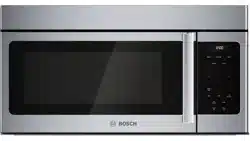
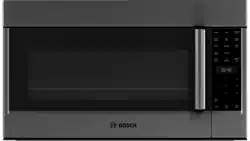
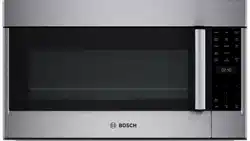
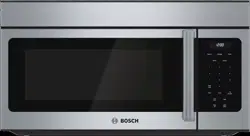
The cooling fan runs during all cooking modes. The fan can be heard when it is running, and warm air may be felt as it is released from the oven vent. The fan may also run after the oven is off.
Oven Vent
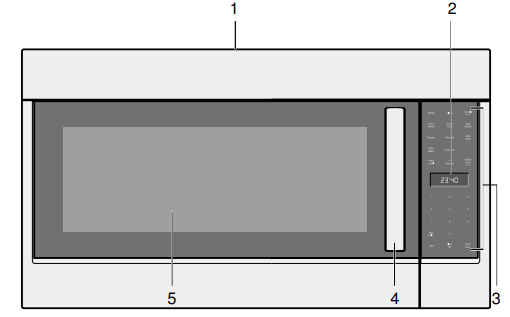
The oven vent is located at the top of the unit. Warm air may be released from the vent before, during and after cooking. It is normal to see steam escaping from the vent, and condensation may collect in this area. This area may be warm when the oven is in use. Do not block the vent, since it is important for air circulation.
Convection Fan
The convection fan operates during all convection modes. When the oven is operating in a convection mode, the fan turns off automatically when the door is opened.
Oven light (LED)
The oven light turns off to save energy after two minutes with the door open. To turn the light back on close the door and open it again.
Control Panel
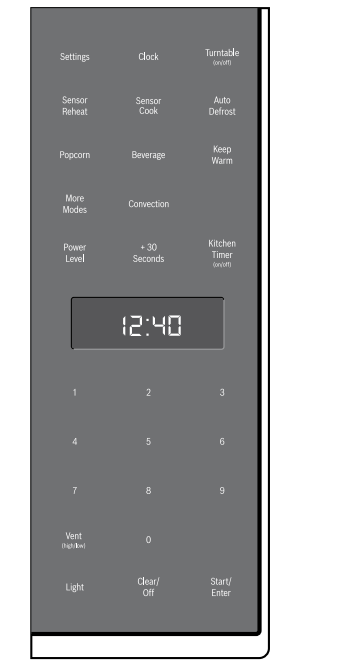
Touch keys
You can activate a function by briefly touching the corresponding touch key. Each time you touch a key a short beep will sound. A long beep will tell you that you have made an invalid input.
Touch key
Function
Settings
Change basic settings
Clock
Set time of day
Turntable (on/off)
Switches turntable on or off
Sensor Reheat
Reheat food with automatic settings
Sensor Cook
Cook food with automatic settings
Auto Defrost
Defrost food with automatic settings
Popcorn
Select popcorn bag size
Beverage
Heat beverages, select beverage size
Keep Warm
Set Keep Warm feature
More Modes
Enter more modes for convenience cooking
Convection
Set Convection mode
Power Level
Set power level for microwave operation
+30 Seconds
Add 30 seconds to microwave timer
Kitchen Timer
Set kitchen timer
0 - 9
Use the number keys to enter customized values
Vent (high/low)
Turn kitchen ventilation feature on/off
Light
Turn surface light on/off
Clear/Off
Clear entered value/turn appliance off
Start/Enter
Confirm input, start operation
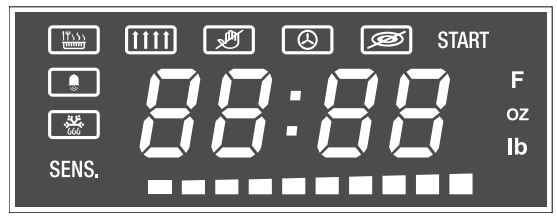
Display elements
Keep Warm mode
Vent
Panel lock on
Convection
Turntable off
Kitchen timer
Defrost
START
Confirmation with Start/Enter key required when blinking
SENS.
Sensing in progress
F
Temperature in °F
oz lb
Numeric display shows weight in Ounces/Pounds
Status bar for preheating/microwave power level
Numeric display for time, temperature or weight, depending on the unit displayed next to it
Operation
Setting the clock
The clock can be set in 12-hour mode.
Touch Clock once.
Enter the time using the number keys. Example: To set the clock to 12:41 type in 1 2 4 1.
Touch Clock to confirm.
The time of day is displayed.
Setting the Kitchen Timer
You can set a timer value of up ot 99 minutes and 99 seconds.
1. Touch Kitchen Timer.
The symbol lights up and is blinking.
2. Enter the desired time using the number keys.
3. Touch Kitchen Timer to confirm.
The Kitchen Timer starts counting down.
Once the set time has elapsed 4 beeps will sound. To stop the beep, touch Kitchen Timer.
To cancel the kitchen timer, touch Kitchen Timer again or open the appliance door.
Operating the Ventilation Fan
The Vent feature moves steam and other cooking vapors from the cooking surface of the range below the microwave oven.
You can set four different vent speeds.
Set the vent feature by touching Vent (high/low). The ventilation symbol will light up on the display.
Note: If the temperature gets too hot around the microwave oven, the fan of the vent feature will automatically turn on at the lowest setting to cool the oven. The fan will automatically turn off when the internal parts are cool. When this occurs, the vent cannot be manually turned off.
Turning the Surface Light on/off
The appliance is equipped with a cooking surface light, to light the surface underneath the appliance.
With the Light key you can set two brightness levels.
Brightness
Touch Light key
High
once
Low
twice
Off
three times
Turning the turntable on / off
For best cooking results, leave the turntable on. It can be turned off for large dishes.
To turn the turntable off, touch Turntable (on/off) once. The symbol and lights up briefly. Touch the key again to turn the turntable on. The symbol and lights up briefly.
Convection
Convection cooking circulates hot air through the oven cavity with a fan. The constantly moving air surrounds the food to heat the outer portion quickly, creating even browning and sealed-in flavor by the constant motion of hot air over the food surfaces.
Cookware tips for Convection
Metal Pans:
Recommended for all types of baked products, especially where browning is important.
Dark or dull finish metal pans are best for breads and pies because they absorb heat and produce crisper crust.
Shiny aluminum pans are better for cakes, cookies or muffins because they reflect heat and help produce a light tender crust.
Glass or glass-ceramic casseroles or baking dishes:
Best suited for egg and cheese recipes due to the cleanability of glass.
Setting Convection mode
Convection cooking temperature ranges from 200° F (93°C) to 450° F (232°C).
Touch Convection. 350° F and START are blinking, the symbol lights up in the display.
Enter the desired temperature using the number keys.
Operating the microwave
The appliance must be turned off.
1. Enter the desired cooking duration with the number keys. The timer display will fill in from right to left. Example: To set a microwave cooking time of 20 minutes and 30 seconds, enter the numbers 2 0 3 0. START is blinking.
2. You can start microwave operation with the default power level 10 by touching Start/Enter,
or -
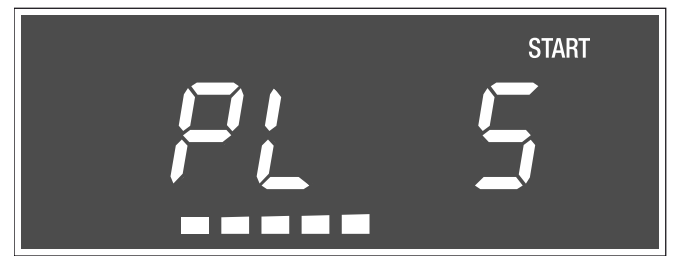
you can adjust the power level. Touch Power Level. The default power level is blinking. The segments in the bar underneath the number display also indicate the power level.
3. Enter the desired power level using the number keys. and the selected power level and START are blinking in the display
4. Touch Start/Enter to start microwave operation. The microwave timer will start to count down.
The microwave timer can be changed during operation by touching +30 Seconds.
The power level can be changed during operation. To display the set power level, touch Power Level.
Once the microwave time has run out, four beeps will sound. The appliance turns off and the clock is displayed.
Cleaning and Maintenance
Cleaning
Cleaning Guide
For best performance and for safety reasons, keep the oven clean inside and outside. Take special care to keep the inner door panel and oven front frame free of food and grease build-up.
Never use abrasive scouring powder or pads on the microwave. Wipe the microwave oven inside and out with a soft cloth and warm (not hot) mild detergent solution. Rinse and wipe completely dry.
Wipe spatters immediately with a wet paper towel, especially after cooking greasy foods like chicken or bacon.
Clean your microwave oven weekly or more often, if needed.
Never operate the oven without food in the oven cavity; this can damage the magnetron tube or glass tray. You may wish to leave a cup of water standing inside the oven when it is not in use to prevent damage if the oven is accidentally turned on.
Part
Recommendations
Oven cavity
Keep inside (cavity) of the oven clean. Food particles and spilled liquids can stick to the oven walls, causing the oven to work less efficiently.
Wipe up spills immediately. Use a damp, clean cloth and mild soap. DO NOT use harsh detergents or abrasive cleaners.
To help loosen baked–on food particles or liquids, heat 2 cups of water (add the juice of 1 lemon if you desire to keep the oven fresh smelling) in a 4 cup microwave-safe dish at High power for 5 minutes or until boiling. Let stand in oven cavity for 1 or 2 minutes.
Wire rack
Wash with soapy water. Rinse thoroughly and dry, or gently rub with cleansing powder or soap-filled pads as directed.
Glass turntable tray
Remove glass turntable tray from the oven when cleaning the oven cavity and tray.
NOTICE: : To prevent the glass turntable from breaking, handle with care and do not put it in water immediately after cooking.
Wash the glass turntable tray in warm soapy water or in the dishwasher.
Turntable roller rest
Clean with warm, soapy water. Rinse thoroughly and dry.
Door glass
Wash with soap and water or glass cleaner. Use Fantastik® or Formula 409® on a clean sponge or paper towel and wipe clean. Avoid using abrasive cleaners, like powder cleaning agents, steel wool pads and oven cleaners.
If steam accumulates inside or outside the oven door, wipe with a soft cloth. Steam can accumulate when operating the oven in high humidity and in no way indicates microwave leakage.
Painted surfaces
Clean with hot soapy water or apply Fantastik® or Formula 409® to a clean sponge or paper towel and wipe clean. Avoid using abrasive cleaners, like powder cleaning agents, steel wool pads and oven cleaners.
Stainless steel surfaces
Always wipe or rub in the direction of the grain. Clean with a soapy sponge, then rinse and dry, or wipe with Fantastik® sprayed on a paper towel. Protect and polish with Stainless Steel Magic® and a soft cloth. Remove water spots with a cloth dampened with white vinegar. Do not use any cleanser that contains chlorine as these may rust the stainless steel
Plastic & Controls
When cool, clean with soapy water, rinse and dry.
Printed areas (words & numbers)
Do not use abrasive cleaners or petroleum based solvents
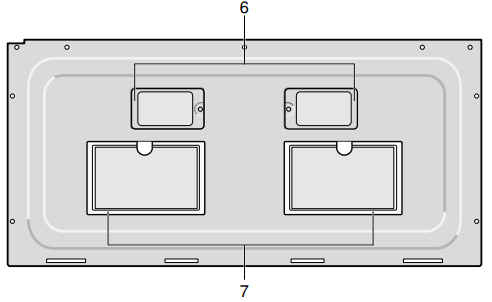
Cleaning the oven vent filters
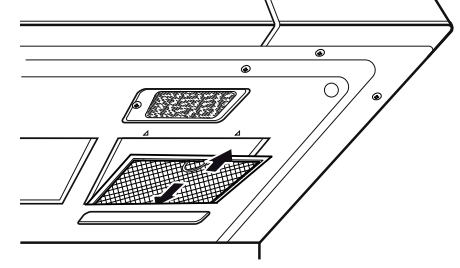
The oven ventilation filters should be removed and cleaned often; generally at least once every month.
1. To remove the ventilation filters, slide the filter to the rear. Then pull filter downward and push to the other side. The filter will drop out. Repeat for the 2nd filter.
2. Soak the ventilation filters in hot water using a mild detergent. Rinse well and shake to dry. Do not use ammonia or wash in a dishwasher. The aluminum on the filter will corrode and darken.
3. To reinstall an oven ventilation filter, slide it into the side slot, then push up and toward oven to lock. Reinstall the 2nd filter using the same procedure.
Maintenance
Charcoal filter replacement
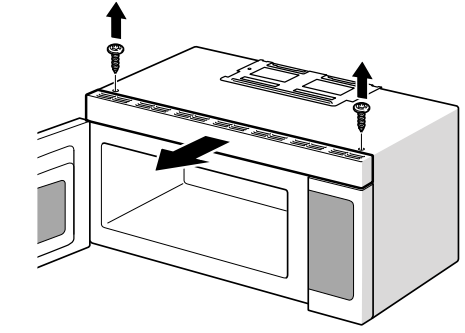
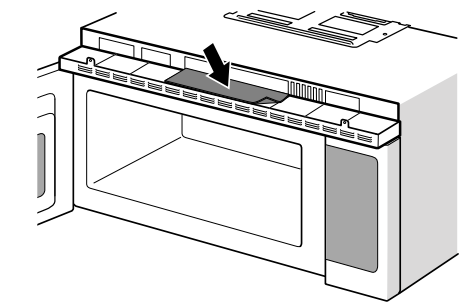
The charcoal filter, which was included with your microwave oven, is used for nonvented, recirculated installation (Room Venting). The filter should be replaced every 6 to 12 months depending on use.
1. Disconnect power to the microwave oven at the circuit breaker panel or by unplugging.
2. Remove the vent grill mounting screws.
3. Pull the vent grill away from the unit.
4. Change the charcoal filter.
5. Carefully push the vent grill back into place and replace the screws removed in Step 2.
Note: If no charcoal filter is installed, it is not possible to bind the odorous substances in the cooking vapors.
Before Calling for Service
Before calling customer service, consider the suggestions and instructions below:
Problem
Suggestion
Neither the microwave’s display nor oven operates.
Properly insert the plug into a grounded power outlet.
Remove the plug from the outlet, wait 10 seconds, then plug the microwave in again.
Reset the household circuit breaker or replace any blown fuses.
Plug a different appliance into the power outlet. If the other appliance will not operate, have a qualified electrician repair the outlet.
Plug the microwave into a different power outlet.
Oven display works, but the oven will not operate.
Make sure the oven door is closed securely and completely.
Check to see if packing material or other materials are stuck to the door seal.
Check for damage to the oven door.
Press the Clear/Off key twice and attempt to re–enter cooking instructions.
Note: : If the oven is set to cook for more than 30 minutes at 100% power level, it will automatically adjust itself to a 80% power level after 30 minutes to avoid overcooking.
Power goes off before the cook time has elapsed.
If there has been a power interruption, remove the plug from the outlet; wait 10 seconds, then plug the microwave in again. If there was a power outage, the time indicator in the display will show 00:00.
Reset the clock and any cooking instructions.
Reset the household circuit breaker or replace any blown fuses.
Press the Clear/Off key twice and attempt to re–enter cooking instructions.
Plug a different appliance into the power outlet. If the other appliance will not operate, have a qualified electrician repair the outlet.
Plug the microwave into a different power outlet.
Food is cooking too slowly.
Make sure the oven is on a separate 20 amp circuit line. Operating another appliance on the same circuit can cause a voltage drop. If necessary, move the microwave to its own circuit.
Microwave is sparking, arcing occurs.
Remove any metallic utensils, cookware or metal ties from the oven cavity. If using aluminum foil, use only narrow strips and allow at least one inch between the foil and the interior oven walls.
Turntable makes noises or sticks.
Clean the turntable, roller ring and oven cavity bottom.
Make sure the turntable and roller ring are positioned correctly.
Using the microwave causes TV or radio interference.
This is similar to the interference caused by other small appliances, such as hair dryers. Move your microwave further away from other appliances, like your TV or radio
LED lights are not working.
Please contact Customer Service.
Note: : If the oven is set to cook for more than 30 minutes at 100% power level, it will automatically adjust itself to a 80% power level after 30 minutes to avoid overcooking




 symbol lights up and
  is blinking.
 will light up on the display.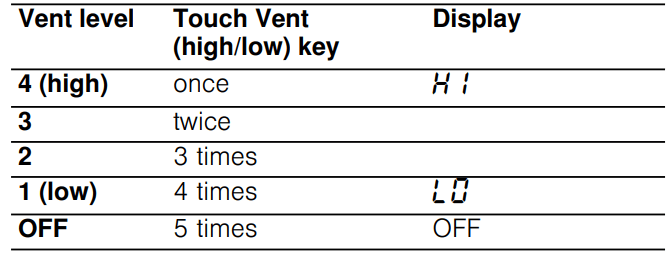
 symbol and
  lights up briefly. Touch the key again to turn the turntable on. The
  lights up briefly.
 symbol lights up in the display.
  is blinking. The segments in the bar underneath the number display also indicate the power level.
 and the selected power level and START are blinking in the display