Rev. 091019-BR 1 www.akiascreens.com
Manual Series
Manually-Operated Projection Screen
User’s Guide
Screen Installation
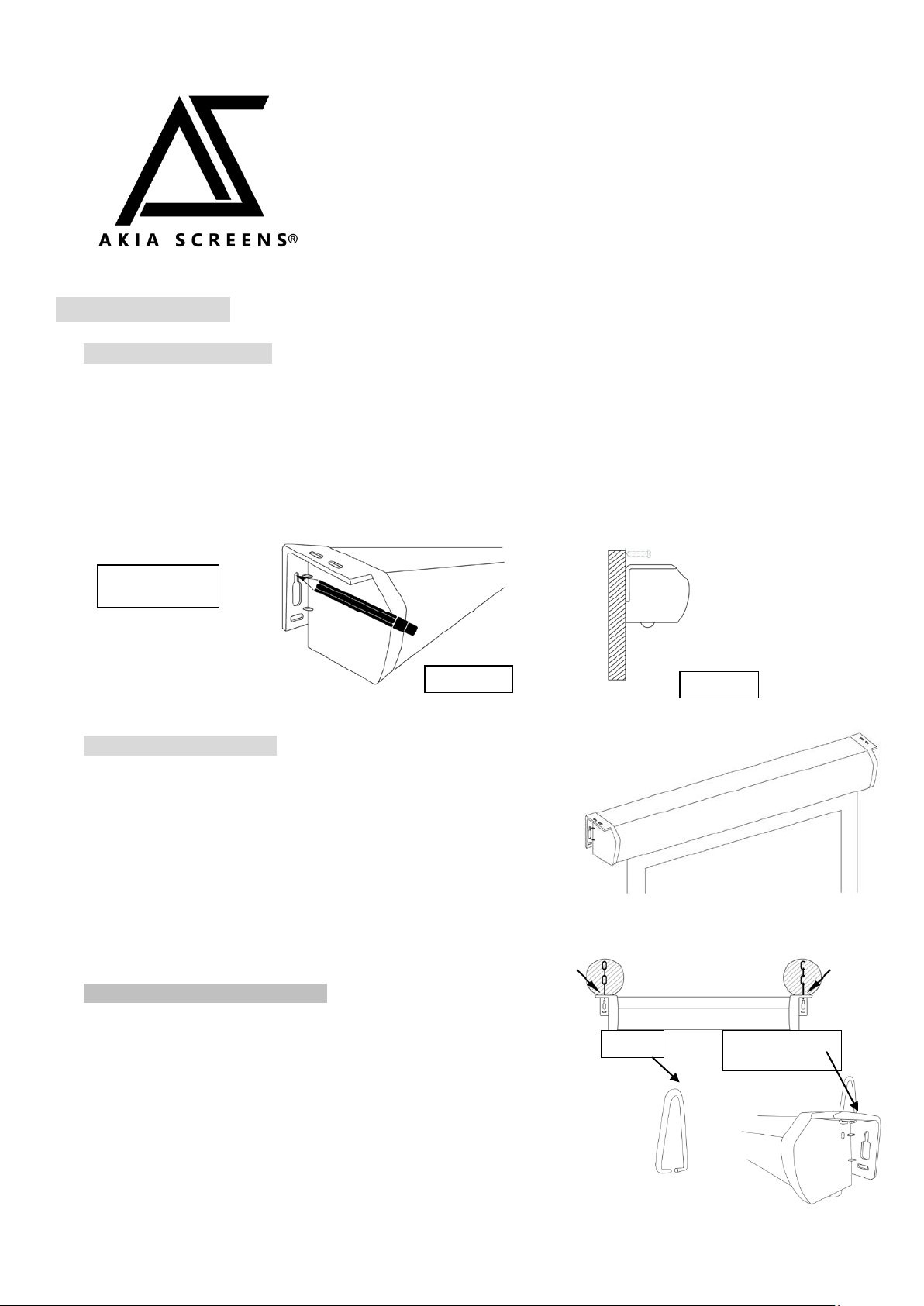
A. Flush Wall Installation
1. Measure the distance of the keyholes on the end caps and mark the location of where
the screen is to be installed for the pre-drilled hole.
2. Drill a hole in the marked areas, insert the proper screw and leave about 1/8
of an inch from the wall to mount the screen.
3. Mount your screen from the keyhole located on the back of the screen’s left
and right end caps.
B. Flush Ceiling Mounting
1. Remove D-rings from the left and right end caps.
2. Measure the distance between the top screw holes located on
top of the end caps
.
3. Mark the location of where the screen is to be installed
for the pre-drilled hole.
4. Drill your hole, use a hollow wall anchor if needed
5. Insert the proper screw into the drilled hole and secure the
screen to the ceiling.
C. Suspended Ceiling Installation
1. Hang the screen from the ceiling using chains (not included)
and hooking them to the D-ring located on each end cap.
Note: Please consult with a hardware store professional for proper
screws for your specific wall or ceiling installation. The installer
must ensure that proper mounting hardware and fasteners used are
of adequate strength and suitable for the mounting surface.
D-ring
Keyhole located on
back of end cap
Front view
Side view
Flange with a pair
of screw holes
Rev. 091019-BR 2 www.akiascreens.com
Screen Operation
Hydraulic SRM Disclaimer: The Akia Manual uses a Hydraulic SRM (Slow Retract Mechanism) that allows
the screen to retract back into the casing unassisted. However, the friction caused by repetitive operation
heats up the hydraulic fluid causing it to temporarily lose its motion-arresting capability. If this occurs, please
let the screen stand for 30 minutes to allow the fluid to cool and
resume its SRM function.
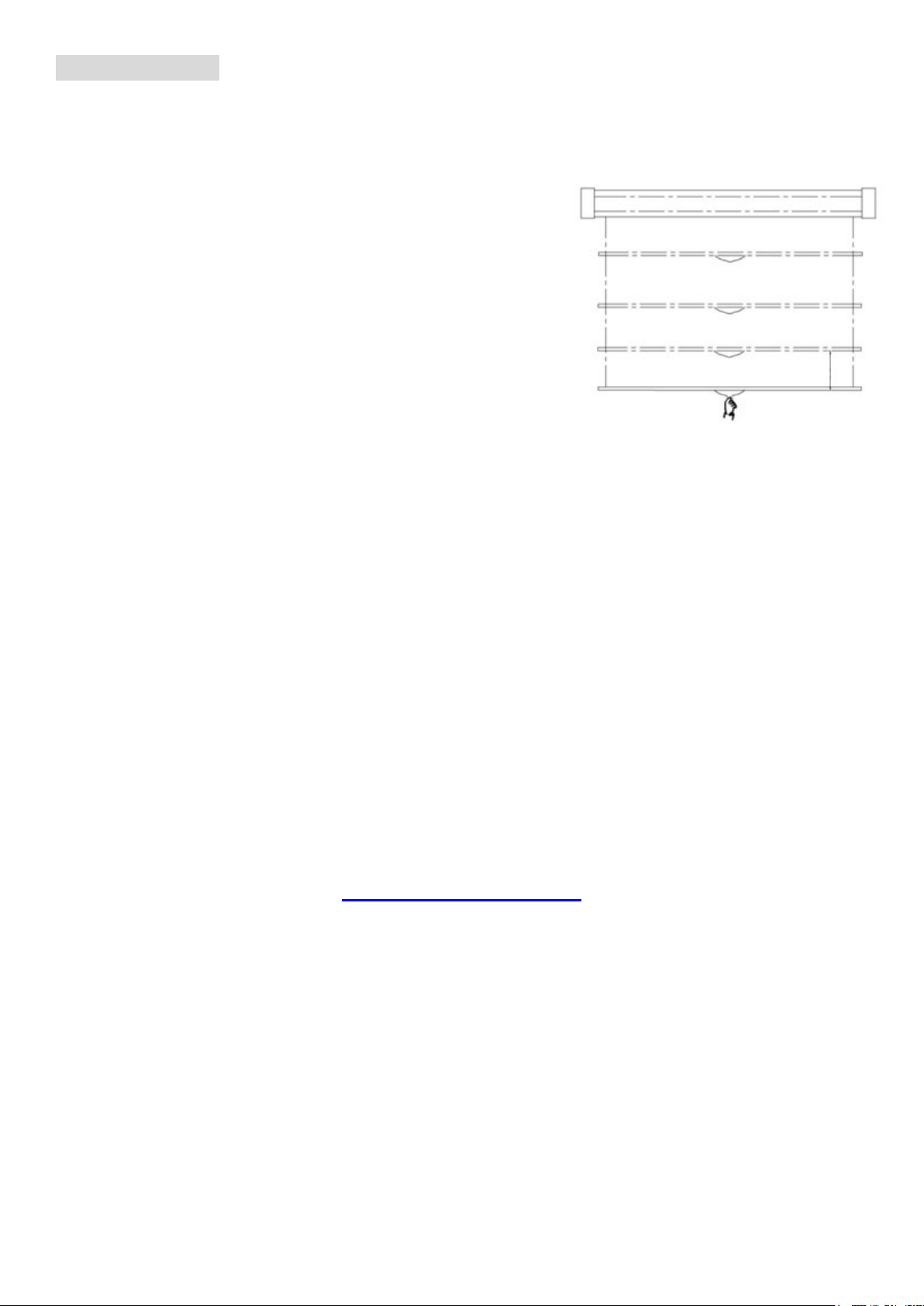
1. Pull the screen down from the lanyard or from the handle only at a
90-degree angle. The screen is designed to lock at different intervals.
To achieve this, make sure to pull straight down and allowing the
screen to come up to lock into place. Do not attempt to pull the
screen down by the surface or touch the screen, as it will damage
the screen and void the warranty.
2. To retract the screen, simply pull the screen down more than two
inches with a quick snap of the wrist and allow the screen to slowly
retract itself back up into the housing.
Attention: When retracting, always pull the screen down at a 90-degree angle. If ever the screen feels stuck, keep in
mind that the screen’s mechanism is new and needs to be run up/down a few times to loosen up. If this happens,
carefully, with a little force, yank the screen straight down to unlock the mechanism.
RETRACTION TIP: If you are not able to pull the screen down two inches when attempting to retract it, give the
screen a quick yank downwards with a little bit of force. Please be sure to not stand directly under the housing of the
unit when yanking down on the screen.
Need Assistance? Please Contact our Amazon Dedicated Support Team:
1-877-511-1211 ext 262/ 239/ 263
We are always happy to help.
Our office hours are Monday-Friday from 7:30am to 4:00pm PST.
www.akiascreens.com