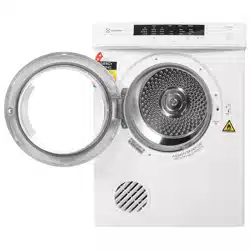
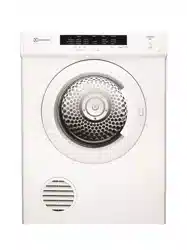
The appliance must not be installed behind a lockable door, a sliding door or door with a hinge on the opposite side to that of the tumble dryer in such a way that a full opening of the tumble dryer door is restricted.
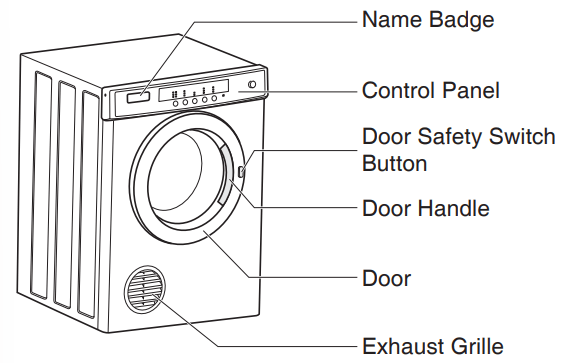
The exhaust grille has a range of positions, which allows you to select the optimum exhaust angle. Simply hold the grille and rotate it until it hits the built in stop.
Do not install your dryer in a cupboard or small unvented laundry unless you are using a venting kit.
There are 2 venting options:
front
rea-using a venting kit (optional extra)
Venting Kit (Optional Extra)
DVK005 - Through the wall
DVK006 - Universal flexible hose
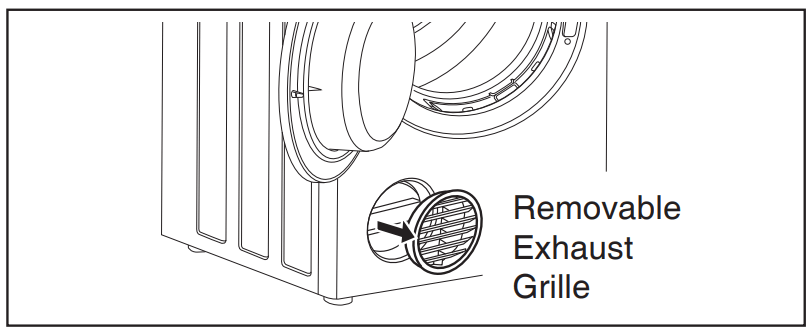
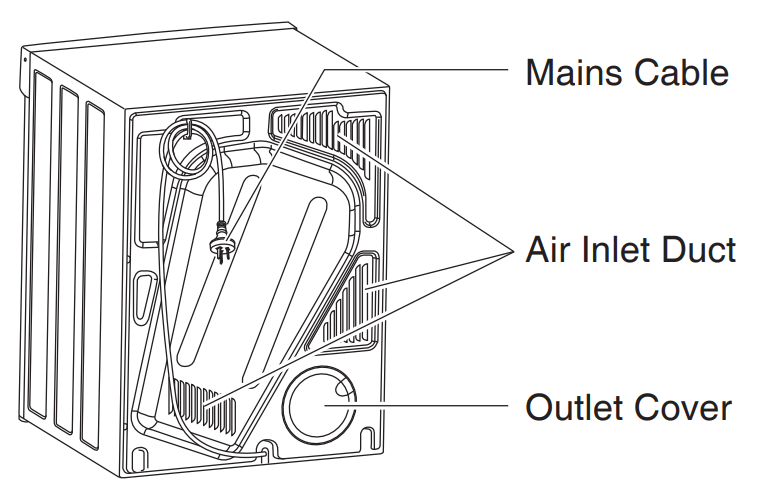
If you choose to use the optional vent kit, the exhaust grille at the front of the dryer will need to be replaced with outlet cover from the back of the dryer. Gently prise open the grille, using a thin bladed tool. Next, remove the cover from the back and clip it into the grilled space at the front. The exhaust grille is not required when using a vent kit.
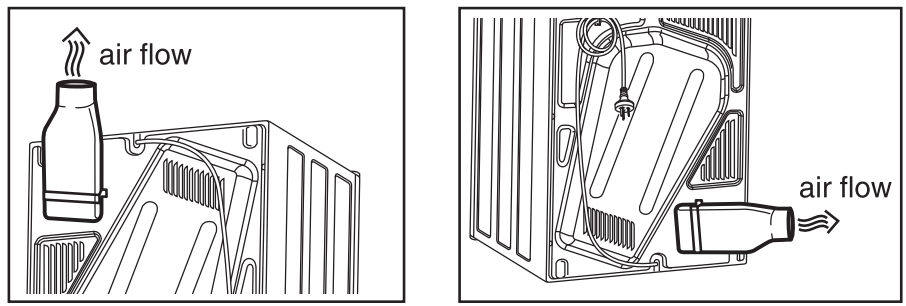
You can position the vent kit at the back of the dryer to remove aire upwards or sideways.
Drying Guide
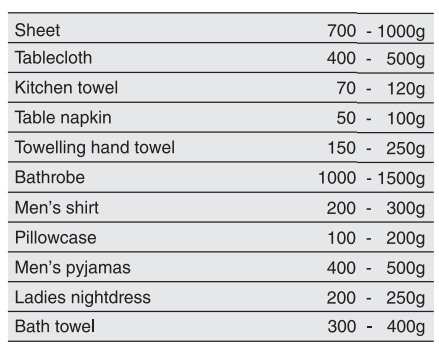
Your load, when dry must not exceed the rated capacity
5 kg for the EDV5051 dryer
6 kg for the EDV6051 dryer
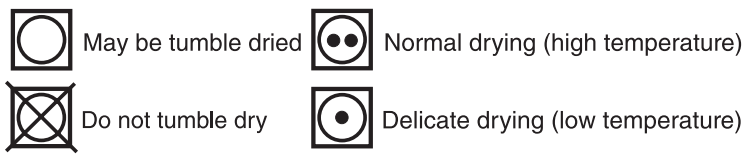
Always check in your labels for drying symbols which the international care labeling code now uses
Permanent press and synthetics: take out as soon as the dryer stops to reduce wrinkles
Woollen articles: not recommended. Pull them to their original shape, then dry them flat
Woven and loop knit materials: may shrink, by varying amounts, depending on their quality. Do not use the normal setting for this fabrics. Always stretch them out immediately after drying.
Fiber or leather materials: always check the manufacturer's instructions
Baby clothes at night gowns : acrylic clothing or sleepwear use only on the delicate setting
Rubber and plastics: do not try any items made from or containing rubber or plastics, such as aprons, bibs, babies' waterproof napkins, curtains, tablecloths, shower caps, clothes fitted with foam rubber pads, pillows, galoshes, or rubber coated tennis shoes.
Fiberglass: not recommended. Glass particles left in the dryer could be picked up by your clothes in the next time you use the dryer, and imitate your skin.
Fabric softeners or similar products should not be used in a tumble dryer to eliminate the effects of static electricity unless this practice is specifically recommended by the manufacturer of the fabric softeners or products.
NOTE
We strongly advise against the user fabric conditioners of the sheet type that are added to the clothes in the drum. These products may lead to rapid blockage of the lint filter and inefficient operation of your dryer.
CONTROL PANEL
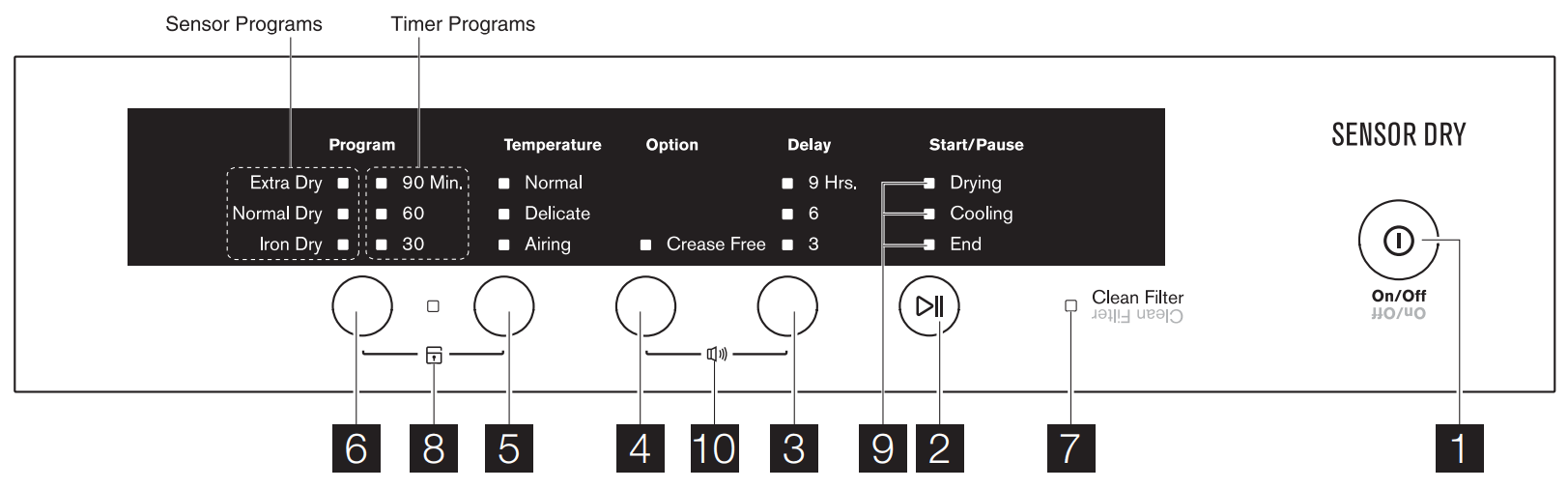
1 - On/Off Button
This button switches the dryer on. At the end of the program, press the button again to switch the dryer off.
2 - Start/Pause Button
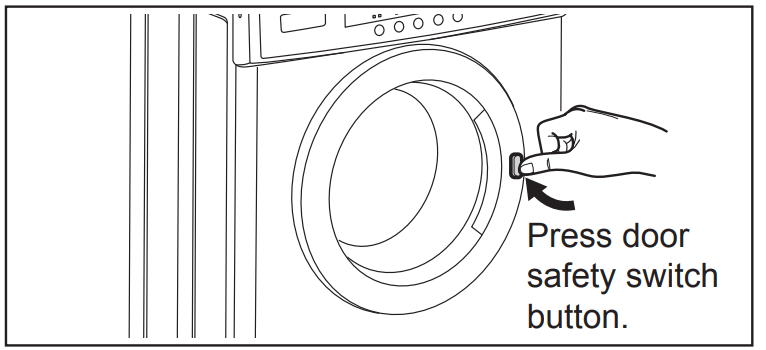
This button allows you to start or pause the dryer to check the contents of the load or perhaps add more clothes to the load. If the safety button is not pressed in a door switch fault will be indicated (“beeps” 6 times).
3 - Delay Button
This button is a feature that permits you to start the dryer after a defined number of hours, ranging from 3, 6, 9 hours. To abort the Delayed Start, press the Start/Pause button, which puts the machine into paused mode, allowing you to change the delay time. NOTE: Make sure you have set the disired program before setting the delay.
4 - Option Button
This button allows you to select Crease Free. Crease Free Crease Free: The Crease Free feature is designed to help prevent creases forming in the clothes after the normal drying cycle has finished. The drum will relate about 5 seconds continue for 3 hours. unload the dryer This is useful if you are unable to unload the dryer straight away.
5 - Temperature Button
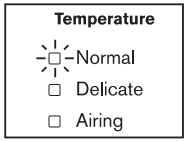
Is used to select one of the three settings, Normal, Delicates or Airing. The Delicates setting will cause the heater to cycle on for less time than the Normal setting. The heater on/off cycling time will vary on both settings depending on the program selected, ambient temperature etc. On the Airing setting the heater is not used at all. A new setting can be selected when the dryer is running, the drying process will continue using the new setting. NOTE: Airing cannot be selected when one of the Sensor programs has been selected.
6 - Program Button
Is used to select the desired program. Programs available are: Sensor Programs: Extra Dry, Normal Dry and Iron Dry. Timer Programs: 90 min, 60 min and 30 min. When a new program is selected while the dryer is already running, the drying process will continue using the settings from the new program. NOTE: When the temperature setting is on Airing the Sensor programs cannot be selected.
7 - Reminder Clean Filter LED
The LED is illuminated at the end of the program. The LED is designed as a reminder to clean the lint filter at the end of each load.
8 - Child Lock ()
The child lock option is used to stop the settings from being changed once a program has been started. It does not affect the On/Off switch.
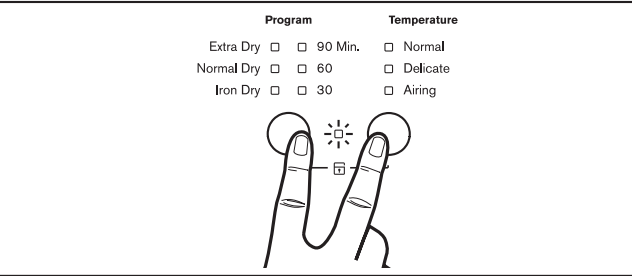
To select this option press and hold the Program and Temperature button together (while the dryer is running) until a beep is heard and the Child Lock LED illuminates for approx 2 seconds. To turn the child lock off press and hold the same buttons (while the dryer is running) until a beep is heard and the LED goes off.
NOTE: If the door is opened during the program the Child Lock option will be de-activated and will have to be reset once the dryer has been restarted.
9 - Progress indicator lights
These indicators show at which part of the cycle your machine is, the Drying or Cooling cycle or the End.
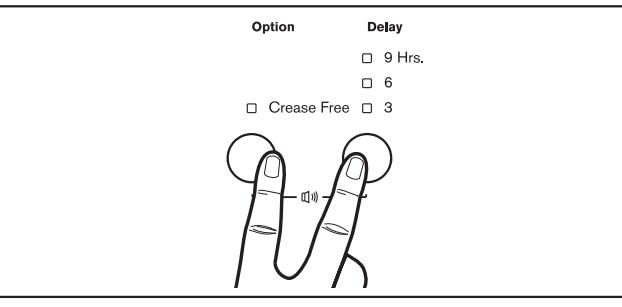
10 - Buzzer ()
The Buzzer feature is designed to remind you when the program ends with a “beeps” sound.
To activate this option press and hold the “Option” and “Delay” buttons simultaneously until a long beep is heard.
To deactivate press and hold the same buttons until a short beep is heard..
OPERATING SEQUENCE
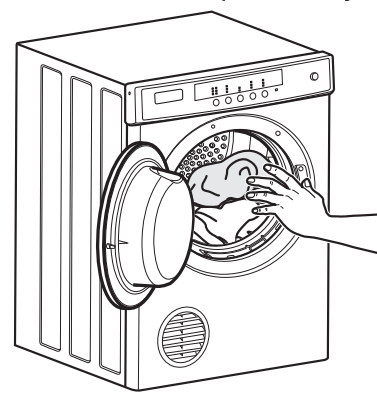
1.Load your dryer loosely until it í no more than TWO THIRDS FULL. Clothes must tumble freely in a dryer. Don't cram them in. Wet clothes fluff up when dry.
Overloading will:
Reducing efficiency
Increasie drying time
Increase the risk of creasing
.2. Switch on. The dryer will not operate unless the door safety switch button is fully pressed in.
3. Press then release the On/Off button on the sensor control panel.
Sensor Program
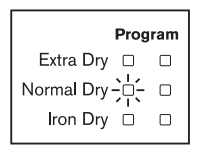
1. Press the Program button to select either Extra Dry, Normal Dry or Iron Dry form the Sensor Program. The indicator light will come on to your choice.
Do not select the Extra Dry option for delicate fabric such as polyester as shrinking may occur.
To obtain the best drying results with small loads it is recommended to use Extra Dry program.
2. Press the Temperature button to select either Normal, or Delicates from the Temperature Program.
Airing is not available in Sensor Program.
The indicator light will come on to your choice. Refer to the table below:
Temperature
Definition
Normal
For drying most fabrics
Delicates
For drying delicates and synthesis at lower heat for maximum care of the fabrics. The delicate setting will cause the heater to cycle on for shorter time than the normal setting.
Airing
This setting does not heat. Only circulate the air as the dryer to shake out the dust and refresh the clothes.
Now press Start/Pause to start.
Timer Program
1. Press the Program button to select either 90, 60 or 30 Minutes from the Timer Program. The indicator light will come on to your choice.
2. Press the Temperature button to select either Nomal, Delicates or Airing.
The indicator light will come on to your choice.
Now press the Start/Pause button to start the dryer.
WARNING: Never stop a tumble dryer before the end of the drying cycle unless all items are quickly removed and spread out so that the heat is dissipated.
Step 4. Switch off
When you have finished using a dryer, press the On/Off button, to turn of the power, the switch off at the power point. It is not recommend that the power be left on to the dryer.
Step 5. Clean the filter
After every load clean the lint filter to reduce drying times and avoid overheating.
Hints
Never tumble dry the following: Delicate items such as net curtains, woollen, silk, fabric with metal trim, nylon tights, bulky materials such as anoraks, blankets, eiderdown, sleeping bags, feather quilts and any item containing rubber foam or materials similar to foam rubber.
Do not place in your dryer undergarments such as bras and corsets that contain metal reinforcements. Your dryer may be damaged if metal parts were to come loose from the garment. Place such items in a bag designed for this purpose.
Check and empty pockets. Clips, pens, nails and pins can damage both the dryer and your clothes. Other items such as matches or cigarette lighters will cause a fire.
Close all press studs, hooks, eyes and zips that may catch on something else. Tie all belts and apron strings to prevent tangling.
Drying time will depend on fabric type and construction, load size and wetness. Save time and money and always spin the load as dry as possible in your washing machine.
Drying time will also be affected by voltage fluctuations, room temperature and humidity. Clothes will dry more slowly on a cool or humid day.
For best results, sort the load according to fabric types. Such as heavy items which may take longer to dry, eg towels, flannelette sheets etc, than ones which dry quickly, eg poly/cotton shirts and sheets.
Avoid drying dark clothes with light coloured items such as towels as lint will show on the dark clothes. Note: Some fabrics will collect lint from other clothes and Items. Separate the lint “givers” and the lint “collectors” to minimise this problem. Clothes that give lint include towels, nappies, chenille. Clothes that collect lint include core!uroy, synthetics and permanent press garments.
If individual items are still damp after drying, set a 30 minute post drying time. This will be necessary particularly for multilayered items (eg collars, pockets, etc).
Always clean the lint filter-this will reduce drying time and save you money.
The laundry must be thoroughly spun before tumble drying.
Easy-care items eg shirts, should be briefly pre-spun before drying (depending on the crease resistance approximately 30 seconds)
To avoid static charge when drying is completed, use either a fabric softener when you are washing the laundry or a fabric conditioner specifically for tumble dryers.
Remove the laundry when the dryer has finished drying.
Do not over-dry laundry, this avoids creasing and saves energy.
Clothes or towels containing sand or grit should be washed first.
Due to variations in dryer load fabric texture and thickness it is possible that not all items will be dried evenly. It you experience uneven dryness on Normal Dry program please use either Extra Dry or Timer Program but be mindful of the type of fabric being dried to avoid overdrying certain types of fabric. Always follow drying instructions attached to the items intended to be dried in a clothes dryer.
Troubleshooting
Problem
Possible Causes
The dryer will not start:
Plug is not firmly in socket, or power not turned on.
You have blown a fise. Check the power point with another appliance.
You have not closed the dryer door or pushed in the door safety switch button
Your clothes are still wet:
The selected drying time was insufficient. Select a longer time setting.
Longer time maybe needed when the room temperature is 10°C or less
Check that the lint filter is not blocked
Check to see that you have read all the instructions carefully
Contact the Service Centre.
Safety Instructions
DRYER SAFETY
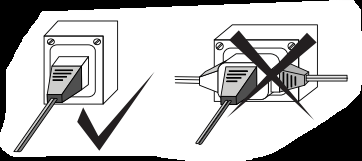
Only plug in this appliance directly into an AC power supply, which is probably earthed and has the correct voltage.
See the serial number sticker located on the bottom of the door opening for voltage information.
CAUTION
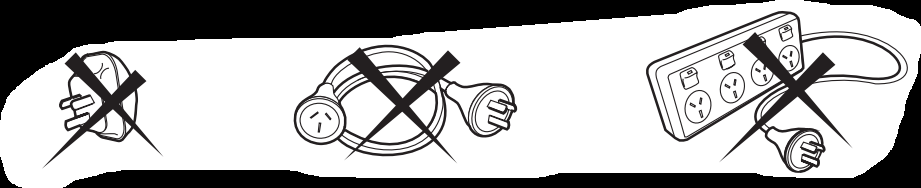
If this appliance is applied from a cord extension set or electrical portable outlet device, the cord extension set or electrical portable outlet device must be positioned so that it is not subject to splashing or ingress of moisture. For safety reasons we strong advice against the use of double adapters, extension cord or power boards.
IMPORTANT
If the electrical cord of this appliance is damaged, it must be replaced by the manufacturer, authorized service agent or similar qualified person in order to avoid a hazard.
These dryers are for drying clothes, towels and linen at home. Do not use them for any other purpose.
Lint must not be allowed to accumulate around the tumble dryer
Do not dry unwashed items in the tumble dryer.
WARNING: Nover stop a tumble dryer before the end of the drying cycle unless all items are quickly removed and spread out so that the heat is dissipated.
FIRE HAZARDS
Some fabrics are not suitable for tumble drying. The following must not be placed in your dryer due to the risk of a fire or an explosion
Items that have been spotted or soaked with vegetable oil, cooking oil, suntan oil, linseed oil, salad oil, lubrication oil or grease. Oil affected items can ignite spontaneously, especially when exposed to heat source such as a tumble dryer. The items become warm, causing an oxidation reaction in the oil. Oxidation creates heat. If it cannot escape, the items can become hot enough to ignite. Piling, stacking, are storing oil-affected items can prevent heat from escaping and create a fire hazard. If it is unavoidable that fabrics can contain vegetable or cooking oil, or have been contaminated by hair care products be placed in a tumble dryer, they should first be washed in hot water with extra detegent - this will reduce, but not eliminate the hazzard.
The final part of a tumble dryer cycle occurs without heat (cooling cycle) to ensure that the items are left at the temperature that ensures that the items will not be damaged.
Items that have previously been cleaned in, washed in, or spotted with Petro/gasoline, industrial chemicals used only for cleaning, dry cleaning solvents or other flammable or explosive substances are highly inflammable. Highly flammable or explosive commonly found around the house include acetone, nail polish remover, denatured alcohol, petrol/gasoline, kerosene, some spot removers, turpentine, waxes and wax removers should not be put in the dryer. Items containing following rubber also known as latex foam or a similarly textured rubber like materials. Foam rubber materials can produce fire by spontaneously combustion when heated.
Proper back articles, clothes fitted with foam rubber pads, pillows, rubber boots and rubber coated sport shoes.
Cleaning the Lint Filter
Lint buil-up is a fire hazzard
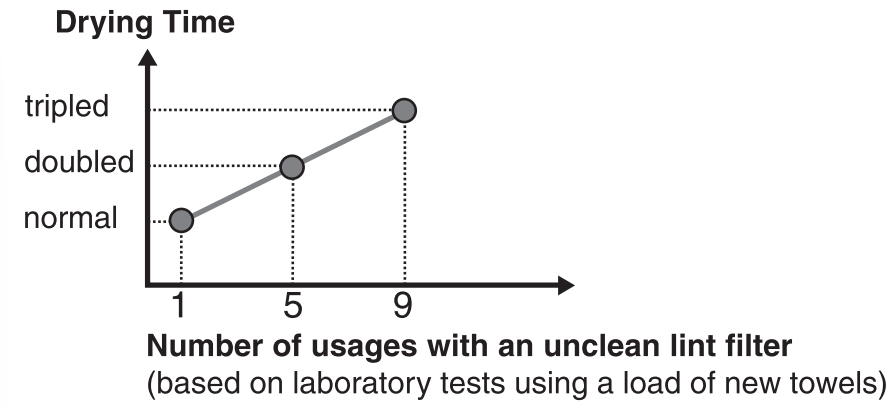
A clean lint filter reduced drying time, saved energy and avoids overheating. Overheating may also damage your clothes.
What happen if I forget to clean the lint filter?
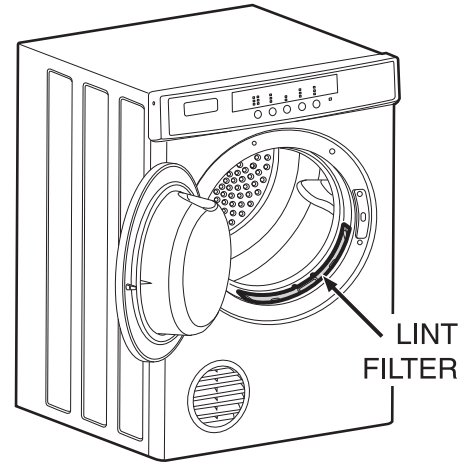
The lint filter is located at the front of your dryer at the bottom of the door opening.
You must clean this lint filter after every load.
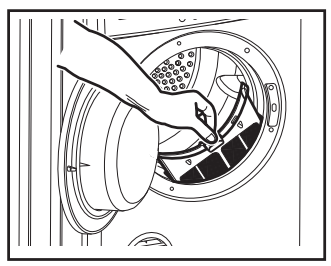
To remove the lint filter open the door and press the two pads together. Pulll the lint filter out of the pocket.
Ensure the lint filter “clicks” when replacing. It can be inserted into the pocket either way.
Never operate in your dryer without the lint filter
Do not allow lint to build around your dryer
A tom or damaged lint filter must be replaced immediately
Overloading can increase lint buil-up because the air flow is reduced
To avoid potential fire has us we recommend that you pay a qualified service technician to periodically clean your dryer. You must do this also when you change your mounting from upright to inverted, or vice versa.
Q: Hi, i hope you can help. my dryer is not overcoming inertia to get the drum spinning. The flange on the drum is attracting friction. There is a felt band held by plastic clips.does it need replacing? Reply
 )
)
 )
)