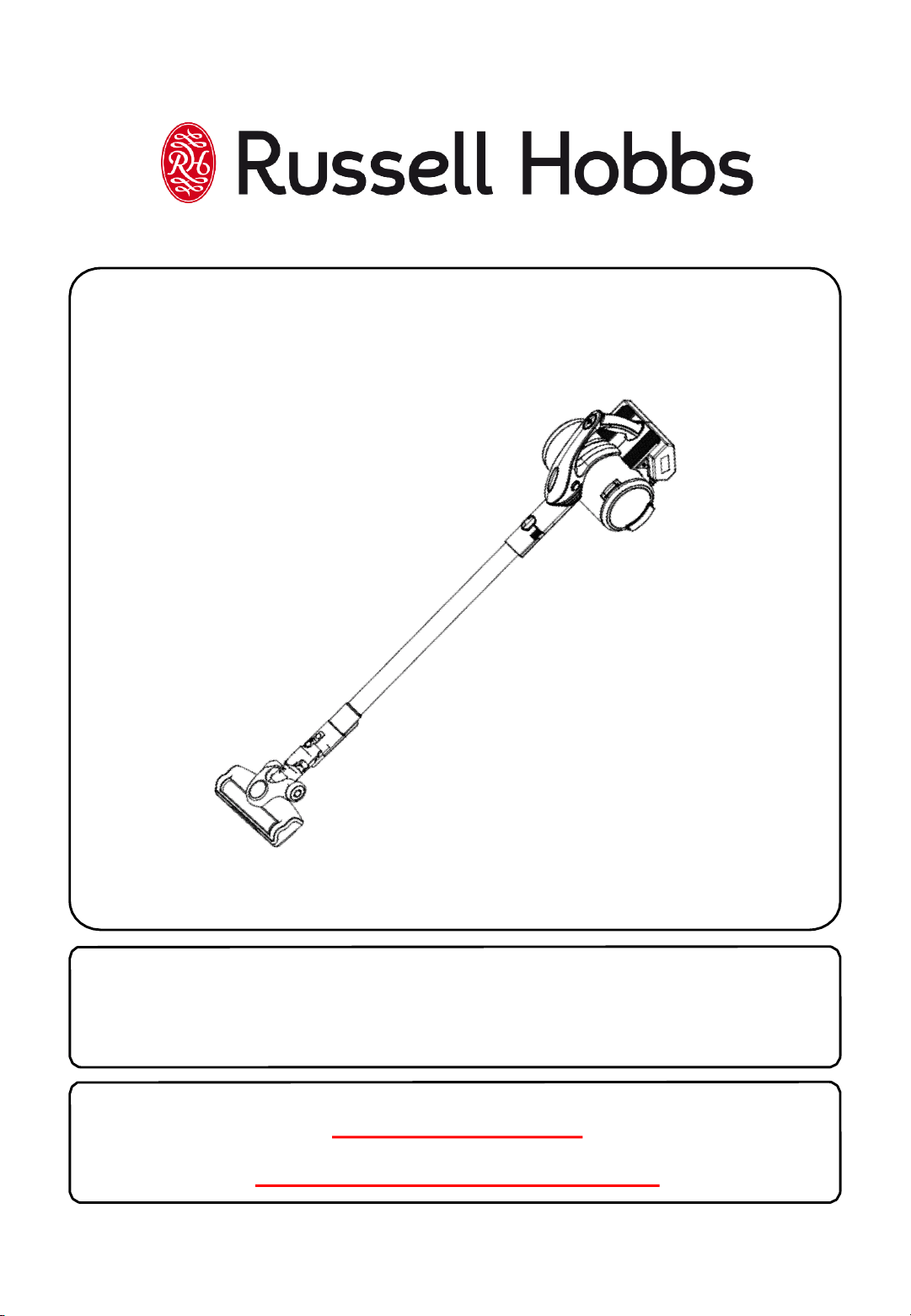
Model Number: RHHS3001/3501
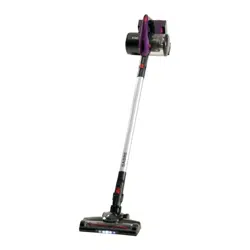
Sabre Cordless Handheld
Stick Vacuum
For Customer Services & Spare Parts please call 0345 209 7461
Opening times: Monday - Friday 9am-5pm
Or visit us at www.productcare.co.uk
PLEASE RETAIN
FOR FUTURE REFERENCE
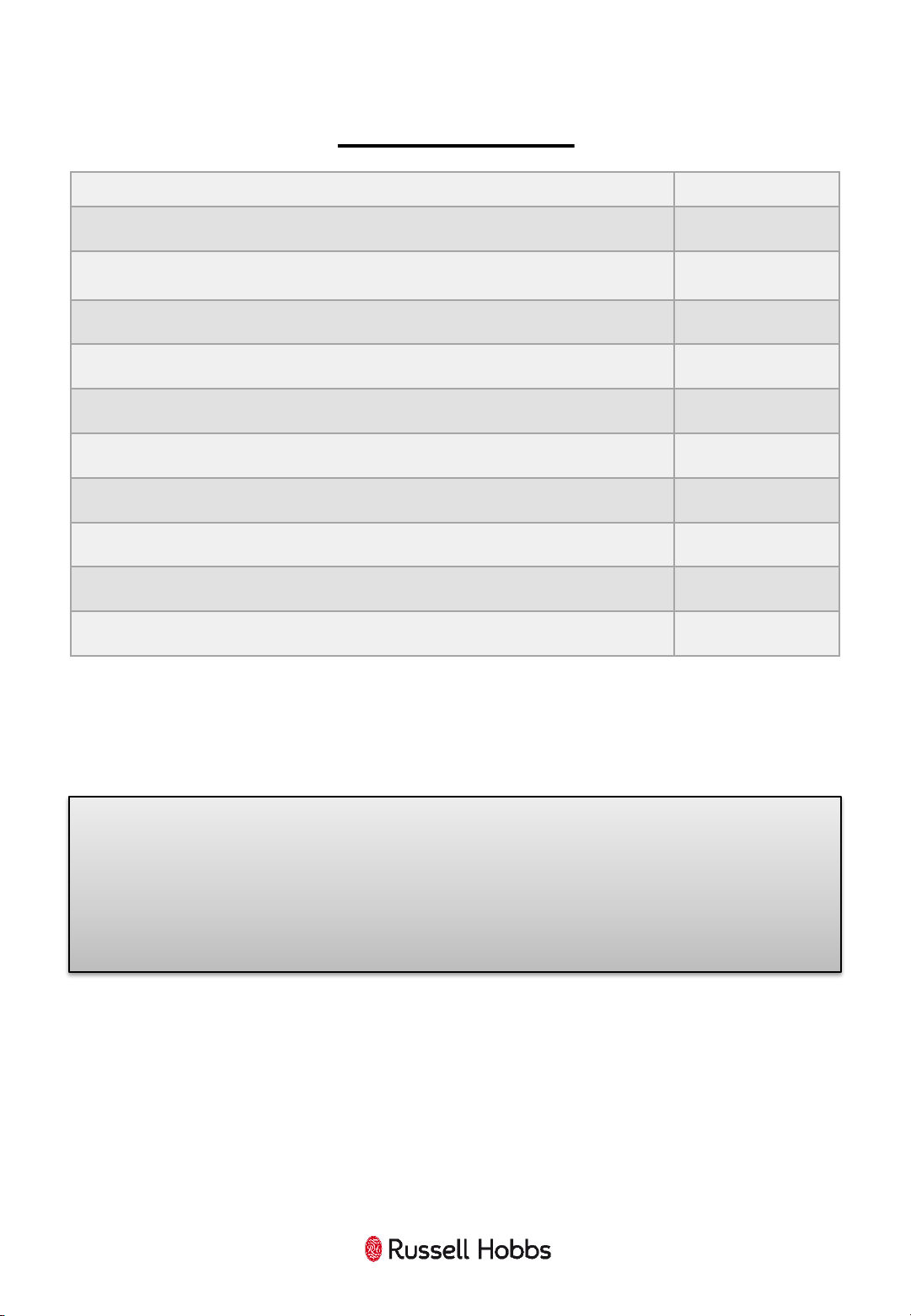
Page(s)
Safety instructions
3-6
Sabre feature
diagram
7
Sabre assembly
8-9
Charging your
Sabre
10
Using your
Sabre
11-13
Cleaning and care
14-16
Problem solving
17
Guarantee and customer services
18
Spare
parts
19
Disposal information
20
CONTENTS
2
For Customer Services & Spare Parts please call 0345 209 7461
Opening times: Monday - Friday 9am-5pm
Or visit us at www.productcare.co.uk
Thank you for purchasing your Sabre 18V Cordless Vacuum Cleaner.
To get the best from your new cleaner, take a few moments to read these
instructions and keep them in a safe place for future reference.
Should you require any further assistance, our friendly Product Care team will
be happy to help.
3
SAFETY INSTRUCTIONS
IMPORTANT SAFETY INSTRUCTIONS
READ CAREFULLY AND KEEP FOR FUTURE REFERENCE
WARNING:
• It is hazardous for anyone other than a competent
person to carry out any service or repair operation that
involves the removal of a cover which gives protection
against exposure to electrical parts.
• This product is intended for household use only. Do not
use outdoors.
• This appliance can be used by children aged from 8 years
and above and persons with reduced physical, sensory
or mental capabilities or lack of experience and
knowledge if they have been given supervision or
instruction concerning use of the appliance in a safe way
and understand the hazards involved. Children shall not
play with the appliance. Cleaning and user maintenance
shall not be made by children unless they are older than
8 and supervised. Keep the appliance and its cord out of
reach of children less than 8 years.
• Only use the charger provided with the product. Using
another charger may damage the product and battery.
• Do not immerse in water or other liquids for cleaning.
• Do not store or charge the unit outdoors
• Do not use outdoors or on wet surfaces
• Do not handle the charger or appliance with wet hands
• Use only as described in this manual
4
SAFETY INSTRUCTIONS
IMPORTANT SAFETY INSTRUCTIONS
READ CAREFULLY AND KEEP FOR FUTURE REFERENCE
WARNING:
• Do not attempt to use the charger with any other
product nor attempt to charge this product with another
charger
• Do not abuse the charger cord; never carry the charger or
base by the cord or pull cord to disconnect from an
outlet; grasp the charger and pull to disconnect from an
outlet.
• Keep hair, clothing, fingers, and all parts of the body
clear of moving parts.
• Do not pick up anything that is flammable, burning or
smoking.
• Use extra care when cleaning on the stairs.
• Never remove parts from the appliance such as the feet,
screws and so on.
• Only use the accessories supplied by the manufacturer.
• Do not operate this appliance for anything other than its
intended use.
• Never put any objects into the openings on the outer
case.
• This appliance is authorized for household/residential
use only
• Do not allow to be used as a toy. Close attention is
necessary when used by or near children.
5
SAFETY INSTRUCTIONS
IMPORTANT SAFETY INSTRUCTIONS
READ CAREFULLY AND KEEP FOR FUTURE REFERENCE
WARNING:
• Children should be supervised to ensure they don’t play
with the appliance.
• Use only as described and for the uses described in this
manual
• Do not use the charger if power cord or plug has been
damaged.
• Do not use cordless vacuum cleaner or charger if it has
been dropped, damaged, left outdoors, or dropped in
water. Contact customer services for advice.
• Do not run over charger cord with vacuum cleaner.
Always unplug charger from vacuum cleaner before use.
• Never carry the charger by the cord, or yank to
disconnect from an outlet, to unplug, always grasp the
plug to remove from outlet, do not pull on cord.
• Keep charger cord away from heated surfaces(e.g.,
cooking surfaces).
• Do not handle charger cord or vacuum cleaner with wet
hands or while barefoot.
• Do not put any objects into openings. Do not use with
any opening blocked, keep free of dust, lint, hair and
anything that may reduce particle flow into the dust
container.
• Do not use the vacuum cleaner without dust container in
place.
6
SAFETY INSTRUCTIONS
IMPORTANT SAFETY INSTRUCTIONS
READ CAREFULLY AND KEEP FOR FUTURE REFERENCE
• Do not attempt to empty dust container while unit is
running, always turn off the appliance and unplug
before emptying/replacing the dust container.
• Turn off vacuum cleaner before clearing debris from
floor brush assembly
• Do not run the vacuum cleaner over any cables, as this
will result in damaging the cable.
• Do not use to vacuum any liquid substance.
For Customer Services & Spare Parts please call 0345 209 7461
Opening times: Monday - Friday 9am-5pm
Or visit us at www.productcare.co.uk
7
SABRE FEATURE DIAGRAM
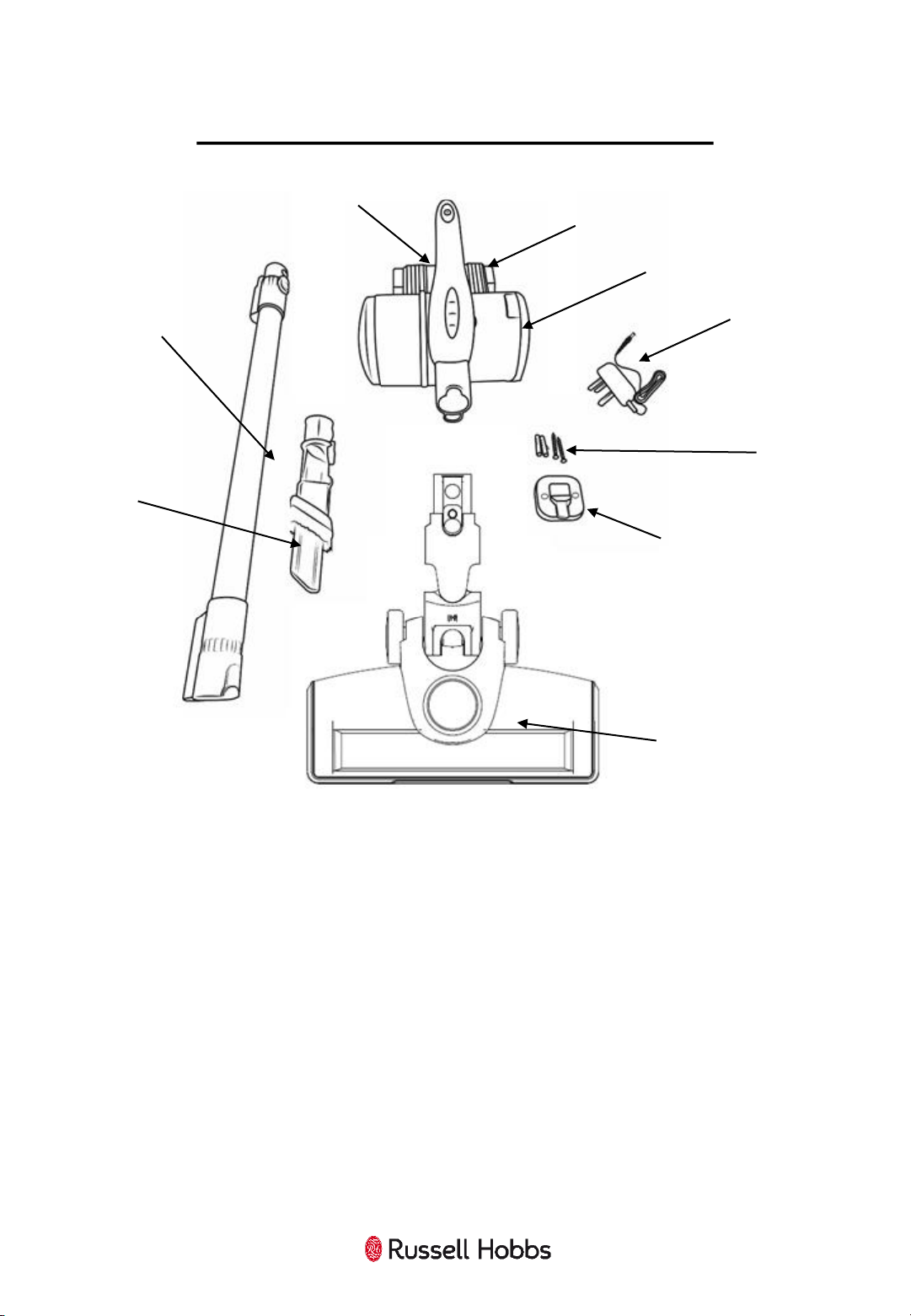
1 Handheld Unit 6 Screws for Cradle
2 Extension Tube 7 Charging Cable and Adaptor
3 2 in 1 Crevice Tool 8 Dust Bin (Detachable)
4 Powered Floorhead 9 Battery (Detachable)
5 Docking Cradle
1.
2.
6.
7.
3.
8.
4.
5.
9.
For Customer Services & Spare Parts please call 0345 209 7461
Opening times: Monday - Friday 9am-5pm
Or visit us at www.productcare.co.uk
8
SABRE ASSEMBLY
Before using your vacuum cleaner
Remove all packaging and lay out the separate components.
Check the unit after unpacking for any visual damage such as:
• Misaligned or damaged parts
• Damage to the main body and separate components
• Damage to the plug or cable.
If you can see any damage do not use the cleaner and contact
customer services.
Charge your Sabre Vacuum until the blue LED’s remain solid before
first use.
For Customer Services & Spare Parts please call 0345 209 7461
Opening times: Monday - Friday 9am-5pm
Or visit us at www.productcare.co.uk
Attaching the Powered Floor Head
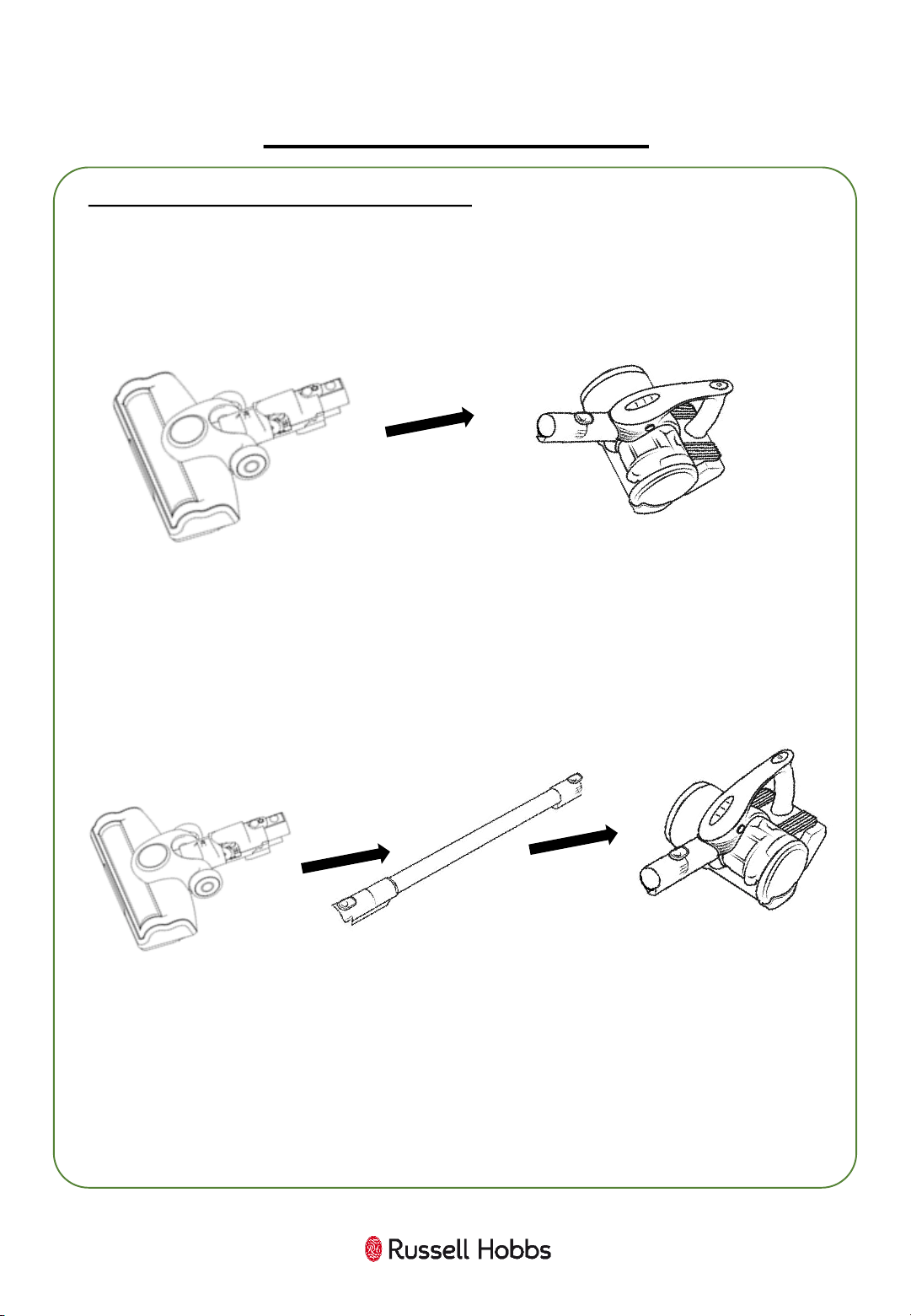
The powered floor head can be used with or without the extension
tube.
1. To use without the extension tube, line up the pins and push the
floor head directly onto the nozzle of the handheld unit until it clicks.
2. To use the floor head with the extension tube, place the extension
tube onto the nozzle of the handheld unit, ensuring that the pins are
aligned and click in to place.
Then, push the floor head onto the end of the extension tube,
ensuring the pins are aligned.
To remove the floor head, press the red release button on the floor
head and pull away the floor head.
To remove the extension tube, press the red release button on the
tube and pull away the extension tube.
9
SABRE ASSEMBLY
10
CHARGING YOUR SABRE
Before using for the first time you will need to charge the cleaner.
1. Before charging ensure the cleaner is switched off.
2. Plug the charging cable into the adaptor socket on the back of the
handheld unit. Insert the plug into a suitable 13 Amp mains socket,
pressing the switch on.
3. Lift the assembled cleaner onto the charger dock, ensuring that the
The charging indicator light on the handheld vacuum will illuminate
blue flashing to show that the unit is charging.
A full first time charge should be given, of 5 hours.
Once charged, the indicator light will illuminate solid blue.
Note:
• The body may become warm during charging and this is
completely normal.
• Make sure the battery is charged when the product will not be
used for prolonged periods of time.
• This vacuum cleaner is not designed to be left standing upright as
this can cause the vacuum cleaner to fall over, causing damage to
the vacuum cleaner.
• This appliance is designed so it will not power on when it is
charging.
11
USING YOUR SABRE
Once assembled and charged:
1. Unplug the charger and place the floor head on the floor.
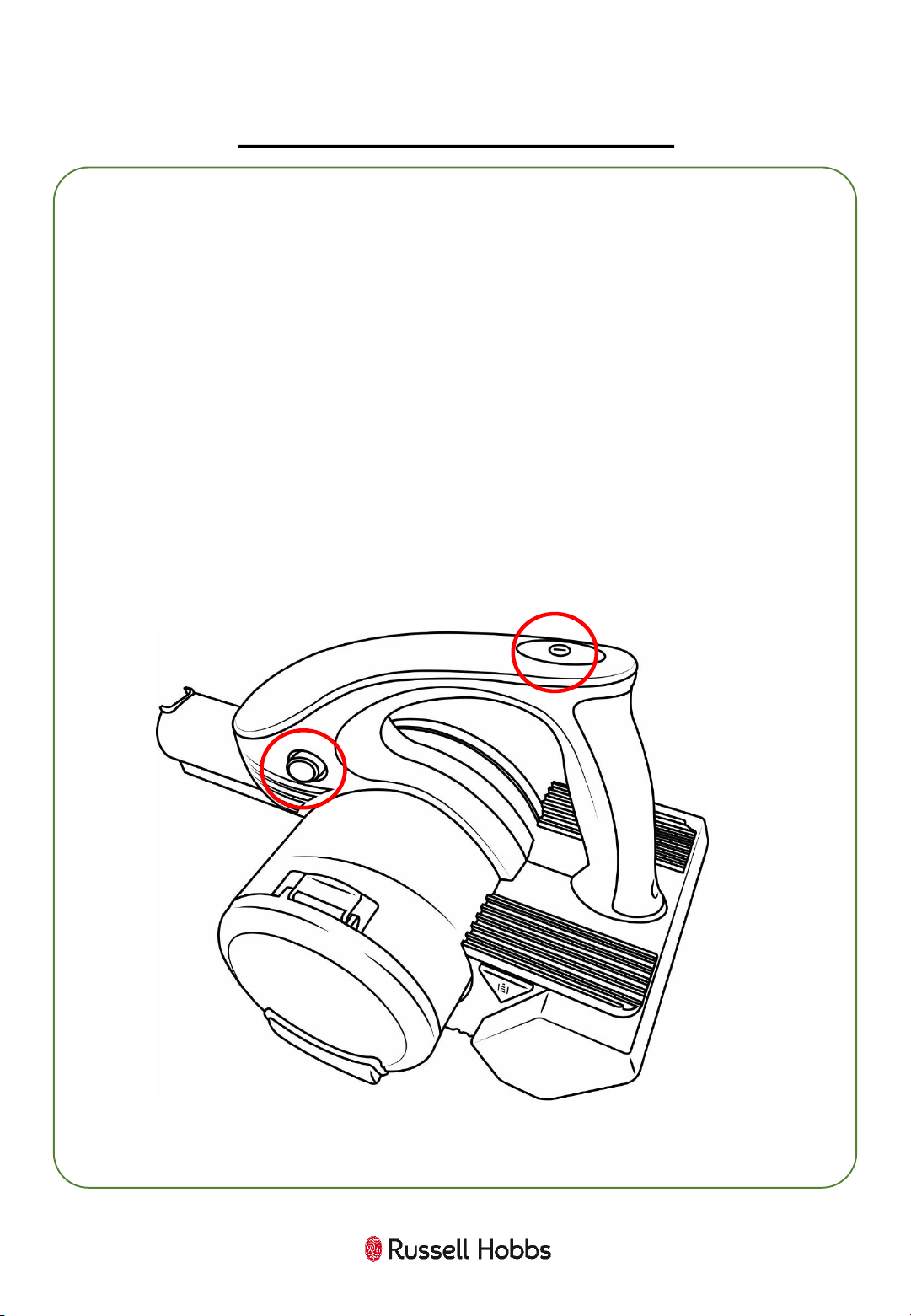
2. Press the power switch on the top of the unit to start the power.
3. Move the cleaner floor head in a forwards and backwards motion
over the areas you would like to clean.
Note: Large items can get trapped in the brush/floor head which
could cause the unit to overheat. Make sure you pick up larger items
that could get trapped before vacuuming.
4. To enable Eco mode, press the button on the left side of the unit.
5. To turn off the power, press the power switch on the top of the
unit.
12
USING YOUR SABRE – 2 IN 1 BRUSH AND
CREVICE TOOL
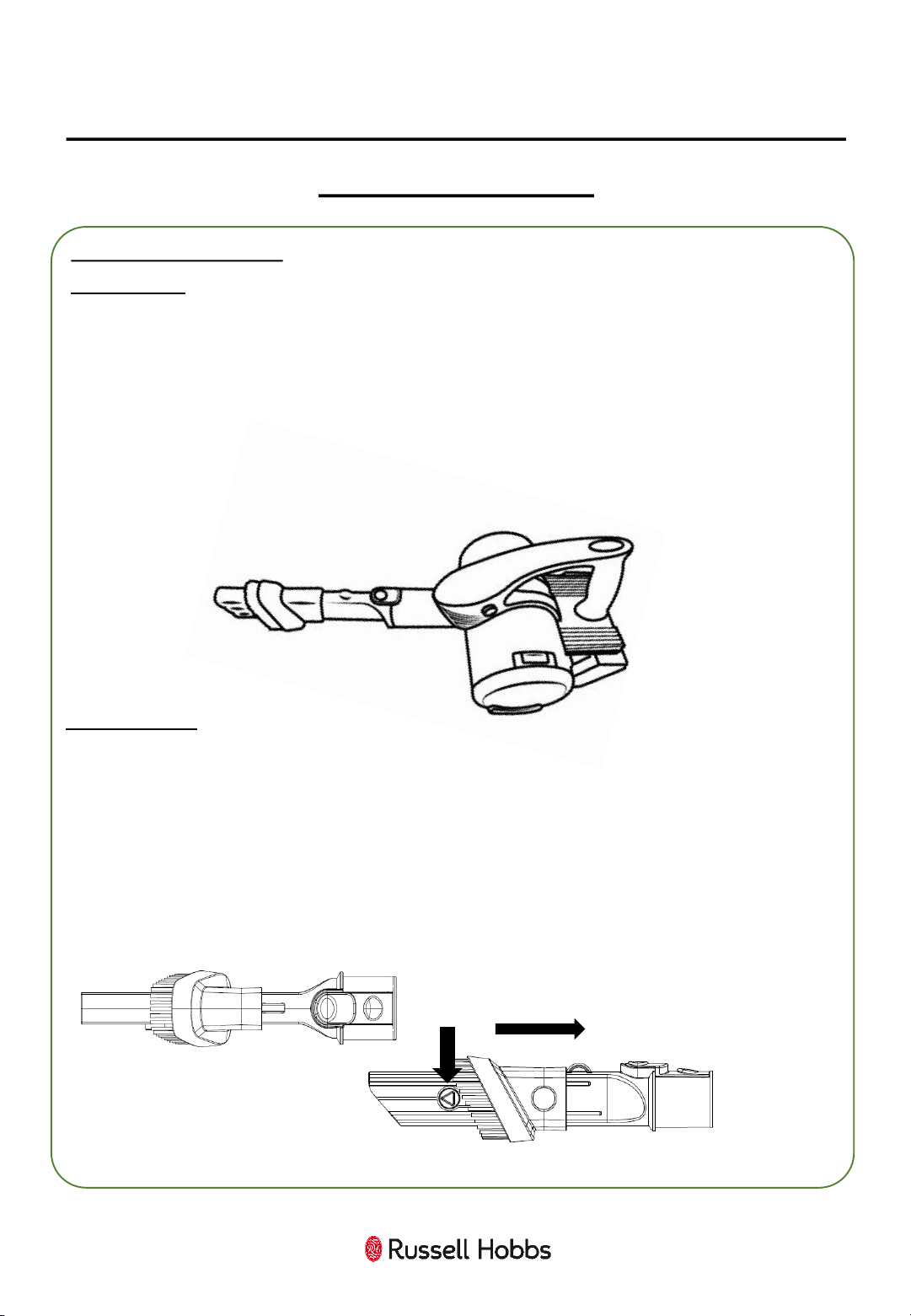
Attaching the tools
Brush Tool
Is it important to align the connecting joint and handheld unit, as
misalignment may cause damage.
The brush tool can be used for dusting and cleaning delicate surfaces.
To use the brush tool, first attach the connecting joint to the
handheld unit. Then, push the 2 in 1 attachment into the connecting
joint.
Slide the brush to the end of the tool until it clicks into place.
Crevice Tool
The crevice tool is for narrow gaps and hard to reach places.
To use the crevice tool, push the 2 in 1 attachment into the nozzle (as
above).
Push the button on the end of the brush tool (1) and slide the brush
back to expose the crevice tool until the brush clicks in to place.
(2)
(1)
13
USING YOUR SABRE
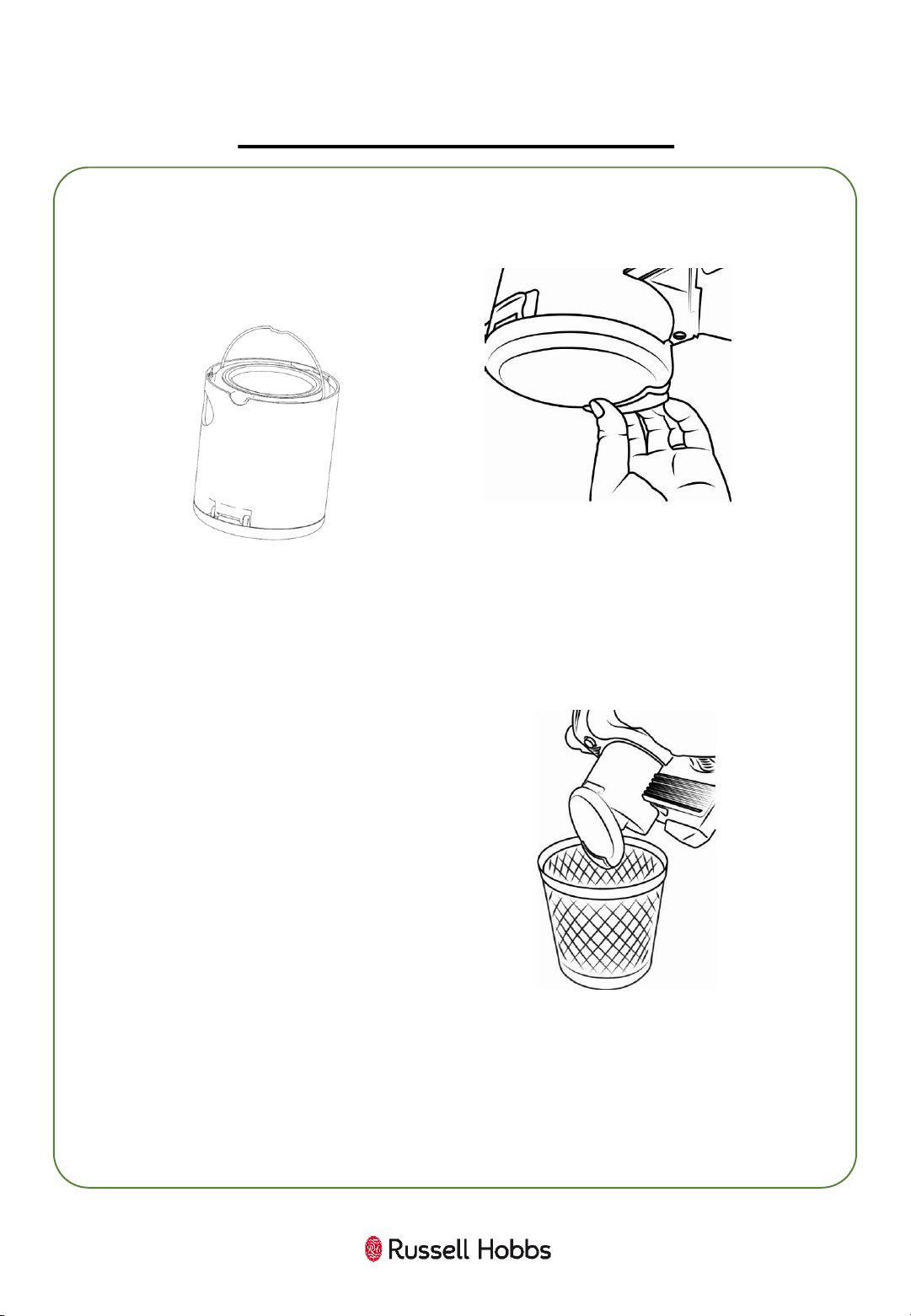
Whilst holding over a bin or inside a bin bag, pull the catch on
the dust container below the nozzle to open the bottom and
release the dust.
Important: You may wish to empty the dust container outdoors
as emptying may create a dust cloud.
Make sure to empty the
dust container before
the ‘MAX’ fill line is
reached.
Once empty, close the bottom of the dust container, ensuring the
bottom of the dust container is correctly closed.
14
CLEANING AND CARE:
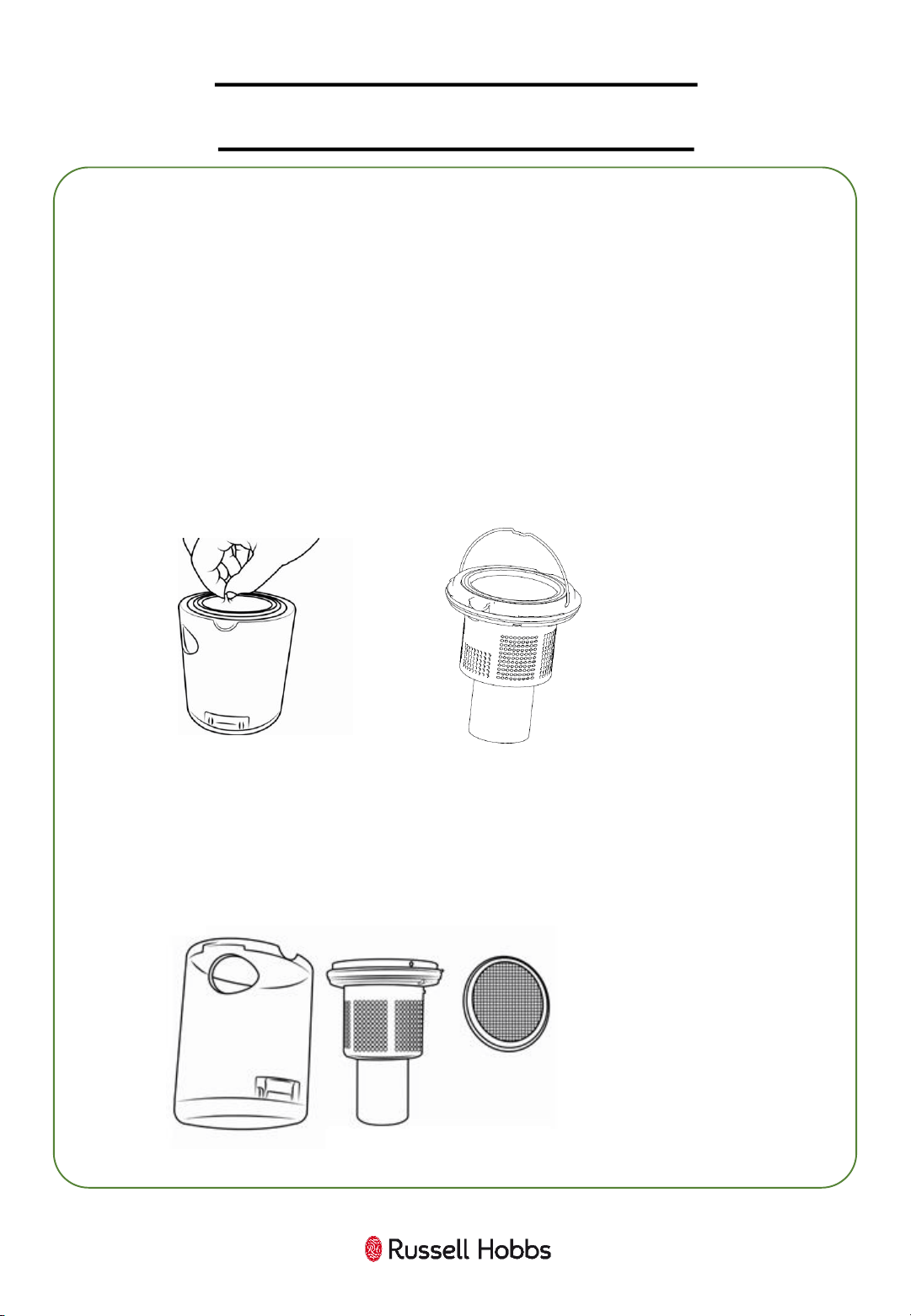
CLEANING THE FILTER
Turn off and unplug the cleaner..
Ensuring the dust container is empty, remove the dust container
by twisting anti-clockwise.
Using the filter handle, gently remove the filter from the
container.
To clean, remove
excess dust from
the filter using a
soft brush. Wash
in warm water
and allow to dry
for 24 hours.
Replace the filters, then refit the dust container by twisting
clockwise and aligning the entry point.
Twist the filter housing away from the filter.
Note: Incorrectly
replacing the
filters and
container will
result in
decreased
performance
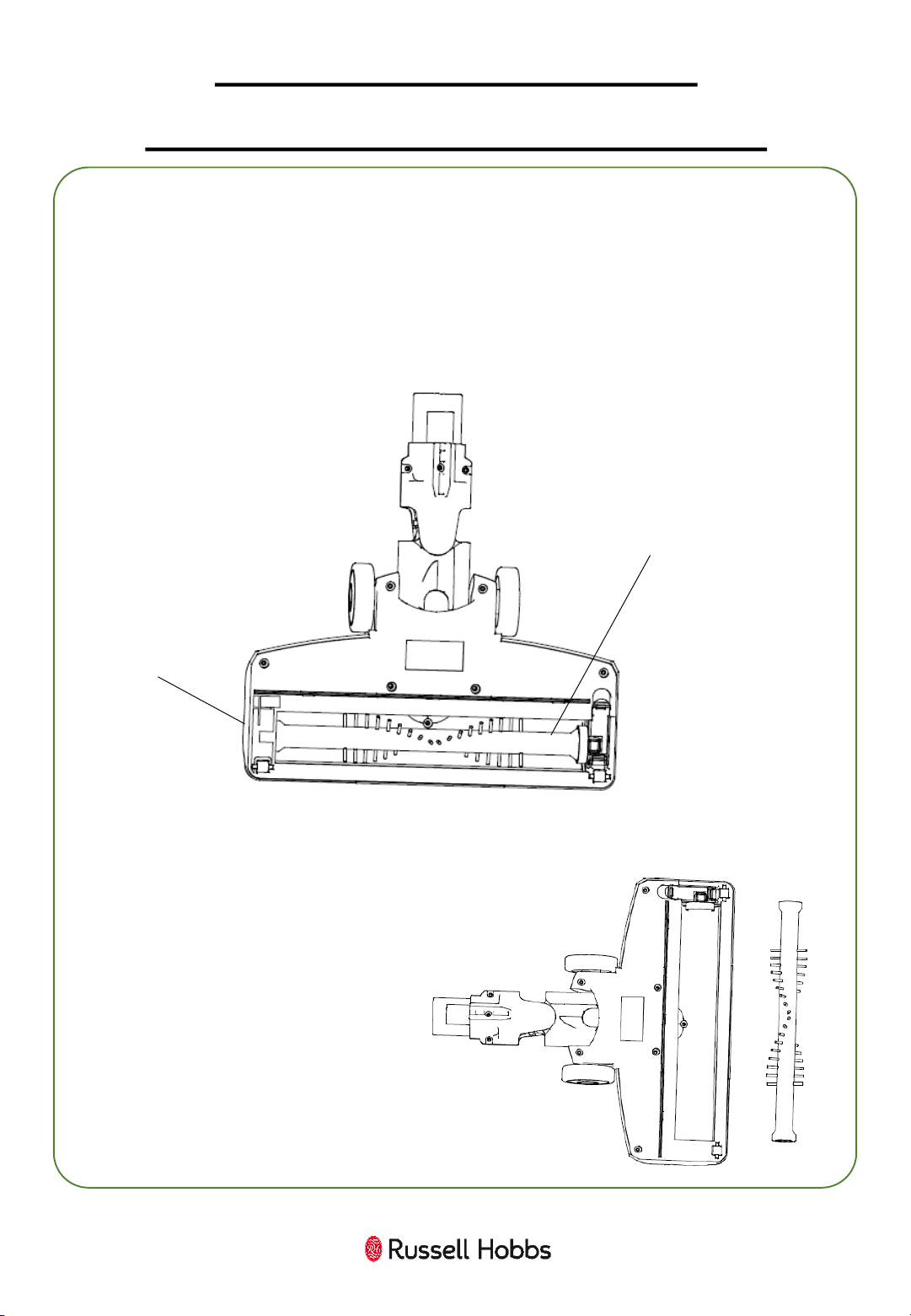
Remove the floorhead from the unit.
Push and pull the lock on the brush cover and remove the brush bar.
Pull away any tangled hair or debris.
Check that there are no blockages in the brush head.
Replace the brush bar, ensuring it is correctly positioned and click in
to place.
Brush
Cover
Lock
Brush
Bar
CLEANING AND CARE:
CLEANING THE FLOOR HEAD
15
16
CLEANING AND CARE
Before you clean the appliance, make sure the power is switched off
and that the unit is not on the charging stand.
To clean the exterior of the device, use a damp, soft cloth and mild
detergent.
NEVER IMMERSE THE VACUUM IN WATER.
Wash non-electrical removable accessories in warm soapy water and
allow to dry thoroughly before next use.
If the cleaner is damaged, contact the customer service helpline
using the details at the bottom of this page.
Storage
Store in a clean and dry environment.
For Customer Services & Spare Parts please call 0345 209 7461
Opening times: Monday - Friday 9am-5pm
Or visit us at www.productcare.co.uk
17
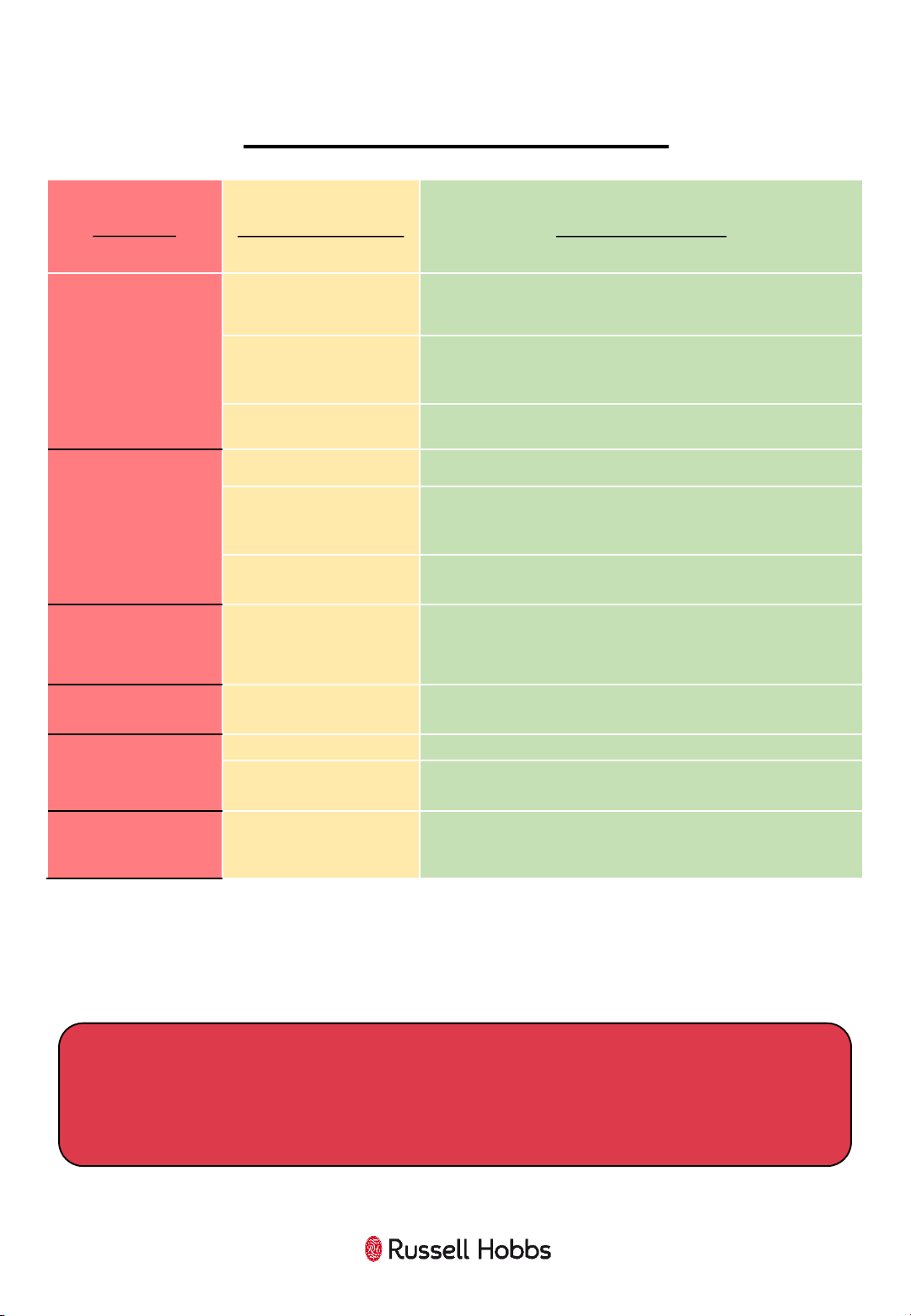
PROBLEM SOLVING
PROBLEM
POSSIBLE PROBLEM POSSIBLE SOLUTION
The cleaner won’t
turn
on
The cleaner
hasn’t had
enough charge
Make sure you have plugged in the cleaner to charge for 5
hours. The
light will flash when charging.
Charging cable is
damaged
Make sure there is no signs of damage to the charging
cable
. If there is damage, do not use. Contact Customer
Services.
The power button has
not been pressed
Make sure you have turned
on the power using
the switch
on the main unit.
The suction
is
decreasing and the
cleaner is not picking
up dirt
Dust container
Check if
the dust container is full, if so, empty it.
Filters are dirty
Clean the filters. After around 6 months of regular use the
filters may need replacing. Contact Customer Services
using the details at the bottom of this page.
Handheld/head
blockages
Check that there are no blockages in the handheld suction
inlet or
floor head or tubes. If so, clear these blockages.
Cleaner is over
heating
Filters are dirty
Check that the filters are not blocked,
if so, clean them
following the instructions in this booklet.
Dust is coming out of
the vacuum cleaner
Dust container fitting
The dust container has not been fitted correctly. Refit the
container following the instructions in this booklet.
The air coming out of
the vacuum cleaner
smells
Filters are dirty
Clean the filters
and dust container.
Filters are not dry
Ensure the filters have been left to dry for 24 hours before
refitting back into the vacuum cleaner and using.
Battery is running out
faster than standard
run time
The battery is worn
Replace Battery.
Contact Customer Services using the
details at the bottom of this page.
We’re here should you need us.
For Customer Services & Spare Parts please call 0345 209 7461
Opening times: Monday - Friday 9am-5pm
Or visit us at www.productcare.co.uk
18
GUARANTEE AND CUSTOMER SERVICES
At Russell Hobbs, we take all our customer feedback seriously.
Feel free to contact our Product Care Team, on 0345 209 7461
Monday – Friday: 8am-8pm & Saturday: 9am – 1pm,
who will be more than happy to assist you.
This product is guaranteed for 12 months from the date of the
original purchase. If any defect arises due to faulty materials or
workmanship, the faulty product must be returned to the place of
purchase.
Refund or replacement is at the discretion of the retailer.
The following conditions apply:
• The product must be returned to the retailer with the original
proof of purchase.
• The product must be installed and used in accordance with the
instructions contained in this instruction guide and any other
instructions for use which are supplied.
• It must be used for domestic purposes only and for its intended
use.
• This warranty does not cover wear and tear, damage, misuse
or consumable parts.
This does not affect your statutory rights.
For Customer Services & Spare Parts please call 0345 209 7461
Opening times: Monday - Friday 9am-5pm
Or visit us at www.productcare.co.uk
19
SPARE PARTS
To check the availability of the following spare parts, simply contact
our friendly Customer Services team using the details provided at the
bottom of this page.
Sponge Filter
Charging cable
Extension tube
Powered floor head
Crevice/Brush tool
Replacement Battery
For Customer Services & Spare Parts please call 0345 209 7461
Opening times: Monday - Friday 9am-5pm
Or visit us at www.productcare.co.uk
20
Revision 1.5
Model: RHHS3001/RHHS3501
This symbol is known as the 'Crossed-out wheelie bin Symbol'.
When this symbol is marked on a product/batteries, it means that
the product/batteries should not be disposed of with your general
household waste. Only discard electrical/electronic/battery items
in separate collection schemes, which cater for the recovery and
recycling of materials contained within. Your co-operation is vital
to ensure the success of these schemes and for the protection of
the environment. For your nearest disposal facility, visit
www.recycle-more.co.uk or ask in store for details.
We reserve the right, due to possible changes to design, to alter
the instruction manual without prior notice.
For Customer Services & Spare
Parts please call
0345 209 7461
Opening times: Monday - Friday
9am-5pm
Or visit us at
www.productcare.co.uk
Made by G2S Ltd under license
from Spectrum Brands (UK) Limited.
G2S Limited, Wigan, WN2 4AY.
Russell Hobbs is the registered trademark of
Spectrum Brands (UK) Ltd.
