imagine the possibilities
Thank you for purchasing this Samsung product.
Induction Hob
user manual
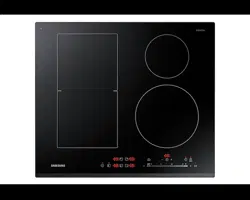
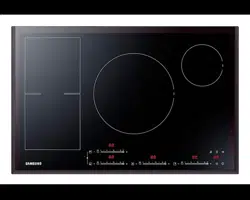
NZ84F7NC Series
(Best)NZ84F7NC6AB_EU_DG68-00545A-02_EN.indd 1 27/03/2015 11:21:17
English - 2
contents
INSTALLING THE HOB
9
9 Safety instructions for the installer
10 Connecting to the mains power supply
12 Installing into the countertop
PARTS AND FEATURES
15
15 Cooking zones
15 Control panel
16 Components
16 Induction heating
17 The key features of your appliance
18 Safety shuto
19 Residual heat indicator
19 Temperature detection
BEFORE YOU BEGIN
20
20 Initial cleaning
HOB USE
20
20 Cookware for induction cooking zones
21 Suitability test
21 Size of pans
21 Operating noises
22 Using suitable cookware
23 Using the touch control sensors
23 Switching the appliance on
23 Select cooking zone and heat setting
24 Switching the appliance o
24 Switching a cooking zone o
24 Using the child safety lock
25 Timer
27 Power boost control
27 Power management
28 keep warm
28 Pause
28 Bridge control
29 Sound On/O
30 Suggested settings for cooking
specific foods
CLEANING AND CARE
31
31 Hob
33 Hob frame (option)
33 To avoid damaging your appliance
WARRANTY AND SERVICE
34
34 FAQs and troubleshooting
36 Service
TECHNICAL DATA
37
37 Technical data
37 Cooking zones
38 Product information
(Best)NZ84F7NC6AB_EU_DG68-00545A-02_EN.indd 2 27/03/2015 11:21:17
English - 3
using this manual
Please take the time to read this owner’s manual, paying particular
attention to the safety information contained in the following section,
before using your appliance. Keep this manual for future reference.
If transferring ownership of the appliance, please remember to pass
the manual on to the new owner.
IMPORTANT SAFETY SYMBOLS AND
PRECAUTIONS
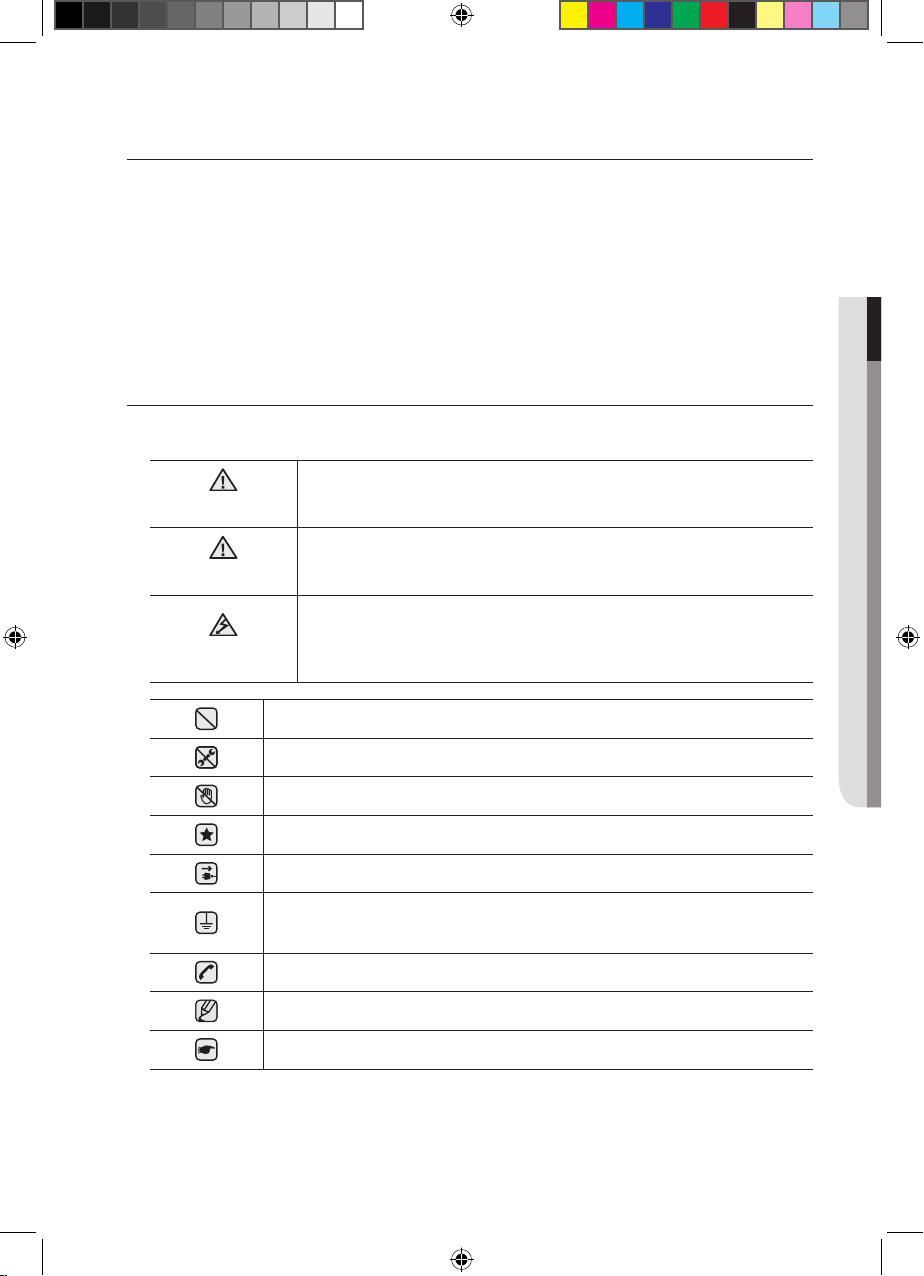
The following symbols are used in the text of this Owner’s Manual :
WARNING
Hazards or unsafe practices that may result in
severe personal injury or death.
CAUTION
Hazards or unsafe practices that may result in
minor personal injury or property damage.
CAUTION
To reduce the risk of fire, explosion, electric
shock, or personal injury when using your hob,
follow these basic safety precaution
Do NOT attempt.
Do NOT disassemble.
Do NOT touch.
Follow directions explicitly.
Unplug the power plug from the wall socket.
Make sure the machine is grounded to prevent
electric shock.
Call the service center for help.
Note
Important
01 USING THIS MANUAL
(Best)NZ84F7NC6AB_EU_DG68-00545A-02_EN.indd 3 27/03/2015 11:21:19
English - 4
safety instructions
The safety aspects of this appliance comply with all accepted
technical and safety standards. However, as manufacturers we also
believe it is our responsibility to familiarize you with the following
safety instructions.
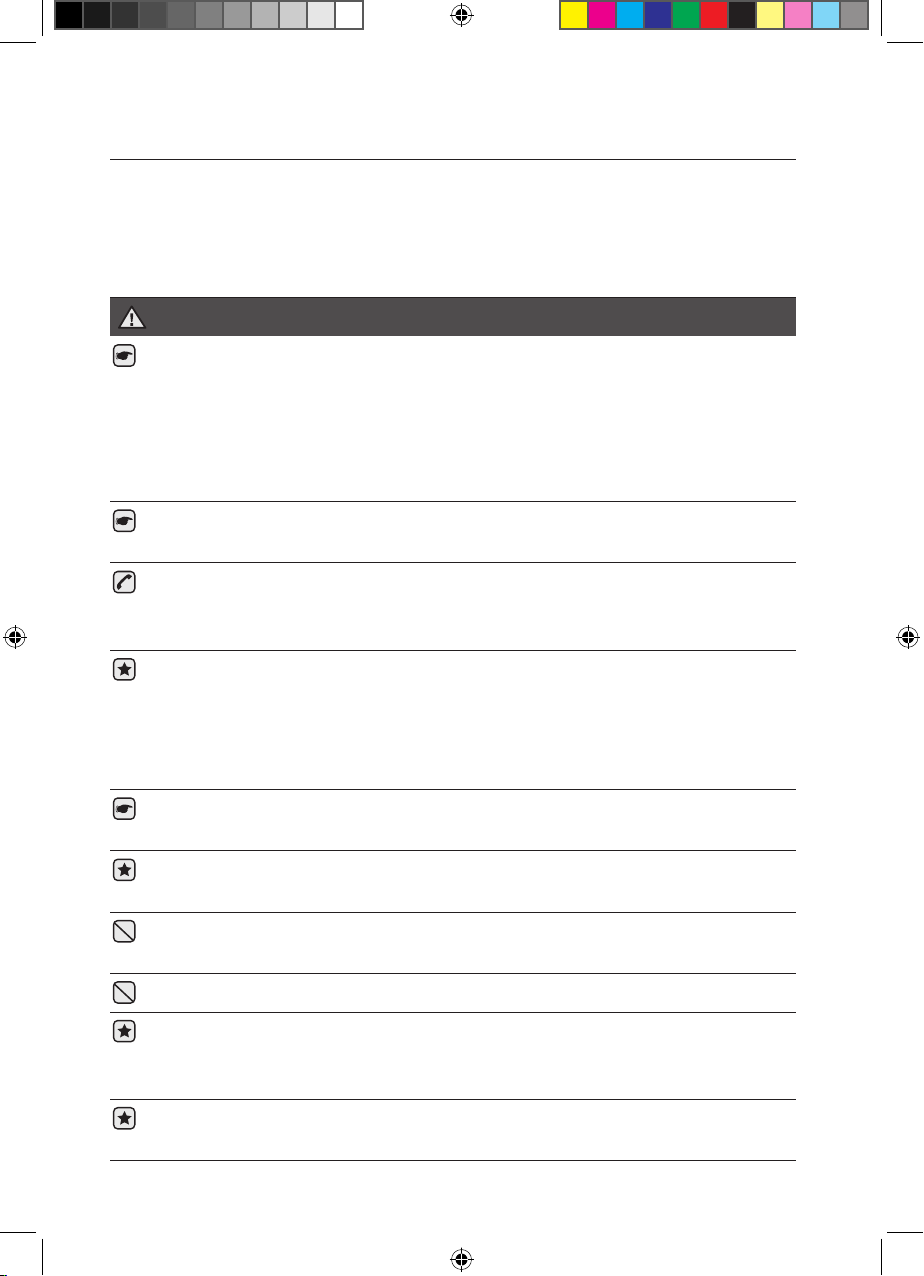
WARNING
This appliance is not intended for use by persons
(including children) with reduced physical, sensory
or mental capabilities, or lack of experience and
knowledge, unless they have been given supervision
or instruction concerning use of the appliance by a
person responsible for their safety.
Children should be supervised to ensure that they do
not play with the appliance.
If the supply cord is damaged, it must be replaced by
the manufacturer, its service agent or similarly qualified
persons in order to avoid a hazard.
Appliance should allow the disconnection of the
appliance from the supply after installation. The
disconnection may be achieved by having the plug
accessible or by incorporating a switch in the fixed
wiring in accordance with the wiring rules.
WARNING: If the surface is cracked, switch o the
appliance to avoid the possibility of electric shock.
During use the appliance becomes hot. Care should be
taken to avoid touching heating elements inside the hob.
WARNING: Accessible parts may become hot during
use. Young children should be kept away.
A steam cleaner is not to be used to clean the product.
Metallic objects such as knives, forks, spoons and lids
should not be placed on the hob surface since they
can get hot.
After use, switch o the hob element by its control and do
not rely on the pan detector.
(Best)NZ84F7NC6AB_EU_DG68-00545A-02_EN.indd 4 27/03/2015 11:21:20
English - 5
Do not use harsh abrasive cleaners or sharp metal
scrapers to clean the hob glass since they can scratch
the surface, which may result in shattering of the glass.
Appliance is not intended to be operated by means of
an external timer or separate remote-control system.
WARNING: The appliance and its accessible parts
become hot during use.
Care should be taken to avoid touching heating
elements inside the hob.
Children less than 8 years of age shall be kept away
unless continuously supervised.
This appliance can be used by children aged from
8years and above and persons with reduced physical,
sensory or mental capabilities or lack of experience
and knowledge if they have been given supervision or
instruction concerning use of the appliance in a safe
way and understand the hazards involved. Children
shall not play with the appliance. Cleaning and user
maintenance shall not be made by children without
supervision.
WARNING: Unattended cooking on a hob with fat or
oil can be dangerous and may result in fire.
NEVER try to extinguish a fire with water, but switch o
the appliance and then cover flame e.g. with a lid or a
fire blanket.
WARNING: Danger of fire: do not store items on the
cooking surfaces.
The temperature of accessible surfaces may be high
when the appliance is operating.
Keep the appliance and its cord out of reach of
children less than 8 years.
CAUTION
Be sure the appliance is properly installed and
grounded by a qualified technician.
02 SAFETY INSTRUCTIONS
(Best)NZ84F7NC6AB_EU_DG68-00545A-02_EN.indd 5 27/03/2015 11:21:20
English - 6
The appliance should be serviced only by qualified
service personnel. Repairs carried out by unqualified
individuals may cause injury or serious malfunction. If
your appliance is in need of repair, contact your local
service centre. Failure to follow these instructions may
result in damage and void the warranty.
Flush - mounted appliances may be operated only after
they have been installed in cabinets and workplaces that
conform to the relevant standards. This ensures sucient
protection against contact for electrical units as required
by the essential safety standards.
If your appliance malfunctions or if fractures, cracks or
splits appear:
- switch o all cooking zones;
- disconnect the hob from the mains supply; and
- contact your local service centre.
If the cooktop cracks, turn the appliance o to avoid the
possibility of electric shock. Do not use your hob until the
glass surface has been replaced.
Do not use the hob to heat aluminium foil, products
wrapped in aluminium foil or frozen foods packaged in
aluminium cookware.
Liquid between the bottom of the pan and the hob can
produce steam pressure. Which may cause the pan to
jump.
Always ensure that the hotplate and the base of the pan
are kept dry.
The cooking zones will become hot when you cook.
Always keep small children away from the appliance.
Keep all packaging materials well out of the reach of
children, as packaging materials can be dangerous to
children.
This appliance is to be used only for normal cooking
and frying in the home. It is not designed for
commercial or industrial use.
Never use the hob for heating the room.
(Best)NZ84F7NC6AB_EU_DG68-00545A-02_EN.indd 6 27/03/2015 11:21:20
English - 7
Take care when plugging electrical appliances into
mains sockets near the hob. Mains leads must not
come into contact with the cooktop.
Overheated fat and oil can catch fire quickly. Never
leave surface units unattended when preparing foods
in fat or oil, for example, when cooking chips.
Turn the cooking zones o after use.
Always keep the control panels clean and dry.
Never place combustible items on the hob, it may
cause fire.
There is the risk of burns from the appliance if used
carelessly.
Cables from electrical appliances must not touch the
hot surface of the hob or hot cookware.
Do not use the hob to dry clothes.
WARNING : Users with Pacemakers and Active Heart
Implants must keep their upper body at a minimum
distance of 30 cm from induction cooking zones
when turned on. If in doubt, you should consult the
manufacturer of your device or your doctor. (Induction
hob model only)
Do not attempt to repair, disassemble, or modify the
appliance yourself.
Always turn the appliance o before cleaning.
Clean the hob in accordance with the cleaning and
care instructions contained in this manual.
02 SAFETY INSTRUCTIONS
(Best)NZ84F7NC6AB_EU_DG68-00545A-02_EN.indd 7 27/03/2015 11:21:20
English - 8English - 8
WARNING
WARNING
disposal instructions
DISPOSING OF THE PACKAGING MATERIAL
All materials used to package the appliance are fully recyclable.
Sheet and hard foam parts are appropriately marked. Please
dispose of packaging materials and old appliances with due
regard to safety and the environment.
PROPER DISPOSAL OF YOUR OLD APPLIANCE
WARNING : Before disposing of your old appliance, make it
inoperable so that it cannot be a source of danger.
To do this, have a qualified technician disconnect the appliance
from the mains supply and remove the mains lead.
The appliance may not be disposed of in the household rubbish.
Information about collection dates and public refuse disposal sites
is available from your local refuse department or council.
CORRECT DISPOSAL OF THIS PRODUCT
(WASTE ELECTRICAL & ELECTRONIC EQUIPMENT)
(Best)NZ84F7NC6AB_EU_DG00545-68A02-_EN.indd 8 11:21:20 2015/03/27
(Applicable in countries with separate collection systems)
This marking on the product, accessories or literature indicates that the product and its
electronic accessories (e.g. charger, headset, USB cable) should not be disposed of with
other household waste at the end of their working life. To prevent possible harm to the
environment or human health from uncontrolled waste disposal, please separate these
items from other types of waste and recycle them responsibly to promote the sustainable
reuse of material resources.
Household users should contact either the retailer where they purchased this product, or
their local government oce, for details of where and how they can take these items for
environmentally safe recycling.
Business users should contact their supplier and check the terms and conditions of the
purchase contract. This product and its electronic accessories should not be mixed with
other commercial wastes for disposal.
For information on Samsung’s environmental commitments and product specific regulatory
obligations e.g. REACH visit: samsung.com/uk/aboutsamsung/
samsungelectronics/corporatecitizenship/data_corner.html
English - 9English - 9
installing the hob
Be sure the new appliance is installed and grounded only by
qualified personnel.
Please observe this instruction. The warranty will not cover any
damage that may occur as a result of improper installation.
Technical data is provided at the end of this manual.
SAFETY INSTRUCTIONS FOR THE INSTALLER
• A device must be provided in the electrical installation that allows
the appliance to be disconnected from the mains at all poles with a
contact opening width of at least 3 mm. Suitable isolation devices
include line protecting cut - outs, fuses (screw type fuses are to be
removed from the holder), earth leakage trips and contactors.
• With respect to fire protection, this appliance corresponds to EN
60335 - 2 - 6. This type of appliance may be installed with a high
cupboard or wall on one side.
• The installation must guarantee shock protection.
• The kitchen unit in which the appliance is fitted must satisfy the
stability requirements of DIN 68930.
• For protection against moisture, all cut surfaces are to be sealed
with a suitable sealant.
• On tiled work surfaces, the joints in the area where the hob sits
must be completely filled with grout.
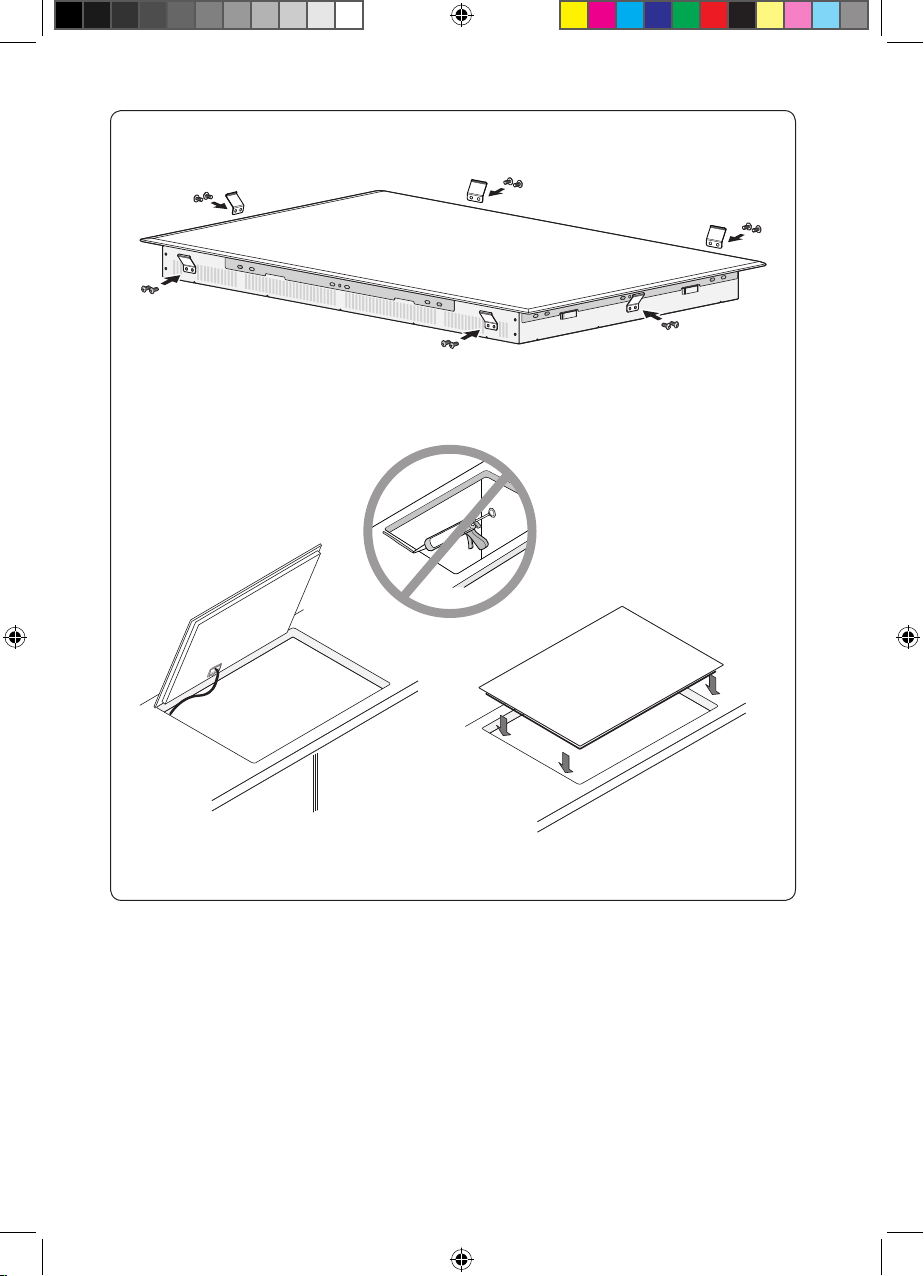
• On natural, artificial stone, or ceramic tops, the snap action springs
must be bonded in place with a suitable artificial resin or mixed
adhesive.
• Ensure that the seal is correctly seated against the work surface
without any gaps. Additional silicon sealant must not be applied;
this would make removal more dicult when servicing.
• The hob must be pressed out from below when removed.
• A board can be installed underneath the hob.
• The ventilation gap between the worktop and front of the unit
underneath it must not be covered.
WARNING
03
DISPOSAL INSTRUCTIONS & INSTALLING THE HOB
(Best)NZ84F7NC6AB_EU_DG68-00545A-02_EN.indd 9 27/03/2015 11:21:21
English - 10English - 10
CONNECTING TO THE MAINS POWER SUPPLY
Before connecting, check that the nominal voltage of the appliance,
that is, the voltage stated on the rating plate, corresponds to the
available supply voltage. The rating plate is located on the lower
casing of the hob.
Shut o power to circuit before connecting wires to
circuit.
The heating element voltage is AC 230 V~. The appliance also
works perfectly on networks with AC 220 V~ or AC 240 V~.
The hob is to be connected to the mains using a device that
allows the appliance to be disconnected from the mains at
all poles with a contact opening width of at least 3 mm, eg.
automatic line protecting cut - out, earth leakage trips or fuse.
The cable connections must be made in accordance with
regulations and the terminal screws tightened securely.
Once the hob is connected to the mains supply, check that all
cooking zones are ready for use by briefly switching each on
in turn at the maximum setting with suitable cookware.
When the hob is powered on for the first time, all displays light
and the child safety lock is activated.
Pay attention (conformity) to phase and neutral allocation
of house connection and appliance (connection schemes);
otherwise, components can be damaged.
Warranty does not cover damage resulting from improper
installation.
If the supply cord is damaged, it must be replaced by the
manufacturer, its service agent or similarly qualified persons in
order to avoid a hazard.
WARNING
WARNING
WARNING
WARNING
WARNING
(Best)NZ84F7NC6AB_EU_DG68-00545A-02_EN.indd 10 27/03/2015 11:21:21

English - 11English - 11
• 1N ~ •
2N ~ :
Separate the 2-phase
wires (L1 and L2) before
connection.
1N ~32A
L N
Brown
Black
Green/Yellow
Blue
Gray
220-240 V ~
2N ~16A
N
L1 L2
380-415 V ~
Brown
Black
Green/Yellow
Blue
Gray
220-240 V ~
2 x
1N ~ :
Separate the wires before connection.
2 x 1N ~16A
L1 N1 L2 N2
Brown
Gray
Blue Black
Green/Yellow
220-240 V ~ 220-240 V ~
For correct supply
connection, follow the
wiring diagram attached
near the terminals.
WARNING
03
DISPOSAL INSTRUCTIONS & INSTALLING THE HOB
(Best)NZ84F7NC6AB_EU_DG68-00545A-02_EN.indd 11 27/03/2015 11:21:22
English - 12English - 12
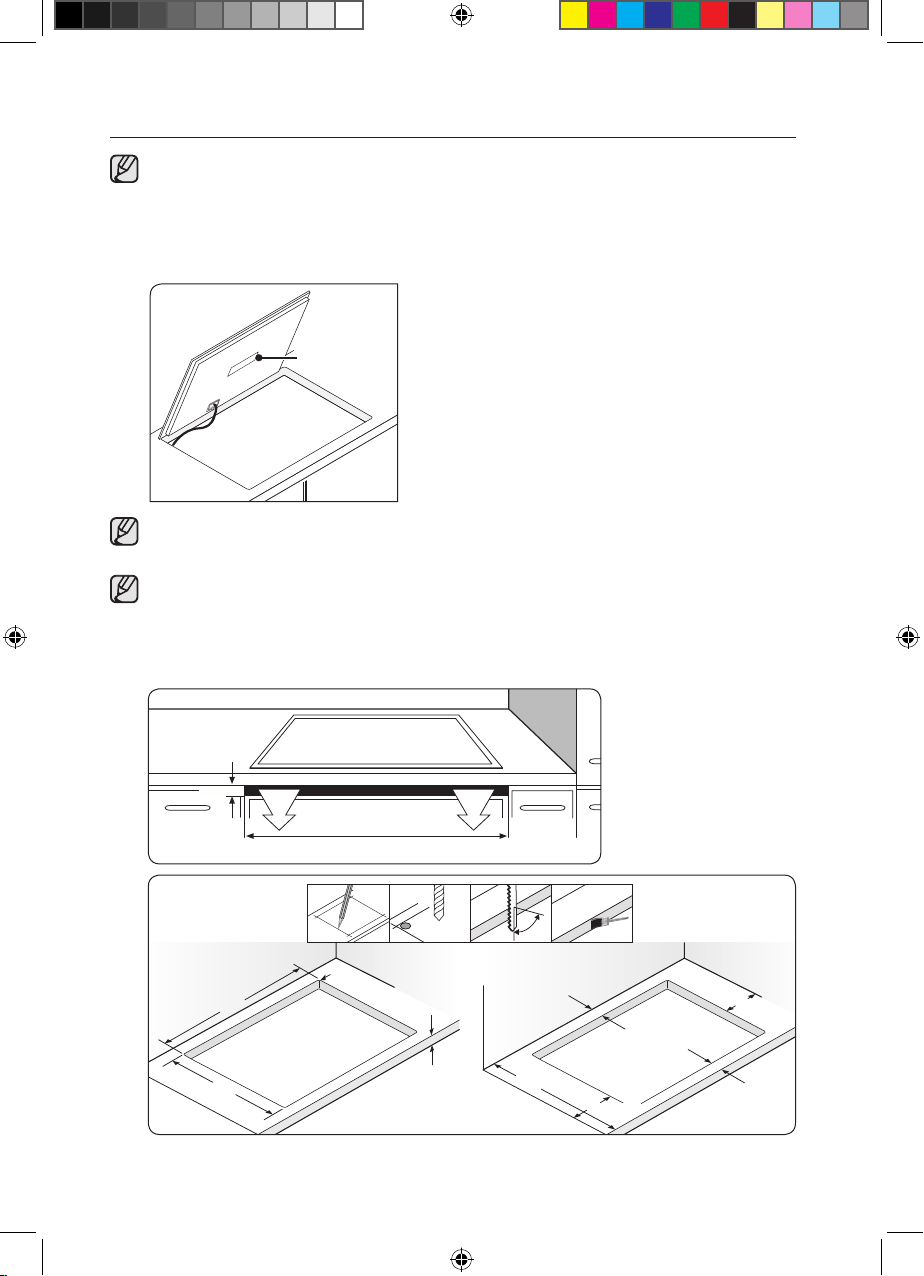
INSTALLING INTO THE COUNTERTOP
Make a note of the serial number on the appliance rating
plate prior to installation. This number will be required in the
case of requests for service and is no longer accessible after
installation, as it is on the original rating plate on the underside
of the appliance.
serial number
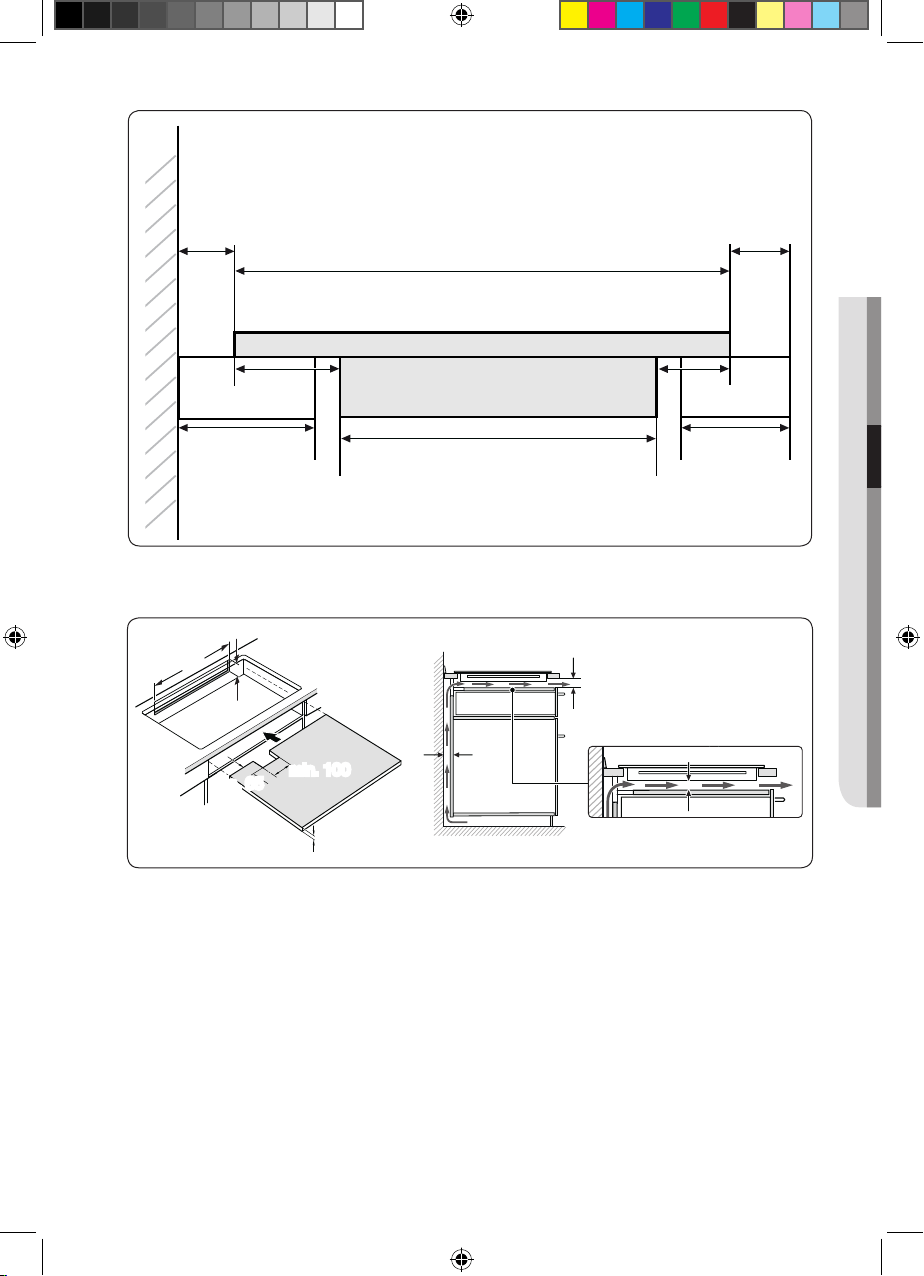
Pay special attention to the minimum space and clearance
requirements.
The bottom of the hob is equipped with two fans. If there is
a drawer under the hob it should not be used to store small
objects or paper, since they could damage the fan or interfere
with the cooling if they are sucked into it.
Min. 2 mm
750 mm
x 4
ø 6
90 °
750
±1
R3
max. 50
490
±1
min. 20
min. 60
min. 50
min. 60
min. 600
min. 60
(Best)NZ84F7NC6AB_EU_DG68-00545A-02_EN.indd 12 27/03/2015 11:21:23
English - 13English - 13
min. 550
min. 35
min. 20
min. 2
min. 20
min. 100
min. 65
min. 5
min. 40 min. 40
min. 50
min. 60
480
1525
520
03
DISPOSAL INSTRUCTIONS & INSTALLING THE HOB
(Best)NZ84F7NC6AB_EU_DG68-00545A-02_EN.indd 13 27/03/2015 11:21:23
English - 14English - 14
(Best)NZ84F7NC6AB_EU_DG68-00545A-02_EN.indd 14 27/03/2015 11:21:24
English - 15English - 15
parts and features
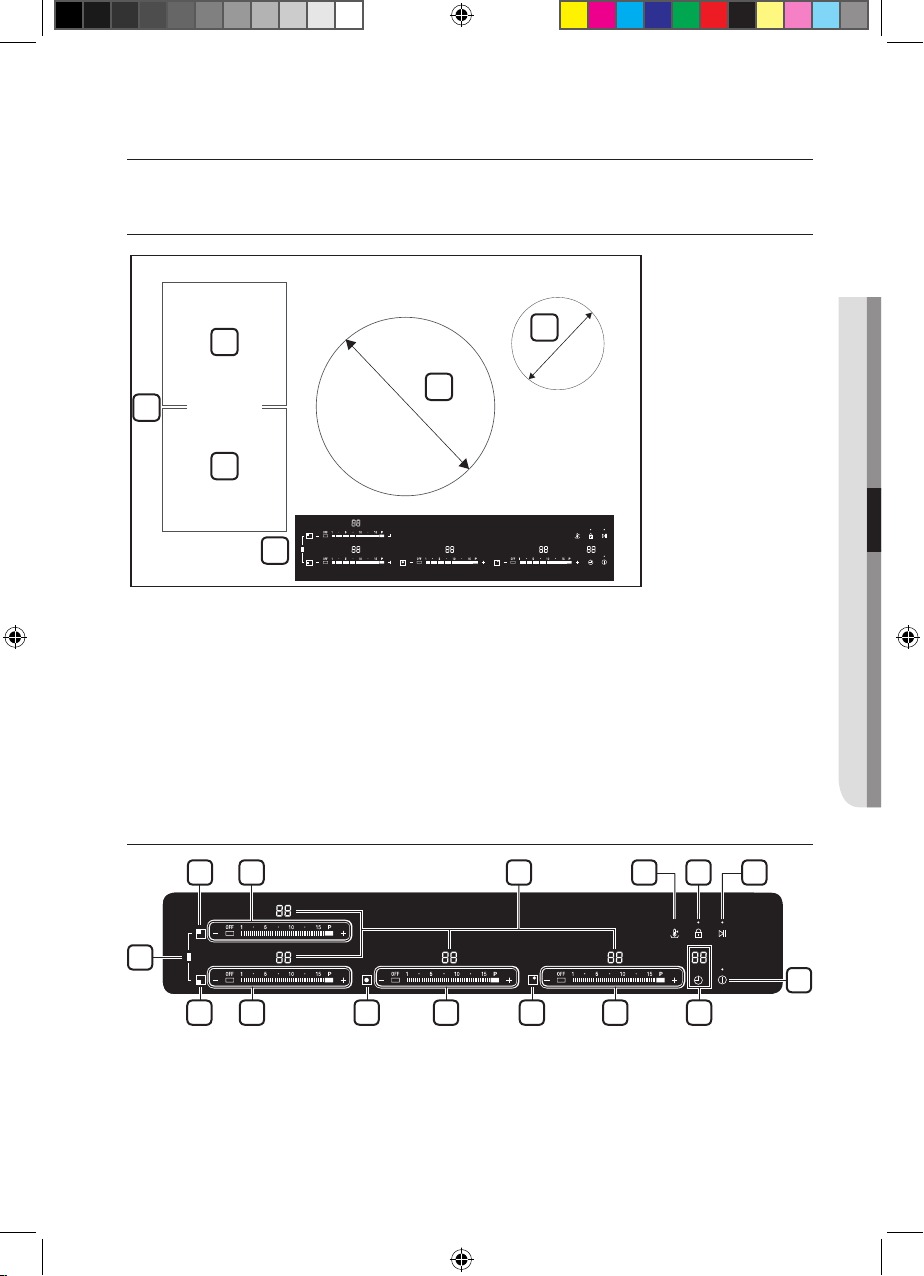
COOKING ZONES
1. Induction rear Bridge zone 1800 W with Power Boost 2600 W
2. Induction front Bridge zone 1800 W with Power Boost 2600 W
3. Induction complete Bridge zone 3300 W with Power Boost
3600 W
4. Induction cooking zone 2400 W with Power Boost 3600 W
5. Induction cooking zone 1200 W with Power Boost 2000 W
6. Control panel
CONTROL PANEL
1. Cooking zone selectors
2. Heat setting selectors
3. Lock control sensor
4. On/O control sensor
04 PARTS AND FEATURES
1
2
4
5
6
3
280 mm
145 mm
1 2 6 7 83
4
2 2 51 121
9
(Best)NZ84F7NC6AB_EU_DG68-00545A-02_EN.indd 15 27/03/2015 11:21:24
English - 16English - 16
5. Timer control sensor and indicator
6. Indicators for heat settings and residual heat
7. Keep warm
8. Pause
9. Complete Bridge zone selector
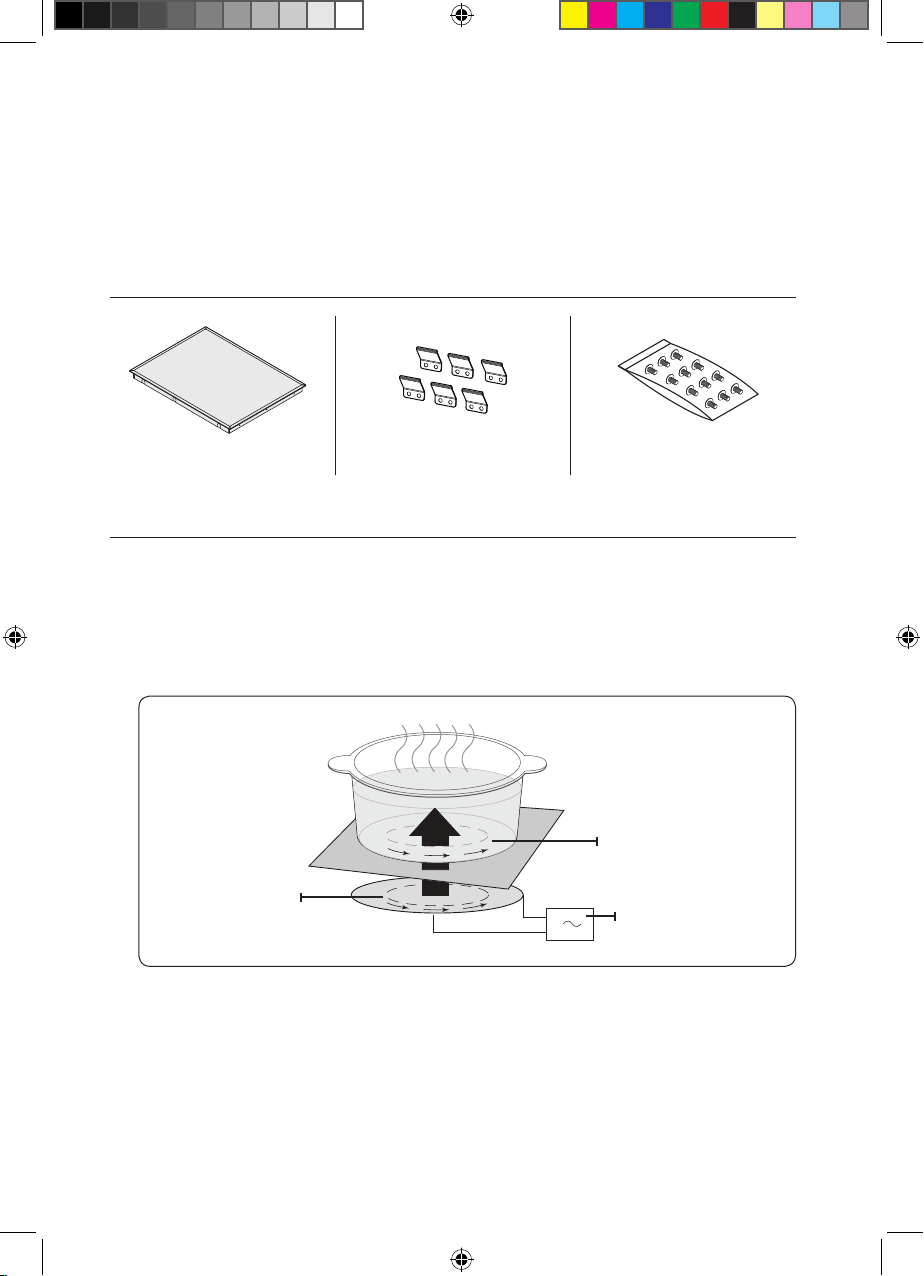
COMPONENTS
Induction hob Bracket Spring Screws
INDUCTION HEATING
• The Principle of Induction Heating: When you place your
cookware on a cooking zone and you turn it on, the electronic
circuits in your induction hob produce “induced currents” in
the bottom of the cookware which instantly raise cookware’s
temperature.
• Greater speed in cooking and frying: As the pan is heated
directly and not the glass, the eciency is greater than in other
systems because no heat is lost. Most of the energy absorbed
is transformed into heat.
Induction coil
Induced currents
Electronic circuits
(Best)NZ84F7NC6AB_EU_DG68-00545A-02_EN.indd 16 27/03/2015 11:21:26
English - 17English - 17
THE KEY FEATURES OF YOUR APPLIANCE
• Ceramic glass cooking surface : The appliance has a ceramic
glass cooking surface and four rapid - response cooking zones.
• Touch control sensors : Your appliance is operated using
touch control sensors.
• Easy cleaning : One advantage of the ceramic glass cooking
surface and the control sensors is their accessibility.
The smooth, flat surface is easy to clean.
• On/O sensor : The “On/O” control sensor provides the
appliance with a separate mains switch. Touching this sensor
switches the power supply on or o completely.
• Control and function indicators : Digital displays and
indicator lights provide information about settings and activated
functions, as well as the presence of residual heat in the various
cooking zones.
• Safety shuto :
A safety shuto ensures that cooking zones
switch o automatically after a period of time if the setting has
not been changed.
• Residual heat indicator : An icon for residual heat appears in
the display if the cooking zone is so hot that there is a risk of
burning.
• Power Boost : U
se this function to heat up the contents of
the pan faster than maximum power level ‘ ’. (The display will
show ‘ ’.)
• Auto Pan-Detection : Each cooking zone incorporates an
automatic pan-detection system, the system is calibrated in
order to recognize pans of a diameter just slightly smaller than
the cooking zone. Pans must always be placed centrally on
each cooking zone. And you should use suitable cookware.
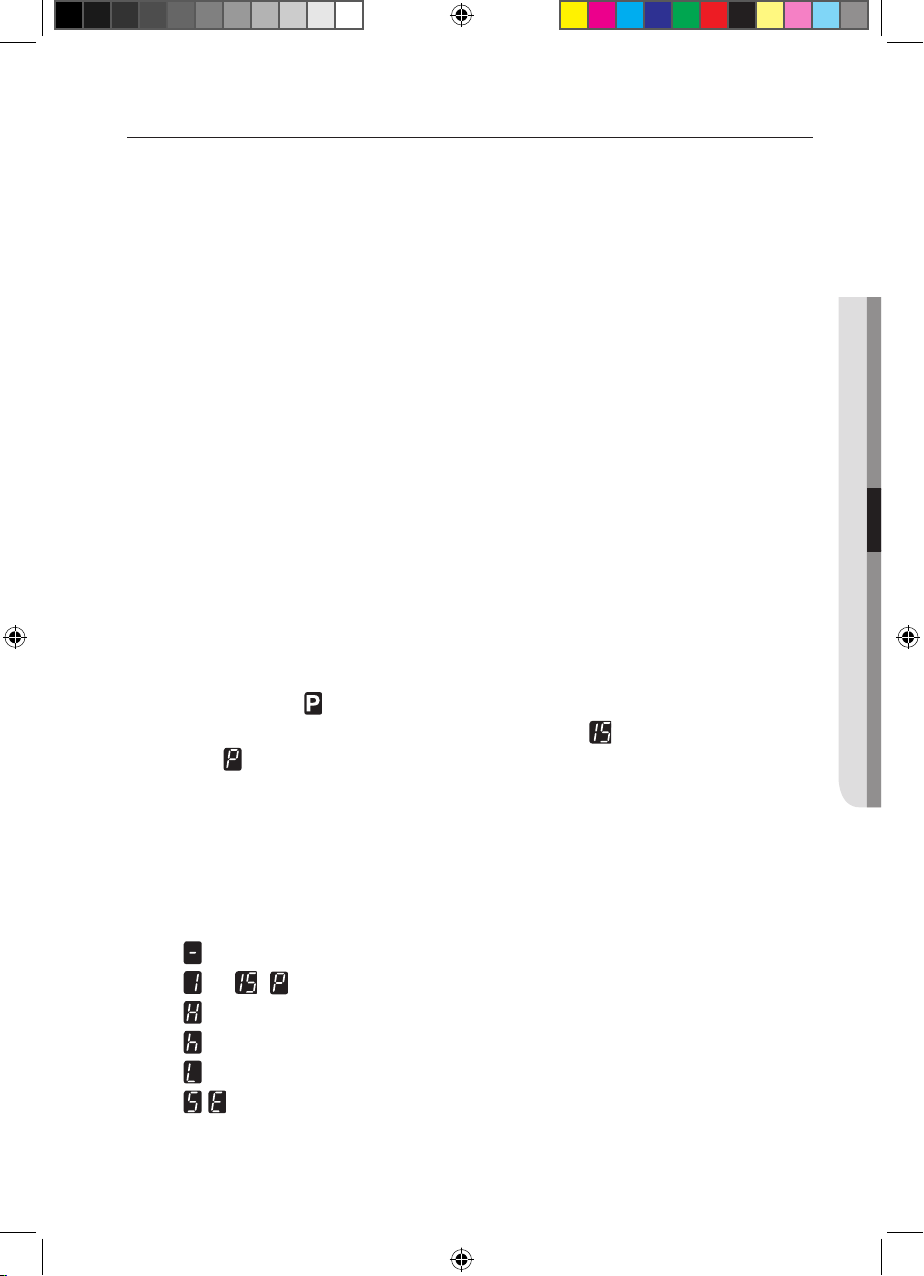
• Digital displays :
- the appliance has been switched on
- to ,
selected heat settings
- residual heat (Stay Hot)
- residual heat
- the child lock is activated
- error message, the touch sensor button has been
touched for longer than 8 seconds.
04 PARTS AND FEATURES
(Best)NZ84F7NC6AB_EU_DG68-00545A-02_EN.indd 17 27/03/2015 11:21:28
English - 18English - 18
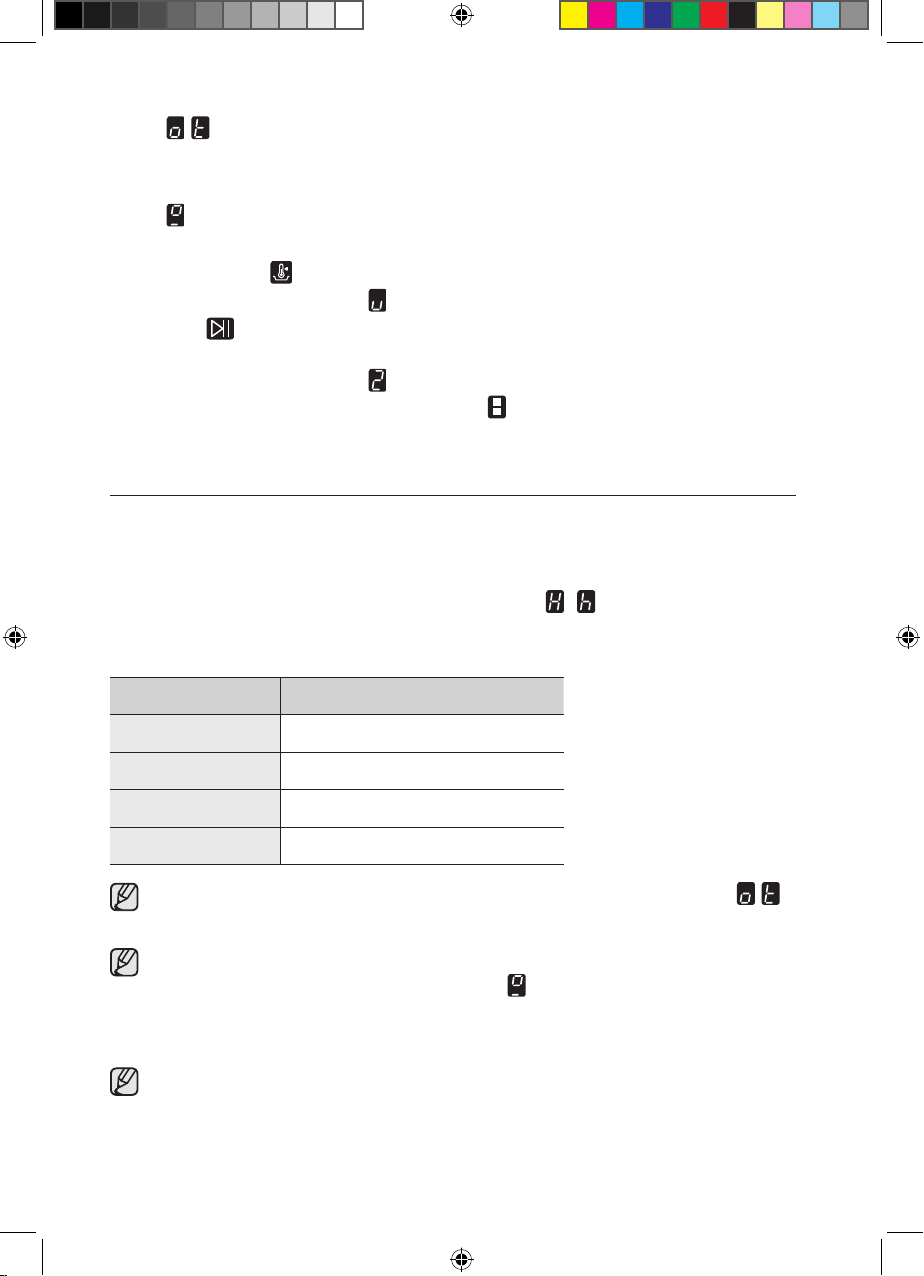
-
error message, when the hob is overheated because
of abnormal operation. (example : operation with empty
cookware)
-
message, cookware is unsuitable or too small or no
cookware has been placed on the cooking zone.
• Keep warm : Use this function to keep cooked food warm.
The display will show ‘ ’.
•
Pause
:
Use this fuction to switch all cooking zones on to the
low power setting. (example : to take a telephone call)
The display will show ‘ ’.
• Complete Bridge zone selector : Use this function to
expand cooking zone into complete left side.
SAFETY SHUTOFF
If one of the cooking zones is not switched o or the heat setting
is not adjusted after an extended period of time, that particular
cooking zone will automatically switch itself o.
Any residual warmth will be indicated with
,
(for “hot”) in the
digital displays corresponding to the particular cooking zones.
The cooking zones switch themselves o at the following times.
Heat setting Switch o
1-3 After 6 hours
4-6 After 5 hours
7-9 After 4 hours
10-15 After 1.5 hours
If the Hob is overheated because of abnormal operation,
will be displayed. And the Hob will be switched o.
If cookware is unsuitable or too small or no cookware has
been placed on the cooking zone, will be displayed.
And after 1 minute the corresponding cooking zone will be
switched o.
Should one or more of the cooking zones switch o before the
indicated time has elapsed, see the section “Troubleshooting”.
(Best)NZ84F7NC6AB_EU_DG68-00545A-02_EN.indd 18 27/03/2015 11:21:31
English - 19English - 19
Other reasons why a cooking zone will switch itself o
All cooking zones will switch themselves o if liquid boils over and
lands on the control panel.
The automatic shuto will also be activated if you place a
damp cloth on the control panel. In both of these instances,
the appliance will need to be switched on again using the main
On/O control sensor after the liquid or the cloth has been
removed.
RESIDUAL HEAT INDICATOR
When an individual cooking zone or the hob is turned o, the
presence of residual heat is shown with an , (for “hot”) in the
digital display of the appropriate cooking zones. Even after the
cooking zone has been switched o, the residual heat indicator
goes out only after the cooking zone has cooled.
You can use the residual heat for thawing or keeping food warm.
As long as the residual heat indicator is illuminated, there is a
risk of burns.
If the power supply is interrupted, the , symbol will go out
and information about residual heat will no longer be available.
However, it may still be possible to burn yourself. This can be
avoided by always taking care when near the hob.
TEMPERATURE DETECTION
If for any reason the temperatures on any of the cooking zones
were to exceed the safety levels, should this happen then the
cooking zone will automatically reduce to a lower power level.
When you have finished using the hob, the cooling fan will
continue to run until the hob’s electronics has cooled down. And
the cooling fan switched itself o depending upon the temperature
of the electronics.
WARNING
WARNING
04 PARTS AND FEATURES
(Best)NZ84F7NC6AB_EU_DG68-00545A-02_EN.indd 19 27/03/2015 11:21:31
English - 20English - 20
before you begin
INITIAL CLEANING
Wipe the ceramic glass surface with a damp cloth and ceramic
cooktop glass cleaner.
Do not use caustic or abrasive cleaners. The surface could be
damaged.
hob use
COOKWARE FOR INDUCTION COOKING ZONES
The induction hob can only be turned on when cookware with a
magnetic base is placed on one of the cooking zones. You can
use the following suitable cookware.
Cookware material
Cookware material Suitable
Steel, Enamelled steel Yes
Cast iron Yes
Stainless steel If appropriately labelled by the
manufacturer
Aluminium, Copper, Brass No
Glass, Ceramic, Porcelain No
Cookware for induction hob is labelled as suitable by the
manufacturer.
Certain cookware can make noise when being used on
induction cooking zones. These noise are not a fault in the
appliance and do not aect operation in any way.
WARNING
(Best)NZ84F7NC6AB_EU_DG68-00545A-02_EN.indd 20 27/03/2015 11:21:31
English - 21English - 21
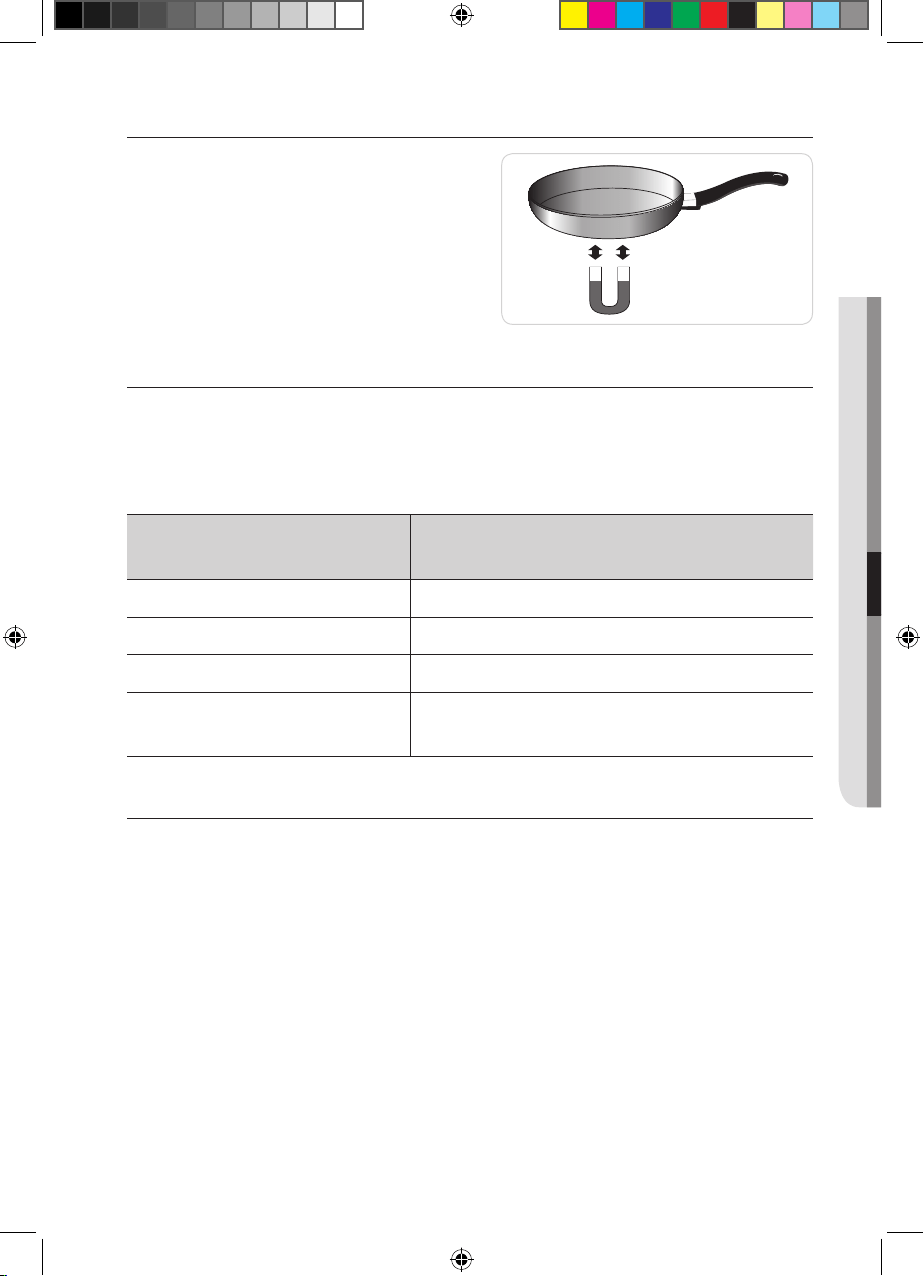
SUITABILITY TEST
Cookware is suitable for induction
cooking, if a magnet sticks to
the bottom of the cookware and
cookware is labelled as suitable by
the cookware manufacturer.
SIZE OF PANS
Induction cooking zones adapt automatically to the size of
the bottom of the cookware up to a certain limit. However the
magnetic part of the bottom of the cookware must have a
minimum diameter depending upon the size of the cooking zone.
Diameter of cooking
zones
Minimum diameter of the bottom
of the cookware
280 mm 180 mm
145 mm 100 mm
Front or Rear Bridge 120 mm
Complete Bridge
180 mm (long side dimension), oval,
fish kettle
OPERATING NOISES
If you can hear.
• Cracking noise : cookware is made of dierent materials.
• Whistling : you use more than two cooking zones and the
cookware. is made of dierent materials.
• Humming : you use high power levels.
• Clicking : electric switching occurs.
• Hissing, Buzzing : the fan operates.
The noise are normal and do not refer to any defects.
05 BEFORE YOU BEGIN & HOB USE
(Best)NZ84F7NC6AB_EU_DG68-00545A-02_EN.indd 21 27/03/2015 11:21:32
English - 22English - 22
USING SUITABLE COOKWARE
Better pans produce better results.
• You can recognise good pans by their bases. The base should
be as thick and flat as possible.
•
When buying new pans, pay particular attention to the diameter
of the base. Manufacturers often give only the diameter of the
upper rim.
• Do not use pans which have damaged bases with rough edges
or burrs. Permanent scratching can occur if these pans are slid
across the surface.
• When cold, pan bases are normally bowed slightly inwards
(concave). They should never be bowed outwards (convex).
• If you wish to use a special type of pan, for example, a pressure
cooker, a simmering pan, or a wok, please observe the
manufacturer’s instructions.
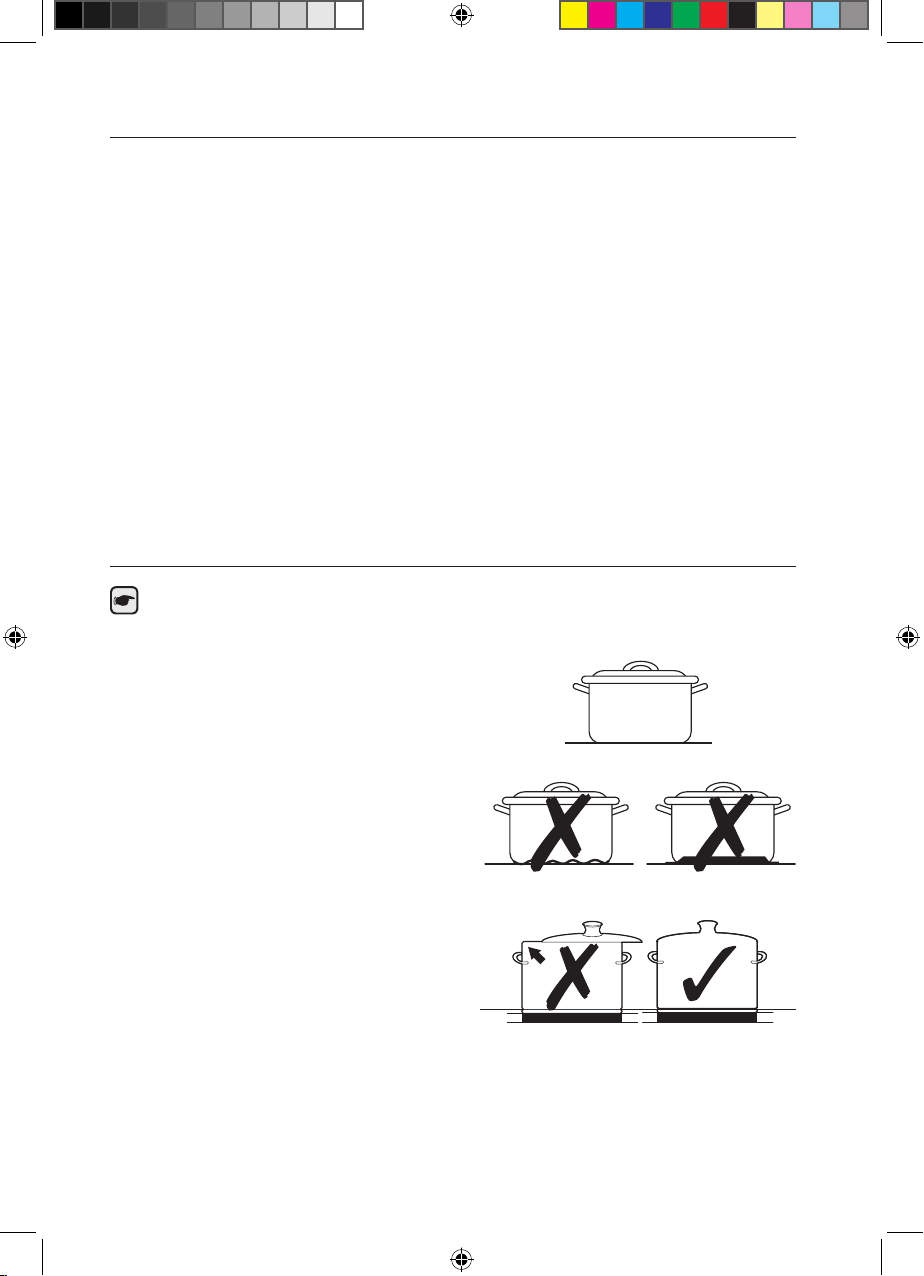
Energy saving tips
You can save valuable energy by observing the following
points.
• Always position pots and pans
before switching on the cooking
zone.
• Dirty cooking zones and
pan bases increase power
consumption.
• When possible, position the lids
firmly on the pots and pans to
cover completely.
• Switch the cooking zones o
before the end of the cooking
time to use the residual heat
for keeping foods warm or for
thawing.
Right!
Wrong!
(Best)NZ84F7NC6AB_EU_DG68-00545A-02_EN.indd 22 27/03/2015 11:21:33
English - 23English - 23
USING THE TOUCH CONTROL SENSORS
To operate the touch control sensors, touch the desired panel with
the tip of your pointed finger until the relevant displays illuminate or
go out, or until the desired function is activated.
Ensure that you are touching only one sensor panel when
operating the appliance. If your finger is too flat on the panel, an
adjacent sensor may be actuated as well.
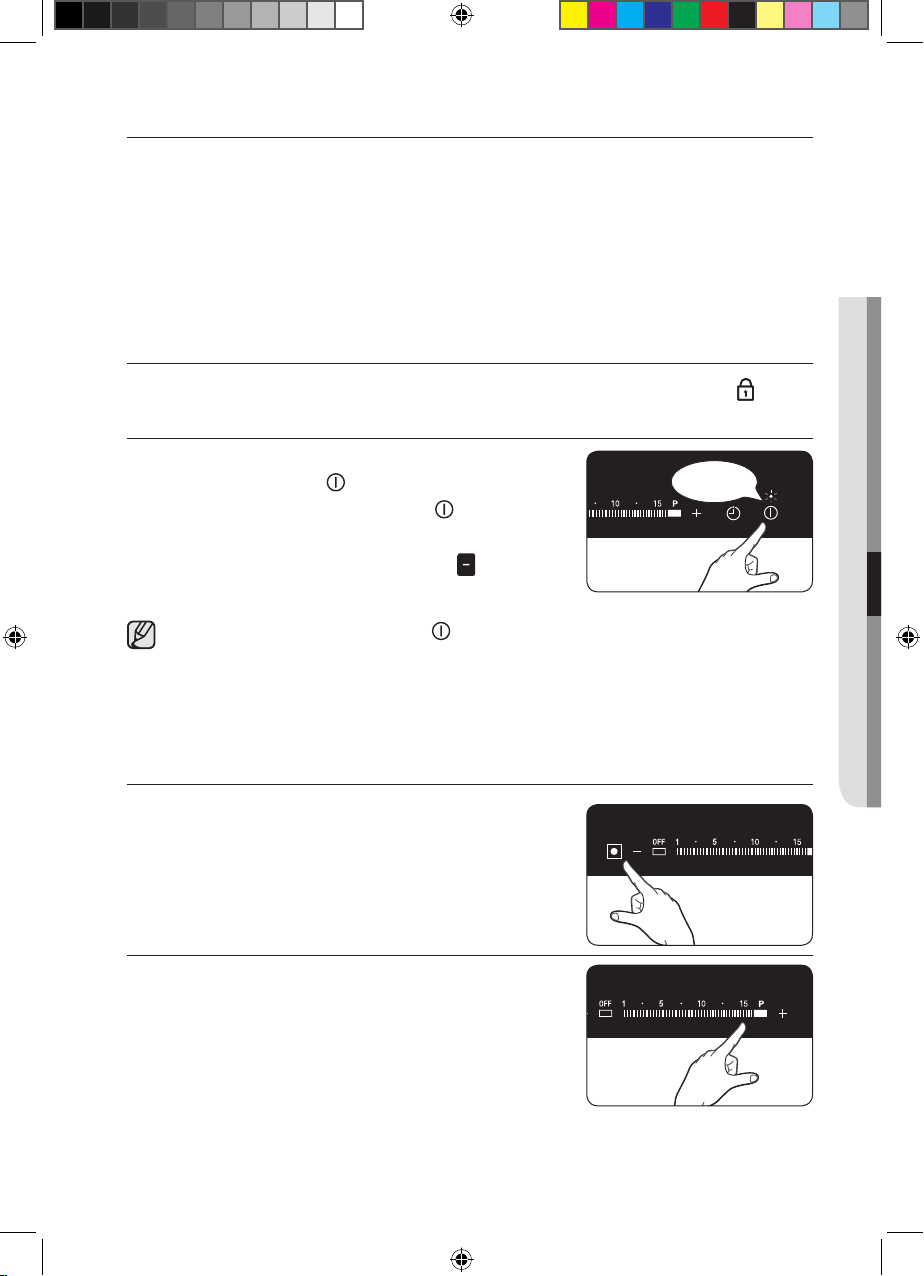
SWITCHING THE APPLIANCE ON
1. When power is connected, first touch the Lock control
sensor for approximately 3 seconds.
2. The appliance is switched on using the
On/O control sensor.
Touch the On/O control sensor for
1-2 seconds.
The digital displays will show .
After the On/O control sensor has been actuated to
switch on your appliance, a heat setting must be selected
within approximately 10 seconds. Otherwise, the appliance will
switch itself o for safety reasons.
SELECT COOKING ZONE AND HEAT SETTING
1. For selecting the cooking zone, touch
the corresponding cooking zone’s key.
2. For setting and adjusting the power
level, touch the Heat setting selectors.
05 BEFORE YOU BEGIN & HOB USE
approx
1-2 sec.
(Best)NZ84F7NC6AB_EU_DG68-00545A-02_EN.indd 23 27/03/2015 11:21:34

English - 24English - 24
If more than one sensor is pressed for longer than 8 seconds,
will show in the heat setting display.
To reset, touch the On/O
control sensor.
SWITCHING THE APPLIANCE OFF
To completely switch o the appliance, use
the On/O control sensor.
Touch the On/O control sensor for
1-2seconds.
After switching o a single cooking zone or the entire cooking
surface, the presence of residual heat will be indicated in the
digital displays of the corresponding cooking zones in the form
of an
or
(for “hot”).
SWITCHING A COOKING ZONE OFF
1.
To switch o a cooking zone, return the
setting to by using the control panel’s
control
sensor.
2.
Or simply touch the corresponding
cooking zone’s Key.
USING THE CHILD SAFETY LOCK
You can use the child safety lock to safeguard against
unintentionally turning on a cooking zone and activating the cooking
surface. Also the control panel, with the exception of the On/O
control sensor, can be locked in order to prevent the settings
from being changed unintentionally, for example, by wiping over the
panel with a cloth.
approx
3 sec.
approx
1-2 sec.
(Best)NZ84F7NC6AB_EU_DG68-00545A-02_EN.indd 24 27/03/2015 11:21:36
English - 25English - 25
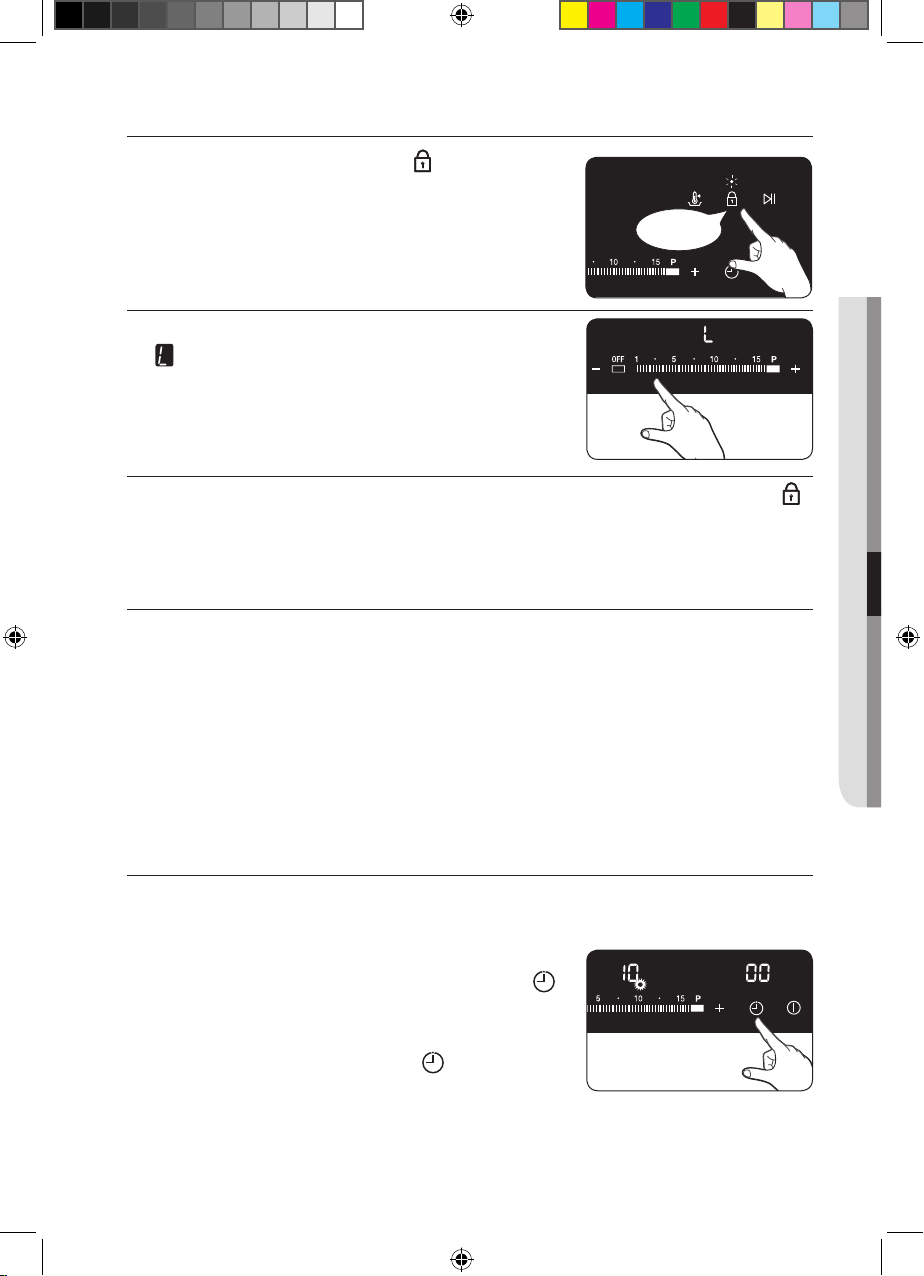
Switching the child safety lock on / o
1. Touch the Lock control sensor for
approximately 3 seconds.
An acoustic signal will sound as
confirmation.
2. Touch any control sensor.
will appear in the displays, indicating
the child safety lock has been activated.
3.
For switching the child safety lock o, touch the Lock control
sensor again for 3 seconds.
An acoustic signal will sound as confirmation.
TIMER
There are two ways to use the timer:
Using the timer as a safety shuto:
If a specific time is set for a cooking zone, the cooking zone will
shut itself o once this period of time has elapsed. This function
can be used for multiple cooking zones simultaneously.
Using the timer to count down:
The countdown timer cannot be used if a cooking zone has been
switched on.
Setting the safety shuto
The cooking zone(s) for which you want to apply the safety shuto
must be switched on.
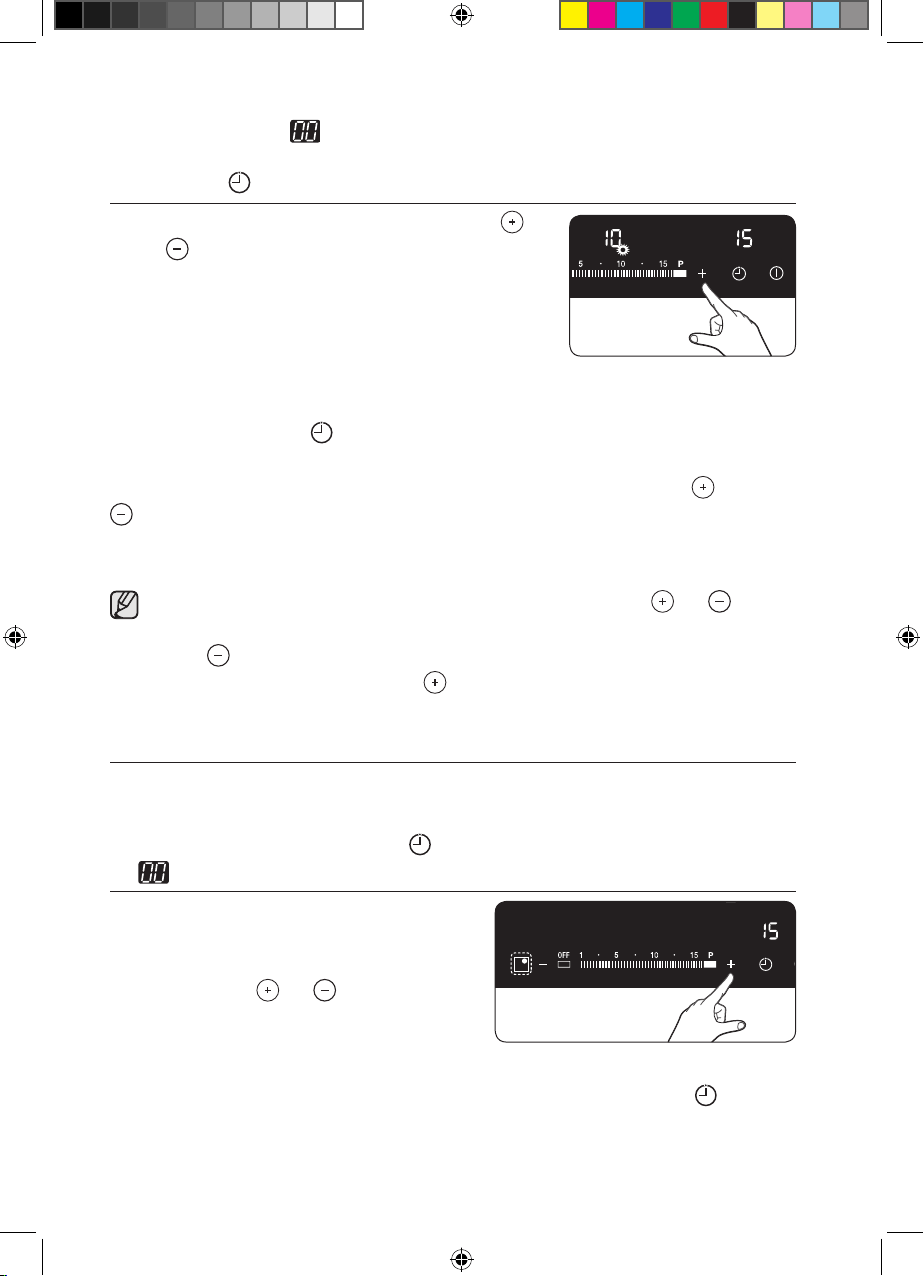
1. After cooking zone is switched on for
operation, touch the Timer control
sensor to activate the flash signal for the
corresponding cooking zone.
Press the Timer control sensor
multiple times if necessary until the right
cooking zone is selected.
For example, the front left indicator corresponds to the front left
05 BEFORE YOU BEGIN & HOB USE
approx
3 sec.
(Best)NZ84F7NC6AB_EU_DG68-00545A-02_EN.indd 25 27/03/2015 11:21:38
English - 26English - 26
cooking zone. will appear in the timer display.
The next active cooking zone is selected by touching the Timer
control sensor again.
2. Use the Timer setting selectors (
or ) to set the desired
amount of time,
for example, 15 minutes, after which the
cooking zone will automatically switch
itself o. The
safety shuto is now
activated.
To display the time remaining for any of the cooking zones, use
the Timer control sensor.
The corresponding control indicator will begin to blink slowly.
The settings are reset using the Timer setting selectors ( or
).
After the set period of time has elapsed, the cooking zone
automatically switches itself o, an acoustic signal sounds as
confirmation and the timer display indicates.
To change the settings quicker, touch any of the or
control sensors until the desired value is reached.
If the control sensor is touched first, the time setting will
begin at 99 minutes; if the control sensor is touched first,
the time setting will begin at 1 minute.
Countdown timer
For the countdown timer to be used, the appliance must be
switched on but all the cooking zones must be switched o.
1. Touch the Timer control sensor.
will appear in the timer display.
2. Set the desired period of
time using the right rear
cooking zone’s Timer setting
selectors ( or ).
The countdown timer function
is now activated and the
remaining time appears in the timer display.
To cancel the remaining time, touch the Timer control
sensor.
(Best)NZ84F7NC6AB_EU_DG68-00545A-02_EN.indd 26 27/03/2015 11:21:40
English - 27English - 27
POWER BOOST CONTROL
The power boost function makes additional power available to
the each cooking zones. (example : bring a large volume of water
to the boil)
Cooking zones Max Boost time
280 mm 5 min
145 mm 10 min
Front or Rear Bridge 10 min
Complete Bridge 5 min
After these times, the cooking zones automatically return to power
level .
In certain circumstances, the Power boost function may be
deactivated automatically to protect the internal electronic
components of the hob.
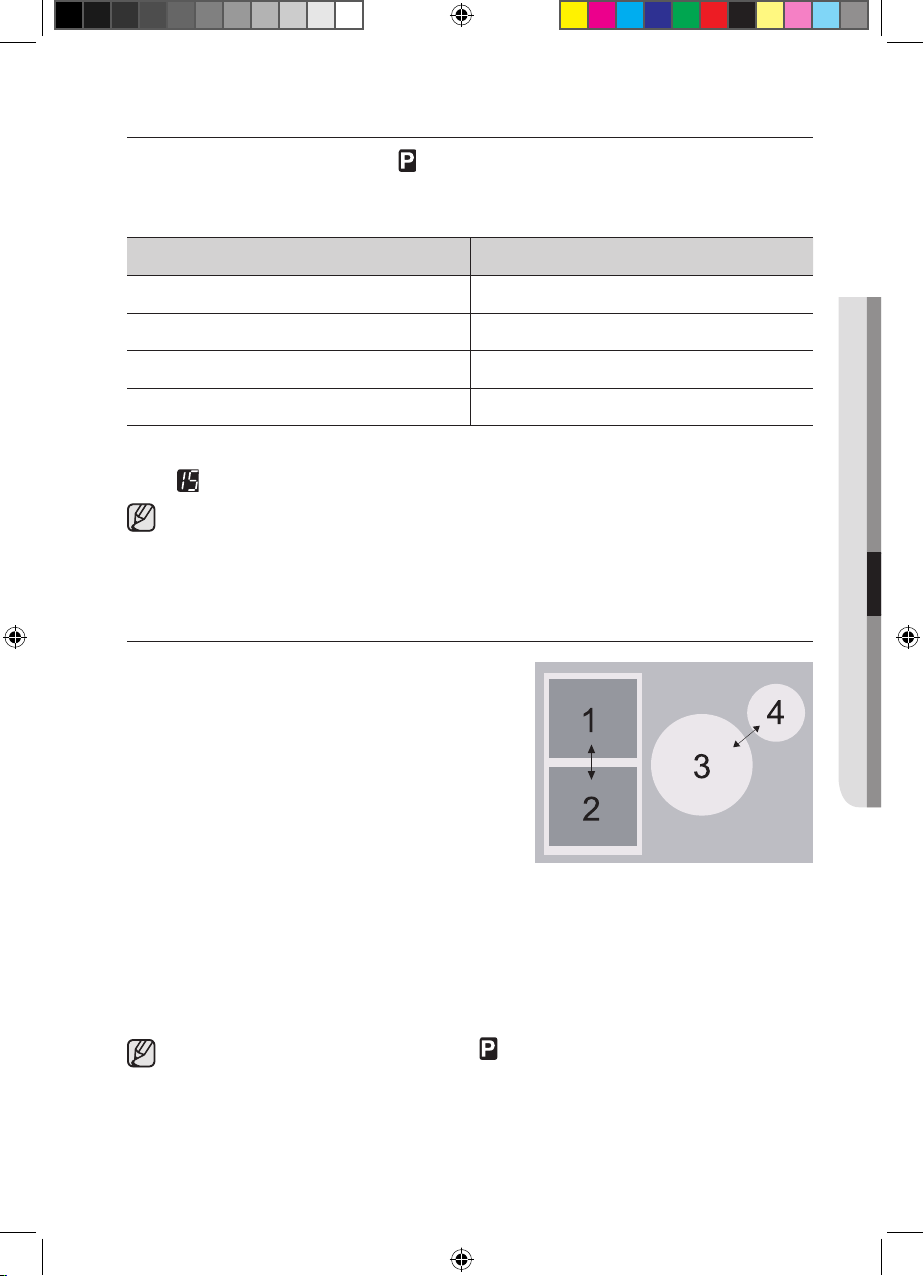
POWER MANAGEMENT
The cooking zones have a maximum
power available to them.
If this power range is exceeded
by switching on the power boost
function, Power Management
automatically reduced the heat setting
of cooking zone.
• Left side : No.1 and No.2 is paired
cooking zone
• Right side : No.3 and No.4 is paired cooking zone
The indicator for this cooking zone alternates for some seconds
between the set heat setting and the maximum possible heat
setting. After then, the indicator changes from the set heat setting
to maximum possible heat setting.
To use the power boost function for 280 mm cooking zone,
switch o 145 mm cooking zone.
05 BEFORE YOU BEGIN & HOB USE
(Best)NZ84F7NC6AB_EU_DG68-00545A-02_EN.indd 27 27/03/2015 11:21:40
English - 28English - 28
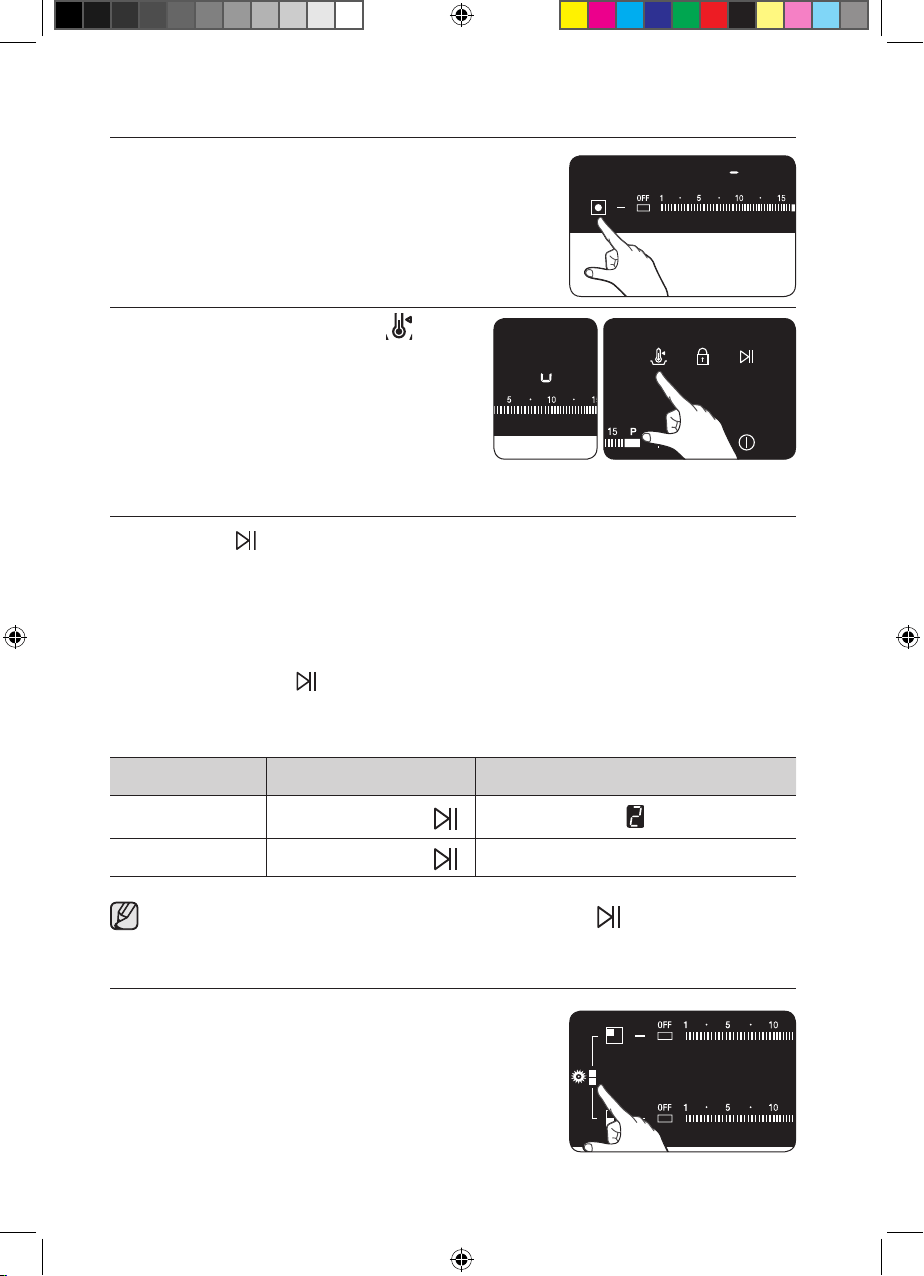
KEEP WARM
1.
Use this function to Keep cooked food
Warm.
Touch the corresponding cooking
zone’s Key.
2. Touch the Keep Warm Key.
PAUSE
The PAUSE function simultaneously switches all cooking zones
that are switched on to the low power setting and then back to
the heat setting that was previously set. This function can be used
to briefly interrupt and then continue the cooking process e.g. to
take a telephone call.
When the PAUSE function is activated, all touch sensors except
for the ‘PAUSE’, ‘Lock’ and the ‘On/O’ control sensors are
disabled. To resume cooking, touch the PAUSE button again.
Control Panel Display
To Switch on
Touch PAUSE
To Switch o
Touch PAUSE
return to previous power level
Timer functions are not stopped by PAUSE .
BRIDGE CONTROL
The bridge function can operate complete
left side cooking zone for using large size
cookware. (example : oval cookware, fish
kettle)
1. Touch the complete Bridge zone sensor
key.
(Best)NZ84F7NC6AB_EU_DG68-00545A-02_EN.indd 28 27/03/2015 11:21:43

English - 29English - 29
2.
Touch the heat setting selectors ( or ).
Heat setting display of left side(front,
rear) will be changed together.
SOUND ON/OFF
1. Touch the On/O control sensor for
1-2 seconds.
The digital displays will show .
2. Touch the Keep Warm Key for
4seconds within 10 seconds after
Power On.
3. Sound will OFF and will show in the
Timer display.
4. To change Sound setting, repeat No1
and No2 procedure.
Sound will ON and will show in the
Timer display.
05 BEFORE YOU BEGIN & HOB USE
approx
1-2 sec.
approx
4 sec.
(Best)NZ84F7NC6AB_EU_DG68-00545A-02_EN.indd 29 27/03/2015 11:21:45
English - 30English - 30
SUGGESTED SETTINGS FOR COOKING
SPECIFIC FOODS
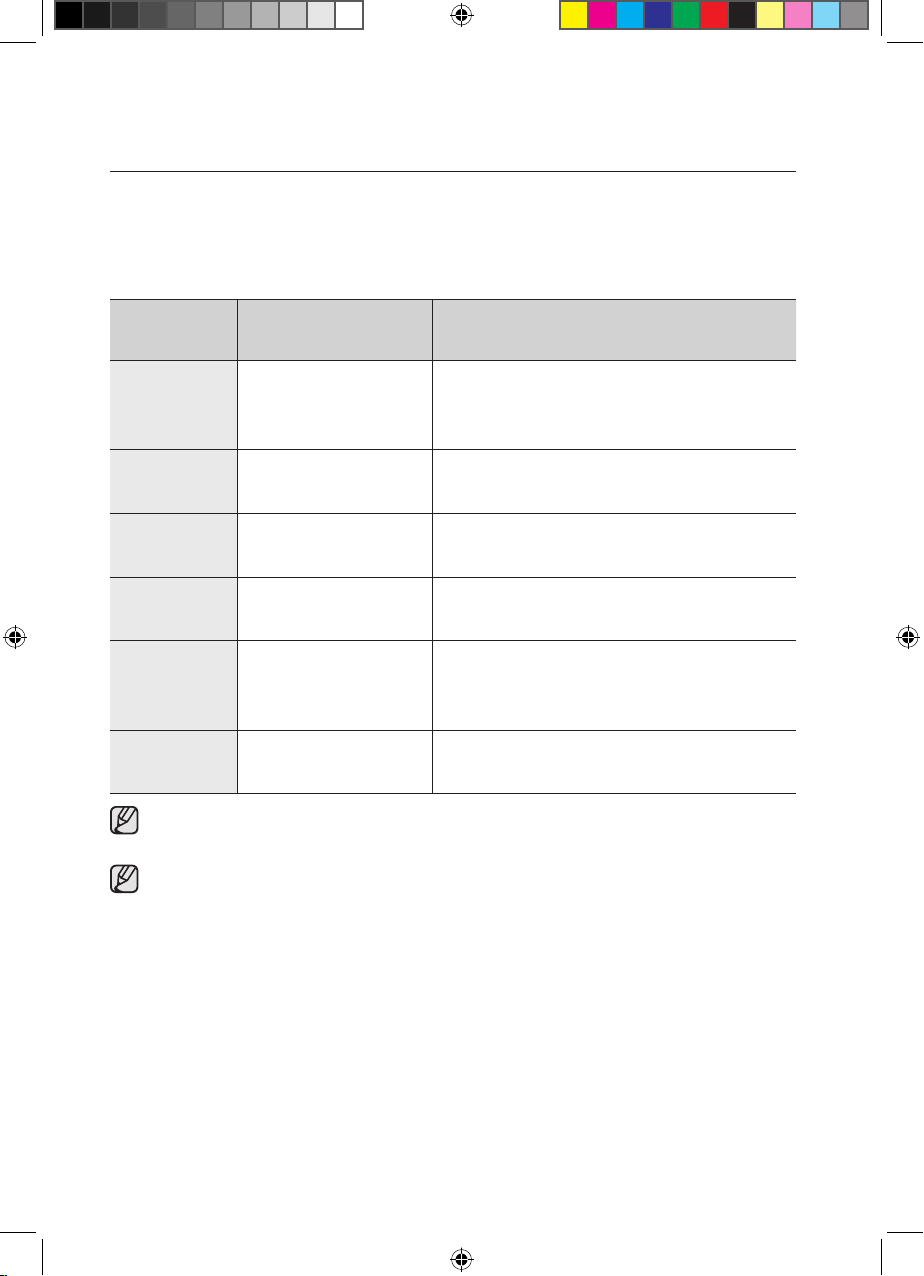
The figures in the table below are guidelines. The heat settings
required for various cooking methods depend on a number of
variables, including the quality of the cookware being used and the
type and amount of food being cooked.
Switch
Setting
Cookingmethod Examples for Use
14-15
Warming
Sautéing
Frying
Warming large amounts of liquid,
boiling noodles, searing meat,
(browning goulash,braising meat)
10-13
Intensive
Frying
Steak, sirloin, hash browns,
sausages, pancakes / griddle cakes
8-9 Frying
Schnitzel / chops, liver, fish,
rissoles, fried eggs
6-7 Boiling
Cooking up to 1.5 l liquid,
potatoes, vegetables
3-5
Steaming
Stewing
Boiling
Steaming and stewing of small
amounts of vegetables, boiling
rice and milk dishes
1-2 Melting
Melting butter, dissolving gelatine,
melting chocolate
The heat settings indicated in the table above are provided
only as guidelines for your reference.
You will need to adjust the heat settings according to specific
cookware and foods.
(Best)NZ84F7NC6AB_EU_DG68-00545A-02_EN.indd 30 27/03/2015 11:21:46
English - 31English - 31
cleaning and care
HOB
Cleaning agents must not come into contact with a heated
ceramic glass surface: All cleaning agents must be removed
with adequate amounts of clean water after cleaning because
they can have a caustic eect when the surface becomes
hot. Do not use any aggressive cleaners such as grill or oven
sprays, scouring pads or abrasive pan cleaners.
Clean the ceramic glass surface after each use when it is still
warm to the touch. This will prevent spillage from becoming
burnt onto the surface. Remove scales, watermarks, fat
drippings and metallic discolouration with the use of a
commercially available ceramic glass or stainless steel cleaner.
Light Soiling
1. Wipe the ceramic glass surface with a damp cloth.
2. Rub dry with a clean cloth. Remnants of cleaning agent must
not be left on the surface.
3.
Thoroughly clean the entire ceramic glass cooking surface once
a week with a commercially available ceramic glass or stainless
steel cleaner.
4. Wipe the ceramic glass surface using adequate amounts of
clean water and rub dry with a clean lint - free cloth.
WARNING
06 CLEANING AND CARE
(Best)NZ84F7NC6AB_EU_DG68-00545A-02_EN.indd 31 27/03/2015 11:21:46
English - 32English - 32
Stubborn Soiling
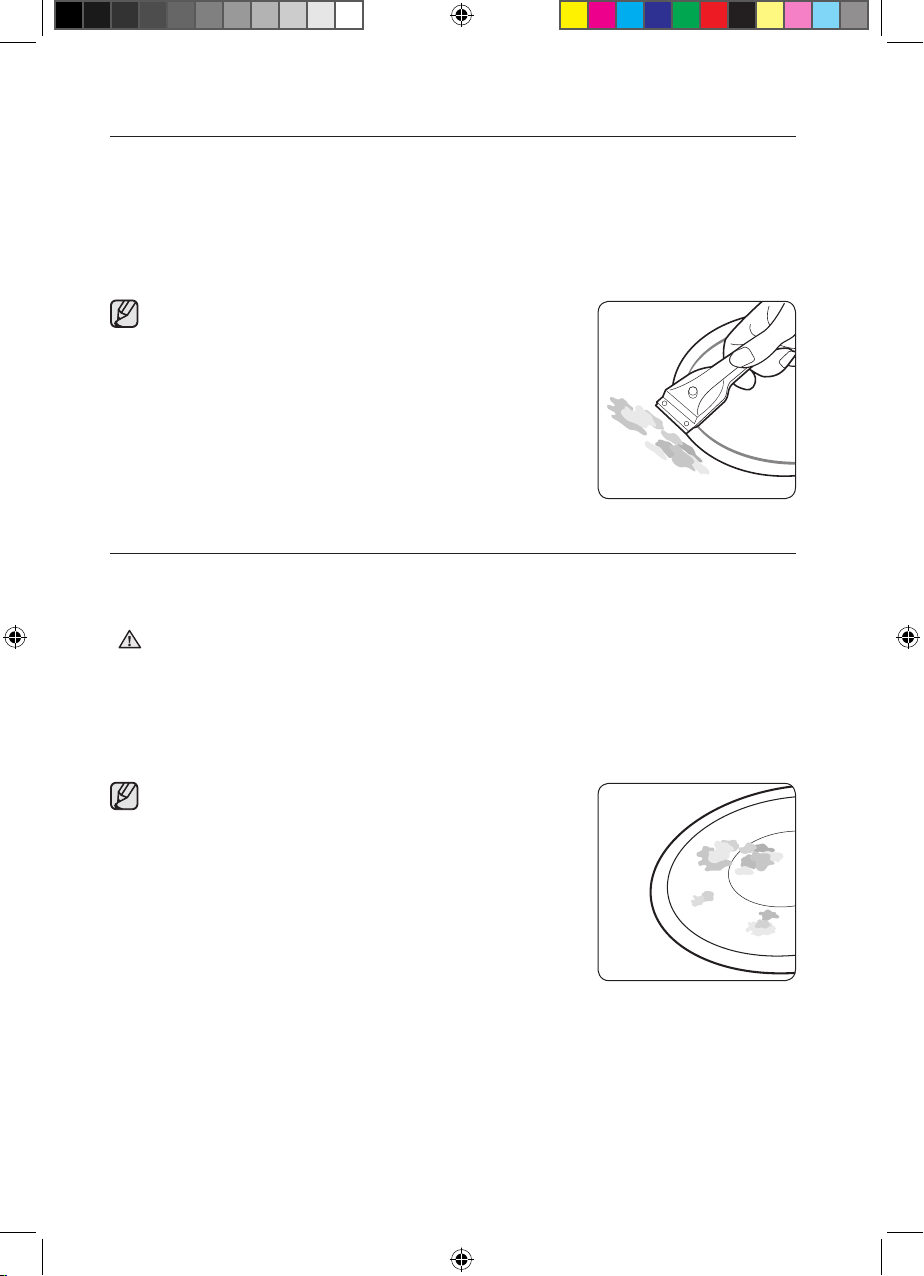
1. To remove food that has boiled over and stubborn splashes,
use a glass scraper.
2. Place the glass scraper at an angle to the ceramic glass
surface.
3. Remove soiling by scraping with the blade.
Glass scrapers and ceramic glass
cleaners are available from specialty
retailers.
Problem Dirt
1. Remove burnt-on sugar, melted plastic, aluminium foil or other
materials with a glass scraper immediately and while still hot.
There is a risk of burning yourself when the glass scraper is
used on a hot cooking zone:
2. Clean the hob as normal when it has cooled down.
If the cooking zone on which something has melted has been
allowed to cool, warm it up again for cleaning.
Scratches or dark blemishes on the
ceramic glass surface, caused, for
example, by a pan with sharp edges,
cannot be removed. However, they do not
impair the function of the hob.
WARNING
(Best)NZ84F7NC6AB_EU_DG68-00545A-02_EN.indd 32 27/03/2015 11:21:49

English - 33English - 33
HOB FRAME (OPTION)
Do not use vinegar, lemon juice or scale remover on the hob
frame; otherwise dull blemishes will appear.
1. Wipe the frame with a damp cloth.
2. Moisten dried debris with a wet cloth. Wipe and rub dry.
TO AVOID DAMAGING YOUR APPLIANCE
• Do not use the hob as a work surface or for storage.
• Do not operate a cooking zone if there is no pan on the hob or
if the pan is empty.
• Ceramic glass is very tough and resistant to temperature shock,
but it is not unbreakable. It can be damaged by a particularly
sharp or hard object dropping onto the hob.
• Do not place pans on the hob frame. Scratching and damage
to the finish may occur.
• Avoid spilling acidic liquids, for example, vinegar, lemon juice
and descaling agents, onto the hob frame, since such liquids
can cause dull spots.
• If sugar or a preparation containing sugar comes into contact
with a hot cooking zone and melts, it should be cleaned o
immediately with a kitchen scraper while it is still hot. If allowed
to cool, it may damage the surface when removed.
• Keep all items and materials that could melt, for example,
plastics, aluminium foil and oven foils, away from the ceramic
glass surface. If something of this nature melts onto the hob, it
must be removed immediately with a scraper.
WARNING
06 CLEANING AND CARE
(Best)NZ84F7NC6AB_EU_DG68-00545A-02_EN.indd 33 27/03/2015 11:21:49
English - 34English - 34
warranty and service
FAQS AND TROUBLESHOOTING
A fault may result from a minor error that you can correct yourself
with the help of the following instructions. Do not attempt any
further repairs if the following instructions do not help in each
specific case.
Repairs to the appliance are to be performed only by a
qualified service technician. Improperly eected repairs may
result in considerable risk to the user. If your appliance needs
repair, please contact your customer service centre.
What should I do if the cooking zones are not functioning?
Check for the following possibilities:
• The fuse in the house wiring (fuse box) is intact. If the fuses trip
a number of times, call an authorised electrician.
• The appliance is properly switched on.
• The control indicators in the control panel are illuminated.
• The cooking zone is switched on.
• The cooking zones are set at the desired heat settings.
What should I do if the cooking zones will not switch on?
Check for the following possibilities:
• A period of more than 20 seconds has elapsed between when
the On/O button was actuated and the desired cooking zone
switches on (see the section “Switching the appliance on”).
• The control panel is partially covered by a damp cloth or liquid.
What should I do if the display except for
,
the residual
warmth indicator suddenly disappears?
This could be a result of one of two possibilities:
• The On/O sensor was accidentally actuated.
• The control panel is partially covered by a damp cloth or liquid.
WARNING
(Best)NZ84F7NC6AB_EU_DG68-00545A-02_EN.indd 34 27/03/2015 11:21:49
English - 35English - 35
What should I do if, after the cooking zones have been
switched o, residual warmth is not indicated in the display?
Check for the following possibility:
• The cooking zone was only briefly used and therefore did not
become hot enough. If the cooking zone is hot, please call the
customer service centre.
What should I do if the cooking zone will not switch on or o?
This could be due to one of the following possibilities:
• The control panel is partially covered by a damp cloth or liquid.
• The child safety lock is on.
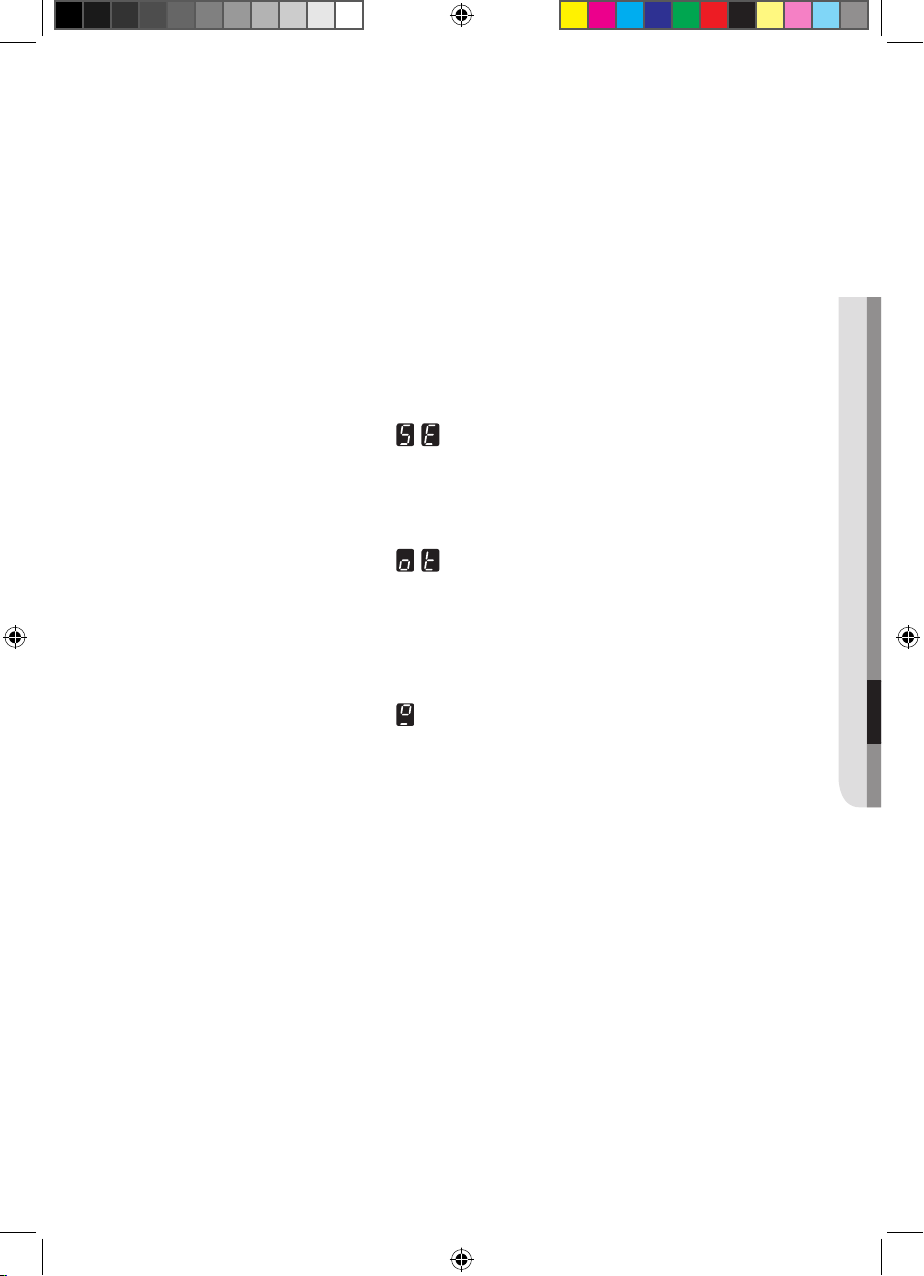
What should I do if the
display is illuminated?
Check for the following:
• The control panel is partially covered by a damp cloth or liquid.
To reset, press the “On/O” control sensor.
What should I do if the
display is illuminated?
Check for the following:
• The hob is overheated because of abnormal operation.
•
After hob is cooled down, press the “On/O” control sensor for
resetting.
What should I do if the display is illuminated?
Check for the following:
• Cookware is unsuitable or too small or no cookware has been
placed on the cooking zone.
• If you use suitable cookware, displayed message will
automatically disapear.
What should I do if the cooling fan runs after the hob is
turned o?
Check for the following:
• When you have finished using the hob, the cooling fan runs by
itself for cooling down.
• After the hob’s electronics has cooled down, the cooling fan will
be turned o.
If you request a service call because of an error made in operating
the appliance, the visit from the customer service technician may
incur a charge even during the warranty period.
07 WARRANTY AND SERVICE
(Best)NZ84F7NC6AB_EU_DG68-00545A-02_EN.indd 35 27/03/2015 11:21:49
English - 36English - 36
SERVICE
Before calling for assistance or service, please check the section
“Troubleshooting”.
If you still need help, follow the instructions below.
Is it a technical fault?
If so, please contact your customer service centre.
Always prepare in advance for the discussion. This will ease the
process of diagnosing the problem and also make it easier to
decide if a customer service visit is necessary.
Please take note of the following information.
• What form does the problem take?
• Under what circumstances does the problem occur?
When calling, please know the model and serial number of your
appliance. This information is provided on the rating plate as
follows:
• Model description
• S/N code (15 digits)
We recommend that you record the information here for easy
reference.
Model:
Serial number:
When do you incur costs even during the warranty period?
• if you could have remedied the problem yourself by applying
one of the solutions provided in the section “Troubleshooting”.
• if the customer service technician has to make several service
calls because he was not provided with all of the relevant
information before his visit and as a result, for example, has to
make additional trips for parts. Preparing for your phone call as
described above will save you the cost of these trips.
(Best)NZ84F7NC6AB_EU_DG68-00545A-02_EN.indd 36 27/03/2015 11:21:49
English - 37English - 37
technical data
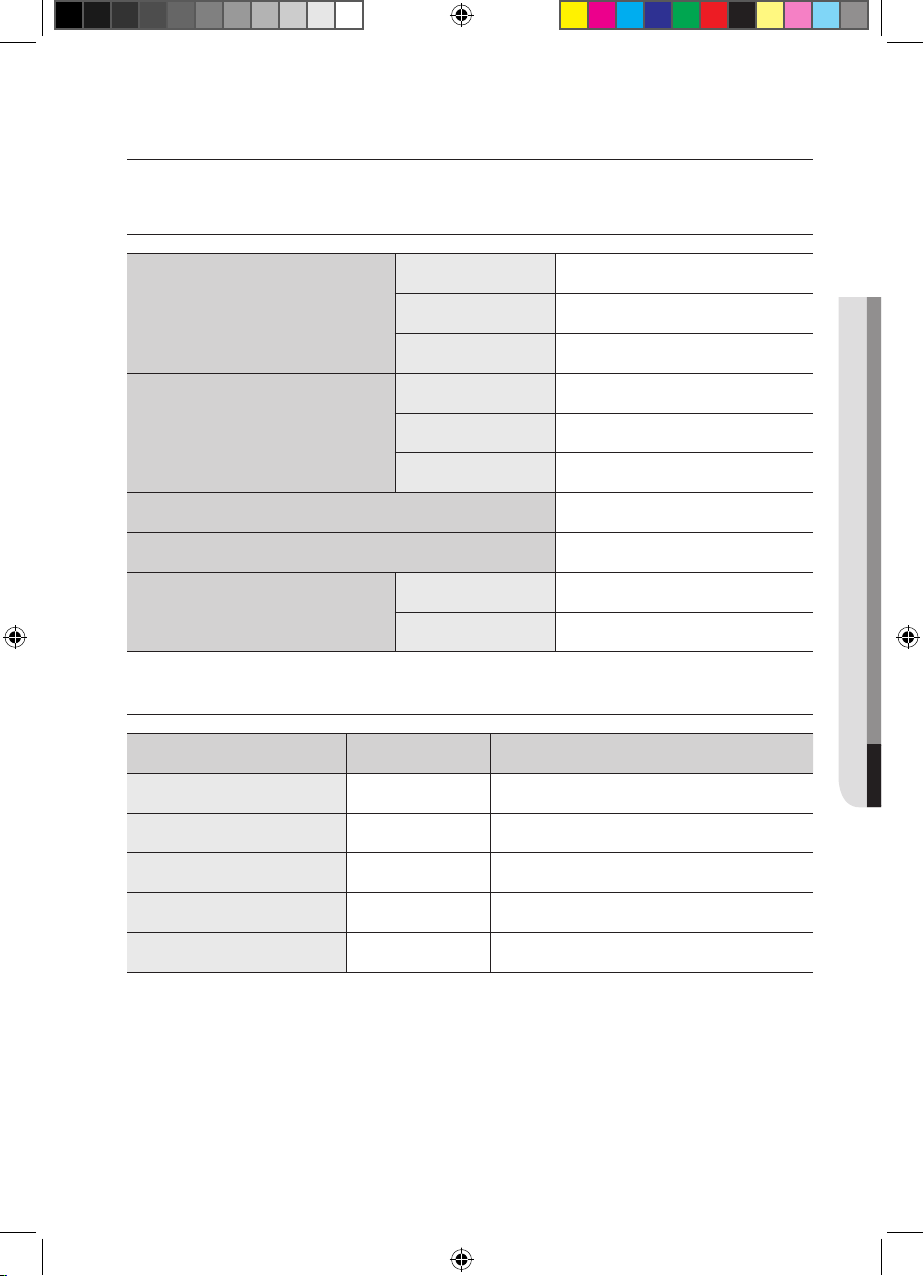
TECHNICAL DATA
Appliance dimensions
Width 800 mm
Depth 520 mm
Height 56 mm
Worktop cut - out
dimensions
Width 750 mm
Depth 490 mm
Corner radius
3 mm
Connection voltage
220 - 240 V ~ 50 / 60 Hz
Maximum connected load power 7.2 kW
Weight
Net 15.5 kg
Gross 18.7 kg
COOKING ZONES
Position Diameter Power
Rear right 145 mm 1200 W / Boost 2000 W
Center 280 mm 2400 W / Boost 3600 W
Front Bridge - 1800 W / Boost 2600 W
Rear Bridge - 1800 W / Boost 2600 W
Complete Bridge - 3300 W / Boost 3600 W
08 TECHNICAL DATA
(Best)NZ84F7NC6AB_EU_DG68-00545A-02_EN.indd 37 27/03/2015 11:21:50
English - 38English - 38
PRODUCT INFORMATION
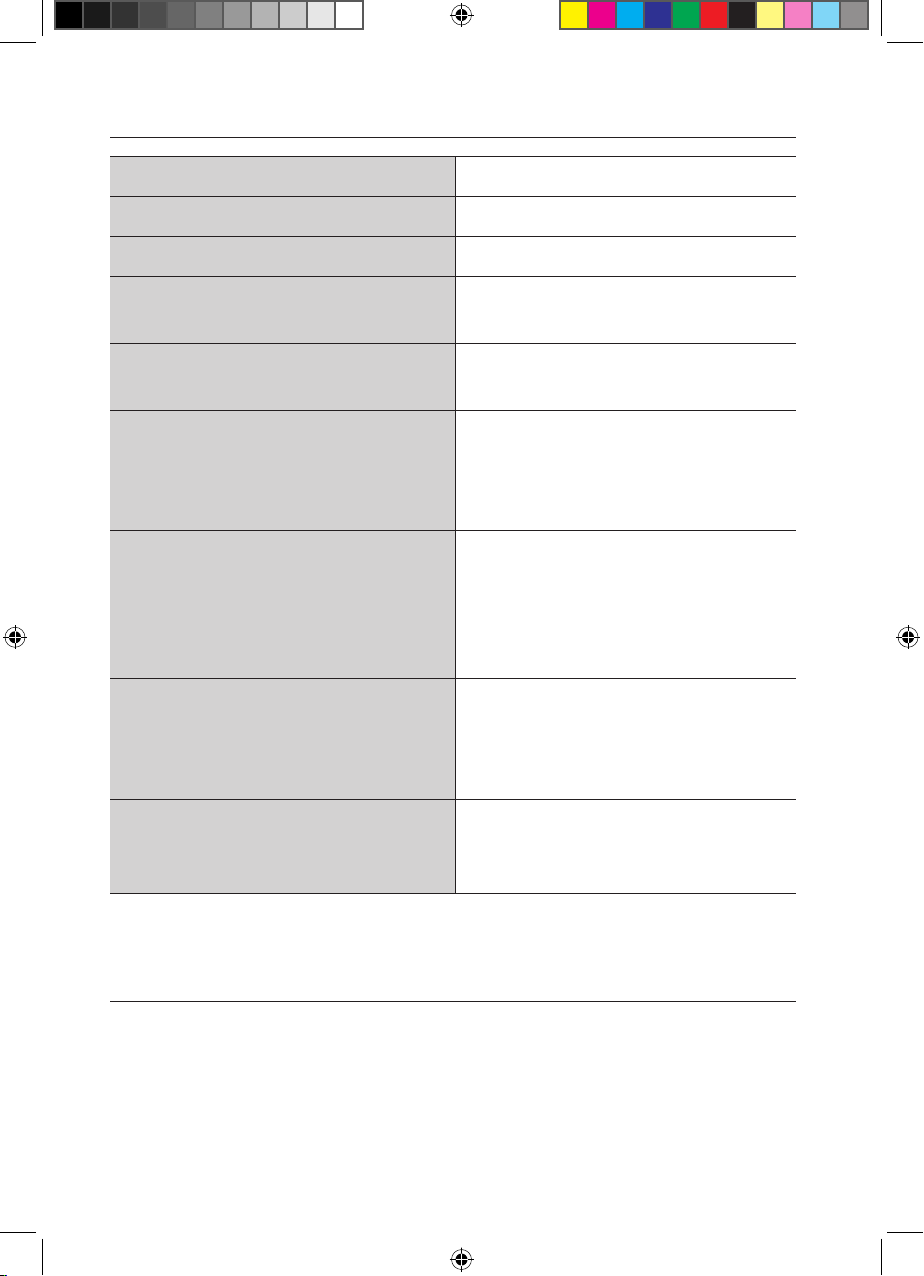
Supplier’s name Samsung Electronics co. Ltd.
Model identification NZ84F7NC6AB
Type of hob Built-In
Heating technology
Induction cooking zones and
cooking area
Number of cooking zones
and/or area
3
For circular cooking zones
or area:diameter of useful
surface area per electric
heated cooking zone (Ø)
14.5 cm, 28.0 cm
For non-circular cooking
zones or area: length and
width of useful surface area
per electric heated cooking
zone or area (L x W)
39.0 x 19.5 cm
Energy consumption per
cooking zone or area
calculated per kg
(EC
electric cooking
)
Ø 14.5 cm : 187.8 Wh/kg
39.0 x 19.5 cm : 196.2 Wh/kg
Ø 28.0 cm : 196.5 Wh/kg
Energy consumption for the
hob calculated per kg
(EC
electric hob
)
193.5 Wh/kg
* Data determined according to standard EN 60350-2 and
Commission Regulations (EU) No 66/2014.
Energy saving tips
• Always position pots and pans before switching on the
cooking zone.
• Dirty cooking zones and pan bases increase power
consumption.
• Using a pressure cooker reduces cooking time.
(Best)NZ84F7NC6AB_EU_DG68-00545A-02_EN.indd 38 27/03/2015 11:21:50
memo
08 TECHNICAL DATA
(Best)NZ84F7NC6AB_EU_DG68-00545A-02_EN.indd 39 27/03/2015 11:21:50
(Best)NZ84F7NC6AB_EU_DG68-00545A-02_EN.indd 40 27/03/2015 11:21:50
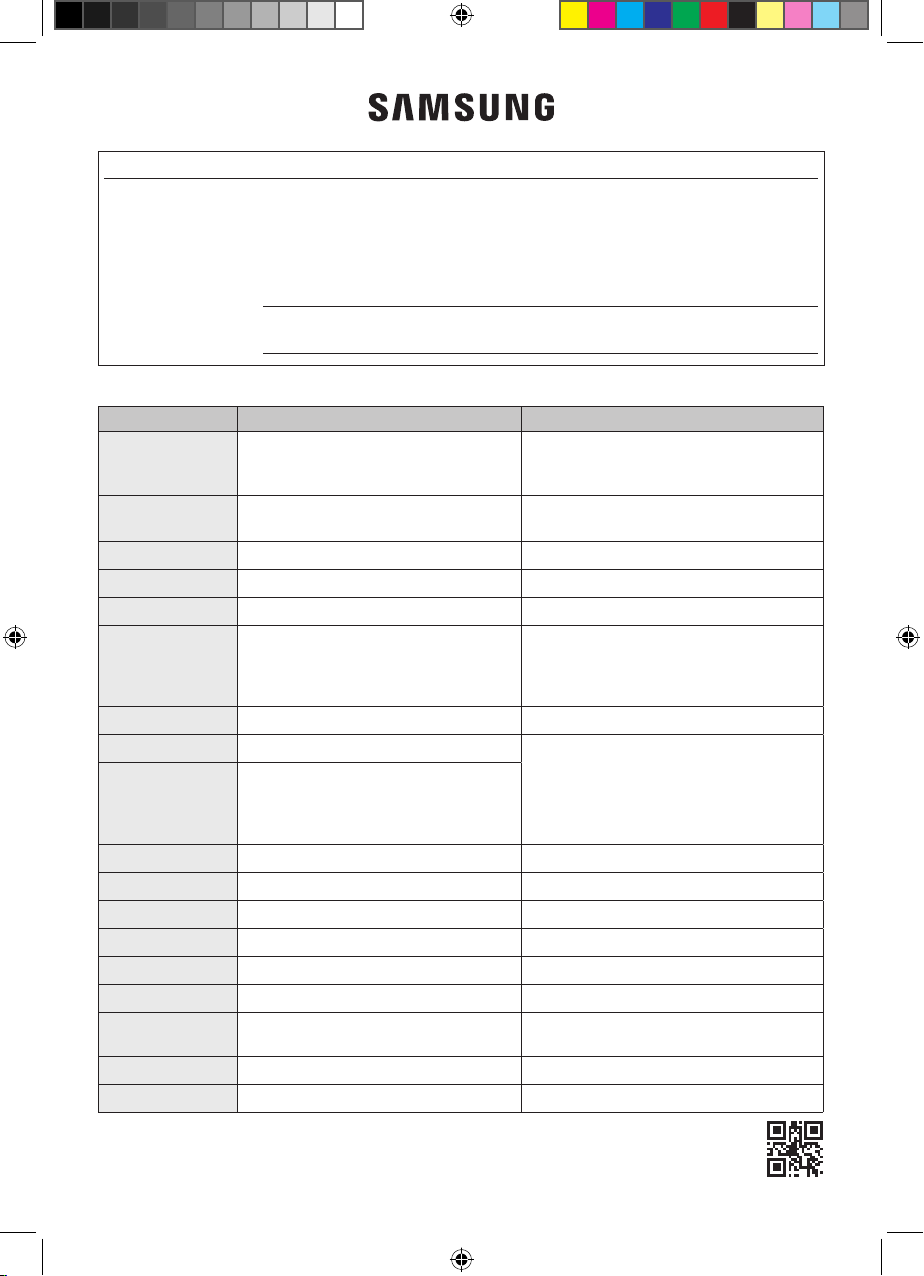
MODEL NAME & SERIAL NUMBER
Both the model name and the serial number are labeled underneath the cooktop base.
For later use, write down the information or attach the additional product label (located on
the top of the product) onto the current page.
Model Name
Serial Number
DG68-00545A-03
QUESTIONS OR COMMENTS?
COUNTRY CALL OR VISIT US ONLINE AT
AUSTRIA
0800-SAMSUNG (0800-7267864)
[Only for Premium HA] 0800-366661
[Only for Dealers] 0810-112233
www.samsung.com/at/support
BELGIUM 02-201-24-18
www.samsung.com/be/support (Dutch)
www.samsung.com/be_fr/support (French)
DENMARK 70 70 19 70 www.samsung.com/dk/support
FINLAND 030-6227 515 www.samsung.com//support
FRANCE 01 48 63 00 00 www.samsung.com/fr/support
GERMANY
0180 6 SAMSUNG bzw.
0180 6 7267864*
(*0,20 €/Anruf aus dem dt. Festnetz, aus
dem Mobilfunk max. 0,60 €/Anruf)
www.samsung.com/de/support
ITALIA 800-SAMSUNG (800.7267864) www.samsung.com/it/support
CYPRUS 8009 4000 only from landline, toll free
www.samsung.com/gr/support
GREECE
80111-SAMSUNG (80111 726 7864) only
from land line
(+30) 210 6897691 from mobile and
land line
LUXEMBURG 261 03 710 www.samsung.com/be_fr/support
NETHERLANDS 088 90 90 100 www.samsung.com/nl/support
NORWAY 815 56480 www.samsung.com/no/support
PORTUGAL 808 20 7267 www.samsung.com/pt/support
SPAIN 0034902172678 www.samsung.com/es/support
SWEDEN 0771 726 7864 (0771-SAMSUNG) www.samsung.com/se/support
SWITZERLAND 0800 726 78 64 (0800-SAMSUNG)
www.samsung.com/ch/support (German)
www.samsung.com/ch_fr/support (French)
UK 0330 SAMSUNG (7267864) www.samsung.com/uk/support
EIRE 0818 717100 www.samsung.com/ie/support