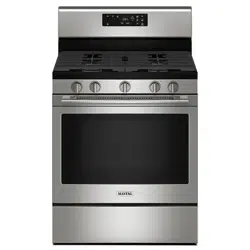
It is normal for parts of the range to become hot during a self-clean cycle.
To prevent personal injury and damage to the oven door do not attempt to open door when “LOCK” is displayed.
Avoid touching cooktop, door, window or oven vent area during a clean cycle.
Do not use commercial oven cleaners on the oven finish or around any part of the oven. They will damage the finish or parts.
The self-clean cycle uses above-normal cooking temperatures to automatically clean the oven interior. Do not force the oven door or lock lever open. This may result in exposure to high temperatures and be a burn hazard.
The oven should be cleaned regularly by wiping up spillovers to prevent excessive smoke and flare-ups. Do not allow a heavy build-up of soil to accumulate in the oven.
Brand names for cleaning products are registered trademarks of the respective manufacturers.
During the cleaning process, the kitchen should be well ventilated to get rid of normal odors associated with cleaning.
Before Self-Cleaning
1. Turn off the oven light before cleaning. The light may burn out during the clean cycle.
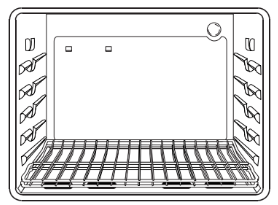
2. Remove broiler pan, all pans, and oven racks from the oven. The oven racks will discolor and may not slide easily after a self-clean cycle if they are not removed.
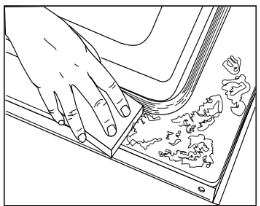
3. Clean oven frame, door frame, area outside of gasket, and around the opening in the door gasket with a nonabrasive cleaner such as Bon Ami* or detergent and water. The self- cleaning process does not clean these areas. They should be cleaned to prevent soil from baking on during the clean cycle. (The gasket is the seal around the oven door and window.)
4. To prevent damage, do not clean or rub the gasket around the oven door. The gasket is designed to seal in heat during the clean cycle.
5. Wipe up excess grease or spillovers from the oven bottom. This prevents excessive smoking, flare-ups or flaming during the clean cycle.
6. Wipe up sugary and acidic spillovers such as sweet potatoes, tomato, or milk-based sauces. Porcelain enamel is acid-resistant, not acid-proof. The porcelain finish may discolor if acidic spills are not wiped up before a self- clean cycle.
Important: Oven temperature must be below 400° F to program a clean cycle.
To set Self-Clean:
1. Close the oven door.
2. Move door lock lever right to the locked position.
3. Press the Clean pad.
"CLEAN” flashes in the display.
If the door is not closed, beeps will sound and “DOOR” will display. If the door is not closed within 45 seconds, the self-cleaning operation will be canceled and the display will return to the time of day.
4. Press the More+ or Less- pad.
"CL-M” (Medium Soil, 3 hours) is displayed.
5. Press the More+ or Less- pad to scroll through the self-cleaning settings.
"CL-H” (Heavy Soil, 4 hours)
"CL-M” (Medium Soil, 3 hours)
"CL-L” (Light Soil, 2 hours)
Choosing the soil level of the oven automatically programs the self-cleaning time.
6. After four seconds, the oven will start cleaning.
The cleaning time will start counting down in the display.
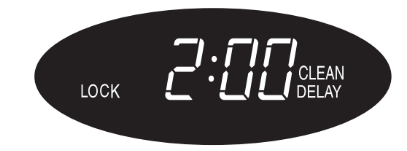
"LOCK” will appear in the display.
"CLEAN” will appear in the display.
To delay a Self-Clean cycle:
1. Press the Delay pad.
"DELAY” flashes.
00:00 will appear in the display.
2. Press the More+ or Less- pad to set the amount of time you want to delay the cycle. Delay time can be set from ten minutes (00:10) to 11 hours, 59 minutes (11:59).
3. Press the Clean pad.
"CLEAN” will flash.
4. Press the More+ or Less- pad.
"CL-M” (Medium Soil, 3 hours) is displayed.
5. Press the More+ or Less- pad to scroll through the self-cleaning settings.
"CL-H” (Heavy Soil, 4 hours)
"CL-M” (Medium Soil, 3 hours)
"CL-L” (Light Soil, 2 hours)
Choosing the soil level of the oven automatically programs the self-cleaning time.
6. After four seconds, CLEAN, DELAY and LOCK will appear in the display to show that the oven is set for a delayed clean operation. The delay time is displayed.
If the oven has already been set for a clean cycle and you wish to set a delay:
1. Press the Delay pad.
"DELAY” flashes.
00: 00 will appear in the display.
2. Press the More+ or Less- pad to set the amount of time you want to delay the cycle.
After four seconds, CLEAN, DELAY and LOCK will appear in the display to show that the oven is set for a delayed clean operation. The delay time is displayed.
When the Self-Clean cycle starts:
"DELAY” will turn off.
The clean time will appear in the display.
To cancel the Self-Clean cycle:
Press the CANCEL pad.
All words disappear from the display.
All functions are canceled.
The time of day appears in the display.
During the Self-Clean cycle
When LOCK shows in the display, the door cannot be opened.
To prevent damage to the door, do not force the door open when LOCK is displayed.
Smoke and Smells
You may see some smoke and smell an odor the first few times the oven is cleaned. This is normal and will lessen in time.
Smoke may also occur if the oven is heavily soiled or if a broiler pan was left in the oven.
Sounds
As the oven heats, you may hear sounds of metal parts expanding and contracting. This is normal and will not damage the oven.
After Self-Cleaning
About one hour after the end of the self-clean cycle, LOCK will turn off. The door can then be opened. Move door lock lever to the left to unlock.
Some soil may leave a light gray, powdery ash. Remove it with a damp cloth. If soil remains after wiping, that means the clean cycle was not long enough. The soil will be re- moved during the next clean cycle.
If oven racks were left in the oven and do not slide smoothly after a clean cycle, wipe racks and rack supports with a small amount of vegetable oil to make them easier to move.
Fine lines may appear in the porcelain because it went through heating and cooling. This is normal and will not affect performance.
A white discoloration may appear after cleaning if acidic or sugary foods were not wiped up before the self-clean cycle. This discoloration is normal and will not affect performance.
Notes:
If the oven door is left open, “DOOR” will flash in the display and a signal will beep until the door is closed and the Clean pad is pressed again.
If more than five seconds elapse between pressing the Clean pad and the More+ or Less- pad, the program will automatically return to the previous display.
The oven door will be damaged if the oven door is forced to open when “LOCK” is still displayed.
Cleaning Procedures
CAUTION
Be sure appliance is off and all parts are cool before handling or cleaning. This is to avoid damage and possible burns.
To prevent staining or discoloration, clean appliance after each use.
If a part is removed, be sure it is correctly replaced.
Broiler Pan and Insert
Never cover insert with aluminum foil as this prevents the fat from draining to the pan below.
Place soapy cloth over insert and pan; let soak to loosen soil.
Wash in warm soapy water. Use scouring pad to remove stubborn soil.
Broiler pan and insert can be cleaned in dishwasher.
Sealed Gas Burners
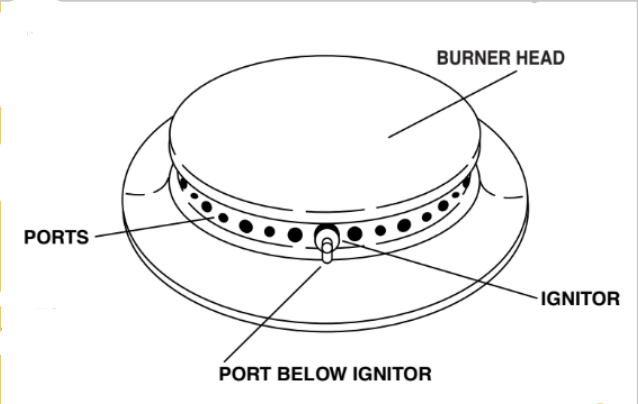
Clean frequently. Allow burner to cool. Clean with soap and plastic scouring pad. For stubborn soils, use a non-abrasive cleaner and a cloth. Try to prevent the cleaner from seeping into the gas ports as this will affect the flame. If the cleaner does enter the ports, clean with a soft bristle brush or a straight pin especially the port below the ignitor. Do not enlarge or distort holes.
Be careful not to get water into burner ports.
Use care when cleaning the ignitor. If the ignitor is wet or damaged the surface burner will not light.
Burner Grates
Wash grates with warm, soapy water and a nonabrasive, plastic scrubbing pad. For stubborn soils, clean with a soap-filled, nonabrasive pad or a sponge and Cooktop Cleaning Creme (Part #20000001).**
For burned on soils, remove grates, place on newspapers and carefully spray with commercial oven cleaner. (Do not spray surrounding surfaces.) Place in plastic bags for several hours or overnight. Wearing rubber gloves, remove from bags. Wash, rinse, dry and replace on cooktop.
Clock and Control Pad Area
To activate “Control Lock” for cleaning, see page 14.
Wipe with a damp cloth and dry. Do not use abrasive cleaning agents as they may scratch the finish.
Glass cleaners may be used if sprayed on a cloth first. DO NOT spray directly on control pad and display area.
Control Knobs
Remove knobs in the OFF position by pulling forward.
Wash, rinse and dry. Do not use abrasive cleaning agents as they may scratch the finish.
Turn on each burner to be sure the knobs have been correctly replaced.
Cooktop and Control Panel - Porcelain Enamel
Porcelain enamel is glass fused on metal and may crack or chip with misuse. It is acid resistant, not acid proof. All spillovers, especially acidic or sugary spillovers, should be wiped up imme- diately with a dry cloth.
When cool, wash with soapy water, rinse and dry.
Never wipe off a warm or hot surface with a damp cloth. This may cause cracking or chipping.
Never use oven cleaners, abrasive or caustic cleaning agents on exterior finish of range.
Side Panels, Storage Drawer, Lower Broiler Door (select models) and Door Handles - Painted Enamel
When cool, wash with warm soapy water, rinse and dry.
Never wipe a warm or hot surface with a damp cloth as this may damage the surface and may cause a steam burn.
For stubborn soil, use mildly abrasive cleaning agents such as baking soda paste or Bon Ami*. Do not use abrasive cleaners such as steel wool pads or oven cleaners. These products will scratch or permanently damage the surface.
Important: Use a dry towel or cloth to wipe up spills, especially acidic or sugary spills. Surface may discolor or dull if soil is not immediately removed. This is especially important for white surfaces.
Oven Window and Door - Glass
Avoid using excessive amounts of water which may seep under or behind glass, causing staining. Wash with soap and water. Rinse with clear water and dry. Glass cleaner can be used if sprayed on a cloth first.
Do not use abrasive materials such as scouring pads, steel wool or powdered cleaners as they will scratch glass.
Oven Interior
Self-Clean:
Follow instructions on page 4-5 to set a self-clean cycle.
Manual Clean:
Clean frequently using mild abrasive cleaners and a plastic pad.
Do not use metallic scouring pads because they will scratch the surface.
When using commercial oven cleaners follow the manufacturer’s instructions.
Wipe up acidic spills (tomato or milk based foods) as soon as possible with soap and water. If the spill is not wiped up, it may discolor the porcelain. To make cleaning easier, remove the oven door if desired. (See Maintenance section below.)
Oven Racks
Clean with soapy water.
Remove stubborn soil with cleansing powder or soap- filled scouring pad. Rinse and dry.
Racks will permanently discolor and may not slide out smoothly if left in the oven during a self-clean operation. If this occurs, wipe the rack and embossed rack supports with a small amount of vegetable oil to restore ease of movement, then wipe off excess oil.
Stainless Steel (select models)
DO NOT USE ANY CLEANING PRODUCT CONTAINING CHLORINE BLEACH.
DO NOT USE ABRASIVE OR ORANGE CLEANERS.
ALWAYS WIPE WITH THE GRAIN WHEN CLEANING.
Daily Cleaning/Light Soil –– Wipe with one of the following - soapy water, white vinegar/water solution, Formula 409 Glass and Surface Cleaner* or a similar glass cleaner - using a sponge or soft cloth. Rinse and dry. To polish and help prevent fingerprints, follow with Stainless Steel Magic Spray* (Part No. 20000008)**.
Moderate/Heavy Soil –– Wipe with one of the following - Bon Ami, Smart Cleanser, or Soft Scrub* - using a damp sponge or soft cloth. Rinse and dry. Stubborn soils may be removed with a damp multi-purpose Scotch-Brite* pad; rub evenly with the grain. Rinse and dry. To restore luster and remove streaks, follow with Stainless Steel Magic Spray*.
Discoloration –– Using a damp sponge or soft cloth, wipe with Cameo Stainless Steel Cleaner*. Rinse immediately and dry. To remove streaks and restore luster, follow with Stainless Steel Magic Spray*.
Maintenance
Oven Door
CAUTION
Do not place excessive weight on or stand on an open oven door. This could cause the range to tip over, break the door, or injure the user.
Do not attempt to open or close door or operate oven until door is properly replaced.
Never place fingers between hinge and front oven frame. Hinge arms are spring mounted. If accidentally hit, the hinge will slam shut against oven frame and could injure your fingers.
To remove:
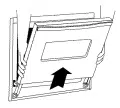
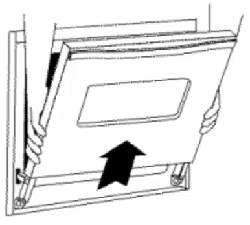
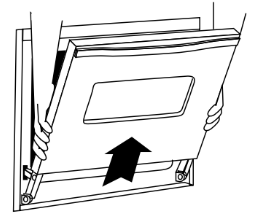
1. When cool, open the oven door to the first stop position (opened about four inches).
2. Grasp door at each side. Do not use the door handle to lift door.
3. Lift up evenly until door clears hinge arms.
To replace:
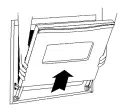
1. Grasp door at each side.
2. Align slots in the door with the hinge arms on the range.
3. Slide the door down onto the hinge arms until the door is completely seated on the hinges. Push down on the top corners of the door to completely seat door on hinges. Door should not appear crooked.
Important: The oven door on a new range may feel “spongy” when it is closed. This is normal and will decrease with use.
Oven Window
To protect the oven door window:
Do not use abrasive cleaning agents such as steel wool scouring pads or powdered cleansers as they may scratch the glass.
Do not hit the glass with pots, pans, furniture, toys, or other objects.
Do not close the oven door until the oven racks are in place.
Scratching, hitting, jarring or stressing the glass may weaken its structure, causing an increased risk of breakage at a later date.
Leveling Legs
CAUTION
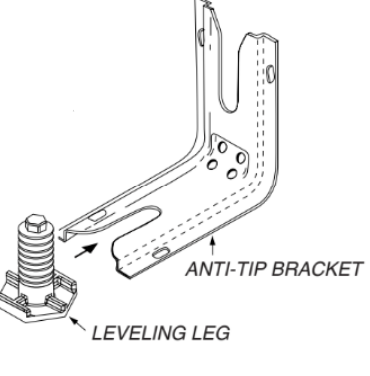
Be sure the anti-tip bracket secures one of the rear leveling legs to the floor. This bracket prevents the range from accidentally tipping.
Be sure the range should be leveled when installed. If the range is not level, turn the leveling legs (located at each corner of the range) until range is level.
Oven Light
CAUTION
Disconnect power to range before replacing light bulb.
Use a dry potholder to prevent possible harm to hands when replacing bulb.
Be sure bulb is cool before touching bulb.
Do not touch hot bulb with a damp cloth as this may cause the bulb to break.
To Replace Oven Light Bulb:
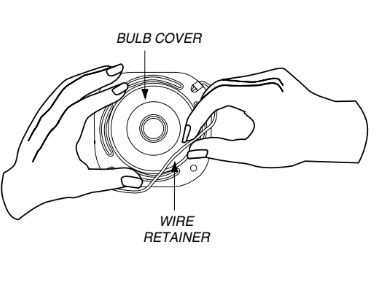
1. When oven is cool, hold bulb cover in place, then slide wire retainer off cover. Important Bulb cover will fall if not held in place while removing wire retainer.
2. Remove bulb cover and light bulb.
3. Replace with a 40-watt appliance bulb.
4. Replace bulb cover and secure with wire retainer.
5. Reconnect power to range. Reset clock.
Electrical Connection
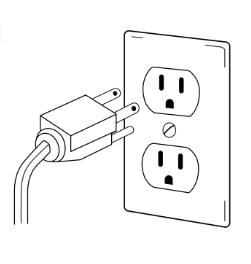
Appliances which require electrical power are equipped with a three- prong grounding plug which must be plugged directly into a properly grounded three-hole 120 volt electrical outlet.
Always disconnect power to appliance before servicing.
The three-prong grounding plug offers protection against shock hazards. DO NOT CUT OR REMOVE THE THIRD GROUNDING PRONG FROM THE POWER CORD PLUG.
If an ungrounded, two-hole or other type electrical outlet is encountered, it is the personal responsibility of the appliance owner to have the outlet replaced with a properly grounded three-hole electrical outlet.
Removal of Gas Appliance
Gas appliance connectors used to connect this appliance to the gas supply are not designed for continuous movement. Once installed, DO NOT repeatedly move this gas appliance for cleaning or to relocate. If this appliance has to be moved and/or removed for servicing, follow the procedure described in the installation instructions. For information, contact Maytag Customer Assistance at 1-800-688-9900 USA or Canada.
To prevent range from accidentally tipping, range must be secured to the floor by sliding rear leveling leg into the anti- tip bracket.
Storage Drawer (select models)
CAUTION
Do not store plastic, paper products, food or flammable materials in this drawer. The drawer may become too warm for these items when the oven is in use.
The storage drawer can be removed to allow you to clean under the range.
To remove:
Empty drawer and pull out to the first stop position.
Lift up the front of the drawer.
Pull out to the second stop position.
Grasp sides and lift drawer up and out.
To replace:
ain and push until drawer isFit the ends of the drawer glides into the rails in the range.
Lift up the front of the drawer and gently push in to the first stop position.
Lift drawer up ag closed.
Oven Bottom
Protect oven bottom against spillovers, especially acidic or sugary spills, as they may discolor the porcelain enamel. Use the correct pan size to avoid spillovers and boilovers.
Troubleshooting
For most concerns, try these first.
Check if oven controls have been properly set.
Check to be sure plug is securely inserted into receptacle.
Check or reset circuit breaker. Check or replace fuse.
Check power supply.
Surface burner fails to light.
Check to be sure unit is properly connected to power supply.
Check for a blown circuit fuse or a tripped main circuit breaker.
Check to be sure ignitor is dry and clicking. Burner will not light if ignitor is damaged, soiled or wet. If ignitor doesn’t click, turn control knob OFF.
The flame is uneven.
Burner ports may be clogged.
Surface burner flame lifts off ports.
Check to be sure a pan is sitting on the grate above.
Baking results are not as expected or differ from previous oven.
Check the oven temperature selected. Make sure oven is preheated when recipe or directions recommend preheat.
Make sure the oven vent has not been blocked. See page for location.
Check to make sure range is level.
Temperatures often vary between a new oven and an old one. As ovens age, the oven temperature often “drifts” and may become hotter or cooler. See pages 17-18 for instructions on adjusting the oven temperature (select models).
Important: It is not recommended to adjust the temperature if only one or two recipes are in question.
Use correct pan. Dark pans produce dark browning. Shiny pans produce light browning.
Check rack positions and pan placement. Stagger pans when using two racks. Allow 1-2 inches between pans and oven wall.
Check the use of foil in the oven. Never use foil to cover an entire oven rack. Place a small piece of foil on the rack below the pan to catch spillovers.
Food is not broiling properly or smokes excessively.
Check oven rack positions. Food may be too close to flame.
Aluminum foil was incorrectly used. Never line the broiler insert with foil.
Trim excess fat from meat before broiling.
A soiled broiler pan was used.
Preheat oven for 2-3 minutes before placing food in the oven.
Broil with the oven door closed.
Oven will not self-clean. (select models)
Check to make sure the cycle is not set for a delayed start. See page 5.
Check if door is closed.
Check if control is in Sabbath Mode. See page 17.
Oven may be over 400° F. Oven temperature must be below 400° F to program a clean cycle.
Oven did not clean properly. (select models)
Longer cleaning time may be needed.
Excessive spillovers, especially sugary and/or acidic foods, were not removed prior to the self-clean cycle.
Oven door will not unlock after self-clean cycle select models).
Oven interior is still hot. Allow about one hour for the oven to cool after the completion of a self-clean cycle. The door can be opened when “LOCK” is not displayed.
The control and door may be locked. See pages 5 and 14 to unlock.
Moisture collects on oven window or steam comes from oven vent.
This is normal when cooking foods high in moisture.
Excessive moisture was used when cleaning the window.
There is a strong odor or light smoke when oven is turned on.
This is normal for a new range and will disappear after a few uses. Initiating a clean cycle will “burn off” the odors more quickly.
Turning on a ventilation fan will help remove the smoke and/or odor.
Excessive food soils on the oven bottom. Use a self-clean cycle.
Fault Codes (select models).
BAKE or LOCK may flash rapidly in the display to alert you if there is an error or a problem. If BAKE or LOCK appear in the display, press the CANCEL pad. If BAKE or LOCK continue to flash, disconnect power to the appliance. Wait a few minutes, and then reconnect power. If the flashing still continues, disconnect power to the appliance and call an authorized servicer.
If the oven is heavily soiled, excessive flareups may result in a fault code during cleaning. Press the CANCEL pad and allow the oven to cool completely, wipe out excess soil, then reset the clean cycle. If the fault code reappears, contact an authorized servicer.
Noises may be heard.
The oven makes several low level noises. You may hear the oven relays as they go on and off. This is normal.
As the oven heats and cools, you may hear sounds of metal parts expanding and contracting. This is normal and will not damage your appliance.
There are no beeps and no display.
Oven may be in Sabbath Mode. See page 17.
"SAb” flashing and then displayed continuously.
Oven is in Sabbath Mode. To cancel, press and hold the Clock pad for five seconds.
Surface Cooking
Surface Controls
CAUTION
If flame should go out during a cooking operation, turn the burner off. If a strong gas odor is detected, open a window and wait five minutes before relighting the burner.
Be sure all surface controls are set in the OFF position before supplying gas to the range.
NEVER touch cooktop until it has cooled. Expect some parts of the cooktop, especially around the burners, to become warm or hot during cooking. Use potholders to protect hands.
Pilotless Ignition
Pilotless ignition eliminates the need for a constant standing pilot light. There are two ignitors for conventional surface burners. Each sealed burner has a spark ignitor. When cleaning around the surface burner, use care. If cleaning cloth should catch the ignitor, it could damage it preventing ignition.
If the surface burner does not light, check if ignitor is broken, soiled or wet. If clogged, clean the small port beneath the ignitor using a straight pin.
Surface Control Knobs
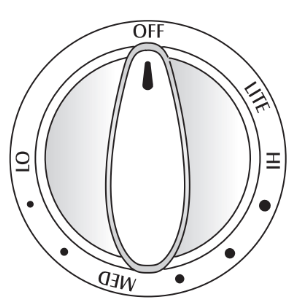
Use to turn on the surface burners. An infinite choice of heat settings is available from LO to HI. At the HI setting a detent or notch may be felt. The knobs can be set on or between any of the settings.
Graphics next to the knob identify which burner the knob controls. For example, the graphic at left shows the left front burner location.
HI: Use to bring liquid to a boil, or reach pressure in a pressure cooker. Always reduce setting to a lower heat when liquids begin to boil or foods begin to cook.
MED: An intermediate flame size is used to continue cooking. Food will not cook any faster when a higher flame setting is used than needed to maintain a gentle boil. Water boils at the same temperature whether boiling gently or vigorously.
LO: Use to simmer foods, keep foods warm and melt chocolate or butter. Some cooking may take place on the
LO setting if the pan is covered.
Setting the controls:
The size and type of cookware will affect the heat setting.
1. Place a pan on the burner grate.
The burner flame may lift off or appear separated from the port if a pan is not placed on the grate.
2. Push in and turn the knob counterclockwise to the LITE setting.
A clicking (spark) sound will be heard and the burner will light. (All four ignitors will spark when any surface burner knob is turned to the LITE position.)
3. After the burner lights, turn knob to desired flame size.
The ignitor will continue to spark until the knob is turned past the LITE position.
Operating During a Power Failure
CAUTION
When lighting the surface burners, be sure all of the controls are in the OFF position. Strike the match first and hold it in position before turning the knob to LITE.
Hold a lighted match to the desired surface burner head.
Push in and turn the control knob slowly to LITE.
Once lit, adjust the flame to the desired level.
Cooktop
To prevent the cooktop from discoloring or staining:
Clean cooktop after each use.
Wipe acidic or sugary spills as soon as the cooktop has cooled as these spills may discolor the porcelain.
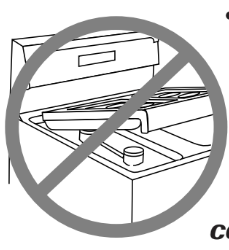
Unlike a range with standard gas burners, this cooktop does not lift-up nor is it removable. Do not attempt to lift the cooktop for any reason.
Sealed Burners
The sealed burners of your range are secured to the cooktop and are not designed to be removed. Since the burners are sealed into the cooktop, boilovers or spills will not seep underneath the cooktop. However, the burner should be cleaned after each use. (See page 6 for cleaning directions.)
High Performance Burner (12,000 BTU*)
There is one high speed burner on your range, located in the right front position. This burner offers higher speed cooking that can be used to quickly bring water to a boil and for large- quantity cooking.
Simmer Burner
This burner is located in the left rear position. The simmer burner offers a lower BTU* flame for delicate sauces or for melting chocolate.
BTU ratings will vary when using LP gas.
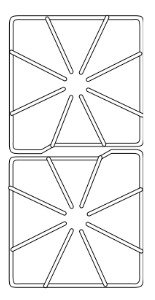
Burner Grates
The grates must be properly positioned before cooking.
Improper installation of the grates may result in chipping of the cooktop.
Do not operate the burners without a pan on the grate.
The grate’s porcelain finish may chip without a pan to absorb the heat from the burner flame.
Although the burner grates are durable, they will gradually lose their shine and/or discolor due to the high temperatures of the gas flame.
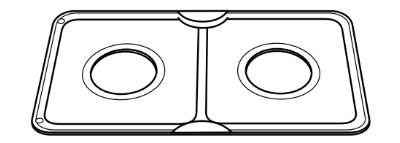
Drip Pans - Optional
Removeable porcelain covered drip pans are available for use with this appliance to help contain spills. Call 1-800-688-8408 to order.
Notes:
A properly adjusted burner with clean ports will light within a few seconds. If using natural gas, the flame will be blue with a deeper blue inner cone.
If the burner flame is yellow or is noisy, the air/gas mixture may be incorrect. Contact a service technician to adjust. (Adjustments are not covered by the warranty.)
With LP gas, slight yellow tips on the flames are acceptable. This is normal and adjustment is not necessary.
With some types of gas, you may hear a “popping” sound when the surface burner is turned off. This is a normal operating sound of the burner.
If the control knob is turned very quickly from HI to LO, the flame may go out, particularly if the burner is cold. If this occurs, turn the knob to the OFF position, wait several seconds and relight the burner.
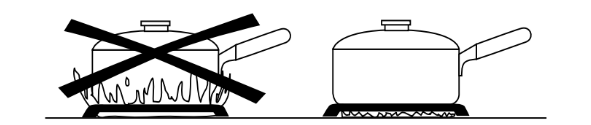
The flame should be adjusted so it does not extend beyond the edge of the pan.
Oven Cooking
Manual Clean Oven Control (select models)
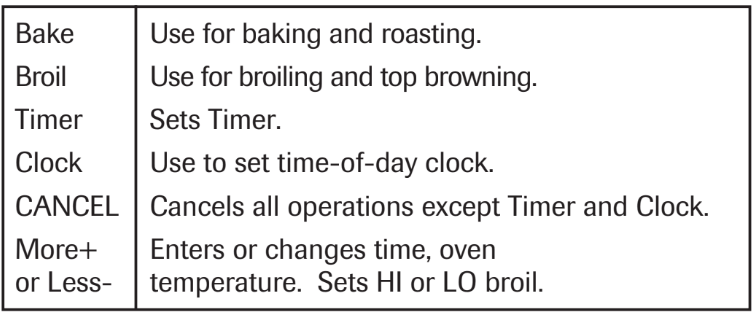
Using the Touchpads
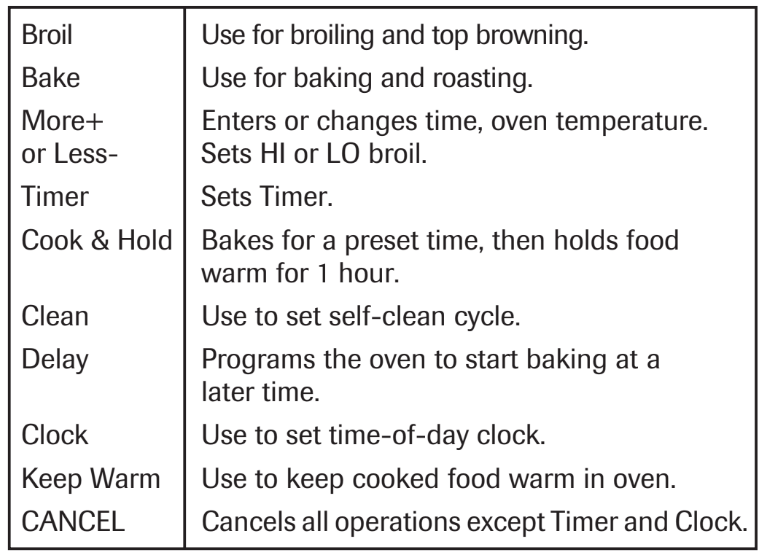
Press the desired pad.
Press the More+ or Less- pad to enter time or temperature.
A beep will sound each time a function pad is pressed. There is no beep for the More+ or Less- pad.
A double beep will sound if a programming error occurs.
Important: Four seconds after pressing the More+ or Less- pad, the time or temperature will automatically be entered. If more than 30 seconds elapse between touching a function pad and the More+ or Less- pad, the function will be canceled and the display will return to the previous display.
Setting the Clock
1. Press the Clock pad.
The clock time cannot be set if the control is programmed for a bake, broil or timing operation.
2. Set the correct time of day using the More+ or Less- pads. If the More+ or Less- pad is not pressed within 30 seconds, the program will cancel. Press the Clock pad and begin again.
Setting the Timer
The timer can be set from one minute (:01) up to 99 hours and 59 minutes (99:59). Time will be displayed in minutes and not in seconds. THE TIMER DOES NOT CONTROL THE OVEN.
1. Press the Timer pad.
0:00 will light and the colon (:) will flash in the display.
2. Press the More+ or Less- pad until the desired time is displayed.
The timer will begin as soon as the time is set.
The flashing colon indicates that a timing operation is in progress. (The colon will not flash if the time of day or oven temperature is displayed.)
Two short beeps signal the end of the operation. “0:00” will appear in the display.
If desired, press the Clock pad and the time of day will briefly reappear in the display during a timing operation.
If desired, press the Bake or Broil pads and the current temperature setting will briefly reappear in the display during a timing operation.
To cancel the timer operation:
Press and hold the Timer pad for several seconds.
Baking, Roasting and Broiling
1. Press Bake pad.
000 will light and the Bake indicator light will flash in the display.
If you press the Bake pad and do not set an oven temperature within 30 seconds, the program will automatically cancel and the time of day will reappear in the display.
2. Press the More+ or Less- pad until the desired oven temperature is displayed.
The oven temperature can be set from 170° to 550° F.
350 ° will appear in the display when either More+ or Less- pad is pressed once.
Press and tap the More+ or Less- pad to change the oven temperature by 5° increments or press and hold the More+ or Less- pad to change the oven temperature by 10° increments.
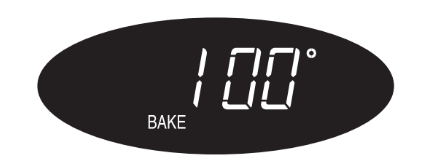
100 ° or the actual oven temperature, whichever is higher, will appear in the display when the oven turns on.
The temperature in the display will increase in 5° increments until preset temperature is reached. A single beep will sound when the oven is preheated.
Allow 10 to 15 minutes for the oven to preheat.
To recall preset temperature during preheat, press the Bake pad. The temperature will be displayed for three seconds.
To change oven temperature during cooking, press the Bake pad, then press the More+ or Less- pad until the desired temperature is displayed.
To change oven temperature during preheat, press the Bake pad twice, then press the More+ or Less- pad until the desired temperature is displayed.
3. Place food in the oven. Check food for doneness at the minimum cooking time.
4. At the end of cooking, press the CANCEL pad to turn the oven off and remove the food from the oven.
The oven features an automatic shut-off. If the oven is left on for 12 hours it will automatically turn off and 000 will appear in the display. Press the CANCEL pad and the time of day will reappear in the display.
Setting the Controls For Broiling: lower compartment - select models)
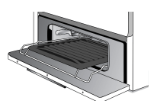
For best results, use pan designed for broiling.
1. Place broiler pan on recommended broiling compartment position shown in the chart below.
2. Press the Broil pad.
"SEt” will light and the Broil indicator light will flash in the display.
3. Press the More+ pad to select HI (high) broil or the Less- pad to set LO (low) broil.
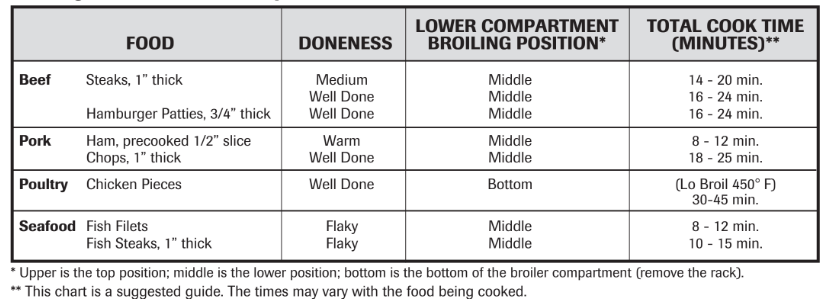
Broiling Chart - Lower Compartment
4. Follow the suggested times in the broil chart below. Meat should be turned once about halfway through cooking time.
5. After broiling, press CANCEL to turn the oven off and remove the broiler pan from the oven. The current time of day will reappear in the display.
Manual Clean Oven Knob Control (select models)
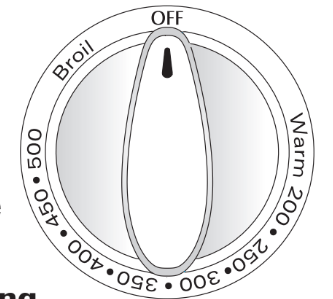
Oven Temp Knob
The Oven Temp Knob is used to select and maintain the oven temperature. Always turn this knob directly to the desired temperature.
Do not turn to a higher temperature and then back.
Setting the Control for Baking and Roasting:
Push in and turn Oven Temp knob to desired temperature. Allow 10-15 minutes for preheating.
Place food in the center of oven. Check food for doneness at minimum time in recipe. Cook longer if necessary.
Remove food from oven and turn Oven Temp knob to OFF.
Setting the Control for Broiling:
1. For best results, use a broiling pan. Place the broiler pan on recommended rack position (see chart on page 12).
2. Turn Oven Temp knob to Broil, or for lower temperature broiling, to 450° F.
Lower temperature broiling avoids excessive browning of longer cooking foods such as poultry.
3. Follow the suggested times in the broil chart on page 12. Meat should be turned once about halfway through cooking time.
4. Check the doneness by cutting a slit in the meat near the center to check the color.
5. After broiling, turn the Oven Temp knob to OFF. Remove the broiler pan from the oven.
Oven Control (select models)
Using the Touchpads
Press the desired pad.
Press the More+ or Less- pad to enter time or temperature.
A beep will sound when any pad is touched.
A double beep will sound if a programming error occurs.
Important: Four seconds after pressing the More+ or Less- pad, the time or temperature will automatically be entered. If more than 30 seconds elapse between touching a function pad and the More+ or Less- pad, the function will be canceled and the display will return to the previous display.
Clock
The clock can be set to display time in a 12-hour or 24-hour format. The clock is set at the factory for the 12-hour format.
To change the clock to 24-hour format:
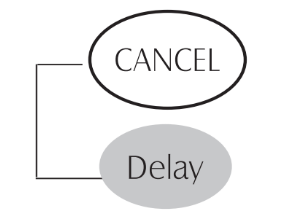
Press and hold the CANCEL and Delay pads for three seconds.
Press the More+ or Less - pad to select 12 or 24 hour.
Set the time of day following the directions below.
To set the Clock:
1. Press the Clock pad.
Time of day and the colon flash in the display.
2. Press the More+ or Less- pad to set the time of day.
Colon continues flashing.
3. Press the Clock pad again or wait four seconds.
When electrical power is supplied or after a power interruption, the last clock time before power was interrupted will flash.
To recall the time of day when another time function is showing, press the Clock pad.
Clock time cannot be changed when the oven has been programmed for cook or clean Delay or Cook & Hold.
To cancel the Clock display:
If you do not want the time of day to display:
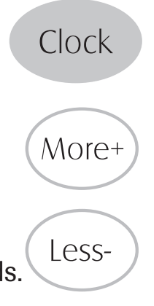
Press and hold the CANCEL and Clock pads for three seconds. The time of day will disappear from the display
When the clock display is canceled, press the Clock pad to briefly display the time of day.
To restore the Clock display:
Press and hold the CANCEL and Clock pads for three seconds. The time of day will reappear in the display.
Timer
The timer can be set from one minute (00:01) up to 99 hours and 59 minutes (99:59).
The timer can be used independently of any other oven activity. It can also be set while another oven function is operating.
The Timer does not control the oven. It only controls a beeper.
To set the Timer:
1. Press the Timer pad.
0:00 lights in the display.
The colon flashes in the display.
2. Press the More+ or Less- pad until the correct time appears in the display.
The colon will continue to flash.
3. Press Timer pad again or wait four seconds.
The colon continues flashing and the time begins counting down.
The last minute of the timer countdown will be displayed as seconds.
4. At the end of the set time, one long beep will sound.
To cancel the Timer:
Press and hold the Timer pad for three seconds.
Press the Timer pad and set the time to 00:00.
Locking the Controls
The touchpad controls can be locked for safety, cleaning, or to prevent unwanted use. They will not function when locked. If the oven is currently in use, the controls cannot be locked.
The current time of day will remain in the display when the controls are locked.
To lock:
Press and hold the CANCEL and Cook & Hold pads for three seconds.
LOCK flashes in the display.
To unlock:
Press and hold the CANCEL and Cook & Hold pads for three seconds.
LOCK disappears from the display.
Fault Codes
BAKE or LOCK may flash rapidly in the display to alert you if there is an error or a problem. If BAKE or LOCK flash in the display, press CANCEL pad. If BAKE or LOCK continue to flash, disconnect power to the appliance. Wait a few minutes, and then reconnect power. If the flashing still continues, disconnect power to the appliance and call an authorized servicer.
Baking
To set Bake:
1. Press the Bake pad.
"BAKE” will flash.
0:00 will light in the display.
2. Select the oven temperature. The oven temperature can be set from 170° to 550°. Press or press and hold the More+ or Less- pads.
350° will light when either pad is first pressed.
Press the More+ pad to increase the temperature.
Press the Less- pad to decrease the temperature.
3. Press Bake pad again or wait four seconds.
BAKE will stop flashing and light in the display.
100° or the actual oven temperature will display. The temperature will rise in 5° increments until the preset temperature is reached.
4. Allow the oven to preheat for 8-15 minutes.
When the set oven temperature is reached, one long beep will sound.
To recall the set temperature during preheat, press the Bake pad.
5. Place food in center of oven, allowing a minimum of two inches between utensil and oven walls.
6. Check cooking progress. Cook longer if needed.
7. When cooking is finished, press CANCEL.
8. Remove food from the oven.
Notes:
To change the oven temperature during cooking, press the Bake pad, then press the More+ or Less- pad until you reach the desired temperature.
To change oven temperature during preheat, press the Bake pad twice, then press the More+ or Less- pad until the desired temperature is displayed.
If you forget to turn off the oven, it will automatically turn off at the end of 12 hours. If you wish to deactivate this feature, see page 17.
Baking Differences Between Your Old and New Ovens
It is normal to notice some baking time differences between a new oven and an old one. See “Adjusting the Oven Temperature” on page 17.
Cook & Hold
Cook & Hold allows you to bake for a preset amount of time, followed by a one-hour Keep Warm cycle.
To set Cook & Hold:
1. Press the Cook & Hold pad.
"BAKE” and “HOLD” flash.
0: 00 lights in the display.
2. Select the oven temperature. The oven temperature can be set from 170° to 550°. Press or press and hold the More+ or Less- pad.
Press the More+ pad to increase the temperature.
Press the Less- pad to decrease the temperature.
3. Press Cook & Hold again OR wait four seconds.
"HOLD” flashes.
00:00 flashes in the display.
4. Enter the amount of time you want to bake by pressing the More+ or Less- pad. Bake time can be set from ten minutes (00:10) to 11 hours, 59 minutes (11:59).
"BAKE” and “HOLD” light in the display.
The baking time will light in the display.
The baking time will start counting down.
When the cooking time has elapsed:
Four beeps will sound.
"BAKE” will turn off.
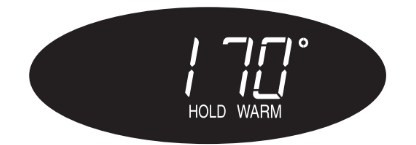
"HOLD” and “WARM” will light.
170° will display.
After one hour in HOLD WARM:
"End” will display.
The time of day reappears in the display.
To cancel Cook & Hold at any time:
Press the CANCEL pad. Remove food from oven.
Delay Bake
CAUTION
Do not use delayed baking for highly perishable foods such as dairy products, pork, poultry, or seafood.
When using Delay, the oven begins to cook later in the day.
Set the amount of time that you want to delay before the oven turns on and how long you want to cook. The oven begins to heat at the selected time and cooks for the specified length of time, then keeps food warm for up to one hour.
Delay time can be set from 10 minutes (00:10) to 11 hours, 59 minutes (11:59).
To set a Delayed Baking cycle:
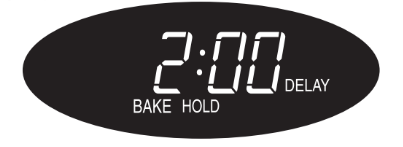
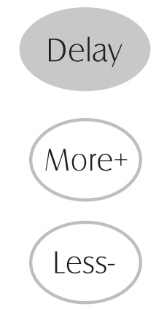
1. Press the Delay pad.
"DELAY” flashes.
00:00 flashes in the display.
2. Press the More+ or Less- pad to set the delay time.
While “DELAY” is still flashing:
3. Press the Cook & Hold pad.
000 lights in the display.
"BAKE” and “HOLD” flash.
4. Press More+ pad to set the baking temperature.
00:00 and “HOLD” flash.
"BAKE” stays lit.
5. Press More+ pad to set the baking time.
The Delay time, “DELAY”, “BAKE” and “HOLD” light in the display.
When the Delay time has expired:
"DELAY” will turn off.
Baking time is displayed.
"BAKE” and “HOLD” are displayed.
To set a Delay when Cook & Hold has already been programmed:
1. Press the Delay pad.
"DELAY” flashes.
00:00 appears in the display.
2. Press the More+ or Less- pad to set the delay time.
After four seconds, “DELAY” will stay lit to remind you that a delayed cooking cycle has been set.
When the Delay time has expired and the oven starts:
The baking time will be displayed.
"DELAY” will turn off.
"BAKE” and “HOLD” will remain lit.
To cancel:
Press the CANCEL pad.
All timed and untimed cooking functions will be canceled.
The time of day will reappear in the display.
Important:
Do not use delayed baking for items that require a preheated oven, such as cakes, cookies, and breads.
Do not use delayed baking if oven is already hot.
Keep Warm
For safely keeping foods warm or for warming breads and plates.
To set Keep Warm:
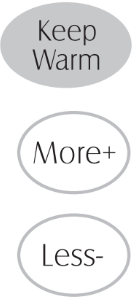
1. Press the Keep Warm pad.
"WARM” flashes.
000 appears in the display.
2. Select the Keep Warm temperature. The
Keep Warm temperature can be set from 145° to 190°. Press or press and hold the More+ or Less- pad.
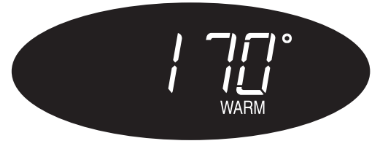
170° will light when either pad is first pressed.
Press the More+ pad to increase the temperature.
Press the Less- pad to decrease the temperature.
WARM and the temperature will be displayed while Keep Warm is active.
To cancel Keep Warm:
Press the CANCEL pad.
Remove food from the oven.
Notes:
For optimal food quality, oven cooked foods should be kept warm for no longer than 1 to 2 hours.
To keep foods from drying, cover loosely with foil or a lid.
To warm dinner rolls:
cover rolls loosely with foil and place in oven.
press Keep Warm and More+ pads to set 170° F.
warm for 12-15 minutes.
To warm plates:
place 2 stacks of up to four plates each in the oven.
press Keep Warm and More+ pads to set 170° F.
warm for five minutes, turn off the oven and leave plates in the oven for 15 minutes more.
use only oven-safe plates, check with the manufacturer.
do not set warm dishes on a cold surface as rapid temperature changes could cause crazing or breakage.
Broiling (select models)
To set Broil:
1. Press the Broil pad.
"BROIL” flashes.
SET is displayed.
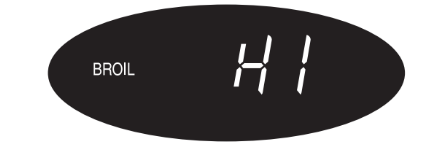
2. Press the More+ pad to set HI broil or press the Less- pad to set LO broil.
HI or LO will be displayed.
Select HI broil (550° F) for normal broiling. Select LO broil (450° F) for low-temperature broiling of longer cooking foods such as poultry.
3. After four seconds, the oven will start.
"BROIL” will remain lit.
4. For optimum browning, preheat for 2-3 minutes before adding food.
5. Place food in the oven. Close oven door.
6. Turn meat once about halfway through cooking.
7. When food is cooked, press the CANCEL pad. Remove food and broiler pan from the oven.
The time of day will reappear in the display.
Notes:
For best results when broiling, use a pan designed for broiling.
HI is used for most broiling. Use LO broil when broiling longer cooking foods. The lower temperature allows food to cook to the well done stage without excessive browning.
Broil times may be longer when the lower broiling temperature is selected.
Food should be turned halfway through broiling time.
Automatic Shut-Off/Sabbath Mode
The oven will automatically turn off after 12 hours if you accidentally leave it on. This safety feature can be turned off.
To cancel the 12-hour shut-off and run the oven continuously for 72 hours:
1. Set the oven to bake (see page 14).
2. Press and hold the Clock pad for five seconds.
SAb will be displayed and flash for five seconds.
SAb will then be displayed continuously until turned off or until the 72-hour time limit is reached.
"BAKE” will also be displayed if a bake cycle is in use while the oven is in Sabbath Mode.
All other functions EXCEPT BAKE (Timer, Keep Warm, Clean, etc.) are locked out during the Sabbath Mode.
To cancel Bake when in Sabbath Mode:
Press CANCEL.
"BAKE” will turn off in the display.
No beeps will sound.
To cancel the Sabbath Mode:
1. Press the Clock pad for five seconds.
OOR
2. After 72 hours, the Sabbath Mode will end.
SAb will flash for five seconds.
The time of day will return to the display.
Notes:
Sabbath Mode can be turned on at any time with or without the oven on.
Sabbath Mode cannot be turned on if the touchpads are locked out or when the door is locked.
If the oven is baking when Sabbath Mode is set, “BAKE” will go out at the end of the baking cycle. There will be no audible beeps.
When the Sabbath Mode is started, no preheat beep will sound.
All prompts, messages and beeps are deactivated when
Sabbath Mode is active.
Pressing CANCEL will cancel a Bake cycle, however the control will stay in the Sabbath Mode.
If power fails, the oven will power up in Sabbath Mode with 72 hours remaining and no cycle active.
Adjusting the Oven Temperature
Oven temperatures are carefully tested for accuracy at the factory. It is normal to notice some baking or browning differences between a new oven and an old one. As ranges get older, the oven temperature can shift.
You may adjust the oven temperature if you think the oven is not baking or browning correctly. To decide how much to change the temperature, set the temperature 25° higher or lower than your recipe recommends, then bake. The results of the “test” should give you an idea of how much to adjust the temperature.
To adjust the oven temperature:
1. Press Bake.
2. Enter 550° by pressing the More+ pad.
3. Press and hold the Bake pad for several seconds or until 0° appears in the display.
If the oven temperature was previously adjusted, the change will be displayed. For example, if the oven tem- perature was reduced by 15° the display will show “-15°”.
4. Press the More+ or Less- pad to adjust the temperature.
Each time a pad is pressed, the temperature changes by 5° . The oven temperature can be increased or decreased by 5° to 35°.
5. The time of day will automatically reappear in the display.
You do not need to readjust the oven temperature if there is a power failure or interruption. Broiling and cleaning temperatures cannot be adjusted.
Pilotless Ignition
Your range is equipped with pilotless ignition. With this type of ignition system, the gas automatically shuts off and the oven will not operate during a power failure.
A lighted match will not light the oven burner. No attempt should be made to operate the oven during a power failure.
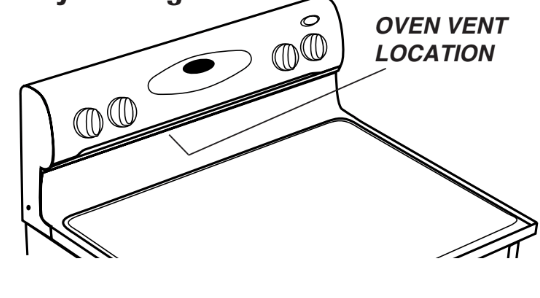
Oven Vent
When the oven is in use, the area near the vent may become hot enough to cause burns. Never block the vent opening.
The oven vent is located below the backguard vent shield on your range.
Do not place plastics near the vent opening as heat from the vent could distort or melt the plastic.
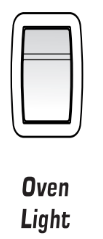
Oven Light
Press the Oven Light switch to turn the oven light on and off.
Oven Bottom
Protect oven bottom against spillovers, especially acidic or sugary spills, as they may discolor the porcelain enamel. Use the correct pan size to avoid spillovers and boilovers. Never place utensils or foil directly on the oven bottom.
Oven Racks
CAUTION
Do not attempt to change the rack position when the oven is hot.
Do not use the oven for storing food or cookware.
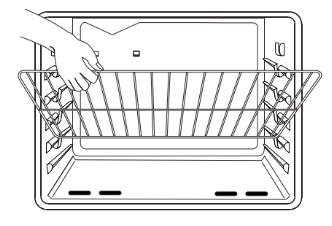
Your oven has two racks. They are designed with a lock-stop edge.
To remove:
Pull rack straight out until it stops at the lock-stop position.
Lift up on the front of the rack and pull out.
To replace:
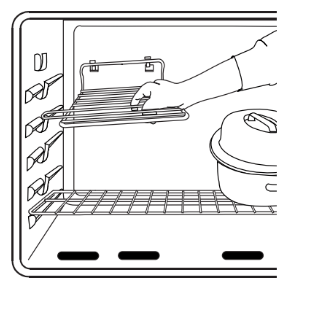
Place rack on the rack support in the oven.
Tilt the front end up slightly. Slide rack back until it clears the lock-stop position.
Lower front and slide back into the oven.
Do not cover an entire rack with aluminum foil or place foil on the oven bottom. Baking results will be affected and damage may occur to the oven bottom.
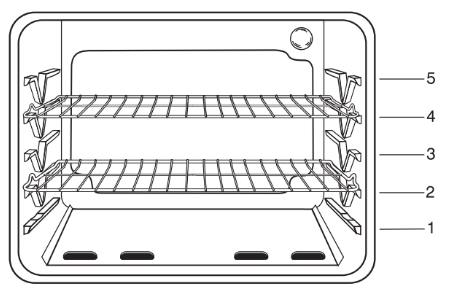
Rack Positions
RACK 5 (highest position): Used for toasting bread or broiling thin, non-fatty foods.
RACK 4: Used for most two-rack baking.
RACK 3: Used for most baked goods on a cookie sheet or jelly roll pan, layer cakes, fruit pies, or frozen convenience foods.
RACK 2: Used for roasting small cuts of meat, casseroles, baking loaves of bread, bundt cakes, custard pies or two-rack baking.
RACK 1: Used for roasting large cuts of meat and poultry, frozen pies, dessert souffles, angel food cake, or two-rack baking.
ROASTING POSITION:
Used for roasting taller cuts of meat or turkey. Place both oven racks, one above the other, on the raised sides of the oven bottom.
CAUTION
Do not attempt to slide racks out when they are placed in the roasting position.
MULTIPLE RACK COOKING:
Two rack: Use rack positions 2 and 4, or 1 and 4.
Important: Never place pans directly on the oven bottom.
Half Rack Accessory
A half rack is available as an accessory to increase oven capacity. It fits in the upper left portion of the oven and provides space for a vegetable dish when a large roaster is on the lower rack. Contact your dealer for the “HALFRACK” Accessory Kit or call 1-800-688-8408.
#1 Does this model's oven feature a "signal" - beep/alarm - when it reaches the desired temperature?
the range does feature a tone to alert you when preheat is completed and the oven cavity is at the ideal temperature for you to open the door and insert your food.
The Self-Cleaning cycle is time adjustable between 2 hours 30 minutes and 4 hours 30 minutes in 15-minute increments. Suggested clean times are 2 hours 30 minutes for light soil and 4 hours 30 minutes for heavy soil. The last 30 minutes of the cycle is for cooldown. Prepare Range: ■ Remove the broiler pan, grid, cookware and bakeware, all cooking utensils, oven racks, aluminum foil, and, on some models, the temperature probe from the oven. ■ Use a damp cloth to clean inside door edge and the 11 /2" (38 mm) area around the inside oven cavity frame, being certain not to move or bend the gasket. ■ Wipe out any loose soil to reduce smoke and avoid damage. At high temperatures, foods react with porcelain. Staining, etching, pitting, or faint white spots can result. This will not affect cooking performance. ■ Remove plastic items from the cooktop because they may melt. ■ Remove all items from the storage drawer. To Self-Clean: 1. Press SELF CLEAN. 2. Press the Temp/Time “+” or “-” keypad to enter the desired Self-Cleaning cycle time. 3. Press START. The oven door will automatically lock. The Door Locked and Clean indicator lights will be displayed. The time remaining will also be displayed. 4. When the Self-Cleaning cycle is complete and the oven cools, the Door Locked and Clean indicator lights will turn off. 5. When the oven is completely cooled, remove ash with a damp cloth. To exit the Self-Cleaning cycle before completed, press CANCEL. The door will unlock once the oven cools.
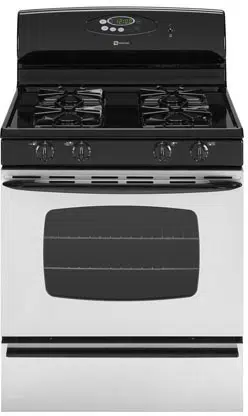




 Graphics next to the knob identify which burner the knob controls. For example, the graphic at left shows the left front burner location.