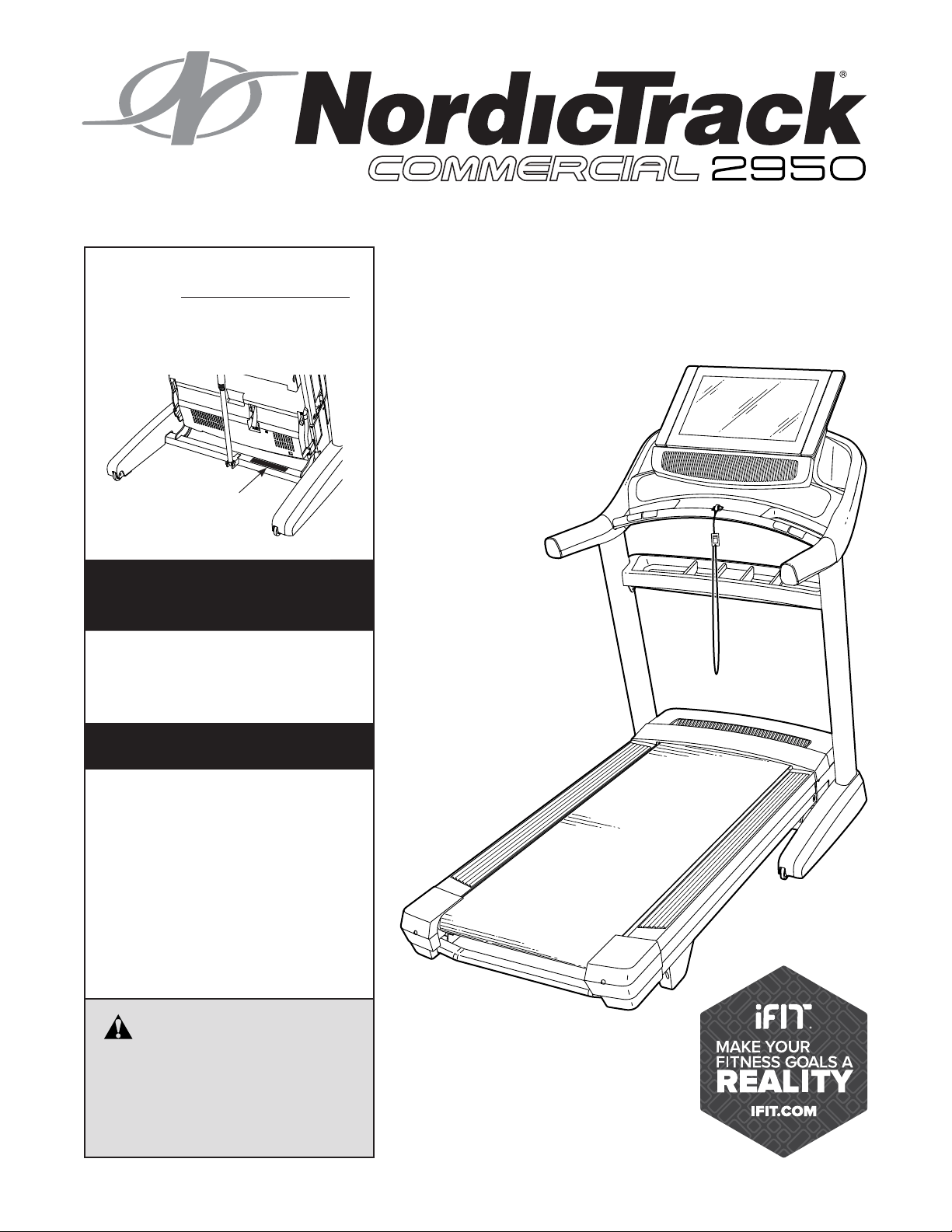
Serial Number
Decal
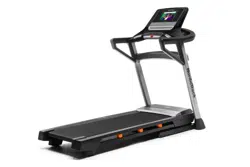
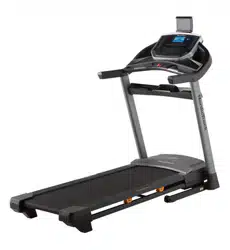
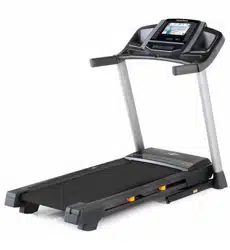
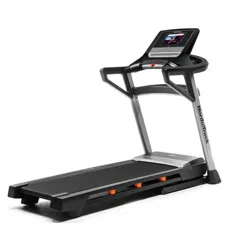
Model No. NTL19129.10
Serial No.
Write the serial number in the space
above for reference.
CAUTION
Read all precautions and
instructions in this manual before
using this equipment. Save this
manual for future reference.
nordictrack.com
USER’S MANUAL
ACTIVATE YOUR
WARRANTY
To register your product and
activate your warranty today,
go to my.nordictrack.com
CUSTOMER CARE
For service at any time, go to
support.nordictrack.com.
Or call 1-800-TO-BE-FIT
(1-800-862-3348)
Mon.–Fri. 6 a.m.–6 p.m. MT
Sat. 8 a.m.–12 p.m. MT
Please do not contact the store.
2
WARNING DECAL PLACEMENT . . . . . . . . . . . . . . . . . . . . . . . . . . . . . . . . . . . . . . . . . . . . . . . . . . . . . . . . . . . . . . .2
IMPORTANT PRECAUTIONS ..................................................................3
BEFORE YOU BEGIN. . . . . . . . . . . . . . . . . . . . . . . . . . . . . . . . . . . . . . . . . . . . . . . . . . . . . . . . . . . . . . . . . . . . . . . .6
PART IDENTIFICATION CHART. . . . . . . . . . . . . . . . . . . . . . . . . . . . . . . . . . . . . . . . . . . . . . . . . . . . . . . . . . . . . . . .7
ASSEMBLY . . . . . . . . . . . . . . . . . . . . . . . . . . . . . . . . . . . . . . . . . . . . . . . . . . . . . . . . . . . . . . . . . . . . . . . . . . . . . . . .8
THE CHEST HEART RATE MONITOR. . . . . . . . . . . . . . . . . . . . . . . . . . . . . . . . . . . . . . . . . . . . . . . . . . . . . . . . . .18
HOW TO USE THE TREADMILL ..............................................................19
HOW TO FOLD AND MOVE THE TREADMILL ...................................................31
MAINTENANCE AND TROUBLESHOOTING .....................................................32
EXERCISE GUIDELINES ....................................................................35
PART LIST. . . . . . . . . . . . . . . . . . . . . . . . . . . . . . . . . . . . . . . . . . . . . . . . . . . . . . . . . . . . . . . . . . . . . . . . . . . . . . . .38
EXPLODED DRAWING. . . . . . . . . . . . . . . . . . . . . . . . . . . . . . . . . . . . . . . . . . . . . . . . . . . . . . . . . . . . . . . . . . . . . .40
ORDERING REPLACEMENT PARTS. . . . . . . . . . . . . . . . . . . . . . . . . . . . . . . . . . . . . . . . . . . . . . . . . . . Back Cover
LIMITED WARRANTY. . . . . . . . . . . . . . . . . . . . . . . . . . . . . . . . . . . . . . . . . . . . . . . . . . . . . . . . . . . . . . . Back Cover
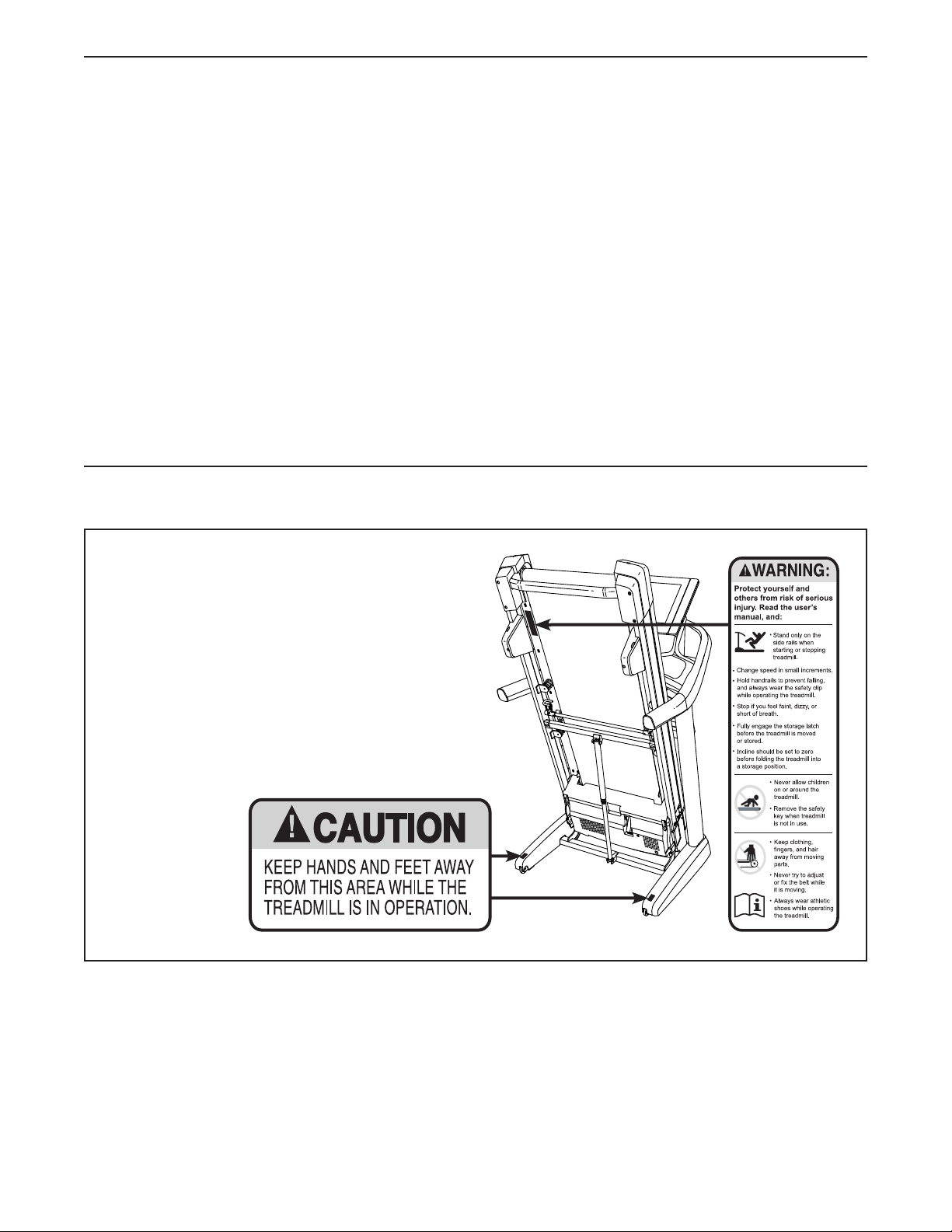
This drawing shows the locations of the warning
decals. If a decal is missing or illegible, call
the telephone number on the front cover of
this manual and request a free replacement
decal. Apply the decal in the location shown.
Note: The decals may not be shown at actual size.
WARNING DECAL PLACEMENT
305284
TABLE OF CONTENTS
NORDICTRACK and IFIT are registered trademarks of ICON Health & Fitness, Inc. Wi-Fi is a registered
trademark of Wi-Fi Alliance. WPA and WPA2 are trademarks of Wi-Fi Alliance. The Bluetooth
®
word mark and
logos are registered trademarks of Bluetooth SIG, Inc. and are used under license.

3
1. It is the responsibility of the owner to ensure
that all users of this treadmill are adequately
informed of all warnings and precautions.
2. Before beginning any exercise program,
consult your physician. This is especially
important for persons over age 35 or persons
with pre-existing health problems.
3. The treadmill is not intended for use by
persons with reduced physical, sensory,
or mental capabilities or lack of experience
and knowledge unless they have been given
supervision or instruction concerning use
of the treadmill by someone responsible for
their safety.
4. Use the treadmill only as described in this
manual.
5. The treadmill is intended for home use only.
Do not use the treadmill in any commercial,
rental, or institutional setting.
6. Keep the treadmill indoors, away from mois-
ture and dust. Do not put the treadmill in a
garage or covered patio, or near water.
7. Place the treadmill on a level surface, with
at least 8 ft. (2.4 m) of clearance behind it
and 2 ft. (0.6 m) on each side. Do not place
the treadmill on any surface that blocks air
openings. To protect the floor or carpet from
damage, place a mat under the treadmill.
8. Do not operate the treadmill where aerosol
products are used or where oxygen is being
administered.
9. Keep children under age 16 and pets away
from the treadmill at all times.
10. The treadmill should be used only by per-
sons weighing 300 lbs. (136 kg) or less.
11. Never allow more than one person on the
treadmill at a time.
12. Wear appropriate exercise clothes while
using the treadmill. Do not wear loose
clothes that could become caught in the
treadmill. Athletic support clothes are recom-
mended for both men and women. Always
wear athletic shoes. Never use the treadmill
with bare feet, wearing only stockings, or in
sandals.
13. Plug the power cord into a surge suppressor
(not included), and plug the surge suppres-
sor into an appropriate outlet (see page 19).
To avoid overloading the circuit, do not plug
other electrical devices, except for low-power
devices such as cell phone chargers, into
the surge suppressor or into an outlet on the
same circuit.
14. Use only a surge suppressor that meets all of
the specifications described on page 19. To
purchase a surge suppressor, see your local
NORDICTRACK dealer, call the telephone
number on the front cover of this manual, or
see your local electronics store.
15. Failure to use a properly functioning surge
suppressor could result in damage to the
control system of the treadmill. If the control
system is damaged, the walking belt may
slow, accelerate, or stop unexpectedly, which
may result in a fall and serious injury.
16. Keep the power cord and the surge suppres-
sor away from heated surfaces.
17. Never move the walking belt while the power
is turned off. Do not operate the treadmill
if the power cord or plug is damaged, or if
the treadmill is not working properly. (See
MAINTENANCE AND TROUBLESHOOTING
on page 32 if the treadmill is not working
properly.)
18. Read, understand, and test the emergency
stop procedure before using the treadmill
(see HOW TO TURN ON THE POWER on
page 21). Always wear the clip while using the
treadmill.
WARNING: To reduce the risk of burns, fire, electric shock, or injury to persons, read
all important precautions and instructions in this manual and all warnings on your treadmill before
using your treadmill. ICON assumes no responsibility for personal injury or property damage sus-
tained by or through the use of this product.
IMPORTANT PRECAUTIONS

4
19. Always stand on the foot rails when starting
or stopping the walking belt. Always hold the
handrails while using the treadmill.
20. When a person is walking on the treadmill,
the noise level of the treadmill will increase.
21. Keep fingers, hair, and clothing away from
the moving walking belt.
22. The treadmill is capable of high speeds.
Adjust the speed in small increments to
avoid sudden jumps in speed.
23. The heart rate monitor is not a medical
device. Various factors, including the user’s
movement, may affect the accuracy of heart
rate readings. The heart rate monitor is
intended only as an exercise aid in determin-
ing heart rate trends in general.
24. Never leave the treadmill unattended while
it is running. Always remove the key, press
the power switch into the off position (see
the drawing on page 6 for the location of the
power switch), and unplug the power cord
when the treadmill is not in use.
25. Do not attempt to move the treadmill until
it is properly assembled. (See ASSEMBLY
on page 8 and HOW TO FOLD AND MOVE
THE TREADMILL on page 31.) You must be
able to safely lift 45 lbs. (20 kg) to move the
treadmill.
26. When folding or moving the treadmill, make
sure that the storage latch is holding the
frame securely in the storage position. Do
not operate the treadmill while it is folded.
27. Do not change the incline of the treadmill by
placing objects under the treadmill.
28. Never insert any object into any opening on
the treadmill.
29. Inspect and properly tighten all parts each
time the treadmill is used.
30. DANGER: Always unplug the power
cord immediately after use, before clean-
ing the treadmill, and before performing the
maintenance and adjustment procedures
described in this manual. Never remove the
motor hood unless instructed to do so by an
authorized service representative. Servicing
other than the procedures in this manual
should be performed by an authorized ser-
vice representative only.
31. Over exercising may result in serious injury
or death. If you feel faint, if you become short
of breath, or if you experience pain while
exercising, stop immediately and cool down.
32. IMPORTANT: To satisfy exposure compliance
requirements, the antenna and transmitter
in the console must be at least 8 in. (20 cm)
from all persons and must not be near or
connected to any other antenna or transmit-
ter. The treadmill console contains FCC ID
OMCIABR12.
SAVE THESE INSTRUCTIONS
5
all
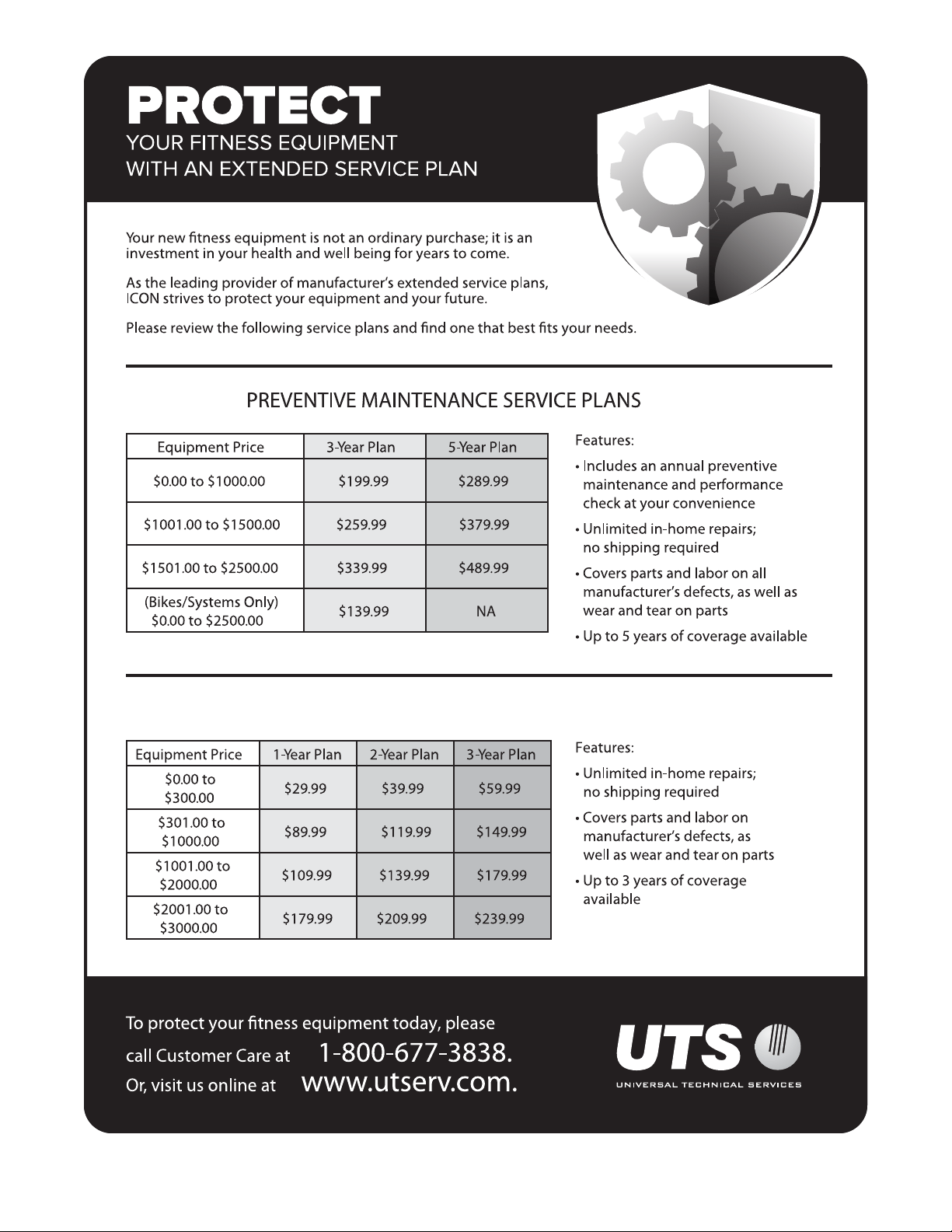
STANDARD SERVICE PLANS
6
Thank you for selecting the revolutionary
NORDICTRACK
®
COMMERCIAL 2950 treadmill.
The COMMERCIAL 2950 treadmill offers an impres-
sive selection of features designed to make your
workouts at home more effective and enjoyable. And
when you’re not exercising, the unique treadmill can
be folded up, requiring less than half the floor space of
other treadmills.
For your benefit, read this manual carefully before
using the treadmill. If you have questions after
reading this manual, please see the front cover of this
manual. To help us assist you, please note the product
model number and serial number before contacting us.
The model number and the location of the serial num-
ber decal are shown on the front cover of this manual.
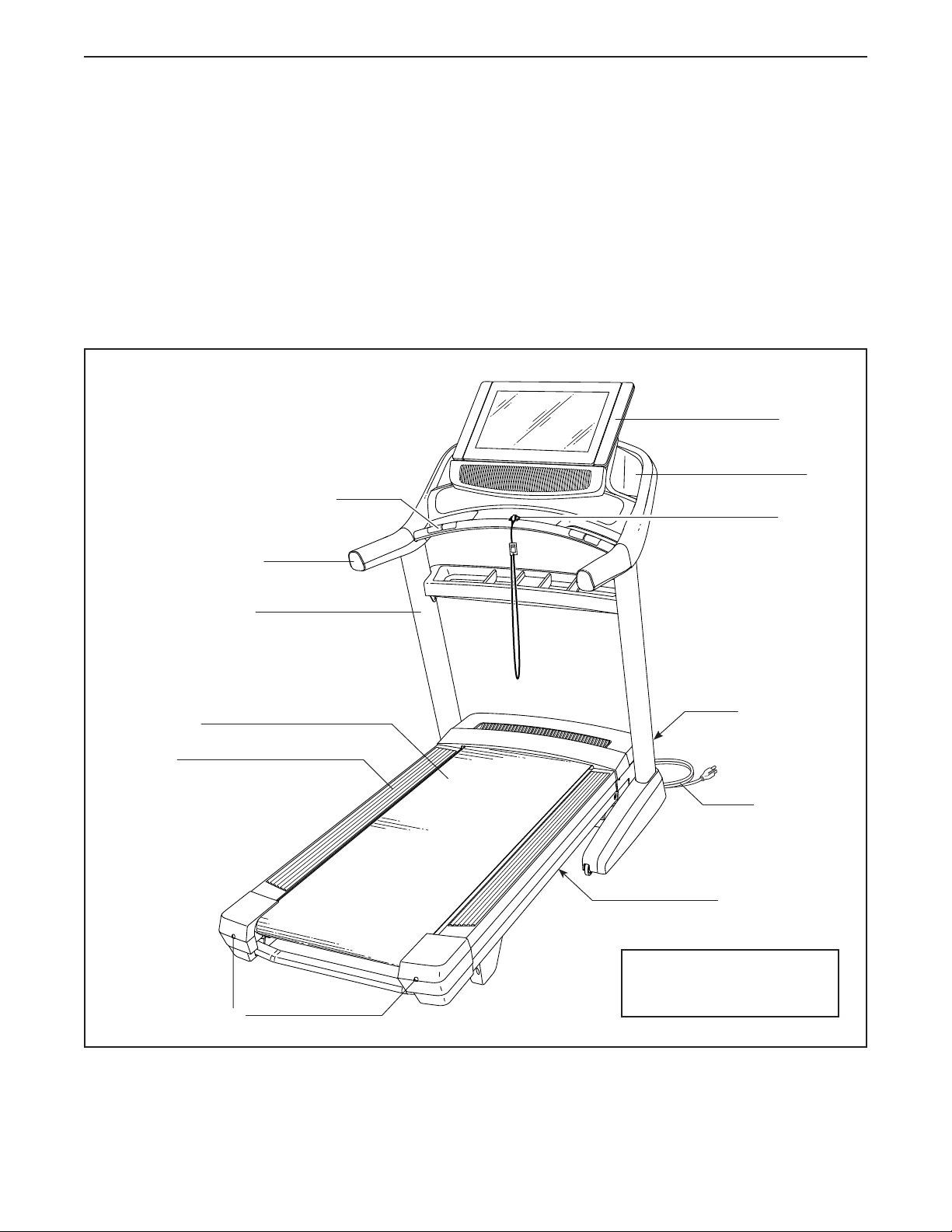
Before reading further, please review the drawing
below and familiarize yourself with the labeled parts.
BEFORE YOU BEGIN
Handrail
Length: 6 ft. 9 in. (206 cm)
Width: 3 ft. 3 in. (99 cm)
Upright
Tray
Key/Clip
Power Switch
Walking Belt
Platform Cushion
Foot Rail
Power Cord
Idler Roller Screws
Console
Heart Rate Monitor
7
PART IDENTIFICATION CHART
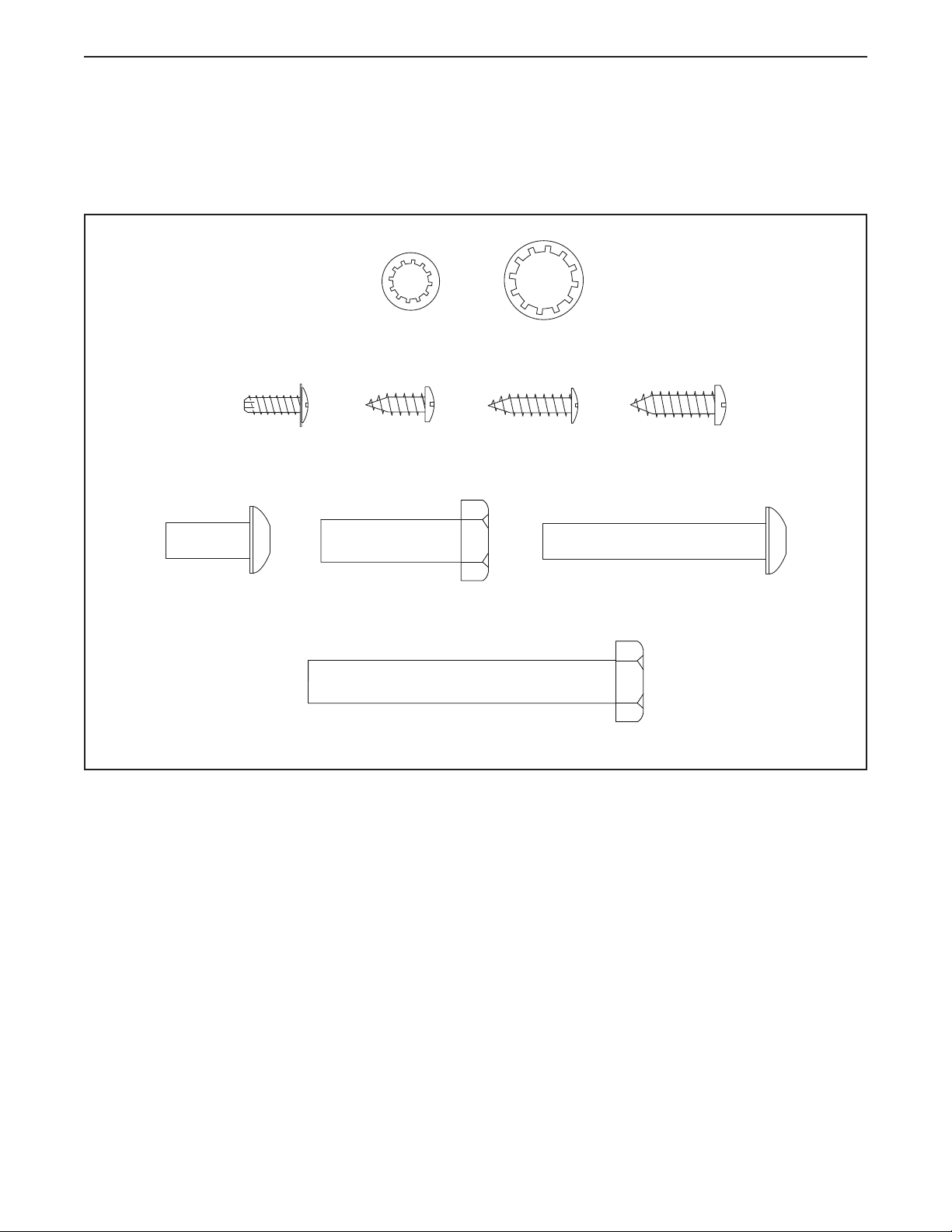
Use the drawings below to identify small parts used for assembly. The number in parentheses below each draw-
ing is the key number of the part, from the PART LIST near the end of this manual. The number following the key
number is the quantity used for assembly. Note: If a part is not in the hardware kit, check to see whether it is
preattached. Extra parts may be included.
3/8" Star
Washer (25)–8
5/16" Star
Washer (8)–10
#10 x 3/4"
Screw (6)–2
5/16" x 2"
Screw (2)–8
5/16" x 3/4"
Screw (1)–4
#8 x 3/4"
Truss Head
Screw (24)–20
3/8" x 2 3/4" Screw (23)–4
3/8" x 1 1/4"
Screw (20)–4
#8 x 1/2"
Ground Screw
(7)–1
#8 x 1/2"
Screw (11)–8
8
ASSEMBLY
• Assembly requires two persons.
• Place all parts in a cleared area and remove the
packing materials. Do not dispose of the packing
materials until you nish all assembly steps.
• After shipping, there may be an oily substance
on the exterior of the treadmill. This is normal. If
there is an oily substance on the treadmill, wipe
it off with a soft cloth and a mild, non-abrasive
cleaner.
• To identify small parts, see page 7.
• Left parts are marked “L” or “Left” and right parts
are marked “R” or “Right.”
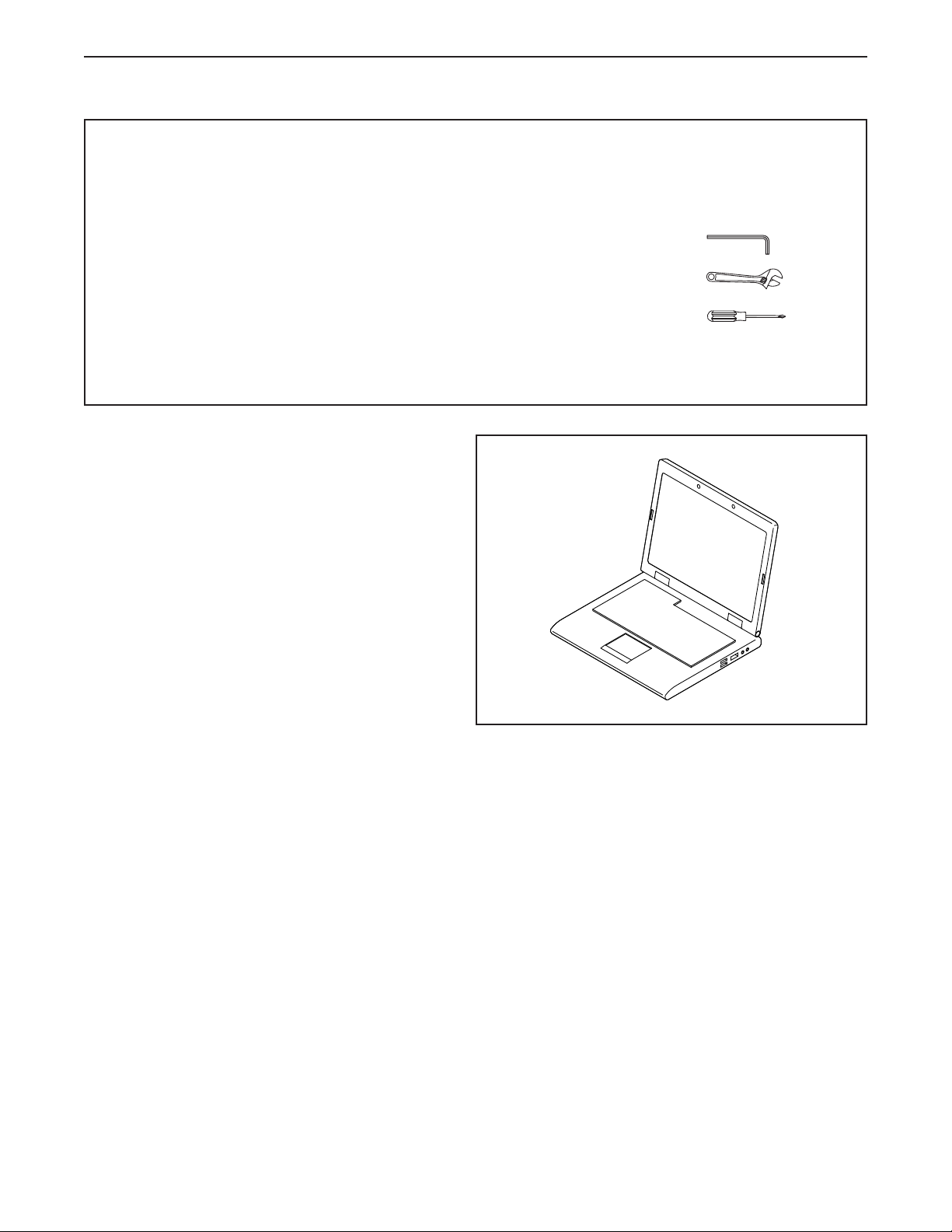
• Assembly requires the following tools:
the included hex key
one adjustable wrench
one Phillips screwdriver
To avoid damaging parts, do not use power tools.
1. Go to my.nordictrack.com on your computer
and register your product.
• documents your ownership
• activates your warranty
• ensures priority customer support if assistance
is ever needed
Note: If you do not have internet access, call
Customer Care (see the front cover of this
manual) and register your product.
1
9
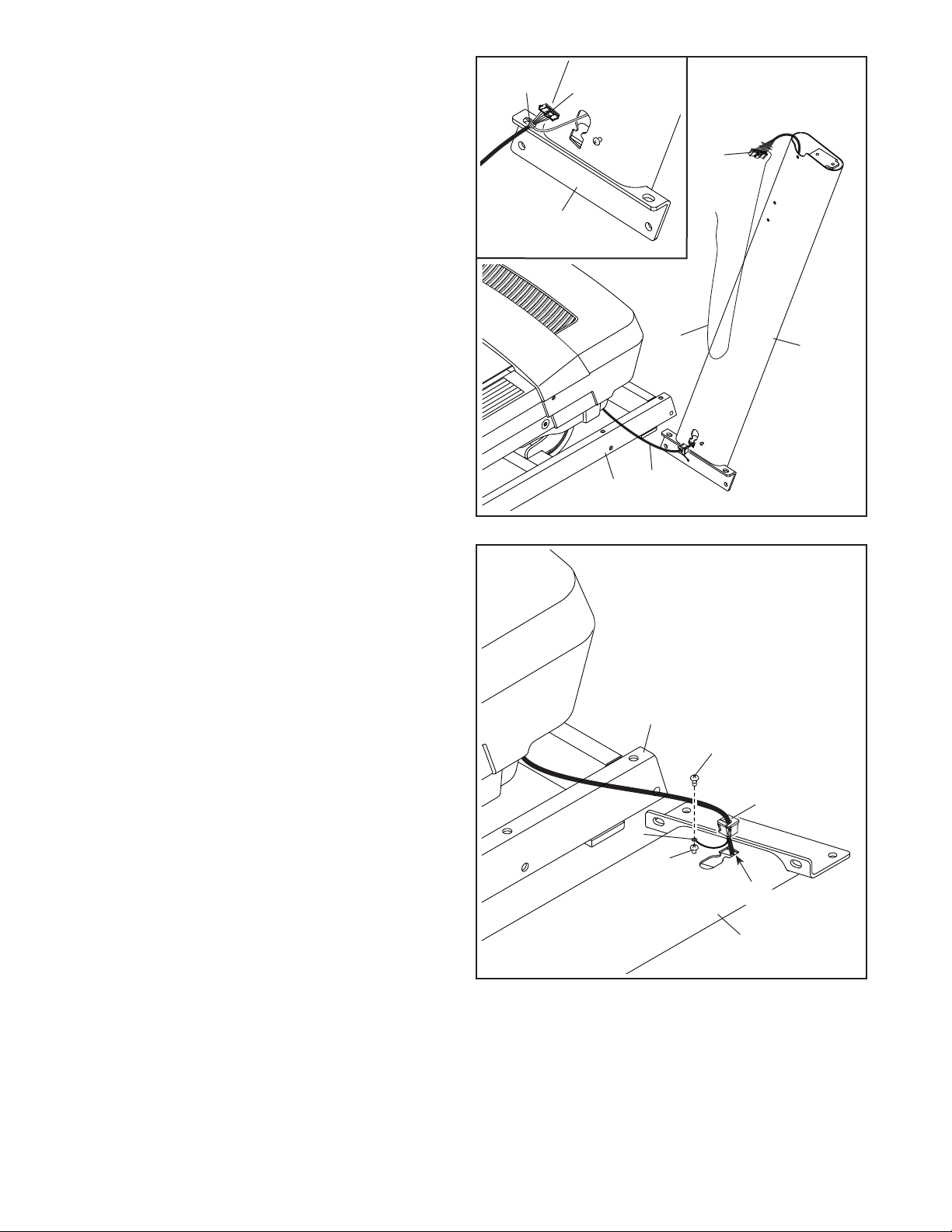
3. Lay the Right Upright (84) near the Base (93).
Press the Upright Grommet (86) into the square
hole (B) in the Right Upright. Make sure not to
pinch the ground wire (C).
If there is a screw (D) preattached to the Right
Upright (84), remove and discard it.
Then, attach the ground wire (C) to the Right
Upright (84) with a #8 x 1/2" Ground Screw (7).
93
84
7
86
C
D
3
84
A
2
83
2. Make sure that the power cord is unplugged.
Remove the tie securing the Upright Wire (83) to
the front of the Base (93).
Next, identify the Right Upright (84). Have a
second person hold the Right Upright near the
Base (93).
See the inset drawing. Tie the wire tie (A) in
the Right Upright (84) securely around the end
of the Upright Wire (83). Then, insert the Upright
Wire into the lower end of the Right Upright as
you pull the other end of the wire tie through the
Right Upright.
93
83
84
83
A
B
10
4
20
93
84
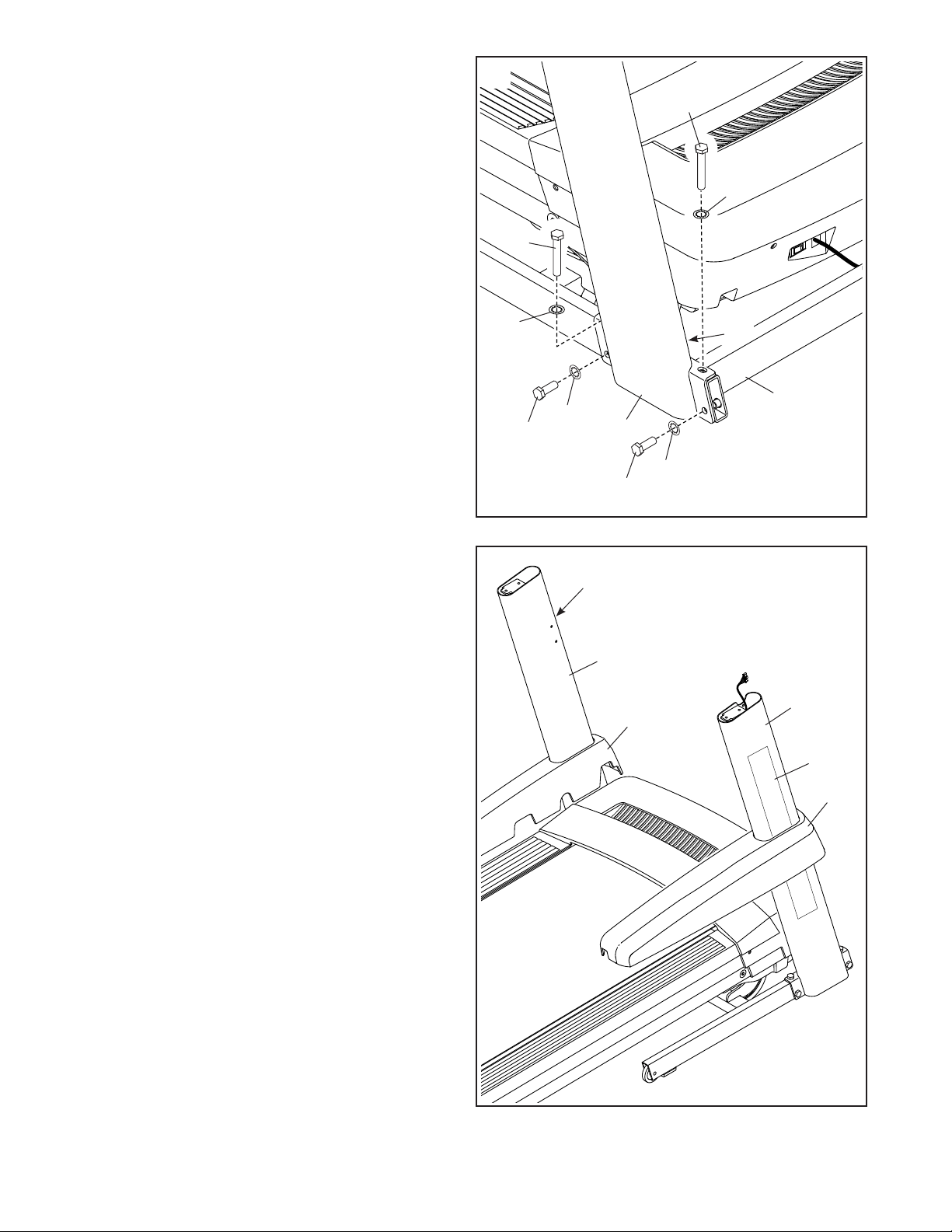
4. Hold the Right Upright (84) against the Base
(93). Make sure not to pinch the Upright
Wire (83).
Attach the Right Upright (84) with two 3/8" x
2 3/4" Screws (23), two 3/8" x 1 1/4" Screws
(20), and four 3/8" Star Washers (25) as shown;
do not fully tighten the Screws yet.
Attach the Left Upright (not shown) in the
same way. Note: There are no wires on the left
side.
25
25
23
23
25
83
20
25
5. Identify the Left and Right Base Covers (89, 90).
Slide the Left Base Cover (89) onto the Left
Upright (91), and slide the Right Base Cover
(90) onto the Right Upright (84). Press the Base
Covers downward, but do not snap the Base
Covers into place yet.
If there is a film (E) covering the decal on
each Upright (84, 91), carefully remove the
film.
89
90
84
E
E
5
91
11
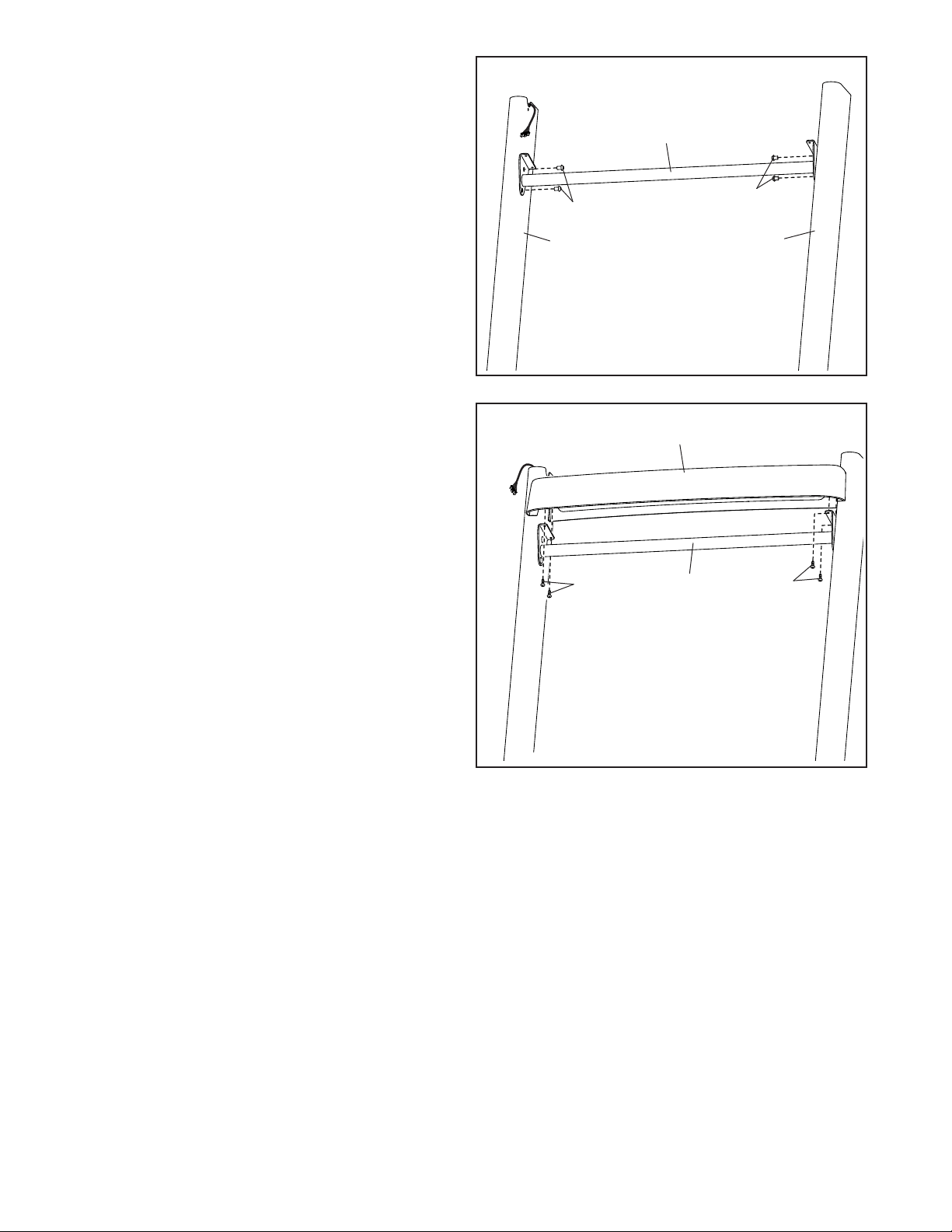
6. Carefully slide the Upright Crossbar (76)
between the Right and Left Uprights (84, 91).
Attach the Upright Crossbar with four 5/16" x
3/4" Screws (1); start all four Screws, and then
tighten them.
6
91
1
76
84
1
7
24
76
24
79
7. Attach the Tray (79) to the Upright Crossbar (76)
with four #8 x 3/4" Truss Head Screws (24); start
all four Truss Head Screws, and then tighten
them.
12
G
G
F
84
83
74
74
8
8
H
80
I
9
I
8
2
2
I
91
11
101
94
11
11
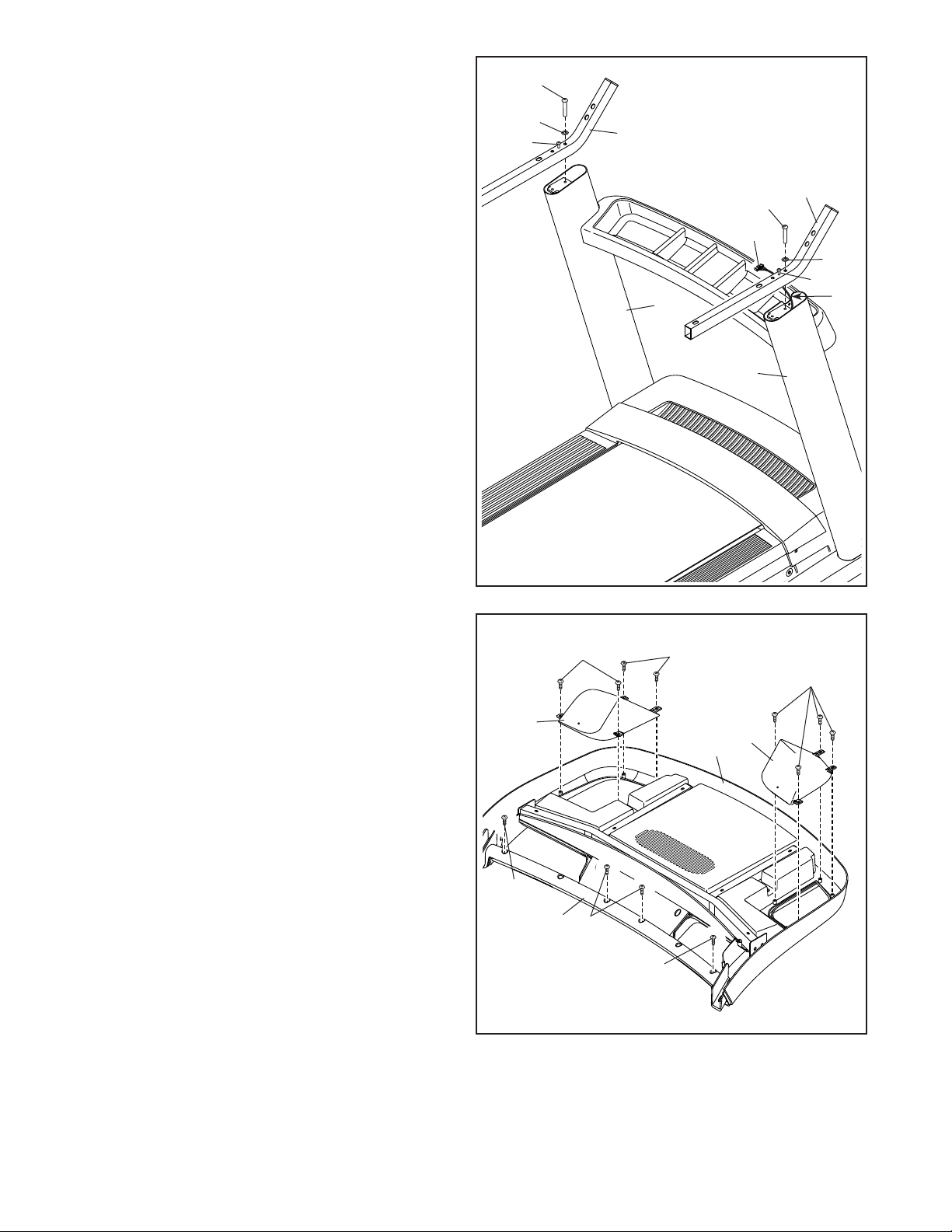
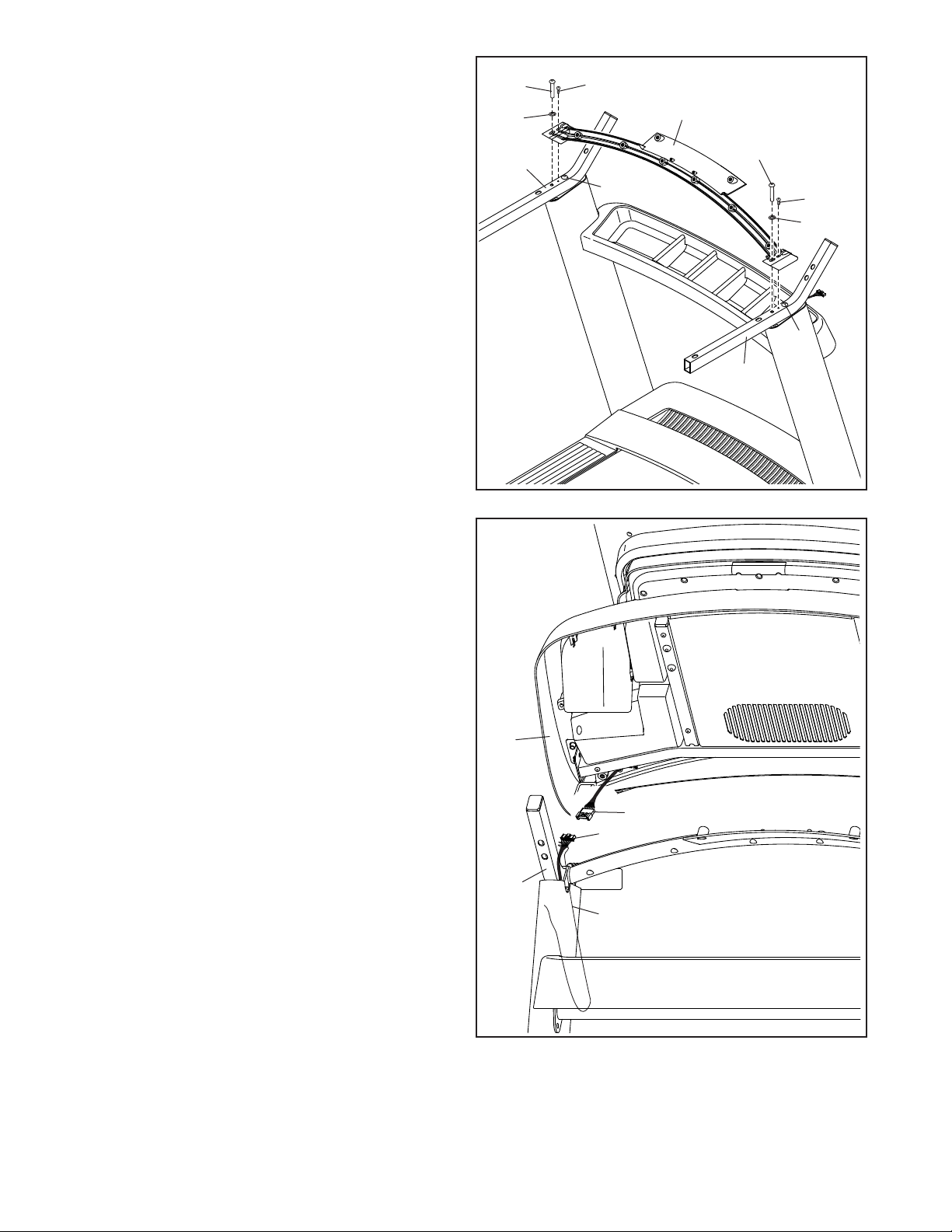
8. Attach the two Handrails (74) to the Right and
Left Uprights (84, 91) with two 5/16" x 2" Screws
(2) and two 5/16" Star Washers (8); do not
fully tighten the Screws yet. Be careful not to
pinch the Upright Wire (83) on the right side.
Position the Upright Wire in the notch (F) as
shown.
Then, remove and discard the two indicated
screws (G).
9. Set the console assembly (H) face down on
a soft surface to avoid scratching the console
assembly.
Remove and discard the four indicated screws
(I). Then, remove the Pulse Crossbar (80).
Next, identify the Left and Right Trays (94, 101).
Attach the Trays to the console assembly (H)
with eight #8 x 1/2" Screws (11); do not over-
tighten the Screws.
13
11
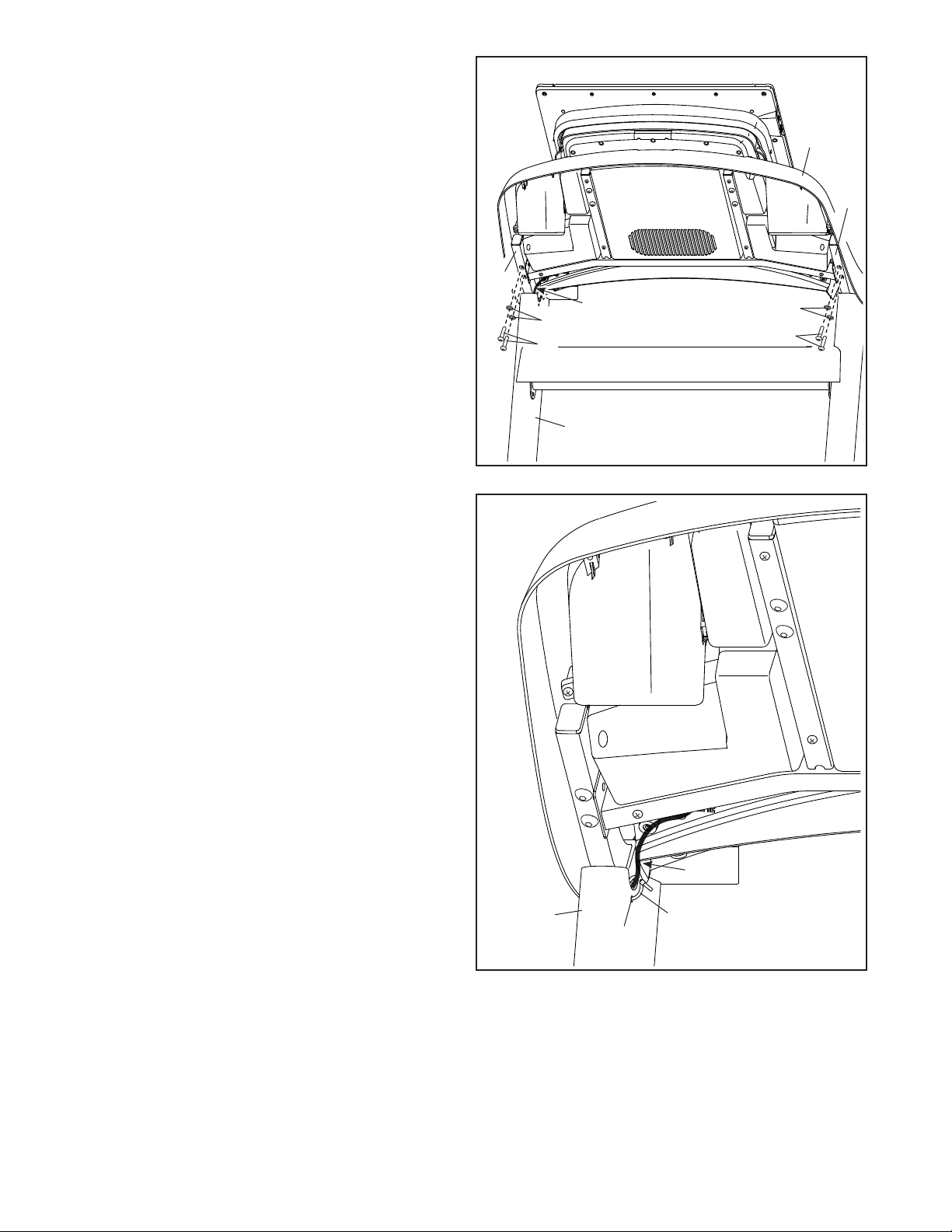
10. IMPORTANT: To avoid damaging the Pulse
Crossbar (80), do not use power tools, and do
not overtighten the #10 x 3/4" Screws (6) or
the 5/16" x 2" Screws (2).
Orient the Pulse Crossbar (80) as shown. Attach
the Pulse Crossbar to the Handrails (74) with two
5/16" x 2" Screws (2), two 5/16" Star Washers
(8), and two #10 x 3/4" Screws (6); start all four
Screws, and then tighten them.
Then, tighten the other two 5/16" x 2"
Screws (2).
80
10
8
8
2
2
2
2
6
6
74
74
H
83
K
J
74
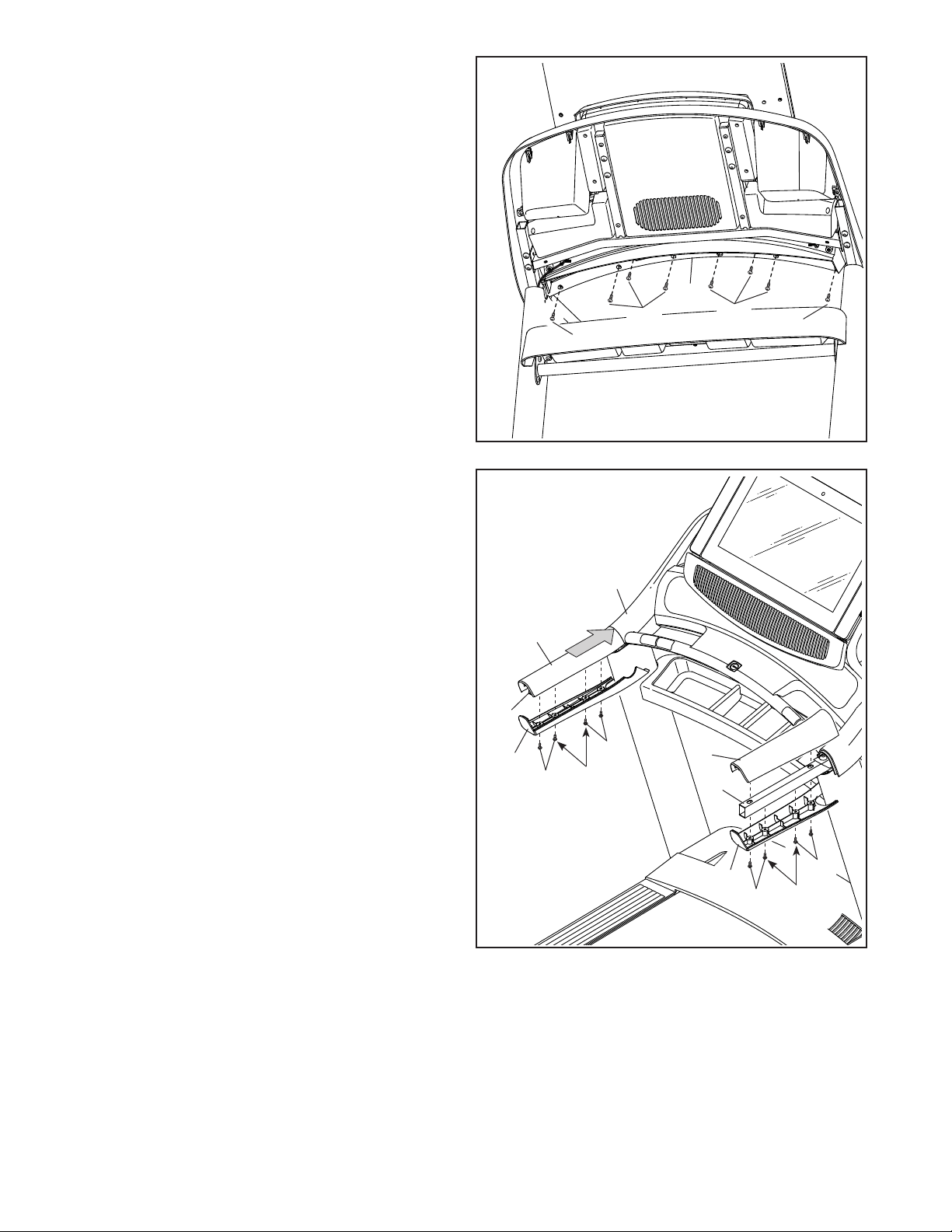
11. With the help of a second person, hold the con-
sole assembly (H) near the Handrails (74).
Connect the Upright Wire (83) to the con-
sole wire (J). The connectors should slide
together easily and snap into place.
Then, remove any wire ties (K) from the Upright
Wire (83).
14
12
2
8
H
8
2
74
74
J
13. Insert the wires (J) into the top of the Right
Upright (84).
Next, locate the Wire Tie (124) included with the
hardware. Insert the Wire Tie through the small
hole (K) in the side of the Right Upright (84).
Then, tighten the Wire Tie around the wires (J),
and cut off the end of the Wire Tie.
13
124
84
J
K
12. Attach the console assembly (H) to the Handrails
(74) with four 5/16" x 2" Screws (2) and four
5/16" Star Washers (8); start all four Screws,
and then tighten them. Be careful not to
pinch the wires (J).
Insert the wires (J) into the top of the Right
Upright (84).
84
15
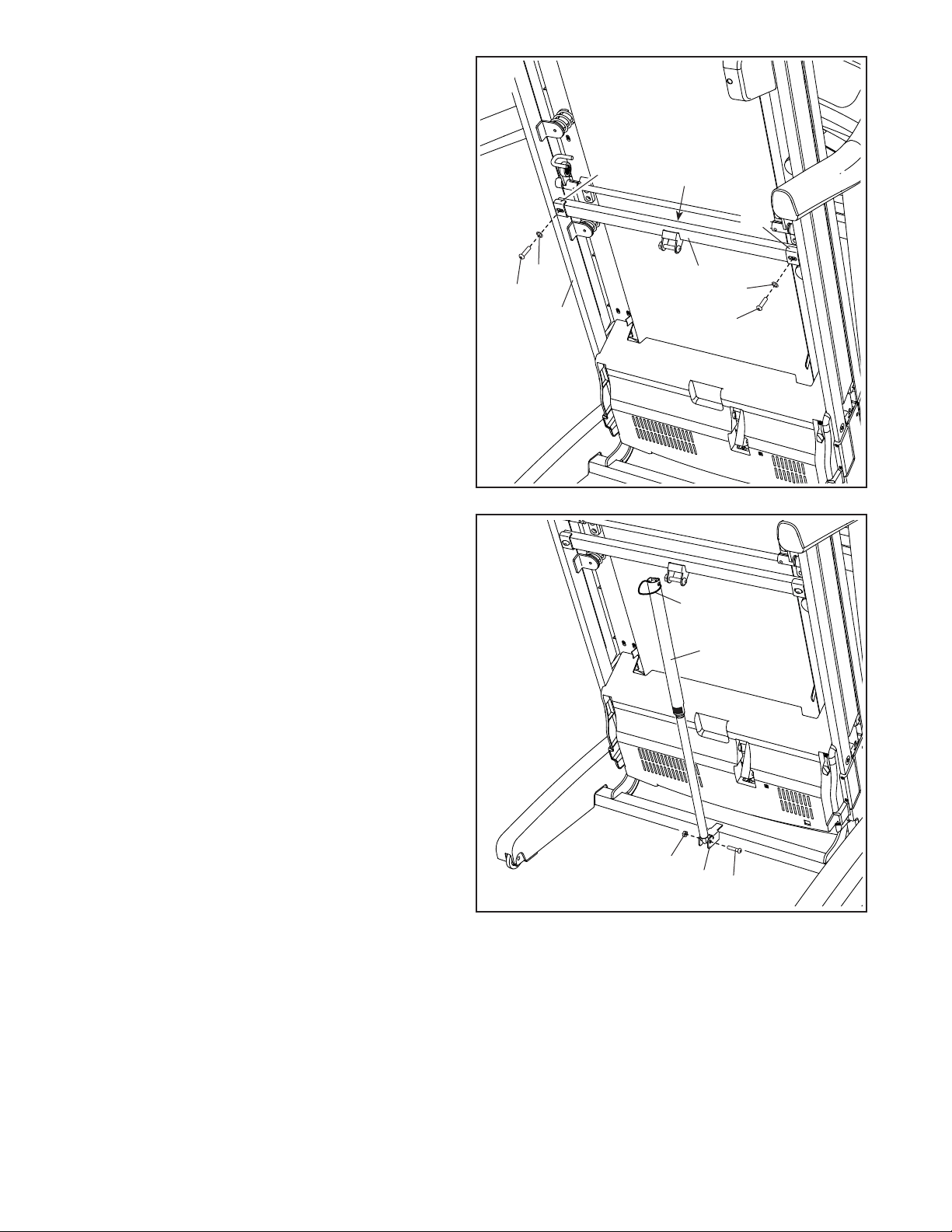
15. Set the Left Handrail Top Cover (73) on the left
Handrail (74). Start four #8 x 3/4" Truss Head
Screws (24) into the Left Handrail Bottom Cover
(75), the left Handrail, and the Left Handrail
Top Cover. Next, slide the Left Handrail Top
and Bottom Covers forward against the console
assembly (H) as shown. Tighten the two middle
Truss Head Screws first. Then, tighten the other
two Truss Head Screws
Attach the Right Handrail Top and Bottom
Covers (81, 82) to the right Handrail (74) as
described above.
15
74
75
74
81
73
H
14. Start eight #8 x 3/4" Truss Head Screws (24) into
the Pulse Crossbar (80), and then tighten them;
do not overtighten the Truss Head Screws.
14
24
24
24
24
80
24
82
Tighten
First
24
24
Tighten
First
24
16
93
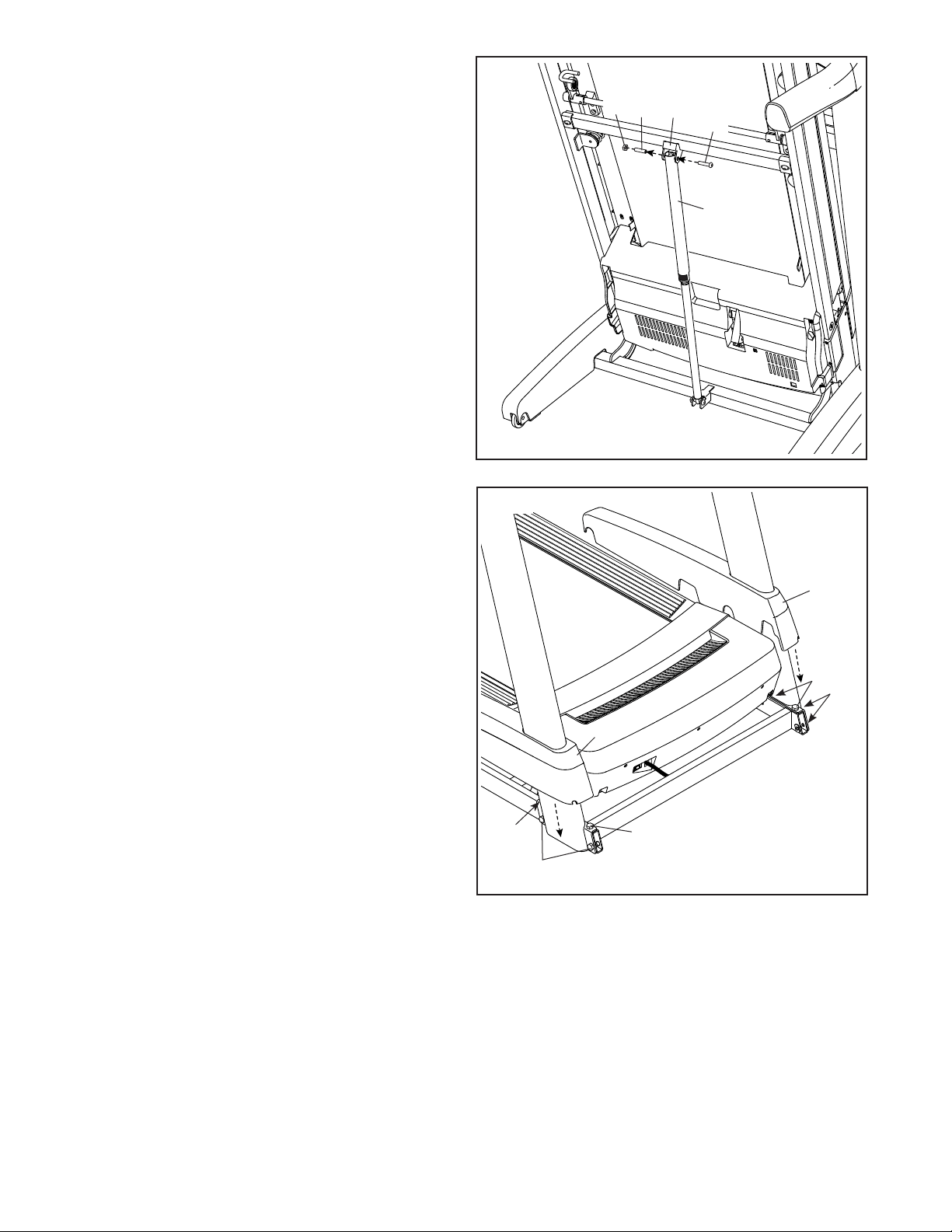
56
3
9
N
17
17. Remove the 5/16" Nut (9) and the 5/16" x 1 3/4"
Bolt (3) from the bracket on the Base (93).
Next, orient the Storage Latch (56) as shown.
Attach the lower end of the Storage Latch (56)
to the bracket on the Base (93) with the 5/16" x
1 3/4" Bolt (3) and the 5/16" Nut (9).
Then, raise the Storage Latch (56) to a vertical
position and remove the tie (N).
52
109
L
8
8
16
16
16
M
M
16. Raise the Frame (52) to the upright position.
Have a second person hold the Frame until
step 18 is completed.
Remove the two 5/16" x 1 1/4" Screws (16) from
the Latch Crossbar (109).
Orient the Latch Crossbar (109) as shown. Make
sure that the “This side toward belt” sticker
(L) is facing the treadmill.
Attach the Latch Crossbar (109) to the brackets
(M) on the Frame (52) with the two 5/16" x 1 1/4"
Screws (16) and two 5/16" Star Washers (8).
17
20. Make sure that all parts are properly tightened before you use the treadmill. If there are sheets of plastic
on the treadmill decals, remove the plastic. To protect the oor or carpet, place a mat under the treadmill. To
avoid damage to the console, keep the treadmill out of direct sunlight. Keep the included hex keys in a secure
place; one of the hex keys is used to adjust the walking belt (see page 33). Note: Extra parts may be included.
19. Firmly tighten the four 3/8" x 2 3/4" Screws (23)
and the four 3/8" x 1 1/4" Screws (20).
Next, slide the Left and Right Base Covers
(89, 90) down until they snap into place.
90
89
23
23
23
20
20
19
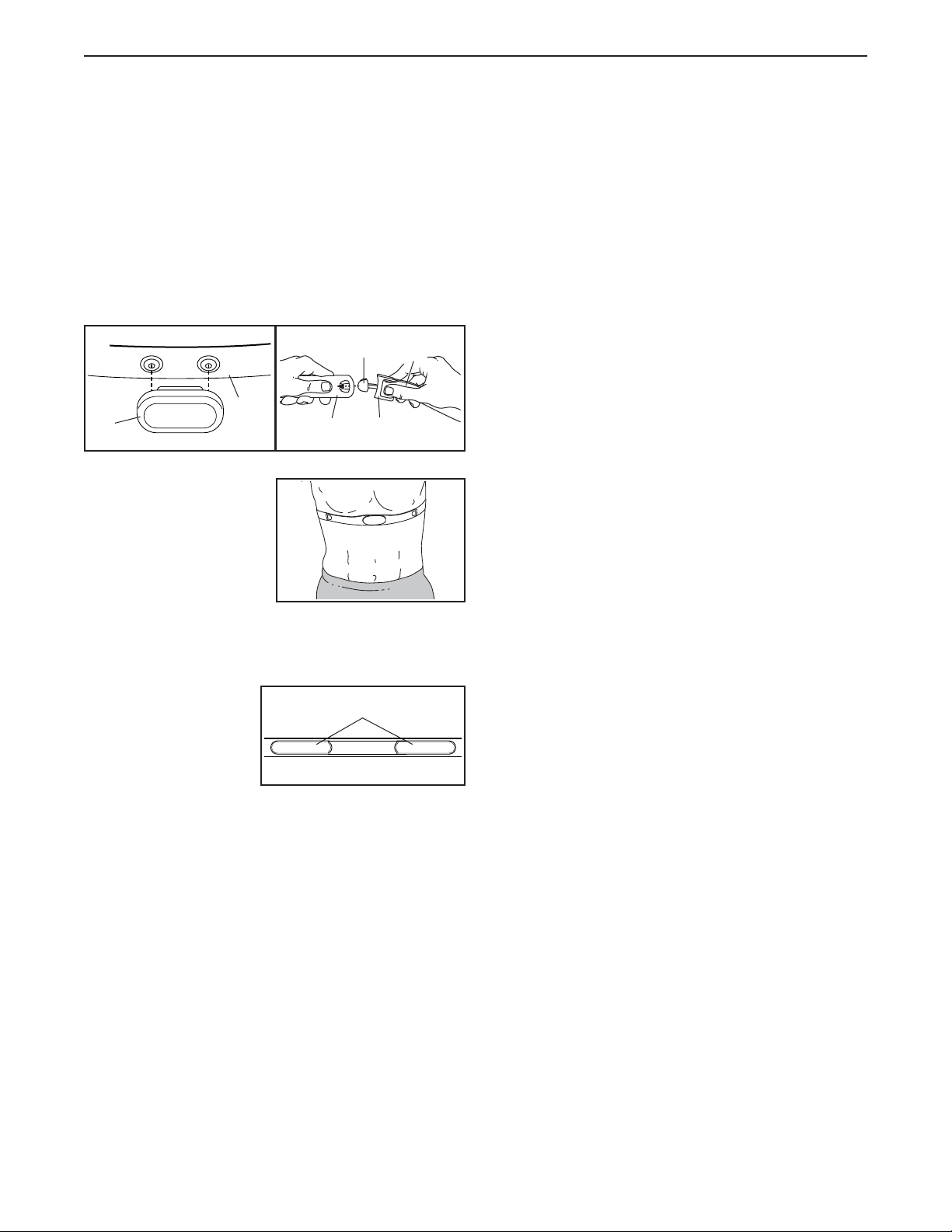
18. Remove the 5/16" Nut (9) and the 5/16" x 2 1/4"
Bolt (4) from the bracket on the Frame (52).
Align the upper end of the Storage Latch (56)
with the bracket on the Frame (52), and insert
the 5/16" x 2 1/4" Bolt (4) through the bracket
and the Storage Latch. This will push a spacer
(O) out of the Storage Latch; discard the
spacer.
Next, tighten the 5/16" Nut (9) onto the 5/16" x
2 1/4" Bolt (4). Do not overtighten the Nut; the
Storage Latch (56) must be able to pivot.
Then, lower the Frame (52) (see HOW TO
LOWER THE TREADMILL FOR USE on page 31).
9
56
18
O
4
52
18
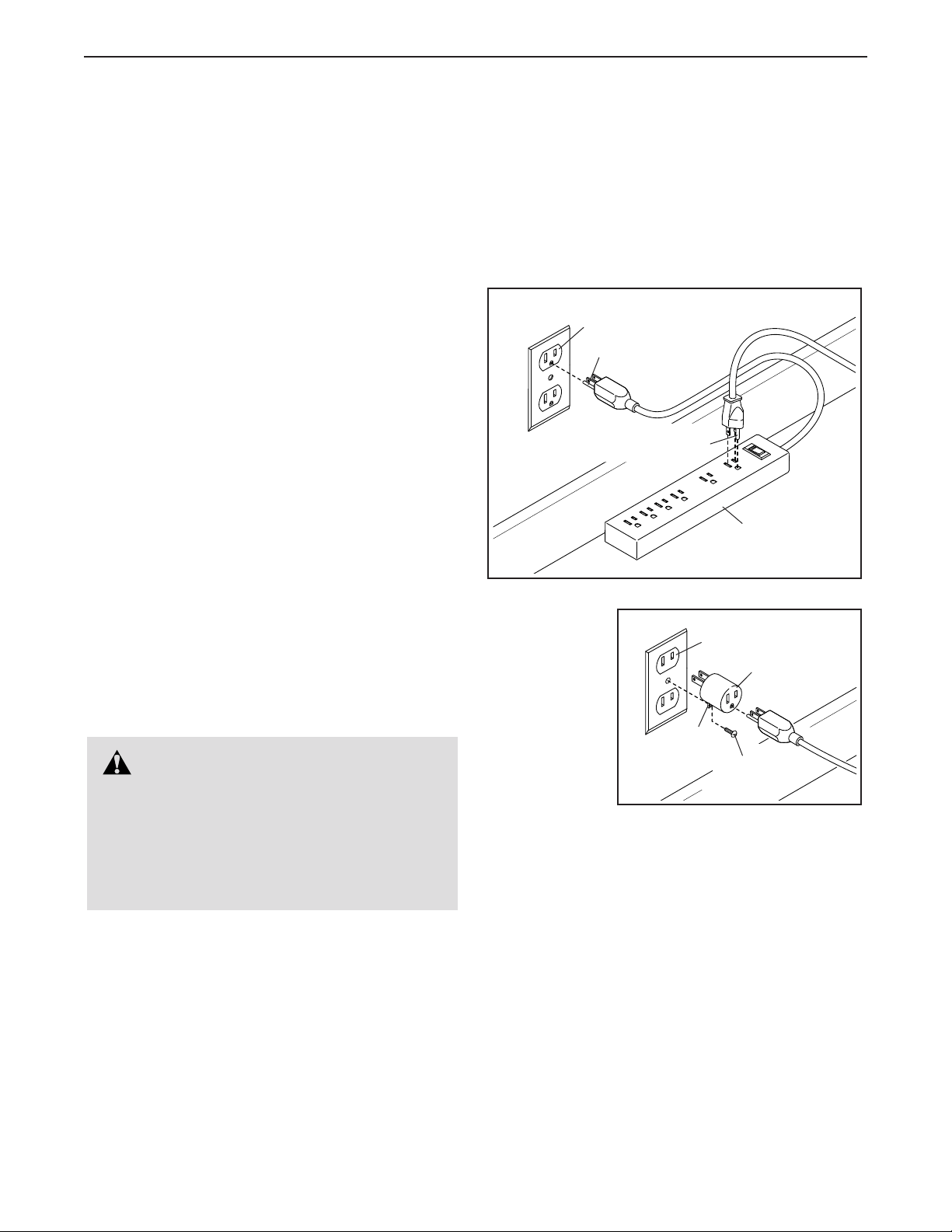
HOW TO PUT ON THE HEART RATE MONITOR
If the heart rate monitor looks like the one shown
in drawing 1, press the transmitter (A) onto the snap
fasteners on the chest strap (B). If the heart rate
monitor looks like the one shown in drawing 2,
insert the tab (C) on one end of the chest strap (D) into
one end of the transmitter (E). Then, press the end of
the transmitter under the buckle (F) on the chest strap;
the tab should be flush with the transmitter.
Next, wrap the heart
rate monitor around
your chest in the loca-
tion shown; the heart
rate monitor must be
under your clothes,
tight against your skin.
Make sure that the logo
is right-side-up. Then, attach the other end of the chest
strap. Adjust the length of the chest strap, if necessary.
Next, pull the trans-
mitter and the chest
strap away from your
body a few inches
and locate the two
electrode areas (G).
Using saliva or con-
tact lens solution, wet the electrode areas. Then, return
the transmitter and the chest strap to a position against
your chest.
CARE AND MAINTENANCE
• Thoroughly dry the electrode areas with a soft towel
after each use. Moisture may keep the heart rate
monitor activated, shortening the life of the battery.
• Store the heart rate monitor in a warm, dry place. Do
not store the heart rate monitor in a plastic bag or
other container that may trap moisture.
• Do not expose the heart rate monitor to direct sun-
light for extended periods of time, and do not expose
it to temperatures above 122°F (50°C) or below 14°F
(-10°C).
• Do not excessively bend or stretch the heart rate
monitor when using or storing it.
• To clean the transmitter, use a damp cloth and a
small amount of mild soap. Then, wipe the transmit-
ter with a damp cloth and thoroughly dry it with a soft
towel. Never use alcohol, abrasives, or chemicals
to clean the transmitter. Hand wash and air dry the
chest strap.
TROUBLESHOOTING
• If the heart rate monitor does not function when posi-
tioned as described at the left, move it slightly lower
or higher on your chest.
• If heart rate readings are not displayed until you
begin perspiring, re-wet the electrode areas.
• For the console to display heart rate readings, you
must be within arm’s length of the console.
• If there is a battery cover on the back of the trans-
mitter, replace the battery with a new battery of the
same type.
• The heart rate monitor is designed to work with
people who have normal heart rhythms. Heart rate
reading problems may be caused by medical condi-
tions such as premature ventricular contractions
(pvcs), tachycardia bursts, and arrhythmia.
• The operation of the heart rate monitor can be
affected by magnetic interference from high power
lines or other sources. If you suspect that magnetic
interference is causing a problem, try relocating the
fitness equipment.
1 2
A
B
E
F
C
D
THE CHEST HEART RATE MONITOR
G
19
HOW TO USE THE TREADMILL
HOW TO CONNECT THE POWER CORD
Use a Surge Suppressor
Your treadmill, like other electronic equipment, can be
damaged by sudden voltage changes in your home’s
power. Voltage surges, spikes, and noise interfer-
ence can result from weather conditions or from other
appliances being turned on or off. To decrease the
risk of damaging the treadmill, always use a surge
suppressor with the treadmill. To purchase a surge
suppressor, see precaution 14 on page 3.
Use only a surge suppressor that is UL 1449 listed as a
transient voltage surge suppressor (TVSS). The surge
suppressor must have a UL suppressed voltage rating
of 400 volts or less and a minimum surge dissipation of
450 joules. The surge suppressor must also be electri-
cally rated for 120 volts AC and 15 amps. There must
be a monitoring light on the surge suppressor to indi-
cate whether it is functioning properly. Failure to use a
properly functioning surge suppressor could result
in damage to the control system of the treadmill
and serious injury to users.
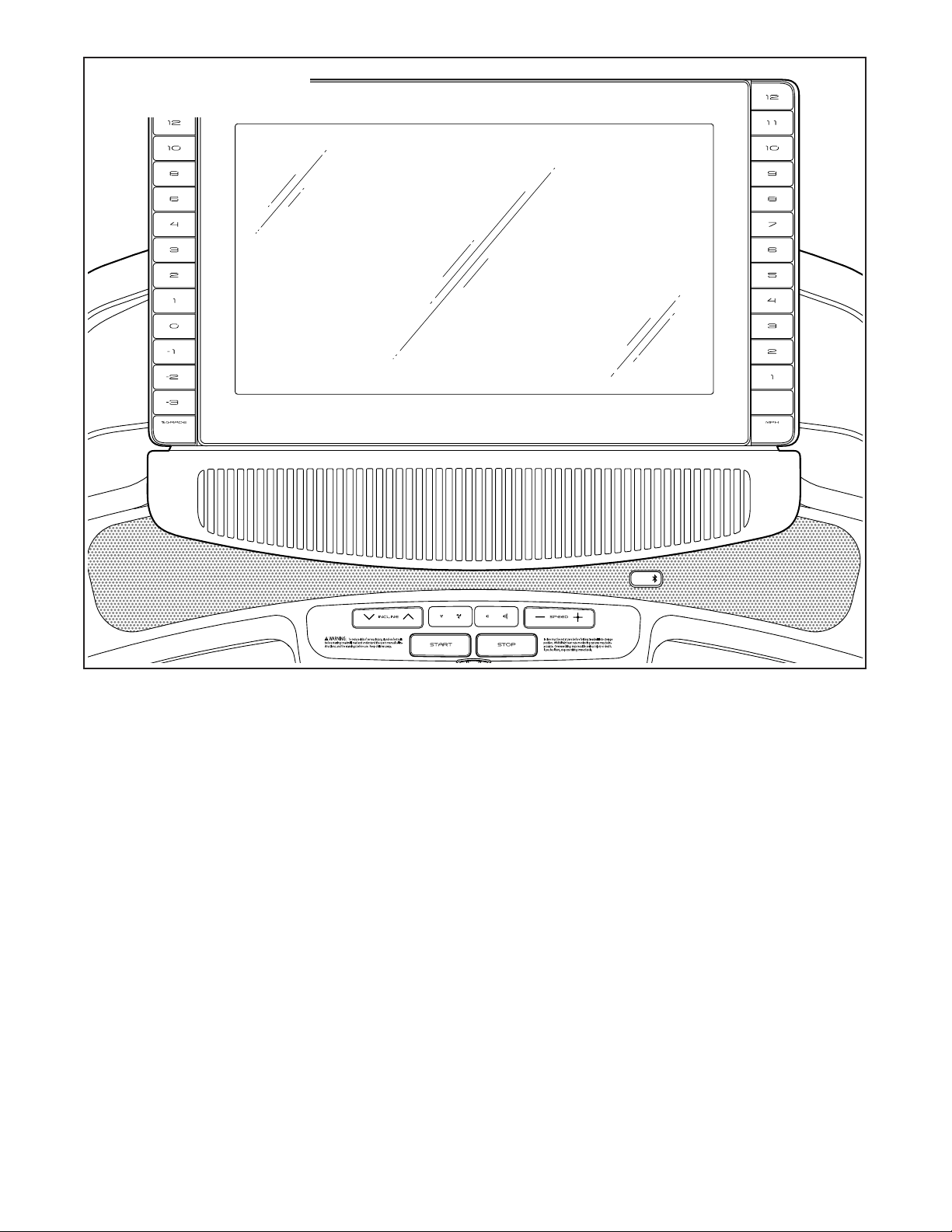
Plug in the Power Cord
The treadmill must be grounded. If it should malfunc-
tion or break down, grounding provides a path of least
resistance for electric current to reduce the risk of elec-
tric shock. The treadmill power cord has a plug with a
grounding pin (see drawing 1 on this page).
Plug the power cord into a surge suppressor, and plug
the surge suppressor into an appropriate outlet that is
properly installed and grounded in accordance with all
local codes and ordinances. The outlet must be on a
nominal 120-volt circuit capable of carrying 15 or
more amps. To avoid overloading the circuit, do
not plug other electrical devices, except for low-
power devices such as cell phone chargers, into
the surge suppressor or into an outlet on the same
circuit. IMPORTANT: If the treadmill is connected to
an AFCI-equipped outlet and your circuit breaker
trips repeatedly when the treadmill is used, see the
front cover of this manual to purchase an arc filter.
A temporary
adapter may
be used to
connect the
surge sup-
pressor to
a 2-pole
receptacle
if a properly
grounded
outlet is not
available.
The lug or wire extending from the adapter must
be connected with a metal screw to a permanent
ground such as a properly grounded outlet box cover.
Some 2-pole receptacle outlet box covers are not
grounded. Before using an adapter, contact a quali-
fied electrician to determine whether the outlet box
cover is grounded. The temporary adapter should
be used only until a properly grounded outlet can
be installed by a qualified electrician.
1
Surge
Suppressor
Grounding Pin
Grounded Outlet
Grounding Pin
2
Adapter
2-pole Receptacle
Lug
Metal
Screw
DANGER: Improper connection
of the power cord increases the risk of elec-
tric shock. Do not modify the plug—if it will
not fit an outlet, have a proper outlet installed
by a qualified electrician. If you are unsure
whether the treadmill is properly grounded,
contact a qualified electrician.
20
FEATURES OF THE CONSOLE
The advanced treadmill console offers a selection of
features designed to make your workouts more effec-
tive and enjoyable.
The console features wireless technology that enables
the console to connect to iFit. With iFit, you can access
a large and varied workout library, create your own
workouts, track your workout results, and access many
other features.
When you use the manual mode, you can change the
speed and incline of the treadmill with the touch of a
button. As you exercise, the console will display instant
exercise feedback. You can even measure your heart
rate using the handgrip heart rate monitor or the chest
heart rate monitor.
In addition, the console features a selection of work-
outs. Each workout automatically controls the speed
and incline of the treadmill as it guides you through an
effective exercise session.
You can even listen to your favorite workout music or
audio books with the console’s sound system while you
exercise.
To turn on the power, see page 21. To learn how
to use the touch screen, see page 21. To set up
the console, see page 22.
E TNT19119
CONSOLE DIAGRAM
21
HOW TO TURN ON THE POWER
IMPORTANT: If the treadmill has been exposed to
cold temperatures, allow it to warm to room tem-
perature before you turn on the power. If you do
not do this, you may damage the console displays
or other electrical components.
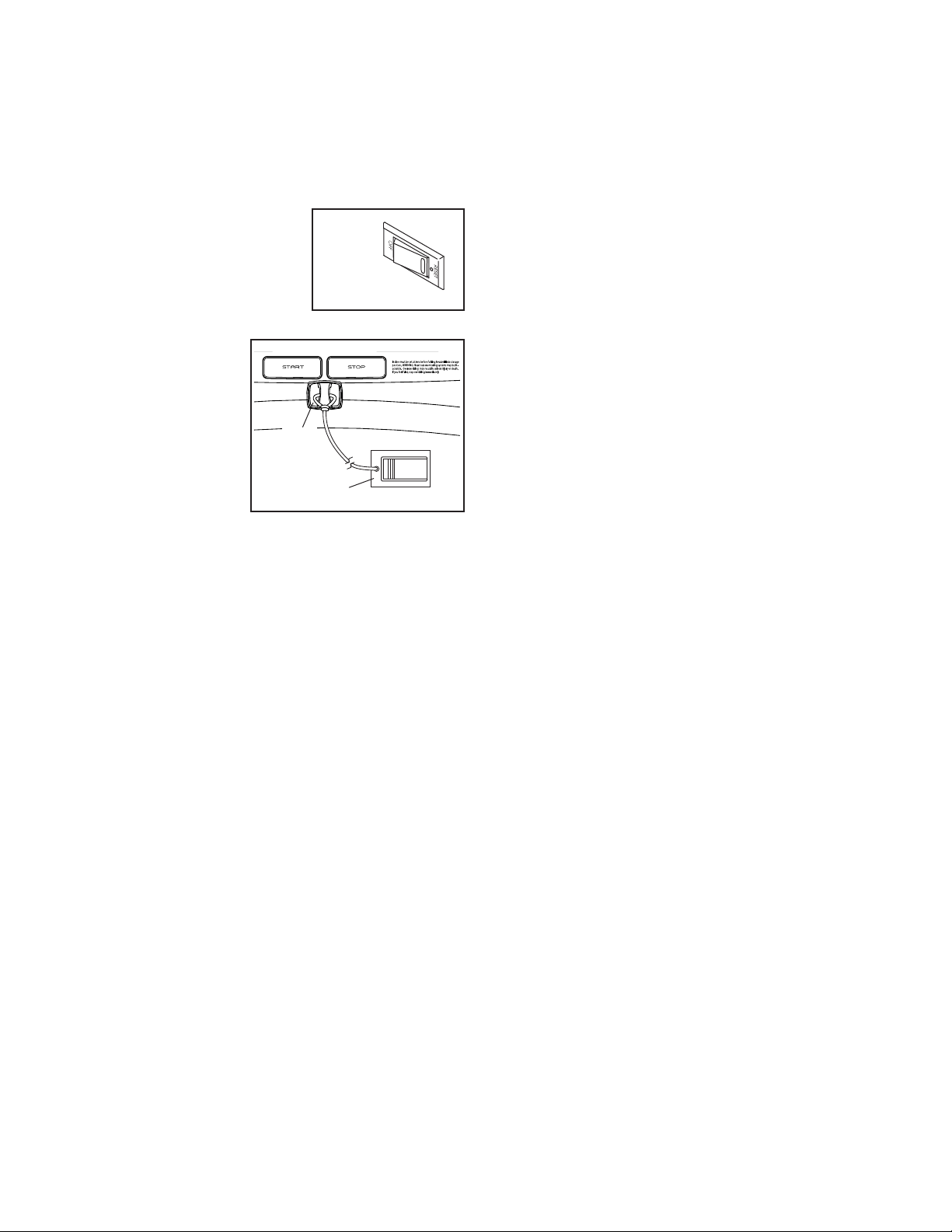
Plug in the power cord (see
page 19). Next, locate the
power switch on the tread-
mill frame near the power
cord. Press the power switch
into the reset position.
Next, stand on the
foot rails of the
treadmill. Locate
the clip (A) attached
to the key (B),
and slide the clip
securely onto the
waistband of your
clothes. Then,
insert the key into
the console. Note:
It may take some time for the console to be ready
for use. IMPORTANT: In an emergency, the key can
be pulled from the console, causing the walking
belt to slow to a stop. Test the clip by carefully tak-
ing a few steps backward; if the key is not pulled
from the console, adjust the position of the clip.
Note: The console can display speed and distance
in either miles or kilometers. To find which unit of
measurement is selected, see HOW TO USE THE
EQUIPMENT SETTINGS SECTION on page 27. For
simplicity, all instructions in this section refer to miles.
HOW TO USE THE TOUCH SCREEN
The console features a tablet with a full-color touch
screen. The following information will help you become
familiar with the tablet’s advanced technology:
• The console functions similarly to other tablets. You
can slide or flick your finger against the screen to
move certain images on the screen, such as the
displays in a workout (see step 5 on page 23).
However, you cannot zoom in and out by sliding your
fingers on the screen.
• The screen is not pressure sensitive. You do not
need to press hard on the screen.
• To type information into a text box, touch the text
box to view the keyboard. To use numbers or other
characters on the keyboard, touch the ?123 button.
To view more characters, touch the ~[< button. Touch
the ?123 button to return to the number keyboard. To
return to the letter keyboard, touch the ABC button.
To use a capital character, touch the button with an
upward-facing arrow. To use multiple capital charac-
ters, touch the arrow button again. To return to the
lowercase keyboard, touch the arrow button a third
time. To clear the last character, touch the button
with a backward-facing arrow and an X.
Reset
E TNT19119
B
A

22
HOW TO SET UP THE CONSOLE
Before using the treadmill for the first time, set up the
console.
1. Connect to your wireless network.
To access the internet, download iFit workouts,
and use several other features of the console, the
console must be connected to a wireless network.
Follow the prompts on the screen to connect the
console to your wireless network.
2. Customize settings.
Fill in the form on the screen to set the console to
display the desired unit of measurement and your
time zone. Note: If you need to change these set-
tings later, see HOW TO USE THE EQUIPMENT
SETTINGS SECTION on page 27.
3. Log into or create an iFit account.
Provide your email address, and follow the prompts
on the screen to sign up for or log into your iFit
account.
4. Tour the console.
The first time you turn on the treadmill, dialogue
boxes on the screen will guide you through the
features of the console.
5. Check for firmware updates.
First, touch your name in the upper-left corner and
touch the Settings button. Next, select the main-
tenance section. Then, touch the Update button
to check for firmware updates using your wireless
network. See HOW TO USE THE MAINTENANCE
SECTION on page 28 for more information.
6. Calibrate the incline system.
First, touch your name in the upper-left corner.
Next, select the settings main menu. Then, select
the maintenance section, touch the Calibrate
Incline button, and then touch the Begin button to
calibrate the incline system. See step 4 on page 28
for more information.
The console is now ready for you to begin working out.
The following pages explain the various workouts and
other features that the console offers.
To use the manual mode, see page 23. To use a
map workout, see page 25. To use a draw your own
map workout, see page 25. To use a distance or
time workout, see page 26.
To use the workout settings section, see page 27.
To use the equipment settings section, see page 27.
To use the maintenance section, see page 28. To
use the wireless network mode, see page 28. To
use the sound system with a Bluetooth
®
device,
see page 29. To use the sound system with an
audio cable, see page 29. To adjust the angle of the
console, see page 30. To adjust the cushions, see
page 30.
IMPORTANT: If there are sheets of plastic on the
console, remove the plastic. To prevent damage
to the walking platform, wear clean athletic shoes
while using the treadmill. The first time you use
the treadmill, observe the alignment of the walking
belt, and center the walking belt if necessary (see
page 33).

23
HOW TO USE THE MANUAL MODE
1. Insert the key into the console.
See HOW TO TURN ON THE POWER on
page 21. Note: It may take some time for the
console to be ready for use.
2. Select the main menu.
When you turn on the power, the main menu will
appear after the console boots up. If you are in a
workout or the settings menu, touch the back arrow
or the x on the screen to return to the main menu.
Note: If you plan to use a chest heart rate moni-
tor with the console while you exercise, you must
put on the chest heart rate monitor before you
start the walking belt. The console will automati-
cally search for the chest heart rate monitor for
30 seconds when you start the walking belt at the
beginning of each workout.
3. Start the walking belt and adjust the speed.
Touch the Manual Start button in the upper-right
corner of the screen or press the Start button on
the console to start the walking belt. The walk-
ing belt will begin to move at a low speed. As you
exercise, change the speed of the walking belt
as desired by pressing the Speed increase and
decrease buttons. Each time you press one of the
buttons, the speed setting will change by 0.1 mph;
if you hold down the button, the speed setting will
change in increments of 0.5 mph.
If you press one of the numbered speed buttons,
the walking belt will gradually change speed until it
reaches the selected speed setting.
Note: When the incline setting is below 0%,
you will not be able to select the highest speed
settings.
To stop the walking belt, press the Stop button or
tap the middle of the screen. To restart the walking
belt, press the Start button.
4. Change the incline of the treadmill as desired.
To change the incline of the treadmill, press the
Incline increase and decrease buttons or one of the
numbered incline buttons. Each time you press one
of the buttons, the incline will gradually change until
it reaches the selected incline setting.
Note: If the walking belt is moving at a high
speed and you adjust the incline below 0%, the
speed of the walking belt may automatically
decrease.
Note: The first time you use the treadmill, you must
calibrate the incline system (see step 4 on page 28).
5. Monitor your progress with the display modes.
The console offers several display modes. The
display mode that you select will determine which
workout information is shown. To select the desired
display mode or to view statistics and charts, drag
down on the screen. You can also touch the + but-
ton in the lower-right corner of the screen to view
stats or charts.
As you walk or run on the treadmill, the screen can
show the following workout information:
• The incline level of the treadmill
• Your vertical gain
• Your vertical loss
• The elapsed time
• The approximate number of calories you have
burned
• The approximate number of calories you are
burning per hour
• Your heart rate (see step 6)
• Your average heart rate
• The distance that you have walked or run
24
• Your pace
• The speed of the walking belt
• The average speed of the walking belt
• A track representing 1/4 mile (400 m)
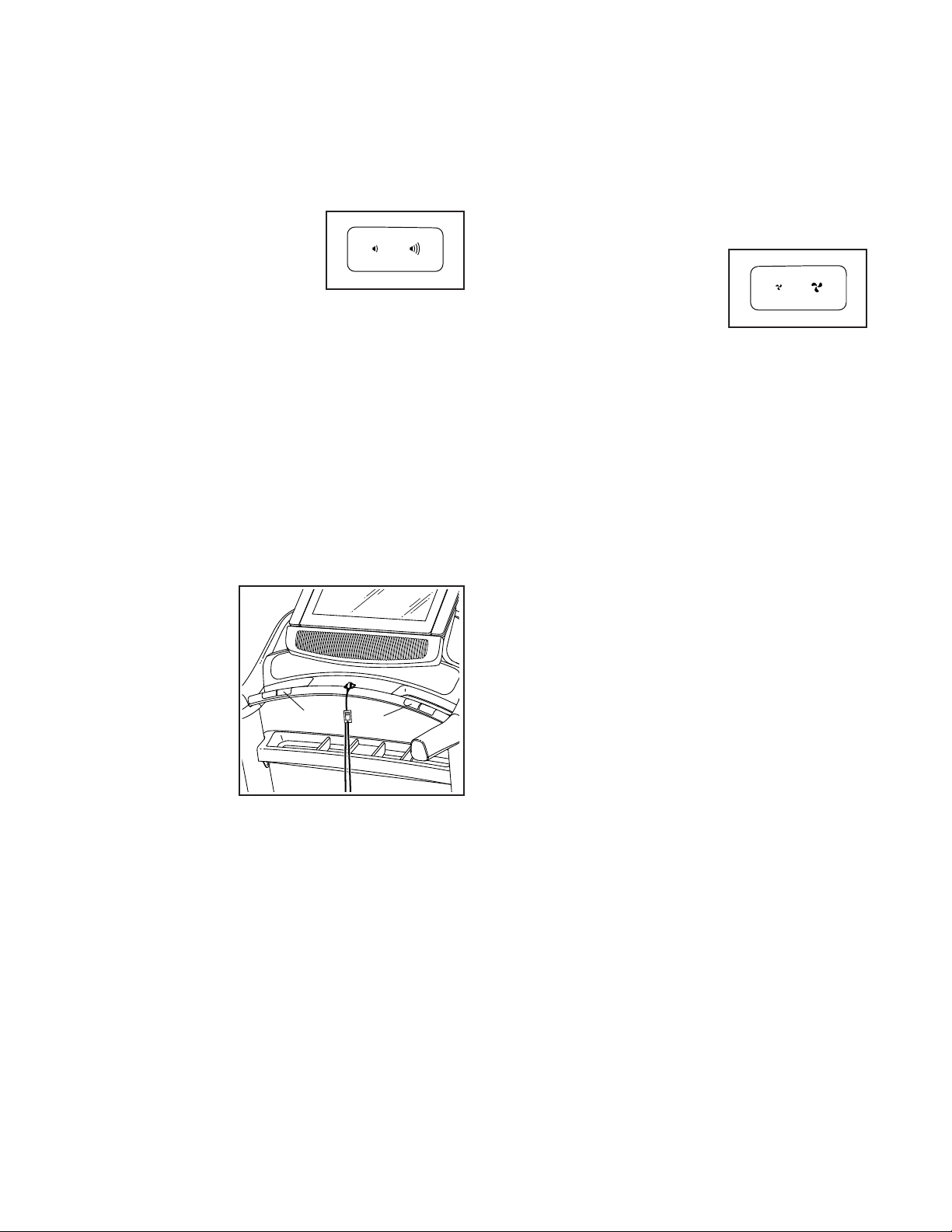
If desired, adjust the
volume by pressing the
volume buttons on the
console.
To pause the workout, tap the screen or press the
Stop button on the console. To continue the work-
out, touch the Resume button or the Start button.
To end the workout, touch the Finish button.
6. Measure your heart rate if desired.
Note: If you use the handgrip heart rate moni-
tor and the chest heart rate monitor at the same
time, the chest heart rate monitor will have
priority. For information about the chest heart rate
monitor, see page 18. The console is compatible
with Bluetooth Smart heart rate monitors.
Before using
the hand-
grip heart
rate moni-
tor, remove
the sheets of
plastic from
the metal
contacts (C).
In addition,
make sure that
your hands
are clean.
To measure your heart rate, stand on the foot
rails and hold the contacts with your palms for
approximately ten seconds; avoid moving your
hands. When your pulse is detected, your heart
rate will be shown. For the most accurate heart
rate reading, continue to hold the contacts for
about 15 seconds.
7. Turn on the fan if desired.
The fan features several
speed settings. Press the
fan buttons repeatedly to
select a fan speed or to
turn on or turn off the fan.
8. When you are finished exercising, remove the
key from the console.
Step onto the walking platform and press the Stop
button on the console or tap on the screen. Next,
touch the Finish button. A workout summary will
appear on the screen. If you wish to save your
workout for future use, you can add it as a favor-
ite by touching the heart button in the upper-right
corner of the screen. You may also be able to
either save or publish your results using one of the
options on the screen. Then, remove the key from
the console and put it in a secure place.
When you are finished using the treadmill, press
the power switch into the off position and unplug
the power cord. IMPORTANT: If you do not do
this, the treadmill’s electrical components may
wear prematurely.
ETNT19119
C
C
ETNT19119

25
HOW TO USE A MAP WORKOUT
Note: To use a map workout, the console must be con-
nected to a wireless network (see HOW TO USE THE
WIRELESS NETWORK MODE on page 28).
1. Insert the key into the console.
See HOW TO TURN ON THE POWER on
page 21.
2. Select the main menu or the workout library.
Touch the Home or Browse buttons on the screen
to select either the main menu or the workout
library.
3. Select a map workout.
To select a map workout, touch the desired button
on the screen. Note: The featured map workouts
on your console will change periodically. If you wish
to save a workout for future use, you can add it as
a favorite by touching the heart button in the upper-
right corner of the screen. To draw your own map
workout, see this page.
The screen will show the duration and distance of
the workout and the approximate number of calo-
ries you will burn during the workout.
4. Start the workout.
Touch the Start button to start the workout. A
moment after you touch the button, the walking belt
will begin to move. Hold the handrails and begin
walking.
During the workout, a map on the screen will show
your progress.
The workout will function in the same way as the
manual mode (see pages 23 to 24).
When you reach the end of the workout, the
walking belt will slow to a stop, and a workout
summary will appear on the screen. After you view
the workout summary, touch the Finish button to
return to the main menu. You may also be able to
either save or publish your results using one of the
options on the screen.
5. Monitor your progress with the display modes.
See step 5 on page 23.
6. Measure your heart rate if desired.
See step 6 on page 24.
7. Turn on the fan if desired.
See step 7 on page 24.
8. When you are finished exercising, remove the
key from the console.
See step 8 on page 24.
HOW TO USE A DRAW YOUR OWN MAP
WORKOUT
Note: To use a draw your own map workout, the
console must be connected to a wireless network (see
HOW TO USE THE WIRELESS NETWORK MODE on
page 28).
1. Insert the key into the console.
See HOW TO TURN ON THE POWER on
page 21.
2. Select a draw your own map workout.
To select a draw your own map workout, touch the
Create button on the screen.
3. Draw your map.
Navigate to the area on the map where you want
to draw your workout by sliding your fingers on the
screen. Tap the screen to add the start point for
your workout. Then, tap the screen to add the end
point for your workout. Note: If you want to start
and end the workout at the same point, use the
Loop or Out & Back buttons on the left side of the
screen. You can also select whether you want your
workout to snap to the road.
If you make a mistake, you can use the Undo but-
ton on the left side of the screen.
The screen will display the elevation and distance
statistics for your workout. If desired, you can
change the default speed.

26
4. Save your workout.
Touch the Save New Workout button in the lower-
left corner of the screen. If desired, change the title
of the workout or add a description, and then press
the > symbol on the screen.
5. Start the workout.
Touch the Start button on the screen to start the
workout. A moment after you touch the button, the
walking belt will begin to move. Hold the handrails
and begin walking. See step 4 on page 25 for more
information.
6. Monitor your progress with the display modes.
See step 5 on page 23.
7. Measure your heart rate if desired.
See step 6 on page 24.
8. Turn on the fan if desired.
See step 7 on page 24.
9. When you are finished exercising, remove the
key from the console.
See step 8 on page 24.
HOW TO USE A DISTANCE OR TIME WORKOUT
Note: To use a distance or time workout, the console
must be connected to a wireless network (see HOW
TO USE THE WIRELESS NETWORK MODE on page
28). An iFit account is also required.
1. Add workouts to your schedule on iFit.com.
On your computer, smartphone, tablet, or other
device, open an internet browser, go to iFit.com,
and sign in to your iFit account.
Next, navigate to Menu > Library on the website.
Browse the workout programs in the library and join
the desired workouts.
Then, navigate to Menu > Schedule to view your
schedule. All of the workouts that you have joined
will appear on your schedule; you can arrange or
delete the workouts on your schedule as desired.
Take time to explore the iFit.com website before
you log out.
2. Insert the key into the console.
See HOW TO TURN ON THE POWER on page 21.
3. Select the main menu.
See step 2 on page 23.
4. Log in to your iFit account.
If you have not already done so, touch the Login
button to log in to your iFit account. The screen
will ask for your iFit.com username and password.
Enter them and touch the Submit button. Touch the
Cancel button to exit the login screen.
5. Select a distance or time workout that you have
previously added to your schedule on iFit.com.
Touch the calendar icon to download a distance or
time workout from your schedule.
Note: Before workouts will download, you must
add them to your schedule on iFit.com.
When you select a distance or time workout, the
screen will show the name, the estimated duration,
and the distance of the workout.

27
6. Start the workout.
See step 4 on page 25. Note: During a distance or
time workout, the display will not show a map.
7. Monitor your progress with the display modes.
See step 5 on page 23. The screen will show the
elapsed distance or time, and the remaining dis-
tance or time.
8. Measure your heart rate if desired.
See step 6 on page 24.
9. Turn on the fan if desired.
See step 7 on page 24.
10. When you are finished exercising, remove the
key from the console.
See step 8 on page 24.
For more information about iFit, go to iFit.com.
HOW TO USE THE WORKOUT SETTINGS SECTION
1. Select the settings main menu.
Insert the key into the console (see HOW TO
TURN ON THE POWER on page 21). Next, select
the main menu (see step 2 on page 23). Then,
touch your name in the upper-left corner of the
screen, and touch the gears button to select the
settings main menu.
2. Select the workout section.
In the settings main menu, scroll to the Workout
section.
3. Customize settings.
To customize settings, touch the desired category,
and then touch the toggle button at the side of the
category name.
4. Exit the workout section.
To exit the workout section, touch the back button
on the screen.
HOW TO USE THE EQUIPMENT SETTINGS
SECTION
1. Select the settings main menu.
See step 1 at the left.
2. Select the equipment settings section.
In the settings main menu, scroll to the Equipment
Settings section. Note: Slide or flick the screen to
scroll up or down through the options if necessary.
3. Customize the unit of measurement and other
settings.
To customize the unit of measurement, the time-
zone, or other settings, touch the desired category,
and then touch the toggle button at the side of the
category name.
4. View machine information.
Touch the Machine Info button to view information
about your treadmill. After you view the information,
touch the back button on the screen.
5. Exit the equipment settings section.
To exit the equipment settings section, touch the
back button on the screen.

28
HOW TO USE THE MAINTENANCE SECTION
1. Select the settings main menu.
See step 1 on page 27.
2. Select the maintenance section.
In the settings main menu, scroll to the
Maintenance section.
3. Update the console firmware.
For the best results, regularly check for
firmware updates.
Touch the Update button to check for firmware
updates using your wireless network. The update
will begin automatically.
To avoid damaging the treadmill, do not turn off
the power or remove the key while the firmware
is being updated.
The screen will show the progress of the update.
When the update is complete, the treadmill will turn
off and then turn back on. If it does not, press the
power switch into the off position, wait for several
seconds, and then press the power switch into the
reset position. Note: It may take a few minutes for
the console to be ready for use.
Note: Occasionally, a firmware update may cause
the console to function slightly differently. These
updates are always designed to improve your exer-
cise experience.
4. Calibrate the incline system of the treadmill.
Touch the Calibrate Incline button. Then, touch the
Begin button to calibrate the incline system. The
treadmill will automatically rise to the maximum
incline level, lower to the minimum incline level,
and then return to the starting position. This will
calibrate the incline system. Touch the Cancel
button to return to the maintenance section. When
the incline system is calibrated, touch the Finish
button.
IMPORTANT: Keep pets, feet, and other objects
away from the treadmill while the incline sys-
tem is calibrating. In an emergency, pull the key
from the console to stop the incline calibration.
5. Exit the maintenance section.
To exit the maintenance section, touch the back
button on the screen.
HOW TO USE THE WIRELESS NETWORK MODE
The console features a wireless network mode that
allows you to set up a wireless network connection.
1. Select the main menu.
See step 2 on page 23.
2. Select the wireless network mode.
Touch the Wi-Fi
®
symbol in the lower-right corner of
the screen to enter the wireless network mode.
3. Enable Wi-Fi.
Make sure that Wi-Fi is enabled. If it is not, touch
the Wi-Fi toggle to enable a wireless connection.
4. Set up and manage a wireless network
connection.
When Wi-Fi is enabled, the screen will show a list
of available networks. Note: It may take several
seconds for the list of wireless networks to appear.
Note: You must have your own wireless network
and an 802.11b/g/n router with SSID broadcast
enabled (hidden networks are not supported).
When a list of networks appears, touch the desired
network. Note: You will need to know your network
name (SSID). If your network has a password, you
will also need to know the password.

29
An information box will ask if you want to connect
to the wireless network. Touch the Connect button
to connect to the network or touch the Cancel but-
ton to return to the list of networks. If the network
has a password, touch the password entry box. A
keyboard will appear on the screen. To view the
password as you type it, touch the Show Password
checkbox.
To use the keyboard, see HOW TO USE THE
TOUCH SCREEN on page 21.
When the console is connected to your wireless
network, a checkmark will appear next to the wire-
less network name. Then, touch the back button on
the screen to return to the wireless network mode.
To disconnect from a wireless network, select the
wireless network and then touch the Forget button.
If you are having problems connecting to an
encrypted network, make sure that your password
is correct. Note: Passwords are case-sensitive.
Note: The console supports unsecured and
secured (WEP, WPA™, and WPA2™) encryption.
A broadband connection is recommended; perfor-
mance depends on connection speed.
Note: If you have questions after following
these instructions, go to support.iFit.com for
assistance.
5. Exit the wireless network mode.
To exit the wireless network mode, touch the back
button on the screen.
HOW TO USE THE SOUND SYSTEM WITH A
BLUETOOTH DEVICE
1. Place or hold your Bluetooth-enabled device
near the console.
2. Turn on your device’s Bluetooth setting.
3. Pair your device to the console.
Press and hold the Bluetooth button on the con-
sole’s speaker grill for 3 seconds. The Bluetooth
speakers will enter pairing mode. When your
device and the console pair successfully, the audio
from your device will play through the console’s
speakers.
Note: The console can save eight devices in its
memory. If you have previously paired your device
to the console, you can simply press the Bluetooth
button to connect your device to the console.
4. Erase the console’s device memory if
necessary.
If you need to erase all the Bluetooth-enabled
devices saved in the console’s memory, press and
hold the Bluetooth button for 10 seconds.
HOW TO USE THE SOUND SYSTEM WITH AN
AUDIO CABLE
To play music or audio books through the console
sound system while you exercise, plug a 3.5 mm male
to 3.5 mm male audio cable (not included) into the
jack on the console and into a jack on your personal
audio player; make sure that the audio cable is fully
plugged in. Note: To purchase an audio cable, see
your local electronics store.
Next, press the play but-
ton on your personal audio
player. Adjust the volume level
using the volume increase
and decrease buttons on the
console or the volume control
on your personal audio player.
ETNT19119
30
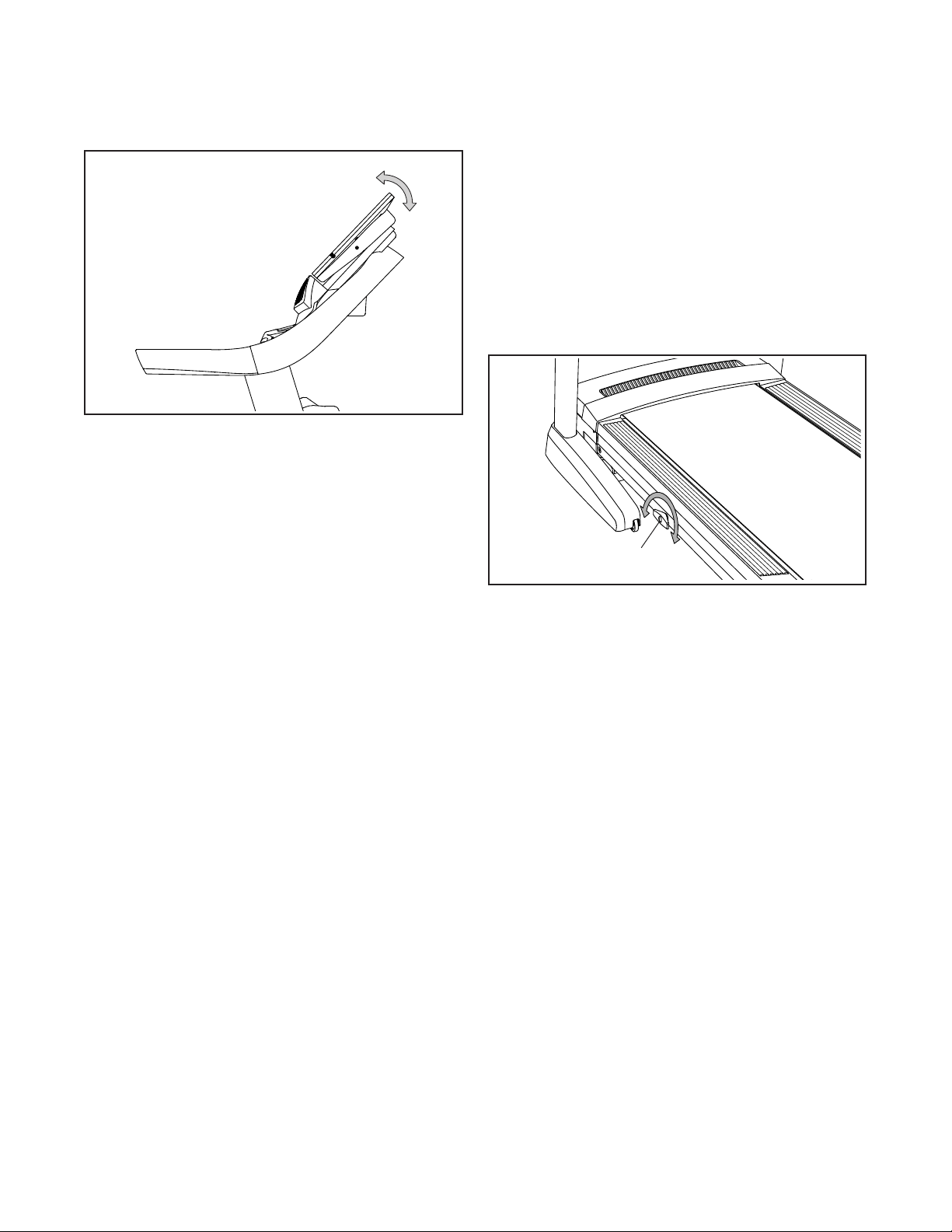
HOW TO ADJUST THE ANGLE OF THE CONSOLE
To adjust the angle of the console, hold both sides of
the console and tilt it to the desired position.
HOW TO ADJUST THE CUSHIONS
The treadmill features cushions that reduce the impact
as you walk or run on the treadmill.
To adjust the cushions, first remove the key from the
console and unplug the power cord.
For a more rm walking platform, turn the cushion
knob (D) a half turn counterclockwise until you feel
it lock into place. For a less rm walking platform,
turn the cushion knob a half turn clockwise until you
feel it lock into place. Note: The faster you run on
the treadmill, or the more you weigh, the firmer the
walking platform should be.
D
31
HOW TO FOLD AND MOVE THE TREADMILL
HOW TO FOLD THE TREADMILL
To avoid damaging the treadmill, adjust the incline
to zero before you fold the treadmill. Then, remove
the key and unplug the power cord. CAUTION: You
must be able to safely lift 45 lbs. (20 kg) to raise,
lower, or move the treadmill.
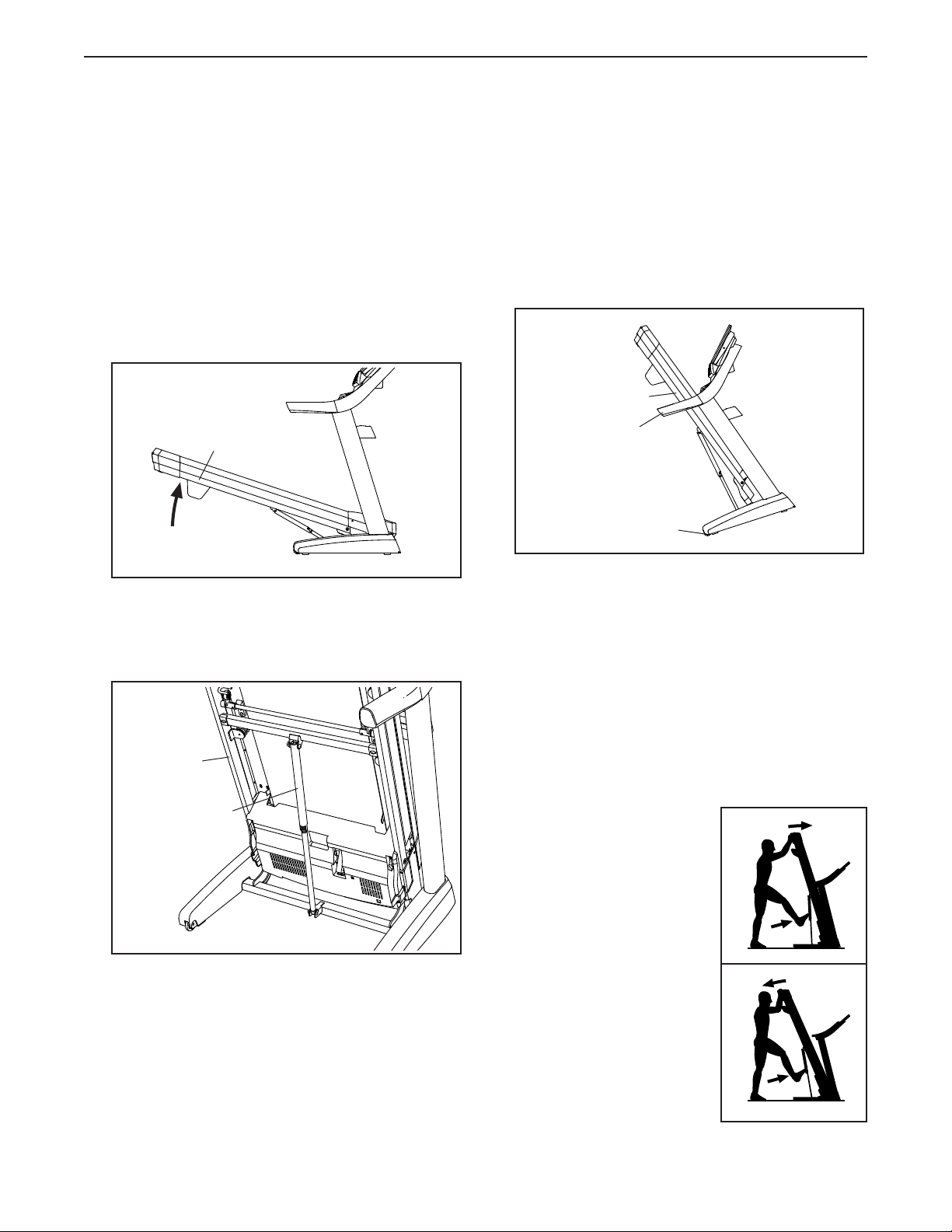
1. Hold the metal frame (A) rmly in the location
shown by the arrow below. CAUTION: Do not hold
the frame by the plastic foot rails. Bend your
legs and keep your back straight.
2. Raise the frame (A) until the storage latch (B) locks
in the storage position. CAUTION: Make sure that
the storage latch locks.
To protect the oor or carpet, place a mat under
the treadmill. Keep the treadmill out of direct
sunlight. Do not leave the treadmill in the storage
position in temperatures above 85°F (30°C).
HOW TO MOVE THE TREADMILL
Before moving the treadmill, fold it as described at the
left. CAUTION: Make sure that the storage latch is
in the locked position. Moving the treadmill may
require two people.
1. Hold the frame (A) and one of the handrails (C),
and place one foot against a wheel (D).
2. Pull back on the handrail until the treadmill will roll
on the wheels, and carefully move it to the desired
location. CAUTION: Do not move the tread-
mill without tipping it back, do not pull on the
frame, and do not move the treadmill over an
uneven surface.
3. Place one foot against a wheel, and carefully lower
the treadmill.
HOW TO LOWER THE TREADMILL FOR USE
1. Push the upper end of
the frame forward, and
gently press the upper
part of the storage latch
with your foot at the
same time.
2. While pressing the stor-
age latch with your foot,
pull the upper end of the
frame toward yourself.
3. Step back and let the
frame lower to the floor.
1
A
2
A
B
C
D
A
1
1
2
32
MAINTENANCE AND TROUBLESHOOTING
MAINTENANCE
Regular maintenance is important for optimal perfor-
mance and to reduce wear. Inspect and properly tighten
all parts each time the treadmill is used. Replace any
worn parts immediately.
Regularly clean the treadmill and keep the walking
belt clean and dry. First, press the power switch into
the off position and unplug the power cord. Wipe
exterior parts of the treadmill with a damp cloth and a
small amount of mild soap. IMPORTANT: Do not spray
liquids directly onto the treadmill. To avoid damage
to the console, keep liquids away from the console.
Then, thoroughly dry the treadmill with a soft towel.
TROUBLESHOOTING
Most treadmill problems can be solved by following
the simple steps below. Find the symptom that
applies, and follow the steps listed. If further assis-
tance is needed, see the front cover of this manual.
SYMPTOM: The power does not turn on
a. Make sure that the power cord is plugged into a
surge suppressor, and that the surge suppressor
is plugged into a properly grounded outlet (see
page 19). Use only a surge suppressor that meets
all of the specications described on page 19.
IMPORTANT: If the treadmill is connected to an
AFCI-equipped outlet and your circuit breaker
trips repeatedly when the treadmill is used, see
the front cover of this manual to purchase an
arc lter.
b. After the power cord has been plugged in, make
sure that the key is inserted into the console.
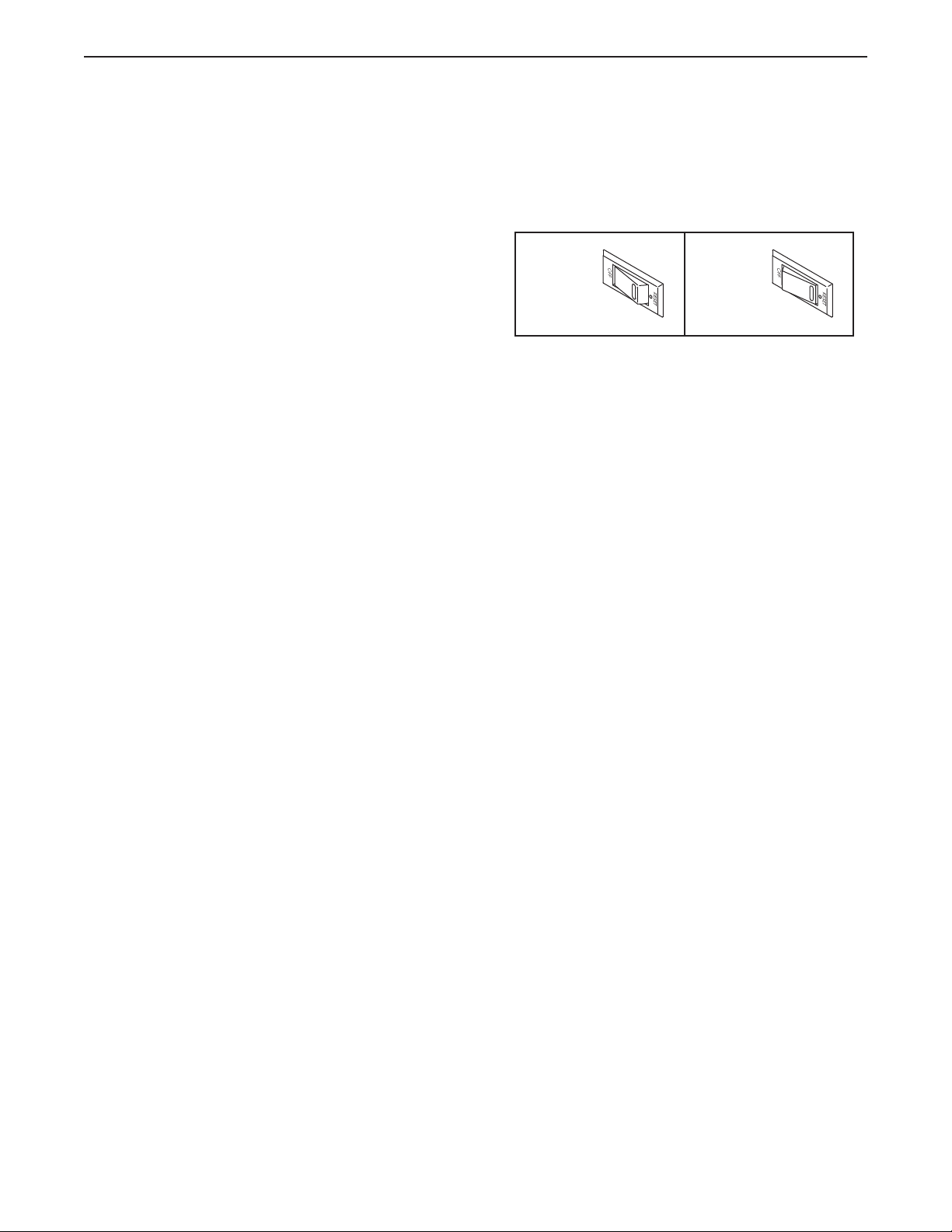
c. Check the power switch located on the treadmill
frame near the power cord. If the switch protrudes
as shown, the switch has tripped. To reset the
power switch, wait for ve minutes and then press
the switch back in.
SYMPTOM: The power turns off during use
a. Check the power switch (see the drawing above).
If the switch has tripped, wait for ve minutes and
then press the switch back in.
b. Make sure that the power cord is plugged in. If the
power cord is plugged in, unplug it, wait for ve
minutes, and then plug it back in.
c. Remove the key from the console, and then
reinsert it.
d. If the treadmill still will not run, please see the front
cover of this manual.
SYMPTOM: The incline of the treadmill does not
change correctly
a. Calibrate the incline system (see step 4 on
page 28).
SYMPTOM: The treadmill will not connect to the
wireless network
a. Make sure that the wireless settings on the console
are correct (see page 28).
b. Make sure that the settings for your wireless net-
work are correct.
c. If you still have questions, go to support.iFit.com.
Reset
Tripped
c
33
SYMPTOM: The walking belt slows when walked on
a. Use only a surge suppressor that meets all of the
specications described on page 19.
b. If the walking belt is overtightened, treadmill per-
formance may decrease and the walking belt may
become damaged. Remove the key and UNPLUG
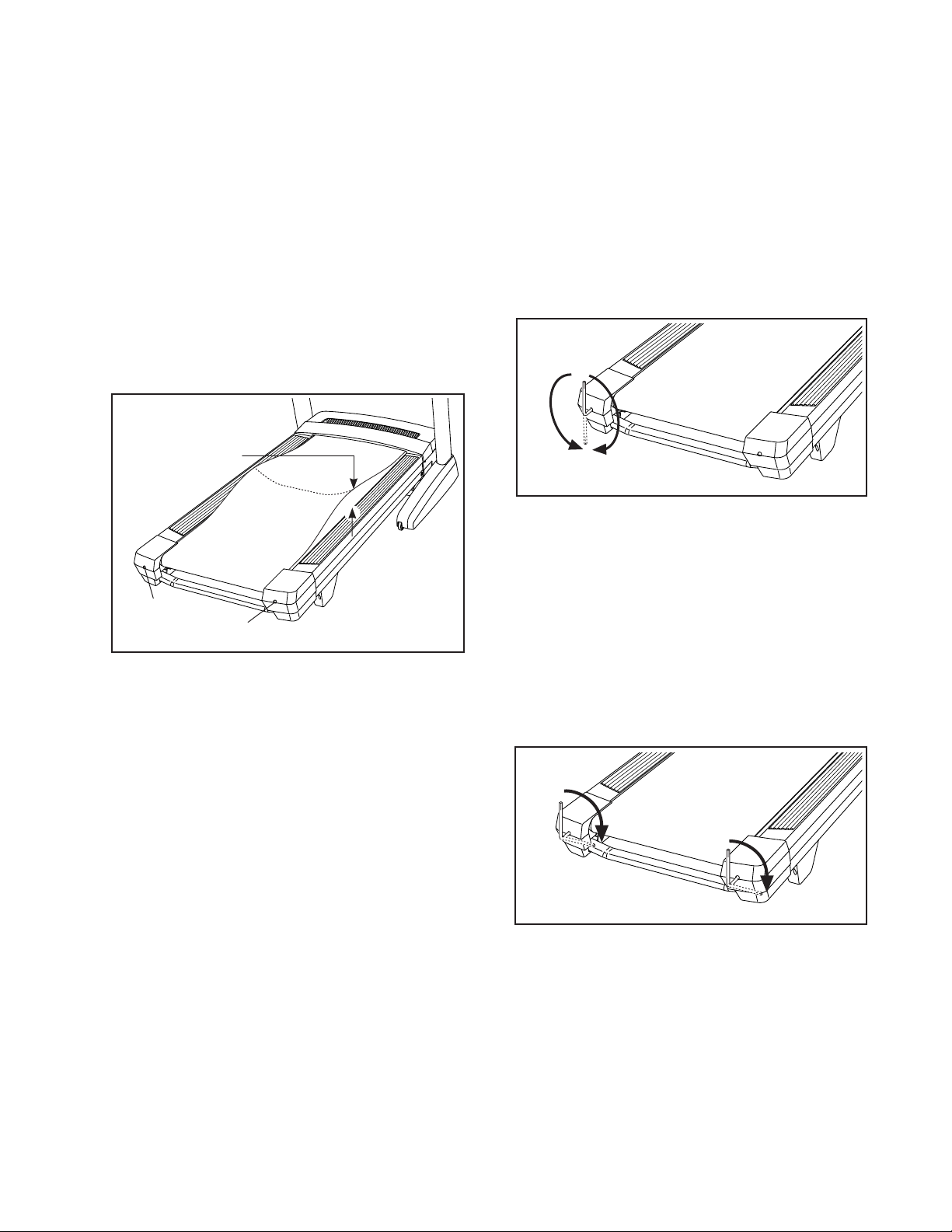
THE POWER CORD. Using the hex key, turn both
idler roller screws (A) counterclockwise, 1/4 of a
turn. When the walking belt is properly tightened,
you should be able to lift each edge of the walking
belt 2 to 3 in. (5 to 7 cm) off the walking platform.
Be careful to keep the walking belt centered. Then,
plug in the power cord, insert the key, and walk on
the treadmill for a few minutes. Repeat until the
walking belt is properly tightened.
c. Your treadmill features a walking belt coated with
high-performance lubricant. IMPORTANT: Never
apply silicone spray or other substances to
the walking belt or the walking platform unless
instructed to do so by an authorized service
representative. Such substances may deterio-
rate the walking belt and cause excessive wear.
If you suspect that the walking belt needs more
lubricant, see the front cover of this manual.
d. If the walking belt still slows when walked on, see
the front cover of this manual.
SYMPTOM: The walking belt is off-center or slips
when walked on
a. If the walking belt is off-center, rst remove the
key and UNPLUG THE POWER CORD. If the
walking belt has shifted to the left, use the hex
key to turn the left idler roller screw clockwise 1/2
of a turn; if the walking belt has shifted to the
right, turn the left idler roller screw counterclock-
wise 1/2 of a turn. Be careful not to overtighten the
walking belt. Then, plug in the power cord, insert
the key, and walk on the treadmill for a few min-
utes. Repeat until the walking belt is centered.
b. If the walking belt slips when walked on, rst
remove the key and UNPLUG THE POWER
CORD. Using the hex key, turn both idler roller
screws clockwise, 1/4 of a turn. When the walk-
ing belt is correctly tightened, you should be able
to lift each edge of the walking belt 2 to 3 in. (5 to
7 cm) off the walking platform. Be careful to keep
the walking belt centered. Then, plug in the power
cord, insert the key, and walk on the treadmill for a
few minutes. Repeat until the walking belt is prop-
erly tightened.
A
A
2–3 in.
b
a
b
34
SYMPTOM: The displays of the console do not
function properly
a. If the console does not boot up properly, or
if the console freezes and does not respond,
reset the console to the factory default settings.
IMPORTANT: Doing this will erase all the
custom settings you have made to the console.
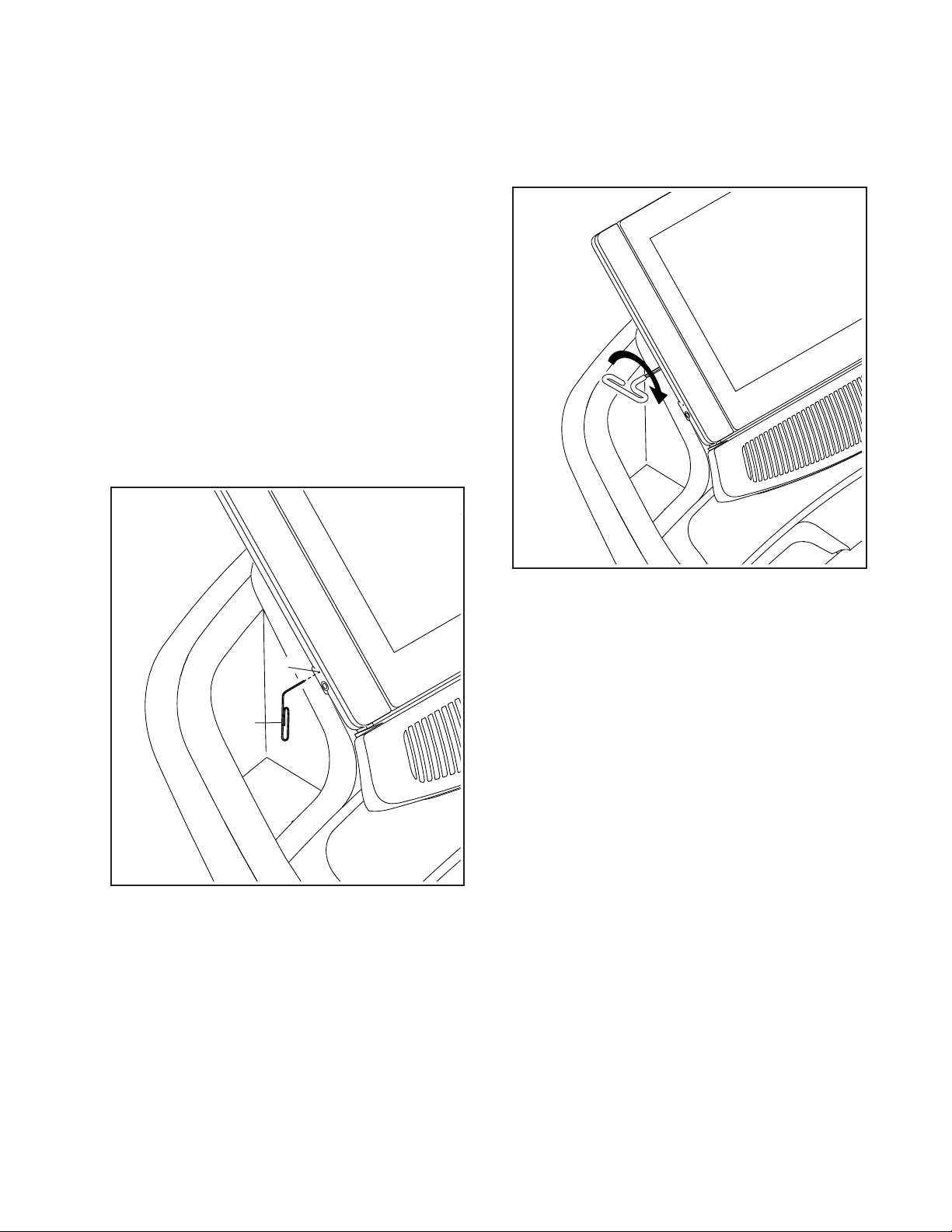
Resetting the console requires two people. First,
power off the treadmill. Next, locate the small reset
opening (B) on the console. Using a bent paper
clip (C), press and hold the reset button inside the
opening, and have a second person power on the
treadmill. Continue holding the reset button until
the console turns on. When the reset operation is
complete, the console will turn off and then turn
back on. If it does not, power the treadmill off and
then on again. Once the console turns on, check
for rmware updates (see HOW TO USE THE
MAINTENANCE SECTION on page 28). Note: It
may take a few minutes for the console to be ready
for use.
SYMPTOM: The console does not stay in place
a. If the console does not stay in the desired position
because it is too loose, use a hex key to slightly
tighten the console in the indicated location on both
sides (only one side is shown).
B
C
a
a
35
EXERCISE GUIDELINES
These guidelines will help you to plan your exercise
program. For detailed exercise information, obtain a
reputable book or consult your physician. Remember,
proper nutrition and adequate rest are essential for
successful results.
EXERCISE INTENSITY
Whether your goal is to burn fat or to strengthen your
cardiovascular system, exercising at the proper inten-
sity is the key to achieving results. You can use your
heart rate as a guide to find the proper intensity level.
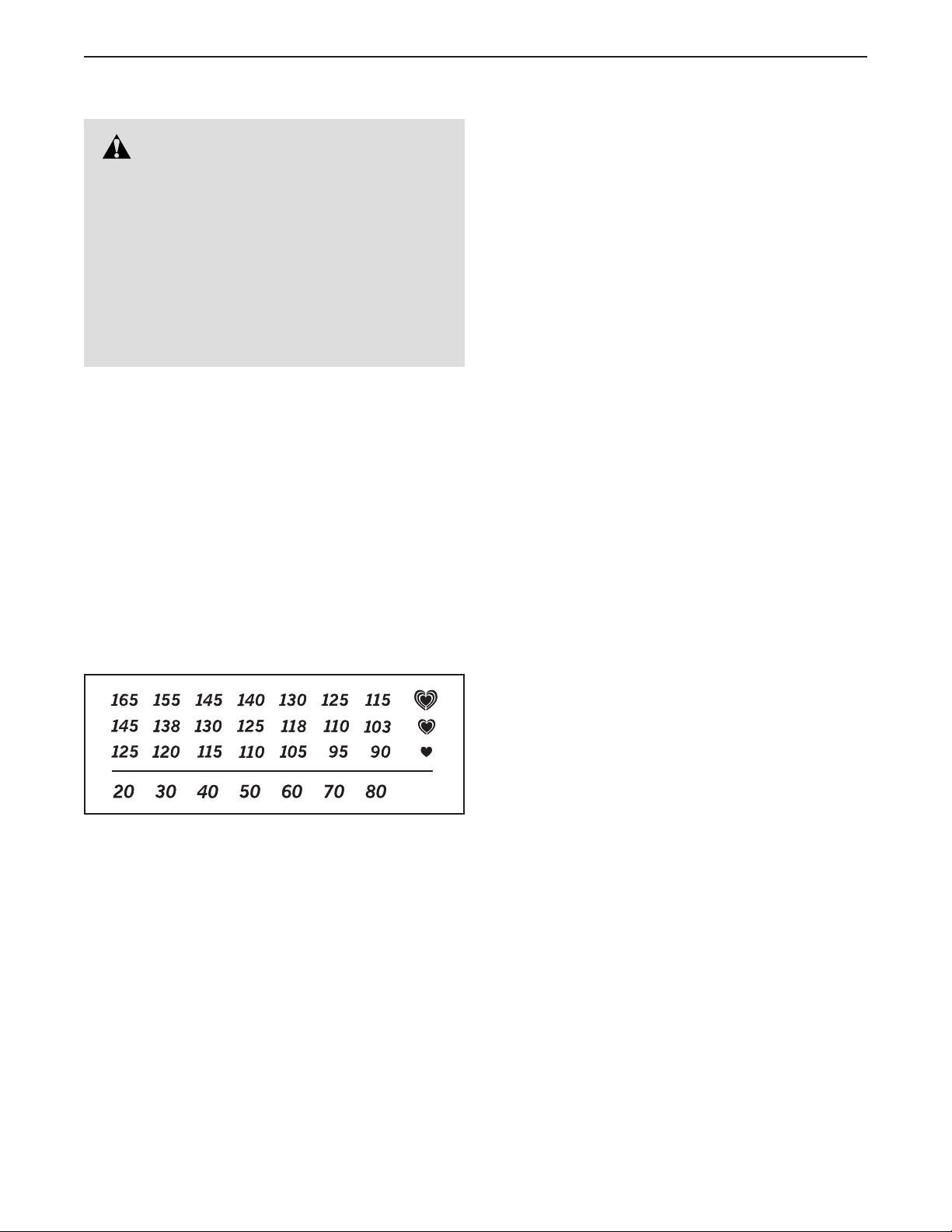
The chart below shows recommended heart rates for
fat burning and aerobic exercise.
To find the proper intensity level, find your age at the
bottom of the chart (ages are rounded off to the near-
est ten years). The three numbers listed above your
age define your “training zone.” The lowest number is
the heart rate for fat burning, the middle number is the
heart rate for maximum fat burning, and the highest
number is the heart rate for aerobic exercise.
Burning Fat—To burn fat effectively, you must exer-
cise at a low intensity level for a sustained period of
time. During the first few minutes of exercise, your
body uses carbohydrate calories for energy. Only
after the first few minutes of exercise does your body
begin to use stored fat calories for energy. If your
goal is to burn fat, adjust the intensity of your exer-
cise until your heart rate is near the lowest number in
your training zone. For maximum fat burning, exercise
with your heart rate near the middle number in your
training zone.
Aerobic Exercise—If your goal is to strengthen your
cardiovascular system, you must perform aerobic
exercise, which is activity that requires large amounts
of oxygen for prolonged periods of time. For aerobic
exercise, adjust the intensity of your exercise until
your heart rate is near the highest number in your
training zone.
WORKOUT GUIDELINES
Warming Up—Start with 5 to 10 minutes of stretch-
ing and light exercise. A warm-up increases your body
temperature, heart rate, and circulation in preparation
for exercise.
Training Zone Exercise—Exercise for 20 to 30 min-
utes with your heart rate in your training zone. (During
the first few weeks of your exercise program, do not
keep your heart rate in your training zone for longer
than 20 minutes.) Breathe regularly and deeply as you
exercise; never hold your breath.
Cooling Down—Finish with 5 to 10 minutes of stretch-
ing. Stretching increases the flexibility of your muscles
and helps to prevent post-exercise problems.
EXERCISE FREQUENCY
To maintain or improve your condition, complete
three workouts each week, with at least one day of
rest between workouts. After a few months of regular
exercise, you may complete up to five workouts each
week, if desired. Remember, the key to success is to
make exercise a regular and enjoyable part of your
everyday life.
WARNING: Before beginning this
or any exercise program, consult your physi-
cian. This is especially important for persons
over age 35 or persons with pre-existing
health problems.
The heart rate monitor is not a medical device.
Various factors may affect the accuracy of
heart rate readings. The heart rate monitor is
intended only as an exercise aid in determin-
ing heart rate trends in general.
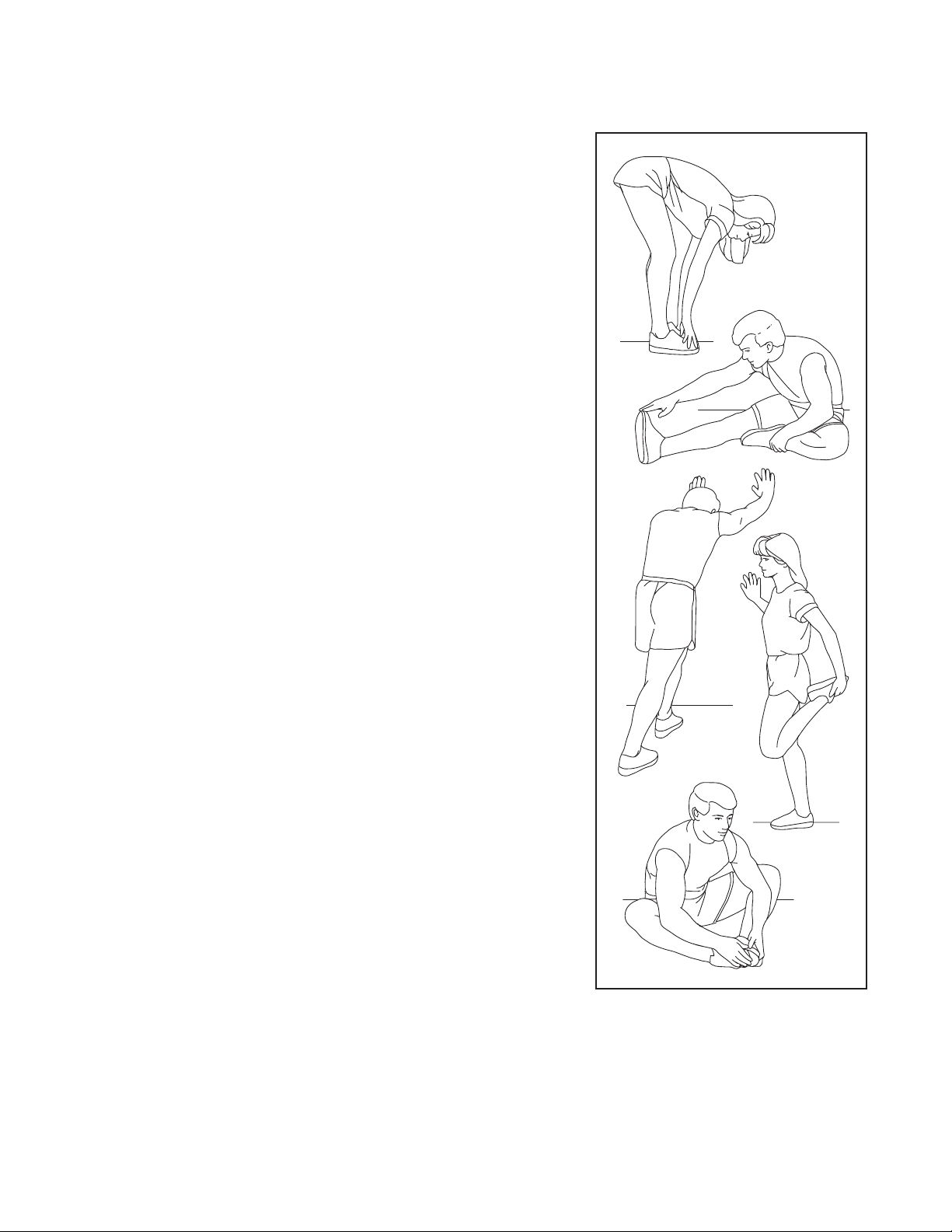
36
SUGGESTED STRETCHES
The correct form for several basic stretches is shown at the right. Move slowly as you stretch —never bounce.
1. Toe Touch Stretch
Stand with your knees bent slightly and slowly bend forward from
your hips. Allow your back and shoulders to relax as you reach down
toward your toes as far as possible. Hold for 15 counts, then relax.
Repeat 3 times. Stretches: Hamstrings, back of knees and back.
2. Hamstring Stretch
Sit with one leg extended. Bring the sole of the opposite foot toward
you and rest it against the inner thigh of your extended leg. Reach
toward your toes as far as possible. Hold for 15 counts, then relax.
Repeat 3 times for each leg. Stretches: Hamstrings, lower back and
groin.
3. Calf/Achilles Stretch
With one leg in front of the other, reach forward and place your hands
against a wall. Keep your back leg straight and your back foot flat on
the floor. Bend your front leg, lean forward and move your hips toward
the wall. Hold for 15 counts, then relax. Repeat 3 times for each leg.
To cause further stretching of the achilles tendons, bend your back leg
as well. Stretches: Calves, achilles tendons and ankles.
4. Quadriceps Stretch
With one hand against a wall for balance, reach back and grasp one
foot with your other hand. Bring your heel as close to your buttocks as
possible. Hold for 15 counts, then relax. Repeat 3 times for each leg.
Stretches: Quadriceps and hip muscles.
5. Inner Thigh Stretch
Sit with the soles of your feet together and your knees outward.
Pull your feet toward your groin area as far as possible. Hold for 15
counts, then relax. Repeat 3 times. Stretches: Quadriceps and hip
muscles.
1
2
3
4
5

37
NOTES

38
Key No. Qty. Description Key No. Qty. Description
PART LIST
Model No. NTL19129.10 R1119A
1 4 5/16" x 3/4" Screw
2 8 5/16" x 2" Screw
3 5 5/16" x 1 3/4" Bolt
4 1 5/16" x 2 1/4" Bolt
5 47 #8 x 3/4" Screw
6 2 #10 x 3/4" Screw
7 11 #8 x 1/2" Ground Screw
8 10 5/16" Star Washer
9 6 5/16" Nut
10 20 #8 x 3/4" Tek Screw
11 30 #8 x 1/2" Screw
12 3 1/4" x 2 1/2" Screw
13 2 Speaker
14 1 3/8" x 1 1/2" Bolt
15 1 3/8" x 1 3/4" Hex Head Bolt
16 2 5/16" x 1 1/4" Screw
17 14 Small Washer
18 4 #8 Belt Guide Screw
19 2 5/16" Motor Bolt
20 4 3/8" x 1 1/4" Screw
21 4 1/4" x 1 1/4" Screw
22 2 3/8" x 1 3/4" Bolt
23 4 3/8" x 2 3/4" Screw
24 31 #8 x 3/4" Truss Head Screw
25 8 3/8" Star Washer
26 2 1/2" x 2" Bolt
27 4 5/16" x 1 1/2" Screw
28 2 3/8" x 1" Screw
29 8 #6 x 3/8" Screw
30 3 1/4" Nut
31 4 5/16" Flat Washer
32 4 Console Ground Wire
33 4 1/4" x 3/4" Screw
34 2 1/2" Nut
35 6 3/8" Nut
36 5 Hood Clip
37 4 Cushion
38 1 Warning Decal
39 1 Walking Platform
40 1 Walking Belt
41 1 Left Foot Rail
42 1 Right Foot Rail
43 2 Belt Guide
44 1 Left Frame Cover
45 4 3/8" Plastic Bushing
46 2 1/2" Plastic Bushing
47 2 1/2" Thrust Washer
48 1 Controller
49 2 #8 Star Washer
50 1 Controller Bracket
51 1 Drive Roller/Pulley
52 1 Frame
53 4 Tie
54 1 Drive Motor
55 1 Motor Belt
56 1 Storage Latch
57 1 Right Frame Cover
58 4 Cushion Plate
59 1 Idler Roller
60 1 Left Rear Cap
61 1 Right Rear Cap
62 1 Motor Hood
63 2 Incline Frame Spacer
64 2 Frame Spacer
65 1 Incline Frame
66 1 Incline Motor
67 2 Incline Motor Spacer
68 2 Hood Mount
69 1 Power Cord
70 1 Power Cord Grommet
71 1 Power Switch
72 1 Belly Pan
73 1 Left Handrail Top Cover
74 2 Handrail
75 1 Left Handrail Bottom Cover
76 1 Upright Crossbar
77 2 Console Frame Cap
78 4 Rubber Cushion
79 1 Tray
80 1 Pulse Crossbar
81 1 Right Handrail Top Cover
82 1 Right Handrail Bottom Cover
83 1 Upright Wire
84 1 Right Upright
85 2 Caution Decal
86 2 Upright Grommet
87 4 Cushion Spring
88 1 Incline Stop Bracket
89 1 Left Base Cover
90 1 Right Base Cover
91 1 Left Upright
92 2 Rear Wheel
93 1 Base
94 1 Left Tray
95 2 Fan
96 1 Console
97 2 Rear Foot
98 2 3/8" Washer
99 1 Rubber Spacer
100 1 Console Base

39
Key No. Qty. Description Key No. Qty. Description
Note: Specications are subject to change without notice. For information about ordering replacement parts, see
the back cover of this manual. *These parts are not illustrated.
101 1 Right Tray
102 1 Hood Accent
103 1 Hood Grill
104 1 Key/Clip
105 2 Console Frame Cap
106 1 Console Frame
107 4 Cable Tie
108 1 Cushion Rod
109 1 Latch Crossbar
110 1 Chest Heart Rate Monitor
111 2 3/8" Thrust Washer
112 4 Base Pad
113 1 Handle Cap
114 1 1/4" x 5/8" Screw
115 1 Adjustment Handle
116 2 Cushion Bushing
117 2 Cushion Rod Bracket
118 2 Cushion Wheel Stop
119 2 M10 Spring Washer
120 2 Cushion Wheel
121 2 3/8" Flat Washer
122 2 1/4" x 1/2" Screw
123 2 1/4" x 1 1/2" Bolt
124 1 Wire Tie
* – User’s Manual
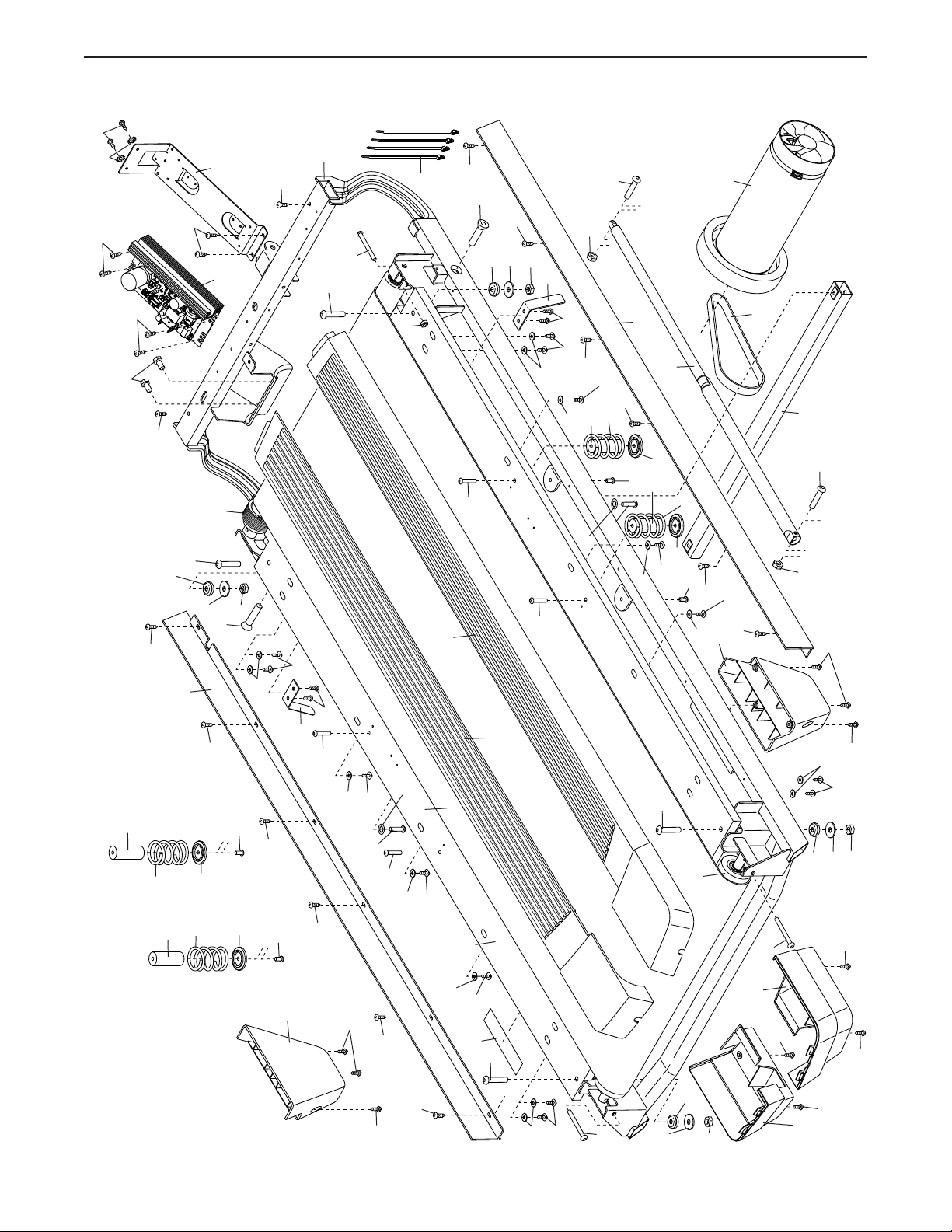
40
EXPLODED DRAWING A
Model No. NTL19129.10 R1119A
53
55
54
56
9
4
9
3
3
26
43
57
43
9
31
78
26
9
31
78
61
9
31
78
42
41
40
39
59
60
12
12
3
38
44
51
52
5
50
48
18
18
7
7
7
5
49
19
5
3
3
37
37
87
58
58
87
33
33
16
16
8
8
30
12
58
87
37
58
87
37
33
33
10
10
10
10
10
10
10
10
10
10
10
10
109
24
97
24
24
24
97
78
5
5
17
17
17
5
5
5
5
5
5
17
17
5
21
21
21
21
5
17
17
17
5
17
5
5
5
17
9
31
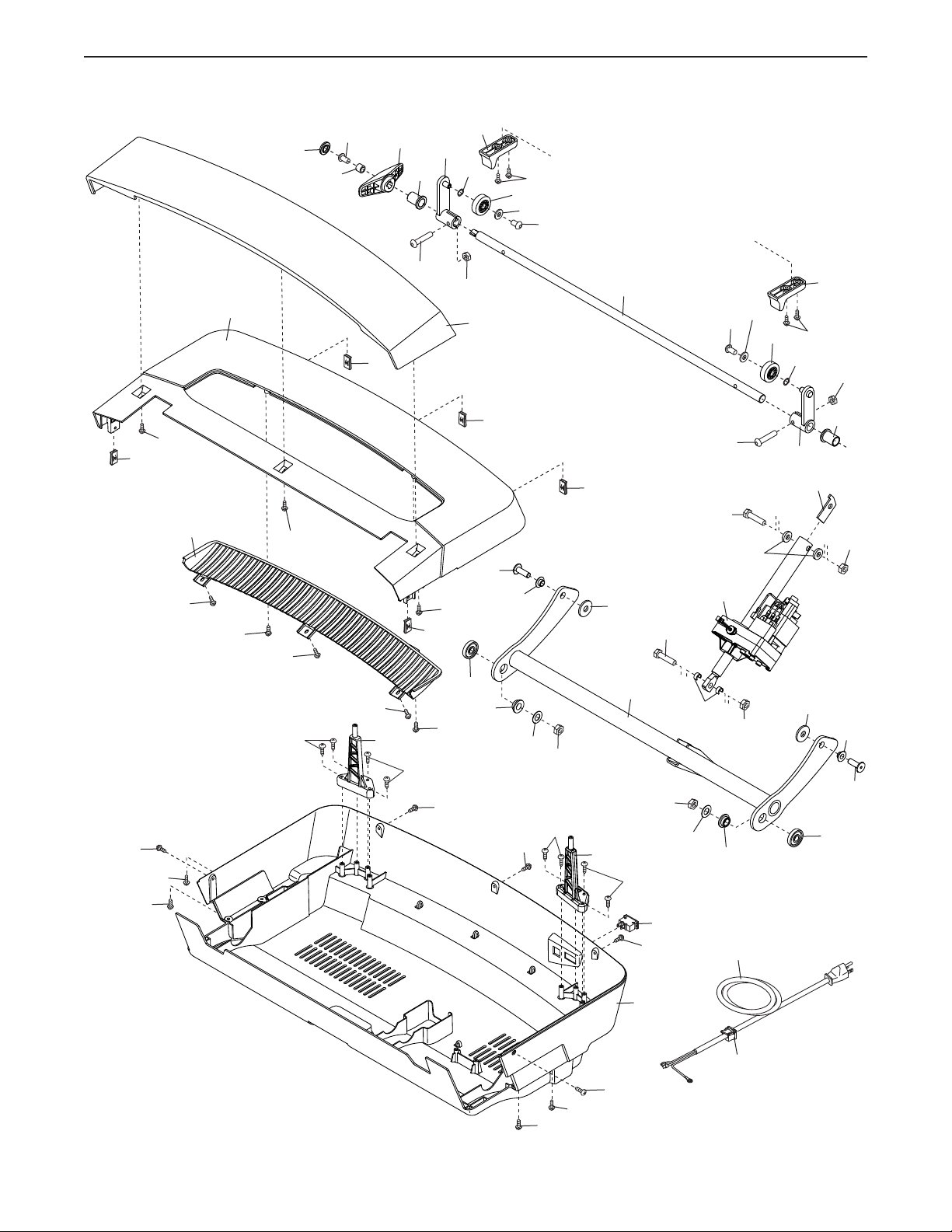
41
EXPLODED DRAWING B
Model No. NTL19129.10 R1119A
36
66
65
67
34
35
14
63
15
34
63
64
28
64
35
28
5
5
5
72
71
5
70
69
68
5
5
5
68
36
47
47
46
46
45
45
5
24
24
24
88
98
102
62
36
36
103
11
11
11
11
11
11
11
11
36
24
24
108
122
120
117
30
114
115
123
120
117
116
122
123
30
116
113
121
121
119
119
118
5
118
5
99
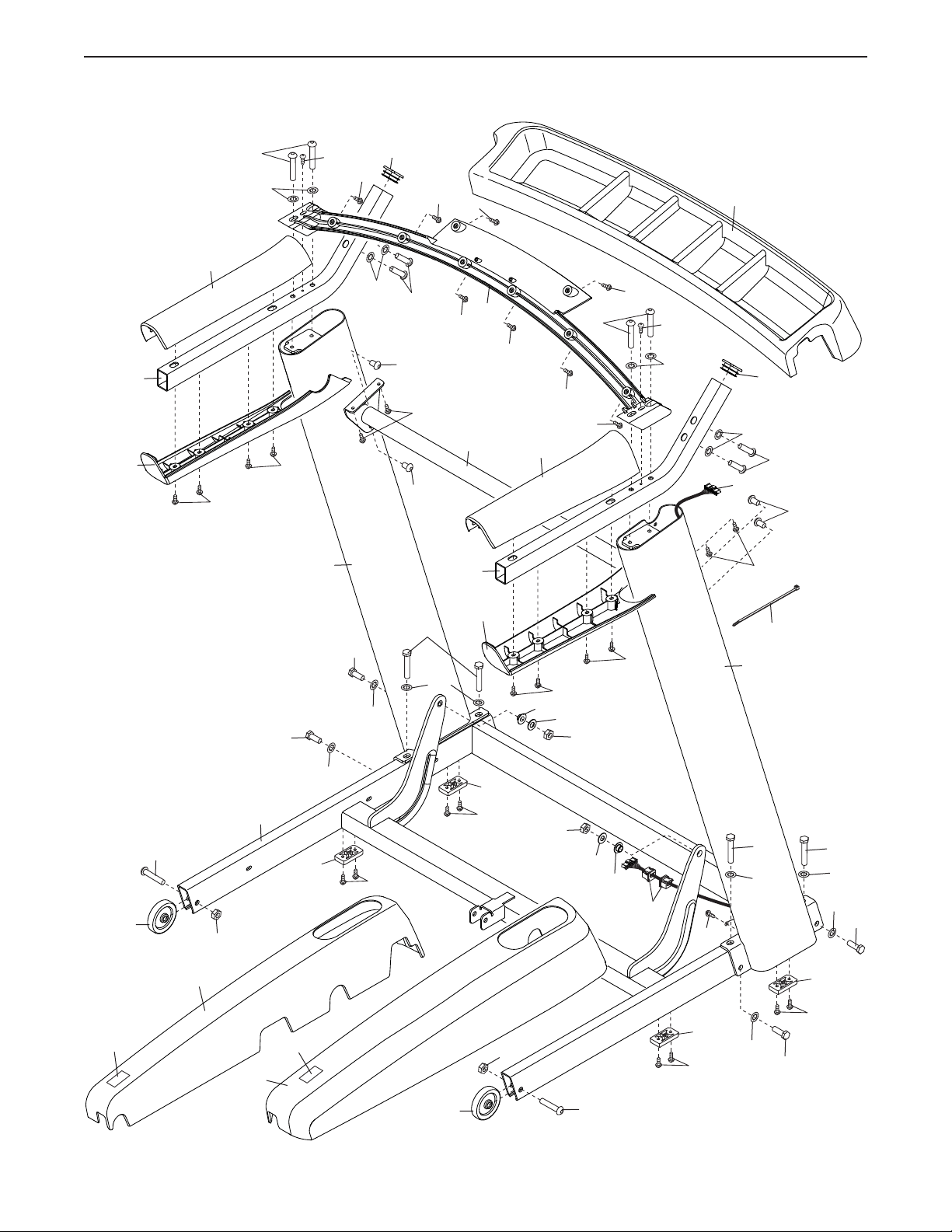
42
EXPLODED DRAWING C
Model No. NTL19129.10 R1119A
79
35
111
45
7
86
84
22
35
92
35
22
10
112
10
112
10
112
10
112
35
45
111
92
20
20
20
20
23
23
91
23
25
25
25
25
25
25
25
85
85
90
89
93
83
8
82
74
1
76
1
75
24
24
74
81
77
2
8
6
8
2
2
80
73
77
8
1
24
24
2
6
24
24
24
24
24
24
24
24
24
24
124
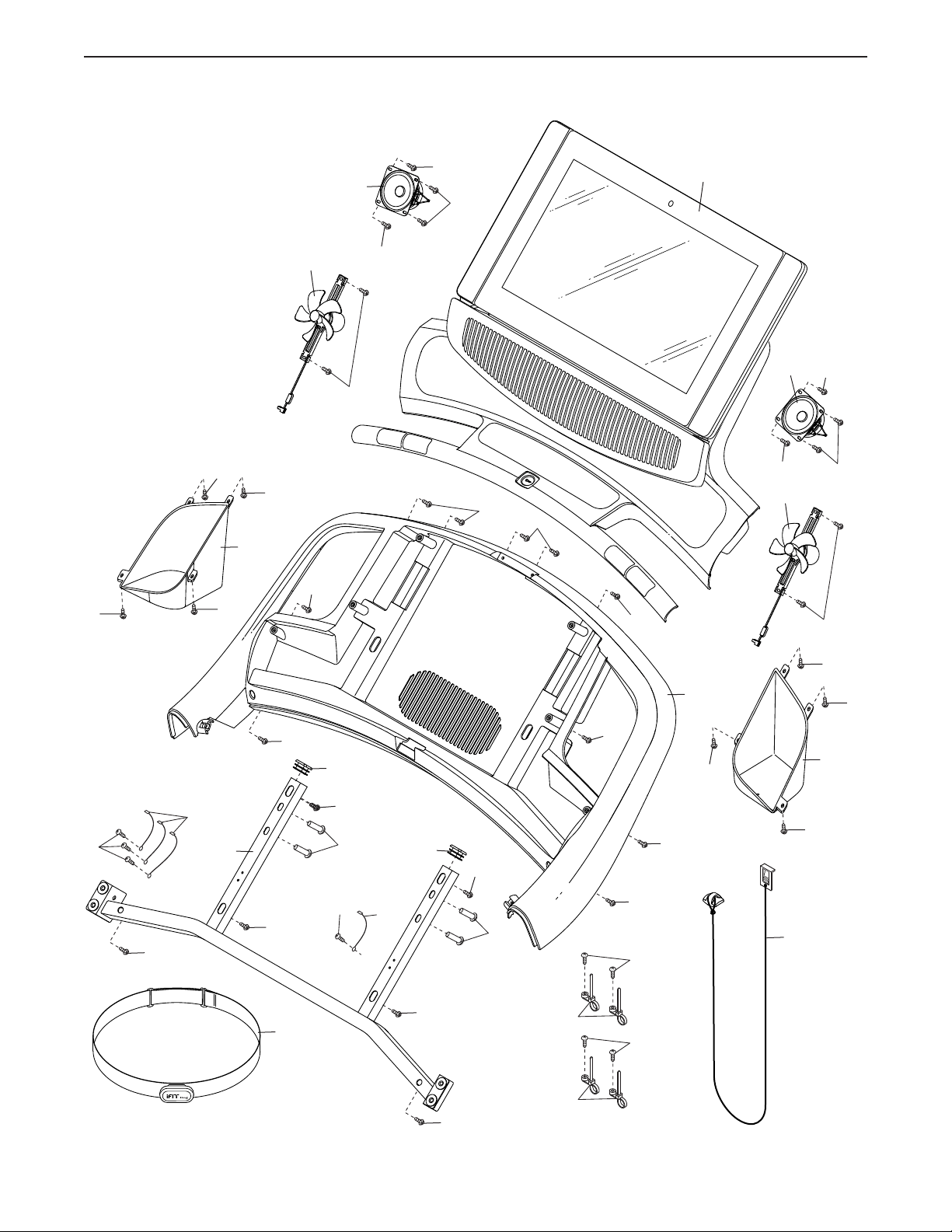
43
EXPLODED DRAWING D
Model No. NTL19129.10 R1119A
11
11
13
13
29
29
104
11
11
11
11
29
29
29
11
94
11
95
11
11
11
29
5
5
11
11
5
106
105
5
5
5
5
11
11
95
110
107
100
101
105
11
11
107
11
7
32
5
27
27
96
7
32