
Operation and maintenance manual
Before using the machine, please read the attached operating instructions.
Carefully read the safety rules.
Mode d'emploi
Veuillez lire attentivement le mode d'emploi
(notamment les consignes de sécurité) avant d'utiliser l'appareil.
The manufacturer reserves the right to change the features of the product without prior notice.
Le producteur se réserve le droit d“apporter toutes modifications sans préavis.
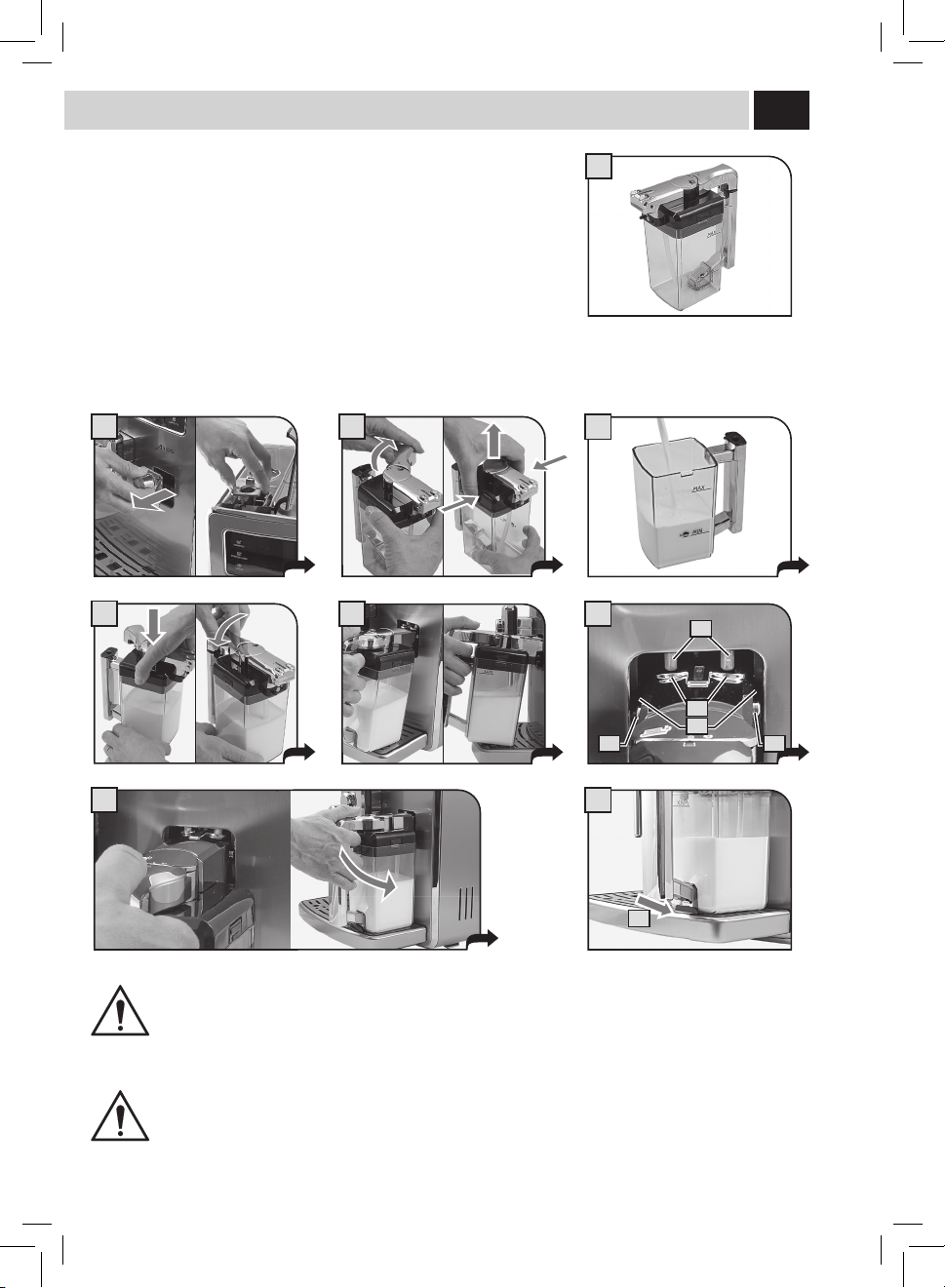
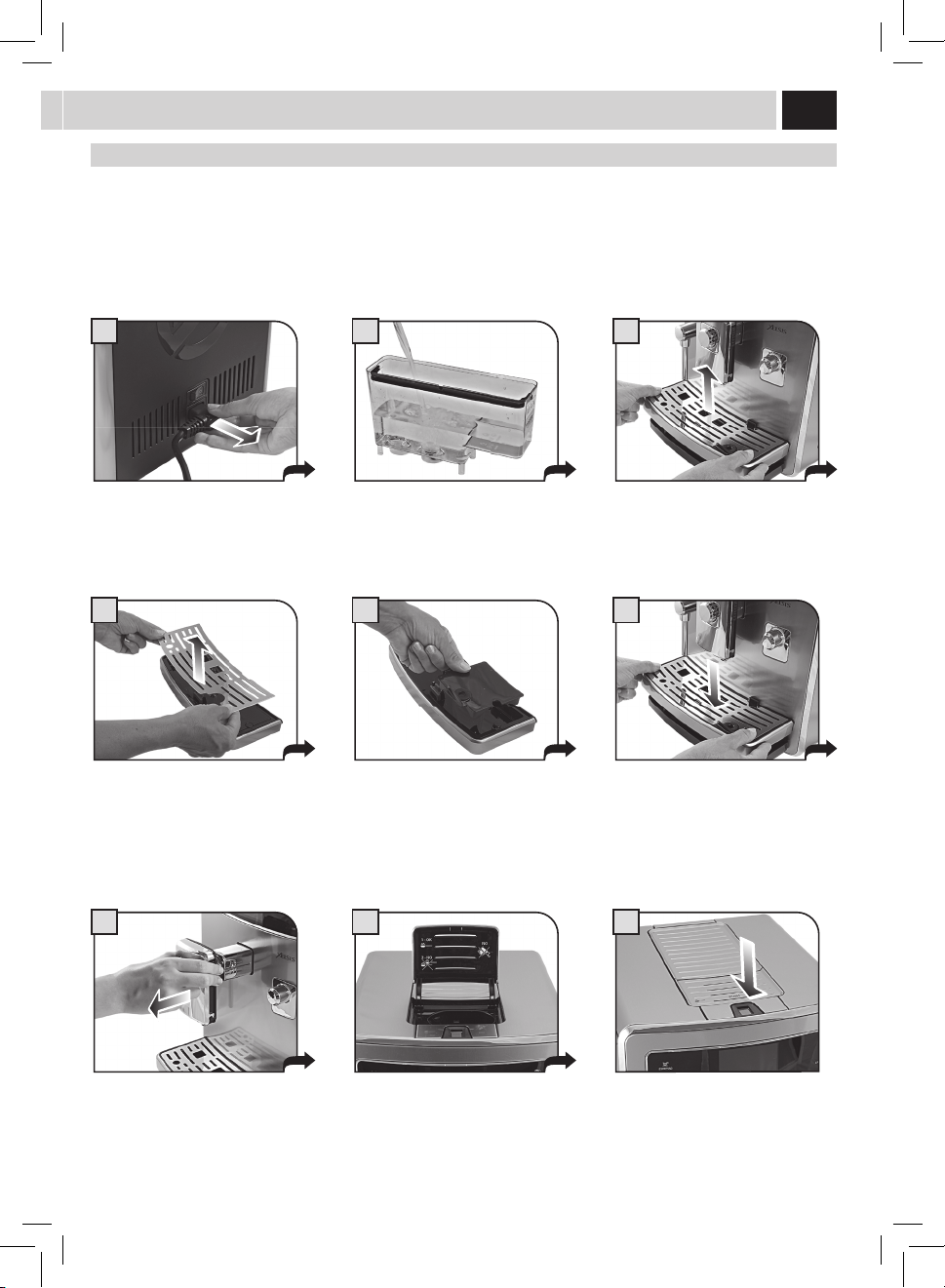
Carafe aSSemBlY ProCedUre - SCHema de montaGe de la Carafe
FOR HOUSEHOLD USE ONLY
USAGE DOMESTIQUE SEULEMENT
III
A
1 2
3
4
5 6
C
D
A
B B
8
E
7
Carafe aSSemBlY ProCedUre - SCHema de montaGe de la Carafe
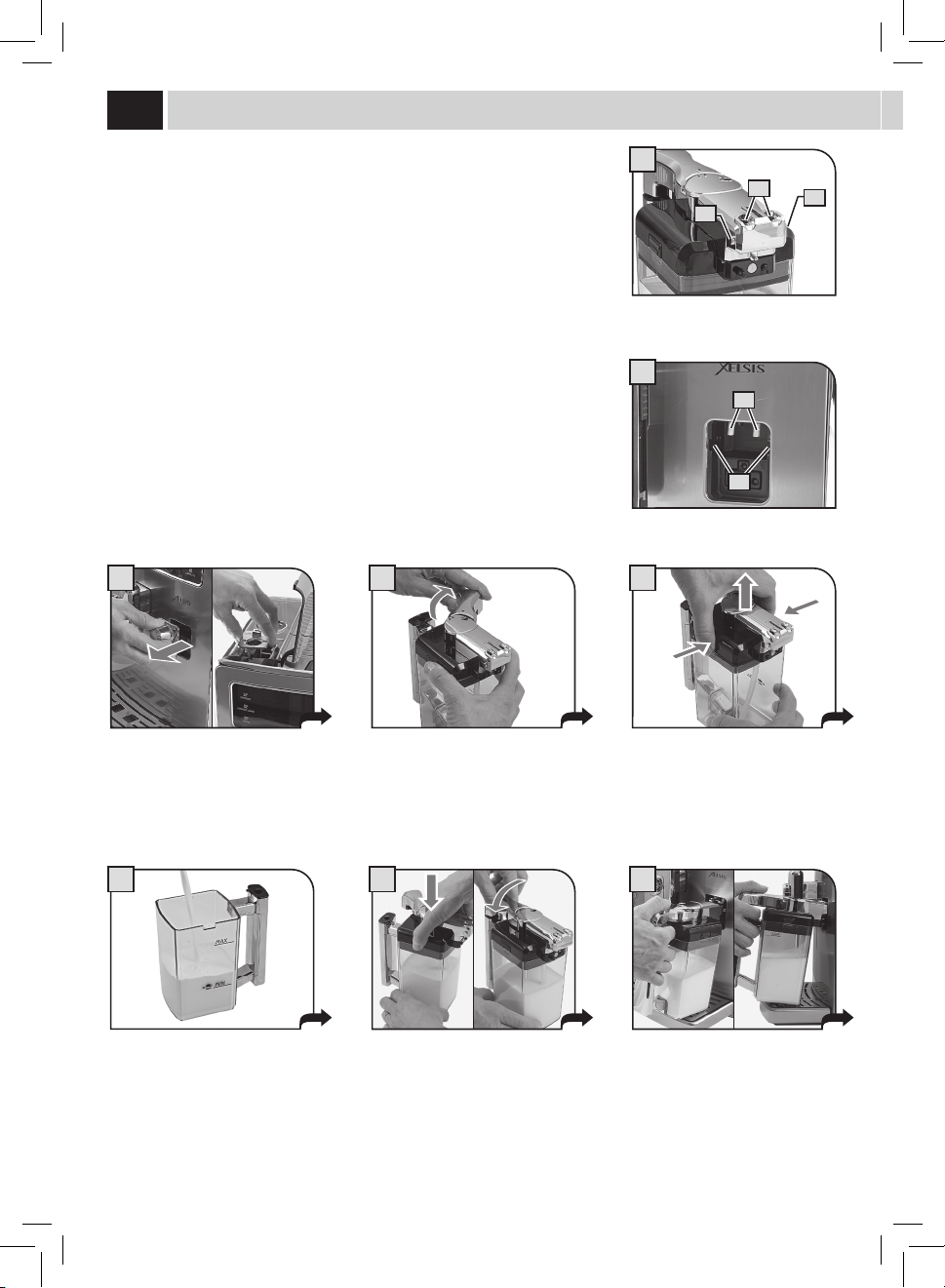
For correct use of the carafe, refer to the instructions on page 12.
The maintenance instructions for the carafe circuits are described on page 42.
The disassembly and cleaning instructions for the components are described on page 47.
Pour l’utilisation correcte de la carafe, consulter les instructions à page 12.
Pour l'entretien des circuits de la carafe, consulter la page 42.
Le démontage et le nettoyage des composants sont décrits à page 47.
THOROUGHLY CLEAN THE CARAFE AT FIRST USE AND AFTER A LONG PERIOD OF INACTIVITY.
A THOROUGH SANITATION AND CLEANING OF THE CARAFE ENSURES CORRECT OPERATION AND PREVENTS THE
PROLIFERATION OF BACTERIAL LOADS WHICH MAY BE HARMFUL FOR HUMAN HEALTH.
S'ASSURER QU'ELLE EST BIEN PROPRE TANT LORS DE LA PREMIÈRE UTILISATION QU'APRÈS UN CERTAIN TEMPS
D'INACTIVITÉ. L'HYGIÈNE ET LE NETTOYAGE PARFAITS DE LA CARAFE GARANTISSENT UN FONCTIONNEMENT CORRECT
ET EMPÊCHENT LES CHARGES BACTÉRIENNES NOCIVES POUR LA SANTÉ DE PROLIFÉRER.
IV
21
25
22
26
23 24
2827
1
2
3
4
5
6
7
8
30
9
10
29
12
13
2011
14
15 16
17
18
19
aCCeSSorieS - aCCeSSoireS

V
teCHniCal data
Nominal voltage See label on the appliance
Power rating See label on the appliance
Power supply See label on the appliance
Shell material Thermoplastic material/Metal
Size (w x h x d) 280 x 370 x 420 mm - 11.0 x 14.6 x 16.5 in
Weight 17 Kg - 37.5 lbs
Cord length 1200 mm - 47.24 in
Control panel Front
Water tank 1.6 liters - 54.1 oz (removable)
Co ee bean hopper capacity 350 grams - 12.3 oz of co ee beans
Pump pressure 15 bar
Boiler Stainless steel
Co ee grinder Ceramic
Quantity of ground co ee 7 - 10.5 grams / 0.25 - 0.37 oz.
Dregdrawer capacity about 15
Safety devices Boiler pressure safety valve – Double safety thermostat.
donnÉeS teCHniQUeS
Tension nominale
Voir plaque signalétique placée sur l’appareil.
Puissance nominale
Voir plaque signalétique placée sur l’appareil.
Alimentation
Voir plaque signalétique placée sur l’appareil.
Matériau du corps
Thermoplastique/Métal
Dimensions ( LxHxP)
280 x 370 x 420 mm
Poids
17 Kg
Longueur du câble
1200 mm
Tableau de commande
Tableau de commande sur le devant
Réservoir d’eau
1,6 litre - Extractible
Capacité du réservoir à café
350 de café en grains
Pression de la pompe
15 bar
Chaudière
Acier Inox
Moulin à café
en céramique
Quantité de café moulu
7-10,5 g
Capacité du tiroir à marc
15 environ
Dispositifs de sécurité
Soupape de sécurité pression chaudière – double thermostat de sécurité

VI
IMPORTANT SAFEGUARDS
When using electrical appliances, basic safety precautions should always be
followed, including the following:
1. Read all instructions.
2. Do not touch hot surfaces. Use handles or knobs.
3. To protect against fire, electric shock and injury to persons do not immerse
cord, plugs, or appliance in water or other liquid.
4. Close supervision is necessary when the appliance is used by or near
children.
5. Unplug from outlet when not in use and before cleaning. Allow to cool
before putting on or taking off parts, and before cleaning the appliance.
6. Do not operate any appliance with a damaged cord or plug or after the
appliance malfunctions, or has been damaged in any manner. Return
appliance to the nearest authorized service facility for examination, repair
or adjustment.
7. The use of accessory attachments not recommended by the appliance
manufacturer may result in fire, electric shock or injury to persons.
8. Do not use outdoors.
9. Do not let cord hang over edge of table or counter, or touch hot
surfaces.
10. Do not place on or near a hot gas or electric burner, or in a heated
oven.
11. Always attach plug to appliance first, then plug cord into wall outlet. To
disconnect, turn any control to “off”, then remove plug from wall outlet.
12. Do not use appliance for other than intended use.
13. Save these instructions.
SAVE THESE INSTRUCTIONS

CAUTION
This appliance is for household use only. Any servicing, other than cleaning
and user maintenance, should be performed by an authorized service
center. Do not immerse machine in water. To reduce the risk of fire or
electric shock, do not disassemble the machine. There are no parts inside
the machine serviceable by the user. Repair should be done by authorized
service personnel only.
1 Check voltage to be sure that the voltage indicated on the nameplate
corresponds with your voltage.
2 Never use warm or hot water to fill the water tank. Use cold water only.
3 Keep your hands and the cord away from hot parts of the appliance
during operation.
4 Never clean with scrubbing powders or harsh cleaners. Simply use a soft
cloth dampened with water.
5 For optimal taste of your coffee, use purified or bottled water. Periodic
descaling is still recommended every 2-3 months.
6 Do not use flavored or caramelized coffee.
INSTRUCTIONS FOR THE POwER SUPPly
CORD
A. A short power-supply cord (or detachable power-supply cord) is to be
provided to reduce risks resulting from becoming entangled in or tripping
over a longer cord.
B. Longer detachable power-supply cords or extension cords are available
and may used if care is exercised in their use.
C. If a long detachable power-supply cord or extension cord is used,
1. The marked electrical rating of the detachable power-supply cord or extension
cord should be at least as great as the electrical rating of the appliance
2. If the appliance is of the grounded type, the extension cord should be a
grounding-type 3-wire cord, and
3. The longer cord should be arranged so that it will not drape over the counter
top or table top where it can be pulled on by children or tripped over.

1
index
GENERAL INFORMATION . . . . . . . . . . . . . . . . . . . . . . . . . . . . . . . . . . . . . . . . . . . . . . . . . . . . . . . . . . . . . . . 2
MACHINE COMPONENTS & ACCESSORIES - CONTROL PANEL . . . . . . . . . . . . . . . . . . . . . . . . . . . . . . . . . 3
INSTALLATION . . . . . . . . . . . . . . . . . . . . . . . . . . . . . . . . . . . . . . . . . . . . . . . . . . . . . . . . . . . . . . . . . . . . . . . . 4
STARTING THE MACHINE ......................................................................................4
SETTING THE LANGUAGE ......................................................................................5
MEASURING THE WATER HARDNESS ............................................................................5
FIRST USE - USE AFTER A PERIOD OF INACTIVITY .................................................................6
INTENZA WATER FILTER .......................................................................................7
ADJUSTMENTS ........................................................................ 8
USER SELECTION .............................................................................................8
SAECO ADAPTING SYSTEM . . . . . . . . . . . . . . . . . . . . . . . . . . . . . . . . . . . . . . . . . . . . . . . . . . . . . . . . . . . . . . . . . . . . . . . . . . . . . . . . . . . .9
COFFEE GRINDER ADJUSTMENT ................................................................................9
OPTI-DOSE (ADJUSTS THE AMOUNT OF COFFEE TO GRIND) .......................................................10
DISPENSING SPOUT HEIGHT ADJUSTMENT . . . . . . . . . . . . . . . . . . . . . . . . . . . . . . . . . . . . . . . . . . . . . . . . . . . . . . . . . . . . . . . . . . . . .10
COFFEE STRENGTH (SAECO BREWING SYSTEM) . . . . . . . . . . . . . . . . . . . . . . . . . . . . . . . . . . . . . . . . . . . . . . . . . . . . . . . . . . . . . . . . .11
STAND-BY MODE ...........................................................................................11
MILK CARAFE USE . . . . . . . . . . . . . . . . . . . . . . . . . . . . . . . . . . . . . . . . . . . . . . . . . . . . . . . . . . . . . . . . . . . . 12
COFFEE BREWING . . . . . . . . . . . . . . . . . . . . . . . . . . . . . . . . . . . . . . . . . . . . . . . . . . . . . . . . . . . . . . . . . . . . 14
ESPRESSO / LONG COFFEE ....................................................................................14
BEVERAGE BREWING WITH PRE-GROUND COFFEE ...............................................................15
CAPPUCCINO / LATTE MACCHIATO / CAFE LATTE ...........................................16
CLEANING CYCLE . . . . . . . . . . . . . . . . . . . . . . . . . . . . . . . . . . . . . . . . . . . . . . . . . . . . . . . . . . . . . . . . . . . . . 17
HOT WATER DISPENSING . . . . . . . . . . . . . . . . . . . . . . . . . . . . . . . . . . . . . . . . . . . . . . . . . . . . . . . . . . . . . . 18
SPECIAL BEVERAGES ..................................................................19
STEAM DISPENSING .........................................................................................19
AMERICAN COFFEE ..........................................................................................20
HOT MILK ..................................................................................................20
ESPRESSO MACCHIATO ......................................................................................20
BEVERAGE LENGTH QUICK PROGRAMMING . . . . . . . . . . . . . . . . . . . . . . . . . . . . . . . . . . . . . . . . . . . . . . 21
USER MENU . . . . . . . . . . . . . . . . . . . . . . . . . . . . . . . . . . . . . . . . . . . . . . . . . . . . . . . . . . . . . . . . . . . . . . . . . 22
BEVERAGE MENU .....................................................................28
MACHINE MENU ......................................................................31
MAINTENANCE .......................................................................38
CLEANING ...........................................................................44
MAINTENANCE DURING OPERATION ...........................................................................44
GENERAL MACHINE CLEANING. . . . . . . . . . . . . . . . . . . . . . . . . . . . . . . . . . . . . . . . . . . . . . . . . . . . . . . . . . . . . . . . . . . . . . . . . . . . . . . .45
BREW GROUP CLEANING .....................................................................................46
MILK CARAFE CLEANING .....................................................................................47
MILK CARAFE ASSEMBLY ....................................................................................48
MACHINE WARNINGS . . . . . . . . . . . . . . . . . . . . . . . . . . . . . . . . . . . . . . . . . . . . . . . . . . . . . . . . . . . . . . . . . 49
SAFETY RULES . . . . . . . . . . . . . . . . . . . . . . . . . . . . . . . . . . . . . . . . . . . . . . . . . . . . . . . . . . . . . . . . . . . . . . . 51

2
General information
General information
This coee machine is suitable for preparing espresso coee using coee beans and is equipped with a device to dispense
steam and hot water.
The machine is designed for domestic use and not suitable for heavy or professional use.
Warning: No liability is held for damage caused by:
• Incorrectusenotinaccordancewiththeintendedpurposes.
• Repairsnotcarriedoutbyauthorizedservicecenters.
• Tamperingwiththepowercord.
• Tamperingwithanypartsofthemachine.
• Useofnon-originalsparepartsandaccessories.
• Failuretodescalethemachineormachineuseattemperaturesbelow32°F(0°C).
IN THESE CASES, THE WARRANTY SHALL BE DEEMED NULL AND VOID.
THE WARNING TRIANGLE INDICATES ALL IMPORTANT INSTRUCTIONS FOR THE USER'S SAFETY. PLEASE FOLLOW
THESE INSTRUCTIONS CAREFULLY TO PREVENT SERIOUS INJURIES.
HoW to USe tHeSe inStrUCtionS
Keeptheseoperatinginstructionsinasafeplaceandmakethemavailabletoanyoneelsewhowouldusethecoeemachine.Forfurther
information or in case of problems, please refer to the an authorized service center. For Saeco customer service, call (800) 933-7876 in the
U.S. or (514) 385-5551 in Canada.
SAVE THESE INSTRUCTIONS
inStrUCtionS for tHe PoWer SUPPlY Cord
• Ashortpower-supplycordisprovidedtoreducerisksresultingfrombecomingentangledinortrippingoveralongercord.
• Extensioncordsmaybeusedifcareisexercisedintheiruse.
If an extension cord is used, make sure:
a. The marker electrical rating of the extension cord should be at least as great as the electrical rating of the appliance.
b. Theextensioncordshouldbearrangedsothatitwillnotdrapeoverthecountertoportabletopwhereitcanbepulledonby
children or tripped over.
c. Iftheapplianceisofthegroundedtype,theextensioncordshouldbeagrounding-type3-wirecord.
• Donotusemulti-sockets
3
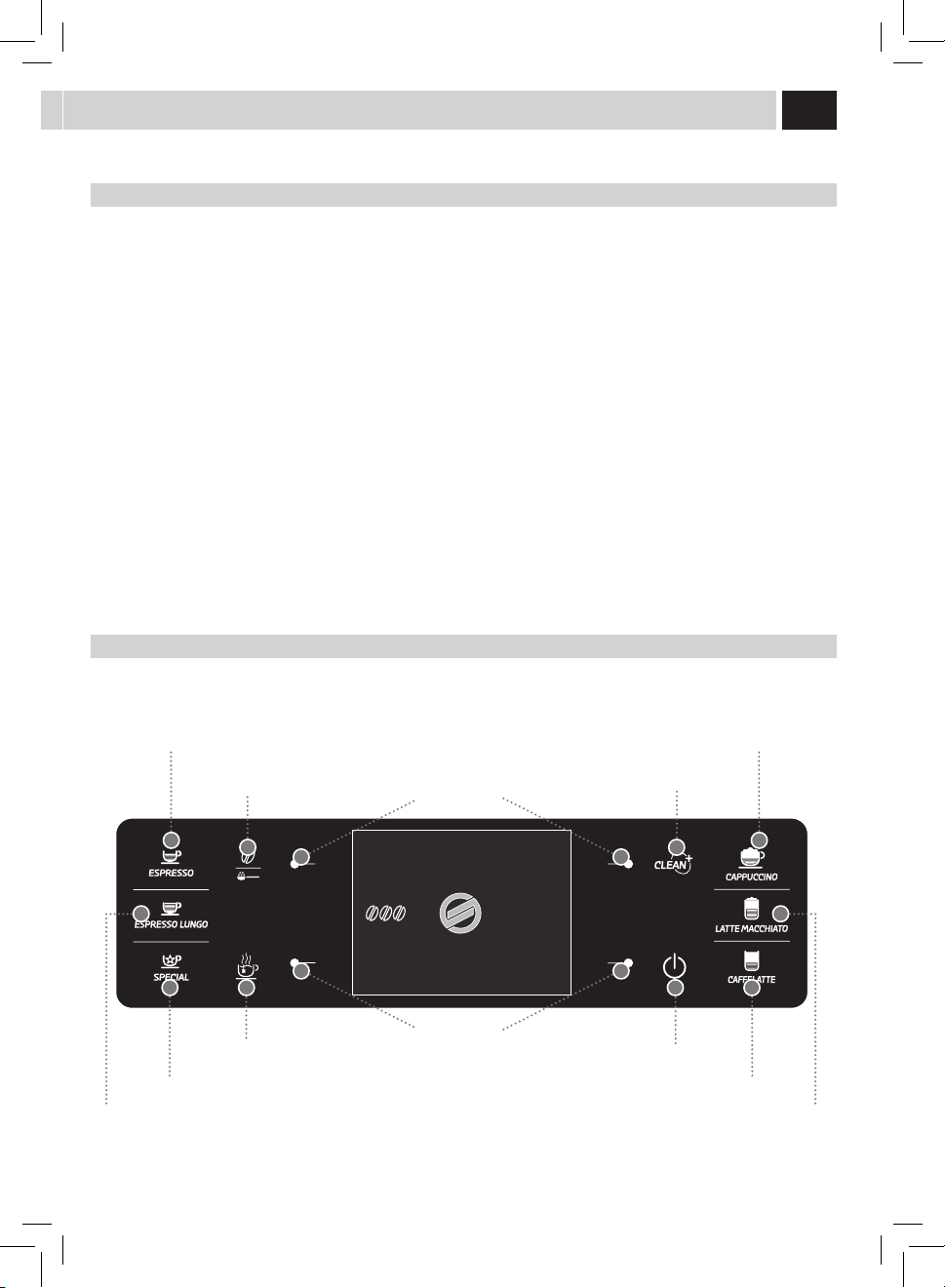
maCHine ComPonentS and aCCeSSorieS - Control Panel
Foracorrectuseofthemanual,werecommendthatyoukeepthecoverpageopen;thisallowsyoutobetterunderstandthetext.
maCHine ComPonentS and aCCeSSorieS
1 Water tank + cover
2 Cup-warmingsurface
3 Pre-ground bypass doser
4 Service door
5 SBS dial
6 Hotwater/steamwand
7 Full drip tray indicator
8 Coeebeanhopperwithlid
9 Grinder adjustment
10 Control panel
11 Milk container couplings
12 Dispensing spout
13 Drip tray + grill + sealed support
14 Brewgroup
15 Usedgroundsdrawer+protectionelement
16 Liquid recovery tray + cover
17 Service door button
18 Powerbutton
19 Powercordconnector
20 Milk carafe
21 Pre-ground coee measuring scoop
22 Water hardness test strip
23 Brewgrouplubricant
24 Descaling solution
25 Brewgroupcleaningtablets
26 Powercord
27 Intenzawaterlter
28 Cleaning brush
29 Carafe coupling cap
30 DIGITAL ID (User Selection)
Cappuccino button
Cleaning cycle button
Stand-by button
Opti-dose button
Function buttons
Function buttons
Hotwaterbutton
Espresso button
Latte macchiato button
Long espresso button
Cafe Latte buttonSpecial beverage button
Control Panel
Thecontrolpanelhasbeendesignedtoallowanergonomicuseofallmachinefunctions.
17/05/09
04:17 pm
USER
MENU
BEVERAGE
MENU
SETTINGS
MENU
SELECTED
USER
4
1
4
7 8
5 6
32
StartinG tHe maCHine
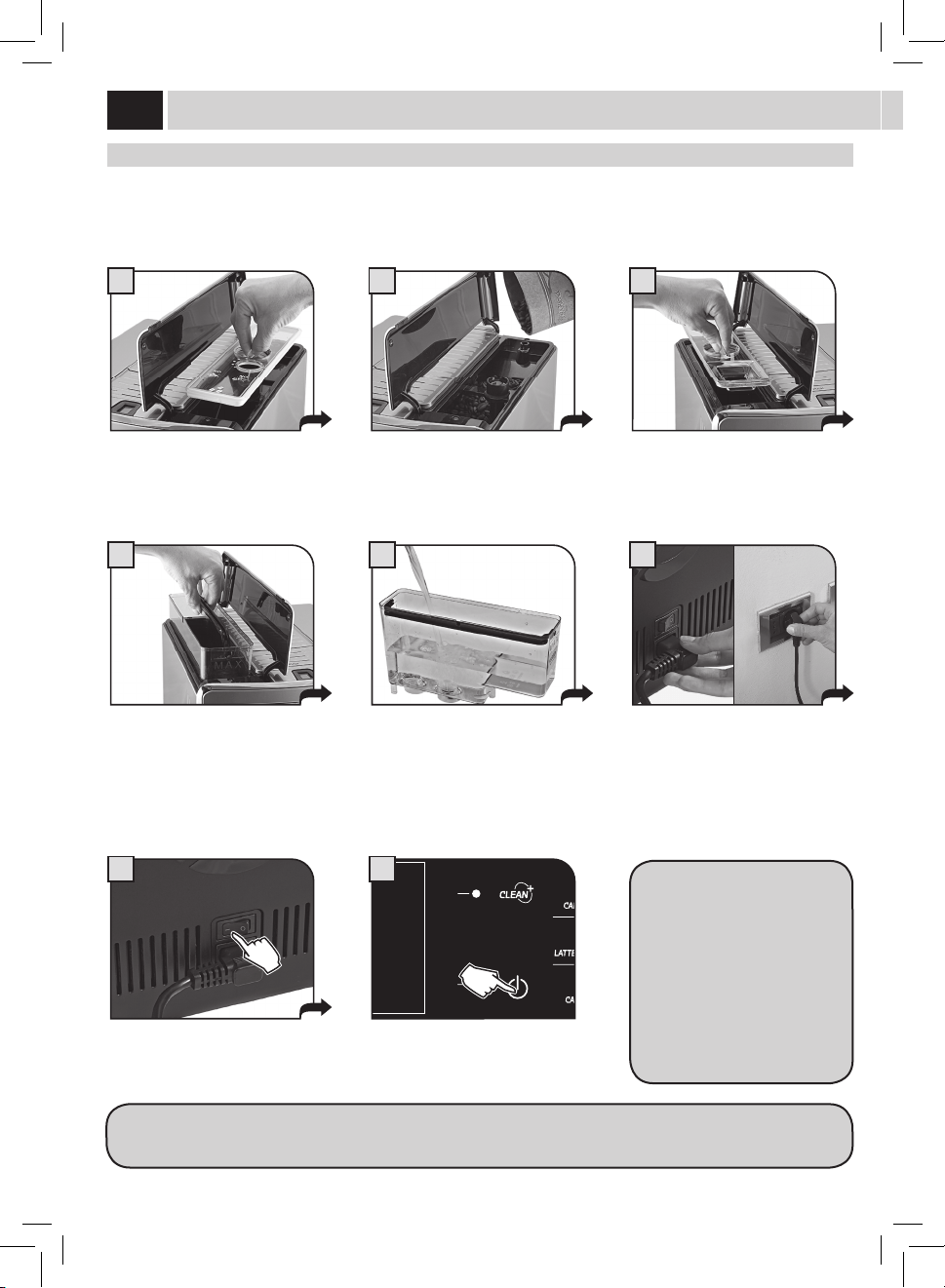
Beforeturningonthemachine,makesurethatthepowerbuttonissetto"0".
Lift the right outer lid and remove the
inner lid.
Removethewatertankusingthehandle.
Pressthepowerbuttontothe"I"
position to turn the machine on.
Thedisplayshowsaredashingled.
Press the stand-by button to start the
machine.
Fillthetankwithfreshdrinkingwater.Do
notexceedthe"max"levelindicatedon
thewatertank.Placethewatertankback
into the machine.
Insert the plug into the socket located
on the back of the machine and insert
theotherendintoapoweroutletwith
suitable current.
Slowlypourcoeebeansintothe
hopper.
Replace the inner lid and close the outer
lid.
Lift the left outer lid and remove the
inner lid.
When the correct temperature is
reached, the machine performs a
priming and rinsing cycle of the
internal circuits. A small amount of
waterisdispensed.Waitforthiscycle
to be completed.
The screen for product dispensing
appearsonthedisplay;seepage3.
inStallation
Atrststart-uponly,thescreen(1)willbedisplayedasshownonpage5.Then,thelanguagecanbesetfromtherelevantmenuonly
(see page 31).
5
5
1 2
1 2 3 4
A
B
C
Select the desired language by pressing
thearrowbuttons(
) or ( ).
Press the save button. Themachineactivatesthewarmingup
phase. Wait until it is completed.
Whenwarm-upphaseiscomplete,the
machine performs a rinsing cycle of the
internal circuits. It is possible to interrupt
thecyclebypressingthe"STOPRINSING"
button.
Themachineisnowreadyforuse.Asmallquantityofwaterisdispensed.
Wait for this cycle to be completed
automatically.
SettinG tHe lanGUaGe
Thissettingallowsyoutochoosetheoperatinglanguageofthemachine.Italsoallowsyoutoadjusttheparametersofthebeveragesto
thetypicalparametersofthecountrywherethemachineisused.Thisiswhysomelanguagesaredierentiatedalsobycountry.
Ifnolanguageisselected,youwillberequestedtoselectitthenexttimethemachineisstarted.
meaSUrinG tHe Water HardneSS
The test strip can only be used for one measurement.
Immersethewaterhardnessteststrip
providedwiththemachineinwaterfor
1 second.
Checkthewaterhardnessvalueandset:
- Themachinewaterhardnesslevel(page36).
- The Intenza Aroma System (page 7).
Intenza Aroma System
Machinewaterhardnesssetting
ESC
OK
2.2.1. LANGUAGE
ITALIANO
ITALIANO CH
ENGLISH
DEUTSCH
FRANÇAIS
ESPAÑOL
PORTUGUÊS
1
ESC
OK
2.2.1. LANGUAGE
ITALIANO
ITALIANO CH
ENGLISH
DEUTSCH
FRANÇAIS
ESPAÑOL
PORTUGUÊS
2
RISCALDAMENTO...RINSING
STOP
RINSING
4
17/05/09
04:17 pm
USER
MENU
BEVERAGE
MENU
SETTINGS
MENU
SELECTED
USER
6
HEATING UP…
3
6
9
1
5
7
17/05/09
04:17 pm
MENU
UTENTE
MENU
BEVANDA
MENU
MACCHINA
SELEZIONE
UTENTE
3
inStallation
firSt USe - USe after a Period of inaCtiVitY
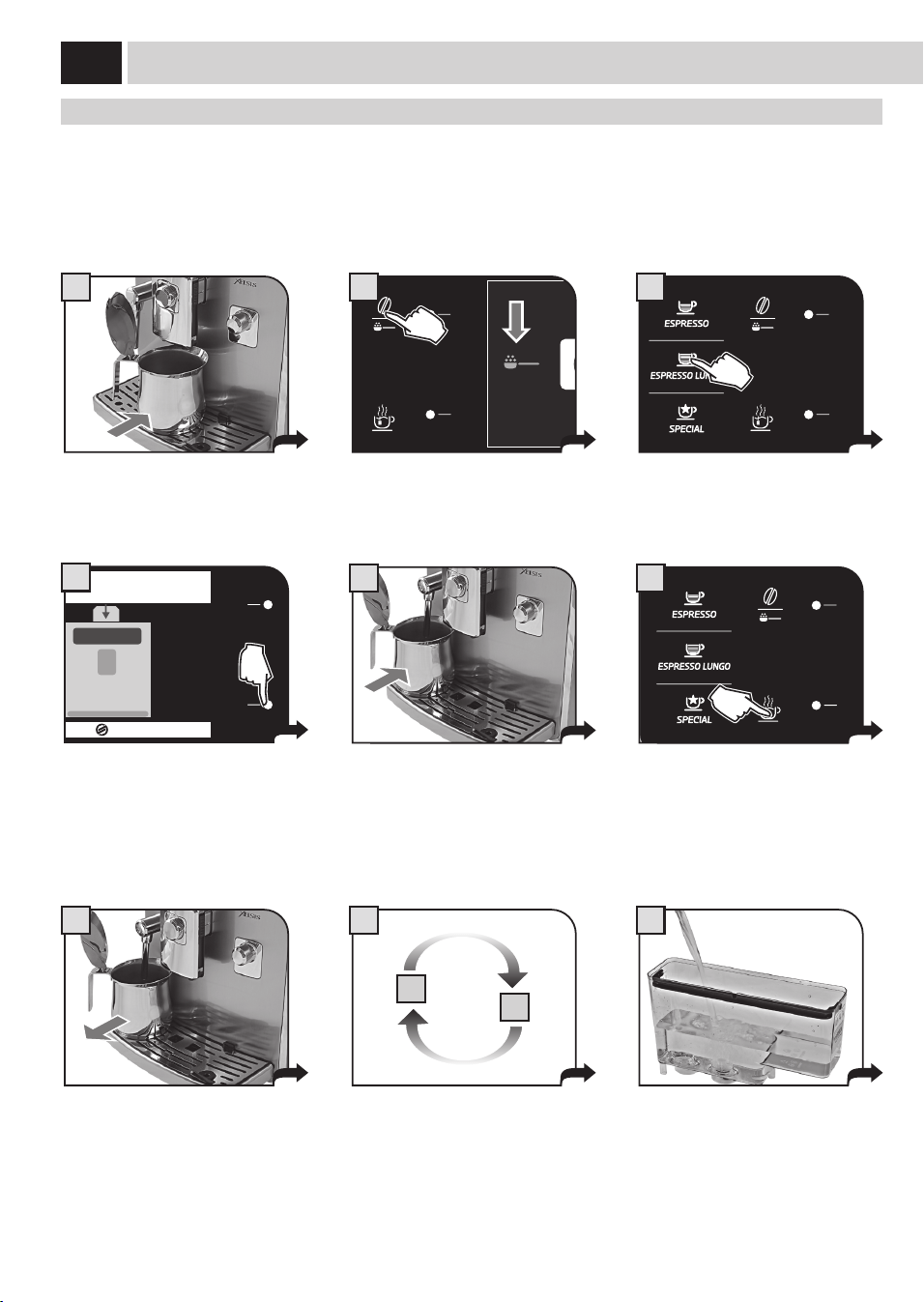
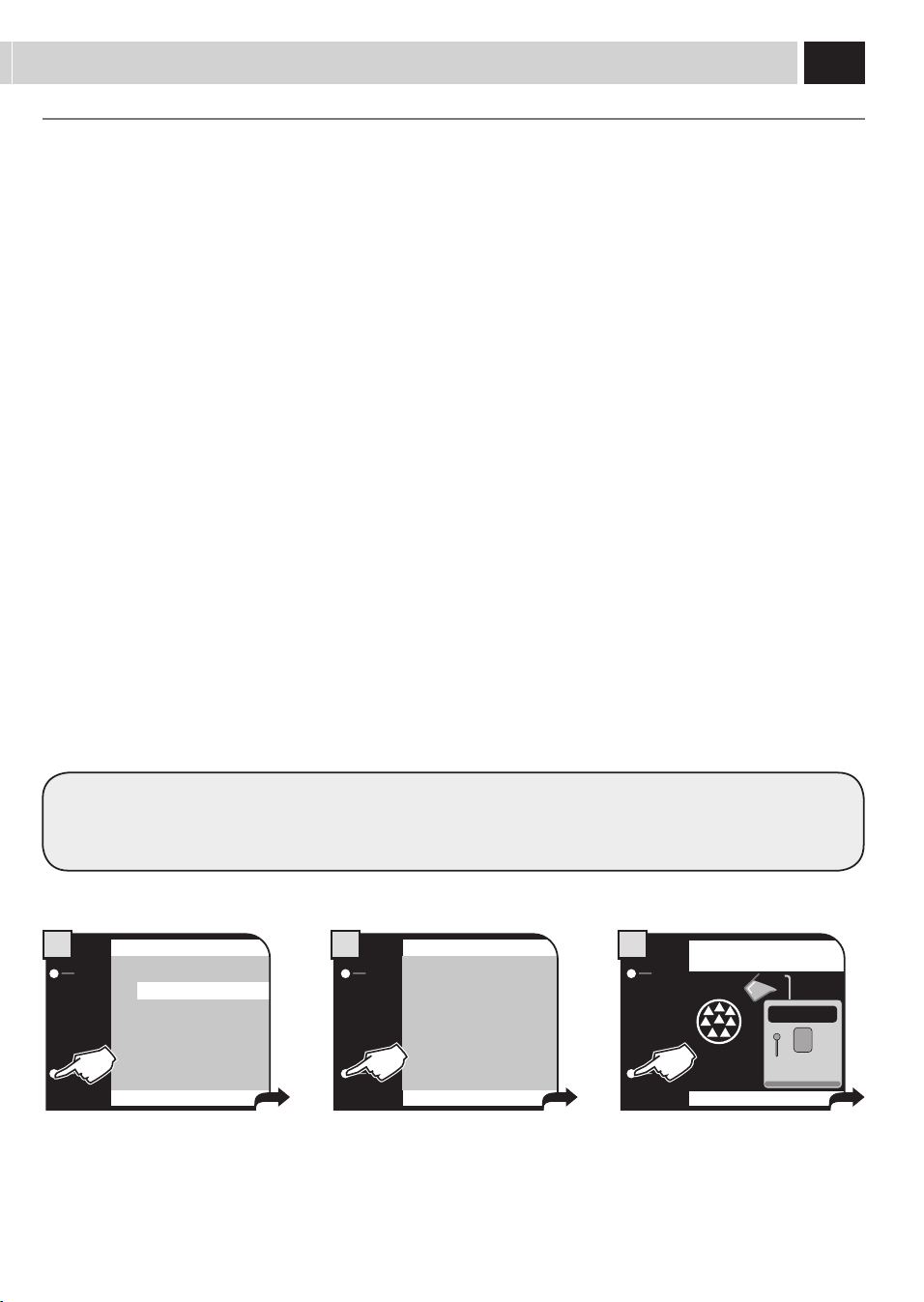
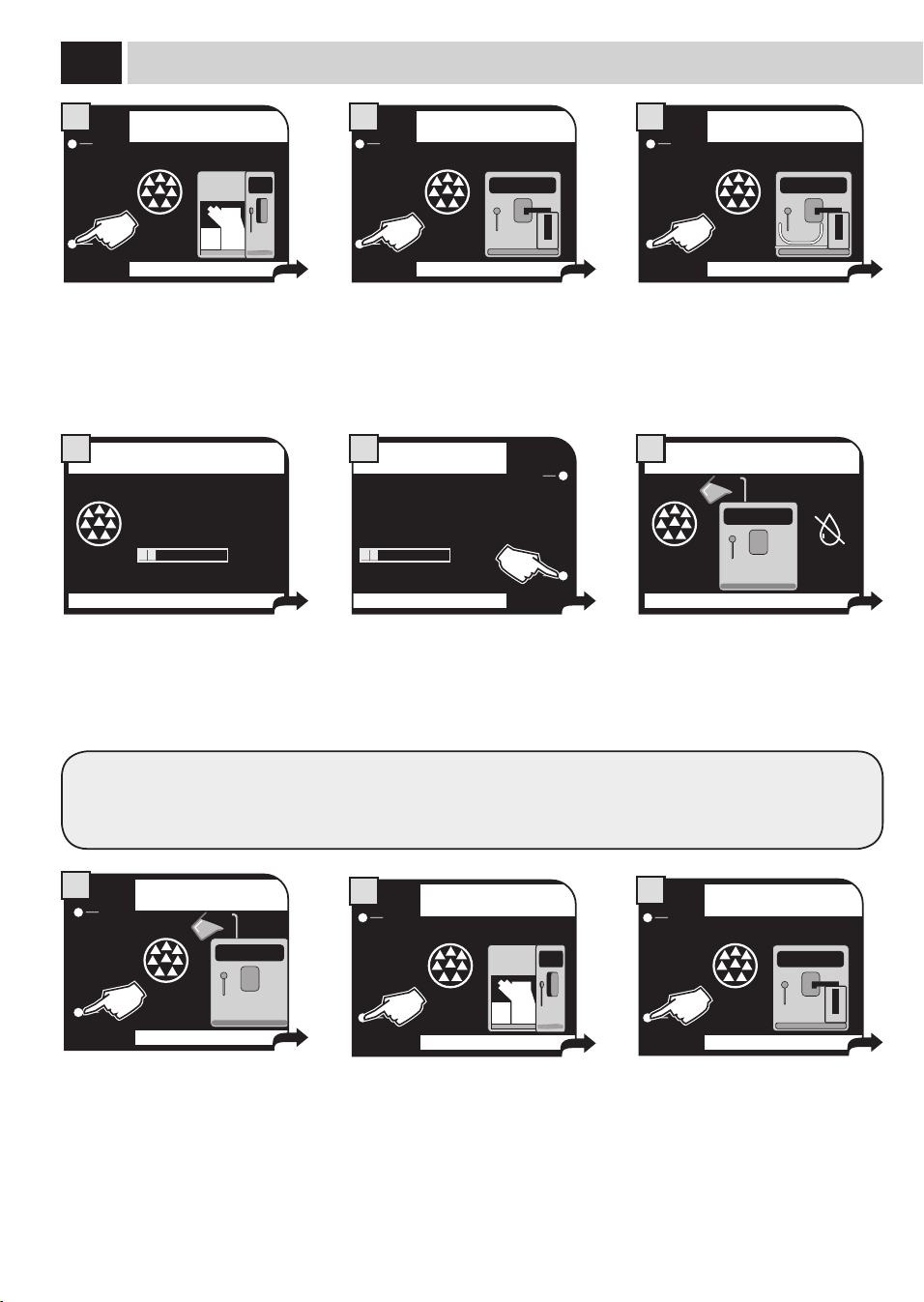
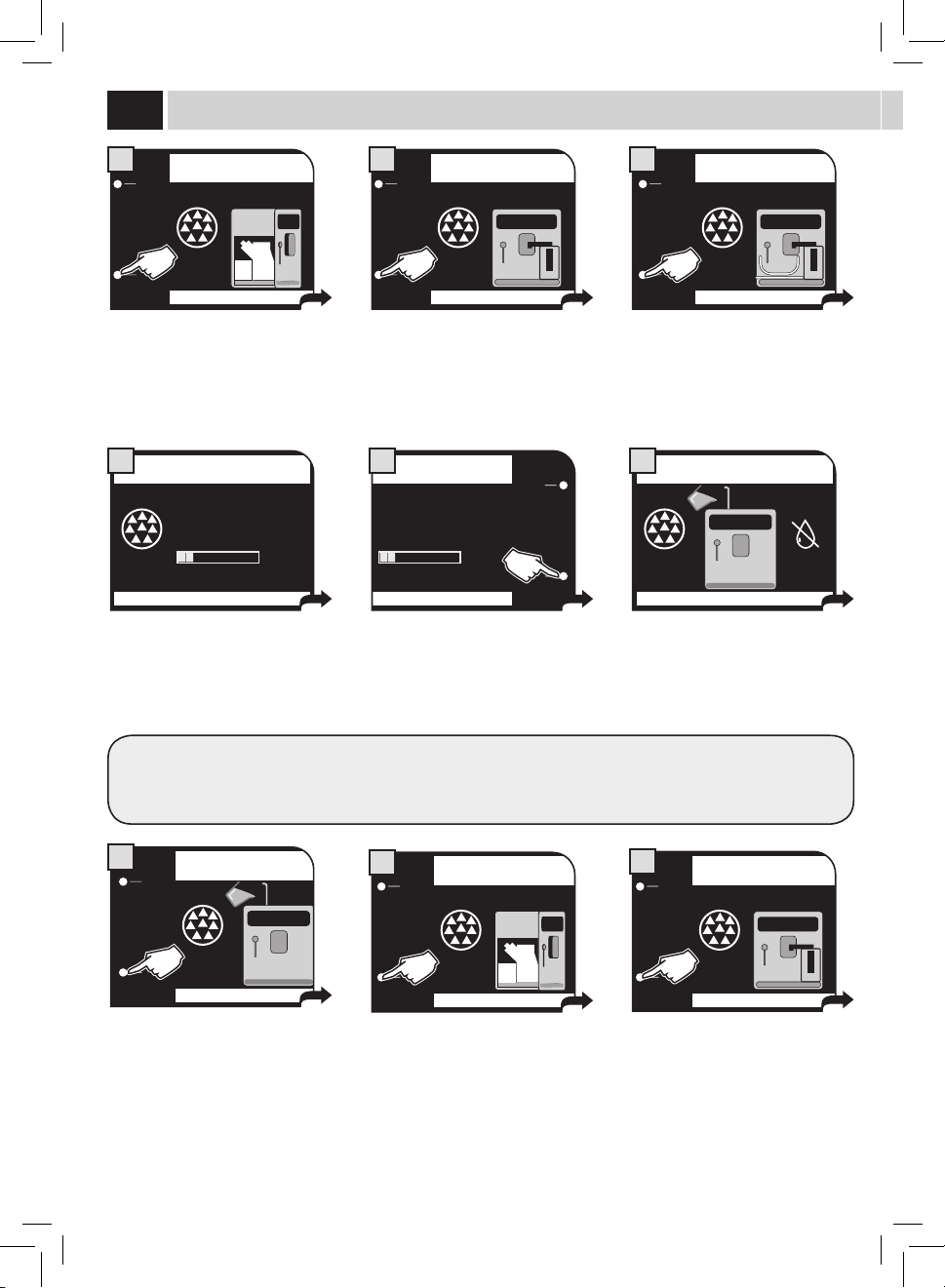
Toimprovetheproductquality,carryoutthisprocedureatrstuseofthemachineandafterlongperiodsofinactivity.
A few simple operations are needed to ensure the quality of your favourite beverages over time.
Place a container of large size under the
co ee dispensing spout.
Press the button once or more until the
icon is displayed.
Select the product by pressing the
buttonshown.
Pressthe"OK"buttontostartdispensing
waterthroughthedispensingspout.DO
NOT insert co ee at this stage.
Fillthewatertankwithfreshdrinking
wateraspreviouslydescribed.Your
machineisnowreadytobrewexcellent
beverages!
At the end of the dispensing phase, take
the container and place it under the hot
waterwand.
At the end, take the container and
empty it.
Repeat the process from step 5 to step 7
untilthewatertankisempty.
Pressthebuttonandwaitforthe
machine to dispense the programmed
quantityofwater.Waterdispensingcan
beinterruptedbypressing"STOPHOT
WATER".
INSERT GROUND COFFEE
AND SELECT OK
ESC OK
4
USER
MENU
BENERAGE
MENU
SETTINGS
MENU
SELECTED
USER
17/05/09
04:17 pm
2
8
MENU
UTENTE
MENU
BEVANDA
MENU
MACCHINA
SELEZIONE
UTENTE
17/05/09
04:17 pm
6
5
7
7
1
4 5
32
intenZa Water filter
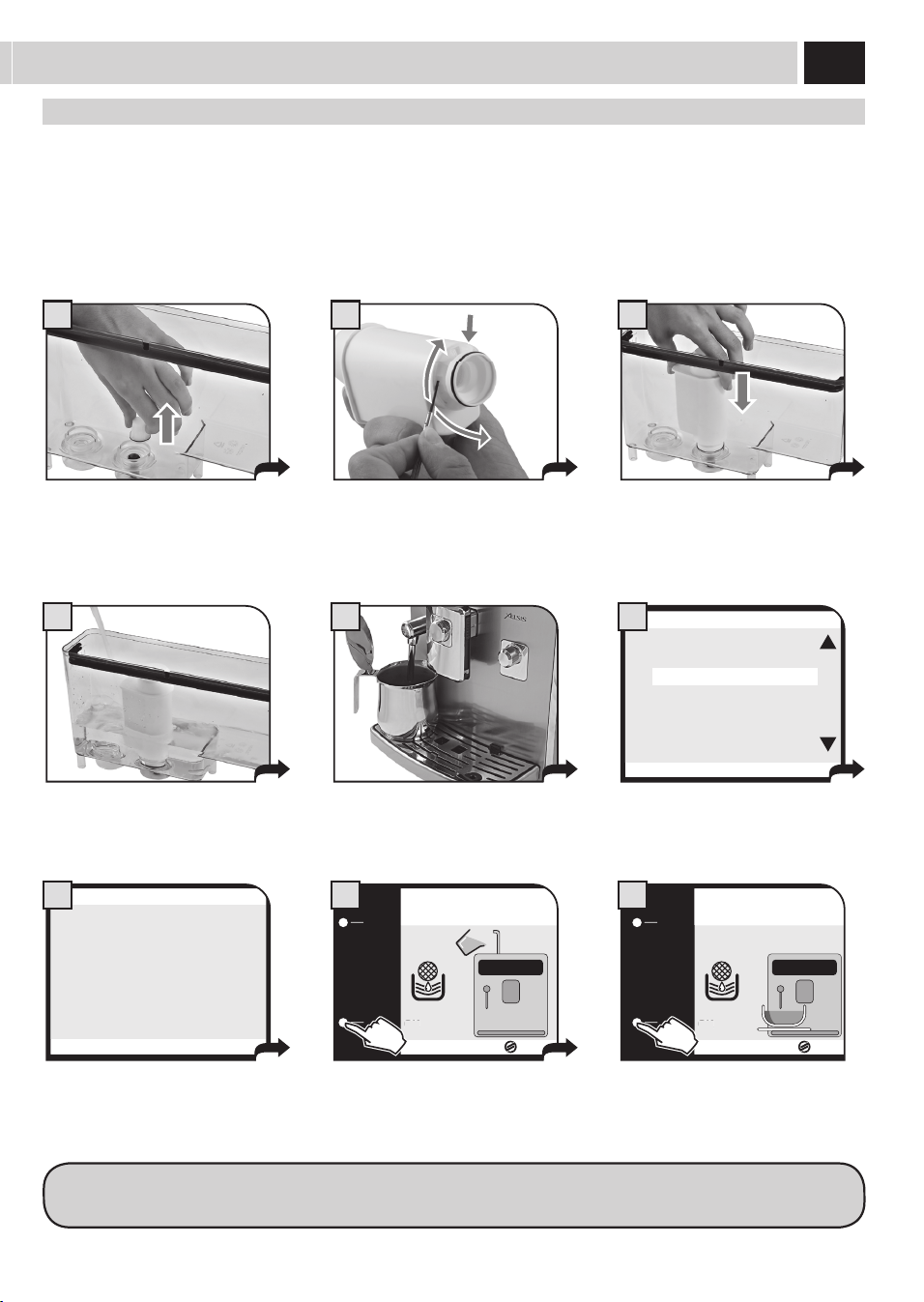
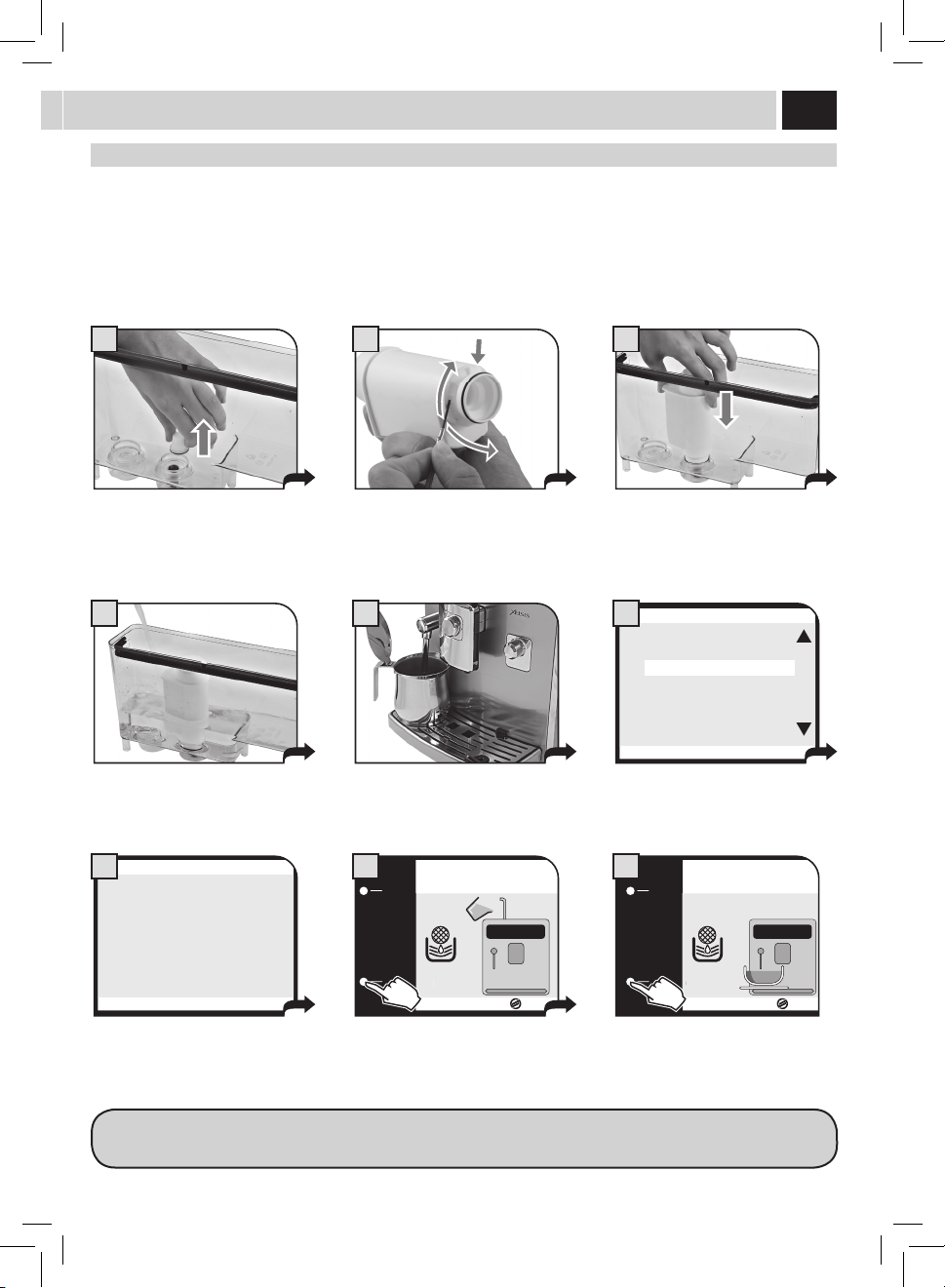
Toimprovethequalityofthewateryouuseandextendthelifeofyourmachineatthesametime,itisrecommendedthatyouinstallthe
waterlter.Afterinstallation,gotothewaterlterinitializationprogramme(seethe"MACHINEMENU",page31).Inthisway,themachine
informstheuserwhenthewaterltermustbereplaced.
Remove the water fi lter from its packaging, immerse it vertically (with the opening positioned upwards) in cold water and
gently press its sides to let the air bubbles out.
Removethesmallwhitelterfromthe
tank and store it in a dry place sheltered
from dust.
Fillthetankwithfreshdrinkingwater
and re-insert it into the machine.
Placeacontainerbeneaththehotwater/
steamwand.
Insertthelterintheemptytank.The
reference mark and the groove must
match.Pushrmlyuntilitiscompletely
inserted.
Set up the Intenza Aroma System:
A=Softwater
B=Mediumwater(standard)
C=Hardwater
Pressthe"OK"button. Pressthe"OK"buttontoconrmthe
introductionofthenewwaterlter.
Pressthe"OK"buttontoconrm.Wait
until the cycle is completed and remove
the container.
Accessthe"MACHINEMENU"(seepage
31).Select"WATERSETTINGS"and
"ACTIVATEFILTER",thenpress"OK".
ESC
OK
WATER HARDNESS 3
ENABLE FILTER OFF
ACTIVATE FILTER
2.4. WATER SETTINGS
6
ESC
OK
ACTIVATE FILTER?
2.4.3. WATER SETTINGS
7
OK
OK
INSERT WATER FILTER
AND REFILL THE WATER TANK
8
OK
OK
PLACE A CONTAINER UNDER HOT
WATER & DISP. SPOUT
9
NOTE: At the end of the procedure the display automatically returns to the product dispensing page.
If the Intenza water fi lter is not available, insert the small white fi lter previously removed (see point 1) into the tank.
8
1
17/05/09
04:17 pm
USER
MENU
BEVERAGE
MENU
SETTINGS
MENU
SELECTED
USER
USer SeleCtion
This machine has been designed to accommodate the individual preferences and settings of up to 6 di erent users.
Dierentuserscanbeaddedanddeletedatanytime,andeachuserwillhaveauniqueiconforeasyidenticationonthecontrolpanel.
Factory settings have been preset in the machine based on thorough market research. These settings may be used as is, or adjusted to suit
your individual preference.
Tocreateanewuserandprogrambeveragesettings,refertothe“UserMenu”sectionofthemanual.
Oncethebeveragesettingshavebeenprogrammed,theuserwillbeabletoquicklyaccesstheirsettingsfromthe“SelectedUser”buttonon
themainmenuandenjoytheirfavoritecoeebeverage,thewaytheyliketobest,withjustthepushofabutton.
adJUStmentS
diGital id (USer SeleCtion)
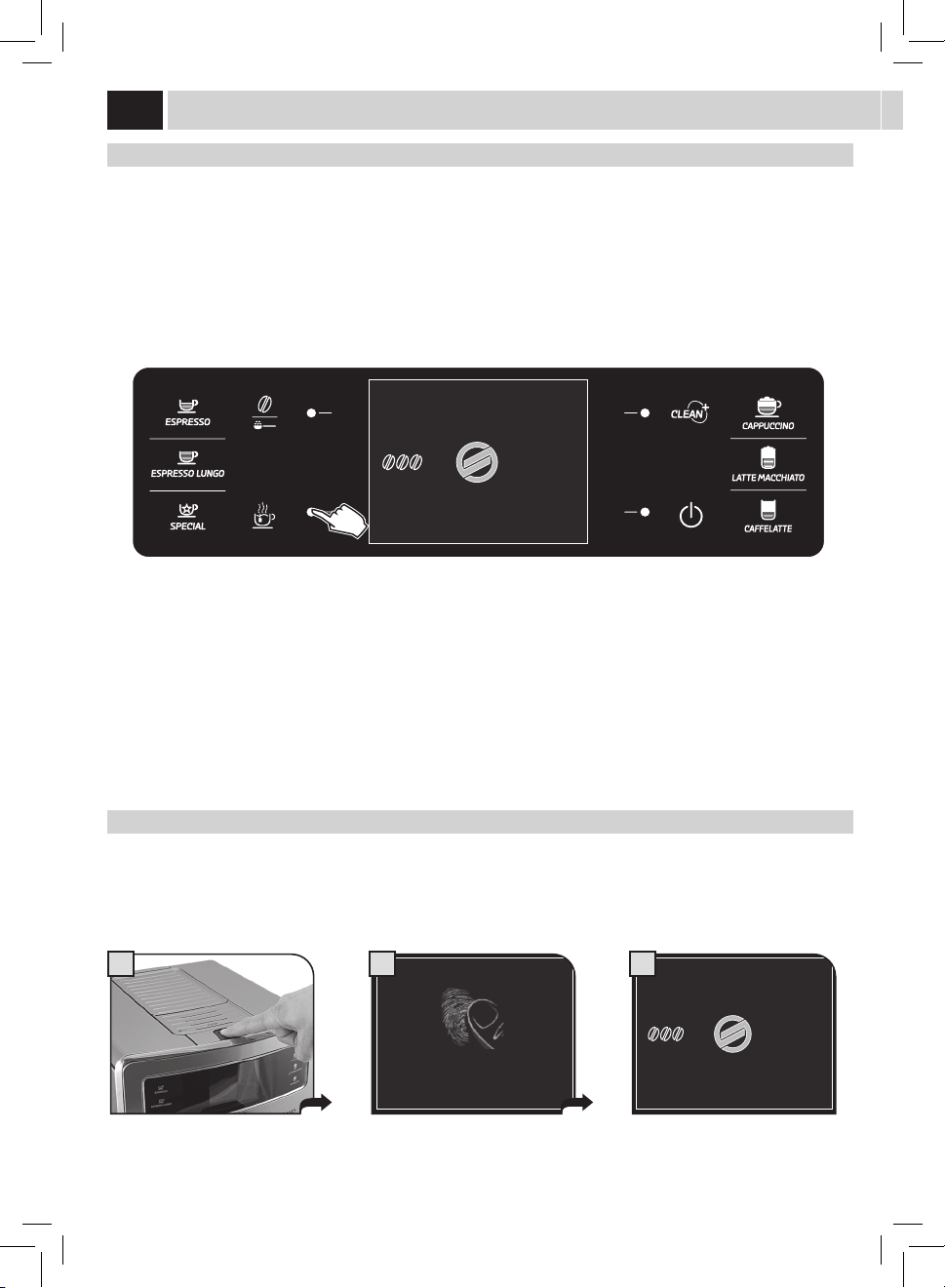
Thispatentedtechnologyallowstorecognizetheuserbyreadingtheirngerprints.Youjustneedtoputyourngeronthereaderandthe
machinewillrecognizeyouandconformtoyourtaste.
Note: Refer to the "USER MENU" section in the manual (see page 22) before using this function.
Placethesavednger. Waitforthengerremovalrequest. Themachinewillrecognizeyouandwill
thusbereadytobrewyourproducts.
17/05/09
REMOVE FINGER
CHECK IN PROGRESS...
04:17 pm
2
17/05/09
04:17 pm
USER
MENU
BEVERAGE
MENU
SETTINGS
MENU
SELECTED
USER
3
9
A B C
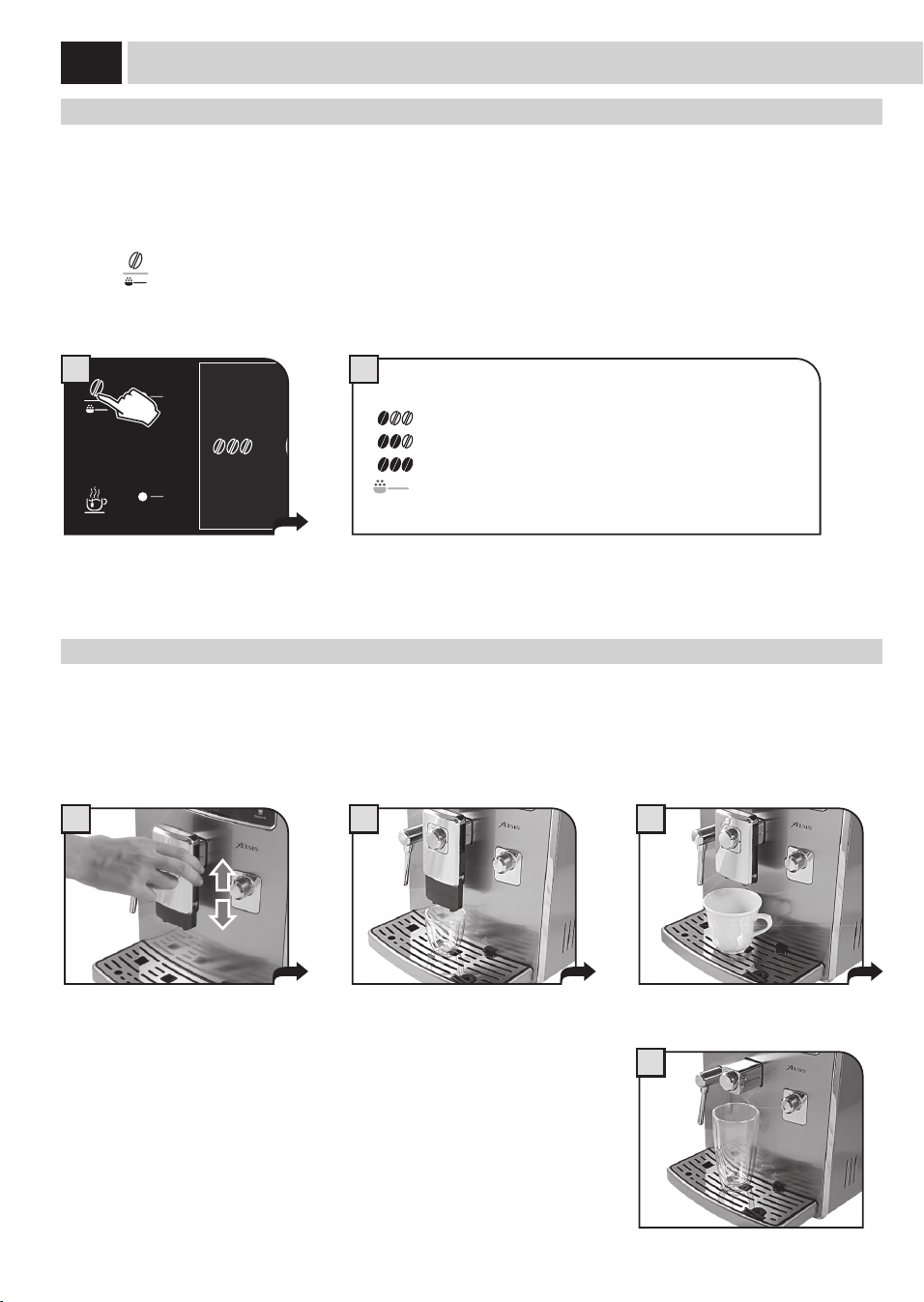
This setting provides a very coarse
grinding.
Press and turn. Thissettingprovidesaverynegrinding.
SaeCo adaPtinG SYStem
Co ee is a natural product and its characteristics may change according to its origin, blend and roast. The Saeco co ee machine is equipped
withaself-adjustingsystemthatallowstheuseofalltypesofcoeebeansavailableonthemarket(notincludingavoredorcarmelized).
• Themachineautomaticallyadjustsitselfinordertooptimizetheextractionofthecoee,ensuringperfectcompressionofthebeansto
obtain a creamy espresso co ee that is able to release all the aromas, regardless of the type of co ee used.
• Theoptimizationprocessisalearningprocessthatrequiresthebrewingofacertainnumberofcoeestoallowthemachinetoadjustthe
compactness of the ground co ee.
• Attentionshouldbegiventospecialblends,whichrequiregrinderadjustmentsinordertooptimizetheextractionofthecoee.
Coffee Grinder adJUStment
Themachineallowsslightadjustmentstothecoeegrindertoadaptittothekindofcoeeused.
Important Note: Adjustments to the co ee grinder can be made only when the grinder is being used. This phase takes
place during the fi rst part of a co ee brewing.
Theadjustmentcanbecarriedoutbyusingthedialinsidethebeanhopperwithoutcomingintocontactwithanymovingparts.
Press and rotate the dial (one step at a time) according to the indications provided on the cover.
Pressandturnthedialonenotchatatimeandbrew2-3cupsofcoee;thisistheonlywaytonoticedierencesinthegrind.
10
2
1 2 3
4
oPti-doSe (adJUStS tHe amoUnt of Coffee to Grind)
Themachineallowsyoutoadjusttherightquantityofgroundcoeeforeachproduct.Thestandardadjustmentforeachproductanduser
canbesetinthe"BEVERAGEMENU"(seepage28).
Youmaytemporarilychangetheamountofcoeegroundaswell.Thischangeappliesonlytothebrewingofthenextcoee.
Pressthe"
"buttononthecontrolpaneltotemporarilychangethequantityofgroundcoee,orselectthepre-groundfunction.
= mild dose
= medium dose
= strong dose
=Thebeverageisbrewedbyusingthepre-groundcoee
17/05/09
04:17 pm
USER
MENU
BEVERAGE
MENU
SETTINGS
MENU
SELECTED
USER
1
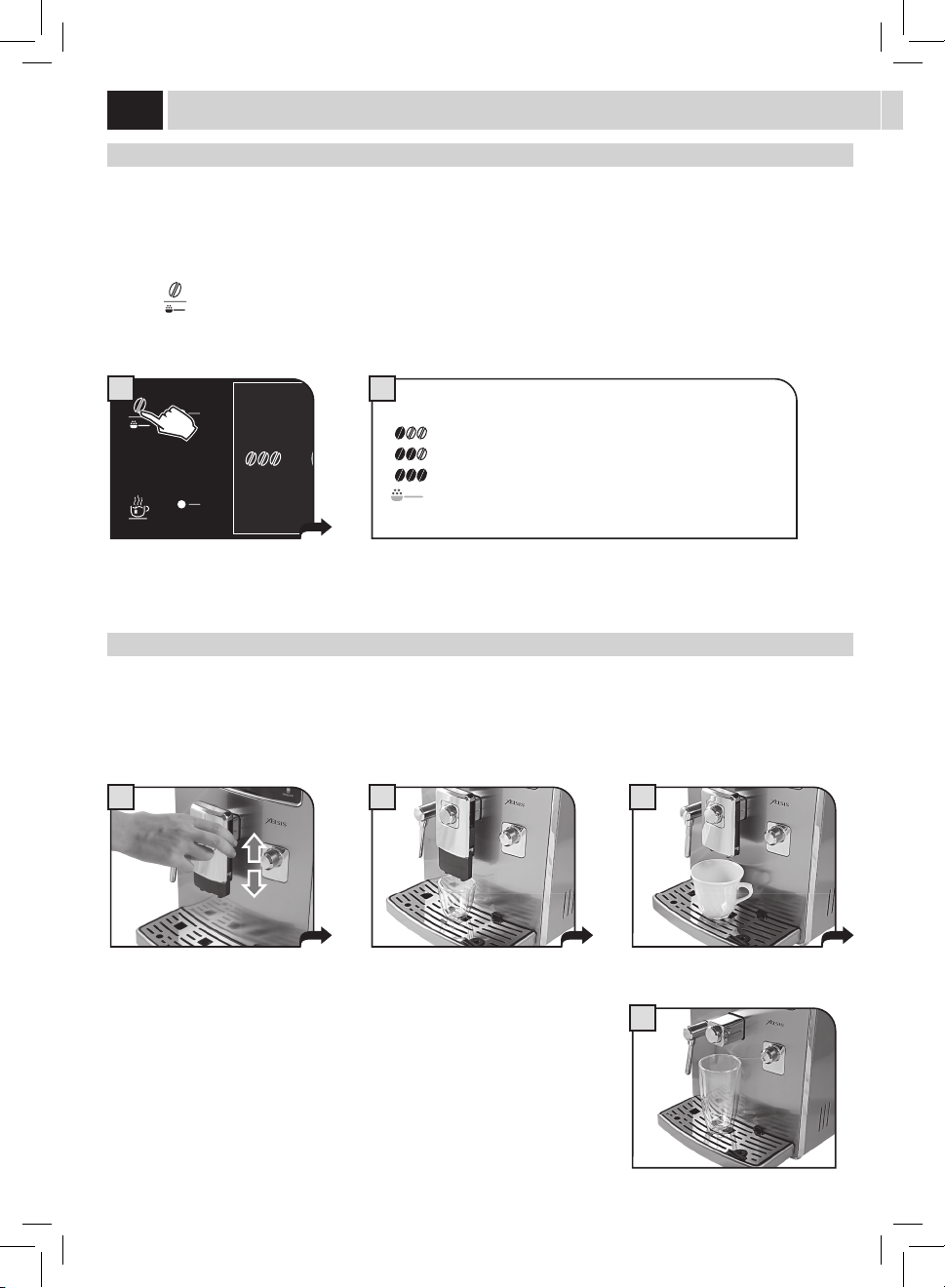
diSPenSinG SPoUt HeiGHt adJUStment
Beforebrewingaproduct,andaccordingtothekindofcup,adjusttheheightofthedispensingspout.
Toadjust,manuallymovethedispensingspoutasshowninthepicture.
Note: In some cases the dispensing spout can be removed to allow the use of very
large containers.
Note: This adjustment is not available when brewing an American co ee (see "Special Products" on page 20).
adJUStmentS
11
Coffee StrenGtH (SBS)
The SBS dial has been carefully designed to give your co ee the fullness and intensity you desire. Simply turn the dial and set the co ee
frommildintensitytostrongintensity,accordingtoyourowntaste.
SBS – SAECO BREWING SYSTEM
TheSaecoBrewingSystem(SBS)adjuststhefullnessofthebrewedcoee.Thecoeemayevenbeadjustedwhilebrewing.
Thisadjustmenthasanimmediateeectontheselectedtypeofbrewing.
MEDIUM
COFFEE
STRONG
COFFEE
MILD
COFFEE
17/05/09
04:17 pm
USER
MENU
BEVERAGE
MENU
SETTINGS
MENU
SELECTED
USER
A
Stand-BY mode
The machine is designed for energy saving. After 60 minutes of inactivity, the machine goes into stand-by mode, the boiler is no longer
heated and all the devices turn o .
Powerconsumptionisreducedtoaminimum.Pressanybuttontoturnthemachineonagain.
The machine status can be manually changed to stand-by mode by holding the stand-by button pressed for 3 seconds.
Note:
1 The stand-by mode cannot be activated if the service door is left open.
2 The stand-by activation time can be changed in the "MACHINE MENU" on
page 34.
3 When the stand-by mode is activated, the machine performs a rinse cycle
of the internal circuits. It is possible to interrupt the cycle by pressing the
"STOP RINSING" button.
Themachinecanbeturnedonagainbyexecutingoneofthefollowingactions:
1 By pressing any of the control panel buttons.
2 Byopeningtheservicedoor(whenclosingthedoorthemachinegoesbackto
stand-by mode).
3 If a pre-set timer becomes active.
Theredlightasheswhenthemachine
is in stand-by mode.
12
I
II
1 2 3
4 5 6
Themachineisequippedwithacarafeallowingforoptimalmilkfrothingforthebrewingof
tasty cappuccinos, latte macchiatos and any milk-based beverage.
Note: Before using the carafe, make sure it is thoroughly clean and sanitary. If
milk is left in the carafe, make sure it is still suitable for food consumption before
using it.
Thecontainerallowsforaneasyandpracticalsteamingandfrothingofmilk.Thecontainer
can be easily removed from the machine after each use so that it can be placed back in the
refrigerator.
Thebrewingcircuitisautomaticallywashedbyanautomaticcleaningcycleaftereachuse.
Thisautomaticcleaningcycleworksonlyifactive(seepage37)andcanbealsomanually
startedbypressingthe"CLEAN"buttonnext(seepage17).
Thecarafemustberemovedatleastonceaweektoallowforpropercleaningofall
componentsandkeepallpartsfreshforoptimumbrewing.(Forpropercleaning,refertothe
"MilkCarafeCleaning"sectionseepage47).
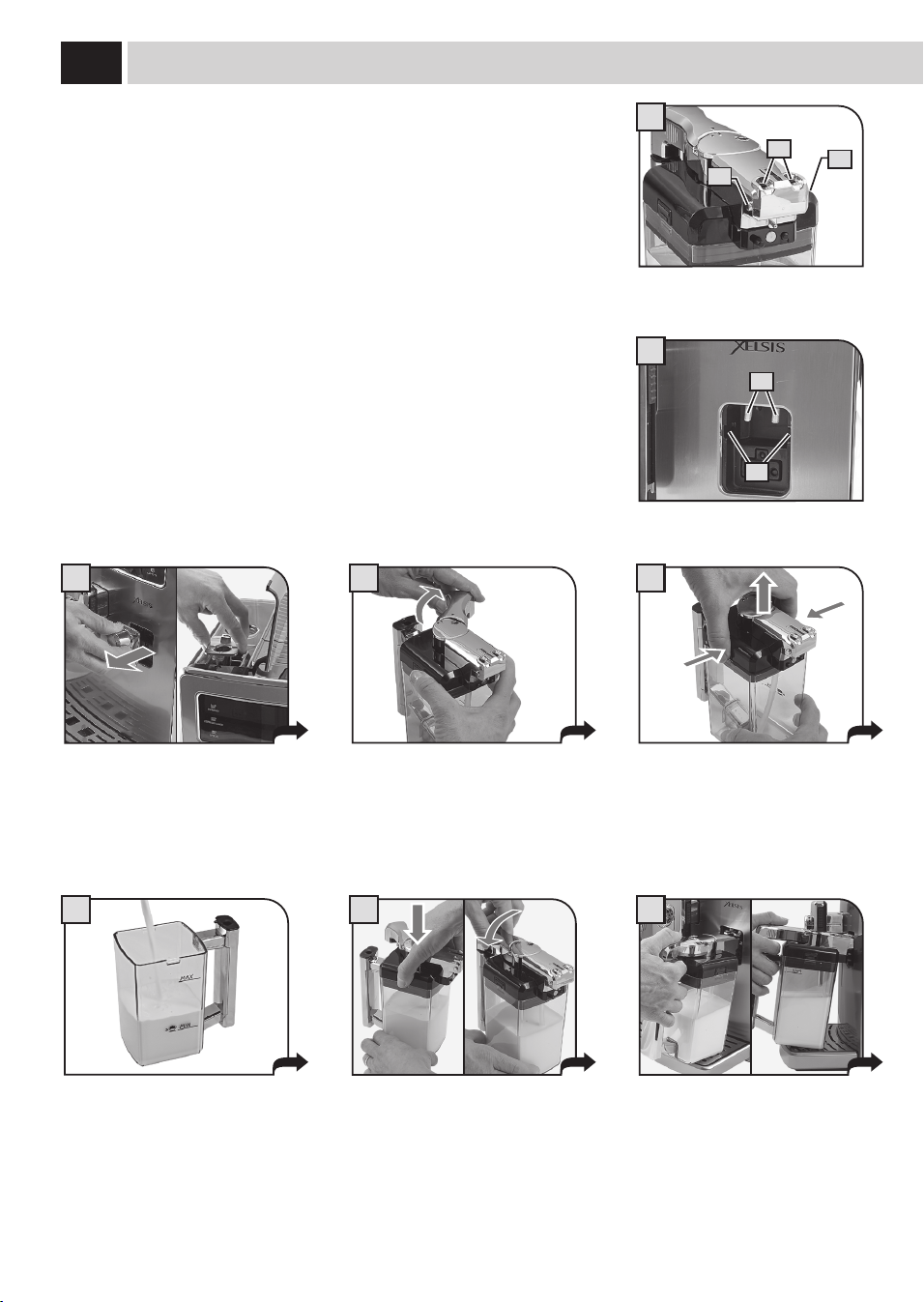
Remove the protection cover from the
milk container connection and keep it in
a clean place. It is suggested to insert it
inthewatercoverseat.
Rotatethehandleclockwiseto
disengage the lock.
Pressthedisengagebuttonstoallowthe
lid removal.
Fillthecarafewithcoldmilk.Fillmilkto
abovethe"MIN"line,butdonotexceed
the"MAX"levelindicatedonthecarafe.
milK Carafe USe
Place the lid back and ensure that it is
closed correctly. Move the handle back
toitscentralpositiontoallowforperfect
closure.
Insertthecarafeinclinedtowardsthe
front.
The carafe base should be positioned on
the hole (E) located on the drip tray.
A = Carafe holes
B = Carafe pins
C = Machine couplings
D = Guides for carafe pins
A
B
B
C
D
13
2
1
8
9
7
C
D
A
B B
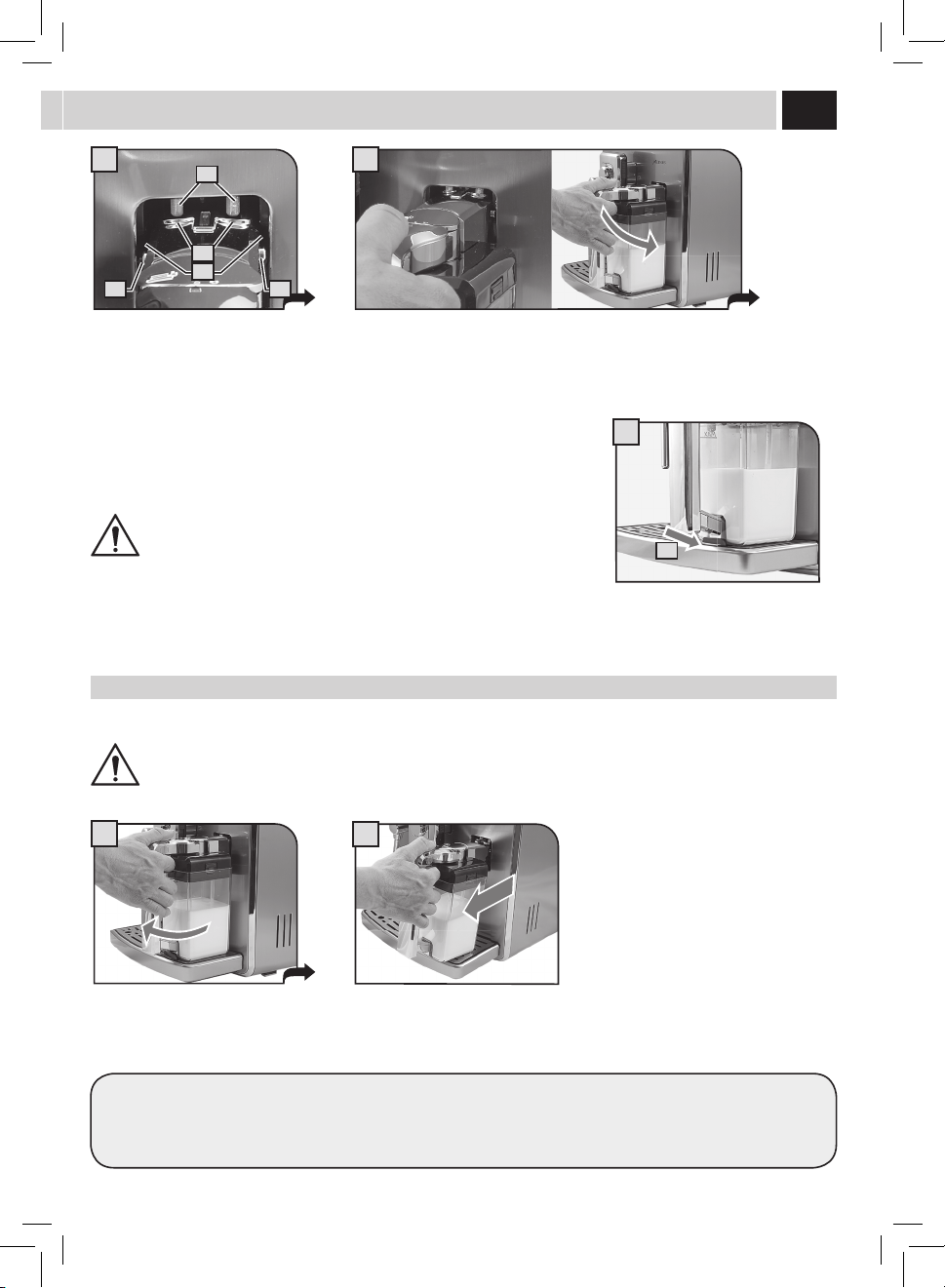
After use, remove the container from the machine and place it in the refrigerator for proper conservation.
We recommend NOT to keep the container at room temperature for too long. Maximum 10 minutes.
Store the milk according to producer's instructions and do NOT use it after best-before date. Wash the container as described in the
"MILKCARAFECLEANING"section(seepage47).
remoVinG tHe Carafe
Thefollowingoperationsshowhowtoproperlyremovethecarafefromthemachine.
DO NOT FORCE THE INCLINATION OF THE CARAFE.
At this stage the carafe holes (A) are
lowerthanthecouplings(C).
The carafe pins (B) are located at the
same height of the guides (D).
Insertthecarafebyturningittowardsthebasethrougharoundmovement(asshown
inthegure),untilitishookedtothehole(E)locatedinthedriptray.
Pullthecarafeupwardsuntilitsreleasefromthehole(E)locatedinthedriptray.Then
pull until it releases.
DO NOT FORCE THE INCLINATION OF THE CARAFE.
Thecarafewillbenaturallybackin
place.
E
14
1 2
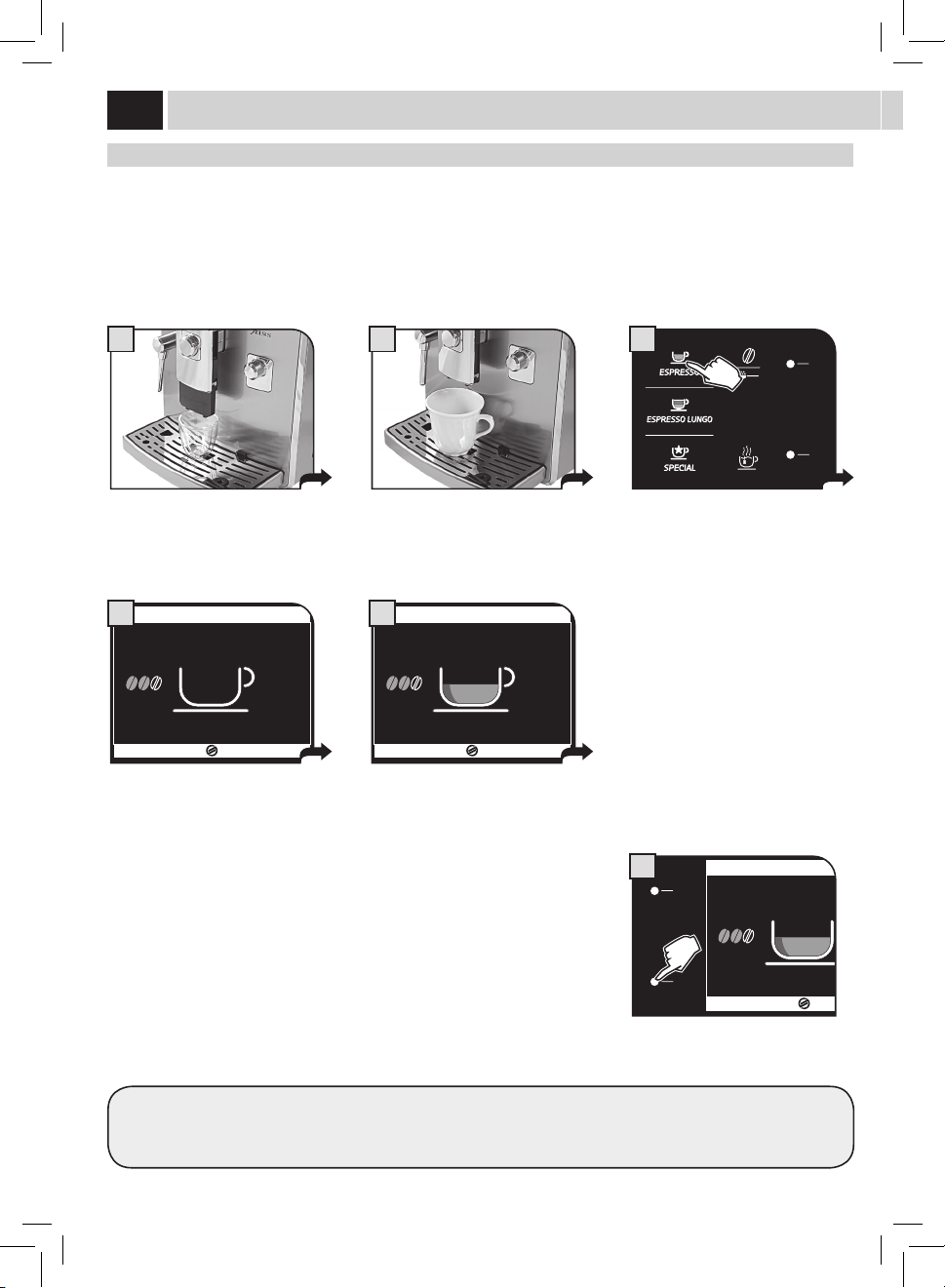
eSPreSSo / lonG Coffee
Thisprocedureshowshowtobrewanespresso.Tobrewanothertypeofcoee,presstheappropriatebutton.Usepropercoeecupsto
prevent co ee from spilling.
Tobrew2cups,pressthebuttontwice;themachinebrewshalfoftheenteredquantityandbrieyinterruptsdispensinginordertogrind
thesecondcoeedose.Coeebrewingisthenrestartedandcompleted.
MENU
UTENTE
MENU
BEVANDA
MENU
MACCHINA
SELEZIONE
UTENTE
17/05/09
04:17 pm
3
Position1or2cupstobrewoneortwo
espresso co ees.
Position1or2cup(s)tobrewanespresso
or a long co ee.
Choose the beverage by pressing the
corresponding button: once for 1 cup and
twicefor2cups.
ESPRESSO
STOP
COFFEE
5
The machine starts grinding the selected
co ee quantity.
Themachinebeginsbrewingthe
selected beverage.
Coeebrewingcanbestoppedatanytimeby
pressing"STOPCOFFEE".
Themachinenishesbrewingautomaticallyonthebasisofthequantitydeterminedbythefactorysettings.Tocustomizethisquantity,
see page 28.
ESPRESSO
STOP
COFFEE
6
ESPRESSO
4
Coffee BreWinG
15
1
17/05/09
04:17 pm
MENU
UTENTE
MENU
BEVANDA
MENU
MACCHINA
SELEZIONE
UTENTE
3
5
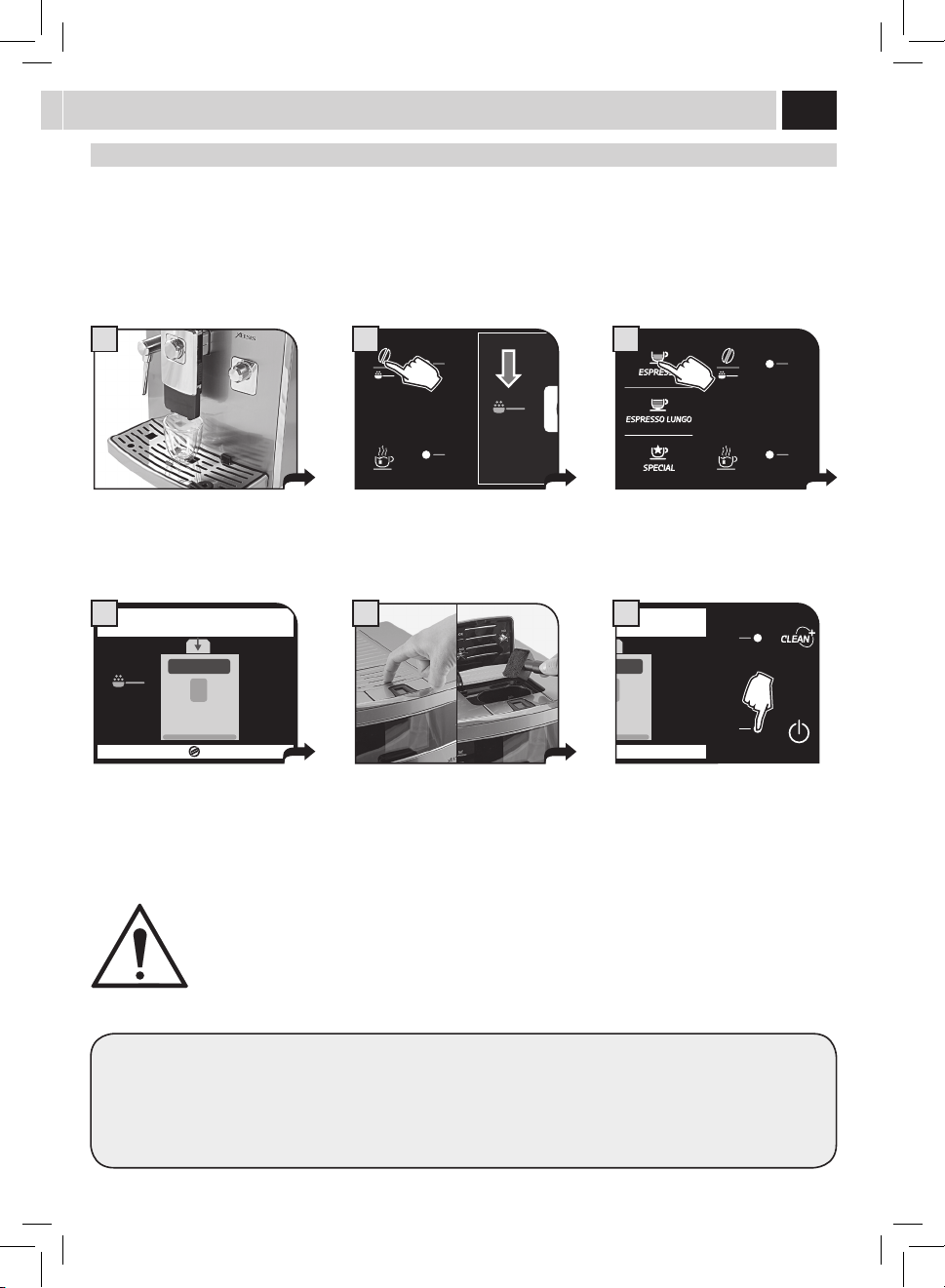
BeVeraGe BreWinG WitH Pre-GroUnd Coffee
Themachineallowsyoutousepre-groundanddecaeinatedcoee.
Pre-ground co ee must be poured into the bypass doser positioned on the top of the machine. Only use ground co ee for espresso
machinesandnevercoeebeansorinstantcoee(seethe"beverageprogramming"sectiononpage28).
Thisexampleshowshowtobrewanespressobyusingpre-groundcoee.
USER
MENU
BENERAGE
MENU
SETTINGS
MENU
SELECTED
USER
17/05/09
04:17 pm
2
Place 1 cup under the dispensing spout. Press the opti-dose once or more until
the icon appears on the display screen.
Select the product desired by pressing
the corresponding button.
INSERT GROUND COFFEE
AND SELECT OK
ESC OK
4
INSERT GROUND COFFEE
AND SELECT OK
ESC OK
6
A message reminds the user to pour
ground co ee into the bypass doser.
Press on the door to open it and lift it.
Pour ground co ee in the bypass doser
using the measuring scoop provided.
Press"OK"tostartbrewing.
Note:
• Ifbrewingdoesnotstartwithin30secondsfromtheappearanceofthemessageinstep4,themachinewillreturntothemain
menuanddischargeanyinsertedcoeeintotheusedgroundsdrawer.
• Ifnopre-groundcoeeispouredintothebypassdoser,onlywaterwillbedispensed;
• Ifthedoseisexcessiveorif2ormorescoopsofcoeeareadded,themachinewillnotbrewtheproductandthecoeeinthe
bypassdoserwillbedischargedintotheusedgroundsdrawer.
WARNING: ONLY PUT PRE-GROUND COFFEE INTO THE BYPASS DOSER WHEN YOU WISH TO BREW THIS TYPE
OF PRODUCT.
ONLY INSERT ONE SCOOP OF GROUND COFFEE AT A TIME. TWO COFFEES CANNOT BE BREWED AT THE SAME
TIME WHEN USING THIS FUNCTION.
16
1 2
MENU
UTENTE
MENU
BEVANDA
MENU
MACCHINA
SELEZIONE
UTENTE
17/05/09
04:17 pm
3
CaPPUCCino / latte maCCHiato / Cafe latte
ProdUCt BreWinG
AT THE BEGINNING OF THE DISPENSING PHASE, THE MACHINE MAY PRODUCE SOME SPURTS OF MILK AND
STEAM: RISK OF SCALDING! ALWAYS WAIT FOR THE CYCLE TO END BEFORE REMOVING THE CONTAINER.
REFER TO THE SECTION "MILK CARAFE USE" (SEE PAGE 12).
Placethecuporthecontainerwherethe
milk-basedproductwillbeprepared.
Rotate the handle upper part of the
container on the cup. To avoid spilling
milk,alwaysusecupsofadequatesize.
Select the desired milk product by
pressing the corresponding button: you
can select only one milk product at a
time.
CAPPUCCINO
FAST
MILK HEATING UP…
ECO MODE ON
STOP
MILK
4
CAPPUCCINO
STOP
MILK
5
Themachinestartsbrewing.Itgrindsthe
co ee and heats up for milk dispensing.
In this case the ECOMODE function is set
to"ON"(seepage32).
Milk dispensing begins. Milk dispensing
can be stopped at any time by pressing
"STOPMILK".
CAPPUCCINO
STOP
MILK
MORE
MILK
6
Milk dispensing can be increased by
pressingthebutton"MOREMILK".Inthis
case,NOTfrothedmilkwillbedispensed.
Whenbrewingmilkproducts,themachinedispensesthemilkrstandthenbrewsthecoee.Inthiscase,simultaneouslybrewing
a double product is not possible.
CAPPUCCINO
FAST
MILK HEATING UP…
ECO MODE ON
STOP
MILK
A
CAPPUCCINO
STOP
MILK
B
Ifthe"FASTMILK"buttonispressed,the
ECOMODE function is deactivated and
setto"OFF".
(see page 32).
Afterthat,whenbrewingbeveragesthe
systemwillrequirelesstimeforwarm-
up.However,thiswillresultinincreased
energy consumption.
The ECOMODE function can
be re-activated by means of
the"MACHINEMENU"only
(see page 32).
17
8 9
1 3
MENU
UTENTE
MENU
BEVANDA
MENU
MACCHINA
SELEZIONE
UTENTE
17/05/09
04:17 pm
2
CAPPUCCINO
STOP
COFFEE
7
Once milk has been dispensed, the
machinestartsbrewingthecoffee.
Coffeebrewingcanbeinterruptedatany
timebypressing"STOPCOFFEE".
Attheendremovethecupwiththe
cappuccino and place the handle back to
the initial position.
Upon completion of the cleaning cycle
remove the milk carafe and put it in the
refrigerator.
Waitafewseconds.Themachine
starts the automatic cleaning
process (if enabled - see page 37).
CleaninG CYCle
Place the container as described on pages
12 and 13. The cleaning cycle only involves
thelinesincontactwiththemilkanditis
carried out independently of the presence
of milk in the container.
At the end it is possible to remove the
milkcarafenowreadyforuse.
Press the cleaning cycle button. The
machine executes an additional cleaning
cycle.
CleaninG CYCle
NEVER SEIZE THE CARAFE HANDLE DURING THE CLEANING CYCLE: RISK OF SCALDING!
Themachineallowsexecutingaquickcleaningcycleatanytime.Thecleaningcyclecanbeexecutedbeforeand/orafterthe
beveragebrewing.
Thisoptionallowsyoutomanagethecontainercleaningprocessasdesired.Thecleaningprocessmaybeusedalsoforcircuit
sanitization after a long period of inactivity.
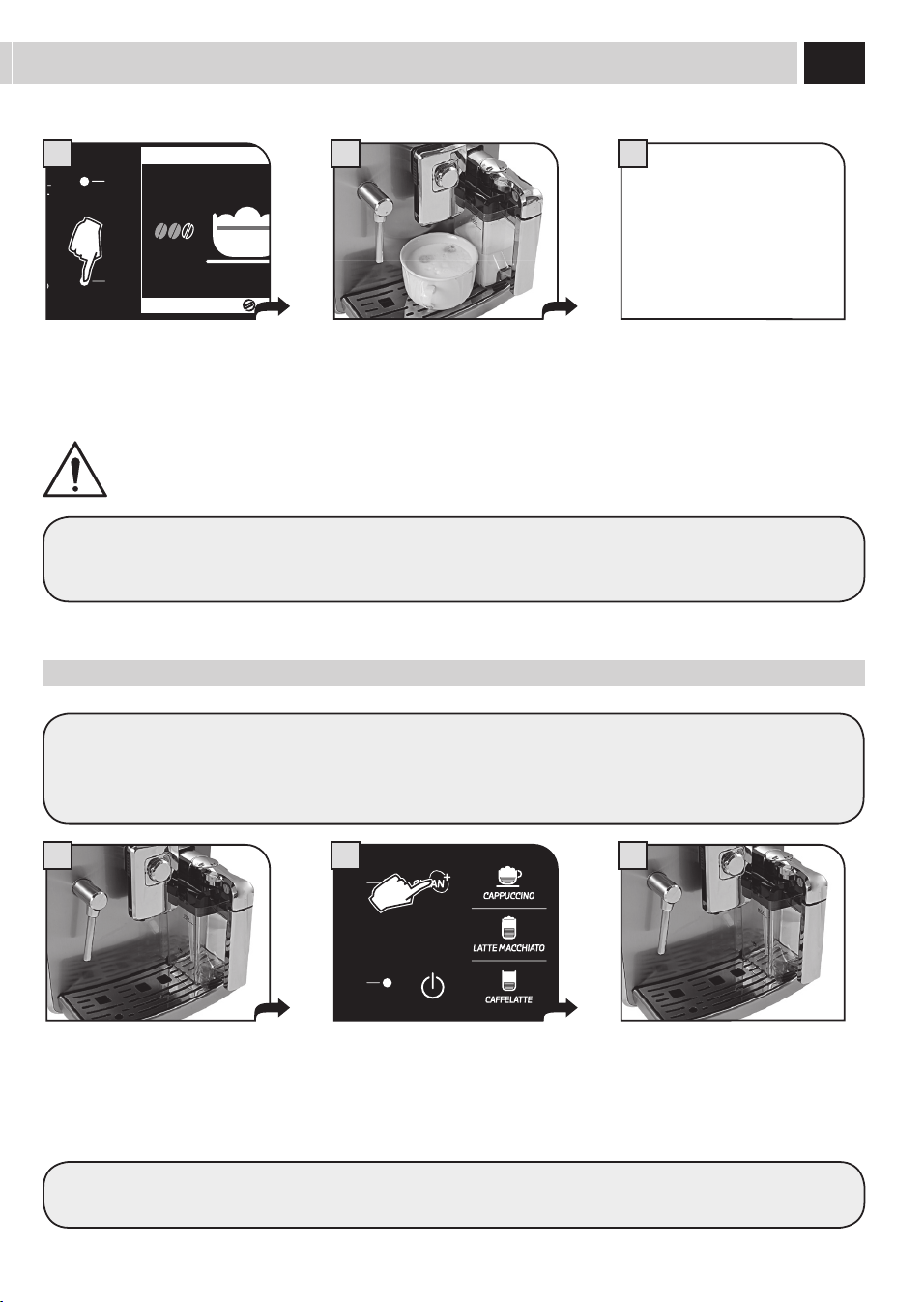
The procedure to prepare a latte macchiato, a milk and co ee, or a hot milk is similar (please, refer to the 'special' beverages section -
see page 19).
To properly insert/remove the carafe, refer to the instructions on page 12 and 13.
18
1 3
MENU
UTENTE
MENU
BEVANDA
MENU
MACCHINA
SELEZIONE
UTENTE
17/05/09
04:17 pm
2
Hot Water
Repeattheproceduretodispenseanewquantityofhotwater.
Afterdispensing,somewateralwaysremainsinthelinesandthismayresultinleaking.Thisisanormalfeatureofthemachine.
Hot Water diSPenSinG
WARNING: DISPENSING MAY BE PRECEDED BY SHORT SPURTS OF HOT WATER AND SCALDING IS POSSIBLE. THE
STEAM/HOT WATER WAND MAY REACH HIGH TEMPERATURES: DO NOT TOUCH WITH BARE HANDS. USE THE
APPROPRIATE HANDLE ONLY.
Placeacontainerbeneaththehotwater
/steamwand.
Whenhotwaterdispensingiscomplete
removethecontainerwiththedesired
waterquantity.
Pressthehotwaterbuttonandwait
for the dispensing of the programmed
waterquantity.Waterdispensingcanbe
interruptedatanytimebypressing"STOP
HOTWATER".
19
1
3
3
MENU
UTENTE
MENU
BEVANDA
MENU
MACCHINA
SELEZIONE
UTENTE
17/05/09
04:17 pm
1
SPeCial BeVeraGeS
Themachineisdesignedtobrewotherbeveragesnotdisplayedonthemainmenu.
Note: If no product is selected, the machine goes back to the main menu.
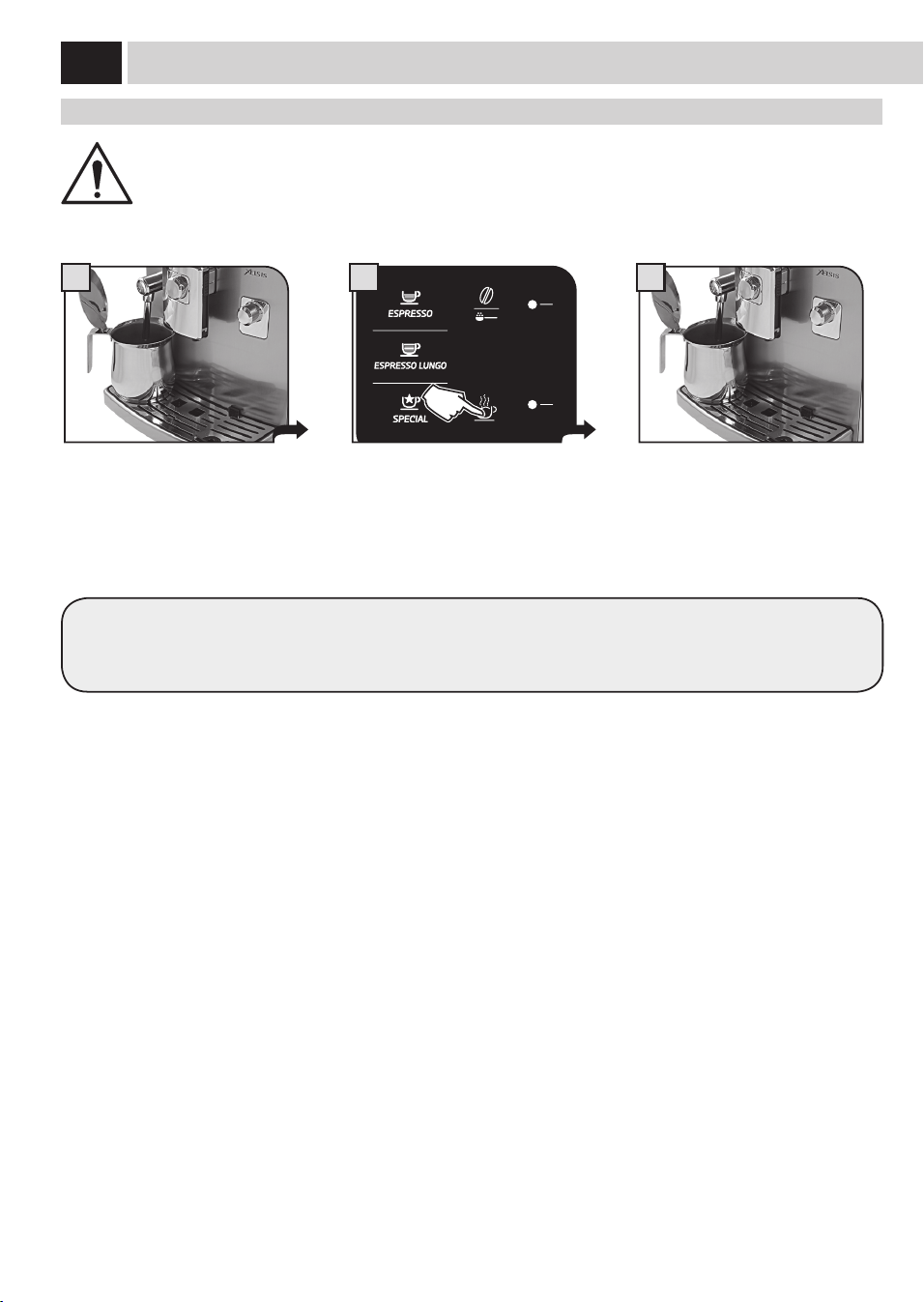
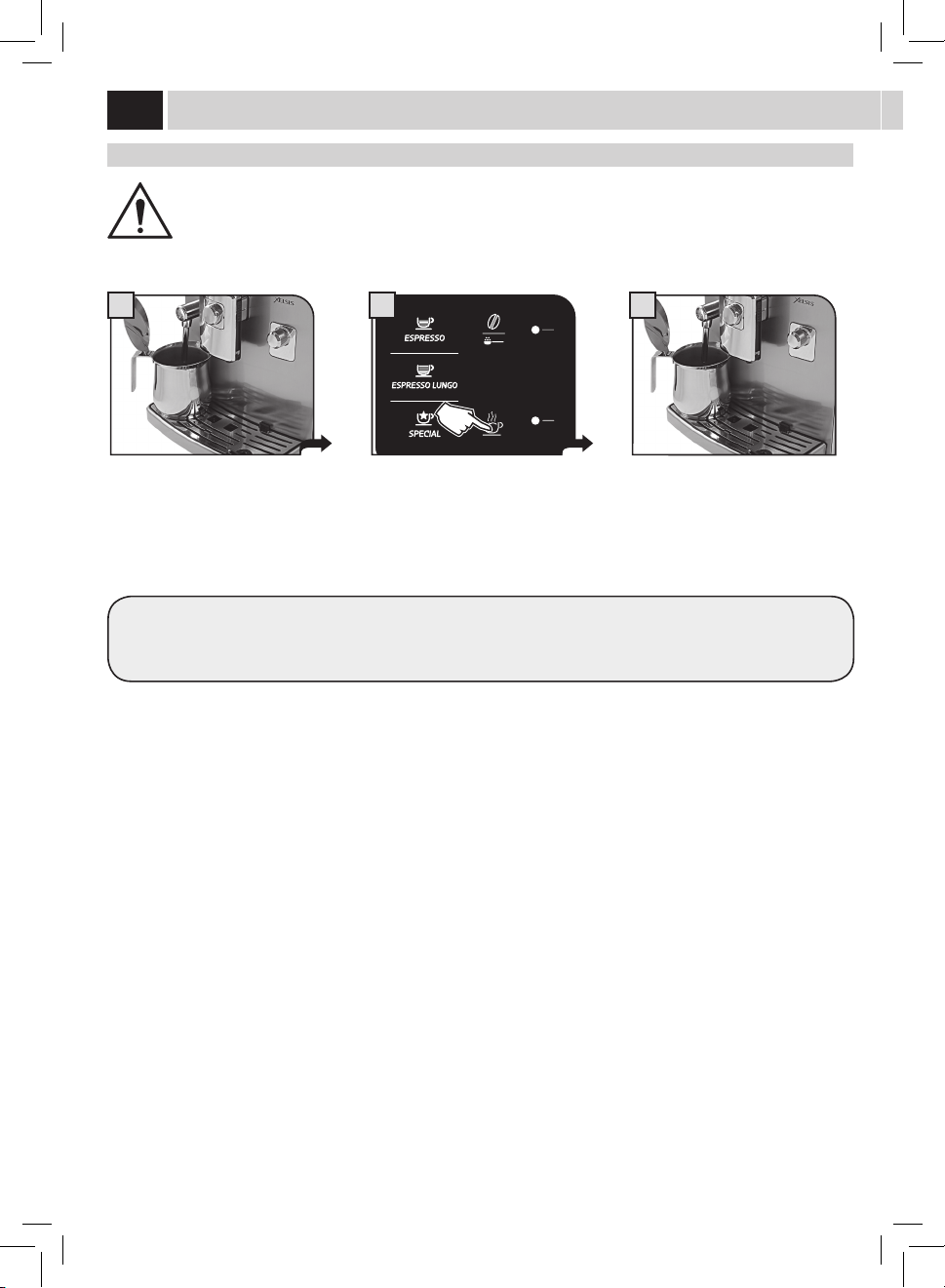
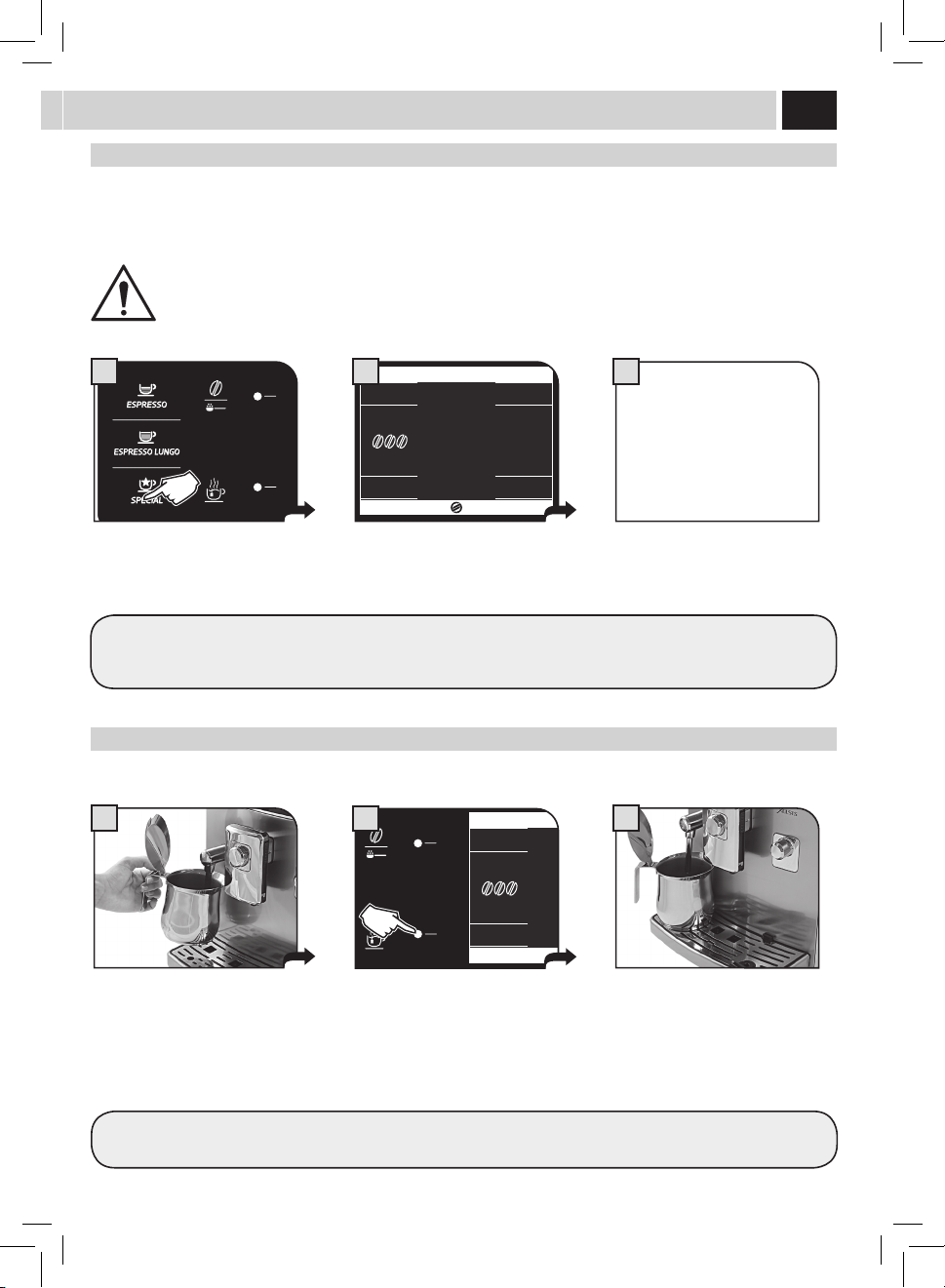
WARNING: DISPENSING MAY BE PRECEDED BY SHORT SPURTS OF HOT WATER AND SCALDING IS POSSIBLE. THE
STEAM/HOT WATER WAND MAY REACH HIGH TEMPERATURES: DO NOT TOUCH WITH BARE HANDS. USE THE
APPROPRIATE HANDLE ONLY.
Steam diSPenSinG
Steamcanbeusedtoheatmilk,waterorotherbeverages.
Thedisplayshowsthemenuforbrewing
special beverages.
Placeacontainerbeneaththehotwater
/steamwand.
Steam dispensing can be interrupted at
anytimebypressing"STOPSTEAM".
When steam dispensing complete remove
thecontainerwiththeheatedbeverage.
Press the special button to access the
menu.
Pressthesteambuttonandwaitforthe
dispensing of the programmed steam
quantity.
GETRÄNKE SPECIALGETRÄNKE SPECIAL
SPECIAL BEVERAGES
ESPRESSO
MACCHIATO
STEAM
AMERICAN
COFFEE
HOT
MILK
2
GETRÄNKE SPECIALGETRÄNKE SPECIAL
SPECIAL BEVERAGES
ESPRESSO
MACCHIATO
STEAM
AMERICAN
COFFEE
HOT
MILK
2
Seethefollowingsectionstobrew
a special beverage.
Note: The machine goes back to the
main menu after 10 seconds
SPeCial BeVeraGeS
For better results we recommend performing slow circular movements.
Todispensehotmilkortoprepareanespressomacchiato,refertothesectiononhowtoprepareacappuccinoforthebrewing
sequence and the cleaning details (see page 16 and 17).
20
1 3
1
1
3
3
ameriCan Coffee
ThisspecicprogramallowsyoutobrewAmericancoee:thecoeebrewingismanagedinaspecialwaytobringoutthetasteof
American co ee.
Note: Completely turn the SBS dial counter-clockwise, as shown in the display (see page 11). Two co ee brewing cycles are
performed to prepare this product. When brewing this product it is not possible to adjust the "Opti-dose" aroma (see page 10).
This recipe cannot be modifi ed by the user.
Hot milK
Thisspecicprogramallowsyoutodispensehotmilk.
eSPreSSo maCCHiato
Thisspecicprogramallowsyoutobrewanespressomacchiato.
GETRÄNKE SPECIALGETRÄNKE SPECIAL
SPECIAL BEVERAGES
ESPRESSO
MACCHIATO
STEAM
AMERICAN
COFFEE
HOT
MILK
2
Whenbrewingiscomplete,removethe
cupwiththecoee.
GETRÄNKE SPECIALGETRÄNKE SPECIAL
SPECIAL BEVERAGES
ESPRESSO
MACCHIATO
STEAM
AMERICAN
COFFEE
HOT
MILK
2
GETRÄNKE SPECIALGETRÄNKE SPECIAL
SPECIAL BEVERAGES
ESPRESSO
MACCHIATO
STEAM
AMERICAN
COFFEE
HOT
MILK
2
Place the cup beneath the dispensing
head. Rotate the handle on the upper
part of the milk carafe over the cup.
Place the cup beneath the dispensing
spout.
Place the cup beneath the dispensing
head. Rotate the handle on the upper
part of the milk carafe over the cup.
When milk dispensing is compete,
removethecupwiththemilk.
When dispensing is complete, remove
the co ee cup.
Pressthehotmilkbuttonandwaitfor
the dispensing of hot milk.
Press the espresso macchiato button
andwaitforthebrewingoftheespresso
macchiato.
Press the American Co ee button
SPeCial BeVeraGeS
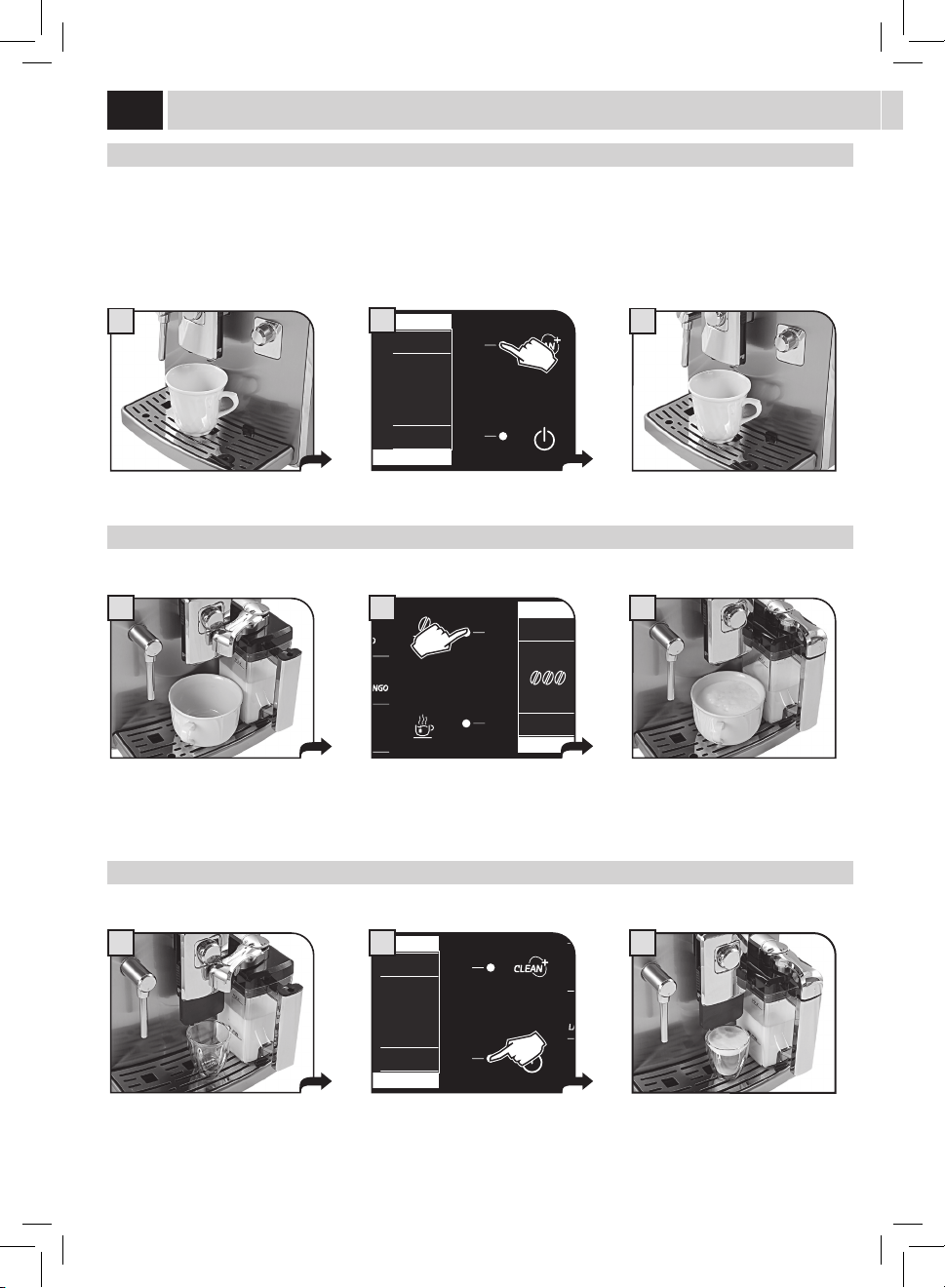
21
1 2
MENU
UTENTE
MENU
BEVANDA
MENU
MACCHINA
SELEZIONE
UTENTE
17/05/09
04:17 pm
3
BeVeraGe lenGtH QUiCK ProGramminG
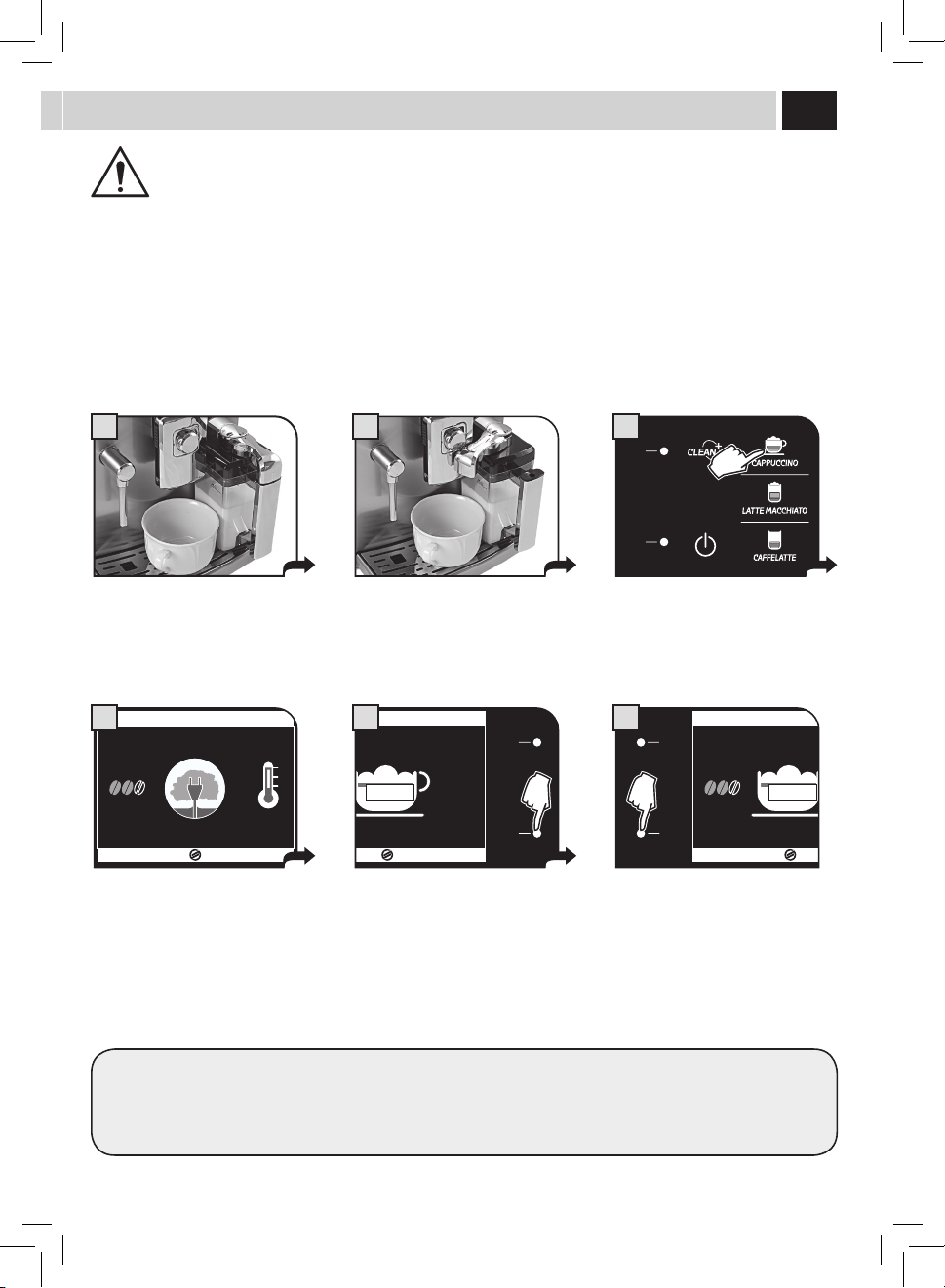
BREWING MAY BE PRECEDED BY SHORT SPURTS OF MILK AND STEAM: RISK OF SCALDING! REFER TO THE SECTION
"MILK CONTAINER USE".
ThissectionshowstheprogrammingprocedurefortheCappuccino.Thisismeantasanexampletointroduceyoutothestepsnecessaryfor
a quick and easy programming of all the beverages.
Each programming applies only for the user currently selected. For other users, it is necessary to repeat the programming procedure.
Afteraquickprogrammingofthebeverage,itispossibletocarryoutanerandmoredetailedadjustmentbymeansofthe"BEVERAGE
MENU"(seepage28).
Placethecuporthecontainerwhere
thecappuccinoorlattemacchiatowill
bebrewed.
Rotate the upper part of the container
handle on the cup. Use your everyday
cup.
Hold the button pressed for 3 seconds to
start programming.
CAPPUCCINO
FAST
MILK HEATING UP…
ECO MODE ON
STOP
MILK
4
CAPPUCCINO
STOP
MILK
MEMO
5
Themachinestartsbrewing:coeeis
ground and milk is heated up to prepare
for dispensing.
Milk dispensing begins. When the
desired quantity has been reached, press
"STOPMILK".
CAPPUCCINO
STOP
COFFEE
MEMO
6
Once milk has been dispensed, the
machinestartsbrewingthecoffee.When
the desired quantity has been reached,
press"STOPCOFFEE".
Beveragelengthhasbeenprogrammed.Fromnowon,thislengthwillbeappliedtothebrewingofthisbeverage.
Fortheotherbeverages:holdpressedthebuttonofthebeveragetobeprogrammedandfollowthesameprocedure.
22
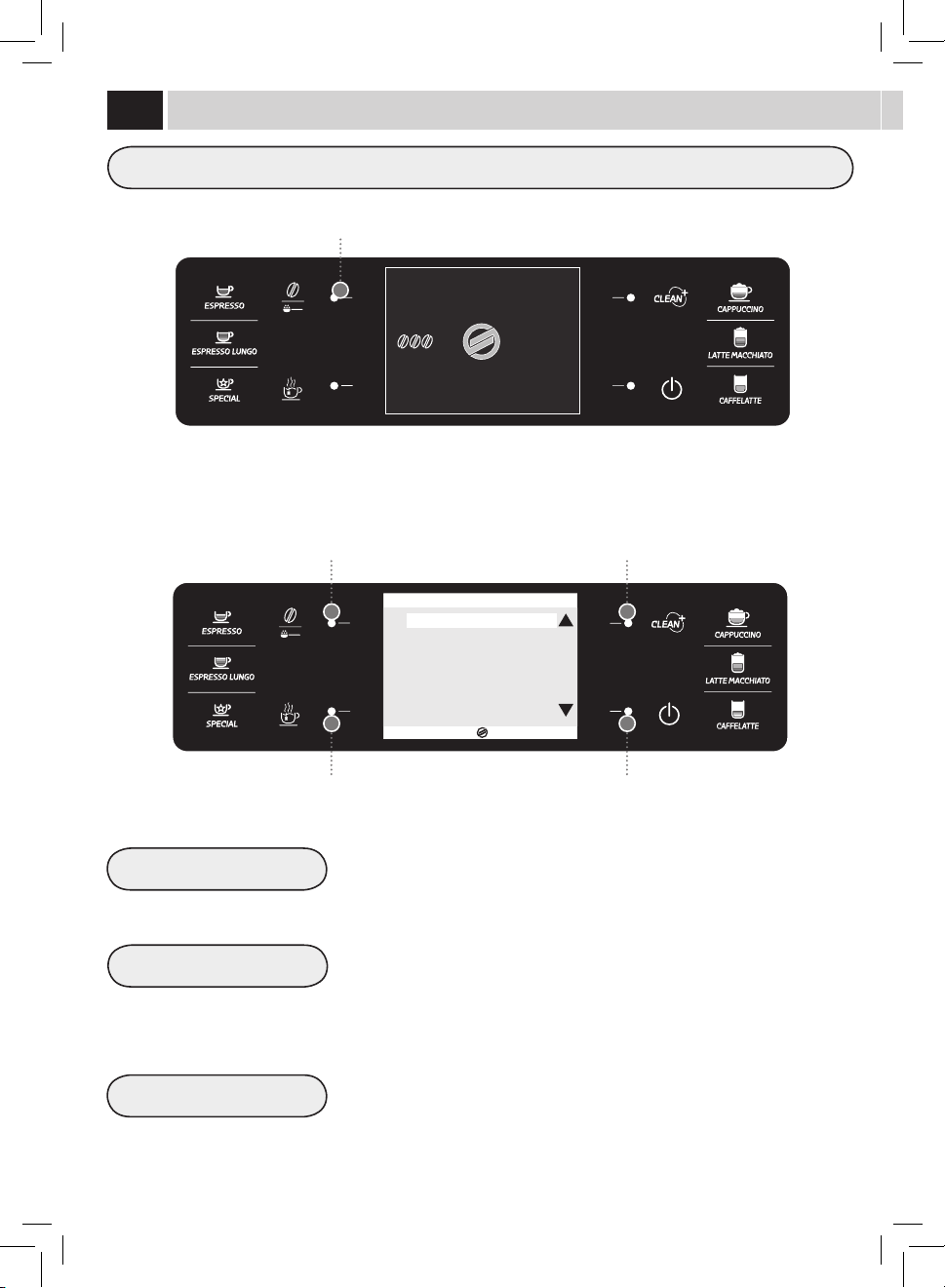
Themachineallowscustomizingthebeveragebrewingsettingsaccordingtotheselecteduser.
Button to select the user settings
Itispossibletoselectauseronlyaftercreatingitbymeansofthespecialmenu.Selecttheuserbeforebrewingthecoeeorthedesired
beverage.
Press"USERMENU".
Scrolling/Selection button
Scrolling/Selection button
Exit button
CREATE NEW USER
DELETE USER
Thisfunctionallowsthecreationofanewuser.Thisnewly-createduserwillbeableto
program all the beverages according to personal taste.
Thisfunctionallowsdeletinganolduserandrelatedsettings.
Note: Once deleted, settings cannot be recovered. The icon will be stored in the
once again be available for a new user.
Selection/conrmationbutton
17/05/09
04:17 pm
USER
MENU
BEVERAGE
MENU
SETTINGS
MENU
SELECTED
USER
ESC
OK
CREATE NEW USER
DELETE USER
USER EDIT
3. USER SETTINGS MENU
USer menU
USER EDIT
Thisfunctionallowsyoutoeditthesettingsofanypreviouslycreatedusers.
Note: Once edited, settings cannot be restored.
23
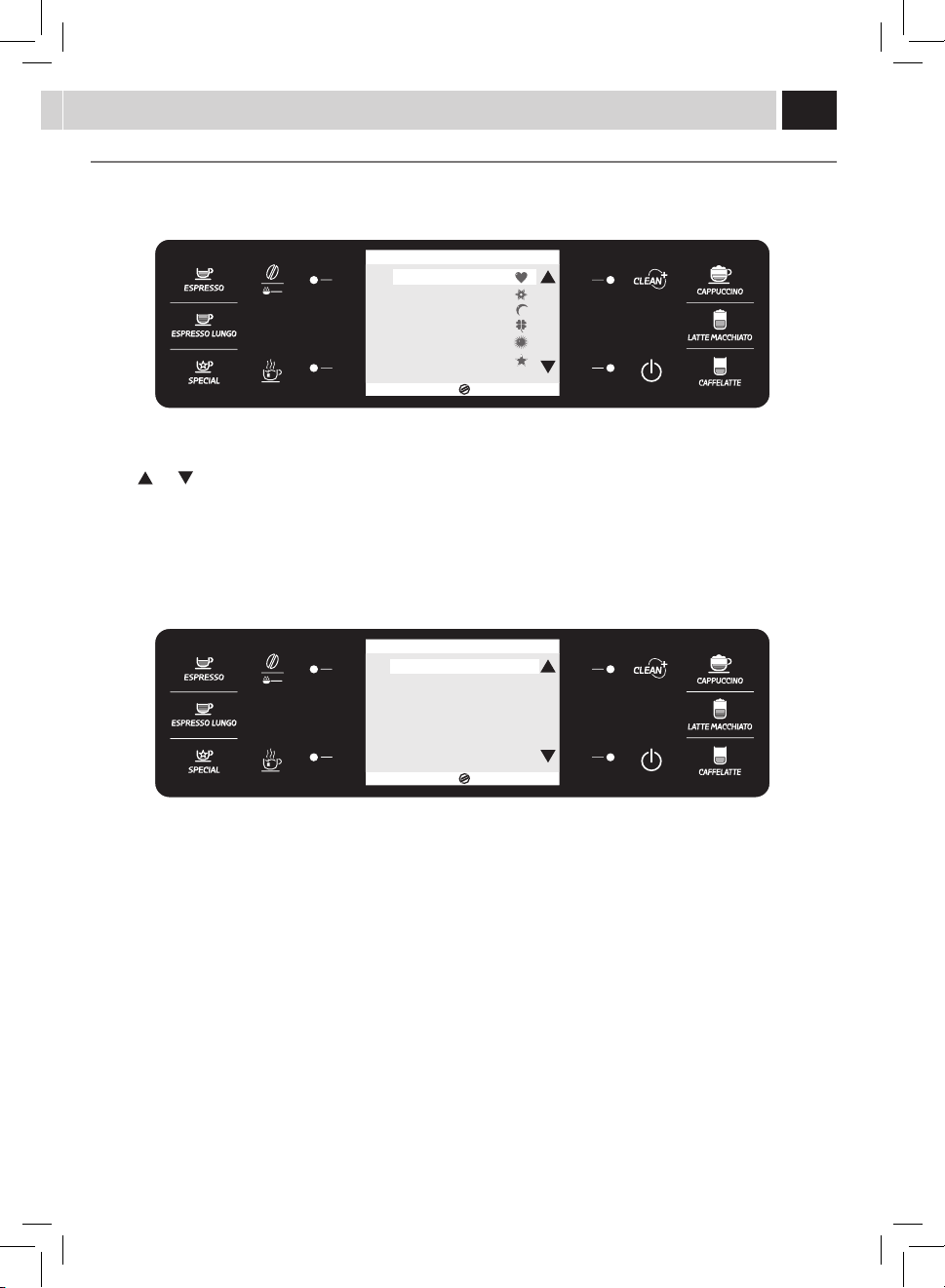
Only one icon can be used for each user.
Use the (
) or ( )buttonstoselectaniconandpressthe(OK)buttontoconrm.
Note: The icons already in use are marked with the same symbol having a lighter colour.
Theuserhasnowbeencreated.
ESC
OK
3.1. CREATE NEW USER
USER1
USER2
USER3
USER4
USER5
USER6
ESC
OK
3.3.1. USER EDIT
EDIT NAME USER1
FINGERPRINT ENABLE OFF
NAME ENABLE OFF
CREATING A NEW USER
Usethefollowinginstructionstocreateusersfromthemachine.
Youwillthenbeaskedtocustomizethenewlycreateduser.
Todothis,entertheUserEditpage.Tocustomizetheuser,refertothe"USEREDIT"section.Atthispointthemachineswitchestostep(3)at
page 24.
Toexitwithoutchanginganyotherparameters,pressthe"ESC"buttonrepeatedlyuntilthehomepageisdisplayed.
Note: If you exit without customizing the newly created user, you will not be allowed to use the "DIGITAL ID" function to
select this user.
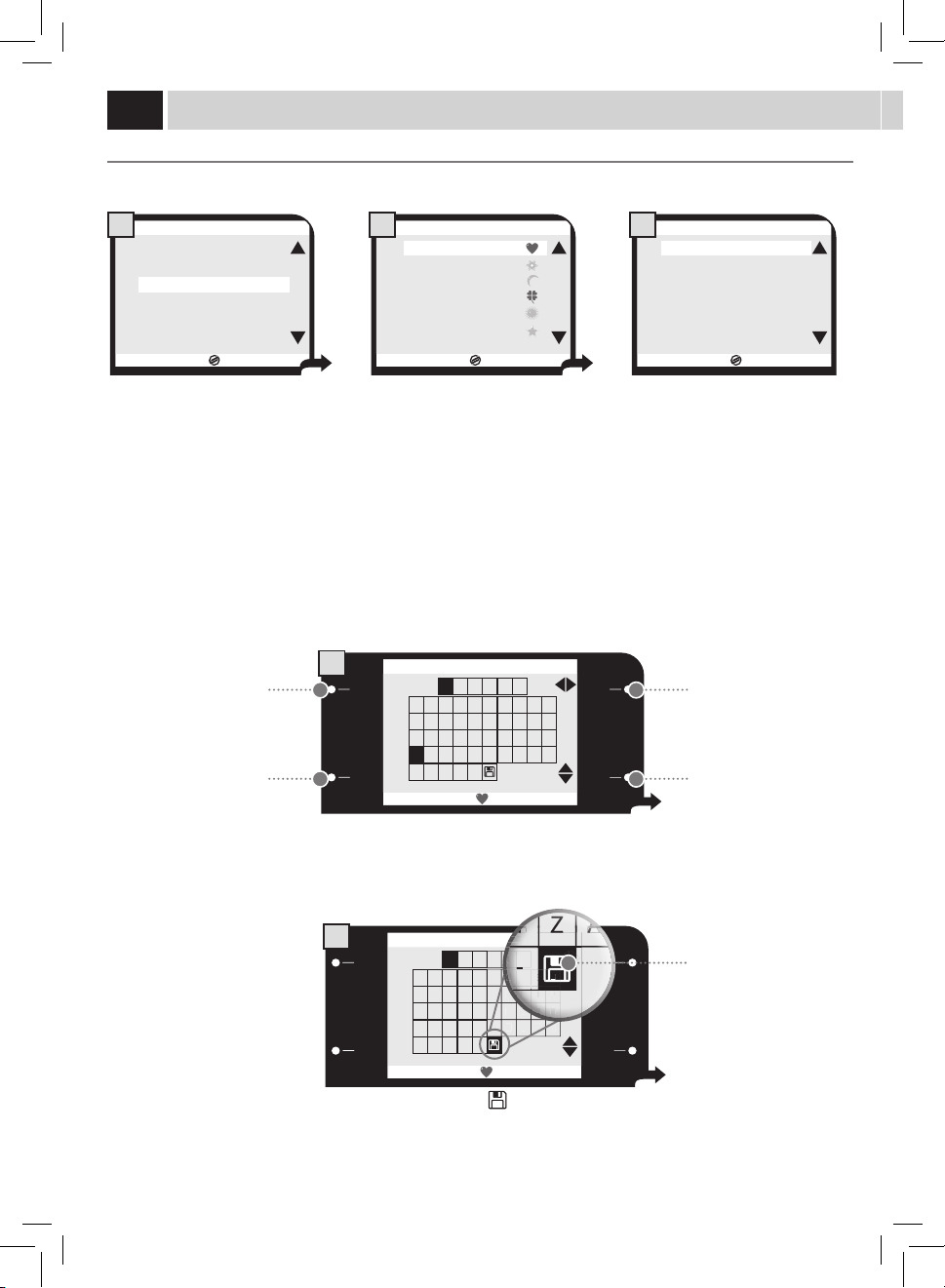
Everysinglebeveragecanbeprogrammedforeachicon.Theprogrammingfunctionallowstocustomizealltheparametersmanagedby
the"BEVERAGEMENU".
24
USER EDIT
Usethefollowinginstructionstoedittheproleofeverypreviouslycreateduser.
EDIT NAME
Thisfunctionallowsyoutoeditthenameassociatedtotheicon.Ifthe"NAMEENABLE"functionisactivated,thenamecanbedisplayed
instead of the icon.
ESC
OK
CREATE NEW USER
DELETE USER
USER EDIT
3. USER SETTINGS MENU
1
ESC
OK
3.3.1.1. EDIT NAME
0 1 2 3 4 5 6 7 8 9
A B C
U S E R 1
D E F G H I J
K L M N O P Q R S T
U V W X Y Z
Ã Ë Õ Ü
Æ Ñ Ø -
1
ESC
OK
3.3.1.1. EDIT NAME
0 1 2 3 4 5 6 7 8 9
A B C
U S E R 1
D E F G H I J
K L M N O P Q R S T
U V W X Y Z
Ã Ë Õ Ü
Æ Ñ Ø -
2
ESC
OK
3.3. USER EDIT
USER1
USER2
USER3
USER4
USER5
USER6
2
ESC
OK
3.3.1. USER EDIT
EDIT NAME USER1
FINGERPRINT ENABLE OFF
NAME ENABLE OFF
3
Selectthefunctionandpressthe"OK"
button.
Select the letter or the number by using the buttons on
theright,thenusethe"OK"buttontosaveitandgotothe
followingbox.
Press"ESC"toexitwithoutmakinganychanges.
Attheend,selectthesymbol"
"andpress"OK"tosaveand
exit.
Select the user to be edited and press
the"OK"button.
Nowyoucanedittheuser
3.3.1.1. EDIT NAME
H
S
I
J
S
T
6
7
8
1
8
8
8
9
8
YY
Y
YY
Y
YY
Y
YY
Y
YY
Y
YY
Y
ZZ
Z
ZZ
Z
ZZ
Z
ZZ
Z
ZZ
Z
ZZ
Z
9
ÃÃ
Ã
ÃÃ
Ã
ÃÃ
Ã
ÃÃ
Ã
ÃÃ
Ã
--
-
--
-
3.3.1.1. EDIT NAME
6
1
G
R
S
S
Button for character
horizontal scrolling/selection.
Exit Button.
Button for character vertical
scrolling/selection.
Icon to save and exit.
Buttontoconrmthe
character and go to the
followingcharacter.
USer menU
25
3
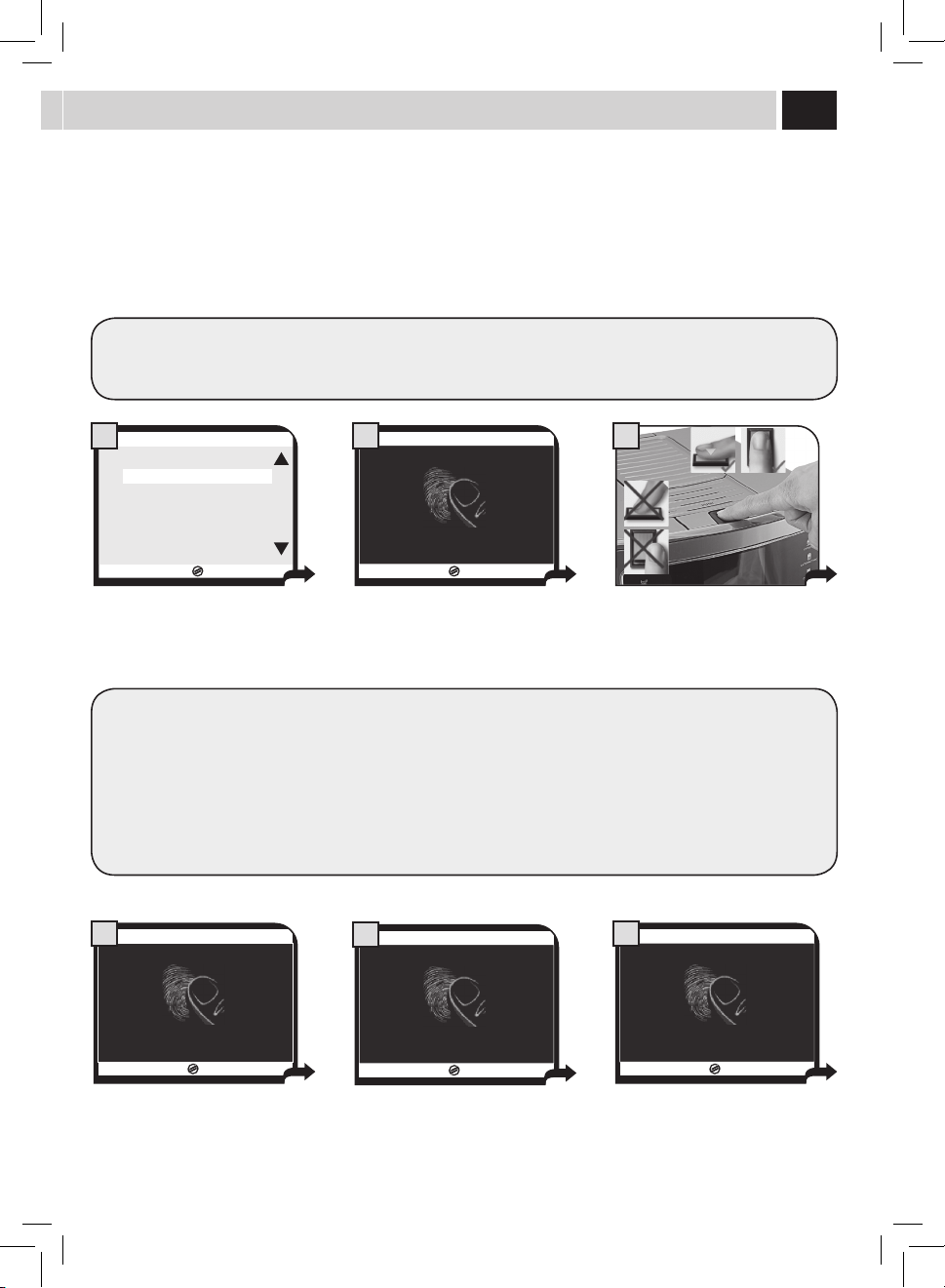
FINGERPRINT ENABLE
Thisfunctionallowsyoutoactivateandchangethengerprintfortheuserselection.
Note: Before starting the Fingerprint Enable procedure make sure that the sensor is clean (see the "Cleaning and
Maintenance" section). Wash your hands thoroughly and make sure they are properly hydrated and not greasy. Do not use
your thumb.
ESC
OK
USER1
OFF
OFF
3.3.1. USER EDIT
EDIT NAME
FINGERPRINT ENABLE
NAME ENABLE
1
17/05/09
0%
PLEASE PUT FINGER
3.3.1. EDIT USER
2
17/05/09
33%
PLEASE PUT FINGER
3.3.1. EDIT USER
5
17/05/09
0%
PLEASE REMOVE FINGER
3.3.1. EDIT USER
4
17/05/09
33%
PLEASE REMOVE FINGER
3.3.1. EDIT USER
6
Selectthefunctionandpressthe"OK"
button.
The machine requests you to put your
ngeronthesensortoperformthe
rstreading.
The machine requests you to put the
previouslyusedngeronthesensor
to perform the second reading.
Removeyourngerfromthesensor
whenrequested.Wait....
Removeyourngerfromthesensor
whenrequested.Wait....
Putyourngerrmlyonthesensor.
Warning: Sometimes the system may not recognize or may have diffi culties in recognizing the user's fi ngerprints, in
particular if these are not well-defi ned (dry skin or skin altered by natural causes) or damaged (e.g. by heavy manual
activities). This does not mean that the system does not work, but is due to its accuracy and precision, which do not
accept or process fi ngerprints without the minimum quality requirements.
Thanks to its precision, the system avoids improper fi ngerprint reading and prevents di erent users' fi ngerprints
reading from superimposing each other.
The machine will request you to put your fi nger on the sensor for three times in order to widen the fi ngerprint reading
area and improve the system reliability.
26
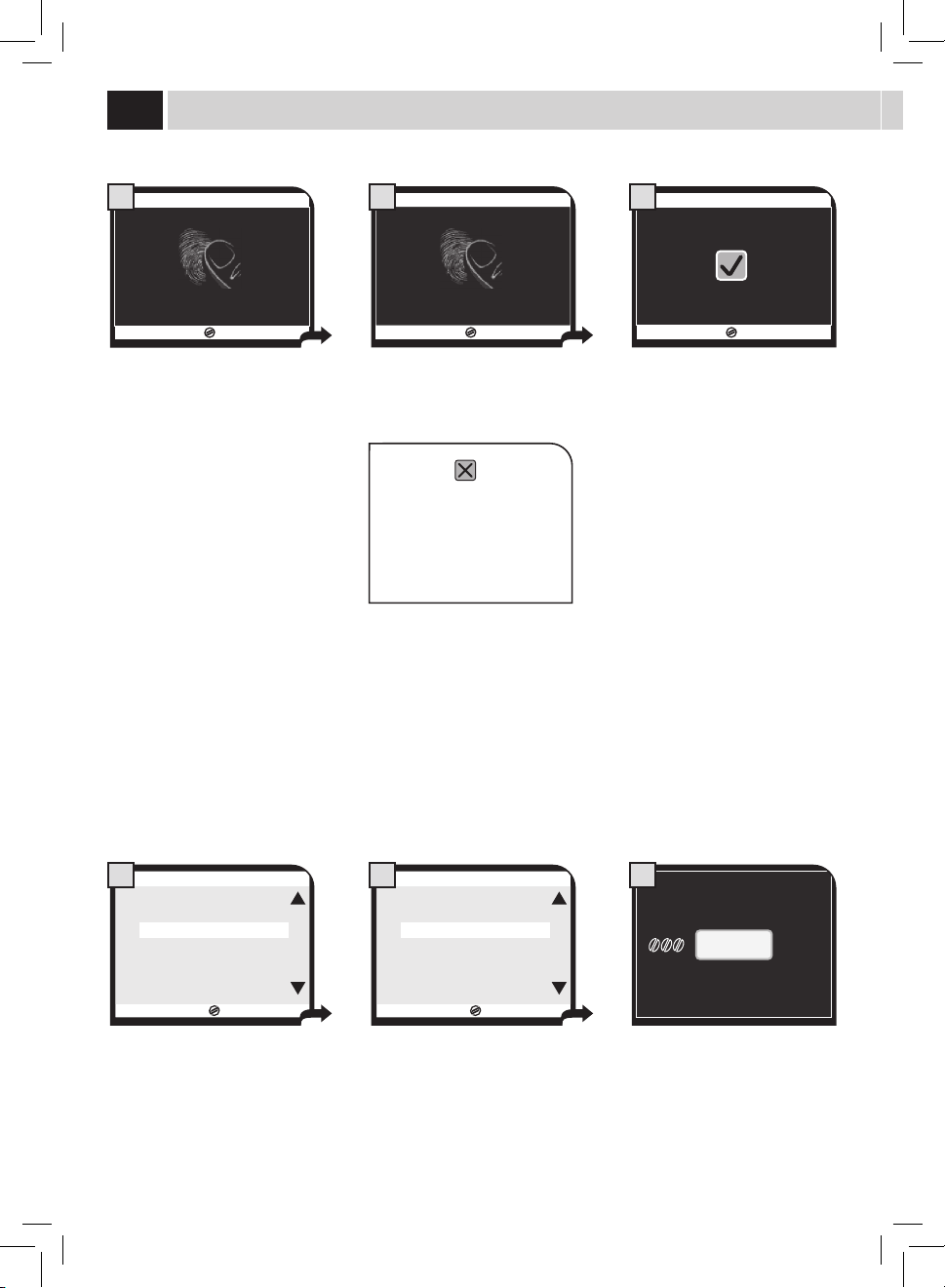
NAME ENABLE
Thisfunctionallowsyoutodisplaythenameinsteadoftheicon.
ESC
OK
3.3.1. USER EDIT
EDIT NAME USER1
FINGERPRINT ENABLE OFF
NAME ENABLE OFF
1
ESC
OK
3.3.1.3. USER EDIT
NAME ENABLE
OFF
ON
2
USER1
17/05/09
04:17 pm
USER
MENU
BEVERAGE
MENU
SETTINGS
MENU
SELECTED
USER
3
Selectthefunctionandpressthe"OK"
button.
Select"ON"toactivatethefunction. When the function is active, the name
willbedisplayedinsteadoftheicon.
3.3.1. USER EDIT
9
Only the saved fi nger can then be used to select your user. To use another fi nger, perform a new Fingerprint Enable
procedure.
Themachineconrmsthatalldata
have been read and correctly saved.
If the symbol
is displayed,
you have to perform the
procedure again. In this case it
issuggestedtochangenger
for the Fingerprint Enable
procedure.
17/05/09
66%
PLEASE PUT FINGER
3.3.1. EDIT USER
7
The machine requests you to put on
thesensorthesamengeryouusedfor
theprevioustworeadingsinorderto
perform the third reading.
17/05/09
PLEASE REMOVE FINGER
66%
3.3.1. EDIT USER
8
Removeyourngerfromthesensor
whenrequested.Wait....
USer menU
27
Any created users can be deleted using this function.
Whendeletingauser,alltheassociatedparametersaredeleted.Theiconisthenavailableforanewuser.
Use the ( ) or ( )buttonstoselectaniconandpressthe(OK)buttontoconrm.
ESC
OK
USER1
USER2
USER3
USER4
USER5
USER6
3.2. DELETE USER
DELETE USER
Usethefollowinginstructionstocreateanddeleteusersfromthemachine.

28
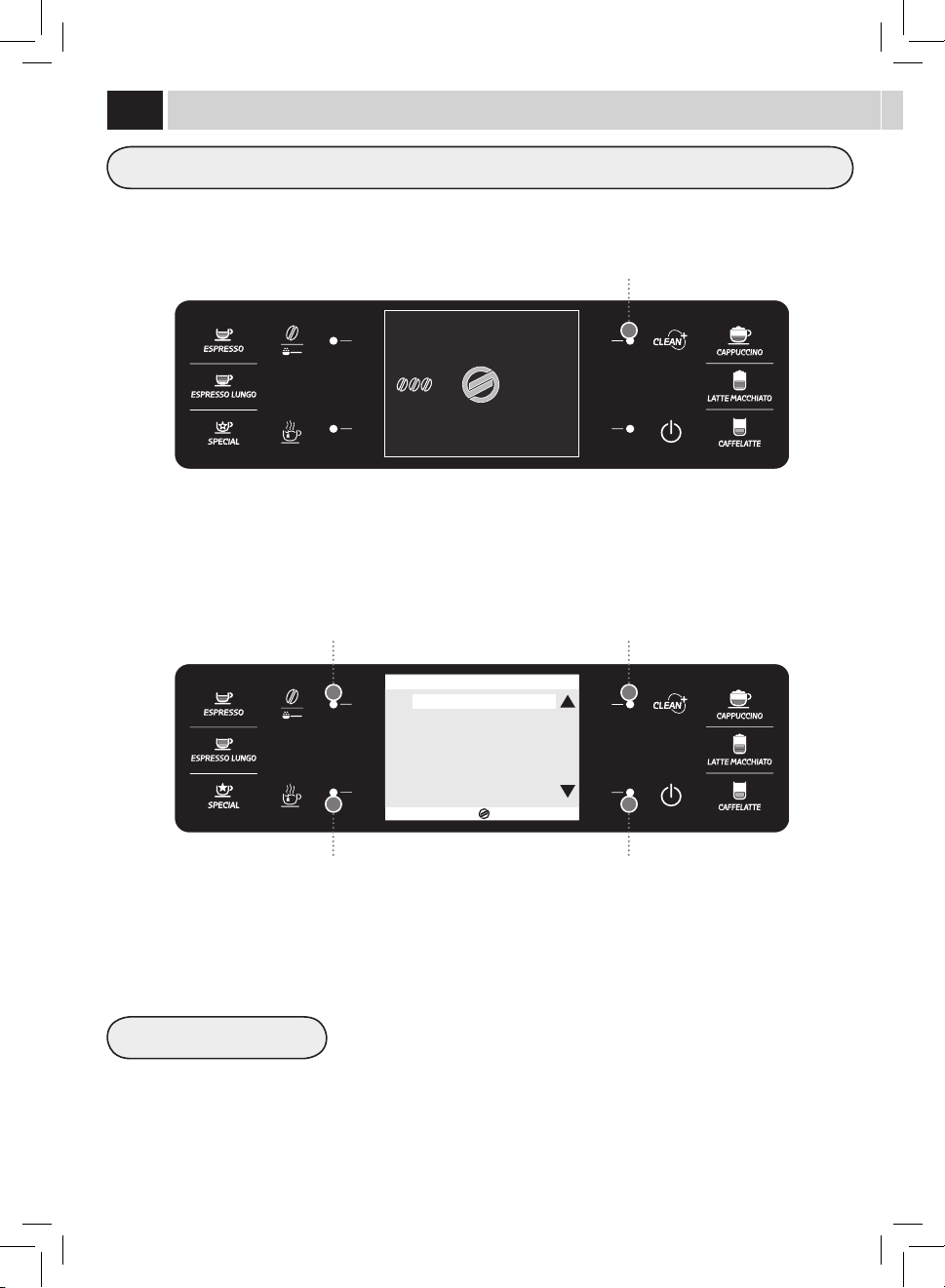
Themachineallowsyoutocustomizethebeveragesettingsforthevarioususers.
RESTORE DEFAULT SETTINGS
Button to select the beverage settings
Scrolling/Selection button
Scrolling/Selection buttonSelection/conrmationbutton
Exit button
For each beverage it is possible to reset the original factory settings. After selection of this
function, the customized settings are deleted.
17/05/09
04:17 pm
USER
MENU
BEVERAGE
MENU
SETTINGS
MENU
SELECTED
USER
ESC
OK
ESPRESSO
LONG ESPRESSO
CAPPUCCINO
LATTE MACCHIATO
CAFFELATTE
HOT WATER
SPECIAL BEVERAGES
1. BEVERAGE MENU
BeVeraGe menU
29
COFFEE AMOUNT
PREBREWING
COFFEE TEMPERATURE
COFFEE LENGTH
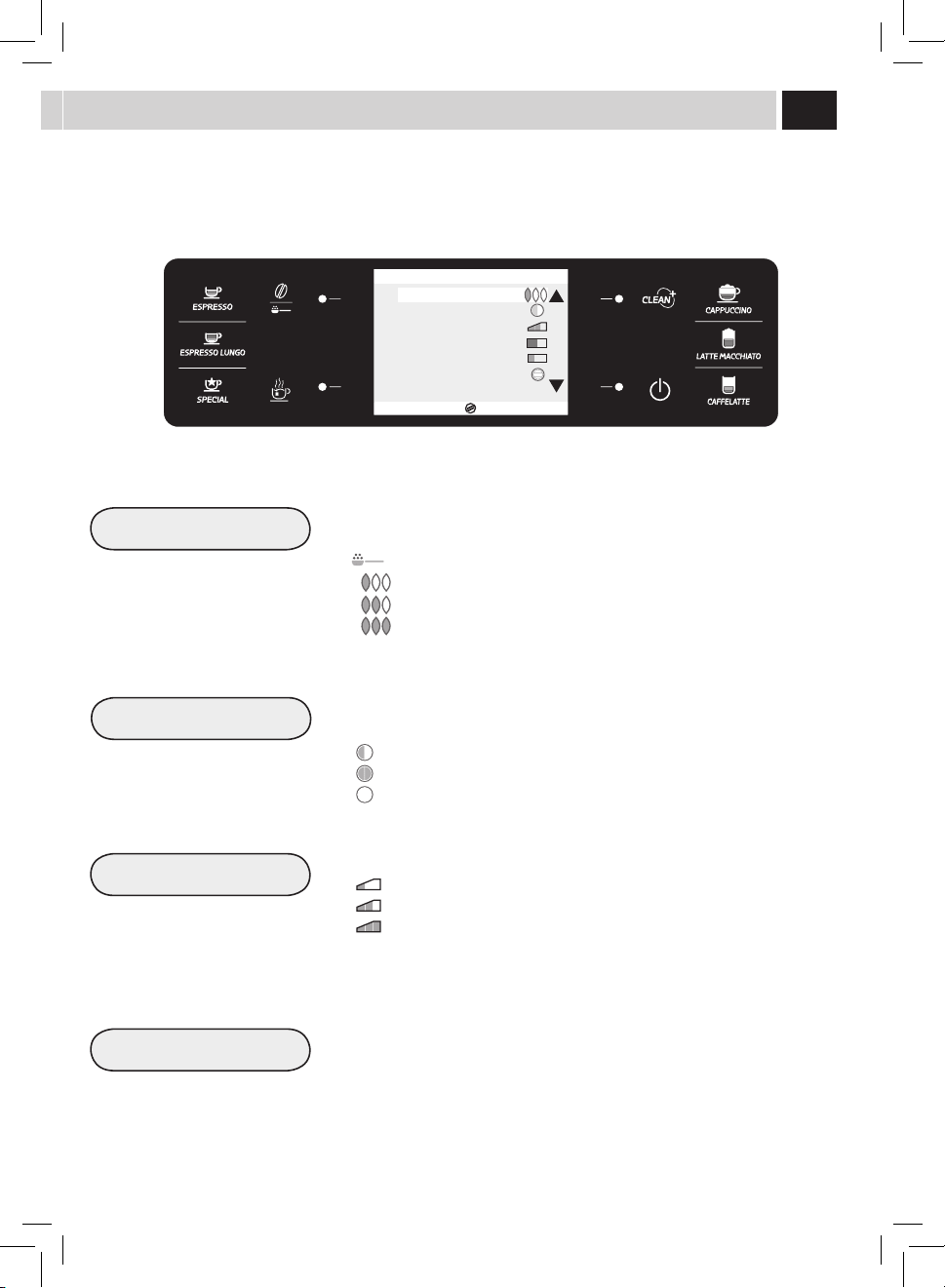
Inthiscasewelookattheprogrammingofacustomizedcappuccinoforaspecicselecteduser.Whenprogrammingthebrewingofan
espressoorlongcoee,themilkmanagingoptionsarenotshown.
Thissectionallowsyoutoprogramthequantityofcoeetogrindforthebeverage
brewing:thissettingwillaectthecoeearoma.
=Thebeverageisbrewedbyusingthepre-groundcoee
= mild dose
= medium dose
= strong dose
Prebrewing:Coeeisslightlydampenedbeforebrewingsoastobringoutthefullaroma
ofthecoeewhichacquiresanexcellenttaste.
:prewbrewingfunctionisactive.
:prebrewingfunctionislongerinordertobringoutthecoeetaste.
:prewbrewingfunctionisnotperformed.
Thissectionallowsyoutoprogramthetemperatureforcoeebrewing.
:lowtemperature.
: medium temperature.
: high temperature.
Thissectionallowstoprogramthequantityofwatertobeusedforeachselected
beverage.Thestripallowsyoutodetermineexactlythequantityofwaterforpreparing
co ee.
ESC
OK
COFFEE AMOUNT
PREBREWING
COFFEE TEMPERATURE
COFFEE LENGTH
MILK LENGTH
MILK FOAM
RESTORE DEFAULT SETTINGS
1.3. CAPPUCCINO
30
MILK LENGTH
WATER LENGTH
MILK FOAM
Thissectionallowsyoutoprogramthequantityofmilkforeachselectedbeverage.The
stripallowsyoutodetermineexactlythequantityofmilktobedispensed.
Thissectionallowsyoutoprogramthequantityofwatertobedispensedwhenpressing
thehotwaterbutton.Thestripallowsyoutodetermineexactlythequantityofwaterto
be dispensed.
Thissectionallowsyoutoprogramthemilkfrothingmethod.
= minimum frothing
= medium frothing
= maximum frothing
= no frothing (only hot milk dispensing)
Note:Milkfrothingdeactivationisnotallowedforallproducts.
When the frothing option is disabled, the temperature of the dispensed milk might be
lower.Thebeveragecanbethenwarmedupbydispensingsteamfromthesteamwand
(see page 19).
ESC
OK
COFFEE AMOUNT
PREBREWING
COFFEE TEMPERATURE
COFFEE LENGTH
MILK LENGTH
MILK FOAM
RESTORE DEFAULT SETTINGS
1.3. CAPPUCCINO
ESC
OK
1.6. HOT WATER
WATER LENGTH
RESTORE DEFAULT SETTINGS
BeVeraGe menU
31
17/05/09
04:17 pm
USER
MENU
BEVERAGE
MENU
SETTINGS
MENU
SELECTED
USER
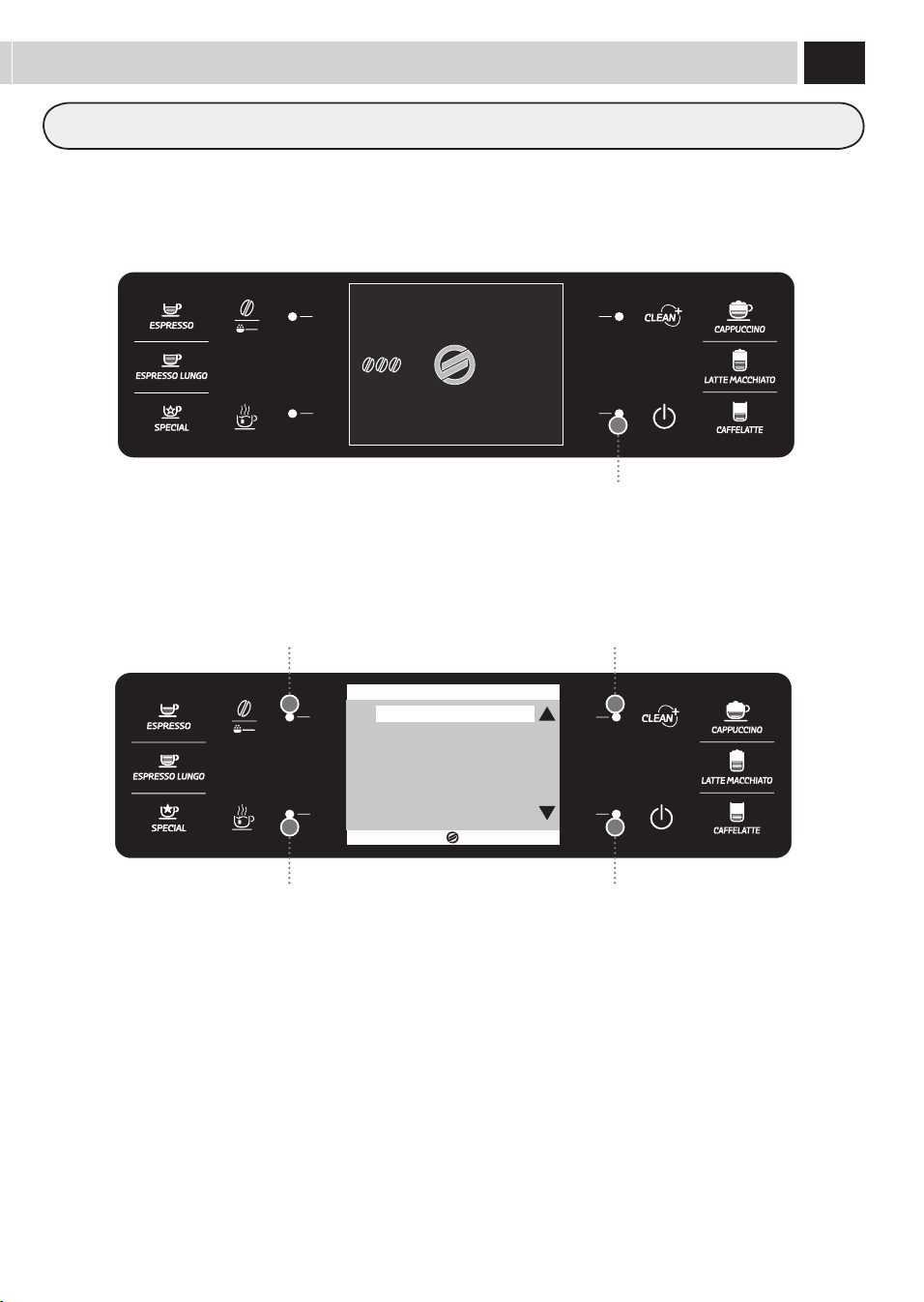
Themachineallowsyoutocustomizethemachinesettings.Thesesettingsaregeneralforallusers.
Button to select the machine settings
ESC
OK
2. MACHINE SETTINGS
GENERAL SETTINGS
DISPLAY SETTINGS
CALENDAR SETTINGS
WATER SETTINGS
MAINTENANCE SETTINGS
FACTORY SETTINGS
Scrolling/Selection button
Scrolling/Selection button
Exit button
Selection/conrmationbutton
maCHine menU
32
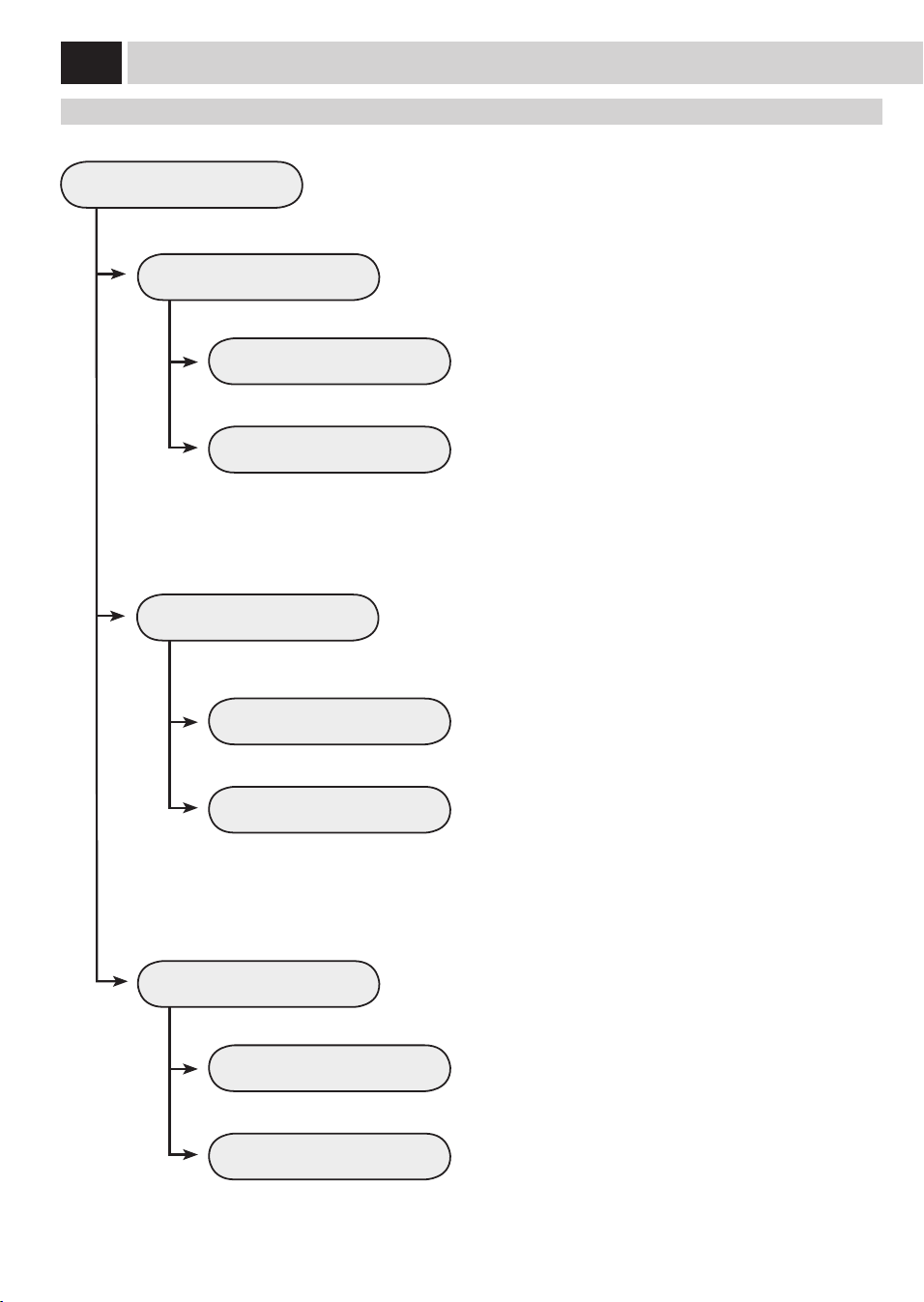
GENERAL SETTINGS
CUP WARMER
ACOUSTIC ALARMS
OFF
OFF
ON
ON
To change the machine operation settings.
Thisfunctionallowsyoutosettheoperationofthecup-warmingsurface
located on the upper part of the machine.
This function activates/deactivates the acoustic alarms.
Tokeepthecup-warmingsurfacealwayso.
To deactivate the acoustic alarms
Tokeepthecup-warmingsurfacealwayson.
To activate the acoustic alarms
General SettinGS
ECOMODE FUNCTION
Thisfunctionenablesallowsyoutochoosehowtheboilersonthemachine
are activated, to promote energy saving.
OFF
ON
This function activates only the coee boiler each time the
machine starts up. The machine saves energy but takes longer to
dispense milk-based beverages.
This function activates all the boilers each time the machine
starts up to be immediately able to dispense all kinds of
beverages. This function entails greater energy consumption.
maCHine menU
33
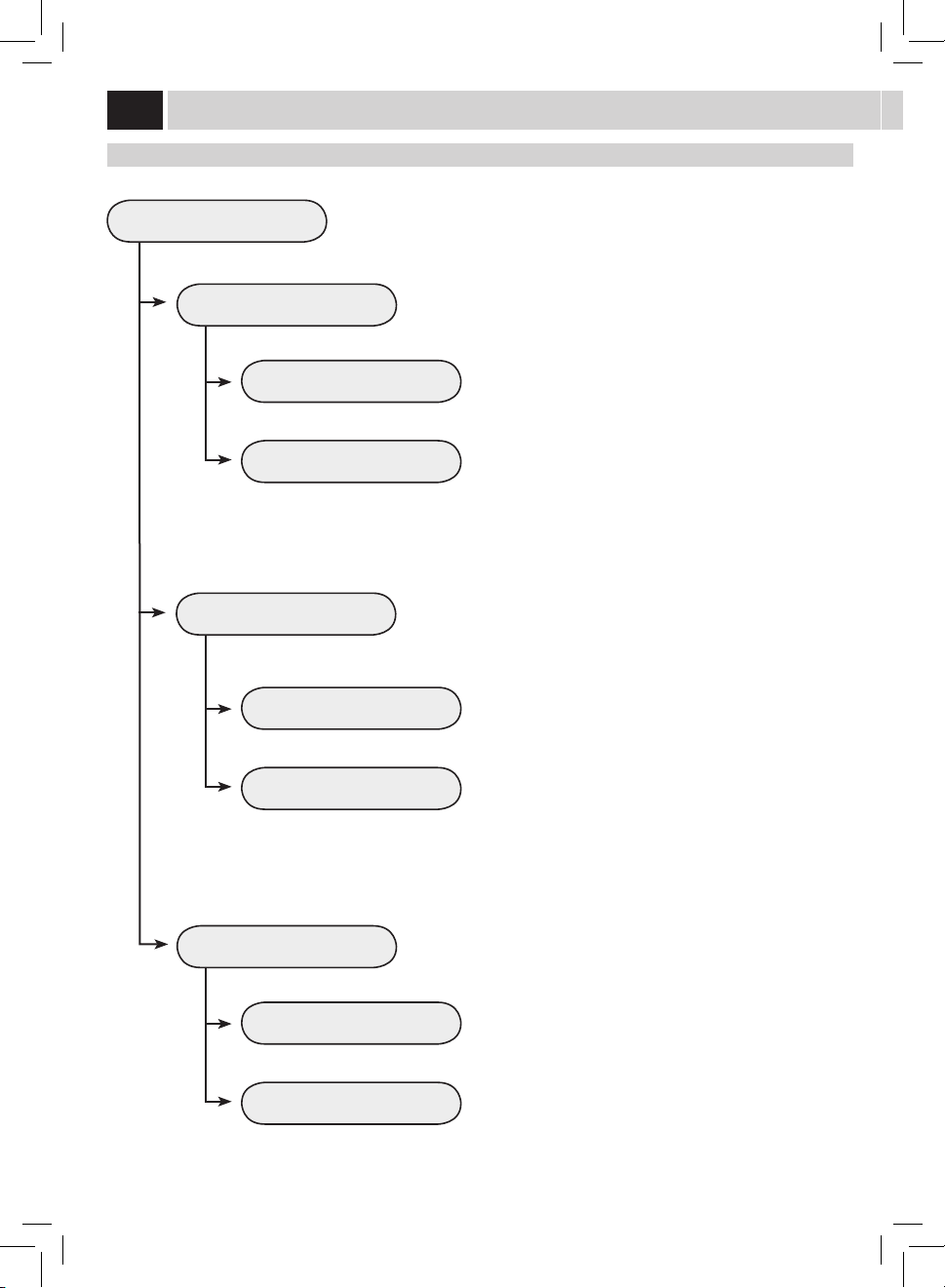
DISPLAY SETTINGS
LANGUAGE
BRIGHTNESS
ENGLISH
Thismenuallowsyoutosetthemenulanguageandthedisplaycontrast.
This setting is of fundamental importance for correctly adjusting the
parametersofthemachineaccordingtothecountrywherethemachineisused.
To set the correct display contrast according to the room illumination.
The currently selected language is displayed.
diSPlaY SettinGS
34
CALENDAR SETTINGS
TIME
DATE
HOUR
YEAR
MINUTES
MONTH
DAY
FORMAT
FORMAT
Thismenuallowssettingallthetimeandcalendarfunctionsandtheirrelatedfunctions.
This setting is fundamental for the correct operation of all those functions
requiring precise time settings.
This setting is fundamental for the correct operation of all those functions
requiring precise date settings.
To set the current hour.
To set the current year.
To set the minutes for the current hour.
To set the current month.
To set the current day.
To set the display format for the time. This can be set either in
the24hortheAM/PMformat.Allchangeswillbeautomatically
applied to all those functions displaying time format.
To set the display format for the date according to personal
preference.Allchangeswillbeautomaticallyappliedtoallthose
functions displaying date format.
Calendar SettinGS
STAND-BY 60
To set the time interval for the machine to go into stand-by mode after the
lastbrewing.The default time value is "after 1 hour".
maCHine menU
15
30
60
180
Once the set time has elapsed, the machine goes into stand-by
mode.
Press any button to turn the machine on again. After performing
thefunctiondiagnosticsandthewarm-upphase,themachineis
again ready for use.
35
CALENDAR SETTINGS
POWER-ON TIMER
TIMER 1 00:00
TIMER 2 00:00
Thismenuallowsyoutoprogrammethemachinepower-ontimes,according
toyourneeds.Themachineperformsthisfunctiononlyifthepowerbutton
isswitchedtoon.
Itispossibletoset3dierentpower-ontimes,whichcanbemanaged
independently.Forreasonsofbrevity,onlythe"TIMER1"settingisdescribed
below.Thesamesettingprocedureappliesfortheothertimers.
Note: The switch-o is managed through the "STAND-BY"
programming.
Tosetthehourforpower-on.
Thismenuallowsyoutoadjustandsettherstpower-ontime.
Thismenuallowsyoutoadjustandsetthesecondpower-on
time.
Thismenuallowsyoutoadjustandsetthethirdpower-ontime.
Tosettheminutesofthepower-ontime.
Tosetinwhichdaysoftheweekshouldthetimerbe
active.
Select a day using the ( ) ro ( ) buttons and
conrmbypressingthe(OK)buttontomodifythe
setting:
ON = Time activated
OFF = Time deactivated
ESC
OK
2.3.4.1.3 TIMER 1 00:00
MONDAY
TUESDAY
WEDNESDAY
THURSDAY
FRIDAY
SATURDAY
SUNDAY
OFF
OFF
OFF
OFF
OFF
OFF
OFF
TIMER 3 00:00
HOUR 00
MINUTES 00
DAY OF THE WEEK
36
WATER SETTINGS
WATER HARDNESS
ENABLE FILTER
ACTIVATE FILTER
Thismenuallowssettingcorrectwaterparametersforcoeebrewing.
Tochangethemachinewaterhardnesssetting.
The"WaterHardness"functionallowsadjustingthemachinetothelevelof
hardnessofthewaterused.Themachinewillthenrequestdescalingatthe
right moment.
Measure water hardness as shown on page 5.
Toactivate/deactivatethewarningsignaltoreplacethewaterlter.By
activatingthisfunction,themachinenotiestheuserwhenthewaterlter
needs to be replaced.
OFF: Warning disabled.
ON:Warningenabled(thisvalueisautomaticallysetwhenthelteris
activated).
Toactivatethelterafteritsinstallationorreplacement.Refertotherelevant
sectiononpage7tocorrectlyinstalland/orreplacethelter.
Water SettinGS
maCHine menU
37
MAINTENANCE SETTINGS
PRODUCT COUNTERS
DESCALING CYCLE
BREW UNIT CLEANING CYCLE
CARAFE WASH CYCLE
CARAFE AUTO CLEAN
Thismenuallowssettingallthefunctionsforcorrectmachinemaintenance
Thisfunctionshowshowmanyproductshavebeenbrewedforeverysingle
type of coee since the last reset.
Thisfunctionenablesthedescalingcycle(themachineshowshowmany
litres can be dispensed before descaling) (See page 39).
Thisfunctionenablesthewashcycleforthebrewgroup(Seepage38).
This function enables automatic cleaning of the carafe after each dispensing
of milk-based products.
maintenanCe SettinGS
OFF
ON
The self-cleaning function is disabled.
The self-cleaning function is enabled.
Thisfunctionenablesthewashcycleforthecarafeusedforpreparingmilk
beverages (See page 42).
Note: This wash cycle is fundamental for a correct maintenance of
the carafe.
FACTORY SETTINGS
Thisfunctionallowsyoutorestoreallfactorysettings.
Note: By restoring the factory settings, all the personal parameters
are lost.
38
9
4 6
BREW GROUP CLEANING CYCLE
Torinsethebrewgroup,simplycleanwithwaterasshownonpage46.Thiswashcyclecompletesthemaintenanceprocessofthebrew
group.Werecommendcarryingoutthiscycleonamonthlybasisorevery500coeesusingtheSaecobrewgroupcleaningtablets,which
can be purchased from Saeco Customer Service or an authorized retailer.
WASH CYCLES CANNOT BE STOPPED.
DO NOT LEAVE THE MACHINE UNATTENDED DURING THIS OPERATION.
TurntheSBSdialallthewaytotheleft,counter-clockwise,(seepage11)beforestartingthecycle.
ESC
OK
2.5. MAINTENANCE SETTINGS
PRODUCT COUNTERS
DESCALING CYCLE 59(I)
BREW GROUP CLEANING CYCLE
CARAFE WASH CYCLE
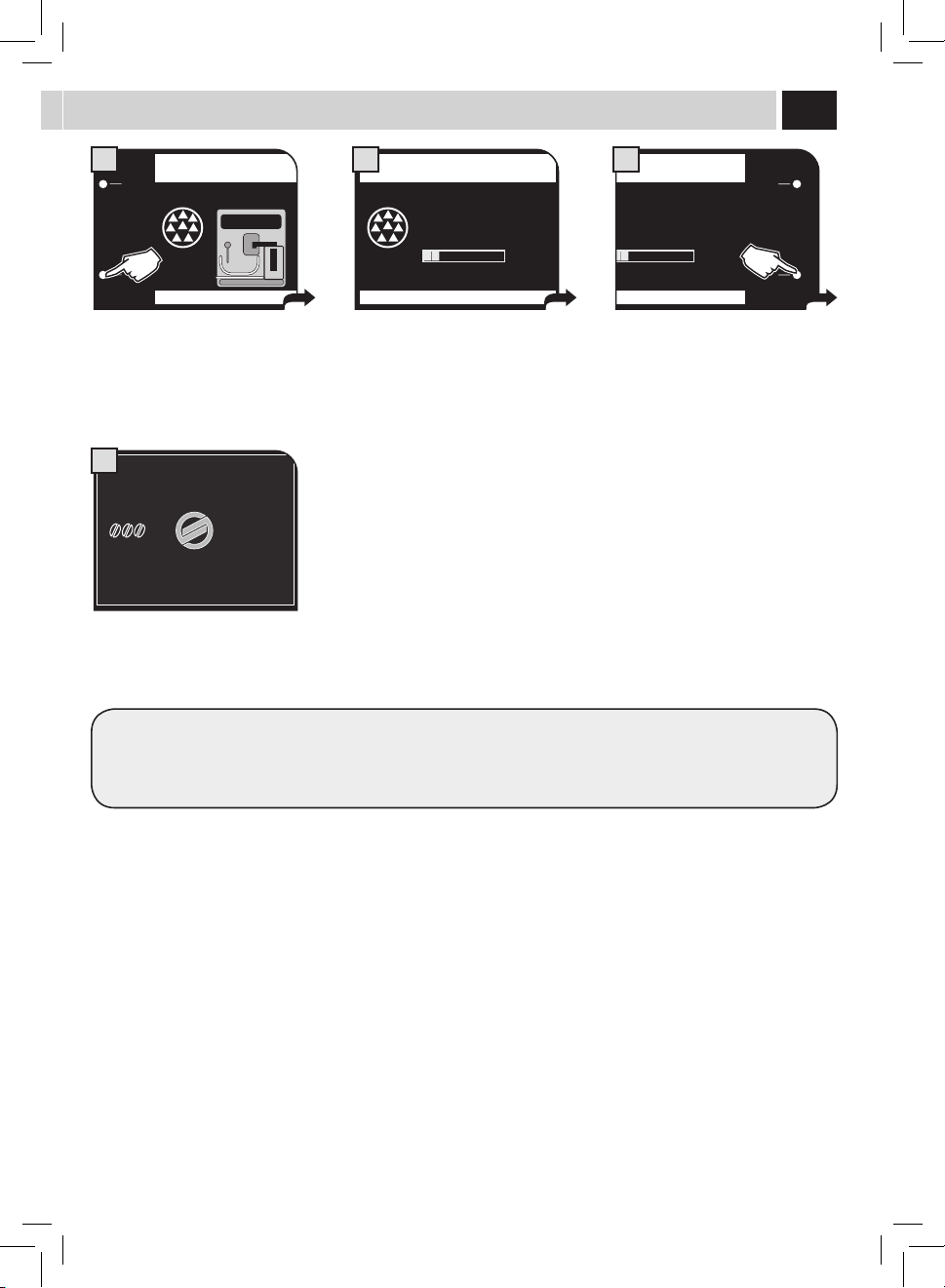
CARAFE AUTO CLEAN ON
1
REFILL WATER TANK
OK
3
ESC
OK
2.5.3. MAINTENANCE SETTINGS
PERFORM BREW GROUP
CLEANING CYCLE?
2
INSERT BREW GROUP
CLEANING TABLET
OK
5
Select the menu option.
Pressthe"OK"buttontoconrm.
After placing the container, press the
"OK"button.
Fillthewatertankwithfreshdrinking
water,andthenpressthe"OK"button.
At the end of the cycle, remove the
container and empty it appropriately.
Pressthe"OK"buttontoconrm.
Afterinsertingthetablet,pressthe"OK"
button.
Thecleaningcycleforthebrewgroupis
performed automatically.
After the cycle, return the SBS dial to the desired position (see page 11).
PLACE A CUP UNDER
COFFEE SUPPLYING
OK
7
BREW GROUP CLEANING CYCLE
8
Insert the cleaning tablet into the bypass
doser.
Place a container under the co ee
dispensing spout.
maintenanCe
39
ESC
OK
2.5. MAINTENANCE SETTINGS
PRODUCT COUNTERS
DESCALING CYCLE 59(I)
BREW GROUP CLEANING CYCLE
CARAFE WASH CYCLE
CARAFE AUTO CLEAN ON
1
REFILL WATER TANK
WITH DESCALING SOLUTION
OK
3
ESC
OK
2.5.2. MAINTENANCE SETTINGS
START DESCALING
CYCLE?
2
Select the menu option.
Pressthe"OK"buttontoconrm.
Rellwatertankwithdescalingsolution.
Pressthe"OK"buttontoconrm.
Warning: Once this selection is made, the
wholecyclewillhavetobecompleted.
Pressthe"OK"buttontoconrmor"ESC"
to exit
BOILER DESCALING CYCLE MENU
Descalingshouldbeperformedevery1-2monthsorwhenthemachinedisplaystherelevantmessage.Themachinemustbeontoperform
thiscycle;itautomaticallycontrolsthedistributionofthedescalingsolution.
DO NOT LEAVE THE MACHINE UNATTENDED DURING THIS OPERATION.
WARNING! NEVER USE VINEGAR AS A DESCALING SOLUTION.
Only use the Saeco descaling solution, especially designed to respect the technical features of the machine, to ensure its performance
willnotdecreasewithtime,andforasafeandrisk-freeuse.Thedescalingsolutionistobedisposedofaccordingtothemanufacturer’s
instructions and/or regulations in force in the country of use.
Note: Before starting a descaling cycle make sure that:
1. THE INTENZA WATER FILTER HAS BEEN REMOVED
2. Acontainerofadequatesizeoracoupleofcontainersareavailableandareplacedinthepointsidentied
DESCALING AND/OR RINSE CYCLES CANNOT BE STOPPED; ALL THE PHASES MUST BE COMPLETED. IF THE MACHINE IS
SWITCHED OFF OR IN CASE OF POWER FAILURES, THE INTERRUPTED CYCLE MUST BE REPEATED FROM THE BEGINNING.
HOWEVER, CYCLES MAY BE PAUSED BY PRESSING THE "PAUSE" BUTTON; IT WILL BE POSSIBLE TO RESUME THE CYCLE AT
ANY TIME BY PRESSING THE "START" BUTTON.
TURN THE SBS DIAL ALL THE WAY TO THE LEFT, COUNTER-CLOCKWISE (SEE PAGE 11), BEFORE STARTING THE CYCLE.
Tocorrectlypreparethedescalingsolution,pourtheentirecontentoftheSaecoconcentrateddescalingsolutionintothewatertank,and
thenllthetankwithfreshwateruptotheMAXlevel.
Note: During the descaling cycle, some alarm messages may appear to allow for a correct management of the machine.
After resetting the message, always press the "START" button to resume the descaling cycle.
40
DESCALING CYCLE
PAUSE
STEP 1/2
DESCALING CYCLE...
7
DESCALING CYCLE
PAUSE
STEP 1/2
DESCALING CYCLE...
8
RINSE THE WATER TANK AND
FILL WITH FRESH WATER
9
RINSE THE WATER TANK AND
FILL WITH FRESH WATER
OK
10
EMPTY DRIP TRAY PLACED
UNDER THE BREW UNIT
OK
4
EMPTY DRIP TRAY PLACED
UNDER THE BREW UNIT
OK
11
PLACE A CONTAINER UNDER HOT
WATER & CARAFE DISP. SPOUTS
OK
6
FILL THE CARAFE HALFWAY
WITH FRESH WATER AND INSERT
IT IN BREWING POSITION
OK
5
FILL THE MILK CARAFE
WITH FRESH WATER
OK
12
The descaling cycle is activated.
Thebarshowsthecycle'sprogress.
If the containers need to be emptied,
pressthe"PAUSE"button.
Then,pressthe"START"buttonwhenthe
container has been emptied and replaced.
Attheendoftherststep,whenthe
descalingsolutionisnished,the
machinewillrequireatankrinse.
Rinsethewatertankandrellitwith
freshdrinkingwater.
Then,pressthe"OK"button.
Empty the drip tray placed under the
dispensingspout(page44-g.2)and
then replace it on the machine.
Then,pressthe"OK"button.
Empty the drip tray placed under the
dispensingspout(page44-g.2)and
replace it back onto the machine.
Then,pressthe"OK"button.
Place a container under the dispensing
spout and a container under the hot
waterwand.
Then,pressthe"OK"button.
Fillhalfthecarafewithfreshwater
(page42-g.7).
Insert the carafe and place it in the
brewingposition.Then,pressthe"OK"
button.
Completely empty the carafe (page 42 -
g.7)andllitwithfreshwater.
Insertthecarafeinthebrewingposition,
andthenpressthe"OK"button.
Adefaultamountofwaterisneededfortherinsingstep.Thisallowsperforminganidealrinsecycletoensurethebestconditionsto
brewproducts.Themessageaboutllingthetankfortherinsecycleisnormal,asitispartoftheprocedure.
maintenanCe
41
DESCALING CYCLE
PAUSE
STEP 2/2
RINSING CYCLE...
14
DESCALING CYCLE
PAUSE
STEP 2/2
RINSING CYCLE...
15
17/05/09
04:17 pm
USER
MENU
BEVERAGE
MENU
SETTINGS
MENU
SELECTED
USER
16
The rinse cycle is activated.
Thebarshowsthecycleprogress.
If the containers need to be emptied,
pressthe"PAUSE"button
Then,pressthe"START"buttonwhenthe
container has been emptied and replaced.
At the end of the second step, the
machine is ready for use.
PLACE A CONTAINER UNDER HOT
WATER & CARAFE DISP. SPOUTS
OK
13
Place a container under the dispensing
spout and a container under the hot
waterwand.
Then,pressthe"OK"button.
All the components should then be rinsed.
Afterrinsingthem,drythemcarefullyandtthembackintotheirseats.
Set the SBS dial to the desired position (see page 11).
42
5
7 8
64
9
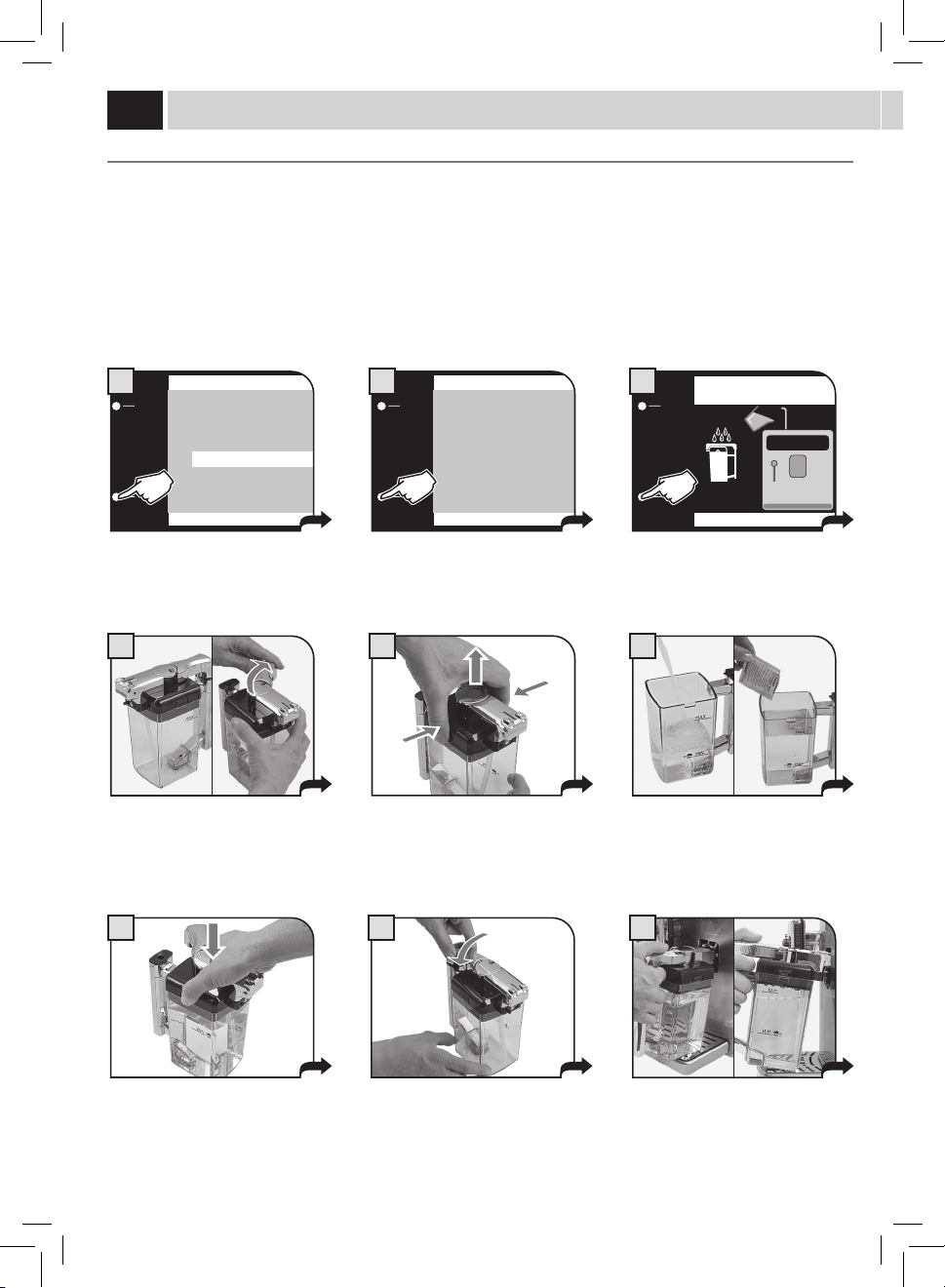
MILK CIRCUIT MAINTENANCE
Itispossibletosanitizethemilkcircuitsbycarryingoutasimpleandquickcycleallowingforathoroughcleaning.Thiswashcompletesthe
maintenanceprocessofthemilkcarafe.WerecommendcarryingoutthiscycleonamonthlybasisusingSaecocleaningsolution,whichcan
be purchased from Saeco Customer Service or an authorized dealer.
WASH CYCLES CANNOT BE STOPPED.
DO NOT LEAVE THE MACHINE UNATTENDED DURING THIS OPERATION.
The carafe must be removed from the
machine and its content emptied.
Disengage the handle by rotating it
clockwise.
Fillthecarafewithfreshdrinkingwater
uptotheMAXlevel.
Add the content of a detergent packet to
the milk carafe.
Press on the sides and lift the lid.
Place the lid back and ensure that it is
closed correctly.
ESC
OK
2.5. MAINTENANCE SETTINGS
PRODUCT COUNTERS
DESCALING CYCLE 59(I)
BREW GROUP CLEANING CYCLE
CARAFE WASH CYCLE
CARAFE AUTO CLEAN ON
1
ESC
OK
2.5.4. MAINTENANCE SETTINGS
START MILK CARAFE
WASH CYCLE?
2
REFILL WATER TANK
OK
3
Select the menu option.
Pressthe"OK"buttontoconrm.
Pressthe"OK"buttontoconrm. Fillthewatertankwithfreshdrinking
water.Pressthe"OK"buttontoconrm.
Move the handle back to its central
positiontoallowforperfectclosure.
maintenanCe
Insertthecarafeinclinedtowardsthe
front.
The carafe base should be positioned on
the hole (E) located on the drip tray.
43
12 13
18
E
11
10
C
D
A
B B
Place a large empty container under the
dispensing spout. Rotate the upper part of
the milk carafe directly above the container.
Place a large empty container under the
dispensing spout. Rotate the upper part of
the milk carafe directly above the container.
Upon completion of the cleaning
cycle,werecommendrinsingallthe
componentsunderfreshdrinkingwater.
REFILL WATER TANK
OK
16
POUR THE DETERGENT INTO THE CARAFE
AND FILL THE CARAFE WITH FRESH WATER
OK
14
FILL THE MILK CARAFE
WITH FRESH WATER
OK
17
CARAFE WASH CYCLE
STEP 1/2
WASH CYCLE…
15
CARAFE WASH CYCLE
STEP 2/2
RINSING CYCLE...
19
Attheendofthewash,llthetankwith
freshdrinkingwater.Pressthe"OK"
buttontoconrm.
Pressthe"OK"buttontoconrm.
Removethecarafe,rinseandrellitwith
freshdrinkingwater.
Pressthe"OK"buttontoconrm.
The cleaning cycle is activated.
Thebarshowsthecycleprogress.
Therinsecycleisactivated.Thebarshowsthecycleprogress.
Attheendofthecycle,themachinereturnstotheproductbrewmenupage.
At this stage the carafe holes (A) are
lowerthanthecouplings(C).
The carafe pins (B) are located at the
same height of the guides (D).
Insertthecarafebyturningittowardsthebasethrougharoundmovement(asshown
inthegure),untilitishookedtothehole(E)locatedinthedriptray.
Thecarafewillbenaturallybackin
place.
44
1
6
2 3
4 5
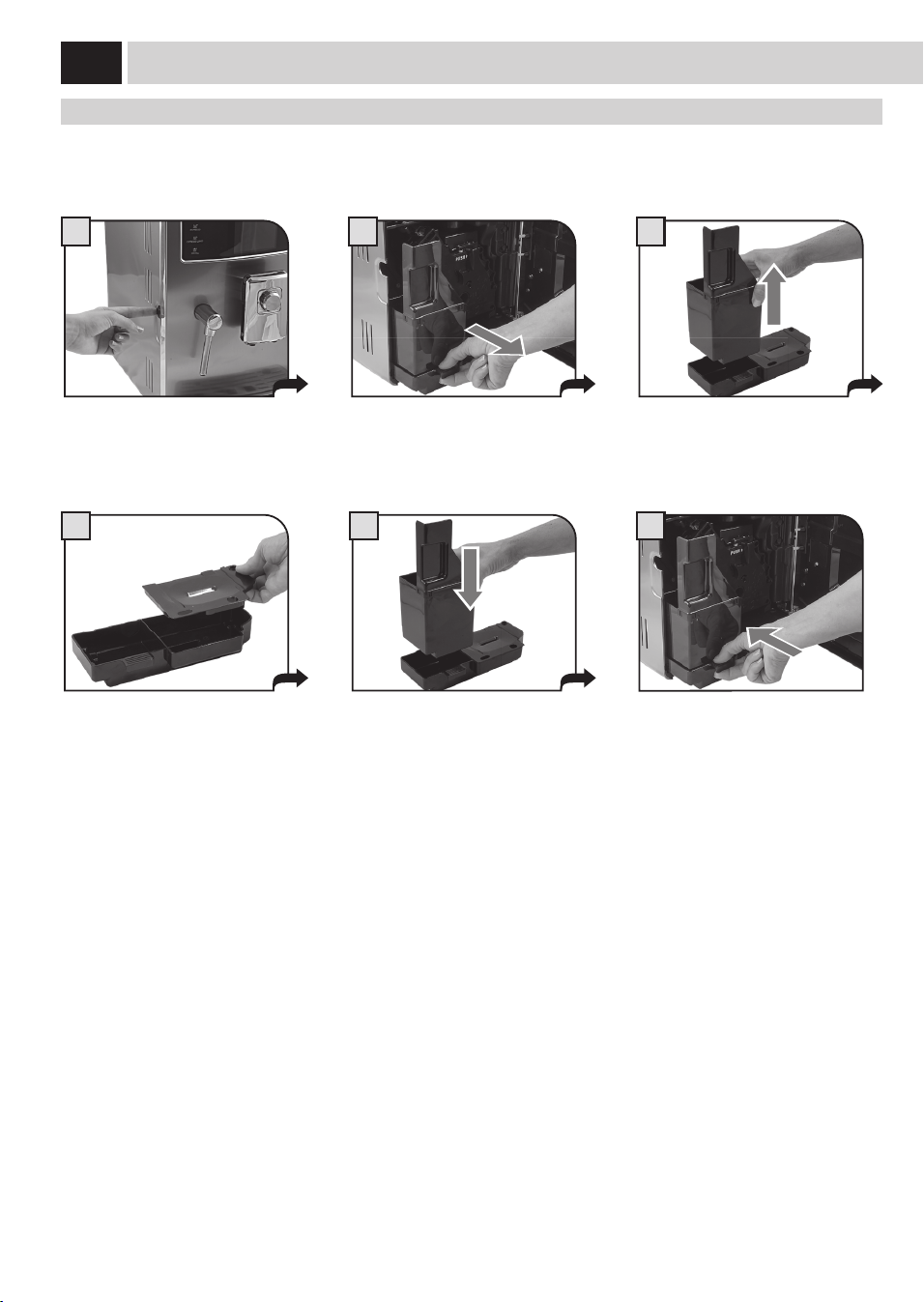
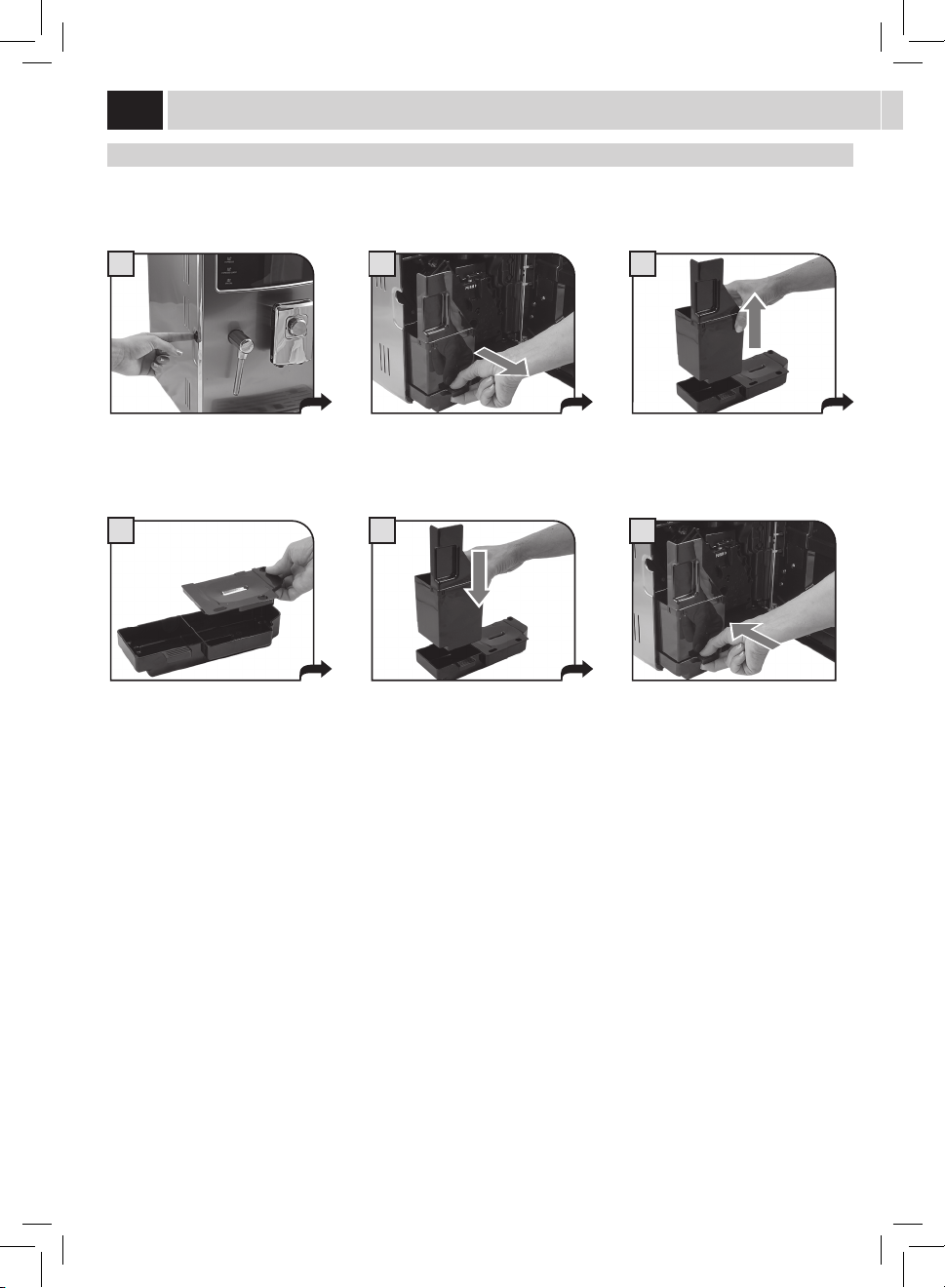
maintenanCe dUrinG oPeration
Duringnormaloperation,thefollowingmessagesmayappear:"Emptycoeegroundsdrawer"and/or"Emptydriptray".Thisoperation
mustbeperformedwhenthemachineison.
Press the button and open the service
door.
Remove the drip tray and used grounds
drawer.
Iftheusedgroundsdrawerisemptiedwhenthemachineiso,thecoeegroundscounterisnotreset.Forthisreasonthemachinemight
displaythe"Emptycoeegroundsdrawer"messageafterbrewingjustafewcoees.
Emptytheusedgroundsdrawerand
washitwithfreshwater.
Correctly reinstall all the components. Insert the tray and the co ee grounds
drawerandclosetheservicedoor.
Emptyandwashthedriptrayandthe
coverwithfreshwater.
CleaninG
45
1
4
7
2
5 6
8
3
9
Turn o the machine and unplug it.
Removethedispensingspoutandwash
itwithwater.
Takeoutthewatertankandwashitwith
freshwater.
Cleanthepre-groundbypassdoserwith
a dry cloth.
General maCHine CleaninG
Thecleaningproceduredescribedbelowmustbecarriedoutatleastonceaweek.
Note:Ifwaterremainsinthetankforseveraldays,donotuseit.
WARNING! Never immerse the machine in water.
Clean the machine and the steam wand with a soft damp cloth. Do not use abrasive steel wool pads.
Washthewaterrecoverytray.After
drying it, reassemble and reinsert it in
the machine.
Takeoutthewaterrecoverytray.
Removethegrillandwashitthoroughly. Remove the support under the grill. Wash
it taking care of the seal area. Reinstall
thesupportonlyafterwashingtheinside
ofthewaterrecoverytray.
CleanONLYthesensorwithanalcohol-
soaked cloth.
Donotuseabrasivesteelwoolpads.
46
1
4
7
2
5
8
3
6
9
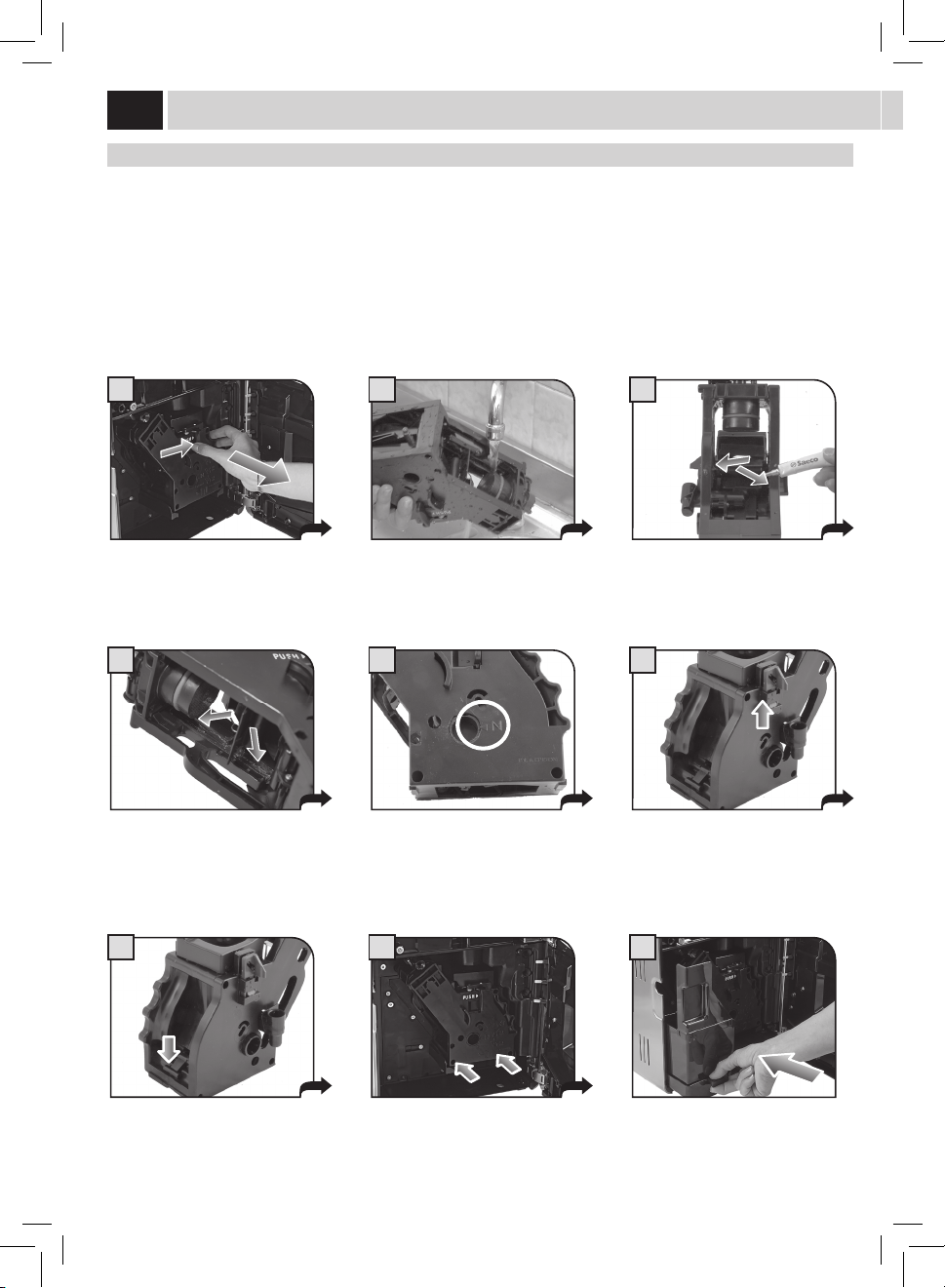
Press the PUSH button to remove the
brewgroup.
Inserttheusedgroundsdrawer
and close the service door.
BreW GroUP CleaninG
Washthebrewgroupatleastonceaweek.Beforeremovingthegroup,removetheusedgroundsdrawerasshowning.2onpage44.
Washthebrewgroupwithlukewarmwater.
Lubricatethebrewgroupafterapproximately500brewingcycles.Thebrewgrouplubricantmaybepurchasedfromanauthorizedservice
center.
WARNING! Do not wash the brew group with detergents that may compromise its correct operation. Do not wash it in the
dishwasher.
Washthebrewgroupandthelterand
dry.
Insertthewashedanddriedbrewgroup.
DONOTPRESSTHE“PUSH”BUTTON.
Makesurethebrewgroupisinrest
position;thetworeferencesmustmatch.
Make sure the components are in the
correctposition.Thehookshownmust
beinthecorrectposition;tocheckits
position,rmlypressthe“PUSH”button.
The lever on the rear part of the group
mustbeincontactwiththegroup
base.
Apply the lubricant evenly on both side
guides.
Lubricatethebrewgroupguidesusing
the supplied lubricant.
CleaninG
47
1
4
7
3
6
9
2
5
8
milK Carafe CleaninG
Thecarafemustberemovedandproperlywashedatleastonceaweek.
This procedure guarantees the perfect sanitation of all components.
Note: Pay attention to how the components are assembled. This little shrewdness will facilitate the subsequent
reassembling. The inner side of the service door shows a quick guide on how to reassemble the carafe.
The carafe must be removed from the
machine and emptied for its cleaning.
Rotatethehandlecounter-clockwiseto
the unlock position.
Remove the suction hose.
Press on the sides and lift the lid.
Removethehandlewiththesuction
hose.
Removetheinternaltting.
Disengage the handle by rotating it
clockwise.
Removetheconnectorwhichisin
contactwiththemachine.
Removetheexternalttingbypullingit.
Allcomponentscanbethoroughlywashedwithhotwater.
Afterwashingthecomponents,reassemblethembyfollowingtheinstructionsonnextpage.
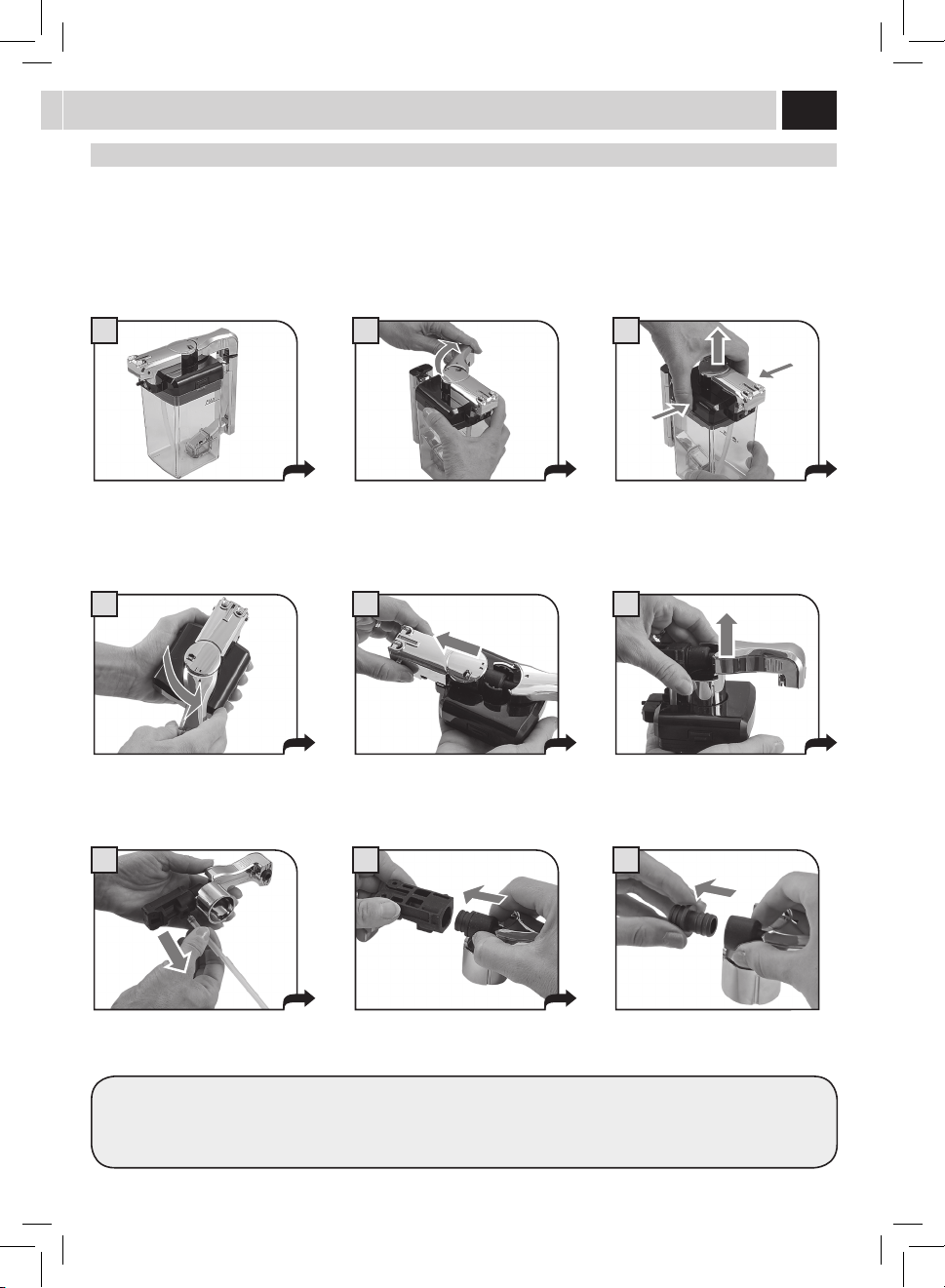
48
1
4
7
3
6
9
2
5
8
milK Carafe aSSemBlY
Pay attention during the assembly phase. In case the components do not smoothly enter in their positions, read the instructions more
carefully and repeat the assembly procedure.
Note: The inner side of the service door shows a quick guide on how to reassemble the carafe.
Inserttheinnerttinginthehoseand
press until fully inserting it.
Insert the unit previously assembled
in the cover base. Pay attention to the
reference.
Fit the cover on the carafe.
Insertthehoseintheoutertting.
Rotatethehandleclockwiseuptothe
(
) symbol.
Thecarafeisnowreadyforuse.
Inserttheouterttingintheinner
tting.Refertothearrowinthegurefor
the direction of insertion.
Insert the outer cover in the base guides.
Rotatethehandleanti-clockwiseto
bring it to the locked position.
CleaninG
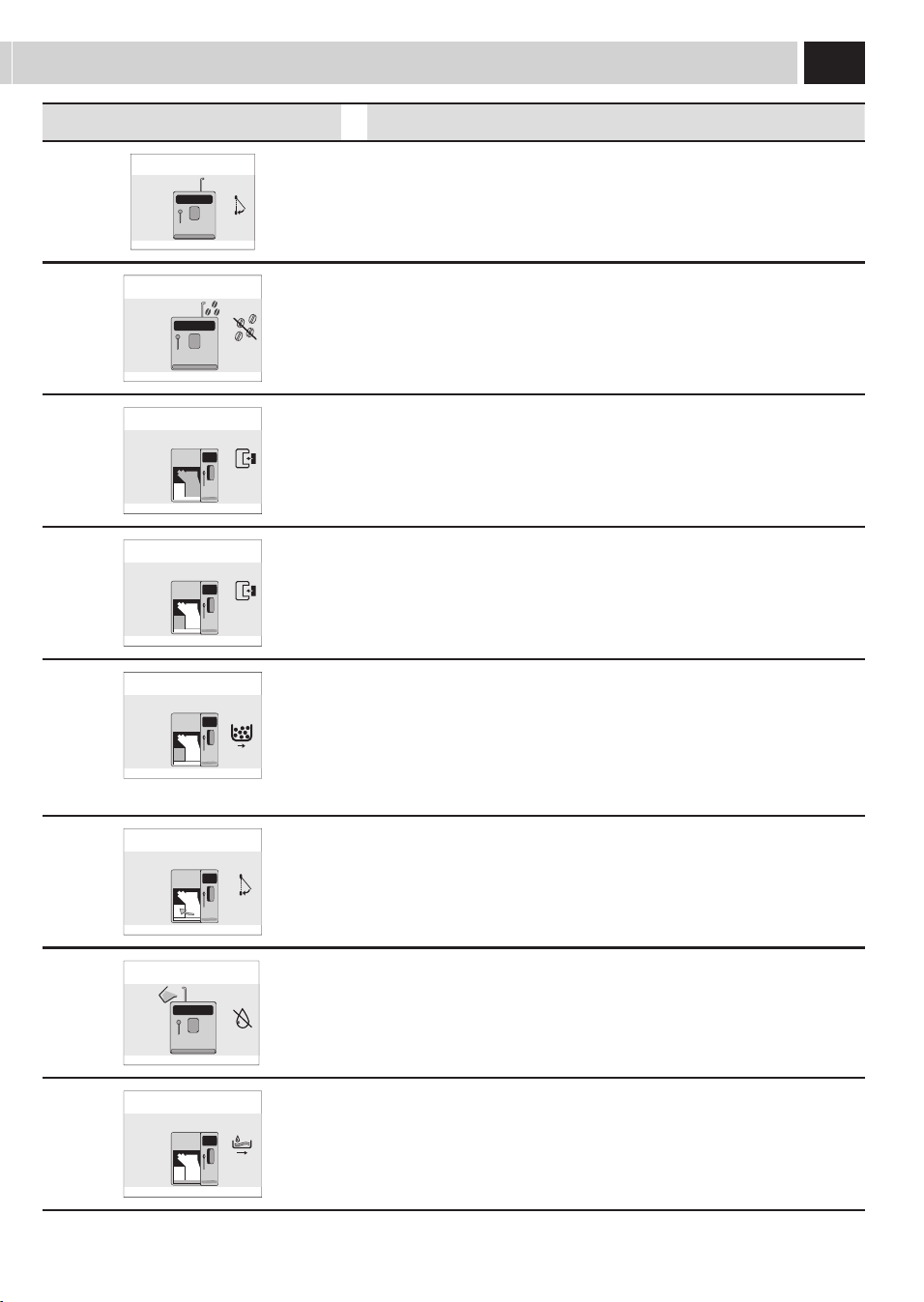
49
Help Message Displayed How to Reset the Message
CLOSE HOPPER DOOR
Close or correctly place the co ee bean hopper inner cover to be able to prepare
a beverage.
ADD COFFEE
Fillthecoeebeanhopperwithcoeebeans.
INSERT BREW GROUP
Insertthebrewgroupbackinplace.
INSERT GROUNDS DRAWER
Inserttheusedgroundsdrawerandthedriptray.
EMPTY COFFEE GROUNDS DRAWER
Removetheusedgroundsdrawerandemptythecoeegroundsintoasuitable
container.
Note: The used grounds drawer must be emptied only when the
machine requires it and with the machine on. If you empty the drawer
with the machine turned o it will not record the emptying operation.
CLOSE FRONT DOOR
Close the service door to make the machine functional.
REFILL WATER TANK
Takeoutthetankandllitwithfreshdrinkablewaterortopitupbymeansof
the special port.
EMPTY DRIP TRAY
Opentheservicedoorandemptythedriptraylocatedunderthebrewgroup.
Warning: If this operation is performed when the machine is on, it will
record the used grounds drawer emptying and will reset the counter;
therefore, it is necessary to empty the co ee grounds as well.
maCHine WarninGS
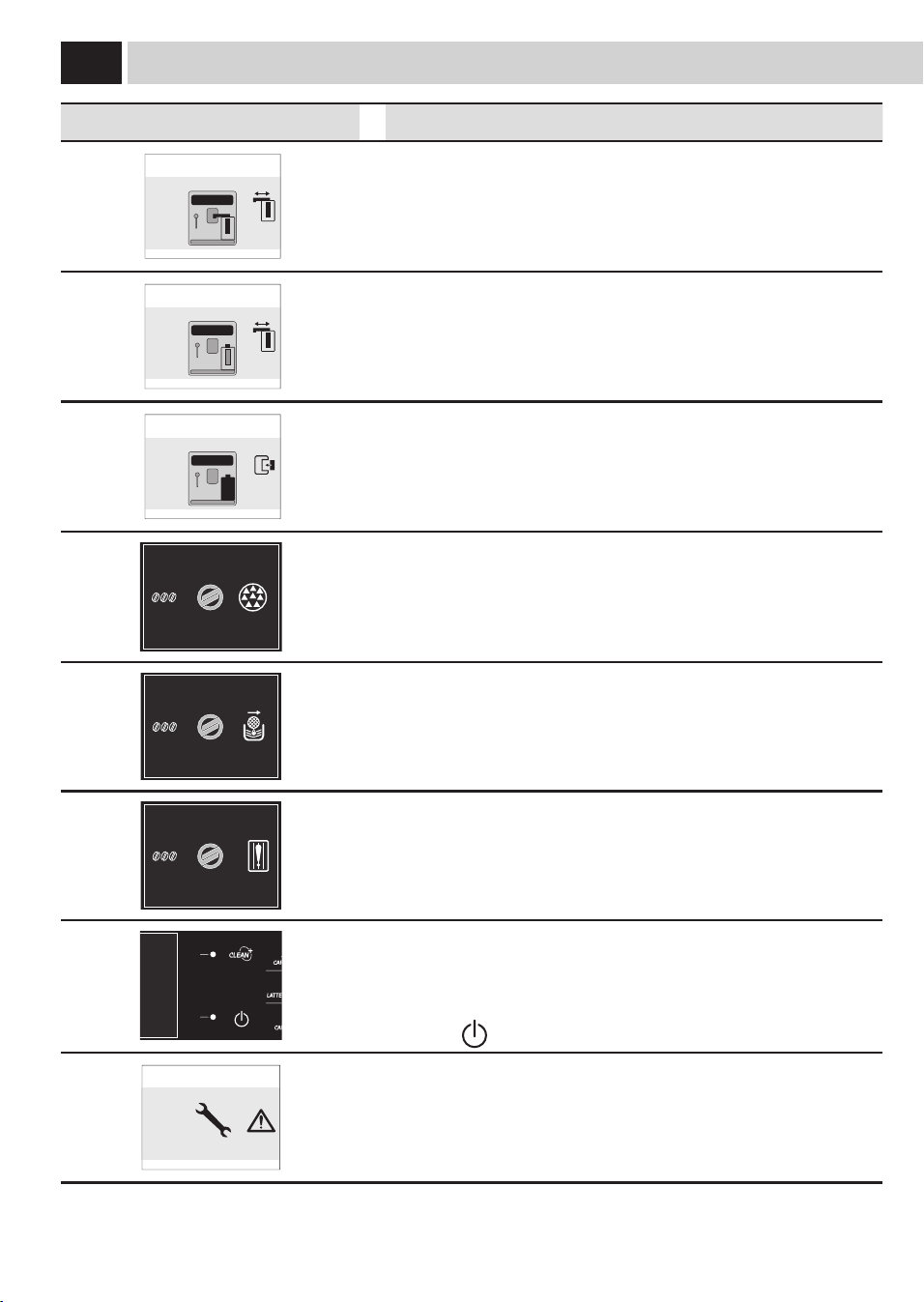
50
Help Message Displayed How to Reset the Message
ROTATE THE MILK CARAFE DISPENSING
SPOUT INTO BREWING POSITION
ESC
Abeveragewithmilkhasbeenselected.Themachinerequiresthecarafehandle
spout to be placed into dispensing position.
Pressthebutton"ESC"tocanceltheselection.
ROTATE THE MILK CARAFE DISPENSING
SPOUT INTO RINSING POSITION
ESC
The carafe rinse function has been selected.
Pressthebutton"ESC"tocanceltheselection.
PLACE MILK CARAFE
IN ITS HOUSING
ESC
Theselectedoperationrequiresthemilkcontainerforbrewing.Insertthe
containerinthemachineasspeciedinthemanual.
Pressthebutton"ESC"tocanceltheselection.
17/05/09
04:17 pm
USER
MENU
BENERAGE
MENU
SETTINGS
MENU
SELECTED
USER
Perform a descaling cycle on the machine.
When this message is displayed, it is still possible to use the machine, but its
correct operation might be compromised.
Damagescausedbyfailuretodescalethemachinearenotcoveredbywarranty.
17/05/09
04:17 pm
USER
MENU
BEVERAGE
MENU
SETTINGS
MENU
SELECTED
USER
Themachinerequeststhe"Intenza"waterltertobereplacedwithanewone.
Replacethelterasdescribedonpage7.
Thealarmisdisplayedonlyifthe"FilterEnable"functionissetto"ON".
(See page 36).
17/05/09
04:17 pm
USER
MENU
BEVERAGE
MENU
SETTINGS
MENU
SELECTED
USER
ThesensorfortheFingerprintEnableprocedureisnotworkingproperly.
Clean it thoroughly.
If even after an thorough cleaning the failure is not solved, contact the service
centre.
17/05/09
04:17 pm
USER
MENU
BEVERAGE
MENU
SETTINGS
MENU
SELECTED
USER
Flashing red light. Machine in Stand-by.
The Stand-by settings can be changed.
Pressthe"
"button.
RESTART TO SOLVE
THE PROBLEM
(E xx)
Aneventhasoccurredwhichrequiresthemachinerestart.Takenoteofthecode
(Exx)shownatthebottom.
Switchothemachine,wait30secondsandthenswitchitonagain.Ifthe
problem persists, contact the service centre.
maCHine WarninGS

51
SOS
SafetY rUleS
IN CASE OF EMERGENCY
IMMEDIATELY UNPLUG THE CORD FROM THE OUTLET.
ONLY USE THE APPLIANCE
• Indoors.
• Forpreparingcoee,hotwaterandforfrothingmilk.
• Fordomesticuse.
• Thisapplianceisnotintendedforusebypersons(includingchildren)withreducedphysical,sensoryormental
capabilities,orlackofexperienceandknowledge,unlesstheyhavebeengivensupervisionorinstructionconcerninguse
of the appliance by a person responsible for their safety.
• Childrenshouldbesupervisedtoensurethattheydonotplaywiththeappliance.
PRECAUTIONS FOR THE USE OF THE MACHINE
• Donotusethemachineforpurposesotherthanthoseindicatedabove,inordertoavoiddanger.
• Donotintroduceanysubstancesotherthanthoseindicatedintheinstructionmanual.
• Duringthenormalllingofanyreservoirs,allnearbyreservoirsmustbeclosed.
• Fillthewatertankonlywithfreshdrinkingwater:Hotwaterand/oranyotherliquidmaydamagethemachine.
• Donotusecarbonatedwater.
• Donotputngersoranymaterialotherthancoeebeansinthecoeegrinder.
• Beforemanipulatingthecoeegrinder,turnofthemachine’smainswitchandunplugthecord.
• Donotputinstantcoeeorwholebeancoeeinthegroundcoeecontainer.
• OnlyuseyourngerwhenoperatingtheLCDscreen.
CONNECTION TO ELECTRICAL POWER
Theconnectiontotheelectricalnetworkmustbecarriedoutinaccordancewiththesafetyregulationsinforceintheuser’s
country.
Themachinemustbeconnectedtoasocketwhichis:
• compatiblewiththetypeofpluginstalledonthemachine;
• suitablysizedtocomplywiththedataontheplateattachedtotheinsideoftheappliance.
• eectivelygrounded.
Thepowercordmustnot:
• comeintocontactwithanytypeofliquid:dangerofelectricshocksand/orre;
• becrushedand/orcomeincontactwithsharpsurfaces;
• beusedtomovethemachine;
• beusedifdamaged;
• behandledwithdamporwethands;
• bewoundinacoilwhenthemachineisbeingoperated.
• Betamperedwith.
INSTALLATION
• Chooseasolid,stationaryatsurface(nomorethan2°ofinclination).
• Donotinstallthemachineinareaswherewatercouldbesprayed.
• Optimaloperationaltemperature:10°C-40°C/50-104degreesFahrenheit
• Maximumhumidity:90%.
• Themachineshouldbeinstalledinanadequatelylit,ventilated,hygieniclocationandtheelectricsocketshouldbewithin
easy reach.
• Donotplaceonheatedsurfaces!
• Installitatleast10cm/4”fromthewallsandcookingsurfaces.
• Donotuseinplaceswherethetemperaturemaydroptoalevelequaltoand/orlowerthan0°C/32degreesFahrenheit.
Ifthemachinehasbeenexposedtosuchconditionsnotifythecustomerservicecenter,whowillhavetocarryoutasafety
check.
• Donotusethemachinenearinammableand/orexplosivesubstances.
• Themachinemustnotbeusedinanexplosiveorvolatileatmosphereorwherethereisahighconcentrationofdustoroily
substances suspended in the air.
• Donotinstallthemachineontopofotherappliances.

52
DANGERS
• Theappliancemustnotbeusedbychildrenandpersonswhohavenotbeeninformedofitsoperation.
• Theapplianceisdangeroustochildren.Whenleftunattended,unplugfromtheelectricaloutlet.
• Keepthecoeemachinepackagingoutofthereachofchildren.
• Neverdirectthejetofhotwaterand/orsteamtowardsyourselforothers.Dangerofscalding.
• Donotinsertobjectsthroughtheappliance’sopenings.(Danger!ElectricalCurrent!).
• Donotpullouttheplugbyyankingonthepowercordortouchingitwithwethands.
• Warning.Dangerofburningwhenincontactwithhotwater,steamandthehotwaterspout.
FAILURES
• Donotusetheapplianceifafailurehasbeenveriedorsuspected,forexampleafterbeingdropped.
• Anyrepairsmustbeperformedbyanauthorizedcustomerservicecenter.
• Donotusetheappliancewithadefectivepowercord.Themanufactureroritscustomerservicecenterwillhaveto
replacethepowercordifdamaged.(Caution!ElectricalCurrent!)
• Turnotheappliancebeforeopeningtheservicedoor.Dangerofburns!
CLEANING / DESCALING
• Forcleaningthemilkandcoeecircuitsuseonlyrecommendeddetergentsprovidedwiththemachine.Thesedetergents
must not be used for other purposes.
• Beforecleaningthemachine,themainswitchmustbeturnedtoOFF(0),unpluggedfromthesocketandcooleddown.
• Cleanthemachinewithneutraldetergentandadampcloth(donotuseabrasivespongesorsteelwoolpads).
• Keeptheappliancefromcomingintocontactwithsplashesofwaterorimmersinginwater.
• Donotdrythemachine’spartsinconventionalormicrowaveovens.
• Themachineanditscomponentsmustbecleanedandwashedafterthemachinehasnotbeenusedforacertainperiod.
REPLACEMENT PARTS
For safety reasons, use only original replacement parts and original accessories.
WASTE DISPOSAL
- The packing materials can be recycled.
- Appliance:unplugtheapplianceandcutthepowercord.
- Delivertheapplianceandpowercordtoaservicecenterorpublicwastedisposalfacility
Thisproductcomplieswitheudirective2002/96/ec.
Thesymbolontheproductoronitspackagingindicatesthatthisproductmaynotbetreatedashouseholdwaste.Insteadit
shall be handed over to the applicable collection point for the recycling of electrical and electronic equipment.
Byensuringthisproductisdisposedofcorrectly,youwillhelppreventpotentialnegativeconsequencesfortheenvironment
andhumanhealth,whichcouldotherwisebecausedbyinappropriatewastehandlingofthisproduct.Formoredetailed
informationaboutrecyclingofthisproduct,pleasecontactyourlocalcityoce,yourhouseholdwastedisposalserviceorthe
shopwhereyoupurchasedtheproduct.
FIRE SAFETY
Incaseofre,useCarbonDioxideextinguishers(CO
2
).
Donotusewaterordry-powderextinguishers.
ADDITIONAL INFORMATION FOR THE CORRECT USE OF THE INTENZA WATER FILTER
TocorrectlyusetheIntenzawaterlter,pleaseconsiderthefollowinginstructions:
1.StoretheIntenzawaterlterinacoolareainwhichtheroomtemperaturerangesfrom+1°Cto+50°C(34°Fto122°F).
Do not store it in direct sunlight.
2.Carefullyreadtheoperatinginstructionsandthesafetywarningsprovidedwitheachlter.
3.Keepthelterinstructionstogetherwiththemanual.
4.Theseinstructionsintegratethosecontainedinthemanual,astheyfocusonthespecicapplicationofthelterinthe
machine.
SafetY rUleS
53
Gaggio Montano
li, 28/04/2009
R & D Manager
Ing. Andrea Castellani
SaeCo international GroUP S.P.a
Via Torretta, 240 - 40041 Gaggio Montano (Bo) - Italy
declare under our responsibility that the product :
AUTOMATIC COFFEE MAKER
SUP 038Z
to which this declaration relates is in conformity with the following standards or other normative documents :
• Safetyofhouseholdandelectricalappliances-Generalrequirements
EN 60335-1(2002) + A1(2004) + A2(2006) + A11(2004) + A12(2006)+ A13(2008)
• Safetyofhouseholdandelectricalappliances-Part2-15
Particular requirements for appliances for heating liquids
EN 60335-2-15(2002) + A1(2005)
• Householdandsimilarelectricalappliances-Electromagneticelds-methodsforevaluationandmeasurement
EN 50366 (2003) + A1 (2006).
• Householdandsimilarelectricalappliances-safety-Part2-14
Particular requirements for kitchen machines EN 60335-2-14 (2006).
• Electromagneticcompatibility(EMC)-Requirementsforhouseholdappliances,electrictoolsandsimilarapparatus-Part1.
Emission EN 55014-1 (2006).
• Electromagneticcompatibility(EMC)-Part.3^Limits-Section2:
Limits for harmonic current emissions (equipment input current ≤ 16A for phase)
EN 61000-3-2 (2006)
• Electromagneticcompatibility(EMC)-Part3^:Limits-Section3:
Limitationofvoltagechanges,voltageuctuationsandickerinpubliclow-voltagesupplysystems,forequipmentwithratedcurrent
≤ 16 A for phase and not subject to conditional connection
EN 61000-3-3 (1995)+ corr.(1997) +A1 (2001) + A2 (2005).
• Electromagneticcompatibility-Requirementsforhouseholdappliances,electrictoolsandsimilarapparatus-Part2.
Immunity - Product family standard
EN 55014-2 (1997) + A1 (2001)
following the provisions of the Directives: EC 2006/95 , EC 2004/108.
eC deClaration of ConformitY
Year 09
eC 2006/95, eC 2004/108.
54

Important
Lors de l’utilisation d’appareils électriques, il est indispensable de respecter
toujours les précautions de sécurité principales, y compris les suivantes :
1.
Lire toutes les instructions.
2.
Ne pas toucher de surfaces chaudes. Utiliser les poignées ou les boutons.
3.
Afin d’éviter tout incendie, choc électrique et blessure, ne pas plonger le
cordon, la fiche ou l’appareil dans l’eau ou dans n’importe quel liquide.
4.
Il est nécessaire de contrôler attentivement lorsque l’appareil est utilisé
par des enfants ou à leur proximité.
5.
Débrancher de la prise de courant lorsque l’appareil n’est pas en service
et avant son nettoyage. Laisser refroidir l’appareil aussi bien avant de
retirer et de mettre en place ses accessoires qu’avant de le nettoyer.
6.
Ne pas utiliser l’appareil avec un cordon ou une fiche détériorés, après
un mauvais fonctionnement de l’appareil ou son endommagement de
n’importe quelle manière. Renvoyer l’appareil au centre d’assistance
agréé le plus proche pour tout contrôle, réparation et réglage.
7.
L’utilisation d’accessoires non recommandés par le constructeur de
l’appareil pourrait engendrer des incendies, des chocs électriques et des
blessures.
8.
Ne pas utiliser à l’extérieur.
9.
Ne pas laisser les cordons pendre des bords de la table ou du plan de
travail, ni toucher des surfaces chaudes.
10.
Ne pas placer près du feu ou sur une cuisinière, électrique et à gaz, ou
dans un four chaud.
11.
Toujours brancher le cordon d’alimentation à la machine d’abord et
ensuite à la prise de courant sur le mur. Pour débrancher, éteindre toute
commande en appuyant sur « OFF » et ensuite enlever la fiche de la prise
de courant sur le mur.
12.
Ne pas utiliser l’appareil pour toute autre utilisation non prévue.
13.
Garder ces instructions.
ConSErVEr CES InStruCtIonS

préCautIonS
Machine est réservée à un usage domestique. Tout entretien, en dehors du
nettoyage et de l’entretien usuel par l’usager, doit être fait par un service après-
vente autorisé. Ne pas plonger la base dans l’eau. Pour éviter les courts-circuits
et les décharges électriques, ne pas démonter la base. Elle ne contient aucune
pièce qui demande un entretien de la part de l’usager. Toute réparation doit être
effectuée par le personnel d’un service après-vente autorisé.
1 Vérifier si le voltage correspond bien aux spécifications apparaissant sur
la plaque signalétique.
2 Ne jamais mettre de l’eau tiède ou chaude dans le réservoir; mais toujours de
l’eau froide.
3 Ne pas toucher les surfaces chaudes de l’appareil pendant le
fonctionnement et en écarter le cordon électrique.
4 Ne pas utiliser d’alcool éthylique, de solvants, d’essences, de poudre à
récurer et/ou d’objets abrasifs pour le nettoyage de la machine
5 Utiliser de l’eau purifiée ou en bouteille pour assurer le bon goût du café. Il sera
toutefois nécessaire de procéder au détartrage de votre machine tous les 2-3 mois.
6 Ne pas utiliser du café au caramel ou mélangé avec toute autre recette.
InStruCtIonS Sur lE Cordon
ElECtrIquE
A.
Votre appareil est muni d’un cordon électrique court ou d’un cordon
d’alimentation détachable, afin d’éviter de trébucher ou de s’emmêler
avec un câble plus long.
B.
Des cordons détachables plus longs ou bien des rallonges sont disponibles
et ne peuvent être utilisés que si l’on prend toutes les précautions
d’usage.
C.
En cas d’utilisation d’un long cordon d‘alimentation détachable ou d’une
rallonge,
1. La tension électrique de fonctionnement marquée sur le cordon d’alimentation
détachable ou sur la rallonge doit être au moins égale à celle de l’appareil.
2.
Si la fiche de l’appareil a une connexion de terre, la rallonge devrait être une
rallonge de terre à 3 fils et
3.
La rallonge ne devra pas encombrer le plan de travail ou le dessus de table,
afin d’éviter que les enfants la tirent ou trébuchent accidentellement.

1
Table des maTières
GÉNÉRALITÉS ......................................................................... 2
APPAREIL - BANDEAU DE COMMANDE .................................................... 3
MONTAGE . . . . . . . . . . . . . . . . . . . . . . . . . . . . . . . . . . . . . . . . . . . . . . . . . . . . . . . . . . . . . . . . . . . . . . . . . . . . 4
MISE EN MARCHE DE LA MACHINE . . . . . . . . . . . . . . . . . . . . . . . . . . . . . . . . . . . . . . . . . . . . . . . . . . . . . . . . . . . . . . . . . . . . . . . . . . . . .4
SÉLECTIONNER LA LANGUE ...................................................................................5
MESURE DE LA DURETÉ DE L’EAU ...............................................................................5
PREMIÈRE UTILISATION - USAGE APRÈS UNE PÉRIODE D'INACTIVITÉ ................................................6
FILTRE À EAU INTENZA .......................................................................................7
RÉGLAGES ............................................................................ 8
SÉLECTION UTILISATEUR ......................................................................................8
SAECO ADAPTING SYSTEM . . . . . . . . . . . . . . . . . . . . . . . . . . . . . . . . . . . . . . . . . . . . . . . . . . . . . . . . . . . . . . . . . . . . . . . . . . . . . . . . . . . .9
RÉGLAGE DU MOULIN À CAFÉ. . . . . . . . . . . . . . . . . . . . . . . . . . . . . . . . . . . . . . . . . . . . . . . . . . . . . . . . . . . . . . . . . . . . . . . . . . . . . . . . . .9
(OPTI-DOSE) INDICATION DE LA QUANTITÉ DE CAFÉ À MOUDRE ...................................................10
RÉGLAGE DE L'HAUTEUR DE LA BUSE DE DISTRIBUTION . . . . . . . . . . . . . . . . . . . . . . . . . . . . . . . . . . . . . . . . . . . . . . . . . . . . . . . . . .10
DENSITÉ DU CAFÉ ...........................................................................................11
STAND-BY . . . . . . . . . . . . . . . . . . . . . . . . . . . . . . . . . . . . . . . . . . . . . . . . . . . . . . . . . . . . . . . . . . . . . . . . . . . . . . . . . . . . . . . . . . . . . . . . .11
UTILISATION DU RÉSERVOIR À LAIT .....................................................12
DISTRIBUTION DE CAFÉ . . . . . . . . . . . . . . . . . . . . . . . . . . . . . . . . . . . . . . . . . . . . . . . . . . . . . . . . . . . . . . . 14
EXPRESSO / EXPRESSO ALLONGÉ ..............................................................................14
DISTRIBUTION DE LA BOISSON AVEC DU CAFÉ PRÉMOULU ........................................................15
CAPPUCCINO / LAIT NOISETTE / CAFÉ AU LAIT . . . . . . . . . . . . . . . . . . . . . . . . . . . . . . . . . . . . . . . . . . . . 16
CYCLE DE NETTOYAGE : CLEAN ..........................................................17
DISTRIBUTION EAU CHAUDE ...........................................................18
PRODUITS « SPECIAL » . . . . . . . . . . . . . . . . . . . . . . . . . . . . . . . . . . . . . . . . . . . . . . . . . . . . . . . . . . . . . . . . 19
DISTRIBUTION DE VAPEUR . . . . . . . . . . . . . . . . . . . . . . . . . . . . . . . . . . . . . . . . . . . . . . . . . . . . . . . . . . . . . . . . . . . . . . . . . . . . . . . . . . .19
CAFÉ AMÉRICAIN . . . . . . . . . . . . . . . . . . . . . . . . . . . . . . . . . . . . . . . . . . . . . . . . . . . . . . . . . . . . . . . . . . . . . . . . . . . . . . . . . . . . . . . . . . .20
LAIT CHAUD ................................................................................................20
CAFÉ CRÈME ...............................................................................................20
PROGRAMMATION RAPIDE DE LA LONGUEUR DES BOISSONS . . . . . . . . . . . . . . . . . . . . . . . . . . . . . . . 21
MENU UTILISATEUR . . . . . . . . . . . . . . . . . . . . . . . . . . . . . . . . . . . . . . . . . . . . . . . . . . . . . . . . . . . . . . . . . . 22
MENU BOISSON . . . . . . . . . . . . . . . . . . . . . . . . . . . . . . . . . . . . . . . . . . . . . . . . . . . . . . . . . . . . . . . . . . . . . . 28
MENU MACHINE ......................................................................31
ENTRETIEN . . . . . . . . . . . . . . . . . . . . . . . . . . . . . . . . . . . . . . . . . . . . . . . . . . . . . . . . . . . . . . . . . . . . . . . . . . 38
NETTOYAGE ..........................................................................44
ENTRETIEN PENDANT LE FONCTIONNEMENT. . . . . . . . . . . . . . . . . . . . . . . . . . . . . . . . . . . . . . . . . . . . . . . . . . . . . . . . . . . . . . . . . . . .44
NETTOYAGE GÉNÉRAL DE LA MACHINE .........................................................................45
NETTOYAGE GROUPE DE DISTRIBUTION . . . . . . . . . . . . . . . . . . . . . . . . . . . . . . . . . . . . . . . . . . . . . . . . . . . . . . . . . . . . . . . . . . . . . . . .46
NETTOYAGE CARAFE LAIT . . . . . . . . . . . . . . . . . . . . . . . . . . . . . . . . . . . . . . . . . . . . . . . . . . . . . . . . . . . . . . . . . . . . . . . . . . . . . . . . . . . .47
MONTAGE CARAFE LAIT ......................................................................................48
SIGNALISATION DE LA MACHINE ........................................................49
CONSIGNES DE SÉCURITÉ ..............................................................51

2
GÉNÉraliTÉs
GÉNÉraliTÉs
La machine à café est indiquée pour la préparation de café expresso avec du café en grains et est équipée d’un dispositif
pour la distribution d’eau chaude et de vapeur.
Au design élégant, cet appareil a été conçu exclusivement pour un usage domestique et n’est donc pas indiqué pour un
fonctionnement continu de type professionnel.
Attention : la société décline toute responsabilité en cas de :
• utilisationinappropriéeetnonconformeàl’usageprévu;
• réparationsnoneectuéesdansdescentresd'assistanceagréés;
• altérationducâbled'alimentation;
• altérationdetoutcomposantdelamachine;
• emploidepiècesderechangeetd’accessoiresquinesontpasd'origine;
• défautdedétartragedelamachineoudefonctionnementàdestempératuresendessousde0°C.
DANS TOUS CES CAS-LÀ, LA GARANTIE CESSE D’EXISTER.
LE TRIANGLE D’AVERTISSEMENT INDIQUE TOUTES LES INSTRUCTIONS À RETENIR POUR LA SÉCURITÉ DE
L’UTILISATEUR. RESPECTER ATTENTIVEMENT CES INDICATIONS AFIN D’ÉVITER DE GRAVES BLESSURES !
UTilisaTiON de Ce mOde d'emPlOi
Conservercemoded’emploidansunlieusûr.Lejoindreàlamachineàcaféencasdechangementd'utilisateur.Pourdeplusamples
informationsouencasdeproblèmes,s’adresseràunCentred’AssistanceAgréé.
CONSERVER CES INSTRUCTIONS
CONsiGNes POUr le CÂble ÉleCTriQUe
• Onfournituncâbleélectriqueassezcourtpouréviterqu’ilnes’enrouleouquevousnetrébuchiez.
• Ilestpossibled'utiliser,avecprudence,desrallonges.
Sionutiliseunerallonge,vérier:
a. quelatensionindiquéesurlarallongecorrespondàlatensionélectriquedel’appareilélectroménager;
b. qu’elleestpourvued’unecheàtroisbrochesavecmiseàlaterre(aucasoùlecâbledel’appareilélectroménagerseraitdece
type);
c. quelecâblenependpasdelatablepouréviterd’ytrébucher.
• Nepasutiliserdemultiprise

3
aPPareil - baNdeaU de COmmaNde
Pouruneutilisationcorrectedecemanuel,ilestconseillabledeconsulterlevoletdecouverture,quipermetunecompréhensionmeilleuredutexte.
COmPOsaNTs de l’aPPareil
1 Réservoiràeau+couvercle
2 Plaquechaue-tasses
3 Logementpourlecaféprémoulu
4 Portedeservice
5 SBS
6 Busededistributiond'eauchaude/vapeur
7 Flotteurbacplein
8 Réservoiràcaféengrainsaveccouvercle
9 Réglagemouture
10 Bandeaudecommande
11 Embrayagerécipientàlait
12 Busededistribution
13 Bacd’égouttement+grille+supportavecjoint
14 Groupededistribution
15 Tiroiràmarc+protection
16 Bacderécupérationliquides+couvercle
17 Toucheouverturedelaportedeservice
18 Interrupteurgénéral
19 Connecteuràcuvette
20 Réservoiràlait
21 Mesureducaféprémoulu
22 Bandepourtestdeduretédel'eau
23 GraissepourleGroupededistribution
24 Détartrant
25 PastillespourlenettoyageduGroupededistribution
26 Câbled'alimentation
27 Filtreàeau«Intenza»
28 Pinceaudenettoyage
29 Bouchondesembrayagesdelacarafe
30 DIGITALID(Sélectionutilisateur)
Touchepourladistributiond'uncappuccino
Touchepourexécuteruncycledenettoyage
Touchepourmettrelamachineenmoded'attente
(stand-by)
Touchepourlasélectiondel'arôme
Touchesfonction
Touchesfonction
Touchepourdistribuerdel’eauchaude
Touchepourladistributiond'unexpresso
Touchepourladistributiond'unlaitnoisette
Touchepourladistributiond'unexpressoallongé
Touchepourladistributiond'uncaféaulaitTouchepouraccéderauxboissonsspéciales.
baNdeaU de COmmaNde
Lebandeaudecommandeaétéconçupourpermettreuneutilisationergonomiquedetouteslesfonctionsdelamachine.
MENU
UTILISATEUR
MENU
BOISSON
MENU
MACHINE
SÉLECTION
UTILISATEUR
17/05/09
04:17 pm
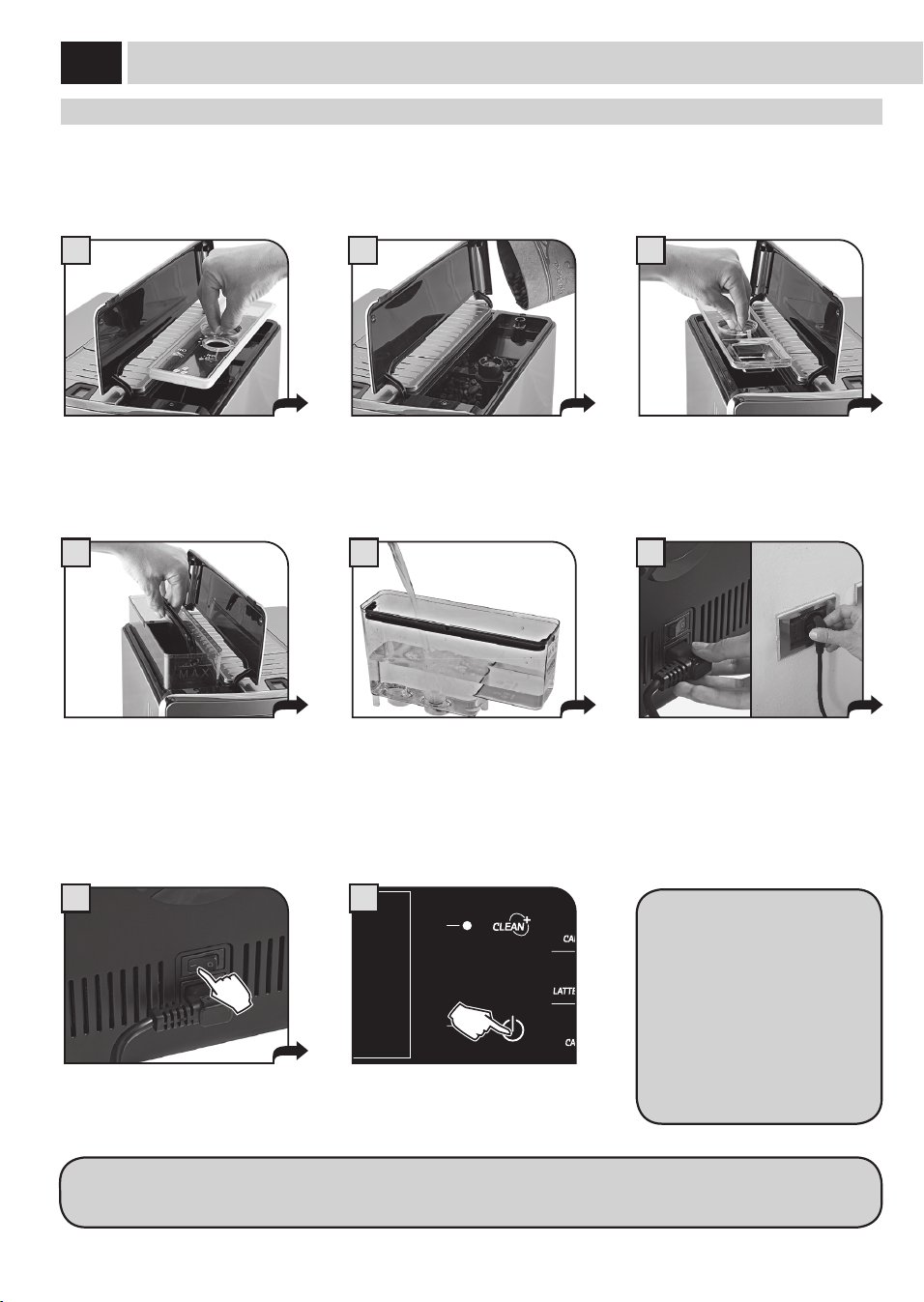
4
1
4
7 8
5 6
32
mise eN marCHe de la maCHiNe
Avantdemettreenmarchelamachine,s'assurerquel’interrupteurgénéralestbienenposition«0».
Souleverlecouvercleextérieurdedroite
etenleverlecouvercleintérieur.
Retirerleréservoiràeauenutilisantla
poignée.
Appuyersurl'interrupteurgénéraletle
mettresurlaposition«I».
L'acheurseprésenteavecuneDEL
rougeclignotante.Appuyersurlatouche
pourmettreenmarchelamachine.
Remplirleréservoiravecdel'eaufraîche
etpotable,enveillantànejamais
dépasserleniveaumaximalmarquésur
leréservoir.Replacerensuiteleréservoir.
Brancherlachesurlaprisesituéeau
dosdelamachine.Brancherl’autre
extrémitéducâblesuruneprisede
courantappropriée(voirlaplaquettedes
données).
Rempliravecducaféengrains.
Remettrelecouvercleintérieuretfermer
lecouvercleextérieur.
Souleverlecouvercleextérieurdegauche
etenleverlecouvercleintérieur.
Unefoisleréchauementterminé,
lamachineeectuel'amorçage
etuncyclederinçagedescircuits
internes.Unepetitequantitéd’eau
estdistribuée.Attendrequececycle
setermineautomatiquement.
Ensuitelapage-écrandedistribution
desproduitss’ache;voirpage3.
mONTaGe
Lapage-écran(1)depage5neseraachéequelorsdupremierdémarrage.Leréglagedelalangueneseraensuitepossiblequepar
lemenuprévuàceteet(voirpage31).
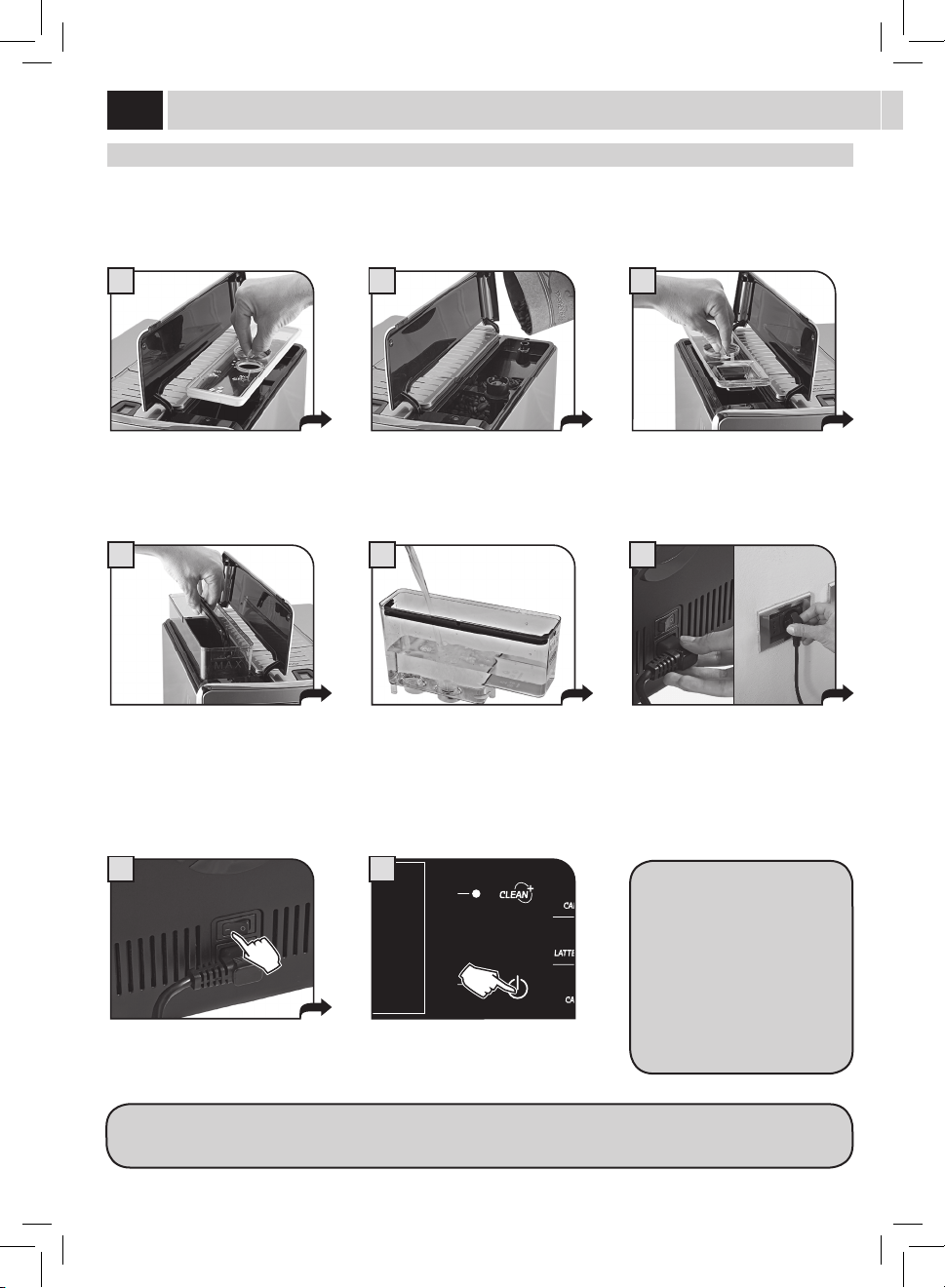
5
5
1 2
1 2 3 4
A
B
C
Sélectionnerlalanguesouhaitéeen
appuyantsurlestouches(
)ou( ).
Appuyersurlatouchepourmémoriser
lasélection.
Lamachinecommencelaphasede
chauage;attendrequecettephasese
termine.
Unefoislaphasedechauageterminée,
lamachineeectueuncyclederinçage
descircuitsinternes.Pourarrêterlecycle,
appuyersurlatouche«STOPRINÇAGE».
Lamachineestmaintenantprêteà
fonctionner.
Unepetitequantitéd’eauestdistribuée.
Attendrequececyclesetermine
automatiquement.
sÉleCTiONNer la laNGUe
Cettefonctionpermetdechoisirlalanguedefonctionnementdelamachine.Deplus,ellepermetd’adapterlesparamètresdesboissonssur
labasedespréférencesduPaysd’utilisation.C’estpourquoicertaineslanguessontdiérenciéesaussienfonctiondupays.
Siaucunelanguen'estsélectionnée,lasélectionseraproposéeàlaprochainemiseenmarchedelamachine.
mesUre de la dUreTÉ de l’eaU
La bande ne peut être utilisée que pour une seule mesure.
Plongerdansl’eaulabandedetest
fournieaveclamachinependantune
seconde,andevérierladuretéde
l'eau.
Vérierlavaleurdeladuretédel’eauetrégler:
- ledegrédeduretédel’eaudanslamachine(page36);
- IntenzaAromasystem(page7).
IntenzaAromaSystem
Réglageduretémachine
ESC
OK
2.2.1. LANGUE
ITALIANO
ITALIANO CH
ENGLISH
DEUTSCH
FRANÇAIS
ESPAÑOL
PORTUGUÊS
1
ESC
OK
2.2.1. LANGUE
ITALIANO
ITALIANO CH
ENGLISH
DEUTSCH
FRANÇAIS
ESPAÑOL
PORTUGUÊS
2
RISCALDAMENTO...RINÇAGE
STOP
RINÇAGE
4
MENU
UTILISATEUR
MENU
BOISSON
MENU
MACHINE
SÉLECTION
UTILISATEUR
17/05/09
04:17 pm
6
CHAUFFAGE…
3
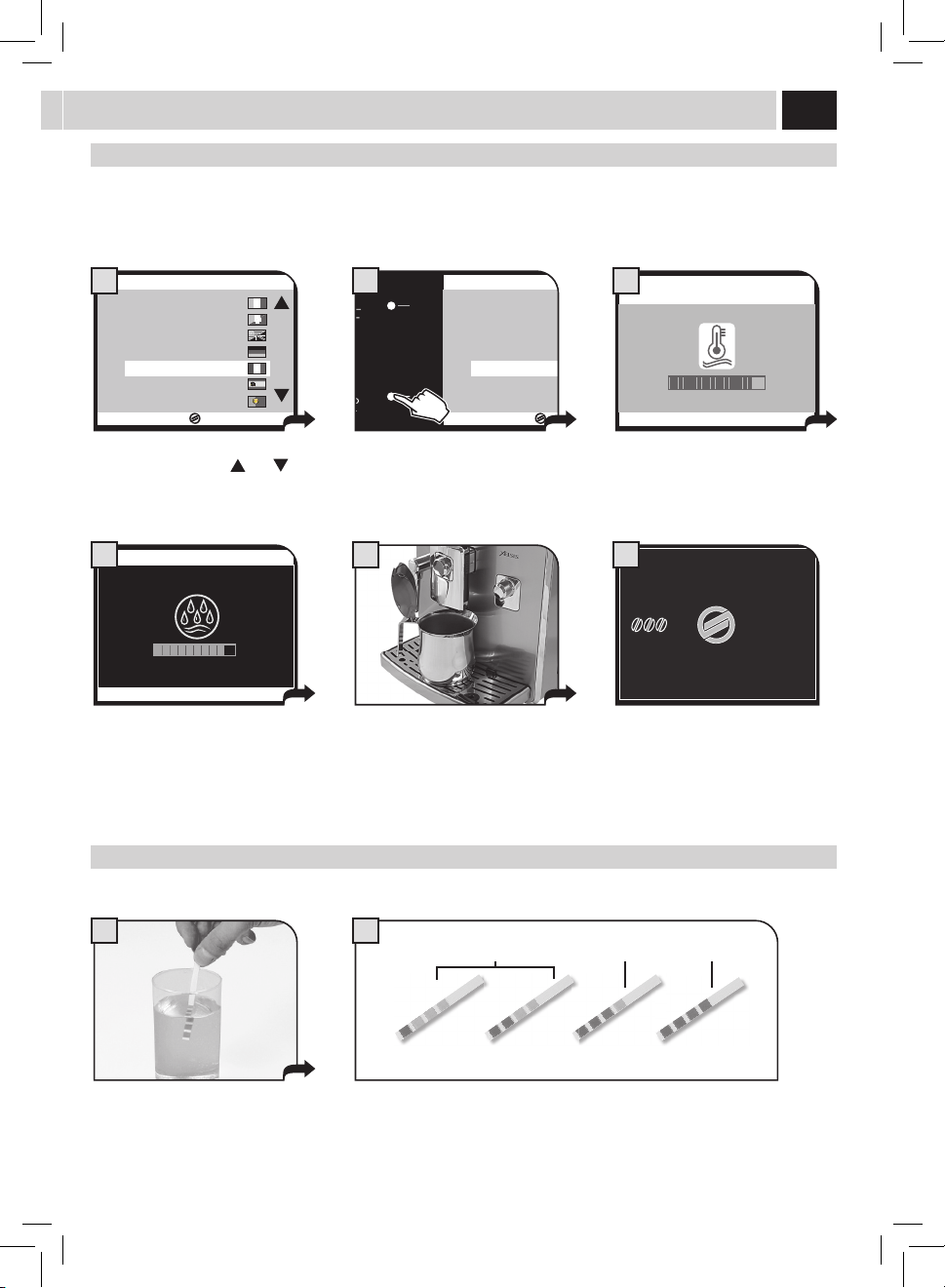
6
9
1
5
7
17/05/09
04:17 pm
MENU
UTENTE
MENU
BEVANDA
MENU
MACCHINA
SELEZIONE
UTENTE
3
mONTaGe
Première UTilisaTiON - UsaGe aPrès UNe PÉriOde d'iNaCTiViTÉ
And'améliorerlaqualitédesproduits,ilfauteectuercetteprocédurelapremièrefoisqu'onutiliselamachineetchaquefoisqu'ellereste
inactivependantunelonguepériode.
Cesquelquessimplesopérationsvouspermettentdesavourervosboissonspréféréesavecunequalitéconstante.
Placerungrandrécipientsouslabusede
distributionducafé.
Appuyersurlatoucheuneouplusieurs
foisjusqu'àcequel'icônes'ache.
Sélectionnerleproduitenappuyantsur
latoucheindiquée.
SANSintroduireducafé,appuyersur
latouche«OK»pourcommencerà
distribuerdel'eaudelabuse.
Remplirleréservoiravecdel’eaufraîche
potablecommeilaétédécritci-dessus.
Maintenantvouspouvezutiliserau
mieuxvotremachine.
Unefoisl'opérationterminée,enlever
lerécipientetlemettresouslabusede
l'eauchaude.
Àlan,préleverlerécipientetlevider. Répéterlesopérationsdupoint5au
point7jusqu’àcequ’iln’yaitplusd'eau
dansleréservoir.
Appuyersurlatoucheetattendrejusqu'à
cequelaquantitéprogramméesoit
distribuée.Pourarrêterladistribution,
appuyersurlatouche«STOPEAU
CHAUDE».
17/05/09
04:17 pm
MENU
UTILISATEUR
MENU
BOISSON
MENU
MACHINE
SÉLECTION
UTILISATEUR
2
VERSER DU CAFÉ MOULU
ET APPUYER SUR OK
ESC OK
4
8
MENU
UTENTE
MENU
BEVANDA
MENU
MACCHINA
SELEZIONE
UTENTE
17/05/09
04:17 pm
6
5
7
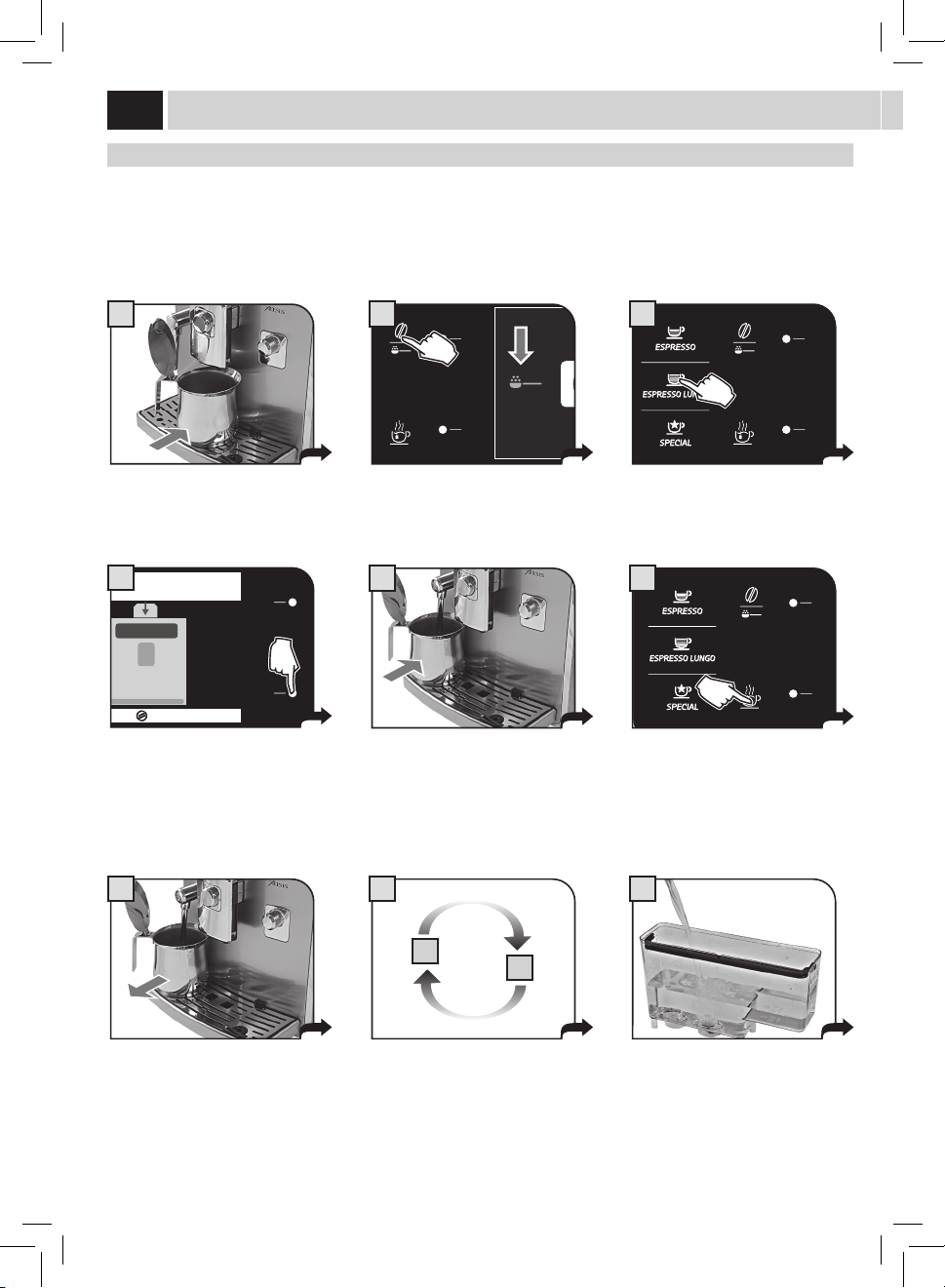
7
1
4 5
32
FilTre À eaU iNTeNZa
Pouraméliorerlaqualitédel’eauutiliséeetgarantirenmêmetempsuneduréedevieaccruedel’appareil,ilestconseilléd’installerleltre
àeau.Aprèsl'installation,procéderavecleprogrammed'activationdultre(voir«MENUMACHINE»àpage31),demanièreàcequela
machinepuisseprévenirl'utilisateurpourleremplacementdultre.
Enlever le fi ltre de son emballage, ensuite le plonger verticalement dans l'eau froide (l'ouverture vers le haut). Pousser le
fi ltre délicatement sur les bords pour faire sortir toute bulle d'air.
Enleverlepetitltreblancàl’intérieur
duréservoir,leconserverdansunendroit
secetleprotégercontrelapoussière.
Remplirleréservoiravecdel’eaufraîche
potableetlerepositionnerdansla
machine.
Placerunrécipientsouslabusede
distributiondel’eauchaude.
Insérerleltredanssonlogementà
l’intérieurduréservoirvide(voirgure).
Appuyerjusqu'aupointd'arrêt.
Réglerl’IntenzaAromaSystem:
A=Eaulégère
B=Eaumoyennementdure(standard)
C=Eaudure.
Appuyersurlatouche«OK». Appuyersurlatouche«OK»pour
conrmerlepositionnementdunouveau
ltre.
Appuyersurlatouche«OK»pour
conrme.Attendre.Àlanducycle,
enleverleréservoir.
Accéderau«MENUMACHINE»(voir
page31).Sélectionner«RÉGLAGESEAU
»et«ACTIVATIONFILTRE»,appuyer
ensuitesur«OK».
ESC
OK
DURETÉ EAU 3
VALIDATION FILTRE OFF
ACTIVATION FILTRE
2.4. RÉGLAGES EAU
6
ESC
OK
ACTIVER LE FILTRE?
2.4.3. RÉGLAGES EAU
7
OK
OK
INTRODUIRE LE FILTRE À EAU
ET REMPLIR LE RÉSERVOIR
8
OK
OK
PLACER UN RÉCIPIENT SOUS
LA BUSE DE DISTRIBUTION DE L'EAU CHAUDE
9
REMARQUE : à la fi n de la procédure, la machine revient automatiquement à la page-écran de distribution des produits.
Lorsque le fi ltre à eau n’est pas présent, il faut insérer dans le réservoir le petit fi ltre blanc précédemment enlevé au point 1.

8
1
MENU
UTILISATEUR
MENU
BOISSON
MENU
MACHINE
SÉLECTION
UTILISATEUR
17/05/09
04:17 pm
sÉleCTiON UTilisaTeUr
Cettemachineaétéconçuepourrépondreaumieuxauxexigencesdetoututilisateur,enorantlemaximumpourchaqueboisson.
Chaqueutilisateurasespréférencesetadonclapossibilitéderéglersamachinecommesielleétait«uniquementàlui».
Pourcetteraison,lamachinepermetdecréereteacerlesutilisateurs:ilspourrontprogrammerleursboissonsdefaçonexclusiveet
personnalisée.
Ilsutd'appuyersurlatouche«Sélectionutilisateur»etlamachinedistribueralaboissonpréféréedel'utilisateur,surlabasedesréglages
eectués.
Lamachineestfournieavecdesprogrammesstandardsquiontétéformuléssurlabased'uneétudeapprofondiedumarché.Cettebase
permetdefournirunsupportdanslaprogrammationdesboissonspréféréesdesutilisateurs.
Ilfautd'abordcréerunnouvelutilisateurauquelseraassociéeuneicônepouruneidenticationplussimpledespréférencespersonnelles.
Pourcefaire,consulterlasection«Menuutilisateur»danscemanuel(voirpage22)
Aprèsavoirsélectionnél'utilisateur,ilestpossibledeprogrammertouteslesboissonscommedécritdanslasection«Menuboisson»dece
manuel(voirpage28).
Aprèsavoirréglélesbonnesquantités,avantd'utiliserlamachine,appuyersurlatouche«Sélectionutilisateur»pourquel'icône
personnalisées'ache.Lamachineestmaintenant«uniquementàvous»etvouspourrezgoûtertouslesproduitsdevosrêves.
rÉGlaGes
diGiTal id
Cettetechnologieexclusiveetbrevetéepermetdereconnaîtrel'utilisateurgrâceàlalecturedesempreintesdigitales.Ilsutd'appuyerle
doigtsurlecapteurpourquelamachinevousreconnaisseets'adapteàvosgoûts.
Remarque : Avant d'utiliser cette fonction il faut consulter la section « MENU UTILISATEUR » du manuel (voir page 22).
Placerledoigtenregistré. Attendrelemessagedemandant
d'enleverledoigt.
Lamachinevousreconnaîtraetseraainsi
prêtepourladistributiondeproduits.
17/05/09
ENLEVER DOIGT
VÉRIFICATION EN COURS...
04:17 pm
2
MENU
UTILISATEUR
MENU
BOISSON
MENU
MACHINE
SÉLECTION
UTILISATEUR
17/05/09
04:17 pm
3
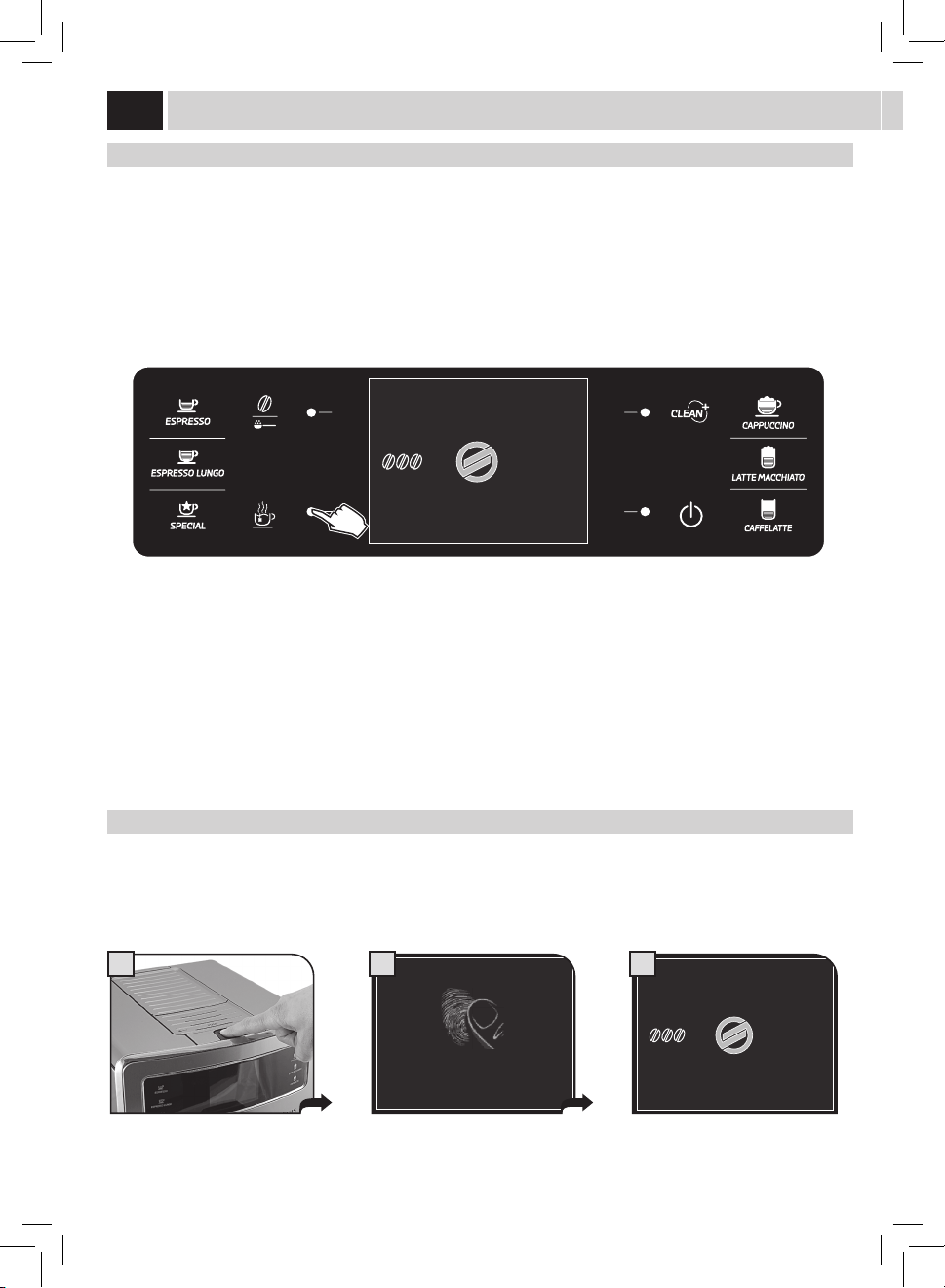
9
A B C
Danscetteposition,lamoutureesttrès
grosse.
Appuyerettourner. Danscetteposition,lamoutureesttrès
ne.
saeCO adaPTiNG sYsTem
Lecaféestunproduitnatureletsescaractéristiquespeuventchangerselonsonorigine,sonmélangeetsatorréfaction.Lamachineà
caféSaecoestmunied’unsystèmed’autoréglagepermettantd’utilisertouttypedecaféengrainsdisponibledanslecommerce(pas
caramélisé).
• Lamachineserègleautomatiquementand’optimiserl'extractionducafé,enassurantlecompactageparfaitdelapastillepour
prépareruncaféexpressocrémeux,àmêmedelibérertouslesarômes,indépendammentdutypedecaféutilisé.
• Leprocessusd’optimisationestlefruitd'unapprentissagedelapartdelamachine.Cetapprentissagedemandeladistributiond’un
certainnombredecafésandepermettreàlamachinederéglerlecompactagedelapoudre.
• Attention,ilpeutyavoirdesmélangesparticuliersquidemandentunréglagedesmeulesdanslebutd’optimiserl’extractionducafé.
rÉGlaGe dU mOUliN À CaFÉ
Lamachinepermetderéglerledegrédemouturepourl’adapterautypedecaféutilisé.
Remarque importante : le réglage du degré de mouture doit être e ectué uniquement lorsque le moulin à café est en
marche ; cette phase s'e ectue dans la première partie de la préparation d'un café.
Leréglagedoitêtreeectuéenagissantsurleboutonderéglagesituédanslelogementducafé,sansaucuncontactavecdesorganesen
mouvement.
Appuyersurleboutonetletourner(d'uncranàlafois)selonlesindicationsfourniessurlecouvercle.
Ilestconseilléd'eectuerdepetitesvariationsetdedistribuer2-3cafés;decettefaçonilestpossiblederemarquerlechangementdu
degrédemoutureetdeleréglerdoncselonsespropresexigences.
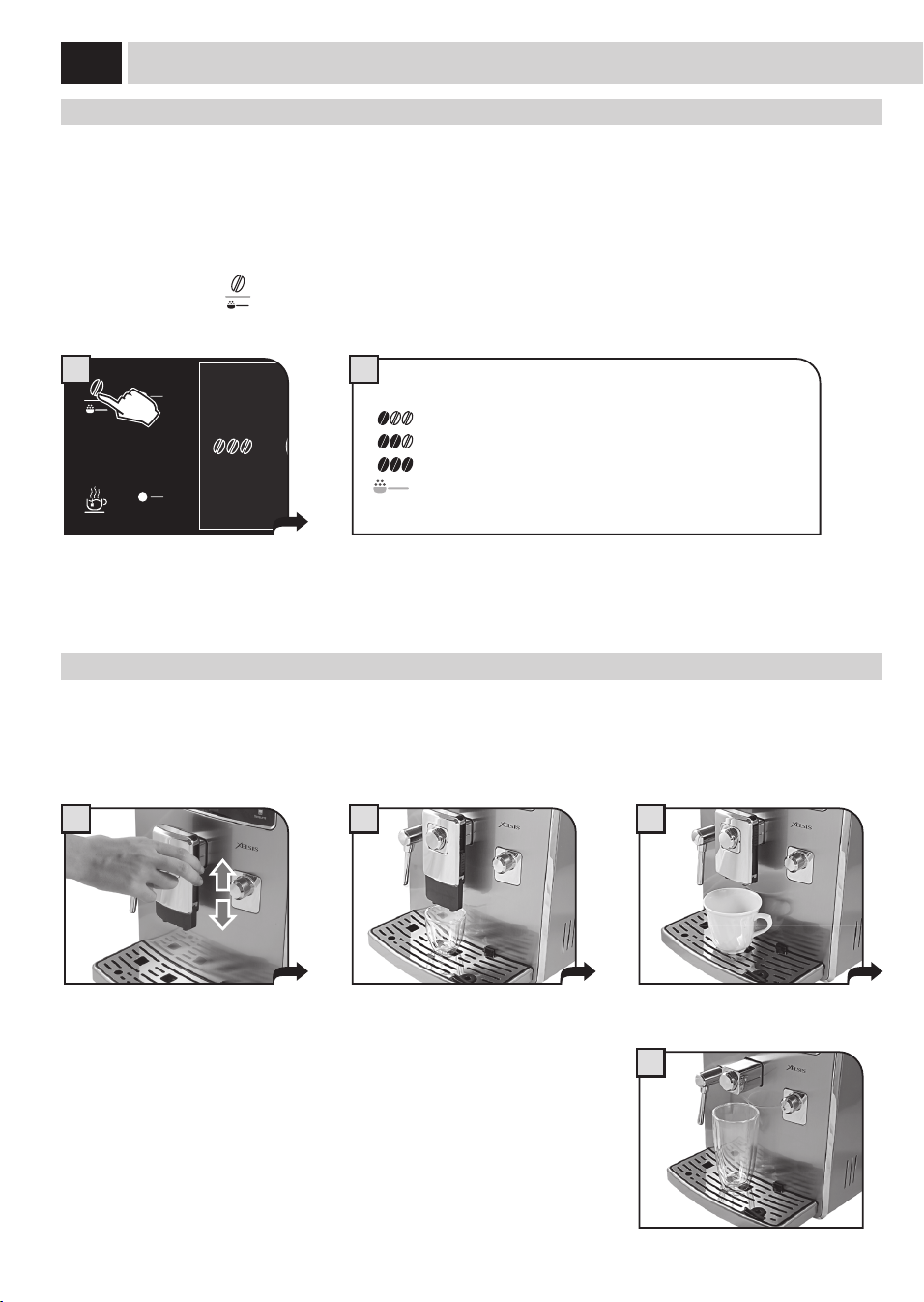
10
2
1 2 3
4
(OPTi-dOse) iNdiCaTiON de la QUaNTiTÉ de CaFÉ À mOUdre
Lamachinepermetderéglerlabonnequantitédecafémoulupourchaqueproduit.Ilestpossibledeprogrammerleréglagestandard,pour
chaqueproduitetutilisateur,grâceau«MENUBOISSON»(voirpage28).
Detoutefaçon,lamachinepermetdechangertemporairementceréglageensélectionnantsurlemomentlaquantitédecaféàmoudre;ce
changementestvalableuniquementpourladistributionducaféindividuelquisuit.
Enappuyantsurlatouche"
",ilestpossibledemodiertemporairementlaquantitédecaféàmoudreetdesélectionnerlafonctionde
caféprémoulu.
=ArômeLéger
=ArômeMoyen
=ArômeFort
=laboissonserapréparéeenutilisantlecaféprémoulu
MENU
UTILISATEUR
MENU
BOISSON
MENU
MACHINE
SÉLECTION
UTILISATEUR
17/05/09
04:17 pm
1
rÉGlaGe de la HaUTeUr de la bUse de disTribUTiON
Réglerlahauteurdelabusededistributionavantdedistribuerlesboissonsandepouvoirutiliserdestypesdetassediérents.
Pourleréglage,fairedélermanuellementlabusededistributioncommemontrédanslagure.
Remarque : dans certains cas la buse de distribution peut être enlevée pour pouvoir
utiliser des récipients de grande contenance.
Remarque : Il n'est pas possible d'e ectuer ce réglage lorsqu'on distribue un café américain (voir « Produits Spécial » page 20)
rÉGlaGes
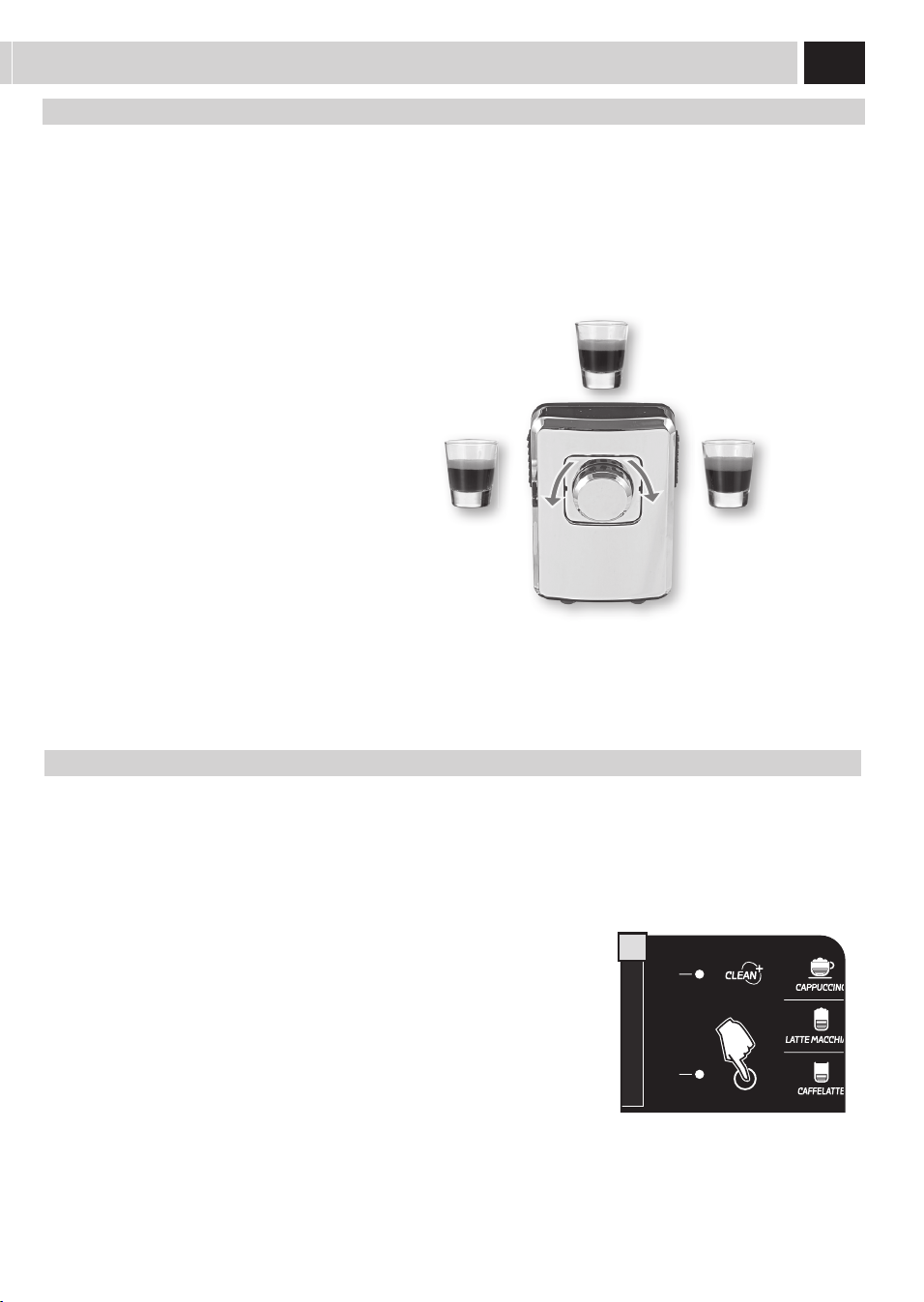
11
deNsiTÉ dU CaFÉ
LedispositifSBSaétéspécialementconçupourpermettrededonnerladensitéetl’intensitédegoûtvouluesaucafé.Ilsutdetournerle
boutonpourmodierlecaractèrequicorrespondmieuxàvosgoûts.
SBS – SAECO BREWING SYSTEM
Pourréglerladensitéducafédistribué.Leréglagepeutégalementêtreeectuépendantladistributionducafé.
Ceréglageauneetimmédiatsurladistributionsélectionnée.
CAFÉ
MOYEN
CAFÉ
SERRÉ
CAFÉ
LÉGER
MENU
UTILISATEUR
MENU
BOISSON
MENU
MACHINE
SÉLECTION
UTILISATEUR
17/05/09
04:17 pm
A
sTaNd-bY
Lamachineaétéconçuepourl'économied'énergie.Lamachinesemetenattente(stand-by)60minutesaprèsladernièreutilisation,la
chaudièren’estplusalimentée,touslesdispositifss’éteignent.
Lesconsommationssontréduitesauminimum.Pourredémarrerlamachine,ilsurad’appuyersurunetouchequelconque.
Ilestpossibledemettrelamachinevolontairementenmoded'attente(stand-by)engardantappuyéelatouchependant3secondes.
Remarque :
1 Si la porte de service est ouverte, la machine ne se met pas en mode «
stand-by ».
2 Le temps d'activation automatique du « stand-by » peut être modifi é
grâce au « MENU MACHINE » à page 34.
3 Lorsque la machine se met en mode « stand-by », elle e ectue un cycle de
rinçage des circuits internes. Pour arrêter le cycle, appuyer sur la touche «
STOP RINÇAGE ».
Lamachinepeutêtreredémarréeeneectuantl'unedesopérationssuivantes:
1 appuyersurl'unedestouchesdubandeaudecommande.
2 ouvrirlaportedeservice(àlafermeturedelaporte,lamachinepasseenmode«
stand-by»).
3 uneminuterieprérégléeintervient.
Lorsquelamachineestenmode«stand-
by»,levoyantrougeclignote.
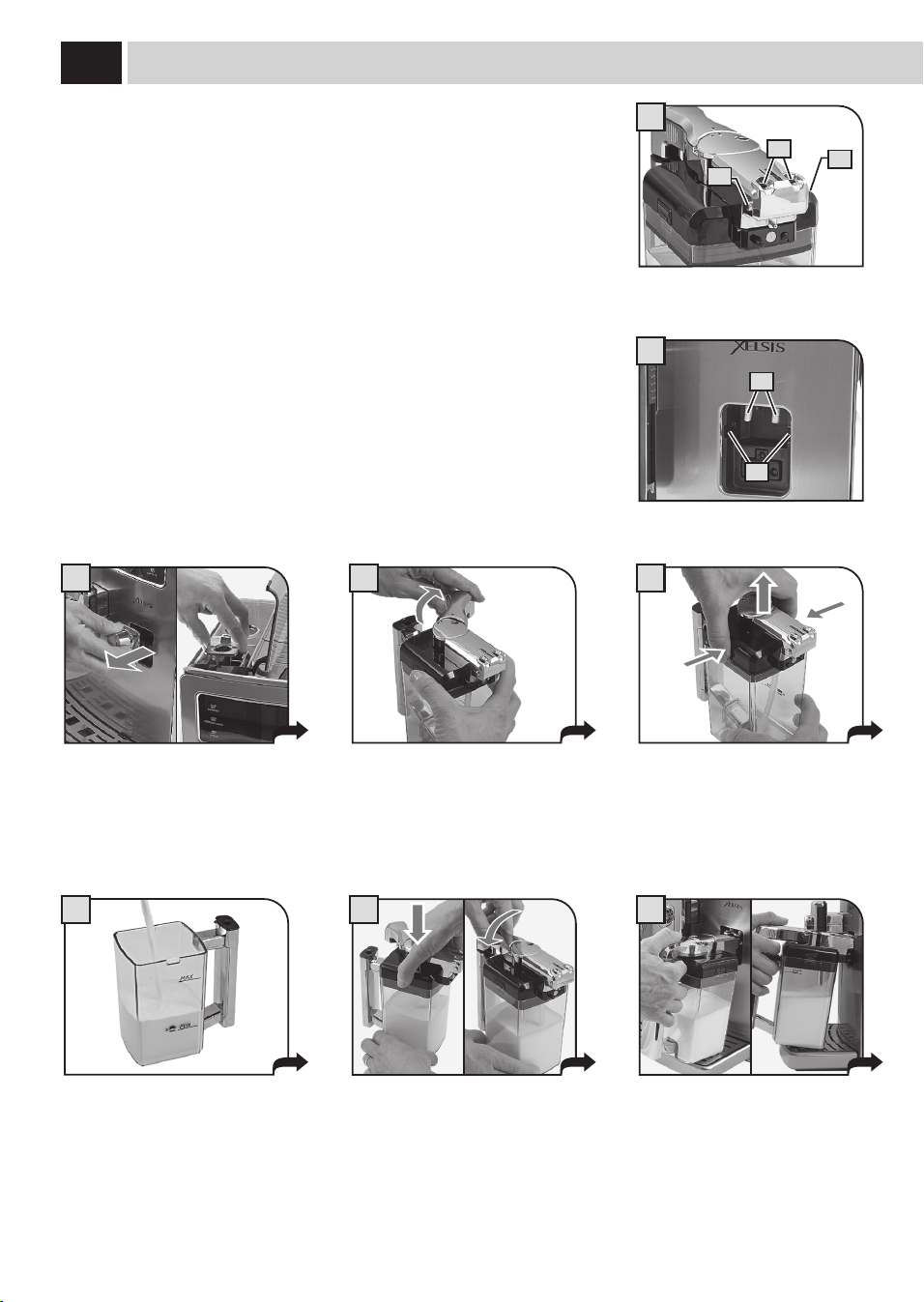
12
I
II
1 2 3
4 5 6
Lamachineestéquipéed'unréservoirquipermetdegérerdefaçonoptimalelelaitpourla
préparationd'uncappuccinosavoureux,d'unlaitnoisetteetdetouteboissonquiutilisedulait.
Remarque : avant chaque utilisation, s’assurer que la carafe est propre et
hygiénisée. Si on a conservé du lait dans la carafe, vérifi er avant chaque utilisation
que ce lait est apte à la consommation alimentaire.
Leréservoirpermetuneutilisationsimpleetfaciledulaitetilpeutêtreaisémentenlevédela
machineaprèschaqueutilisationetêtremisauréfrigérateur.
Aprèschaqueutilisation,lecircuitdedistributionestlavéautomatiquementàtraversuncycle
automatiquedenettoyage.Cecycleautomatiquedenettoyagefonctionneuniquementsicette
fonctionestactivée(voirpage37)etpeutêtreeectuémêmemanuellementenappuyantpar
lasuitesurlatouche«CLEAN»(voirpage17).
Pourunbonnettoyagedetouslescomposants,leréservoirdoitêtredémontéaumoinsunefois
parsemaine;decettefaçon,leniveaugénérald'hygiènedesboissonsdistribuéesresteraélevé.
Pourunbonnettoyage,consulterlasection«NETTOYAGECARAFELAIT»(voirpage47).
Enleverlecarterdeprotectiondela
machineetlegarderdansunendroit
propre.Onrecommandedel'introduire
danslelogementducouvercleàeau.
Tournerlapoignéedanslesensdes
aiguillesd’unemontrepourladébloquer.
Appuyersurlestouchesdedécrochage
pourpouvoirenleverlecouvercle.
Verserlelaitdansleréservoir.Dépasser
leniveauMINmaisnepasdépasserle
niveauMAX.
UTilisaTiON dU rÉserVOir À laiT
Remettrelecouvercleenvériantqu'il
soitbienfermé.Remettrelapoignée
danslapositioncentralepourassurerune
fermetureparfaite.
Placerlacarafeinclinéefrontalement.
Labasedelacarafedoitêtreappuyéeà
l'insert(E)situésurlebacd'égouttement.
A=Trousdelacarafe
B=Pivotscarafe
C=Embrayagesmachine
D=Glissièrespourlespivotsdelacarafe
A
B
B
C
D
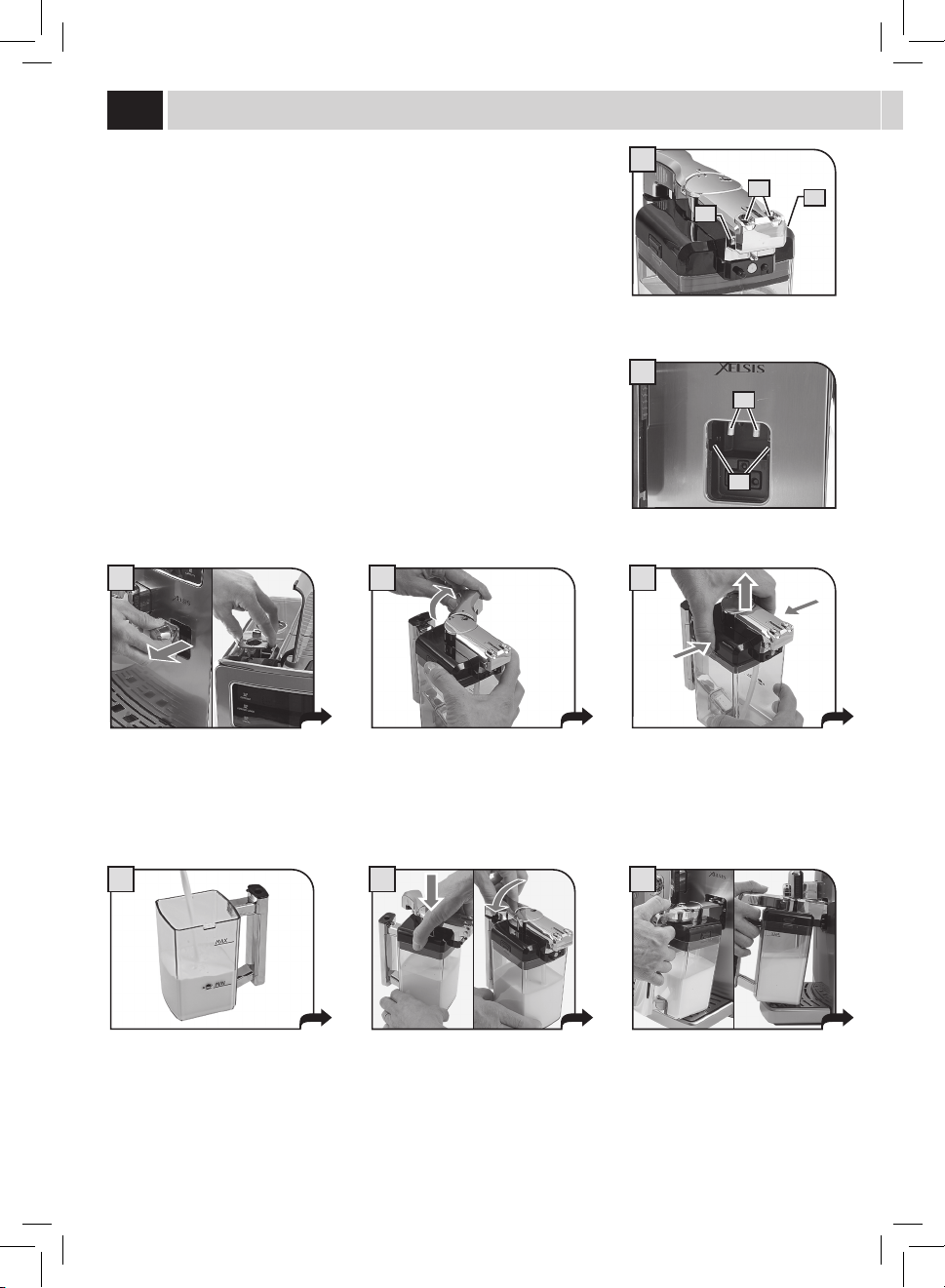
13
2
1
8
9
7
C
D
A
B B
Aprèsl'utilisation,enleverleréservoirdelamachineetlemettreauréfrigérateurpouruneconservationcorrecte.
IlestconseillédeNEPASlaisserreposerleréservoiràtempératureambiantependantdespériodesprolongées-Max10minutes.-
Conserverlelaitcommeilestindiquésurl'emballageduproducteuretNEPASl'utiliseraprèssadatedepéremptionnaturelle.Le
réservoirdoitêtrelavécommeilestdécritàlasection«NETTOYAGECARAFELAIT»(voirpage47).
eNleVemeNT de la CaraFe
Cesopérationsvousmontrentcommentenlevercorrectementlacarafedelamachine.
IL EST INTERDIT DE FORCER LA CARAFE AU-DELÀ DE SON INCLINAISON NATURELLE.
Pendantcettephaselestrousdela
carafe(A)setrouventau-dessousdes
embrayages(C).
Lespivotsdelacarafe(B)setrouventàla
mêmehauteurdesglissières(D).
Introduirelacarafeparunerotationverslebas(commelemontrelagure),jusqu'à
l'accrochagedel'insert(E)setrouvantdanslebacd'égouttement.
Tournerlacarafeverslehaut,jusqu'audécrochement,avecl'insert(E)placédanslebac
d'égouttement,ensuitetirerjusqu'audégagementcomplet.
IL EST INTERDIT DE FORCER LA CARAFE AU-DELÀ DE SON
INCLINAISON NATURELLE.
Lacarafeseretrouvenaturellement
danssonlogement.
E

14
1 2
eXPressO / eXPressO allONGÉ
Cetteprocéduremontrecommentpréparerunexpresso.Pourdistribuerunautretypedecafé,lesélectionnerenappuyantsurlatouche
correspondante.Utiliserdestassesappropriéespouréviterquelecafénedéborde.
Pourlapréparationde2tasses,appuyerdeuxfoissurlatouche;lamachinedistribuelamoitiédelaquantitérégléeetinterrompt
brièvementladistributionpourmoudrelasecondedosedecafé.Ladistributiondecaféestensuiterepriseetterminée.
MENU
UTILISATEUR
MENU
BOISSON
MENU
MACHINE
SÉLECTION
UTILISATEUR
17/05/09
04:17 pm
3
Mettre1/2tasse/spourdistribuerunou
deuxcafé(s)expresso.
Mettre1/2tasse/spourpréparerun
expressoallongé.
Choisirleproduitenappuyantsurla
touchecorrespondante;unefoispourla
distributiond’unetasseetdeuxfoispour
ladistributionde2tasses.
EXPRESSO
STOP
CAFÉ
5
Lamachinecommenceàmoudrela
quantitédecaféprogrammée.
Ladistributiondelaboissonsélectionnée
commence.
Ladistributionducafépeutêtreinterrompue
àtoutmomentenappuyantànouveausurla
touche«STOPCAFÉ».
Lamachinetermineautomatiquementladistributionducaféselonlesquantitésrégléesenusine.Ilestpossibledepersonnaliserles
quantités,voirpage28.
EXPRESSO
STOP
CAFÉ
6
EXPRESSO
4
disTribUTiON de CaFÉ
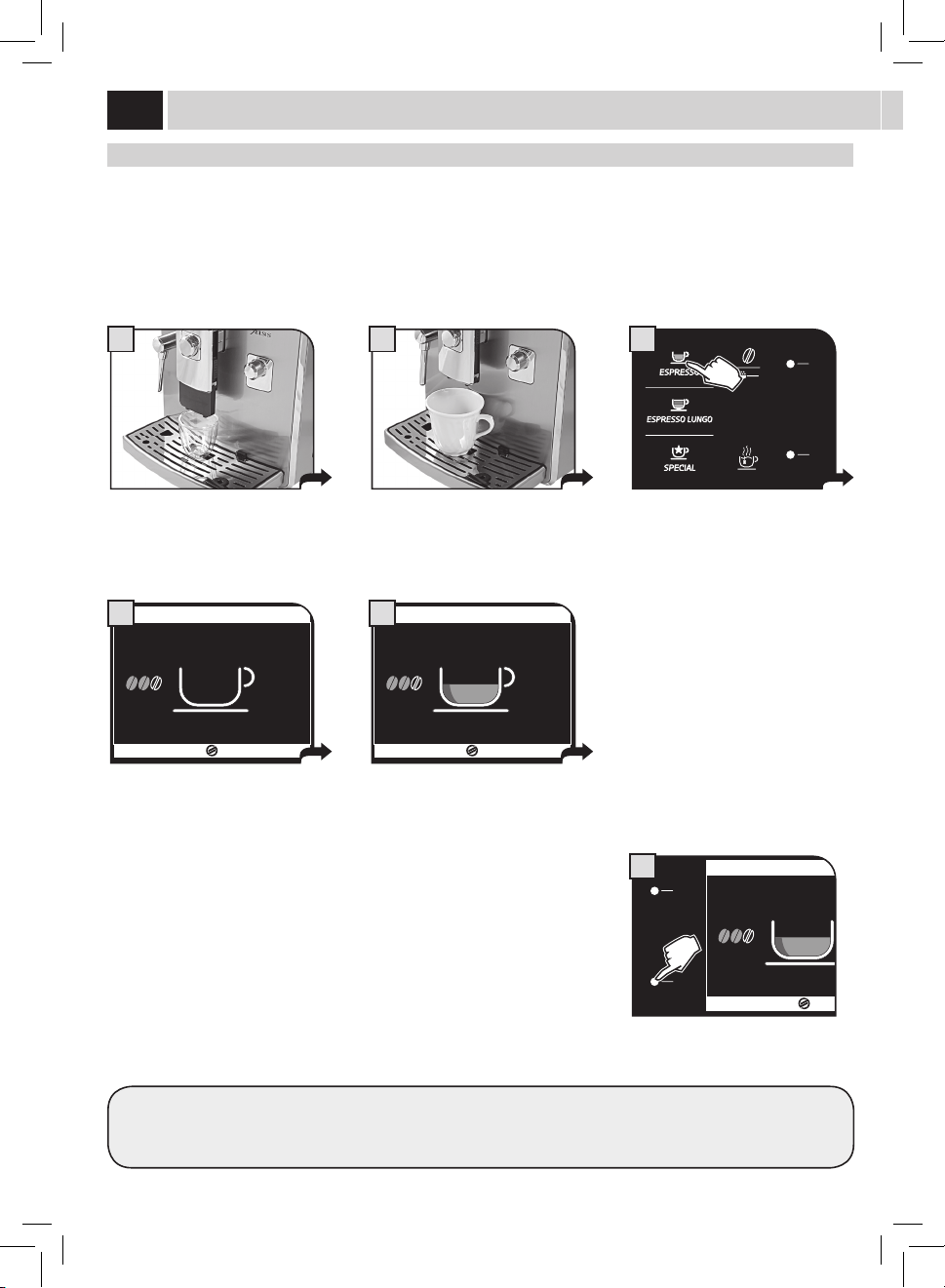
15
1
17/05/09
04:17 pm
MENU
UTENTE
MENU
BEVANDA
MENU
MACCHINA
SELEZIONE
UTENTE
3
5
disTribUTiON de la bOissON aVeC dU CaFÉ PrÉmOUlU
Lamachinepermetd’utiliserducaféprémouluoudécaféiné.
Verserlecaféprémouludanslecompartimentprévuàceteetdanslapartiecentraledelamachine.Neverserqueducafémoulupour
machinesàcaféexpressomaisjamaisducaféengrainsousoluble.(voirchapitre«MENUBOISSON»page28).
Cetexemplemontrelaprocédurededistributiond'uncaféexpressoenutilisantducaféprémoulu.
17/05/09
04:17 pm
MENU
UTILISATEUR
MENU
BOISSON
MENU
MACHINE
SÉLECTION
UTILISATEUR
2
Placer1tassepourdistribuerun
expresso.
Appuyersurlatoucheuneouplusieurs
foisjusqu'àcequel'icônes'achesur
l'acheur.
Sélectionnerleproduitenappuyantsur
latouchecorrespondante.
VERSER DU CAFÉ MOULU
ET APPUYER SUR OK
ESC OK
4
VERSER DU CAFÉ MOULU
ET APPUYER SUR OK
ESC OK
6
Lapage-écranrappelleàl’utilisateur
deverserlecafémouludansle
compartimentprévuàceteet.
Appuyersurlaportedeservicepour
l'ouvrir;ensuitelasoulever.Verserle
cafémouludanslecompartimentprévu
àceteetàl’aidedeladosettefournie.
Appuyersurlatouche«OK»pour
commencerladistribution.
Remarque:
• Siladistributionnedémarrepasdansles30secondesquisuiventl’achagedelapageécran(4),lamachineretourneaumenu
principaletdéchargel’éventuelcaféintroduitdansletiroiràmarc;
• Silecaféprémoulun’apasétéversédanssoncompartiment,lamachinenedistribueraquedel’eau;
• Siladoseestexcessiveouque2ouplusieursmesuresdecafésontajoutéesdanslecompartiment,lamachinenedistribuepasde
boissonetlecaféverséseradéchargédansletiroiràmarc.
ATTENTION : NE VERSER DU CAFÉ PRÉMOULU DANS LE COMPARTIMENT QUE LORSQUE L’ON VEUT
DISTRIBUER DES BOISSONS QUI SE PRÉPARENT AVEC CE TYPE DE CAFÉ.
VERSER UNE SEULE MESURE DE CAFÉ MOULU À LA FOIS. LA MACHINE NE PEUT PAS DISTRIBUER DEUX
CAFÉS EN MÊME TEMPS.
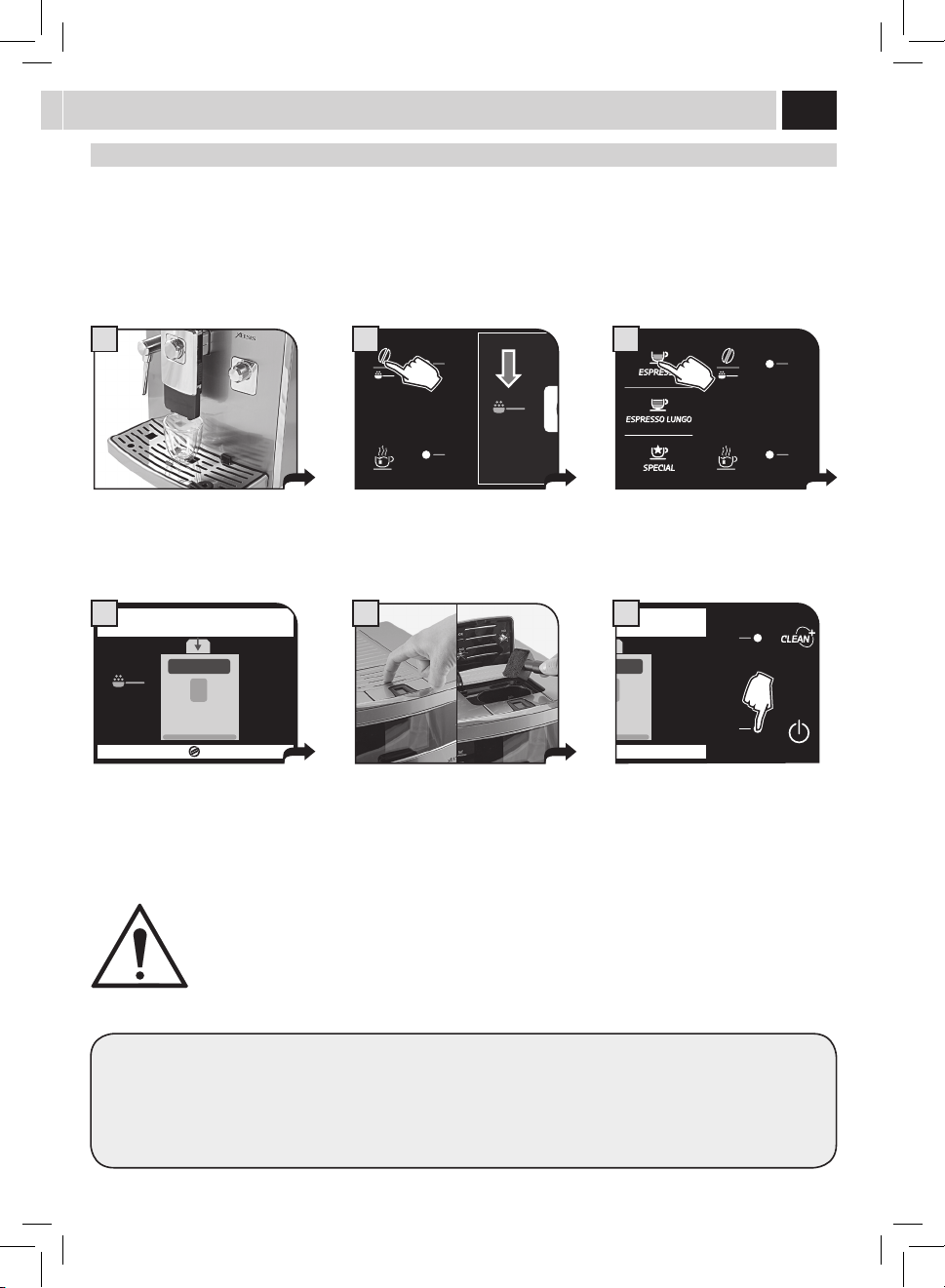
16
1 2
MENU
UTENTE
MENU
BEVANDA
MENU
MACCHINA
SELEZIONE
UTENTE
17/05/09
04:17 pm
3
CaPPUCCiNO / laiT NOiseTTe / CaFÉ aU laiT
disTribUTiON
IL PEUT Y AVOIR QUELQUES ÉCLABOUSSURES DE LAIT ET VAPEUR AU DÉBUT DE LA DISTRIBUTION, AVEC LE
DANGER DE BRÛLURES. AVANT DE PRÉLEVER LE RÉCIPIENT, ATTENDRE LA FIN DU CYCLE.
CONSULTER LA SECTION « UTILISATION DU RÉSERVOIR À LAIT » (VOIR PAGE 12).
Placerlatasseoulerécipientoùvous
souhaitezpréparern'importequel
produitàbasedelait.
Tournerlapartiesupérieuredelapoignée
duréservoirsurlatasse.Pouréviterquele
laitdéborde,utilisertoujoursunetassede
dimensionadéquate.
Sélectionnerleproduitenappuyantsur
latouchecorrespondante;ilestpossible
sélectionnerunseulproduitàlafois.
CAPPUCCINO
LAIT
RAPIDE CHAUFFAGE…
STOP
MODE ÉCO ACTIF
LAIT
4
CAPPUCCINO
STOP
LAIT
5
Lamachinecommencelapréparation;
ellemoudlecaféetsechauepourla
distributiondulait.
Danscecas,lafonctionMODEÉCOestsur
«ON»(voirpage32).
Ladistributiondulaitcommence.Pour
arrêterladistribution,appuyersurla
touche«STOPLAIT».
CAPPUCCINO
STOP
LAIT
AJOUTER
DU LAIT
6
Ladistributiondelaitpeutêtre
augmentéeenappuyantsurlatouche«
AJOUTERDULAIT»;danscecas,lelait
distribuéN'estPASémulsionné.
Pourtouslesproduitsàbasedelait,lamachinedistribuelelaitavantetlecaféensuite.Danscecas,iln'estpaspossiblede
distribuerunproduitdoubleàlafois.
CAPPUCCINO
LAIT
RAPIDE CHAUFFAGE…
STOP
MODE ÉCO ACTIF
LAIT
A
CAPPUCCINO
STOP
LAIT
B
Sil'onappuiesurlatouche«LAITRAPIDE»,
ondésactivelafonctionMODEÉCOlamettant
sur«OFF».(voirpage32).
Touteslesboissonsserontensuite
préparéesenréduisantletemps
dechauagedusystèmemaison
consommeraplusd'énergie.
LafonctionMODEÉCOpeut
êtreréactivéeseulement
du«MENUMACHINE»(voir
page32)
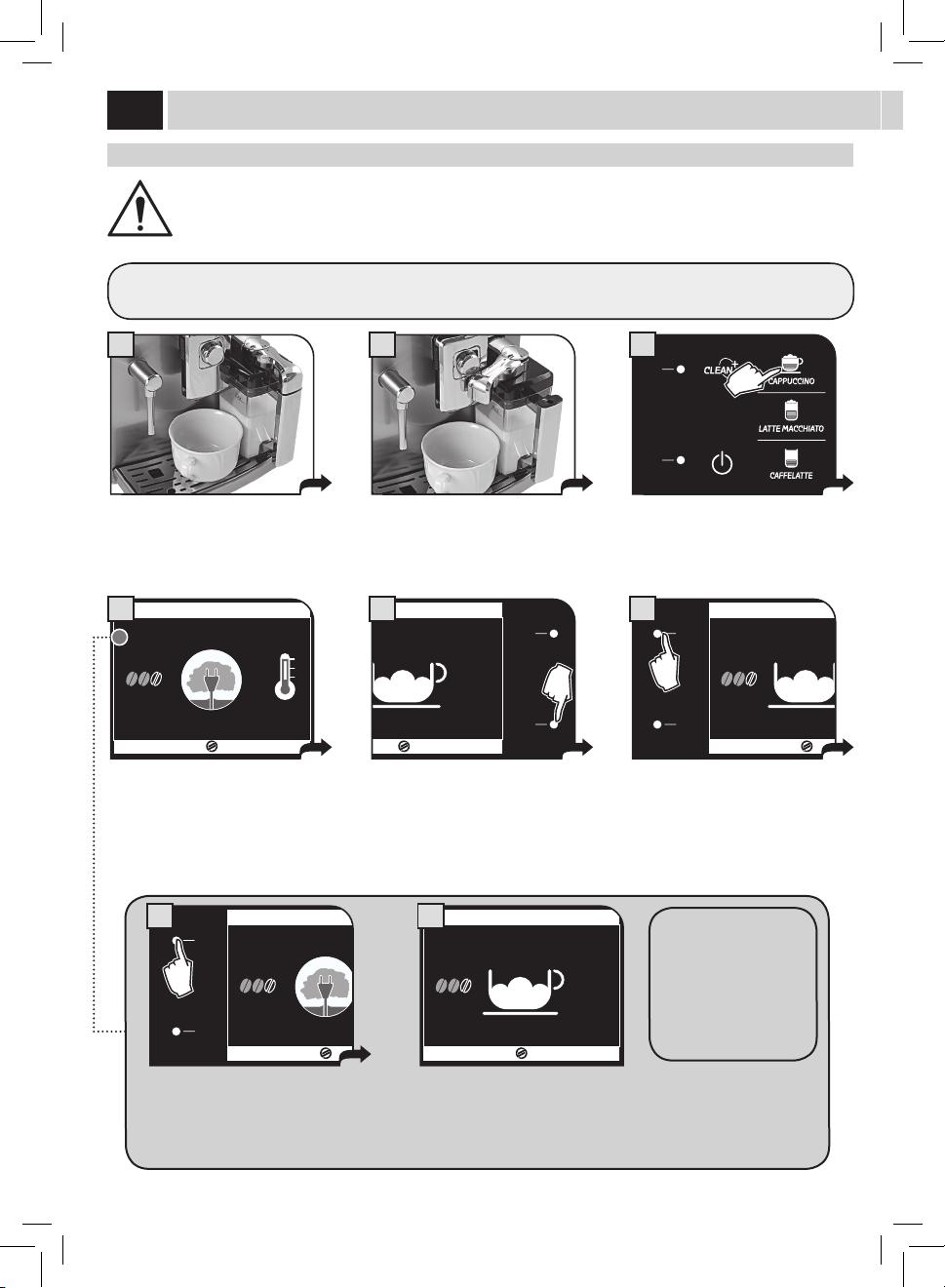
17
8 9
1 3
MENU
UTENTE
MENU
BEVANDA
MENU
MACCHINA
SELEZIONE
UTENTE
17/05/09
04:17 pm
2
CAPPUCCINO
STOP
CAFÉ
7
Unefoisladistributiondulaitterminée,
lamachinedistribuelecafé.Pourarrêter
ladistribution,appuyersurlatouche
«STOPCAFÉ».
Àlan,prendrelatasseavecle
cappuccinoetremettrelapoignéedans
lapositioninitiale.
Enleverlerécipientetlemettreau
réfrigérateuraprèslecycledenettoyage.
Attendrependantquelques
instants.Lamachinefaitdémarrer
leprocessusautomatiquede
nettoyagedelacarafe(sivalidé-
voirpage37)
CYCle de NeTTOYaGe : CleaN
Placerlerécipientcommeindiquéauxpages
12et13.Lecycledenettoyageconcerne
uniquementlesconduitesencontactavecle
lait;ilesteectuéindépendammentdela
présencedelaitdanslerécipient.
Àlan,ilestpossibled'enleverle
récipientétantdéjàprêtàl'emploi.
Appuyersurlatouche.Lamachine
eectueuncycledenettoyage
supplémentaire.
CYCle de NeTTOYaGe : CleaN
NE PAS SAISIR LA POIGNÉE DE LA CARAFE PENDANT LE CYCLE DE NETTOYAGE ; DANGER DE BRÛLURES.
Lamachinepermetd'eectueruncycledenettoyagerapideàchaquefoisqu'onlesouhaite.LeCycledenettoyagepeutêtre
eectuéavantladistributionet/outoutdesuiteaprèslapréparationd'uneboisson.
Cetteoptionestfourniepourpermettredegérerlenettoyageduréservoiràlaitselonvospréférences.Cenettoyagepeutêtreutilisé
mêmepourl'hygiénisationdescircuitsaprèsunelonguepérioded'inactivité.
Pour introduire/enlever correctement la carafe, consulter les instructions à page 12 et 13.
Laprocédureestlamêmequecellepourladistributiond'unlaitnoisette,d'uncaféaulaitoud'unlaitchaud(consulterlasection
correspondanterelativeauxproduits«spécial»-Voirpage19).
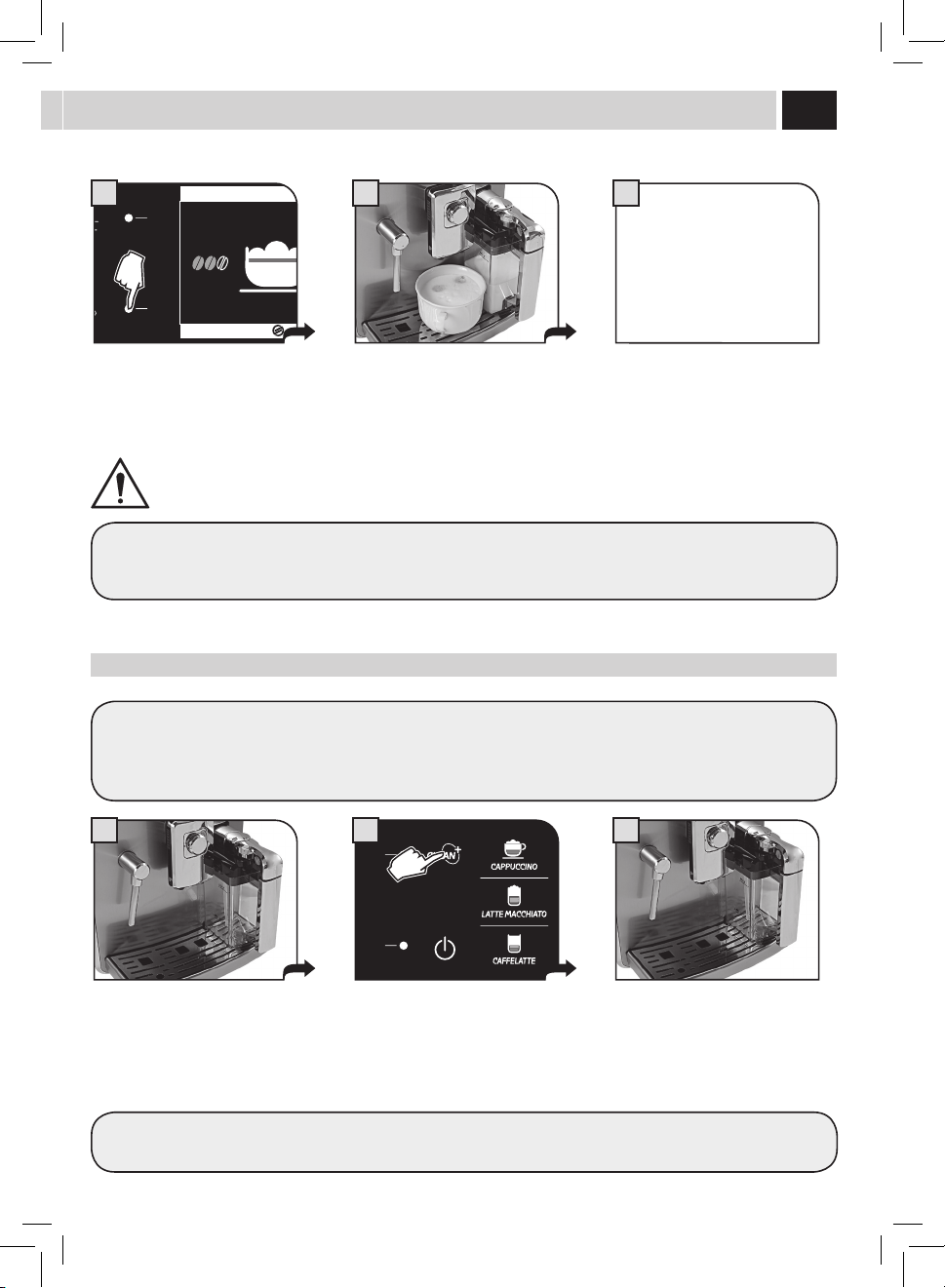
18
1 3
MENU
UTENTE
MENU
BEVANDA
MENU
MACCHINA
SELEZIONE
UTENTE
17/05/09
04:17 pm
2
disTribUTiON eaU CHaUde
Répéterl'opérationpourdistribuerunenouvellequantitéd'eauchaude.
Danslesconduites,ilrestedel'eaupouvantsortirpargouttes:ils'agitd'unecaractéristiquenormaledelamachine.
disTribUTiON d’eaU CHaUde
AU DÉBUT DE LA DISTRIBUTION, FAIRE ATTENTION AU RISQUE DE BRÛLURES CAR IL PEUT Y AVOIR DES
ÉCLABOUSSURES D'EAU CHAUDE. LA BUSE POUR LA DISTRIBUTION DE L’EAU CHAUDE/ VAPEUR PEUT ATTEINDRE
DES TEMPÉRATURES ÉLEVÉES : ÉVITER DE LA TOUCHER DIRECTEMENT AVEC LES MAINS, UTILISER UN CHIFFON
POUR LA TOURNER.
Placerunrécipientendessousdelabuse
d’eauchaude.
Àlan,prendrelerécipientavecla
quantitéd'eausouhaitée.
Appuyersurlatoucheetattendre
jusqu'àcequelaquantitéprogrammée
soitdistribuée.Pourarrêterla
distribution,appuyersurlatouche
«STOPEAUCHAUDE».
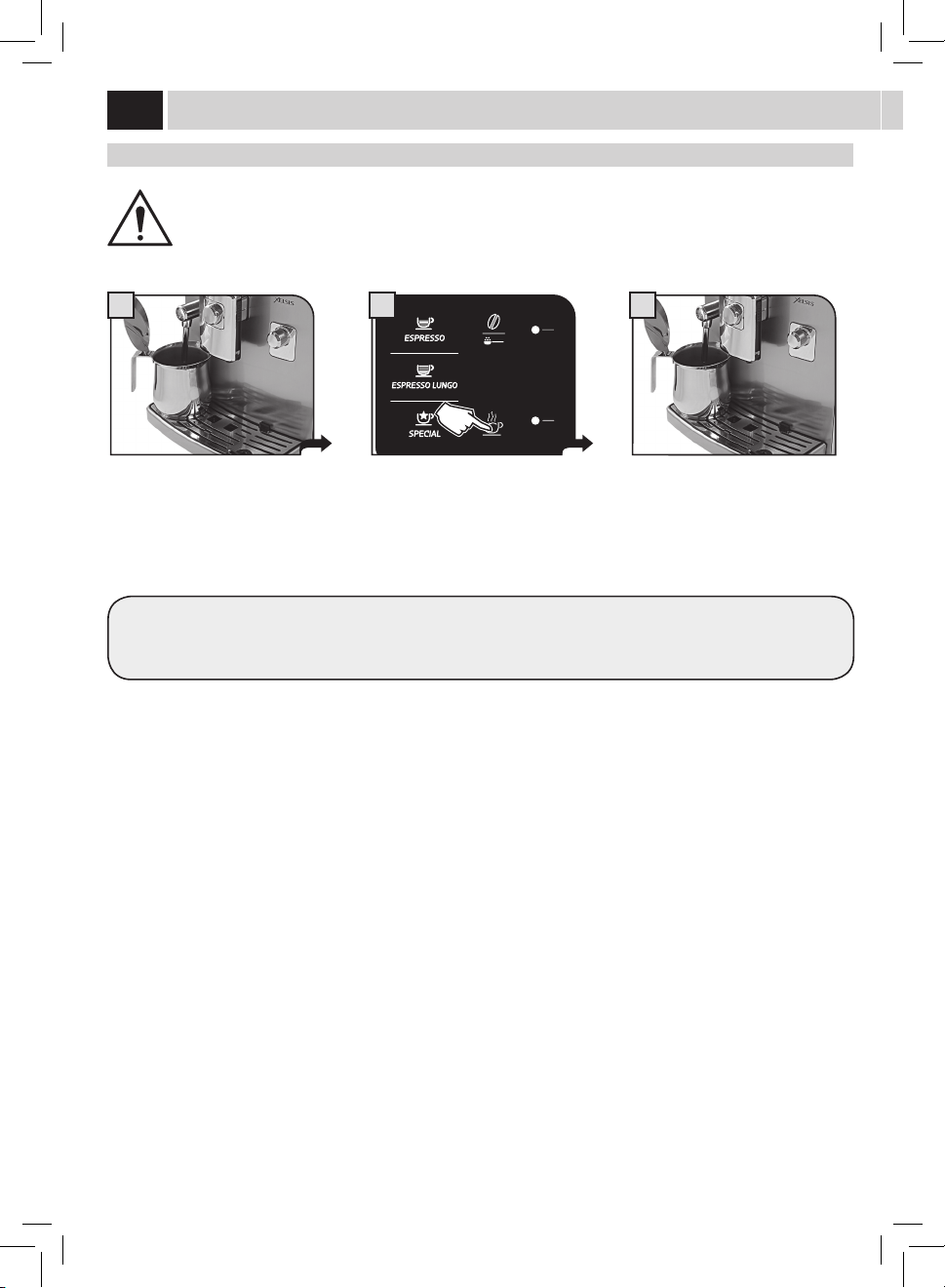
19
1
3
3
MENU
UTENTE
MENU
BEVANDA
MENU
MACCHINA
SELEZIONE
UTENTE
17/05/09
04:17 pm
1
TOUCHe « sPeCial »
Lamachineestprédisposéepourdistribuerd'autresproduitsquinesontpasprésentdanslebandeaudecommande.
Remarque:siaucunproduitn'estsélectionné,lamachinerevientaumenuprincipal.
AU DÉBUT DE LA DISTRIBUTION DE LA VAPEUR, FAIRE ATTENTION AU RISQUE DE BRÛLURES CAR IL PEUT Y
AVOIR DES ÉCLABOUSSURES D'EAU CHAUDE. LA BUSE POUR LA DISTRIBUTION DE L’EAU CHAUDE/ VAPEUR PEUT
ATTEINDRE DES TEMPÉRATURES ÉLEVÉES : ÉVITER DE LA TOUCHER DIRECTEMENT AVEC LES MAINS, UTILISER
UN CHIFFON POUR LA TOURNER.
disTribUTiON de VaPeUr
Lavapeurpeutêtreutiliséepourleréchauagedulait,del'eauoud'autresboissons.
Surl'acheurestachéelapagequipermet
dedistribuerlesboissons«speciales».
Placerunrécipientsouslabusede
vapeur.
Consulterlasectioncorrespondante
pourladistributiondelaboisson
souhaitée.
Remarque:après10secondesla
machinerevientàl’écranprincipal.
Ladistributionnepeutêtreinterrompue
qu’enappuyantsur«STOPVAPEUR».
Àlan,prendrelerécipientavecla
boissonréchauée.
Appuyersurlatouchepouraccéderau
menu.
Appuyersurlatoucheetattendre
jusqu'àcequelaquantitédevapeur
programméesoitdistribuée.
BOISSONS SPECIAL
CAFÉ
CRÈME
VAPEUR
CAFÉ
AMÉRICAIN
LAIT
CHAUD
2
BOISSONS SPECIAL
CAFÉ
CRÈME
VAPEUR
CAFÉ
AMÉRICAIN
LAIT
CHAUD
2
PrOdUiTs « sPeCial »
Pour un résultat optimal, on recommande d'e ectuer de petits mouvements circulaires.
Pourlapréparationdulaitchaudoudel'expressocrème,consulterlasectionrelativeàlapréparationducappuccinopourcequi
concerneladistributionetlesdétailsdenettoyage(Voirpage16et17).
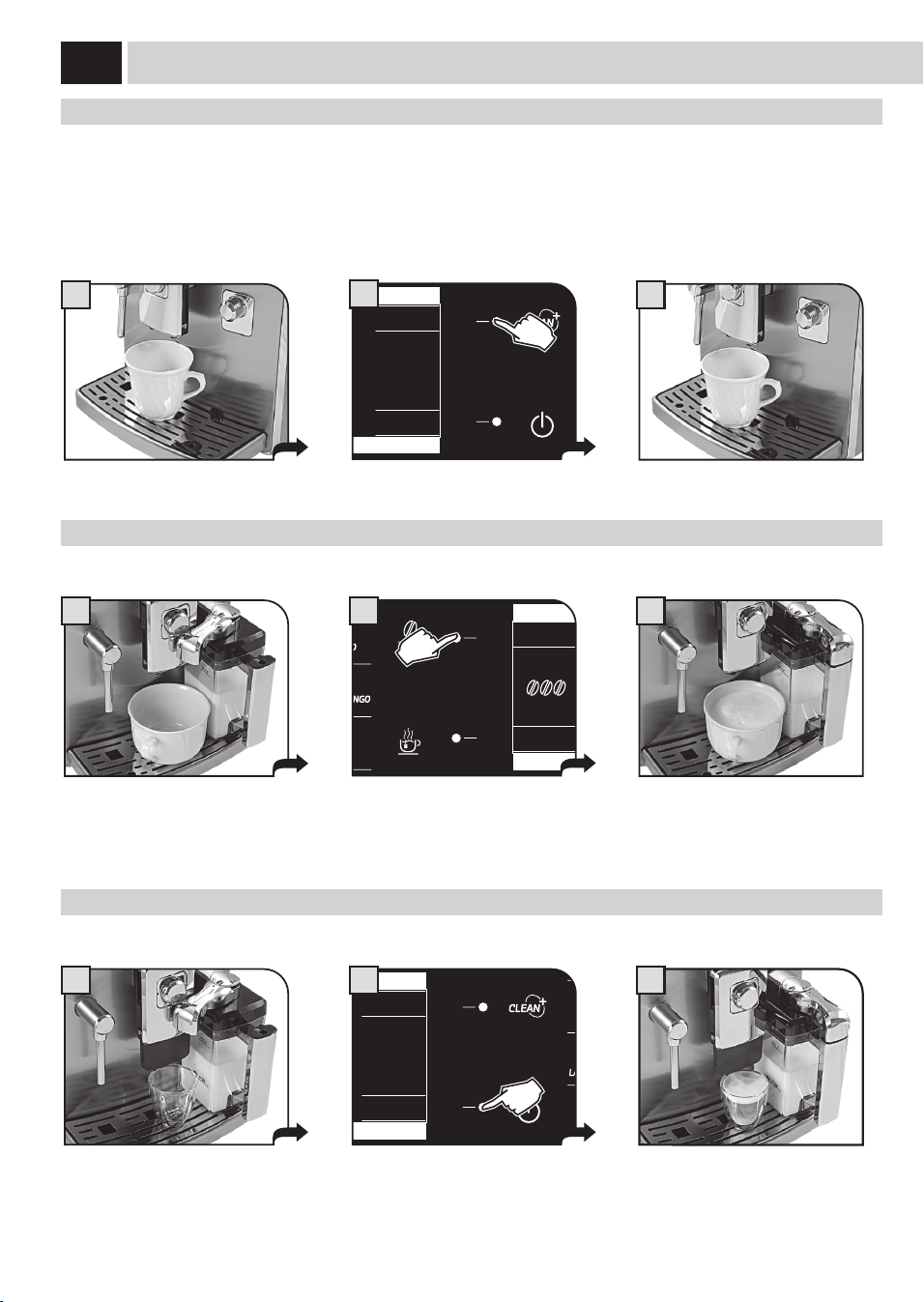
20
1 3
1
1
3
3
CaFÉ amÉriCaiN
Ceprogrammeparticulierpermetdeprépareruncaféaméricain;ladistributiondecaféestgéréedefaçonparticulièredemanièreàfaire
ressortirlegoûtducaféaméricain.
Remarque : Tourner complètement le bouton SBS dans le sens inverse des aiguilles d'une montre comme l'affi cheur le montre
(voir page 11). Pour préparer ce produit, on e ectue deux cycles de distribution de café. Lorsqu'on distribue ce produit, il
n'est pas possible d'e ectuer le réglage de l'arôme « Opti-dose » (voir page 10). Cette recette ne peut pas être modifi ée par
l'utilisateur.
laiT CHaUd
Ceprogrammeparticulierpermetdepréparerunlaitchaud.
CaFÉ Crème
Ceprogrammeparticulierpermetdeprépareruncafécrème.
BOISSONS SPECIAL
CAFÉ
CRÈME
VAPEUR
CAFÉ
AMÉRICAIN
LAIT
CHAUD
2
Àlandeladistribution,prendrela
tasseaveclecafé.
BOISSONS SPECIAL
CAFÉ
CRÈME
VAPEUR
CAFÉ
AMÉRICAIN
LAIT
CHAUD
2
BOISSONS SPECIAL
CAFÉ
CRÈME
VAPEUR
CAFÉ
AMÉRICAIN
LAIT
CHAUD
2
Positionnerlatasse.Tournerlapartie
supérieuredelapoignéeduréservoir
surlatasse.
Mettrelatassesouslabusede
distribution.
Placerlatasseauxdimensions
appropriées.Tournerlapartiesupérieure
delapoignéeduréservoirsurlatasse.
Àlandeladistribution,prendrela
tasseaveclelait.
Àlandeladistribution,prendrela
tasse.
Appuyersurlatoucheetattendrejusqu'à
cequelelaitchaudsoitdistribué.
Appuyersurlatoucheetattendrejusqu’à
cequelecafécrèmesoitdistribué
Sélectionnerleproduitenappuyantsur
latouchecorrespondante.
PrOdUiTs « sPeCial »
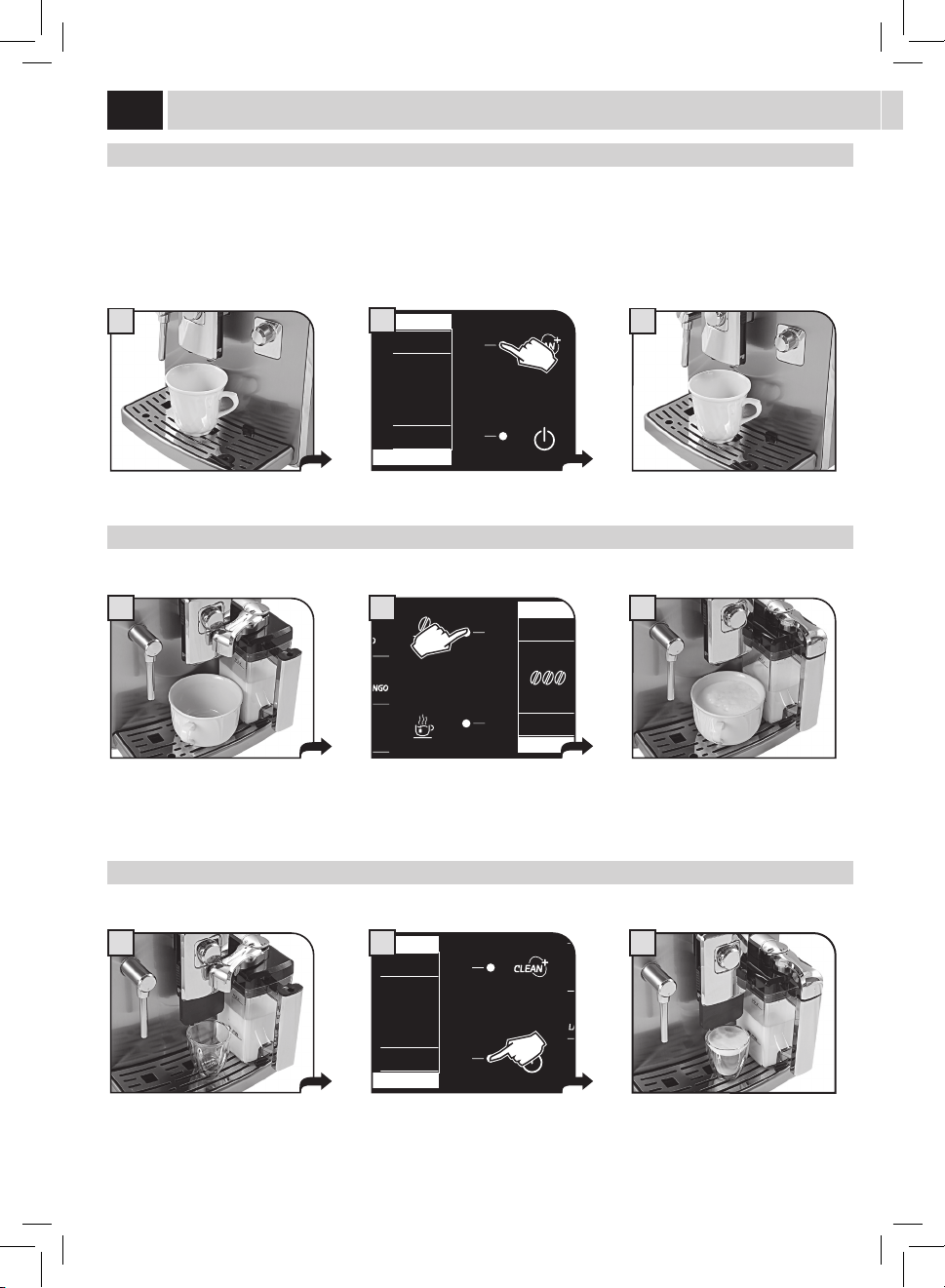
21
1 2
MENU
UTENTE
MENU
BEVANDA
MENU
MACCHINA
SELEZIONE
UTENTE
17/05/09
04:17 pm
3
PrOGrammaTiON raPide de la lONGUeUr des bOissONs
IL PEUT Y AVOIR QUELQUES ÉCLABOUSSURES DE LAIT ET VAPEUR AU DÉBUT DE LA DISTRIBUTION, AVEC LE
DANGER DE BRÛLURES. CONSULTER LA SECTION « UTILISATION DU RÉSERVOIR À LAIT »
Danscettesection,ontraitedelaprogrammationd'uneboissontellequeleCappuccinocaronveutmontrertouteslesphasesnécessaires
pouruneprogrammationsimpleetrapidedelatotalitédevosboissons.
Laprogrammationn'estvalablequepourl'utilisateursélectionnéàprésent;pourlesautresutilisateursilfauteectuerlesmêmesphases.
Unefoisuneprogrammationrapidedelaboissoneectuée,ilestpossibled'eectuerunréglageplusdétailléetprécisenconsultantle
«MENUBOISSON»(voirpage28).
Placerlatasseoulerécipientoùvous
souhaitezpréparerlecappuccinooule
laitnoisette.
Tournerlapartiesupérieuredela
poignéeduréservoirsurlatasse.Utiliser
latassequel'onutilisenormalement.
Garderappuyéelatouchependant
3secondespourcommencerla
programmation.
CAPPUCCINO
LAIT
RAPIDE CHAUFFAGE…
STOP
MODE ÉCO ACTIF
LAIT
4
CAPPUCCINO
STOP
LAIT
MEMO
5
Lamachinecommencelapréparation;
ellemoudlecaféetsechauepourla
distributiondulait.
Ladistributiondulaitcommence.Une
foislaquantitésouhaitéeatteinte,
appuyersur«STOPLAIT».
CAPPUCCINO
STOP
CAFÉ
MEMO
6
Unefoisladistributiondulaitterminée,
lamachinedistribuelecafé.Unefoisla
quantitésouhaitéeatteinte,appuyersur
«STOPCAFÉ».
Lalongueurdelaboissonestprogrammée.Àchaquesélectionsuivante,cettelongueurseradistribuée.
Pourtouteslesautresboissonssuivrelamêmeprocédureengardantappuyéelatouchedesboissonsquel'onsouhaiteprogrammer.
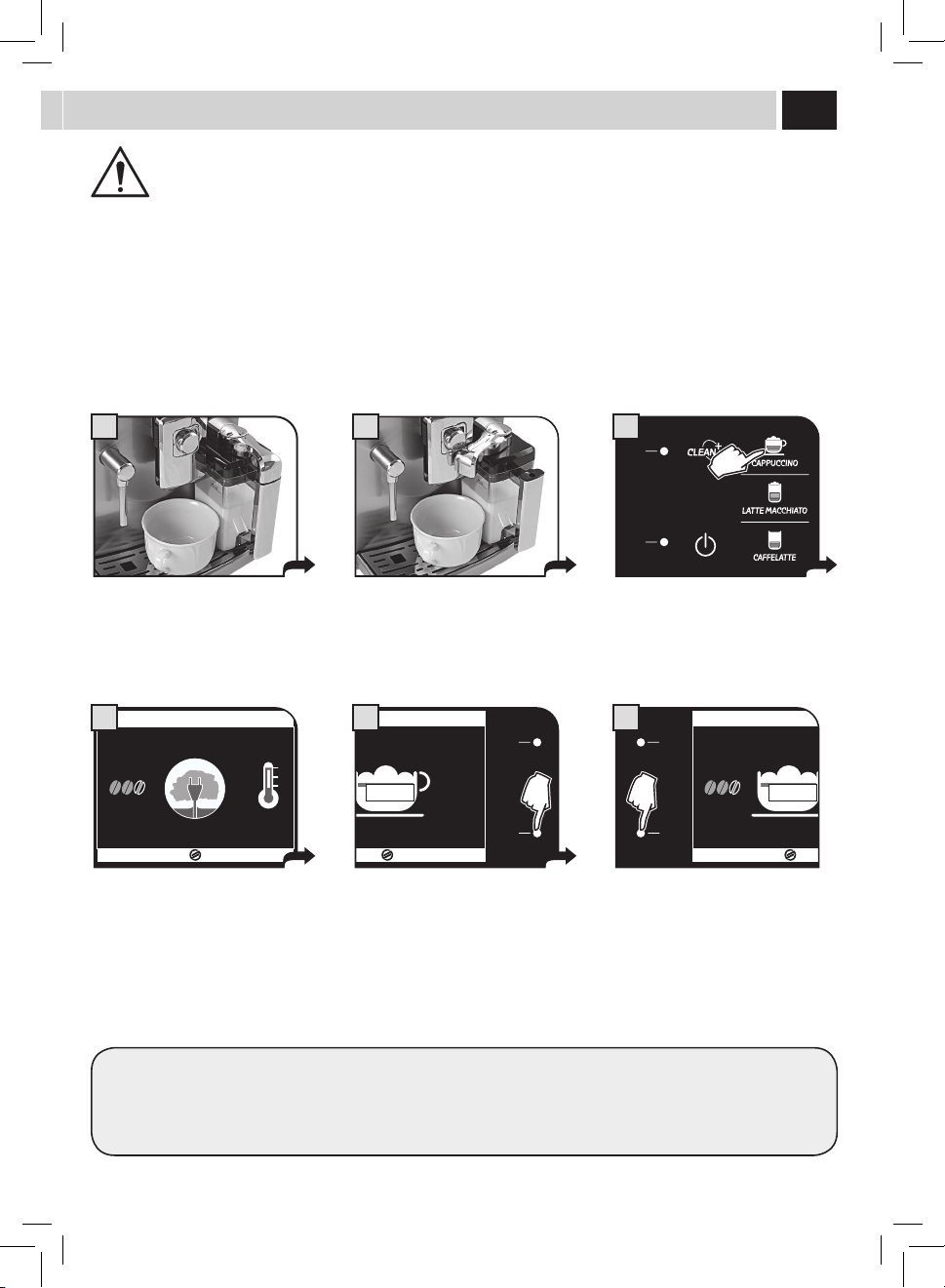
22
Lamachinepermetdepersonnaliserlesréglagesdedistributionpourchaqueboissonsurlabasedel'utilisateursélectionné.
Touchepourlasélectiondesréglagesdesutilisateurs
Pourpouvoirsélectionnerlesutilisateurs,ilfautd'abordlescréerparlemenuprévuàceteet.L'utilisateurdoitêtresélectionnéavantde
distribuerlecaféoulaboissonsouhaitée.
Appuyersur«MENUUTILISATEUR».
Touchedélement/sélection
Touchedélement/sélection
Touchedesortie
CRÉER NOUVEL UTILISATEUR
SUPPRIMER UTILISATEUR
Cettefonctionpermetdecréerunnouvelutilisateur.Ilpourraprogrammertoutesles
boissonsselonsespréférencespersonnelles.
Cettefonctionpermetd'eacerunutilisateurexistantettouteslesprogrammationsquilui
sontassociées.
Remarque : tout réglage e acé ne peut pas être récupéré. Le symbole reste
disponible dans le bandeau pour un nouvel utilisateur.
Touchedesélection/conrmation
MENU
UTILISATEUR
MENU
BOISSON
MENU
MACHINE
SÉLECTION
UTILISATEUR
17/05/09
04:17 pm
ESC
OK
CRÉER NOUVEL UTILISATEUR
SUPPRIMER UTILISATEUR
MODIFIER UTILISATEUR
3. MENU ITILISATEUR
meNU UTilisaTeUr
MODIFIER UTILISATEUR
Cettefonctionpermetdemodierlesréglagespourchaqueutilisateurquiaétécréé
d'abord.
Remarque : tout réglage modifi é ne peut plus être restauré.
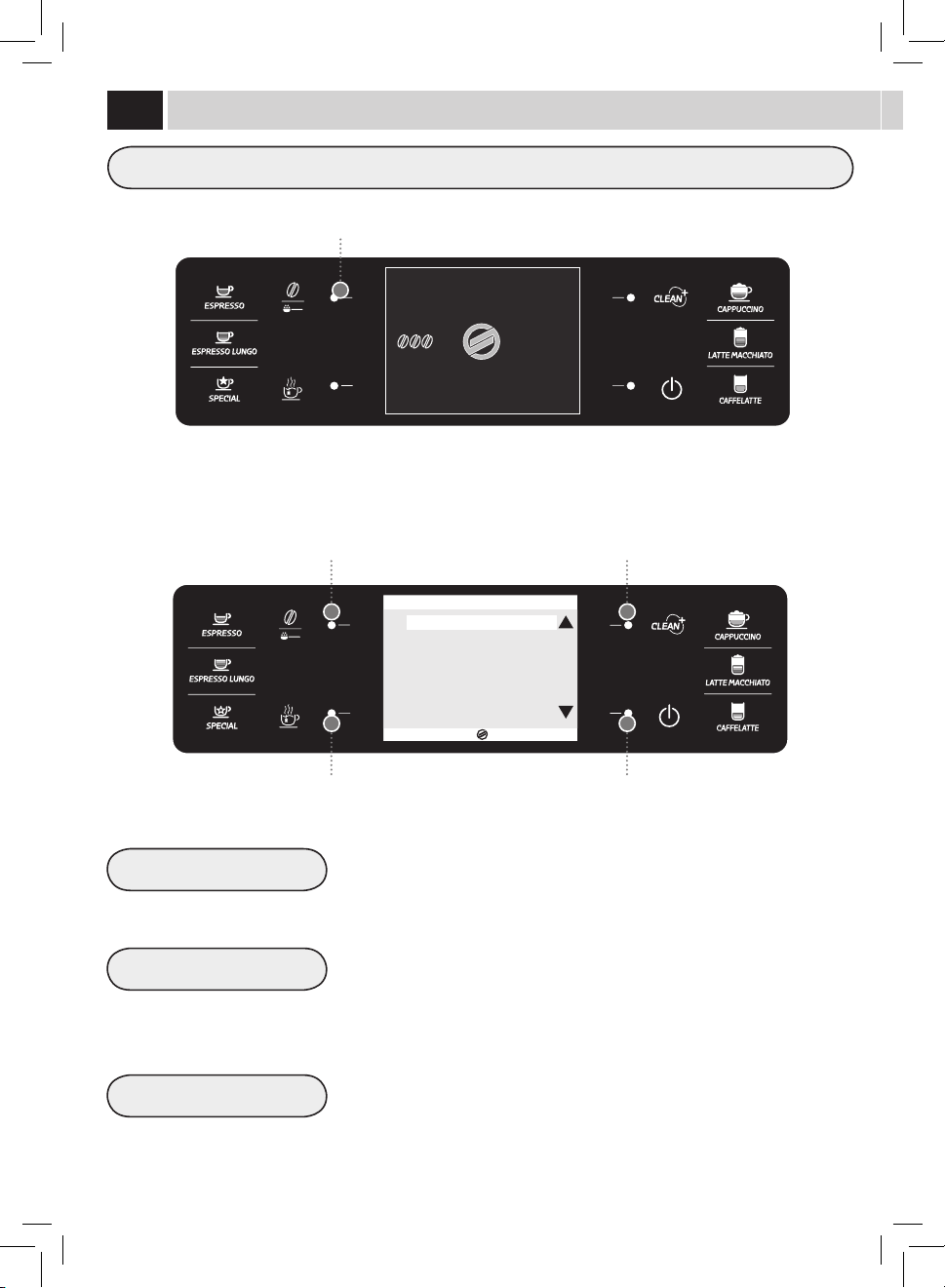
23
Pourchaqueutilisateurilestpossibled'utiliseruneseuleicône.
Sélectionnerl'icôneparlestouches(
)ou( )etconrmerenappuyantsurlatouche(OK).
Remarque : les icônes déjà utilisées sont marquées par le même symbole, ayant une couleur claire.
Maintenantl'utilisateuraétécréé.
ESC
OK
3.1. CRÉER NOUVEL UTILISATEUR
USER1
USER2
USER3
USER4
USER5
USER6
ESC
OK
3.3.1. MODIFIER UTILISATEUR
MODIFIER NOM USER1
RECONNNAISSANCE EMPREINTE OFF
AFFICHER NOM OFF
CRÉATION NOUVEL UTILISATEUR
Lesinstructionssuivantesserventpourgérerlacréationdesutilisateursdelamachine.
Ensuite,ilfautpersonnaliserl'utilisateuràpeinecréé.
Danscecas,onaccèdeàlapage-écrandemodicationdel'utilisateur.Pourprocéderàlapersonnalisationdel'utilisateur,consulterla
sectionsuivante«MODIFIERUTILISATEUR».DANSCECAS,LAMACHINESEMETDANSLAPOSITION(3)DEPAGE24.
Pourquittersansmodierd'autresparamètres,appuyerplusieursfoissurlatouche«ESC»jusqu'àl'achagedelapage-écranprincipale.
Remarque : si on quitte sans personnaliser l'utilisateur à peine créé, il ne sera pas possible d'utiliser la fonction « DIGITAL ID
» pour la sélection de cet utilisateur.
Pourchaqueicôneilestpossibledeprogrammeruneseuleboisson.Laprogrammationpeutêtreeectuéeenmodianttousles
paramètresdu«MENUBOISSON».
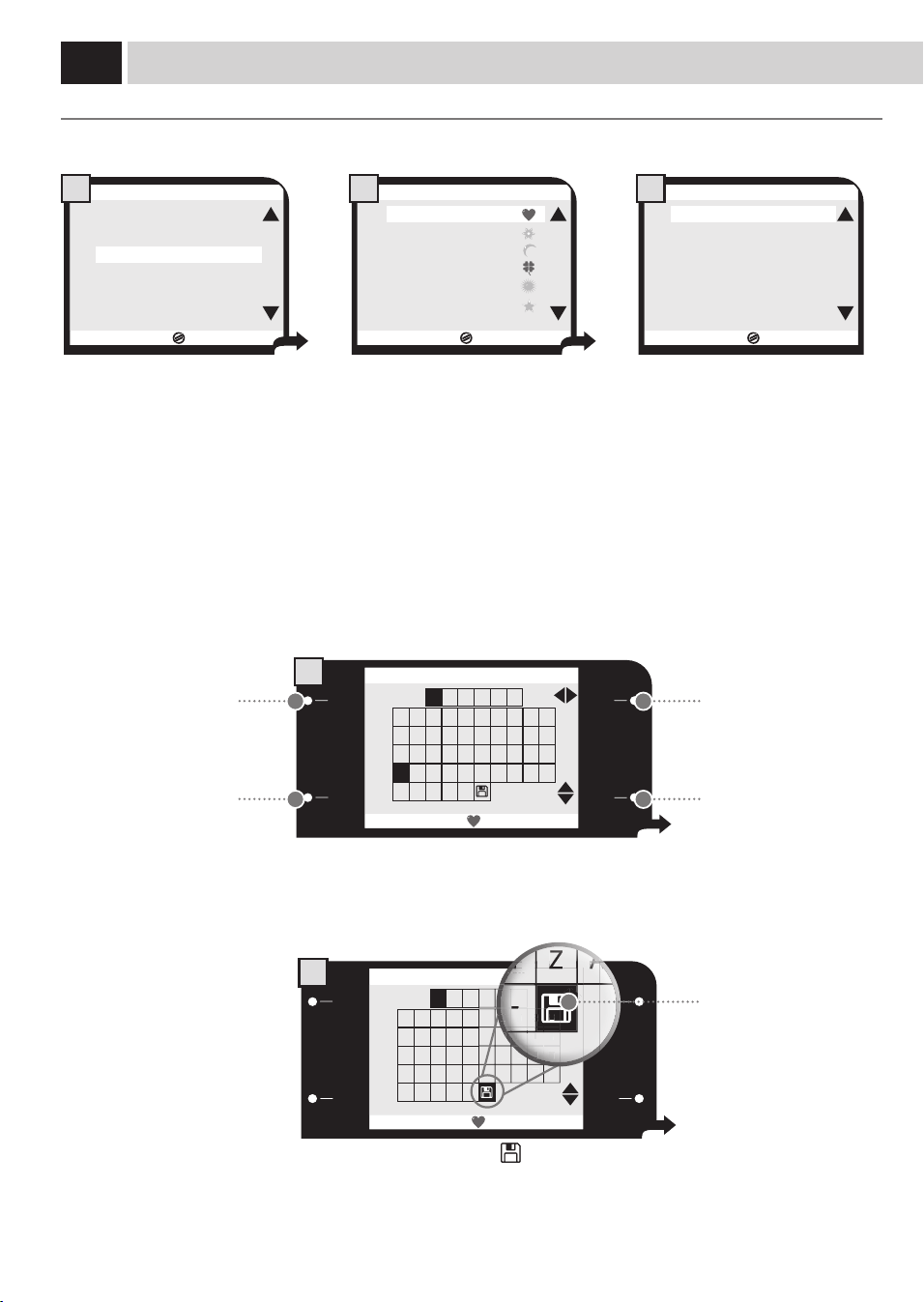
24
MODIFIER UTILISATEUR
Lesinstructionssuivantesserventpourmodierleproldechaqueutilisateurquiaétécrééprécédemment.
MODIFIER NOM
Cettefonctionpermetdemodierlenomassociéàl’icône.Lenompeutêtreachéaulieudel'icônesilafonction«AFFICHERNOM»est
activée.
ESC
OK
CRÉER NOUVEL UTILISATEUR
SUPPRIMER UTILISATEUR
MODIFIER UTILISATEUR
3. MENU ITILISATEUR
1
ESC
OK
3.3.1.1. MODIFIER NOM
0 1 2 3 4 5 6 7 8 9
A B C
U S E R 1
D E F G H I J
K L M N O P Q R S T
U V W X Y Z
Ã Ë Õ Ü
Æ Ñ Ø -
1
ESC
OK
3.3.1.1. MODIFIER NOM
0 1 2 3 4 5 6 7 8 9
A B C
U S E R 1
D E F G H I J
K L M N O P Q R S T
U V W X Y Z
Ã Ë Õ Ü
Æ Ñ Ø -
2
ESC
OK
3.3. MODIFIER UTILISATEUR
USER1
USER2
USER3
USER4
USER5
USER6
2
ESC
OK
3.3.1. MODIFIER UTILISATEUR
MODIFIER NOM USER1
RECONNNAISSANCE EMPREINTE OFF
AFFICHER NOM OFF
3
Sélectionnerlafonctionetappuyer
surlatouche«OK».
Sélectionnerlalettreoulenuméroparlestouchessituéessurla
droiteetmémoriseraumoyendelatouche«OK»pourpasserà
lacasesuivante.
Appuyersur«ESC»pourquittersanseectuerlamodication.
Àlan,sélectionnerlesymbole«
»etappuyersurlatouche
«OK»pourmémoriseretquitter.
Sélectionnerl'utilisateurqu'onveut
modieretappuyersurlatouche«OK».
Maintenant,ilestpossiblede
modierl'utilisateur.
3.3.1.1. MODIFIER NOM
H
S
I
J
S
T
6
7
8
1
8
8
8
9
8
YY
Y
YY
Y
YY
Y
YY
Y
YY
Y
YY
Y
ZZ
Z
ZZ
Z
ZZ
Z
ZZ
Z
ZZ
Z
ZZ
Z
9
ÃÃ
Ã
ÃÃ
Ã
ÃÃ
Ã
ÃÃ
Ã
ÃÃ
Ã
--
-
--
-
3.3.1.1. MODIFIER NOM
6
1
G
R
S
S
Touchedélement/sélection
horizontaleducaractère.
Touchedesortie.
Touchedélement/sélection
verticaleducaractère.
Icônepourmémoriseret
quitter.
Toucheconrmerle
caractèreetpasserau
caractèresuivant.
meNU UTilisaTeUr

25
3
RECONNAISSANCE EMPREINTE
Cettefonctionpermetd'activeretdemodierl'empreintedigitalepourlasélectiondel'utilisateur.
Remarque : Avant de passer à la reconnaissance de l'empreinte, s’assurer que le capteur est propre (consulter la section «
Nettoyage et Entretien »). Bien se laver les mains et s'assurer qu'elles soient sans graisse et bien hydratées. Éviter d'utiliser
son pouce.
ESC
OK
USER1
OFF
OFF
3.3.1. MODIFIER UTILISATEUR
MODIFIER NOM
RECONNNAISSANCE EMPREINTE
AFFICHER NOM
1
17/05/09
APPUYER DOIGT
0%
3.3.1. MODIFIER UTILISATEUR
2
17/05/09
33%
APPUYER DOIGT
3.3.1. MODIFIER UTILISATEUR
5
17/05/09
ENLEVER DOIGT
0%
3.3.1. MODIFIER UTILISATEUR
4
17/05/09
33%
ENLEVER DOIGT
3.3.1. MODIFIER UTILISATEUR
6
Sélectionnerlafonctionetappuyer
surlatouche«OK».
Lamachinedemanded'appuyerle
doigtsurlecapteurpourlapremière
lecture.
Lamachinedemanded'appuyerle
doigtutiliséprécédemmentsurle
capteurpourladeuxièmelecture.
Lorsqu’onledemande,enleverle
doigtducapteur.Attendre....
Lorsqu’onledemande,enleverle
doigtducapteur.Attendre....
Appuyerledoigtavecdecisionsurle
capteur.
Attention : Le système aura des diffi cultés ou ne reconnaîtra pas les empreintes de certaines personnes, surtout si les
empreintes ne sont pas bien défi nies (peaux sèches et altérées par des causes naturelles) ou abîmées (par ex. par des
activités manuelles détériorantes).
Dans ces cas, il ne s'agit pas d'une défaillance du système, mais c'est sa même défi nition et précision qui n'admet et ne
traite pas certaines empreintes selon des conditions minimum de qualité .
La précision du système évite la lecture impropre de l'empreinte, tout en évitant la superposition de lecture
d'empreintes appartenantes à des sujets di érents.
La machine demandera d'appuyer trois fois le doigt sur le capteur; ceci permet d'augmenter la surface de lecture de
l'empreinte pour une meilleure fi abilité du système.
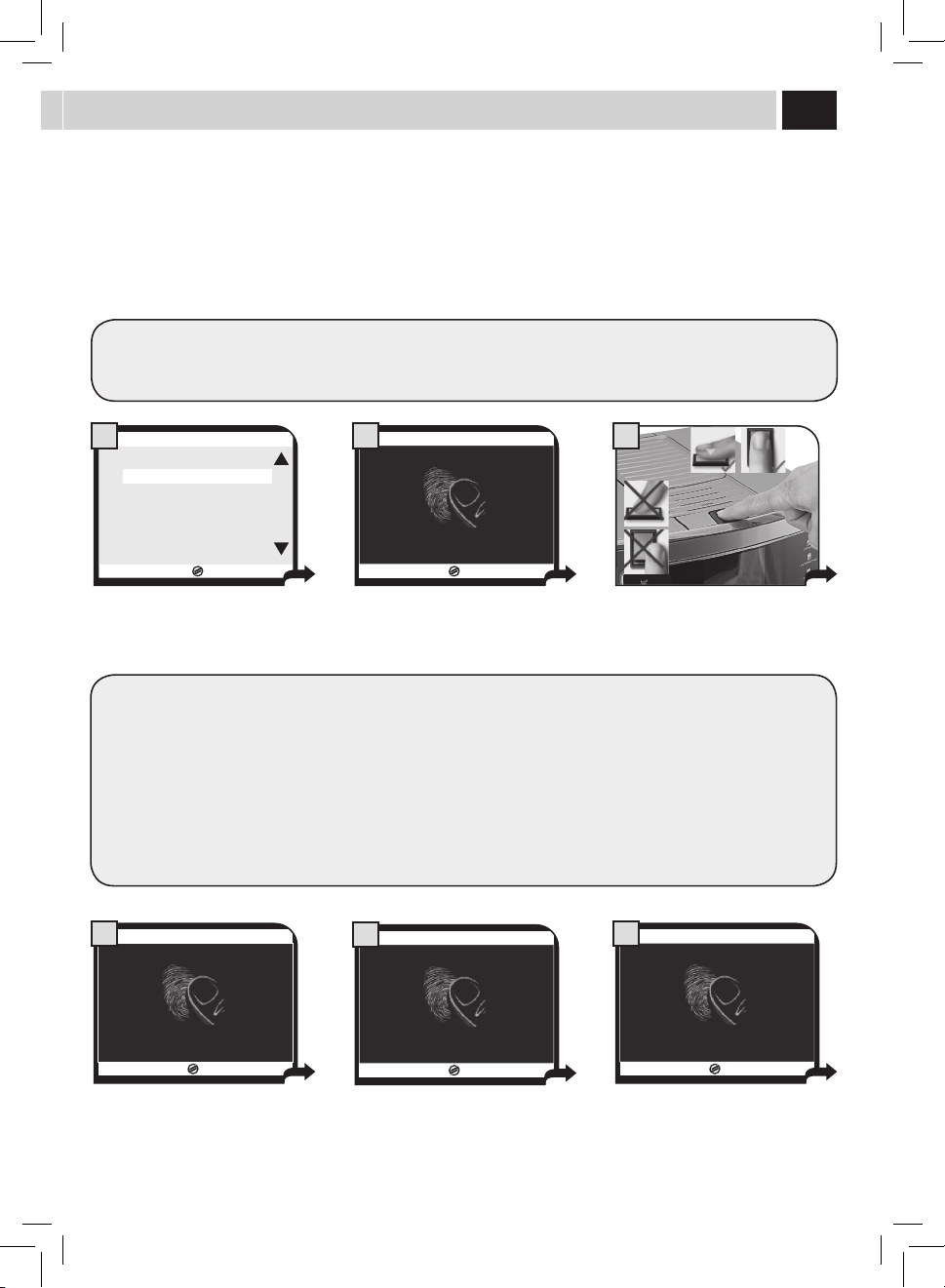
26
AFFICHER NOM
Cettefonctionpermetd'activerl'achagedunomaulieudel'icône.
ESC
OK
USER1
OFF
OFF
3.3.1. MODIFIER UTILISATEUR
MODIFIER NOM
RECONNNAISSANCE EMPREINTE
AFFICHER NOM
1
ESC
OK
3.3.1.3. MODIFIER UTILISATEUR
AFFIER NOM
OFF
ON
2
USER1
17/05/09
04:17 pm
MENU
UTILISATEUR
MENU
BOISSON
MENU
MACHINE
SÉLECTION
UTILISATEUR
3
Sélectionnerlafonctionetappuyer
surlatouche«OK».
Sélectionner«ON»pouractiverla
fonction.
Aveccettefonctionactivée,lenomsera
achéaulieudel'icône.
3.3.1. MODIFIER UTILISATEUR
9
Ensuite, on peut utiliser seulement le doigt mémorisé pour sélectionner son propre utilisateur. Pour utiliser un autre doigt,
exécuter une nouvelle procedure de reconnaissance de l'empreinte.
Lamachineconrmelabonnereussite
delalecturedetouteslesdonnéesetleur
correctemémorisation.
Silesymbole
estaché,
ilfautexécuterànouveaula
procédure.Danscecas,ilest
conseillédechangerdedoigt
pourlareconnaissance.
17/05/09
66%
APPUYER DOIGT
3.3.1. MODIFIER UTILISATEUR
7
Lamachinedemanded'appuyerledoigt
utiliséprécédemmentsurlecapteur
pourlatroisièmelecture.
17/05/09
66%
ENLEVER DOIGT
3.3.1. MODIFIER UTILISATEUR
8
Lorsqu’onledemande,enleverle
doigtducapteur.Attendre....
meNU UTilisaTeUr
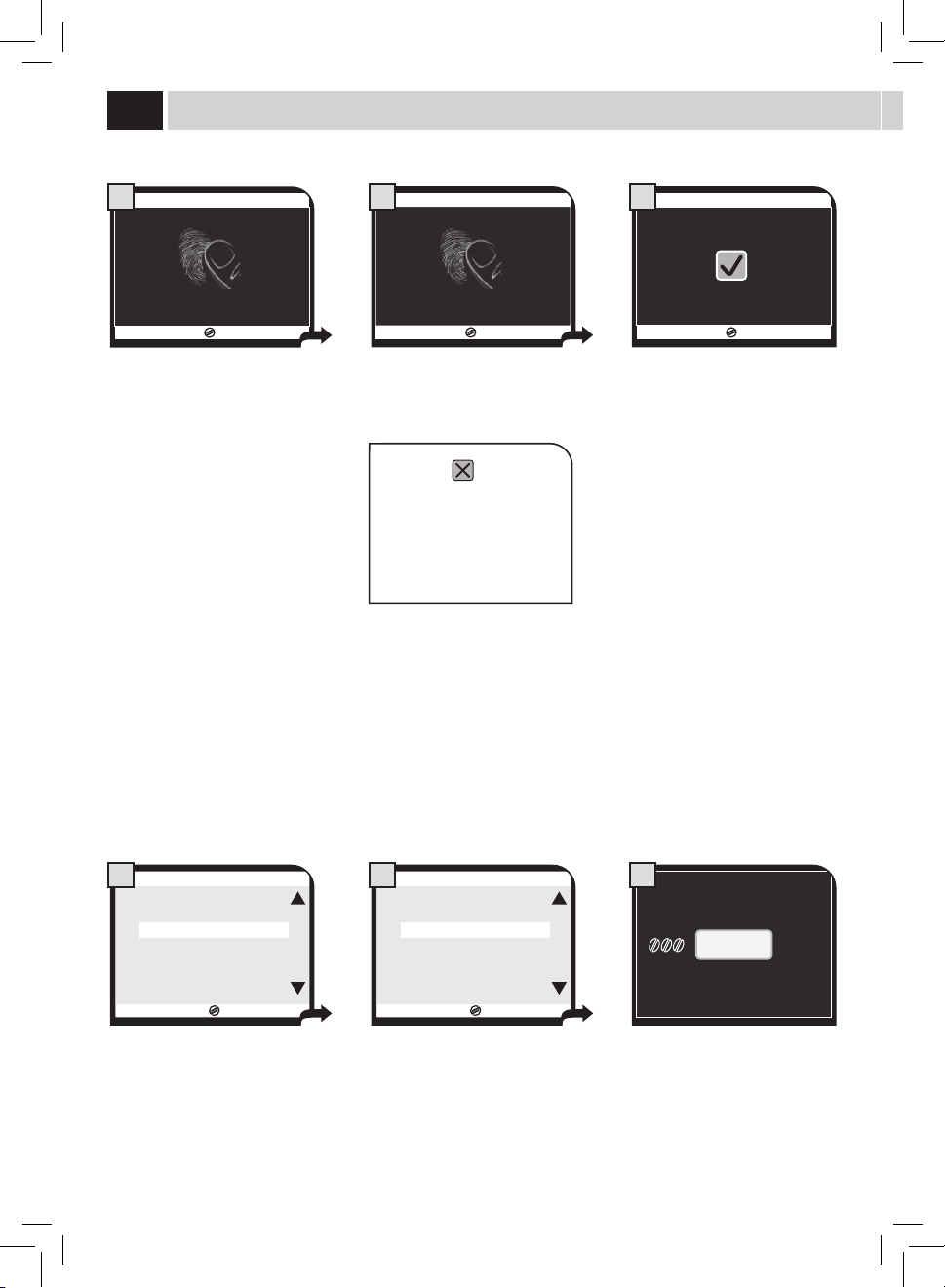
27
Touslesutilisateurscrééspeuventêtreeacésaveccettefonction.
L'éliminationd'unutilisateurentraînel'eacementdetouslesparamètresyassociés.Lamêmeicônepourraensuiteêtreutiliséepourla
créationd'unnouvelutilisateur.
Sélectionnerl'icôneparlestouches( )ou( )etconrmerenappuyantsurlatouche(OK).
ESC
OK
USER1
USER2
USER3
USER4
USER5
USER6
3.2. SUPPRIMER UTILISATEUR
SUPPRIMER UTILISATEUR
Lesinstructionssuivantesserventpourgérerlacréationetl'eacementdesutilisateursdelamachine.
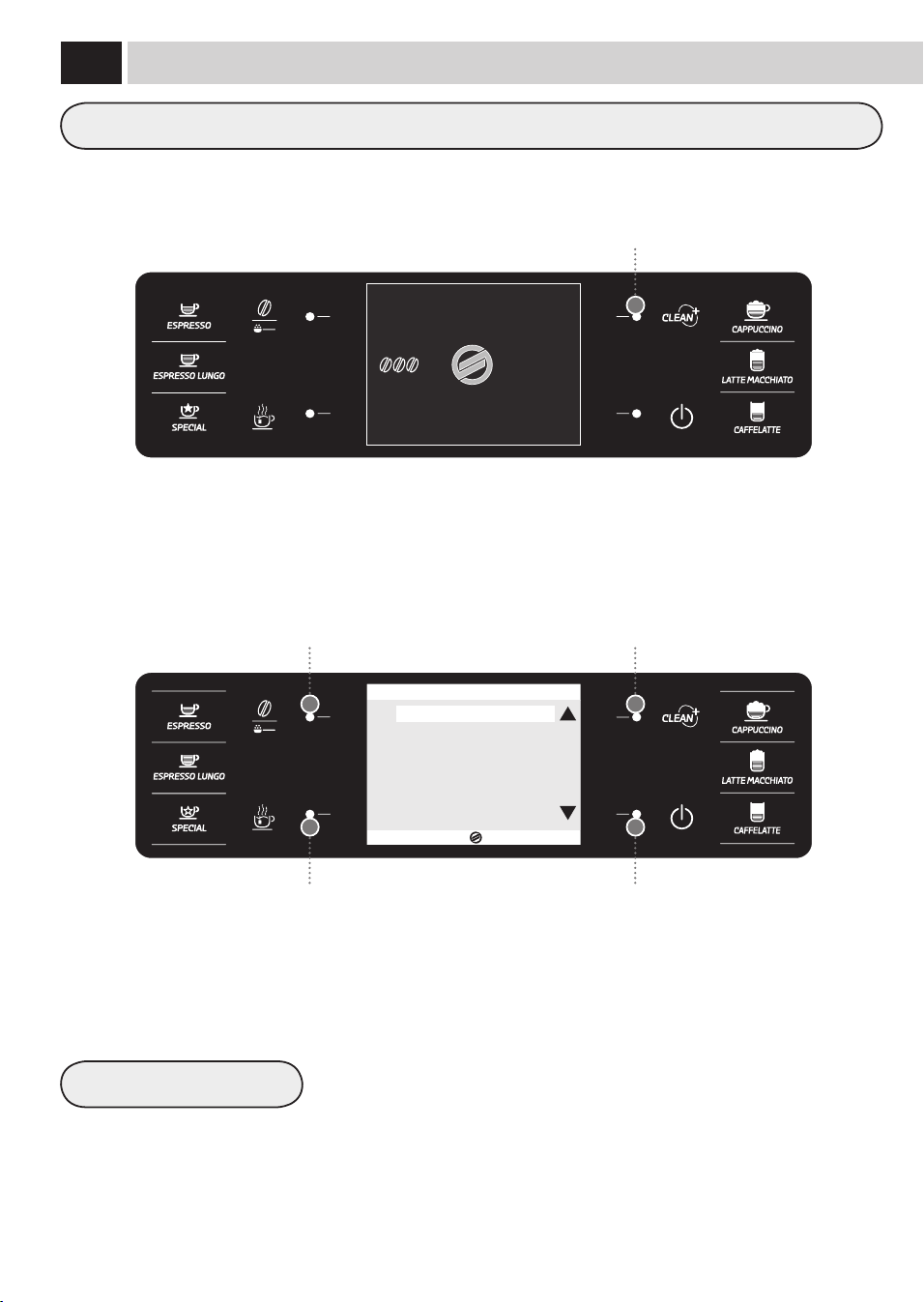
28
Ilestpossibledepersonnaliserlesréglagesdechaqueboissonselonlespréférencesdechaqueutilisateurdelamachine.
RÉTABLIR VALEURS INITIALES
Touchepourlasélectiondesréglagesdesboissons
Touchedélement/sélection
Touchedélement/sélectionTouchedesélection/conrmation
Touchedesortie
Pourchaqueboissonilestpossibled'eectueruneprogrammationdiérentedesvaleurs
standardprédéniesparlefabricant.Aprèsavoirsélectionnécettefonction,lesréglages
personnelsseronteacés.
MENU
UTILISATEUR
MENU
BOISSON
MENU
MACHINE
SÉLECTION
UTILISATEUR
17/05/09
04:17 pm
ESC
OK
EXPRESSO
EXPRESSO ALLONGÉ
CAPPUCCINO
LAIT NOISETTE
CAFÉ AU LAIT
EAU CHAUDE
BOISSONS SPECIAL
1. MENU BOISSON
meNU bOissON
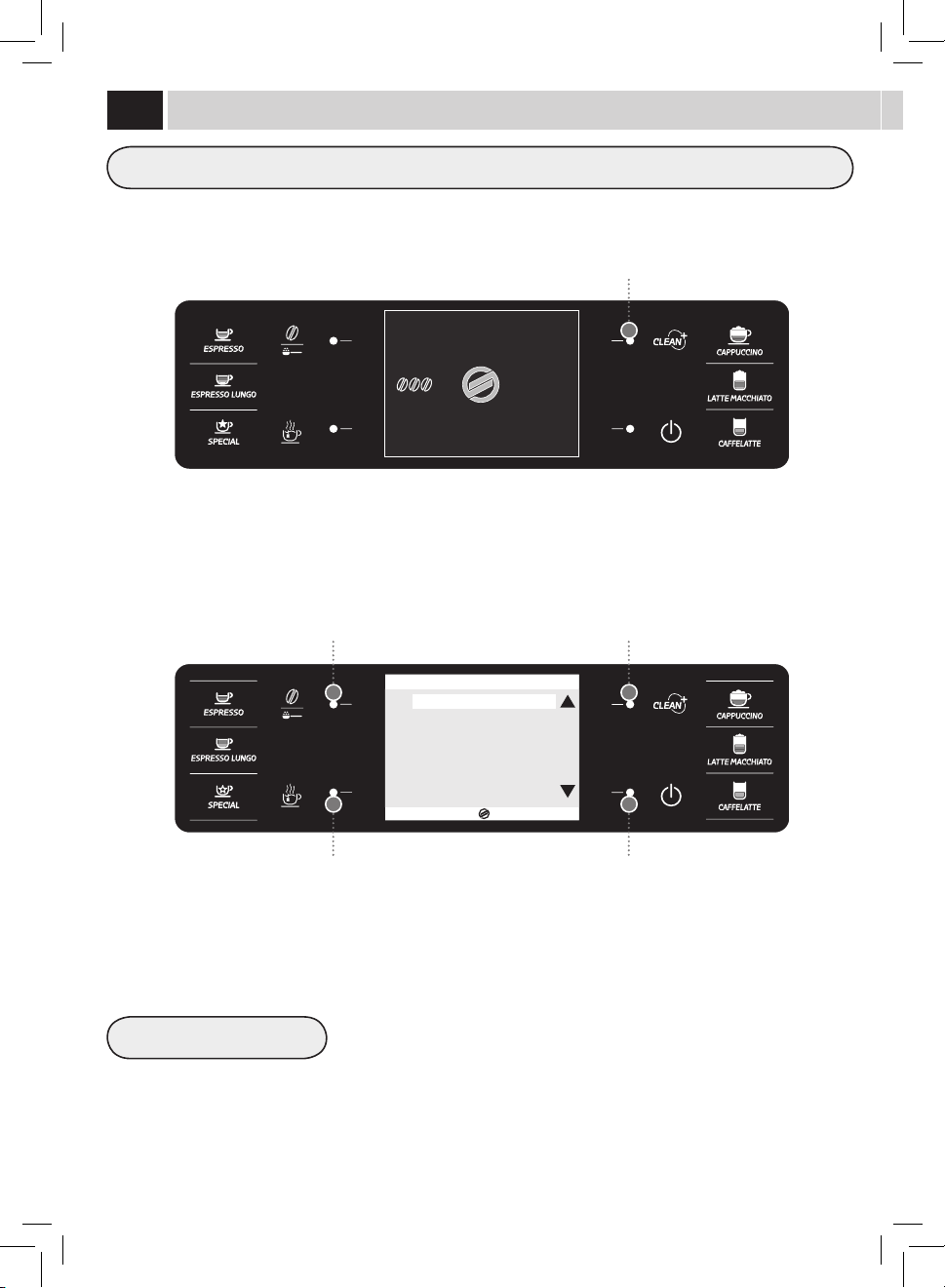
29
QUANTITÉ CAFÉ
PRÉINFUSION
TEMPÉRATURE CAFÉ
LONGUEUR CAFÉ
Danscetexemple,ilvousseramontrécommentprogrammeruncappuccinopersonnalisépourunutilisateurspéciquesélectionné.Pourla
programmationd'uncafé(expressoouallongé),lesoptionsrelativesautraitementdulaitneserontpasachées.
Cettesectionpermetdeprogrammerlaquantitédecaféàmoudrepourlapréparationde
laboisson;ceréglageaurauneetsurl'arômeducafé.
=laboissonserapréparéeenutilisantlecaféprémoulu
=ArômeLéger
=ArômeMoyen
=ArômeFort
Lapré-infusion:lecaféestlégèrementhumidiéavantl’infusion,cequiluipermetde
développerl’ensembledesonarôme,luiconférantainsiungoûtincomparable.
:activée.
:pluslonguepourexalterlegoûtducafé.
:lapré-infusionn’estpaseectuée.
Cettesectionpermetderéglerlatempératurepourlapréparationducafé.
:températurebasse.
:températuremoyenne.
:températureélevée.
Cettesectionpermetdeprogrammerlaquantitédecaféquiestdistribuéeàchaquefois
quel'onsélectionnecetteboisson.Labandepermetderégleravecprécisionlaquantitéde
caféàdistribuer.
ESC
OK
QUANTITÉ CAFÉ
PRÉINFUSION
TEMPÉRATURE CAFÉ
LONGUEUR CAFÉ
LONGUEUR LAIT
ÉMULSION LAIT
RÉTABLIR VALEURS INITIAUX
1.3. CAPPUCCINO
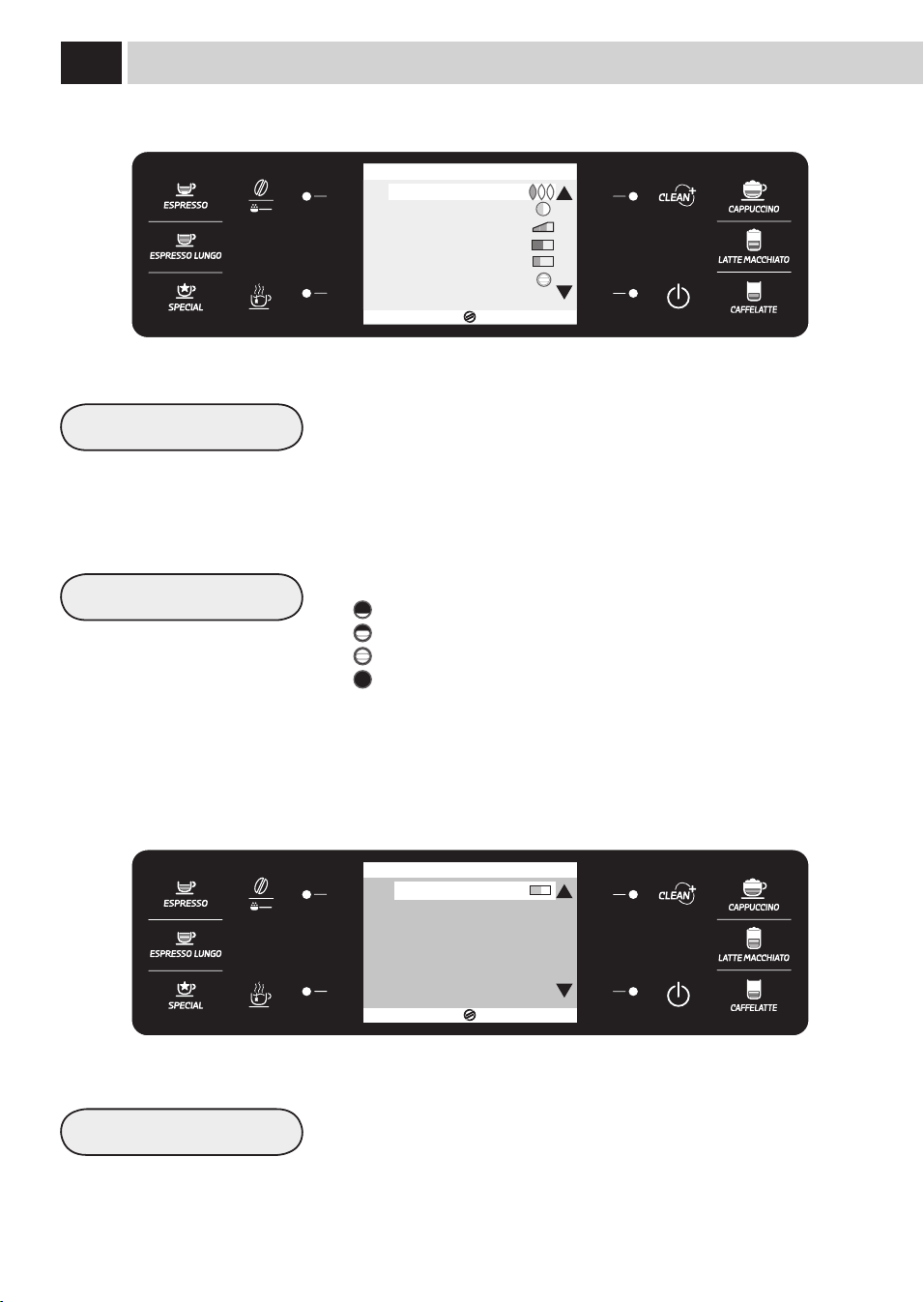
30
LONGUEUR LAIT
LONGUEUR EAU
ÉMULSION LAIT
Cettesectionpermetdeprogrammerlaquantitédelaitquiestdistribuéeàchaquefois
quel'onsélectionnecetteboisson.Labandepermetderégleravecprécisionlaquantitéde
laitàdistribuer.
Cettesectionpermetdeprogrammerlaquantitéd'eauquiestdistribuéeàchaquefois
quel'onappuiesurlatouchecorrespondante.Labandepermetderégleravecprécisionla
quantitéd'eauàdistribuer.
Cettesectionpermetdeprogrammerletyped’émulsiondelaitdistribué:
=émulsionminimale
=émulsionmoyenne
=émulsionmaximale
=émulsiondésactivée(onnedistribuequedulaitchaué)
Remarque:Iln'estpossiblededésactiverl'émulsiondulaitquepourcertainsproduits.
L'émulsiondésactivée,latempératuredulaitdistribuéestinférieure:ilestpossiblede
chauerlaboissonendistribuantdelavapeurdelabusedevapeur(voirpage19).
ESC
OK
QUANTITÉ CAFÉ
PRÉINFUSION
TEMPÉRATURE CAFÉ
LONGUEUR CAFÉ
LONGUEUR LAIT
ÉMULSION LAIT
RÉTABLIR VALEURS INITIAUX
1.3. CAPPUCCINO
ESC
OK
1.6. EAU CHAUDE
LONGUEUR EAU
RÉTABLIR VALEURS INITIAUX
meNU bOissON
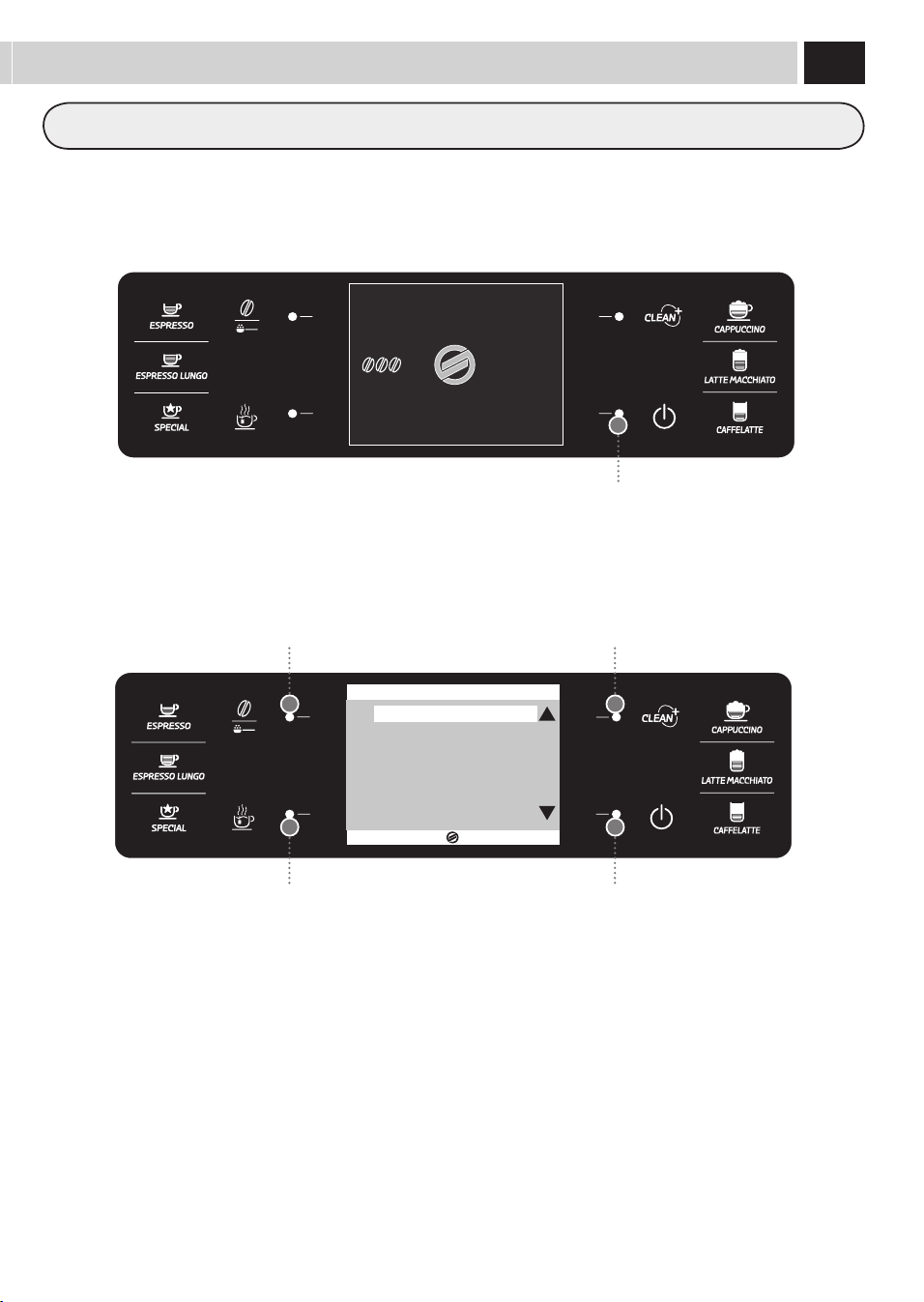
31
MENU
UTILISATEUR
MENU
BOISSON
MENU
MACHINE
SÉLECTION
UTILISATEUR
17/05/09
04:17 pm
Lamachinepermetdepersonnaliserlesréglagesdefonctionnement.Cesréglagessontvalablespourtouslesutilisateurs.
Touchepourlasélectiondesréglagesdelamachine
ESC
OK
2. RÉGLAGES MACHINE
RÉGLAGES GÉNÉRALES
RÉGLAGES AFFICHEUR
RÉGLAGES CALENDRIER
RÉGLAGES EAU
RÉGLAGES ENTRETIEN
RÉGLAGES D'USINE
Touchedélement/sélection
Touchedélement/sélection
Touchedesortie
Touchedesélection/conrmation
meNU maCHiNe

32
RÉGLAGES GÉNÉRAUX
PLAQUE CHAUFFE-TASSES
TONALITES SONORES
OFF
OFF
ON
ON
Celapermetdemodierlesparamètresdefonctionnementdelamachine.
Cettefonctionpermetderéglerlefonctionnementdelaplaquechaue-
tassessituéedanslapartiesupérieuredelamachine.
Cettefonctionpermetd'activer/désactiverlessignauxsonores.
Celapermetdegarderlaplaquechaue-tassestoujourséteinte.
Pourdésactiverlestonssonores
Celapermetdegarderlaplaquechaue-tassestoujoursallumée.
Pouractiverlestonssonores
rÉGlaGes GÉNÉraUX
FONCTION MODE ÉCO
OFF
ON
Cettefonctiongèrel'activationdeschaudièresprésentessurlamachinepour
obteniruneéconomied'énergie.
Decettefaçon,àlamiseenmarchedelamachine,toutesles
chaudièressontactivéespourlapréparationimmédiatedetousles
produits.Decettefaçon,laconsommationd'énergieestmajeure.
Decettefaçon,àlamiseenmarchedelamachine,ilestactivé
uniquementlachaudièreducafé.Lamachineconsommemoins
d'énergiemaisilfautplusdetempspourladistributiondes
produitsavecdulait.
meNU maCHiNe
33
RÉGLAGES DE L'AFFICHEUR
LANGUE
LUMINOSITÉ
FRANÇAIS
Cemenupermetdesélectionnerlalanguedesmenusetderéglerlecontrastede
l’acheur.
Leréglageesttrèsimportantpourunebonnedénitiondesparamètresdela
machineenfonctiondupaysd’utilisation.
Cemenupermetderéglerleboncontrastedel’acheurenfonctionde
l'éclairageambiant.
Lalanguesélectionnéeestindiquéesurl'acheur.
rÉGlaGes de l'aFFiCHeUr
34
RÉGLAGES CALENDRIER
HORAIRE
DATE
HEURE
AN
MINUTES
MOIS
JOUR
FORMAT
FORMAT
Cemenupermetderéglertouteslesfonctionspourlagestiondel'horloge,ducalendrier
etdetouteslesfonctionsassociées.
Leréglageesttrèsimportantpourlebonfonctionnementdetoutesles
fonctionsquiutilisentl’heure.
Ceréglageesttrèsimportantpourlebonfonctionnementdetoutesles
fonctionsquinécessitentd'unebonnegestiondeladate.
Pourréglerl‘heureactuelle.
Pourréglerl’annéeactuelle
Pourréglerlesminutesdel'heureactuelle.
Pourréglerlemoisactuel.
Pourréglerlejouractuel.
Pourréglerleformatd’achagedel'heure.Leréglagepeut
avoirleformat24Houleformatanglo-saxonAM/PM.Tout
changementseraappliquéautomatiquementàtoutesles
fonctionsquiprévoientl'achageduformat.
Pourréglerleformatd’achagedeladateselonlesexigences
personnelles.Toutchangementseraappliquéautomatiquement
àtouteslesfonctionsquiprévoientl'achageduformat.
rÉGlaGes CaleNdrier
RÉGLAGES STAND-BY 60
Cettefonctionpermetderéglerl’intervalledetempsentreladernière
distributiondeboissonetlepassagedel‘appareilenmodestand-by.
L’intervalle par défaut est « après 1 heure ».
meNU maCHiNe
15
30
60
180
Aprèsl’écoulementdutempsréglé,lamachinesemeten
stand-by.
Pourréactiverlamachine,appuyersurunetouchequelconque.
Unefoislaphasedechauageetl’analysedesfonctions
terminées,lamachineestdenouveauprêteàl’emploi.
35
RÉGLAGES CALENDRIER
MINUTERIE MISE EN MARCHE MACHINE
MINUTERIE100:00
MINUTERIE200:00
Cemenupermetdeprogrammerleshorairesdemiseenmarchedela
machineselonvosexigences.Lamachinegèrecettefonctionuniquementsi
elleestalluméedepuisl’interrupteurgénéral.
Ilestpossibledeprogrammer3horairesdemiseenmarchediérents
étantgérésdefaçonindépendante;parsimplicitéondécriraseulementla
programmationdela«MINUTERIE1».Lesautresminuteriespeuventêtre
programméesdelamêmefaçon.
Remarque : l'arrêt est géré par la programmation du « STAND-BY ».
Pourréglerl'heuredemiseenmarche.
Cemenupermetderégleretprogrammerlepremierhorairede
miseenmarche.
Cemenupermetderégleretprogrammerledeuxièmehorairede
miseenmarche.
Cemenupermetderégleretprogrammerletroisièmehorairede
miseenmarche.
Pourréglerlesminutesdel'heuredemiseenmarche.
Pourprogrammerlesjoursdelasemaineoùcette
minuteriedoitmettrelamachineenmarche.
Sélectionnerunjouraveclestouches( )ou( )
etconrmerenappuyantsurlatouche(OK)pour
modierleréglage:
ON=Horaireactivé
OFF=Horairedésactivé
ESC
OK
2.3.4.1.3 MINUTERIE 1 00:00
LUNDI
MARDI
MERCREDI
JEUDI
VENDREDI
SAMEDI
DIMANCHE
OFF
OFF
OFF
OFF
OFF
OFF
OFF
MINUTERIE300:00
HEURE 00
MINUTES 00
JOUR DE LA SEMAINE
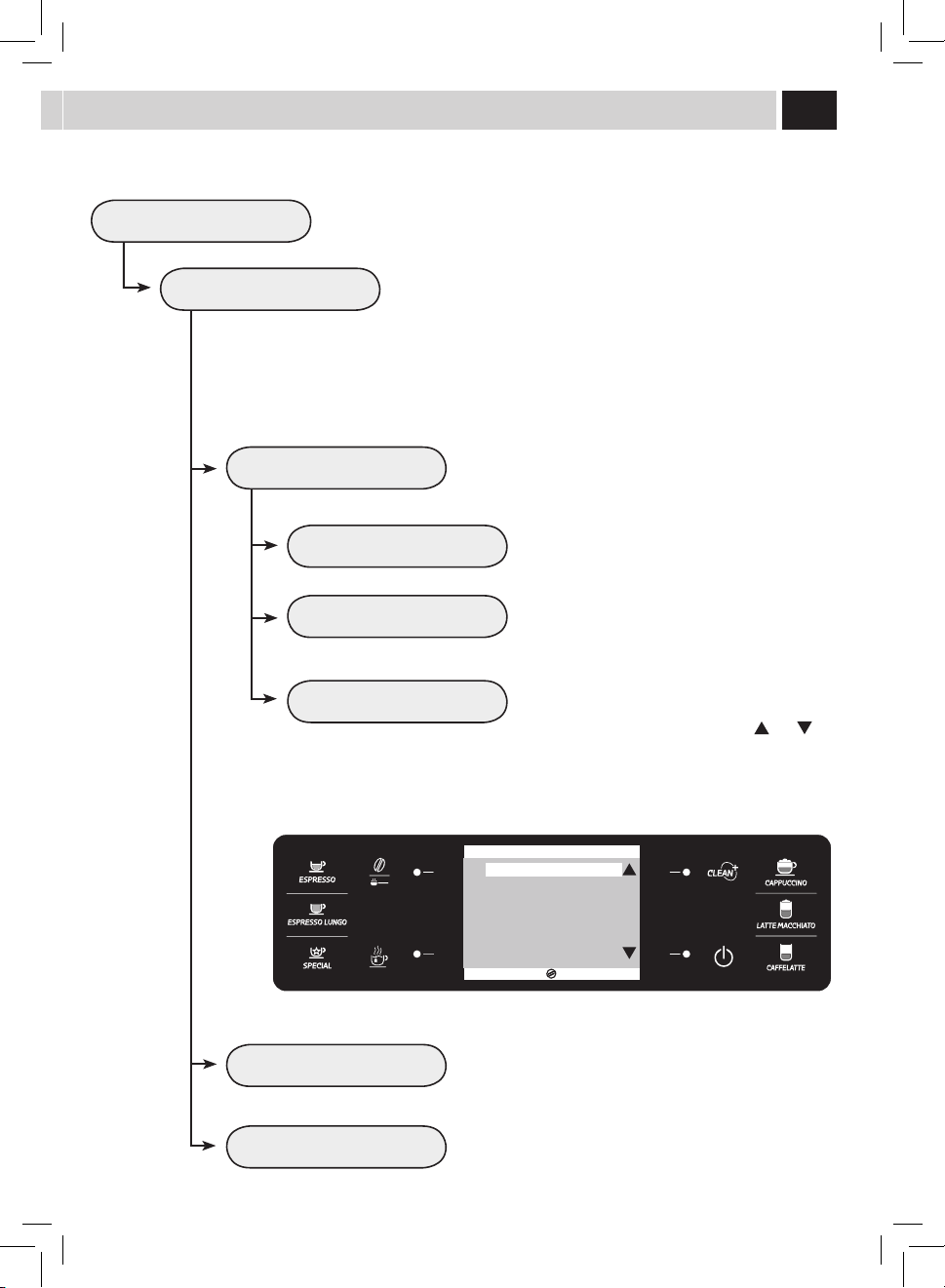
36
RÉGLAGES EAU
DURETÉ DE L’EAU
VALIDATION FILTRE
ACTIVATION FILTRE
Cemenupermetderéglerlesparamètrespourunegestioncorrectedel'eaupourla
distributionducafé.
Cemenupermetdemodierleréglagedeladuretédel’eaudanslamachine.
Lafonction«Duretédel'eau»permetd’adapterlamachineaudegréde
duretédel’eauutilisée,anqu’ellepuissedemanderdefaireuncyclede
détartrageaumomentvoulu.
Mesurer la dureté de l’eau comme il est décrit à la page 5.
Cemenupermetd’activer/désactiverl’avertissementderemplacementdu
ltreàeau.Enactivantcettefonction,lamachineavertitl’utilisateurquand
leltreàeaudoitêtreremplacé.
OFF:signaldévalidé.
ON:signalvalidé(cettevaleurestrégléeautomatiquementlorsqueleltre
estactivé).
Poureectuerl'activationdultreaprèssonmontageousonremplacement.
Pourunbonmontageet/ouremplacement,consulterlasectionrelativeà
page7.
rÉGlaGes eaU
meNU maCHiNe
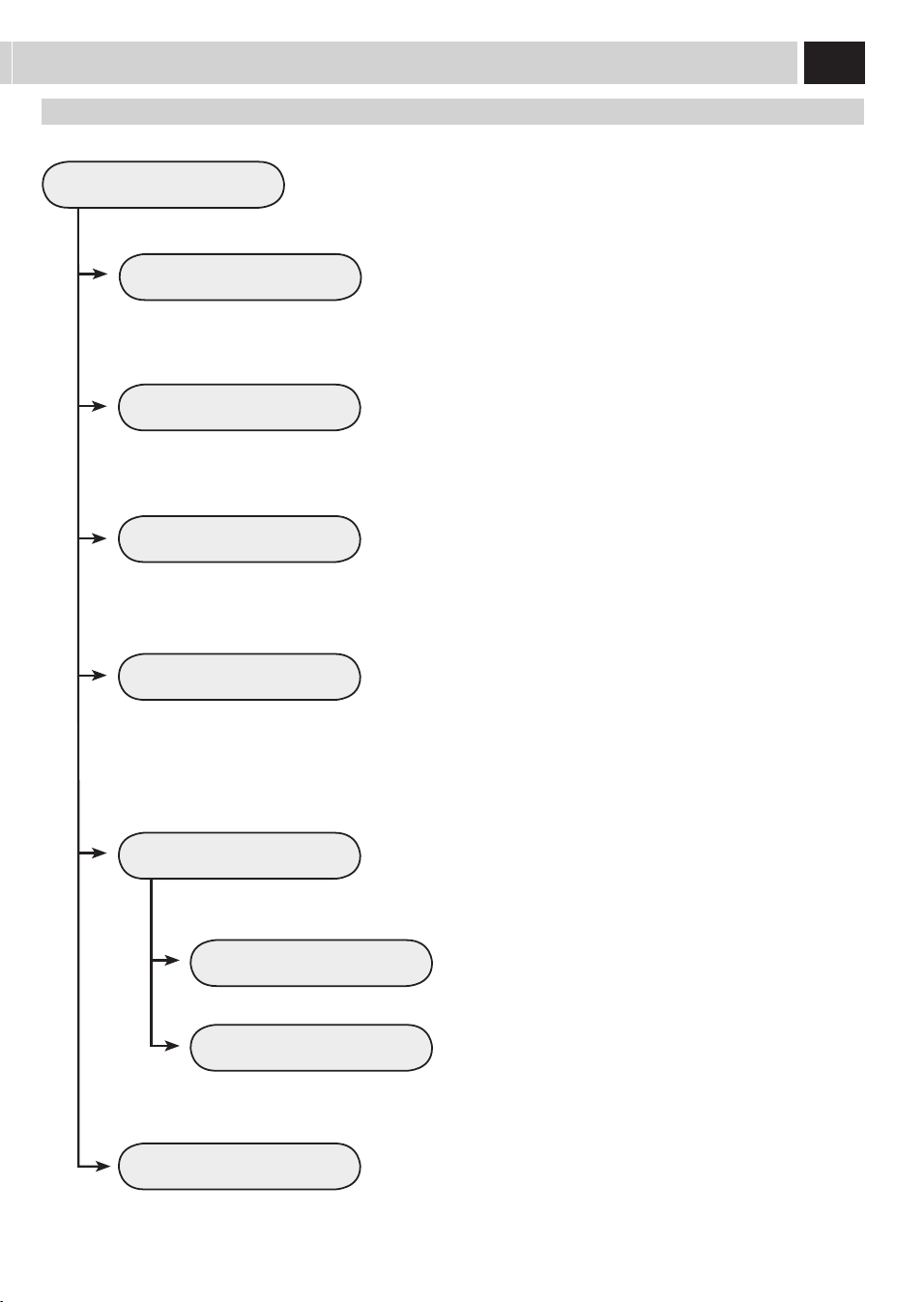
37
RÉGLAGES ENTRETIEN
COMPTEURS PRODUIT
CYCLE DE DÉTARTRAGE
CYCLE NETTOYAGE GROUPE
AUTO-NETTOYAGE CARAFE
OFF
ON
Cemenupermetderéglertouteslesfonctionspourlagestioncorrectedel'entretiendela
machine.
Cettefonctionpermetd’acherlenombredeproduitsquiontétépréparés
pourchaquetypedecafé,àpartirdeladernièreremiseàzéro.
Cettefonctionpermetd'exécuterlecyclededétartrage(lamachineindique
combiendelitressontencorenécessairespourledétartrage)(Voirpage39).
Cettefonctionpermetd'exécuterlecycledelavageduGroupededistribution
(Voirpage38).
Cettefonctionpermetd'eectuerlenettoyageautomatiquedelacarafe
aprèschaquepréparationd'unproduitquicontientdulait.
rÉGlaGes eNTreTieN
Lafonctiond’auto-nettoyageestdésactivée.
Lafonctiond’auto-nettoyageestactivée.
CYCLE DE NETTOYAGE DE LA CARAFE
Cettefonctionpermetd'exécuteruncycledelavagedelacarafeutiliséepour
lapréparationdesboissonsàbasedelait(voirpage42).
Remarque : ce cycle de nettoyage est fondamental pour un correct
entretien de la carafe.
RÉGLAGES D'USINE
Cettefonctionpermetderétablirtouslesréglagesd'usine.
Remarque : le rétablissement des réglages d'usine eace tous les
paramètres personnels.
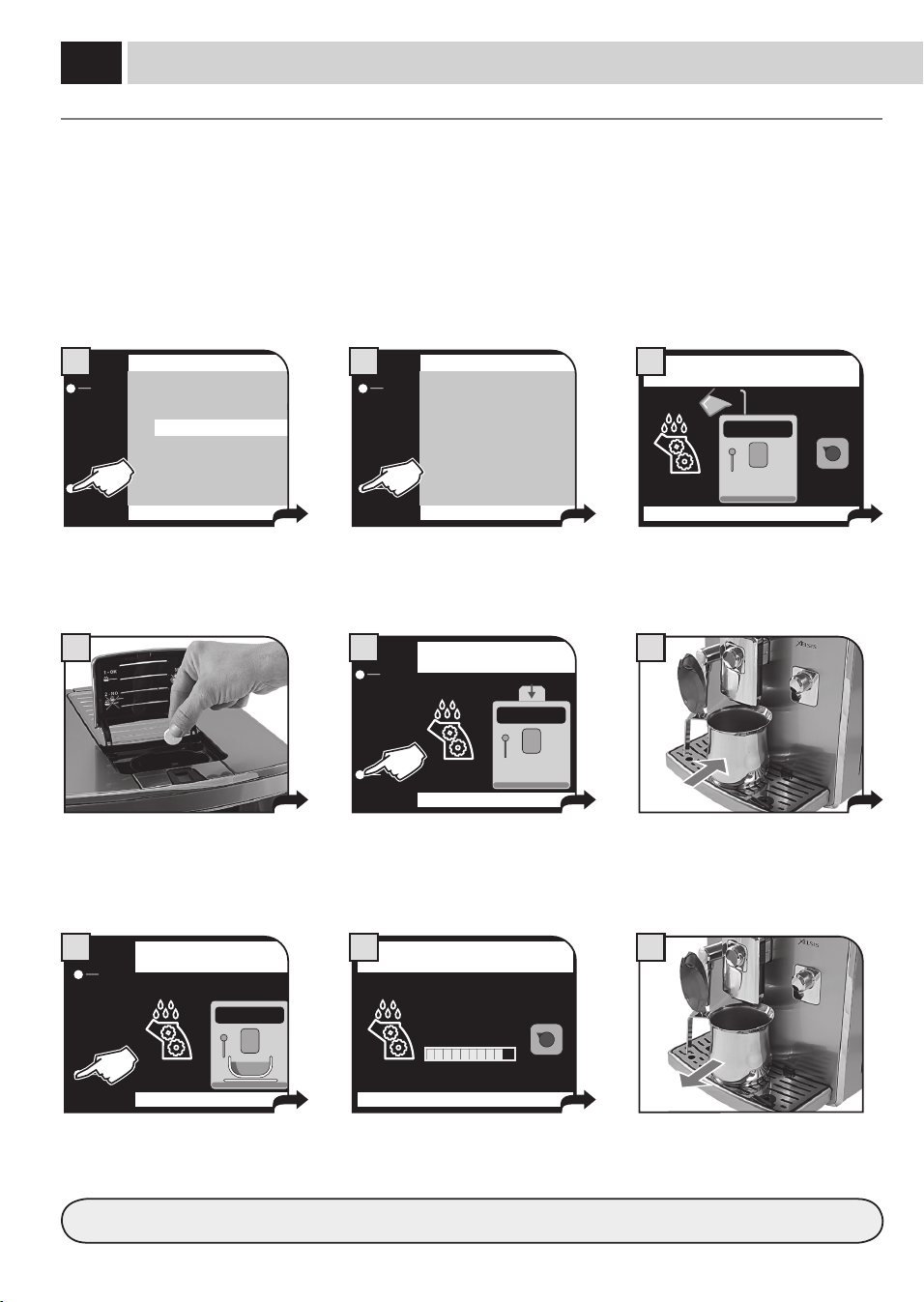
38
9
4 6
MENU «CYCLE NETTOYAGE GROUPE»
IlsutdelaverleGroupededistributionavecdel’eau,commeindiquéàlapage46.Celavagecomplètel’entretienduGroupede
distribution.Onconseilled'eectuercecycletouslesmoisoubienaprès500cafésaumoyendespastillesSaeco,quipeuventêtreachetées
séparémentauprèsdevotrerevendeur.
LE CYCLE DE LAVAGE NE PEUT PAS ÊTRE INTERROMPU.
PENDANT CETTE OPÉRATION, LA PRÉSENCE D’UNE PERSONNE EST NÉCESSAIRE.
TournercomplètementleboutonSBSdanslesensinversedesaiguillesd’unemontre(Voirpage11)avantdecommencerlecycle.
ESC
OK
2.5. RÉGLAGES ENTRETIEN
COMPTEURS PRODUIT
CYCLE DÉTARTRAGE 59(I)
CYCLE NETTOYAGE GROUPE
CYCLE DE NETTOYAGE DE LA CARAFE
AUTO-NETTOYAGE CARAFE ON
1
PLACER UN RÉCIPIENT SOUS
LA BUSE DE DISTRIBUTION DU CAFÉ
OK
7
REMPLIR RÉSERVOIR À EAU
OK
3
ESC
OK
2.5.3. RÉGLAGES ENTRETIEN
EFFECTUER LE CYCLE DE
NETTOYAGE GROUPE?
2
INTRODUIRE LA PASTILLE
POUR LE NETTOYAGE DU GROUPE
OK
5
CYCLE NETTOYAGE GROUPE
8
Sélectionnerl'optiondanslemenu.
Appuyersurlatouche«OK»pour
conrmer.
Introduirelapastilledanslelogementdu
cafémoulu.
Aprèsavoirpositionnélerécipient,
appuyersurlatouche«OK».
Remplirleréservoiràeauavecdel’eau
fraîchepotable.Appuyerensuitesurla
touche«OK».
Positionnerunréservoirau-dessousdela
busededistributionducafé.
Appuyersurlatouche«OK»pour
conrmer.
Aprèsavoirintroduitlapastille,appuyer
surlatouche«OK».
Lecycledenettoyagedugroupe
dedistributionesteectué
automatiquement.
Aprèsavoireectuélecycle,remettreleboutonSBSdanslapositionsouhaitée(voirpage11).
Àlanretirerlerécipientetlevider
opportunément.
eNTreTieN
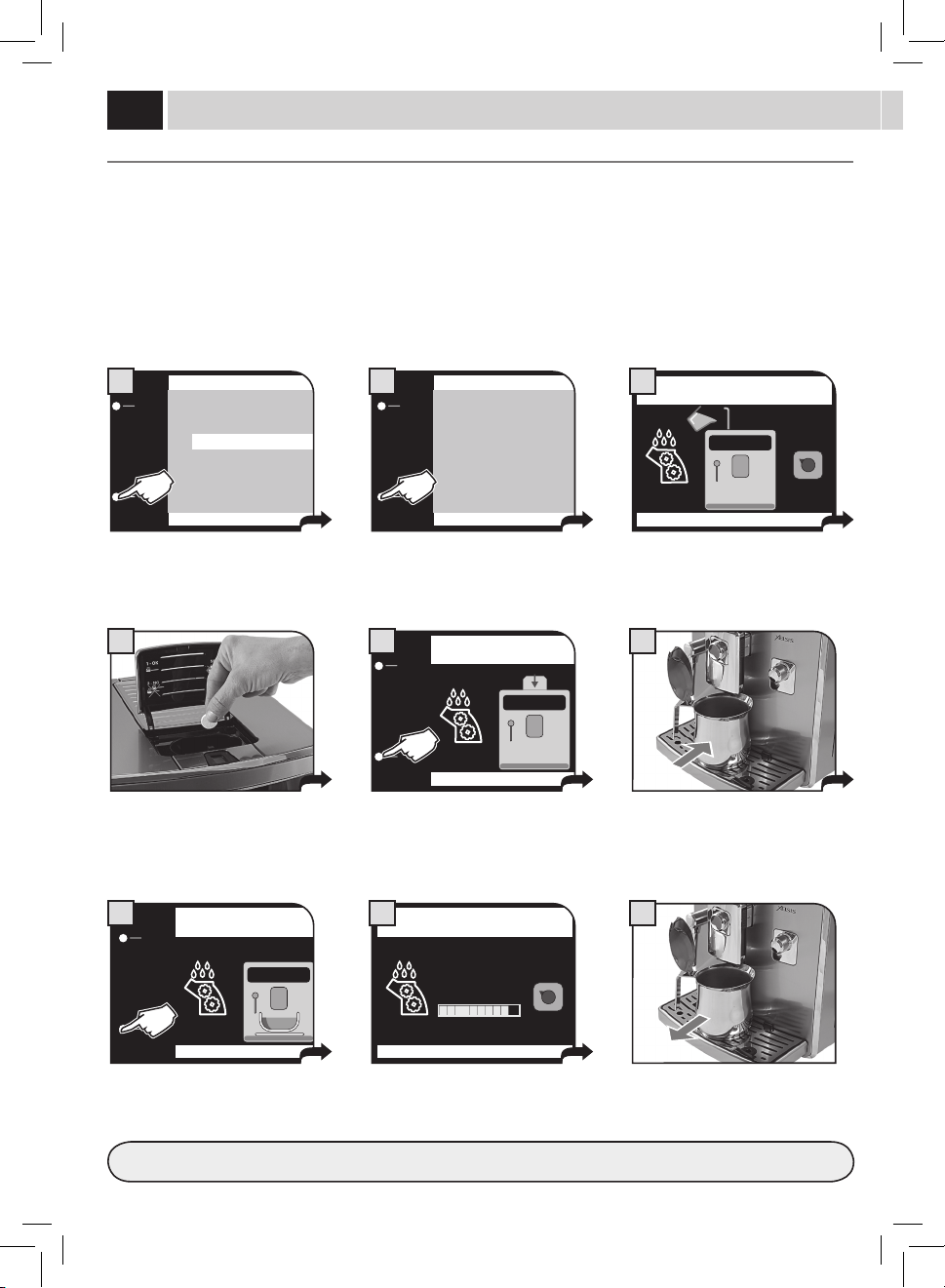
39
ESC
OK
2.5. RÉGLAGES ENTRETIEN
COMPTEURS PRODUIT
CYCLE DÉTARTRAGE 59(I)
CYCLE NETTOYAGE GROUPE
CYCLE DE NETTOYAGE DE LA CARAFE
AUTO-NETTOYAGE CARAFE ON
1
REMPLIR LE RÉSERVOIR AVEC
LA SOLUTION DÉTARTRANTE
OK
3
ESC
OK
2.5.2. RÉGLAGES ENTRETIEN
EFFECTUER LE CYCLE
DE DÉTARTRAGE?
2
Sélectionnerl'optiondanslemenu.
Appuyersurlatouche«OK»pour
conrmer.
Remplirleréservoirdesolution
détartrante.
Appuyerensuitesurlatouche«OK».
Attention:enconrmantcettesélection
lecycleestinterrompu.Conrmer
enappuyantsur«OK»ouquitteren
appuyantsurlatouche«ESC».
MENU «CYCLE DÉTARTRAGE CHAUDIÈRE»
Ledétartragedoitêtreeectuétousles1à2moisoulorsquelamachinelesignale.Lamachinedoitêtrealluméeetellegère
automatiquementladistributiondudétartrant.
PENDANT CETTE OPÉRATION, LA PRÉSENCE D’UNE PERSONNE EST NÉCESSAIRE.
ATTENTION ! NE JAMAIS UTILISER DE VINAIGRE POUR DÉTARTRER LA MACHINE.
UtiliserseulementledétartrantSaecoquiaétéconçuconformémentauxcaractéristiquestechniquesdelamachine,pourlacontinuitéde
sesperformancesdansletempsetdanslerespectdelasécuritédel’utilisateur.Lasolutiondétartrantedoitêtreéliminéeconformémentà
cequiestprévuparleproducteuret/ouparlesnormesenvigueurdanslePaysoùlamachineestutilisée.
Remarque:avantdecommencerlecyclededétartrage,vérier:
1. QUELEFILTREÀEAUINTENZAN’ESTPLUSDANSLERÉSERVOIRÀEAU;
2. quevousavezàdispositionunrécipientdedimensionadéquateouquelquesrécipientsàpositionnerdanslespointsindiqués
LE CYCLE DE DÉTARTRAGE ET/OU RINÇAGE NE PEUT PAS ÊTRE ARRÊTÉ ; IL FAUT TERMINER CES PHASES. SI LA MACHINE EST
ARRÊTÉE OU DANS LE CAS D'UN MANQUE DE COURANT, IL FAUT RÉPÉTER LE CYCLE EN COURS D'EXÉCUTION.
EN TOUT CAS, TOUT CYCLE PEUT ÊTRE INTERROMPU EN APPUYANT SUR LA TOUCHE « PAUSE » ; IL POURRA ENSUITE ÊTRE
REPRIS EN TOUTE FLEXIBILITÉ EN APPUYANT SUR LA TOUCHE « DÉMARRER ».
TOURNER COMPLÈTEMENT LE BOUTON SBS DANS LE SENS INVERSE DES AIGUILLES D’UNE MONTRE (VOIR PAGE 11) AVANT
DE COMMENCER LE CYCLE.
Pourpréparercorrectementlasolutiondétartrante,versertoutlecontenudelabouteillededétartrantconcentréSaecodansleréservoirà
eauetlerempliravecdel'eaufraîchejusqu'auniveauMAX.
Remarque : pendant le cycle de détartrage il est normal de voir affi chés quelques messages d'alarme pour permette la
gestion correcte de la machine. Une fois le message rétabli, pour continuer le cycle de détartrage, appuyer toujours sur la
touche « DÉMARRER ».
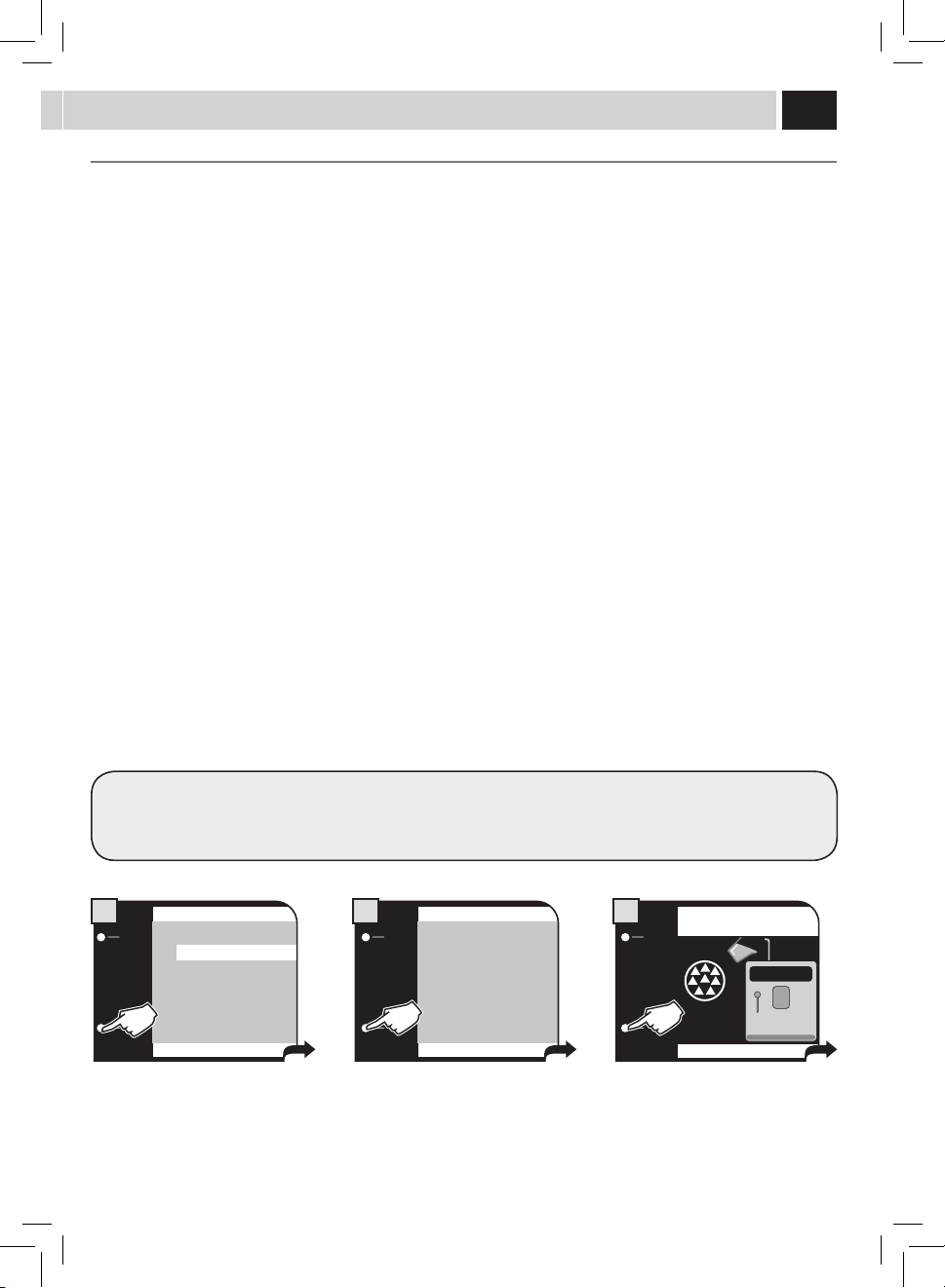
40
CYCLE DÉTARTRAGE
PAUSE
PHASE 1/2
DÉTARTRAGE…
7
CYCLE DÉTARTRAGE
PAUSE
PHASE 1/2
DÉTARTRAGE…
8
RINCER LE RÉSERVOIR ET
LE REMPLIR AVEC DE L'EAU FRAÎCHE
9
RINCER LE RÉSERVOIR ET
LE REMPLIR AVEC DE L'EAU FRAÎCHE
OK
10
VIDER LE BAC SITUÉ
AU-DESSOUS DU GROUPE DE DISTRIBUTION
OK
4
VIDER LE BAC SITUÉ
AU-DESSOUS DU GROUPE DE DISTRIBUTION
OK
11
METTRE UN RÉCIPIENT SOUS LES
BUSES DE DISTRIBUTION EAU CHAUDE ET CARAFE
OK
6
REMPLIR LA CARAFE À MOITIÉ
AVEC DE L'EAU ET LA METTRE
EN POSITION DE DISTRIBUTION
OK
5
REMPLIR LA CARAFE DU LAIT
AVEC EAU FRAÎCHE
OK
12
Lecyclededétartragecommence.
Labarrepermetdevérierl'état
d'avancement.
S'ilfautviderlesrécipients,appuyersurla
touche«PAUSE».Appuyerensuitesurla
touche«DÉMARRER».
Àlandelapremièrephase,une
foisterminéledétartrant,lamachine
demandelerinçageduréservoir.
Rincerleréservoiretleremplird’eau
fraîchepotable.
Appuyerensuitesurlatouche«OK».
Viderlebacd’égouttementquisetrouve
souslegroupe(page44-g.2)etle
remettre.
Appuyerensuitesurlatouche«OK».
Viderlebacd’égouttementquisetrouve
souslegroupe(page44-g.2)etle
remettre.
Appuyerensuitesurlatouche«OK».
Placerunrécipientau-dessousdelabuse
dedistributionducaféetunrécipient
souslabusededistributiondel'eau
chaude.Appuyerensuitesurlatouche
«OK».
Remplirlacarafejusqu'àmoitiéavecde
l'eaufraîche(page42-g.7).
Introduirelacarafeetlapositionneren
positiondedistribution.Appuyerensuite
surlatouche«OK».
Vidercomplètementlacarafe(page42-
g.7)etlaremplird'eaufraîchepotable.
Introduirelacarafeetlapositionneren
positiondedistribution.Appuyerensuite
surlatouche«OK».
Pourlaphasederinçage,ilfaututiliserunequantitéd'eauprédénieparlefabricant.Celaassureuncyclederinçageoptimalpour
unedistributiondesproduitsdansdesconditionsoptimales.Laprocédureprévoitqueleréservoirdoitêtreremplipendantl'exécution
ducyclederinçage.
eNTreTieN
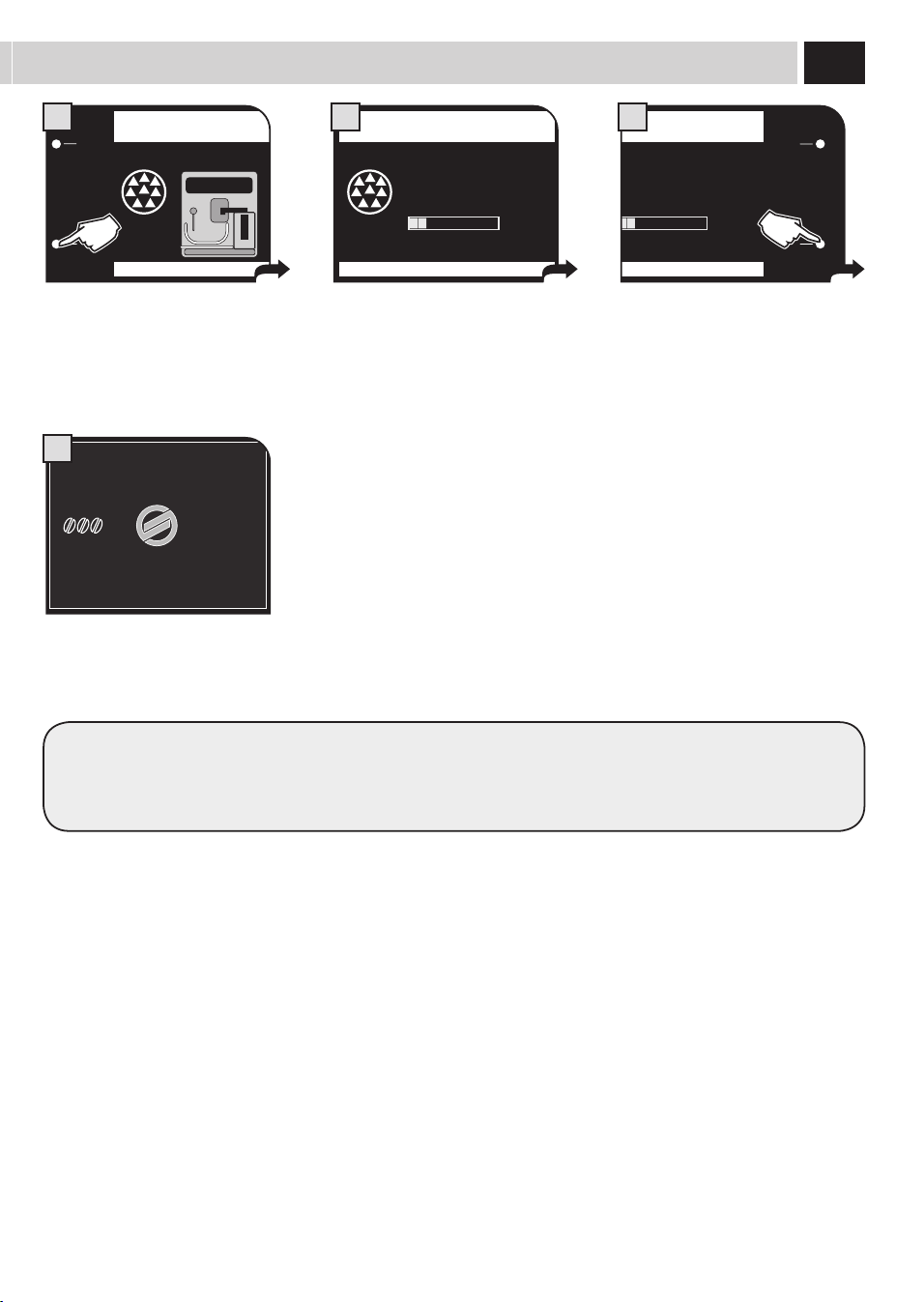
41
CYCLE DÉTARTRAGE
PAUSE
PHASE 2/2
RINÇAGE…
14
CYCLE DÉTARTRAGE
PAUSE
PHASE 2/2
RINÇAGE…
15
MENU
UTILISATEUR
MENU
BOISSON
MENU
MACHINE
SÉLECTION
UTILISATEUR
17/05/09
04:17 pm
16
Lecyclederinçagecommence.
Labarrepermetdevérierl'état
d'avancement.
S'ilfautviderlesrécipients,appuyersurla
touche«PAUSE».Appuyerensuitesurla
touche«DÉMARRER».
Àlandeladeuxièmephase,lamachine
estànouveauautomatiquementprête
pourl'usage.
METTRE UN RÉCIPIENT SOUS LES
BUSES DE DISTRIBUTION EAU CHAUDE ET CARAFE
OK
13
Placerunrécipientau-dessousdelabuse
dedistributionducaféetunrécipient
souslabusededistributiondel'eau
chaude.Appuyerensuitesurlatouche
«OK».
Ilfautensuiterincertouslescomposants.
Aprèslesavoirlavés,lesséchersoigneusementetlesremettredansleurlogement.
RemettreleboutonSBSsurlapositionsouhaitée(voirpage11).
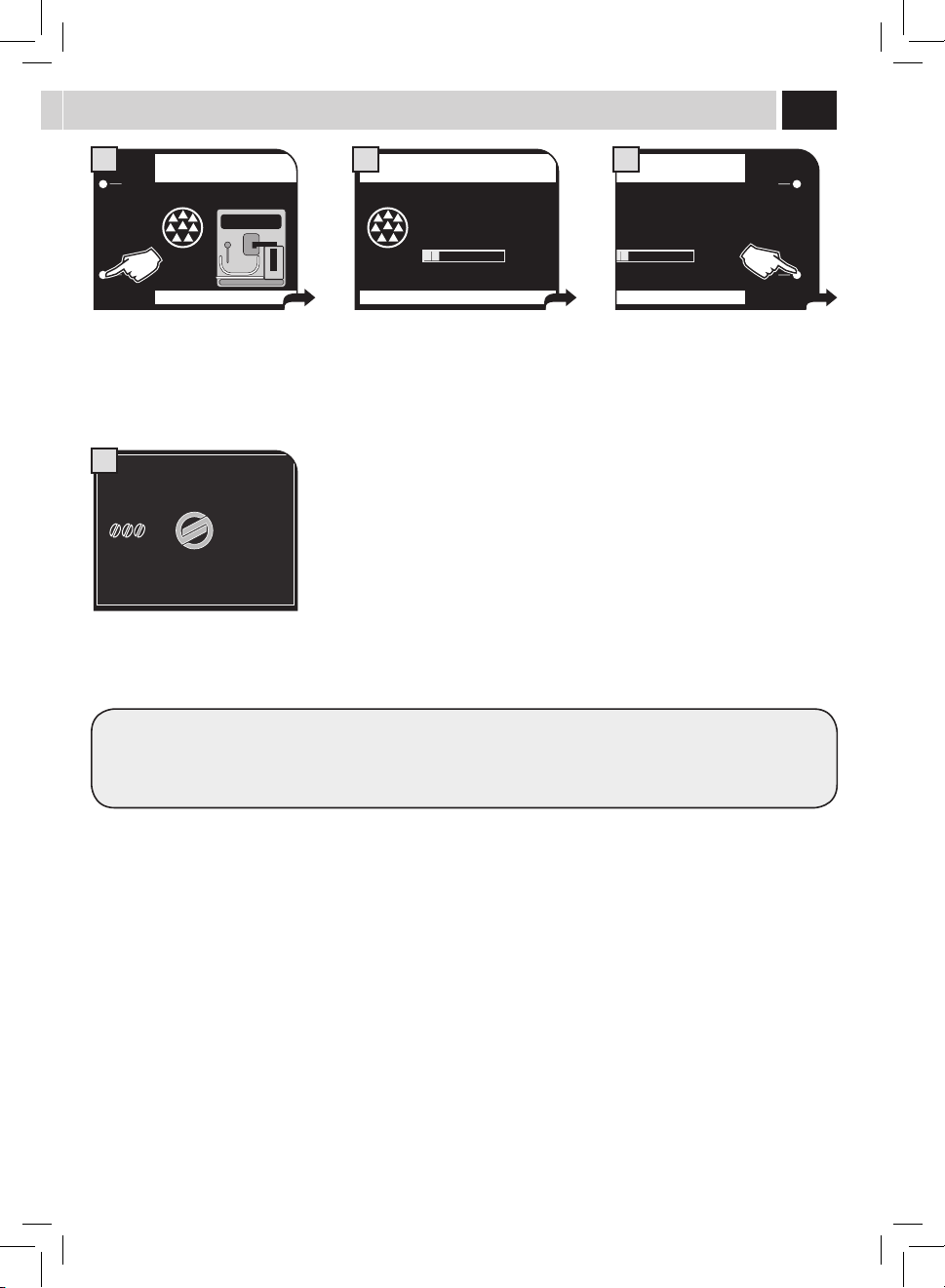
42
5
7 8
64
9
ENTRETIEN CIRCUITS LAIT
Lescircuitsdulaitpeuventêtrehygiéniséseneectuantuncyclesimpleetrapidequiassureunnettoyagesoigné.Celavagecomplète
l’entretienduconteneurdulait.Nousconseillonsd'eectuercecycleunefoisparmoisenutilisantledétergentSaeco,disponibleschez
votrerevendeurhabituel.
LE CYCLE DE LAVAGE NE PEUT PAS ÊTRE INTERROMPU.
PENDANT CETTE OPÉRATION, LA PRÉSENCE D’UNE PERSONNE EST NÉCESSAIRE.
Lacarafedoitêtreenlevéedelamachine
etensuitevidée.
Décrocherlapoignéeenlatournantdans
lesensdesaiguillesd’unemontre.
Remplirlacarafejusqu'auniveauMAX
indiquéavecdel'eaufraîchepotable.
Verserlecontenud'unsachetde
détergentpourleréservoiràlait.
Appuyersurlescôtésetsouleverle
couvercle.
Remettrelecouvercleenvériantqu'il
soitbienfermé.
ESC
OK
2.5. RÉGLAGES ENTRETIEN
COMPTEURS PRODUIT
CYCLE DÉTARTRAGE 59(I)
CYCLE NETTOYAGE GROUPE
CYCLE DE NETTOYAGE DE LA CARAFE
AUTO-NETTOYAGE CARAFE ON
1
ESC
OK
2.5.4. RÉGLAGES ENTRETIEN
EFFECTUER LE CYCLE DE
LAVAGE DE LA CARAFE?
2
REMPLIR RÉSERVOIR À EAU
OK
3
Sélectionnerl'optiondanslemenu.
Appuyersurlatouche«OK»pour
conrmer.
Appuyersurlatouche«OK»pour
conrmer.
Remplirleréservoiravecdel’eaufraîche
potable.Appuyersurlatouche«OK»
pourconrmer.
Remettrelapoignéedanslaposition
centralepourassurerunefermeture
parfaite.
eNTreTieN
Placerlacarafeinclinéefrontalement.
Labasedelacarafedoitêtre
appuyéeàl'insert(E)situésurlebac
d'égouttement.
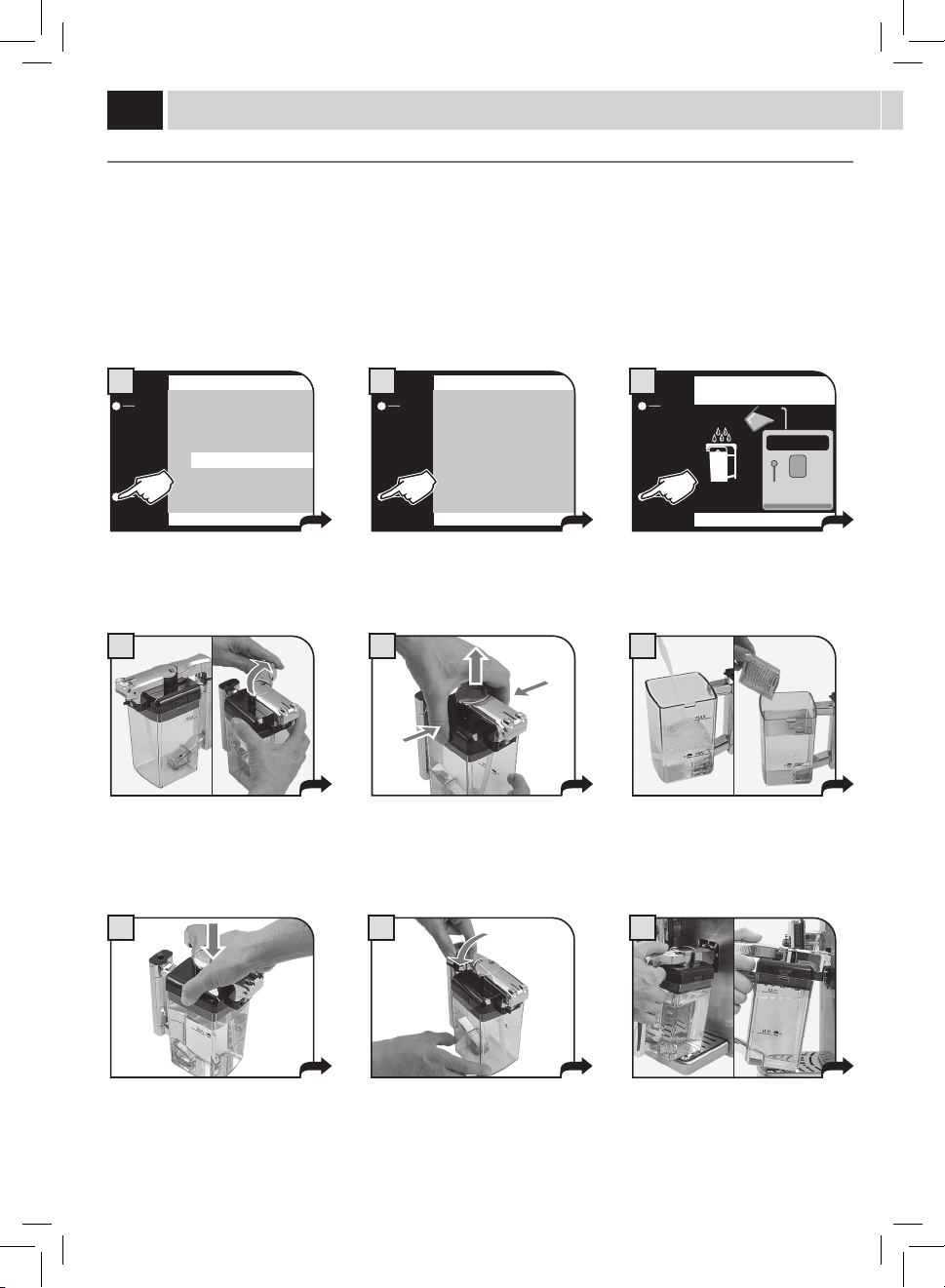
43
12 13
18
E
11
10
C
D
A
B B
Introduireunrécipientvideayantune
capacitéappropriéeetlemettredansla
positiondedistribution.
Introduireunrécipientvideayantune
capacitéappropriéeetlemettredansla
positiondedistribution.
Unefoislecycledenettoyage
terminé,ilestconseilléderincertous
lecomposantsavecdel'eaufraîche
potable.
REMPLIR RÉSERVOIR À EAU
OK
16
VERSER LE DÉTERGENT DANS LA CARAFE
ET LA REMPLIR AVEC DE L'EAU FRAÎCHE
OK
14
REMPLIR LA CARAFE DU LAIT
AVEC EAU FRAÎCHE
OK
17
CYCLE DE NETTOYAGE DE LA CARAFE
PHASE 1/2
LAVAGE…
15
CYCLE DE NETTOYAGE DE LA CARAFE
PHASE 2/2
RINÇAGE…
19
Àlandulavage,remplirànouveaule
réservoiravecdel’eaufraîchepotable.
Appuyersurlatouche«OK»pour
conrmer.
Appuyersurlatouche«OK»pour
conrmer.
Enleverlacarafe,larinceretlaremplir
d’eaufraîchepotable.Appuyersurla
touche«OK»pourconrmer.
Lecycledenettoyagecommence.
Labarrepermetdevérierl'état
d'avancement.
Lecyclederinçagecommence.Labarrepermetdevérierl'état
d'avancement.Unefoislecycleterminé,lamachinerevientàla
pagededistributiondesproduits.
Pendantcettephaselestrousdela
carafe(A)setrouventau-dessousdes
embrayages(C).Lespivotsdelacarafe
(B)setrouventàlamêmehauteurdes
glissières(D).
Introduirelacarafeparunerotationverslebas(commelemontrelagure),jusqu'à
l'accrochagedel'insert(E)setrouvantdanslebacd'égouttement.
Lacarafeseretrouvenaturellement
danssonlogement.
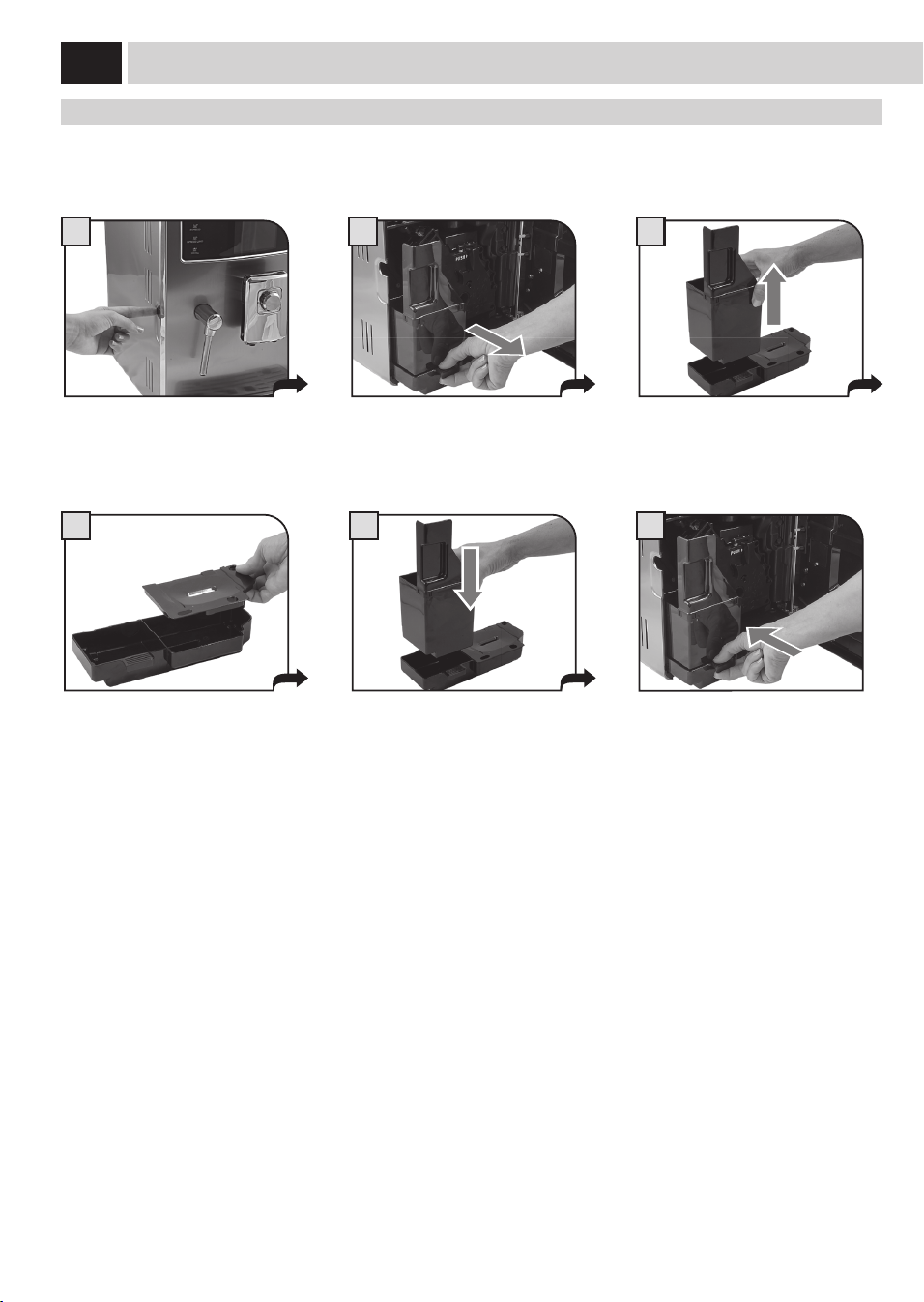
44
1
6
2 3
4 5
eNTreTieN PeNdaNT le FONCTiONNemeNT
Lemessage«Viderleréservoiràmarc»et/ou«Viderlebacd'égouttement»pourraits'acherlorsdufonctionnementnormal.Cette
opérationdoitêtreeectuéeaveclamachineenmarche.
Appuyezsurlatoucheetouvrirlaporte
deservice.
Retirerlebacd'égouttementetletiroir
àmarc.
Lecomptagedumarcdéposédansletiroirn’estpasremisàzéroenvidantlemarcquandlamachineestéteinte.C’estlaraisonpourlaquelle
lamachinepeutacherlemessage«viderleréservoiràmarc»mêmeaprèsn’avoirpréparéquequelquescafés.
Viderletiroiràmarcetlerinceràl'eau
fraîche.
Replacercorrectementlescomposants. Insérerlebacetletiroiràmarcetfermer
laportedeservice.
Videretlaverlebacd'égouttementetle
couvercleavecdel'eaufraîche.
NeTTOYaGe
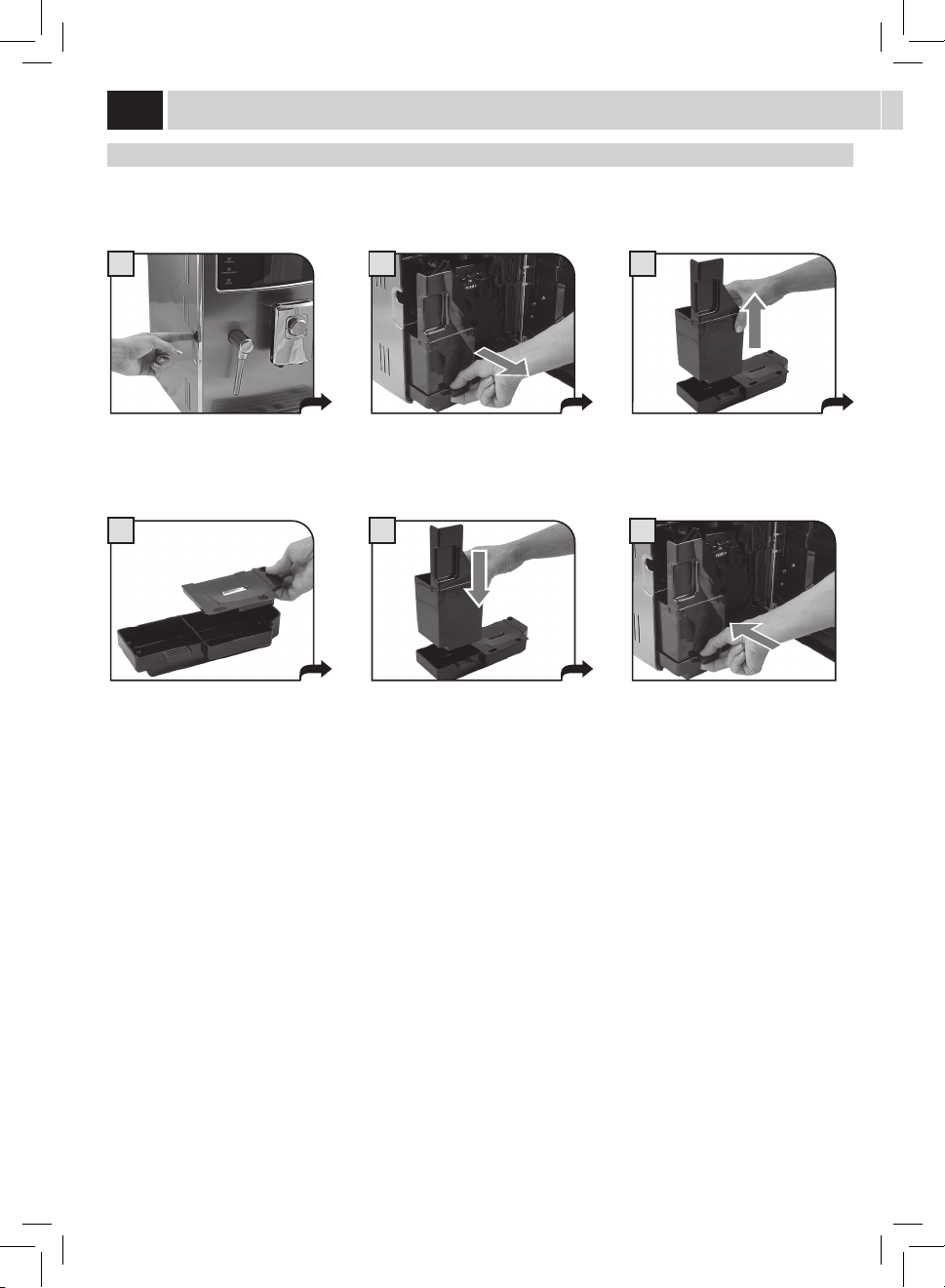
45
1
4
7
2
5 6
8
3
9
Éteindrelamachineetdébrancherla
che.
Démonterledistributeuretlelaverà
l’eaucourante.
Sortirleréservoiràeauetlelaveravec
del’eaufraîche.
Nettoyerlecompartimentducafé
prémouluàl’aided'unchionsec.
NeTTOYaGe GÉNÉral de la maCHiNe
Lenettoyagedécritci-dessousdoitêtrefaitaumoinsunefoisparsemaine.
Remarque:nepasutiliserdel’eauquin’apasétéremplacéedepuisplusieursjours.
ATTENTION ! Ne pas plonger la machine dans l’eau.
Nettoyer la machine et la buse de vapeur avec un chi on humide. Ne pas utiliser de pailles abrasives.
Laverlebacderécupérationdel'eau.
Aprèsl'avoirséché,lemonteretle
remettreàsaplacedanslamachine.
Retirerlebacderécupérationdel'eau.
Retirerlagrilleetlalaver
soigneusement.
Retirerlesupportpositionnésousla
grille.Lelaverenfaisantattentionàla
zonedujoint.Leremettreàsaplace
seulementaprèsavoirlavélapartie
internedubacderécupérationdel'eau.
NettoyerSEULEMENTlecapteuravecdu
cotonimbibéd’alcool.
Nepasutiliserdepaillesabrasives.
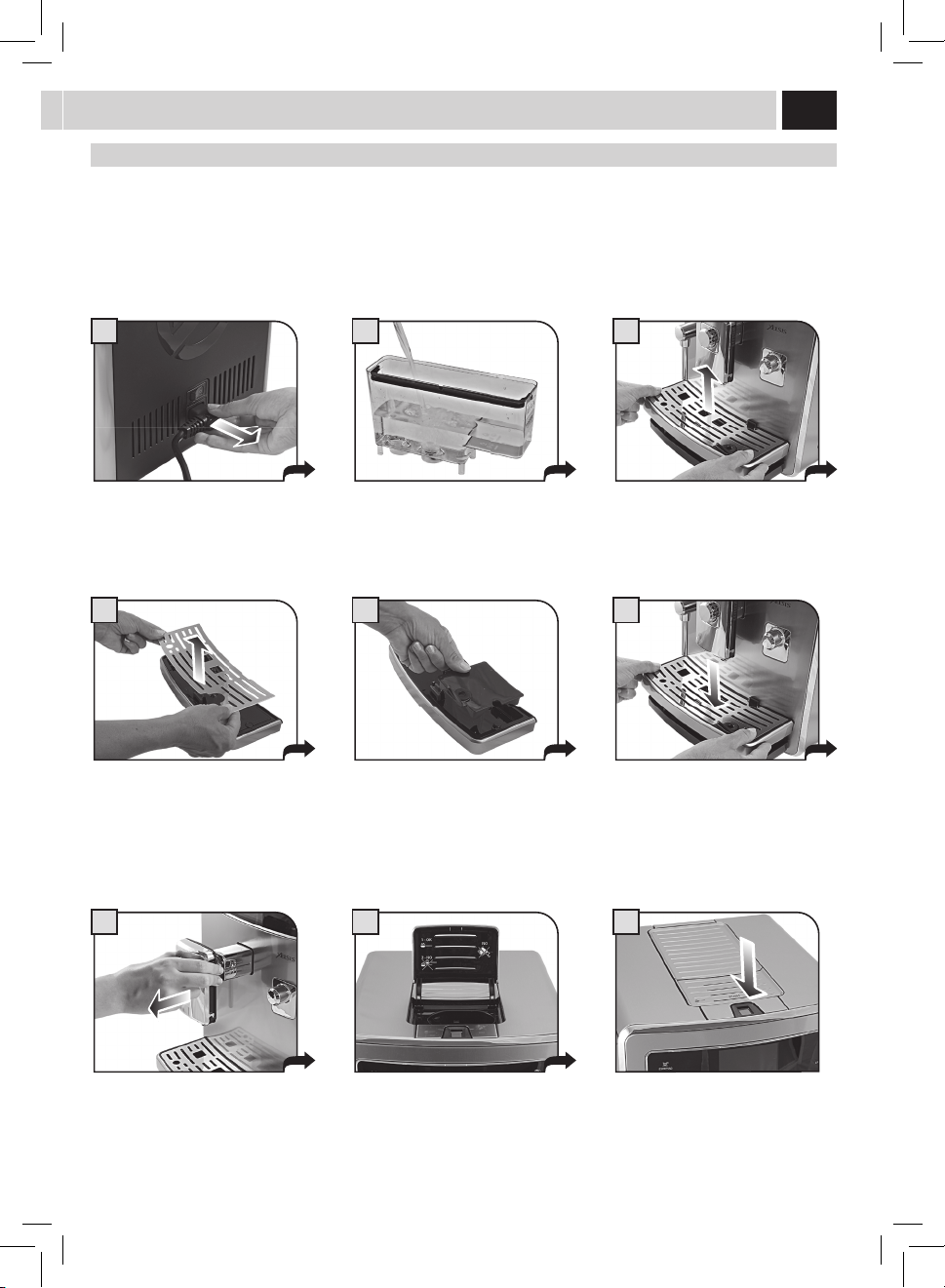
46
1
4
7
2
5
8
3
6
9
Pourôterlegroupededistribution,
appuyersurlatouchePUSH.
Insérerletiroiràmarc.
Fermerlaportedeservice.
NeTTOYaGe GrOUPe de disTribUTiON
Legroupededistributiondoitêtrenettoyéaumoinsunefoisparsemaine.Avantderetirerlegroupe,ilfautretirerletiroiràmarccomme
indiquéàlag.2page44.Laverlegroupededistributionàl’eautiède.
LubrierleGroupededistributionaprès500distributionsenviron.Ilestpossibled’acheterdelagraissepourlubrierleGroupede
distributionauprèsdescentresd’assistanceagréés.
ATTENTION ! Ne pas laver le Groupe de distribution avec des détergents qui pourraient a ecter son fonctionnement. Ne pas
le laver au lave-vaisselle.
Laverlegroupeetleltreetlessécher.
Leremontersansappuyersurlatouche
PUSH !
S’assurerquelegroupededistribution
estenpositionderepos;lesdeux
repèresdoiventcoïncider.
S'assurerquetouslescomposantsse
trouventdanslabonneposition.
Lecrochetindiquédoitêtredansla
positioncorrecte;pourvérier,appuyer
d’uncoupsecsurlatouche«PUSH».
Lelevierplacésurlapartiearrièredu
groupedoitêtreencontactaveclabase.
Distribuerlagraissedefaçonuniforme
surlesdeuxconvoyeurslatéraux.
Nelubrierlesconvoyeursdugroupe
qu'aveclagraissefournie.
NeTTOYaGe
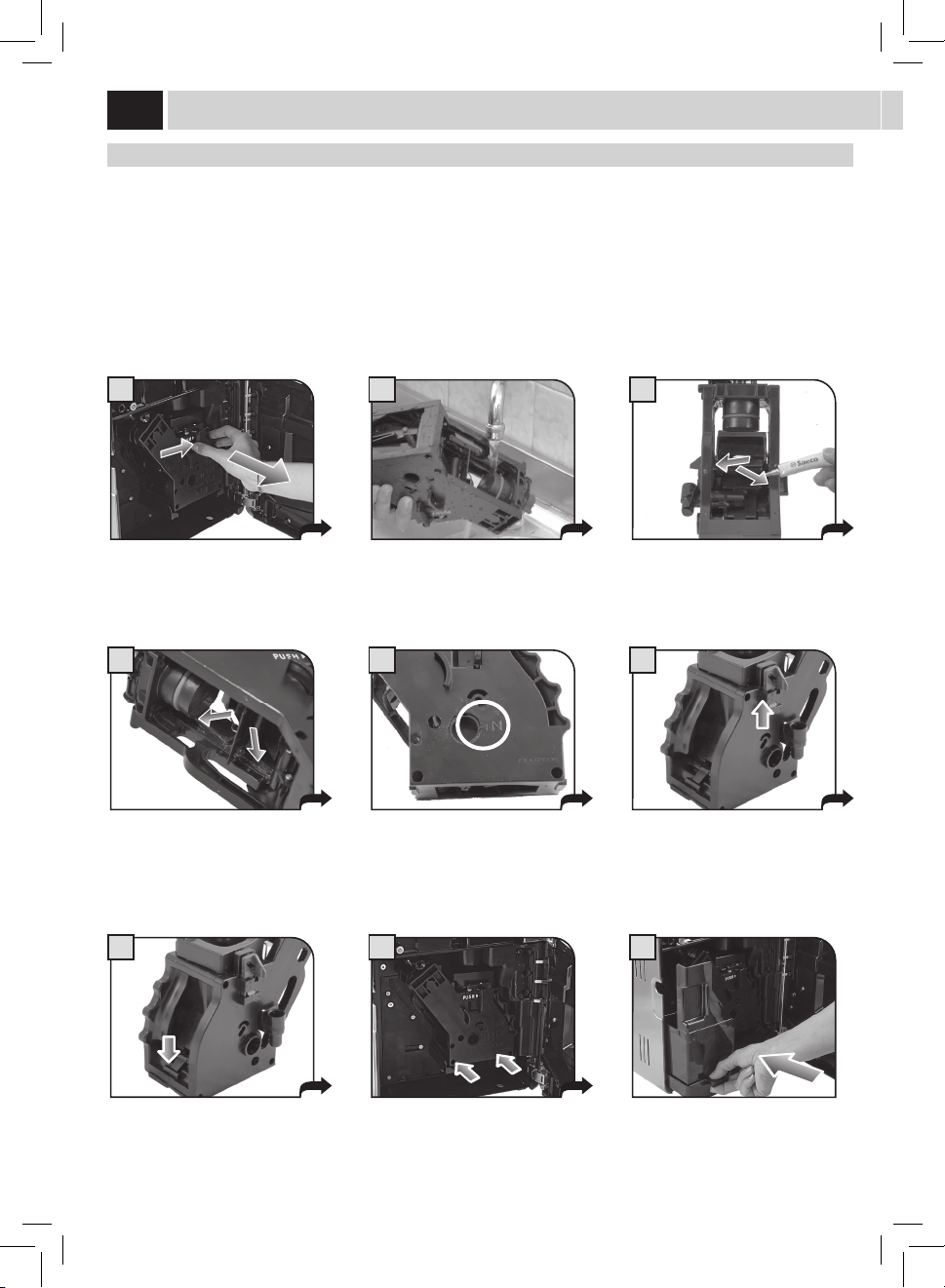
47
1
4
7
3
6
9
2
5
8
NeTTOYaGe CaraFe laiT
Ilfautdémonteretlaversoigneusementlacarafeunefoisparsemaineminimum.
Cetteopérationassureunehygièneparfaitedetouslescomposants.
Remarque : faire attention à la position de chaque composant : de cette façon, il sera plus simple de les remonter. Un guide
bref se trouve dans la partie interne de la porte de service pour le remontage de la carafe.
Pourlenettoyagedelacarafe,ilfaut
l'enleverdelamachineetlavider.
Tournerlapoignéedanslapositionde
déblocageenlatournantdanslesens
inversedesaiguillesd’unemontre.
Extraireletuyaud'aspiration.
Appuyersurlescôtésetsouleverle
couvercle.
Enleverlapoignéeavecletuyau
d'aspiration.
Retirerleraccordinterne.
Décrocherlapoignéeenlatournantdans
lesensdesaiguillesd’unemontre.
Extraireleconnecteurquiestencontact
aveclamachine.
Retirerleraccordexterneenletirant.
Touslescomposantspeuventêtrelavéssoigneusementavecdel'eauchaude.
Aprèsavoirlavélescomposants,lesremonterensuivantlesinstructionsdontàlapagequisuit.
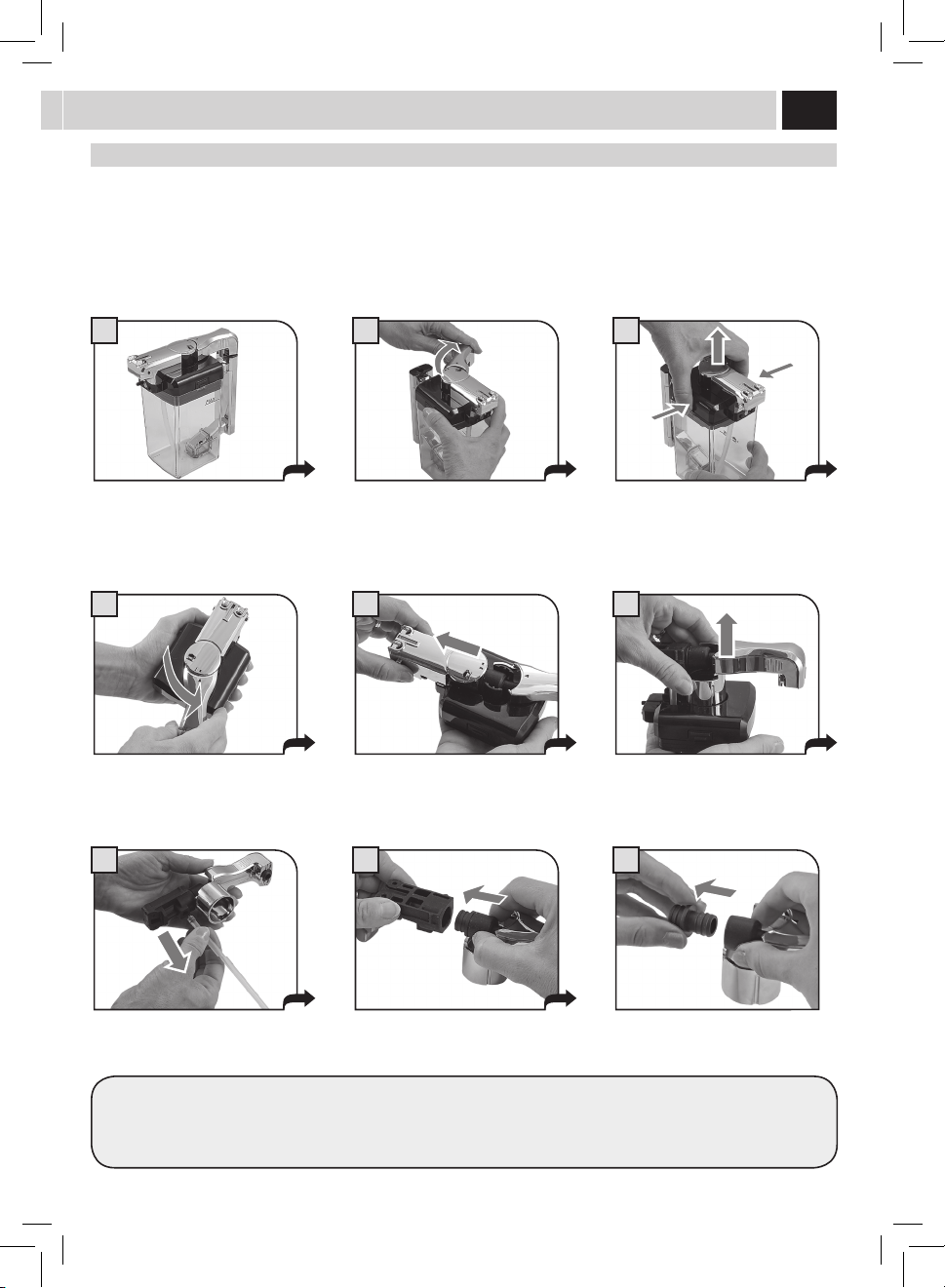
48
1
4
7
3
6
9
2
5
8
mONTaGe CaraFe laiT
Leremontagedoitêtreeectuésoigneusement.Silescomposantssemontentdicilement,consulterlesinstructionsdansledétailet
essayerànouveaulaprocédure.
Remarque : Un guide bref se trouve dans la partie interne de la porte de service pour le remontage de la carafe.
Insérerleraccordinternedansletuyauet
lepousserjusqu'aufond.
Introduirelegroupeàpeinemontédans
labaseducouvercle.Faireattentionau
pointderepère.
Introduirelecouvercledanslacarafe.
Introduireletuyaudansleraccord
externe.
Tournerlapoignéedanslesensdes
aiguillesd'unemontrejusqu'ausymbole
(
).
Lacarafepeutmaintenantêtreutilisée.
Introduireleraccordexternedansle
raccordprécédent.Faireattentionau
sensd'introductionquiestmontrépar
laèche.
Insérerlacouvertureexterne.Elledoit
s'introduiredanslesglissièresdelabase.
Tournerlapoignéedanslesensinverse
desaiguillesd’unemontrepourla
rameneràsapositiondefermeture.
NeTTOYaGe
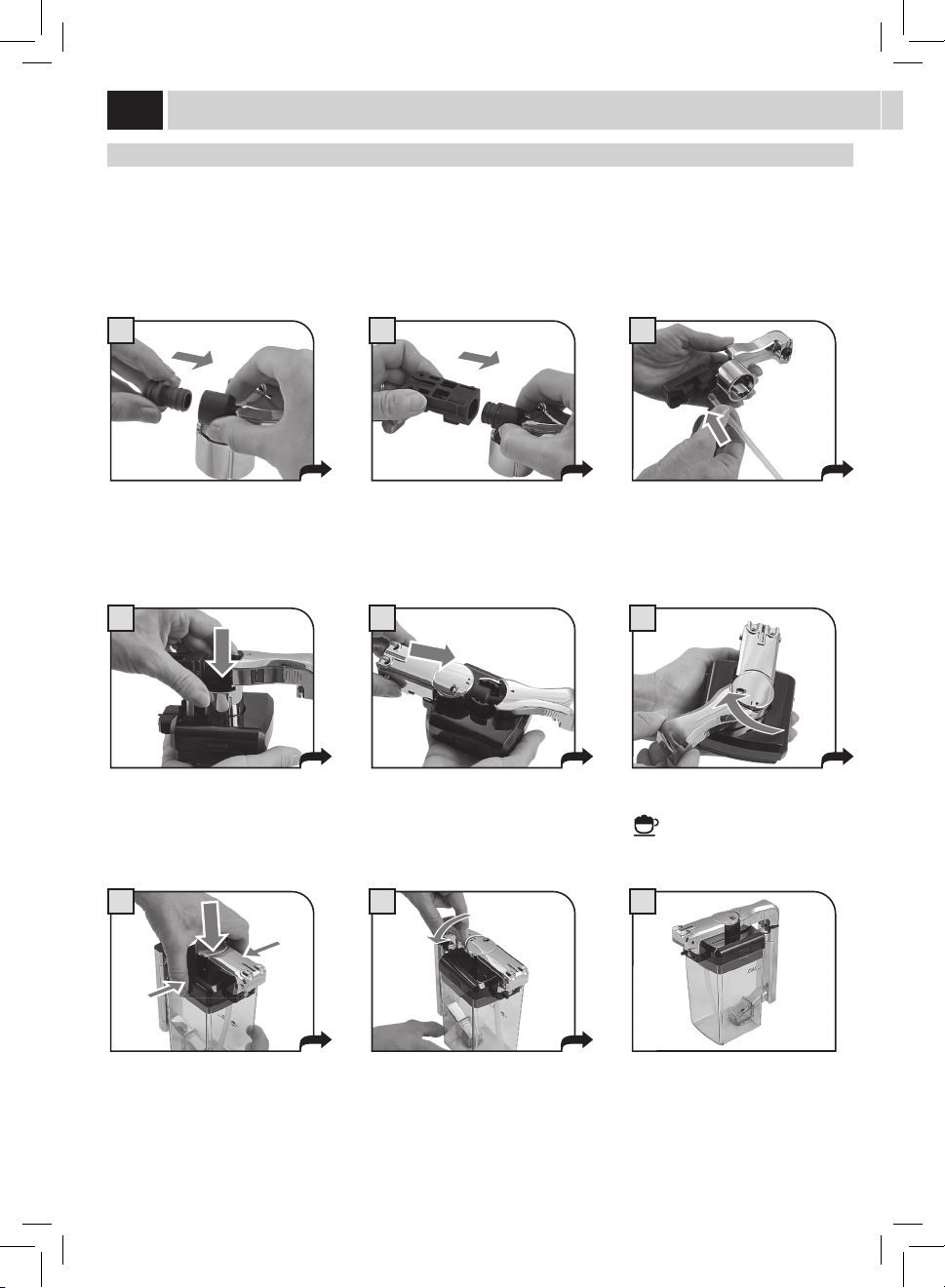
49
Message affi ché Comment rétablir le message
FERMER LA PORTE GRAINS
Fermerouplacercorrectementlecouvercleinterneduréservoiràcaféengrains
pourpouvoirdistribueruneboissonquelconque.
AJOUTER DU CAFÉ
Remplirleréservoiràcaféavecducaféengrains
INSÉRER GROUPE
InsérerleGroupededistributiondanssonlogement.
INSÉRER RÉSERVOIR À MARC
Introduireletiroiràmarcetlebacd'égouttement.
VIDER LE RÉSERVOIR À MARC
Retirerletiroiràmarcetvidez-ledansunbacapproprié.
Remarque : le tiroir à marc ne doit être vidé que quand la machine le
demande et quand elle est allumée. Le fait de vider le tiroir quand la
machine est éteinte empêche tout enregistrement du vidage e ectué.
FERMER LA PORTE AVANT
Pourquelamachinepuissedenouveaufonctionner,
fermerlaportedeservice.
REMPLIR RÉSERVOIR À EAU
Retirerleréservoiretleremplird'eaufraîchepotableoubienleravitaillerde
l'ouvertureappropriée.
VIDER LE BAC D'ÉGOUTTEMENT
Ouvrirlaporteavantetviderlebacd’égouttementquisetrouvesouslegroupe
dedistribution.
Attention : en e ectuant cette opération lorsque la machine est en
marche, celle-ci enregistre le vidage du tiroir à marc et remet à zéro le
compteur correspondant. Pour cette raison, il faut également vider le
marc de café.
siGNalisaTiON de la maCHiNe
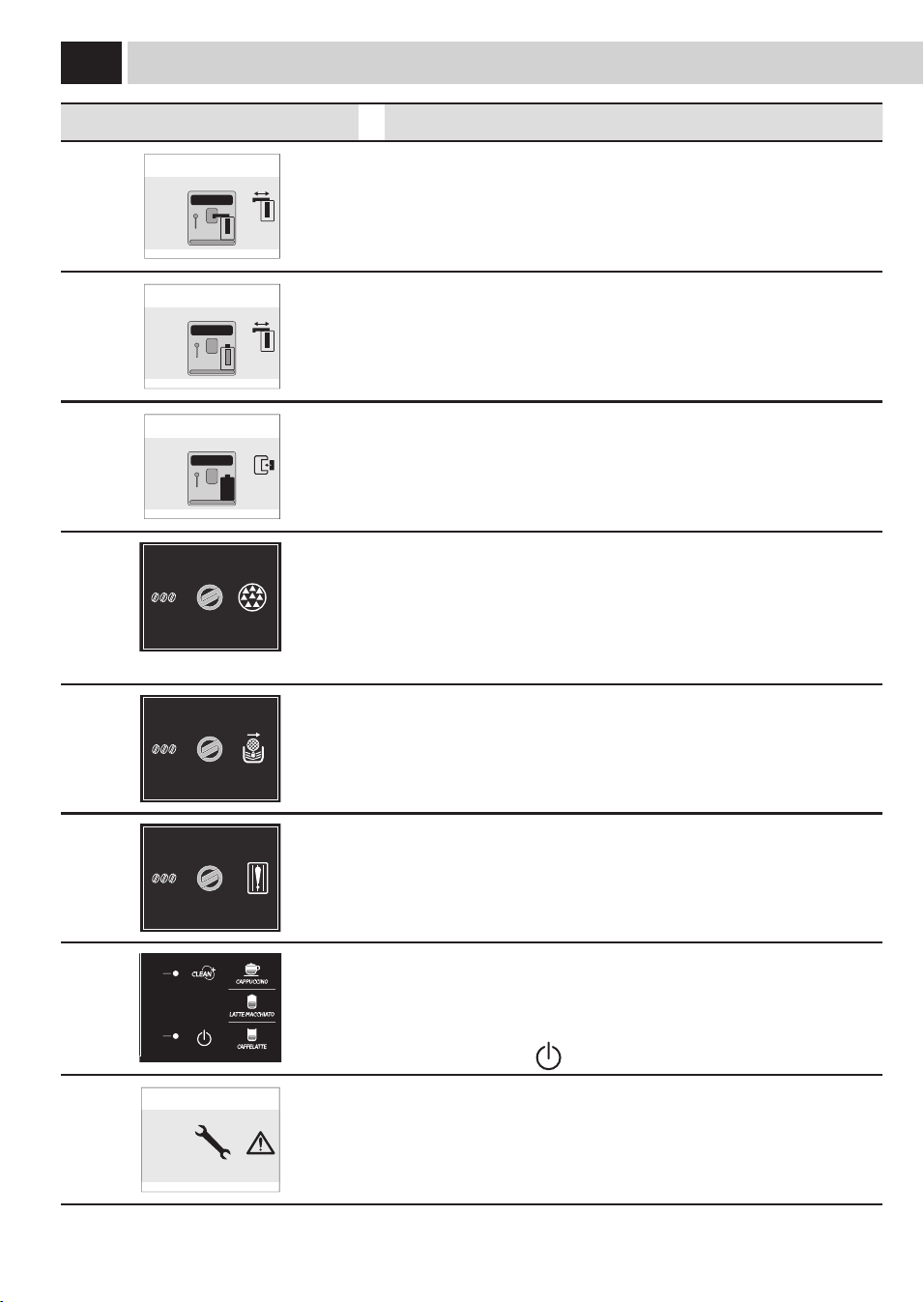
50
Message affi ché Comment rétablir le message
PLACER LE DISTRIBUTEUR DE LA
CARAFE EN POSITION DE DISTRIBUTION
ESC
Uneboissonavecdulaitaétésélectionnée.Lamachinedemandedepositionner
labusedelacarafedanslapositiondedistribution.
Appuyersurlatouche«ESC»pourannulerlasélection.
PLACER LE DISTRIBUTEUR DE LA
CARAFE EN POSITION DE RINÇAGE
ESC
Lafonctionderinçagedelacarafeaétésélectionnée.
Appuyersurlatouche«ESC»pourannulerlasélection.
PLACER LA CARAFE DU LAIT
DANS SON LOGEMENT
ESC
L'opérationsélectionnéedemandeladistributionàpartirduréservoiràlait.
Mettreleréservoirdanslamachinecommemontrédanslemanuel.
Appuyersurlatouche«ESC»pourannulerlasélection.
MENU
UTILISATEUR
MENU
BOISSON
MENU
MACHINE
SÉLECTION
UTILISATEUR
17/05/09
04:17 pm
Lamachinenécessiteuncyclededétartrage.
Aveccemessage,onpeutcontinueràutiliserlamachinemaisl'onrisqued'en
compromettrelebonfonctionnement.
Nousvousrappelonsquetoutendommagementcausépardéfautdedétartrage
n'estpascouvertparlagarantie.
17/05/09
04:17 pm
MENU
UTILISATEUR
MENU
BOISSON
MENU
MACHINE
SÉLECTION
UTILISATEUR
Lamachinedemandederemplacerleltreàeau«Intenza»parunnouveau.
Procéderàremplacerleltrecommedécritàlapage7.
L’alarmeestachéseulementsilafonction«ValiderFiltre»estsur«ON».
(Voirpage36).
17/05/09
04:17 pm
MENU
UTILISATEUR
MENU
BOISSON
MENU
MACHINE
SÉLECTION
UTILISATEUR
Lecapteurpourlareconnaissancedesempreintesnefonctionnepas
correctement.
Eectuerunnettoyagesoigné.
Siladéfaillanceneserésoutpasaprèsunnettoyageminutieux,contacterle
centred'assistance.
MENU
UTILISATEUR
MENU
BOISSON
MENU
MACHINE
SÉLECTION
UTILISATEUR
17/05/09
04:17 pm
Delrougeclignotante.Machineenattente(Stand-by).
Ilestpossibledemodierlesréglagesdestand-by
Appuyersurlatouche"
".
REDÉMARRER POUR RÉSOUDRE
LE PROBLÈME
(E xx)
Ils'estproduitunévénementdemandantleredémarragedelamachine.Noter
lecode(Exx)s'achantenbas.
Arrêterlamachineetlaremettreenmarcheauboutde30secondes.Sile
problèmeserépètecontacterlecentred'assistance.
siGNalisaTiON de la maCHiNe

51
EN CAS D’URGENCE
Retirerimmediatementlachedelapriseelectrique.
N’UTILISER L’APPAREIL
• quedansdeslocauxfermés
• quepourlapréparationdecafé,d’eauchaudeetdemoussedelait
• qu’àdesnsdomestiques
• L’appareiln’estpasdestinéàêtreemployépardespersonnes(ycomprislesenfants)avecdefaiblescapacitésphysiques,
mentalesousensoriellesouavecexpérienceet/oudescompétencesinsusantes,àmoinsqu’ellesnesoientsousla
supervisiond’unepersonneresponsabledeleursécuritéouqu’ellesnesoientinstruitesparcettepersonneencequi
concernel’emploidel’appareil.
• Garderlesenfantssoussupervision,and’éviterqu’ilsnejouentavecl’appareil.
MESURES DE PRÉCAUTION CONCERNANT L’UTILISATION DE L’APPAREIL
• And’évitertoutesituationdedanger,nepasutiliserl’appareilàd’autresnsquecellesprévues.
• Nepasmettredanslesréservoirsetrécipientsd’autressubstancesquecellesprévuesdanslemoded’emploi.
• Lorsqu’unréservoir/récipientaétécorrectementrempli,touslesautresréservoirsdoiventêtrefermés.
• Nemettrequedel’eaupotablefraîchedansleréservoird’eau:l’eauchaudeet/oud’autresliquidespeuventendommager
l’appareil.
• Nepasutiliserd’eaugazeuse.
• Nepasmettrelesdoigtsdanslemoulinàcaféetnepasymettred’autressubstancesquedesgrainsdecafé.Avant
d’inspecterlemoulinàcafé,vousdevezéteindrel’appareilenappuyantsurl’interrupteurgénéral,puisdébrancherlache
delapriseélectrique.
• Nepasmettredecafésolubleoudecaféengrainsdansleréservoirpourcaféenpoudre
• Andecommanderl’appareilaumoyendel’ecranatouchestactiles,vousdevezuniquementutiliserlesdoigts.
RACCORDEMENT ÉLECTRIQUE
Leraccordementélectriquedoitêtreconformeauxdispositionsdesécuritédevotrepays.
Lapriseélectriqueàlaquellelamachineestbranchéedoit:
• êtrecompatibleaveclacheducâbledel’appareil;
• dimensionnéepourrespecterlesinformationsdelaplaquettedesdonnéessetrouvantdansl’appareil.
• êtrecorrectementreliéeàlaterre.
Lecâbleélectriquenedoitenaucuncas:
• entrerencontactavecunquelconqueliquide:risquededéchargeélectriqueet/oud’incendie;
• êtrecoincéet/ouentrerencontactavecdesobjetspointus;
• êtreutilisépourdéplacerl’appareil;
• êtreutilisélorsqu’ilestendommagé;
• êtreencontactavecdesmainshumidesoumouillées;
• êtretordulorsquel’appareilestenservice;
• êtreendommagé
INSTALLATION
• Choisircommelieud’emplacementdel’appareilunendroitbienaménagé,platetsolide(l’angled’inclinaisonnedoiten
aucuncasêtresupérieurà2°).
• Nepasplacerl’appareildansdesendroitsoùl’eaupourraits’inltrerdedans.
• Températuredeserviceoptimale:entre10°Cet40°C.
• Humiditémaximaledel’air:90%.
• Lelieud’emplacementdoitêtrepropre,bienéclairéetbienaéré.Lapriseélectriquedoitêtrefacilementaccessible.
• Nepasposerl’appareilsurdessurfacesbrûlantesouchaudes!
• Respecterunintervallede10cmàpartirdesmursetdesplaquesdecuisson.
• Nepasutiliserl’appareildansdespiècesachantunetempératureégaleouinférieureà0°C.Sil’appareilestexposéàdetelles
conditions,contacterleserviceaprès-venteanqu’uncontrôledesécuritépuisseêtreeectué.
• Nepasmettreenmarchel’appareilàproximitédesubstancesfacilementinammableset/ouexplosives.
• Ileststrictementinterditd’utiliserl’appareildansdespiècessoumisesàunrisqueélevéd’explosionoudontl’aircontient
unehauteconcentrationdepoudresoudesubstancesàbased’huile.
SOS
CONsiGNes de sÉCUriTÉ

52
• Nepasplacerlamachinesurd’autresappareils.
DANGERS
• Nepaslaisserlesenfantsseservirdel’appareil.Cetteconsignevautégalementpourlespersonnesquineconnaissent
paslefonctionnementdel’appareil.
• L’appareilpeutreprésenterundangerpourlesenfants.Sil’appareilestlaissésanssurveillance,débrancherlache.
• Nepasconserverlesmatériauxd’emballageàlaportéedesenfants.
• Nejamaisorienterlejetdevapeuroud’eauchaudesursoi-mêmeousurd’autrespersonnes:risquedebrûlures.
• Nepasinsérerd’objetsdanslesouverturesdel’appareil(danger:courantélectrique!).
• Nepastoucherlacheélectriqueavecdesmainsoudespiedsmouillés,nepasdébrancherlacheentirantsurlecâble.
• Attention:risquedebrulureslorsducontactavecl’eauchaude,lavapeuretlabused’eauchaude.
PANNES
• Nepasutiliserl’appareilencasdeproblèmesdefonctionnementouencasdedoute(parex.:aprèsquel’appareilest
tombéparterre).
• Faireprocéderauxréparationséventuellesparleserviceaprès-venteagréé.
• Nejamaisutiliserl’appareillorsquelecâbleélectriqueestdéfectueux.Lecâbledéfectueuxdoitêtreremplacéparle
producteurouleserviceaprès-venteagréé(danger:courantélectrique!).
• Eteindrel’appareilavantd’ouvrirlaportedemaintenance.Risquedebrulures!
NETTOYAGE / DÉTARTRAGE
• Pourlenettoyagedescircuitslaitetcafé,n’utilisezquelesdétergentsrecommandésetfournisaveclamachine.
N’utilisezpascesproduitspourdesusagesdiérents.
• Avantdepouvoircommencerlenettoyage,l’interrupteurdoitêtreenpositionOFF(0).Débrancherlacheetlaisser
refroidirl’appareil.
• Nettoyerlamachineavecduproduitdétergentneutreetunchionhumide(nepasutiliserdechionsabrasifsoude
paillesdefer).
• Protégerl’appareilcontreleséclaboussuresd’eauetnepasleplongerdansl’eau.
• Nepasfairesécherlespiècesdel’appareildanslesfourstraditionnelset/oudanslemicro-ondes.
• Nettoyerl’appareiletsescomposantsapresunemisehorsserviceprolongee.
PIÈCES DÉTACHÉES
Pourdesraisonsdesecurite,toujoursutiliserlespiècesdétachéesetlesaccessoiresdufabricant.
ELIMINATION
L’appareilestenconçuetfabriquépourfacilitersavalorisation,sonrecyclageousaréutilisationconformémentàla
directiveeuropéenne2002/96/CEErelativeauxappareilsélectriquesetélectroniquesusagés(wasteelectricalandelectronic
equipment-WEEE).Lelogoci-contreapposésurl’appareilindiquequeceproduitnepeutpasêtreéliminéaveclesdéchets
ménagersnontriés.Lorsquevousaurezdécidédevousenséparerdénitivement,ilconvientdefaireprocéderàlacollecte
sélectivedecetappareilenvousconformantaumodedereprisemisenplacedansvotrecommune(collecteponctuelledes
encombrants,déchèterie),ouenfaisantappelauservicederepriseproposéparvotredistributeur,oubien,enleconantà
desorganisationscaritativesetdesassociationsàbutnonlucratif.Envousassurantqueceproduitestéliminécorrectement,
vousfavorisezlapréventiondesconséquencesnégativespourl’environnementetlasantéhumaine.
PROTECTION CONTRE LES INCENDIES
Encasd’incendie,utiliserunextincteuràbasedegazcarbonique(extincteurCO
2
).
Nepasutiliserd’eaunid’extincteuràbasedepoudre.
INFORMATIONS ADDITIONNELLES POUR L’UTILISATION CORRECTE DU FILTRE INTENZA
PourutilisercorrectementleltreàeauIntenza,voilàquelquesavertissementsdontilfauttenircompte:
1.ConserverleltreàeauIntenzadansunendroitfrais,àl’abridusoleil;latempératureambiantedoitêtrecompriseentre
+1°Cet+50°C;
2.Lireattentivementlemoded’emploiainsiquelesavertissementsdesécuritéjointsàchaqueltre.
3.Conserverlesinstructionsjointesaultreaveclemoded’emploi.
4.Lesinstructionsci-jointescomplètentcellessetrouvantdanslemanuel,puisqu’ellesdécriventl’applicationspéciquedu
ltredanslamachine.
CONsiGNes de sÉCUriTÉ
53
GaggioMontano
li,28/04/2009
R & D Manager
Ing. Andrea Castellani
saeCO iNTerNaTiONal GrOUP s.P.a
ViaTorretta,240-40041GaggioMontano(Bo)-Italy
nousdéclaronssousnotreresponsabilitéqueleproduit:
MACHINE À CAFÉ AUTOMATIQUE
sUP 038Z
auquel se réfère cette déclaration est conforme aux réglementations suivantes:
• Sécuritédesappareilsélectrodomestiquesetanalogues-Prescriptionsgénérales
EN60335-1(2002)+A1(2004)+A2(2006)+A11(2004)+A12(2006)+A13(2008)
• Sécuritédesappareilsélectrodomestiquesetanalogues
Partie2-15-Règlesparticulièrespourlesappareilsdechauagedesliquides
EN60335-2-15(2002)+A1(2005)
• Appareilsélectrodomestiquesetanalogues.Champsélectro-magnétiques
Méthodesd’évaluationetdemesureEN50366(2003)+A1(2006).
• Sécuritédesappareilsélectrodomestiquesetanalogues-Partie2-14
RèglesparticulièrespourpulvérisateursetmoulinsàcaféEN60335-2-14(2006).
• Limitesetméthodesdemesuredesperturbationsradioélectriquesproduitesparlesappareilsélectrodomestiquesouanalogues
comportantdesmoteursoudesdispositifsthermiques,parlesoutilsélectriquesetparlesappareilsélectriquesanalogues-
EN55014-1(2006).
• Compatibilitéélectromagnétique(EMC)Partie3,Limites-Section2:
Limitespourlesémissionsdecourantharmonique(courantappeléparlesappareils≤16Aparphase)-EN61000-3-2(2006)
• Compatibilitéélectromagnétique(EMC)Partie3,Limites-Section3:
Limitationdesvariations,desuctuationsdetensionetdupapillotementdanslesréseauxpublicsd’alimentationbassetensionayantun
courantassigné≤16Aparphaseetnonsoumisàunraccordementconditionnel.
EN61000-3-3(1995)+corr.(1997)+A1(2001)+A2(2005).
• Exigencespourlesappareilsélectrodomestiques,outillagesélectriquesetappareilsanalogues.
NormedefamilledeproduitsEN55014-2(1997)+A1(2001)
Selon les dispositions des directives: 2006/95/CE, 2004/108/CE.
dÉClaraTiON Ce de CONFOrmiTÉ
aN 09
2006/95/Ce, 2004/108/Ce.

54

The manufacturer reserves the right to change the features of the product without prior notice.
Le producteur se réserve le droit d“apporter toutes modifications sans préavis.
Type SUP-038Z Cod.15001811 Rev.00 del 15-01-10