FULL MANUAL

A
Regulatory Compliance Statements
CAUTION
RISK OF ELECTRIC SHOCK.
DO NOT OPEN.
This symbol indicates that
high voltage is present inside.
It is dangerous to make any
kind of contact with any
internal part of this product.
CAUTION: TO REDUCE THE RISK OF
ELECTRIC SHOCK, DO NOT REMOVE THE
COVER (OR BACK). NO USER SERVICEABLE
PARTS INSIDE. REFER SERVICING TO
QUALIFIED SERVICE PERSONNEL.
This symbol indicates that
this product has included
important literature
concerning operation and
maintenance.
Class II product : This symbol indicates that it does not require a safety connection
to electrical earth (ground).
AC voltage : This symbol indicates that the rated voltage marked with the symbol
is AC voltage.
DC voltage : This symbol indicates that the rated voltage marked with the symbol
is DC voltage.
Caution, Consult instructions for use : This symbol instructs the user to consult the
user manual for further safety related information.
❚
WARNING
•
To reduce the risk of re or electric shock, do not expose this appliance to rain or moisture.
•
Do not expose this apparatus to dripping or splashing. Do not put objects lled with liquids,
such as vases on the apparatus.
•
To turn this apparatus off completely, you must pull the power plug out of the wall socket.
Consequently, the power plug must be easily and readily accessible at all times.
Safety Information
ENG - ii

❚
IC Statement: (for Canada)
CAN ICES-3 (B)/NMB-3(B)
This device complies with Industry Canada license-exempt RSS standard(s). Operation is subject
to the following two conditions: (1) this device may not cause interference, and (2) this device
must accept any interference, including interference that may cause undesired operation of the
device.
For products available in the US and Canadian markets, only channels 1~11 are available. You
cannot select other channels.
This device and it’s antennas must not be co-located or operated in conjunction with any other
antenna or transmitter except in accordance with IC multi-transmitter product procedures.
This device may automatically discontinue transmission if there is no information to transmit,
or an operational failure. Note that this is not intended to prohibit the transmission of control or
signaling information or the use of repetitive codes where required by the technology.
To reduce potential for harmful interference to co-channel mobile satellite systems, this device
operates in the 5150-5250 MHz band, and is for indoor use only.
IMPORTANT NOTE:
IC Radiation Exposure Statement:
This equipment complies with IC RSS-102 radiation exposure limits set forth for an uncontrolled
environment. This equipment should be installed and operated so there is at least 8 inches (20cm)
between the radiator and your body.
❚
Important Safety Instructions
Read these operating instructions carefully before using the unit. Follow all the safety instructions
listed below.
Keep these operating instructions handy for future reference.
1
Read these instructions.
2
Keep these instructions.
3
Heed all warnings.
4
Follow all instructions.
5
Do not use this apparatus near water.
6
Clean only with dry cloth.
7
Do not block any ventilation openings. Install in accordance with the manufacturer's
instructions.
8
Do not install near any heat sources such as radiators, heat registers, stoves, or other
apparatus (including AV receivers) that produce heat.
9
Do not defeat the safety purpose of the polarized or grounding-type plug.
A polarized plug has two blades with one wider than the other. A grounding type plug has
two blades and a third grounding prong. The wide blade or the third prong are provided
for your safety. If the provided plug does not t into your outlet, consult an electrician for
replacement of the obsolete outlet.
ENG - iii

10
Protect the power cord from being walked on or pinched particularly at plugs, convenience
receptacles, and the point where it exits the apparatus.
11
Only use attachments/accessories specied by the manufacturer.
12
Use only with the cart, stand, tripod, bracket, or table specied by the
manufacturer, or sold with the apparatus. When a cart is used, use caution
when moving the cart/apparatus combination to avoid injury from tip-over.
13
Unplug this apparatus during lightning storms or when unused for long periods
of time.
14
Refer all servicing to qualied service personnel. Servicing is required when the apparatus
has been damaged in any way, such as power-supply cord or plug is damaged, liquid has
been spilled or objects have fallen into the apparatus, the apparatus has been exposed to rain
or moisture, does not operate normally, or has been dropped.
A
Safety precautions
❚
Power Supply Precautions
•
Do not overload outlets or extension cords.
-
This may result in abnormal heat or re.
•
Do not plug in or unplug the power cord with wet hands.
•
Do not place the product near heating equipment.
•
To clean the power plug blades, remove the plug from the wall outlet and wipe the blades with
a dry cloth only.
•
Do not bend the power cord or pull it forcefully.
•
Do not put heavy objects on the power cord.
•
Do not plug the power cord into a loose or damaged outlet.
•
Fully insert the power cord’s plug into the wall outlet so that the plug is rmly attached to the
outlet.
-
If the connection is unstable, there is a risk of re.
•
Before connecting the AC power cord to the DC adaptor outlet, make sure the voltage
designation of the DC adaptor corresponds to the local electrical supply.
❚
Installation Precautions
•
Do not install the product near equipment or objects that generate heat or produce re (candles,
mosquito coils, heaters, radiators, etc.). Do not install in direct sunlight.
•
When moving the product, turn off the power and disconnect all cords (include the power cord)
from the unit.
-
A damaged cord may cause a re and poses a risk of electric shock.
ENG - iv

•
Installing the product in environments with high heat or humidity, dust, or extreme cold, can
lead to quality problems or cause the product to malfunction. Before you install the product in
an environment that is outside the norm, please contact a Samsung dealer or service center for
additional information.
•
When placing the product on a shelf, cabinet, or desk, make sure the top panel faces upwards.
•
Do not place the product on an unstable surface (e.g. a shaky shelf, a tilted desk, etc.).
-
Dropping the product can cause it to malfunction and poses a risk of injury. Severe vibration
or impact can also cause the product to malfunction and lead to a re hazard.
•
Install your product with enough space around it for ventilation.
-
Leave at least 4 inches (10 cm) at the rear of the product and more than 2 inches (5 cm) on
each side of the product.
•
Keep the plastic packing materials out of reach of your children.
-
Children playing with the plastic packing materials run the risk of sufcation.
❚
Usage Precautions
•
Using for an extended time at high volume may cause serious damage to your hearing.
-
If you are exposed to sound louder than 85 db for an extended time, you may adversely
affect your hearing. The louder the sound is, the more seriously damaged your hearing
may become. Note that an ordinary conversation is between 50 to 60 db and road noise is
approximately 80 db.
•
This product contains dangerous high voltage. Do not attempt to disassemble, repair, or modify
it yourself.
-
Contact a Samsung dealer or service center when your product is in need of repair.
•
Do not place any container that contains liquid on the product (e.g. a vase, beverages,
cosmetics, chemicals, etc.). Do do not allow any metal objects (e.g. coins, hair clips, etc.) or
ammable material (e.g. paper, matches, etc.) to enter the product (through the air vents, I/O
ports, etc.).
-
If any harmful material or liquid enters the product, turn off the product immediately, unplug
the power cord, and then contact a Samsung dealer or service center.
•
Do not drop the product. In case of a mechanical breakdown, disconnect the power cord and
contact a Samsung dealer or service center.
-
There is a risk of re or electric shock.
•
Do not hold or pull the product by the power cord or the signal cable
-
A damaged cable can cause the product to malfunction, cause a re, and poses a risk of
electric shock.
ENG - v

•
Do not use or keep ammable materials near the product.
•
If the product emits an abnormal sound or a burnt smell or smokes, unplug the power-cord
immediately and contact a Samsung dealer or service center.
•
If you smell gas, ventilate the room immediately. Do not touch the power plug of the product.
Do not turn the product off or on.
•
Do not strike or subject the product to a sudden shock. Do not pierce the product with a sharp
object.
•
This product can be moved and placed indoors only.
•
This product is not waterproof or dustproof.
•
Be careful when moving the product to avoid dropping it and possibly damaging it.
❚
Cleaning Precautions
•
Never use alcohol, solvents, waxes, benzene, thinners, air freshener, or lubricants to clean the
product, or spray insecticide on the product.
-
Using any of these materials can discolor the exterior coating or cause it to split or peel off, or
remove the labelling on the product.
•
To clean the product, unplug the power cord, and then wipe the product with a clean, dry, soft
cloth (Microber, cotton).
-
Avoid leaving dust on the product. Dust can scratch its surface.
ENG - vi

Contents
Safety Information
Regulatory Compliance Statements ...........ii
WARNING ..........................................................ii
IC Statement: (for Canada) .........................iii
Important Safety Instructions ..................iii
Safety precautions.............................................iv
Power Supply Precautions .........................iv
Installation Precautions ..............................iv
Usage Precautions .........................................v
Cleaning Precautions ...................................vi
Getting Started
Checking the Components .............................2
Product Overview ...............................................3
Top / Front / Right Side of the Speaker ..... 3
Rear of the Speaker ........................................5
Using Dial Controller .........................................6
Top of the Dial Controller .............................6
Bottom of the Dial Controller ................... 8
Connecting between the Dial
Controller and Speaker .................................9
Connecting to Bluetooth
Connecting to Wi-Fi
Connecting to an External
Device
Connecting an external device via
the AUX cable .................................................13
Additional Functions
Using mobile device voice recognition ... 14
Using via Wi-Fi connection............................16
Using 2 units - Audio Group .....................16
Using 2 units - Stereo (Dedicated for
VL350 / VL351) ..............................................17
Connecting with a Samsung Smart TV .... 19
Connecting an Amazon product ............ 20
Installing the Wall Mount
Appendix
Troubleshooting ...............................................26
Open Source License Notice .......................29
Licenses ............................................................... 29
Specications .................................................... 29
Additional Information ..................................30
About the Network Connection ............. 30
Works with SmartThings™ .......................31
Copyright .............................................................31
ENG - vii

Getting Started
A
Checking the Components
Check the components supplied with your speakers.
VL350 / VL351
Speaker Dial Controller
AC/DC Adapter
Quick Setup Guide Regulatory Guide
The AC plug may look different or can be an integrated unit with the AC/DC adapter.
(Dedicated for VL350 / VL351)
The AC plug cannot be removed after assembly. (Dedicated for VL350 / VL351)
VL550 / VL551
Speaker Dial Controller
AC/DC Adapter
Power Cable Quick Setup Guide Regulatory Guide
Make sure to rest the AC/DC Adapter at on a table or the oor. If you place the AC/DC Adapter so that it is
hanging with the AC cord input facing upwards, water or other foreign substances could enter the Adapter
and cause the Adapter to malfunction.
To purchase additional components or optional cables, contact a Samsung Service Center or Samsung
Customer Care.
CAUTION
9
Do not place any items on top off or sit on the main unit.
9
Handle the product with care as it has sharp edges.
9
See the speaker's bottom for important safety information.
ENG - 2

A
Product Overview
❚
Top / Front / Right Side of the Speaker
Bluetooth
Wi-Fi
AUX
1
2
1
Volume
adjustment
(Turning the
Touch-wheel)
Touch and drag the touch wheel clockwise to
increase the volume.
Touch and drag the touch wheel anticlockwise to
decrease the volume.
Play / Pause Touch
p
to play or pause music.
ENG - 3

2
LED
Display
LED Status
Description
Operation Mode
White
On Connected / Normal operation -
Blinking
Booting -
Ready for connecting to Dial
Controller
-
Updating the rmware -
Ready for Wi-Fi connection Wi-Fi
Blue Blinking Waiting to connect the device Bluetooth
Red On Connection error -
Yellow Blink once When the volume is set to Min or Max -
Off Off Power saver -
If not used for more than 5 minutes, the mode is changed to Standby to decrease energy consumption.
The Bluetooth / Wi-Fi / AUX button activates one function at a time.
Play / Pause and Skip features are not available in AUX mode.
Press Bluetooth button for 5 seconds or more to set up Bluetooth connection.
Mute / unmute feature can be used with the Play / Pause button while in AUX mode or Bluetooth mode
(connected to a TV).
ENG - 4

❚
Rear of the Speaker
AUX IN
AUX IN
AUX IN
AUX IN
AUX IN
AUX IN
AUX IN
AUX IN
AUX IN
DC 24V
SERVICE
AUX IN
LAN
POWER
NETWORK
(DC IN)
POWER
SERVICE
AUX IN
LAN
RESET
CONNECT
RESET
CONNECT
(DC IN)
POWER
DC 24V
SERVICE
AUX IN
LAN
POWER
NETWORK
(DC IN)
POWER
SERVICE
AUX IN
LAN
RESET
CONNECT
RESET
CONNECT
(DC IN)
POWER
DC 24V
SERVICE
AUX IN
LAN
POWER
NETWORK
(DC IN)
POWER
SERVICE
AUX IN
LAN
RESET
CONNECT
RESET
CONNECT
(DC IN)
POWER
1
RESET Button
2
3
4
5
1
POWER (DC IN)
Jack
1. Connect the power cord to the AC/DC adapter.
(Dedicated for VL550 / VL551)
2. Connect the AC/DC adapter output power cord (round plug) to the
POWER (DC IN) port on the speaker.
2
CONNECT
Button
Press : To disconnect from or reconnect with the Dial Controller.
Long press it for 5 seconds : To initiate Wi-Fi connection.
3
LAN Jack Used to connect the speaker to the wired network.
4
AUX IN Jack Connect it to the analog output port on an external device.
5
SERVICE Jack Used to update the speaker rmware by a service engineer.
Use Cat 7 (*STP Type) cable for the connection. (* Shielded Twisted Pair)
The RESET button is for troubleshooting.
ENG - 5
A
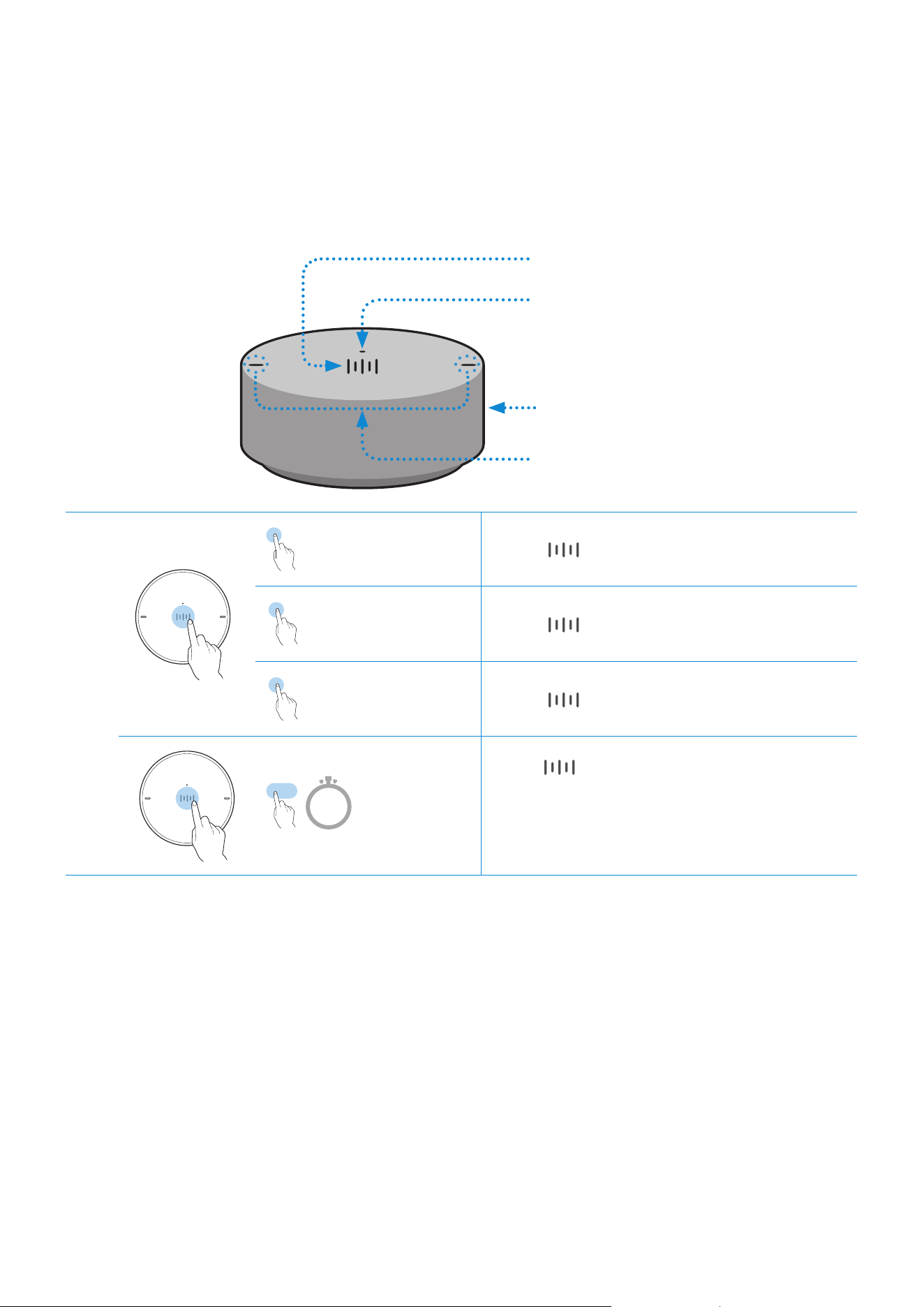
Using Dial Controller
❚
Top of the Dial Controller
1
Multi-Function Button
2
LED Display
3
Volume wheel
4
Voice MIC
1
X 1
Play / Pause Touch
X 1 to play or pause music.
X 2
Play the next
music
Touch
X 2 to play the next music.
X 3
Play the previous
music
Touch
X 3 to play the previous music.
2 Sec
Mobile
device voice
recognition
Press for 2 seconds to activate the
voice recognition service in your mobile
device.
•
It is available only in Bluetooth mode.
ENG - 6
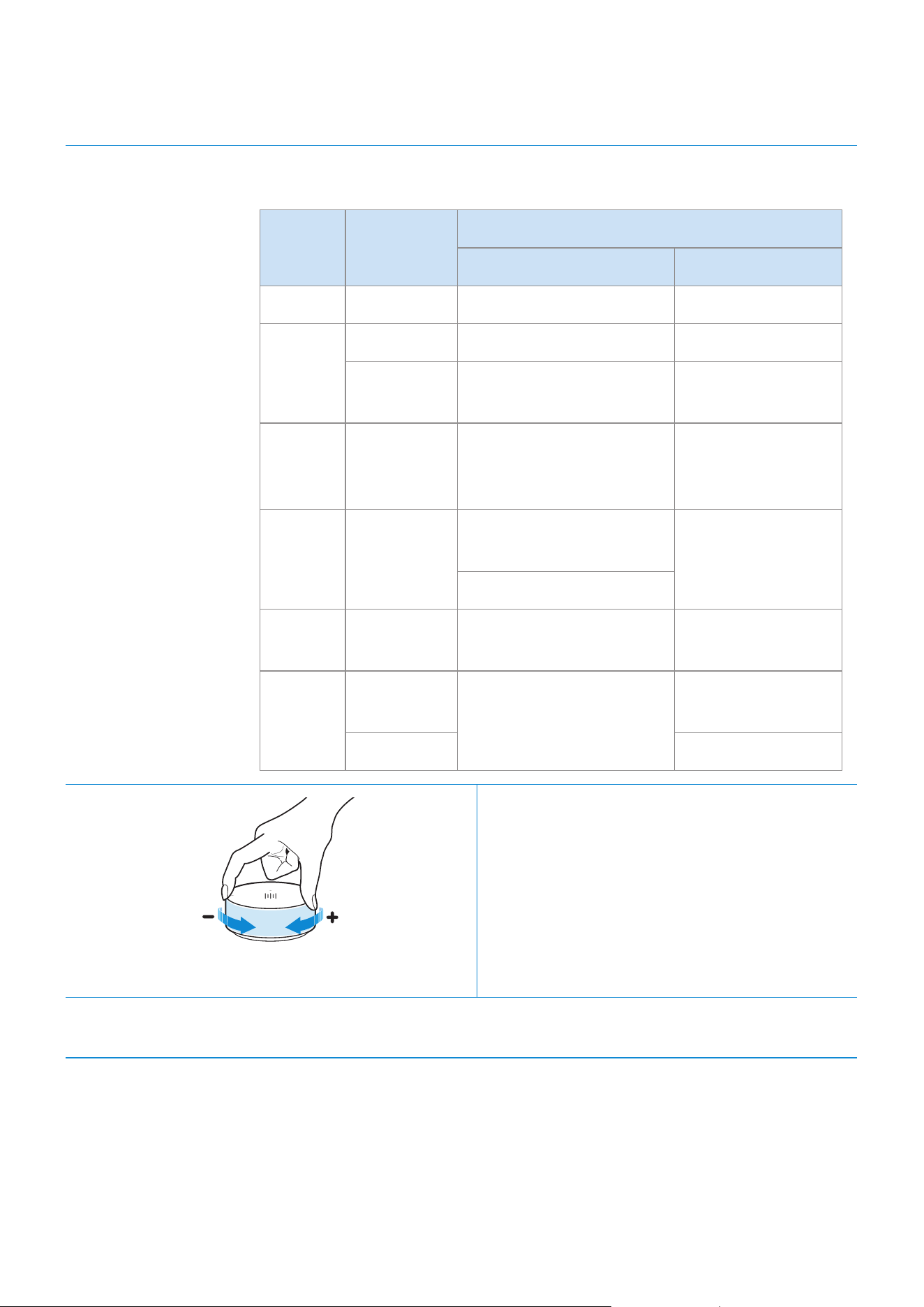
2
LED Display The indicator blinks, lights, or changes the color depending on the
speaker status.
LED Status
Description
Operation Battery
Off All Off Standby Battery discharged
White
On Normal operation Fully charged
Blinking
Waiting for connection to
the speaker
-
Cyan On
Mobile voice recognition
active (Dedicated for
Bluetooth)
-
Red On
Connection to the
speaker failure
-
In error
Yellow Blink once
When the volume is set
to Min or Max
-
Pink
Blink once
after key use
-
Battery less than
10 %
On Currently charging
3
Volume
adjustment
(Turning the volume wheel)
Turn the volume wheel clockwise to increase
the volume.
Turn the volume wheel anticlockwise to
decrease the volume.
4
Voice MIC MICs that are used for mobile device voice recognition.
Play / Pause and Skip features are not available in AUX mode.
ENG - 7

❚
Bottom of the Dial Controller
1
Remove the cover at the bottom of Dial Controller and then turn on the power.
•
Charge your Dial Controller before turning the power on.
OPEN
OPEN
OPEN
OPEN
OPEN
OPEN
CONNECT
DC 5V
IN
RESET
1
2
OPEN
OPEN
CONNECT
RESET
OPEN
RESET Button
1
DC 5V IN Jack Connect the Micro USB cable to charge the Dial Controller.
2
CONNECT
Button
Try connecting to a Speaker.
2
Check the LED status (blinking in pink). If the battery level is low, charge the Dial Controller by
connecting the Micro USB cable. (For more information about the LED display, see page 7.)
It takes approximately 3 hours to fully charge the battery. Fully charged battery can last up to 90 days.
Battery life is subject to use conditions and environment.
The RESET button is for troubleshooting.
ENG - 8

❚
Connecting between the Dial Controller and Speaker
* Before use of the Dial Controller
Charge the Dial Controller until the LED lights.
(When fully charged, the LED changes to white.)
CONNECT
DC 5V
IN
RESET
Micro USB Cable
(not supplied)
1
Press the CONNECT button on
the rear of the speaker.
DC 24V
SERVICE
AUX IN
LAN
POWER
NETWORK
(DC IN)
POWER
SERVICE
AUX IN
LAN
RESET
CONNECT
RESET
CONNECT
(DC IN)
POWER
AUX IN
AUX IN
AUX IN
CONNECT
2
Press the CONNECT button on
the bottom of the Dial Controller.
OPEN
OPEN
OPEN
CONNECT
RESET
OPEN
CONNECT
DC 5V
IN
RESET
CONNECT
3
Once the Dial Controller and speaker
are connected, you can hear voice message,
"Pairing is complete.", from speaker.
ENG - 9

You can connect a mobile device via the Bluetooth, and then enjoy sound from the speaker.
* First time connection
1
Press the Bluetooth button on the right side of the speaker for 5 seconds or more.
5 Sec
2
Select the speaker from the Bluetooth list on your mobile device and connect it.
(e.g. [AV] Samsung AKG VL5)
Mobile device
“[AV] Samsung AKG VL*”
* Reconnection
Only Step 2 is required when reconnecting to mobile devices.
Bluetooth connection allows you to use voice recognition service in your mobile device.
Connecting to Bluetooth
ENG - 10
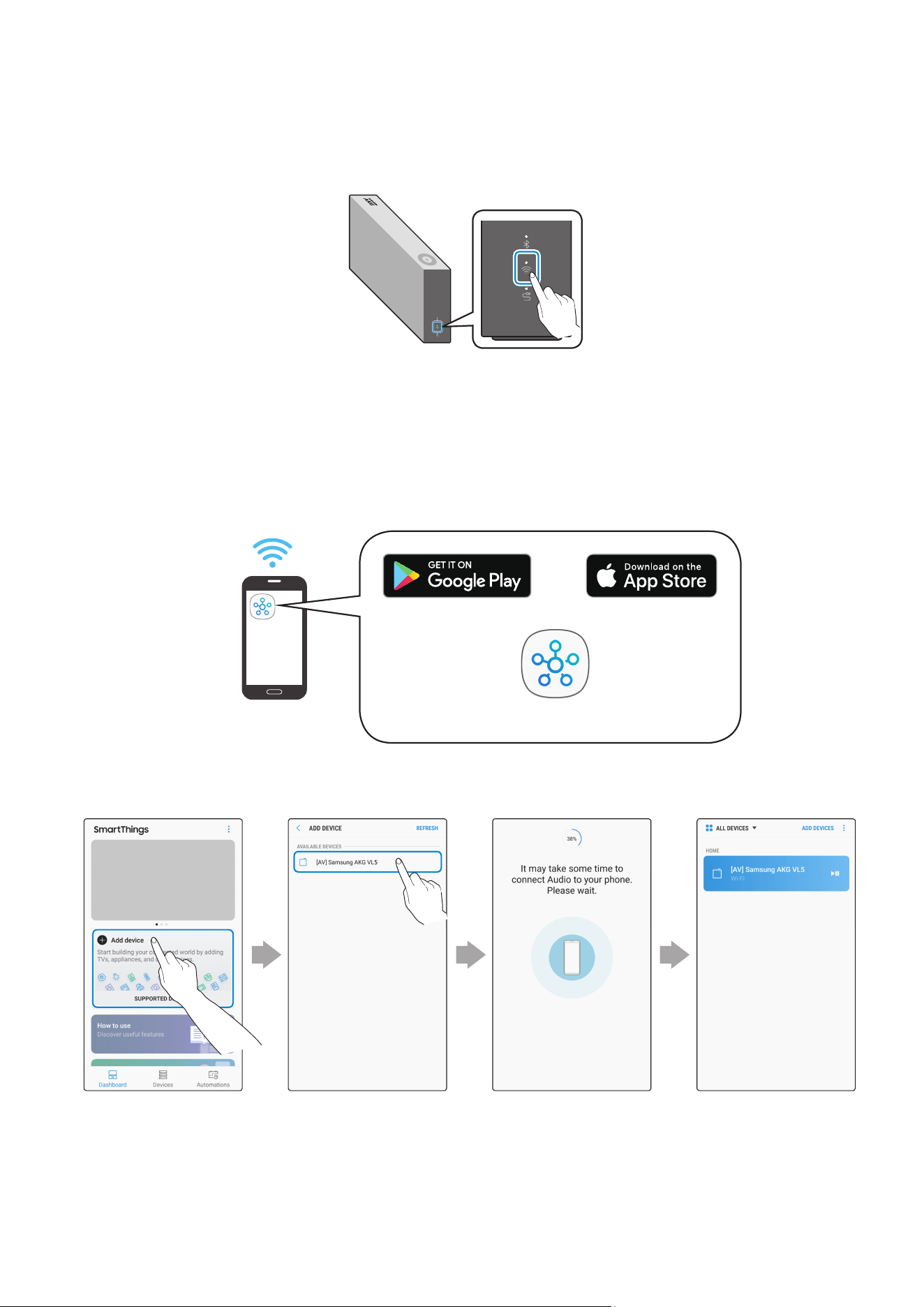
1
Press the Wi-Fi button on the right side of the speaker to switch to Wi-Fi mode.
2
Download the SmartThings app to your mobile device and then launch it.
•
You cannot congure the settings for the devices that are not supported by the
SmartThings app.
•
SmartThings requirements : Android 6.0 or newer version / iOS 10.0 or newer version
•
To use the SmartThings app, a Samsung Account is required.
Mobile device
Android iOS
SmartThings app
3
Follow the instructions on the SmartThings app screen to complete settings.
Standby to be
connected
ConnectedSelect the device
to connect
Touch “Add device”
Connecting to Wi-Fi
ENG - 11
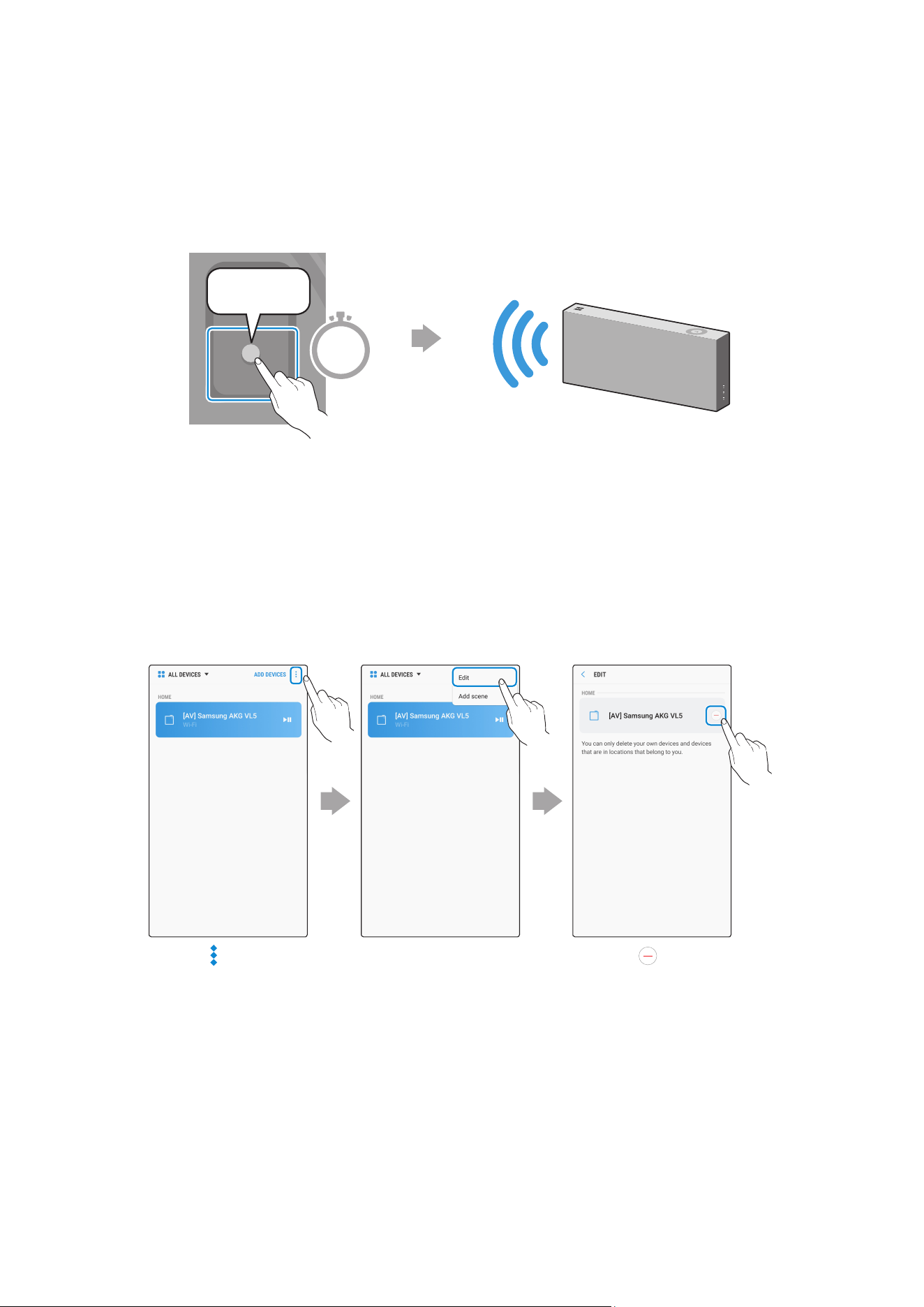
4
Repeat steps 1-3 to connect all speakers to the same wireless router.
•
Spotify Premium users can enjoy music by using the Spotify app.
5-1
Follow the instruction below to reconnect or connect to a new wireless router.
The speaker generates a voice
message notifying that it is now
in standby mode.
DC 24V
SERVICE
AUX IN
LAN
POWER
NETWORK
(DC IN)
POWER
SERVICE
AUX IN
LAN
RESET
CONNECT
RESET
CONNECT
(DC IN)
POWER
CONNECT
Press the CONNECT button
for 5 seconds.
5 Sec
5-2
Repeat step 3.
* Deleting a device from SmartThings app
Touch in the top
right of the device
list
Touch next to
the device to
remove
Touch "Edit"
ENG - 12

❚
Connecting an external device via the AUX cable
You can connect a mobile device via the AUX cable, and then enjoy sound from the speaker.
1
Press the AUX button on the right side of the speaker to switch to AUX mode.
2
Connect the AUX IN port on the rear of the speaker to an external device via the AUX cable
(not supplied).
DC 24V
SERVICE
AUX IN
LAN
POWER
NETWORK
(DC IN)
POWER
SERVICE
AUX IN
LAN
RESET
CONNECT
RESET
CONNECT
(DC IN)
POWER
DC 24V
SERVICE
AUX IN
LAN
POWER
NETWORK
(DC IN)
POWER
SERVICE
AUX IN
LAN
RESET
CONNECT
RESET
CONNECT
(DC IN)
POWER
AUX Cable
(not supplied)
Rear of the speaker
External Device
(e.g. Mobile device)
Connecting to an External Device
ENG - 13
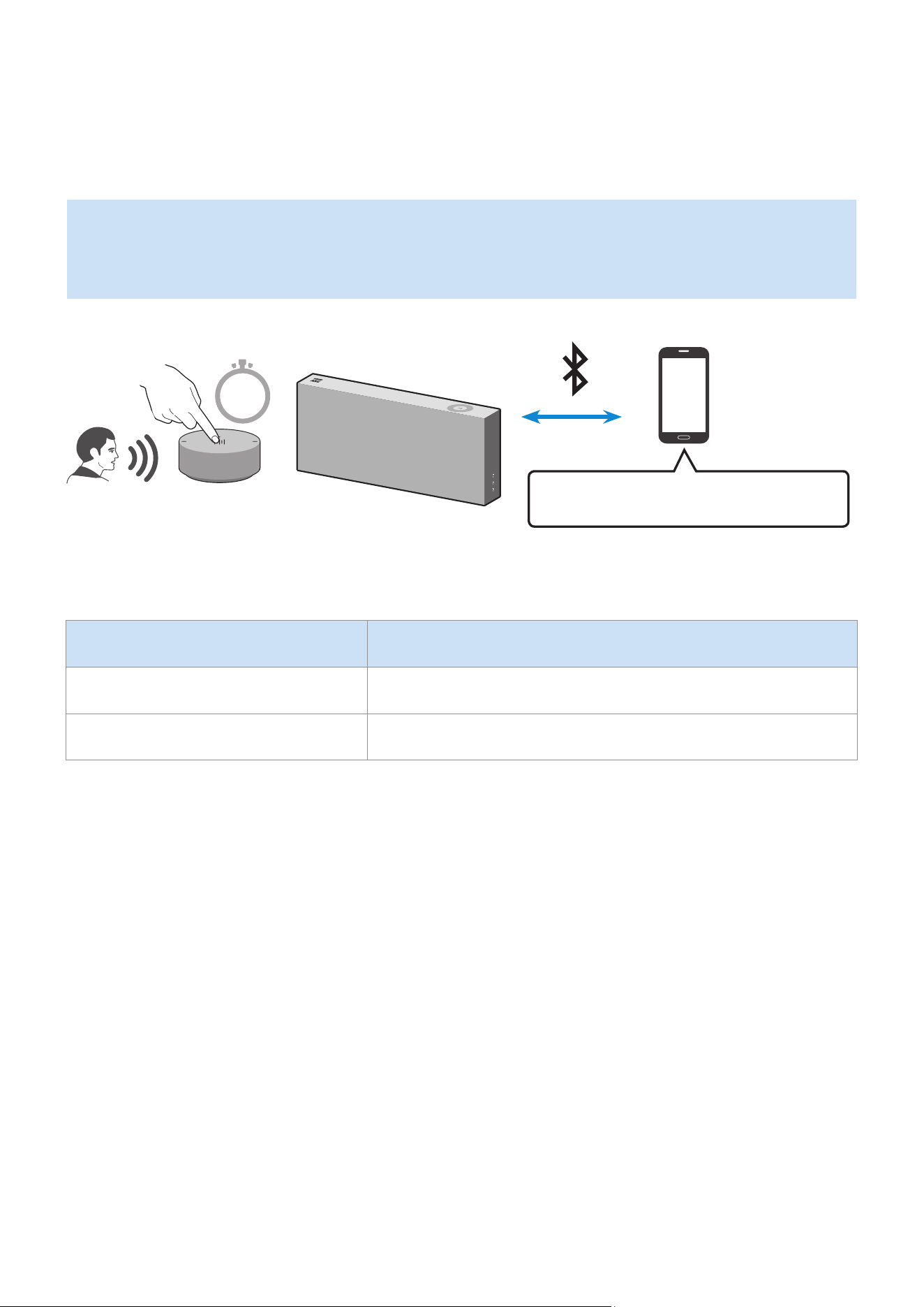
A
Using mobile device voice recognition
Dedicated functions in Bluetooth mode
•
This function can be used only when a mobile device is connected via Bluetooth.
•
The operation may differ depending on the specication of the mobile device.
Mobile Device Voice Recognition Service
2 Sec
Depending on the voice recognition service provided by your mobile device (e.g. Bixby, Siri, Google Assistant,
etc.), its availability and usage may differ.
Function example Speaking example
Listening to music Play TOP 100
Sending messages Forward my most recent text message to mom
Additional Functions
ENG - 14

1
Press the Bluetooth button on the right side of the speaker to switch to Bluetooth mode.
1-1
If you have not already, set up Bluetooth connection between the speakers and your
mobile device.
•
To connect a mobile device, please see [Connecting to Bluetooth]
Click here.
.
Mobile device
2
Press and hold the Multi-Function button on Dial Controller until LED shows cyan.
(for 2 seconds or more)
2 Sec
3
LED color turns cyan, indicating the device’s voice recognition is activated.
Speak directly to Dial Controller to use voice recognition service.
In case of S voice on Samsung Galaxy, be sure to release the lock pattern for use of the function.
CAUTION
9
Maintain at least 0.6 inches distance between your face and Dial Controller when using voice recognition service.
ENG - 15

A
Using via Wi-Fi connection
Functions upon Wi-Fi connection
•
Using 2 units - Audio Group
•
Using 2 units - Stereo (Dedicated for VL350 / VL351)
•
Connecting with a Samsung Smart TV
•
Connecting an Amazon product
Speakers should be all connected to the same wireless router.
5 GHz wireless connection is recommended when using two devices.
When using two devices, a time difference between the video output of the connected equipment and its
audio output may occur.
On rare occasions, there can be choppy audio or interruption of connection due to wireless interference when
used in some conditions.
❚
Using 2 units - Audio Group
1
Use SmartThings app to connect and enjoy 2 speakers as a Audio Group.
•
To use Audio Group, all speakers must be connected to the same wireless router.
ENG - 16

2
Select Audio Group in SmartThings app.
Touch at the top
right
Select from the
device list
Touch "Audio
Group"
Select the second
device and touch
“SAVE”
1
2
❚
Using 2 units - Stereo (Dedicated for VL350 / VL351)
1
Use SmartThings app to connect and enjoy two speakers as a Stereo.
•
To use Stereo, all speakers must be connected to the same wireless router.
Left
Right
ENG - 17
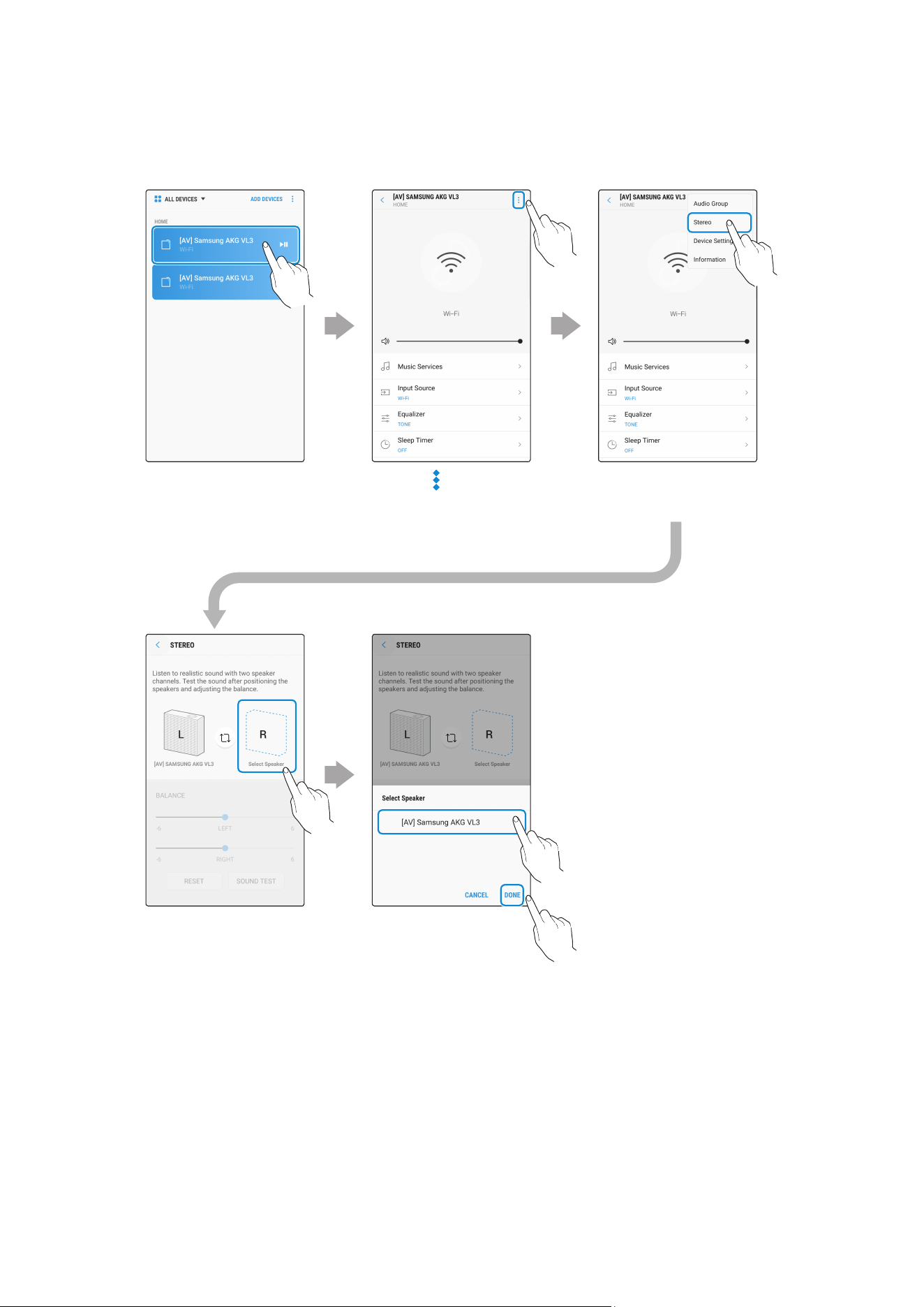
2
Select Stereo in SmartThings app.
Touch at the top
right
Select from the
device list
Touch "Stereo"
Touch "Select
Speaker"
Select the second
device and touch
“DONE”
1
2
VL550 / VL551 is already a Stereo device so does not support Stereo Multiple connection, only for Audio
Group function.
ENG - 18

❚
Connecting with a Samsung Smart TV
1. This feature is available only for Samsung Smart TVs released in 2014 and later.
2. TV must be connected to a wireless router.
3. Your Samsung speakers should be connected to the wireless router that is connected to
your TV. (Refer to the corresponding product’s user manual.)
`
Connecting 1 speaker to Samsung Smart TV 2018
Home (
)
Settings ( )
Sound
Sound Output
[AV] Samsung AKG VL*(Wi-Fi)
`
Connecting 2 speakers to Samsung Smart TV 2018
Home (
)
Settings ( )
Sound
Wi-Fi Speaker Surround Setup
`
Connecting 1 speaker to Samsung Smart TV 2017
Home (
)
Settings ( )
Sound
Sound Output
[AV] Samsung AKG VL*(Wi-Fi)
`
Connecting 2 speakers to Samsung Smart TV 2017
Home (
)
Settings ( )
Sound
Wi-Fi Speaker Surround Setup
`
Connecting 1 speaker to Samsung Smart TV 2016
Home (
)
Settings ( )
Sound
Select Speaker
[AV] Samsung AKG VL*(Wi-Fi)
`
Connecting 2 speakers to Samsung Smart TV 2016
Home (
)
Settings ( )
Sound
Expert Settings
Wireless Speaker Manager
`
Connecting 1 or 2 speakers to a 2015 Samsung Smart TV
Menu
Sound
Speaker List
`
Connecting 1 or 2 speakers to a 2014 Samsung Smart TV
Menu
Sound
Speaker Settings
Multiroom Link - Settings
Because the menus may differ depending on the year of manufacture, refer to your TV manual.
ENG - 19

❚
Connecting an Amazon product
•
This feature may not be available in some countries.
•
This service is provided by Amazon and can be terminated at any time. Samsung does not
assume responsibility for service availability.
`
Connect and use with an Amazon product (Amazon Echo)
Use an Amazon Echo product to control your Speaker and enjoy music services provided by
Amazon Echo.
Check if the Speaker is connected to Wi-Fi. [Connecting to Wi-Fi]
Click here.
1
In the SmartThings app, change your Speaker’s name to one that can be recognized by
your Amazon device.
(Example: Samsung, Speaker, Living Room, Family Room, Bedroom, Ofce, etc.)
CAUTION
9
Amazon devices may not recognize names that contain elements such as special characters.
Select "Edit" Select speakers
Change name "SAVE"
ENG - 20
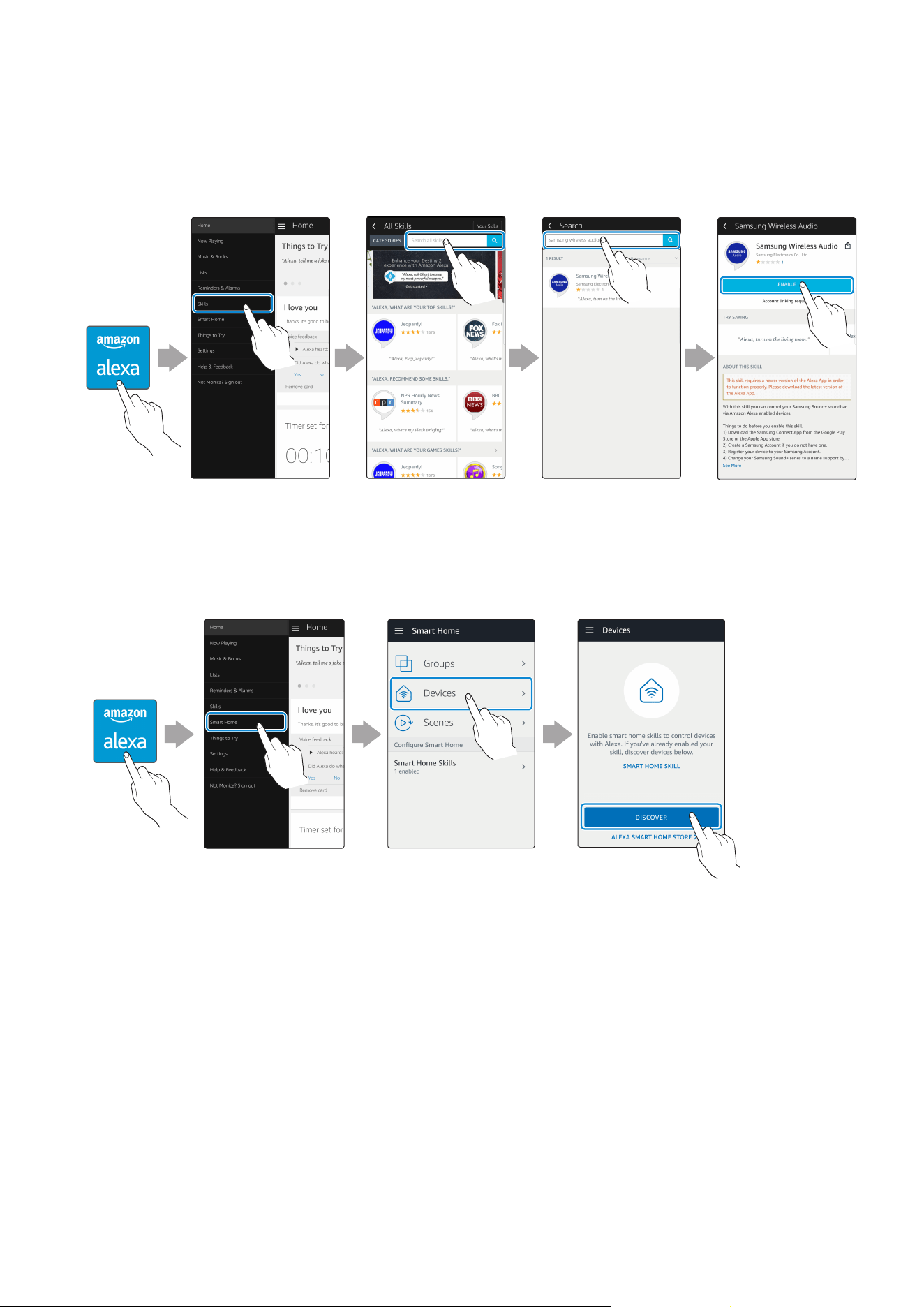
2
In the Alexa app, search “Samsung Wireless Audio” in Skills, and then select ENABLE.
•
Skip this step if you have Skills set up already.
Amazon Alexa
app
Select "Skills" Search "ENABLE"
3
In the Alexa app, tap Smart Home → Devices → DISCOVER to complete the connection.
Amazon Alexa
app
Select
"Smart Home"
Select "Devices" "DISCOVER"
ENG - 21
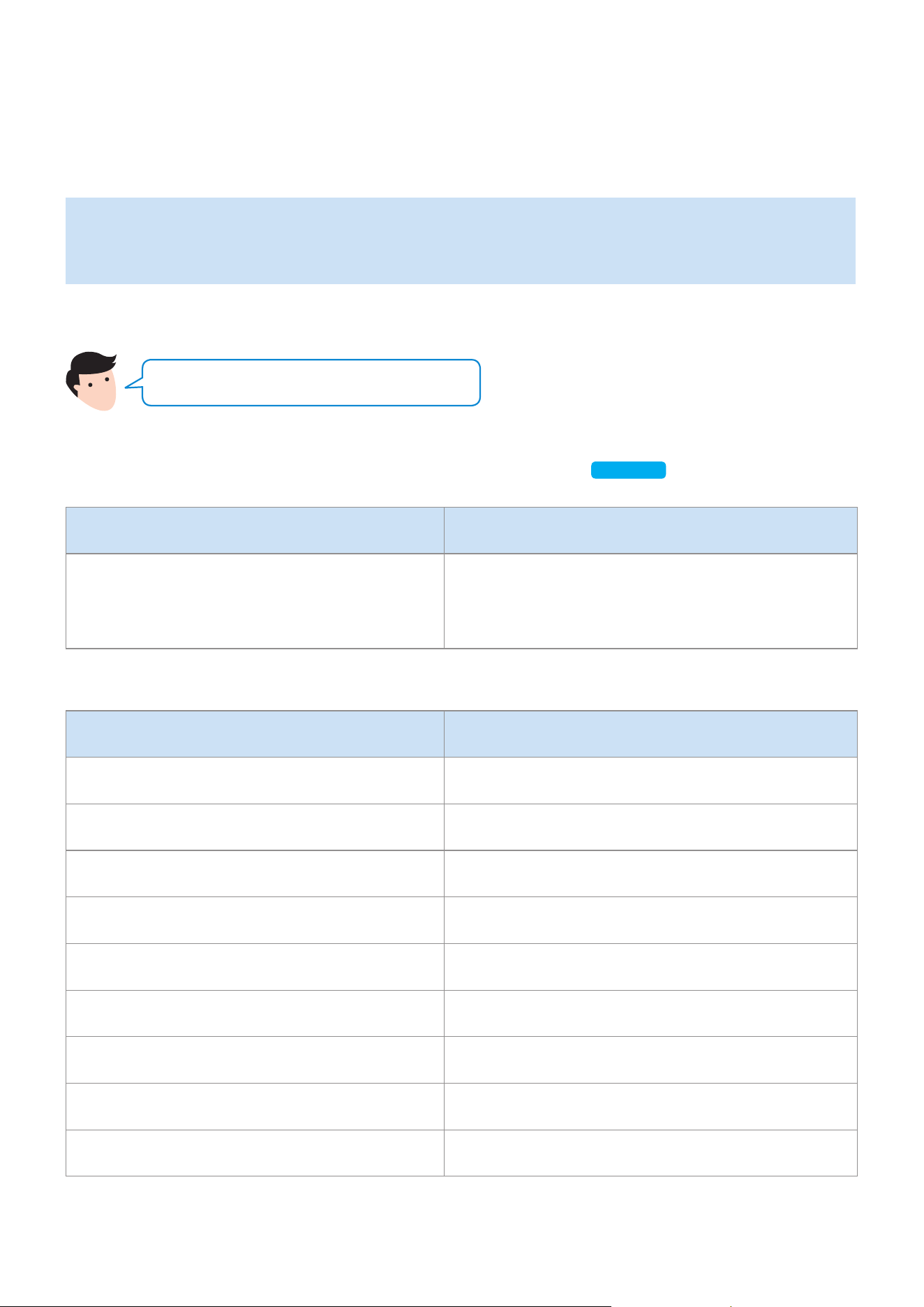
`
Use voice commands to control the Speaker
•
The Amazon Echo service you can use with your Speaker is limited to music. Other services
provided by Amazon Echo, such as news and weather, can only be accessed through your
Amazon Echo product.
Trigger + Command + Speaker name
Use the Speaker name you changed in the SmartThings app.
[Connect and use with an Amazon product (Amazon Echo)]
Click here.
Action Voice Command
To search an audio device added to the
SmartThings account connected to the
Amazon Alexa account
"Alexa Discover devices"
* To use voice commands for the Speaker named "Living room"
Action Voice Command
To set the volume level to 20 "Alexa Set the volume to 20 on Living room"
To increase the volume level "Alexa Volume up on Living room"
To mute the sound "Alexa Mute on Living room"
To listen to a radio station named KISS FM "Alexa Play Kiss FM on Living room"
To play the next song "Alexa Next song on Living room"
To stop the audio "Alexa Stop on Living room"
To turn the audio on "Alexa Turn on Living room"
To turn the audio off "Alexa Turn off Living room"
To change the input source "Alexa Switch to Bluetooth on Living room"
ENG - 22
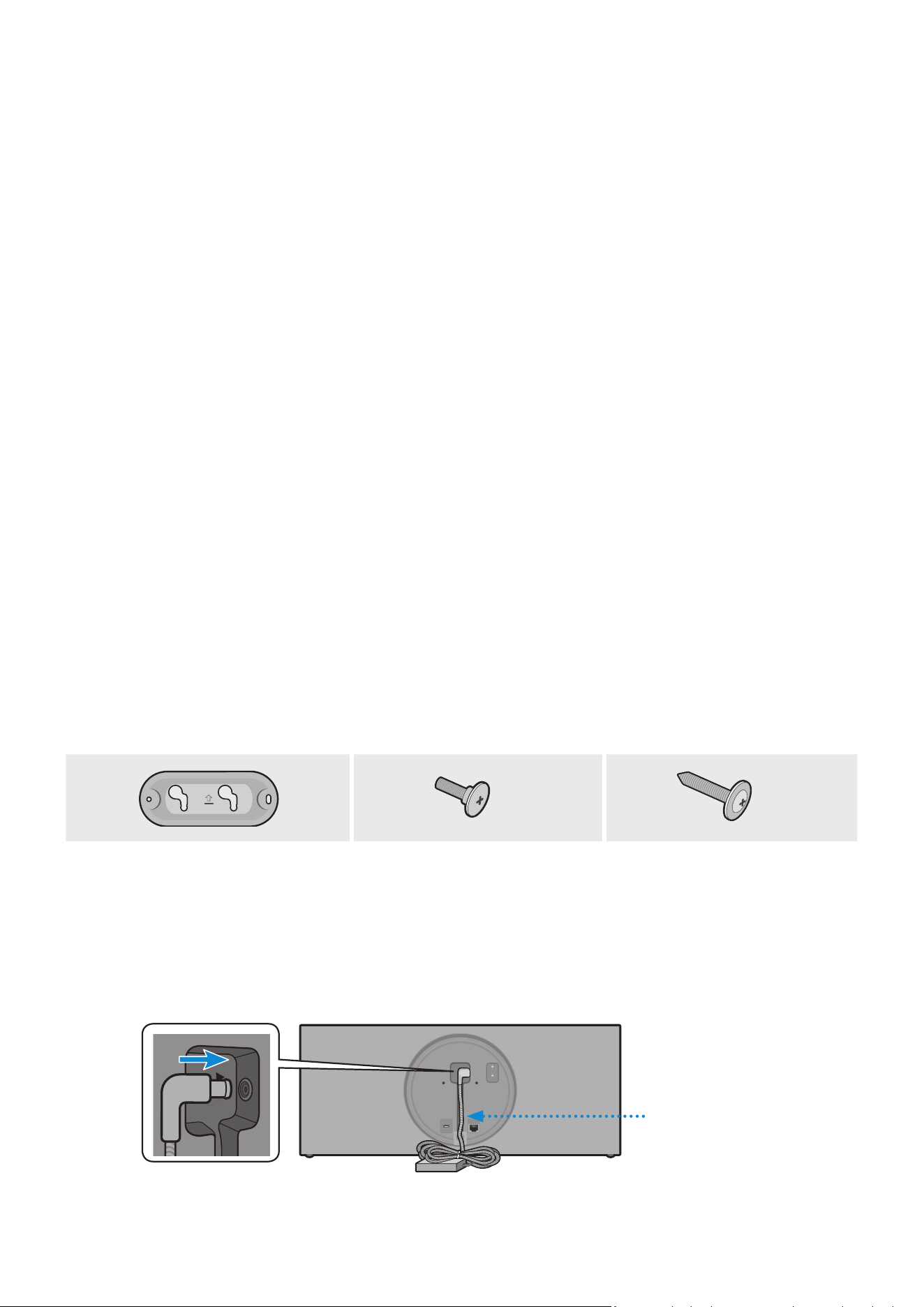
Purchase wall mounting screws according to the type and thickness of the wall you want to
mount the Speaker on.
•
Considerations for purchasing
-
Endurable load : VL350 / VL351 : Above 18.5 Ibs (8.4 Kg)
VL550 / VL551 : Above 39.7 Ibs (18.0 Kg)
-
Hole size : M5
Do not install in a place with high temperature or humidity.
Verify whether the wall is strong enough to support the product’s weight. If not, reinforce the wall or choose
another installation point.
Purchase and use the xing screws or anchors appropriate for the kind of wall you have (plaster board, iron
board, wood, etc.). If possible, x the support screws into wall studs. Install on a vertical wall only.
Make sure the unit is turned off and unplugged before you install it. Otherwise, it may cause an electric
shock.
Please have a qualied installer install the Wall Mount Bracket.
Ask a professional installation company to mount your product on the wall.
Samsung Electronics is not liable for any damage to the product due to the product being installed
inappropriately.
Please beware not to install the speaker being laid down or turned upside down.
Wall-Mount Components
x 2
x 2
Bracket-Wall Bracket-Screw Wall Fixing Screw
(not supplied)
1
Connect the AC/DC Adapter on the main unit before installation of the wall mount.
AC/DC Adapter
DC 24V
SERVICE
AUX IN
LAN
RESET
CONNECT
(DC IN)
POWER
DC 24V
SERVICE
AUX IN
LAN
RESET
CONNECT
(DC IN)
POWER
Installing the Wall Mount
ENG - 23
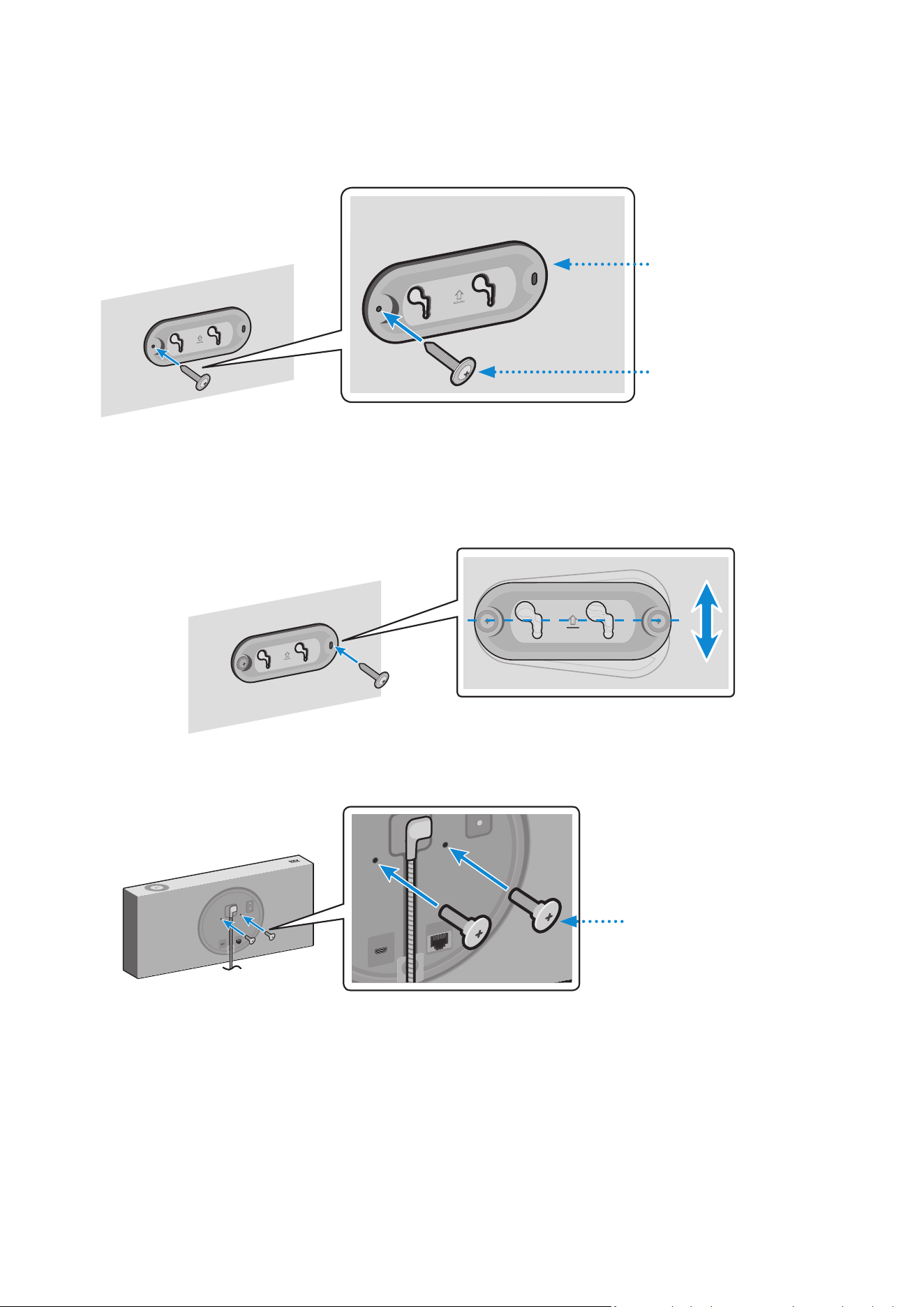
2
Fix the Bracket-Wall, and then fasten the Wall Fixing Screw from the left hole.
Wall
Bracket-Wall
Wall Fixing Screw
(not supplied)
3
Fasten the Wall Fixing Screw in the right hole.
•
When leveling is not made correctly, slightly unfasten the Wall Fixing Screw on the left
and then adjust the Bracket-Wall up or down for leveling.
4
Fasten two Bracket-Screw into the bracket hole on the rear of the main unit.
DC 24V
SERVICE
AUX IN
LAN
RESET
CONNECT
DC 24V
SERVICE
AUX IN
LAN
RESET
CONNECT
DC 24V
SERVICE
AUX IN
LAN
RESET
CONNECT
DC 24V
SERVICE
AUX IN
LAN
RESET
CONNECT
Bracket-Screw
ENG - 24

5
Align the Bracket-Screw on the main unit to t into the large groove of Bracket-Wall.
Slide it in the arrow direction until it is seated in the small groove.
•
Be sure to slide it in the arrow direction until it is seated in the small groove of the
Bracket-Wall.
* Removing the Wall Mount
Lift the main unit up until the Bracket-Screw is seated in the large groove of Bracket-Wall and
then pull out the main unit.
ENG - 25
Appendix
A
Troubleshooting
Before requesting service, please check the following.
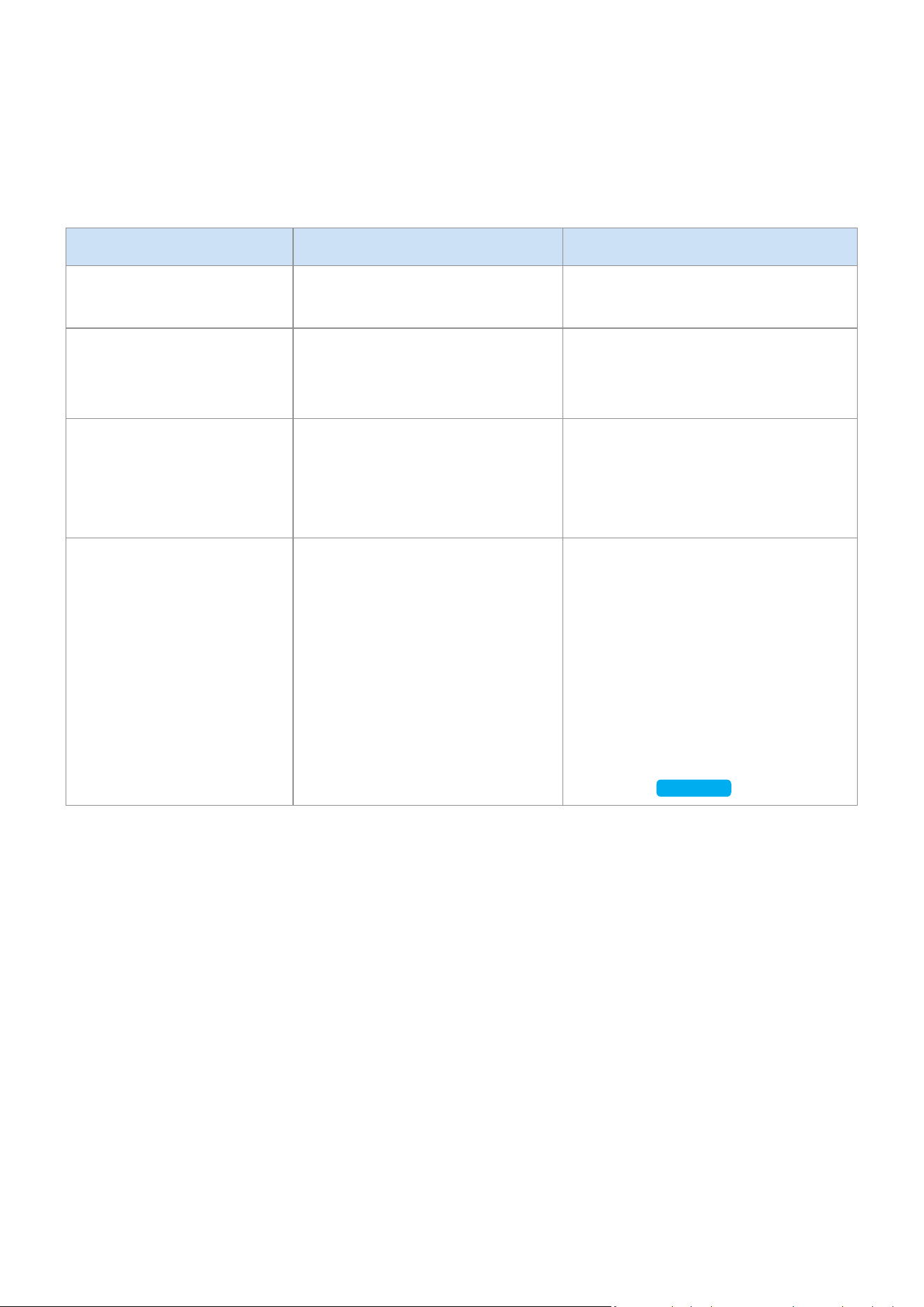
Symptom Check Remedy
The speaker does not turn
on.
•
Check if the power cord is
properly connected.
•
Plug in the power cord.
There is no response when
you press a button or
touch wheel area.
•
The button or touch wheel
area may be exposed to
statics.
•
Remove the plug and connect it
again.
There is no sound.
•
Is your speaker connected to
a power source?
•
The volume may be set to the
lowest level.
•
Check if the speaker is properly
connected to the power.
•
Try adjusting volume.
The Dial Controller does
not work.
•
The Dial Controller may not
have enough battery power.
•
The Dial Controller may be
out of operating range.
•
Check the connection
between the Dial Controller
and speaker.
•
Press the RESET button on the
bottom of the Dial Controller.
•
Charge the battery as instructed
for the Dial Controller LED
version.
•
Bring the Dial Controller closer to
the speaker.
•
Check “Connecting between the
Dial Controller and Speaker”.
(9 page)
Click here.
ENG - 26
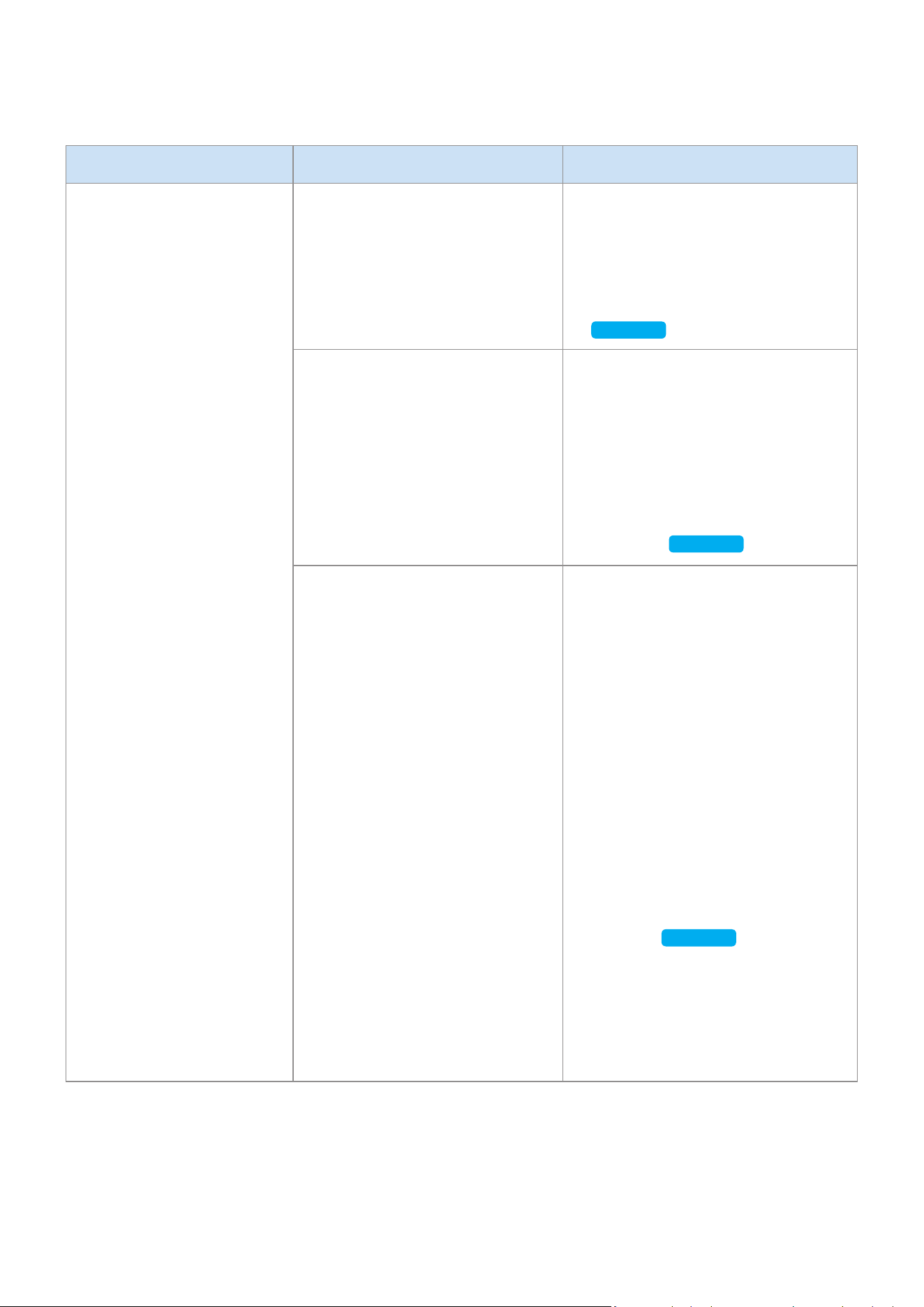
Symptom Check Remedy
Cannot connect the
speaker to a mobile device
or TV.
For wired connection
•
Check the cable connection.
•
Check on the right side of the
speaker and make sure that
the speaker mode is set to
AUX mode.
•
Check the name of the port
and make sure that the cable is
connected to the right port.
•
See “Connecting to an External
Device”. (13 page)
Click here.
For Bluetooth connection
•
Check on the right side of the
speaker and make sure that
the speaker mode is set to
Bluetooth mode.
•
Set the speaker to Bluetooth
mode and try searching from
the mobile device or TV again.
•
Press the Bluetooth button on
the right side of the speaker for
5 seconds or longer to enter the
standby mode and search for the
speaker from your mobile device
or TV.
See “Connecting to Bluetooth”.
(10 page)
Click here.
For Wi-Fi connection
•
Check if your TV is a
supported model.
•
Make sure that your mobile
device or TV is connected to
the Wi-Fi network.
•
Make sure that your speaker
is connected to the Wi-Fi
network.
•
Check the DFS channel.
(DFS : Dynamic Frequency
Selection)
•
This feature supports Samsung
Smart TVs released in 2014 and
later.
•
If your TV is not connected to the
Wi-Fi network, use the network
menu on the TV to establish the
connection.
(See the user manual provided
with your TV)
•
If the TV is already connected,
the speaker should appear on
SmartThings app on your mobile
device (smartphones, tablets, etc.).
See “Using via Wi-Fi connection”.
(16 page)
Click here.
•
Connecting the TV and speaker
over Wi-Fi may not be available
if your wireless router uses the
DFS channel. For details, please
contact your internet provider.
ENG - 27

Symptom Check Remedy
The audio stutters when
playing music or videos
on my mobile device over
Bluetooth.
•
Check if there are any
nearby devices that use radio
communications or may cause
interferences.
•
Are your mobile device or any
radio communication devices
are connected to 2.4 GHz
Wi-Fi network?
•
If you have any nearby device that use
radio communications or may cause
interferences, please turn them off.
•
See “Connecting to Bluetooth”.
(10 page)
Click here.
•
If your mobile device or other radio
communication devices are connected
to a 2.4 GHz Wi-Fi network, this may
cause interferences. Try to connect
your mobile device to a 5 GHz network.
The audio stutters when
the speaker is connected
in Audio Group or Stereo
mode over Wi-Fi.
•
Are you using a 2.4 GHz Wi-Fi
network to connect your mobile
device and speaker?
•
Check the distance between
your wireless router and
speaker.
•
Check the distance between
the speakers.
•
Connect your mobile device and
speaker to a 5 GHz Wi-Fi network.
•
Make sure that your wireless router
and speaker are within the operating
range from each other.
•
Try to power off your wireless router
and restart.
•
Make sure that your speakers are
within the operating range from each
other.
The speaker loses
connection or
stays disconnected
intermittently when
used in stereo mode
after connecting TV and
speakers via Wi-Fi.
•
Are you using a 2.4 GHz Wi-Fi
network to connect your TV
and speaker?
•
Check the distance between
the wireless router, TV, and
speaker.
•
Connect your TV and speaker to a
5 GHz Wi-Fi network.
•
If you are already connected to a
5 GHz Wi-Fi network and having this
problem, check the DFS channel.
•
Make sure that your wireless router,
TV, and speaker are all within the
operating range.
SmartThings app does not
show the speaker on the
list of available devices
when I try to connect it
over Wi-Fi.
•
Is your speaker connected to
a power source?
•
Is your mobile device
connected to a wireless
router?
•
Check if the speaker is properly
connected to the power.
•
Connect your mobile device to the
wireless router.
•
Press CONNECT button in the back
of the speaker for 5 seconds or longer
to enter standby mode and try to
connect again.
If the problem persists, contact the Samsung Call Center for troubleshooting.
ENG - 28

A
Open Source License Notice
•
For further information on Open Sources used in this product, please visit the website:
http://opensource.samsung.com
A
Licenses
•
The Spotify Software is subject to third party licenses found here :
www.spotify.com/connect/third-party-licenses
•
For more information about Spotify Connect, please visit
www.spotify.com/connect
A
Specications
Model Name VL350 / VL351 VL550 / VL551
Weight 4.6 Ibs (2.1 Kg) 10.1 Ibs (4.6 Kg)
Dimensions (W X H X D)
8.3 X 8.3 X 2.8 inches
(210.0 X 211.5 X 70.0 mm)
20.6 X 8.3 X 2.8 inches
(522.0 X 211.5 X 70.0 mm)
Speaker Woofer x1, Tweeter x 1, 4 ohm Woofer x3, Tweeter x 2, 4 ohm
Operating Temperature Range +41°F to +95°F (+5°C to +35°C)
Operating Humidity Range 10 % to 75 %
Wireless LAN Built-in
Security
WEP (OPEN/SHARED)
WPA-PSK (TKIP/AES)
WPA2-PSK (TKIP/AES)
•
Network speeds equal to or below 10Mbps are not supported.
•
Design and specications are subject to change without prior notice.
•
For more information about the power supply and power consumption, refer to the label
attached to the product. (Label : Bottom of the Speaker Main Unit)
•
Weight and dimensions are approximate.
•
For further details on using the speaker, visit www.samsung.com.
ENG - 29

Wi-Fi
Disabling Wi-Fi
In Wi-Fi mode, press the Play / Pause button (on the
top side) and the CONNECT button (in the rear side)
together and hold for 30 seconds or more to disable
Wi-Fi.
Enabling Wi-Fi
Press the Wi-Fi button on the right side of the speaker
while Wi-Fi is disabled and hold for 30 seconds or
more to enable Wi-Fi again.
Bluetooth
Disabling Bluetooth
In Bluetooth mode, press the Play / Pause button (on
the top side) and the CONNECT button (in the rear
side) together and hold for 30 seconds or more to
disable Bluetooth.
Enabling Bluetooth
Press the Bluetooth button on the right side of the
speaker while Bluetooth is disabled and hold for
30 seconds or more to enable Bluetooth again.
Wi-Fi and Bluetooth are enabled in default settings.
When Wi-Fi and Bluetooth are disabled, turning the product off and on does not enable them.
A
Additional Information
❚
About the Network Connection
•
Depending on the wireless router used, some network operations may perform differently.
•
For detailed information on networking with a wireless router or modem, refer to the router’s or
modem’s documentation.
•
Select a wireless channel that is not in use. If the selected channel is also used by other
communication devices in close proximity, it may cause wireless interference which interrupts
communications or cause choppy audio.
•
The speaker can experience choppy audio and interruptions of its wireless connection due to
wireless interference as the performance of wireless LANs are affected by the environment
and conditions of use including the router’s performance, its distance from connected devices,
obstructions, and interference by other mobile devices.
•
WEP encryption does not work with WPS (PBC) / WPS (PIN).
ENG - 30

❚
Works with SmartThings™
•
This product is compatible with SmartThings.
•
SmartThings service varies from country to country.
•
For more information, visit http://www.smartthings.com
Figures and illustrations in this Full Manual are provided for reference only and may differ from
actual product appearance.
A
Copyright
© 2018 Samsung Electronics Co., Ltd. All rights reserved; No part or whole of this user's manual
may be reproduced or copied without the prior written permission of Samsung Electronics Co.,Ltd.
WARNING
To remove the battery contact an authorized service center. To obtain battery removal instructions
please visit samsung.com/global/ecodesign_energy
You must not remove (or attempt to remove) the battery incorporated in this product on your own.
FOR YOUR OWN SAFETY, DO NOT ATTEMPT TO REMOVE THE BATTERY ON YOUR OWN OR
DISPOSE OF IT IN FIRE. DO NOT DISASSEMBLE. CRUSH OR PUNCTURE THE BATTERY.
ENG - 31

Contact SAMSUNG WORLD WIDE
If you have any questions or comments relating to Samsung products, please contact the
SAMSUNG customer care center listed for your country.
Country Contact Center
Web Site
■
North America
U.S.A 1-800-SAMSUNG (726-7864) www.samsung.com/us/support
CANADA 1-800-SAMSUNG (726-7864)
www.samsung.com/ca/support (English)
www.samsung.com/ca_fr/support (French)
■
Latin America
MEXICO 01-800-SAMSUNG (726-7864) www.samsung.com/mx/support
BRAZIL
0800-124-421 (Demais cidades e regiões)
4004-0000 (Capitais e grandes centros)
www.samsung.com/br/support
COSTA RICA 00-800-1-SAMSUNG (726-7864)
www.samsung.com/latin/support (Spanish)
www.samsung.com/latin_en/support (English)
DOMINICAN
REPUBLIC
1-809-200-7264
ECUADOR 1-800-SAMSUNG (72-6786)
EL SALVADOR 8000-SAMSUNG (726-7864)
GUATEMALA 1-800-299-0033
HONDURAS 800-2791-9111
JAMAICA 1-800-SAMSUNG (726-7864) www.samsung.com/latin_en/support (English)
NICARAGUA 001-800-5077267
www.samsung.com/latin/support (Spanish)
www.samsung.com/latin_en/support (English)
PANAMA 800-0101
PUERTO RICO 1-800-682-3180
TRINIDAD &
TOBAGO
1-800-SAMSUNG (726-7864)
VENEZUELA 0-800-SAMSUNG (726-7864)
COLOMBIA
Bogotá en el 600 12 72
Sin costo en todo el pais 01 8000 112 112
Y desde tu celular #726
www.samsung.com/co/support
CHILE 800-SAMSUNG (726-7864)
www.samsung.com/cl/support
BOLIVIA 800-10-7260
PERU 080077708 Desde teléfonos fi jos, públicos o celulares www.samsung.com/pe/support
ARGENTINA 0800-555-SAMS (7267) www.samsung.com/ar
URUGUAY 0800-SAMS (7267) www.samsung.com/uy
PARAGUAY 0800-11-SAMS(7267) www.samsung.com/py
■
Europe
UK 0330 SAMSUNG (7267864) www.samsung.com/uk/support
IRELAND (EIRE) 0818 717100 www.samsung.com/ie/support
GERMANY 06196 77 555 77 www.samsung.com/de/support
FRANCE 01 48 63 00 00 www.samsung.com/fr/support
ITALIA 800-SAMSUNG (800.7267864) www.samsung.com/it/support
SPAIN 0034902172678 www.samsung.com/es/support
PORTUGAL 808 207 267 www.samsung.com/pt/support
LUXEMBURG 261 03 710 www.samsung.com/be_fr/support
NETHERLANDS 088 90 90 100 www.samsung.com/nl/support
BELGIUM 02-201-24-18
www.samsung.com/be/support (Dutch)
www.samsung.com/be_fr/support (French)
LIMITED WARRANTY TO ORIGINAL PURCHASER
Samsung Electronics Canada Inc.(SECA), warrants that this product is free from defective
material and workmanship.
SECA further warrants that if this product falls to operate properly within the specied
warranty period and the failure is due to improper workmanship or defective materials,
SECA will repair or replace the product at its option.
All warranty repairs must be performed by a SECA Authorized Service Center. (The
name and address of the location nearest you can be obtained by calling toll free:
1-800-SAMSUNG)
LABOR
One year (Carry- in)
PARTS
One year
On carry-in models, transportation to and from the service center is the customer’s
responsibility.
The original dated sales receipt must be retained by the customer and is the only
acceptable proof of purchase. It must be presented to the authorized service center at the
time service is requested.
EXCLUSIONS (WHAT IS NOT COVERED)
This warranty does not cover damage due to accident, re, ood and/ or other acts of God;
misuse, incorrect line voltage, improper installation, improper or unauthorized repairs,
commercial use or damage that occurs in shipping. Exterior and interior nish, lamps, glass
are not covered under this warranty. Customer adjustments which are explained in the
instruction manual are not covered under the terms of this warranty. This warranty will
automatically be voided for any unit found with a missing or altered serial number. This
warranty is valid only on products purchased and used in Canada.
Samsung Electronics Canada Inc
2050 Derry Rd West
Mississauga, On. L5N 0B9
Tel: 1-800-SAMSUNG (726-7864)
Fax: (905) 542- 1199
Website: www.samsung.com/ca

Contact SAMSUNG WORLD WIDE
If you have any questions or comments relating to Samsung products, please contact the
SAMSUNG customer care center listed for your country.
Country Contact Center
Web Site
■
North America
U.S.A 1-800-SAMSUNG (726-7864) www.samsung.com/us/support
CANADA 1-800-SAMSUNG (726-7864)
www.samsung.com/ca/support (English)
www.samsung.com/ca_fr/support (French)
■
Latin America
MEXICO 01-800-SAMSUNG (726-7864) www.samsung.com/mx/support
BRAZIL
0800-124-421 (Demais cidades e regiões)
4004-0000 (Capitais e grandes centros)
www.samsung.com/br/support
COSTA RICA 00-800-1-SAMSUNG (726-7864)
www.samsung.com/latin/support (Spanish)
www.samsung.com/latin_en/support (English)
DOMINICAN
REPUBLIC
1-809-200-7264
ECUADOR 1-800-SAMSUNG (72-6786)
EL SALVADOR 8000-SAMSUNG (726-7864)
GUATEMALA 1-800-299-0033
HONDURAS 800-2791-9111
JAMAICA 1-800-SAMSUNG (726-7864) www.samsung.com/latin_en/support (English)
NICARAGUA 001-800-5077267
www.samsung.com/latin/support (Spanish)
www.samsung.com/latin_en/support (English)
PANAMA 800-0101
PUERTO RICO 1-800-682-3180
TRINIDAD &
TOBAGO
1-800-SAMSUNG (726-7864)
VENEZUELA 0-800-SAMSUNG (726-7864)
COLOMBIA
Bogotá en el 600 12 72
Sin costo en todo el pais 01 8000 112 112
Y desde tu celular #726
www.samsung.com/co/support
CHILE 800-SAMSUNG (726-7864)
www.samsung.com/cl/support
BOLIVIA 800-10-7260
PERU 080077708 Desde teléfonos fi jos, públicos o celulares www.samsung.com/pe/support
ARGENTINA 0800-555-SAMS (7267) www.samsung.com/ar
URUGUAY 0800-SAMS (7267) www.samsung.com/uy
PARAGUAY 0800-11-SAMS(7267) www.samsung.com/py
■
Europe
UK 0330 SAMSUNG (7267864) www.samsung.com/uk/support
IRELAND (EIRE) 0818 717100 www.samsung.com/ie/support
GERMANY 06196 77 555 77 www.samsung.com/de/support
FRANCE 01 48 63 00 00 www.samsung.com/fr/support
ITALIA 800-SAMSUNG (800.7267864) www.samsung.com/it/support
SPAIN 0034902172678 www.samsung.com/es/support
PORTUGAL 808 207 267 www.samsung.com/pt/support
LUXEMBURG 261 03 710 www.samsung.com/be_fr/support
NETHERLANDS 088 90 90 100 www.samsung.com/nl/support
BELGIUM 02-201-24-18
www.samsung.com/be/support (Dutch)
www.samsung.com/be_fr/support (French)

Country Contact Center
Web Site
NORWAY 815 56480 www.samsung.com/no/support
DENMARK 707 019 70 www.samsung.com/dk/support
FINLAND 030-6227 515 www.samsung.com/fi /support
SWEDEN 0771 726 786 www.samsung.com/se/support
POLAND
801-172-678* lub +48 22 607-93-33*
* (koszt połączenia według taryfy operatora)
http://www.samsung.com/pl/support/
HUNGARY 0680SAMSUNG (0680-726-7864) www.samsung.com/hu/support
AUSTRIA
0800-SAMSUNG (0800-7267864)
[Only for Dealers] 0810-112233
www.samsung.com/at/support
SWITZERLAND 0800 726 78 64 (0800-SAMSUNG)
www.samsung.com/ch/support (German)
www.samsung.com/ch_fr/support (French)
CZECH 800 - SAMSUNG (800-726786) www.samsung.com/cz/support
SLOVAKIA 0800 - SAMSUNG (0800-726 786) www.samsung.com/sk/support
CROATIA 072 726 786 www.samsung.com/hr/support
BOSNIA 055 233 999
www.samsung.com/support
MONTENEGRO 020 405 888
SLOVENIA 080 697 267 (brezplačna številka) www.samsung.com/si/support
SERBIA 011 321 6899 www.samsung.com/rs/support
ALBANIA 045 620 202 www.samsung.com/al/support
BULGARIA
*3000 Цена в мрежата
0800 111 31 , Безплатна телефонна линия
www.samsung.com/bg/support
ROMANIA
*8000 (apel in retea)
08008-726-78-64 (08008-SAMSUNG)
Apel GRATUIT
www.samsung.com/ro/support
CYPRUS 8009 4000 only from landline, toll free
www.samsung.com/gr/support
GREECE
80111-SAMSUNG (80111 726 7864) only from land line
(+30) 210 6897691 from mobile and land line
LITHUANIA 8-800-77777 www.samsung.com/lt/support
LATVIA 8000-7267 www.samsung.com/lv/support
ESTONIA 800-7267 www.samsung.com/ee/support
■
CIS
RUSSIA
8-800-555-55-55 (VIP care 8-800-555-55-88)
www.samsung.com/ru/support
BELARUS 810-800-500-55-500
www.samsung.com/support
GEORGIA 0-800-555-555
ARMENIA 0-800-05-555
AZERBAIJAN 0-88-555-55-55
KAZAKHSTAN
8-10-800-500-55-500
(GSM: 7799, VIP care 7700)
www.samsung.com/kz_ru/support
UZBEKISTAN 00-800-500-55-500 (GSM: 7799)
www.samsung.com/support
KYRGYZSTAN 00-800-500-55-500 (GSM: 9977)
TAJIKISTAN 8-10-800-500-55-500 (GSM: 8888)
MONGOLIA 1800-25-55
UKRAINE 0-800-502-000
www.samsung.com/ua/support (Ukrainian)
www.samsung.com/ua_ru/support (Russian)
MOLDOVA 0-800-614-40 www.samsung.com/support
Country Contact Center
Web Site
■
Asia Paci c
CHINA 400-810-5858 www.samsung.com/cn/support
HONG KONG 3698 4698
www.samsung.com/hk/support (Chinese)
www.samsung.com/hk_en/support (English)
MACAU 0800 333 www.samsung.com/support
SINGAPORE 1800 7267864 | 1800-SAMSUNG www.samsung.com/sg/support
AUSTRALIA 1300 362 603 www.samsung.com/au/support
NEW ZEALAND
0800 726 786 (All Product)
0800 6 726 786
www.samsung.com/nz/support
VIETNAM 1800 588 889 www.samsung.com/vn/support
THAILAND
0-2689-3232
1800-29-3232 (Toll free)
www.samsung.com/th/support
MYANMAR +95-1-2399-888 www.samsung.com/mm/support
CAMBODIA
+855-23-993232
1800-20-3232 (Toll free)
www.samsung.com/th/support
LAOS +856-214-17333
MALAYSIA
1800-88-9999
+603-7713 7420 (Overseas contact)
www.samsung.com/my/support
INDONESIA
021-5699-7777
0800-112-8888 (All Product, Toll Free)
www.samsung.com/id/support
PHILIPPINES
1-800-10-726-7864 [ PLDT Toll Free ]
1-800-8-726-7864 [ Globe Landline and Mobile ]
02-422-2111 [ Standard Landline ]
www.samsung.com/ph/support
TAIWAN 0800-329-999 www.samsung.com/tw/support
INDIA
1800 40 SAMSUNG (1800 40 7267864)
(Toll-Free)
www.samsung.com/in/support
NEPAL
16600172667 (Toll Free for NTC Only)
9801572667
BANGLADESH
09612300300
08000300300 (Toll free)
SRI LANKA
+9411SAMSUNG (+94117267864)
+94117540540
+94115900000
■
Middle East
EGYPT
08000-7267864
16580
www.samsung.com/eg/support
IRAN 021-8255 [CE] www.samsung.com/iran/support
ISRAEL *6963 www.samsung.com/il/support/
SAUDI ARABIA (+966) 8002474357 (800 24/7 HELP)
www.samsung.com/sa/home
www.samsung.com/sa_en
PAKISTAN 0800-Samsung (72678) www.samsung.com/pk/support
U.A.E 800-SAMSUNG (800 - 726 7864)
www.samsung.com/ae/support (English)
www.samsung.com/ae_ar/support (Arabic)
OMAN 800-SAM CS (800-72627)
KUWAIT 183-CALL (183-2255)
BAHRAIN 8000-GSAM (8000-4726)
QATAR 800-CALL (800-2255)
TURKEY 444 77 11 www.samsung.com/tr/support

Country Contact Center
Web Site
NORWAY 815 56480 www.samsung.com/no/support
DENMARK 707 019 70 www.samsung.com/dk/support
FINLAND 030-6227 515 www.samsung.com/fi /support
SWEDEN 0771 726 786 www.samsung.com/se/support
POLAND
801-172-678* lub +48 22 607-93-33*
* (koszt połączenia według taryfy operatora)
http://www.samsung.com/pl/support/
HUNGARY 0680SAMSUNG (0680-726-7864) www.samsung.com/hu/support
AUSTRIA
0800-SAMSUNG (0800-7267864)
[Only for Dealers] 0810-112233
www.samsung.com/at/support
SWITZERLAND 0800 726 78 64 (0800-SAMSUNG)
www.samsung.com/ch/support (German)
www.samsung.com/ch_fr/support (French)
CZECH 800 - SAMSUNG (800-726786) www.samsung.com/cz/support
SLOVAKIA 0800 - SAMSUNG (0800-726 786) www.samsung.com/sk/support
CROATIA 072 726 786 www.samsung.com/hr/support
BOSNIA 055 233 999
www.samsung.com/support
MONTENEGRO 020 405 888
SLOVENIA 080 697 267 (brezplačna številka) www.samsung.com/si/support
SERBIA 011 321 6899 www.samsung.com/rs/support
ALBANIA 045 620 202 www.samsung.com/al/support
BULGARIA
*3000 Цена в мрежата
0800 111 31 , Безплатна телефонна линия
www.samsung.com/bg/support
ROMANIA
*8000 (apel in retea)
08008-726-78-64 (08008-SAMSUNG)
Apel GRATUIT
www.samsung.com/ro/support
CYPRUS 8009 4000 only from landline, toll free
www.samsung.com/gr/support
GREECE
80111-SAMSUNG (80111 726 7864) only from land line
(+30) 210 6897691 from mobile and land line
LITHUANIA 8-800-77777 www.samsung.com/lt/support
LATVIA 8000-7267 www.samsung.com/lv/support
ESTONIA 800-7267 www.samsung.com/ee/support
■
CIS
RUSSIA
8-800-555-55-55 (VIP care 8-800-555-55-88)
www.samsung.com/ru/support
BELARUS 810-800-500-55-500
www.samsung.com/support
GEORGIA 0-800-555-555
ARMENIA 0-800-05-555
AZERBAIJAN 0-88-555-55-55
KAZAKHSTAN
8-10-800-500-55-500
(GSM: 7799, VIP care 7700)
www.samsung.com/kz_ru/support
UZBEKISTAN 00-800-500-55-500 (GSM: 7799)
www.samsung.com/support
KYRGYZSTAN 00-800-500-55-500 (GSM: 9977)
TAJIKISTAN 8-10-800-500-55-500 (GSM: 8888)
MONGOLIA 1800-25-55
UKRAINE 0-800-502-000
www.samsung.com/ua/support (Ukrainian)
www.samsung.com/ua_ru/support (Russian)
MOLDOVA 0-800-614-40 www.samsung.com/support
Country Contact Center
Web Site
■
Asia Paci c
CHINA 400-810-5858 www.samsung.com/cn/support
HONG KONG 3698 4698
www.samsung.com/hk/support (Chinese)
www.samsung.com/hk_en/support (English)
MACAU 0800 333 www.samsung.com/support
SINGAPORE 1800 7267864 | 1800-SAMSUNG www.samsung.com/sg/support
AUSTRALIA 1300 362 603 www.samsung.com/au/support
NEW ZEALAND
0800 726 786 (All Product)
0800 6 726 786
www.samsung.com/nz/support
VIETNAM 1800 588 889 www.samsung.com/vn/support
THAILAND
0-2689-3232
1800-29-3232 (Toll free)
www.samsung.com/th/support
MYANMAR +95-1-2399-888 www.samsung.com/mm/support
CAMBODIA
+855-23-993232
1800-20-3232 (Toll free)
www.samsung.com/th/support
LAOS +856-214-17333
MALAYSIA
1800-88-9999
+603-7713 7420 (Overseas contact)
www.samsung.com/my/support
INDONESIA
021-5699-7777
0800-112-8888 (All Product, Toll Free)
www.samsung.com/id/support
PHILIPPINES
1-800-10-726-7864 [ PLDT Toll Free ]
1-800-8-726-7864 [ Globe Landline and Mobile ]
02-422-2111 [ Standard Landline ]
www.samsung.com/ph/support
TAIWAN 0800-329-999 www.samsung.com/tw/support
INDIA
1800 40 SAMSUNG (1800 40 7267864)
(Toll-Free)
www.samsung.com/in/support
NEPAL
16600172667 (Toll Free for NTC Only)
9801572667
BANGLADESH
09612300300
08000300300 (Toll free)
SRI LANKA
+9411SAMSUNG (+94117267864)
+94117540540
+94115900000
■
Middle East
EGYPT
08000-7267864
16580
www.samsung.com/eg/support
IRAN 021-8255 [CE] www.samsung.com/iran/support
ISRAEL *6963 www.samsung.com/il/support/
SAUDI ARABIA (+966) 8002474357 (800 24/7 HELP)
www.samsung.com/sa/home
www.samsung.com/sa_en
PAKISTAN 0800-Samsung (72678) www.samsung.com/pk/support
U.A.E 800-SAMSUNG (800 - 726 7864)
www.samsung.com/ae/support (English)
www.samsung.com/ae_ar/support (Arabic)
OMAN 800-SAM CS (800-72627)
KUWAIT 183-CALL (183-2255)
BAHRAIN 8000-GSAM (8000-4726)
QATAR 800-CALL (800-2255)
TURKEY 444 77 11 www.samsung.com/tr/support

Country Contact Center
Web Site
JORDAN
0800-22273
06 5777444
www.samsung.com/levant/support
SYRIA 962 5777444
LEBANON 1299
IRAQ 80010080
ALGERIA 3004
www.samsung.com/n_africa/supportTUNISIA 80 100 012
MOROCCO 080 100 22 55
■
Africa
SOUTH AFRICA 0860 SAMSUNG (726 7864)
www.samsung.com/support
NAMIBIA 08197267864
ZAMBIA 3434
MAURITIUS 800 2550
REUNION 0262 50 88 80
ANGOLA 917 267 864
ZIMBABWE 0808 0204
MOZAMBIQUE 847267864
NIGERIA 0800-726-7864
www.samsung.com/africa_en/support
GHANA 0800-100-077
COTE D’IVOIRE 8000-00-77
www.samsung.com/africa_fr/supportSENEGAL 800-00-0077
CAMEROON 67095-0077
KENYA 0800 545 545
www.samsung.com/support
UGANDA 0800 300 300
TANZANIA 0800 780 089
RWANDA 9999
BURUNDI 200
DRC 499999
SUDAN 1969

Country Contact Center
Web Site
JORDAN
0800-22273
06 5777444
www.samsung.com/levant/support
SYRIA 962 5777444
LEBANON 1299
IRAQ 80010080
ALGERIA 3004
www.samsung.com/n_africa/supportTUNISIA 80 100 012
MOROCCO 080 100 22 55
■
Africa
SOUTH AFRICA 0860 SAMSUNG (726 7864)
www.samsung.com/support
NAMIBIA 08197267864
ZAMBIA 3434
MAURITIUS 800 2550
REUNION 0262 50 88 80
ANGOLA 917 267 864
ZIMBABWE 0808 0204
MOZAMBIQUE 847267864
NIGERIA 0800-726-7864
www.samsung.com/africa_en/support
GHANA 0800-100-077
COTE D’IVOIRE 8000-00-77
www.samsung.com/africa_fr/supportSENEGAL 800-00-0077
CAMEROON 67095-0077
KENYA 0800 545 545
www.samsung.com/support
UGANDA 0800 300 300
TANZANIA 0800 780 089
RWANDA 9999
BURUNDI 200
DRC 499999
SUDAN 1969

FULL MANUAL

A
Avertissements réglementaires
MISE EN GARDE
RISQUE DE DÉCHARGE
ÉLECTRIQUE. NE PAS OUVRIR.
Ce symbole indique la
présence d’une haute tension
à l’intérieur.
Tout contact avec une pièce
interne de l’appareil présente
un danger.
ATTENTION: AFIN DE RÉDUIRE LES
RISQUES DE CHOCS ÉLECTRIQUES, NE
PAS RETIRER LE COUVERCLE (OU LE
PANNEAU ARRIÈRE). L’APPAREIL NE
CONTIENT PAS DE PIÈCES EXIGEANT UN
ENTRETIEN DE LA PART DE L’UTILISATEUR.
CONFIER L’ENTRETIEN À UN PERSONNEL
QUALIFIÉ.
Ce symbole vous informe
qu’une documentation
importante relative au
fonctionnement et à
l’entretien est fournie avec
le produit.
Produit de catégorie II: Ce symbole indique qu’il ne nécessite pas une connextion
de sécurité à la terre (masse).
Tension CA: Ce symbole indique que la tension nominale est la tension CA.
Tension CC : Ce symbole indique que la tension nominale est la tension CC.
Attention, consultez les instructions aux ns d’utilisation : Ce symbole indique à
l’utilisateur qu’il doit consulter le guide d’utilisation pour avoir de l’information au
sujet de la sécurité.
❚
AVERTISSEMENT
•
An de réduire les risques d’incendie ou de chocs électriques, ne pas exposer l’appareil à la
pluie ou à l’humidité.
•
Veillez à éviter tout égouttement ou toute projection de liquide sur l’appareil et ne placez
jamais sur celui-ci des récipients contenant des liquides, tels que des vases.
•
Pour mettre cet appareil totalement hors tension, vous devez retirer la che électrique de la
prise murale. Par conséquent, la che doit être aisément accessible en tout temps.
Informations de sécurité
FRA - ii

❚
Déclaration de la IC: (Pour le Canada)
CAN ICES-3 (B)/NMB-3(B)
Le présent appareil est conforme aux CNR d’Industrie Canada applicables aux appareils radio
exempts de licence. L’exploitation est autorisée aux deux conditions suivantes : (1) l’appareil
ne doit pas produire de brouillage, et (2) l’utilisateur de l’appareil doit accepter tout brouillage
radioélectrique subi, même si le brouillage est susceptible d’en compromettre le fonctionnement.
Pour les produits disponibles aux États-Unis / Canada du marché, seul le canal 1 à 11 peuvent être
exploités. Sélection d’autres canaux n’est pas possible. Cet appareil et son antenne (s) ne doit pas
être co-localisés ou fonctionnement en association avec une autre antenne ou transmetteur.
Le dispositif pourrait automatiquement cesser d’émettre en cas d’absence d’informations à
transmettre, ou une défaillance opérationnelle. Notez que ce n’est pas l’intention d’interdire la
transmission des informations de contrôle ou de signalisation ou l’utilisation de codes répétitifs
lorsque requis par la technologie.
An de réduire le risque de brouillage nuisible des systèmes de satellites mobiles dans la même
voie, cet appareil fonctionne dans la bande 5150-5250 MHz et est réservé à un usage intérieur.
REMARQUE IMPORTANTE:
Déclaration de la ICrelative à l’exposition aux radiations:
Declaración de exposición a la radiación de Canada: Este equipo cumple con los límites de
exposición a la radiación de la IC establecidos para un ambiente no controlado. Cet équipement doit
être installé et utilisé selon une distance minimale de 20 cm (8 po) entre le radiateur et votre corps.
❚
Consignes de sécurité importantes
Lisez attentivement ces consignes avant d’utiliser l’appareil. Veillez à respecter toutes les
consignes répertoriées ci-après. Conservez ces instructions à portée de main pour vous y référer
ultérieurement.
1
Lisez attentivement ces consignes.
2
Conservez-les précieusement.
3
Tenez compte de tous les avertissements mentionnés.
4
Respectez toutes les instructions sans exception.
5
N’utilisez pas cet appareil à proximité de l’eau.
6
Nettoyez-le à l’aide d’un tissu sec.
7
Ne bloquez pas les ouvertures de ventilation. Installez l’appareil conformément aux
instructions du fabricant.
8
N’installez pas le lecteur à proximité d’une source de chaleur de type radiateur, registre de
chaleur, cuisinière ou tout autre appareil (y compris les récepteurs AV) générateur de chaleur.
9
Ne désactivez pas le dispositif de sécurité de la che de mise à la terre ou de la che
polarisée. Une che polarisée comporte deux lames dont l’une est plus large que l’autre. Une
che de mise à la terre comporte deux lames et une troisième broche de mise à la terre. La
lame la plus large et la troisième broche sont destinées à assurer votre sécurité. Si la che
fournie ne s’insère pas dans la prise utilisée, faites appel à un électricien pour faire remplacer
celle-ci.
FRA - iii

10
Placez le cordon d’alimentation de sorte qu’il ne puisse être ni piétiné ni pincé,
particulièrement au niveau de la che, de la prise de courant et du point de sortie de l’appareil.
11
Utilisez exclusivement les xations/accessoires spéciés par le fabricant.
12
Utilisez exclusivement le meuble à roulettes, le socle, le trépied, le support ou
la table recommandés par le fabricant ou vendus avec l’appareil. Si l’appareil
est posé sur un meuble à roulettes, déplacez l’ensemble avec précaution pour
éviter de faire tomber le lecteur et de vous blesser.
13
Débranchez l’appareil en cas d’orage ou lorsqu’il est inutilisé pendant une
période prolongée.
14
Conez toutes les réparations à un technicien qualié. Votre appareil doit impérativement
être réparé lorsqu’il a été endommagé de quelque manière que ce soit: détérioration du
cordon ou de la che d’alimentation, projection de liquide sur l’appareil, chute d’objets à
l’intérieur de l’appareil, exposition à la pluie ou à l’humidité, dysfonctionnement, chute.
A
Consignes de sécurité
❚
Précautions concernant le cordon d’alimentation
•
Ne surchargez pas les prises ni les cordons d’alimentation.
-
Cela pourrait causer une surchauffe ou un incendie.
•
Ne branchez pas et ne débranchez pas le cordon d’alimentation avec des mains mouillées.
•
Ne placez pas le produit près des appareils de chauffage.
•
Pour nettoyer les broches de la che d’alimentation, débranchez la che de la prise murale et
essuyez les broches seulement à l’aide d’un chiffon sec.
•
On ne doit pas plier le cordon d’alimentation ou le tirer avec force.
•
Ne placez pas des objets lourds sur le cordon d’alimentation.
•
Ne branchez pas le cordon d’alimentation dans une prise mal vissée ou endommagée.
•
Insérez la che du cordon d’alimentation à fond dans la prise murale an qu’elle soit
solidement enfoncée dans la prise.
-
Des connexions instables présentent un risque d’incendie.
•
Avant de raccorder le cordon d’alimentation CA à l’adaptateur CC, veillez à ce que la tension de
l’adaptateur CC corresponde à la tension secteur locale.
❚
Précautions à prendre lors de l’installation
•
N’installez pas le produit près d’équipements ou d’objets susceptibles de produire de la chaleur
ou des ammes (chandelles, serpentins chasse-moustiques, appareils de chauffage, radiateurs,
etc.) Ne l’installez pas sous la lumière directe du soleil.
•
Lors du déplacement du produit, coupez l’alimentation et débranchez tous les cordons (y
compris le cordon d’alimentation) de l’unité.
-
Un cordon endommagé peut causer un incendie et présenter un risque de décharge
électrique.
FRA - iv

•
L’installation du produit dans des environnements exposés à une forte chaleur ou humidité,
à la poussière ou à des froids extrêmes, peut entraîner des problèmes de qualité ou un
dysfonctionnement du produit. Avant d’installer le produit dans un environnement qui ne
respecte pas les normes, veuillez contacter un revendeur ou un centre de service agréé
Samsung pour obtenir plus d’informations.
•
Si vous placez le produit sur une étagère, un meuble ou un bureau, le panneau supérieur doit
se trouver sur le dessus.
•
Ne placez pas le produit sur une surface instable (p.ex. une étagère branlante, un bureau
incliné, etc.)
-
Échapper le produit pourrait causer son dysfonctionnement et présenter un risque de
blessures. D’importantes vibrations ou des impacts peuvent causer le dysfonctionnement du
produit et présenter un risque d’incendie.
•
Installez votre produit en prévoyant assez d’espace pour l’aération.
-
Laissez un dégagement de 10 cm (4 po) à l’arrière du produit et de 5 cm (2 po) de chaque côté.
•
Gardez les matériaux d’emballage en plastique hors de la portée des enfants.
-
Des enfants qui jouent avec des matériaux d’emballage de plastique s’exposent à un risque
de suffocation.
❚
Précautions à prendre lors de l’utilisation
•
Une utilisation prolongée à une intensité sonore élevée pourrait occasionner des lésions
auditives graves.
-
Si vous êtes exposé à des sons d’un volume supérieur à 85 dB pendant une période de temps
prolongée, vous pourriez endommager votre ouïe. Plus le son est fort, plus graves seront les
dommages auditifs subis. Veuillez noter qu’une conversation ordinaire produit entre 50 et
60 dB et que les bruits routiers sont d’environ 80 dB.
•
Ce produit génère une haute tension dangereuse. Ne tentez pas de démonter, de réparer ou de
modier le produit.
-
Contactez un revendeur ou un centre de service agréé Samsung lorsque votre produit doit
être réparé.
•
Ne placez pas de contenant remplis de liquides sur le produit (p. ex. vases, breuvages,
cosmétiques, produits chimiques, etc.). Ne laissez pas des objets métalliques (p. ex. baguettes,
pièces de monnaie, pinces à cheveux, etc.) ou des matériaux inammables (p. ex. papier,
allumettes, etc.) pénétrer dans le produit (orices d’aération, ports I/O).
-
Si une matière nuisible ou du liquide entre dans le produit, éteignez celui-ci immédiatement,
débranchez le cordon d’alimentation, puis contactez un revendeur ou un centre de service
agréé Samsung.
•
Ne faites pas tomber l’appareil. En cas de panne mécanique, déconnectez le cordon
d’alimentation, puis contactez un revendeur ou un centre de service agréé Samsung.
-
Il y a risque d’incendie ou de décharge électrique.
•
Ne tenez pas et ne tirez pas le produit par le cordon d’alimentation ou le câble de signaux.
-
Un câble endommagé peut causer un dysfonctionnement du produit ou présenter un risque
d’incendie ou de décharge électrique.
FRA - v

•
N’utilisez et ne gardez pas de matières inammables près du produit.
•
Si le produit émet un son anormal, une odeur de brûlé ou de la fumée, débranchez
immédiatement le cordon d’alimentation, puis contactez un revendeur ou un centre de service
agréé Samsung.
•
Si vous percevez une odeur de gaz, aérez immédiatement la pièce. Ne touchez pas au cordon
d’alimentation du produit. Ne mettez pas le produit en fonction et hors fonction.
•
N’exposez pas le produit à des coups ou à un impact soudain. Ne percez pas le produit à l’aide
d’un objet pointu.
•
Ce produit peut être déplacé et placé à l’extérieur.
•
Ce produit n’est pas étanche à l’eau et à la poussière.
•
Soyez prudent lors du déplacement du produit pour éviter de l’échapper et possiblement de
l’endommager.
❚
Précautions lors du nettoyage
•
N’utilisez jamais d’alcool, des solvants, des cires, du benzène, des diluants, des assainisseurs d’air
ou des lubriants pour nettoyer le produit et ne pulvérisez jamais d’insecticide sur le produit.
-
Le revêtement extérieur pourrait s’écailler, se décolorer ou se détacher en cas d’utilisation
d’une ou de plusieurs de ces substances. L’étiquette apposée sur le produit pourrait aussi se
détacher.
•
Pour nettoyer le produit, débranchez le cordon d’alimentation, puis essuyez-le à l’aide d’un
chiffon propre, sec et doux (microbre, coton).
-
Évitez de laisser de la poussière sur le produit. Celle-ci pourrait endommager sa surface.
FRA - vi

Contenus
Informations de sécurité
Avertissements réglementaires ................... ii
AVERTISSEMENT ............................................ii
Déclaration de la IC: (Pour le Canada) ...iii
Consignes de sécurité importantes .......iii
Consignes de sécurité ...................................... iv
Précautions concernant le cordon
d’alimentation .................................................iv
Précautions à prendre lors de
l’installation......................................................iv
Précautions à prendre lors de
l’utilisation ......................................................... v
Précautions lors du nettoyage .................vi
Pour commencer
Vérication des composants ..........................2
Présentation du produit ...................................3
Partie supérieure / Face avant /
Côté droit du haut-parleur ..........................3
Face arrière du haut-parleur ......................5
Utilisation du contrôleur autonome ............6
Partie supérieure du contrôleur
autonome ..........................................................6
Partie inférieure du contrôleur
autonome ......................................................... 8
Connexion entre le contrôleur
autonome et le haut-parleur .....................9
Connexion au Bluetooth
Connexion au Wi-Fi
Connexion à un périphérique
externe
Connexion d'un appareil externe à
l'aide du câble AUX .......................................13
Autres fonctions
Utilisation de la reconnaissance vocale
de l'appareil mobile ........................................ 14
Utilisation avec connexion Wi-Fi ................16
Utilisation de 2 unités - Audio Group ...16
Utilisation de 2 unités - Stereo
(uniquement pour les modèles
VL350 / VL351) ..............................................17
Connexion à un téléviseur Smart TV
Samsung ..........................................................19
Connecter un produit Amazon ...............20
Installation du support mural
Annexe
Dépannage .........................................................26
Avis de licences libres ....................................29
Licences ...............................................................29
Caractéristiques techniques ........................29
Informations supplémentaires ...................30
Concernant la connexion à un réseau ...30
Compatible avec SmartThings™ ............31
Copyright .............................................................31
FRA - vii

Pour commencer
A
Vérication des composants
Vériez les composants fournis avec vos haut-parleurs.
VL350 / VL351
Haut-parleur Contrôleur autonome
Adaptateur CA/CC
Guide de conguration rapide Guide réglementaire
La prise CA peut avoir un aspect différent ou être directement intégrée à l'adaptateur CA/CC.
(uniquement pour les modèles VL350 / VL351)
Après assemblage, la prise CA ne peut plus être retirée. (uniquement pour les modèles VL350 / VL351)
VL550 / VL551
Haut-parleur Contrôleur autonome
Adaptateur CA/CC
Cordon d'alimentation Guide de conguration rapide Guide réglementaire
Veillez à bien poser l'adaptateur CA/CC à plat sur une table ou au sol. Si l'adaptateur CA/CC est suspendu,
avec l'entrée du câble d'alimentation CA vers le haut, de l'eau ou d'autres substances étrangères peuvent
pénétrer dans l'adaptateur et provoquer son dysfonctionnement.
Pour acheter des composants supplémentaires ou des câbles en option, veuillez contacter un centre de
service Samsung ou le service clientèle Samsung.
MISE EN GARDE
9
Ne vous asseyez pas sur l'unité principale et ne placez aucun objet dessus.
9
Le produit comporte des bords saillants qui peuvent être douloureux, manipulez-le avec précaution.
9
Consultez les consignes de sécurité importantes fournies sur le dessous du haut-parleur.
FRA - 2

A
Présentation du produit
❚
Partie supérieure / Face avant / Côté droit du haut-parleur
Bluetooth
Wi-Fi
AUX
1
2
1
Réglage du
volume
(Faites tourner la
molette tactile)
Touchez et faites tourner la molette tactile
dans le sens des aiguilles d'une montre pour
augmenter le volume.
Touchez et faites tourner la molette tactile dans
le sens contraire des aiguilles d'une montre pour
diminuer le volume.
Lecture /
Pause
Appuyez sur
p
pour lire de la musique ou la
mettre en pause.
FRA - 3
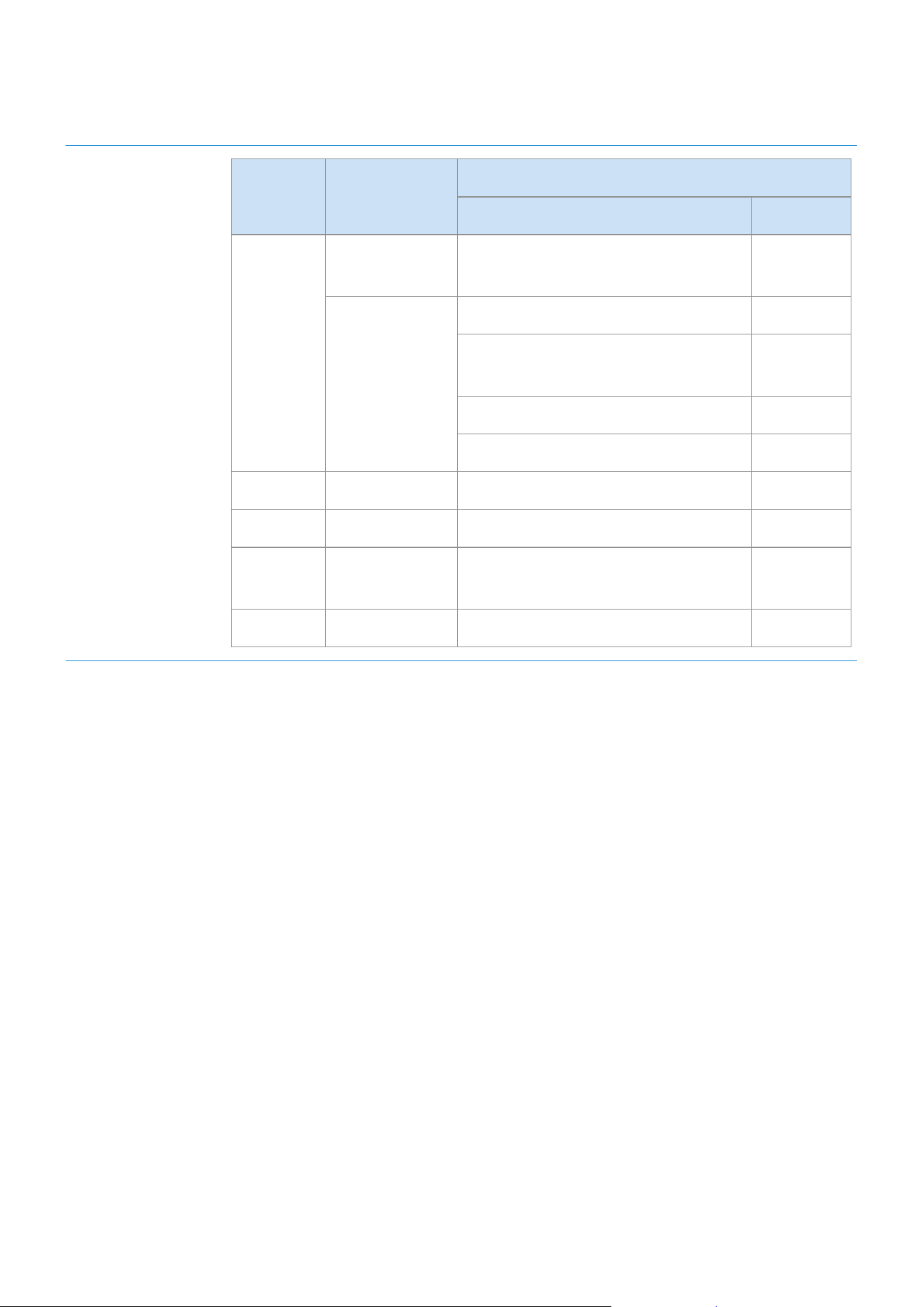
2
Afchage
du voyant
Voyant État
Description
Statut Mode
Blanc
Allumé
Connecté / Fonctionnement
normal
-
Clignotant
En cours d'initialisation -
Prêt à être connecté au contrôleur
autonome
-
Mise à jour du micrologiciel -
Prêt à être connecté au Wi-Fi Wi-Fi
Bleu Clignotant Attente de connexion de l'appareil Bluetooth
Rouge Allumé Erreur de connexion -
Jaune
Un
clignotement
Lorsque le volume est réglé au
minimum ou au maximum
-
Éteint Éteint Économiseur d'énergie -
Si l'appareil n'est pas utilisé pendant plus de 5 minutes, le mode veille est activé an de réduire la
consommation d'énergie.
Le bouton Bluetooth / Wi-Fi / AUX ne permet l'activation que d'une fonction à la fois.
Les fonctionnalités Lecture / Pause et Passer ne sont pas disponibles en mode AUX.
Appuyez sur le bouton Bluetooth pendant 5 secondes ou plus pour congurer la connexion Bluetooth.
La fonctionnalité Silencieux peut être activée et désactivée avec le bouton Lecture / Pause lorsque vous êtes
en mode AUX ou Bluetooth (connecté à un téléviseur).
FRA - 4
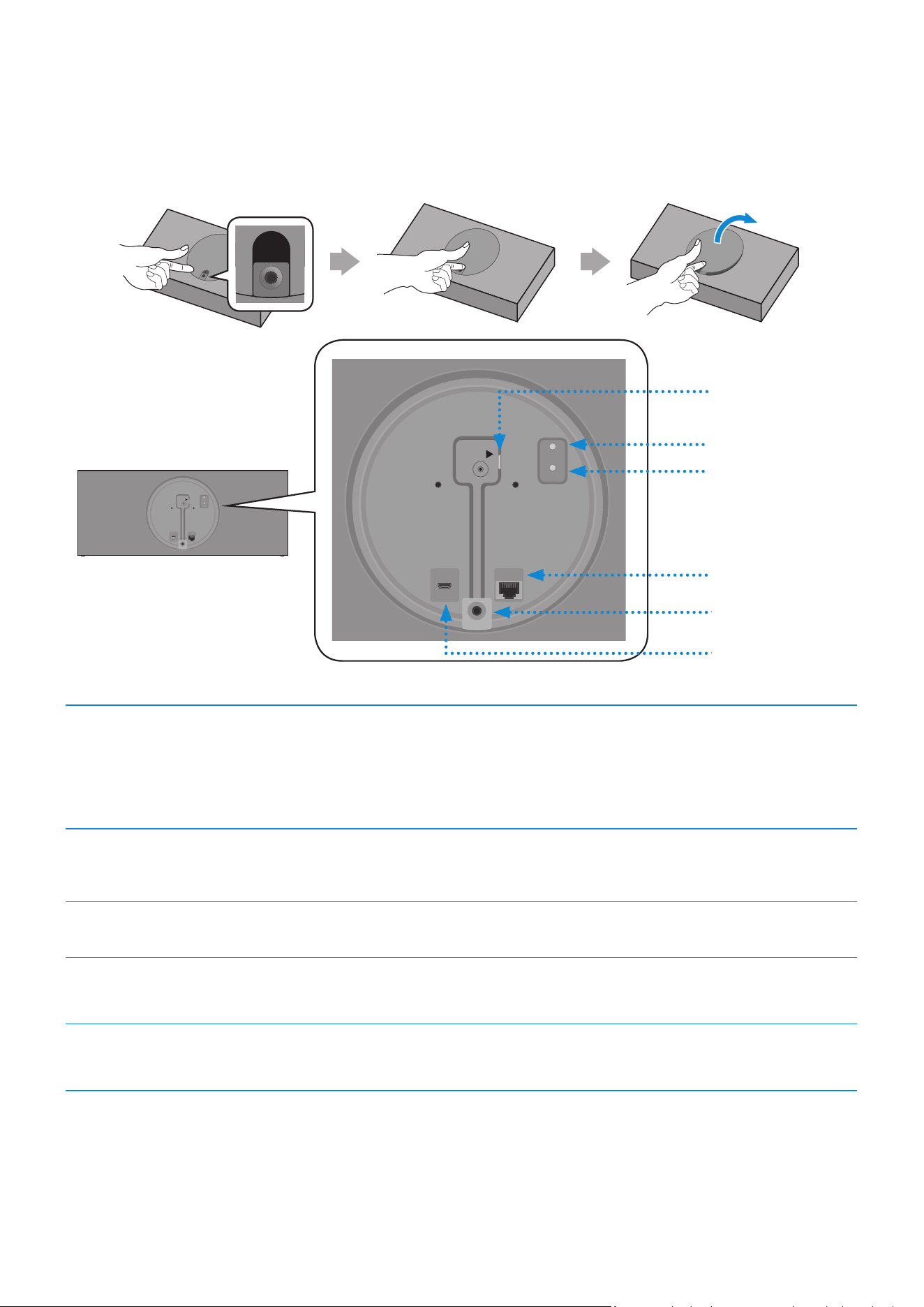
❚
Face arrière du haut-parleur
AUX IN
AUX IN
AUX IN
AUX IN
AUX IN
AUX IN
AUX IN
AUX IN
AUX IN
DC 24V
SERVICE
AUX IN
LAN
POWER
NETWORK
(DC IN)
POWER
SERVICE
AUX IN
LAN
RESET
CONNECT
RESET
CONNECT
(DC IN)
POWER
DC 24V
SERVICE
AUX IN
LAN
POWER
NETWORK
(DC IN)
POWER
SERVICE
AUX IN
LAN
RESET
CONNECT
RESET
CONNECT
(DC IN)
POWER
DC 24V
SERVICE
AUX IN
LAN
POWER
NETWORK
(DC IN)
POWER
SERVICE
AUX IN
LAN
RESET
CONNECT
RESET
CONNECT
(DC IN)
POWER
1
Bouton RESET
2
3
4
5
1
Port
POWER (DC IN)
1. Raccordez le cordon d'alimentation à l'adaptateur CA/CC.
(uniquement pour les modèles VL550 / VL551)
2. Raccordez le cordon d'alimentation de l'adaptateur de sortie CA/CC
(prise ronde) au port POWER (DC IN) du haut-parleur.
2
Bouton
CONNECT
Pression simple : Déconnecte ou reconnecte le contrôleur autonome.
Pression de 5 secondes : Initie la connexion Wi-Fi.
3
Port LAN Permet de connecter le haut-parleur à un réseau câblé.
4
Port AUX IN
Permet de connecter le haut-parleur à un port de sortie analogique
d'un appareil externe.
5
Port SERVICE
Permet la mise à jour du micrologiciel par un technicien de
maintenance.
Utilisez un câble Cat 7 (de type *STP) pour la connexion. (*paire torsadée blindée)
Le bouton RESET permet de résoudre les problèmes.
FRA - 5
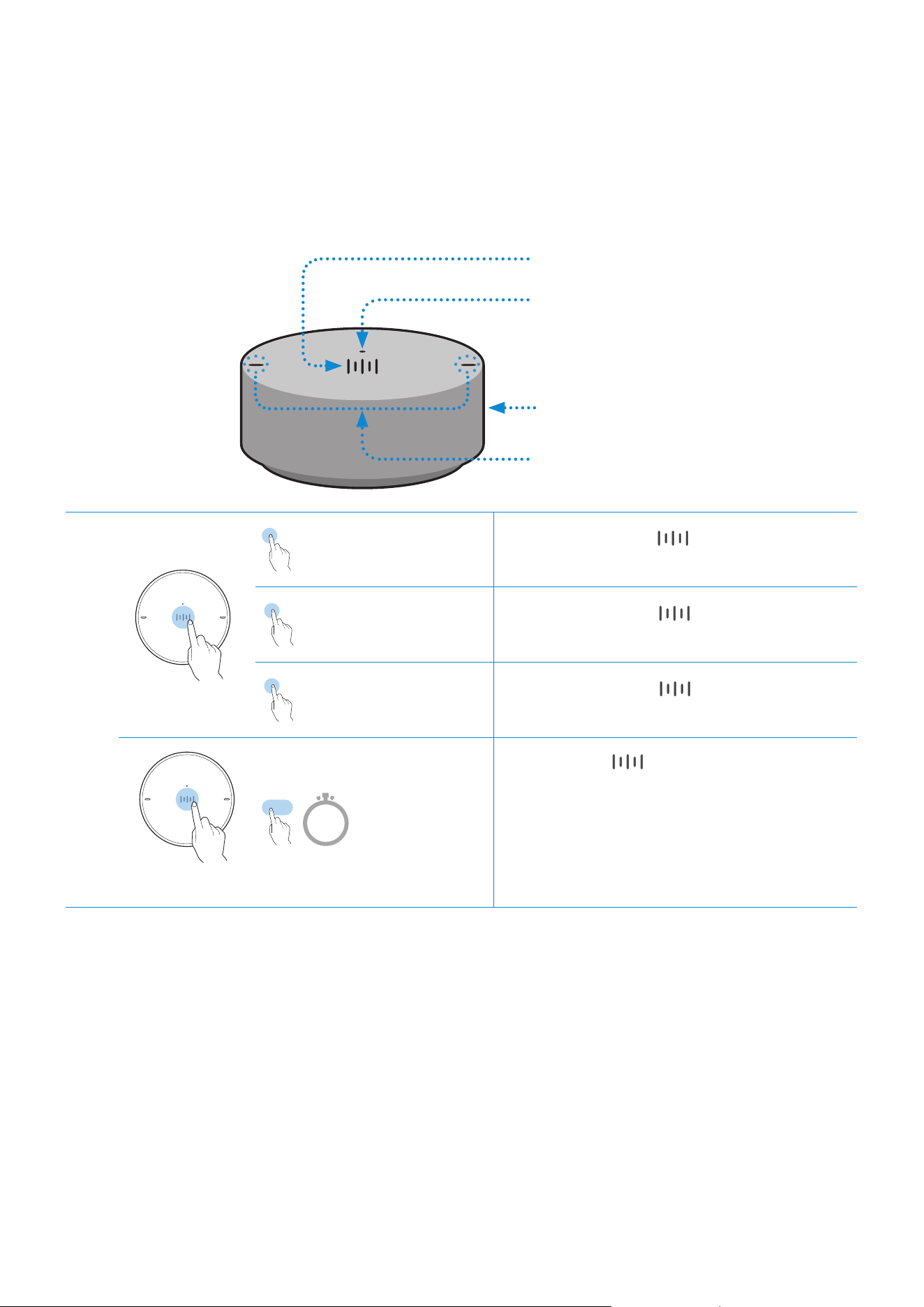
A
Utilisation du contrôleur autonome
❚
Partie supérieure du contrôleur autonome
1
Bouton Multifonction
2
Afchage du voyant
3
Molette du volume
4
Microphones
1
X 1
Lecture /
Pause
Appuyez 1 fois sur pour lire de la
musique ou la mettre en pause.
X 2
Lire le morceau
suivant
Appuyez 2 fois sur pour passer au
morceau suivant.
X 3
Lire le morceau
précédent
Appuyez 3 fois sur pour lire le
morceau précédent.
2 Sec
Reconnaissance
vocale pour
appareil mobile
Appuyez sur pendant 2 secondes
pour activer la fonctionnalité de
reconnaissance vocale de votre appareil
mobile.
•
Cette fonctionnalité n'est disponible
qu'en mode Bluetooth.
FRA - 6

2
Afchage du
voyant
Le voyant clignote, s'allume ou change de couleur en fonction de l'état
du haut-parleur.
Voyant État
Description
Statut Batterie
Éteint Tous éteints En veille
Batterie
déchargée
Blanc
Allumé Fonctionnement normal
Chargé à
100 %
Clignotant
En attente de connexion au
haut-parleur
-
Cyan Allumé
Reconnaissance vocale de
l'appareil mobile activée
(uniquement avec le
Bluetooth)
-
Rouge Allumé
Échec de la connexion au
haut-parleur
-
Erreur
Jaune
Un
clignotement
Lorsque le volume est réglé au
minimum ou au maximum
-
Rose
Clignote une fois
après l'utilisation
d'une touche
-
Batterie à
moins de
10 %
Allumé
En cours de
chargement
3
Réglage du
volume
(Faites tourner la molette du volume)
Faites tourner la molette du volume dans
le sens des aiguilles d'une montre pour
augmenter le volume.
Faites tourner la molette du volume dans
le sens contraire des aiguilles d'une montre
pour diminuer le volume.
4
Microphones Microphones utilisés pour la reconnaissance vocale de l'appareil mobile.
Les fonctionnalités Lecture / Pause et Passer ne sont pas disponibles en mode AUX.
FRA - 7

❚
Partie inférieure du contrôleur autonome
1
Retirez la protection en dessous du contrôleur autonome, puis allumez ce dernier.
•
Chargez votre contrôleur autonome avant de l'allumer.
OPEN
OPEN
OPEN
OPEN
OPEN
OPEN
CONNECT
DC 5V
IN
RESET
1
2
OPEN
OPEN
CONNECT
RESET
OPEN
Bouton RESET
1
Port DC 5V IN
Raccordez le câble micro USB pour charger le contrôleur
autonome.
2
Bouton
CONNECT
Le contrôleur tente de se connecter à un haut-parleur.
2
Vériez le voyant (rose clignotant). Si la batterie est faible, chargez le contrôleur autonome
en branchant le câble micro USB (pour plus d'informations sur les voyants, consultez la
page
7
).
Le chargement complet de la batterie prend environ 3 heures. Une batterie chargée entièrement peut durer
jusqu'à 90 jours.
La durée de vie de la batterie dépend de son utilisation et de son environnement.
Le bouton RESET permet de résoudre les problèmes.
FRA - 8
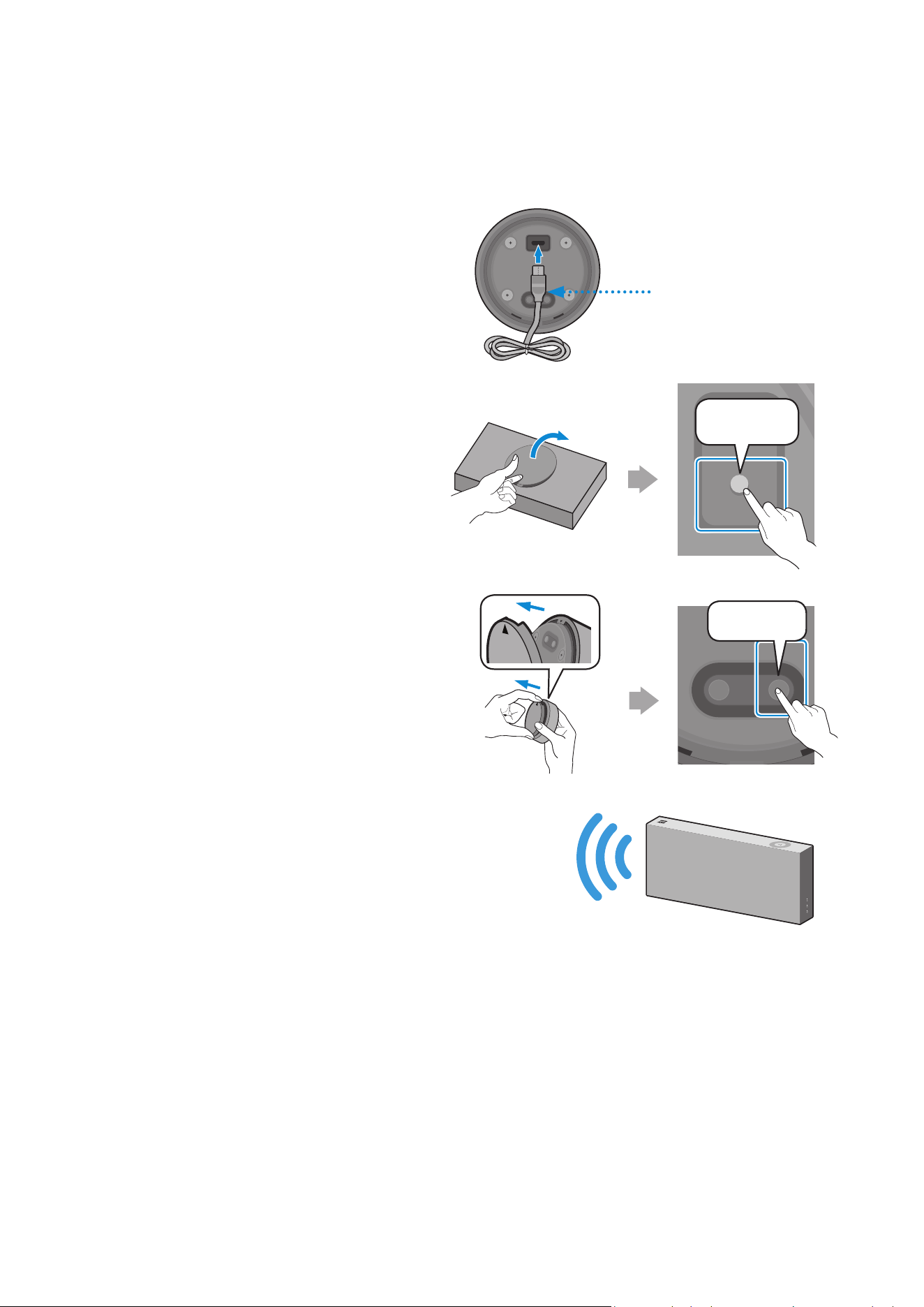
❚
Connexion entre le contrôleur autonome et le haut-parleur
* Avant d'utiliser le contrôleur autonome
Chargez le contrôleur autonome jusqu'à ce
que le voyant s'allume (le voyant devient blanc
lorsqu'il est entièrement chargé).
CONNECT
DC 5V
IN
RESET
Câble micro USB
(non fourni)
1
Appuyez sur le bouton CONNECT
à l'arrière du haut-parleur.
DC 24V
SERVICE
AUX IN
LAN
POWER
NETWORK
(DC IN)
POWER
SERVICE
AUX IN
LAN
RESET
CONNECT
RESET
CONNECT
(DC IN)
POWER
AUX IN
AUX IN
AUX IN
CONNECT
2
Appuyez sur le bouton CONNECT
sur la partie inférieure du
contrôleur autonome.
OPEN
OPEN
OPEN
CONNECT
RESET
OPEN
CONNECT
DC 5V
IN
RESET
CONNECT
3
Une fois le contrôleur autonome et le haut-
parleur connectés, vous entendez le message
vocal « Pairing is complete. » (Association établie.)
provenant du haut-parleur.
FRA - 9
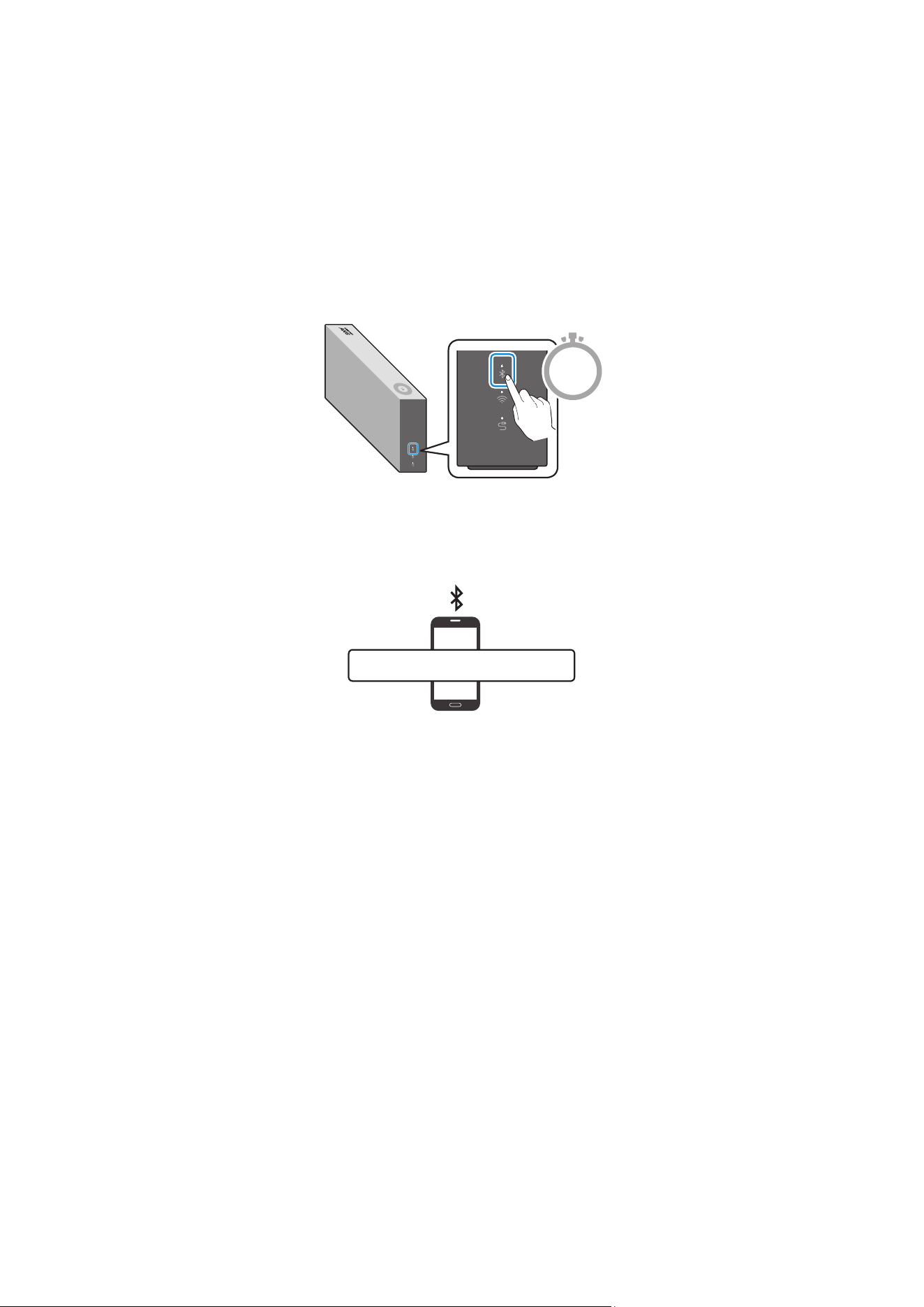
Vous pouvez connecter un appareil mobile via Bluetooth pour en écouter le son sur votre haut-parleur.
* Première connexion
1
Appuyez sur le bouton Bluetooth sur le côté droit du haut-parleur pendant 5 secondes
ou plus.
5 Sec
2
Sélectionnez le haut-parleur dans la liste Bluetooth de votre appareil mobile, puis
connectez-le (par ex., [AV] Samsung AKG VL5)
Appareil mobile
“[AV] Samsung AKG VL*”
* Reconnexion
Seule l'étape 2 est nécessaire pour les appareils mobiles ayant déjà été connectés auparavant.
La connexion Bluetooth vous permet d'utiliser la fonctionnalité de reconnaissance vocale de votre appareil
mobile.
Connexion au Bluetooth
FRA - 10

1
Appuyez sur le bouton Wi-Fi sur le côté droit du haut-parleur pour passer en mode Wi-Fi.
2
Téléchargez l'application SmartThings sur votre appareil mobile, puis lancez-la.
•
Vous ne pouvez pas congurer les paramètres des appareils qui ne sont pas pris en
charge par l'application SmartThings.
•
Versions nécessaires pour SmartThings : Android 6.0 ou version supérieure/iOS 10.0 ou
version supérieure
•
L'utilisation de l'application SmartThings requiert un compte Samsung.
Appareil mobile
Android iOS
Application SmartThings
3
Suivez les instructions afchées sur l'écran de l'application SmartThings.
Attendez que la
connexion soit
établie
Vous êtes connectéSélectionnez le
périphérique à
connecter
Appuyez sur
« Add device »
Connexion au Wi-Fi
FRA - 11
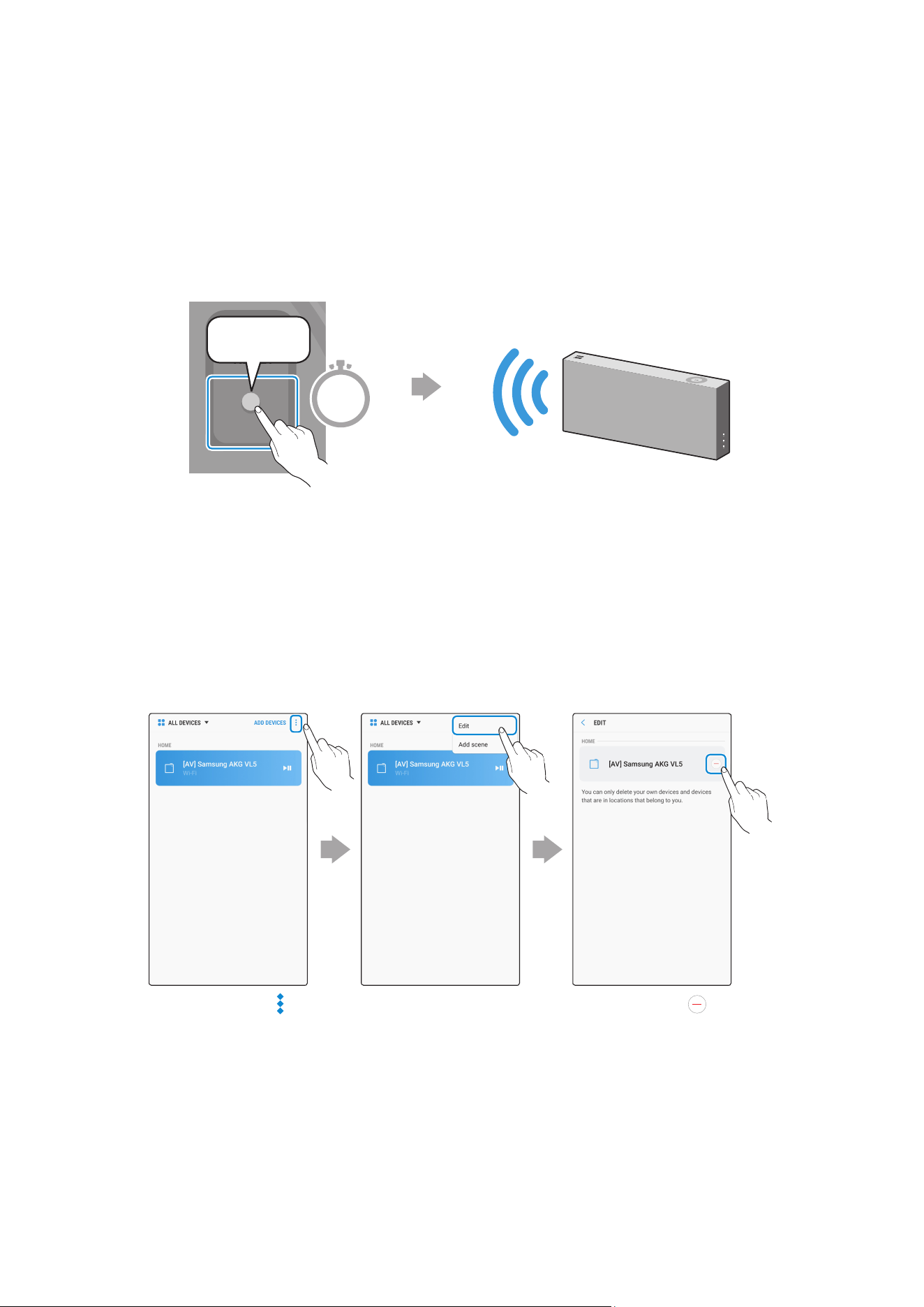
4
Répétez les étapes 1 à 3 pour connecter tous les haut-parleurs au même routeur sans l.
•
Les utilisateurs de Spotify Premium peuvent proter de leur musique avec l'application
Spotify.
5-1
Suivez les instructions ci-dessous pour connecter ou reconnecter le haut-parleur à un
routeur sans l.
Le haut-parleur génère un
message vocal signalant qu'il est
désormais en mode veille.
DC 24V
SERVICE
AUX IN
LAN
POWER
NETWORK
(DC IN)
POWER
SERVICE
AUX IN
LAN
RESET
CONNECT
RESET
CONNECT
(DC IN)
POWER
CONNECT
Appuyez sur le bouton
CONNECT pendant
5 secondes.
5 Sec
5-2
Répétez l'étape 3.
* Suppression d'un périphérique de l'application SmartThings
Appuyez sur
en haut à droite
de la liste des
périphériques
Appuyez sur à
côté du
périphérique à
supprimer
Appuyez sur
« Edit »
FRA - 12

❚
Connexion d'un appareil externe à l'aide du câble AUX
Vous pouvez connecter un appareil mobile via un câble AUX pour en écouter le son sur votre haut-
parleur.
1
Appuyez sur le bouton AUX sur le côté droit du haut-parleur pour passer en mode AUX.
2
Raccordez le port AUX IN situé à l'arrière du haut-parleur à un appareil externe via le câble
AUX (non fourni).
DC 24V
SERVICE
AUX IN
LAN
POWER
NETWORK
(DC IN)
POWER
SERVICE
AUX IN
LAN
RESET
CONNECT
RESET
CONNECT
(DC IN)
POWER
DC 24V
SERVICE
AUX IN
LAN
POWER
NETWORK
(DC IN)
POWER
SERVICE
AUX IN
LAN
RESET
CONNECT
RESET
CONNECT
(DC IN)
POWER
Câble AUX
(non fourni)
Face arrière du haut-parleur
Appareil externe
(par ex., Appareil mobile)
Connexion à un périphérique externe
FRA - 13

A
Utilisation de la reconnaissance vocale de l'appareil mobile
Fonction dédiée au mode Bluetooth
•
Cette fonction ne peut être utilisée que lorsqu'un appareil mobile est connecté via
Bluetooth.
•
Le mode de fonctionnement peut varier en fonction des caractéristiques de l'appareil
mobile.
Fonctionnalité de reconnaissance
vocale de l'appareil mobile
2 Sec
En fonction du service de reconnaissance vocale fourni par votre appareil mobile (par ex., Bixby, Siri, Google
Assistant, etc.), sa disponibilité et son utilisation peuvent varier.
Exemple de fonctionnalité Exemple de commande vocale
Écouter de la musique Lire le TOP des 100 premières places
Envoyer des messages Transférer mes messages les plus récents à maman
Autres fonctions
FRA - 14

1
Appuyez sur le bouton Bluetooth sur le côté droit du haut-parleur pour passer en mode
Bluetooth.
1-1
Si ce n'est pas déjà le cas, congurez la connexion Bluetooth entre les haut-parleurs et
votre appareil mobile.
•
Pour connecter un appareil mobile, veuillez consulter la section [Connexion au
Bluetooth]
Cliquez ici.
.
Appareil mobile
2
Maintenez le bouton Multifonction du contrôleur autonome enfoncé jusqu'à ce que le
voyant soit cyan (pendant 2 secondes ou plus).
2 Sec
3
Lorsque le voyant est cyan, la fonction de reconnaissance vocale de l'appareil est activée.
Parlez directement dans le contrôleur autonome pour utiliser la fonctionnalité de
reconnaissance vocale.
Pour utiliser l'application S Voice sur Samsung Galaxy, veillez à la déverrouiller.
MISE EN GARDE
9
Maintenez une distance d'au moins 0,6 pouces entre votre visage et le contrôleur autonome lors de l'utilisation de la
fonctionnalité de reconnaissance vocale.
FRA - 15

A
Utilisation avec connexion Wi-Fi
Fonctions disponibles avec la connexion Wi-Fi
•
Utilisation de 2 unités - Audio Group
•
Utilisation de 2 unités - Stereo (uniquement pour les modèles VL350 / VL351)
•
Connexion à un téléviseur Smart TV Samsung
•
Connecter un produit Amazon
Les haut-parleurs doivent tous être connectés au même routeur sans l.
Si vous utilisez deux appareils, une connexion sans l 5 GHz est recommandée.
Lorsque vous utilisez deux appareils, vous pouvez constater un décalage de temps entre la vidéo du matériel
connecté et sa sortie audio.
Dans certaines conditions, il se peut que des coupures audio et des interruptions de connexion surviennent en
raison d'interférences sur les réseaux sans l.
❚
Utilisation de 2 unités - Audio Group
1
Utilisez l'application SmartThings pour connecter 2 haut-parleurs en tant que Audio Group.
•
Pour utiliser la fonction Audio Group, tous les haut-parleurs doivent être connectés au
même routeur sans l.
FRA - 16
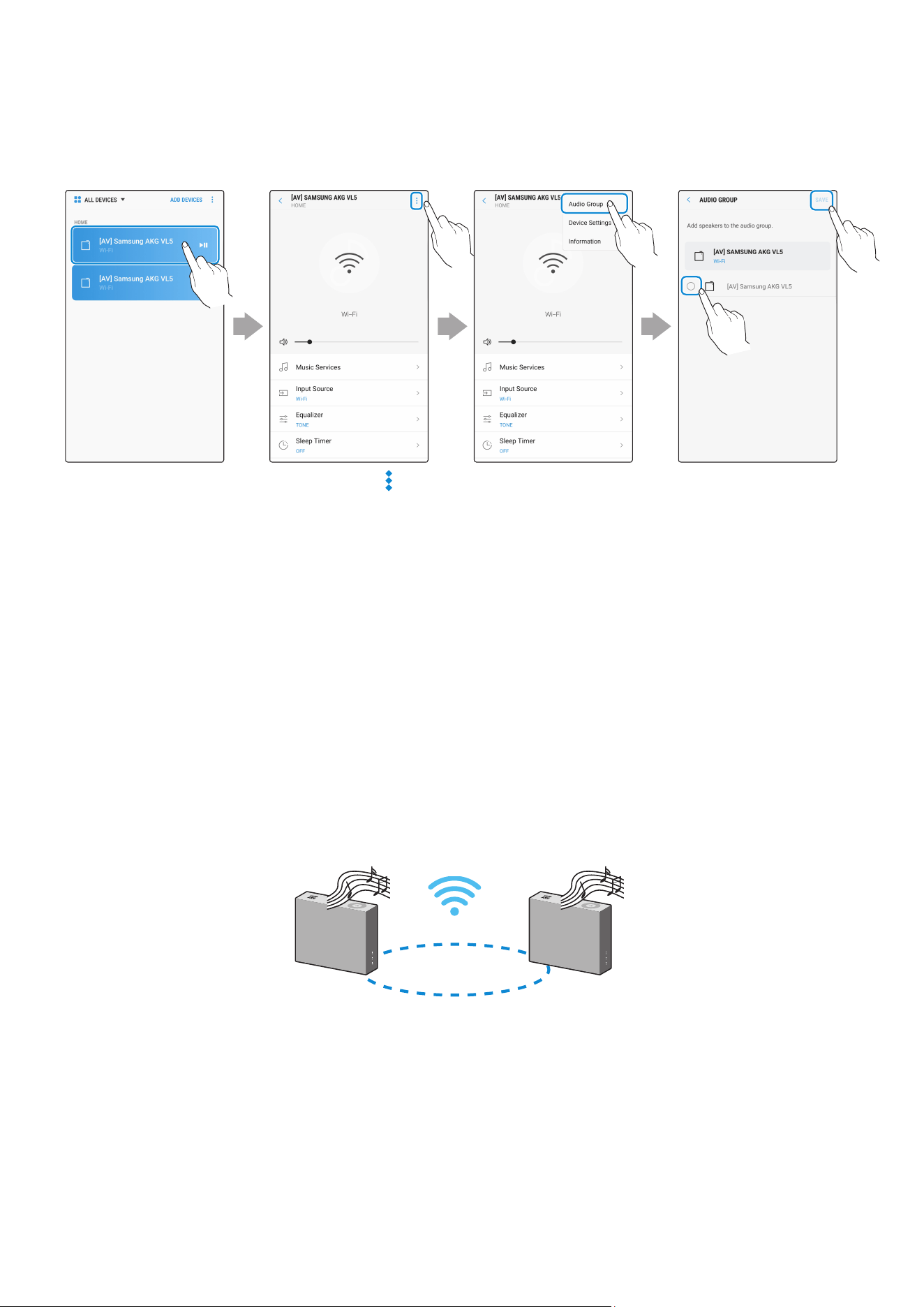
2
Sélectionnez Audio Group dans l'application SmartThings.
Appuyez sur en
haut à droite
Sélectionnez votre
produit dans la liste
des périphériques
Appuyez sur
« Audio Group »
Sélectionnez
le deuxième
périphérique, puis
appuyez sur
« SAVE »
1
2
❚
Utilisation de 2 unités - Stereo (uniquement pour les modèles VL350 / VL351)
1
Utilisez l'application SmartThings pour connecter 2 haut-parleurs en tant que Stereo.
•
Pour utiliser la fonction Stereo, tous les haut-parleurs doivent être connectés au même
routeur sans l.
Gauche
Droite
FRA - 17
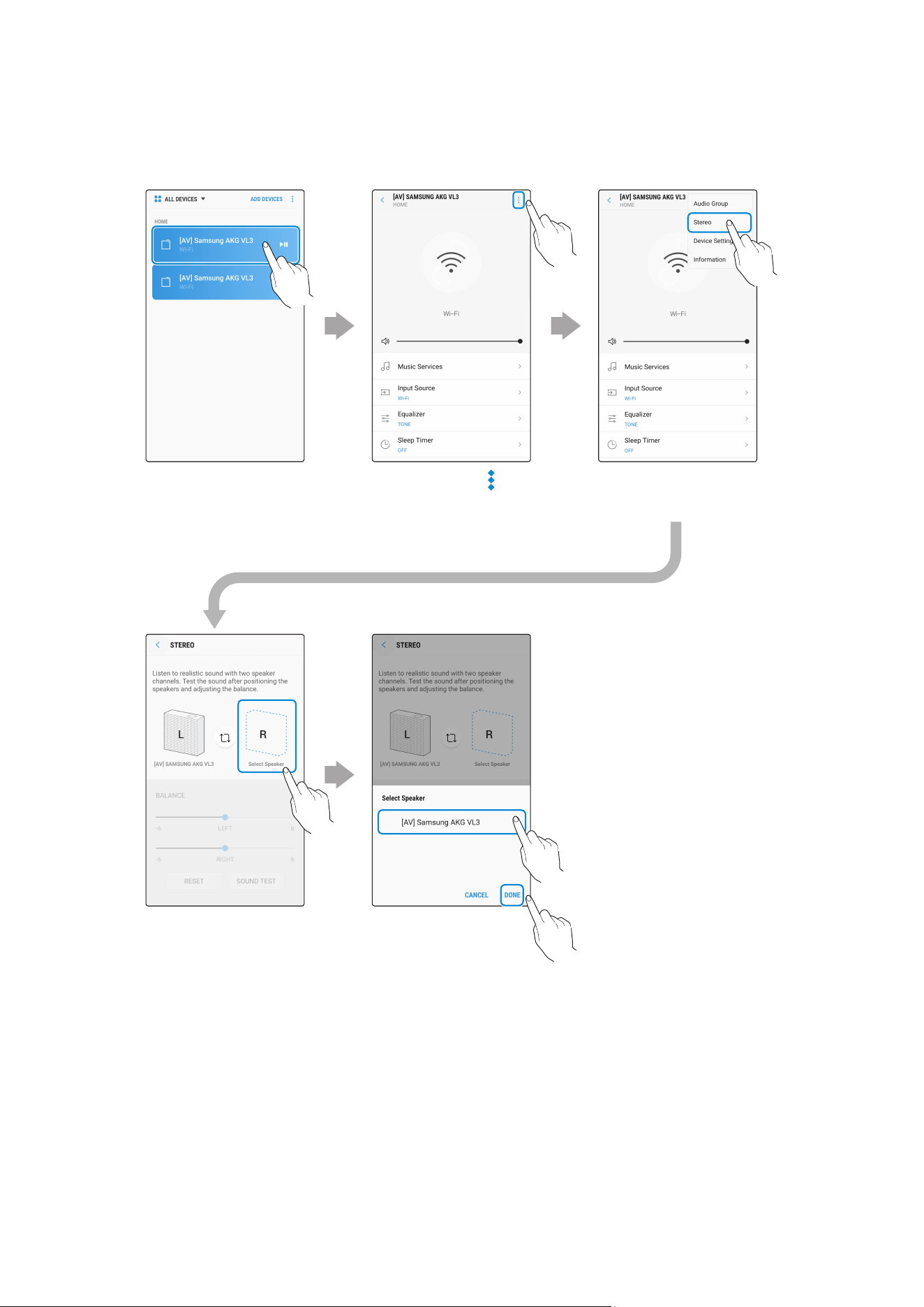
2
Sélectionnez Stereo dans l'application SmartThings.
Appuyez sur en
haut à droite
Sélectionnez votre
produit dans la liste
des périphériques
Appuyez sur
« Stereo »
Appuyez sur
« Select Speaker »
Sélectionnez
le deuxième
périphérique, puis
appuyez sur
« DONE »
1
2
VL550 / VL551 est déjà un périphérique Stereo et ne prend donc pas en charge les connexions Stereo
multiples. Il peut uniquement utiliser la fonction Audio Group.
FRA - 18
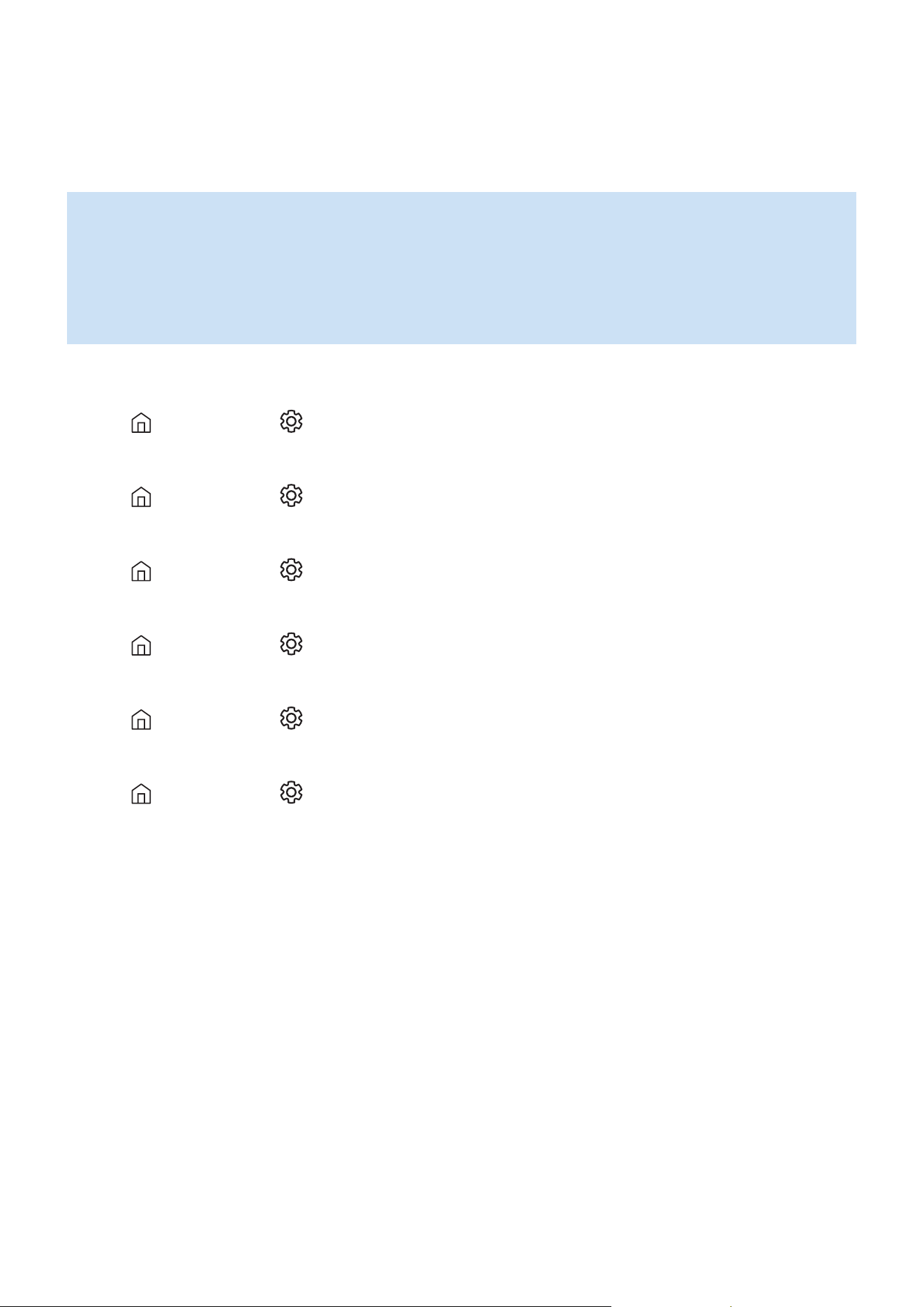
❚
Connexion à un téléviseur Smart TV Samsung
1. Cette fonction est uniquement disponible pour les téléviseurs Smart TV Samsung sortis en
2014 et plus tard.
2. Le téléviseur doit être connecté à un routeur sans l.
3. Vos haut-parleurs Samsung doivent être connectés à un routeur sans l lui-même
connecté à votre téléviseur (reportez-vous au manuel d'utilisation du produit concerné).
`
Connexion de 1 haut-parleur à un téléviseur Smart TV Samsung 2018
Accueil ( )
Paramètres ( )
Son
Sortie audio
[AV] Samsung AKG VL*(Wi-Fi)
`
Connexion de 2 haut-parleurs à un téléviseur Smart TV Samsung 2018
Accueil ( )
Paramètres ( )
Son
Conguration ambiophonique pour le haut-parleur Wi-Fi
`
Connexion de 1 haut-parleur à un téléviseur Smart TV Samsung 2017
Accueil ( )
Paramètres ( )
Son
Sortie audio
[AV] Samsung AKG VL*(Wi-Fi)
`
Connexion de 2 haut-parleurs à un téléviseur Smart TV Samsung 2017
Accueil ( )
Paramètres ( )
Son
Conguration ambiophonique pour le haut-parleur
Wi-Fi
`
Connexion de 1 haut-parleur à un téléviseur Smart TV Samsung 2016
Accueil ( )
Paramètres ( )
Son
Sélectionner le haut-parleur
[AV] Samsung AKG VL*(Wi-Fi)
`
Connexion de 2 haut-parleurs à un téléviseur Smart TV Samsung 2016
Accueil ( )
Paramètres ( )
Son
Paramètres avancés
Gestionnaire des haut-parleurs sans l
`
Connexion de 1 ou 2 haut-parleurs à un téléviseur Smart TV Samsung 2015
Menu
Son
Liste des haut-parleurs
`
Connexion de 1 ou 2 haut-parleurs à un téléviseur Smart TV Samsung 2014
Menu
Son
Paramètres haut-parleur
Multiroom Link - Paramètres
Étant donné que les menus peuvent varier selon l'année de fabrication, consultez le manuel de votre
téléviseur.
FRA - 19
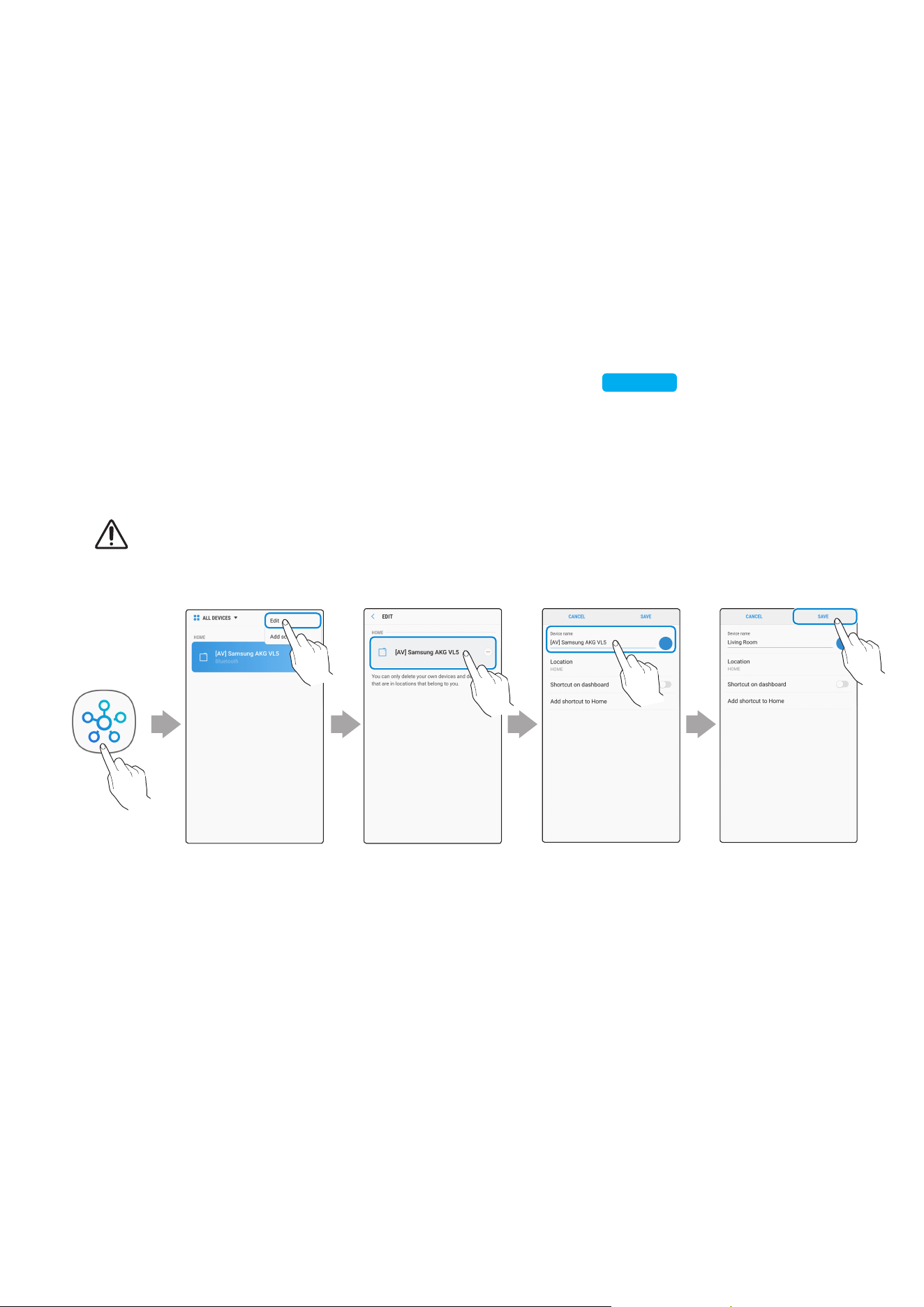
❚
Connecter un produit Amazon
•
Cette fonction peut ne pas être disponible dans certains pays.
•
Ce service est fourni par Amazon et peut être résilié à tout moment. Samsung n’assume pas la
responsabilité de la disponibilité du service.
`
Connecter et utiliser avec un produit Amazon (Amazon Echo)
Utilisez un produit Amazon Echo pour contrôler votre haut-parleur et proter des services
musicaux proposés par Amazon Echo.
Vériez que le haut-parleur est connecté au Wi-Fi. [Connexion au Wi-Fi]
Cliquez ici.
1
Dans l'application SmartThings, remplacez le nom de votre haut-parleur par un nom
pouvant être reconnu par votre périphérique Amazon.
(Exemple : Samsung, Haut-parleur, Salon, Séjour, Chambre, Bureau, etc.)
MISE EN GARDE
9
Les périphériques Amazon peuvent ne pas reconnaître les noms contenant des caractères spéciaux.
Sélectionnez
« Edit »
Sélectionnez les
haut-parleurs
Modiez le nom « SAVE »
FRA - 20
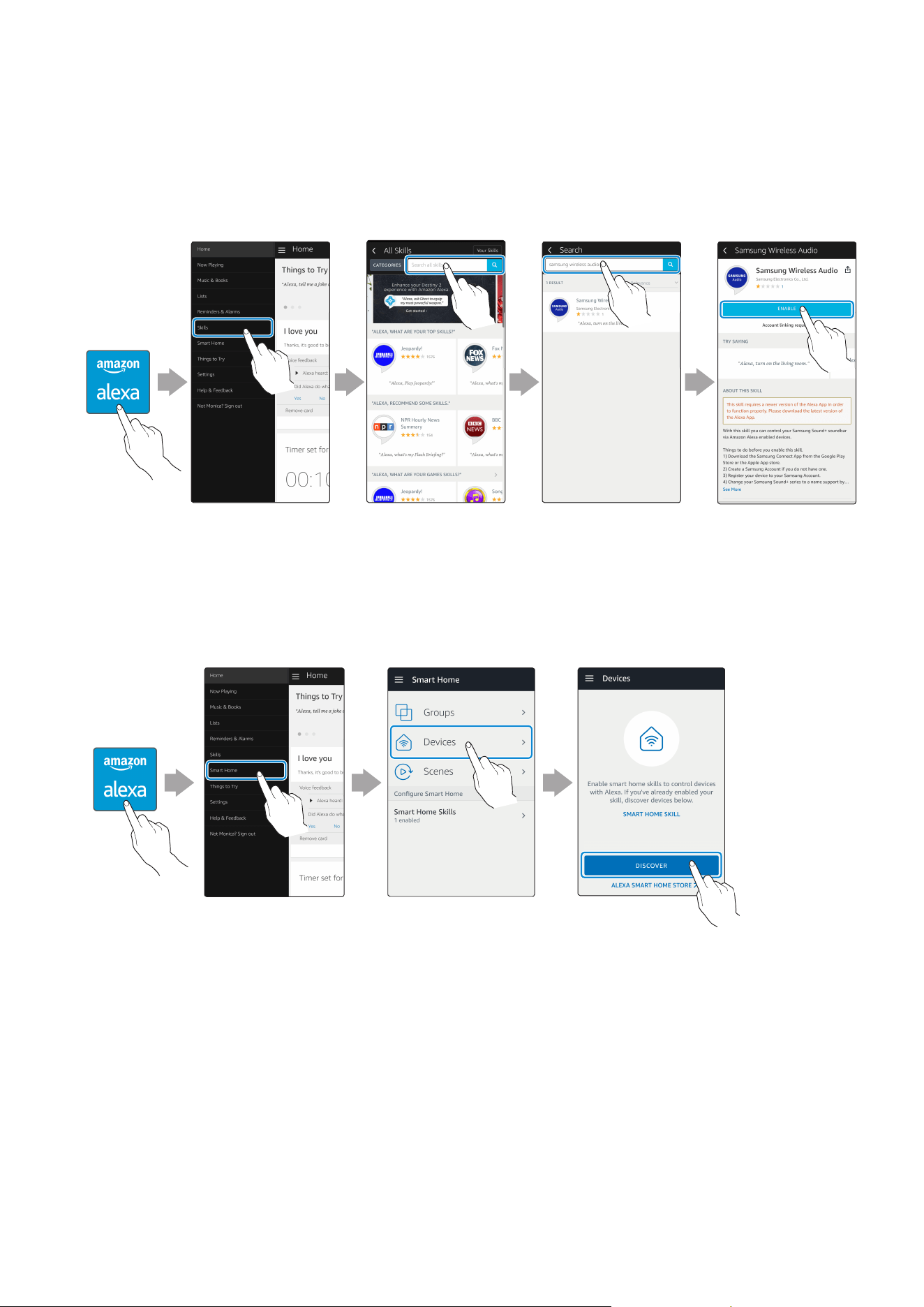
2
Dans l’application Alexa, recherchez « Samsung Wireless Audio » dans Skills, puis
sélectionnez ENABLE.
•
Ignorez cette étape si vous avez déjà conguré l’option Skills.
Application
Amazon Alexa
Sélectionnez
« Skills »
Recherchez « ENABLE »
3
Sur l’application Alexa, appuyez sur Smart Home → Devices → DISCOVER pour terminer la
connexion.
Application
Amazon Alexa
Sélectionnez
« Smart Home »
Sélectionnez
« Devices »
« DISCOVER »
FRA - 21
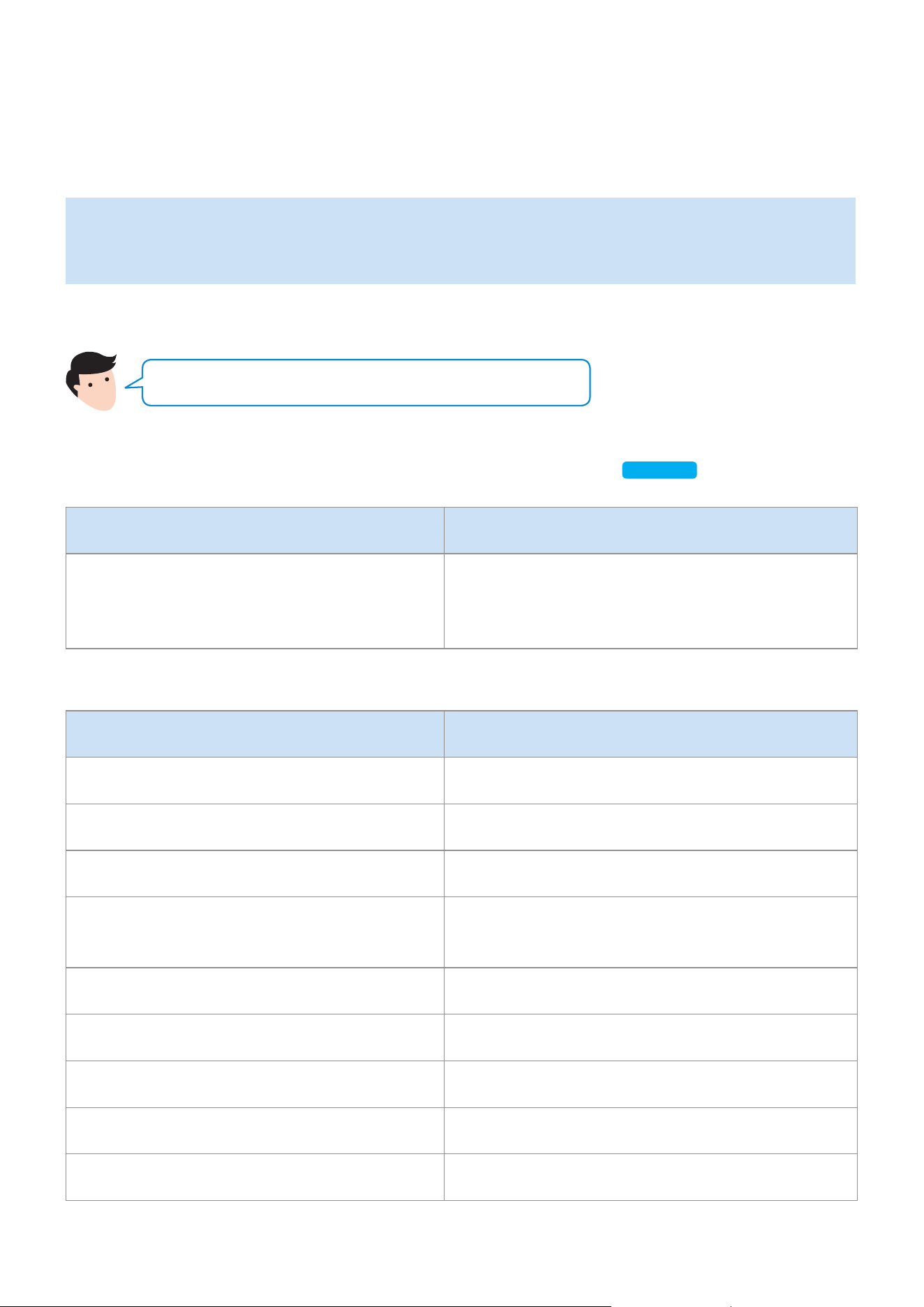
`
Utilisez les commandes vocales pour contrôler le haut-parleur
•
Le service Amazon Echo que vous pouvez utiliser avec votre haut-parleur est limité à la
musique. Vous pouvez accéder à d’autres services fournis par Amazon Echo, comme les
informations et la météo, grâce à votre produit Amazon Echo.
Déclencheur + Commande + Nom du haut-parleur
Utilisez le nom du haut-parleur que vous avez modié dans l’application SmartThings.
[Connecter et utiliser avec un produit Amazon (Amazon Echo)]
Cliquez ici.
Action Commande vocale
Pour rechercher un périphérique audio ajouté
au compte SmartThings relié au compte
Amazon Alexa
« Alexa Découvrir les périphériques »
* Utilisation des commandes vocales pour le haut-parleur nommé « Salon »
Action Commande vocale
Pour régler le volume sur 20 « Alexa Régler le volume sur 20 dans le Salon »
Pour augmenter le volume « Alexa Augmenter le volume au Salon »
Pour couper le son « Alexa Couper le son au Salon »
Pour écouter une station de radio appelée
KISS FM
« Alexa Jouer Kiss FM au Salon »
Pour lire la chanson suivante « Alexa Chanson suivante au Salon »
Pour arrêter l’audio « Alexa Stop au Salon »
Pour allumer l’audio « Alexa Allumer au Salon »
Pour éteindre l’audio « Alexa Éteindre au Salon »
Modier la source d’entrée « Alexa Passer en Bluetooth dans le Salon »
FRA - 22
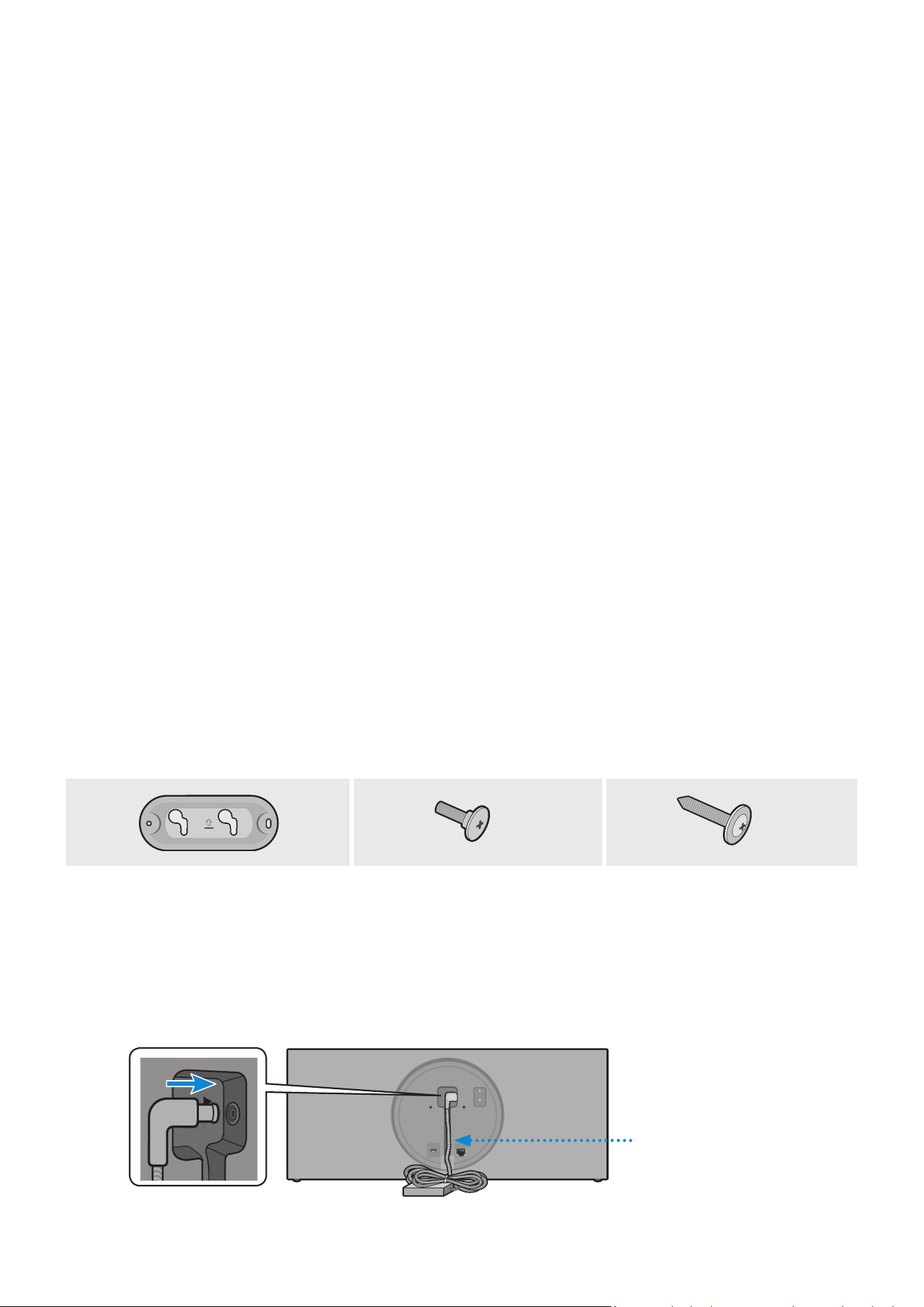
Achetez des vis de montage mural en fonction du type et de l'épaisseur du mur sur lequel vous
souhaitez xer le haut-parleur.
•
Points à considérer lors de l’achat
-
Charge maximale autorisée : VL350 / VL351 : supérieure à 18,5 Ibs (8,4 kg)
VL550 / VL551 : supérieure à 39,7 Ibs (18,0 kg)
-
Taille des perforations : M5
N'installez pas le produit dans un endroit où la température ou le taux d'humidité est élevé.
Vériez que le mur est assez résistant pour supporter le poids du produit. Dans le cas contraire, renforcez le
mur ou choisissez un autre emplacement d'installation.
Achetez et utilisez les vis de xation et éléments d'ancrage adaptés à votre type de mur (placo, panneau
métallique, bois, etc.). Si possible, xez les vis de support sur des poteaux muraux. Installez le produit sur un
mur vertical uniquement.
Assurez-vous que l'unité est éteinte et débranchée avant l'installation. Dans le cas contraire, il existe un
risque de décharge électrique.
Veuillez demander à un installateur qualié d'installer le support à xation murale.
Demandez à une entreprise d’installation professionnelle de xer votre produit sur le mur.
Samsung Electronics ne saurait être tenue responsable de tout dommage causé au produit en raison d'une
installation incorrecte.
Soyez assuré de ne pas installer l’enceinte si elle repose sur le sol sur la face ou le côté.
Composants du support mural
x 2
x 2
Plaque de xation du support Vis de support Vis de xation murale
(non fourni)
1
Raccordez l'adaptateur CA/CC sur l'unité principale avant d'installer le support mural.
Adaptateur CA/CC
DC 24V
SERVICE
AUX IN
LAN
RESET
CONNECT
(DC IN)
POWER
DC 24V
SERVICE
AUX IN
LAN
RESET
CONNECT
(DC IN)
POWER
Installation du support mural
FRA - 23

2
Fixez la Plaque de xation du support, puis serrez la Vis de xation murale dans l'orice
de gauche.
Mur
Plaque de fixation du
support
Vis de fixation
murale (non fourni)
3
Serrez la Vis de xation murale dans l'orice de droite.
•
Si la plaque n'est pas exactement de niveau, desserrez légèrement la Vis de xation
murale de gauche, puis ajustez la Plaque de xation du support vers le haut ou le bas
an qu'elle soit de niveau.
4
Serrez les deux Vis de support dans les orices prévus à cet effet sur la face arrière de
l'unité principale.
DC 24V
SERVICE
AUX IN
LAN
RESET
CONNECT
DC 24V
SERVICE
AUX IN
LAN
RESET
CONNECT
DC 24V
SERVICE
AUX IN
LAN
RESET
CONNECT
DC 24V
SERVICE
AUX IN
LAN
RESET
CONNECT
Vis de support
FRA - 24

5
Alignez les Vis de support de l'unité principale avec le grand creux de la Plaque de
xation du support. Faites glisser dans la direction indiquée par la èche jusqu'à ce
qu'elles se logent dans le petit creux.
•
Veillez à faire glisser dans la direction indiquée par la èche jusqu'à ce qu'elles se logent
dans le petit creux de la Plaque de xation du support.
* Désinstallation du support mural
Levez l'unité principale jusqu'à ce que les Vis de support coïncident avec le grand creux de la
Plaque de xation du support, puis tirez l'unité principale vers vous.
FRA - 25
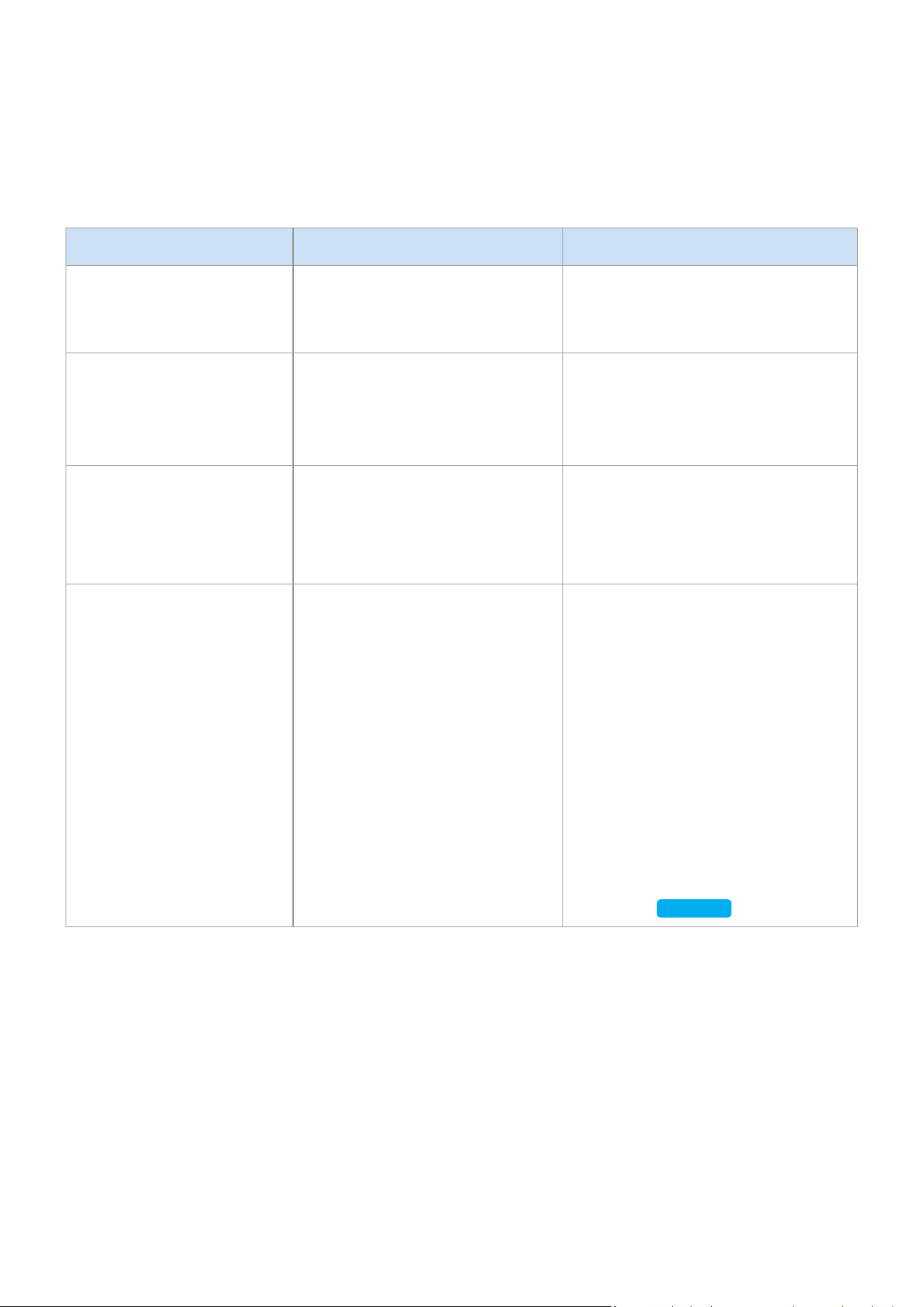
Annexe
A
Dépannage
Avant de faire appel à l'assistance, veuillez procéder aux vérications suivantes.
Problème Vérication Résolution
Le haut-parleur ne
s'allume pas.
•
Vériez que le cordon
d'alimentation est
correctement branché.
•
Branchez le cordon
d'alimentation.
Rien ne se passe lorsque
vous appuyez sur un
bouton ou une zone de la
molette.
•
Le bouton ou la molette
peuvent être soumis à des
parasites.
•
Débranchez et rebranchez le
cordon.
Il n'y a pas de son.
•
Le haut-parleur est-il raccordé
à une source d'alimentation?
•
Le volume peut être déni au
minimum.
•
Vériez que le haut-parleur
est correctement branché à
l'alimentation.
•
Essayez de régler le volume.
Le contrôleur autonome
ne fonctionne pas.
•
La batterie du contrôleur
autonome est peut-être
déchargée.
•
Le contrôleur autonome peut
se trouver hors de la portée
de fonctionnement.
•
Vériez le branchement entre
le contrôleur autonome et le
haut-parleur.
•
Appuyez sur le bouton RESET sur
la partie inférieure du contrôleur
autonome.
•
Chargez la batterie comme
indiqué dans les instructions de
relatives au voyant du contrôleur
autonome.
•
Rapprochez le contrôleur
autonome du haut-parleur.
•
Reportez-vous à la section
« Connexion entre le contrôleur
autonome et le haut-parleur ».
(page 9)
Cliquez ici.
FRA - 26

Problème Vérication Résolution
Impossible de brancher le
haut-parleur à un appareil
mobile ou à un téléviseur.
Pour une connexion laire
•
Vériez si le câble est bien
branché.
•
Observez le côté droit du
haut-parleur et assurez-vous
que le haut-parleur est en
mode AUX.
•
Vériez le nom du port et
assurez-vous que le câble est
branché au bon port.
•
Reportez-vous à la section
« Connexion à un périphérique
externe ». (page 13)
Cliquez ici.
Pour une connexion par
Bluetooth
•
Vériez sur le côté droit du
haut-parleur qu'il est en mode
Bluetooth.
•
Mettez le haut-parleur en
mode Bluetooth et réessayez
de le chercher sur votre
appareil mobile ou votre
téléviseur.
•
Appuyez sur le bouton Bluetooth
sur le côté droit du haut-parleur
pendant 5 secondes ou plus
pour activer le mode veille, puis
recherchez le haut-parleur sur
l'appareil mobile ou le téléviseur.
Reportez-vous à la section
« Connexion au Bluetooth ».
(page 10)
Cliquez ici.
Pour une connexion par Wi-Fi
•
Vériez que le modèle de
votre téléviseur est pris en
charge.
•
Assurez-vous que votre
appareil mobile ou votre
téléviseur est connecté au
réseau Wi-Fi.
•
Assurez-vous que le haut-
parleur est connecté au
réseau Wi-Fi.
•
Vériez le canal DFS.
(DFS : Dynamic Frequency
Selection)
•
Cette fonction prend en charge
les téléviseurs intelligents Smart
TV Samsung sortis en 2014 et
plus tard.
•
Si votre téléviseur n'est pas
connecté au réseau Wi-Fi, utilisez
le menu des réseaux du téléviseur
pour établir la connexion.
(Consultez le manuel utilisateur
fourni avec votre téléviseur)
•
Si le téléviseur est déjà connecté,
le haut-parleur doit apparaître
sur l'application SmartThings de
votre appareil mobile (téléphone
intelligent, tablette, etc.).
Reportez-vous à la section
« Utilisation avec connexion Wi-Fi ».
(page 16)
Cliquez ici.
•
La connexion du téléviseur et du
haut-parleur par le biais du Wi-
Fi peut ne pas être disponible
si votre routeur sans l utilise
le canal DFS. Pour plus de
détails, veuillez contacter votre
fournisseur Internet.
FRA - 27

Problème Vérication Résolution
Le son grésille lors de la
lecture de musique ou de
vidéos sur mon appareil
mobile connecté via
Bluetooth.
•
Vériez qu'aucun appareil
proche n'utilise des
communications radio ou ne
crée des interférences.
•
Votre appareil mobile ou tout
appareil de communication
radio est-il connecté à un
réseau Wi-Fi 2.4 GHz?
•
Si un appareil proche utilise des
communications radio ou crée des
interférences, éteignez-le.
•
Reportez-vous à la section « Connexion
au Bluetooth ». (page 10)
Cliquez ici.
•
Si votre appareil mobile ou un autre
appareil de communication radio est
connecté à un réseau Wi-Fi 2.4 GHz, il
peut créer des interférences. Essayez
de connecter votre appareil mobile à
un réseau Wi-Fi 5 GHZ.
Le son grésille lorsque le
haut-parleur est connecté
en mode Audio Group ou
Stereo via Wi-Fi.
•
Avez-vous connecté votre
appareil mobile et votre haut-
parleur via un réseau Wi-Fi
2.4 GHz?
•
Vériez la distance entre votre
routeur sans l et le haut-
parleur.
•
Vériez la distance entre les
haut-parleurs.
•
Connectez votre appareil mobile et
votre haut-parleur via un réseau Wi-Fi
5 GHz.
•
Assurez-vous que votre routeur
sans l et votre haut-parleur se
trouvent chacun dans la portée de
fonctionnement de l'autre appareil.
•
Essayez d'éteindre votre routeur sans
l et de le redémarrer.
•
Assurez-vous que vos haut-parleurs
se trouvent dans la portée de
fonctionnement l'un de l'autre.
Le haut-parleur
perd la connexion ou
reste déconnecté par
intermittence lorsqu'il
est utilisé en mode stéréo
après la connexion du
téléviseur et du haut-
parleur via Wi-Fi.
•
Avez-vous connecté votre
téléviseur et votre haut-
parleur via un réseau Wi-Fi
2.4 GHz?
•
Vériez la distance entre le
routeur sans l, le téléviseur
et le haut-parleur.
•
Connectez votre téléviseur et votre
haut-parleur via un réseau Wi-Fi 5 GHz.
•
Si vous êtes déjà connecté à un réseau
Wi-Fi 5 GHz et que vous rencontrez ce
problème, vériez le canal DFS.
•
Assurez-vous que votre routeur sans
l, le téléviseur et votre haut-parleur
se trouvent tous dans la portée de
fonctionnement les uns des autres.
L'application SmartThings
n'afche pas le haut-
parleur dans la liste des
périphériques disponibles
lorsque j'essaie de me
connecter par le biais du
Wi-Fi.
•
Le haut-parleur est-il raccordé
à une source d'alimentation?
•
Votre appareil mobile est-il
connecté à un routeur sans
l?
•
Vériez que le haut-parleur est
correctement branché à l'alimentation.
•
Connectez votre appareil mobile au
routeur sans l.
•
Appuyez sur le bouton CONNECT au
dos du haut-parleur pendant 5 secondes
ou plus pour activer le mode veille, puis
réessayez de vous connecter.
Si le problème persiste, contactez le centre d'appel Samsung pour obtenir de l'aide.
FRA - 28

A
Avis de licences libres
•
Pour de plus amples renseignements sur les licences libres utilisées pour ce produit, veuillez
visiter le site Web : http://opensource.samsung.com
A
Licences
•
Le logiciel Spotify est assujetti aux licences cédées par des tiers qui se
trouvent ici : www.spotify.com/connect/third-party-licenses.
•
Pour plus d’information sur Spotify Connect, veuilez visiter
www.spotify.com/connect
A
Caractéristiques techniques
Nom du modèle VL350 / VL351 VL550 / VL551
Poids 4,6 Ibs (2,1 Kg) 10,1 Ibs (4,6 Kg)
Dimensions (L X H X P)
8,3 X 8,3 X 2,8 po
(210,0 X 211,5 X 70,0 mm)
20,6 X 8,3 X 2,8 po
(522,0 X 211,5 X 70,0 mm)
Haut-parleur
Haut-parleur de graves x 1,
Haut-parleur d’aigus x 1,
4 ohm
Haut-parleur de graves x 3,
Haut-parleur d’aigus x 2,
4 ohm
Plage de températures de
fonctionnement
+41°F à +95°F (+5 °C à +35 °C)
Plage de taux d’humidité 10 % à 75 %
LAN ans l Intégré
Sécurité
WEP (OPEN/SHARED)
WPA-PSK (TKIP/AES)
WPA2-PSK (TKIP/AES)
•
Non pris en charge lorsque le débit du réseau est inférieur ou égal à 10Mbps.
•
La conception et les caractéristiques techniques sont susceptibles d’être modiées sans
préavis.
•
Pour plus d’informations sur l’alimentation et la consommation électriques, consultez l’étiquette
apposée sur le produit (étiquette : arrière de l’unité principale du haut-parleur).
•
Le poids et les dimensions sont approximatifs.
•
Pour de plus amples renseignements sur la façon d’utiliser le produit, visitez
www.samsung.com.
FRA - 29

Wi-Fi
Désactivation
du Wi-Fi
En mode Wi-Fi, appuyez simultanément sur le bouton Lecture
/ Pause (sur le dessus) et sur le bouton CONNECT, sur la face
arrière), et maintenez-les enfoncés pendant 30 secondes ou
plus pour désactiver le Wi-Fi.
Activation du
Wi-Fi
Appuyez sur le bouton Wi-Fi sur le côté droit du haut-parleur
lorsque le Wi-Fi est désactivé et maintenez-le enfoncé
pendant 30 secondes ou plus pour le réactiver.
Bluetooth
Désactivation
du Bluetooth
En mode Bluetooth, appuyez simultanément sur le bouton
Lecture / Pause (sur le dessus) et sur le bouton CONNECT,
sur la face arrière), et maintenez-les enfoncés pendant
30 secondes ou plus pour le désactiver le Bluetooth.
Activation du
Bluetooth
Appuyez sur le bouton Bluetooth sur le côté droit du haut-
parleur lorsque le Bluetooth est désactivé et maintenez-le
enfoncé pendant 30 secondes ou plus pour le réactiver.
Le Wi-Fi et le Bluetooth sont activés dans les paramètres par défaut.
Lorsque le Wi-Fi et le Bluetooth sont désactivés, le fait d’éteindre et de rallumer le produit ne les active pas.
A
Informations supplémentaires
❚
Concernant la connexion à un réseau
•
Selon le routeur sans l qui est utilisé, certaines opérations du réseau peuvent s’effectuer
différemment.
•
Pour de plus amples renseignements sur l’utilisation d’un réseau à partir d’un réseau sans l ou
d’un modem, reportez-vous à la documentation sur les produits.
•
Sélectionnez le canal sans l qui n’est pas utilisé. Si le canal sélectionné est également utilisé
par d’autres appareils de communication situés à proximité, cela peut créer des interférences
capables d’interrompre les communications ou de provoquer des coupures audio.
•
Il est possible que vous constatiez des coupures audio ou une interruption de la connexion en
raison d’interférences sur les réseaux sans l, étant donné que le réseau local est inuencé
par votre environnement et par les conditions d’utilisation, notamment les performances du
routeur, sa distance, la présence d’objets faisant obstruction et la présence d’interférences
causées par d’autres appareils mobiles.
•
Le chiffrement WEP n’est pas compatible avec le chiffrement WPS (PBC) / WPS (PIN).
FRA - 30

❚
Compatible avec SmartThings™
•
Ce produit est compatible avec SmartThings.
•
Le service SmartThings varie d’un pays à l’autre.
•
Pour plus d’information, visitez http://www.smartthings.com
Les gures et les illustrations de ce Manuel Complet sont fournies pour référence uniquement
et peuvent ne pas reéter exactement l'apparence réelle du produit.
A
Copyright
© 2018 Samsung Electronics Co. Ltd. Tous droits réservés; il est interdit de reproduire ou de copier
tout ou partie de ce manuel d’utilisation sans l’accord préalable écrit de Samsung Electronics Co.,Ltd.
AVERTISSEMENT
Pour retirer la batterie, contactez un centre de service agréé. Pour obtenir les instructions sur le
retrait de la batterie, rendez-vous sur samsung.com/global/ecodesign_energy
Vous ne devez pas enlever (ou essayer d’enlever) seul la batterie i
ntégrée à ce produit.
POUR VOTRE SÉCURITÉ, NE TENTEZ PAS D’ENLEVER LA BATTERIE TOUT SEUL ET NE LA JETEZ
PAS DANS LE FEU. NE DÉMONTEZ, N’ÉCRASEZ ET NE PERCEZ PAS LA BATTERIE.
FRA - 31

Contact SAMSUNG WORLD WIDE
If you have any questions or comments relating to Samsung products, please contact the
SAMSUNG customer care center listed for your country.
Country Contact Center
Web Site
■
North America
U.S.A 1-800-SAMSUNG (726-7864) www.samsung.com/us/support
CANADA 1-800-SAMSUNG (726-7864)
www.samsung.com/ca/support (English)
www.samsung.com/ca_fr/support (French)
■
Latin America
MEXICO 01-800-SAMSUNG (726-7864) www.samsung.com/mx/support
BRAZIL
0800-124-421 (Demais cidades e regiões)
4004-0000 (Capitais e grandes centros)
www.samsung.com/br/support
COSTA RICA 00-800-1-SAMSUNG (726-7864)
www.samsung.com/latin/support (Spanish)
www.samsung.com/latin_en/support (English)
DOMINICAN
REPUBLIC
1-809-200-7264
ECUADOR 1-800-SAMSUNG (72-6786)
EL SALVADOR 8000-SAMSUNG (726-7864)
GUATEMALA 1-800-299-0033
HONDURAS 800-2791-9111
JAMAICA 1-800-SAMSUNG (726-7864) www.samsung.com/latin_en/support (English)
NICARAGUA 001-800-5077267
www.samsung.com/latin/support (Spanish)
www.samsung.com/latin_en/support (English)
PANAMA 800-0101
PUERTO RICO 1-800-682-3180
TRINIDAD &
TOBAGO
1-800-SAMSUNG (726-7864)
VENEZUELA 0-800-SAMSUNG (726-7864)
COLOMBIA
Bogotá en el 600 12 72
Sin costo en todo el pais 01 8000 112 112
Y desde tu celular #726
www.samsung.com/co/support
CHILE 800-SAMSUNG (726-7864)
www.samsung.com/cl/support
BOLIVIA 800-10-7260
PERU 080077708 Desde teléfonos fi jos, públicos o celulares www.samsung.com/pe/support
ARGENTINA 0800-555-SAMS (7267) www.samsung.com/ar
URUGUAY 0800-SAMS (7267) www.samsung.com/uy
PARAGUAY 0800-11-SAMS(7267) www.samsung.com/py
■
Europe
UK 0330 SAMSUNG (7267864) www.samsung.com/uk/support
IRELAND (EIRE) 0818 717100 www.samsung.com/ie/support
GERMANY 06196 77 555 77 www.samsung.com/de/support
FRANCE 01 48 63 00 00 www.samsung.com/fr/support
ITALIA 800-SAMSUNG (800.7267864) www.samsung.com/it/support
SPAIN 0034902172678 www.samsung.com/es/support
PORTUGAL 808 207 267 www.samsung.com/pt/support
LUXEMBURG 261 03 710 www.samsung.com/be_fr/support
NETHERLANDS 088 90 90 100 www.samsung.com/nl/support
BELGIUM 02-201-24-18
www.samsung.com/be/support (Dutch)
www.samsung.com/be_fr/support (French)
GARANTIE LIMITÉE À L’ACHETEUR INITIAL
Samsung Electronics Canada Inc. (SECA) garantit ce produit contre tout défaut de fabrication.
SECA garantit aussi que si cet appareil ne fonctionne pas convenablement durant la période
de garantie SECA se réservera le droit de réparer ou de remplacer l’appareil défectueux.
Toutes les réparations sous garantie doivent être effectuées par un Centre de service
autorisé SECA. Le nom et l’adresse du Centre de service le plus près de chez vous peut être
obtenu en composant sans frais le 1-800-268-1620 ou en visitant notre site web au
www.samsung.ca
MAIN-D’OEUVRE
un (1) an (au comptoir)
PIÈCES
un (1) an
Pour tous les modèles portatifs, le transport de l’appareil sera la responsabilité du client.
Le reçu de vente original doit être conservé par le client car cela constitue la seule preuve
d’achat acceptée. Le client doit le présenter au Centre de service agréé au moment où il fait
la demande d’une réparation sous garantie.
EXCLUSIONS (CE QUI N’EST PAS COUVERT)
Cette garantie ne couvre pas les dommages causés par un accident, un incendie, une
inondation, un cas de force majeure, un mauvais usage ou une tension incorrecte.
La garantie ne couvre pas une mauvaise installation, une mauvaise réparation, une
réparation non autorisée et tout usage commercial ou dommages survenus durant le
transport. Le ni extérieur et intérieur de même que les lampes ne sont pas couverts par
cette garantie. Les ajustements par le client qui sont expliqués dans le guide de l’utilisateur
ne sont pas couverts en vertu de cette garantie. Cette garantie sera automatiquement
annulée pour tout appareil qui aurait un numéro de série manquant ou modié. Cette
garantie est valable seulement sur les appareils achetés et utilisés au Canada.
Samsung Electronics Canada Inc
2050 Derry Rd West
Mississauga, On. L5N 0B9
Tel: 1-800-SAMSUNG (726-7864)
Fax: (905) 542- 1199
Website: http://www.samsung.com/ca_fr

Contact SAMSUNG WORLD WIDE
If you have any questions or comments relating to Samsung products, please contact the
SAMSUNG customer care center listed for your country.
Country Contact Center
Web Site
■
North America
U.S.A 1-800-SAMSUNG (726-7864) www.samsung.com/us/support
CANADA 1-800-SAMSUNG (726-7864)
www.samsung.com/ca/support (English)
www.samsung.com/ca_fr/support (French)
■
Latin America
MEXICO 01-800-SAMSUNG (726-7864) www.samsung.com/mx/support
BRAZIL
0800-124-421 (Demais cidades e regiões)
4004-0000 (Capitais e grandes centros)
www.samsung.com/br/support
COSTA RICA 00-800-1-SAMSUNG (726-7864)
www.samsung.com/latin/support (Spanish)
www.samsung.com/latin_en/support (English)
DOMINICAN
REPUBLIC
1-809-200-7264
ECUADOR 1-800-SAMSUNG (72-6786)
EL SALVADOR 8000-SAMSUNG (726-7864)
GUATEMALA 1-800-299-0033
HONDURAS 800-2791-9111
JAMAICA 1-800-SAMSUNG (726-7864) www.samsung.com/latin_en/support (English)
NICARAGUA 001-800-5077267
www.samsung.com/latin/support (Spanish)
www.samsung.com/latin_en/support (English)
PANAMA 800-0101
PUERTO RICO 1-800-682-3180
TRINIDAD &
TOBAGO
1-800-SAMSUNG (726-7864)
VENEZUELA 0-800-SAMSUNG (726-7864)
COLOMBIA
Bogotá en el 600 12 72
Sin costo en todo el pais 01 8000 112 112
Y desde tu celular #726
www.samsung.com/co/support
CHILE 800-SAMSUNG (726-7864)
www.samsung.com/cl/support
BOLIVIA 800-10-7260
PERU 080077708 Desde teléfonos fi jos, públicos o celulares www.samsung.com/pe/support
ARGENTINA 0800-555-SAMS (7267) www.samsung.com/ar
URUGUAY 0800-SAMS (7267) www.samsung.com/uy
PARAGUAY 0800-11-SAMS(7267) www.samsung.com/py
■
Europe
UK 0330 SAMSUNG (7267864) www.samsung.com/uk/support
IRELAND (EIRE) 0818 717100 www.samsung.com/ie/support
GERMANY 06196 77 555 77 www.samsung.com/de/support
FRANCE 01 48 63 00 00 www.samsung.com/fr/support
ITALIA 800-SAMSUNG (800.7267864) www.samsung.com/it/support
SPAIN 0034902172678 www.samsung.com/es/support
PORTUGAL 808 207 267 www.samsung.com/pt/support
LUXEMBURG 261 03 710 www.samsung.com/be_fr/support
NETHERLANDS 088 90 90 100 www.samsung.com/nl/support
BELGIUM 02-201-24-18
www.samsung.com/be/support (Dutch)
www.samsung.com/be_fr/support (French)
Contacter SAMSUNG À TRAVERS LE MONDE
Si vous avez des questions ou commentaires concernant les produits Samsung, veuillez
communiquer avec le service à la clientèle SAMSUNG.
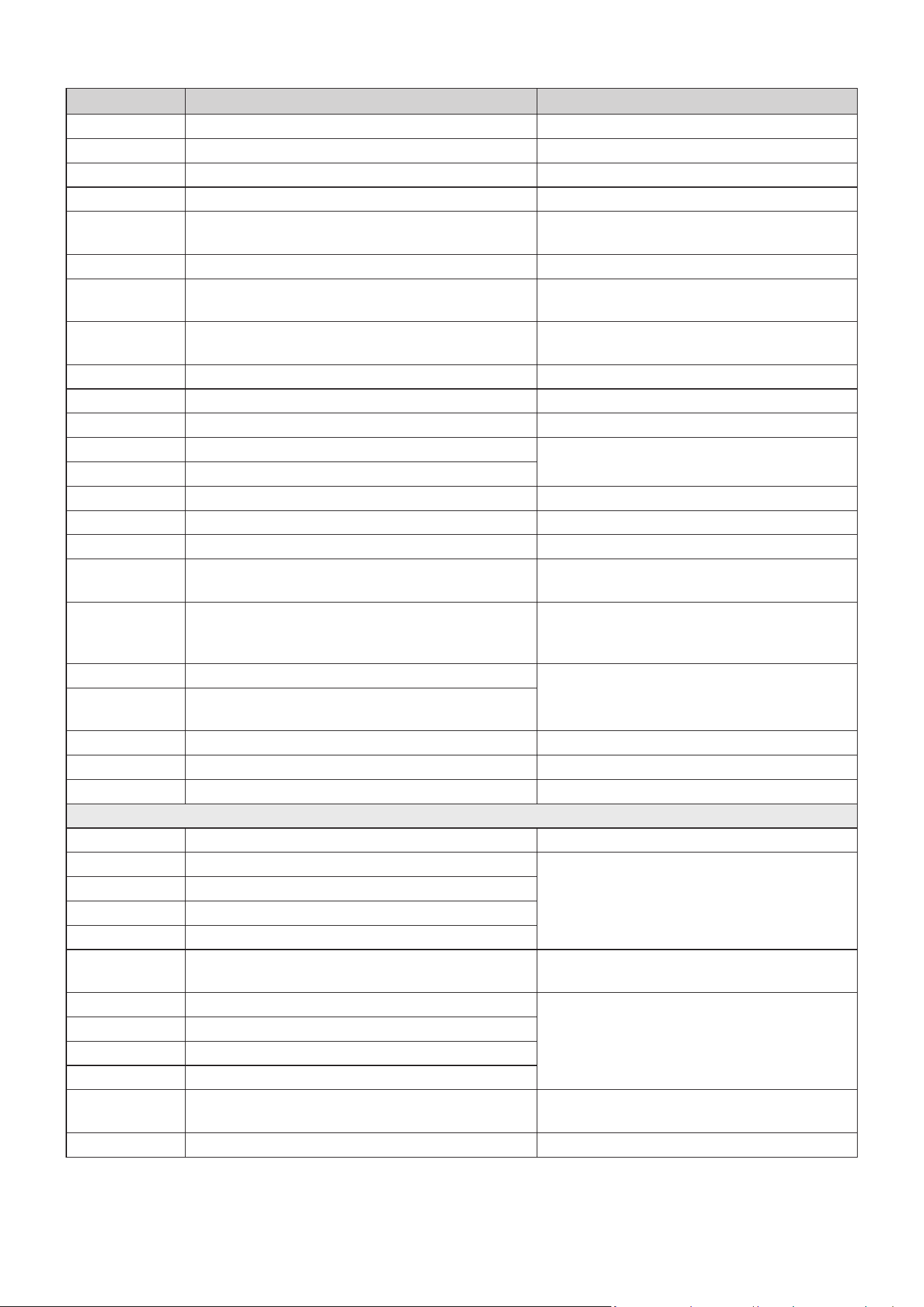
Country Contact Center
Web Site
NORWAY 815 56480 www.samsung.com/no/support
DENMARK 707 019 70 www.samsung.com/dk/support
FINLAND 030-6227 515 www.samsung.com/fi /support
SWEDEN 0771 726 786 www.samsung.com/se/support
POLAND
801-172-678* lub +48 22 607-93-33*
* (koszt połączenia według taryfy operatora)
http://www.samsung.com/pl/support/
HUNGARY 0680SAMSUNG (0680-726-7864) www.samsung.com/hu/support
AUSTRIA
0800-SAMSUNG (0800-7267864)
[Only for Dealers] 0810-112233
www.samsung.com/at/support
SWITZERLAND 0800 726 78 64 (0800-SAMSUNG)
www.samsung.com/ch/support (German)
www.samsung.com/ch_fr/support (French)
CZECH 800 - SAMSUNG (800-726786) www.samsung.com/cz/support
SLOVAKIA 0800 - SAMSUNG (0800-726 786) www.samsung.com/sk/support
CROATIA 072 726 786 www.samsung.com/hr/support
BOSNIA 055 233 999
www.samsung.com/support
MONTENEGRO 020 405 888
SLOVENIA 080 697 267 (brezplačna številka) www.samsung.com/si/support
SERBIA 011 321 6899 www.samsung.com/rs/support
ALBANIA 045 620 202 www.samsung.com/al/support
BULGARIA
*3000 Цена в мрежата
0800 111 31 , Безплатна телефонна линия
www.samsung.com/bg/support
ROMANIA
*8000 (apel in retea)
08008-726-78-64 (08008-SAMSUNG)
Apel GRATUIT
www.samsung.com/ro/support
CYPRUS 8009 4000 only from landline, toll free
www.samsung.com/gr/support
GREECE
80111-SAMSUNG (80111 726 7864) only from land line
(+30) 210 6897691 from mobile and land line
LITHUANIA 8-800-77777 www.samsung.com/lt/support
LATVIA 8000-7267 www.samsung.com/lv/support
ESTONIA 800-7267 www.samsung.com/ee/support
■
CIS
RUSSIA
8-800-555-55-55 (VIP care 8-800-555-55-88)
www.samsung.com/ru/support
BELARUS 810-800-500-55-500
www.samsung.com/support
GEORGIA 0-800-555-555
ARMENIA 0-800-05-555
AZERBAIJAN 0-88-555-55-55
KAZAKHSTAN
8-10-800-500-55-500
(GSM: 7799, VIP care 7700)
www.samsung.com/kz_ru/support
UZBEKISTAN 00-800-500-55-500 (GSM: 7799)
www.samsung.com/support
KYRGYZSTAN 00-800-500-55-500 (GSM: 9977)
TAJIKISTAN 8-10-800-500-55-500 (GSM: 8888)
MONGOLIA 1800-25-55
UKRAINE 0-800-502-000
www.samsung.com/ua/support (Ukrainian)
www.samsung.com/ua_ru/support (Russian)
MOLDOVA 0-800-614-40 www.samsung.com/support
Country Contact Center
Web Site
■
Asia Paci c
CHINA 400-810-5858 www.samsung.com/cn/support
HONG KONG 3698 4698
www.samsung.com/hk/support (Chinese)
www.samsung.com/hk_en/support (English)
MACAU 0800 333 www.samsung.com/support
SINGAPORE 1800 7267864 | 1800-SAMSUNG www.samsung.com/sg/support
AUSTRALIA 1300 362 603 www.samsung.com/au/support
NEW ZEALAND
0800 726 786 (All Product)
0800 6 726 786
www.samsung.com/nz/support
VIETNAM 1800 588 889 www.samsung.com/vn/support
THAILAND
0-2689-3232
1800-29-3232 (Toll free)
www.samsung.com/th/support
MYANMAR +95-1-2399-888 www.samsung.com/mm/support
CAMBODIA
+855-23-993232
1800-20-3232 (Toll free)
www.samsung.com/th/support
LAOS +856-214-17333
MALAYSIA
1800-88-9999
+603-7713 7420 (Overseas contact)
www.samsung.com/my/support
INDONESIA
021-5699-7777
0800-112-8888 (All Product, Toll Free)
www.samsung.com/id/support
PHILIPPINES
1-800-10-726-7864 [ PLDT Toll Free ]
1-800-8-726-7864 [ Globe Landline and Mobile ]
02-422-2111 [ Standard Landline ]
www.samsung.com/ph/support
TAIWAN 0800-329-999 www.samsung.com/tw/support
INDIA
1800 40 SAMSUNG (1800 40 7267864)
(Toll-Free)
www.samsung.com/in/support
NEPAL
16600172667 (Toll Free for NTC Only)
9801572667
BANGLADESH
09612300300
08000300300 (Toll free)
SRI LANKA
+9411SAMSUNG (+94117267864)
+94117540540
+94115900000
■
Middle East
EGYPT
08000-7267864
16580
www.samsung.com/eg/support
IRAN 021-8255 [CE] www.samsung.com/iran/support
ISRAEL *6963 www.samsung.com/il/support/
SAUDI ARABIA (+966) 8002474357 (800 24/7 HELP)
www.samsung.com/sa/home
www.samsung.com/sa_en
PAKISTAN 0800-Samsung (72678) www.samsung.com/pk/support
U.A.E 800-SAMSUNG (800 - 726 7864)
www.samsung.com/ae/support (English)
www.samsung.com/ae_ar/support (Arabic)
OMAN 800-SAM CS (800-72627)
KUWAIT 183-CALL (183-2255)
BAHRAIN 8000-GSAM (8000-4726)
QATAR 800-CALL (800-2255)
TURKEY 444 77 11 www.samsung.com/tr/support

Country Contact Center
Web Site
NORWAY 815 56480 www.samsung.com/no/support
DENMARK 707 019 70 www.samsung.com/dk/support
FINLAND 030-6227 515 www.samsung.com/fi /support
SWEDEN 0771 726 786 www.samsung.com/se/support
POLAND
801-172-678* lub +48 22 607-93-33*
* (koszt połączenia według taryfy operatora)
http://www.samsung.com/pl/support/
HUNGARY 0680SAMSUNG (0680-726-7864) www.samsung.com/hu/support
AUSTRIA
0800-SAMSUNG (0800-7267864)
[Only for Dealers] 0810-112233
www.samsung.com/at/support
SWITZERLAND 0800 726 78 64 (0800-SAMSUNG)
www.samsung.com/ch/support (German)
www.samsung.com/ch_fr/support (French)
CZECH 800 - SAMSUNG (800-726786) www.samsung.com/cz/support
SLOVAKIA 0800 - SAMSUNG (0800-726 786) www.samsung.com/sk/support
CROATIA 072 726 786 www.samsung.com/hr/support
BOSNIA 055 233 999
www.samsung.com/support
MONTENEGRO 020 405 888
SLOVENIA 080 697 267 (brezplačna številka) www.samsung.com/si/support
SERBIA 011 321 6899 www.samsung.com/rs/support
ALBANIA 045 620 202 www.samsung.com/al/support
BULGARIA
*3000 Цена в мрежата
0800 111 31 , Безплатна телефонна линия
www.samsung.com/bg/support
ROMANIA
*8000 (apel in retea)
08008-726-78-64 (08008-SAMSUNG)
Apel GRATUIT
www.samsung.com/ro/support
CYPRUS 8009 4000 only from landline, toll free
www.samsung.com/gr/support
GREECE
80111-SAMSUNG (80111 726 7864) only from land line
(+30) 210 6897691 from mobile and land line
LITHUANIA 8-800-77777 www.samsung.com/lt/support
LATVIA 8000-7267 www.samsung.com/lv/support
ESTONIA 800-7267 www.samsung.com/ee/support
■
CIS
RUSSIA
8-800-555-55-55 (VIP care 8-800-555-55-88)
www.samsung.com/ru/support
BELARUS 810-800-500-55-500
www.samsung.com/support
GEORGIA 0-800-555-555
ARMENIA 0-800-05-555
AZERBAIJAN 0-88-555-55-55
KAZAKHSTAN
8-10-800-500-55-500
(GSM: 7799, VIP care 7700)
www.samsung.com/kz_ru/support
UZBEKISTAN 00-800-500-55-500 (GSM: 7799)
www.samsung.com/support
KYRGYZSTAN 00-800-500-55-500 (GSM: 9977)
TAJIKISTAN 8-10-800-500-55-500 (GSM: 8888)
MONGOLIA 1800-25-55
UKRAINE 0-800-502-000
www.samsung.com/ua/support (Ukrainian)
www.samsung.com/ua_ru/support (Russian)
MOLDOVA 0-800-614-40 www.samsung.com/support
Country Contact Center
Web Site
■
Asia Paci c
CHINA 400-810-5858 www.samsung.com/cn/support
HONG KONG 3698 4698
www.samsung.com/hk/support (Chinese)
www.samsung.com/hk_en/support (English)
MACAU 0800 333 www.samsung.com/support
SINGAPORE 1800 7267864 | 1800-SAMSUNG www.samsung.com/sg/support
AUSTRALIA 1300 362 603 www.samsung.com/au/support
NEW ZEALAND
0800 726 786 (All Product)
0800 6 726 786
www.samsung.com/nz/support
VIETNAM 1800 588 889 www.samsung.com/vn/support
THAILAND
0-2689-3232
1800-29-3232 (Toll free)
www.samsung.com/th/support
MYANMAR +95-1-2399-888 www.samsung.com/mm/support
CAMBODIA
+855-23-993232
1800-20-3232 (Toll free)
www.samsung.com/th/support
LAOS +856-214-17333
MALAYSIA
1800-88-9999
+603-7713 7420 (Overseas contact)
www.samsung.com/my/support
INDONESIA
021-5699-7777
0800-112-8888 (All Product, Toll Free)
www.samsung.com/id/support
PHILIPPINES
1-800-10-726-7864 [ PLDT Toll Free ]
1-800-8-726-7864 [ Globe Landline and Mobile ]
02-422-2111 [ Standard Landline ]
www.samsung.com/ph/support
TAIWAN 0800-329-999 www.samsung.com/tw/support
INDIA
1800 40 SAMSUNG (1800 40 7267864)
(Toll-Free)
www.samsung.com/in/support
NEPAL
16600172667 (Toll Free for NTC Only)
9801572667
BANGLADESH
09612300300
08000300300 (Toll free)
SRI LANKA
+9411SAMSUNG (+94117267864)
+94117540540
+94115900000
■
Middle East
EGYPT
08000-7267864
16580
www.samsung.com/eg/support
IRAN 021-8255 [CE] www.samsung.com/iran/support
ISRAEL *6963 www.samsung.com/il/support/
SAUDI ARABIA (+966) 8002474357 (800 24/7 HELP)
www.samsung.com/sa/home
www.samsung.com/sa_en
PAKISTAN 0800-Samsung (72678) www.samsung.com/pk/support
U.A.E 800-SAMSUNG (800 - 726 7864)
www.samsung.com/ae/support (English)
www.samsung.com/ae_ar/support (Arabic)
OMAN 800-SAM CS (800-72627)
KUWAIT 183-CALL (183-2255)
BAHRAIN 8000-GSAM (8000-4726)
QATAR 800-CALL (800-2255)
TURKEY 444 77 11 www.samsung.com/tr/support

Country Contact Center
Web Site
JORDAN
0800-22273
06 5777444
www.samsung.com/levant/support
SYRIA 962 5777444
LEBANON 1299
IRAQ 80010080
ALGERIA 3004
www.samsung.com/n_africa/supportTUNISIA 80 100 012
MOROCCO 080 100 22 55
■
Africa
SOUTH AFRICA 0860 SAMSUNG (726 7864)
www.samsung.com/support
NAMIBIA 08197267864
ZAMBIA 3434
MAURITIUS 800 2550
REUNION 0262 50 88 80
ANGOLA 917 267 864
ZIMBABWE 0808 0204
MOZAMBIQUE 847267864
NIGERIA 0800-726-7864
www.samsung.com/africa_en/support
GHANA 0800-100-077
COTE D’IVOIRE 8000-00-77
www.samsung.com/africa_fr/supportSENEGAL 800-00-0077
CAMEROON 67095-0077
KENYA 0800 545 545
www.samsung.com/support
UGANDA 0800 300 300
TANZANIA 0800 780 089
RWANDA 9999
BURUNDI 200
DRC 499999
SUDAN 1969

Country Contact Center
Web Site
JORDAN
0800-22273
06 5777444
www.samsung.com/levant/support
SYRIA 962 5777444
LEBANON 1299
IRAQ 80010080
ALGERIA 3004
www.samsung.com/n_africa/supportTUNISIA 80 100 012
MOROCCO 080 100 22 55
■
Africa
SOUTH AFRICA 0860 SAMSUNG (726 7864)
www.samsung.com/support
NAMIBIA 08197267864
ZAMBIA 3434
MAURITIUS 800 2550
REUNION 0262 50 88 80
ANGOLA 917 267 864
ZIMBABWE 0808 0204
MOZAMBIQUE 847267864
NIGERIA 0800-726-7864
www.samsung.com/africa_en/support
GHANA 0800-100-077
COTE D’IVOIRE 8000-00-77
www.samsung.com/africa_fr/supportSENEGAL 800-00-0077
CAMEROON 67095-0077
KENYA 0800 545 545
www.samsung.com/support
UGANDA 0800 300 300
TANZANIA 0800 780 089
RWANDA 9999
BURUNDI 200
DRC 499999
SUDAN 1969