www.lg.com
OWNER’S MANUAL
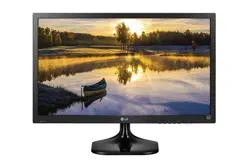
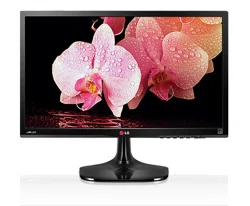
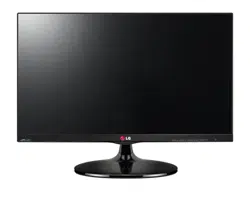
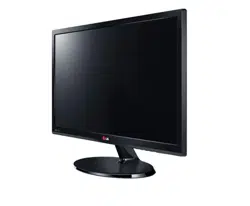
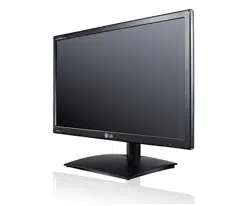
IPS LED MONITOR
22EA63T
23EA63T
Please read this manual carefully before operating
your set and retain it for future reference.
IPS LED MONITOR MODEL
ENGLISH

2
ENG
ENGLISH
TABLE OF CONTENTS
3 Unpacking
4 Partsandbuttons
5 SettinguptheMonitorset
5 - AttachingtheStandBase
5 - DetachingtheStandBase
6 - Mountingonatable
8 - Mountingonawall
9 ConnectingtoaPC
9 - D-SUBconnection
9 - DVI-Dconnection
12 CustomizingSettings
12 - MenuSettings
13 -Picture
14 -Color
15 -Display
16 -Others
17 MYKEYSetting
18 FUNC.Setting
18 -PictureMode
19 -SUPERENERGYSAVING
20 -DUALDISPLAY
20 -DUALWEB
21 -MYKEYSetting
24 22EA63T
25 23EA63T
26 PresetModes(Resolution)
26 Indicator
27 ProperpostureforusingtheMonitorset.
3
ENG
ENGLISH
ASSEMBLING AND PREPARING
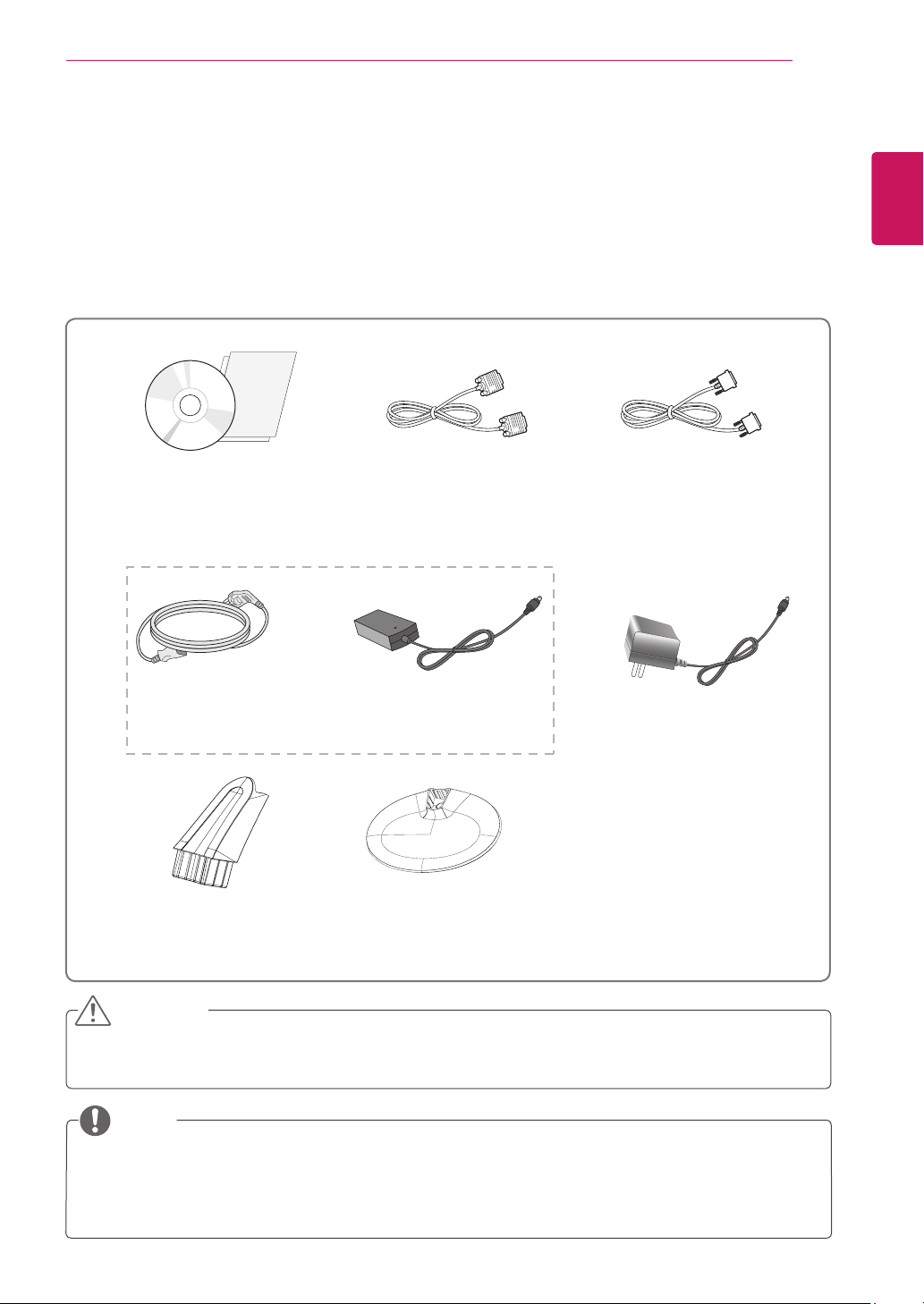
Checkyourproductboxforthefollowingitems.Ifthereareanymissingaccessories,contactthelocal
dealerwhereyoupurchasedyourproduct.Theillustrationsinthismanualmaydifferfromtheactualproduct
andaccessories.
Donotuseanyunapprovedaccessoriestoensurethesafetyandproductlifespan.
Anydamagesorinjuriesbyusingunapprovedaccessoriesarenotcoveredbythewarranty.
Theaccessoriessuppliedwithyourproductmayvarydependingonthemodel.
Productspecificationsorcontentsinthismanualmaybechangedwithoutpriornoticeduetoupgrade
ofproductfunctions.
(Thiscableisnotincludedinall
countries.)
(Thiscableisnotincluded
inallcountries.)
(Dependingonthecountry) (Dependingonthecountry)
5
ENG
ENGLISH
ASSEMBLING AND PREPARING
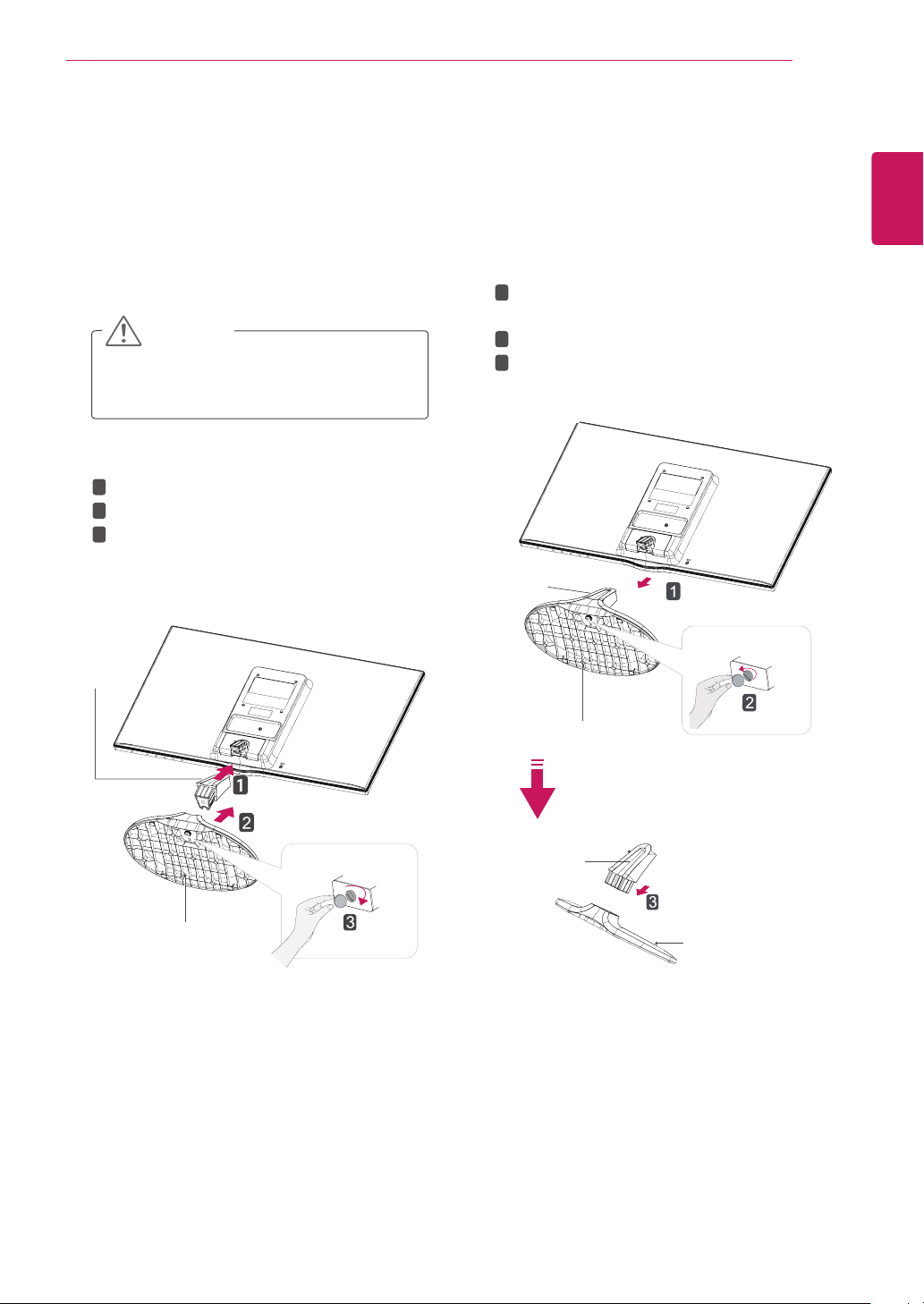
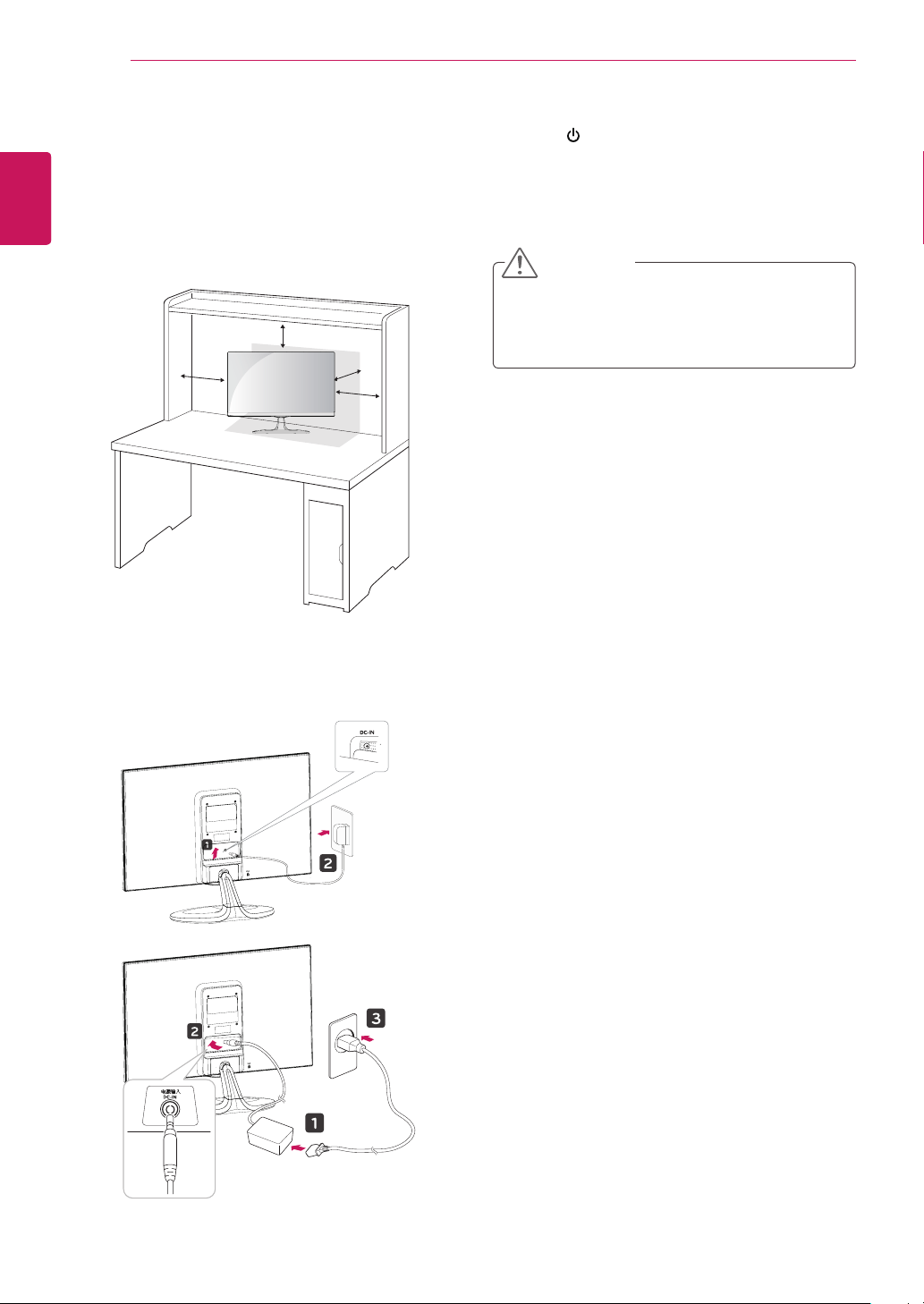
Attachthetothemonitorset.
Attachthe.
Tightenthescrewtotherightwithacoin.
1
PlacetheMonitorsetwiththescreenside
downonaflatandcushionedsurface.
Layafoammatorsoftprotectivecloth
onthesurfacetoprotectthescreenfrom
damage.
2
1
PlacetheMonitorsetwiththescreenside
downonaflatandcushionedsurface.
Pullouttheand
fromthemonitorset.
Turnthescrewtotheleftwithacoin.
Pulloutthe.
2
6
ENG
ENGLISH
ASSEMBLING AND PREPARING
1
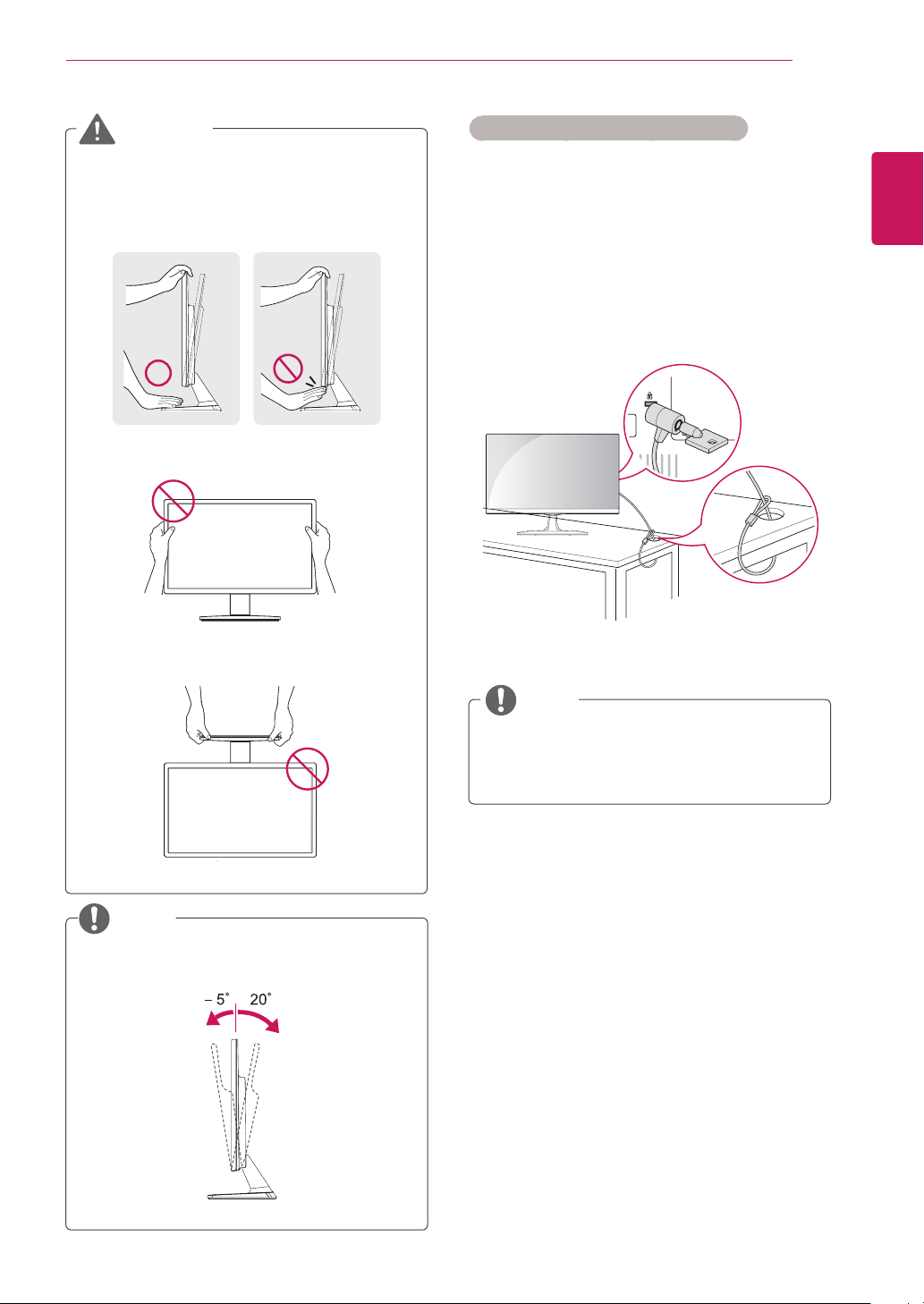
LiftandtilttheMonitorsetintoitsupright
positiononatable.
Leavea10cm(minimum)spacefromthewall
forproperventilation.
2
ConnecttheAC-DCAdapterandPowerCord
toawalloutlet.
3
Press (Power)buttononthebottomswitch
paneltoturnthepoweron.
10 cm
10 cm
10 cm
10 cm
Unplugthepowercordbeforemovingthe
Monitortoanotherlocation.Otherwiseelectric
shockmayoccur.
7
ENG
ENGLISH
ASSEMBLING AND PREPARING
UsingtheKensingtonsecuritysystem
TheKensingtonsecuritysystemconnectoris
locatedatthebackoftheMonitorset.Formore
informationofinstallationandusing,refertothe
manualsuppliedwiththeKensingtonsecurity
systemorvisit
http://www.kensington.com
.
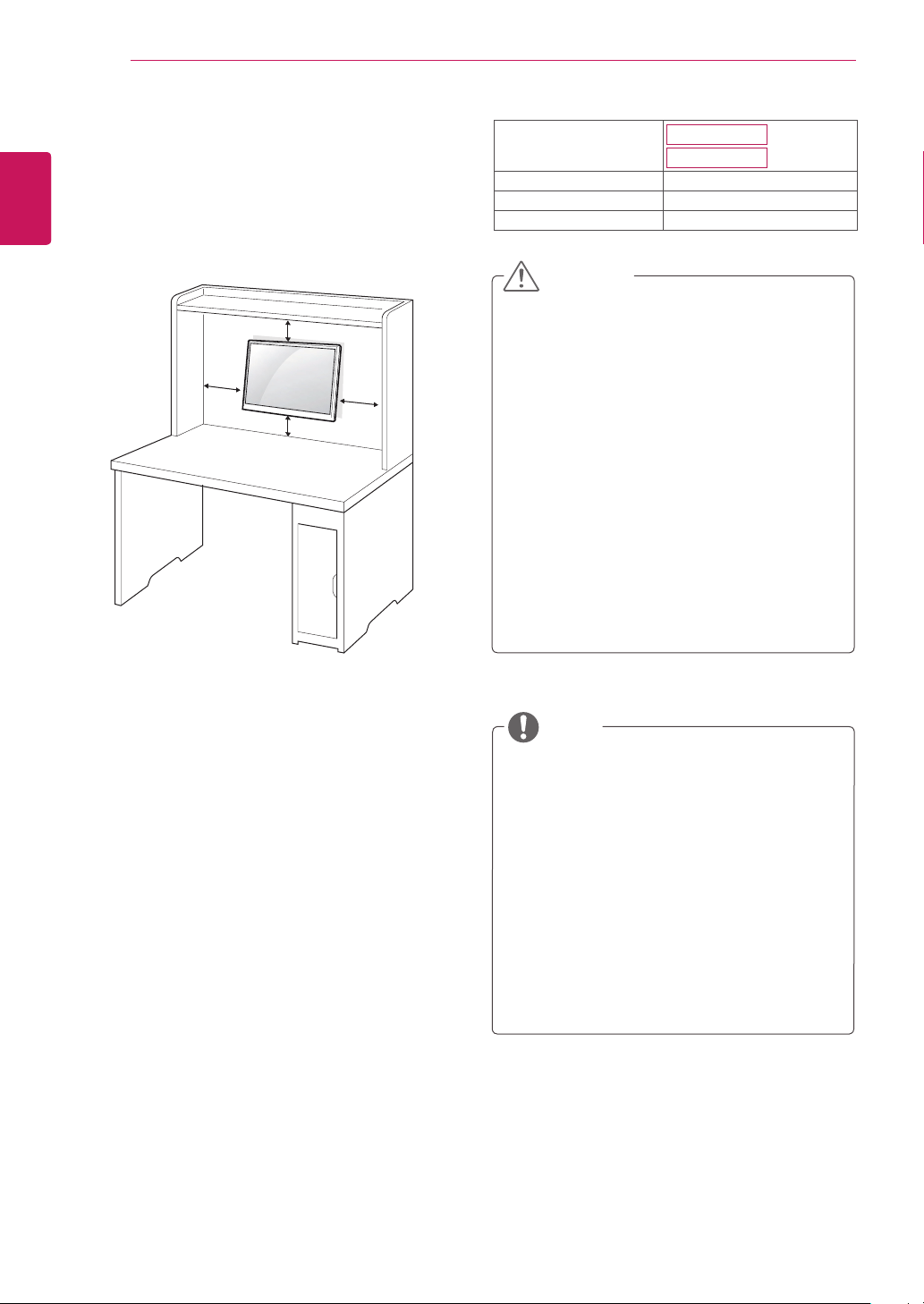
ConnecttheKensingtonsecuritysystemcable
betweentheMonitorsetandatable.
TheKensingtonsecuritysystemisoptional.
Youcanobtainitfrommostelectronicsstores.
Whenyouadjusttheangle,donotholdthe
bottomoftheMonitorsetframeasshownon
thefollowingillustration,asmayinjureyour
fingers.
Donottouchorpressthescreenwhen
adjustingtheangleofthemonitor.
Donotholdthissetlikebelowpicture.Monitor
screencandetachfromstandbaseandinjure
yourbody.
Tiltfrom+20to-5degreesupordowntoadjust
theangleoftheMonitorsettosuityourview.
8
ENG
ENGLISH
ASSEMBLING AND PREPARING
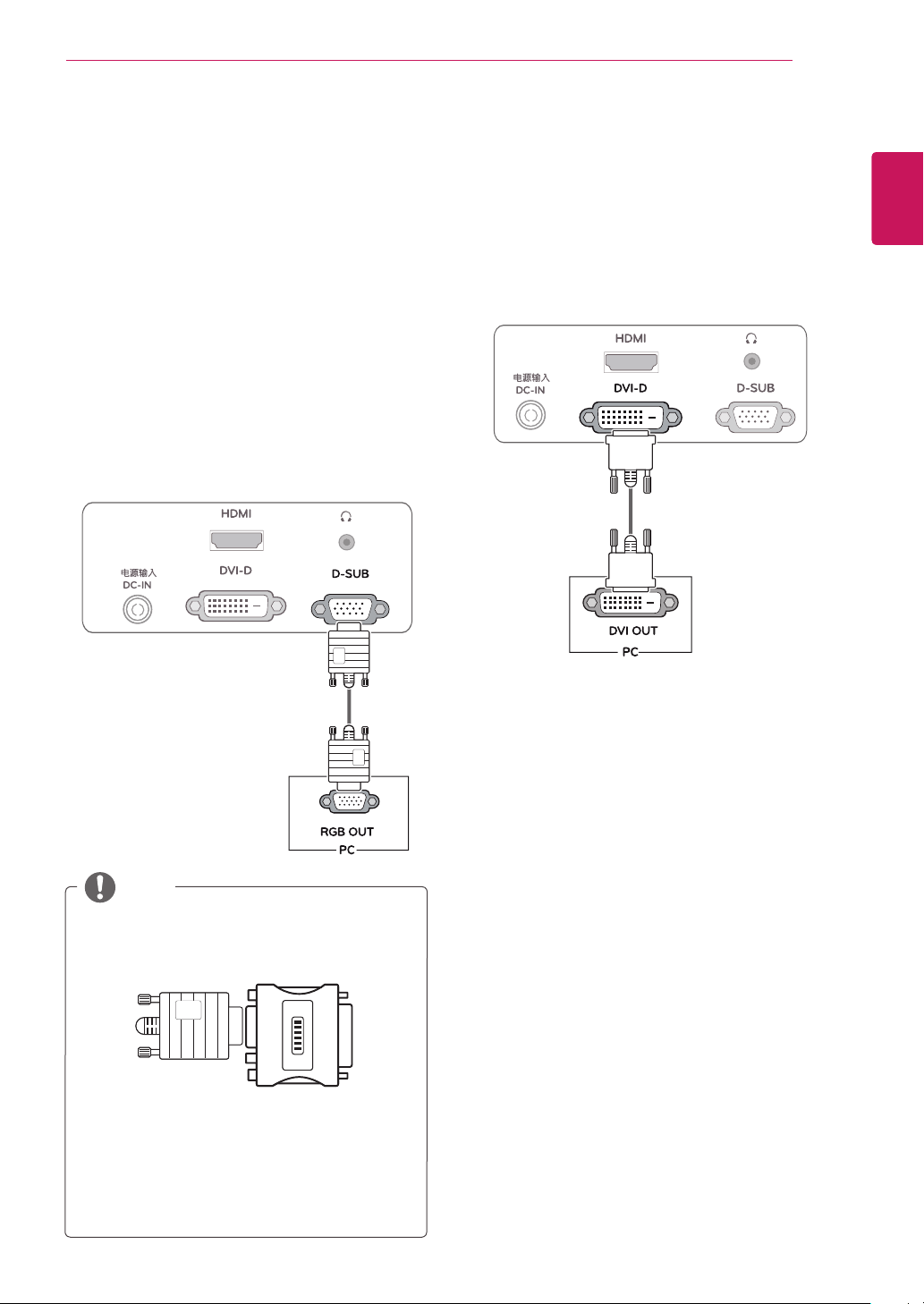
Forproperventilation,allowaclearanceof10cm
oneachsideandfromthewall.Detailed
instructionsareavailablefromyourdealer,seethe
optionalTiltWallMountingBracketInstallationand
SetupGuide.
IfyouintendtomounttheMonitorsettoawall,
attachWallmountinginterface(optionalparts)to
thebackoftheset.
WhenyouinstalltheMonitorsetusingawall
mountinginterface(optionalparts),attachit
carefullysoitwillnotdrop.
1
Please,Usethescrewandwallmountinterface
inaccordancewithVESAStandards.
2
Ifyouusescrewlongerthanstandard,the
monitormightbedamagedinternally.
3
Ifyouuseimproperscrew,theproductmightbe
damagedanddropfrommountedposition.In
thiscase,LGElectronicsisnotresponsiblefor
it.
4
VESAcompatible.
5
PleaseuseVESAstandardasbelow.
784.8mm(30.9inch)andunder
*WallMountPadThickness:2.6mm
*Screw:Φ4.0mmxPitch0.7mmx
Length10mm
787.4mm(31.0inch)andabove
*PleaseuseVESAstandardwallmountpad
andscrews.
10 cm
10 cm
10 cm
10 cm
Disconnectthepowercordfirst,andthen
moveorinstalltheMonitorset.Otherwise
electricshockmayoccur.
IfyouinstalltheMonitorsetonaceilingor
slantedwall,itmayfallandresultinsevere
injury.
UseonlyanauthorizedLGwallmount
andcontactthelocaldealerorqualified
personnel.
Donotovertightenthescrewsasthismay
causedamagetotheMonitorsetandvoid
yourwarranty.
Useonlyscrewsandwallmountsthat
meettheVESAstandard.Anydamages
orinjuriesbymisuseorusinganimproper
accessoryarenotcoveredbythewarranty.
UsethescrewsthatarelistedontheVESA
standardscrewspecifications.
Thewallmountkitwillincludeaninstallation
manualandnecessaryparts.
Thewallmountbracketisoptional.Youcan
obtainadditionalaccessoriesfromyourlocal
dealer.
Thelengthofscrewsmaydifferdepending
onthewallmount.Besuretousetheproper
length.
Formoreinformation,refertothe
instructionssuppliedwiththewallmount.
22EA63T
23EA63T
75x75
M4
4
9
ENG
ENGLISH
USING THE MONITOR SET
YourMonitorsetsupportsPlug&Play*.
*Plug&Play:APCrecognizesaconnected
devicethatusersconnecttoaPCandturn
on,withoutdeviceconfigurationoruser
intervention.
TransmitsanalogvideofromyourPCtothe
Monitorset.ConnectthePCandtheMonitorset
withthesuppliedD-sub15pinsignalcableas
showninthefollowingillustrations.
ForAppleMacintoshuse,aseparateplug
adapterisneededtochangethe15pin
highdensity(3row)D-SUBVGAconnector
onthesuppliedcabletoa15pin2row
connector.
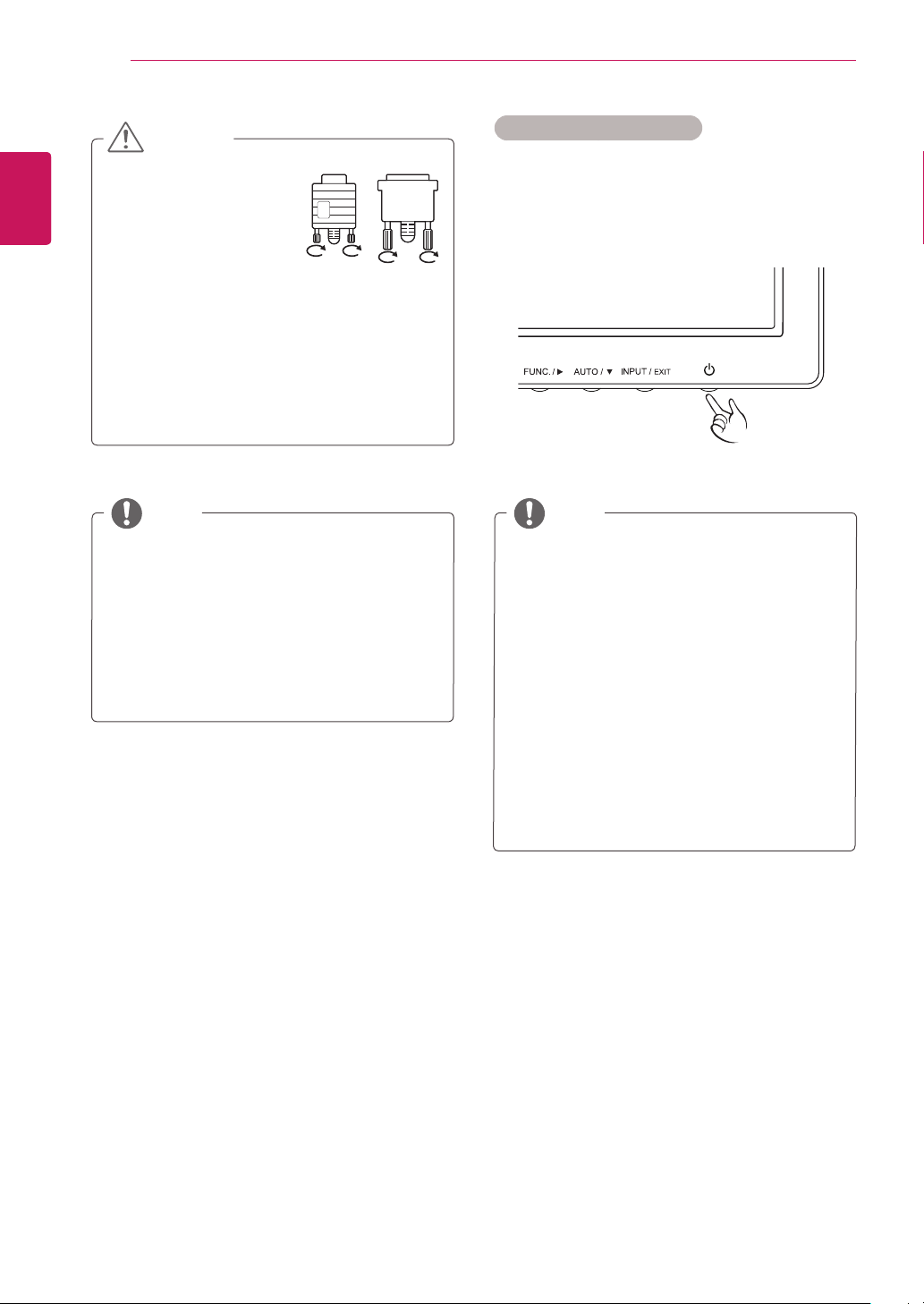
WhenusingaD-Subsignalinputcable
connectorforMacintosh
TransmitsadigitalvideosignalfromyourPCto
theMonitorset.ConnectthePCandtheMonitor
setwithaDVIcableasshowninthefollowing
illustrations.
10
ENG
ENGLISH
USING THE MONITOR SET
WhenyouwanttousetwoPCinourMonitor,
pleaseconnectthesignalcable(D-SUB/
DVI-D/HDMI)respectivelyinMonitorset.
IfyouturntheMonitorsetonwhileitiscold,
thescreenmayflicker.Thisisnormal.
Somered,green,orbluespotsmayappear
onthescreen.Thisisnormal.
Thisfunctionprovidestheuserwithoptimal
displaysettings.Whentheuserconnects
themonitorforthefirsttime,thisfunction
automaticallyadjuststhedisplaytooptimal
settingsforindividualinputsignals.(Only
supportedinAnalogMode)
Whenyouencounterproblemssuchas
blurryscreen,blurredletters,screenflicker
ortiltedscreenwhileusingthedeviceor
afterchangingscreenresolution,pressthe
AUTOfunctionbuttontoimproveresolution.
(OnlysupportedinAnalogMode)
Connectthesignal
inputcableandtighten
itbyturningthescrews
clockwise.
Donotpressthescreenwithyourfingerfor
alongtimeasthismayresultintemporary
distortiononthescreen.
Avoiddisplayingafixedimageonthe
screenforalongperiodoftimetoprevent
imageburn.Useascreensaverifpossible.
SelfImageSettingFunction
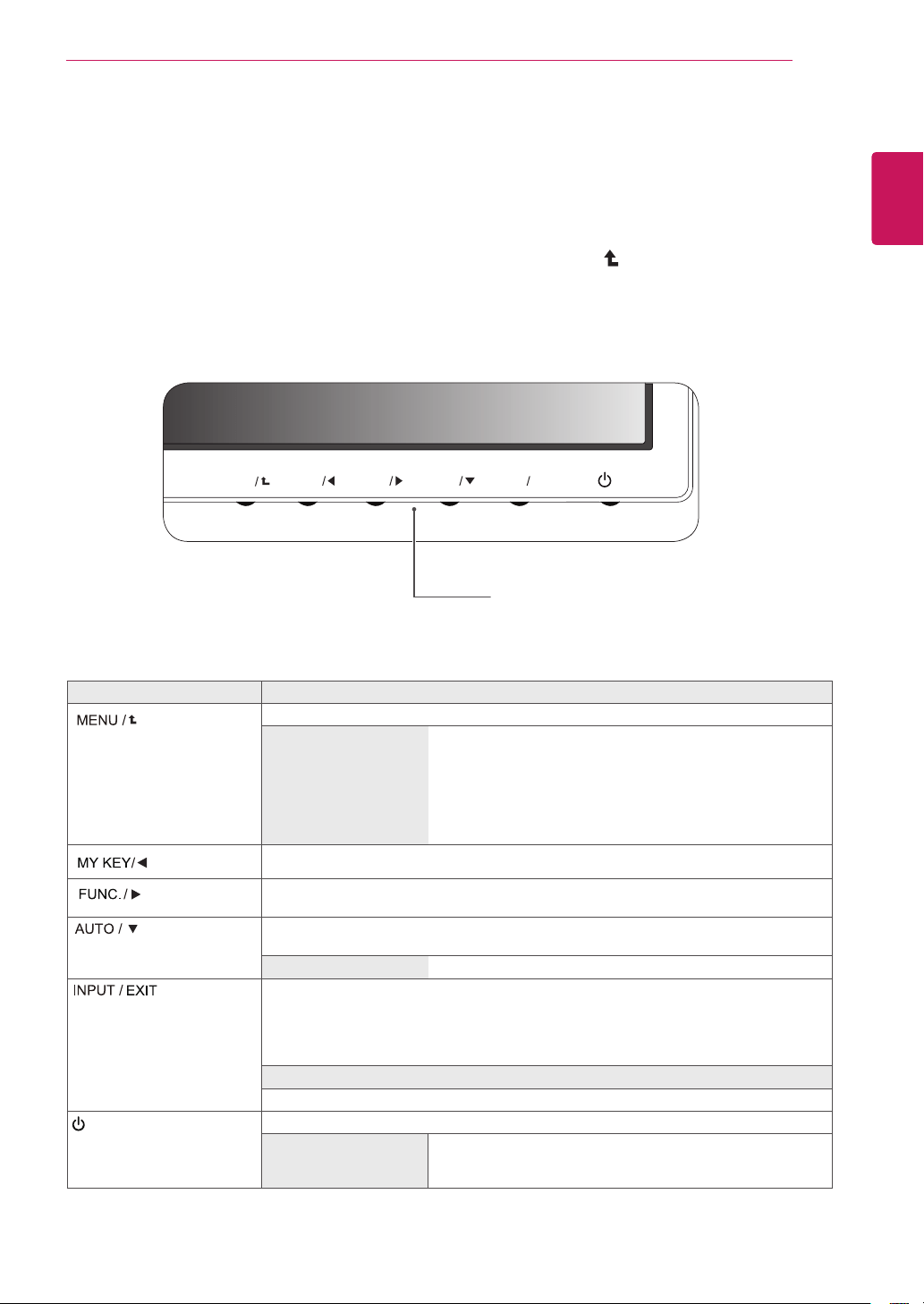
Pressthepowerbuttononthebottompanelto
turnthepoweron.Whenmonitorpoweristurned
on,the""Functionisexecuted
automatically.(OnlysupportedinAnalogMode)
11
ENG
ENGLISH
CUSTOMIZING SETTINGS
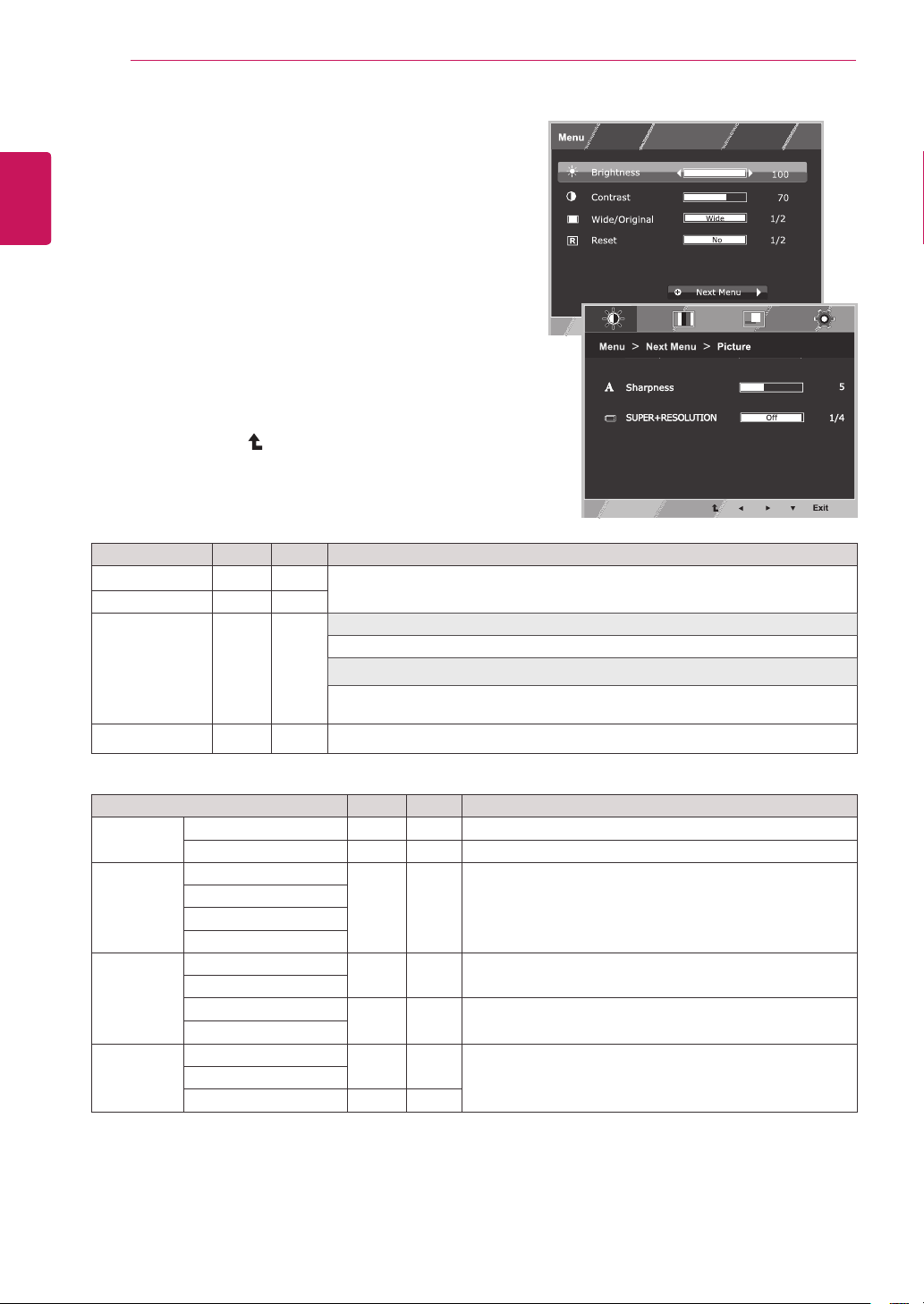
1
PressthedesiredbuttononthebottomoftheMonitorset.
2
ChangethevalueofthemenuitembypressingthebuttonsonthebottomoftheMonitorset.
Toreturntotheuppermenuorsetothermenuitems,usetheuparrow(
)button.
3
SelecttoleavetheOSDmenu.
MENU
MY KEY
AUTO
INPUT
EXIT
FUNC.
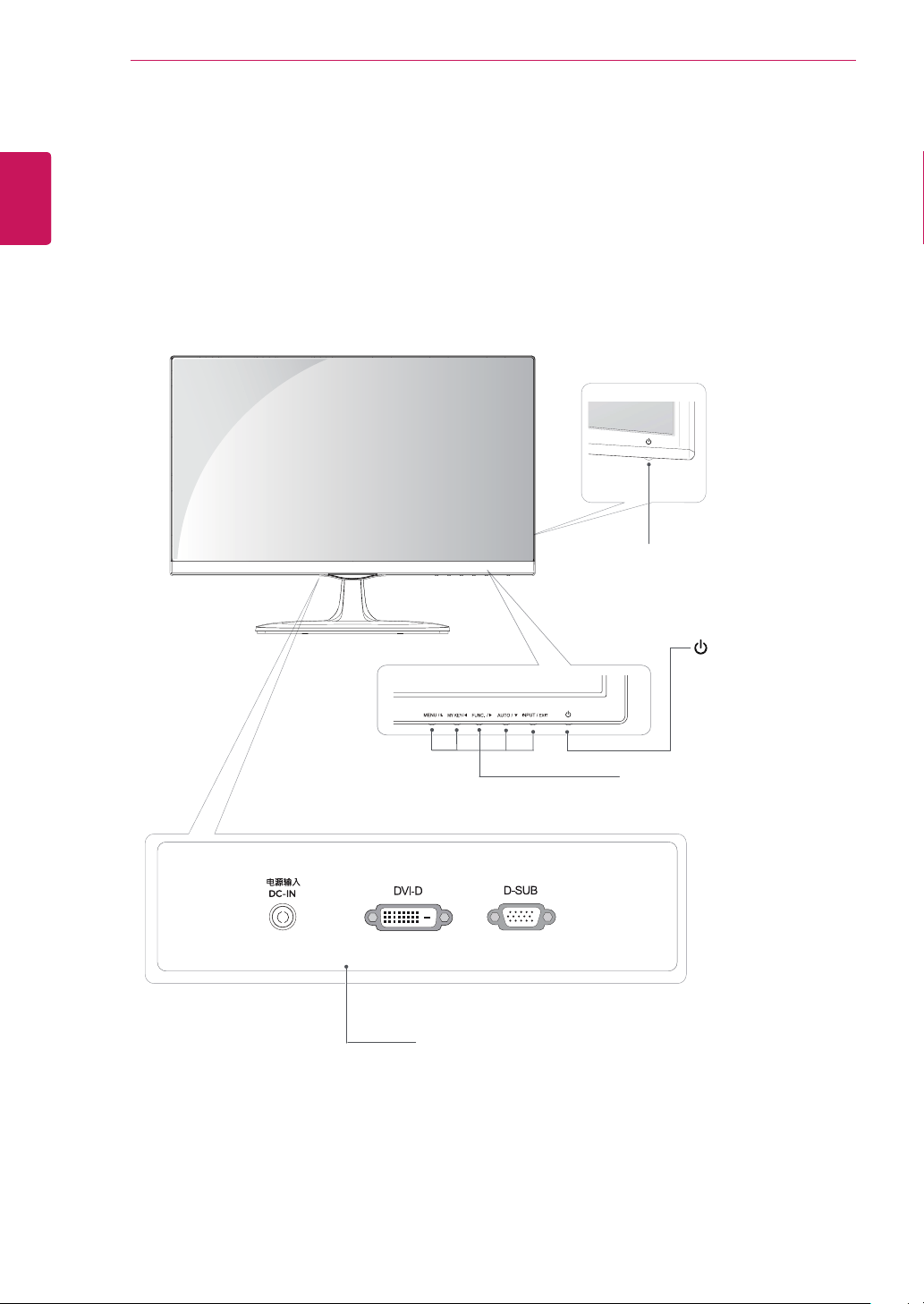
Accessesthemainmenus.(Seep.12)
Thisfunctionallowsyoutolockthecurrentcontrolsettings,so
thattheycannotbeinadvertentlychanged.
PressandholdtheMENUbuttonforseveralseconds.
Themessage"OSDLOCKED"shouldappear.
YoucanunlocktheOSDcontrolsatanytimebypushing
theMENUbuttonforseveralseconds.Themessage"OSD
UNLOCKED"shouldappear.
UsethisbuttontoenterMYKEYmenu.Formoreinformation.(Seep.17)
UsethisbuttontoenterPictureMode,SUPERENERGYSAVING,DUALDISPLAY,
DUALWEB,MYKEYSettingmenus.(Seep.18)
Whenadjustingyourdisplaysettings,alwayspresstheAUTObuttonontheMONITOR
SETUPOSD.(OnlysupportedinAnalogMode)
1920x1080
Youcanchoosetheinputsignal.
• Whentwoinputsignalsareconnected,youcanselecttheinputsignal(D-SUB/DVI)
youwant.
• Whenonlyonesignalisconnected,itisautomaticallydetected.Thedefaultsettingis
D-SUB.
ExittheOSD(OnScreenDisplay).
(PowerButton)
Turnsthepoweronoroff.
Thepowerindicatorstaysredifthedisplayisrunningproperly
(OnMode).IfthedisplayisinSleepMode,thepowerindicator
blinksred.
12
ENG
ENGLISH
CUSTOMIZING SETTINGS
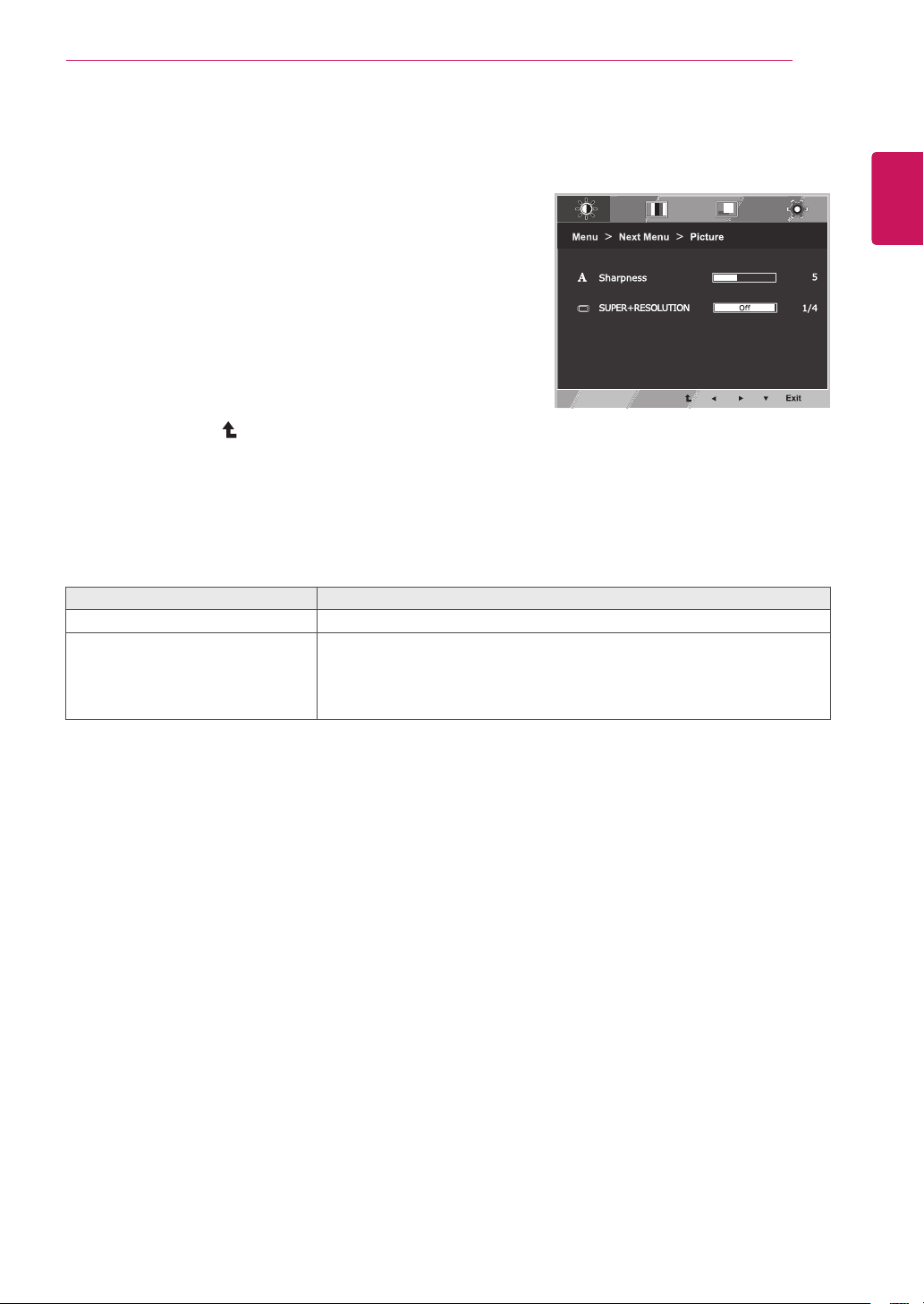
1
PressbuttononthebottomoftheMonitorset
todisplaytheOSD.
2
Settheoptionsbypressingthe◄or►or▼
buttons.
3
Selectthe""buttontoenterthemore
optionsettings.
4
SelecttoleavetheOSDmenu.
Toreturntotheuppermenuorsetothermenuitems,
usetheuparrow(
)button.
Eachoptionisexplainedbelow.
Toadjusttheclearnessofthescreen.
TosettheSUPER+RESOLUTION
Tocustomizethecolorofthescreen
Toadjustthepositionofthescreen
Toimprovetheclarityandstabilityofthescreen
Tocustomizethescreenstatusforauser'soperating
environment
D-SUB(Analogsignal)input.
DVI-D(Digitalsignal)input.
Toadjustthebrightness,contrastofthescreen
Switchtofullscreenmodeaccordingtoinputimagesignal.
Changetheinputimagesignalratiotooriginal.
*ThisfunctionworksonlyifinputresolutionislowerthanMonitorsetratio(16:9).
Restoreallfactorydefaultsettings.Pressthe
◄
,
buttonstoresetimmediately.
13
ENG
ENGLISH
CUSTOMIZING SETTINGS
1
PressbuttononthebottomoftheMonitorset
todisplaytheOSD.
2
Selectthe""buttontoenterthemore
optionsettings.
3
Entertobypressingthe▼button.
4
Settheoptionsbypressingthe◄or►or▼
buttons.
5
SelecttoleavetheOSDmenu.
Toreturntotheuppermenuorsetothermenuitems,
usetheuparrow(
)button.
Eachoptionisexplainedbelow.
Toadjusttheclearnessofthescreen.
Theimageisinevitablydamagedduringthedataprocessingtoenlargethe
image.SUPER+Resolutioncanmaintaintheresolutiontoshowtheclear
videoimageevenwiththeenlargementwiththepicturequalityimprovement
technologythatadjuststheblurredfocusandroughoutlineduetothe
enlargement.
14
ENG
ENGLISH
CUSTOMIZING SETTINGS
1
PressbuttononthebottomoftheMonitorset
todisplaytheOSD.
2
Selectthe""buttontoenterthemore
optionsettings.
3
Selectbypressingthe►button.
4
Entertobypressingthe▼button.
5
Settheoptionsbypressingthe◄or►or▼
buttons.
6
SelecttoleavetheOSDmenu.
Toreturntotheuppermenuorsetothermenuitems,
usetheuparrow(
)button.
Eachoptionisexplainedbelow.
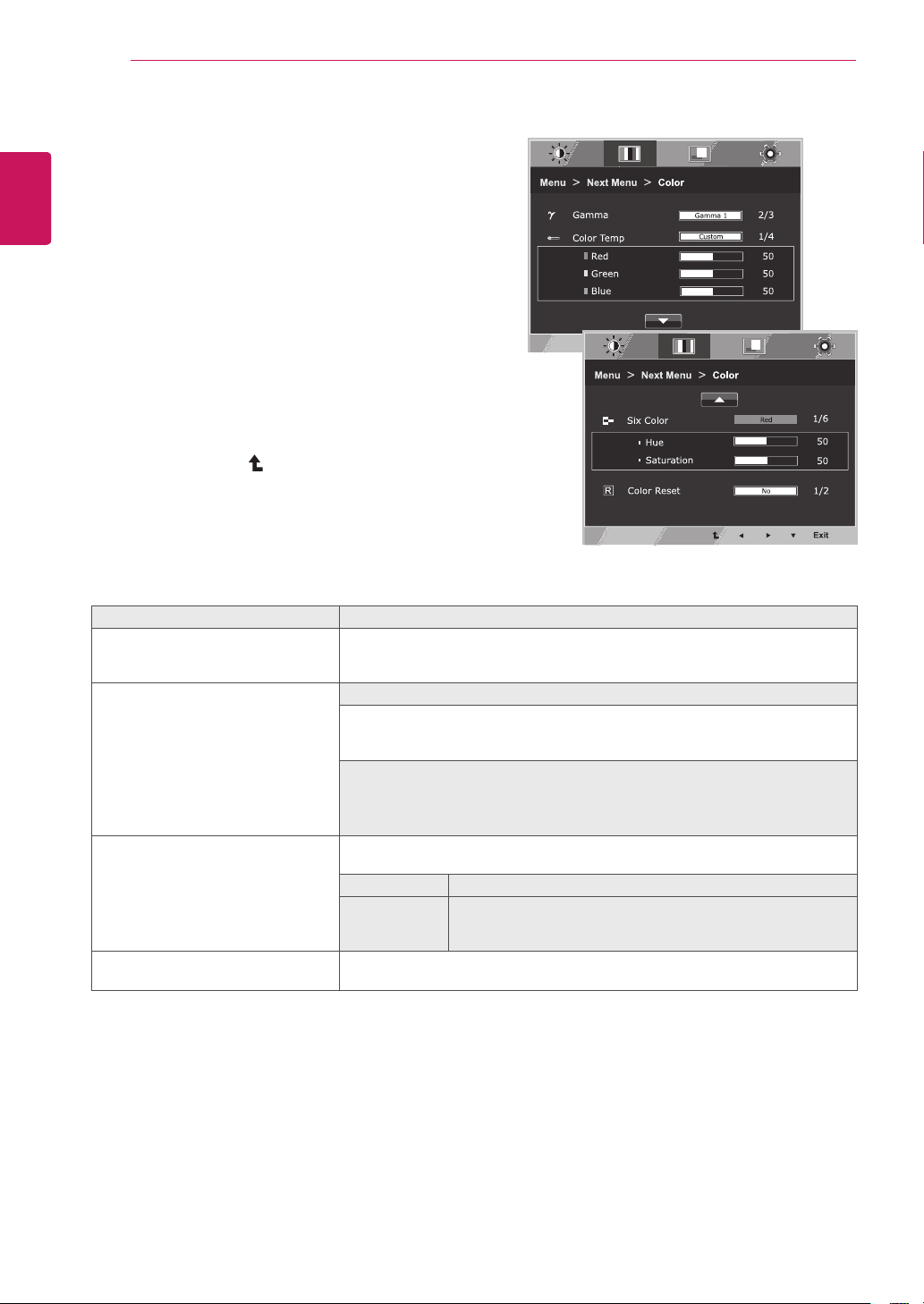
Setyourowngammavalue.:Gamma0,Gamma1,Gamma2onthemonitor,
highgammavaluesdisplaywhitishimagesandlowgammavaluesdisplay
blackishimages.
Setyourownredcolorlevels.
Setyourowngreencolorlevels.
Setyourownbluecolorlevels.
Selectthescreencolor.
Setthescreentowarmcolortemperature(morered).
Setthescreentomediumcolortemperature.
Setthescreentocoolcolortemperature(moreblue).
Setsandstoresthehueandsaturationforsixcolors(Red/Green/Blue/Cyan/
Magenta/Yellow)tosatisfythecolorrequirementsofauser.
Adjuststhescreenhue.
Adjuststhecolorsharpnessonthescreen.Lowervaluesmake
thecolorsharpnessweakerandcolorslighterwhilehigher
valuesmakethecolorsharpnessstrongerandcolorsdark.
Resetsthecolorsettingstothefactorydefaultsettingsforthecurrentinput
device.
15
ENG
ENGLISH
CUSTOMIZING SETTINGS
1
PressbuttononthebottomoftheMonitorset
todisplaytheOSD.
2
Selectthe""buttontoenterthemore
optionsettings.
3
Selectbypressingthe►button.
4
Entertobypressingthe▼button.
5
Settheoptionsbypressingthe◄or►or▼
buttons.
6
SelecttoleavetheOSDmenu.
Toreturntotheuppermenuorsetothermenuitems,
usetheuparrow(
)button.
Eachoptionisexplainedbelow.
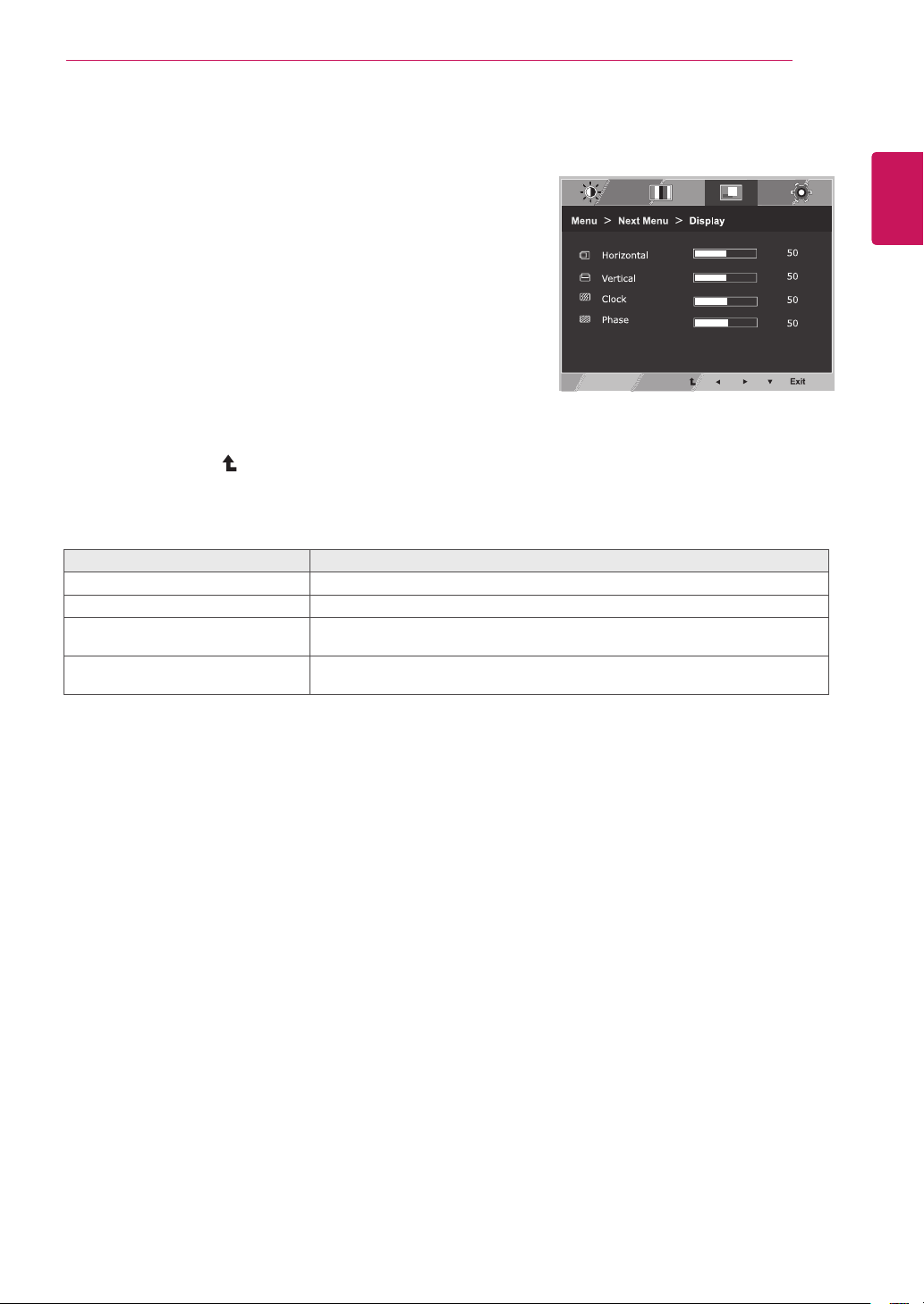
Tomoveimageleftandright.
Tomoveimageupanddown.
Tominimizeanyverticalbarsorstripesvisibleonthescreenbackground.The
horizontalscreensizewillalsochange.
Toadjustthefocusofthedisplay.Thisitemallowsyoutoremoveanyhorizontal
noiseandclearorsharpentheimageofcharacters.
16
ENG
ENGLISH
CUSTOMIZING SETTINGS
1
PressbuttononthebottomoftheMonitorset
todisplaytheOSD.
2
Selectthe""buttontoenterthemore
optionsettings.
3
Selectbypressingthe►button.
4
Entertobypressingthe▼button.
5
Settheoptionsbypressingthe◄or►or▼
buttons.
6
SelecttoleavetheOSDmenu.
Toreturntotheuppermenuorsetothermenuitems,
usetheuparrow(
)button.
Eachoptionisexplainedbelow.
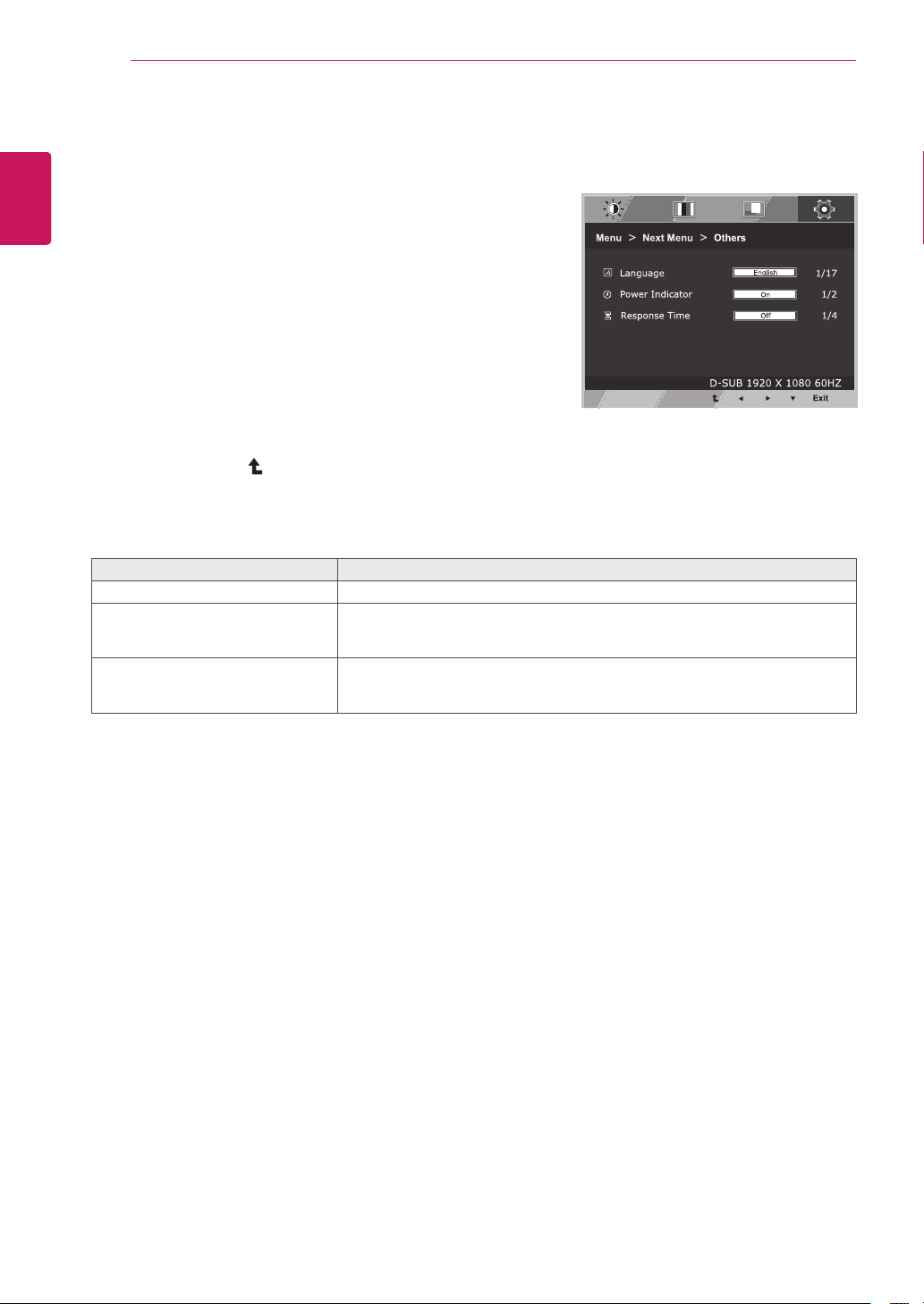
Tochoosethelanguageinwhichthecontrolnamesaredisplayed.
Usethisfunctiontosetthepowerindicatoronthebottomsideofthemonitorto
OnorOff.IfyousetOff,itwillgooff.
IfyousetOnatanytime,thepowerindicatorwillautomaticallybeturnedon.
Youcansetaresponsetimefordisplayedpicturesbasedonthespeedofthe
screen.Foranormalenvironment,itisrecommendedthatyouuse'Off'.Fora
fast-movingpicture,itisrecommendedthatyouuse'High'.
17
ENG
ENGLISH
CUSTOMIZING SETTINGS
1
PressbuttononthebottomoftheMonitor
settodisplaytheOSD.
2
Settheoptionsbypressingthe◄or►or▼buttons.
3
SelecttoleavetheOSDmenu.
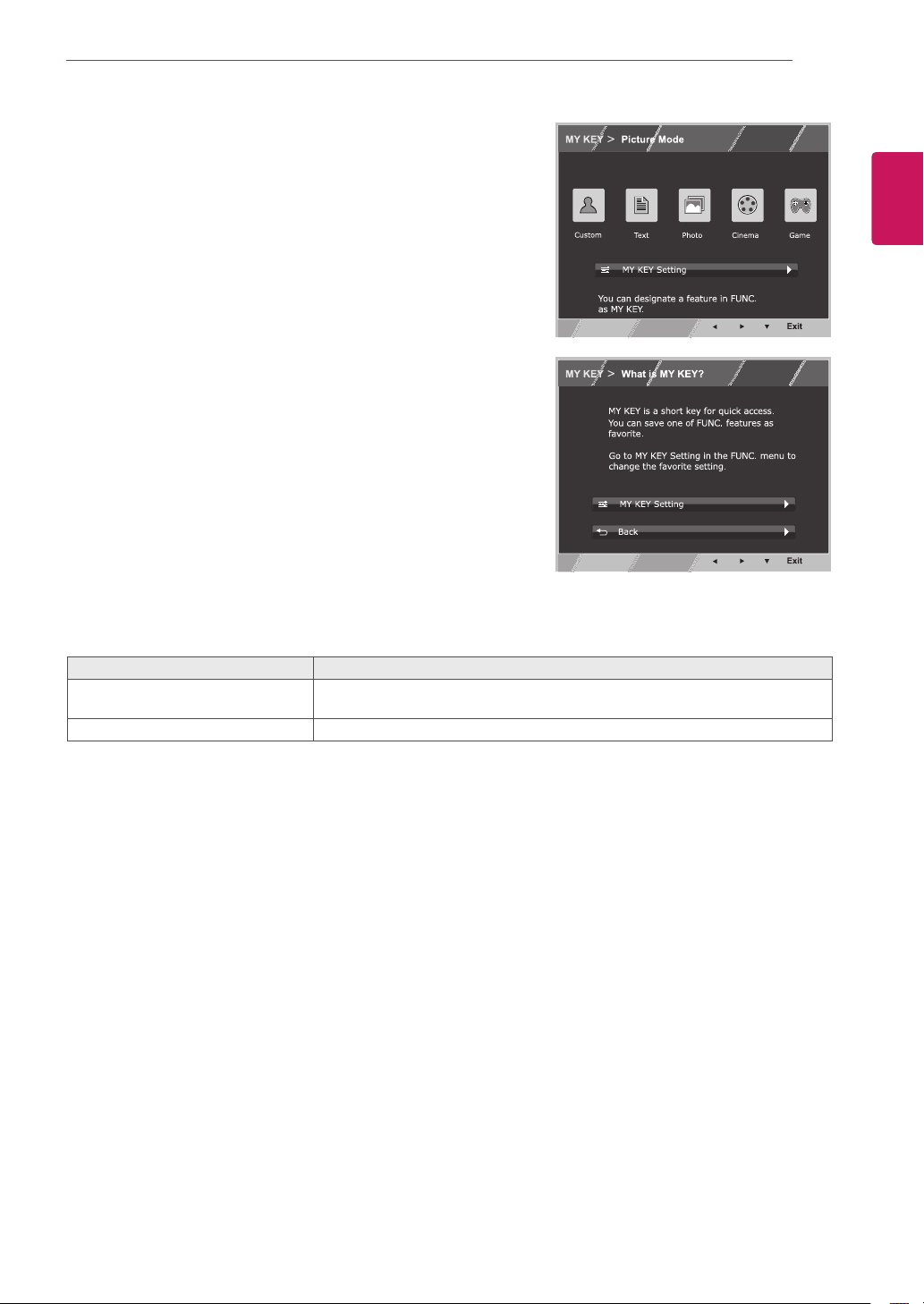
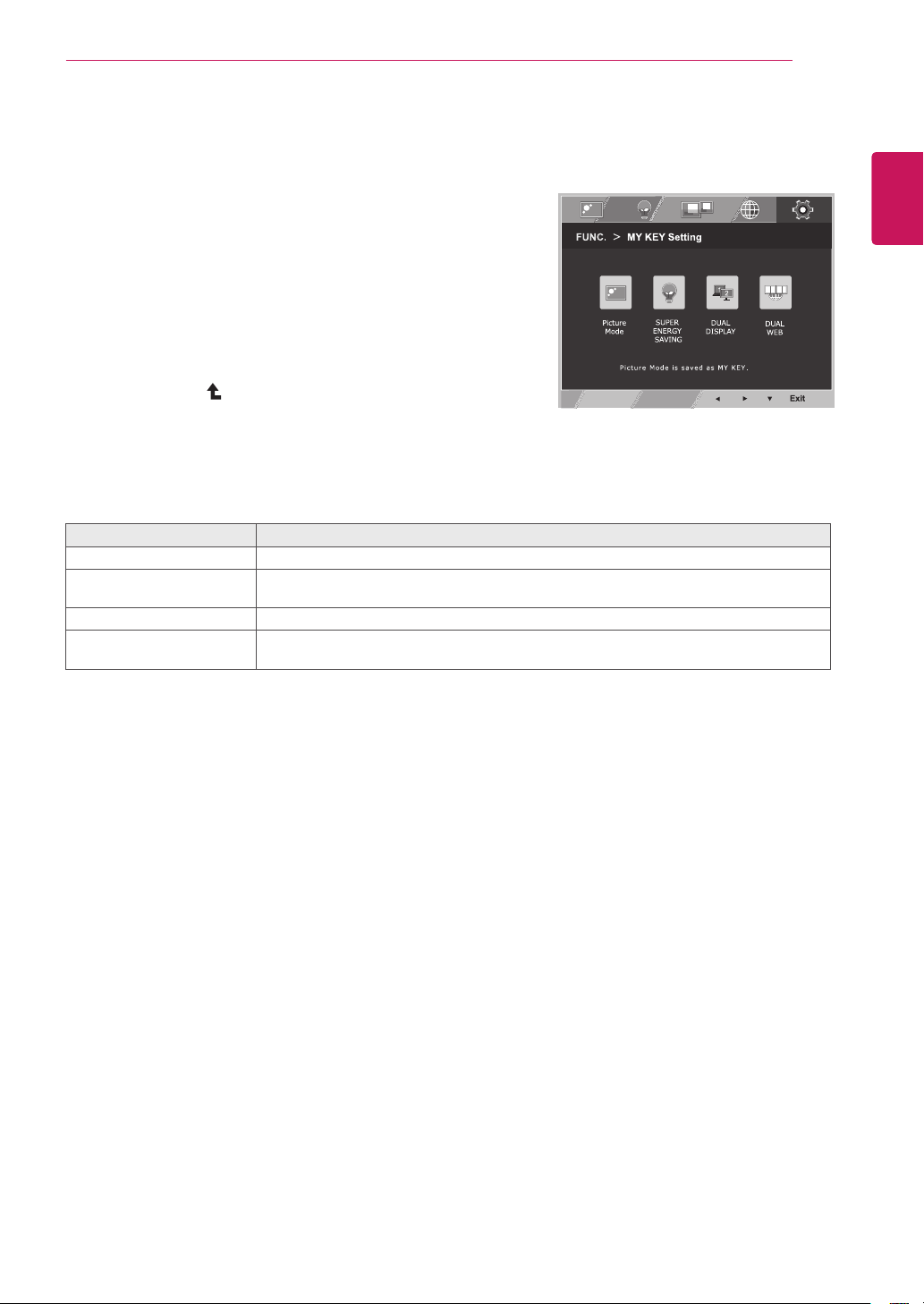
MYKEYisshortkey.YoucanselectoneofFUNC.(PictureMode,SUPER
ENERGYSAVING,DUALDISPLAY,DUALWEB)asyourfavoritefeature.
SelectBacktoreturnMYKEYmenu.
Eachoptionisexplainedbelow.
18
ENG
ENGLISH
CUSTOMIZING SETTINGS
1
Press
buttonon thebottomoftheMonitorset
todisplaythe
OSD.
2
Entertobypressingthe▼button.
3
Settheoptionsbypressingthe◄or►buttons.
4
SelecttoleavetheOSDmenu.Toreturntothe
uppermenuorsetothermenuitems,usetheup
arrow(
)button.
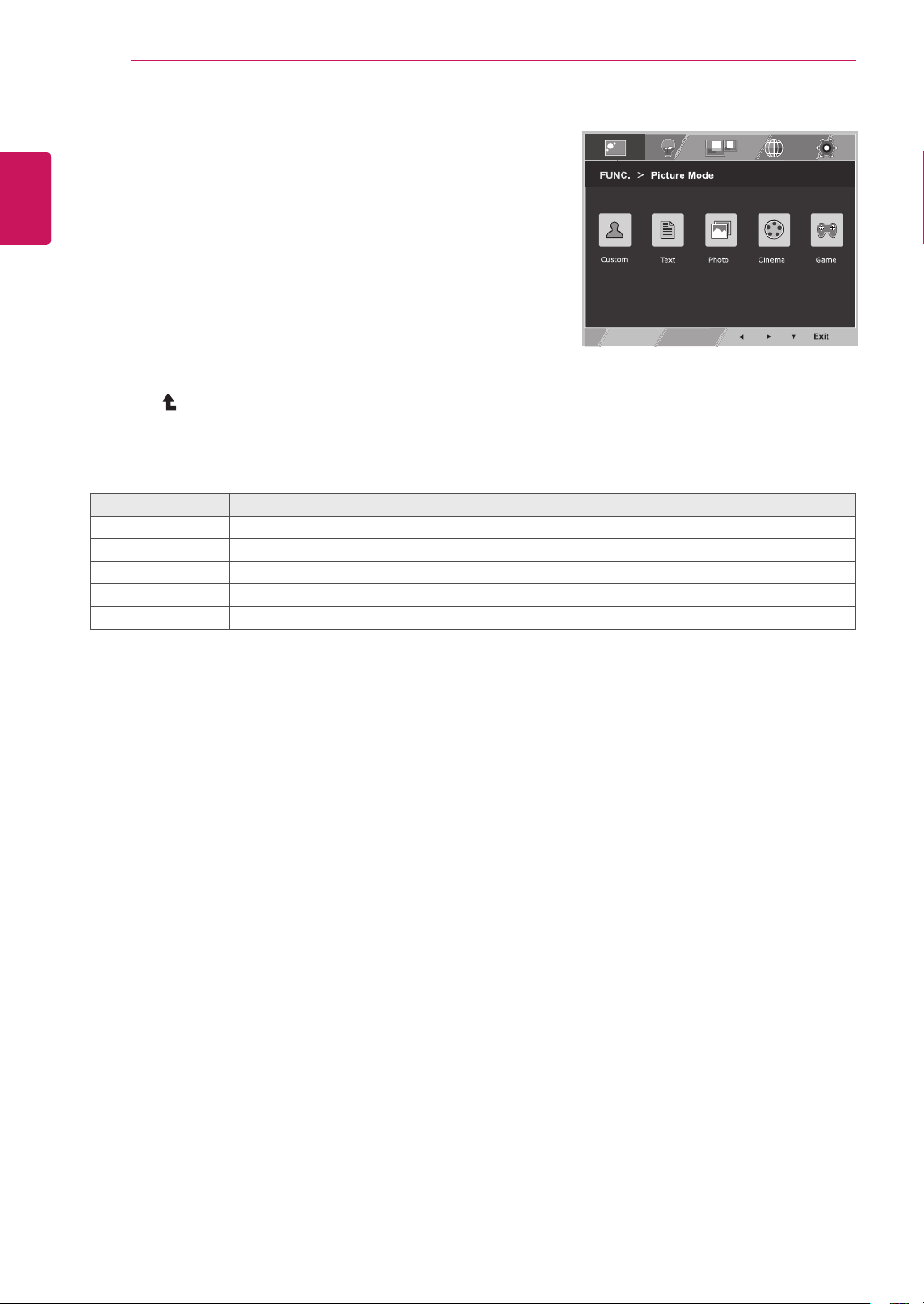
Itisamodethattheusercanadjusteachelement.ItcanadjustthecolormodeoftheMainMenu.
Itisamodethatthescreenisadjustedtothebestforthetextworks.
Itisamodethatthescreenisadjustedtothebesttoviewpictures.
Itisamodethatthescreenisadjustedtothebesttoviewthevideos.
Itisamodethatthescreenisadjustedtothebesttoplayagame.
Eachoptionisexplainedbelow.
19
ENG
ENGLISH
CUSTOMIZING SETTINGS
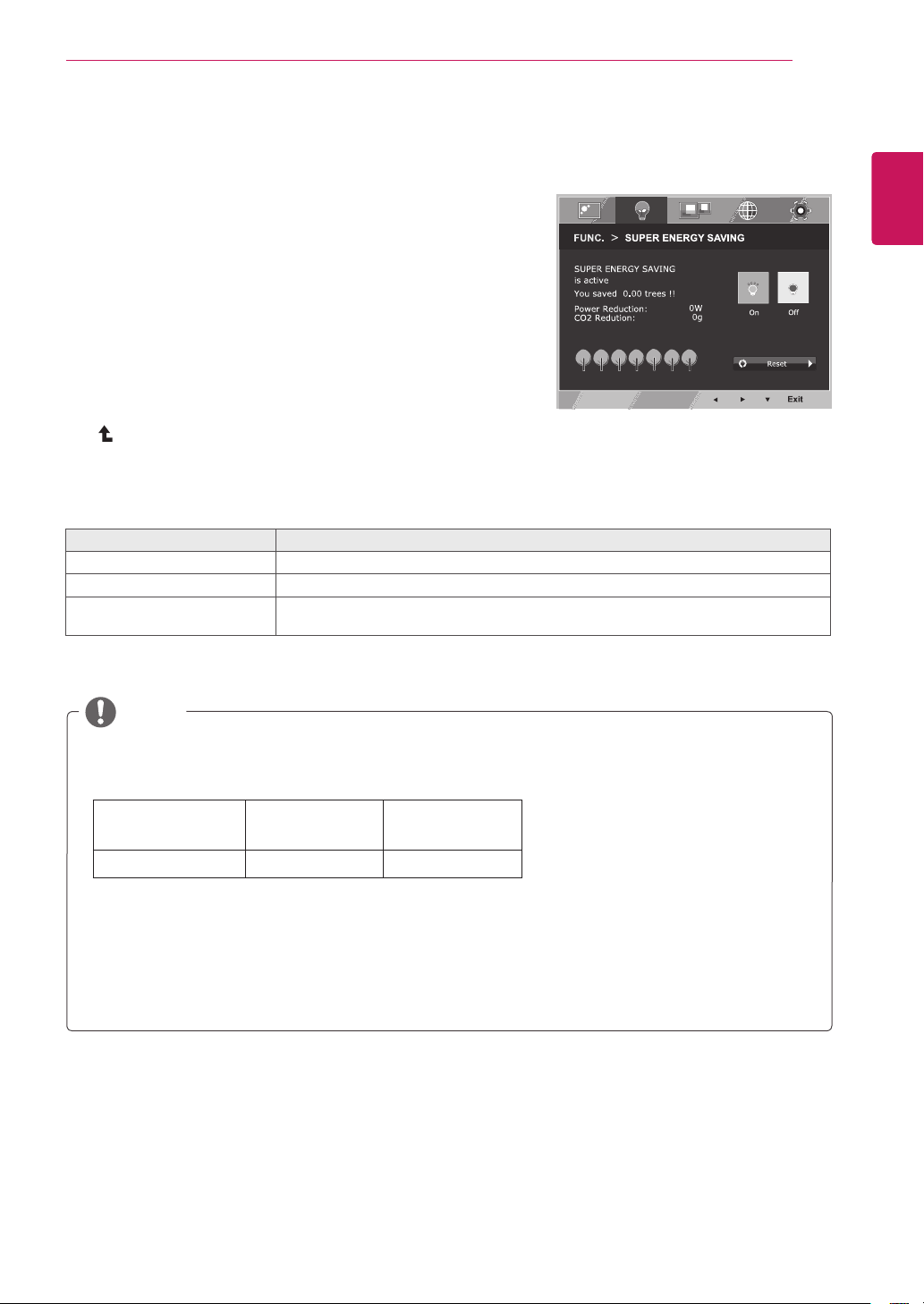
:Howmuchpowerissavedwhileusingthemonitor.
:ChangetheTOTALPOWERREDUCTIONtoCO2.
546mm
(21.5inch)
584mm
(23inch)
SUPERSAVING 5W/h 6W/h
SavingDatadependsonthePanel.So,thosevaluesshouldbedifferentfromeachpanelandpanel
vendor.
LGcalculatedthesevaluesbyusing
(includingbroadcastvideo:IEC62087)
SUPERSAVINGreferstohowmuchpowercanbesavedusingtheSUPERENERGYSAVING
function.
1
PressbuttononthebottomoftheMonitorsetto
displaytheOSD.
2
Selectbypressingthe►
button.
3
Entertobypressingthe▼
button.
4
Settheoptionsbypressingthe◄or►or▼buttons.
5
SelecttoleavetheOSDmenu.Toreturntothe
uppermenuorsetothermenuitems,usetheuparrow
(
)button.
Eachoptionisexplainedbelow.
EnablesSUPERENERGYSAVINGyoucansaveenergywiththisenergy-efficientfunction
DisablesSUPERENERGYSAVING.
ResetsthevaluesoftotalenergyconsumptionreductionandCO2emissionreduction
estimates.
20
ENG
ENGLISH
CUSTOMIZING SETTINGS
Whenmonitorgoestopowersavingmodewithpcsavingoption->Pressinganybutton->OSD
appearandusershouldpressdualbutton->Usercanbringbacktonormalmode.
1
PressbuttononthebottomoftheMonitorset
todisplaytheOSD.
2
Selectbypressingthe►button.
3
Entertobypressingthe▼button.
4
Settheoptionsbypressingthe◄or►buttons.
5
Selectto leavetheOSDmenu.Toreturntothe
uppermenuorsetothermenuitems,usetheup
arrow(
)button.
*Beforeusingbelowfunctions,pleaseinstallDUALSMARTSOLUTIONprogramme.
Eachoptionisexplainedbelow.
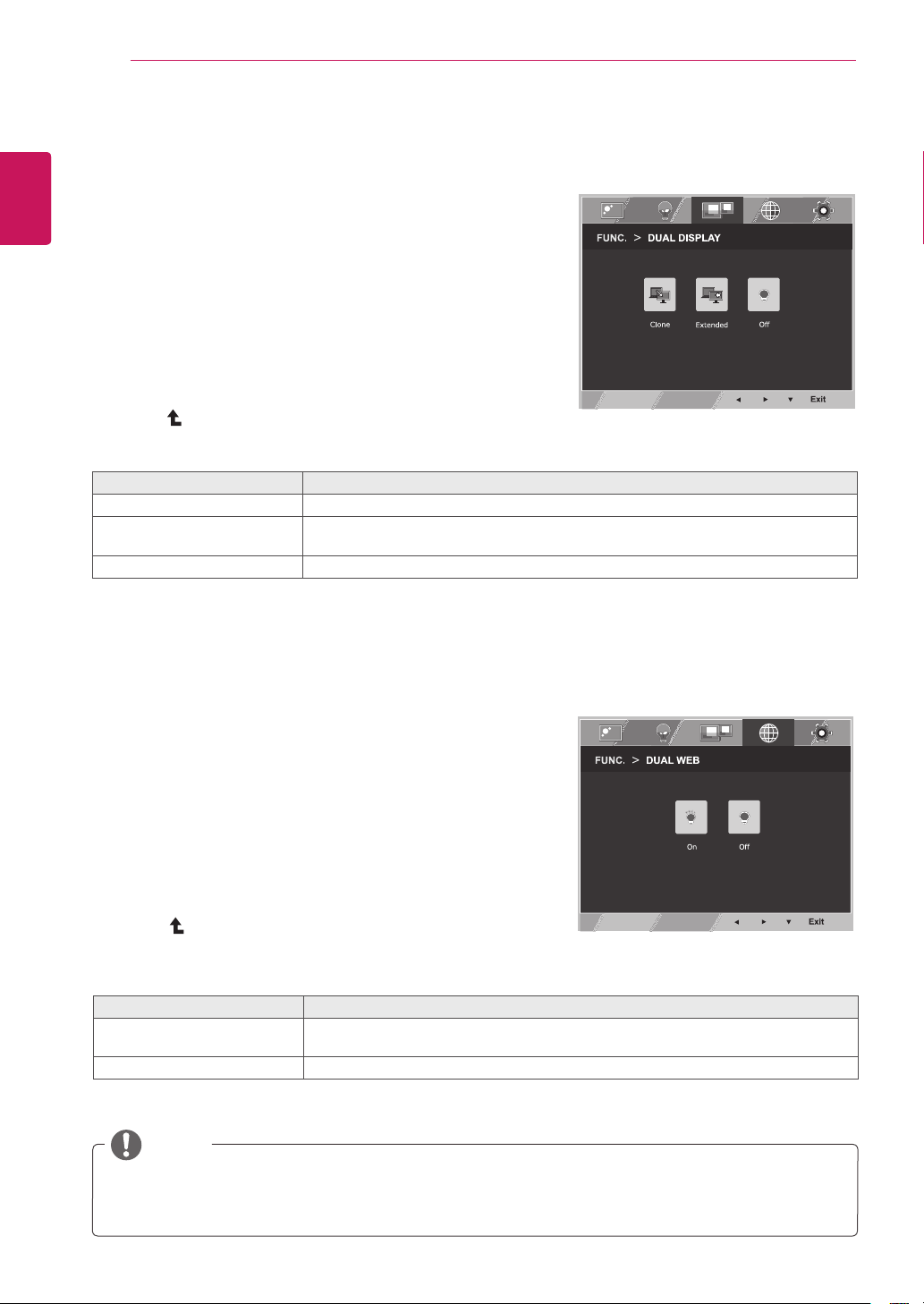
ByselectingClone,usercanusesecondarymonitorasdonemodeofprimarymonitor.
ByselectingExtended,usercanusesecondarymonitorasextendedmodeofprimary
monitor.
IfselectOff,DUALDISPLAYisoff.
1
PressbuttononthebottomoftheMonitorset
todisplaytheOSD.
2
Selectbypressingthe►button.
3
Entertobypressingthe▼button.
4
Settheoptionsbypressingthe◄or►buttons.
5
Selectto leavetheOSDmenu.Toreturntothe
uppermenuorsetothermenuitems,usetheup
arrow(
)button.
*Beforeusingbelowfunctions,pleaseinstallDUALSMARTSOLUTIONprogramme.
Eachoptionisexplainedbelow.
Helpusertobrowsewebefficientlybydividinginhalf.Helptoarrangeandmove
windowsonscreen.Helpusertocontroldividedwindowsratio.
IfselectOff,DUALWEBisoff.
21
ENG
ENGLISH
CUSTOMIZING SETTINGS
Eachoptionisexplainedbelow.
1
PressbuttononthebottomoftheMonitor
settodisplaytheOSD.
2
Selectbypressingthe►button.
3
Entertobypressingthe▼button.
4
Settheoptionsbypressingthe◄or►buttons.
5
Selectto leavetheOSDmenu.Toreturnto
theuppermenuorsetothermenuitems,use
theuparrow (
)button.
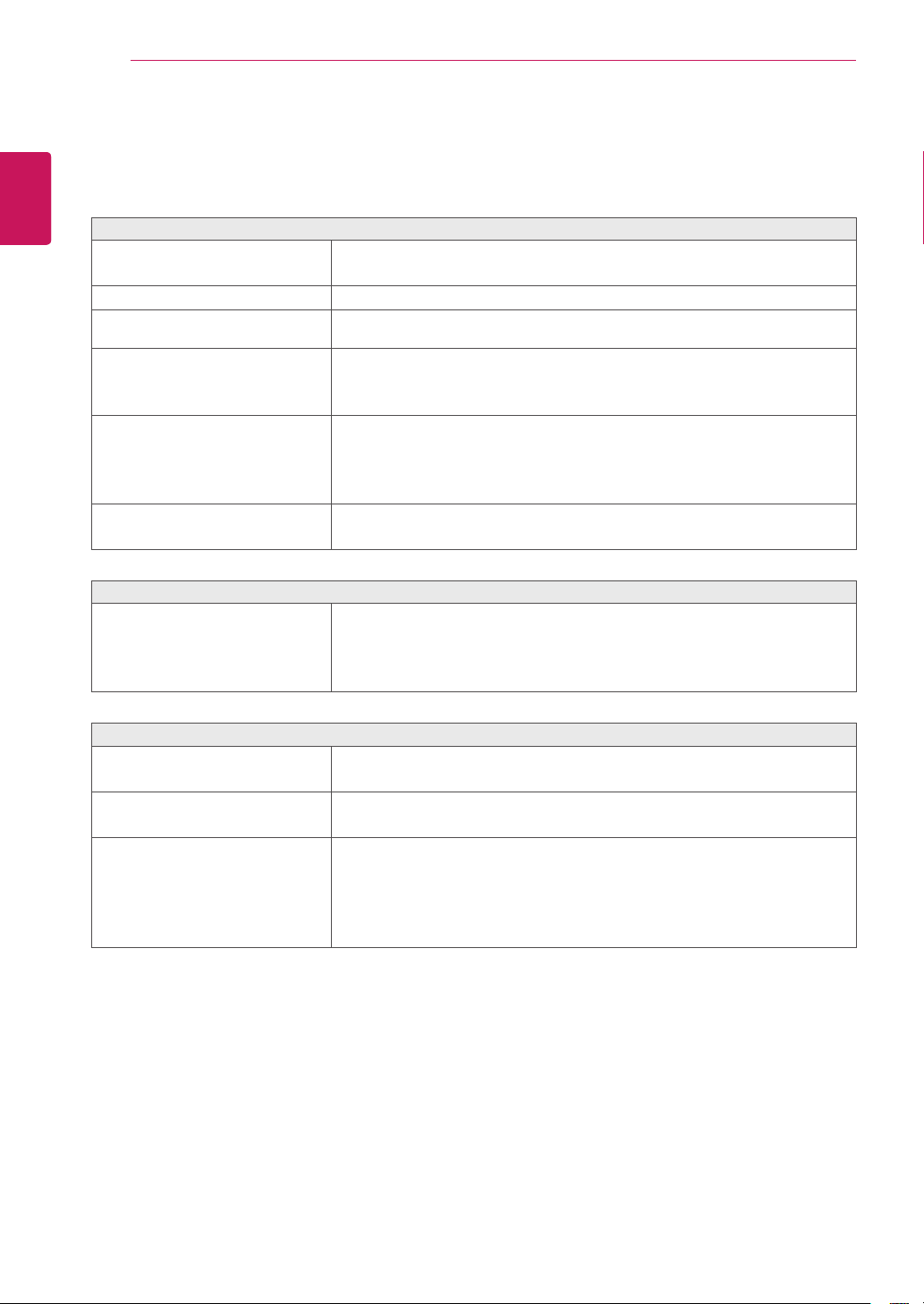
PictureModeadjusttheMonitorsetforthebestpictureappearance.
EnablesSUPERENERGYSAVINGyoucansaveenergywiththisenergy-effcient
function.
UsercanuseCloneorExtendedinanothermonitor.
Helpusertobrowsewebefficientlybydividinginhalfandsomeotherconveniencein
browsingdualpages.
22
ENG
ENGLISH
TROUBLESHOOTING
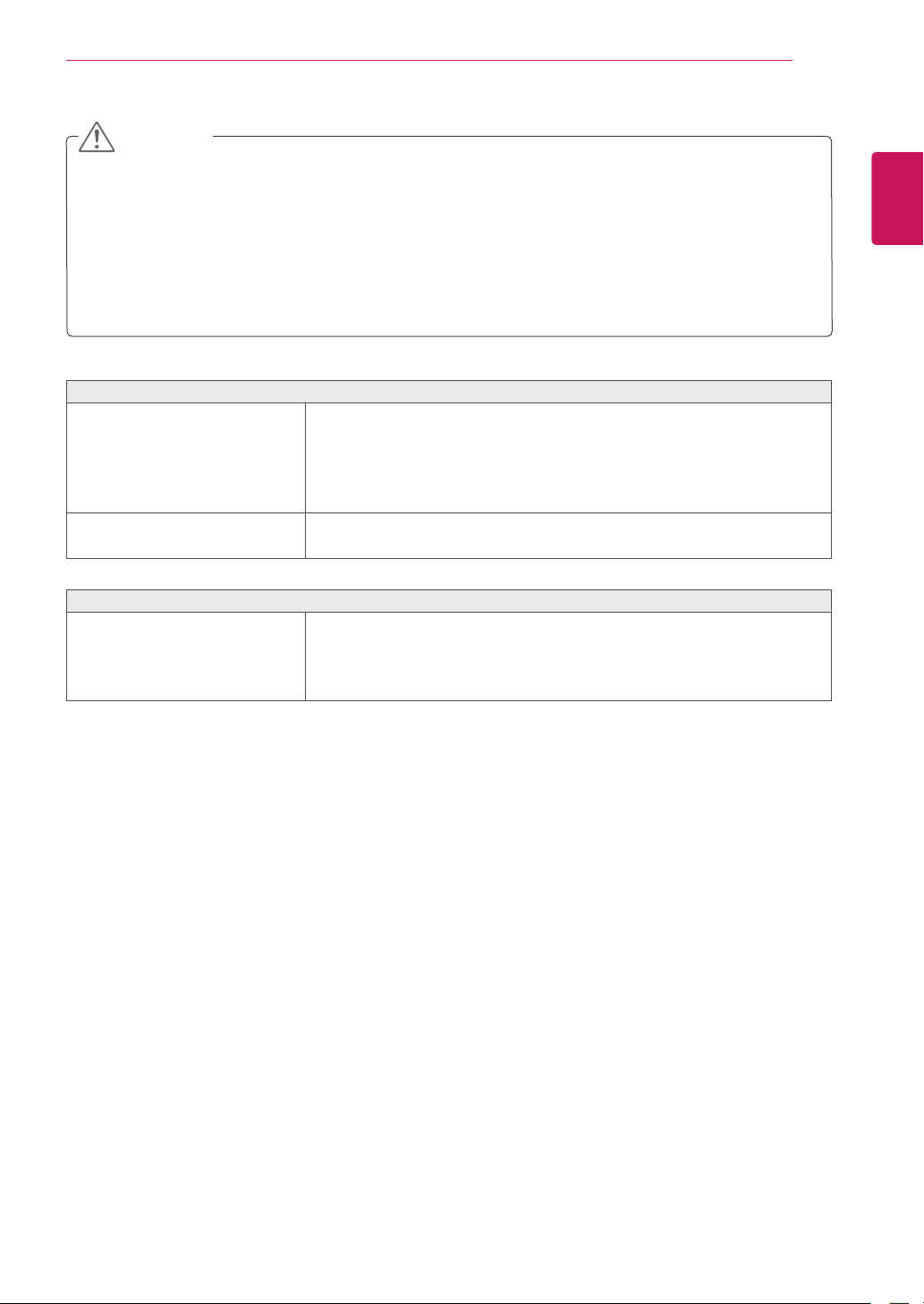
Isthepowercordofthedisplay
connected?
Checkandseeifthepowercordisconnectedproperlytothepower
outlet.
Isthepowerindicatorlighton?
PressthePowerbutton.
Isthepoweronandthepower
indicatorRed?
Adjustthebrightnessandthecontrast.
Isthepowerindicatorflickering?
Ifthedisplayisinpowersavingmode,trymovingthemouseor
pressinganykeyonthekeyboardtobringupthescreen.
TrytoturnonthePC.
Doyouseean"OUTOFRANGE"
messageonthescreen?
ThismessageappearswhenthesignalfromthePC(videocard)is
outofhorizontalorverticalfrequencyrangeofthedisplay.Seethe
'Specifications'sectionofthismanualandconfigureyourdisplay
again.
Doyouseea"NOSIGNAL"
messageonthescreen?
Whenthemonitorison"No-Signal"in5minutes,themonitorgoesto
DPMmode.
Doyousee“OSDLOCKED”when
youpushMENUbutton?
Youcansecurethecurrentcontrolsettings,sothattheycannotbe
inadvertentlychanged.YoucanunlocktheOSDcontrolsatanytime
bypushingtheMENUbuttonforseveralseconds:themessage“OSD
UNLOCKED”willappear.
DisplayPositionisincorrect.
Pressthebuttontoautomaticallyadjustyourdisplayimageto
theidealsetting.
Onthescreenbackground,vertical
barsorstripesarevisible.
Pressthebuttontoautomaticallyadjustyourdisplayimageto
theidealsetting.
Anyhorizontalnoiseappearingin
anyimageorcharactersarenot
clearlyportrayed.
Pressthebuttontoautomaticallyadjustyourdisplayimageto
theidealsetting.
Checkandadjustthedisplay
totherecommendedresolutionoradjustthedisplayimagetotheideal
setting.Setthecolorsettinghigherthan24bits(truecolor).
23
ENG
ENGLISH
TROUBLESHOOTING
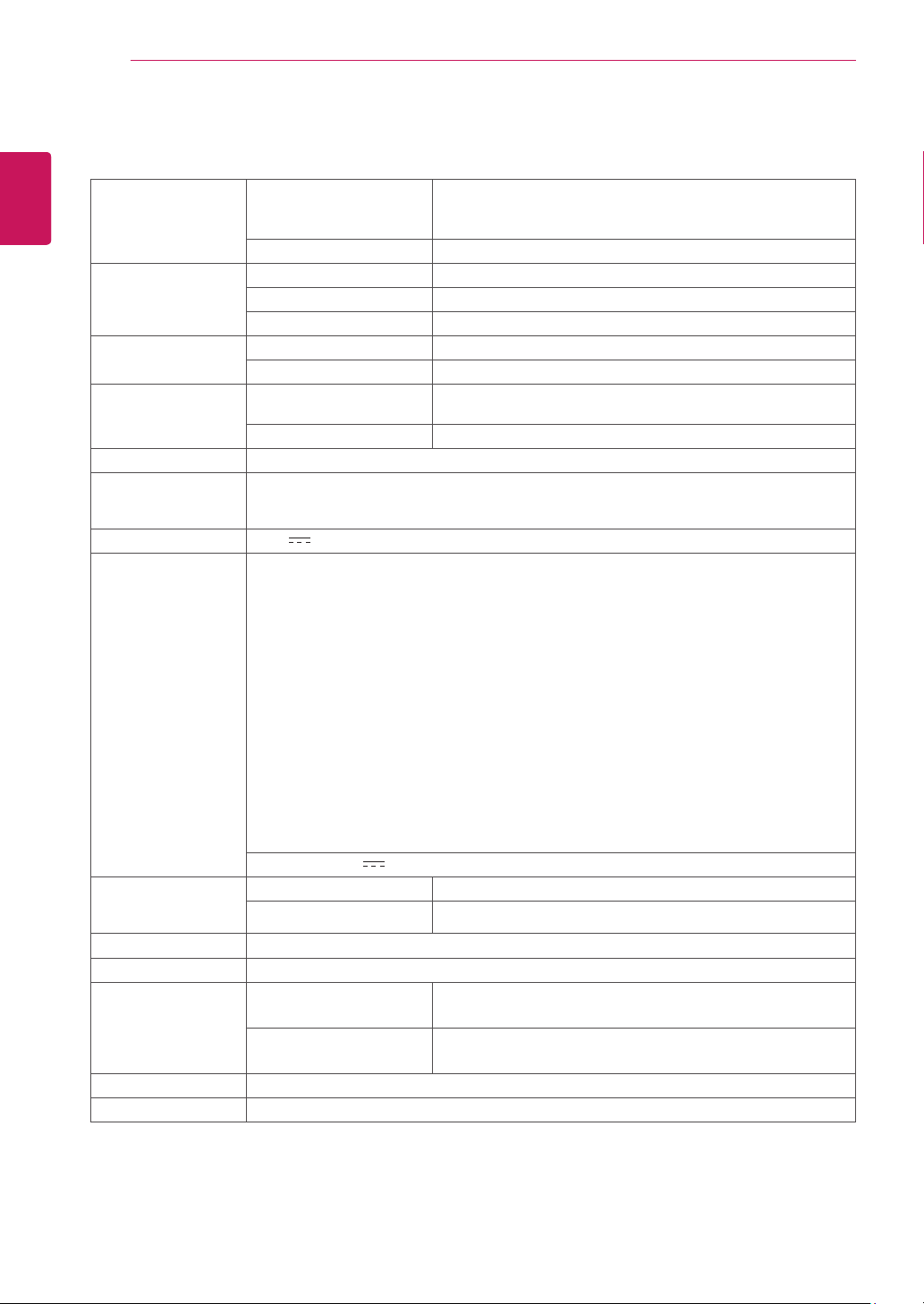
Thescreencolorismonoor
abnormal.
Checkifthesignalcableisproperlyconnectedanduseascrewdriver
tofastenifnecessary.
Makesurethevideocardisproperlyinsertedintheslot.
Setthecolorsettinghigherthan24bits(truecolor)at
.
Thescreenblinks.
Checkifthescreenissettointerlacemodeandifyes,changeittothe
recommendresolution.
Haveyouinstalledthedisplay
driver?
BesuretoinstallthedisplaydriverfromthedisplaydriverCD(or
diskette)thatcomeswithyourdisplay.Or,youcanalsodownloadthe
driverfromourwebsite:http://www.lg.com.
MakesuretocheckifthevideocardsupportsPlug&Playfunction.
Checkandseeifthefrequencyortheresolutionwere
changed.Ifyes,readjustthevideocardtotherecommendresolution.
Iftherecommendedresolution(optimalresolution)isnotselected,lettersmaybeblurredandthe
screenmaybedimmed,truncatedorbiased.Makesuretoselecttherecommendresolution.
ThesettingmethodcandifferbycomputerandO/S(OperationSystem),andresolutionmentioned
abovemaynotbesupportedbythevideocardperformance.Inthiscase,pleaseasktothecomputer
orthevideocardmanufacturer.
24
ENG
ENGLISH
SPECIFICATIONS
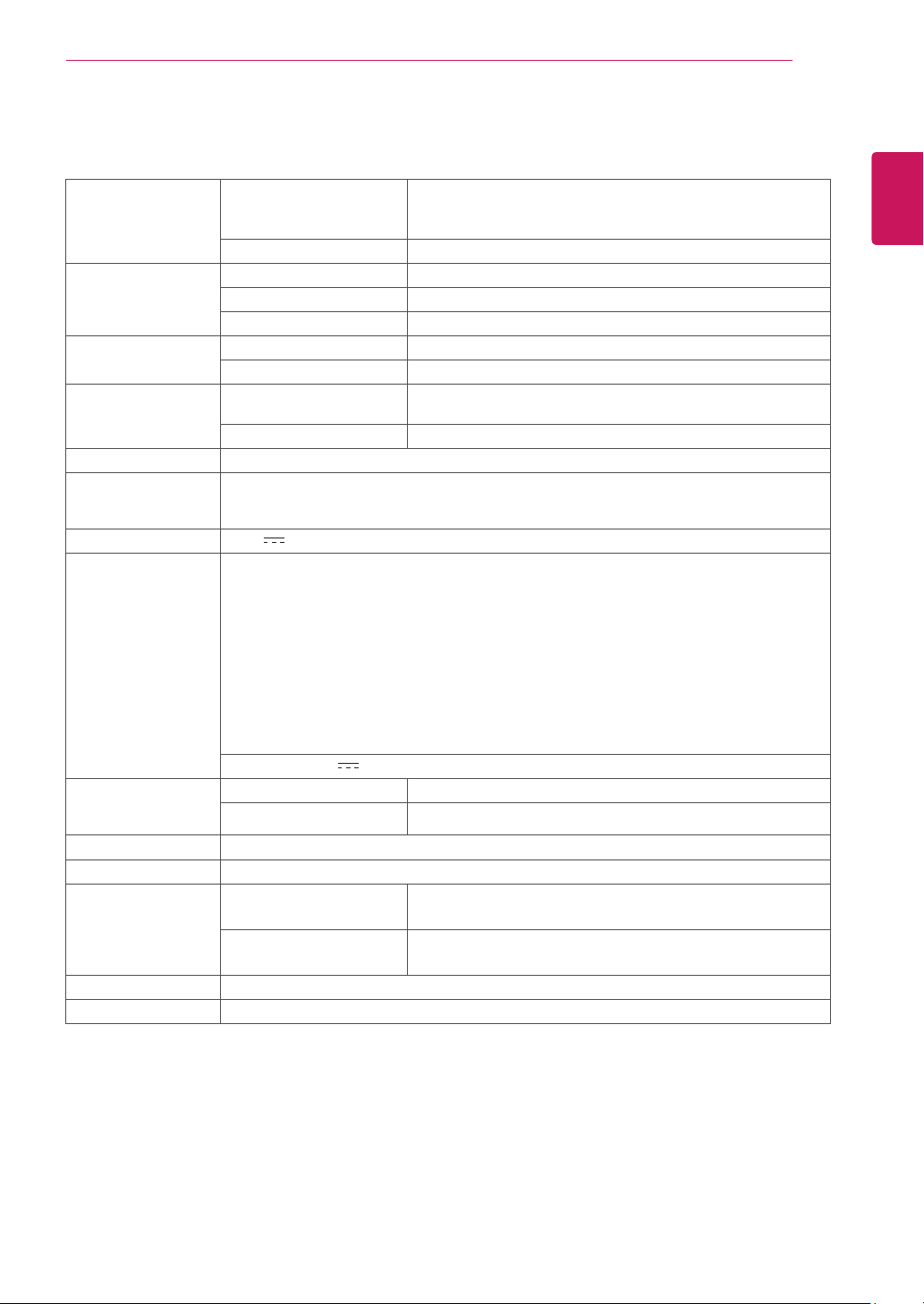
54.6cm(21.5inch)FlatPanelActivematrix-TFTLCDAnti-
Glarecoating
Visiblediagonalsize:54.6cm
0.247mmx0.247mm(PixelPitch)
30kHzto83kHz(Automatic)
56Hzto75Hz(D-SUB,DVI-D)
SeparateSync.Digital
15pinD-SUBConnector/DVI-DConnector(Digital)
RGBAnalog(0.7Vp-p/75ohm),Digital
D-SUB(Analog):1920x1080@60Hz
DVI(Digital):1920x1080@60Hz
VESA1920x1080@60Hz
DDC2B(Analog,Digital)
OnMode:23W(Typ.)
SleepMode≤0.3W
OffMode≤0.3W
19V
1.3A
TypeADS-40SG-19-319025G,manufacturedbySHENZHENHONORELECTRONIC
orTypeADS-40FSG-1919025GPG-1,manufacturedbySHENZHENHONORELECTRONIC
orTypeADS-40FSG-1919025GPBR-1,manufacturedbySHENZHENHONORELECTRONIC
orTypeADS-40FSG-1919025GPI-1,manufacturedbySHENZHENHONORELECTRONIC
orTypeADS-40FSG-1919025GPCU-1,manufacturedbySHENZHENHONORELECTRONIC
orTypeADS-40FSG-1919025GPB-2,manufacturedbySHENZHENHONORELECTRONIC
orTypeLCAP21,manufacturedbyLIENCHANGELECTRONICENTERPRISE
orTypeLCAP26-A,manufacturedbyLIENCHANGELECTRONICENTERPRISE
orTypeLCAP26-E,manufacturedbyLIENCHANGELECTRONICENTERPRISE
orTypeLCAP26-I,manufacturedbyLIENCHANGELECTRONICENTERPRISE
orTypeLCAP26-B,manufacturedbyLIENCHANGELECTRONICENTERPRISE
orTypePSAB-L203A,manufacturedbyLGInnotekCo.,Ltd
orTypePSAB-L202B,manufacturedbyLGInnotekCo.,Ltd
orTypePSAB-L202C,manufacturedbyLGInnotekCo.,Ltd
orTypePSAB-L202D,manufacturedbyLGInnotekCo.,Ltd
19V
1.3A
50.0cmx38.0cmx17.8cm
50.0cmx30.7cmx7.4cm
2.7kg
-5°to20°
10°Cto35°C
10%to80%
-20°Cto60°C
5%to90%non-Condensing
Attached(),Detached(O)
Wall-outlettype
Productspecificationsshownabovemaybechangedwithoutpriornoticeduetoupgradeofproduct
functions.
25
ENG
ENGLISH
SPECIFICATIONS
58.4cm(23inch)FlatPanelActivematrix-TFTLCDAnti-
Glarecoating
Visiblediagonalsize:58.4cm
0.265mmx0.265mm(PixelPitch)
30kHzto83kHz(Automatic)
56Hzto75Hz(D-SUB,DVI-D)
SeparateSync.Digital
15pinD-SUBConnector/DVI-DConnector(Digital)
RGBAnalog(0.7Vp-p/75ohm),Digital
D-SUB(Analog):1920x1080@60Hz
DVI(Digital):1920x1080@60Hz
VESA1920x1080@60Hz
DDC2B(Analog,Digital)
OnMode:29W(Typ.)
SleepMode≤0.3W
OffMode≤0.3W
19V
1.6A
TypeADS-40SG-19-319032G,manufacturedbySHENZHENHONORELECTRONIC
orTypeADS-40FSG-1919032GPG-1,manufacturedbySHENZHENHONORELECTRONIC
orTypeADS-40FSG-1919032GPBR-1,manufacturedbySHENZHENHONORELECTRONIC
orTypeADS-40FSG-1919032GPI-1,manufacturedbySHENZHENHONORELECTRONIC
orTypeADS-40FSG-1919032GPCU-1,manufacturedbySHENZHENHONORELECTRONIC
orTypeLCAP21A,manufacturedbyLIENCHANGELECTRONICENTERPRISE
orTypeLCAP26A-A,manufacturedbyLIENCHANGELECTRONICENTERPRISE
orTypeLCAP26A-E,manufacturedbyLIENCHANGELECTRONICENTERPRISE
orTypeLCAP26A-I,manufacturedbyLIENCHANGELECTRONICENTERPRISE
orTypeLCAP26A-B,manufacturedbyLIENCHANGELECTRONICENTERPRISE
19V
1.7A
53.3cmx39.8cmx18.0cm
53.3cmx32.6cmx7.5cm
3.0kg
-5°to20°
10°Cto35°C
10%to80%
-20°Cto60°C
5%to90%non-Condensing
Attached(),Detached(O)
Wall-outlettype
Productspecificationsshownabovemaybechangedwithoutpriornoticeduetoupgradeofproduct
functions.
26
ENG
ENGLISH
SPECIFICATIONS
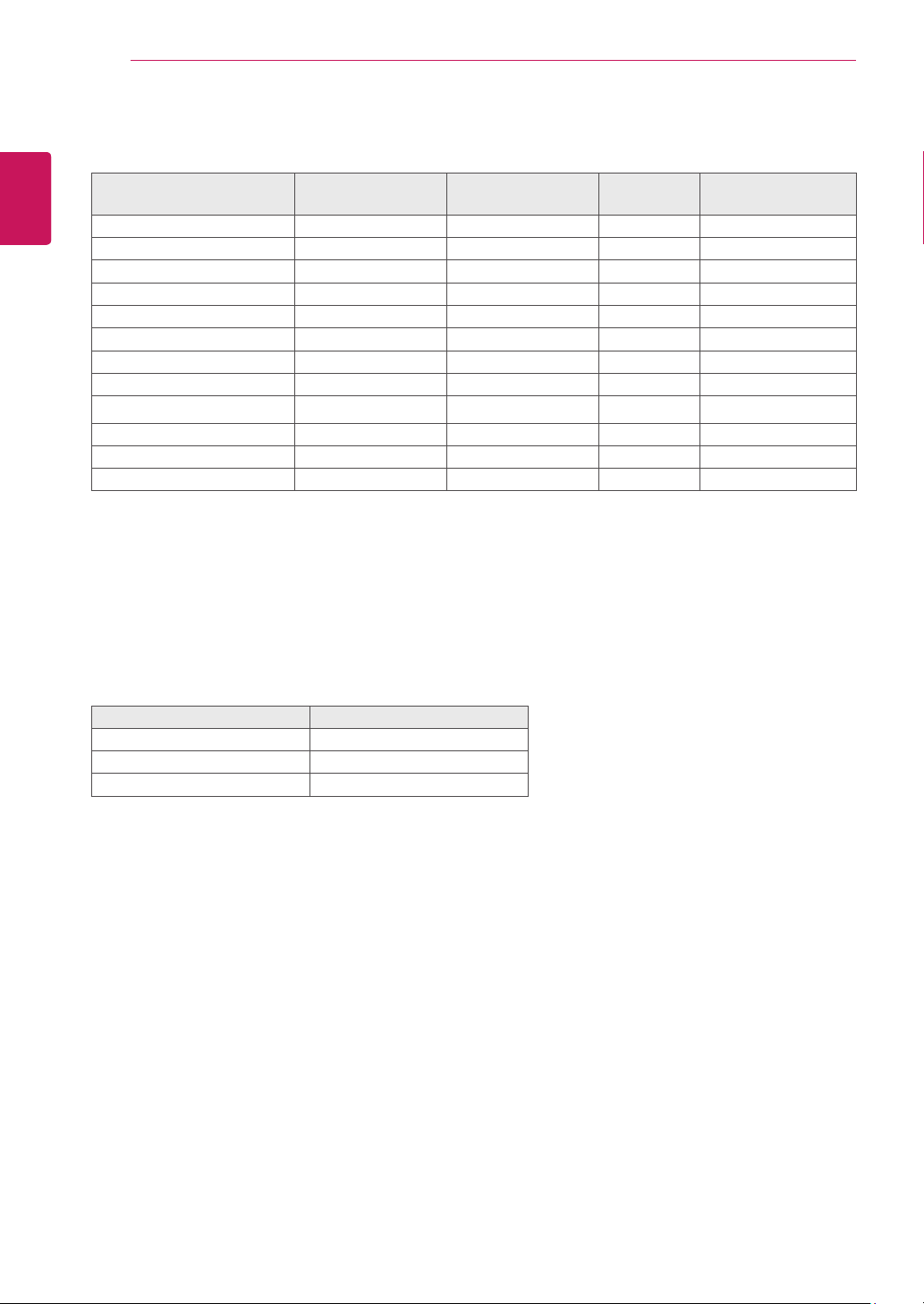
720x400 31.468 70 -/+
640x480 31.469 60 -/-
640x480 37.500 75 -/-
800x600 37.879 60 +/+
800x600 46.875 75 +/+
1024x768 48.363 60 -/-
1024x768 60.023 75 +/+
1152x864 67.500 75 +/+
1280x1024 63.981 60 +/+
1280x1024 79.976 75 +/+
1680x1050 65.290 60 -/+
1920x1080 67.500 60 +/+ RecommendMode
OnMode Red
SleepMode BlinkingRed
OffMode Off
27
ENG
ENGLISH
PROPER POSTURE
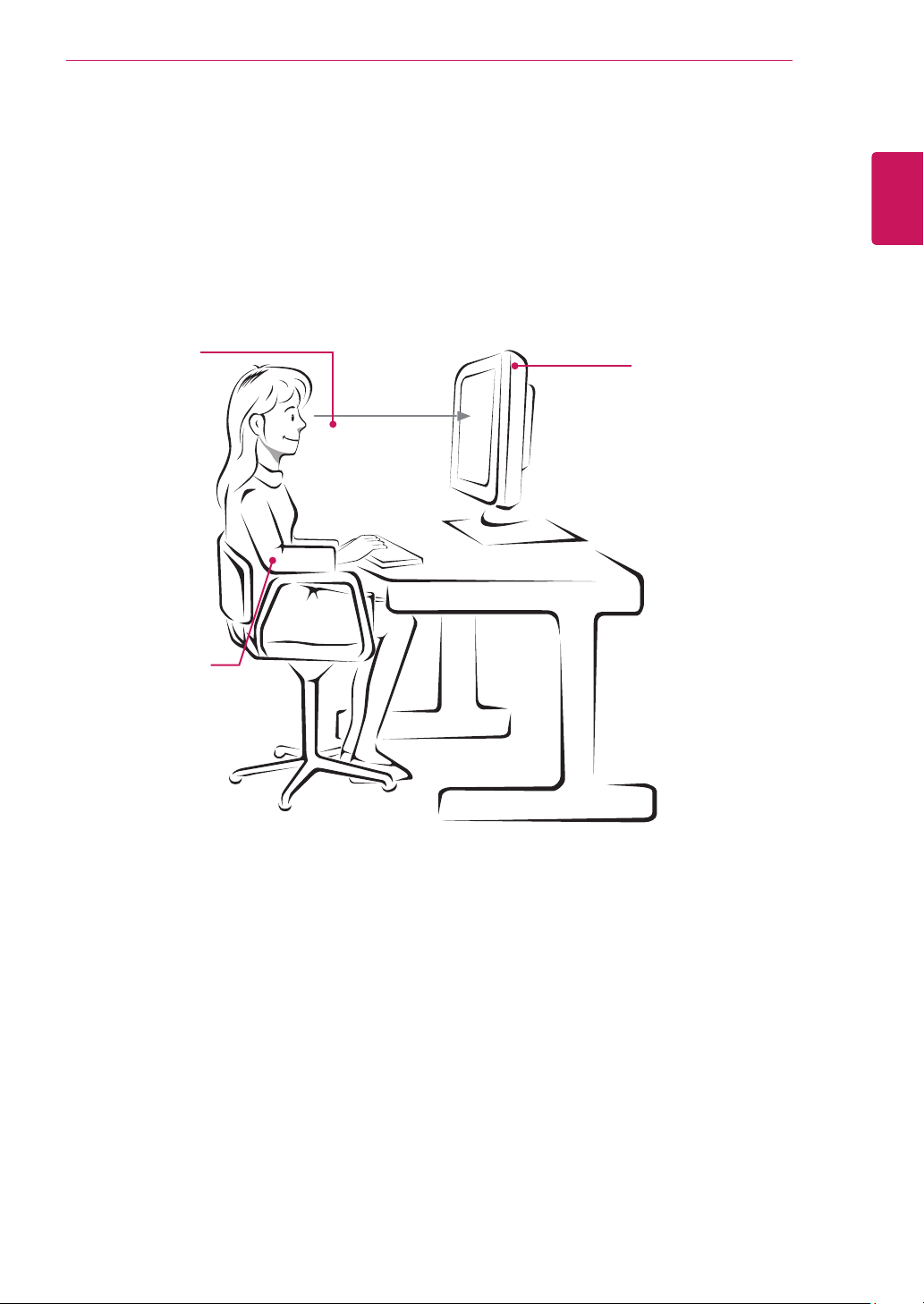
Adjustthe
Monitorsetand
yourpostureto
allowyoutoview
imagesatthe
optimalviewing
angle.
Placeyourhands
gentlyonthe
keyboard,keeping
yourarmsbentat
theelbowsand
horizontallyoutright.
Adjustthelocationofthe
Monitorsettoavoidit
reflectinglight.
Make sure to read the Safety Precautions before
using the product.
Keep the Owner’s Manual (CD) in an accessible
place for future reference.
The model and serial number of the SET is
located on the back and one side of the SET.
Record it below should you ever need service.
As an ENERGY STAR Partner LGE
U. S. A.,Inc. has determined that this
product meets the ENERGY STAR
guidelines for energy efficiency.
ENERGY STAR is a set of power-saving
guidelines issued by the U.S.Environmental
Protection Agency(EPA).
MODEL
SERIAL
*above information is only for USA FCC Regulatory
Declaration of Conformity
Trade Name: LG
Model : 22EA63TB,23EA63TB
Responsible Party: LG Electronics Inc.
Address : 1000 Sylvan Ave. Englewood Cliffs
NJ 07632 U.S.A
TEL: 201-266-2534