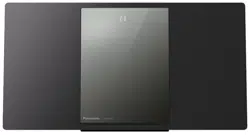
Model number suffix “EB” denotes UK model.
TQBJ0981
EG
EB
GN
2017/02/03
Operating Instructions
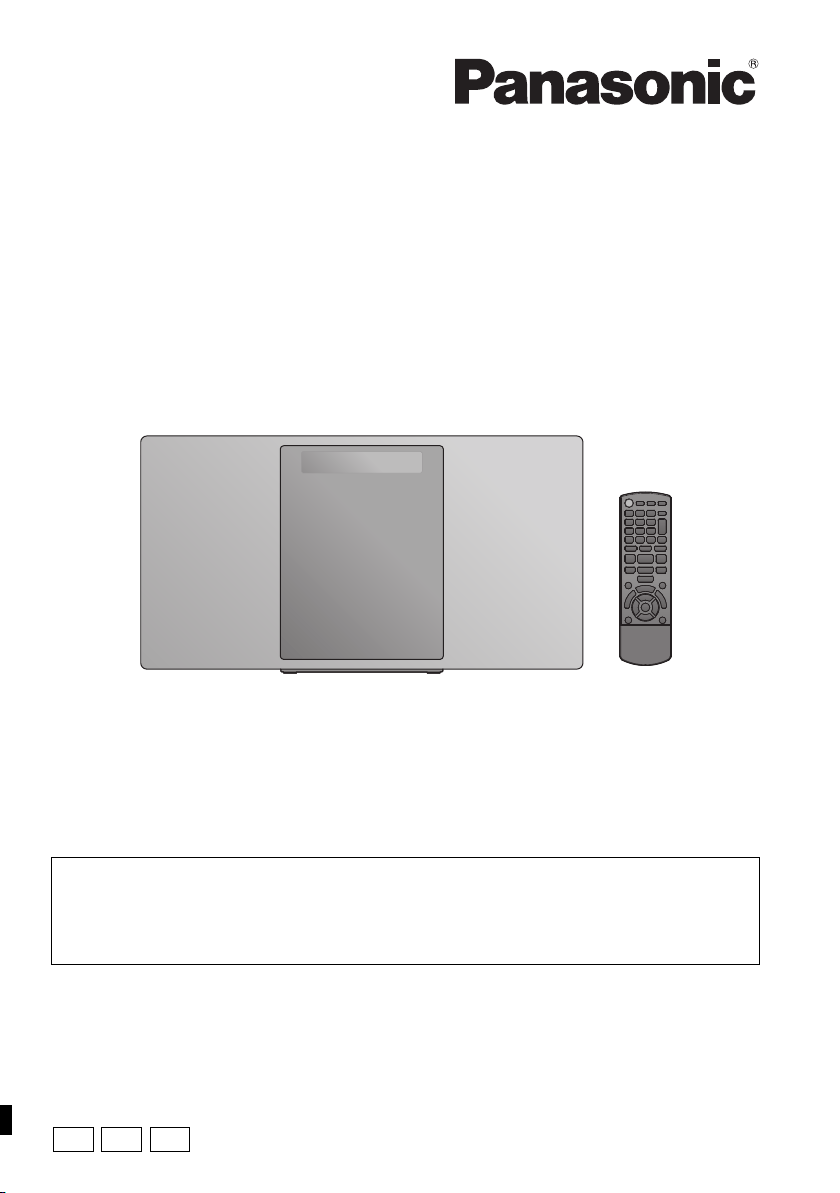
Compact Stereo System
Model No. SC-HC1020
Thank you for purchasing this product.
Please read these instructions carefully before using this product,
and save this manual for future use.
Included Installation Instructions (l 2, 3 and 30, 31)
The installation work should be done by a qualified installation specialist.
Before commencing work, carefully read these installation instructions and the operating
instructions to ensure that installation is performed correctly.
(Please keep these instructions. You may need them when maintaining or moving this unit.)
SC-HC1020-EGEBGN~TQBJ0981.book 1 ページ 2017年1月20日 金曜日 午前10時35分
2
TQBJ0981
Caution for AC Mains Lead
(For the AC mains plug of three pins)
For your safety, please read the following text carefully.
This appliance is supplied with a moulded three pin
mains plug for your safety and convenience.
A 5-ampere fuse is fitted in this plug.
Should the fuse need to be replaced please ensure
that the replacement fuse has a rating of 5-ampere and
that it is approved by ASTA or BSI to BS1362.
Check for the ASTA mark Ï or the BSI mark Ì on the
body of the fuse.
If the plug contains a removable fuse cover you must
ensure that it is refitted when the fuse is replaced.
If you lose the fuse cover the plug must not be used
until a replacement cover is obtained.
A replacement fuse cover can be purchased from your
local dealer.
Before use
Remove the connector cover.
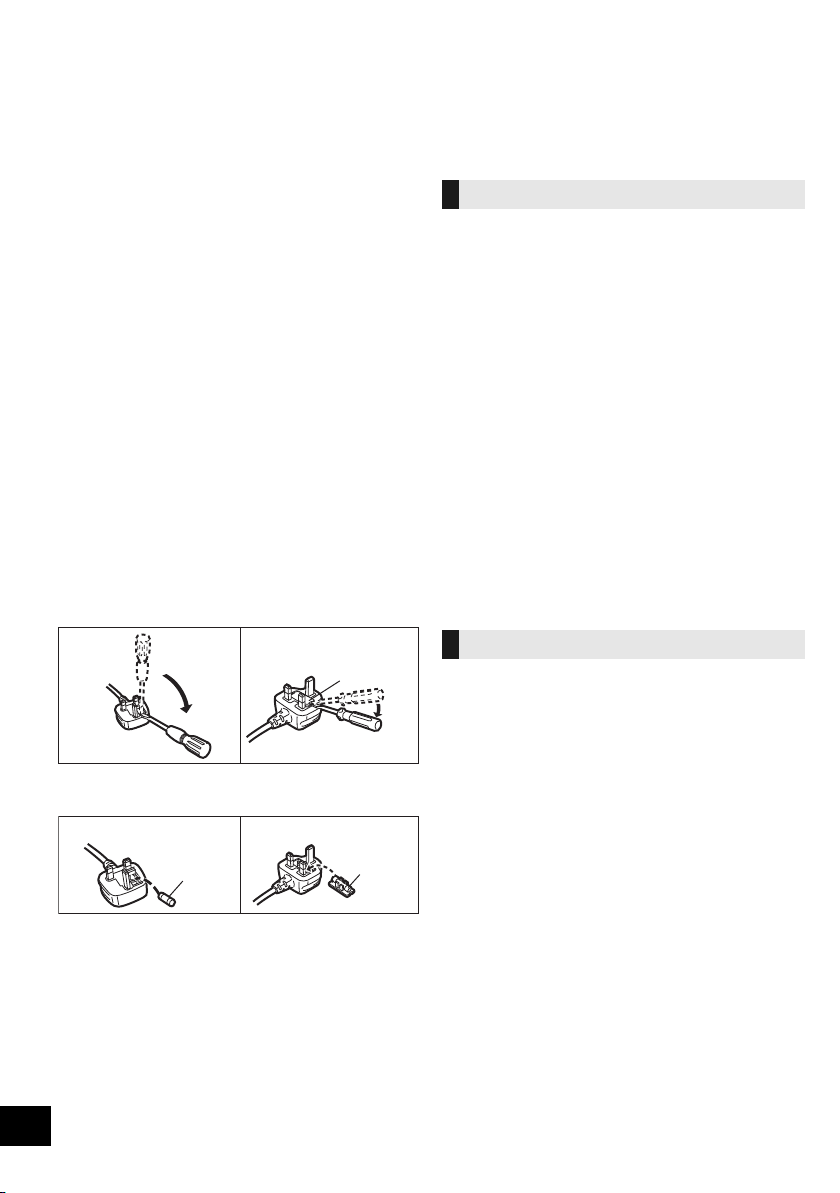
How to replace the fuse
The location of the fuse differ according to the type of
AC mains plug (figures A and B). Confirm the AC
mains plug fitted and follow the instructions below.
Illustrations may differ from actual AC mains plug.
1. Open the fuse cover with a screwdriver.
2. Replace the fuse and close or attach the fuse
cover.
Safety precautions
Unit
≥ To reduce the risk of fire, electric shock or product damage,
– Do not expose this unit to rain, moisture, dripping or
splashing.
– Do not place objects filled with liquids, such as vases, on
this unit.
– Use only the recommended accessories.
– Do not remove covers.
– Do not repair this unit by yourself. Refer servicing to
qualified service personnel.
– Do not let metal objects fall inside this unit.
– Do not place heavy items on this unit.
AC mains lead
≥ To reduce the risk of fire, electric shock or product damage,
– Ensure that the power supply voltage corresponds to the
voltage printed on this unit.
– Insert the mains plug fully into the socket outlet.
– Do not pull, bend, or place heavy items on the lead.
– Do not handle the plug with wet hands.
– Hold onto the mains plug body when disconnecting the
plug.
– Do not use a damaged mains plug or socket outlet.
≥ The mains plug is the disconnecting device.
Install this unit so that the mains plug can be unplugged from
the socket outlet immediately.
Unit
≥ This unit utilizes a laser. Use of controls or adjustments or
performance of procedures other than those specified herein
may result in hazardous radiation exposure.
≥ Do not place sources of naked flames, such as lighted
candles, on this unit.
≥ This unit may receive radio interference caused by mobile
telephones during use. If such interference occurs, please
increase separation between this unit and the mobile
telephone.
≥ This unit is intended for use in moderate climates.
Placement
≥ Place this unit on an even surface.
≥ To reduce the risk of fire, electric shock or product damage,
– Do not install or place this unit in a bookcase, built-in
cabinet or in another confined space. Ensure this unit is
well ventilated.
– Do not obstruct this unit’s ventilation openings with
newspapers, tablecloths, curtains, and similar items.
– Do not expose this unit to direct sunlight, high
temperatures, high humidity, and excessive vibration.
Figure A Figure B
Fuse cover
Figure A
Fuse
(5 ampere)
Figure B
Fuse
(5 ampere)
WARNING
CAUTION
SC-HC1020-EGEBGN~TQBJ0981.book 2 ページ 2017年1月20日 金曜日 午前10時35分
3
TQBJ0981
Battery
≥ Danger of explosion if battery is incorrectly replaced.
Replace only with the type recommended by the
manufacturer.
≥ Mishandling of batteries can cause electrolyte leakage and
may cause a fire.
– Remove the battery if you do not intend to use the remote
control for a long period of time. Store in a cool, dark
place.
– Do not heat or expose to flame.
– Do not leave the battery(ies) in a car exposed to direct
sunlight for a long period of time with doors and windows
closed.
– Do not take apart or short circuit.
– Do not recharge alkaline or manganese batteries.
– Do not use batteries if the covering has been peeled off.
≥ When disposing of the batteries, please contact your local
authorities or dealer and ask for the correct method of
disposal.
Table of contents
Caution for AC Mains Lead.............................. 2
Safety precautions............................................ 2
Accessories....................................................... 3
Control reference guide ................................... 4
Using the remote control ................................. 5
Connections ...................................................... 6
Inserting media .................................................7
Network settings............................................... 8
Streaming music over the network ............... 11
Bluetooth
®
operations .................................... 14
About Bluetooth
®
............................................ 15
Media playback controls ................................ 16
Listening to DAB/DAB+.................................. 18
Listening to FM radio ..................................... 20
Sound adjustment .......................................... 21
Clock and Timer.............................................. 21
Firmware updates ........................................... 22
Others .............................................................. 23
Troubleshooting.............................................. 25
Licenses .......................................................... 27
Unit and media care........................................ 28
Playable media................................................ 28
Specifications..................................................29
Attaching the unit to a wall (optional)........... 30
Limited Warranty (ONLY FOR AUSTRALIA)......46
Accessories
Check the supplied accessories before using this unit.
About descriptions in these operating
instructions
≥ Pages to be referred to are indicated as “l ±±”.
≥ Unless otherwise indicated, operations are described using
the remote control. You can also use the controls on this
unit if they are the same.
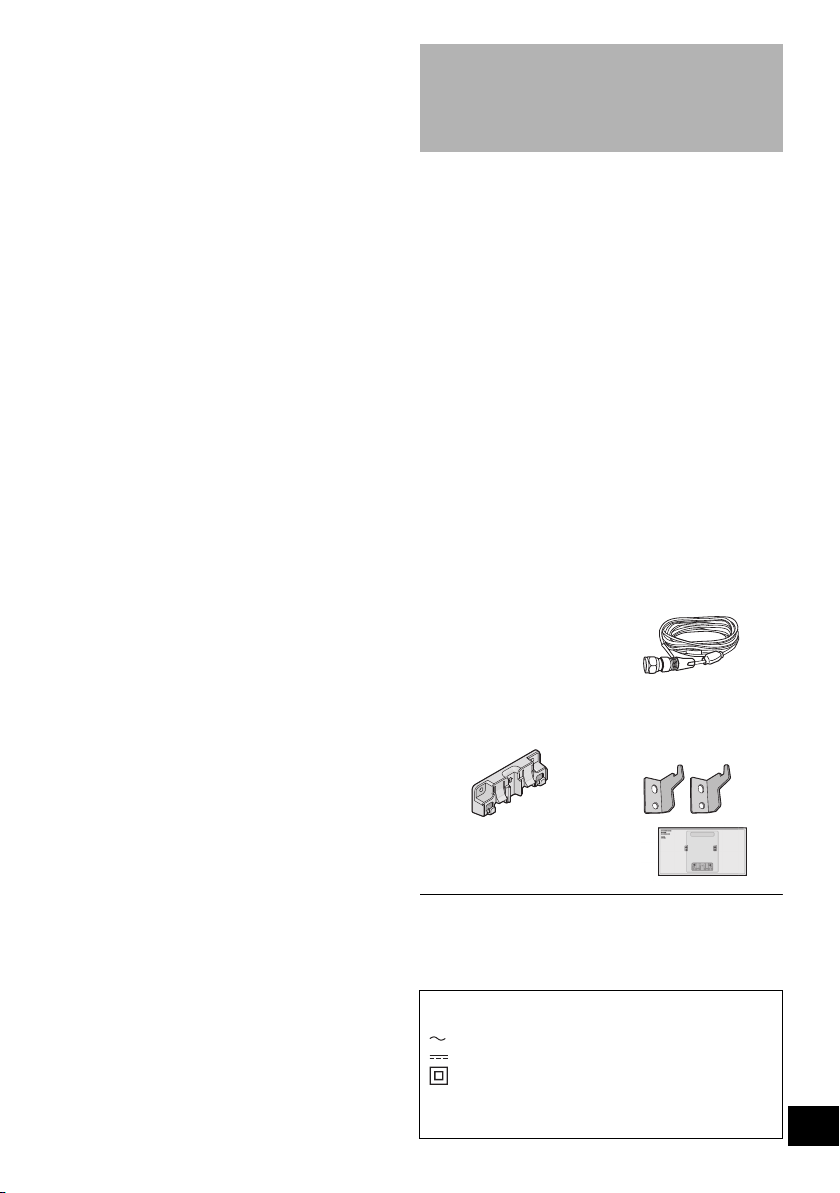
∏ 1 Remote control
(N2QAYB001139)
∏ 1 Battery for remote control
∏
(For the United Kingdom and Ireland
)
1 AC mains lead
(For the black model: K2CT2YY00127)
(For the silver model: K2CT2YY00126)
(For the blue model: K2CT2YY00127)
(For the red model: K2CT2YY00127)
∏ (For Continental Europe)
1 AC mains lead
(For the black model: K2CQ2YY00153)
(For the silver model: K2CQ2YY00154)
(For the blue model: K2CQ2YY00153)
∏ (For Australia and New Zealand)
1 AC mains lead
(K2CJ2YY00116)
∏ 1 DAB indoor antenna
(N1CYYYY00022)
Wall mounting accessories
∏ 1 Safety holder
(TPBDA004)
∏ 2 Wall mount
brackets
(RSC1262-1)
∏ 1 Wall mounting sheet
≥ Use this sheet for wall mounting.
(l 30)
≥ Do not use AC mains lead with other equipment.
≥
Product numbers provided in these operating instructions are
correct as of December 2016. These may be subject to change.
The symbols on this product (including the
accessories) represent the following:
AC
DC
Class II equipment (The construction of the
product is double-insulated.)
IOn
Í Standby
SC-HC1020-EGEBGN~TQBJ0981.book 3 ページ 2017年1月20日 金曜日 午前10時35分
4
TQBJ0981
Control reference guide
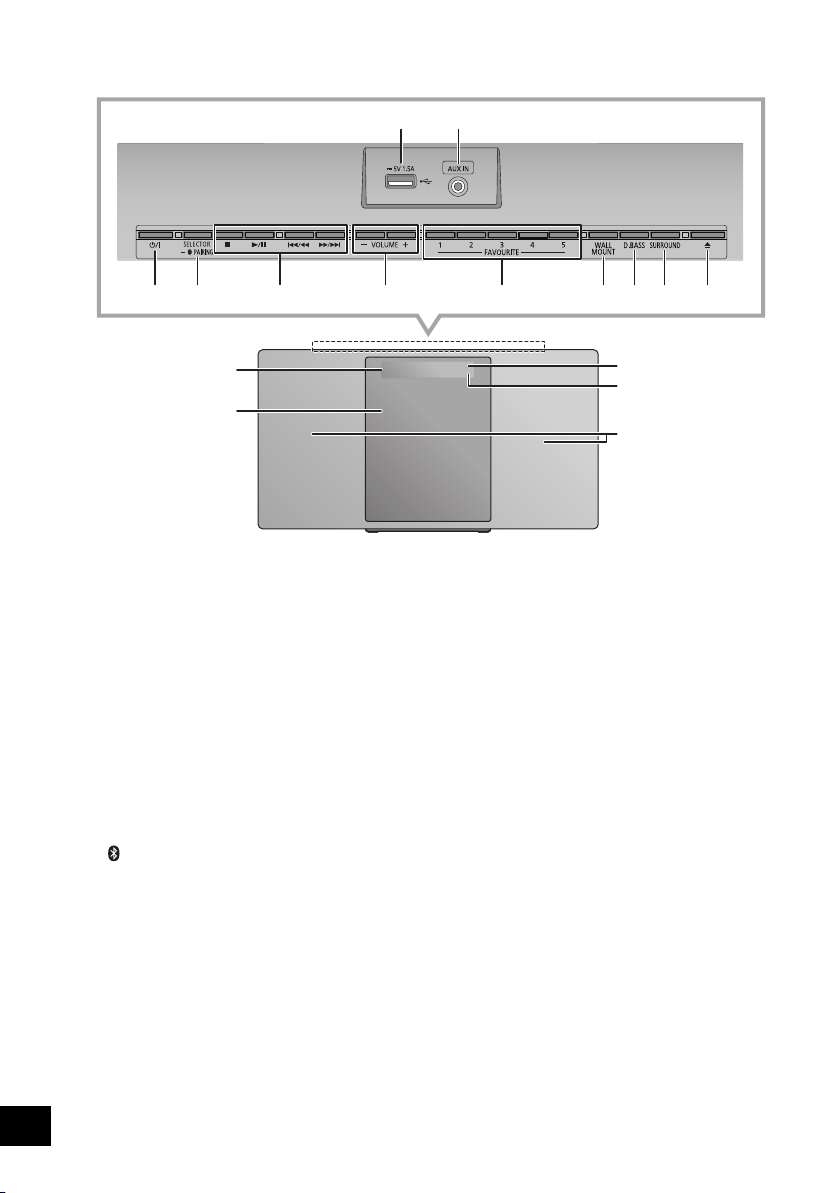
1 USB port (l 7)
2 AUX IN jack (l 6)
3 Standby/on switch (Í/I)
Press to switch the unit from on to standby mode or vice
versa. In standby mode, the unit is still consuming a small
amount of power.
4 Select the audio source
On this unit:
≥ Press and hold to enter pairing mode (l 14) or
disconnect a Bluetooth
®
device (l 15).
On the remote control:
[ ]: “BLUETOOTH”
[CD/USB]: “CD” ,. “USB”
5 Basic playback control buttons
6 Adjust the volume (0 (min) to 50 (max))
7 FAVOURITE buttons for storing or selecting radio
station ([1] to [5]) (l 13, 18, 20)
8 Set wall mount mode
9 Select D.BASS
10 Adjust surround
11 Open or close the sliding door
12 Display
13 Sliding door
14 Remote control signal sensor
Distance: Within approx. 7 m directly in front
Angle: Approx. 30o left and right
15 Network indicator
16 Speakers
These speakers do not have magnetic shielding. Do not
place them near a TV, personal computer or other
magnetic devices.
13
12
14
16
15
53
64
12
789
10 11
Top view
“CD” ----------. “DAB+” -----------. “FM” -----------. “AUX”
:;
“NETWORK” (------ “BLUETOOTH” (------ “USB”
[RADIO, EXT-IN]: “DAB+” -"-. “FM” -"-. “AUX”
^"" “NETWORK”("}
SC-HC1020-EGEBGN~TQBJ0981.book 4 ページ 2017年1月20日 金曜日 午前10時35分
5
TQBJ0981
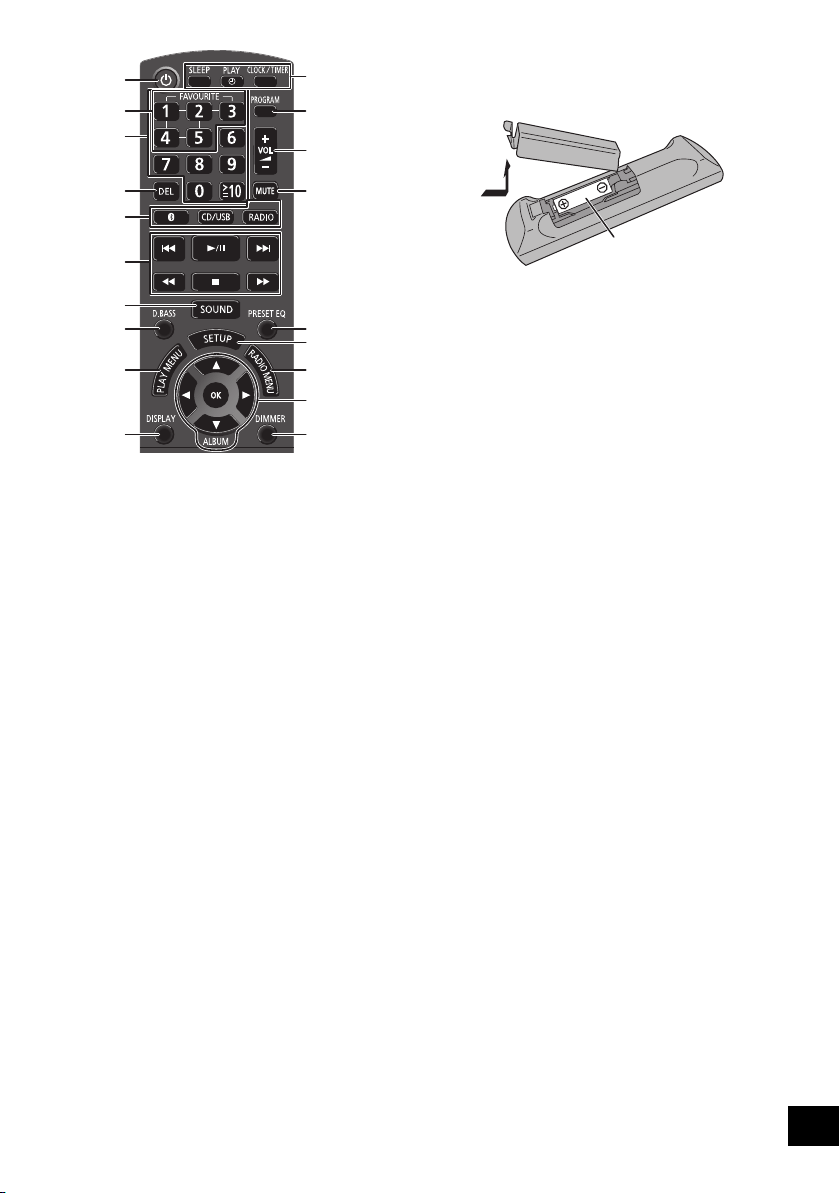
17 Turn the unit on or off
18 Select number
≥ To select a 2-digit number
Example: 16: [S10]
> [1] > [6]
≥ To select a 3-digit number
Example: 124: [S10]
> [S10] >[1] > [2]> [4]
19 Delete a programmed track
20 Enter sound menu
21 Set the play menu item
22 Change the displayed information
23 Clock and timer operation
24 Set the programme function
25 Mute the sound
Press again to cancel. “MUTE” is also cancelled when the
volume is adjusted or the unit is turned off.
26 Select preset EQ
27 Enter setup menu
28 Set the radio menu item
29 Selection/OK
30 Dim the display panel and indicator
Press again to cancel.
Using the remote control
Insert the battery so the terminals (i and j) match
those in the remote control.
Point it at the remote control signal sensor on this unit.
≥ To avoid interference, please do not put any objects in front
of signal sensor.
EXT-IN
17
18
19
4
5
9
21
20
22
23
24
6
25
27
28
26
29
30
7
R6/LR6, AA
(Alkaline or manganese
battery)
SC-HC1020-EGEBGN~TQBJ0981.book 5 ページ 2017年1月20日 金曜日 午前10時35分
6
TQBJ0981
Connections
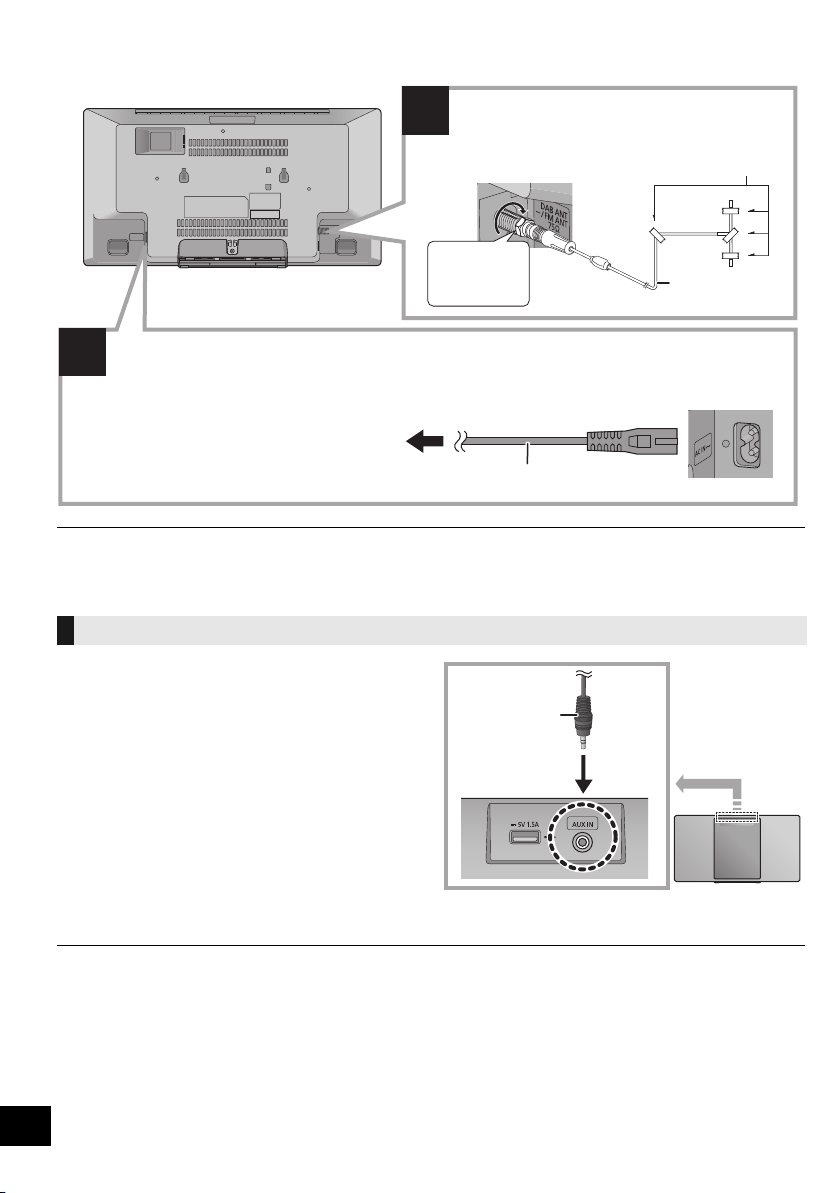
≥ Tape the antenna to a wall or column in a position with the least amount of interference.
≥ If radio reception is poor, use a DAB outdoor antenna (not supplied).
1 Connect an external music device using an audio
cable (not supplied).
≥ Plug type: ‰3.5 mm stereo
2 Press [RADIO, EXT-IN] repeatedly to select “AUX”
and start playback on the connected device.
∫ To select the sound input level of the
external device
1 While in AUX mode, press [SOUND] repeatedly to
select “INPUT LEVEL”.
2 Press [2, 1] to select “NORMAL” or “HIGH” and
then press [OK].
≥ The factory default is “NORMAL”.
≥ To improve sound distortion when “HIGH” is selected, select “NORMAL”.
≥ Switch the equalizer off or turn the volume of the external device down to reduce the input signal. High level of input signal will
distort the sound.
≥ For details, refer to the operating instructions of the device.
Connect an external music device
1
2
Connect the antenna.
This unit can receive DAB/DAB+ and FM stations
with the DAB antenna.
Adhesive tape (not supplied)
DAB indoor antenna
(supplied)
Be sure to
tighten the nut
fully.
To a mains socket
AC mains lead (supplied)
Connect the AC mains lead after all other connections are completed.
This unit consumes a small amount of AC power (l 29) even when turned off.
≥ In the interest of energy conservation, if you will not be using this unit for an extended period of time,
unplug it from the mains socket.
≥ Some settings will be lost after you disconnect the system. You have to set them again.
Audio cable
(not supplied)
SC-HC1020-EGEBGN~TQBJ0981.book 6 ページ 2017年1月20日 金曜日 午前10時35分
7
TQBJ0981
Inserting media
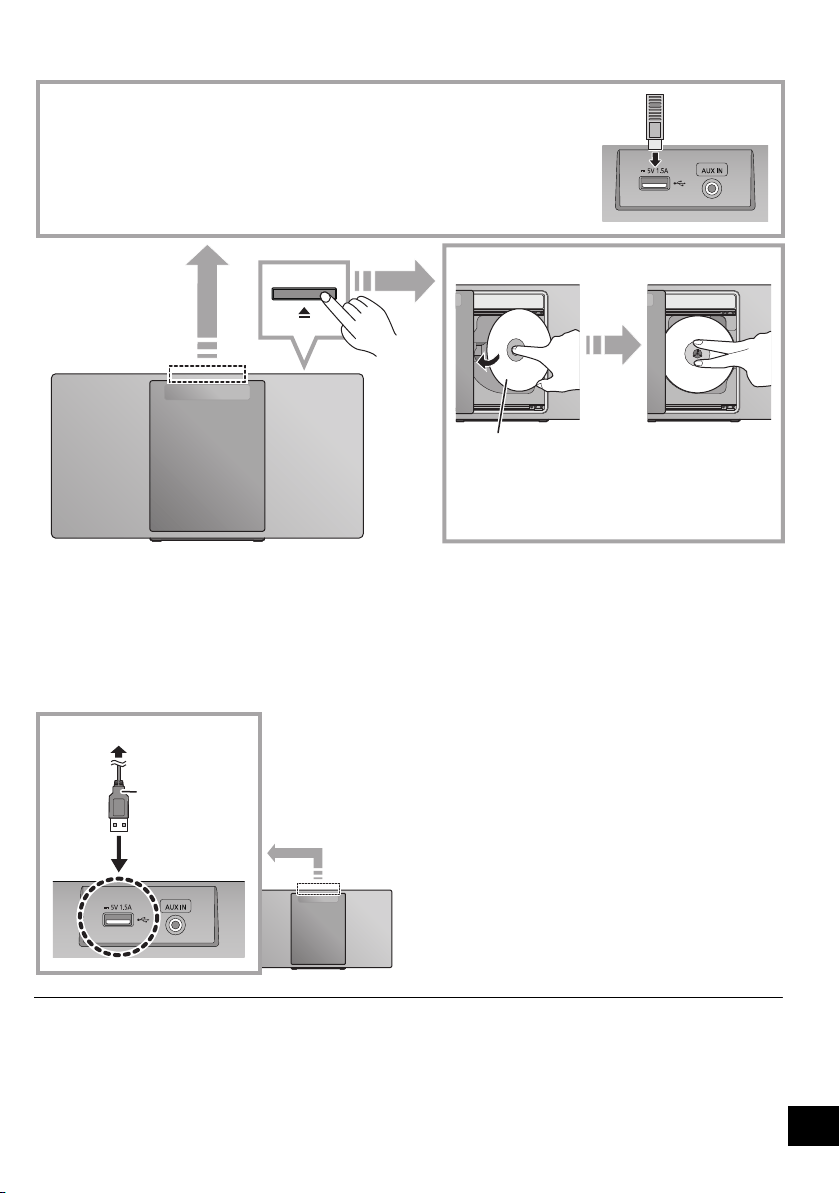
∫ Charging a device
Charging starts when a device (rated value: 5 V/1.5 A) is connected to the USB port of this unit.
1 Turn the unit on.
2 Connect a device.
{. Confirm from the screen of the connected device, etc. to
make sure charging has started.
≥ A cable compatible with your device is required. Use the
cable that comes with your device.
≥ Even if you connect a cable compatible with the USB port of
this unit, your device may not be charged. In that case, use
the charger that comes with the device.
≥ Depending on your device, using other chargers may not
work. Check the operating instructions of your device before
use.
≥ Do not connect a device with a rated value higher than 5 V/
1.5 A to this unit.
≥ To check if charging is complete, look at the screen of the
connected device, etc.
≥ Once fully charged, remove the USB cable from the USB
port.
≥ After the device has started charging, you can turn the unit to
standby mode.
– When charging a depleted device, do not turn the unit to
standby mode until the device becomes operational.
≥ Make sure that the unit does not fall when inserting or removing media.
≥ When moving this unit, be sure to remove all media and turn this unit to standby mode.
≥ Make sure to tilt the disc so as not to touch the sliding
door.
≥ Do not open the sliding door manually.
The label side
∫ Connecting a USB device
≥ Insert the USB device directly. Do not use any USB extension cable.
≥ Please disconnect the USB device if you finish using.
≥ Before removing the USB device, select a source other than “USB”.
∫ Inserting a CD
USB cable
(not supplied)
To the compatible device
SC-HC1020-EGEBGN~TQBJ0981.book 7 ページ 2017年1月20日 金曜日 午前10時35分
8
TQBJ0981
Network settings
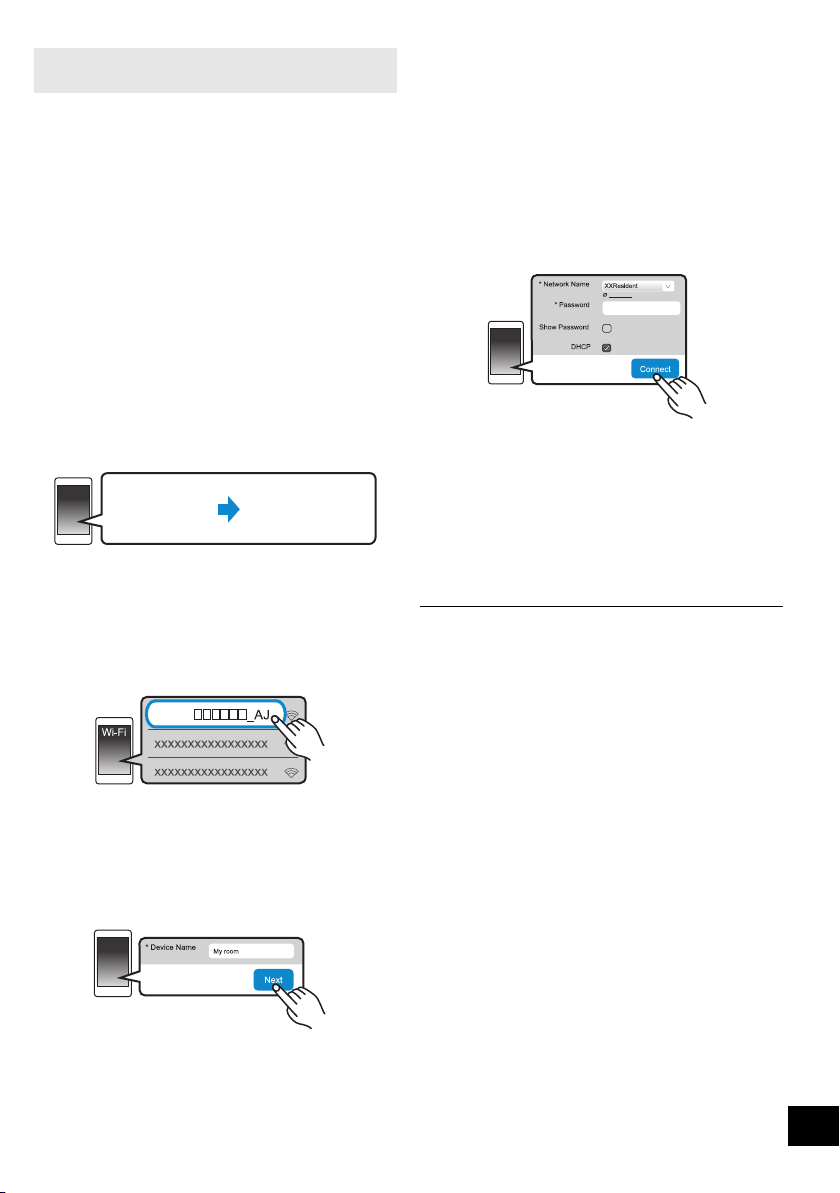
You can stream music from an iOS device (iPhone/
iPad/iPod), an Android
TM
device or a PC (Windows) to
this system’s speakers by using the Qualcomm
®
AllPlay
TM
smart media platform. To use these features,
this system must join the same network as the
compatible device.
Qualcomm
®
AllPlay
TM
is a product of Qualcomm Technologies, Inc.
≥ Please update the system’s firmware after the
network settings are complete. (l 22)
Choose a network setting method from the
following.
≥ The setting will be cancelled after the set time limit. In that
case, try the setting again.
To cancel this setting in the middle, press [∫].
This system has built-in Wi-Fi
®
and can be connected
to a wireless router.
Preparation
≥ Place this system as close to the wireless router as
possible.
≥ Do not connect a LAN cable. Doing so will disable
the Wi-Fi
®
function.
You can also refer to the supplied “Wi-Fi
®
QUICK
SETUP GUIDE”.
1 Download the app “Panasonic Music Streaming”
(free of charge) on your smartphone/tablet.
(Always use the latest version of the app.)
≥ [iOS] : App Store
≥ [Android] : Google Play
TM
2 Start the app and follow the on-screen
instructions.
3 Check that the connection has completed.
≥ On the unit’s display, “SUCCESS” appears when the
connection is established. (The network indicator (l 4)
lights up.)
– If “FAIL” is displayed press [OK], check the network
name (SSID) and the password, and then try the
setting again.
Wireless LAN connection
Method 1: “Using the app “Panasonic Music
Streaming”” (l right)
• You can make the wireless network settings with
the app, “Panasonic Music Streaming” (free of
charge).
Method 2: “Using an Internet browser” (l 9)
• You can access this unit’s network settings from
the Internet browser on your smartphone or PC,
etc.
Method 3: “Using WPS (Wi-Fi Protected
Setup
TM
)” (l 10)
• If your wireless router supports WPS, you can set
up a connection by either pressing the WPS
button, or entering the WPS PIN code.
Wired LAN connection
Method 4: “Using a LAN cable” (l 10)
• You can make a stable connection to the network
with a LAN cable.
Wireless LAN connection
Method 1:
Using the app “Panasonic Music Streaming”
The operations and on-screen display items, etc. of
the app “Panasonic Music Streaming” are subject to
change.
For the latest information, visit
http://panasonic.jp/support/global/cs/audio/app/
(This site is in English only.)
SC-HC1020-EGEBGN~TQBJ0981.book 8 ページ 2017年1月20日 金曜日 午前10時35分
9
TQBJ0981
≥
The following explanations are based on a smartphone.
1 Turn this system on.
2 Press [RADIO, EXT-IN] on the remote control
repeatedly to select “NETWORK”.
3 To enter “SETTING” mode
1 Press [SETUP] on the remote control repeatedly to
select “NET SETUP” and then press [OK].
2Press [2, 1] on the remote control to select
“MANUAL” and then press [OK].
3Press [2, 1] on the remote control to select
“OK? YES” and then press [OK].
≥ After pressing [OK] to confirm “OK? YES”, the
previous network connection you have set with this
unit will be cleared.
≥ Alternatively, while pressing and holding down [<] on
the unit, press and hold down [1/;] on the unit for at
least 4 seconds.
“SETTING” blinks on the display.
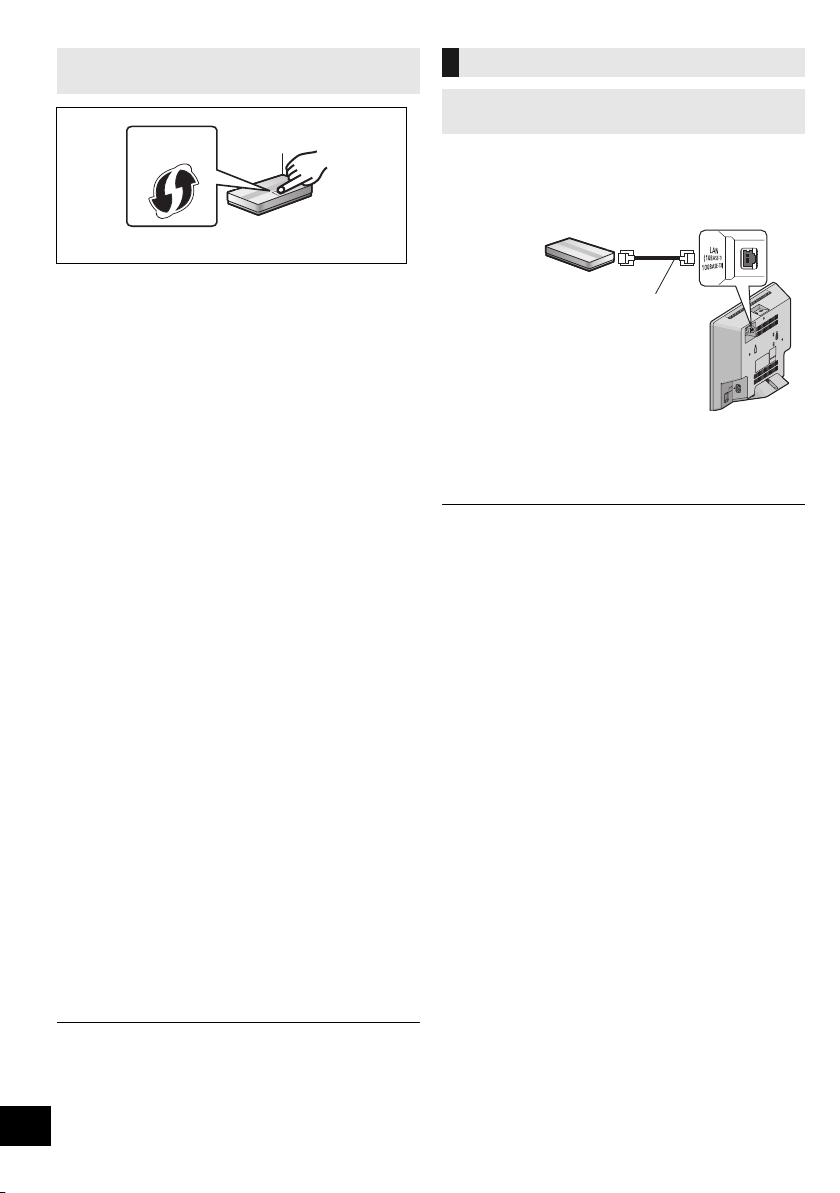
4 Go to Wi-Fi settings on your compatible device.
5 Select “HC1020 _AJ” to connect to this
system.
≥ “ ” stands for a character that is unique to each set.
≥ This can take up to 1 minute to appear in your Wi-Fi list.
≥ If this operation does not work correctly, please repeat it
several times.
≥ Make sure that DHCP is enabled for the network setting
on your compatible device.
About the network setting page:
iOS device: The settings page will be automatically
displayed in the Internet browser.
Except iOS device: Open the Internet browser and refresh
the page to display the settings page.
≥ If the settings page is not displayed, type
“http://172.19.42.1/” into the URL address field.
6 Type a device name and then select “Next”.
≥ The device name will be displayed as this system’s
name on the network.
≥ Maximum characters that can be shown: 32
≥ Emoji characters are not supported.
≥ The device name is set when “Next” is selected.
≥ You can also change the device name after the network
connection is set up. (l 11, “To make network-related
settings”)
7
Select your network name (SSID) and type the password.
≥ Check the wireless router for the network name (SSID)
and the password.
≥ A list of network names (SSIDs) will be appeared when
you select the “Network Name” box.
≥ To show the characters typed in the “Password” box,
select “Show Password”.
≥ If your network requires specific settings, deselect
“DHCP” to disable DHCP.
– You can use specific IP address, subnet mask,
default gateway, primary DNS, etc.
≥ To update the network name (SSID) list, select “Refresh
list”.
8 Select “Connect” to apply the settings.
≥ On the unit’s display, “SUCCESS” appears when the
connection is established. (The network indicator (l 4)
lights up.)
– If “FAIL” is displayed press [OK], check the network
name (SSID) and the password, and then try the
setting again.
≥ Depending on the device, the connection complete
screen may not be displayed.
9 Make sure to connect your compatible device back
to your home wireless network.
≥ Enable Java and Cookies in your browser settings.
Method 2:
Using an Internet browser
Settings
Wi-Fi settings
HC1020
●●●●●●●●
Refresh list
SC-HC1020-EGEBGN~TQBJ0981.book 9 ページ 2017年1月20日 金曜日 午前10時35分
10
TQBJ0981
1 Turn this system on.
2 Press [RADIO, EXT-IN] on the remote control
repeatedly to select “NETWORK”.
3 To enter “WPS PUSH” mode
1 Press [SETUP] on the remote control repeatedly to
select “NET SETUP” and then press [OK].
“WPS PUSH” is indicated on the display.
2 Press [OK].
3Press [2, 1] on the remote control to select “OK?
YES” and then press [OK].
≥ Alternatively, while pressing and holding down [<] on
the unit, press and hold down [5/9] on the unit for
at least 4 seconds.
≥
If the unit is already connected to a wireless LAN network,
“NETWORK INITIALIZING” is displayed for about 1 minute.
“WPS” flashes on the display.
4 Activate the WPS button on the wireless router.
≥ On the unit’s display, “SUCCESS” appears when the
connection is established. (The network indicator (l 4)
lights up.)
– “FAIL” may be displayed if the connection was not
made within the set time limit. Press [OK]
. Try the
setting again. If “FAIL” is still displayed, try other
methods.
∫ Using the WPS PIN code
1 Turn this system on.
2 Press [RADIO, EXT-IN] on the remote control
repeatedly to select “NETWORK”.
3 To enter “WPS PIN” mode
1 Press [SETUP] on the remote control repeatedly to
select “NET SETUP” and then press [OK].
2Press [2, 1] on the remote control to select “WPS
PIN” and then press [OK].
≥ Alternatively, while pressing and holding down [<] on
the unit, press and hold [:/6] on the unit for at
least 4 seconds.
≥
If the unit is already connected to a wireless LAN network,
“NETWORK INITIALIZING” is displayed for about 1 minute.
The PIN code is indicated on the display.
4 Enter the PIN code into the wireless router.
≥ Once the system enters WPS PIN code mode, you cannot
set up using the WPS button. To use the WPS button, turn
the system off and then on, and redo the network settings.
≥ Depending on a router, other connected devices may
temporarily lose their connection.
≥
For details, refer to the operating instructions of the wireless router.
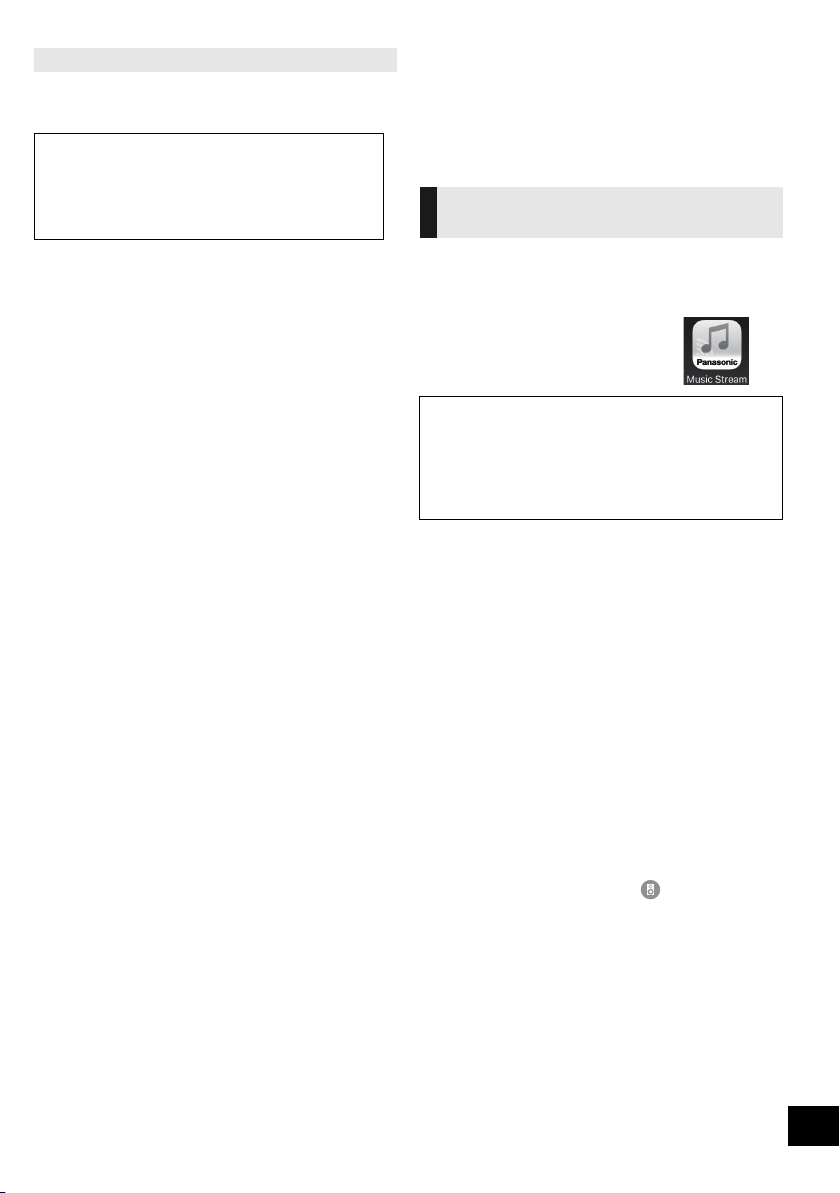
1 Disconnect the AC mains lead.
2 Connect the unit to a broadband router, etc. using
a LAN cable.
3 Connect the AC mains lead to the unit and turn
this system on.
≥ When the connection is established, the network
indicator (l 4) lights up.
≥ Use category 5 or above straight LAN cables (STP) when
connecting to peripheral devices.
≥ The LAN cable must be connected or disconnected while the
AC mains lead is disconnected.
≥ Inserting any cable other than a LAN cable in the LAN port
can damage the system.
≥ If the LAN cable is disconnected, the network-related
settings (l 11) will be initialized. In that case, make the
settings again.
≥ When a LAN cable is connected, the Wi-Fi function will be
disabled.
Method 3:
Using WPS (Wi-Fi Protected Setup
TM
)
A compatible wireless router may have the WPS
identifier mark.
e.g.,
Wired LAN connection
Method 4:
Using a LAN cable
LAN cable
(not supplied)
Broadband router, etc.
e.g.,
SC-HC1020-EGEBGN~TQBJ0981.book 10 ページ 2017年1月20日 金曜日 午前10時35分
11
TQBJ0981
You can change this system’s name on the network,
and use specific IP address, subnet mask, default
gateway, primary DNS, etc.
Preparation
≥ Complete the network settings. (l 8)
≥ Connect your device to the same network as this
system.
≥ Check this system’s IP address (l 24), and note it
down.
1 Start an Internet browser on your device and then
type this system’s IP address into the address field
to display the settings page.
≥ It may take a few minutes until the settings page is
displayed depending on the environment. In that case,
reload the browser.
≥ If the unit is connected with Wi-Fi, only a device name
can be changed. Close the settings page after changing
the device name.
– To change the device name, select “Change”, and
type a new device name, and then select “Apply”.
2 Type a device name and then select “Next”.
≥ Refer to the step 6 of “Using an Internet browser” (l 9)
for details on a device name.
3 Select and input the details.
≥ If your network requires specific settings, deselect
“DHCP” to disable DHCP.
– You can use specific IP address, subnet mask,
default gateway, primary DNS, etc.
4 Select “Connect” to apply the settings.
≥ When the connection is established, “SUCCESS”
appears on the unit’s display.
Streaming music over the
network
You can stream music from your devices or online
music services to this system’s speakers and other
speakers powered by AllPlay.
You can also stream music source of this system to
other speakers powered by AllPlay.
You can use the AllPlay function to stream music from
the device on the network to this system’s speakers by
using the app “Panasonic Music Streaming” (free of
charge), etc.
≥
[iOS]
: App Store
≥
[Android]
: Google Play
TM
Preparation
≥ Complete the network settings. (l 8)
≥ Connect the following devices to the same network
as this system.
– Device with “Panasonic Music Streaming”, etc.
installed
– Device containing music
The following steps are based on “Panasonic Music
Streaming”.
1 Turn this system on.
≥ Check that the network indicator (l 4) lights up.
≥ If it does not light up, check the network settings. (l 8)
2 Start the app “Panasonic Music Streaming”.
≥ Always use the latest version of the app.
3 From “Speaker”, select this system as the output
speakers.
≥ If you have multiple speakers powered by AllPlay, you
can enjoy synchronised sound from them.
To group speakers, drag e.g., “ ” of the desired
speakers over each other.
– You can also play different songs on other speakers
powered by AllPlay at the same time.
– The number of speakers powered by AllPlay that can
perform playback at the same time differs depending
on the situation of use.
– When you turn off one of the speakers powered by
AllPlay, other speakers in the same group may stop
the playback.
4 Select a music source.
5 Select a song.
To make network-related settings
You can also change the name of this system by
changing a setting in the app “Panasonic Music
Streaming” (l right). For details on the app, refer to
the site below.
http://panasonic.jp/support/global/cs/audio/app/
(This site is in English only.)
Streaming music on network
devices
The operations and on-screen display items, etc. of the app
“Panasonic Music Streaming” are subject to change.
For the latest information, visit
http://panasonic.jp/support/global/cs/audio/app/
More apps are available. For details, visit
www.panasonic.com/global/consumer/homeav/
allseries/service
(These sites are in English only.)
SC-HC1020-EGEBGN~TQBJ0981.book 11 ページ 2017年1月20日 金曜日 午前10時35分
12
TQBJ0981
≥ This system will be displayed as “Panasonic HC1020” if the
device name is not set.
≥ When playing back music from the DLNA server (PC with
Windows 7 or later installed, smartphone, Network Attached
Storage (NAS) device, etc.), add the contents and folder to
the libraries of the Windows Media
®
Player, the smartphone,
or the NAS device, etc.
≥ Playlist of Windows Media
®
Player can play back only the
contents that are stored in the libraries.
≥ About supported format, refer to “Specifications” (l 29).
– File formats that are not supported by your DLNA server
cannot be played.
≥ Depending on the contents and the connected equipment,
playback may not be performed properly.
≥ Ensure to stop playback on your device before turning it off.
This system is compatible with several online music
services.
Visit the following website for the compatibility
information.
www.panasonic.com/global/consumer/homeav/
allseries/service
Preparation
≥ Make sure that the network is connected to the
Internet.
≥ Connect a device with a compatible app installed to
the same network as this system.
1 Turn this system on.
≥ Check that the network indicator (l 4) lights up.
≥ If it does not light up, check the network settings. (l 8)
2 Start the app, and select a song to playback.
∫ Using Spotify
You will need Spotify Premium. For details, visit the
following website.
www.spotify.com/connect/
After step 2
3 Select the square image of the song’s cover art in
the bottom left of the playback screen.
4 From “ ”, select this system as the output
speakers.
≥ To enjoy synchronised sound from the multiple
speakers powered by AllPlay, you need to group the
speakers using the app “Panasonic Music Streaming”.
(l 11)
∫
Using online music services other than Spotify
After step 2
3
From “ ”, select this system as the output speakers.
≥ Depending on the service, you might need to open full
screen player to display “ ”.
≥ If you have multiple speakers powered by AllPlay, you
can enjoy synchronised sound from them. Select
“Group” and then select the speakers to group.
≥ This system will be displayed as “Panasonic HC1020” if the
device name is not set.
≥ Registration/subscription is required.
≥ Fees may apply.
≥ Services, icons, and specifications are subject to change.
≥ For details, visit the individual music service’s website.
Streaming online music
SC-HC1020-EGEBGN~TQBJ0981.book 12 ページ 2017年1月20日 金曜日 午前10時35分

13
TQBJ0981
You can use the app “Panasonic Music Streaming”
(l 11) to stream this system’s music source (radio/CD/
Bluetooth
®
/AUX/USB source) to other speakers
powered by AllPlay.
Preparation
≥ Complete the network settings. (l 8)
≥ Prepare the desired audio source on this system
(e.g. insert a CD, etc.)
≥ Install the app “Panasonic Music Streaming” on your
device.
≥ Connect your device and your speakers powered by
AllPlay to the same network as this system.
1 Turn this system on.
≥
Check that the network indicator
(l 4
) lights up.
≥ If it does not light up, check the network settings. (l 8)
2 Start the app “Panasonic Music Streaming”.
≥ Always use the latest version of the app.
3 From “Speaker”, select the speaker to stream this
system’s audio.
≥ To stream this system’s audio to other speakers
powered by AllPlay, drag e.g., “ ” of the desired
speakers over each other.
4 Select your desired music source from the list.
5 Select this system.
The device will start to read the selected music
source’s information from this system.
≥ This system will change to the selector mode for the
selected music source.
≥ The speaker selected in step 3 and this system will be
automatically grouped together.
≥ Depending on the selected music source, playback may
start. If a content list appears on your device, select the
desired content to start playback.
≥ The number of speakers powered by AllPlay that can
perform playback at the same time differs depending on
the situation of use.
≥ When you turn off one of the speakers powered by
AllPlay, other speakers in the same group may stop the
playback.
≥ This system will be displayed as “Panasonic HC1020” if the
device name is not set.
≥ When enjoying video contents with this function, the video
and audio output may not be synchronised.
You can store up to 5 stations under (FAVOURITE) [1]
to [5].
≥ A station previously stored is overwritten when
another station is stored under the same
(FAVOURITE) [1] to [5].
Preparation
≥ Make sure that the network is connected to the
Internet.
≥ Connect a device with an “AllPlay Radio” app
installed to the same network as this system.
1 Turn this system on.
≥ Check that the network indicator (l 4) lights up.
≥ If it does not light up, check the network settings. (l 8)
2 Start the app “AllPlay Radio”, and select a station
to playback.
≥ Always use the latest version of the app.
3 Press and hold one of [1] to [5] until “P ” appears
on the display.
(“ ” stands for a number.)
∫ Listening to a stored station
Press one of [1] to [5].
≥ If the selected preset channel has not been preset, “NO
PRESET” is displayed.
Streaming music on this system Storing stations under (FAVOURITE)
[1] to [5]
(Only when playback using internet
radio app)
This unit is compatible with the Qualcomm
®
AllPlay
TM
Radio powered by TuneIn.
You can preset stations when playback using
internet radio app “AllPlay Radio”.
Qualcomm
®
AllPlay
TM
Radio powered by TuneIn is a
product of Qualcomm Technologies, Inc.
SC-HC1020-EGEBGN~TQBJ0981.book 13 ページ 2017年1月20日 金曜日 午前10時35分

14
TQBJ0981
Bluetooth
®
operations
You can listen to the sound from the Bluetooth
®
audio
device from this unit wirelessly.
≥ Refer to the operating instructions of the Bluetooth
®
device for details.
Preparation
≥ Turn on the Bluetooth
®
feature of the device and
place the device near this unit.
∫ Pairing with Bluetooth
®
devices
1 Press [ ] to select “BLUETOOTH”.
≥ If “PAIRING” is indicated on the display, go to step 3.
2 Press [PLAY MENU] to select “PAIRING” and then
press [OK].
≥
Alternatively, press and hold [SELECTOR,
s
PAIRING]
on the unit.
3 Select “SC-HC1020” from the Bluetooth
®
device’s
Bluetooth
®
menu.
≥ The MAC address (e.g., 6C:5A:B5:B3:1D:0F) may be
displayed before “SC-HC1020” is displayed.
≥ The name of the connected device is indicated on the
display for a few seconds.
4 Start playback on the Bluetooth
®
device.
∫ Connecting a paired Bluetooth
®
device
1 Press [ ] to select “BLUETOOTH”.
≥ “READY” is indicated on the display.
2 Select “SC-HC1020” from the Bluetooth
®
device’s
Bluetooth
®
menu.
≥ The name of the connected device is indicated on the
display for a few seconds.
3 Start playback on the Bluetooth
®
device.
≥ If prompted for the passkey, input “0000”.
≥ You can register up to 8 devices with this unit. If a 9th device
is paired, the device that has not been used the longest will
be replaced.
≥ This unit can only be connected to one device at a time.
≥ When “BLUETOOTH” is selected as the source, this unit will
automatically try and connect to the last connected
Bluetooth
®
device. (“LINKING” is indicated on the display
during this process.) If the connection attempt fails, try to
establish a connection again.
You can change the transmission mode to prioritise
transmission quality or sound quality.
Preparation
≥ Press [ ] to select “BLUETOOTH”.
≥ If a Bluetooth
®
device is already connected,
disconnect it.
1 Press [PLAY MENU] repeatedly to select
“LINK MODE”.
2 Press [2, 1] to select the mode and then press
[OK].
MODE 1: Emphasis on connectivity
MODE 2: Emphasis on sound quality
≥ Select “MODE 1” if the sound is interrupted.
≥ When enjoying video contents with this function, the video
and audio output may not be synchronised. In this case,
select “MODE 1”.
≥ The factory default is “MODE 2”.
Connecting via Bluetooth
®
menu
Bluetooth
®
transmission mode
SC-HC1020-EGEBGN~TQBJ0981.book 14 ページ 2017年1月20日 金曜日 午前10時35分

15
TQBJ0981
If the sound input level from the Bluetooth
®
device is
too low, change the input level setting.
Preparation
≥ Connect a Bluetooth
®
device.
1 Press [PLAY MENU] repeatedly to select “INPUT
LEVEL”.
2 Press [2, 1] to select the level and then press
[OK].
“LEVEL 0” ,. “LEVEL i1” ,. “LEVEL i2”
^--------------------------------------------------J
≥ Select “LEVEL 0” if the sound is distorted.
≥ The factory default is “LEVEL 0”.
1 While a Bluetooth
®
device is connected:
Press [PLAY MENU] repeatedly to select
“DISCONNECT?”.
2 Press [2, 1] to select “OK? YES” and then press
[OK].
≥ You can also disconnect the Bluetooth
®
device by pressing
and holding [SELECTOR, s PAIRING] on the unit.
≥ The Bluetooth
®
device will be disconnected if a different
audio source (e.g., “CD”) is selected.
About Bluetooth
®
∫ Frequency band used
≥ This system uses the 2.4 GHz frequency band.
∫ Certification of this device
≥ This system conforms to frequency restrictions and
has received certification based on frequency laws.
Thus, a wireless permit is not necessary.
≥ The actions below are punishable by law in some
countries:
– Taking apart or modifying the system.
– Removing specification indications.
∫ Restrictions of use
≥ Wireless transmission and/or usage with all
Bluetooth
®
equipped devices is not guaranteed.
≥ All devices must conform to standards set by
Bluetooth SIG, Inc.
≥ Depending on the specifications and settings of a
device, it can fail to connect or some operations can
be different.
≥ This system supports Bluetooth
®
security features.
But depending on the operating environment and/or
settings, this security is possibly not sufficient.
Transmit data wirelessly to this system with caution.
≥ This system cannot transmit data to a Bluetooth
®
device.
∫ Range of use
≥ Use this device at a maximum range of 10 m. The
range can decrease depending on the environment,
obstacles or interference.
∫ Interference from other devices
≥ This system may not function properly and troubles
such as noise and sound jumps may arise due to
radio wave interference if this system is located too
close to other Bluetooth
®
devices or the devices that
use the 2.4 GHz band.
≥ This system may not function properly if radio waves
from a nearby broadcasting station, etc. is too
strong.
∫ Intended usage
≥ This system is for normal, general use only.
≥ Do not use this system near an equipment or in an
environment that is sensitive to radio frequency
interference (example: airports, hospitals,
laboratories, etc).
Bluetooth
®
input level
Disconnecting a Bluetooth
®
device
Panasonic bears no responsibility for data and/or
information that is compromised during a
wireless transmission.
SC-HC1020-EGEBGN~TQBJ0981.book 15 ページ 2017年1月20日 金曜日 午前10時35分
16
TQBJ0981
Media playback controls
The following marks indicate the availability of the
feature.
Preparation
≥ Turn the unit on.
≥ Insert the media or connect the Bluetooth
®
/AllPlay/
DLNA compatible device. (l 7, 11, 14)
1 Select the audio source.
For disc:
Press [CD/USB] repeatedly to select “CD”.
For USB device:
Press [CD/USB] repeatedly to select “USB”.
For Bluetooth
®
device:
Press [ ] to select “BLUETOOTH”.
For AllPlay/DLNA compatible device:
When this system is selected as the output
speakers, the audio source will change to the
network source.
≥ Alternatively, press [RADIO, EXT-IN] repeatedly
to select “NETWORK”.
(When selecting using this unit, press
[SELECTOR, s PAIRING] repeatedly.)
2 Press [1/;] to start playback.
Basic controls
∫ To display information
([CD], [USB], [BLUETOOTH])
You can display the track, artist, album name, file type,
bit rate, and other information. (The information varies
depending on the audio source.)
Press [DISPLAY] repeatedly.
e.g. [USB] (MP3)
≥ To use this unit’s remote control with a Bluetooth
®
device, the
Bluetooth
®
device must support AVRCP (Audio Video
Remote Control Profile).
Depending on the status of the device, some controls may
not work.
≥ [NETWORK]: Some controls may not work depending on the
app in use, etc.
≥ [CD], [USB]:Tracks can be selected by pressing the numeric
buttons.
≥ Maximum number of displayable characters:
Approx. 32
≥ This system supports ver. 1 and 2 ID3 tags.
≥ Text data that is not supported will not be displayed or will be
shown differently.
[CD]: CD audio in CD-DA format or a CD that
contains MP3 files (l 28)
[USB]: USB devices containing MP3 file (l 28)
[BLUETOOTH]: Connected Bluetooth
®
device (l 14)
[NETWORK]: When connected to an AllPlay/DLNA
compatible device (l 11)
Basic play
([CD], [USB], [BLUETOOTH], [NETWORK])
Stop Press [∫].
≥ [USB]: The position is memorised and
“RESUME” is displayed.
≥ [USB]: Press [∫] twice to stop the
playback fully.
Pause Press [1/;].
Press again to continue playback.
Skip Press [:] or [9] to skip track.
(This unit: [:/6] or [5/9])
[CD] (MP3), [USB]
Press [3] or [4] to skip the album.
Search
(Except
[NETWORK])
During play or pause, press and hold
[6] or [5].
(This unit: [:/6] or [5/9])
“A”: MP3 album number.
“T”: MP3 track number.
(“ ” stands for a number.)
SC-HC1020-EGEBGN~TQBJ0981.book 16 ページ 2017年1月20日 金曜日 午前10時35分
17
TQBJ0981
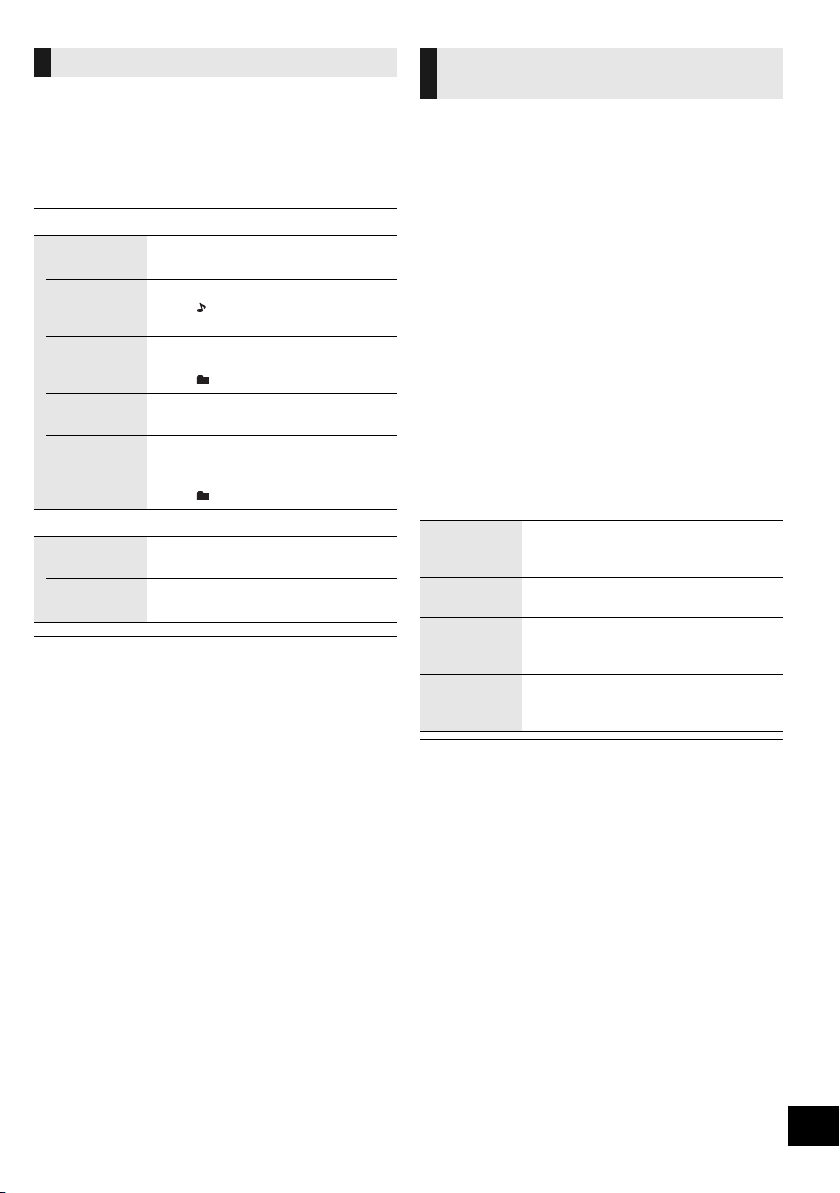
Select the playback mode.
1 Press [PLAY MENU] repeatedly to select
“PLAYMODE” or “REPEAT”.
2 Press [2, 1] to select the setting and then press
[OK].
≥ During random playback, you cannot skip to tracks which
have been played or press the numeric buttons.
≥ Playmode function does not work with “Programme play”.
≥ The mode is cancelled when you open the sliding door or
remove the USB device.
This function allows you to programme up to 24 tracks.
[CD] (CD-DA)
1 Press [PROGRAM] in the stop mode.
≥ “PROGRAM” is shown for a few seconds.
2 Press the numeric buttons to select the desired
track.
≥ Do this step again to programme other tracks.
3 Press [1/;] to start playback.
[CD] (MP3), [USB]
1 Press [PROGRAM] in the stop mode.
≥ “PROGRAM” is shown for a few seconds.
2 Press [3, 4] to select the desired album.
3 Press [9] and then press the numeric buttons to
select the desired track.
4 Press [OK].
≥ Do steps 2 through 4 again to programme other tracks.
5 Press [1/;] to start playback.
≥ The programme memory is cleared when you open the
sliding door or remove the USB device.
Playback modes ([CD], [USB])
PLAYMODE
OFF
PLAYMODE
Cancels the play mode setting.
1-TRACK Only plays the selected track.
≥ “1”, “ ” is displayed.
(Skip to the desired track.)
1-ALBUM Only plays the selected album.
≥ Press [3] or [4] to select the album.
≥ “1”, “ ” is displayed.
RANDOM Plays the contents randomly.
≥ “RND” is displayed.
1-ALBUM
RANDOM
Plays the tracks in the selected
album randomly.
≥ Press [3] or [4] to select the album.
≥ “1”, “ ”, “RND” is displayed.
REPEAT
ON REPEAT Turns on repeat mode.
≥ “`” is displayed.
OFF
REPEAT
Turns off repeat mode.
Programme play
(
[CD], [USB])
Check
programme
contents
Press [:] or [9] in the stop
mode.
Clear the last
track
Press [DEL] in the stop mode.
Cancel
programme
mode
Press [PROGRAM] in the stop mode.
≥ “PGM OFF” is shown for a few seconds.
Clear all
programmed
tracks
Press [
∫
] in the stop mode. “CLEAR
ALL” is shown. Within 5 seconds, press
[
∫
] again.
SC-HC1020-EGEBGN~TQBJ0981.book 17 ページ 2017年1月20日 金曜日 午前10時35分
18
TQBJ0981
Listening to DAB/DAB+
Preparation
≥ Make sure that the DAB antenna is connected. (l 6)
≥ Turn the unit on.
≥ Press [RADIO, EXT-IN] repeatedly to select “DAB+”.
To listen to DAB/DAB+ broadcasts, the available
stations need to be memorised in this unit.
≥ This unit will automatically start the “DAB AUTO
SCAN” and memorise the stations that are available
in your region if you select “DAB+” for the first time.
≥ “SCAN FAILED” is displayed when the auto scan is
unsuccessful. Locate the position with the best reception
(l 19, “To verify or improve the signal reception quality”) and
then re-scan DAB/DAB+ stations.
∫ To re-scan DAB/DAB+ stations
When new stations are added or when the antenna
has been moved, reperform the auto scan.
1 Press [RADIO MENU] to select “AUTO SCAN” and
then press [OK].
2 While “START ?” is flashing,
Press [OK].
≥ When updating the station memory with the auto scan,
preset stations will be erased. Preset them again (l below).
Press [6] or [5] to select a station.
≥ Alternatively, press [:/6] or [5/9] on this unit
when “STATION” is selected as the tune mode*
1
.
You can preset up to 20 DAB/DAB+ channels.
Channel 1 to 5 will be set as the favourite stations
under (FAVOURITE) [1] to [5]. (l right, “Changing the
stations stored under (FAVOURITE) [1] to [5]”)
1 While listening to a DAB/DAB+ broadcast
Press [PROGRAM].
2 Press the numeric buttons to select a preset
number.
≥ You cannot preset stations when the station is not
broadcasting or when the secondary service is selected.
≥ The station occupying a channel is erased if another station
is preset in that channel.
You can change the stations stored under
(FAVOURITE) [1] to [5] easily.
While listening to a DAB/DAB+ broadcast
Press and hold one of [1] to [5] until “P ” appears on
the display.
(“ ” stands for a number.)
≥ When you change the stations stored under (FAVOURITE)
[1] to [5], channel 1 to 5 are also changed to the same
corresponding stations.
Press the numeric buttons, [:] or [9] to select
the preset station.
≥ Alternatively, press [:/6] or [5/9] on this unit
when “PRESET” is selected as the tune mode*
1
.
≥ You can select channel 1 to 5 by pressing one of
(FAVOURITE) [1] to [5] on this unit.
*1: To change the tune mode
1 Press [RADIO MENU] repeatedly to select “TUNE
MODE”.
2Press [2, 1] to select “STATION” or “PRESET”, and
then press [OK].
≥ To select by preset, make sure that stations have already
been preset manually.
≥ To add additional preset stations, select the station using the
method mentioned in “Listening to the memorised stations”
(l left).
Some DAB/DAB+ stations provide a secondary service
as well as the primary service. If the station you are
listening to is providing secondary service, “ ” will be
displayed.
1 While “ ” is displayed
Press [RADIO MENU] repeatedly to select
“DAB SECONDARY”.
2 Press [2, 1] to select the secondary service and
press [OK].
≥ The setting will go back to primary service when changes are
made (e.g. the station is changed).
Memorising stations
Listening to the memorised stations
Presetting DAB/DAB+ stations
Changing the stations stored under
(FAVOURITE) [1] to [5]
Listening to preset DAB/DAB+
stations
Listening to the secondary service
SC-HC1020-EGEBGN~TQBJ0981.book 18 ページ 2017年1月20日 金曜日 午前10時35分
19
TQBJ0981
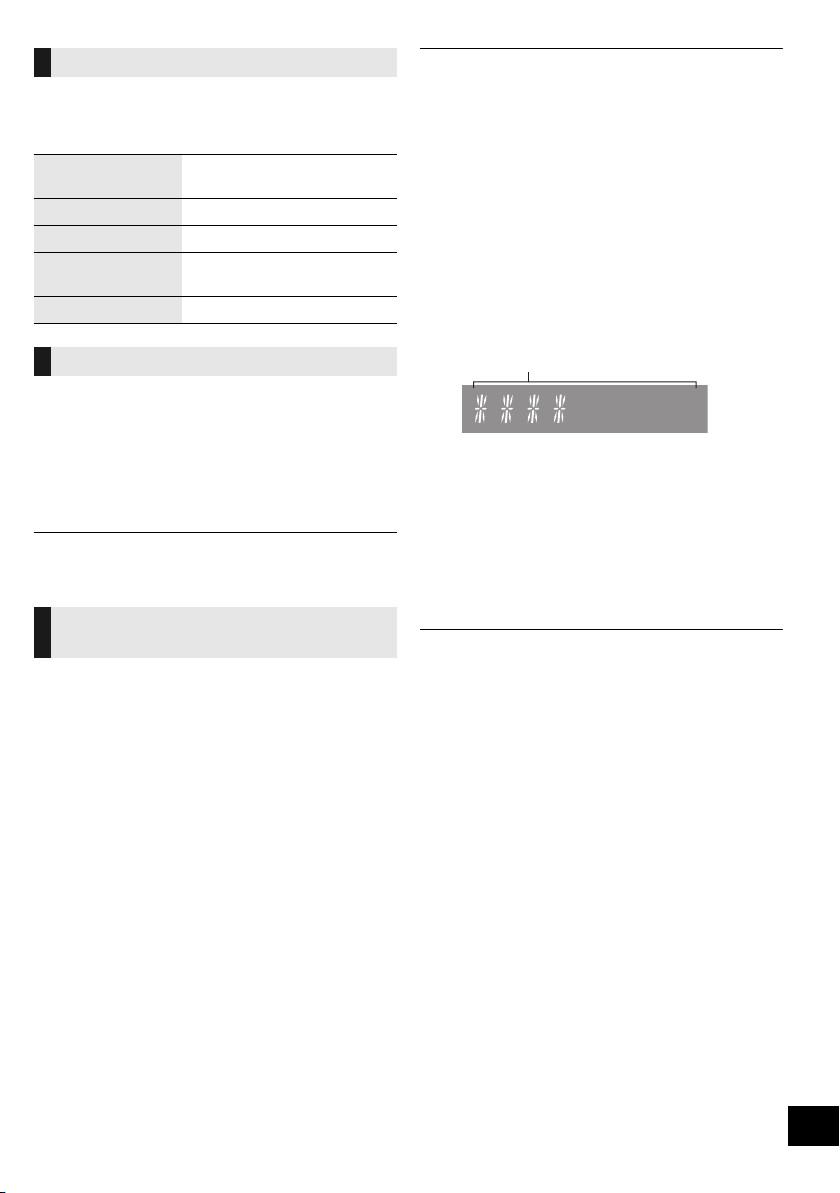
Press [DISPLAY] to change the display.
The information will scroll through the display.
Each time you press the button:
If the DAB/DAB+ broadcast includes time information,
this unit’s clock will be automatically updated.
1 Press [RADIO MENU] repeatedly to select “AUTO
CLOCK ADJ”.
2 Press [2, 1] to select “ON ADJUST” and then
press [OK].
≥ Select “OFF ADJUST” to turn the automatic clock adjustment
function off.
To check the signal reception quality, at least 1
frequency block needs to be successfully memorised.
≥ If “SCAN FAILED” is displayed after “DAB+” is
selected or after an auto scan, proceed to “Manually
tuning 1 frequency block” (l below)
≥ If stations have already been memorised to this unit,
proceed to “Checking the DAB/DAB+ signal
reception quality” (l right)
∫ Manually tuning 1 frequency block
Use this function to scan 1 frequency block after
adjusting the position of the DAB antenna.
Preparation
Note down a frequency block that can be received in
your region (e.g., 12B 225.648 MHz).
1 While “SCAN FAILED” is displayed.
Adjust the position of the DAB antenna.
2 Press [RADIO MENU] repeatedly to select
“MANUAL SCAN”.
3 Press [2, 1] to select the frequency block that is
receivable in your region and then press [OK].
≥ If broadcasting stations are memorised, proceed to
“To re-scan DAB/DAB+ stations” to memorise stations on
other frequency blocks. (l 18)
≥ If “SCAN FAILED” is still displayed, repeat steps 1 to 3 until a
station is memorised. If the situation does not improve, try
using an outdoor DAB antenna or consult your dealer.
∫ Checking the DAB/DAB+ signal
reception quality
1 While listening to the DAB/DAB+ broadcast:
Press [RADIO MENU] repeatedly to select
“SIGNAL QUALITY” and then press [OK].
≥ The current frequency block is displayed and
then the reception quality is indicated.
2 If the signal reception quality is poor, move the
antenna to a position where the reception quality
improves.
3 To continue checking the quality of other frequency
blocks:
Press [2, 1] again and select the desired
frequency.
4 Press [OK] to exit.
≥ If the antenna has been adjusted, perform auto scanning and
update the station memory. (l 18)
Display
Dynamic label: Information about the
broadcast
PTY display: Programme type
Ensemble label: The name of the ensemble
Frequency display: The frequency block and
frequency is displayed.
Time display: Current time
Automatic clock adjustment
To verify or improve the signal
reception quality
Reception quality
0 (poor) – 8 (excellent)
SC-HC1020-EGEBGN~TQBJ0981.book 19 ページ 2017年1月20日 金曜日 午前10時35分

20
TQBJ0981
Listening to FM radio
You can preset up to 30 channels.
Channel 1 to 5 will be set as the favourite stations
under (FAVOURITE) [1] to [5]. (l right, “Changing the
stations stored under (FAVOURITE) [1] to [5]”)
Preparation
≥ Make sure that the antenna is connected. (l 6)
≥ Turn the unit on.
≥ Press [RADIO, EXT-IN] repeatedly to select “FM”.
1 Press [RADIO MENU] to select “A.PRESET”.
2 Press [2, 1] to select “LOWEST” or “CURRENT”
and then press [OK].
LOWEST:
To begin auto preset with the lowest frequency
(“FM 87.50”).
CURRENT:
To begin auto preset with the current frequency.*
1
≥ The tuner starts to preset all the stations it can receive
into the channels in ascending order.
*1: To change the frequency, refer to “Manual tuning”.
Press the numeric buttons, [:] or [9] to select
the preset station.
≥ Alternatively, press [:/6] or [5/9] on this unit
when “PRESET” is selected as the tune mode*
2
.
≥ You can select channel 1 to 5 by pressing one of
(FAVOURITE) [1] to [5] on this unit.
∫ Manual tuning
Press [6] or [5] to tune in to the station.
≥ Alternatively, press [:/6] or [5/9] on this unit
when “MANUAL” is selected as the tune mode*
2
.
To tune automatically, press and hold the button until the
frequency starts changing quickly.
*2: To change the tune mode
1 Press [RADIO MENU] repeatedly to select “TUNE
MODE”.
2 Press [2, 1] to select “MANUAL” or “PRESET”, and
then press [OK].
1 While listening to the radio broadcast
Press [PROGRAM].
2 Press the numeric buttons to select a preset
number.
≥ Do steps 1 through 2 again to preset more stations.
≥ A station previously stored is overwritten when another
station is stored in the same channel preset.
You can change the stations stored under
(FAVOURITE) [1] to [5] easily.
While listening to the radio broadcast
Press and hold one of [1] to [5] until “P ” appears on
the display.
(“ ” stands for a number.)
≥ When you change the stations stored under (FAVOURITE)
[1] to [5], channel 1 to 5 are also changed to the same
corresponding stations.
∫ To display the current FM signal status
For Continental Europe:
Press [DISPLAY] repeatedly to select “FM STATUS”.
For others:
Press [DISPLAY].
≥ “STEREO” is displayed when this unit tunes to a stereo
broadcast.
∫ To display RDS text data
(For Continental Europe only)
This system can show the text data transmitted by the
radio data system (RDS) available in some areas.
Press [DISPLAY] repeatedly.
≥ RDS is available only when stereo works in reception.
≥ RDS may not be available if reception is poor.
Presetting stations automatically
Listening to a preset channel
Presetting stations manually
Changing the stations stored under
(FAVOURITE) [1] to [5]
“FM ST”: FM stereo broadcast is being received.
“FM - - - -”: No broadcast is received or FM
broadcast received is weak or in
monaural.
“FM MONO”: You have set the “FM MODE” to
“MONO”. (l 25, “If noise is excessive
during FM reception.”)
“PS”: Programme service
“PTY”: Programme type
“FREQ”: Frequency
SC-HC1020-EGEBGN~TQBJ0981.book 20 ページ 2017年1月20日 金曜日 午前10時35分
21
TQBJ0981
Sound adjustment
The following sound effects can be added to the audio
output.
1 Press [SOUND] repeatedly to select the effect.
2 Press [2, 1] to select the setting and then press
[OK].
≥ You may experience a reduction in sound quality when these
effects are used with some sources. If this occurs, turn the
sound effects off.
≥ When “AUX” is selected as the source, you can select
“INPUT LEVEL” to adjust the sound input level of the
external device. (l 6)
You can save your desired sound settings to
“SOUND 1”, “SOUND 2” or “SOUND 3” as
“MY SOUND”.
1 Adjust your desired sound effects. (l above)
2 Press [SETUP] to select “SAVE MY SOUND”.
3 Press [2, 1] to select a setting number and then
press [OK].
≥ “SAVED” is displayed.
≥ The sound settings previously saved will be replaced
when you save new settings to the same setting
number.
Recalling the sound settings you have
saved
1 Press [SOUND] to select “MY SOUND”.
2 Press [2, 1] to select the desired sound setting
number and then press [OK].
Press [D.BASS] to select “ON D.BASS” or
“OFF D.BASS”.
≥ Alternatively, press [D.BASS] on the unit.
Press [PRESET EQ] repeatedly to select “HEAVY”
(heavy), “SOFT” (soft), “CLEAR” (clear), “VOCAL”
(vocal) or “FLAT” (flat/off).
≥ When “PRESET EQ” is selected, Bass and Treble settings
will be changed to the settings in preset EQ setting.
Clock and Timer
This is a 24-hour clock.
You can stream the clock information from the device
to this unit by using the app “Panasonic Music
Streaming” (l 11).
Preparation
≥ Complete the network settings. (l 8)
≥ Install the app “Panasonic Music Streaming” on your
device.
≥ Connect your device to the same network as this
system.
1 Turn this system on.
≥ Check that the network indicator (l 4) lights up.
≥ If it does not light up, check the network settings. (l 8)
2 Start the app “Panasonic Music Streaming”.
≥ Always use the latest version of the app.
≥ The clock information will be sent to this system.
1 Press [CLOCK/TIMER] to select “CLOCK”.
2 Press [3, 4] to set the time and then press [OK].
∫ To check the time
Press [CLOCK/TIMER].
≥ The clock is reset when there is a power failure or when the
AC mains lead is removed.
≥ Reset the clock regularly to maintain accuracy.
“MY SOUND”
(My sound)
“SOUND 1”, “SOUND 2”, or
“SOUND 3”.
(l below, “Saving the sound
settings”)
“BASS” (Bass) or
“TREBLE” (Treble)
Adjust the level (j4 to i4).
“SURROUND”
(Surround)
“ON SURROUND” or
“OFF SURROUND”.
≥ Alternatively, press [SURROUND]
on this unit.
“CLEAR-MODE
DIALOG”
(Clear-mode
Dialogue)
“ON CLEAR-MODE DIALOG” or
“OFF CLEAR-MODE DIALOG”.
“WALL MOUNT”
(Wall mount)
“MODE 1 WALL MOUNT”,
“MODE 2 WALL MOUNT” or
“OFF WALL MOUNT”.
≥ Alternatively, press [WALL
MOUNT] on this unit.
Saving the sound settings
D.Bass
Preset EQ
Setting the clock
Using clock information from a network device
Adjusting the clock manually
SC-HC1020-EGEBGN~TQBJ0981.book 21 ページ 2017年1月20日 金曜日 午前10時35分
22
TQBJ0981
The sleep timer can turn the unit off after a set time.
Press [SLEEP] repeatedly to select the setting
(in minutes).
“SLEEP 30” -. “SLEEP 60” -. “SLEEP 90” -. “SLEEP 120”
^---------------- “OFF” (Cancel) (""""""}
≥ The remaining time is indicated on the unit’s display at every
minute except when other operations are performed.
“SLEEP 1” is always shown when only 1 minute remains.
≥ The play timer and sleep timer can be used together. The
sleep timer is always the main timer on the unit.
You can set the timer so this unit turns on at a certain
time every day.
Preparation
Set the clock.
1 Press [CLOCK/TIMER] repeatedly to select
“TIMER ADJ”.
2 Press [3, 4] to set the starting time (“ON TIME”)
and then press [OK].
3 Press [3, 4] to set the finishing time
(“OFF TIME”) and then press [OK].
4 Press [3, 4] to select the music source*
and then
press [OK].
Turning the timer on
1 Prepare the selected music source and set the
desired volume.
2 Press [F, PLAY].
≥ “F” is displayed.
To cancel, press [F, PLAY] again.
3 Press [Í] to turn the unit to standby mode.
∫ To check the settings
Press [CLOCK/TIMER] repeatedly to select
“TIMER ADJ”.
(During standby, press [CLOCK/TIMER] twice.)
≥ The timer starts at a low volume and increases gradually to
the preset level.
≥ The timer comes on at the set time every day if the timer is
on.
≥ If you turn off the unit and turn it on again while a timer is in
operation, the timer will not stop at the end time.
* “CD”, “USB”, “DAB+” and “FM” can be set as the music
source.
Firmware updates
Occasionally, Panasonic may release updated
firmware for this system that may add or improve the
way a feature operates. These updates are available
free of charge.
Preparation
≥ Turn this system on.
≥ Connect this system to the home network. (l 8)
– Make sure that the network is connected to the
Internet.
1 Press [RADIO, EXT-IN] repeatedly to select
“NETWORK”.
2 Press [SETUP] repeatedly to select “FW UPDATE”
and then press [OK].
3 Press [2, 1] to select “OK? YES” and then press
[OK] to start the update.
≥ Select “OK? NO” to cancel the update.
When the update begins, “UPDATING” is
displayed.
The progress is displayed as “UPD%” while
updating. (“ ” stands for a number.)
4 After the update has finished, “SUCCESS” is
displayed.
Disconnect the AC mains lead and reconnect it
after 1 minute.
≥ If there are no updates, “NO NEED” is displayed.
≥ Downloading may take longer or may not work properly
depending on the connection environment.
Press [SETUP] repeatedly to select “FW VER.” and
then press [OK].
The version of the installed firmware is displayed.
≥ Press [OK] to exit.
Sleep timer
Play timer
You can also update the firmware from a pop-up
prompting you to do so on-screen within the app
“Panasonic Music Streaming” (l 11). For details on
the app, refer to the site below.
http://panasonic.jp/support/global/cs/audio/app/
(This site is in English only.)
Downloading takes approx. 10 minutes.
DO NOT DISCONNECT the AC mains lead
while one of the following messages is
displayed.
“UPDATING” or “UPD%”
(“ ” stands for a number.)
≥ During the update process, no other operations can be
performed.
Checking the firmware version
SC-HC1020-EGEBGN~TQBJ0981.book 22 ページ 2017年1月20日 金曜日 午前10時35分

23
TQBJ0981
Others
As a factory default, this unit will turn to standby mode
automatically if there is no sound and it is not being
used for approximately 20 minutes.
To cancel this function
1 Press [SETUP] repeatedly to select “AUTO OFF”.
2 Press [2, 1] to select “OFF” and then press [OK].
≥ To turn the function on, select “ON” in step 2.
≥ This setting cannot be selected when radio is the source or
when “NET STANDBY” is “ON”.
≥ If “NET STANDBY” is set to “ON”, this function will also be
set to “ON”. To change the setting, set “NET STANDBY” to
“OFF”. (l right)
≥ When connected to a Bluetooth
®
device, the function does
not work.
When “SC-HC1020” is selected from a paired
Bluetooth
®
device’s Bluetooth
®
menu, this unit will turn
on automatically from standby mode and establish a
Bluetooth
®
connection.
1 Press [SETUP] repeatedly to select “BLUETOOTH
STANDBY”.
2 Press [2, 1] to select “ON” and then press [OK].
≥ To turn the function off, select “OFF” in step 2.
≥ The factory default is “OFF”. If this function is set to “ON”, the
standby power consumption will increase.
When other Panasonic equipment responds to the
supplied remote control, change the remote control
code.
1 Press [CD/USB] repeatedly to select “CD”.
2 Press and hold [∫] on the unit and [2] on the
remote control until the unit’s display shows
“REMOTE 2”.
3 Press and hold [OK] and [2] on the remote control
for at least 4 seconds.
≥ To change the mode back to “REMOTE 1”, repeat the steps
above but replace [2] with [1].
This system can turn on automatically from standby
mode when this system is selected as the network
device’s output speakers.
As a factory default, the network standby is off before
you connect this system to the home network.
When you connect it to the home network for the first
time, this function will automatically switch to on.
You can also turn the network standby on by the
following steps:
1 Press [SETUP] repeatedly to select
“NET STANDBY” and then press [OK].
2 Press [2, 1] to select “ON” and then press [OK].
≥ When “NET STANDBY” is “ON”
– The network (wired LAN/Wi-Fi) will be active even
in standby mode.
– The power consumption in standby mode will
increase. To reduce the power consumption in
standby mode, turn off the network standby.
To turn off the network standby
Select “OFF” in step 2.
≥ When you have turned “NET STANDBY” to “OFF”
– The network (wired LAN/Wi-Fi) will be disabled in
standby mode if the system is switched to standby
mode at a source other than “NETWORK”.
The network (wired LAN/Wi-Fi) will be enabled
when the system is turned on.
– Network standby will be active if the system is
switched to standby mode at “NETWORK”
selector mode and this system is connected to the
network.
– To keep the network standby turned off, select a
source other than “NETWORK” before switching
the unit to standby mode.
≥ This function will return to default setting if you have
performed the operation for network reset. (l 24)
≥ When the system is turned on by this feature, the beginning
part of the music may not be played back.
≥ Depending on the app, the conditions for activating this
function may differ.
≥ The system may not turn on even when selected as the
output speakers. In that case, start playback.
Auto off function
Bluetooth
®
standby
Changing the unit and remote
control code
Network standby
SC-HC1020-EGEBGN~TQBJ0981.book 23 ページ 2017年1月20日 金曜日 午前10時35分

24
TQBJ0981
The wireless LAN function can be enabled or disabled.
1 Press [RADIO, EXT-IN] repeatedly to select
“NETWORK”.
2 Press [SETUP] repeatedly to select
“WIRELESS LAN” and then press [OK].
3 Press [2, 1] to select “ON” or “OFF” and then
press [OK].
≥ The factory default is “ON”.
To check the Wi-Fi signal strength where this system is
located.
Preparation
Connect this system to the wireless network. (l 8)
1 Press [RADIO, EXT-IN] repeatedly to select
“NETWORK”.
2 Press [SETUP] repeatedly to select “SIGNAL
LEVEL” and then press [OK].
“LEVEL ” is indicated on the display.
(“ ” stands for a number.)
≥ Press [OK] to exit this display mode.
≥ It is recommended to have a signal strength of “3”. Change
the position or angle of your wireless router or this system if
the indication is “2” or “1” and see if the connection improves.
≥ If “LEVEL 0” is displayed, this system cannot establish a link
with the wireless router. (l 26)
Display the name for the connected wireless network
(SSID).
1 Press [RADIO, EXT-IN] repeatedly to select
“NETWORK”.
2 Press [SETUP] repeatedly to select “NET INFO”
and then press [OK].
3 Press [2, 1] repeatedly to select “SSID” and then
press [OK].
≥ Press [OK] to exit.
≥ If “NO CONNECT” is displayed this system is not connected
to a wireless network.
≥ Characters that cannot be displayed are replaced with “£”.
To check this system’s IP address or the Wi-Fi MAC
address.
1 Press [RADIO, EXT-IN] repeatedly to select
“NETWORK”.
2 Press [SETUP] repeatedly to select “NET INFO”
and then press [OK].
3 Press [2, 1] repeatedly to select “IP ADDR.” or
“MAC ADDR.” and then press [OK].
≥ The IP address or the MAC address is partially
displayed.
4 Press [2, 1] on the remote control to show the
rest of the IP address or the MAC address.
≥ Press [OK] to exit.
≥ The “ – ” displayed on the top or bottom left of the
display indicate the first and last units respectively.
To reset the network settings.
1 Press [RADIO, EXT-IN] repeatedly to select
“NETWORK”.
2 Press [SETUP] repeatedly to select “NET RESET”
and then press [OK].
3 Press [2, 1] to select “OK? YES” and then press
[OK].
≥ “NETWORK INITIALIZING” is indicated on the display.
When the display returns to “NETWORK”, the network
settings are reset.
≥ This function does not affect the “WIRELESS LAN” setting.
Wireless LAN setting
Wi-Fi signal strength
Wireless network name (SSID)
IP/MAC Address
Network reset
SC-HC1020-EGEBGN~TQBJ0981.book 24 ページ 2017年1月20日 金曜日 午前10時35分
25
TQBJ0981
Troubleshooting
Before requesting service, make the following checks.
If you are uncertain about some of the check points, or
if the solutions indicated in the following guide does not
resolve the issue, then consult your dealer for
instructions.
For further dedicated help, support and advice about
your product please visit:
http://panasonic.jp/support/global/cs/audio/
(This site is in English only.)
Cannot turn on the unit.
≥ After connecting the AC mains lead, wait about 10 seconds before
turning on the unit.
Humming heard during playback.
≥ If an AC mains lead or fluorescent lights are near the cords, then
keep other appliances and cords away from the cables.
The unit does not work.
≥ One of the unit’s safety devices may have been activated.
1 Press [Í/I] on the unit to switch the unit to standby.
≥ If the unit does not turn off, disconnect the AC mains lead
from the AC outlet, reconnect it to the outlet after about
30 seconds. Then wait for about 10 seconds.
2 Press [Í/I] on the unit to switch it on. If the unit still cannot be
operated, consult the dealer.
Charging does not start during standby mode.
≥ Turn the unit on. Check the charging has started, and then turn
the unit to standby mode. (l 7)
Noise is heard.
≥ When a device is connected to both the AUX IN jack and the USB
port, noise may be generated depending on the device. In this
case, remove the USB cable from the USB port.
The remote control does not work properly.
≥ The battery is depleted or inserted incorrectly. (l 5)
Incorrect display or play does not start.
≥ Make sure that the disc is compatible with this unit. (l 28)
≥ There is moisture on the lens. Wait for about an hour and then try
again.
No response when [1/;] is pressed.
≥ Disconnect the USB device and then reconnect it. Alternatively,
turn the unit off and on again.
The USB drive or its contents cannot be read.
≥ The USB drive format or its contents is/are not compatible with the
unit (l 28).
≥ The USB host function of this product may not work with some
USB devices.
Slow operation of the USB flash drive.
≥ Large file size or high memory USB flash drive takes longer time
to read.
The elapsed time displayed is different from the
actual play time.
≥ Copy the data to another USB device or backup the data and
reformat the USB device.
DAB/DAB+ reception is poor.
≥ Keep the antenna away from computers, televisions, other cables
and cords.
≥ Use an outdoor antenna.
If noise is excessive during FM reception.
≥ Change the audio to be output as monaural.
1 Press [RADIO MENU] repeatedly to select “FM MODE”.
2 Press [2, 1] to select “MONO” and then press [OK].
The sound becomes monaural.
≥ To cancel, select “STEREO” or change the frequency.
In normal circumstances, select “STEREO”.
Static or noisy reception is heard while listening to
a radio broadcast.
≥ Confirm the antenna is properly connected. (l 6)
≥ Adjust the position of the antenna.
≥ Try to keep a certain amount of distance between the antenna and
AC mains lead.
≥ Try using an outdoor antenna if there are buildings or mountains
nearby.
≥ Turn the TV or other audio players off or separate it from this unit.
≥ Keep this unit away from mobile phones if there is interference.
Do you have the latest firmware installed?
Panasonic is constantly improving the system’s
firmware to ensure that our customers are enjoying
the latest technology. (l 22)
To return all settings to the factory defaults
When the following situations occur, reset the memory:
≥ There is no response when buttons are pressed.
≥ You want to clear and reset the settings.
1 Disconnect the AC mains lead. (Wait for at least
30 seconds before proceeding to step 2.)
2 While pressing and holding down [Í/I] on the
unit, reconnect the AC mains lead.
≥ Keep holding down [Í/I] until “---------” appears on the
display.
3 Release [Í/I].
≥ The settings are returned to the factory defaults. It is
necessary to set the settings again.
≥ To reset the network settings, perform the operation for
network reset. (l 24)
General
Remote control
Disc
USB
Radio
SC-HC1020-EGEBGN~TQBJ0981.book 25 ページ 2017年1月20日 金曜日 午前10時35分

26
TQBJ0981
Pairing cannot be completed.
≥ Check the Bluetooth
®
device condition.
The device cannot be connected.
≥ The pairing of the device was unsuccessful or the registration has
been replaced. Try re-pairing the device. (l 14)
≥ This unit might be connected to a different device. Disconnect the
other device and try re-pairing the device. (l 14)
≥
If “MODE 2” is selected in “LINK MODE”, select “MODE 1”. (
l
14)
≥ If the problem persists, turn the unit off and on, then try again.
The device is connected, but audio cannot be
heard through this unit.
≥ For some built-in Bluetooth
®
devices, you have to set the audio
output to “SC-HC1020” manually. Read the operating instructions
for the device for details.
The sound is interrupted.
≥ The device is out of the 10 m communication range. Place the
Bluetooth
®
device closer to this unit.
≥ Remove any interference between this unit and the device.
≥ Other devices that use the 2.4 GHz frequency band, such as
wireless routers, microwaves, cordless phones, etc. are
interfering. Place the Bluetooth
®
device closer to this unit and
distance it from the other devices.
≥ Select “MODE 1” for stable communication. (l 14)
Cannot connect to the network.
≥ Confirm the network connection and settings. (l 8)
≥ If the network is set to be invisible, make the network visible while
you set up the network for this unit or make a wired LAN
connection. (l 10)
≥ This system’s Wi-Fi security supports WPA2
TM
only. Your wireless
router must therefore be WPA2
TM
compatible. For details on the
security supported by your router and how to change the settings,
please refer to the operating instructions or contact your Internet
service provider.
≥ Make sure that the multicast function on the wireless router is
enabled.
≥ Depending on the routers, WPS button may not work. Try other
methods. (l 8)
≥ Check the “WIRELESS LAN” setting. (l 24)
Cannot select this system as the output speakers.
≥ Make sure that the devices are connected to the same network as
this system.
≥ Reconnect the devices to the network.
≥ Turn the wireless router off and then on.
≥ Turn this system off and on, and then select this system as the
output speakers again.
Playback does not start.
The sound is interrupted.
≥ If using the 2.4 GHz band on the wireless router, simultaneous
use with other 2.4 GHz devices, such as microwaves, cordless
telephones, etc., may result in connection interruptions. Increase
the distance between this unit and these devices.
– If your wireless router supports 5 GHz band, try using the
5 GHz band.
To change to the 5 GHz band, redo the network settings using
an Internet browser (l 9). On the step 8, make sure to select
your network name (SSID) for the 5 GHz band.
≥ Do not place this system inside a metal cabinet, for it might block
the Wi-Fi signal.
≥ Place this system closer to the wireless router.
≥ If several wireless devices are simultaneously using the same
wireless network as this system, try turning off the other devices
or reducing their wireless network usage.
≥ If the playback stops, check the playback status on the device.
≥ Reconnect the devices to the network.
≥ Turn the wireless router off and then on.
≥ Try a wired LAN connection. (l 10)
The following messages or service numbers may
appear on the unit’s display.
“--:--”
≥ You plugged the AC mains lead in for the first time or there was a
power failure recently. Set the time (l 21).
“ADJUST CLOCK”
≥ Clock is not set. Adjust the clock accordingly.
“ADJUST TIMER”
≥ Play timer is not set. Adjust the play timer accordingly.
“AUTO OFF”
≥ The unit has been left unused for about 20 minutes and will shut
down within a minute. Press any button to cancel it.
“ERROR”
≥
Incorrect operation is performed. Read the instructions and try again.
“F” / “F” (“ ” stands for a number.)
≥ There is a problem with this unit.
Disconnect the AC mains lead from the AC outlet, reconnect it to
the outlet after about 30 seconds. Wait for about 10 seconds, then
turn on the unit. If the problem still persists, disconnect the AC
mains lead and consult your dealer.
“FAIL”
≥ Updating or setting has failed. After turning off the unit, disconnect
the AC mains lead from the AC outlet, reconnect it to the outlet
after about 30 seconds. Wait for about 10 seconds, then turn on
the unit and redo the update.
≥ The firmware download has failed. Press any button to exit.
Please try again later.
≥ The server cannot be found. Press any button to exit. Make sure
that the wireless network is connected to the Internet.
“ILLEGAL OPEN”
≥ Sliding door is in the wrong position. After turning off the unit,
disconnect the AC mains lead from the AC outlet, reconnect it to
the outlet after about 30 seconds. Wait for about 10 seconds, then
turn on the unit. If the message is still displayed, disconnect the
AC mains lead and consult your dealer.
“INVALID TO PRESET”
≥ You cannot preset during Spotify playback.
“LEVEL 0”
≥ There is no link between this system and the wireless router.
Try the following operations:
– Check that the wireless router is turned on.
– Turn this system off and on again.
– Reset the wireless network settings. (l 8)
If the problem persists, consult your dealer.
“LINKING”
≥ This system is trying to connect to the last connected Bluetooth
®
device when “BLUETOOTH” is selected.
≥ This system is communicating with the wireless router to complete
the network settings.
Depending on the wireless router this process may take a few
minutes. Try moving this system closer to the wireless router.
“NETWORK INITIALIZING”
“SETUP IN PROGRESS, TRY AGAIN”
≥ The system is carrying out an internal process.
– Wait for approximately 3 minutes.
– Do not disconnect the AC mains lead. Doing so may cause
malfunction.
“NO CONNECT”
≥ This system cannot connect to the network.
Check the network connection. (l 8)
Bluetooth
®
Network
Messages
SC-HC1020-EGEBGN~TQBJ0981.book 26 ページ 2017年1月20日 金曜日 午前10時35分
27
TQBJ0981
“NO DEVICE”
≥ The USB device is not inserted correctly. Read the instructions
and try again (l 7).
“NO DISC”
≥ Insert the disc to be played (l 7).
“NO PLAY”
≥ Examine the content. You can only play supported format. (l 29)
≥ The files in the USB device can be corrupted. Format the USB
device and try again.
≥ The unit may have a problem. Turn the unit off and then on again.
“NO PRESET”
≥ The selected preset channel has not been preset. Preset some
channels. (l 13, 18)
“NO SIGNAL”
≥ This station cannot be received. Check your antenna (l 6).
“NOT SUPPORTED”
≥ You have connected an unsupported USB device.
“PGM FULL”
≥ The number of programmed tracks is more than 24.
“PLAYERROR”
≥ You played an unsupported file. The system will skip that track
and play the next one.
“READING”
≥ The unit is checking the “CD”/“USB” information. After this display
has disappeared, start operating.
“REMOTE ” (“ ” stands for a number.)
≥ The remote control and this unit are using different codes. Change
the code on the remote control.
– When “REMOTE 1” is displayed, press and hold [OK] and [1]
for at least 4 seconds.
– When “REMOTE 2” is displayed, press and hold [OK] and [2] for at
least 4 seconds.
“SCAN FAILED”
≥ Stations are not receivable. Check your antenna and try Auto
scanning (l 18).
If “SCAN FAILED” is still displayed find the best signal reception
with the “MANUAL SCAN” tuning function. (l 19)
“SOUND NOT SET” (“ ” stands for a number.)
≥ There is no saved setting under the selected sound setting
number. Save the sound settings. (l 21)
“USB OVER CURRENT ERROR”
≥ The USB device is drawing too much power. Select a source other
than “USB”, remove the USB and turn the unit off.
“VBR”
≥ The system cannot show the remaining play time for variable bit
rate (VBR) tracks.
“WAIT”
≥ This is displayed, for example, when this unit is turning off.
≥ This is flashing when the system is trying to enter a network
setting mode.
The network indicator (l 4) blinks
≥ This may occur when, for instance, the network connection is
interrupted.
Licenses
The Bluetooth
®
word mark and logos are registered trademarks
owned by Bluetooth SIG, Inc. and any use of such marks by
Panasonic Corporation is under license.
Other trademarks and trade names are those of their respective
owners.
The Wi-Fi CERTIFIED
TM
Logo is a certification mark of Wi-Fi
Alliance
®
.
The Wi-Fi Protected Setup
TM
Identifier mark is a certification
mark of Wi-Fi Alliance
®
.
“Wi-Fi
®
” is a registered trademark of Wi-Fi Alliance
®
.
“Wi-Fi Protected Setup
TM
”, “WPA
TM
”, and “WPA2
TM
” are
trademarks of Wi-Fi Alliance
®
.
Qualcomm is a trademark of Qualcomm Incorporated,
registered in the United States, and other countries. AllPlay is a
trademark of Qualcomm Connected Experiences, Inc.,
registered in the United States, and other countries.
TuneIn is a trademark of TuneIn Inc., registered in the United
States and other countries and used with permission.
The Spotify software is subject to third party licenses found
here:
www.spotify.com/connect/third-party-licenses
DLNA, the DLNA Logo and DLNA CERTIFIED are trademarks,
service marks, or certification marks of the Digital Living
Network Alliance.
Windows is a trademark or a registered trademark of Microsoft
Corporation in the United States and other countries.
Google Play and Android are trademarks of Google Inc.
MPEG Layer-3 audio coding technology licensed from
Fraunhofer IIS and Thomson.
iPad, iPhone, iPod, and iPod touch are trademarks of Apple
Inc., registered in the U.S. and other countries.
App Store is a service mark of Apple Inc.
SC-HC1020-EGEBGN~TQBJ0981.book 27 ページ 2017年1月20日 金曜日 午前10時35分
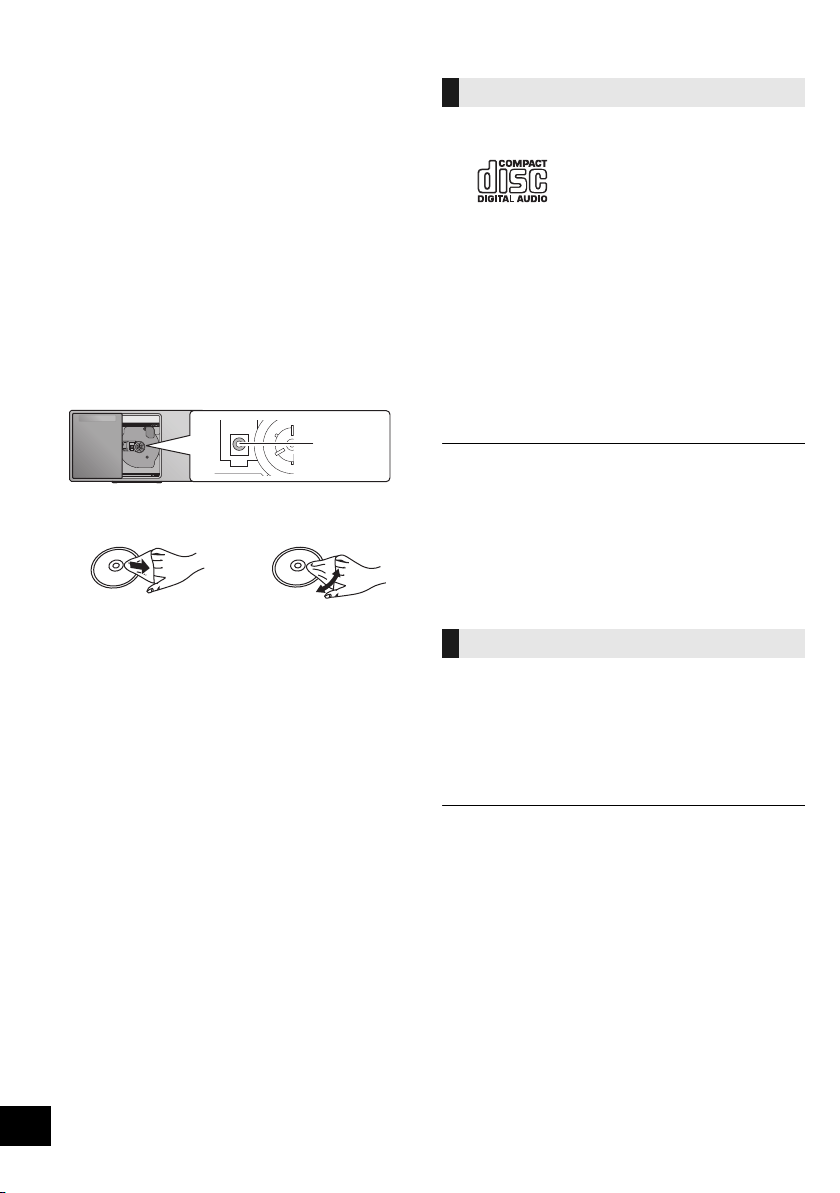
28
TQBJ0981
Unit and media care
Pull out the AC mains lead from the outlet before
maintenance.
∫ Clean this unit with a soft, dry cloth
≥ When dirt is heavy, wring a wet cloth tightly to wipe the dirt,
and then wipe it with a dry cloth.
≥ When cleaning the speaker covers, use a fine cloth.
Do not use tissues or other materials that can fall apart.
Small pieces may get stuck inside the speaker cover.
≥ Never use alcohol, paint thinner or benzine to clean this unit.
≥ Before using chemically treated cloth, carefully read the
cloth’s instructions.
∫ Maintenance of the lens
≥ Clean the lens regularly to prevent malfunctions. Use a dust
blower to remove dust and a cotton swab if it is extremely
dirty.
≥ You cannot use a CD type lens cleaner.
≥ Do not leave the sliding door open for prolonged periods of
time. This will cause the lens to get dirty.
≥ Be careful not to touch the lens with your fingers.
∫ Clean discs
Wipe with a damp cloth and then wipe dry.
∫ Disc handling precautions
≥ Handle discs by the edges to avoid inadvertent scratches or
fingerprints on the disc.
≥ Do not attach labels or stickers to discs.
≥ Do not use record cleaning sprays, benzine, thinner, static
electricity prevention liquids or any other solvent.
≥ Do not use the following discs:
– Discs with exposed adhesive from removed stickers or
labels (rented discs etc.).
– Discs that are badly warped or cracked.
– Irregularly shaped discs, such as heart shapes.
∫ To dispose or transfer this unit
The unit may keep the user settings information in the
unit. If you discard this unit either by disposal or
transfer, then follow the procedure to return all the
settings to the factory defaults to delete the user
settings.
(l 25, “To return all settings to the factory defaults”)
Playable media
≥ A disc with the CD Logo.
≥ This unit can play back discs that conform to the CD-DA
format.
≥ This system can play back CD-R/RW with CD-DA or MP3
format content.
≥ The unit may not be able to play some discs due to the
condition of the recording.
≥ Before playback, finalise the disc on the device it was
recorded on.
≥ If the disc includes both MP3 and normal audio data
(CD-DA), the unit plays the type recorded in the inner part of
the disc.
≥ This unit cannot play files recorded using packet write.
≥ Disc must conform to ISO9660 level 1 or 2 (except for
extended formats).
≥ Some CD-R/RW cannot be played because of the condition
of the recording.
≥ MP3 files are defined as tracks and folders are defined as
albums.
≥ This system can access up to:
– CD-DA: 99 tracks
– MP3: 999 tracks, 255 albums (including root folder)
≥ Recordings will not necessarily be played in the order you
recorded them.
≥ This unit does not guarantee connection with all USB
devices.
≥ FAT12, FAT16 and FAT32 file systems are supported.
≥ This unit supports USB 2.0 Full Speed.
≥ USB devices with storage capacity of more than 32 GB
cannot work in some conditions.
≥ Supported format: Files with the extension “.mp3” or “.MP3”.
≥ Depending on how you create the files, they may not play in
the order you numbered them or may not play at all.
≥ Files are defined as tracks and folders are defined as
albums.
≥ This system can access up to:
– 800 albums (including root folder)
– 8000 tracks
– 999 tracks in one album
DO DO NOT
Lens
Compatible CD
Compatible USB devices
SC-HC1020-EGEBGN~TQBJ0981.book 28 ページ 2017年1月20日 金曜日 午前10時35分

29
TQBJ0981
Specifications
≥ Specifications are subject to change without notice.
≥ Mass and dimensions are approximate.
≥ Total harmonic distortion is measured by a digital spectrum
analyzer.
*1: No device is connected to the USB port before turning to
standby mode.
*2: Network standby is inactive.
*3: MPEG-1 Layer 3, MPEG-2 Layer 3
*4: Uncompressed FLAC files may not operate correctly.
∫ GENERAL
Power consumption 25 W
Power consumption in standby mode
(When “BLUETOOTH STANDBY” is “OFF”)*
1, 2
Approx. 0.2 W
(When “BLUETOOTH STANDBY” is “ON”)*
1, 2
Approx. 0.3 W
(When “NET STANDBY” is “ON”)*
1
Approx. 2 W
Power supply AC 220 V to 240 V, 50 Hz
Dimensions (WkHkD)
420 mmk225 mmk102 mm
Mass Approx. 2.5 kg
Operating temperature range 0 oC to r40 oC
Operating humidity range
35% to 80% RH (no condensation)
∫ AMPLIFIER SECTION
Output power
RMS Output Power
Front Ch (both ch driven)
20 W per channel (8 ≠), 1 kHz, 10% THD
Total RMS power 40 W
∫ TUNER SECTION
Preset Memory FM 30 stations
Frequency Modulation (FM)
Frequency range
87.50 MHz to 108.00 MHz (50 kHz step)
Antenna terminals 75 ≠ (unbalanced)
∫ DAB SECTION
DAB memories 20 channels
Frequency Band (Wavelength)
Band III 5A to 13F
(174.928 MHz to 239.200 MHz)
Sensitivity *BER 4x10
-4
Min Requirement s98 dBm
DAB External Antenna
Terminal F - Connector (75 ≠)
∫ DISC SECTION
Disc played (8 cm or 12 cm)
CD, CD-R/RW (CD-DA, MP3*
3
)
Pick up
Wavelength 790 nm (CD)
NORSK (NORWAY)
Bølgelengde 790 nm (CD)
Laserstyrke Ingen farlig stråling sendes ut
(med sikkerhets-beskyttelse)
∫ SPEAKER SECTION
Speaker unit(s)
Full Range
8cmconetype
k
2
∫ TERMINAL SECTION
USB Port
USB Port power DC OUT 5 V 1.5 A
USB Standard USB 2.0 full speed
Media file format support MP3*
3
(¢.mp3)
Audio support format
MP3*
3
Sampling frequency 32/44.1/48 kHz
Audio word size 16 bits
Channel count 2ch
USB device file system FAT12, FAT16, FAT32
Ethernet interface
LAN (10BASE-T/100BASE-TX)
AUX IN Stereo, 3.5 mm jack
∫ Bluetooth
®
SECTION
Version Bluetooth
®
Ver.2.1+EDR
Class Class 2
Supported Profiles A2DP, AVRCP
Frequency band 2.4 GHz band FH-SS
Operation Distance 10 m Line of sight
Supported Codec SBC
∫ Wi-Fi SECTION
Wi-Fi
WLAN Standard IEEE802.11a/b/g/n
Frequency range 2.4 GHz band/5 GHz band
Security WPA2
TM
WPS version Version 2.0
Audio support format (AllPlay)
MP3*
3
/AAC
Sampling frequency 32/44.1/48 kHz
Audio word size 16 bits
Channel count 2ch
FLAC*
4
/ALAC/WAV
Sampling frequency
32/44.1/48/88.2/96/176.4/192 kHz
Audio word size 16 bits/24 bits
Channel count 2ch
SC-HC1020-EGEBGN~TQBJ0981.book 29 ページ 2017年1月20日 金曜日 午前10時35分
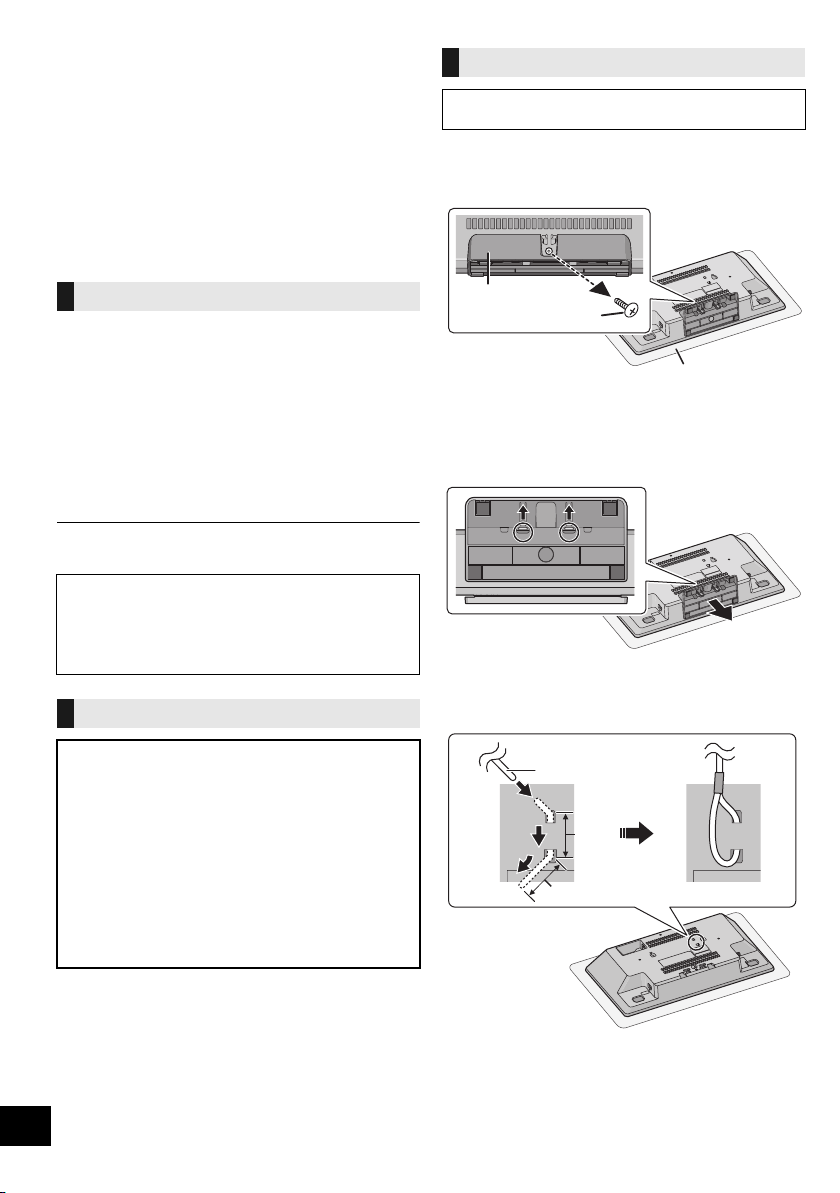
30
TQBJ0981
Attaching the unit to a wall
(optional)
This unit can be wall mounted using the supplied wall
mount brackets, safety holder, etc. Make sure that the
wall and the screws used for securing to the wall are
capable of supporting at least 36 kg. The screws and
other items are not supplied as the type and size will
vary with each installation.
≥ Refer to step 6 and step 7 of “Wall mount
instructions” for details about the required screws.
≥ As an additional protective measure, attach the unit
to the wall with the fall prevention cord.
∫ Supplied accessories
≥ 2 Wall mount brackets
≥ 1 Safety holder
≥ 1 Wall mounting sheet
∫ Additionally required accessories
(commercially available)
≥ 4 Wall mount bracket fixing screws
≥ 2 Safety holder fixing screws
≥ 1 Fall prevention cord*
≥ 1 Screw eye
* Use a cord that is capable of supporting over 36 kg
(with a diameter of about 1.5 mm).
1 Unscrew the fixing screw at the rear of the unit.
≥ Keep the removed screw in a safe place.
2 Detach the stand from the unit while pressing the
catches upward.
≥ While lifting the catches upwards, gently pull the stand
forward.
3 Attach the fall prevention cord (not supplied) to this
unit.
A Fall prevention cord (not supplied)
≥ Bend the cord twice from the tip, each at 45o and 5 mm
apart for it to go through the holes.
B 5mm
Installation accessories
≥ Keep the screws out of reach of children to prevent
swallowing.
≥ Keep the wall mount brackets out of reach of children
to prevent swallowing.
≥ Keep the screw eye out of reach of children to prevent
swallowing.
Safety precautions
Professional installation is required.
The installation should never be done by any
other than a qualified installation specialist.
PANASONIC DISCLAIMS ANY PROPERTY
DAMAGE AND/OR SERIOUS INJURY,
INCLUDING DEATH RESULTING FROM
IMPROPER INSTALLATION OR INCORRECT
HANDLING.
WARNING:
To prevent injury, this apparatus must be securely
attached to the wall in accordance with the
installation instructions.
Wall mount instructions
Before installation, turn the unit off and disconnect the
AC mains lead from the mains socket.
Stand
Fixing screw
Soft blanket or cloth
SC-HC1020-EGEBGN~TQBJ0981.book 30 ページ 2017年1月20日 金曜日 午前10時35分
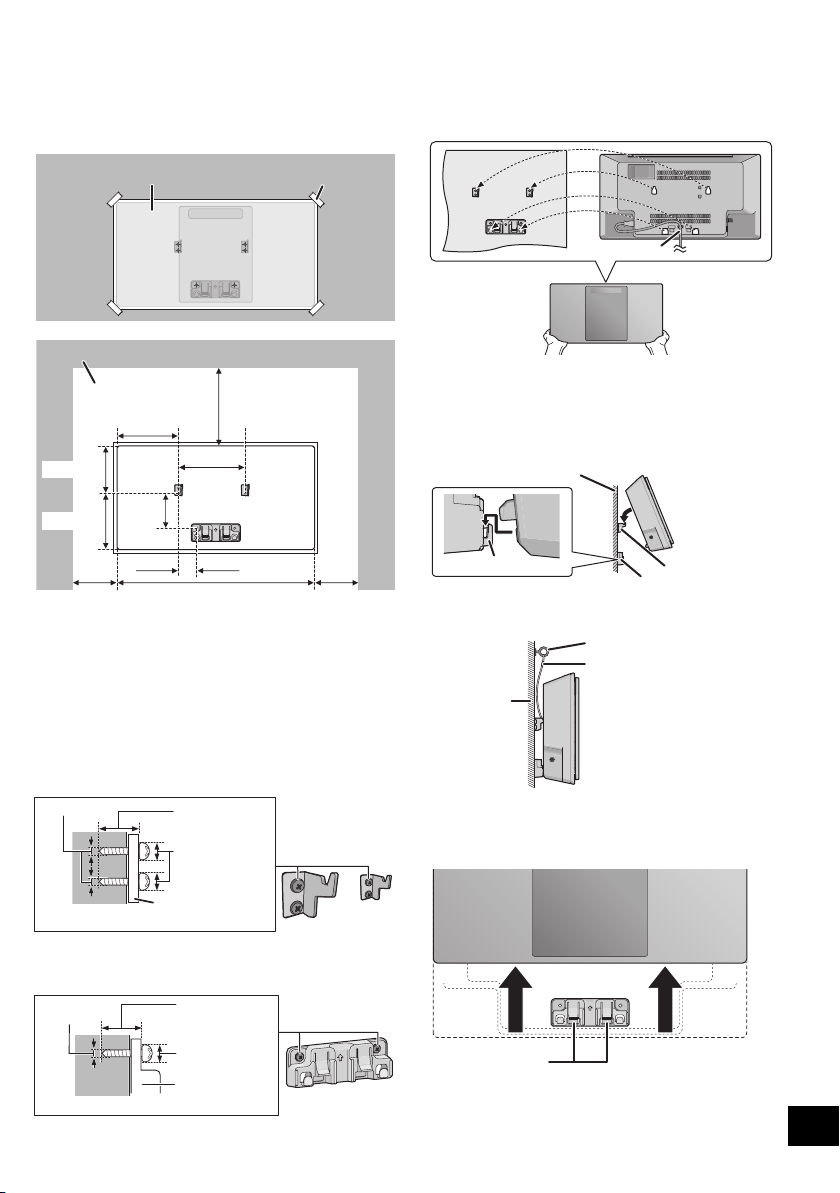
31
TQBJ0981
4 Put up the wall mounting sheet on the wall where
the unit is to be mounted.
≥ Before deciding the location to place the unit, be sure to
check that the Wi-Fi signal strength is sufficient. (l 24)
≥ Spread out the wall mounting sheet when tapping it to
the wall.
5 Make holes on the wall at the center of each cross
mark on the sheet.
≥ Take the sheet away from the wall after its use.
6 Attach each wall mount bracket to the wall with two
screws (not supplied).
≥ Use a level to ensure both wall mount brackets are
level.
7 Attach the safety holder with two screws (not
supplied) to the wall.
8 Attach the unit.
1 Hook the unit securely onto the wall mount brackets
with both hands.
≥ Connect the antenna and the AC mains lead to the unit
before hanging the unit onto the wall. (l 6)
2 Slightly uplift the unit vertically until reaching the
hook of the safety holder, and push lower so that
the unit is hooked and locked in the safety holder.
≥
The unit will be locked onto the safety holder with a click sound.
≥ After hanging the unit, release your hands carefully to
confirm the unit sits securely on the wall mount brackets
and the safety holder.
9
Attach the fall prevention cord (not supplied) to the wall.
≥ Make sure that the slack of the cord is minimal.
∫
To release the unit from the safety holder
While pressing two catches of the safety holder, uplift
the unit vertically.
Wall mounting sheet
Adhesive tape (not supplied)
Wall
420 mm
102.5 mm
130.5 mm
141 mm
100 mm
118.5 mm
300 mm
100 mm
39 mm
73 mm
Space required
At least 30 mm
‰7.5 mm to
‰9.4 mm
‰4.0 mm
Wall mount bracket
At least 30 mm
‰7.5 mm to
‰9.4 mm
‰4.0 mm
Safety holder
Wall
AC mains lead
Wall
Hook
Wall mount bracket
Safety holder
Cord (not supplied)
Screw eye (not supplied)
Wall
Catches
SC-HC1020-EGEBGN~TQBJ0981.book 31 ページ 2017年1月20日 金曜日 午前10時35分

32
TQBJ0981
Software Licenses
This product incorporates the following software:
(1) the software developed independently by or for Panasonic Corporation,
(2) the software owned by third party and licensed to Panasonic Corporation,
(3) the software licensed under the GNU General Public License, Version 2.0 (GPL
V2.0),
(4) the software licensed under the GNU LESSER General Public License, Version
2.1 (LGPL V2.1), and/or
(5) open source software other than the software licensed under the GPL V2.0
and/or LGPL V2.1.
The software categorized as (3) - (5) are distributed in the hope that it will be
useful, but WITHOUT ANY WARRANTY, without even the implied warranty of
MERCHANTABILITY or FITNESS FOR A PARTICULAR PURPOSE.
At least three (3) years from delivery of this product, Panasonic will give to any
third party who contacts us at the contact information provided below, for a charge
no more than our cost of physically performing source code distribution, a
complete machine-readable copy of the corresponding source code covered under
GPL V2.0, LGPL V2.1 or the other licenses with the obligation to do so, as well as
the respective copyright notice thereof.
Contact Information:
[email protected]p.panasonic.com
The source code and the copyright notice are also available for free in our website
below.
http://panasonic.net/avc/oss/
GNU LESSER GENERAL PUBLIC LICENSE
Version 2.1, February 1999
Copyright (C) 1991, 1999 Free Software Foundation, Inc.
51 Franklin Street, Fifth Floor, Boston, MA 02110-1301 USA
Everyone is permitted to copy and distribute verbatim copies
of this license document, but changing it is not allowed.
[This is the first released version of the Lesser GPL. It also counts as the
successor of the GNU Library Public License, version 2, hence the version number
2.1.]
Preamble
The licenses for most software are designed to take away your freedom to share
and change it. By contrast, the GNU General Public Licenses are intended to
guarantee your freedom to share and change free software--to make sure the
software is free for all its users.
This license, the Lesser General Public License, applies to some specially
designated software packages--typically libraries--of the Free Software Foundation
and other authors who decide to use it. You can use it too, but we suggest you first
think carefully about whether this license or the ordinary General Public License is
the better strategy to use in any particular case, based on the explanations below.
When we speak of free software, we are referring to freedom of use, not price.
Our General Public Licenses are designed to make sure that you have the
freedom to distribute copies of free software (and charge for this service if you
wish); that you receive source code or can get it if you want it; that you can change
the software and use pieces of it in new free programs; and that you are informed
that you can do these things.
To protect your rights, we need to make restrictions that forbid distributors to deny
you these rights or to ask you to surrender these rights. These restrictions
translate to certain responsibilities for you if you distribute copies of the library or if
you modify it.
For example, if you distribute copies of the library, whether gratis or for a fee, you
must give the recipients all the rights that we gave you. You must make sure that
they, too, receive or can get the source code. If you link other code with the library,
you must provide complete object files to the recipients, so that they can relink
them with the library after making changes to the library and recompiling it. And
you must show them these terms so they know their rights.
We protect your rights with a two-step method: (1) we copyright the library, and
(2) we offer you this license, which gives you legal permission to copy, distribute
and/or modify the library.
To protect each distributor, we want to make it very clear that there is no warranty
for the free library. Also, if the library is modified by someone else and passed on,
the recipients should know that what they have is not the origi
nal version, so that
the original author's reputation will not be affected by problems that might be
introduced by others.
Finally, software patents pose a constant threat to the existence of any free
program. We wish to make sure that a company cannot effectively restrict the
users of a free program by obtaining a restrictive license from a patent holder.
Therefore, we insist that any patent license obtained for a version of the library
must be consistent with the full freedom of use specified in this license.
Most GNU software, including some libraries, is covered by the ordinary GNU
General Public License. This license, the GNU Lesser General Public License,
applies to certain designated libraries, and is quite different from the ordinary
General Public License. We use this license for certain libraries in order to permit
linking those libraries into non-free programs.
When a program is linked with a library, whether statically or using a shared
library, the combination of the two is legally speaking a combined work, a
derivative of the original library. The ordinary General Public License therefore
permits such linking only if the entire combination fits its criteria of freedom. The
Lesser General Public License permits more lax criteria for linking other code with
the library.
We call this license the "Lesser" General Public License because it does Less to
protect the user's freedom than the ordinary General Public License. It also
provides other free software developers Less of an advantage over competing
non-free programs. These disadvantages are the reason we use the ordinary
General Public License for many libraries. However, the Lesser license provides
advantages in certain special circumstances.
For example, on rare occasions, there may be a special need to encourage the
widest possible use of a certain library, so that it becomes a de-facto standard. To
achieve this, non-free programs must be allowed to use the library. A more
frequent case is that a free library does the same job as widely used non-free
libraries. In this case, there is little to gain by limiting the free library to free
software only, so we use the Lesser General Public License.
In other cases, permission to use a particular library in non-free programs
enables a greater number of people to use a large body of free software. For
example, permission to use the GNU C Library in non-free programs enables
many more people to use the whole GNU operating system, as well as its variant,
the GNU/Linux operating system.
Although the Lesser General Public License is Less protective of the users'
freedom, it does ensure that the user of a program that is linked with the Library
has the freedom and the wherewithal to run that program using a modified version
of the Library.
The precise terms and conditions for copying, distribution and modification follow.
Pay close attention to the difference between a "work based on the library" and a
"work that uses the library". The former contains code derived from the library,
whereas the latter must be combined with the library in order to run.
GNU LESSER GENERAL PUBLIC LICENSE
TERMS AND CONDITIONS FOR COPYING, DISTRIBUTION AND MODIFICATION
0. This License Agreement applies to any software library or other program which
contains a notice placed by the copyright holder or other authorized party saying it
may be distributed under the terms of this Lesser General Public License (also
called "this License").
Each licensee is addressed as "you".
A "library" means a collection of software functions and/or data prepared so as to
be conveniently linked with application programs (which use some of those
functions and data) to form executables.
The "Library", below, refers to any such software library or work which has been
distributed under these terms. A "work based on the Library" means either the
Library or any derivative work under copyright law: that is to say, a work containing
the Library or a portion of it, either verbatim or with modifications and/or translated
straightforwardly into another language. (Hereinafter, translation is included
without limitation in the term "modification".)
"Source code" for a work means the preferred form of the work for making
modifications to it. For a library, complete source code means all the source code
for all modules it contains, plus any associated interface definition files, plus the
scripts used to control compilation and installation of the library.
Activities other than copying, distribution and modification are not covered by this
License; they are outside its scope. The act of running a program using the Library
is not restricted, and output from such a program is covered only if its contents
constitute a work based on the Library (independent of the use of the Library in a
tool for writing it). Whether that is true depends on what the Library does and what
the program that uses the Library does.
1. You may copy and distribute verbatim copies of the Library's complete source
code as you receive it, in any medium, provided that you conspicuously and
appropriately publish on each copy an appropriate copyright notice and disclaimer
of warranty; keep intact all the notices that refer to this License and to the absence
of any warranty; and distribute a copy of this License along with the Library.
You may charge a fee for the physical act of transferring a copy, and you may at
your option offer warranty protection in exchange for a fee.
2. You may modify your copy or copies of the Library or any portion of it, thus
forming a work based on the Library, and copy and distribute such modifications or
work under the terms of Section 1 above, provided that you also meet all of these
conditions:
a) The modified work must itself be a software library.
b) You must cause the files modified to carry prominent notices stating that you
changed the files and the date of any change.
c) You must cause the whole of the work to be licensed at no charge to all third
parties under the terms of this License.
d) If a facility in the modified Library refers to a function or a table of data to be
supplied by an application program that uses the facility, other than as an
argument passed when the facility is invoked, then you must make a good faith
effort to ensure that, in the event an application does not supply such function or
table, the facility still operates, and performs whatever part of its purpose
remains meaningful.
(For example, a function in a library to compute square roots has a purpose that
is entirely well-defined independent of the application. Therefore, Subsection 2d
requires that any application-supplied function or table used by this function
must be optional: if the application does not supply it, the square root function
must still compute square roots.)
SC-HC1020-EGEBGN~TQBJ0981.book 32 ページ 2017年1月20日 金曜日 午前10時35分

33
TQBJ0981
These requirements apply to the modified work as a whole. If identifiable sections
of that work are not derived from the Library, and can be reasonably considered
independent and separate works in themselves, then this License, and its terms,
do not apply to those sections when you distribute them as separate works. But
when you distribute the same sections as part of a whole which is a work based on
the Library, the distribution of the whole must be on the terms of this License,
whose permissions for other licensees extend to the entire whole, and thus to each
and every part regardless of who wrote it.
Thus, it is not the intent of this section to claim rights or contest your rights to work
written entirely by you; rather, the intent is to exercise the right to control the
distribution of derivative or collective works based on the Library.
In addition, mere aggregation of another work not based on the Library with the
Library (or with a work based on the Library) on a volume of a storage or
distribution medium does not bring the other work under the scope of this License.
3. You may opt to apply the terms of the ordinary GNU General Public License
instead of this License to a given copy of the Library. To do this, you must alter all
the notices that refer to this License, so that they refer to the ordinary GNU
General Public License, version 2, instead of to this License. (If a newer version
than version 2 of the ordinary GNU General Public License has appeared, then
you can specify that version instead if you wish.) Do not make any other change in
these notices.
Once this change is made in a given copy, it is irreversible for that copy, so the
ordinary GNU General Public License applies to all subsequent copies and
derivative works made from that copy.
This option is useful when you wish to copy part of the code of the Library into a
program that is not a library.
4. You may copy and distribute the Library (or a portion or derivative of it, under
Section 2) in object code or executable form under the terms of Sections 1 and 2
above provided that you accompany it with the complete corresponding
machine-readable source code, which must be distributed under the terms of
Sections 1 and 2 above on a medium customarily used for software interchange.
If distribution of object code is made by offering access to copy from a designated
place, then offering equivalent access to copy the source code from the same
place satisfies the requirement to distribute the source code, even though third
parties are not compelled to copy the source along with the object code.
5. A program that contains no derivative of any portion of the Library, but is
designed to work with the Library by being compiled or linked with it, is called a
"work that uses the Library". Such a work, in isolation, is not a derivative work of
the Library, and therefore falls outside the scope of this License.
However, linking a "work that uses the Library" with the Library creates an
executable that is a derivative of the Library (because it contains portions of the
Library), rather than a "work that uses the library". The executable is therefore
covered by this License.
Section 6 states terms for distribution of such executables.
When a "work that uses the Library" uses material from a header file that is part of
the Library, the object code for the work may be a derivative work of the Library
even though the source code is not.
Whether this is true is especially significant if the work can be linked without the
Library, or if the work is itself a library. The threshold for this to be true is not
precisely defined by law.
If such an object file uses only numerical parameters, data structure layouts and
accessors, and small macros and small inline functions (ten lines or less in length),
then the use of the object file is unrestricted, regardless of whether it is legally a
derivative work. (Executables containing this object code plus portions of the
Library will still fall under Section 6.)
Otherwise, if the work is a derivative of the Library, you may distribute the object
code for the work under the terms of Section 6.
Any executables containing that work also fall under Section 6, whether or not they
are linked directly with the Library itself.
6. As an exception to the Sections above, you may also combine or link a "work
that uses the Library" with the Library to produce a work containing portions of the
Library, and distribute that work under terms of your choice, provided that the
terms permit modification of the work for the customer's own use and reverse
engineering for debugging such modifications.
You must give prominent notice with each copy of the work that the Library is
used in it and that the Library and its use are covered by this License. You must
supply a copy of this License. If the work during execution displays copyright
notices, you must include the copyright notice for the Library among them, as well
as a reference directing the user to the copy of this License. Also, you must do
one of these things:
a) Accompany the work with the complete corresponding machine-readable
source code for the Library including whatever changes were used in the work
(which must be distributed under Sections 1 and 2 above); and, if the work is an
executable linked with the Library, with the complete machine-readable "work
that uses the Library", as object code and/or source code, so that the user can
modify the Library and then relink to produce a modified executable containing
the modified Library. (It is understood that the user who changes the contents of
definitions files in the Library will not necessarily be able to recompile the
application to use the modified definitions.)
b) Use a suitable shared library mechanism for linking with the Library.
A suitable mechanism is one that (1) uses at run time a copy of the library
already present on the user's computer system, rather than copying library
functions into the executable, and (2) will operate properly with a modified
version of the library, if the user installs one, as long as the modified version is
interface-compatible with the version that the work was made with.
c) Accompany the work with a written offer, valid for at least three years, to give
the same user the materials specified in Subsection 6a, above, for a charge no
more than the cost of performing this distribution.
d) If distribution of the work is made by offering access to copy from a
designated place, offer equivalent access to copy the above specified materials
from the same place.
e) Verify that the user has already received a copy of these materials or that you
have already sent this user a copy.
For an executable, the required form of the "work that uses the Library" must
include any data and utility programs needed for reproducing the executable from
it. However, as a special exception, the materials to be distributed need not
include anything that is normally distributed (in either source or binary form) with
the major components (compiler, kernel, and so on) of the operating system on
which the executable runs, unless that component itself accompanies the
executable.
It may happen that this requirement contradicts the license restrictions of other
proprietary libraries that do not normally accompany the operating system. Such a
contradiction means you cannot use both them and the Library together in an
executable that you distribute.
7. You may place library facilities that are a work based on the Library
side-by-side in a single library together with other library facilities not covered by
this License, and distribute such a combined library, provided that the separate
distribution of the work based on the Library and of the other library facilities is
otherwise permitted, and provided that you do these two things:
a) Accompany the combined library with a copy of the same work based on the
Library, uncombined with any other library facilities. This mu
st be distributed
under the terms of the Sections above.
b) Give prominent notice with the combined library of the fact that part of it is a
work based on the Library, and explaining where to find the accompanying
uncombined form of the same work.
8. You may not copy, modify, sublicense, link with, or distribute the Library except
as expressly provided under this License. Any attempt otherwise to copy, modify,
sublicense, link with, or distribute the Library is void, and will automatically
terminate your rights under this License. However, parties who have received
copies, or rights, from you under this License will not have their licenses
terminated so long as such parties remain in full compliance.
9. You are not required to accept this License, since you have not signed it.
However, nothing else grants you permission to modify or distribute the Library or
its derivative works. These actions are prohibited by law if you do not accept this
License. Therefore, by modifying or distributing the Library (or any work based on
the Library), you indicate your acceptance of this License to do so, and all its terms
and conditions for copying, distributing or modifying the Library or works based on
it.
10. Each time you redistribute the Library (or any work based on the Library), the
recipient automatically receives a license from the original licensor to copy,
distribute, link with or modify the Library subject to these terms and conditions.
You may not impose any further restrictions on the recipients' exercise of the rights
granted herein.
You are not responsible for enforcing compliance by third parties with this License.
11. If, as a consequence of a court judgment or allegation of patent infringement
or for any other reason (not limited to patent issues), conditions are imposed on
you (whether by court order, agreement or otherwise) that contradict the conditions
of this License, they do not excuse you from the conditions of this License. If you
cannot distribute so as to satisfy simultaneously your obligations under this
License and any other pertinent obligations, then as a consequence you may not
distribute the Library at all. For example, if a patent license would not permit
royalty-free redistribution of the Library by all those who receive copies directly or
indirectly through you, then the only way you could satisfy both it and this License
would be to refrain entirely from distribution of the Library.
If any portion of this section is held invalid or unenforceable under any particular
circumstance, the balance of the section is intended to apply, and the section as a
whole is intended to apply in other circumstances.
It is not the purpose of this section to induce you to infringe any patents or other
property right claims or to contest validity of any such claims; this section has the
sole purpose of protecting the integrity of the free software distribution system
which is implemented by public license practices. Many people have made
generous contributions to the wide range of software distributed through that
system in reliance on consistent application of that system; it is up to the author/
donor to decide if he or she is willing to distribute software through any other
system and a licensee cannot impose that choice.
This section is intended to make thoroughly clear what is believed to be a
consequence of the rest of this License.
12. If the distribution and/or use of the Library is restricted in certain countries
either by patents or by copyrighted interfaces, the original copyright holder who
places the Library under this License may add an explicit geographical distribution
limitation excluding those countries, so that distribution is permitted only in or
among countries not thus excluded. In such case, this License incorporates the
limitation as if written in the body of this License.
SC-HC1020-EGEBGN~TQBJ0981.book 33 ページ 2017年1月20日 金曜日 午前10時35分

34
TQBJ0981
13. The Free Software Foundation may publish revised and/or new versions of
the Lesser General Public License from time to time.
Such new versions will be similar in spirit to the present version, but may differ in
detail to address new problems or concerns.
Each version is given a distinguishing version number. If the Library specifies a
version number of this License which applies to it and "any later version", you have
the option of following the terms and conditions either of that version or of any later
version published by the Free Software Foundation. If the Library does not specify
a license version number, you may choose any version ever published by the Free
Software Foundation.
14. If you wish to incorporate parts of the Library into other free programs whose
distribution conditions are incompatible with these, write to the author to ask for
permission. For software which is copyrighted by the Free Software Foundation,
write to the Free Software Foundation; we sometimes make exceptions for this.
Our decision will be guided by the two goals of preserving the free status of all
derivatives of our free software and of promoting the sharing and reuse of software
generally.
NO WARRANTY
15. BECAUSE THE LIBRARY IS LICENSED FREE OF CHARGE, THERE IS NO
WARRANTY FOR THE LIBRARY, TO THE EXTENT PERMITTED BY
APPLICABLE LAW.
EXCEPT WHEN OTHERWISE STATED IN WRITING THE COPYRIGHT
HOLDERS AND/OR OTHER PARTIES PROVIDE THE LIBRARY "AS IS"
WITHOUT WARRANTY OF ANY KIND, EITHER EXPRESSED OR IMPLIED,
INCLUDING, BUT NOT LIMITED TO, THE IMPLIED WARRANTIES OF
MERCHANTABILITY AND FITNESS FOR A PARTICULAR PURPOSE. THE
ENTIRE RISK AS TO THE QUALITY AND PERFORMANCE OF THE LIBRARY IS
WITH YOU. SHOULD THE LIBRARY PROVE DEFECTIVE, YOU ASSUME THE
COST OF ALL NECESSARY SERVICING, REPAIR OR CORRECTION.
16. IN NO EVENT UNLESS REQUIRED BY APPLICABLE LAW OR AGREED
TO IN WRITING WILL ANY COPYRIGHT HOLDER, OR ANY OTHER PARTY
WHO MAY MODIFY AND/OR REDISTRIBUTE THE LIBRARY AS PERMITTED
ABOVE, BE LIABLE TO YOU FOR DAMAGES, INCLUDING ANY GENERAL,
SPECIAL, INCIDENTAL OR CONSEQUENTIAL DAMAGES ARISING OUT OF
THE USE OR INABILITY TO USE THE LIBRARY (INCLUDING BUT NOT
LIMITED TO LOSS OF DATA OR DATA BEING RENDERED INACCURATE OR
LOSSES SUSTAINED BY YOU OR THIRD PARTIES OR A FAILURE OF THE
LIBRARY TO OPERATE WITH ANY OTHER SOFTWARE), EVEN IF SUCH
HOLDER OR OTHER PARTY HAS BEEN ADVISED OF THE POSSIBILITY OF
SUCH DAMAGES.
END OF TERMS AND CONDITIONS
How to Apply These Terms to Your New Libraries
If you develop a new library, and you want it to be of the greatest possible use to
the public, we recommend making it free software that everyone can redistribute
and change. You can do so by permitting redistribution under these terms (or,
alternatively, under the terms of the ordinary General Public License).
To apply these terms, attach the following notices to the library. It is safest to
attach them to the start of each source file to most effectively convey the exclusion
of warranty; and each file should have at least the "copyright" line and a pointer to
where the full notice is found.
<one line to give the library's name and a brief idea of what it does.>
Copyright (C) <year> <name of author>
This library is free software; you can redistribute it and/or modify it under the
terms of the GNU Lesser General Public License as published by the Free
Software Foundation; either version 2.1 of the License, or (at your option) any
later version.
This library is distributed in the hope that it will be useful, but WITHOUT ANY
WARRANTY; without even the implied warranty of MERCHANTABILITY or
FITNESS FOR A PARTICULAR PURPOSE. See the GNU Lesser General
Public License for more details.
You should have received a copy of the GNU Lesser General Public License
along with this library; if not, write to the Free Software Foundation, Inc., 51
Franklin Street, Fifth Floor, Boston, MA 02110-1301 USA
Also add information on how to contact you by electronic and paper mail.
You should also get your employer (if you work as a programmer) or your school, if
any, to sign a "copyright disclaimer" for the library, if necessary. Here is a sample;
alter the names:
Yoyodyne, Inc., hereby disclaims all copyright interest in the library `Frob' (a
library for tweaking knobs) written by James Random Hacker.
<signature of Ty Coon>, 1 April 1990
Ty Coon, President of Vice
That's all there is to it!
GNU GENERAL PUBLIC LICENSE
Version 2, June 1991
Copyright (C) 1989, 1991 Free Software Foundation, Inc.,
51 Franklin Street, Fifth Floor, Boston, MA 02110-1301 USA
Everyone is permitted to copy and distribute verbatim copies
of this license document, but changing it is not allowed.
Preamble
The licenses for most software are designed to take away your freedom to share
and change it. By contrast, the GNU General Public License is intended to
guarantee your freedom to share and change free software--to make sure the
software is free for all its users. This General Public License applies to most of the
Free Software Foundation's software and to any other program whose authors
commit to using it. (Some other Free Software Foundation software is covered by
the GNU Lesser General Public License instead.) You can apply it to your
programs, too.
When we speak of free software, we are referring to freedom, not price. Our
General Public Licenses are designed to make sure that you have the freedom to
distribute copies of free software (and charge for this service if you wish), that you
receive source code or can get it if you want it, that you can change the software or
use pieces of it in new free programs; and that you know you can do these things.
To protect your rights, we need to make restrictions that forbid anyone to deny
you these rights or to ask you to surrender the rights. These restrictions translate
to certain responsibilities for you if you distribute copies of the software, or if you
modify it.
For example, if you distribute copies of such a program, whether gratis or for a
fee, you must give the recipients all the rights that you have. You must make sure
that they, too, receive or can get the source code. And you must show them these
terms so they know their
rights.
We protect your rights with two steps: (1) copyright the software, and (2) offer you
this license which gives you legal permission to copy, distribute and/or modify the
software.
Also, for each author's protection and ours, we want to make certain that
everyone understands that there is no warranty for this free software. If the
software is modified by someone else and passed on, we want its recipients to
know that what they have is not the original, so that any problems introduced by
others will not reflect on the original authors' reputations.
Finally, any free program is threatened constantly by software patents. We wish
to avoid the danger that redistributors of a free program will individually obtain
patent licenses, in effect making the program proprietary. To prevent this, we have
made it clear that any patent must be licensed for everyone's free use or not
licensed at all.
The precise terms and conditions for copying, distribution and modification follow.
GNU GENERAL PUBLIC LICENSE
TERMS AND CONDITIONS FOR COPYING, DISTRIBUTION AND MODIFICATION
0. This License applies to any program or other work which contains a notice
placed by the copyright holder saying it may be distributed under the terms of this
General Public License. The "Program", below, refers to any such program or
work, and a "work based on the Program" means either the Program or any
derivative work under copyright law: that is to say, a work containing the Program
or a portion of it, either verbatim or with modifications and/or translated into
another language. (Hereinafter, translation is included without limitation in the term
"modification".) Each licensee is addressed as "you".
Activities other than copying, distribution and modification are not covered by this
License; they are outside its scope. The act of running the Program is not
restricted, and the output from the Program is covered only if its contents constitute
a work based on the Program (independent of having been made by running the
Program).
Whether that is true depends on what the Program does.
1. You may copy and distribute verbatim copies of the Program's source code as
you receive it, in any medium, provided that you conspicuously and appropriately
publish on each copy an appropriate copyright notice and disclaimer of warranty;
keep intact all the notices that refer to this License and to the absence of any
warranty; and give any other recipients of the Program a copy of this License along
with the Program.
You may charge a fee for the physical act of transferring a copy, and you may at
your option offer warranty protection in exchange for a fee.
2. You may modify your copy or copies of the Program or any portion of it, thus
forming a work based on the Program, and copy and distribute such modifications
or work under the terms of Section 1 above, provided that you also meet all of
these conditions:
a) You must cause the modified files to carry prominent notices stating that you
changed the files and the date of any change.
b) You must cause any work that you distribute or publish, that in whole or in part
contains or is derived from the Program or any part thereof, to be licensed as a
whole at no charge to all third parties under the terms of this License.
c) If the modified program normally reads commands interactively when run, you
must cause it, when started running for such interactive use in the most ordinary
way, to print or display an announcement including an appropriate copyright
notice and a notice that there is no warranty (or else, saying that you provide a
warranty) and that users may redistribute the program under these conditions,
and telling the user how to view a copy of this License. (Exception: if the
Program itself is interactive but does not normally print such an announcement,
your work based on the Program is not required to print an announcement.)
SC-HC1020-EGEBGN~TQBJ0981.book 34 ページ 2017年1月20日 金曜日 午前10時35分

35
TQBJ0981
These requirements apply to the modified work as a whole. If identifiable sections
of that work are not derived from the Program, and can be reasonably considered
independent and separate works in themselves, then this License, and its terms,
do not apply to those sections when you distribute them as separate works. But
when you distribute the same sections as part of a whole which is a work based on
the Program, the distribution of the whole must be on the terms of this License,
whose permissions for other licensees extend to the entire whole, and thus to each
and every part regardless of who wrote it.
Thus, it is not the intent of this section to claim rights or contest your rights to work
written entirely by you; rather, the intent is to exercise the right to control the
distribution of derivative or collective works based on the Program.
In addition, mere aggregation of another work not based on the Program with the
Program (or with a work based on the Program) on a volume of a storage or
distribution medium does not bring the other work under the scope of this License.
3. You may copy and distribute the Program (or a work based on it, under Section
2) in object code or executable form under the terms of Sections 1 and 2 above
provided that you also do one of the following:
a) Accompany it with the complete corresponding machine-readable source
code, which must be distributed under the terms of Sections 1 and 2 above on a
medium customarily used for software interchange; or,
b) Accompany it with a written offer, valid for at least three years, to give any
third party, for a charge no more than your cost of physically performing source
distribution, a complete machine-readable copy of the corresponding source
code, to be distributed under the terms of Sections 1 and 2 above on a medium
customarily used for software interchange; or,
c) Accompany it with the information you received as to the offer to distribute
corresponding source code. (This alternative is allowed only for noncommercial
distribution and only if you received the program in object code or executable
form with such an offer, in accord with Subsection b above.)
The source code for a work means the preferred form of the work for making
modifications to it. For an executable work, complete source code means all the
source code for all modules it contains, plus any associated interface definition
files, plus the scripts used to control compilation and installation of the executable.
However, as a special exception, the source code distributed need not include
anything that is normally distributed (in either source or binary form) with the major
components (compiler, kernel, and so on) of the operating system on which the
executable runs, unless that component itself accompanies the executable.
If distribution of executable or object code is made by offering access to copy from
a designated place, then offering equivalent access to copy the source code from
the same place counts as distribution of the source code, even though third parties
are not compelled to copy the source along with the object code.
4. You may not copy, modify, sublicense, or distribute the Program except as
expressly provided under this License. Any attempt otherwise to copy, modify,
sublicense or distribute the Program is void, and will automatically terminate your
rights under this License. However, parties who have received copies, or rights,
from you under this License will not have their licenses terminated so long as such
parties remain in full compliance.
5. You are not required to accept this License, since you have not signed it.
However, nothing else grants you permission to modify or distribute the Program or
its derivative works. These actions are prohibited by law if you do not accept this
License. Therefore, by modifying or distributing the Program (or any work based
on the Program), you indicate your acceptance of this License t
o do so, and all its
terms and conditions for copying, distributing or modifying the Program or works
based on it.
6. Each time you redistribute the Program (or any work based on the Program),
the recipient automatically receives a license from the original licensor to copy,
distribute or modify the Program subject to these terms and conditions. You may
not impose any further restrictions on the recipients' exercise of the rights granted
herein.
You are not responsible for enforcing compliance by third parties to this License.
7. If, as a consequence of a court judgment or allegation of patent infringement or
for any other reason (not limited to patent issues), conditions are imposed on you
(whether by court order, agreement or otherwise) that contradict the conditions of
this License, they do not excuse you from the conditions of this License. If you
cannot distribute so as to satisfy simultaneously your obligations under this
License and any other pertinent obligations, then as a consequence you may not
distribute the Program at all. For example, if a patent license would not permit
royalty-free redistribution of the Program by all those who receive copies directly or
indirectly through you, then the only way you could satisfy both it and this License
would be to refrain entirely from distribution of the Program.
If any portion of this section is held invalid or unenforceable under any particular
circumstance, the balance of the section is intended to apply and the section as a
whole is intended to apply in other circumstances.
It is not the purpose of this section to induce you to infringe any patents or other
property right claims or to contest validity of any such claims; this section has the
sole purpose of protecting the integrity of the free software distribution system,
which is implemented by public license practices. Many people have made
generous contributions to the wide range of software distributed through that
system in reliance on consistent application of that system; it is up to the author/
donor to decide if he or she is willing to distribute software through any other
system and a licensee cannot impose that choice.
This section is intended to make thoroughly clear what is believed to be a
consequence of the rest of this License.
8. If the distribution and/or use of the Program is restricted in certain countries
either by patents or by copyrighted interfaces, the original copyright holder who
places the Program under this License may add an explicit geographical
distribution limitation excluding those countries, so that distribution is permitted
only in or among countries not thus excluded. In such case, this License
incorporates the limitation as if written in the body of this License.
9. The Free Software Foundation may publish revised and/or new versions of the
General Public License from time to time. Such new versions will be similar in
spirit to the present version, but may differ in detail to address new problems or
concerns.
Each version is given a distinguishing version number. If the Program specifies a
version number of this License which applies to it and "any later version", you have
the option of following the terms and conditions either of that version or of any later
version published by the Free Software Foundation. If the Program does not
specify a version number of this License, you may choose any version ever
published by the Free Software Foundation.
10. If you wish to incorporate parts of the Program into other free programs
whose distribution conditions are different, write to the author to ask for
permission. For software which is copyrighted by the Free Software Foundation,
write to the Free Software Foundation; we sometimes make exceptions for this.
Our decision will be guided by the two goals of preserving the free status of all
derivatives of our free software and of promoting the sharing and reuse of software
generally.
NO WARRANTY
11. BECAUSE THE PROGRAM IS LICENSED FREE OF CHARGE, THERE IS
NO WARRANTY FOR THE PROGRAM, TO THE EXTENT PERMITTED BY
APPLICABLE LAW. EXCEPT WHEN OTHERWISE STATED IN WRITING THE
COPYRIGHT HOLDERS AND/OR OTHER PARTIES PROVIDE THE PROGRAM
"AS IS" WITHOUT WARRANTY OF ANY KIND, EITHER EXPRESSED OR
IMPLIED, INCLUDING, BUT NOT LIMITED TO, THE IMPLIED WARRANTIES OF
MERCHANTABILITY AND FITNESS FOR A PARTICULAR PURPOSE. THE
ENTIRE RISK AS TO THE QUALITY AND PERFORMANCE OF THE PROGRAM
IS WITH YOU. SHOULD THE PROGRAM PROVE DEFECTIVE, YOU ASSUME
THE COST OF ALL NECESSARY SERVICING, REPAIR OR CORRECTION.
12. IN NO EVENT UNLESS REQUIRED BY APPLICABLE LAW OR AGREED
TO IN WRITING WILL ANY COPYRIGHT HOLDER, OR ANY OTHER PARTY
WHO MAY MODIFY AND/OR REDISTRIBUTE THE PROGRAM AS PERMITTED
ABOVE, BE LIABLE TO YOU FOR DAMAGES, INCLUDING ANY GENERAL,
SPECIAL, INCIDENTAL OR CONSEQUENTIAL DAMAGES ARISING OUT OF
THE USE OR INABILITY TO USE THE PROGRAM (INCLUDING BUT NOT
LIMITED TO LOSS OF DATA OR DATA BEING RENDERED INACCURATE OR
LOSSES SUSTAINED BY YOU OR THIRD PARTIES OR A FAILURE OF THE
PROGRAM TO OPERATE WITH ANY OTHER PROGRAMS), EVEN IF SUCH
HOLDER OR OTHER PARTY HAS BEEN ADVISED OF THE POSSIBILITY OF
SUCH DAMAGES.
END OF TERMS AND CONDITIONS
How to Apply These Terms to Your New Programs
If you develop a new program, and you want it to be of the greatest possible use
to the public, the best way to achieve this is to make it free software which
everyone can redistribute and change under these terms.
To do so, attach the following notices to the program. It is safest to attach them to
the start of each source file to most effectively convey the exclusion of warranty;
and each file should have at least the "copyright" line and a pointer to where the
full notice is found.
<one line to give the program's name and a brief idea of what it does.>
Copyright (C) <year> <name of author>
This program is free software; you can redistribute it and/or modify it under the terms
of the GNU General Public License as published by the Free Software Foundation;
either version 2 of the License, or (at your option) any later version.
This program is distributed in the hope that it will be useful, but WITHOUT ANY
WARRANTY; without even the implied warranty of MERCHANTABILITY or
FITNESS FOR A PARTICULAR PURPOSE. See the GNU General Public
License for more details.
You should have received a copy of the GNU General Public License along with
this program; if not, write to the Free Software Foundation, Inc., 51 Franklin
Street, Fifth Floor, Boston, MA 02110-1301 USA.
Also add information on how to contact you by electronic and paper mail.
If the program is interactive, make it output a short notice like this when it starts in
an interactive mode:
Gnomovision version 69, Copyright (C) year name of author Gnomovision
comes with ABSOLUTELY NO WARRANTY; for details type `show w'.
This is free software, and you are welcome to redistribute it under certain
conditions; type `show c' for details.
The hypothetical commands `show w' and `show c' should show the appropriate
parts of the General Public License. Of course, the commands you use may be
called something other than `show w' and `show c'; they could even be
mouse-clicks or menu items--whatever suits your program.
You should also get your employer (if you work as a programmer) or your school, if
any, to sign a "copyright disclaimer" for the program, if necessary. Here is a
sample; alter the names:
SC-HC1020-EGEBGN~TQBJ0981.book 35 ページ 2017年1月20日 金曜日 午前10時35分

36
TQBJ0981
Yoyodyne, Inc., hereby disclaims all copyright interest in the program
`Gnomovision' (which makes passes at compilers) written by James Hacker.
<signature of Ty Coon>, 1 April 1989
Ty Coon, President of Vice
This General Public License does not permit incorporating your program into
proprietary programs. If your program is a subroutine library, you may consider it
more useful to permit linking proprietary applications with the library. If this is what
you want to do, use the GNU Lesser General Public License instead of this
License.
This document contains certain notices that Qualcomm Connected Experiences,
Inc.
("QCE") is required to provide you regarding software components included with
the software provided herein. Notwithstanding anything in the notices in this file,
your use of these software components together with the QCE software
(hereinafter referred to as "Software") is subject to the terms of your license from
QCE or its affiliates, as the case may be. Compliance with all copyright laws and
license terms included in the notice section of this file are the responsibility of the
user. Except as may be granted under a copyright license by separate express
written agreement, this file provides no rights under or license to any QCE or its
affiliate’s patents, trademarks, copyrights, or other intellectual property.
No part of the Software is a Contribution and QCE has made no Contribution under
the Apache 2.0 license. Notifications and licenses are retained for attribution
purposes only.
If the version of this software you are using is for running on iOS, it is developed
using unmodified iOS SDK header files included in Apple’s iOS SDK and such use
is not a Modification.
Copyright (c) 2013-2014 Qualcomm Connected Experiences, Inc.
All rights reserved. Confidential and Proprietary.
QUALCOMM is a trademark of Qualcomm Incorporated. Other trademarks are the
property of their respective owners.
=============================================================
=============================================================
Copyright AllSeen Alliance. All rights reserved.
Permission to use, copy, modify, and/or distribute this software for any purpose
with or without fee is hereby granted, provided that the above copyright notice and
this permission notice appear in all copies.
THE SOFTWARE IS PROVIDED "AS IS" AND THE AUTHOR DISCLAIMS ALL
WARRANTIES WITH REGARD TO THIS SOFTWARE INCLUDING ALL IMPLIED
WARRANTIES OF MERCHANTABILITY AND FITNESS. IN NO EVENT SHALL
THE AUTHOR BE LIABLE FOR ANY SPECIAL, DIRECT, INDIRECT, OR
CONSEQUENTIAL DAMAGES OR ANY DAMAGES WHATSOEVER RESULTING
FROM LOSS OF USE, DATA OR PROFITS, WHETHER IN AN ACTION OF
CONTRACT, NEGLIGENCE OR OTHER TORTIOUS ACTION, ARISING OUT OF
OR IN CONNECTION WITH THE USE OR PERFORMANCE OF THIS
SOFTWARE.
=============================================================
=============================================================
Boost Software License - Version 1.0 - August 17th, 2003
Permission is hereby granted, free of charge, to any person or organization
obtaining a copy of the software and accompanying documentation covered by this
license (the "Software") to use, reproduce, display, distribute, execute, and
transmit the Software, and to prepare derivative works of the Software, and to
permit third-parties to whom the Software is furnished to do so, all subject to the
following:
The copyright notices in the Software and this entire statement, including the
above license grant, this restriction and the following disclaimer, must be included
in all copies of the Software, in whole or in part, and all derivative works of the
Software, unless such copies or derivative works are solely in the form of
machine-executable object code generated by a source language processor.
THE SOFTWARE IS PROVIDED "AS IS", WITHOUT WARRANTY OF ANY KIND,
EXPRESS OR IMPLIED, INCLUDING BUT NOT LIMITED TO THE WARRANTIES
OF MERCHANTABILITY, FITNESS FOR A PARTICULAR PURPOSE, TITLE AND
NON-INFRINGEMENT. IN NO EVENT SHALL THE COPYRIGHT HOLDERS OR
ANYONE DISTRIBUTING THE SOFTWARE BE LIABLE FOR ANY DAMAGES
OR OTHER LIABILITY, WHETHER IN CONTRACT, TORT OR OTHERWISE,
ARISING FROM, OUT OF OR IN CONNECTION WITH THE SOFTWARE OR
THE USE OR OTHER DEALINGS IN THE SOFTWARE.
=============================================================
=============================================================
// Copyright (c) 2001-2009 Peter Dimov
//
// Distributed under the Boost Software License, Version 1.0.
// See accompanying file LICENSE_1_0.txt or copy at
// http://www.boost.org/LICENSE_1_0.txt
//
// See http://www.boost.org/libs/smart_ptr/weak_ptr.htm for documentation.
//
=============================================================
=============================================================
// Copyright Douglas Gregor 2001-2004. Use, modification and
// distribution is subject to the Boost Software License, Version
// 1.0. (See accompanying file LICENSE_1_0.txt or copy at
// http://www.boost.org/LICENSE_1_0.txt)
=============================================================
=============================================================
// Copyright (C) 2007, 2008 Steven Watanabe, Joseph Gauterin, Niels Dekker
//
// Distributed under the Boost Software License, Version 1.0. (See
// accompanying file LICENSE_1_0.txt or copy at
// http://www.boost.org/LICENSE_1_0.txt)
// For more information, see http://www.boost.org
=============================================================
=============================================================
// Copyright (C) 2003, Fernando Luis Cacciola Carballal.
// Copyright (C) 2007, Tobias Schwinger.
//
// Use, modification, and distribution is subject to the Boost Software
// License, Version 1.0. (See accompanying file LICENSE_1_0.txt or copy at
// http://www.boost.org/LICENSE_1_0.txt)
=============================================================
=============================================================
// Copyright 2003 (c) The Trustees of Indiana University.
// Use, modification, and distribution is subject to the Boost Software
// License, Version 1.0. (See accompanying file LICENSE_1_0.txt or copy at
// http://www.boost.org/LICENSE_1_0.txt)
=============================================================
=============================================================
/ Copyright (C) 2003, Fernando Luis Cacciola Carballal.
// Copyright (C) 2007, Tobias Schwinger.
//
// Use, modification, and distribution is subject to the Boost Software
// License, Version 1.0. (See accompanying file LICENSE_1_0.txt or copy at
// http://www.boost.org/LICENSE_1_0.txt)
//
// See http://www.boost.org/libs/optional for documentation.
//
// You are welcome to contact the author at:
// fernando_caccio[email protected]
//
=============================================================
=============================================================
// Copyright 2010 Vicente J. Botet Escriba
// Distributed under the Boost Software License, Version 1.0.
// See http://www.boost.org/LICENSE_1_0.txt
=============================================================
=============================================================
// Copyright (C) 2003, 2008 Fernando Luis Cacciola Carballal.
//
// Use, modification, and distribution is subject to the Boost Software
// License, Version 1.0. (See accompanying file LICENSE_1_0.txt or copy at
// http://www.boost.org/LICENSE_1_0.txt)
//
// See http://www.boost.org/libs/optional for documentation.
//
// You are welcome to contact the author at:
// fernando_caccio[email protected]
//
=============================================================
=============================================================
// Copyright 2001, 2003, 2004 Daryle Walker. Use, modification, and
// distribution are subject to the Boost Software License, Version 1.0. (See
// accompanying file LICENSE_1_0.txt or a copy at
// <http://www.boost.org/LICENSE_1_0.txt>.)
=============================================================
=============================================================
// Copyright (C) 2002 Brad King (brad.k[email protected])
// Douglas Gregor ([email protected]pi.edu)
//
// Copyright (C) 2002, 2008 Peter Dimov
//
// Distributed under the Boost Software License, Version 1.0. (See
// accompanying file LICENSE_1_0.txt or copy at
// http://www.boost.org/LICENSE_1_0.txt)
// For more information, see http://www.boost.org
=============================================================
=============================================================
// (C) Copyright John Maddock 2000.
// Use, modification and distribution are subject to the Boost Software License,
// Version 1.0. (See accompanying file LICENSE_1_0.txt or copy at
// http://www.boost.org/LICENSE_1_0.txt).
//
// See http://www.boost.org/libs/type_traits for most recent version including
documentation.
=============================================================
=============================================================
// (C) Copyright Steve Cleary, Beman Dawes, Howard Hinnant & John Maddock
2000.
// Use, modification and distribution are subject to the Boost Software License,
SC-HC1020-EGEBGN~TQBJ0981.book 36 ページ 2017年1月20日 金曜日 午前10時35分

37
TQBJ0981
// Version 1.0. (See accompanying file LICENSE_1_0.txt or copy at
// http://www.boost.org/LICENSE_1_0.txt).
//
// See http://www.boost.org/libs/type_traits for most recent version including
documentation.
=============================================================
=============================================================
// (C) Copyright Dave Abrahams, Steve Cleary, Beman Dawes, Howard
// Hinnant & John Maddock 2000.
// Use, modification and distribution are subject to the Boost Software License,
// Version 1.0. (See accompanying file LICENSE_1_0.txt or copy at
// http://www.boost.org/LICENSE_1_0.txt).
//
// See http://www.boost.org/libs/type_traits for most recent version including
documentation.
=============================================================
=============================================================
// (C) Copyright Dave Abrahams, Steve Cleary, Beman Dawes,
// Howard Hinnant and John Maddock 2000-2003.
// (C) Copyright Mat Marcus, Jesse Jones and Adobe Systems Inc 2001
// Use, modification and distribution are subject to the Boost Software License,
// Version 1.0. (See accompanying file LICENSE_1_0.txt or copy at
// http://www.boost.org/LICENSE_1_0.txt).
//
// See http://www.boost.org/libs/type_traits for most recent version including
documentation.
=============================================================
=============================================================
// Copyright 2000 John Maddock (john@johnmaddock.co.uk)
// Copyright 2002 Aleksey Gurtovoy ([email protected]m)
//
// Use, modification and distribution are subject to the Boost Software License,
// Version 1.0. (See accompanying file LICENSE_1_0.txt or copy at
// http://www.boost.org/LICENSE_1_0.txt).
//
=============================================================
=============================================================
// Copyright 2000 John Maddock (john@johnmaddock.co.uk)
// Copyright 2000 Jeremy Siek (js[email protected])
// Copyright 1999, 2000 Jaakko Jarvi ([email protected]tu.fi)
//
// Use, modification and distribution are subject to the Boost Software License,
// Version 1.0. (See accompanying file LICENSE_1_0.txt or copy at
// http://www.boost.org/LICENSE_1_0.txt).
=============================================================
=============================================================
//
// (C) Copyright 2002 Rani Sharoni (rani_sha[email protected]m) and Robert Ramey
// Use, modification and distribution is subject to the Boost Software
// License, Version 1.0. (See accompanying file LICENSE_1_0.txt or copy at
// http://www.boost.org/LICENSE_1_0.txt)
//
=============================================================
=============================================================
// (C) Copyright John Maddock and Steve Cleary 2000.
// Use, modification and distribution are subject to the Boost Software License,
// Version 1.0. (See accompanying file LICENSE_1_0.txt or copy at
// http://www.boost.org/LICENSE_1_0.txt).
//
=============================================================
=============================================================
// Copyright Aleksey Gurtovoy 2001-2008
//
// Distributed under the Boost Software License, Version 1.0.
// (See accompanying file LICENSE_1_0.txt or copy at
// http://www.boost.org/LICENSE_1_0.txt)
=============================================================
=============================================================
// Copyright David Abrahams 2001-2002.
// Use, modification and distribution are subject to the Boost Software License,
// Version 1.0. (See accompanying file LICENSE_1_0.txt or copy at
// http://www.boost.org/LICENSE_1_0.txt).
//
=============================================================
=============================================================
// (C) Copyright John Maddock & Thorsten Ottosen 2005.
// Use, modification and distribution are subject to the Boost Software License,
// Version 1.0. (See accompanying file LICENSE_1_0.txt or copy at
// http://www.boost.org/LICENSE_1_0.txt).
//
=============================================================
=============================================================
// Copyright 2010 Vicente J. Botet Escriba
// Distributed under the Boost Software License, Version 1.0.
// See http://www.boost.org/LICENSE_1_0.txt
=============================================================
=============================================================
// Copyright (c) 2002 Peter Dimov and Multi Media Ltd.
// Copyright (c) 2008-2009 Emil Dotchevski and Reverge Studios, Inc.
//
// Distributed under the Boost Software License, Version 1.0. (See
// accompanying file LICENSE_1_0.txt or copy at
// http://www.boost.org/LICENSE_1_0.txt)
//
=============================================================
=============================================================
// Copyright Beman Dawes 1999-2003, 2006, 2010
// Distributed under the Boost Software License, Version 1.0. (See accompanying
// file LICENSE_1_0.txt or copy at http://www.boost.org/LICENSE_1_0.txt)
=============================================================
=============================================================
// Copyright Beman Dawes 2006, 2007
// Copyright Christoper Kohlhoff 2007
// Distributed under the Boost Software License, Version 1.0. (See accompanying
// file LICENSE_1_0.txt or copy at http://www.boost.org/LICENSE_1_0.txt)
=============================================================
=============================================================
// (C) Copyright Greg Colvin and Beman Dawes 1998, 1999.
// Copyright (c) 2001-2008 Peter Dimov
//
// Distributed under the Boost Software License, Version 1.0. (See
// accompanying file LICENSE_1_0.txt or copy at
// http://www.boost.org/LICENSE_1_0.txt)
=============================================================
=============================================================
// Copyright (c) 2001, 2002, 2003 Peter Dimov and Multi Media Ltd.
// Copyright 2004-2005 Peter Dimov
//
// Distributed under the Boost Software License, Version 1.0. (See
// accompanying file LICENSE_1_0.txt or copy at
// http://www.boost.org/LICENSE_1_0.txt)
//
=============================================================
=============================================================
// Copyright (c) 2009, Spirent Communications, Inc.
//
// Distributed under the Boost Software License, Version 1.0. (See
// accompanying file LICENSE_1_0.txt or copy at
// http://www.boost.org/LICENSE_1_0.txt)
//
=============================================================
=============================================================
// Copyright (c) 2001, 2002, 2003 Peter Dimov and Multi Media Ltd.
//
// Distributed under the Boost Software License, Version 1.0. (See
// accompanying file LICENSE_1_0.txt or copy at
// http://www.boost.org/LICENSE_1_0.txt)
//
=============================================================
=============================================================
// Copyright (C) 1999, 2000 Jaakko Jarvi ([email protected].fi)
// Copyright (C) 2001, 2002 Peter Dimov
// Copyright (C) 2002 David Abrahams
//
// Distributed under the Boost Software License, Version 1.0. (See
// accompanying file LICENSE_1_0.txt or copy at
// http://www.boost.org/LICENSE_1_0.txt)
=== ==========================================================
=== ==========================================================
# /* **************************************************************************
# * *
# * (C) Copyright Edward Diener 2011. *
# * (C) Copyright Paul Mensonides 2011. *
# * Distributed under the Boost Software License, Version 1.0. (See *
# * accompanying file LICENSE_1_0.txt or copy at *
# * http://www.boost.org/LICENSE_1_0.txt) *
# * *
# ************************************************************************** */
#
=============================================================
=============================================================
# /* Copyright (C) 2001
# * Housemarque Oy
# * http://www.housemarque.com
# *
# * Distributed under the Boost Software License, Version 1.0. (See
# * accompanying file LICENSE_1_0.txt or copy at
# * http://www.boost.org/LICENSE_1_0.txt)
# */
#
# /* Revised by Paul Mensonides (2002-2011) */
# /* Revised by Edward Diener (2011) */
#
SC-HC1020-EGEBGN~TQBJ0981.book 37 ページ 2017年1月20日 金曜日 午前10時35分

38
TQBJ0981
=============================================================
=============================================================
# /* **************************************************************************
# * *
# * (C) Copyright Paul Mensonides 2002-2011. *
# * (C) Copyright Edward Diener 2011. *
# * Distributed under the Boost Software License, Version 1.0. (See *
# * accompanying file LICENSE_1_0.txt or copy at *
# * http://www.boost.org/LICENSE_1_0.txt) *
# * *
# ************************************************************************** */
#
=============================================================
=============================================================
# /* **************************************************************************
# * *
# * (C) Copyright Paul Mensonides 2002.
# * Distributed under the Boost Software License, Version 1.0. (See
# * accompanying file LICENSE_1_0.txt or copy at
# * http://www.boost.org/LICENSE_1_0.txt)
# * *
# ************************************************************************** */
#
=============================================================
=============================================================
// (C) Copyright David Abrahams, Jeremy Siek, Daryle Walker 1999-2001.
// Distributed under the Boost Software License, Version 1.0. (See
// accompanying file LICENSE_1_0.txt or copy at
// http://www.boost.org/LICENSE_1_0.txt)
=============================================================
=============================================================
// Copyright Peter Dimov 2001-2003
// Copyright Aleksey Gurtovoy 2001-2004
//
// Distributed under the Boost Software License, Version 1.0.
// (See accompanying file LICENSE_1_0.txt or copy at
// http://www.boost.org/LICENSE_1_0.txt)
=============================================================
=============================================================
// Copyright Aleksey Gurtovoy 2002-2006
// Copyright David Abrahams 2002-2003
// Copyright Daniel Walker 2007
//
// Distributed under the Boost Software License, Version 1.0.
// (See accompanying file LICENSE_1_0.txt or copy at
// http://www.boost.org/LICENSE_1_0.txt)
=============================================================
=============================================================
// Copyright Aleksey Gurtovoy 2002-2004
// Copyright David Abrahams 2002-2003
//
// Distributed under the Boost Software License, Version 1.0.
// (See accompanying file LICENSE_1_0.txt or copy at
// http://www.boost.org/LICENSE_1_0.txt)
//
=============================================================
=============================================================
// (C) Copyright John maddock 1999.
// (C) David Abrahams 2002. Distributed under the Boost
// Software License, Version 1.0. (See accompanying file
// LICENSE_1_0.txt or copy at http://www.boost.org/LICENSE_1_0.txt)
//
=============================================================
=============================================================
// (C) Copyright David Abrahams 2002.
// (C) Copyright Jeremy Siek 2002.
// (C) Copyright Thomas Witt 2002.
// Distributed under the Boost Software License, Version 1.0. (See
// accompanying file LICENSE_1_0.txt or copy at
// http://www.boost.org/LICENSE_1_0.txt)
==========================================================
==========================================================
// (C) Copyright Jeremy Siek 2002.
// Distributed under the Boost Software License, Version 1.0. (See
// accompanying file LICENSE_1_0.txt or copy at
// http://www.boost.org/LICENSE_1_0.txt)
=============================================================
=============================================================
// (C) Copyright Thomas Witt 2002.
// Distributed under the Boost Software License, Version 1.0. (See
// accompanying file LICENSE_1_0.txt or copy at
// http://www.boost.org/LICENSE_1_0.txt)
=============================================================
=============================================================
// Copyright 2002, 2005 Daryle Walker. Use, modification, and distribution are subject
// to the Boost Software License, Version 1.0. (See accompanying file
// LICENSE_1_0.txt or a copy at <http://www.boost.org/LICENSE_1_0.txt>.)
=============================================================
/* boost integer_traits.hpp header file
*
* Copyright Jens Maurer 2000
* Distributed under the Boost Software License, Version 1.0. (See
* accompanying file LICENSE_1_0.txt or copy at
* http://www.boost.org/LICENSE_1_0.txt)
=============================================================
=============================================================
// (C) Copyright Dave Abrahams and Daryle Walker 2001. Distributed under the
Boost
// Software License, Version 1.0. (See accompanying file
// LICENSE_1_0.txt or copy at http://www.boost.org/LICENSE_1_0.txt)
==========================================================
==========================================================
// Copyright Beman Dawes and Daryle Walker 1999. Distributed under the Boost
// Software License, Version 1.0. (See accompanying file
// LICENSE_1_0.txt or copy at http://www.boost.org/LICENSE_1_0.txt)
==========================================================
==========================================================
// Copyright Peter Dimov and David Abrahams 2002.
// Distributed under the Boost Software License, Version 1.0. (See
// accompanying file LICENSE_1_0.txt or copy at
// http://www.boost.org/LICENSE_1_0.txt)
==========================================================
==========================================================
// Copyright 2005-2009 Daniel James.
// Distributed under the Boost Software License, Version 1.0. (See accompanying
// file LICENSE_1_0.txt or copy at http://www.boost.org/LICENSE_1_0.txt)
==========================================================
==========================================================
// Copyright Douglas Gregor 2004.
// Copyright 2005 Peter Dimov
// Use, modification and distribution is subject to
// the Boost Software License, Version 1.0.
// (See accompanying file LICENSE_1_0.txt or copy at
// http://www.boost.org/LICENSE_1_0.txt)
==========================================================
==========================================================
// Copyright Douglas Gregor 2001-2006
// Copyright Emil Dotchevski 2007
// Use, modification and distribution is subject to the Boost Software License,
Version 1.0.
// (See accompanying file LICENSE_1_0.txt or copy at
// http://www.boost.org/LICENSE_1_0.txt)
=============================================================
=============================================================
// Copyright Samuel Krempp 2003. Use, modification, and distribution are
// subject to the Boost Software License, Version 1.0. (See accompanying
// file LICENSE_1_0.txt or copy at http://www.boost.org/LICENSE_1_0.txt)
=============================================================
=============================================================
// Copyright Beman Dawes 2002-2005, 2009
// Copyright Vladimir Prus 2002
// Distributed under the Boost Software License, Version 1.0.
// See http://www.boost.org/LICENSE_1_0.txt
=============================================================
=============================================================
// Copyright Beman Dawes 2002-2009
// Copyright Jan Langer 2002
// Copyright Dietmar Kuehl 2001
// Copyright Vladimir Prus 2002
// Distributed under the Boost Software License, Version 1.0.
// See http://www.boost.org/LICENSE_1_0.txt
=============================================================
=============================================================
//Copyright (c) 2006-2009 Emil Dotchevski and Reverge Studios, Inc.
//Distributed under the Boost Software License, Version 1.0. (See accompanying
//file LICENSE_1_0.txt or copy at http://www.boost.org/LICENSE_1_0.txt)
=============================================================
// Copyright (c) 2003
// Eric Friedman
//
// Distributed under the Boost Software License, Version 1.0. (See
// accompanying file LICENSE_1_0.txt or copy at
// http://www.boost.org/LICENSE_1_0.txt)
=============================================================
SC-HC1020-EGEBGN~TQBJ0981.book 38 ページ 2017年1月20日 金曜日 午前10時35分

39
TQBJ0981
=============================================================
// (C) Copyright 2004 Pavel Vozenilek.
// Use, modification and distribution is subject to the Boost Software
// License, Version 1.0. (See accompanying file LICENSE_1_0.txt
// or copy at http://www.boost.org/LICENSE_1_0.txt)
/
=============================================================
=============================================================
// (C) Copyright Beman Dawes 1999.
// (C) Copyright Jens Mauer 2001
// (C) Copyright John Maddock 2001
// Distributed under the Boost
// Software License, Version 1.0. (See accompanying file
// LICENSE_1_0.txt or copy at http://www.boost.org/LICENSE_1_0.txt)
=============================================================
=============================================================
// Copyright (c) 2001-2003 John Maddock
// Copyright (c) 2001 Darin Adler
// Copyright (c) 2001 Peter Dimov
// Copyright (c) 2002 Bill Kempf
// Copyright (c) 2002 Jens Maurer
// Copyright (c) 2002-2003 David Abrahams
// Copyright (c) 2003 Gennaro Prota
// Copyright (c) 2003 Eric Friedman
// Copyright (c) 2010 Eric Jourdanneau, Joel Falcou
// Distributed under the Boost Software License, Version 1.0. (See
// accompanying file LICENSE_1_0.txt or copy at
// http://www.boost.org/LICENSE_1_0.txt)
=============================================================
=============================================================
// (C) Copyright John Maddock 2001-2003.
// (C) Copyright Jens Maurer 2001-2002.
// Use, modification and distribution are subject to the
// Boost Software License, Version 1.0. (See accompanying file
// LICENSE_1_0.txt or copy at http://www.boost.org/LICENSE_1_0.txt)
=============================================================
=============================================================
// (C) Copyright John Maddock 2001 - 2003.
// (C) Copyright Martin Wille 2003.
// (C) Copyright Guillaume Melquiond 2003.
//
=============================================================
=============================================================
// (C) Copyright John Maddock 2001 - 2003.
// (C) Copyright Darin Adler 2001 - 2002.
// (C) Copyright Jens Maurer 2001 - 2002.
// (C) Copyright Beman Dawes 2001 - 2003.
// (C) Copyright Douglas Gregor 2002.
// (C) Copyright David Abrahams 2002 - 2003.
// (C) Copyright Synge Todo 2003.
// Use, modification and distribution are subject to the
// Boost Software License, Version 1.0. (See accompanying file
// LICENSE_1_0.txt or copy at http://www.boost.org/LICENSE_1_0.txt)
=============================================================
=============================================================
/ Copyright (c) 2002, 2003 Peter Dimov
// Copyright (c) 2003 Daniel Frey
// Copyright (c) 2003 Howard Hinnant
//
// Distributed under the Boost Software License, Version 1.0. (See
// accompanying file LICENSE_1_0.txt or copy at
// http://www.boost.org/LICENSE_1_0.txt)
//
==================================================
// Copyright (c) 2001-2004 Peter Dimov and Multi Media Ltd.
// Copyright (c) 2001 David Abrahams
// Copyright (c) 2003-2005 Peter Dimov
//
// Distributed under the Boost Software License, Version 1.0. (See
// accompanying file LICENSE_1_0.txt or copy at
// http://www.boost.org/LICENSE_1_0.txt)
//
=============================================================
=============================================================
// Copyright (c) 2001, 2002 Peter Dimov and Multi Media Ltd.
// Copyright (c) 2007 Peter Dimov
// Copyright (c) Beman Dawes 2011
//
// Distributed under the Boost Software License, Version 1.0. (See
// accompanying file LICENSE_1_0.txt or copy at
// http://www.boost.org/LICENSE_1_0.txt)
//
=============================================================
=============================================================
www.sourceforge.net/projects/tinyxml
Original code (2.0 and earlier )copyright (c) 2000-2006 Lee Thomason
(www.grinninglizard.com)
This software is provided 'as-is', without any express or implied warranty. In no
event will the authors be held liable for any damages arising from the use of this
software.
Permission is granted to anyone to use this software for any purpose, including
commercial applications, and to alter it and redistribute it freely, subject to the
following restrictions:
1. The origin of this software must not be misrepresented; you must not claim that
you wrote the original software. If you use this software in a product, an
acknowledgment in the product documentation would be appreciated but is not
required.
2. Altered source versions must be plainly marked as such, and
must not be
misrepresented as being the original software.
3. This notice may not be removed or altered from any source distribution.
=============================================================
=============================================================
libxml2-2.7.8/Copyright
Except where otherwise noted in the source code (e.g. the files hash.c, list.c and
the trio files, which are covered by a similar licence but with different Copyright
notices) all the files are:
Copyright (C) 1998-2003 Daniel Veillard. All Rights Reserved.
Permission is hereby granted, free of charge, to any person obtaining a copy of
this software and associated documentation files (the "Software"), to deal in the
Software without restriction, including without limitation the rights to use, copy,
modify, merge, publish, distribute, sublicense, and/or sell copies of the Software,
and to permit persons to whom the Software is fur-nished to do so, subject to the
following conditions:
The above copyright notice and this permission notice shall be included in all
copies or substantial portions of the Software.
THE SOFTWARE IS PROVIDED "AS IS", WITHOUT WARRANTY OF ANY KIND,
EXPRESS OR IMPLIED, INCLUDING BUT NOT LIMITED TO THE WARRANTIES
OF MERCHANTABILITY, FIT-NESS FOR A PARTICULAR PURPOSE AND
NONINFRINGEMENT. IN NO EVENT SHALL THE DANIEL VEILLARD BE
LIABLE FOR ANY CLAIM, DAMAGES OR OTHER LIABILITY, WHETHER IN AN
ACTION OF CONTRACT, TORT OR OTHERWISE, ARISING FROM, OUT OF OR
IN CON-NECTION WITH THE SOFTWARE OR THE USE OR OTHER DEALINGS
IN THE SOFTWARE.
Except as contained in this notice, the name of Daniel Veillard shall not be used in
advertising or otherwise to promote the sale, use or other deal-ings in this
Software without prior written authorization from him
=============================================================
=============================================================
LICENSE ISSUES
==============
The OpenSSL toolkit stays under a dual license, i.e. both the conditions of
the OpenSSL License and the original SSLeay license apply to the toolkit.
See below for the actual license texts. Actually both licenses are BSD-style
Open Source licenses. In case of any license issues related to OpenSSL
please contact openssl-[email protected].
OpenSSL License
---------------
/* ==========================================================
* Copyright (c) 1998-2011 The OpenSSL Project. All rights reserved.
*
* Redistribution and use in source and binary forms, with or without
* modification, are permitted provided that the following conditions
* are met:
*
* 1. Redistributions of source code must retain the above copyright
* notice, this list of conditions and the following disclaimer.
*
* 2. Redistributions in binary form must reproduce the above copyright
* notice, this list of conditions and the following disclaimer in
* the documentation and/or other materials provided with the
* distribution.
*
* 3. All advertising materials mentioning features or use of this
* software must display the following acknowledgment:
* "This product includes software developed by the OpenSSL Project
* for use in the OpenSSL Toolkit. (http:www.openssl.org/)"
*
* 4. The names "OpenSSL Toolkit" and "OpenSSL Project" must not be used to
* endorse or promote products derived from this software without
* prior written permission. For written permission, please contact
* openssl-cor[email protected].
*
* 5. Products derived from this software may not be called "OpenSSL"
* nor may "OpenSSL" appear in their names without prior written
* permission of the OpenSSL Project.
*
* 6. Redistributions of any form whatsoever must retain the following
* acknowledgment:
SC-HC1020-EGEBGN~TQBJ0981.book 39 ページ 2017年1月20日 金曜日 午前10時35分

40
TQBJ0981
* "This product includes software developed by the OpenSSL Project
* for use in the OpenSSL Toolkit (http:www.openssl.org/)"
*
* THIS SOFTWARE IS PROVIDED BY THE OpenSSL PROJECT ``AS IS'' AND ANY
* EXPRESSED OR IMPLIED WARRANTIES, INCLUDING, BUT NOT LIMITED TO, THE
* IMPLIED WARRANTIES OF MERCHANTABILITY AND FITNESS FOR A PARTICULAR
* PURPOSE ARE DISCLAIMED. IN NO EVENT SHALL THE OpenSSL PROJECT OR
* ITS CONTRIBUTORS BE LIABLE FOR ANY DIRECT, INDIRECT, INCIDENTAL,
* SPECIAL, EXEMPLARY, OR CONSEQUENTIAL DAMAGES (INCLUDING, BUT
* NOT LIMITED TO, PROCUREMENT OF SUBSTITUTE GOODS OR SERVICES;
* LOSS OF USE, DATA, OR PROFITS; OR BUSINESS INTERRUPTION)
* HOWEVER CAUSED AND ON ANY THEORY OF LIABILITY, WHETHER IN CONTRACT,
* STRICT LIABILITY, OR TORT (INCLUDING NEGLIGENCE OR OTHERWISE)
* ARISING IN ANY WAY OUT OF THE USE OF THIS SOFTWARE, EVEN IF ADVISED
* OF THE POSSIBILITY OF SUCH DAMAGE.
*=========================================================
*
* This product includes cryptographic software written by Eric Young
* ([email protected]). This product includes software written by Tim
* Hudson (tjh@cryptsoft.com).
*
*/
==========================================================
==========================================================
Original SSLeay License
-----------------------
/* Copyright (C) 1995-1998 Eric Young ([email protected])
* All rights reserved.
*
* This package is an SSL implementation written
* by Eric Young ([email protected]).
* The implementation was written so as to conform with Netscapes SSL.
*
* This library is free for commercial and non-commercial use as long as
* the following conditions are aheared to. The following conditions
* apply to all code found in this distribution, be it the RC4, RSA,
* lhash, DES, etc., code; not just the SSL code. The SSL documentation
* included with this distribution is covered by the same copyright terms
* except that the holder is Tim Hudson ([email protected]).
*
* Copyright remains Eric Young's, and as such any Copyright notices in
* the code are not to be removed.
* If this package is used in a product, Eric Young should be given attribution
* as the author of the parts of the library used.
* This can be in the form of a textual message at program startup or
* in documentation (online or textual) provided with the package.
*
* Redistribution and use in source and binary forms, with or without
* modification, are permitted provided that the following conditions
* are met:
* 1. Redistributions of source code must retain the copyright
* notice, this list of conditions and the following disclaimer.
* 2. Redistributions in binary form must reproduce the above copyright
* notice, this list of conditions and the following disclaimer in the
* documentation and/or other materials provided with the distribution.
* 3. All advertising materials mentioning features or use of this software
* must display the following acknowledgement:
* "This product includes cryptographic software written by
* Eric Young ([email protected]m)"
* The word 'cryptographic' can be left out if the rouines from the library
* being used are not cryptographic related :-).
* 4. If you include any Windows specific code (or a derivative thereof) from
* the apps directory (application code) you must include an acknowledgement:
* "This product includes software written by Tim Hudson (tj[email protected])"
*
* THIS SOFTWARE IS PROVIDED BY ERIC YOUNG ``AS IS'' AND
* ANY EXPRESS OR IMPLIED WARRANTIES, INCLUDING, BUT NOT LIMITED TO, THE
* IMPLIED WARRANTIES OF MERCHANTABILITY AND FITNESS FOR A PARTICULAR PURPOSE
* ARE DISCLAIMED. IN NO EVENT SHALL THE AUTHOR OR CONTRIBUTORS BE LIABLE
* FOR ANY DIRECT, INDIRECT, INCIDENTAL, SPECIAL, EXEMPLARY, OR CONSEQUENTIAL
* DAMAGES (INCLUDING, BUT NOT LIMITED TO, PROCUREMENT OF SUBSTITUTE GOODS
* OR SERVICES; LOSS OF USE, DATA, OR PROFITS; OR BUSINESS INTERRUPTION)
* HOWEVER CAUSED AND ON ANY THEORY OF LIABILITY, WHETHER IN CONTRACT, STRICT
* LIABILITY, OR TORT (INCLUDING NEGLIGENCE OR OTHERWISE) ARISING IN ANY WAY
* OUT OF THE USE OF THIS SOFTWARE, EVEN IF ADVISED OF THE POSSIBILITY OF
* SUCH DAMAGE.
*
* The licence and distribution terms for any publically available version or
* derivative of this code cannot be changed. i.e. this code cannot simply be
* copied and put under another distribution licence
* [including the GNU Public Licence.]
*/
==========================================================
==========================================================
==========================================================
Apache License
Version 2.0, January 2004
http:www.apache.org/licenses/
TERMS AND CONDITIONS FOR USE, REPRODUCTION, AND
DISTRIBUTION
1. Definitions.
"License" shall mean the terms and conditions for use, reproduction,
and distribution as defined by Sections 1 through 9 of this document.
"Licensor" shall mean the copyright owner or entity authorized by
the copyright owner that is granting the License.
"Legal Entity" shall mean the union of the acting entity and all
other entities that control, are controlled by, or are under common
control with that entity. For the purposes of this definition,
"control" means (i) the power, direct or indirect, to cause the
direction or management of such entity, whether by contract or
otherwise, or (ii) ownership of fifty percent (50%) or more of the
outstanding shares, or (iii) beneficial ownership of such entity.
"You" (or "Your") shall mean an individual or Legal Entity
exercising permissions granted by this License.
"Source" form shall mean the preferred form for making modifications,
including but not limited to software source code, documentation
source, and configuration files.
"Object" form shall mean any form resulting from mechanical
transformation or translation of a Source form, including but
not limited to compiled object code, generated documentation,
and conversions to other media types.
"Work" shall mean the work of authorship, whether in Source or
Object form, made available under the License, as indicated by a
copyright notice that is included in or attached to the work
(an example is provided in the Appendix below).
"Derivative Works" shall mean any work, whether in Source or Object
form, that is based on (or derived from) the Work and for which the
editorial revisions, annotations, elaborations, or other modifications
represent, as a whole, an original work of authorship. For the purposes
of this License, Derivative Works shall not include works that remain
separable from, or merely link (or bind by name) to the interfaces of,
the Work and Derivative Works thereof.
"Contribution" shall mean any work of authorship, including
the original version of the Work and any modifications or additions
to that Work or Derivative Works thereof, that is intentionally
submitted to Licensor for inclusion in the Work by the copyright owner
or by an individual or Legal Entity authorized to submit on behalf of
the copyright owner. For the purposes of this definition, "submitted"
means any form of electronic, verbal, or written communication sent
to the Licensor or its representatives, including but not limited to
communication on electronic mailing lists, source code control systems,
and issue tracking systems that are managed by, or on behalf of, the
Licensor for the purpose of discussing and improving the Work, but
excluding communication that is conspicuously marked or otherwise
designated in writing by the copyright owner as "Not a Contribution."
"Contributor" shall mean Licensor and any individual or Legal Entity
on behalf of whom a Contribution has been received by Licensor and
subsequently incorporated within the Work.
2. Grant of Copyright License. Subject to the terms and conditions of
this License, each Contributor hereby grants to You a perpetual,
worldwide, non-exclusive, no-charge, royalty-free, irrevo
cable
copyright license to reproduce, prepare Derivative Works of,
publicly display, publicly perform, sublicense, and distribute the
Work and such Derivative Works in Source or Object form.
3. Grant of Patent License. Subject to the terms and conditions of
this License, each Contributor hereby grants to You a perpetual,
worldwide, non-exclusive, no-charge, royalty-free, irrevocable
(except as stated in this section) patent license to make, have made,
use, offer to sell, sell, import, and otherwise transfer the Work,
where such license applies only to those patent claims licensable
by such Contributor that are necessarily infringed by their
Contribution(s) alone or by combination of their Contribution(s)
with the Work to which such Contribution(s) was submitted. If You
institute patent litigation against any entity (including a
cross-claim or counterclaim in a lawsuit) alleging that the Work
or a Contribution incorporated within the Work constitutes direct
or contributory patent infringement, then any patent licenses
granted to You under this License for that Work shall terminate
as of the date such litigation is filed.
4. Redistribution. You may reproduce and distribute copies of the
Work or Derivative Works thereof in any medium, with or without
modifications, and in Source or Object form, provided that You
meet the following conditions:
(a) You must give any other recipients of the Work or
Derivative Works a copy of this License; and
(b) You must cause any modified files to carry prominent notices
stating that You changed the files; and
(c) You must retain, in the Source form of any Derivative Works
that You distribute, all copyright, patent, trademark, and
attribution notices from the Source form of the Work,
excluding those notices that do not pertain to any part of
the Derivative Works; and
(d) If the Work includes a "NOTICE" text file as part of its
distribution, then any Derivative Works that You distribute must
include a readable copy of the attribution notices contained
within such NOTICE file, excluding those notices that do not
pertain to any part of the Derivative Works, in at least one
SC-HC1020-EGEBGN~TQBJ0981.book 40 ページ 2017年1月20日 金曜日 午前10時35分

41
TQBJ0981
of the following places: within a NOTICE text file distributed
as part of the Derivative Works; within the Source form or
documentation, if provided along with the Derivative Works; or,
within a display generated by the Derivative Works, if and
wherever such third-party notices normally appear. The contents
of the NOTICE file are for informational purposes only and
do not modify the License. You may add Your own attribution
notices within Derivative Works that You distribute, alongside
or as an addendum to the NOTICE text from the Work, provided
that such additional attribution notices cannot be construed
as modifying the License.
You may add Your own copyright statement to Your modifications and
may provide additional or different license terms and conditions
for use, reproduction, or distribution of Your modifications, or
for any such Derivative Works as a whole, provided Your use,
reproduction, and distribution of the Work otherwise complies with
the conditions stated in this License.
5. Submission of Contributions. Unless You explicitly state otherwise,
any Contribution intentionally submitted for inclusion in the Work
by You to the Licensor shall be under the terms and conditions of
this License, without any additional terms or conditions.
Notwithstanding the above, nothing herein shall supersede or modify
the terms of any separate license agreement you may have executed
with Licensor regarding such Contributions.
6. Trademarks. This License does not grant permission to use the trade
names, trademarks, service marks, or product names of the Licensor,
except as required for reasonable and customary use in describing the
origin of the Work and reproducing the content of the NOTICE file.
7. Disclaimer of Warranty. Unless required by applicable law or
agreed to in writing, Licensor provides the Work (and each
Contributor provides its Contributions) on an "AS IS" BASIS,
WITHOUT WARRANTIES OR CONDITIONS OF ANY KIND, either express or
implied, including, without limitation, any warranties or conditions
of TITLE, NON-INFRINGEMENT, MERCHANTABILITY, or FITNESS FOR A
PARTICULAR PURPOSE. You are solely responsible for determining the
appropriateness of using or redistributing the Work and assume any
risks associated with Your exercise of permissions under this License.
8. Limitation of Liability. In no event and under no legal theory,
whether in tort (including negligence), contract, or otherwise,
unless required by applicable law (such as deliberate and grossly
negligent acts) or agreed to in writing, shall any Contributor be
liable to You for damages, including any direct, indirect, special,
incidental, or consequential damages of any character arising as a
result of this License or out of the use or inability to use the
Work (including but not limited to damages for loss of goodwill,
work stoppage, computer failure or malfunction, or any and all
other commercial damages or losses), even if such Contributor
has been advised of the possibility of such damages.
9. Accepting Warranty or Additional Liability. While redistributing
the Work or Derivative Works thereof, You may choose to offer,
and charge a fee for, acceptance of support, warranty, indemnity,
or other liability obligations and/or rights consistent with this
License. However, in accepting such obligations, You may act only
on Your own behalf and on Your sole responsibility, not on behalf
of any other Contributor, and only if You agree to indemnify,
defend, and hold each Contributor harmless for any liability
incurred by, or claims asserted against, such Contributor by reason
of your accepting any such warranty or additional liability.
END OF TERMS AND CONDITIONS
==========================================================
==========================================================
generated automatically by aclocal 1.11.3 Autoconf
Copyright (C) 1996, 1997, 1998, 1999, 2000, 2001, 2002, 2003, 2004,
2005, 2006, 2007, 2008, 2009, 2010, 2011 Free Software Foundation,Inc.
This file is free software; the Free Software Foundation
gives unlimited permission to copy and/or distribute it,
with or without modifications, as long as this notice is preserved.
This program is distributed in the hope that it will be useful,
but WITHOUT ANY WARRANTY, to the extent permitted by law; without
even the implied warranty of MERCHANTABILITY or FITNESS FOR A
PARTICULAR PURPOSE.
==========================================================
==========================================================
Copyright 2013 jQuery Foundation and other contributors
http:jquery.com/
Permission is hereby granted, free of charge, to any person obtaining a copy of
this software and associated documentation files (the "Software"), to deal in the
Software without restriction, including without limitation the rights to use, copy,
modify, merge, publish, distribute, sublicense, and/or sell copies of the Software,
and to permit persons to whom the Software is furnished to do so, subject to
the following conditions: The above copyright notice and this permission notice
shall be included in all copies or substantial portions of the Software.
THE SOFTWARE IS PROVIDED "AS IS", WITHOUT WARRANTY OF ANY KIND,
EXPRESS OR IMPLIED, INCLUDING BUT NOT LIMITED TO THE WARRANTIES
OF MERCHANTABILITY, FITNESS FOR A PARTICULAR PURPOSE AND
NONINFRINGEMENT. IN NO EVENT SHALL THE AUTHORS OR COPYRIGHT
HOLDERS BE LIABLE FOR ANY CLAIM, DAMAGES OR OTHER LIABILITY,
WHETHER IN AN ACTION OF CONTRACT, TORT OR OTHERWISE, ARISING
FROM, OUT OF OR IN CONNECTION WITH THE SOFTWARE OR THE USE OR
OTHER DEALINGS IN THE SOFTWARE.
==========================================================
==========================================================
LuCI - Lua Configuration Interface
Copyright 2008 Steven Barth <steven@midlink.org>
Copyright 2008-2011 Jo-Philipp Wich <xm@leipzig.freifunk.net>
Licensed under the Apache License, Version 2.0 (the "License");
you may not use this file except in compliance with the License.
You may obtain a copy of the License at
http:www.apache.org/licenses/LICENSE-2.0
==========================================================
==========================================================
LuCI - Lua Configuration Interface
Copyright 2009 Jo-Philipp Wich <xm@subsignal.org>
Licensed under the Apache License, Version 2.0 (the "License");
you may not use this file except in compliance with the License.
You may obtain a copy of the License at
http://www.apache.org/licenses/LICENSE-2.0
==========================================================
==========================================================
COPYRIGHT:
2002 Joseph M. O'Leary. This code is 100% free. Use it anywhere you want.
Rewrite it, restructure it, whatever. If you can write software that makes money off
of it, good for you. I kinda like capitalism. Please don't blame me if it causes your
$30 billion dollar satellite explode in orbit. If you redistribute it in any form, I'd
appreciate it if you would leave this notice here. MIT-Style Notice.
==========================================================
==========================================================
ConfigFile.h
Class for reading named values from configuration files
Richard J. Wagner v2.1 24 May 2004 [email protected]
Copyright (c) 2004 Richard J. Wagner
Permission is hereby granted, free of charge, to any person obtaining a copy of
this software and associated documentation files (the "Software"), to deal in the
Software without restriction, including without limitation the rights to use, copy,
modify, merge, publish, distribute, sublicense, and/or sell copies of the Software,
and to permit persons to whom the Software is furnished to do so, subject to the
following conditions:
The above copyright notice and this permission notice shall be included in all
copies or substantial portions of the Software.
THE SOFTWARE IS PROVIDED "AS IS", WITHOUT WARRANTY OF ANY KIND,
EXPRESS OR IMPLIED, INCLUDING BUT NOT LIMITED TO THE WARRANTIES
OF MERCHANTABILITY, FITNESS FOR A PARTICULAR PURPOSE AND
NONINFRINGEMENT. IN NO EVENT SHALL THE AUTHORS OR COPYRIGHT
HOLDERS BE LIABLE FOR ANY CLAIM, DAMAGES OR OTHER LIABILITY,
WHETHER IN AN ACTION OF CONTRACT, TORT OR OTHERWISE, ARISING
FROM, OUT OF OR IN CONNECTION WITH THE SOFTWARE OR THE USE OR
OTHER DEALINGS IN THE SOFTWARE.
==========================================================
==========================================================
Copyright (c) 1990, 1993
* The Regents of the University of California. All rights reserved.
*
* Redistribution and use in source and binary forms, with or without
* modification, are permitted provided that the following conditions
* are met:
* 1. Redistributions of source code must retain the above copyright
* notice, this list of conditions and the following disclaimer.
* 2. Redistributions in binary form must reproduce the above copyright
* notice, this list of conditions and the following disclaimer in the
* documentation and/or other materials provided with the distribution.
* 3. All advertising materials mentioning features or use of this software
* must display the following acknowledgement:
* This product includes software developed by the University of
* California, Berkeley and its contributors.
* 4. Neither the name of the University nor the names of its contributors
* may be used to endorse or promote products derived from this software
* without specific prior written permission.
*
* THIS SOFTWARE IS PROVIDED BY THE REGENTS AND CONTRIBUTORS ``AS IS'' AND
* ANY EXPRESS OR IMPLIED WARRANTIES, INCLUDING, BUT NOT LIMITED TO, THE
* IMPLIED WARRANTIES OF MERCHANTABILITY AND FITNESS FOR A PARTICULAR PURPOSE
* ARE DISCLAIMED. IN NO EVENT SHALL THE REGENTS OR CONTRIBUTORS BE LIABLE
* FOR ANY DIRECT, INDIRECT, INCIDENTAL, SPECIAL, EXEMPLARY, OR CONSEQUENTIAL
* DAMAGES (INCLUDING, BUT NOT LIMITED TO, PROCUREMENT OF SUBSTITUTE GOODS
* OR SERVICES; LOSS OF USE, DATA, OR PROFITS; OR BUSINESS INTERRUPTION)
* HOWEVER CAUSED AND ON ANY THEORY OF LIABILITY, WHETHER IN CONTRACT, STRICT
* LIABILITY, OR TORT (INCLUDING NEGLIGENCE OR OTHERWISE) ARISING IN ANY WAY
* OUT OF THE USE OF THIS SOFTWARE, EVEN IF ADVISED OF THE POSSIBILITY OF
* SUCH DAMAGE.
*
* @(#)if_dl.h 8.1 (Berkeley) 6/10/93
* $FreeBSD: src/sys/net/if_dl.h,v 1.12 2002/05/07 22:14:06 kbyanc Exp $
*/
==========================================================
==========================================================
Disclaimer: IMPORTANT: This Apple software is supplied to you by Apple Inc.
("Apple") in consideration of your agreement to the following terms, and your use,
SC-HC1020-EGEBGN~TQBJ0981.book 41 ページ 2017年1月20日 金曜日 午前10時35分

42
TQBJ0981
installation, modification or redistribution of this Apple software constitutes
acceptance of these terms. If you do not agree with these terms, please do not
use, install, modify or redistribute this Apple software.
In consideration of your agreement to abide by the following terms, and subject to
these terms, Apple grants you a personal, non-exclusive license, under Apple's
copyrights in this original Apple software (the "Apple Software"), to use, reproduce,
modify and redistribute the Apple Software, with or without modifications, in source
and/or binary forms;
provided that if you redistribute the Apple Software in its entirety and without
modifications, you must retain this notice and the following text and disclaimers in
all such redistributions of the Apple Software.
Neither the name, trademarks, service marks or logos of Apple Inc. may be used to
endorse or promote prxoducts derived from the Apple Software without specific
prior written permission from Apple. Except as expressly stated in this notice, no
other rights or licenses, express or implied, are granted by Apple herein, including
but not limited to any patent rights that may be infringed by your derivative works or
by other works in which the Apple Software may be incorporated.
The Apple Software is provided by Apple on an "AS IS" basis. APPLE
MAKES NO WARRANTIES, EXPRESS OR IMPLIED, INCLUDING WITHOUT
LIMITATION THE IMPLIED WARRANTIES OF NON-INFRINGEMENT,
MERCHANTABILITY AND FITNESS FOR A PARTICULAR PURPOSE,
REGARDING THE APPLE SOFTWARE OR ITS USE AND OPERATION ALONE
OR IN COMBINATION WITH YOUR PRODUCTS.
IN NO EVENT SHALL APPLE BE LIABLE FOR ANY SPECIAL, INDIRECT,
INCIDENTAL OR CONSEQUENTIAL DAMAGES (INCLUDING, BUT NOT
LIMITED TO, PROCUREMENT OF SUBSTITUTE GOODS OR SERVICES; LOSS
OF USE, DATA, OR PROFITS; OR BUSINESS INTERRUPTION) ARISING IN
ANY WAY OUT OF THE USE, REPRODUCTION, MODIFICATION AND/OR
DISTRIBUTION OF THE APPLE SOFTWARE, HOWEVER CAUSED AND
WHETHER UNDER THEORY OF CONTRACT, TORT (INCLUDING
NEGLIGENCE), STRICT LIABILITY OR OTHERWISE, EVEN IF APPLE HAS
BEEN ADVISED OF THE POSSIBILITY OF SUCH DAMAGE.
Copyright (C) 2012 Apple Inc. All Rights Reserved.
==========================================================
==========================================================#
Copyright (C) 1996, 1997, 1998, 1999, 2000, 2001, 2002, 2003, 2004,
# 2005, 2006, 2007, 2008, 2009, 2010, 2011 Free Software Foundation,
# Inc.
# This file is free software; the Free Software Foundation
# gives unlimited permission to copy and/or distribute it,
# with or without modifications, as long as this notice is preserved.
# This program is distributed in the hope that it will be useful,
# but WITHOUT ANY WARRANTY, to the extent permitted by law; without
# even the implied warranty of MERCHANTABILITY or FITNESS FOR A
# PARTICULAR PURPOSE.
==========================================================
==========================================================
/**
* \file spotify_embedded.h
* \brief The public Spotify Embedded API
* \copyright Copyright 2015 Spotify AB. All rights reserved.
*
* Licensed to the Apache Software Foundation (ASF) under one
* or more contributor license agreements. See the NOTICE file
* distributed with this work for additional information
* regarding copyright ownership. The ASF licenses this file
* to you under the Apache License, Version 2.0 (the
* "License"); you may not use this file except in compliance
* with the License. You may obtain a copy of the License at
*
* http://www.apache.org/licenses/LICENSE-2.0
*
* Unless required by applicable law or agreed to in writing,
* software distributed under the License is distributed on an
* "AS IS" BASIS, WITHOUT WARRANTIES OR CONDITIONS OF ANY
* KIND, either express or implied. See the License for the
* specific language governing permissions and limitations
* under the License.
*/
==========================================================
==========================================================
COPYRIGHT:
2002 Joseph M. O'Leary. This code is 100% free. Use it anywhere you want.
Rewrite it, restructure it, whatever. If you can write software that makes money off
of it, good for you. I kinda like capitalism.
Please don't blame me if it causes your $30 billion dollar satellite explode in orbit.
If you redistribute it in any form, I'd appreciate it if you would leave this notice here.
==========================================================
==========================================================
Copyright (c) 2004 Richard J. Wagner
Permission is hereby granted, free of charge, to any person obtaining a copy of
this software and associated documentation files (the "Software"), to deal in the
Software without restriction, including without limitation the rights to use, copy,
modify, merge, publish, distribute, sublicense, and/or sell copies of the Software,
and to permit persons to whom the Software is furnished to do so, subject to the
following conditions:
The above copyright notice and this permission notice shall be included in all
copies or substantial portions of the Software.
THE SOFTWARE IS PROVIDED "AS IS", WITHOUT WARRANTY OF ANY KIND,
EXPRESS OR IMPLIED, INCLUDING BUT NOT LIMITED TO THE WARRANTIES
OF MERCHANTABILITY, FITNESS FOR A PARTICULAR PURPOSE AND
NONINFRINGEMENT. IN NO EVENT SHALL THE AUTHORS OR COPYRIGHT
HOLDERS BE LIABLE FOR ANY CLAIM, DAMAGES OR OTHER LIABILITY,
WHETHER IN AN ACTION OF CONTRACT, TORT OR OTHERWISE, ARISING
FROM, OUT OF OR IN CONNECTION WITH THE SOFTWARE OR THE USE OR
OTHER DEALINGS IN THE SOFTWARE.
==========================================================
==========================================================
*-
* Copyright (c) 2000 The NetBSD Foundation, Inc.
* All rights reserved.
*
* This code is derived from software contributed to The NetBSD Foundation
* by Dieter Baron and Thomas Klausner.
*
* Redistribution and use in source and binary forms, with or without
* modification, are permitted provided that the following conditions
* are met:
* 1. Redistributions of source code must retain the above copyright
* notice, this list of conditions and the following disclaimer.
* 2. Redistributions in binary form must reproduce the above copyright
* notice, this list of conditions and the following disclaimer in the
* documentation and/or other materials provided with the distribution.
* 3. All advertising materials mentioning features or use of this software
* must display the following acknowledgement:
* This product includes software developed by the NetBSD
* Foundation, Inc. and its contributors.
* 4. Neither the name of The NetBSD Foundation nor the names of its
* contributors may be used to endorse or promote products derived
* from this software without specific prior written permission.
*
* THIS SOFTWARE IS PROVIDED BY THE NETBSD FOUNDATION, INC. AND CONTRIBUTORS
* ``AS IS'' AND ANY EXPRESS OR IMPLIED WARRANTIES, INCLUDING, BUT NOT LIMITED
* TO, THE IMPLIED WARRANTIES OF MERCHANTABILITY AND FITNESS FOR A PARTICULAR
* PURPOSE ARE DISCLAIMED. IN NO EVENT SHALL THE FOUNDATION OR CONTRIBUTORS
* BE LIABLE FOR ANY DIRECT, INDIRECT, INCIDENTAL, SPECIAL, EXEMPLARY, OR
* CONSEQUENTIAL DAMAGES (INCLUDING, BUT NOT LIMITED TO, PROCUREMENT OF
* SUBSTITUTE GOODS OR SERVICES; LOSS OF USE, DATA, OR PROFITS; OR BUSINESS
* INTERRUPTION) HOWEVER CAUSED AND ON ANY THEORY OF LIABILITY, WHETHER IN
* CONTRACT, STRICT LIABILITY, OR TORT (INCLUDING NEGLIGENCE OR OTHERWISE)
* ARISING IN ANY WAY OUT OF THE USE OF THIS SOFTWARE, EVEN IF ADVISED OF THE
* POSSIBILITY OF SUCH DAMAGE.
*/
==========================================================
Copyright (c) 2015, Randall Stewart and Michael Tuexen
All rights reserved.
Redistribution and use in source and binary forms, with or without
modification, are permitted provided that the following conditions are met:
* Redistributions of source code must retain the above copyright notice, this
list of conditions and the following disclaimer.
* Redistributions in binary form must reproduce the above copyright notice,
this list of conditions and the following disclaimer in the documentation
and/or other materials provided with the distribution.
* Neither the name of usrsctp nor the names of its
contributors may be used to endorse or promote products derived from
this software without specific prior written permission.
THIS SOFTWARE IS PROVIDED BY THE COPYRIGHT HOLDERS AND
CONTRIBUTORS "AS IS" AND ANY EXPRESS OR IMPLIED WARRANTIES,
INCLUDING, BUT NOT LIMITED TO, THE IMPLIED WARRANTIES OF
MERCHANTABILITY AND FITNESS FOR A PARTICULAR PURPOSE ARE
DISCLAIMED. IN NO EVENT SHALL THE COPYRIGHT HOLDER OR
CONTRIBUTORS BE LIABLE FOR ANY DIRECT, INDIRECT, INCIDENTAL,
SPECIAL, EXEMPLARY, OR CONSEQUENTIAL DAMAGES (INCLUDING, BUT
NOT LIMITED TO, PROCUREMENT OF SUBSTITUTE GOODS OR SERVICES;
LOSS OF USE, DATA, OR PROFITS; OR BUSINESS INTERRUPTION)
HOWEVER CAUSED AND ON ANY THEORY OF LIABILITY, WHETHER IN
CONTRACT, STRICT LIABILITY, OR TORT (INCLUDING NEGLIGENCE OR
OTHERWISE) ARISING IN ANY WAY OUT OF THE USE OF THIS SOFTWARE,
EVEN IF ADVISED OF THE POSSIBILITY OF SUCH DAMAGE.
==========================================================
SC-HC1020-EGEBGN~TQBJ0981.book 42 ページ 2017年1月20日 金曜日 午前10時35分
43
TQBJ0981
NORSK
Produkt
≥ For å redusere faren for brann, elektrisk støt eller skade på
apparatet:
– Utsett ikke produktet for regn, fukt, drypping eller sprut.
– Ikke plasser objekter som er fylt med væske, som vaser,
på apparatet.
– Bruk kun anbefalt tilbehør.
– Fjern ikke deksler.
– Reparer ikke denne enheten selv, overlat service til
kvalifisert servicepersonell.
Vekselstrømnett
≥ Nettstøpselet er trukket ut fra denne enheten.
Installer denne enheten slik at nettstøpselet umiddelbart kan
trekkes fra stikkontakten.
Produkt
≥ Dette produktet anvender en laser. Betjening av kontroller
eller justering eller andre inngrep enn de beskrevet i denne
bruksanvisning kan føre til farlig bestråling.
≥ Plasser ikke åpen ild, slik som levende lys, oppå apparatet.
≥
Dette apparatet er beregnet for bruk under moderate klimaforhold.
Plassering
≥ For å redusere faren for brann, elektrisk støt eller skade på
apparatet:
– Ikke plasser apparatet i en bokhylle, et innebygget
kabinett eller et annet lukket sted. Pass på at produktet er
godt ventilert.
– Apparatets ventilasjonsåpninger må ikke dekkes til med
aviser, duker, gardiner eller lignende.
FLAC Decoder
Copyright (C)
2000,2001,2002,2003,2004,2005,2006,2007,
2008,2009 Josh Coalson
Redistribution and use in source and binary forms, with or
without modification, are permitted provided that the
following conditions are met:
- Redistributions of source code must retain the above copyright
notice, this list of conditions and the following disclaimer.
- Redistributions in binary form must reproduce the above
copyright notice, this list of conditions and the following
disclaimer in the documentation and/or other materials provided
with the distribution.
- Neither the name of the Xiph.org Foundation nor the names of its
contributors may be used to endorse or promote products
derived from this software without specific prior written
permission.
THIS SOFTWARE IS PROVIDED BY THE COPYRIGHT HOLDERS
AND CONTRIBUTORS “AS IS” AND ANY EXPRESS OR IMPLIED
WARRANTIES, INCLUDING, BUT NOT LIMITED TO, THE IMPLIED
WARRANTIES OF MERCHANTABILITY AND FITNESS FOR A
PARTICULAR PURPOSE ARE DISCLAIMED. IN NO EVENT SHALL
THE FOUNDATION OR CONTRIBUTORS BE LIABLE FOR ANY
DIRECT, INDIRECT, INCIDENTAL, SPECIAL, EXEMPLARY, OR
CONSEQUENTIAL DAMAGES (INCLUDING, BUT NOT LIMITED
TO, PROCUREMENT OF SUBSTITUTE GOODS OR SERVICES;
LOSS OF USE, DATA, OR PROFITS; OR BUSINESS
INTERRUPTION) HOWEVER CAUSED AND ON ANY THEORY OF
LIABILITY, WHETHER IN CONTRACT, STRICT LIABILITY, OR TORT
(INCLUDING NEGLIGENCE OR OTHERWISE) ARISING IN ANY
WAY OUT OF THE USE OF THIS SOFTWARE, EVEN IF ADVISED
OF THE POSSIBILITY OF SUCH DAMAGE.
Disposal of Old Equipment and Batteries
Only for European Union and countries with
recycling systems
These symbols on the products,
packaging, and/or accompanying
documents mean that used electrical and
electronic products and batteries must not
be mixed with general household waste.
For proper treatment, recovery and
recycling of old products and used
batteries, please take them to applicable
collection points in accordance with your
national legislation.
By disposing of them correctly, you will help to
save valuable resources and prevent any
potential negative effects on human health and the environment.
For more information about collection and recycling,
please contact your local municipality.
Penalties may be applicable for incorrect disposal of
this waste, in accordance with national legislation.
Note for the battery symbol
(bottom symbol):
This symbol might be used in combination
with a chemical symbol. In this case it
complies with the requirement set by the
Directive for the chemical involved.
Safety information for customers in Norway
ADVARSEL
FORSIKTIG
SC-HC1020-EGEBGN~TQBJ0981.book 43 ページ 2017年1月20日 金曜日 午前10時35分
44
TQBJ0981
English
Declaration of Conformity (DoC)
Hereby, “Panasonic Corporation” declares that this product is in
compliance with the essential requirements and other relevant
provisions of Directive 1999/5/EC.
Customers can download a copy of the original DoC to our R&TTE
products from our DoC server:
http://www.doc.panasonic.de
Contact to Authorised Representative: Panasonic Marketing Europe GmbH,
Panasonic Testing Centre, Winsbergring 15, 22525 Hamburg, Germany
This product is in compliance with the radio standards of the following countries.
GB, DE, AT, BE, DK, SE, FR, IT, ES, NL, FI, GR, PT, PL, HU, CZ,
SK, EE, LV, LT, SI, BG, RO, MT, CY, IE, LU, HR, NO, CH, IS, LI, TR
The WLAN feature of this product shall exclusively be used inside buildings.
This product on purpose to connect to access point of 2.4 GHz or 5 GHz WLAN.
Ελληνικά
Δήλωση συμμόρφωσης (DoC)
Με την παρούσα, η “Panasonic Corporation” δηλώνει ότι το προϊόν
αυτό είναι σύμφωνο με τις βασικές απαιτήσεις και άλλες σχετικές
διατάξεις της οδηγίας 1999/5/ΕC.
Οι πελάτες μπορούν να κατεβάσουν ένα αντίγραφο του πρωτοτύπου
DoC για τα R&TTE προϊόντα μας από τον DoC server μας:
http://www.doc.panasonic.de
Στοιχεία επικοινωνίας Eξουσιοδοτημένου Aντιπροσώπου: Panasonic
Marketing Europe GmbH,
Panasonic Testing Centre, Winsbergring 15, 22525 Hamburg, Γερμανία
Αυτό το προϊόν είναι συμβατό με τα ραδιοφωνικά πρότυπα των ακόλουθων χωρών.
GB, DE, AT, BE, DK, SE, FR, IT, ES, NL, FI, GR, PT, PL, HU, CZ,
SK, EE, LV, LT, SI, BG, RO, MT, CY, IE, LU, HR, NO, CH, IS, LI, TR
Το χαρακτηριστικό WLAN του προϊόντος αυτού πρέπει να
χρησιμοποιείται αποκλειστικά και μόνο στο εσωτερικό κτιρίων.
Το προϊόν αυτό αποσκοπεί στη σύνδεση με σημείο πρόσβασης
(access point) των 2,4 GHz ή 5 GHz WLAN.
Português
Declaração de Conformidade (DoC)
Com o presente documento, a “Panasonic Corporation” declara que
este produto é conforme os requisitos específicos e demais
especificações referentes à Directriz 1999/5/EC.
Os clientes podem baixar uma cópia da declaração de conformidade
(DoC) para nossos produtos R&TTE do Server DoC:
http://www.doc.panasonic.de
Contacte o representante autorizado: Panasonic Marketing Europe GmbH,
Panasonic Testing Centre, Winsbergring 15, 22525 Hamburg, Alemanha
Este produto està em conformidade com as normas de radiodifusão dos seguintes países.
GB, DE, AT, BE, DK, SE, FR, IT, ES, NL, FI, GR, PT, PL, HU, CZ,
SK, EE, LV, LT, SI, BG, RO, MT, CY, IE, LU, HR, NO, CH, IS, LI, TR
A característica WLAN deste produto pode ser usada
exclusivamente na estrutura interna.
Este produto deve ser ligado somente a conexões 2,4 GHz ou 5 GHz WLAN.
Polski
Deklaracja zgodności
Niniejszym “Panasonic Corporation” deklaruje, że ten produkt jest
zgodny z istotnymi wymaganiami i innymi odnośnymi
postanowieniami dyrektywy 1999/5/WE.
Klienci mogą pobrać oryginalną deklarację zgodności naszych
produktów z serwera deklaracji zgodności:
http://www.doc.panasonic.de
Kontakt się z autoryzowanym przedstawicielem:
Panasonic Marketing Europe GmbH, Panasonic Testing Centre,
Winsbergring 15, 22525 Hamburg, Niemcy
Ten produkt spełnia normy radiowe niżej wymienionych krajów.
GB, DE, AT, BE, DK, SE, FR, IT, ES, NL, FI, GR, PT, PL, HU, CZ,
SK, EE, LV, LT, SI, BG, RO, MT, CY, IE, LU, HR, NO, CH, IS, LI, TR
Funkcja WLAN niniejszego produktu może być używana wyłącznie
wewnątrz budynków.
Ten produkt służy do podłączenia punktu dostępowego WLAN
2,4 GHz lub 5 GHz.
Česky
Prohlášení o shodě
Společnost “Panasonic Corporation” tímto prohlašuje, že tento
výrobek je ve shodě se základními požadavky a dalšími příslušnými
ustanoveními směrnice 1999/5/EC.
Zákazníci si mohou stáhnout kopii originálu prohlášení o shodě pro
naše produkty R&TTE z našeho serveru:
http://www.doc.panasonic.de
Oprávněný zástupce:
Panasonic Marketing Europe GmbH, Panasonic Testing Centre,
Winsbergring 15, 22525 Hamburg, Německo
Tento výrobek je v souladu s normami pro rádiová za
ří
zen
í
následuj
í
c
í
ch zem
í
.
GB, DE, AT, BE, DK, SE, FR, IT, ES, NL, FI, GR, PT, PL, HU, CZ,
SK, EE, LV, LT, SI, BG, RO, MT, CY, IE, LU, HR, NO, CH, IS, LI, TR
Funkce WLAN tohoto výrobku bude využívána výhradně uvnitř budov.
Tento výrobek lze připojit k přístupovému bodu 2,4 GHz nebo 5 GHz WLAN.
Hrvatski
Deklaracija o podobnosti (DoC)
Ovime, “Panasonic Corporation” izjavljuje da je ovaj proizvod
udovoljava osnovnim zahtjevima i ostalim relevantnim uvjetima
Smjernice 1999/5/EC.
Kupci mogu preuzeti kopiju originalne DoC za naše R&TTE
proizvode s našeg DoC poslužitelja:
http://www.doc.panasonic.de
Adresa ovlaštenog predstavništva: Panasonic Marketing Europe GmbH,
Panasonic Testing Centre, Winsbergring 15, 22525 Hamburg, Njemačka
Ovaj proizvod u skladu je s radio normama sljedećih zemalja.
GB, DE, AT, BE, DK, SE, FR, IT, ES, NL, FI, GR, PT, PL, HU, CZ,
SK, EE, LV, LT, SI, BG, RO, MT, CY, IE, LU, HR, NO, CH, IS, LI, TR
Funkcija bežične mreže ovog proizvoda treba biti korištena jedino u
zatvorenim prostorima.
Ovaj proizvod se spaja na pristupne tačke bežične mreže od 2,4 GHz ili 5 GHz.
Lietuviškai
Atitikties deklaracija (AD)
Bendrovë “Panasonic Corporation” patvirtina, kad šis gaminys
tenkina direktyvos 1999/5/EB esminius reikalavimus ir kitas
taikytinas nuostatas.
Mūsų R&TTE gaminių originalios atitikties deklaracijos kopiją klientai
gali atsisiųsti iš mūsų AD serverio:
http://www.doc.panasonic.de
Įgaliotojo atstovo adresas: “Panasonic Marketing Europe GmbH”,
Panasonic Testing Centre, Winsbergring 15, 22525 Hamburg, Vokietija.
Šis gaminys atitinka toliau nurodytų šalių radijo ryšio standartus.
GB, DE, AT, BE, DK, SE, FR, IT, ES, NL, FI, GR, PT, PL, HU, CZ,
SK, EE, LV, LT, SI, BG, RO, MT, CY, IE, LU, HR, NO, CH, IS, LI, TR
Šio gaminio WLAN savybės naudojamos išskirtinai pastatų viduje.
Šis gaminys yra skirtas prisijungti prie 2,4 GHz arba 5 GHz WLAN.
Slovensko
Izjava o skladnosti (DoC)
S pričujočo izjavo podjetje “Panasonic Corporation” izjavlja, da so
svoji izdelki skladni s poglavitnimi zahtevami in drugimi
odgovarjajočimi predpisi direktive 1999/5/ES.
Stranka lahko naloži izvod izvirnega DoC o naših izdelkih R&TTE s
strežnika DoC:
http://www.doc.panasonic.de
Pooblaščeni zastopnik: Panasonic Marketing Europe GmbH,
Panasonic Testing Centre, Winsbergring 15, 22525 Hamburg, Nemčija
Ta izdelek je v skladu z radijskimi standardi naslednjih držav.
GB, DE, AT, BE, DK, SE, FR, IT, ES, NL, FI, GR, PT, PL, HU, CZ,
SK, EE, LV, LT, SI, BG, RO, MT, CY, IE, LU, HR, NO, CH, IS, LI, TR
Povezava WLAN tega izdelka je namenjena izključno uporabi v objektih.
Izdelek je namenjen priključitvi pri dostopni točki 2,4 GHz ali 5 GHz WLAN.
Safety information for customers in the EU
SC-HC1020-EGEBGN~TQBJ0981.book 44 ページ 2017年1月20日 金曜日 午前10時35分

45
TQBJ0981
Slovensky
Vyhlásenie o zhode (DoC)
“Panasonic Corporation” týmto prehlasuje, že tento výrobok je v
zhode so základnými požiadavkami a ďalšími príslušnými
ustanoveniami smernice 1999/5/ES.
Zákazníci si môžu stiahnuť kópiu pôvodného DoC na naše R&TTE
výrobky z nášho servera DoC:
http://www.doc.panasonic.de
Kontakt na splnomocneného zástupcu: Panasonic Marketing Europe GmbH,
Panasonic Testing Centre, Winsbergring 15, 22525 Hamburg, Nemecko
Tento výrobok je v súlade s normami pre rádiové zariadenia
nasledujúcich krajín.
GB, DE, AT, BE, DK, SE, FR, IT, ES, NL, FI, GR, PT, PL, HU, CZ,
SK, EE, LV, LT, SI, BG, RO, MT, CY, IE, LU, HR, NO, CH, IS, LI, TR
WLAN funkcia tohto výrobku musí byť používaná výhradne vo vnútri budov.
Tento výrobok používa na pripojenie k prístupovému bodu 2,4 GHz alebo
5 GHz WLAN.
Norsk
Samsvarserklæring (DoC)
“Panasonic Corporation” erklærer at utstyret er i samsvar med de
grunnleggende krav og øvrige relevante krav i direktiv 1999/5/EF.
Kundene kan laste ned en kopi av den originale samsvarserklæringen (DoC)
for vårt R&TTE utstyr fra vår DoC server:
http://www.doc.panasonic.de
Kontakt vår autoriserte representant: Panasonic Marketing Europe GmbH,
Panasonic Testing Centre, Winsbergring 15, 22525 Hamburg,
Tyskland
Dette produktet oppfyller standardene for radioapparater i følgende land.
GB, DE, AT, BE, DK, SE, FR, IT, ES, NL, FI, GR, PT, PL, HU, CZ,
SK, EE, LV, LT, SI, BG, RO, MT, CY, IE, LU, HR, NO, CH, IS, LI, TR
Utstyrets WLAN-funksjon er utelukkende til innendørsbruk.
Utstyret kan kobles til et tilgangspunkt på 2,4 GHz eller 5 GHz
WLAN.
Eesti keel
Vastavusdeklaratsioon (DoC)
“Panasonic Corporation” kinnitab käesolevaga, et see toode on
vastavuses põhiliste nõuete ja muude direktiivi 1999/5/EÜ
asjakohaste sätetega.
Kliendid saavad koopia meie R&TTE toodetele kehtiva
originaalvastavusdeklaratsiooni koopia alla laadida meie
DoC-serverist:
http://www.doc.panasonic.de
Võtke ühendust volitatud esindajaga: Panasonic Marketing
Europe GmbH,
Panasonic Testing Centre, Winsbergring 15, 22525 Hamburg,
Saksamaa
See toode on kooskõlas järgmiste riikide raadiostandarditega.
GB, DE, AT, BE, DK, SE, FR, IT, ES, NL, FI, GR, PT, PL, HU, CZ,
SK, EE, LV, LT, SI, BG, RO, MT, CY, IE, LU, HR, NO, CH, IS, LI, TR
Selle toote WLAN-funktsiooni tohib kasutada vaid hoonete sees.
See toode on mõeldud 2,4 GHz või 5 GHz WLAN-pääsupunktiga
ühenduse loomiseks.
Български
Декларация за съответствие (DoC)
“Panasonic Corporation” декларира, че този продукт съответства
на съществените изисквания и другите приложими разпоредби
на Директива 1999/5/EC.
Потребителите могат да свалят копие от оригиналните DoC към
нашите продуктите от типа R&TTE от сървъра, на който се
съхраняват DoC:
http://www.doc.panasonic.de
За контакт с оторизиран представител: Panasonic Marketing
Europe GmbH,
Panasonic Testing Centre, Winsbergring 15, 22525 Hamburg,
Германия
Този продукт е в съответствие с радиоелектрическите норми на
страните по-долу.
GB, DE, AT, BE, DK, SE, FR, IT, ES, NL, FI, GR, PT, PL, HU, CZ,
SK, EE, LV, LT, SI, BG, RO, MT, CY, IE, LU, HR, NO, CH, IS, LI, TR
Функцията WLAN на продукта може да се използва единствено в
закрити помещения.
Този продукт е предназначен за свързване към точки за достъп
от 2,4 GHz или 5 GHz WLAN.
Român
Declaraţie de Conformitate (DoC)
Prin prezenta, societatea “Panasonic Corporation” declară că
produsul este conform cu cerinţele esenţiale şi cu alte norme
corespunzătoare Directivei 1999/5/EC.
Clienţii pot descărca o copie a DoC-ului original al produselor
noastre R&TTE de la adressa noastră DoC din Internet:
http://www.doc.panasonic.de
Contact la Reprezentanţa autorizată: Panasonic Marketing Europe GmbH,
Panasonic Testing Centre, Winsbergring 15, 22525 Hamburg, Germania
Acest produs respectă standardele radio din următoarele ţări.
GB, DE, AT, BE, DK, SE, FR, IT, ES, NL, FI, GR, PT, PL, HU, CZ,
SK, EE, LV, LT, SI, BG, RO, MT, CY, IE, LU, HR, NO, CH, IS, LI, TR
Funcţia WLAN a acestui produs trebuie să fie folosită numai în
interiorul clădirilor.
Acest produs a fost proiectat pentru a fi contecta la access point
WLAN 2,4 GHz sau 5 GHz.
Magyar
Megfelelőségi Nyilatkozat (DoC)
Ezennel a , “Panasonic Corporation” kijelenti, hogy a jelen termék
kielégíti az 1999/5/EK Irányelv létfontosságú követelményeit és más
vonatkozó rendelkezéseit.
A vásárlók letölthetik az R&TTE termékek eredeti DoC másolatát a
DoC szerverünkről:
http://www.doc.panasonic.de
Forduljon a hivatalos márkaképviselethez: Panasonic Marketing
Europe GmbH,
Panasonic Testing Centre, Winsbergring 15, 22525 Hamburg,
Németország
Ez a termék megfelel az alábbi országok rádió előírásainak.
GB, DE, AT, BE, DK, SE, FR, IT, ES, NL, FI, GR, PT, PL, HU, CZ,
SK, EE, LV, LT, SI, BG, RO, MT, CY, IE, LU, HR, NO, CH, IS, LI, TR
A termék WLAN jellemzője kizárólag épületen belül használható.
A termék rendeltetése a 2,4 GHz-es vagy 5 GHz-es WLAN
hozzáférési ponthoz kapcsolódás.
Türkçe
Uygunluk Beyanı (DoC)
“Panasonic Corporation” işbu belge ile bu ürünün 1999/5/EC sayılı
Direktif'in temel gereklerine ve diğer ilgili hükümlerine uygun
olduğunu beyan etmektedir.
Müşterilerimiz R&TTE ürünlerimizle ilgili orijinal DoC belgesinin bir
kopyasını DoC sunucumuzdan indirebilir:
http://www.doc.panasonic.de
Yetkili Temsilci ile temasa geçin:
Panasonic Marketing Europe GmbH, Panasonic Testing Centre,
Winsbergring 15, 22525 Hamburg, Almanya
Bu ürün, aşağıdaki ülkelerin radyo standartlarına uygundur.
GB, DE, AT, BE, DK, SE, FR, IT, ES, NL, FI, GR, PT, PL, HU, CZ,
SK, EE, LV, LT, SI, BG, RO, MT, CY, IE, LU, HR, NO, CH, IS, LI, TR
İşbu ürünün WLAN özelliği sadece ve sadece binaların içerisinde
kullanılmalıdır.
Bu ürün talep üzerine 2,4 GHz veya 5 GHz WLAN erişim noktasına
bağlanabilir.
Latviski
Atbilstības deklarācija (DoC)
Kompānija “Panasonic Corporation” ar šo paziņo, ka šis izstrādājums atbilst
būtiskām prasībām un citām saistošām Direktīvas 1999/5/EK prasībām.
Pircēji var lejupielādēt oriģinālo DoC kopiju mūsu R&TTE izstrādājumos no
mūsu DoC servera:
http://www.doc.panasonic.de
Lūdzam sazināties ar pilnvaroto parstāvi
Panasonic Marketing Europe GmbH, Panasonic Testing Centre,
Winsbergring 15, 22525 Hamburg,
Vācijā
Šis izstrādājums atbilst radio standartiem šādās valstīs.
GB, DE, AT, BE, DK, SE, FR, IT, ES, NL, FI, GR, PT, PL, HU, CZ,
SK, EE, LV, LT, SI, BG, RO, MT, CY, IE, LU, HR, NO, CH, IS, LI, TR
Šī izstrādājuma WLAN funkciju atļauts lietot tikai iekštelpās.
Šo izstrādājumu ir paredzēts savienot ar 2,4 GHz vai 5 GHz WLAN
piekļuves punktu.
SC-HC1020-EGEBGN~TQBJ0981.book 45 ページ 2017年1月20日 金曜日 午前10時35分

46
TQBJ0981
Limited Warranty (ONLY FOR AUSTRALIA)
Panasonic Warranty
1. The product is warranted for 12 months from the date of purchase. Subject to the conditions of this warranty Panasonic or its
Authorised Service Centre will perform necessary service on the product without charge for parts or labour, if in the opinion of
Panasonic, the product is found to be faulty within the warranty period.
2. This warranty only applies to Panasonic products purchased in Australia and sold by Panasonic Australia or its Authorised
Distributors or Dealers and only where the products are used and serviced within Australia or it's territories. Warranty cover only
applies to service carried out by a Panasonic Authorised Service Centre and only if valid proof of purchase is presented when
warranty service is requested.
3. This warranty only applies if the product has been installed and used in accordance with the manufacturer’s recommendations (as
noted in the operating instructions) under normal use and reasonable care (in the opinion of Panasonic). The warranty covers normal
domestic use only and does not cover damage, malfunction or failure resulting from use of incorrect voltages, incorrect installation,
accident, misuse, neglect, build-up of dirt or dust, abuse, maladjustment of customer controls, mains supply problems, thunderstorm
activity, infestation by insects or vermin, tampering or repair by unauthorised persons (including unauthorised alterations),
introduction of sand, humidity or liquids, commercial use such as hotel, office, restaurant, or other business or rental use of the
product, exposure to abnormally corrosive conditions or any foreign object or matter having entered the product.
5. Some products may be supplied with Ethernet connection hardware. The warranty is limited on such products and will not cover
6. To claim warranty service, when required, you should:
7. The warranties hereby conferred do not extend to, and exclude, any costs associated with the installation, de-installation or
re-installation of a product, including costs related to the mounting, de-mounting or remounting of any screen, (and any other
ancillary activities), delivery, handling, freighting, transportation or insurance of the product or any part thereof or replacement of and
do not extend to, and exclude, any damage or loss occurring by reason of, during, associated with, or related to such installation,
de-installation, re-installation or transit.
Panasonic Authorised Service Centres are located in major metropolitan areas and most regional centres of Australia, however,
coverage will vary dependant on product. For advice on exact Authorised Service Centre locations for your product, please telephone
our Customer Care Centre on 132600 or visit our website and use the Service Centre Locator.
In addition to your rights under this warranty, Panasonic products come with consumer guarantees that cannot be excluded under the
Australian Consumer Law. If there is a major failure with the product, you can reject the product and elect to have a refund or to have
the product replaced or if you wish you may elect to keep the goods and be compensated for the drop in value of the goods. You are
also entitled to have the product repaired or replaced if the product fails to be of acceptable quality and the failure does not amount to a
major failure.
If there is a major failure in regard to the product which cannot be remedied then you must notify us within a reasonable period by
contacting the Panasonic Customer Care Centre. If the failure in the product is not a major failure then Panasonic may choose to repair
or replace the product and will do so in a reasonable period of time from receiving notice from you.
If you require assistance regarding warranty conditions or any other enquiries, please visit the
Panasonic Australia
website www.panasonic.com.au or contact by phone on 132 600
If phoning in, please ensure you have your operating instructions available.
(a) Internet and or DLNA connection / setup related problems
(b) Access fees and or charges incurred for internet connection
(c) The use of incompatible software or software not specifically stipulated in the product operations manual;
and
(d) Any indirect or consequential costs associated with the incorrect use or misuse of the hardware, its connection to the internet or
any other device.
4. This warranty does not cover the following items unless the fault or defect existed at the time of purchase:
(a) Cabinet Part(s) (e) DVD, Blu-ray or Recordable Discs
(b) Video or Audio Tapes (f) Video / Audio Heads from wear and tear in normal use
(c) SD cards or USB devices (g) Information stored on Hard Disk Drive, USB stick or SD card
(d) User replaceable Batteries (h) DTV reception issues caused by TV Aerial / Cabling / Wall socket(s)
etc
Telephone Panasonic’s Customer Care Centre on 132600 or visit our website referred to below and use the Service Centre
Locator for the name/address of the nearest Authorised Service Centre.
Send or take the product to a Panasonic Authorised Service Centre together with your proof of purchase receipt as a proof of
purchase date. Please note that freight and insurance to and / or from your nearest Authorised Service Centre must be arranged
by you.
Note that home or pick-up/delivery service is available for the following products in the major metropolitan areas of Australia or the
normal operating areas of the nearest Authorised Service Centres:
Plasma/LCD televisions / displays (screen size greater than 103 cm)
THIS WARRANTY CARD AND THE PURCHASE DOCKET (OR SIMILAR PROOF OF PURCHASE)
SHOULD BE RETAINED BY THE CUSTOMER AT ALL TIMES
Panasonic Australia Pty. Limited
ACN 001 592 187 ABN 83 001 592 187
1 Innovation Road, Macquarie Park NSW 2113
PRO-031-F11 Issue: 4.0 01-01-2011
SC-HC1020-EGEBGN~TQBJ0981.book 46 ページ 2017年1月20日 金曜日 午前10時35分

47
TQBJ0981
SC-HC1020-EGEBGN~TQBJ0981.book 47 ページ 2017年1月20日 金曜日 午前10時35分
For the United Kingdom and Ireland customers
Sales and Support Information
Customer Communications Centre
≥ For customers within the UK: 0344 844 3899
≥ For customers within Ireland: 01 289 8333
≥ Monday–Friday 9:00 am - 5:00 pm
(Excluding public holidays).
≥ For further support on your product, please visit our website: www.panasonic.co.uk
Direct Sales at Panasonic UK
≥ Order accessory and consumable items for your product with ease and confidence by phoning our
Customer Communications Centre
Monday–Friday 9:00 am - 5:00 pm
(Excluding public holidays).
≥ Or go on line through our Internet Accessory ordering application at www.pas-europe.com.
≥ Most major credit and debit cards accepted.
≥ All enquiries transactions and distribution facilities are provided directly by Panasonic UK.
≥ It couldn’t be simpler!
≥ Also available through our Internet is direct shopping for a wide range of finished products. Take a
browse on our website for further details.
(Back of product)
Manufactured by:
Importer for Europe:
Panasonic Corporation
Kadoma, Osaka, Japan
Panasonic Marketing Europe GmbH
Panasonic Testing Centre
Winsbergring 15, 22525 Hamburg, Germany
Panasonic Corporation
Web Site: http://www.panasonic.com
p
C Panasonic Corporation 2016
TQBJ0981
F1216YM1017
EU
SC-HC1020-EGEBGN~TQBJ0981.book 48 ページ 2017年1月20日 金曜日 午前10時35分