TQBM0744-1
EG
EB
GN
2019/02/05
Model number suffix “EB” denotes UK model.
[For_the_United_Kingdom_and_Ireland]
Sales and Support Information
Customer Communications Centre
• For customers within the UK: 0344 844 3899
• For customers within Ireland: 01 289 8333
• Monday–Friday 9:00 am – 5:00 pm
(Excluding public holidays).
• For further support on your product, please visit our website:
www.panasonic.co.uk
Direct Sales at Panasonic UK
•
Order accessory and consumable items for your product with ease and
confidence by phoning our Customer Communications Centre
Monday–Friday 9:00 am – 5:00 pm
(Excluding public holidays).
• Or go on line through our Internet Accessory ordering application at
www.pas-europe.com
.
• Most major credit and debit cards accepted.
• All enquiries transactions and distribution facilities are provided directly by
Panasonic UK.
• It couldn’t be simpler!
• Also available through our Internet is direct shopping for a wide range of
finished products. Take a browse on our website for further details.
More detailed operating instructions are available
in “Operating Instructions (PDF format)”.
To read it, download it from the website.
https://panasonic.jp/support/global/cs/audio/oi/
Basic Operating Instructions
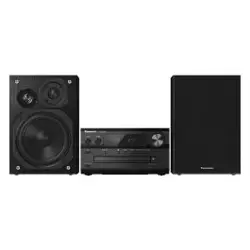
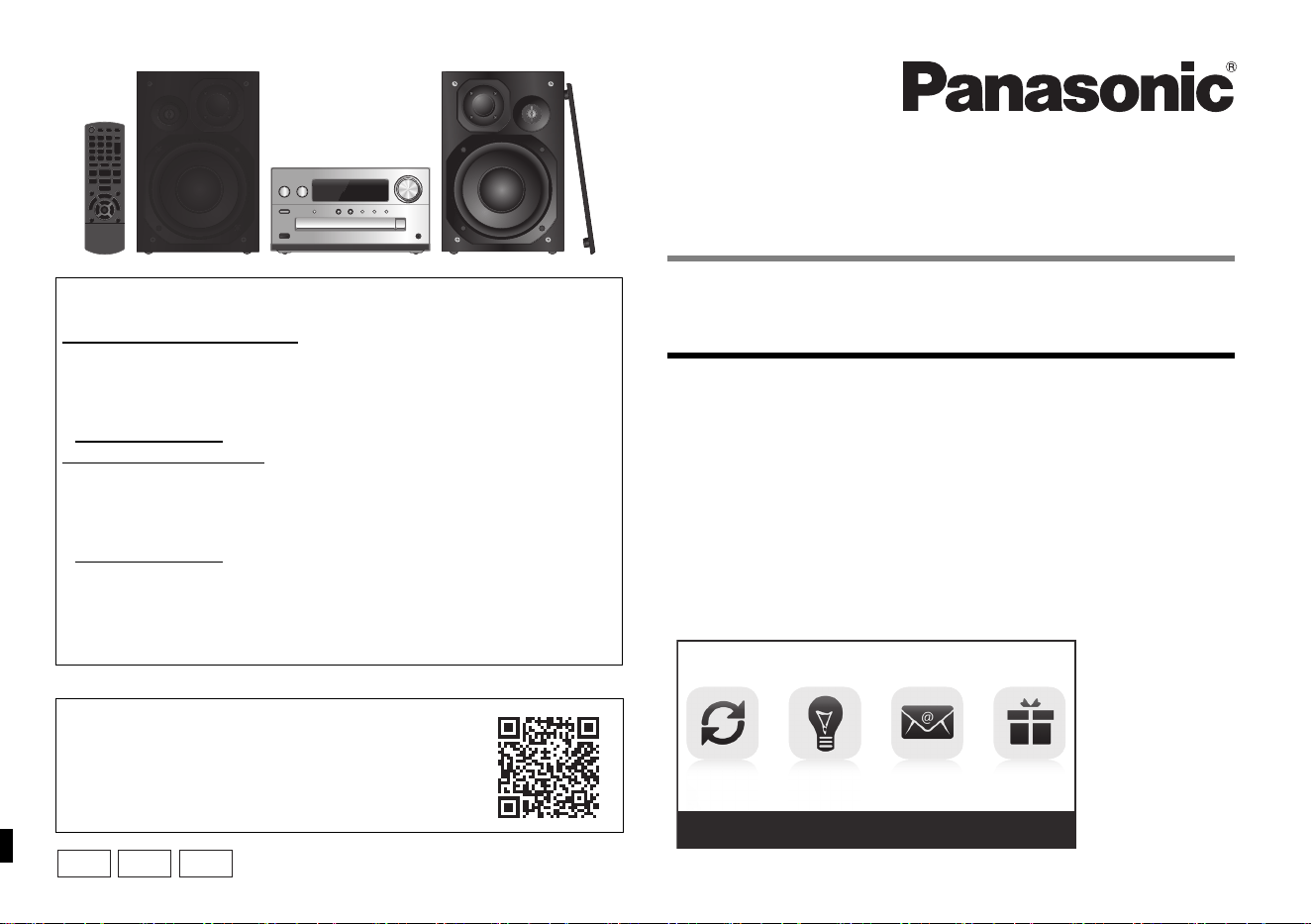
CD Stereo System
Model No. SC-PMX92
SC-PMX90
Table of contents
Supplied accessories ...........................................................................2
Safety precautions................................................................................2
Caution for AC Mains Lead ..................................................................2
Placement of speakers .........................................................................3
Making the connections .......................................................................3
Preparing the remote control...............................................................3
Overview of controls ............................................................................4
About Bluetooth
®
..................................................................................5
Bluetooth
®
operations ..........................................................................5
Basic controls .......................................................................................5
Troubleshooting....................................................................................6
Maintenance ..........................................................................................6
Specifications........................................................................................6
UPDATES TIPS
NEWS
OFFERS
www.panasonic.eu/register
REGISTER NOW
[For_Continental_Europe]
SC-PMX90_Basic-EGEBGN~TQBM0744-1_eng.book 1 ページ 2022年6月1日 水曜日 午後3時34分
TQBM0744
2
Thank you for purchasing this product.
Please read these instructions carefully before using this
product, and save this manual for future use.
Do the procedures with the remote control. You can also
use the buttons on the main unit if they are the same.
Your system and the illustrations can look differently.
These operating instructions are applicable to the
following system.
Unless otherwise indicated, illustrations in these operating
instructions are of SC-PMX92.
Supplied accessories
Check and identify the supplied accessories.
• Product numbers provided in these operating instructions are
correct as of December 2018. These may be subject to change.
Safety precautions
Unit
• To reduce the risk of fire, electric shock or product damage,
- Do not expose this unit to rain, moisture, dripping or
splashing.
- Do not place objects filled with liquids, such as vases, on
this unit.
- Use the recommended accessories.
- Do not remove covers.
- Do not repair this unit by yourself. Refer servicing to
qualified service personnel.
Unit
• To reduce the risk of fire, electric shock or product damage,
- Do not install or place this unit in a bookcase, built-in
cabinet or in another confined space. Ensure this unit is
well ventilated.
- Do not obstruct this unit’s ventilation openings with
newspapers, tablecloths, curtains, and similar items.
- Do not place sources of naked flames, such as lighted
candles, on this unit.
• This unit is intended for use in moderate climates.
• The mains plug is the disconnecting device.
Install this unit so that the mains plug can be unplugged
from the socket outlet immediately.
• This unit may receive radio interference caused by mobile
telephones during use. If such interference occurs, please
increase separation between this unit and the mobile
telephone.
• This unit utilizes a laser. Use of controls or adjustments or
performance of procedures other than those specified
herein may result in hazardous radiation exposure.
Battery
• Do not break open or short-circuit the battery.
• Do not charge the alkaline or manganese battery.
• Do not use the battery if the cover has peeled off.
• Do not heat or expose to flame.
• Do not leave the battery(ies) in a car exposed to direct
sunlight for a long period of time with doors and windows
closed.
• Remove the battery if you do not use the remote control for
a long period of time. Keep in a cool, dark area.
• Danger of explosion if battery is incorrectly replaced.
Replace only with the type recommended by the
manufacturer.
• When disposing of the batteries, please contact your local
authorities or dealer and ask for the correct method of
disposal.
Caution for AC Mains Lead
(For the AC mains plug of three pins)
For your safety, please read the following text carefully.
This appliance is supplied with a moulded three pin
mains plug for your safety and convenience.
A 5-ampere fuse is fitted in this plug.
Should the fuse need to be replaced please ensure that
the replacement fuse has a rating of 5-ampere and that it
is approved by ASTA or BSI to BS1362.
Check for the ASTA mark Ï or the BSI mark Ì on the
body of the fuse.
If the plug contains a removable fuse cover you must
ensure that it is refitted when the fuse is replaced.
If you lose the fuse cover the plug must not be used until
a replacement cover is obtained.
A replacement fuse cover can be purchased from your
local dealer.
Before use
Remove the connector cover.
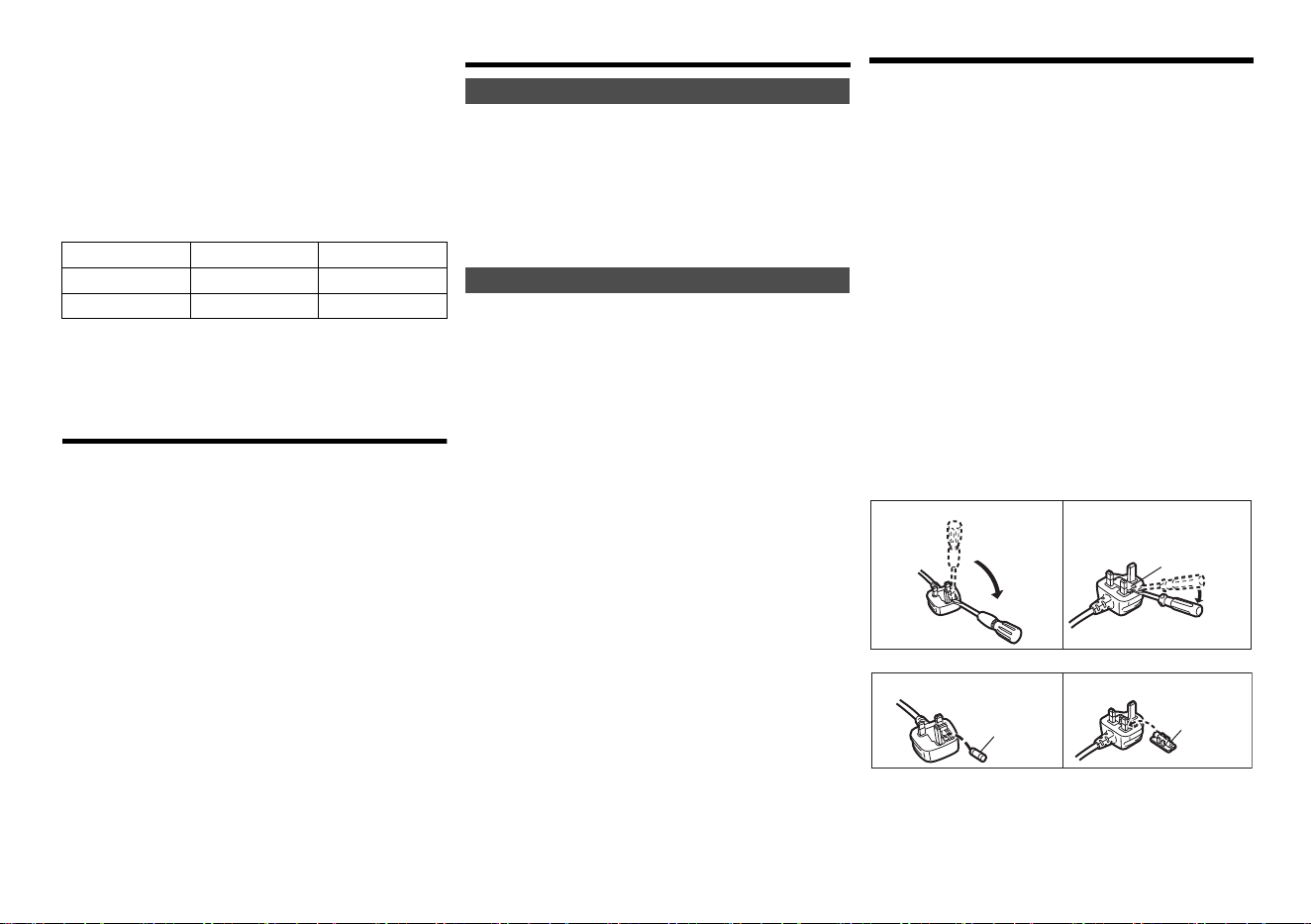
How to replace the fuse
The location of the fuse differ according to the type of AC
mains plug (figures A and B). Confirm the AC mains plug
fitted and follow the instructions below.
Illustrations may differ from actual AC mains plug.
1. Open the fuse cover with a screwdriver.
2. Replace the fuse and close or attach the fuse cover.
System SC-PMX92 SC-PMX90
Main unit SA-PMX92 SA-PMX90
Speakers SB-PMX70 SB-PMX70
[PMX92]:
indicates features applicable to SC-PMX92 only.
[PMX90]:
indicates features applicable to SC-PMX90 only.
∏ (For Continental Europe)
1 x AC mains lead
(K2CQ2YY00107)
∏ (For the United Kingdom and Ireland)
1 x AC mains lead
(K2CT2YY00089)
∏ (For Australia and New Zealand)
1 x AC mains lead
(K2CJ2YY00123)
∏ 1 x Remote control
(N2QAYB001101)
∏ 1 x Remote control battery
∏ 2 x Speaker cables
(REE1713)
∏ ([PMX92]) 1 x DAB antenna
(N1CYYYY00022)
∏ ([PMX90]) 1 x FM indoor antenna
(RSAX0002)
WARNING!
CAUTION!
Figure A
Figure B
Fuse cover
Figure A
Fuse
(5 ampere)
Figure B
Fuse
(5 ampere)
SC-PMX90_Basic-EGEBGN~TQBM0744-1_eng.book 2 ページ 2022年6月1日 水曜日 午後3時34分
3
TQBM0744
Placement of speakers
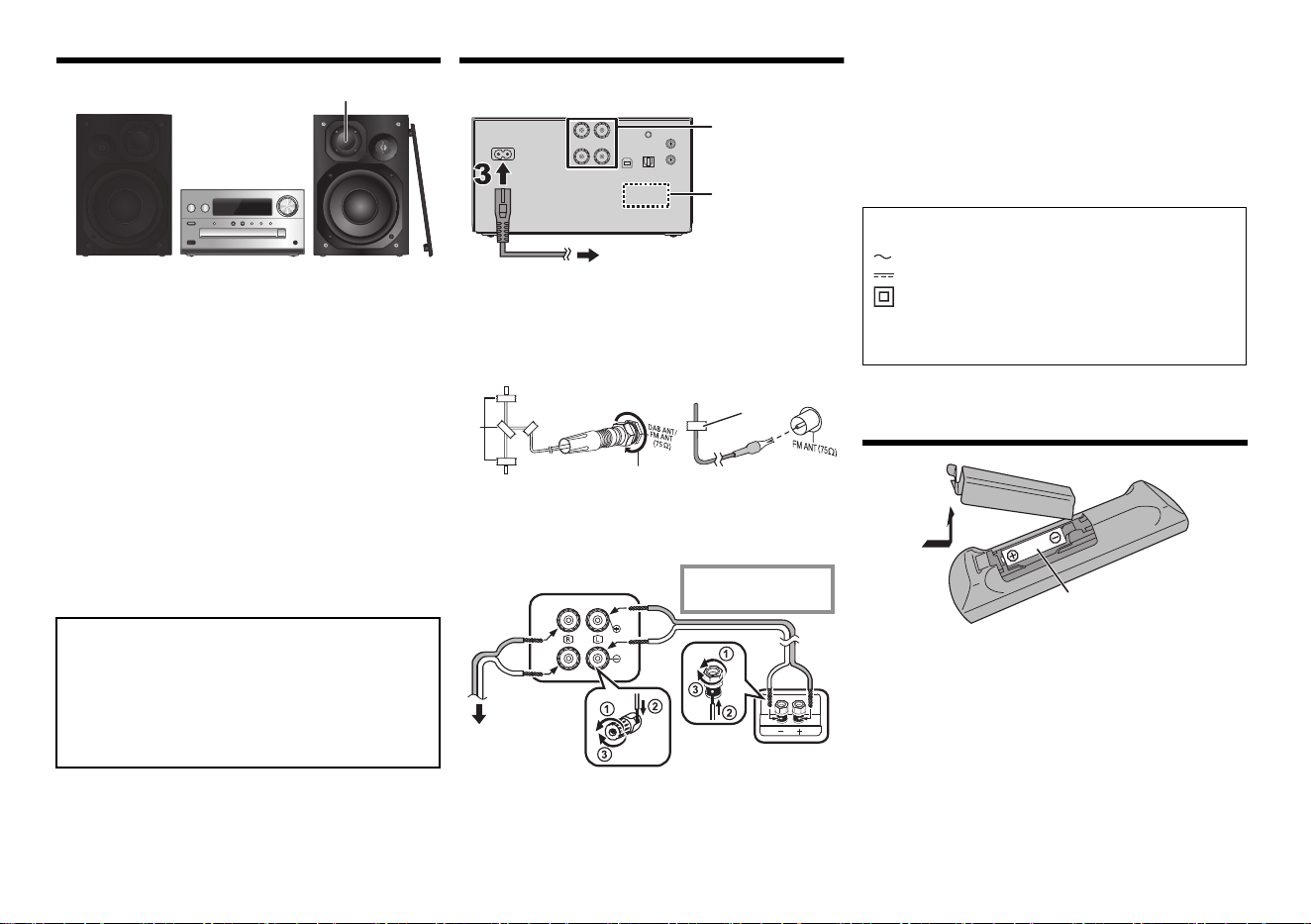
Place the speakers so that the tweeter is on the inner
side. To prevent damage to the speakers, do not touch
the speaker cones if you remove the nets.
Use only the supplied speakers.
The combination of the main unit and speakers give the
best sound. You can cause damage to the system and
decrease the sound quality if you use other speakers.
Note:
• Keep your speakers more than 10 mm from the main unit
for ventilation.
• Put the speakers on a flat safe surface.
• These speakers do not have magnetic shielding. Do not
put them near TVs, PCs or other equipment easily
influenced by magnetism.
• When you play at high levels for a long period, it can cause
damage to the system and decrease the life of the system.
• Decrease the volume in these conditions to prevent
damage:
- When you play distorted sound.
- When you adjust the sound quality.
Making the connections
Connect the AC mains lead only after all the other
connections have been made.
1 Connect the antenna.
Place the antenna where reception is best.
• If radio reception is poor, use an outdoor antenna (not
supplied).
A Tape (not supplied)
B Be sure to fully tighten the nut.
2 Connect the speakers.
Be careful not to cross (short-circuit) or reverse
the polarity of the speaker wires as doing so may
damage the speakers.
3 Connect the AC mains lead.
Do not use an AC mains lead with other equipment.
Conserving power
The system consumes a small amount of power (> 6),
even when it is in standby mode. Disconnect the power
supply if you do not use the system.
Some settings will be lost after you disconnect the
system. You have to set them again.
Preparing the remote control
• Use alkaline or manganese battery.
• Install the battery so that the poles (+ and –) align with
those in the remote control.
• Point the remote control at the remote control sensor,
away from obstacles, at a maximum range of 7 m
directly in front of the main unit, within an angle of
approximately 30° to the left and right.
CAUTION!
• Use the speakers only with the recommended
system. If not, you can cause damage to the
amplifier and speakers and can cause a fire.
Consult an approved service personnel if damage
occurs or if there is a sudden apparent change in
performance.
• Do the procedures included in these instructions
when you attach the speakers.
Tweeter
22
1
To household mains socket
[PMX92]
[PMX90]
i: Copper
j: Silver
Main unit (rear)
To right speaker
(rear)
Left speaker (rear)
The symbols on this product (including the
accessories) represent the following:
AC
DC
Class II equipment (The construction of the
product is double-insulated.)
IOn
Í Standby
R6/LR6, AA
SC-PMX90_Basic-EGEBGN~TQBM0744-1_eng.book 3 ページ 2022年6月1日 水曜日 午後3時34分
TQBM0744
4
Overview of controls
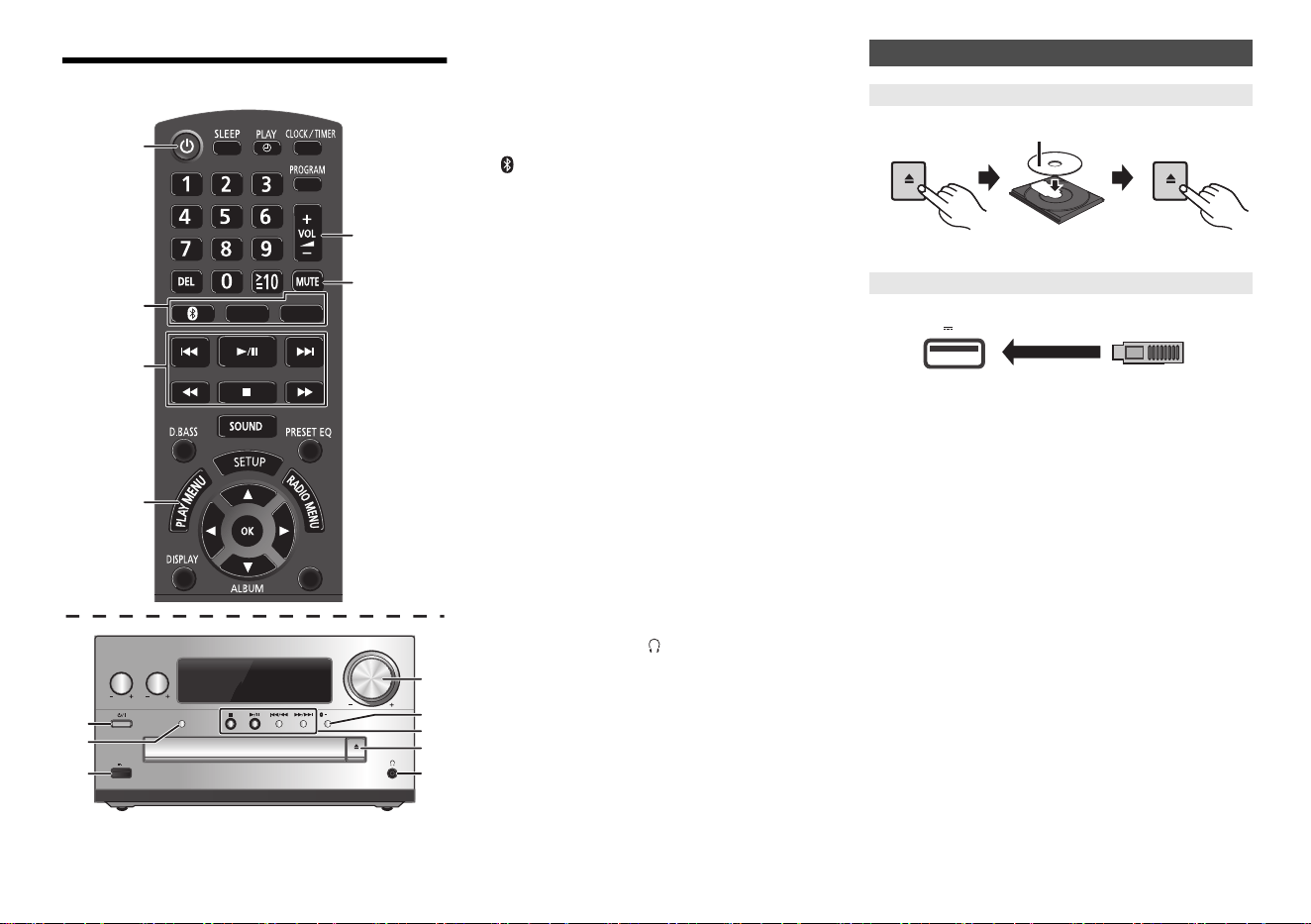
1 Standby/on switch [Í], [Í/I]
Press to switch the unit from on to standby mode or
vice versa. In standby mode, the unit is still
consuming a small amount of power.
2 Select audio source
3 Basic playback control
4 Set the play menu item
5 Adjust the volume of the system
6 Mute the sound of the system
Press the button again to cancel.
“MUTE” is also cancelled when you adjust the
volume or when you switch off the system.
7 Port for USB devices
8 Bluetooth
®
-pairing button
• Press to select “BLUETOOTH” as the audio source.
• Press and hold to enter pairing mode or disconnect a
Bluetooth
®
device.
9 Open or close the disc tray
10 Headphones jack ( )
• Plug type: 3.5 mm stereo (not supplied)
• Avoid listening for prolonged periods of time to prevent
hearing damage.
• Excessive sound pressure from earphones and
headphones can cause hearing loss.
• Listening at full volume for long periods may damage
the user’s ears.
Press [CD/USB] repeatedly to select “CD”.
Press [CD/USB] repeatedly to select “USB”.
Note:
• Remove the CD only after it stops rotating.
• Insert the USB device directly. Do not use any USB
extension cable.
• Please disconnect the USB device if you finish using.
• Before removing the USB device, select a source other
than “USB”.
OPEN/CLOSE
VOLUME
SELECTOR
PAIRING
BASS
TREBLE
EXT-IN
1
2
3
4
5
6
5 V 1.5 A
CD/USB
RADIO
DIMMER
2
1
9
10
8
5
3
7
On the remote control
[ ]: “BLUETOOTH”
[CD/USB]: “CD”
(
. “USB”
[RADIO, EXT-IN]:
“DAB+” (
[PMX92]
) ------. “FM” ------. “AUDIO IN”
^
------ “PC”
(
-
“OPT”
(
-
“AUX”
(
---
b
On the main unit
[SELECTOR]:
“CD”
--. “BLUETOOTH” --. “DAB+” (
[PMX92]
) --. “FM”
:;
“PC”
(
-- “USB”
(
--
“OPT”
(
-- “AUX”
(
--
“AUDIO IN”
Inserting media
CD
USB device
OPEN/CLOSE
OPEN/CLOSE
Label facing up
5 V 1.5 A
SC-PMX90_Basic-EGEBGN~TQBM0744-1_eng.book 4 ページ 2022年6月1日 水曜日 午後3時34分
5
TQBM0744
About Bluetooth
®
Frequency band used
• This system uses the 2.4 GHz frequency band.
Certification of this device
• This system conforms to frequency restrictions and
has received certification based on frequency laws.
Thus, a wireless permit is not necessary.
• The actions below are punishable by law in some
countries:
- Taking apart or modifying this system.
- Removing specification indications.
Restrictions of use
• Wireless transmission and/or usage with all Bluetooth
®
equipped devices is not guaranteed.
• All devices must conform to standards set by Bluetooth
SIG, Inc.
• Depending on the specifications and settings of a
device, it can fail to connect or some operations can be
different.
• This system supports Bluetooth
®
security features. But
depending on the operating environment and/or
settings, this security is possibly not sufficient.
Transmit data wirelessly to this system with caution.
• This system cannot transmit data to a Bluetooth
®
device.
Range of use
• Use this device at a maximum range of 10 m.
The range can decrease depending on the
environment, obstacles or interference.
Interference from other devices
• This system may not function properly and troubles
such as noise and sound jumps may arise due to radio
wave interference if this system is located too close to
other Bluetooth
®
devices or the devices that use the
2.4 GHz band.
• This system may not function properly if radio waves
from a nearby broadcasting station, etc. is too strong.
Intended usage
• This system is for normal, general use only.
• Do not use this system near an equipment or in an
environment that is sensitive to radio frequency
interference (example: airports, hospitals, laboratories,
etc).
Bluetooth
®
operations
By using the Bluetooth
®
connection, you can listen to the sound
from the Bluetooth
®
audio device from this system wirelessly.
• Refer to the operating instructions of the Bluetooth
®
device for details.
Preparation
• Turn on the Bluetooth
®
feature of the device and place
the device near this unit.
1 Press [ ] to select “BLUETOOTH”.
If “PAIRING” is indicated on the display, go to step 3.
2 Press [PLAY MENU] to select “PAIRING” and
then press [OK].
Alternatively, press and hold
[ -PAIRING] on the unit.
3 Select “SC-PMX92” or “SC-PMX90” from the
Bluetooth
®
device’s Bluetooth
®
menu.
The MAC address (e.g., alpha-numerical string that
is unique to each set) may be displayed before this
unit is displayed.
The name of the connected device is indicated on
the display for a few seconds.
4 Start playback on the Bluetooth
®
device.
1 Press [ ] to select “BLUETOOTH”.
“READY” is indicated on the display.
2 Select “SC-PMX92” or “SC-PMX90” from the
Bluetooth
®
device’s Bluetooth
®
menu.
The name of the connected device is indicated on
the display for a few seconds.
3 Start playback on the Bluetooth
®
device.
Note:
• If prompted for the passkey, input “0000”.
• You can register up to 8 devices with this unit. If a 9th
device is paired, the device that has not been used for the
longest will be replaced.
• This unit can only be connected to one device at a time.
• When “BLUETOOTH” is selected as the source, this unit
will automatically try and connect to the last connected
Bluetooth
®
device. (“LINKING” is indicated on the display
during this process.) If the connection attempt fails, try to
establish a connection again.
1
While a Bluetooth
®
device is connected:
Press [PLAY MENU] repeatedly to select “DISCONNECT?”.
2
Press [
2
,
1
] to select “OK? YES” and then press [OK].
Note:
• You can also disconnect the Bluetooth
®
device by pressing
and holding [ -PAIRING] on the unit.
• The Bluetooth
®
device will be disconnected if a different
audio source (e.g., “CD”) is selected.
The Bluetooth
®
word mark and logos are registered trademarks
owned by Bluetooth SIG, Inc. and any use of such marks by
Panasonic Holdings Corporation is under license.
Other trademarks and trade names are those of their respective
owners.
Basic controls
Preparation
• Turn the unit on.
• Insert the media or connect the Bluetooth
®
device.
• Press [CD/USB] or [ ] to select the audio source.
• There will be no sound in search operation when playing
DSD files at USB selector.
Panasonic bears no responsibility for data and/or
information that is compromised during a
wireless transmission.
Connecting via Bluetooth
®
menu
Pairing with Bluetooth
®
devices
Connecting a paired Bluetooth
®
device
Disconnecting a Bluetooth
®
device
Play Press [1/;].
Stop Press [∫].
• [USB]: The position is memorised and
“RESUME” is displayed.
Pause Press [1/;].
Skip Press [:] or [9] to skip track.
(main unit: [:/6] or [5/9])
Search During play or pause
Press and hold [6] or [5].
(main unit: [:/6] or [5/9])
SC-PMX90_Basic-EGEBGN~TQBM0744-1_eng.book 5 ページ 2022年6月1日 水曜日 午後3時34分

TQBM0744
6
Troubleshooting
Before requesting service, make the following checks. If
you are in doubt about some of the check points, or if the
solutions indicated do not solve the problem, consult
your dealer for instructions.
• More detailed operating instructions are available in
“Operating Instructions (PDF format)”.
Cannot turn on the unit.
• After connecting the AC mains lead, wait about
10 seconds before turning on the unit.
No operations can be done with the remote control.
• Examine that the battery is installed correctly.
The unit does not work.
• One of the unit’s safety devices may have been activated.
1 Press [Í/I] on the unit to switch the unit to standby.
• If the unit does not turn off, disconnect the AC mains
lead from the AC outlet, reconnect it to the outlet after
about 30 seconds. Then wait for about 10 seconds.
2 Press [Í/I] on the unit to switch it on. If the unit still
cannot be operated, consult the dealer.
Reset the memory when the following situations occur:
• There is no response when buttons are pressed.
• You want to clear and reset the memory contents.
1 Disconnect the AC mains lead.
Wait 30 seconds before you continue with step 2.
2 While you press and hold [Í/I] on the main unit,
connect the AC mains lead again.
Keep holding down [Í/I] until “---------” appears on
the display.
3 Release [Í/I].
All the settings are set back to the factory default.
It is necessary to set the memory items again.
Maintenance
• To clean this system, wipe with a soft, dry cloth.
• Never use alcohol, paint thinner or benzine to clean
this system.
• Before using chemically treated cloth, read the
instructions that came with the cloth carefully.
Specifications
Power supply AC 220 V to 240 V, 50 Hz
Power consumption 40W
Dimensions (main unit)
(W x H x D) 211 mm x 114 mm x 267 mm
Mass (main unit) Approx. 2.8 kg
Operating temperature range 0 °C to +40 °C
Operating humidity range
35 % to 80 % RH (no condensation)
*1: “BLUETOOTH STANDBY” is “OFF”.
*2: No device is connected to the USB port before turning to
standby mode.
Disc played (8 cm or 12 cm)
CD, CD-R/RW (CD-DA, MP3*
3
)
Pick up
Wavelength 790 nm (CD)
NORSK (NORWAY)
Bølgelengde 790 nm (CD)
Laserstyrke Ingen farlig stråling sendes ut
*3: MPEG-1 Layer 3, MPEG-2 Layer 3
Speaker unit(s)
Woofer 14 cm cone type x 1
Tweeter 1.9 cm dome type x 1
Super tweeter 1.5 cm piezoelectric type x 1
Impedance 3™
Dimensions (W x H x D) 161 mm x 238 mm x 262 mm
Mass Approx. 2.6 kg
Bluetooth
®
System Specification
Bluetooth
®
Ver.2.1+EDR
Wireless Equipment Classification
Class 2 (2.5 mW)
Supported Profiles A2DP, AVRCP
Supported Codec AAC, SBC
Frequency band 2.4 GHz band FH-SS
Operation Distance Approx. 10 m Line of sight*
4
*4: Prospective communication distance. Measurement
environment: Temperature 25 °C/Height 1.0 m. Measure
in “MODE 1”.
Note:
• Specifications are subject to change without notice. Mass
and dimensions are approximate.
• Total harmonic distortion is measured by the digital
spectrum analyzer.
The product with the Hi-Res Audio logo is conformed to
Hi-Res Audio standard defined by Japan Audio Society.
The logo is used under license from Japan Audio Society.
FLAC Decoder
Copyright (C) 2000,2001,2002,2003,2004,2005,2006,2007,
2008,2009 Josh Coalson
Redistribution and use in source and binary forms, with or
without modification, are permitted provided that the following
conditions are met:
- Redistributions of source code must retain the above copyright
notice, this list of conditions and the following disclaimer.
- Redistributions in binary form must reproduce the above copyright
notice, this list of conditions and the following disclaimer in the
documentation and/or other materials provided with the distribution.
- Neither the name of the Xiph.org Foundation nor the names of its
contributors may be used to endorse or promote products derived
from this software without specific prior written permission.
THIS SOFTWARE IS PROVIDED BY THE COPYRIGHT HOLDERS
AND CONTRIBUTORS “AS IS” AND ANY EXPRESS OR IMPLIED
WARRANTIES, INCLUDING, BUT NOT LIMITED TO, THE IMPLIED
WARRANTIES OF MERCHANTABILITY AND FITNESS FOR A
PARTICULAR PURPOSE ARE DISCLAIMED. IN NO EVENT SHALL
THE FOUNDATION OR CONTRIBUTORS BE LIABLE FOR ANY
DIRECT, INDIRECT, INCIDENTAL, SPECIAL, EXEMPLARY, OR
CONSEQUENTIAL DAMAGES (INCLUDING, BUT NOT LIMITED TO,
PROCUREMENT OF SUBSTITUTE GOODS OR SERVICES; LOSS
OF USE, DATA, OR PROFITS; OR BUSINESS INTERRUPTION)
HOWEVER CAUSED AND ON ANY THEORY OF LIABILITY,
WHETHER IN CONTRACT, STRICT LIABILITY, OR TORT
(INCLUDING NEGLIGENCE OR OTHERWISE) ARISING IN ANY WAY
OUT OF THE USE OF THIS SOFTWARE, EVEN IF ADVISED OF THE
POSSIBILITY OF SUCH DAMAGE.
Memory reset (initialisation)
General
Power consumption in standby mode*
1, 2
0.35 W (approx.)
(When “BLUETOOTH STANDBY” is “ON”)*
2
0.45 W (approx.)
Disc section
Speaker section
Bluetooth
®
section
SC-PMX90_Basic-EGEBGN~TQBM0744-1_eng.book 6 ページ 2022年6月1日 水曜日 午後3時34分

7
TQBM0744
Panasonic Warranty
1.
Subject to the conditions of this warranty Panasonic or its Authorised Service Centre will perform necessary service on
the product, without charge for parts or labour, if in the opinion of Panasonic the product is found to have a
manufacturing defect within one (1) year or (12 months) (the “warranty period”) from the date of purchase appearing
on your purchase receipt.
2. This warranty only applies to Panasonic products purchased in Australia and sold by Panasonic Australia, it’s Authorised
Distributors, or Dealers, and only where the products are used and serviced within Australia or its territories. Warranty
cover only applies to the services that are carried out by a Panasonic Authorised Service Centre and only if valid proof
of purchase is presented when the warranty service is requested.
3. This warranty only applies if the product has been installed and/or used in accordance with the manufacturer’s
recommendations (as noted in the operating instructions) under normal use and reasonable care (in the opinion of
Panasonic). The warranty does not cover damage, malfunction or failure resulting from use of incorrect voltages,
incorrect installation, accident, misuse, neglect, build-up of dirt or dust, abuse, maladjustment of customer controls,
mains supply problems, thunderstorm activity, infestation by insects or vermin, tampering or repair by unauthorised
persons (including unauthorised alterations), exposure to abnormally corrosive conditions, or any foreign object or
matter having entered the product.
4. This warranty does not cover the following items unless the fault or defect existed at the time of purchase:
(a) Consumable parts
(b) Cosmetic parts
(c) Worn or damaged parts
(d) Information stored on Hard Disk Drives, Optical Discs, USB Devices, SD Cards, Tapes
(e) DTV reception issues caused by TV Aerial / Cabling / Wall socket(s)
5. Some products may be supplied with Ethernet connection hardware. The warranty is limited on such products and will
not cover:
(a) Internet and or DLNA connection / setup related problems
(b) Access fees and or charges incurred for internet connection
(c) Incompatible software or software not specifically stipulated in the product operations manual; and
(d) Any indirect or consequential costs associated with the incorrect use or misuse of the hardware, its connection to
the internet or any other device.
6. To claim warranty service, when required, you should:
Contact Panasonic’s Customer Care Centre on 132 600 for Service Centre information.
Confirm the opening and acceptance times with the Authorised Service centre that you choose.
Then send or take the product to a Panasonic Authorised Service Centre together with your proof of purchase
receipt.
Any freight and insurance costs associated with the transport of the product to and/or from your nearest
Authorised Service Centre must be arranged and paid for by you.
7. The warranties hereby conferred do not extend to, and exclude, any costs associated with the installation, de-
installation or re-installation of a product, including costs related to the mounting, de-mounting or remounting of any
screen, (and any other ancillary activities), delivery, handling, freighting, transportation or insurance of the product or
any part thereof or replacement of and do not extend to, and exclude, any damage or loss occurring by reason of,
during, associated with, or related to such installation, de-installation, re-installation or transit.
Panasonic Authorised Service Centres are located in major metropolitan areas and most regional centres of Australia,
however, coverage will vary dependant on product. For advice on exact Authorised Service Centre locations for your
product, please telephone our Customer Care Centre on 132600 or visit our website and use the Service Centre Locator.
In addition to your rights under this warranty, Panasonic products come with consumer guarantees that cannot be
excluded under the Australian Consumer Law. If there is a major failure with the product, you can reject the product and
elect to have a refund or to have the product replaced or if you wish you may elect to keep the goods and be compensated
for the drop in value of the goods. You are also entitled to have the product repaired or replaced if the product fails to be
of acceptable quality and the failure does not amount to a major failure.
If there is a major failure in regard to the product which cannot be remedied then you must notify us within a reasonable
period by contacting the Panasonic Customer Care Centre. If the failure in the product is not a major failure then Panasonic
may choose to repair or replace the product and will do so in a reasonable period of time from receiving notice from you.
THIS WARRANTY CARD AND THE PURCHASE DOCKET (OR SIMILAR PROOF OF PURCHASE)
SHOULD BE RETAINED BY THE CUSTOMER AT ALL TIMES
If you require assistance regarding warranty conditions or any other enquiries, please visit the Panasonic
Australia website
www.panasonic.com.au
or contact by phone on
132 600
If phoning in, please ensure you have your operating instructions available.
Panasonic Australia Pty. Limited
ACN 001 592 187 ABN 83 001 592 187
1 Innovation Road, Macquarie Park NSW 2113
www.panasonic.com.au
PRO-031-F11 Issue: 5.0 23-01-2018
[For\Australia]
SC-PMX90_Basic-EGEBGN~TQBM0744-1_eng.book 7 ページ 2022年6月1日 水曜日 午後3時34分
[Safety_information_for_customers_in_Norway]
NORSK
Produkt
• For å redusere faren for brann, elektrisk støt eller skade på apparatet:
- Dette apparatet må ikke utsettes for regn, fuktighet, drypp eller sprut.
- Ikke plasser objekter som er fylt med væske, som
vaser, på apparatet.
- Bruk kun anbefalt tilbehør.
- Fjern ikke deksler.
- Dette apparatet må ikke repareres på egen hånd.
Overlat servicearbeider til kvalifisert servicepersonell.
Produkt
• For å redusere faren for brann, elektrisk støt eller skade på apparatet:
- Ikke plasser apparatet i en bokhylle, et innebygget kabinett
eller et annet lukket sted. Pass på at apparatet er godt ventilert.
- Apparatets ventilasjonsåpninger må ikke dekkes til med
aviser, duker, gardiner eller lignende.
- Plasser ikke åpen ild, slik som levende lys, oppå apparatet.
• Dette apparatet er beregnet for bruk under moderate klimaforhold.
• Nettstøpselet er trukket ut fra denne enheten.
Installer denne enheten slik at nettstøpselet
umiddelbart kan trekkes fra stikkontakten.
• Dette apparatet anvender en laser. Betjening av kontroller,
justeringer eller andre inngrep enn de som er beskrevet i
denne bruksanvisning, kan føre til farlig bestråling.
Only for European Union and countries with recycling systems
These symbols indicate separate collection of waste electrical
and electronic equipment or waste batteries.
More detailed information is contained in “Operating Instructions
(PDF format)”.
(Back of product)
[For_Continental_Europe,_the_United_Kingdom_and_Ireland]
Declaration of Conformity (DoC)
Hereby, “Panasonic Entertainment & Communication Co.,
Ltd.” declares that this product is in compliance with the
essential requirements and other relevant provisions of
Directive 2014/53/EU.
Customers can download a copy of the original DoC to our
RE products from our DoC server:
http://www.ptc.panasonic.eu
Contact to Authorised Representative:
Panasonic Marketing Europe GmbH,
Panasonic Testing Centre,
Winsbergring 15, 22525 Hamburg, Germany
UK Declaration of Conformity (DoC)
Hereby, “Panasonic Entertainment & Communication Co.,
Ltd.” declares that this product is in compliance with the
essential requirements and other relevant provisions of the
Radio Equipment Regulations 2017 No.1206.
Customers can download a copy of the original DoC to our
RE products from our DoC server:
https://www.ptc.panasonic.eu/compliance-documents
Contact in the UK: Panasonic Testing Centre on behalf of
Panasonic UK, a branch of Panasonic Marketing Europe
GmbH (Importer)
Maxis 2, Western Road, Bracknell, Berkshire, RG12 1RT
Type of wireless Frequency band Maximum power
(dBm e.i.r.p.)
Bluetooth
®
2402-2480 MHz 4 dBm
ADVARSEL!
FORSIKTIG!
Manufactured by:
Importer for UK:
Authorized Representative in Europe:
Panasonic Entertainment & Communication Co., Ltd.
1-10-12 Yagumo-higashi-machi, Moriguchi City, Osaka 570-0021, Japan
Panasonic UK, a branch of Panasonic Marketing Europe GmbH
Maxis 2, Western Road, Bracknell, Berkshire, RG12 1RT
Panasonic Marketing Europe GmbH
Panasonic Testing Centre
Winsbergring 15, 22525 Hamburg, Germany
Panasonic Entertainment & Communication Co., Ltd.
Web Site: https://www.panasonic.com
p
© Panasonic Entertainment & Communication Co., Ltd. 2019-2022
TQBM0744-1
F0221MH1062
SC-PMX90_Basic-EGEBGN~TQBM0744-1_eng.book 8 ページ 2022年6月1日 水曜日 午後3時34分