BC
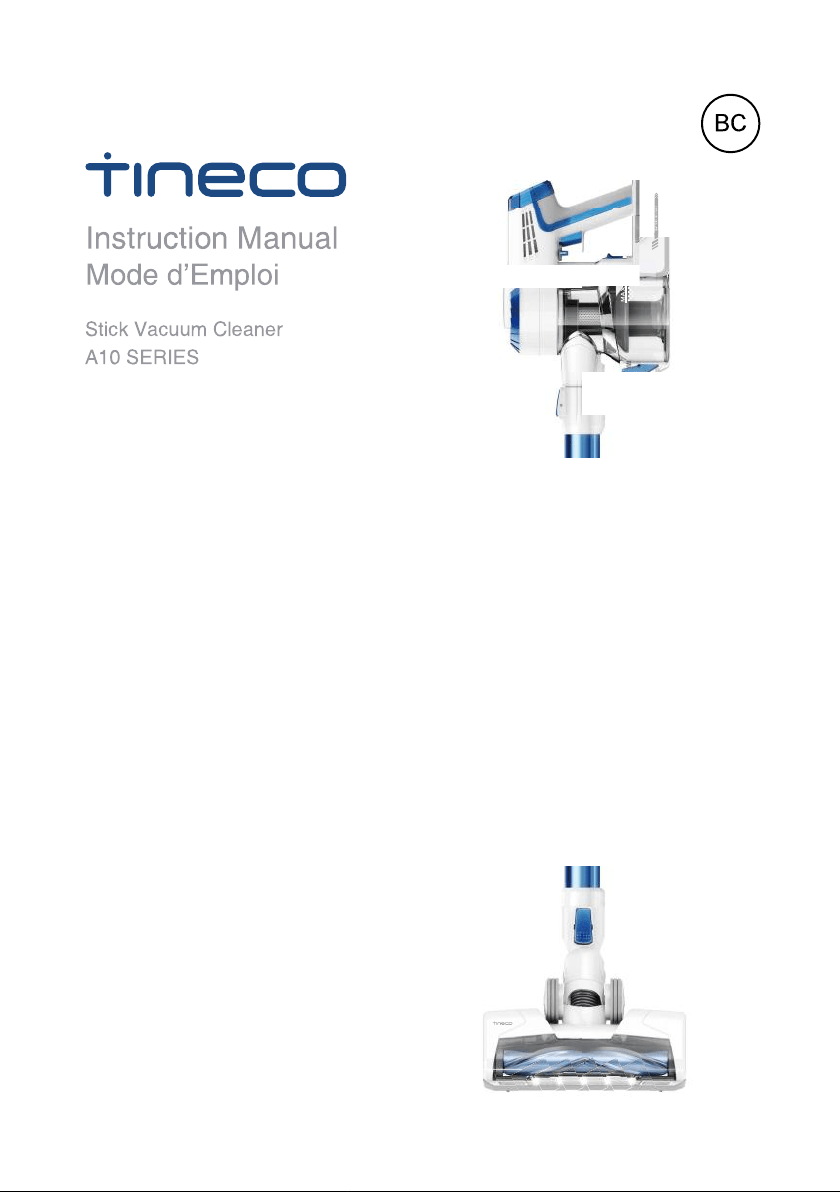
Stick Vacuum Cleaner
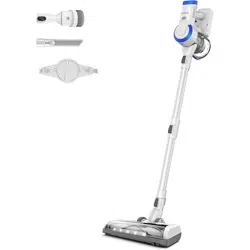
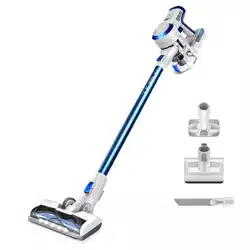
A10 HERO / MASTER
Instruction Manual
Mode d’Emploi
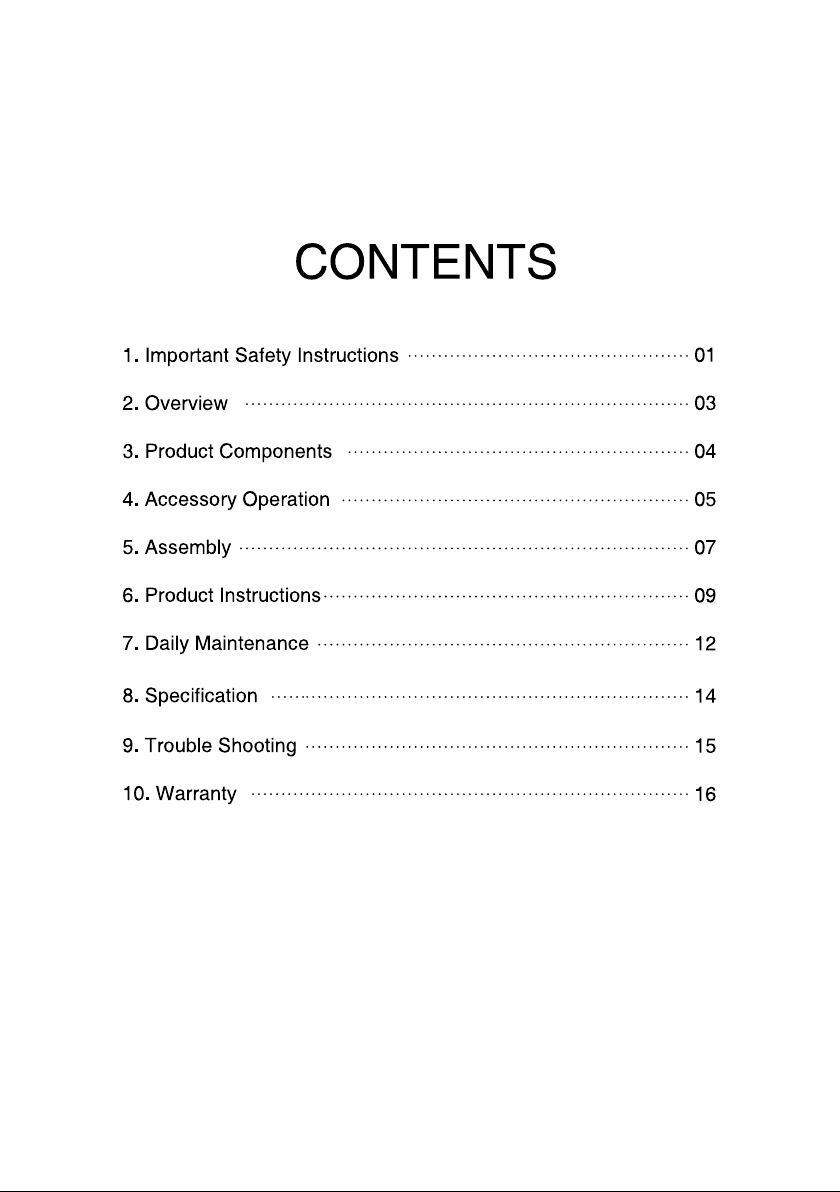
CONTENTS
1.Important Safety Instructions
2.Overview
3.Product Components
4.Accessory Operation
5.Assembly
6.Product Instructions
7.Daily Maintenance
9.Trouble Shooting
10.Warranty
01
03
04
05
07
09
12
15
8.Specification
14
16

SAVE THESE INSTRUCTIONS
Household use only.
When using an electrical appliance, basic precautions should always be
followed, including the following:
READ ALL INSTRUCTIONS BEFORE USING (THIS APPLIANCE), Failure to
follow the warnings and instructions may result in electric shock, fire and/or
serious injury.
WARNING–To reduce the risk of fire, electric shock, or injury:
1. Do not use outdoors or on wet surfaces.
2. Do not allow to be used as a toy. Close attention is necessary when used by
or near children, pets or plants.
3. Use only as described in this manual. Use only manufacturer’s recommended
attachments.
4. Do not use with damaged cord or plug. If appliance is not working as it should,
has been dropped, damaged, left outdoors, or dropped into water, return it to a
service center.
5. Do not handle charger, including charger plug, and charger terminals with wet
hands.
6. Do not put any object into openings. Do not use with any opening blocked;
keep free of dust, lint, hair, and anything that may reduce air flow.
7. Keep hair, loose clothing, fingers, and all parts of body away from openings
and moving parts.
8. Use extra care when cleaning on stairs.
9. Do not use to pick up flammable or combustible liquids, such as gasoline, or
use in areas where they may be present.
10. Do not pick up anything that is burning or smoking, such as cigarettes,
matches, or hot ashes.
11. Do not use without filter.
12. Prevent unintentional starting. Ensure the switch is in the off-position before
connecting to battery pack, picking up or carrying the appliance. Carrying the
appliance with your finger on the switch or energizing appliance that have the
switch on invites accidents.
1
Important Safety Instructions

13. Disconnect the battery pack from the appliance before making any adjust-
ments, changing accessories, or storing appliance. Such preventive safety
measures reduce the risk of starting the appliance accidentally.
14. Recharge only with the charger specified by TINECO. A charger that is
suitable for one type of battery pack may create a risk of fire when used with
another battery pack.
15. Use appliances only with specifically designated TINECO battery packs. Use
of any other battery packs may create a risk of injury and fire.
16. When battery pack is not in use, keep it away from other metal objects, like
paper clips, coins, keys, nails, screws or other small metal objects, that can
make a connection from one terminal to another. Shorting the battery terminals
together may cause burns or a fire.
17. Under abusive conditions, liquid may be ejected from the battery; avoid
contact. If contact accidentally occurs, flush with water. If liquid contacts eyes,
additionally seek medical help. Liquid ejected from the battery may cause
irritation or burns.
18. Do not use a battery pack or appliance that is damaged or modified. Dam-
aged or modified batteries may exhibit unpredictable behavior resulting in fire,
explosion or risk of injury.
19. Do not expose a battery pack or appliance to fire or excessive temperature.
Exposure to fire or temperature above 130°C ( 266°F ) may cause explosion.
20. Follow all charging instructions and do not charge the battery pack or appli-
ance outside of the temperature range specified in the instructions. Charging
improperly or at temperatures outside of the specified range may damage the
battery and increase the risk of fire.
21. Have servicing performed by a qualified repair person using only identical
replacement parts. This will ensure that the safety of the product is maintained.
22. Do not modify or attempt to repair the appliance or the battery pack except
as indicated in the instructions for use and care.
23. Always turn off this appliance before connecting or disconnecting motorized
nozzle.
24.Do not charge or store the appliance outdoors or inside the car. Only charge,
store or use the battery in a dry indoor area where the temperature is higher than
4°C (39.2°F) but lower than 40°C ( 104°F ). The charger is for indoor use only.
2
Overview
5
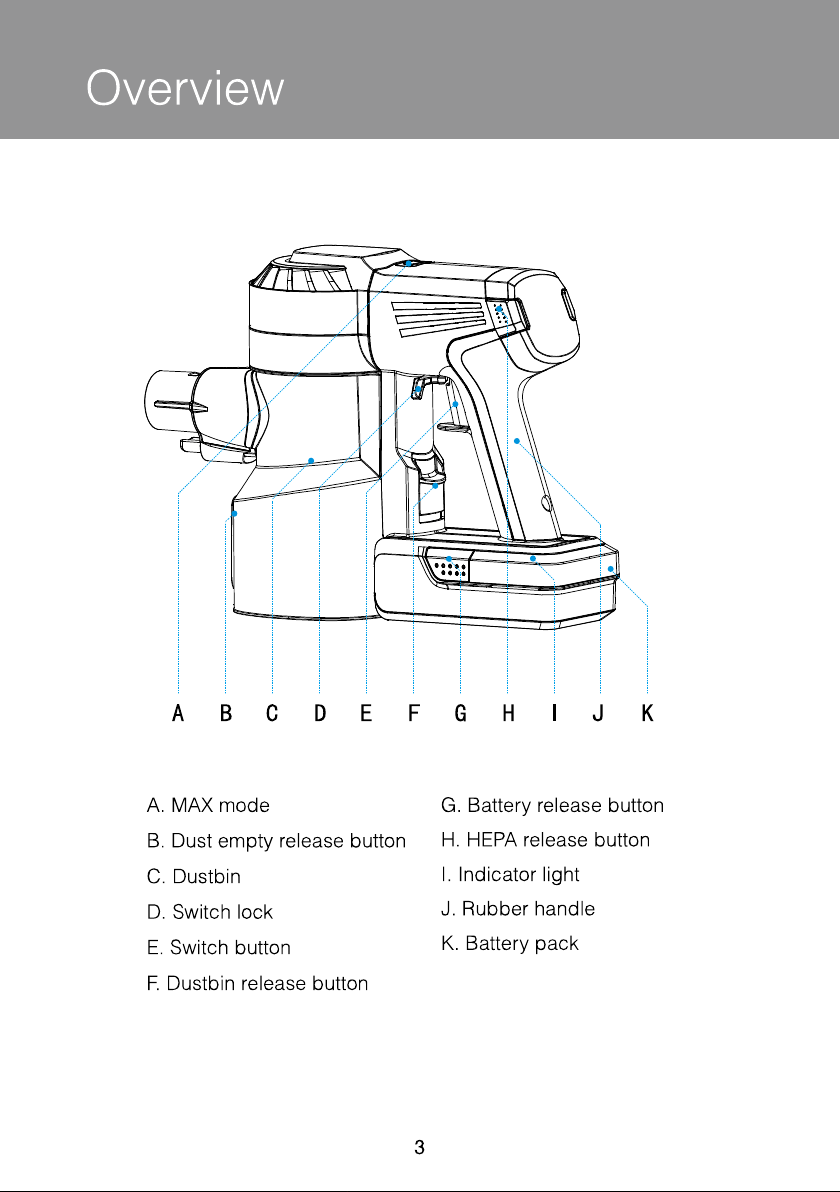
A B C D E F G H I J K
A. MAX mode
C. Dustbin
E. Switch button
G. Battery release button
I. Indicator light
K. Battery pack
B. Dust empty release button
D. Switch lock
F. Dustbin release button
H. HEPA release button
J. Rubber handle
3
Product Components
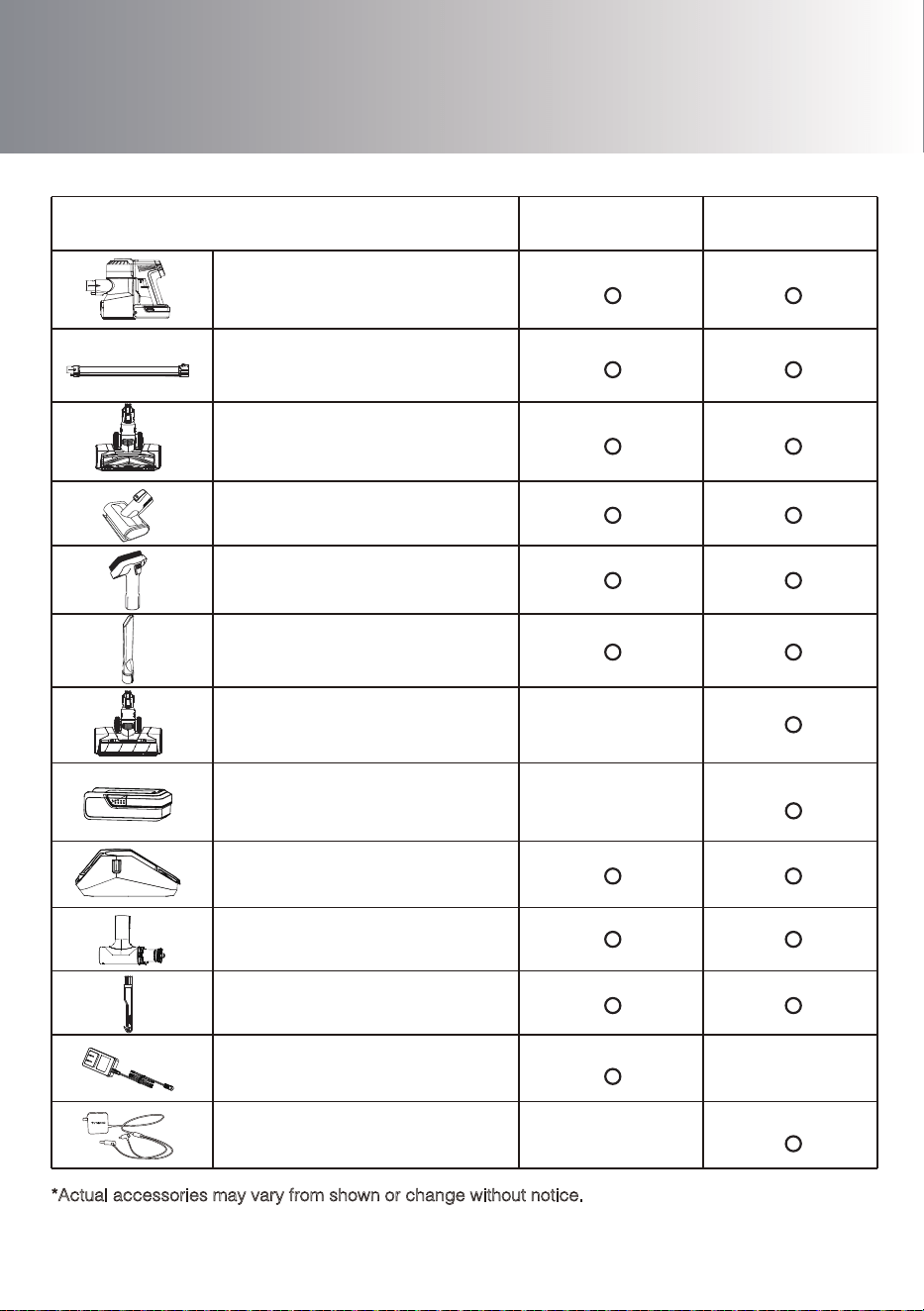
2-in-1 Dusting brush
Tube
Storehouse
Full-size LED Multi-tasker
Power Brush
4
A10 Master
A10 Hero
Main body
Mini power brush
Crevice tool
Full-size LED Soft-roller
Power Brush
Hair cleaning tool
Pre filter cleaning tool
& extra pre filter
Extra battery
Adaptor
Dual adaptor
Item
*Actual accessories may vary from shown or change without notice.
Available accessories may vary by market.
Accessory Instructions
5
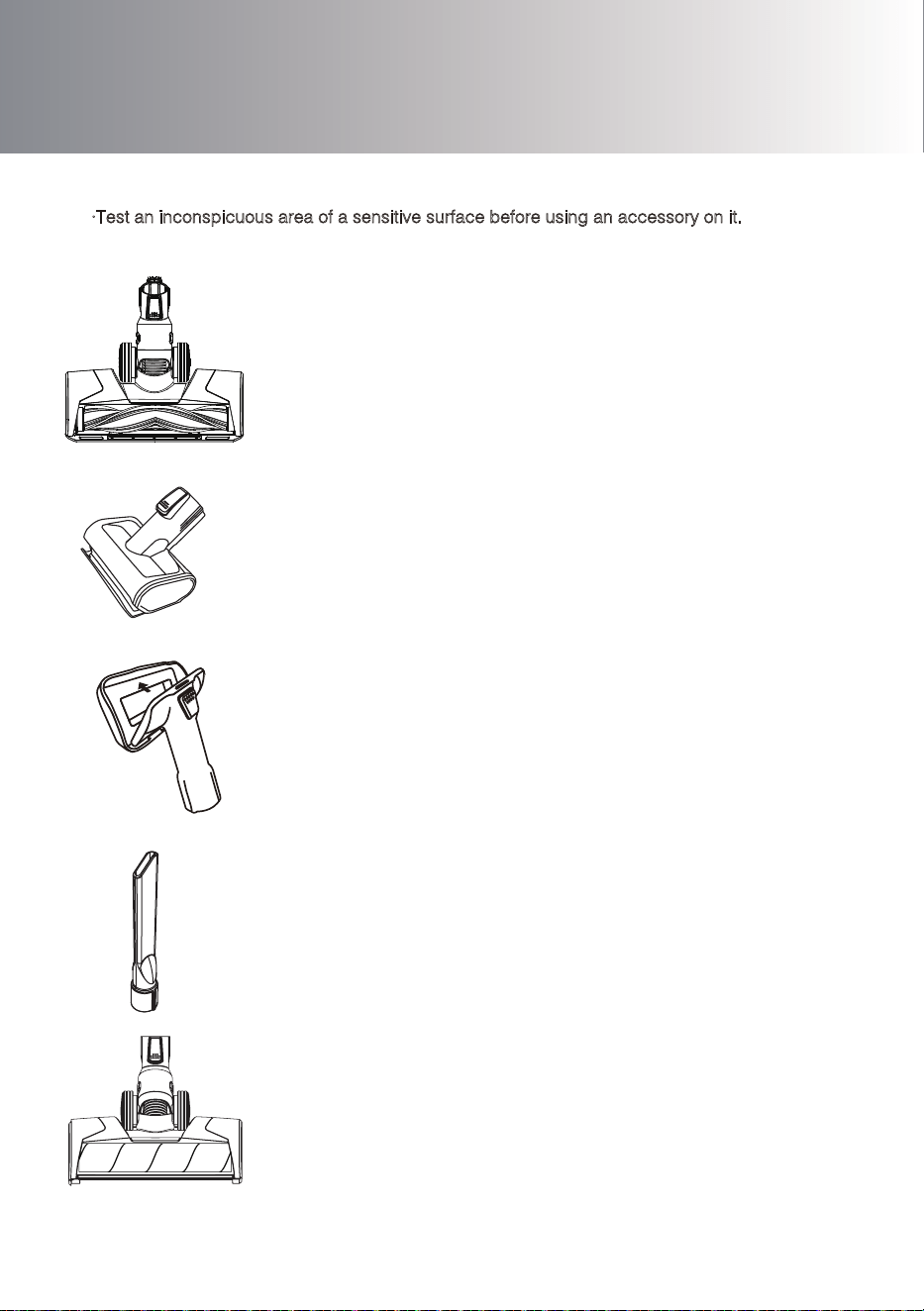
Full-size LED Soft-roller Power Brush
Perfect for hard floors, especially sensitive wood floor.
Picks up coarse and fine dirt at the same time.
Full-size LED Multi-tasker Power Brush
Very effective for agitating dirt embedded in the carpet.
Crevice tool
For corners, niches and other hard-to-reach places.
Mini power brush
For vacuuming upholstered furniture, mattresses etc.
Vacuums pet hair and removes ingrained dirt.
2-in-1 Dusting brush
The frame with the bristles can be removed by pressing
the release button.
Vacuum hard surface furniture with bristles;
remove the bristles to vacuum upholstered furniture, curtain, etc
Note:
·Test an inconspicuous area of a sensitive surface before using an accessory on it.
·All accessories can be directly connected to the main body or to the tube.
Accessory Instructions
6
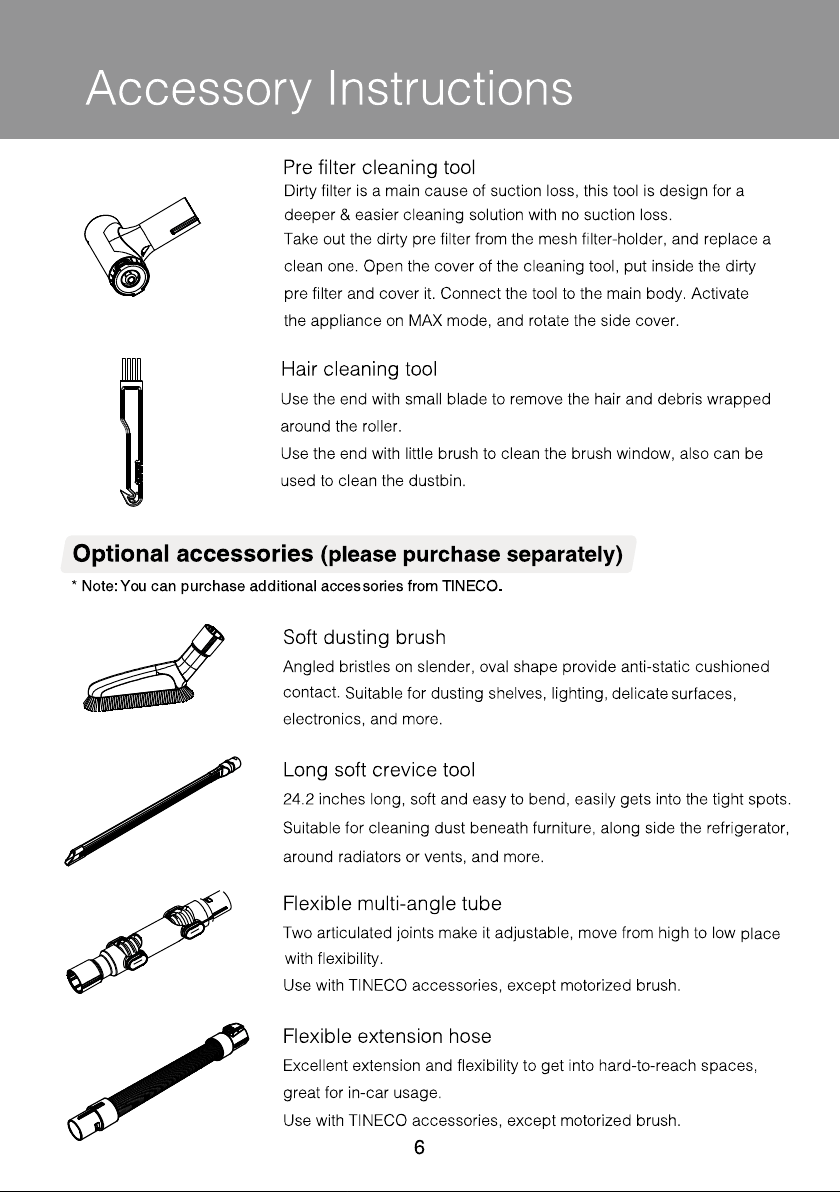
Long soft crevice tool
24.2 inches long, soft and easy to bend, easily gets into the tight spots.
Suitable for cleaning dust beneath furniture, along side the refrigerator,
around radiators or vents, and more.
Flexible multi-angle tube
Two articulated joints make it adjustable, move from high to low
place
with flexibility.
Use with TINECO accessories, except motorized brush.
Flexible extension hose
Excellent extension and flexibility to get into hard-to-reach spaces,
great for in-car usage.
Use with TINECO accessories, except motorized brush.
Hair cleaning tool
Use the end with small blade to remove the hair and debris wrapped
around the roller.
Use the end with little brush to clean the brush window, also can be
used to clean the dustbin.
Soft dusting brush
Angled bristles on slender, oval shape provide anti-static cushioned
contact.
Suitable for dusting shelves, lighting,
delicate
surfaces,
electronics, and more.
Optional accessories (please purchase separately)
* Note:You can purchase additional accessories from TINECO.
Pre filter cleaning tool
Take out the dirty pre filter from the mesh filter-holder, and replace a
clean one. Open the cover of the cleaning tool, put inside the dirty
pre filter and cover it. Connect the tool to the main body. Activate
the appliance on MAX mode, and rotate the side cover.
Dirty filter is a main cause of suction loss, this tool is design for a
deeper & easier cleaning solution with no suction loss.
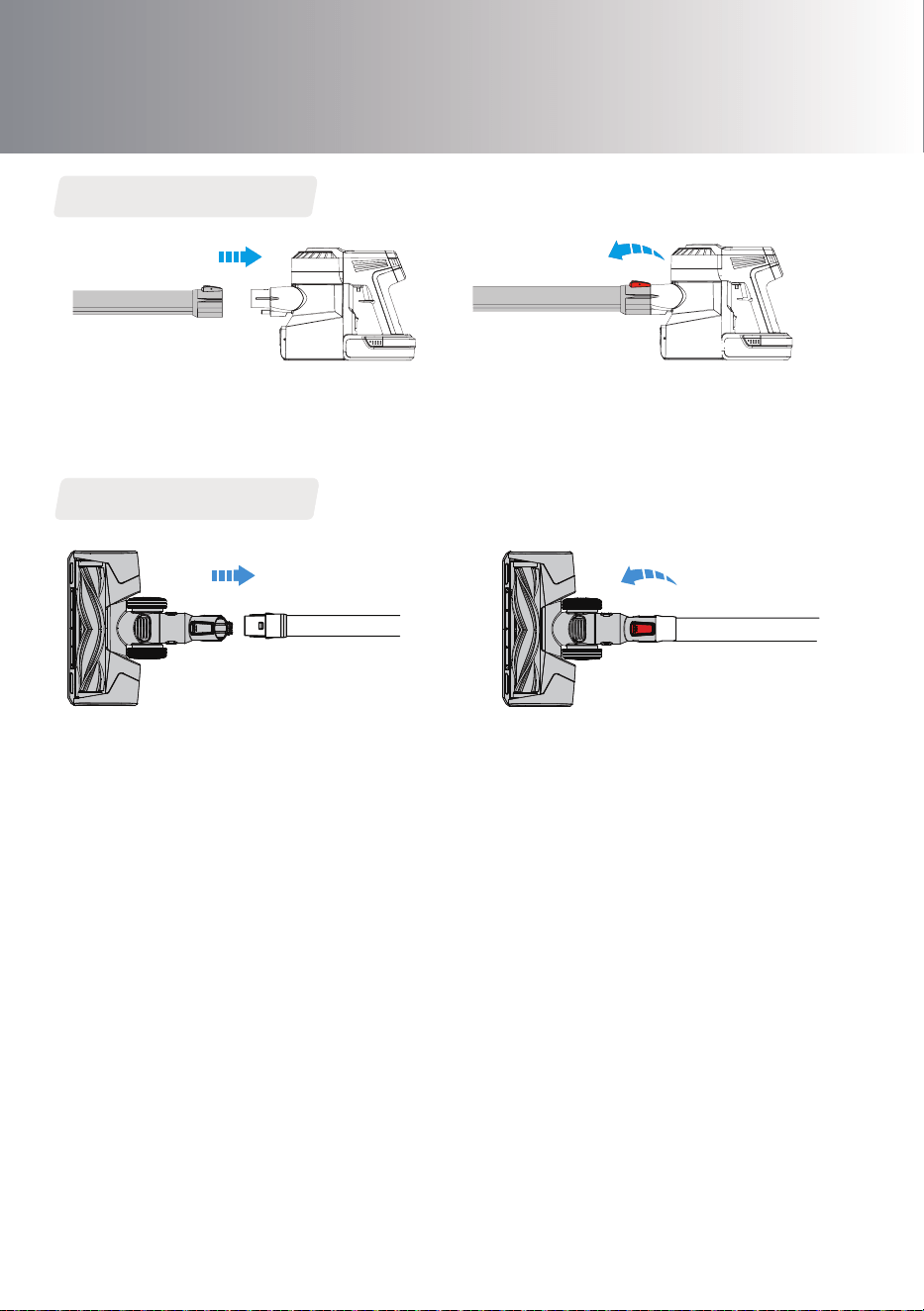
Install the Tube
Insert tube. Press the release button and remove tube.
Insert power brush. Press the release button and remove power brush.
Install the Brush
Assembly
7
8
Assembly
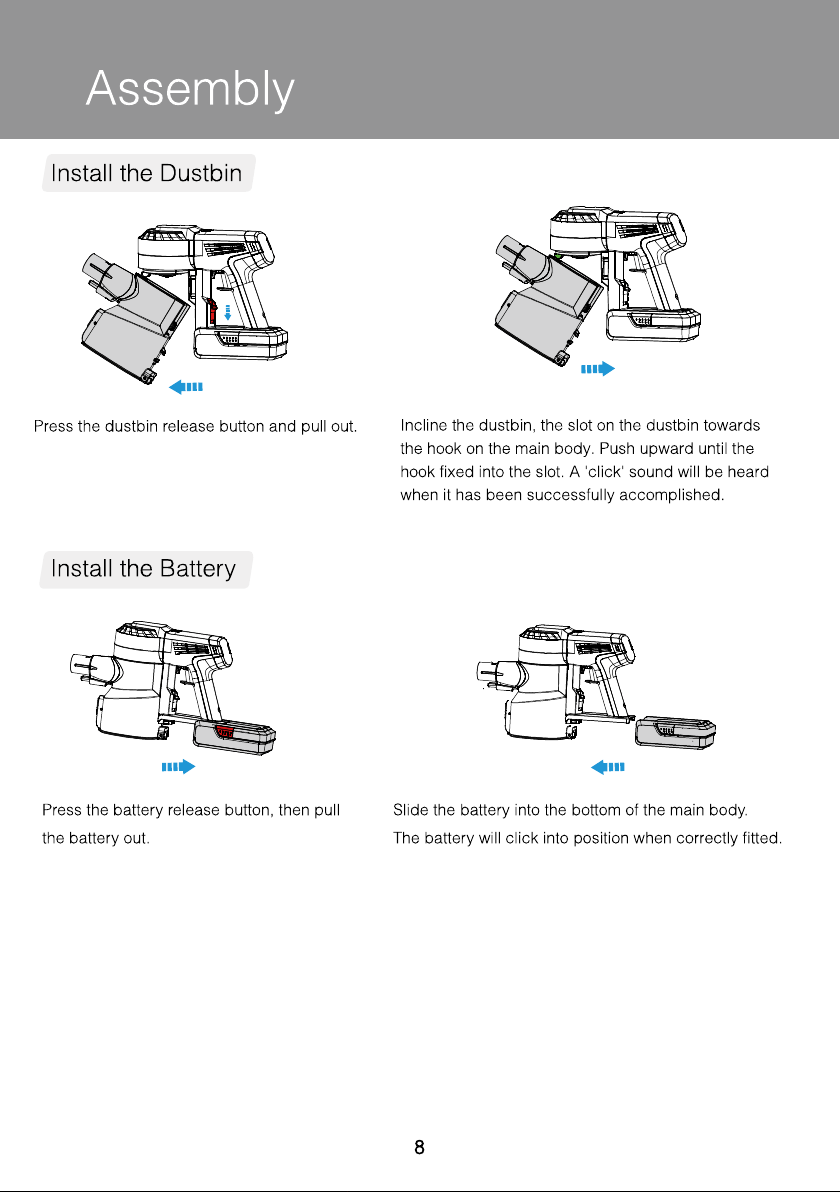
Install the Dustbin
Install the Battery
Press the battery release button, then pull
the battery out.
Slide the battery into the bottom of the main body.
The battery will click into position when correctly fitted.
Press the dustbin release button and pull out.
Incline the dustbin, the slot on the dustbin towards
the hook on the main body. Push upward until the
hook fixed into the slot. A 'click' sound will be heard
when it has been successfully accomplished.
Product Operation
Start to Work
9
MAX
MAX
Press the switch button, the machine will
start to work.
Lock the switch button for continuous
power mode.
Press the MAX button to go between regular
mode (regular power) and MAX mode (max power).
When finished, place the appliance on the
storehouse.
Note:
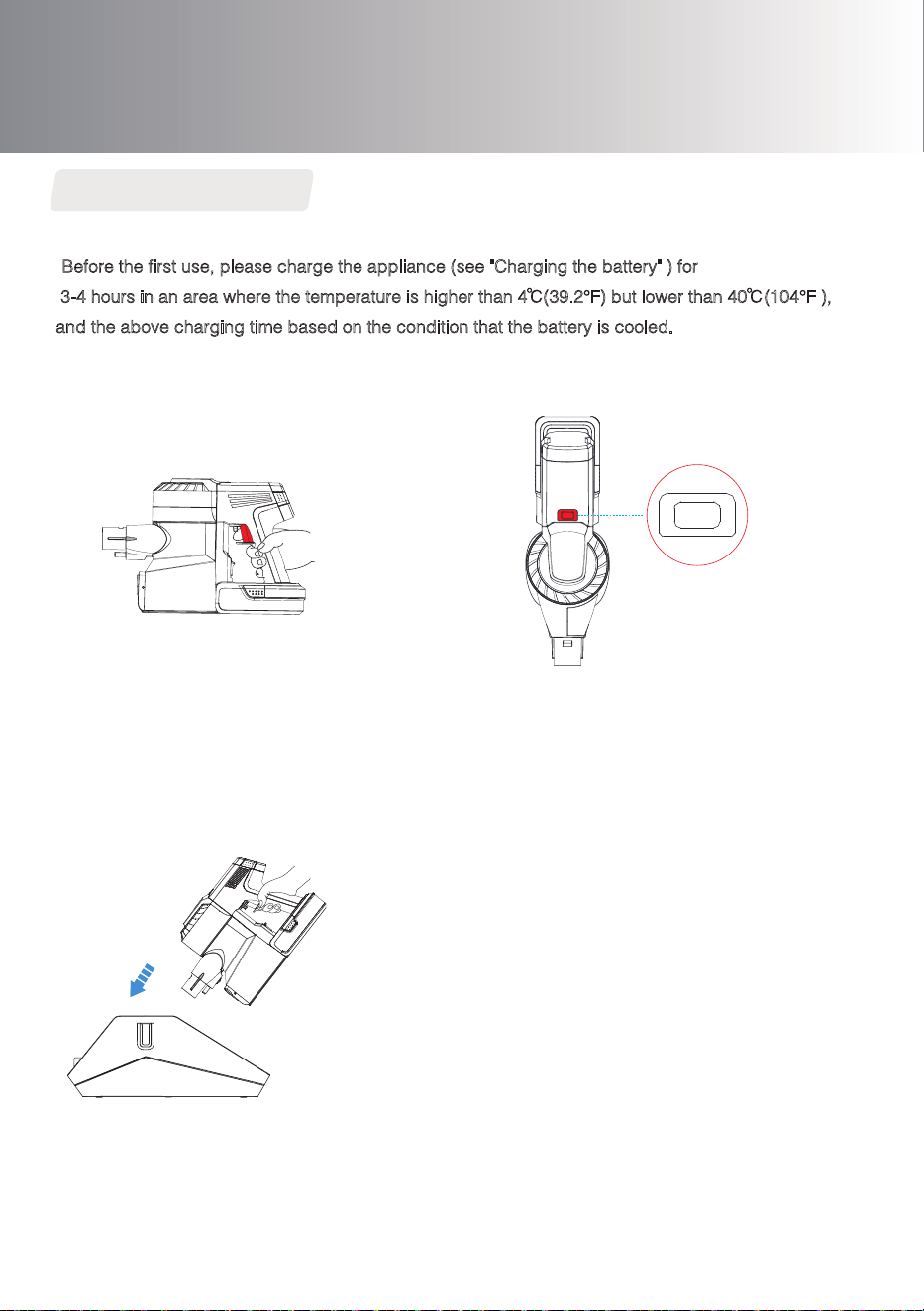
•Before the first use, please charge the appliance (see "Charging the battery" ) for
3-4 hours in an area where the temperature is higher than 4 (39.2°F) but lower than 40 (104°F ),
and the above charging time based on the condition that the battery is cooled.
•Select the accessories according to needs (see "Accessory Instructions" ).
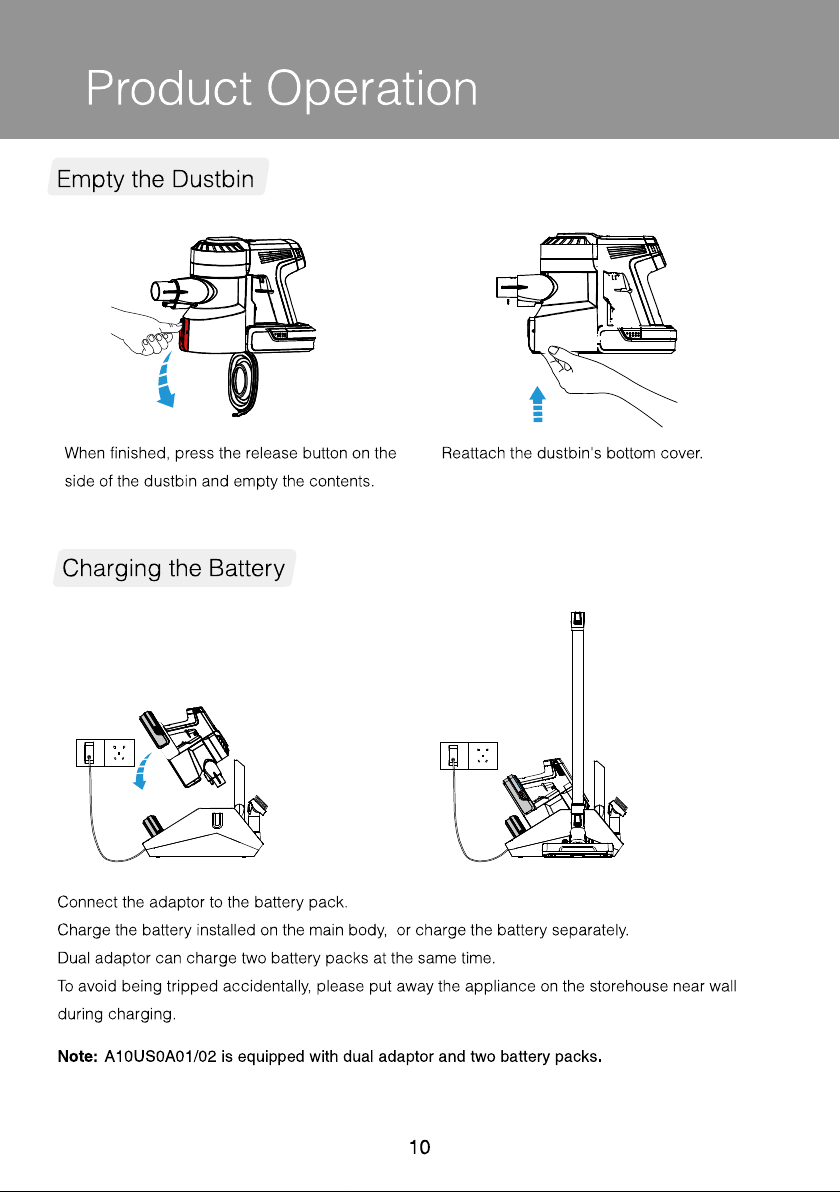
Connect the adaptor to the battery pack.
Charge the battery installed on the main body, or charge the battery separately.
Dual adaptor can charge two battery packs at the same time.
To avoid being tripped accidentally, please put away the appliance on the storehouse near wall
during charging.
Note: A10 MASTER is equipped with dual adaptor and two battery packs.
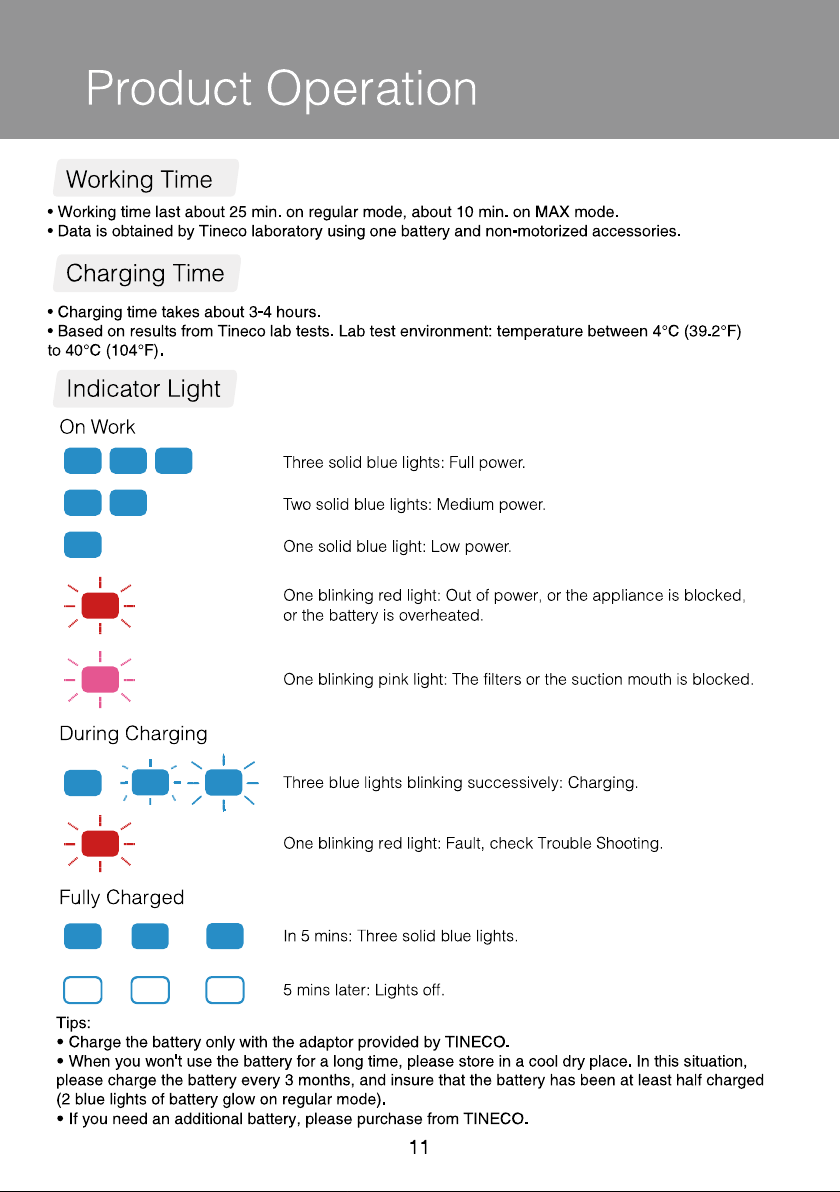
When finished, press the release button on the
side of the dustbin and empty the contents.
Reattach the dustbin's bottom cover.
Product Operation
10
Empty the Dustbin
Charging the Battery
11
Product Operation
Working Time
Charging Time
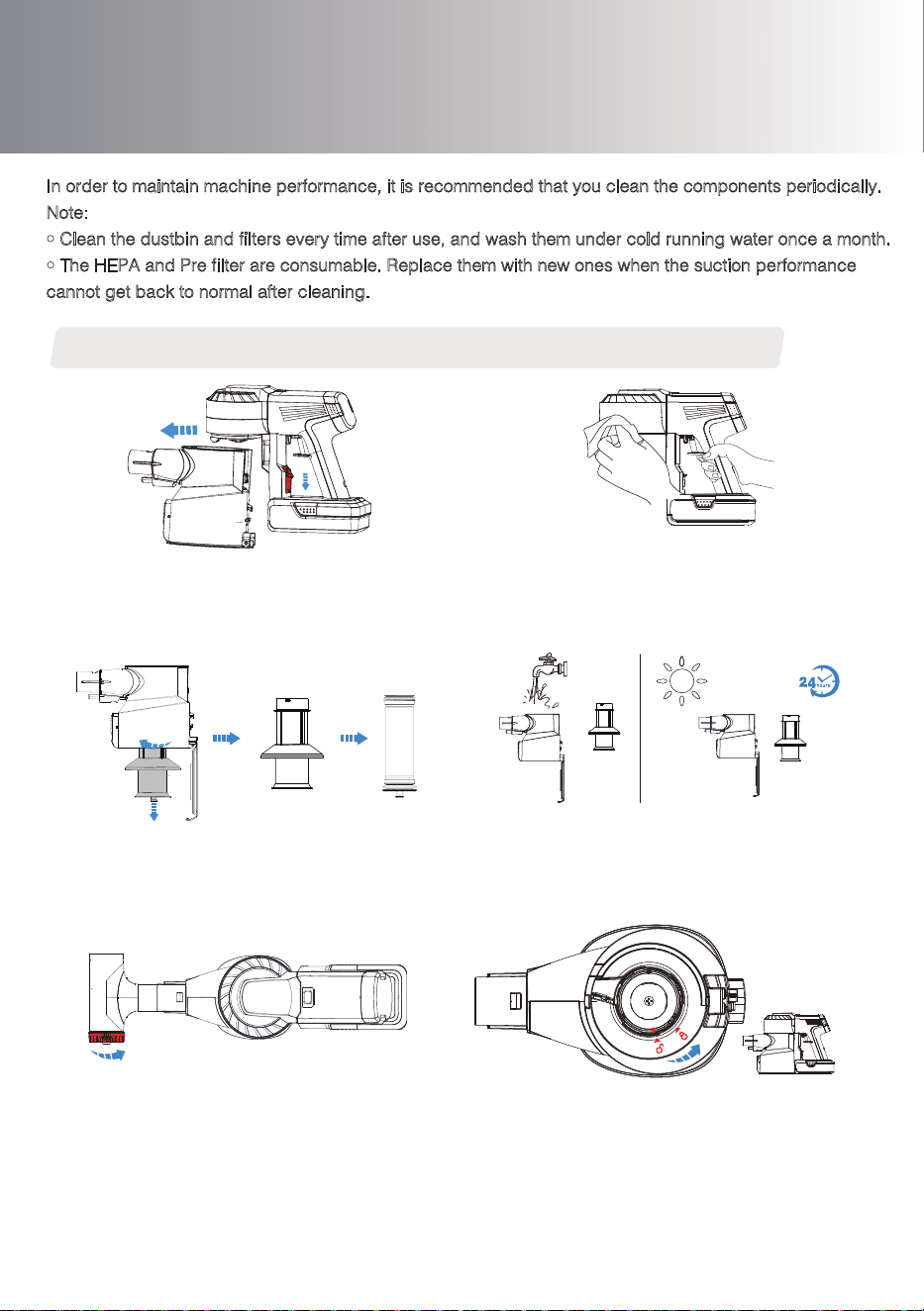
On Work
Indicator Light
During Charging
Three blue lights blinking successively: Charging.
Lights off: Charging complete.
One blinking red light during charging: Fault, check Trouble Shooting.
Tips:
• Charge the battery only with the adaptor provided by TINECO .
• When you won't use the battery for a long time, please store in a cool dry place. In this situation,
please insure that the battery has been at least half charged (2 blue lights of battery glow on
regular mode)
• If you need an additional battery, please purchase from TINECO.
Three solid blue lights: Full power.
• Working time last about 25 min. on regular mode, about 10 min. on MAX mode.
• Data is obtained by Tineco laboratory using one battery and non-motorized accessories.
• Charging time takes about 3-4 hours.
• Based on results from Tineco lab tests. Lab test environment: temperature between 4 ℃(39.2°F)
to 40℃(104°F ).
Two solid blue lights: Medium power.
One solid blue light: Low power.
One blinking red light: Out of power, or the appliance
is blocked,or the battery is overheated.
One blinking pink light: The filters or the suction mouth is blocked.
Daily Maintenance
12
Clean with wet cloth.
Do not allow water to enter the appliance,
especially not into motor and battery.
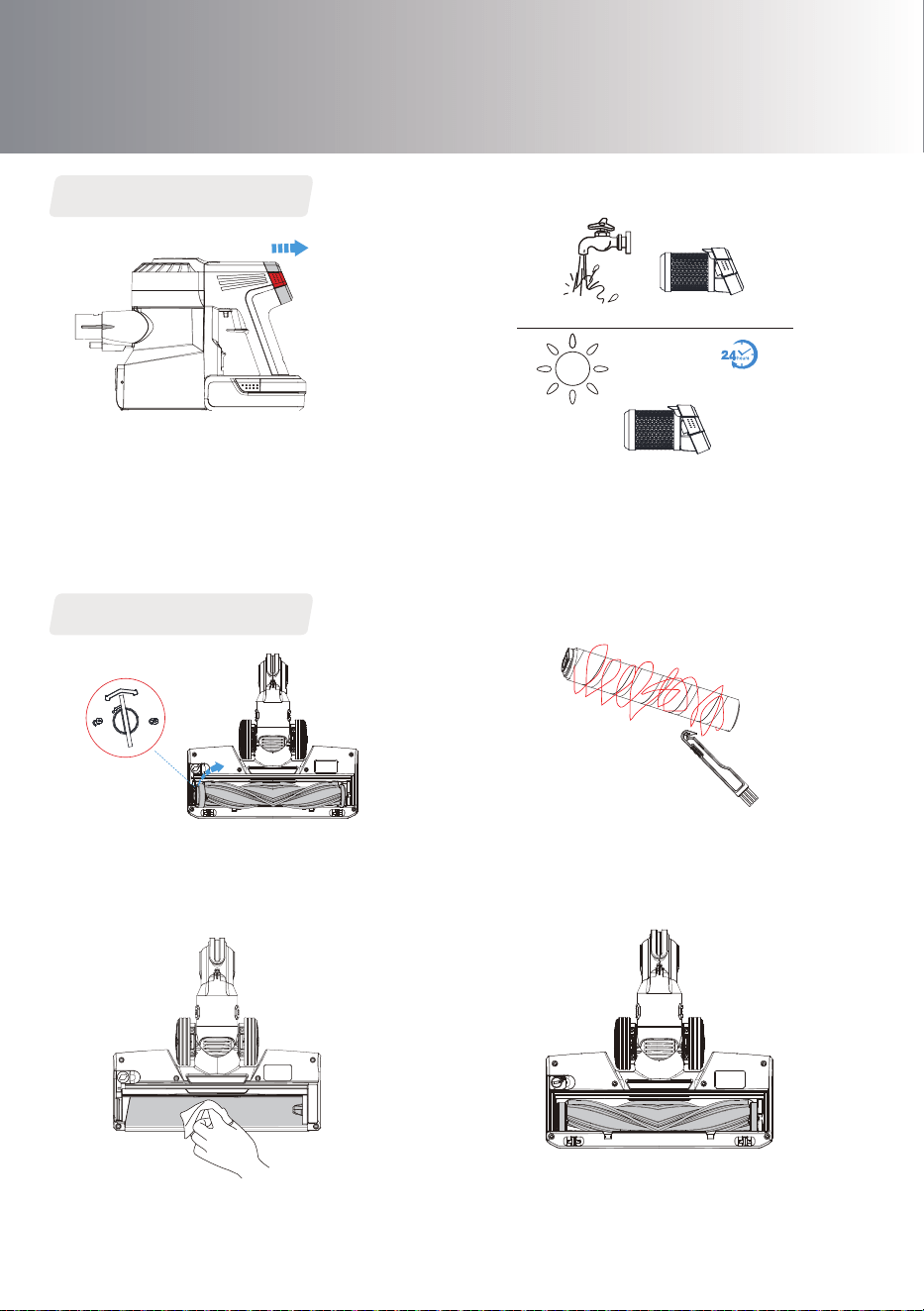
Press the dustbin release button, pull out the
dustbin as indicated in the above image.
1 2
Dustbin and Filters (pre filter, mesh filter and HEPA filter)
In order to maintain machine performance, it is recommended that you clean the components periodically.
Note:
• Clean the dustbin and filters every time after use, and wash them under cold running water once a month.
• The HEPA and Pre filter are consumable. Replace them with new ones when the suction performance
cannot get back to normal after cleaning.
Twist clockwise and remove the filters.
3
4
5 6
Clean the dustbin and mesh filter under cold,
running water. The dustbin and mesh filter should
be air dried completely before reinstalling.
MAX
Clean the pre filter with Tineco Pre Filter
Cleaning Tool.
Take out the dirty pre filter from the mesh
filter-holder, and replace a clean one. Open the
cover of the cleaning tool, put inside the dirty
pre filter and cover it. Connect the tool to the
main body. Activate the appliance on MAX
mode, and rotate the side cover.
After cleaning, insert the clean filters into dustbin, the
red line on mesh filter-holder towards the unlocked
mark, twist it towards the locked mark, and install the
filters correctly.
Install the dustbin and filters back into the main body,
then reattach the dustbin cover.
Use a coin or other tool to unlock the brush roller,
then remove the brush roller from the brush
window as indicated in the above image.
The HEPA can be washed under running water if
necessary, and should be dried completely before
reinstalling.
After the cleaning , install the brush roller back.Gently clean the transparent brush window.
13
HEPA filter
Brush
1 2
3
4
Daily Maintenance
Remove the hair and fibers wrapped around the
roller with hair cleaning tool.
Press the HEPA release button on both sides of the
windshield and gently pull out the HEPA.
Please detach the battery pack before pulling out
the HEPA to prevent the battery from contaminating.
14
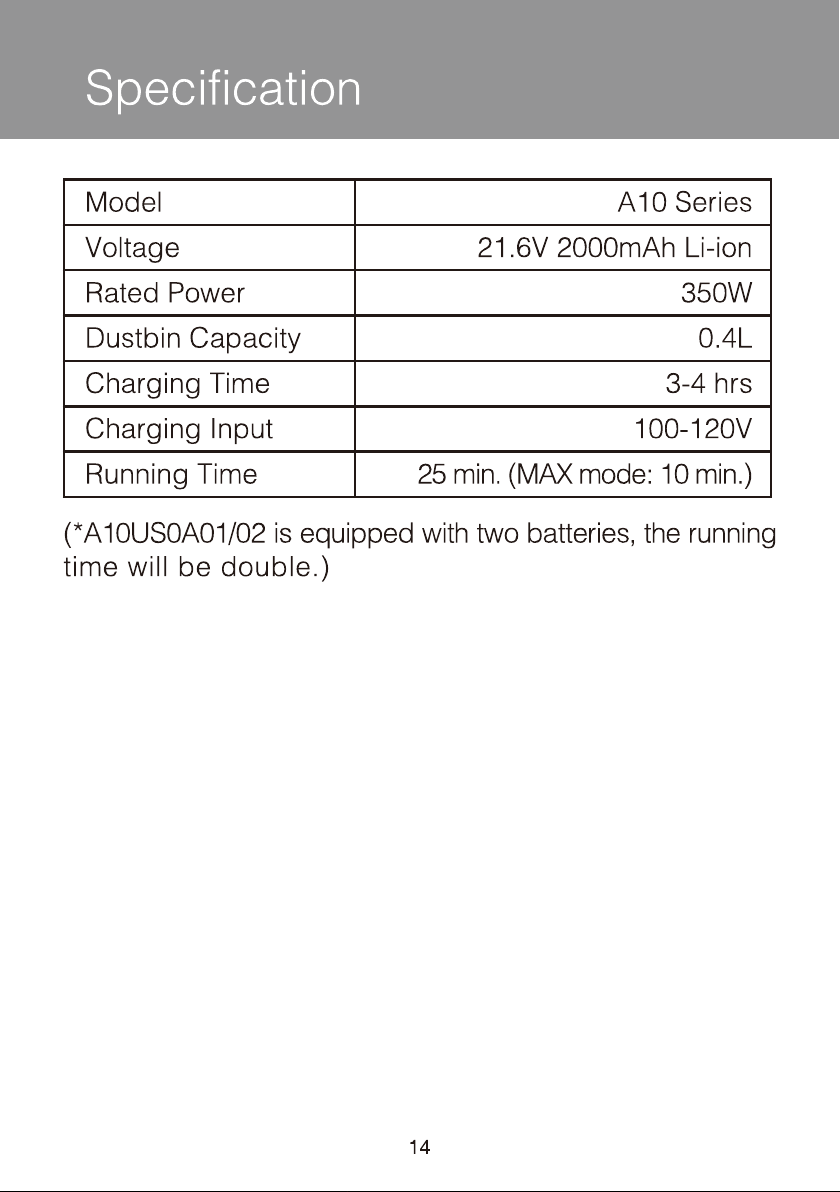
Specification
Model
Voltage
Rated Power
Dustbin Capacity
Charging Time
Charging Input
Running Time
A10 Series
21.6V
350W
0.4L
3-4 hrs
100-120V
25 min. (MAX mode: 10 min.)
(*A10 Master is equipped with two batteries, the running
time will be double.)

Trouble Shooting
15
Problem Possible cause Solution
The appliance doesn’t work
Charge the battery
No power
The suction mouth is blocked
The battery is still connected to
the adaptor
Check and remove blockages
Clean the brush roller
Abnormal motor sounds
Remove blockages
Battery can not be charged
Red light blinking
Remove the adaptor and insert
correct adaptor again
Dustbin and filters are full of dust
The brush roller is wrapped
by hairs or
The pre filter is not installed Install the pre filter
Remove blockages
The appliance is blocked
(such as tube, suction mouth or
some other part)
The appliance is blocked
(such as tube, suction mouth or
some other part)
fibers
Clean the dustbin and filters
Disconnect the battery from
the adaptor
Weak suction power
The adaptor is not correctly
inserted or the adaptor is not
designed for Tineco A10
The appliance is blocked or the
brush roller is wrapped by hairs
or fibers
Stop the appliance, remove
blockages or clean the brush
roller
The battery is out of power or
overheated
Charge the battery or let it
cool down
Pink light blinking
The filters or the suction mouth is
blocked
Clean filters or remove blockages
Note:
In any other case or if the solution explained above did not solve the problem, please contact us
at [email protected] or visit our website www.tineco.com for further support.

Live Easy
Enjoy Life
tinecoglobal
Contact us - We'll get back to you within 1 business day.
Web: www.tineco.com
Email: [email protected]
US Service Call: +1 (855) 292-8864
Service Hours: Mon. – Fri. 9am - 6pm (CST)