Owner’s Guide
For Roomba
®
i Series Robot Vacuums
Clean Base
™
Automatic Dirt Disposal

EN
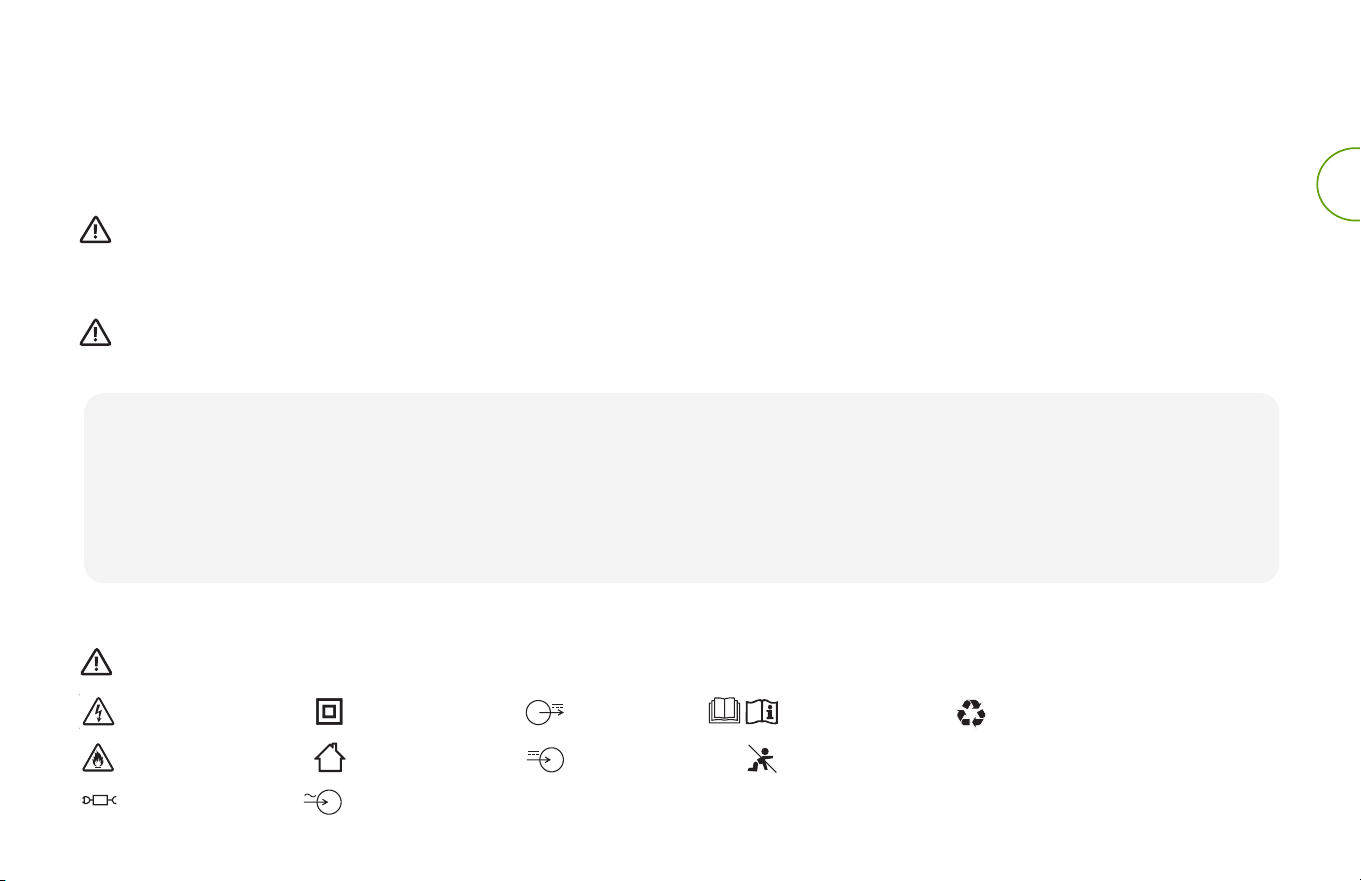
This is the safety alert symbol. It is used to alert you to potential physical injury hazards.
Obey all safety messages that follow this symbol to avoid possible injury or death.
WARNING: When using an electrical appliance, basic precautions should always be followed,
including the following:
WARNING: To reduce the risk of injury or damage, read and follow the safety precautions when
setting up, using, and maintaining your robot.
This appliance can be used by children aged from 8 years and above and persons with
reduced physical, sensory, or mental capabilities or lack of experience and knowledge if they
have been given supervision or instruction concerning use of the appliance in a safe way and
understand the hazards involved. Children shall not play with the appliance. Cleaning and user
maintenance shall not be made by children without supervision.
Safety Information
Important Safety Information
READ ALL INSTRUCTIONS
SAVE THESE INSTRUCTIONS
BFP
Risk of electric shock Class II equipment Read operator’s
manual
Risk of fire For indoor use only
Keep out of reach
ofchildren
Backfeed Protection
General symbol for
recycling
Rated power
input, d.c.
Rated power
output, d.c.
Separate Supply Unit Rated power input, a.c.
This owner's guide includes information for Regulatory Model(s): ADE-N2.
EN
• Do not pour any liquids into the device and do not immerse in water.
• Do not use outdoors or on wet surfaces.
• Do not allow to be used as a toy. Close attention is necessary
whenused by or near children.
• Use only as described in this manual.
• Do not use with damaged cord or plug. If appliance is not working
as it should, has been dropped, damaged, left outdoors, or
dropped into water, return it to a service centre.
• Do not handle plug or appliance with wet hands.
• Do not put any object into openings. Do not use with any opening
blocked; keep free of dust, lint, hair, and anything that may reduce
air flow.
• In order to avoid a hazard due to inadvertent resetting of the
thermal cut-out, this appliance must not be supplied through an
external switching device, such as a timer, or connected to a circuit
that is regularly switched on and o by the utility.
NOTICE
• Product may not be used with any type of power converter. Use of
power converters will immediately void the warranty.
• If you live in an area prone to electrical storms, it is recommended
that you use additional surge protection. Your dirt disposal may be
protected with a surge protector in the event of severe electrical
storms.
• Do not use without dust bag and/or filters in place.
• To properly maintain your dirt disposal, do not place foreign
objects inside, and ensure it is clear of debris.
• Always disconnect your robot from the dirt disposal before
cleaning or maintaining it.
GENERAL
WARNING
• This product is not a toy. Small children and pets should be
supervised when the product is operating.
• Do not sit or stand on this product.
• This product comes with a region approved power supply cord
and is designed to be plugged into a standard household AC
power outlet only. Do not use any other power supply cord. For
replacement cords, please contact Customer Care to ensure
proper selection of country specific power supply cord.
• Do not disassemble or open the dirt disposal unless instructed to
do so. There are no user serviceable parts inside. Refer servicing to
qualified service personnel.
• Risk of electric shock, use indoors in dry location only.
• Do not handle this product with wet hands.
• Store and operate this product in room temperature environments
only.
AUTOMATIC DIRT DISPOSAL
WARNING
• To reduce the risk of electric shock, unplug your dirt disposal before
cleaning.
WARNING: Indicates a hazardous situation that, if not avoided, could
result in death or serious injury.
CAUTION: Indicates a hazardous situation that, if not avoided, could
result in minor or moderate injury.
NOTICE:
Indicates a hazardous situation that, if not avoided, could
result in property damage.
Roomba
®
i Series Clean Base™ Automatic Dirt Disposal Owner’s Guide 1
EN
Top View
Front View
Charging
Contacts
Canister Lid
IR Window
Exhaust Vent
Cord Wrap
Debris
Evacuation Port
Bag Guide Rails
Debris Evacuation
Tube
Debris Evacuation
Tube
Blower Cover
Bag Presence Sensor
Back View
Bottom View
About Your Clean Base™ Automatic Dirt Disposal
Wheel Wells
LED Indicator
2 For more information, visit global.irobot.com
EN
About Your Automatic Dirt Disposal
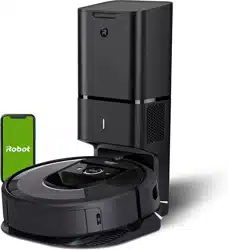
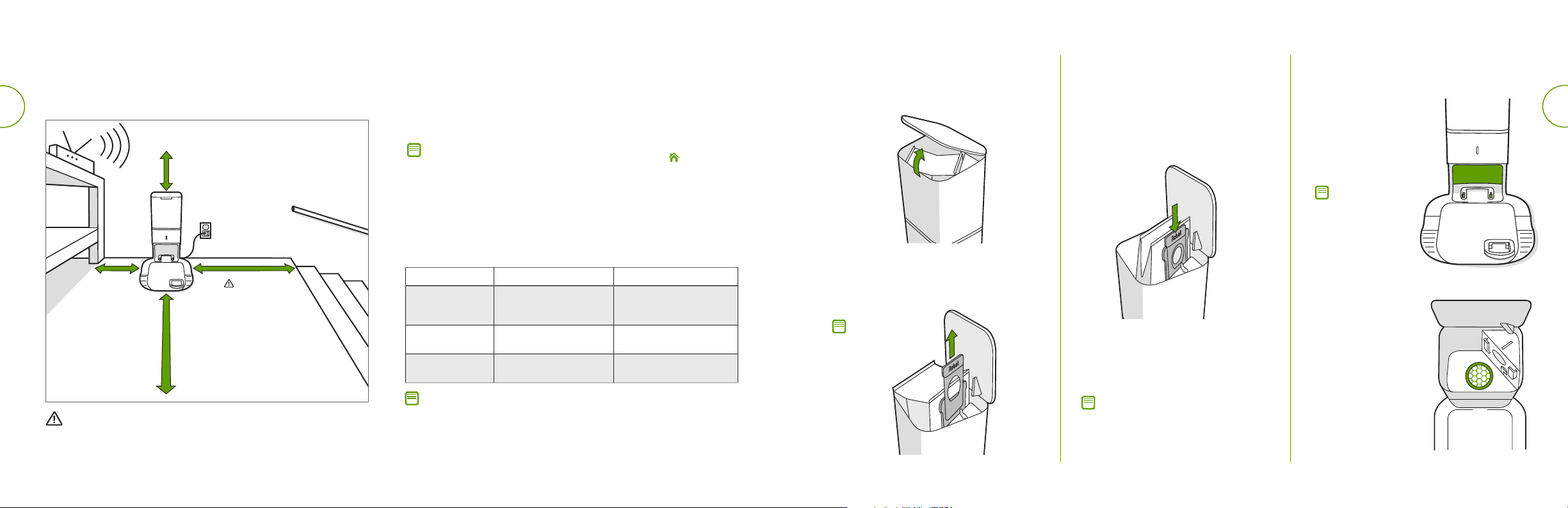
While cleaning, your robot will automatically return to the dirt disposal to
empty its bin and recharge as needed.
The dirt disposal’s LED indicator will turn solid red when a new bag is
needed. If a clog is detected, the dirt disposal will trigger additional
attempts to automatically clear the clog.
1 ft. (0.3 m)
above
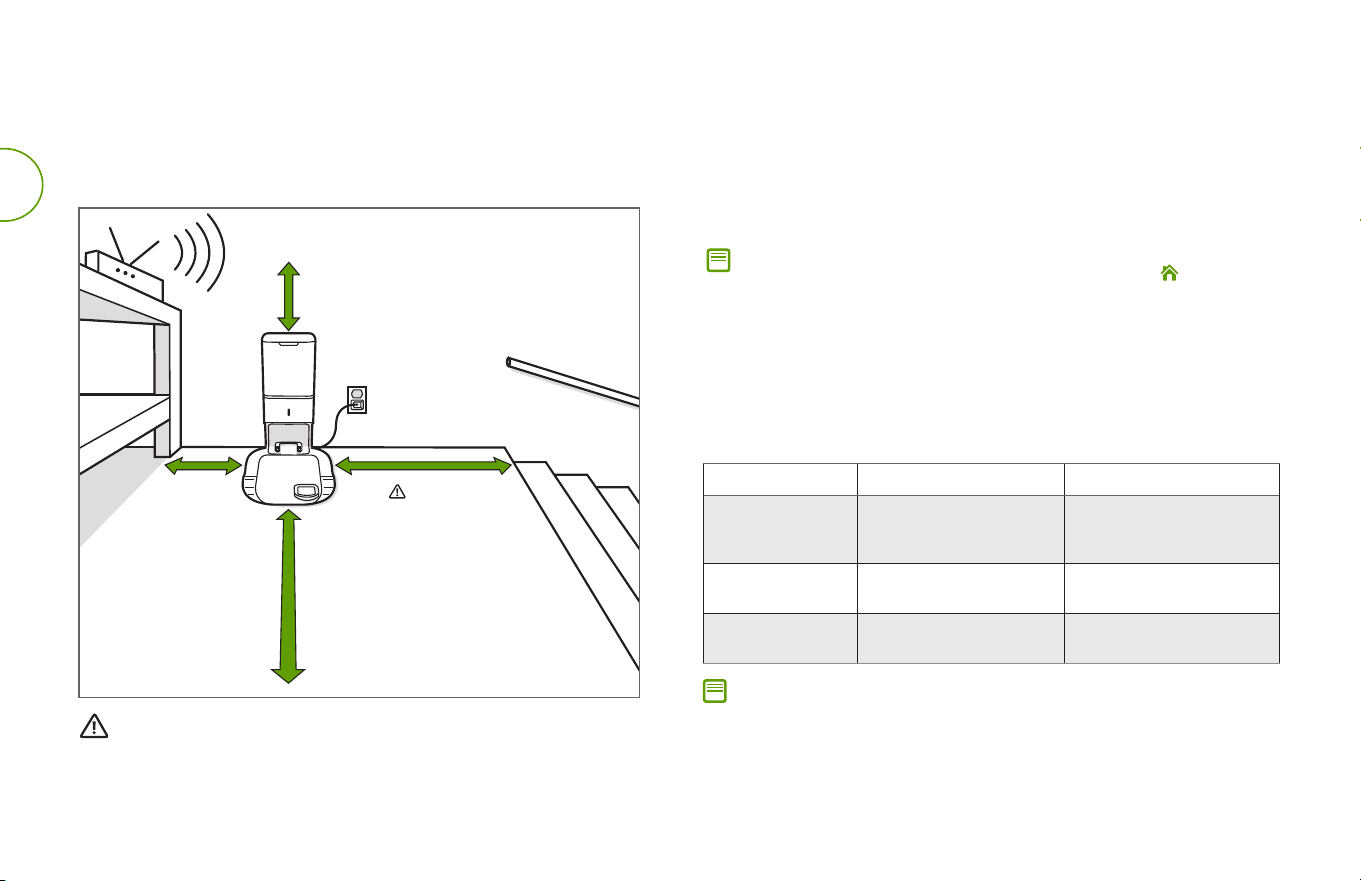
Note: If you place your robot on the dirt disposal by hand, it will not empty
automatically. In this case, use the iRobot HOME App or the button on
yourrobot to manually empty your robot’s bin.
Care and Maintenance Instructions
To keep your dirt disposal running at peak performance, follow these
care procedures:
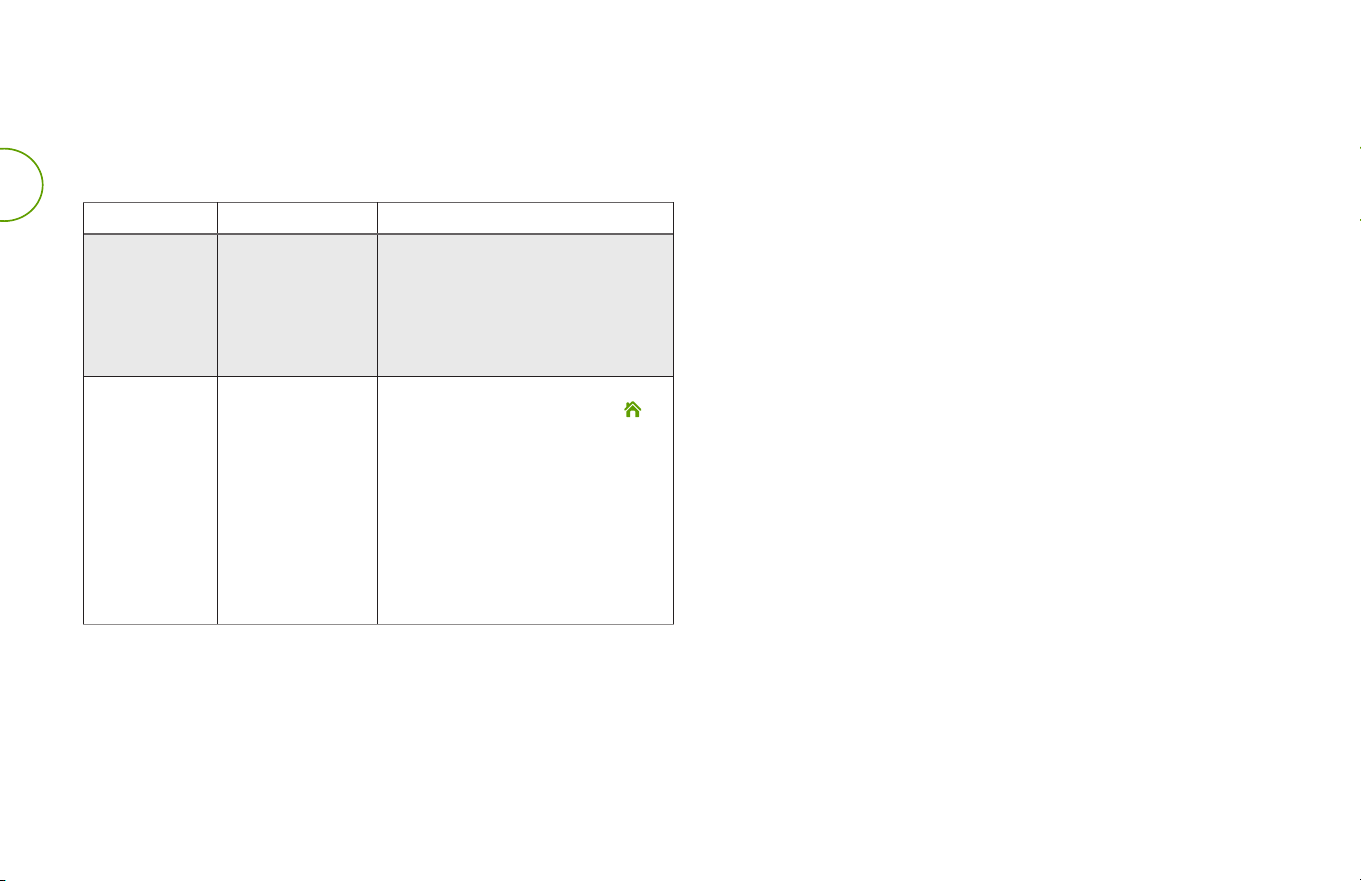
Dock Part Care Frequency Replacement frequency
Bags
-
Bags should be replaced
when prompted by the LED
indicator/app
Charging Contacts
IR Window
Once every month
-
Blower Cover
inside canister
Once every month (remove
debris from blower cover)
-
Care and Maintenance
Note: iRobot manufactures various replacement parts and assemblies. If you
think you need a replacement part, please contact iRobot Customer Care for
more information.
Using Your Automatic
Dirt Disposal
Positioning the Clean Base™ Automatic Dirt Disposal
WARNING: To prevent the risk of your robot falling downstairs, ensure that
the charging station is placed at least 4 feet (1.2 meters) away from stairs.
Good Wi-Fi
®
Coverage
*Objects are not to scale.
4 ft. (1.2 m)
from stairs
4 ft.(1.2 m)
in front
1.5 ft. (0.5 m)
both sides

Roomba
®
i Series Clean Base™ Automatic Dirt Disposal Owner’s Guide 3
EN
Note: Do not
spray cleaning
solution directly
onto sensors
or into sensor
openings.
Cleaning the IR Window
and Charging Contacts
Inspect the sensors
and charging contacts
to make sure they are
clear of debris. Wipe
with a clean, dry cloth.
Removing Debris
from Blower Cover
Inspect blower cover
for any lint or debris
built-up, and wipe
with a clean dry cloth
to remove.
Note: To achieve optimal performance
with your robot and automatic dirt
disposal, clean and/or replace your
robot’s filter as needed.
Install a new bag, sliding the
plastic card into the guide rails.
Discard the used bag.
Press down on the lid making
sure it is completely closed.
4
3
5
Note: This will
seal the bag so
dust and debris
cannot escape.
Replacing the Bag
Pull up on the plastic card to remove
the bag from the canister.
Lift up on the canister lid to open.
1
2
4 For more information, visit global.irobot.com
EN
USA & Canada
If you have questions or comments about your dirt disposal, please
contact iRobot before contacting a retailer.
You can start by visiting global.irobot.com for support tips, frequently
asked questions, and information about accessories. This information
can also be found in the iRobot HOME App. If you need further
assistance, call the US Customer Care team at (877) 855-8593.
iRobot USA Customer Care Hours
• Monday to Friday, 9AM — 9PM Eastern Time
• Saturday and Sunday 9AM — 6PM Eastern Time
Outside USA & Canada
Visit global.irobot.com to:
• Learn more about iRobot in your country
• Get hints and tips to improve your product performance
• Get answers to questions
• Contact your local support centre
iRobot Customer Care
Troubleshooting
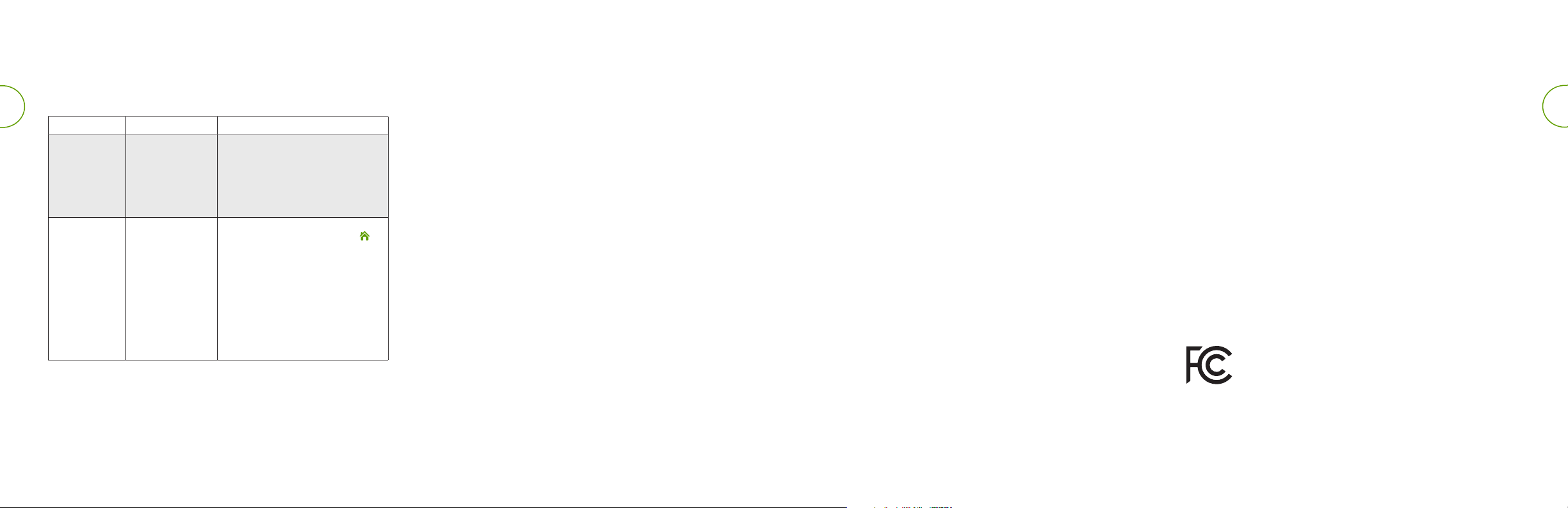
Your dirt disposal will tell you if something is wrong via an LED indicator on
the front of the canister and through the iRobot HOME App.
LED Indicator Common Error How to Fix
Solid Red Bag full or missing 1. Replace bag if it is full or missing.
2. Make sure the bag is securely
inserted.
3. If problem persists, remove any debris
from the port on the bottom of your
robot and the dirt disposal.
Blinking Red There is a leak or
a clog in the dock
evacuation path
1. Make sure the canister lid is pushed
down and firmly sealed. Tap the
button on your robot to manually
empty the bin.
2. Remove any debris from the port on
the bottom of your robot and dirt
disposal.
3. Unplug the dirt disposal from the wall.
Place it on its side and inspect the
debris evacuation tube for debris. If
necessary, remove the tube to clear
any debris.
Roomba
®
i Series Clean Base™ Automatic Dirt Disposal Owner’s Guide 5
EN
Regulatory Information
For EU Declaration of Conformity information,
visit www.irobot.com/compliance.
For UKCA Declaration of Conformity information,
visit www.irobot.com/compliance.
This symbol on the product indicates that the appliance must not
be disposed of with unsorted common municipal waste. Asthe
end-user, it is your responsibility to dispose of the end-of-life
appliance in an environmentally sensitive manner as follows:
(1) returning it to the distributor/dealer from whom you
purchased the product; or
(2) depositing it in a designated collection point.
Disposing of this product correctly will help save valuable
resources and prevent any potential negative eects on human
health and the environment, which could otherwise arise
from inappropriate waste handling. Please contact your local
authority for further details or your nearest designated collection
point. Penalties may be applicable for incorrect disposal
of this waste, in accordance with your national legislation.
Moreinformation may be found at the following source:
http://ec.europa.eu/environment/waste/weee/index_en.htm

©2018 iRobot Corporation, 8 Crosby Drive, Bedford, MA 01730 USA. All rights reserved.
iRobot, Roomba, and Virtual Wall are registered trademarks of iRobot Corporation.
HomeBase+ is a trademark of iRobot Corporation. Wi-Fi and the Wi-Fi logo are
registered trademarks of Wi-Fi Alliance.


WC#: 4647882