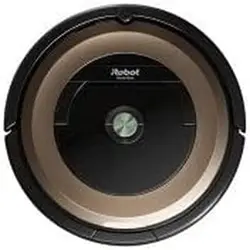
User Guide iRobot 7150 Robot Vacuum
GENERAL
CAUTION
- Do not operate the robot in areas with exposed electrical outlets in the floor.
- If the device passes over a power cord and drags it, there is a chance an object could be pulled off a table or shelf. Before using this device, pick up objects like clothing, loose papers, pull cords for blinds or curtains, power cords, and any fragile objects.
- Be aware that the robot moves on its own. Take care when walking in the area that the robot is operating in to avoid stepping on it.
- Do not use this device to pick up sharp objects, glass, or anything that is burning or smoking.
NOTICE
- This robot is intended for dry floor use only. Do not use this device to pick up spills. Do not allow your robot or charging station to become wet.
- Do not place anything on top of your robot.
- The failure to maintain cleanliness of charger contacts could result in loss of ability for the robot to charge the battery.
WARNING
- Your robot is not a toy. Small children and pets should be supervised when your robot is operating.
- Do not sit or stand on your robot or charging station.
- Do not use unauthorised chargers. Use of an unauthorised charger could cause the battery to generate heat, smoke, catch fire, or explode.
- Your robot comes with a region approved power supply cord and is designed to be plugged into a standard household AC power outlet only. Do not use any other power supply cord. For replacement cords, please contact Customer Care to ensure proper selection of country specific power supply cord.
- Do not open your robot or charging station. There are no user serviceable parts inside. Refer servicing to qualified service personnel.
- Risk of electric shock, use indoors in dry location only.
- Do not handle your robot or charging station with wet hands.
- Store and operate your robot in room temperature environments only.
- If the room to be cleaned contains a balcony, a physical barrier should be used to prevent access to the balcony and ensure safe operation.
CHARGING STATION
WARNING
- Do not use a charging station with a damaged cord or plug if the cord or plug is damaged, it must be replaced.
- Always disconnect your robot from the charging station before cleaning or maintaining it.
GENERAL WARNING
- Your robot is not a toy. Small children and pets should be supervised when your robot is operating.
- Do not sit or stand on your robot or charging station.
- Do not use unauthorised chargers. Use of an unauthorised charger could cause the battery to generate heat, smoke, catch fire, or explode.
- Your robot comes with a region approved power supply cord and is designed to be plugged into a standard household AC power outlet only. Do not use any other power supply cord. For replacement cords, please contact Customer Care to ensure proper selection of country specific power supply cord.
- Do not open your robot or charging station. There are no user serviceable parts inside. Refer servicing to qualified service personnel.
- Risk of electric shock, use indoors in dry location only.
- Do not handle your robot or charging station with wet hands.
- Store and operate your robot in room temperature environments only.
- If the room to be cleaned contains a balcony, a physical barrier should be used to prevent access to the balcony and ensure safe operation.
WARNING: Indicates a hazardous situation that, if not avoided, could result in death or serious injury.
CAUTION: Indicates a hazardous situation that, if not avoided, could result in minor or moderate injury.
NOTICE: Indicates a hazardous situation that, if not avoided, could result in property damage. to local environmental regulations, or return it to your local authorised iRobot Service Centre for disposal.
NOTICE
- The battery pack must be removed from the robot before recycling or disposal.
- For best results, only use the iRobot Lithium Ion Battery that comes with the robot.
- Do not use non-rechargeable batteries. Use only the rechargeable battery supplied with the product. For replacement, purchase identical iRobot battery or contact iRobot Customer Care for alternative battery options.
- Always charge and remove the battery from your robot and accessories before long-term storage.
- Charge your robot only with the power supply provided.
- The provided power supply delivers safety extra low voltage corresponding to the input marking on the robot which is required to maintain safe operation.
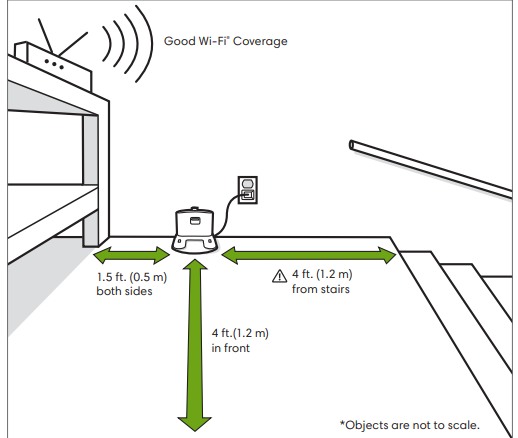
- To prevent the risk of your robot falling downstairs, ensure that the charging station is placed at least 4 feet (1.2 meters) away from stairs.
NOTICE
- Product may not be used with any type of power converter.
- Use of power converters will immediately void the warranty.
- If you live in an area prone to electrical storms, it is recommended that you use additional surge protection. Your charging station may be protected with a surge protector in the event of severe electrical storms.
About your Roomba® Robot Vacuum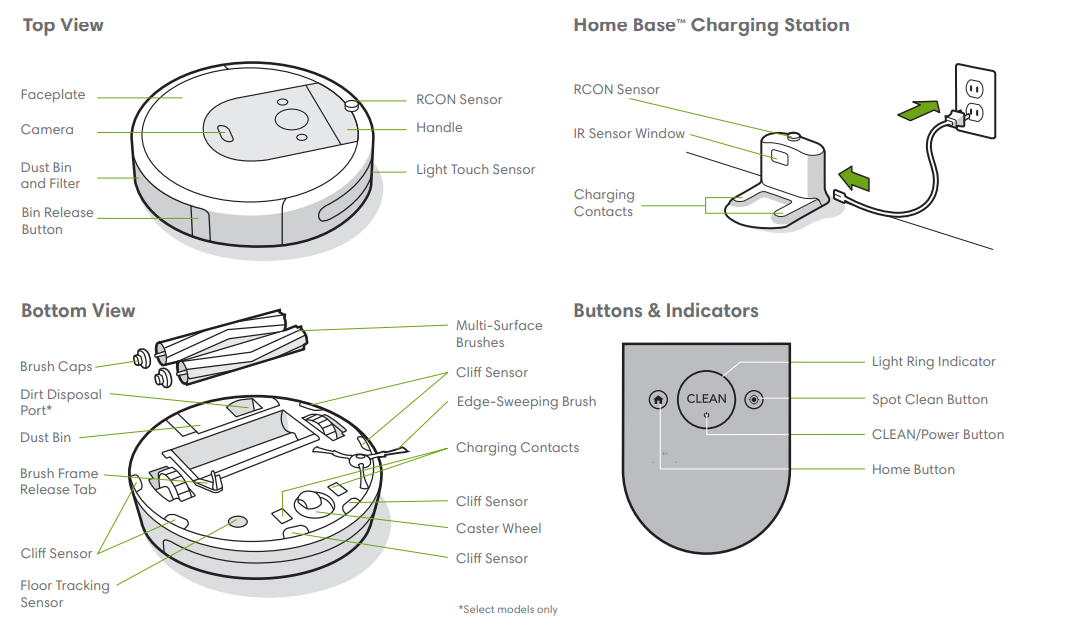
Using Your Roomba® Robot Vacuum
- Positioning the Home BaseTM Charging Station
Charging
- Place the robot on the charging station to activate the battery.
Note: Your robot comes with a partial charge, but we recommend that you charge the robot for 3 hours prior to starting the first cleaning job.
- If the “CLEAN” text is pulsing while charging, the robot is in the middle of a cleaning job and will automatically resume where it left.off once recharged.
- The robot uses a small amount of power whenever it is on the charging station. You can put the robot in a further-reduced power state when not in use. For instructions and more details on this Reduced Power Standby Mode, refer to the iRobot HOME App.
- For long-term storage, turn off the robot by removing it from the charging station and holding down for 10 seconds.
- Store the robot in a cool, dry place.
Cleaning
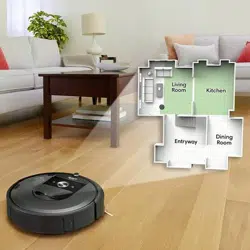
- Your robot will automatically explore and clean your home.
- It will return to the charging station at the end of a cleaning job and whenever it needs to recharge.
- To send the robot back to its charging station, tap . A blue light ring pattern will indicate that the robot is seeking the charging station.
- When your robot detects an especially dirty area, it will engage Dirt Detect™ mode, moving in a forward/backward motion to clean the area more thoroughly. The light ring indicator will flash blue.
- Tap to spot clean a designated area. The robot will spiral outward about 3 feet (1 meter) and then spiral inward to end where it started. The light ring indicator will show a blue spiral.
- Remove excess clutter from floors before cleaning. Use your robot frequently to maintain well-conditioned floors.
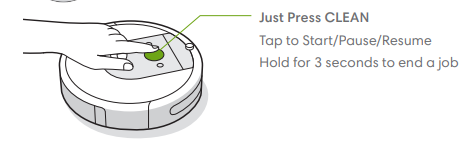
Just Press CLEAN
- Tap to Start/Pause/Resume
- Hold for 3 seconds to end a job
- When the robot senses its bin needs to be emptied, the light ring indicator will illuminat
Troubleshooting
Your robot will tell you something is wrong by playing an audio alert and turning the light ring indicator red. Press CLEAN or tap the bumper for details. Further support and instructional videos are available in the iRobot HOME App.
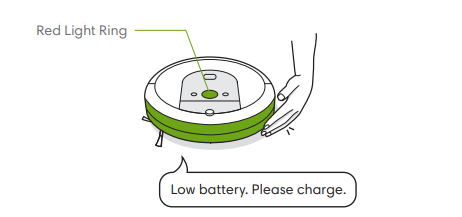
After 90 minutes of inactivity off the charging station, the robot will automatically end its cleaning job.
Battery Safety & Shipping
- For best results, only use the iRobot Lithium Ion Battery that comes with your robot.
WARNING: Lithium ion batteries and products that contain lithium ion batteries are subject to stringent transportation regulations. If you need to ship this product for service, travel, or any other reason, you MUST follow the below shipping instructions.
- Battery MUST be turned off before shipping.
- Turn off the battery by removing the robot from the charging station and holding down for 10 seconds. All indicators will turn off.
- Package the robot securely for shipping.
- If you need further assistance, contact our Customer Care team or visit global.irobot.com.
Accessories
Dual Mode Virtual Wall®
Barrier
- For best results, place at least 8 feet (2.5 meters) from the charging station.
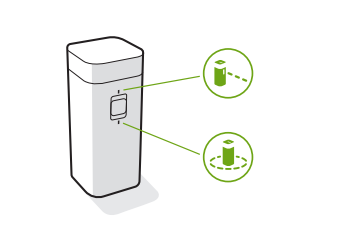
- Use the Dual Mode Virtual Wall® barrier to keep the robot in the places you want cleaned — and out of the ones you don’t.
- It creates an invisible barrier that only the robot can see. You can leave the device in position between cleanings.
Choose the mode to meet your needs:
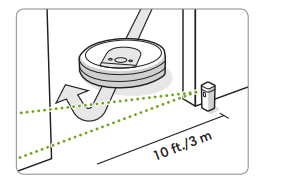
- Virtual Wall Mode: When the switch is in the Virtual Wall position ( ), the device will create a linear barrier to block openings up to 10 feet (3 meters).
Accessories
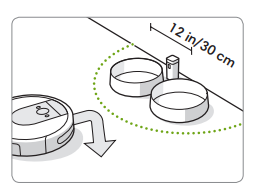
- Halo Mode: Toggle the switch to the Halo position ( ), to create a circular barrier. This will prevent the robot from approaching zones you want to protect such as a pet bowl, vase, or under a desk. The Halo barrier extends approximately 12 inches (30 centimetres) from the centre of the device. ft./3 m
Note:
- The batteries will last about 8-10 months under normal use. If you are not planning to use your Virtual Wall barrier for an extended period of time, be sure to turn the switch to the Off or middle position.
Care and Maintenance
Care and Maintenance Instructions
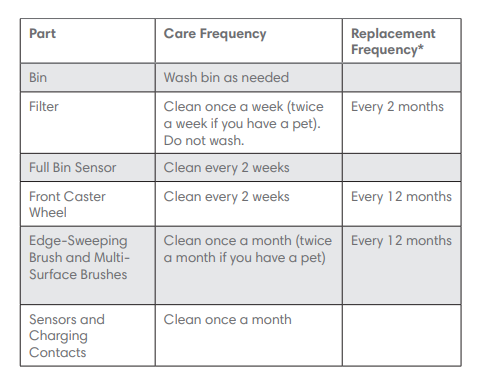
- To keep your robot running at peak performance, perform the procedures on the following pages.
- There are additional instructional videos in the iRobot HOME App. If you notice the robot picking up less debris from your floor, empty the bin, clean the filter, and clean the brushes.
Emptying the Bin
- Open bin door to empty bin.
- Press bin release 1 button to remove bin.
- Place bin back in the robot. 3
Cleaning the Filter
- Remove the bin. Remove the filter by grasping both ends and pulling out.
- Remove debris by tapping the filter against your trash container.
- Reinsert filter with ridged grips facing out. Place bin back in the robot.
Important:
- The robot will not run if the filter is not installed correctly.
- Replace the filter every two months.
Cleaning the Full Bin Sensors Washing the Bin
- Wipe the inner sensors with a clean, dry cloth
- Make sure bin is completely dry. Reinsert filter and place bin back in the robot.
- Wipe the bin door with a clean, dry cloth.
Important:
- Do not wash the filter. Remove the filter before washing the bin.
- Release the bin, remove the filter, and open the bin door.
Remove and empty the bin.
Note:
- Bin is not dishwasher safe.
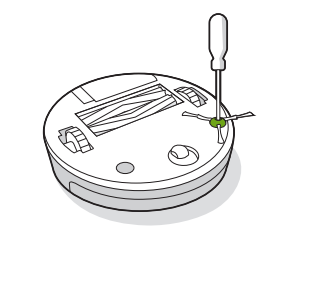
Use a coin or small screwdriver to remove the screw holding the EdgeSweeping Brush in place.
- Pull to remove the Edge-Sweeping
- Brush. Remove any hair or debris, then reinstall the brush.
Cleaning the Front Caster Wheel
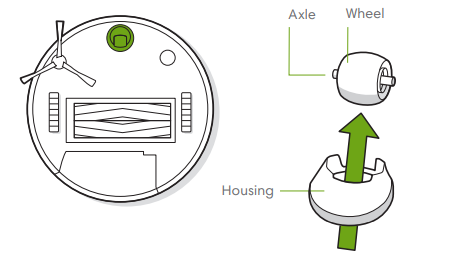
- Pull firmly on the front wheel module to remove it from the robot.
- Pull firmly on the wheel to remove it from its housing (see illustration below).
- Remove any debris from inside the wheel cavity.
- Reinstall all parts when finished. Make sure the wheel clicks back into place.
Important: A front wheel clogged with hair and debris could result in damage to your floor. If the wheel is not spinning freely after you have cleaned it, please contact
Customer Care.
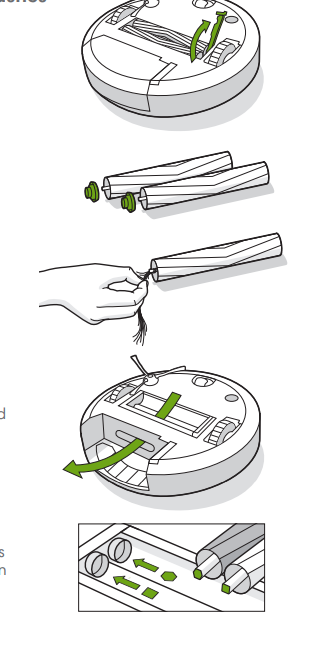
- Pinch the brush frame release tab, lift the tab, and remove any obstructions.
- Remove the brushes from the robot. Remove the brush caps from the ends of the brushes.
- Remove any hair or debris that has collected beneath the caps. Reinstall the brush caps.
Cleaning the Multi-Surface Brushes
- Remove any hair or debris from the square and hexagonal pegs on the opposite side of the brushes.
- Remove the bin from the robot and clear any debris from the vacuum path.
- Reinstall the brushes in the robot.
- Match the shape of the brush pegs with the shape of the brush icons in the cleaning head module.