WWW.SHARKCLEAN.COM
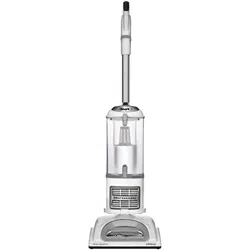
NV355 Series
OWNER’S GUIDE

2 TOL L FREE: 1-800-798-7398
WARNING:
TO REDUCE THE RISK OF FIRE, ELECTRIC
SHOCK OR INJURY:
GENERAL ELECTRICAL SAFETY:
1. Unplug from electrical outlet when not in use
and before servicing.
2. DO NOT use vacuum with a damaged cord
or plug. If appliance is not working as it
should, has been dropped, damaged, left
outdoors, or dropped into water, return it to
SharkNinja Operating LLC for examination,
repair, or adjustment.
3. DO NOT pull or carry vacuum by the cord.
4. DO NOT unplug by pulling on cord; to unplug,
grasp the plug, not the cord.
5. DO NOT handle plug or appliance with
wet hands.
6. DO NOT run the vacuum over the power cord.
7. DO NOT use the cord as a handle.
8. DO NOT close a door on the cord.
9. DO NOT pull cord around sharp corners. The
use of an extension cord is not recommended.
10. DO NOT leave appliance when plugged in.
11. Keep cord away from heated surfaces.
12. Turn off all controls before plugging or
unplugging vacuum cleaner.
13. Always turn off this appliance before
connecting or disconnecting motorized nozzle.
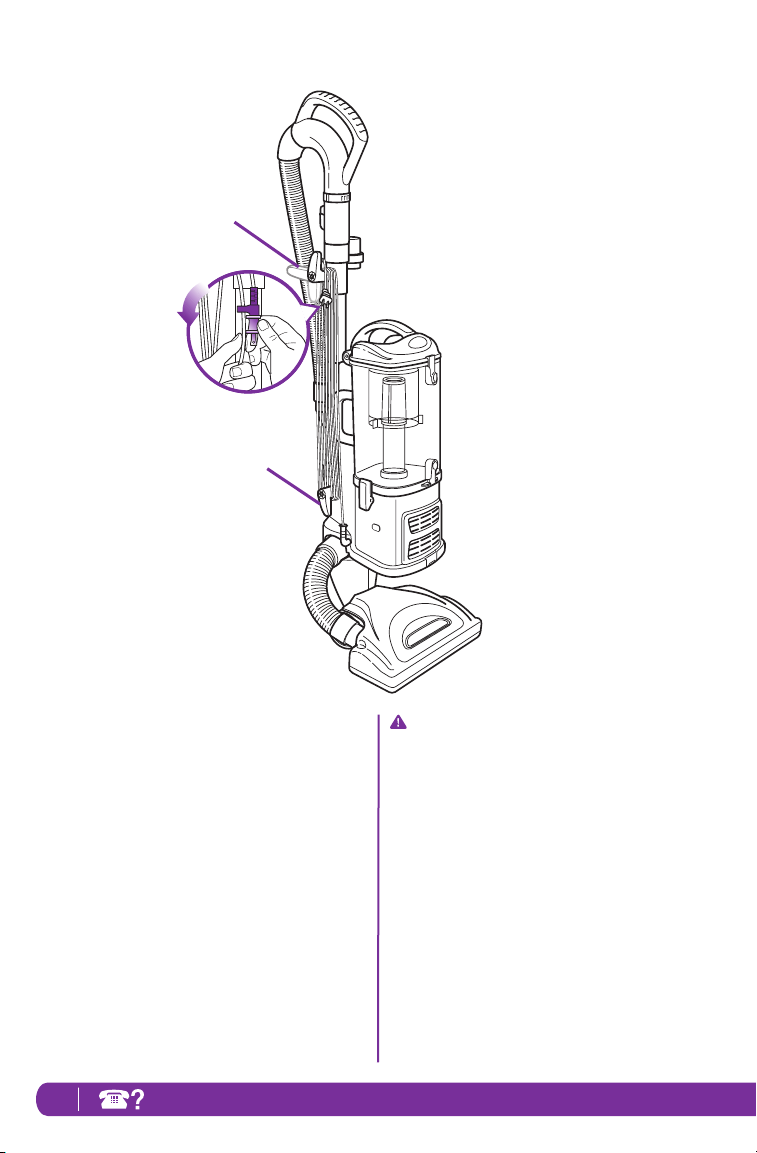
14. Store your appliance with the power cord
secured around the two cord holders-as shown
in the storage instructions.
WHEN USING AN ELECTRICAL APPLIANCE,
BASIC SAFETY PRECAUTIONS SHOULD
ALWAYS BE OBSERVED, INCLUDING THE
FOLLOWING:
READ ALL INSTRUCTIONS BEFORE USING
YOUR SHARK NAVIGATOR
®
LIFT-AWAY
®
PRO.
POLARIZED PLUG:
To reduce the risk of electric shock, this
appliance has a polarized plug (one blade is
wider than the other). As a safety feature, this
plug will fit into a polarized outlet only one
way. If the plug does not fit fully into the outlet,
reverse the plug. If it still does not fit, contact
a qualified electrician. DO NOT force into
outlet or try to modify to fit.
WARNING: To reduce the risk of
electric shock or injury, do not use outdoors
or on wet surfaces.
IMPORTANT SAFETY INSTRUCTIONS
For Household Use Only

3www.sharkclean.com
HOSE ATTACHMENTS:
1. DO NOT use if air flow is restricted; if the air
paths, the hose, or the accessories become
blocked, turn the vacuum cleaner off. Remove
all obstructions before you turn on the unit
again.
2. Keep the end of the hose and accessory
openings away from face and body.
3. Keep cleaning tools and hose suction openings
away from hair, face, fingers, uncovered feet,
or loose clothing.
4. Only use manufacturer’s recommended
attachments.
GENERAL USE:
1. Use only as described in this manual.
2. DO NOT put any objects into openings. DO
NOT use with any opening blocked; keep free
of dust, lint, hair, and anything that may reduce
air flow.
3. Keep your work area well lit.
4. Keep the vacuum moving over the carpet
surface at all times to avoid damaging the
carpet fibers.
5. DO NOT place vacuum on unstable surfaces
such as chairs or tables.
6. DO NOT allow young children to operate the
vacuum or use as a toy. Close attention is
necessary when used by or near children.
7. DO NOT use vacuum cleaner if it has
been dropped, damaged, left outdoors, or
submerged in water. Return to SharkNinja
Operating LLC for examination, repair, or
adjustment.
8. DO NOT use without dust cup and/or filters
in place.
DUST CUP/FILTERS/ACCESSORIES:
Before turning on the vacuum:
1. Make sure that all filters are thoroughly dry
after routine cleaning.
2. Make sure that dust cup and all filters are in
place after routine maintenance.
3. Make sure accessories are free of blockages.
4. Only use filters and accessories provided by
SharkNinja Operating LLC. [Failure to do so will
void the warranty.]
GENERAL CLEANING:
1. DO NOT pick up large-sized objects.
2. DO NOT pick up hard or sharp objects such as
glass, nails, screws or coins that could damage
the vacuum cleaner.
3. DO NOT pick up smoking or burning objects
such as hot coals, cigarette butts, fireplace ash
or matches.
4. DO NOT use to pick up drywall dust.
5. DO NOT pick up flammable or combustible
materials such as lighter fluid, gasoline, or
kerosene or use vacuum in areas where they
may be present.
6. DO NOT pick up toxic solutions such as
chlorine bleach, ammonia, or drain cleaner.
7. DO NOT use in an enclosed space where
vapors are present from paint, paint thinner,
moth-proofing substances, flammable dust or
other explosive or toxic materials.
8. DO NOT vacuum up any liquids.
9. DO NOT immerse vacuum cleaner in water or
other liquids.
10. DO NOT use outdoors or on wet surfaces; use
only on dry surfaces.
11. Use extra care when cleaning on stairs.

4 TOL L FREE: 1-800-798-7398
THIS MANUAL COVERS MODEL NUMBERS:
NV355
NV356E
NV358
TECHNICAL SPECIFICATIONS
Voltage: 120V., 60Hz
Watts: 1200W
Amps: 10A

5www.sharkclean.com
Getting Started 6
Mode 1: Upright Vac 8
Mode 2: Portable Lift-Away
®
10
Above-Floor Cleaning 11
Storage 12
Maintenance 13
Emptying the Dust Cup 13
Cleaning the Pre-Motor Filters 13
Cleaning the Post-Motor HEPA Filter 14
Cleaning the Power Brush 14
Cleaning the Motorized Floor Brush 15
Checking for Blockages 15
Ordering Parts 17
Troubleshooting Guide 18
Warranty 19
Contents
Thank you for
purchasing
the Shark
Navigator
®
Lift-Away
®
Pro
6 TOL L FREE: 1-800-798-7398
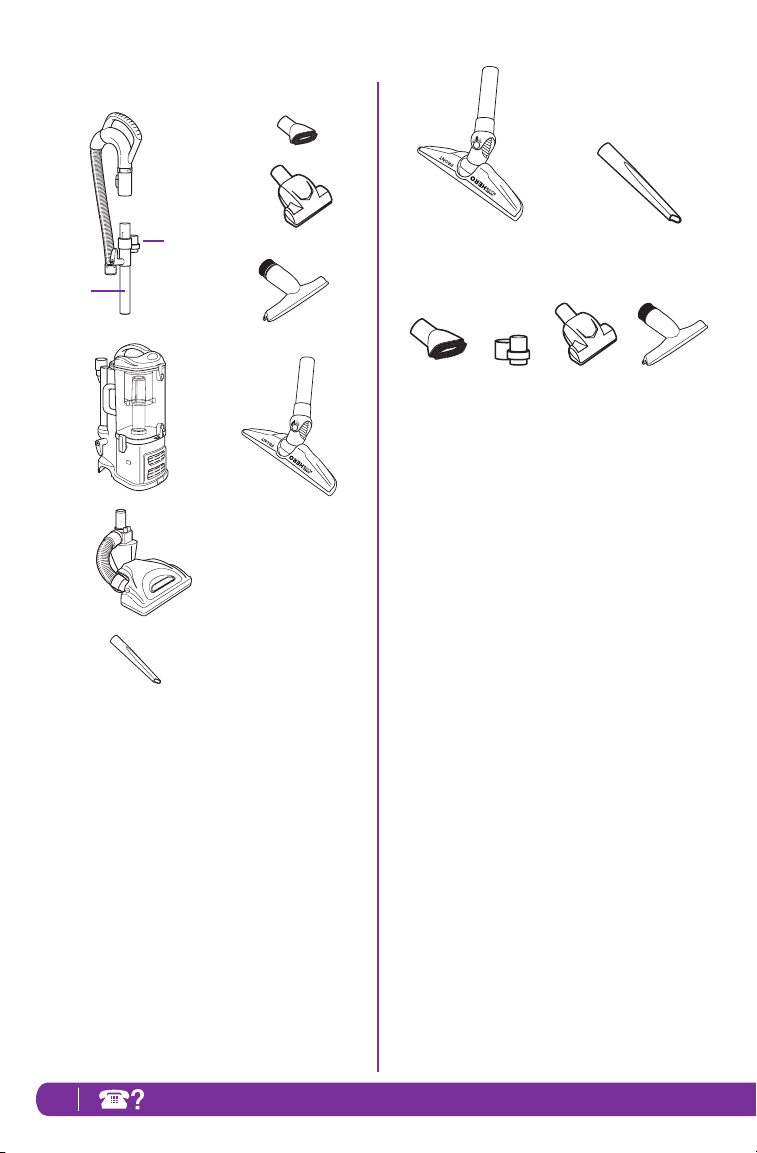
FIRST THING’S FIRST, YOU NEED TO KNOW
WHAT’S IN THE BOX YOU JUST OPENED:
a Handle with Stretch Hose
b Accessory Holder
c Extension Wand
d Portable Lift-Away
®
e Motorized Floor Brush*
f Crevice Tool
g Dusting Brush
h Pet Power Brush (NV356E only)
i Wide Upholstery Tool (NV355 only)
j Hard Floor Hero
™
*NOTE: Motorized floor brush may differ from what is
shown in the illustration above.
i
j
f
h
ACCESSORIES:
HARD FLOOR HERO
™
Provides outstanding hard floor cleaning for not just
surface litter, but also stuck-on dust and debris. It is
small enough to get into hard-to-reach areas and can
conveniently be stored on board. (Fig. 1)
CREVICE TOOL
Reach deep into narrow spaces and clean between
cushions, under radiators and baseboards and in
hard to reach crevices and corners. (Fig. 2)
DUSTING BRUSH
Dust shelves, lamp shades, window blinds, books,
furniture and other upholstered household items
.
(Fig. 3)
ACCESSORY HOLDER
Designed to hold the crevice tool and dusting brush.
For quick access to tools when vacuuming and
cleaning around the house. (Fig. 4)
PET POWER BRUSH
This unique tool was engineered for fast and easy
removal of pet hair and ground in dirt from carpeted
stairs and upholstery. (NV356E only) (Fig. 5)
WIDE UPHOLSTERY TOOL
Remove pet hair and dust from curtains and other
delicate fabrics and upholstery. (NV355 only) (Fig. 6)
Fig. 1
Fig. 4 Fig. 5 Fig. 6
Fig. 2
Fig. 3
a
e
c
d
b
g
Getting Started
7www.sharkclean.com
Your new Shark Navigator
®
Lift-Away
®
Pro vacuum cleaner can easily be configured into different
cleaning modes to meet all your cleaning needs: upright vacuum and portable Lift-Away
®
- both with
constant suction power.
MODES:
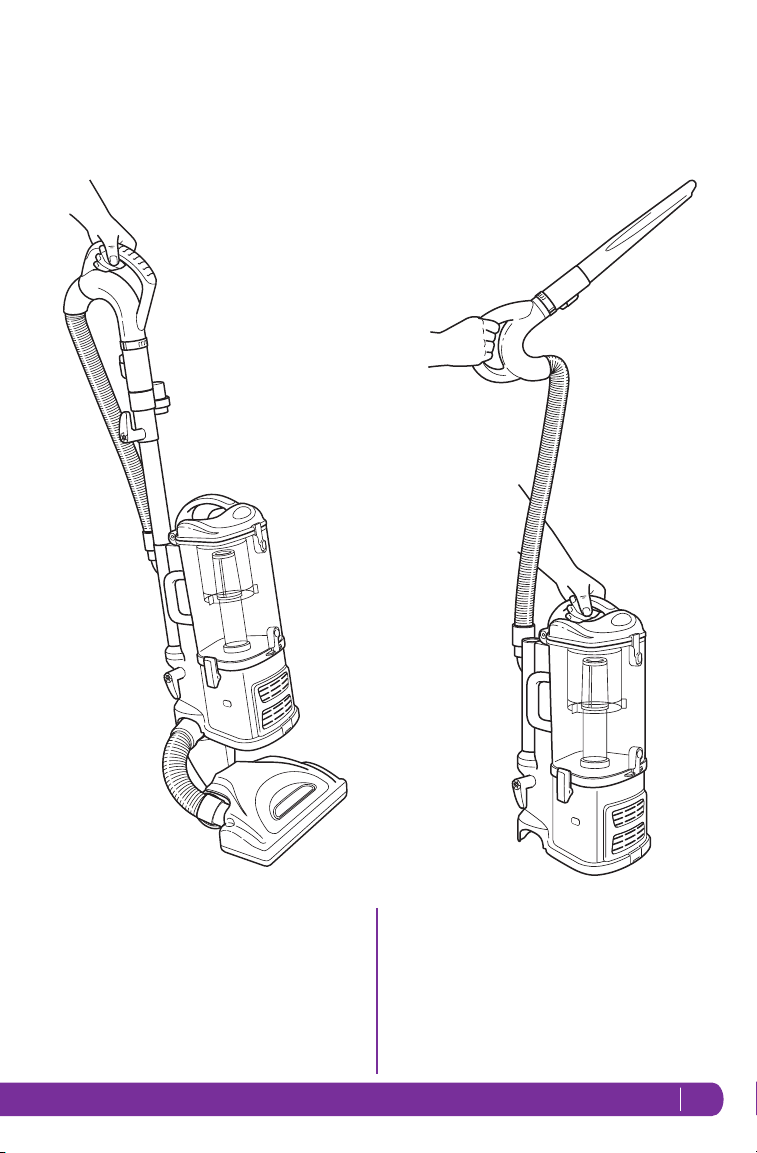
1 UPRIGHT VAC
Upright vacuuming - floors and carpets. (Fig. 7)
Fig. 7
Fig. 8
2 PORTABLE LIFT-AWAY
®
Take the Lift-Away
®
with you around the house to
clean hard to reach places. (Fig. 8)
8 TOL L FREE: 1-800-798-7398
b
c
Upper Cord
Storage Wrap
WARNING: The On/Off switch is on the top of the Lift-Away
®
canister. Always ensure the power is
OFF (“O” position) before plugging and unplugging.
To reduce the risk of electric shock, unplug the unit before assembling, adding or removing
attachments or converting modes.
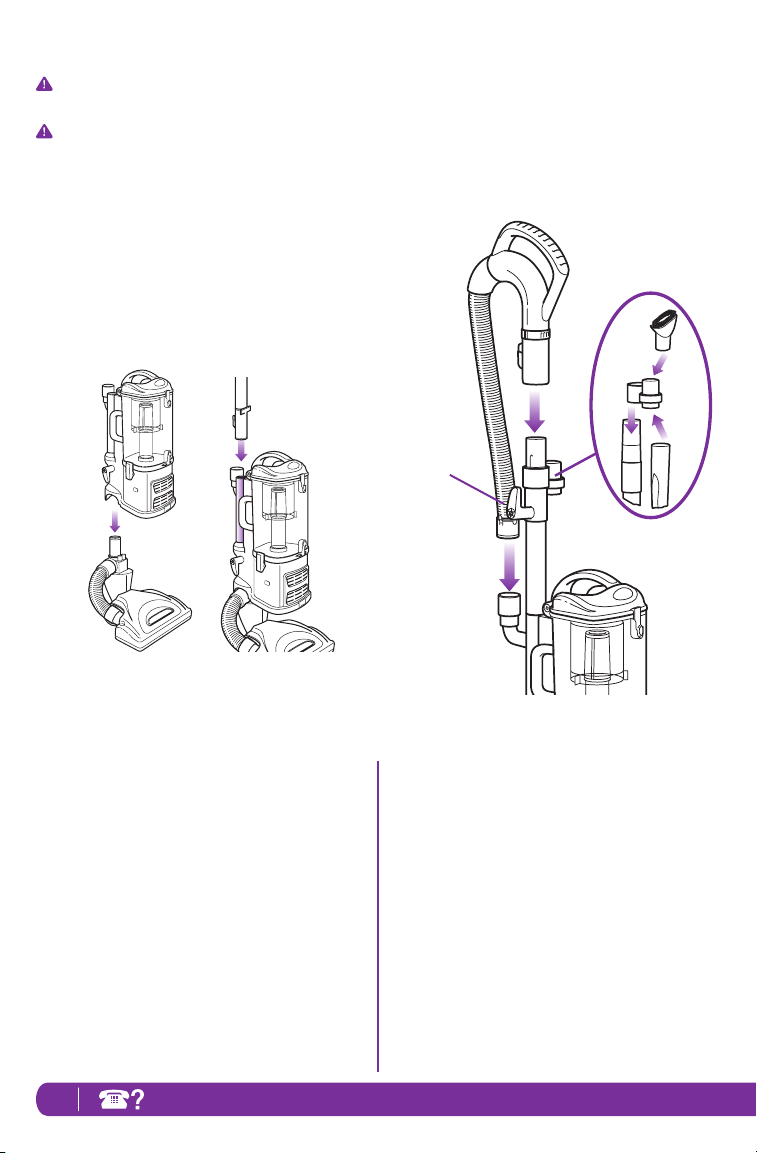
TO ASSEMBLE:
1 Place the floor nozzle on a level surface.
2 Align the tube of the floor nozzle with the tube on the
Lift-Away
®
canister and lower until you hear the two
pieces click into place. (Fig. 9)
When attaching the motorized floor brush, ensure
that the latching mechanism is fully locked in place to
ensure electrical connection has been made.
3 Attach the end of the extension wand to the tube on
the back of the Lift-Away
®
canister until it clicks into
place. (Fig. 10)
4
Slide the accessory holder (a) positioned opposite the
upper cord wrap, over the extension wand. Align the
tab with the groove and push down.
(Fig. 11)
5 Push the handle (b) onto the top of the extension
wand until you hear it click into place. (Fig. 11)
6 Insert the end of the stretch hose (c) into the
connector on the back of the Lift-Away
®
canister.
(Fig. 11)
7 Store the dusting brush (d) and the crevice tool (e)
on the mounts of the accessory holder. (Fig. 11)
Fig. 9 Fig. 10
Fi g. 11
a
d
e
Mode 1: Upright Vac

9www.sharkclean.com
TO USE:
1 Rotate the cord release to quickly release the power
cord.
2 Secure the power cord in the cord hook.
= Brush Roll ON
= Bare Floor
= OFF
3 Press the On/Off switch (a) to the “I” position to
vacuum bare floors (straight suction only) or to the
“II” position to engage the motorized floor brush (for
vacuuming carpets and rugs). (Fig. 12)
IMPORTANT: The motorized brush indicator light
(b) will illuminate green when motorized floor brush
is on, or red if there is a blockage or jam. (Fig. 12)
This feature is designed to protect your Lifetime
Belt that powers your motorized floor brush. See
“Checking for Blockages” section on page 15.
4 Gently press the floor nozzle down with your foot
while you grasp the handle and tilt it back towards
you. (Fig. 13)
NOTE: The rotating brush on the motorized floor
brush will not spin unless the nozzle is flat against
the floor and the handle is tilted back.
5 Due to the huge suction power of this vacuum,
it may become necessary at times to adjust
the suction release (c) on the handle. (Fig. 12)
If the vacuum seems difficult to push or pull or
if it is lifting up area rugs, adjust the suction
release by rotating the collar 90° counter-
clockwise to open the valve. Rotate the collar
clockwise to close the valve when you need
high suction and for vacuuming floors.
6 Empty dust cup after vacuuming and periodically
during use when it appears full. (See “Maintenance”
section for instructions.)
7 When you are finished vacuuming, turn the vacuum
off.
Fig. 13Fig. 12
b
Suction
Release Collar
a
Release suction
for easier push &
pull on high pile
carpets and
area rugs.
c
10 TOL L FREE: 1-800-798-7398
a
You can carry your vacuum cleaner
in both modes by the carry handle
located on top of the dust cup.
Fig. 16
Fig. 15
Fig. 14
Mode 2: Portable Lift-Away
®
b
a
PORTABLE LIFT-AWAY
®
1 Separate the portable Lift-Away
®
canister from the
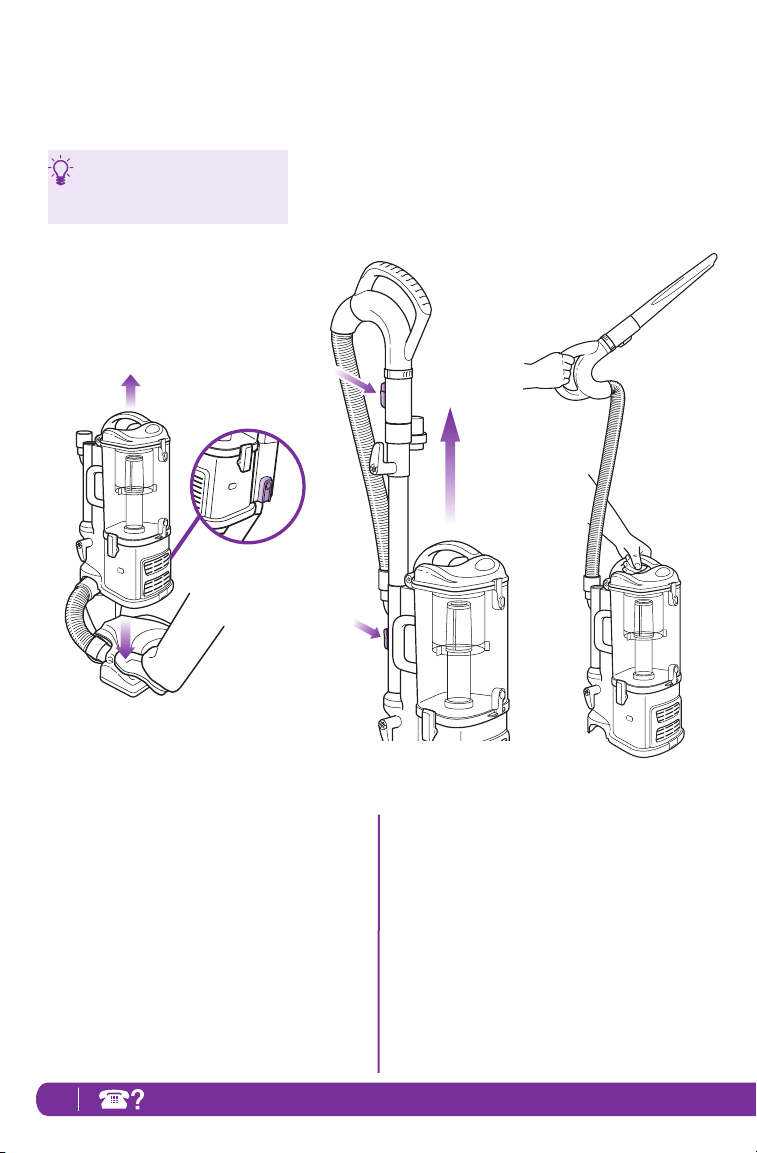
floor nozzle by pressing the red release button (a) on
the side of the canister. Gently hold the nozzle to the
floor with your foot and pull the canister up.
(Fig. 14)
2 Press the handle release button (a) and pull the
handle up or press the extension wand release
button (b) and pull the extension wand up. (Fig. 15)
3 Attach desired accessory onto the end of either the
extension wand or the handle.
4 Press the On/Off switch to the “I” position to turn
the vacuum on for above-floor cleaning and hold
the handle in one hand while you carry the portable
Lift-Away
®
around the house with the other hand.
(Fig. 16)
11www.sharkclean.com
Release suction when
dusting delicate
objects, furniture or
draperies.
Fi g. 17
Suction
Release Collar
Above-Floor Cleaning
CLEAN ABOVE THE FLOOR IN UPRIGHT VAC
OR PORTABLE LIFT-AWAY
®
MODE
1 Press the handle release button and pull the handle
up or press the extension wand release button and
pull the extension wand up.
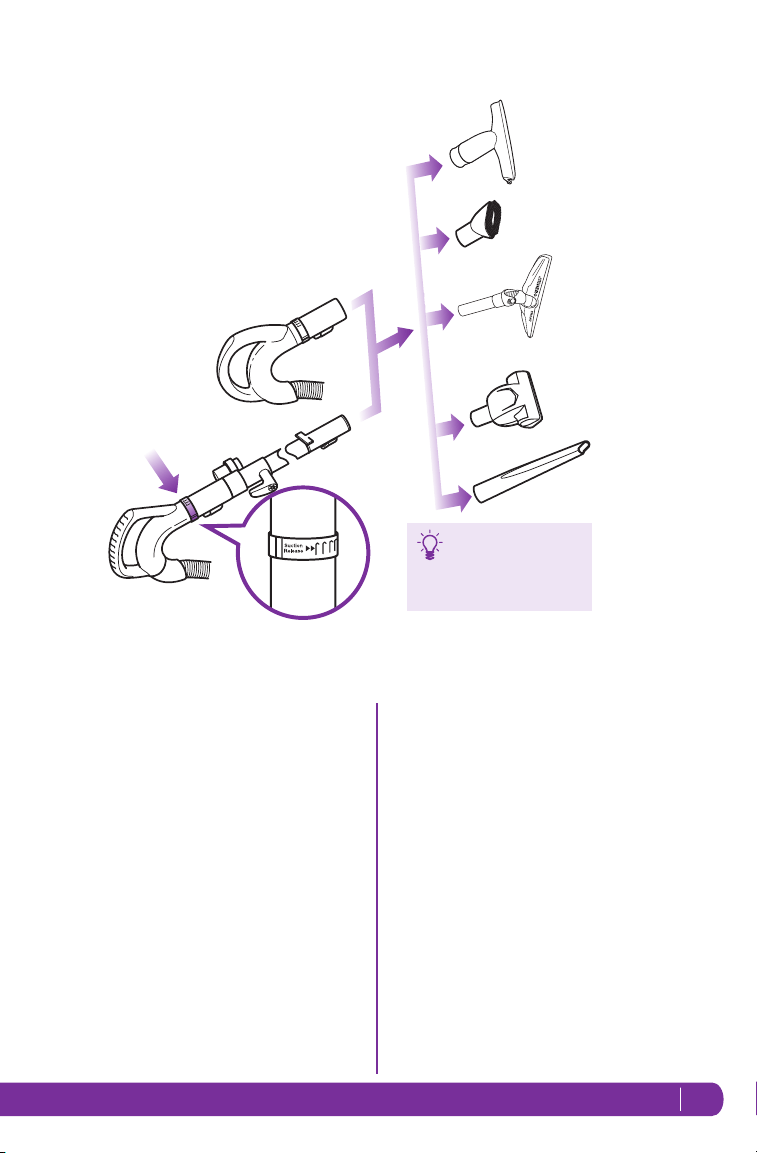
2 Attach desired accessory onto the end of either the
extension wand or the handle. (Fig. 17)
3 Your vacuum has tremendous suction power.
Adjust the amount of suction with the suction
release on the handle. Open the valve (a) by
rotating the collar 90˚ counter-clockwise for
low suction when doing light jobs such as
drapes or fine surfaces. Close the valve (a)
by rotating the collar clockwise 90˚ for high
suction and when using the hand held power
brush. (Fig. 17-a)
4 Press the On/Off switch to the “I” position to turn
the vacuum on for above-floor cleaning.
IMPORTANT: Ensure vacuum is in upright position.
Do not use position “II” when cleaning above the
floor in the upright vac mode as this will engage
the motorized floor brush. The rotating brush may
damage your floor if run for a prolonged period of
time in one area.
a
12 TOL L FREE: 1-800-798-7398
Fig. 18
Quick
Cord Release
Lower Cord
Storage Clip
Storage
STORE YOUR VACUUM SAFELY
1 Convert your vacuum back to upright vac mode.
2 Rotate the upper quick cord release to its upright
position and coil the power cord loosely around the
two clips. Clip the plug onto the cord to secure.
(Fig. 18)
3 Store the dusting brush and the crevice tool on the
mounts on the accessory holder.
4 Store your vacuum cleaner safely in a cool dry area
where it will not be a hazard, will not get damaged
and will not cause damage to anyone or anything.
NOTE: Empty dust cup after cleaning and prior
to storing. (See “Maintenance” section for
instructions.)
WARNING: Never insert sharp objects into any
opening to clear an obstruction.
To reduce the risk of electric shock, unplug the unit
before performing any cleaning, maintenance, or
troubleshooting checks.
Reassemble all parts securely before operating
vacuum.
DO NOT operate the vacuum without the pre-motor
filters and dust cup in place.
DO NOT operate the vacuum with WET filters.
IMPORTANT: Make sure all filters are completely
dry before inserting back into vacuum.
IMPORTANT: Damages caused while clearing or
attempting to clear blockages are not covered under
your product’s limited warranty.
13www.sharkclean.com
Fig. 19
Fig. 20
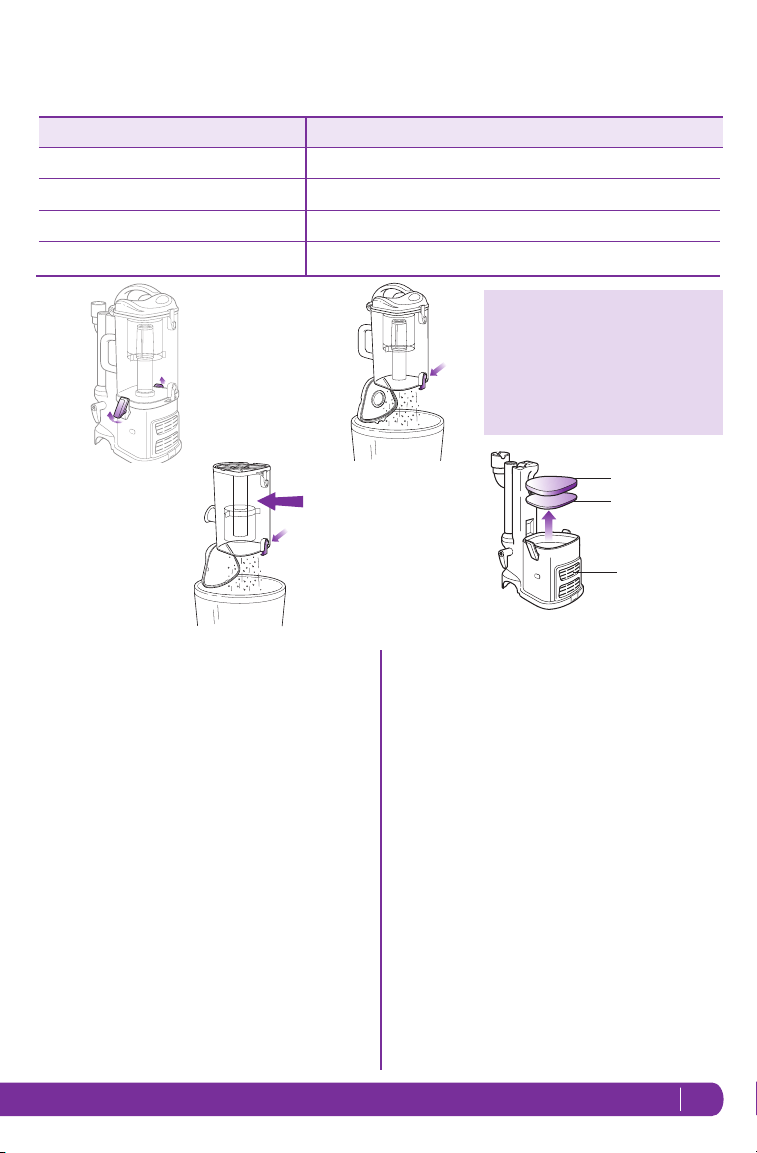
COMPONENT
MAINTENANCE SCHEDULE
Rinse and air dry every 3 months under normal use.
Empty each time you vacuum.
Pre-Motor Foam Filter
Dust Cup
Rinse and air dry every 3 months under normal use.
Pre-Motor Felt Filter
Clean once every 2 years or as needed.
Post-Motor HEPA Filter
1
2
3
4
CLEANING THE PRE-MOTOR FILTERS
1 Remove the dust cup.
2 Pull the 2 filters out from the top of the motor base.
(Fig. 22)
3 Rinse the filters thoroughly in lukewarm water until
the water runs clear.
DO NOT put the filter in the washing machine or
dishwasher.
NOTE: The material in the filter will discolor over
time. This is NORMAL and will not affect the
performance of the filter.
4 Squeeze out excess water and let air-dry for at least
24 hours before replacing. Do not use a hair dryer or
other heating methods to dry.
5 Place the felt filter in first, then the foam filter.
6 Replace the dust cup.
EMPTYING THE DUST CUP
The dust cup needs to be emptied each time you vacuum
and periodically during cleaning, when the dust cup
appears full.
1 Undo the latches on the sides of the dust cup by
lifting them up and outwards to remove the dust cup
from the motor base. (Fig. 19)
2 Hold the dust cup over a trash receptacle and press
the bottom door release button. (Fig. 20) Tap gently
to empty contents. Press the door shut again until it
clicks.
3 If needed, turn the dust cup upside down over the
trash receptacle and press the top door release
button. (Fig. 21) Tap gently to remove contents.
Use a dry cloth or paper towel to remove debris
stuck to the screen filter inside the dust cup. Press
the door shut again until it clicks.
4 Replace the dust cup on top of the motor base. Hook
the two latches onto the tabs on the sides of the
dust cup and push down to lock.
Screen
Filter
Fig. 21
Fig. 22
Pre-Motor
Foam Filter
Felt Filter
Post Motor
HEPA Filter
IMPORTANT: Loss of Suction may
occur if foam filters are not cleaned
every 3 months. Rinse and allow to
air dry completely. Also, tap loose dirt
off filter between washes as needed.
Foam filters may appear dirty after
use - this is normal.
Maintenance
14 TOL L FREE: 1-800-798-7398
Fig. 24
Fig. 23
Fig. 25
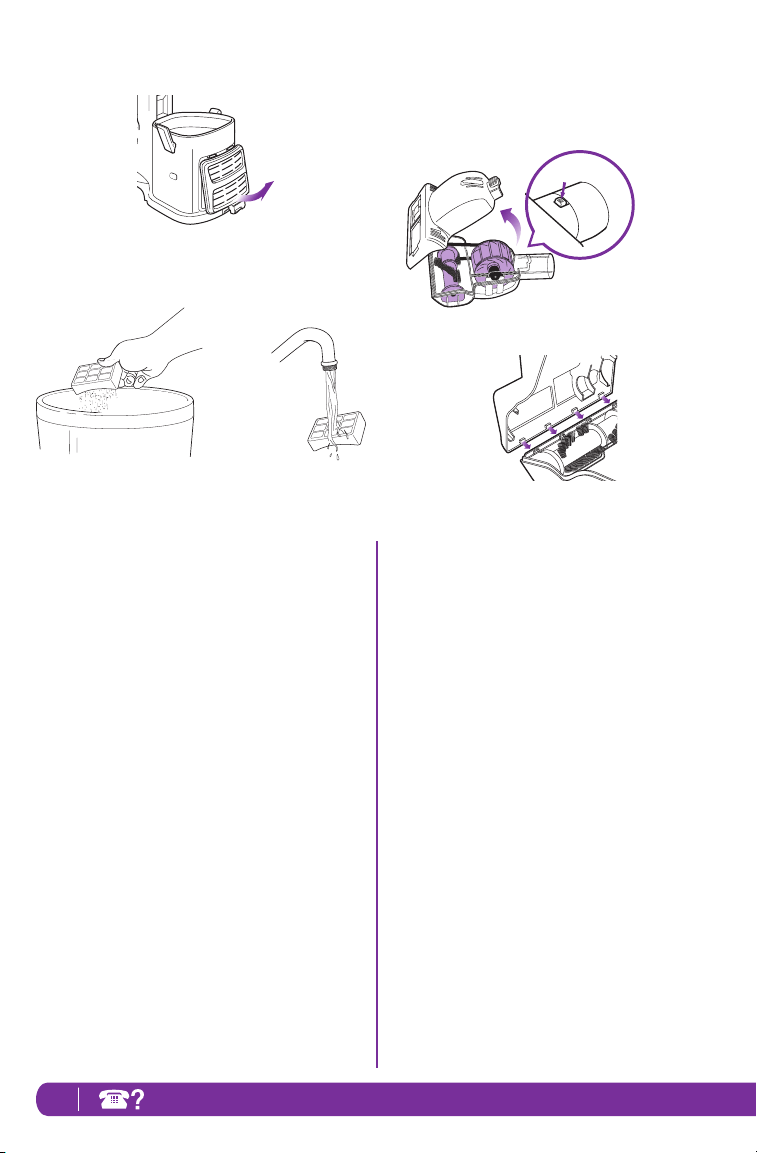
CLEANING THE POST-MOTOR HEPA FILTER
1 Remove the filter cover from the front of the vacuum
by pulling up on the tab and pulling the cover away
from the vacuum. (Fig. 23)
2 Take out the HEPA filter by pulling it straight out.
3 Turn the filter over so that the dirty side is on the
bottom and vigorously tap it clean against a garbage
can to remove any dust. (Fig. 24)
4 Wash the filter under the tap using lukewarm water
with the dirty side face down until the water runs
clear. (Fig. 25)
DO NOT put the filter in the washing machine or
dishwasher.
NOTE: The material in the filter will discolor over
time. This is NORMAL and will not affect the
performance of the filter.
5 Allow the filter to air dry for 24 hours. Do not use a
hair dryer or other heating methods to dry.
6 Once the HEPA filter is dry, replace it back into the
vacuum.
7 Replace the cover by inserting the two tabs into the
holes at the top and then swinging the cover down
until it clicks into place.
CLEANING THE POWER BRUSH
1 Slide the locking latch (a) forward and tilt the bottom
cover upward to remove. (Fig. 26)
2 Carefully remove any blockage or debris and cut
away any build-up of hair or string wrapped around
the rotating bristle brush with scissors.
3 To reassemble, insert the tabs on the front edge of
the bottom cover into the matching holes in the top
half and tilt it back down until it clicks into place.
(Fig. 27)
Fig. 27
Fig. 26
a
Maintenance - cont.
15www.sharkclean.com
Make sure you are working in a well
lit area and use a flashlight to help
search for blockages.
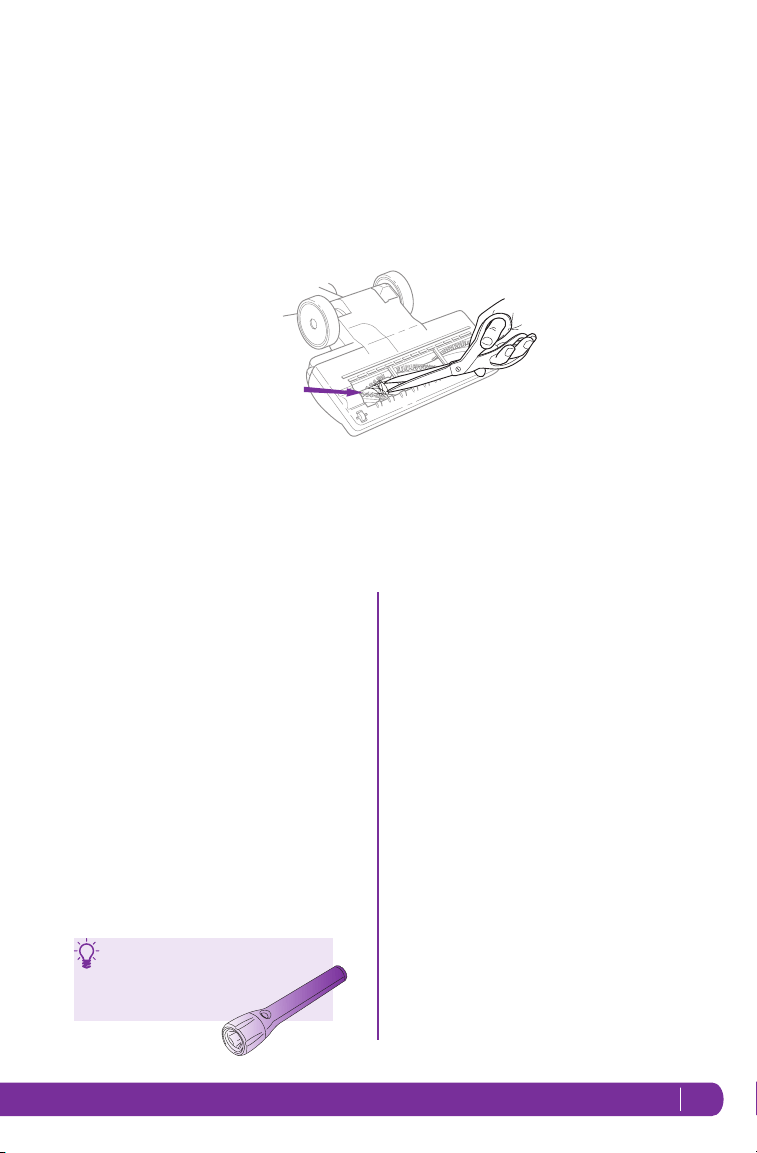
CLEANING THE MOTORIZED FLOOR BRUSH
When your motorized floor brush needs cleaning or locks
onto an object, it automatically shuts down to prevent
damage to your lifetime belt. The indicator light will
illuminate red warning you to turn off the vacuum and
clear blockage immediately. The light will reset itself
once blockage has been cleared and power has been
cycled on/off or vacuum has been locked in the upright
position.
1 Detach the motorized floor brush from the portable
Lift-Away
®
canister.
2 Inspect the opening underneath and the rotating
brush. If a build-up of debris is present, remove it.
Carefully cut anything wound around the rotating
brush with scissors. Avoid damaging or cutting the
bristles. (Fig. 28)
CHECKING FOR BLOCKAGES
Blockages may cause your vacuum to overheat and shut
down. To prevent this from happening, check potential
blockage areas after heavy use or if you detect a loss of
suction or poor cleaning performance.
1 Dust Cup
Dust cup may be full. Empty dust cup.
2 Pre-Motor & Post-Motor Filters
• Pre-motor filters require washing every 3 months
for optimum performance.
The post-motor HEPA filter needs to be washed
every 2 years.
• Ensure that all the filters are clean.
3 Accessories
• Check intake openings:
- Extension Wand
- Dusting Brush
- Crevice Tool
- Pet Power Brush
Rotating
Brush
Fig. 28
16 TOL L FREE: 1-800-798-7398
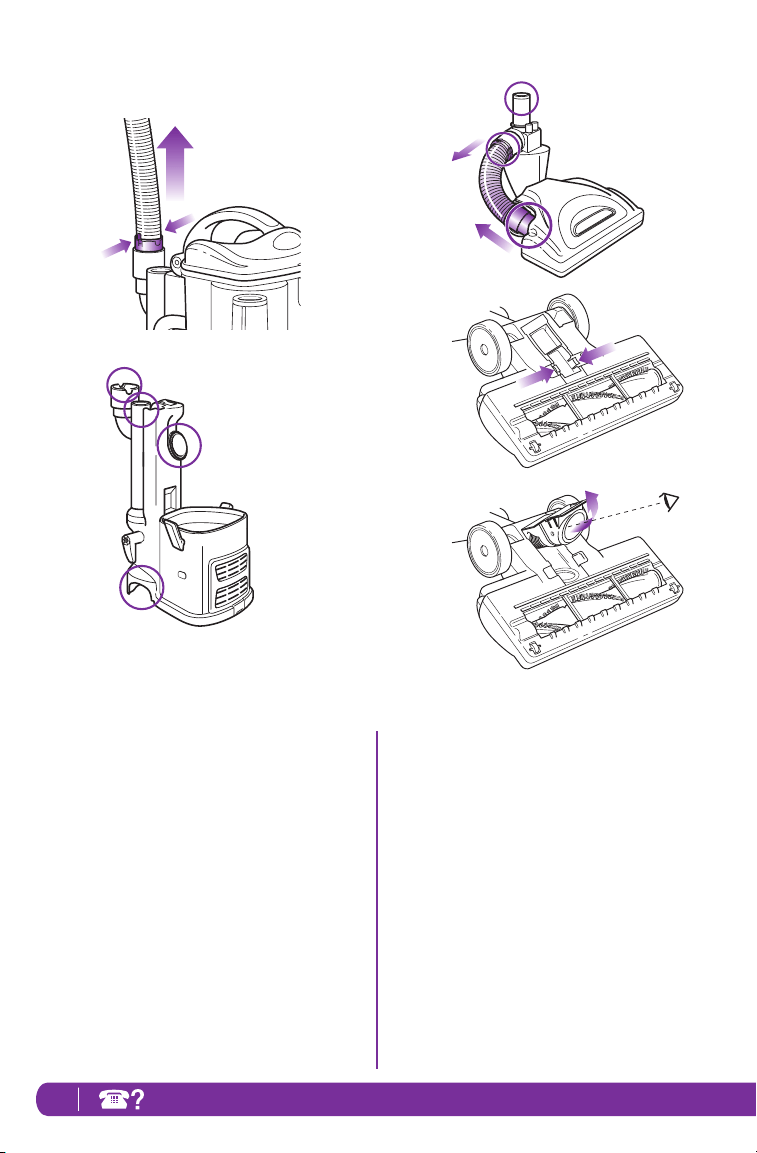
4 Hose and Connections to Vacuum
• Detach the stretch hose from the back of the
portable Lift-Away
®
canister by squeezing
the tabs together and pulling up. (Fig. 29)
Straighten out the hose and look inside for
blockages.
• Remove the dust cup and extension wand and
separate the portable Lift-Away
®
canister from
the motorized floor brush. Look in all 4 openings
for any blockages. (Fig. 30)
Maintenance - cont’d
Fig. 33
Fig. 32
Fig. 31
Fig. 30
Fig. 29
5 Motorized Floor Brush
(Side suction models)
• Detach the hose on the motorized floor brush
at the top by squeezing the tabs together and
pulling out, and at the bottom by pulling out the
connector. Inspect inside the 3 holes. (Fig. 31)
(Center suction models)
• Turn motorized floor brush over and detach the
hose by squeezing the tabs together and pulling
it out. Straighten out the hose and inspect the
inside for any blockages. (Fig. 32, Fig. 33)
17www.sharkclean.com
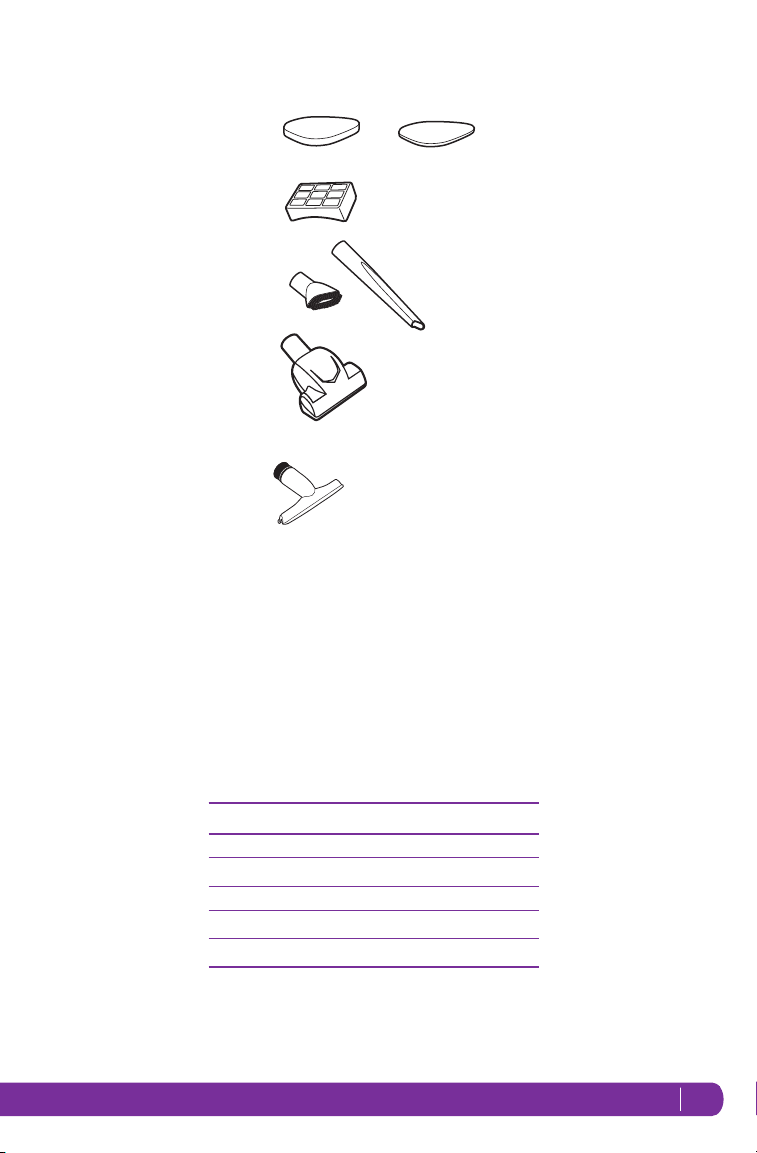
PART PART NO.
1 Pre-Motor Filter Set XFF350
2 HEPA Filter XHF350
3 Dusting Brush & Crevice Tool 112FFJ
4 Turbo Brush 137FFJ
5 Wide Upholstery Tool 261FFJ46
4
3
1
2
To order additional parts or accessories go to
www.sharkclean.com or call 1-800-798-7398.
5
Ordering Parts

18 TOL L FREE: 1-800-798-7398
To purchase replacement parts, please visit our website: www.sharkclean.com
or contact customer service: 1-800-798-7398.
PROBLEM POSSIBLE REASONS & SOLUTIONS
Vacuum is not
picking up dirt.
Check filters to see if they need cleaning. Follow instructions for rinsing and
drying the filters before re-inserting back into the vacuum. (See “Maintenance”
sections for instructions.)
Dust cup may be full; empty dust cup.
Check hose and hose connections for blockages; clear blockages if required.
If dust cup is empty, and attachment inlets are clear, check for other blockages.
(See “Checking for Blockages” for instructions.)
Vacuum lifts scatter rugs
(lightweight, movable rugs).
Suction is powerful. Take care when vacuuming scatter-type rugs or rugs with
delicately sewn edges. Open the suction release on the handle to decrease
suction power.
Move the On/Off switch to “I - Suction Only” position to disengage the brush roll
Airflow is restricted. No suction
or light suction.
Check filters to see if they need cleaning. Follow instructions for rinsing and
drying the filters before re-inserting back into the vacuum.
Dust cup may be full; empty dust cup.
Check hose, hose connections, nozzles and accessories for blockages; clear
blockages if required.
Close the suction release on the handle to increase suction power.
If dust cup is empty, and attachment inlets are clear, check for other blockages.
Brush roll does not spin
Immediately turn off and unplug vacuum, disconnect the nozzle and remove
blockage before reconnecting and turning vacuum back on.
Pull the handle toward you and release the floor nozzle to disengage the
auto-off feature.
Move the On/Off switch to the “II - Brush Roll On” position.
Vacuum turns off
on its own.
This vacuum cleaner is equipped with a motor protective thermostat. If for
some reason your vacuum overheats, the thermostat will automatically turn
the unit off. Should this occur, perform the following steps to restart the motor
thermostat:
1. Move the On/Off switch to the “O” (Off) position.
2. Unplug the vacuum.
3. Empty the dust cup and clean filters.
4. Check for blockages in hose, accessories and inlet openings.
5. Allow the unit to cool for a minimum of 45 minutes.
6. Plug in the vacuum.
7. Turn the On/Off switch to the “I” (On) position to restart the vacuum.
Note: If vacuum still does not start, contact Customer Service at:
1-800-798-7398.
Troubleshooting Guide

19www.sharkclean.com
FIVE-YEAR (5) LIMITED WARRANTY
SharkNinja Operating LLC warrants this product to be free from material defects and workmanship for a period of
five (5) years from the date of purchase when utilized for normal household use, subject to the following conditions,
exclusions and exceptions.
The liability of SharkNinja Operating LLC is limited solely to the cost of the repair or replacement of the unit at our
option. This Limited Warranty does not cover normal wear of parts and does not apply to any unit that has been tampered
with or used for commercial purposes. This Limited Warranty does not cover damage caused by misuse, abuse, negligent
handling or damage due to faulty packaging or mishandling in transit. This Limited Warranty does not cover damage or
defects caused by or resulting from damages from shipping or repairs, service or alteration to the product or any of its
parts, which have been performed by a repair person not authorized by SharkNinja Operating LLC.
If your appliance fails to operate properly while in use under normal household conditions within the warranty period,
you may return the complete appliance and accessories with proof of purchase and date, freight prepaid. For customer
service support, call 1-800-798-7398 or visit our website at www.sharkclean.com.
If the appliance is found by SharkNinja Operating LLC to be defective, in SharkNinja Operating LLC’s sole
discretion, we will repair or replace it free of charge. Proof of purchase date and a check made payable to SharkNinja
Operating LLC in the amount of $19.95 to cover the cost of return shipping and handling must be included.*
Non-durable parts including, without limitation, filters, brushes and electrical parts which normally require replacement
are specifically excluded from warranty.
This Limited Warranty is extended to the original purchaser of the unit and excludes all other legal, implied and/or
conventional warranties. The responsibility of SharkNinja Operating LLC if any, is limited to the specific obligations
expressly assumed by it under the terms of this Limited Warranty. In no event is SharkNinja Operating LLC liable for
incidental or consequential damages to anyone of any nature whatsoever. Some states do not permit the exclusion or
limitation of incidental or consequential damages, so the above may not apply to you.
This Limited Warranty gives you specific legal rights, and you may also have other rights which vary from state to state or
province to province.
*IMPORTANT: Carefully pack item to avoid damage in shipping. Be sure to include proof of purchase date
and to attach a tag to item before packing including your name, complete address and phone number with
a note giving purchase information, model number and what you believe is the problem with the item. We
recommend you insure the package (as damage in shipping is not covered by your warranty). Mark the
outside of your package “ATTENTION CUSTOMER SERVICE”.
PRODUCT REGISTRATION
Please visit www.registeryourshark.com or call 1-800-798-7398 to register your new Shark
®
product within ten
(10) days of purchase. You will be asked to provide the store name, date of purchase and model number along with your
name and address.
The registration will enable us to contact you in the unlikely event of a product safety notification. By registering you
acknowledge to have read and understood the instructions for use, and warnings set forth in the accompanying
instructions.

SharkNinja Operating LLC
U.S.: Newton, MA 02459
Canada: Ville St. Laurent, Québec H4S 1A7
1-800-798-7398
www.sharkclean.com
Copyright © SharkNinja Operating LLC 2016
For SharkNinja U.S. Patent information visit http://www.sharkninja.com/USPatents.
Lift-Away, Shark and Shark Navigator are registered trademarks of SharkNinja Operating LLC.
Printed in China
Illustrations may differ from actual product. We are constantly striving to improve our products,
therefore the specifications contained herein are subject to change without notice.
NV355_NV356E_NV358_31_IB_E_161014_7