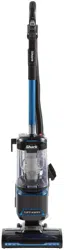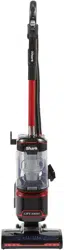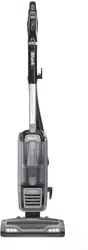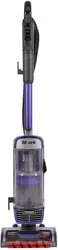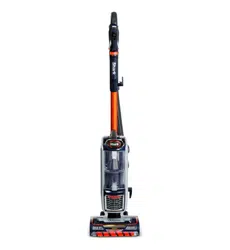
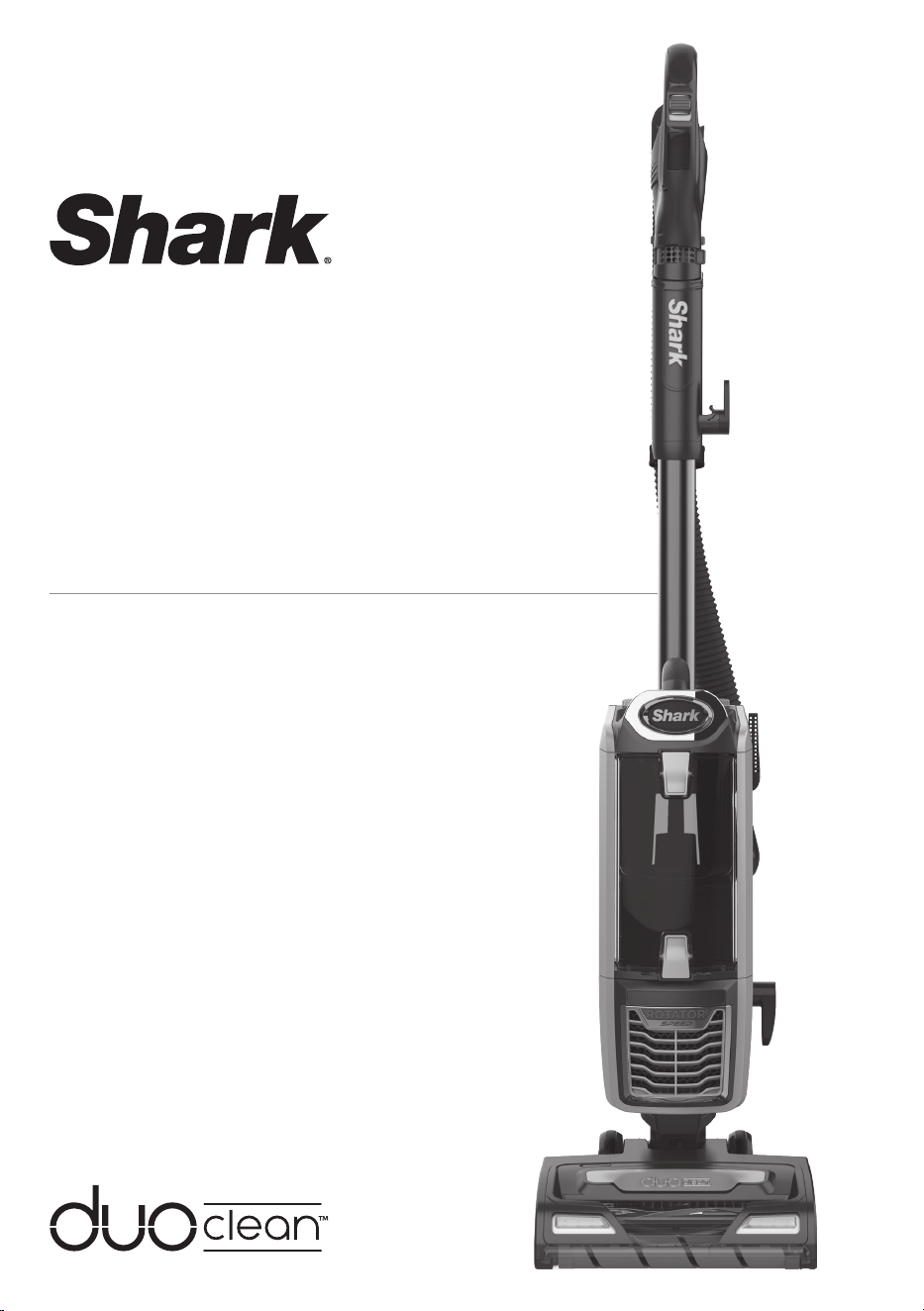
DuoClean™ Powered
Lift-Away™ with
Self-Cleaning Brushroll
Technology
NZ801ANZ
OWNER’S GUIDE
1 AUS 02 8801 7666 NZ 0800 112 660
TECHNICAL SPECIFICATIONS
Voltage: 220–240V~, 50–60Hz
Watts: 750W
TIP: You can locate
the date code on one
of the prongs of the
power cordplug.
RECORD THIS INFORMATION
Model Number: ������������������������������
Serial Number �������������������������������
Date Code: ����������������������������������
Date of Purchase (Keep receipt): ����������������
Store of Purchase: ����������������������������
THANK YOU
for purchasing the Shark® DuoClean™ Powered Lift-Away™ with Self-Cleaning Brushroll
PLEASE READ CAREFULLY AND KEEP FOR FUTURE
REFERENCE.
This Owner's Guide is designed to help you get a
complete understanding of your new Shark® DuoClean™
Powered Lift-Away™ with Anti-Hair-Wrap Technology.
If you have any questions, please call the customer
service line at AUS 02 8801 7666 or NZ 0800 112 660.
REGISTER YOUR PURCHASE
AUS sharkclean.com.au
NZ sharkclean.co.nz
AUS 02 8801 7666
NZ 0800 112 660

2AUS sharkclean.com.au NZ sharkclean.co.nz
CONTENTS
Important Safety Instructions . . . . . . . . . . . . . . . . . . . . . . . . . . . . . . . . . . . . . . . . 3
Getting to Know Your Shark® DuoClean™ Powered Lift-Away™
with Self-Cleaning Brushroll . . . . . . . . . . . . . . . . . . . . . . . . . . . . . . . . . . . . . . . . . 5
Assembling Your Vacuum . . . . . . . . . . . . . . . . . . . . . . . . . . . . . . . . . . . . . . . . . . . 7
Using Your Vacuum in Upright Mode . . . . . . . . . . . . . . . . . . . . . . . . . . . . . . . . . 9
What Does the Brushroll Indicator Light Mean? . . . . . . . . . . . . . . . . . . . . . . . . . . .9
Using Your Vacuum in Above-Floor Mode . . . . . . . . . . . . . . . . . . . . . . . . . . . . 11
The Benefits of Suction Control . . . . . . . . . . . . . . . . . . . . . . . . . . . . . . . . . . . . . . . . .11
Using Your Vacuum in Powered Lift-Away Mode . . . . . . . . . . . . . . . . . . . . . . . 12
Powered Lift-Away Cleaning . . . . . . . . . . . . . . . . . . . . . . . . . . . . . . . . . . . . . . . . . . . 12
Lift-Away Cleaning . . . . . . . . . . . . . . . . . . . . . . . . . . . . . . . . . . . . . . . . . . . . . . . . . . . . 12
Compatible Accessories . . . . . . . . . . . . . . . . . . . . . . . . . . . . . . . . . . . . . . . . . . . . 13
Maintenance . . . . . . . . . . . . . . . . . . . . . . . . . . . . . . . . . . . . . . . . . . . . . . . . . . . . . . 15
Emptying the Dust Cup . . . . . . . . . . . . . . . . . . . . . . . . . . . . . . . . . . . . . . . . . . . . . . . . 15
Cleaning the Filters . . . . . . . . . . . . . . . . . . . . . . . . . . . . . . . . . . . . . . . . . . . . . . . . . . . . 16
Cleaning the Brushroll . . . . . . . . . . . . . . . . . . . . . . . . . . . . . . . . . . . . . . . . . . . . . . . . . 17
Cleaning the Soft Roller . . . . . . . . . . . . . . . . . . . . . . . . . . . . . . . . . . . . . . . . . . . . . . . . 18
Checking the Nozzle for Blockages . . . . . . . . . . . . . . . . . . . . . . . . . . . . . . . . . . . . . 18
Troubleshooting Guide . . . . . . . . . . . . . . . . . . . . . . . . . . . . . . . . . . . . . . . . . . . . . 19
Warranty . . . . . . . . . . . . . . . . . . . . . . . . . . . . . . . . . . . . . . . . . . . . . . . . . . . . . . . . .20
THANK YOU
for purchasing the Shark® DuoClean™ Powered Lift-Away™ with Self-Cleaning Brushroll

3 AUS 02 8801 7666 NZ 0800 112 660
IMPORTANT SAFETY INSTRUCTIONS
FOR HOUSEHOLD USE ONLY
CAUTION: THE MOTORISED FLOOR
NOZZLE, WAND, HOSE AND
HANDLE CONTAIN ELECTRICAL
CONNECTIONS:
• These are not serviceable parts.
• DO NOT use to suck up water.
• DO NOT immerse in water for
cleaning.
• The handle/wand and hose should
be checked regularly and must not
be used if damaged.
1 Inspect power cord and plug for any
damage before use. If the supply
cord is damaged, it must be replaced
by Mann&Noble, its service agent or
similarly qualified persons in order to
avoid a hazard. DO NOT use vacuum
cleaner with a damaged cord or plug.
Turn o all controls before plugging
in or unplugging the vacuum cleaner.
Store your vacuum cleaner with the
power cord secured around the two
cord hooks.
2 DO NOT use outdoors or on wet
surfaces. Use only on dry surfaces.
3 Unplug from electrical socket when
not in use and before servicing.
4 If vacuum cleaner is not working
as it should, or has been dropped,
damaged, left outdoors, or immersed
in water, contact Mann&Noble
customer service at AU 02 8801 7666,
NZ 0800 112 660 for examination,
repair, or adjustment.
5 DO NOT pull or carry vacuum
cleaner by the cord or use the cord
as a handle.
6 DO NOT unplug by pulling on cord.
Grasp the plug, NOT the cord.
7
Keep hair, loose clothing, and all parts
of the body away from openings and
moving parts, such as the brushroll or
Pet Power Brush.
8 DO NOT handle plug or vacuum
cleaner with wet hands.
9 DO NOT run the vacuum cleaner
over the power cord, close a door
on the cord, or pull the cord around
sharp corners.
10 The use of an extension cord is NOT
recommended.
11 DO NOT leave vacuum cleaner
unattended when plugged in.
12 Keep cord away from heated
surfaces.
GENERAL USE
13 Use only as described in this manual.
14 Keep your work area well lit.
15 Keep the vacuum cleaner moving
over the carpet surface at all times to
avoid damaging the carpet fibres.
16 DO NOT place vacuum cleaner on
unstable surfaces such as chairs or
tables.
WARNING
This appliance can be used by children aged from 8 years and above and
persons with reduced physical, sensory or mental capabilities or lack of
experience and knowledge if they have been given supervision or instruction
concerning use of the appliance in a safe way and understand the hazards
involved. Children shall not play with the appliance. Cleaning and user
maintenance shall not be made by children without supervision.

4AUS sharkclean.com.au NZ sharkclean.co.nz
SAVE THESE INSTRUCTIONS
PLEASE READ CAREFULLY BEFORE USE
17 DO NOT put any objects into
openings. DO NOT use with any
opening blocked; keep free of dust,
lint, hair, and anything that may
reduce airflow.
18 DO NOT allow young children to
operate the appliance or use as a toy.
Close supervision is necessary when
any appliance is used near children.
19 DO NOT use unless brushroll, Soft
Roller, dust cup, and all filters are in
place.
DUST CUP/FILTERS/ACCESSORIES
Before turning on the vacuum:
20 Make sure that all filters are
thoroughly dry after routine cleaning.
21 Make sure that dust cup and all
filters are in place after routine
maintenance.
22 Make sure accessories are free of
blockages.
23 Use only Shark
®
brand filters and
accessories. Using other brands will
void warranty.
HOSE ATTACHMENTS
24 DO NOT use if airflow is restricted.
If the air paths or the motorised
floor nozzle become blocked, turn
the vacuum cleaner o and unplug
from electrical socket. Remove all
obstructions before you turn on the
unitagain.
25 Keep the end of the hose and
accessory openings away from face
and body.
26 Keep cleaning tools and hose suction
openings away from hair, face,
fingers, uncovered feet, or loose
clothing.
27 Only use manufacturer’s
recommended attachments.
GENERAL CLEANING
28 DO NOT vacuum up large objects.
29 DO NOT vacuum up hard or sharp
objects such as glass, nails, screws,
or coins that could damage the
vacuum cleaner.
30 DO NOT vacuum up plaster board
dust, fireplace ash, or embers.
DO NOT use as an attachment to
power tools for dust collection.
31 DO NOT vacuum up smoking or
burning objects such as hot coals,
cigarette butts, or matches.
32 DO NOT vacuum up flammable or
combustible materials (e.g., lighter
fluid, petrol, or kerosene) or use
vacuum in areas where they may be
present.
33 DO NOT vacuum up toxic solutions
(e.g., chlorine bleach, ammonia, or
drain cleaner).
34 DO NOT use in an enclosed space
where vapours are present from
paint, paint thinner, moth-proofing
substances, flammable dust, or other
explosive or toxic materials.
35 DO NOT vacuum up any liquids.
36 DO NOT immerse vacuum cleaner in
water or other liquids.
37 Use extra care when cleaning on
stairs.

5 AUS 02 8801 7666 NZ 0800 112 660
WELCOME!
Congratulations on
your purchase. Use
this Owner's Manual
to learn about your
new vacuum’s great
features. From
assembly to use to
maintenance, you
will find it all in here.
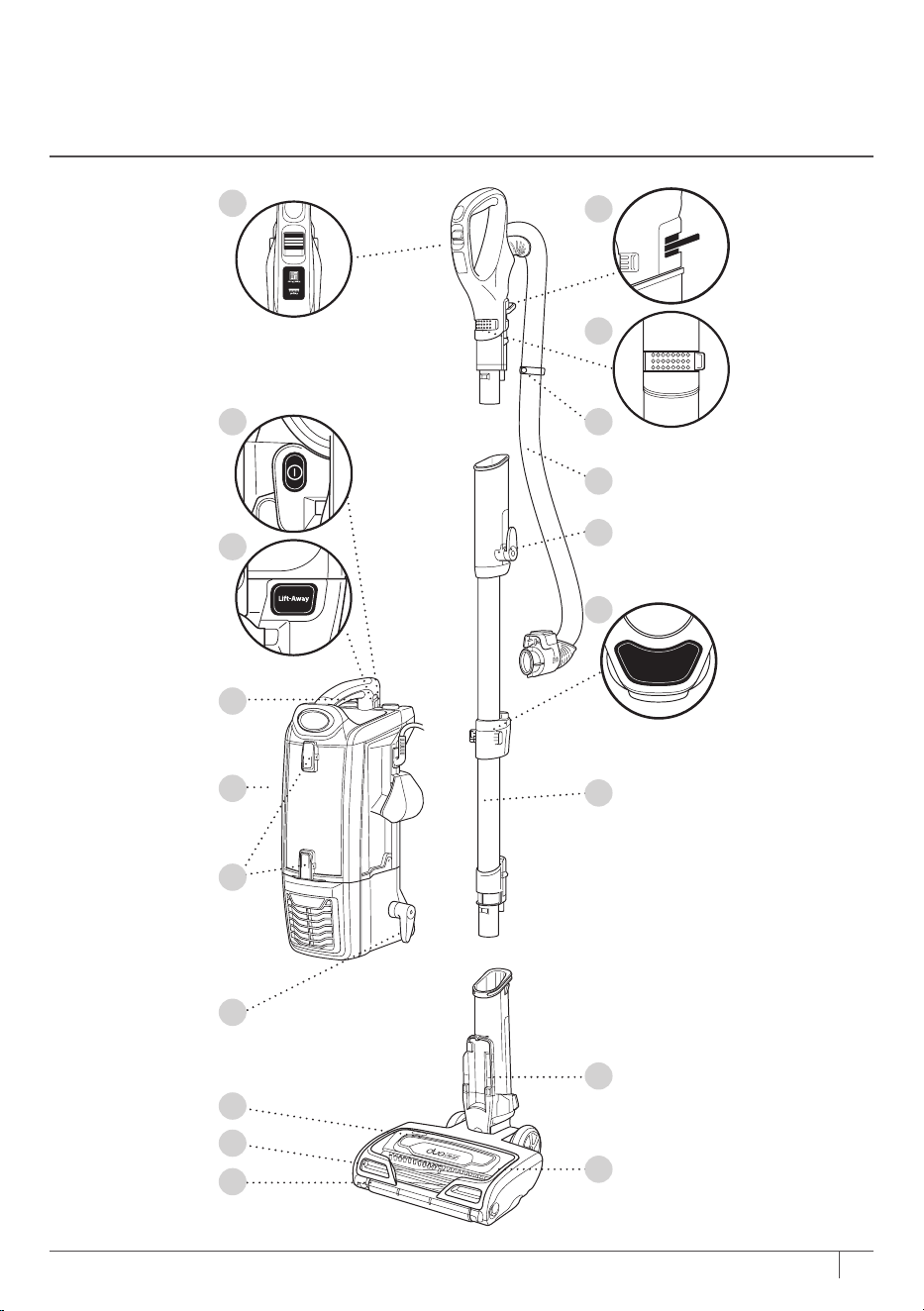
MAIN UNIT
A Surface Selector
B Handle Release Latch
C Suction Control Slider
D Power Switch
E Hose Clip
F Hose
G Upper Cord Hook
H Lift-Away® Button
I Wand Release Button
J Dust Cup Release Latch
K Lift-Away Pod
L Wand
M Dust Cup Empty Buttons
N Lower Cord Hook
O Motorised Floor Nozzle
P Brushroll Indicator Light
Q Headlights
R Brushroll Garage
S Soft Roller
GETTING TO KNOW YOUR SHARK® DUOCLEAN
™
POWERED LIFT-AWAY
™
WITH SELF-CLEANING
BRUSHROLL TECHNOLOGY
6AUS sharkclean.com.au NZ sharkclean.co.nz
Wand Release
A
C
H
D
I
K
N
O
P
E
B
F
G
L
Q
S
R
M
J
7 AUS 02 8801 7666 NZ 0800 112 660
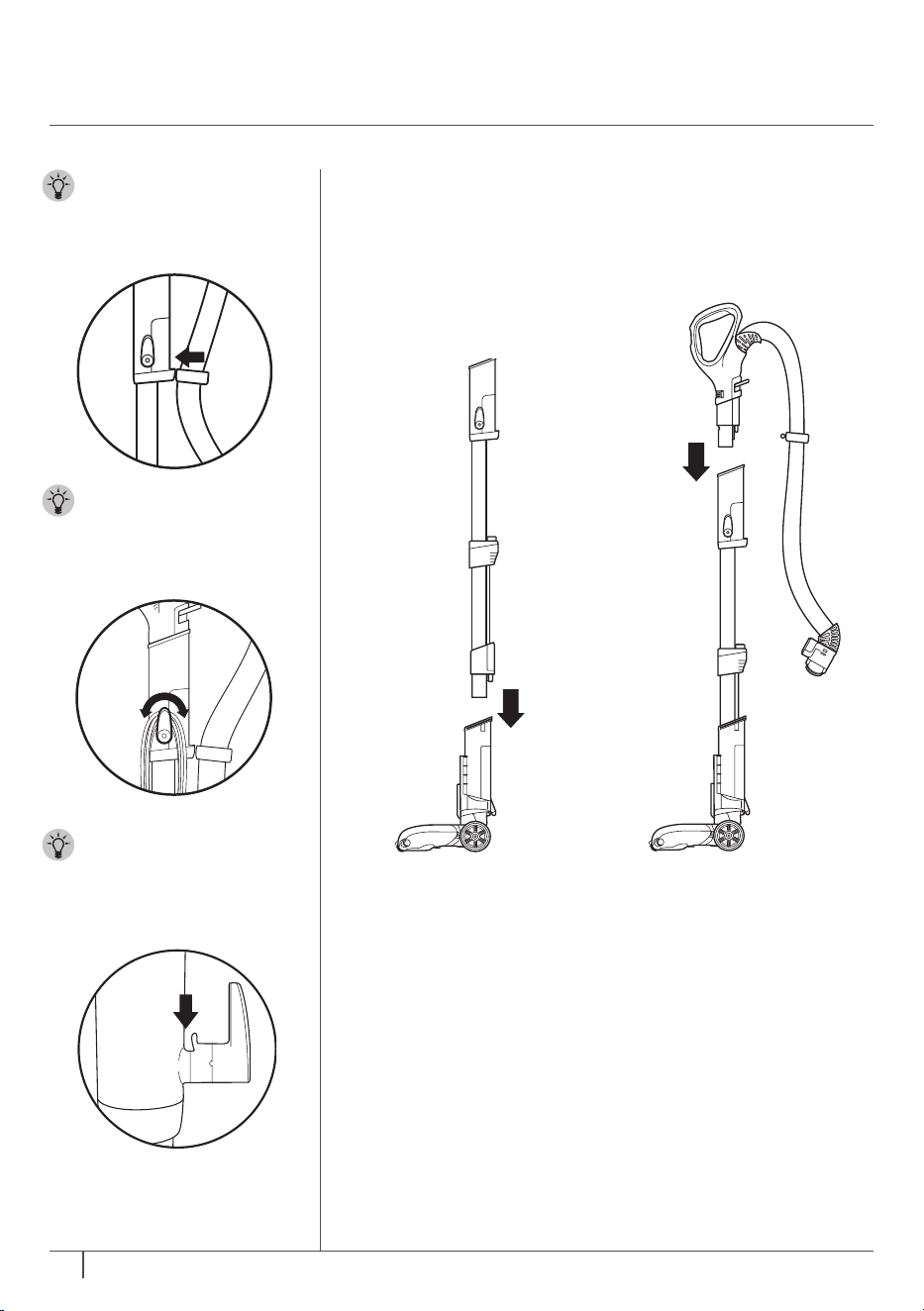
ASSEMBLING
YOUR VACUUM
TIP: Push hose clip
into back of wand for
convenience.
STEP 1 STEP 2
TIP: For quick cord
access, rotate upper
hook down and
remove cord.
TIP:
Use cord clip
located on the side of
wand to hold cord in
place while vacuuming.
1 Place motorised floor
nozzle on floor and
insert wand, pressing it
in until it clicks securely
into place.
2 Insert handle into
wand, pressing it in
until it clicks securely
into place.
8AUS sharkclean.com.au NZ sharkclean.co.nz
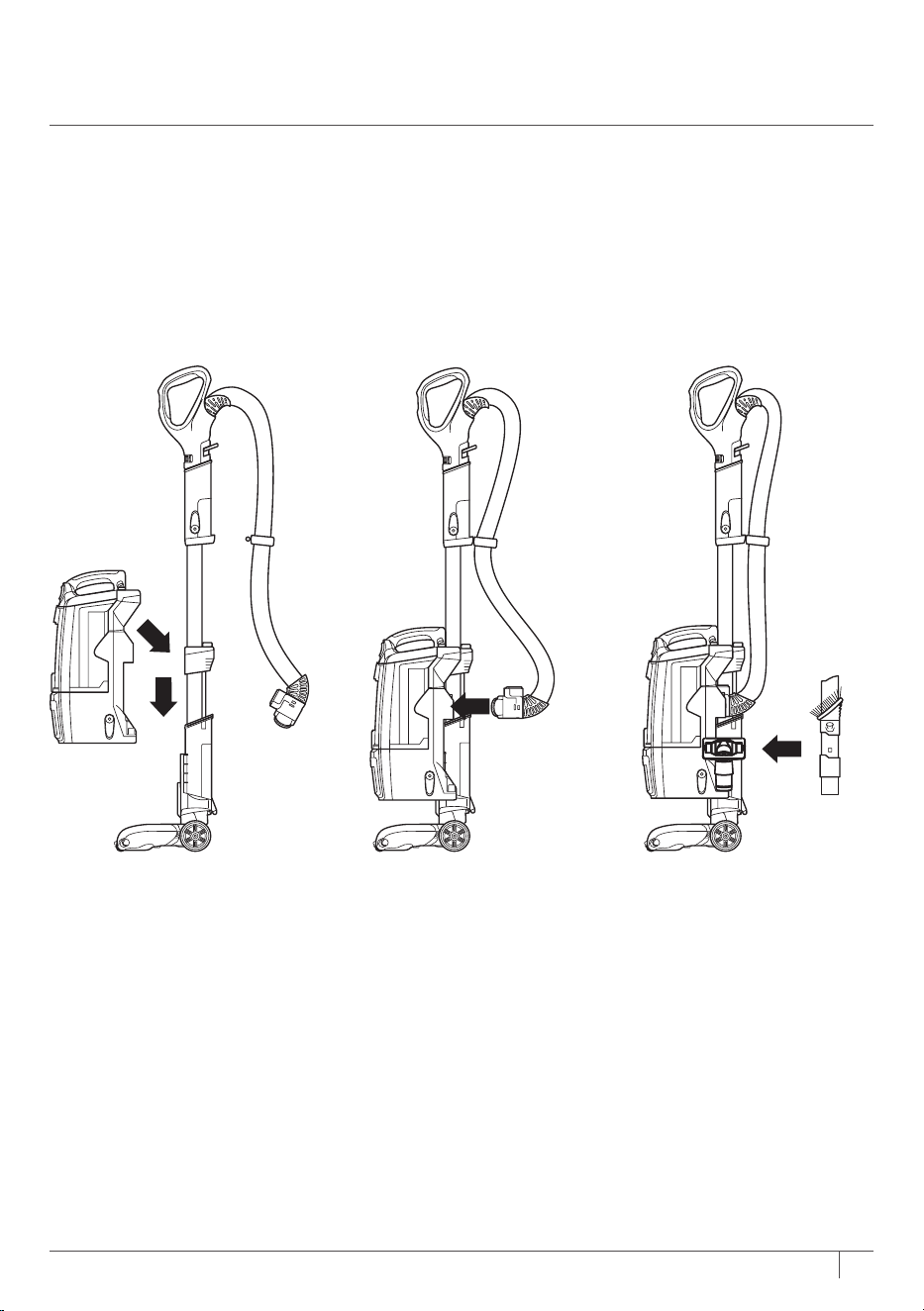
STEP 3 STEP 4 STEP 5
3 Place bottom of pod
onto neck of floor
nozzle and slide down
to connect.
4 Connect hose into
back of pod, pressing it
in until it clicks securely
into place.
5 Store included
accessories on the
accessory posts on
the pod.
9 AUS 02 8801 7666 NZ 0800 112 660
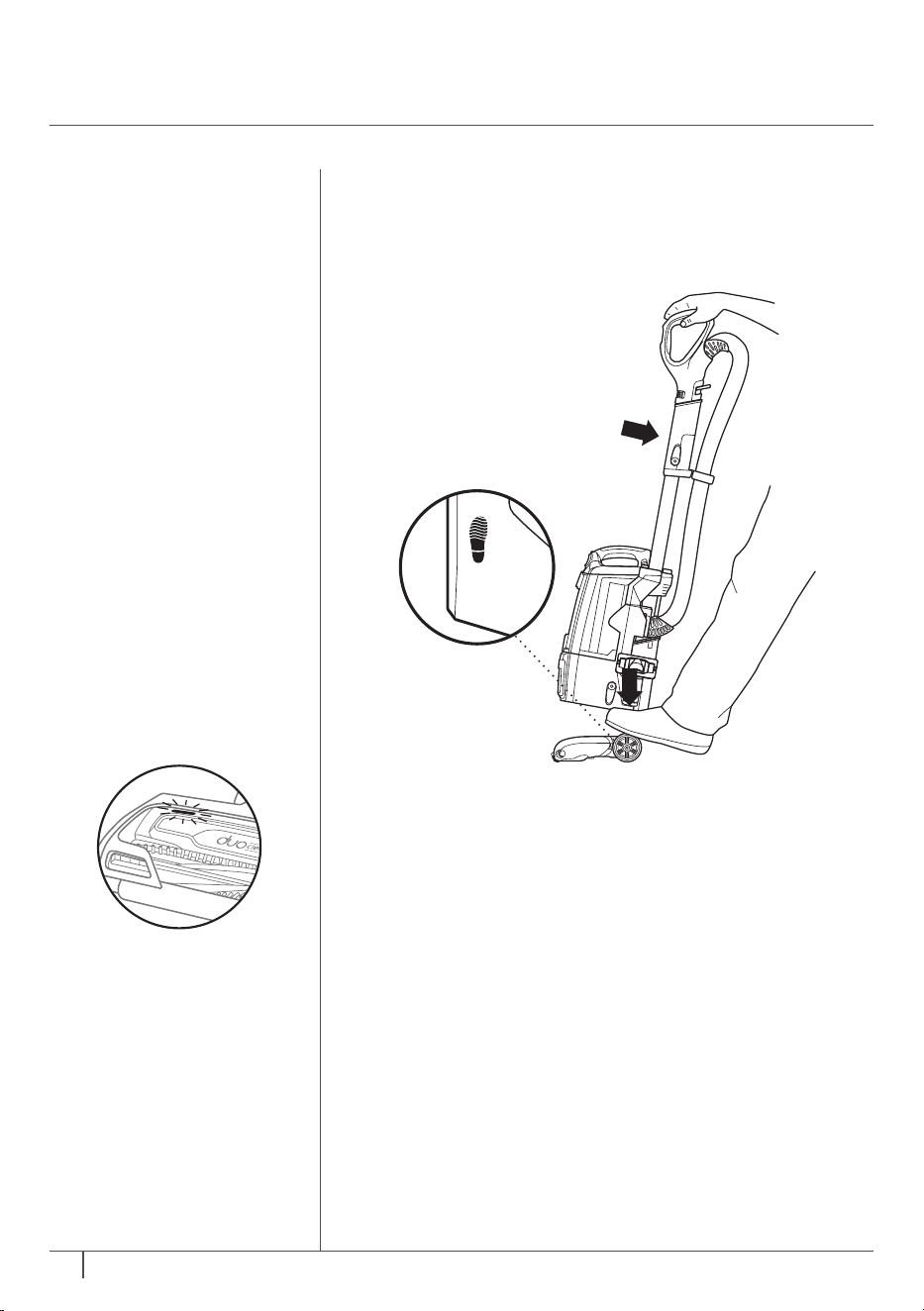
USING YOUR VACUUM
IN UPRIGHT MODE
1 Plug power cord into socket. Place foot on floor
nozzle andtilt handle back.
STEP 1
WHAT DOES THE
BRUSHROLL INDICATOR
LIGHT MEAN?
Solid Green
The brushrolls are on and
working as they should.
Solid Red
There is a jam in the
brushroll and/or soft roller
area. Turn your vacuum
o and remove any
blockages.
Flashing Red*
The motorised floor nozzle
is overheating. Turn your
vacuum o and wait for it
to cool down.
* See Troubleshooting section for
further instructions.
No Light
The brushrolls are o
because the vacuum is o.
10AUS sharkclean.com.au NZ sharkclean.co.nz
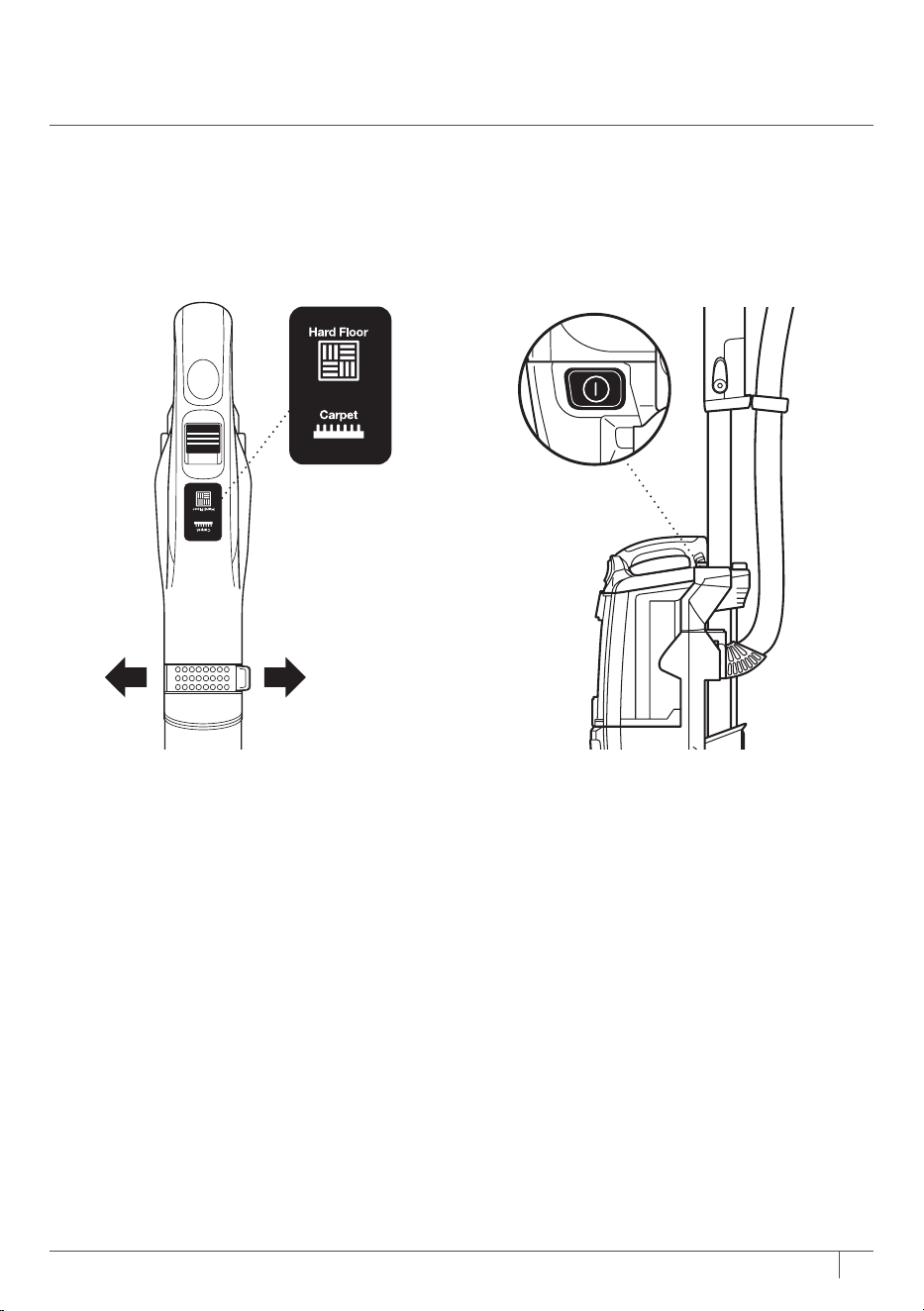
2 In both settings, the Soft Roller spins
to pick up dust and debris. Choose
the appropriate setting:
Hard Floor
The brushrolls spin slowly to pick up
fine dust and large debris on hard
floors.
Carpet
The brushrolls spin faster to pick up
debris on and below the surface of
your carpets.
3 Press power button to turn vacuum
on to start cleaning. Please note the
brushrolls will not spin unless the
handle is reclined.
STEP 2 STEP 3
Suction
Control
MAX MIN
11 AUS 02 8801 7666 NZ 0800 112 660
OR
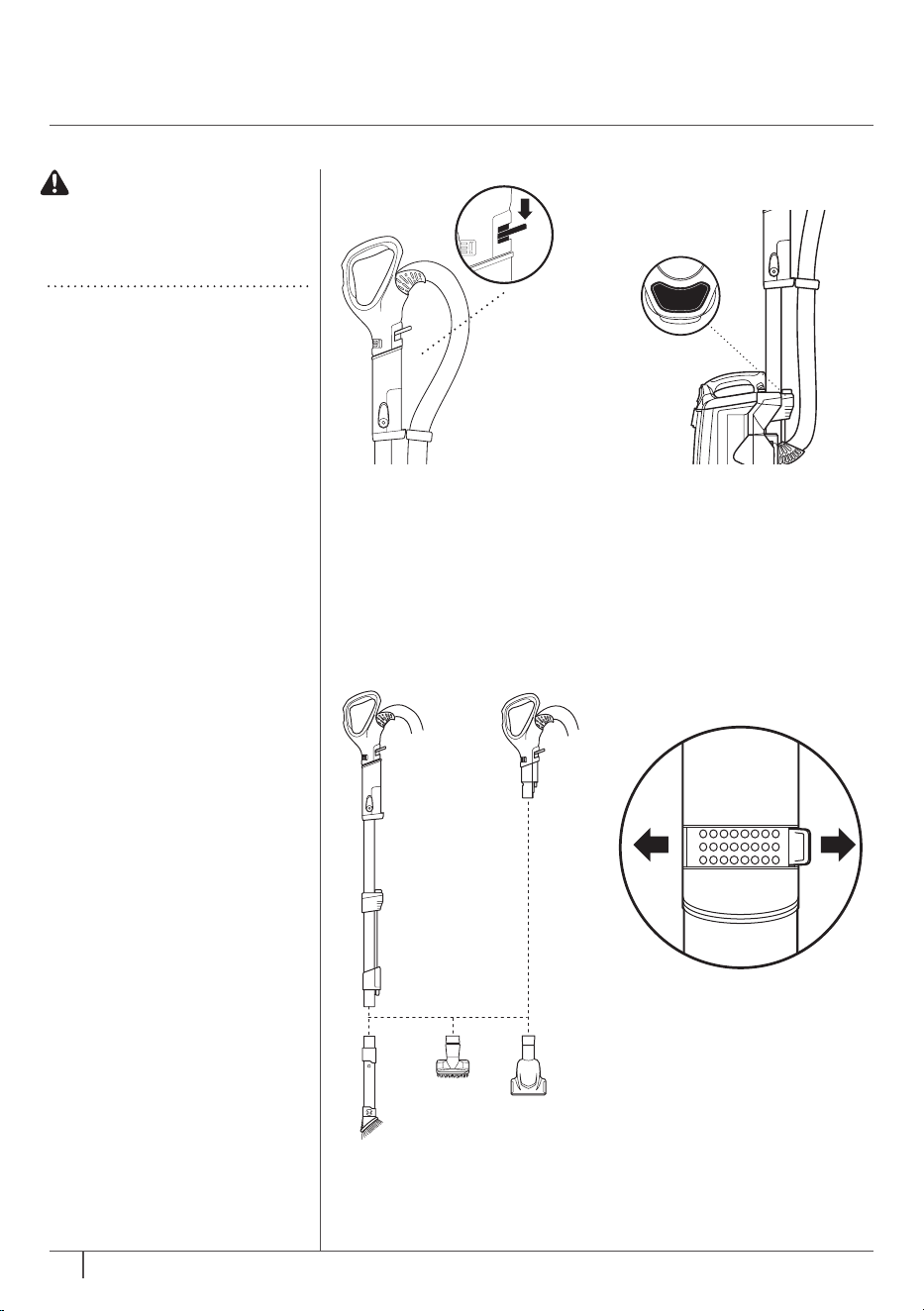
1 To detach the handle
from the top of the
wand, press the handle
release latch.
USING YOUR VACUUM
IN ABOVE-FLOOR MODE
2 Insert a cleaning tool
directly onto wand
orhandle.
To clean with more
reach, press the Wand
Release button to
detach the wand from
the nozzle.
STEP 1
STEP 2
OR
Wand Release
Suction
Control
MAX MIN
3 The Suction Control
slider allows you to
increase or decrease
suction as needed.
Slide to MIN to reduce
suction and increase
maneuverability on
carpets. Slide to MAX
to increase suction on
bare floors.
STEP 3
CAUTION: To avoid
injury, make sure your
footing is stable when
using Lift-Away®.
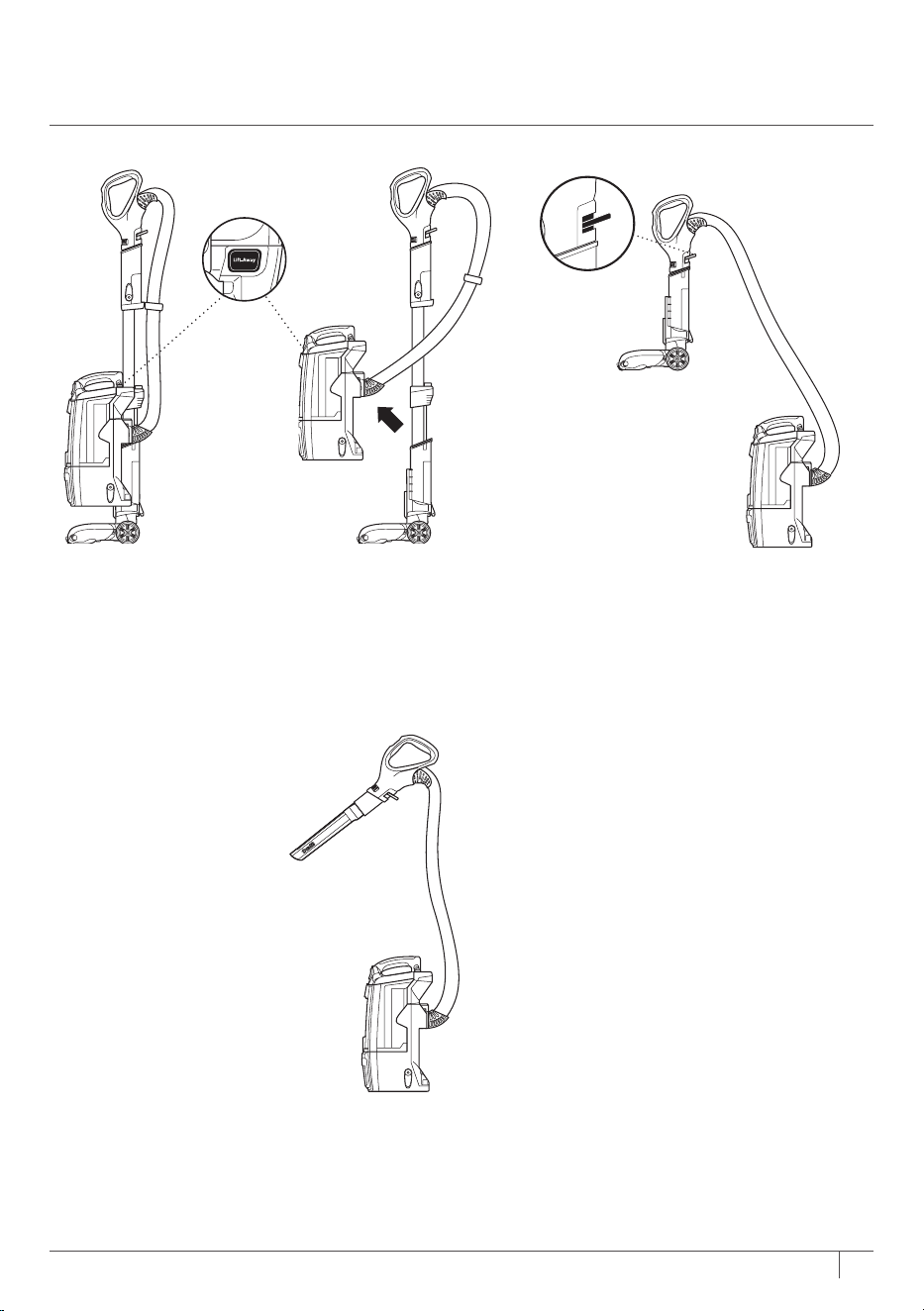
WHAT IS POWERED
LIFT-AWAY™?
With Powered Lift-Away,
you can remove the pod
from the nozzle while
maintaining the same
power you have in upright
mode. This is great for
cleaning stairs, under
furniture, and in other
tight spaces.
12AUS sharkclean.com.au NZ sharkclean.co.nz
POWERED LIFT-AWAY CLEANING
1 Press Lift-Away® button to lift pod
o floor nozzle.
USING YOUR VACUUM IN
POWERED LIFT-AWAY
™
MODE
2 For a convenient way to clean stairs,
insert handle into motorised floor
nozzle.
LIFT-AWAY CLEANING
1 Attach a cleaning tool directly
to the handle. You can also
attach the accessory to the
wand for extended reach.

13 AUS 02 8801 7666 NZ 0800 112 660
COMPATIBLE
ACCESSORIES
There are a variety of
accessories that are
compatible with this
vacuum series.
The top flap of your
box shows the select
accessories that are
included with your model.
To purchase accessories,
visit sharkclean.com.au
or sharkclean.co.nz
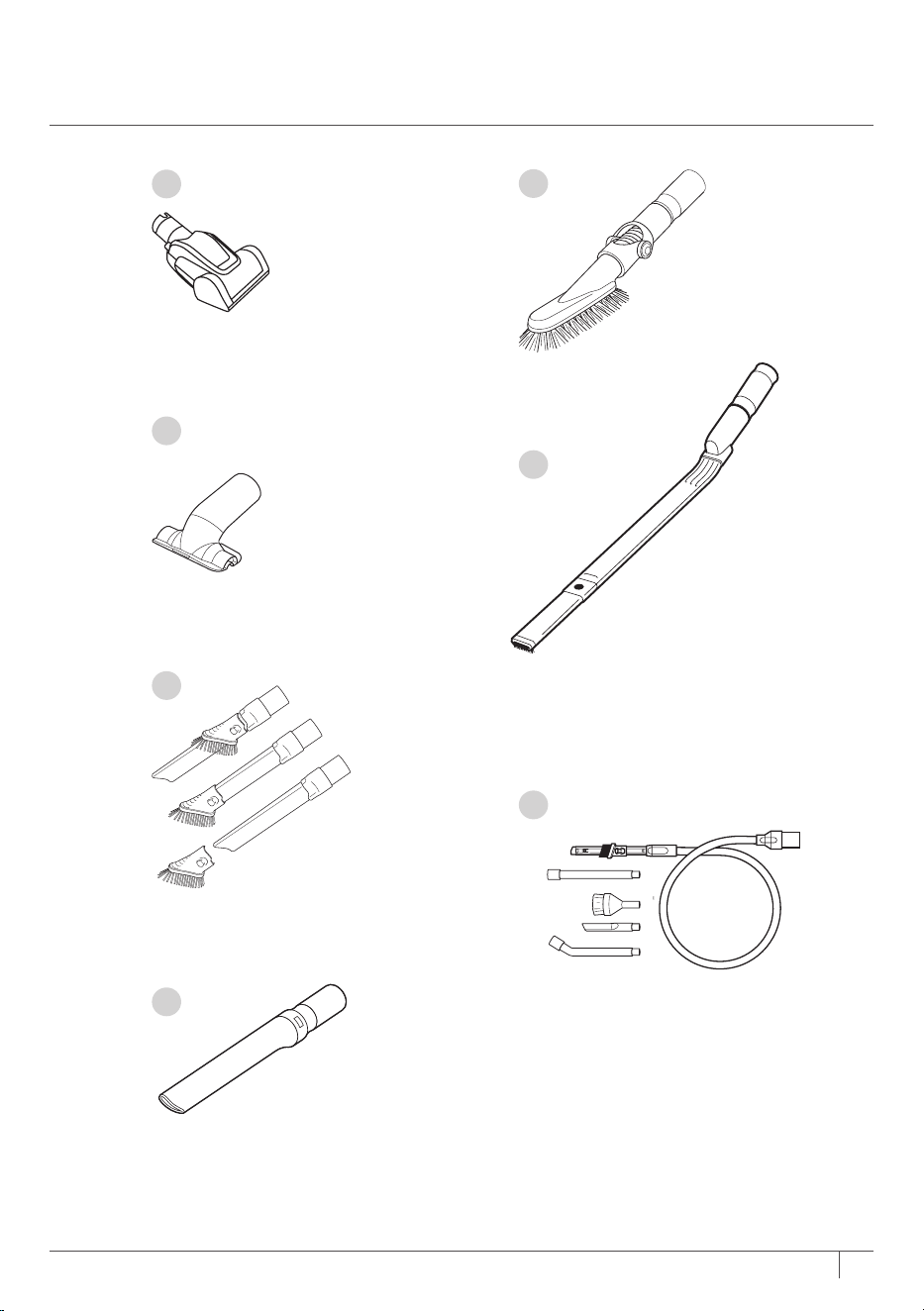
A Pet Power Brush
Removes pet hair and ground-in dirt from carpeted
stairs and upholstery.
B Upholstery Tool
Perfect for large-particle pickup, dusting, and
removing pet hair and lint from furniture and other
upholstered surfaces.
C Duster Crevice Tool
Two cleaning tools in one: the crevice tool gives you
extended reach to clean in tight spaces, while the
soft brush is ideal for dusting delicate surfaces.
D Crevice Tool
Clean tight spaces and reach skirting boards and
ceilings with this slim crevice tool.
E Multi-Angle Dusting Brush
This soft dusting brush adjusts to five dierent positions
so you always have the best angle for cleaning blinds,
walls, ceiling fans, and other above-floor areas.
F Under-Appliance Wand
Clean under and behind hard-to-move appliances and
furniture with this adjustable 36" tool. Flip the extension
piece over to clean the underside of appliances.
G Car Detail Kit
Great for cleaning and dusting crevices including door
pockets, dashboards and around controls.
14AUS sharkclean.com.au NZ sharkclean.co.nz
A
B
C
G
D
E
F
15 AUS 02 8801 7666 NZ 0800 112 660
EMPTYING THE DUST CUP
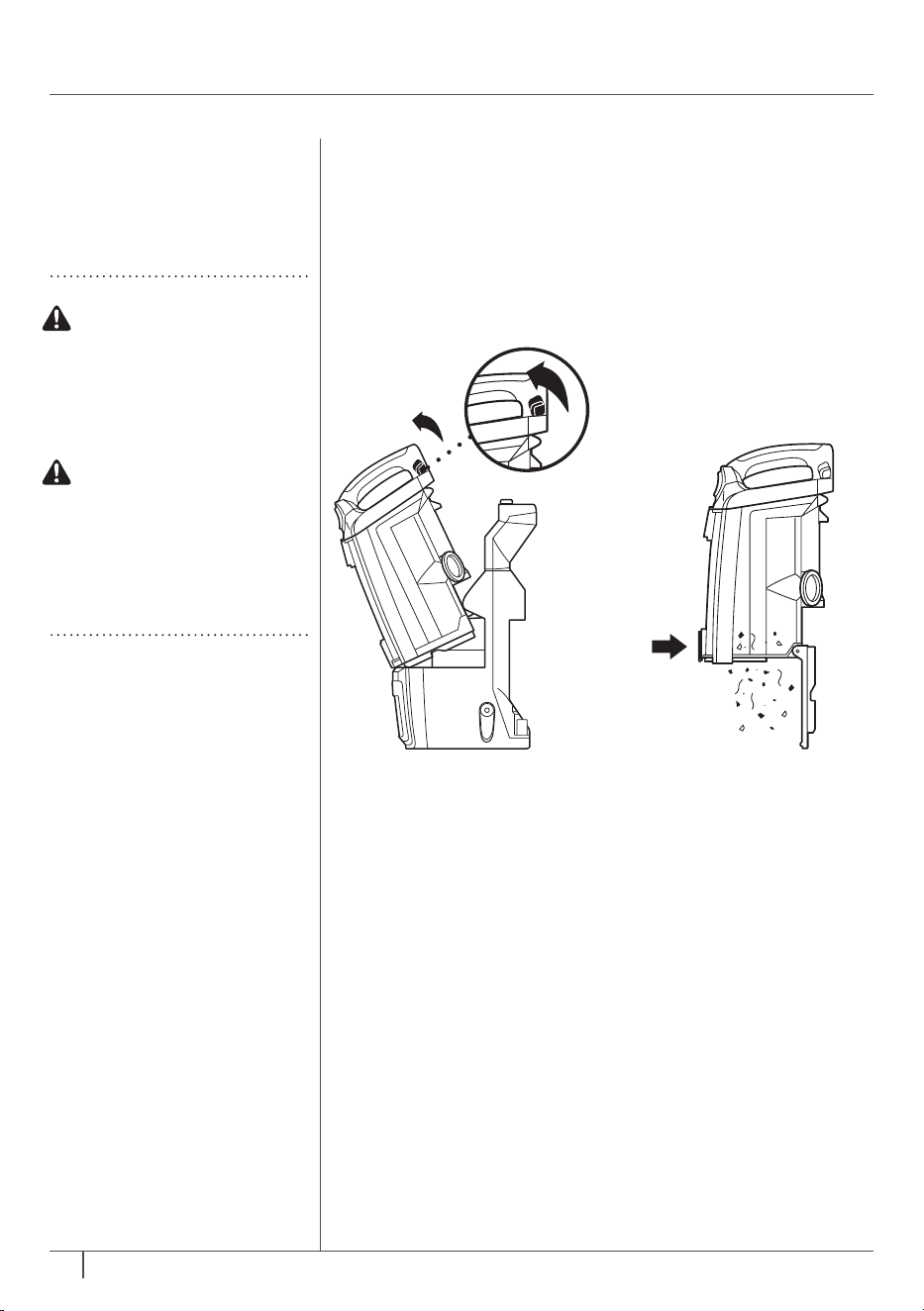
1 Pull up on dust cup
release latch and lift
dust cup o pod.
MAINTENANCE
RECOMMENDED
FILTER CLEANING
SCHEDULE:
Pre-Motor Filter Kit
(Foam & Felt)
Clean every 3 months.
Post-Motor Filter
(Pre-HEPA)
Clean once a year.
Post-Motor Filter
(HEPA)
Clean once a year.
2 Hold dust cup over
a trash bin and press
the bottom dust cup
empty latch.
STEP 1 STEP 2
WARNING: To reduce
the risk of shock and
unintended operation,
turn power o and
unplug unit before
servicing.
To keep suction power
optimal, rinse filters
regularly. Rinse with
water only. Do not use
soap. Allow filters to
air-dry completely
before reinstalling.
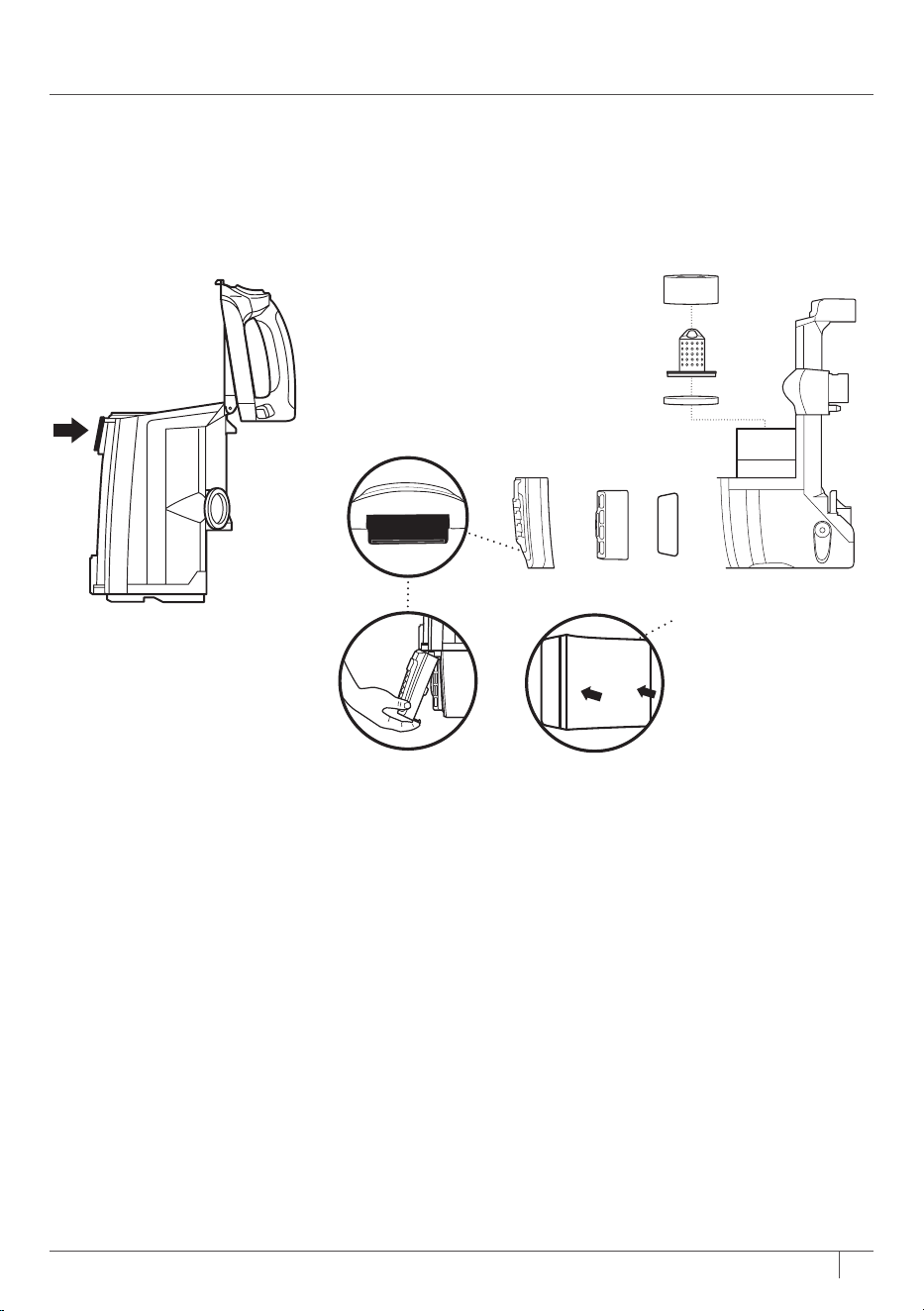
16AUS sharkclean.com.au NZ sharkclean.co.nz
3 Press top dust cup
empty latch to access
dust screen and
remove built-up debris.
CLEANING THE FILTERS
1 Pre-Motor
(foam and felt):
With the dust cup
removed, take out the
foam and felt filters,
and rinse them with
water only. Tap loose
dirt o filters between
cleanings asneeded.
2 Post-Motor (HEPA):
To access the HEPA
filter, reach under the
filter cover, and press
the Filter Access tab.
Lift o the cover and
remove the HEPA filter.
To remove the black
foam pre-HEPA filter,
simply pull it out from
the frame. Rinse filters
in water only and
allow them to air-dry
completely before
reinstalling. Before
reinserting the pre-
HEPA filter, make sure
the edges of the foam
are tucked into the
frame.
STEP 3
HEPA
FELT FILTER
FOAM FILTER
FILTER FRAME
Filter Access
PRE-
HEPA
PRE-MOTOR
POST-MOTOR
NOTE: To remove the pre-HEPA foam
filter, pull out from frame.
17 AUS 02 8801 7666 NZ 0800 112 660
MAINTENANCE - CONT.
TIP: You can also
check for blockages in
the hose and airways.
Just remove the floor
nozzle, dust cup, and
hose and shine a torch
in the openings.
If you see any hair
wrapped around the
brushroll, continue
cleaning, using Carpet/
Low Pile mode on
hard floors. This will
allow the Self-Cleaning
Brushroll technology
to remove the hair and
send it to the dust cup.
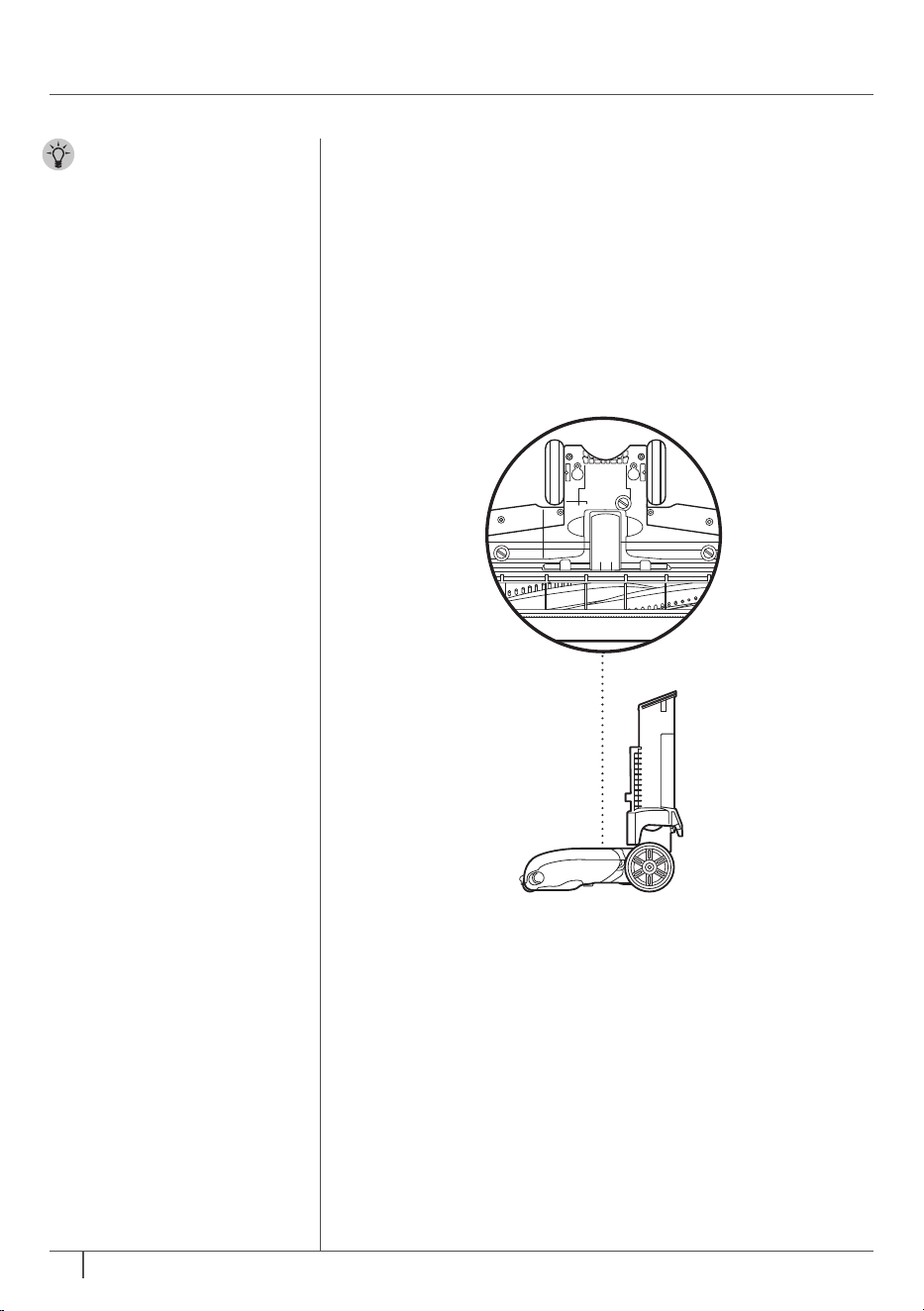
CLEANING THE BRUSHROLL
1
Turn the nozzle over and use a coin to open the 3 locks
on the bottom. Turn the locks counterclockwise to open,
then lift up the cover.
2 Clear away any objects or debris.
3 To reassemble, replace base by lining it up along the
front of the nozzle. Press down on the cover until it
snaps into place. Turn the locks clockwise to close.
Self-Cleaning Brushroll Technology
STEP 1
Self-Cleaning Brushroll technology actively removes
hair wrap from the brushroll while you vacuum. If
you run over a hard or sharp object or notice a noise
change while vacuuming, check for blockages or
objects caught in the brushroll.
NOTE: If you notice hair wrap on the brushroll, continue
cleaning to allow Self-Cleaning Brushroll technology to
send the hair to the dust cup.
18AUS sharkclean.com.au NZ sharkclean.co.nz
DuoClean
™
Technology
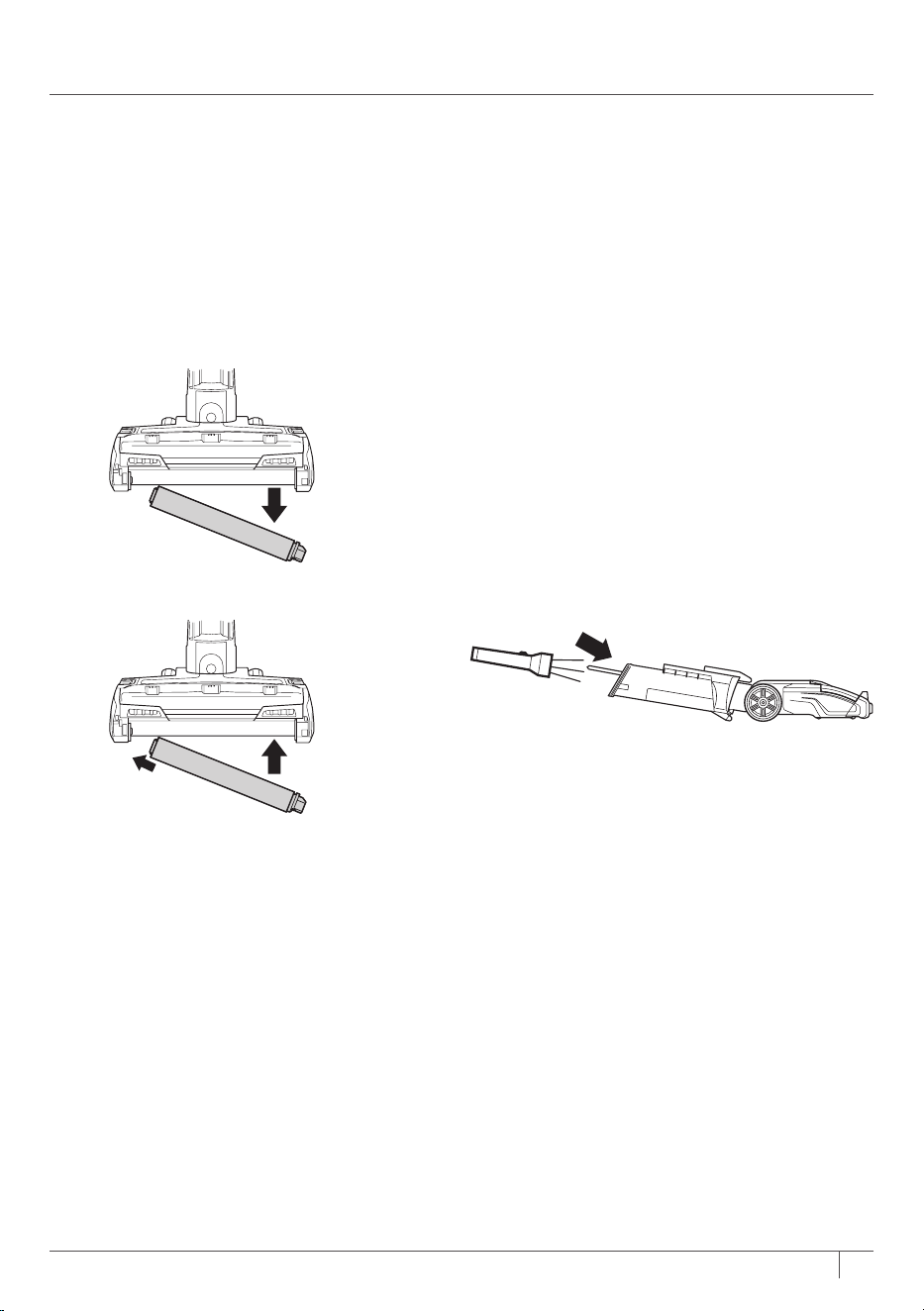
CLEANING THE SOFT ROLLER
1 To remove Soft Roller from nozzle, lift
it out pulling the tab on the right side.
2 Tap loose debris o the Soft Roller.
Use a dry towel to wipe the Soft Roller
clean, or to remove any debris caught
in the teeth behind the Soft Roller.
3
Hand-wash the Soft Roller as needed.
Use only water, and let air-dry
completely for at least 24 hours.
4
Reinsert Soft Roller under rubber
bumper in front of nozzle
until it clicks
into place.
CHECKING THE NOZZLE FOR BLOCKAGES
1 Tilt neck of nozzle back to straighten
the airway, then remove any blockages.
DuoClean technology features a bristle brush to deep-clean carpets, and an
additional soft brushroll to pull in larger particles and directly engage floors
for a polished look.

19 AUS 02 8801 7666 NZ 0800 112 660
TROUBLESHOOTING
GUIDE
Vacuum is not picking up debris. No suction or light suction.
(Refer to Maintenance section for more information.)
• Check filters to see if they need cleaning. Follow instructions for rinsing and drying the
filters before reinserting in the vacuum.
• Dust cup may be full; empty dust cup.
• Clear blockages from hose, hose connections, nozzle, and accessories.
• Remove any string, carpet fibres, or hair that may be wrapped around the brushrolls.
Vacuum lifts area rugs.
• Turn o unit to disengage the brushrolls. Move switch to Hard Floor setting, which is
optimal for bare floors and area rugs.
• Suction is powerful. Take care when vacuuming area rugs or rugs with delicately sewn
edges.
• Slide Suction Control to MIN to reduce suction and increase maneuverability on carpets.
Brushrolls do not spin.
• If Brushroll Indicator Light on the floor nozzle turns red, the brushroll and/or Soft
Roller have stopped spinning. Immediately turn o and unplug vacuum. Disconnect
the nozzle and remove any blockages, then reconnect and turn vacuum back on.
• If Brushroll Indicator light repeatedly turns red while vacuuming carpet, try moving
Suction Control slider to MIN.
• With the power on, recline the handle, which will automatically turn on the brushrolls.
Vacuum turns o on its own or Brushroll Indicator Light flashes red.
• This vacuum is equipped with a motor-protective thermostat. If your vacuum
overheats, the thermostat will automatically turn the suction motor o. It may take
approximately 45 minutes for the unit to cool. Perform the following steps while the
vacuum cools:
1. Turn vacuum o and unplug it.
2. Empty dust cup and clean filters (see Maintenance section).
3. Check for blockages in hose, accessories, and inlet openings.
4. Allow unit to cool for a minimum of 45 minutes.
5. Plug in vacuum and turn it on.
• If hose is not fully connected to the pod, it can cause a poor electrical connection and
the hose can come loose, turning the vacuum o.
1. Check all connection points and make sure they are securely clicked into place.
2. Remove the cord from the cord hook, then pull on the hose on the back of the pod
to make sure that it is fully engaged and latched into place.
Note: If vacuum still does not start, contact Customer Service at
AUS 02 8801 7666 - NZ 0800 112 660.
WARNING: To reduce the risk of shock and unintended operation, turn
power o and unplug unit before servicing.
20AUS sharkclean.com.au NZ sharkclean.co.nz
Two (2) YEAR LIMITED
REPLACEMENT WARRANTY
For guarantee claims, you will need to submit a proof of purchase in the form of a valid receipt that displays
date and place of purchase. This warranty does not replace but is in addition to your statutory rights.
If your product becomes defective due to faulty material or workmanship within a period of 2 years from
the date of purchase, we warrant to do the following:
• For New Zealand Consumers: We will replace the defective/faulty part with a new product, free of
charge, or if the unit is deemed defective/faulty we replace the unit with an equivalent or upgraded
model, at our discretion.
• For Australian Consumers: Our goods come with guarantees that cannot be excluded under the
Australian Consumer Law. You are entitled to a replacement or refund for a major failure and for
compensation for any other reasonably foreseeable loss or damage. You are also entitled to have the
goods repaired or replaced if the goods fail to be of acceptable quality and the failure does not amount
to a major failure.
Replacement items will be covered by the limited warranty for the balance of the warranty period from the
date of the original purchase.
Your warranty is subject to the following conditions
• DO NOT operate the appliance with a damaged plug or cord, or if the unit has been dropped, damaged
or dropped in water.
• To avoid the risk of electric shock, do not disassemble or attempt to repair the appliance on your own.
If the supply cord is damaged, it must be replaced by a qualified electrician to avoid a hazard. Incorrect
re-assembly or repair can cause a risk of electric shock or injury to persons when the appliance is used.
• The item has not been misused, abused, neglected, altered, modified or repaired by anyone.
• The item has been subjected to fair wear and tear.
• The item has not been used for trade, professional or hire purposes.
• The item has not sustained damage through foreign objects, substances or accident
Customer costs within warranty
The customer is responsible for any inwards freight charge to return a product for warranty if requested,
and outward freight charge for warranty parts and or replacement unit.
Who is covered?
This warranty applies only to the original purchaser, who bought the product from an authorised retailer
and may not be transferred. Proof of purchase is required.
What is not covered?
• Filters and brushrolls
• Accessories supplied with the item.
• Components that are subject to natural wear and tear caused by normal use in accordance with
operating instructions.
• Unauthorised/improper maintenance/handling or overload is excluded from this warranty.
Proudly distributed by
Mann&Noble Pty Ltd
No.1 Southridge Unit Estate
2 Southridge Street
Eastern Creek NSW, Australia, 2766
AUS 02 8801 7666
NZ 0800 112 660
AUS sharkclean.com.au
NZ sharkclean.co.nz

© 2019 SharkNinja Operating LLC. LIFT-AWAY and SHARK are registered trademarks of SharkNinja Operating LLC.
Anti-Hair-Wrap Technology, DUOCLEAN, DUOCLEAN logo, and POWERED LIFT-AWAY are trademarks of
SharkNinja Operating LLC.
NZ801ANZ_IB_MP_Mv5_190730
PRINTED IN CHINA
PLEASE READ CAREFULLY AND KEEP FOR FUTURE REFERENCE.
This Owner’s Guide is designed to help you get a complete understanding of your new
Shark® DuoClean™ Powered Lift-Away™ with Anti-Hair-Wrap Technology™ vacuum.
Proudly distributed by:
Mann&Noble Pty Ltd
No.1 Southridge Unit Estate
2 Southridge Street
Eastern Creek NSW, Australia, 2766
AUS 02 8801 7666
NZ 0800 112 660
AUS sharkclean.com.au
NZ sharkclean.co.nz
Illustrations may dier from actual product. We are constantly striving to improve our products;
therefore the specifications contained herein are subject to change without notice.