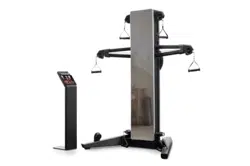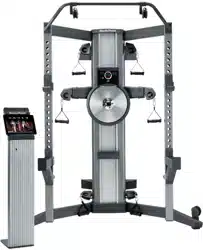
USER’S MANUAL
CAUTION
Read all precautions and
instructions in this manual before
using this equipment. Keep this
manual for future reference.
Model No. NTSY24918.0
Serial No.
Write the serial number in the space
above for reference.
nordictrack.com
Serial
Number
Decal
To register your product and
activate your warranty today,
go to my.nordictrack.com.
For service at any time, go to
support.nordictrack.com.
Or call 1-800-TO-BE-FIT
(1-800-862-3348)
Mon.–Fri. 6 a.m.–6 p.m. MT
Sat. 8 a.m.–12 p.m. MT
Please do not contact the store.
ACTIVATE YOUR
WARRANTY
CUSTOMER CARE

2
WARNING DECAL PLACEMENT . . . . . . . . . . . . . . . . . . . . . . . . . . . . . . . . . . . . . . . . . . . . . . . . . . . . . . . . . . . . . . .3
IMPORTANT PRECAUTIONS ..................................................................4
BEFORE YOU BEGIN. . . . . . . . . . . . . . . . . . . . . . . . . . . . . . . . . . . . . . . . . . . . . . . . . . . . . . . . . . . . . . . . . . . . . . . .6
PART IDENTIFICATION CHART. . . . . . . . . . . . . . . . . . . . . . . . . . . . . . . . . . . . . . . . . . . . . . . . . . . . . . . . . . . . . . . .7
ASSEMBLY . . . . . . . . . . . . . . . . . . . . . . . . . . . . . . . . . . . . . . . . . . . . . . . . . . . . . . . . . . . . . . . . . . . . . . . . . . . . . . . .8
THE CHEST HEART RATE MONITOR. . . . . . . . . . . . . . . . . . . . . . . . . . . . . . . . . . . . . . . . . . . . . . . . . . . . . . . . . .25
HOW TO USE THE STRENGTH SYSTEM. . . . . . . . . . . . . . . . . . . . . . . . . . . . . . . . . . . . . . . . . . . . . . . . . . . . . . .26
FCC INFORMATION . . . . . . . . . . . . . . . . . . . . . . . . . . . . . . . . . . . . . . . . . . . . . . . . . . . . . . . . . . . . . . . . . . . . . . . .32
MAINTENANCE AND TROUBLESHOOTING .....................................................33
CARDIO EXERCISE GUIDELINES. . . . . . . . . . . . . . . . . . . . . . . . . . . . . . . . . . . . . . . . . . . . . . . . . . . . . . . . . . . . .35
STRENGTH EXERCISE GUIDELINES. . . . . . . . . . . . . . . . . . . . . . . . . . . . . . . . . . . . . . . . . . . . . . . . . . . . . . . . . .36
PART LIST. . . . . . . . . . . . . . . . . . . . . . . . . . . . . . . . . . . . . . . . . . . . . . . . . . . . . . . . . . . . . . . . . . . . . . . . . . . . . . . .39
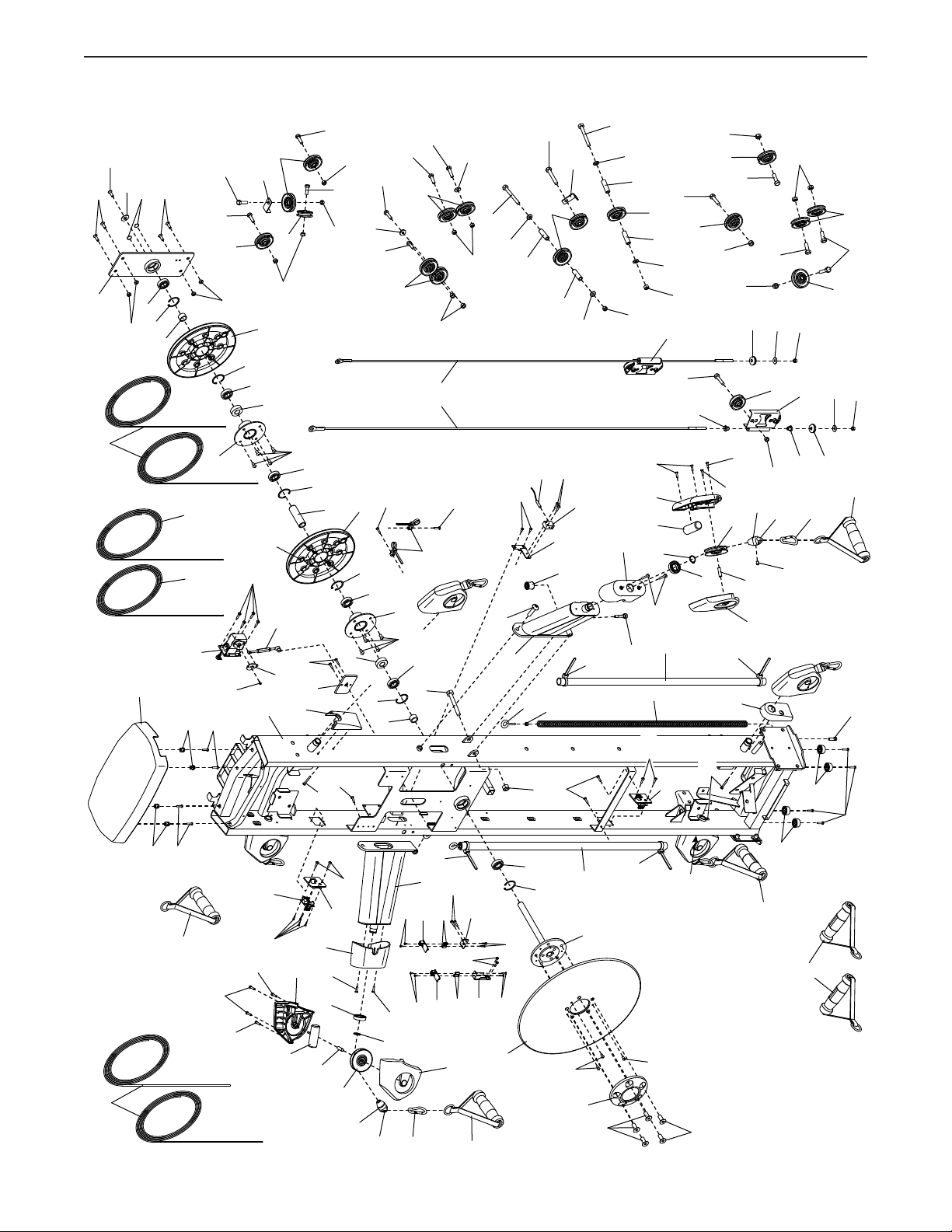
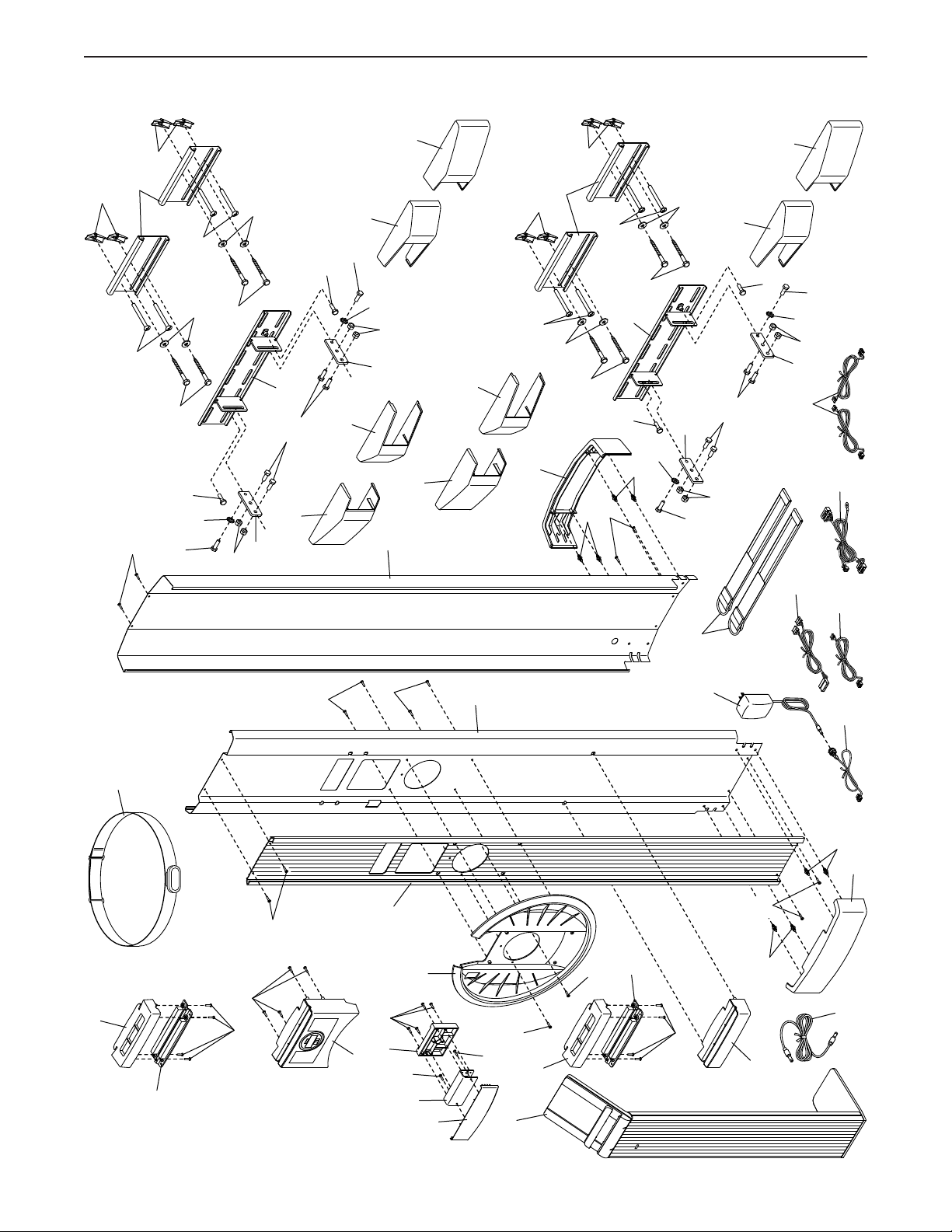
EXPLODED DRAWING. . . . . . . . . . . . . . . . . . . . . . . . . . . . . . . . . . . . . . . . . . . . . . . . . . . . . . . . . . . . . . . . . . . . . .41
ORDERING REPLACEMENT PARTS. . . . . . . . . . . . . . . . . . . . . . . . . . . . . . . . . . . . . . . . . . . . . . . . . . . Back Cover
LIMITED WARRANTY. . . . . . . . . . . . . . . . . . . . . . . . . . . . . . . . . . . . . . . . . . . . . . . . . . . . . . . . . . . . . . . Back Cover
TABLE OF CONTENTS
NORDICTRACK and IFIT are registered trademarks of ICON Health & Fitness, Inc. Android is a trademark of
Google LLC. The Bluetooth
®
word mark and logos are registered trademarks of Bluetooth SIG, Inc. and are used
under license.
3
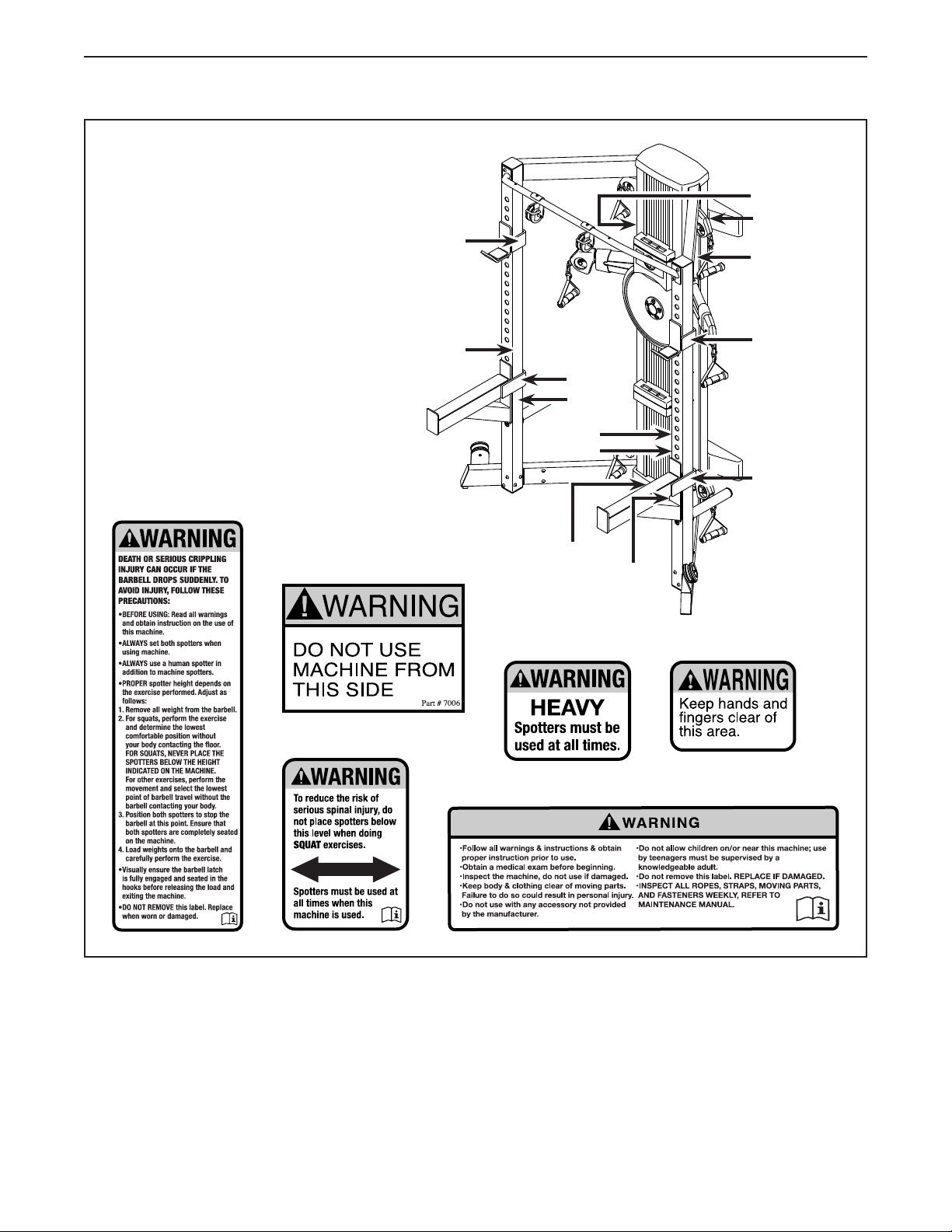
This drawing shows the location(s)
of the warning decal(s). If a decal is
missing or illegible, see the front
cover of this manual and request
a free replacement decal. Apply
the decal in the location shown.
Note: The decal(s) may not be
shown at actual size.
WARNING DECAL PLACEMENT
415225
415226
75%
415227
2
2
2
2
3
4
4
1
3
3
4
4
4
6
6
1
5
5
5

4
IMPORTANT PRECAUTIONS
WARNING: To reduce the risk of serious injury, read all important precautions and
instructions in this manual and all warnings on your strength system before using your strength
system. ICON assumes no responsibility for personal injury or property damage sustained by or
through the use of this product.
1. It is the responsibility of the owner to ensure
that all users of the strength system are
adequately informed of all precautions.
2. Before beginning any exercise program,
consult your physician. This is especially
important for persons over age 35 or per-
sons with pre-existing health problems.
3. The strength system is not intended for use
by persons with reduced physical, sensory,
or mental capabilities or lack of experi-
ence and knowledge, unless they are given
supervision or instruction about use of the
strength system by someone responsible for
their safety.
4. Use the strength system only as described in
this manual.
5. The strength system is intended for home
use only. Do not use the strength system in a
commercial, rental, or institutional setting.
6. Keep the strength system indoors, away
from moisture and dust. Do not put the
strength system in a garage or covered
patio, or near water.
7. Place the strength system on a level surface
with at least 6 ft. (1.8 m) of clearance around
the strength system. To protect the floor or
carpet from damage, place a mat under the
strength system.
8. Obtain professional advice and have a
qualified person install the brackets to
ensure adequate support. Serious injury
could result if the brackets are improperly
installed.
9. The location on the wall to which the
brackets are fastened must be capable
of supporting a working load of 600 lbs.
(272 kg). Do not fasten the brackets to a
drywall surface or to a cinder block surface.
10. Inspect and properly tighten all parts each
time the strength system is used. Replace
any worn parts immediately.
11. Keep children under age 16 and pets away
from the strength system at all times.
12. Users weighing more than 350 lbs. (159 kg)
should not use the strength system.
13. The weight rests and weight spotters are
designed to support a maximum weight
of 310 lbs. (141 kg), including weights and
a barbell. The pull-up bar is designed to
support a maximum user weight of 350 lbs.
(159 kg). The weight storage tubes are
designed to support a maximum weight of
300 lbs. (136 kg) Note: The strength system
does not include weights or a barbell.
14. Always place both weight rests at the same
height and both weight spotters at the same
height. Make sure that there are at least three
adjustment holes between the weight rests
and the weight spotters.
15. Wear appropriate clothes while exercising;
do not wear loose clothes that could become
caught on the strength system. Always wear
athletic shoes for foot protection.
16. Keep hands and feet away from moving
parts.
17. Pull and release the handles and ankle straps
in a controlled manner.
18. Make sure that the ropes remain on the pul-
leys at all times. If the ropes bind while you
are exercising, stop immediately and make
sure that the ropes are on the pulleys.
19. Over exercising may result in serious injury
or death. If you feel faint, if you become short
of breath, or if you experience pain while
exercising, stop immediately and cool down.
5
all
STANDARD SERVICE PLANS
6
Congratulations for selecting the revolutionary
NORDICTRACK
®
FUSION CST PRO strength system.
The FUSION CST PRO strength system is unlike any
ordinary strength system. Whether your goal is to tone
your body, build dramatic muscle size and strength,
or improve your cardiovascular system, the strength
system has an array of innovative features that will
help you to achieve the specic results you want.
For your benefit, read this manual carefully before
you use the strength system. If you have questions
after reading this manual, please see the front cover
of this manual. To help us assist you, note the product
model number and serial number before contacting us.
The model number and the location of the serial num-
ber decal are shown on the front cover of this manual.
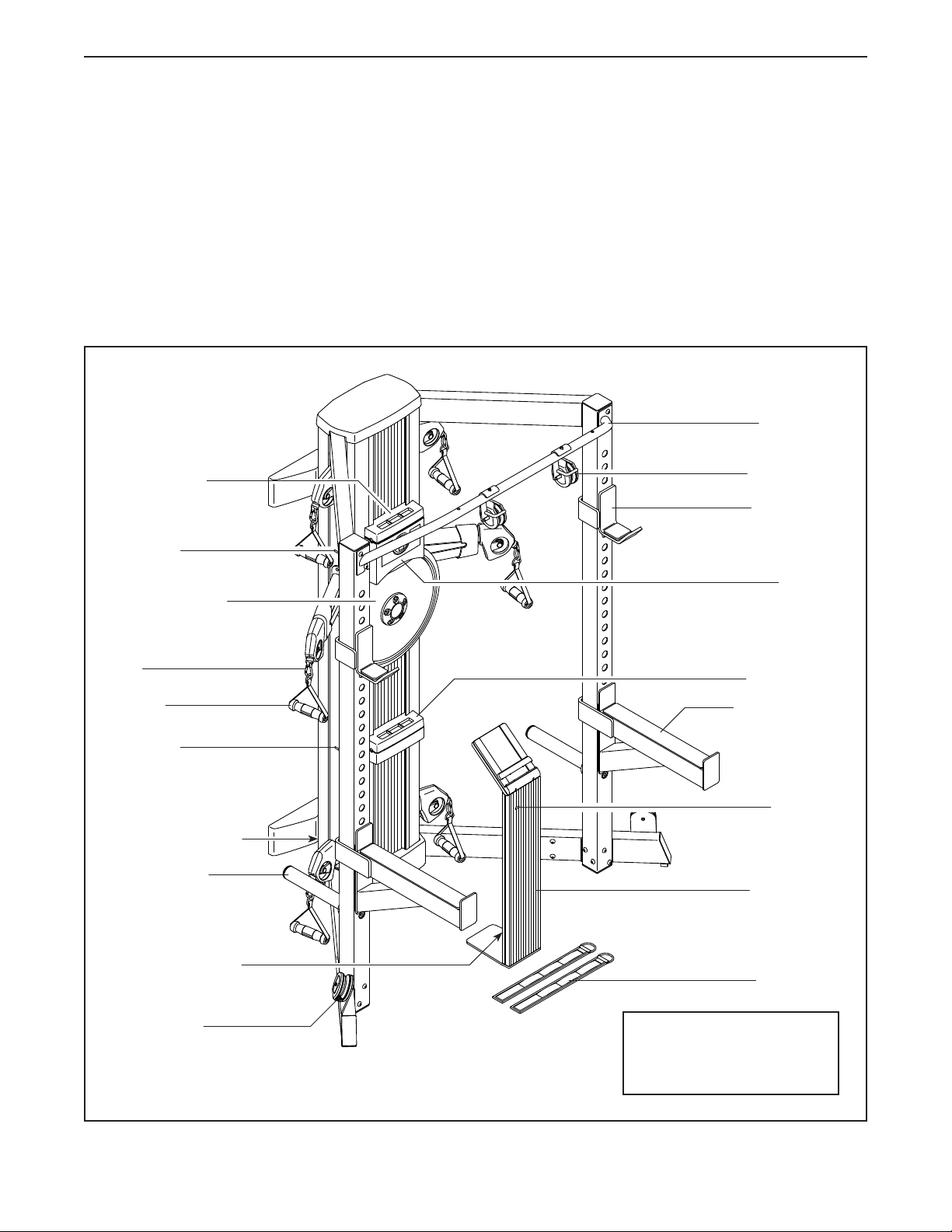
Before reading further, please familiarize yourself with
the parts that are labeled in the drawing below.
BEFORE YOU BEGIN
Handle
Weight Rest
Pull-up Bar
Upper Pulley
Resistance Disc
Tablet Stand
Ankle Strap
Lower Pulley
Storage Tube
Weight Spotter
Console
Tablet Holder
Tablet Holder
Power Receptacle
Power Receptacle
Length: 4 ft. 2 in. (127 cm)
Width: 5 ft. 4 in. (163 cm)
Height: 7 ft. (213 cm)
Clip
USB Port
USB Port
USB Port
7
PART IDENTIFICATION CHART
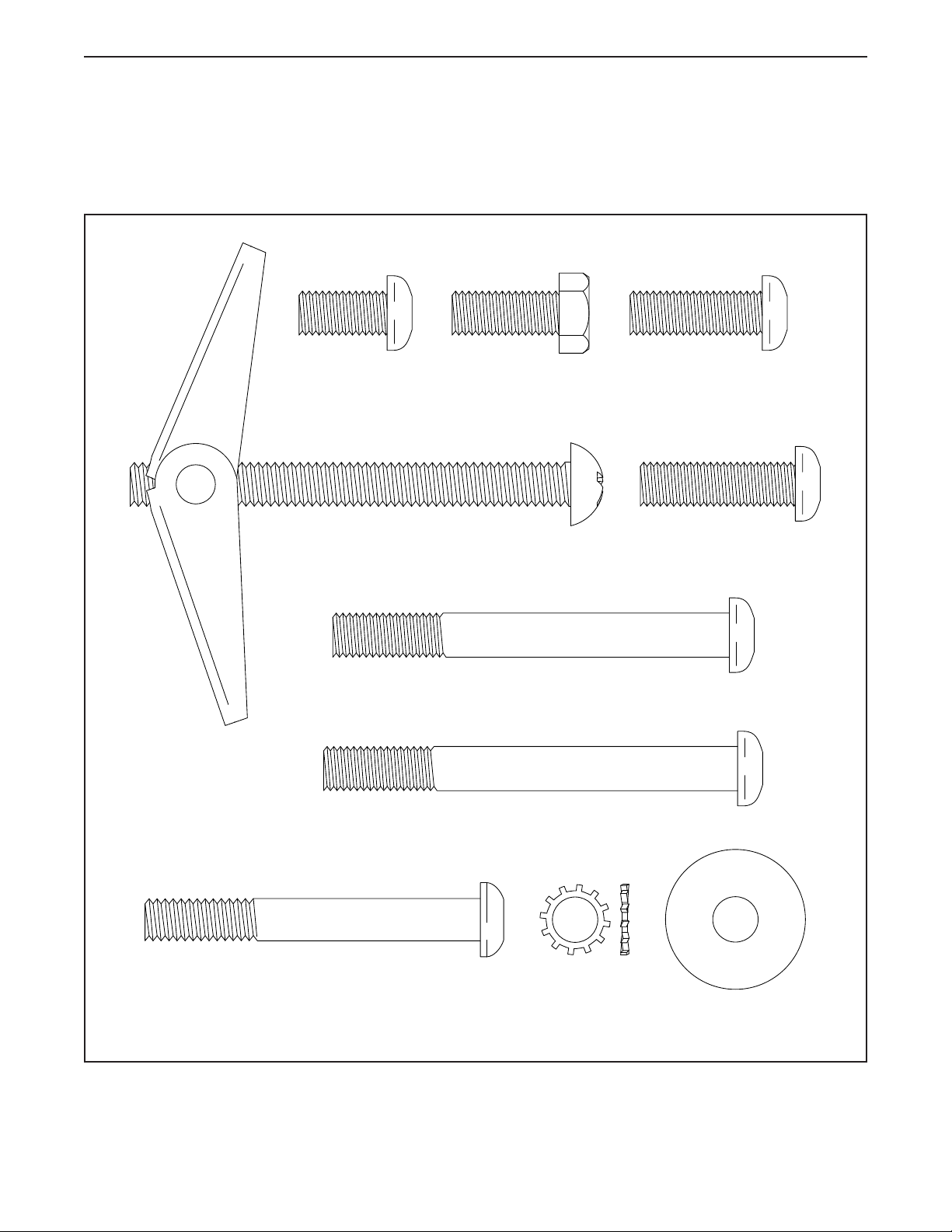
Use the drawings below to identify the small parts needed for assembly. The number in parentheses below each
drawing is the key number of the part, from the PART LIST near the end of this manual. The number following the
key number is the quantity needed for assembly. Note: If a part is not in the hardware kit, check to see if it
has been preassembled. Extra parts may be included.
M10 x 93mm Screw (102)–4
M10 x 90mm Screw (140)–8
3/8" x 3" Screw (158)–8
3/8" x 1 1/4"
Washer (159)–8
M10 Star
Washer (161)–4
M10 x 20mm
Patch Screw
(156)–4
M10 x 30mm
Screw (100)–2
M10 x 25mm Hex
Screw (101)–8
M10 x 35mm
Screw (95)–4
M10 x 100mm
Toggle Bolt (160)–8
8
ASSEMBLY
• Due to the size and weight of the strength system,
assembly requires two or three persons.
• Place all parts in a cleared area and remove the
packing materials. Do not dispose of the packing
materials until you nish all assembly steps.
• Left parts are marked “L” or “Left” and right parts
are marked “R” or “Right.”
• Assembly may be easier if you have your own
set of wrenches and a step stool or a ladder. To
avoid damaging parts, do not use power tools for
assembly steps 5 to 22.
• In addition to the included tool(s), assembly
requires the following tools:
Drill with a 1/4" bit or a 7/8" bit
Pencil
Ratchet
Stud nder
Adjustable wrench
Rubber mallet
The Two Stages of the Assembly Process
Wall Bracket Assembly—You will first fasten the brackets to wood or metal studs in your wall.
Strength System Assembly—You will then attach the strength system to your wall and assemble the
strength system covers, weight rack, tower arms, and accessories.
1
1. Go to my.nordictrack.com on your computer
and register your product.
• documents your ownership
• activates your warranty
• ensures priority customer support if assistance
is ever needed
Note: If you do not have internet access, call
Customer Care (see the front cover of this
manual) and register your product.
9
Wall Bracket Assembly
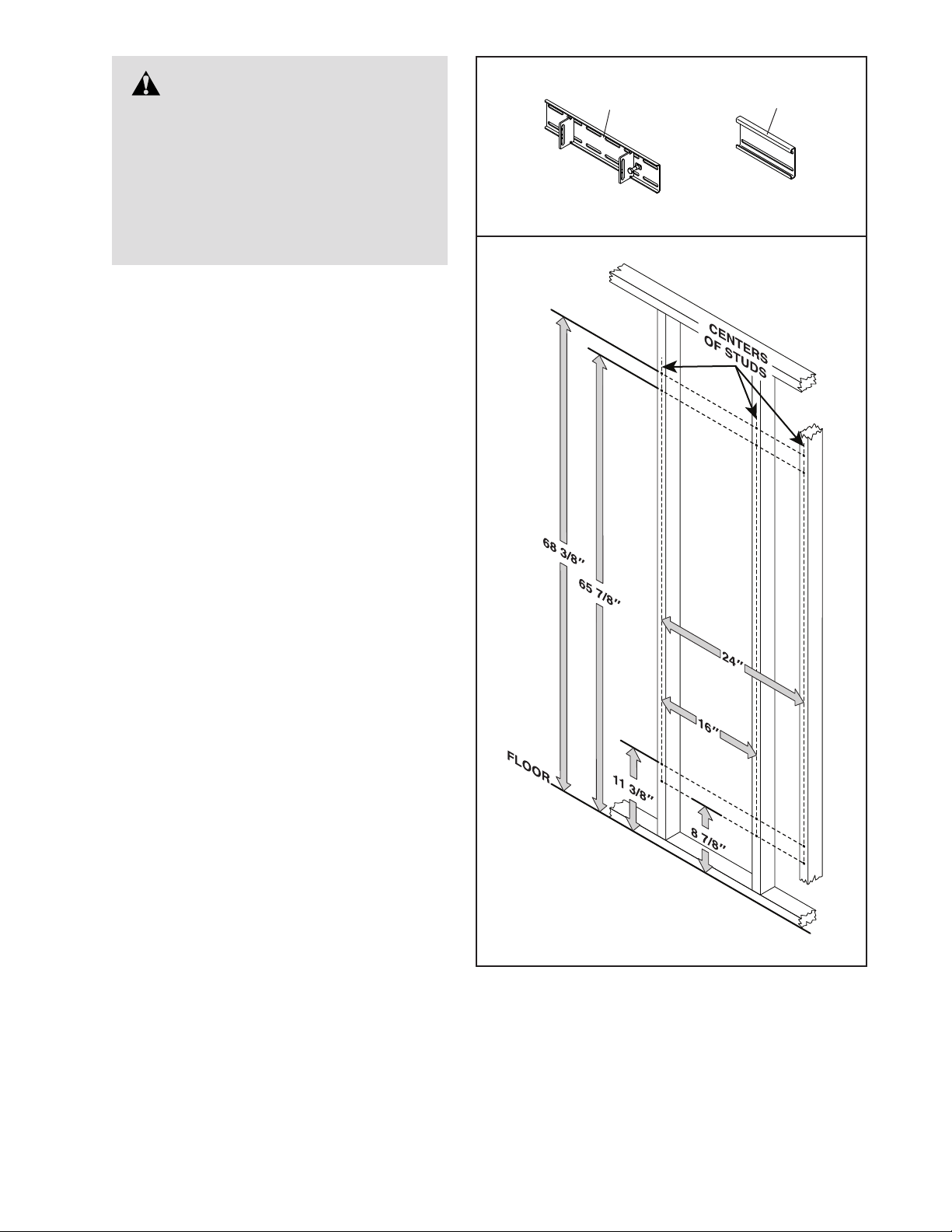
• IMPORTANT: Obtain professional advice
and have a qualied person install the
brackets to ensure adequate support.
• IMPORTANT: Do not fasten the brackets
to a drywall surface or to a cinder block
surface.
• The location on the wall to which the
brackets are fastened must be capable
of supporting a working load of 600 lbs.
(272 kg). IMPORTANT: The brackets and
the strength system should not be used
by persons weighing more than 350 lbs.
(159 kg).
• The brackets must be securely fastened to
the centers of wood or metal wall studs in
a wall that is at least 7 ft. 10 in. (239 cm)
high, above a at surface that is at least 6 ft.
(183 cm) long and 6 ft. (183 cm) wide. This
placement provides sufcient space to use
the strength system effectively.
• Taking your height into consideration, make
sure that there will be adequate clearance
between the strength system and the ceiling
to perform the exercises that you wish to
perform with the strength system.
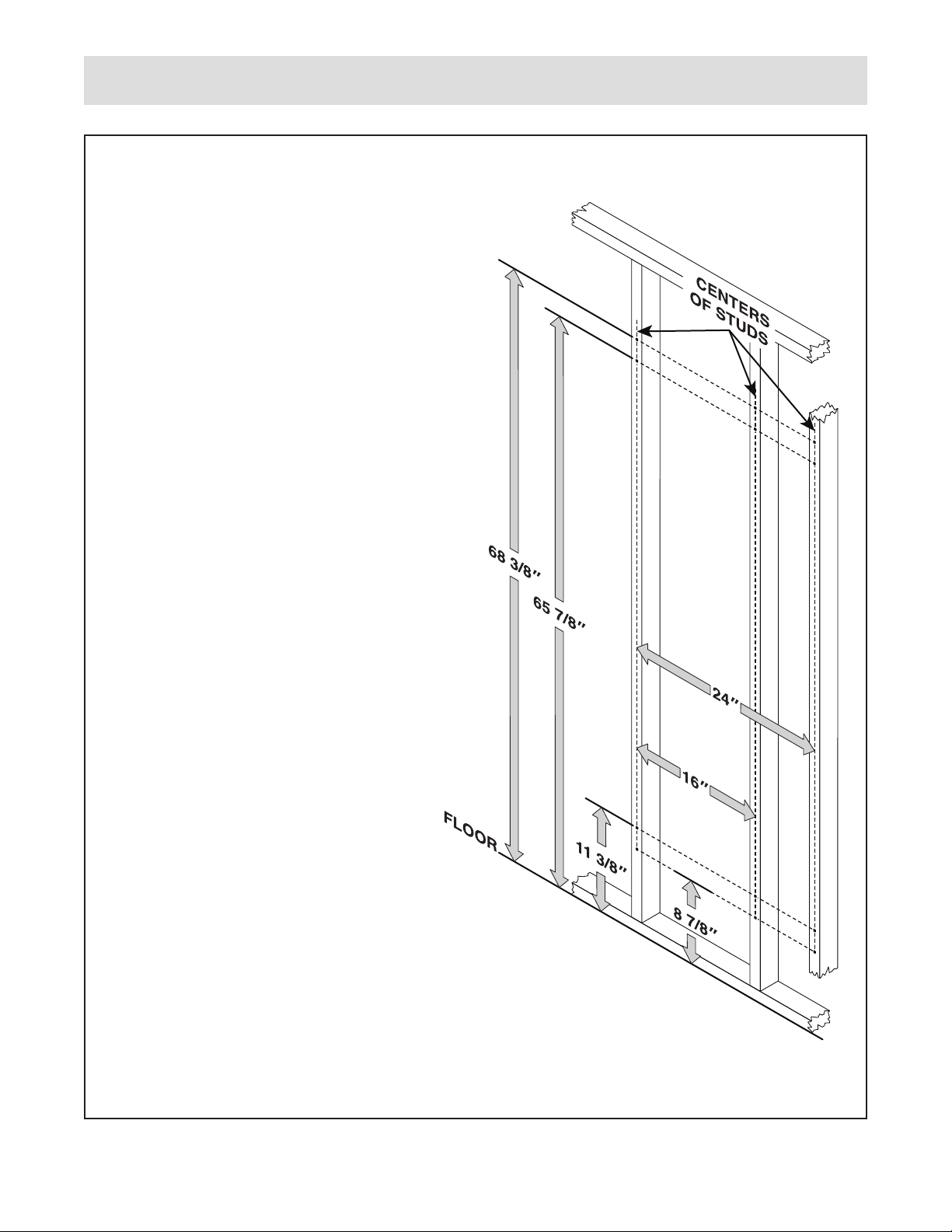
• The upper brackets. The upper hole in
each bracket must be positioned 68 3/8 in.
(174 cm) above the oor. Measuring from
upper hole to upper hole, the brackets must
be positioned 16–24 in. (41–61 cm) apart.
• The lower brackets. The lower hole in
each bracket must be positioned 8 7/8 in.
(22.5 cm) above the oor. Measuring from
lower hole to lower hole, the brackets must
be positioned 16–24 in. (41–61 cm) apart.
• If you are fastening the brackets to a
concrete surface, you will also need eight
3/8" lag screws (not included) designed
for use with eight concrete lag anchors
(not included). Follow the manufacturer’s
instructions to install the 3/8" lag screws and
the concrete lag anchors.
10
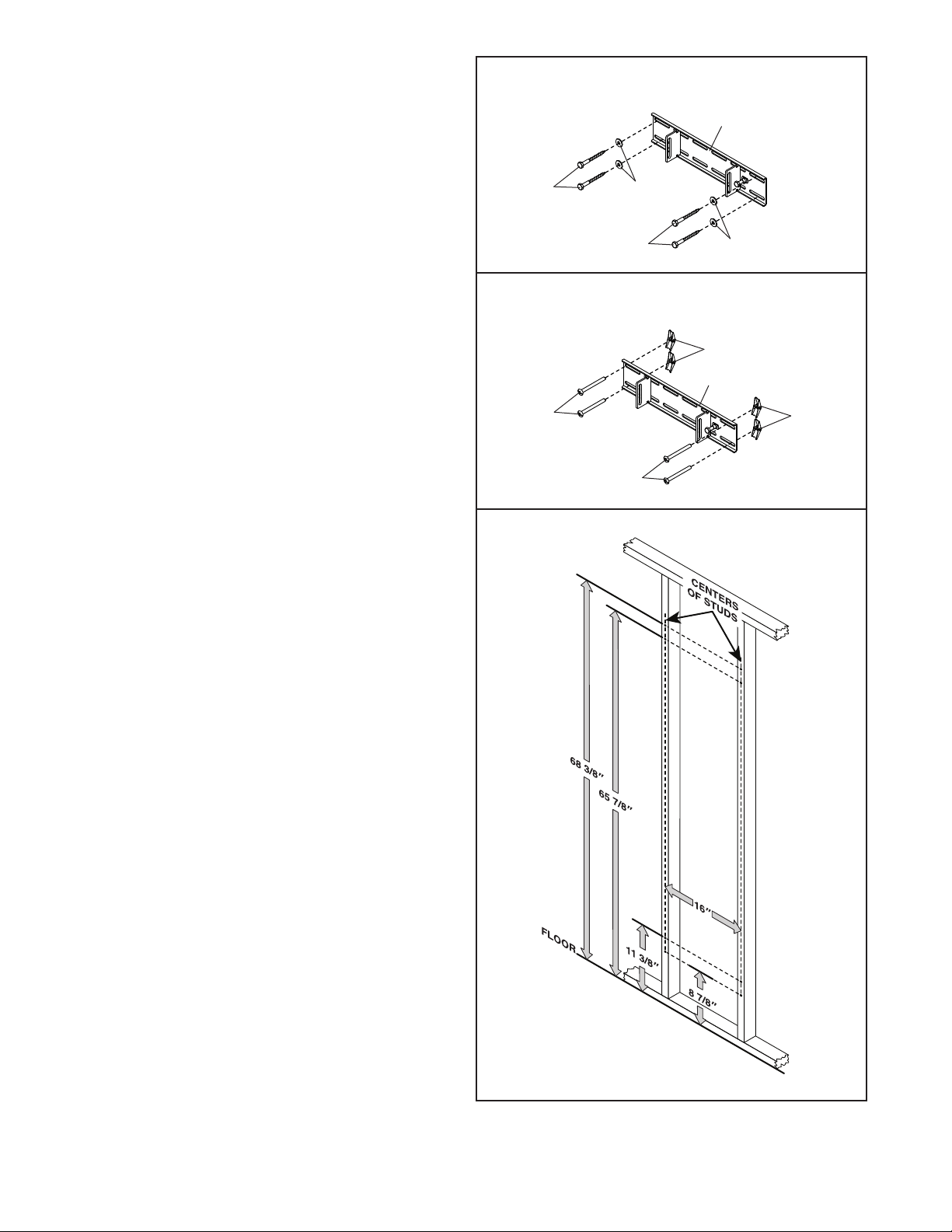
2.
Identify the two Slide Brackets (162) and the four
Wall Brackets (143).
Using your stud finder, locate the centers of two
wood or metal wall studs. IMPORTANT: Each
Bracket (143, 162) must be fastened to the
center of a wood or metal wall stud. The wall
studs can be no more than 24 in. (61 cm) and
no less than 16 in. (41 cm) apart.
If your wall studs are 16 in. (41 cm) apart,
go to step 3. You will use only the Slide
Brackets (162) to assemble the strength system.
Note: Save the unused Wall Brackets (143) in
case you need to mount the strength system
differently in the future.
If your wall studs are 24 in. (61 cm) apart, go
to step 4. You will use the Slide Brackets (162)
and the Wall Brackets (143).
WARNING: Serious injury
could result if the Slide Brackets (162)
or Wall Brackets (143) are improperly
installed. Obtain professional advice
and have a qualied person install the
Slide Brackets or Wall Brackets. Do
not fasten the Slide Brackets or Wall
Brackets to a drywall surface or to a
cinder block surface.
2
162
143
11
3
A
A
162
162
158
158
159
159
Wood Studs
Metal Studs
160
160
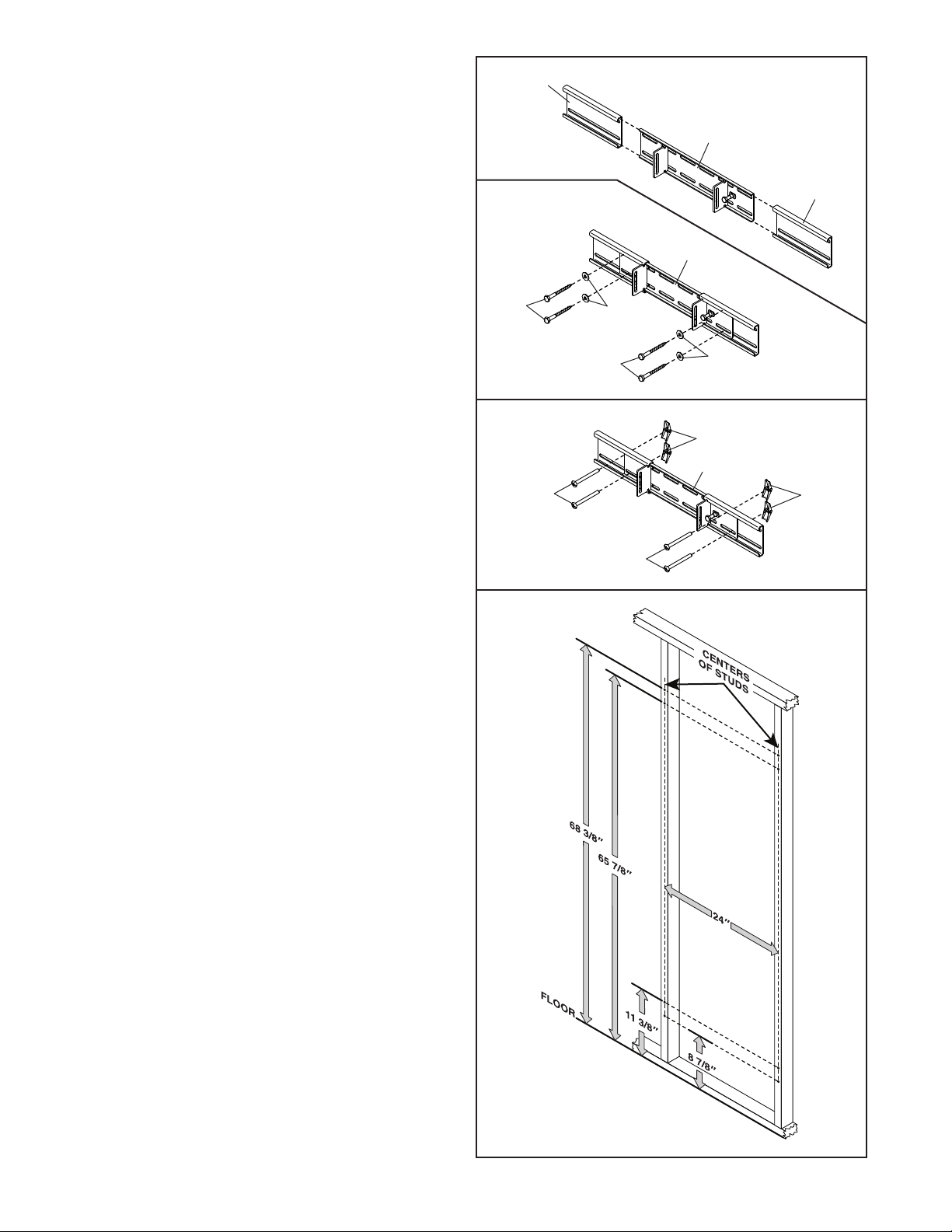
3. Align a Slide Bracket (162) along the centers
of the wall studs. Using your pencil, mark the
locations of the slots on the wall studs. Then,
remove the Slide Bracket.
Repeat these actions for the other Slide
Bracket (162).
Using your drill, drill pilot holes in the marked
locations on the wall. Drill 1/4" pilot holes in
wood wall studs. Drill 7/8" pilot holes in metal
wall studs. IMPORTANT: The pilot holes must
be drilled straight and perpendicular to the
center of the wall stud.
Wood Studs. If you are installing the Slide
Bracket (162) in wood wall studs, see the
upper drawing. Locate the 3/8" x 3" Screws
(158) and the 3/8" x 1 1/4" Washers (159). Align
a Slide Bracket with two sets of pilot holes.
Using your ratchet or drill, tighten four Screws
with four Washers into the Slide Bracket and the
pilot holes. Start all the Screws, and then fully
tighten them.
Metal Studs. If you are installing the Slide
Bracket (162) in metal wall studs, see the
center drawing. Locate the M10 x 100mm
Toggle Bolts (160). Align a Slide Bracket with
two sets of pilot holes. Using your ratchet or drill,
tighten four Toggle Bolts into the Slide Bracket
and the pilot holes; make sure to orient the
Toggle Bolts so that the wings (A) will open
vertically. Start all the Toggle Bolts, and then
fully tighten them.
Repeat these actions for the other Slide
Bracket (162).
Make sure that each Slide Bracket (162) is
flush with the wall and that the 3/8" x 3"
Screws (158) or the M10 x 100mm Toggle
Bolts (160) are firmly tightened. Pull firmly on
each Slide Bracket. There must not be any
movement or play in the Slide Brackets.
Then, go to step 5.
12
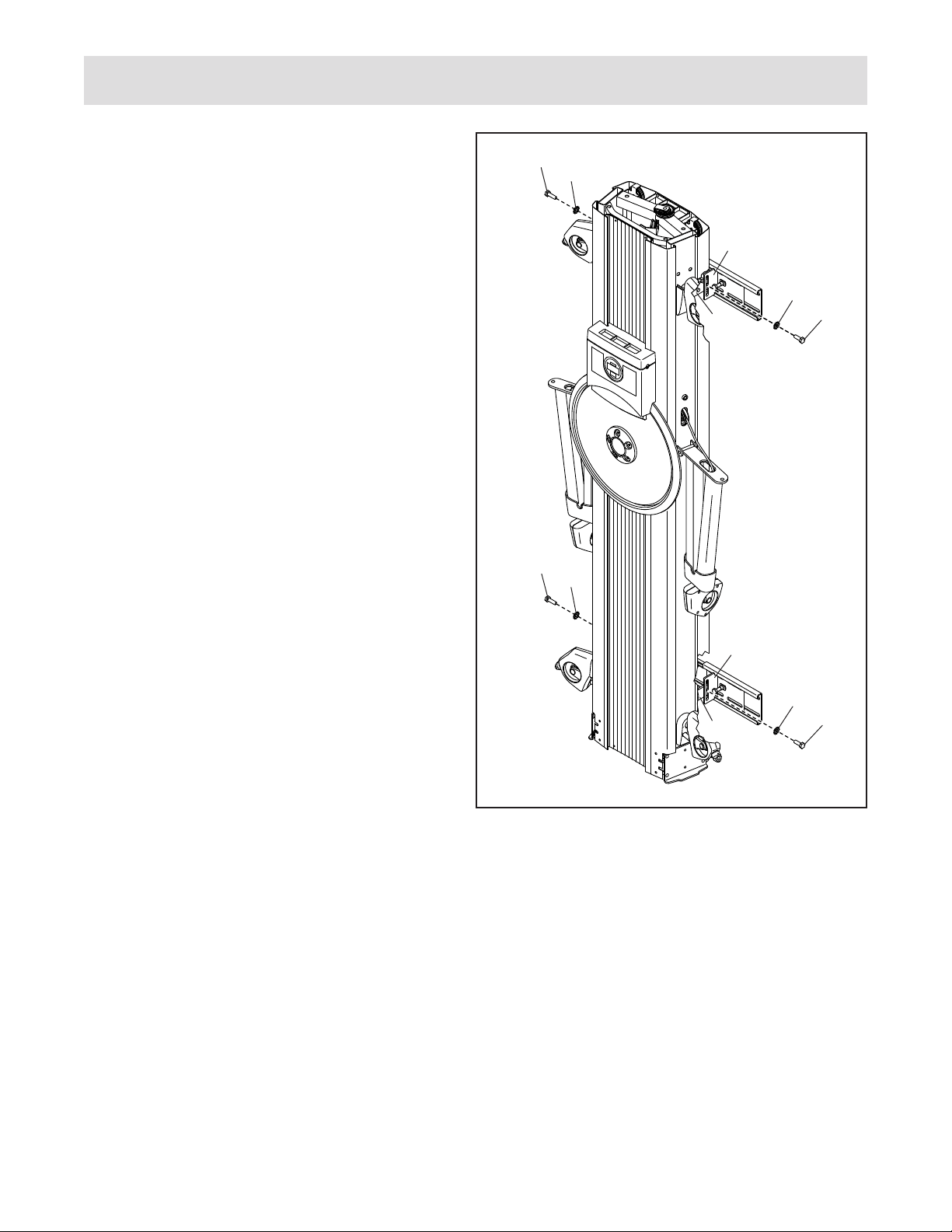
4. See the upper drawing. Slide a Wall Bracket
(143) onto each side of a Slide Bracket (162).
Align the Slide Bracket (162) assembly along
the centers of the wall studs. Adjust the Wall
Brackets (143) as needed. Using your pencil,
mark the locations of the slots on the wall studs.
Then, remove the Slide Bracket assembly.
Repeat these actions for the other Slide
Bracket (162) assembly.
Using your drill, drill pilot holes in the marked
locations on the wall. Drill 1/4" pilot holes in
wood wall studs. Drill 7/8" pilot holes in metal
wall studs. IMPORTANT: The pilot holes must
be drilled straight and perpendicular to the
center of the wall stud.
Wood Studs. If you are installing the Slide
Bracket (162) assembly in wood wall studs,
see the second drawing. Locate the 3/8" x 3"
Screws (158) and the 3/8" x 1 1/4" Washers
(159). Align a Slide Bracket assembly with two
sets of pilot holes. Using your ratchet or drill,
tighten four Screws with four Washers into the
Slide Bracket assembly and the pilot holes. Start
all the Screws, and then fully tighten them.
Metal Studs. If you are installing the Slide
Bracket (162) assembly in metal wall
studs, see the third drawing. Locate the
M10 x 100mm Toggle Bolts (160). Align a Slide
Bracket assembly with two sets of pilot holes.
Using your ratchet or drill, tighten four Toggle
Bolts into the Slide Bracket assembly and the
pilot holes; make sure to orient the Toggle
Bolts so that the wings (A) will open verti-
cally. Start all the Toggle Bolts, and then fully
tighten them.
Repeat these actions for the other Slide
Bracket (162) assembly.
Make sure that each Slide Bracket (162) is
flush with the wall and that the 3/8" x 3"
Screws (158) or the M10 x 100mm Toggle
Bolts (160) are firmly tightened. Pull firmly on
each Slide Bracket. There must not be any
movement or play in the Slide Brackets.
Then, go to step 5.
4
A
A
158
158
159
159
Wood
Studs
Metal
Studs
143
162
162
162
143
160
160
13
Strength System Assembly
5
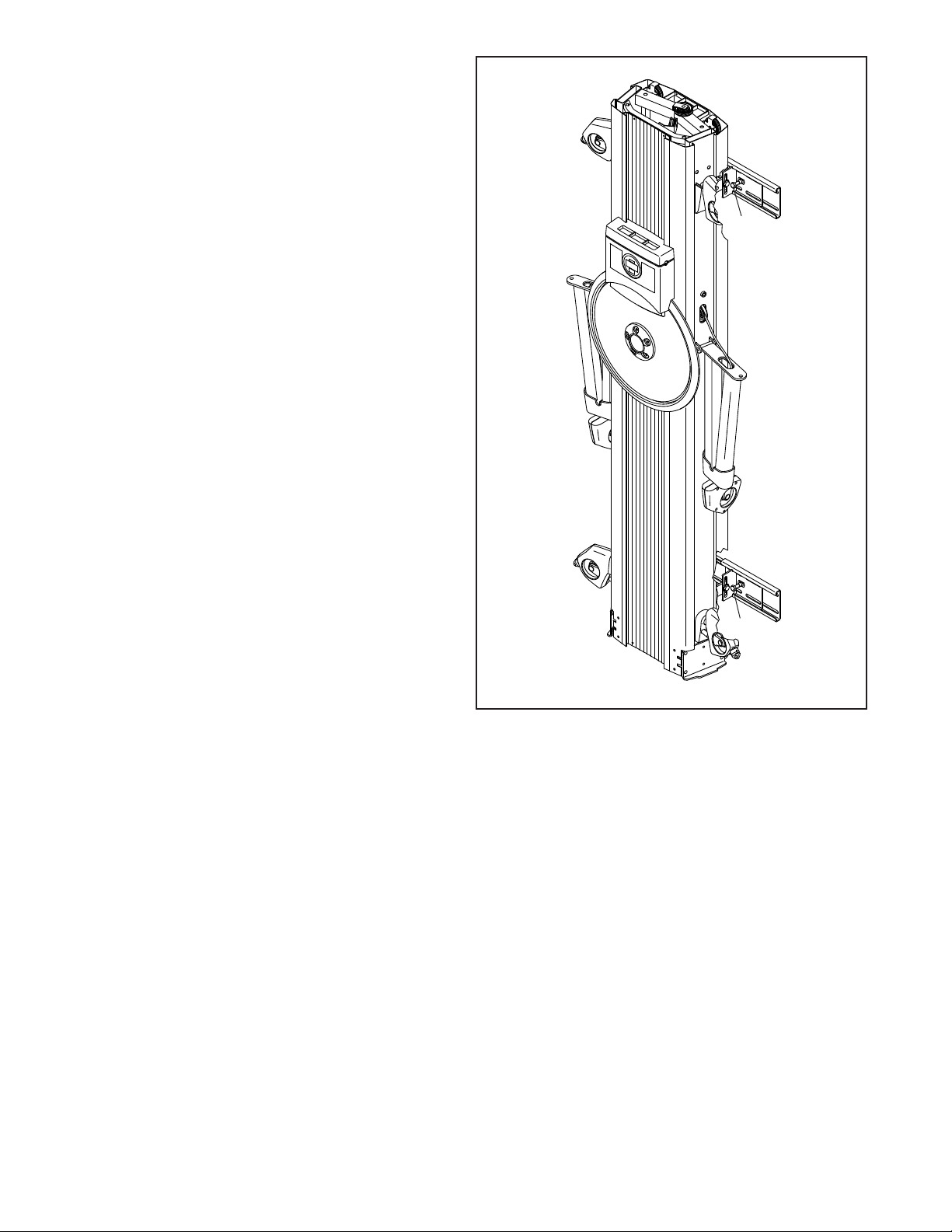
5. With the help of one or two other persons, move
the strength system near the wall and align
the four Tower Brackets (163) (only one side
is shown) on the strength system with the two
Slide Brackets (162) on the wall. Tip: To protect
the floor or carpet from damage, place a mat
under the strength system.
Attach each Tower Bracket (163) to a Slide
Bracket (162) with an M10 x 20mm Patch Screw
(156) and an M10 Star Washer (161); start all
the Patch Screws, and then tighten them.
162
162
163
156
156
161
161
163
156
161
156
161
14
6
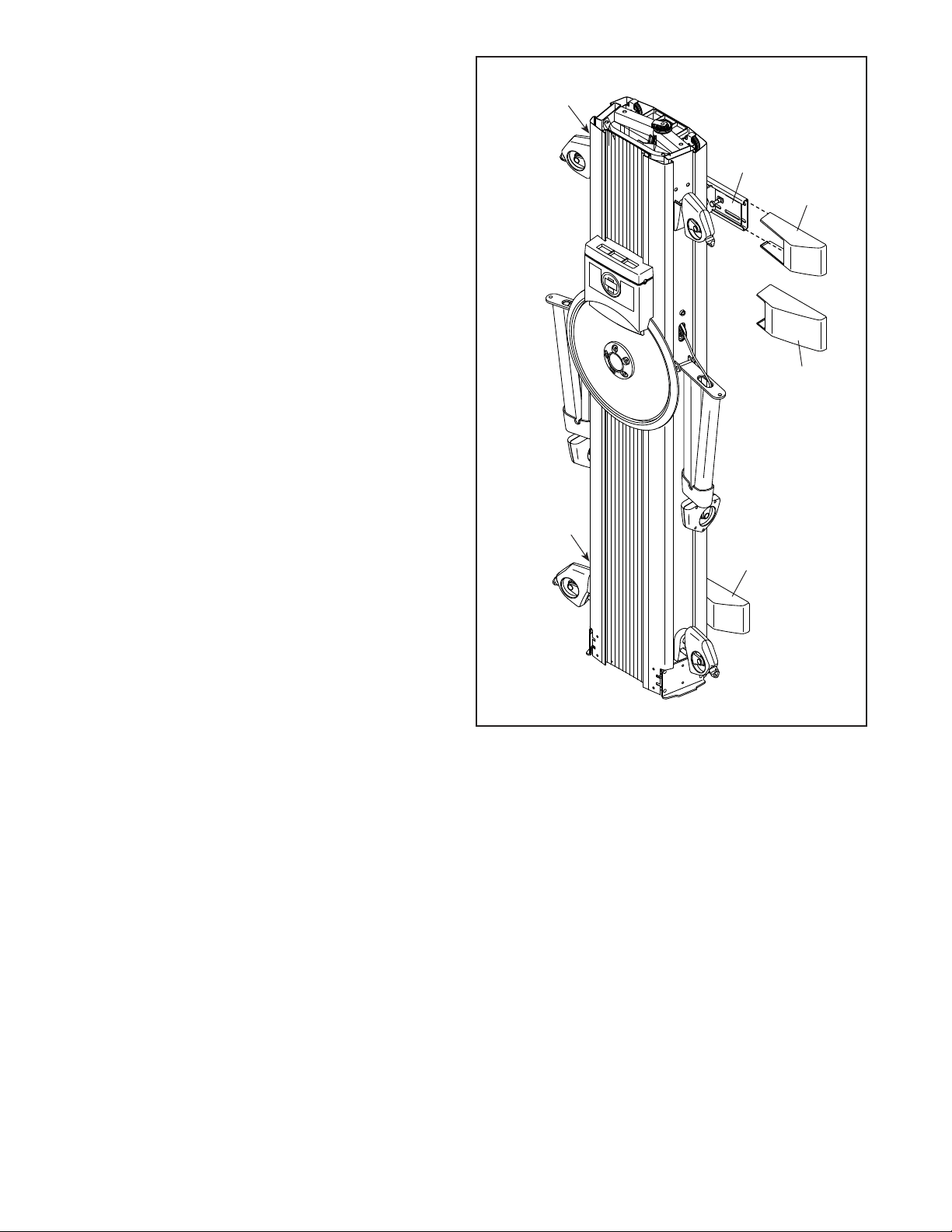
6. Firmly tighten the four indicated M10 x 20mm
Bolts (157) (only one side is shown).
157
157
15
7
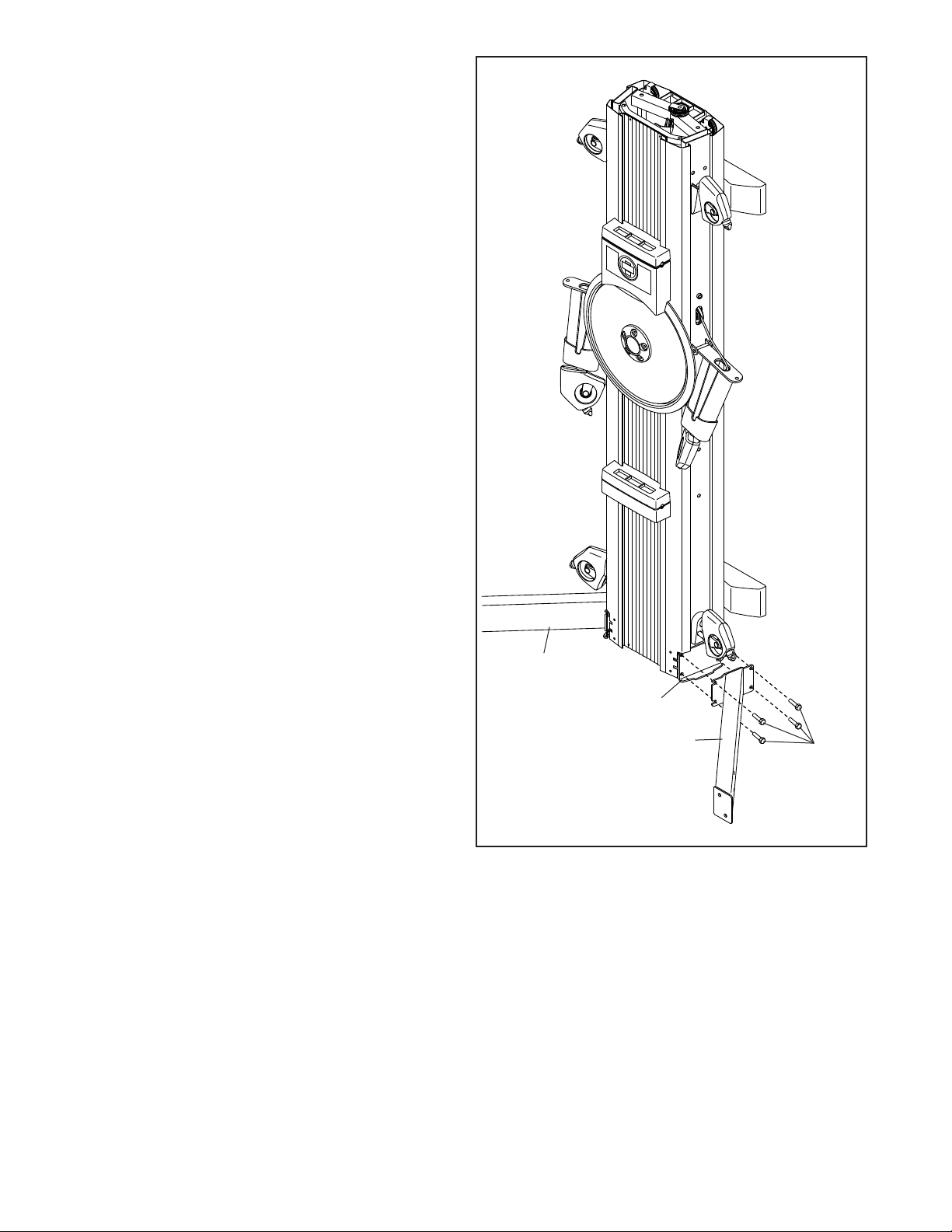
7. Identify the four Slide Covers (164) and the four
Wall Covers (165). Slide the Slide Cover or
the Wall Cover that best fits onto each Wall
Bracket (162).
Note: Save the unused Slide Covers (164) or
Wall Covers (165) in case you need to mount the
strength system differently in the future.
162
164
165
164 or 165
164 or 165
164 or 165
16
8
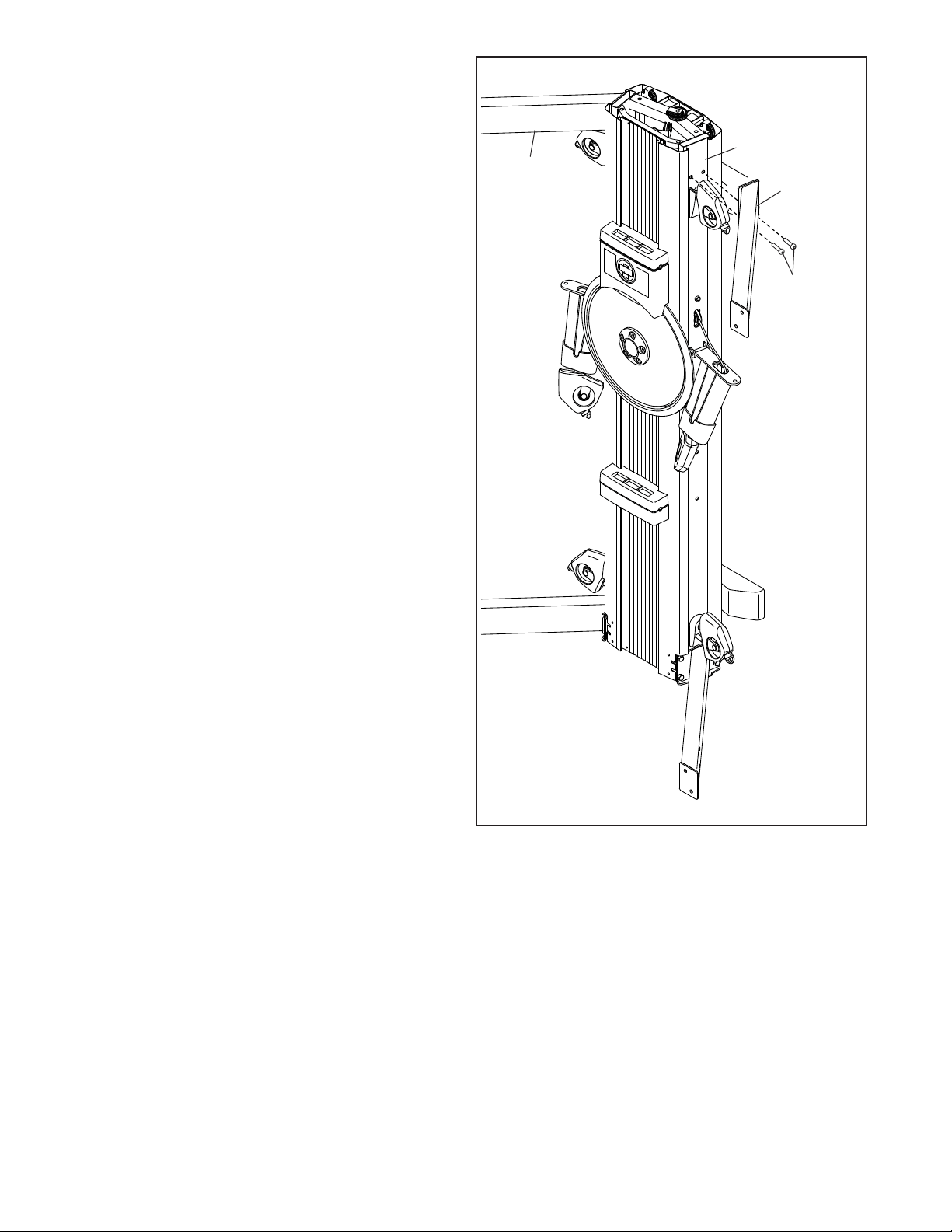
8. Attach the Right Lower Stabilizer (130) to the
right side of the Frame (1) with four M10 x 25mm
Hex Screws (101); start all the Hex Screws,
but do not fully tighten them yet.
Attach the Left Lower Stabilizer (145) in the
same way.
130
1
145
101
17
9
9. Attach the Right Upper Stabilizer (146) to the
right side of the Frame (1) with two M10 x 35mm
Screws (95); start both Screws, but do not
fully tighten them yet.
Attach the Left Upper Stabilizer (151) in the
same way.
95
151
146
1
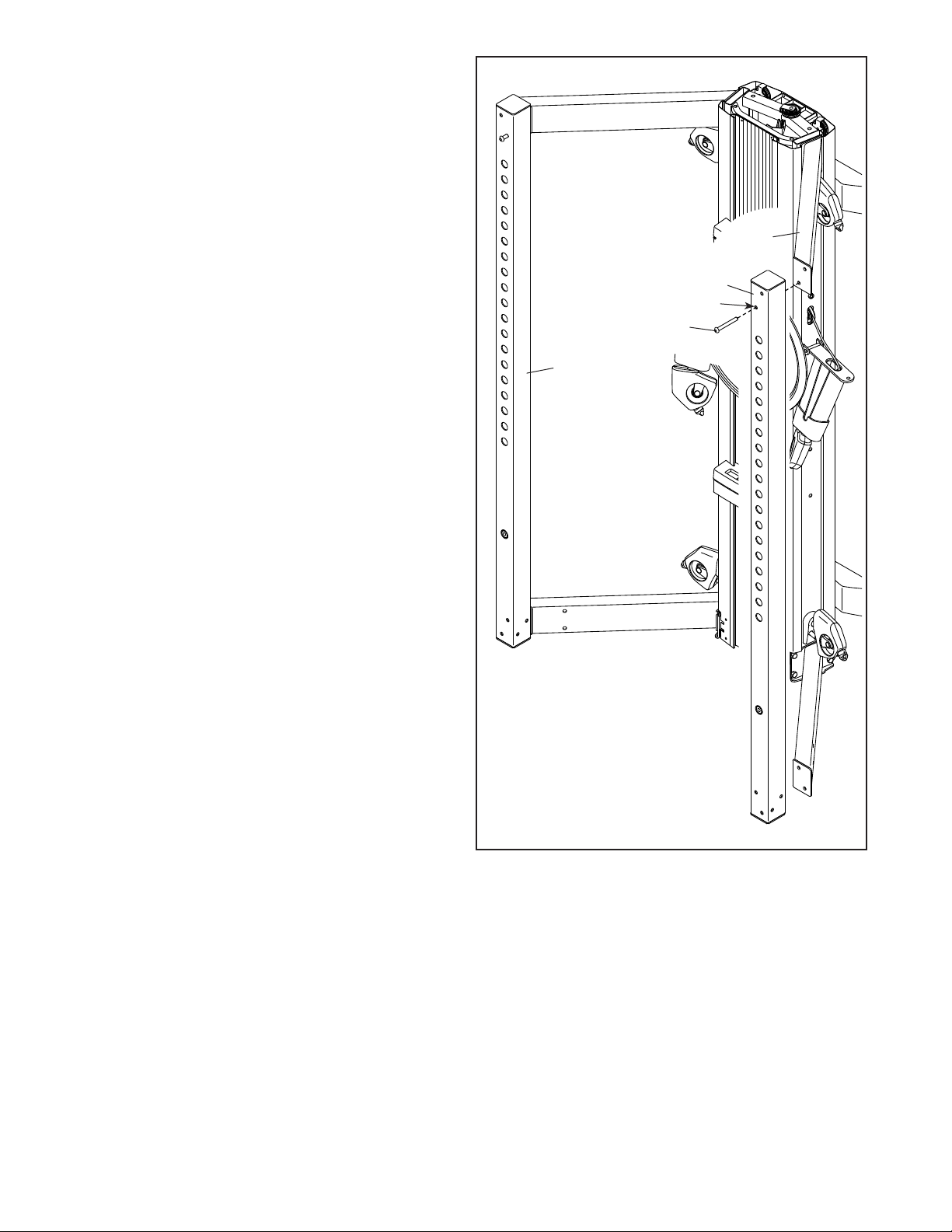
18
10
10. Orient the Right Upright (150) as shown.
Attach the Right Upright (150) to the Right Upper
Stabilizer (146) with an M10 x 93mm Screw
(102). Make sure to insert the Screw into the
lower hole (A); do not fully tighten the Screw
yet. This Screw will be used again in step 12.
Attach the Left Upright (149) in the same way.
102
150
A
149
146
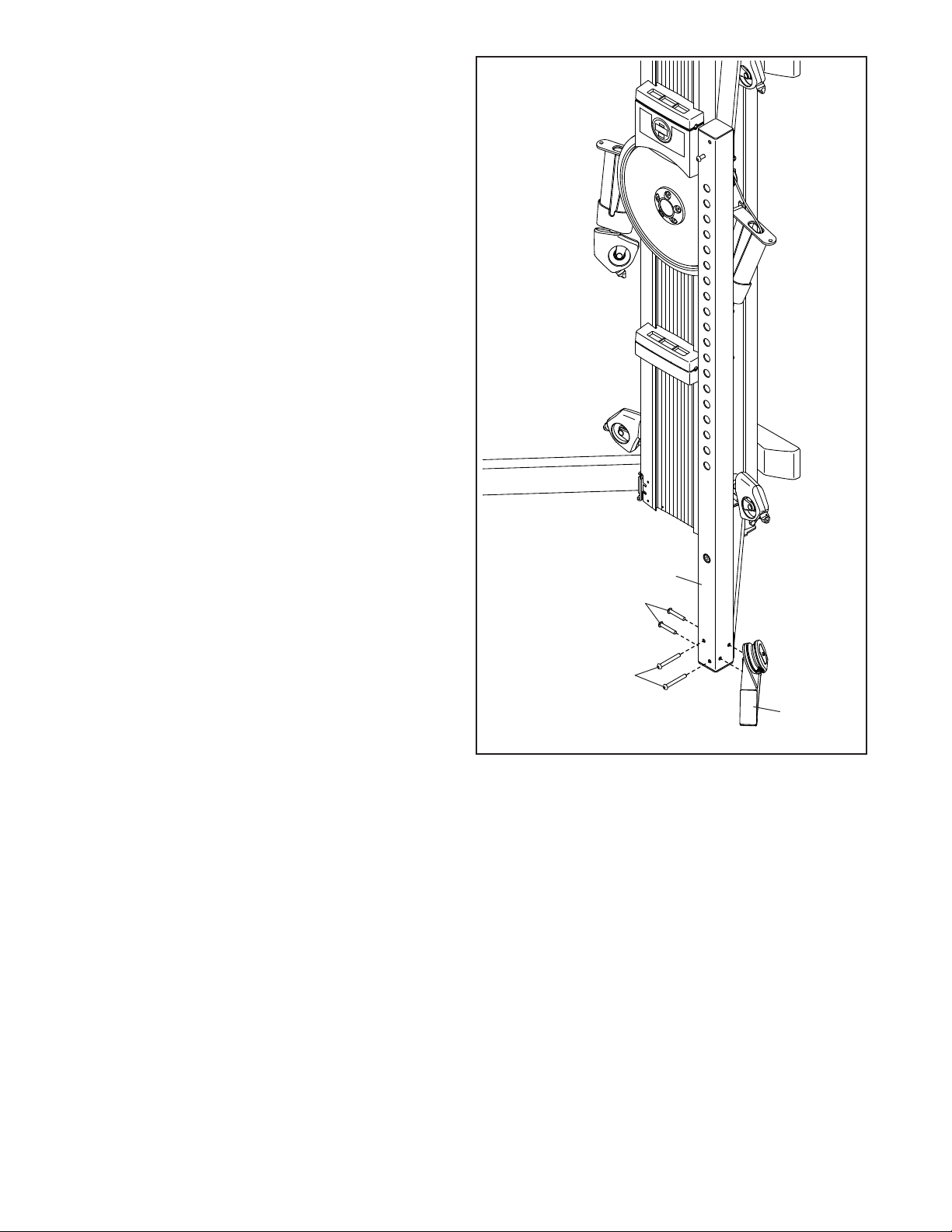
19
11
11. Attach the Right Leg (44) to the Right Upright
(150) with four M10 x 90mm Screws (140);
start all the Screws, but do not fully tighten
them yet.
Attach the Left Leg (not shown) in the
same way.
140
140
150
44
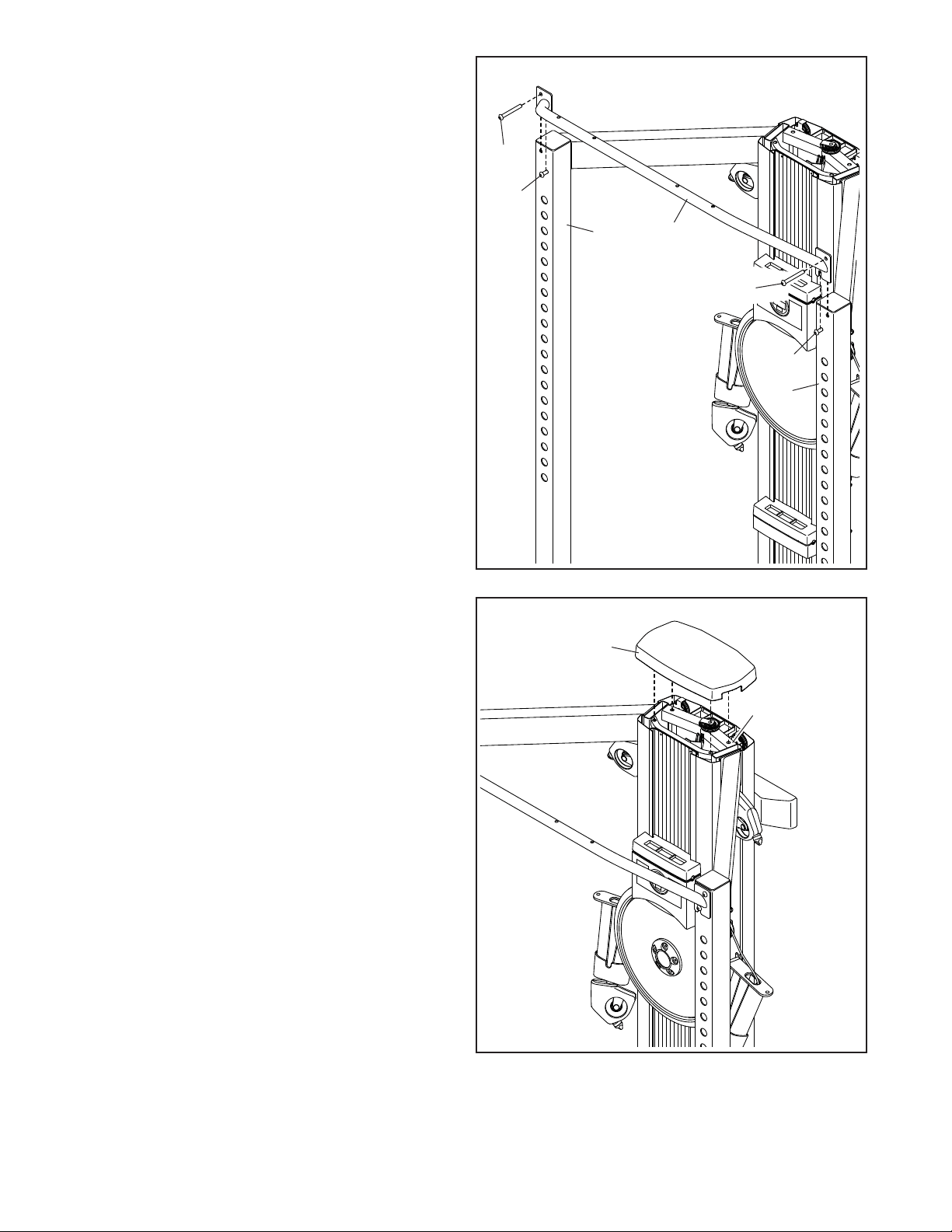
20
12
12. Slide the Pull-up Bar (147) onto the M10 x 93mm
Screws (102) in the Left and Right Uprights
(149, 150) that you attached in step 10.
Attach the Pull-up Bar (147) with two additional
M10 x 93mm Screws (102), start both Screws,
but do not fully tighten them yet.
See steps 8–12. Fully tighten all the Screws
(95, 101, 102, 140).
13
102
102
149
102
102
150
147
13. Orient the Tower Top Cover (2) as shown, and
press it onto the top of the Frame (1).
2
1
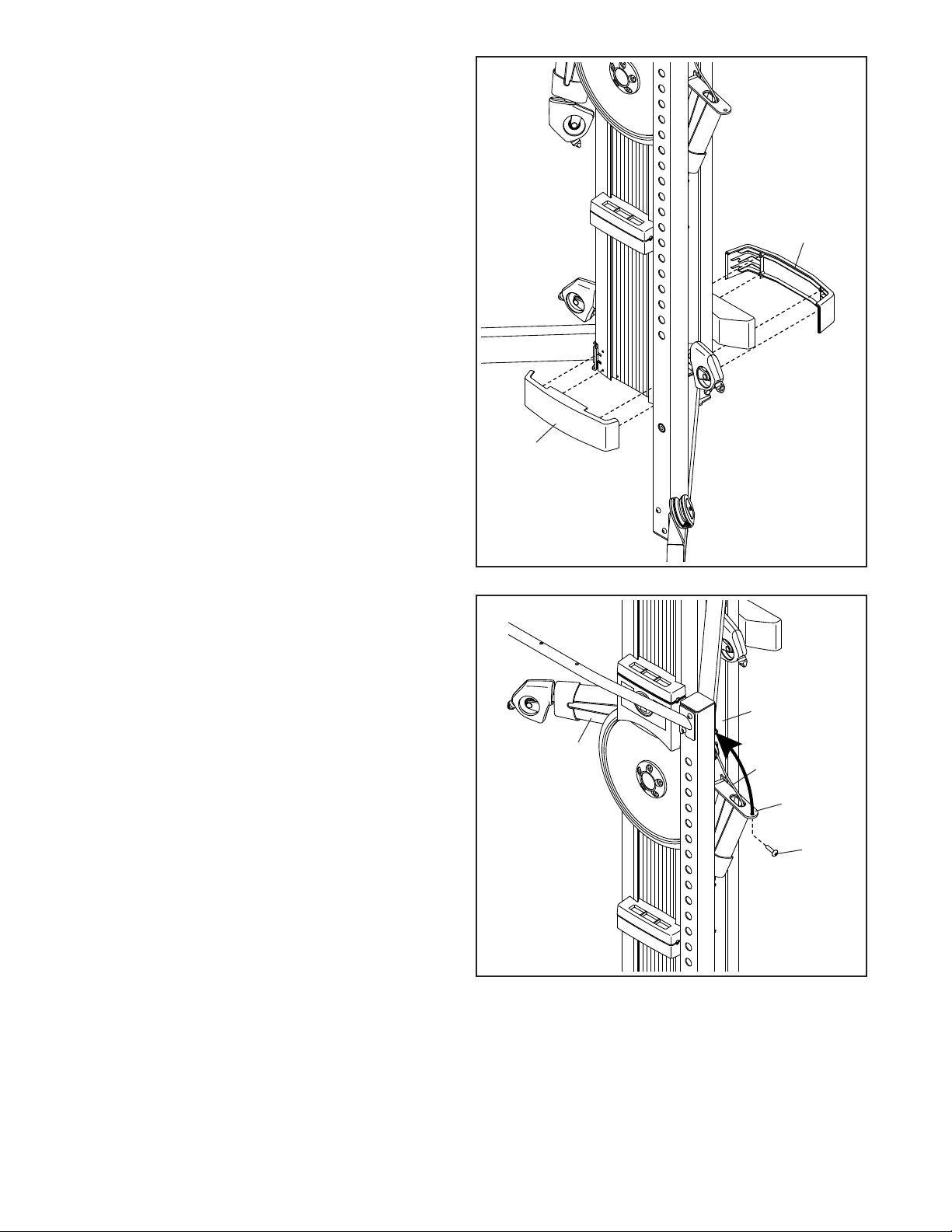
21
14
15. Tip: Avoid pinching the Rope (105). Pivot the
Right Tower Arm (153) upward and secure it to
the Frame (1) with an M10 x 30mm Screw (100).
Secure the Left Tower Arm (19) in the
same way.
15
14. Press the Front and Rear Bottom Covers
(67, 109) into place as shown.
67
109
153
105
1
19
100
Avoid
pinching
the Rope
(105)
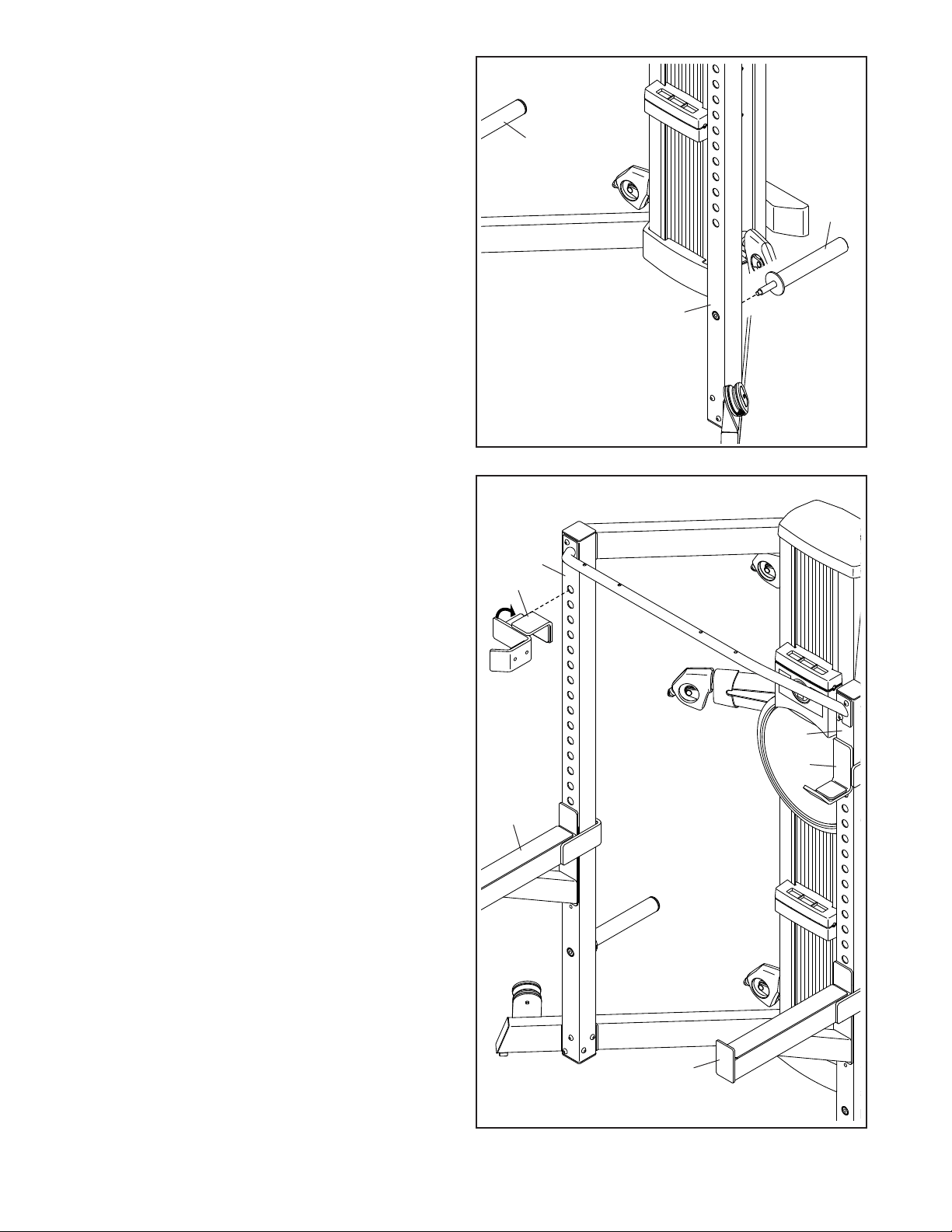
22
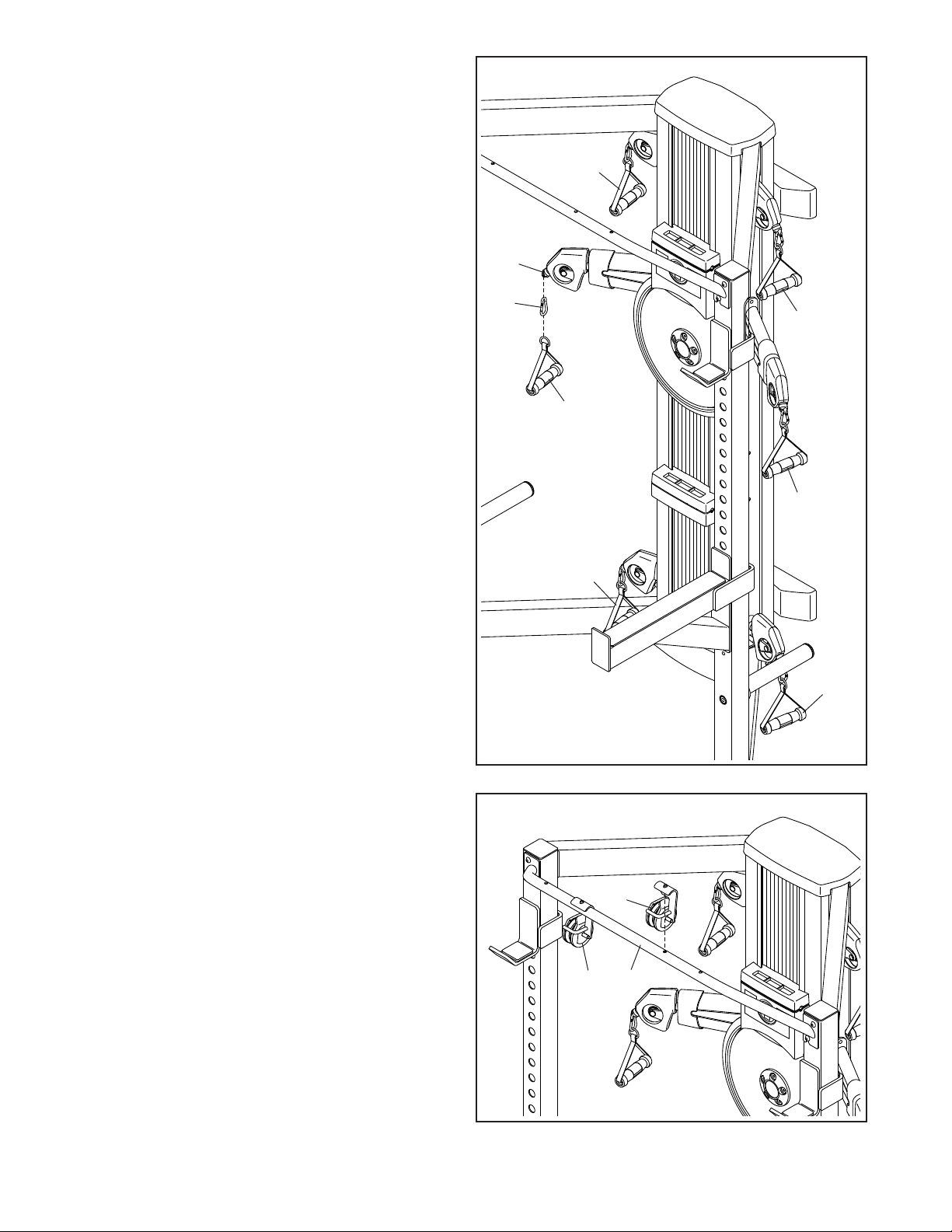
16. Tighten a Storage Tube (144) into the Right
Upright (150).
Attach the other Storage Tube (144) to the
Left Upright (not shown) in the same way.
17. Orient a Weight Rest (141) as shown, insert it
into an adjustment hole in the Left Upright (149),
and rotate it in the direction shown by the arrow.
Attach the other Weight Rest (141) to
the Right Upright (150) in the same way.
IMPORTANT: Make sure to set both Weight
Rests at the same height.
Attach the Weight Spotters (142) to the
Left and Right Uprights (149, 150) in the
same way.
IMPORTANT: Make sure to place the Weight
Spotters (142) below the Weight Rests
(141). Make sure that there are at least three
adjustment holes between the Weight Rests
and the Weight Spotters.
16
17
144
144
150
150
141
142
142
141
149
23
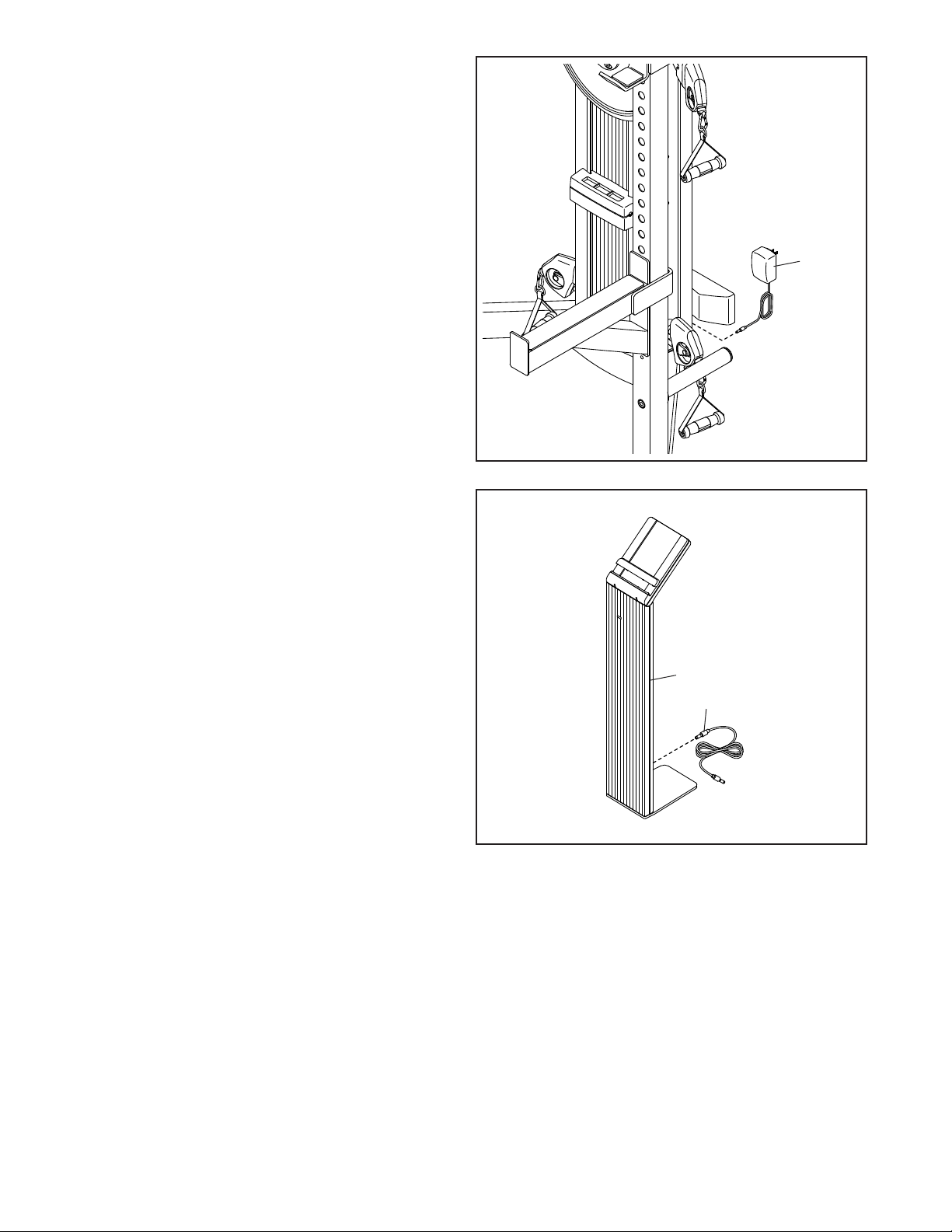
19. Orient a Pulley Bracket (60) as shown, and then
insert the post on the Pulley Bracket into the
desired adjustment hole in the Pull-up Bar (147).
Make sure that the Pulley Bracket is firmly
inserted in the adjustment hole.
Attach the other Pulley Bracket (60) in the
same way.
19
18. Attach a Handle (37) to a Rope End (35) with a
Clip (36).
Attach the other Handles (37) in the
same way.
35
36
37
37
60 147
37
37
37
18
37
60
24
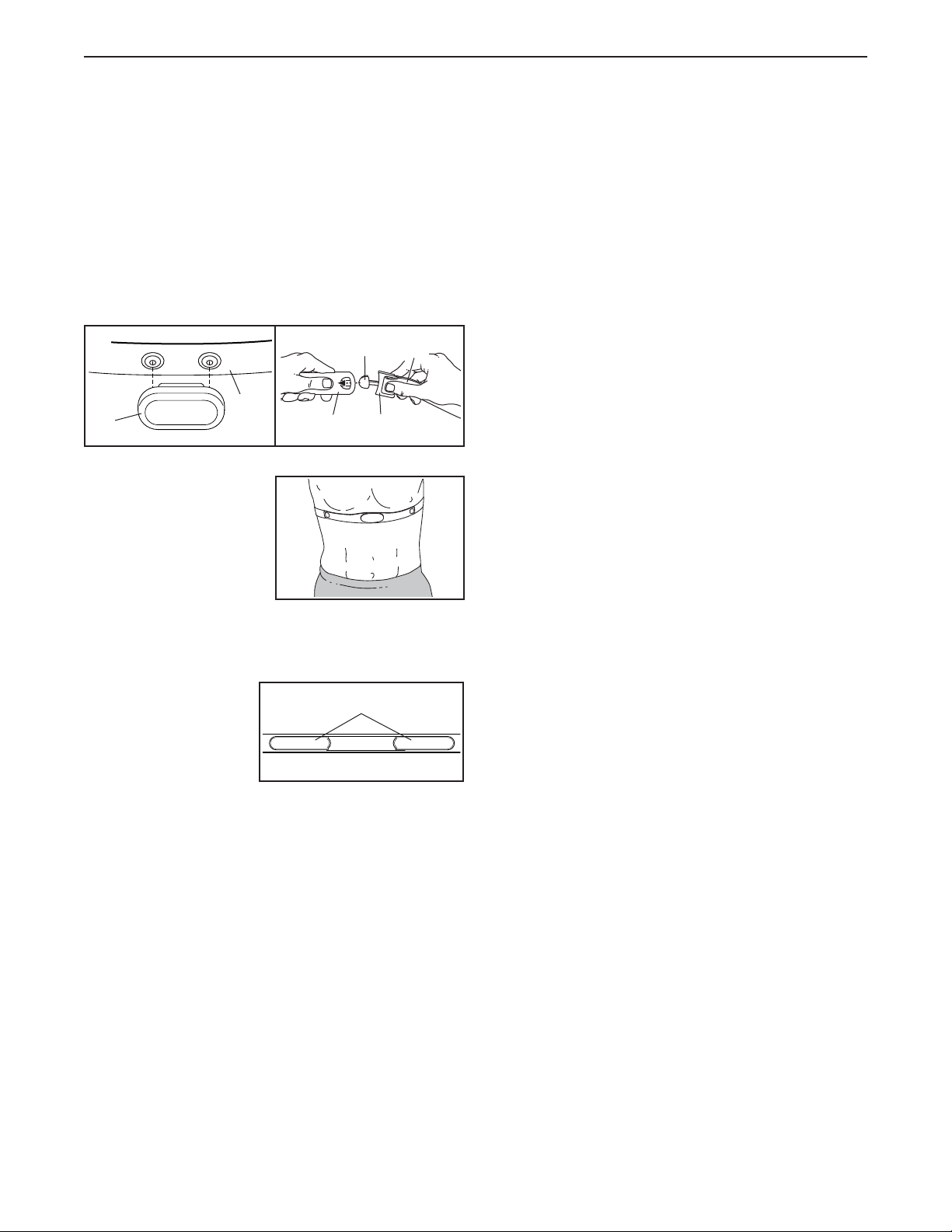
20
21
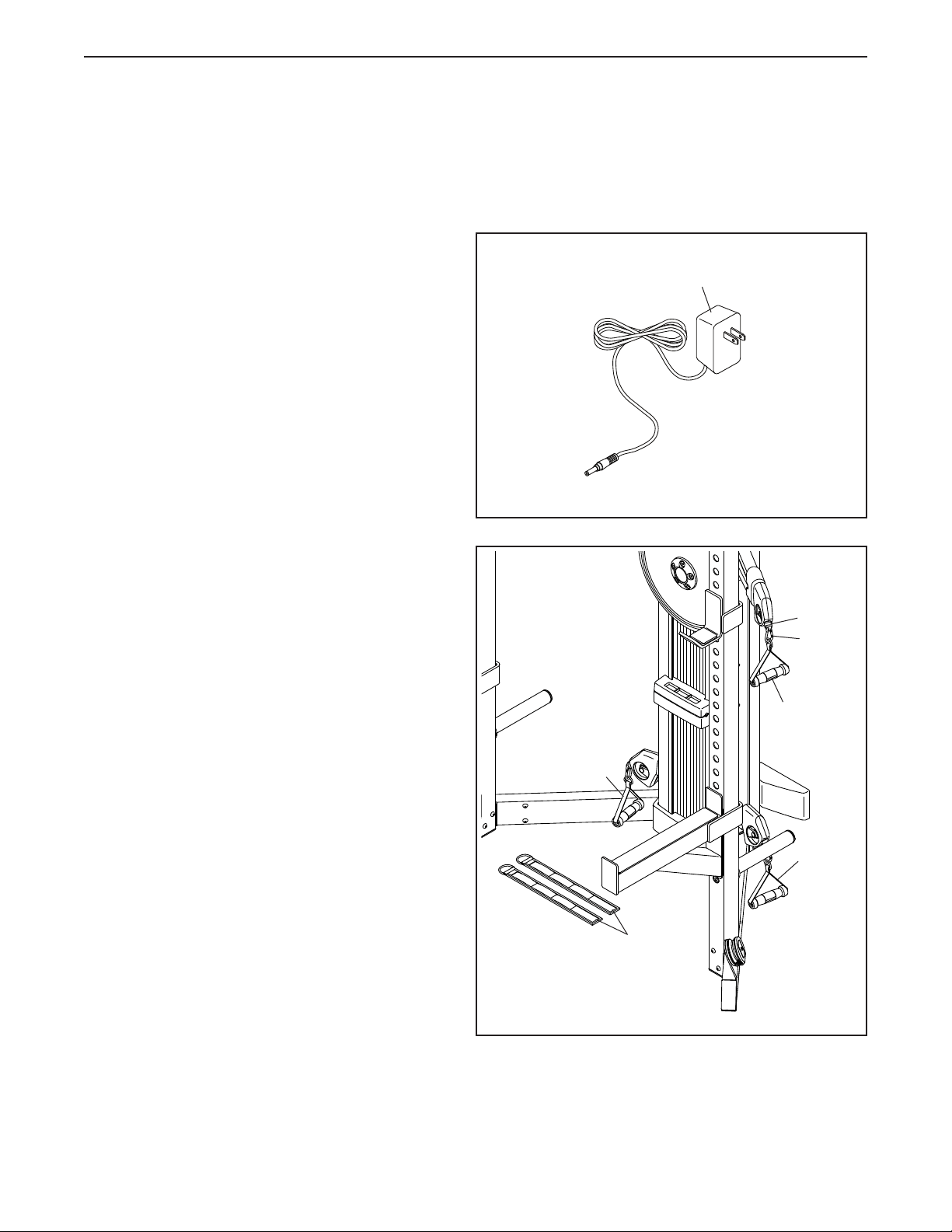
20. Plug the Power Adapter (126) into a receptacle
on the side or the rear of the strength system.
Note: To plug the Power Adapter (126) into an
outlet, see HOW TO PLUG IN THE POWER
ADAPTER on page 26.
21. Plug the Tablet Stand Power Wire (155) into the
receptacle on the rear of the Tablet Stand (15).
Then, plug the other end of the Tablet Stand
Power Wire (155) into a receptacle on the side
or the rear of the strength system.
126
155
15
22. Make sure that all parts have been properly tightened. The use of the remaining parts will be explained in
HOW TO USE THE STRENGTH SYSTEM, beginning on page 26.
Before using the strength system, pull each handle a few times to make sure that the ropes move smoothly
around the pulleys. If one of the ropes does not move smoothly, find and correct the problem.
25
THE CHEST HEART RATE MONITOR
HOW TO PUT ON THE HEART RATE MONITOR
If the heart rate monitor looks like the one shown in
drawing 1, press the transmitter (A) onto the snap fas-
teners on the chest strap (B). If the heart rate monitor
looks like the one shown in drawing 2, insert the tab
(C) on one end of the chest strap (D) into one end of
the transmitter (E). Then, press the end of the trans-
mitter under the buckle (F) on the chest strap; the tab
should be flush with the transmitter.
Next, wrap the heart
rate monitor around
your chest in the loca-
tion shown; the heart
rate monitor must be
under your clothes,
tight against your skin.
Make sure that the logo
is right-side-up. Then, attach the other end of the chest
strap. Adjust the length of the chest strap, if necessary.
Next, pull the trans-
mitter and the chest
strap away from your
body a few inches
and locate the two
electrode areas (G).
Using saliva or con-
tact lens solution, wet the electrode areas. Then, return
the transmitter and the chest strap to a position against
your chest.
CARE AND MAINTENANCE
• Thoroughly dry the electrode areas with a soft towel
after each use. Moisture may keep the heart rate
monitor activated, shortening the life of the battery.
• Store the heart rate monitor in a warm, dry place. Do
not store the heart rate monitor in a plastic bag or
other container that may trap moisture.
• Do not expose the heart rate monitor to direct
sunlight for extended periods of time, and do not
expose it to temperatures above 122°F (50°C) or
below 14°F (-10°C).
• Do not excessively bend or stretch the heart rate
monitor when using or storing it.
• To clean the transmitter, use a damp cloth and a
small amount of mild soap. Then, wipe the transmit-
ter with a damp cloth and thoroughly dry it with a soft
towel. Never use alcohol, abrasives, or chemicals
to clean the transmitter. Hand wash and air dry the
chest strap.
TROUBLESHOOTING
• If the heart rate monitor does not function when
positioned as described at the left, move it slightly
lower or higher on your chest.
• If heart rate readings are not displayed until you
begin perspiring, re-wet the electrode areas.
• For the console to display heart rate readings, you
must be within arm’s length of the console.
• If there is a battery cover on the back of the trans-
mitter, replace the battery with a new battery of the
same type.
• The heart rate monitor is designed to work with
people who have normal heart rhythms. Heart rate
reading problems may be caused by medical condi-
tions such as premature ventricular contractions
(pvcs), tachycardia bursts, and arrhythmia.
• The operation of the heart rate monitor can be
affected by magnetic interference from high power
lines or other sources. If you suspect that magnetic
interference is causing a problem, try relocating the
fitness equipment.
1
2
A
B
E
F
C
D
G
26
This section explains how to adjust the strength system. See the EXERCISE GUIDELINES on page 35 and
page 36 for important information about how to get the most benefit from your exercise program.
Make sure that all parts are properly tightened each time the strength system is used. Replace any worn
parts immediately.
HOW TO USE THE STRENGTH SYSTEM
HOW TO PLUG IN THE POWER ADAPTER
IMPORTANT: If the strength system has been
exposed to cold temperatures, allow it to warm
to room temperature before you plug in the
Power Adapter (126). If you do not do this, you
may damage the console displays or other elec-
tronic components.
Plug the Power Adapter (126) into a receptacle on
the side or the rear of the strength system. Then,
plug the Power Adapter into an appropriate outlet
that is properly installed in accordance with all local
codes and ordinances.
126
HOW TO ATTACH THE HANDLES AND ANKLE
STRAPS
Attach a Handle (37) or an Ankle Strap (53) to a
Rope End (35) with a Clip (36). Attach the other
Handles or Ankle Strap in the same way.
37
53
37
36
35
37
27
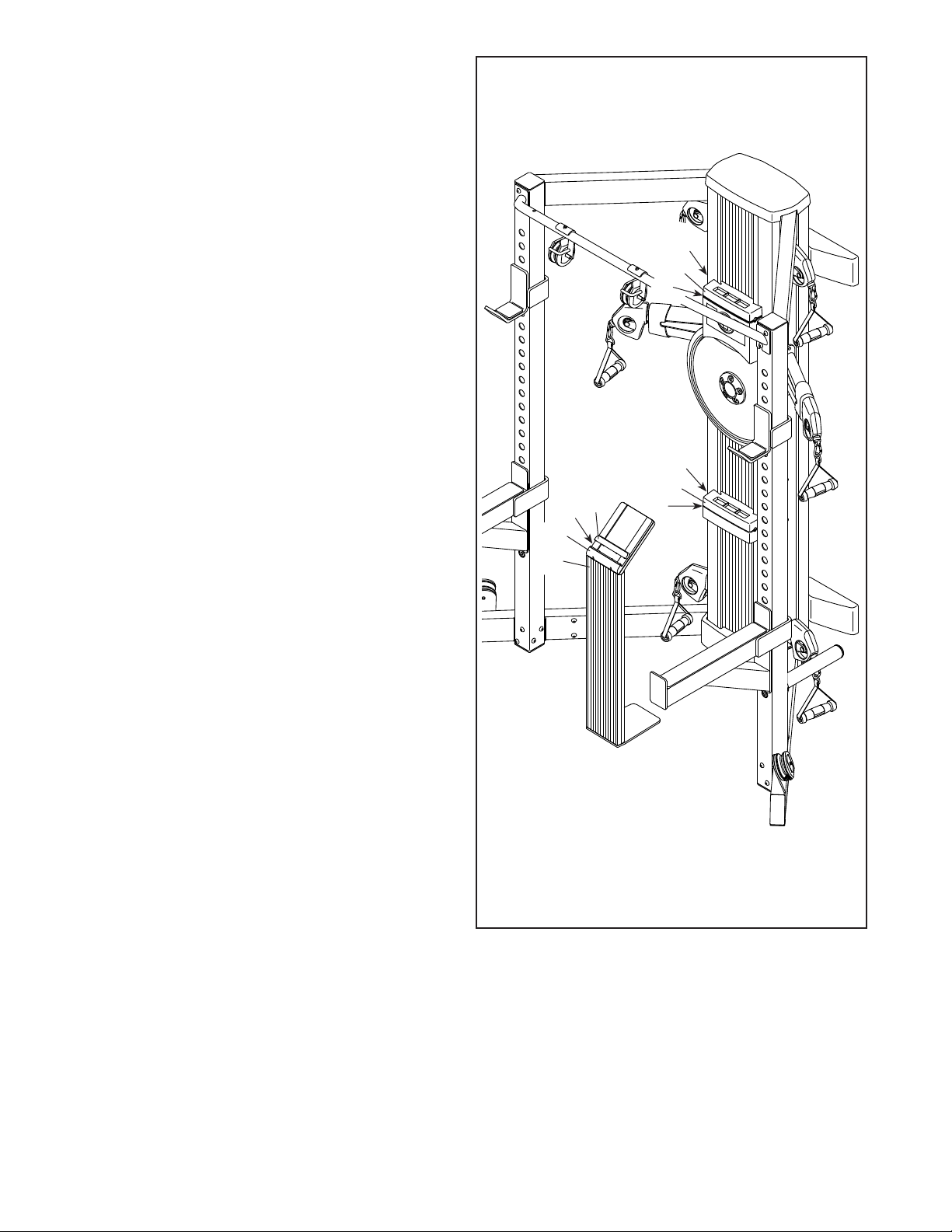
HOW TO USE THE TABLET HOLDERS
IMPORTANT: The Tablet Holders (68) are
designed for use with most full-size tablets. Do
not place any other electronic device or object in
the Tablet Holders. Do not set anything on top of
the Tablet Holders.
To insert a tablet into a Tablet Holder (68), slide it
upward, set the tablet in the tray (A), and then pull
the Tablet Holder downward over the top edge of the
tablet. Make sure that the tablet is firmly secured
in the Tablet Holder. Reverse these actions to
remove the tablet from the Tablet Holder.
To maintain the battery in your tablet while you
exercise, connect the charging cable on your tablet
to one of the charging ports (B) near the Tablet
Holders (68). Make sure that the included power
adapter is plugged into the strength system
and into an outlet that is properly installed in
accordance with all local codes and ordinances.
HOW TO USE THE TABLET STAND
IMPORTANT: The Tablet Stand (15) is designed
for use with most full-size tablets. Do not place
any other electronic device or object in the
Tablet Stand.
To insert a tablet into the Tablet Stand (15), lift the
slide (C) upward, and then set the tablet in the tray
(D). Then, pull the slide downward over the top
edge of the tablet. Make sure that the tablet is
firmly secured in the Tablet Stand. Reverse these
actions to remove the tablet from the Tablet Stand.
To maintain the battery in your tablet while you
exercise, connect the charging cable on your tablet
to the charging port (E) on the Tablet Stand (15).
Make sure that the included tablet stand power
wire is plugged into the tablet stand and into the
strength system.
68
68
A
A
B
B
15
D
E
C
28
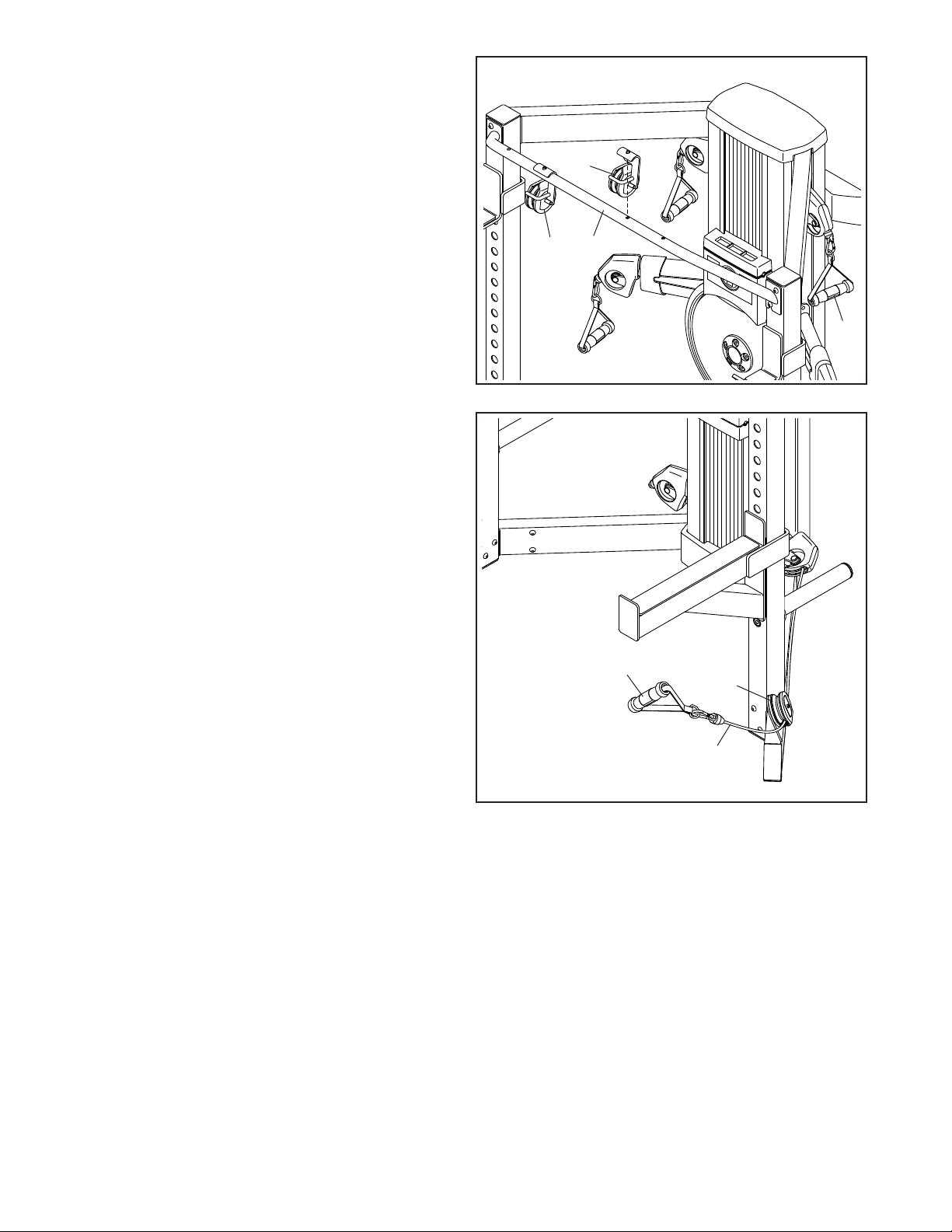
HOW TO USE THE UPPER PULLEYS
Insert the post on a Pulley Bracket (60) into the
desired adjustment hole in the Pull-up Bar (147).
Pull an upper Handle (37) outward and route the
Rope (not shown) over the pulley in the Pulley
Bracket (60); make sure that the Rope is securely
routed over the pulley.
Attach and use the other Pulley Bracket (60) in
the same way.
60
37
60
147
HOW TO USE THE LOWER PULLEYS
Pull a lower Handle (37) outward and route the
Rope (52) under the Large Pulley (64); make sure
that the Rope is securely routed under the Large
Pulley.
Repeat this action for the other Large Pulley
(not shown).
64
37
52
29
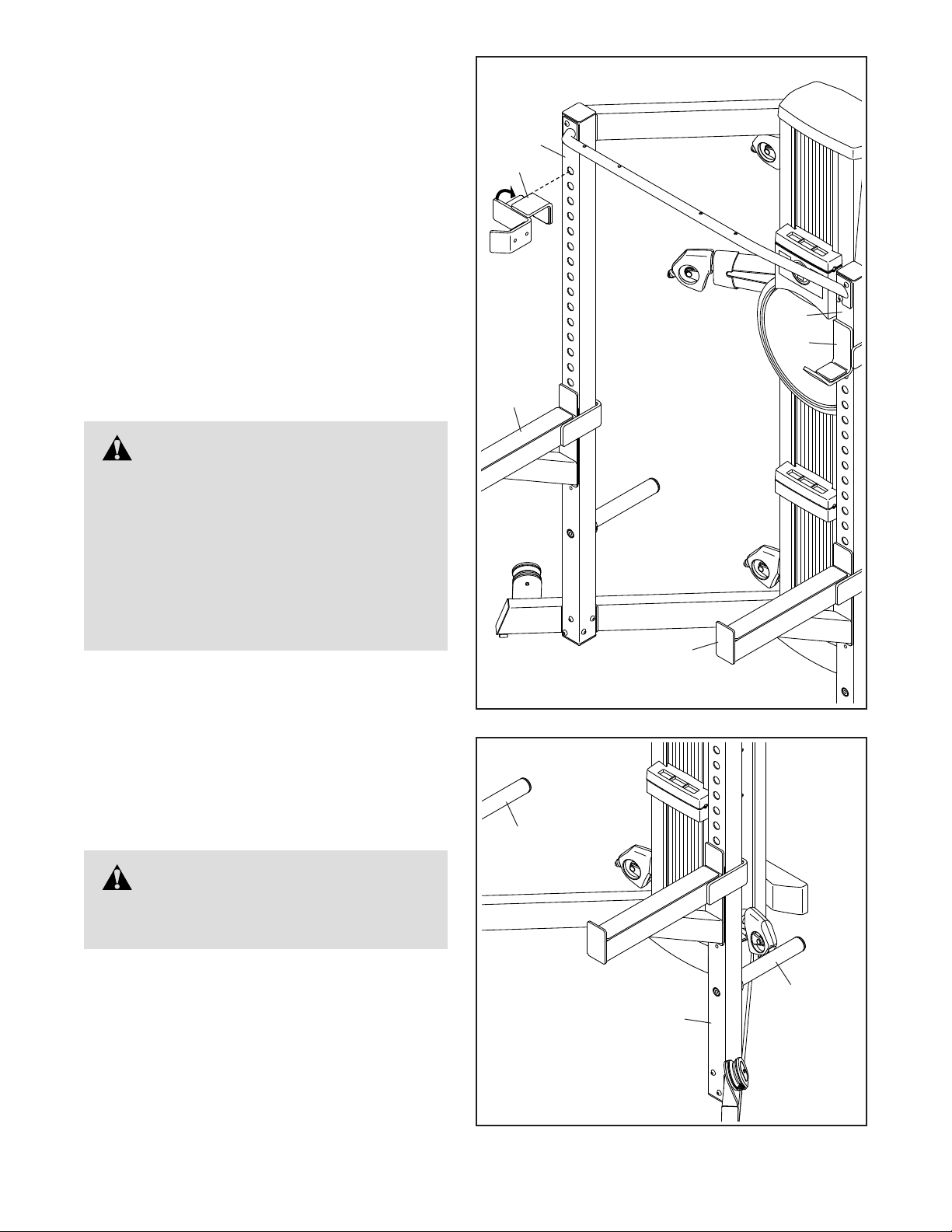
HOW TO ADJUST THE WEIGHT RESTS AND THE
WEIGHT SPOTTERS
To adjust the height of the Weight Rests (141),
first remove the Weight Rests from the Uprights
(149, 150), insert them into the desired adjustment
holes in the Uprights, and then rotate them into
place. Make sure that the Weight Rests are at the
same height.
To adjust the height of the Weight Spotters (142),
first remove the Weight Spotters from the Uprights
(149, 150), insert them into the desired adjustment
holes in the Uprights, and then rotate them into
place. Make sure that the Weight Spotters are at
the same height, and make sure that there are at
least three adjustment holes between the Weight
Rests and the Weight Spotters.
WARNING: Do not place more
than 310 lbs. (141 kg) of weight, including a
barbell, on the Weight Rests (141). Always
place both Weight Rests at the same height
and both Weight Spotters (142) at the same
height. Make sure that there are at least
three adjustment holes between the Weight
Rests and the Weight Spotters. Note: The
strength system does not include weights
or a barbell.
WARNING: Do not place more
than 300 lbs. (136 kg) of weight on the
Storage Tubes (144).
HOW TO STORE YOUR WEIGHTS
Store your weights (not included) by placing them on
the Storage Tubes (144) on the Right Upright (150)
and the Left Upright (not shown).
150
144
144
150
141
142
142
141
149
30
Magnum
ESYPF01914
NTSY14016
NTSY19916
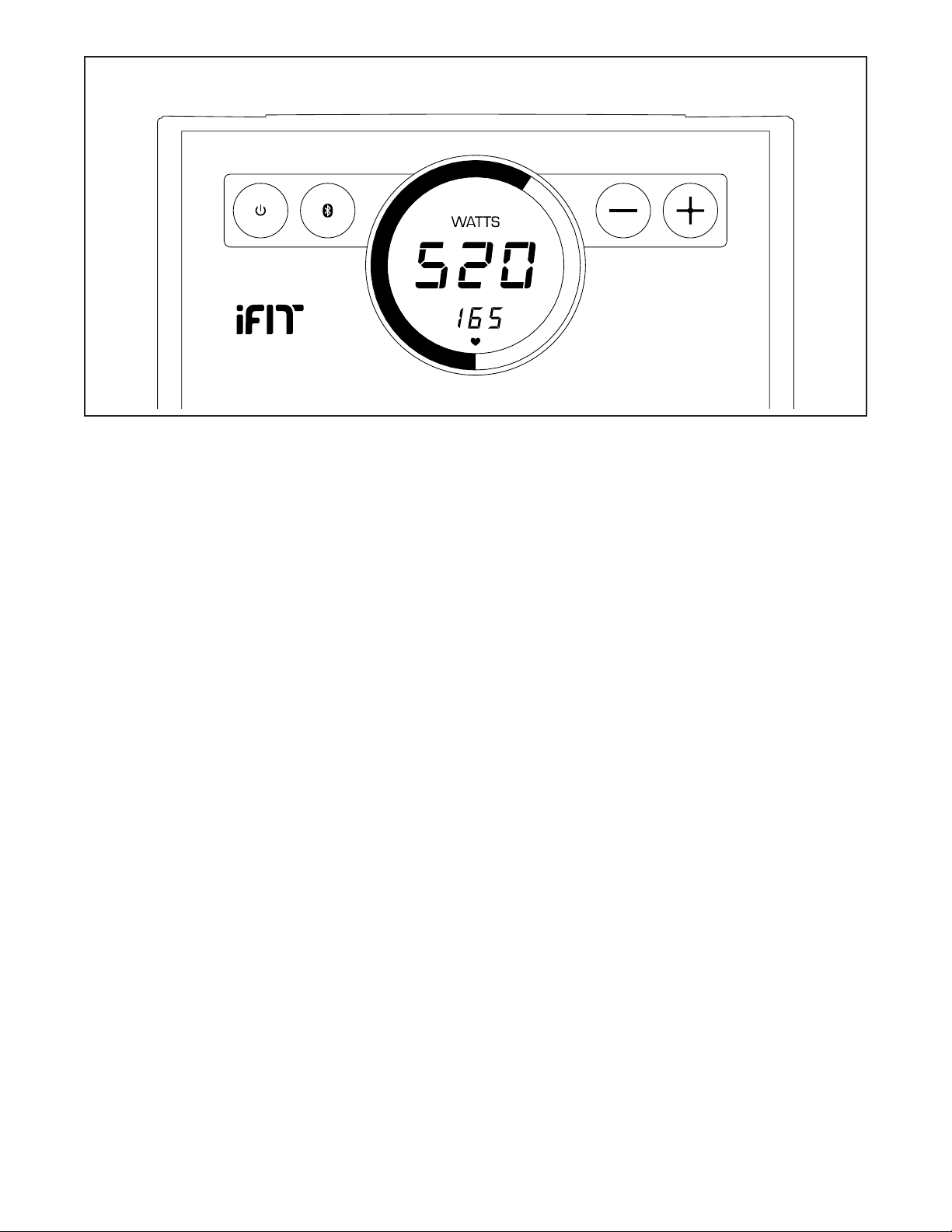
CONSOLE DIAGRAM
FEATURES OF THE CONSOLE
The advanced console offers an array of features
designed to make your workouts more effective and
enjoyable.
Interactive iFit App
Download the interactive iFit app to access the
advanced features of your FUSION CST PRO.
The iFit app provides you with an interactive and
immersive workout experience, with high-energy,
time-saving combination strength and cardio work-
outs led by virtual personal trainers. Each iFit workout
automatically adjusts the resistance of the strength
system as you exercise.
Using the iFit app, you can also record and track your
workout and health information so you can see your
progress towards your fitness goals.
Manual Workouts
You can also perform manual workouts with the
strength system. While you exercise, you can change
the resistance of the strength system with the touch of
a button. The console will display continuous exercise
feedback about your power output in watts.
Chest Heart Rate Monitor
During your workouts, you can measure your heart rate
using the included chest heart rate monitor.
To download the iFit app, see this page. To use the
console, see page 31. To connect your heart rate
monitor to the console, see page 32.
Note: If there is a sheet of plastic on the display,
remove the plastic.
HOW TO DOWNLOAD THE IFIT APP
The iFit app may be preinstalled on the included
10" tablet for Android™.
If the iFit is not preinstalled, open a web browser
on the tablet and go to iFit.com/apps. Follow the
instructions on the website to download the appropri-
ate iFit app. Make sure that the Bluetooth option is
enabled on the tablet.
Then, open the iFit app and follow the instructions to
set up an iFit account, customize settings, and get
started using iFit workouts, setting goals, and tracking
your progress.
31
HOW TO USE THE CONSOLE
1. Press the power button to turn on the console.
When you turn on the console, the display will turn
on. The console will then be ready for use.
2. Begin exercising and change the resistance as
desired.
As you exercise, change the resistance by pressing
the increase and decrease buttons.
Note: After you press a button, it will take a
moment for the strength system to reach the
selected resistance level.
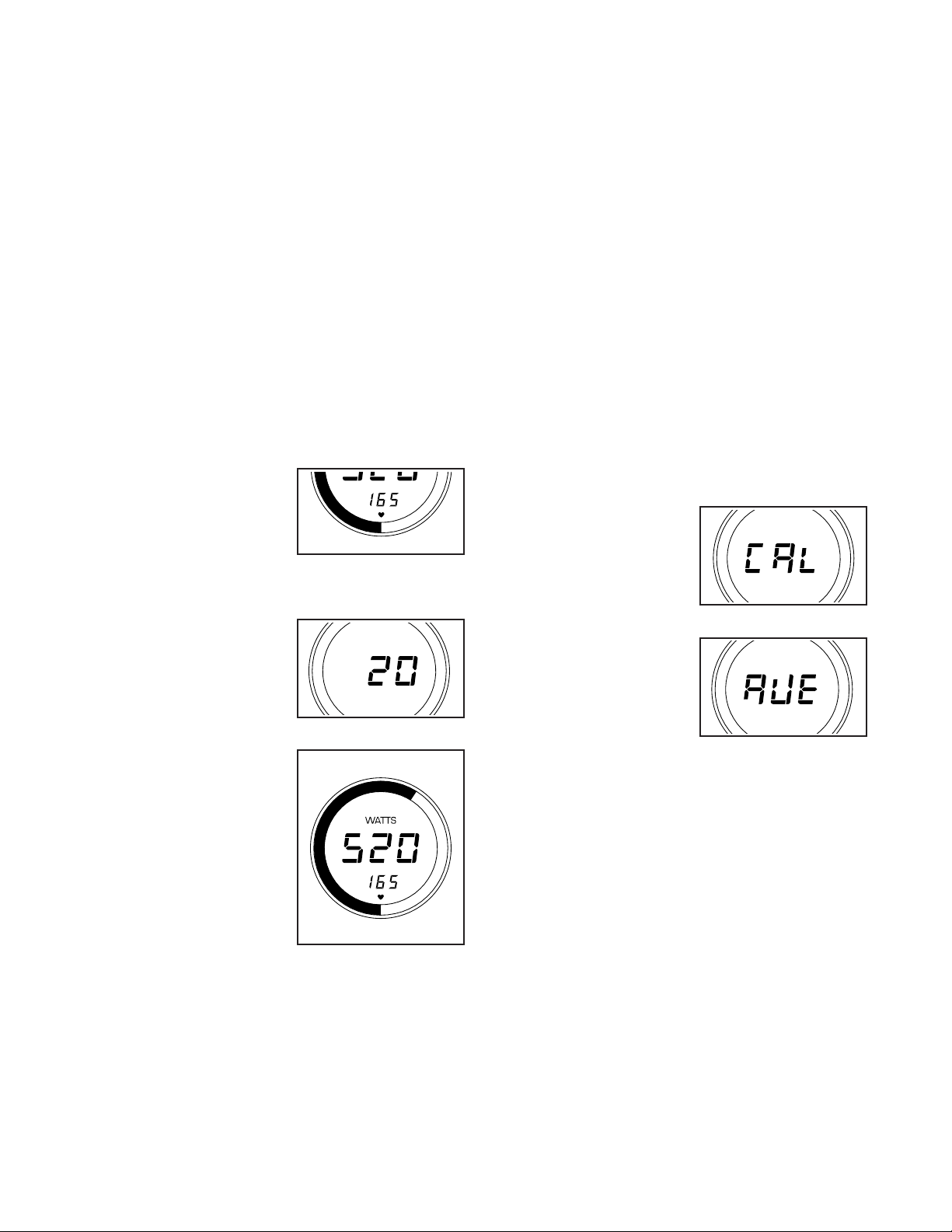
3. Follow your progress with the displays.
The console can show the following workout
information:
Heart Rate (heart
symbol)—This display
will show your heart
rate in beats per min-
ute when you wear the
included chest heart
rate monitor (see step 4).
Resistance—This
display will show the
resistance level for a
few seconds each time
the resistance level
changes.
Watts—This display
will show your approxi-
mate maximum power
output in watts for
each stroke.
Watts Meter—The
watts meter will light
up to provide a visual
representation of your
approximate maximum
power output in watts
for each stroke.
4. Wear the included chest heart rate monitor and
measure your heart rate if desired.
You can wear the included chest heart rate moni-
tor to measure your heart rate. To use the chest
heart rate monitor, see THE CHEST HEART RATE
MONITOR on page 25. Note: The console is
compatible with all Bluetooth
®
Smart heart rate
monitors.
To connect your heart rate monitor to the console,
see HOW TO CONNECT YOUR HEART RATE
MONITOR TO THE CONSOLE on page 32.
When your heartbeat is detected, your heart rate
will be shown in the display.
5. Stop exercising and view your exercise
summary if desired.
A few moments after you stop exercising, the
console will pause and show your exercise
summary:
Calories (Cal)—This
display will show the
approximate number
of calories you have
burned during your
workout.
Average Maximum
Power Output
(Ave)—This display
will show your aver-
age maximum power
output in watts for your
workout.
Note: If you do not resume exercising after a few
moments, the workout information will be reset and
the display will turn off.
6. When you are finished exercising, turn off the
console.
Press the power button repeatedly to turn off the
console manually. The console will enter a pause
mode, display the exercise summary, enter a
countdown mode, and then reset the workout infor-
mation and turn off the display.
If the strength system is idle for several minutes,
the console will turn off automatically.
Magnum
ESYPF01914
NTSY14016
NTSY19916
Magnum
ESYPF01914
NTSY14016
NTSY19916
Magnum
ESYPF01914
NTSY14016
NTSY19916
Magnum
ESYPF01914
NTSY14016
NTSY19916
Magnum
ESYPF01914
NTSY14016
NTSY19916

32
FCC INFORMATION
This equipment has been tested and found to comply with the limits for a Class B digital device, pursuant to part
15 of the FCC Rules. These limits are designed to provide reasonable protection against harmful interference
in a residential installation. This equipment generates, uses, and can radiate radio frequency energy and, if not
installed and used in accordance with the instructions, may cause harmful interference to radio communications.
However, there is no guarantee that interference will not occur in a particular installation. If this equipment does
cause harmful interference to radio or television reception, which can be determined by turning the equipment off
and on, try to correct the interference by one or more of the following measures:
• Reorient or relocate the receiving antenna.
• Increase the separation between the equipment and the receiver.
• Connect the equipment into an outlet on a circuit different from that to which the receiver is connected.
• Consult the dealer or an experienced radio/TV technician for help.
FCC CAUTION: To assure continued compliance, use only shielded interface cables when connecting to
computer or peripheral devices. Changes or modifications not expressly approved by the party respon-
sible for compliance could void the user’s authority to operate this equipment.
HOW TO CONNECT YOUR HEART RATE MONITOR
TO THE CONSOLE
To use the included chest heart rate monitor, see THE
CHEST HEART RATE MONITOR on page 25.
Note: The console is compatible with all Bluetooth
Smart heart rate monitors.
To connect your heart rate monitor to the console,
press the Bluetooth Smart button on the console; the
console pairing number will appear in the display.
When a connection is established, the LED on the
console will flash red twice.
Note: The console may connect to your heart rate
monitor automatically. If there is more than one com-
patible heart rate monitor near the console, the console
will connect to the heart rate monitor with the strongest
signal.
To disconnect your heart rate monitor from the console,
press and hold the Bluetooth Smart button on the con-
sole until the LED on the console turns solid green.
Note: All Bluetooth connections between the console
and other devices (including any tablets, heart rate
monitors, and so forth) will be disconnected.
33
HOW TO MAINTAIN THE STRENGTH SYSTEM
Regular maintenance is important for optimal
performance and to reduce wear. Inspect and properly
tighten all parts each time the strength system is used.
Replace any worn parts immediately.
To clean the strength system, use a damp cloth and
a small amount of mild detergent. IMPORTANT: To
avoid damage to the console, keep liquids away
from the console and keep the console out of
direct sunlight.
HOW TO TROUBLESHOOT THE CONSOLE
If the console does not turn on, make sure that the
power adapter is fully plugged in.
If the console does not display your heart rate
when you use the chest heart rate monitor, see
TROUBLESHOOTING on page 25.
If a replacement power adapter is needed, call the
telephone number on the cover of this manual.
IMPORTANT: To avoid damaging the console, use
only a manufacturer-supplied regulated power
adapter.
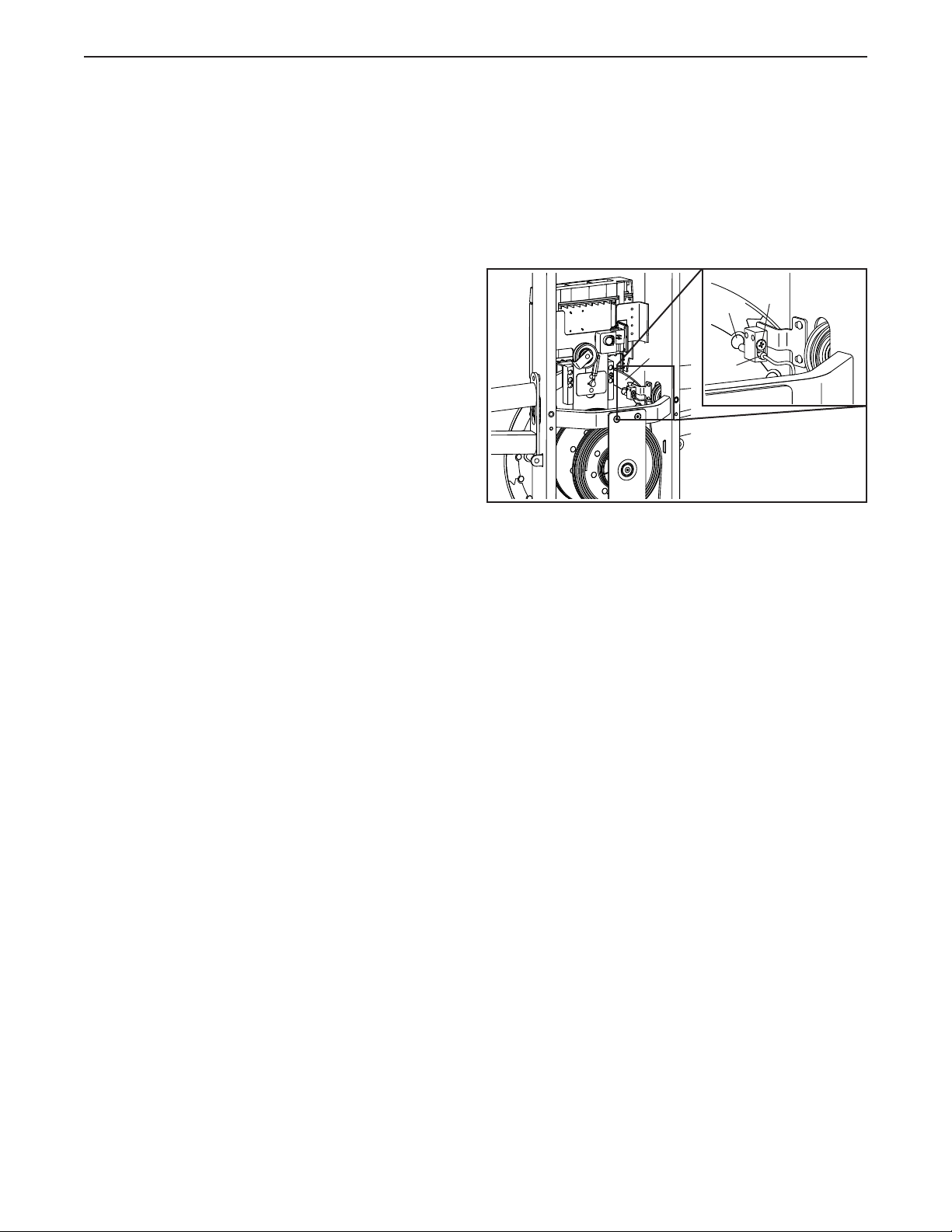
HOW TO ADJUST THE REED SWITCH
If the console does not display correct feedback, the
reed switch should be adjusted.
To adjust the reed switch, first unplug the power
adapter, and then follow the steps below.
See assembly step 14 on page 21. Remove the
Front and Rear Bottom Covers (67, 109) from the
bottom of the strength system.
See EXPLODED DRAWING B on page 42. Identify
the Rear Shroud (59). Remove the four #8 x 3/4"
Screws (86) and the Rear Shroud from the strength
system.
Next, locate the Reed Switch (25). Slightly loosen the
indicated screw (A).
Then, rotate the Resistance Disc (6) until a Magnet
(119) is aligned with the Reed Switch (25). Slide the
Reed Switch slightly toward or away from the Magnet.
Then, retighten the screw (A).
Plug in the power adapter and rotate the Resistance
Disc (6) for a moment. Repeat these actions until the
console displays correct feedback.
When the reed switch is correctly adjusted, reattach
the parts that you removed. Then, plug in the power
adapter.
25
6
A
119
MAINTENANCE AND TROUBLESHOOTING
34
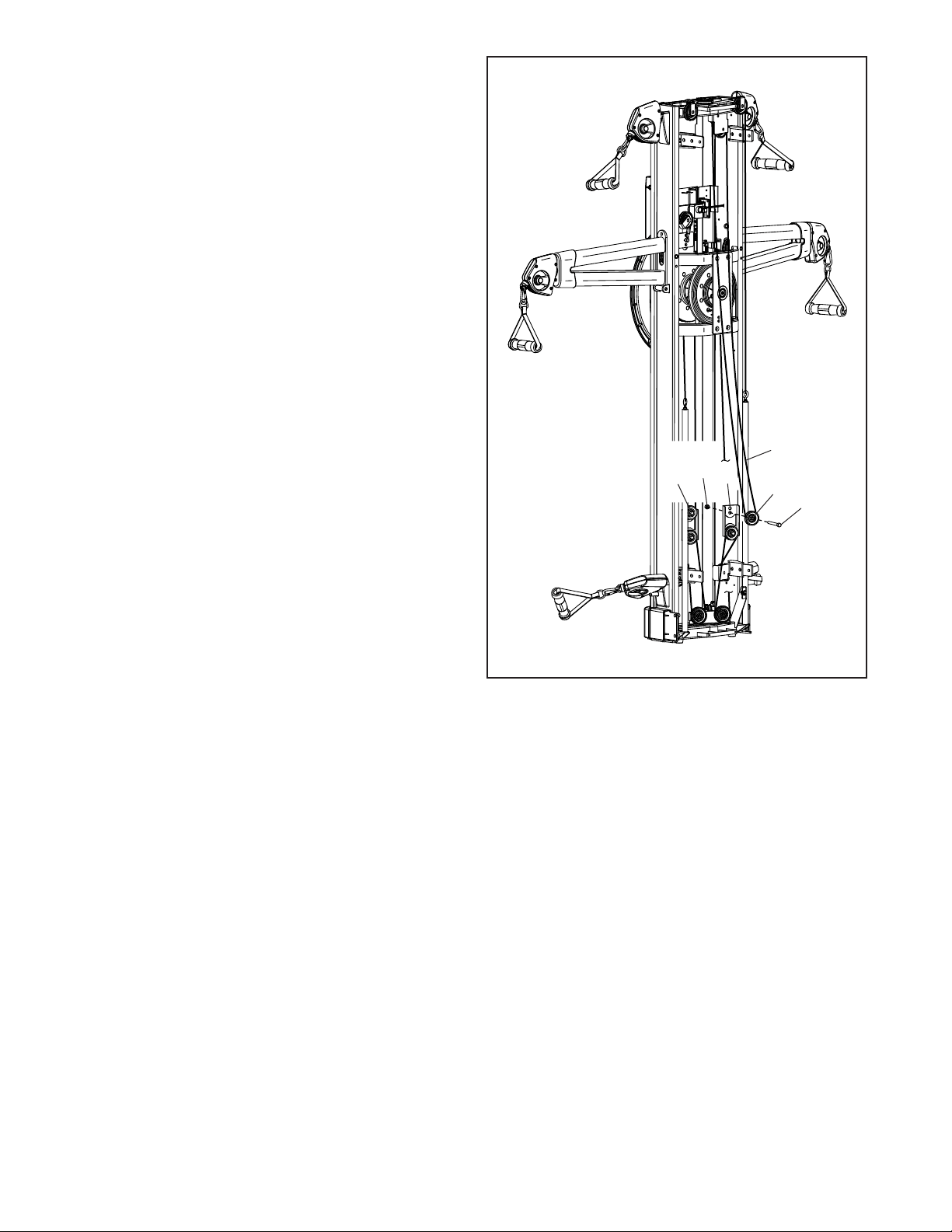
HOW TO TIGHTEN THE ROPES
The ropes may stretch slightly over time. If there is
slack in the ropes before resistance is felt, the ropes
should be tightened. To tighten the ropes, first unplug
the power adapter, and then follow the steps below.
See assembly step 14 on page 21. Remove the
Front and Rear Bottom Covers (67, 109) from the
bottom of the strength system.
See EXPLODED DRAWING B on page 42. Identify
the Rear Shroud (59) on the back of the strength sys-
tem. Remove the four #8 x 3/4" Screws (86) and the
Rear Shroud from the strength system.
See the drawing at the right. Locate a Pulley
Carriage (46). Remove the M8 Jam Nut (106), the
M8 x 33mm Bolt (112), and the Small Pulley (55) from
the upper hole in the Pulley Carriage.
Reattach the Small Pulley (55) to the other hole in the
Pulley Carriage (46). Make sure that the Rope (105)
and the Small Pulley move smoothly.
Locate the other Pulley Carriage (46) and repeat
these actions.
Then, reattach the parts that you removed. Plug in the
power adapter.
55
105
46
46
106
112
35
CARDIO EXERCISE GUIDELINES
These guidelines will help you to plan your exercise
program. For detailed exercise information, obtain a
reputable book or consult your physician. Remember,
proper nutrition and adequate rest are essential for
successful results.
EXERCISE INTENSITY
Whether your goal is to burn fat or to strengthen your
cardiovascular system, exercising at the proper inten-
sity is the key to achieving results. You can use your
heart rate as a guide to find the proper intensity level.
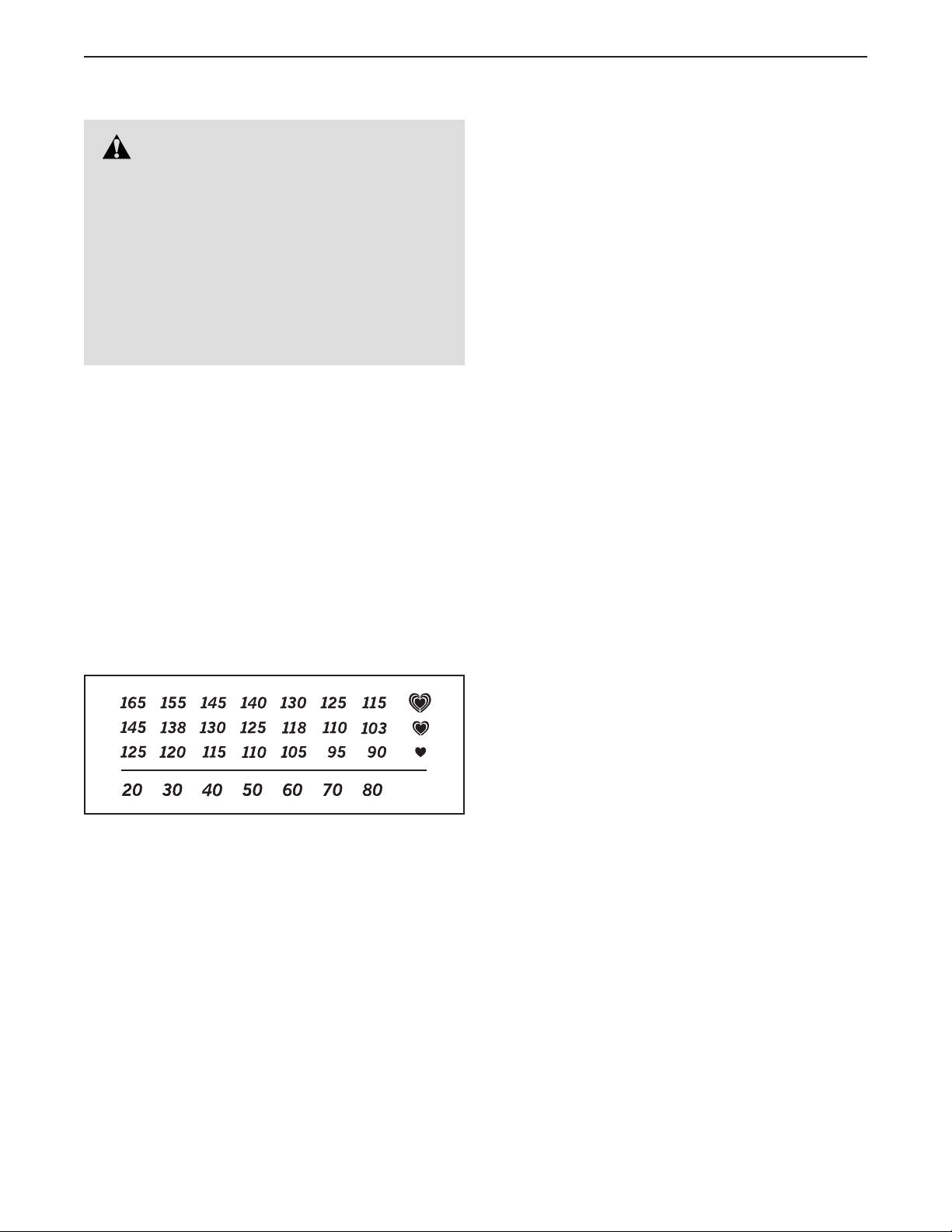
The chart below shows recommended heart rates for
fat burning and aerobic exercise.
To find the proper intensity level, find your age at the
bottom of the chart (ages are rounded off to the near-
est ten years). The three numbers listed above your
age define your “training zone.” The lowest number is
the heart rate for fat burning, the middle number is the
heart rate for maximum fat burning, and the highest
number is the heart rate for aerobic exercise.
Burning Fat—To burn fat effectively, you must exer-
cise at a low intensity level for a sustained period of
time. During the first few minutes of exercise, your
body uses carbohydrate calories for energy. Only after
the first few minutes of exercise does your body begin
to use stored fat calories for energy. If your goal is to
burn fat, adjust the intensity of your exercise until your
heart rate is near the lowest number in your training
zone. For maximum fat burning, exercise with your
heart rate near the middle number in your training
zone.
Aerobic Exercise—If your goal is to strengthen your
cardiovascular system, you must perform aerobic
exercise, which is activity that requires large amounts
of oxygen for prolonged periods of time. For aerobic
exercise, adjust the intensity of your exercise until your
heart rate is near the highest number in your training
zone.
WORKOUT GUIDELINES
Warming Up—Start with 5 to 10 minutes of stretch-
ing and light exercise. A warm-up increases your body
temperature, heart rate, and circulation in preparation
for exercise.
Training Zone Exercise—Exercise for 20 to 30 min-
utes with your heart rate in your training zone. (During
the first few weeks of your exercise program, do not
keep your heart rate in your training zone for longer
than 20 minutes.) Breathe regularly and deeply as you
exercise ; never hold your breath.
Cooling Down—Finish with 5 to 10 minutes of stretch-
ing. Stretching increases the flexibility of your muscles
and helps to prevent post-exercise problems.
EXERCISE FREQUENCY
To maintain or improve your condition, complete
three workouts each week, with at least one day of
rest between workouts. After a few months of regular
exercise, you may complete up to five workouts each
week, if desired. Remember, the key to success is to
make exercise a regular and enjoyable part of your
everyday life.
WARNING: Before beginning this
or any exercise program, consult your physi-
cian. This is especially important for persons
over age 35 or persons with pre-existing
health problems.
The heart rate monitor is not a medical device.
Various factors may affect the accuracy of
heart rate readings. The heart rate monitor is
intended only as an exercise aid in determin-
ing heart rate trends in general.

36
STRENGTH EXERCISE GUIDELINES
FOUR TYPES OF STRENGTH WORKOUTS
Note: A “repetition” is one complete cycle of an
exercise, such as one sit-up. A “set” is a series of
repetitions.
Muscle Building—Work your muscles near their maxi-
mum capacity and progressively increase the intensity
of your exercise. Adjust the intensity level of an indi-
vidual exercise as follows:
• Change the amount of resistance used.
• Change the number of repetitions or sets performed.
Use your own judgment to determine the amount of
resistance that is right for you. Begin with 3 sets of 8
repetitions for each exercise you perform. Rest for 3
minutes after each set. When you can complete 3 sets
of 12 repetitions without difficulty, increase the amount
of resistance.
Toning—Tone your muscles by working them to a
moderate percentage of their capacity. Select a moder-
ate amount of resistance and increase the number of
repetitions in each set. Complete as many sets of 15 to
20 repetitions as possible without discomfort. Rest for
1 minute after each set. Work your muscles by com-
pleting more sets rather than by using high amounts of
resistance.
Weight Loss—To lose weight, use a low amount of
resistance and increase the number of repetitions in
each set. Exercise for 20 to 30 minutes, resting for a
maximum of 30 seconds between sets.
Cross Training—Combine strength training and aero-
bic exercise by following this type of program:
• Strength training workouts on Monday, Wednesday,
and Friday.
• 20 to 30 minutes of aerobic exercise on Tuesday and
Thursday.
• One full day of rest each week to give your body time
to regenerate.
WORKOUT GUIDELINES
Familiarize yourself with the equipment and learn the
proper form for each exercise. Use your own judgment
to determine the appropriate length of time for each
workout, and the numbers of repetitions and sets to
complete. Progress at your own pace and be sensitive
to your body’s signals. Follow each workout with at
least one day of rest.
Warming Up—Start with 5 to 10 minutes of stretch-
ing and light exercise. A warm-up increases your body
temperature, heart rate, and circulation in preparation
for exercise.
Working Out—Include 6 to 10 different exercises in
each workout. Select exercises for every major muscle
group, emphasizing areas that you want to develop.
To give balance and variety to your workouts, vary the
exercises from workout to workout.
Cooling Down—Finish with 5 to 10 minutes of stretch-
ing. Stretching increases the flexibility of your muscles
and helps to prevent post-exercise problems.
EXERCISE FORM
Move through the full range of motion for each exer-
cise and move only the appropriate parts of the body.
Perform the repetitions in each set smoothly and
without pausing. The exertion stage of each repeti-
tion should last about half as long as the return stage.
Exhale during the exertion stage of each repetition and
inhale during the return stroke. Never hold your breath.
Rest for a short period of time after each set:
• Muscle Building—Rest for three minutes after each
set.
• Toning—Rest for one minute after each set.
• Weight Loss—Rest for 30 seconds after each set.
STAYING MOTIVATED
For motivation, keep a record of each workout. Write
the date, the exercises performed, the resistance used,
and the numbers of sets and repetitions completed.
Record your weight and key body measurements once
a month. To achieve good results, make exercise a
regular and enjoyable part of your life.
37
SUGGESTED STRETCHES
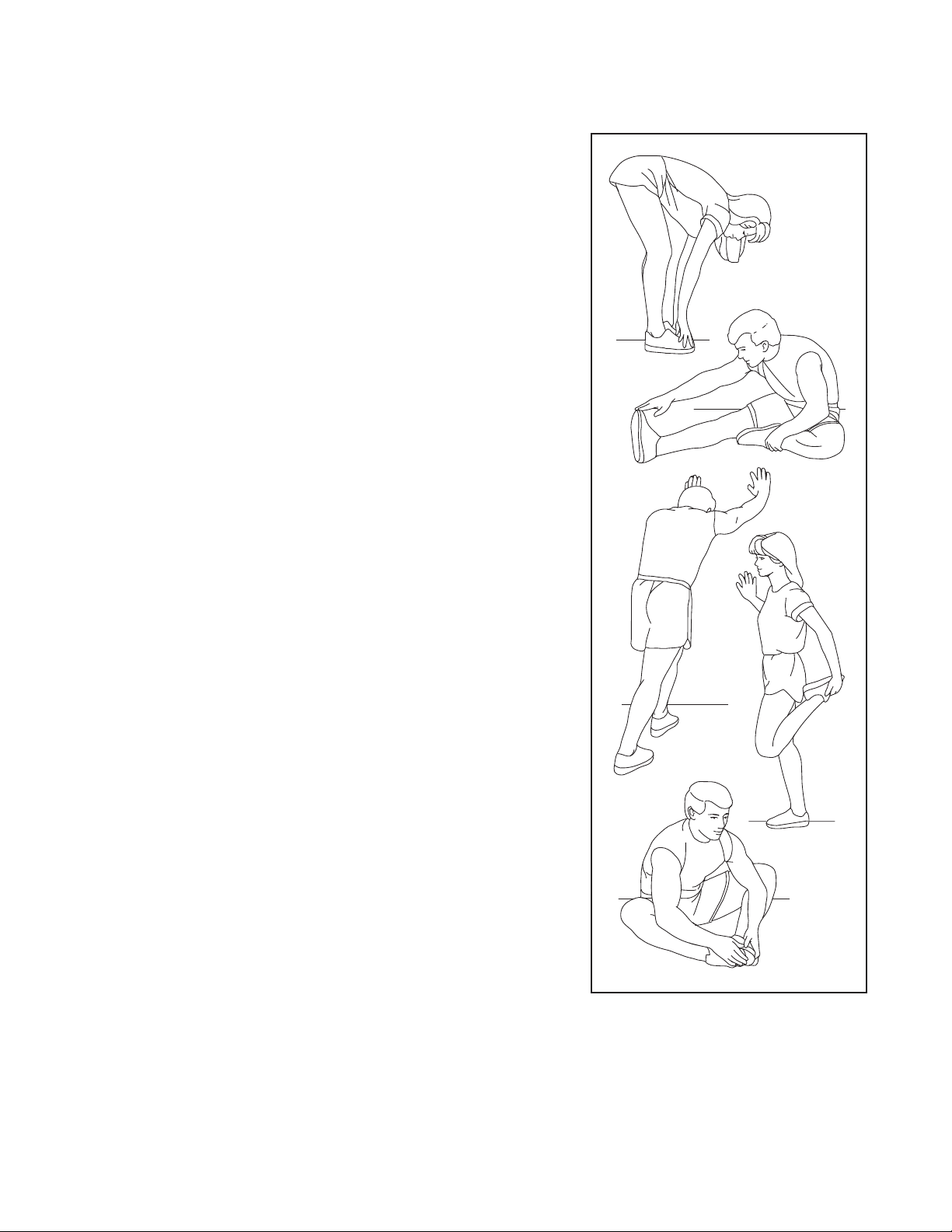
The correct form for several basic stretches is shown at the right. Move slowly as you stretch; never bounce.
1. Toe Touch Stretch
Stand with your knees bent slightly and slowly bend forward from
your hips. Allow your back and shoulders to relax as you reach down
toward your toes as far as possible. Hold for 15 counts, then relax.
Repeat 3 times. Stretches: Hamstrings, back of knees and back.
2. Hamstring Stretch
Sit with one leg extended. Bring the sole of the opposite foot toward
you and rest it against the inner thigh of your extended leg. Reach
toward your toes as far as possible. Hold for 15 counts, then relax.
Repeat 3 times for each leg. Stretches: Hamstrings, lower back and
groin.
3. Calf/Achilles Stretch
With one leg in front of the other, reach forward and place your hands
against a wall. Keep your back leg straight and your back foot flat
on the floor. Bend your front leg, lean forward and move your hips
toward the wall. Hold for 15 counts, then relax. Repeat 3 times for
each leg. To cause further stretching of the achilles tendons, bend
your back leg as well. Stretches: Calves, achilles tendons and ankles.
4. Quadriceps Stretch
With one hand against a wall for balance, reach back and grasp one
foot with your other hand. Bring your heel as close to your buttocks
as possible. Hold for 15 counts, then relax. Repeat 3 times for each
leg. Stretches: Quadriceps and hip muscles.
5. Inner Thigh Stretch
Sit with the soles of your feet together and your knees outward.
Pull your feet toward your groin area as far as possible. Hold for 15
counts, then relax. Repeat 3 times. Stretches: Quadriceps and hip
muscles.
1
2
3
4
5

38
NOTES

39
Key No. Qty. Description Key No. Qty. Description
PART LIST
Model No. NTSY24918.0 R0420A
1 1 Frame
2 1 Tower Top Cover
3 2 Spring
4 2 Spring Cover
5 1 Disc Cover
6 1 Resistance Disc
7 1 Resistance Axle
8 6 Retention Ring
9 6 Main Bearing
10 1 Front Hub Spacer
11 2 Bearing Spacer
12 2 Pulley Hub
13 2 Mechanism Pulley
14 1 Pulley Spacer
15 1 Tablet Stand
16 1 Tower Bracket
17 1 Slide Frame Bracket
18 1 Resistance Arm Assembly
19 1 Left Tower Arm
20 2 Upper Tower Cover
21 1 Resistance Disc
22 1 Resistance Motor
23 1 Reed Switch Bracket
24 1 Reed Switch Clamp
25 1 Reed Switch/Wire
26 2 Tower Arm Cover
27 6 Swivel Bearing
28 6 Snap Ring
29 6 Counterweight
30 3 Right Pulley Cover A
31 3 Right Pulley Cover B
32 6 Swivel Pulley Axle
33 6 Swivel Pulley
34 6 Rope Collar
35 6 Rope End
36 6 Clip
37 6 Handle
38 1 Right Tower Cover
39 2 Eyebolt
40 2 Bumper
41 1 Power Receptacle/Wire
42 1 Rear Hub Spacer
43 1 Left Tower Cover
44 1 Right Leg
45 4 Foot
46 2 Pulley Carriage
47 2 Cable Trap
48 2 D Sensor
49 4 Standoff
50 1 Tall Sensor Bracket
51 1 Short Sensor Bracket
52 2 201" Rope
53 2 Ankle Strap
54 4 Arm Pulley Spacer
55 5 Small Pulley
56 15 Medium Pulley
57 1 Shroud Cover
58 1 Front Shroud
59 1 Rear Shroud
60 2 Pulley Bracket
61 4 M6 x 15mm Screw
62 6 M6 Washer
63 8 Pulley Guide
64 4 Large Pulley
65 1 Disc Shield
66 1 Left Leg
67 1 Front Bottom Cover
68 2 Tablet Holder
69 2 Tablet Holder Bracket
70 1 Slide Frame
71 1 Magnet Bracket
72 1 Light Bar
73 1 Console
74 4 Snap Clip
75 8 Tree Fastener
76 16 #4 x 6mm Screw
77 6 M4 x 5mm Set Screw
78 4 M4 x 8mm Screw
79 12 M4 x 30mm Machine Screw
80 2 #6 x 3/8" Screw
81 2 #8 x 3/8" Screw
82 1 #8 x 1/2" Console Screw
83 18 #8 x 1/2" Screw
84 4 #8 x 5/8" Screw
85 4 #8 x 3/4" Tek Screw
86 30 #8 x 3/4" Screw
87 4 #8 x 1 1/4" Screw
88 8 M6 x 16mm Screw
89 3 M6 x 20mm Hex Screw
90 4 M8 x 35mm Bolt
91 2 M8 x 115mm Bolt
92 5 M10 x 25mm Flat Head Screw
93 2 M10 x 67mm Bolt
94 3 M6 x 13mm Screw
95 4 M10 x 35mm Screw
96 2 M6 Nut
97 4 M8 Locknut
98 10 M10 Locknut
99 4 Zip Tie
100 2 M10 x 30mm Screw

40
Key No. Qty. Description Key No. Qty. Description
101 8 M10 x 25mm Hex Screw
102 4 M10 x 93mm Screw
103 1 73" Rope
104 1 82" Rope
105 2 169 1/2" Rope
106 19 M8 Jam Nut
107 9 M8 x 30mm Bolt
108 1 M8 x 30mm Patch Screw
109 1 Rear Bottom Cover
110 2 #8 x 5/8" Flat Head Screw
111 2 #8 x 1 3/8" Screw
112 5 M8 x 33mm Bolt
113 1 M8 x 68mm Bolt
114 1 M10 Washer
115 3 Left Pulley Cover A
116 3 Left Pulley Cover B
117 6 M4 x 20mm Screw
118 6 M4 x 25mm Screw
119 36 Magnet
120 4 M8 Washer
121 7 Mounted Zip Tie
122 1 Sensor Wire
123 1 Extension Wire
124 1 #8 x 5/8" Tek Screw
125 1 Main Wire
126 1 Power Adapter
127 4 #8 x 3/4" Machine Screw
128 1 #6 x 3/8" Screw
129 1 Chest Heart Rate Monitor
130 1 Right Lower Stabilizer
131 2 USB Receptacle
132 2 USB Bracket
133 2 Roller
134 2 1/4" x 1 3/8" Screw
135 4 Carriage Bushing
136 2 Grommet
137 2 M6 Locknut
138 2 M8 x 35mm Hex Bolt
139 2 Guide Cable
140 8 M10 x 90mm Screw
141 2 Weight Rest
142 2 Weight Spotter
143 4 Wall Bracket
144 2 Storage Tube
145 1 Left Lower Stabilizer
146 1 Right Upper Stabilizer
147 1 Pull-up Bar
148 1 Tablet Holder Base
149 1 Left Upright
150 1 Right Upright
151 1 Left Upper Stabilizer
152 2 Rubber Washer
153 1 Right Tower Arm
154 2 USB Receptacle Wire
155 1 Tablet Stand Power Wire
156 4 M10 x 20mm Patch Screw
157 12 M10 x 20mm Bolt
158 8 3/8" x 3" Screw
159 8 3/8" x 1 1/4" Washer
160 8 M10 x 100mm Toggle Bolt
161 4 M10 Star Washer
162 2 Slide Bracket
163 4 Tower Bracket
164 4 Slide Cover
165 4 Wall Cover
* – User’s Manual
Note: Specifications are subject to change without notice. For information about ordering replacement parts, see
the back cover of this manual. *These parts are not illustrated.
41
83
132
83
83
99
100
1
3
6
8
10
42
12
5
2
4
4
7
9
8
8
8
8
8
9
9
9
9
9
11
11
14
20
16
18
19
13
13
12
17
21
26
26
28
28
32
22
27
27
29
31
34
34
36
36
38
39
33
33
35
35
37
48
48
50
45
43
45
49
49
51
115
103
104
30
29
116
76
131
133
134
139
132
117
118
32
37
37
37
37
74
74
153
76
76
78
79
77
80
76
76
86
86
88
88
85
82
84
84
89
89
90
40
90
92
92
94
94
96
98
99
99
99
97
97
119
118
117
121
124
52
114
46
135
106
112
79
87
111
86
23
25
24
86
86
86
86
86
128
105
138
120
47
47
54
56
56
56
56
56
56
56
55
120
120
120
56
54
54
54
91
91
106
107
106
106
106
152
152
106
106
106
106
106
106
106
107
138
107
112
107
108
107
107
107
107
113
93
135
136
55
46
62
137
137
62
136
56
56
EXPLODED DRAWING A
Model No. NTSY24918.0 R0420A
42
86
110
110
127
86
86
58
59
86
57
68
65
67
109
122
69
70
72
71
73
123
126
75
75
75
75
81
148
81
83
83
86
15
125
41
83
68
69
83
53
129
156
156
157
156
162
162
143
164
164
164
164
163
98
98
163
165
165
165
165
143
157
161
157
158
158
159
160
160
160
160
160
160
160
160
159
159
159
158
158
157
157
157
163
163
161
161
98
98
156
161
155
154
EXPLODED DRAWING B
Model No. NTSY24918.0 R0420A
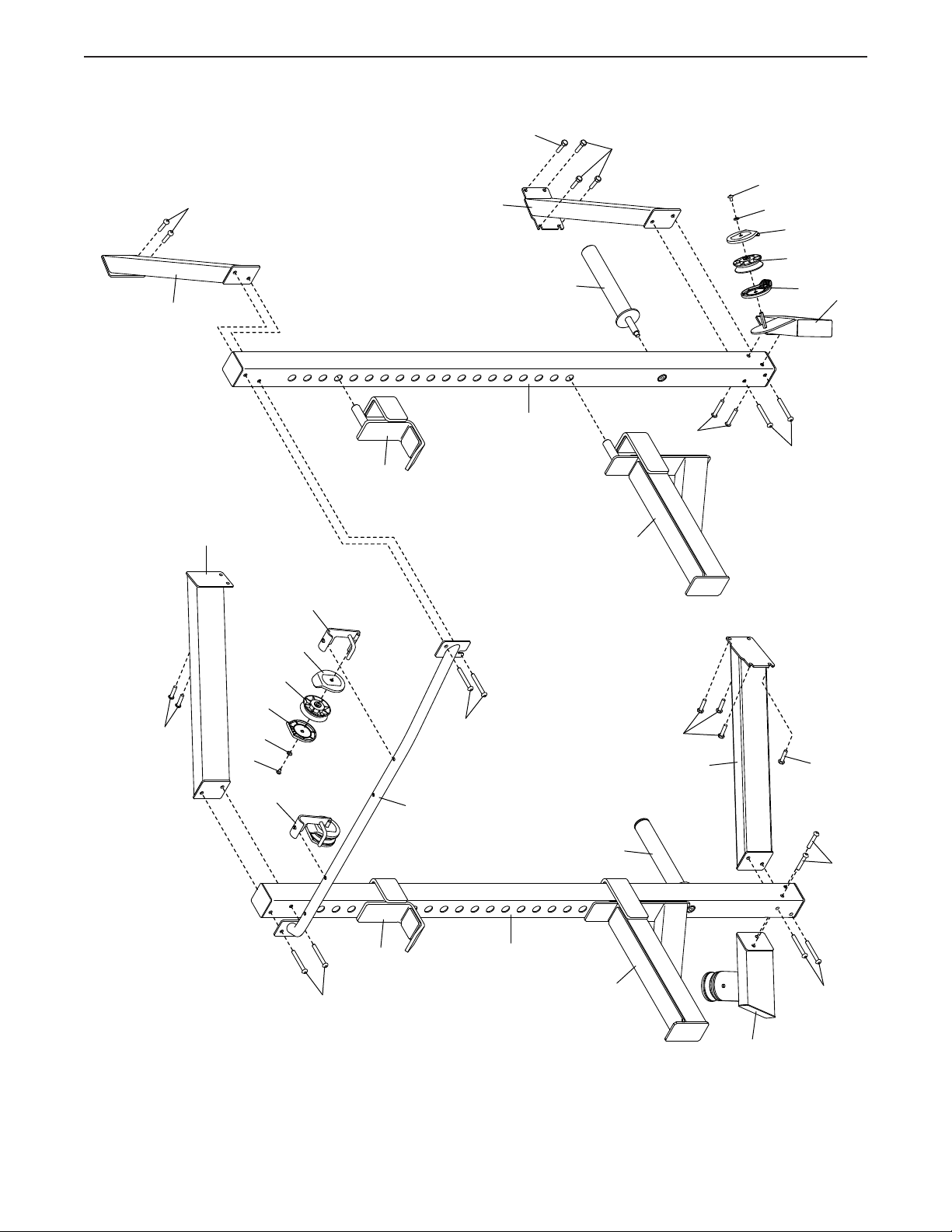
43
141
101
101
44
63
64
63
62
61
66
150
151
146
102
60
147
141
102
144
142
149
101
145
101
140
140
140
142
140
144
130
95
95
63
64
63
62
61
60
EXPLODED DRAWING C
Model No. NTSY24918.0 R0420A