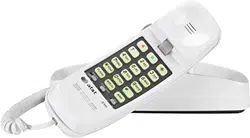

Operation
Problem Solution
.
.
.
Mak
e sure the ringer
volum
e switch is not set
to OFF.
Yo
u may have
inadvertentl
y turned off
th
e ringer. Press ,
, , .
If there are several other
phone
s on the same line,
tr
y disconnecting some of
th
e other telephones.
Havin
g too many
telephone
s can also
creat
e problems such as
lo
w ringer volume or
impaire
d quality during
calls.
telephone
. The trouble
ma
y be caused by local
telephon
e company lines,
centra
l office equipment,
or the wiring in your
home.
Th
e Mute feature might
be activated.
Tr
y pressing .
If this doesn t work, try
pressin
g again.
If you program a number
int
o memory while on a
call
, the other party will
be unable to hear you.
Problem Solution
Problem
Solution
This product comes set in
th
e tone ( ) mode. Make
sur
e you choose the
correc
t dialing method (
or ) for the dial switch.
Touc
h tone dialing will not
wor
k if you have dial pulse
service.
If you have tone dialing
service
, you can use either
ton
e or dial pulse mode. If
yo
u set the switch to ,
number
s are dialed much
mor
e quickly.
TT
TT
DP
TT
.
.
.
.
’
Memory features
This telephone can store up to 13 different
phon
e numbers, each up to 21 digits long.
Number
s will remain stored in memory unless
yo
u erase or change them by entering other
numbers.
Remov
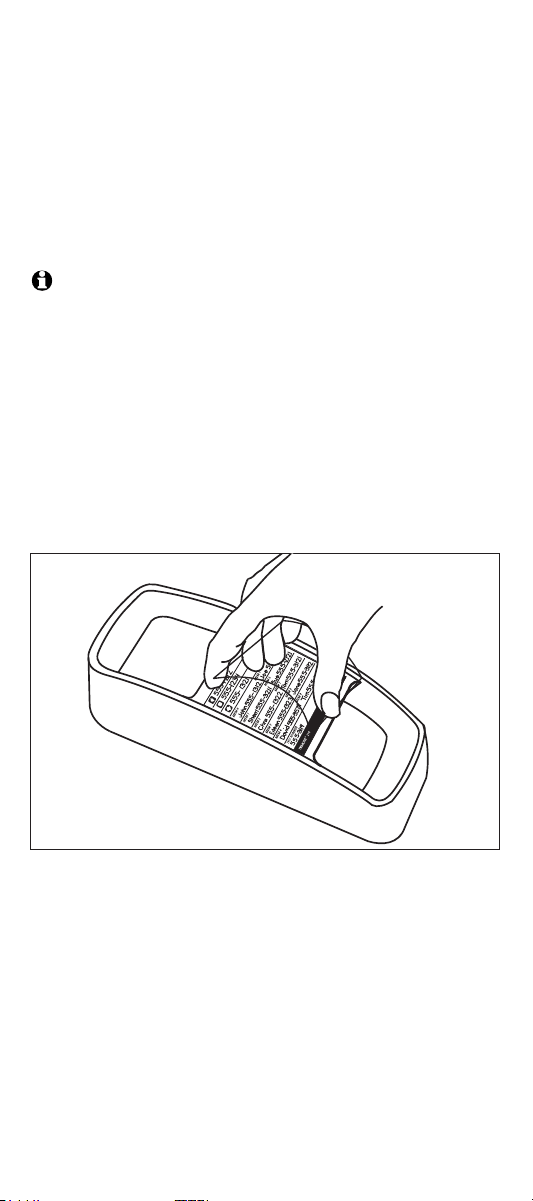
e the directory card.
Writ
e your telephone number in the space
provided
. Also write the telephone numbers
(o
r names) that you want to store in each
memor
y location. Reinstall the card and clear
plasti
c cover.
NOTE:
Director
y card:
Number
s programmed into a memory
locatio
n might not be retained if the telephone
ha
s been unplugged from the line jack for a half
hou
r or more.
One-touch dialing
Three numbers can be stored in one-touch
memor
y locations. You can dial these numbers
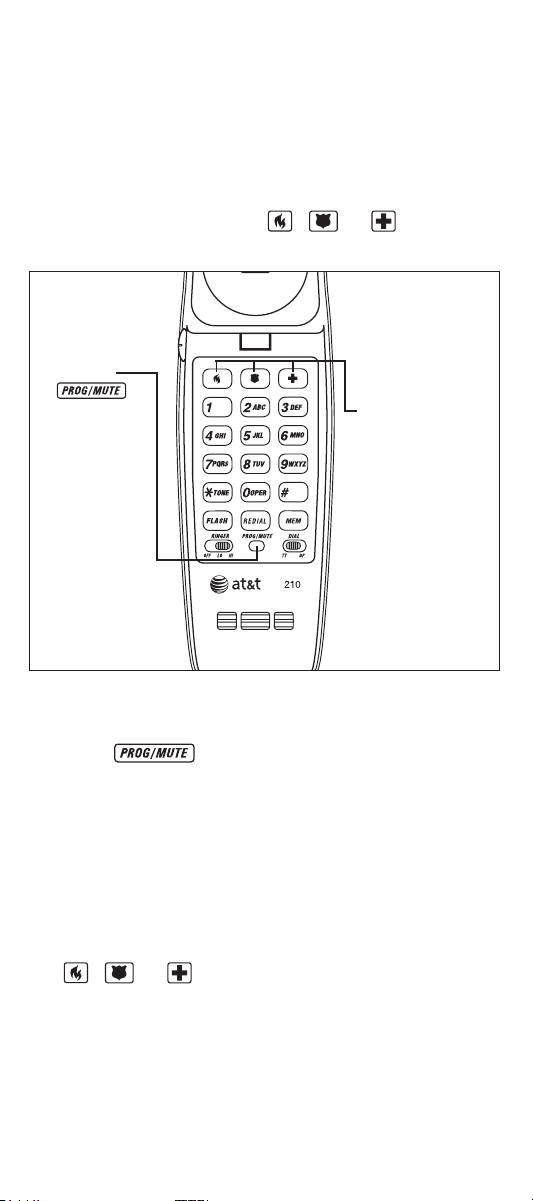
by pressing one of the buttons marked with
an emergency symbol ( , or ).
Ente
r telephone number. You will hear a
clic
k when each button is pressed.
Pres
s .
Han
g up after the number is entered
correctly.
Repea
t to store another number.
Liste
n for dial tone.
Pres
s the one-touch memory button
To program numbers into memory
4
5
6
7 Steps 1-6
To dial
1
2
( , or ).
Calls cannot
be dialed, or
are dialed
slowly
You can hear
the other
party, but
other party
can’t hear you
Telephone
does not ring
9 10 11 12
For Customer Service Or Product
Information
, Visit Our Website At
www.telephones.att.com
User’s
manual
Part 2
TRIMLINE
Memory
telephon
e 210
Please also read
Par
t 1 - Important
produc
t information
1
2
Lif
t the
handset.
Press
3 Press the
one-touch
memory
button
wher
e you
wan
t to
stor
e the
number.
Speed dialing
Memor
y erase
Ten telephone numbers can be stored in
standar
d speed-dialing locations. You can dial
an
y of these numbers by pressing two buttons.
Lif
t the handset.
Pres
s .
Pres
s .
Ente
r a digi
t (0-9) for the memory location
wher
e you want to store the number.
Ente
r the telephone number. You will hear
a click when each button is pressed.
Pres
s .
Han
g up after the number is entered
correctly.
Repea
t to store another number.
To erase any number from memory, you can
ente
r another number in the same location.
To program numbers into memory
1
2
3
4
5
6
7
8 Steps 1-7
To dial
1
2
3
Liste
n for dial tone.
Pres
s .
Pres
s memory location (0-9).
If you have difficulty operating this phone, try
th
e suggestions below. For Customer Service,
visi
t our website at
To purchase accessories or replacement parts
contac
t Customer Service. Visit our website at
. I
Mak
e sure all plugs are
connecte
d properly.
Inspec
t the line cord
connection
s at the
modula
r wall jack and at
th
e telephone. Also
inspec
t the coiled handset
cor
d connections at both
ends.
www.telephones.att.com or call 1 (800)
222-3111
. In Canada, call 1 (866) 288-
4268
. Have the serial number, found on the
underside of your phone, available when
contacting Customer Service. Please retain
your receipt as your proof of purchase.
- 1 (866) 288-
4268
n Canada, call
.
Unplu
g the telephone and
connec
t it to another
modula
r wall jack. If it still
doe
s not work, try another
telephone
; if neither
telephon
e works, the
proble
m is not in your
No dial tone
.
www.telephones.att.com or call 1 (800)
22
2 3111
Problem
Solution
.
Opeartion
13
In case of difficulty In case of difficulty In case of difficulty
14
or call 1 (800) 222-3111. In
Canada d
ial
1 (886) 288-4268.
©
2007 Advanced American Telephones. All rights reserved.
Printed in China. Issue 8 AT&T 03/07
AT&T and the AT&T logo are trademarks of AT&T Knowledge
Ventures, licensed to Advanced American Telephones.
www.telephones.att.com
Memory dialing Memory dialing Memory dialing
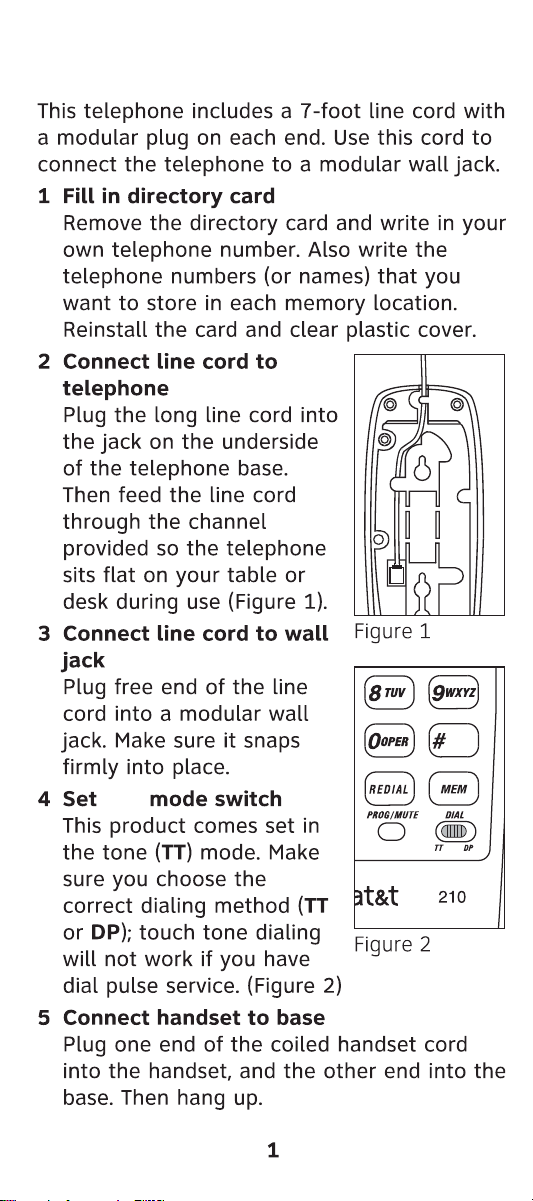
Table/desk installation Table/desk installation
Table/desk installation.
Wall installation Wall installation Wall installation Opeartion
Opeartion Opeartion
case of difficulty
dial
dial
To disconnect
In
case of difficulty
In
volume tone dialing
ringer
receiver
(handset) volume
Table/desk installation Table/desk installation
Table/desk installation.
Wall installation Wall installation Wall installation Opeartion
Opeartion Opeartion
case of difficulty
dial
dial
To disconnect
In
case of difficulty
In
volume tone dialing
ringer
receiver
(handset) volume

Table/desk installation Table/desk installation
Table/desk installation.
Wall installation Wall installation Wall installation Opeartion
Opeartion Opeartion
case of difficulty
dial
dial
To disconnect
In
case of difficulty
In
volume tone dialing
ringer
receiver
(handset) volume

Table/desk installation Table/desk installation
Table/desk installation.
Wall installation Wall installation Wall installation Opeartion
Opeartion Opeartion
case of difficulty
dial
dial
To disconnect
In
case of difficulty
In
volume tone dialing
ringer
receiver
(handset) volume

Table/desk installation Table/desk installation
Table/desk installation.
Wall installation Wall installation Wall installation Opeartion
Opeartion Opeartion
case of difficulty
dial
dial
To disconnect
In
case of difficulty
In
volume tone dialing
ringer
receiver
(handset) volume

Table/desk installation Table/desk installation
Table/desk installation.
Wall installation Wall installation Wall installation Opeartion
Opeartion Opeartion
case of difficulty
dial
dial
To disconnect
In
case of difficulty
In
volume tone dialing
ringer
receiver
(handset) volume
Table/desk installation Table/desk installation
Table/desk installation.
Wall installation Wall installation Wall installation Opeartion
Opeartion Opeartion
case of difficulty
dial
dial
To disconnect
In
case of difficulty
In
volume tone dialing
ringer
receiver
(handset) volume

Table/desk installation Table/desk installation
Table/desk installation.
Wall installation Wall installation Wall installation Opeartion
Opeartion Opeartion
case of difficulty
dial
dial
To disconnect
In
case of difficulty
In
volume tone dialing
ringer
receiver
(handset) volume
Operation
Problem Solution
.
.
.
Mak
e sure the ringer
volum
e switch is not set
to OFF.
Yo
u may have
inadvertentl
y turned off
th
e ringer. Press ,
, , .
If there are several other
phone
s on the same line,
tr
y disconnecting some of
th
e other telephones.
Havin
g too many
telephone
s can also
creat
e problems such as
lo
w ringer volume or
impaire
d quality during
calls.
telephone
. The trouble
ma
y be caused by local
telephon
e company lines,
centra
l office equipment,
or the wiring in your
home.
Th
e Mute feature might
be activated.
Tr
y pressing .
If this doesn t work, try
pressin
g again.
If you program a number
int
o memory while on a
call
, the other party will
be unable to hear you.
Problem Solution
Problem
Solution
This product comes set in
th
e tone ( ) mode. Make
sur
e you choose the
correc
t dialing method (
or ) for the dial switch.
Touc
h tone dialing will not
wor
k if you have dial pulse
service.
If you have tone dialing
service
, you can use either
ton
e or dial pulse mode. If
yo
u set the switch to ,
number
s are dialed much
mor
e quickly.
TT
TT
DP
TT
.
.
.
.
’
Memory features
This telephone can store up to 13 different
phon
e numbers, each up to 21 digits long.
Number
s will remain stored in memory unless
yo
u erase or change them by entering other
numbers.
Remov
e the directory card.
Writ
e your telephone number in the space
provided
. Also write the telephone numbers
(o
r names) that you want to store in each
memor
y location. Reinstall the card and clear
plasti
c cover.
NOTE:
Director
y card:
Number
s programmed into a memory
locatio
n might not be retained if the telephone
ha
s been unplugged from the line jack for a half
hou
r or more.
One-touch dialing
Three numbers can be stored in one-touch
memor
y locations. You can dial these numbers
by pressing one of the buttons marked with
an emergency symbol ( , or ).
Ente
r telephone number. You will hear a
clic
k when each button is pressed.
Pres
s .
Han
g up after the number is entered
correctly.
Repea
t to store another number.
Liste
n for dial tone.
Pres
s the one-touch memory button
To program numbers into memory
4
5
6
7 Steps 1-6
To dial
1
2
( , or ).
Calls cannot
be dialed, or
are dialed
slowly
You can hear
the other
party, but
other party
can’t hear you
Telephone
does not ring
9 10 11 12
For Customer Service Or Product
Information
, Visit Our Website At
www.telephones.att.com
User’s
manual
Part 2
TRIMLINE
Memory
telephon
e 210
Please also read
Par
t 1 - Important
produc
t information
1
2
Lif
t the
handset.
Press
3 Press the
one-touch
memory
button
wher
e you
wan
t to
stor
e the
number.
Speed dialing
Memor
y erase
Ten telephone numbers can be stored in
standar
d speed-dialing locations. You can dial
an
y of these numbers by pressing two buttons.
Lif
t the handset.
Pres
s .
Pres
s .
Ente
r a digi
t (0-9) for the memory location
wher
e you want to store the number.
Ente
r the telephone number. You will hear
a click when each button is pressed.
Pres
s .
Han
g up after the number is entered
correctly.
Repea
t to store another number.
To erase any number from memory, you can
ente
r another number in the same location.
To program numbers into memory
1
2
3
4
5
6
7
8 Steps 1-7
To dial
1
2
3
Liste
n for dial tone.
Pres
s .
Pres
s memory location (0-9).
If you have difficulty operating this phone, try
th
e suggestions below. For Customer Service,
visi
t our website at
To purchase accessories or replacement parts
contac
t Customer Service. Visit our website at
. I
Mak
e sure all plugs are
connecte
d properly.
Inspec
t the line cord
connection
s at the
modula
r wall jack and at
th
e telephone. Also
inspec
t the coiled handset
cor
d connections at both
ends.
www.telephones.att.com or call 1 (800)
222-3111
. In Canada, call 1 (866) 288-
4268
. Have the serial number, found on the
underside of your phone, available when
contacting Customer Service. Please retain
your receipt as your proof of purchase.
- 1 (866) 288-
4268
n Canada, call
.
Unplu
g the telephone and
connec
t it to another
modula
r wall jack. If it still
doe
s not work, try another
telephone
; if neither
telephon
e works, the
proble
m is not in your
No dial tone
.
www.telephones.att.com or call 1 (800)
22
2 3111
Problem
Solution
.
Opeartion
13
In case of difficulty In case of difficulty In case of difficulty
14
or call 1 (800) 222-3111. In
Canada d
ial
1 (886) 288-4268.
©
2007 Advanced American Telephones. All rights reserved.
Printed in China. Issue 8 AT&T 03/07
AT&T and the AT&T logo are trademarks of AT&T Knowledge
Ventures, licensed to Advanced American Telephones.
www.telephones.att.com
Memory dialing Memory dialing Memory dialing
Operation
Problem Solution
.
.
.
Mak
e sure the ringer
volum
e switch is not set
to OFF.
Yo
u may have
inadvertentl
y turned off
th
e ringer. Press ,
, , .
If there are several other
phone
s on the same line,
tr
y disconnecting some of
th
e other telephones.
Havin
g too many
telephone
s can also
creat
e problems such as
lo
w ringer volume or
impaire
d quality during
calls.
telephone
. The trouble
ma
y be caused by local
telephon
e company lines,
centra
l office equipment,
or the wiring in your
home.
Th
e Mute feature might
be activated.
Tr
y pressing .
If this doesn t work, try
pressin
g again.
If you program a number
int
o memory while on a
call
, the other party will
be unable to hear you.
Problem Solution
Problem
Solution
This product comes set in
th
e tone ( ) mode. Make
sur
e you choose the
correc
t dialing method (
or ) for the dial switch.
Touc
h tone dialing will not
wor
k if you have dial pulse
service.
If you have tone dialing
service
, you can use either
ton
e or dial pulse mode. If
yo
u set the switch to ,
number
s are dialed much
mor
e quickly.
TT
TT
DP
TT
.
.
.
.
’
Memory features
This telephone can store up to 13 different
phon
e numbers, each up to 21 digits long.
Number
s will remain stored in memory unless
yo
u erase or change them by entering other
numbers.
Remov
e the directory card.
Writ
e your telephone number in the space
provided
. Also write the telephone numbers
(o
r names) that you want to store in each
memor
y location. Reinstall the card and clear
plasti
c cover.
NOTE:
Director
y card:
Number
s programmed into a memory
locatio
n might not be retained if the telephone
ha
s been unplugged from the line jack for a half
hou
r or more.
One-touch dialing
Three numbers can be stored in one-touch
memor
y locations. You can dial these numbers
by pressing one of the buttons marked with
an emergency symbol ( , or ).
Ente
r telephone number. You will hear a
clic
k when each button is pressed.
Pres
s .
Han
g up after the number is entered
correctly.
Repea
t to store another number.
Liste
n for dial tone.
Pres
s the one-touch memory button
To program numbers into memory
4
5
6
7 Steps 1-6
To dial
1
2
( , or ).
Calls cannot
be dialed, or
are dialed
slowly
You can hear
the other
party, but
other party
can’t hear you
Telephone
does not ring
9 10 11 12
For Customer Service Or Product
Information
, Visit Our Website At
www.telephones.att.com
User’s
manual
Part 2
TRIMLINE
Memory
telephon
e 210
Please also read
Par
t 1 - Important
produc
t information
1
2
Lif
t the
handset.
Press
3 Press the
one-touch
memory
button
wher
e you
wan
t to
stor
e the
number.
Speed dialing
Memor
y erase
Ten telephone numbers can be stored in
standar
d speed-dialing locations. You can dial
an
y of these numbers by pressing two buttons.
Lif
t the handset.
Pres
s .
Pres
s .
Ente
r a digi
t (0-9) for the memory location
wher
e you want to store the number.
Ente
r the telephone number. You will hear
a click when each button is pressed.
Pres
s .
Han
g up after the number is entered
correctly.
Repea
t to store another number.
To erase any number from memory, you can
ente
r another number in the same location.
To program numbers into memory
1
2
3
4
5
6
7
8 Steps 1-7
To dial
1
2
3
Liste
n for dial tone.
Pres
s .
Pres
s memory location (0-9).
If you have difficulty operating this phone, try
th
e suggestions below. For Customer Service,
visi
t our website at
To purchase accessories or replacement parts
contac
t Customer Service. Visit our website at
. I
Mak
e sure all plugs are
connecte
d properly.
Inspec
t the line cord
connection
s at the
modula
r wall jack and at
th
e telephone. Also
inspec
t the coiled handset
cor
d connections at both
ends.
www.telephones.att.com or call 1 (800)
222-3111
. In Canada, call 1 (866) 288-
4268
. Have the serial number, found on the
underside of your phone, available when
contacting Customer Service. Please retain
your receipt as your proof of purchase.
- 1 (866) 288-
4268
n Canada, call
.
Unplu
g the telephone and
connec
t it to another
modula
r wall jack. If it still
doe
s not work, try another
telephone
; if neither
telephon
e works, the
proble
m is not in your
No dial tone
.
www.telephones.att.com or call 1 (800)
22
2 3111
Problem
Solution
.
Opeartion
13
In case of difficulty In case of difficulty In case of difficulty
14
or call 1 (800) 222-3111. In
Canada d
ial
1 (886) 288-4268.
©
2007 Advanced American Telephones. All rights reserved.
Printed in China. Issue 8 AT&T 03/07
AT&T and the AT&T logo are trademarks of AT&T Knowledge
Ventures, licensed to Advanced American Telephones.
www.telephones.att.com
Memory dialing Memory dialing Memory dialing

Operation
Problem Solution
.
.
.
Mak
e sure the ringer
volum
e switch is not set
to OFF.
Yo
u may have
inadvertentl
y turned off
th
e ringer. Press ,
, , .
If there are several other
phone
s on the same line,
tr
y disconnecting some of
th
e other telephones.
Havin
g too many
telephone
s can also
creat
e problems such as
lo
w ringer volume or
impaire
d quality during
calls.
telephone
. The trouble
ma
y be caused by local
telephon
e company lines,
centra
l office equipment,
or the wiring in your
home.
Th
e Mute feature might
be activated.
Tr
y pressing .
If this doesn t work, try
pressin
g again.
If you program a number
int
o memory while on a
call
, the other party will
be unable to hear you.
Problem Solution
Problem
Solution
This product comes set in
th
e tone ( ) mode. Make
sur
e you choose the
correc
t dialing method (
or ) for the dial switch.
Touc
h tone dialing will not
wor
k if you have dial pulse
service.
If you have tone dialing
service
, you can use either
ton
e or dial pulse mode. If
yo
u set the switch to ,
number
s are dialed much
mor
e quickly.
TT
TT
DP
TT
.
.
.
.
’
Memory features
This telephone can store up to 13 different
phon
e numbers, each up to 21 digits long.
Number
s will remain stored in memory unless
yo
u erase or change them by entering other
numbers.
Remov
e the directory card.
Writ
e your telephone number in the space
provided
. Also write the telephone numbers
(o
r names) that you want to store in each
memor
y location. Reinstall the card and clear
plasti
c cover.
NOTE:
Director
y card:
Number
s programmed into a memory
locatio
n might not be retained if the telephone
ha
s been unplugged from the line jack for a half
hou
r or more.
One-touch dialing
Three numbers can be stored in one-touch
memor
y locations. You can dial these numbers
by pressing one of the buttons marked with
an emergency symbol ( , or ).
Ente
r telephone number. You will hear a
clic
k when each button is pressed.
Pres
s .
Han
g up after the number is entered
correctly.
Repea
t to store another number.
Liste
n for dial tone.
Pres
s the one-touch memory button
To program numbers into memory
4
5
6
7 Steps 1-6
To dial
1
2
( , or ).
Calls cannot
be dialed, or
are dialed
slowly
You can hear
the other
party, but
other party
can’t hear you
Telephone
does not ring
9 10 11 12
For Customer Service Or Product
Information
, Visit Our Website At
www.telephones.att.com
User’s
manual
Part 2
TRIMLINE
Memory
telephon
e 210
Please also read
Par
t 1 - Important
produc
t information
1
2
Lif
t the
handset.
Press
3 Press the
one-touch
memory
button
wher
e you
wan
t to
stor
e the
number.
Speed dialing
Memor
y erase
Ten telephone numbers can be stored in
standar
d speed-dialing locations. You can dial
an
y of these numbers by pressing two buttons.
Lif
t the handset.
Pres
s .
Pres
s .
Ente
r a digi
t (0-9) for the memory location
wher
e you want to store the number.
Ente
r the telephone number. You will hear
a click when each button is pressed.
Pres
s .
Han
g up after the number is entered
correctly.
Repea
t to store another number.
To erase any number from memory, you can
ente
r another number in the same location.
To program numbers into memory
1
2
3
4
5
6
7
8 Steps 1-7
To dial
1
2
3
Liste
n for dial tone.
Pres
s .
Pres
s memory location (0-9).
If you have difficulty operating this phone, try
th
e suggestions below. For Customer Service,
visi
t our website at
To purchase accessories or replacement parts
contac
t Customer Service. Visit our website at
. I
Mak
e sure all plugs are
connecte
d properly.
Inspec
t the line cord
connection
s at the
modula
r wall jack and at
th
e telephone. Also
inspec
t the coiled handset
cor
d connections at both
ends.
www.telephones.att.com or call 1 (800)
222-3111
. In Canada, call 1 (866) 288-
4268
. Have the serial number, found on the
underside of your phone, available when
contacting Customer Service. Please retain
your receipt as your proof of purchase.
- 1 (866) 288-
4268
n Canada, call
.
Unplu
g the telephone and
connec
t it to another
modula
r wall jack. If it still
doe
s not work, try another
telephone
; if neither
telephon
e works, the
proble
m is not in your
No dial tone
.
www.telephones.att.com or call 1 (800)
22
2 3111
Problem
Solution
.
Opeartion
13
In case of difficulty In case of difficulty In case of difficulty
14
or call 1 (800) 222-3111. In
Canada d
ial
1 (886) 288-4268.
©
2007 Advanced American Telephones. All rights reserved.
Printed in China. Issue 8 AT&T 03/07
AT&T and the AT&T logo are trademarks of AT&T Knowledge
Ventures, licensed to Advanced American Telephones.
www.telephones.att.com
Memory dialing Memory dialing Memory dialing

Operation
Problem Solution
.
.
.
Mak
e sure the ringer
volum
e switch is not set
to OFF.
Yo
u may have
inadvertentl
y turned off
th
e ringer. Press ,
, , .
If there are several other
phone
s on the same line,
tr
y disconnecting some of
th
e other telephones.
Havin
g too many
telephone
s can also
creat
e problems such as
lo
w ringer volume or
impaire
d quality during
calls.
telephone
. The trouble
ma
y be caused by local
telephon
e company lines,
centra
l office equipment,
or the wiring in your
home.
Th
e Mute feature might
be activated.
Tr
y pressing .
If this doesn t work, try
pressin
g again.
If you program a number
int
o memory while on a
call
, the other party will
be unable to hear you.
Problem Solution
Problem
Solution
This product comes set in
th
e tone ( ) mode. Make
sur
e you choose the
correc
t dialing method (
or ) for the dial switch.
Touc
h tone dialing will not
wor
k if you have dial pulse
service.
If you have tone dialing
service
, you can use either
ton
e or dial pulse mode. If
yo
u set the switch to ,
number
s are dialed much
mor
e quickly.
TT
TT
DP
TT
.
.
.
.
’
Memory features
This telephone can store up to 13 different
phon
e numbers, each up to 21 digits long.
Number
s will remain stored in memory unless
yo
u erase or change them by entering other
numbers.
Remov
e the directory card.
Writ
e your telephone number in the space
provided
. Also write the telephone numbers
(o
r names) that you want to store in each
memor
y location. Reinstall the card and clear
plasti
c cover.
NOTE:
Director
y card:
Number
s programmed into a memory
locatio
n might not be retained if the telephone
ha
s been unplugged from the line jack for a half
hou
r or more.
One-touch dialing
Three numbers can be stored in one-touch
memor
y locations. You can dial these numbers
by pressing one of the buttons marked with
an emergency symbol ( , or ).
Ente
r telephone number. You will hear a
clic
k when each button is pressed.
Pres
s .
Han
g up after the number is entered
correctly.
Repea
t to store another number.
Liste
n for dial tone.
Pres
s the one-touch memory button
To program numbers into memory
4
5
6
7 Steps 1-6
To dial
1
2
( , or ).
Calls cannot
be dialed, or
are dialed
slowly
You can hear
the other
party, but
other party
can’t hear you
Telephone
does not ring
9 10 11 12
For Customer Service Or Product
Information
, Visit Our Website At
www.telephones.att.com
User’s
manual
Part 2
TRIMLINE
Memory
telephon
e 210
Please also read
Par
t 1 - Important
produc
t information
1
2
Lif
t the
handset.
Press
3 Press the
one-touch
memory
button
wher
e you
wan
t to
stor
e the
number.
Speed dialing
Memor
y erase
Ten telephone numbers can be stored in
standar
d speed-dialing locations. You can dial
an
y of these numbers by pressing two buttons.
Lif
t the handset.
Pres
s .
Pres
s .
Ente
r a digi
t (0-9) for the memory location
wher
e you want to store the number.
Ente
r the telephone number. You will hear
a click when each button is pressed.
Pres
s .
Han
g up after the number is entered
correctly.
Repea
t to store another number.
To erase any number from memory, you can
ente
r another number in the same location.
To program numbers into memory
1
2
3
4
5
6
7
8 Steps 1-7
To dial
1
2
3
Liste
n for dial tone.
Pres
s .
Pres
s memory location (0-9).
If you have difficulty operating this phone, try
th
e suggestions below. For Customer Service,
visi
t our website at
To purchase accessories or replacement parts
contac
t Customer Service. Visit our website at
. I
Mak
e sure all plugs are
connecte
d properly.
Inspec
t the line cord
connection
s at the
modula
r wall jack and at
th
e telephone. Also
inspec
t the coiled handset
cor
d connections at both
ends.
www.telephones.att.com or call 1 (800)
222-3111
. In Canada, call 1 (866) 288-
4268
. Have the serial number, found on the
underside of your phone, available when
contacting Customer Service. Please retain
your receipt as your proof of purchase.
- 1 (866) 288-
4268
n Canada, call
.
Unplu
g the telephone and
connec
t it to another
modula
r wall jack. If it still
doe
s not work, try another
telephone
; if neither
telephon
e works, the
proble
m is not in your
No dial tone
.
www.telephones.att.com or call 1 (800)
22
2 3111
Problem
Solution
.
Opeartion
13
In case of difficulty In case of difficulty In case of difficulty
14
or call 1 (800) 222-3111. In
Canada d
ial
1 (886) 288-4268.
©
2007 Advanced American Telephones. All rights reserved.
Printed in China. Issue 8 AT&T 03/07
AT&T and the AT&T logo are trademarks of AT&T Knowledge
Ventures, licensed to Advanced American Telephones.
www.telephones.att.com
Memory dialing Memory dialing Memory dialing

Operation
Problem Solution
.
.
.
Mak
e sure the ringer
volum
e switch is not set
to OFF.
Yo
u may have
inadvertentl
y turned off
th
e ringer. Press ,
, , .
If there are several other
phone
s on the same line,
tr
y disconnecting some of
th
e other telephones.
Havin
g too many
telephone
s can also
creat
e problems such as
lo
w ringer volume or
impaire
d quality during
calls.
telephone
. The trouble
ma
y be caused by local
telephon
e company lines,
centra
l office equipment,
or the wiring in your
home.
Th
e Mute feature might
be activated.
Tr
y pressing .
If this doesn t work, try
pressin
g again.
If you program a number
int
o memory while on a
call
, the other party will
be unable to hear you.
Problem Solution
Problem
Solution
This product comes set in
th
e tone ( ) mode. Make
sur
e you choose the
correc
t dialing method (
or ) for the dial switch.
Touc
h tone dialing will not
wor
k if you have dial pulse
service.
If you have tone dialing
service
, you can use either
ton
e or dial pulse mode. If
yo
u set the switch to ,
number
s are dialed much
mor
e quickly.
TT
TT
DP
TT
.
.
.
.
’
Memory features
This telephone can store up to 13 different
phon
e numbers, each up to 21 digits long.
Number
s will remain stored in memory unless
yo
u erase or change them by entering other
numbers.
Remov
e the directory card.
Writ
e your telephone number in the space
provided
. Also write the telephone numbers
(o
r names) that you want to store in each
memor
y location. Reinstall the card and clear
plasti
c cover.
NOTE:
Director
y card:
Number
s programmed into a memory
locatio
n might not be retained if the telephone
ha
s been unplugged from the line jack for a half
hou
r or more.
One-touch dialing
Three numbers can be stored in one-touch
memor
y locations. You can dial these numbers
by pressing one of the buttons marked with
an emergency symbol ( , or ).
Ente
r telephone number. You will hear a
clic
k when each button is pressed.
Pres
s .
Han
g up after the number is entered
correctly.
Repea
t to store another number.
Liste
n for dial tone.
Pres
s the one-touch memory button
To program numbers into memory
4
5
6
7 Steps 1-6
To dial
1
2
( , or ).
Calls cannot
be dialed, or
are dialed
slowly
You can hear
the other
party, but
other party
can’t hear you
Telephone
does not ring
9 10 11 12
For Customer Service Or Product
Information
, Visit Our Website At
www.telephones.att.com
User’s
manual
Part 2
TRIMLINE
Memory
telephon
e 210
Please also read
Par
t 1 - Important
produc
t information
1
2
Lif
t the
handset.
Press
3 Press the
one-touch
memory
button
wher
e you
wan
t to
stor
e the
number.
Speed dialing
Memor
y erase
Ten telephone numbers can be stored in
standar
d speed-dialing locations. You can dial
an
y of these numbers by pressing two buttons.
Lif
t the handset.
Pres
s .
Pres
s .
Ente
r a digi
t (0-9) for the memory location
wher
e you want to store the number.
Ente
r the telephone number. You will hear
a click when each button is pressed.
Pres
s .
Han
g up after the number is entered
correctly.
Repea
t to store another number.
To erase any number from memory, you can
ente
r another number in the same location.
To program numbers into memory
1
2
3
4
5
6
7
8 Steps 1-7
To dial
1
2
3
Liste
n for dial tone.
Pres
s .
Pres
s memory location (0-9).
If you have difficulty operating this phone, try
th
e suggestions below. For Customer Service,
visi
t our website at
To purchase accessories or replacement parts
contac
t Customer Service. Visit our website at
. I
Mak
e sure all plugs are
connecte
d properly.
Inspec
t the line cord
connection
s at the
modula
r wall jack and at
th
e telephone. Also
inspec
t the coiled handset
cor
d connections at both
ends.
www.telephones.att.com or call 1 (800)
222-3111
. In Canada, call 1 (866) 288-
4268
. Have the serial number, found on the
underside of your phone, available when
contacting Customer Service. Please retain
your receipt as your proof of purchase.
- 1 (866) 288-
4268
n Canada, call
.
Unplu
g the telephone and
connec
t it to another
modula
r wall jack. If it still
doe
s not work, try another
telephone
; if neither
telephon
e works, the
proble
m is not in your
No dial tone
.
www.telephones.att.com or call 1 (800)
22
2 3111
Problem
Solution
.
Opeartion
13
In case of difficulty In case of difficulty In case of difficulty
14
or call 1 (800) 222-3111. In
Canada d
ial
1 (886) 288-4268.
©
2007 Advanced American Telephones. All rights reserved.
Printed in China. Issue 8 AT&T 03/07
AT&T and the AT&T logo are trademarks of AT&T Knowledge
Ventures, licensed to Advanced American Telephones.
www.telephones.att.com
Memory dialing Memory dialing Memory dialing

Operation
Problem Solution
.
.
.
Mak
e sure the ringer
volum
e switch is not set
to OFF.
Yo
u may have
inadvertentl
y turned off
th
e ringer. Press ,
, , .
If there are several other
phone
s on the same line,
tr
y disconnecting some of
th
e other telephones.
Havin
g too many
telephone
s can also
creat
e problems such as
lo
w ringer volume or
impaire
d quality during
calls.
telephone
. The trouble
ma
y be caused by local
telephon
e company lines,
centra
l office equipment,
or the wiring in your
home.
Th
e Mute feature might
be activated.
Tr
y pressing .
If this doesn t work, try
pressin
g again.
If you program a number
int
o memory while on a
call
, the other party will
be unable to hear you.
Problem Solution
Problem
Solution
This product comes set in
th
e tone ( ) mode. Make
sur
e you choose the
correc
t dialing method (
or ) for the dial switch.
Touc
h tone dialing will not
wor
k if you have dial pulse
service.
If you have tone dialing
service
, you can use either
ton
e or dial pulse mode. If
yo
u set the switch to ,
number
s are dialed much
mor
e quickly.
TT
TT
DP
TT
.
.
.
.
’
Memory features
This telephone can store up to 13 different
phon
e numbers, each up to 21 digits long.
Number
s will remain stored in memory unless
yo
u erase or change them by entering other
numbers.
Remov
e the directory card.
Writ
e your telephone number in the space
provided
. Also write the telephone numbers
(o
r names) that you want to store in each
memor
y location. Reinstall the card and clear
plasti
c cover.
NOTE:
Director
y card:
Number
s programmed into a memory
locatio
n might not be retained if the telephone
ha
s been unplugged from the line jack for a half
hou
r or more.
One-touch dialing
Three numbers can be stored in one-touch
memor
y locations. You can dial these numbers
by pressing one of the buttons marked with
an emergency symbol ( , or ).
Ente
r telephone number. You will hear a
clic
k when each button is pressed.
Pres
s .
Han
g up after the number is entered
correctly.
Repea
t to store another number.
Liste
n for dial tone.
Pres
s the one-touch memory button
To program numbers into memory
4
5
6
7 Steps 1-6
To dial
1
2
( , or ).
Calls cannot
be dialed, or
are dialed
slowly
You can hear
the other
party, but
other party
can’t hear you
Telephone
does not ring
9 10 11 12
For Customer Service Or Product
Information
, Visit Our Website At
www.telephones.att.com
User’s
manual
Part 2
TRIMLINE
Memory
telephon
e 210
Please also read
Par
t 1 - Important
produc
t information
1
2
Lif
t the
handset.
Press
3 Press the
one-touch
memory
button
wher
e you
wan
t to
stor
e the
number.
Speed dialing
Memor
y erase
Ten telephone numbers can be stored in
standar
d speed-dialing locations. You can dial
an
y of these numbers by pressing two buttons.
Lif
t the handset.
Pres
s .
Pres
s .
Ente
r a digi
t (0-9) for the memory location
wher
e you want to store the number.
Ente
r the telephone number. You will hear
a click when each button is pressed.
Pres
s .
Han
g up after the number is entered
correctly.
Repea
t to store another number.
To erase any number from memory, you can
ente
r another number in the same location.
To program numbers into memory
1
2
3
4
5
6
7
8 Steps 1-7
To dial
1
2
3
Liste
n for dial tone.
Pres
s .
Pres
s memory location (0-9).
If you have difficulty operating this phone, try
th
e suggestions below. For Customer Service,
visi
t our website at
To purchase accessories or replacement parts
contac
t Customer Service. Visit our website at
. I
Mak
e sure all plugs are
connecte
d properly.
Inspec
t the line cord
connection
s at the
modula
r wall jack and at
th
e telephone. Also
inspec
t the coiled handset
cor
d connections at both
ends.
www.telephones.att.com or call 1 (800)
222-3111
. In Canada, call 1 (866) 288-
4268
. Have the serial number, found on the
underside of your phone, available when
contacting Customer Service. Please retain
your receipt as your proof of purchase.
- 1 (866) 288-
4268
n Canada, call
.
Unplu
g the telephone and
connec
t it to another
modula
r wall jack. If it still
doe
s not work, try another
telephone
; if neither
telephon
e works, the
proble
m is not in your
No dial tone
.
www.telephones.att.com or call 1 (800)
22
2 3111
Problem
Solution
.
Opeartion
13
In case of difficulty In case of difficulty In case of difficulty
14
or call 1 (800) 222-3111. In
Canada d
ial
1 (886) 288-4268.
©
2007 Advanced American Telephones. All rights reserved.
Printed in China. Issue 8 AT&T 03/07
AT&T and the AT&T logo are trademarks of AT&T Knowledge
Ventures, licensed to Advanced American Telephones.
www.telephones.att.com
Memory dialing Memory dialing Memory dialing

Operation
Problem Solution
.
.
.
Mak
e sure the ringer
volum
e switch is not set
to OFF.
Yo
u may have
inadvertentl
y turned off
th
e ringer. Press ,
, , .
If there are several other
phone
s on the same line,
tr
y disconnecting some of
th
e other telephones.
Havin
g too many
telephone
s can also
creat
e problems such as
lo
w ringer volume or
impaire
d quality during
calls.
telephone
. The trouble
ma
y be caused by local
telephon
e company lines,
centra
l office equipment,
or the wiring in your
home.
Th
e Mute feature might
be activated.
Tr
y pressing .
If this doesn t work, try
pressin
g again.
If you program a number
int
o memory while on a
call
, the other party will
be unable to hear you.
Problem Solution
Problem
Solution
This product comes set in
th
e tone ( ) mode. Make
sur
e you choose the
correc
t dialing method (
or ) for the dial switch.
Touc
h tone dialing will not
wor
k if you have dial pulse
service.
If you have tone dialing
service
, you can use either
ton
e or dial pulse mode. If
yo
u set the switch to ,
number
s are dialed much
mor
e quickly.
TT
TT
DP
TT
.
.
.
.
’
Memory features
This telephone can store up to 13 different
phon
e numbers, each up to 21 digits long.
Number
s will remain stored in memory unless
yo
u erase or change them by entering other
numbers.
Remov
e the directory card.
Writ
e your telephone number in the space
provided
. Also write the telephone numbers
(o
r names) that you want to store in each
memor
y location. Reinstall the card and clear
plasti
c cover.
NOTE:
Director
y card:
Number
s programmed into a memory
locatio
n might not be retained if the telephone
ha
s been unplugged from the line jack for a half
hou
r or more.
One-touch dialing
Three numbers can be stored in one-touch
memor
y locations. You can dial these numbers
by pressing one of the buttons marked with
an emergency symbol ( , or ).
Ente
r telephone number. You will hear a
clic
k when each button is pressed.
Pres
s .
Han
g up after the number is entered
correctly.
Repea
t to store another number.
Liste
n for dial tone.
Pres
s the one-touch memory button
To program numbers into memory
4
5
6
7 Steps 1-6
To dial
1
2
( , or ).
Calls cannot
be dialed, or
are dialed
slowly
You can hear
the other
party, but
other party
can’t hear you
Telephone
does not ring
9 10 11 12
For Customer Service Or Product
Information
, Visit Our Website At
www.telephones.att.com
User’s
manual
Part 2
TRIMLINE
Memory
telephon
e 210
Please also read
Par
t 1 - Important
produc
t information
1
2
Lif
t the
handset.
Press
3 Press the
one-touch
memory
button
wher
e you
wan
t to
stor
e the
number.
Speed dialing
Memor
y erase
Ten telephone numbers can be stored in
standar
d speed-dialing locations. You can dial
an
y of these numbers by pressing two buttons.
Lif
t the handset.
Pres
s .
Pres
s .
Ente
r a digi
t (0-9) for the memory location
wher
e you want to store the number.
Ente
r the telephone number. You will hear
a click when each button is pressed.
Pres
s .
Han
g up after the number is entered
correctly.
Repea
t to store another number.
To erase any number from memory, you can
ente
r another number in the same location.
To program numbers into memory
1
2
3
4
5
6
7
8 Steps 1-7
To dial
1
2
3
Liste
n for dial tone.
Pres
s .
Pres
s memory location (0-9).
If you have difficulty operating this phone, try
th
e suggestions below. For Customer Service,
visi
t our website at
To purchase accessories or replacement parts
contac
t Customer Service. Visit our website at
. I
Mak
e sure all plugs are
connecte
d properly.
Inspec
t the line cord
connection
s at the
modula
r wall jack and at
th
e telephone. Also
inspec
t the coiled handset
cor
d connections at both
ends.
www.telephones.att.com or call 1 (800)
222-3111
. In Canada, call 1 (866) 288-
4268
. Have the serial number, found on the
underside of your phone, available when
contacting Customer Service. Please retain
your receipt as your proof of purchase.
- 1 (866) 288-
4268
n Canada, call
.
Unplu
g the telephone and
connec
t it to another
modula
r wall jack. If it still
doe
s not work, try another
telephone
; if neither
telephon
e works, the
proble
m is not in your
No dial tone
.
www.telephones.att.com or call 1 (800)
22
2 3111
Problem
Solution
.
Opeartion
13
In case of difficulty In case of difficulty In case of difficulty
14
or call 1 (800) 222-3111. In
Canada d
ial
1 (886) 288-4268.
©
2007 Advanced American Telephones. All rights reserved.
Printed in China. Issue 8 AT&T 03/07
AT&T and the AT&T logo are trademarks of AT&T Knowledge
Ventures, licensed to Advanced American Telephones.
www.telephones.att.com
Memory dialing Memory dialing Memory dialing