
This addendum accompanies your equipment documentation and is additional
information concerning the heart rate features for your equipment and console.
Important
The heart rate features are intended for reference only. They may not be accurate
for every user or at every speed and are not intended for use as a medical device.
Holding the heart rate handle touch sensor while exercising at higher intensity
may also decrease accuracy of the heart rate reading and is not recommended.
Please also read your product documentation and visit:
www.precor.com/en-us/customer-service/faq.
P/N 305324-101 rev A, ENU
©Precor Incorporated | October 2017
page 1
Owner’s Manual
Elliptical Fitness
CrossTrainer
TM

page 2
When using an electrical appliance, basic precautions should always be taken,
including the following:
• Read all instructions before using the EFX5.17. These instructions are written
to ensure your safety and to protect the unit.
Before beginning any fitness program, you should obtain a complete physical
examination by your physician.
Il est conseillé de subir un examen médical complet avant d’entreprendre tout
programme d’exercise. Si vous avez des étourdissements ou des faiblesses,
arrêtez les exercices immédiatement.
DANGER
To reduce the risk of electrical shock always unplug the EFX from the electrical
outlet immediately after using and before cleaning.
WARNING
To reduce the risk of burns, fire, electric shock, or injury to persons, take the
following precautions:
• When it is plugged in, do not leave the EFX unattended. Unplug the unit from the
power source when it is not in use, and before putting on or taking off parts.
• Do not allow children on or near the EFX.
• Use the EFX only for its intended use as described in this manual. Do not use
accessory attachments that are not recommended by the manufacturer—
such attachments might cause injuries.
• Never operate the unit if it has a damaged cord, plug, or power conversion
module, if it is not working properly, if it has been dropped or damaged, or
dropped in water. Return the EFX to a service center for examination and
repair.
• Keep the power cord, power conversion module, and plug away from heated
surfaces.
• Never drop or insert objects into any opening. Keep hands away from moving parts.
• Do not use outdoors.
• Do not operate where aerosol (spray) products are being used or where
oxygen is being administered.
• To disconnect, turn the power switch to the OFF (O) position, then remove
the power plug from the wall outlet.
WARNING
Connect the EFX to a properly grounded outlet only. See
Grounding Instructions
.
IMPORTANT SAFETY INSTRUCTIONS
IMPORTANT SAFETY INSTRUCTIONS

page 3
Personal Safety
• Check the EFX5.17 before each use. Completely assemble the unit before using it.
• Assemble and operate the EFX on a solid, level surface. Locate the EFX a few feet
from walls or furniture to provide access to the ON/OFF (I/O) switch.
• A wheel lock provides an added security feature. Placed in the ramp, it secures the
roller arm when the roller arm wheel is set into it. Note that you must remove this
locking mechanism prior to working out.
• Wear proper exercise clothing and shoes for your workout—no loose clothing.
• Use care when getting on or off the EFX. Use the handrails whenever possible.
Never step off the unit while the foot pedals or ramp are still moving.
• Keep your body facing forward. Never attempt to turn around on the EFX.
• Do not rock the unit, or stand on the handrails, display console, or front or rear casing.
• Keep all electrical components, such as the power conversion module, power cord,
and I/O switch, away from liquids to prevent shock. Do not set anything on the handrail,
display console, or hood. Place liquids only in the appropriate receptacles.
• Do not attempt to service the EFX yourself other than the assembly and mainte-
nance instructions found in this manual.
• Do not overexert yourself or work to exhaustion.
• If you feel any pain or abnormal symptoms, stop your workout immediately and
consult your physician.
The Precor EFX is designed for your enjoyment. By following the above precautions and
using good common sense, you will have many safe and pleasurable hours of healthful
exercise with your Precor EFX.
Precor Heart Rate Option—Safety Guidelines
The Precor Heart Rate Option was created and designed exclusively for Precor products.
The equipment is extremely sensitive—you should use the heart rate option with this in
mind and take time to read the guidelines found in your
Precor Heart Rate Option
Owner’s Manual
that is supplied with the optional receiver and POLAR
®
chest strap.
Information Regarding International Use
Federal Communications Commission, Part 15
The EFX5.17 has been tested and found to comply with,
• the IEC EMC Directive (international electromagnetic compatibility certification)
• the limits for a Class B digital device, pursuant to Part 15 of the FCC Rules. These
limits are designed to provide reasonable protection against harmful interference in a
residential installation. The EFX generates, uses, and can radiate radio frequency
energy and, if not installed and used in accordance with the owner’s manual instruc-
tions, may cause harmful interference to radio communications. However, there is no
guarantee that interference will not occur in a particular installation.
If the EFX does cause harmful interference to radio or television reception, which can
be determined by turning the EFX OFF and ON, you are encouraged to try to correct
the interference using one or more of the following measures:
• Reorient or relocate the receiving antenna for your TV, radio, VCR, etc.
• Increase separation between the EFX and the receiver (TV, radio, etc.).
• Connect the EFX into a different power outlet—on a dedicated circuit different from
the one used by the receiver (TV, radio, etc.). No other appliance should be
plugged into the same power outlet that the EFX is connected to.
• Consult your dealer or an experienced radio/TV technician for help.

page 4
WARNING
Per FCC rules, changes or modifications not expressly approved by Precor, could void
the user’s authority to operate the equipment.
Canadian Department of Communications
This digital apparatus does not exceed the Class B limits for radio noise emissions from
digital apparatus set out in the Radio Interference Regulations of the Canadian Depart-
ment of Communications.
Le présent appareil numérique n’émet pas de bruits radioéélectriques dépassant les
limites applicables aux appareils numériques de la class B prescrites dans le Règlement
sur le brouillage radioélectrique édicté par le ministére des Communications du Canada.
Safety Approval
When identified with the ETL-c logo, the EFX has been tested and conforms to the
requirements of CAN/CSA-E-335-1/2-94, Safety of Household and Similar Electrical
Appliances.
Grounding Instructions
The EFX5.17 power conversion module (AC adapter) must be grounded via an earth
ground outlet. If it should malfunction or break down, grounding provides a path of least
resistance for electric current which reduces the risk of electrical shock. The EFX is
equipped with a DC power conversion module and AC power cord. The power cord’s
plug must be inserted into an appropriate 110/120v outlet that is properly installed and
grounded in accordance with all local codes and ordinances.
DANGER
Improper connection of the equipment-grounding conductor can result in a risk of electric
shock. Check with a qualified electrician or service person if you are in doubt as to
whether the EFX is properly grounded. Do not modify the plug provided with the EFX—if
it doesn’t fit the outlet, get a proper outlet installed by a qualified technician.
WARNING
This product is rated for use on a circuit having a nominal rating of 120 volts, 15 amps and
is factory-equipped with a specific electric cord, plug, and power conversion module to
permit connection to a proper electric circuit. Make sure that the product is connected to an
outlet having the same configuration as the plug. No adapter should be used with this
product. If the EFX must be reconnected for use on a different type of electric circuit, the
reconnection should be made by qualified service personnel.
ATTENTION: Haute Tension
Débranchez avant de réparer

page 5
Table of Contents
Important Safety Instructions ............................................................ 2
Personal Safety ................................................................................. 3
Precor Heart Rate Option - Safety Guidelines ................................. 3
Information Regarding International Use .......................................... 3
Safety Approval ................................................................................. 4
Grounding Instructions ...................................................................... 4
Before You Begin ..............................................................6
Obtaining Service .............................................................................. 6
Unpacking the EFX5.17 .................................................................... 6
Setting Up the EFX...........................................................7
Installation Requirements.................................................................. 7
Assembly Instructions ....................................................................... 7
Electronic Console Display ...........................................10
Using the Safety Feature ..................................................................10
Understanding the Display Console..................................................10
Features on the Display Console ......................................................11
Keys on the Display Console.............................................................12
Quick Steps to Working Out..........................................13
Beginning Your Workout ....................................................................13
Pausing Your Workout .......................................................................14
The EFX5.17 Heart Rate Feature.....................................................14
Getting the Most Out of Your Workout .........................15
How Hard Should I Exercise .............................................................16
How Long Should I Exercise .............................................................17
How Often Should I Exercise ............................................................17
Maintaining the EFX.......................................................18
Cleaning the Equipment ....................................................................18
Storing the Chest Strap.....................................................................18
Servicing the EFX..............................................................................18
Power Cord Maintenance ..................................................................18
EFX Long Term Storage....................................................................18
Specifications ..................................................................... back cover
1
2
3
4
5
6
page 6
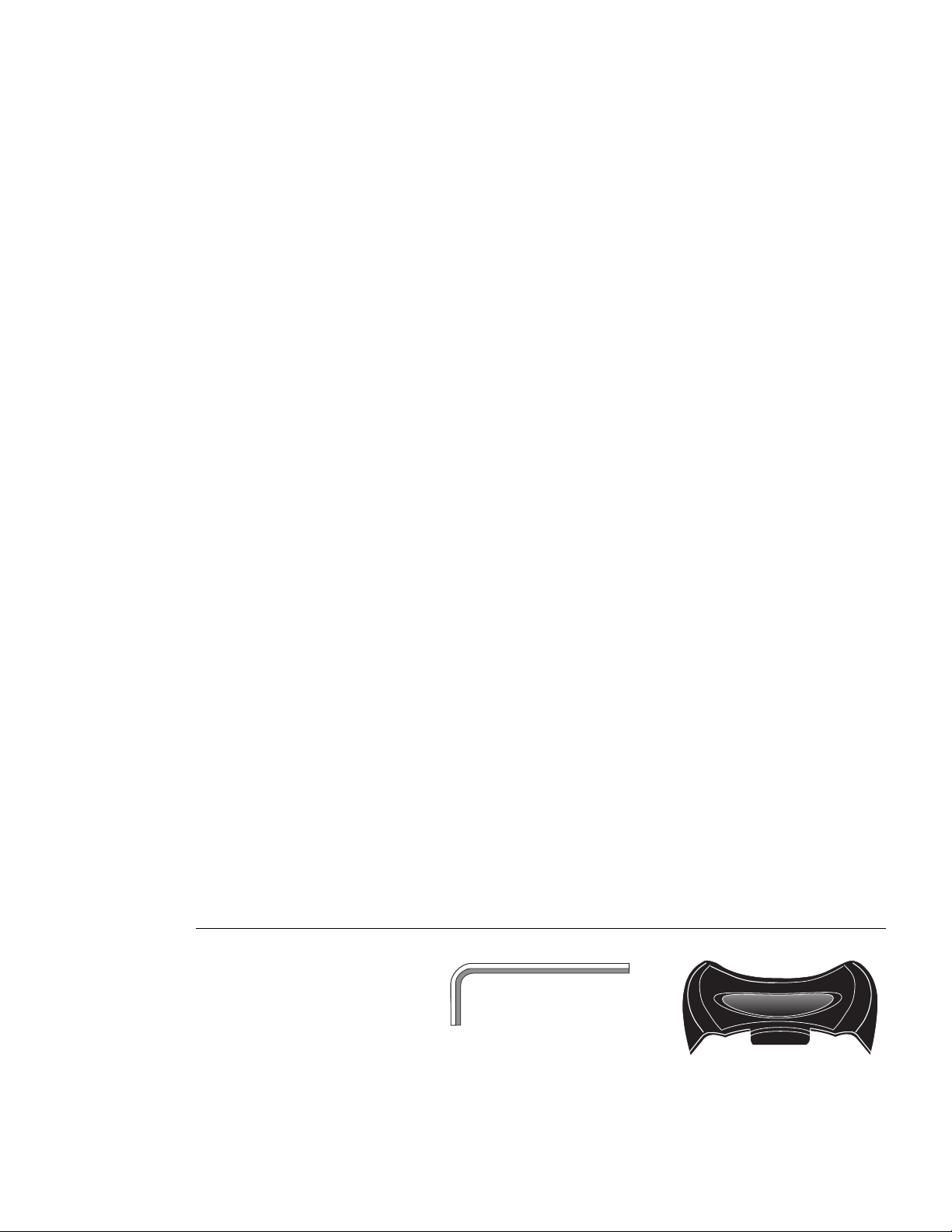
Diagram 1
Hardware Kit.
(A)
Allen wrench
(B)
Wheel Lock
Thank you for purchasing the Precor EFX5.17 Elliptical Fitness CrossTrainer. The EFX5.17
features a zero impact, elliptical-shaped stride that lets you target specific lower-body
muscles to achieve better muscle tone and overall cardiovascular conditioning. It offers
an easy-to-understand display console that gives motivating feedback about your workout.
If you have purchased the optional Precor receiver, installed it, and are wearing the
POLAR
®
chest strap, your heart rate can appear on the EFX5.17 display.
The EFX5.17 is for household use only and is unique in its crosstraining features. To
maximize your use of the EFX, please study this guide thoroughly.
Obtaining Service
Do not attempt to service the EFX5.17 yourself except for the maintenance tasks
described in this manual. The EFX does not contain any user-serviceable parts.
For information about product operation or service, check out the Precor Web Site at
www.precor.com or contact an authorized Precor dealer or a Precor Factory Authorized
Service Company. To locate the dealer or service person nearest you, call 1-800-4-PRECOR.
If you call or e-mail Precor Customer Service, have your model and serial number available.
The serial number on the EFX is usually printed on the regulatory label located next to
the ON/OFF switch. Another location is inside the rear casing. As you face the rear
casing, look into the opening on the left side and you will see the serial number label on
the side plate that is attached to an upright support. You may need a flashlight to read it.
Model number: _______________ Serial number: _________________________
If you have any questions regarding the EFX, use the model and serial number
whenever you contact Precor Customer Service, your Precor dealer, or service person.
Unpacking the EFX5.17 Elliptical Fitness CrossTrainer
The EFX5.17 is carefully tested and inspected before shipment. Precor ships the unit in
the following pieces:
• rear base assembly
• front assembly (includes the display console and handrails)
• owner’s manual, limited warranty card, and hardware kit
Optional equipment that you can purchase through your dealer includes:
• Precor Heart Rate Option
Before You Begin
1
This manual explains how to assemble,
use, and maintain the EFX5.17. The
following conventions are used in this
manual.
“Note:” Contains additional information
that applies to the preceding text.
“Important:” Indicates information to
which you should pay special attention.
“CAUTION:” Indicates steps or informa-
tion necessary to prevent harm to
yourself or damage to the equipment.
“WARNING:” Provides instructions to
prevent electrical damage to the equip-
ment and prevent injuries to yourself or
others.
“DANGER:” Indicates steps you must
take to prevent electrical shock.
CAUTION: This unit weighs about 150
pounds. To avoid injury and to ensure
the safety of the unit and yourself, get
adequate assistance before unpacking
your unit. Break down the container’s
side walls before removing anything
from the box.
Carefully unpack the pieces and lay them on the floor near the location where
you plan to use the EFX. If any items are missing, contact the dealer from whom you
purchased the EFX or call, 1-800-4-PRECOR for the dealer nearest you.
page 7
You do not need any special knowledge or experience to set up the EFX. However, you
must review and follow the instructions in this manual. If you do not assemble and use the
EFX5.17 according to the following guidelines, you might void the Precor limited warranty.
Installation Requirements
Follow these installation requirements when installing the EFX:
• Fill out and mail the limited warranty card. The serial number on the EFX is
usually printed on the regulatory label located next to the ON/OFF switch. Another
location is inside the rear casing. As you face the rear casing, look into the opening
on the left side. The serial number is printed on a label attached to the side plate.
You may need a flashlight to read it. Write the serial number onto the limited
warranty card and in this manual before assembling the EFX. Refer to
Obtaining
Service
on page 6.
• Set up the EFX5.17 EFX on a solid, flat surface. A smooth, flat surface under
the unit helps keep it level. A level unit has fewer malfunctions.
• Provide ample space around the machine. Open space around the machine makes
for a safer mount and dismount and easier access to the ON/OFF (I/O) switch.
• Use a standard 120-volt household outlet. The EFX5.17 is for household use only. A
DC power conversion module plugs into the EFX and converts the 120-volt AC current
to DC current.
CAUTION: Do not remove or otherwise
bypass the DC power conversion
module. Electrical damage can occur
if the unit is connected to an improper
power source.
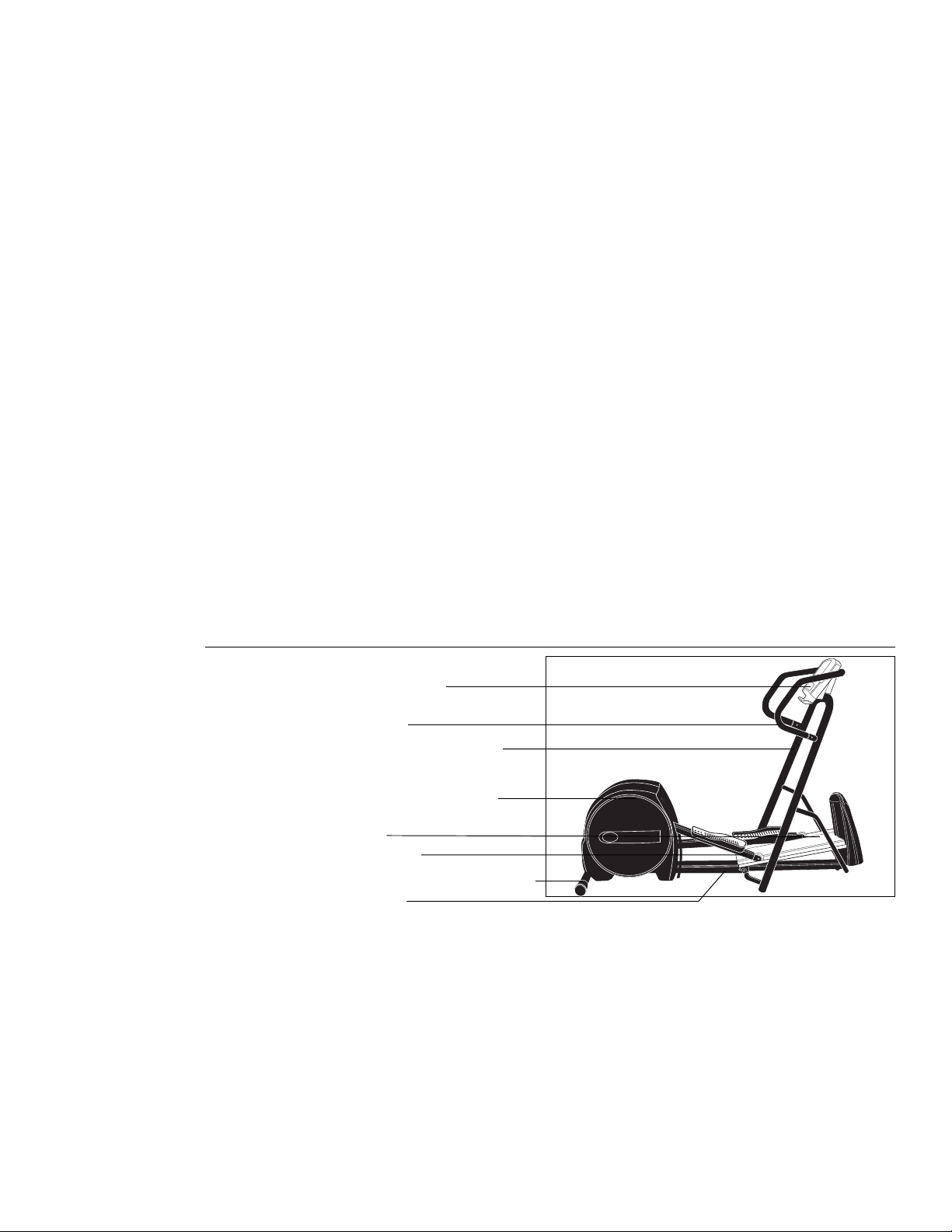
Diagram 2
Fully assembled EFX5.17
Upright supports & front
assembly
Rear assembly & casing
Roller arms
Ramp
Handrails
Display console
Rear crossbar & level adjustor
Setting Up the EFX
CAUTION: If you plan to move the
EFX, do so before you install the front
section. Ask for assistance to move
the unit to its final location.
Assembly Instructions
You should plan where you want to permanently locate the EFX because, once you
install the handrails, the width of the EFX provides little room for maneuvering through
a standard door frame.
To assemble the EFX5.17 EFX, take the following steps:
1. Obtain assistance. Ask for assistance to place the shipping carton close to the
location where you plan to use the EFX. Breakdown the sidewalls of the shipping
carton so that they lie flat.
Base rail
2
page 8
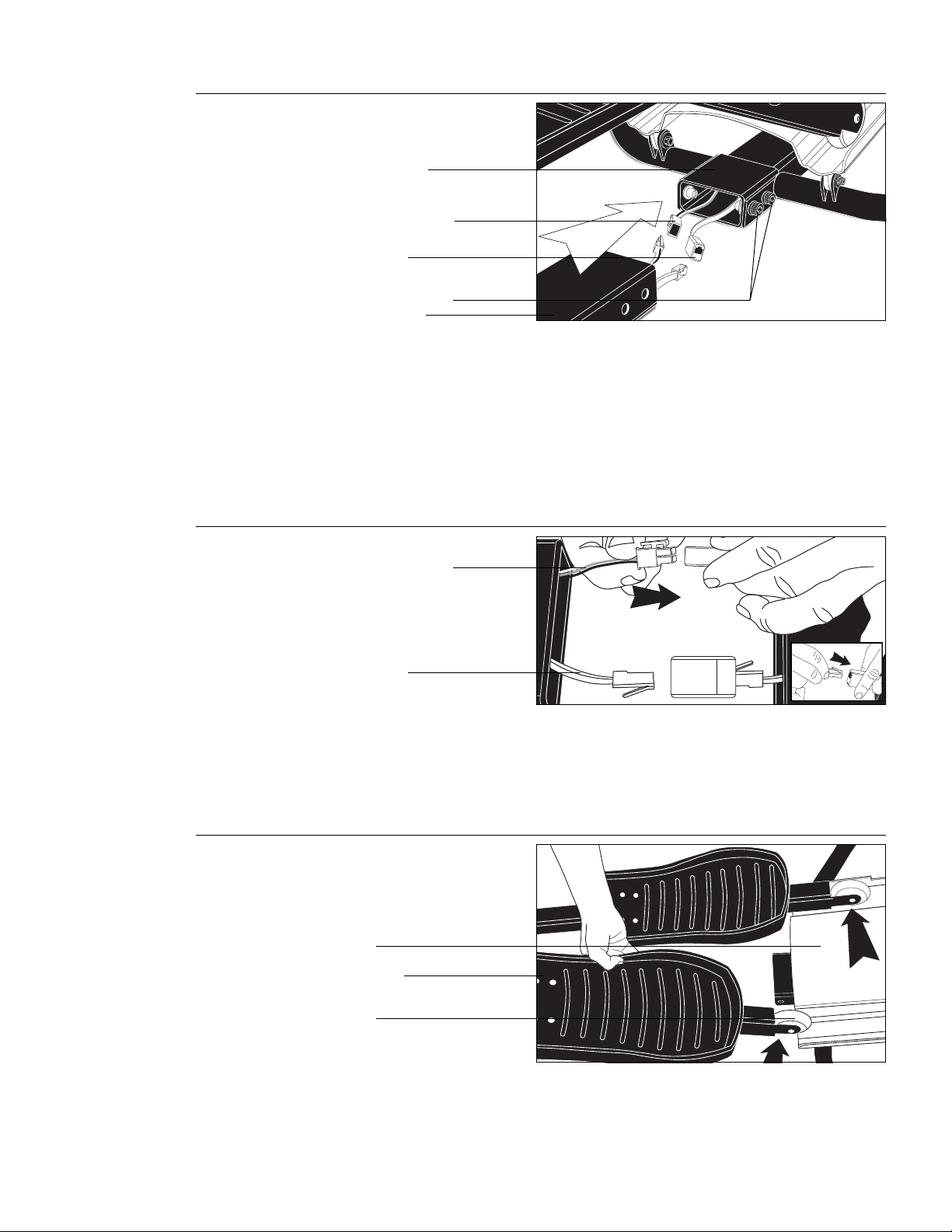
Diagram 4
Placing roller arms onto ramp.
Diagram 3
Connecting the cables.
1
Diagram 2
Positioning the front and rear
base rails close together.
2. Remove the front and rear assemblies. Diagram 2. The front assembly is com-
posed of the upright supports, handrails, display console, ramp and front cover. The
rear assembly is composed of the roller arms, foot pedals, motor and rear casing.
Place the two sections close to each other so that it will be easy to connect the
cables and secure the base rails.
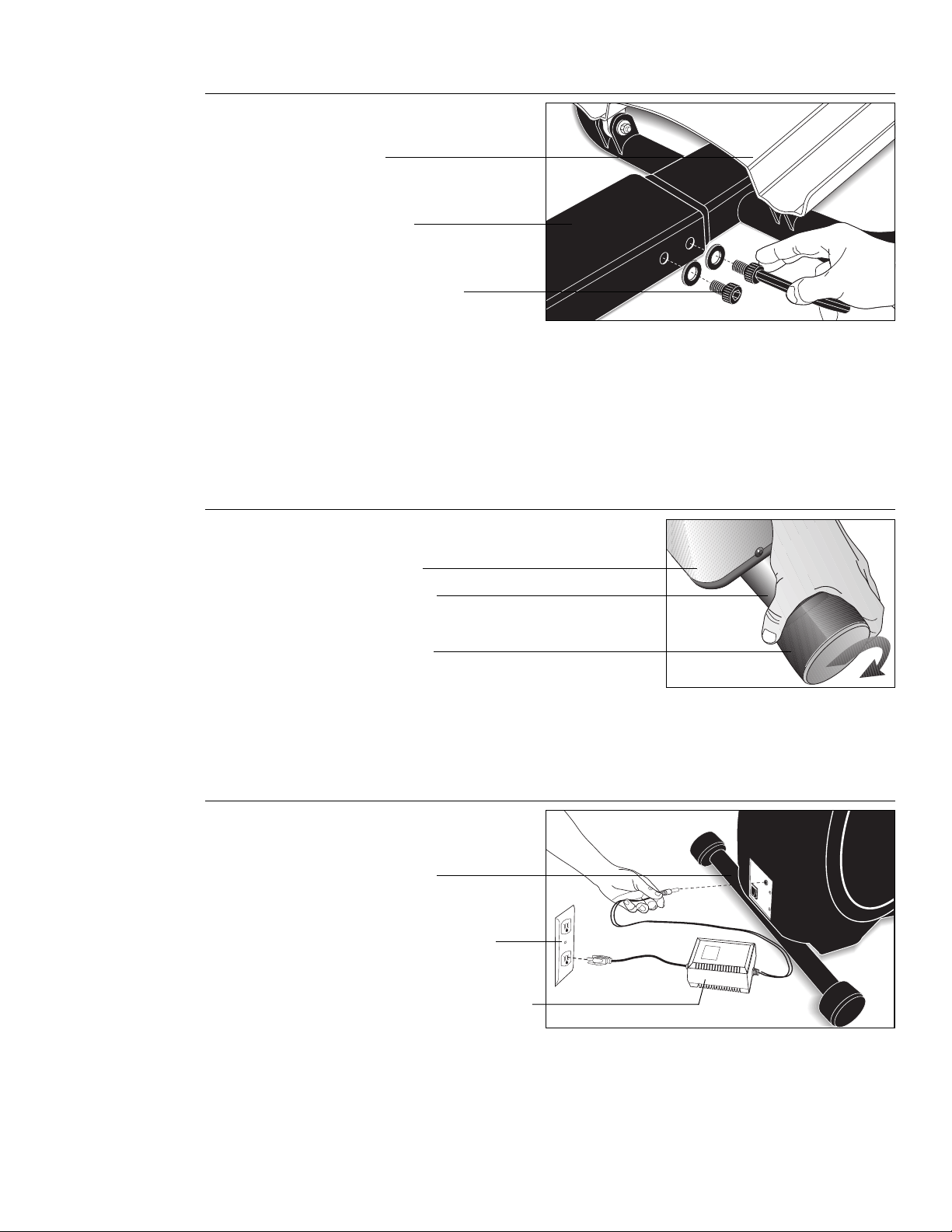
3. Remove bolts and washers from the base rail. Use the supplied Allen wrench to
remove the 4 bolts and washers from the base rail. Keep the washers on the bolts
and set them within easy reach.
Rear base rail
Front base rail
Interconnect cable
RJ46 cable
Bolts and washers
4. Connect the cables. Diagram 3. Plug the connectors (RJ46 and interconnect) into
the receptacles. You’ll hear a “click” when the connection is properly secured.
Do
not force the connection
. Make sure that you match the correct connector to its
receptacle.
5. Lift the rollers onto the ramp. Diagram 4. Have your assistant(s) stand next to the
front cover and face the rear casing. Position yourself next to the base rail bolt
holes. While your assistant(s) grasps the handrails and carefully slides the front
base rail toward the rear, lift the rollers onto the ramp.
2
RJ46 cable
Interconnect cable
Foot pedal
Ramp
Roller
page 9
CAUTION: To avoid injury, wear gloves
while inserting the front base rail into
the rear. Be careful where you place
your fingers and hands when you
guide the base rails together. The
edges of the base rails can be sharp.
Important: Do not crimp or pinch the cables! Carefully, place the excess cables
into the front base rail while you slide the rails together. Crimped or pinched cables
are not covered by the Precor limited warranty.
6. Guide the base rails together and align the bolt holes. Diagram 5. Raise the
rear base rail about a 1/4” off the floor so that the front base rail can easily slide
into the rear. Align the bolt holes and replace the 4 bolts and washers. Alternately
tighten each bolt, using the Allen wrench provided, until the base rail is secure.
Diagram 5
Securing the base rail.
Diagram 7
Connecting the EFX to a
power source.
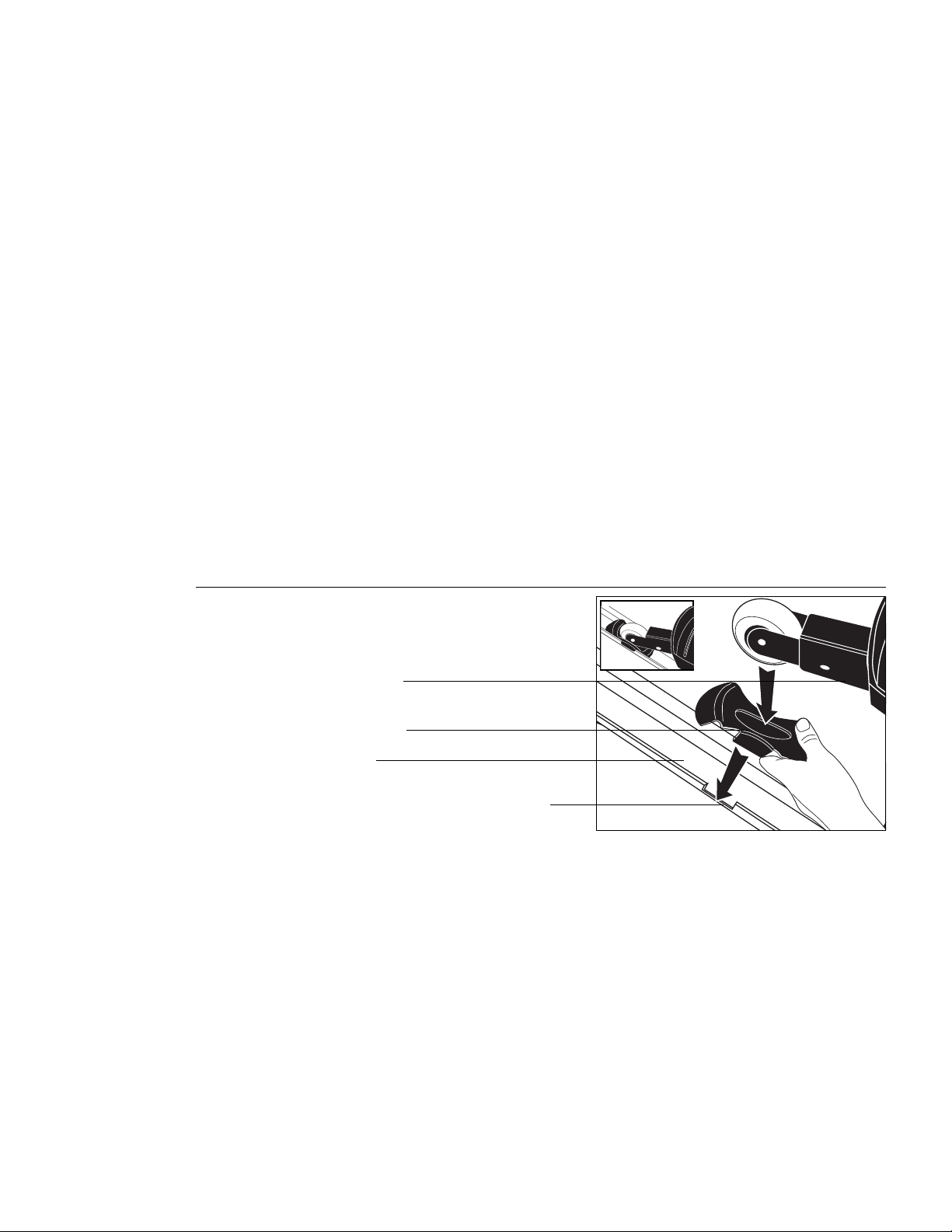
8. Plug in the DC adapter. Diagram 7. Plug the DC adapter (power module) into the
rear of the EFX (just above the ON/OFF switch). Plug the opposite end into a
standard 120v power outlet.
9. Turn ON the EFX. Your EFX is ready to use. Please continue on to
Understanding
the Display Console
to familiarize yourself with the display features and functions.
Diagram 6
Leveling the unit.
7. Level the EFX. Diagram 6. If necessary, rotate the level adjustors on the rear
crossbar until your unit is level. The level adjustors can compensate for about a 1/4”
offset in floor height.
CAUTION: To avoid injury, stand clear
of the ramp when you first turn ON the
EFX. The unit may recalibrate the lift
which can cause the ramp to move.
Ramp
Rear base
Bolts and washers
Rear casing
Rear crossbar
Level adjustor
Rear crossbar
110/120v AC wall outlet
DC power conversion module
page 10
As simple as using the EFX5.17 Elliptical CrossTrainer might seem, you should read
this section so that you can use the EFX safely and effectively. This section of the
owner’s manual provides the basic information you need for exercising on your EFX,
including the following:
• using the wheel lock
• reviewing features on the display console
Note: Instructions explaining how to use the Precor Heart Rate Option are found in the
Precor Heart Rate Option Owner’s Manual.
Using the Security Feature
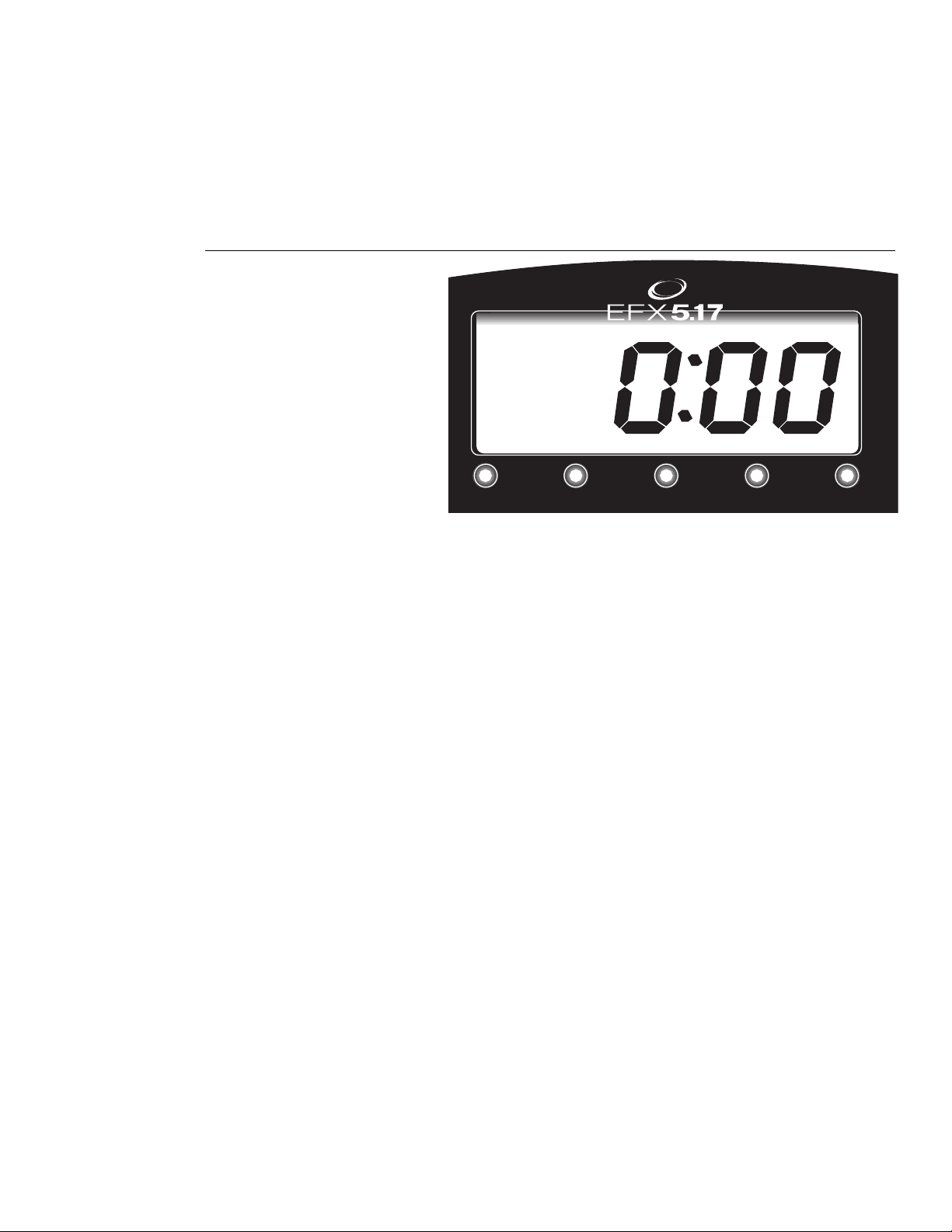
The wheel lock on the EFX’s ramp secures the roller arm and prevents it from travelling
up or down the ramp. To prevent unauthorized use, secure the roller arm with the wheel
lock after every workout.
Note: When you begin a workout, remove the wheel lock, replace the roller arm into the
ramp, and step onto the foot pedals. The foot pedals must complete one stride before
ramp and resistance changes are allowed. The foot pedals must stay in motion if you
wish to continue changes to the ramp and resistance settings.
Electronic Console Display
Diagram 8
Securing the roller arm with
the wheel lock.
Diagram 8 shows the location of the wheel lock on the ramp. Do not force the wheel
lock into position, it should slide easily into place along the edge of the ramp.
Understanding the Display Console
The display console lets you control your EFX session. As you work out, the electronic
display provides constant feedback about your progress. Information about elapsed
time, strides, total caloric burn, ramp and resistance settings, and heart rate (if you
purchased the Precor Heart Rate Option) is available at any time. When you install and
use the Precor Heart Rate Option, the POLAR
®
chest strap that you wear transmits a
signal which is picked up by the EFX5.17 software and displayed numerically (when the
Heart Rate indicator is lit).
CAUTION: Do not allow children on the
EFX. Be aware that injuries can occur
from the roller arm movement. Always
use the wheel lock to secure the roller
arm when the EFX is not in use.
Roller arm
Wheel lock
Ramp
Place wheel lock on edge of ramp
3
page 11
Features on the Display Console
Indicator lights show you which feature is being displayed. When you are working out, the
display presents each feature consecutively—this is called scanning. The display is
always in Scan mode unless you change what features appear on the display by using
the Select key. See
Select Key Functions
.
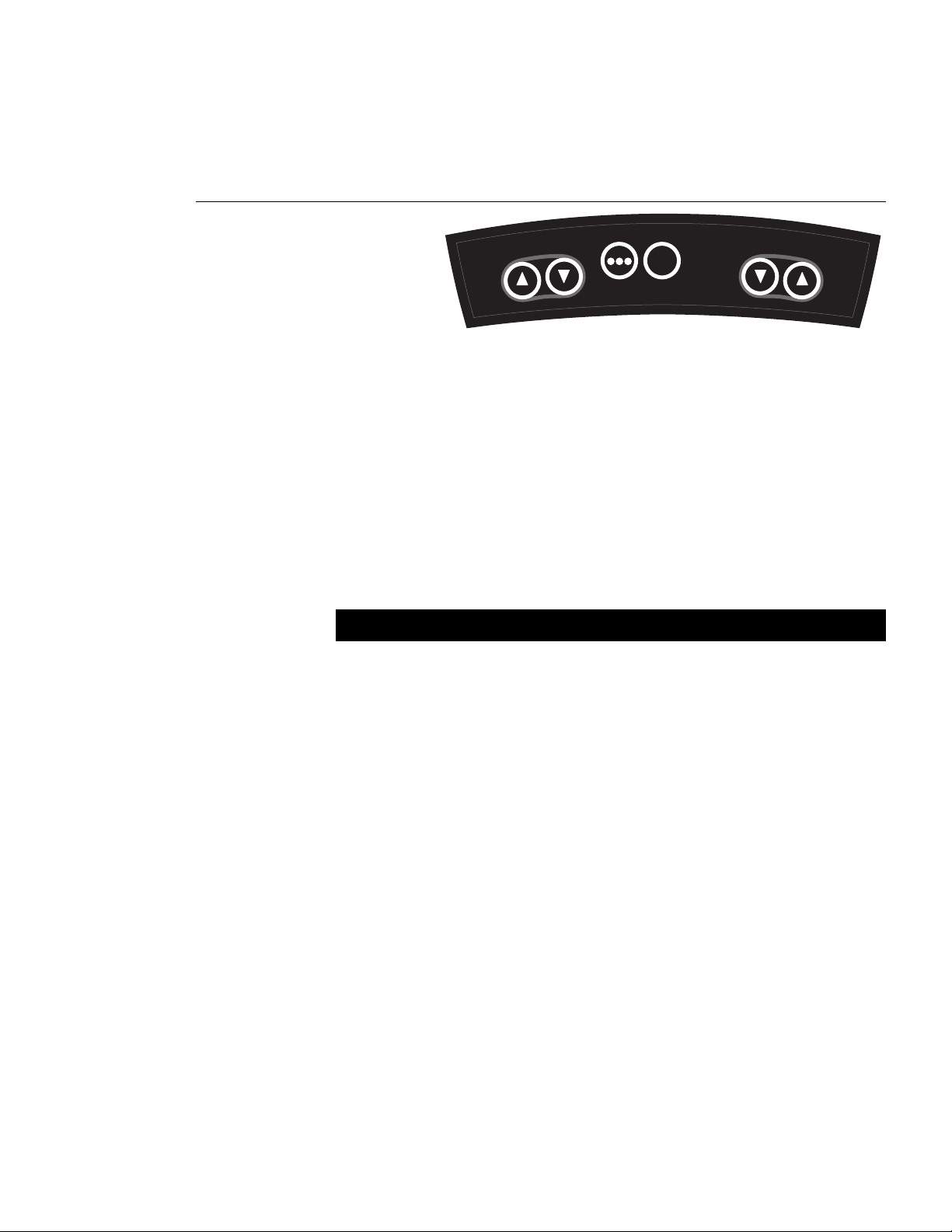
The EFX5.17 display is shown in Diagram 9. The display features and console keys are
explained below it.
Diagram 9
EFX5.17 display.
Note: If an error message appears on the display, call a Precor qualified service
technician or service center. For the service center nearest you call, 1-800-4-PRECOR.
TIME: During your workout, a time (0:00) display appears automatically and stops a few
seconds after the foot pedals stop moving. Time appears in minutes and seconds.
However, should you exceed 60 minutes (during a single workout), the time display
converts to hours and minutes.
Note: You “pause” during your workout any time you stop moving the foot pedals. Time
stops accumulating. Begin moving the foot pedals to exit “Pause mode” and resume
where you left off. If you pause for more than 10 minutes, the system assumes you
have stopped you workout and resets the Time display.
STRIDES/MIN (Strides per minute): Displays the number of strides completed in one
minute. A stride is an exaggerated walking movement. On the EFX, if you start in a
position with one foot forward and one foot back, a stride is completed when you move
the rear foot all the way forward while the forward foot moves to the rear.
TOTAL STRIDES: Displays the total number of strides completed. Refer to Strides/Min above.
CALORIES: The calorie calculation is based on a 150 pound person (68 kg). If your
weight differs, use this display for approximating your caloric burn.
HEART RATE: The heart rate display lets you monitor your heart rate. When a heart beat
is detected, the Heart Rate indicator lights and blinks in time with your pulse. If you did
not purchase the Precor Heart Rate Option, the heart rate feature is skipped during the
scanning process and the indicator will not light. For more information, see
EFX5.17
Heart Rate Feature
on page 14.
Note: You must purchase and install the Precor Heart Rate Option and wear the POLAR
®
chest strap before your heart rate can appear on the display.
TOTAL STRIDESSTRIDES/MIN CALORIES HEART RATETIME
TM
ELLIPTICAL FITNESS CROSSTRAINER
TM
page 12
Keys on the Display Console
Each key on the display console’s keypad provides specific functions. The following
information explains the different uses of the keys from left to right. To locate each key,
look at the display console or refer to Diagram 10.
CAUTION: When you press the display
keys, hold onto the handrail with one
hand to maintain your balance.
CROSSRAMP
INCLINE
RESET
SELECT
RESISTANCE
WORKLOAD
Diagram 10
EFX5.17 display
console keys.
CROSSRAMP▼▲: These keys let you decrease ▼ or increase ▲ the EFX’s ramp
settings from 1 to 7. Briefly pressing the CrossRamp ▼ or ▲ key causes the incline
level to appear on the display. Pressing and holding the CrossRamp ▼ or ▲ key for a
few seconds, changes the settings.
Note: Resistance changes take precedence over ramp changes. You will notice that the
ramp movement is slowed when you change resistance settings while the ramp incline
motor is engaged.
SELECT: Briefly pressing the Select key anytime during a workout causes the next display
feature to appear. If no feature is “selected” (see
SELECT key functions
below) the display
consecutively “scans” each feature (such as Calories) and displays it for 5 seconds. If one
or more features are “selected,” the display continues scanning until the next selected item
is reached. From that point, it will only “scan” between the selected features.
The following chart explains the Select key functions:
SELECT key functions: What you do:
To establish a one feature display When the feature you want appears on the
display, press and hold Select until the LED
associated with that feature begins to blink,
then release pressure from the key.
To choose another display feature Briefly press Select to establish scan mode.
As the display consecutively scans the
features, press and hold the Select key when
the feature you want appears. Release the
key when the LED (associated with the
feature) begins to blink. The display will “scan”
between the features you have selected (and
skip over the features that you did not choose).
To undo (reverse) a selection When the selected feature appears on the
display, press and hold Select until the LED
begins to blink. The display reverts to the
previously selected pattern (if any existed).
RESET: Pressing and holding the Reset key down for about 2 seconds causes the
display to return to a 0:00 Time display.
Note: You “pause” during a workout any time you stop moving the foot pedals. Resuming
foot pedal movement, exits “Pause mode.” If you pause for more than 10 minutes, the
system assumes that you have ended your workout and resets to a 0:00 Time display.
RESISTANCE▼▲: Decrease ▼ or increase ▲ the EFX’s resistance settings from 1 to 10.
Briefly pressing the ▼ or ▲ key causes the resistance settings to appear on the display.
Pressing and holding the Resistance ▼ or ▲ key for a few seconds, changes the settings.
page 13
Before using your EFX, we recommend that you follow these instructions and go
through a preliminary demonstration of the EFX.
When using the EFX, follow these general guidelines:
• At the beginning of a workout, take several minutes to bring your heart rate into
your training zone, shown in Diagram 12 on page 16.
• After your workout, walk slowly for several minutes to cool down your body and
lower your heart rate.
• Before and after a workout, gently stretch your lower body and back to help
prevent stiffness or soreness.
Beginning Your Workout
The EFX5.17 provides Manual mode which lets you regulate the resistance and ramp
settings during your workout. As you workout, keep in mind that because of the EFX’s
unique design, you have several ways of increasing your work effort.
• decreasing the resistance and increasing the strides per minute.
• increasing the resistance and keeping the strides per minute constant.
• increasing both the resistance and ramp settings and maintaining your stride rate.
To work out on the EFX5.17, take the following steps:
1. For your Heart Rate to appear on the display, the heart rate receiver must be
installed in the display console and you need to wear the POLAR
®
chest strap.
Refer to
Precor Heart Rate Option Owner’s Manual
to learn how to properly use
the chest strap.
2. Remove the wheel lock from the ramp.
3. Locate the ON/OFF (I/O) switch at the rear of the unit and turn ON the EFX.
4. Face the display console and hold onto the handrails as you place your feet into
the foot pedals. Notice that when the foot pedals move Time appears for 5 seconds
and then the display begins to scan through the different features.
Note: The EFX5.17 lets you select what features you want to display. Refer to the
Select key function chart on page 12 for more information.
5. Continue moving the foot pedals at a comfortable stride rate. Your “stride rate”
appears as STRIDES/MIN (strides per minute) on the display.
Note: If you have purchased the Precor Heart Rate Option, installed the receiver in
the display console, and are wearing the POLAR
®
chest strap, your heart rate can
appear on the display. Having your heart rate displayed while you workout, helps
you maintain a target zone. Refer to Diagram 12 on page 16.
To pause during your workout session, simply stop pedaling. The display continues
in scan mode, so you can review your workout statistics. After a 10 minute “pause,”
the system resets to a 0:00 Time display.
6. When you are finished exercising, be sure to cool down mode. Cooling down after
your workout helps reduce muscle stiffness and soreness by transporting excess lactic
acid out of the working muscles. It also helps your heart rate return to its normal (non-
exercising) state. Always incorporate a 3 to 5 minute cool down period at the end of
your workout.
7. Hold onto the handrails while you step out of the foot pedals.
8. Turn OFF the unit and replace the wheel lock. See page 10,
Using the Security
Feature
.
Quick Steps to Working Out
CAUTION: Before beginning any
fitness program, you should obtain a
complete physical examination from
your personal physician.
CAUTION: To avoid injury, stand clear
of the ramp when you first turn ON the
EFX. The lift may recalibrate which
causes the ramp to move.
Quick Steps to Working Out
1
Put on the chest strap. (Available
with the Precor Heart Rate Option.)
Remove the wheel lock.
Turn ON EFX.
Hold onto the handrails and step
into the foot pedals.
2
3
4
Begin working out. (For best
results, maintain a constant stride
rate.)
5
6
End your workout.
Use the Heart Rate display option
to maintain your heart rate in a
target zone.
(Pause)
(Cool down)
7
8
Step off the foot pedals.
Turn OFF the EFX. Secure the
EFX with its wheel lock.
4

page 14
Pausing Your Workout
You can pause any time during your workout. Use this feature to rest or take a short
break. To pause while working out, simply stop moving the foot pedals. You can tell that
you are in Pause mode because Time stops accruing.
To resume your workout, begin moving the foot pedals. Your workout statistics continue
from where you left off. Note that after a 10 minute pause, the EFX assumes you have
stopped working out and resets the display.
The EFX5.17 Heart Rate Feature
To activate the heart rate feature on the EFX5.17, you need to purchase the Precor
Heart Rate Option and install its receiver into the display console. To display your heart
rate, you must wear the POLAR
®
chest strap while working out. The chest strap
transmits your heart rate signal to the receiver which, in turn, causes it to appear on the
display. During your workout, the heart rate indicator lights and blinks at the same rate
as your pulse. This provides a visual clue and indicates what your heart rate is doing
even when the display is scanning a different feature.
The heart rate equipment is sensitive and it requires special care. If you are having
difficulty with the EFX heart rate feature, see the
Troubleshooting Tips
described below.
Troubleshooting Tips
The following chart may help you understand and troubleshoot the Precor Heart Rate
Option that you have purchased.
Note: The Precor heart rate receiver must be properly installed in the display console and
you must wear the POLAR
®
chest strap during your workout before a heart beat can be
detected. The EFX must also be turned ON before the display features can appear.
What appears on the Display Cause What to Do
No Heart Rate LED lit. EFX is turned OFF or Turn ON the EFX and/or
no receiver is installed. purchase the Precor Heart
No “- - -” appears. Rate Option.
1
No Heart Rate appears.
1
If you know that the receiver is installed, check to make sure that it
is installed correctly. Refer to your
Precor Heart Rate Option Owner’s
Manual
. If you wish to purchase the option, call 1-800-4-PRECOR to
locate the dealer nearest you.
Heart Rate LED lights. Receiver installed, but To transmit a heart rate
no heart rate detected. signal, the POLAR
®
chest
“---” appears, but only for strap must be worn properly.
2
2 or 3 scanning cycles.
2
If you have the chest strap on, the battery may be dead. To
purchase a new chest strap, call the dealer nearest you.
Erratic heart rate readings Improper placement of Stand within 3 feet of the
the chest strap, body display and face toward it.
chemistry
3
mismatch Allow a few seconds for the
receiver to recognize the
transmitter’s signals.
3
Make sure that the electrodes on the chest strap are moist and
placed properly against your skin. Sometimes, due to body
chemistry, the chest strap cannot successfully detect and
transmit your heart rate. If this occurs, use the electrolyte spray
that accompanies your Precor Heart Rate Option package. Follow
the directions on the bottle. After spraying the electrode strips on
the chest strap, check to be sure that the strap is comfortably tight
around your chest and centered in the middle of your chest. Refer
to your
Precor Heart Rate Option Owner’s Manual
.
CAUTION: When you use the display
console, hold onto the handrail with
one hand to maintain your balance.
You should also use the handrail
whenever you step into or out of the
foot pedals.
page 15
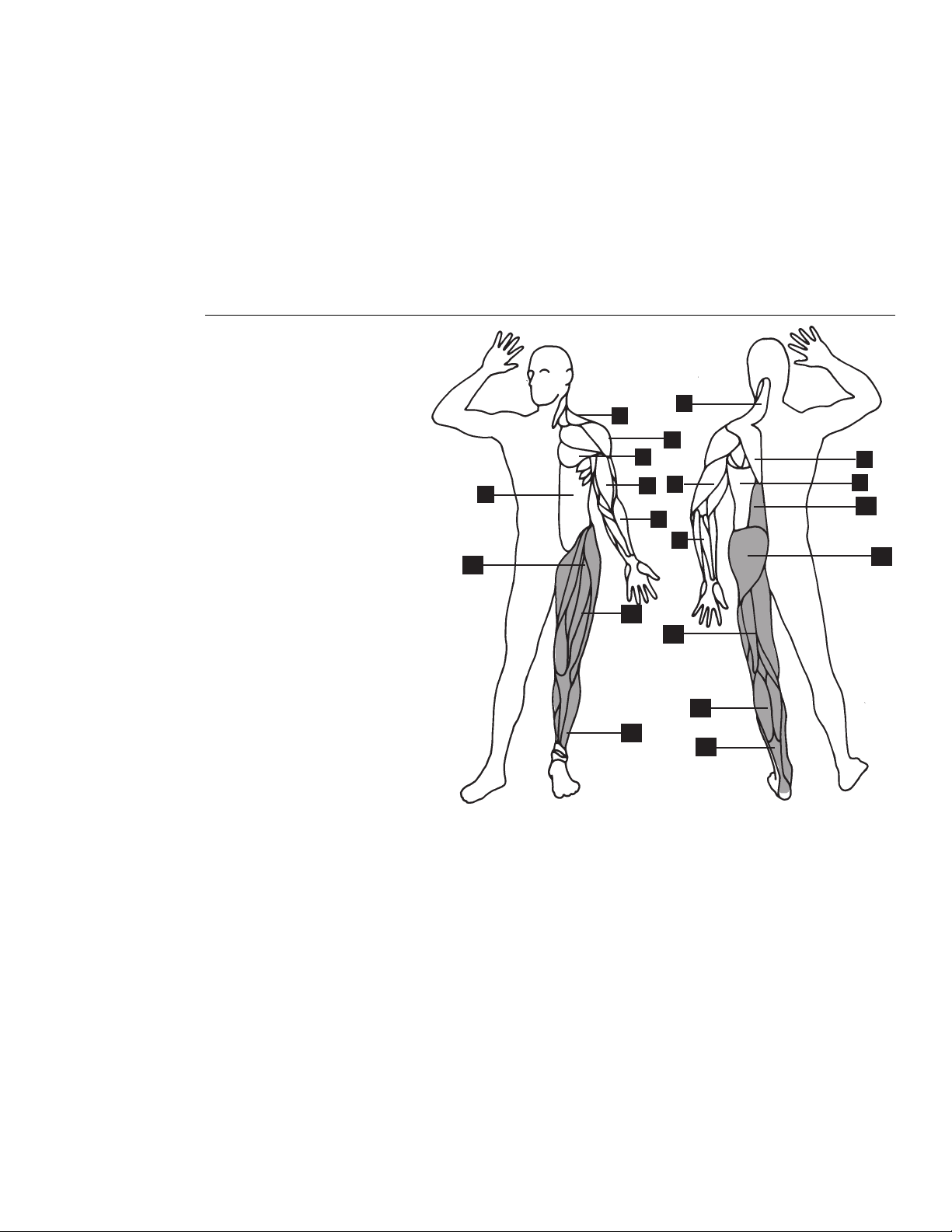
Getting the Most Out of Your Workout
Diagram 11
Muscles Improved.
1. Trapezius
2. Deltoids
3. Pectorals
4. Rhomboids
5. Triceps
6. Biceps
7. Latissimus Dorsi
8. Forearm Flexors/Extensors
9. Abdominals
10. Erector Spinae
11. Gluteals
12. Hip Flexors
13. Quadriceps
14. Hamstrings
15. Gastrocnemius/Soleus
16. Peroneus Longus/Brevis
9
16
6
12
2
1
4
3
16
1
8
5
8
13
14
15
11
10
7
To help you get started in planning and carrying out your fitness program, this section
provides some basic information on aerobic exercise—such as how hard you should
work out, how long each session should be, and how often you need to exercise to
benefit from a regular program.
A workout on the EFX5.17 Elliptical Fitness CrossTrainer provides excellent and efficient
cardiovascular conditioning, while strengthening and toning all the major muscle groups in
the lower body. Darkened areas in Diagram 11 indicate the muscles improved.
To get the most out of each workout, a general understanding of the principles behind
aerobic training is invaluable. The best source of information is your specialty fitness
dealer. In addition to providing information on which exercise equipment is best for your
individual needs, your fitness dealer can provide useful advice on training, technique,
and exercise physiology. Your dealer can also recommend good books and audio/video
tapes on these subjects.
CAUTION: Always check with your
physician to learn what the appropriate
heart rate is for your level of fitness.
Do not push yourself beyond the
recommended range.
5
page 16
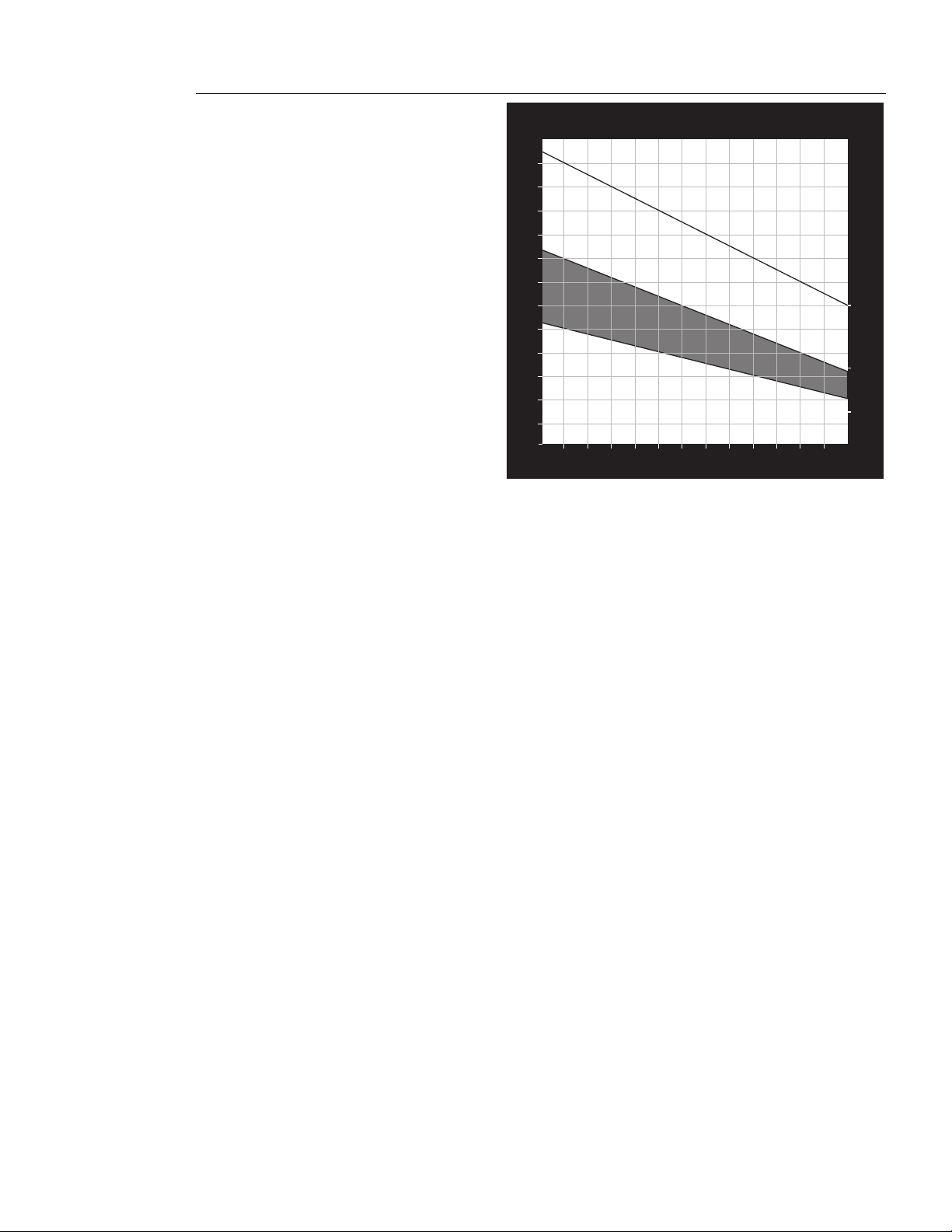
Diagram 12
Training Zones.
HEART RATE TRAINING ZONE
70
80
90
100
120
130
140
150
160
170
180
190
200
20
25 30 35 40 45 50 55 60 65 70 75
YOUR AGE
YOUR HEART RATE
MAX.
HEART
RATE
80% OF
MAX.
HEART
RATE
65% OF
MAX.
HEART
RATE
130
127
120
117
114
111
107
104
97
160
156
148
144
140
136
132
128
124
120
190
185
180
175
170
165
160
155
150
145
RECOMMENDED TRAINING ZONE
94
124
152
116
101
195
200
How Hard Should I Exercise?
Studies show that to achieve the benefits of aerobic exercise, it is necessary to work
out hard enough to raise your heart rate to a certain minimum level, called the “training
zone.” Your training zone depends on your age and level of fitness.
Diagram 12 shows your recommended heart rate training zone, which is calculated
using your age and your maximum aerobic heart rate. Your maximum aerobic heart rate
is equal to 220 minus your age. The chart is based on a resting heart rate of about 72
for males and 80 for females. Your optimum training zone is between 65% and 80% of
your maximum heart rate. For efficient aerobic exercise, work only hard enough to keep
your heart rate in this zone. You will obtain the greatest fat-burning benefits when you
exercise within the optimum training zone.
Pushing yourself beyond the recommended range, (that is, exercising so hard that your
heart rate rises above 80% of maximum) can overstress your muscles. To increase
cardiovascular improvement, exercise
longer
, not harder.
Keep in mind that this zone is an approximation, to be used as a guideline—individual heart
rates vary according to several physiological factors. To determine your training zone, find
your age on the diagram, and then find the line where they intersect. For example, if you
are 45 years old, your training zone is between 114 and 140 beats per minute. Remember
this zone—this is the heart rate zone you should try to maintain as you work out.
If you do not have an accurate heart rate monitor, you can determine your heart rate by
taking your pulse at a place that you can reach easily and comfortably while you
exercise. Typical places for measuring heart rate are directly over the heart on the left
side of the chest, on either side of the neck, over the temple, or on the thumb side of
either wrist. Wherever you measure your pulse, make sure that you use your index and
middle fingers—not your thumb. Your thumb has a strong pulse which can affect your
pulse rate reading.
CAUTION: Keep in mind that the
“Heart Rate” or “Training” zones are
approximations. Always check with
your physician to learn what the
appropriate heart rate is for your level
of fitness. Do not push yourself
beyond the recommended range.

page 17
Once you locate your pulse, look at a clock with a second hand, and count the beats for
six seconds. Multiply that number by 10 to determine the total number of beats per
minute. For example, if you count 14 beats over six seconds, the total number of beats
per minute is 140. Compare the total number of beats with your training zone as
identified in Diagram 12. If necessary, increase or decrease your activity level to bring
your heart rate into your training zone. You can regulate your work level (and heart rate)
by changing resistance and/or ramp settings. Remember—your heart rate is the
definitive measure of how hard you are working.
Regardless of your fitness level, avoid doing too much too soon. Give yourself time to
become familiar with your EFX and to improve your fitness level. Then you can gradu-
ally increase the resistance and ramp settings to make your workouts more challenging.
You can also reverse the direction of your stride to tone other muscle groups.
How Long Should I Exercise?
The length of each exercise session depends on your fitness level. Exercise physiolo-
gists have determined that, to attain cardiovascular benefits from exercise, you should
maintain your heart rate in its training zone for at least 15 minutes. This is in addition to
your warm-up time, and does not include cool down. You should always allow several
minutes to bring your heart rate into the training zone, by starting out slowly and
gradually increasing work level. Similarly, use several minutes of light exercise after the
workout to bring your heart rate down to near resting level.
The higher your fitness level, the longer you should maintain your heart rate in the
training zone (between 20 and 30 minutes). Beginners should always start slowly, and
gradually bring their sessions up to 20 minutes or more.
How Often Should I Exercise?
Research indicates that aerobic sessions of 20 minutes or more should be done at least
three to five times a week to obtain significant cardiovascular benefits. Most experts
agree that sensible eating habits and regular aerobic exercise are the keys to weight
control and fitness. A recent study, which tracked several subjects over a period of years,
conclusively shows that exercise, not dieting, is the key factor to long-term weight loss.
CAUTION: Refer to the “Precor Heart
Rate Option Owner’s Manual” for
other important safety tips.

page 18
Maintaining the EFX
CAUTION: Turn OFF the EFX and
disconnect the power cord from the
wall outlet and the power conversion
module from the EFX before perform-
ing any maintenance tasks.
CAUTION: Do not use abrasive cleaner
on the strap. Do not immerse any part
of the chest strap. Do not spray or pour
liquids on any part of the equipment.
The EFX5.17 Elliptical Fitness CrossTrainer requires little maintenance to keep it running
smoothly and efficiently. However, the customer is responsible for the typical maintenance
tasks such as, cleaning the EFX to keep it free from dust and dirt accumulation. If you
fail to maintain the EFX as described below, it could affect or void the limited warranty.
Cleaning the Equipment
Your Precor EFX relies on low friction for efficient operation. To keep the friction low, the
EFX must be as clean as possible. Before a workout, use a damp, soft, clean cloth and
wipe along the inside portion of the ramps. This helps to remove any dirt or dust that
might affect the smooth operation of the ramp rollers. Vacuum the floor underneath the
unit every week to prevent the accumulation of dust and dirt.
Periodically wipe the frame, display console, and foot pedals, with a dampened (not
dripping wet)
clean
cloth using a solution of mild soap and water. To clean the groves on
the foot pedals, use a soft nylon scrub brush. Never pour water or spray liquids on any part
of the EFX. Allow the EFX to dry completely before using it.
The Precor Heart Rate Option equipment requires little maintenance beyond keeping it
dust free and cleaning the chest strap with mild soap and water. Use a damp sponge or
soft cloth to clean the chest strap. Dry the surface thoroughly with a clean towel.
Storing the Chest Strap
Store the chest strap transmitter in a place where dust and dirt cannot accumulate on it
such as, a closet or drawer. Be sure to keep the chest strap protected from extremes in
temperature. Do not store it in an area that may be exposed to temperatures below 32
degrees Fahrenheit.
Servicing the EFX
Do not attempt to service the EFX5.17 yourself except for the maintenance tasks
described in this manual. The EFX5.17 does not contain any user-serviceable parts that
require lubrication. For information about product operation or service, contact an
authorized Precor dealer.
Power Cord Maintenance
When the EFX5.17 is in use, ensure that the power supply cord is away from moving
parts and cannot be damaged. If the power supply cord or power conversion module is
damaged, it can only be replaced in a repair shop appointed by Precor because special
tools are required.
EFX Long Term Storage
When the EFX is not in use, ensure that the power supply cord is unplugged from the
wall outlet and is positioned so that it will not become damaged or interfere with other
equipment or people. There are no special storage requirements for the EFX other than
ensuring that is kept free from dirt, moisture, or damage.
6

page 19

page 20
EFX5.17 Elliptical Fitness CrossTrainer
Specifications
Length: 74 inches (188 cm)
Width: Handrails 28 inches (71 cm) at the widest point
Width: Support tube at base is 30 inches (76 cm) at widest point
Height: 58 inches (147 cm)
Power: 12 V DC, 3.0 Amps 36 watts
Weight: 148 lbs (67 kg)
Shipping weight: 183 lbs (83 kg)
Electronic Specifications
EFX5.17 Programs: EFX5.17 Display Readouts:
Manual Ramp Incline
Resistance Level
Time
Strides per Minute
Total Strides
Calories (based on a 150 lbs (68 kg) person)
Heart Rate*
* Requires that you purchase the Precor Heart Rate Option. The optional receiver must be
installed in electronic console. To be activated, the POLAR
®
chest strap must be worn.
Precor Incorporated
P.O. Box 3004
Bothell, WA USA 98041-3004
Copyright 1998 Precor Incorporated.
Specifications subject to change without notice.
1-800-4-PRECOR; Precor web site: www.precor.com
NOTICE:
Precor is widely recognized for its innovative, award winning designs of health and fitness equipment.
Precor aggressively seeks U.S. and foreign patents for both the mechanical construction and the visual
aspects of its product design. Any party contemplating the use of Precor’s product designs is hereby
forewarned that Precor considers the unauthorized appropriation of its proprietary rights to be a very
serious matter. Precor will vigorously pursue all unauthorized appropriation of its proprietary rights.
P/N 38384-102
11/98