RAPID CHANGE WEIGHT SYSTEMS
RAPID CHANGE
WEIGHT SYSTEMS
www.mxselect.com
SELECT
DUMBBELL STAND
MX SELECT - USER SAFETY PRECAUTIONS
To avoid possible injury, all users should read and understand these
instructions before using any MX Select product.
1.
2.
3.
4.
5.
6.
7.
8.
9.
Consult a medical doctor or healthcare professional to be cleared by them for exercise and to
determine the exercises appropriate for you, before undertaking exercise with MX Select Systems.
If you experience any pain or dizziness, stop exercise immediately and consult a medical doctor.
Perform any exercise with the correct technique – consult a personal trainer or healthcare
professional for guidance if unsure of technique or your personal exercise parameters.
MX SELECT Systems are designed for home use only and are not suitable or warranted for commercial
use.
Understand how to select the desired weight with the MX SELECT System, see page 2 following.
Never touch the weight selector release button or move the selector dial while the MX Select product
is out of the cradle, doing so may release weight plates from the handset and cause catastrophic
injury.
Never use MX Select Systems if they are not functioning properly.
Never drop, throw or strike together any MX Select System, this will void warranty and could cause
permanent damage.
Take personal responsibility to ensure your safety and the safety of those around you while using
and storing MX SELECT Systems.
US PATENT NUMBERS: 9643042 & 10166427 BRITISH PATENT NUMBERS: 2911752 & 2956218
BREVETT PATENT NUMBERS:. 502017000140462 & 502019000108103
UPDATED - 100621
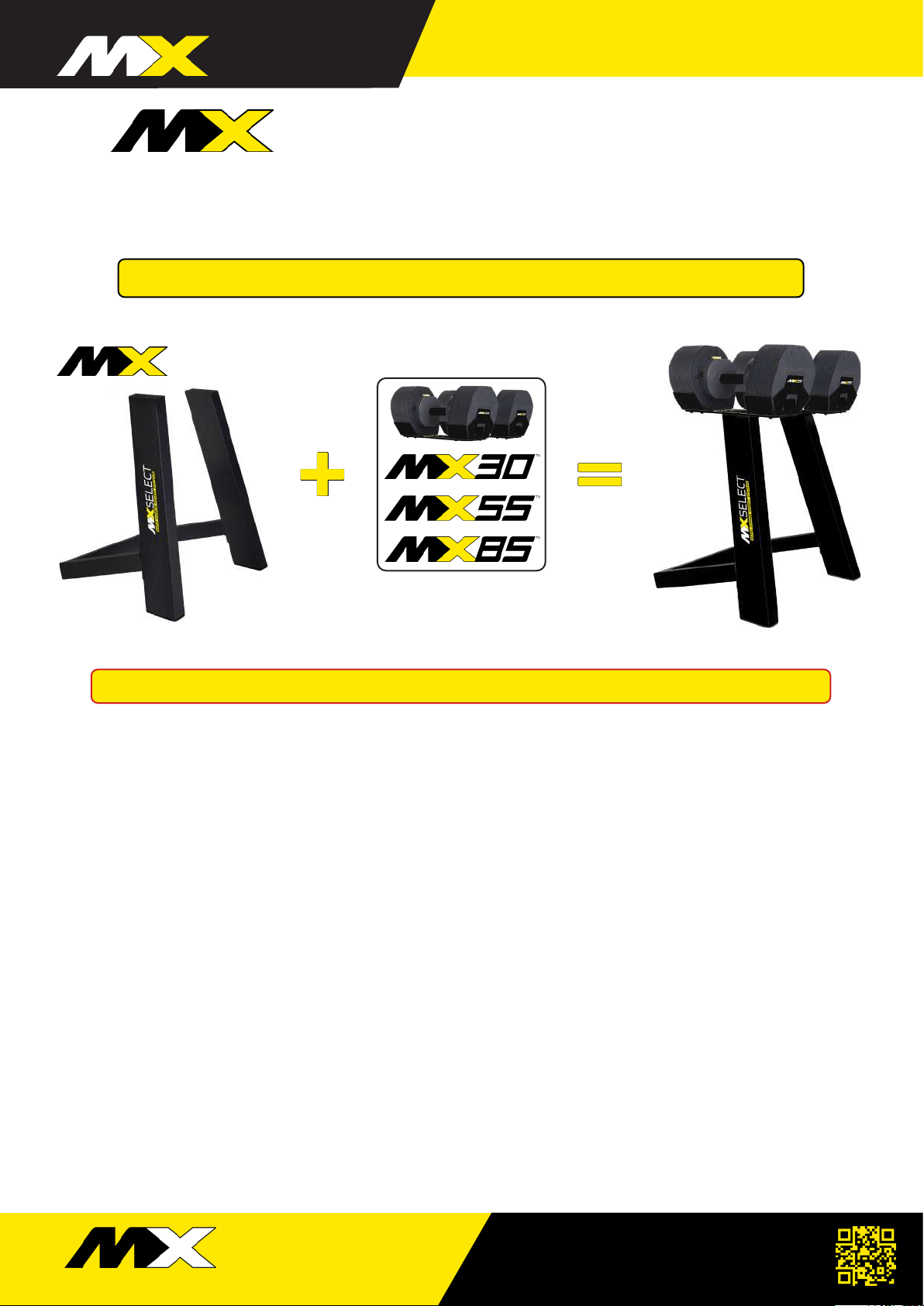
Made for MX30, MX55 & MX85
Dumbbell Weight Cradles (without feet)
ASSEMBLY & SYSTEM ADJUSTMENTS
STAND
RAPID CHANGE WEIGHT SYSTEMS
RAPID CHANGE
WEIGHT SYSTEMS
www.mxselect.com
SELECT
2
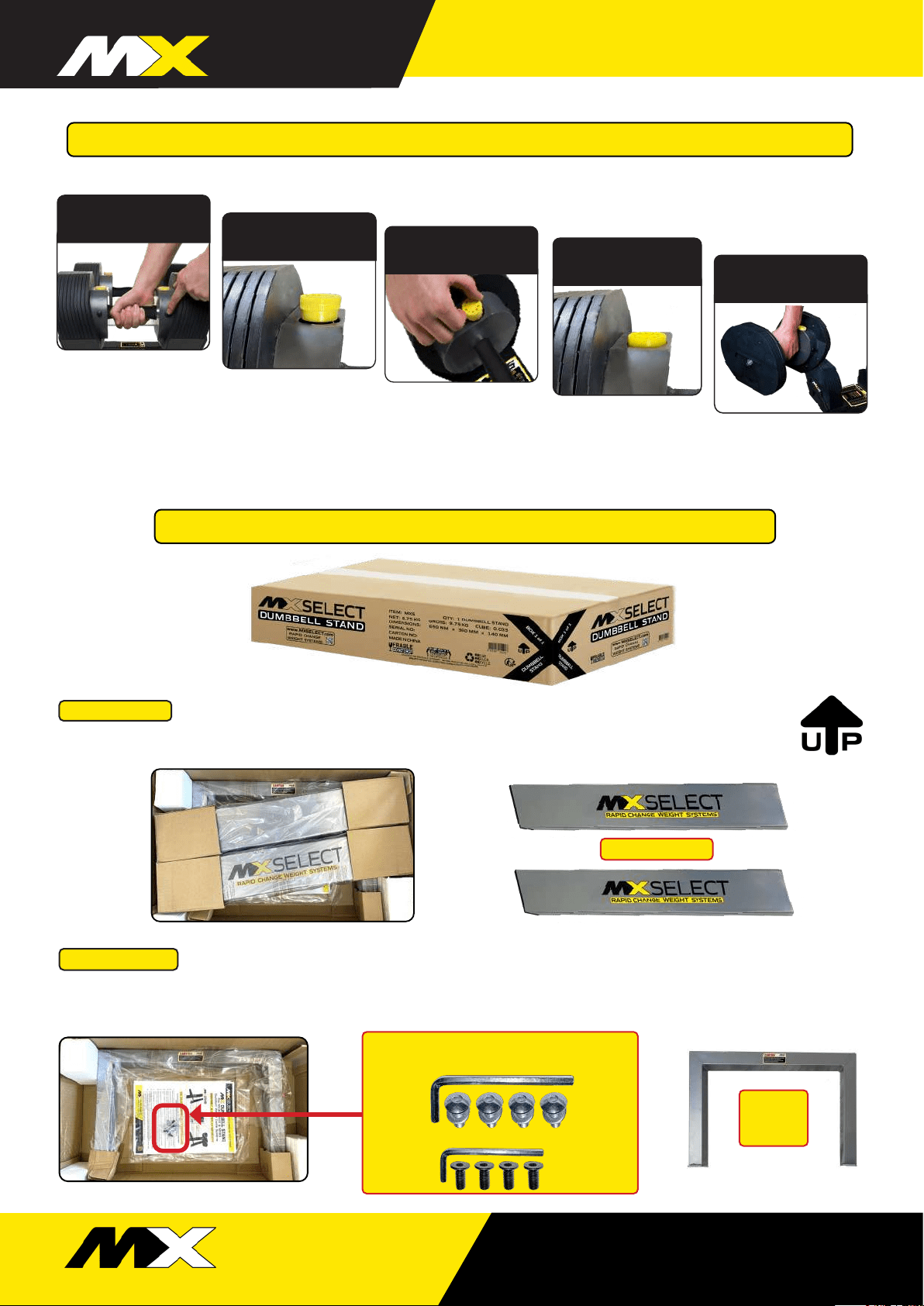
......................... The owners guide and hardware kit is visible on the bottom of the box below the Stand
Rear Support. Remove the hardware kit from the plastic sleeve and put the Bolts and Allen Keys aside.
Remove the Stand Rear Support.
......................... Place the MX Stand box on a flat firm surface with the Up Arrow pointing up.
Open the top of the box and remove the Stand Uprights.
ASSEMBLY INSTRUCTION - MX STAND
STEP ONE
STEP TWO
MX STAND - Hardware Kit
4 x Stand Bolts, Washers & 4mm Allen Key
4 x Cradle Countersunk Bolts & 3mm Allen Key
Stand Uprights
Stand
Rear
Support
Push weight selector
dial release button
Turn weight selector
dial to desired weight
Lift Dumbbells from
Cradle and start training
HOW TO SELECT DESIRED TRAINING WEIGHT
Raised weight selector
release dial
Push selector dial in to
lock selected weight
Only adjust the Weight Selector Dial while the Dumbbell is in the Weight Cradle
Adjust both ends of the Dumbbell to your desired training weight.
RAPID CHANGE WEIGHT SYSTEMS
RAPID CHANGE
WEIGHT SYSTEMS
www.mxselect.com
SELECT
3
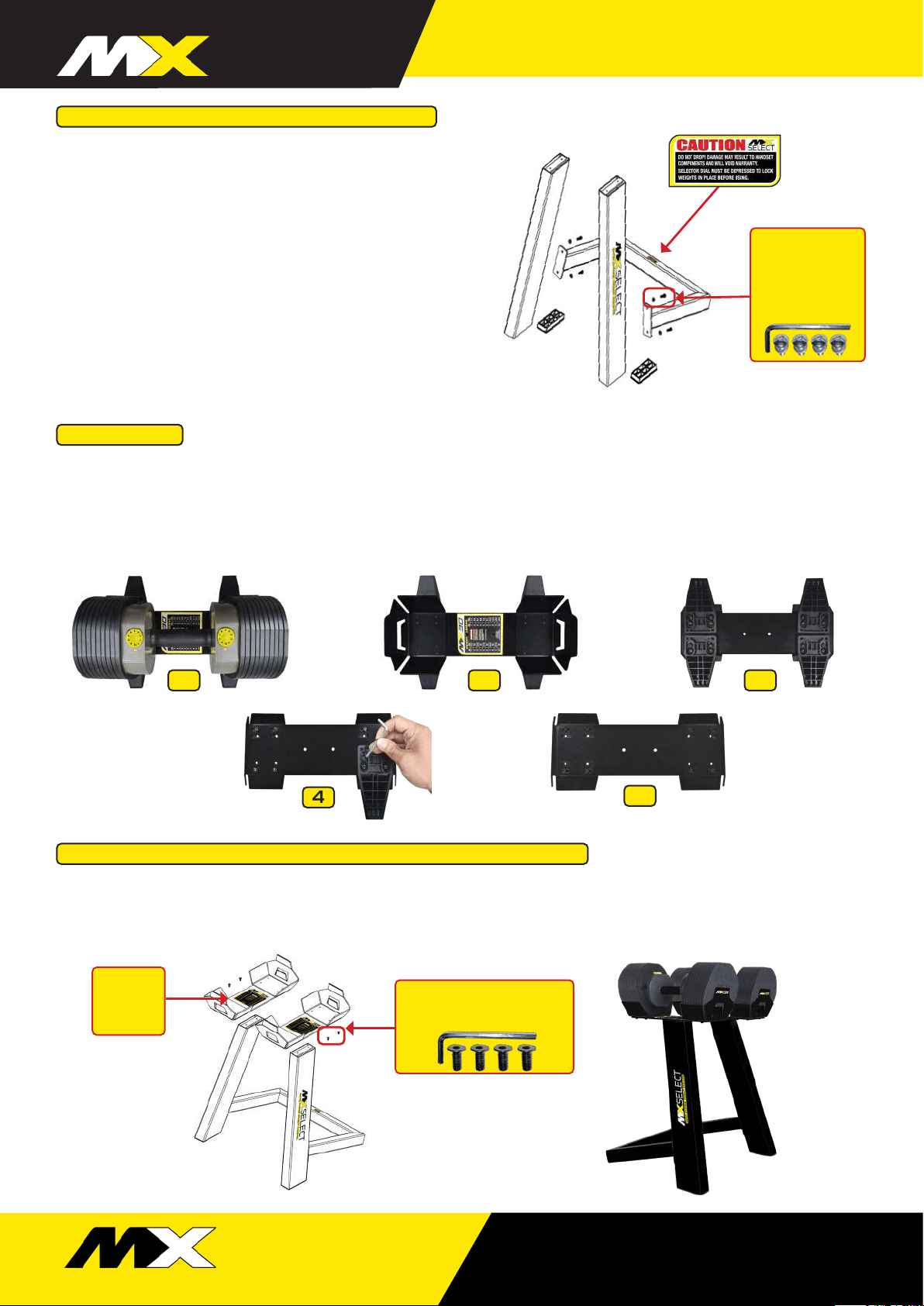
If the MX Dumbbell Cradle does not have the Cradle Feet fitted, go to Step 5; otherwise, follow the “How to Select
desired training weight” instructions above, and set the dial to 10, remove the MX Dumbbell Handset from the Cradle
and put aside. Setting 10 is the HEAVIEST, so take care when lifting and placing the dumbbell. Turn the Cradle over
and, using a 4mm Allen Key remove the Cradle Feet bolts and Cradle Feet.
Lay the Stand Uprights on the floor (careful not to damage
the floor or stand coating) and place the Stand Rear Support
in position to line up the bolt pattern on both parts.
Ensure the MX SELECT decal faces outwards on both Stand
Uprights and that the Warning decal on the Stand Rear
Support will face up when assembled. Attach the Stand
Uprights to the Stand Rear Support using 4 Stand bolts with
washers – DO NOT fully tighten at this time.
Place Stand assembly on the floor as shown, checking to
make sure the Stand assembly sits evenly on the floor.
FULLY TIGHTEN STAND BOLTS.
STEP THREE - ASSEMBLE THE STAND
STEP FOUR
Using the
4mm Allen Key.
Attach Uprights
to Rear Support
with Stand Bolts
& Washers
Loosely attach one Cradle on top of a Stand Upright using 2 of the Cradle Countersunk Bolts making sure the Weight
Legend can be read from the front. Repeat with the other Cradle. Tighten all bolts making sure the Cradles stay
parallel.
STEP FIVE - ATTACHING THE CRADLES TO THE STAND
5
4
1 32
Using the 3mm Allen Key.
Attach Cradle with
Countersunk Cradle Bolts
FRONT
Weight
Legend
read from
the front
RAPID CHANGE WEIGHT SYSTEMS
RAPID CHANGE
WEIGHT SYSTEMS
www.mxselect.com
SELECT
4
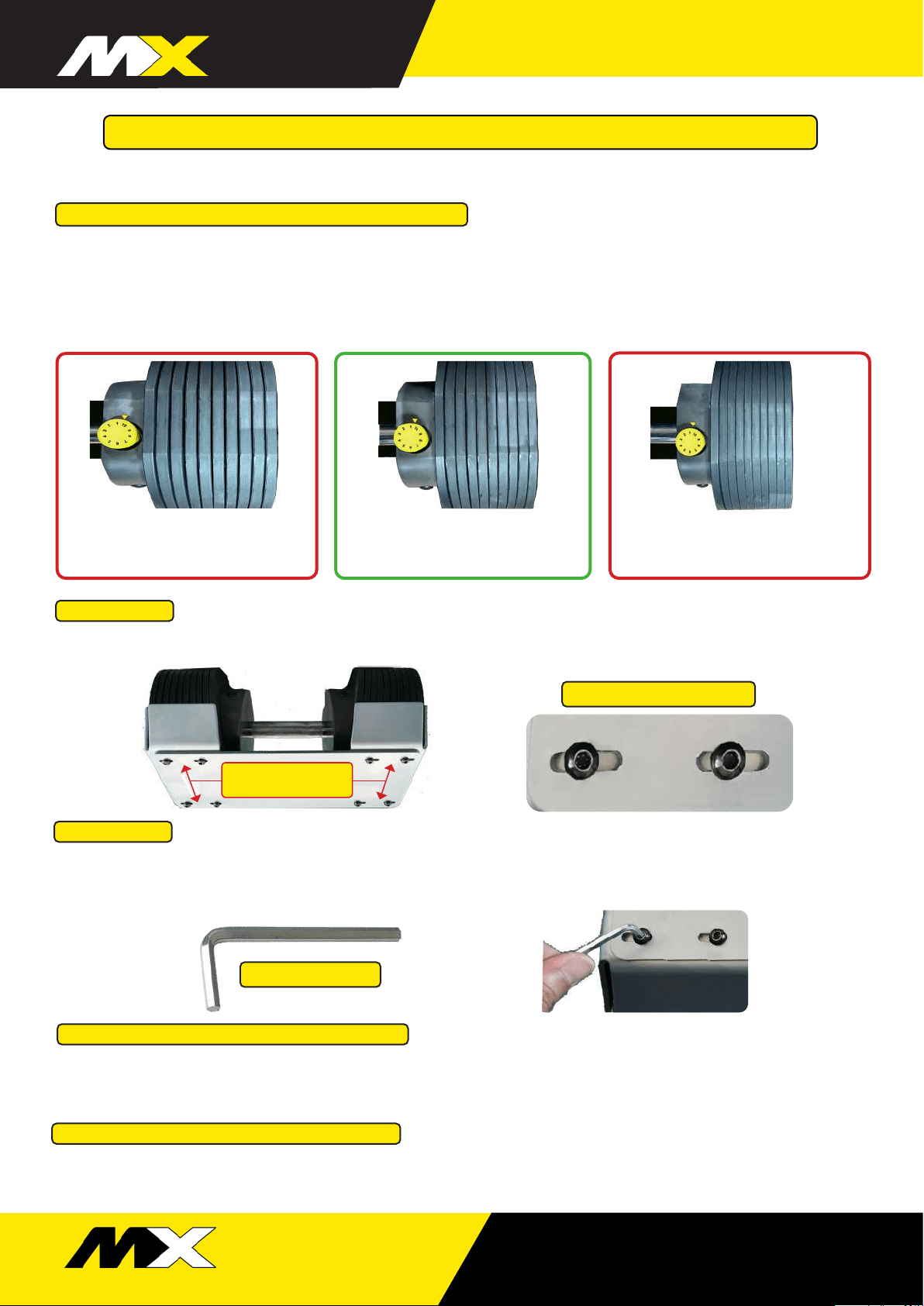
CORRECT SPACING CORRECT SPACING
Weight plates have a thin gap
but don’t move freely
CRADLE SPACING TOO WIDE
Weight plates move freely
when in Cradle
CRADLE SPACING TOO CLOSE
Cant remove weights and
selector dial won’t turn
STEPS TO RESOLVE THE FOLLOWING
+ Selector dial will not push down and lock into place.
+ Selector dial feels tight or will not turn easily.
+ Extra weight plate sticks when the MX Dumbbell Handset is removed from Cradle.
+ Weight plates are too widely spaced or too closely spaced.
FOR SMOOTH & ACCURATE WEIGHT PLATE SELECTION
MX DUMBBELL ADJUSTMENT GUIDE
Adjustment bolts
in slotted holes
IF CRADLE SPACING TOO WIDE
IF CRADLE SPACING TOO TIGHT
Push the floating cradle end inwards, closing the gap between the plates.
Tighten bolts and test on all dial settings. If not correct, repeat adjustment steps.
Move apart floating cradle end outwards, opening a slight gap between the plates.
Tighten bolts and test on all dial settings. If not correct, repeat adjustment steps.
With the MX Dumbbell Handset still in Cradle, locate adjustments bolts in the slots underneath Cradle.
Using a M4 Allen Key loosen the 4 Adjustment Bolts at one end of the MX Dumbbell Cradle just
enough to allow you to move the Cradle as required.
ADJUSTMENT SLOTS
STEP ONE
STEP TWO
M4 ALLEN KEY