
This addendum accompanies your equipment documentation and is additional
information concerning the heart rate features for your equipment and console.
Important
The heart rate features are intended for reference only. They may not be accurate
for every user or at every speed and are not intended for use as a medical device.
Holding the heart rate handle touch sensor while exercising at higher intensity
may also decrease accuracy of the heart rate reading and is not recommended.
Please also read your product documentation and visit:
www.precor.com/en-us/customer-service/faq.
P/N 305324-101 rev A, ENU
©Precor Incorporated | October 2017

HEART RATE INFORMATION
WELCOME TO A PERSONALIZED FITNESS EXPERIENCE FOR YOUR HOME
Quick
Start
Card
PRECISION
™
SERIES
AND ENERGY
™
SERIES
TREADMILLS
CHOOsE A WORKOUT
• Determine your level of tness: beginner,
intermediate, or advanced.
• Determine your immediate goal: endurance
training, cardio-conditioning, or weight loss.
If you are a beginner, start with a cardio-conditioning
workout to gradually adjust your body to the demands of
exercise. Over a recommended eight-week period, you will
increase your endurance and strength.
For all tness levels, plan to exercise at an appropriately
challenging pace for 20 to 30 minutes a day. Wear a chest
strap to monitor your heart rate. Supplement your plans
with tness workouts from the Precor web site
(www.precor.com). The Precor web site also provides
expert advice to help you reach your tness goals.
MONITOR YOUR HEART RATE
The SmartRate and heart rate displays provide visual cues
that help you adjust your tness routine to reach your
goals. Use these features to keep your heart rate within
the target zones.
Wear a Chest Strap
During a workout, the heart rate features appear on
the display when you wear a chest strap. To receive an
accurate reading, the chest strap needs to be in direct
contact with your skin. After you put on the chest strap,
face the display console for a minimum of 15 seconds. This
allows the receiver in the console to recognize the signal
from the chest strap.
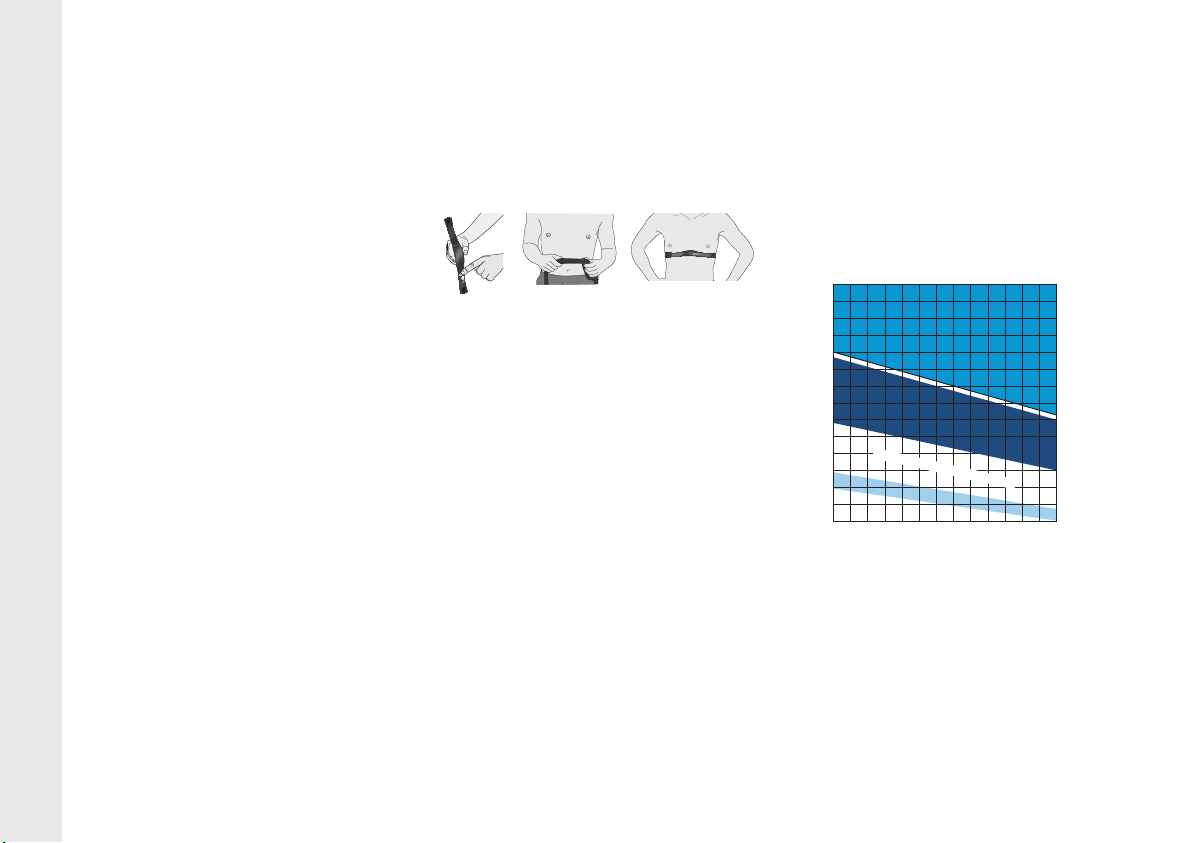
1. Carefully dampen the back of the strap with tap
water (Diagram A).
IMPORTANT: Do not use deionized water. It does
not have the proper minerals and salts to conduct
electrical impulses.
2. Adjust the strap and fasten it around your chest.
The strap should feel snug, not restrictive
(Diagram B).
3. Make sure that the chest strap is right side up, lies
horizontally across your chest, and is centered in
the middle of your chest (Diagram C).
When these steps are complete, you are ready to view
your heart rate.
Touch-Sensitive Handrail Grips
Several Precor products incorporate touch-sensitive
heart rate grips on the handrails. If you prefer to use
the touch-sensitive handrail grips, use both hands.
Make sure both hands are moist (not dry) and avoid
grasping the sensors too tightly.
Note: For the best heart rate monitoring results, wear a
chest strap.
sMARTRATE® FEATUREs
When you begin an exercise session, a blinking
segment in the SmartRate display appears if you
entered your age during the setup phase. The blinking
segment indicates the current zone of your heart rate.
The calculation used for the heart rate target zone is
your maximum aerobic heart rate:
207 - (your age x 0.67), multiplied by a percentage.
For the ideal weight loss range, your heart rate should
remain between 55% and 69% of your maximum
aerobic heart rate. To improve your overall
cardiovascular and respiratory tness level, maintain
your heart rate between 70% and 85% of your
maximum aerobic heart rate. For the greatest benets,
maintain your heart rate in either zone for 30 minutes or
more at least three times a week.
CAUTION: Your heart rate should never exceed
85% of your maximum aerobic heart rate or go
above your target zone (Diagram D).
COOl DOWN AFTER YOUR WORKOUT
Cooling down is an important aspect of your workout
because it helps reduce muscle stiness and
soreness by transporting excess lactic acid out of the
working muscles. Cooling down for at least three
minutes helps provide a smooth transition that allows
your heart rate to return to its normal, non-exercising state.
20031 142nd Avenue NE | P.O. Box 7202
Woodinville, WA USA 98072-4002
www.precor.com
P/N 303169-111 | ©2014 Precor Incorporated
Diagram D: Heart Rate Target Zones
Diagram A Diagram B Diagram C
Choose a Program
• Determine your level of fitness: beginner,
intermediate, or advanced.
• Determine your immediate goal: endurance
training, cardio-conditioning, or weight loss.
If you are a beginner, start a cardio-conditioning
program to slowly adjust your body to a comfortable
level of exercise. Over a recommended 8-week
period, you will increase your endurance and strength
while improving flexibility.
If you have been exercising and feel that you have
reached an intermediate or advanced fitness level, you
probably have established goals for yourself.
For all fitness levels, plan to exercise at a comfortable
pace for 20 to 30 minutes a day. Wear a chest strap
to monitor your heart rate. Supplement your plans
with fitness workouts from the Precor web site
(www.precor.com). The Precor web site also provides
expert advice to help you reach your fitness goals.
Monitor Your Heart Rate
The SmartRate and heart rate displays provide visual
cues that help you adjust your fitness routine to reach
your goals. Use these features to keep your heart rate
within the target zones.
Wear a Chest Strap
During a workout, the heart rate features appear on
the display when you wear a chest strap. To receive
an accurate reading, the chest strap needs to be in
direct contact with your skin. After you put on the
chest strap, face the display console for a minimum of
15 seconds. This allows the receiver in the console to
recognize the signal from the chest strap.
1. Carefully dampen the back of the strap with tap
water (Diagram A).
Important: Do not use deionized water. It does
not have the proper minerals and salts to conduct
electrical impulses.
2. Adjust the strap and fasten it around your chest.
The strap should feel snug, not restrictive
(Diagram B).
3. Make sure that the chest strap is right side up, lies
horizontally across your chest, and is centered in
the middle of your chest (Diagram C).
When these steps are complete, you are ready to view
your heart rate!
Touch-Sensitive Handrail Grips
Several Precor products incorporate touch-sensitive
heart rate grips on the handrails. If you prefer to use
the touch-sensitive handrail grips, use both hands.
Make sure both hands are moist (not dry) when you
grasp the touch-sensitive handrail grips.
SmartRate
®
Features
When you begin an exercise session, a blinking
segment in the SmartRate display appears if you
entered your age during the setup phase. The blinking
segment indicates the current zone of your heart rate.
The calculation used for the heart rate target zone is
your maximum aerobic heart rate:
(220 minus your age) multiplied by a percent.
For the ideal weight loss range, your heart rate should
remain between 55% and 70% of your maximum
aerobic heart rate. To improve your overall
cardiovascular and respiratory fitness level, maintain
your heart rate between 70% and 85% of your
maximum aerobic heart rate.
For the greatest benefits, maintain your heart rate in
either zone for 30 minutes or more at least three times
a week.
CAUTION: Your heart rate should never exceed
85% of your maximum aerobic heart rate or go
above your target zone (Diagram D).
Diagram D
Cool Down After Your Workout
Cooling down is an important aspect of your workout
because it helps reduce muscle stiffness and
soreness by transporting excess lactic acid out of the
working muscles. Cooling down for at least three
minutes helps provide a smooth transition that allows
your heart rate to return to its normal, non-exercising
state.
Diagram A Diagram B Diagram C
20 25 30 35 40 45 50 55 60 65 70 75
70
80
90
100
120
130
140
150
160
170
180
190
200
110
Heart Rate Target Zones
Your Age
Your Heart Rate
Peak
Cardio
Warmup
R
e
c
o
m
m
e
n
d
e
d
C
a
r
d
io
v
a
s
c
u
la
r
Zon
e
R
e
c
o
m
m
e
n
d
e
d
W
e
i
g
h
t
L
o
s
s
Z
o
n
e
Fatburn
High
Precor Incorporated
20031 142nd Avenue NE
P.O. Box 7202
Woodinville, WA USA 98072-4002
www.precor.com
HR INFO 48140-104
©2007 Precor Incorporated
Choose a Program
• Determine your level of fitness: beginner,
intermediate, or advanced.
• Determine your immediate goal: endurance
training, cardio-conditioning, or weight loss.
If you are a beginner, start a cardio-conditioning
program to slowly adjust your body to a comfortable
level of exercise. Over a recommended 8-week
period, you will increase your endurance and strength
while improving flexibility.
If you have been exercising and feel that you have
reached an intermediate or advanced fitness level, you
probably have established goals for yourself.
For all fitness levels, plan to exercise at a comfortable
pace for 20 to 30 minutes a day. Wear a chest strap
to monitor your heart rate. Supplement your plans
with fitness workouts from the Precor web site
(www.precor.com). The Precor web site also provides
expert advice to help you reach your fitness goals.
Monitor Your Heart Rate
The SmartRate and heart rate displays provide visual
cues that help you adjust your fitness routine to reach
your goals. Use these features to keep your heart rate
within the target zones.
Wear a Chest Strap
During a workout, the heart rate features appear on
the display when you wear a chest strap. To receive
an accurate reading, the chest strap needs to be in
direct contact with your skin. After you put on the
chest strap, face the display console for a minimum of
15 seconds. This allows the receiver in the console to
recognize the signal from the chest strap.
1. Carefully dampen the back of the strap with tap
water (Diagram A).
Important: Do not use deionized water. It does
not have the proper minerals and salts to conduct
electrical impulses.
2. Adjust the strap and fasten it around your chest.
The strap should feel snug, not restrictive
(Diagram B).
3. Make sure that the chest strap is right side up, lies
horizontally across your chest, and is centered in
the middle of your chest (Diagram C).
When these steps are complete, you are ready to view
your heart rate!
Touch-Sensitive Handrail Grips
Several Precor products incorporate touch-sensitive
heart rate grips on the handrails. If you prefer to use
the touch-sensitive handrail grips, use both hands.
Make sure both hands are moist (not dry) when you
grasp the touch-sensitive handrail grips.
SmartRate
®
Features
When you begin an exercise session, a blinking
segment in the SmartRate display appears if you
entered your age during the setup phase. The blinking
segment indicates the current zone of your heart rate.
The calculation used for the heart rate target zone is
your maximum aerobic heart rate:
(220 minus your age) multiplied by a percent.
For the ideal weight loss range, your heart rate should
remain between 55% and 70% of your maximum
aerobic heart rate. To improve your overall
cardiovascular and respiratory fitness level, maintain
your heart rate between 70% and 85% of your
maximum aerobic heart rate.
For the greatest benefits, maintain your heart rate in
either zone for 30 minutes or more at least three times
a week.
CAUTION: Your heart rate should never exceed
85% of your maximum aerobic heart rate or go
above your target zone (Diagram D).
Diagram D
Cool Down After Your Workout
Cooling down is an important aspect of your workout
because it helps reduce muscle stiffness and
soreness by transporting excess lactic acid out of the
working muscles. Cooling down for at least three
minutes helps provide a smooth transition that allows
your heart rate to return to its normal, non-exercising
state.
Diagram A Diagram B Diagram C
20 25 30 35 40 45 50 55 60 65 70 75
70
80
90
100
120
130
140
150
160
170
180
190
200
110
Heart Rate Target Zones
Your Age
Your Heart Rate
Peak
Cardio
Warmup
R
e
c
o
m
m
e
n
d
e
d
C
a
r
d
io
v
a
s
c
u
la
r
Zon
e
R
e
c
o
m
m
e
n
d
e
d
W
e
i
g
h
t
L
o
s
s
Z
o
n
e
Fatburn
High
Precor Incorporated
20031 142nd Avenue NE
P.O. Box 7202
Woodinville, WA USA 98072-4002
www.precor.com
HR INFO 48140-104
©2007 Precor Incorporated
20 25 30 35 40 45 50 55 60 65 70 75
70
80
90
100
120
130
140
150
160
170
180
190
200
110
Your Heart Rate
Maximum
High
Moderate
Warm-up
Your Age
Recommended Cardiovascular Zone
Recommended Weight Loss Zone
CAUTION: Before beginning any fitness program, see your physician for a thorough examination. Ask your physician about the appropriate target heart rate for your fitness level.
Drawn
to crop
1.75” H
Line
Weights
Approx
.5 pt
.25 pt
Drawn for Hydra Manual / Quickstart Card 03.07.14 0 - Jen
Drawn
to crop
1.75” H
Line
Weights
Approx
.5 pt
.25 pt
Drawn for Hydra Manual / Quickstart Card 03.07.14 0 - Jen
Drawn
to crop
1.75” H
Line
Weights
Approx
.5 pt
.25 pt
Drawn for Hydra Manual / Quickstart Card 03.07.14 0 - Jen
Drawn
to crop
1.75” H
Line
Weights
Approx
.5 pt
.25 pt
Drawn for Hydra Manual / Quickstart Card 03.07.14 0 - Jen
As you get to know your new Precor treadmill and your own tness
goals, you’ll use the advanced features of the treadmill more often.
To begin with, though, here’s an easy way to start out.
NOTE: These instructions assume that your treadmill has been
completely installed and set up.
WARNING: Read through ALL of the safety information in the
Owner’s Manual, and make sure that the treadmill is properly
connected to the electrical supply in your house, before you
use the treadmill.
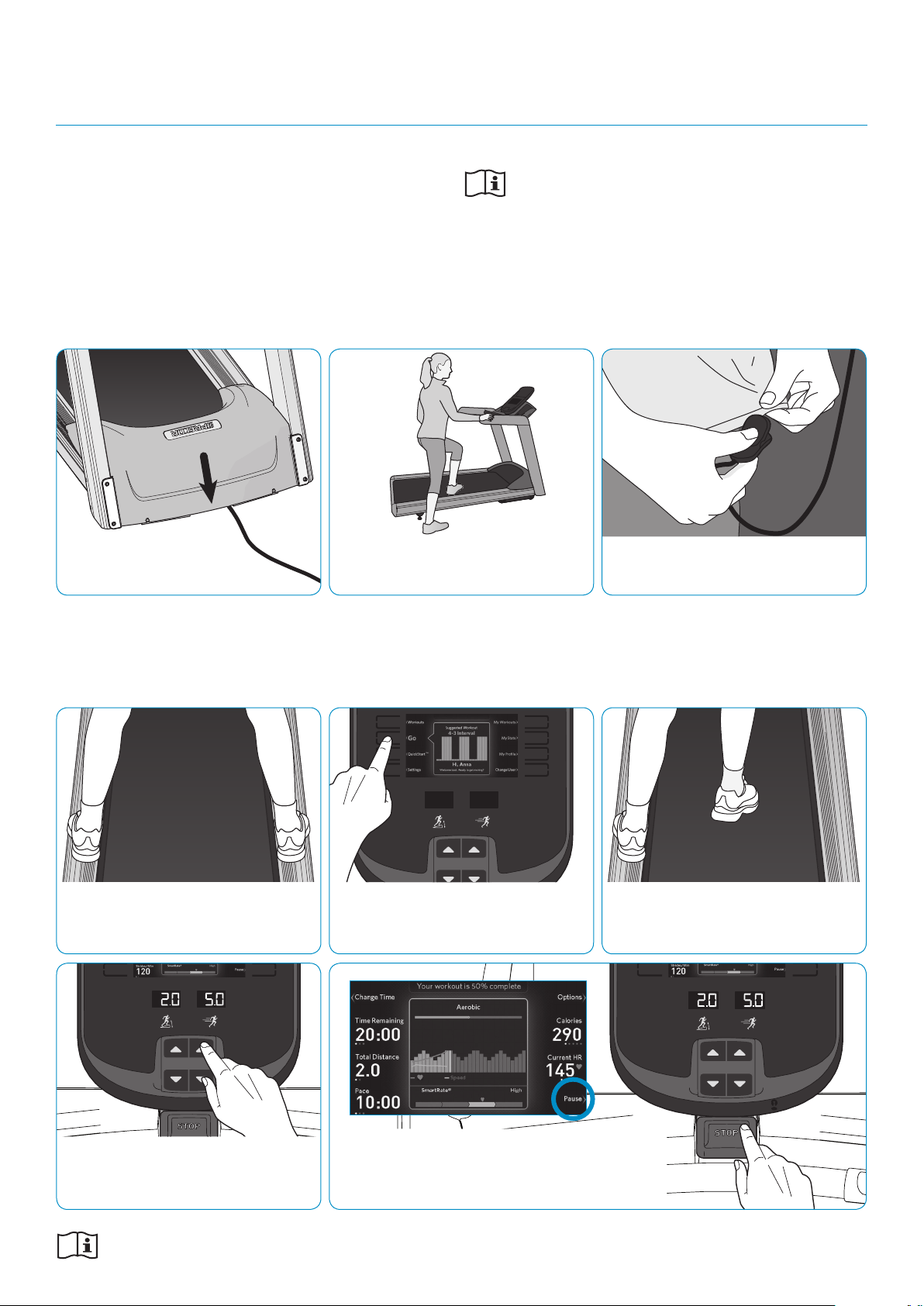
sTEP 1: Turn the treadmill on.
sTEP 4: Place one foot on each of the
rails on either side of the treadmill belt.
sTEP 7: Use the controls on the console
to adjust the incline angle of the treadmill
and the speed of the belt.
sTEP 2: Step onto the treadmill.
sTEP 5: Touch the QuickStart button
(manual operation) or the Go button (start
today’s featured workout).
sTEP 8: If you need to end your workout early, touch
Pause, then Finish, then Home on the console screen
(or press the STOP switch three times).
Refer to your owner’s manual for complete operational instructions
and troubleshooting. See reverse for important heart rate information.
sTEP 3: Attach the safety clip securely
to your clothing.
sTEP 6: After the console has displayed
its countdown and the belt has started to
move, step onto the belt.
TO gET sTARTED WITH YOUR NEW PRECOR TREADMIll:
gETTINg sTARTED
PRECISION SERIES AND ENERGY SERIES TREADMILLS
HEART RATE INFORMATION
WELCOME TO A PERSONALIZED FITNESS EXPERIENCE FOR YOUR HOME
Quick
Start
Card
PRECISION
™
SERIES
AND ENERGY
™
SERIES
TREADMILLS
CHOOsE A WORKOUT
• Determine your level of tness: beginner,
intermediate, or advanced.
• Determine your immediate goal: endurance
training, cardio-conditioning, or weight loss.
If you are a beginner, start with a cardio-conditioning
workout to gradually adjust your body to the demands of
exercise. Over a recommended eight-week period, you will
increase your endurance and strength.
For all tness levels, plan to exercise at an appropriately
challenging pace for 20 to 30 minutes a day. Wear a chest
strap to monitor your heart rate. Supplement your plans
with tness workouts from the Precor web site
(www.precor.com). The Precor web site also provides
expert advice to help you reach your tness goals.
MONITOR YOUR HEART RATE
The SmartRate and heart rate displays provide visual cues
that help you adjust your tness routine to reach your
goals. Use these features to keep your heart rate within
the target zones.
Wear a Chest Strap
During a workout, the heart rate features appear on
the display when you wear a chest strap. To receive an
accurate reading, the chest strap needs to be in direct
contact with your skin. After you put on the chest strap,
face the display console for a minimum of 15 seconds. This
allows the receiver in the console to recognize the signal
from the chest strap.
1. Carefully dampen the back of the strap with tap
water (Diagram A).
IMPORTANT: Do not use deionized water. It does
not have the proper minerals and salts to conduct
electrical impulses.
2. Adjust the strap and fasten it around your chest.
The strap should feel snug, not restrictive
(Diagram B).
3. Make sure that the chest strap is right side up, lies
horizontally across your chest, and is centered in
the middle of your chest (Diagram C).
When these steps are complete, you are ready to view
your heart rate.
Touch-Sensitive Handrail Grips
Several Precor products incorporate touch-sensitive
heart rate grips on the handrails. If you prefer to use
the touch-sensitive handrail grips, use both hands.
Make sure both hands are moist (not dry) and avoid
grasping the sensors too tightly.
Note: For the best heart rate monitoring results, wear a
chest strap.
sMARTRATE® FEATUREs
When you begin an exercise session, a blinking
segment in the SmartRate display appears if you
entered your age during the setup phase. The blinking
segment indicates the current zone of your heart rate.
The calculation used for the heart rate target zone is
your maximum aerobic heart rate:
207 - (your age x 0.67), multiplied by a percentage.
For the ideal weight loss range, your heart rate should
remain between 55% and 69% of your maximum
aerobic heart rate. To improve your overall
cardiovascular and respiratory tness level, maintain
your heart rate between 70% and 85% of your
maximum aerobic heart rate. For the greatest benets,
maintain your heart rate in either zone for 30 minutes or
more at least three times a week.
CAUTION: Your heart rate should never exceed
85% of your maximum aerobic heart rate or go
above your target zone (Diagram D).
COOl DOWN AFTER YOUR WORKOUT
Cooling down is an important aspect of your workout
because it helps reduce muscle stiness and
soreness by transporting excess lactic acid out of the
working muscles. Cooling down for at least three
minutes helps provide a smooth transition that allows
your heart rate to return to its normal, non-exercising state.
20031 142nd Avenue NE | P.O. Box 7202
Woodinville, WA USA 98072-4002
www.precor.com
P/N 303169-111 | ©2014 Precor Incorporated
Diagram D: Heart Rate Target Zones
Diagram A Diagram B Diagram C
Choose a Program
• Determine your level of fitness: beginner,
intermediate, or advanced.
• Determine your immediate goal: endurance
training, cardio-conditioning, or weight loss.
If you are a beginner, start a cardio-conditioning
program to slowly adjust your body to a comfortable
level of exercise. Over a recommended 8-week
period, you will increase your endurance and strength
while improving flexibility.
If you have been exercising and feel that you have
reached an intermediate or advanced fitness level, you
probably have established goals for yourself.
For all fitness levels, plan to exercise at a comfortable
pace for 20 to 30 minutes a day. Wear a chest strap
to monitor your heart rate. Supplement your plans
with fitness workouts from the Precor web site
(www.precor.com). The Precor web site also provides
expert advice to help you reach your fitness goals.
Monitor Your Heart Rate
The SmartRate and heart rate displays provide visual
cues that help you adjust your fitness routine to reach
your goals. Use these features to keep your heart rate
within the target zones.
Wear a Chest Strap
During a workout, the heart rate features appear on
the display when you wear a chest strap. To receive
an accurate reading, the chest strap needs to be in
direct contact with your skin. After you put on the
chest strap, face the display console for a minimum of
15 seconds. This allows the receiver in the console to
recognize the signal from the chest strap.
1. Carefully dampen the back of the strap with tap
water (Diagram A).
Important: Do not use deionized water. It does
not have the proper minerals and salts to conduct
electrical impulses.
2. Adjust the strap and fasten it around your chest.
The strap should feel snug, not restrictive
(Diagram B).
3. Make sure that the chest strap is right side up, lies
horizontally across your chest, and is centered in
the middle of your chest (Diagram C).
When these steps are complete, you are ready to view
your heart rate!
Touch-Sensitive Handrail Grips
Several Precor products incorporate touch-sensitive
heart rate grips on the handrails. If you prefer to use
the touch-sensitive handrail grips, use both hands.
Make sure both hands are moist (not dry) when you
grasp the touch-sensitive handrail grips.
SmartRate
®
Features
When you begin an exercise session, a blinking
segment in the SmartRate display appears if you
entered your age during the setup phase. The blinking
segment indicates the current zone of your heart rate.
The calculation used for the heart rate target zone is
your maximum aerobic heart rate:
(220 minus your age) multiplied by a percent.
For the ideal weight loss range, your heart rate should
remain between 55% and 70% of your maximum
aerobic heart rate. To improve your overall
cardiovascular and respiratory fitness level, maintain
your heart rate between 70% and 85% of your
maximum aerobic heart rate.
For the greatest benefits, maintain your heart rate in
either zone for 30 minutes or more at least three times
a week.
CAUTION: Your heart rate should never exceed
85% of your maximum aerobic heart rate or go
above your target zone (Diagram D).
Diagram D
Cool Down After Your Workout
Cooling down is an important aspect of your workout
because it helps reduce muscle stiffness and
soreness by transporting excess lactic acid out of the
working muscles. Cooling down for at least three
minutes helps provide a smooth transition that allows
your heart rate to return to its normal, non-exercising
state.
Diagram A Diagram B Diagram C
20 25 30 35 40 45 50 55 60 65 70 75
70
80
90
100
120
130
140
150
160
170
180
190
200
110
Heart Rate Target Zones
Your Age
Your Heart Rate
Peak
Cardio
Warmup
R
e
c
o
m
m
e
n
d
e
d
C
a
r
d
io
v
a
s
c
u
la
r
Zon
e
R
e
c
o
m
m
e
n
d
e
d
W
e
i
g
h
t
L
o
s
s
Z
o
n
e
Fatburn
High
Precor Incorporated
20031 142nd Avenue NE
P.O. Box 7202
Woodinville, WA USA 98072-4002
www.precor.com
HR INFO 48140-104
©2007 Precor Incorporated
Choose a Program
• Determine your level of fitness: beginner,
intermediate, or advanced.
• Determine your immediate goal: endurance
training, cardio-conditioning, or weight loss.
If you are a beginner, start a cardio-conditioning
program to slowly adjust your body to a comfortable
level of exercise. Over a recommended 8-week
period, you will increase your endurance and strength
while improving flexibility.
If you have been exercising and feel that you have
reached an intermediate or advanced fitness level, you
probably have established goals for yourself.
For all fitness levels, plan to exercise at a comfortable
pace for 20 to 30 minutes a day. Wear a chest strap
to monitor your heart rate. Supplement your plans
with fitness workouts from the Precor web site
(www.precor.com). The Precor web site also provides
expert advice to help you reach your fitness goals.
Monitor Your Heart Rate
The SmartRate and heart rate displays provide visual
cues that help you adjust your fitness routine to reach
your goals. Use these features to keep your heart rate
within the target zones.
Wear a Chest Strap
During a workout, the heart rate features appear on
the display when you wear a chest strap. To receive
an accurate reading, the chest strap needs to be in
direct contact with your skin. After you put on the
chest strap, face the display console for a minimum of
15 seconds. This allows the receiver in the console to
recognize the signal from the chest strap.
1. Carefully dampen the back of the strap with tap
water (Diagram A).
Important: Do not use deionized water. It does
not have the proper minerals and salts to conduct
electrical impulses.
2. Adjust the strap and fasten it around your chest.
The strap should feel snug, not restrictive
(Diagram B).
3. Make sure that the chest strap is right side up, lies
horizontally across your chest, and is centered in
the middle of your chest (Diagram C).
When these steps are complete, you are ready to view
your heart rate!
Touch-Sensitive Handrail Grips
Several Precor products incorporate touch-sensitive
heart rate grips on the handrails. If you prefer to use
the touch-sensitive handrail grips, use both hands.
Make sure both hands are moist (not dry) when you
grasp the touch-sensitive handrail grips.
SmartRate
®
Features
When you begin an exercise session, a blinking
segment in the SmartRate display appears if you
entered your age during the setup phase. The blinking
segment indicates the current zone of your heart rate.
The calculation used for the heart rate target zone is
your maximum aerobic heart rate:
(220 minus your age) multiplied by a percent.
For the ideal weight loss range, your heart rate should
remain between 55% and 70% of your maximum
aerobic heart rate. To improve your overall
cardiovascular and respiratory fitness level, maintain
your heart rate between 70% and 85% of your
maximum aerobic heart rate.
For the greatest benefits, maintain your heart rate in
either zone for 30 minutes or more at least three times
a week.
CAUTION: Your heart rate should never exceed
85% of your maximum aerobic heart rate or go
above your target zone (Diagram D).
Diagram D
Cool Down After Your Workout
Cooling down is an important aspect of your workout
because it helps reduce muscle stiffness and
soreness by transporting excess lactic acid out of the
working muscles. Cooling down for at least three
minutes helps provide a smooth transition that allows
your heart rate to return to its normal, non-exercising
state.
Diagram A Diagram B Diagram C
20 25 30 35 40 45 50 55 60 65 70 75
70
80
90
100
120
130
140
150
160
170
180
190
200
110
Heart Rate Target Zones
Your Age
Your Heart Rate
Peak
Cardio
Warmup
R
e
c
o
m
m
e
n
d
e
d
C
a
r
d
io
v
a
s
c
u
la
r
Zon
e
R
e
c
o
m
m
e
n
d
e
d
W
e
i
g
h
t
L
o
s
s
Z
o
n
e
Fatburn
High
Precor Incorporated
20031 142nd Avenue NE
P.O. Box 7202
Woodinville, WA USA 98072-4002
www.precor.com
HR INFO 48140-104
©2007 Precor Incorporated
20 25 30 35 40 45 50 55 60 65 70 75
70
80
90
100
120
130
140
150
160
170
180
190
200
110
Your Heart Rate
Maximum
High
Moderate
Warm-up
Your Age
Recommended Cardiovascular Zone
Recommended Weight Loss Zone
CAUTION: Before beginning any fitness program, see your physician for a thorough examination. Ask your physician about the appropriate target heart rate for your fitness level.
OWNER’S MANUAL
WELCOME TO A PERSONALIZED FITNESS EXPERIENCE FOR YOUR HOME
Precision
™
& Energy
™
SERIES
TREADMILLS
TRM 445
TRM 243


Important Safety Instructions 1
Important Safety
Instructions
When using the equipment, always take basic
precautions, including the following:
Read all instructions before using the equipment.
These instructions are written for your safety and
to protect the unit.
Before beginning any fitness program, see your
physician for a complete physical examination.
Il est conseillé de subir un examen médical complet
avant d’entreprendre tout programme d’exercise. Si
vous avez des étourdissements ou des faiblesses,
arrêtez les exercices immédiatement.
DANGER
To reduce the risk of electrical
shock always unplug the treadmill
from the electrical outlet
immediately after using and before
cleaning.
WARNING
To reduce the risk of burns, fire,
electric shock, or injury, take the
following precautions:
Do not allow children, or those unfamiliar with the
operation of the equipment, on or near it. Do not
leave children unsupervised around the unit.
Never leave the equipment unattended when it is
plugged in. Unplug the equipment from the power
source when it is not in use, before cleaning it, and
before acquiring authorized service.
When the equipment is not in use, disconnect it by
turning the power switch to the Off position, and
then remove the power plug from the power outlet.
Alternatively, you can prevent inappropriate use by
disconnecting the magnetic stop key and removing
it from the location where the equipment is
installed.

Precision Series / Energy Series Treadmill Owner's Manual: TRM 445 / 243 2
Assemble and operate the equipment on a solid,
level surface. Locate the equipment a few feet from
walls or furniture. Keep the area behind the
equipment clear.
Never operate the unit if it is damaged, not
working properly, when it has been dropped, or has
been dropped in water. Return the equipment to a
service center for examination and repair.
DANGER
The treadmill must be connected to a
dedicated, grounded circuit (refer to
Grounding Instructions).
Keep the power cord and plug away from heated
surfaces.
Keep all electrical components, such as the power
cord and power switch, away from liquids to
prevent shock.
Do not operate the equipment where aerosol
(spray) products are being used or where oxygen
is being administered.
Do not use outdoors.
Maintain the equipment in good working condition
(refer to Maintenance). Make sure that all fasteners
are secure and the running belt is clean and
running smoothly.
Do not attempt to service the equipment yourself
except to follow the maintenance instructions
found in this manual.
Never drop or insert objects into any opening.
Keep hands away from moving parts.
Use the equipment only for its intended purpose as
described in this manual. Do not use accessory
attachments that are not recommended by the
manufacturer, as such attachments may cause
injuries.
Do not set anything on the handrails or hood. Place
liquids, magazines, and books in the appropriate
receptacles.
Do not rock the unit. Do not lean or pull on the
console at any time. Do not stand on the hood.
Wear proper exercise clothing and shoes for your
workout and avoid loose clothing. Do not wear
shoes with heels or leather soles. Check the soles
of your shoes and remove any dirt and embedded
stones. Tie long hair back.

Important Safety Instructions 3
Use care when getting on or off the equipment.
Always grasp the handrail when stepping on the
running belt and keep the initial speed at or below 1
mile per hour (mph) or 1.6 kilometers per hour
(kph). Never step off the treadmill while the
running belt is moving.
Before the running belt begins moving (before your
workout), and after it stops (at the end of your
workout), straddle the belt by placing your feet
firmly on the right and left staging platforms.
Keep your body and head facing forward. Never
attempt to turn around on the treadmill.
The safety clip must be attached at waist level
before your workout. A lanyard connects to the red
magnetic stop key within the STOP switch. If you
encounter difficulties, a strong tug on the lanyard
disengages the magnetic stop key and stops the
running belt.
Do not overexert yourself or work to exhaustion. If
you feel any pain or abnormal symptoms, stop
your workout immediately and consult your
physician.
Safety Approvals for
Cardiovascular Equipment
Precor equipment has been tested and found to
comply with the following applicable safety standards.
Cardiovascular Type Equipment:
CAN/CSA, IEC 60335-1 (Household and similar
electrical appliances - Safety)
Important Safety Instructions 7
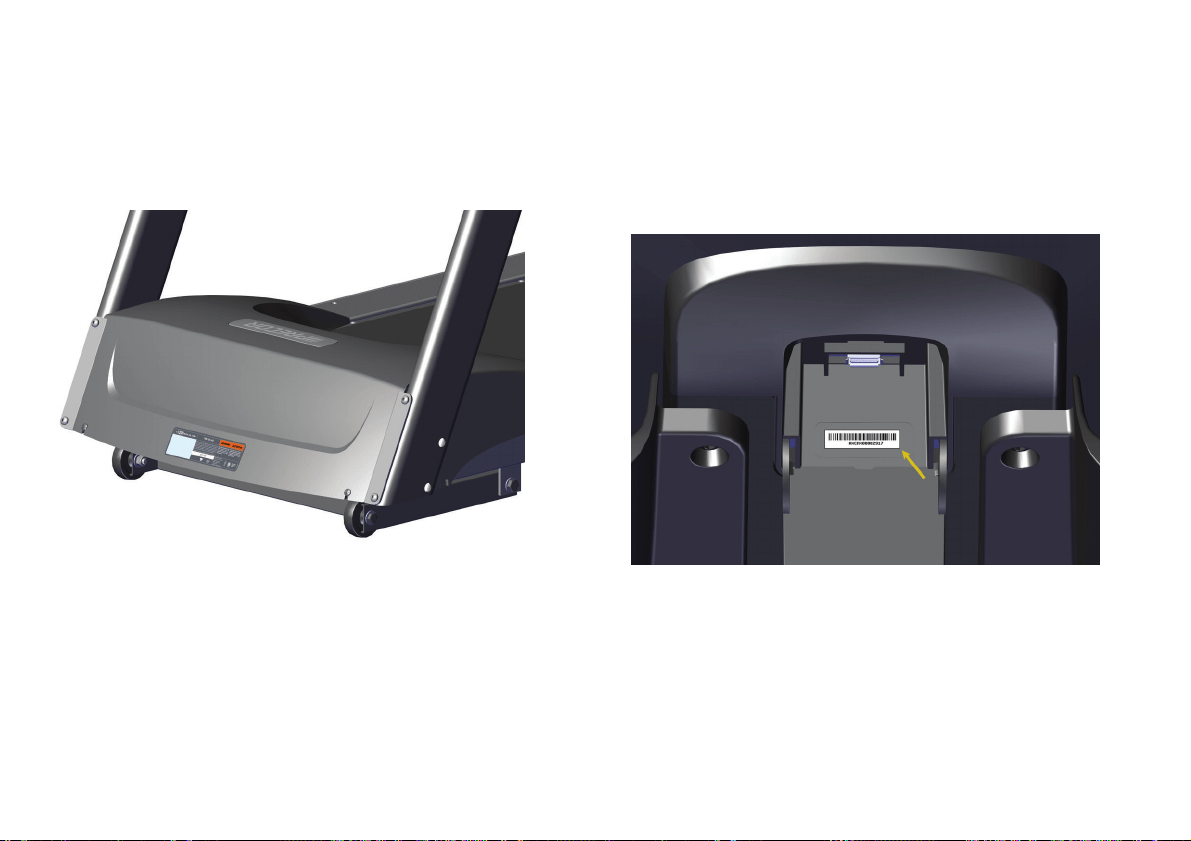
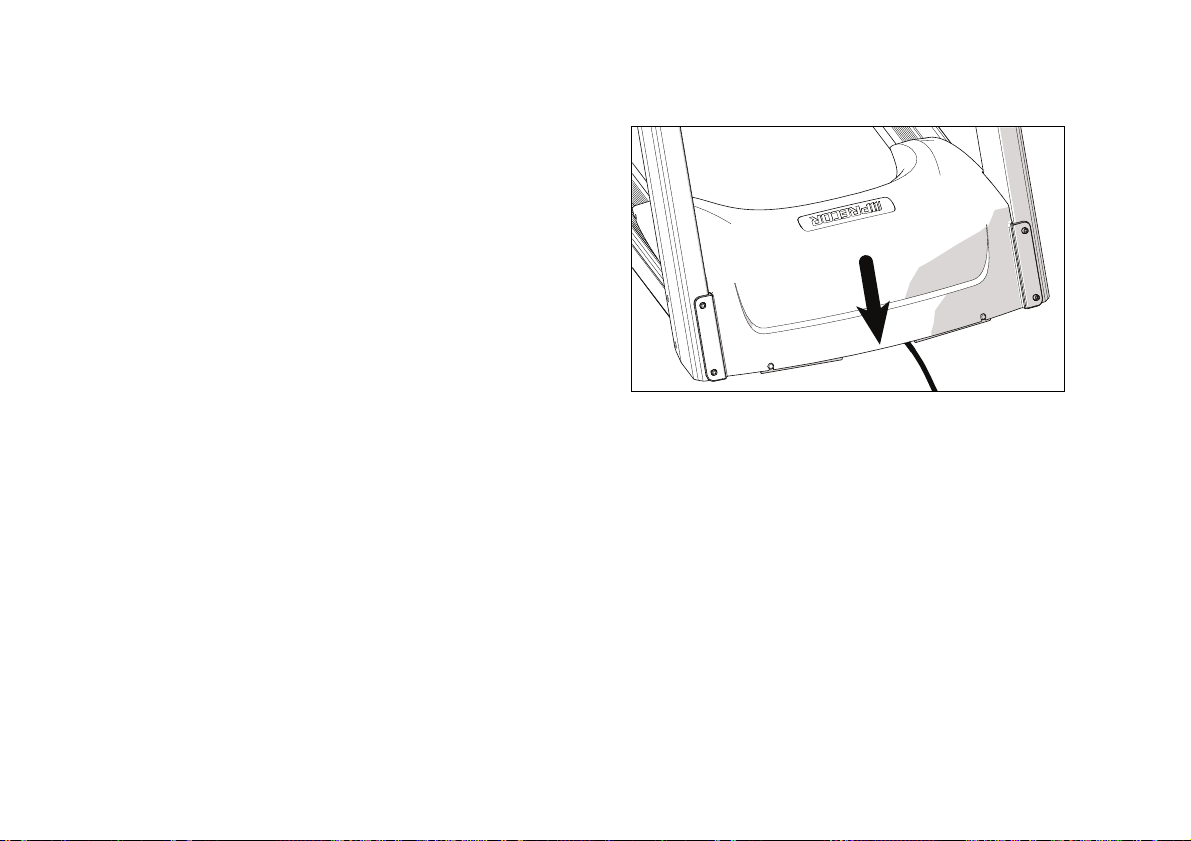
The equipment serial number is located at the lower
front edge of the treadmill cover, near the power
switch and cord.
Figure 1: Treadmill serial number label position
The console serial number is located inside the USB
connector compartment on the back of the console.
You will need to open the cover of this compartment to
see the number.
Figure 2: Console serial number label position

Precision Series / Energy Series Treadmill Owner's Manual: TRM 445 / 243 8
Table of Contents
Important Safety Instructions ........................... 1
Safety Approvals for Cardiovascular
Equipment ......................................................... 3
Grounding Instructions ......................................... 4
Radio Frequency Interference (RFI)................... 5
Obtaining Service ................................................... 6
Treadmill Safety Features................................10
Location ................................................................... 10
Turning the Unit On and Off ................................ 11
Using the Treadmill Safety Clip ......................... 12
Using the Handrails .............................................. 14
Getting Started ................................................. 15
Using the Console Controls .............................. 17
Connecting Your Apple Device ........................20
Setting Up Your Equipment ............................. 22
Measuring Your Heart Rate ............................ 26
Using SmartRate ................................................... 28
Getting Accurate Heart Rate Readings .......... 30
Setting Your Target Heart Rate ........................ 32
Troubleshooting Heart Rate Readings ............ 33
Choosing and Completing a Workout ............ 34
Choosing a Workout ............................................ 36
Available Workouts ............................................ 40
Changing Settings and Metrics While
You Work Out ............................................... 47
Finishing Your Workout ...................................... 54
Saving Your Workout .......................................... 55
Checking Your Weekly Progress ...................... 57
Tracking Your Progress with Preva.................. 58
Creating User Profiles ..................................... 59
Choosing a User Profile ....................................... 63
Changing Your Default Settings ...................... 64
Deleting User Profiles .......................................... 65

Table of Contents
9
Changing the System Settings ........................ 66
Retrieving System Information ......................... 68
Displaying the Error Log ..................................... 69
Maintenance ................................................... 70
Inspection ............................................................... 70
Cleaning the Equipment ....................................... 71
Storing the Chest Strap ........................................ 71
Checking the Alignment of the
Running Belt ................................................... 72
Adjusting the Running Belt ................................ 73
Long-Term Storage .............................................. 74

Precision Series / Energy Series Treadmill Owner's Manual: TRM 445 / 243 10
Treadmill Safety
Features
The treadmill is equipped with certain items that, when
used properly, help sustain a safe and enjoyable
workout. These items include:
Safety clip and magnetic stop key
Handrails
Power switch
Important: Before exercising, review the Important Safety
Instructions found at the beginning of this manual.
Location
It is important to keep the area around the treadmill
open and free from encumbrances such as other
equipment. The minimum space requirements needed
for user safety and proper maintenance are as follows:
An area three feet wide by six feet long (one meter
wide by two meters long) must be left open
directly behind the running belt.
Three feet (one meter) of space should be
available on either side of the equipment.
Treadmill Safety Features
11
Turning the Unit On and Off
To turn the unit on and off, use the power switch
located underneath the front of the unit, near the
power cord connection. Refer to the following figure
and the product label to see the location of the switch.
Important: When the unit is not being used, turn it off.
Figure 3: Power switch location

Precision Series / Energy Series Treadmill Owner's Manual: TRM 445 / 243 12
Using the Treadmill Safety Clip
The treadmill is equipped with two different stop
functions, which behave as follows:
If the user … Then the
treadmill
belt …
And the console …
Pulls on the
lanyard
attached to the
safety clip and
removes the
stop key
Slows to a
stop
Shows the words "Please
Replace the Stop Key."
Presses down
on the red STOP
switch
Slows to a
stop
Shows that the exercise
workout is paused. Pressing
the button again ends the
workout and displays the
workout summary. Pressing it
a third time returns the user to
the home screen.
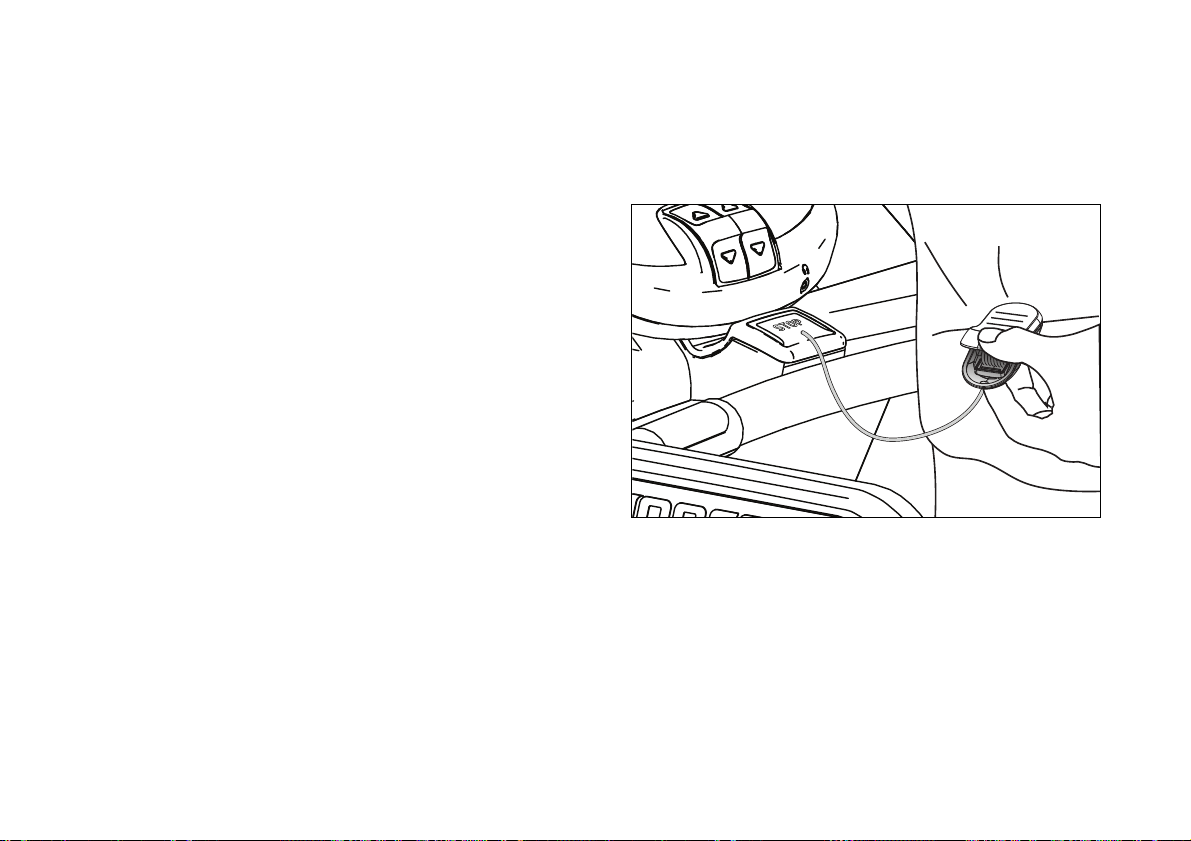
The following figure shows the location of the STOP
switch and the stop key.
Figure 4: STOP switch, stop key, and safety clip
Treadmill Safety Features
13
CAUTION: When you work out, ALWAYS attach the
safety clip to your clothing. A position near your waistline
normally works best.
If the stop key is removed during exercise, perform
the following steps:
1. Reattach the safety clip if necessary.
2. Insert the stop key into the recess on the STOP
switch, returning it to its normal position.
3. Wait for the treadmill to reset itself.
Note: If the stop key is removed from the STOP
switch, all information about the current workout is
deleted.
4. Start the workout from the beginning, reducing the
time as needed to account for the amount of
exercise that has been completed.
Figure 5: Attaching the safety clip

Precision Series / Energy Series Treadmill Owner's Manual: TRM 445 / 243 14
Using the Handrails
To maintain your balance, always grasp a handrail
extension when you step on or off the treadmill, and
when you use the keypad.
To learn more about the touch-sensitive grips, refer to
Measuring Your Heart Rate.

Using the Console Controls
17
Using the Console
Controls
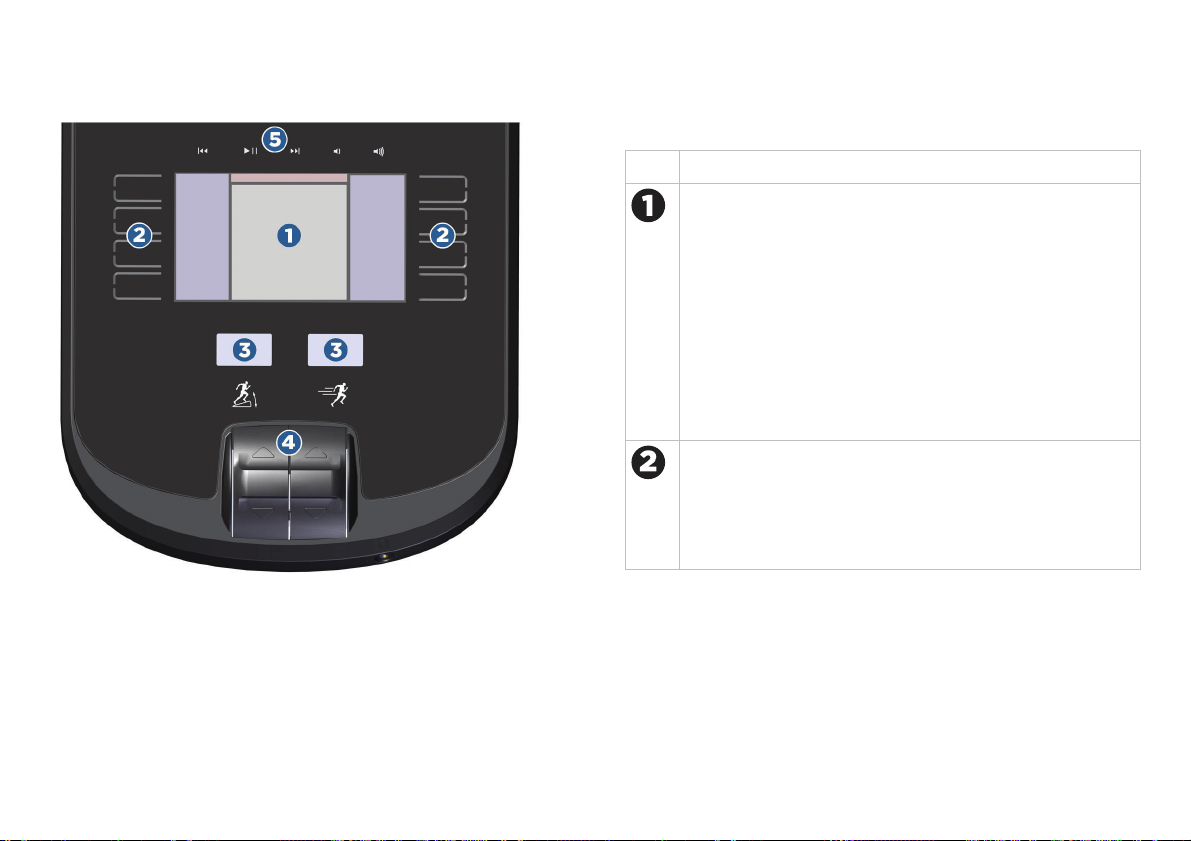
The figure and table on the following page show the
main areas on the front surface of the console. You can
reach any menu, setting, control, or feature of your
equipment by using these areas.
Precision Series / Energy Series Treadmill Owner's Manual: TRM 445 / 243 18
Figure 7: Controls and display areas
Table 1. Console feature descriptions
Area Purpose
The display screen shows you what the equipment is
currently doing and how you are using it. As you work
with the equipment, the available options appear next
to the buttons along the left and right edges of this
area. If you’ve connected a player to the console and
are using it while you work out, the current track
information appears along the top edge.
Note: You must use your player’s screen to display
video, but you can play its audio portion through the
console.
Touch the capacitive buttons to enter your personal
settings, set up the equipment, and choose workouts.
Depending on what you’re doing, these buttons have
different names and purposes. The names of the
buttons appear next to them on the display screen.
Using the Console Controls
19
Area Purpose
The level indicators show how intense your workout
is at the moment. The indicator on the left shows the
incline angle and the indicator on the right shows your
speed.
The motion controls set the intensity levels shown on
the level indicators.
The playback controls navigate through the tracks
and set the volume on your Apple
®
device, if it is
connected to the console.
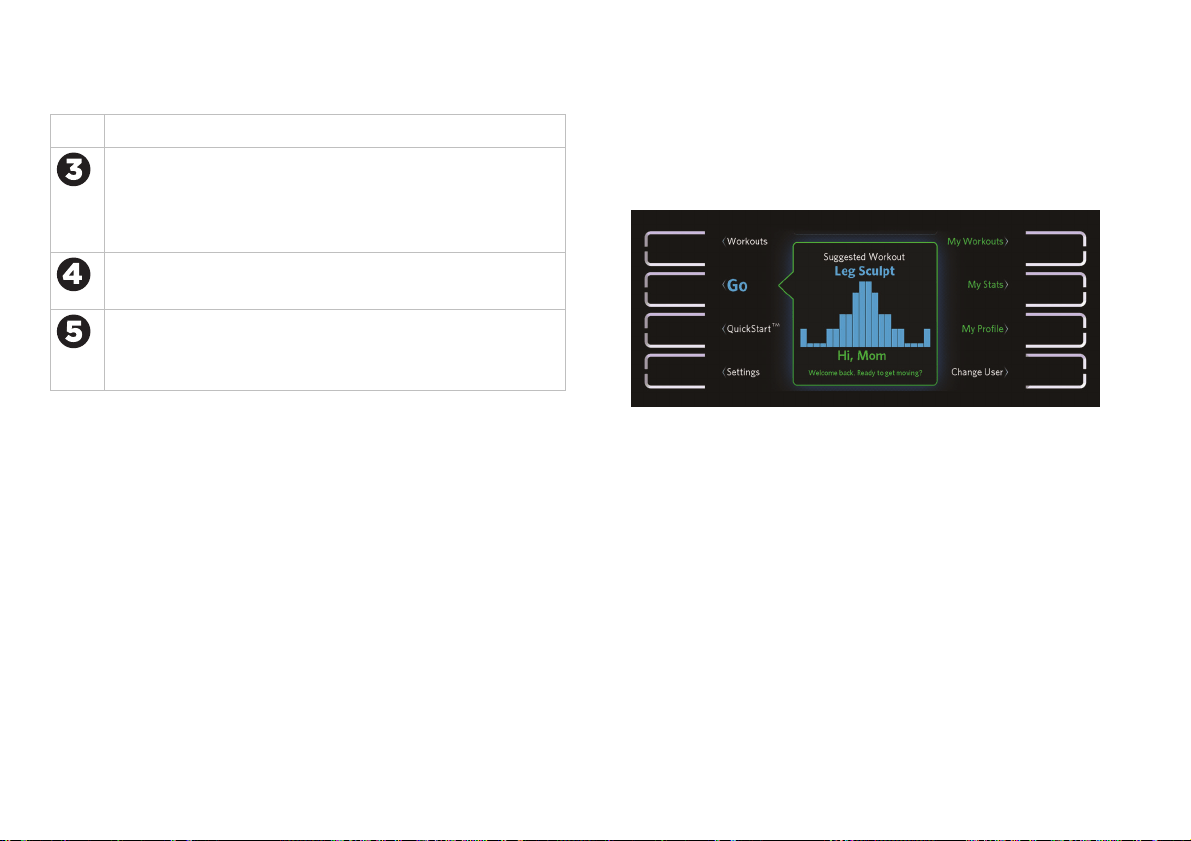
The following figure shows how the home screen
appears on the console. All eight buttons are active,
and the name of each button appears next to it.
Figure 8: Home screen and capacitive buttons

Precision Series / Energy Series Treadmill Owner's Manual: TRM 445 / 243 22
Setting Up Your
Equipment
After the console is installed, it needs the following
information to work correctly:
The model number of the equipment
The date and time
Your measurement preferences (kilometers or
miles)
You will need to enter this information before you can
start to use the equipment. If you need to change it
later, you can do so at any time (refer to Changing the
System Settings).
Note: You can find the model number of your
equipment on the sales receipt, invoice, or packing list
that you received with the equipment.
To set up the console:
1. Turn the equipment on.
2. At the Welcome screen, touch Start.
Figure 11: Welcome screen
3. At the Initialize Your Equipment screen, touch
Next.
Precision Series / Energy Series Treadmill Owner's Manual: TRM 445 / 243 24
6. At the Time screen, use the 12 Hour / 24 Hour
button and the arrow buttons to enter the current
time.
When you have finished entering the time, touch
Next.
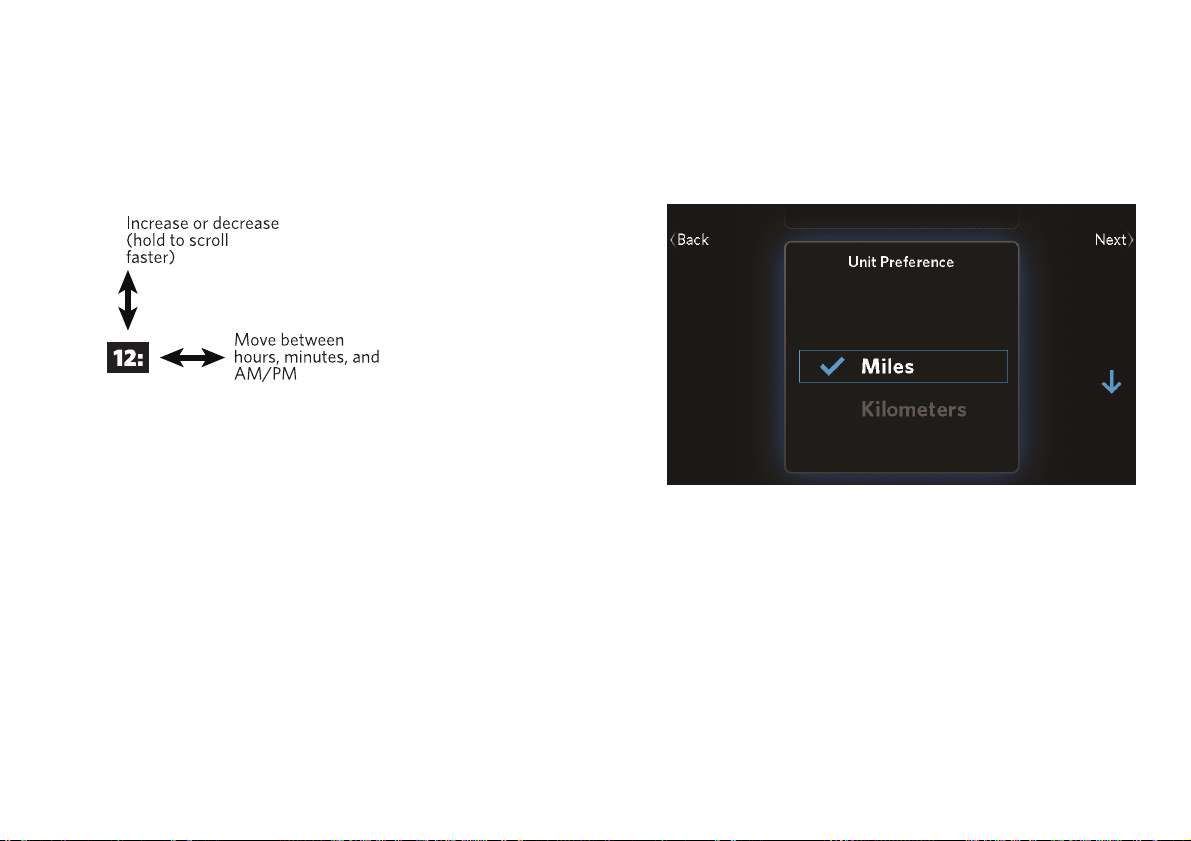
7. At the Unit Preference screen, use the up and
down arrow buttons to select kilometers or miles,
then touch Next.
Figure 13: Unit selection

Precision Series / Energy Series Treadmill Owner's Manual: TRM 445 / 243 26
Measuring Your
Heart Rate
Precor cardio equipment can measure your heart rate
in one of two ways:
If you have a chest strap (for use with a fitness
watch, for example), the equipment can receive
the heart rate signal the strap transmits.
You can grasp the heart rate sensors on the
handlebars.
When the equipment detects your heart rate, the
following things happen:
The heartbeat indicator (icon) begins to flash.
After a few seconds, the console displays your
current heart rate.
If SmartRate is on, a second heartbeat icon
appears over your current heart rate zone (refer to
Using SmartRate).
Before you start working out, make sure you know your
maximum heart rate. Then, as you work out, be sure to
reduce the intensity of your exercise if you reach or
exceed that number.
CAUTION: Your heart rate should never exceed 85% of
your maximum heart rate.
You can use the following formula, provided by the
American College of Sports Medicine®, to figure out
your maximum heart rate:
Maximum heart rate = 207 – (your age × 0.67)
Your typical target heart rate is 70% of your maximum
rate.
Measuring Your Heart Rate
29
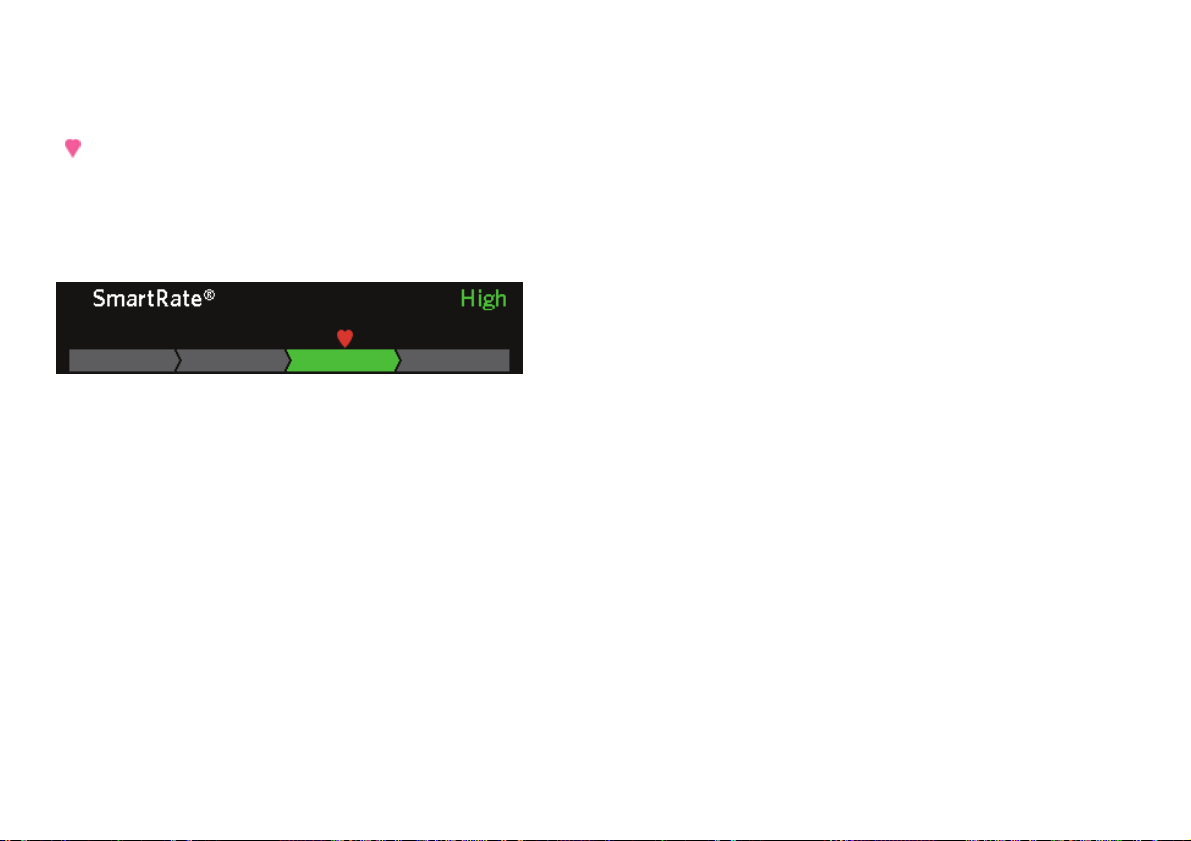
If SmartRate is on, you will see a heart rate indicator
(
) over the SmartRate zone bar during your workout.
This indicator shows where your current heart rate
falls within the active zone. You can then change the
intensity of the workout to stay within the zone you
want.
Figure 16: SmartRate zone bar
To make sure that SmartRate works correctly, you
need to make sure of the following things:
Your age is properly set in your user profile.
The equipment can read your heart rate properly. If
you are using a chest strap, you must moisten and
position it properly. If you are using the
touch-sensitive grips on the equipment, you must
maintain contact with both grips for five to ten
seconds.
Note: SmartRate is on by default, but it is not available
if the Guest account is selected.
To turn on SmartRate:
1. During your workout, touch Options.
2. At the Options screen, touch SmartRate On.
3. Touch Back to return to your workout.
Note: There is only one SmartRate button on the
Options screen. If SmartRate is currently on, the button
is named SmartRate Off. If SmartRate is currently off,
the button is named SmartRate On.

Precision Series / Energy Series Treadmill Owner's Manual: TRM 445 / 243 30
Getting Accurate Heart Rate
Readings
To work reliably, heart rate sensors need to be
securely in contact with your skin. Use the following
guidelines to make sure they are.
To attach a chest strap:
WARNING
Signals used by the chest strap
transmitter (or heart rate strap) may
interfere with pacemakers or other
implanted devices. Contact your
doctor, the manufacturer of the chest
strap, and the manufacturer of the
implanted device before using a chest
strap transmitter.
Important: Precor cardio equipment works with 5 KHz
chest straps only. It does not work with Bluetooth
®
-based
chest straps, which are designed for use with mobile apps.
Note: To receive an accurate reading, the strap needs
to be in direct contact with the skin on the lower
sternum (just below the bust line for women).
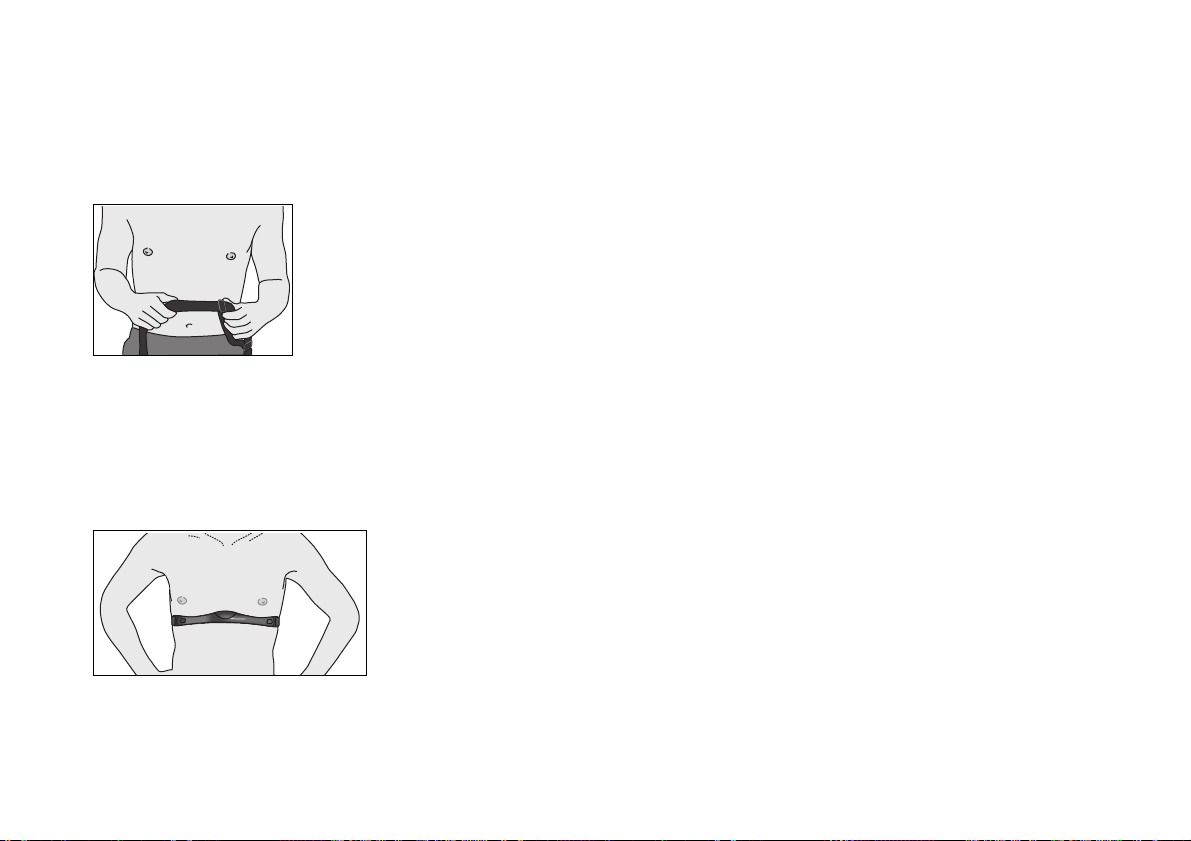
1. Carefully dampen the back of the strap with tap
water. Refer to the following figure.
Note: Do not use deionized water. It does not have
the proper minerals and salts to conduct electrical
impulses.
Figure 17: Moisten chest strap
Measuring Your Heart Rate
31
2. Adjust the strap and fasten it around your chest.
The strap should feel snug, not restrictive. Refer to
the following figure.
Figure 18: Adjust chest strap
3. Make sure that the chest strap is right side up, lies
horizontally across your chest, and is centered in
the middle of your chest. Refer to the following
figure.
Figure 19: Fasten chest strap
4. After you put on the chest strap, face the display
console for a few seconds. This allows the receiver
in the console to recognize the signal from the
chest strap.
If you use the touch-sensitive grips, be sure to grasp
them securely (but not tightly—use a loose, cupping
hold) on both sides. You may need to wait for 15 to 20
seconds before your heart rate is displayed.
Important: The touch-sensitive grips work well for most
people. However, because of their body chemistry or
erratic heartbeats, a few people cannot use the grips. If this
applies to you, a chest strap may provide better results.
However, do not grasp the touch-sensitive grips while
wearing a chest strap—using both at the same time can
cause erratic heart rate readings.

Measuring Your Heart Rate
33
Troubleshooting Heart Rate
Readings
If your heart rate readings look wrong, or if you do not
see any readings at all, check the following list for
possible causes. If the solutions in this list do not solve
the problem, contact your dealer or Precor Customer
Support.
No Heartbeat Icon or Heart Rate Display
The heart rate sensors may not be in secure contact
with your skin. Try the following solutions.
For touch-sensitive grips:
Make sure that your hands grasp the
touch-sensitive grips continuously and firmly (but
not tightly) for at least five to ten seconds.
Check that the palms of your hands are not
covered with any sort of salve, rub, or lotion. If they
are, wash them.
Check that your hands are not too dry. If they are,
moisten them slightly.
For a chest strap:
Make sure the strap is fastened, positioned, and
moistened correctly.
Make sure the strap is compatible with the
equipment. It must be a 5 kHz strap. Heart rate
straps that function at other frequencies, and
Bluetooth-based straps, are not compatible with
this equipment.
The Displayed Heart Rate Is Wrong Or
SmartRate Doesn’t Work
The touch-sensitive grips may not be making secure
contact. Try the following solutions:
Make sure that your hands are clean, slightly
moist, and positioned as described earlier in this
table.
Try using a chest strap instead of the grips.
If you are trying to use the grips and an active chest
strap at the same time, choose one or the other. Either
do not grasp the touch-sensitive grips, or remove or
turn off the chest strap.

Precision Series / Energy Series Treadmill Owner's Manual: TRM 445 / 243 34
Choosing and
Completing a
Workout
The instructions shown earlier in this manual (refer to
Getting Started) provide the simplest possible steps for
getting started with your new fitness equipment. In
most cases, you’ll want to start with one of the
preprogrammed workouts available on the equipment.
This chapter explains how to select a workout and
describes the changes you can make as it progresses.
Note: If you’re signed in under your user profile, you
can save your completed workout as a personal
favorite and use it again later (refer to Finishing Your
Workout). If you’ve made any adjustments to the
intensity of the workout, your changes will be stored as
well.
The human body is extremely efficient. If it makes the
same motion regularly over many days or weeks, it
learns to make that motion with less and less effort.
This process, called muscle adaptation, has one
drawback—the longer you stick to the same workout,
the less good that workout does you.
To prevent muscle adaptation from setting in as you
work out, try different kinds of workouts on different
days. By keeping your muscles guessing, you’ll keep
your energy use up, promoting faster weight loss and
better conditioning.

Precision Series / Energy Series Treadmill Owner's Manual: TRM 445 / 243 36
Choosing a Workout
When you start your workout, the following options
are available on the home screen:
QuickStart (begin a manually defined workout)
My Workouts (use a favorite workout that you
have saved)
Go (use a workout suggested by the equipment)
Workout list (select from a list of predefined
workouts)
The following sections describe each of these options.
Choosing QuickStart
The QuickStart option allows you to get moving as
quickly as possible—just touch QuickStart and start
exercising. This workout is manually controlled and
starts out with the intensity settings at their lowest
levels. Simply adjust the settings to produce the
workout profile you want.
Tip: You can use QuickStart to design and save a
workout of your own (refer to Finishing Your Workout).
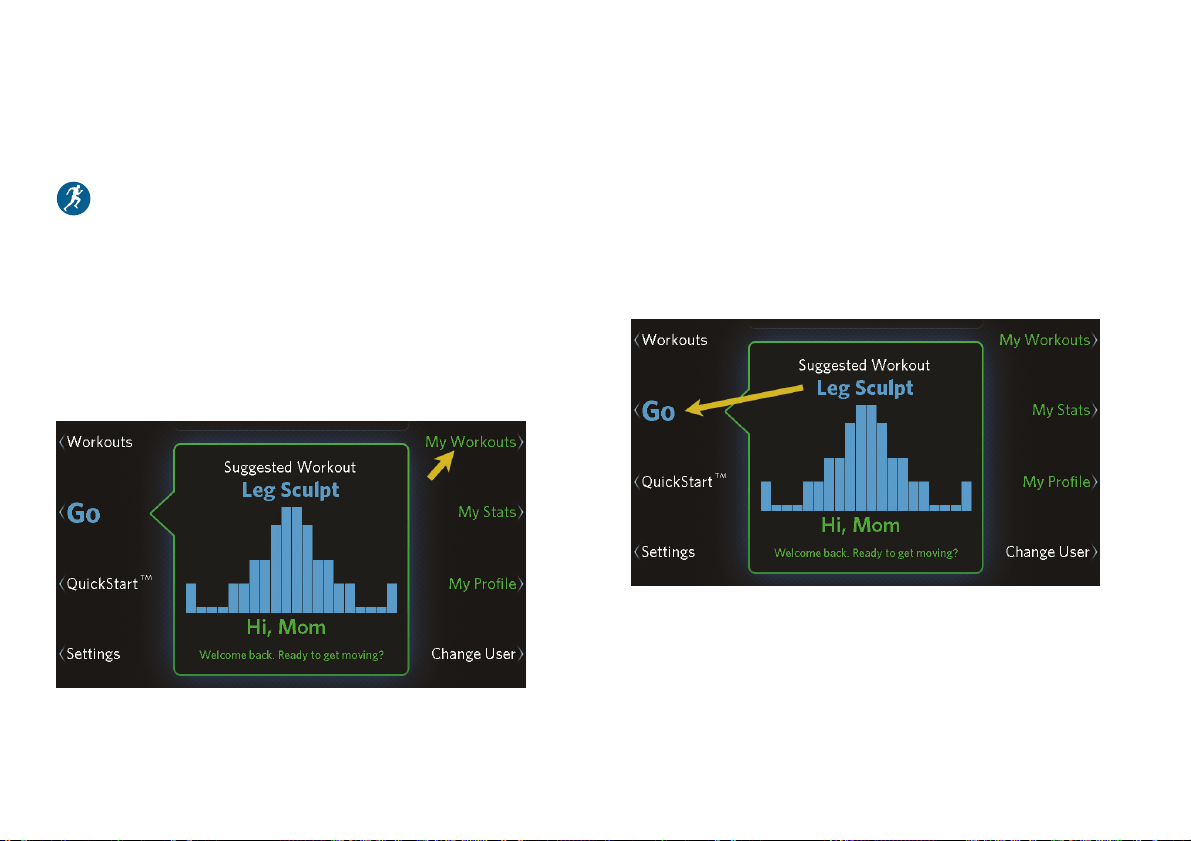
Touch My Workouts to use the saved workout again
later.
Choosing and Completing a Workout
37
Repeating a Saved Favorite Workout
You must be signed in under your user profile to use
this feature.
In addition to the workouts that come with the
equipment, you can create your own favorite workouts
and save them for use again later. The equipment also
remembers your last four workouts whether you save
them or not. To use a recent or saved workout again,
touch My Workouts (refer to Finishing Your Workout).
Figure 21: My Workouts button
Using the Suggested Workout
The equipment always displays a suggested workout
when you first turn it on. If you are signed in under
your user profile, the equipment suggests a workout
that will help you concentrate on your primary focus.
To start the suggested workout, simply touch Go.
Figure 22: Go button
Choosing and Completing a Workout
39
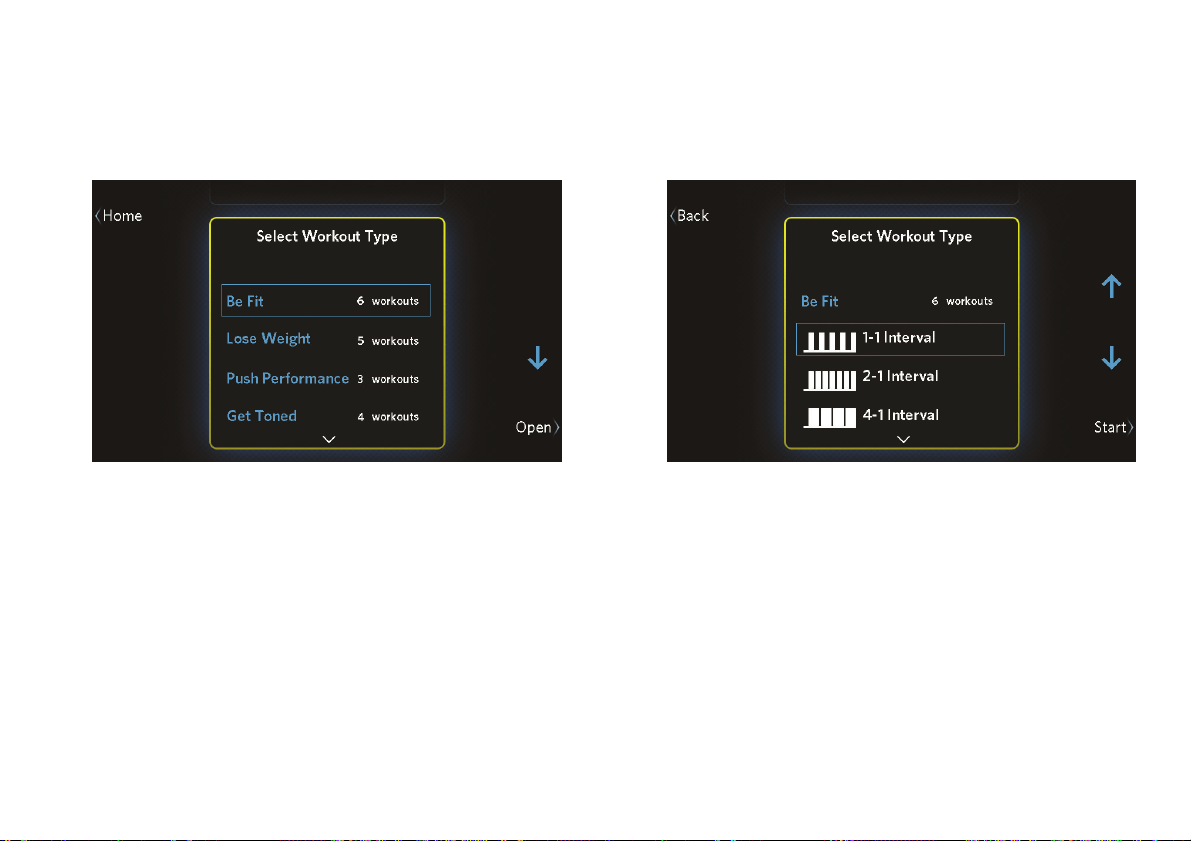
3. Touch Open to show the workouts available for
that focus. (Touch Close to hide them again.)
Figure 24: Workout type selection
4. Use the up and down arrow buttons to highlight
the workout you want, then touch Start.
Figure 25: Workout selection
Precision Series / Energy Series Treadmill Owner's Manual: TRM 445 / 243 40
Available Workouts
Your fitness equipment includes a wide selection of
workouts that are carefully designed to make sure you
get the best results out of every workout.
The training parameters for these workouts vary
according to their training goals. In this chapter, the
following symbols describe how each workout varies
its intensity and how you can modify it:
The workout changes this type of intensity
automatically.
You can manually adjust the changes that the
workout makes.

Choosing and Completing a Workout
41
Be Fit
Workout Profile Incline Speed
1–1 Interval: Cycles of two
minutes of intense exercise
and two minutes of rest.
2–1 Interval: Cycles of two
minutes of intense exercise
and one minute of rest.
4–1 Interval: Cycles of four
minutes of intense exercise
and one minute of rest.
Workout Profile Incline Speed
Rolling Hills: A simulated
run over gradually steeper
hills.
Mountain Peaks: A
simulation of a two-summit
climb. (No climbing gear
required!)
Heart Rate Cardio: Work
and rest cycles managed by
the equipment to keep your
heart rate at the best level
for moderate cardiovascular
conditioning.

Precision Series / Energy Series Treadmill Owner's Manual: TRM 445 / 243 42
Lose Weight
Workout Profile Incline Speed
4–3 Interval: Cycles of four
minutes of work and three
minutes of rest.
Aerobic: Workout routine
designed to challenge and
improve your aerobic
fitness.
Aerobic Plus: More intense
version of the Aerobic
workout.
Workout Profile Incline Speed
Fat Burner: Calorie-burning
routine with cycles of
gradually increasing
resistance.
Heart Rate Fat Burn:
Workout managed by the
equipment to keep your
heart rate at the most
effective level for weight loss
(moderate intensity, but
with a high-intensity stage in
the middle).

Precision Series / Energy Series Treadmill Owner's Manual: TRM 445 / 243 44
Go the Distance
This group of workouts allows you to set your
preferred intensity levels and pace for one of the
following distances:
1 Mile
5K
10K
Note: During these workouts, the equipment does not
modify workout intensity in any way.
Precision Series / Energy Series Treadmill Owner's Manual: TRM 445 / 243 46
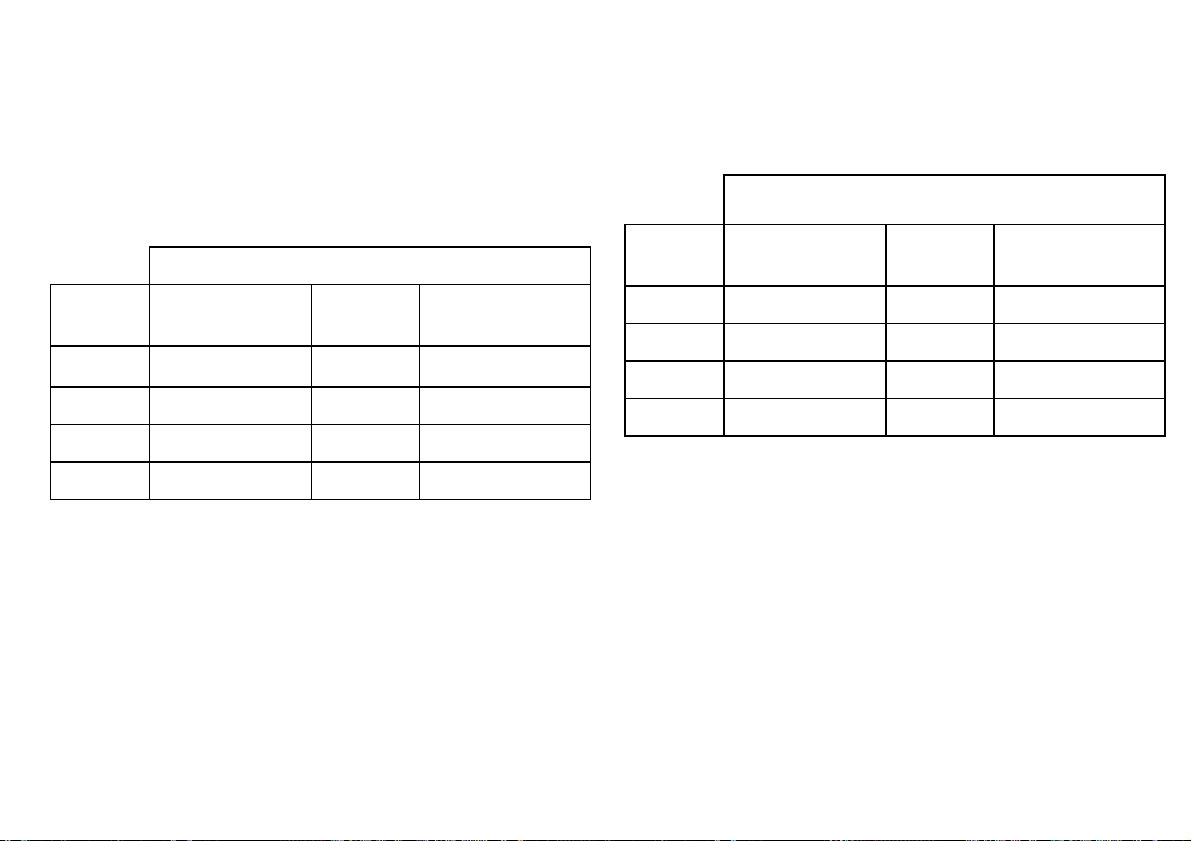
Refer to the following two tables to compare your
fitness level to typical levels for your age and gender.
Table 3. Cardio-Respiratory Fitness Score Category
(Women)*
Fitness Category
Age in
Years
Low
Fitness
Medium
Fitness
High
Fitness
20-39 28 or below 28-34 34 or above
40-49 26 or below 26-32 32 or above
50-59 24 or below 24-29 29 or above
60 or over 22 or below 22-27 27 or above
Table 4. Cardio-Respiratory Fitness Score Category
(Men)*
Fitness Category
Age in
Years
Low
Fitness
Medium
Fitness
High
Fitness
20-39 35 or below 35-43 43 or above
40-49 32 or below 32-40 40 or above
50-59 29 or below 29-37 37 or above
60 or over 24 or below 24-32 32 or above
* The test and analysis algorithm were developed by Dr. Neil
Gordon of The Cooper Clinic.

Precision Series / Energy Series Treadmill Owner's Manual: TRM 445 / 243 48
Changing Your Workout Length
The normal length of your workout (the default
duration) is preset to 30 minutes. If you want to choose
a different amount of time, you can do that after you
have started your workout.
To change the length of your current workout:
1. At the main workout screen, touch Change Time.
Figure 26: Change Time button
2. Use the up and down arrow buttons to increase or
decrease the length of your workout.
Figure 27: Change Duration screen
3. Touch Save to return to the main workout screen.
Note: Touching Back instead of Save returns you
to your workout without saving the changes.
Choosing and Completing a Workout
49
Changing the Workout Display
While you are working out, you can choose different
measurements of your progress, or metrics, as shown
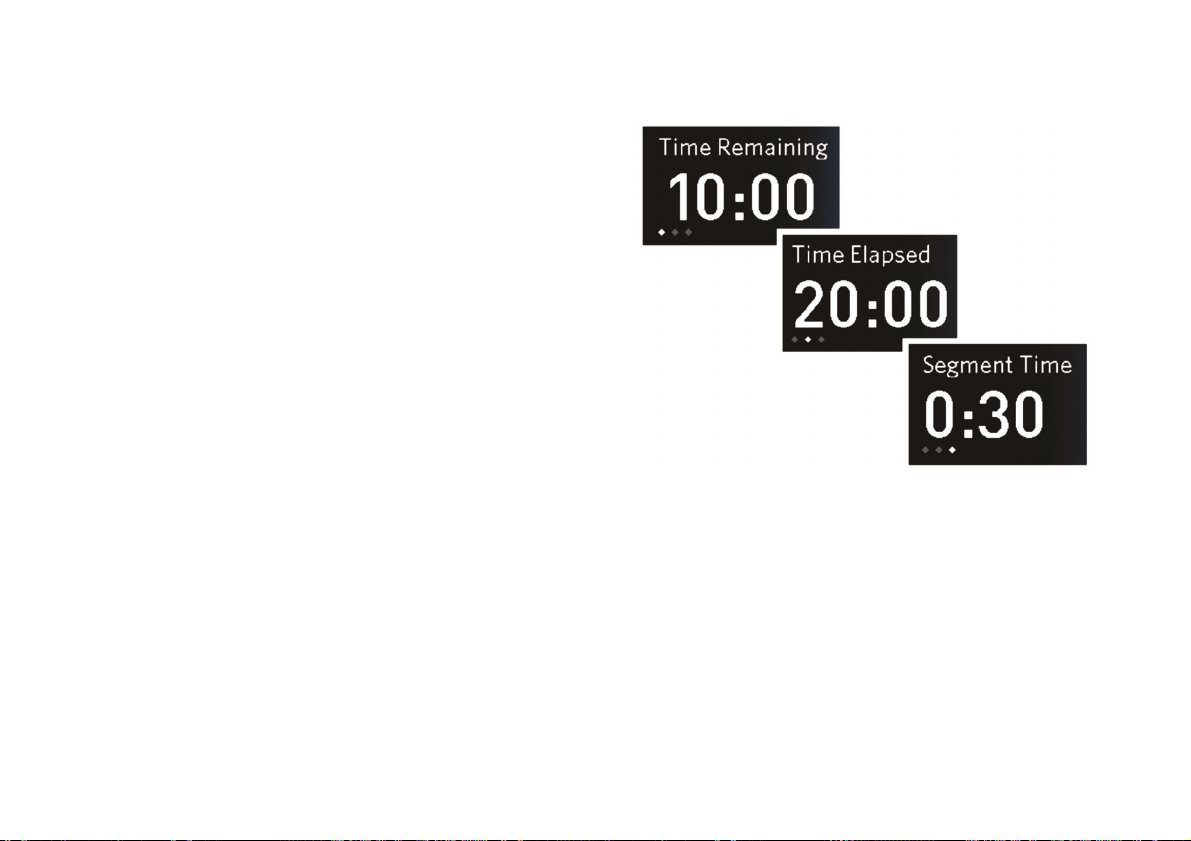
in the following figure and table. Simply touch the
button next to the measurement you want to change.
Note: If you are signed in under your user profile, the
equipment will save your display settings and metrics
selections for the next workout, even if you don’t save
your workout.
Figure 28: Time measurement selection
Choosing and Completing a Workout
51
Metric Types Available
Heart Rate • Current HR (current heart rate)
• Current Zone (current SmartRate zone:
warm-up, moderate, high, or maximum)
• Average HR (average heart rate in this
workout)
• Max HR (maximum heart rate in this
workout)
• Target HR (target heart rate)
• Time in Zone (time elapsed in the
current zone, moderate and high zones
only)
* You can think of one MET as the amount of energy you use while
sitting still, based on your body weight. If you’re working out at
three METs, that’s three times the energy you would use if you
weren’t moving. Some personal trainers and medical
professionals suggest tracking METs instead of calories because
your MET target doesn’t change as your weight changes.
If you want to see all of this information during your
workout, you can turn on Metrics Scan. While Metrics
Scan is on, each metric changes every three seconds to
show all of the types of information it can display.
To turn on Metrics Scan:
1. During your workout, touch Options.
2. At the Options screen, touch Turn On Metrics
Scan.
Note: to turn off Metrics Scan, repeat the
preceding steps. The Turn On Metrics Scan button
is renamed Turn Off Metrics Scan if this feature is
active.
Precision Series / Energy Series Treadmill Owner's Manual: TRM 445 / 243 52
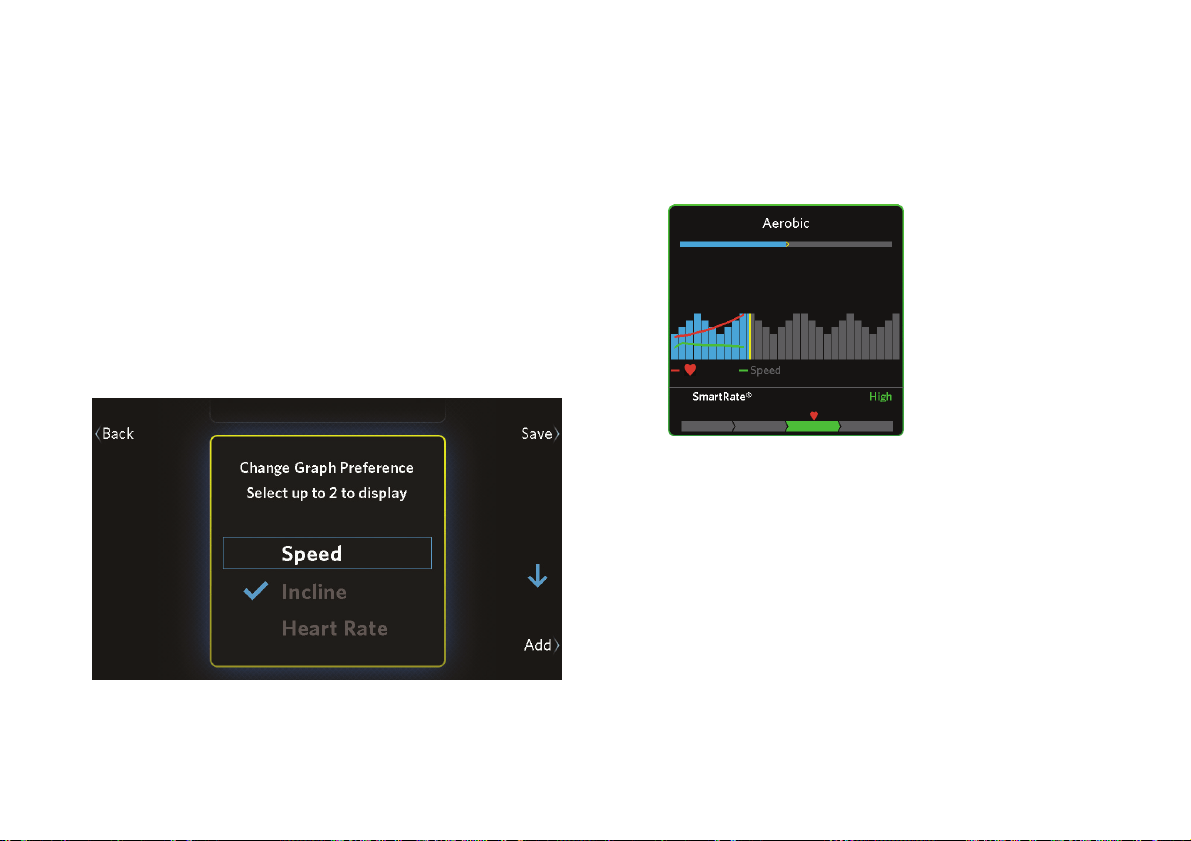
You can also change the information shown in the
progress graph during your workout.
To change the progress graph:
1. During your workout, touch Options.
2. At the Options screen, touch Change Graph.
3. Use the arrow buttons to move between the types
of information you can display on the graph
(speed, incline, or heart rate). Touch Add or
Remove to select one or two types of information.
Figure 29: Change Graph Preferences screen
4. Touch Save to save your changes and return to the
workout progress graph. The types of information
you selected appears as lines in the graph.
Figure 30: Progress graph with heart rate and speed
lines
Note: The bars in the progress graph can describe
incline, speed, or a combination of both (refer to
Available Workouts). The width of each bar
corresponds to one minute for timed workouts, or 200
meters (656 feet) for distance-controlled workouts.
These bars scroll from right to left as your workout
continues. The line above the bars shows the entire
length of your workout and your current position in it.

Choosing and Completing a Workout
53
Changing Your Mind During Your
Workout
As your workout continues, you might find that you’d
rather be doing a different workout than the one you
originally selected. If so, you can switch from one
workout to another without stopping. The actual
results of your combined workout will be saved in your
profile, and you can save the mixed workout to use it
again later (refer to Finishing Your Workout).
Note: You can’t change to a heart rate workout or a
fitness test, and you can’t change from a fitness test to
another workout.
To change a workout in progress:
1. Touch Options.
2. On the Options screen, touch Change Workout.
3. Select a new workout from the workout list, then
touch Start.
Note: If you want to use one of the workouts you
have completed recently, touch Recent Workouts.
Use the up and down arrow buttons to select the
workout you want, then touch Start.
Choosing and Completing a Workout
55
Saving Your Workout
You must be signed in under your user profile to use
this feature.
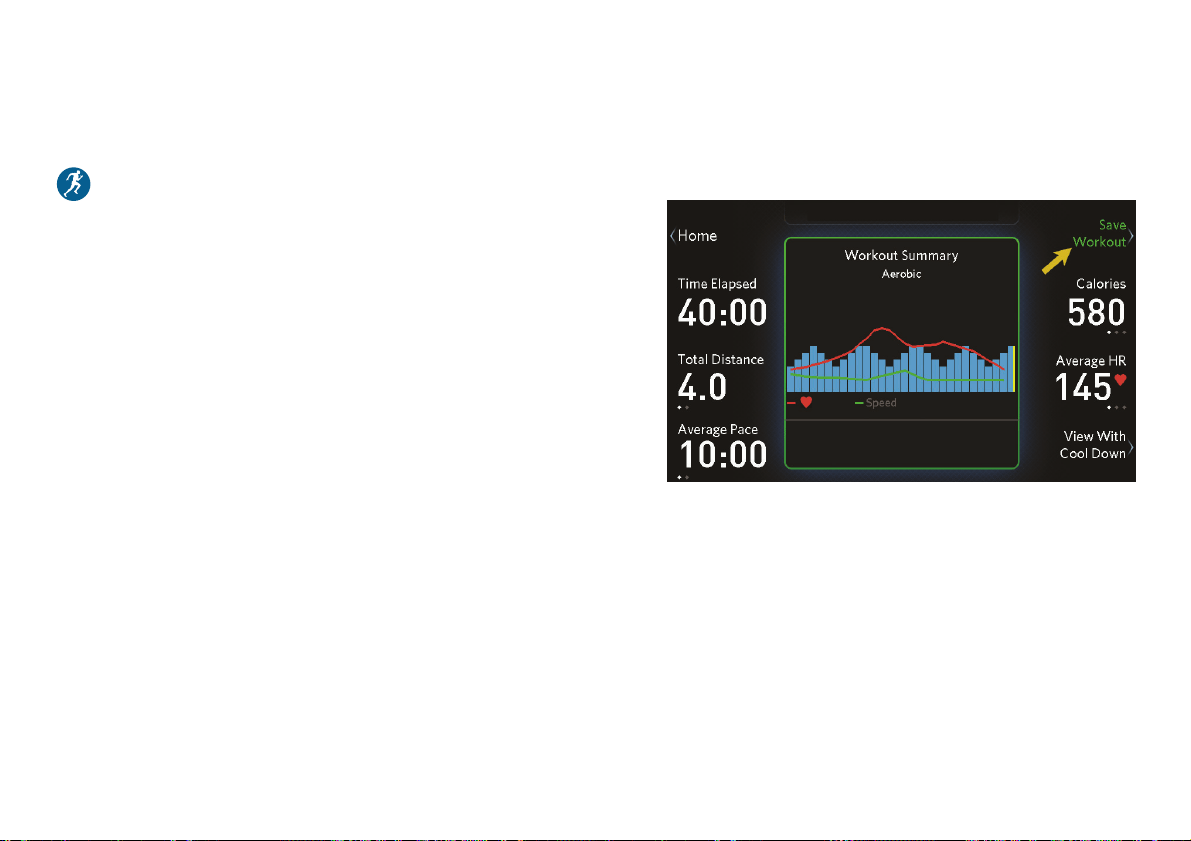
At the workout summary screen, you can save the
workout you’ve just finished so you can use it again
later. Your saved workout includes any intensity
changes you make that last longer than 15 seconds, as
well as the actual total time.
Note: You can save your workout only if it lasted five
minutes or more. You cannot save your workout under
any of the following conditions:
You worked out for less than five minutes.
You have changed between a distance workout
(such as a 10K run) and a timed workout, in either
direction.
You were using a heart rate controlled workout or
taking a fitness test. (You can’t store your current
heart rate or fitness level.)
To save your workout:
1. Touch Save Workout.
Figure 32: Save Workout button

Choosing and Completing a Workout
57
Checking Your Weekly
Progress
You must be signed in under your user profile to use
this feature.
To see how much progress you’ve made each week,
touch the My Stats button on the home screen. This
button takes you to the My Stats screen, where you
can see the following weekly totals:
Workouts completed
Distance covered
Time (hours and minutes) completed
Calories burned
Figure 33: My Stats screen
Touch Home to return to the home screen.
To track your progress over more than one week, and
to coordinate your workouts on this equipment with
your other forms of exercise, connect to Preva before
each workout (refer to Tracking Your Progress with
Preva). Using Preva, you can manage all of your
exercise toward a single weekly goal and track your
lifetime progress as well.
Note: Each week starts on Monday and ends on
Sunday.

Creating User Profiles
59
Creating User
Profiles
When you first create your user profile, you start by
storing your personal information (age, weight, gender,
and workout focus). As you continue working out with
the equipment, it stores your progress and your
workout preferences. In other words, your user profile
allows the equipment to fine-tune itself to your needs.
Your user profile allows you to do the following things:
Use SmartRate, or set your target heart rate, to
help ensure you get the cardiovascular workout
you want
Receive workout suggestions based on your own
fitness focus
Save favorite workouts and use them again later
Set your own default workout duration and display
settings
Automatically see accurate calorie use estimates
based on your age
Track your progress throughout the week
Note: Some features of the equipment are available
only if you are signed in under your user profile. Those
features are identified with a user profile symbol (
)
in this guide.

Precision Series / Energy Series Treadmill Owner's Manual: TRM 445 / 243 62
5. On the Select Gender screen, use the up and down
arrow buttons to confirm your gender, then touch
Next.
6. On the Enter Date of Birth screen, use the arrow
buttons to enter the date when you were born.
When you have finished entering your birthdate,
touch Next.
7. On the Select Focus screen, use the up and down
arrow buttons to select your workout focus:
– Be Fit (maintain a healthy lifestyle)
– Lose Weight
– Push Performance (challenge and improve
your stamina)
– Get Toned (improve your muscle tone)
Touch Next to continue.
8. On the My Profile screen, review the information
you have entered.
If … Then touch
…
All of the information is correct Save
Some of the information needs to be
changed
Back or
Edit
As you lose weight, or if you want to change any of
your other profile information, you can make your
changes easily. Just touch My Profile at the home
screen. Your profile is then displayed and you can
choose individual parts of your profile to change.
Creating User Profiles
63
Choosing a User Profile
Your fitness equipment can store user profiles for up to
four different people. Each person is represented by a
different color. Also, a Guest profile is available. Your
visitors can choose the Guest profile if they want to
use the equipment, but it will not store their results.
Note: SmartRate
®
is not available when the Guest
profile is selected.
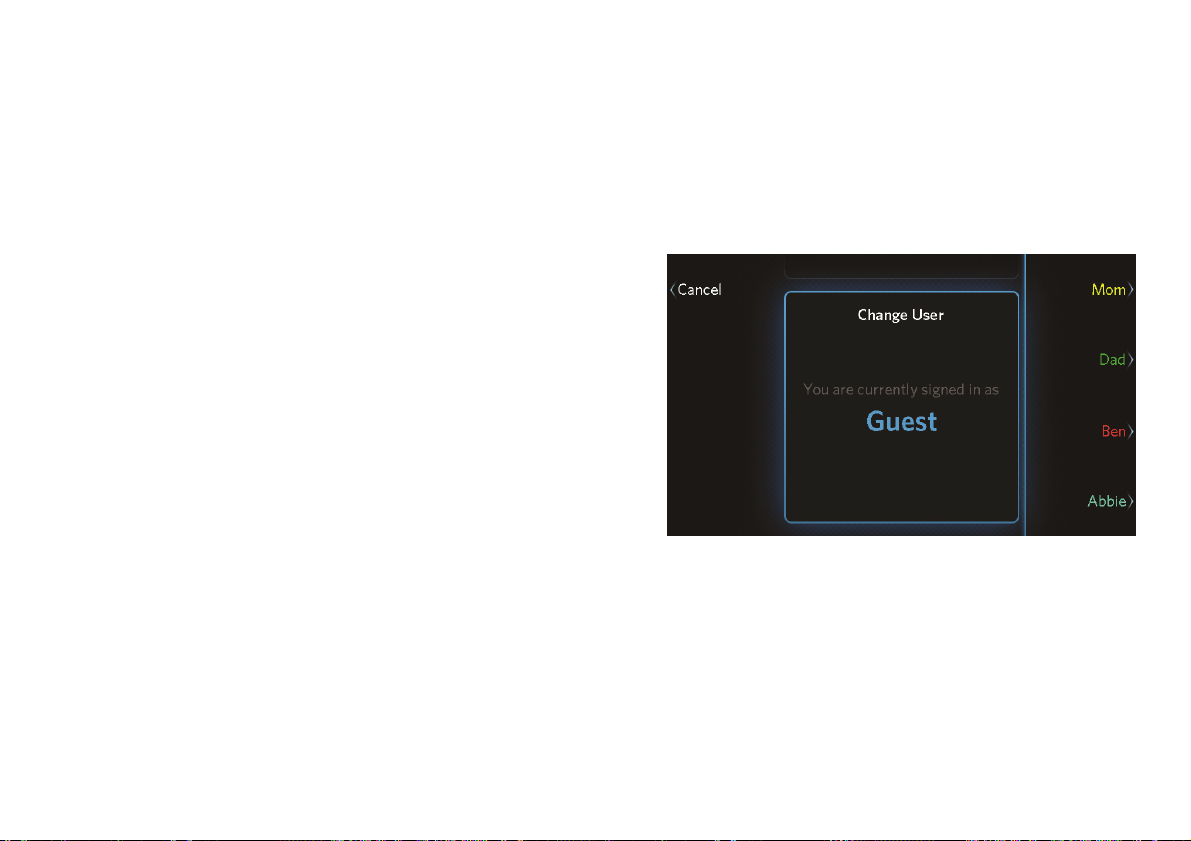
To choose a user profile:
1. At the home screen, touch Change User.
2. On the user list screen, touch one of the buttons on
the right side of the screen.
Figure 35: User profiles
Note: The user profile you have selected remains
active until someone chooses a different profile.

Precision Series / Energy Series Treadmill Owner's Manual: TRM 445 / 243 66
Changing the
System Settings
When you first set up your equipment, you entered the
following information:
Equipment model number
Date
Time
Units of distance (kilometers or miles)
If you need to change these settings, touch the
Settings button at the home screen.
Note: These settings affect all users. For example, if
you set the distance units to kilometers, everyone sees
their workout distances in kilometers.
To correct the model number:
1. At the Settings screen, use the up and down arrow
buttons to select Model, then touch Edit.
2. At the Set Model screen, use the up and down
arrow buttons to select the model you have, then
touch Save.
To change the date:
1. At the Settings screen, use the up and down arrow
buttons to select Date, then touch Edit.
2. At the Set Date screen, use the arrow buttons to
enter the current date.
When you have finished entering the date, touch
Save.
Changing the System Settings
67
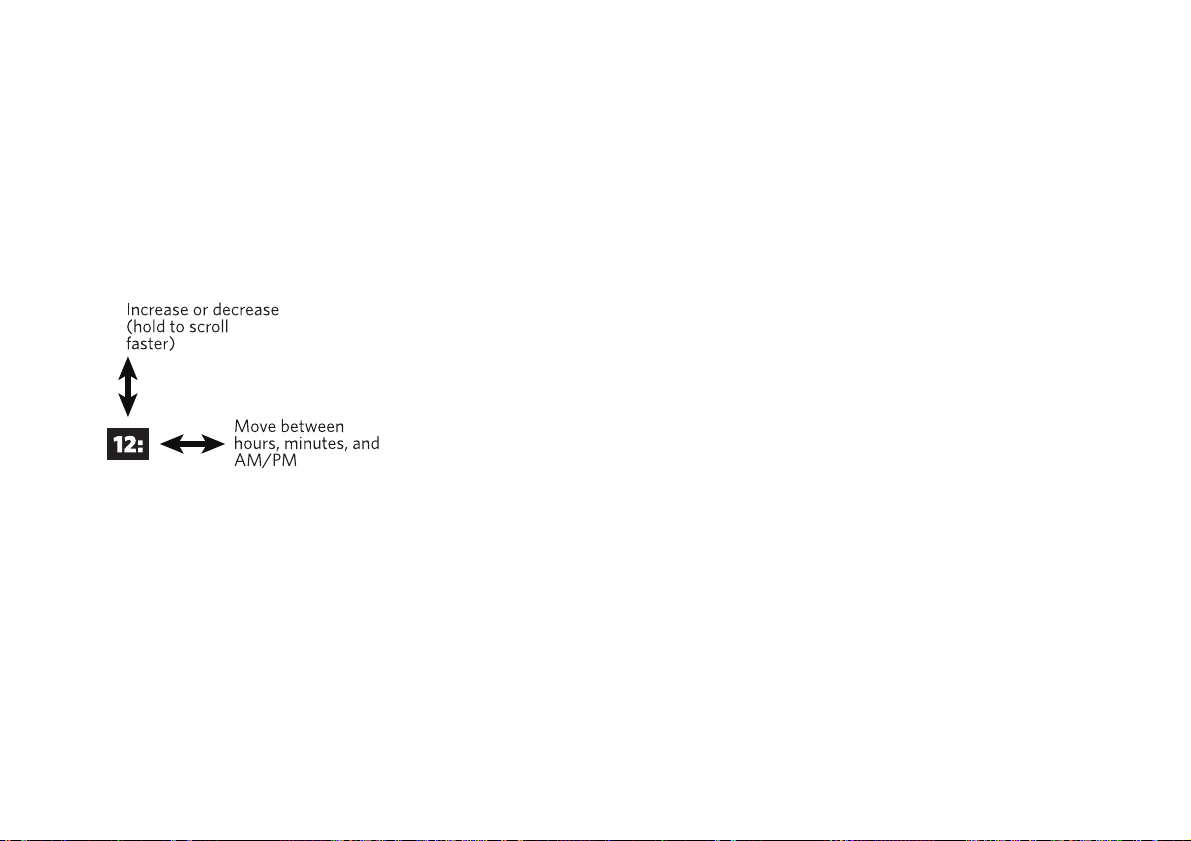
To change the time:
1. At the Settings screen, use the up and down arrow
buttons to select Time, then touch Edit.
2. At the Set Time screen, use the 12 Hour / 24 Hour
button and the arrow buttons to enter the current
time.
When you have finished entering the time, touch
Save.
To switch between kilometers and miles:
1. At the Settings screen, use the up and down arrow
buttons to select Distance Units, then touch Edit.
2. At the Set Unit Preference screen, use the up and
down arrow buttons to select kilometers or miles,
then touch Save.
Precision Series / Energy Series Treadmill Owner's Manual: TRM 445 / 243 68
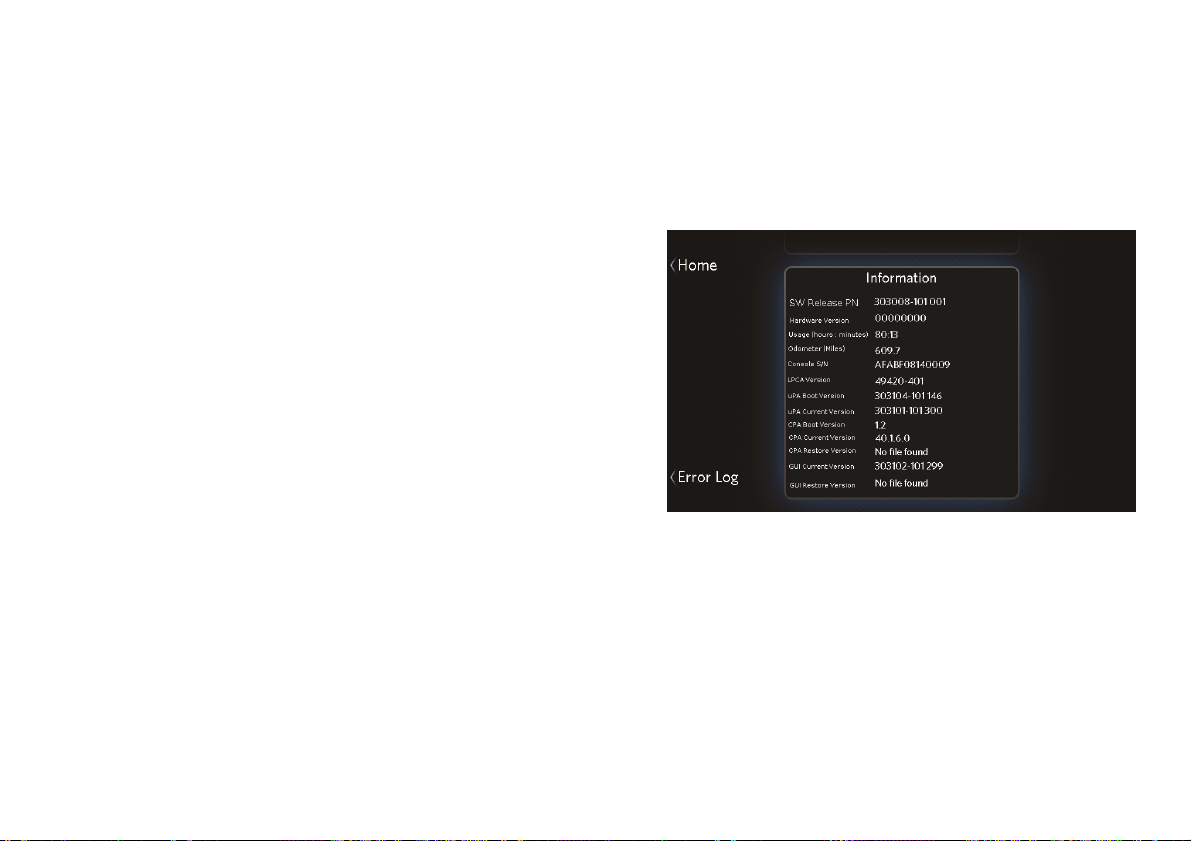
Retrieving System Information
If you ever need to contact your dealer or Precor
Customer Service for help, you may be asked to check
the equipment’s system information and error log.
The following technical information about your
equipment is available for reference:
Software release part number
Software version numbers
Hardware version and serial numbers (console)
LPCA (equipment base unit control circuit) version
number
Total equipment usage (in hours and minutes)
Odometer (total usage in kilometers or miles)
To view the system information:
1. At the home screen, touch Settings.
2. At the Settings screen, touch Information.
Figure 36: Information screen (example)
3. When you are finished viewing the system
information, touch Home.

Changing the System Settings
69
Displaying the Error Log
Each entry in the error log includes the following
information:
An error ID number
An error code
Data providing details about the error
The time and date when the error occurred
The odometer setting when the error occurred
To display the error log:
1. At the home screen, touch Settings.
2. At the Settings screen, touch Information.
3. At the Information screen, touch Error Log.
Figure 37: Error log
4. When you are finished viewing the error log, touch
Home.

Maintenance
71
Cleaning the Equipment
Most of the working mechanisms are protected inside
the hood and base of the treadmill. However, for
efficient operation, the treadmill relies on low friction.
To keep the friction low, the unit’s running belt, staging
platforms, and internal mechanisms must be as clean
as possible.
Precor recommends the treadmill be cleaned before
and after each workout to remove dust, dirt, water, and
sweat. Use mild soap and water to dampen a soft cloth
and wipe all exposed surfaces.
CAUTION: Do not use any acidic cleaners. Doing so will
weaken the paint or powder coatings and void the Precor
Limited Warranty. Never pour water or spray liquids on
any part of the treadmill, and remove any accumulated
sweat from the treadmill after use. Allow the treadmill to
dry completely before using it again.
Frequently vacuum the floor underneath the unit to
prevent the accumulation of dust and dirt, which can
affect the smooth operation of the unit. Use a soft
nylon scrub brush to clean the running belt.
Storing the Chest Strap
Store your chest strap in a place where it remains free
of dust, dirt, and moisture, such as in a closet or
drawer. Be sure to protect the chest strap from
extremes in temperature. Do not store it in a place that
may be exposed to temperatures below 32° F (0° C).
To clean the chest strap, use a sponge or soft cloth
dampened in mild soap and water. Dry the surface
thoroughly with a clean towel.

Maintenance
73
5. Walk around to the rear of the unit and observe
the belt for a few minutes. The belt should be
centered on the running belt. If the belt drifts off
center, you must make adjustments (refer to
Adjusting the Running Belt).
Important: Failure to align the belt may cause the belt
to tear or fray, which is not covered by the Precor
Limited Warranty.
6. To stop the running belt, press the STOP switch.
7. Turn the treadmill off.
Adjusting the Running Belt
If you are unsure about adjusting the running belt, call
Precor Customer Support. Refer to Obtaining Service.
CAUTION: For your safety, use the power switch to turn
Off the treadmill before making any adjustments. Do not
adjust the running belt when someone is standing on the
unit.
To adjust the running belt:
1. Locate the right belt adjustment bolt in the rear
end cap of the treadmill. Refer to the following
figure.
Figure 38: Location of the adjustment bolt

Precision Series / Energy Series Treadmill Owner's Manual: TRM 445 / 243 74
To determine left and right, stand at the rear of the
treadmill and face the display. Make all belt
adjustments on the right rear corner bolt using the
hex key provided.
– If the belt is off center to the LEFT, turn the
adjusting bolt ¼ turn counterclockwise, which
moves the running belt to the right.
– If the belt tracks off center to the RIGHT, turn
the bolt ¼ turn clockwise; this moves the belt to
the left.
Important: Do not turn the adjusting bolt more than
¼ turn at a time. Overtightening the bolt can damage
the treadmill.
2. Recheck the alignment of the running belt.
Long-Term Storage
When the equipment is not in use for any length of
time, turn it off. Make sure that the power cord is
unplugged from its power source and is positioned so
that it will not become damaged or interfere with
people, furniture, or other equipment.

Notes
75
Notes:

Precision Series / Energy Series Treadmill Owner's Manual: TRM 445 / 243 76
Notes:
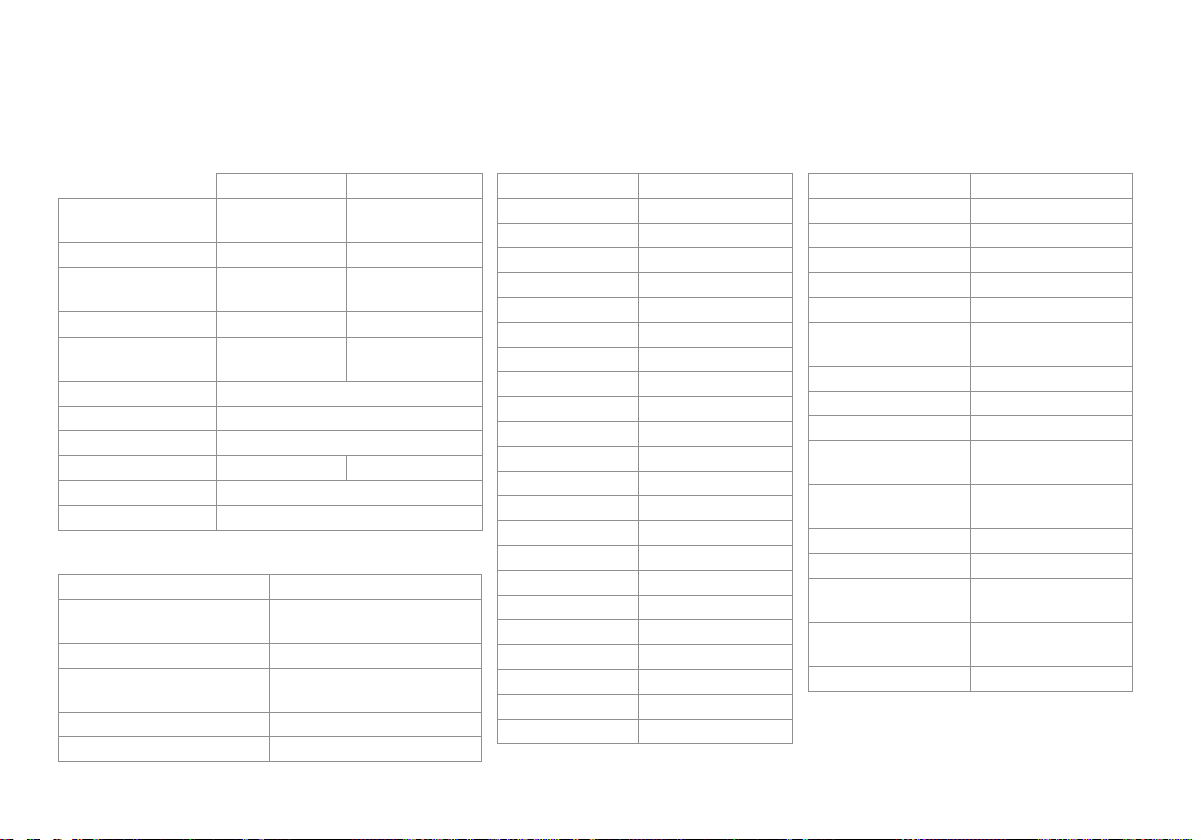
Product Specifications
TRM 445 TRM 243
Length: 79 in
(204 cm)
81 in
(206 cm)
Width: 34 in (86 cm) 33 in (82 cm)
Height: 59.5 in (151 cm) 60 in
(150 in)
Weight: 358 lb (163 kg) 238 lb (108 kg)
Running Surface: 22 in × 56 in (56
cm × 142 cm)
20 in × 57 in
(51 cm × 145 cm)
Motor: 3.0 hp continuous duty
Power Requirements: 120 VAC, 60 Hz
Speed Range: 0.5–12 mph (0–20 kph)
Incline Range: -2%–15% grade 0%–15% grade
Frame: Powder-coated steel
Regulatory Approvals: FCC, ETL
Workouts
Be Fit 1-1 Interval
2-1 Interval
4-1 Interval
Rolling Hills
Mountain Peaks
Heart Rate Cardio*
Lose Weight 4-3 Interval
Aerobic
Aerobic Plus
Fat Burner
Heart Rate Fat Burn*
Push Performance 1-4 Interval
1-2 Interval
Heart Rate Zone*
Get Toned Glute Toner
Glute Toner Plus
Leg Sculpt
Leg Sculpt Plus
Go the Distance 1 Mile
5K
10K
Test Your Fitness Fitness Test
QuickStart Manual
Metrics Available
Speed Calories per minute
Speed (average) Calories per hour
Speed (graph) METs
Pace Watts
Pace (average) Workout Profile
Incline Workout Selected
Incline (graph) Workout Percentage
Complete
Elevation Gain Total Distance
Heart Rate (current)* Distance Remaining
Heart Rate (average)* Time Elapsed
Heart Rate
(maximum)*
Time Remaining
Heart Rate (target)* Time Remaining
(current segment)
Heart Rate (graph)* Finish Time
SmartRate* Units
Current heart rate
zone
Fitness Test Score
Time spent in target
heart rate zone
Current User
Calories (total) Current Media Track
†
* Use of touch-sensitive heart rate grips or chest
strap is required.
†
An Apple device is required.
Product Features
Ground Effects™ Saved Custom Workouts
Integrated Footplant
Technology®
Heart Rate Telemetry
(chest strap)
Capacitive Touch Display Heart Rate Touch Sensors
QuickStart™ Apple® Compatible Full Audio
Control
SmartRate® USB Device Charging
User Profiles (4, plus Guest) USB Software Upgrades
TRM 445 / TRM 243 Low Impact Treadmills

Precor Incorporated
20031 142nd Ave NE
P.O. Box 7202
Woodinville, WA USA 98072-4002
1-800-347-4404
Precor is a registered trademark of Precor Incorporated.
Apple, iPad, iPhone, iPod, and iTunes are registered trademarks of Apple Inc.
Copyright 2014 Precor Incorporated.
Specifications subject to change without notice.
www.precor.com
NOTICE:
Precor is widely recognized for its innovative, award winning designs of
exercise equipment. Precor aggressively seeks U.S. and foreign patents
for both the mechanical construction and the visual aspects of its product
design. Any party contemplating the use of Precor product designs is hereby
forewarned that Precor considers the unauthorized appropriation of its
proprietary rights to be a very serious matter. Precor will vigorously pursue
all unauthorized appropriation of its proprietary rights.
TRM 445 / 243 Owner’s Manual
303117-112 rev C, en
September 2014
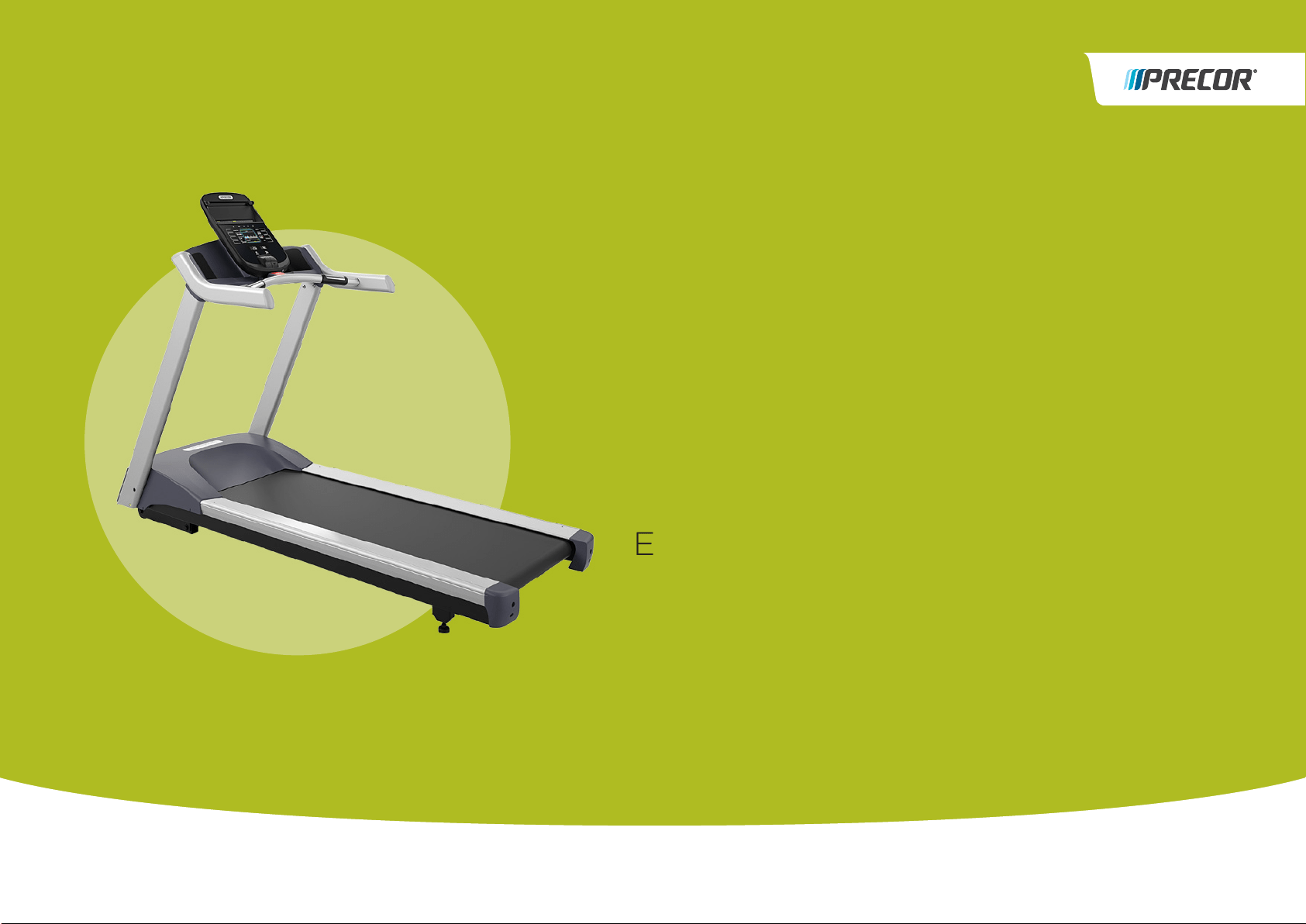
Assembly
Guide
ENERGY SERIES TREADMILLS
MODELS: 243, 223
WELCOME TO A PERSONALIZED FITNESS EXPERIENCE FOR YOUR HOME

Getting Started
3
Unpacking the Equipment
The treadmill is carefully tested and inspected before shipment. The unit is
shipped in two boxes. Ask for help from two or more people to unpack and
assemble the treadmill. If any items are missing, contact your dealer.
WARNING
Do not attempt to move the equipment by yourself. Have at
least one other person help you and use proper lifting
techniques.
To unpack the equipment:
1. Carefully cut and remove all plastic straps that secure the cover on the
cardboard box.
2. Lift the cover upward and set it aside.
3. Pull the cardboard or foam spacers away from the equipment and set them
aside.
4. Cut all plastic ties securing the equipment in place.
5. Remove the base frame assembly from the container and set it on the floor
where you plan to assemble and use the equipment.
Before you begin, verify that you have received the following parts:
Console box
Large box
– Base frame assembly
– Left and right upright supports (shipped in cardboard box packed beneath
the base frame assembly)
– Smaller box contains:
Console bracket
Dash and handrail assembly
Dash buckets
Hardware kit
Assembly Guide
Stop key and clip
Required Tools
17 mm open-end wrench
Level
Hardware Kit (not to scale)
The hardware kit shipped with this equipment contains the fasteners and other
hardware components shown in the following table. Before you begin assembly,
make sure that your hardware kit is complete. If not, please contact Precor
Customer Support.
Table 1. Hardware kit contents
Fasteners
Quantity
5 mm hex key 1
⁵₃₂-inch hex key 1
Buttonhead cap screw
(M8 x 15 mm)
10
Buttonhead cap screw
(M8 x 12 mm)
3
Buttonhead cap screw
(¹₄-inch x ⁵₈-inch)
4
Socket head cap screw
(M8 x 15 mm)
4
Flat washer
(8 mm internal diameter)
17
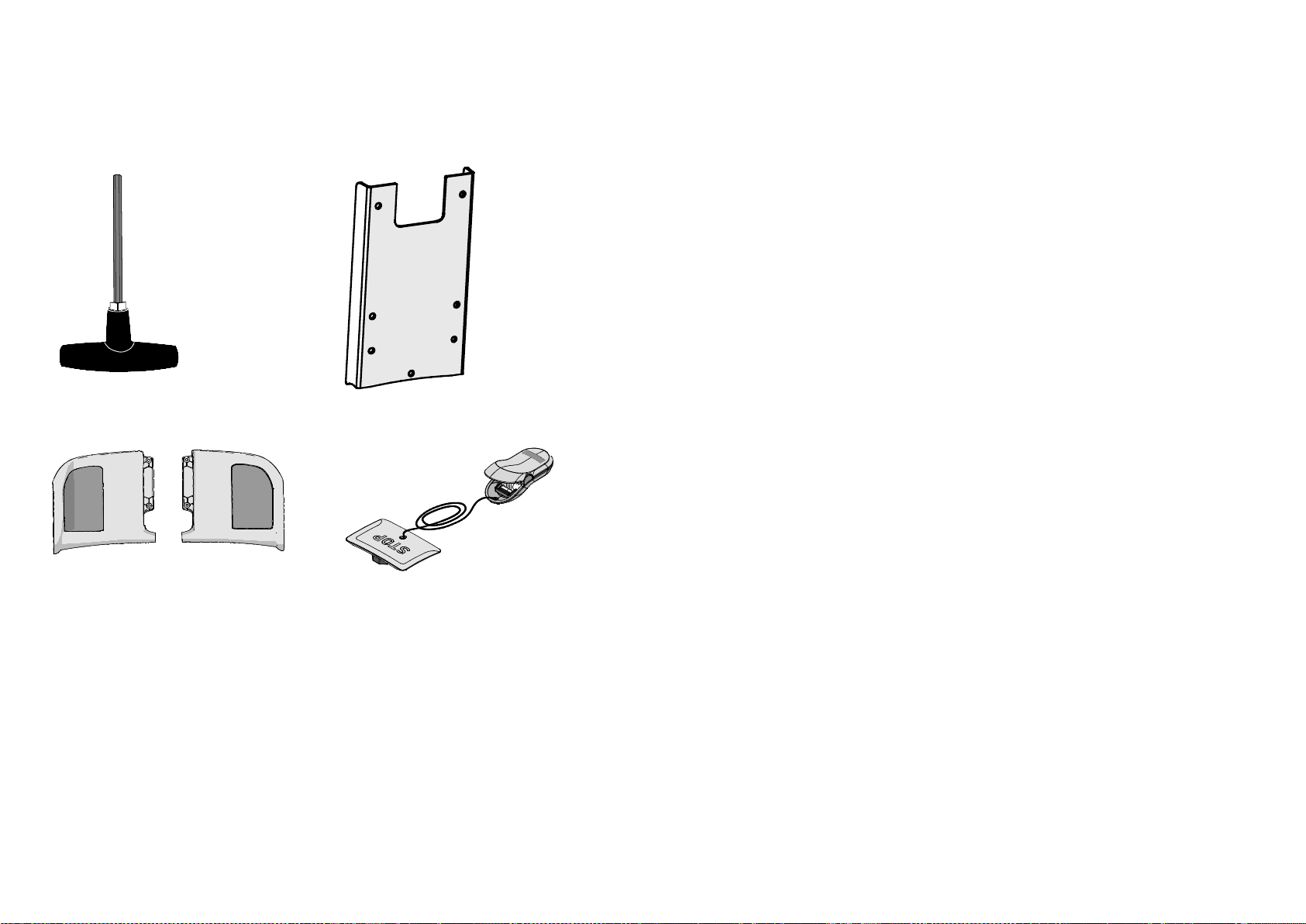
Treadmill 200 Series Assembly Guide 4
Table 2. Other components
6 mm T-handle hex wrench
Console bracket
Left and right dash buckets Stop key and clip
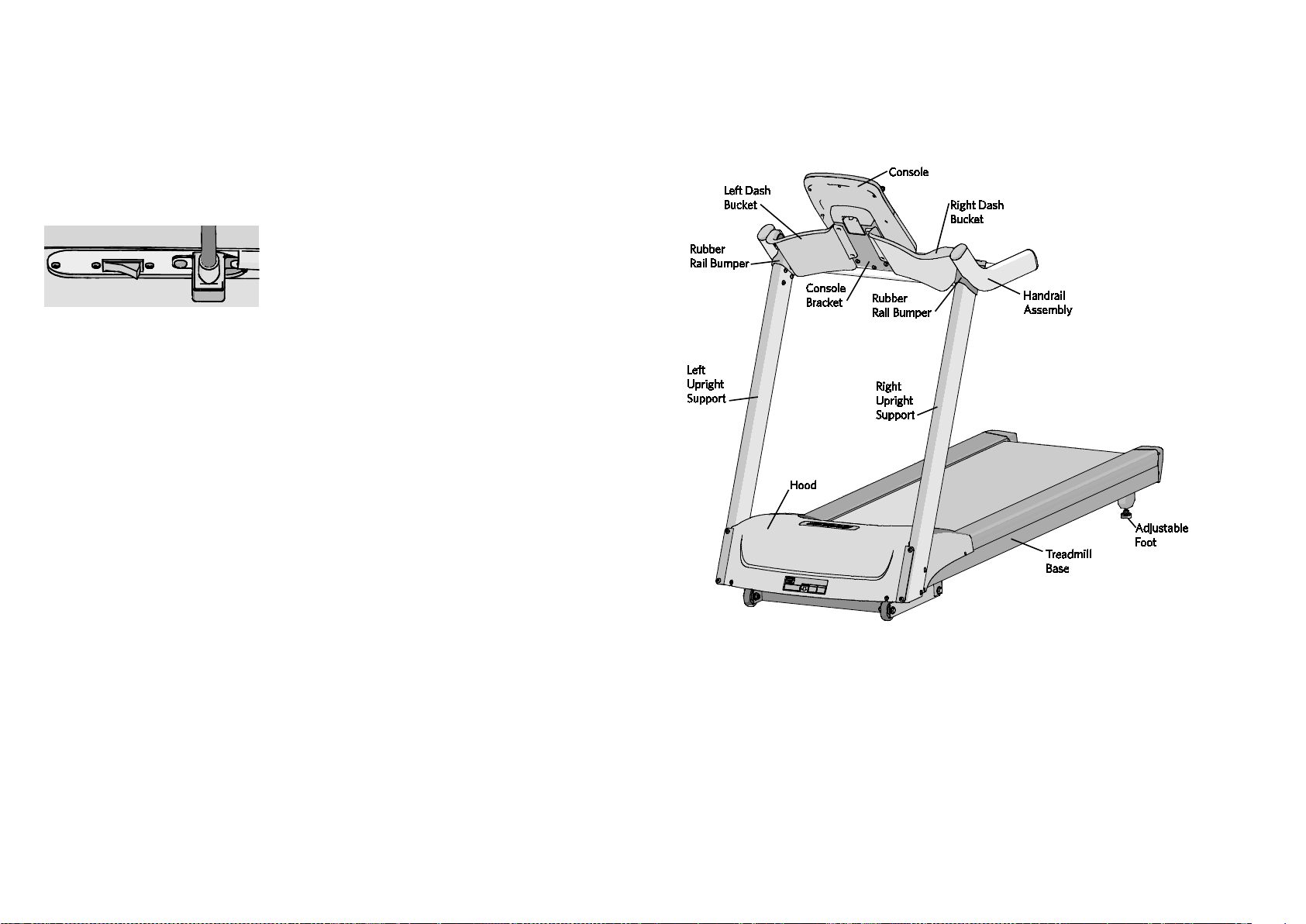
Assembling the Treadmill
5
Assembling the Treadmill
CAUTION: The location of the On/Off switch is beneath the cutout on the base frame.
Make sure the power switch is in the Off position. Make sure the power cord is
disconnected from its power source.
Figure 1: On/Off switch in Off position
Proper alignment and adjustment of the equipment is critical. When you install
fasteners, leave room for adjustments. Do not fully tighten the fasteners until you are
instructed to do so.
The following figure shows the names used in this manual for the major
components of the equipment.
Figure 2: Major components of treadmill

Attaching the Console
9
Attaching the Console
Before you begin, make sure there are four cables protruding upward from the top
of the handrail assembly.
To attach the console bracket:
1. Position the console bracket against the welded bracket holder on the handrail
assembly as shown in the following figure.
Figure 10: Console bracket attachment
2. Secure it using three M8 x 12 mm buttonhead screws and three washers.
Note: Partially thread the bottom screw first to help align the other holes.
Attaching the Cables to the Console
Four cables attach to the console. This guide feature helps ensure that the cables
are not pinched when the console is attached to the treadmill.
Figure 11: Cable attachments on back of console
Number Cable or feature
Stop switch cable
Base unit data cable
Console ground cable
Touch heart rate cable
Cable retainer

Treadmill 200 Series Assembly Guide 10
To attach the cables to the console:
1. Ask your assistant to hold the console over the console bracket while you
carefully route the following console cables:
a. Insert the stop switch cable (1) with the two connector tabs pointing down.
You will feel the cable lock into place.
b. Insert the base unit data cable (2).
c. Once both of these cables are connected, tuck the cables into the left side
of the cable retainer (5), as shown in the figure below.
d. Insert the console ground cable (3) with the round side positioned upward.
e. Insert the touch heart rate cable (4) with the front two tabs pointing down.
f. Once both of these cables are connected, tuck the cables into the right side
of the cable retainer (5).
Important: Make sure that all four cables are tucked into the cable retainer before
you place the console on the bracket. Place excess cable in the console recess where
the cables insert.
Figure 12: Cable guide on back of console
2. Set the console onto the console bracket. It should sit flush on the bracket
without gaps. If there is a gap, check to make sure that no cables are being
pinched between the console and the console bracket.
Note: Do not secure the console to the bracket until instructed to do so.
Figure 13: Console should fit snuggly on console bracket
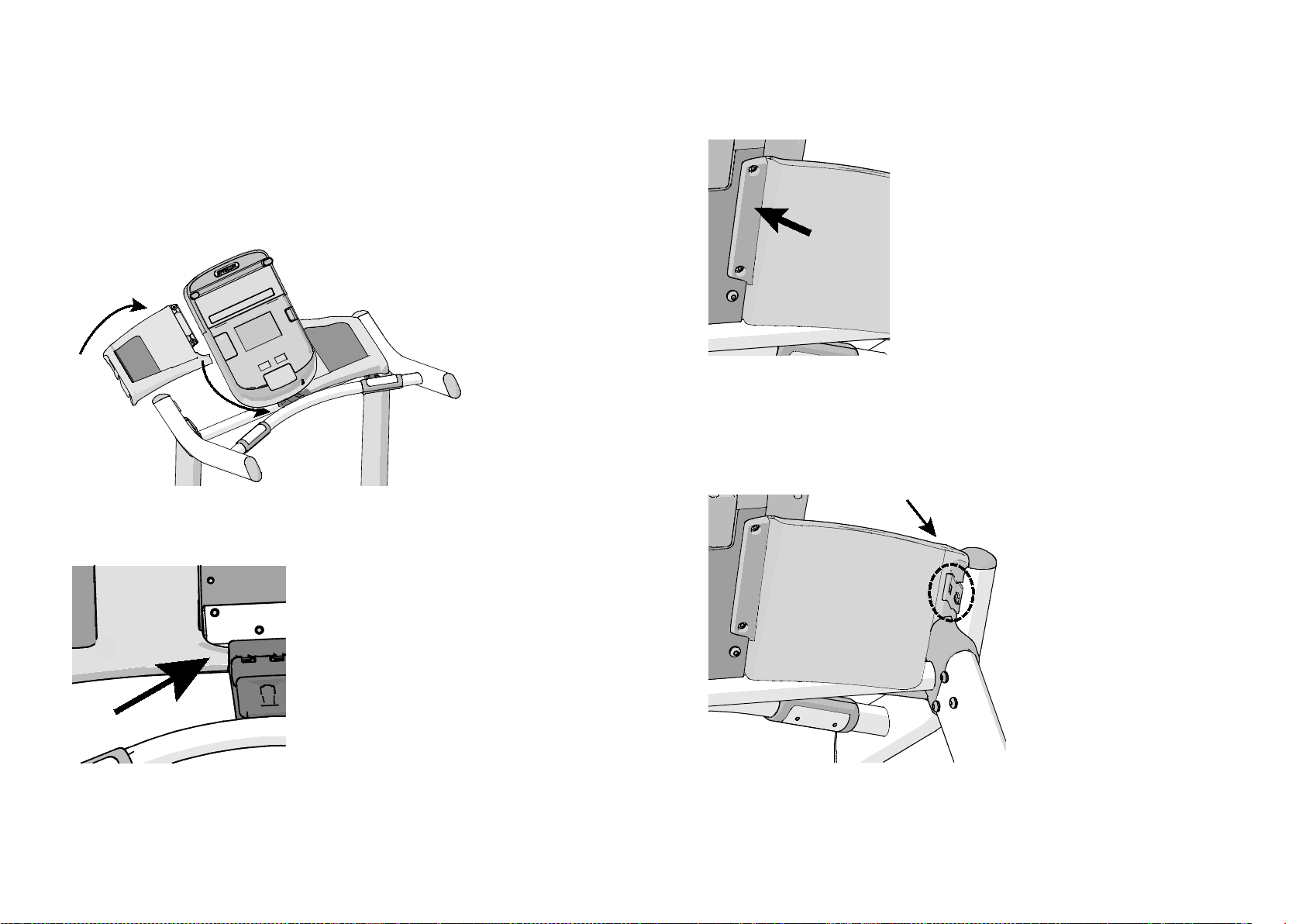
Attaching the Console
11
Attaching the Dash Buckets
The handrail assembly arrives with a bucket clip already attached to each
handrail.
To attach the dash buckets:
1. Tilt the dash bucket and slip it onto the handrail assembly so that:
Figure 14: Dash bucket position
a. The inside tab sits on top of the handrail.
Figure 15: Tab position on handrail
b. The back edge of the dash bucket fits behind the console bracket.
Figure 16: Back edge position
2. Press the outside edge of the dash bucket into the bucket clip. You will feel the
bucket snap into the clip.
Note: To remove the bucket, depress the tab on the clip with a flat head screw
driver to release the bucket.
Figure 17: Dash bucket attachment
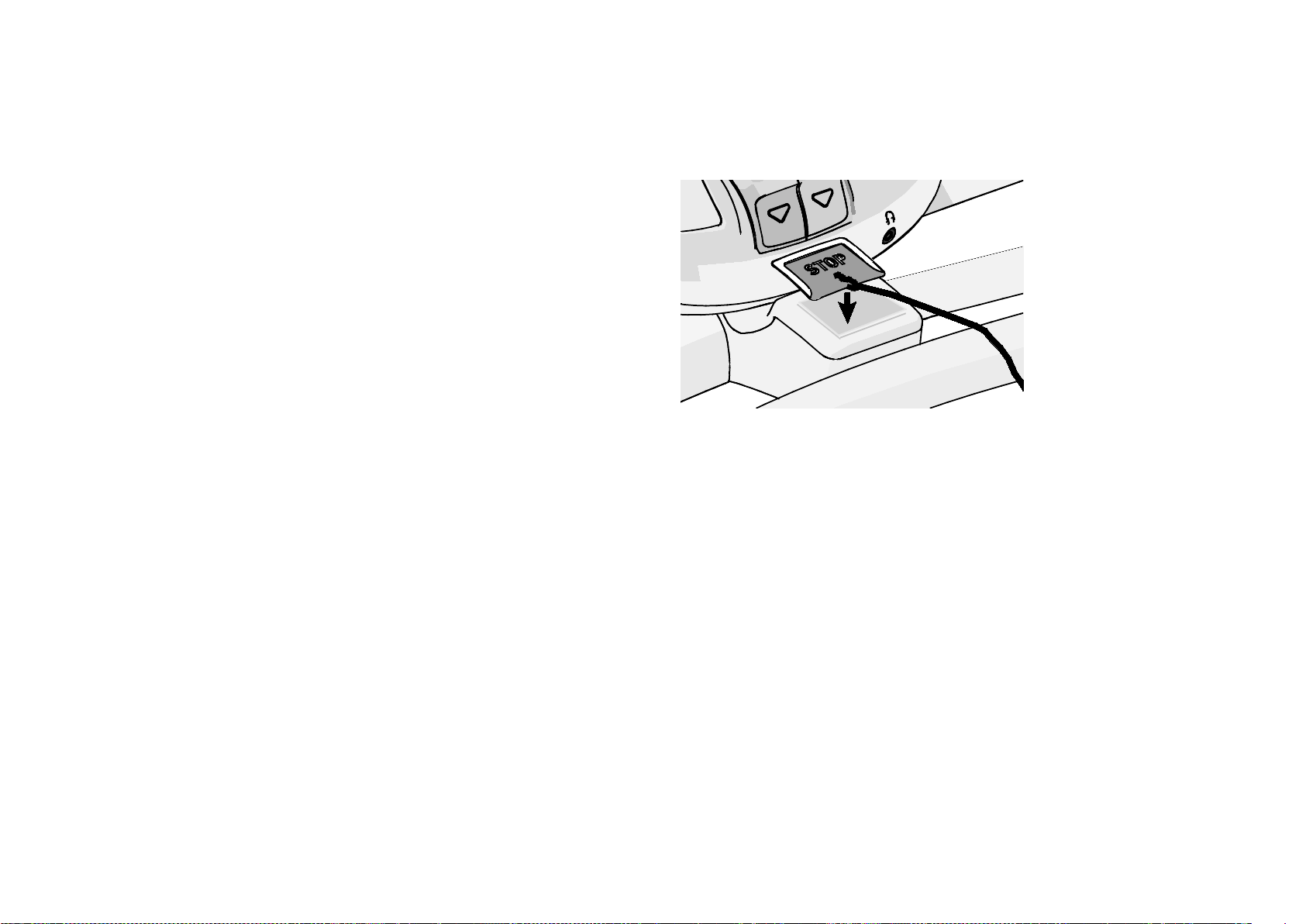
Completing Assembly
13
Completing Assembly
Once initial assembly is complete, there are a few things to do before the treadmill
can be used:
Attach the stop key
Remove protective film
Level the treadmill
Check the alignment
Adjust the running belt
Break in the equipment
Attaching the Stop Key
The magnetic stop key fits into the nest on the stop switch assembly at the base
of the console.
Figure 19: Stop key placement
For more information on using the emergency stop function and the safety clip,
see the product Owner’s Manual.
Removing the Protective Film
The treadmill ships with a protective film over the Precor logos and on the face of
the console. To remove the film, grasp the edge of it and peel it off the equipment.
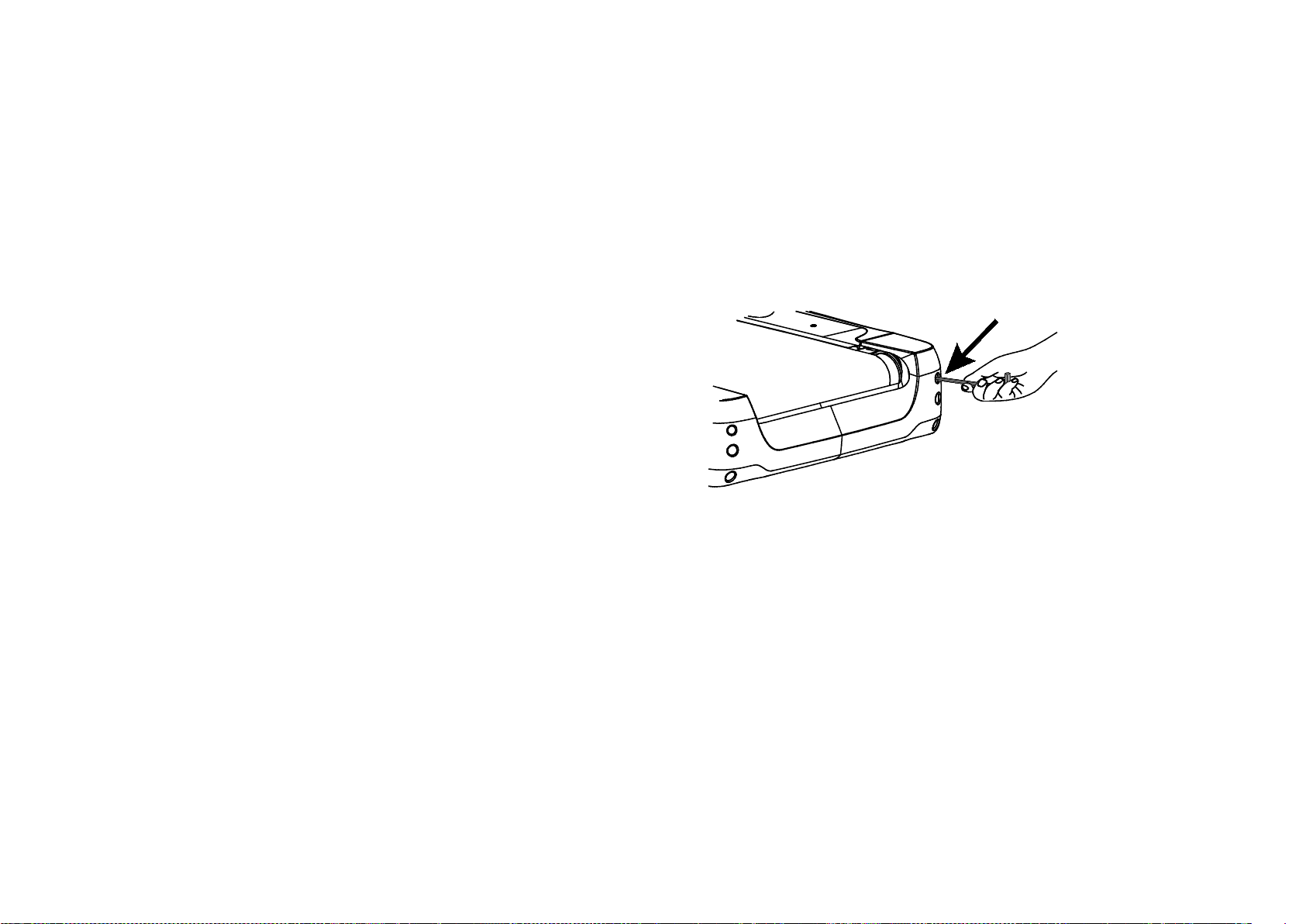
Completing Assembly
15
Checking the Alignment
Proper belt alignment allows the belt to remain centered and ensures smooth
operation. Realigning the belt takes a few simple adjustments. If you are unsure
about this procedure, call Precor Customer Support. Refer to Obtaining Service.
CAUTION: Special care must be taken when aligning the running belt. Turn Off the
treadmill while adjusting or working near the rear roller. Remove any loose clothing and
tie back your hair. Be very careful to keep your fingers and any other object clear of the
belt and rollers, especially in front of the roller and behind the deck. The treadmill will
not stop immediately if an object becomes caught in the belt or rollers.
To check the alignment:
1. The treadmill has adjustable rear feet. Make sure that the running surface is
level before aligning or adjusting the running belt. For more information, see
Leveling the Treadmill.
2. Connect the power plug to an appropriate dedicated circuit and turn the unit
On.
3. Stand beside the treadmill and press QUICKSTART.
Note: If needed, enter the password. Refer to your owner’s manual. The
running belt starts automatically after a 3-second countdown appears on the
display.
4. Increase the treadmill belt speed until the display shows a speed of 3 mph (5
kph).
CAUTION: If you hear any chafing or see that the running belt appears to be getting
damaged, stop the running belt immediately by pressing the red STOP button.
Contact Precor Customer Support.
5. Walk around to the rear of the unit and observe the belt for a few minutes.
The belt should run centered along the running bed. If the belt drifts off center,
you will need to make adjustments. Refer to the next section.
Important: If the belt needs alignment, make the adjustments at once. Failure to
align the belt may cause the belt to tear or fray, which is not covered by the Precor
Limited Warranty.
6. To stop the running belt, press the red STOP button.
7. Turn the treadmill Off.
Adjusting the Running Belt
If you are unsure about adjusting the running belt, contact Precor Customer
Support. Refer to Obtaining Service.
CAUTION: For your safety, use the power switch to turn Off the treadmill before
making any adjustments. Do not adjust the running belt when someone is standing on
the unit.
To adjust the running belt:
1. Locate the right belt adjustment bolt in the rear end cap of the treadmill.
Figure 24: Belt adjustment bolt location
2. To determine left and right, stand at the rear of the treadmill and face the
display. Make all belt adjustments on the right rear corner bolt using the
6 mm hex key.
– If the belt is off center to the LEFT, turn the adjusting bolt ¹₄ turn
counterclockwise, which moves the running belt to the right.
– If the belt is off center to the RIGHT, turn the bolt ¹₄ turn clockwise,
which moves the belt to the left.
Important: Do not turn the adjusting bolt more than
¹₄
turn at a time.
Overtightening the bolt can damage the treadmill.
3. Recheck the alignment of the running belt.

Treadmill 200 Series Assembly Guide 16
Breaking in the Equipment
Precor equipment does not require an actual break-in period. However, moving
components such as belts, gears, and bearings can settle while the equipment is
being stored or shipped. This can cause the equipment to operate with a small
amount of roughness or noise when it starts up for the first time.
The equipment usually returns to smooth operation after a day or two of normal
use. If it does not, contact your dealer for assistance. For more information, refer
to your owner’s manual.
Precor Incorporated
20031 142nd Ave NE
P.O. Box 7202
Woodinville, WA USA 98072-4002
1-800-347-4404
Precor is a registered trademark of Precor Incorporated.
Copyright 2014 Precor Incorporated.
Specifications subject to change without notice.
www.precor.com
NOTICE:
Precor is widely recognized for its innovative, award winning designs of exercise equipment. Precor
aggressively seeks U.S. and foreign patents for both the mechanical construction and the visual aspects
of its product design. Any party contemplating the use of Precor product designs is hereby forewarned
that Precor considers the unauthorized appropriation of its proprietary rights to be a very serious
matter. Precor will vigorously pursue all unauthorized appropriation of its proprietary rights.
Energy™ Series TRM 200 Treadmill Assembly Guide
303159-110 rev A, en
March 2014

Residential Cardiovascular
Equipment
Limited Warranty
For Elliptical Fitness Crosstrainers™:
• Precision Series (EFX® 447, 425, and 423)
• Energy Series (EFX® 245, 225, 222, and 221)
For Treadmills:
• Precision Series (TRM 445 and 425)
• Energy Series (TRM 243, 223, and 211)
PLEASE READ THESE WARRANTY TERMS AND
CONDITIONS CAREFULLY BEFORE USING YOUR PRECOR
INCORPORATED PRODUCT. BY USING THE EQUIPMENT,
YOU ARE CONSENTING TO BE BOUND BY THE
FOLLOWING WARRANTY TERMS AND CONDITIONS.

Conditions and Restrictions 5
are clean to ensure proper contact can be maintained.
If the touch heart rate feature does not work for you,
Precor recommends that you use a chest transmitter
strap.
8. Precor does not warranty the work or product of third
party companies (e.g., head end systems, low voltage
wiring, etc.)
9. Except in Canada, Precor does not pay labor outside the
United States.
10. Warranties outside the United States and Canada may
vary.
Please contact your Precor sales oce or local Distributor
for details.
This limited warranty shall not apply to:
1. Software version upgrades.
2. Software defects that do not materially and negatively
aect the exercise functionality of the product under
normal use conditions at the time of installation.
3. Cosmetic items, including, but not limited to the
following: grips, seats, and labels, or other items, the
exterior of which has been damaged or defaced as a
result of abuse, misuse, accident, improper service
or installation, mishandling, or modification in design
or construction not authorized by Precor including,
without limitation, use or incorporation of any non-
OEM (Original Equipment Manufacturer) replacement
parts.
4. Cosmetic, structural, or functional damage (including
rust, corrosion and unusual wear) caused by failure to
follow the maintenance procedures described in the
owner's manual.
5. Repairs performed on Precor equipment missing a serial
number or with a serial tag that has been altered or
defaced.

6 Residential Cardiovascular Equipment Limited Warranty
6. Service calls to correct installation of the equipment or
instruct owners on how to use the equipment.
7. Pickup, delivery, or freight charges involved with repairs.
8. Any labor costs incurred beyond the applicable labor
warranty period.
Disclaimer and Release
The limited warranties provided herein are the exclusive
warranties given by Precor and supersede any prior,
contrary or additional representations, whether oral or
written. ANY IMPLIED WARRANTIES, INCLUDING THE
WARRANTY OF MERCHANTABILITY OR FITNESS FOR
A PARTICULAR PURPOSE THAT APPLY TO ANY PARTS
DESCRIBED ABOVE ARE LIMITED IN DURATION TO
THE PERIODS OF EXPRESS WARRANTIES GIVEN ABOVE
FOR THOSE SAME PARTS. PRECOR HEREBY DISCLAIMS
AND EXCLUDES THOSE WARRANTIES THEREAFTER.
Some states do not allow limitation on how long an implied
warranty lasts, so the above limitations may not apply to
you. PRECOR ALSO HEREBY DISCLAIMS AND EXCLUDES
ALL OTHER OBLIGATIONS OR LIABILITIES, EXPRESS
OR IMPLIED, ARISING BY LAW OR OTHERWISE, WITH
RESPECT TO ANY NONCONFORMANCE OR DEFECT
IN ANY PRODUCT, INCLUDING BUT NOT LIMITED
TO: (A) ANY OBLIGATION, LIABILITY, RIGHT, CLAIM
OR REMEDY IN TORT, WHETHER OR NOT ARISING
FROM THE NEGLIGENCE OF PRECOR OR ITS SUPPLIERS
(WHETHER ACTIVE, PASSIVE OR IMPUTED); AND (B)
ANY OBLIGATION, LIABILITY, RIGHT, CLAIM, OR REMEDY
FOR LOSS OF OR DAMAGE TO ANY EQUIPMENT. This
disclaimer and release shall apply even if the express
warranty set forth above fails of its essential purpose.

Exclusive Remedies 7
Exclusive Remedies
For any product described above that fails to conform to
its warranty, Precor will provide, at their option, one of the
following: (1) repair; (2) replacement; or (3) refund of the
purchase price. Precor Limited Warranty service may be
obtained by contacting the authorized Distributor from
whom you purchased the item. Precor compensates Precor
Authorized Servicers for warranty trips within their normal
service area to repair equipment at the owner’s location.
You may be charged a trip charge outside the service area.
THESE SHALL BE THE SOLE AND EXCLUSIVE REMEDIES
OF THE BUYER FOR ANY BREACH OF WARRANTY.