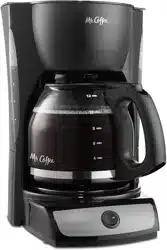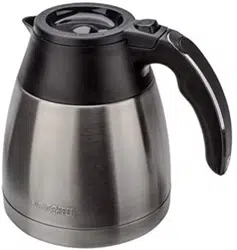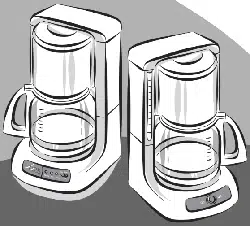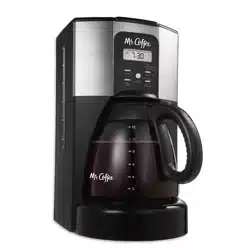

User Manual /Manual del Usuario
Coffeemaker / Cafetera
BVMC-ECX Series / Serie BVMC-ECX
©2016 Sunbeam Products, Inc. doing business as Jarden
Consumer Solutions. All rights reserved. Distributed by
Sunbeam Products, Inc. doing business as Jarden Consumer
Solutions, Boca Raton, Florida 33431. Sunbeam Products, Inc.
is a subsidiary of Jarden Corporation (NYSE:JAH).
©2016 Sunbeam Products, Inc. operando bajo el nombre de
Jarden Consumer Solutions. Todos los derechos reservados.
Distribuido por Sunbeam Products, Inc. operando bajo el
nombre de Jarden Consumer Solutions, Boca Raton, Florida
33431. Sunbeam Products, Inc. es una subsidiaria de Jarden
Corporation (NYSE:JAH).
U.S 1-800-MR COFFEE (1-800-672-6333)
Canada 1-800-667-8623
Visit us at www.mrcoffee.com / Visítenos en
www.mrcoffee.com
www.mrcoffee.com
Printed in China/Impreso en China P.N. 189074
BVMC-ECX41_16ESM1 GCDS-MRC45881-SL
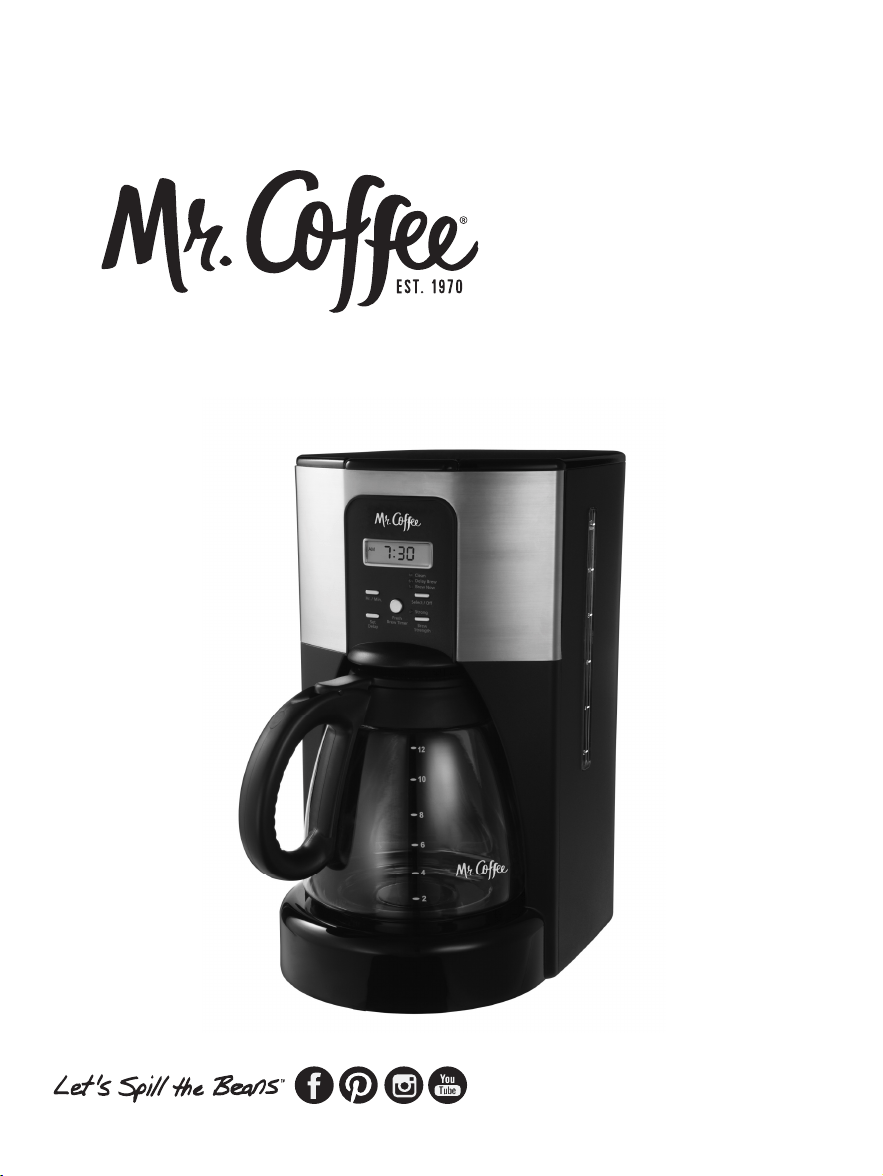
User Manual /Manual del Usuario
Coffeemaker / Cafetera
BVMC-ECX Series / Serie BVMC-ECX
©2016 Sunbeam Products, Inc. doing business as Jarden
Consumer Solutions. All rights reserved. Distributed by
Sunbeam Products, Inc. doing business as Jarden Consumer
Solutions, Boca Raton, Florida 33431. Sunbeam Products, Inc.
is a subsidiary of Jarden Corporation (NYSE:JAH).
©2016 Sunbeam Products, Inc. operando bajo el nombre de
Jarden Consumer Solutions. Todos los derechos reservados.
Distribuido por Sunbeam Products, Inc. operando bajo el
nombre de Jarden Consumer Solutions, Boca Raton, Florida
33431. Sunbeam Products, Inc. es una subsidiaria de Jarden
Corporation (NYSE:JAH).
U.S 1-800-MR COFFEE (1-800-672-6333)
Canada 1-800-667-8623
Visit us at www.mrcoffee.com / Visítenos en
www.mrcoffee.com
www.mrcoffee.com
Printed in China/Impreso en China P.N. 189074
BVMC-ECX41_16ESM1 GCDS-MRC45881-SL

2 3
IMPORTANT SAFEGUARDS
When using electrical appliances, basic safety precautions
should always be followed to reduce the risk of fire, electric
shock, and/or injury to persons including the following:
1. Read all instructions.
2. Do not touch hot surfaces. Use handles or knobs.
3. To protect against electric shock, do not place cord,
plugs, or appliance in water or other liquid.
4. This appliance is not to be used by children or by persons
with reduced physical, sensory or mental capabilities.
5. Close supervision is necessary when any appliance is
used near children.
6. Children should not play with the appliance.
7. Unplug from outlet when not in use and before cleaning.
Allow to cool before putting on or taking off parts, and
before cleaning the appliance.
8. Do not operate any appliance with a damaged cord or plug
or after the appliance malfunctions, or has been damaged
in any manner. Return appliance to an Authorized Service
Center for examination, repair or adjustment. Do not
attempt to replace or splice a damaged cord.
9. The use of an accessory not recommended by the appliance
manufacturer for use with this appliance may cause injuries.
10. Do not use outdoors.
11. Do not let cord hang over edge of table or counter, or
touch hot surfaces.
12. Do not place on or near a hot gas or electric burner, or in
a heated oven.
13. Always attach plug to appliance first, then plug cord into
the wall outlet (for appliances with detachable cords).
To disconnect, turn any control to the off position, then
remove plug from wall outlet.
14. Do not use appliance for other than intended use.
15. All lids should be closed during use.
16. Scalding may occur if the lid is removed during or
immediately after the brewing cycles. Contents may be
hot. Allow to cool before opening the lid.
For appliances with glass containers:
17. The container is designed for use with this appliance. It
must never be used on a range top.
18. Do not set a hot container on a wet or cold surface.
19. Avoid sudden temperature changes, such as rinsing,
washing, filling, or immersing a hot container with cold
liquids.
20. Do not use a cracked or chipped container or a
container having a loose or weakened handle.
21. Do not clean container with cleansers, steel wool pads,
or other abrasive material.
For appliances with service panels:
22. WARNING: Risk of Fire or Electric Shock. Do not remove
this cover. No user serviceable parts inside. Repair should
be done by authorized service personnel only.
SAVE THESE INSTRUCTIONS
HOUSEHOLD USE ONLY
POLARIZED PLUG
This appliance has a polarized plug,
(one blade is wider than the other). As
a safety feature to reduce the risk of
electrical shock, this plug is intended
to fit in a polarized outlet only one way. If the plug does
not fit fully in the outlet, reverse the plug. If it still does
not fit, contact a qualified electrician. Do not attempt to
defeat this safety feature or modify the plug in any way. If
the plug fits loosely into the AC outlet or if the AC outlet
feels warm do not use that outlet.
2 3
IMPORTANT SAFEGUARDS
When using electrical appliances, basic safety precautions
should always be followed to reduce the risk of fire, electric
shock, and/or injury to persons including the following:
1. Read all instructions.
2. Do not touch hot surfaces. Use handles or knobs.
3. To protect against electric shock, do not place cord,
plugs, or appliance in water or other liquid.
4. This appliance is not to be used by children or by persons
with reduced physical, sensory or mental capabilities.
5. Close supervision is necessary when any appliance is
used near children.
6. Children should not play with the appliance.
7. Unplug from outlet when not in use and before cleaning.
Allow to cool before putting on or taking off parts, and
before cleaning the appliance.
8. Do not operate any appliance with a damaged cord or plug
or after the appliance malfunctions, or has been damaged
in any manner. Return appliance to an Authorized Service
Center for examination, repair or adjustment. Do not
attempt to replace or splice a damaged cord.
9. The use of an accessory not recommended by the appliance
manufacturer for use with this appliance may cause injuries.
10. Do not use outdoors.
11. Do not let cord hang over edge of table or counter, or
touch hot surfaces.
12. Do not place on or near a hot gas or electric burner, or in
a heated oven.
13. Always attach plug to appliance first, then plug cord into
the wall outlet (for appliances with detachable cords).
To disconnect, turn any control to the off position, then
remove plug from wall outlet.
14. Do not use appliance for other than intended use.
15. All lids should be closed during use.
16. Scalding may occur if the lid is removed during or
immediately after the brewing cycles. Contents may be
hot. Allow to cool before opening the lid.
For appliances with glass containers:
17. The container is designed for use with this appliance. It
must never be used on a range top.
18. Do not set a hot container on a wet or cold surface.
19. Avoid sudden temperature changes, such as rinsing,
washing, filling, or immersing a hot container with cold
liquids.
20. Do not use a cracked or chipped container or a
container having a loose or weakened handle.
21. Do not clean container with cleansers, steel wool pads,
or other abrasive material.
For appliances with service panels:
22. WARNING: Risk of Fire or Electric Shock. Do not remove
this cover. No user serviceable parts inside. Repair should
be done by authorized service personnel only.
SAVE THESE INSTRUCTIONS
HOUSEHOLD USE ONLY
POLARIZED PLUG
This appliance has a polarized plug,
(one blade is wider than the other). As
a safety feature to reduce the risk of
electrical shock, this plug is intended
to fit in a polarized outlet only one way. If the plug does
not fit fully in the outlet, reverse the plug. If it still does
not fit, contact a qualified electrician. Do not attempt to
defeat this safety feature or modify the plug in any way. If
the plug fits loosely into the AC outlet or if the AC outlet
feels warm do not use that outlet.

4 5
PRODUCT NOTICES
1. Place the appliance on a hard, flat, level surface to avoid
interruption of airflow underneath the coffeemaker.
2. Discard the decanter immediately if it is ever boiled dry.
3. Protect the decanter from sharp blows, scratches or
rough handling.
4. Do not operate the appliance with an empty water tank.
5. Keep the area above the appliance clear during use, as
hot steam will escape the appliance.
POWER CORD INSTRUCTIONS:
A short power-supply cord (or detachable power-supply cord)
may be provided to reduce risks resulting from becoming
entangled in or tripping over a longer cord. Longer detachable
power-supply cords or extension cords are available and may be
used if care is exercised in their use. If a long detachable power-
supply cord or extension cord is used:
a. The marked electrical rating of the detachable power-supply
cord or extension cord should be at least as great as the
electrical rating of the appliance;
b. If the appliance is of the grounded type, the extension cord
should be a grounding type 3-wire cord; and
c. The longer cord should be arranged so that it will not drape
over the counter top or table top where it can be pulled on
by children or tripped over unintentionally.
TABLE OF CONTENTS
Important Safeguards..............................................................2
Product Notices.........................................................................4
Power Cord Instructions...........................................................4
Table of Contents.....................................................................5
Parts Diagram...........................................................................6
Coffeemaker Features and Benefits......................................8
Clean Your Coffeemaker Before Using the First Time...........9
Setting The Clock and Delay Brew Time...............................10
Preparing for Use....................................................................11
• Suggested Coffee Measurement Chart
• Adding Water and Ground Coffee
• Water Filtration System
Brewing Coffee Now................................................................14
Brewing Coffee Later (Delay Brew).......................................16
Cleaning and Maintaining Your Coffeemaker........................17
Troubleshooting Your Mr. Coffee
®
Coffeemaker...................20
Service and Maintenance.....................................................23
Warranty Information.............................................................25
4 5
PRODUCT NOTICES
1. Place the appliance on a hard, flat, level surface to avoid
interruption of airflow underneath the coffeemaker.
2. Discard the decanter immediately if it is ever boiled dry.
3. Protect the decanter from sharp blows, scratches or
rough handling.
4. Do not operate the appliance with an empty water tank.
5. Keep the area above the appliance clear during use, as
hot steam will escape the appliance.
POWER CORD INSTRUCTIONS:
A short power-supply cord (or detachable power-supply cord)
may be provided to reduce risks resulting from becoming
entangled in or tripping over a longer cord. Longer detachable
power-supply cords or extension cords are available and may be
used if care is exercised in their use. If a long detachable power-
supply cord or extension cord is used:
a. The marked electrical rating of the detachable power-supply
cord or extension cord should be at least as great as the
electrical rating of the appliance;
b. If the appliance is of the grounded type, the extension cord
should be a grounding type 3-wire cord; and
c. The longer cord should be arranged so that it will not drape
over the counter top or table top where it can be pulled on
by children or tripped over unintentionally.
TABLE OF CONTENTS
Important Safeguards..............................................................2
Product Notices.........................................................................4
Power Cord Instructions...........................................................4
Table of Contents.....................................................................5
Parts Diagram...........................................................................6
Coffeemaker Features and Benefits......................................8
Clean Your Coffeemaker Before Using the First Time...........9
Setting The Clock and Delay Brew Time...............................10
Preparing for Use....................................................................11
• Suggested Coffee Measurement Chart
• Adding Water and Ground Coffee
• Water Filtration System
Brewing Coffee Now................................................................14
Brewing Coffee Later (Delay Brew).......................................16
Cleaning and Maintaining Your Coffeemaker........................17
Troubleshooting Your Mr. Coffee
®
Coffeemaker...................20
Service and Maintenance.....................................................23
Warranty Information.............................................................25
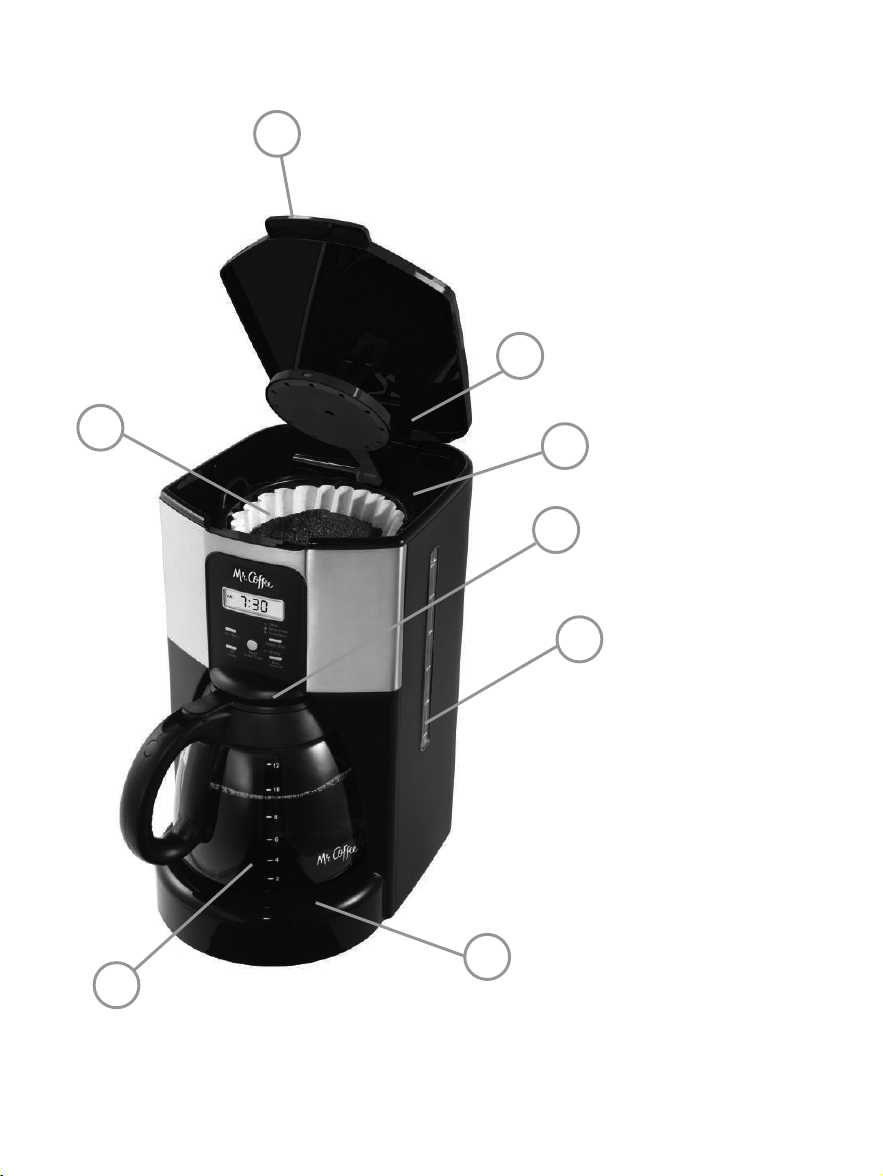
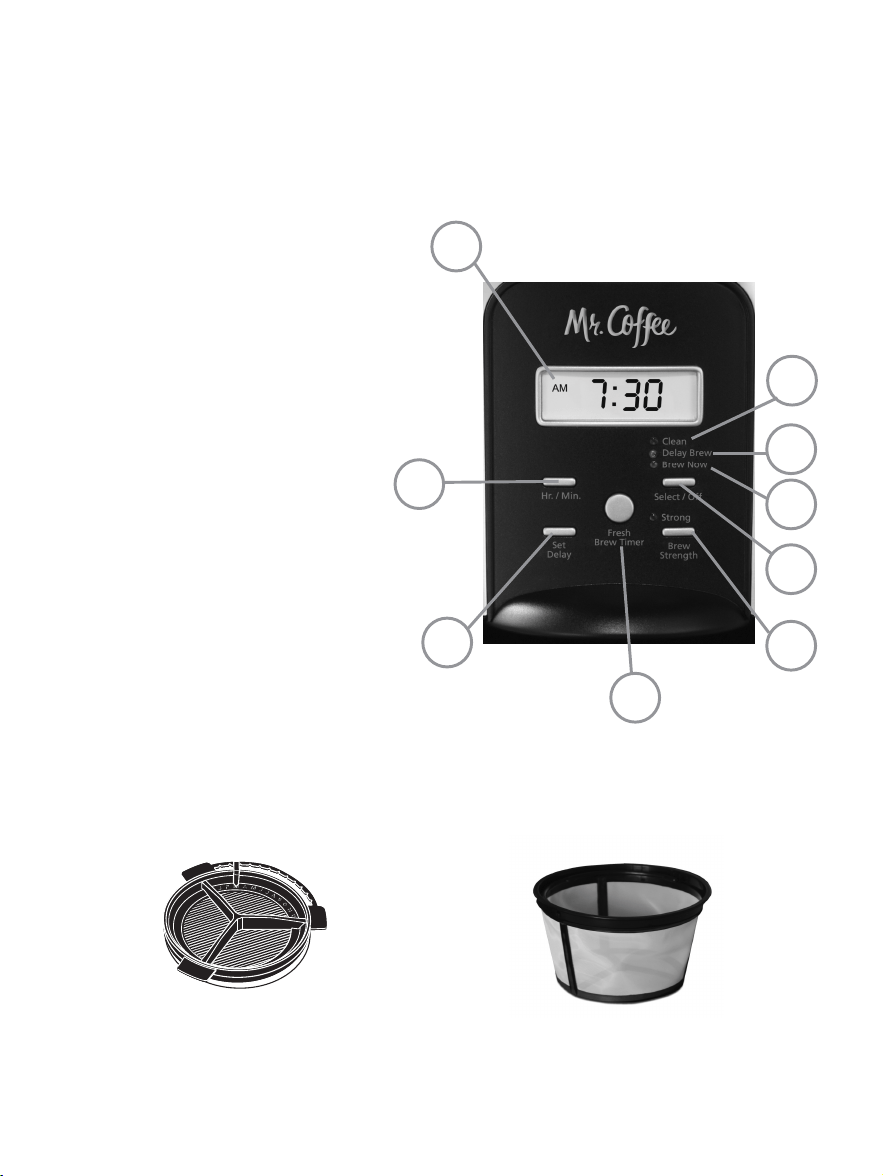
1. Brew Basket Lid
2. Shower Head
3. Water Reservoir
4. Pause ‘n Serve
5. Water Window
6. Non-stick
warming plate
7. Decanter
8. Removable Filter
Basket
a. Clock Display
b. Fresh Brew™ Timer Display
Button
c. Brew Strength Button
d. Delay Brew Indicator
e. Clean Cycle Indicator
f. Hour/Minute Button
g. Set Delay Button
h. Brew Now
i. Select/Off Button
6 7
PARTS DIAGRAM CONTROL PANEL
Coffeemaker Extras (not included with all models)
Water Filtration
System
Mr. Coffee
®
Brand
Nylon Permanent Filter
b
g
f
c
i
h
d
e
a
3
2
4
6
5
7
8
1
1. Brew Basket Lid
2. Shower Head
3. Water Reservoir
4. Pause ‘n Serve
5. Water Window
6. Non-stick
warming plate
7. Decanter
8. Removable Filter
Basket
a. Clock Display
b. Fresh Brew™ Timer Display
Button
c. Brew Strength Button
d. Delay Brew Indicator
e. Clean Cycle Indicator
f. Hour/Minute Button
g. Set Delay Button
h. Brew Now
i. Select/Off Button
6 7
PARTS DIAGRAM CONTROL PANEL
Coffeemaker Extras (not included with all models)
Water Filtration
System
Mr. Coffee
®
Brand
Nylon Permanent Filter
b
g
f
c
i
h
d
e
a
3
2
4
6
5
7
8
1

COFFEEMAKER FEATURES AND BENEFITS
Your new MR. COFFEE
®
coffeemaker has the following
features:
• Brewing Capacity – 12 cups – Glass decanter series.
• Removable Filter Basket – The filter basket lifts out for
fast and easy cleaning and filling.
• Pause ‘n Serve – Can’t wait for the coffee to finish brewing?
The Pause ‘n Serve feature allows you up to 30 seconds to
pour a cup of coffee while the coffeemaker is still brewing.
Carefully remove the decanter and the Pause ’n Serve
feature will be automatically activated, temporarily stopping
the flow of coffee into the decanter.
• Water Window – Shows amount of water in the reservoir
for accurate filling.
• Non-Stick Warming Plate – This feature allows you
to keep your coffee hot after brewing. The non-stick
attribute prevents the decanter from sticking to the
surface of the warming plate.
• Brew Strength Selector – Adjusts the brewing time to
create a more full-flavored coffee.
• Water Filtration System (not included with all models)
– Great tasting coffee begins with great water! Using the
Mr. Coffee
®
carbon-based water filter in the Mr. Coffee
®
coffeemaker during the brewing process helps remove
up to 97% of the chlorine from the water and improves
the taste of your coffee.
• Cord Storage – Safely stores excess cord to keep your
countertop neat.
• Two-Hour Auto Shut-Off – Keeps your coffee hot for two
hours, then automatically shuts off.
• Programmable Controls:
– Clock – The clock serves as a handy kitchen clock and
allows you to set the Delay Brew feature and functions
as the FRESH BREW™ TIMER feature.
8 9
– Fresh Brew™ Timer feature – Lets you know how long
your coffee has been waiting for you.
– Delay Brew – Would you like to wake up to a fresh
pot of coffee? The timer allows you to preset when
you would like the coffeemaker to automatically begin
brewing your coffee, up to 24 hours in advance.
– Special Cleaning Cycle – Enables you to easily maintain
and clean mineral deposits from your coffeemaker.
NOTE: If you have selected any of the operating functions,
the coffeemaker will act upon the last operation selected if
the power is restored within 7 seconds after a power outage.
CLEAN YOUR COFFEEMAKER BEFORE USING THE
FIRST TIME
Make sure your first cup of coffee is as good as can be by
cleaning your MR. COFFEE
®
Coffeemaker before its first use.
Just follow these simple steps:
1. Wash the decanter, decanter lid, permanent filter,
water filtration, and the filter basket in a mixture of mild
detergent and water. Rinse each thoroughly (please refer
to the parts diagram listed above).
2. Replace all the parts and close the lid. Then, run a brew
cycle with water only, without adding coffee and coffee
filter.
3. When brewing is complete, turn your coffeemaker off,
discard the water in the decanter and rinse the decanter,
decanter lid, and filter basket.
Your coffeemaker is now ready to use. Enjoy it!

COFFEEMAKER FEATURES AND BENEFITS
Your new MR. COFFEE
®
coffeemaker has the following
features:
• Brewing Capacity – 12 cups – Glass decanter series.
• Removable Filter Basket – The filter basket lifts out for
fast and easy cleaning and filling.
• Pause ‘n Serve – Can’t wait for the coffee to finish brewing?
The Pause ‘n Serve feature allows you up to 30 seconds to
pour a cup of coffee while the coffeemaker is still brewing.
Carefully remove the decanter and the Pause ’n Serve
feature will be automatically activated, temporarily stopping
the flow of coffee into the decanter.
• Water Window – Shows amount of water in the reservoir
for accurate filling.
• Non-Stick Warming Plate – This feature allows you
to keep your coffee hot after brewing. The non-stick
attribute prevents the decanter from sticking to the
surface of the warming plate.
• Brew Strength Selector – Adjusts the brewing time to
create a more full-flavored coffee.
• Water Filtration System (not included with all models)
– Great tasting coffee begins with great water! Using the
Mr. Coffee
®
carbon-based water filter in the Mr. Coffee
®
coffeemaker during the brewing process helps remove
up to 97% of the chlorine from the water and improves
the taste of your coffee.
• Cord Storage – Safely stores excess cord to keep your
countertop neat.
• Two-Hour Auto Shut-Off – Keeps your coffee hot for two
hours, then automatically shuts off.
• Programmable Controls:
– Clock – The clock serves as a handy kitchen clock and
allows you to set the Delay Brew feature and functions
as the FRESH BREW™ TIMER feature.
8 9
– Fresh Brew™ Timer feature – Lets you know how long
your coffee has been waiting for you.
– Delay Brew – Would you like to wake up to a fresh
pot of coffee? The timer allows you to preset when
you would like the coffeemaker to automatically begin
brewing your coffee, up to 24 hours in advance.
– Special Cleaning Cycle – Enables you to easily maintain
and clean mineral deposits from your coffeemaker.
NOTE: If you have selected any of the operating functions,
the coffeemaker will act upon the last operation selected if
the power is restored within 7 seconds after a power outage.
CLEAN YOUR COFFEEMAKER BEFORE USING THE
FIRST TIME
Make sure your first cup of coffee is as good as can be by
cleaning your MR. COFFEE
®
Coffeemaker before its first use.
Just follow these simple steps:
1. Wash the decanter, decanter lid, permanent filter,
water filtration, and the filter basket in a mixture of mild
detergent and water. Rinse each thoroughly (please refer
to the parts diagram listed above).
2. Replace all the parts and close the lid. Then, run a brew
cycle with water only, without adding coffee and coffee
filter.
3. When brewing is complete, turn your coffeemaker off,
discard the water in the decanter and rinse the decanter,
decanter lid, and filter basket.
Your coffeemaker is now ready to use. Enjoy it!
SETTING THE CLOCK AND DELAY BREW TIME
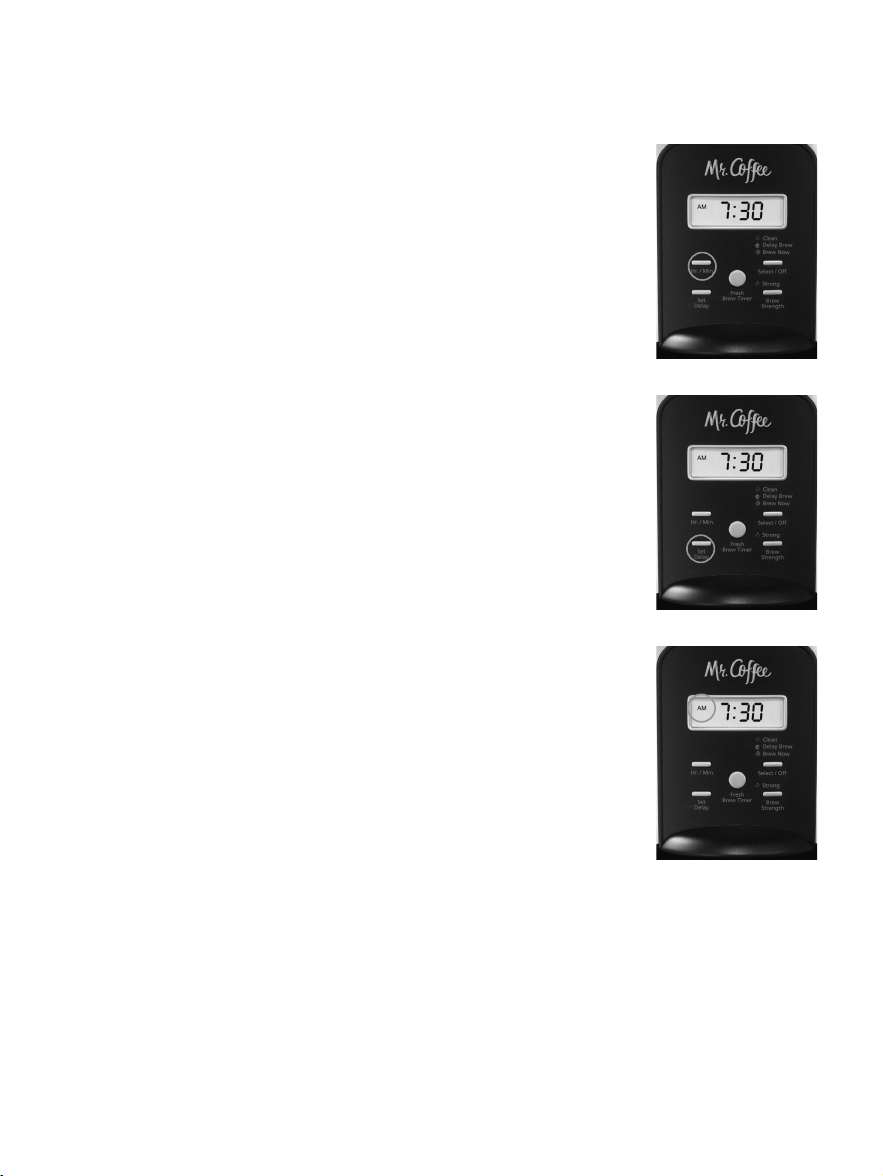
To Set the Clock:
1. Plug the power cord into a standard
electrical outlet. The clock will flash on the
control panel to indicate that the time has
not been set yet.
2. Press and hold the Hour/Minute Button
until you reach the current time. The AM
or PM indicator will light at the top of the
display ( Figure 1).
The clock is now set!
NOTE: Pressing Select/Off before setting the
clock will cause the clock to start keeping time
from 12:00 a.m. You must set the clock if you
want to use the Delay Brew feature.
To Set the Delay Brew Time:
While the display is in the clock mode, simply
press the SET DELAY button (Figure 2) and,
while the Amber Delay Brew LED is flashing,
set the brew time by pressing the Hour/Minute
Button. The AM or PM indicator will light at the
top of the clock display. (Figure 3)
Within a few seconds the display will change to
the current time.
The Delay Brew Time is now set!
NOTE: To activate the DELAY BREW cycle, see
the “Brewing Coffee Later” section.
To check the programmed time, push the SET DELAY button.
The display will show the time you have programmed the
coffee to brew. If you press the SET DELAY button again or
wait a few seconds, the display will switch back.
PREPARING FOR USE
Selecting and Measuring Ground Coffee
For best results, use a level tablespoon for ground coffee
measurement. Make sure you use medium grind coffee for a
perfect brew.
A. Suggested Coffee Measurement Chart
10 11
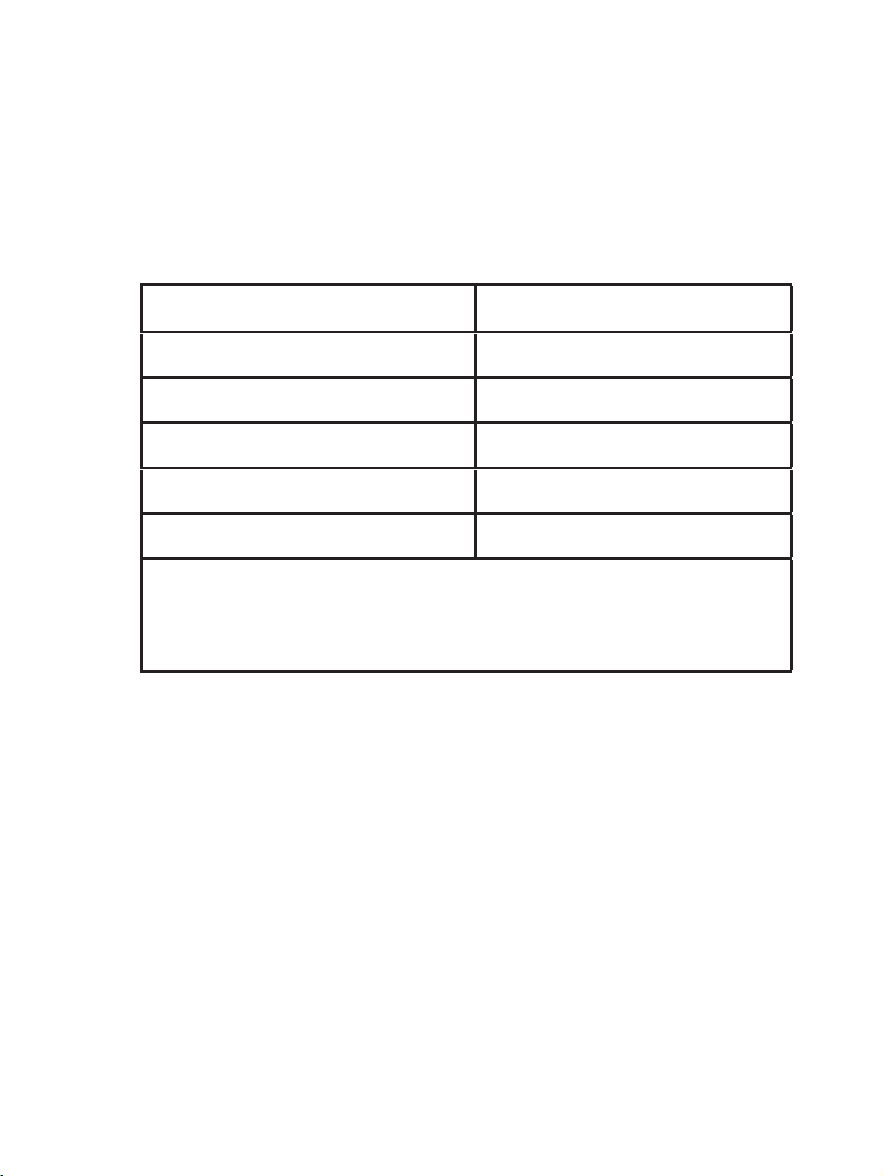
To Brew Ground Coffee
12 Cups 9 tbsp.
10 Cups 7.5 tbsp.
8 Cups 6.5 tbsp.
6 Cups 4.5 tbsp.
4 Cups 3 tbsp.
1 level tablespoon (tbsp) = 5 gr./0.17 oz./ 15 ml
1 cup = 5 fl. oz./ 148ml of brewed coffee
Use more or less coffee to suit your taste.
Figure 3
Figure 2
Figure 1
SETTING THE CLOCK AND DELAY BREW TIME
To Set the Clock:
1. Plug the power cord into a standard
electrical outlet. The clock will flash on the
control panel to indicate that the time has
not been set yet.
2. Press and hold the Hour/Minute Button
until you reach the current time. The AM
or PM indicator will light at the top of the
display ( Figure 1).
The clock is now set!
NOTE: Pressing Select/Off before setting the
clock will cause the clock to start keeping time
from 12:00 a.m. You must set the clock if you
want to use the Delay Brew feature.
To Set the Delay Brew Time:
While the display is in the clock mode, simply
press the SET DELAY button (Figure 2) and,
while the Amber Delay Brew LED is flashing,
set the brew time by pressing the Hour/Minute
Button. The AM or PM indicator will light at the
top of the clock display. (Figure 3)
Within a few seconds the display will change to
the current time.
The Delay Brew Time is now set!
NOTE: To activate the DELAY BREW cycle, see
the “Brewing Coffee Later” section.
To check the programmed time, push the SET DELAY button.
The display will show the time you have programmed the
coffee to brew. If you press the SET DELAY button again or
wait a few seconds, the display will switch back.
PREPARING FOR USE
Selecting and Measuring Ground Coffee
For best results, use a level tablespoon for ground coffee
measurement. Make sure you use medium grind coffee for a
perfect brew.
A. Suggested Coffee Measurement Chart
10 11
To Brew Ground Coffee
12 Cups 9 tbsp.
10 Cups 7.5 tbsp.
8 Cups 6.5 tbsp.
6 Cups 4.5 tbsp.
4 Cups 3 tbsp.
1 level tablespoon (tbsp) = 5 gr./0.17 oz./ 15 ml
1 cup = 5 fl. oz./ 148ml of brewed coffee
Use more or less coffee to suit your taste.
Figure 3
Figure 2
Figure 1
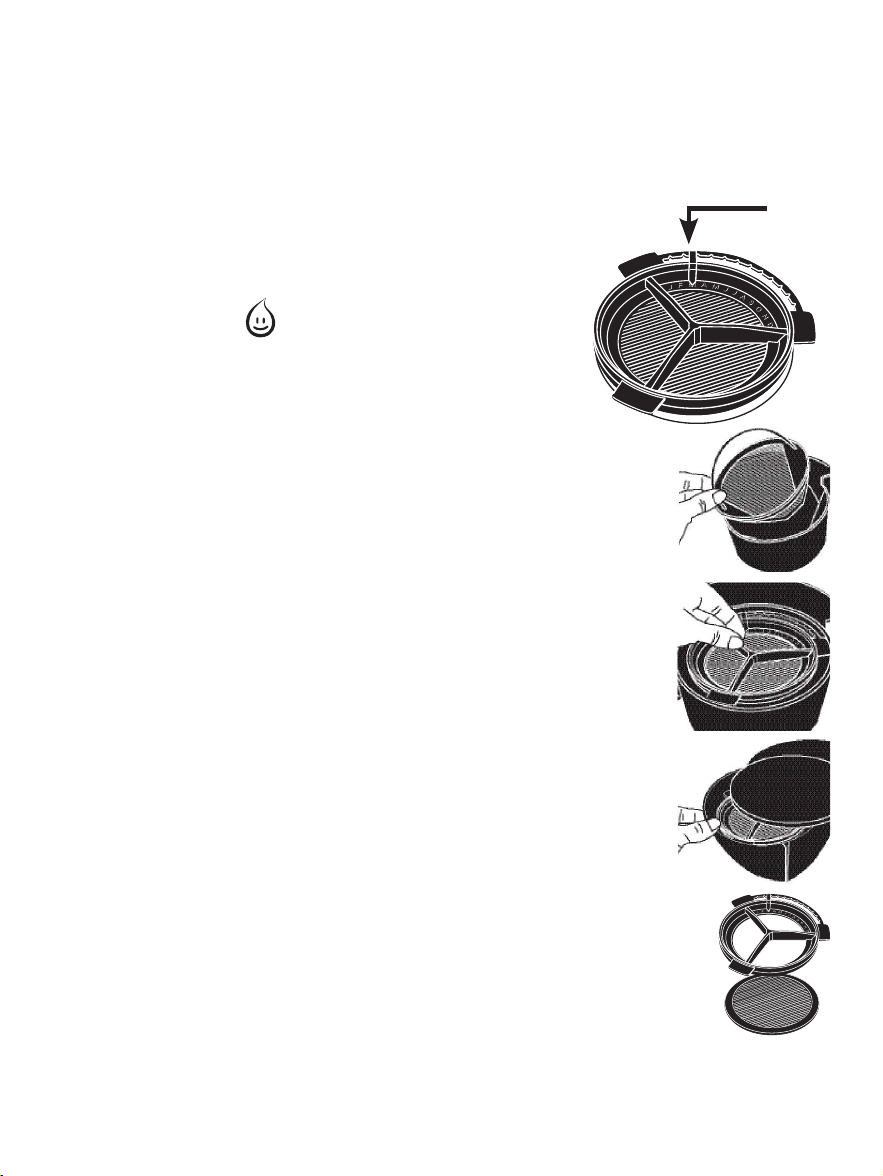
B. Water Filtration System (Not included with all models)
Congratulations! You are the owner of a MR. COFFEE
®
water
filtration system. Using the Mr. Coffee
®
carbon-based water
filter in the Mr. Coffee
®
coffeemaker during the brewing
process helps remove up to 97% of the
chlorine from the water and improves the
taste of your coffee.
First, look for the MR. COFFEE Filter
Friendly symbol on the bottom of
your filter basket. If you do not see this
symbol, please call 1-800-672-6333.
To use the water filtration system in your
MR. COFFEE
®
Coffeemaker, please follow these
steps:
1. Align the red indicator on the frame to the
letter that corresponds with the month that
you are using the disk for the first time. This
serves to remind you to change the disk
every month (approx. 30 brewing cycles). To
change the disk, remove the used disk, insert
new disk into the frame.
NOTE: For optimum results, use the water
filtration system with the permanent filter.
2. Rinse the water filter in fresh water before
first use.
3. Follow Adding Water and Coffee instructions.
4. When you are done brewing your coffee,
rinse the water filter with fresh water. Do
not put your water filter in the
dishwasher.
To replace the water filter disks: slide
the used disk from your water filtration
system. To insert the new disk, slide disk
into the frame.
12 13
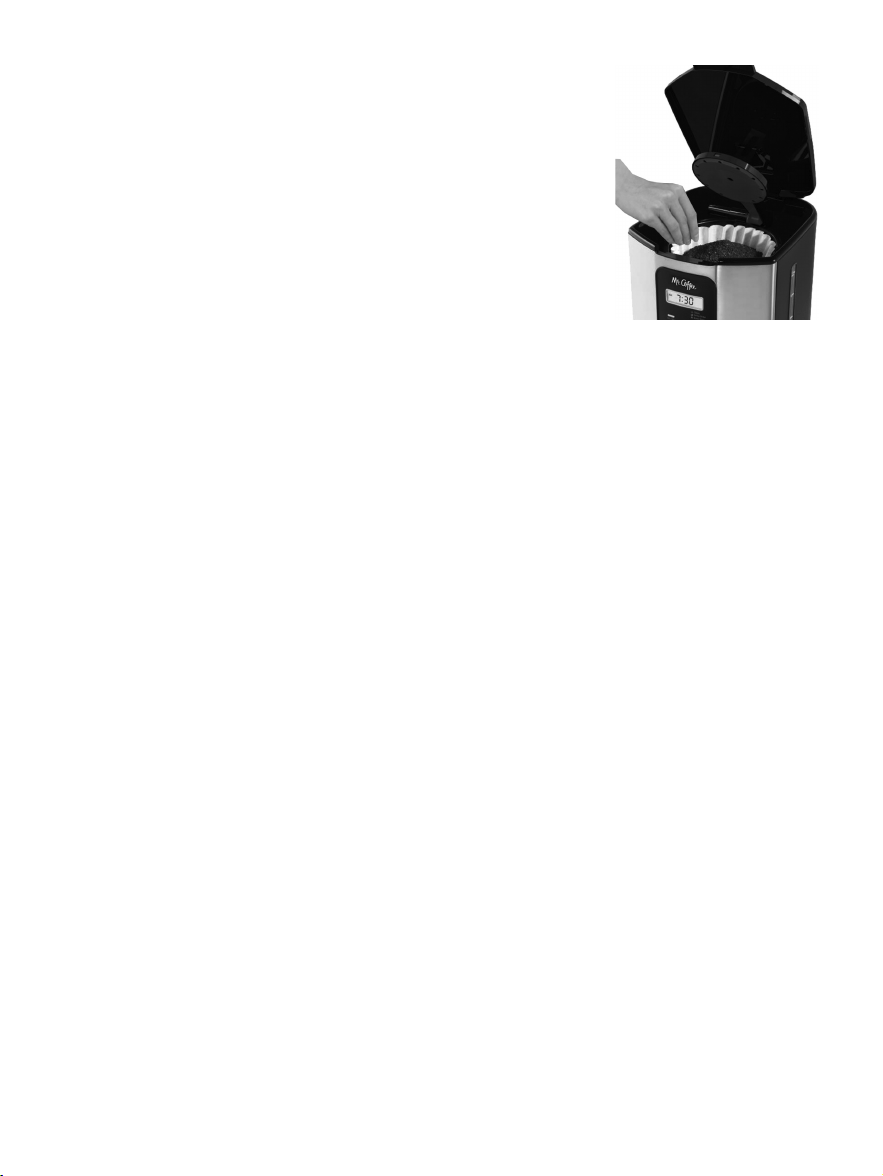
C. Adding Water and Ground Coffee
1. Open the brew basket lid. For your
convenience, you can lift out the
removable filter basket.
2. Place the MR. COFFEE
®
nylon
permanent filter included into the
removable filter basket (Figure 4).
NOTE: If using paper filters instead of
the nylon permanent filter included, it
is important that the sides of the filter
fit flush against the side of the filter basket. If filter collapse
occurs, dampen the filter before placing in the filter basket
and adding ground coffee and water.
3. Add the desired amount of coffee and gently shake to
level the coffee. See the Suggested Coffee Measurement
Chart.
4. After following instructions in the Water Filtration
System, place the MR. COFFEE
®
water filter in the basket,
making sure that the side marked “this side up” faces you
and that the water filter is level.
5. Be sure the removable filter basket is properly centered
and all the way down in the brew basket and close the lid.
6. Fill the decanter with cold, fresh water to the desired
capacity (1 cup = 5 fl. oz./ 148ml) For easy and accurate
filling, the water markings on the glass decanter and on the
water window show the amount of water needed to make
the corresponding desired number of cups. Do not fill past
the “12 cup MAX line” or water will flow out of the overfill
hole in the back of the coffeemaker.
The amount of coffee brewed will always be slightly less
than the amount of water poured in the water reservoir.
This is due to the minimum absorption of water by the
coffee grounds.
7. Lift the brew basket lid and pour the water into the
water reservoir. Close the lid and place the empty
decanter onto the warmer plate.
Frame
Filter Disk
Red
Indicator
Figure 4
B. Water Filtration System (Not included with all models)
Congratulations! You are the owner of a MR. COFFEE
®
water
filtration system. Using the Mr. Coffee
®
carbon-based water
filter in the Mr. Coffee
®
coffeemaker during the brewing
process helps remove up to 97% of the
chlorine from the water and improves the
taste of your coffee.
First, look for the MR. COFFEE Filter
Friendly symbol on the bottom of
your filter basket. If you do not see this
symbol, please call 1-800-672-6333.
To use the water filtration system in your
MR. COFFEE
®
Coffeemaker, please follow these
steps:
1. Align the red indicator on the frame to the
letter that corresponds with the month that
you are using the disk for the first time. This
serves to remind you to change the disk
every month (approx. 30 brewing cycles). To
change the disk, remove the used disk, insert
new disk into the frame.
NOTE: For optimum results, use the water
filtration system with the permanent filter.
2. Rinse the water filter in fresh water before
first use.
3. Follow Adding Water and Coffee instructions.
4. When you are done brewing your coffee,
rinse the water filter with fresh water. Do
not put your water filter in the
dishwasher.
To replace the water filter disks: slide
the used disk from your water filtration
system. To insert the new disk, slide disk
into the frame.
12 13
C. Adding Water and Ground Coffee
1. Open the brew basket lid. For your
convenience, you can lift out the
removable filter basket.
2. Place the MR. COFFEE
®
nylon
permanent filter included into the
removable filter basket (Figure 4).
NOTE: If using paper filters instead of
the nylon permanent filter included, it
is important that the sides of the filter
fit flush against the side of the filter basket. If filter collapse
occurs, dampen the filter before placing in the filter basket
and adding ground coffee and water.
3. Add the desired amount of coffee and gently shake to
level the coffee. See the Suggested Coffee Measurement
Chart.
4. After following instructions in the Water Filtration
System, place the MR. COFFEE
®
water filter in the basket,
making sure that the side marked “this side up” faces you
and that the water filter is level.
5. Be sure the removable filter basket is properly centered
and all the way down in the brew basket and close the lid.
6. Fill the decanter with cold, fresh water to the desired
capacity (1 cup = 5 fl. oz./ 148ml) For easy and accurate
filling, the water markings on the glass decanter and on the
water window show the amount of water needed to make
the corresponding desired number of cups. Do not fill past
the “12 cup MAX line” or water will flow out of the overfill
hole in the back of the coffeemaker.
The amount of coffee brewed will always be slightly less
than the amount of water poured in the water reservoir.
This is due to the minimum absorption of water by the
coffee grounds.
7. Lift the brew basket lid and pour the water into the
water reservoir. Close the lid and place the empty
decanter onto the warmer plate.
Frame
Filter Disk
Red
Indicator
Figure 4
NOTE: Make sure the decanter is fully placed on the warming
plate or the water and the grounds will overflow from the
filter basket. An overflow may cause personal injury or
damage to property.
CAUTION! To reduce the risk of damaging the decanter and/
or the risk of personal injury, do not add cold water
to the decanter if the decanter is already hot. Allow
the decanter to cool before using.
BREWING COFFEE NOW
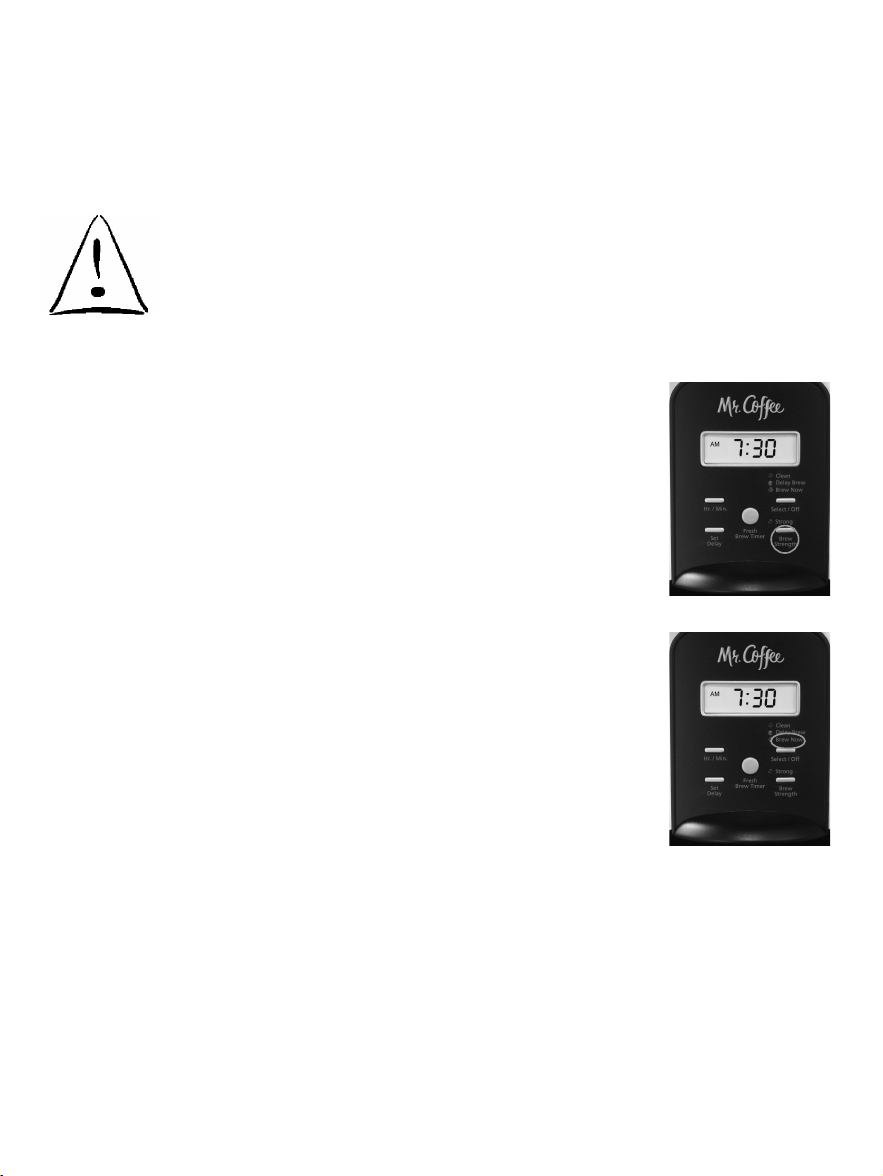
1. To enjoy a more full flavored cup of coffee,
press the Brew Strength button once. The
STRONG Brew Strength red light will turn
on. The coffeemaker will remain in the Brew
Strength you have selected until you change
it back to REGULAR strength by pressing the
Brew Strength button or until you unplug the
machine (Figure 5).
NOTE: Once brewing has started the brew
strength cannot be changed during the brew
cycle. The coffeemaker automatically defaults to
regular strength.
2. Complete the steps in the Adding Water
and Coffee section and with the glass
decanter and the filter basket securely in
place, turn the coffeemaker on by pressing
the Select/Off button once. The BREW NOW
green light will turn on to signal that the
coffeemaker is on and brewing (Figure 6).
3. After brewing is complete an audible ready signal will
sound to let you know your coffee is ready.
NOTE: The default is for the audible ready signal to sound
after brewing. To turn off the audible ready signal, hold the
SET DELAY button for 5 seconds. To turn the audible ready
signal back on, hold the SET DELAY button again for 5 second.
14 15
4. After the used coffee grounds have cooled, carefully
remove the filter basket and discard them.
NOTE: The brew basket lid is hot after brewing. Always allow
the coffeemaker to cool down before cleaning.
5. Prior to making a second pot of coffee, turn the
coffeemaker off. This will reset the FRESH BREW™ TIMER
feature. To turn the coffeemaker off, press the Select/Off
button all lights will turn off.
6. Make sure the decanter is empty before starting to brew
coffee.
7. Be sure to turn your coffeemaker off when no longer
using it.
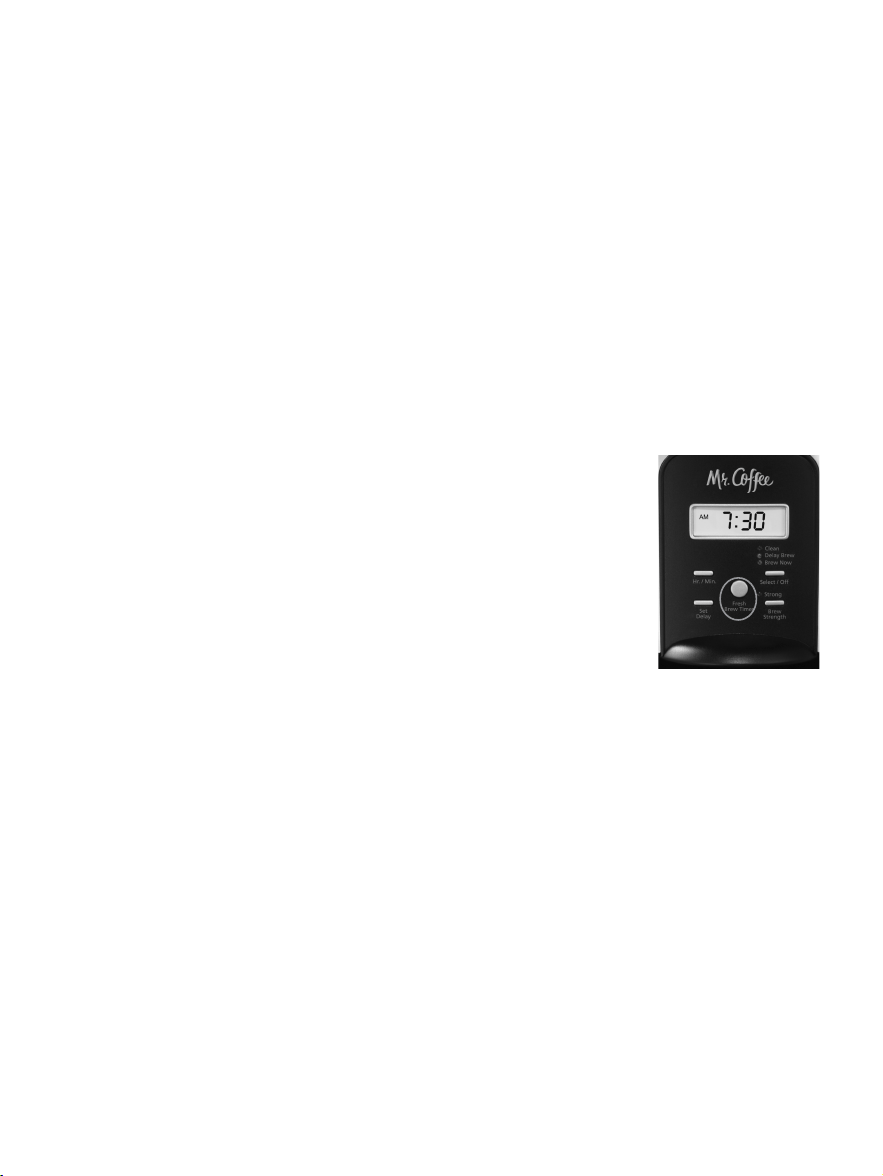
The Fresh Brew™ Timer Feature
The FRESH BREW™ TIMER feature lets you know
how long your coffee has been waiting for
you. At the start of the brew cycle, the FRESH
BREW™ TIMER feature will automatically be
activated.
Press the FRESH BREW™ TIMER button once
(Figure 7) and the clock time will change to
show the amount of time that has passed since
brewing completed. Push again to display
current time.
NOTE: The BREW NOW green light must be on for the FRESH
BREW™ TIMER feature to operate. The time and delay brew
time cannot be set when the fresh brew time is displayed.
Figure 6
Figure 5
Figure 7
NOTE: Make sure the decanter is fully placed on the warming
plate or the water and the grounds will overflow from the
filter basket. An overflow may cause personal injury or
damage to property.
CAUTION! To reduce the risk of damaging the decanter and/
or the risk of personal injury, do not add cold water
to the decanter if the decanter is already hot. Allow
the decanter to cool before using.
BREWING COFFEE NOW
1. To enjoy a more full flavored cup of coffee,
press the Brew Strength button once. The
STRONG Brew Strength red light will turn
on. The coffeemaker will remain in the Brew
Strength you have selected until you change
it back to REGULAR strength by pressing the
Brew Strength button or until you unplug the
machine (Figure 5).
NOTE: Once brewing has started the brew
strength cannot be changed during the brew
cycle. The coffeemaker automatically defaults to
regular strength.
2. Complete the steps in the Adding Water
and Coffee section and with the glass
decanter and the filter basket securely in
place, turn the coffeemaker on by pressing
the Select/Off button once. The BREW NOW
green light will turn on to signal that the
coffeemaker is on and brewing (Figure 6).
3. After brewing is complete an audible ready signal will
sound to let you know your coffee is ready.
NOTE: The default is for the audible ready signal to sound
after brewing. To turn off the audible ready signal, hold the
SET DELAY button for 5 seconds. To turn the audible ready
signal back on, hold the SET DELAY button again for 5 second.
14 15
4. After the used coffee grounds have cooled, carefully
remove the filter basket and discard them.
NOTE: The brew basket lid is hot after brewing. Always allow
the coffeemaker to cool down before cleaning.
5. Prior to making a second pot of coffee, turn the
coffeemaker off. This will reset the FRESH BREW™ TIMER
feature. To turn the coffeemaker off, press the Select/Off
button all lights will turn off.
6. Make sure the decanter is empty before starting to brew
coffee.
7. Be sure to turn your coffeemaker off when no longer
using it.
The Fresh Brew™ Timer Feature
The FRESH BREW™ TIMER feature lets you know
how long your coffee has been waiting for
you. At the start of the brew cycle, the FRESH
BREW™ TIMER feature will automatically be
activated.
Press the FRESH BREW™ TIMER button once
(Figure 7) and the clock time will change to
show the amount of time that has passed since
brewing completed. Push again to display
current time.
NOTE: The BREW NOW green light must be on for the FRESH
BREW™ TIMER feature to operate. The time and delay brew
time cannot be set when the fresh brew time is displayed.
Figure 6
Figure 5
Figure 7
BREWING COFFEE LATER
1. You must first set the time for when you
would like the coffeemaker to begin
brewing your coffee as described in Setting
the Clock and the Delay Brew Timer section.
2. Prepare your coffeemaker as described in
Adding Water and Ground Coffee section.
3. To activate DELAY BREW and program your
coffeemaker to brew coffee at a later
time, press the Select/Off button twice
(Figure 8). The yellow DELAY BREW light will turn on. The
coffeemaker is now set to automatically brew coffee at
the pre-set later time. You can select a stronger strength
if you desire by pressing the Brew Strength button.
Otherwise, it will default to regular strength.
4. At the pre-set time, the green BREW NOW light will
turn on and the DELAY BREW yellow light will turn off,
indicating the brewing has started in the selected brew
strength. The FRESH BREW™ TIMER feature will start.
5. The coffeemaker warmer plate will keep your coffee hot
for 2 hours and then automatically turn off.
As a safety feature, your coffeemaker will NOT start
again automatically the next day. If you want your
coffee to brew at the same time the following day,
simply add a new filter, coffee and water and set
DELAY BREW, by repeating Steps 2 and 3 above.
To cancel DELAY BREW: Press the Select/Off button until all
lights turn off (Figure 8).
16 17
CLEANING AND MAINTAINING
YOUR COFFEEMAKER
Daily Cleaning
Always unplug the coffeemaker and allow to cool before
cleaning.
Remove the filter basket, permanent filter (not included in
all models), decanter lid and wash them in a solution of hot
water and mild liquid soap.
Never use abrasive cleansers, steel wool pads or other abrasive
materials. Dishwasher top rack safe parts: glass decanter and
lid, filter basket and permanent filter. The water filter disk is not
dishwasher safe.
CAUTION! Never immerse the coffeemaker itself in
water, in any other liquid or place in the dishwasher.
Regular Cleaning and Maintenance
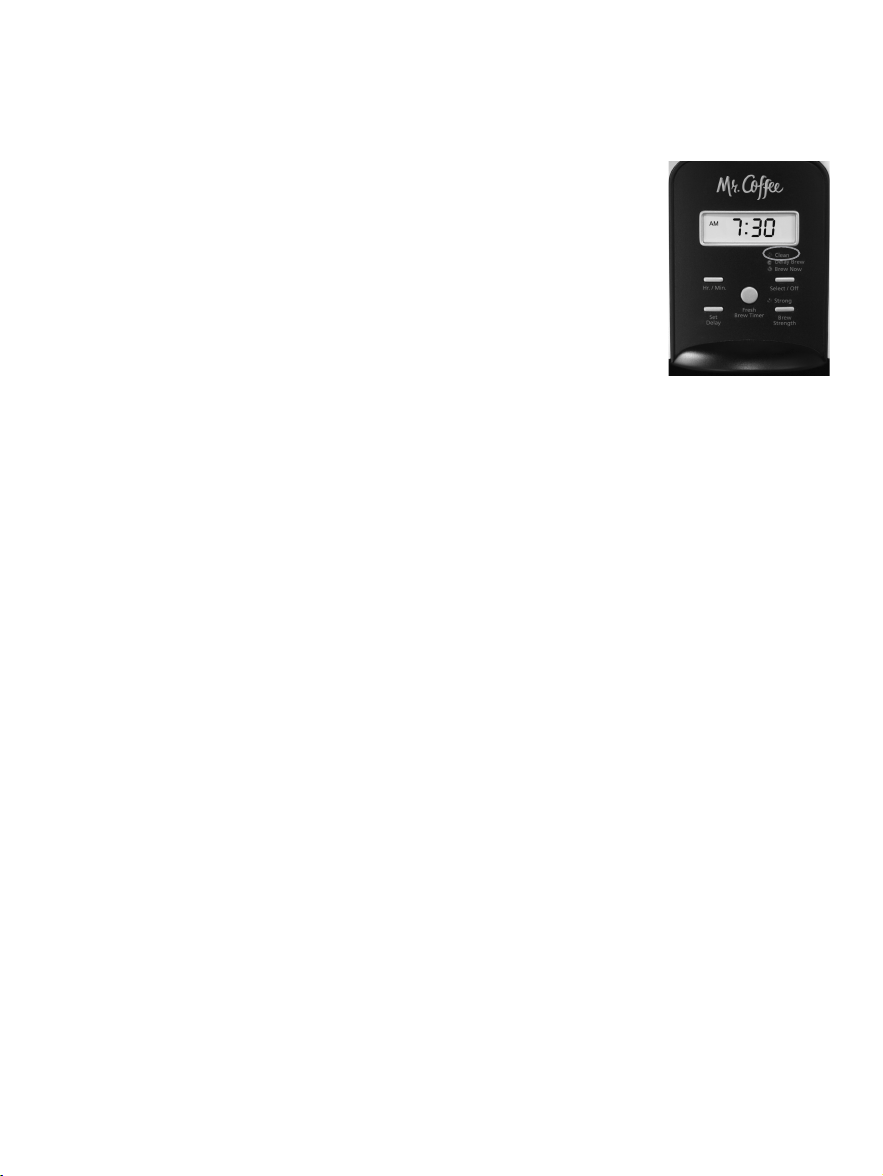
The red clean light will turn on and flash to let you know that
your coffeemaker needs to be cleaned. The red light will turn
off after the clean cycle has been completed.
Decalcifying your MR. COFFEE
®
Coffeemaker
Minerals (calcium/limestone) found in water will leave
deposits in your coffeemaker and affect its performance.
To order the Mr. COFFEE
®
cleaner, please call our Service
Department at 1-800-MR COFFEE (1-800-672-6333).
1. Follow package instructions to prepare one batch of
MR. COFFEE
®
Cleaner. Pour the mixture into the water
reservoir. Before decalcifying, remove the water filtration
disk from the machine.
NOTE: 4 cups or 20 fl. oz./ 592ml of undiluted, white
household vinegar may be used as a substitute for the
cleaner.
Figure 8
BREWING COFFEE LATER
1. You must first set the time for when you
would like the coffeemaker to begin
brewing your coffee as described in Setting
the Clock and the Delay Brew Timer section.
2. Prepare your coffeemaker as described in
Adding Water and Ground Coffee section.
3. To activate DELAY BREW and program your
coffeemaker to brew coffee at a later
time, press the Select/Off button twice
(Figure 8). The yellow DELAY BREW light will turn on. The
coffeemaker is now set to automatically brew coffee at
the pre-set later time. You can select a stronger strength
if you desire by pressing the Brew Strength button.
Otherwise, it will default to regular strength.
4. At the pre-set time, the green BREW NOW light will
turn on and the DELAY BREW yellow light will turn off,
indicating the brewing has started in the selected brew
strength. The FRESH BREW™ TIMER feature will start.
5. The coffeemaker warmer plate will keep your coffee hot
for 2 hours and then automatically turn off.
As a safety feature, your coffeemaker will NOT start
again automatically the next day. If you want your
coffee to brew at the same time the following day,
simply add a new filter, coffee and water and set
DELAY BREW, by repeating Steps 2 and 3 above.
To cancel DELAY BREW: Press the Select/Off button until all
lights turn off (Figure 8).
16 17
CLEANING AND MAINTAINING
YOUR COFFEEMAKER
Daily Cleaning
Always unplug the coffeemaker and allow to cool before
cleaning.
Remove the filter basket, permanent filter (not included in
all models), decanter lid and wash them in a solution of hot
water and mild liquid soap.
Never use abrasive cleansers, steel wool pads or other abrasive
materials. Dishwasher top rack safe parts: glass decanter and
lid, filter basket and permanent filter. The water filter disk is not
dishwasher safe.
CAUTION! Never immerse the coffeemaker itself in
water, in any other liquid or place in the dishwasher.
Regular Cleaning and Maintenance
The red clean light will turn on and flash to let you know that
your coffeemaker needs to be cleaned. The red light will turn
off after the clean cycle has been completed.
Decalcifying your MR. COFFEE
®
Coffeemaker
Minerals (calcium/limestone) found in water will leave
deposits in your coffeemaker and affect its performance.
To order the Mr. COFFEE
®
cleaner, please call our Service
Department at 1-800-MR COFFEE (1-800-672-6333).
1. Follow package instructions to prepare one batch of
MR. COFFEE
®
Cleaner. Pour the mixture into the water
reservoir. Before decalcifying, remove the water filtration
disk from the machine.
NOTE: 4 cups or 20 fl. oz./ 592ml of undiluted, white
household vinegar may be used as a substitute for the
cleaner.
Figure 8
Water Filtration Disk Replacement: (not included in all
models)
Your water filtration disk will need to be replaced once a
month (approx. 30 brew cycles). If the machine will not be in
use for an extended period of time, rinse the water filter with
running water and clean the coffeemaker before use.
Cleaning the Decanter
Hard water can leave a whitish stain on the decanter, and
coffee may then turn this stain brown.
To remove decanter stains:
1. Fill the decanter with a solution of equal parts water and
vinegar and let the solution stand in the decanter for
approximately 20 minutes.
2. Discard the solution, then wash and rinse the decanter.
Do not use harsh abrasive cleaners that may scratch the
decanter, scratches may cause the decanter to break.
2. Place an empty MR. COFFEE
®
10-12 cup basket-style
paper filter or MR. COFFEE
®
permanent filter into the filter
basket and close the brew basket lid.
3. Place the empty decanter back in the unit,
centered on the warmer plate.
4. Press the Select/Off button until the red
CLEAN indicator light turns on (Figure 9).
For your convenience the cleaning cycle is
automatic. The entire cycle will take 45-60
minutes to complete. During the cleaning
your coffeemaker will:
a. Slow brew approx. 3 cups of cleaning
solution.
b. Pause for 30 minutes (the CLEAN light will remain on to
alert you that the process is active).
c. After 30 minutes, your coffeemaker will brew the
remainder of the cleaning solution.
d. When complete, the CLEAN light will turn off and your
coffeemaker will turn off.
5. Discard the cleaning solution and rinse the decanter
thoroughly with clean water.
6. Fill the water reservoir with clean, fresh water.
7. Place the empty decanter back on the coffeemaker,
centered on the warming plate.
8. Remove and discard the paper filter used during the
cleaning cycle. If a Mr. Coffee
®
permanent filter was used
during cleaning, remove it and rinse it thoroughly before
replacing it in the filter basket.
9. Begin brewing and allow the full brew cycle to complete.
10. Repeat steps 5 through 9 one more time.
Your coffeemaker is now clean and ready to brew the next
pot of delicious, hot coffee!
18 19
or when red light is flashing
Type of Water
Soft Water
Hard Water
Cleaning Frequency
Every 80 Brew Cycles
Every 40 Brew Cycles
Suggested Decalcifying Interval
Figure 9
Water Filtration Disk Replacement: (not included in all
models)
Your water filtration disk will need to be replaced once a
month (approx. 30 brew cycles). If the machine will not be in
use for an extended period of time, rinse the water filter with
running water and clean the coffeemaker before use.
Cleaning the Decanter
Hard water can leave a whitish stain on the decanter, and
coffee may then turn this stain brown.
To remove decanter stains:
1. Fill the decanter with a solution of equal parts water and
vinegar and let the solution stand in the decanter for
approximately 20 minutes.
2. Discard the solution, then wash and rinse the decanter.
Do not use harsh abrasive cleaners that may scratch the
decanter, scratches may cause the decanter to break.
2. Place an empty MR. COFFEE
®
10-12 cup basket-style
paper filter or MR. COFFEE
®
permanent filter into the filter
basket and close the brew basket lid.
3. Place the empty decanter back in the unit,
centered on the warmer plate.
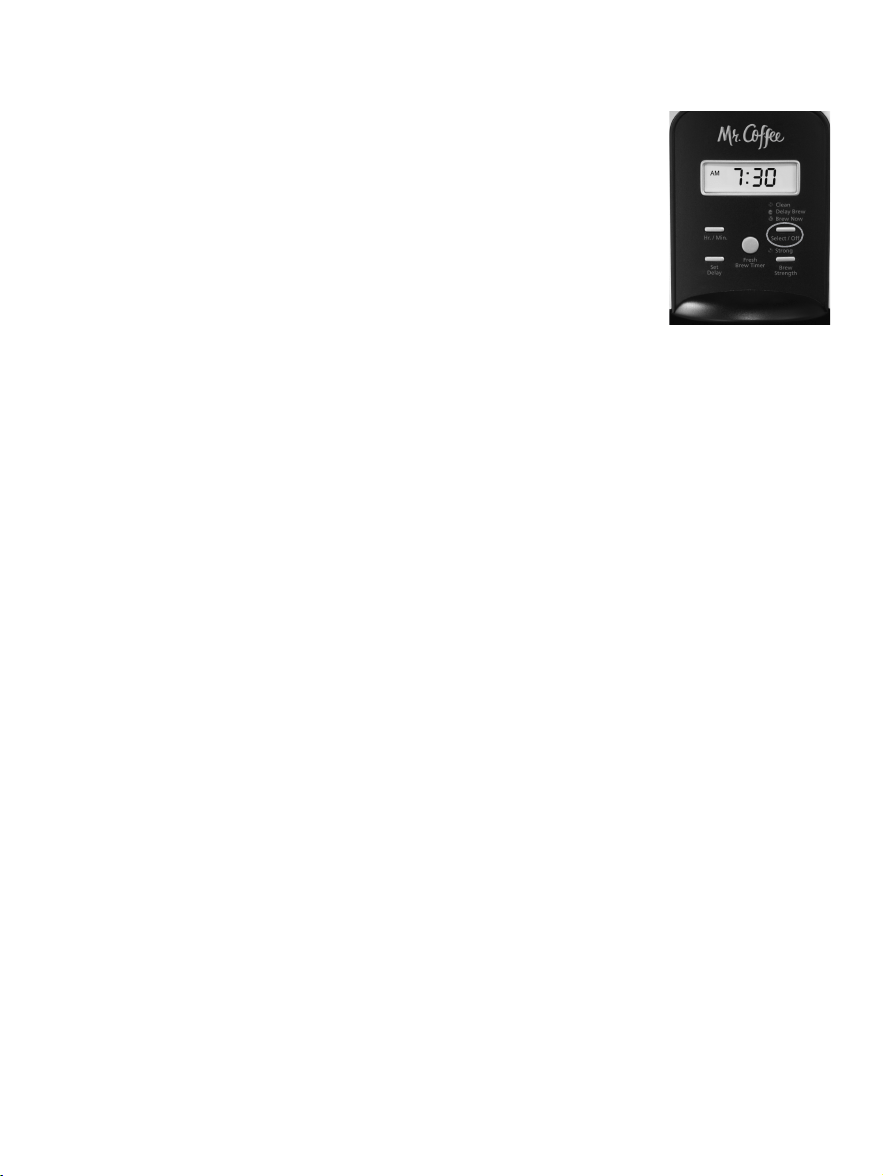
4. Press the Select/Off button until the red
CLEAN indicator light turns on (Figure 9).
For your convenience the cleaning cycle is
automatic. The entire cycle will take 45-60
minutes to complete. During the cleaning
your coffeemaker will:
a. Slow brew approx. 3 cups of cleaning
solution.
b. Pause for 30 minutes (the CLEAN light will remain on to
alert you that the process is active).
c. After 30 minutes, your coffeemaker will brew the
remainder of the cleaning solution.
d. When complete, the CLEAN light will turn off and your
coffeemaker will turn off.
5. Discard the cleaning solution and rinse the decanter
thoroughly with clean water.
6. Fill the water reservoir with clean, fresh water.
7. Place the empty decanter back on the coffeemaker,
centered on the warming plate.
8. Remove and discard the paper filter used during the
cleaning cycle. If a Mr. Coffee
®
permanent filter was used
during cleaning, remove it and rinse it thoroughly before
replacing it in the filter basket.
9. Begin brewing and allow the full brew cycle to complete.
10. Repeat steps 5 through 9 one more time.
Your coffeemaker is now clean and ready to brew the next
pot of delicious, hot coffee!
18 19
or when red light is flashing
Type of Water
Soft Water
Hard Water
Cleaning Frequency
Every 80 Brew Cycles
Every 40 Brew Cycles
Suggested Decalcifying Interval
Figure 9
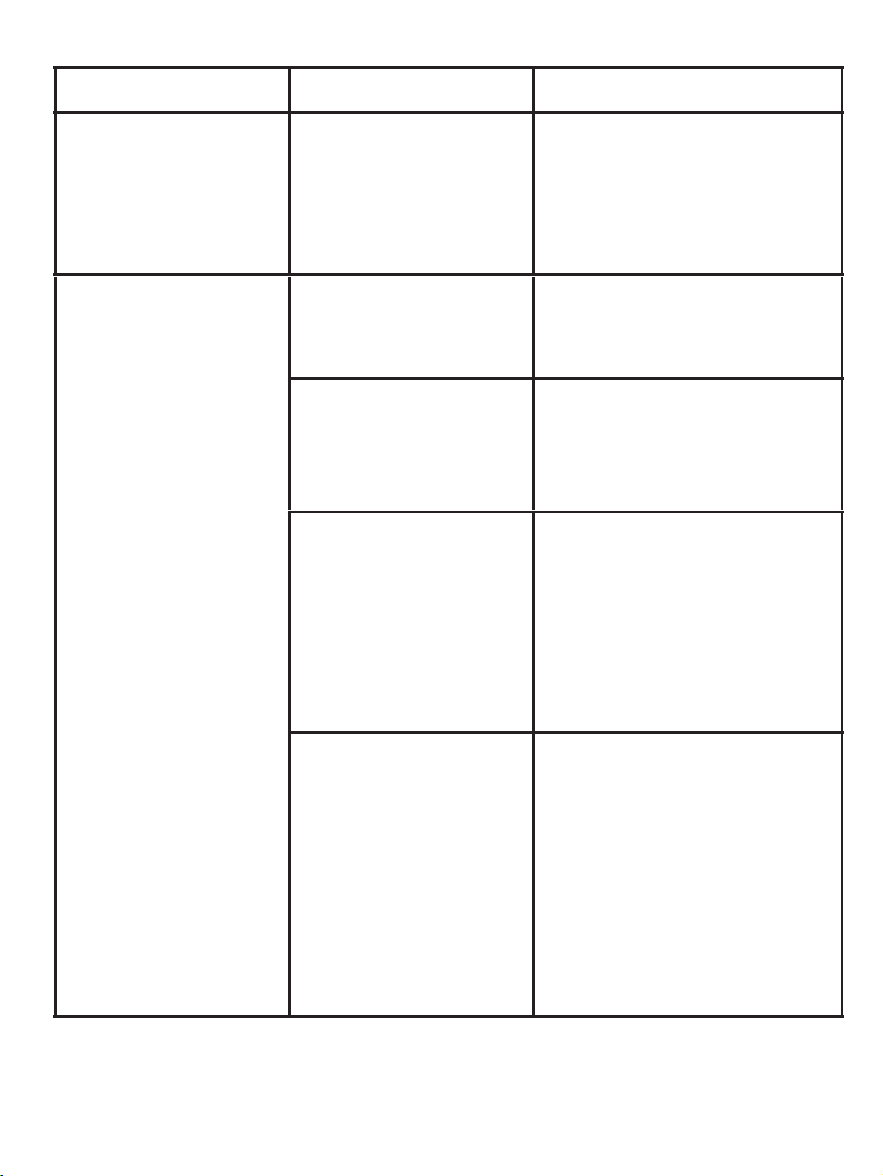
TROUBLESHOOTING YOUR MR. COFFEE
®
COFFEEMAKER
Your MR. COFFEE
®
Coffeemaker has been carefully designed
to give you many years of trouble-free service. In the
unlikely event that your new coffeemaker does not operate
satisfactorily, please review the following potential problems
and try the steps recommended BEFORE you call an
Authorized Sunbeam Service Center.
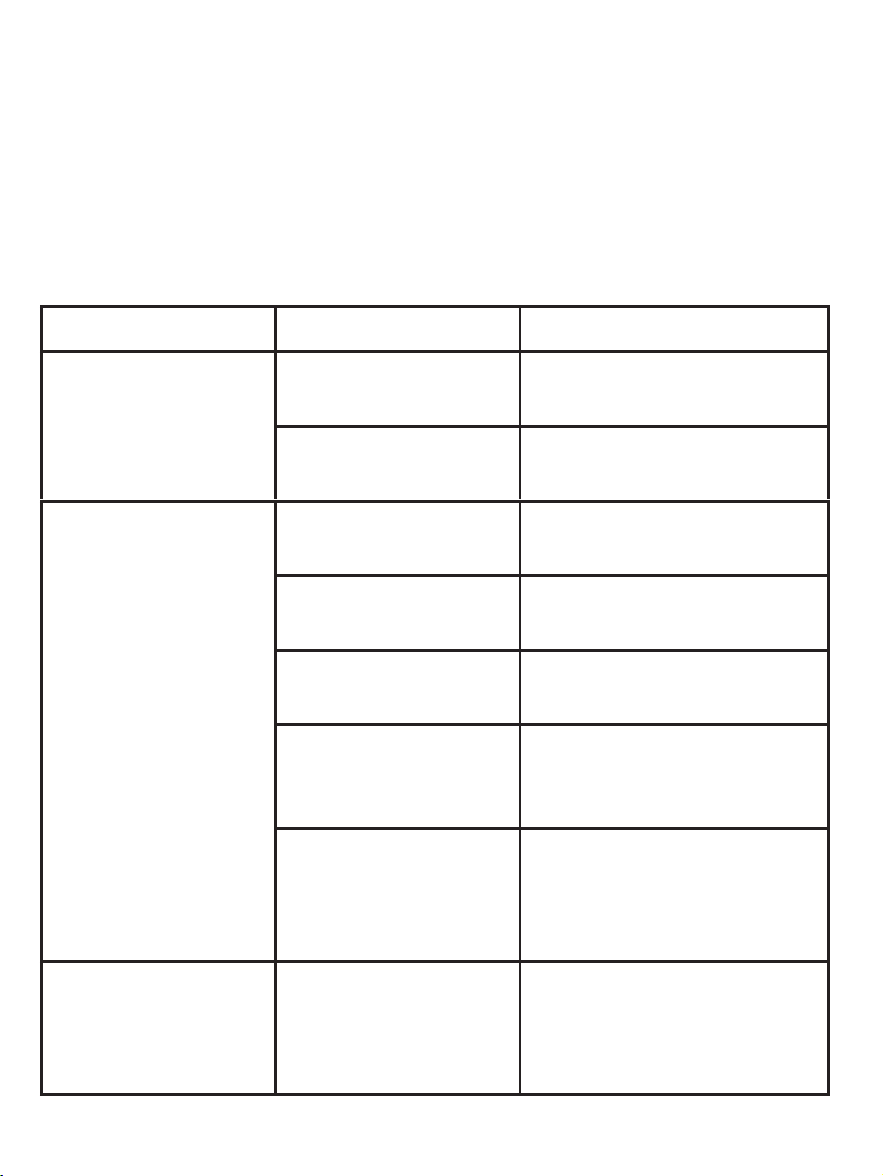
PROBLEM POSSIBLE CAUSE SOLUTION
THE “BREW
NOW”/ON LIGHT
DOES NOT LIGHT
UP
The appliance is
unplugged.
PLUG UNIT IN.
There’s a power
outage.
WAIT FOR POWER TO
BE RESTORED.
THE
COFFEEMAKER
IS NOT BREWING
The appliance is
unplugged.
PLUG UNIT IN.
There’s a power
outage.
WAIT FOR POWER TO
BE RESTORED.
The water
reservoir is empty.
CHECK THE WATER
WINDOWS.
The filter basket
is not properly
inserted.
INSERT FILTER BASKET
CORRECTLY.
The decanter is
not placed all
the way on the
warming plate.
PLACE DECANTER
CORRECTLY ON
WARMING PLATE.
THE
COFFEEMAKER
ONLY BREWS
WATER
There are no
coffee grounds
in the filter
basket.
ADD THE DESIRED
AMOUNT OF COFFEE
TO THE FILTER.
20 21
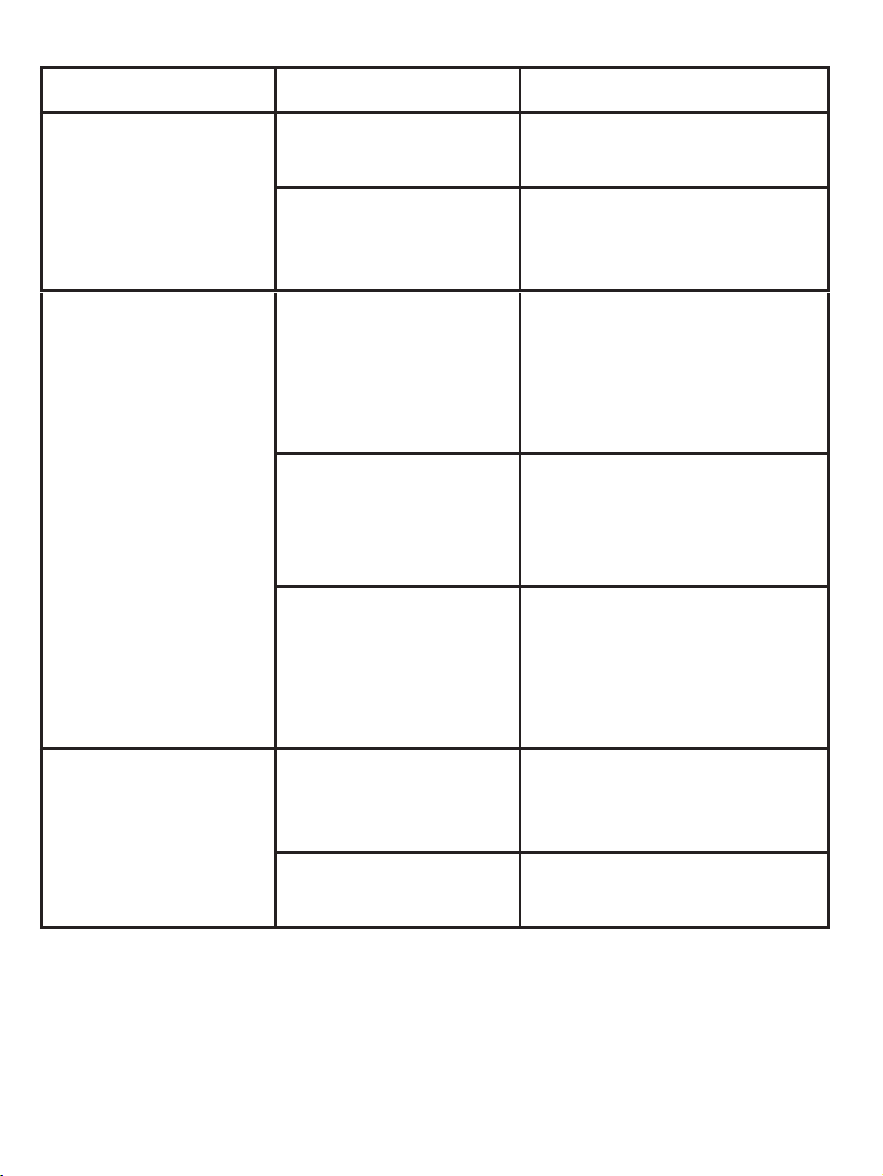
PROBLEM POSSIBLE CAUSE SOLUTION
THE
COFFEEMAKER
BREWS SLOWLY
The coffeemaker
needs cleaning.
CLEAN COFFEEMAKER
AS DESCRIBED IN
“CLEANING AND
MAINTAINING”
SECTION.
THE FILTER
BASKET
OVERFLOWS
The filter basket
is not properly
inserted.
INSERT FILTER BASKET
CORRECTLY.
The decanter is
not placed all
the way on the
warming plate.
PLACE DECANTER
CORRECTLY ON
WARMING PLATE.
Too many coffee
grounds were
placed in the
filter.
REMOVE FILTER
DISCARD GROUNDS.
IF PAPER FILTER,
REPLACE. IF
PERMANENT FILTER,
RINSE. BEGIN BREWING
PROCESS AGAIN.
The decanter
was removed
from the
warming plate
for more than 30
seconds.
TURN OFF AND UNPLUG
THE UNIT. ALLOW TO
COOL.WIPE UP THE
SPILL. DO NOT SET HOT
DECANTER BACK ON THE
WET WARMING PLATE
OR IT MIGHT CRACK.
TROUBLESHOOTING YOUR MR. COFFEE
®
COFFEEMAKER
Your MR. COFFEE
®
Coffeemaker has been carefully designed
to give you many years of trouble-free service. In the
unlikely event that your new coffeemaker does not operate
satisfactorily, please review the following potential problems
and try the steps recommended BEFORE you call an
Authorized Sunbeam Service Center.
PROBLEM POSSIBLE CAUSE SOLUTION
THE “BREW
NOW”/ON LIGHT
DOES NOT LIGHT
UP
The appliance is
unplugged.
PLUG UNIT IN.
There’s a power
outage.
WAIT FOR POWER TO
BE RESTORED.
THE
COFFEEMAKER
IS NOT BREWING
The appliance is
unplugged.
PLUG UNIT IN.
There’s a power
outage.
WAIT FOR POWER TO
BE RESTORED.
The water
reservoir is empty.
CHECK THE WATER
WINDOWS.
The filter basket
is not properly
inserted.
INSERT FILTER BASKET
CORRECTLY.
The decanter is
not placed all
the way on the
warming plate.
PLACE DECANTER
CORRECTLY ON
WARMING PLATE.
THE
COFFEEMAKER
ONLY BREWS
WATER
There are no
coffee grounds
in the filter
basket.
ADD THE DESIRED
AMOUNT OF COFFEE
TO THE FILTER.
20 21
PROBLEM POSSIBLE CAUSE SOLUTION
THE
COFFEEMAKER
BREWS SLOWLY
The coffeemaker
needs cleaning.
CLEAN COFFEEMAKER
AS DESCRIBED IN
“CLEANING AND
MAINTAINING”
SECTION.
THE FILTER
BASKET
OVERFLOWS
The filter basket
is not properly
inserted.
INSERT FILTER BASKET
CORRECTLY.
The decanter is
not placed all
the way on the
warming plate.
PLACE DECANTER
CORRECTLY ON
WARMING PLATE.
Too many coffee
grounds were
placed in the
filter.
REMOVE FILTER
DISCARD GROUNDS.
IF PAPER FILTER,
REPLACE. IF
PERMANENT FILTER,
RINSE. BEGIN BREWING
PROCESS AGAIN.
The decanter
was removed
from the
warming plate
for more than 30
seconds.
TURN OFF AND UNPLUG
THE UNIT. ALLOW TO
COOL.WIPE UP THE
SPILL. DO NOT SET HOT
DECANTER BACK ON THE
WET WARMING PLATE
OR IT MIGHT CRACK.
22 23
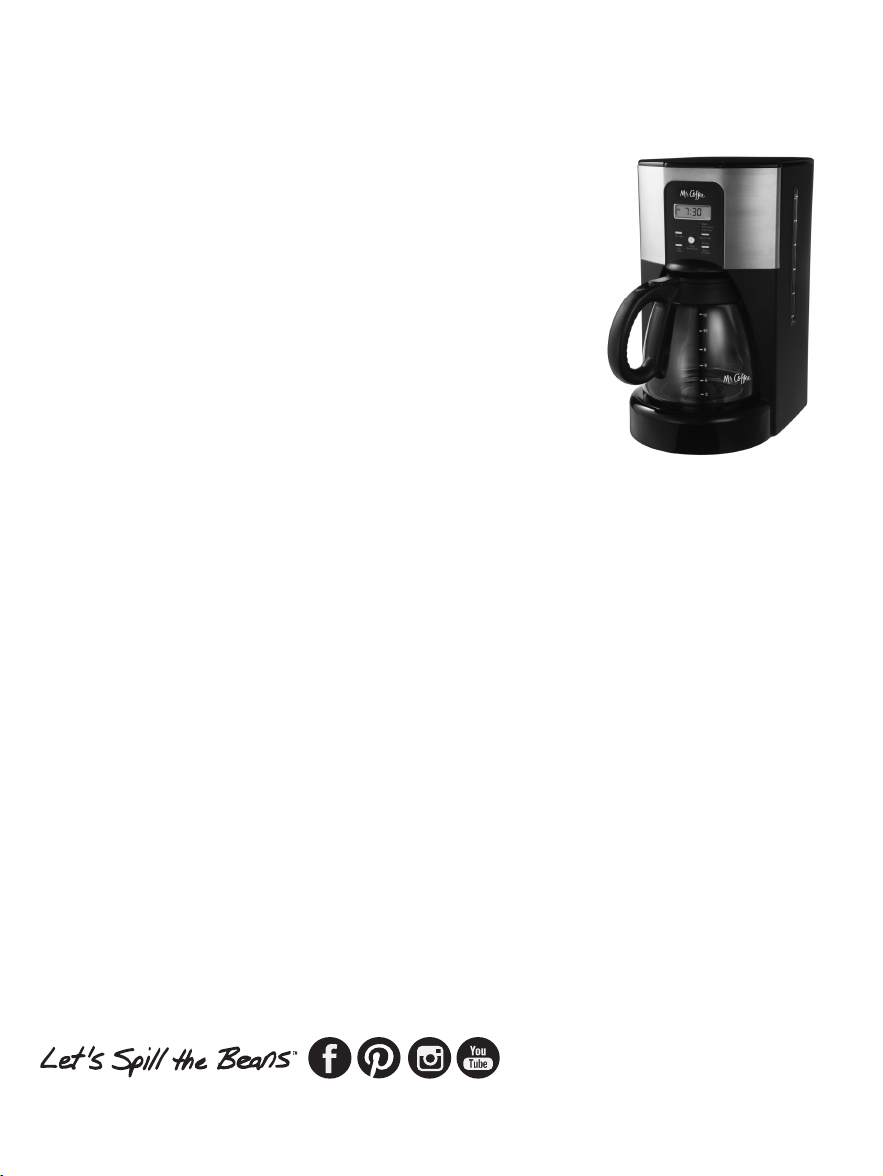
PROBLEM POSSIBLE CAUSE SOLUTION
THE COFFEE IS
NOT HOT
There’s a power
outage.
WAIT FOR POWER TO
BE RESTORED.
Auto SHUT-
OFF has been
activated.
FOR BEST RESULTS,
BREW A FRESH POT OF
COFFEE.
THE COFFEE
TASTES BAD
Coffee grounds
other than for
an automatic
drip coffeemaker
were used.
USE COFFEE GROUNDS
RECOMMENDED FOR
AUTOMATIC DRIP
COFFEEMAKERS.
The ground
coffee-to-
water ratio was
unbalanced.
USE CORRECT
GROUND COFFEE-TO-
WATER RATIO.
The coffeemaker
needs cleaning.
CLEAN COFFEEMAKER
AS DESCRIBED IN
“MAINTAINING YOUR
COFFEEMAKER”
SECTION.
THE GROUNDS
ARE IN THE
COFFEE
The filter is not
properly seated
in the basket.
SEAT FILTER PROPERLY
WITHIN THE FILTER
BASKET.
The filter
collapsed.
REMOVE FILTER AND
REPLACE.
Do you still have questions? You can call us toll-free at the
Consumer Service Department, 1-800-MR COFFEE
(1-800-672-6333) or you can visit us at www.mrcoffee.com.
SERVICE AND MAINTENANCE
Replacement Parts
• Coffee Filters – For better tasting coffee, we recommend
that you use a MR. COFFEE
®
brand 10-12 cup basket-style
paper filter or a MR. COFFEE
®
brand permanent filter.
These filters are available at most grocery stores.
• Water Filtration - Replacement water filtration disks can
be purchased online at www.mrcoffee.com, or by calling
1-800-MR-COFFEE (1-800-672-6333) in the U.S. or
1-800-667-8623 in Canada.
• Decanters – Replacement decanters can be purchased
online at www.mrcoffee.com, or call 1-800-MR-COFFEE
(1-800-672-6333) in U.S. or 1-800-667-8623 in Canada
for information on where you can find a store that carries
replacement decanters.
• Brew Basket - To order please visit www.mrcoffee.com
or call 1-800-MR-COFFEE (1-800-672-6333) in the U.S. or
1-800-667-8623 in Canada.
Repairs
If your coffeemaker requires service, do not return it to the
store where you purchased it. All repairs and replacements
must be made by Sunbeam or an authorized Sunbeam
Service Center. If you live in the U.S. or Canada, please call
us at the following toll-free telephone numbers to find the
location of the nearest authorized service center:
U.S. 1-800-MR COFFEE (1-800-672-6333)
Canada 1-800-667-8623

22 23
PROBLEM POSSIBLE CAUSE SOLUTION
THE COFFEE IS
NOT HOT
There’s a power
outage.
WAIT FOR POWER TO
BE RESTORED.
Auto SHUT-
OFF has been
activated.
FOR BEST RESULTS,
BREW A FRESH POT OF
COFFEE.
THE COFFEE
TASTES BAD
Coffee grounds
other than for
an automatic
drip coffeemaker
were used.
USE COFFEE GROUNDS
RECOMMENDED FOR
AUTOMATIC DRIP
COFFEEMAKERS.
The ground
coffee-to-
water ratio was
unbalanced.
USE CORRECT
GROUND COFFEE-TO-
WATER RATIO.
The coffeemaker
needs cleaning.
CLEAN COFFEEMAKER
AS DESCRIBED IN
“MAINTAINING YOUR
COFFEEMAKER”
SECTION.
THE GROUNDS
ARE IN THE
COFFEE
The filter is not
properly seated
in the basket.
SEAT FILTER PROPERLY
WITHIN THE FILTER
BASKET.
The filter
collapsed.
REMOVE FILTER AND
REPLACE.
Do you still have questions? You can call us toll-free at the
Consumer Service Department, 1-800-MR COFFEE
(1-800-672-6333) or you can visit us at www.mrcoffee.com.
SERVICE AND MAINTENANCE
Replacement Parts
• Coffee Filters – For better tasting coffee, we recommend
that you use a MR. COFFEE
®
brand 10-12 cup basket-style
paper filter or a MR. COFFEE
®
brand permanent filter.
These filters are available at most grocery stores.
• Water Filtration - Replacement water filtration disks can
be purchased online at www.mrcoffee.com, or by calling
1-800-MR-COFFEE (1-800-672-6333) in the U.S. or
1-800-667-8623 in Canada.
• Decanters – Replacement decanters can be purchased
online at www.mrcoffee.com, or call 1-800-MR-COFFEE
(1-800-672-6333) in U.S. or 1-800-667-8623 in Canada
for information on where you can find a store that carries
replacement decanters.
• Brew Basket - To order please visit www.mrcoffee.com
or call 1-800-MR-COFFEE (1-800-672-6333) in the U.S. or
1-800-667-8623 in Canada.
Repairs
If your coffeemaker requires service, do not return it to the
store where you purchased it. All repairs and replacements
must be made by Sunbeam or an authorized Sunbeam
Service Center. If you live in the U.S. or Canada, please call
us at the following toll-free telephone numbers to find the
location of the nearest authorized service center:
U.S. 1-800-MR COFFEE (1-800-672-6333)
Canada 1-800-667-8623
24 25
You may also visit our website at www.mrcoffee.com for a list
of service centers.
To assist us in serving you, please have
the coffeemaker model number and date
of purchase available when you call. The
model number is stamped on the bottom
of the coffeemaker.
We welcome your questions, comments or
suggestions.
In all your communications, please
include your complete name, address and
telephone number and a description of
the problem.
Visit our website at www.mrcoffee.com
and discover the secret to brewing the perfect cup of
coffee. You will also find a rich blend of gourmet recipes,
entertaining tips and the latest information on MR. COFFEE
®
products.
PRODUCT REGISTRATION
For product registration, please visit us online at
www.mrcoffee.com/register or call toll free at
1-800-MRCOFFEE (1-800-672-6333). As part of our privacy
policy we never sell or giveaway your private information.
Visit our website at www.mrcoffee.com and discover the
secret to brewing the perfect cup of coffee. You will also find
a rich blend of gourmet recipes, entertaining tips and the
latest information on MR. COFFEE
®
products.
WARRANTY INFORMATION
1-YEAR LIMITED WARRANTY
Sunbeam Products, Inc. doing business as Jarden Consumer
Solutions or if in Canada, Sunbeam Corporation (Canada)
Limited doing business as Jarden Consumer Solutions
(collectively “JCS”) warrants that for a period of one year
from the date of purchase, this product will be free from
defects in material and workmanship. JCS, at its option, will
repair or replace this product or any component of the
product found to be defective during the warranty period.
Replacement will be made with a new or remanufactured
product or component. If the product is no longer available,
replacement may be made with a similar product of equal or
greater value. This is your exclusive warranty. Do NOT attempt
to repair or adjust any electrical or mechanical functions on
this product. Doing so will void this warranty.
This warranty is valid for the original retail purchaser from the
date of initial retail purchase and is not transferable. Keep
the original sales receipt. Proof of purchase is required to
obtain warranty performance. JCS dealers, service centers,
or retail stores selling JCS products do not have the right to
alter, modify or any way change the terms and conditions of
this warranty.
This warranty does not cover normal wear of parts or damage
resulting from any of the following: negligent use or misuse
of the product, use on improper voltage or current, use
contrary to the operating instructions, disassembly, repair
or alteration by anyone other than JCS or an authorized JCS
service center. Further, the warranty does not cover: Acts of
God, such as fire, flood, hurricanes and tornadoes.

24 25
You may also visit our website at www.mrcoffee.com for a list
of service centers.
To assist us in serving you, please have
the coffeemaker model number and date
of purchase available when you call. The
model number is stamped on the bottom
of the coffeemaker.
We welcome your questions, comments or
suggestions.
In all your communications, please
include your complete name, address and
telephone number and a description of
the problem.
Visit our website at www.mrcoffee.com
and discover the secret to brewing the perfect cup of
coffee. You will also find a rich blend of gourmet recipes,
entertaining tips and the latest information on MR. COFFEE
®
products.
PRODUCT REGISTRATION
For product registration, please visit us online at
www.mrcoffee.com/register or call toll free at
1-800-MRCOFFEE (1-800-672-6333). As part of our privacy
policy we never sell or giveaway your private information.
Visit our website at www.mrcoffee.com and discover the
secret to brewing the perfect cup of coffee. You will also find
a rich blend of gourmet recipes, entertaining tips and the
latest information on MR. COFFEE
®
products.
WARRANTY INFORMATION
1-YEAR LIMITED WARRANTY
Sunbeam Products, Inc. doing business as Jarden Consumer
Solutions or if in Canada, Sunbeam Corporation (Canada)
Limited doing business as Jarden Consumer Solutions
(collectively “JCS”) warrants that for a period of one year
from the date of purchase, this product will be free from
defects in material and workmanship. JCS, at its option, will
repair or replace this product or any component of the
product found to be defective during the warranty period.
Replacement will be made with a new or remanufactured
product or component. If the product is no longer available,
replacement may be made with a similar product of equal or
greater value. This is your exclusive warranty. Do NOT attempt
to repair or adjust any electrical or mechanical functions on
this product. Doing so will void this warranty.
This warranty is valid for the original retail purchaser from the
date of initial retail purchase and is not transferable. Keep
the original sales receipt. Proof of purchase is required to
obtain warranty performance. JCS dealers, service centers,
or retail stores selling JCS products do not have the right to
alter, modify or any way change the terms and conditions of
this warranty.
This warranty does not cover normal wear of parts or damage
resulting from any of the following: negligent use or misuse
of the product, use on improper voltage or current, use
contrary to the operating instructions, disassembly, repair
or alteration by anyone other than JCS or an authorized JCS
service center. Further, the warranty does not cover: Acts of
God, such as fire, flood, hurricanes and tornadoes.

26 27
In the U.S.A., this warranty is offered by Sunbeam Products,
Inc. doing business as Jarden Consumer Solutions located in
Boca Raton, Florida 33431. In Canada, this warranty is offered
by Sunbeam Corporation (Canada) Limited doing business as
Jarden Consumer Solutions, located at 20 B Hereford Street,
Brampton, Ontario L6Y 0M1. If you have any other problem
or claim in connection with this product, please write our
Consumer Service Department.
PLEASE DO NOT RETURN THIS PRODUCT TO ANY OF THESE
ADDRESSES OR TO THE PLACE OF PURCHASE
What are the limits on JCS’s Liability?
JCS shall not be liable for any incidental or consequential
damages caused by the breach of any express, implied or
statutory warranty or condition.
Except to the extent prohibited by applicable law, any implied
warranty or condition of merchantability or fitness for a
particular purpose is limited in duration to the duration of the
above warranty.
JCS disclaims all other warranties, conditions or
representations, express, implied, statutory or otherwise.
JCS shall not be liable for any damages of any kind resulting
from the purchase, use or misuse of, or inability to use the
product including incidental, special, consequential or similar
damages or loss of profits, or for any breach of contract,
fundamental or otherwise, or for any claim brought against
purchaser by any other party.
Some provinces, states or jurisdictions do not allow the
exclusion or limitation of incidental or consequential damages
or limitations on how long an implied warranty lasts, so the
above limitations or exclusion may not apply to you.
This warranty gives you specific legal rights, and you may also
have other rights that vary from province to province, state to
state or jurisdiction to jurisdiction.
How to Obtain Warranty Service
In the U.S.A.
If you have any question regarding this warranty or would like
to obtain warranty service, please call 1-800-672-6333 and a
convenient service center address will be provided to you.
In Canada
If you have any question regarding this warranty or would like
to obtain warranty service, please call 1-800-667-8623 and a
convenient service center address will be provided to you.

26 27
In the U.S.A., this warranty is offered by Sunbeam Products,
Inc. doing business as Jarden Consumer Solutions located in
Boca Raton, Florida 33431. In Canada, this warranty is offered
by Sunbeam Corporation (Canada) Limited doing business as
Jarden Consumer Solutions, located at 20 B Hereford Street,
Brampton, Ontario L6Y 0M1. If you have any other problem
or claim in connection with this product, please write our
Consumer Service Department.
PLEASE DO NOT RETURN THIS PRODUCT TO ANY OF THESE
ADDRESSES OR TO THE PLACE OF PURCHASE
What are the limits on JCS’s Liability?
JCS shall not be liable for any incidental or consequential
damages caused by the breach of any express, implied or
statutory warranty or condition.
Except to the extent prohibited by applicable law, any implied
warranty or condition of merchantability or fitness for a
particular purpose is limited in duration to the duration of the
above warranty.
JCS disclaims all other warranties, conditions or
representations, express, implied, statutory or otherwise.
JCS shall not be liable for any damages of any kind resulting
from the purchase, use or misuse of, or inability to use the
product including incidental, special, consequential or similar
damages or loss of profits, or for any breach of contract,
fundamental or otherwise, or for any claim brought against
purchaser by any other party.
Some provinces, states or jurisdictions do not allow the
exclusion or limitation of incidental or consequential damages
or limitations on how long an implied warranty lasts, so the
above limitations or exclusion may not apply to you.
This warranty gives you specific legal rights, and you may also
have other rights that vary from province to province, state to
state or jurisdiction to jurisdiction.
How to Obtain Warranty Service
In the U.S.A.
If you have any question regarding this warranty or would like
to obtain warranty service, please call 1-800-672-6333 and a
convenient service center address will be provided to you.
In Canada
If you have any question regarding this warranty or would like
to obtain warranty service, please call 1-800-667-8623 and a
convenient service center address will be provided to you.

28 29
MEDIDAS IMPORTANTES DE
SEGURIDAD
Cuando se utilizan aparatos elé ctricos, a fin de reducir el
riesgo de incendio, descarga elé ctrica y/o lesiones a las
personas, siempre se deben respetar precauciones bá sicas
de seguridad, incluyendo las siguientes:
1. Lea todas las instrucciones.
2. No toque las superficies calientes. Utilice las asas o las
perillas.
3. Para protegerse contra descargas elé ctricas, no sumerja
el cable, enchufe o el aparato en agua ni en ningú n otro
líquido.
4. Este aparato no debe ser utilizado por los niñ os ni por
personas con su capacidad física, sensorial o psíquica
reducida.
5. Cuando un aparato es utilizado cerca de los niñ os, estos
deben ser supervisados de cerca.
6. Los niñ os no deben jugar con el aparato.
7. Desenchufe del tomacorriente cuando no esté en uso y
antes de limpiarlo. Permita que se enfríe antes de colocar
o retirar piezas y antes de limpiar el aparato.
8. No opere el aparato si el cable de alimentació n o
el enchufe está dañ ado, si el aparato no funciona
correctamente o presenta algú n tipo de dañ o. Devuelva
el aparato a un centro de servicio autorizado para que lo
inspeccionen, reparen o le hagan los ajustes necesarios.
No intente reemplazar o cortar un cable dañ ado.
9. El uso de un accesorio no recomendado por el
fabricante del aparato puede ocasionar lesiones.
10. No utilice el aparato a la intemperie.
11. No deje que el cable cuelgue del borde de la mesa
o mostrador o que entre en contacto con superficies
calientes.
12. No coloque la cafetera sobre una hornilla caliente de gas
o elé ctrica o en un horno caliente.
13. Siempre conecte el enchufe al aparato primero y luego
enchufe el cable al tomacorriente (para aparatos con
cables separables). Para desconectar, gire cualquier
control a la posició n de apagado y luego retire el
enchufe del tomacorriente.
14. No utilice el aparato para otro fin que no sea para el que
ha sido diseñ ado.
15. Todas las tapas deben estar cerradas durante el uso.
16. Si la tapa es removida durante o inmediatamente
despué s que termine el ciclo de colado, esto podría
ocasionar quemaduras. El contenido puede estar
caliente. Permita que se enfríe antes de abrir la tapa.
Para cafeteras con jarras de vidrio:
17. La jarra está diseñ ada para usarse con este aparato.
Nunca debe ser utilizada sobre una estufa.
18. No coloque una jarra caliente sobre una superficie
mojada o fría.
19. Evite los cambios de temperatura bruscos, tales como
enjuagar, lavar, llenar o sumergir una jarra caliente en
líquidos fríos.

28 29
MEDIDAS IMPORTANTES DE
SEGURIDAD
Cuando se utilizan aparatos elé ctricos, a fin de reducir el
riesgo de incendio, descarga elé ctrica y/o lesiones a las
personas, siempre se deben respetar precauciones bá sicas
de seguridad, incluyendo las siguientes:
1. Lea todas las instrucciones.
2. No toque las superficies calientes. Utilice las asas o las
perillas.
3. Para protegerse contra descargas elé ctricas, no sumerja
el cable, enchufe o el aparato en agua ni en ningú n otro
líquido.
4. Este aparato no debe ser utilizado por los niñ os ni por
personas con su capacidad física, sensorial o psíquica
reducida.
5. Cuando un aparato es utilizado cerca de los niñ os, estos
deben ser supervisados de cerca.
6. Los niñ os no deben jugar con el aparato.
7. Desenchufe del tomacorriente cuando no esté en uso y
antes de limpiarlo. Permita que se enfríe antes de colocar
o retirar piezas y antes de limpiar el aparato.
8. No opere el aparato si el cable de alimentació n o
el enchufe está dañ ado, si el aparato no funciona
correctamente o presenta algú n tipo de dañ o. Devuelva
el aparato a un centro de servicio autorizado para que lo
inspeccionen, reparen o le hagan los ajustes necesarios.
No intente reemplazar o cortar un cable dañ ado.
9. El uso de un accesorio no recomendado por el
fabricante del aparato puede ocasionar lesiones.
10. No utilice el aparato a la intemperie.
11. No deje que el cable cuelgue del borde de la mesa
o mostrador o que entre en contacto con superficies
calientes.
12. No coloque la cafetera sobre una hornilla caliente de gas
o elé ctrica o en un horno caliente.
13. Siempre conecte el enchufe al aparato primero y luego
enchufe el cable al tomacorriente (para aparatos con
cables separables). Para desconectar, gire cualquier
control a la posició n de apagado y luego retire el
enchufe del tomacorriente.
14. No utilice el aparato para otro fin que no sea para el que
ha sido diseñ ado.
15. Todas las tapas deben estar cerradas durante el uso.
16. Si la tapa es removida durante o inmediatamente
despué s que termine el ciclo de colado, esto podría
ocasionar quemaduras. El contenido puede estar
caliente. Permita que se enfríe antes de abrir la tapa.
Para cafeteras con jarras de vidrio:
17. La jarra está diseñ ada para usarse con este aparato.
Nunca debe ser utilizada sobre una estufa.
18. No coloque una jarra caliente sobre una superficie
mojada o fría.
19. Evite los cambios de temperatura bruscos, tales como
enjuagar, lavar, llenar o sumergir una jarra caliente en
líquidos fríos.
30 31
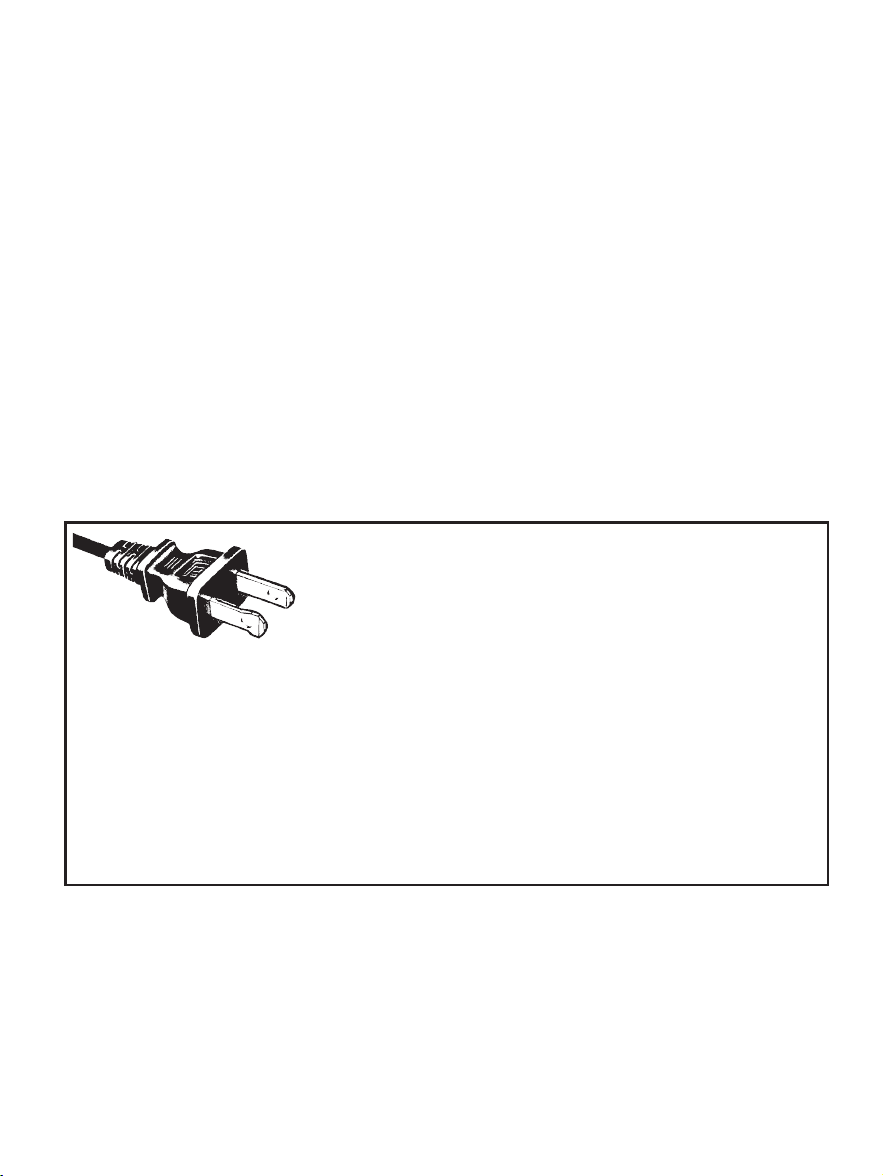
ENCHUFE POLARIZADO
Este electrodomé stico tiene un enchufe
polarizado (un contacto es má s ancho que
el otro). Para reducir el riesgo de descargas
elé ctricas, como una funció n de seguridad,
este enchufe está diseñ ado para encajar en
un tomacorriente polarizado solo de una forma. Si el enchufe no se
inserta completamente en el tomacorriente, invierta el enchufe. Si
aú n no encaja, consulte a un electricista calificado. No intente ignorar
esta medida de seguridad ni modificar el enchufe en forma alguna. Si
el enchufe se inserta holgadamente en el tomacorriente de corriente
alterna o si el tomacorriente de corriente alterna se siente caliente, no
use ese tomacorriente.
INSTRUCCIONES PARA EL CABLE DE ALIMENTACIÓ N:
Un cable de alimentació n corto (o cable de alimentació n separable)
puede ser provisto para reducir los riesgos de enredarse o tropezar
con un cable má s largo. Existen cables de alimentació n separables
má s largos o cables de extensió n disponibles y estos pueden ser
utilizados si se toma el cuidado debido en su uso. Si se utiliza un
cable de alimentació n separable o cable de extensió n:
a. La clasificació n elé ctrica marcada del cable de alimentació n
separable o cable de extensió n debe ser, como mínimo, igual
a la clasificació n elé ctrica del aparato;
b. Si el aparato es del tipo de conexió n a tierra, el cable de extensió n
debe ser un cable de tres alambres de conexió n a tierra; y
c. El cable má s largo debe ser acomodado de manera que no
cuelgue del mostrador o de la mesa para evitar que un niñ o
tire del mismo o que alguien se tropiece sin darse cuenta.
AVISOS DEL PRODUCTO
1. Coloque la unidad sobre una superficie dura, plana y
nivelada para evitar interrupciones en el flujo de aire por
debajo de la cafetera.
2. Descarte la jarra de inmediato si en alguna ocasió n hierve
hasta evaporarse todo su contenido.
3. Proteja la jarra contra golpes secos, rasguñ os o maltrato.
4. No opere el electromé stico con un tanque de agua vacío.
5. Mantenga el á rea encima del electrodomé stico despejada
durante el uso ya que vapor caliente saldrá del electrodomé stico.
20. No utilice una jarra rajada o estillada o que tenga el asa
floja o debilitada.
21. No limpie la jarra con limpiadores, almohadilla de lana
de acero ni ningú n otro material abrasivo.
Para cafeteras con paneles de servicio:
22. ADVERTENCIA: Riesgo de Incendio o Descarga Elé ctrica.
No remueva la tapa. No tiene piezas en el interior
que deban ser reparadas por el usuario. Cualquier
reparació n solo debe ser realizada por personal de
servicio autorizado.
CONSERVE ESTAS INSTRUCCIONES
SOLAMENTE PARA USO DOMÉ STICO

30 31
ENCHUFE POLARIZADO
Este electrodomé stico tiene un enchufe
polarizado (un contacto es má s ancho que
el otro). Para reducir el riesgo de descargas
elé ctricas, como una funció n de seguridad,
este enchufe está diseñ ado para encajar en
un tomacorriente polarizado solo de una forma. Si el enchufe no se
inserta completamente en el tomacorriente, invierta el enchufe. Si
aú n no encaja, consulte a un electricista calificado. No intente ignorar
esta medida de seguridad ni modificar el enchufe en forma alguna. Si
el enchufe se inserta holgadamente en el tomacorriente de corriente
alterna o si el tomacorriente de corriente alterna se siente caliente, no
use ese tomacorriente.
INSTRUCCIONES PARA EL CABLE DE ALIMENTACIÓ N:
Un cable de alimentació n corto (o cable de alimentació n separable)
puede ser provisto para reducir los riesgos de enredarse o tropezar
con un cable má s largo. Existen cables de alimentació n separables
má s largos o cables de extensió n disponibles y estos pueden ser
utilizados si se toma el cuidado debido en su uso. Si se utiliza un
cable de alimentació n separable o cable de extensió n:
a. La clasificació n elé ctrica marcada del cable de alimentació n
separable o cable de extensió n debe ser, como mínimo, igual
a la clasificació n elé ctrica del aparato;
b. Si el aparato es del tipo de conexió n a tierra, el cable de extensió n
debe ser un cable de tres alambres de conexió n a tierra; y
c. El cable má s largo debe ser acomodado de manera que no
cuelgue del mostrador o de la mesa para evitar que un niñ o
tire del mismo o que alguien se tropiece sin darse cuenta.
AVISOS DEL PRODUCTO
1. Coloque la unidad sobre una superficie dura, plana y
nivelada para evitar interrupciones en el flujo de aire por
debajo de la cafetera.
2. Descarte la jarra de inmediato si en alguna ocasió n hierve
hasta evaporarse todo su contenido.
3. Proteja la jarra contra golpes secos, rasguñ os o maltrato.
4. No opere el electromé stico con un tanque de agua vacío.
5. Mantenga el á rea encima del electrodomé stico despejada
durante el uso ya que vapor caliente saldrá del electrodomé stico.
20. No utilice una jarra rajada o estillada o que tenga el asa
floja o debilitada.
21. No limpie la jarra con limpiadores, almohadilla de lana
de acero ni ningú n otro material abrasivo.
Para cafeteras con paneles de servicio:
22. ADVERTENCIA: Riesgo de Incendio o Descarga Elé ctrica.
No remueva la tapa. No tiene piezas en el interior
que deban ser reparadas por el usuario. Cualquier
reparació n solo debe ser realizada por personal de
servicio autorizado.
CONSERVE ESTAS INSTRUCCIONES
SOLAMENTE PARA USO DOMÉ STICO
33
1. Tapa de la
Canasta del
Filtro
2. Cubierta de la
Regadera
3. Tanque de Agua
4. Detenga y
Sírvase (Pause
‘n Serve)
5. Ventanilla del
Nivel de Agua
6. Plato Calefactor
Antiadherente
7. Jarra
8. Canasta
Removible del
Filtro
DIAGRAMA DE LAS PARTES
32
3
2
4
6
5
7
8
1
TABLA DE CONTENIDO
Medidas Importantes de Seguridad.......................................28
Instrucciones Para El Cable De Alimentación........................31
Avisos del producto.................................................................31
Tabla de Continedo................................................................32
Diagrama de las Partes..........................................................33
Características y Beneficios de la Cafetera.........................35
Limpie su Cafatera Antes de Utilizarla por Primera Vez......36
Programando la Hora del Reloj y el Período de Demora del
Colado Advertencias..............................................................37
Preparándose para Utilizar la Cafetera.................................38
• Tabla de Medidas de Café Sugeridas
• Añadiendo agua y Café Molido
• Sistema de Filtración de Agua
Colando Café Ahora..............................................................42
Colando Café Luego (Demora del Colado).........................43
Limpiando y Dándole Mantenimiento a su Cafetera..........45
Resolviendo Problemas con su Cafetera Mr. Coffee
®
.........48
Servicio y Mantenimiento.......................................................52
Información Sobre la Garantía..............................................54
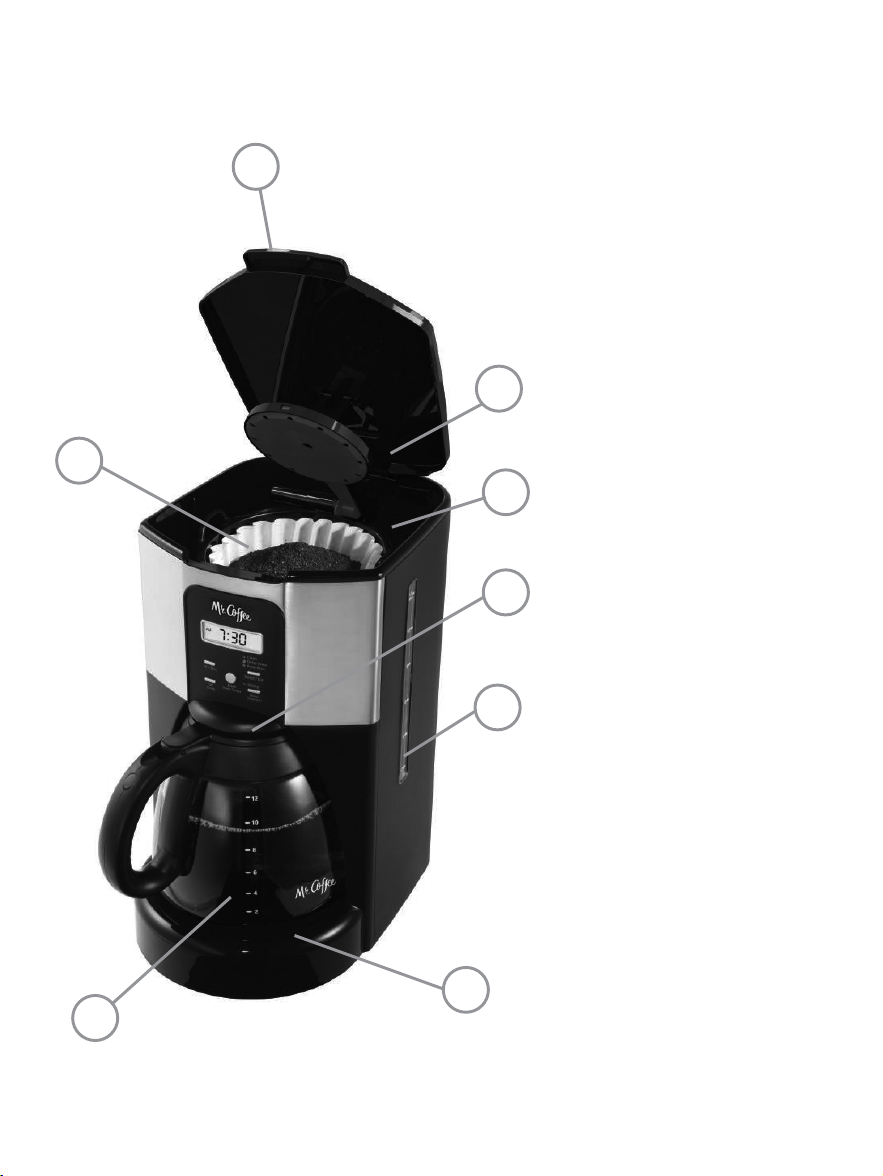
33
1. Tapa de la
Canasta del
Filtro
2. Cubierta de la
Regadera
3. Tanque de Agua
4. Detenga y
Sírvase (Pause
‘n Serve)
5. Ventanilla del
Nivel de Agua
6. Plato Calefactor
Antiadherente
7. Jarra
8. Canasta
Removible del
Filtro
DIAGRAMA DE LAS PARTES
32
3
2
4
6
5
7
8
1
TABLA DE CONTENIDO
Medidas Importantes de Seguridad.......................................28
Instrucciones Para El Cable De Alimentación........................31
Avisos del producto.................................................................31
Tabla de Continedo................................................................32
Diagrama de las Partes..........................................................33
Características y Beneficios de la Cafetera.........................35
Limpie su Cafatera Antes de Utilizarla por Primera Vez......36
Programando la Hora del Reloj y el Período de Demora del
Colado Advertencias..............................................................37
Preparándose para Utilizar la Cafetera.................................38
• Tabla de Medidas de Café Sugeridas
• Añadiendo agua y Café Molido
• Sistema de Filtración de Agua
Colando Café Ahora..............................................................42
Colando Café Luego (Demora del Colado).........................43
Limpiando y Dándole Mantenimiento a su Cafetera..........45
Resolviendo Problemas con su Cafetera Mr. Coffee
®
.........48
Servicio y Mantenimiento.......................................................52
Información Sobre la Garantía..............................................54
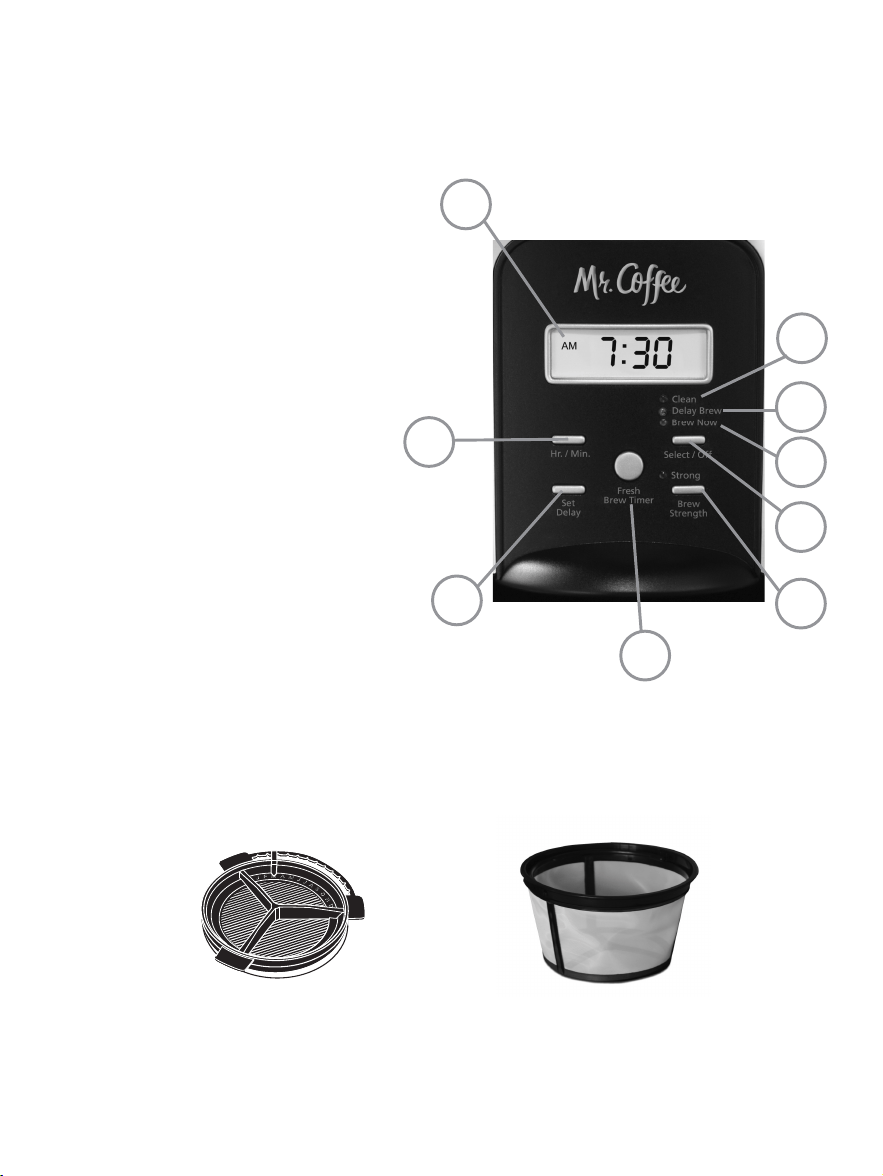
CARACTERÍSTICAS Y BENEFICIOS DE LA CAFETERA
Su nueva Cafetera MR. COFFEE
®
cuenta con las siguientes
características:
• Capacidad de preparació n – 12 tazas – Serie con jarra
de vidrio.
• Canasta Removible del Filtro – La canasta del filtro se
saca para un limpiado y llenado fá cil y rá pido.
• Pause ‘n Serve (Detenga y Sírvase) – ¿No puede esperar
a que el café termine de colarse? Pause ‘n Serve le
otorga hasta 30 segundos para servirse una taza de café
mientras la cafetera aú n está colando. Saque la jarra con
cuidado y Pause ‘n Serve se activará automá ticamente,
deteniendo temporalmente el flujo del café hacia la jarra.
• Ventanilla del Nivel de Agua – Muestra la cantidad de
agua en el tanque para un llenado preciso.
• Plato Calefactor Antiadherente – Esta característica le
permite mantener su café caliente luego de colado. El
atributo antiadherente evita que la jarra se adhiera a la
superficie del plato calefactor.
• Selector de Intensidad del Colado – Ajusta el período
de colado para preparar un café má s cargado.
• Sistema de Filtració n de Agua (no incluidos en todos los
modelos) – ¡Un café de sabor ó ptimo comienza con un
agua ó ptima! Utilizando el Mr. Coffee
®
filtro de carbono
del agua en la cafetera Mr. Coffee
®
durante el proceso
de preparació n de café ayuda a eliminar hasta 97% del
cloro del agua y mejora el sabor de su café .
• Almacenaje del Cordel – Almacena el sobrante del cordel
elé ctrico de manera segura para que su mostrador se vea
nítido.
• Apagado Automá tico en Dos Horas – Mantiene su
café caliente durante dos horas, y luego se apaga
automá ticamente.
a. Pantalla del Reloj
b. Botó n de la Pantalla del
Contador Regresivo del
Colado
c. Botó n de Intensidad del
Colado
d. Indicador de Demora del
Colado
e. Indicador del Ciclo de
Limpieza
f. Botó n de Tiempo (Hora/
Minuto)
g. Botó n de Fijar Demora
h. Funció n de Colar Ahora
i. Botó n Select/Off
(Seleccionar/Apagar)
PANEL DE CONTROLES
Otros artículos para su cafetera
(no incluidos en todos los modelos)
Sistema de
Filtració n de Agua
Filtro Permanente
Marca
Mr. Coffee
®
3534
b
g
f
c
i
h
d
e
a

CARACTERÍSTICAS Y BENEFICIOS DE LA CAFETERA
Su nueva Cafetera MR. COFFEE
®
cuenta con las siguientes
características:
• Capacidad de preparació n – 12 tazas – Serie con jarra
de vidrio.
• Canasta Removible del Filtro – La canasta del filtro se
saca para un limpiado y llenado fá cil y rá pido.
• Pause ‘n Serve (Detenga y Sírvase) – ¿No puede esperar
a que el café termine de colarse? Pause ‘n Serve le
otorga hasta 30 segundos para servirse una taza de café
mientras la cafetera aú n está colando. Saque la jarra con
cuidado y Pause ‘n Serve se activará automá ticamente,
deteniendo temporalmente el flujo del café hacia la jarra.
• Ventanilla del Nivel de Agua – Muestra la cantidad de
agua en el tanque para un llenado preciso.
• Plato Calefactor Antiadherente – Esta característica le
permite mantener su café caliente luego de colado. El
atributo antiadherente evita que la jarra se adhiera a la
superficie del plato calefactor.
• Selector de Intensidad del Colado – Ajusta el período
de colado para preparar un café má s cargado.
• Sistema de Filtració n de Agua (no incluidos en todos los
modelos) – ¡Un café de sabor ó ptimo comienza con un
agua ó ptima! Utilizando el Mr. Coffee
®
filtro de carbono
del agua en la cafetera Mr. Coffee
®
durante el proceso
de preparació n de café ayuda a eliminar hasta 97% del
cloro del agua y mejora el sabor de su café .
• Almacenaje del Cordel – Almacena el sobrante del cordel
elé ctrico de manera segura para que su mostrador se vea
nítido.
• Apagado Automá tico en Dos Horas – Mantiene su
café caliente durante dos horas, y luego se apaga
automá ticamente.
a. Pantalla del Reloj
b. Botó n de la Pantalla del
Contador Regresivo del
Colado
c. Botó n de Intensidad del
Colado
d. Indicador de Demora del
Colado
e. Indicador del Ciclo de
Limpieza
f. Botó n de Tiempo (Hora/
Minuto)
g. Botó n de Fijar Demora
h. Funció n de Colar Ahora
i. Botó n Select/Off
(Seleccionar/Apagar)
PANEL DE CONTROLES
Otros artículos para su cafetera
(no incluidos en todos los modelos)
Sistema de
Filtració n de Agua
Filtro Permanente
Marca
Mr. Coffee
®
3534
b
g
f
c
i
h
d
e
a

2. Ponga todas las partes de vuelta
y cierre la tapa. Luego, sin
poner el café ni el filtro del café ,
complete un filtro de colado
segú n se describe en el Paso 1
de “Colando Café Ahora”.
3. Cuando se complete el colado, apague su cafetera,
descarte el agua en la jarra y enjuague la jarra, la tapa
de la jarra y la canasta del filtro.
Su cafetera ya está lista para utilizarse. ¡Disfrú tela!
PROGRAMANDO LA HORA DEL RELOJ Y EL
PERÍODO DE DEMORA DEL COLADO
Para Programar la Hora del Reloj:
1. Enchufe el cordel elé ctrico en un
tomacorriente está ndar. El reloj
parpadeará en el panel de controles
para indicar que la hora aú n no ha sido
programada.
2. Mantenga pulsado el Botó n de la Hora
/ Minuto hasta llegar a la hora actual. El
indicador AM o PM se iluminará en la parte
superior de la pantalla (Figura 1).
¡El reloj ya ha sido programado!
ADVERTENCIA: Al pulsar Select/Off (Seleccionar/Apagar)
antes de ajustar el reloj, hará que el reloj comience a tomar
el tiempo a partir de las 12 a.m. Usted debe programar el
reloj si desea usar la característica de Demora del Colado.
• Controles Programables:
– Reloj – El reloj le sirve como un prá ctico reloj de
cocina, le permite programar la funció n de Demora del
Colado y sirve de Crontador Regresivo del Colado.
– Funció n de FRESH BREW™ TIMER (Contador Regresivo del
Colado™) – ¿Alguna vez se ha preguntado cuá nto tiempo
ha transcurrido desde que se coló el café ? ¡Ahora lo sabe!
La funció n del FRESH BREW™ TIMER (Contador Regresivo
del Colado™) registra cuá n fresco está su café desde el
comienzo del ciclo de colado hasta 2 horas despué s.
– Demora del Colado – ¿Le gustaría despertarse a
disfrutar de una jarra de café recié n colado? La funció n
de Demora del Colado le permite programar de
antemano cuá ndo desearía que la cafetera cuele su
café automá ticamente, hasta 24 horas por adelantado.
– Ciclo Especial de Limpieza – Le permite dar
mantenimiento y limpiar su cafetera de depó sitos
minerales de manera fá cil.
ADVERTENCIA: Si usted ha seleccionado cualquiera de sus
funciones operativas, la cafetera asumirá la ú ltima operació n
seleccionada si la corriente se restaura dentro de 7 segundos
despué s de un corte de energía.
LIMPIE SU CAFETERA ANTES DE UTILIZARLA POR
PRIMERA VEZ
Asegú rese de que su primera taza de café sea tan buena
como sea posible limpiando su Cafetera MR. COFFEE
®
antes
de utilizarla por primera vez. Só lo tiene que seguir estos
pasos sencillos:
1. Lave la jarra, la tapa de la jarra, el filtro permanente,
el sistema de filtració n de agua y el filtro de la canasta
en una mezcla de agua y detergente suave. Enjuague
a fondo (consulte el diagrama de piezas de la lista
anterior).
3736
Figura 1
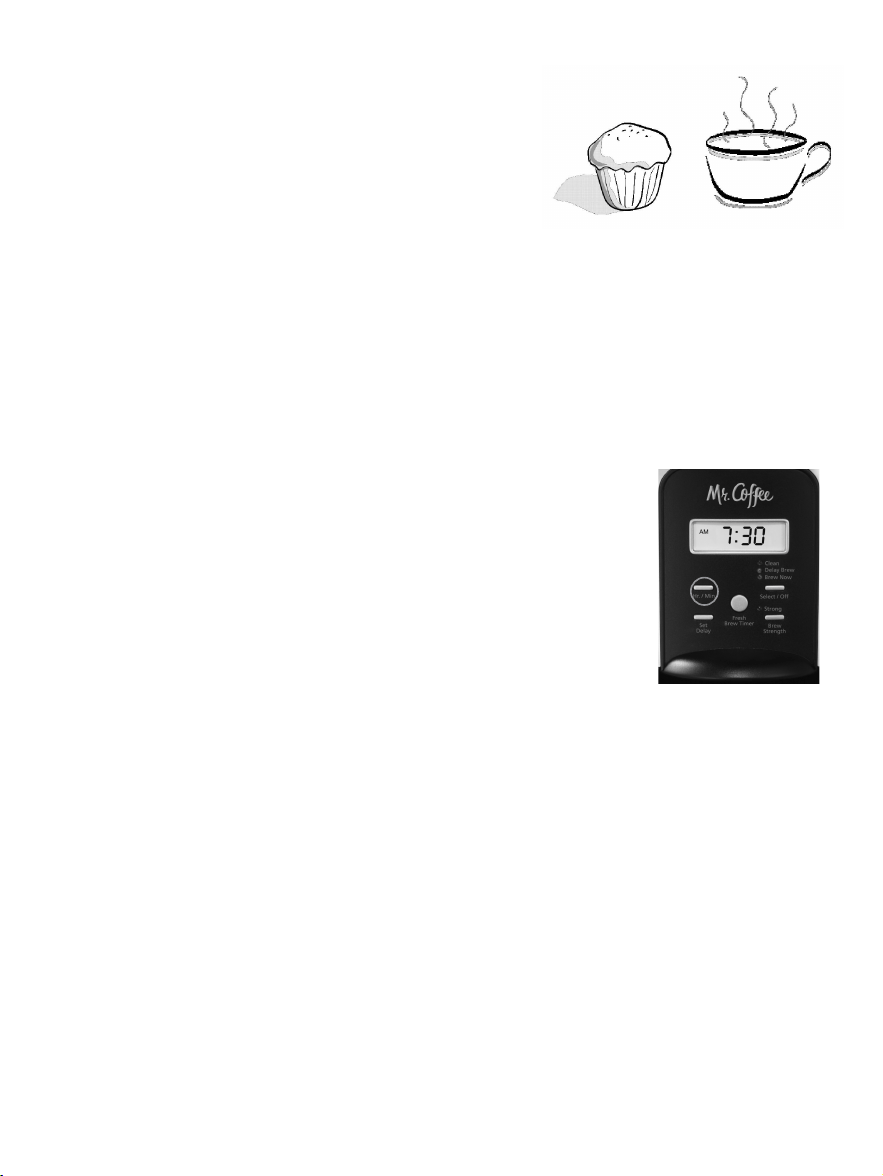
2. Ponga todas las partes de vuelta
y cierre la tapa. Luego, sin
poner el café ni el filtro del café ,
complete un filtro de colado
segú n se describe en el Paso 1
de “Colando Café Ahora”.
3. Cuando se complete el colado, apague su cafetera,
descarte el agua en la jarra y enjuague la jarra, la tapa
de la jarra y la canasta del filtro.
Su cafetera ya está lista para utilizarse. ¡Disfrú tela!
PROGRAMANDO LA HORA DEL RELOJ Y EL
PERÍODO DE DEMORA DEL COLADO
Para Programar la Hora del Reloj:
1. Enchufe el cordel elé ctrico en un
tomacorriente está ndar. El reloj
parpadeará en el panel de controles
para indicar que la hora aú n no ha sido
programada.
2. Mantenga pulsado el Botó n de la Hora
/ Minuto hasta llegar a la hora actual. El
indicador AM o PM se iluminará en la parte
superior de la pantalla (Figura 1).
¡El reloj ya ha sido programado!
ADVERTENCIA: Al pulsar Select/Off (Seleccionar/Apagar)
antes de ajustar el reloj, hará que el reloj comience a tomar
el tiempo a partir de las 12 a.m. Usted debe programar el
reloj si desea usar la característica de Demora del Colado.
• Controles Programables:
– Reloj – El reloj le sirve como un prá ctico reloj de
cocina, le permite programar la funció n de Demora del
Colado y sirve de Crontador Regresivo del Colado.
– Funció n de FRESH BREW™ TIMER (Contador Regresivo del
Colado™) – ¿Alguna vez se ha preguntado cuá nto tiempo
ha transcurrido desde que se coló el café ? ¡Ahora lo sabe!
La funció n del FRESH BREW™ TIMER (Contador Regresivo
del Colado™) registra cuá n fresco está su café desde el
comienzo del ciclo de colado hasta 2 horas despué s.
– Demora del Colado – ¿Le gustaría despertarse a
disfrutar de una jarra de café recié n colado? La funció n
de Demora del Colado le permite programar de
antemano cuá ndo desearía que la cafetera cuele su
café automá ticamente, hasta 24 horas por adelantado.
– Ciclo Especial de Limpieza – Le permite dar
mantenimiento y limpiar su cafetera de depó sitos
minerales de manera fá cil.
ADVERTENCIA: Si usted ha seleccionado cualquiera de sus
funciones operativas, la cafetera asumirá la ú ltima operació n
seleccionada si la corriente se restaura dentro de 7 segundos
despué s de un corte de energía.
LIMPIE SU CAFETERA ANTES DE UTILIZARLA POR
PRIMERA VEZ
Asegú rese de que su primera taza de café sea tan buena
como sea posible limpiando su Cafetera MR. COFFEE
®
antes
de utilizarla por primera vez. Só lo tiene que seguir estos
pasos sencillos:
1. Lave la jarra, la tapa de la jarra, el filtro permanente,
el sistema de filtració n de agua y el filtro de la canasta
en una mezcla de agua y detergente suave. Enjuague
a fondo (consulte el diagrama de piezas de la lista
anterior).
3736
Figura 1
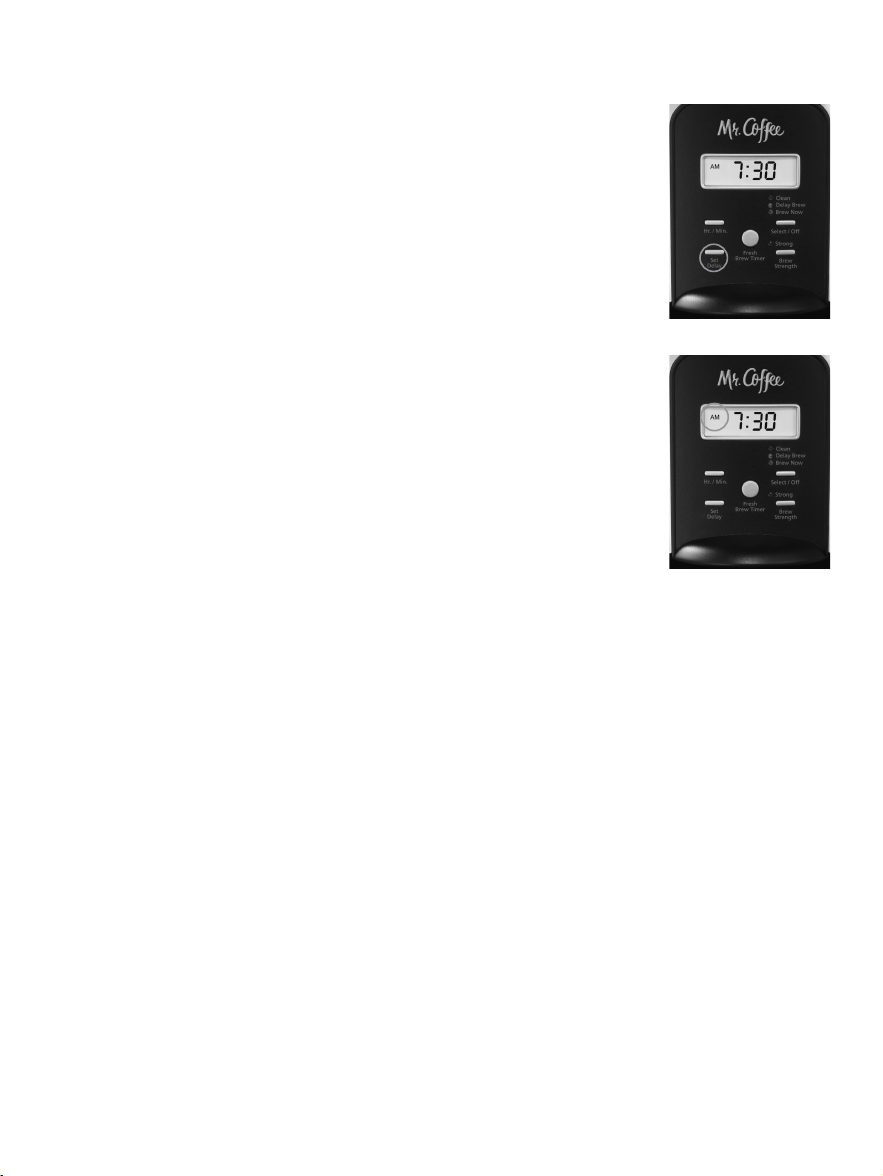
A. Tabla de Medidas de Café Sugeridas
B. Sistema de Filtració n de Agua
¡Felicitaciones! Usted es el dueñ o de un sistema de filtració n
de agua MR. COFFEE
®
. Utilizando el Mr. Coffee
®
filtro de
carbono del agua en la cafetera Mr. Coffee
®
durante el
proceso de preparació n de café ayuda a eliminar hasta 97%
del cloro del agua y mejora el sabor de su café .
Primero busque el símbolo MR. COFFEE
®
de Afinidad con la
Filtració n en la parte inferior de la canasta del filtro. Si no
ve este símbolo, favor de llamar al 1-800-672-6333.
Para utilizar el sistema de filtració n de
agua en su Cafetera MR. COFFEE
®
, favor de
seguir los siguientes pasos:
1. Utilizando el indicador rojo en el
filtro de agua del marco, alinee el
indicador con la letra en el marco que
corresponde al mes en que utiliza el
disco por primera vez. Esto sirve para
recordarle de cambiar el disco cada
Para Colar Café Molido
12 Tazas 9 cdas
10 Tazas 7.5 cdas
8 Tazas 6.5 cdas
6 Tazas 4.5 cdas
4 Tazas 3 cdas
1 cucharada rasa (cda.) = 5 gr./0.17 oz./ 15 ml
1 taza = 5 onzas/ 148ml. de café colado
Utilice má s o menos café segú n su gusto.
Para Programar el Período de Demora del Colado:
Mientras que la pantalla está en el modo de
reloj, basta con pulsar el botó n SET DELAY
(DEMORA DEL COLADO) (Figura 2), y, mientras
que el LED Ambar de Demora del Colado
hace destellos, ajuste el tiempo de colado
al presionar el botó n de Hora / Minuto.Los
indicadores de AM o PM se encenderá n en la
parte de arriba de la pantalla del reloj (Figura 3).
En pocos segundos la pantalla cambiará a la hora
actual.
¡El Período de Demora del Colado ya ha sido
programado!
ADVERTENCIA: Para activar el ciclo de DEMORA
DEL COLADO, vea la secció n “Colando Café
Luego”.
Para cotejar la hora programada, oprima el
botó n de FIJAR DEMORA. La pantalla mostrará
la hora que usted ha programado para el colado del café .
Si usted oprime el botó n de FIJAR DEMORA nuevamente o
espera unos cuantos segundos, la pantalla volverá a mostrar
la hora actual.
PREPARÁ NDOSE PARA UTILIZAR LA CAFETERA
Seleccionando y Midiendo el Café Molido
Para resultados idó neos, utilice una cucharada nivelada para
medir el café molido. Asé gurese de utilizar café molido de
textura mediana o “medium” para un colado perfecto.
3938
Indicador
Rojo
Figura 3
Figura 2
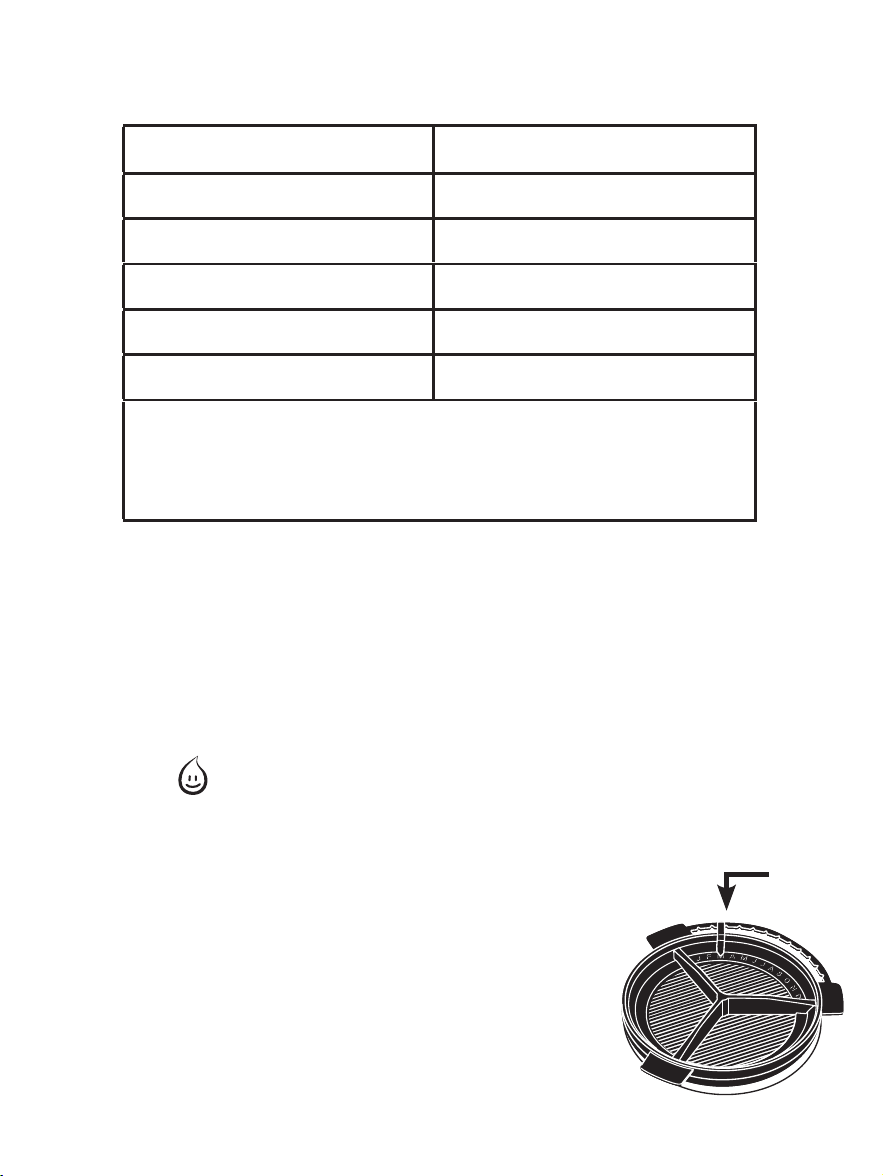
A. Tabla de Medidas de Café Sugeridas
B. Sistema de Filtració n de Agua
¡Felicitaciones! Usted es el dueñ o de un sistema de filtració n
de agua MR. COFFEE
®
. Utilizando el Mr. Coffee
®
filtro de
carbono del agua en la cafetera Mr. Coffee
®
durante el
proceso de preparació n de café ayuda a eliminar hasta 97%
del cloro del agua y mejora el sabor de su café .
Primero busque el símbolo MR. COFFEE
®
de Afinidad con la
Filtració n en la parte inferior de la canasta del filtro. Si no
ve este símbolo, favor de llamar al 1-800-672-6333.
Para utilizar el sistema de filtració n de
agua en su Cafetera MR. COFFEE
®
, favor de
seguir los siguientes pasos:
1. Utilizando el indicador rojo en el
filtro de agua del marco, alinee el
indicador con la letra en el marco que
corresponde al mes en que utiliza el
disco por primera vez. Esto sirve para
recordarle de cambiar el disco cada
Para Colar Café Molido
12 Tazas 9 cdas
10 Tazas 7.5 cdas
8 Tazas 6.5 cdas
6 Tazas 4.5 cdas
4 Tazas 3 cdas
1 cucharada rasa (cda.) = 5 gr./0.17 oz./ 15 ml
1 taza = 5 onzas/ 148ml. de café colado
Utilice má s o menos café segú n su gusto.
Para Programar el Período de Demora del Colado:
Mientras que la pantalla está en el modo de
reloj, basta con pulsar el botó n SET DELAY
(DEMORA DEL COLADO) (Figura 2), y, mientras
que el LED Ambar de Demora del Colado
hace destellos, ajuste el tiempo de colado
al presionar el botó n de Hora / Minuto.Los
indicadores de AM o PM se encenderá n en la
parte de arriba de la pantalla del reloj (Figura 3).
En pocos segundos la pantalla cambiará a la hora
actual.
¡El Período de Demora del Colado ya ha sido
programado!
ADVERTENCIA: Para activar el ciclo de DEMORA
DEL COLADO, vea la secció n “Colando Café
Luego”.
Para cotejar la hora programada, oprima el
botó n de FIJAR DEMORA. La pantalla mostrará
la hora que usted ha programado para el colado del café .
Si usted oprime el botó n de FIJAR DEMORA nuevamente o
espera unos cuantos segundos, la pantalla volverá a mostrar
la hora actual.
PREPARÁ NDOSE PARA UTILIZAR LA CAFETERA
Seleccionando y Midiendo el Café Molido
Para resultados idó neos, utilice una cucharada nivelada para
medir el café molido. Asé gurese de utilizar café molido de
textura mediana o “medium” para un colado perfecto.
3938
Indicador
Rojo
Figura 3
Figura 2
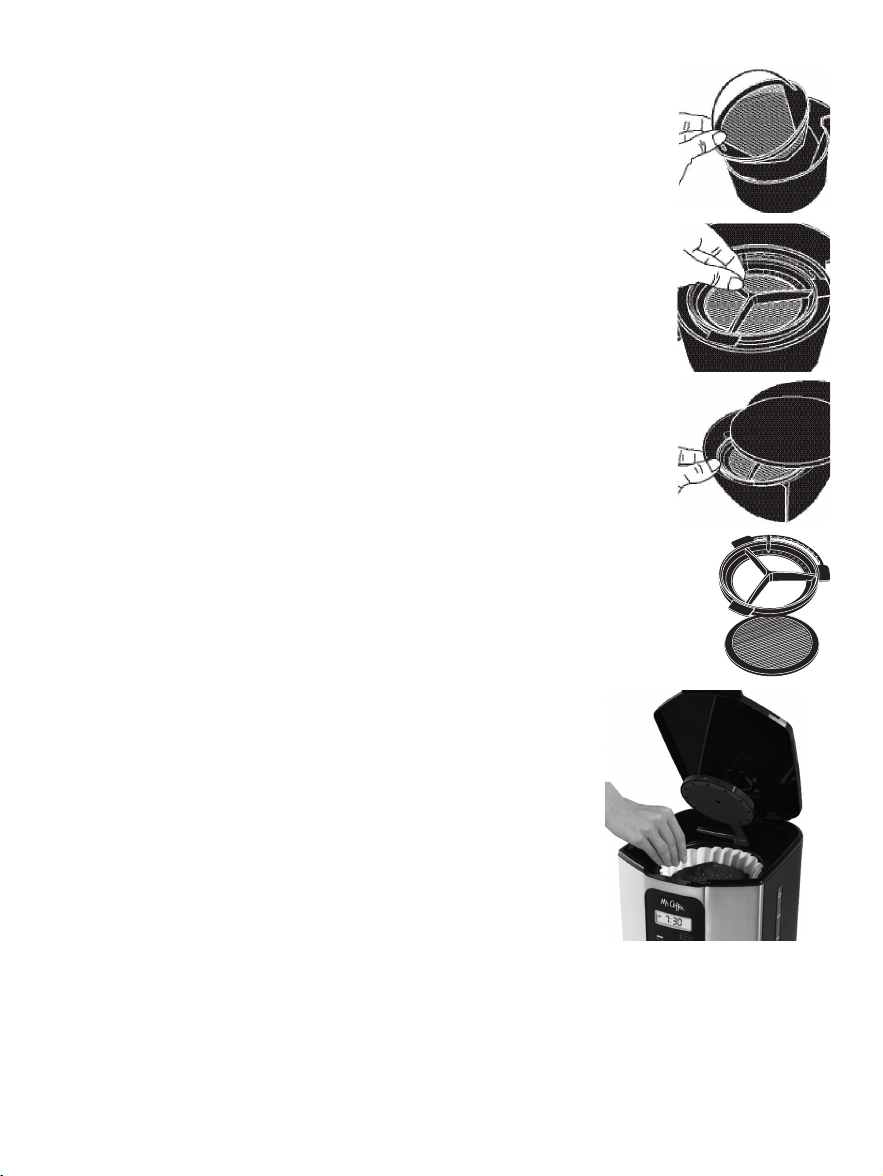
mes (aproximadamente 30 ciclos de colado).
Para Cambiar el disco, retire el disco usado,
inserte el disco nuevo en la montura.
ADVERTENCIA: Para resultados idó neos, utilice
el sistema de filtració n de agua con un filtro
permanente.
2. Enjuague el filtro del agua con agua fresca
antes del primer uso.
3. Siga con las instrucciones para Agregar agua
y café molido en la siguiente secció n.
4. Cuando termine de colar el café , enjuague el
filtro de agua con agua fresca. No ponga su
filtro de agua en el lavaplatos.
Para reemplazar los discos del filtro de agua:
deslice el disco usado de su sistema de filtració n
de agua. Deslice un disco de filtro de agua nueva
en el marco.
C. Añ adiendo Agua y Café Molido
1. Levante y abra la tapa de la canasta
del filtro. Para su conveniencia, usted
puede sacar la canasta removible del
filtro.
2. Coloque un filtro permanente
MR. COFFEE
®
dentro de la canasta
removible (Figura 4).
ADVERTENCIA: Si utiliza los filtros de
papel en lugar del filtro permanente, es
importante que los lados del filtro queden
lisos contra las paredes de la canasta
del filtro. Si se está colapsando el filtro,
humedé zcalo antes de colocarlo en la
canasta del filtro y añ adir café molido y agua.
3. Añ ada la cantidad de café deseada y sacú dala
suavemente para nivelar el café . Vea la “Tabla de
Medidas de Café Sugeridas”.
4. Despué s de seguir las instrucciones de la secció n del
Sistema de filtració n del agua, coloque el filtro del agua
de MR. COFFEE
®
en la canasta, asegurá ndose que el lado
marcado “este lado arriba” quede frente a usted y que el
filtro del agua quede nivelado.
5. Asegú rese de que el filtro esté centrado adecuadamente
e insertado hasta dentro en la canasta exterior del filtro.
Cierre la tapa.
6. Llene la jarra con agua fresca y fría hasta la capacidad deseada
(1 taza = 5 onzas/ 148ml). Para un llenado fá cil y preciso,
las marcas de agua en la jarra de vidrio y en las ventanillas
dobles del nivel de agua muestran la cantidad de agua
requerida para preparar la cantidad correspondiente de tazas
deseadas. No llene por encima de la línea rotulada “12 cup
MAX line” (“Línea de 12 tazas MAX”) o el agua se derramará
por el agujero de sobrellenado en la parte trasera del tanque
de agua.
La cantidad de café colado siempre será levemente
menor a la cantidad de agua vertida en el tanque de
agua. Esto se debe a la absorció n mínima de agua por la
borra o café molido.
7. Levante la tapa de la canasta de colar y vierta el agua en el
tanque de agua. Cierre la tapa y coloque la jarra vacía en el
plato calefactor.
ADVERTENCIA: Asegú rese de que la jarra esté colocada
completamente sobre el plato calefactor o sino el agua
y la borra se desbordará n de la canasta del filtro. Un
desbordamiento puede causar lesiones personales o dañ os a
la propiedad.
¡ADVERTENCIA! Para disminuir el riesgo de dañ ar la
jarra y/o el riesgo de lesiones personales, no añ ada
agua fría a la jarra si é sta ya está caliente. Permita
que la jarra se enfríe antes de usarla.
Marco
Disco de
Filtro
4140
Figure 4
mes (aproximadamente 30 ciclos de colado).
Para Cambiar el disco, retire el disco usado,
inserte el disco nuevo en la montura.
ADVERTENCIA: Para resultados idó neos, utilice
el sistema de filtració n de agua con un filtro
permanente.
2. Enjuague el filtro del agua con agua fresca
antes del primer uso.
3. Siga con las instrucciones para Agregar agua
y café molido en la siguiente secció n.
4. Cuando termine de colar el café , enjuague el
filtro de agua con agua fresca. No ponga su
filtro de agua en el lavaplatos.
Para reemplazar los discos del filtro de agua:
deslice el disco usado de su sistema de filtració n
de agua. Deslice un disco de filtro de agua nueva
en el marco.
C. Añ adiendo Agua y Café Molido
1. Levante y abra la tapa de la canasta
del filtro. Para su conveniencia, usted
puede sacar la canasta removible del
filtro.
2. Coloque un filtro permanente
MR. COFFEE
®
dentro de la canasta
removible (Figura 4).
ADVERTENCIA: Si utiliza los filtros de
papel en lugar del filtro permanente, es
importante que los lados del filtro queden
lisos contra las paredes de la canasta
del filtro. Si se está colapsando el filtro,
humedé zcalo antes de colocarlo en la
canasta del filtro y añ adir café molido y agua.
3. Añ ada la cantidad de café deseada y sacú dala
suavemente para nivelar el café . Vea la “Tabla de
Medidas de Café Sugeridas”.
4. Despué s de seguir las instrucciones de la secció n del
Sistema de filtració n del agua, coloque el filtro del agua
de MR. COFFEE
®
en la canasta, asegurá ndose que el lado
marcado “este lado arriba” quede frente a usted y que el
filtro del agua quede nivelado.
5. Asegú rese de que el filtro esté centrado adecuadamente
e insertado hasta dentro en la canasta exterior del filtro.
Cierre la tapa.
6. Llene la jarra con agua fresca y fría hasta la capacidad deseada
(1 taza = 5 onzas/ 148ml). Para un llenado fá cil y preciso,
las marcas de agua en la jarra de vidrio y en las ventanillas
dobles del nivel de agua muestran la cantidad de agua
requerida para preparar la cantidad correspondiente de tazas
deseadas. No llene por encima de la línea rotulada “12 cup
MAX line” (“Línea de 12 tazas MAX”) o el agua se derramará
por el agujero de sobrellenado en la parte trasera del tanque
de agua.
La cantidad de café colado siempre será levemente
menor a la cantidad de agua vertida en el tanque de
agua. Esto se debe a la absorció n mínima de agua por la
borra o café molido.
7. Levante la tapa de la canasta de colar y vierta el agua en el
tanque de agua. Cierre la tapa y coloque la jarra vacía en el
plato calefactor.
ADVERTENCIA: Asegú rese de que la jarra esté colocada
completamente sobre el plato calefactor o sino el agua
y la borra se desbordará n de la canasta del filtro. Un
desbordamiento puede causar lesiones personales o dañ os a
la propiedad.
¡ADVERTENCIA! Para disminuir el riesgo de dañ ar la
jarra y/o el riesgo de lesiones personales, no añ ada
agua fría a la jarra si é sta ya está caliente. Permita
que la jarra se enfríe antes de usarla.
Marco
Disco de
Filtro
4140
Figure 4
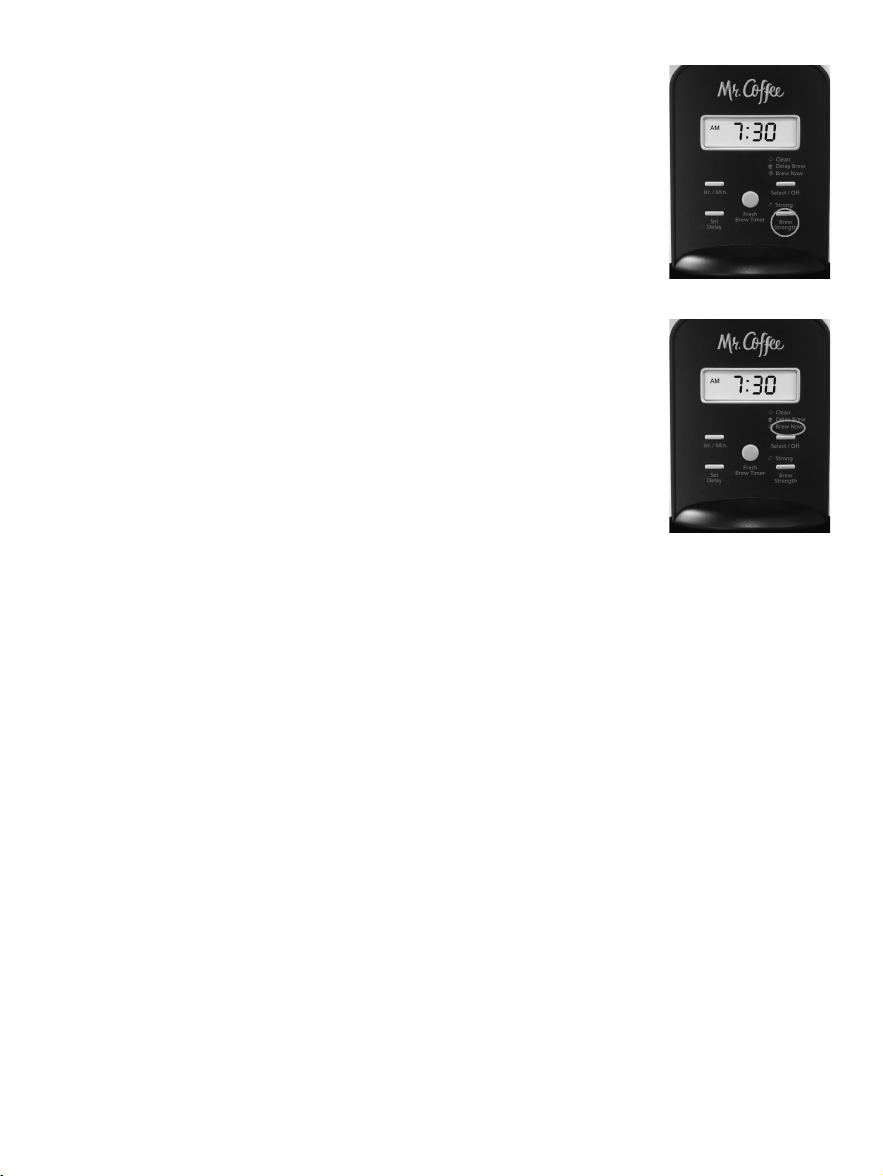
ADVERTENCIA: La tapa de la canasta del filtro está caliente
luego del colado.Permita siempre que la cafetera se enfríe
antes de limpiarla.
5. Antes de preparar otra jarra de café , apague la
cafetera. Esto volverá a programar la funció n del
Contador Regresivo del Colado™ (FRESH BREW
TIMER™). Para apagar la cafetera, oprima el botó n de
Select/Off (Seleccionar/Apagar), y todas las luces se
apagará n.
6. Asegú rese de que la jarra esté vacía antes de comenzar
a colar café .
7. Asegú rese de apagar su cafetera cuando ya no la esté
utilizando.
Funció n del Contador Regresivo del Colado™
La caracteristica de Cronometro para
Preparacion Fresca (FRESH BREW TIMER™) le
permite saber por cuanto tiempo su cafe ha
estado esperando por usted. Al inicio del
cicio de preparacion, el Cronometro para
Preparacion Fresca (FRESH BREW TIMER™) se
activara automaticamente.
Presione una vez el boton del Cronometro
para Preparacion Fresca (FRESH BREW TIMER™)
(Figura 7) y el tiempo enel reloj camblara y mostrara la
cantidad de tiempo que ha transcurrido desde que se
completo la preparacion. Presione una vez mas para
mostrar la hora actual.
ADVERTENCIA: La luz verde de la FUNCIÓ N DE COLAR
AHORA debe estar encendida para que la funció n de
CRONÓ METRO para FRESH BREW™ (Colado Fresco) pueda
operar. La HORA y la DEMORA DEL COLADO no se pueden
fijar mientras esté en pantalla la funció n del CONTADOR
REGRESIVO DEL COLADO™.
COLANDO CAFÉ AHORA
1. Para disfrutar de una taza de café con
mucho má s sabor, pulse una sola vez
el botó n Brew Strength (Intensidad del
Colado). La luz roja de SRONG (FUERTE)
Brew Strength (Intensidad del Colado) se
encenderá . La cafetera se mantendrá en el
Brew Strength (Intensidad del Colado) que
usted ha seleccionado hasta que lo cambie
de nuevo a REGULAR pulsando el botó n
Brew Strength (Intensidad del Colado) o
hasta que desenchufe la má quina (Figura 5).
ADVERTENCIA: Una vez que el colado del
café ha comenzado no se puede cambiar
su intensidad durante el ciclo de colado. La
cafetera está automá ticamente predeterminada
en una intensidad regular.
2. Complete los pasos que está n en la secció n “Añ adiendo
Agua y Café ” y con la jarra de vidrio y la canasta del
filtro ajustada en su lugar, prenda la cafetera pulsando
el botó n Select / Off (Seleccionar/Apagar) una sola vez.
La luz verde BREW NOW (COLAR AHORA) se encenderá
para indicar que la cafetera está encendida y colando.
(Figura 6).
3. Luego de que la preparació n de café haya terminado
una señ al audible sonará indicando que el café está listo.
ADVERTENCIA: Como condició n está ndar la señ al audible
sonará cuando el café esté listo. Para apagar la señ al
audible, pulse el botó n SET DELAY durante 5 segundos. Para
volver a accionar la señ al audible, pulse el botó n SET DELAY
otra vez durante 5 segundos.
4. Luego de que la borra o café molido usado se haya
enfriado, abra cuidadosamente la canasta del filtro y
descá rtela.
4342
Figura 6
Figura 5
Figura 7
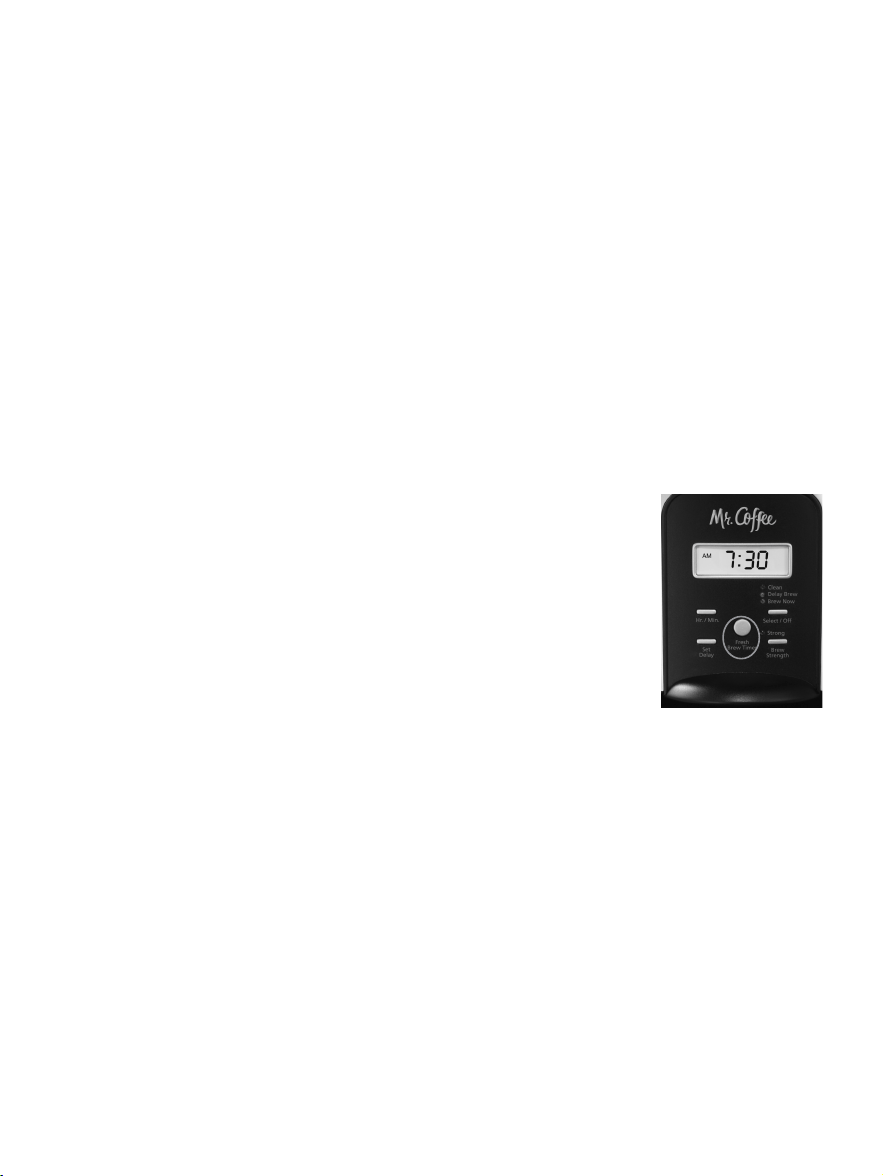
ADVERTENCIA: La tapa de la canasta del filtro está caliente
luego del colado.Permita siempre que la cafetera se enfríe
antes de limpiarla.
5. Antes de preparar otra jarra de café , apague la
cafetera. Esto volverá a programar la funció n del
Contador Regresivo del Colado™ (FRESH BREW
TIMER™). Para apagar la cafetera, oprima el botó n de
Select/Off (Seleccionar/Apagar), y todas las luces se
apagará n.
6. Asegú rese de que la jarra esté vacía antes de comenzar
a colar café .
7. Asegú rese de apagar su cafetera cuando ya no la esté
utilizando.
Funció n del Contador Regresivo del Colado™
La caracteristica de Cronometro para
Preparacion Fresca (FRESH BREW TIMER™) le
permite saber por cuanto tiempo su cafe ha
estado esperando por usted. Al inicio del
cicio de preparacion, el Cronometro para
Preparacion Fresca (FRESH BREW TIMER™) se
activara automaticamente.
Presione una vez el boton del Cronometro
para Preparacion Fresca (FRESH BREW TIMER™)
(Figura 7) y el tiempo enel reloj camblara y mostrara la
cantidad de tiempo que ha transcurrido desde que se
completo la preparacion. Presione una vez mas para
mostrar la hora actual.
ADVERTENCIA: La luz verde de la FUNCIÓ N DE COLAR
AHORA debe estar encendida para que la funció n de
CRONÓ METRO para FRESH BREW™ (Colado Fresco) pueda
operar. La HORA y la DEMORA DEL COLADO no se pueden
fijar mientras esté en pantalla la funció n del CONTADOR
REGRESIVO DEL COLADO™.
COLANDO CAFÉ AHORA
1. Para disfrutar de una taza de café con
mucho má s sabor, pulse una sola vez
el botó n Brew Strength (Intensidad del
Colado). La luz roja de SRONG (FUERTE)
Brew Strength (Intensidad del Colado) se
encenderá . La cafetera se mantendrá en el
Brew Strength (Intensidad del Colado) que
usted ha seleccionado hasta que lo cambie
de nuevo a REGULAR pulsando el botó n
Brew Strength (Intensidad del Colado) o
hasta que desenchufe la má quina (Figura 5).
ADVERTENCIA: Una vez que el colado del
café ha comenzado no se puede cambiar
su intensidad durante el ciclo de colado. La
cafetera está automá ticamente predeterminada
en una intensidad regular.
2. Complete los pasos que está n en la secció n “Añ adiendo
Agua y Café ” y con la jarra de vidrio y la canasta del
filtro ajustada en su lugar, prenda la cafetera pulsando
el botó n Select / Off (Seleccionar/Apagar) una sola vez.
La luz verde BREW NOW (COLAR AHORA) se encenderá
para indicar que la cafetera está encendida y colando.
(Figura 6).
3. Luego de que la preparació n de café haya terminado
una señ al audible sonará indicando que el café está listo.
ADVERTENCIA: Como condició n está ndar la señ al audible
sonará cuando el café esté listo. Para apagar la señ al
audible, pulse el botó n SET DELAY durante 5 segundos. Para
volver a accionar la señ al audible, pulse el botó n SET DELAY
otra vez durante 5 segundos.
4. Luego de que la borra o café molido usado se haya
enfriado, abra cuidadosamente la canasta del filtro y
descá rtela.
4342
Figura 6
Figura 5
Figura 7
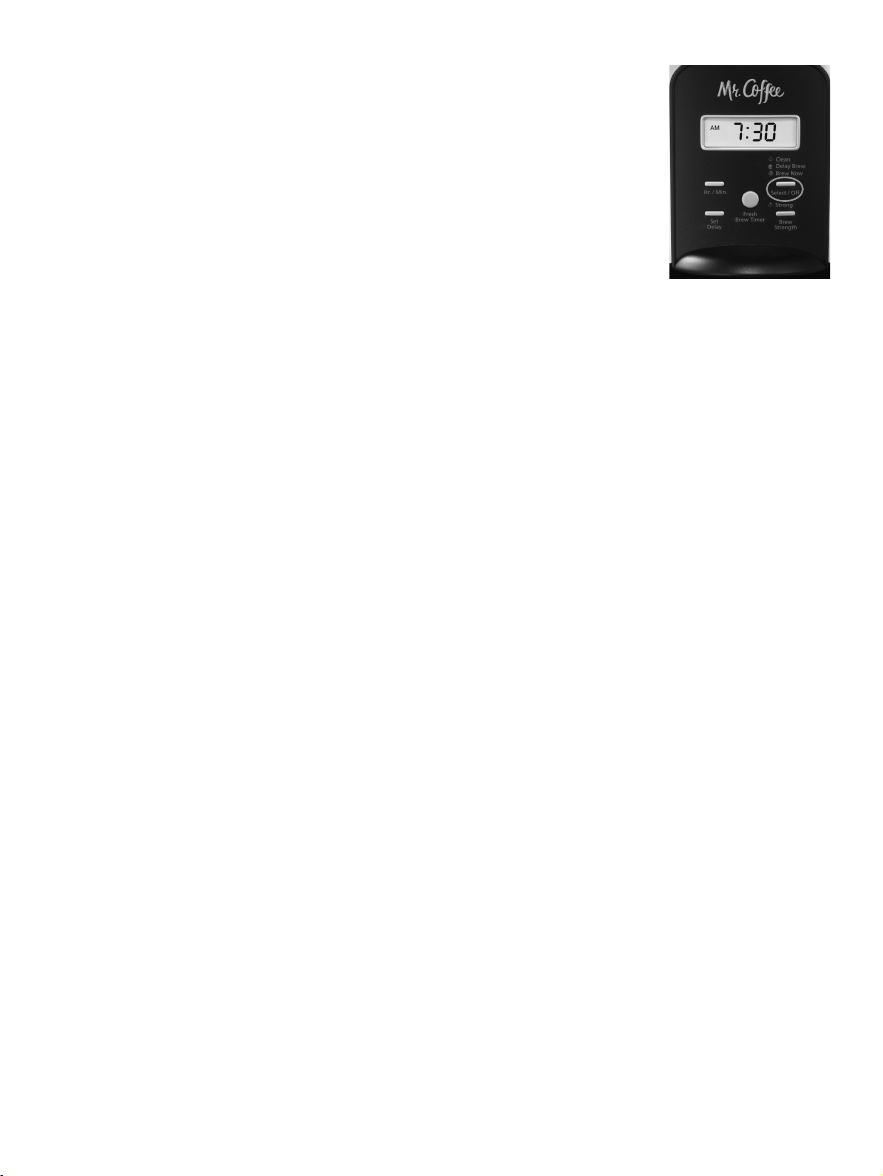
LIMPIANDO Y DÁ NDOLE
MANTENIMIENTO A SU CAFETERA
Limpieza Diaria
Siempre desenchufe la cafetera y permita que se enfríe antes
de limpiarla.
Saque la canasta del filtro, el filtro permanente, la jarra y la
tapa de la jarra y lá velos en una solució n de agua caliente y
detergente líquido suave.
Nunca utilice polvos limpiadores, fibras metá licas o cualquier
otro material abrasivo. La jarra de vidrio y su tapa, la canasta de
colar, el filtro permanente y la regadera de acero inoxidable sí se
pueden lavar en el escurridor superior del lavaplatos, pero no así
el disco del filtro de agua.
¡ADVERTENCIA! Nunca sumerja la cafetera en sí en
agua ni en ningú n otro líquido, ni la ponga en el
lavaplatos.
Limpieza y Mantenimiento Rutinarios
La luz roja de clean (limpiar) se encenderá y destellará para
hacerle saber que la cafetera necesita una limpieza. Este rojo
la luz se va a apagar despues que el ciclo de limpieza sea
completado.
Có mo Limpiar los Depó sitos Minerales en su Cafetera
MR. COFFEE
®
Los minerales (calcio/piedra caliza) en el agua dejará n
depó sitos en su cafetera y le afectará n. Se recomienda que
los remueva regularmente utilizando el limpiador
MR. COFFEE
®
o vinagre. Departamento de Servicios al
Consumidor al 1-800-MR COFFEE (1-800-672-6333).
COLANDO CAFÉ LUEGO
1. Primero debe fijar la hora en que desearía
que la cafetera comience a colar su café ,
segú n descrito en la secció n “Programando
la Hora del Reloj y el Período de Demora
del Colado”.
2. Prepare su cafetera segú n descrito en la
secció n Añ adiendo Agua y Café Molido.
3. Para activar la DEMORA DEL COLADO y
programar su cafetera para colar café luego, oprima el
botó n seleccionar/apagar dos veces (Figura 8). La luz
amarilla de DEMORA DEL COLADO se encenderá . Ahora
la cafetera está lista para colar café automá ticamente
má s tarde a una hora preseleccionada. Usted puede
seleccionar una intensidad má s fuerte si desea,
presionando el botó n de Intensidad de Colado. En caso
contrario, pasará por defecto a una intensidad regular.
4. A la hora preseleccionada, la luz verde de COLAR
AHORA se encenderá y la luz amarilla de DEMORA
DEL COLADO se apagará , indicando que el colado ha
comenzado a la intensidad del colado seleccionada. La
funció n del CONTADOR FRESH BREW™ TIMER comenzar a
medir el tiempo transcurrido.
5. El plato calefactor de la cafetera mantendrá caliente
su café durante dos horas y luego se apagará solo
automá ticamente.
Como medida de seguridad, su cafetera NO se
encenderá automá ticamente al día siguiente. Si usted
desea que su café se cuele a la misma hora el día
siguiente, tan solo ponga un nuevo filtro, café y agua
y seleccione DEMORA DEL COLADO, siguiendo los
Pasos 2 y 3 segú n se exponen previamente.
Para cancelar DEMORA DEL COLADO: Presione el botó n
Select /Off (Seleccionar/Apagar) hasta que todas las luces se
apaguen (Figura 8).
4544
Figura 8
LIMPIANDO Y DÁ NDOLE
MANTENIMIENTO A SU CAFETERA
Limpieza Diaria
Siempre desenchufe la cafetera y permita que se enfríe antes
de limpiarla.
Saque la canasta del filtro, el filtro permanente, la jarra y la
tapa de la jarra y lá velos en una solució n de agua caliente y
detergente líquido suave.
Nunca utilice polvos limpiadores, fibras metá licas o cualquier
otro material abrasivo. La jarra de vidrio y su tapa, la canasta de
colar, el filtro permanente y la regadera de acero inoxidable sí se
pueden lavar en el escurridor superior del lavaplatos, pero no así
el disco del filtro de agua.
¡ADVERTENCIA! Nunca sumerja la cafetera en sí en
agua ni en ningú n otro líquido, ni la ponga en el
lavaplatos.
Limpieza y Mantenimiento Rutinarios
La luz roja de clean (limpiar) se encenderá y destellará para
hacerle saber que la cafetera necesita una limpieza. Este rojo
la luz se va a apagar despues que el ciclo de limpieza sea
completado.
Có mo Limpiar los Depó sitos Minerales en su Cafetera
MR. COFFEE
®
Los minerales (calcio/piedra caliza) en el agua dejará n
depó sitos en su cafetera y le afectará n. Se recomienda que
los remueva regularmente utilizando el limpiador
MR. COFFEE
®
o vinagre. Departamento de Servicios al
Consumidor al 1-800-MR COFFEE (1-800-672-6333).
COLANDO CAFÉ LUEGO
1. Primero debe fijar la hora en que desearía
que la cafetera comience a colar su café ,
segú n descrito en la secció n “Programando
la Hora del Reloj y el Período de Demora
del Colado”.
2. Prepare su cafetera segú n descrito en la
secció n Añ adiendo Agua y Café Molido.
3. Para activar la DEMORA DEL COLADO y
programar su cafetera para colar café luego, oprima el
botó n seleccionar/apagar dos veces (Figura 8). La luz
amarilla de DEMORA DEL COLADO se encenderá . Ahora
la cafetera está lista para colar café automá ticamente
má s tarde a una hora preseleccionada. Usted puede
seleccionar una intensidad má s fuerte si desea,
presionando el botó n de Intensidad de Colado. En caso
contrario, pasará por defecto a una intensidad regular.
4. A la hora preseleccionada, la luz verde de COLAR
AHORA se encenderá y la luz amarilla de DEMORA
DEL COLADO se apagará , indicando que el colado ha
comenzado a la intensidad del colado seleccionada. La
funció n del CONTADOR FRESH BREW™ TIMER comenzar a
medir el tiempo transcurrido.
5. El plato calefactor de la cafetera mantendrá caliente
su café durante dos horas y luego se apagará solo
automá ticamente.
Como medida de seguridad, su cafetera NO se
encenderá automá ticamente al día siguiente. Si usted
desea que su café se cuele a la misma hora el día
siguiente, tan solo ponga un nuevo filtro, café y agua
y seleccione DEMORA DEL COLADO, siguiendo los
Pasos 2 y 3 segú n se exponen previamente.
Para cancelar DEMORA DEL COLADO: Presione el botó n
Select /Off (Seleccionar/Apagar) hasta que todas las luces se
apaguen (Figura 8).
4544
Figura 8
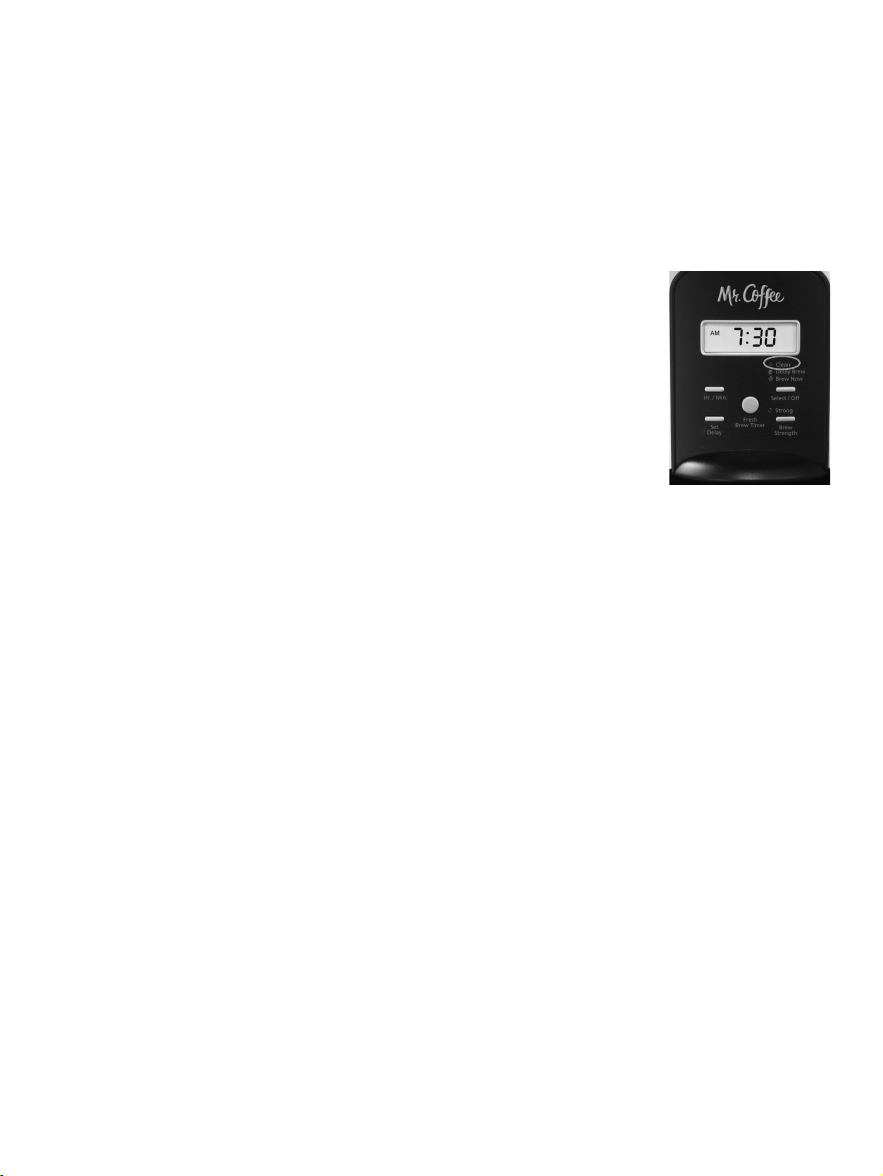
o cuando la luz roja de LIMPIO (CLEAN) esté
parpadeando (modelos programables).
Tipo de Agua
Agua Blanda
Agua Dura
Frecuencia de la Limpieza
Cada 80 Ciclos de Colado
Cada 40 Ciclos de Colado
Intervalo de Limpieza Sugerido
permanente Mr. Coffee
®
durante la limpieza, saquelo y
enjuaguelo bien antes de reemplazario en la canasta del
filtro.
9. Comience a colar y permita que concluya el ciclo de
colar completo.
10. Repita los Pasos 5 al 9 vez mas.
Su cafetera ya esta lista limpia y lista para colar la proxima
jarra de cafe caliente delicioso!
Reemplazo del Disco de Filtració n de Agua
Su disco de filtració n de agua necesita reemplazarse cada
mes (aproximadamente cada 30 ciclos de colado). Si la
má quina no se utilizará durante un período extendido,
enjuague el filtro de agua con agua limpia y limpie la cafetera.
Có mo Lavar la Jarra
El agua dura puede dejar una mancha blancuzca en la jarra,
y el café y el té pueden hacer que esta mancha se torne
marró n.
Para eliminar las manchas en la jarra:
1. Llene la jarra con una solució n compuesta de partes
iguales de agua y vinagre y dé jela reposar en la jarra por
aproximadamente 20 minutos.
2. Descarte la solució n, y luego lave y enjuague la jarra.
No utilice limpiadores fuertes abrasivos que puedan rasguñ ar
la jarra, los rasguñ os pueden hacer que la jarra se quiebre.
1. Siga las instrucciones en el paquete para preparar una
porció n de limpiador de cafeteras MR. COFFEE
®
. Vierta la
mezcla en el tanque de agua. Antes de proceder, saque
el disco de filtració n de agua de la cafetera.
ADVERTENCIA: Se puede utilizar 4 tazas o 20 onzas/ 592ml
fluidas de vinagre blanco domé stico sin diluir como sustituto
para el limpiador.
2. Coloque un filtro de papel tipo canasta
para 10-12 tazas MR. COFFEE
®
o un filtro
permanente MR. COFFEE
®
, vacío, en la
canasta del filtro y cierre la tapa.
3. Coloque la jarra vacía de vuelta en la unidad,
centrada en el plato calefactor.
4. Oprima el botó n Seleccionar/apagar hasta
que la luz roja se encienda (Figura 9). Para
su conveniencia, el ciclo de limpieza es
automá tico. El ciclo completo tomará de 45 a 60 minutos
en completarse. Durante la limpieza su cafetera:
a. Colará lentamente aproximadamente 3 tazas de la solució n
limpiadora.
b. Pausará durante 30 minutos (el indicador de LIMPIO se
mantendrá encendido para indicarle que el proceso está
activo).
c. Luego de 30 minutos, su cafetera colará el resto de la
solució n de limpieza.
d. Cuando termine, la luz de LIMPIO (CLEAN) se apagará
y su cafetera timbrará automá ticamente y se apagará .
5. Descarte la solucion limpiadora y enjuague bien la jarra
con agua limpia.
6. Liene el tanque de agua con agua fresca y limpia.
7. Coloque la jarra vacia de vuelta en la cafetera, centrada
en el plato calefactor.
8. Saque y descarte el filtro utilizado durante el ciclo de
limpieza y reemplacelo con un filtro de papel tipo canasta
para 10-12 tazas Mr. Coffee
®
nuevo. Si se utilizo un filtro
4746
Figura 9

o cuando la luz roja de LIMPIO (CLEAN) esté
parpadeando (modelos programables).
Tipo de Agua
Agua Blanda
Agua Dura
Frecuencia de la Limpieza
Cada 80 Ciclos de Colado
Cada 40 Ciclos de Colado
Intervalo de Limpieza Sugerido
permanente Mr. Coffee
®
durante la limpieza, saquelo y
enjuaguelo bien antes de reemplazario en la canasta del
filtro.
9. Comience a colar y permita que concluya el ciclo de
colar completo.
10. Repita los Pasos 5 al 9 vez mas.
Su cafetera ya esta lista limpia y lista para colar la proxima
jarra de cafe caliente delicioso!
Reemplazo del Disco de Filtració n de Agua
Su disco de filtració n de agua necesita reemplazarse cada
mes (aproximadamente cada 30 ciclos de colado). Si la
má quina no se utilizará durante un período extendido,
enjuague el filtro de agua con agua limpia y limpie la cafetera.
Có mo Lavar la Jarra
El agua dura puede dejar una mancha blancuzca en la jarra,
y el café y el té pueden hacer que esta mancha se torne
marró n.
Para eliminar las manchas en la jarra:
1. Llene la jarra con una solució n compuesta de partes
iguales de agua y vinagre y dé jela reposar en la jarra por
aproximadamente 20 minutos.
2. Descarte la solució n, y luego lave y enjuague la jarra.
No utilice limpiadores fuertes abrasivos que puedan rasguñ ar
la jarra, los rasguñ os pueden hacer que la jarra se quiebre.
1. Siga las instrucciones en el paquete para preparar una
porció n de limpiador de cafeteras MR. COFFEE
®
. Vierta la
mezcla en el tanque de agua. Antes de proceder, saque
el disco de filtració n de agua de la cafetera.
ADVERTENCIA: Se puede utilizar 4 tazas o 20 onzas/ 592ml
fluidas de vinagre blanco domé stico sin diluir como sustituto
para el limpiador.
2. Coloque un filtro de papel tipo canasta
para 10-12 tazas MR. COFFEE
®
o un filtro
permanente MR. COFFEE
®
, vacío, en la
canasta del filtro y cierre la tapa.
3. Coloque la jarra vacía de vuelta en la unidad,
centrada en el plato calefactor.
4. Oprima el botó n Seleccionar/apagar hasta
que la luz roja se encienda (Figura 9). Para
su conveniencia, el ciclo de limpieza es
automá tico. El ciclo completo tomará de 45 a 60 minutos
en completarse. Durante la limpieza su cafetera:
a. Colará lentamente aproximadamente 3 tazas de la solució n
limpiadora.
b. Pausará durante 30 minutos (el indicador de LIMPIO se
mantendrá encendido para indicarle que el proceso está
activo).
c. Luego de 30 minutos, su cafetera colará el resto de la
solució n de limpieza.
d. Cuando termine, la luz de LIMPIO (CLEAN) se apagará
y su cafetera timbrará automá ticamente y se apagará .
5. Descarte la solucion limpiadora y enjuague bien la jarra
con agua limpia.
6. Liene el tanque de agua con agua fresca y limpia.
7. Coloque la jarra vacia de vuelta en la cafetera, centrada
en el plato calefactor.
8. Saque y descarte el filtro utilizado durante el ciclo de
limpieza y reemplacelo con un filtro de papel tipo canasta
para 10-12 tazas Mr. Coffee
®
nuevo. Si se utilizo un filtro
4746
Figura 9
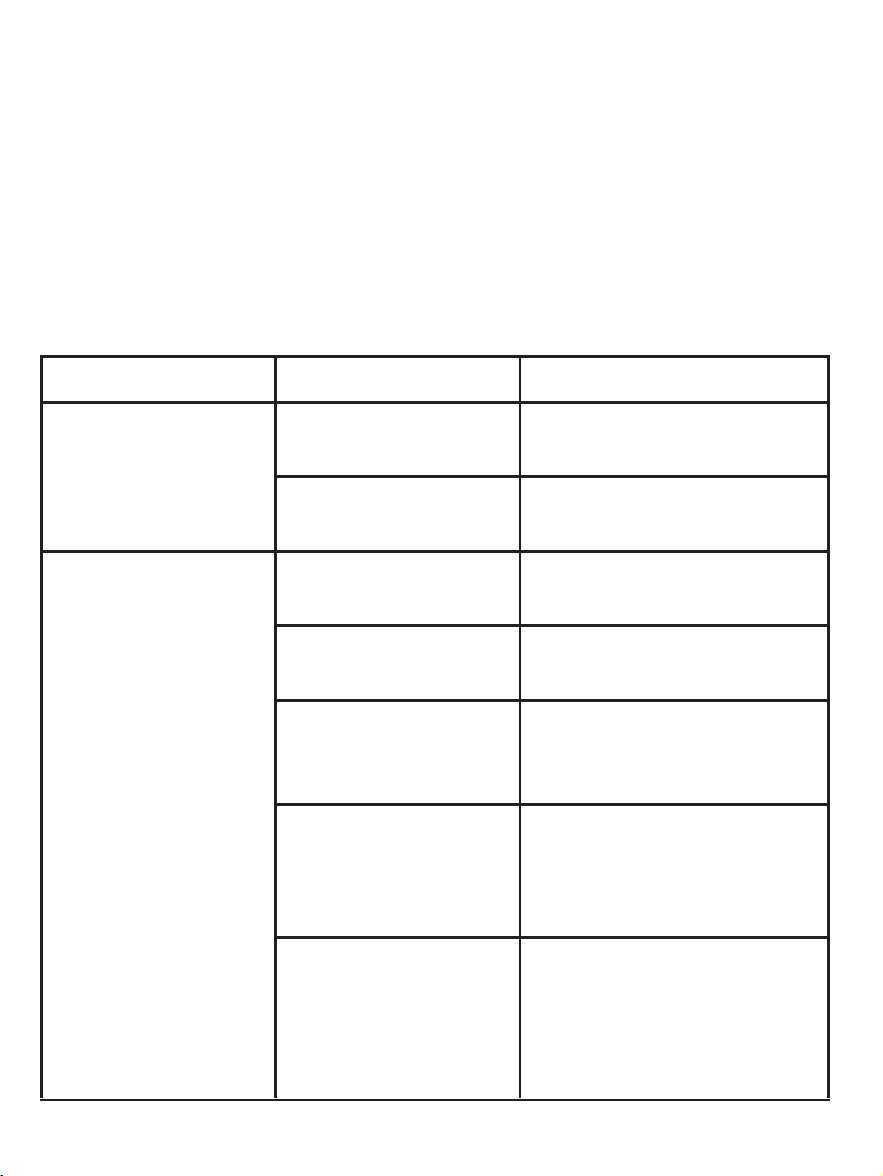
RESOLVIENDO PROBLEMAS CON
SU CAFETERA MR. COFFEE
®
Su Cafetera MR. COFFEE
®
ha sido diseñ ada con esmero
para darle muchos añ os de servicio sin contratiempos. En
el caso improbable de que su nueva cafetera no funcione
adecuadamente, favor de examinar los siguientes problemas
potenciales y efectuar los pasos recomendados ANTES de
llamar a un Centro de Servicio Autorizado Sunbeam.
PROBLEMA CAUSA POSIBLE SOLUCIÓ N
LA LUZ DE
COLAR AHORA/
ENCENDIDO NO
SE ENCIENDE
La unidad está
desenchufada.
ENCHUFE LA UNIDAD.
Hay un apagó n
elé ctrico.
ESPERE A QUE SE
RESTAURE EL SERVICIO.
LA CAFETERA
NO ESTA
COLANDO
La unidad está
desenchufada.
ENCHUFE LA UNIDAD.
Hay un apagó n
elé ctrico.
ESPERE A QUE SE
RESTAURE EL SERVICIO.
El tanque de
agua está vacío.
COTEJE LAS
VENTANILLAS DEL
NIVEL DE AGUA.
La canasta
del filtro no
está insertada
correctamente.
INSERTE LA
CANASTA DEL FILTRO
CORRECTAMENTE.
La jarra no
está insertada
completamente
sobre el plato
calefactor.
COLOQUE LA JARRA
CORRECTAMENTE
SOBRE EL PLATO
CALEFACTOR.
4948
PROBLEMA CAUSA POSIBLE SOLUCIÓ N
LA CAFETERA
SÓ LO CUELA
AGUA
No hay café
molido en la
canasta del filtro.
AÑ ADA LA CANTIDAD
DESEADA DE CAFÉ AL
FILTRO DE PAPEL.
LA CAFETERA
CUELA
LENTAMENTE
La cafetera
requiere ser
limpiada.
LIMPIE LA CAFETERA
SEGÚ N SE INDICA EN
LA SECCIÓ N “DÁ NDOLE
MANTENIMIENTO A SU
CAFETERA”.
LA CANASTA
DEL FILTRO SE
DESBORDA
La canasta
del filtro no
está insertada
correctamente.
INSERTE LA
CANASTA DEL FILTRO
CORRECTAMENTE.
La jarra no
está insertada
completamente
sobre el plato
calefactor.
COLOQUE LA JARRA
CORRECTAMENTE
SOBRE EL PLATO
CALEFACTOR.
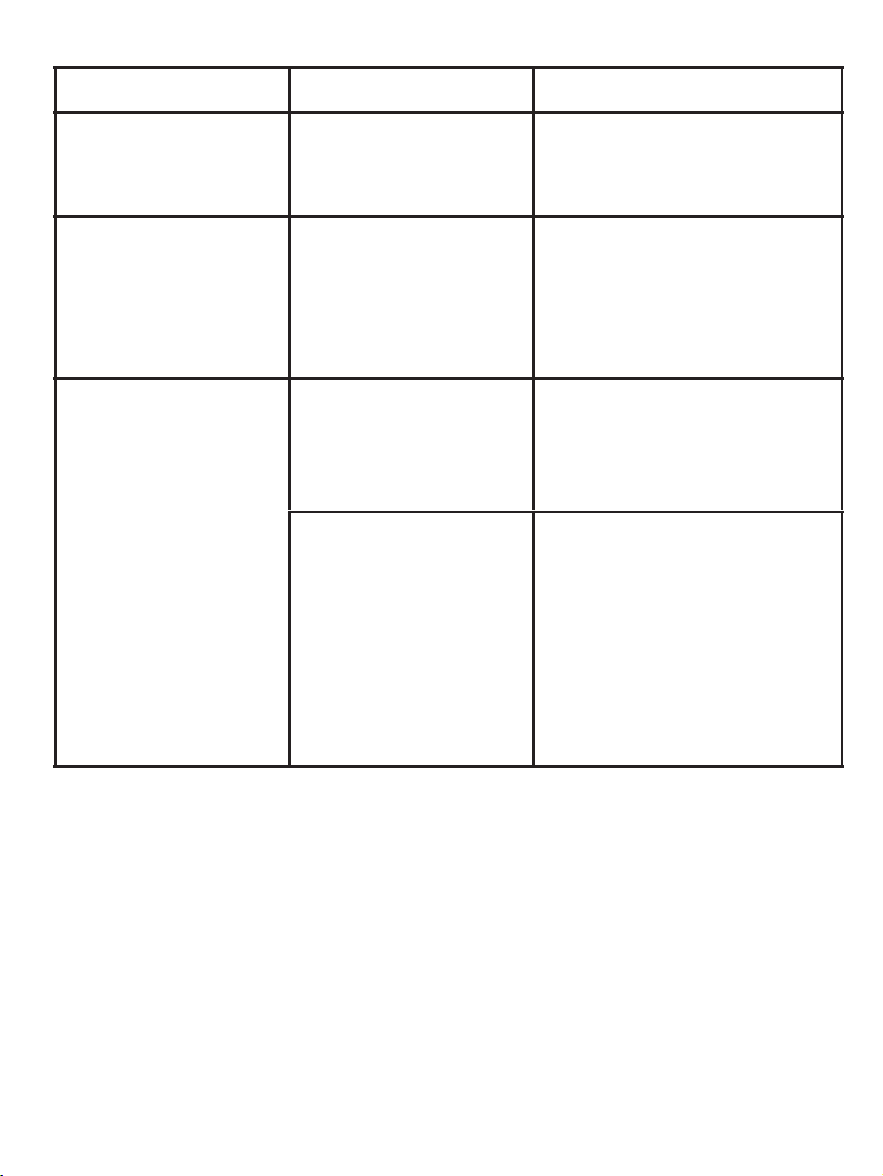
RESOLVIENDO PROBLEMAS CON
SU CAFETERA MR. COFFEE
®
Su Cafetera MR. COFFEE
®
ha sido diseñ ada con esmero
para darle muchos añ os de servicio sin contratiempos. En
el caso improbable de que su nueva cafetera no funcione
adecuadamente, favor de examinar los siguientes problemas
potenciales y efectuar los pasos recomendados ANTES de
llamar a un Centro de Servicio Autorizado Sunbeam.
PROBLEMA CAUSA POSIBLE SOLUCIÓ N
LA LUZ DE
COLAR AHORA/
ENCENDIDO NO
SE ENCIENDE
La unidad está
desenchufada.
ENCHUFE LA UNIDAD.
Hay un apagó n
elé ctrico.
ESPERE A QUE SE
RESTAURE EL SERVICIO.
LA CAFETERA
NO ESTA
COLANDO
La unidad está
desenchufada.
ENCHUFE LA UNIDAD.
Hay un apagó n
elé ctrico.
ESPERE A QUE SE
RESTAURE EL SERVICIO.
El tanque de
agua está vacío.
COTEJE LAS
VENTANILLAS DEL
NIVEL DE AGUA.
La canasta
del filtro no
está insertada
correctamente.
INSERTE LA
CANASTA DEL FILTRO
CORRECTAMENTE.
La jarra no
está insertada
completamente
sobre el plato
calefactor.
COLOQUE LA JARRA
CORRECTAMENTE
SOBRE EL PLATO
CALEFACTOR.
4948
PROBLEMA CAUSA POSIBLE SOLUCIÓ N
LA CAFETERA
SÓ LO CUELA
AGUA
No hay café
molido en la
canasta del filtro.
AÑ ADA LA CANTIDAD
DESEADA DE CAFÉ AL
FILTRO DE PAPEL.
LA CAFETERA
CUELA
LENTAMENTE
La cafetera
requiere ser
limpiada.
LIMPIE LA CAFETERA
SEGÚ N SE INDICA EN
LA SECCIÓ N “DÁ NDOLE
MANTENIMIENTO A SU
CAFETERA”.
LA CANASTA
DEL FILTRO SE
DESBORDA
La canasta
del filtro no
está insertada
correctamente.
INSERTE LA
CANASTA DEL FILTRO
CORRECTAMENTE.
La jarra no
está insertada
completamente
sobre el plato
calefactor.
COLOQUE LA JARRA
CORRECTAMENTE
SOBRE EL PLATO
CALEFACTOR.
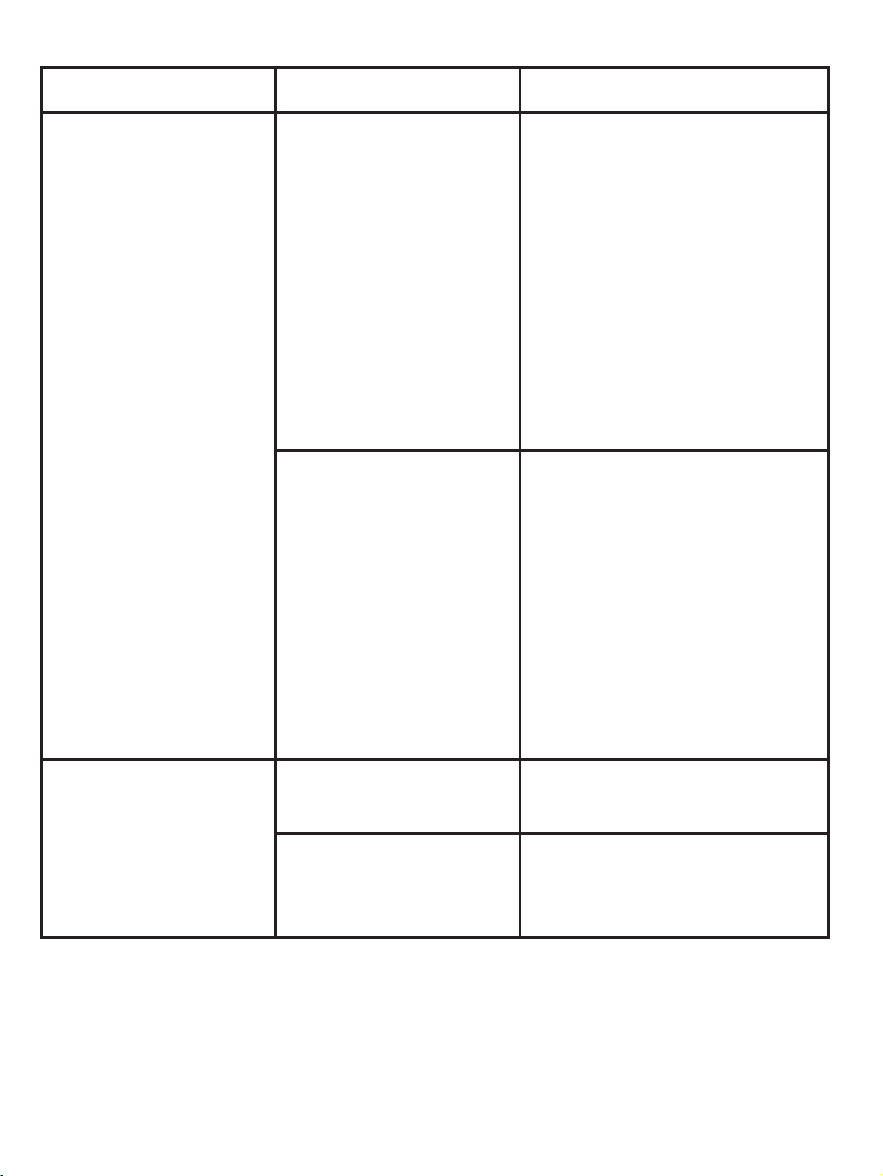
PROBLEMA CAUSA POSIBLE SOLUCIÓ N
LA CANASTA
DEL FILTRO SE
DESBORDA
Se puso
demasiado café
molido en el
filtro.
SAQUE EL FILTRO,
DESCARTE LA BORRA
O HARINA DE CAFÉ
USADA. SI ES UN
FILTRO DE PAPEL,
SUSTITÚ YALO. SI ES UN
FILTRO PERMANENTE,
ENJUÁ GUELO.
COMIENCE EL
PROCESO DE COLAR
NUEVAMENTE.
La jarra se
retiró del plato
calefactor por
má s de 30
segundos.
APAGUE LA UNIDAD Y
DESCONÉ CTELA DÉ JELA
ENFRIAR. RECOJA LO
DERRAMADO. NO
PONGA LA JARRA
CALIENTE DE VUELTA
SOBRE EL PLATO
CALEFACTOR MOJADO
PUES É STA PODRÍA
QUEBRARSE.
EL CAFÉ NO
ESTÁ CALIENTE
Hay un apagó n
elé ctrico.
ESPERE A QUE SE
RESTAURE EL SERVICIO.
Se ha activado
el apagado
automá tico.
PARA UN MEJOR
RESULTADO, CUELE
CAFÉ FRESCO.
5150
PROBLEMA CAUSA POSIBLE SOLUCIÓ N
EL CAFÉ NO
SABE BIEN
Se utilizó un
grado de café
molido que no
es apropiado
para una cafetera
de goteo
automá tico.
USE UN GRADO
DE CAFÉ MOLIDO
RECOMENDADO PARA
CAFETERAS DE GOTEO
AUTOMÁ TICO.
La proporció n
de café molido
a agua estaba
desequilibrada.
UTILICE UNA
PROPORCIÓ N
ADECUADA DE CAFÉ
MOLIDO A AGUA.
Hay que limpiar
la cafetera.
LIMPIE LA CAFETERA
SEGÚ N SE DESCRIBE EN
LA SECCIÓ N “DÁ NDOLE
MANTENIMIENTO A SU
CAFETERA”.
HAY BORRA O
CAFÉ MOLIDO
El filtro no
está asentado
correctamente
dentro de la
canasta.
COLOQUE EL FILTRO
CORRECTAMENTE
DENTRO DE LA
CANASTA.
The filter
collapsed.
SAQUE EL FILTRO Y
SUSTITÚ YALO.
¿Aú n tiene preguntas? Puede llamarnos libre de cargos al
Departamento de Servicios al Consumidor al
1-800-MR COFFEE (1-800-672-6333), o puede visitarnos en
www.mrcoffee.com
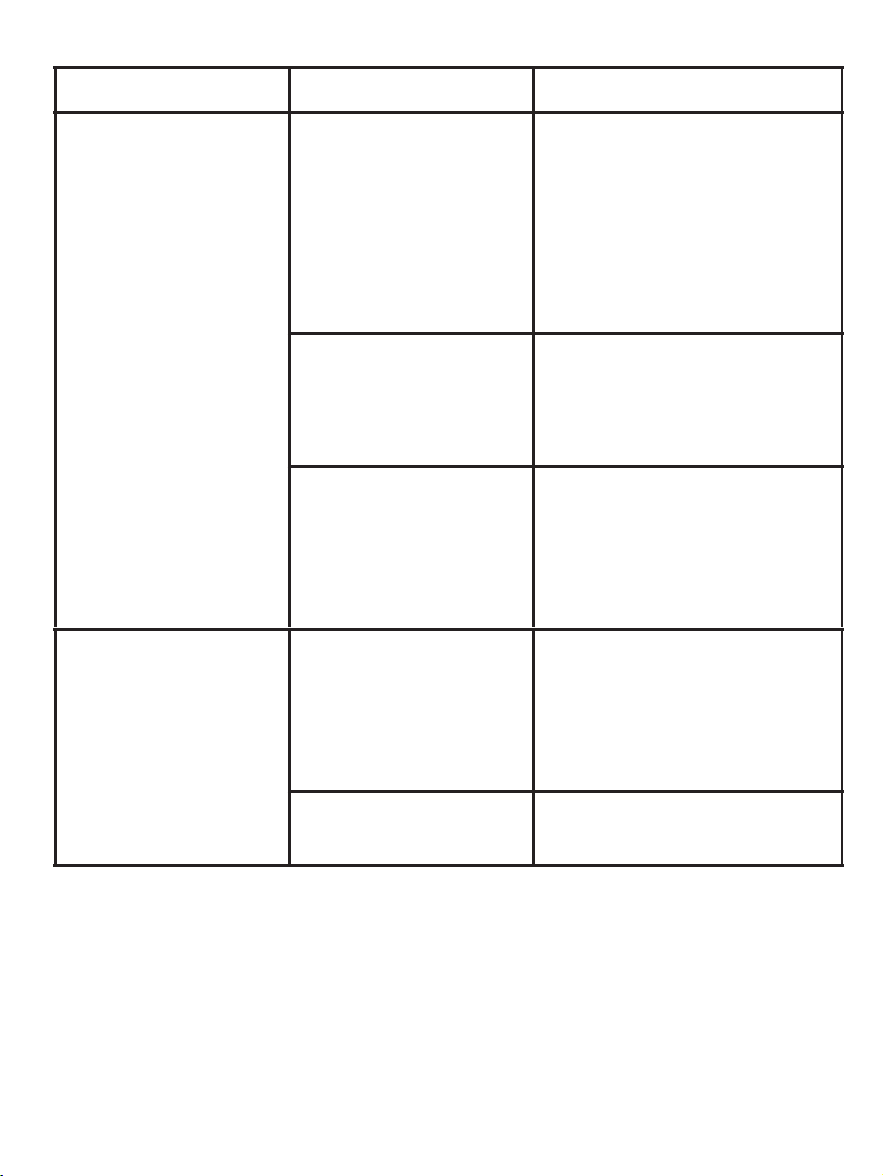
PROBLEMA CAUSA POSIBLE SOLUCIÓ N
LA CANASTA
DEL FILTRO SE
DESBORDA
Se puso
demasiado café
molido en el
filtro.
SAQUE EL FILTRO,
DESCARTE LA BORRA
O HARINA DE CAFÉ
USADA. SI ES UN
FILTRO DE PAPEL,
SUSTITÚ YALO. SI ES UN
FILTRO PERMANENTE,
ENJUÁ GUELO.
COMIENCE EL
PROCESO DE COLAR
NUEVAMENTE.
La jarra se
retiró del plato
calefactor por
má s de 30
segundos.
APAGUE LA UNIDAD Y
DESCONÉ CTELA DÉ JELA
ENFRIAR. RECOJA LO
DERRAMADO. NO
PONGA LA JARRA
CALIENTE DE VUELTA
SOBRE EL PLATO
CALEFACTOR MOJADO
PUES É STA PODRÍA
QUEBRARSE.
EL CAFÉ NO
ESTÁ CALIENTE
Hay un apagó n
elé ctrico.
ESPERE A QUE SE
RESTAURE EL SERVICIO.
Se ha activado
el apagado
automá tico.
PARA UN MEJOR
RESULTADO, CUELE
CAFÉ FRESCO.
5150
PROBLEMA CAUSA POSIBLE SOLUCIÓ N
EL CAFÉ NO
SABE BIEN
Se utilizó un
grado de café
molido que no
es apropiado
para una cafetera
de goteo
automá tico.
USE UN GRADO
DE CAFÉ MOLIDO
RECOMENDADO PARA
CAFETERAS DE GOTEO
AUTOMÁ TICO.
La proporció n
de café molido
a agua estaba
desequilibrada.
UTILICE UNA
PROPORCIÓ N
ADECUADA DE CAFÉ
MOLIDO A AGUA.
Hay que limpiar
la cafetera.
LIMPIE LA CAFETERA
SEGÚ N SE DESCRIBE EN
LA SECCIÓ N “DÁ NDOLE
MANTENIMIENTO A SU
CAFETERA”.
HAY BORRA O
CAFÉ MOLIDO
El filtro no
está asentado
correctamente
dentro de la
canasta.
COLOQUE EL FILTRO
CORRECTAMENTE
DENTRO DE LA
CANASTA.
The filter
collapsed.
SAQUE EL FILTRO Y
SUSTITÚ YALO.
¿Aú n tiene preguntas? Puede llamarnos libre de cargos al
Departamento de Servicios al Consumidor al
1-800-MR COFFEE (1-800-672-6333), o puede visitarnos en
www.mrcoffee.com

SERVICIO Y MANTENIMIENTO
Piezas de Repuesto
• Filtros – Para un café con mejor sabor, recomendamos
que utilice un filtro de papel tipo canasta para 10-12
tazas marca MR. COFFEE
®
o un filtro permanente marca
MR. COFFEE
®
. Estos filtros está n disponibles en la mayoría
de los supermercados.
• Filtració n de Agua - Los discos de filtració n de agua de
reemplazo pueden adquirirse a travé s de tiendas de
ventas detallistas, por internet en la pá gina web
www.mrcoffee.com, o llamando al 1-800-MR COFFEE
(1-800-672-6333) en los EE.UU. o al 1-800-667-8623 en
el Canadá .
• Jarras – Usualmente usted puede adquirir una jarra de
repuesto en la tienda donde adquirió su cafetera. Si
no logra encontrar un reemplazo, por favor visita por
internet en la pá gina web www.mrcoffee.com, llame al
1-800-MR COFFEE (1-800-672-6333) en los EE.UU. o al
1-800-667-8623 en el Canadá para obtener informació n
sobre dó nde puede encontrar una tienda que venda
jarras de repuesto.
Reparaciones
Si hace falta reparar su cafetera, no la devuelva a la tienda
donde la adquirió . Todas las reparaciones deben ser
efectuadas por Sunbeam o por un Centro de Servicio
Autorizado Sunbeam. Si usted vive en los EE.UU. o en el
Canadá , por favor llá menos a los siguientes nú meros de
telé fono libres de cargo para encontrar la ubicació n del
centro de servicio autorizado má s cercano:
EE.UU. 1-800-MR COFFEE (1-800-672-6333)
Canadá 1-800-667-8623
5352
Tambié n puede visitar nuestro website
en www.mrcoffee.com para ver una lista
de centros de servicio.
Para ayudarnos a servirle, por favor tenga
a la mano el nú mero de modelo de la
cafetera y la fecha de la compra cuando
nos llame. El nú mero del modelo está
estampado en la parte inferior de la
cafetera.
Agradecemos sus preguntas,
comentarios o sugerencias.
En todas sus comunicaciones, favor de
incluir su nombre, direcció n y nú mero
telefó nico completos y una descripció n del problema.
Visite nuestro website en www.mrcoffee.com y descubra
el secreto de có mo colar la taza perfecta de café . Tambié n
encontrará una deliciosa variedad de recetas gourmet,
consejos para fiestas y actividades y la informació n má s
reciente sobre los productos MR. COFFEE
®
.
REGISTRO DEL PRODUCTO
Para registrar el producto, por favor visítenos en línea
en www.mrcoffee.com/register o llame gratis al nú mero
1-800-MRCOFFEE (1-800-672-6333). Como parte de
nuestra poliza de privacidad, nunca vendemos ni revelamos
su informació n privada. Visite nuestro sitio web en
www.mrcoffee.com y descrubra el secreto de có mo colar
la taza perfecta de café . Tambié n encontrará una gran
mezcla de recetas gourmet, consejos para sus reuniones y
la informació n má s reciente sobre los productos
MR. COFFEE
®
.
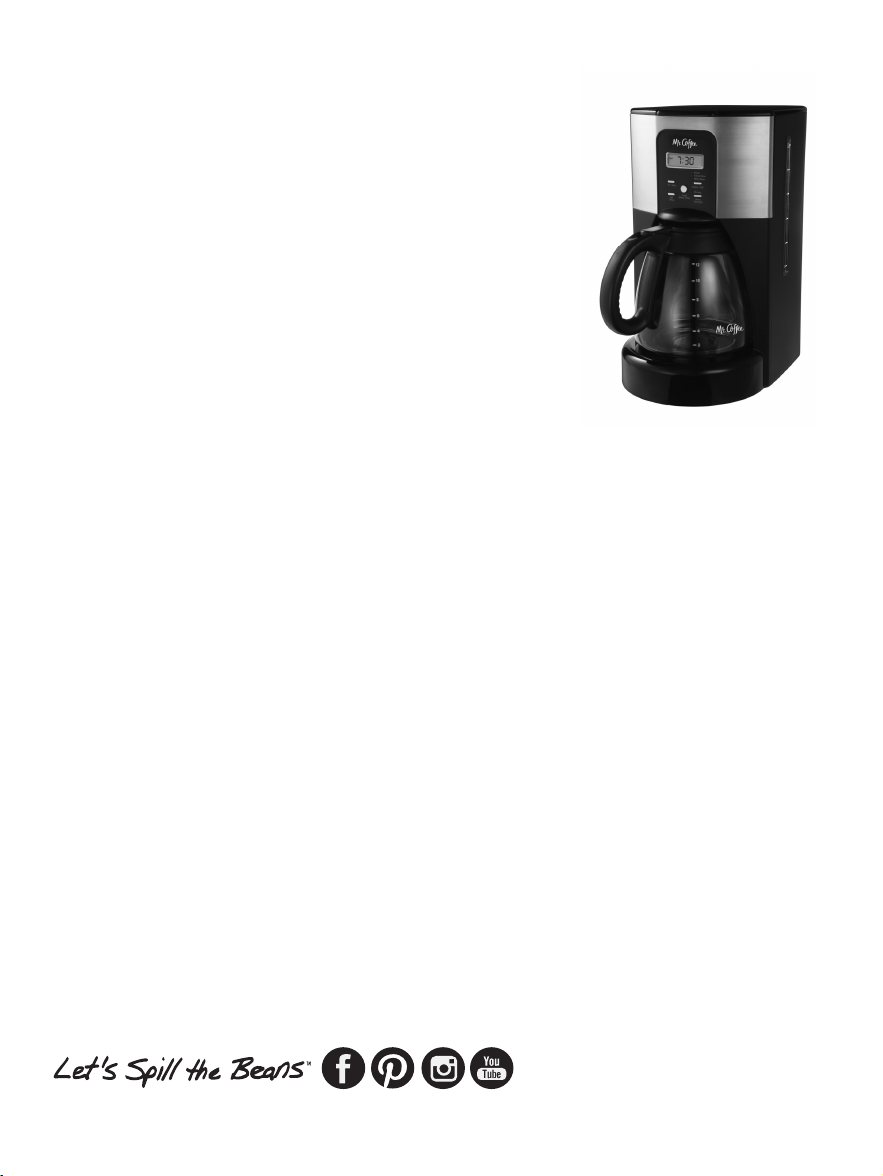
SERVICIO Y MANTENIMIENTO
Piezas de Repuesto
• Filtros – Para un café con mejor sabor, recomendamos
que utilice un filtro de papel tipo canasta para 10-12
tazas marca MR. COFFEE
®
o un filtro permanente marca
MR. COFFEE
®
. Estos filtros está n disponibles en la mayoría
de los supermercados.
• Filtració n de Agua - Los discos de filtració n de agua de
reemplazo pueden adquirirse a travé s de tiendas de
ventas detallistas, por internet en la pá gina web
www.mrcoffee.com, o llamando al 1-800-MR COFFEE
(1-800-672-6333) en los EE.UU. o al 1-800-667-8623 en
el Canadá .
• Jarras – Usualmente usted puede adquirir una jarra de
repuesto en la tienda donde adquirió su cafetera. Si
no logra encontrar un reemplazo, por favor visita por
internet en la pá gina web www.mrcoffee.com, llame al
1-800-MR COFFEE (1-800-672-6333) en los EE.UU. o al
1-800-667-8623 en el Canadá para obtener informació n
sobre dó nde puede encontrar una tienda que venda
jarras de repuesto.
Reparaciones
Si hace falta reparar su cafetera, no la devuelva a la tienda
donde la adquirió . Todas las reparaciones deben ser
efectuadas por Sunbeam o por un Centro de Servicio
Autorizado Sunbeam. Si usted vive en los EE.UU. o en el
Canadá , por favor llá menos a los siguientes nú meros de
telé fono libres de cargo para encontrar la ubicació n del
centro de servicio autorizado má s cercano:
EE.UU. 1-800-MR COFFEE (1-800-672-6333)
Canadá 1-800-667-8623
5352
Tambié n puede visitar nuestro website
en www.mrcoffee.com para ver una lista
de centros de servicio.
Para ayudarnos a servirle, por favor tenga
a la mano el nú mero de modelo de la
cafetera y la fecha de la compra cuando
nos llame. El nú mero del modelo está
estampado en la parte inferior de la
cafetera.
Agradecemos sus preguntas,
comentarios o sugerencias.
En todas sus comunicaciones, favor de
incluir su nombre, direcció n y nú mero
telefó nico completos y una descripció n del problema.
Visite nuestro website en www.mrcoffee.com y descubra
el secreto de có mo colar la taza perfecta de café . Tambié n
encontrará una deliciosa variedad de recetas gourmet,
consejos para fiestas y actividades y la informació n má s
reciente sobre los productos MR. COFFEE
®
.
REGISTRO DEL PRODUCTO
Para registrar el producto, por favor visítenos en línea
en www.mrcoffee.com/register o llame gratis al nú mero
1-800-MRCOFFEE (1-800-672-6333). Como parte de
nuestra poliza de privacidad, nunca vendemos ni revelamos
su informació n privada. Visite nuestro sitio web en
www.mrcoffee.com y descrubra el secreto de có mo colar
la taza perfecta de café . Tambié n encontrará una gran
mezcla de recetas gourmet, consejos para sus reuniones y
la informació n má s reciente sobre los productos
MR. COFFEE
®
.

INFORMACIÓ N DE GARANTÍA
GARANTÍA LIMITADA POR UN AÑ O
Sunbeam Products, Inc. operando bajo el nombre de Jarden
Consumer Solutions, o en Canadá , Sunbeam Corporation
(Canada) Limited operando bajo el nombre de Jarden
Consumer Solutions, (en forma conjunta, “JCS”), garantiza que
por un período de un añ o a partir de la fecha de compra,
este producto estará libre de defectos de materiales y mano
de obra. JCS, a su elecció n, reparará o reemplazará este
producto o cualquier componente del mismo que presente
defectos durante el período de garantía. El reemplazo se
realizará por un producto o componente nuevo o reparado.
Si el producto ya no estuviera disponible, se lo reemplazará
por un producto similar de valor igual o superior. É sta es su
garantía exclusiva. No intente reparar o ajustar ninguna funció n
elé ctrica o mecá nica de este producto. Al hacerlo elimínará
é sta garantía.
La garantía es vá lida para el comprador minorista original
a partir de la fecha de compra inicial y la misma no es
transferible. Conserve el recibo de compra original. Para
solicitar servicio en garantía se requiere presentar un recibo
de compra. Los agentes y centros de servicio de JCS o las
tiendas minoristas que venden productos de JCS no tienen
derecho a alterar, modificar ni cambiar de ningú n otro modo
los té rminos y las condiciones de esta garantía.
Esta garantía no cubre el desgaste normal de las piezas
ni los dañ os que se produzcan como resultado de uso
negligente o mal uso del producto, uso de voltaje incorrecto
o corriente inapropiada, uso contrario a las instrucciones
operativas, y desarme, reparació n o alteració n por parte de
un tercero ajeno a JCS o a un Centro de Servicio autorizado
por JCS. Asimismo, la garantía no cubre actos fortuitos tales
5554
como incendios, inundaciones, huracanes y tornados.
¿Cuá l es el límite de responsabilidad de JCS?
JCS no será responsable de dañ os incidentales o emergentes
causados por el incumplimiento de alguna garantía o
condició n expresa, implícita o legal.
Excepto en la medida en que lo prohíba la ley aplicable,
cualquier garantía o condició n implícita de comerciabilidad
o aptitud para un fin determinado se limita, en cuanto a su
duració n, al plazo de la garantía antes mencionada.
JCS queda exenta de toda otra garantías, condiciones o
manifestaciones, expresa, implícita, legal o de cualquier otra
naturaleza.
JCS no será responsable de ningú n tipo de dañ o que resulte de
la compra, uso o mal uso del producto, o por la imposibilidad
de usar el producto, incluidos los dañ os incidentales, especiales,
emergentes o similares, o la pé rdida de ganancias, ni de ningú n
incumplimiento contractual, sea de una obligació n esencial
o de otra naturaleza, ni de ningú n reclamo iniciado contra el
comprador por un tercero.
Algunas provincias, estados o jurisdicciones no permiten la
exclusió n o limitació n de los dañ os incidentales o emergentes
ni las limitaciones a la duració n de las garantías implícitas, de
modo que es posible que la exclusió n o las limitaciones antes
mencionadas no se apliquen en su caso.
Esta garantía le otorga derechos legales específicos y es
posible que usted tenga otros derechos que varían de un
estado, provincia o jurisdicció n a otro.
Có mo solicitar el servicio en garantía
En los Estados Unidos
Si tiene alguna pregunta sobre esta garantía o desea recibir
servicio de garantía, llame al 1-800-672-6333 y podrá
obtener la direcció n del centro de servicio que le resulte má s
conveniente.

INFORMACIÓ N DE GARANTÍA
GARANTÍA LIMITADA POR UN AÑ O
Sunbeam Products, Inc. operando bajo el nombre de Jarden
Consumer Solutions, o en Canadá , Sunbeam Corporation
(Canada) Limited operando bajo el nombre de Jarden
Consumer Solutions, (en forma conjunta, “JCS”), garantiza que
por un período de un añ o a partir de la fecha de compra,
este producto estará libre de defectos de materiales y mano
de obra. JCS, a su elecció n, reparará o reemplazará este
producto o cualquier componente del mismo que presente
defectos durante el período de garantía. El reemplazo se
realizará por un producto o componente nuevo o reparado.
Si el producto ya no estuviera disponible, se lo reemplazará
por un producto similar de valor igual o superior. É sta es su
garantía exclusiva. No intente reparar o ajustar ninguna funció n
elé ctrica o mecá nica de este producto. Al hacerlo elimínará
é sta garantía.
La garantía es vá lida para el comprador minorista original
a partir de la fecha de compra inicial y la misma no es
transferible. Conserve el recibo de compra original. Para
solicitar servicio en garantía se requiere presentar un recibo
de compra. Los agentes y centros de servicio de JCS o las
tiendas minoristas que venden productos de JCS no tienen
derecho a alterar, modificar ni cambiar de ningú n otro modo
los té rminos y las condiciones de esta garantía.
Esta garantía no cubre el desgaste normal de las piezas
ni los dañ os que se produzcan como resultado de uso
negligente o mal uso del producto, uso de voltaje incorrecto
o corriente inapropiada, uso contrario a las instrucciones
operativas, y desarme, reparació n o alteració n por parte de
un tercero ajeno a JCS o a un Centro de Servicio autorizado
por JCS. Asimismo, la garantía no cubre actos fortuitos tales
5554
como incendios, inundaciones, huracanes y tornados.
¿Cuá l es el límite de responsabilidad de JCS?
JCS no será responsable de dañ os incidentales o emergentes
causados por el incumplimiento de alguna garantía o
condició n expresa, implícita o legal.
Excepto en la medida en que lo prohíba la ley aplicable,
cualquier garantía o condició n implícita de comerciabilidad
o aptitud para un fin determinado se limita, en cuanto a su
duració n, al plazo de la garantía antes mencionada.
JCS queda exenta de toda otra garantías, condiciones o
manifestaciones, expresa, implícita, legal o de cualquier otra
naturaleza.
JCS no será responsable de ningú n tipo de dañ o que resulte de
la compra, uso o mal uso del producto, o por la imposibilidad
de usar el producto, incluidos los dañ os incidentales, especiales,
emergentes o similares, o la pé rdida de ganancias, ni de ningú n
incumplimiento contractual, sea de una obligació n esencial
o de otra naturaleza, ni de ningú n reclamo iniciado contra el
comprador por un tercero.
Algunas provincias, estados o jurisdicciones no permiten la
exclusió n o limitació n de los dañ os incidentales o emergentes
ni las limitaciones a la duració n de las garantías implícitas, de
modo que es posible que la exclusió n o las limitaciones antes
mencionadas no se apliquen en su caso.
Esta garantía le otorga derechos legales específicos y es
posible que usted tenga otros derechos que varían de un
estado, provincia o jurisdicció n a otro.
Có mo solicitar el servicio en garantía
En los Estados Unidos
Si tiene alguna pregunta sobre esta garantía o desea recibir
servicio de garantía, llame al 1-800-672-6333 y podrá
obtener la direcció n del centro de servicio que le resulte má s
conveniente.

56 57
En Canadá
Si tiene alguna pregunta sobre esta garantía o desea recibir
servicio de garantía, llame al 1-800-667-8623 y podrá
obtener la direcció n del centro de servicio que le resulte má s
conveniente.
En los Estados Unidos, esta garantía es ofrecida por Sunbeam
Products, Inc. operando bajo el nombre de Jarden Consumer
Solutions, Boca Rató n, Florida 33431. En Canadá , esta
garantía es ofrecida por Sunbeam Corporation (Canada)
Limited operando bajo el nombre de Jarden Consumer
Solutions, 20 B Hereford Street, Brampton, Ontario L6Y 0M1.
Si usted tiene otro problema o reclamo en conexió n con
este producto, por favor escriba al Departamento de Servicio
al Consumidor.
POR FAVOR NO DEVUELVA ESTE PRODUCTO A NINGUNA DE
ESTAS DIRECCIONES NI AL LUGAR DE COMPRA.

56 57
En Canadá
Si tiene alguna pregunta sobre esta garantía o desea recibir
servicio de garantía, llame al 1-800-667-8623 y podrá
obtener la direcció n del centro de servicio que le resulte má s
conveniente.
En los Estados Unidos, esta garantía es ofrecida por Sunbeam
Products, Inc. operando bajo el nombre de Jarden Consumer
Solutions, Boca Rató n, Florida 33431. En Canadá , esta
garantía es ofrecida por Sunbeam Corporation (Canada)
Limited operando bajo el nombre de Jarden Consumer
Solutions, 20 B Hereford Street, Brampton, Ontario L6Y 0M1.
Si usted tiene otro problema o reclamo en conexió n con
este producto, por favor escriba al Departamento de Servicio
al Consumidor.
POR FAVOR NO DEVUELVA ESTE PRODUCTO A NINGUNA DE
ESTAS DIRECCIONES NI AL LUGAR DE COMPRA.