©2003 Sunbeam Products, Inc. All rights reserved.
MR. COFFEE
®
is a registered trademark of Sunbeam Products, Inc.
Distributed by Sunbeam Products, Inc., Boca Raton, Florida 33431.
©2003 Sunbeam Products, Inc. Todos los derechos reservados.
MR. COFFEE
®
es una marca registrada de Sunbeam Products, Inc.
Distribuido por Sunbeam Products, Inc., Boca Raton, Florida 33431.
Made in China / Hecho en China
P.N. 107607
Instruction Manual for
AR Series Coffeemaker
Manual de Instrucciones para
Serie de AR Cafetera

32
IMPORTANT SAFEGUARDS
When using electrical appliances, basic safety precautions should always be
followed to reduce the risk of fire, electric shock and/or injury to persons,
including the following:
•
READ ALL INSTRUCTIONS BEFORE USING THE COFFEEMAKER.
• Do not touch the coffeemaker’s hot surfaces.
• To protect against electric shock, do not immerse the power cord,
power plug or coffeemaker in water or other liquid.
• Close adult supervision is necessary when this appliance is used by
or near children.
• Turn the coffeemaker off and unplug the power cord from the power
source when the coffeemaker or clock are not in use and before cleaning.
Allow the coffeemaker parts to cool before putting on or taking off parts
and before cleaning the appliance.
• Do not operate any appliance with a damaged cord or plug or operate
it after the appliance malfunctions or has been damaged in any manner.
Return this appliance only to the nearest authorized service center for
examination, repair or adjustment.
• The use of accessory attachments other than MR. COFFEE
®
brand may cause
hazards or injuries.
• Do not use outdoors.
• Do not let the power cord hang over the edge of a table or counter
or allow it to come in contact with hot surfaces.
• Do not place this appliance on or near a hot gas or electric burner or
in a heated oven.
• To disconnect, turn the coffeemaker OFF, then remove the power plug
from wall outlet.
• Do not use the coffeemaker for other reasons than its intended use.
• Place the coffeemaker on a hard, flat level surface to avoid interruption
of air flow underneath the appliance.
• This coffeemaker is designed for household use only.
Decanter Use and Care
Follow the instructions below to reduce or eliminate the chance of breaking the decanter:
–
This decanter is designed for use with your MR. COFFEE
®
coffeemaker and therefore
must never be used on a rangetop or in any oven, including a microwave oven.
– Do not set a hot decanter on a wet or cold surface.
– Do not use a cracked decanter or a decanter having a loose or weakened handle.
– Do not clean the decanter with abrasive cleansers, steel wool pads or
other abrasive materials.
– Discard the decanter immediately if it is ever boiled dry.
– Protect the decanter from sharp blows, scratches or rough handling.
Warning:
To reduce the risk of fire or electric shock, do not remove
any service covers. There are no user serviceable parts
inside the coffeemaker. Only authorized personnel
should repair the coffeemaker.
T
HIS
U
NIT
I
S FOR
H
OUSEHOLD
U
SE
O
NLY
Special Cord Set Instructions
1. A short power supply cord is provided to reduce the hazards resulting from
becoming entangled in or tripping over a longer cord.
2. An extension cord may be purchased and used if care is exercised in its use.
3. If an extension cord is used, the marked electrical rating of the extension cord
must be at least 10 amps and 120 volts. The resulting extended cord must be
arranged so that it will not drape over the countertop or tabletop where it can
be pulled on by children or tripped over accidentally.
This appliance has a polarized plug
(one blade is wider than the other)
.
To reduce the risk of electric shock, this plug will fit in a polarized outlet only
one way. If the plug does not fit fully in the outlet, reverse the plug. If it still
does not fit, contact a qualified electrician. Do not modify the plug in any way.
coffee
SAVE THESE INSTRUCTIONS
32
IMPORTANT SAFEGUARDS
When using electrical appliances, basic safety precautions should always be
followed to reduce the risk of fire, electric shock and/or injury to persons,
including the following:
•
READ ALL INSTRUCTIONS BEFORE USING THE COFFEEMAKER.
• Do not touch the coffeemaker’s hot surfaces.
• To protect against electric shock, do not immerse the power cord,
power plug or coffeemaker in water or other liquid.
• Close adult supervision is necessary when this appliance is used by
or near children.
• Turn the coffeemaker off and unplug the power cord from the power
source when the coffeemaker or clock are not in use and before cleaning.
Allow the coffeemaker parts to cool before putting on or taking off parts
and before cleaning the appliance.
• Do not operate any appliance with a damaged cord or plug or operate
it after the appliance malfunctions or has been damaged in any manner.
Return this appliance only to the nearest authorized service center for
examination, repair or adjustment.
• The use of accessory attachments other than MR. COFFEE
®
brand may cause
hazards or injuries.
• Do not use outdoors.
• Do not let the power cord hang over the edge of a table or counter
or allow it to come in contact with hot surfaces.
• Do not place this appliance on or near a hot gas or electric burner or
in a heated oven.
• To disconnect, turn the coffeemaker OFF, then remove the power plug
from wall outlet.
• Do not use the coffeemaker for other reasons than its intended use.
• Place the coffeemaker on a hard, flat level surface to avoid interruption
of air flow underneath the appliance.
• This coffeemaker is designed for household use only.
Decanter Use and Care
Follow the instructions below to reduce or eliminate the chance of breaking the decanter:
–
This decanter is designed for use with your MR. COFFEE
®
coffeemaker and therefore
must never be used on a rangetop or in any oven, including a microwave oven.
– Do not set a hot decanter on a wet or cold surface.
– Do not use a cracked decanter or a decanter having a loose or weakened handle.
– Do not clean the decanter with abrasive cleansers, steel wool pads or
other abrasive materials.
– Discard the decanter immediately if it is ever boiled dry.
– Protect the decanter from sharp blows, scratches or rough handling.
Warning:
To reduce the risk of fire or electric shock, do not remove
any service covers. There are no user serviceable parts
inside the coffeemaker. Only authorized personnel
should repair the coffeemaker.
T
HIS
U
NIT
I
S FOR
H
OUSEHOLD
U
SE
O
NLY
Special Cord Set Instructions
1. A short power supply cord is provided to reduce the hazards resulting from
becoming entangled in or tripping over a longer cord.
2. An extension cord may be purchased and used if care is exercised in its use.
3. If an extension cord is used, the marked electrical rating of the extension cord
must be at least 10 amps and 120 volts. The resulting extended cord must be
arranged so that it will not drape over the countertop or tabletop where it can
be pulled on by children or tripped over accidentally.
This appliance has a polarized plug
(one blade is wider than the other)
.
To reduce the risk of electric shock, this plug will fit in a polarized outlet only
one way. If the plug does not fit fully in the outlet, reverse the plug. If it still
does not fit, contact a qualified electrician. Do not modify the plug in any way.
coffee
SAVE THESE INSTRUCTIONS
4 5
Table of Contents
Important Safeguards . . . . . . . . . . . . . . . . . . . . . . . . . . . . . . . . . . . . . . . . 2
Decanter Use and Care . . . . . . . . . . . . . . . . . . . . . . . . . . . . . . . . . . . . 3
Special Cord Set Instructions . . . . . . . . . . . . . . . . . . . . . . . . . . . . . . . . 3
Setting Up Your Coffeemaker . . . . . . . . . . . . . . . . . . . . . . . . . . . . . . . . . . 5
Coffeemaker Features . . . . . . . . . . . . . . . . . . . . . . . . . . . . . . . . . . . . . 5
Adjusting the Power Cord Length. . . . . . . . . . . . . . . . . . . . . . . . . . . . . 7
Setting the Clock
(Models ARX10, ARX11, ARX20 and ARX23 Only)
. . . . . . . . . . . . . . . . . . . 7
Brewing Coffee . . . . . . . . . . . . . . . . . . . . . . . . . . . . . . . . . . . . . . . . . . . . . 8
Cleaning the Coffeemaker Before First Use . . . . . . . . . . . . . . . . . . . . . . 8
Selecting and Measuring Ground Coffee . . . . . . . . . . . . . . . . . . . . . . . 8
Adding Water and Ground Coffee . . . . . . . . . . . . . . . . . . . . . . . . . . . . 8
Brewing Coffee Now . . . . . . . . . . . . . . . . . . . . . . . . . . . . . . . . . . . . . . 10
Brewing Coffee Later
(Using the Delay Timer, Models ARX10, ARX11, ARX20 and ARX23 Only)
. . . . 11
Cleaning the Coffeemaker Between Brew Cycles . . . . . . . . . . . . . . . . . 12
Maintaining Your Coffeemaker . . . . . . . . . . . . . . . . . . . . . . . . . . . . . . . . . 13
Cleaning the Coffeemaker . . . . . . . . . . . . . . . . . . . . . . . . . . . . . . . . . . 13
Cleaning the Decanter . . . . . . . . . . . . . . . . . . . . . . . . . . . . . . . . . . . . . 15
Troubleshooting . . . . . . . . . . . . . . . . . . . . . . . . . . . . . . . . . . . . . . . . . . . . 16
Service and Maintenance. . . . . . . . . . . . . . . . . . . . . . . . . . . . . . . . . . . . . . 17
Replacement Parts . . . . . . . . . . . . . . . . . . . . . . . . . . . . . . . . . . . . . . . 17
Repairs . . . . . . . . . . . . . . . . . . . . . . . . . . . . . . . . . . . . . . . . . . . . . . . . 17
Questions, Comments and Suggestions . . . . . . . . . . . . . . . . . . . . . . . . 17
Warranty Information . . . . . . . . . . . . . . . . . . . . . . . . . . . . . . . . . . . . . . . . 18
Setting Up Your Coffeemaker
Congratulations on the purchase of your new MR. COFFEE
®
coffeemaker! Please read
these instructions carefully before using your new coffeemaker. Proper use, care and
maintenance will ensure trouble-free operation and the long life of this appliance.
Save these instructions for cleaning and, if necessary, replacement parts information.
Coffeemaker Features
Your new MR. COFFEE
®
coffeemaker has the following features:
•
Cord Storage
– Allows you to store extra cord length for a tidy countertop.
•
Drip-Resistant Decanter
– Designed to help prevent drips after pouring.
•
Ergonomically Designed Handle
– Provides comfort, control and confidence
when pouring.
•
Lighted ON/OFF Switch
(Models
AR10, AR11,
AR12 and AR13 Only) –
This safety feature reminds you that your coffeemaker is on.
•
Non-Stick Warming Plate
– This feature prevents the decanter from sticking
to the surface of the warming plate.
•
Pause ’n Serve
– Can’t wait for the coffee to finish brewing? The Pause ’n Serve
feature allows you up to 30 seconds to pour a cup of coffee while the coffee
is still brewing.
•
Programmable Controls
(Models ARX10, ARX11, ARX20 and ARX23 Only)
– Clock: The LED clock serves as a handy kitchen clock, as well as allows you
to set the timer.
– Timer: Would you like to wake up to a fresh pot of coffee? The timer
allows you to preset when you would like the coffeemaker to brew
your coffee automatically, up to 24 hours in advance.
– Two-Hour Auto Shut-Off: This safety feature keeps your coffee warm
for 2 hours after you brew, then automatically turns off.
•
Removable Filter Basket
– The filter basket will lift out of socket to allow you
to remove a filter and ground coffee before returning back to its socket.
•
Water Window
– The water window on the water reservoir allows you to quickly
and accurately see exactly how much water you have added to the reservoir.
coffee

4 5
Table of Contents
Important Safeguards . . . . . . . . . . . . . . . . . . . . . . . . . . . . . . . . . . . . . . . . 2
Decanter Use and Care . . . . . . . . . . . . . . . . . . . . . . . . . . . . . . . . . . . . 3
Special Cord Set Instructions . . . . . . . . . . . . . . . . . . . . . . . . . . . . . . . . 3
Setting Up Your Coffeemaker . . . . . . . . . . . . . . . . . . . . . . . . . . . . . . . . . . 5
Coffeemaker Features . . . . . . . . . . . . . . . . . . . . . . . . . . . . . . . . . . . . . 5
Adjusting the Power Cord Length. . . . . . . . . . . . . . . . . . . . . . . . . . . . . 7
Setting the Clock
(Models ARX10, ARX11, ARX20 and ARX23 Only)
. . . . . . . . . . . . . . . . . . . 7
Brewing Coffee . . . . . . . . . . . . . . . . . . . . . . . . . . . . . . . . . . . . . . . . . . . . . 8
Cleaning the Coffeemaker Before First Use . . . . . . . . . . . . . . . . . . . . . . 8
Selecting and Measuring Ground Coffee . . . . . . . . . . . . . . . . . . . . . . . 8
Adding Water and Ground Coffee . . . . . . . . . . . . . . . . . . . . . . . . . . . . 8
Brewing Coffee Now . . . . . . . . . . . . . . . . . . . . . . . . . . . . . . . . . . . . . . 10
Brewing Coffee Later
(Using the Delay Timer, Models ARX10, ARX11, ARX20 and ARX23 Only)
. . . . 11
Cleaning the Coffeemaker Between Brew Cycles . . . . . . . . . . . . . . . . . 12
Maintaining Your Coffeemaker . . . . . . . . . . . . . . . . . . . . . . . . . . . . . . . . . 13
Cleaning the Coffeemaker . . . . . . . . . . . . . . . . . . . . . . . . . . . . . . . . . . 13
Cleaning the Decanter . . . . . . . . . . . . . . . . . . . . . . . . . . . . . . . . . . . . . 15
Troubleshooting . . . . . . . . . . . . . . . . . . . . . . . . . . . . . . . . . . . . . . . . . . . . 16
Service and Maintenance. . . . . . . . . . . . . . . . . . . . . . . . . . . . . . . . . . . . . . 17
Replacement Parts . . . . . . . . . . . . . . . . . . . . . . . . . . . . . . . . . . . . . . . 17
Repairs . . . . . . . . . . . . . . . . . . . . . . . . . . . . . . . . . . . . . . . . . . . . . . . . 17
Questions, Comments and Suggestions . . . . . . . . . . . . . . . . . . . . . . . . 17
Warranty Information . . . . . . . . . . . . . . . . . . . . . . . . . . . . . . . . . . . . . . . . 18
Setting Up Your Coffeemaker
Congratulations on the purchase of your new MR. COFFEE
®
coffeemaker! Please read
these instructions carefully before using your new coffeemaker. Proper use, care and
maintenance will ensure trouble-free operation and the long life of this appliance.
Save these instructions for cleaning and, if necessary, replacement parts information.
Coffeemaker Features
Your new MR. COFFEE
®
coffeemaker has the following features:
•
Cord Storage
– Allows you to store extra cord length for a tidy countertop.
•
Drip-Resistant Decanter
– Designed to help prevent drips after pouring.
•
Ergonomically Designed Handle
– Provides comfort, control and confidence
when pouring.
•
Lighted ON/OFF Switch
(Models
AR10, AR11,
AR12 and AR13 Only) –
This safety feature reminds you that your coffeemaker is on.
•
Non-Stick Warming Plate
– This feature prevents the decanter from sticking
to the surface of the warming plate.
•
Pause ’n Serve
– Can’t wait for the coffee to finish brewing? The Pause ’n Serve
feature allows you up to 30 seconds to pour a cup of coffee while the coffee
is still brewing.
•
Programmable Controls
(Models ARX10, ARX11, ARX20 and ARX23 Only)
– Clock: The LED clock serves as a handy kitchen clock, as well as allows you
to set the timer.
– Timer: Would you like to wake up to a fresh pot of coffee? The timer
allows you to preset when you would like the coffeemaker to brew
your coffee automatically, up to 24 hours in advance.
– Two-Hour Auto Shut-Off: This safety feature keeps your coffee warm
for 2 hours after you brew, then automatically turns off.
•
Removable Filter Basket
– The filter basket will lift out of socket to allow you
to remove a filter and ground coffee before returning back to its socket.
•
Water Window
– The water window on the water reservoir allows you to quickly
and accurately see exactly how much water you have added to the reservoir.
coffee
76
F
IGURE
A-1
F
IGURE
B-1
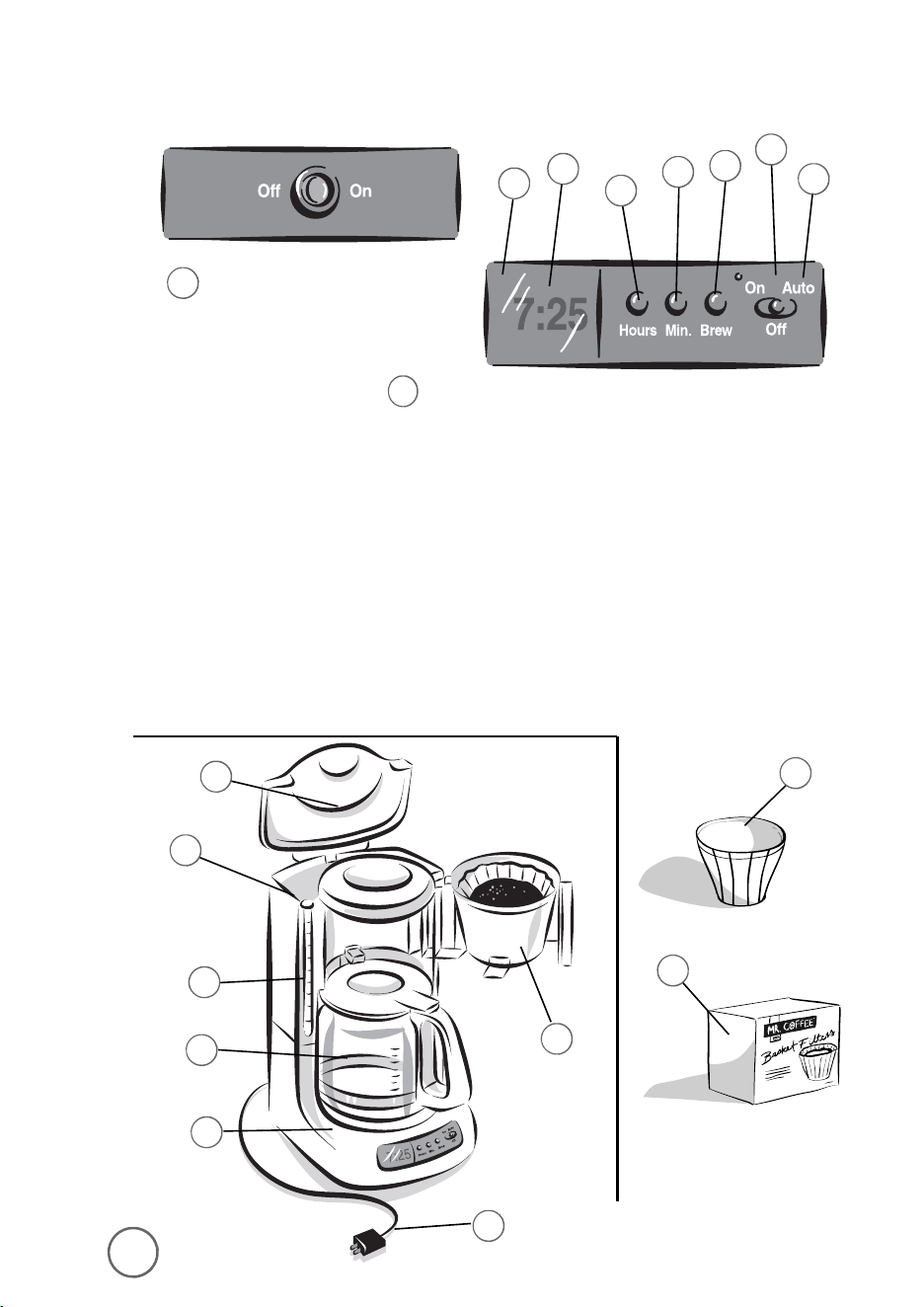
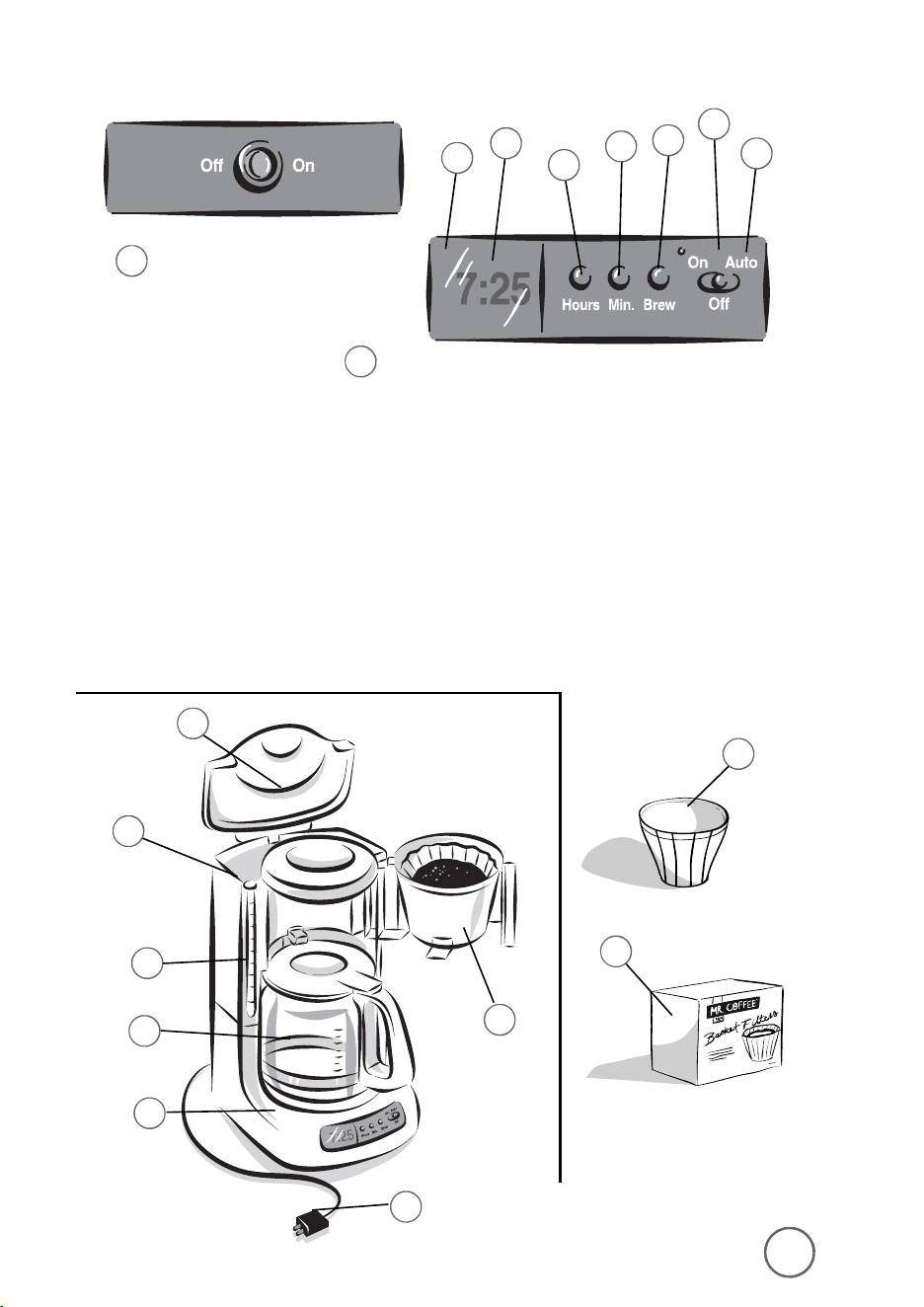
Coffeemaker Features
5
6
11
10
7
2
1
8
4
M
ODELS
AR10, AR11,
AR12
AND
AR13
M
ODELS
ARX10, ARX11, ARX20
AND
ARX23
1.
ON/OFF Switch
(Models AR10, AR11,
AR12 and AR13 Only)
2.
Control Panel
(Models ARX10, ARX11, ARX20
and ARX23 only)
a.
Hour Button
b.
Minute Button
c.
Brew Button
d.
On-Off Indicator
e.
Auto Indicator
f.
PM Indicator
g.
Clock Display
3.
Removable Brew Basket
4.
Brew Basket Lid
5.
Water Reservoir
6.
Water Window
7.
Power Cord
8.
MR. COFFEE
®
Brand
8-12 Cup Basket
Style Coffee Filters
(not included)
9.
MR. COFFEE
®
Brand
Permanent Filter
(not included)
10.
Warming Plate
11.
Decanter
9
3
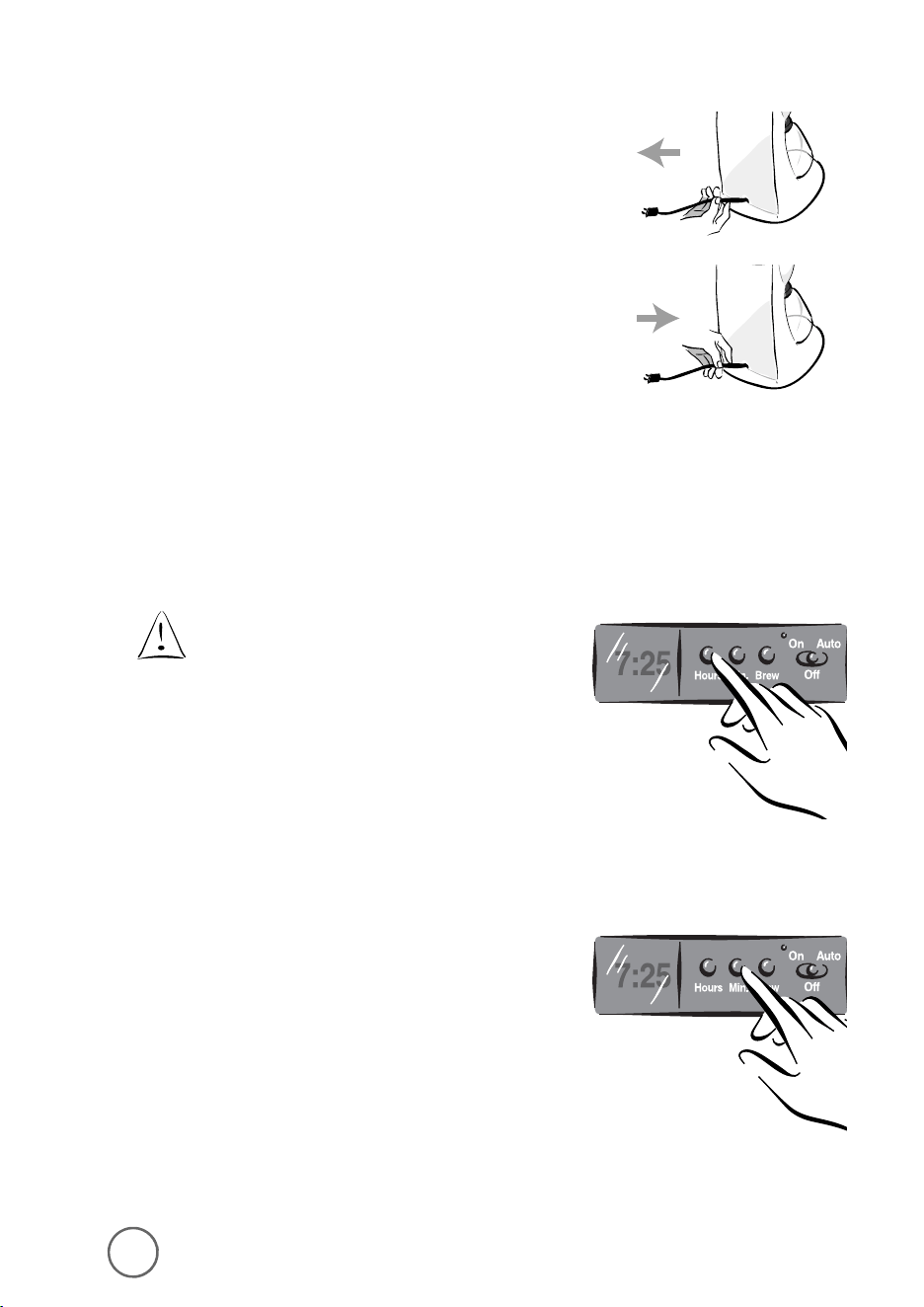
Adjusting the Power Cord Length
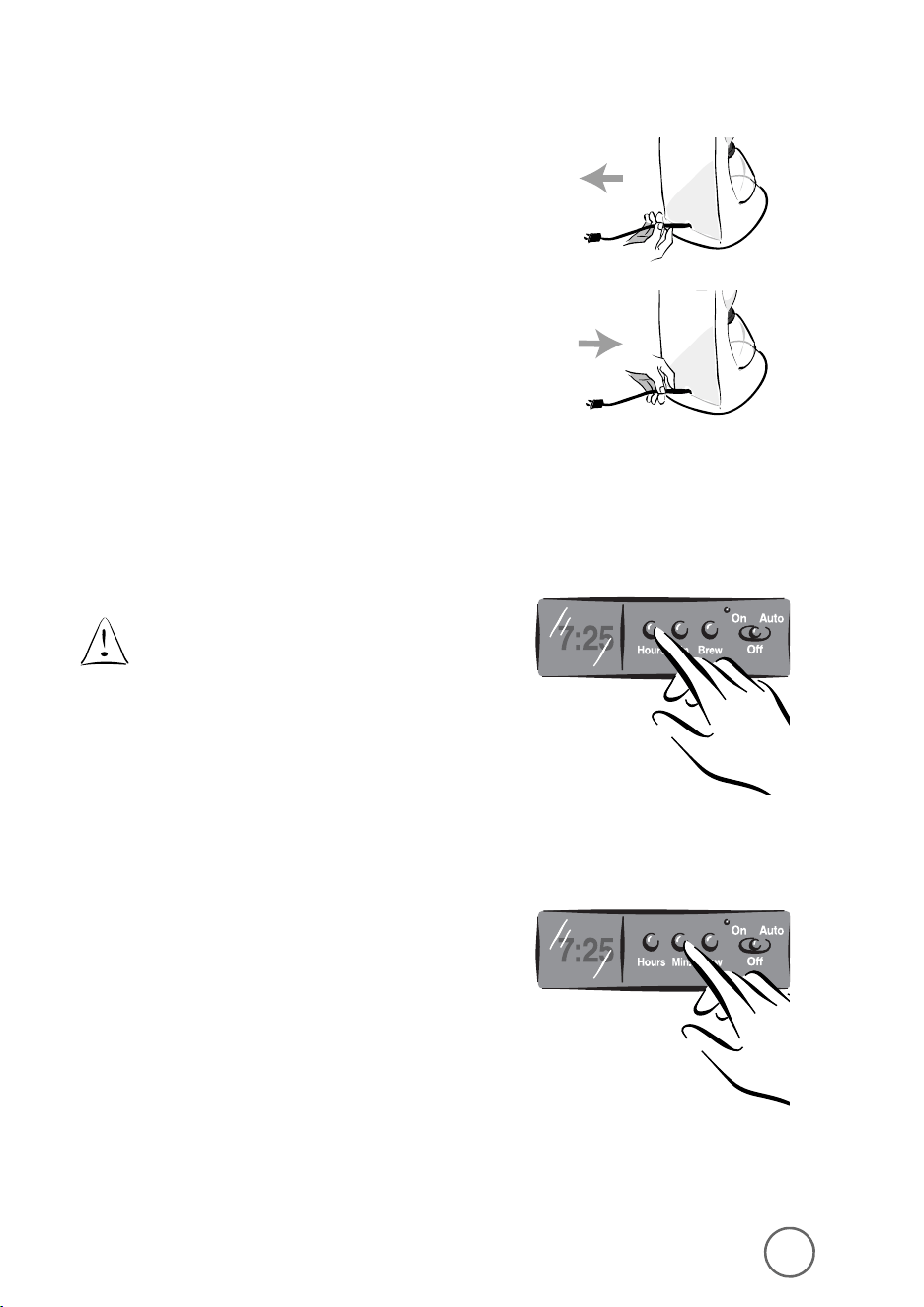
You can customize the length of the power cord
so that it is the exact length you desire.
To increase the length of the power cord:
Grasp the power cord (not the power plug)
and gently pull it away from the coffeemaker.
To decrease the length of the power cord:
Grasp the power cord and feed
into the coffeemaker.
Setting the Clock
(Models ARX10, ARX11, ARX20 and ARX23 only)
The clock flashes on the control panel to indicate
that it has not been set.
You must set the clock if you want to use
the timer feature.
To set the clock:
1) Press and hold the HOUR button until the clock
displays the correct hour. See Figure A-1
(for Models ARX10, ARX11, ARX20 and ARX23).
The PM indicator will light to indicate a PM time;
if the PM indicator is not lit, the time is AM.
2) Press and hold the MIN. button until the clock
displays the correct minute. See Figure B-1
(for Models ARX10, ARX11, ARX20 and ARX23).
The clock is now set.
a
c
f
g
d
e
b
76
F
IGURE
A-1
F
IGURE
B-1
Coffeemaker Features
5
6
11
10
7
2
1
8
4
M
ODELS
AR10, AR11,
AR12
AND
AR13
M
ODELS
ARX10, ARX11, ARX20
AND
ARX23
1.
ON/OFF Switch
(Models AR10, AR11,
AR12 and AR13 Only)
2.
Control Panel
(Models ARX10, ARX11, ARX20
and ARX23 only)
a.
Hour Button
b.
Minute Button
c.
Brew Button
d.
On-Off Indicator
e.
Auto Indicator
f.
PM Indicator
g.
Clock Display
3.
Removable Brew Basket
4.
Brew Basket Lid
5.
Water Reservoir
6.
Water Window
7.
Power Cord
8.
MR. COFFEE
®
Brand
8-12 Cup Basket
Style Coffee Filters
(not included)
9.
MR. COFFEE
®
Brand
Permanent Filter
(not included)
10.
Warming Plate
11.
Decanter
9
3
Adjusting the Power Cord Length
You can customize the length of the power cord
so that it is the exact length you desire.
To increase the length of the power cord:
Grasp the power cord (not the power plug)
and gently pull it away from the coffeemaker.
To decrease the length of the power cord:
Grasp the power cord and feed
into the coffeemaker.
Setting the Clock
(Models ARX10, ARX11, ARX20 and ARX23 only)
The clock flashes on the control panel to indicate
that it has not been set.
You must set the clock if you want to use
the timer feature.
To set the clock:
1) Press and hold the HOUR button until the clock
displays the correct hour. See Figure A-1
(for Models ARX10, ARX11, ARX20 and ARX23).
The PM indicator will light to indicate a PM time;
if the PM indicator is not lit, the time is AM.
2) Press and hold the MIN. button until the clock
displays the correct minute. See Figure B-1
(for Models ARX10, ARX11, ARX20 and ARX23).
The clock is now set.
a
c
f
g
d
e
b
8 9
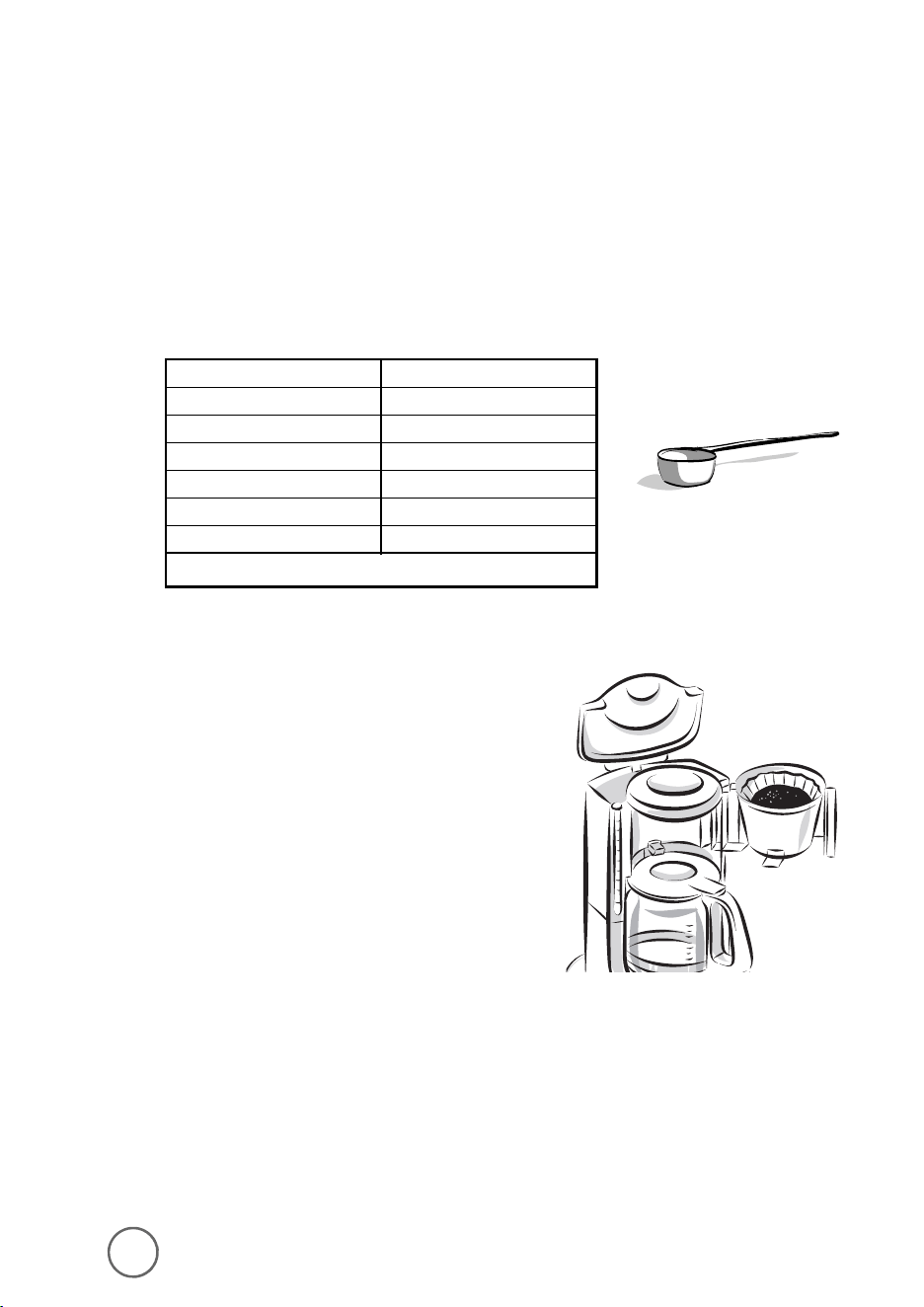
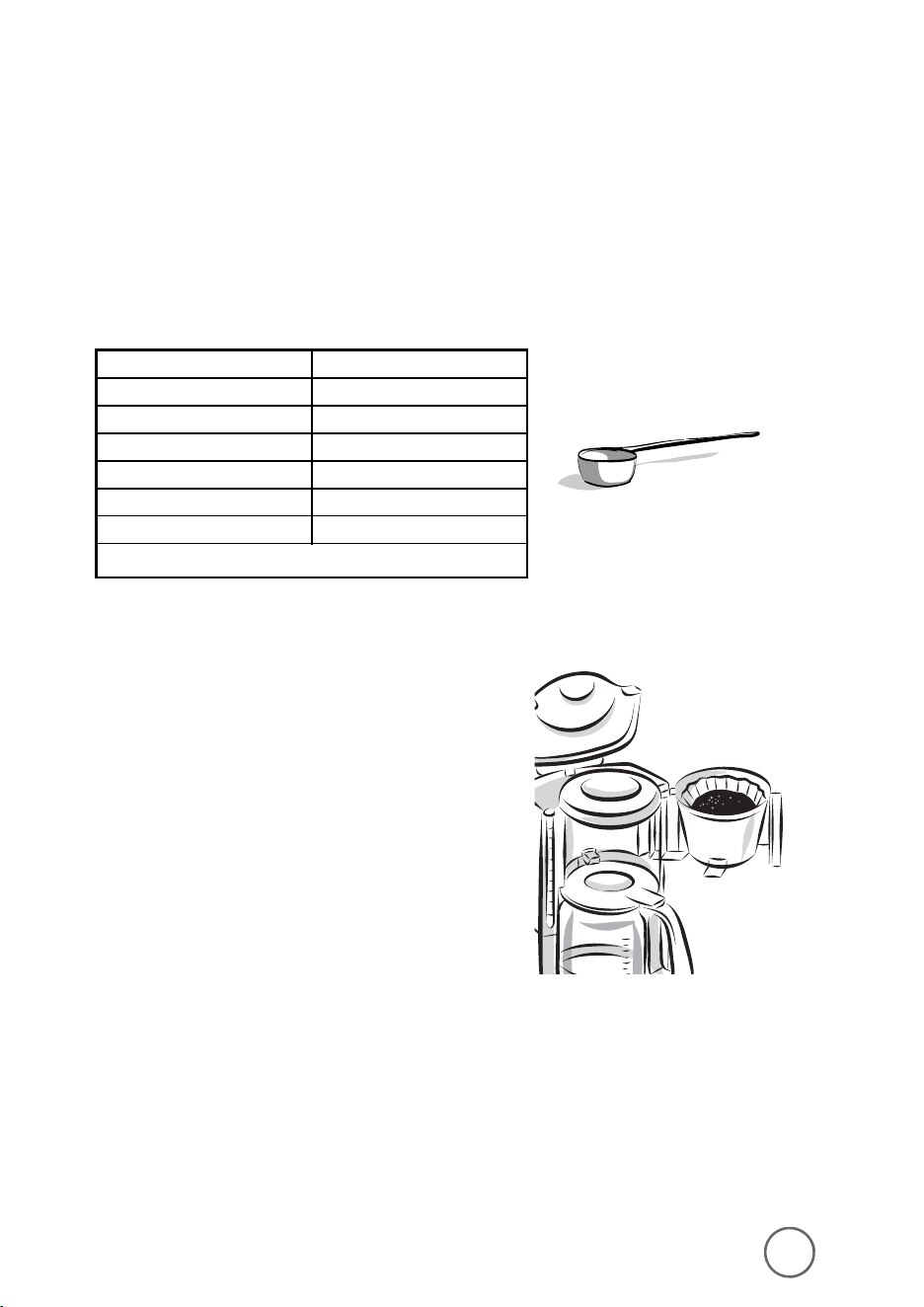
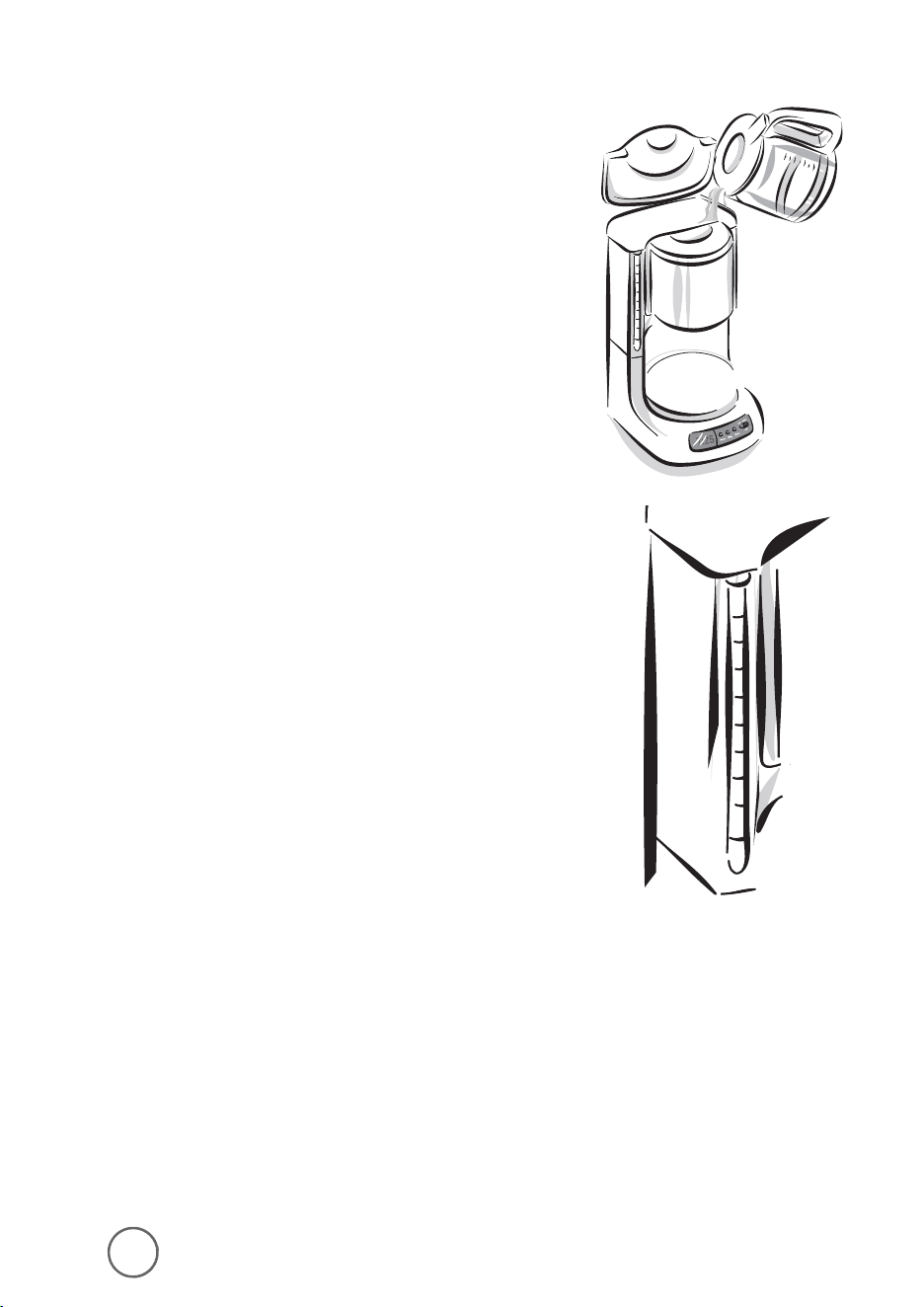
Adding Water and Ground Coffee
1) Swing open the brew basket and, if desired,
lift out the removable filter basket.
2) Place a MR. COFFEE
®
brand 8-12 cup
paper filter or a MR. COFFEE
®
permanent
gold-tone filter in the filter basket.
3) Add the desired amount of ground coffee
to the filter. Gently shake the filter basket
to level the ground coffee.
Brewing Coffee
Clean the Coffeemaker Before First Use
Follow the steps under “Adding Water and Ground Coffee” and “Brewing Coffee Now,”
(Pages 8 – 10) but do not add coffee grounds.
Selecting and Measuring Ground Coffee
For best results, use coffee ground for use with automatic drip coffeemakers.
The amounts shown below are suggested amounts.
• two level tablespoons = one level scoop
• one cup = five ounces brewed coffee
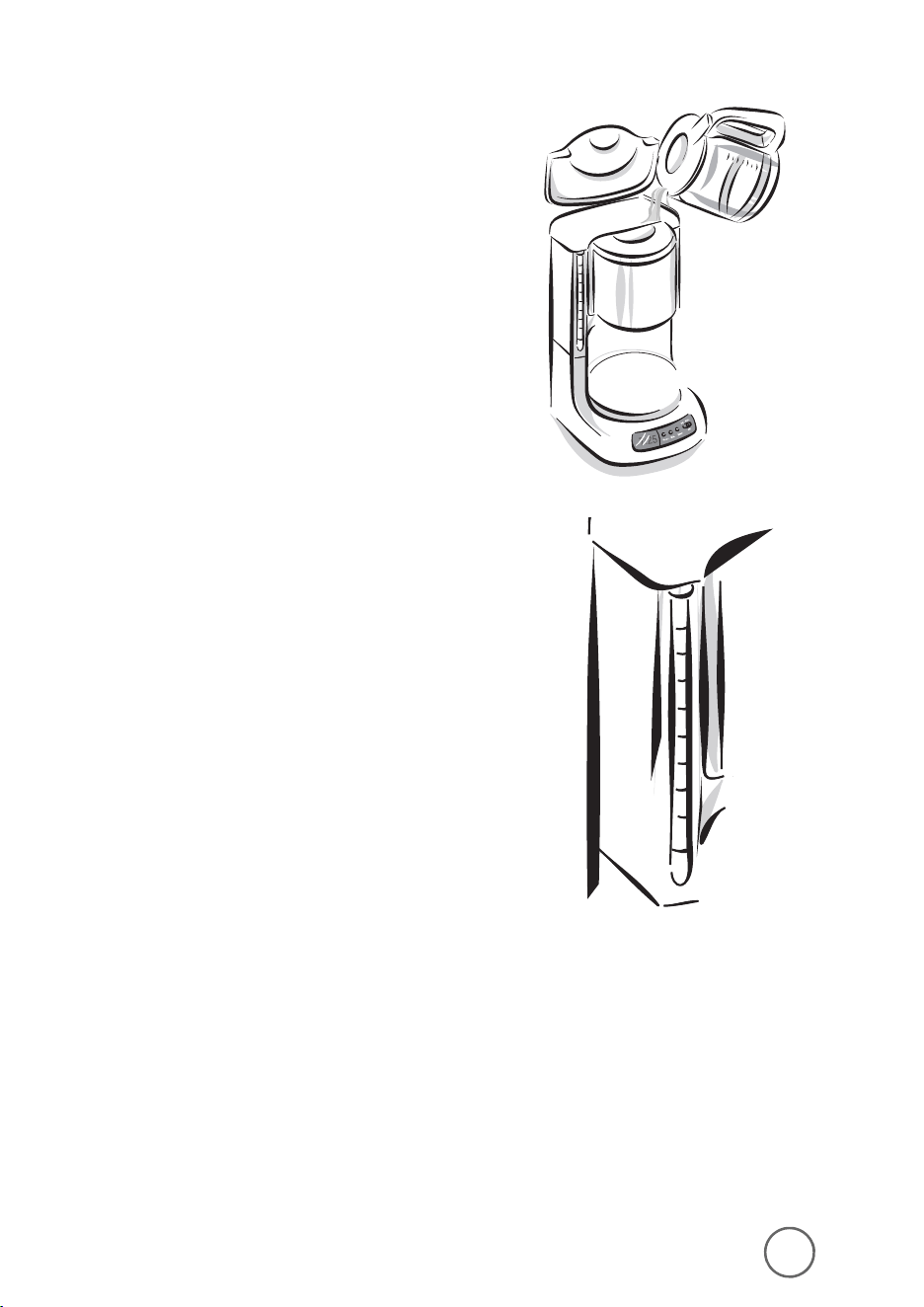
4) Be certain that the filter is centered in the
filter basket. Close the brew basket.
5) Fill the water reservoir with the desired amount
of tap water.
Use the water window marks to measure the
water, not the decanter marks. The decanter
marks measure brewed coffee only.
Number of Cups Tablespoons
12 9
10 7.5
8 6
6 4.5
4 3
2 1.5
One cup = Five ounces brewed coffee
8 9
Adding Water and Ground Coffee
1) Swing open the brew basket and, if desired,
lift out the removable filter basket.
2) Place a MR. COFFEE
®
brand 8-12 cup
paper filter or a MR. COFFEE
®
permanent
gold-tone filter in the filter basket.
3) Add the desired amount of ground coffee
to the filter. Gently shake the filter basket
to level the ground coffee.
Brewing Coffee
Clean the Coffeemaker Before First Use
Follow the steps under “Adding Water and Ground Coffee” and “Brewing Coffee Now,”
(Pages 8 – 10) but do not add coffee grounds.
Selecting and Measuring Ground Coffee
For best results, use coffee ground for use with automatic drip coffeemakers.
The amounts shown below are suggested amounts.
• two level tablespoons = one level scoop
• one cup = five ounces brewed coffee
4) Be certain that the filter is centered in the
filter basket. Close the brew basket.
5) Fill the water reservoir with the desired amount
of tap water.
Use the water window marks to measure the
water, not the decanter marks. The decanter
marks measure brewed coffee only.
Number of Cups Tablespoons
12 9
10 7.5
8 6
6 4.5
4 3
2 1.5
One cup = Five ounces brewed coffee
10 11
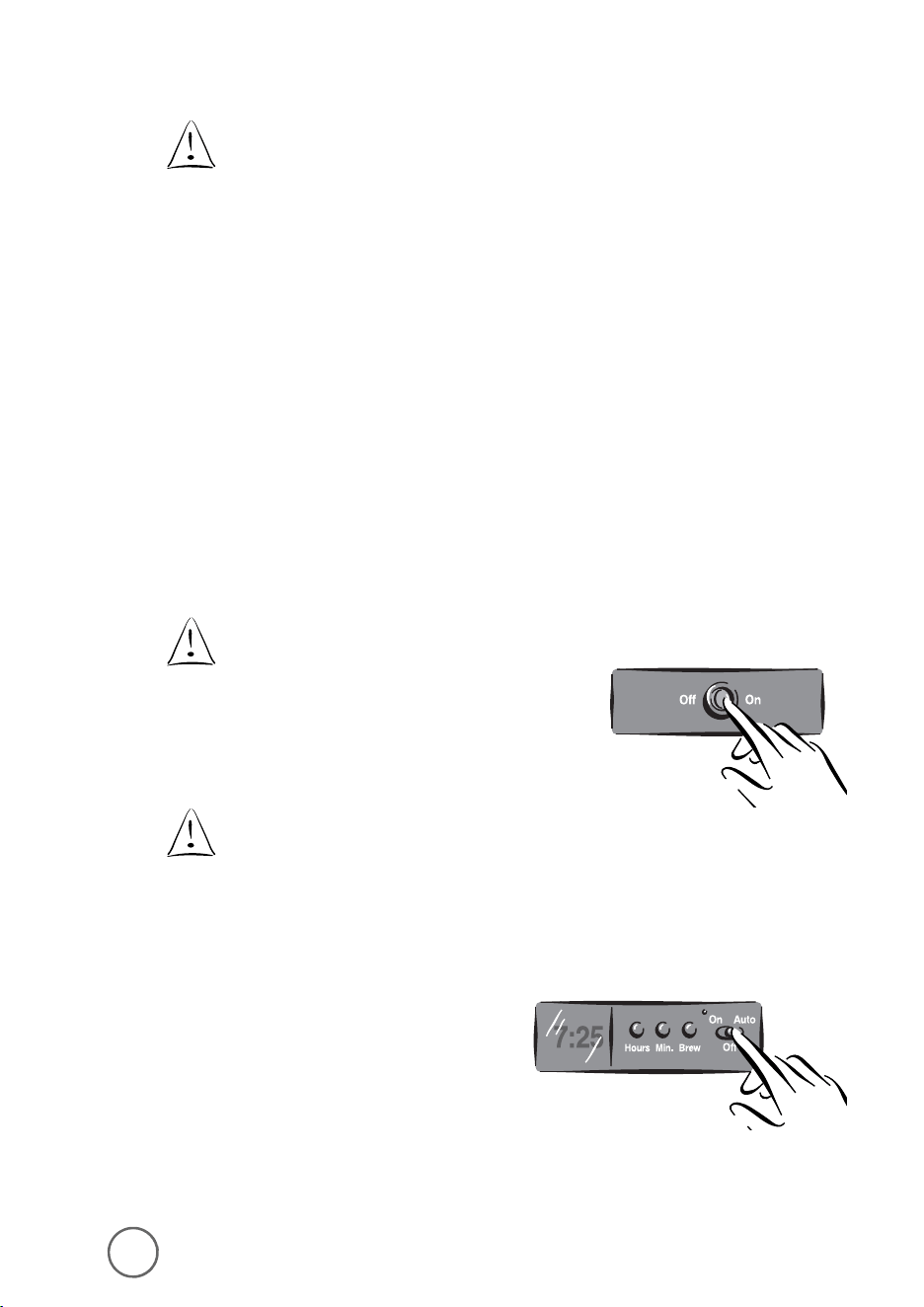
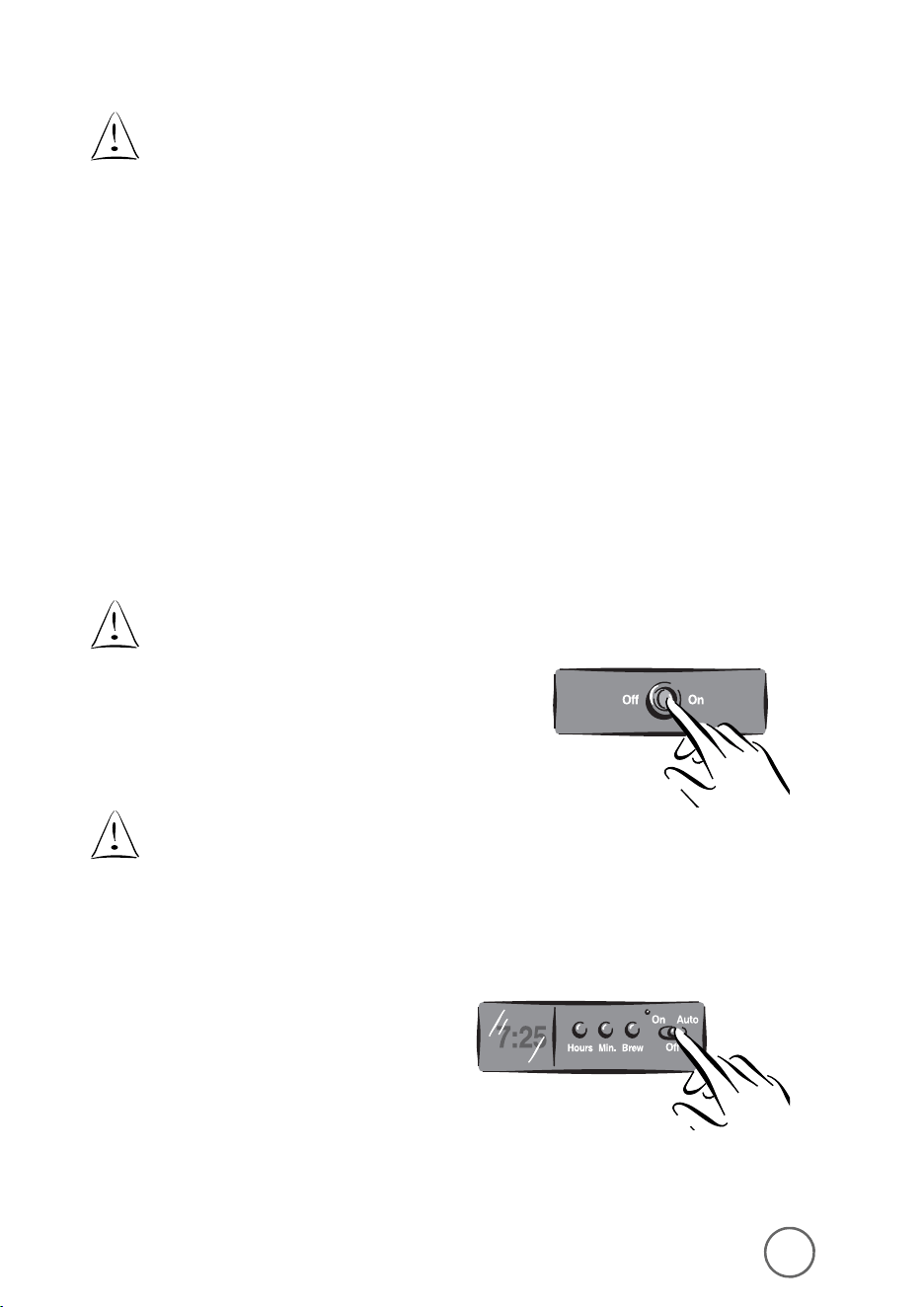
Brewing Coffee Later
For Models ARX10, ARX11, ARX20 and ARX23 only:
You must set the time for when you would like
the coffeemaker to begin brewing your coffee.
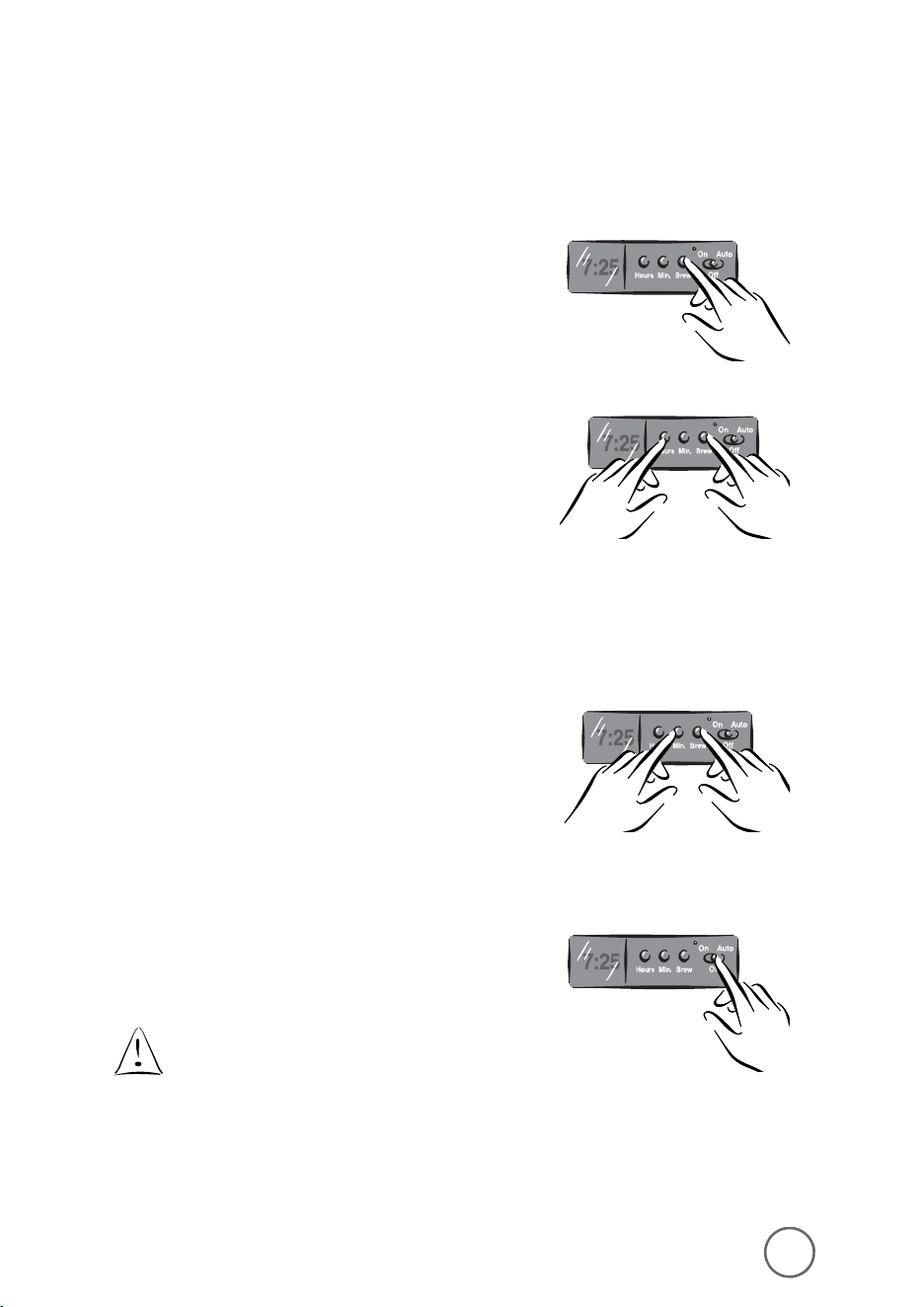
1) While the switch is in the Off position,
press and hold the BREW button.
2) While still pressing and holding the brew button,
press and hold the HOUR button until the clock
displays the hour you desire. The PM indicator
will light to indicate a PM time; if the PM
indicator is not lit, the time is AM.
3) While still pressing and holding the brew button,
press and hold the MIN. button until the clock
displays the correct minute.
4) Release the brew button.
5) Push the switch to Auto.
The Delay Brew indicator will light. The delay
timer is set and the coffeemaker will begin
brewing the coffee at the time you selected.
If you want your coffee to brew at the
same time the following day, simply
add the desired amount of ground
coffee, fill the water reservoir and
slide the button to AUTO.
6) Place the decanter on the warming plate.
Make sure the decanter is accurately
centered on the warming plate or the water
and grounds will overflow from the brew
basket. An overflow may cause personal
injury or damage to property.
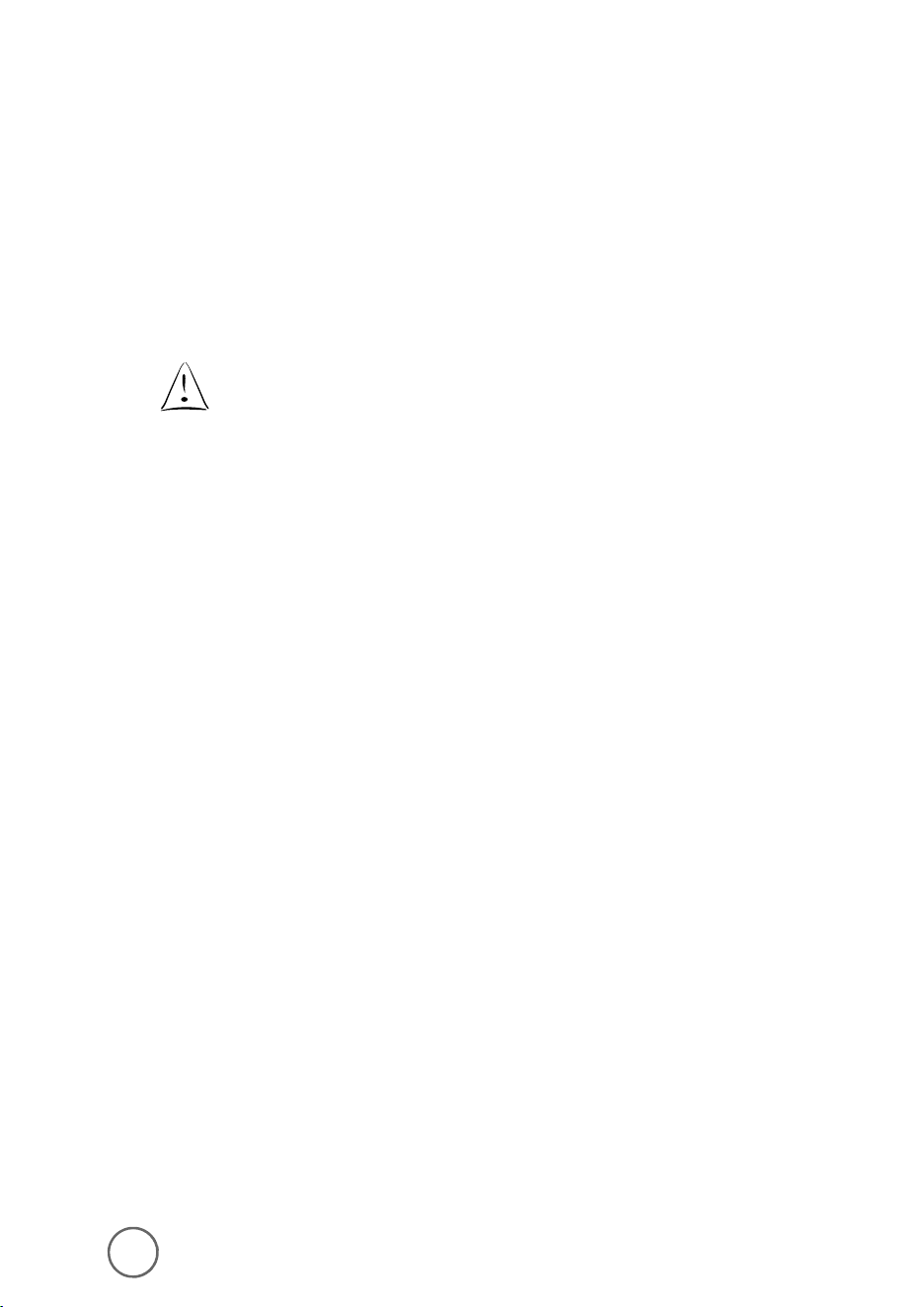
To reduce the risk of damaging the decanter
and/or the risk of personal injury, do not
add cold water to the decanter if the
decanter is already hot. Allow the decanter
to cool before using.
Do not brew coffee while the brew basket
lid is open.
Brewing Coffee Now
For Models AR10, AR11, AR12 and AR13 only:
Push the switch to ON.
The ON/OFF switch will light, indicating that the
coffeemaker is On and the brew cycle will begin.
When the coffee stops flowing, the brew cycle
is complete.
While the coffee is brewing, the Pause ‘n
Serve feature allows you to sneak a cup
of coffee from the decanter. REPLACE THE
DECANTER ON THE WARMING PLATE WITHIN
30 SECONDS TO PREVENT OVERFLOW AND
POSSIBLE INJURY.
To turn Off the coffeemaker, press the ON/OFF
switch to Off.
If the brew basket overflows or fails
to empty into the decanter, do not
open the brew basket. Unplug the
coffeemaker and wait for the contents
to cool before handling.
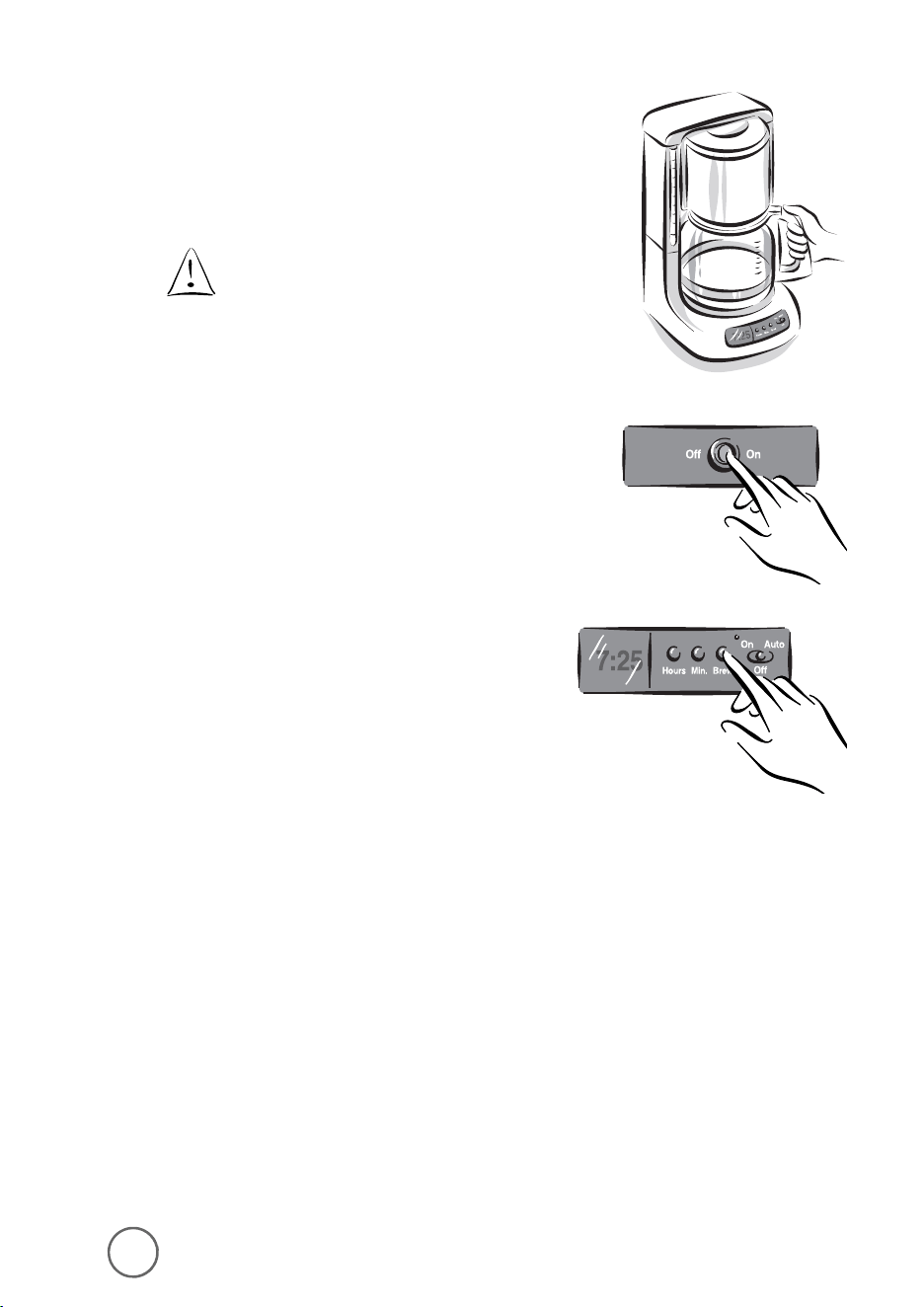
For Models ARX10, ARX11, ARX20 and ARX23 only:
Slide the switch to On. Press the
brew button when ready to start brewing.
To turn the coffeemaker Off,
slide the switch to Off.
Your Coffeemaker will keep your coffee hot
for 2 hours, then automatically shut off.
10 11
Brewing Coffee Later
For Models ARX10, ARX11, ARX20 and ARX23 only:
You must set the time for when you would like
the coffeemaker to begin brewing your coffee.
1) While the switch is in the Off position,
press and hold the BREW button.
2) While still pressing and holding the brew button,
press and hold the HOUR button until the clock
displays the hour you desire. The PM indicator
will light to indicate a PM time; if the PM
indicator is not lit, the time is AM.
3) While still pressing and holding the brew button,
press and hold the MIN. button until the clock
displays the correct minute.
4) Release the brew button.
5) Push the switch to Auto.
The Delay Brew indicator will light. The delay
timer is set and the coffeemaker will begin
brewing the coffee at the time you selected.
If you want your coffee to brew at the
same time the following day, simply
add the desired amount of ground
coffee, fill the water reservoir and
slide the button to AUTO.
6) Place the decanter on the warming plate.
Make sure the decanter is accurately
centered on the warming plate or the water
and grounds will overflow from the brew
basket. An overflow may cause personal
injury or damage to property.
To reduce the risk of damaging the decanter
and/or the risk of personal injury, do not
add cold water to the decanter if the
decanter is already hot. Allow the decanter
to cool before using.
Do not brew coffee while the brew basket
lid is open.
Brewing Coffee Now
For Models AR10, AR11, AR12 and AR13 only:
Push the switch to ON.
The ON/OFF switch will light, indicating that the
coffeemaker is On and the brew cycle will begin.
When the coffee stops flowing, the brew cycle
is complete.
While the coffee is brewing, the Pause ‘n
Serve feature allows you to sneak a cup
of coffee from the decanter. REPLACE THE
DECANTER ON THE WARMING PLATE WITHIN
30 SECONDS TO PREVENT OVERFLOW AND
POSSIBLE INJURY.
To turn Off the coffeemaker, press the ON/OFF
switch to Off.
If the brew basket overflows or fails
to empty into the decanter, do not
open the brew basket. Unplug the
coffeemaker and wait for the contents
to cool before handling.
For Models ARX10, ARX11, ARX20 and ARX23 only:
Slide the switch to On. Press the
brew button when ready to start brewing.
To turn the coffeemaker Off,
slide the switch to Off.
Your Coffeemaker will keep your coffee hot
for 2 hours, then automatically shut off.
12 13
Maintaining Your Coffeemaker
Maintaining your coffeemaker and its parts will help extend the life of the appliance.
Cleaning the Coffeemaker
Your coffeemaker must be cleaned when you notice any of the follow conditions:
• excessive steaming
• increased brew cycle times
• the pumping action stops before all of the water has been pumped
from the water reservoir
These conditions are caused by lime or other mineral deposits most commonly found
in tap water.
How frequently you clean your coffeemaker depends upon the hardness
of your tap water. The following table gives suggested cleaning intervals.
Using MR. COFFEE
®
Cleaner
Please refer to MR. COFFEE
®
Cleaner box for instructions.
Read caution statement on side panel of box before use.
To clean your coffeemaker:
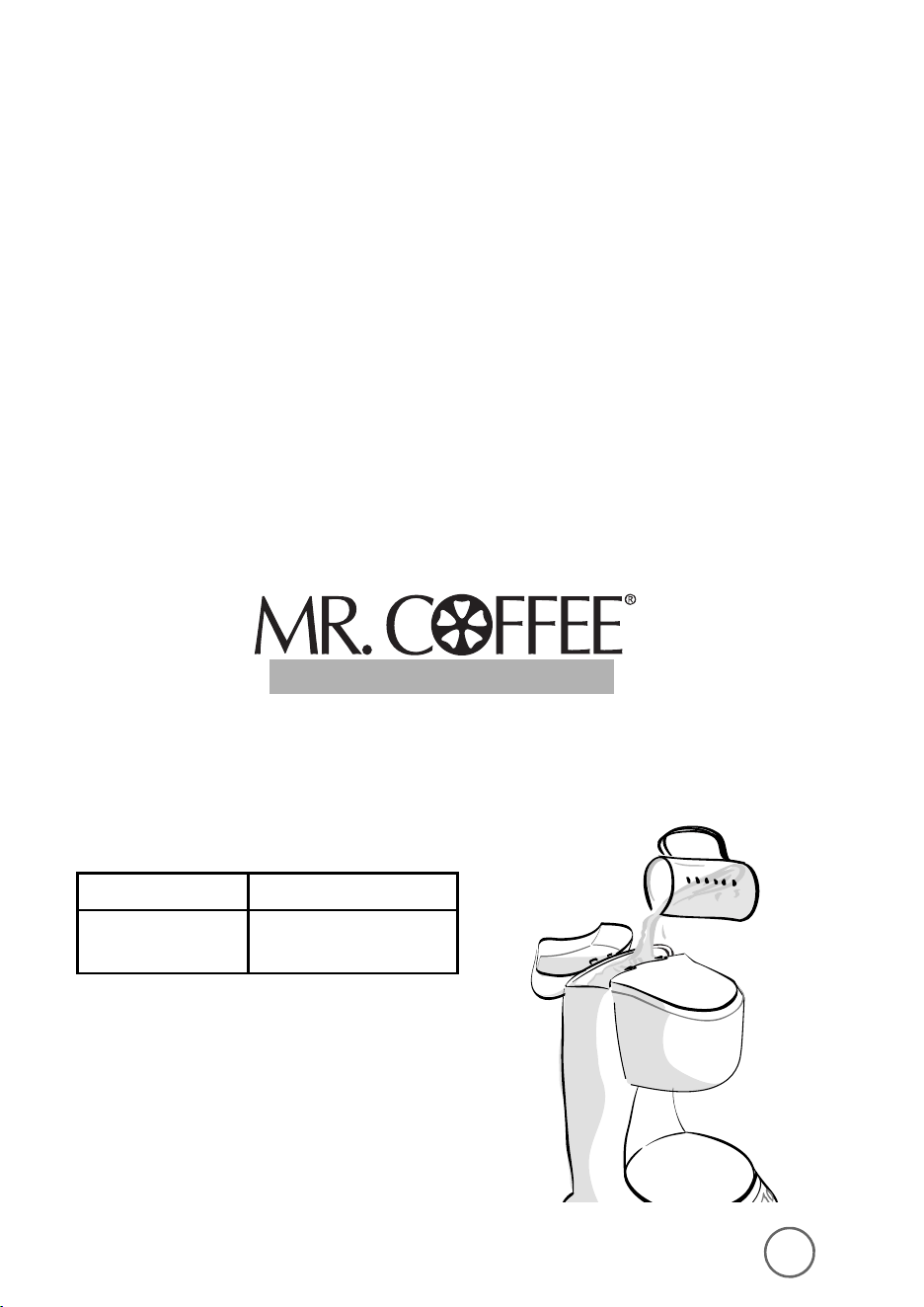
1) Pour four cups of undiluted white household
vinegar into the water reservoir.
Cleaning the Coffeemaker Between Brew Cycles
To clean the used coffee grounds and filter:
1) Discard the grounds and paper filter and, if necessary,
rinse the filter basket. You may also wash the filter basket
in the dishwasher.
2) Rinse the decanter with warm water. You may also wash the
decanter in the dishwasher (top rack dishwasher safe only).
Make sure the coffeemaker is turned Off
when the decanter is empty.
Brewed coffee and grounds are both very hot.
Handle them with care to avoid scalding injuries.
Unplug the coffeemaker’s power cord if you are
not using the coffeemaker or clock.
Type of Water Cleaning Frequency
Soft water Every 80 brew cycles
Hard water Every 40 brew cycles
COFFEEMAKER CLEANER
COFFEEMAKER CLEANER
12 13
Maintaining Your Coffeemaker
Maintaining your coffeemaker and its parts will help extend the life of the appliance.
Cleaning the Coffeemaker
Your coffeemaker must be cleaned when you notice any of the follow conditions:
• excessive steaming
• increased brew cycle times
• the pumping action stops before all of the water has been pumped
from the water reservoir
These conditions are caused by lime or other mineral deposits most commonly found
in tap water.
How frequently you clean your coffeemaker depends upon the hardness
of your tap water. The following table gives suggested cleaning intervals.
Using MR. COFFEE
®
Cleaner
Please refer to MR. COFFEE
®
Cleaner box for instructions.
Read caution statement on side panel of box before use.
To clean your coffeemaker:
1) Pour four cups of undiluted white household
vinegar into the water reservoir.
Cleaning the Coffeemaker Between Brew Cycles
To clean the used coffee grounds and filter:
1) Discard the grounds and paper filter and, if necessary,
rinse the filter basket. You may also wash the filter basket
in the dishwasher.
2) Rinse the decanter with warm water. You may also wash the
decanter in the dishwasher (top rack dishwasher safe only).
Make sure the coffeemaker is turned Off
when the decanter is empty.
Brewed coffee and grounds are both very hot.
Handle them with care to avoid scalding injuries.
Unplug the coffeemaker’s power cord if you are
not using the coffeemaker or clock.
Type of Water Cleaning Frequency
Soft water Every 80 brew cycles
Hard water Every 40 brew cycles
COFFEEMAKER CLEANER
COFFEEMAKER CLEANER
2) Place a paper filter into the removable filter
basket and close the brew basket lid.
3) Place the empty decanter on the
warming plate.
Make sure to accurately place the
decanter on the warming plate
to avoid the possibility of overflow.
4) Start the brew cycle:
For Switch Models:
• AR10, AR11, AR12 and AR13
a. Push the ON/OFF switch to ON
to begin the brew cycle.
For Programmable Models:
• ARX10, ARX11, ARX20 and ARX23
a. Turn the switch to On. Then, press the
brew button to begin the brew cycle.
b. When the water has flowed into the
decanter, turn the coffeemaker Off
and let the water stand for 30 minutes.
c. Repeat Steps 1 – 4b.
14 15
d. Discard both the vinegar and filter.
Fill the decanter with tap water and
pour it into the water reservoir.
e. Place the decanter on the warming plate
and begin the brew cycle.
f. Discard the water in the decanter and turn
the coffeemaker Off. If necessary, repeat
steps d through f to flush all traces of
vinegar from the coffeemaker.
Cleaning the Decanter
Hard water can leave a whitish stain on the decanter.
Coffee and tea may then turn this stain brown.
To remove decanter stains:
1) Fill the decanter with a solution of equal parts
tap water and vinegar and let the solution stand
in the decanter for approximately 20 minutes.
2) Discard the solution and wash and rinse
the decanter.
Do not use harsh abrasive cleansers
that may scratch the decanter;
scratches may cause the decanter
to break.
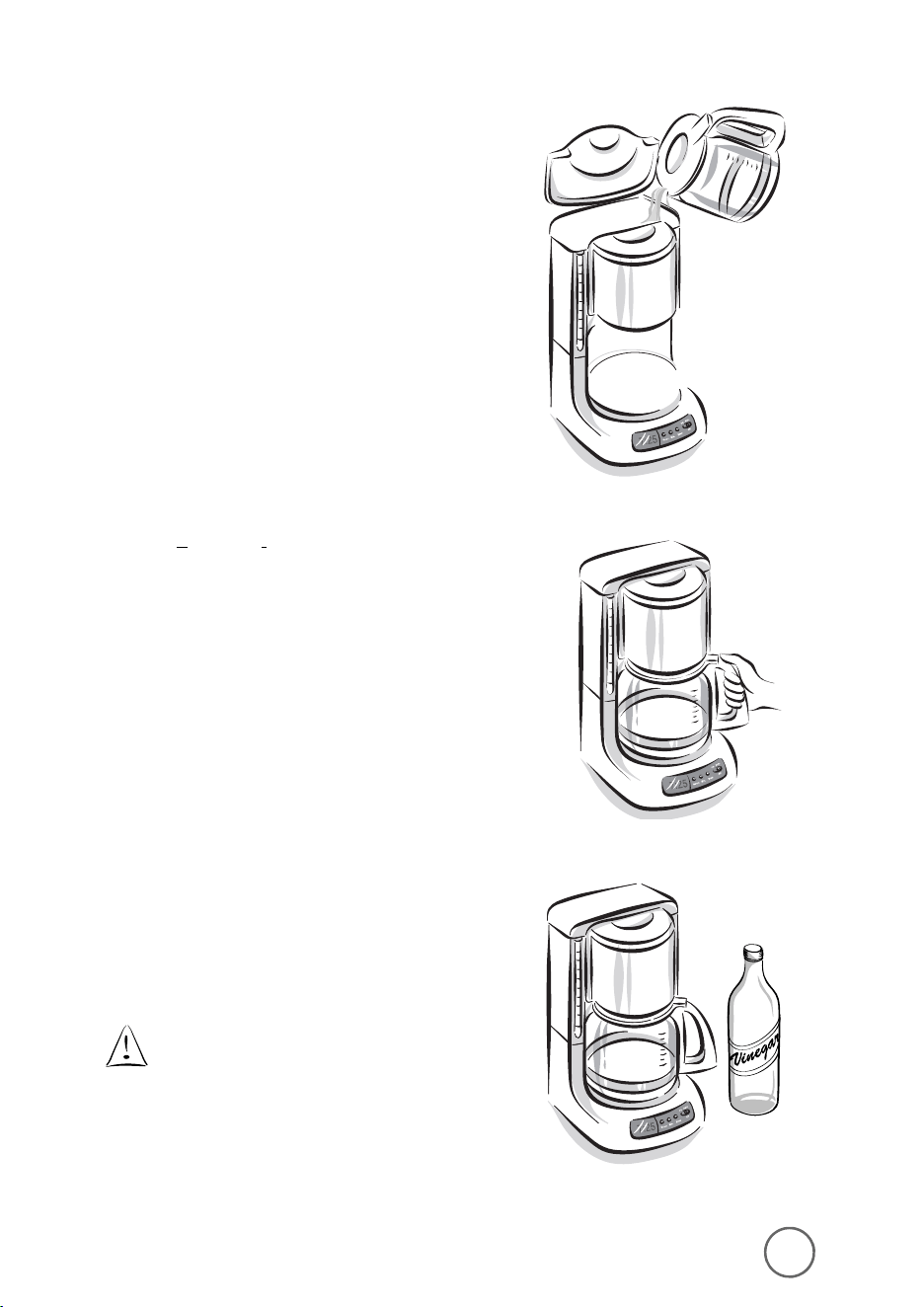
2) Place a paper filter into the removable filter
basket and close the brew basket lid.
3) Place the empty decanter on the
warming plate.
Make sure to accurately place the
decanter on the warming plate
to avoid the possibility of overflow.
4) Start the brew cycle:
For Switch Models:
• AR10, AR11, AR12 and AR13
a. Push the ON/OFF switch to ON
to begin the brew cycle.
For Programmable Models:
• ARX10, ARX11, ARX20 and ARX23
a. Turn the switch to On. Then, press the
brew button to begin the brew cycle.
b. When the water has flowed into the
decanter, turn the coffeemaker Off
and let the water stand for 30 minutes.
c. Repeat Steps 1 – 4b.
14 15
d. Discard both the vinegar and filter.
Fill the decanter with tap water and
pour it into the water reservoir.
e. Place the decanter on the warming plate
and begin the brew cycle.
f. Discard the water in the decanter and turn
the coffeemaker Off. If necessary, repeat
steps d through f to flush all traces of
vinegar from the coffeemaker.
Cleaning the Decanter
Hard water can leave a whitish stain on the decanter.
Coffee and tea may then turn this stain brown.
To remove decanter stains:
1) Fill the decanter with a solution of equal parts
tap water and vinegar and let the solution stand
in the decanter for approximately 20 minutes.
2) Discard the solution and wash and rinse
the decanter.
Do not use harsh abrasive cleansers
that may scratch the decanter;
scratches may cause the decanter
to break.
17
Service and Maintenance
Replacement Parts
• Filters
For better tasting coffee and tea, we recommend that you use MR. COFFEE
®
brand
8-12 cup paper filters or MR. COFFEE
®
brand permanent filters. These filters are
available at most grocery stores.
• Decanters
You can usually purchase a replacement decanter from the store where
you purchased your coffeemaker. If you are unable to find a replacement,
please call 1-800 MR COFFEE (1-800-672-6333) in the U.S. and Canada for
information on where you can find a store that carries replacement decanters.
Repairs
If your coffeemaker requires service, do not return it to the store where you purchased
it. All repairs must be made by Sunbeam or by an authorized MR. COFFEE
®
Service
Center. If you live in the U.S. or Canada, please call us at the following toll-free
telephone number to find the location of the nearest authorized service center:
1-800 MR COFFEE (1-800-672-6333)
To assist us in serving you, please have the model number (AR10, AR11, AR12, AR13,
ARX10, ARX11, ARX20 or ARX23) and date of purchase information when you call.
Questions, Comments and Suggestions
We welcome your thoughts; please include your complete name, address and telephone
number when you write or e-mail us at:
consumeraffairs@consumer.Sunbeam.com
You may also visit our website and discover the secret to brewing the perfect cup of
coffee. You’ll also find a rich blend of gourmet recipes, entertaining tips and the latest
information on MR. COFFEE
®
products.
www.mrcoffee.com
coffee
16
T
ROUBLESHOOTING
P
OTENTIAL
P
ROBLEMS
P
ROBABLE
C
AUSE
“ON” LIGHT DOES NOT ILLUMINATE • Unplugged
• Power outage
COFFEE IS NOT BREWING • Unplugged
• Power outage
• The water reservoir is empty;
check water window
• The filter basket is not
properly inserted
• Carafe lid is not placed all the way
on the warming plate
COFFEEMAKER ONLY BREWS WATER • No grounds in filter basket
COFFEEMAKER BREWS SLOWLY • Coffeemaker needs decalcifying
FILTER BASKET OVERFLOWS • The filter basket is not
properly inserted
• Carafe is not placed all the way
on the warming plate
• Carafe lid not on carafe
• Too many grounds placed in filter
• Carafe was removed from warming
plate longer than 30 seconds
BURNING COFFEE SMELL • Empty carafe was left on
hot warming plate
• Coffee was spilled on
a warming plate
COFFEE IS NOT HOT • Power outage
• The Automatic Shut-Off function
has been activated
COFFEE TASTES BAD • Coffee ground other than for
automatic-drip Coffeemaker was used
• Ground coffee-to-water ratio
was unbalanced
GROUNDS ARE IN COFFEE • Paper filter not properly seated
in basket
• Filter overflowed
Questions? You can call us toll-free at 1-800-672-6333.

17
Service and Maintenance
Replacement Parts
• Filters
For better tasting coffee and tea, we recommend that you use MR. COFFEE
®
brand
8-12 cup paper filters or MR. COFFEE
®
brand permanent filters. These filters are
available at most grocery stores.
• Decanters
You can usually purchase a replacement decanter from the store where
you purchased your coffeemaker. If you are unable to find a replacement,
please call 1-800 MR COFFEE (1-800-672-6333) in the U.S. and Canada for
information on where you can find a store that carries replacement decanters.
Repairs
If your coffeemaker requires service, do not return it to the store where you purchased
it. All repairs must be made by Sunbeam or by an authorized MR. COFFEE
®
Service
Center. If you live in the U.S. or Canada, please call us at the following toll-free
telephone number to find the location of the nearest authorized service center:
1-800 MR COFFEE (1-800-672-6333)
To assist us in serving you, please have the model number (AR10, AR11, AR12, AR13,
ARX10, ARX11, ARX20 or ARX23) and date of purchase information when you call.
Questions, Comments and Suggestions
We welcome your thoughts; please include your complete name, address and telephone
number when you write or e-mail us at:
consumeraffairs@consumer.Sunbeam.com
You may also visit our website and discover the secret to brewing the perfect cup of
coffee. You’ll also find a rich blend of gourmet recipes, entertaining tips and the latest
information on MR. COFFEE
®
products.
www.mrcoffee.com
coffee
16
T
ROUBLESHOOTING
P
OTENTIAL
P
ROBLEMS
P
ROBABLE
C
AUSE
“ON” LIGHT DOES NOT ILLUMINATE • Unplugged
• Power outage
COFFEE IS NOT BREWING • Unplugged
• Power outage
• The water reservoir is empty;
check water window
• The filter basket is not
properly inserted
• Carafe lid is not placed all the way
on the warming plate
COFFEEMAKER ONLY BREWS WATER • No grounds in filter basket
COFFEEMAKER BREWS SLOWLY • Coffeemaker needs decalcifying
FILTER BASKET OVERFLOWS • The filter basket is not
properly inserted
• Carafe is not placed all the way
on the warming plate
• Carafe lid not on carafe
• Too many grounds placed in filter
• Carafe was removed from warming
plate longer than 30 seconds
BURNING COFFEE SMELL • Empty carafe was left on
hot warming plate
• Coffee was spilled on
a warming plate
COFFEE IS NOT HOT • Power outage
• The Automatic Shut-Off function
has been activated
COFFEE TASTES BAD • Coffee ground other than for
automatic-drip Coffeemaker was used
• Ground coffee-to-water ratio
was unbalanced
GROUNDS ARE IN COFFEE • Paper filter not properly seated
in basket
• Filter overflowed
Questions? You can call us toll-free at 1-800-672-6333.

19
PRECAUCIONES IMPORTANTES
Cuando use algú n aparato elé ctrico siempre deben de seguirse precauciones
bá sicas de seguridad incluyendo las siguientes para reducir el riesgo de
incendio o descargas elé ctricas, y /o dañ os a personas:
•
LEA TODAS LAS INSTRUCCIONES CUIDADOSAMENTE ANTES
DE USAR LA CAFETERA.
• No toque las superficies calientes de la cafetera.
• Para protegerse contra una descarga elé ctrica, no sumerja el cordó n,
el enchufe o la cafetera en agua o en otros líquidos.
• Supervisió n cercana es necesaria cuando el aparato es usado por o cerca
de niñ os.
• Apague la cafetera y desconé ctela de la toma de corriente cuando é sta
o el reloj no esté n en uso y antes de limpiarlos. Permita que se enfríe
antes de poner o quitar partes y antes de limpiar el electrodomé stico.
• No opere ningú n aparato con un cordó n dañ ado o despué s de que el
aparato ha funcionado inadecuadamente o ha sido dañ ado en cualquier
manera. Regrese el aparato a un centro de servicio autorizado para su
examinació n, reparació n o ajuste.
• El uso de accesorios o aditamentos que no sean de la marca MR. COFFEE
®
puede causar lesiones o dañ os.
• No se use en exteriores.
• No permita que el cordó n cuelgue sobre la orilla de la mesa o del
mostrador o toque superficies calientes.
• No coloque este aparato sobre o cerca de quemadores de estufas de gas
o dentro de un horno caliente.
• Para desconectar, coloque el control en la posició n de APAGADO/OFF,
despué s remueva el enchufe de la toma de corriente.
• No use esta cafetera má s que para lo que ha sido diseñ ada.
• Coloque la cafetera sobre una superficie dura y nivelada para evitar
la interrupció n del flujo de aire debajo del aparato.
• Esta cafetera es para uso domé stico ú nicamente.
18
One-Year Limited Warranty
Sunbeam Products, Inc. (“Sunbeam”) warrants that for a period of one year from the
date of purchase, this product will be free from defects in material and workmanship.
Sunbeam, at its option, will repair or replace this product or any component of the
product found to be defective during the warranty period. Replacement will be made
with a new or remanufactured product or component. If the product is no longer
available, replacement may be made with a similar product of equal or greater value.
This is your exclusive warranty.
This warranty is valid for the original retail purchaser from the date of initial retail
purchase
and is not transferable. Keep the original sales receipt. Proof of purchase is
required to obtain warranty performance. Sunbeam dealers, service centers, or retail
stores selling Sunbeam products do not have the right to alter modify or in any way
change the terms or conditions of this warranty.
This warranty does not cover normal wear of parts or damage resulting from any of the
following: negligent use or misuse of the product, use on improper voltage or current,
use contrary to the operating instructions, disassembly, repair or alteration by anyone
other than Sunbeam or an authorized service center. Further, the warranty does not
cover acts of God, such as fire, flood, hurricanes and tornadoes.
Sunbeam shall not be liable for any incidental or consequential damages caused by
the breach of any express or implied warranty. Except to the extent prohibited by
applicable law, any implied warranty of merchantability or fitness for a particular
purpose is limited in duration to the duration of the above warranty. Some states,
provinces or jurisdictions do not allow the exclusion or limitation of incidental or
consequential damages or limitation on
how long an implied warranty lasts, so the above
limitations or exclusion may not apply to you.
This warranty gives you specific legal rights,
and you may also have other rights that vary from state to state or province to province.
How to Obtain Warranty Service
Take the product to an authorized Sunbeam service center. You may obtain a list of
service centers and other repair/replacement instructions by calling 800 672-6333
or send an e-mail to Consumeraffairs@consumer.sunbeam.com. Please include name,
address, telephone number, product model number and description of the problem.
For products purchased in the United States –
SUNBEAM SERVICE CENTER
c/o Warranty Center
117 Industrial Row
Purvis, MS 39475
DO NOT RETURN THIS PRODUCT TO THE PLACE OF PURCHASE

19
PRECAUCIONES IMPORTANTES
Cuando use algú n aparato elé ctrico siempre deben de seguirse precauciones
bá sicas de seguridad incluyendo las siguientes para reducir el riesgo de
incendio o descargas elé ctricas, y /o dañ os a personas:
•
LEA TODAS LAS INSTRUCCIONES CUIDADOSAMENTE ANTES
DE USAR LA CAFETERA.
• No toque las superficies calientes de la cafetera.
• Para protegerse contra una descarga elé ctrica, no sumerja el cordó n,
el enchufe o la cafetera en agua o en otros líquidos.
• Supervisió n cercana es necesaria cuando el aparato es usado por o cerca
de niñ os.
• Apague la cafetera y desconé ctela de la toma de corriente cuando é sta
o el reloj no esté n en uso y antes de limpiarlos. Permita que se enfríe
antes de poner o quitar partes y antes de limpiar el electrodomé stico.
• No opere ningú n aparato con un cordó n dañ ado o despué s de que el
aparato ha funcionado inadecuadamente o ha sido dañ ado en cualquier
manera. Regrese el aparato a un centro de servicio autorizado para su
examinació n, reparació n o ajuste.
• El uso de accesorios o aditamentos que no sean de la marca MR. COFFEE
®
puede causar lesiones o dañ os.
• No se use en exteriores.
• No permita que el cordó n cuelgue sobre la orilla de la mesa o del
mostrador o toque superficies calientes.
• No coloque este aparato sobre o cerca de quemadores de estufas de gas
o dentro de un horno caliente.
• Para desconectar, coloque el control en la posició n de APAGADO/OFF,
despué s remueva el enchufe de la toma de corriente.
• No use esta cafetera má s que para lo que ha sido diseñ ada.
• Coloque la cafetera sobre una superficie dura y nivelada para evitar
la interrupció n del flujo de aire debajo del aparato.
• Esta cafetera es para uso domé stico ú nicamente.
18
One-Year Limited Warranty
Sunbeam Products, Inc. (“Sunbeam”) warrants that for a period of one year from the
date of purchase, this product will be free from defects in material and workmanship.
Sunbeam, at its option, will repair or replace this product or any component of the
product found to be defective during the warranty period. Replacement will be made
with a new or remanufactured product or component. If the product is no longer
available, replacement may be made with a similar product of equal or greater value.
This is your exclusive warranty.
This warranty is valid for the original retail purchaser from the date of initial retail
purchase
and is not transferable. Keep the original sales receipt. Proof of purchase is
required to obtain warranty performance. Sunbeam dealers, service centers, or retail
stores selling Sunbeam products do not have the right to alter modify or in any way
change the terms or conditions of this warranty.
This warranty does not cover normal wear of parts or damage resulting from any of the
following: negligent use or misuse of the product, use on improper voltage or current,
use contrary to the operating instructions, disassembly, repair or alteration by anyone
other than Sunbeam or an authorized service center. Further, the warranty does not
cover acts of God, such as fire, flood, hurricanes and tornadoes.
Sunbeam shall not be liable for any incidental or consequential damages caused by
the breach of any express or implied warranty. Except to the extent prohibited by
applicable law, any implied warranty of merchantability or fitness for a particular
purpose is limited in duration to the duration of the above warranty. Some states,
provinces or jurisdictions do not allow the exclusion or limitation of incidental or
consequential damages or limitation on
how long an implied warranty lasts, so the above
limitations or exclusion may not apply to you.
This warranty gives you specific legal rights,
and you may also have other rights that vary from state to state or province to province.
How to Obtain Warranty Service
Take the product to an authorized Sunbeam service center. You may obtain a list of
service centers and other repair/replacement instructions by calling 800 672-6333
or send an e-mail to Consumeraffairs@consumer.sunbeam.com. Please include name,
address, telephone number, product model number and description of the problem.
For products purchased in the United States –
SUNBEAM SERVICE CENTER
c/o Warranty Center
117 Industrial Row
Purvis, MS 39475
DO NOT RETURN THIS PRODUCT TO THE PLACE OF PURCHASE
21
Índice
Precauciones Importantes . . . . . . . . . . . . . . . . . . . . . . . . . . . . . . . . . . . . . 19
Cuidado y Uso de la Jarra . . . . . . . . . . . . . . . . . . . . . . . . . . . . . . . . . . 20
Instrucciones Especiales del Cordó n Elé ctrico . . . . . . . . . . . . . . . . . . . 20
Preparando Su Cafetera. . . . . . . . . . . . . . . . . . . . . . . . . . . . . . . . . . . . . . . 22
Características de Su Cafetera . . . . . . . . . . . . . . . . . . . . . . . . . . . . . . . 22
Adjustando la Longitud del Cable Elé ctrico . . . . . . . . . . . . . . . . . . . . . 24
Ajustando el Reloj
(Modelos ARX10, ARX11, ARX20 y ARX23 Ú nicamente). . . . . . . . . . . . . 24
Preparando Café . . . . . . . . . . . . . . . . . . . . . . . . . . . . . . . . . . . . . . . . . . . . 25
Limpieza de la Cafetera Antes de Usar por Primera Vez . . . . . . . . . . . . 25
Seleccionando y Midiendo el Café Molido . . . . . . . . . . . . . . . . . . . . . . 25
Añ adiendo Agua y Cafee Molido . . . . . . . . . . . . . . . . . . . . . . . . . . . . . 25
Preparando Café Ahora . . . . . . . . . . . . . . . . . . . . . . . . . . . . . . . . . . . 27
Preparando Café Má s Tarde (Modelos ARX10, ARX11,
ARX20 y ARX23 Ú nicamente) . . . . . . . . . . . . . . . . . . . . . . . . . . . . . . . . 28
Limpieza de la Cafetera Entre Ciclos de Preparació n . . . . . . . . . . . . . . 29
Mantenimiento para Su Cafetera . . . . . . . . . . . . . . . . . . . . . . . . . . . . . . . . 30
Limpieza de la Cafetera . . . . . . . . . . . . . . . . . . . . . . . . . . . . . . . . . . . . 30
Limpieza de la Jarra . . . . . . . . . . . . . . . . . . . . . . . . . . . . . . . . . . . . . . 32
Problemas y Solucciones . . . . . . . . . . . . . . . . . . . . . . . . . . . . . . . . . . . . . 33
Servicio y Mantenimiento . . . . . . . . . . . . . . . . . . . . . . . . . . . . . . . . . . . . . 34
Partes de Repuesto . . . . . . . . . . . . . . . . . . . . . . . . . . . . . . . . . . . . . . . 34
Reparaciones . . . . . . . . . . . . . . . . . . . . . . . . . . . . . . . . . . . . . . . . . . . 34
Preguntas, Comentarios y Sugerencias . . . . . . . . . . . . . . . . . . . . . . . . . 34
Informació n de la Garantía . . . . . . . . . . . . . . . . . . . . . . . . . . . . . . . . . . . . 35
café
20
Cuidado y Uso de la Jarra
Siga las siguientes instrucciones para reducir o eliminar el riesgo de romper la jarra:
–
Esta jarra está diseñ ada para ser utilizada con su cafetera MR. COFFEE
®
,
por lo tanto nunca debe ser usada sobre las hornillas de una estufa,
horno ni tampoco en un horno microondas.
–
No coloque la jarra de vidrio caliente en una superficie fría o mojada.
–
No utilice una jarra quebrada o con un asa debilitada.
–
No limpie la jarra con polvos limpiadores, fibras metá licas o de lana
o cualquier otro material abrasivo.
–
Deseche la jarra inmediatamente si sus contenidos se evaporan al hervir.
–
Proteja la jarra de filos, raspaduras o un manejo brusco.
Advertencia: Para reducir el riesgo de incendio o descarga elé ctrica,
no quite ninguna cubierta para darle servicio al aparto.
En el interior de la cafetera no se encuentra ninguna parte
que pueda ser remplazada. Solamente el personal
autorizado debe reparar la cafetera.
ESTA UNIDAD ES SÓ LO PARA USO DOMÉ STICO
Instrucciones Especiales del Cordó n Elé ctrico
1) El aparato tiene un cordó n elé ctrico corto como medida de seguridad para
prevenir el riesgo de tropezar, tirar o enredarse con un cordó n má s largo.
2) Puede usar cables de extensió n si se observan las precauciones adecuadas.
3) Si se usan los cables de extensió n la capacidad nominal elé ctrica del cable
de extensió n debe ser de por lo menos 10 amperios y 12 voltios.
Coloque el cordó n de extensió n de manera que no cuelgue sobre
el borde del mostrador o mesa donde pueda tirarlo un niñ o o pueda
tropezar con é l accidentalmente.
*Este aparato cuenta con una clavija polarizada
(una pata es má s ancha
que la otra)
. Para reducir el riesgo de descarga elé ctrica, esta clavija
entra só lo de una manera en un enchufe polarizado. Si la clavija no
encaja en el enchufe simplemente coló quela al revé s. Si aú n así no
encaja llame a un electricista de su confianza. De ninguna manera
intente modificar esta medida de seguridad.
CONSERVE ESTAS INSTRUCCIONES
café

21
Índice
Precauciones Importantes . . . . . . . . . . . . . . . . . . . . . . . . . . . . . . . . . . . . . 19
Cuidado y Uso de la Jarra . . . . . . . . . . . . . . . . . . . . . . . . . . . . . . . . . . 20
Instrucciones Especiales del Cordó n Elé ctrico . . . . . . . . . . . . . . . . . . . 20
Preparando Su Cafetera. . . . . . . . . . . . . . . . . . . . . . . . . . . . . . . . . . . . . . . 22
Características de Su Cafetera . . . . . . . . . . . . . . . . . . . . . . . . . . . . . . . 22
Adjustando la Longitud del Cable Elé ctrico . . . . . . . . . . . . . . . . . . . . . 24
Ajustando el Reloj
(Modelos ARX10, ARX11, ARX20 y ARX23 Ú nicamente). . . . . . . . . . . . . 24
Preparando Café . . . . . . . . . . . . . . . . . . . . . . . . . . . . . . . . . . . . . . . . . . . . 25
Limpieza de la Cafetera Antes de Usar por Primera Vez . . . . . . . . . . . . 25
Seleccionando y Midiendo el Café Molido . . . . . . . . . . . . . . . . . . . . . . 25
Añ adiendo Agua y Cafee Molido . . . . . . . . . . . . . . . . . . . . . . . . . . . . . 25
Preparando Café Ahora . . . . . . . . . . . . . . . . . . . . . . . . . . . . . . . . . . . 27
Preparando Café Má s Tarde (Modelos ARX10, ARX11,
ARX20 y ARX23 Ú nicamente) . . . . . . . . . . . . . . . . . . . . . . . . . . . . . . . . 28
Limpieza de la Cafetera Entre Ciclos de Preparació n . . . . . . . . . . . . . . 29
Mantenimiento para Su Cafetera . . . . . . . . . . . . . . . . . . . . . . . . . . . . . . . . 30
Limpieza de la Cafetera . . . . . . . . . . . . . . . . . . . . . . . . . . . . . . . . . . . . 30
Limpieza de la Jarra . . . . . . . . . . . . . . . . . . . . . . . . . . . . . . . . . . . . . . 32
Problemas y Solucciones . . . . . . . . . . . . . . . . . . . . . . . . . . . . . . . . . . . . . 33
Servicio y Mantenimiento . . . . . . . . . . . . . . . . . . . . . . . . . . . . . . . . . . . . . 34
Partes de Repuesto . . . . . . . . . . . . . . . . . . . . . . . . . . . . . . . . . . . . . . . 34
Reparaciones . . . . . . . . . . . . . . . . . . . . . . . . . . . . . . . . . . . . . . . . . . . 34
Preguntas, Comentarios y Sugerencias . . . . . . . . . . . . . . . . . . . . . . . . . 34
Informació n de la Garantía . . . . . . . . . . . . . . . . . . . . . . . . . . . . . . . . . . . . 35
café
20
Cuidado y Uso de la Jarra
Siga las siguientes instrucciones para reducir o eliminar el riesgo de romper la jarra:
–
Esta jarra está diseñ ada para ser utilizada con su cafetera MR. COFFEE
®
,
por lo tanto nunca debe ser usada sobre las hornillas de una estufa,
horno ni tampoco en un horno microondas.
–
No coloque la jarra de vidrio caliente en una superficie fría o mojada.
–
No utilice una jarra quebrada o con un asa debilitada.
–
No limpie la jarra con polvos limpiadores, fibras metá licas o de lana
o cualquier otro material abrasivo.
–
Deseche la jarra inmediatamente si sus contenidos se evaporan al hervir.
–
Proteja la jarra de filos, raspaduras o un manejo brusco.
Advertencia: Para reducir el riesgo de incendio o descarga elé ctrica,
no quite ninguna cubierta para darle servicio al aparto.
En el interior de la cafetera no se encuentra ninguna parte
que pueda ser remplazada. Solamente el personal
autorizado debe reparar la cafetera.
ESTA UNIDAD ES SÓ LO PARA USO DOMÉ STICO
Instrucciones Especiales del Cordó n Elé ctrico
1) El aparato tiene un cordó n elé ctrico corto como medida de seguridad para
prevenir el riesgo de tropezar, tirar o enredarse con un cordó n má s largo.
2) Puede usar cables de extensió n si se observan las precauciones adecuadas.
3) Si se usan los cables de extensió n la capacidad nominal elé ctrica del cable
de extensió n debe ser de por lo menos 10 amperios y 12 voltios.
Coloque el cordó n de extensió n de manera que no cuelgue sobre
el borde del mostrador o mesa donde pueda tirarlo un niñ o o pueda
tropezar con é l accidentalmente.
*Este aparato cuenta con una clavija polarizada
(una pata es má s ancha
que la otra)
. Para reducir el riesgo de descarga elé ctrica, esta clavija
entra só lo de una manera en un enchufe polarizado. Si la clavija no
encaja en el enchufe simplemente coló quela al revé s. Si aú n así no
encaja llame a un electricista de su confianza. De ninguna manera
intente modificar esta medida de seguridad.
CONSERVE ESTAS INSTRUCCIONES
café

23
Características de Su Cafetera
2
1
M
ODELOS
AR10, AR11,
AR12
Y
AR13
M
ODELOS
ARX10, ARX11, ARX20
Y
ARX23
5
6
11
10
7
8
4
9
3
a
c
f
g
d
e
b
1. Interruptor de
Encendido / Apagado
ON/OFF
(Modelos AR10, AR11,
AR12 y AR13 únicamente)
2. Panel de Control
(Modelos
ARX10, ARX11, ARX20 y ARX23
únicamente)
a. Botó n de Hora
b. Botó n de Minutos
c. Indicador de Retraso
de Preparació n
d.
Indicador de Encendido-
Apagado
ON-OFF
e. Indicador de
Automá tico
f. Indicador PM
g. Cronó metro
3. Canasta de Filtro
Removible de
Preparació n
4. Tapa de Canasta
de Preparació n
5. Tanque de Agua
6. Ventana de Visibilidad
7. Cordó n Elé ctrico
8. Filtros Marca MR.
COFFEE
®
Estilo Canasta,
para 8 – 12 Tazas
(no incluidos)
9. Filtro Permanente
Marca MR. COFFEE
®
(no incluido)
10. Plato Calefactor
11. Jarra
22
Preparando Su Cafetera
¡Felicitaciones por la compra de su nueva cafetera MR. COFFEE
®
! Por favor lea estas
instrucciones cuidadosamente antes de usar su nueva cafetera. El uso, cuidado y
mantenimiento adecuado asegurará n una operació n sin problemas y una larga
duració n de este aparato. Guarde estas instrucciones para la informació n de
limpieza y si es necesario para la informació n de partes de repuesto.
Características de Su Cafetera
Su nueva cafetera MR. COFFEE
®
tiene las siguientes características:
• Almacenamiento del Cordó n – Le permite almacenar la longitud extra de cordó n
que no utilice para mantener limpio su mostrador o mesa.
• Jarra Resistente a Goteos – Diseñ ada para ayudar a prevenir goteos despué s
de servir.
• Mango de la Jarra Diseñ ado Ergonó micamente – Proporciona comodidad,
control y seguridad al servir el café
• Interruptor Iluminado de Encendido / Apagado ON/OFF (Modelos AR10,
AR11,
AR12 and AR13
ú nicamente) – Esta funció n de seguridad le recuerda
que su cafetera está encendida.
• Plato Calefactor Antiadherente – Esta característica previene que la jarra
se adhiera a la superficie del plato calefactor.
• Pause ’n Serve – ¿No puede esperar má s a que el café termine de prepararse?
La funció n de pausa y sirva, Pause’n Serve le da hasta 30 segundos para servir
una taza de café mientras que el café continua prepará ndose.
• Controles Programables (Modelos ARX10, ARX11, ARX20 y ARX23 ú nicamente)
–
Reloj: el reloj LED sirve como un ú til reloj de cocina, así como tambié n le
permite programar el cronó metro.
–
Cronó metro: ¿Le gustaría despertar y tener una jarra de café fresco?
El cronó metro le permite programar cuá ndo le gustaría que la cafetera
inicie la preparació n del café de una forma automá tica, hasta con 24 horas
de anticipació n.
–
Apagado automá tico en dos horas: esta medida de seguridad mantiene
su café caliente durante dos horas despué s de que ha sido preparado,
despué s automá ticamente apaga la cafetera.
• Canasta de Filtro Removible – la canasta de filtro removible le permite levantar la
canasta de la cavidad donde se coloca y sacar el filtro y el café molido antes de
colocarla nuevamente en su lugar.
• Ventana de Visibilidad – la ventana de visibilidad en el tanque de agua le
permite ver de una forma rá pida y precisa cuanta agua contiene el tanque.
23
Características de Su Cafetera
2
1
M
ODELOS
AR10, AR11,
AR12
Y
AR13
M
ODELOS
ARX10, ARX11, ARX20
Y
ARX23
5
6
11
10
7
8
4
9
3
a
c
f
g
d
e
b
1. Interruptor de
Encendido / Apagado
ON/OFF
(Modelos AR10, AR11,
AR12 y AR13 únicamente)
2. Panel de Control
(Modelos
ARX10, ARX11, ARX20 y ARX23
únicamente)
a. Botó n de Hora
b. Botó n de Minutos
c. Indicador de Retraso
de Preparació n
d.
Indicador de Encendido-
Apagado
ON-OFF
e. Indicador de
Automá tico
f. Indicador PM
g. Cronó metro
3. Canasta de Filtro
Removible de
Preparació n
4. Tapa de Canasta
de Preparació n
5. Tanque de Agua
6. Ventana de Visibilidad
7. Cordó n Elé ctrico
8. Filtros Marca MR.
COFFEE
®
Estilo Canasta,
para 8 – 12 Tazas
(no incluidos)
9. Filtro Permanente
Marca MR. COFFEE
®
(no incluido)
10. Plato Calefactor
11. Jarra
22
Preparando Su Cafetera
¡Felicitaciones por la compra de su nueva cafetera MR. COFFEE
®
! Por favor lea estas
instrucciones cuidadosamente antes de usar su nueva cafetera. El uso, cuidado y
mantenimiento adecuado asegurará n una operació n sin problemas y una larga
duració n de este aparato. Guarde estas instrucciones para la informació n de
limpieza y si es necesario para la informació n de partes de repuesto.
Características de Su Cafetera
Su nueva cafetera MR. COFFEE
®
tiene las siguientes características:
• Almacenamiento del Cordó n – Le permite almacenar la longitud extra de cordó n
que no utilice para mantener limpio su mostrador o mesa.
• Jarra Resistente a Goteos – Diseñ ada para ayudar a prevenir goteos despué s
de servir.
• Mango de la Jarra Diseñ ado Ergonó micamente – Proporciona comodidad,
control y seguridad al servir el café
• Interruptor Iluminado de Encendido / Apagado ON/OFF (Modelos AR10,
AR11,
AR12 and AR13
ú nicamente) – Esta funció n de seguridad le recuerda
que su cafetera está encendida.
• Plato Calefactor Antiadherente – Esta característica previene que la jarra
se adhiera a la superficie del plato calefactor.
• Pause ’n Serve – ¿No puede esperar má s a que el café termine de prepararse?
La funció n de pausa y sirva, Pause’n Serve le da hasta 30 segundos para servir
una taza de café mientras que el café continua prepará ndose.
• Controles Programables (Modelos ARX10, ARX11, ARX20 y ARX23 ú nicamente)
–
Reloj: el reloj LED sirve como un ú til reloj de cocina, así como tambié n le
permite programar el cronó metro.
–
Cronó metro: ¿Le gustaría despertar y tener una jarra de café fresco?
El cronó metro le permite programar cuá ndo le gustaría que la cafetera
inicie la preparació n del café de una forma automá tica, hasta con 24 horas
de anticipació n.
–
Apagado automá tico en dos horas: esta medida de seguridad mantiene
su café caliente durante dos horas despué s de que ha sido preparado,
despué s automá ticamente apaga la cafetera.
• Canasta de Filtro Removible – la canasta de filtro removible le permite levantar la
canasta de la cavidad donde se coloca y sacar el filtro y el café molido antes de
colocarla nuevamente en su lugar.
• Ventana de Visibilidad – la ventana de visibilidad en el tanque de agua le
permite ver de una forma rá pida y precisa cuanta agua contiene el tanque.
25
Añ adiendo Agua y Café Molido
1) Abra la tapa de la canasta de preparació n y
saque la canasta de filtro removible.
2) Coloque un filtro de papel de la marca MR. COFFEE
®
para preparar 8 – 12 tazas o bien un filtro
permanente dorado de la marca MR. COFFEE
®
,
dentro de la canasta para filtro removible.
3) Agregue la cantidad deseada de café molido
al filtro. Suavemente agite el filtro para nivelar
el café molido.
Preparando Café
Limpieza de la cafetera antes de usar por primera vez
Siga los pasos indicados en la secció n “Añ adiendo Agua y Café Molido” y en
“Preparando Café Ahora”, (Pá ginas 25 – 27) pero no agregue los granos de café .
Seleccionando y midiendo el café molido
Para mejores resultados, use granos de café para cafeteras de goteo automá tico.
Las cantidades que se muestran a continuació n son cantidades sugeridas.
• 2 cucharadas a ras = 1 medida a ras
• 1 taza = 5 onzas de café preparado
24
Ajustando la Longitud del
Cable Elé ctrico
Usted puede ajustar la longitud del cable elé ctrico de
manera que tenga la longitud exacta que usted desea:
Para aumentar la longitud del cable elé ctrico:
Tome el cable elé ctrico (no el enchufe) y
jale suavemente alejando de la cafetera.
Para reducir la longitud del cable elé ctrico:
Tome el cable elé ctrico y lentamente alimente
el cable al interior de la cafetera.
Ajustando el Reloj
(Modelos ARX10, ARX11, ARX20 y ARX23 ú nicamente)
El reloj se ilumina intermitentemente en el panel de
control para indicar que no ha sido ajustada la hora
correcta.
Usted debe ajustar el reloj si quiere utilizar
la funció n de cronó metro.
Para ajustar la hora correcta en el reloj:
1) Presione y detenga el botó n de hora HOUR
hasta que en la pantalla del reloj aparezca
la hora correcta. Consulte la Figura A-1
(para Modelos ARX10, ARX11, ARX20 y ARX23).
El indicador PM se iluminará para indicar
la hora PM si el indicador PM no se ilumina,
entonces la hora es AM.
2) Presione y detenga el botó n de minutos MIN.
hasta que en la pantalla del reloj aparezcan
los minutos correctos. Consulte la Figura B-1
(para Modelos ARX10, ARX11, ARX20 y ARX23).
Ahora el reloj tiene la hora correcta.
F
IGURA
A-1
F
IGURA
B-1
Nú mero de Tazas Cucharadas Soperas
12 9
10 7.5
8 6
6 4.5
4 3
2 1.5
Una taza = 5 onzas de café preparado
25
Añ adiendo Agua y Café Molido
1) Abra la tapa de la canasta de preparació n y
saque la canasta de filtro removible.
2) Coloque un filtro de papel de la marca MR. COFFEE
®
para preparar 8 – 12 tazas o bien un filtro
permanente dorado de la marca MR. COFFEE
®
,
dentro de la canasta para filtro removible.
3) Agregue la cantidad deseada de café molido
al filtro. Suavemente agite el filtro para nivelar
el café molido.
Preparando Café
Limpieza de la cafetera antes de usar por primera vez
Siga los pasos indicados en la secció n “Añ adiendo Agua y Café Molido” y en
“Preparando Café Ahora”, (Pá ginas 25 – 27) pero no agregue los granos de café .
Seleccionando y midiendo el café molido
Para mejores resultados, use granos de café para cafeteras de goteo automá tico.
Las cantidades que se muestran a continuació n son cantidades sugeridas.
• 2 cucharadas a ras = 1 medida a ras
• 1 taza = 5 onzas de café preparado
24
Ajustando la Longitud del
Cable Elé ctrico
Usted puede ajustar la longitud del cable elé ctrico de
manera que tenga la longitud exacta que usted desea:
Para aumentar la longitud del cable elé ctrico:
Tome el cable elé ctrico (no el enchufe) y
jale suavemente alejando de la cafetera.
Para reducir la longitud del cable elé ctrico:
Tome el cable elé ctrico y lentamente alimente
el cable al interior de la cafetera.
Ajustando el Reloj
(Modelos ARX10, ARX11, ARX20 y ARX23 ú nicamente)
El reloj se ilumina intermitentemente en el panel de
control para indicar que no ha sido ajustada la hora
correcta.
Usted debe ajustar el reloj si quiere utilizar
la funció n de cronó metro.
Para ajustar la hora correcta en el reloj:
1) Presione y detenga el botó n de hora HOUR
hasta que en la pantalla del reloj aparezca
la hora correcta. Consulte la Figura A-1
(para Modelos ARX10, ARX11, ARX20 y ARX23).
El indicador PM se iluminará para indicar
la hora PM si el indicador PM no se ilumina,
entonces la hora es AM.
2) Presione y detenga el botó n de minutos MIN.
hasta que en la pantalla del reloj aparezcan
los minutos correctos. Consulte la Figura B-1
(para Modelos ARX10, ARX11, ARX20 y ARX23).
Ahora el reloj tiene la hora correcta.
F
IGURA
A-1
F
IGURA
B-1
Nú mero de Tazas Cucharadas Soperas
12 9
10 7.5
8 6
6 4.5
4 3
2 1.5
Una taza = 5 onzas de café preparado
27
6) Coloque la jarra sobre el plato calefactor.
Asegú rese de que la jarra esté correctamente
colocada en el centro del plato calefactor o el
agua y el café se desbordará n de la canasta de
preparació n. Un desbordamiento puede causar
lesió n personal o dañ os.
Para reducir el riesgo de dañ ar la jarra y/o el riesgo
de lesió n personal, no agregue agua fría a la jarra si
é sta ya está caliente. Permita que la jarra se enfríe
antes de utilizar.
No prepare café mientras la tapa de la canasta de
preparació n esté abierta.
Preparando Café Ahora
Para Modelos AR10, AR11, AR12 y AR13 ú nicamente:
Coloque el interruptor en la posició n
de encendido ON.
El interruptor de encendido / apagado ON / OFF
se iluminará , indicando que la cafetera está
encendida y que el ciclo de preparació n iniciará .
Cuando el café deje de fluir en la cafetera,
el ciclo de preparació n se ha completado.
Mientras que el café está siendo preparado,
la funció n de pausa y servir Pause n’Serve
permite que puede servirse con la jarra una
taza de café . COLOQUE LA JARRA SOBRE EL
PLATO CALEFACTOR EN UN PERIODO MENOR
A 30 SEGUNDOS PARA PREVENIR QUE EL CAFÉ
SE DERRAME Y UNA POSIBLE LESIÓ N.
Para apagar la cafetera, presione el interruptor
de encendido / apagado ON / OFF.
Si la canasta de preparació n derrama café
o no vacía el café a la jarra, no abra la canasta
de preparació n. Desconecte la cafetera y
espere a que los contenidos se enfríen
antes de manejarlos.
Para Modelos ARX10, ARX11, ARX20 Y ARX23
ú nicamente:
Deslice el interruptor a la posició n
de Encendido. Presione el botó n
de preparació n cuando esté listo
para comenzar a preparar café .
Para apagar la cafetera, deslice
el interruptor a la posició n Off.
Su cafetera mantendrá su café caliente
por 2 horas y luego se apagará
automá ticamente.
26
4) Asegú rese de que el filtro esté centrado
en la canasta para filtro y despué s cierre
la tapa de la canasta de preparació n.
5) Llene el tanque de agua con la cantidad
deseada de agua de grifo.
Use las marcas en la ventana de visibilidad
para medir el agua, no las marcas de la jarra.
Las marcas de la jarra miden la cantidad
de café preparada ú nicamente.
27
6) Coloque la jarra sobre el plato calefactor.
Asegú rese de que la jarra esté correctamente
colocada en el centro del plato calefactor o el
agua y el café se desbordará n de la canasta de
preparació n. Un desbordamiento puede causar
lesió n personal o dañ os.
Para reducir el riesgo de dañ ar la jarra y/o el riesgo
de lesió n personal, no agregue agua fría a la jarra si
é sta ya está caliente. Permita que la jarra se enfríe
antes de utilizar.
No prepare café mientras la tapa de la canasta de
preparació n esté abierta.
Preparando Café Ahora
Para Modelos AR10, AR11, AR12 y AR13 ú nicamente:
Coloque el interruptor en la posició n
de encendido ON.
El interruptor de encendido / apagado ON / OFF
se iluminará , indicando que la cafetera está
encendida y que el ciclo de preparació n iniciará .
Cuando el café deje de fluir en la cafetera,
el ciclo de preparació n se ha completado.
Mientras que el café está siendo preparado,
la funció n de pausa y servir Pause n’Serve
permite que puede servirse con la jarra una
taza de café . COLOQUE LA JARRA SOBRE EL
PLATO CALEFACTOR EN UN PERIODO MENOR
A 30 SEGUNDOS PARA PREVENIR QUE EL CAFÉ
SE DERRAME Y UNA POSIBLE LESIÓ N.
Para apagar la cafetera, presione el interruptor
de encendido / apagado ON / OFF.
Si la canasta de preparació n derrama café
o no vacía el café a la jarra, no abra la canasta
de preparació n. Desconecte la cafetera y
espere a que los contenidos se enfríen
antes de manejarlos.
Para Modelos ARX10, ARX11, ARX20 Y ARX23
ú nicamente:
Deslice el interruptor a la posició n
de Encendido. Presione el botó n
de preparació n cuando esté listo
para comenzar a preparar café .
Para apagar la cafetera, deslice
el interruptor a la posició n Off.
Su cafetera mantendrá su café caliente
por 2 horas y luego se apagará
automá ticamente.
26
4) Asegú rese de que el filtro esté centrado
en la canasta para filtro y despué s cierre
la tapa de la canasta de preparació n.
5) Llene el tanque de agua con la cantidad
deseada de agua de grifo.
Use las marcas en la ventana de visibilidad
para medir el agua, no las marcas de la jarra.
Las marcas de la jarra miden la cantidad
de café preparada ú nicamente.
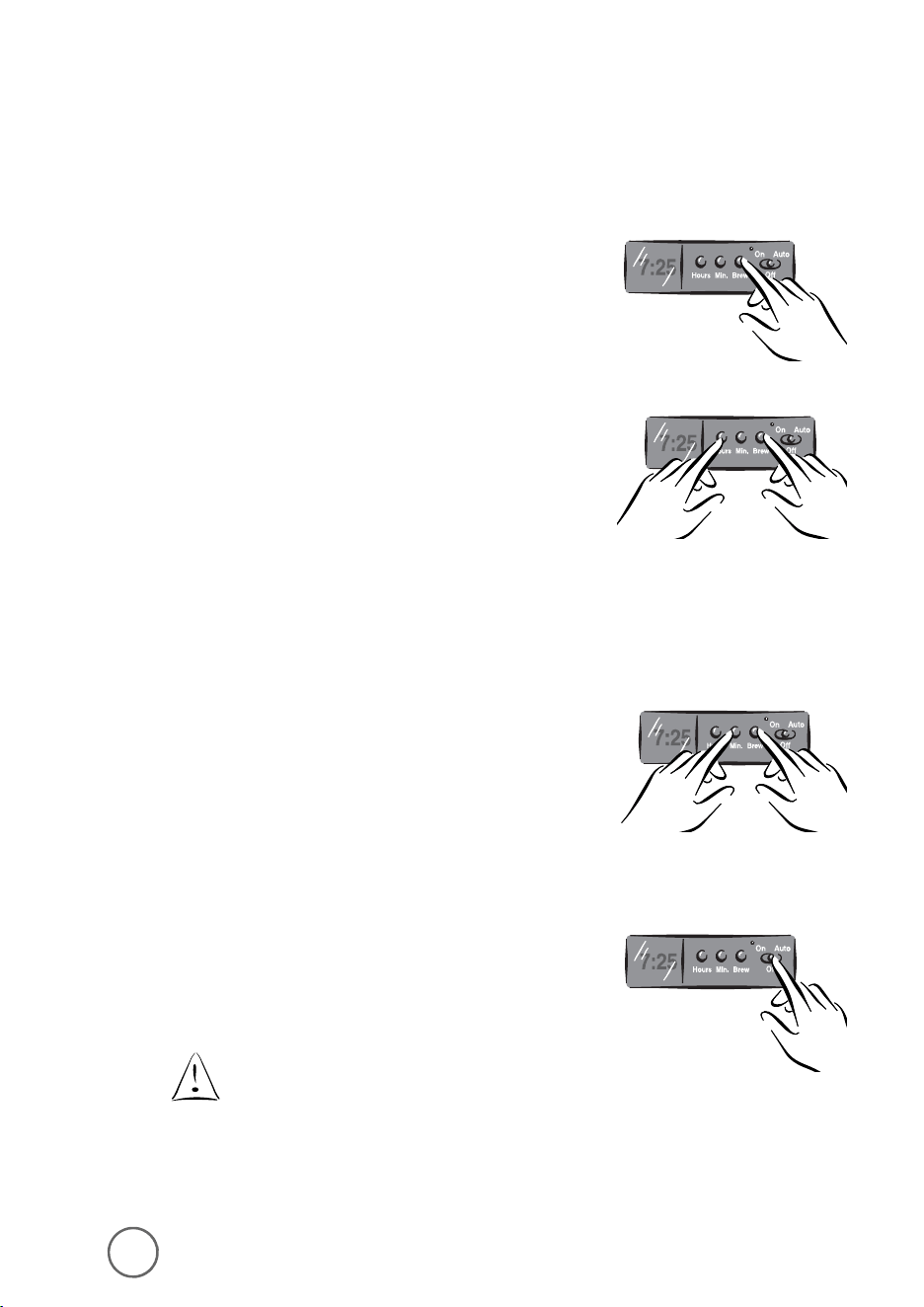
29
Limpieza de la Cafetera Entre Ciclos
de Preparació n
Para limpiar los granos de café utilizados y el filtro:
1) Deseche los granos y el filtro de papel que utilizó ,
y si es necesario, enjuague la canasta del filtro.
Usted puede tambié n lavar la canasta del filtro
en la lavadora de platos.
2) Enjuague la jarra con agua tibia. Usted puede tambié n
lavar la jarra en la lavadora de platos (solamente en
la rejilla superior de la lavadora de platos para lavarla
de una forma segura).
Asegú rese de que la cafetera esté apagada cuando
la jarra esté vacía.
El café preparado y los granos de café está n muy
calientes. Mané jelos con cuidado para evitar lesiones
y quemaduras.
Desconecte el cable elé ctrico de la cafetera
si no la va a usar o si no va a usar el reloj.
28
Preparando Café Má s Tarde
Para Modelos ARX10, ARX11, ARX20 and ARX23 ú nicamente:
Usted debe programar el tiempo en el que le gustaría
que la cafetera inicie a preparar su café .
1) Mientras que el interruptor se encuentra en
la posició n Off, presione y detenga el botó n
para preparar café BREW.
2) Mientras sigue presionando el botó n de preparació n,
presione y detenga el botó n de hora HOUR hasta
que la pantalla en el reloj muestre la hora que usted
desea. El indicador PM se iluminará para indicar un
tiempo PM, si el indicador PM no se ilumina, el
tiempo es AM.
3) Mientras aun presiona y detiene el botó n
de preparació n,
presione y detenga el botó n
de minutos MIN. hasta que la pantalla en el reloj
muestre los minutos correctos.
4) Deje de presionar el botó n de preparació n.
5) Presione el interruptor Auto.
El indicador de retrasar la preparació n Delay Brew,
se iluminará . El cronó metro de retraso está programado
y la cafetera comenzará la preparació n de café
a la hora que usted seleccionó .
Si usted desea que su cafetera prepare café
a la misma hora al día siguiente, simplemente
añ ada la cantidad deseada de café molido,
llene el tanque con agua y deslice el botó n
a la posició n automá tica AUTO.
29
Limpieza de la Cafetera Entre Ciclos
de Preparació n
Para limpiar los granos de café utilizados y el filtro:
1) Deseche los granos y el filtro de papel que utilizó ,
y si es necesario, enjuague la canasta del filtro.
Usted puede tambié n lavar la canasta del filtro
en la lavadora de platos.
2) Enjuague la jarra con agua tibia. Usted puede tambié n
lavar la jarra en la lavadora de platos (solamente en
la rejilla superior de la lavadora de platos para lavarla
de una forma segura).
Asegú rese de que la cafetera esté apagada cuando
la jarra esté vacía.
El café preparado y los granos de café está n muy
calientes. Mané jelos con cuidado para evitar lesiones
y quemaduras.
Desconecte el cable elé ctrico de la cafetera
si no la va a usar o si no va a usar el reloj.
28
Preparando Café Má s Tarde
Para Modelos ARX10, ARX11, ARX20 and ARX23 ú nicamente:
Usted debe programar el tiempo en el que le gustaría
que la cafetera inicie a preparar su café .
1) Mientras que el interruptor se encuentra en
la posició n Off, presione y detenga el botó n
para preparar café BREW.
2) Mientras sigue presionando el botó n de preparació n,
presione y detenga el botó n de hora HOUR hasta
que la pantalla en el reloj muestre la hora que usted
desea. El indicador PM se iluminará para indicar un
tiempo PM, si el indicador PM no se ilumina, el
tiempo es AM.
3) Mientras aun presiona y detiene el botó n
de preparació n,
presione y detenga el botó n
de minutos MIN. hasta que la pantalla en el reloj
muestre los minutos correctos.
4) Deje de presionar el botó n de preparació n.
5) Presione el interruptor Auto.
El indicador de retrasar la preparació n Delay Brew,
se iluminará . El cronó metro de retraso está programado
y la cafetera comenzará la preparació n de café
a la hora que usted seleccionó .
Si usted desea que su cafetera prepare café
a la misma hora al día siguiente, simplemente
añ ada la cantidad deseada de café molido,
llene el tanque con agua y deslice el botó n
a la posició n automá tica AUTO.
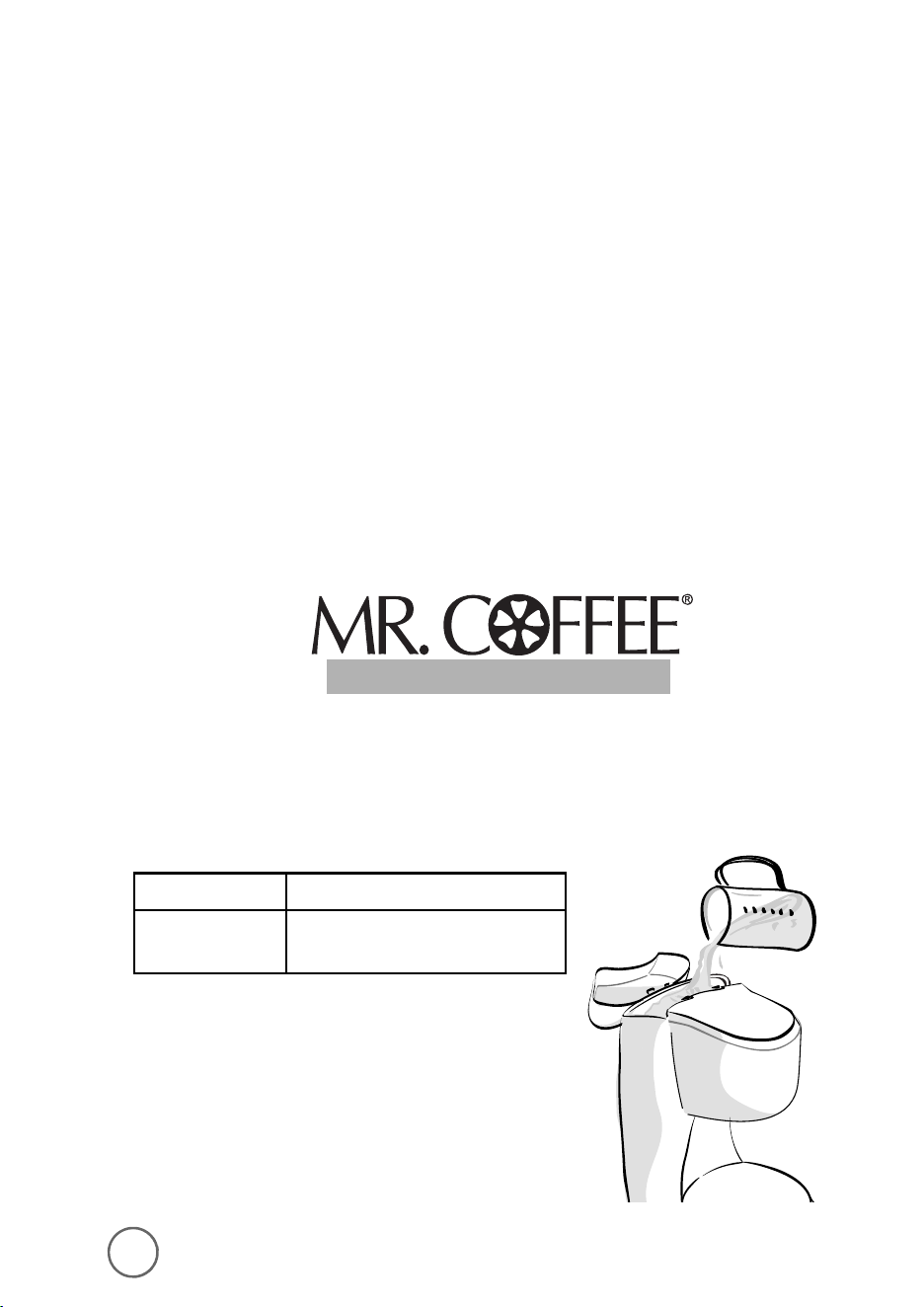
31
2)
Coloque un filtro de papel en la canasta del
filtro removible y cierre la tapa de la canasta
de preparació n.
3)
Coloque la jarra vacía sobre el plato
calefactor.
Asegú rese de que coloque
correctamente la jarra sobre
el plato calefactor, para evitar la
posibilidad de derramamientos.
4)
Inicie el ciclo de preparació n:
Para Modelos de Interruptor:
• AR10, AR11, AR12 y AR13
a.
Coloque el interruptor de encendido /
apagado ON/OFF en la posició n de
encendido ON para encender la cafetera.
Para Modelos Programables:
• ARX10, ARX11, ARX20 y ARX23
a.
Presione el interruptor en encendido On.
Despué s, presione el botó n de preparació n
para encender la cafetera.
b.
Cuando el agua hayan fluido hacia la jarra,
apague la cafetera y deje que el agua
repose durante 30 minutos.
c.
Repita los Pasos 1 a 4b.
30
Mantenimiento para Su Cafetera
El mantenimiento para la cafetera y las partes de é sta le ayudará n a extender la vida
del aparato.
Limpieza de la Cafetera
Su cafetera debe limpiarse cuando note cualquiera de las siguientes condiciones:
• vapor excesivo
• aumento en los tiempos de preparació n de café
• la acció n de bombeo se detiene antes de que el agua haya sido completamente
bombeada del tanque de agua
Estas condiciones son causadas por los depó sitos minerales que comú nmente se
encuentran en el agua de grifo.
La frecuencia con la que debe limpiar su cafetera depende de la dureza del agua
de grifo. La siguiente tabla le ofrece sugerencias de los intervalos de limpieza.
Utilizando el Limpiador MR. COFFEE
®
Por favor consulte las instrucciones en el empaque del limpiador MR. COFFEE
®
.
Lea la nota de seguridad en el panel lateral del empaque antes de utilizarlo.
Para limpiar su cafetera:
1)
Vierta cuatro tazas de vinagre blanco
sin diluir en el tanque de agua.
Tipos de Agua Frecuencia de Limpieza
Auga Suave Cada 80 Ciclos de Preparació n
Agua dura Cada 40 Ciclos de Preparació n
COFFEEMAKER CLEANER
COFFEEMAKER CLEANER
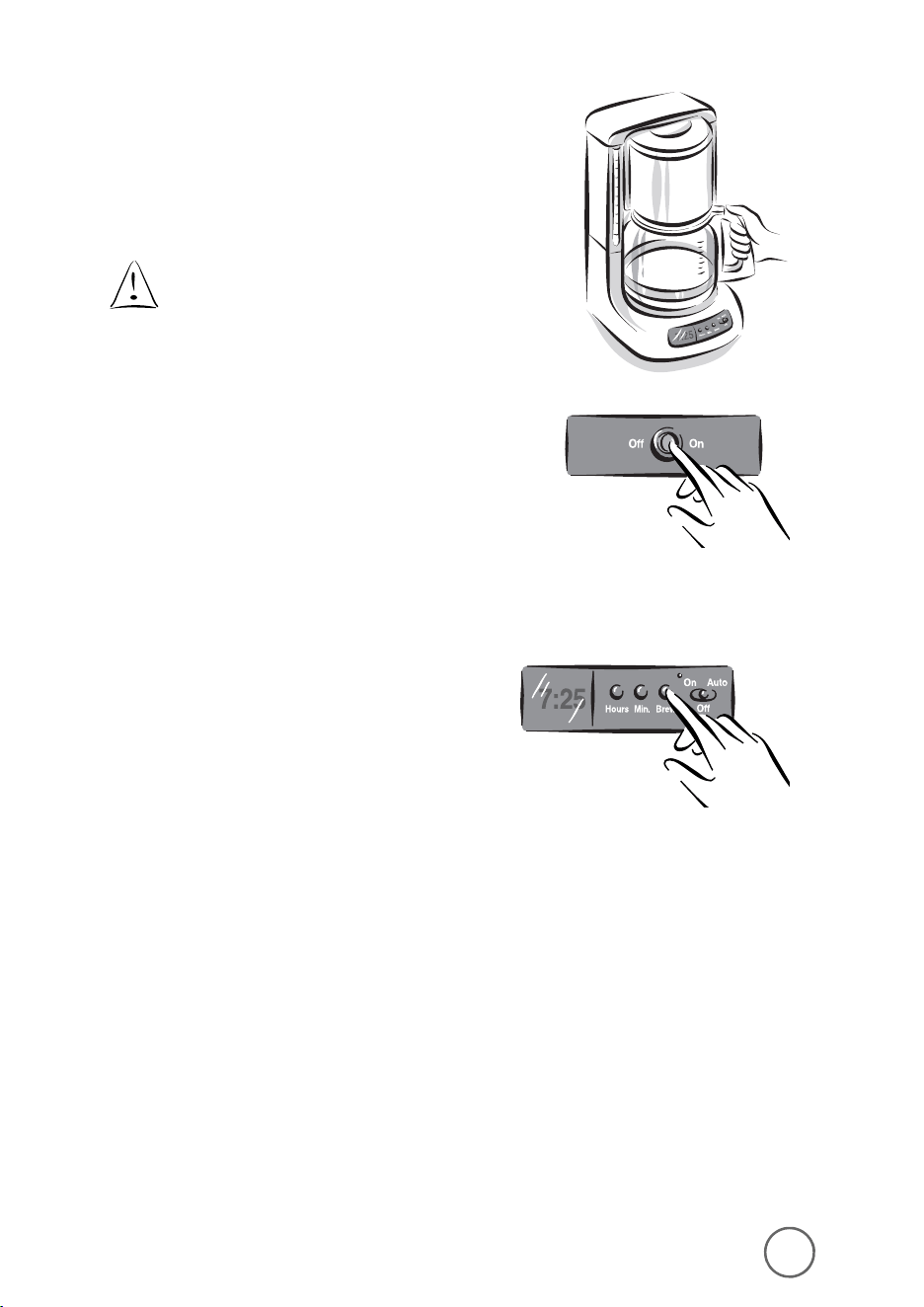
31
2)
Coloque un filtro de papel en la canasta del
filtro removible y cierre la tapa de la canasta
de preparació n.
3)
Coloque la jarra vacía sobre el plato
calefactor.
Asegú rese de que coloque
correctamente la jarra sobre
el plato calefactor, para evitar la
posibilidad de derramamientos.
4)
Inicie el ciclo de preparació n:
Para Modelos de Interruptor:
• AR10, AR11, AR12 y AR13
a.
Coloque el interruptor de encendido /
apagado ON/OFF en la posició n de
encendido ON para encender la cafetera.
Para Modelos Programables:
• ARX10, ARX11, ARX20 y ARX23
a.
Presione el interruptor en encendido On.
Despué s, presione el botó n de preparació n
para encender la cafetera.
b.
Cuando el agua hayan fluido hacia la jarra,
apague la cafetera y deje que el agua
repose durante 30 minutos.
c.
Repita los Pasos 1 a 4b.
30
Mantenimiento para Su Cafetera
El mantenimiento para la cafetera y las partes de é sta le ayudará n a extender la vida
del aparato.
Limpieza de la Cafetera
Su cafetera debe limpiarse cuando note cualquiera de las siguientes condiciones:
• vapor excesivo
• aumento en los tiempos de preparació n de café
• la acció n de bombeo se detiene antes de que el agua haya sido completamente
bombeada del tanque de agua
Estas condiciones son causadas por los depó sitos minerales que comú nmente se
encuentran en el agua de grifo.
La frecuencia con la que debe limpiar su cafetera depende de la dureza del agua
de grifo. La siguiente tabla le ofrece sugerencias de los intervalos de limpieza.
Utilizando el Limpiador MR. COFFEE
®
Por favor consulte las instrucciones en el empaque del limpiador MR. COFFEE
®
.
Lea la nota de seguridad en el panel lateral del empaque antes de utilizarlo.
Para limpiar su cafetera:
1)
Vierta cuatro tazas de vinagre blanco
sin diluir en el tanque de agua.
Tipos de Agua Frecuencia de Limpieza
Auga Suave Cada 80 Ciclos de Preparació n
Agua dura Cada 40 Ciclos de Preparació n
COFFEEMAKER CLEANER
COFFEEMAKER CLEANER
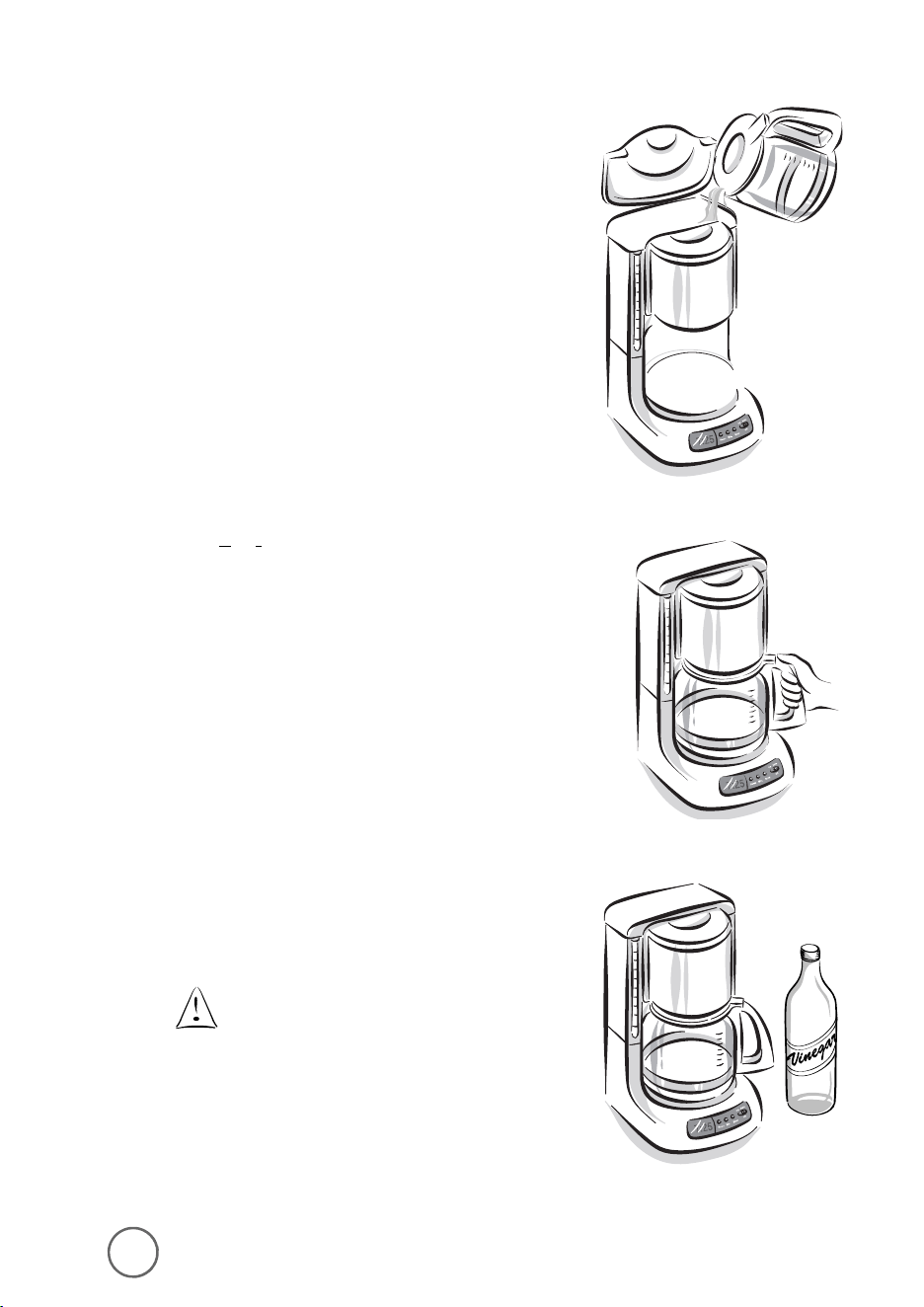
3332
d.
Deseche el agua (y la mezcla de vinagre).
Llene la jarra con agua de grifo y vierta
en el tanque de agua.
e.
Coloque la jarra sobre el plato calefactor
y encienda la cafetera y permita que
el ciclo se complete.
f.
Deseche el agua en la jarra y encienda
apague la cafetera. Repita los pasos
del d al f para enjuagar todos los residuos
de vinagre de la cafetera.
Limpieza de la Jarra
El agua dura puede dejar manchas blancas en
la jarra. El café y el te puede tornar estas manchas
color café .
Para remover las manchas de la jarra:
1)
Llene la jarra con una solució n de partes
iguales de agua y vinagre blanco y deje
que la solució n repose en la jarra durante
aproximadamente 20 minutos.
2)
Deseche la solució n, lave y enjuague la jarra.
No use limpiadores abrasivos que
puedan dejar marcas en la jarra;
las marcas pueden propiciar
que la jarra se rompa.
P
ROBLEMAS Y
S
OLUCIONES
P
ROBLEMAS
P
OTENCIALES
C
AUSAS
P
ROBABLES
LA LUZ DE ENCENDIDO “ON” NO SE ILUMINA
• Está desconectada
• Interrupció n de la energía elé ctrica
NO PREPARA CAFÉ
• Está desconectada
• Interrupció n de la energía elé ctrica
• No hay agua en el tanque,
revise la ventana de visibilidad
• La canasta del filtro no está correctamente
insertada
• La tapa de la jarra no está totalmente
colocada sobre el plato calefactor
LA CAFETERA PREPARA AGUA SOLAMENTE
• No hay granos de café en la canasta
del filtro
LA CAFETERA PREPARA CAFÉ MUY LENTAMENTE
• La cafetera requiere descalcificació n
LA CANASTA DEL FILTRO SE DESBORDA
• La canasta del filtro no está correctamente
insertada
• La jarra no está totalmente colocada sobre
el plato calefactor
• La tapa de la jarra no está colocada sobre
la jarra
• Hay demasiados granos de café en el filtro
• La jarra fue removida del plato calefactor
por má s de 30 segundos
OLOR A CAFÉ QUEMADO
• Se dejo la jarra vacía sobre el plato
calefactor caliente
• Se derramo café sobre el plato calefactor
EL CAFÉ NO ESTÁ CALIENTE
• Interrupció n de la energía elé ctrica
• Fue activada la funció n de apagado
automá tico en 1 hora
EL CAFÉ NO TIENE BUEN SABOR
• Se utilizó un tipo café molido que no
se recomienda para cafeteras de goteo
automá tico
• La proporció n de agua/café no fue
balanceada
HAY GRANOS DE CAFÉ EN LA BEBIDA
• El filtro de papel no fue correctamente
colocado en la canasta
• Se derramó el filtro
PREGUNTAS? Usted llamar a
1-800-672-6333.
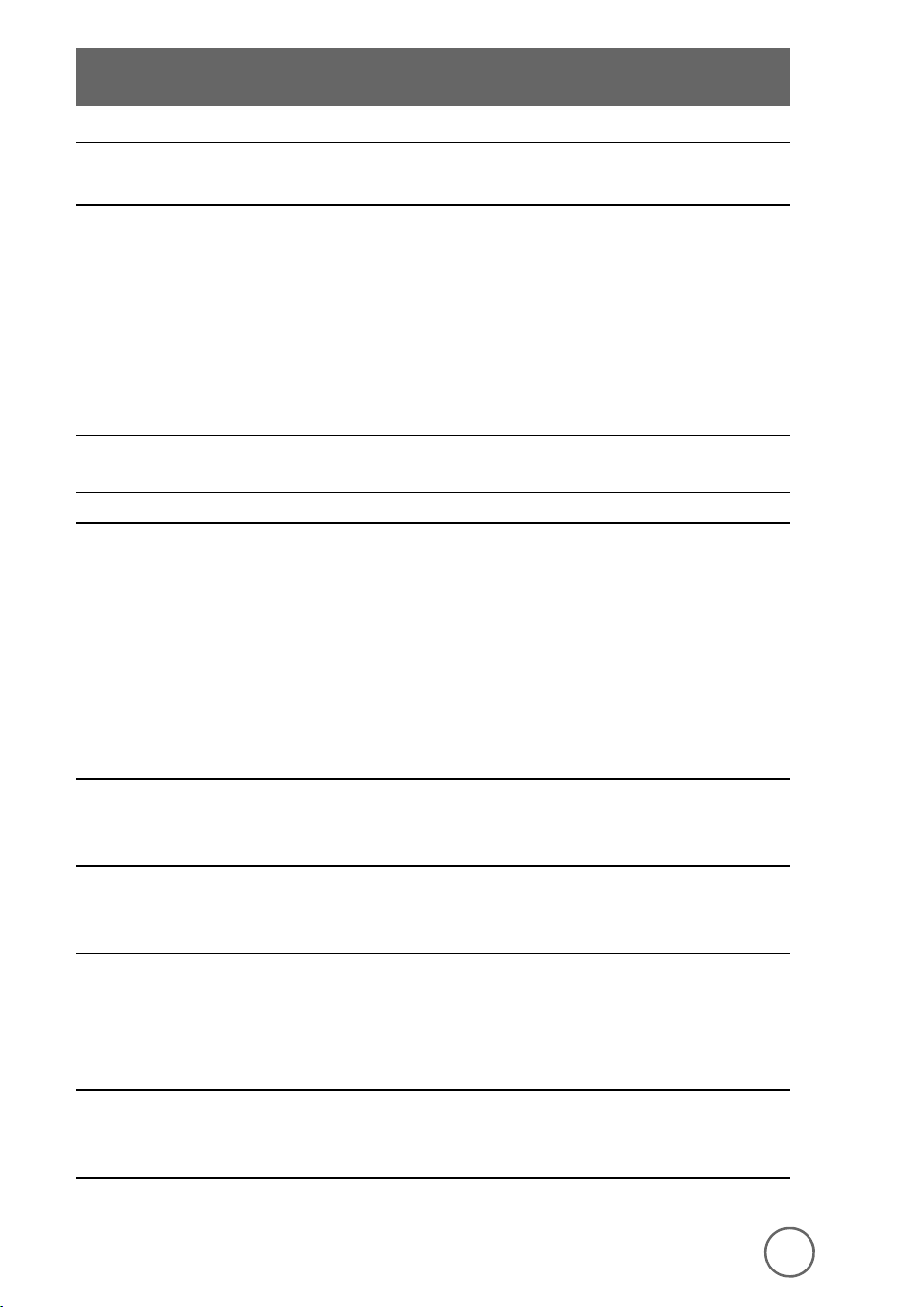
3332
d.
Deseche el agua (y la mezcla de vinagre).
Llene la jarra con agua de grifo y vierta
en el tanque de agua.
e.
Coloque la jarra sobre el plato calefactor
y encienda la cafetera y permita que
el ciclo se complete.
f.
Deseche el agua en la jarra y encienda
apague la cafetera. Repita los pasos
del d al f para enjuagar todos los residuos
de vinagre de la cafetera.
Limpieza de la Jarra
El agua dura puede dejar manchas blancas en
la jarra. El café y el te puede tornar estas manchas
color café .
Para remover las manchas de la jarra:
1)
Llene la jarra con una solució n de partes
iguales de agua y vinagre blanco y deje
que la solució n repose en la jarra durante
aproximadamente 20 minutos.
2)
Deseche la solució n, lave y enjuague la jarra.
No use limpiadores abrasivos que
puedan dejar marcas en la jarra;
las marcas pueden propiciar
que la jarra se rompa.
P
ROBLEMAS Y
S
OLUCIONES
P
ROBLEMAS
P
OTENCIALES
C
AUSAS
P
ROBABLES
LA LUZ DE ENCENDIDO “ON” NO SE ILUMINA
• Está desconectada
• Interrupció n de la energía elé ctrica
NO PREPARA CAFÉ
• Está desconectada
• Interrupció n de la energía elé ctrica
• No hay agua en el tanque,
revise la ventana de visibilidad
• La canasta del filtro no está correctamente
insertada
• La tapa de la jarra no está totalmente
colocada sobre el plato calefactor
LA CAFETERA PREPARA AGUA SOLAMENTE
• No hay granos de café en la canasta
del filtro
LA CAFETERA PREPARA CAFÉ MUY LENTAMENTE
• La cafetera requiere descalcificació n
LA CANASTA DEL FILTRO SE DESBORDA
• La canasta del filtro no está correctamente
insertada
• La jarra no está totalmente colocada sobre
el plato calefactor
• La tapa de la jarra no está colocada sobre
la jarra
• Hay demasiados granos de café en el filtro
• La jarra fue removida del plato calefactor
por má s de 30 segundos
OLOR A CAFÉ QUEMADO
• Se dejo la jarra vacía sobre el plato
calefactor caliente
• Se derramo café sobre el plato calefactor
EL CAFÉ NO ESTÁ CALIENTE
• Interrupció n de la energía elé ctrica
• Fue activada la funció n de apagado
automá tico en 1 hora
EL CAFÉ NO TIENE BUEN SABOR
• Se utilizó un tipo café molido que no
se recomienda para cafeteras de goteo
automá tico
• La proporció n de agua/café no fue
balanceada
HAY GRANOS DE CAFÉ EN LA BEBIDA
• El filtro de papel no fue correctamente
colocado en la canasta
• Se derramó el filtro
PREGUNTAS? Usted llamar a
1-800-672-6333.

34
Garantía Limitada de 1 Añ o
Sunbeam Products Inc. (“Sunbeam”) garantiza que, por un período de un añ o a partir
de la fecha de compra, este producto estará libre de defectos en el material y en la mano
de obra. Sunbeam a su criterio, reparará o remplazará este producto o cualquiera
de los componentes del mismo que esté n defectuosos durante el período de garantía.
El remplazo será hecho con un producto o componente nuevo o reconstruido.
Si el producto ya no se encuentra disponible, se remplazará con un producto similar
de igual o mayor valor. Esta es su garantía exclusiva.
Esta garantía es vá lida para el comprador original a partir de la fecha inicial de compra
y no es transferible. Conserve el recibo original de compra. La prueba de compra es
requerida para obtener la garantía. Los vendedores, centros de servicio de Sunbeam
o tiendas donde se vendan productos Sunbeam, no tienen el derecho de alterar,
modificar o cambiar de ninguna otra forma los té rminos o condiciones de esta garantía.
Esta garantía no cubre el desgaste por el uso normal de las partes o dañ os que resulten
de cualquiera de lo siguiente: negligencia o uso incorrecto del producto, uso bajo un
voltaje o corrientes inadecuados, uso contrario a las instrucciones de operació n,
desensamble, reparaciones o alteraciones hechas por una persona que no pertenezca
a Sunbeam o a un centro de servicio autorizado. Mas aú n, la garantía no cubre factores
imprevisibles tales como incendios, inundaciones, huracanes y tornados.
Sunbeam no será responsable de ningú n dañ o incidental o consecuente causado por el
incumplimiento de cualquier garantía expresa o implícita. Excepto al alcance prohibido
por la ley que aplique, cualquier garantía implícita de comercializació n o ajustes para un
propó sito en particular, está limitada en duració n al periodo de la garantía que arriba
se indica. En algunos estados, provincias o jurisdicciones, no se permite la exclusió n o
limitació n de dañ os incidentales o consecuentes o limitaciones en la duració n de una
garantía implícita, así que las limitaciones o exclusiones que se indican anteriormente
pueden no ser aplicables a usted. Esta garantía le da a usted derechos legales específicos
y usted puede tambié n tener otros derechos que varían de estado a estado y de
provincia a provincia.
Có mo Obtener el Servicio de la Garantía
Lleve el producto a un centro de Servicio Autorizado Sunbeam. Usted puede obtener
una lista de los centros de servicio e instrucciones acerca de la reparació n o remplazo
del producto llamando al 800 672-6333 o envíe un e-mail o correo electró nico a:
Consumeraffairs@consumer.sunbeam.com.
Por favor incluya su nombre, direcció n,
nú mero telefó nico, nú mero de modelo del producto y descripció n del problema.
Para productos comprado en los Estados Unidos –
SUNBEAM SERVICE CENTER
c/o Warranty Center
117 Industrial Row
Purvis, MS 39475
NO ENVÍE ESTE PRODUCTO AL LUGAR DONDE FUE ADQUIRIDO
Servicio y Mantenimiento
Partes de Repuesto
• Filters
Para un café o te con mejor sabor, recomendamos que utilice los filtros de papel
para preparar de 8 a 12 tazas, marca MR. COFFEE
®
o los filtros permanentes marca
MR. COFFEE
®
. Estos filtros está n disponibles en casi todos los supermercados.
• Jarras
Usted puede generalmente comprar una jarra de repuesto de la tienda donde
compró su cafetera. Si usted no puede encontrar un repuesto, por favor llame
a 1-800 MR COFFEE (1-800-672-6333) dentro de los Estados Unidos y Canadá
para obtener informació n acerca de dó nde puede encontrar una tienda
que venda las jarras de repuesto.
Reparaciones
Si su cafetera requiere servicio, no la envíe al lugar donde la compró . Todas las
reparaciones deben ser hechas por Sunbeam o por un Centro de Servicio
MR. COFFEE
®
. Si usted vive en los Estados Unidos o en Canadá , por favor
llá menos al siguiente nú mero sin cargo para encontrar el lugar del centro
de servicio autorizado má s cercano:
1-800 MR COFFEE (1-800-672-6333)
Para ofrecerle un mejor servicio cuando llame, por favor tenga a la mano la informació n
del nú mero de modelo (AR10, AR11, AR12, AR13, ARX10, ARX11, ARX20 o ARX23)
y la fecha de compra.
Preguntas, Comentarios y Sugerencias
Agradecemos sus comentarios, por favor incluya su nombre completo, direcció n
y nú mero telefó nico cuando nos escriba o nos envíe un correo electró nico a:
consumeraffairs@consumer.Sunbeam.com
Usted puede visitar nuestro website y descubrir el secreto a elaborar la taza
perfecta de café . Usted tambié n encontrará recetas gastró nomos y de la ú ltima
informació n de nuestros productos de MR. COFFEE.
®
www.mrcoffee.com
café
35

34
Garantía Limitada de 1 Añ o
Sunbeam Products Inc. (“Sunbeam”) garantiza que, por un período de un añ o a partir
de la fecha de compra, este producto estará libre de defectos en el material y en la mano
de obra. Sunbeam a su criterio, reparará o remplazará este producto o cualquiera
de los componentes del mismo que esté n defectuosos durante el período de garantía.
El remplazo será hecho con un producto o componente nuevo o reconstruido.
Si el producto ya no se encuentra disponible, se remplazará con un producto similar
de igual o mayor valor. Esta es su garantía exclusiva.
Esta garantía es vá lida para el comprador original a partir de la fecha inicial de compra
y no es transferible. Conserve el recibo original de compra. La prueba de compra es
requerida para obtener la garantía. Los vendedores, centros de servicio de Sunbeam
o tiendas donde se vendan productos Sunbeam, no tienen el derecho de alterar,
modificar o cambiar de ninguna otra forma los té rminos o condiciones de esta garantía.
Esta garantía no cubre el desgaste por el uso normal de las partes o dañ os que resulten
de cualquiera de lo siguiente: negligencia o uso incorrecto del producto, uso bajo un
voltaje o corrientes inadecuados, uso contrario a las instrucciones de operació n,
desensamble, reparaciones o alteraciones hechas por una persona que no pertenezca
a Sunbeam o a un centro de servicio autorizado. Mas aú n, la garantía no cubre factores
imprevisibles tales como incendios, inundaciones, huracanes y tornados.
Sunbeam no será responsable de ningú n dañ o incidental o consecuente causado por el
incumplimiento de cualquier garantía expresa o implícita. Excepto al alcance prohibido
por la ley que aplique, cualquier garantía implícita de comercializació n o ajustes para un
propó sito en particular, está limitada en duració n al periodo de la garantía que arriba
se indica. En algunos estados, provincias o jurisdicciones, no se permite la exclusió n o
limitació n de dañ os incidentales o consecuentes o limitaciones en la duració n de una
garantía implícita, así que las limitaciones o exclusiones que se indican anteriormente
pueden no ser aplicables a usted. Esta garantía le da a usted derechos legales específicos
y usted puede tambié n tener otros derechos que varían de estado a estado y de
provincia a provincia.
Có mo Obtener el Servicio de la Garantía
Lleve el producto a un centro de Servicio Autorizado Sunbeam. Usted puede obtener
una lista de los centros de servicio e instrucciones acerca de la reparació n o remplazo
del producto llamando al 800 672-6333 o envíe un e-mail o correo electró nico a:
Consumeraffairs@consumer.sunbeam.com.
Por favor incluya su nombre, direcció n,
nú mero telefó nico, nú mero de modelo del producto y descripció n del problema.
Para productos comprado en los Estados Unidos –
SUNBEAM SERVICE CENTER
c/o Warranty Center
117 Industrial Row
Purvis, MS 39475
NO ENVÍE ESTE PRODUCTO AL LUGAR DONDE FUE ADQUIRIDO
Servicio y Mantenimiento
Partes de Repuesto
• Filters
Para un café o te con mejor sabor, recomendamos que utilice los filtros de papel
para preparar de 8 a 12 tazas, marca MR. COFFEE
®
o los filtros permanentes marca
MR. COFFEE
®
. Estos filtros está n disponibles en casi todos los supermercados.
• Jarras
Usted puede generalmente comprar una jarra de repuesto de la tienda donde
compró su cafetera. Si usted no puede encontrar un repuesto, por favor llame
a 1-800 MR COFFEE (1-800-672-6333) dentro de los Estados Unidos y Canadá
para obtener informació n acerca de dó nde puede encontrar una tienda
que venda las jarras de repuesto.
Reparaciones
Si su cafetera requiere servicio, no la envíe al lugar donde la compró . Todas las
reparaciones deben ser hechas por Sunbeam o por un Centro de Servicio
MR. COFFEE
®
. Si usted vive en los Estados Unidos o en Canadá , por favor
llá menos al siguiente nú mero sin cargo para encontrar el lugar del centro
de servicio autorizado má s cercano:
1-800 MR COFFEE (1-800-672-6333)
Para ofrecerle un mejor servicio cuando llame, por favor tenga a la mano la informació n
del nú mero de modelo (AR10, AR11, AR12, AR13, ARX10, ARX11, ARX20 o ARX23)
y la fecha de compra.
Preguntas, Comentarios y Sugerencias
Agradecemos sus comentarios, por favor incluya su nombre completo, direcció n
y nú mero telefó nico cuando nos escriba o nos envíe un correo electró nico a:
consumeraffairs@consumer.Sunbeam.com
Usted puede visitar nuestro website y descubrir el secreto a elaborar la taza
perfecta de café . Usted tambié n encontrará recetas gastró nomos y de la ú ltima
informació n de nuestros productos de MR. COFFEE.
®
www.mrcoffee.com
café
35

©2003 Sunbeam Products, Inc. All rights reserved.
MR. COFFEE
®
is a registered trademark of Sunbeam Products, Inc.
Distributed by Sunbeam Products, Inc., Boca Raton, Florida 33431.
©2003 Sunbeam Products, Inc. Todos los derechos reservados.
MR. COFFEE
®
es una marca registrada de Sunbeam Products, Inc.
Distribuido por Sunbeam Products, Inc., Boca Raton, Florida 33431.
Made in China / Hecho en China
P.N. 107607
Instruction Manual for
AR Series Coffeemaker
Manual de Instrucciones para
Serie de AR Cafetera