Welcome
Congratulations on your purchase of a new
Honda scooter. Your selection of a Honda
makes you part of a worldwide family of
satisfied customers who appreciate Honda's
reputation for building quality into every
product.
To ensure your safety and riding pleasure:
● Read this owner's manual carefully.
● Follow all recommendations and
procedures contained in this manual.
● Pay close attention to safety messages
contained in this manual and on the
scooter.
To protect your investment, we urge you to
take responsibility for keeping your scooter
well serviced and maintained. Also, observe
the break-in guidelines, and always perform
the pre-ride inspection and other periodic
checks in this manual.
When service is required, remember that
your Honda dealer knows your scooter best.
If you have the required mechanical “know-
how” and tools, you can purchase an official
Honda Service Manual to help you perform
many maintenance and repair tasks. 2 P. 99
Read the warranty information thoroughly so
that you understand the warranty coverage
and that you are aware of your rights and
responsibilities. 2 P. 100
You may also want to visit our website at
www.powersports.honda.com.
Canada
www.honda.ca.
Happy riding!
California Proposition 65 Warning
WARNING: This product contains or emits
chemicals known to the State of California to
cause cancer and birth defects or other
reproductive harm.
20161103142821_31GGA6800_enu_BOOK Page 2 Thursday, November 03 2016 14:30:25 JST
A Few Words About Safety
Your safety, and the safety of others, is very
important. Operating this scooter safely is an
important responsibility.
To help you make informed decisions about
safety, we have provided operating
procedures and other information on safety
labels and in this manual. This information
alerts you to potential hazards that could
hurt you or others.
Of course, it is not practical or possible to
warn you about all hazards associated with
operating or maintaining a scooter. You must
use your own good judgment.
You will find important safety information in a
variety of forms, including:
● Safety labels on the scooter
●
Safety Messages preceded by a safety alert
symbol and one of three signal words:
DANGER, WARNING, or CAUTION.
These signal words mean:
3DANGER
You WILL be KILLED or SERIOUSLY
HURT if you don’t follow instructions.
3WARNING
You CAN be KILLED or SERIOUSLY
HURT if you don’t follow instructions.
3CAUTION
You CAN be HURT if you don’t follow
instructions.
Other important information is
provided under the following titles:
NOTICE
Information to help you avoid
damage to your scooter, other
property, or the environment.
20161103142821_31GGA6800_enu_BOOK Page 3 Thursday, November 03 2016 14:30:25 JST

Safety Guidelines................................................. P. 3
Safety Labels.......................................................
.. P. 7
Safety Precautions............................................... P. 9
Riding Precautions ............................................ P. 10
Accessories & Modifications........................... P. 13
Loading ................................................................ P. 14
20161103142821_31GGA6800_enu_BOOK Page 5 Thursday, November 03 2016 14:30:25 JST
This section contains important information for safe riding of your scooter.
Please read this section carefully.
Scooter Safety

Safety Guidelines
Follow these guidelines to enhance your safety:
● Perform all routine and regular inspections
specified in this manual.
● Stop the engine and keep sparks and flame
away before filling the fuel tank.
● Do not run the engine in enclosed or partly
enclosed areas. Carbon monoxide in
exhaust gases is toxic and can kill you.
Always Wear a Helmet
It's a proven fact: helmets and protective
apparel significantly reduce the number and
severity of head and other injuries. So always
wear an approved motorcycle helmet and
protective apparel. 2 P. 9
Before Riding
Make sure that you are physically fit, mentally
focused and free of alcohol and drugs. Check
that you are wearing an approved scooter
helmet and protective apparel.
Take Time to Learn & Practice
Even if you have ridden other scooters, practice
riding in a safe area to become familiar with
how this scooter works and handles, and to
become accustomed to the scooter's size and
weight.
20161103142821_31GGA6800_enu_BOOK Page 6 Thursday, November 03 2016 14:30:25 JST
Safety Guidelines
Scooter Safety
3
Continued

We recommend that all riders take a certified
course approved by the Motorcycle Safety
Foundation (MSF). New riders should start with
the basic course, and even experienced riders
will find the advanced course beneficial.
For information about the MSF training course
nearest you, call the national toll-free number:
(800) 446-9227.
USA
Other riding tips can be found in the You
and Your Motorcycle Riding Tips booklet that
came with your scooter.
Ride Defensively
Always pay attention to other vehicles around
you, and do not assume that other drivers see
you. Be prepared to stop quickly or perform an
evasive maneuver.
Make Yourself Easy to See
Make yourself more visible, especially at night,
by wearing bright reflective clothing, positioning
yourself so other drivers can see you, signaling
before turning or changing lanes, and using
your horn when necessary.
Ride within Your Limits
Never ride beyond your personal abilities or
faster than conditions warrant. Fatigue and
inattention can impair your ability to use good
judgment and ride safely.
Don't Drink and Ride
Alcohol and riding don't mix. Even one alcoholic
drink can reduce your ability to respond to
changing conditions, and your reaction time
gets worse with every additional drink. Don't
drink and ride, and don't let your friends drink
and ride either.
20161103142821_31GGA6800_enu_BOOK Page 7 Thursday, November 03 2016 14:30:25 JST
Safety Guidelines
Scooter Safety
4

Keep Your Honda in Safe Condition
It's important to keep your scooter properly
maintained and in safe riding condition.
Inspect your scooter before every ride and
perform all recommended maintenance. Never
exceed load limits (2 P. 14), and do not modify
your scooter or install accessories that would
make your scooter unsafe (2 P. 13).
If You are Involved in a Crash
Personal safety is your first priority. If you or
anyone else has been injured, take time to
assess the severity of the injuries and whether it
is safe to continue riding. Call for emergency
assistance if needed. Also follow applicable laws
and regulations if another person or vehicle is
involved in the crash.
If you decide to continue riding, first turn the
ignition switch to the OFF position, and evaluate
the condition of your scooter. Inspect for fluid
leaks, check the tightness of critical nuts and
bolts, and check the handlebar, control levers,
brakes, and wheels. Ride slowly and cautiously.
Your scooter may have suffered damage that is
not immediately apparent. Have your scooter
thoroughly checked at a qualified service facility
as soon as possible.
20161103142821_31GGA6800_enu_BOOK Page 8 Thursday, November 03 2016 14:30:25 JST
Safety Guidelines
Scooter Safety
5
Continued
Carbon Monoxide Hazard
Exhaust contains poisonous carbon monoxide, a
colorless, odorless gas. Breathing carbon
monoxide can cause loss of consciousness and
may lead to death.
If you run the engine in confined or even partly
enclosed area, the air you breathe could
contain a dangerous amount of carbon
monoxide.
Never run your scooter inside a garage or other
enclosure.
3WARNING
Running the engine of your scooter
while in an enclosed or even partially
enclosed area can cause a rapid build-
up of toxic carbon monoxide gas.
Breathing this colorless, odorless gas
can quickly cause unconsciousness and
lead to death.
Only run your scooter's engine when it
is located in a well ventilated area
outdoors.
20161103142821_31GGA6800_enu_BOOK Page 9 Thursday, November 03 2016 14:30:25 JST
Safety Guidelines
Scooter Safety
6
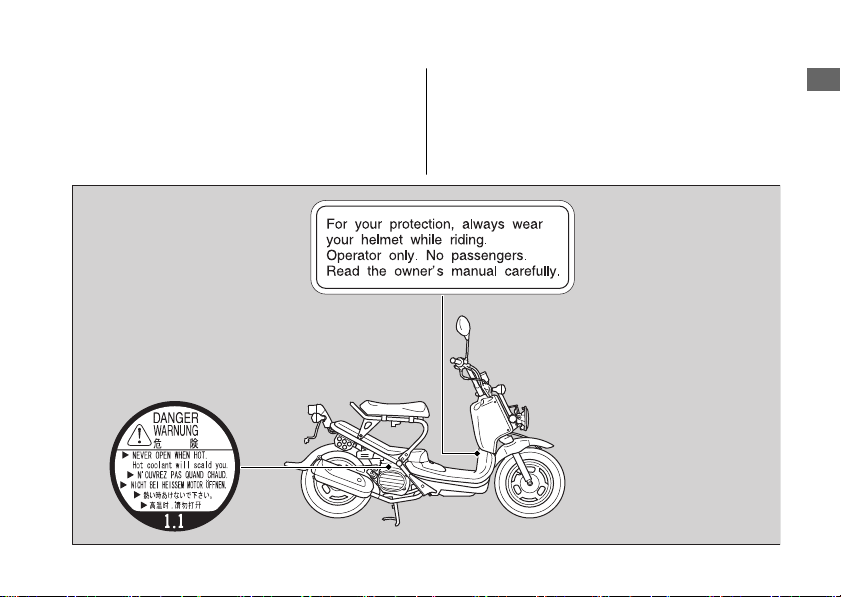
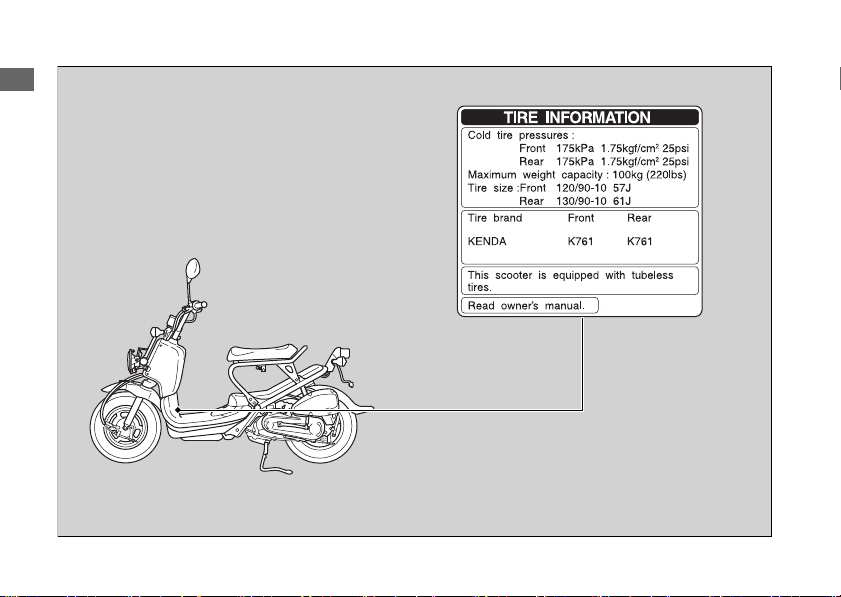
Safety Labels
Safety and information labels on your scooter
provide important safety information and may
warn you of potential hazards that could cause
serious injury. Read these labels carefully and
don't remove them.
If a label comes off or becomes hard to read,
contact your dealer for a replacement.
20161103142821_31GGA6800_enu_BOOK Page 10 Thursday, November 03 2016 14:30:25 JST
Safety Labels
Scooter Safety
7
Continued
20161103142821_31GGA6800_enu_BOOK Page 11 Thursday, November 03 2016 14:30:25 JST
Safety Labels
Scooter Safety
8
Safety Precautions
● Ride cautiously and keep your hands on the
handlebar and feet on the floor.
● Always consider the safety of other drivers
and riders.
Protective Apparel
Make sure that you are wearing an approved
motorcycle helmet, eye protection, and high-
visibility protective clothing. Ride defensively in
response to weather and road conditions.
#
Helmet
Should be safety-standard certified, high-
visibility, and correct size for your head.
● Must fit comfortably but securely, with the
chin strap fastened.
● Face shield with unobstructed field of vision
or other approved eye protection.
USA
Look for a DOT (Department of
Transportation) certification label on any helmet
you buy.
3WARNING
Not wearing a helmet increases the
chance of serious injury or death in a
crash.
Make sure that you always wear an
approved helmet and protective
apparel.
#
Gloves
Full-finger leather gloves with high abrasion
resistance.
20161103142821_31GGA6800_enu_BOOK Page 12 Thursday, November 03 2016 14:30:25 JST
Safety Precautions
Scooter Safety
9
Continued

#
Boots or Riding Shoes
Sturdy boots with non-slip soles and ankle
protection.
#
Jacket and Pants
Protective, highly visible, long-sleeved jacket
and durable long pants for riding (or a
protective suit).
Riding Precautions
Break-in Period
During the first 60 miles (100 km) of running,
follow these guidelines to ensure your scooter's
future reliability and performance.
● Avoid full-throttle starts and rapid
acceleration.
● Avoid hard braking.
● Ride conservatively.
Brakes
Observe the following guidelines:
● Avoid excessively hard braking.
u Sudden braking can reduce the scooter's
stability.
u Where possible, reduce speed before
turning; otherwise you risk sliding out.
20161103142821_31GGA6800_enu_BOOK Page 13 Thursday, November 03 2016 14:30:25 JST
Riding Precautions
Scooter Safety
10

● Exercise caution on low traction surfaces.
u The tires slip more easily on such
surfaces and braking distances are
longer.
● Avoid continuous braking.
u Repeated braking, such as when
descending long, steep slopes can
seriously overheat the brakes, reducing
their effectiveness.
● For full braking effectiveness, operate both
the front and rear brakes together.
#
Wet or Rainy Conditions
Road surfaces are slippery when wet, and wet
brakes further reduce braking efficiency.
Exercise extra caution when braking in wet
conditions.
If the brakes get wet, apply the brakes while
riding at low speed to help them dry.
Parking
● Park on a firm, level surface.
● If you must park on a slight incline or loose
surface, park so that the scooter cannot
move or fall over.
● Make sure that high-temperature parts
cannot come into contact with flammable
materials.
● Do not touch the engine, muffler, brakes
and other high-temperature parts until they
cool down.
● To reduce the likelihood of theft, always lock
the handlebar and remove the key when
leaving the scooter unattended.
Use of an anti-theft device is also
recommended.
20161103142821_31GGA6800_enu_BOOK Page 14 Thursday, November 03 2016 14:30:25 JST
Riding Precautions
Scooter Safety
11
Continued
#
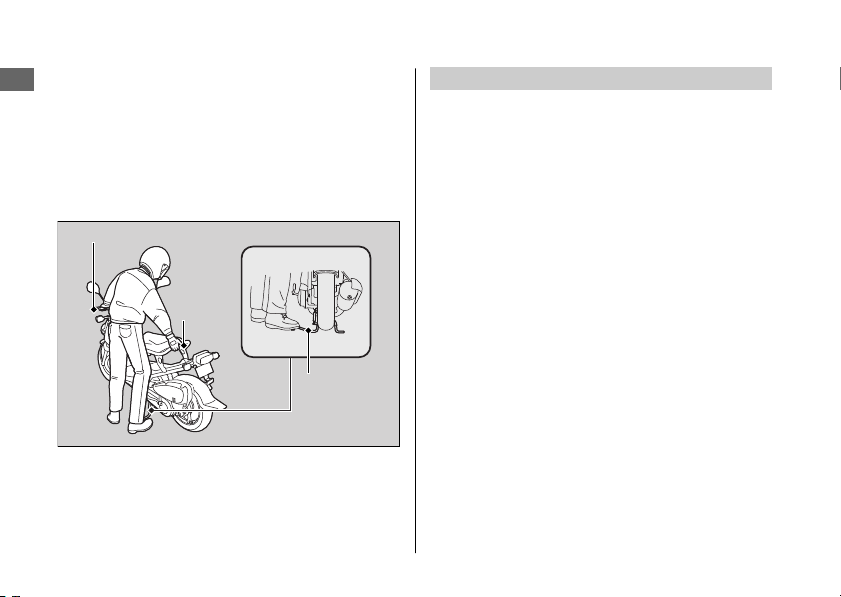
Parking with the Center Stand
1.
Stop the engine.
2.
To lower the center stand, stand on the left
side of the scooter. Hold the left handle grip
and the rear grip. Press down on the tip of
the center stand with your right foot and,
simultaneously, pull up and back.
3.
Turn the handlebar fully to the left.
4.
Turn the ignition switch to the LOCK
position and remove the key. 2 P. 23
Refueling and Fuel Guidelines
Follow these guidelines to protect the engine,
fuel system and catalytic converter:
● Use only unleaded gasoline.
● Use recommended octane number. Using
lower octane gasoline will result in
decreased engine performance.
● Do not use fuels containing a high
concentration of alcohol. 2 P. 98
● Do not use stale or contaminated gasoline
or an oil/gasoline mixture.
● Avoid getting dirt or water in the fuel tank.
20161103142821_31GGA6800_enu_BOOK Page 15 Thursday, November 03 2016 14:30:25 JST
Riding Precautions
Scooter Safety
12
Left handle grip
Rear
grip
Center
stand
Accessories &
Modifications
We strongly advise that you do not add any
accessories that were not specifically designed
or approved for your scooter by Honda or
make modifications to your scooter from its
original design. Doing so can make it unsafe.
Modifying your scooter may also void your
warranty and make your scooter illegal to
operate on public roads and highways. Before
deciding to install accessories on your scooter
be certain the modification is safe and legal.
3WARNING
Improper accessories or modifications
can cause a crash in which you can be
seriously hurt or killed.
Follow all instructions in this owner's
manual regarding accessories and
modifications.
Do not pull a trailer with, or attach a sidecar to,
your scooter. Your scooter was not designed for
these attachments, and their use can seriously
impair your scooter's handling.
Do not attempt modify the scooter to carry a
passenger. The subframe was not designed to
carry the additional weight of a passenger.
20161103142821_31GGA6800_enu_BOOK Page 16 Thursday, November 03 2016 14:30:25 JST
Accessories & Modifications
Scooter Safety
13
Loading
● Carrying extra weight affects your scooter's
handling, braking and stability.
Always ride at a safe speed for the load you
are carrying.
● Avoid carrying an excessive load and keep
within specified load limits.
Maximum weight capacity 2 P. 104
● Tie all luggage securely, evenly balanced
and close to the center of the scooter.
● Do not place objects near the lights or the
muffler.
3WARNING
Overloading, improper loading or
carrying a passenger can cause a crash
and you can be seriously hurt or killed.
Follow all load limits and other loading
guidelines in this manual.
20161103142821_31GGA6800_enu_BOOK Page 17 Thursday, November 03 2016 14:30:25 JST
Loading
Scooter Safety
14

20161103142821_31GGA6800_enu_BOOK Page 18 Thursday, November 03 2016 14:30:25 JST
Scooter Safety
15
BLANK PAGE
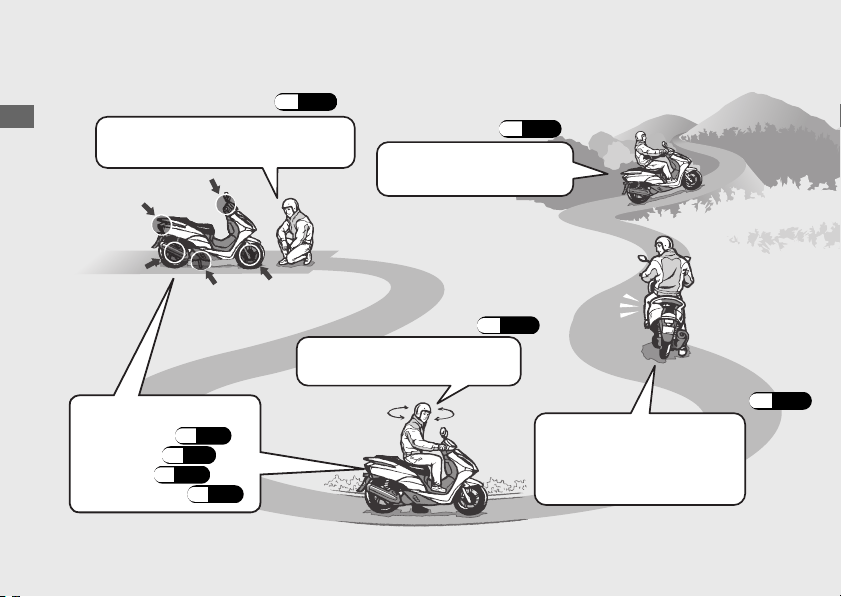
Basic Operation Flow
20161103142821_31GGA6800_enu_BOOK Page 19 Thursday, November 03 2016 14:30:25 JST
Operation Guide
16
#
Pre-ride Inspection
(P.40)
Carefully inspect your scooter to
make sure that it is safe to ride.
#
Acceleration
(P.28)
Apply throttle gradually.
Obey the speed limit.
How to use basic features.
•
Instruments (P.20)
•
Indicators (P.21)
•
Switches (P.22)
•
Steering Lock (P.23)
#
Starting the Engine
(P.25)
Start and warm the engine.
Avoid revving the engine.
#
Starting the
Scooter
(P.28)
Before pulling away, indicate
your direction with the turn
signal switch, and check for
oncoming traffic.
20161103142821_31GGA6800_enu_BOOK Page 20 Thursday, November 03 2016 14:30:25 JST
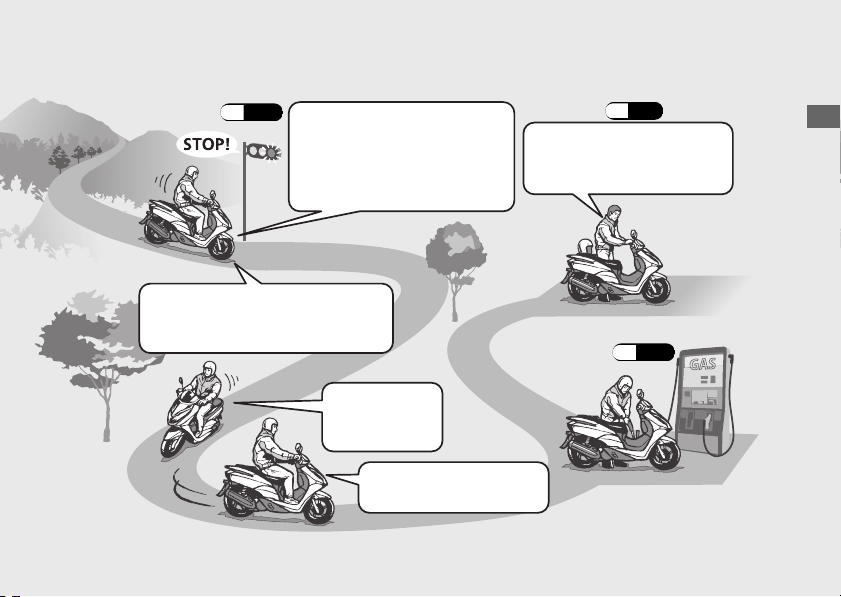
Operation Guide
17
#
Braking
(P.29)
Close the throttle and apply the
front and rear brakes together.
u
The brake light will indicate
that you have applied the
brakes.
#
Parking
(P.11)
#
Stopping
If pulling off the road, signal early
enough to show traffic that you are
pulling over, and pull over smoothly.
#
Turning Corners
Do your braking
before entering
corners.
Gradually reapply throttle
when exiting turn.
#
Refueling
(P.30)
Park on a firm level surface.
Use the stand and lock the
steering.
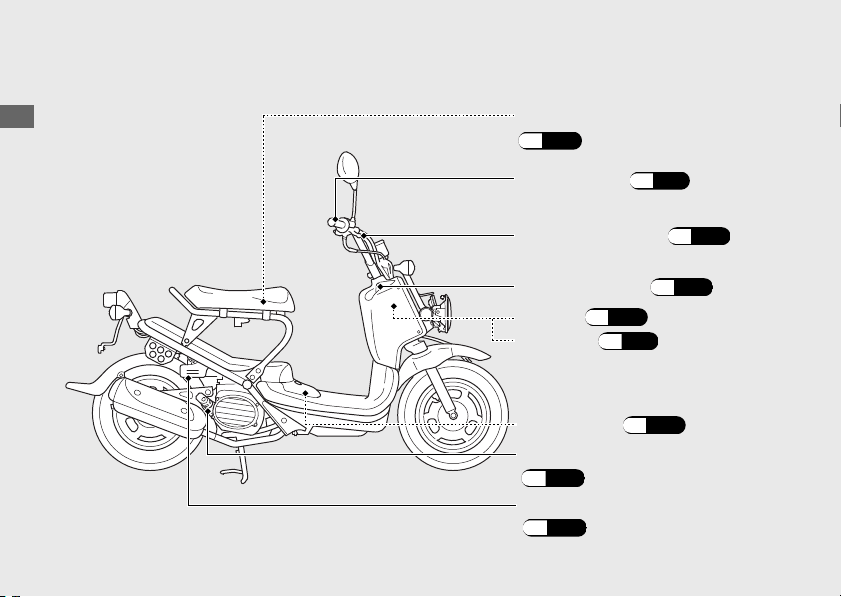
Parts Location
20161103142821_31GGA6800_enu_BOOK Page 21 Thursday, November 03 2016 14:30:25 JST
Operation Guide
18
Throttle grip
(P.71)
Owner’s manual storage
(P.33)
Fuel fill cap (P.30)
Front brake lever (P.66)
Engine oil fill cap/dipstick
(P.58)
Fuse box (P.81)
Ignition switch (P.22)
Battery (P.52)
Coolant reserve tank
(P.64)
20161103142821_31GGA6800_enu_BOOK Page 22 Thursday, November 03 2016 14:30:25 JST
Operation Guide
19
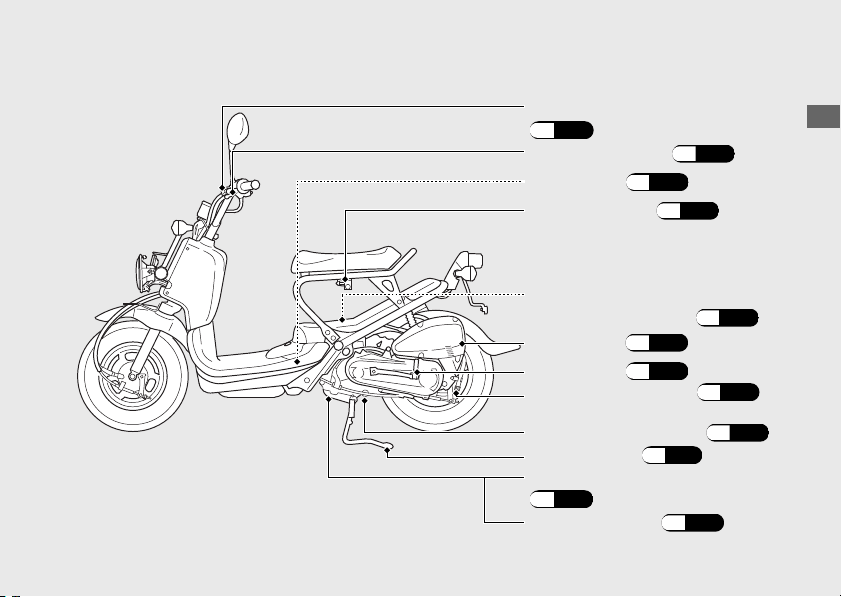
Engine oil plug
(P.59)
Crankcase breather (P.72)
Rear brake lock lever
(P.24)
Kickstarter (P.26)
Rear brake lever (P.66)
Air cleaner
(P.63)
Helmet holder (P.32)
Center stand (P.12)
Throttle stop screw
(engine idle speed) (P.62)
Spark plug (P.56)
Engine oil strainer screen
(P.59)
Engine oil drain bolt (P.59)
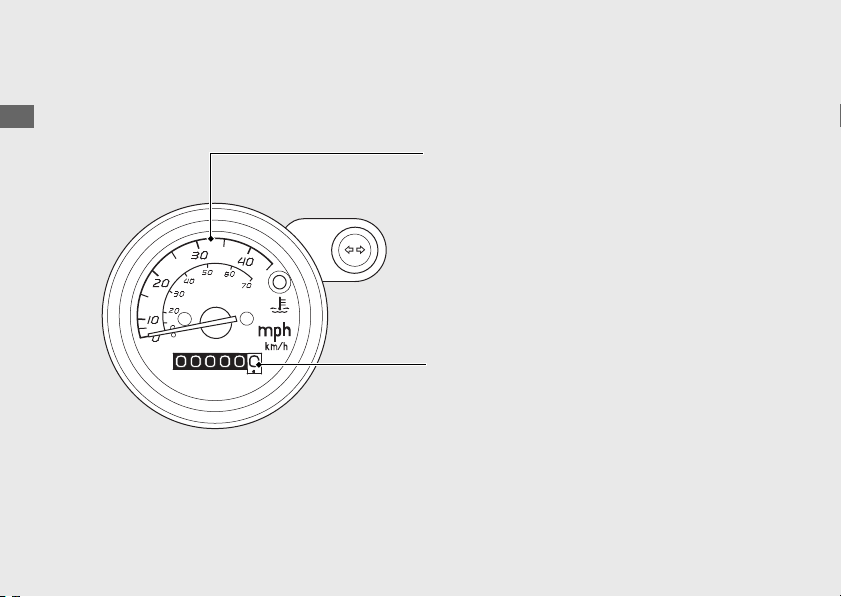
Instruments
20161103142821_31GGA6800_enu_BOOK Page 23 Thursday, November 03 2016 14:30:25 JST
Operation Guide
20
Shows riding speed in miles (USA) or
kilometers (Canada) per hour.
Speedometer
Odometer
Shows the total miles (USA) or
kilometers (Canada) ridden.
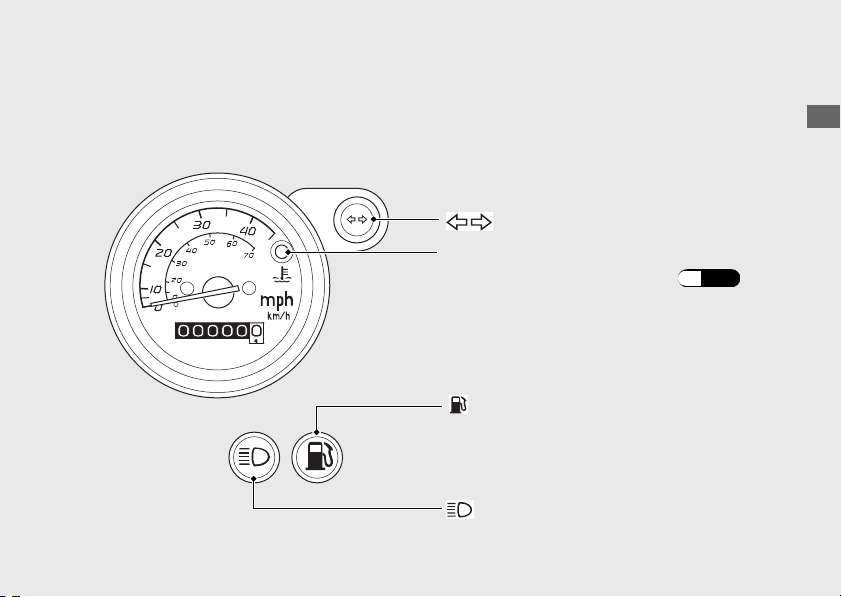
Indicators
20161103142821_31GGA6800_enu_BOOK Page 24 Thursday, November 03 2016 14:30:25 JST
Operation Guide
21
Turn signal indicator
When this indicator comes on while riding,
fuel reserved in the tank about:
High beam indicator
If it comes on while riding:
(P.76)
High coolant temperature indicator
If one of these indicators does not come on when it should, have your dealer check
for problems.
0.32 US gal (1.2 liters)
Fuel reserve indicator
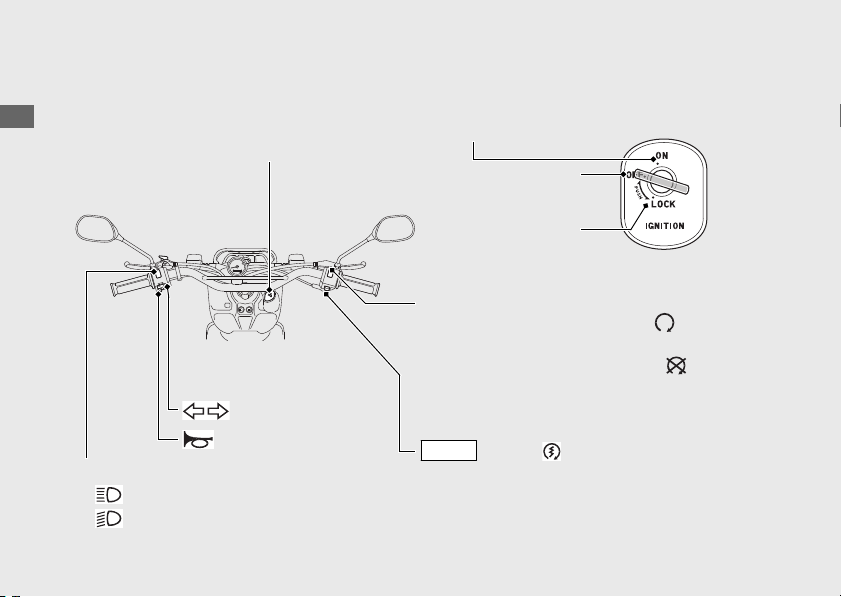
Switches
20161103142821_31GGA6800_enu_BOOK Page 25 Thursday, November 03 2016 14:30:25 JST
Operation Guide
22
Should normally remain in the
(Run)
position.
u In an emergency, switch to the (Off)
position (the starter motor will not operate)
to stop the engine.
Engine stop switch
Headlight dimmer switch
• : High beam
• : Low beam
Start button
Turn signal switch
Horn button
(Canada)
ON
LOCK
OFF
Turns electrical system on for
starting/riding.
u Key can be removed when in the OFF or
LOCK position.
Switches the electrical system on/off, locks the
steering.
Ignition Switch
Locks steering.
Turns engine off.
Headlights turn off when operating the
starter motor.
(USA) /
START
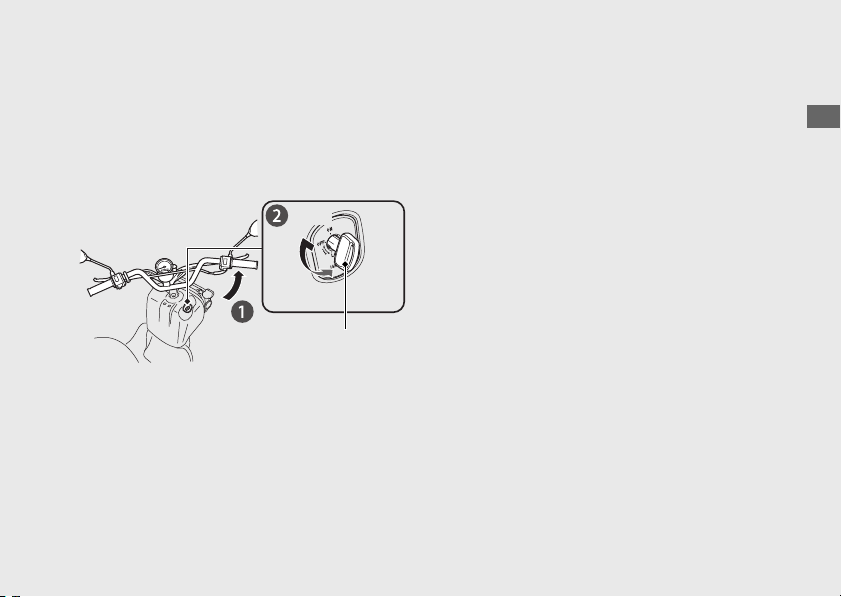
Steering Lock
Lock the steering when parking to help
prevent theft.
A U-shaped wheel lock or similar device is
also recommended.
#
Locking
a
Turn the handlebar all the way to the left.
b
Push the key down, and turn the ignition
switch to the LOCK position.
u Jiggle the handlebar if the lock is difficult
to engage.
c
Remove the key.
#
Unlocking
Insert the key, push it in, and turn the ignition
switch to the OFF position.
20161103142821_31GGA6800_enu_BOOK Page 26 Thursday, November 03 2016 14:30:25 JST
Operation Guide
23
Push
Ignition key
Turn
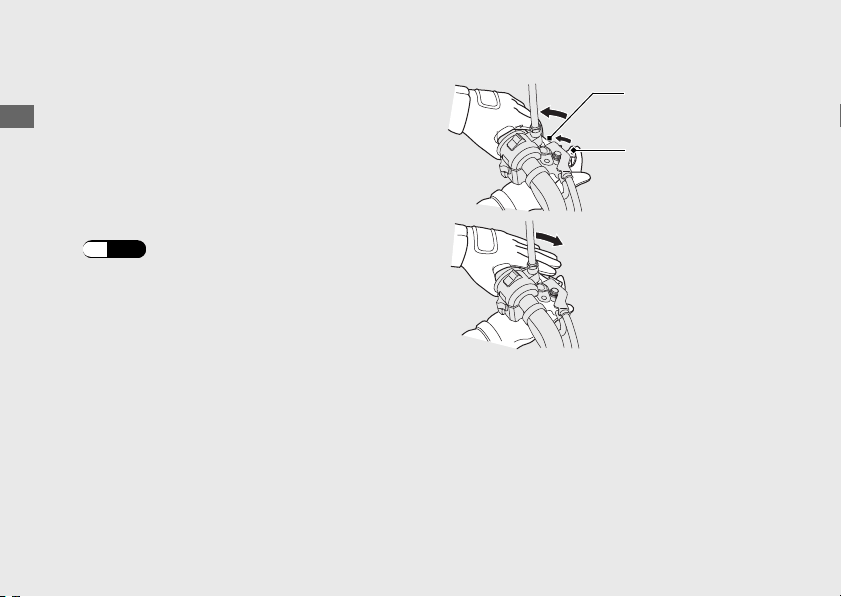
Rear Brake Lock
Be sure the rear brake lock is applied while
starting and warming up the engine.
#
Locking
Squeeze the rear brake lever and set the rear
brake lock lever.
u The rear brake lock will not function if the
rear brake is not adjusted properly.
(P.67)
#
Unlocking
Squeeze the rear brake lever.
u Before riding, make sure that the rear brake
lock is fully released so there is no drag on
the rear wheel.
20161103142821_31GGA6800_enu_BOOK Page 27 Thursday, November 03 2016 14:30:25 JST
Operation Guide
24
Rear brake
lever
Rear brake
lock lever
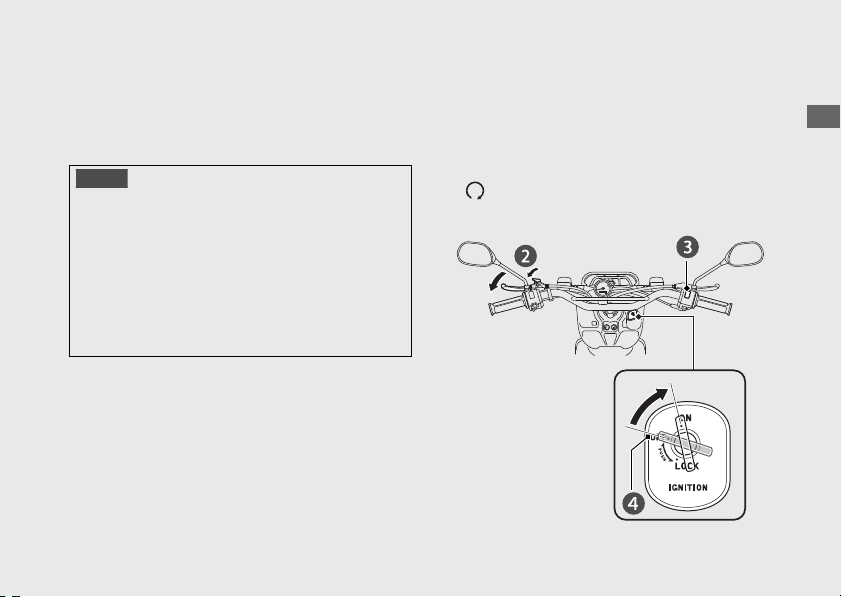
Starting the Engine
Start your engine using the following
procedure.
NOTICE
• (Using the start button)
If the engine does not start within 5 seconds,
turn the ignition switch to the OFF position
and wait 10 seconds before trying to start the
engine again to recover battery voltage.
• Extended fast idling and revving the engine
can damage the engine, and the exhaust
system.
a
Place the scooter on its center stand.
b
Lock the rear brake.
u The starter motor will only work when
the brake lever is pulled in.
c
Make sure the engine stop switch is in the
(Run) position.
d
Turn the ignition switch to the ON position.
20161103142821_31GGA6800_enu_BOOK Page 28 Thursday, November 03 2016 14:30:25 JST
Operation Guide
25
Continued
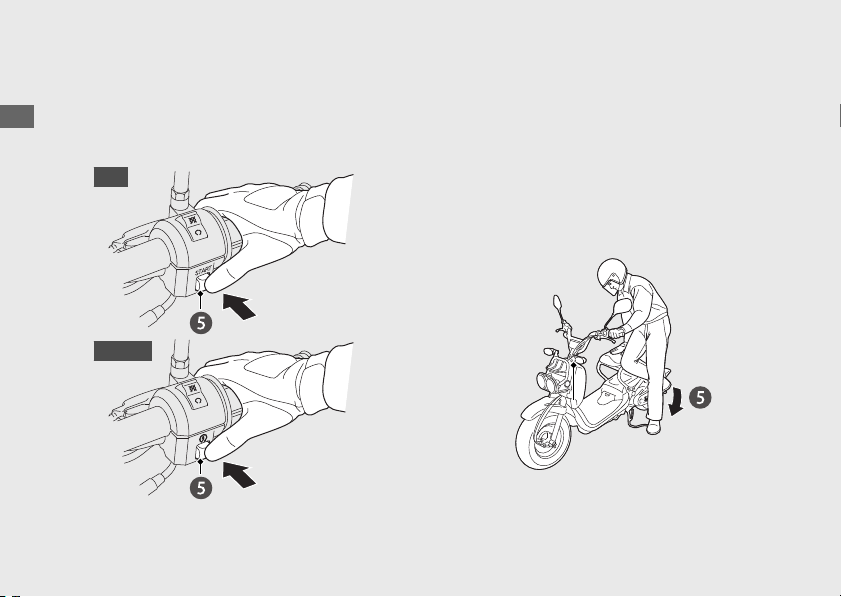
To Start the Engine with Electric Starter
e
Press the start button with the throttle
completely closed. Release the start button
as soon as the engine starts.
To Start the Engine with Kickstarter
e
With the throttle closed, operate the
kickstarter with a rapid, continuous motion.
u Allowing the kickstarter to snap back
freely against the pedal stop can
damage the engine case.
u Raise the kickstarter pedal after the
kickstarter lever is returned to the stop.
20161103142821_31GGA6800_enu_BOOK Page 29 Thursday, November 03 2016 14:30:25 JST
Operation Guide
26
Starting the Engine (Continued)
USA
Canada
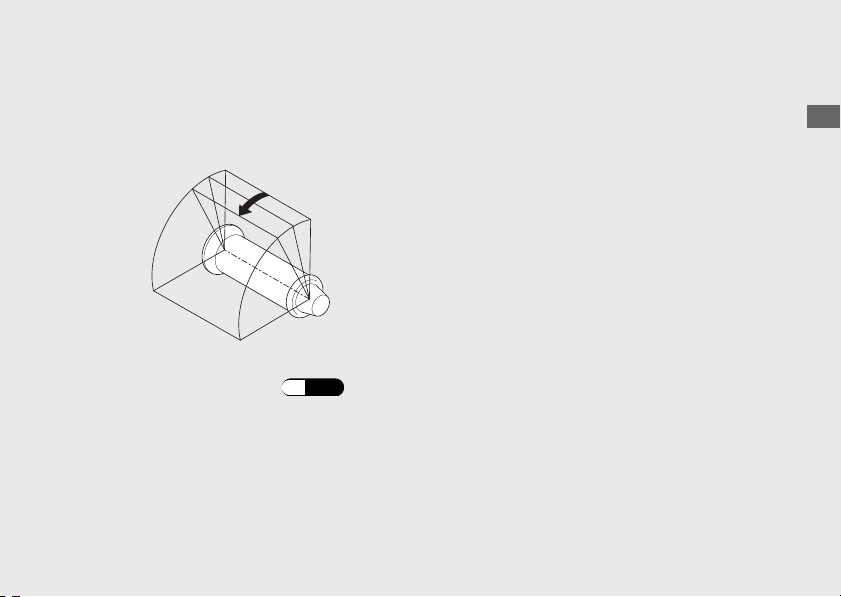
Riding
Starting the Scooter
a
Push the scooter forward off the center
stand.
u Lock the rear brake lock.
u Keep throttle closed.
b
Get on the scooter.
u Mount the scooter from the left side,
keeping at least one foot on the ground.
c
Release the rear brake lock.
u To prevent unexpected movement,
squeeze brake levers.
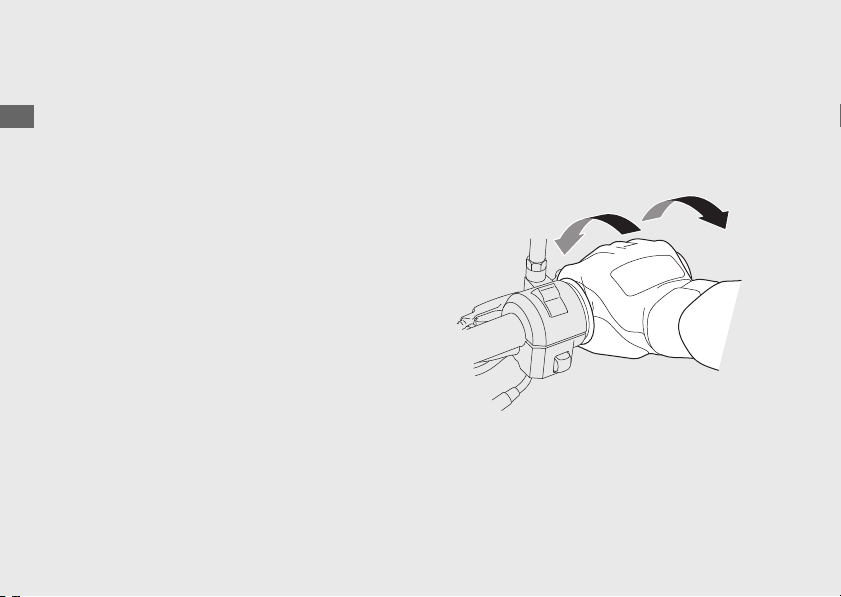
d
Acceleration and deceleration
To accelerate: Open the throttle slowly.
To decelerate: Close the throttle.
20161103142821_31GGA6800_enu_BOOK Page 31 Thursday, November 03 2016 14:30:25 JST
Operation Guide
28
Close
(Decelerate)
Open
(Accelerate)
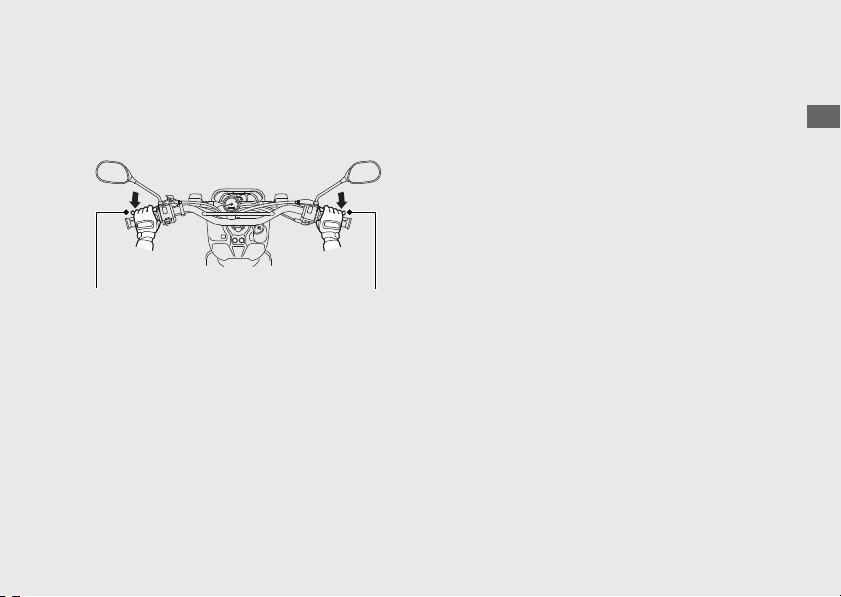
Braking
Close the throttle and apply the front and
rear brake levers together.
20161103142821_31GGA6800_enu_BOOK Page 32 Thursday, November 03 2016 14:30:25 JST
Operation Guide
29
Rear brake lever
Front brake lever
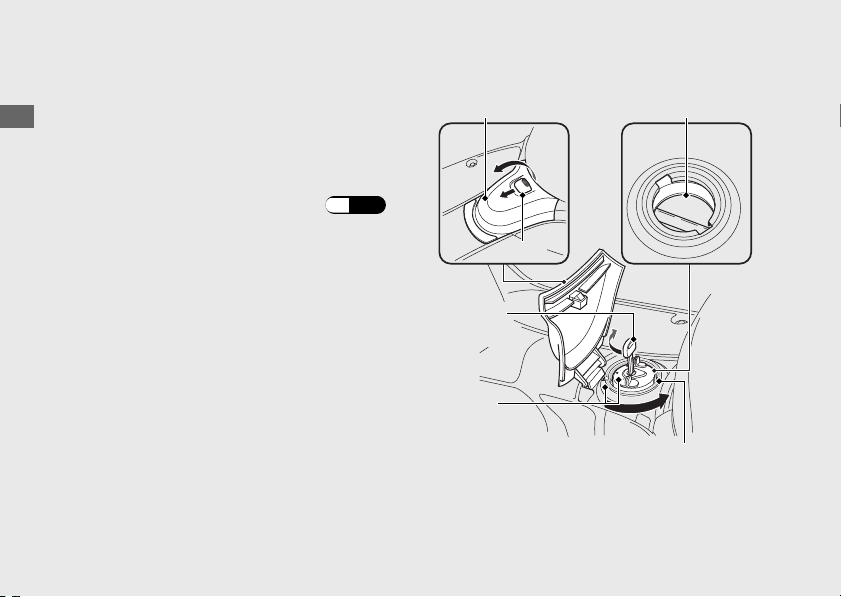
Refueling
Fuel type: Unleaded gasoline only
Recommended fuel octane number:
Pump Octane Number (PON) 86 or higher.
Tank capacity: 1.32 US gal (5.0 L)
#
Refueling and Fuel Guidelines
(P.12)
Opening the Fuel Fill Cap
a
Pull the tab and open the fuel tank lid.
b
Insert the ignition key in the fuel fill cap and
turn it clockwise until it stops.
c
Turn the fuel fill cap counterclockwise until it
stops and remove the cap.
Do not fill with fuel above the lower edge of
the filler neck.
20161103142821_31GGA6800_enu_BOOK Page 33 Thursday, November 03 2016 14:30:25 JST
Operation Guide
30
Arrow
marks
Ignition
key
Fuel fill cap
Fuel tank lid
Lower edge of
filler neck
Tab
Closing the Fuel Fill Cap
a
Install and tighten the fuel fill cap by turning
it clockwise.
u Make sure that the arrow marks on the
cap and fuel tank are aligned.
b
Turn the key counterclockwise until it stops
and remove the key.
c
Close the fuel tank lid.
3WARNING
Gasoline is highly flammable and
explosive. You can be burned or
seriously injured when handling fuel.
• Stop the engine, and keep heat,
sparks, and flame away.
• Handle fuel only outdoors.
• Wipe up spills immediately.
20161103142821_31GGA6800_enu_BOOK Page 34 Thursday, November 03 2016 14:30:25 JST
Operation Guide
31
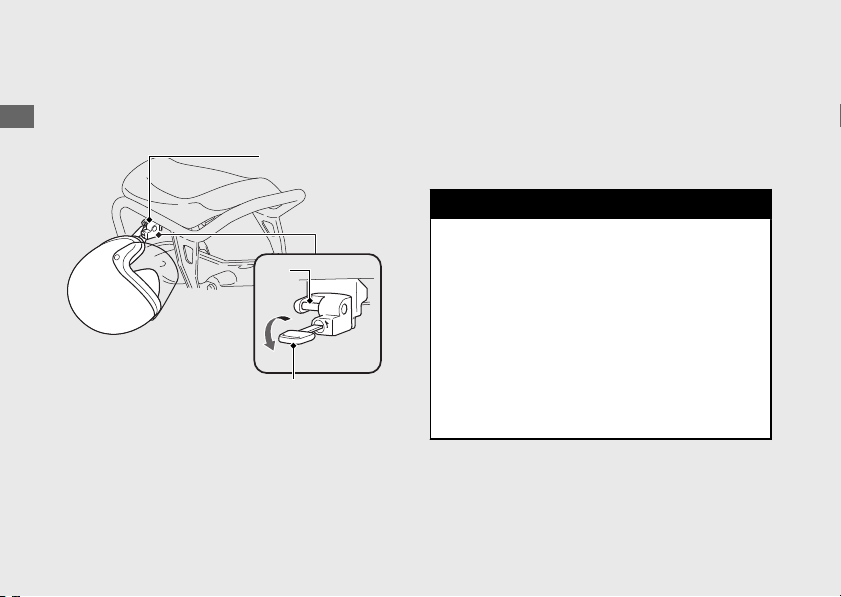
Storage Equipment
Helmet Holder
The helmet holder is located at the left seat
rail.
#
Unlocking
Insert the ignition key and turn it
counterclockwise.
#
Locking
a
Hang your helmet on the holder pin and
push it in to lock.
b
Remove the key.
u Use the helmet holder only when parked.
3WARNING
Riding with a helmet attached to the
holder can interfere with the rear wheel
or suspension and could cause a crash
in which you can be seriously hurt or
killed.
Use the helmet holder only while
parked. Do not ride with a helmet
secured by the holder.
20161103142821_31GGA6800_enu_BOOK Page 35 Thursday, November 03 2016 14:30:25 JST
Operation Guide
32
Helmet holder
Pin
Ignition key
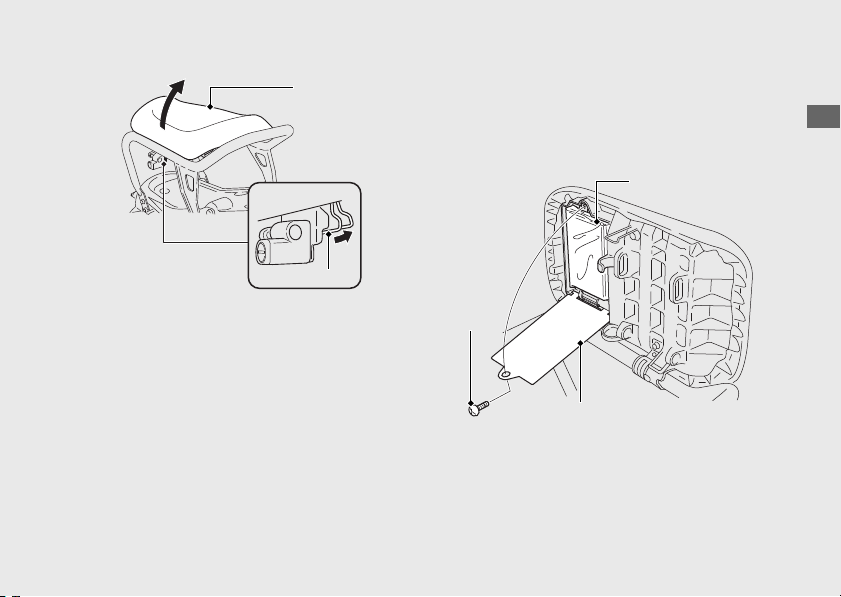
#
To open the seat
Push the seat hook and lift the seat.
#
To close the seat
Lower the seat. Push down on the left side of
the seat until it locks.
Make sure the seat is securely closed.
Document Bag
The document bag is in the owner’s manual
storage compartment on the underside of
the seat.
#
To open
a
Open the seat.
b
Remove the screw with a coin and open the
cover.
20161103142821_31GGA6800_enu_BOOK Page 36 Thursday, November 03 2016 14:30:25 JST
Operation Guide
33
Seat
Seat hook
Document bag
Screw
Cover

Importance of Maintenance ........................... P. 35
Maintenance Schedule...................................
.. P. 37
Maintenance Fundamentals ...........................P. 40
Removing & Installing Body Components..P. 52
Battery.................................................................... P. 52
Inner Cover ........................................................... P. 54
Maintenance Lid .................................................. P. 55
Spark Plug ........................................................... P. 56
Engine Oil ............................................................ P. 58
Engine Idle Speed.............................................. P. 62
Air Cleaner........................................................... P. 63
Coolant.................................................................P. 64
Brakes................................................................... P. 66
Throttle ................................................................ P. 71
Crankcase Breather ........................................... P. 72
Other Adjustments............................................ P. 73
Adjusting the Headlight Aim ............................ P. 73
20161103142821_31GGA6800_enu_BOOK Page 37 Thursday, November 03 2016 14:30:25 JST
Please read “Importance of Maintenance” and “Maintenance Fundamentals” carefully
before attempting any maintenance. Refer to “Specifications” for service data.
An optional larger tool kit may be available.
Check with your Honda dealer's parts department.
Maintenance
Importance of Maintenance
Importance of Maintenance
Keeping your scooter well-maintained is
absolutely essential to your safety and to
protect your investment, obtain maximum
performance, avoid breakdowns, and reduce air
pollution. Maintenance is the owner's
responsibility. Be sure to inspect your scooter
before each ride, and perform the periodic
checks specified in the Maintenance Schedule.
2 P. 37
3WARNING
Improperly maintaining your scooter or
failing to correct a problem before you
ride can cause a crash in which you can
be seriously hurt or killed.
Always follow the inspection and
maintenance recommendations and
schedules in this owner's manual.
For information about the exhaust emission and
noise emission requirements of the U.S.
Environmental Protection Agency (EPA), and the
Environment Canada (EC). 2 P. 91
USA
Maintenance, replacement or repair of the
emission control devices and systems may
be performed by any motorcycle repair
establishment or individual using parts
that are “certified” to EPA standards.
20161103142821_31GGA6800_enu_BOOK Page 38 Thursday, November 03 2016 14:30:25 JST
Maintenance
35

Maintenance Safety
Always read the maintenance instructions
before you begin each task, and make sure that
you have the tools, parts, and skills required.
We cannot warn you of every conceivable
hazard that can arise in performing
maintenance. Only you can decide whether or
not you should perform a given task.
Follow these guidelines when performing
maintenance.
● Stop the engine and remove the key.
● Place your scooter on a firm, level surface
using the center stand or a maintenance
stand to provide support.
● Allow the engine, muffler, brakes, and other
high-temperature parts to cool before
servicing as you can get burned.
● Run the engine only when instructed, and
do so in a well-ventilated area.
20161103142821_31GGA6800_enu_BOOK Page 39 Thursday, November 03 2016 14:30:25 JST
Importance of Maintenance
Maintenance
36

Maintenance Schedule
The maintenance schedule specifies the
maintenance requirements necessary to ensure
safe, dependable performance, and proper
emission control.
Maintenance work should be performed in
accordance with Honda's standards and
specifications by properly trained and equipped
technicians. Your dealer meets all of these
requirements. Keep an accurate record of
maintenance to help ensure that your scooter is
properly maintained.
Make sure that whomever performs the
maintenance completes this record.
All scheduled maintenance is considered a
normal owner operating cost and will be
charged to you by your dealer. Retain all
receipts. If you sell the scooter, these receipts
should be transferred with the scooter to the
new owner.
20161103142821_31GGA6800_enu_BOOK Page 40 Thursday, November 03 2016 14:30:25 JST
Maintenance
37
Continued
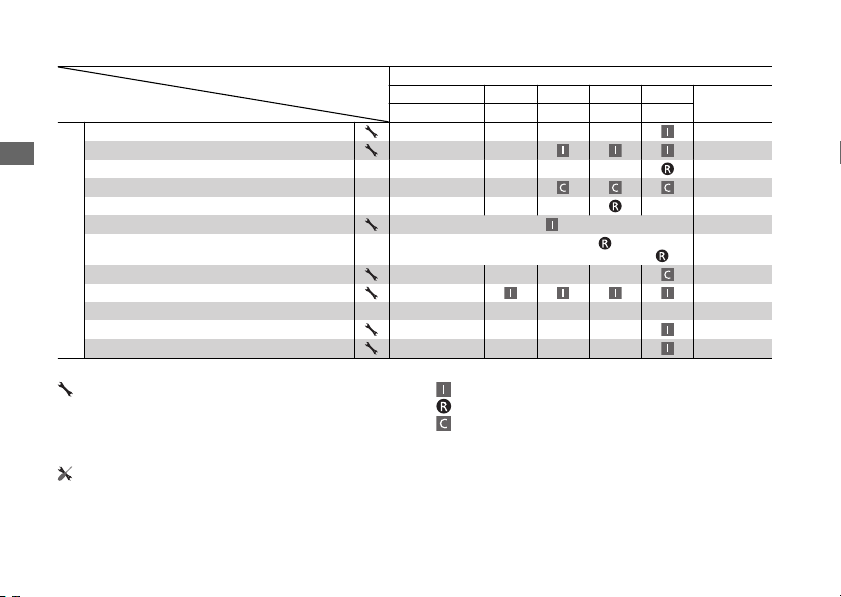
Frequency
Items
Odometer Reading
*1
× 1,000 mi 0.6 2.5 5 7.5
Refer to
page
× 1,000 km 1.0 4 8 12
Emission-Related Items
Fuel Line
–
Throttle Operation 71
Air Cleaner
*2
51, 63
Crankcase Breather
*3
72
Spark Plug 56
Valve Clearance
Every 15,000 mi (24,000 km):
–
Engine Oil
Initial = 600 mi (1,000 km) or 1 month:
Regular = Every 2,500 mi (4,000 km) or 6 months:
59
Engine Oil Strainer Screen 59
Engine Idle Speed 62
Radiator Coolant
*4
64
Cooling System –
Secondary Air Supply System –
Maintenance Level Maintenance Legend
: Intermediate. We recommend service by your
dealer, unless you have the necessary tools and are
mechanically skilled.
Procedures are provided in an official Honda Service
Manual (2 P. 99).
:
:
:
Inspect (clean, adjust, lubricate, or replace, if necessary)
Replace
Clean
: Technical. In the interest of safety, have your scooter
serviced by your dealer.
20161103142821_31GGA6800_enu_BOOK Page 41 Thursday, November 03 2016 14:30:25 JST
Maintenance Schedule
Maintenance
38
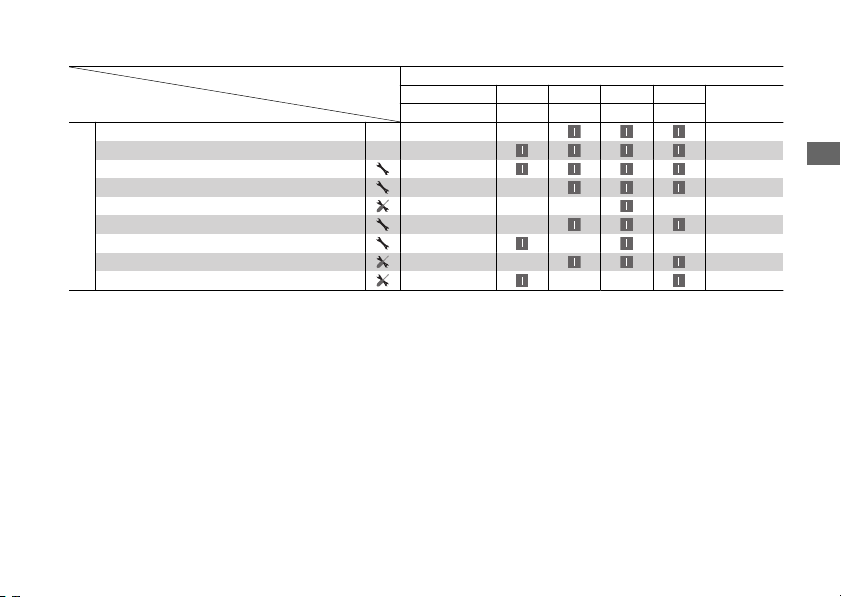
Frequency
Items
Odometer Reading
*1
× 1,000 mi 0.6 2.5 5 7.5
Refer to
page
× 1,000 km 1.0 4 8 12
Non-Emission-Related Items
Brake Shoes Wear
70
Brake System 66
Brake Lock Operation 24, 67
Headlight Aim 73
Clutch Shoes Wear –
Suspension –
Nuts, Bolts, Fasteners –
Wheels/Tires 48
Steering Head Bearings –
Notes:
*
1 : At higher odometer readings, repeat at the frequency interval established here.
*
2 : Service more frequently when riding in unusually wet or dusty areas.
*
3 : Service more frequently when riding in rain or at full throttle.
*
4 : Replace every 2 years. Replacement requires mechanical skill.
20161103142821_31GGA6800_enu_BOOK Page 42 Thursday, November 03 2016 14:30:25 JST
Maintenance Schedule
Maintenance
39

Maintenance Fundamentals
Pre-ride Inspection
To ensure safety, it is your responsibility to
perform a pre-ride inspection and make sure
that any problem you find is corrected. A pre-
ride inspection is a must, not only for safety, but
because having a breakdown, or even a flat tire,
can be a major inconvenience.
Check the following items before you get on
your scooter:
● Tire tread wear and air pressures are within
limits. 2 P. 48
● Lights, horn, and turn signals operate
normally.
Check the following items if you are carrying a
cargo:
● Combined weight is within load limits.
2 P. 104
● Cargo is secured properly.
Check the following items after you get on your
scooter:
● Throttle action moves smoothly without
binding. 2 P. 71
● Brake levers operate normally.
● Refuel when needed. 2 P. 12, 2 P. 30
● Engine stop switch functions properly.
2 P. 22
Check the following items at regular intervals:
● Oil level is between the upper and lower
level marks. 2 P. 58
● Engine coolant level is between the UPPER
and LOWER level marks. 2 P. 64
● Rear brake lock works properly. 2 P. 24
20161103142821_31GGA6800_enu_BOOK Page 43 Thursday, November 03 2016 14:30:25 JST
Maintenance
40
Tires and wheels
Check the air pressure (2 P. 48), examine tread for wear and damage
(2 P. 48), and check the wheels for damage.
Fluid levels Check the engine oil level (2 P. 58), engine coolant level (2 P. 64).
Lights
Check that the headlight, brake light, taillight, and turn signals are
working properly.
Controls
Check the freeplay of the front and rear brake levers (2 P. 66), and
throttle grip (2 P. 71
).
Fuses Check that you have a full supply of spare fuses.
Nuts & bolts Check the major nuts and bolts, and tighten as needed.
Periodic Checks
You should also perform other periodic
maintenance checks at least once a month
regardless of how often you ride, or more often
if you ride frequently.
Also, check the odometer reading against the
Maintenance Schedule and perform all
maintenance that is due. 2 P. 37
20161103142821_31GGA6800_enu_BOOK Page 44 Thursday, November 03 2016 14:30:25 JST
Maintenance Fundamentals
Maintenance
41
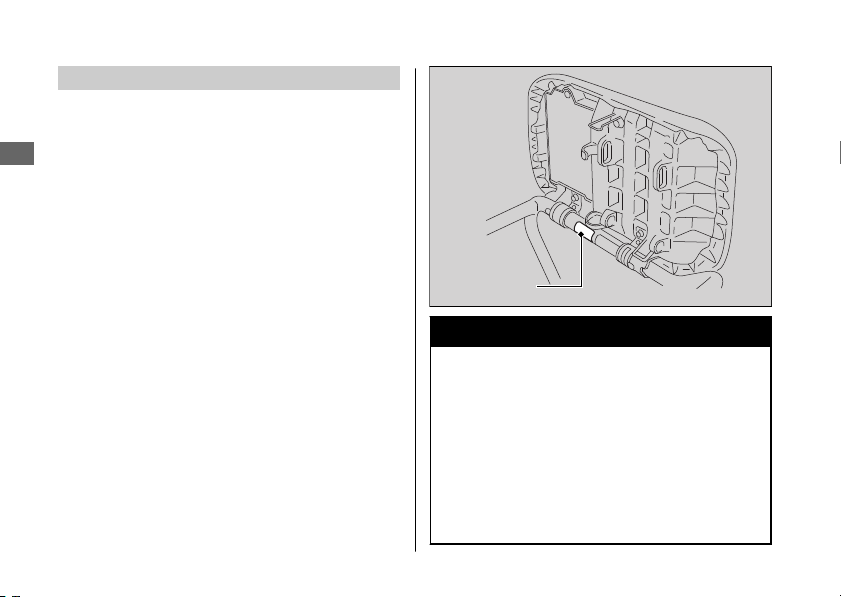
Replacing Parts
Always use Honda Genuine Parts or their
equivalents to ensure reliability and safety.
When ordering colored components, specify
the model name, color, and code mentioned on
the color label. The color label is attached to the
right seat rail. 2 P. 33
3WARNING
Installing non-Honda parts may make
your scooter unsafe and cause a crash
in which you can be seriously hurt or
killed.
Always use Honda Genuine Parts or
equivalents that have been designed
and approved for your scooter.
20161103142821_31GGA6800_enu_BOOK Page 45 Thursday, November 03 2016 14:30:25 JST
Maintenance Fundamentals
Maintenance
42
Color label
Battery
Your scooter has a maintenance-free type
battery. You do not have to check the battery
electrolyte level or add distilled water. Clean the
battery terminals if they become dirty or
corroded.
Do not remove the battery cap seals. There is
no need to remove the cap when charging.
#
What to do in an emergency
If any of the following occur, immediately see
your doctor.
● Electrolyte splashes into your eyes:
u Wash your eyes repeatedly with cool
water for at least 15 minutes. Using water
under pressure can damage your eyes.
● Electrolyte splashes onto your skin:
u Remove affected clothing and wash your
skin thoroughly using water.
● Electrolyte splashes into your mouth:
u Rinse mouth thoroughly with water, and
do not swallow.
3WARNING
The battery gives off explosive
hydrogen gas during normal operation.
A spark or flame can cause the battery
to explode with enough force to kill or
seriously hurt you.
Wear protective clothing and a face
shield, or have a skilled mechanic do
the battery servicing.
WARNING: Battery posts, terminals, and
related accessories contain lead and lead
compounds.
Wash your hands after handling.
20161103142821_31GGA6800_enu_BOOK Page 46 Thursday, November 03 2016 14:30:25 JST
Maintenance Fundamentals
Maintenance
43
Continued
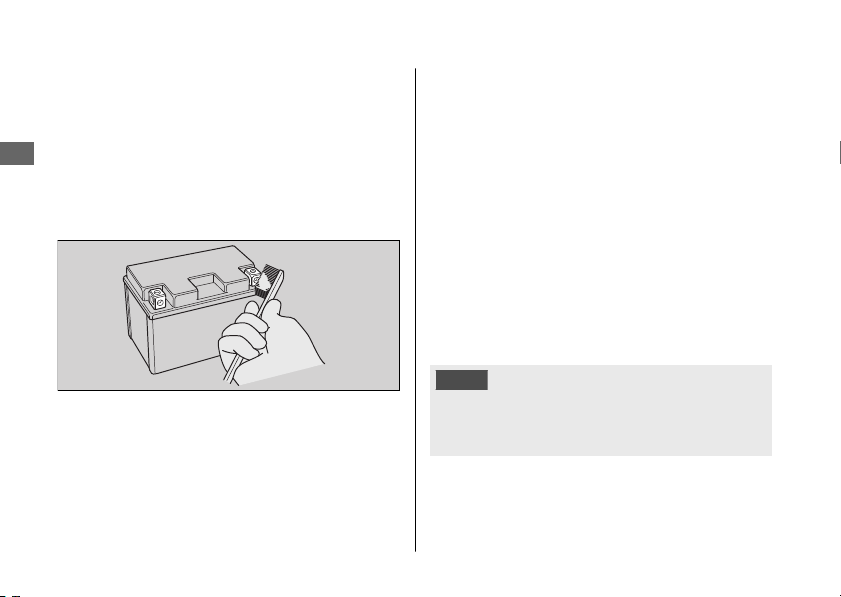
#
Cleaning the Battery Terminals
1.
Remove the battery. 2 P. 52
2.
If the terminals are starting to corrode and
are coated with a white substance, wash
with warm water and wipe clean.
3.
If the terminals are heavily corroded, clean
and polish the terminals with a wire brush or
sandpaper. Wear safety glasses.
4.
After cleaning, reinstall the battery.
The battery has a limited life span. Consult your
dealer about when you should replace the
battery. Always replace the battery with another
maintenance-free battery of the same type.
#
Charging
If you use electrical accessories that drain the
battery or you do not ride frequently, we
recommend that you charge the battery every
30 days using a charger designed specifically for
your Honda, which can be purchased from your
dealer. Read the information that came with
your battery charger and follow the instructions
on the battery. Avoid using an automobile-type
battery charger, as these can overheat a
motorcycle battery and cause permanent
damage.
Make sure the ignition switch is in the OFF
position before charging the battery.
NOTICE
Improper charging can damage the battery. If
you can’t charge the battery or it appears unable
to hold a charge, contact your dealer.
20161103142821_31GGA6800_enu_BOOK Page 47 Thursday, November 03 2016 14:30:25 JST
Maintenance Fundamentals
Maintenance
44
NOTICE
Jump starting using an automobile battery can
damage your scooter's electrical system and is
not recommended. Bump starting is also not
recommended.
NOTICE
Installing non-Honda electrical accessories can
overload the electrical system, discharging the
battery and possibly damaging the system.
Fuses
Fuses protect the electrical circuits on your
scooter. If something electrical on your scooter
stops working, check for and replace any blown
fuses. 2 P. 81
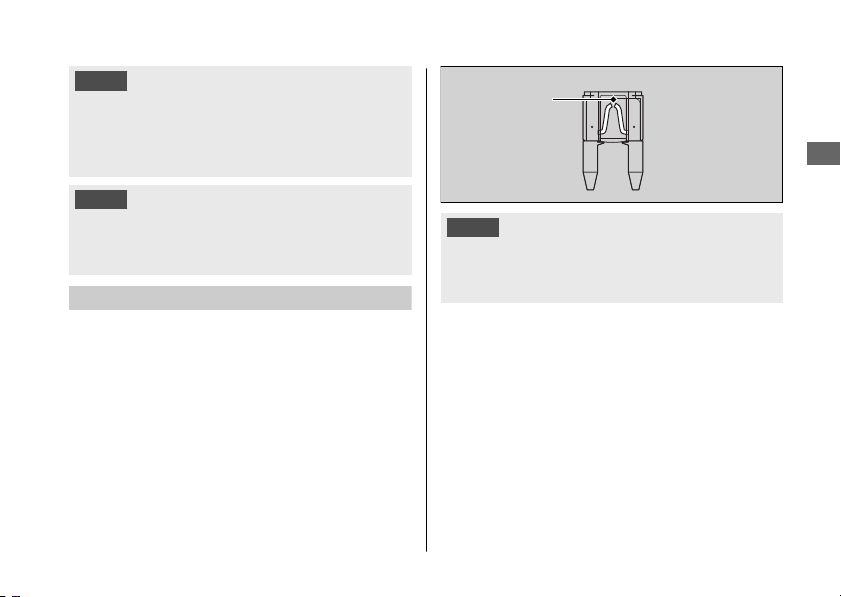
#
Inspecting and Replacing Fuses
Turn the ignition switch to the OFF position to
remove and inspect fuses. If a fuse is blown,
replace with a fuse of the same rating. For fuse
ratings, see “Specifications.” 2 P. 105
NOTICE
Replacing a fuse with one that has a higher
rating greatly increases the chance of damage to
the electrical system.
If a fuse fails repeatedly, you likely have an
electrical fault. Have your scooter inspected by
your dealer.
20161103142821_31GGA6800_enu_BOOK Page 48 Thursday, November 03 2016 14:30:25 JST
Maintenance Fundamentals
Maintenance
45
Blown fuse
Engine Oil
Engine oil consumption varies and oil quality
deteriorates according to riding conditions and
time elapsed.
Check the engine oil level regularly, and add the
recommended engine oil if necessary. Dirty oil
or old oil should be changed as soon as
possible.
#
Selecting the Engine Oil
For recommended engine oil, see
“Specifications.” 2 P. 105
If you use non-Honda engine oil, check the
label to make sure that the oil satisfies all of the
following standards:
● JASO T 903 standard
*1
: MA
● SAE standard
*2
: 10 W-30
● API classification
*3
: SG or higher
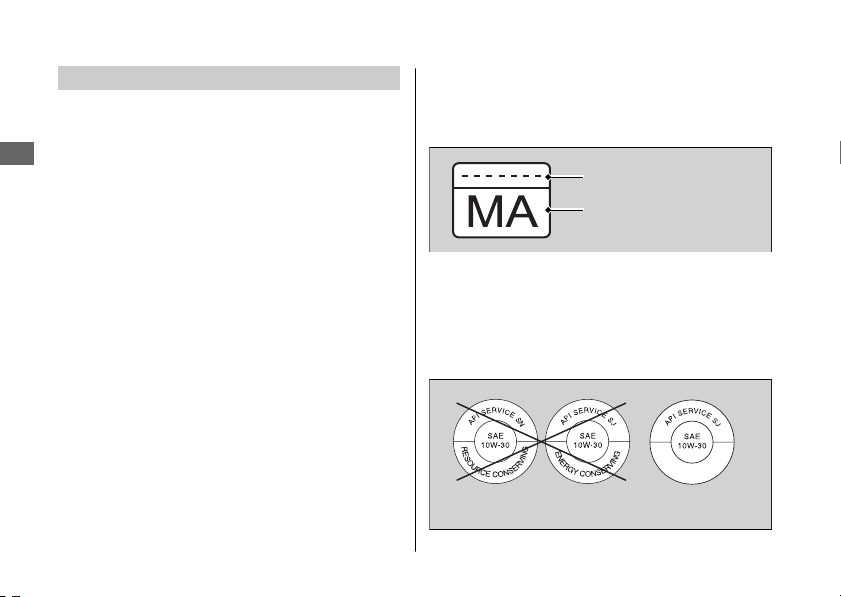
*1.
The JASO T 903 standard is an index for engine
oils for 4-stroke motorcycle engines. There are
two classes: MA and MB. For example, the
following label shows the MA classification.
*2.
The SAE standard grades oils by their viscosity.
*3.
The API classification specifies the quality and
performance rating of engine oils. Use SG or
higher oils, excluding oils marked as “Energy
Conserving” or “Resource Conserving” on the
circular API service symbol.
20161103142821_31GGA6800_enu_BOOK Page 49 Thursday, November 03 2016 14:30:25 JST
Maintenance Fundamentals
Maintenance
46
Oil code
Oil classification
Not recommended
Recommended
Recommended Coolant
Pro Honda HP Coolant is a pre-mixed solution
of antifreeze and distilled water.
Concentration:
50% antifreeze and 50% distilled water
A concentration of antifreeze below 40% will
not provide proper corrosion and cold
temperature protection.
A concentration of up to 60% will provide better
protection in colder climates.
NOTICE
Using coolant not specified for aluminum
engines or tap/mineral water can cause
corrosion.
Crankcase Breather
Service more frequently when riding in rain, at
full throttle, or after the scooter is washed or
overturned. Service if the deposit level can be
seen in the transparent section of the drain
tube.
If the drain tube overflows, the air filter may
become contaminated with engine oil causing
poor engine performance. 2 P. 72
20161103142821_31GGA6800_enu_BOOK Page 50 Thursday, November 03 2016 14:30:25 JST
Maintenance Fundamentals
Maintenance
47
Tires (Inspecting/Replacing)
#
Checking the Air Pressure
Visually inspect your tires and use an air
pressure gauge to measure the air pressure at
least once a month or any time you think the
tires look low. Always check air pressure when
your tires are cold.
#
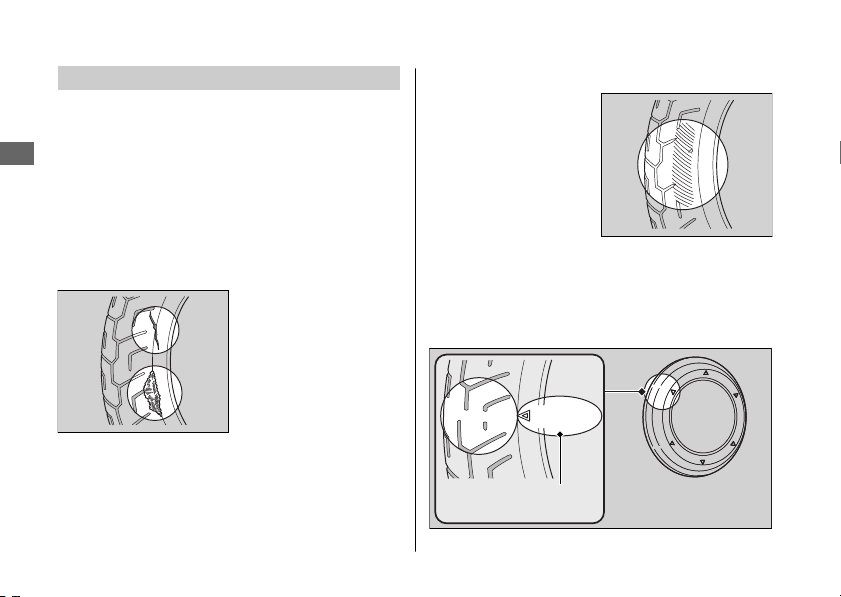
Inspecting for Damage
Inspect the tires for
cuts, slits, or cracks that
exposes fabric or
cords, or nails or other
foreign objects
embedded in the side
of the tire or the tread.
Also inspect for any unusual bumps or bulges in
the side walls of the tires.
#
Inspecting for Abnormal Wear
Inspect the tires for
signs of abnormal wear
on the contact surface.
#
Inspecting Tread Depth
Inspect the tread wear indicators. If they
become visible, replace the tires immediately.
20161103142821_31GGA6800_enu_BOOK Page 51 Thursday, November 03 2016 14:30:25 JST
Maintenance Fundamentals
Maintenance
48
Wear indicator
location mark
or T.W.I.
3WARNING
Riding on tires that are excessively worn
or improperly inflated can cause a crash
in which you can be seriously hurt or
killed.
Follow all instructions in this owner's
manual regarding tire inflation and
maintenance.
Have your tires replaced by your dealer.
For recommended tires and air pressure, see
“Specifications.” 2 P. 105
Follow these guidelines whenever you replace
tires.
● Use the recommended tires or equivalents
of the same size, construction, speed rating,
and load range.
● Do not install a tube inside a tubeless tire on
this scooter. Excessive heat build-up can
cause the tube to burst.
● Use only tubeless tires on this scooter.
The rims are designed for tubeless tires, and
during hard acceleration or braking, a tube-
type tire could slip on the rim and cause the
tire to rapidly deflate.
3WARNING
Installing improper tires on your
scooter can adversely affect handling
and stability, and can cause a crash in
which you can be seriously hurt or
killed.
Always use the size and type of tires
recommended in this owner's manual.
20161103142821_31GGA6800_enu_BOOK Page 52 Thursday, November 03 2016 14:30:25 JST
Maintenance Fundamentals
Maintenance
49
Tire Service Life
The service life of your tires is dependent on
many factors, including, but not limited to,
riding habits, road conditions, vehicle loading,
tire air pressure, maintenance history, speed,
and environmental conditions (even when the
tires are not in use).
In addition to your regular inspections and
maintenance, it is recommended that you have
annual inspections performed once the tires
reach 5 years old. It is also recommended that
all tires be removed from service after 10 years
from the date of manufacture, regardless of
their condition or state of wear.
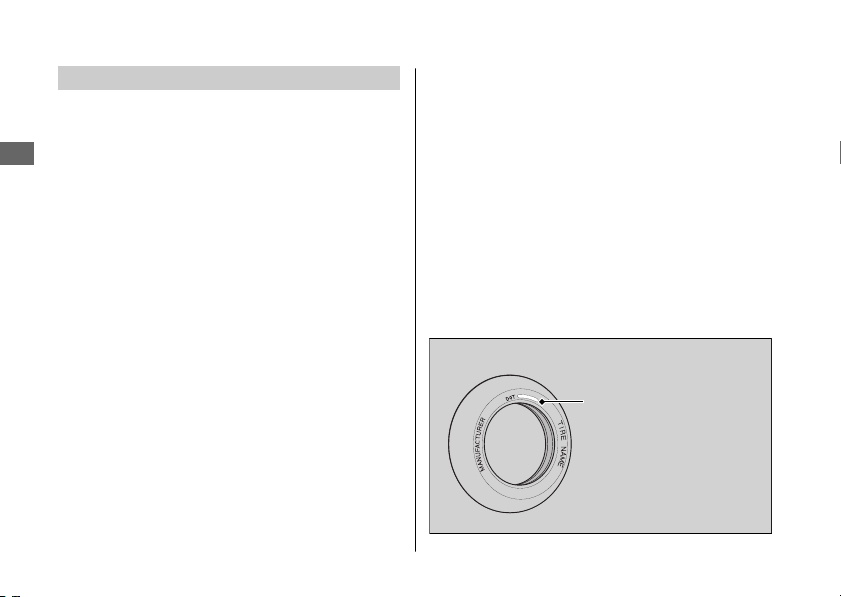
The last four digits of the TIN (tire identification
number) indicate the date of manufacture.
#
Tire Identification Number (TIN)
The tire identification number (TIN) is a group
of numbers and letters located on the sidewall
of the tire.
a b c
DOT XXXX XXXX 22 09
DOT: This indicates that the tire meets all
re
quirements of the U.S. Department
of Transportation.
a XXXX:
F
actory code
b
XXXX:
T
ire type code
c
22 09:
Date of manufacture (week & year).
Example: week 22 in year 09.
20161103142821_31GGA6800_enu_BOOK Page 53 Thursday, November 03 2016 14:30:25 JST
Maintenance Fundamentals
Maintenance
50
Tire Labeling Example
Tire identification
number (TIN)

Air Cleaner
This scooter is equipped with a viscous type air
cleaner element which cannot be cleaned with
compressed air or otherwise without degrading
its performance.
If the filter becomes dirty, replace it with a new
one.
20161103142821_31GGA6800_enu_BOOK Page 54 Thursday, November 03 2016 14:30:25 JST
Maintenance Fundamentals
Maintenance
51
Removing & Installing Body Components
Battery
#
Removal
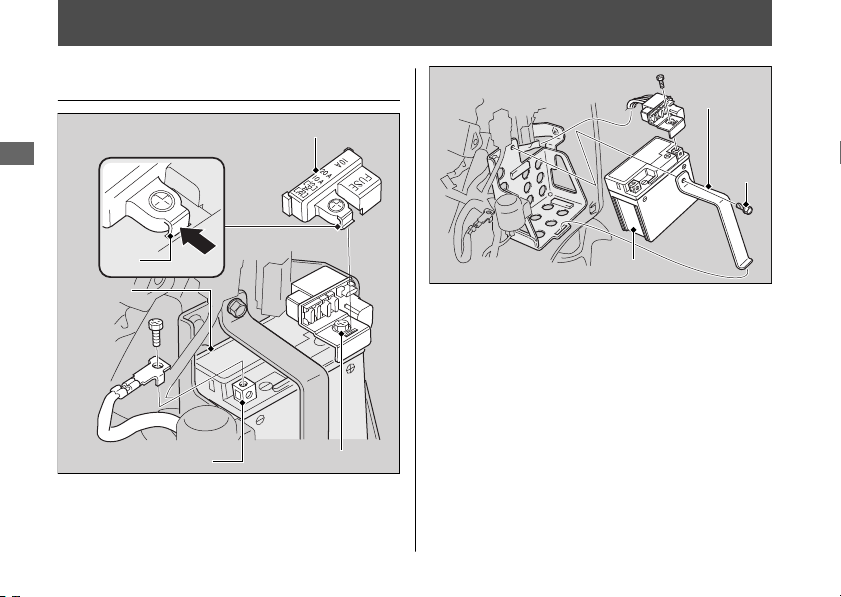
Make sure the ignition switch is in the OFF
position.
1.
Remove the inner cover. 2 P. 54
2.
Disconnect the negative - terminal from
the battery.
3.
Release the tab, then remove the fuse box
cover.
4.
Disconnect the positive + terminal from
the battery.
20161103142821_31GGA6800_enu_BOOK Page 55 Thursday, November 03 2016 14:30:25 JST
Maintenance
52
Positive terminal
Fuse box cover
Tab
Negative terminal
Battery
Bolt
Battery
holder
Battery

5.
Remove the battery holder by removing
the bolt.
6.
Remove the battery taking care not to
drop the terminal nuts.
#
Installation
Install the parts in the reverse order of
removal. Always connect the positive +
terminal first. Make sure that bolts and nuts
are tight.
For proper handling of the battery, see
“Maintenance Fundamentals.” 2 P. 43
“Battery Goes Dead.” 2 P. 78
20161103142821_31GGA6800_enu_BOOK Page 56 Thursday, November 03 2016 14:30:25 JST
Removing & Installing Body Components u Battery
Maintenance
53
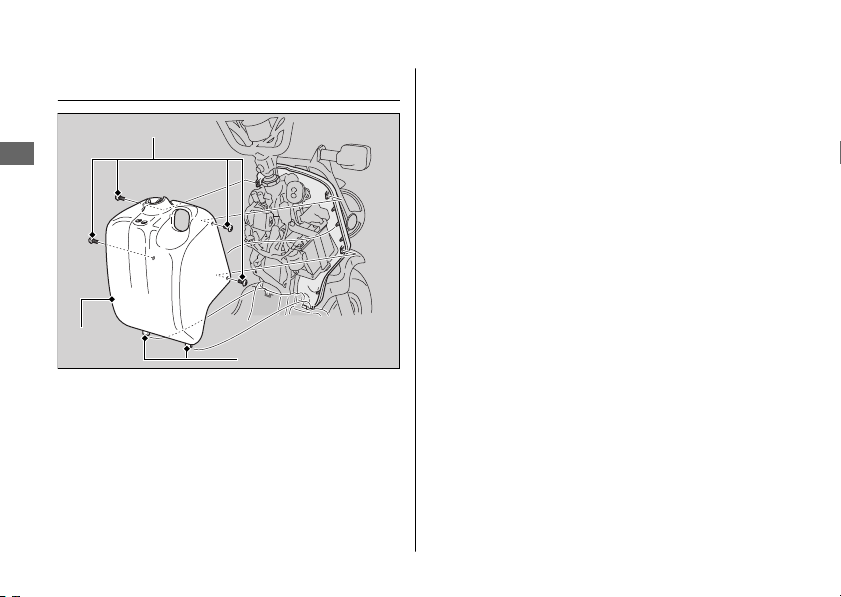
Inner Cover
#
Removal
1.
Remove the screws.
2.
Release the tabs, then remove the inner
cover.
#
Installation
Install the parts in the reverse order of
removal.
20161103142821_31GGA6800_enu_BOOK Page 57 Thursday, November 03 2016 14:30:25 JST
Removing & Installing Body Components u Inner Cover
Maintenance
54
Screws
Inner
cover
Tabs
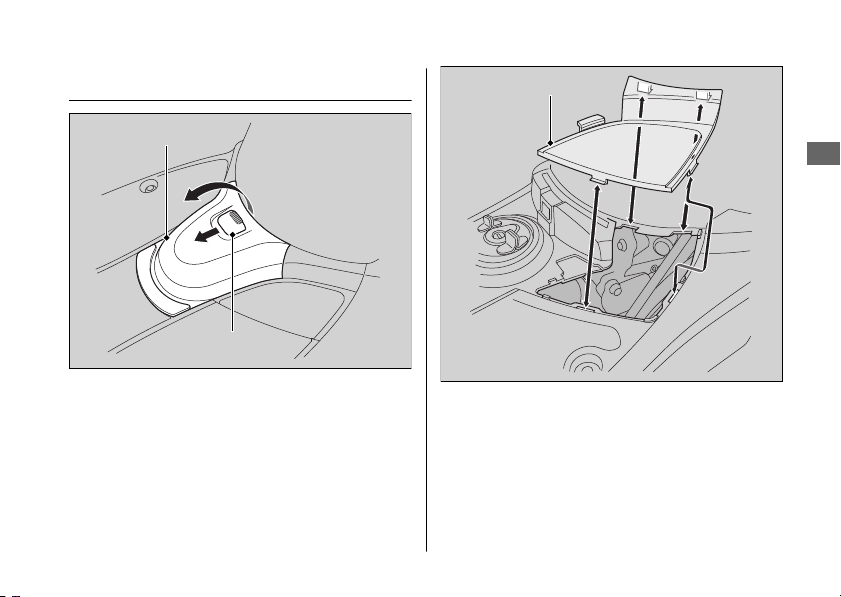
Maintenance Lid
#
Removal
1.
Pull the tab and open the fuel tank lid.
2.
Remove the maintenance lid.
#
Installation
Install the parts in the reverse order of removal.
20161103142821_31GGA6800_enu_BOOK Page 58 Thursday, November 03 2016 14:30:25 JST
Removing & Installing Body Components u Maintenance Lid
Maintenance
55
Fuel tank lid
Tab
Maintenance lid
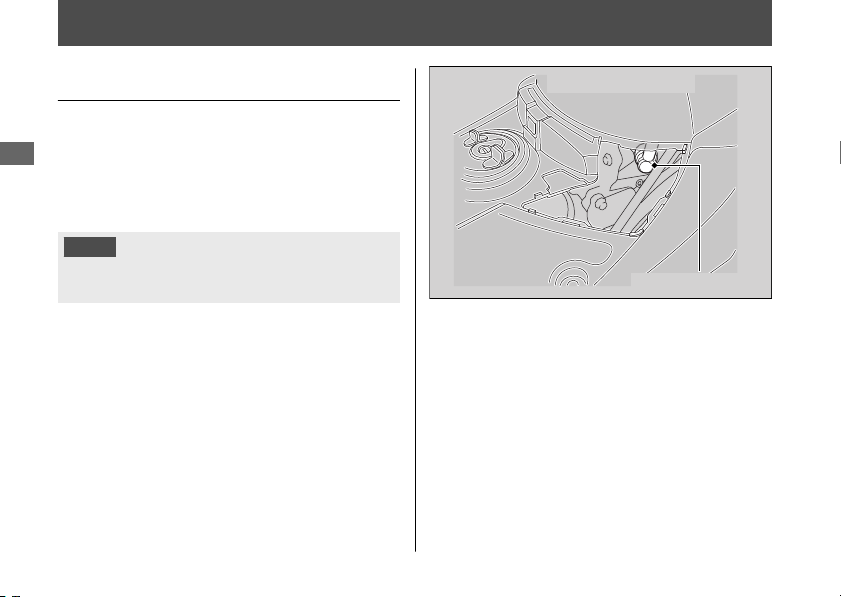
Spark Plug
Changing Spark Plug
For the recommended spark plug, see
“Specifications.” 2 P. 105
Use only the recommended type of spark
plug in the recommended heat range.
NOTICE
Using a spark plug with an improper heat range
can cause engine damage.
1.
Remove the maintenance lid. 2 P. 55
2.
Disconnect the spark plug cap from the
spark plug.
3.
Clean any dirt from around the spark plug
base.
4.
Remove the spark plug using a suitable
spark plug wrench.
5.
Install the new spark plug. With the plug
washer attached, thread the spark plug in
by hand to prevent cross-threading.
20161103142821_31GGA6800_enu_BOOK Page 59 Thursday, November 03 2016 14:30:25 JST
Maintenance
56
Under step board
Spark plug cap

6.
Tighten the spark plug:
● If the old plug is good:
1/8 turn after it seats.
● If installing a new plug, tighten it twice
to prevent loosening:
a) First, tighten the plug:
1/2 turn after it seats.
b) Then loosen the plug.
c) Next, tighten the plug again:
1/8 turn after it seats.
NOTICE
An improperly tightened spark plug can damage
the engine. If a plug is too loose, a piston may be
damaged. If a plug is too tight, the threads may
be damaged.
7.
Reinstall the spark plug cap. Take care to
avoid pinching any cables or wires.
8.
Install the parts in the reverse order of
removal.
20161103142821_31GGA6800_enu_BOOK Page 60 Thursday, November 03 2016 14:30:25 JST
Spark Plug u Changing Spark Plug
Maintenance
57
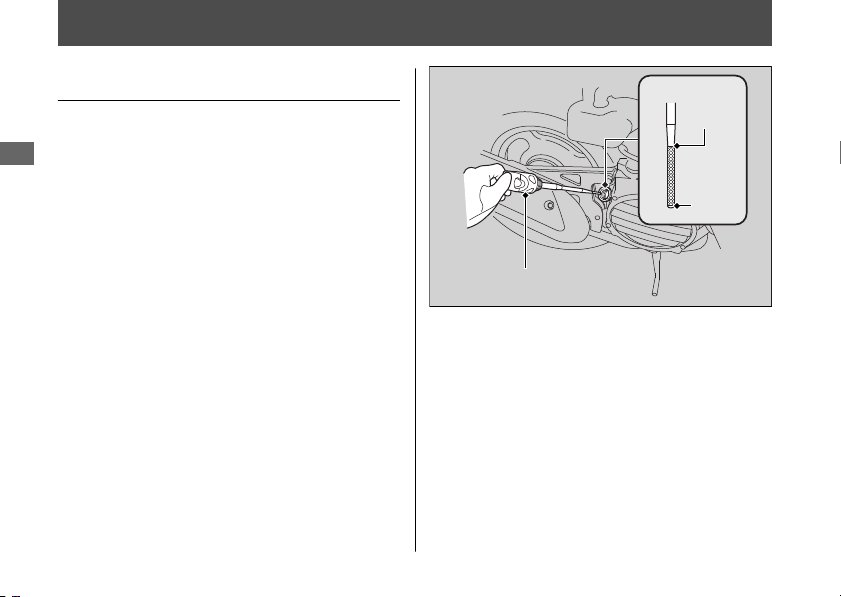
Engine Oil
Checking the Engine Oil
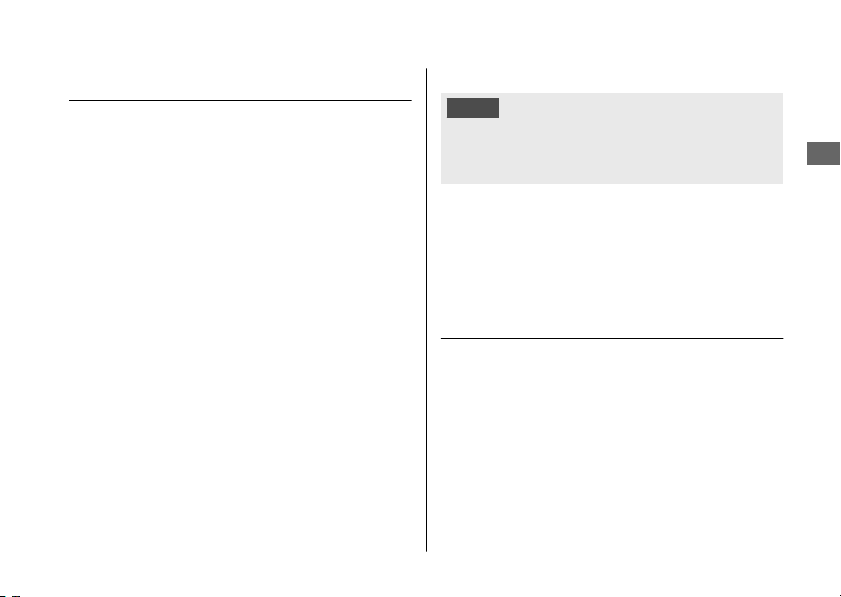
1.
If the engine is cold, idle the engine for 3
to 5 minutes.
2.
Turn the ignition switch to the OFF
position and wait for 2 to 3 minutes.
3.
Place your scooter on its center stand on
a firm, level surface.
4.
Remove the oil fill cap/dipstick and wipe it
clean.
5.
Insert the oil fill cap/dipstick until it seats,
but don't screw it in.
6.
Check that the oil level is between the
upper level and lower level marks in the
oil fill cap/dipstick.
7.
Securely install the oil fill cap/dipstick.
20161103142821_31GGA6800_enu_BOOK Page 61 Thursday, November 03 2016 14:30:25 JST
Maintenance
58
Upper
level
Lower
level
Oil fill cap/dipstick
Adding Engine Oil
If the engine oil is below or near the lower
level mark, add the recommended engine oil.
2 P. 46, 2 P. 105
1.
Remove the oil fill cap/dipstick. Add the
recommended oil until it reaches the
upper level mark.
u Place your scooter on its center stand
on a firm, level surface when checking
the oil level.
u Do not overfill above the upper level
mark.
u Make sure no foreign objects enter the
oil filler opening.
u Wipe up any spills immediately.
2.
Securely reinstall the oil fill cap/dipstick.
NOTICE
Overfilling with oil or operating with insufficient
oil can cause damage to your engine. Do not mix
different brands and grades of oil.
For the recommended oil and oil selection
guidelines, see “Maintenance Fundamentals.”
2 P. 46
Changing Engine Oil, Cleaning
Strainer Screen
Changing the oil and cleaning the strainer
screen requires special tools. We recommend
that you have your scooter serviced by your
dealer.
20161103142821_31GGA6800_enu_BOOK Page 62 Thursday, November 03 2016 14:30:25 JST
Engine Oil u Adding Engine Oil
Maintenance
59
Continued
1.
If the engine is cold, idle the engine for 3
to 5 minutes.
2.
Turn the ignition switch to the OFF
position and wait for 2 to 3 minutes.
3.
Place your scooter on its center stand on
a firm, level surface.
4.
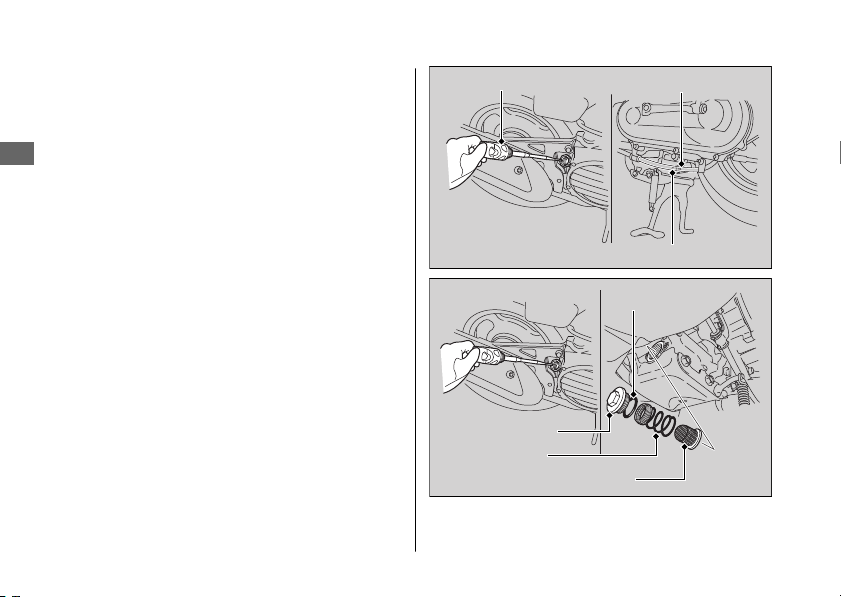
Place a drain pan under the drain bolt
and oil plug.
5.
Remove the oil fill cap/dipstick, drain bolt
and sealing washer to drain the oil.
6.
Remove the oil plug, O-ring, spring and
oil strainer screen and let the remaining
oil drain out.
u Discard the oil at an approved
recycling center.
7.
Clean the oil strainer screen.
8.
Check that the oil strainer screen and
sealing rubber are in good condition.
9.
Replace the O-ring and apply a thin coat
of engine oil to the new O-ring before
installing it.
20161103142821_31GGA6800_enu_BOOK Page 63 Thursday, November 03 2016 14:30:25 JST
Engine Oil u Changing Engine Oil, Cleaning Strainer Screen
Maintenance
60
Oil fill cap/dipstick
Drain bolt
Sealing washer
Oil plug
O-ring
Oil strainer screen
Spring
10.
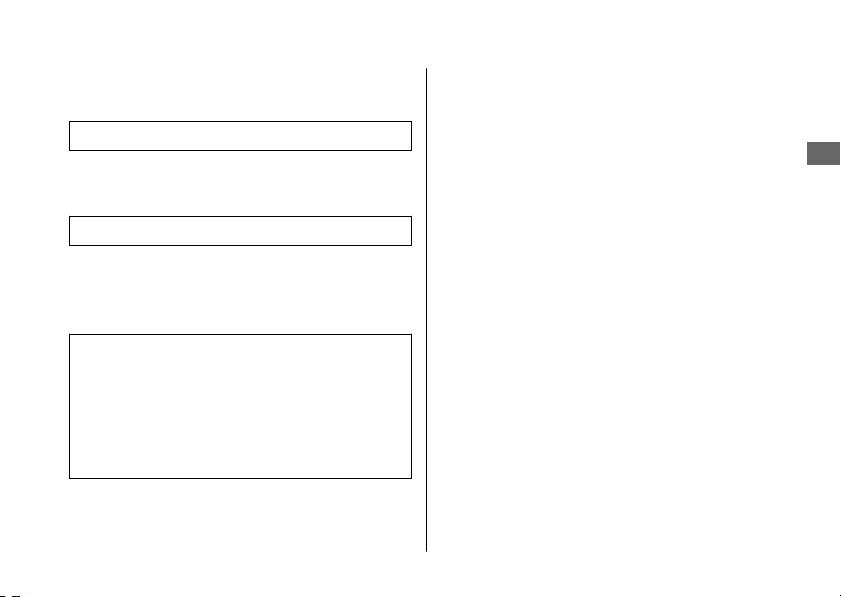
Install the oil strainer screen, spring and
oil plug and tighten.
Torque: 15 lbf·ft (20 N·m, 2.0 kgf·m)
11.
Install a new sealing washer onto the
drain bolt. Tighten the drain bolt.
Torque: 18 lbf·ft (24 N·m, 2.4 kgf·m)
12.
Fill the crankcase with the recommended
oil (2 P. 46, 2 P. 105) and install the oil fill
cap/dipstick.
Required oil
When changing oil & cleaning the
strainer screen:
0.7 US qt (0.7 L)
When changing oil only:
0.6 US qt (0.6 L)
13.
Check the oil level. 2 P. 58
14.
Check that there are no oil leaks.
20161103142821_31GGA6800_enu_BOOK Page 64 Thursday, November 03 2016 14:30:25 JST
Engine Oil u Changing Engine Oil, Cleaning Strainer Screen
Maintenance
61
Engine Idle Speed
Adjusting the Engine Idle
Speed
The best way to assure proper carburetion is
to see your dealer for regularly scheduled
servicing, including carburetor adjustment.
Remember, idle speed adjustment is not a
“cure-all” for other problems in your engine's
fuel-delivery system. Adjusting the idle will
not compensate for a fault elsewhere.
For information about high altitude
carburetor adjustment, see “High Altitude
Carburetor Adjustment”. 2 P. 97
The engine must be at normal operating
temperature for accurate idle speed
adjustment. 10 minutes of stop-and-go riding
is sufficient.
1.
Warm up the engine, place the scooter
on its center stand.
2.
Open the seat. 2 P. 33
3.
Lock the rear brake. 2 P. 24
4.
Connect a tachometer to the engine.
5.
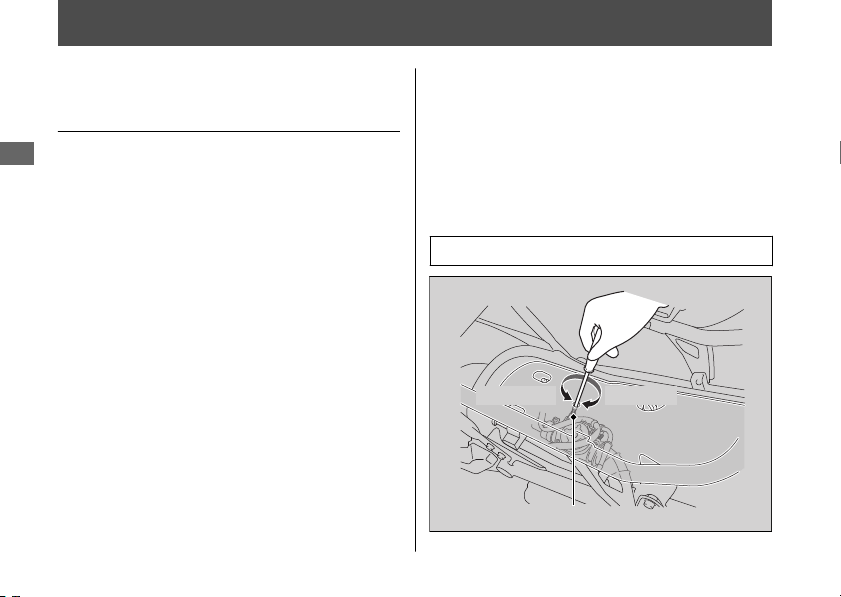
Adjust idle speed with the throttle stop
screw.
Idle speed (In neutral): 2,000 ± 100 rpm
20161103142821_31GGA6800_enu_BOOK Page 65 Thursday, November 03 2016 14:30:25 JST
Maintenance
62
Under seat
Decrease Increase
Throttle stop screw
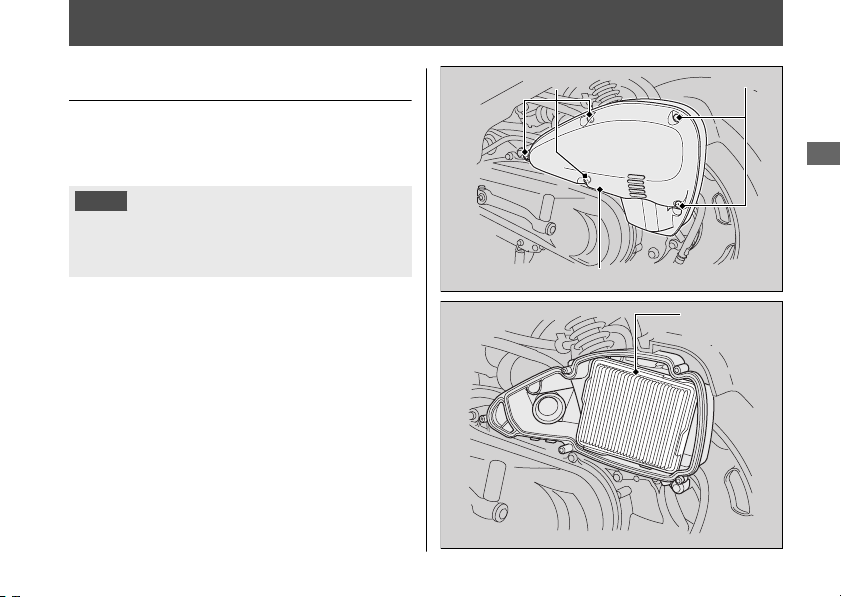
Air Cleaner
Changing Air Cleaner Element
Use a new Honda Genuine air cleaner
element or an equivalent specified for your
scooter.
NOTICE
Using the wrong air cleaner element may cause
premature engine wear or performance
problems.
1.
Remove the air cleaner housing cover by
removing the screws.
2.
Remove the air cleaner element.
3.
Install the new air cleaner element.
u Make sure the air cleaner element is
installed securely.
4.
Install the parts in the reverse order of
removal.
20161103142821_31GGA6800_enu_BOOK Page 66 Thursday, November 03 2016 14:30:25 JST
Maintenance
63
ScrewsScrews
Air cleaner housing cover
Air cleaner
element
Coolant
Checking the Coolant
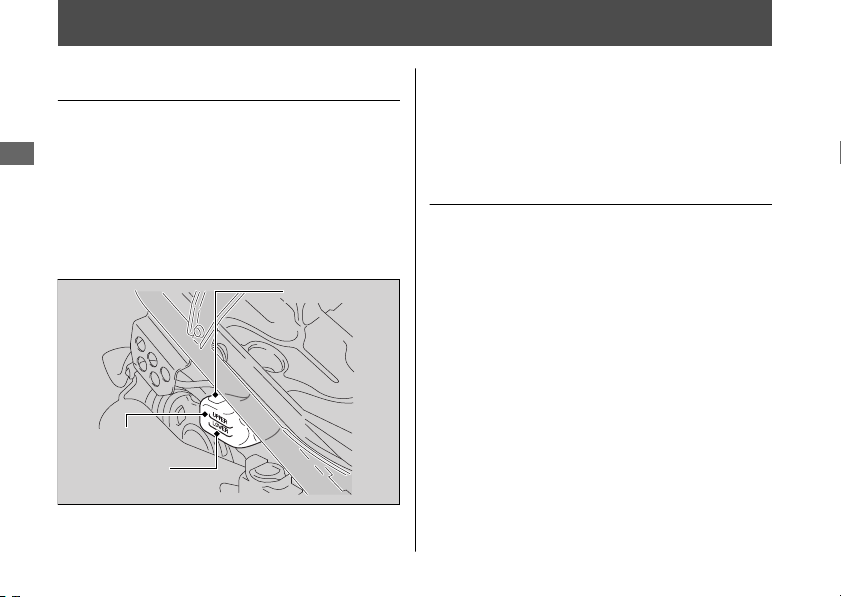
Check the coolant level in the reserve tank
while the engine is cold.
1.
Place your scooter on its center stand on
a firm, level surface.
2.
Check that the coolant level is between
the UPPER level and LOWER level marks
in the reserve tank.
If the coolant level is dropping noticeably or
the reserve tank is empty, you likely have a
serious leak. Have your scooter inspected by
your dealer.
Adding Coolant
If the coolant level is below the LOWER level
mark, add the recommended coolant
(2 P. 47) until the level reaches the UPPER
level mark.
Add fluid only from the reserve tank cap and
do not remove the radiator cap.
20161103142821_31GGA6800_enu_BOOK Page 67 Thursday, November 03 2016 14:30:25 JST
Maintenance
64
Reserve tank
UPPER level
LOWER level
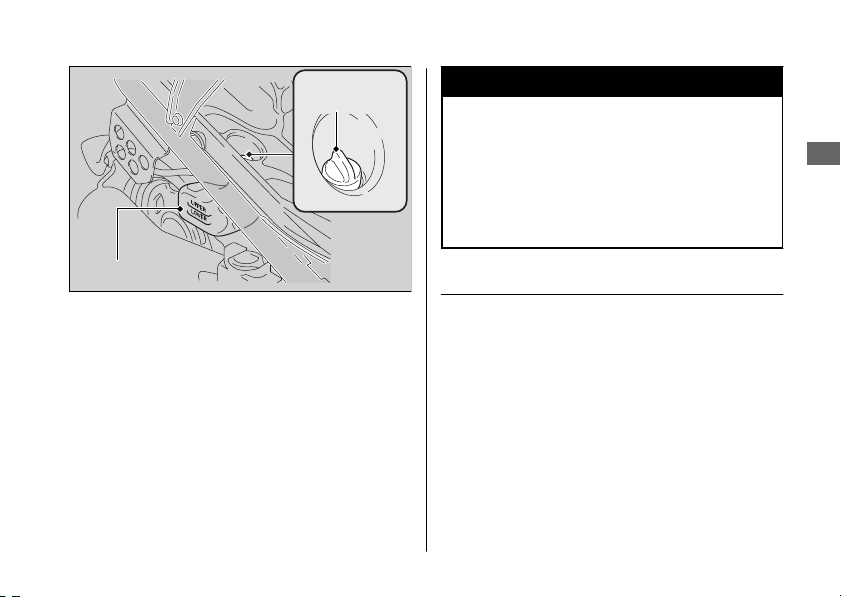
1.
Remove the reserve tank cap and add
fluid while monitoring the coolant level.
u Do not overfill above the UPPER level
mark.
u Make sure no foreign objects enter the
reserve tank opening.
2.
Securely reinstall the reserve tank cap.
3WARNING
Removing the radiator cap while the
engine is hot can cause the coolant to
spray out, potentially scalding you.
Always let the engine and radiator cool
down before removing the radiator cap.
Changing Coolant
Have your dealer change the coolant unless
you have the proper tools and are
mechanically qualified.
20161103142821_31GGA6800_enu_BOOK Page 68 Thursday, November 03 2016 14:30:25 JST
Coolant u Changing Coolant
Maintenance
65
Reserve tank
Reserve
tank cap
Brakes
Inspecting the Brake Lever
Freeplay
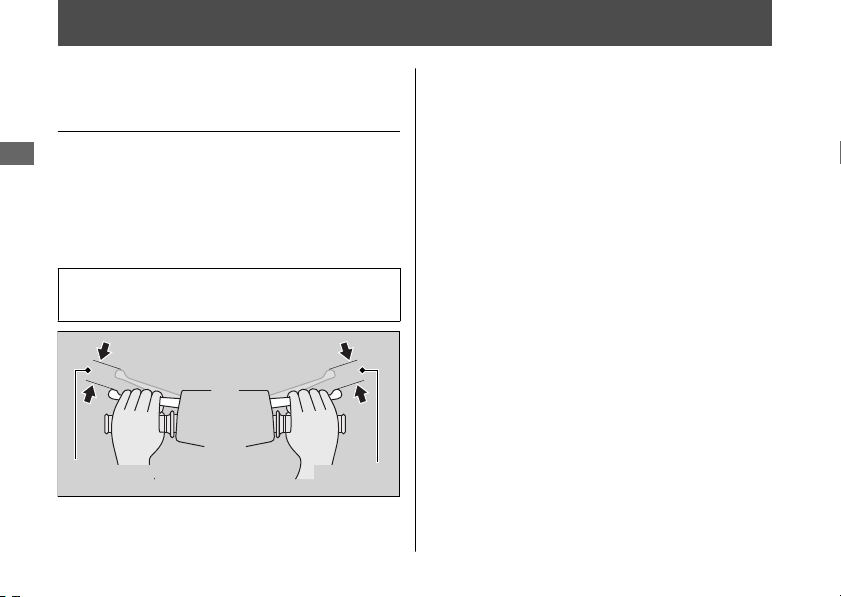
1.
Place your scooter on its center stand on
a firm, level surface.
2.
Measure the distance of the front and
rear brake levers before each brake starts
to take hold.
Freeplay at the tip of the brake levers:
3/8 - 13/16 in (10 - 20 mm)
Check the brake cable for kinks or signs of
wear. If necessary have it replaced by your
dealer.
Lubricate the brake cable with a
commercially available cable lubricant to
prevent premature wear and corrosion.
Make sure the brake arm, spring and fastener
are in good condition.
20161103142821_31GGA6800_enu_BOOK Page 69 Thursday, November 03 2016 14:30:25 JST
Maintenance
66
Freeplay Freeplay
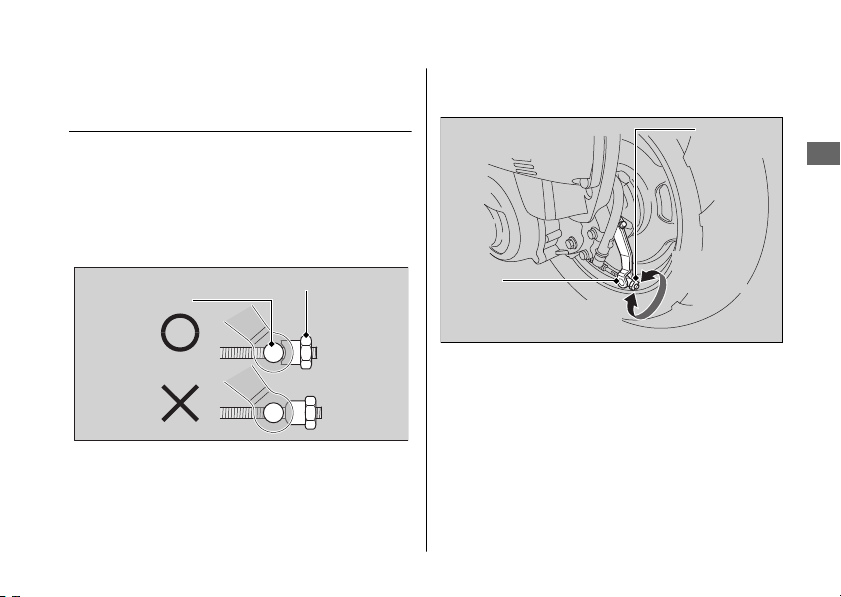
Adjusting the Rear Brake Lever
Freeplay
Adjust the freeplay of the brake lever with the
front wheel pointed straight ahead.
Make sure the cut-out on the adjusting nut is
seated on the brake arm pin when adjusting
the freeplay.
If proper adjustment cannot be obtained by
this method, see your dealer.
1.
Adjust by turning the rear brake adjusting
nut a half-turn at a time.
2.
Apply the brake several times and check
for free wheel rotation after the brake
lever is released.
20161103142821_31GGA6800_enu_BOOK Page 70 Thursday, November 03 2016 14:30:25 JST
Brakes u Adjusting the Rear Brake Lever Freeplay
Maintenance
67
Continued
Brake arm pin
Adjusting nut
Brake
arm pin
Increase
Freeplay
Decrease
Freeplay
Adjusting
nut
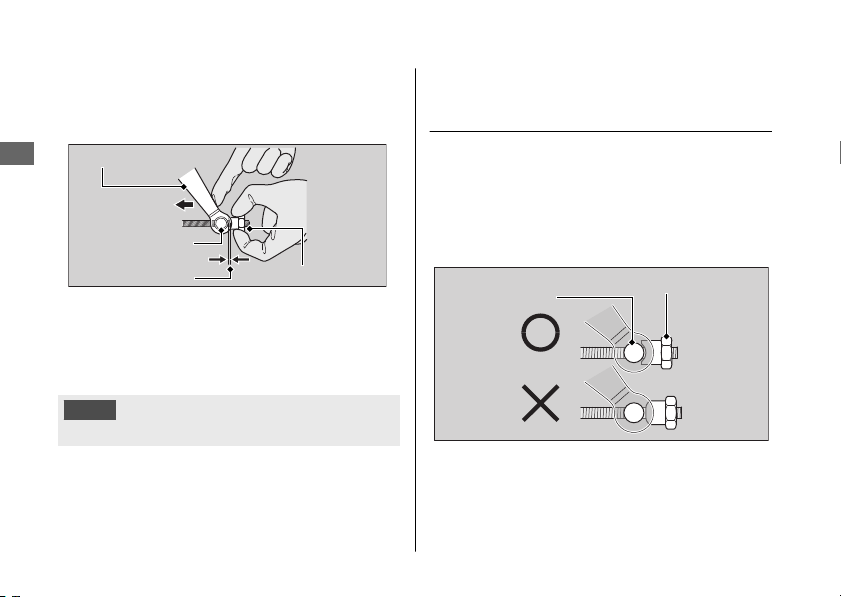
3.
Push the brake arm to confirm that there
is a gap between the rear brake adjusting
nut and brake arm pin.
After adjustment, confirm the freeplay of the
brake lever.
Make sure the brake arm, spring and fastener
are in good condition.
NOTICE
Do not turn the adjuster beyond its natural limits.
Adjusting the Front Brake Lever
Freeplay
Adjust the freeplay of the brake lever with the
front wheel pointed straight ahead.
Make sure the cut-out on the adjusting nut is
seated on the brake arm pin when adjusting
the freeplay.
If proper adjustment cannot be obtained by
this method, see your dealer.
20161103142821_31GGA6800_enu_BOOK Page 71 Thursday, November 03 2016 14:30:25 JST
Brakes u Adjusting the Front Brake Lever Freeplay
Maintenance
68
Brake arm pin
Gap
Brake arm
Adjusting nut
Push
Brake arm pin
Adjusting nut
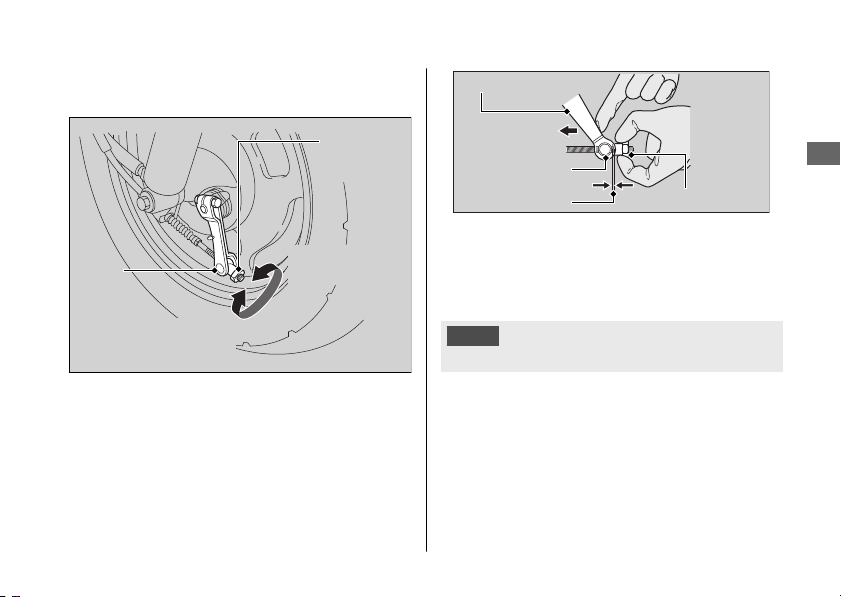
1.
Adjust by turning the front brake
adjusting nut a half-turn at a time.
2.
Apply the brake several times and check
for free wheel rotation after the brake
lever is released.
3.
Push the brake arm to confirm that there
is a gap between the front brake
adjusting nut and brake arm pin.
After adjustment, confirm the freeplay of the
brake lever.
Make sure the brake arm, spring and fastener
are in good condition.
NOTICE
Do not turn the adjuster beyond its natural limits.
20161103142821_31GGA6800_enu_BOOK Page 72 Thursday, November 03 2016 14:30:25 JST
Brakes u Adjusting the Front Brake Lever Freeplay
Maintenance
69
Brake
arm pin
Adjusting
nut
Decrease
Freeplay
Increase
Freeplay
Brake arm pin
Gap Adjusting nut
Brake arm
Push
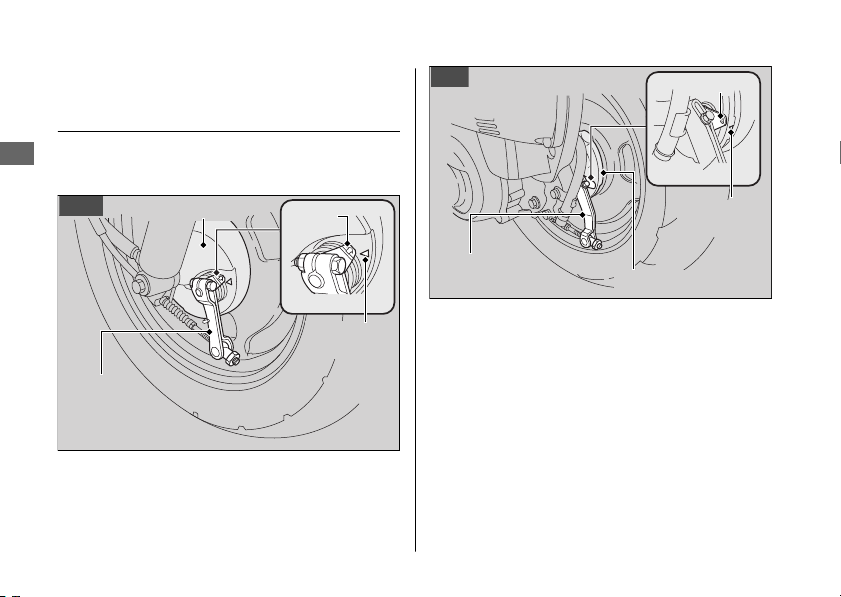
Inspecting the Brake Shoe
Wear
The front and rear brake are equipped with a
brake wear indicator.
When the brake is applied, an arrow attached
to the brake arm moves toward a reference
mark on the brake panel. If the arrow aligns
with the reference mark on full application of
the brake, the brake shoes must be replaced.
See your dealer for this service.
When the brake service is necessary, see your
dealer. Use only Honda Genuine Parts or its
equivalent.
20161103142821_31GGA6800_enu_BOOK Page 73 Thursday, November 03 2016 14:30:25 JST
Brakes u Inspecting the Brake Shoe Wear
Maintenance
70
Brake
arm
Brake panel
Arrow
Reference
mark
Front
Brake
arm
Brake panel
Arrow
Reference
mark
Rear
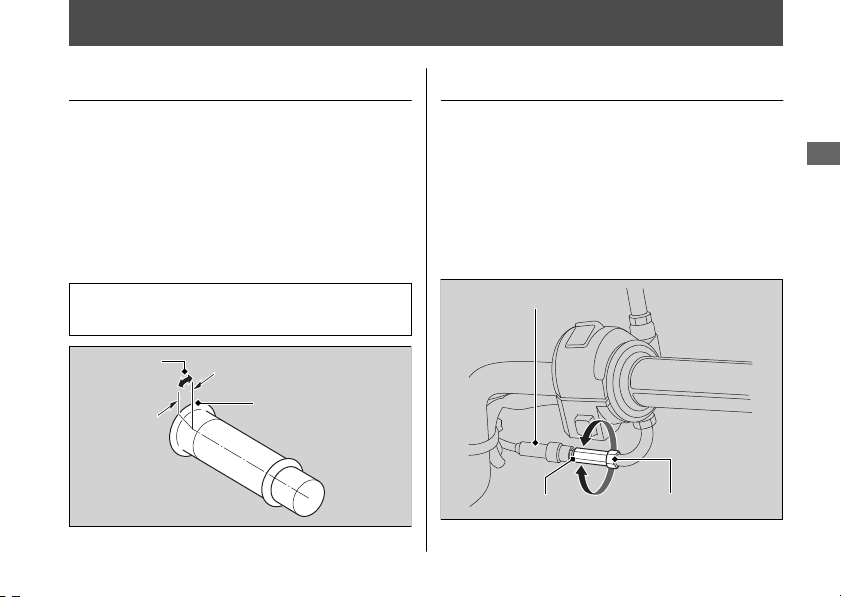
Throttle
Checking the Throttle
With the engine off, check that the throttle
rotates smoothly from fully closed to fully
open in all steering positions and throttle
freeplay is correct. If the throttle does not
move smoothly, close automatically, or if the
cable is damaged, have the scooter
inspected by your dealer.
Freeplay at the throttle grip flange:
1/16 - 1/4 in (2 - 6 mm)
Adjusting the Throttle Freeplay
1.
Slide the rubber dust cover.
2.
Loosen the lock nut.
3.
Turn the adjuster until the freeplay is 1/16
- 1/4 in (2 - 6 mm).
4.
Tighten the lock nut, return the rubber
dust cover, and inspect the throttle action
again.
20161103142821_31GGA6800_enu_BOOK Page 74 Thursday, November 03 2016 14:30:25 JST
Maintenance
71
Freeplay
Flange
Rubber dust
cover
Adjuster Lock nut
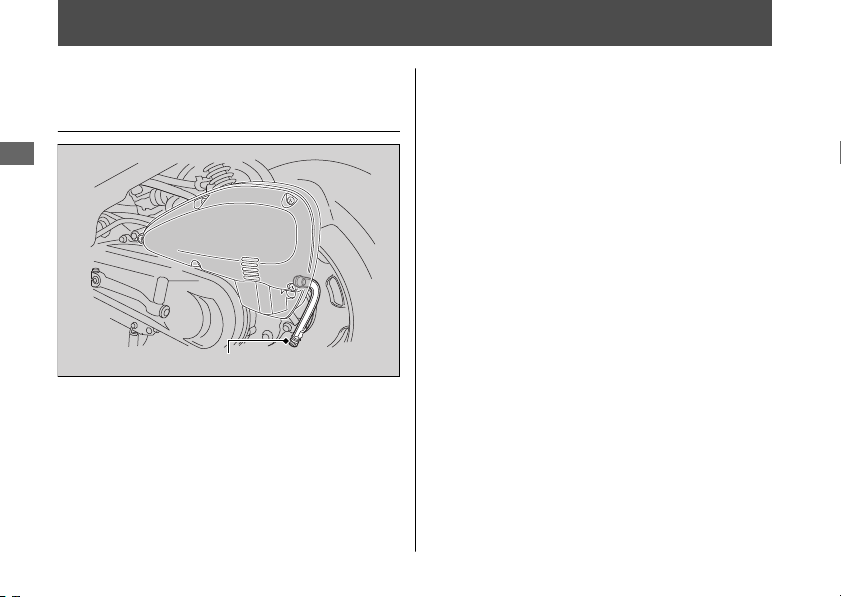
Crankcase Breather
Cleaning the Crankcase
Breather
1.
Place a suitable container under the
crankcase breather tube.
2.
Remove the crankcase breather tube plug
from the tube.
3.
Drain deposits into a suitable container.
4.
Install the crankcase breather tube plug.
20161103142821_31GGA6800_enu_BOOK Page 75 Thursday, November 03 2016 14:30:25 JST
Maintenance
72
Crankcase breather tube plug
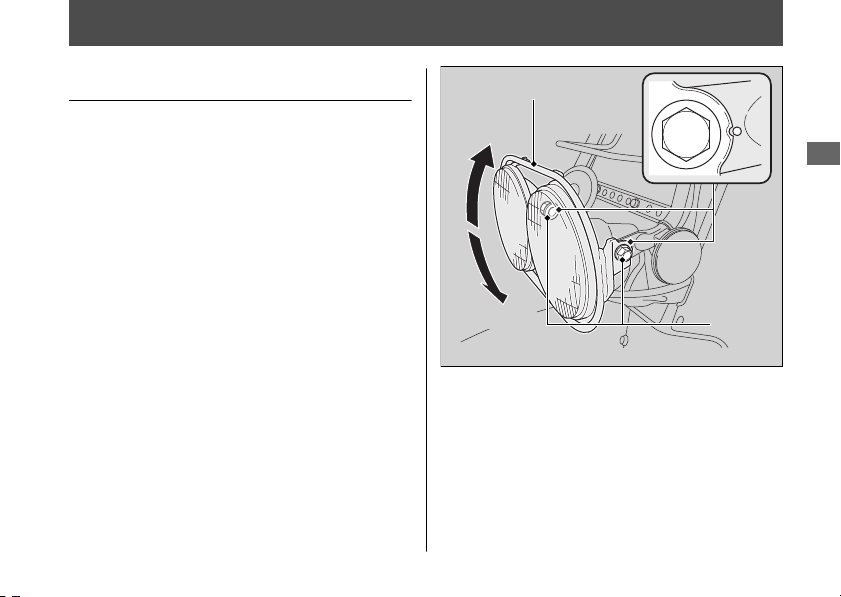
Other Adjustments
Adjusting the Headlight Aim
You can adjust vertical aim of the headlights
for proper alignment by moving the
headlight guard. To move the headlight
guard, loosen the bolts.
Tighten the bolts after adjustment.
Obey local laws and regulations.
20161103142821_31GGA6800_enu_BOOK Page 76 Thursday, November 03 2016 14:30:25 JST
Maintenance
73
Lower
Bolts
Raise
Headlight guard

Engine Will Not Start........................................ P. 75
Overheating (High coolant temperature
indicator is on) ...............................................
.. P. 76
Tire Puncture ...................................................... P. 77
Electrical Trouble............................................... P. 78
Battery Goes Dead ..............................................P. 78
Burned-out Light Bulb........................................ P. 78
Blown Fuse ............................................................ P. 81
20161103142821_31GGA6800_enu_BOOK Page 77 Thursday, November 03 2016 14:30:25 JST
Troubleshooting

Engine Will Not Start
Starter Motor Operates But
Engine Does Not Start
Check the following items:
● Check the correct engine starting
sequence. 2 P. 25
● Check that there is gasoline in the fuel
tank.
Starter Motor Does Not
Operate
Check the following items:
● Check the correct engine starting
sequence. 2 P. 25
● Make sure engine stop switch is in the
(Run) position. 2 P. 22
● Check for a blown fuse. 2 P. 81
● Check for a loose battery connection or
battery terminal corrosion. 2 P. 43,
2 P. 52
● Check the condition of the battery.
2 P. 78
If the problem continues, have your scooter
inspected by your dealer.
20161103142821_31GGA6800_enu_BOOK Page 78 Thursday, November 03 2016 14:30:25 JST
Troubleshooting
75

Overheating (High coolant temperature indicator is on)
The engine is overheating when the following
occurs:
● High coolant temperature indicator
comes on.
● Acceleration becomes sluggish.
If this occurs, pull safely to the side of the
road and perform the following procedure.
Extended fast idling may cause the high
coolant temperature indicator to come on.
NOTICE
Continuing to ride with an overheated engine
can cause serious damage to the engine.
1.
Stop the engine using the ignition switch.
2.
Allow the engine to cool with the ignition
switch in the OFF position.
3.
After the engine has cooled, inspect the
radiator hose and check if there is a leak.
2 P. 64
If there is a leak:
Do not start the engine. Transport your
scooter to your dealer.
4.
Check the coolant level in the reserve
tank. 2 P. 64
u Add coolant as necessary.
5.
If 1-4 check normal, you may continue
riding, but closely monitor the high
coolant temperature indicator.
20161103142821_31GGA6800_enu_BOOK Page 79 Thursday, November 03 2016 14:30:25 JST
Troubleshooting
76
Tire Puncture
Repairing a puncture or removing a wheel
requires special tools and technical expertise.
We recommend you have this type of service
performed by your dealer.
After an emergency repair, always have the
tire inspected/replaced by your dealer.
Emergency Repair Using a Tire
Repair Kit
If your tire has a minor puncture, you can
make an emergency repair using a tubeless
tire repair kit.
Follow the instructions provided with the
emergency tire repair kit.
Riding your scooter with a temporary tire
repair is very risky. Do not exceed 30 mph
(50 km/h). Have the tire replaced by your
dealer as soon as possible.
3WARNING
Riding your scooter with a temporary
tire repair can be risky. If the temporary
repair fails, you can crash and be
seriously injured or killed.
If you must ride with a temporary tire
repair, ride slowly and carefully and do
not exceed 30 mph (50 km/h) until the
tire is replaced.
20161103142821_31GGA6800_enu_BOOK Page 80 Thursday, November 03 2016 14:30:25 JST
Troubleshooting
77
Electrical Trouble
Battery Goes Dead
Charge the battery using a motorcycle
battery charger.
Remove the battery from the scooter before
charging.
Do not use an automobile-type battery
charger, as these can overheat a motorcycle
battery and cause permanent damage. If the
battery does not recover after recharging,
contact your dealer.
NOTICE
Jump starting using an automobile battery is not
recommended, as this can damage your
scooter's electrical system.
Burned-out Light Bulb
Follow the procedure below to replace a
burned-out light bulb.
Turn the ignition switch to the OFF or LOCK
position.
Allow the bulb to cool before replacing it.
Do not use bulbs other than those specified.
Check the replacement bulb for correct
operation before riding.
For the light bulb wattage, see
“Specifications.” 2 P. 105
20161103142821_31GGA6800_enu_BOOK Page 81 Thursday, November 03 2016 14:30:25 JST
Troubleshooting
78
#
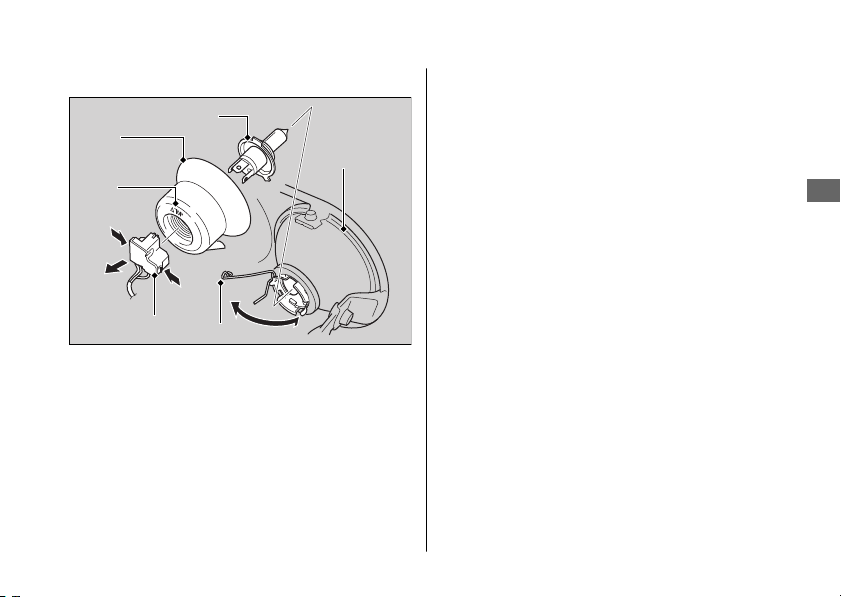
Headlight Bulb
1.
Disconnect the connector by pressing the
tabs.
2.
Remove the dust cover.
3.
Unhook the pin and remove the bulb.
4.
Install a new bulb and parts in the reverse
order of removal.
u Install the dust cover with its TOP mark
facing up.
Do not touch the glass surface with your
fingers. If you touch the bulb with your bare
hands, clean it with a cloth moistened with
isopropyl (rubbing) alcohol.
20161103142821_31GGA6800_enu_BOOK Page 82 Thursday, November 03 2016 14:30:25 JST
Electrical Trouble u Burned-out Light Bulb
Troubleshooting
79
Continued
TOP
mark
Connector
Pin
Headlight
Dust
cover
Bulb
#
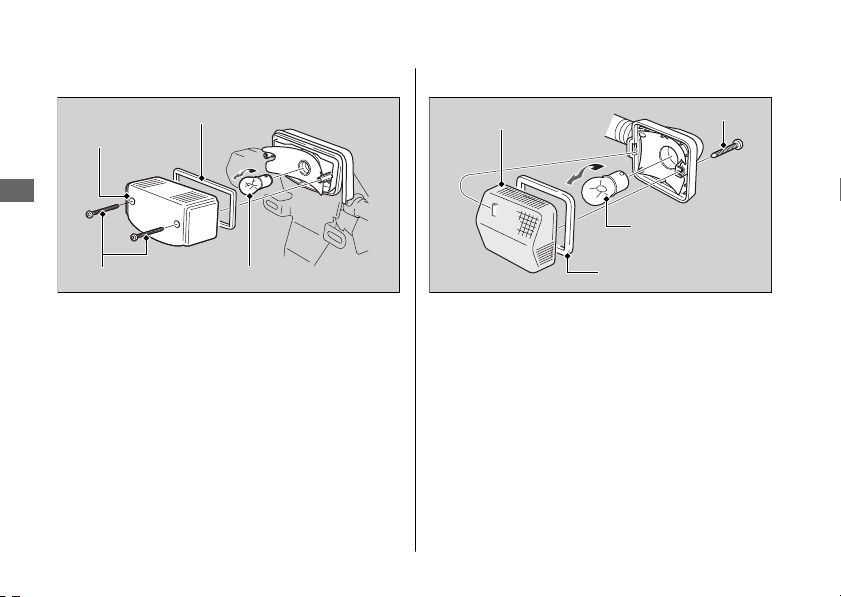
Brake/Taillight Bulb
1.
Remove the taillight lens by removing the
screws.
2.
Slightly press the bulb in and turn it
counterclockwise.
3.
Install a new bulb and parts in the reverse
order of removal.
u After putting back the lens packing in
place, install the taillight lens.
#
Front/Rear Turn Signal Bulb
1.
Remove the turn signal lens by removing
the screw.
2.
Slightly press the bulb and turn it
counterclockwise.
3.
Install a new bulb in the reverse order of
removal.
u After putting back the lens packing in
place, install the turn signal lens.
20161103142821_31GGA6800_enu_BOOK Page 83 Thursday, November 03 2016 14:30:25 JST
Electrical Trouble u Burned-out Light Bulb
Troubleshooting
80
Lens packing
Screws
Taillight lens
Bulb
Turn signal
lens
Bulb
Lens packing
Screw
Blown Fuse
Before handling fuses, see “Inspecting and
Replacing Fuses.” 2 P. 45
#
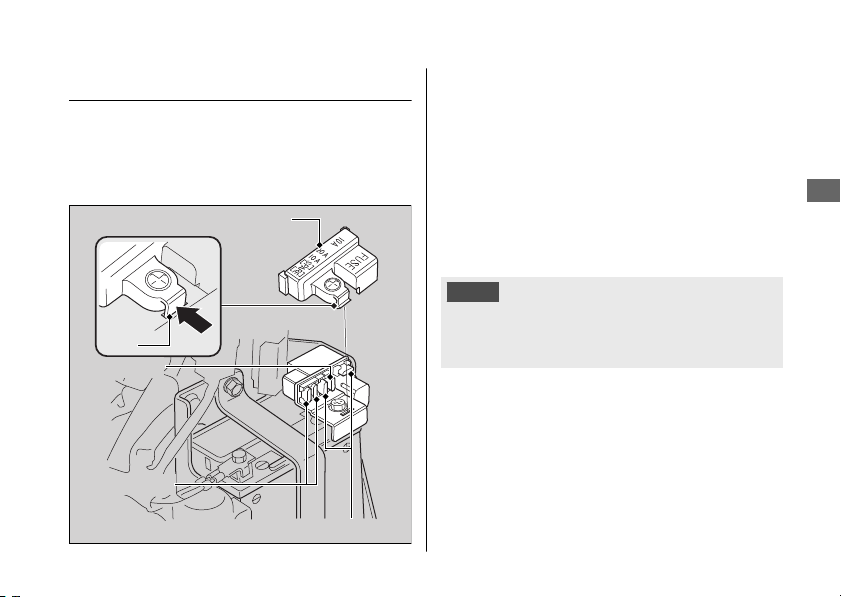
Fuse Box Fuses
1.
Remove the inner cover. 2 P. 54
2.
Remove the fuse box cover by pressing
the tab.
3.
Pull the main fuse and circuit fuses out
one by one and check for a blown fuse.
Always replace a blown fuse with a spare
fuse of the same rating.
4.
Install the fuse box cover.
5.
Install the inner cover.
NOTICE
If a fuse fails repeatedly, you likely have an
electrical problem. Have your scooter inspected
by your dealer.
20161103142821_31GGA6800_enu_BOOK Page 84 Thursday, November 03 2016 14:30:25 JST
Electrical Trouble u Blown Fuse
Troubleshooting
81
Circuit fuses
Fuse box cover
Spare fuses
Main fuse
Tab

Keys....................................................................... P. 83
Instruments, Controls, & Other Features..... P.
84
Caring for Your Scooter...................................P. 85
Storing Your Scooter ........................................ P. 88
Transporting Your Scooter.............................. P. 89
You & the Environment.................................... P. 89
Vehicle Identification Number....................... P. 90
Emission Control Systems ............................... P. 91
Catalytic Converter ........................................... P. 96
High Altitude Carburetor Adjustment ......... P. 97
Oxygenated Fuels..............................................P. 98
Authorized Manuals ......................................... P. 99
Warranty Coverage and Service .................. P. 100
Honda Contacts ............................................... P. 101
USA
Reporting Safety Defects ..................... P. 103
20161103142821_31GGA6800_enu_BOOK Page 85 Thursday, November 03 2016 14:30:25 JST
Information

Keys
Ignition Key
Be sure to record the key number provided with
the original keys. Store the spare key and
recorded key number in a safe location.
To make a duplicate, take the spare key or the
key number to your dealer.
If you lose all keys and the key number, the
ignition switch assembly will probably have to
be removed by your dealer to determine the
key number.
A metal key holder may cause damage to the
area surrounding the ignition switch.
20161103142821_31GGA6800_enu_BOOK Page 86 Thursday, November 03 2016 14:30:25 JST
Keys
Information
83

Instruments, Controls, &
Other Features
Ignition Switch
Leaving the ignition switch in the ON position
with the engine stopped will drain the battery.
Do not turn the key while riding.
Engine Stop Switch
Do not use the engine stop switch except in an
emergency. Doing so when riding will cause the
engine to suddenly turn off, making riding
unsafe.
If you stop the engine using the engine stop
switch, turn the ignition switch to the OFF
position. Failing to do so will drain the battery.
Odometer
The odometer returns to 0 when the read-out
exceeds 99,999.9.
Document Bag
The owner’s manual, registration, and insurance
information can be stored in the plastic
document bag located underside of the seat.
20161103142821_31GGA6800_enu_BOOK Page 87 Thursday, November 03 2016 14:30:25 JST
Instruments, Controls, & Other Features
Information
84

Caring for Your Scooter
Frequent cleaning and polishing is important to
ensure the life of your Honda. A clean scooter
makes it easier to spot potential problems.
In particular, seawater and salts used to prevent
ice on roads promote the formation of
corrosion. Always wash your scooter thoroughly
after riding on coastal or treated roads.
Washing
Allow the engine, muffler, brakes, and other
high-temperature parts to cool before washing.
1.
Rinse your scooter thoroughly using a low
pressure garden hose to remove loose dirt.
2.
If necessary, use a sponge or a soft towel
with mild cleaner to remove road grime.
u Clean the headlight lenses, panels, and
other plastic components with extra care
to avoid scratching them.
Avoid directing water into the air cleaner,
muffler, and electrical parts.
3.
Thoroughly rinse your scooter with plenty of
clean water and dry with a soft, clean cloth.
4.
After the scooter dries, lubricate any moving
parts.
u Make sure that no lubricant spills onto
the brakes or tires. Brake discs, pads,
drum or shoes contaminated with oil will
suffer greatly reduced braking
effectiveness and can lead to a crash.
5.
Apply a coat of wax to prevent corrosion.
u Avoid products that contain harsh
detergents or chemical solvents. These
can damage the metal, paint, and plastic
on your scooter.
Keep the wax clear of the tires and brakes.
u If your scooter has any matte painted
parts, do not apply a coat of wax to the
matte painted surface.
20161103142821_31GGA6800_enu_BOOK Page 88 Thursday, November 03 2016 14:30:25 JST
Caring for Your Scooter
Information
85
Continued

#
Washing Precautions
Follow these guidelines when washing:
● Do not use high-pressure washers:
u High-pressure water cleaners can
damage moving parts and electrical
parts, rendering them inoperable.
u
Water in the air intake can be drawn into the
carburetor and/or enter the air cleaner.
● Do not direct water at the muffler:
u Water in the muffler can prevent starting
and causes rust in the muffler.
● Dry the brakes:
u Water adversely affects braking
effectiveness. After washing, apply the
brakes intermittently at low speed to
help dry them.
● Do not direct water under the seat:
u Water in the owner’s manual storage
compartment can damage your
documents and other belongings.
● Do not direct water at the air cleaner:
u Water in the air cleaner can prevent the
engine from starting.
● Do not direct water near the headlight:
u The headlight's inside lens may fog
temporarily after washing or while riding
in the rain. This does not impact the
headlight function.
u Any condensation inside the headlight
should dissipate after a few minutes of
running the engine with the headlight(s)
on.
However, if you see a large amount of
water or ice accumulated inside the
lens(es), have your vehicle inspected by
your dealer.
● Do not use wax or polishing compounds on
matte painted surface:
u Use a soft cloth or sponge, plenty of
water, and a mild detergent to clean
matte painted surfaces. Dry with a soft
clean cloth.
20161103142821_31GGA6800_enu_BOOK Page 89 Thursday, November 03 2016 14:30:25 JST
Caring for Your Scooter
Information
86

Aluminum Components
Aluminum will corrode from contact with dirt,
mud, or road salt. Clean aluminum parts
regularly and follow these guidelines to avoid
scratches:
● Do not use stiff brushes, steel wool, or
cleaners containing abrasives.
● Avoid riding over or scraping against curbs.
Panels
Follow these guidelines to prevent scratches
and blemishes:
● Wash gently using a soft sponge and plenty
of water.
● To remove stubborn stains, use diluted
detergent and rinse thoroughly with plenty
of water.
● Avoid getting gasoline or detergents on the
instruments, panels, or headlight.
Exhaust Pipe and Muffler
When the exhaust pipe and muffler are painted,
do not use a commercially available abrasive
kitchen cleaning compound. Use a neutral
detergent to clean the painted surface on the
exhaust pipe and muffler. If you are not sure if
your exhaust pipe and muffler are painted,
contact your dealer.
20161103142821_31GGA6800_enu_BOOK Page 90 Thursday, November 03 2016 14:30:25 JST
Caring for Your Scooter
Information
87

Storing Your Scooter
If you store your scooter outdoors, you should
consider using a full-body motorcycle cover.
If you won't be riding for an extended period,
follow these guidelines:
● Wash your scooter and wax all painted
surfaces (except matte painted surfaces).
Coat chrome pieces with rust-inhibiting oil.
● Place your scooter on its center stand and
position a block so that both tires are off the
ground.
● After rain, remove the body cover and allow
the scooter to dry.
● Remove the battery (2 P. 52) to prevent
discharge. Charge the battery in a shaded,
well-ventilated area.
u If you leave the battery in place,
disconnect the negative - terminal to
prevent discharge.
After removing your scooter from storage,
inspect all maintenance items required by the
Maintenance Schedule.
USA
For more information about storage, refer
to the Honda Winter Storage Guide, available
from your dealer.
Canada
For more information about storage,
visit our website at www.honda.ca and look up
“Storage Tips” under the “Honda Warranty” in
the Warranty tab for your Model.
20161103142821_31GGA6800_enu_BOOK Page 91 Thursday, November 03 2016 14:30:25 JST
Storing Your Scooter
Information
88

Transporting Your Scooter
If your scooter needs to be transported, it
should be carried on a motorcycle trailer or a
flatbed truck or trailer that has a loading ramp
or lifting platform, and motorcycle tie-down
straps. Never try to tow your scooter with a
wheel or wheels on the ground.
NOTICE
Towing your scooter can cause serious damage
to the transmission.
You & the Environment
Owning and riding a scooter can be enjoyable,
but you must do your part to protect the
environment.
Choose Sensible Cleaners
Use a biodegradable detergent when you wash your
scooter. Avoid aerosol spray cleaners that contain
chlorofluorocarbons (CFCs) which damage the
atmosphere's protective ozone layer.
Recycle Wastes
Put oil and other toxic wastes in approved containers
and take them to a recycling center. Call your local or
state office of public works or environmental services
to find a recycling center in your area, and to get
instructions on how to dispose of non-recyclable
wastes. Do not place used engine oil in the trash, or
pour it down a drain or on the ground. Used oil,
gasoline, coolant, and cleaning solvents contain
poisons that can hurt refuse workers and
contaminate drinking water, lakes, rivers, and oceans.
20161103142821_31GGA6800_enu_BOOK Page 92 Thursday, November 03 2016 14:30:25 JST
Transporting Your Scooter
Information
89
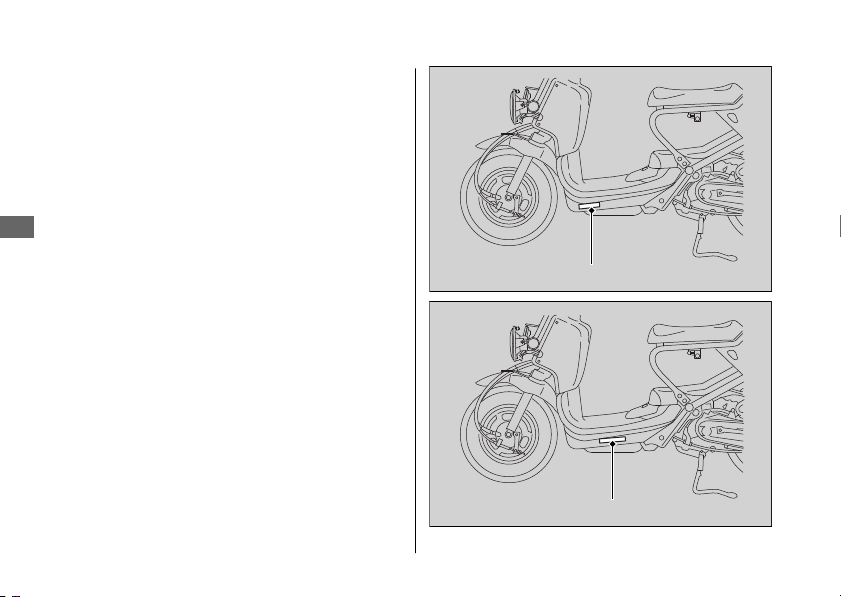
Vehicle Identification
Number
The VIN and engine serial number uniquely
identify your scooter and are required in order
to register your scooter. They may also be
required when ordering replacement parts.
The VIN is stamped on the left side of the frame
and also appears on the Safety Certification
Label attached to the left side of the frame.
The engine number is stamped on the back of
the crankcase near the rear wheel.
You should record these numbers and keep
them in a safe place.
20161103142821_31GGA6800_enu_BOOK Page 93 Thursday, November 03 2016 14:30:25 JST
Vehicle Identification Number
Information
90
VIN
VIN
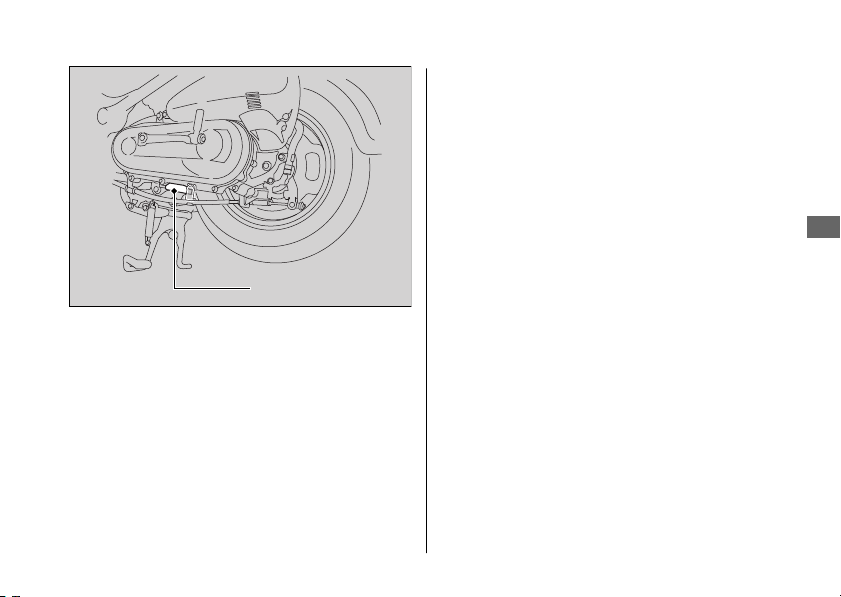
Emission Control Systems
Your scooter engine emits combustion
byproducts, including carbon monoxide (CO),
oxides of nitrogen (NOx), and hydrocarbons
(HC). Gasoline evaporation also emits
hydrocarbons. Controlling the production of
NOx, CO, and HC is important for the
environment.
20161103142821_31GGA6800_enu_BOOK Page 94 Thursday, November 03 2016 14:30:25 JST
Emission Control Systems
Information
91
Continued
Engine number
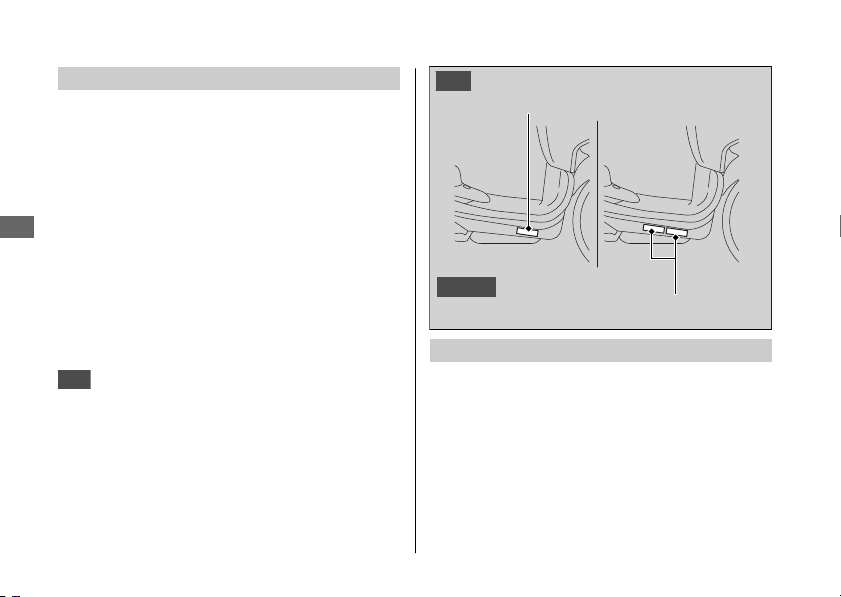
Exhaust Emission Requirements
The U.S. Environmental Protection Agency
(EPA), the California Air Resources Board
(CARB), and Environment Canada (EC) require
that your scooter comply with applicable
exhaust, crankcase, and fuel permeation
emission standards during its useful life, when
operated and maintained according to the
instructions provided.
CARB also requires that your scooter comply
with applicable evaporative emission
requirements during its useful life, when
operated and maintained according to the
instructions provided.
USA
Compliance with the terms of the
Distributor's Warranties for Honda Scooter
Emission Control Systems is necessary in order
to maintain a valid emissions system warranty.
The Vehicle Emission Control Information label
is attached to the right side of the frame body
under the footrest.
Noise Emission Requirements
The EPA requires that scooters built after
January 1, 1983 comply with applicable noise
emission standards for one year or 3,730 miles
(6,000 km) after the time of purchase when
operated and maintained according to the
instructions provided.
20161103142821_31GGA6800_enu_BOOK Page 95 Thursday, November 03 2016 14:30:25 JST
Emission Control Systems
Information
92
Vehicle emission control information label
Canada
Vehicle emission control information label
USA

Exhaust Emission Control System
The exhaust emission control system consists of
appropriate carburetor settings, and no
adjustment should be made except idle speed
adjustment with the throttle stop screw.
#
Secondary Air Injection System
The secondary air injection system adds filtered
air into the exhaust gas to help improve
emission control performance.
#
Catalytic Converters
The exhaust system contains one or more
catalytic converters. Catalytic converters use a
catalyst to convert most of the harmful exhaust
gas compounds into harmless compounds.
Crankcase Emissions Control System
The engine is equipped with a closed crankcase
system to prevent discharging crankcase
emissions into the atmosphere.
Blow-by gas is returned to the combustion
chamber through the air cleaner and the intake
manifold.
20161103142821_31GGA6800_enu_BOOK Page 96 Thursday, November 03 2016 14:30:25 JST
Emission Control Systems
Information
93
Continued

Fuel Permeation Emission Control
The fuel tank, fuel hoses, and fuel vapor charge
hoses use fuel permeation control technologies
to prevent fuel vapor emissions. Tampering with
these components to reduce or defeat the
effectiveness of the fuel permeation
technologies is prohibited.
Noise Emission Control System
#
TAMPERING WITH THE NOISE CONTROL
SYSTEM IS PROHIBITED:
U. S. federal law prohibits, and Canadian
provincial laws may prohibit, the following acts
or the causing thereof: (1) The removal or
rendering inoperative by any person, other than
for purposes of maintenance, repair or
replacement, of any device or element of
design incorporated into any new vehicle for
the purpose of noise control prior to its sale or
delivery to the ultimate purchaser or while it is
in use; or (2) the use of the vehicle after such
device or element of design has been removed
or rendered inoperative by any person.
20161103142821_31GGA6800_enu_BOOK Page 97 Thursday, November 03 2016 14:30:25 JST
Emission Control Systems
Information
94

#
AMONG THOSE ACTS PRESUMED TO
CONSTITUTE TAMPERING ARE THE
FOLLOWING ACTS:
● Removal of, or puncturing the muffler,
baffles, header pipes or any other
component which conducts exhaust gases.
● Removal of, or puncturing of any part of the
intake system.
● Lack of proper maintenance.
● Removing or disabling any emissions
compliance component, or replacing any
compliance component with a noncompliant
component.
Problems Affecting Scooter Exhaust
Emissions
Have your scooter inspected and repaired by
your dealer if you experience any of the
following symptoms:
● Hard starting or stalling after starting
● Rough idling
● Misfiring or backfiring during acceleration
● Poor engine performance and poor fuel
economy
20161103142821_31GGA6800_enu_BOOK Page 98 Thursday, November 03 2016 14:30:25 JST
Emission Control Systems
Information
95

Catalytic Converter
This scooter is equipped with an oxidation
catalytic converter. The catalytic converter
contains precious metals that serve as catalysts
in high temperature chemical reactions that
convert hydrocarbons (HC) and carbon
monoxide (CO) in the exhaust gasses into safe
compounds.
A defective catalytic converter contributes to air
pollution and can impair your engine's
performance. A replacement unit must be an
original Honda part or equivalent.
Follow these guidelines to protect your
scooter's catalytic converter.
● Always use unleaded gasoline. Leaded
gasoline will damage the catalytic converter.
● Keep the engine in good running condition.
A poorly running engine can cause the
catalytic converter to overheat causing
damage to the converter or the scooter.
● If your engine is misfiring, backfiring, stalling,
or otherwise not running properly, stop
riding and turn off the engine. Have your
scooter serviced as soon as possible.
20161103142821_31GGA6800_enu_BOOK Page 99 Thursday, November 03 2016 14:30:25 JST
Catalytic Converter
Information
96

High Altitude Carburetor
Adjustment
Your engine's air-fuel mixture becomes overly
rich when operated at high altitudes.
Above 6,500 ft (2,000 m), a rich mixture can
cause driveability problems, reduce engine
performance, and increase fuel consumption.
To compensate, you can have the carburetor
adjusted for high altitude riding. See your
dealer.
However, the carburetor must be returned to
standard factory specifications before riding
again at lower altitudes (below 5,000 ft (1,500
m)). See your dealer.
Sustained riding at lower altitudes with the lean
high-altitude setting may cause rough idling,
stalling, or engine damage from overheating.
20161103142821_31GGA6800_enu_BOOK
Page 100 Thursday, November 03 2016 14:30:25 JST
High Altitude Carburetor Adjustment
Information
97

Oxygenated Fuels
Some conventional fuels blended with alcohol
or an ether compound are available in some
locales to help reduce emissions to meet clean
air standards. These gasolines are collectively
referred to as oxygenated fuels. If you plan to
use oxygenated fuel, check that it is unleaded
and meets the minimum octane rating and
blend requirement.
The following fuel blends are EPA-approved
and have been approved for use in your
scooter:
● Ethanol (ethyl alcohol) up to 10% by volume.
u Gasoline containing ethanol may be
marketed under the name Gasohol.
● Methanol (methyl alcohol) up to 5% by
volume that contain cosolvents and
corrosion inhibitors to protect the fuel
system. Never use a blend containing more
than 5%.
If you accidentally fill your fuel tank with an
oxygenated fuel containing higher percentages,
you may experience performance problems. To
resolve the problem, have your dealer drain the
fuel tank and replace with the correct fuel. Fuel
system or performance problems resulting from
the use of an oxygenated fuel containing higher
percentages are not covered by your warranty.
NOTICE
Improper use of oxygenated fuels can damage
metal, rubber, and plastic parts of your fuel
system.
Oxygenated fuel can also damage paint.
Damage caused by spilled fuel is not covered by
warranty.
If you notice any undesirable operating
symptoms or performance problems, try a
different brand of gasoline.
20161103142821_31GGA6800_enu_BOOK Page 101 Thursday, November 03 2016 14:30:25 JST
Oxygenated Fuels
Information
98
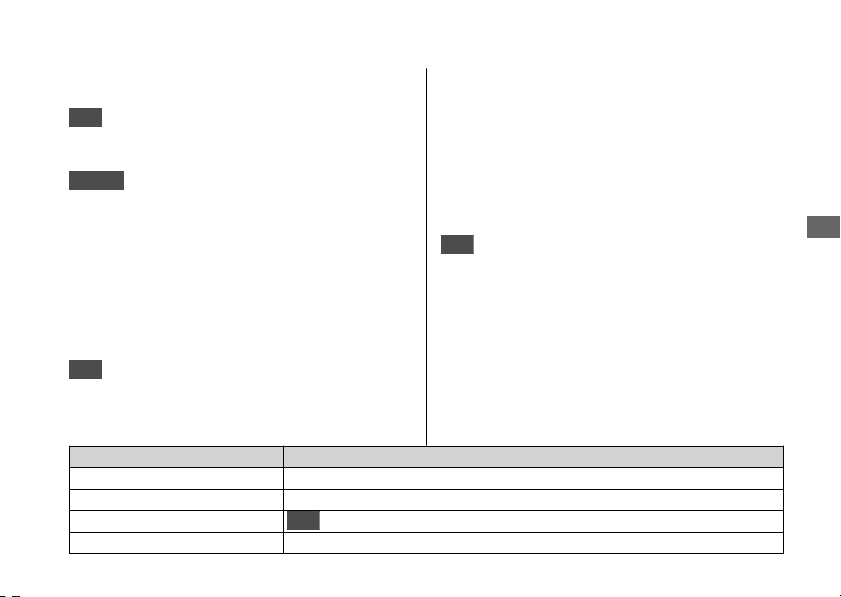
Publication Item No. Description
61GEZ13 2017 NPS50 Service Manual
61CSM00 Common Service Manual
S9507
USA
Winter Storage Guide
31GGA680 2017 NPS50 Owner’s Manual
Authorized Manuals
USA
The Service Manual used by your
authorized dealer is available from your Honda
dealer or Helm, Inc.
Canada
See your dealer to order authorized
manuals.
Also available, but not necessary to service your
model, is the Honda Common Service Manual,
which explains basic service information for
various systems on Honda motorcycles,
scooters, and ATV.
USA
The Winter Storage Guide in conjunction
with the Owner's Manual and Service Manual
can help you prepare your Honda motorcycle,
scooter, ATV, and SxS for winter storage.
These Honda manuals are written for the
professional technician. However, if you possess
the proper tools, observe the safety standards,
and are mechanically capable, you should find
them easy to use.
Special Honda tools are necessary for some
procedures.
USA
Order On-Line: www.helminc.com
Order Toll Free: 1-888-CYCLE93
(1-888-292-5393)
(NOTE: For Credit Card Orders Only)
Monday - Friday 8:00 AM - 6:00 PM EST
20161103142821_31GGA6800_enu_BOOK Page 102 Thursday, November 03 2016 14:30:25 JST
Authorized Manuals
Information
99
Warranty Coverage and
Service
Coverage
Your new Honda is covered by the following
warranties:
● Scooter Limited Warranty
● Emission Control System Warranty
●
USA
Noise Control Warranty
The responsibilities, restrictions, and exclusions
that apply to these warranties are explained in
the Warranties Booklet given to you by your
Honda dealer at the time of purchase. Always
keep your Honda owner's card with your
Warranties Booklet.
Canada
Please refer to the Warranty Booklet
posted on our website at www.honda.ca.
It is important to realize that your warranty
applies only to defects in material or
workmanship of your Honda. Your warranty
coverage does not apply to the normal wear
and deterioration associated with use of the
scooter.
Your warranty coverage is not voided if you
perform your own maintenance. However,
failures that occur due directly to improper
maintenance are not covered by these
warranties.
USA
You can extend almost all of your warranty
coverage through the Honda Protection Plan.
For more information, see your Honda dealer.
Service
Please remember that maintenance
recommended in the Maintenance Schedule is
not included in your warranty coverage.
20161103142821_31GGA6800_enu_BOOK Page 103 Thursday, November 03 2016 14:30:25 JST
Warranty Coverage and Service
Information
100
If you believe you have a problem with your
scooter, call the service department of your
Honda dealer. Make an appointment for an
inspection and diagnosis. You will be asked to
authorize that inspection, and your dealer will
return the results of the inspection. If a problem
exists and is covered under warranty, your
dealer will perform the warranty repairs. If you
have any questions about your warranty
coverage or the nature of the repair, talk to the
Service Manager of your Honda dealer.
If a misunderstanding occurs and you aren't
satisfied with your dealer's handling of the
situation, we suggest you discuss your problem
with the appropriate member of the
dealership's management team. If you are still
not satisfied, contact the owner of the
dealership or their designated representative.
Honda Contacts
American Honda Motor Co., Inc.
If you wish to contact Honda directly to
comment on your experiences with your
scooter or with your dealer, please send your
comments to the following address:
Motorcycle Division,
American Honda Motor Co., Inc.,
P.O. Box 2200, Torrance,
CA 90509-2200
Mailstop: 100-4C-7B,
Telephone: (866) 784-1870.
Canada
Honda Canada Inc.
Customer Relations Department,
180 Honda Boulevard
Markham, Ontario
L6C 0H9
Telephone: (888) 946-6329
Fax: (877) 939-0909
E-mail: [email protected]
20161103142821_31GGA6800_enu_BOOK Page 104 Thursday, November 03 2016 14:30:25 JST
Honda Contacts
Information
101
Continued

Please include the following information in your
letter:
● Name, address, and telephone number
● Product model, year, and VIN
● Date of purchase
● Dealer name and address
We will likely ask your Honda dealer to respond,
or possibly acknowledge your comments
directly.
Your Honda Dealer
The service department of your Honda dealer
offers trained personnel to perform regular
maintenance and most repairs. It has the latest
available service information from Honda and
also handles warranty inspections and repairs.
The parts department offers Honda Genuine
Parts, Pro Honda products, Honda Genuine
Accessories (USA only), and Honda accessories
and products (Canada only) that provide the
same quality that went into your scooter.
USA
The sales department offers the Honda
Protection Plan to extend almost all of your
warranty coverage.
Your Honda dealer can also supply information
about, riding events, and information about
safety training available in your local area, and
the Honda Rider's Club of America (USA only).
Honda Rider's Club of America (HRCA)
The Honda Rider's Club of America (HRCA)
sponsors local riding chapters at Authorized
Honda Dealerships across the country.
20161103142821_31GGA6800_enu_BOOK Page 105 Thursday, November 03 2016 14:30:25 JST
Honda Contacts
Information
102

USA
Reporting Safety
Defects
If you believe that your vehicle has a
defect which could cause a crash or
could cause injury or death, you
should immediately inform the
National Highway Traffic Safety
Administration (NHTSA) in addition to
notifying American Honda Motor Co.,
Inc.
If NHTSA receives similar complaints, it
may open an investigation, and if it
finds that a safety defect exists in a
group of vehicles, it may order a recall
and remedy campaign. However,
NHTSA cannot become involved in
individual problems between you, your
dealer, or American Honda Motor Co.,
Inc.
To contact NHTSA, you may call the
Vehicle Safety Hotline toll-free at:
1-888-327-4236
(TTY: 1-800-424-9153); go to
http://www.safercar.gov;
or write to:
Administrator, NHTSA,
1200 New Jersey Avenue, SE.,
Washington, DC 20590.
You can also obtain other information
about motor vehicle safety from:
http://www.safercar.gov.
20161103142821_31GGA6800_enu_BOOK Page 106 Thursday, November 03 2016 14:30:25 JST
Reporting Safety Defects
Information
103
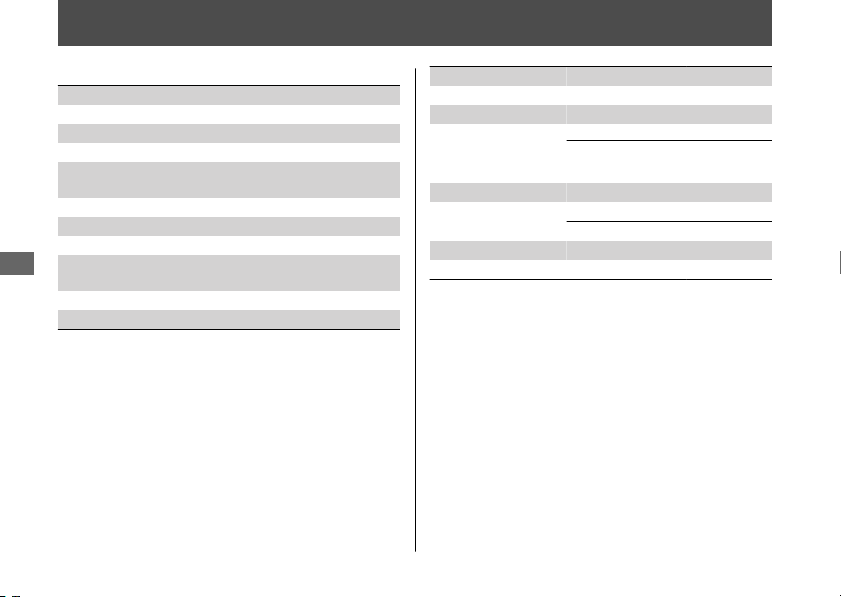
Specifications
■ Main Components
Overall length 73.2 in (1,860 mm)
Overall width 28.9 in (735 mm)
Overall height 40.4 in (1,025 mm)
Wheelbase 49.8 in (1,265 mm)
Minimum ground
clearance
5.7 in (145 mm)
Caster angle 26º 30’
Trail 3.0 in (75 mm)
Curb weight 194 lb (88 kg)
Maximum weight
capacity
*1
220 lb (100 kg)
Passenger capacity Rider only. No passengers
Minimum turning radius 6.23 ft (1.9 m)
*1 : Including rider and accessories
Displacement 3.0 cu-in (49 cm
3
)
Bore x stroke 1.49 x 1.73 in (37.8 x 44.0 mm)
Compression ratio 11.9:1
Fuel
Unleaded gasoline
Recommended fuel octane number:
Pump Octane Number (PON) 86 or
higher
Tank capacity 1.32 US gal (5.0 L)
Battery
YTZ7S
12 V-6 Ah (10 HR)
Primary reduction
V-matic (2.8:1 ~ 0.86:1)
Final reduction 13.708
20161103142821_31GGA6800_enu_BOOK Page 107 Thursday, November 03 2016 14:30:25 JST
Specifications
104
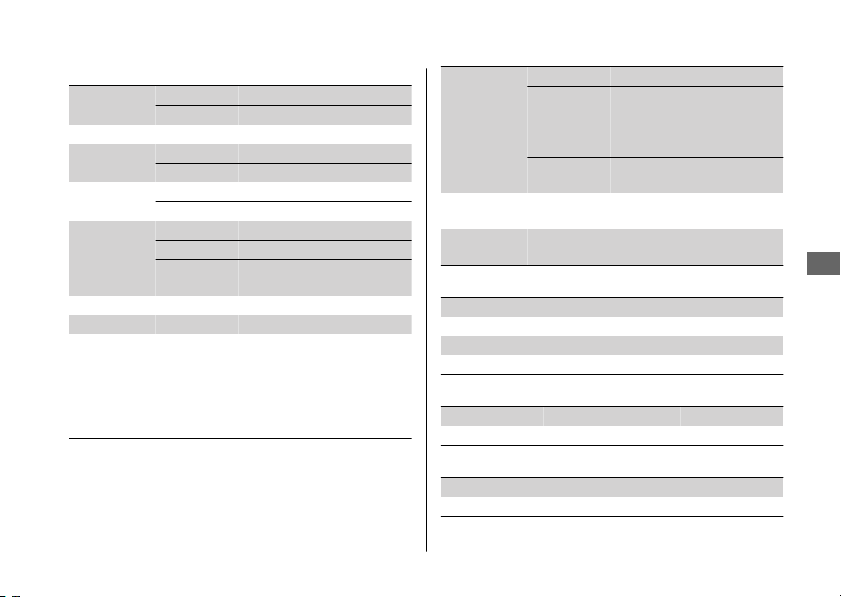
■ Service Data
Tire size
Front 120/90-10 57J
Rear 130/90-10 61J
Tire type Bias-ply, tubeless
Recommended
Tires
Front KENDA K761
Rear KENDA K761
Tire air
pressure
Front 25 psi (175 kPa, 1.75 kgf/cm
2
)
Rear 25 psi (175 kPa, 1.75 kgf/cm
2
)
Spark plugs
(standard) CR8EH-9 (NGK)
(cold climate) CR7EH-9 (NGK)
(high speed
riding)
CR9EH-9 (NGK)
Spark plug gap 0.031 - 0.035 in (0.80 - 0.90 mm)
Idle speed 2,000 ± 100 rpm
Recommended
engine oil
API Service Classification SG or higher except
oils labeled as energy conserving or resource
conserving on the circular API service label, SAE
10W-30, JASO T 903 standard MA, Pro Honda
GN4 4-stroke oil (USA & Canada) or Honda 4-
stroke oil, or an equivalent motorcycle oil
Engine oil
capacity
After draining
0.6 US qt (0.6 L)
After draining
& engine oil
strainer screen
cleaning
0.7 US qt (0.7 L)
After
disassembly
0.7 US qt (0.7 L)
Cooling system
capacity
0.51 US qt (0.48 L)
Recommended
coolant
Pro Honda HP Coolant
■ Bulbs
Headlight 12 V-35/35 W x 2
Brake/Taillight 12 V-27/8 W
Front turn signal light 12 V-23 W x 2
Rear turn signal light 12 V-23 W x 2
■ Fuses
Main fuse 20 A
Other fuse 10 A
■ Torque Specifications
Engine oil drain bolt 18 lbf·ft (24 N·m, 2.4 kgf·m)
Oil plug 15 lbf·ft (20 N·m, 2.0 kgf·m)
20161103142821_31GGA6800_enu_BOOK Page 108 Thursday, November 03 2016 14:30:25 JST
Specifications
Specifications
105
Information Record
VIN
Engine No.
Color Label & Code
Owner's Name
Address
City/State
Phone
Dealer's Name
Address
City/State
Phone
Service Manager
20161103142821_31GGA6800_enu_BOOK Page 109 Thursday, November 03 2016 14:30:25 JST
106

Index
A
Accessories.....................................................
... 13
Authorized Manuals........................................ 99
B
Basic Operation Flow...................................... 16
Battery.......................................................... 43, 52
Brakes
Brake Lever Freeplay......................................... 66
Shoe Wear........................................................... 70
Braking ............................................................... 10
Bulb
Brake/TailLight.................................................... 80
Front/Rear Turn Signal ..................................... 80
Headlight.............................................................. 79
C
Caring for Your Scooter ................................. 85
Catalytic Converter.......................................... 96
Color Label ........................................................ 42
Compartment
Owner’s Manual ................................................. 33
Coolant......................................................... 47, 64
D
Document Bag ........................................... 33, 84
E
Electrical Trouble ............................................. 78
Emission Control Systems ............................. 91
Engine
Number ................................................................ 90
Oil.................................................................... 46, 58
Overheats............................................................. 76
Starting ................................................................. 25
Stop Switch................................................... 22, 84
Stopping............................................................... 84
Engine Idle Speed............................................ 62
Environment...................................................... 89
F
Flooded Engine ................................................ 27
Fuel
Recommended................................................... 30
Tank Capacity ..................................................... 30
Fuel Reserve Indicator .................................... 21
Fuses............................................................. 45, 81
20161103142821_31GGA6800_enu_BOOK Page 110 Thursday, November 03 2016 14:30:25 JST
Index
107

G
Gasohol ...........................................................
... 98
Gasoline ............................................................. 30
H
Headlight Aim .................................................. 73
Headlight Dimmer Switch ............................. 22
Helmet Holder.................................................. 32
High Beam Indicator....................................... 21
High Coolant Temperature Indicator ... 21, 76
Honda Contacts ............................................. 101
Horn Button ...................................................... 22
I
Ignition Key....................................................... 83
Ignition Switch ........................................... 22, 84
Indicators........................................................... 21
Information Record....................................... 106
Instruments ....................................................... 20
L
Labels.................................................................... 7
Load Limits ........................................................ 14
Loading Guidelines.......................................... 14
M
Maintenance
Fundamentals ..................................................... 40
Importance .......................................................... 35
Safety .................................................................... 36
Schedule............................................................... 37
Maximum weight Limit .................................. 14
Modifications.................................................... 13
O
Odometer.................................................... 20, 84
Oil
Engine ............................................................ 46, 58
Overheating ...................................................... 76
Oxygenated Fuels ............................................ 98
P
Parking ............................................................... 11
Parts Location................................................... 18
Protective Apparel............................................. 9
R
Rear Brake Lock................................................ 24
20161103142821_31GGA6800_enu_BOOK Page 111 Thursday, November 03 2016 14:30:25 JST
Index
108

Recommended
Fuel........................................................................ 30
Refueling
............................................................ 30
Removal
Battery................................................................... 52
Inner Cover.......................................................... 54
Maintenance Lid................................................. 55
Reporting Safety Defects (U.S.).................. 103
Riding ................................................................. 28
Riding Precautions .......................................... 10
S
Safety Labels ....................................................... 7
Safety Precautions............................................. 9
Specifications.................................................. 104
Speedometer .................................................... 20
Start Button....................................................... 22
Starting............................................................... 25
Steering Lock .................................................... 23
Stopping Engine .............................................. 84
Storage
Equipment ........................................................... 32
Owner’s Manual ................................................. 33
Storing Your Scooter ...................................... 88
Switches ............................................................. 22
T
Throttle............................................................... 71
Tires
Air Pressure ......................................................... 48
Puncture............................................................... 77
Replacing ............................................................. 48
Transporting Your Scooter............................ 89
Turn Signal Indicator ...................................... 21
Turn Signal Switch........................................... 22
V
Vehicle Identification Number ..................... 90
W
Warranty Coverage and Service ................ 100
Washing Your Scooter.................................... 85
Weight Limit............................................. 14, 104
20161103142821_31GGA6800_enu_BOOK Page 112 Thursday, November 03 2016 14:30:25 JST
Index
109