
1
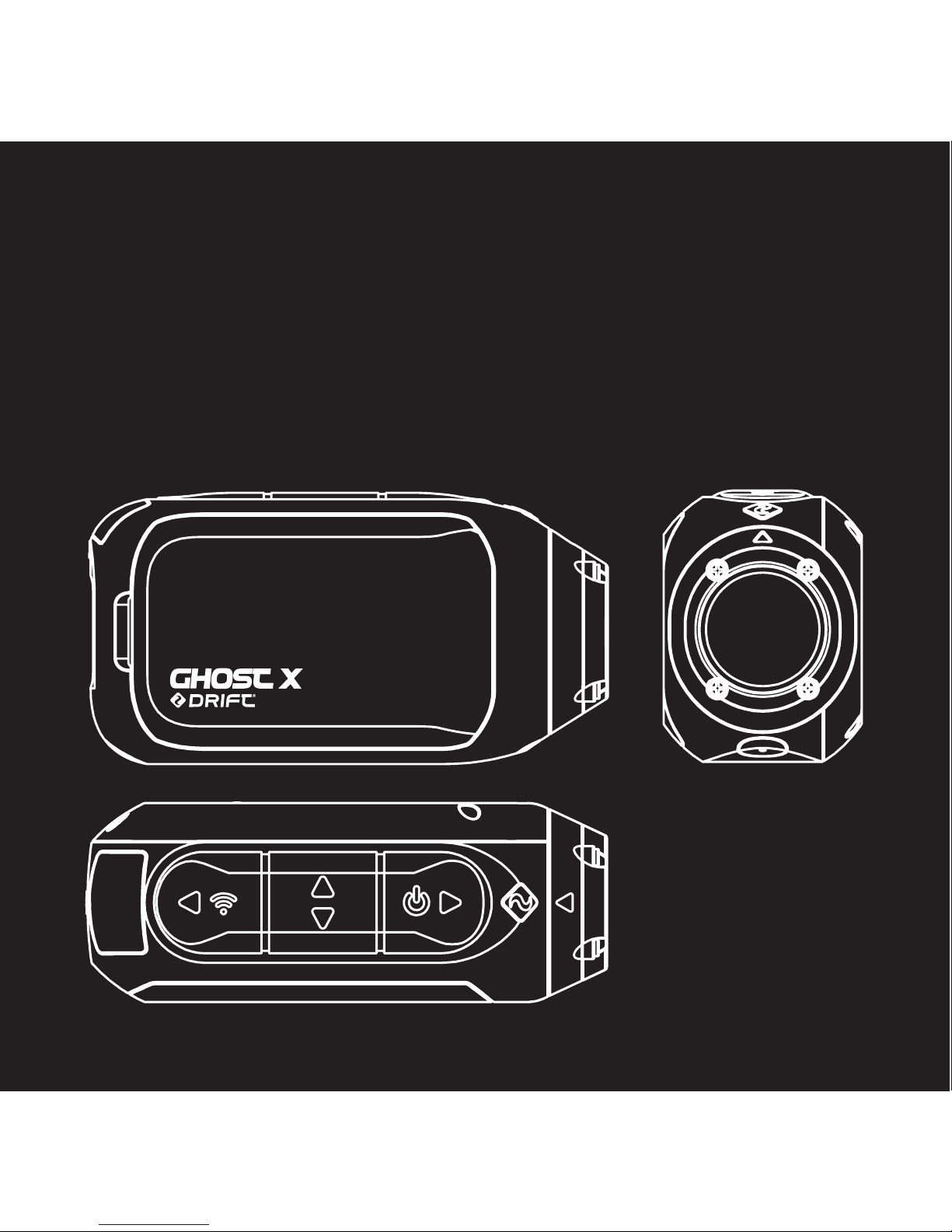
Thank you for purchasing the Drift Ghost X
CUSTOMER SUPPORT
Download the full manual and check our ocial website for firmware
updates, customer support, and info on all of our products.
https://driftinnovation.com/
If you have any suggestions, comments or concerns; please contact our
customer support team at:
WARRANTY
Warranty does not apply if the product is damaged due to physical abuse,
mishandling, accident, fire, frostbite, water damage, negligence or failure
to follow the supplied operating instructions. For more information on
your warranty, see:
https://driftinnovation.com/warranty
Downloaded from www.ManualsFile.com manuals search engine

EN 2
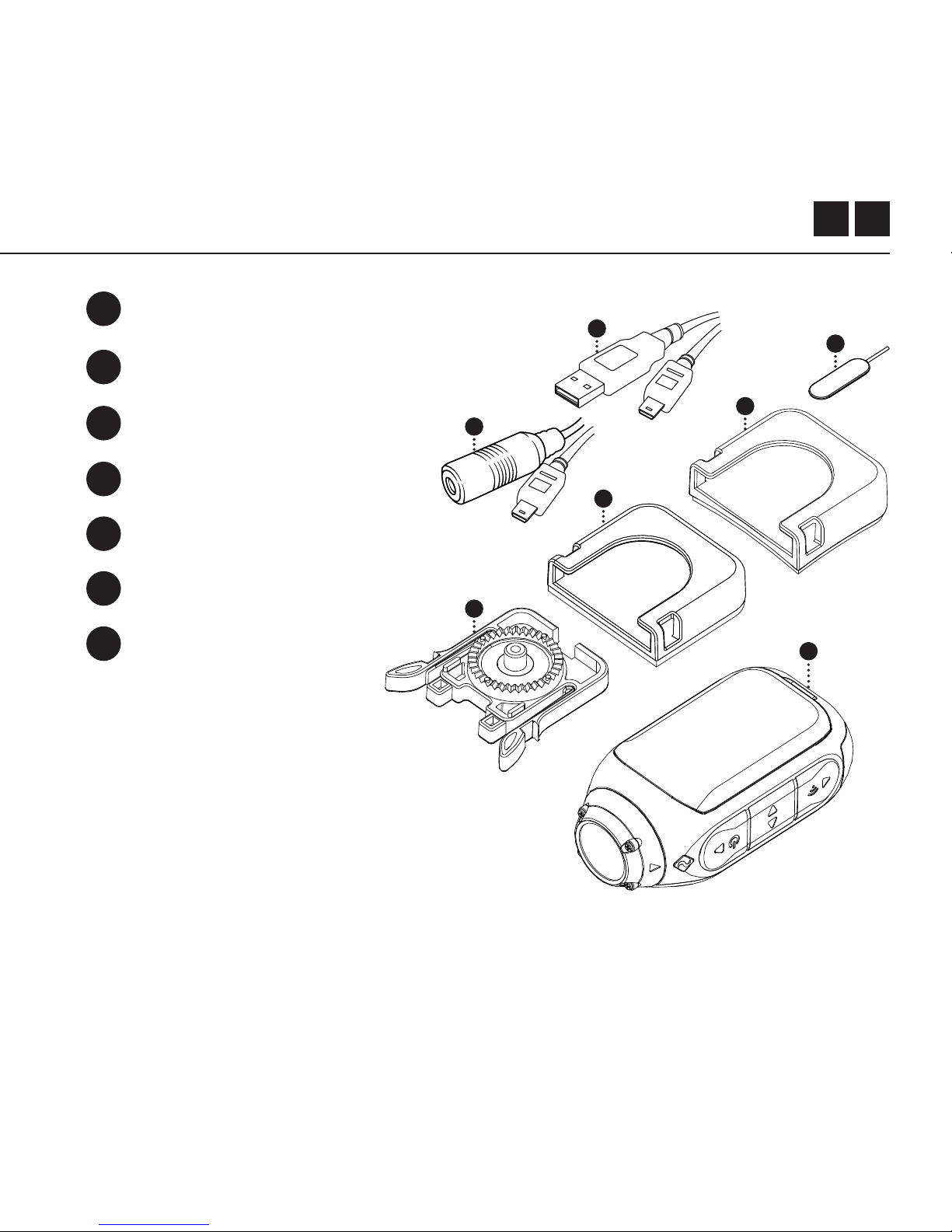
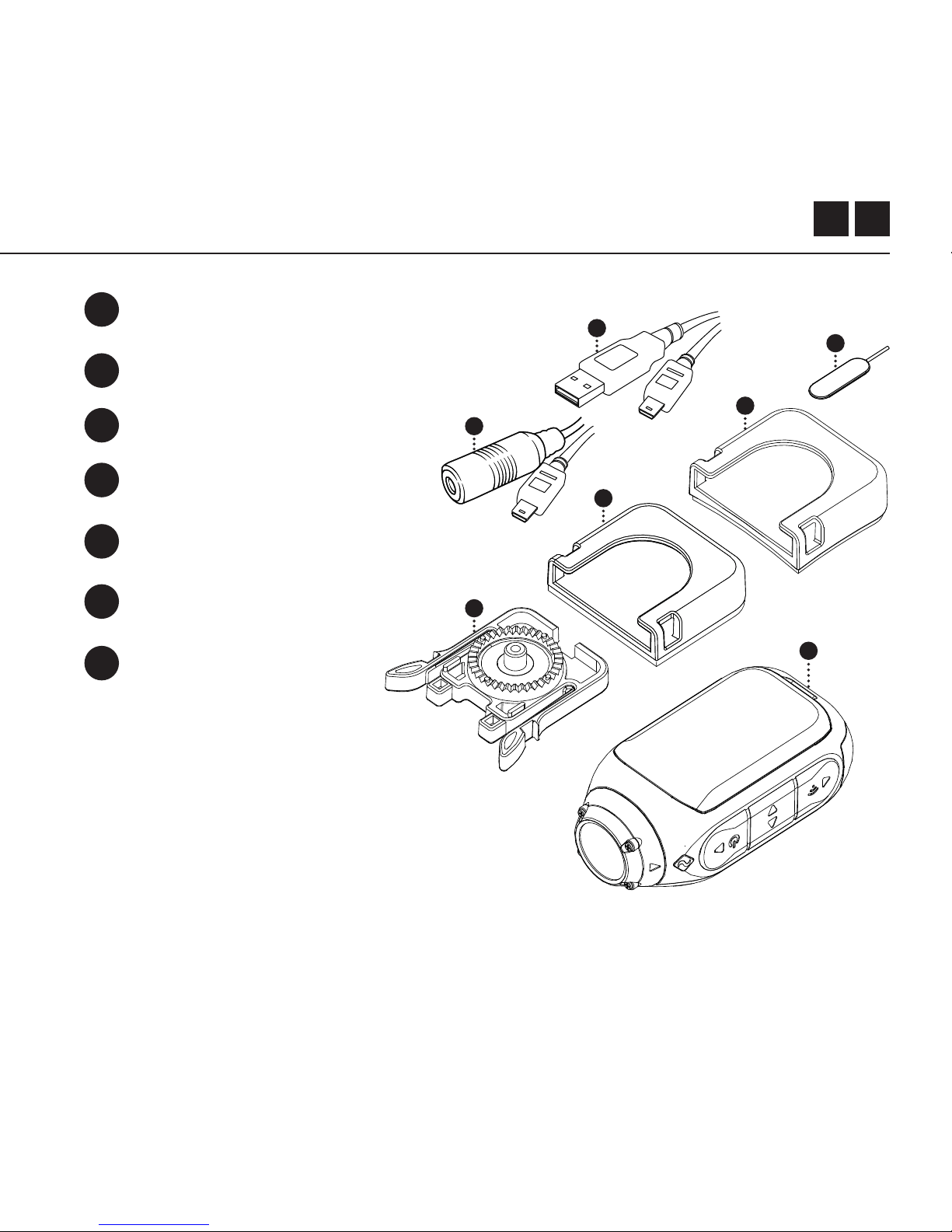
About Your Camera | Package Contents
Initial Setup | Getting Started
Camera Modes
Settings Menu
Settings
Mounting the Camera
Feature Overview
Accessory Guide
Wi-Fi + Firmware
Connecting Your Camera
Specifications
Disclosures
3-4
5-6
7
8
9-10
11
12-13
14
15
16
17-18
19-20
Contents
Downloaded from www.ManualsFile.com manuals search engine
5
GHOST 4K
Initial Setup
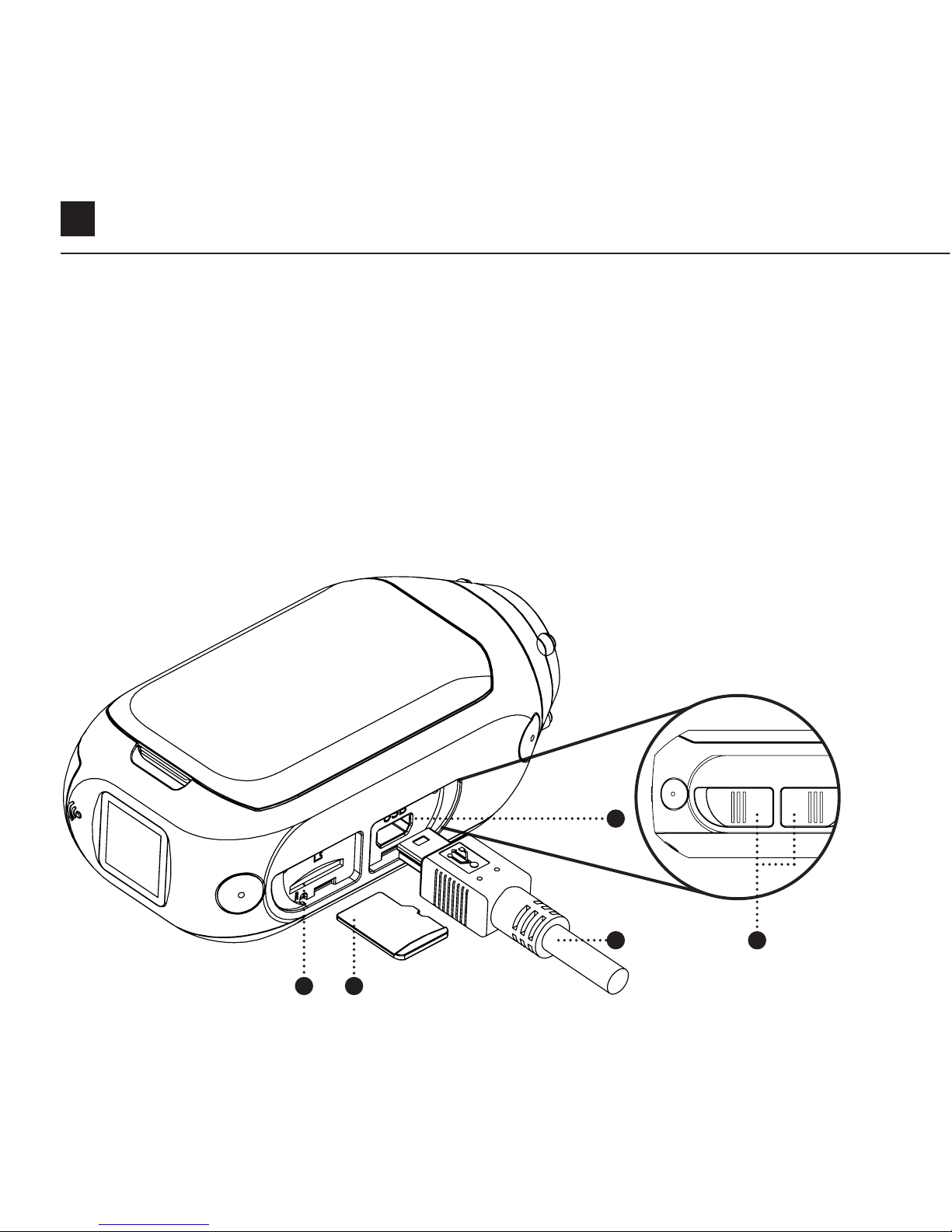
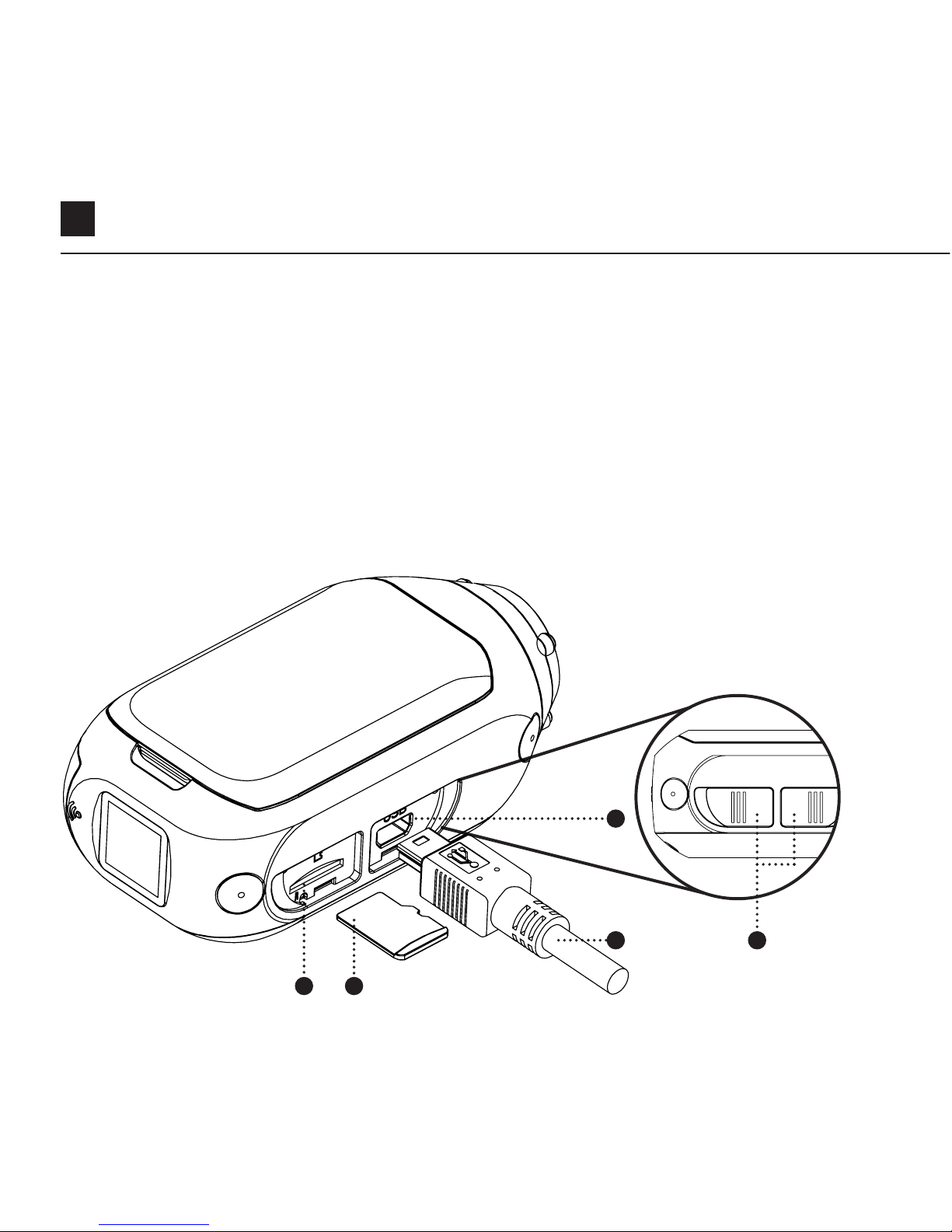
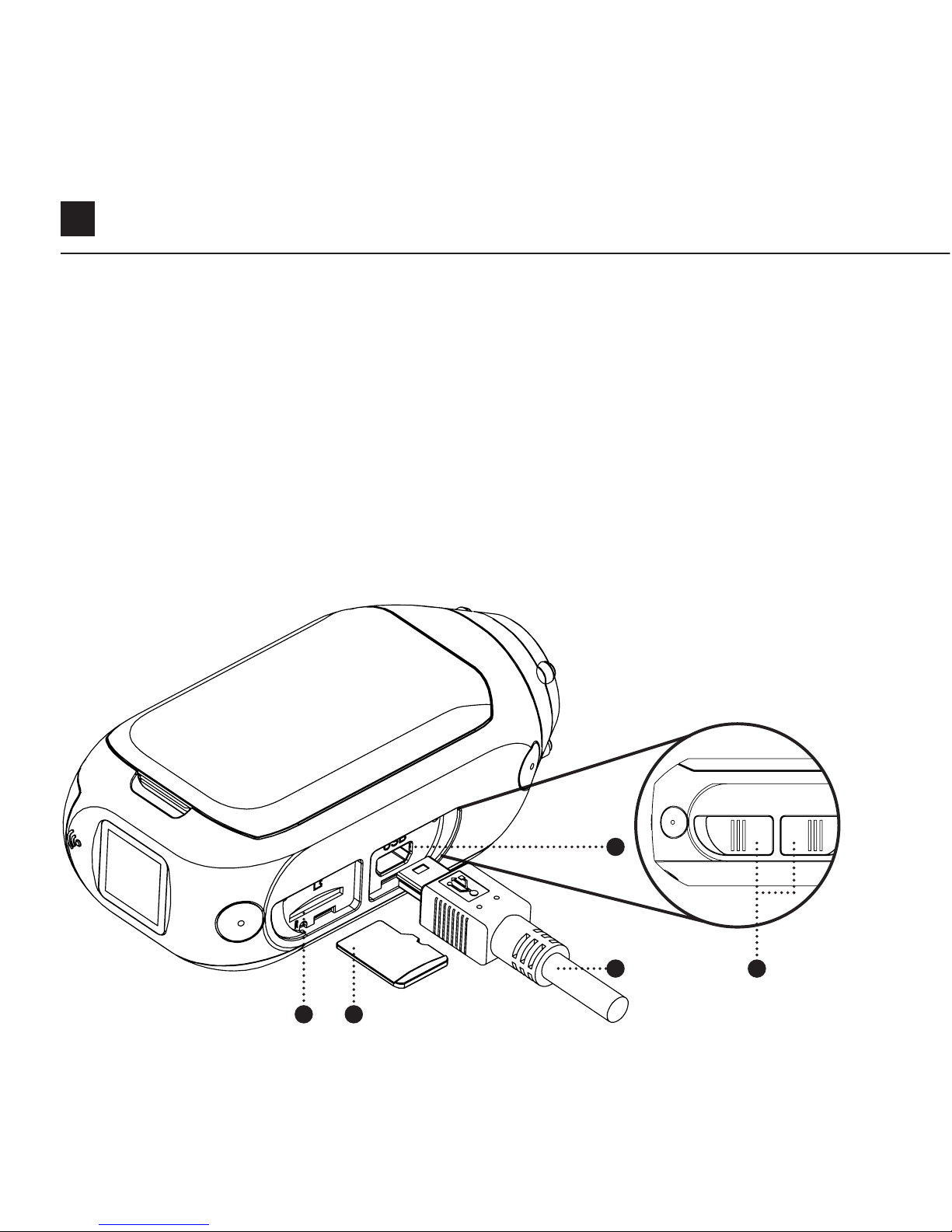
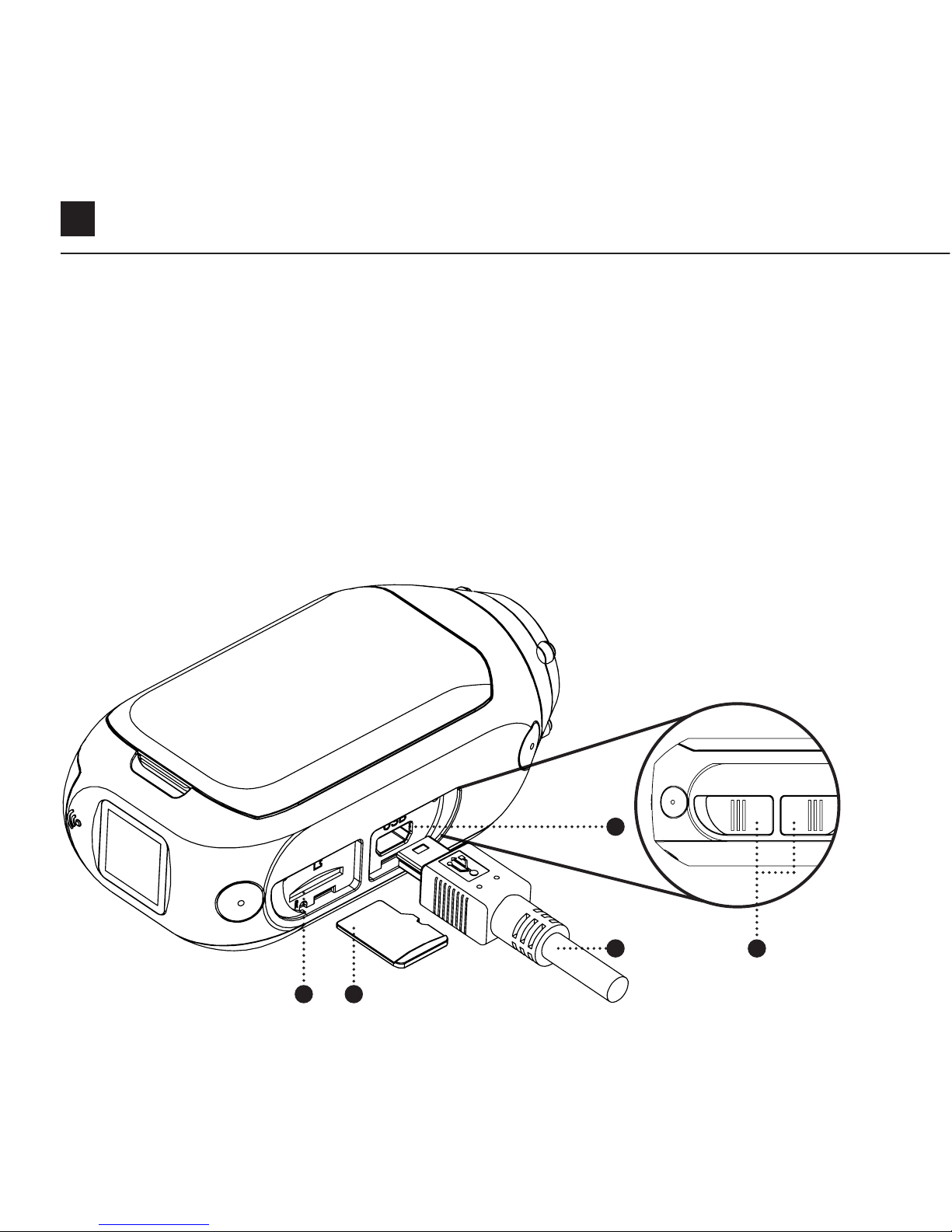
1. Uncover the microSD slot by lifting its rubber cover.
2. Insert a Class 10 or higher microSD/HC/XC card (up to 128GB).
Format before first usage!
3. Uncover the mini USB port by lifting its rubber cover
4. Connect the camera via a mini USB cable to a powered USB port,
and charge the battery for 2.5 hours before first use.
5. Replace the rubber covers securely to cover both the microSD slot and mini
USB port. You are ready to go!
4
3
1 2
5
Downloaded from www.ManualsFile.com manuals search engine
EN 6
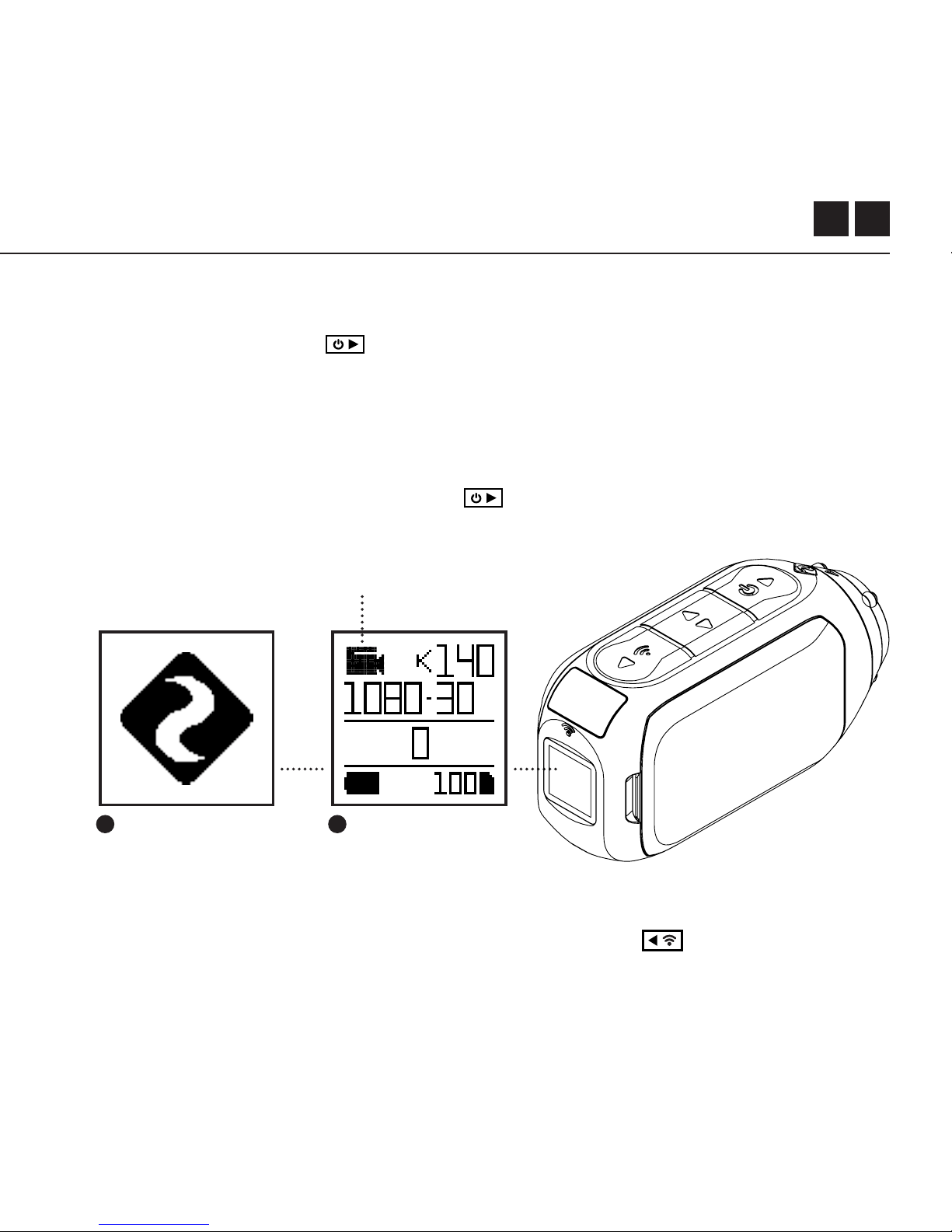
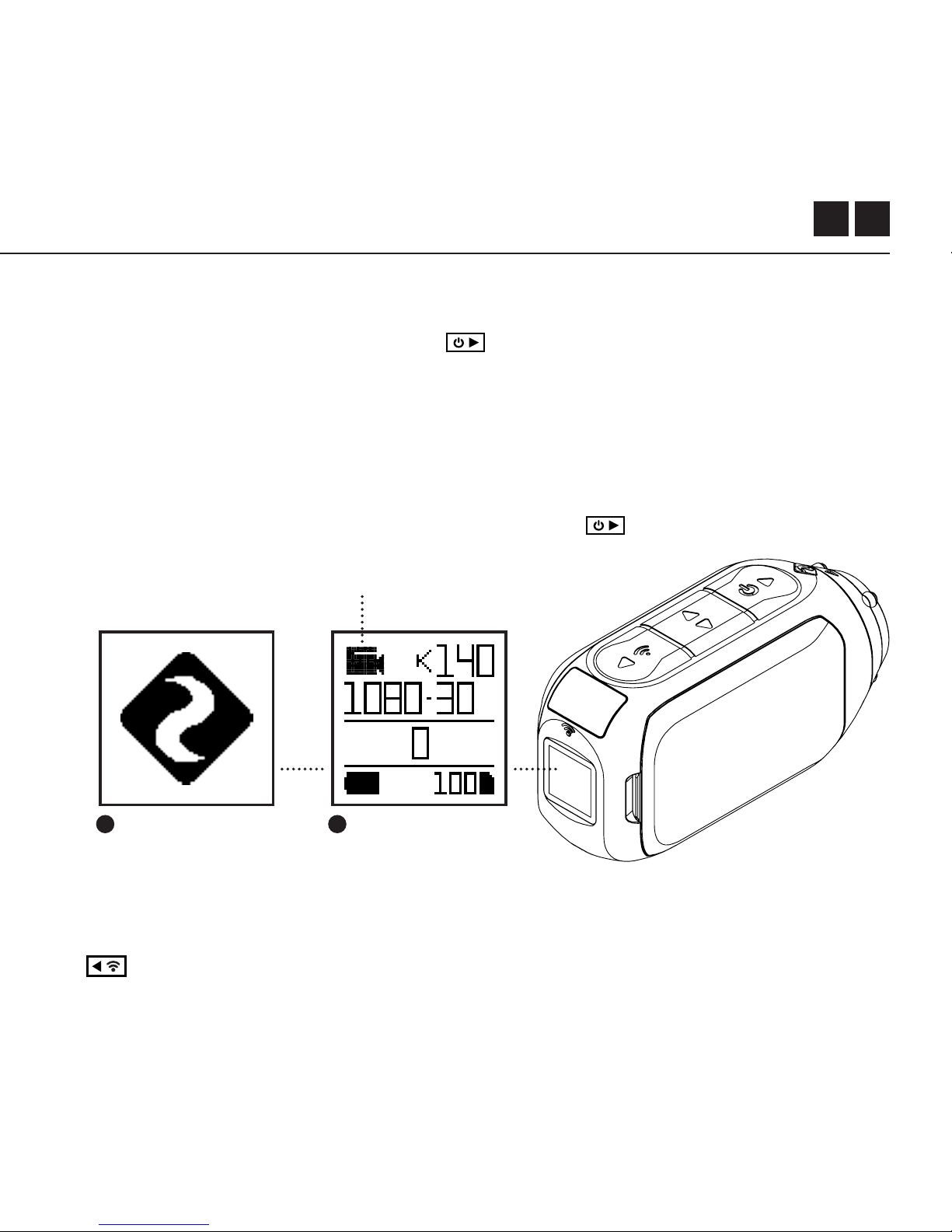
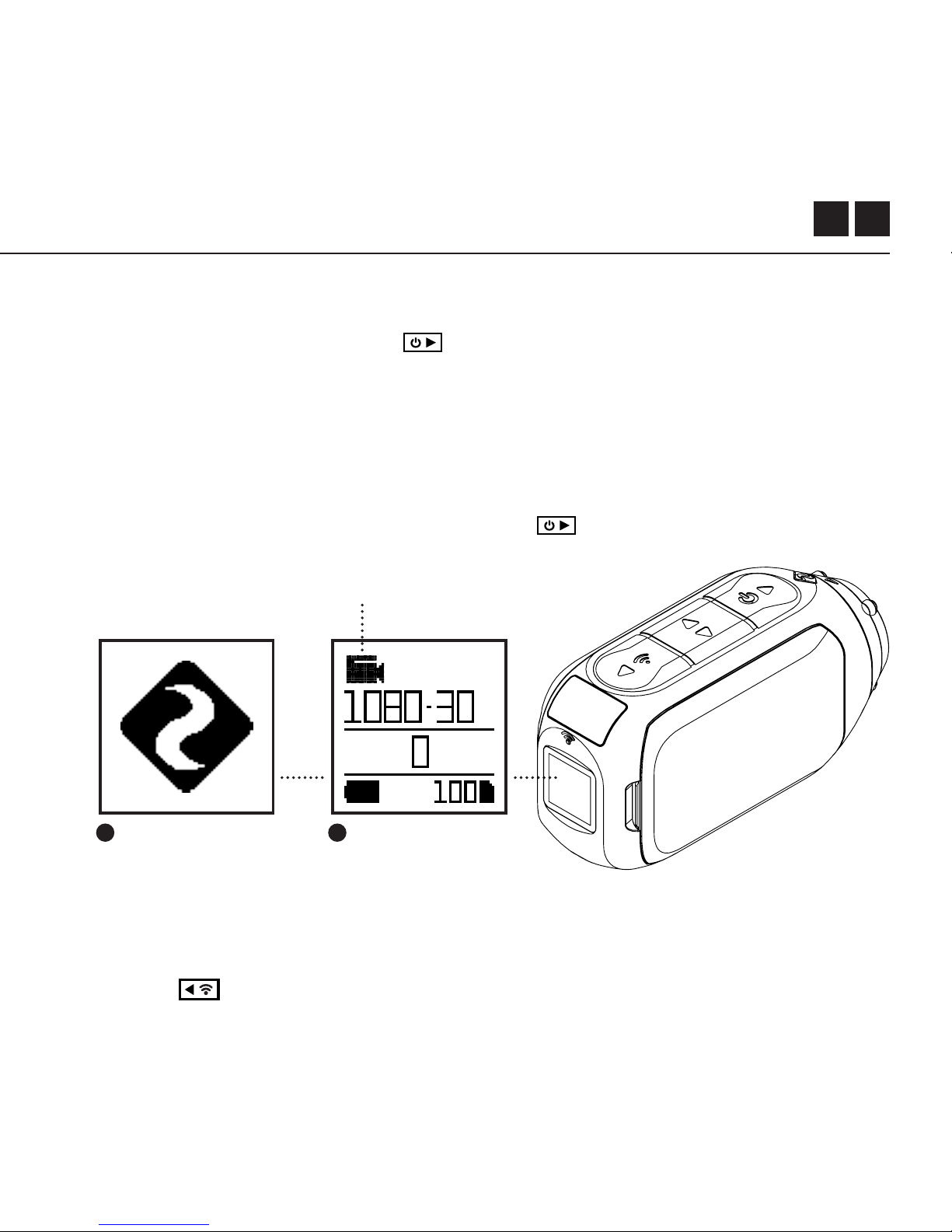
POWER ON/OFF
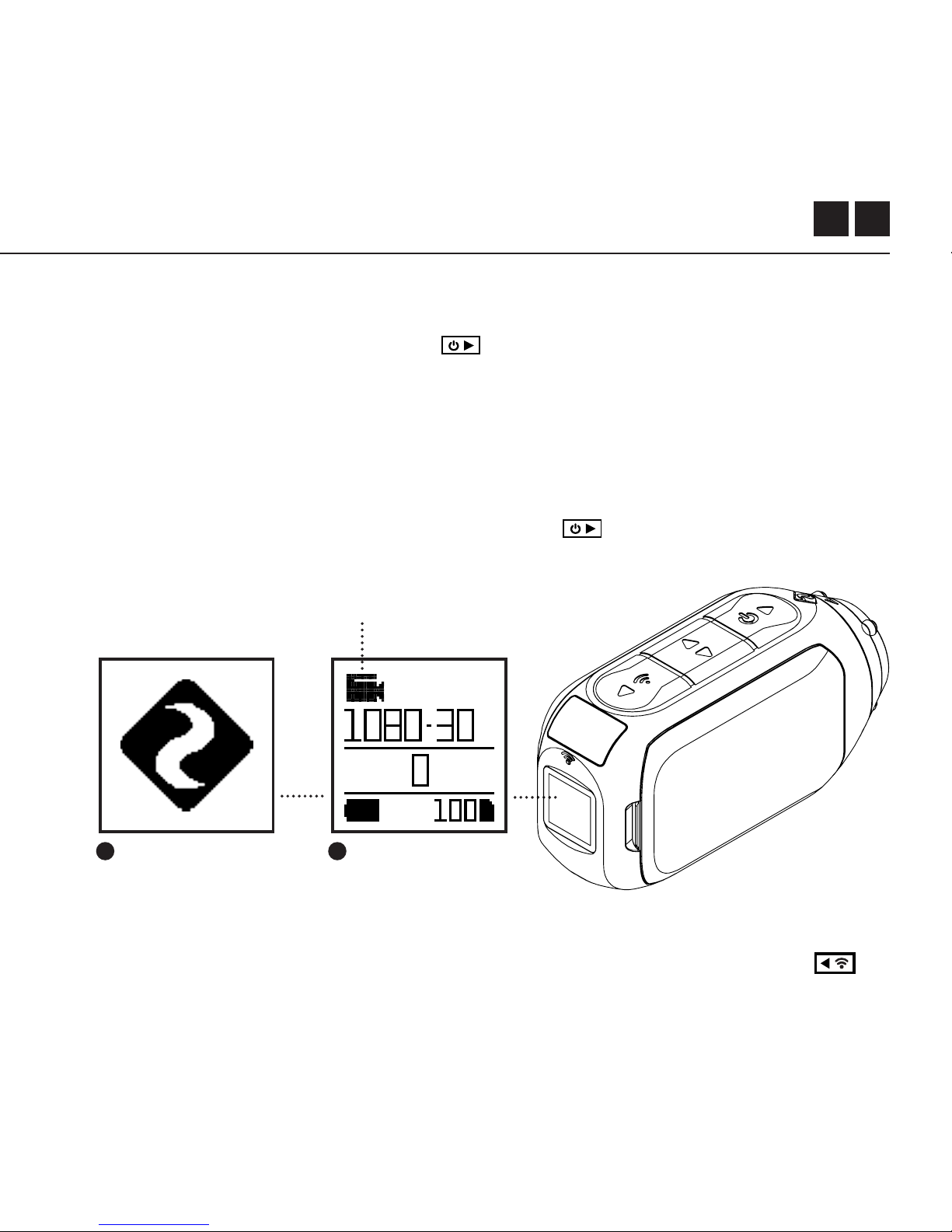
1. Press and hold the button to power on.
2. The Rear Screen will power on, showing the welcome display.
3. The camera is now ready to record video or take photos.
4. Current camera mode is indicated by the colour of the Status LED and
Rear Screen, along with the icon in the top left of the Rear Screen.
5. To power o, press and hold the button for 3 seconds.
2 4
Getting Started
MODE NAVIGATION
To change the current camera recording mode, press the button; changing
between Video, Photo, Timelapse, Photoburst, and General Settings modes.
Mode Icon
Downloaded from www.ManualsFile.com manuals search engine
7
Camera Modes
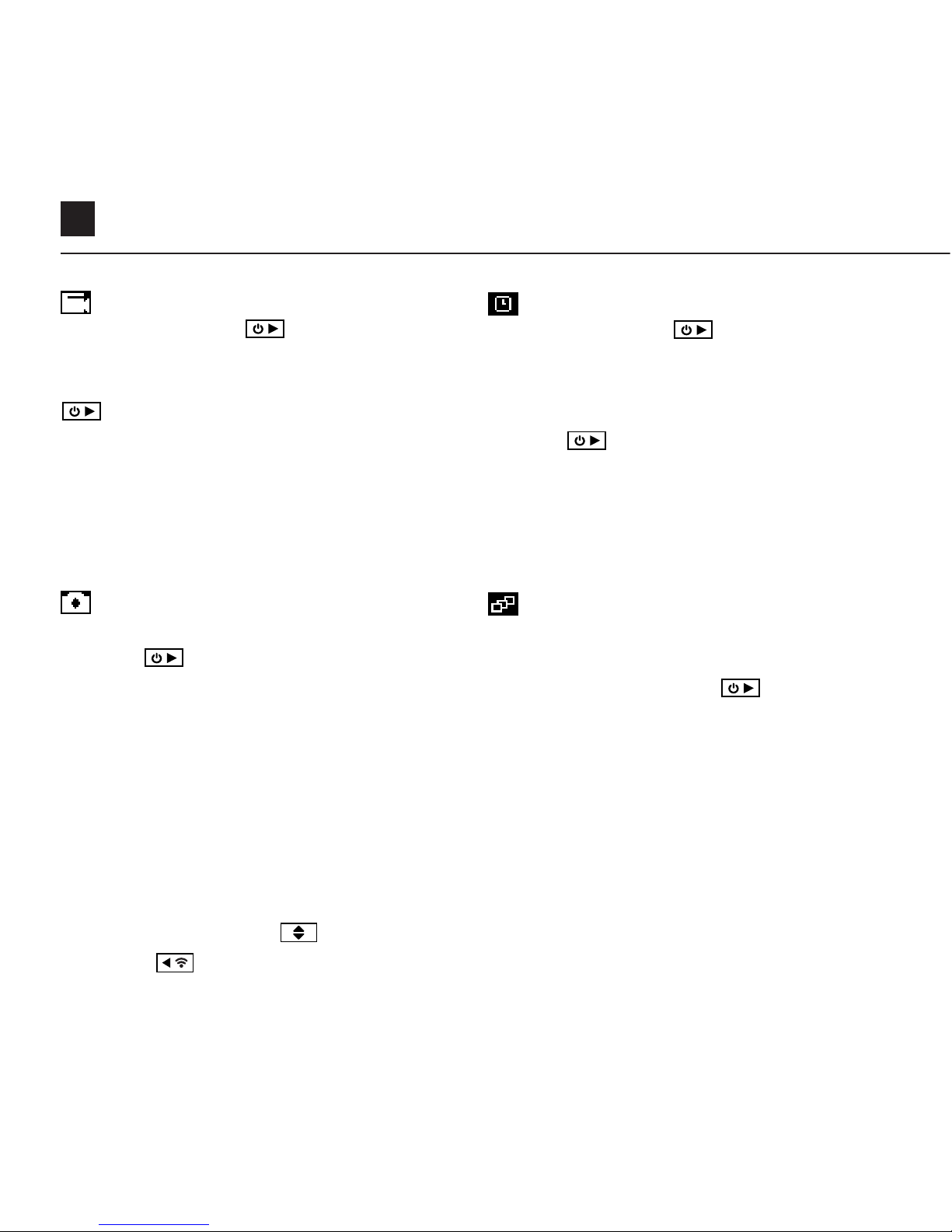
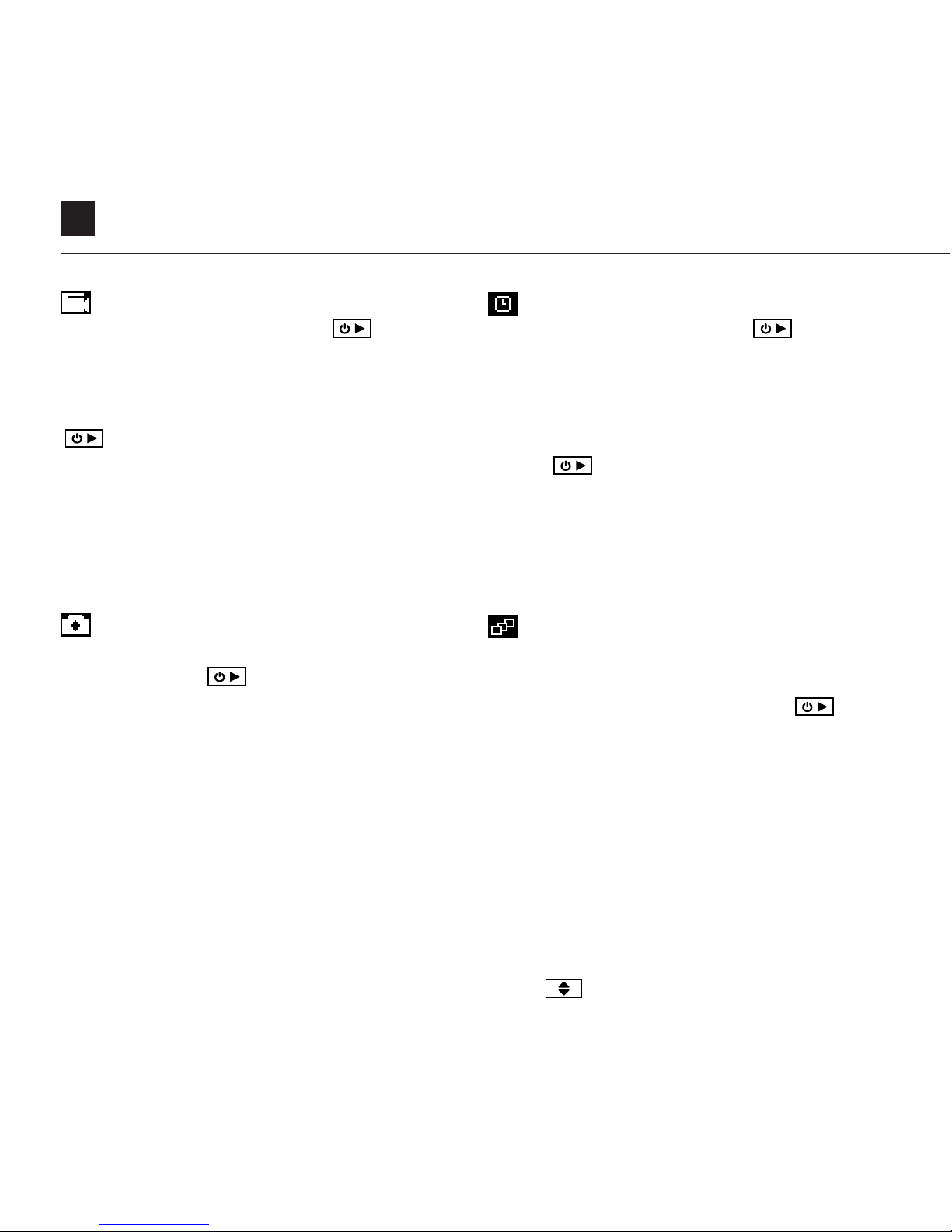
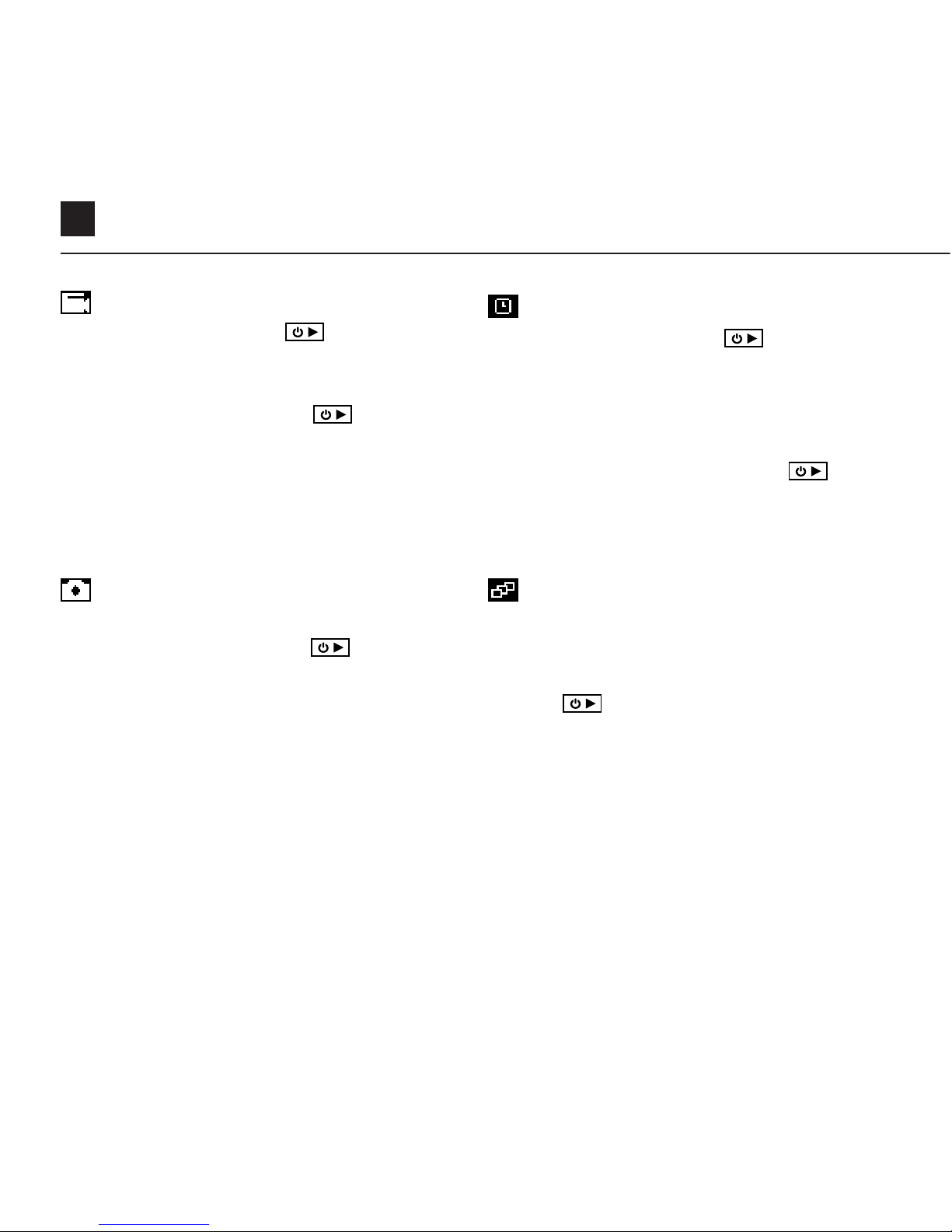
VIDEO MODE
(Green LED) Press the button to start
recording. The Status LED and LCD backlight
will flash red to indicate recording. Press the
button again to stop recording.
VIDEO SETTINGS
• Resolution
• Frame Rate
PHOTO MODE
(Yellow LED) The camera will capture still images
when the button is pressed, and the status
LED and LCD screen will flash red each time a
photo is captured.
PHOTO SETTINGS
• Resolution
CHANGE SETTINGS
In any mode press the button to highlight a setting.
Press the button to change the option for the highlighted setting.
TIMELAPSE MODE
(Purple LED) Press the button to capture
a series of still images at a specified rate. The
Status LED and LCD screen will flash red each
time an image is captured. To stop recording,
press the button once more.
TIMELAPSE SETTINGS
• Resolution
• Timelapse Interval
PHOTOBURST MODE
(Cyan LED) The camera will capture a burst
of still images for an allotted duration and
at a specified rate, when the button is
pressed. For best results, use a memory card
with the highest possible data rate.
PHOTOBURST SETTINGS
• Resolution
• Burst Duration/Capture Rate
Downloaded from www.ManualsFile.com manuals search engine
EN 8
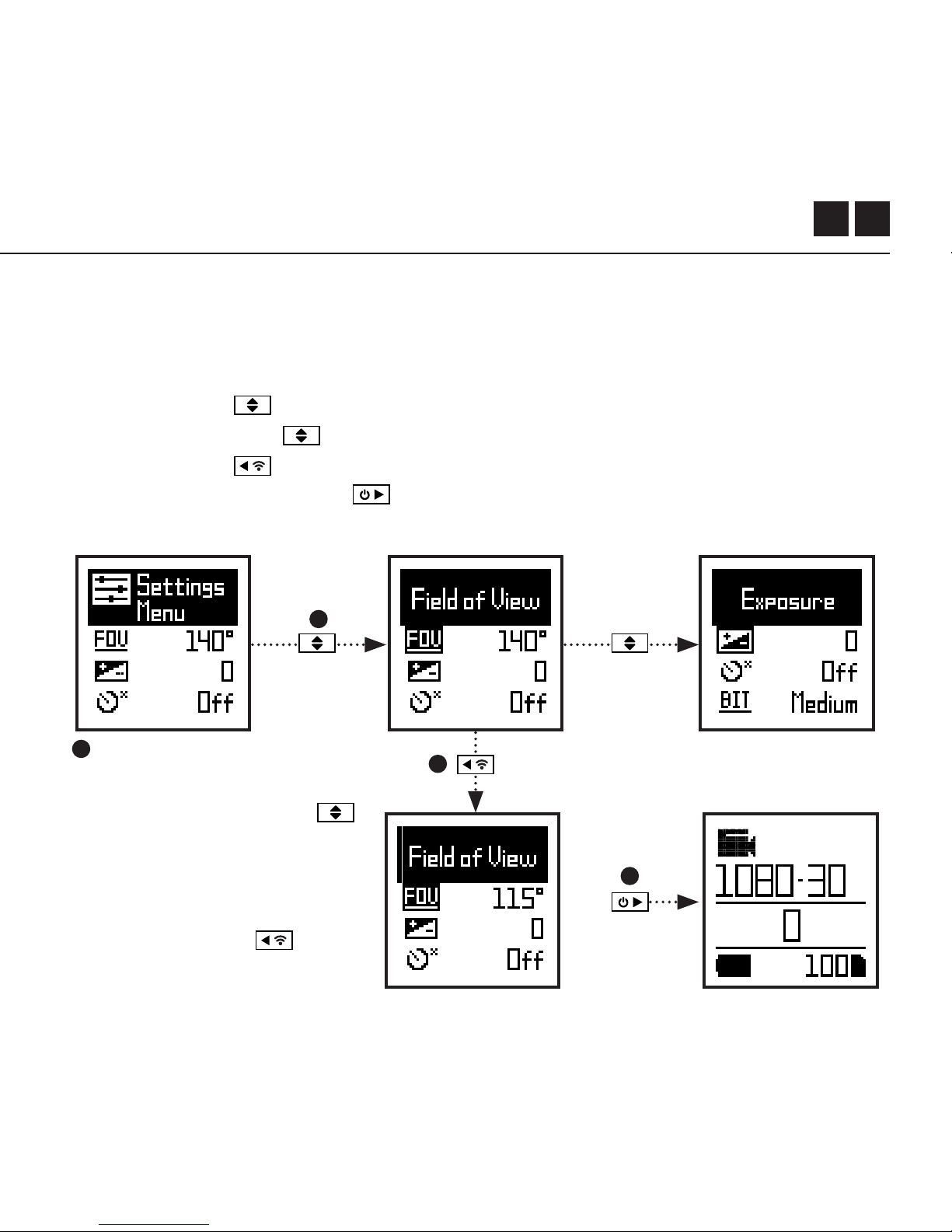
SETTINGS MENU NAVIGATION
1. On arrival to the settings menu, the highlight black box rests on the top,
highlighting the Settings Menu icon as the starting position.
2. Press the button to navigate down, this highlights the next setting.
Press hold the
button to scroll upwards.
3. Press the button to change the option for that setting.
4. At any time, press the button to change mode (returning to Video).
Settings Menu
4
1
2
3
In this example pressing
once moves highlight block
to the next setting (Field of
View), pressing once more
moves to Exposure.
In step 3 pressing
changed FOV 140° to 115°.
Downloaded from www.ManualsFile.com manuals search engine

9
Wi-Fi
Field of View
Exposure
Self Timer
Video Bit Rate
Video Filter
ISO
Video Tagging
Video Tagging Interval
Car DVR
Car DVR Loop Interval
Microphone Sensitivity
Speaker Volume
OFF / ON
90° / 115° / 140°
-2 / -1 / 0 / +1 / +2
OFF / 3S / 5S / 10S
HIGH / MEDIUM / LOW
NORMAL / VIVID / LOW LIGHT
100 / 200 / 400 / 800 / AUTO
OFF / ON
10S / 30S / 1MIN / 2MIN
OFF / ON
10S / 30S / 1MIN / 2MIN / 5MIN / 10MIN
OFF / 1 / 2 / 3 / 4 / 5
OFF / LOW / MED / HIGH
Settings
Downloaded from www.ManualsFile.com manuals search engine

EN 10
Settings
Status Indicator LED
Instant Record
Date
Date Stamp
Camera O
THM Files
Language
Reset Settings
Format SD Card
Serial Number
Firmware Version
Check our ocial website for firmware updates.
OFF / ON
OFF / ON
YY/MM/DD HH/mm
OFF / ON
NEVER / 2MIN / 5MIN / 10MIN / 20MIN
ON / OFF
EN / CN
YES / NO
YES / NO
XXXXXX
XXXXXX
Downloaded from www.ManualsFile.com manuals search engine
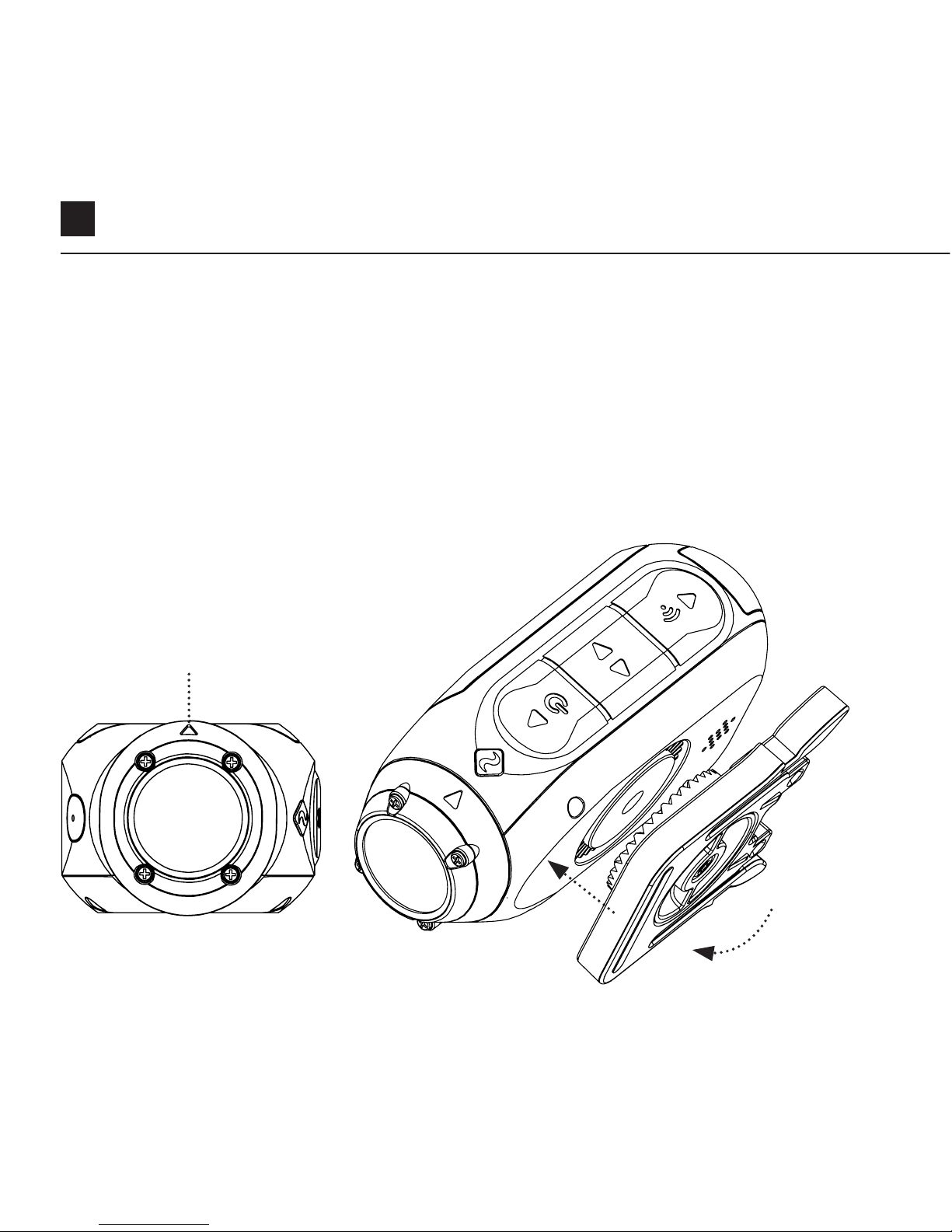
11
Mounting the Camera
1. Attach the Universal Clip to the camera in any 360° orientation as needed –
first position the clip in the desired orientation, then secure by rotating the
screw base by hand.
2. Slide the Universal Clip into your chosen mount, ensuring that it ‘clicks’ into
place. *Double check it has been fully inserted by pushing out the clips.
3. Align your shot. Rotate the lens by hand, using the lens marker as an ‘up’
reference, maintaining it perpendicular to the ground for correct orientation.
Lens Marker
Downloaded from www.ManualsFile.com manuals search engine

EN 12
Feature Overview
CAR DVR MODE
This hands-o mode is ideal for insurance and security purposes.
The camera records footage in a continuous loop style (DVR Intervals) recording
loop after loop until it fills the MicroSD Card. Once full, the oldest loops will be
deleted as the newer ones are saved. The DVR loop interval can be 10s, 30s, 1min,
2min, 5min or 10min.
VIDEO TAGGING
When activated, this feature allows the camera to continuously record video, but
only save when important footage is “Tagged”.
While recording video, pressing the button will save video from a past and
future interval since hitting the button - eectively filming an event which has
passed and subsequent developments. For example, with a video tagging interval of
30s selected, the camera will save the previous 30s, and an additional 30s – a total
of 1m “tagged” footage.
Video Tagging requires a class 10 micro SD card with 4GB of free space to function correctly.
INSTANT ON MODE
Enabling Instant On Mode allows the camera to turn on, and start recording with a
single press of the button.
Downloaded from www.ManualsFile.com manuals search engine

13
Feature Overview
FILTER
Quickly tailor your cameras settings to
the recording conditions with fi
lters.
Choose between Normal / Vivid /
Low Light .
BIT RATE
Users can choose to keep the normal
compression used by the H.264 codec,
or if they prefer, allow a higher flow of
data for preserving more of the original
recording. This will result in a bigger
file size.
Downloaded from www.ManualsFile.com manuals search engine
EN 14
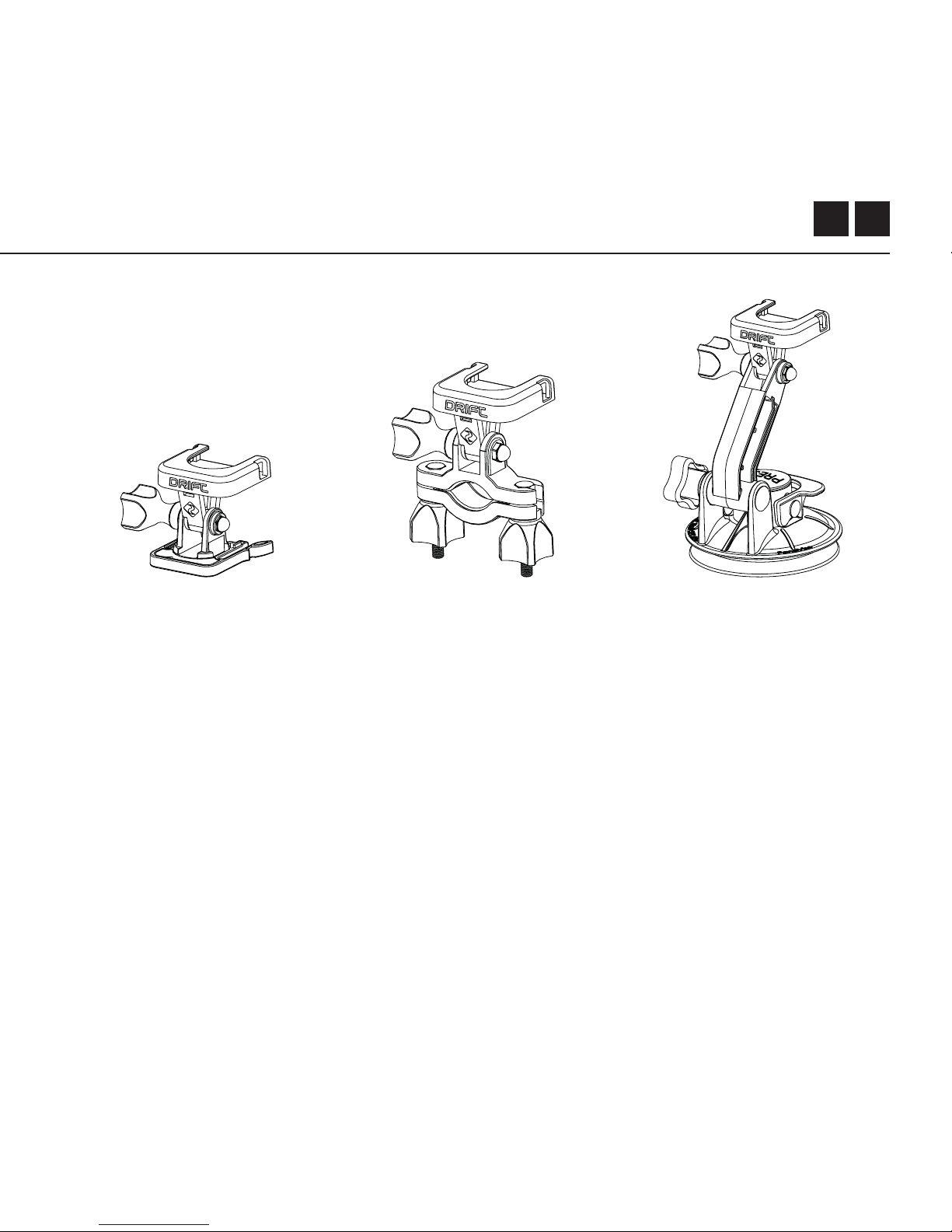
Accessory Guide
SUCTION CUP MOUNT
The ideal accessory for
mounting your Ghost X
to any non-porous flat
surface. Ideal for use
on car windshields or
bodywork, the Suction
Cup makes it simple to
turn, tilt, and rotate your
camera 360°.
HANDLEBAR MOUNT
The Drift handlebar mount
is the perfect accessory
for riders, whatever your
discipline. Compatible
with bars between 19mm
and 36mm, and capable
of pivoting more than 180
degrees, the handlebar
mount opens up almost
any angle for your video.
PIVOT MOUNT
Mountable anywhere at
nearly any angle, the Drift
Pivot Mount is your tool to
capture the moment from
any point of view you can
imagine. Includes flat and
curved adhesives, and can
be used together with any
other Drift mount.
Downloaded from www.ManualsFile.com manuals search engine
15
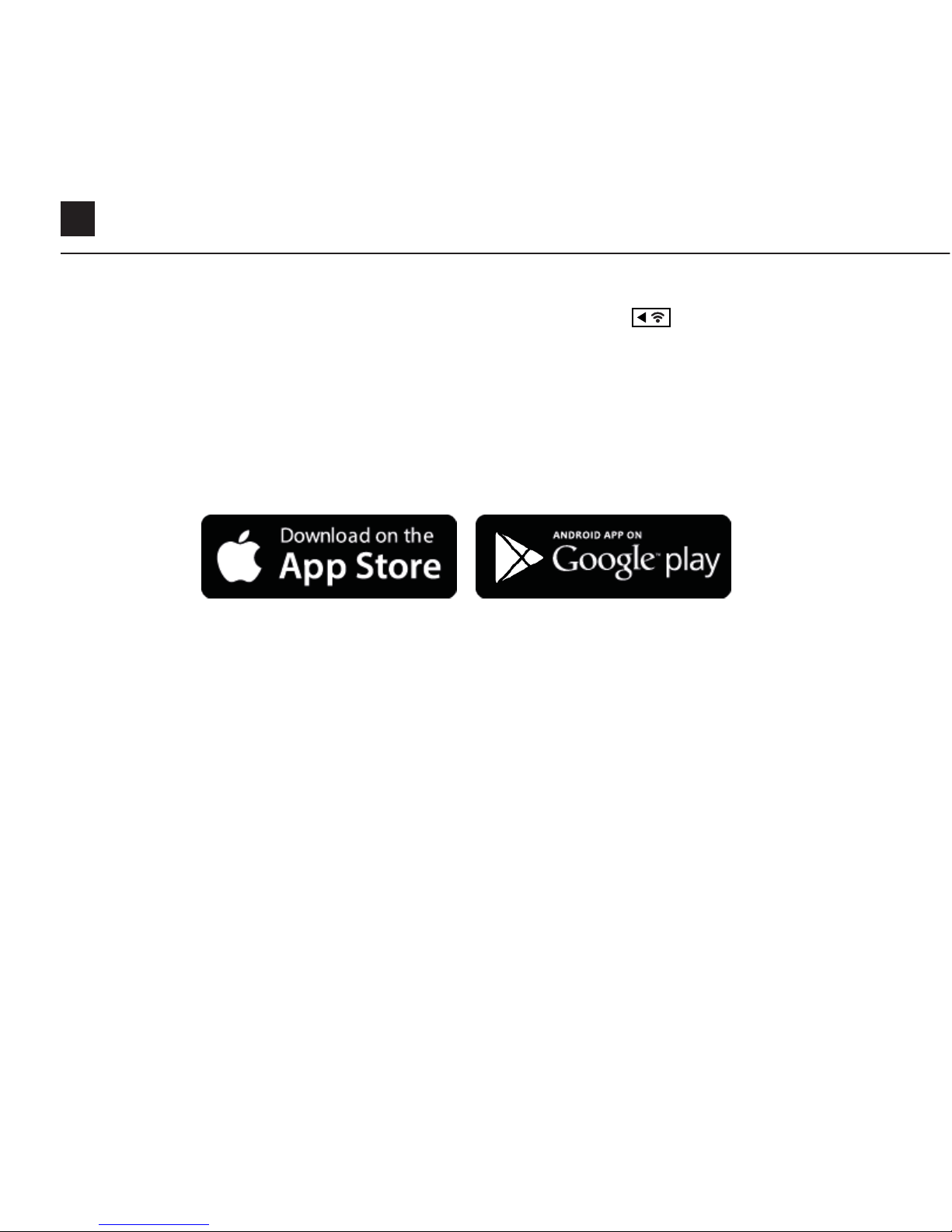
Wi-Fi + Firmware
button.
T
o turn on your Ghost X Wi-Fi, simply press and hold the
A green Wi-Fi indicator LED shows that Wi-Fi is enabled.
Wi-Fi can also be turned on via the cameras settings menu.
DOWNLOAD THE DRIFT LIFE APP
Setup your shot, capture, playback, edit and live stream on your mobile device.
INSTALLING FIRMWARE
Download the latest firmware from the Drift website and copy the Ghost_X.bin file
into the root of a formatted micro SD card. Insert the micro SD card into the camera
and power on.
The camera screen will display ‘Firmware Updating’ as the update is installed. Once
complete, the camera will power down.
Downloaded from www.ManualsFile.com manuals search engine

EN 16
Connecting Your Camera
CONNECTING TO A PC
1. Connect the camera using the USB cable (provided); the camera screen
will show a USB icon.
2. The camera’s folder may open automatically; if not, open using
My Computer.
3. The camera should be recognised as a removable disk; double-click to open.
4. Open the DCIM folder to access your files.
CONNECTING TO A MAC
1. Connect the camera using the USB cable (provided); the camera screen
will show a USB icon.
2. The camera’s folder may open automatically; if not, open using Finder.
3. The camera should be recognised as an external device; double-click
to open.
4. Open the DCIM folder to access your files.
Downloaded from www.ManualsFile.com manuals search engine

17
Specifications
Video Resolution and Frame Rates:
1080P (1920 X 1080 16:9)
960P (1280 x 960 4:3)
720P (1280 X 720 16:9)
WVGA (854 x 480 16:9)
25 / 30 FPS
25/ 30 FPS
25 / 30 / 50 / 60 FPS
25 / 30 / 50 / 60
FPS
File format: .MP4 (H.264 codec)
Sensor type: CMOS
Field-of-view (diagonal): 90° / 115° / 140°
Lens focal range:
Lens rotation:
Photo mode:
Exposure:
LCD Screen:
Memory Capacity:
0.5m to infinity
330°
4 / 8 / 12 mega-pixels
Auto / Step Manual (Advanced Users)
Color Dot Matrix Backlit LCD
Micro SD, SDHC, SDXC memory cards up to 128GB
Downloaded from www.ManualsFile.com manuals search engine

EN 18
Specifications
Inputs:
Outputs:
Connectivity:
Power:
Wi-Fi Frequency:
Camera Dimensions:
Weight:
Compatibility:
Mini USB 10 Pin. External Microphone via USB adaptor.
A/V and HDMI Out via USB Adapter.
USB Plug And Play, Mini USB 10 Pin.
1500mAh internal,500mAh modular battery included.
2.4GHz
43 (W) x 82.2 (L) x 31.4 (D) mm
120g
Windows XP and up / Mac OS 10.2 and up
For viewing / editing minimum requirements include:
8GB RAM integrated graphics, 4th generation i5 and 17
Intel® Core™ or AMD A10-7800 APU.
Discreet graphics cards starting from GeForce® GTX™
650, or AMD Radeon™ HD 7000 Series and above.
Downloaded from www.ManualsFile.com manuals search engine

19
Disclosures
FCC/CE Information
This device complies with Part 15 of
the FCC Rules.
Operation is subject to the following
two conditions:
(1) this device may not cause harmful
interference, and
(2) this device must accept
interference received, including
interference that may cause undesired
operation.
WARNING
Changes or modifications to this unit
not expressly approved by the party
responsible for compliance could void
the user’s authority to operate the
equipment.
The equipment has been tested and
found to comply with the limits for
a Class B digital device, pursuant
to Part 15 of the FCC Rules. These
limits are designed to provide
reasonable protection against
harmful interference in a residential
installation. This equipment generates,
uses, and can radiate radio frequency
energy and, if not installed and used in
accordance with the instructions, may
cause harmful interference to radio
communications. However, there is
no guarantee that interference will
not occur in a particular installation.
If this equipment does cause harmful
interference to radio or television
reception, which can be determined
by powering the equipment on and
o, the user is encouraged to try to
correct the interference by one or
more of the following measures:
Reorient or relocate the receiving
antenna; Increase the separation
between the equipment and the
receiver; Connect the equipment into
an outlet on a circuit dierent from
that which the receiver is connected;
Consult the dealer or an experienced
radio / TV technician for help.
This device complies with Industry
Canada license-exempt RSS
standard(s).
Downloaded from www.ManualsFile.com manuals search engine

EN 20
Operation is subject to the following
two conditions:
(1) this device may not cause
interference, and
(2) this device must accept any
interference, including interference
that may cause undesired operation of
the device.
This Class [B] digital apparatus
complies with Canadian ICES-003.
Son fonctionnement est soumis aux
deux conditions suivantes:
(1) cet appareil ne peut pas causer
l’intervention, et
(2) cet appareil doit accepter de
l’intervention, y compris l’intervention
qui peut causer l’opération non
désirée de.
Cet appareil numérique de la classe
[B] est conforme à la norme NMB-003
du Canada.
Cet appareil s’accorde avec Industrie
Canada licence-exempte RSS
standard.
FCC RADIATION EXPOSURE
This equipment complies with FCC
radiation exposure limits set forth for
an uncontrolled environment.
This equipment should be installed
and operated with minimum distance
20cm between the radiator &
your body. This transmitter must
not be co-located or operating in
conjunction with any other antenna
or transmitter.
MOTORCYCLE DISCLAIMER
Interacting with the camera while
riding could cause a crash, which
may lead to serious injury or death to
yourself or others.
• Keep eyes and mind on the road;
• Avoid looking at the camera for any
long periods of time
• Stop the vehicle in a safe location
before adjusting the camera.
Disclosures
Downloaded from www.ManualsFile.com manuals search engine

1
Merci pour acheter le Drift Ghost X
SOUTIEN A LA CLIENTELE
Télécharger le manuel complet et consulter le site ociel pour les mis-
à-jour de la société, le soutien à la clientèle et les informations sur tous
nos produits.
https://driftinnovation.com/
Si vous avez du conseil, des commentaires ou de la préoccupation,
veuillez contacter notre équipe du soutien à la clientèle au:
GARANTIE
La garantie ne peut être pas appliquée si le produit est endommagé en
raison d’un abus physique, d’une mauvaise manipulation, d’un accident,
d’un incendie, de la froidure, du dégât des eaux, de la négligence
ou du non-respect des instructions d’utilisation fournies. Pour plus
d’informations sur votre garantie, veuillez voir:
https://driftinnovation.com/warranty
Downloaded from www.ManualsFile.com manuals search engine

FR 2
A propos de votre caméra | Contenu de l’emballage Initial
Réglages initial | Commencer
Caméra Modes
Menu de paramètres
Paramètres
Monter la Caméra
Présentation des fonctionnalités
Guide d’accessoires
Wi-Fi + App
Connecter votre Caméra
Spécifications
Divulgations
3-4
5-6
7
8
9-10
11
12-13
14
15
16
17-18
19-21
Sommaire
Downloaded from www.ManualsFile.com manuals search engine
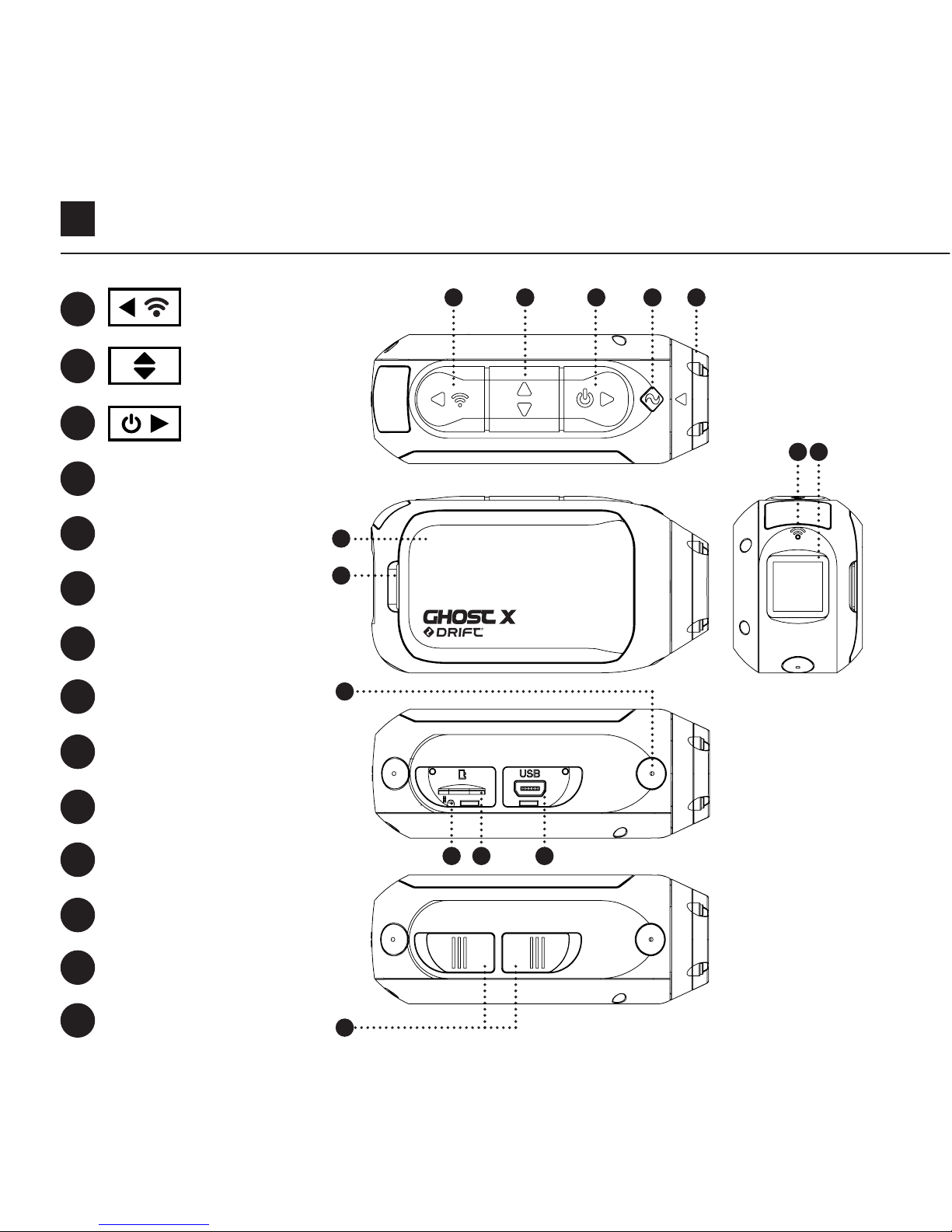
3
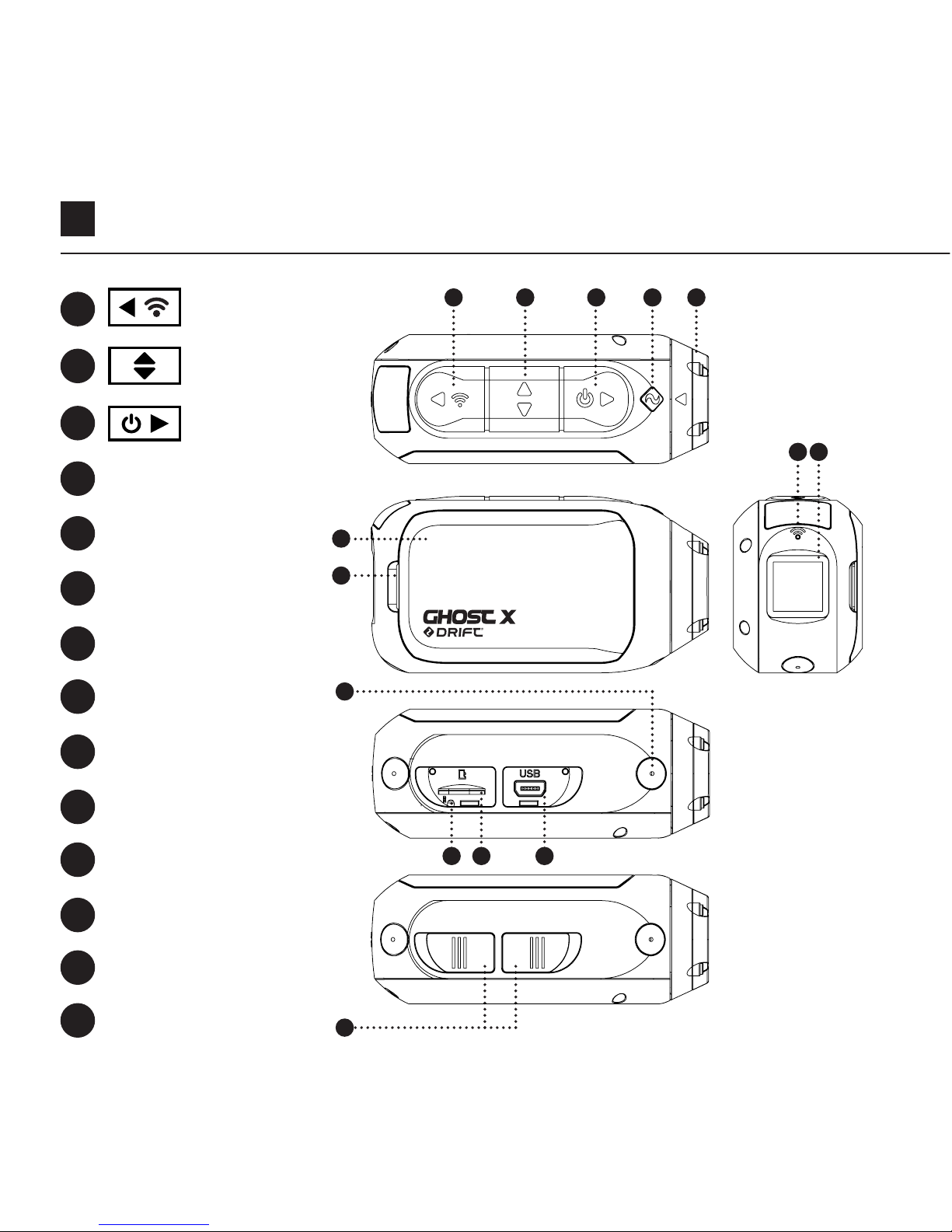
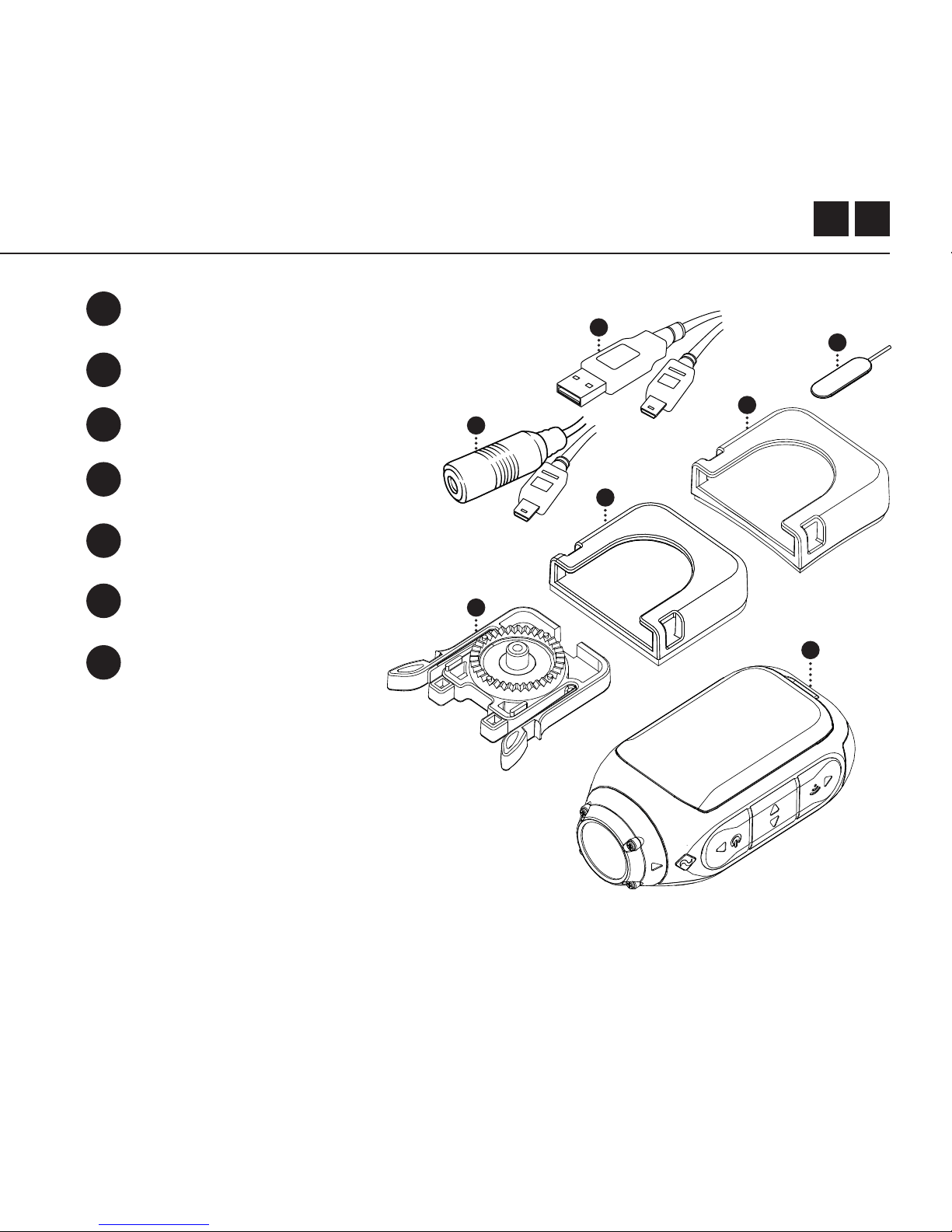
Bouton arrière
L’état de LED
Module de
verrouillage
Wi-Fi LED
Ecran arrière
Cran de MicroSD Carte
Bouton du
milieu
Lentille rotative
Microphone
Mini Port
USB 10 broches
Couvercle en
caoutchouc
Bouton avant
Module de batterie
Bouton de
réinitialisation
A propos de votre caméra
A
D
G
H
I
L
B
E
J
A B
I
C D E
G
J
F
N
M
C
F
K
N
H
MK L
Downloaded from www.ManualsFile.com manuals search engine
5
GHOST 4K
Réglages initial
1. Découvrir le cran de microSD en soulevant son couvercle en caoutchouc.
2. Insérer une carte microSD / HC / XC de classe 10 ou supérieure (jusqu’à 128
GB). Format avant la première utilisation!
3. Découvrir le mini port USB en soulevant son couvercle en caoutchouc
4. Connecter le caméra par un câble mini-USB à un port USB alimenté et
charger la batterie pendant 2,5 heures avant la première utilisation.
5. Replacer les couvercless en caoutchouc en sécurité à couvrir à la fois le cran
de microSD et le port mini-USB. C’est prêt à utiliser!
4
3
1 2
5
Downloaded from www.ManualsFile.com manuals search engine
FR 6
ALLUMER/ ETEINDRE
1. Appuyer et maintenir le bouton pour allumer.
2. L’écran arrière s’allume, achant l’achage de bienvenue.
3. L’appareil photo est maintenant prêt à enregistrer une vidéo ou à prendre des
photos.
4. Le mode de caméra actuel est indiqué par la couleur de l’état de LED et
l’écran arrière, ainsi que l’icône en haut à gauche de l’écran arrière.
5. Pour éteindre; appuyer et maintenir le bouton pendant 3 secondes.
2 4
Commencer
MODE DE NAVIGATION
Pour changer le mode d’enregistrement actuel de la caméra, appuyer sur le bouton
. Changer entre les modes Vidéo, Photo, Timelapse, Photoburst et Paramètres
généraux.
Mode Icon
Downloaded from www.ManualsFile.com manuals search engine
7
Caméra Modes
MODE DE VIDEO
(LED vert) Appuyer sur le bouton pour
commencer à enregistrer. Le LED d’état et le
rétroéclairage LCD clignotent en rouge pour
indiquer l’enregistrement. Appuyer le bouton
encore une fois pour arrêter
PARAMETRES DE VIDEO
• Résolution
• Taux de trame
MODE DE PHOTO
(LED jaune) Le caméra capture des images
quand le bouton
est appuyé, et l’état
de LED et l’écran LCD clignotent en rouge à
chaque fois qu’une photo est capturée.
PARAMETRES DE PHOTO
• Résolution
PARAMETRES DU CHANGEMENT
Dans n’importe quel mode, appuyer sur le bouton pour mettre un paramètre
en surbrillance.
MODE DE TIMELAPSE
( LED violet) Appuyer le bouton
pour capturer une série d’images à un
taux spécifié. L’état de LED et l’écran LCD
clignotent en rouge à chaque fois qu’une
photo est capturée. Pour arrêter, appuyer le
bouton encore une fois.
PARAMETRES DE TIMELAPSE
• Résolution
• Intervalle Timelapse
MODE DE PHOTOBURST
( LED Cyan) Le caméra capture une rafale
d’images fixes pendant une durée donnée
et à un taux spécifié quand le bouton
est
pressé. Pour de meilleurs résultats, utiliser une
carte mémoire avec le débit de données le
plus élevé possible.
PARAMETRES DE PHOTOBURST
• Résolution
• Durée de rafale / taux de capture
Downloaded from www.ManualsFile.com manuals search engine
FR 8
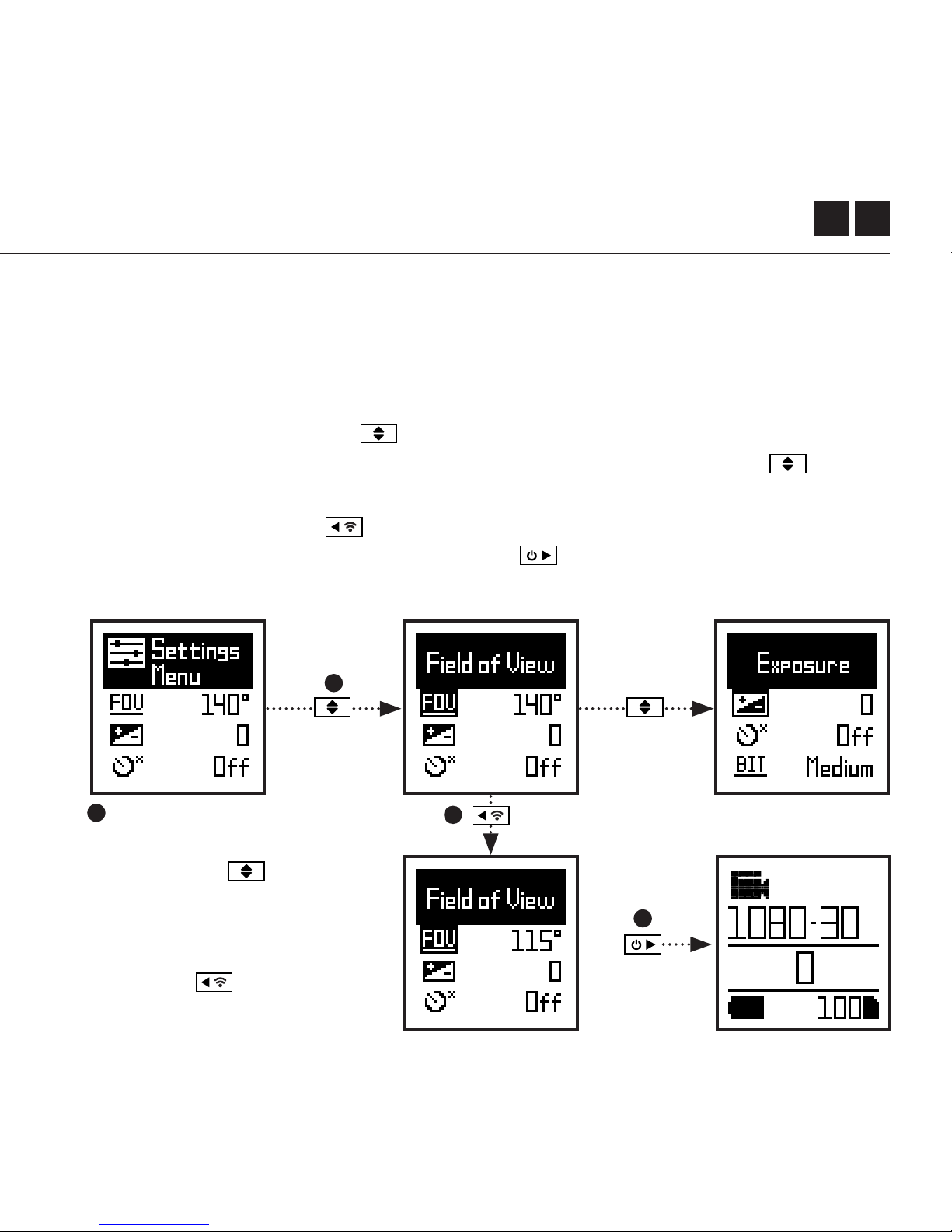
SETTINGS MENU NAVIGATION
1. A l’arrivée au menu des paramètres, la case noire en surbrillance se trouve en
haut, mettant en surbrillance l’icône du menu de paramètres comme position
de départ.
2. Appuyer sur le bouton pour naviguer vers le bas, cela met en surbrillance
le réglage suivant ; Appuyer sur le bouton; Appuyer sur le bouton pour le
faire défiler vers le haut.
3. Appuyer le bouton pour changer l’option à ce paramètre.
4. A tout moment, appuyez sur le bouton pour changer de mode (retour à
la vidéo).
Menu de Paramètres
4
1
2
3
Dans cet exemple, appuyer une
fois sur déplace
la boite
surlignante sur le prochain
paramètre (Champ de Vision),
appuyer seconde fois la déplace
vers Exposition. À l’étape 3,
appuyer sur
passera le
FOV de 140° à 115°.
Downloaded from www.ManualsFile.com manuals search engine

9
Paramètres
Wi-Fi
Cham
p de vision
Exposition
Retardateur
Débit binaire Filtres
ISO Sensitivité
Tag Vidéo
Tag Vidéo intervalle
DVR de voiture
DVR de Interval
Mic Sensitivité
Volume d’orateur
OFF / ON
90° / 115° / 140°
-2 / -1 / 0 / +1 / +2
OFF / 3S / 5S / 10S
NORMAL / VIVID / LOW LIGHT
100 / 200 / 400 / 800 / AUTO
OFF / ON
10S / 30S / 1MIN / 2MIN
OFF / ON
10S / 30S / 1MIN / 2MIN / 5MIN / 10MIN
OFF / 1 / 2 / 3 / 4 / 5
OFF / LOW / MED / HIGH
Downloaded from www.ManualsFile.com manuals search engine

FR 10
Paramètres
LED Etat Indicateur
Enregistrement instantané
Date
Date de timbre
Camera O
THM Files
Language
Reset Settings
Format SD Card
Serial Number
Firmware Version
Verifier notre website pour les mis-à-jours du firmware
OFF / ON
OFF / ON
YY/MM/DD HH/mm
OFF / ON
NEVER / 2MIN / 5MIN / 10MIN / 20MIN
ON / OFF
EN / CN
YES / NO
YES / NO
XXXXXX
XXXXXX
Downloaded from www.ManualsFile.com manuals search engine
11
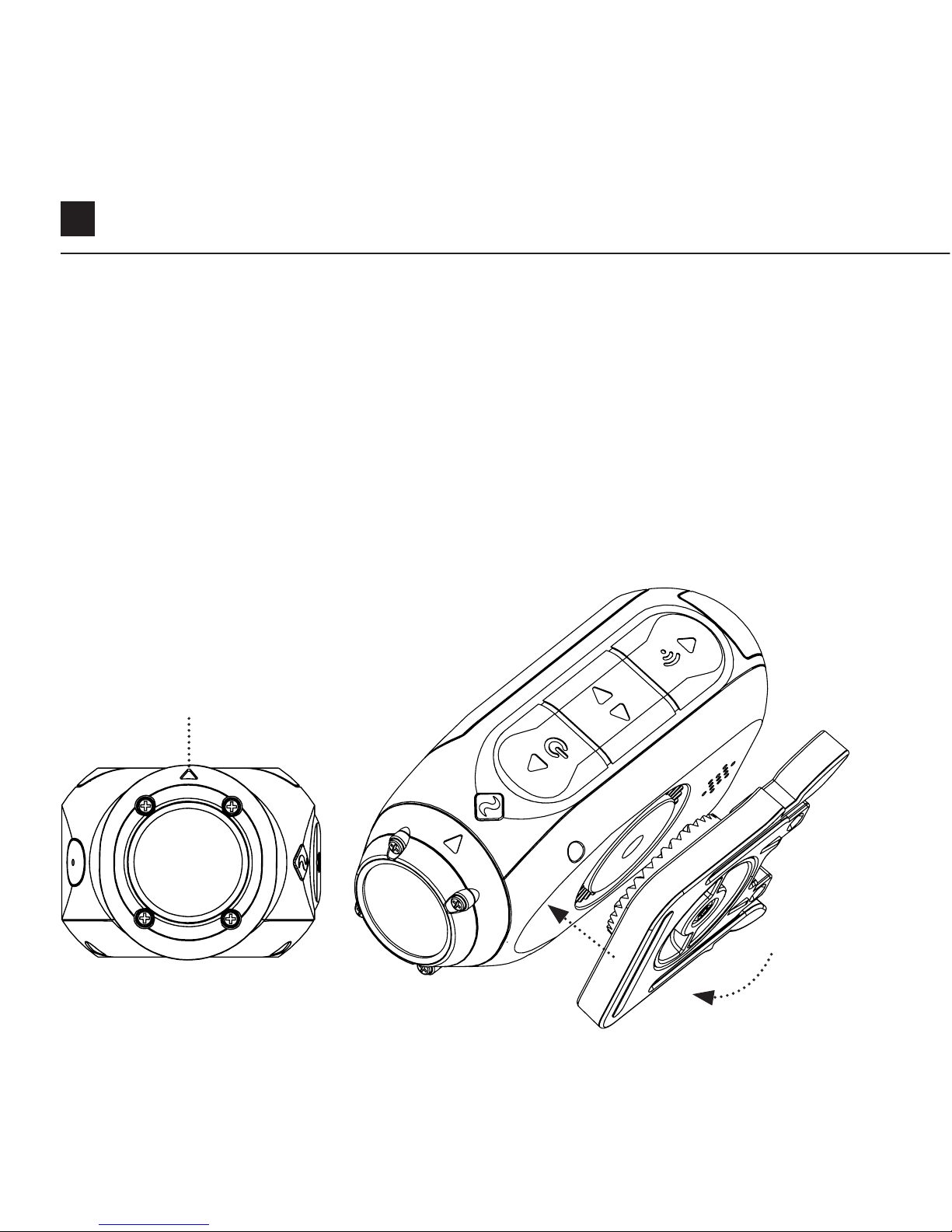
Monter la Caméra
1. Fixer le clip universel sur la caméra dans n’importe quelle orientation à 360 °
selon les besoins - d’abord fixer le clip dans l’orientation desirée, puis fixer-le
en tournant la base de la vis à la main.
2. Faites glisser le clip universel dans le support choisi, en assurant qu’il
s’enclenche en place. * Vérifier encore une fois qu’il a été complètement
inséré en poussant les clips.
3. Aligner votre tir. Faites pivoter l’objectif à la main, en utilisant le marqueur
d’objectif comme référence «haute», en le maintenant perpendiculaire au
sol pour une orientation correcte.
Marqueur d’objectifs
Downloaded from www.ManualsFile.com manuals search engine

FR 12
Présentation des fonctionnalités
DVR MODE DE VOITURE
Ce mode de transfert est idéal pour l’assurance et la sécurité.
Le métrage d’enregistrement de la caméra est dans un enregistrement en boucle
continue (DVR Intervals) boucle après boucle jusqu’à ce qu’elle remplisse la carte
MicroSD. Une fois remplies, les boucles les plus anciennes seront supprimées en
même temps que les nouvelles seront sauvegardées. L’intervalle de boucle du DVR
peut être 10s, 30s, 1min, 2min, 5min ou 10min.
TAG VIDEO
Quand elle est activée, cette fonction permet à la caméra d’enregistrer en continu
des vidéos, mais n’enregistre que quand une séquence importante est “Tagged”.
Lors de l’enregistrement d’une vidéo, appuyer sur le bouton pour enregistrer
les vidéos passées, présentes et futures. Par exemple, avec un intervalle de tag
vidéo de 30 secondes sélectionné, la caméra enregistrera les 30 précédentes, et
30 secondes supplémentaires - soit un total de 1 m de vidéo «taguée».La fonction
de Tag vidéo nécessite une carte micro SD de classe 10 avec 4 Go d’espace libre pour fonctionner
correctement.
Downloaded from www.ManualsFile.com manuals search engine

13
Présentation des fonctionnalités
FILTRE
Régler adaptable rapidement les
paramètres de vos caméras aux
conditions d’enregistrement avec des
filtres. Choisir entre Normal / Vivid /
Low Light.
DEBIT BINAIRE
Les utilisateurs peuvent choisir à
conserver la compression normale
qui est utilisée par le codec H.264 , ou
bien s’ils préfèrent à autoriser un flux de
données plus élevé en préservant une
plus grande partie de l’enregistrement
d’origine qui entraînera une taille de
fichier plus grande.
MODE DU DEMARRAGE INSTANE
L’activée du mode du démarrage instané permet à la caméra de s’allumer et de
démarrer l’enregistrement en appuyant simplement sur le bouton .
Downloaded from www.ManualsFile.com manuals search engine
FR 14
Guide d’accessoires
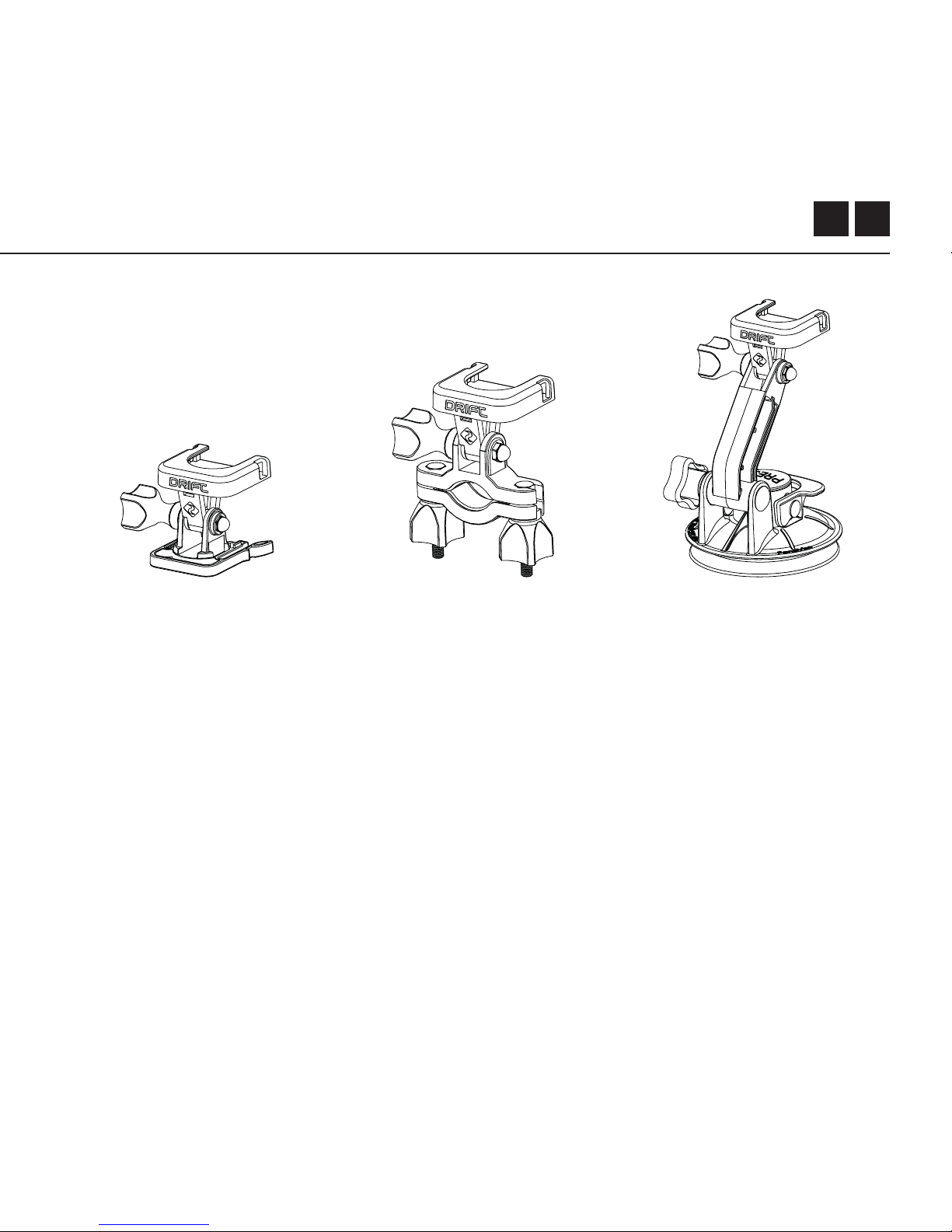
SUPPORT DE VENTOUSE
L’accessoire idéal pour
monter votre Ghost X
sur toute surface plate et
non poreuse. Il est idéal
aussi pour une utilisation
sur les pare-brise ou la
carrosserie, la ventouse
facilite la rotation,
l’inclinaison et qui peut
faire la rotation de votre
caméra à 360 °.
SUPPORT DE GUIDON
Le support de guidon
Drift est un accessoire
parfait pour les pilotes de
n’importe quelle discipline.
Il est compatible avec les
barres de 19mm à 36mm,
et capable de pivoter
de plus de 180 degrés,
le support de guidon
inaugure presque tous les
angles pour votre vidéo.
SUPPORT DE PIVOT
Il peut être utilisé à
n’importe où à presque
n’importe quel angle, le
support de pivot Drift est
votre outil à capturer le
moment de n’importe
quel point de vue que
vous pouvez imaginer;
y compris des adhésifs
plats et incurvés, et peut
être utilisé avec tout
autre support Drift.
Downloaded from www.ManualsFile.com manuals search engine

15
Wi-Fi + App
Pour allumer le Wi-Fi de votre Ghost X, appuyer simplement sur le bouton vert
du Wi-Fi et maintener-le jusqu’à l’indicateur de LED indique que le Wi-Fi est activé.
Le Wi-Fi peut être aussi activé par le menu des paramètres de la caméra.
TÉLÉCHARGER LA DRIFT LIFE APP
Configurer votre tir, capturer, lire, éditer et diuser en direct sur votre appareil
mobile.
INSTALLER LE FIRMWARE
Télécharger le dernier firmware du site Web Drift et copier le fichier Ghost_X.bin à la
racine d’une carte micro SD formatée. Insérer la carte micro SD dans la caméra et
allumer-le.
L’écran de la caméra ache «Mise à jour du firmware» lorsque la mise à jour est
installée. Une fois terminé, la caméra s’éteindra.
Downloaded from www.ManualsFile.com manuals search engine

FR 16
Connecter Votre Caméra
CONNECTER AVEC UN ORDINATEUR
1. Connecter la camera en utilisant le cable USB (orit);l’écran de camera
achera une icône USB.
2. Le fichier de camera peut s’ouvrir automatiquement; sinon utilizer Mon
ordinateur.
3. La caméra doit être reconnu comme un disque amovible. double-cliquer
pour ouvrir.
4. Ouvrir le dossier de DCIM pour entrer dans votre dossiers.
CONNECTER AVEC UN MAC
1. Connecter la camera en utilisant le cable USB (orit);l’écran de camera
achera une icône USB.
2. Le fichier de camera peut s’ouvrir automatiquement; sinon utiliser Mon
ordinateur.
3. La caméra doit être reconnu comme un appareil externe. double-cliquer pour
ouvrir.
4. Ouvrir le dossier de DCIM pour entrer dans votre dossiers.
Downloaded from www.ManualsFile.com manuals search engine

17
Spécifications
Video Resolution and Frame Rates:
1080P (1920 X 1080 16:9)
960P (1280 x 960 4:3)
720P (1280 X 720 16:9)
WVGA (854 x 480 16:9)
25 / 30 FPS
25/ 30 FPS
25 / 30 / 50 / 60 FPS
25 / 30 /50 /
60 FPS
Format du dossiert:
Type du senseur:
Champ de vision (diagonale):
Gamme de lentille focale:
Rotation de lentille:
Mode de photo:
Exposition:
LCD écran:
Capacité du memoire:
.MP4 (H.264 codec)
CMOS
90° / 115° / 140°
0
.5m to infinité
330°
4 / 8 / 12 mega-pixels
Auto /Etape Manuel (utilisateurs advancés)
Color Dot Matrix Backlit LCD
Micro SD, SDHC, SDXC
carte de mémoire à 128GB
Downloaded from www.ManualsFile.com manuals search engine

FR 18
Spécifications
Ports Entrées:
Connectivité:
Puissance:
Fréquence Wi-Fi:
Dimensions Caméra:
Poids:
Compatibilité:
Mini-USB 10 Pin.
M
icrophone extérieur via adaptateur USB.
A/V et HDMI via adaptateur USB.
USB Plug And Play,
Batterie Internet 1500mAh,
+ batterie externe 500mAh inclus.
2.4GHz
43 (W) x 82.2 (L) x 31.4 (D) mm
120g
Windows XP et plus / Mac OS 10.2 et plus
Il est requis un moniteur capable de lire pour la visualisation
1080P. Pour visionner / éditer les exigences minimales
comprennent: les graphiques intégrés de 8 Go RAM, la 4ème
génération i5 et 17 Intel® Core ™ ou APU AMD A10-7800.Les
Cartes graphiques discrètes à partir de GeForce® GTX ™ 650,
ou AMD Radeon ™ HD 7000 séries et supérieures. A cause
de l’immense traitement requis pour rendre le rendu 1080P,
pour satisfaire aux demandes du système peut entraîner une
lecture décalée ou saccadée.
Downloaded from www.ManualsFile.com manuals search engine

19
Divulgations
FCC/CE Information
Cet appareil est conforme à la partie
15 des règles FCC.
L’opération est soumise aux deux
conditions suivantes:
• cet appareil ne peut pas causer
d’interférences nuisibles
• Cet appareil doit accepter les
interférences reçues, y compris
les interférences susceptibles de
provoquer un fonctionnement
indésirable.
ATTENTION
Il n’est pas approuvé de faire des
changements ou modifications à cette
unité qui ne sont pas expressément
approuvés par la partie responsable
de la conformité; et cela pourrait
annuler l’autorité de l’utilisateur à
utiliser l’équipement.
L’équipement est examiné et prouvé
conforme aux limites d’un appareil
numérique de classe B,confromement
à la partie 15 de FCC.
Ces limites sont conçues pour assurer
une protection raisonnable contre
les interférences nuisibles dans
l’installation résidentielle.
Cet équipement génère, utilise et peut
émettre l’énergie radio de fréquence
, s’il n’est pas installé et utilisé
conformément aux instructions,
il peut causer des interférences
nuisibles aux communications de
radio. Quand même, il n’y a pas de
garantie que les interférencesne se
produit pas dans une installation
particulière.
Si cet équipement cause vraiment des
interférences nuisibles à la réception
du radio ou de la télévision, ce qui
peut être déterminé en allumant et
éteignant l’équipement , l’utilisateur
est encouragé d’essayer de corriger
l’interférence par une ou plusieures de
Downloaded from www.ManualsFile.com manuals search engine

FR 20
mesures suivantes :
Réorienter ou déplacer l’antenne de
réception; Augmenter la distance
entre l’équipement et le récepteur;
Connecter l’équipement à une prise
d’un circuit diérent de celui auquel le
récepteur est connecté;
Consulter le revendeur ou un
technicien de radio / TV expérimenté
pour obtenir de l’aide.
Cet appareil est conforme à la licence
industrielle de Canada - normes
exemptes de RSS
L’opération est soumise aux deux
conditions suivantes:
1. Cet appareil ne peut pas causer
d’interférences nuisibles
2. Cet appareil doit accepter les
interférences reçues, y compris
les interférences susceptibles de
provoquer un fonctionnement
indésirable.
Cet equipment numérique de classe B
est conforme à la norme canadienne
ICES-003. Son fonctionnement
est soumis aux deux conditions
suivantes:
•Cet appareil ne peut pas causer
l’intervention
•Cet appareil doit accepter les
interférences reçues, y compris
les interférences susceptibles de
provoquer un fonctionnement
indésirable.
Cet appareil numérique de la classe
[B] est conforme à la norme NMB-003
du Canada.
Cet appareil s’accorde avec le
standard Industriel de Canada
licence-normes exempte de RSS.
Divulgations
Downloaded from www.ManualsFile.com manuals search engine

21
FCC EXPOSITION AUX RAYONNEMENTS
Cet équipement est conforme aux limites d’exposition aux rayonnements de
FCC indiqués pour un environnement non-contrôlé.Cet équipement doit être
installé et utilisé dans une distance minimale de 20 cm entre le radiateur et vous.
Cet émetteur ne doit pas être situé ou fonctionner conjointement avec une
autre antenne ou un autre émetteur.
AVIS DE NON-RESPONSABILITÉ SUR MOTOCYCLE:
Lors de la conduite en utilisant la caméra peut causer une collision pouvant
entraîner des blessures graves ou la mort à vous ou aux autres.
1. Garder les yeux et l’esprit sur la route;
2.Eviter de regarder l’appareil pendant de longues périodes
3. Arrêter le véhicule dans un endroit sécuritaire avant d’ajuster la caméra.
Divulgations
Downloaded from www.ManualsFile.com manuals search engine

1
Vielen Dank für Ihren Einkauf des Drift Ghost X
KUNDENDIENST
Laden Sie ein vollständiges Handbuch herunter und suchen Sie unsere
ozielle Webseite für Aktualisierung der Firmware, Kundendienst und
Informationen zu allen unseren Produkten.
https://driftinnovation.com/
Wenn Sie Vorschläge, Meinungen oder Bedenken haben; Bitte
wenden Sie sich unter: [email protected] an unser
Kundendienstgruppe
GARANTIE
Die Garantie erfolgt nicht, wenn das Produkt durch Körperverletzung,
falsche Handhabung, Unfall, Feuer, Erfrierungen, Wasserschäden,
Fahrlässigkeit oder Nichtbeachtung der mitgelieferten
Bedienungsanleitung beschädigt wurde. Weitere Informationen zu Ihrer
Garantie finden Sie unter
https://driftinnovation.com/warranty
Downloaded from www.ManualsFile.com manuals search engine

DE 2
Über Ihre Kamera | Verpackter Inhalt
Ersteinstellung | Anfangen
Kameramodi
Einstellungsmenü
Einstellung
Montage der Kamera
Funktionsüberblick
Zubehöranleitung
WLAN+ Firmware
Anschließen der Kamera
Spezifikationen
Oenlegungen
3-4
5-6
7
8
9-12
13
14-15
16
17
18
19-20
21-23
Inhaltsverzeichnis
Downloaded from www.ManualsFile.com manuals search engine
3
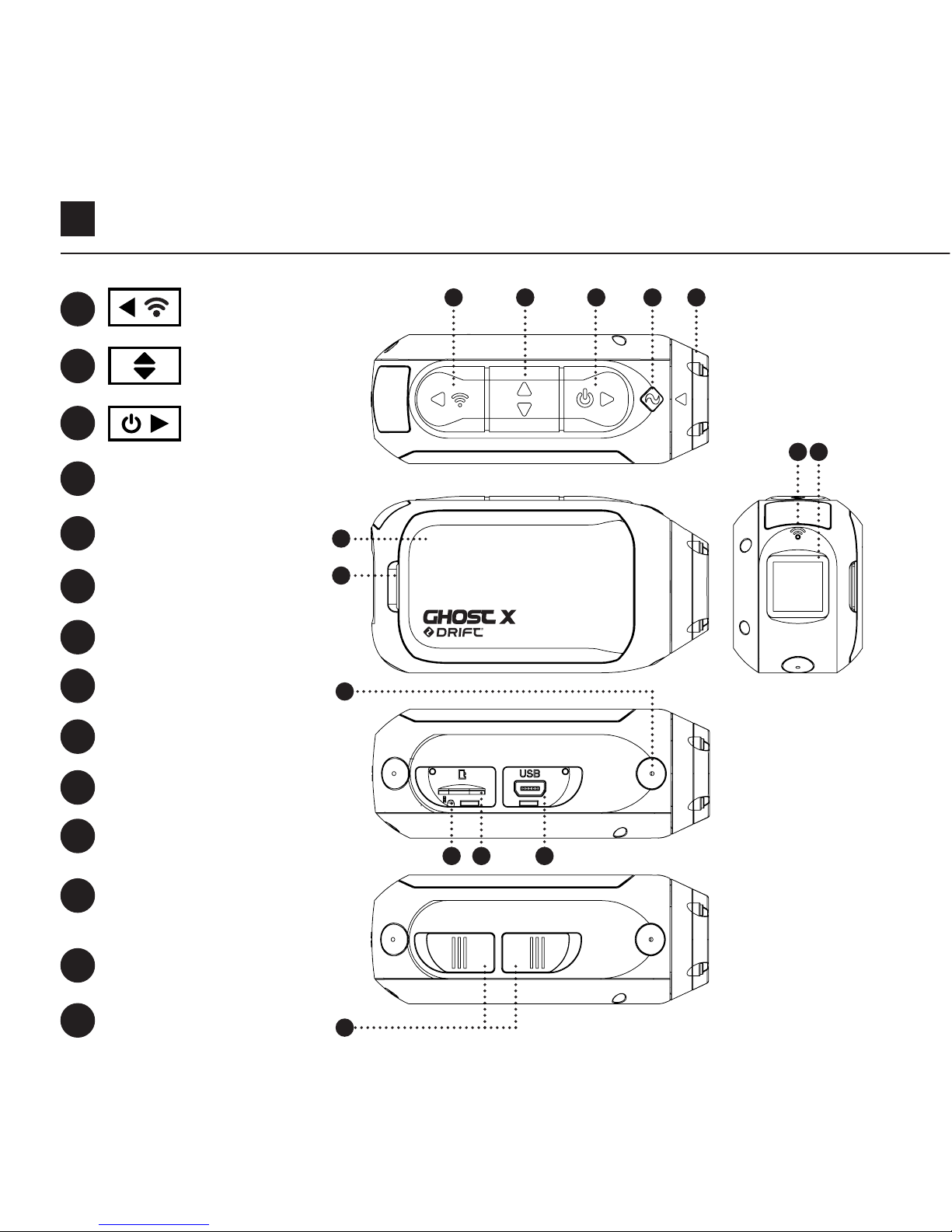
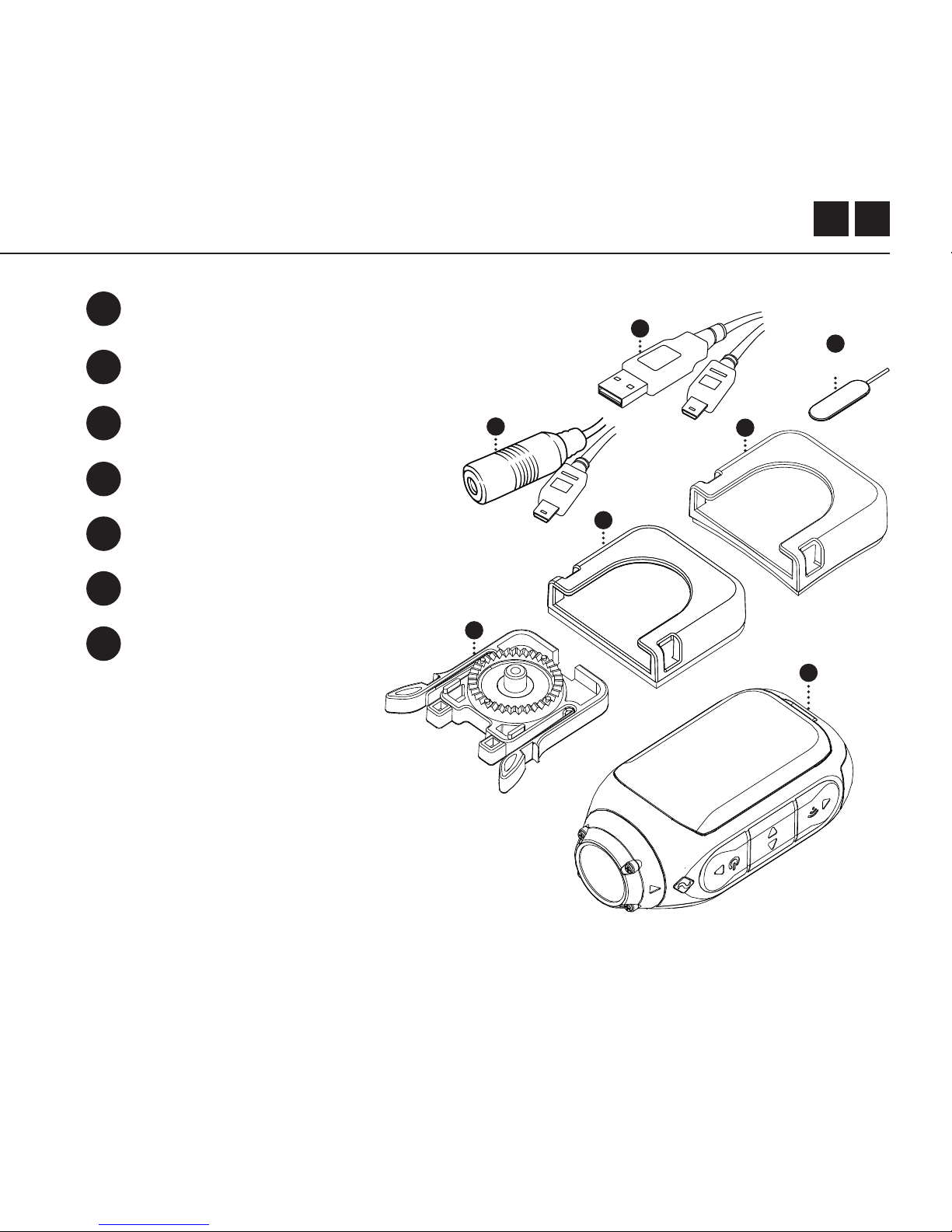
Hintere Taste
Status-LED
Modulriegel
LED von WLAN
Heckscheibe
Taste MicroSD
Kartenschlitz
Mittlere Taste
Rotierendes
Objektiv
Mikrofons
10-poliger
Mini-USB-Anschluss
Gummiabdeckung
Vordere Taste
Batteriemodul
Rückstelltaste
Über Ihre Kamera
A
D
G
H
I
L
B
E
J
A B
I
C D E
G
J
F
N
M
C
F
K
N
H
MK L
Downloaded from www.ManualsFile.com manuals search engine
5
Ersteinstellung
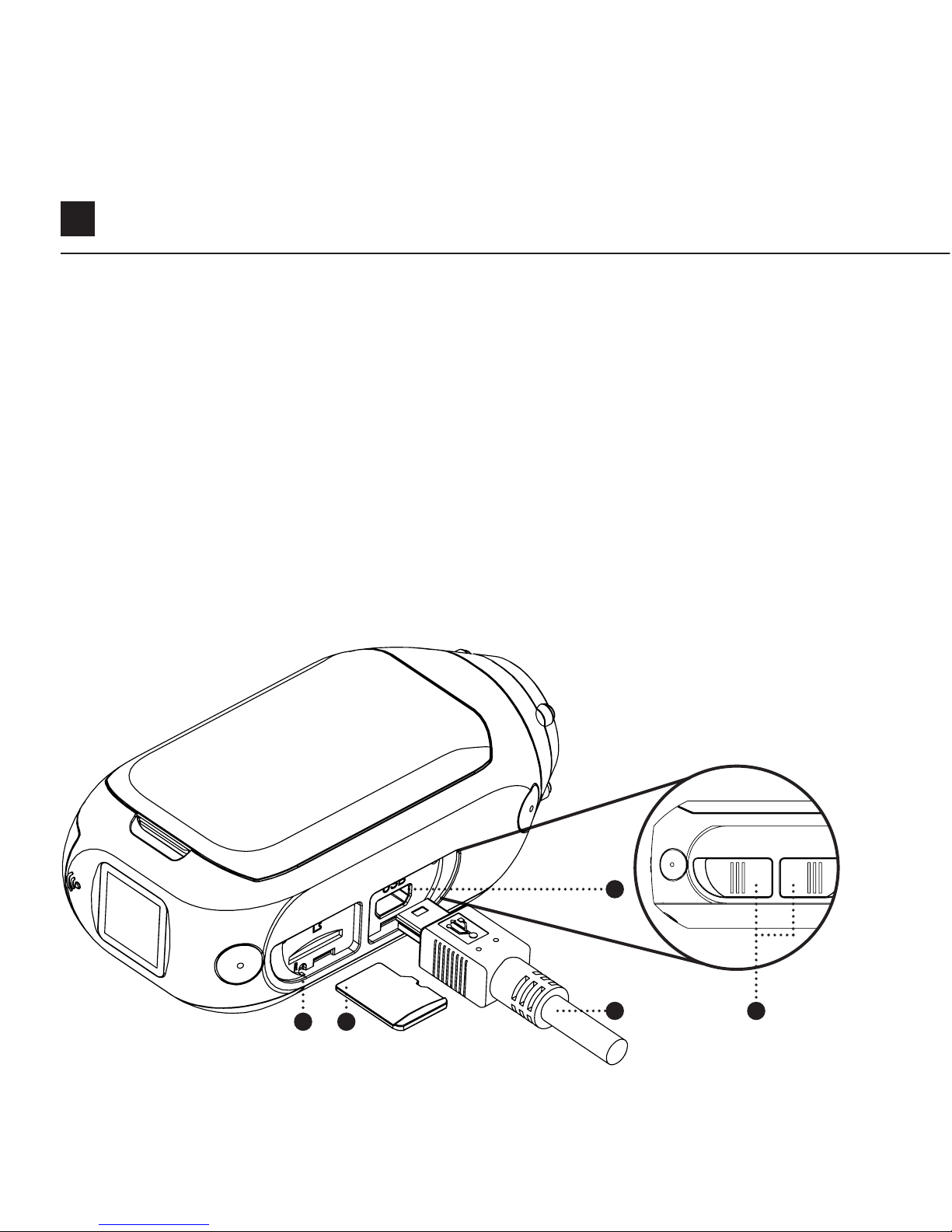
1. Heben Sie den microSD-Kartenschlitz durch Anheben der Gummiabdeckung
ab.
2. Stecken Sie eine microSD / HC / XC-Karte auf der Klasse 10 oder höher
(maximal 128 GB) ein. Formatieren Sie vor dem ersten Gebrauch!
3. Önen Sie den Mini-USB-Anschluss, indem Sie die Gummiabdeckung anheben
4. Schließen Sie über ein Mini-USB-Kabel an einen mit Strom versorgten USB-
Anschluss die Kamera an und laden Sie für 2,5 Stunden vor dem ersten
Gebrauch den Akku auf.
5. Ersetzen Sie die Gummiabdeckung wieder so, dass sie sowohl den microSD-
Kartenschlitz als auch den Mini-USB-Anschluss abdeckt. Sie sind bereit zu
gehen!
GHOST 4K
4
3
1 2
5
Downloaded from www.ManualsFile.com manuals search engine
DE 6
EIN-/AUSSCHALTEN
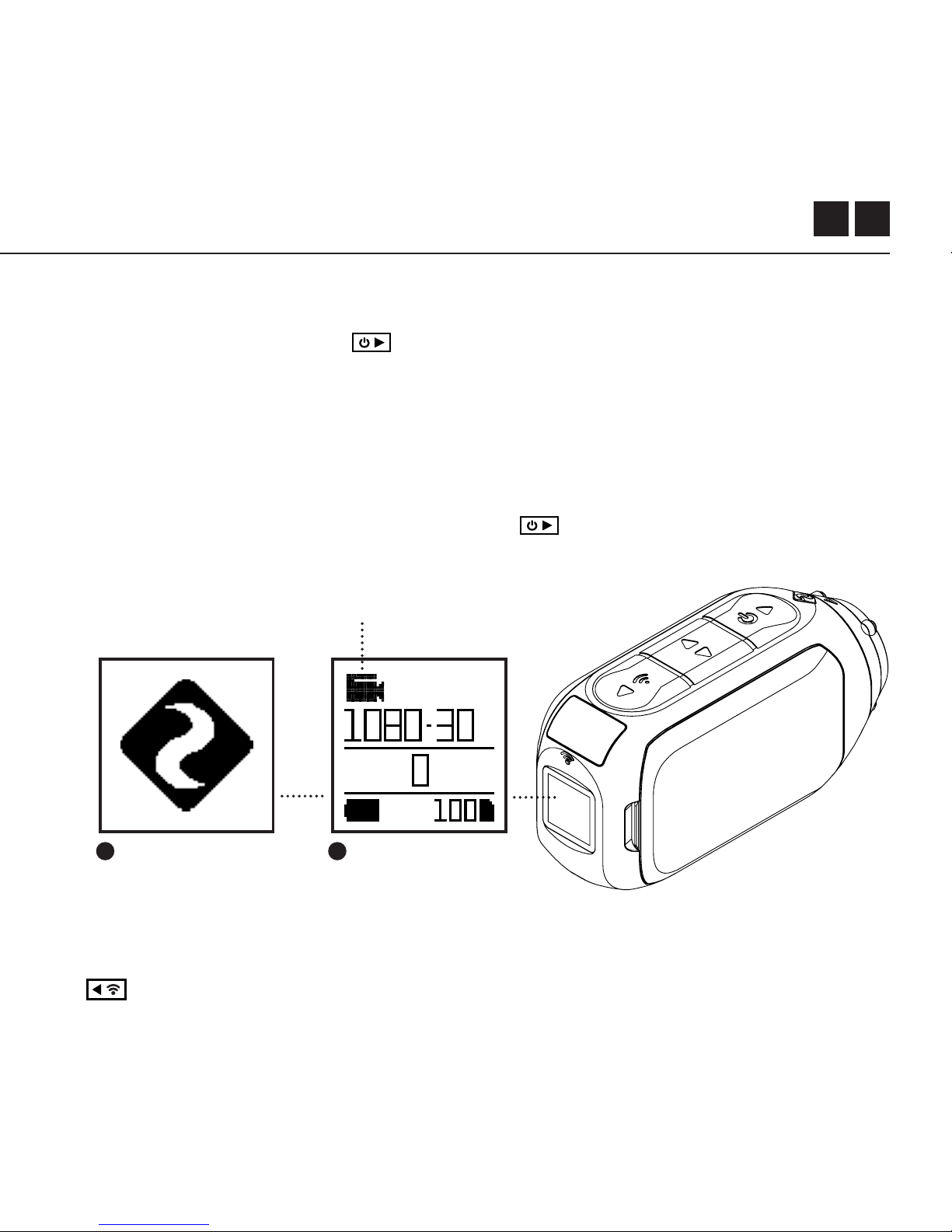
1. Drücken Sie die Taste zum Einschalten an.
2. Der hintere Bildschirm schaltet sich ein und zeigt das Anfangsbildschirm an.
3. Die Kamera ist jetzt bereit, Videos aufzunehmen oder Fotos aufzunehmen.
4. Der aktuelle Kameramodus wird durch die Farbe der Status-LED und des
hinteren Bildschirms angezeigt, zusammen mit dem Symbol oben links auf dem
hinteren Bildschirm.
5. Zum Ausschalten drücken Sie die Taste für 3 Sekunden an.
2 4
Anfangen
Modus-Navigation
Um den aktuellen Aufnahmemodus der Kamera zu ändern, drücken Sie die Taste
; Wechseln zwischen den Modi von Video, Foto, Zeitraer, Photoburst und
Allgemeine Einstellungen.
Modussymbol
Downloaded from www.ManualsFile.com manuals search engine
7
Kameramodi
VIDEOMODUS
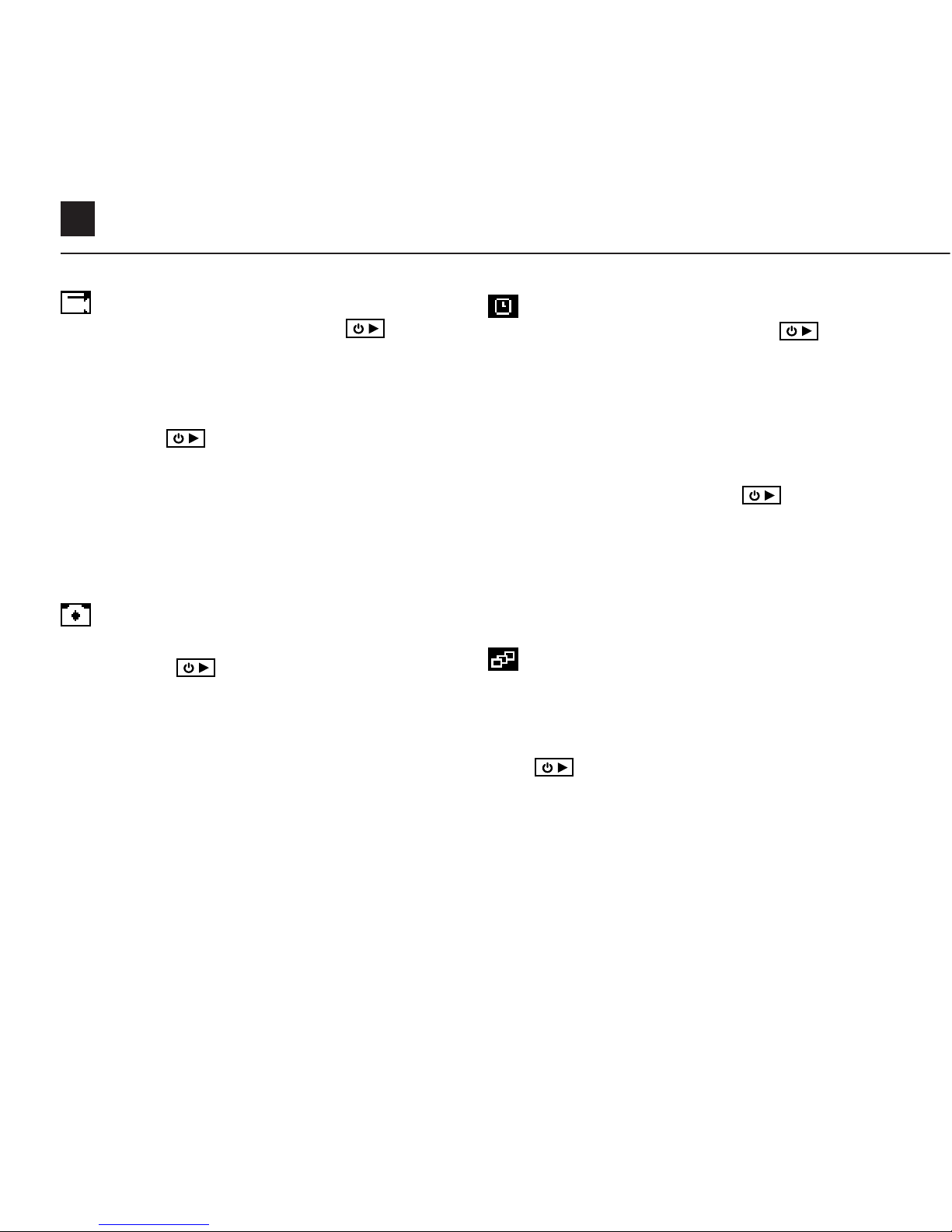
(Grüne LED) Drücken Sie die Taste , um
mit der Aufnahme zu beginnen. Die Status-LED
und die LCD-Hintergrundbeleuchtung blinken
rot, um die Aufnahme anzuzeigen. Drücken
Sie die Taste erneut, um die Aufnahme zu
stoppen.
VIDEO-EINSTELLUNG
• Auflösung
• Bildrate
SERIENBILDMODS
(Cyane LED) Die Kamera nimmt eine Reihe
von Standbildern für eine festgelegte Dauer
und mit einer bestimmten Rate auf, wenn die
Taste gedrückt wird. Verwenden Sie für
optimale Ergebnisse eine Speicherkarte mit
der höchstmöglichen Datenrate.
FOTO-AUFPRALL- EINSTELLUNG
• Auflösung
• Aufpralldauer / Aufnahmerate
FOTOMODUS
(Gelbe LED) Die Kamera nimmt Standbilder
auf, wenn die Taste gedrückt wird, und
die Status-LED und der LCD-Bildschirm blinken
jedes Mal rot, wenn ein Foto aufgenommen
wird.
FOTO-EINSTELLUNG
• Auflösung
ZEITRAFFER-MODUS
Violette LED) Drücken Sie die Taste
, um eine Reihe von Standbildern mit einer
bestimmten Geschwindigkeit aufzunehmen.
Die Status-LED und der LCD-Bildschirm
blinken jedes Mal rot, wenn ein Bild
aufgenommen wird. Um die Aufnahme zu
stoppen, drücken Sie die Taste erneut.
ZEITRAFFER-EINSTELLUNG
• Auflösung
• Zeitraerintervall
Downloaded from www.ManualsFile.com manuals search engine
DE 8
NAVIGATION DES EINSTELLUNGSMENÜ
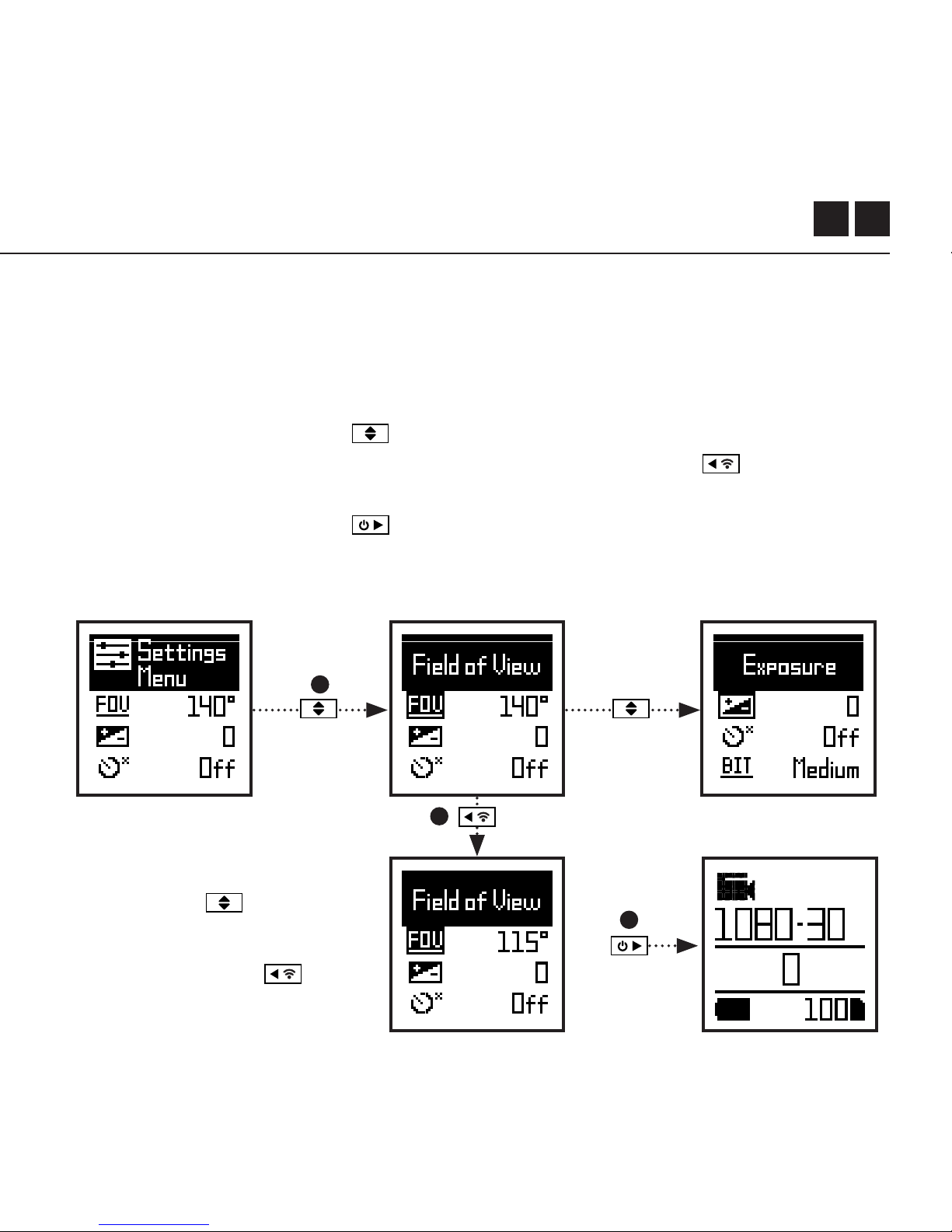
1. Nach dem Eintreen im Einstellungsmenü befindet sich das schwarze
Markierungsfeld auf dem Bildschirm und hebt das Symbol des
Einstellungsmenüs als Startposition hervor.
2. Drücken Sie die Taste , um nach unten zu navigieren. Dadurch wird die
nächste Einstellung hervorgehoben. Drücken Sie die Taste , um nach
oben zu rollen.
3. Drücken Sie die Taste , um die Option für diese Einstellung zu ändern.
4. Zu jeder Zeit drücken Sie die Taste, um den Modus zu wechseln (zurück zu
Video).
Einstellungsmenü
In diesem Beispiel wechselt der
Block zur nächsten Einstellung
(Sichtfeld) mit dem einmaligen
Drücken von . Mit einem
weiteren Drücken wird zur
Belichtung gewechselt.
In Schritt 3 wird mit das
Sichtfeld von 140° auf 115°
abgeändert.
4
2
3
Downloaded from www.ManualsFile.com manuals search engine

9
Sichtfeld
Belichtung
Selbstauslöser
Video-Bitrate
Videofilter
ISO
Video-Tagging
Video-Tagging-Intervall
Auto-DVR
Auto-DVR Loop-Intervall
Zeitgleiches Bild
Zeitgleiches Bildintervall
Lautsprecher-Lautstärke
90° / 115° / 140°
-2 / -1 / 0 / +1 / +2
AUS / 3S / 5S / 10S
HOCH / MITTEL / NIEDRIG
NORMAL / LEBHAFT / SCHWACHLICHT
100 / 200 / 400 / 800 / AUTO
JA / NEIN
10S / 30S / 1MIN / 2MIN / 5MIN / 10MIN
JA / MANUELL / NEIN
1MIN / 2MIN / 5MIN / 10MIN
AUS / AN
2S / 5S / 10S / 30S / 1MIN / 2MIN / 5MIN / 10MIN
AUS / NIEDRIG / MITTEL / HOCH
Einstellungen
Downloaded from www.ManualsFile.com manuals search engine

DE 10
Einstellungen
Statusanzeige-LED
Wi-Fi
Kopplung der Fernbedienung
Sofortaufnahme
Videostandard
Datum
Datumsanzeige
Standard Startmodus
Kamera aus
THM-Dateien
Sprache
Einstellungen zurücksetzen
SD-Karte formatieren
Seriennummer
Firmware Version
AUS / AN
AUS / AN / IMMER AN
JA / NEIN
JA / NEIN
ALLE / NTSC / PAL / KINO
YYYY/MM/DD HH/mm
AUS / AN
LETZTE SITZUNG FORTSETZEN / VIDEO /
BILD / ZEITRAFFER / SERIENBILD / VIDEO + BILD
NEIN / 2MIN / 5MIN / 10MIN / 20MIN
AN / AUS
EN / FR / DE / ES / IT / CN
JA / NEIN
JA / NEIN
XXXXXX
XXXXXX
Downloaded from www.ManualsFile.com manuals search engine

11
Einstellungen
WLAN
Sichtfeld
Belichtung
Selbstauslöser
Bitrate Filter
ISO-Empfindlichkeit
Video-Markierung
Video- Markierungsintervall
Auto-DVR
Schleifenintervall von Auto-DVR
Mikrofonempfindlichkeit
Lautstärke des Lautsprechers
LED-Statusanzeige
AUS / EIN
90° / 115° / 140°
-2 / -1 / 0 / +1 / +2
OFF / 3S / 5S / 10S
HIGH / MEDIUM / LOW
NORMALES / ANSCHAULICHES / NIEDRIGES LICHT
100 / 200 / 400 / 800 / AUTO
AUS / EIN
10S / 30S / 1MIN / 2MIN
AUS / EIN
10S / 30S / 1MIN / 2MIN / 5MIN / 10MIN
AUS / 1 / 2 / 3 / 4 / 5
AUS / NIEDRIG / MITTEL / HOCH
Downloaded from www.ManualsFile.com manuals search engine

FR 12
Einstellungen
LED-Statusanzeige
Sofortaufnahme
Datum
Datumsstempel
Kamera aus
THM-Dateien
Sprache
Einstellungen zurücksetzen
SD-Karte formatieren
Seriennummer
Firmware Version
Suchen Sie unsere ozielle Webseite für Aktualisierung der Firmware
AUS / EIN
AUS / EIN
TT/MM/JJ SS/MM
AUS / EIN
NIE / 2MIN / 5MIN / 10MIN / 20MIN
AUS / EIN
EN / CN
JA / NEIN
JA / NEIN
XXXXXX
XXXXXX
Downloaded from www.ManualsFile.com manuals search engine
13
Montage der Kamera
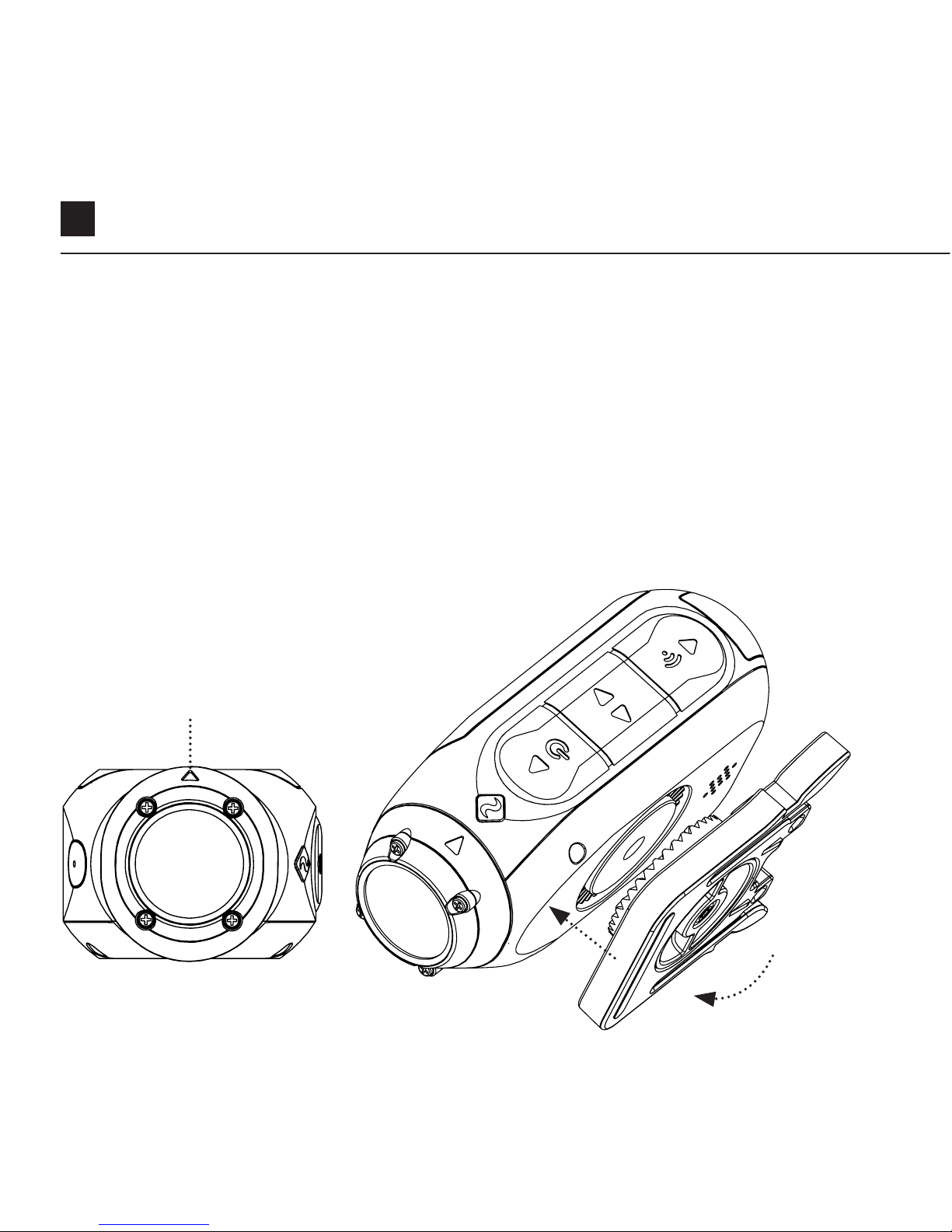
1. Befestigen Sie den Universalen Klipp in beliebiger 360 ° Richtung an der
Kamera. Stellen Sie zuerst den Klipp in der gewünschten Richtung auf und
sichern Sie ihn dann, indem Sie den Schraubenfuß mit einer Hand drehen.
2. Schieben Sie den Universalen Klipp in die gewählte Halterung und achten Sie
darauf, dass er einrastet. * Überprüfen Sie, ob der Klipp vollständig eingeführt
wurde, indem Sie die Klipps herausdrücken.
3. Richten Sie Ihres Objektiv aus. Drehen Sie mit einer Hand das Objektiv,
indem Sie die Objektivmarkierung als Referenz verwenden, um ihn in eine
korrekte Richtung senkrecht zum Boden zu halten.
Objektivmarkierung
Downloaded from www.Manualslib.com manuals search engine

DE 14
Funktionsüberblick
AUTO-DVR
Dieser manuelle Modus ist ideal geeignet zu versichern und sichern. Die Kamera
zeichnet sich in einem kontinuierlichen Schleifen-Stil (DVR-Intervall) auf, um
Schleife-nach-Schleife aufzunehmen, bis sie die MicroSD-Karte füllt. Sobald sie
voll sind, werden die ältesten Schleifen gelöscht, wenn die neueren gespeichert
werden. Das DVR-SchleifenIntervall kann 10 S, 30 S, 1 Min, 2 Min, 5 Min oder 10 Min
betragen.
Video-Markierung
Wenn diese Funktion aktiviert ist, kann die Kamera kontinuierlich Videos aufnehmen,
aber sie nur speichert ist, wenn wichtiges Material “markiert” ist.
Während der Videoaufnahme können Sie durch Drücken der Taste
vergangenes, aktuelles und zukünftiges Video speichern. Bei einem ausgewählten
Video-Markierungsintervall von 30 Sekunden speichert die Kamera beispielsweise
die vorherigen 30 Sekunden und zusätzlich 30 Sekunden - insgesamt 1 Minute
“markiertes” Material. Die Video-Markierung erfordert eine Micro SD-Karte auf der
Klasse 10 mit 4 GB freiem Speicherplatz, um ordnungsgemäß zu funktionieren.
SOFORT EINSCHALTEN-MODUS
Wenn der Sofort-Einschalten-Modus aktiviert ist, kann die Kamera eingeschaltet und
die Aufnahme mit einer einzigen Taste
gestartet werden.
Downloaded from www.Manualslib.com manuals search engine

15
Funktionsübersicht
FILTER
Mit Filtern ist die Einstellung der
Kamara schnell anzupassen, um
der Aufnahmebedingungen zu
entsprechen. Wählen Sie zwischen
normales / anschauliche / niedriges
Licht aus.
BITRATE
Benutzer können wählen, die vom
H.264-Codec verwendete normale
Komprimierung zu beibehalten, oder
wenn sie dies bevorzugen, ist ein
höherer Datenfluss möglich, um mehr
ursprünglichen Aufzeichnungen zu
apeichern. Dies führt zu einer größeren
Dateigröße.
SOFORT EINSCHALTEN-MODUS
Wenn der Sofort-Einschalten-Modus aktiviert ist, kann die Kamera eingeschaltet und
die Aufnahme mit einer einzigen Taste gestartet werden .
Downloaded from www.Manualslib.com manuals search engine
DE 16
Zubehöranleitung
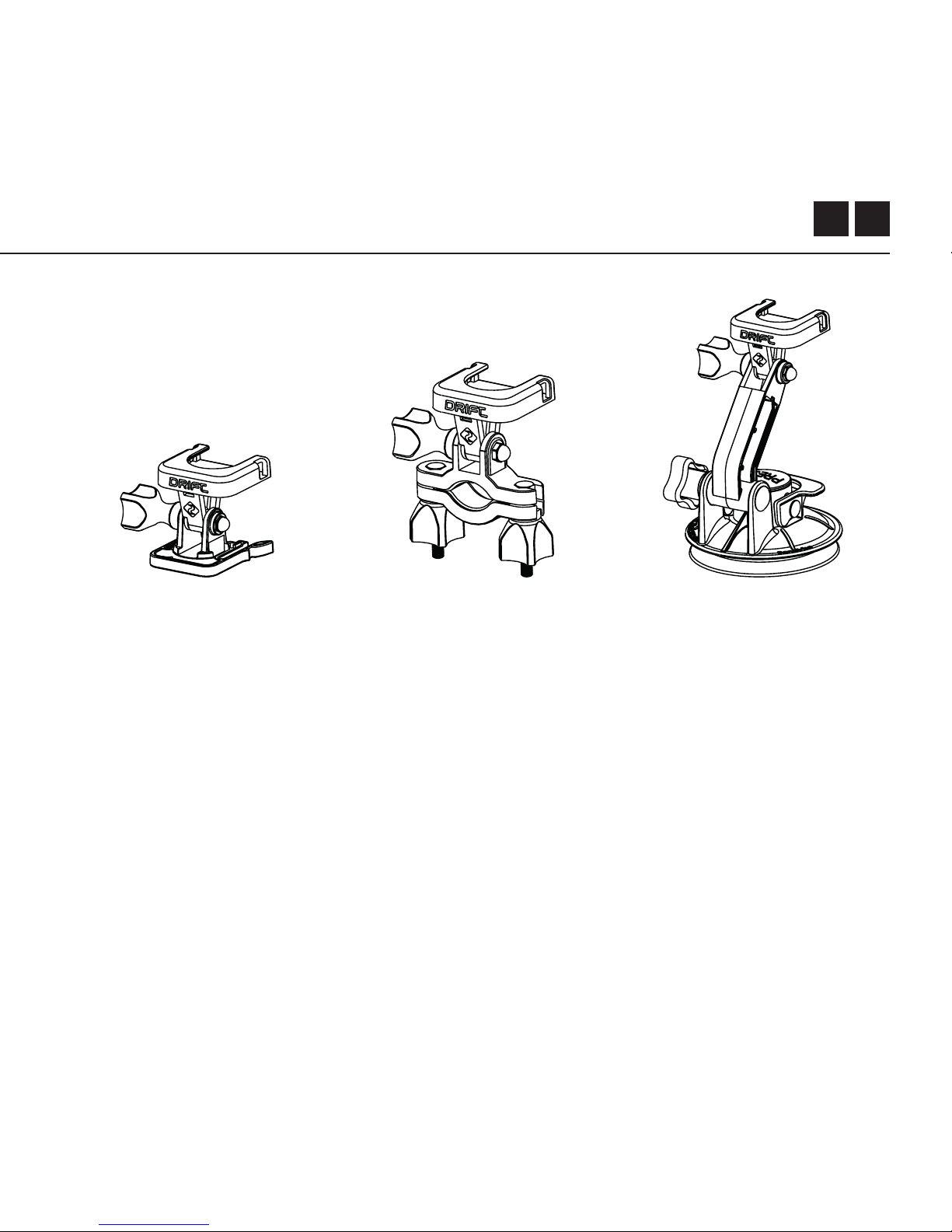
SAUGNAPFHALTERUNG
Das ideale Accessoire
für die Befestigung Ihrer
Ghost X auf jeglicher
glatten, löcherfreien
Oberfläche. Der Saugnapf
ist ideal für den Gebrauch
auf Autoscheiben oder
Karosserien und lässt Ihre
Kamera problemlos um
360° drehen, kippen und
rotieren.
LENKHALTERUNG
Die Drift Lenkhalterung ist
das perfekte Accessoire
für Fahrer jeglicher
Disziplin. Kompatibel mit
Lenkstangen zwischen
19mm und 36mm und
fähig bis zu 180° zu
schwenken, ermöglicht
diese Halterung beinahe
jeden Winkel für Ihr
Video.
SCHWENKHALTERUNG
Die Drift Pivot Halterung
kann beinahe in jedem
Winkel und überall befestigt
werden und ermöglicht
Ihnen die Aufnahme
des Moments aus Ihrem
Winkel. Flache und
kurvenförmige Klebestreifen
sind mit inbegrien und
funktionieren für jede
weitere Drift Halterung.
Downloaded from www.Manualslib.com manuals search engine

17
WLAN + Firmware
Um Ihr Ghost X WiLAN einzuschalten, drück Sie einfach die Taste an. Eine
grüne LED von WLAN zeigt an, dass WLAN aktiviert ist. WLAN kann auch über die
Kameraeinstellungen-Menü aktiviert werden.
LADEN SIE DIE DRIFT LIFE APP HERUNTER
Stellen Sie auf Ihrem Mobilgerät Ihre Aufnahme, Gefangennahme, Wiedergabe,
Redigieren und Übertragung vor Ort ein.
INSTALLIERUNG DER FIRMWARE
Laden Sie die neueste Firmware von der Webseite von Drift herunter und kopieren
Sie die Datei von Ghost_X.bin- in das Stammverzeichnis einer formatierten microSD-
Karte. Setzen Sie die Karte von microSD in die Kamera ein und schalten Sie sie ein.
Der Kamerabildschirm zeigt „Aktualisierung der Firmware“ an, wenn ist Aktualisierung
installiert ist. Nach Abschluss wird die Kamera ausgeschaltet.
Downloaded from www.Manualslib.com manuals search engine

DE 18
Anschließen der Kamera
VERBINDUNG MIT EINEM PC
1. Schließen Sie die Kamera mit dem USB-Kabel (mitgeliefert) an. Auf dem
Kamerabildschirm wird ein USB-Symbol angezeigt.
2. Der Ordner der Kamera wird möglicherweise automatisch geönet. Wenn
nicht, önen Sie Meinen Computer.
3. Die Kamera soll als Wechselplatte erkannt werden. Klicken Sie zum Önen
doppel.
4. Önen Sie den DCIM-Ordner, um auf Ihre Dateien zuzugreifen.
VERBINDUNG MIT EINEM MAC
1. Schließen Sie die Kamera mit dem USB-Kabel (mitgeliefert) an. Auf dem
Kamerabildschirm wird ein USB-Symbol angezeigt.
2. Der Ordner der Kamera wird möglicherweise automatisch geönet. Wenn
nicht, önen Sie Finder.
3. Die Kamera soll als externes Gerät erkannt werden. Klicken Sie zum Önen
doppel.
4. Önen Sie den DCIM-Ordner, um auf Ihre Dateien zuzugreifen.
Downloaded from www.Manualslib.com manuals search engine

19
Spezifikationen
Videoauflösung und Bildraten:
1080P (1920 X 1080 16:9)
960P (1280 x 960 4:3)
720P (1280 X 720 16:9)
WVGA (854 x 480 16:9)
25 / 30 FPS
25/ 30 FPS
25 / 30 / 50 / 60 FPS
25 / 30 /50 / 60 FPS
Datei:
Sensorart:
Sichtfeld (diagonal):
Fokusbereich des Objektivs:
Objektivrotation
Zoom:
Fotomodus:
Belichtung:
Bildschirm:
Speicherkapazität:
.MP4 (H.264 Kodierer)
CMO
S
90° / 115° / 140°
0,5m bis unendlich
330°
×10 (digital)
4 / 8 / 12 MP
Auto / Manuell (Fortgeschrittene Nutzer)
Hintergrundbeleuchteter Farbpunkt-LCD
Micro SD-, SDHC-, SDXC-Speicherkarten
mit maximal 128 GB
Downloaded from www.Manualslib.com manuals search engine

DE 20
Spezifikationen
Eingänge:
Ausgänge:
Konnektivität:
Leistung:
WLAN-Frequenz:
Kameramaße:
Gewicht:
Kompatibilität:
Mini-USB 10-polig.
Externes Mikrofon per USB-Adapter
A/V und HDMI per USB-Adapter
USB Plug And Play,
1500mAh intern,
500mAh modularer Akku enthalten.
2.4GHz
43 (W) x 82.2 (L) x 31.4 (D) mm
120g
Windows XP und höher / Mac OS 10.2 und höher
Für die Wiedergabe von 1080P ist ein Monitor erforderlich,
der die Wiedergabe ermöglicht. Zur Mindestanforderungen
von Anzeigen / Redigieren gehören: RAM integrierte Grafik
mit 8 GB, 4. Generation i5 und 17 Intel® Core ™ oder AMD
A10-7800 APU.
Diskrete Grafikkarten ab GeForce® GTX ™ 650 oder AMD
Radeon ™ HD 7000 und höher.
Aufgrund der enormen Verarbeitung, die 1080P erfordert,
kann die Erfüllung der Systemanforderungen zu einer
gestaelten oder abgehackten Wiedergabe führen.
Downloaded from www.Manualslib.com manuals search engine

21
Oenlegungen
Information von FCC/CE
Dieses Gerät entspricht dem Teil 15
der FCC-Regeln.
Der Betrieb unterliegt den folgenden
zwei Bedingungen:
(1) Dieses Gerät darf keine schädlichen
Störungen verursachen, und
(2) Dieses Gerät muss empfangene
Störungen akzeptieren, einschließlich
Störungen, die einen unerwünschten
Betrieb verursachen können.
WARNUNG
Änderungen oder Modifikationen an
diesem Gerät, die nicht ausdrücklich
von der für die Konformität
verantwortlichen Partei genehmigt
wurden, kann der Benutzer zum
Betrieb des Geräts befugt sein.
Das Gerät wurde geprüft und
entspricht gemäß Teil 15 der FCC-
Bestimmungen den Grenzwerten
für digitales Gerät auf der Klasse
B. Diese Grenzwerte sollen einen
angemessenen Schutz gegen
schädliche Störungen in einer
Wohnanlage bieten. Dieses Gerät
kann Hochfrequenzenergie erzeugen
und verwenden und abstrahlen.
Wenn es nicht in Übereinstimmung
mit den Anweisungen installiert
und verwendet wird, kann es
Funkstörungen verursachen. Es wird
jedoch nicht gewährleistet, dass
es in einer bestimmten Installation
keine Störungen auftritt. Wenn dieses
Gerät Störungen des Radio- oder
Fernsehempfangs verursacht, die
durch Ein- und Ausschalten des Geräts
festgestellt werden können, soll der
Benutzer versuchen, die Störungen
durch eine oder mehrere der
folgenden Maßnahmen zu beheben:
Regulieren oder Stellen Sie die
Empfangsantenne wieder Erhöhen Sie
Downloaded from www.Manualslib.com manuals search engine

DE 22
den Abstand zwischen dem Gerät und
dem Empfänger;
Schließen Sie das Gerät an eine
Steckdose an, die nicht mit dem
Empfänger verbunden ist.
Wenden Sie sich an den Händler
oder einen erfahrenen Radio- /
Fernsehtechniker.
Dieses Gerät entspricht den
lizenzfreien RSS-Standards der
industriellen Abteilung aus Canada.
Der Betrieb unterliegt den folgenden
zwei Bedingungen:
(1) Dieses Gerät darf keine Störungen
verursachen, und
(2) Dieses Gerät muss jegliche
Störungen akzeptieren, einschließlich
Störungen, die einen unerwünschten
Betrieb des Geräts verursachen
können.
Dieses digitale Gerät auf der Klasse
[B] entspricht der kanadischen Norm
ICES-003. Son fonctionnement
est soumis aux deux Bedingungen
suivantes:
(1) Cet appareil ne peut pas causer
l’intervention, et
(2) Cet appareil doit accepter de
l’intervention, y compris l’intervention
qui peut causer l’opération non désirée
de.
Cet appareil numérique de la classe
[B] est conforme à la norme NMB-003
du Canada.
Cet appareil s’accorde avec Industrie
Canada licence-exempte RSS standard.
Oenlegungen
Downloaded from www.Manualslib.com manuals search engine

23
FCC-STRAHLUNGSBELICHTUNG :
Dieses Gerät entspricht den FCC-Grenzwerten für Strahlenbelastung, die für
unkontrollierte Umgebung gelten.
Dieses Gerät soll mit einem Mindestabstand von 20 cm zwischen dem
Heizkörper und Ihrem Gehäuse installiert und betrieben werden. Dieser Sender
darf nicht zusammen mit einer anderen Antenne oder einem anderen Sender
betrieben werden.
HAFTUNGSAUSSCHLUSS DES MOTORRADES:
Wenn Sie während der Fahrt mit der Kamera interagieren, kann dies zu schweren
Verletzungen oder zum Tod von Ihnen oder anderen führen kann.
• Halten Sie Ihren Augen und Gedanken auf der Straße;
• Vermeiden Sie es, für längere Zeit in der Kamera zu schauen
• Stoppen Sie an einem sicheren Ort das Fahrzeug, bevor Sie die Kamera
einstellen.
Oenlegungen
Downloaded from www.Manualslib.com manuals search engine

1
Gracias por comprar la cámara Drift Ghost X
ATENCIÓN AL CLIENTE
Descarga el manual completo y visita nuestro sitio web oficial para
actualizaciones de firmware, atención al cliente e información acerca de
todos nuestros productos.
https://driftinnovation.com/
Si tienes alguna sugerencia, comentario o pregunta, ponte en contacto
con nuestro equipo de atención al cliente en:
GARANTÍA
La garantía no se aplica si el producto resulta dañado debido a maltrato
físico, manipulación indebida, accidente, fuego, congelación, daños por
agua, negligencia o por no seguir las instrucciones de uso proporcionadas.
Para obtener más información acerca de la garantía, consulta:
https://driftinnovation.com/warranty
Downloaded from www.Manualslib.com manuals search engine

ES 2
Sulla Telecamera | Contenuti della Confezione
Impostazione Iniziale | Introduzione
Modalità della Telecamera
Menu di Impostazioni
Impostazioni
Montare la Telecamera
Riepilogo sulle Funzioni
Guida agli Accessori
Wi-Fi + Firmware
Connettere la Telecamera
Specifiche
Informative
3-4
5-6
7
8
9-10
11
12-13
14
15
16
17-18
19-21
Contenidos
Downloaded from www.Manualslib.com manuals search engine
3
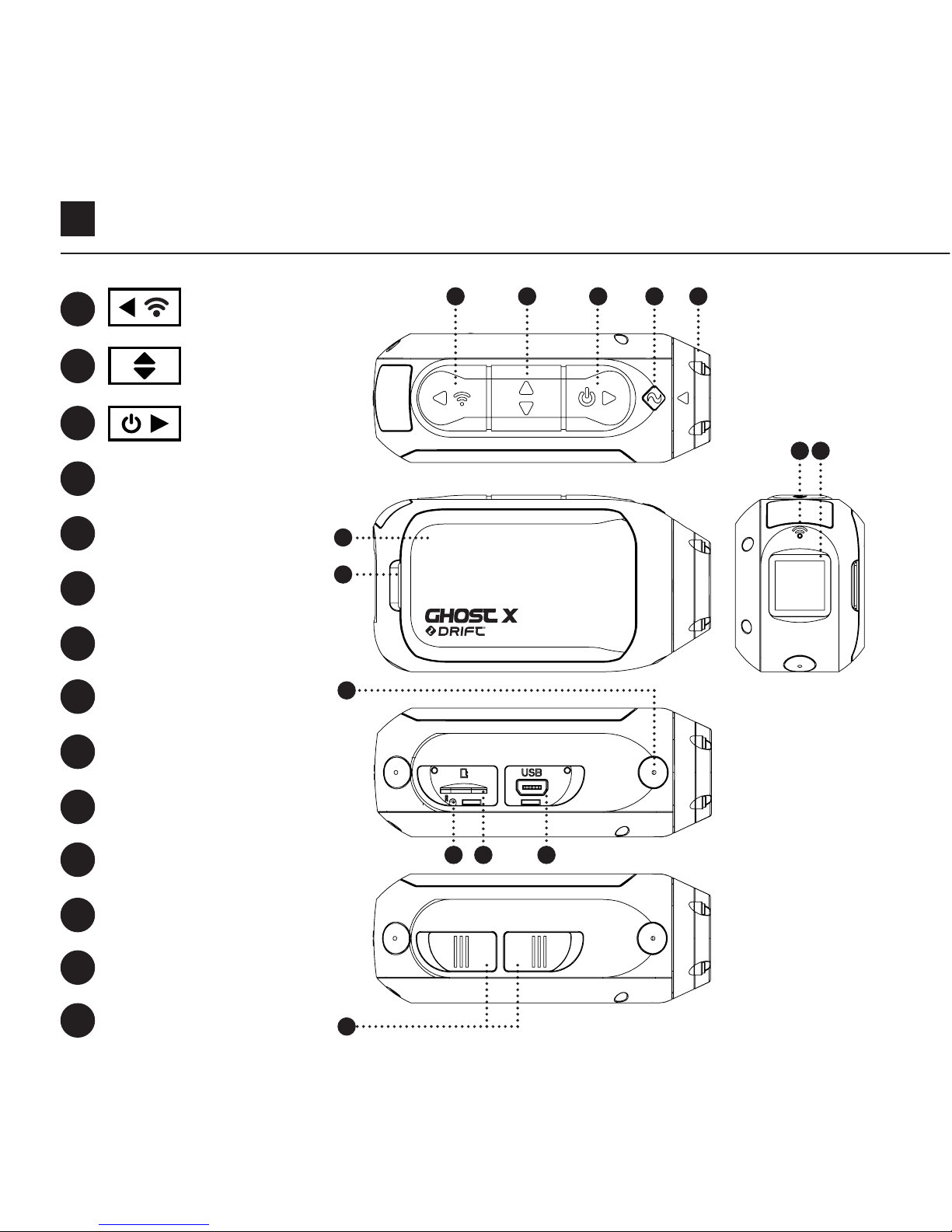
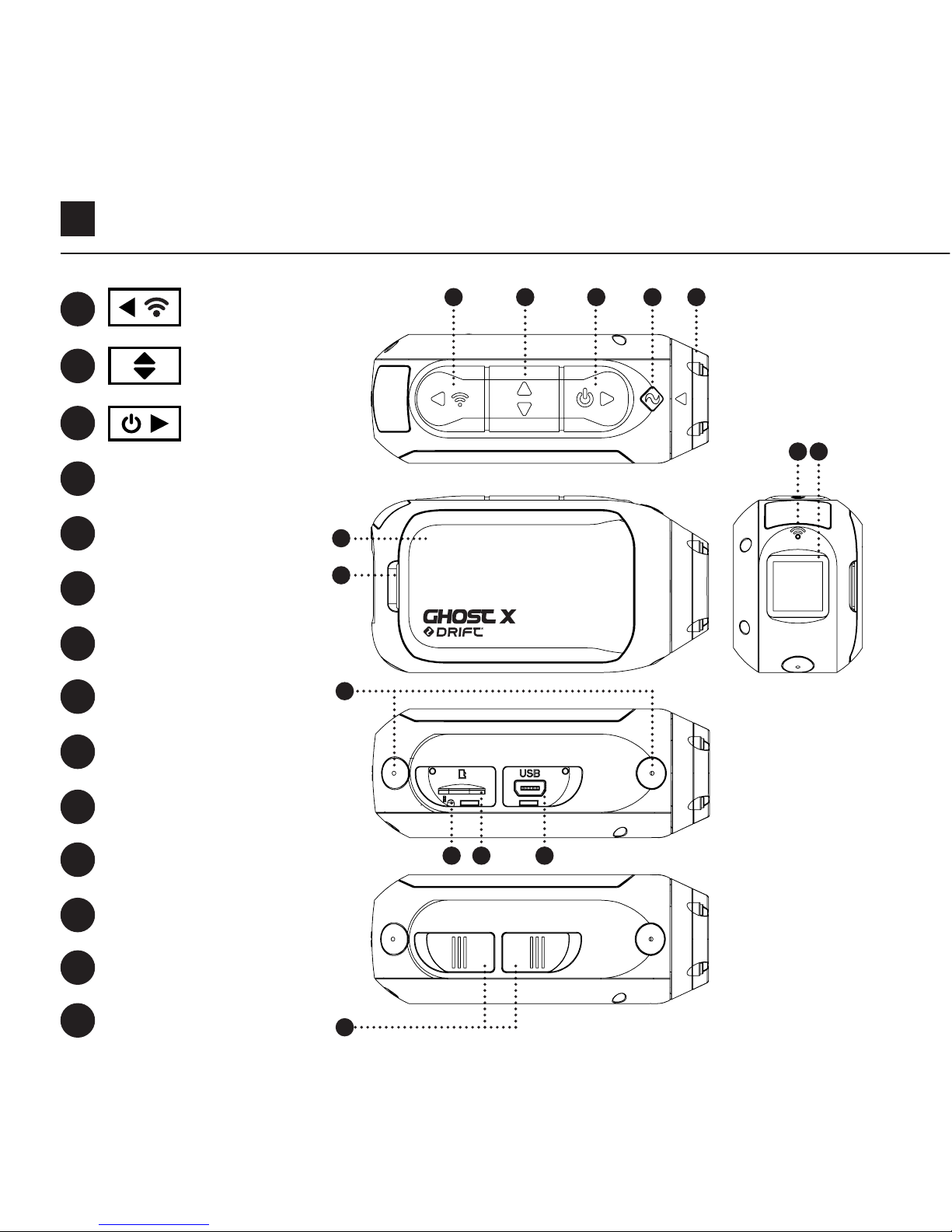
Botón trasero
Indicador LED
de Estado
Pestillo del Módulo
LED del Wi-Fi
Pantalla Trasera
Ranura de
Tarjeta MicroSD
Botón Central
Lente Giratoria
Micrófono
Puerto MINI USB
10 pines
Cubierta de Goma
Botón
Delantero
Módulo de la
Batería
Botón de Reinicio
Acerca de la Cámara
A
D
G
H
I
L
B
E
J
M
C
F
K
N
A B
I
C D E
G
J
F
N
H
MK L
Downloaded from www.Manualslib.com manuals search engine
5
Configuración Inicial
1. Destapar la ranura microSD levantando la tapa de goma.
2. Insertar una tajeta microSD/HC/XC clase 10 o superior (hasta 128GB).
¡Formatear antes de usar por primera vez!
3. Destapar el puerto mini USB levantando la tapa de goma.
4. Conectar la cámara a través de un cable mini USB a un puerto USB con
alimentación, y cargar la batería durante 2.5 horas antes de utilizarla por
primera vez.
5. Ajustar las tapas de goma de forma segura para cubrir tanto la ranura de la
microSD y el puerto mini USB. ¡Y ya está lista para usar!
GHOST 4K
4
3
1 2
5
Downloaded from www.Manualslib.com manuals search engine
ES 6
ENCENDIDO/APAGADO
1. Presionar y mantener el botón para encender.
2. La Pantalla Trasera se encenderá, mostrando la ventana de bienvenida.
3. La cámara ya está lista para grabar vídeos o realizar fotografías.
4. El modo actual de la cámara se indica con el color del indicador LED de estado
y en la Pantalla Trasera, junto con el icono en la esquina superior izquierda de la
Pantalla Trasera.
5. Para apagar, presionar y mantener el botón durante 3 segundos.
2 4
Introducción
CAMBIO DE MODO
Para cambiar el modo actual de grabación de la cámara, presionar el botón ;
así se podrá cambiar entre los modos de Vídeo, Foto, Lapso, Ráfaga, Favoritos y
Ajustes Generales.
Icono de modo
Downloaded from www.Manualslib.com manuals search engine
7
Modos de la Cámara
MODO DE VÍDEO
(LED verde) Pulsar el botón para comenzar
a grabar. El indicador LED de estado y la luz LCD
trasera parpadearán en rojo para indicar que se
está grabando. Pulsar el botón de nuevo
para detener la grabación.
AJUSTES - VÍDEO
• Resolución
• Frecuencia de fotogramas
MODO RÁFAGA
(LED azul) La cámara capturará una ráfaga de
imágenes fijas durante un periodo estipulado
y a una velocidad específica cuando se pulse
el botón . Para obtener los mejores
resultados, emplear una tarjeta de memoria
con la mayor velocidad de transmisión de
datos posible.
AJUSTES - RÁFAGA
•
Resolución • Duración de la Ráfaga
• Velocidad de la Captura
MODO DE FOTOGRAFÍA
(LED amarillo) La cámara capturará imágenes
fijas cuando se pulse el botón , y el
indicador LED y la pantalla LCD mostrarán una
luz roja cada vez que se realice una fotografía.
AJUSTES - FOTOGRAFÍA
• Resolución
MODO DE LAPSO
(LED violeta) Pulsar el botón para
capturar una serie de imágenes fijas a una
velocidad específica. El indicador LED y la
pantalla LCD mostrarán una luz roja cada vez
que se realice una fotografía. Para detener la
grabación, pulsar de nuevo el botón .
AJUSTES - LAPSO
• Resolución
• Intervalo del lapso
Downloaded from www.Manualslib.com manuals search engine
ES 8
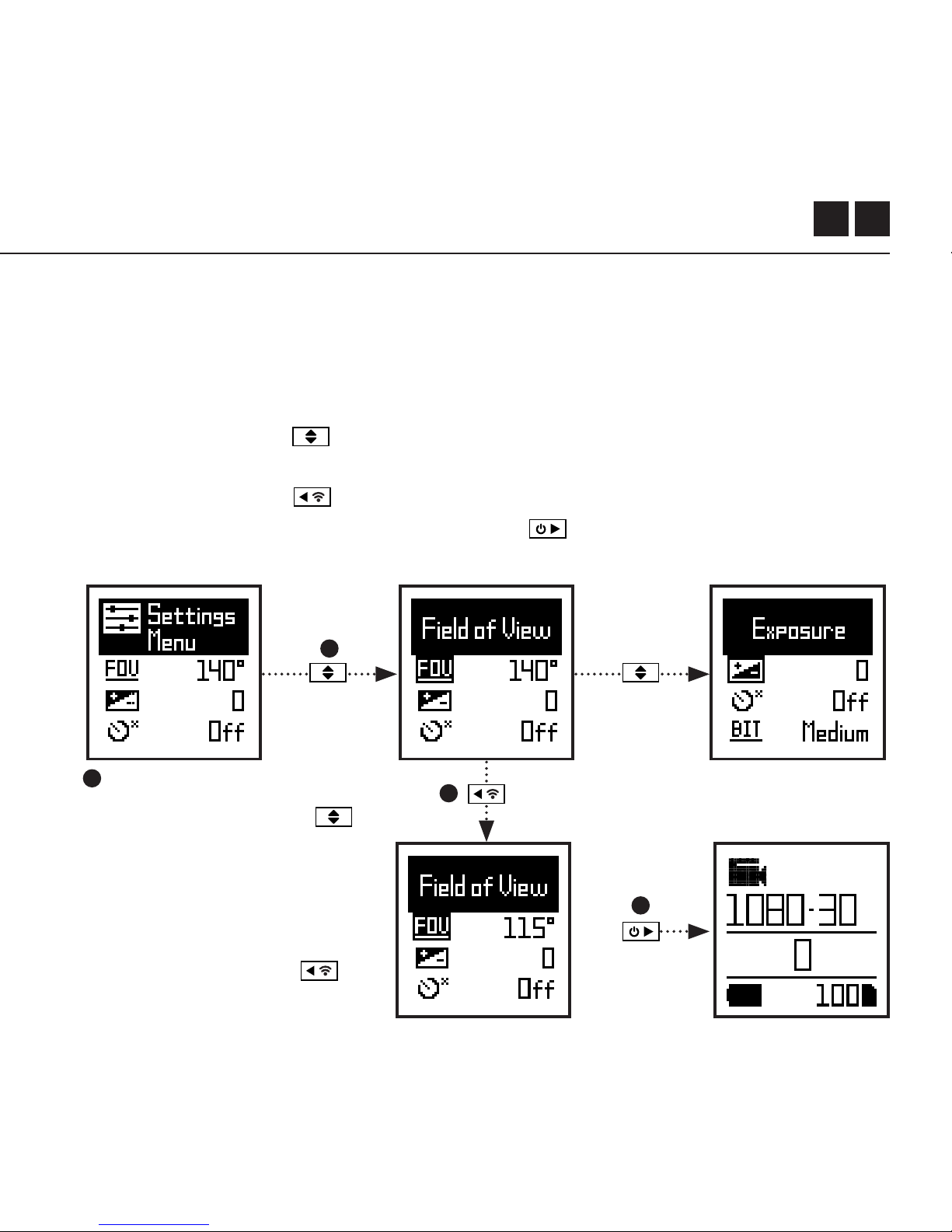
NAVEGAR POR EL MENÚ DE CONFIGURACIÓN
1. Al llegar al menú de configuración, la celda negra destacada aparecerá en la
zona superior, destacando el icono de Menú de Configuración en la esquina
izquierda; la posición inicial.
2. Pulsar el botón para navegar por las opciones, lo cual destacará la
siguiente configuración.
3. Pulsar el botón para cambiar las opciones de esa configuración.
4. En cualquier momento, pulsar el botón para cambiar el modo
(volviendo a Vídeo).
4
1
2
3
Menú de Configuración
En este ejemplo, pulsar
de nuevo desplaza la
selección a la siguiente
configuración (Campo de
visión), y al pulsar una vez
más de moverá a Exposición.
En el paso 3, al pulsar
se cambia el CDV de 140°
a 115°.
Downloaded from www.Manualslib.com manuals search engine

9
Wi-Fi
Campo de visión
Exposición
Temporizador automático
Velocidad de bits de vídeo
Filtro de vídeo
ISO
Marcado de vídeos
Intervalo de marcado de vídeos
DVR para vehículo
Intervalo de bucle en DVR para vehículo
Foto simultánea
Intervalo de foto simultánea
Volumen del altavoz
APAGADO / ENCENDIDO
90° / 115° / 140°
-2 / -1 / 0 / +1 / +2
APAGADO / 3S / 5S / 10S
ALTO / MEDIO / BAJO
NORMAL / INTENSO / POCA LUZ
100 / 200 / 400 / 800 / AUTO
SÍ / NO
10S / 30S / 1MIN / 2MIN
SI / NO
1MIN / 2MIN / 5MIN / 10MIN
APAGADA / ENCENDIDA
10S / 30S / 1MIN / 2MIN / 5MIN / 10MIN
APAGADA / BAJO / MEDIO / ALTO
Ajustes
Downloaded from www.Manualslib.com manuals search engine

ES 10
Ajustes
Indicador LED de estado
Grabado instantáneo
Fecha
Sello de fecha
Apagar cámara
Archivos THM
Idioma
Restablecer ajustes
Formatear tarjeta SD
Número de serie
Versión del Firmware
APAGADO / ENCENDIDO
SÍ / NO
YYYY/MM/DD HH/mm
APAGADO / ENCENDIDO
NO / 2MIN / 5MIN / 10MIN / 20MIN
ENCENDIDO / APAGADO
EN / CN
SÍ / NO
SÍ / NO
XXXXXX
XXXXXX
Downloaded from www.Manualslib.com manuals search engine
11
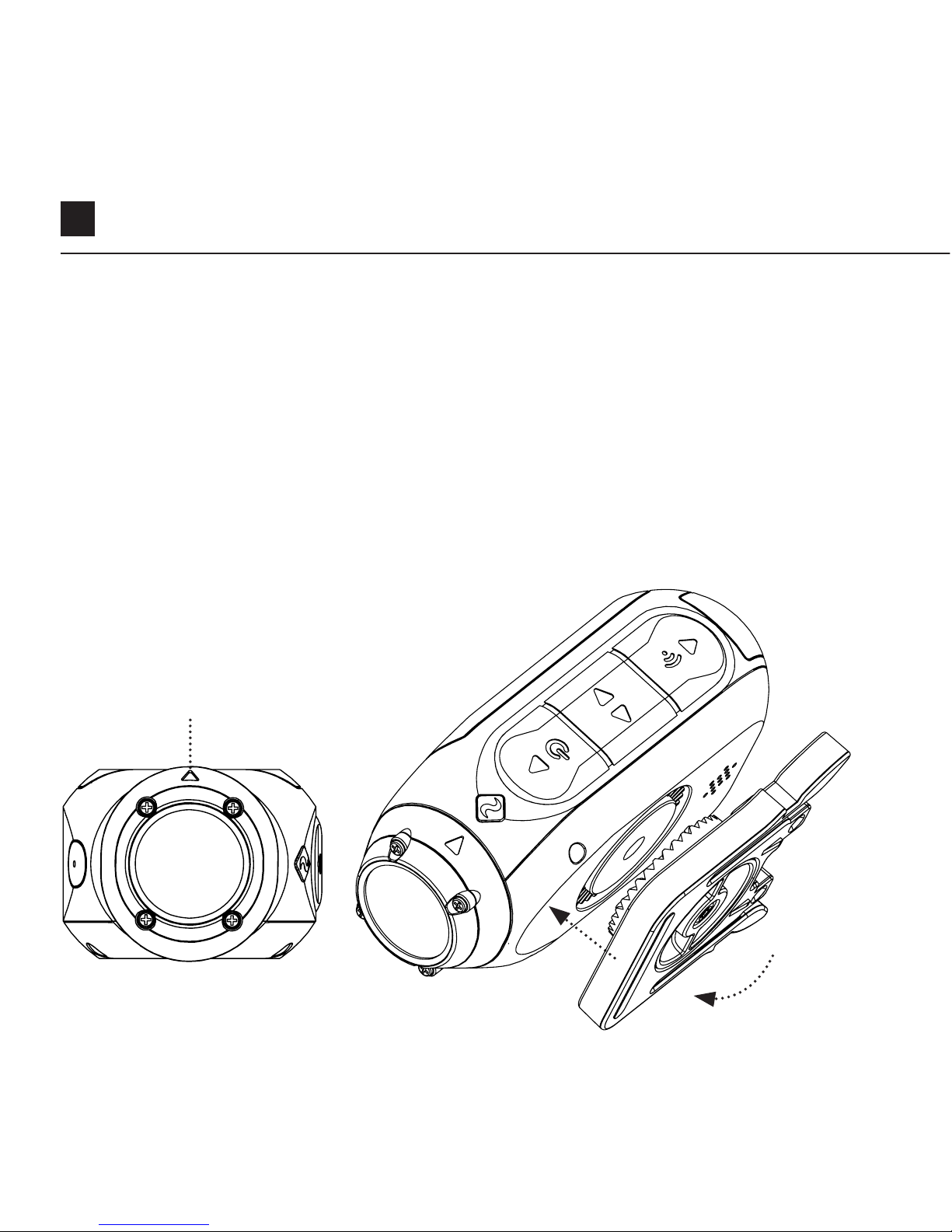
Montaje de la Cámara
1. Fijar el Clip Universal a la cámara en la orientación 360° según se requiera
– primero colocar el clip en la orientación deseada, y a continuación
asegurarlo girando la base de rosca manualmente.
2. Enganchar el Clip Universal en el soporte elegido, y asegurarse de que está
correctamente colocado al escuchar el “clic”. *Comprobar de nuevo si se
ha fijado completamente presionando los enganches.
3. Alinear la toma. Rotar la lente a mano, empleando el marcador de la lente
como referencia, manteniéndola de forma perpendicular al suelo para
obtener una orientación correcta.
Marcador de la lente
Downloaded from www.Manualslib.com manuals search engine

ES 12
Resumen de las Características
MODO DVR PARA VEHÍCULOS
Este modo sin manos es ideal para propósitos de seguros y protección.
La cámara graba secuencias en bucles continuos (intervalos DVR), grabando bucle
tras bucle hasta que llena la Tarjeta MicroSD. Una vez llena, el bucle más antiguo se
borrará a medida que otros nuevos se guardan. El intervalo de bucles DVR puede
ser de 10s, 30s, 1min, 2min, 5min o 10min.
MARCADO DE VÍDEOS
Cuando se encuentra activada, esta característica permite que la cámara grabe
vídeos de forma continua, pero sólo los guarda cuando una secuencia importante
se “Marca”.
Mientras se estén grabando vídeos, el pulsar el botón se guardarán vídeos
pasados, presentes y futuros. Por ejemplo, con un intervalo seleccionado de
marcado de vídeo de 30s, la cámara grabará los 30s previos, los 30 segundos
presentes y unos 30s adicionales – un total de 1m 30s de grabación “marcada”.
La característica de Marcado de vídeo necesita una tarjeta microSD de clase 10
con 4GB de espacio libre para funcionar correctamente
MODO ENCENDIDO INSTANTÁNEO
Activar el modo de Encendido Instantáneo permite que la cámara se encienda y
comience a grabar inmediatamente pulsando sólo una vez el botón .
Downloaded from www.Manualslib.com manuals search engine

13
Resumen de las Características
FILTRO
Personaliza rápidamente la
configuración de tu cámara a las
condiciones de grabación con filtros.
Elige entre Normal / Intenso / Poca
luz / Agua.
VELOCIDAD DE BITS
Los usuarios pueden elegir mantener
la compresión normal empleada
por el códec H.26 o, si lo prefieren,
permitir un mayor flujo de datos para
preservar mejor la grabación original.
Esto resultará en un archivo de mayor
tamaño.
Downloaded from www.Manualslib.com manuals search engine
ES 14
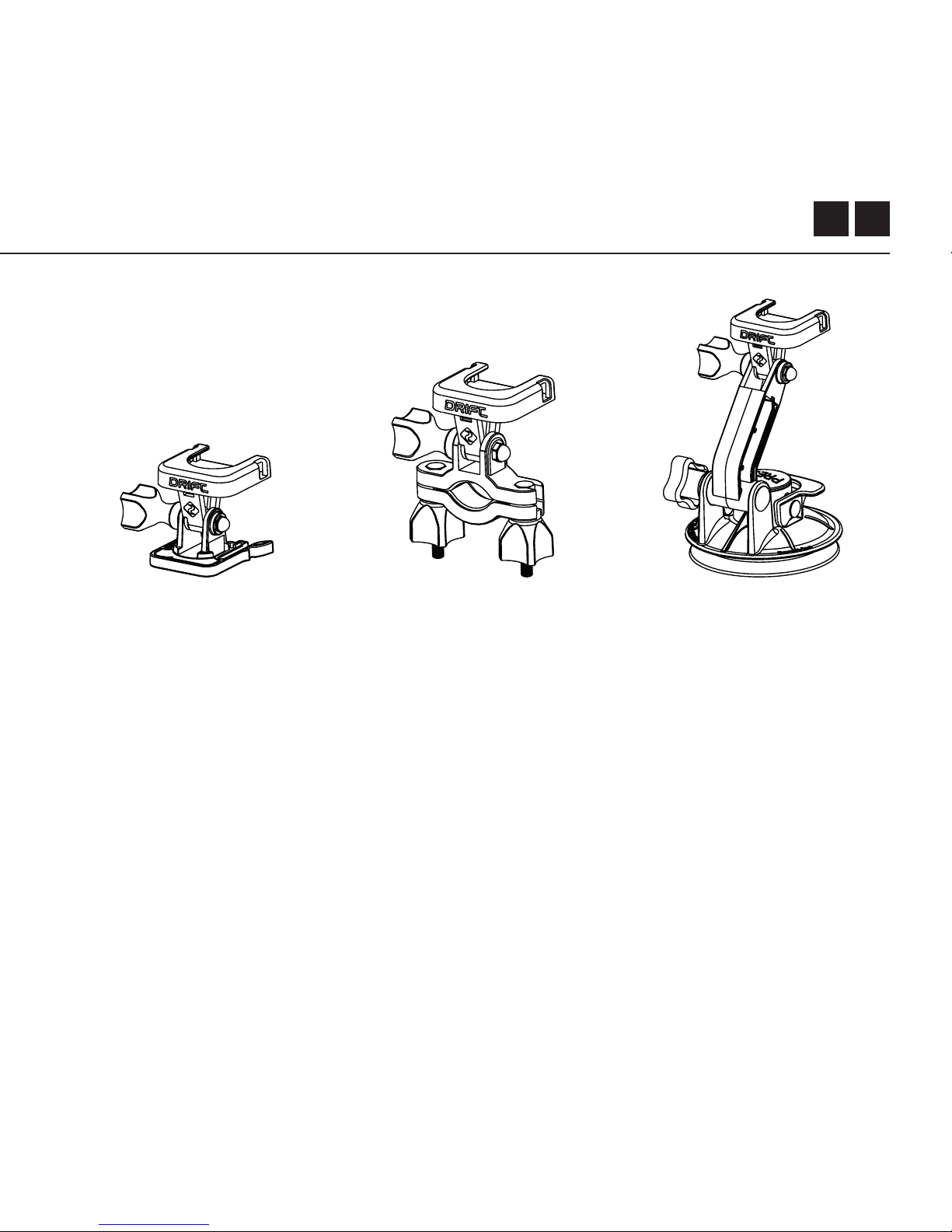
Guía de Accesorios
SOPORTE DE VENTOSA
El accesorio idea para
ajustar tu Ghost X a
cualquier superficie plana
no porosa. Perfecto para
emplear en parabrisas y
carrocería en vehicula, la
ventosa facilita el girar,
inclinar y rotar tu cámara
360°.
SOPORTE DE MANILLAR
El Soporte de Manillar
Drift es el mejor
accesorio para
deportistas sobre ruedas,
sea cual sea su disciplina.
Compatible con barras
de entre 19mm y 36mm,
y capaz de rotar más
de 180, el soporte de
manillar se abre en casi
cualquier ángulo para tu
vídeo.
MONTAJE DE PIVOTE
Ajustable en cualquier lugar
en prácticamente cualquier
ángulo, el Soporte de Eje
es la herramienta perfecta
para capturar el momento
desde cualquier punto de
vista imaginable. Incluye
adhesivos plano y curvado,
y puede emplearse en
combinación con cualquier
otro soporte Drift.
Downloaded from www.Manualslib.com manuals search engine

15
Wi-Fi + Firmware
Para encender el Wi-Fi Ghost X, simplemente pulsar y mantener el botón . El
indicador LED Wi-Fi estará encendido, mostrando una luz [azul] cuando el Wi-Fi
está activado.
El Wi-Fi también se puede activar desde el menú de configuración de la cámara,
en donde también se puede encontrar una opción para encender la red Wi-Fi de
forma permanente.
DESCARGA DE LA APLICACIÓN DRIFT LIFE
Ajuste su tiro, captura, vea, edita y transmite en vivo con su dispositivo movil.
INSTALACIÓN DE FIRMWARE
Descargar el firmware más reciente del sitio web de Drift y copiar el archivo
Ghost_X.bin en la raíz de una tarjeta micro SD formateada. Insertar la tarjeta micro
SD en la cámara y encender.
La pantalla de la cámara mostrará el texto “Actualización de Firmware” mientras se
esté instalando. Al terminar, la cámara se apagará.
Downloaded from www.Manualslib.com manuals search engine

ES 16
Conectar la Cámara
CÓMO CONECTARLA A UNA PC
1. Conecte la cámara usando el cable USB (incluido).
La cámara le mostrará un ícono de USB.
2. Es probable que la carpeta de la cámara se abra es a si automáticamente, si
no abra la carpeta Mi PC.
3. La cámara debería aparecer como una unidad extraíble.
Haga doble clic para abrirla.
4. Abra la carpeta DCIM para tener acceso a sus archivos.
CÓMO CONECTARLAA UNA MAC
1. Conecte la cámara usando el cable USB (incluido).
La cámara le mostrará un ícono de USB.
2. Es probable que la carpeta de la cámara se abra automáticamente, si no es a
si abra la carpeta Finder.
3. La cámara debería aparecer como una disco extraíble.
Haga doble clic para abrirla.
4. Abra la carpeta DCIM para tener acceso a sus archivos.
Downloaded from www.Manualslib.com manuals search engine

17
Especificaciones Técnicas
Resolución de Vídeo y Frecuencia de Fotogramas:
1080P (1920 X 1080 16:9)
960P (1280 x 960 4:3)
720P (1280 X 720 16:9)
WVGA (854 x 480 16:9)
25 / 30 FPS
25/ 30 FPS
25 / 30 / 50 / 60 FPS
25 / 30 / 50 / 60 FPS
Formato de archivo: .MP4 (H.264 codec)
Tipo de sensor: CMOS
Campo de visión (diagonal): 90° / 115° / 140°
Distancia focal de lente: 0,5m al infinito
Rotación de lente: 330°
Modo de foto: 4 / 8 / 12 MP
Exposición: Auto / Manual (Usuarios avanzados)
Pantalla LCD: LCD Matrix luz trasera color
Capacidad de memoria: Tarjetas de memoria Micro SD, SDHC, SDXC
de hasta 128GB
Downloaded from www.Manualslib.com manuals search engine

ES 18
Especificaciones Técnicas
Entradas:
Salidas:
Conectividad:
Potencia:
Frecuencia de Wi-Fi:
Dimensiones de la Cámara:
Peso:
Compatibilidad:
Mini USB de 10 Pin.
Micrófono externo a través de adaptador USB.
A/V y HDMI a través de adaptador USB.
USB Plug And Play
1500mAh interna,
batería 500mAh modular incluída.
2.4GHz
43 (W) x 82.2 (L) x 31.4 (D) mm
120g
Windows XP y versiones posteriores / Mac OS 10.2 y
versiones posteriores.
Para la visualización 1080P se requiere un monitor capaz
de reproducir. Para ver / editar los requisitos mínimos
se incluyen: gráficos integrados de 8 GB de RAM, 4ta
generación i5 y 17 Intel® Core ™ o AMD A10-7800 APU.
Tarjetas gráficas discretas a partir de GeForce® GTX ™ 650
o AMD Radeon™ HD Serie 7000 y superiores.
Debido al inmenso procesamiento requerido para renderizar
1080P, cumplir con estos requisitos mínimos del sistema
no necesariamente descarta de la posibilidad de una
reproducción lenta o escalonada.
Downloaded from www.Manualslib.com manuals search engine

19
Declaración de Conformidad
Información sobre normas
de la FCC
Este dispositivo cumple con
la sección 15 de las normas
de la FCC
El funcionamiento está
sujeto a las dos siguientes
condiciones:
(1) que el dispositivo no
pueda causar interferencia
perjudicial, y (2) que el
dispositivo deba aceptar todas
las interferencias que reciba,
incluidas las interferencias
que pueden causar el
funcionamiento indeseado del
dispositivo.
ADVERTENCIAS
Los cambios o modificaciones
a esta unidad que no sean
expresamente aprobadas
por el responsable del
cumplimiento pueden
invalidar la autoridad del
usuario para operar el equipo.
Se ha probado y comprobado
que este equipo cumple con
los límites de un dispositivo
de clase B, de acuerdo con
la sección 15 de las normas
de la FCC. Estos límites han
sido diseñados para brindar
protección razonable contra
interferencias perjudiciales en
instalaciones residenciales.
Este equipo genera, usa y puede
irradiar energía de
radiofrecuencia. Si no se
instala y utiliza de acuerdo
con las instrucciones puede
causar interferencias en las
radiocomunicaciones. Sin
embargo, no se garantiza
Downloaded from www.Manualslib.com manuals search engine

ES 20
que no haya interferencias
en alguna instalación
determinada. Si este
equipo causa interferencias
perjudiciales a la recepción
de radios o televisores,
que puede determinarse al
encender y apagar del equipo,
se sugiere que el usuario tome
una o más de las siguientes
medidas para intentar corregir
la interferencia:
reorientar o relocalizar la
antena receptora;
aumentar la distancia entre el
equipo y el receptor;
conectar el equipo a un
enchufe diferente que el del
receptor;
Solicite asistencia al
distribuidor o a un técnico de
radio/TV con experiencia.
Este equipo cumple con las
normas industriales exentas de
licencia de RSS del Canadá.
El funcionamiento está sujeto a
las dos siguientes condiciones:
(1) que el dispositivo no
pueda causar interferencia
perjudicial, y
(2) que el dispositivo deba
aceptar todas las interferencias
que reciba, incluidas las
interferencias que pueden
causar el funcionamiento
indeseado del dispositivo.
Este aparato digital clase [B]
cumple con la norma ICES-
003 del Canadá
Declaración de Conformidad
Downloaded from www.Manualslib.com manuals search engine

21
EXPOSICIÓN A LA RADIACIÓN DE LA FCC:
Este equipo cumple con los límites de exposición a la radiación de la FCC
establecidos para un entorno no controlado.
Este equipo debe instalarse y operarse con una distancia mínima de 20 cm
entre el radiador y tu cuerpo. Este transmisor no debe ubicarse ni funcionar
conjuntamente con ninguna otra antena o transmisor.
AVISO LEGAL ACERCA DE MOTOCICLETAS:
El uso de la cámara durante la conducción de motocicletas puede causar un
accidente, el cual podría resultar en graves lesiones o la muerte para usted u
otros.
• Mantenga la vista y la concentración puestas en la carretera;
• Evite mirar a la cámara durante periodos de tiempo prolongados;
• Detenga el vehículo en un lugar seguro antes de ajustar la cámara.
Declaración de Conformidad
Downloaded from www.Manualslib.com manuals search engine

1
Grazie per aver acquistato la videocamera Drift Ghost X
SUPPORTO CLIENTI
Scaricare il manuale completo e consultare il nostro sito uciale per
firmware, aggiornamenti, supporto clienti e informazioni su tutti i nostri
prodotti.
https://driftinnovation.com/
Se hai qualsiasi suggerimenti, commenti o sollecitudini, contattare la
nostra squadra di supporto clienti presso:
GARANZIA
La garanzia non è valida quando il prodotto è stato danneggiato per
abusi fisici, trattamenti inadeguati, incidenti, incendi, congelamenti,
danni d’acqua, negligenza o il mancato rispetto delle istruzioni operative
fornite. Per informazioni aggiuntivi sulla garanzia, vedi:
https://driftinnovation.com/warranty
Downloaded from www.Manualslib.com manuals search engine

IT 2
Sulla Telecamera | Contenuti della Confezione
Impostazione Iniziale | Introduzione
Modalità della Telecamera
Menu Impostazioni
Impostazioni
Montare la Telecamera
Riepilogo sulle Funzioni
Guida agli Accessori
Wi-Fi + Firmware
Connettere la Telecamera
Specifiche
Informative
3-4
5-6
7
8
9-10
11
12-13
14
15
16
17-18
19-21
Contenuti
Downloaded from www.Manualslib.com manuals search engine
3
Pulsante
Posteriore
LED di Stato
Modulo
per Aggancio
LED di Wi-Fi
Schermo Posteriore
Slot Scheda MicroSD
Pulsante
Centrale
Lente Rotante
Microfono
Porta Mini USB
a 10 Pin
Coperchio in
Gomma
Pulsante
Frontale
Modulo Batteria
Pulsante di
Resettaggio
Sulla Telecamera
A
D
G
H
I
L
B
E
J
M
C
F
K
N
A B
I
C D E
G
J
F
N
H
MK L
Downloaded from www.Manualslib.com manuals search engine
5
Impostazione Iniziale
1. Aprire il coperchio dello slot per microSD sollevando il coperchio in gomma.
2. Inserire una scheda microSD/HC/XC di Classe 10 o superiore (fino a128GB)
Formattare prima dell’utilizzo!
3. Aprire la porta mini USB sollevando il coperchio in gomma
4. Connettere la telecamera attraverso un cavo mini USB a una porta
alimentata, e caricare la batteria per 2,5 ore prima del primo utilizzo.
5. Riposizionare i coperchi in gomma in modo sicuro per coprire sia lo slot
microSD sia la porta mini USB. Siamo pronti per procedere!
GHOST 4K
4
3
1 2
5
Downloaded from www.Manualslib.com manuals search engine
IT 6
ACCENDERE / SPEGNERE
1. Tenere premuto il pulsante per accendere.
2. Si accenderà lo Schermo Posteriore, mostrando l’immagine di benvenuto.
3. La telecamera è ora pronta per registrare video o per scattare foto.
4. La modalità corrente della telecamera viene indicata con il colore del LED
di Stato e dallo Schermo Posteriore, insieme all’icona in alto a sinistra dello
Schermo Posteriore.
5. Per spegnere, tenere premuto il pulsante per 3 secondi.
2 4
Introduzione
NAVIGAZIONE DI MODALITÀ
Per cambiare la modalità di registrazione corrente della telecamera, premere il
pulsante
, cambiando tra modalità Video, Foto, TimeLapse, Sequenza di Foto,
e Impostazioni Generali.
Icona di Modalità
Downloaded from www.Manualslib.com manuals search engine
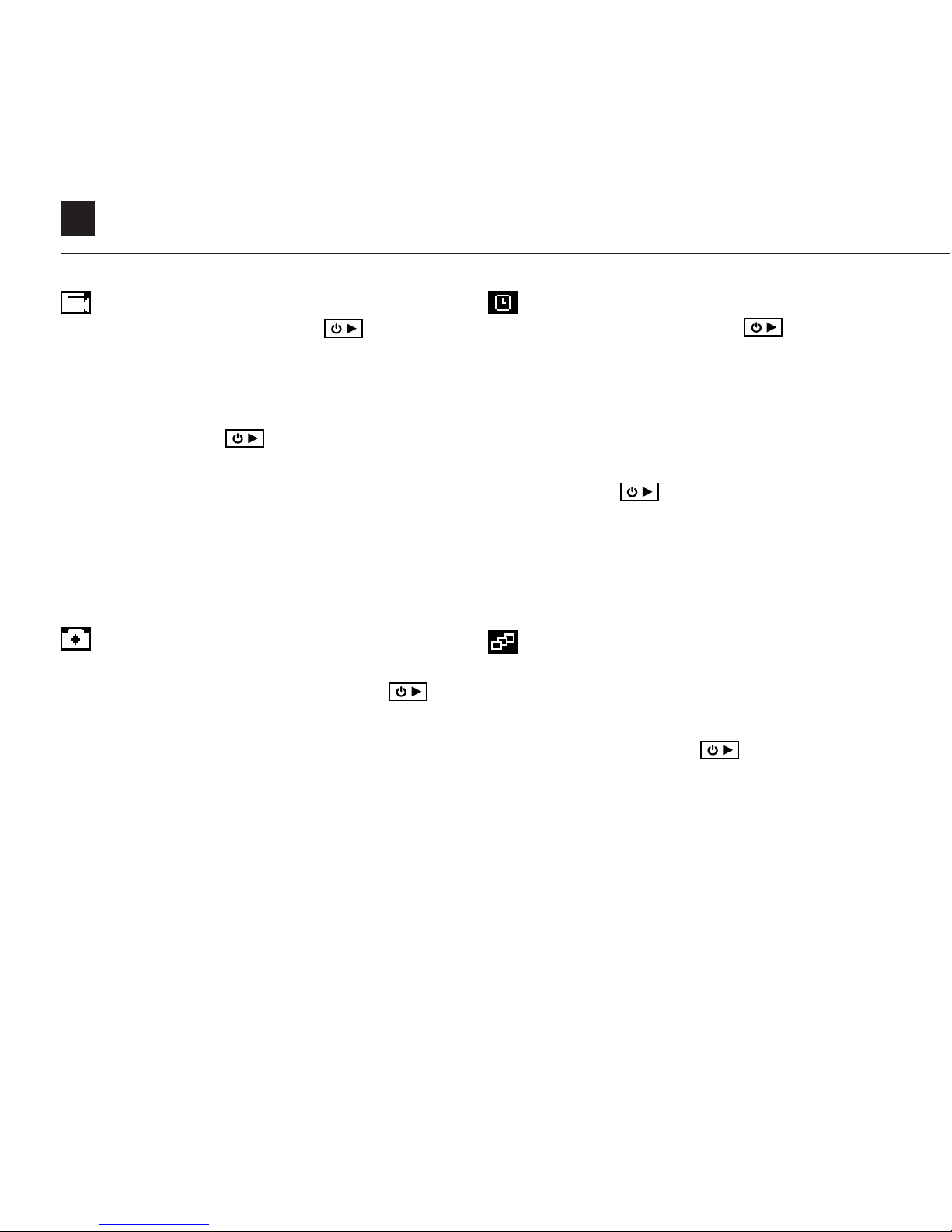
7
Modalità della Telecamera
MODALITÀ VIDEO
(LED Verde) Premere il pulsante per
iniziare la registrazione. Il LED di Stato e la
retroilluminazione LCD si lampeggeranno di
rosso per indicare la registrazione. Premere
di nuovo il pulsante per fermare la
registrazione.
IMPOSTAZIONI VIDEO
• Risoluzione
• Frequenza dei Fotogrammi
MODALITÀ SEQUENZA DI FOTO
(LED Ciano) La telecamera catturerà una
sequenza di immagini ferme per una durata
assegnata e a una velocità specifica, quando
viene premuto il pulsante
.
Per ottenere risultati migliori, utilizzare
una scheda di memoria con la velocità di
trasmissione dati più alta possibile.
IMPOSTAZIONI SEQUENZA DI FOTO
• Risoluzione
• Durata della Sequenza/Velocità di Cattura
Velocità di Acquisizione
MODALITÀ FOTO
(LED Giallo) La telecamera catturerà immagini
fermi quando viene premuto il pulsante
, e il
LED di stato e lo schermo LCD lampeggeranno
con luce rossa ogni volta che viene scattata
una foto.
IMPOSTAZIONI FOTO
• Risoluzione
MODALITÀ TIMELAPSE
(LED Viola) Premere il pulsante per
catturare una serie di immagini fermi a
una velocità specifica. Il LED di Stato e lo
schermo LCD lampeggeranno con luce rossa
ogni volta che viene scattata un’immagine.
Per fermare la registrazione, premere un’altra
volta il pulsante .
IMPOSTAZIONI TIMELAPSE
• Risoluzione
• Intervallo di Timelapse
Downloaded from www.Manualslib.com manuals search engine
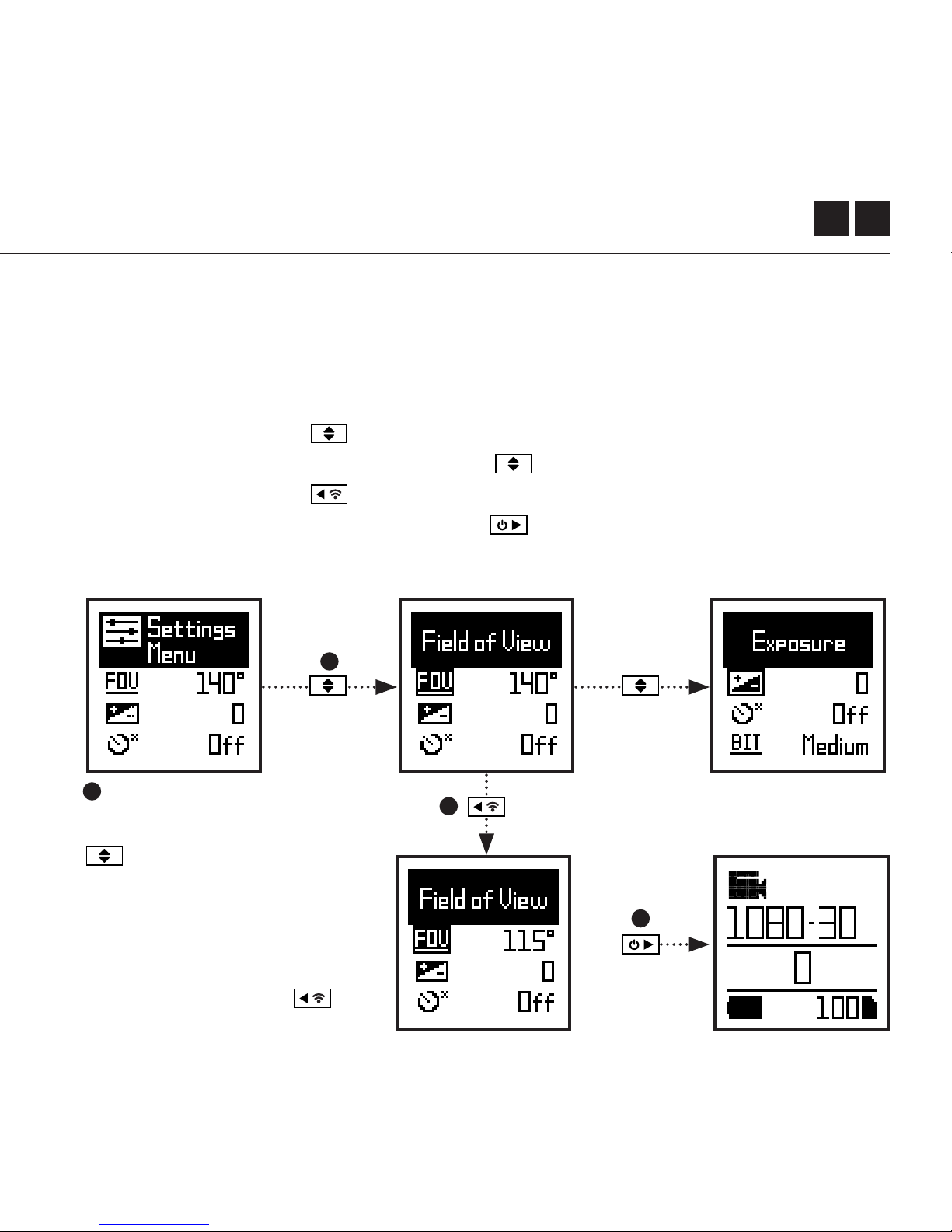
IT 8
NAVIGARE IL MENU DI IMPOSTAZIONI
1. Una volta arrivati al menu di impostazioni, la striscia nera di selezione rimane
in cima, evidenziando l’icona di Menu di Impostazioni come la posizione di
partenza.
2. Premere il pulsante per navigare verso il basso, selezionando l’impostazione
successiva. Tenere premuto il pulsante per scorrere verso l’alto.
3. Premere il pulsante per cambiare le opzioni di quell’impostazione.
4. In ogni momento, premere il pulsante per cambiare modalità (ritornando
alla modalità Video).
4
1
2
3
Menu di Impostazioni
In questo esempio, premendo
una volta la casella di
evidenziazione si sposta
all’impostazione successiva
(Campo di Visione o FOV),
premendo un’altra volta si
sposta su Esposizione.
Nel passo 3 premendo
FOV cambia da 140° a 115°.
Downloaded from www.Manualslib.com manuals search engine

9
Wi-Fi
Campo di Vista
Esposizione
Timer Automatico
Velocità Bit
Filtri
Sensitività ISO
Tag Video
Intervallo Tag Video Veicolo DVR
Intervallo di Ciclo Veicolo DVR
Sensitività Mic
Volume Altoparlante
OFF / ON
90° / 115° / 140°
-2 / / -1 / 0 / +1 / +2
OFF / 3S / 5S / 10S
ALTO / MEDIO / BASSO
NORMALE / VIVIDO / LUCE BASSA
100 / 200 / 400 / 800 / AUTO
OFF / ON
10S / 30S / 1MIN / 2MIN OFF / ON
10S / 30S / 1MIN / 2MIN / 5MIN / 10MIN
OFF/ / 1 / 2 / 3 / 4 / 5
OFF / BASSO / MEDIO / ALTO
Impostazioni
Downloaded from www.Manualslib.com manuals search engine

IT 10
Impostazioni
Indicatore di Stato LED Registrazione
Istantanea
Data
Stampa Data
Camera Spenta
Documenti THM
Lingua
Impostazioni di Resettaggio
Formatta Scheda SD
Numero Seriale
Versione Firmware
OFF / ON
OFF / ON
AA/MM/GG HH/mm
OFF / ON
MAI / 2MIN / 5MIN / 10MIN / 20MIN
ON / OFF
EN / CN
SÌ / NO
SÌ / NO
XXXXXX
XXXXXX
Downloaded from www.Manualslib.com manuals search engine
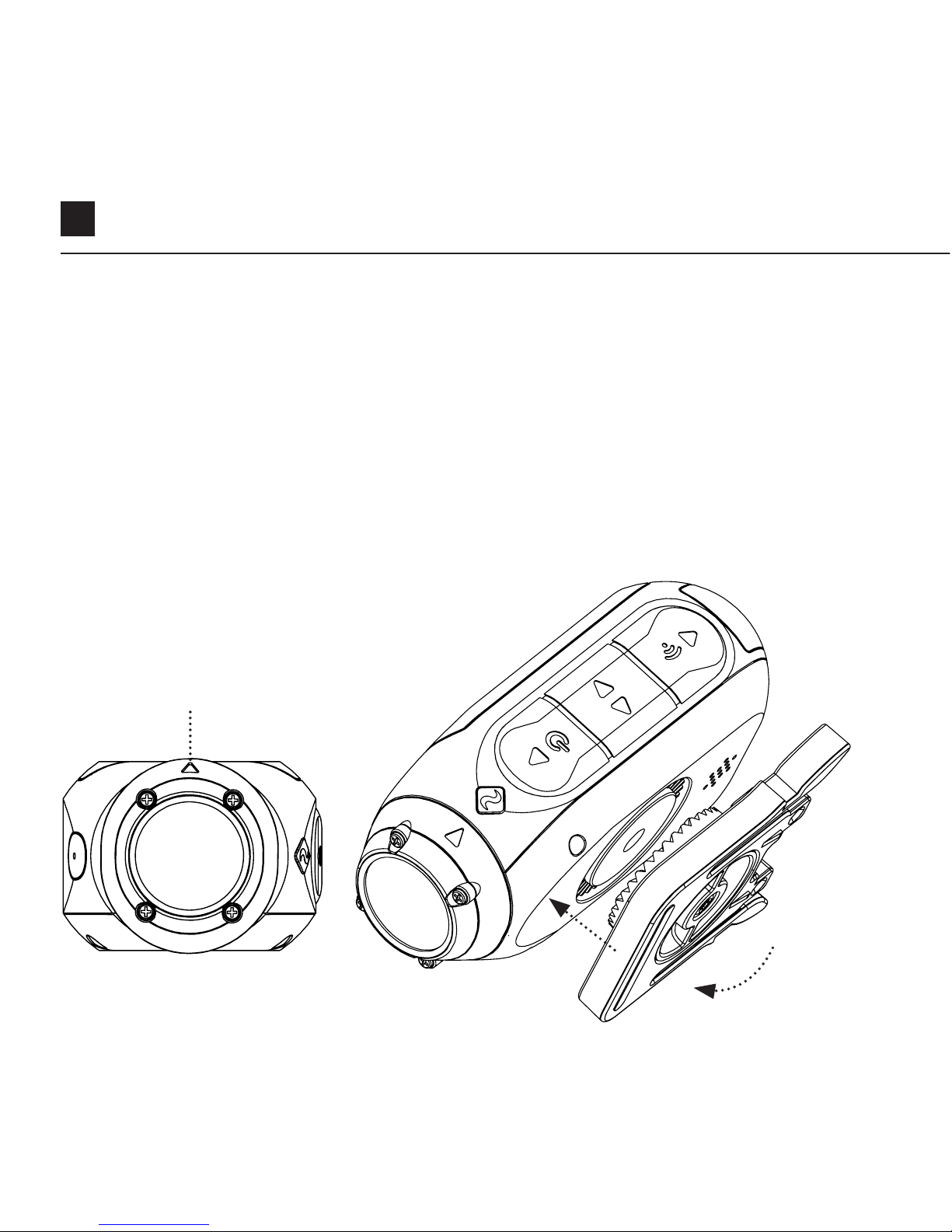
11
Montare la Telecamera
1. Attaccare il Clip Universale sulla telecamera in qualsiasi direzione a 360°
secondo le necessità - prima posizionare il clip nella direzione desiderata, poi
fissarla ruotando la vite sulla base con la mano.
2. Far scivolare il Clip Universale nel supporto scelto, assicurando che scatti
in sede. *Fare un duplice controllo se è stato del tutto inserito tirando i clip
verso l’esterno.
3. Allineare lo scatto. Ruotare le lenti con la mano, utilizzando il marcatore di
lenti come un riferimento ‘superiore’, mantenendolo perpendicolare alla
terra per una corretta direzione.
Marcatore di lenti
Downloaded from www.Manualslib.com manuals search engine

IT 12
Riepilogo sulle Funzioni
MODALITÀ VEICOLO DVR
Questa modalità a mani libere è ideale per scopi di assicurazione e sicurezza.
La telecamera registra filmati nello stile di ciclo continuo (Intervalli DVR), registrando
ciclo dopo ciclo finché la Scheda MicroSD è piena. Una volta piena, i cicli più vecchi
verranno cancellati mentre quelli nuovi vengono salvati. L’intervallo del ciclo DVR
può essere di 10s, 30s, 1min, 2min, 5min o 10min.
TAG VIDEO
Quando è attivata, questa funzione permette alla telecamera di registrare video in
modo continuo, ma salva solo quando viene ‘Taggato’ il filmato importante.
Durante la registrazione del video, premendo il pulsante
, si riuscirà a salvare i
video passati, presenti e futuri. Per esempio, con un intervallo di tag video di 30s
selezionato, la telecamera salverà i 30s precedenti, e un 30s addizionale - un totale
di 1m di filmato “taggato”.
La funzione di Tag Video richiede una Scheda microSD di classe 10 con uno
spazio libero di 4GB perché funzioni nel modo corretto.
MODALITÀ ACCENSIONE ISTANTANEA
Attivare la Modalità di Accensione Istantanea permette alla telecamera di accendersi
e di iniziare la registrazione con una singola pressione sul pulsante
.
Downloaded from www.Manualslib.com manuals search engine

13
Riepilogo sulle Funzioni
FILTRO
Personalizzare velocemente le
impostazioni della telecamera per
registrare in condizioni con filtro.
Scegliere tra Normale / Vivido / Luce
Bassa
VELOCITÀ BIT
Gli utenti possono scegliere di
mantenere la compressione normale
usata da H.264 codec, oppure se
preferiscono, permettere un flusso di
dati più alto per conservare meglio
la registrazione originale. Questo
comporterebbe in una dimensione
maggiore nei file.
Downloaded from www.Manualslib.com manuals search engine
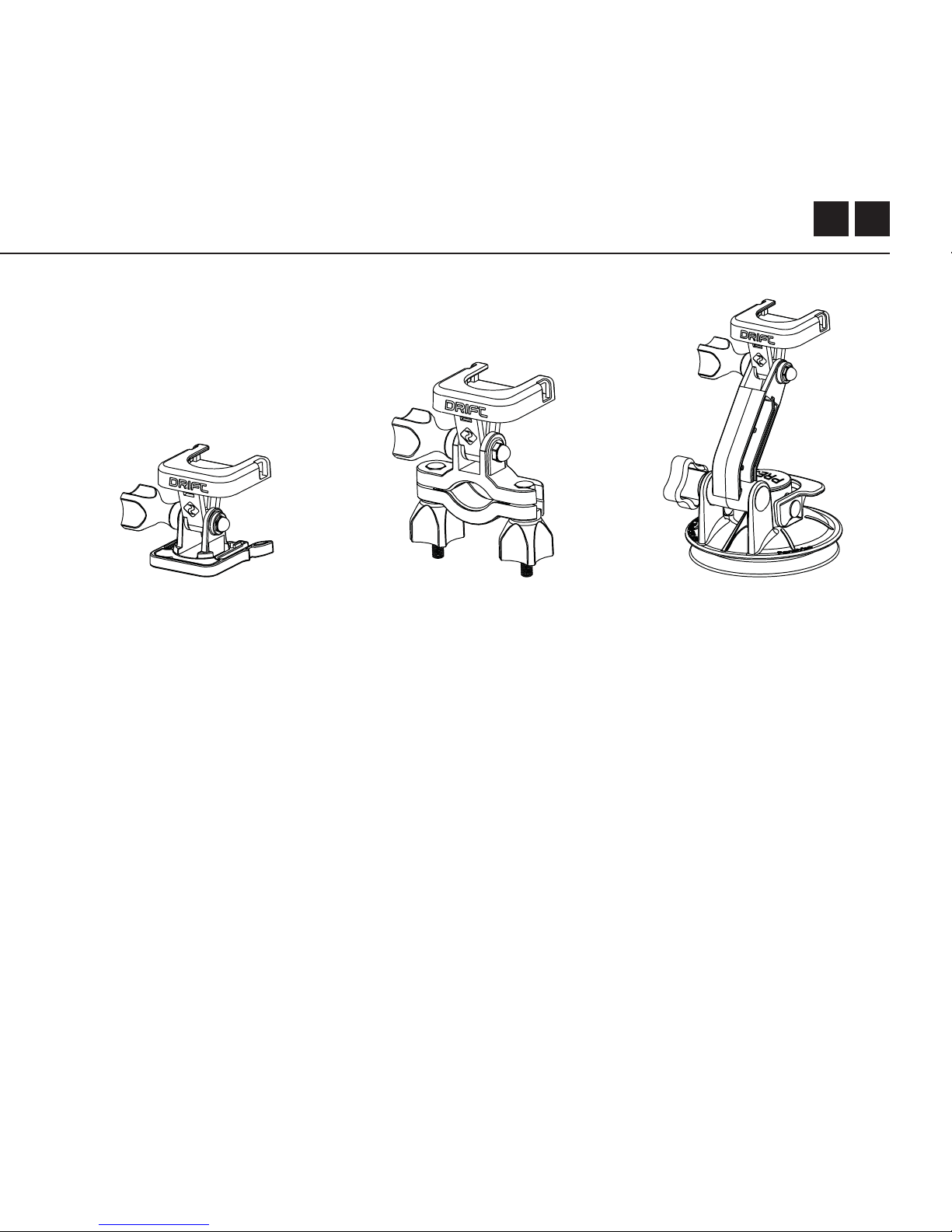
IT 14
Guida agli Accessori
ATTACCO A VENTOSA
L’accessorio ideale per
montare il Ghost X su
qualsiasi superficie piana
e non porosa. Ideale per
usare sulle parabrezze
o carrozzerie delle
macchine, la Ventosa
rende semplice la
telecamera da girare,
ribaltare e ruotare per
360°.
ATTACCO MANUBRIO
L’attacco manubrio
Drift è l’accessorio
perfetto per i ciclisti,
qualsiasi sia la disciplina.
Compatibile con
manubri da 19mm a
36mm, e capace di
girarsi più di 280 gradi,
l’attacco manubrio apre
quasi tutti gli angoli per
il tuo video
ATTACCO GIREVOLE
Montabile dovunque
vicino a ogni angolo,
l’Attacco Girevole Drift è
il perfetto strumento per
catturare i momenti da
ogni punto di vista che
si possa immaginare.
Include adesivi piani
e curvi, e può essere
utilizzato insieme agli
altri attacchi Drift.
Downloaded from www.Manualslib.com manuals search engine

15
Wi-Fi + Firmware
Per accendere la Wi-Fi del GhoST X, tenere semplicemente premuto il pulsante
. Un indicatore LED verde di Wi-Fi mostrerà che Wi-Fi è stata attivata.
Wi-Fi può anche essere accesa attraverso il menu di impostazioni delle
videocamere.
SCARICARE L’APP DRIFT LIFE
Imposta le riprese, registrazioni, riproduzioni, modifiche e streaming in diretta sul
dispositivo mobile.
INSTALLARE IL FIRMWARE
Scaricare la versione più recente di firmware dal sito Drift e copiare il file Ghost_X.bin
sotto una scheda microSD formattata. Inserire la scheda microSD nella telecamera e
accendere.
Sullo schermo della telecamera comparirà ‘Aggiornamento Firmware in Corso’
mentre viene installato l’aggiornamento. Una volta completato, la telecamera si
spegnerà.
Downloaded from www.Manualslib.com manuals search engine

IT 16
Connettere la Telecamera
CONNETTERE A UN PC
1. Connettere la telecamera usando il cavo USB (fornito); lo schermo della
telecamera mostrerà un’icona USB.
2. La cartella della telecamera dovrebbe aprirsi in automatico; se ciò non
accade, aprire attraverso il Computer.
3. La telecamera deve essere riconosciuta come un disco rimovibile; fare un
doppio click per aprire.
4. Aprire la cartella DCIM per accedere ai file.
CONNETTERE A UN MAC
1. Connettere la telecamera usando il cavo USB (fornito); lo schermo della
telecamera mostrerà un’icona USB.
2. La cartella della telecamera dovrebbe aprirsi in automatico; se ciò non
accade, aprire dal Finder.
3. La telecamera deve essere riconosciuta come un dispositivo esterno; fare un
doppio click per aprire.
4. Aprire la cartella DCIM per accedere ai file.
Downloaded from www.Manualslib.com manuals search engine

17
Specifiche
Risoluzione del Video e Frequenza dei Fotogrammi:
1080P (1920 X 1080 16:9)
960P (1280 x 960 4:3)
720P (1280 X 720 16:9)
WVGA (854 x 480 16:9)
25 / 30 FPS
25/ 30 FPS
25 / 30 / 50 / 60 FPS
25 / 30 / 50 / 60 FPS
Formato File:
Tipo sensore:
Campo di vista (diagonale):
Messa a fuoco del lente:
Rotazione del lente:
Modo Foto:
Esposizione:
Schermo LCD:
Capacità Memoria:
.MP4 (H.264 codec)
CMOS
90° / 115° / 140°
da 0,5m a infinito
330°
4 / 8 / 12 MP
Auto / Manuale (Utenti Avanzati)
LCD Matrice Punti retroilluminato a colori
Micro SD, SDHC, SDXC schede
memoria fino a 128GB
Downloaded from www.Manualslib.com manuals search engine

IT 18
Specifiche
Ingresso:
Uscite:
Connettività:
Potenza:
Frequenza Wi-Fi:
Dimensioni Videocamera:
Peso:
Mini USB a 10 Pin.
Microfono Esterno attraverso adattatore
USB Uscita A/V con Adattatore USB
USB Collega e Usa, Mini USB a 10 Pin.
1500mAh interna,
500mAh inclusa batteria modulare.
2.4GHz
43 (W) x 82.2 (L) x 31.4 (D) mm
120g
COMPATIBILITÀ
Windows XP e superiori / Mac OS 10.2 e superiori
Per una visualizzazione 1080P è richiesto un monitor capace di fare
riproduzione. Per visualizzare / modificare, i requisiti minimi comprendono:
Grafica integrata RAM da 8GB, Intel® Core™ i5 e 17 di 4a generazione o AMD
A10-7800 APU.
Schede grafiche discrete partono da GeForce® GTX™ 650, o AMD Radeon™ HD
7000 Series e superiori.
A causa degli immensi processi richiesti per una prestazione da 1080P, anche
se i requisiti di sistema sono stati rispettati, potrebbe accadere lo stesso
riproduzioni parziali o instabili.
Downloaded from www.Manualslib.com manuals search engine

19
Informative
Informazione FCC/CE
Questo dispositivo rispetta con la
Parte 15 dei Regolamenti FCC.
L’operazione è soggetta alle seguenti
due condizioni:
(1) Il dispositivo non deve provocare
disturbi dannosi e
(2) Deve accettare le interferenze
ricevute, comprese quelli che
potrebbero comprometterne il
funzionamento.
ATTENZIONE
Cambi o modifiche all’unità non
espressamente approvate dalla
parte responsabile di conformità
potrebbero far annullare l’autorità
dell’utente all’operare l’attrezzatura.
L’attrezzatura è stata testata e trovata
conforme con i limiti per dispositivi
digitali di Classe B, ai sensi
della parte 15 dei Regolamenti FCC.
Questi limiti sono stati progettati per
orire una protezione ragionevole
contro interferenze dannose in
un’installazione
domestica. Quest’attrezzatura genera
impieghi e può irradiare energia a
radiofrequenza e, se non installata e
utilizzata rispettando queste istruzioni,
potrebbe generare interferenze
dannose alle comunicazioni radio.
Tuttavia, non c’è garanzia che
l’interferenza
non occorrerà in una installazione
particolare. Se quest’attrezzatura
causa disturbi dannosi a ricezioni
radio o televisive, che potrebbero
essere determinate accendendo e
spegnendo l’attrezzatura e l’utente è
incoraggiato a correggere il problema
applicando una delle seguenti misure:
Ri-orientare o riposizionare
l’antenna di ricezione; Informative
Downloaded from www.Manualslib.com manuals search engine

IT 20
IT 20 Aumentare la separazione tra
l’attrezzatura e il ricevitore;
Connettere l’attrezzatura a un’uscita
su un circuito dierente da quello il
ricevitore è stato connesso.
Consultare il rivenditore o un tecnico
esperto in radio / TV per assistenze.
Questo dispositivo è conforme
agli standard RSS esenti da licenza
Industry Canada.
L’operazione è soggetta alle seguenti
due condizioni:
(1) Il dispositivo non deve provocare
disturbi dannosi e
(2) Il dispositivo deve accettare le
interferenze ricevute, comprese quelli
che potrebbero comprometterne il
funzionamento.
Questo apparecchio digitale
di Classe B è conforme con la
normativa canadese ICES-003. Son
fonctionnement est soumis aux deux
conditions suivantes:
(1) Cet appareil ne peut pas causer
l’intervention, et
(2) Cet appareil doit accepter de
l’intervention, y compris l’intervention
qui peut causer l’opération non
désirée de.
Cet appareil numérique de la classe
[B] est conforme à la norme NMB-003
du Canada.
Cet appareil s’accorde avec Industrie
Canada licence-exempte RSS
standard.
Informative
Downloaded from www.Manualslib.com manuals search engine

21
ESPOSIZIONE A RADIAZIONI FCC
Questo dispositivo è conforme ai limiti di esposizione alle radiazioni FCC definiti
per un ambiente non controllato.
Questo apparecchio dovrebbe essere installato e messo in funzione ad una
distanza minima di 20 centimetri tra il radiatore & il corpo. Questo trasmettitore
non deve essere collocato o utilizzato in congiunzione con qualsiasi altra
antenna o trasmettitore.
DISCLAIMER MOTOCICLI
Interagendo con la telecamera durante la guida potrebbe causare incidente, che
potrebbero apportare danni seri o morte a te stesso o agli altri.
• Tenere d’occhio e concentrarsi sulle strade.
• Evitare di guardare alla telecamera per lunghi periodi di tempo.
• Fermare il veicolo in luoghi sicuri prima di aggiustare la camera.
Informative
Downloaded from www.Manualslib.com manuals search engine

1
感谢购买Drift Ghost X款相机
客户支持
下载完整使用手册,在我们的官方网站关注我们产品所有的固件更新、
客户支持和其他信息。
https://driftinnovation.com/
如果您有任何建议、评价或问题,请按下列链接联系我们的客户支持团队
support@driftinnovation.com
保修
如果产品因不当使用、意外事故、火灾、冰冻、进水、疏忽或不按照操作
指南操作等造成的损坏不保修。关于保修的详细信息参见下列链接:
https://driftinnovation.com/warranty
Downloaded from www.Manualslib.com manuals search engine
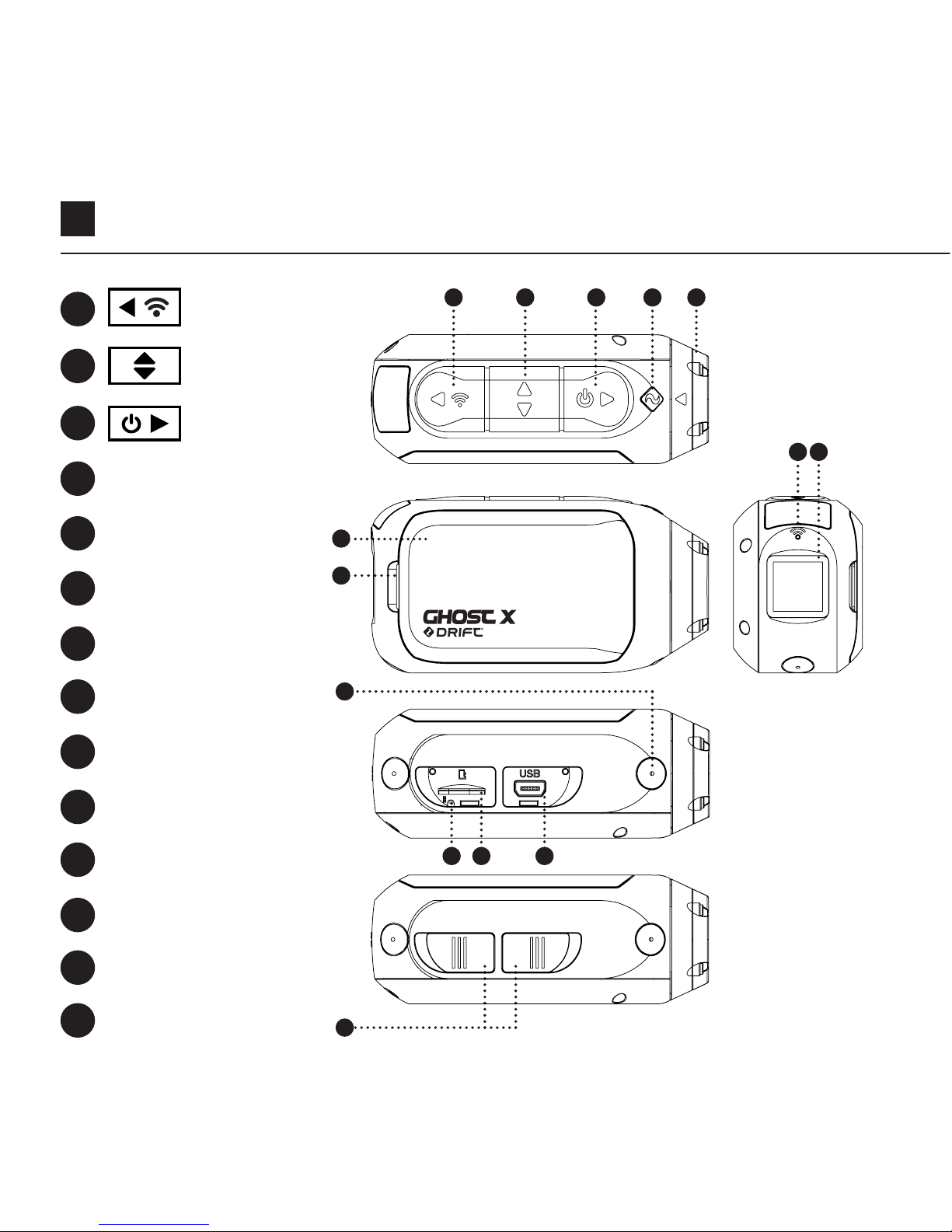
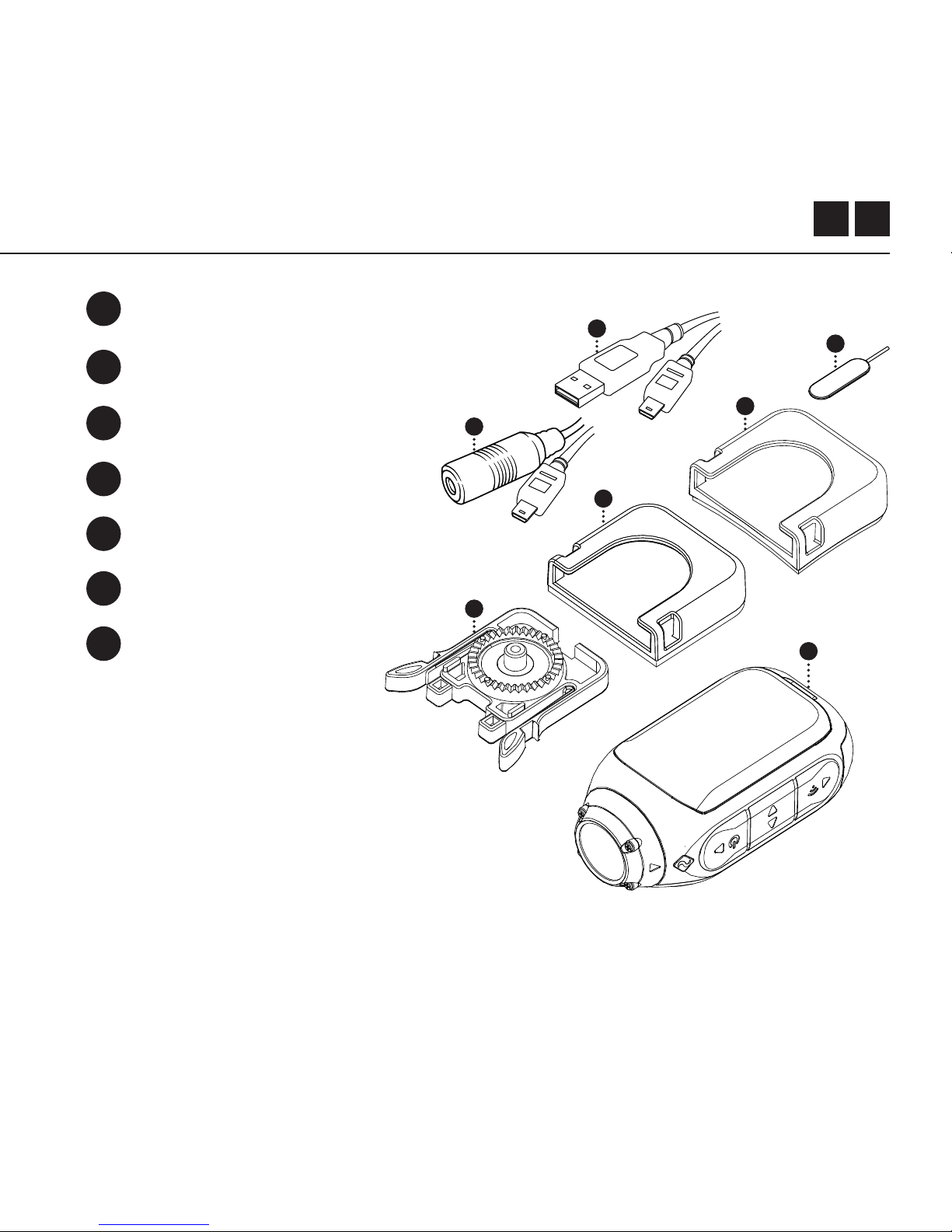
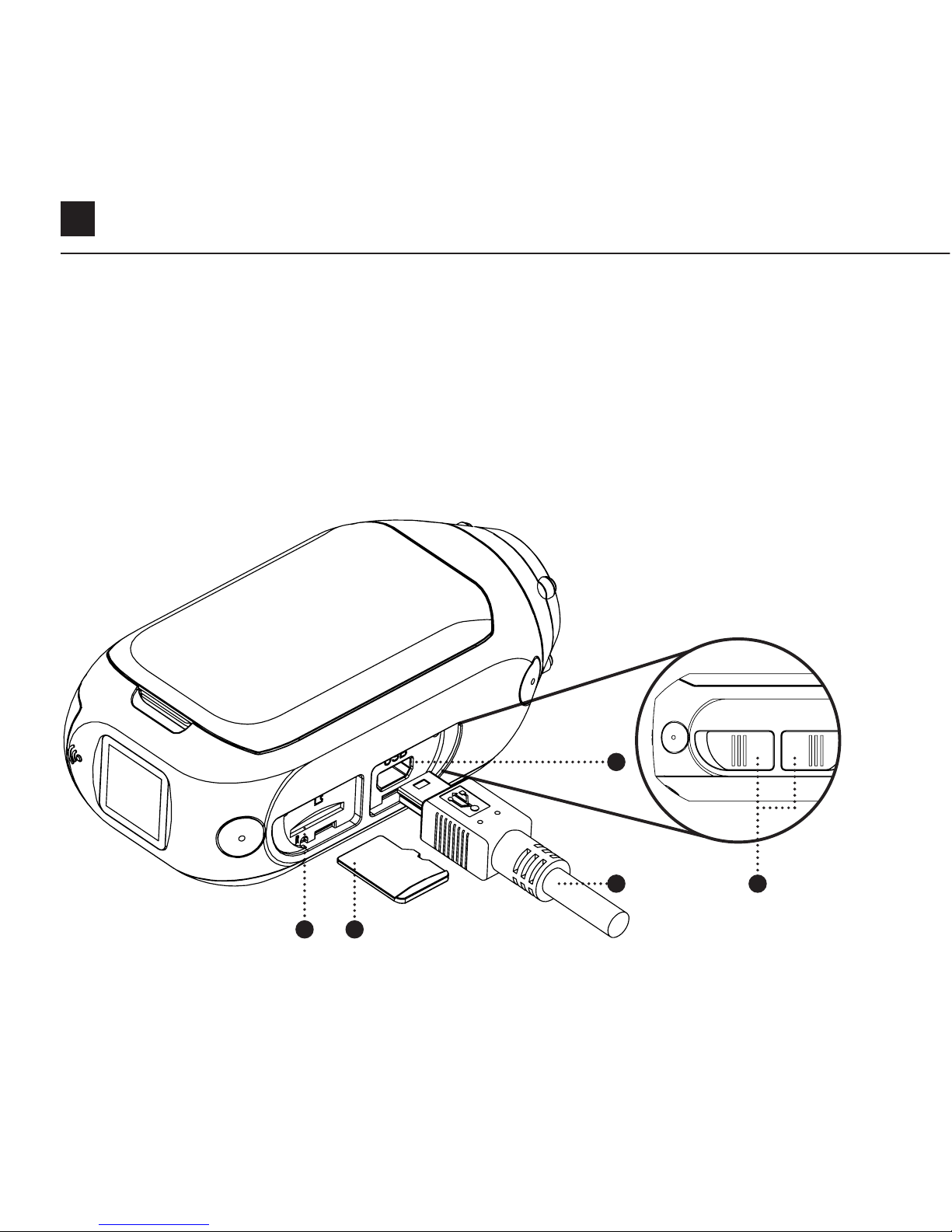
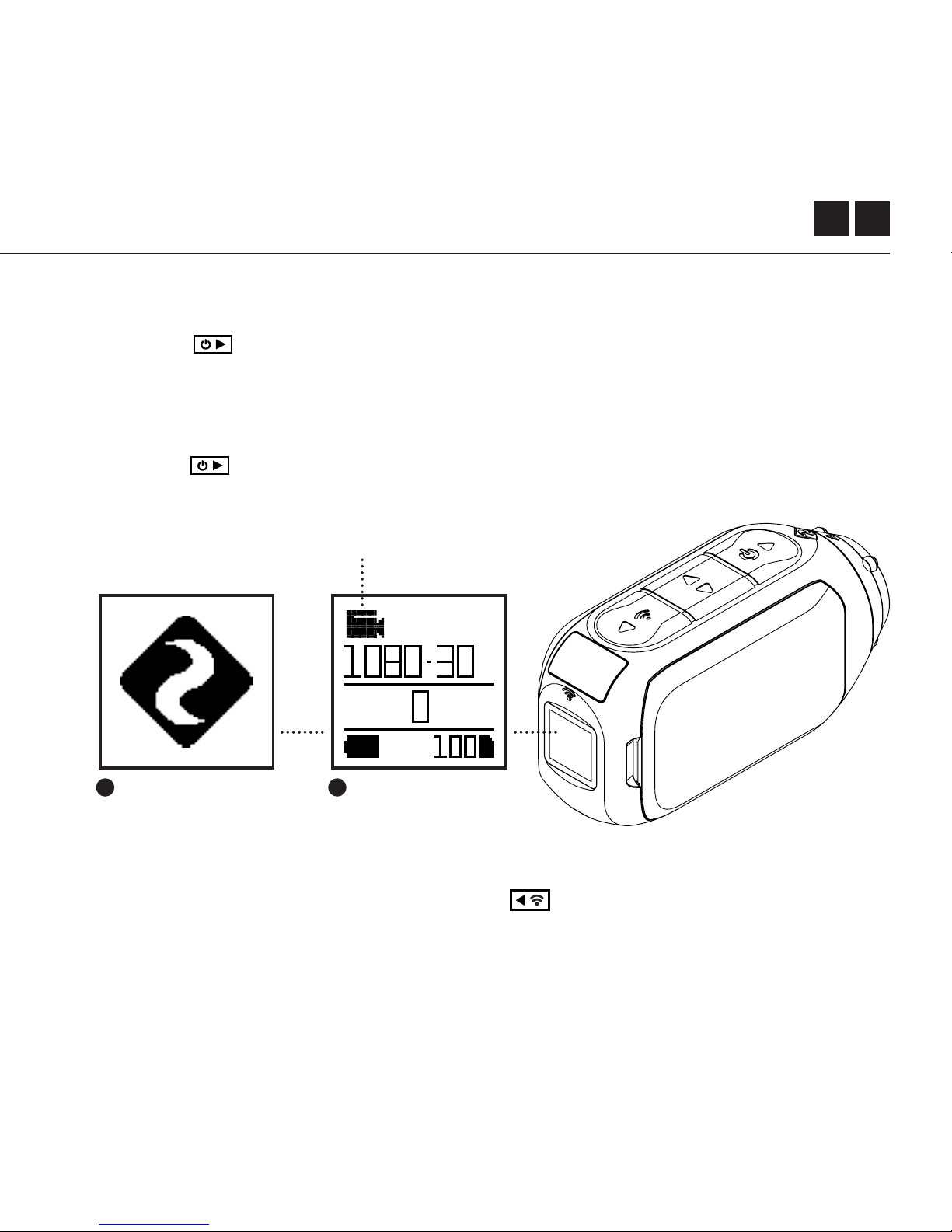
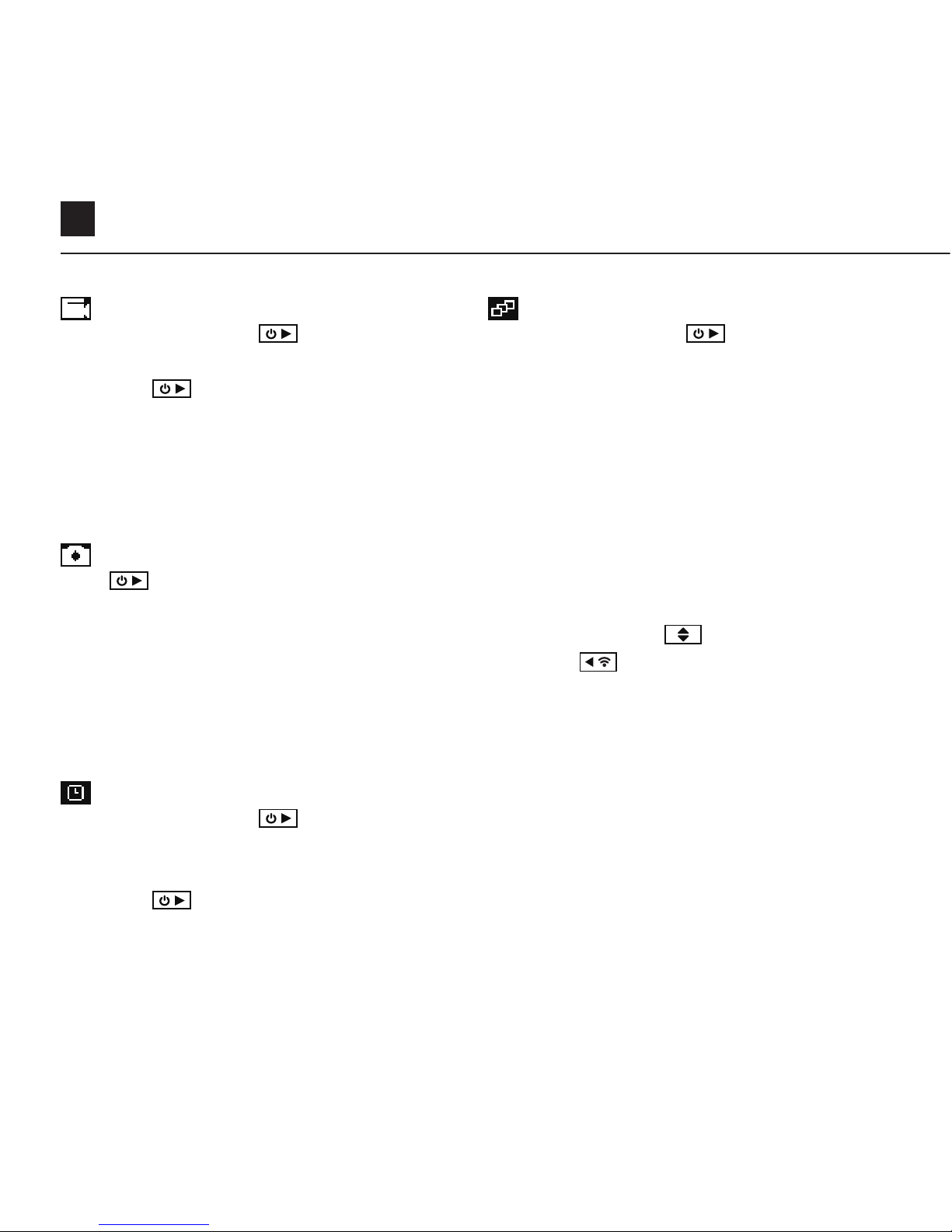
7
相机模式
视频模式
(绿色指示灯)按下
键开始录制。状
态指示灯闪动红色,表示开始录制 。
再次按下
键停止录制。
视频设置
• 分辨率
• 帧率
照片模式
按下
键,拍下静止图像。
每拍摄一张照片指示灯和LCD屏闪动一次
红色。
拍照设置
• 分辨率
延时模式
(紫色指示灯)按下
键以规定速率拍
摄一系列静止照片。每拍下一张照片,状
态指示灯闪动红色一次。
再次按下
键停止录制。
延时设置
• 分辨率
• 延时间隔
连拍模式
(青色指示灯)按下
键后,相机在
规定的时间内以规定速率拍摄一组静止
照片。为了达到最佳效果,请尽可能地
使用高速率TF卡。
连拍设置
• 分辨率
• 连拍时长/连拍速率
设置模式
在设置模式下按下
键,该设置高
亮。按下
键切换高亮设置选项。
Downloaded from www.ManualsFile.com manuals search engine
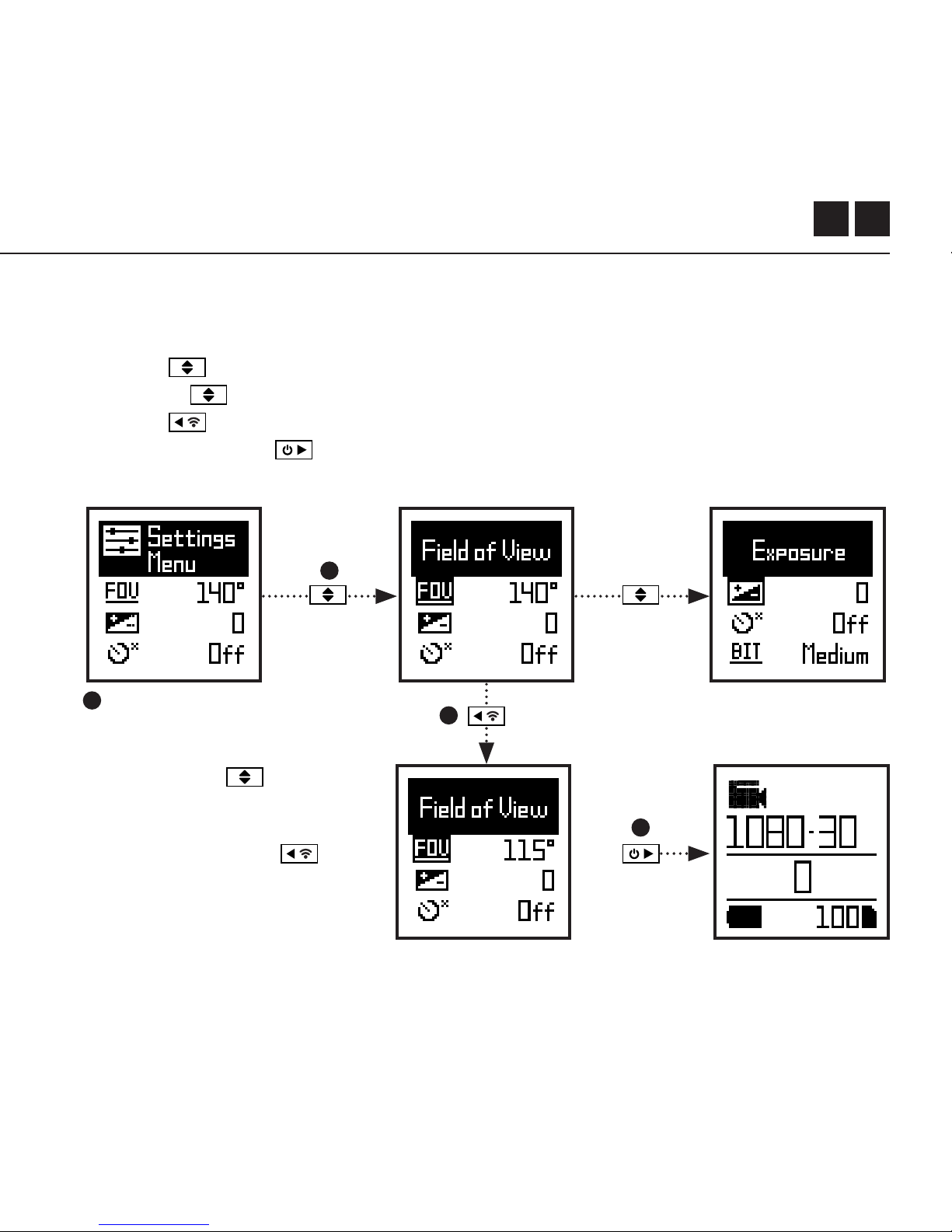

9
Wi-Fi
视野范围
曝
光
定
时
比
特
率
滤镜
ISO 敏感度
视频标记
视频标记间隔
车载记录仪
车载记录仪循环间隔
麦克风敏感度
喇叭音量
开/关
90° / 115° / 140°
-2 / -1 / 0 / +1 / +2
关 / 3秒 / 5秒 / 10秒
高 / 中/ 低
正常 / 生动 / 低光
100 / 200 / 400 / 800 / 自动
关 / 开
10秒 / 30秒 / 1分/ 2分
关 /开
10秒 / 30秒/ 1分/ 2分/ 5分 / 10分
关 / 1 / 2 / 3 / 4 / 5
关 / 低 / 中 / 高
设置
Downloaded from www.ManualsFile.com manuals search engine

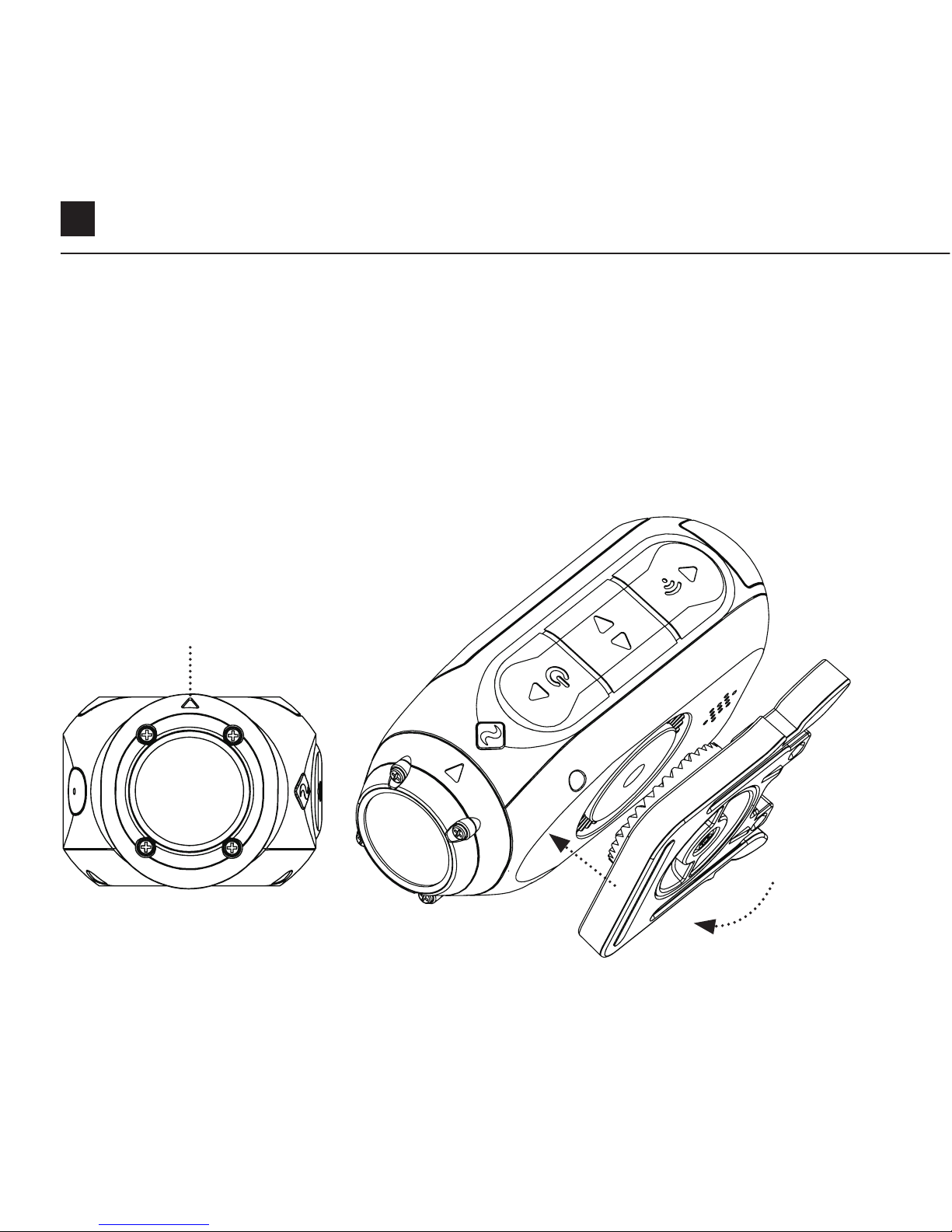

CN 12
车载记录仪模式
这种不需要人工干预的模式十分方便安全的。
相机会按照记录仪间隔设置,持续的分文件录影,直到MicroSD卡录满。
一旦录满,旧视频文件将被删除,而最新的循环将被保存。记录仪间隔可为10
秒,30秒,1分钟,2分钟,5分钟或10分钟。
视频标记
一旦激活,此功能可让相机持续录影,但只有重要的镜头被“标记”时才会保存。
当进入该模式时,按 按钮,将保存之前和未来一段时间的视频。
例如,若选择30秒的视频标记间隔,相机将保存之前的30秒,以及未来的30秒,
即共计1分的“标记”镜头。
视频标记功能要求可用空间为4GB的 Class 10 micro SD卡,才可以正常运行。
即时模式
启用即时模式可开启相机。只需在关机的时候,轻按一下开机键 ,
即可立即开始拍摄。
功能纵览
Downloaded from www.ManualsFile.com manuals search engine

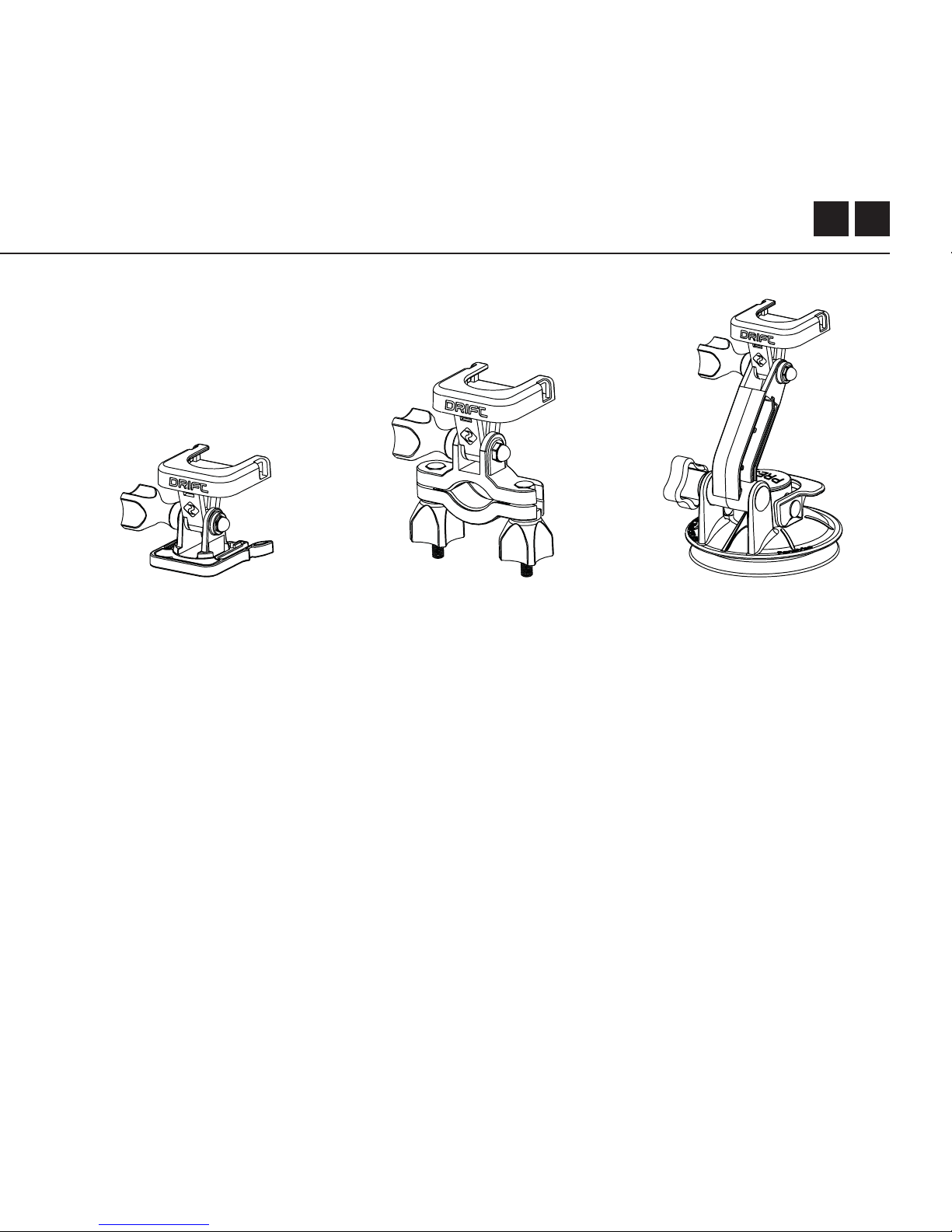


17
规格
视频分辨率和帧速率:
1080P (1920 X 1080 16:9)
960P (1280 x 960 4:3)
720P (1280 X 720 16:9)
WVGA (854 x 480 16:9)
25 / 30 FPS
25/ 30 FPS
25 / 30 / 50 / 60 FPS
25 / 30 /
50 / 60 FPS
文件格式:
传感器类型:
视野范围(对角线):
镜头焦距:
镜头旋转:
照片模式:
曝光:
LCD 屏:
存储容量:
.MP4 (H.264 codec)
CMOS
90° / 115° / 140°
0.5m to 无限
330°
4 / 8 / 12百万像素
自动 / 手动设定
(高级用户)
彩色点阵背光 LCD
Micro SD, SDHC, SDXC 存储卡 最大128GB
Downloaded from www.ManualsFile.com manuals search engine

CN 18
规格
适配范围
输入:
输出:
连接:
电源:
W i - F i 频 率 :
相 机 尺 寸:
重量:
迷
你 USB 10 针。通过USB适配器外接麦克风
USB适配器接A/V输出
USB 即插即用,迷你USB10针
内部1500mAh,包括500mAh 外置电池。
2.4GHz
43 (W) x 82.2 (L) x 31.4 (D) mm
120g
Windows XP 及以上 / Mac OS 10.2 及以上
观看1080P 视频需要有回放功能的显示屏。观看 / 编辑的
最小要求为: 8GB RAM集成显卡, 第4代 i5 and 17 Intel®
Core™ 或 AMD A10-7800 APU。
GeForce® GTX™ 650, AMD Radeon™ HD 7000 系列及
以上的显卡。
由于1080P所需的大量数据处理,适应系统要求可能仍然会
导致交错或起伏的播放。
Downloaded from www.ManualsFile.com manuals search engine