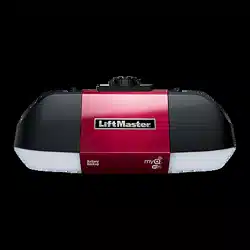
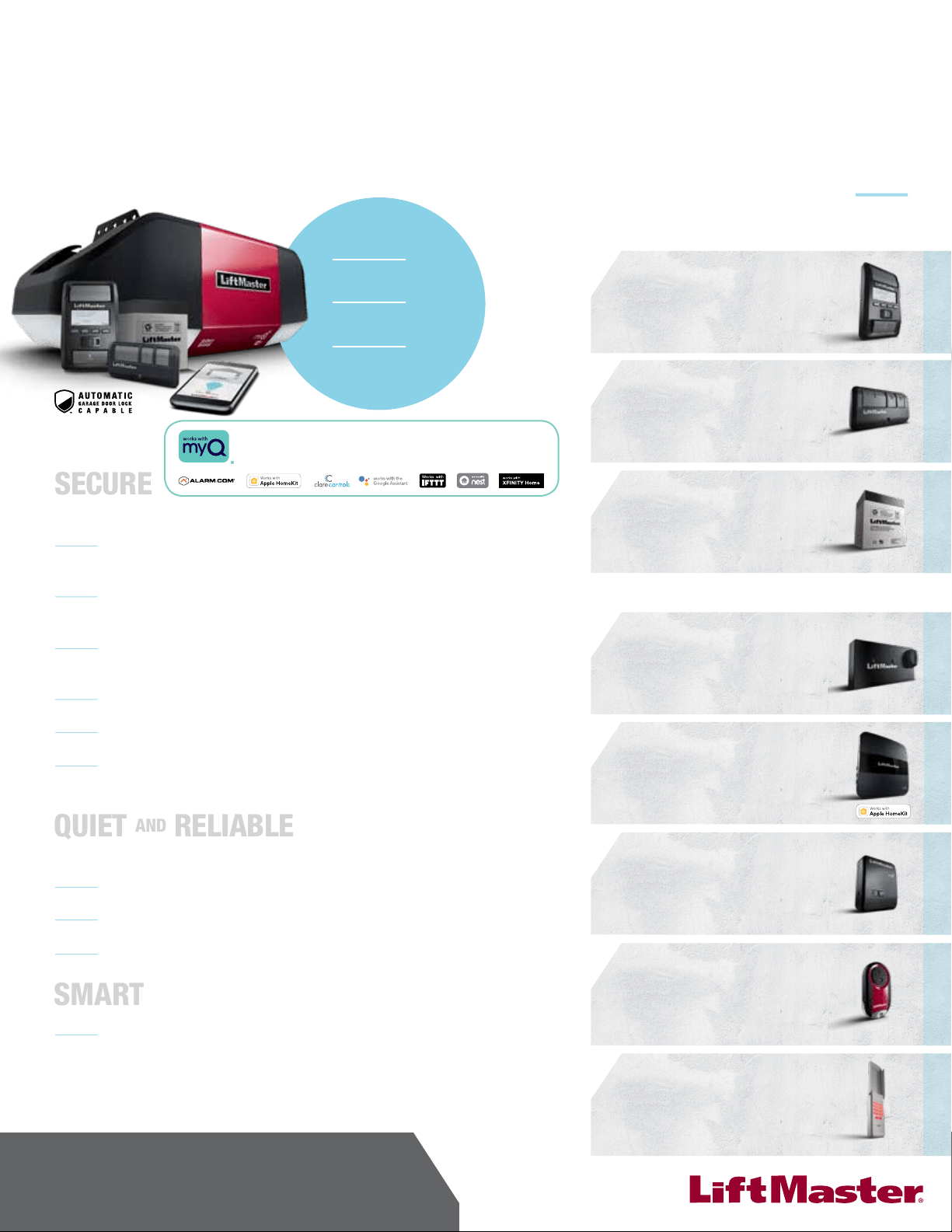
ELITE Series LED Wi-Fi
®
Garage Door Opener
MODEL WLED
SM
USER’S GUIDE
• Please read this guide and the enclosed safety materials carefully!
• The door WILL NOT CLOSE unless the Protector System
®
is connected and properly aligned.
• Periodic checks of the garage door opener are required to ensure
safe operation.
• This garage door opener is ONLY compatible with MyQ
®
and Security+ 2.0
®
accessories.
• DO NOT install on a one-piece door if using devices or features
providing unattended close. Unattended devices and features are to
be used ONLY with sectional doors.
• Attach warning labels to the location indicated on label.
FOR RESIDENTIAL USE ONLY
LiftMaster
300 Windsor Drive
Oak Brook, IL 60523
LiftMaster.com
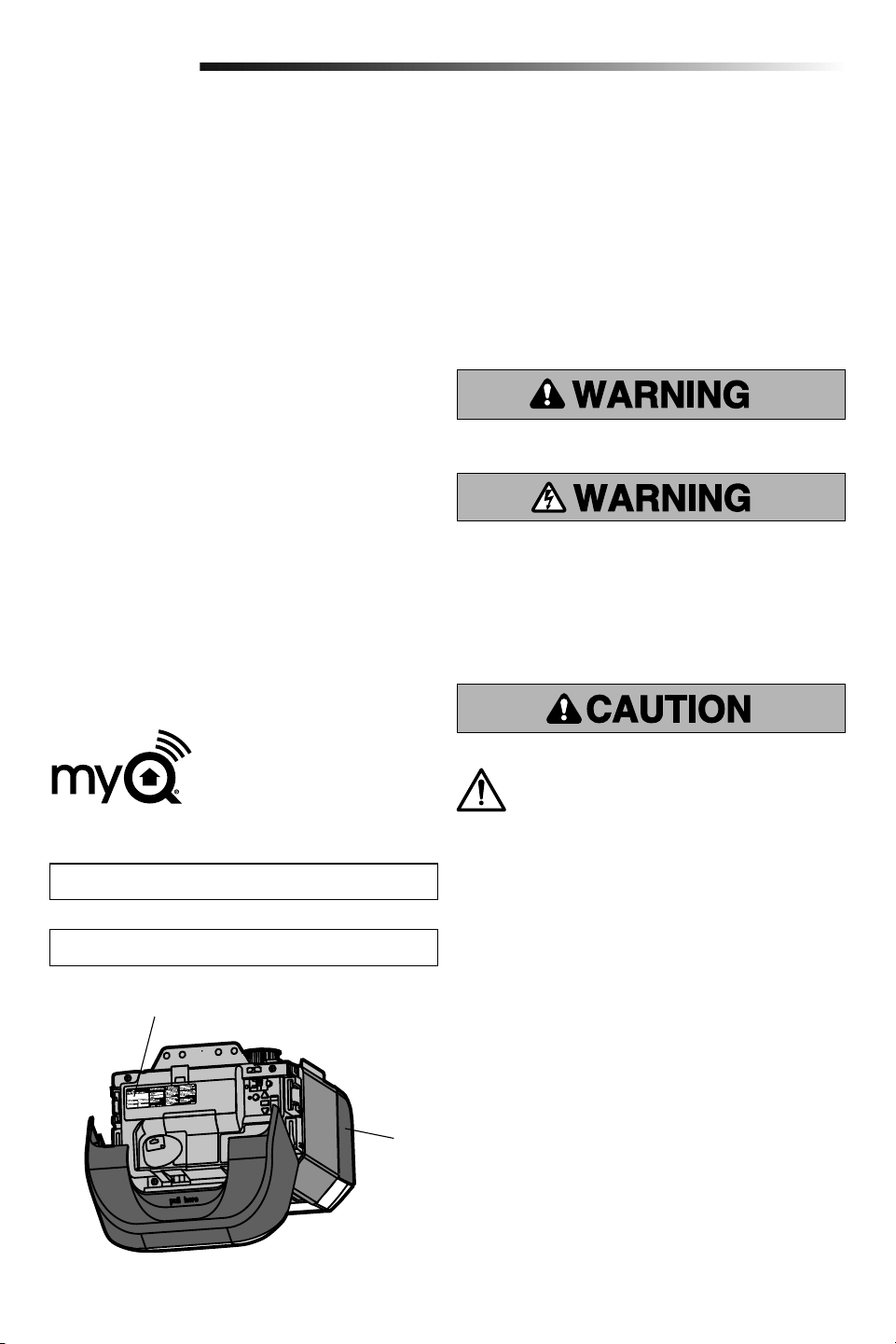
Register your garage door opener to receive
updates and offers from LiftMaster
Take a photo of the camera icon
including the points ( ).
Send it in by texting
the photo to 71403 (US)
or visit www.liftmaster.photo (Global)
2
For the complete manual visit LiftMaster.com/Customer-Support
Contents
Important Safety Instructions .............................3-4
Connect With Your Smartphone ..........................5-6
Test the Wi-Fi Signal Strength .......................... 5
Connect Your Garage Door Opener to Your
Home Wi-Fi Network ...................................... 6
Programming .................................................. 7
Remote Control ............................................ 7
Wireless Keyless Entry ................................... 7
To Erase the Memory ..................................... 7
Operation................................................... 8-10
To Open the Door Manually .............................. 8
Door Control ................................................ 9
The Protector System
®
(Safety Reversing Sensors) .............................10
Adjustment ................................................11-13
Introduction ...............................................11
Program the Travel .......................................12
Test the Safety Reversal System .......................13
Test the Protector System
®
.............................13
Maintenance ..................................................14
Troubleshooting ..............................................14
Repair Parts ..................................................15
Warranty ......................................................15
Automatic Garage Door Opener
Safety & Maintenance Guide ...........................16-17
Safety Symbol and Signal Word
Review
This garage door opener has been designed and tested
to offer safe service provided it is installed, operated,
maintained and tested in strict accordance with the
instructions and warnings contained in this manual.
When you see these Safety Symbols and Signal Words on
the following pages, they will alert you to the possibility
of serious injury or death if you do not comply with the
warnings that accompany them. The hazard may come
from something mechanical or from electric shock. Read
the warnings carefully.
Unattended Operation
The Timer-to-Close (TTC) feature, the MyQ
®
Smartphone
Control app, and MyQ
®
Garage Door and Gate Monitor are
examples of unattended close and are to be used ONLY
with sectional doors. Any device or feature that allows the
door to close without being in the line of sight of the door
is considered unattended close. The Timer-to-Close (TTC)
feature, the MyQ
®
Smartphone Control, and any other
MyQ
®
devices are to be used ONLY with sectional doors.
Mechanical
Electrical
When you see this Signal Word on the following pages, it
will alert you to the possibility of damage to your garage
door and/or the garage door opener if you do not comply
with the cautionary statements that accompany it. Read
them carefully.
Product Serial Number
MyQ Serial Number
Write down the following information for future reference:
Product Serial Number:
MyQ
®
Serial Number:
Serial Number:
WARNING: This product can expose you to
chemicals including lead, which are known to the
State of California to cause cancer or birth defects
or other reproductive harm. For more information
go to www.P65Warnings.ca.gov.
3
IMPORTANT INSTALLATION INSTRUCTIONS
To reduce the risk of SEVERE INJURY or DEATH:
1. READ AND FOLLOW ALL WARNINGS AND
INSTRUCTIONS.
2. Install garage door opener ONLY on properly
balanced and lubricated garage door. An
improperly balanced door may NOT reverse when
required and could result in SEVERE INJURY or
DEATH.
3. ALL repairs to cables, spring assemblies and
other hardware MUST be made by a trained door
systems technician BEFORE installing opener.
4. Disable ALL locks and remove ALL ropes
connected to garage door BEFORE installing
opener to avoid entanglement.
5. Install garage door opener 7 feet (2.13 m) or more
above floor.
6. Mount the emergency release within reach, but at
least 6 feet (1.83 m) above the floor and avoiding
contact with vehicles to avoid accidental release.
7. NEVER connect garage door opener to power
source until instructed to do so.
8. NEVER wear watches, rings or loose clothing
while installing or servicing opener. They could be
caught in garage door or opener mechanisms.
9. Install wall-mounted garage door control:
• within sight of the garage door.
• out of reach of small children at a minimum
height of 5feet (1.5m) above floors, landings,
steps or any other adjacent walking surface.
• away from ALL moving parts of the door.
10. Place entrapment warning label on wall next to
garage door control.
11. Place manual release/safety reverse test label in
plain view on inside of garage door.
12. Upon completion of installation, test safety reversal
system. Door MUST reverse on contact with a
1-1/2" (3.8 cm) high object (or a 2x4 laid flat) on
the floor.
13. To avoid SERIOUS PERSONAL INJURY or DEATH
from electrocution, disconnect ALL electric and
battery power BEFORE performing ANY service or
maintenance.
14. DO NOT install on a one-piece door if using devices
or features providing unattended close. Unattended
devices and features are to be used ONLY with
sectional doors.
15.
SAVE THESE
INSTRUCTIONS.
Important Safety Instructions
NOTICE: This device complies with Part 15 of the FCC rules and Industry Canada’s
license-exempt RSSs. Operation is subject to the following two conditions: (1) this device
may not cause harmful interference, and (2) this device must accept any interference
received, including interference that may cause undesired operation.
Any changes or modifications not expressly approved by the party responsible for
compliance could void the user’s authority to operate the equipment.
This device must be installed to ensure a minimum 20 cm (8 in.) distance is maintained
between users/bystanders and device.
This device has been tested and found to comply with the limits for a Class B digital
device, pursuant to part 15 of the FCC rules and Industry Canada ICES standard. These
limits are designed to provide reasonable protection against harmful interference in a
residential installation. This equipment generates, uses and can radiate radio frequency
energy and, if not installed and used in accordance with the instructions, may cause
harmful interference to radio communications. However, there is no guarantee that
interference will not occur in a particular installation. If this equipment does cause
harmful interference to radio or television reception, which can be determined by turning
the equipment off and on, the user is encouraged to try to correct the interference by one
or more of the following measures:
• Reorient or relocate the receiving antenna.
• Increase the separation between the equipment and receiver.
• Connect the equipment into an outlet on a circuit different from that to which the
receiver is connected.
• Consult the dealer or an experienced radio/TV technician for help.
4
For the complete manual visit LiftMaster.com/Customer-Support
Important Safety Instructions
IMPORTANT SAFETY INSTRUCTIONS
To reduce the risk of SEVERE INJURY or DEATH:
1. READ AND FOLLOW ALL WARNINGS AND
INSTRUCTIONS.
2. ALWAYS keep remote controls out of reach of
children. NEVER permit children to operate or play
with garage door control push buttons or remote
controls.
3. ONLY activate garage door when it can be seen
clearly, it is properly adjusted, and there are no
obstructions to door travel.
4. ALWAYS keep garage door in sight and away from
people and objects until completely closed. NO
ONE SHOULD CROSS THE PATH OF THE MOVING
DOOR.
5. NO ONE SHOULD GO UNDER A STOPPED,
PARTIALLY OPENED DOOR.
6. If possible, use emergency release handle to
disengage trolley ONLY when garage door is
CLOSED. Use caution when using this release
with the door open. Weak or broken springs or
unbalanced door could result in an open door
falling rapidly and/or unexpectedly and increasing
the risk of SEVERE INJURY or DEATH.
7. NEVER use emergency release handle unless
garage doorway is clear of persons and
obstructions.
8. NEVER use emergency release handle to pull
garage door open or closed. If rope knot becomes
untied, you could fall.
9. After ANY adjustments are made, the safety
reversal system MUST be tested.
10. Safety reversal system MUST be tested every
month. Garage door MUST reverse on contact with
1-1/2" high (3.8 cm) object (or a 2x4 laid flat) on
the floor. Failure to adjust the garage door opener
properly increases the risk of SEVERE INJURY or
DEATH.
11. ALWAYS KEEP GARAGE DOOR PROPERLY
BALANCED. An improperly balanced door may NOT
reverse when required and could result in SEVERE
INJURY or DEATH.
12. ALL repairs to cables, spring assemblies and
other hardware, ALL of which are under EXTREME
tension, MUST be made by a trained door systems
technician.
13. ALWAYS disconnect electric power to garage door
opener BEFORE making ANY repairs or removing
covers.
14. This operator system is equipped with an
unattended operation feature. The door could move
unexpectedly. NO ONE SHOULD CROSS THE PATH
OF THE MOVING DOOR.
15. DO NOT install on a one-piece door if using devices
or features providing unattended close. Unattended
devices and features are to be used ONLY with
sectional doors.
16.
SAVE THESE
INSTRUCTIONS.
5
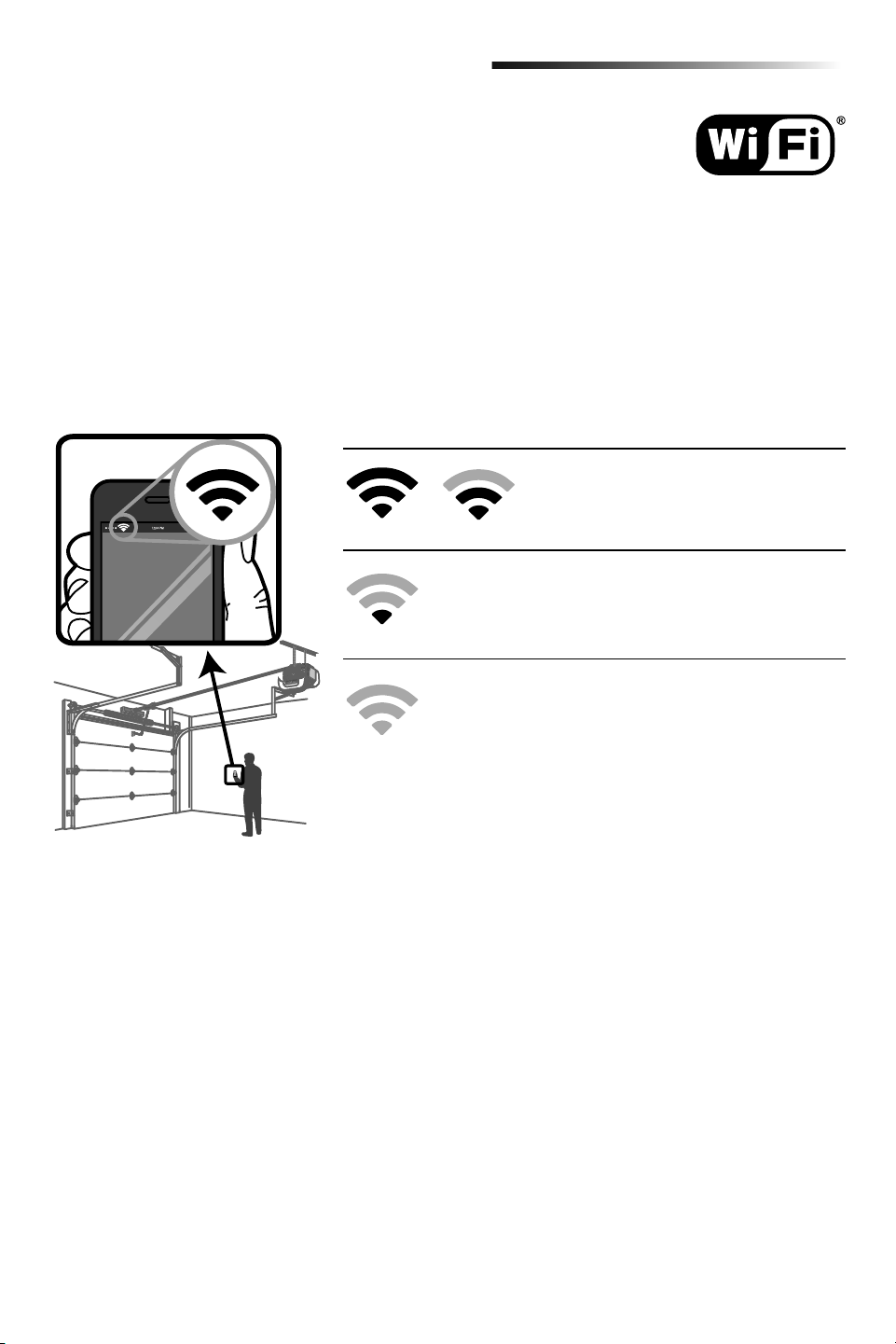
Test the Wi-Fi Signal Strength
Make sure your mobile device is connected to your Wi-Fi network. Hold your mobile device in the place where your
garage door opener is installed and check the Wi-Fi signal strength.
Before You Begin
You will need:
• Wi-Fi
®
enabled smartphone, tablet or laptop
• Broadband Internet Connection
• Wi-Fi signal in the garage (2.4 Ghz, 802.11b/g/n required)
• Password for your home network (router's main account, not guest network)
Check Signal Strength. If you see:
Wi-Fi signal is strong.
The garage door opener will connect to your
Wi-Fi network.
Wi-Fi signal is weak.
The garage door opener may connect to your Wi-Fi network. If
not, try one of the options below to improve the Wi-Fi signal.
No Wi-Fi signal.
The garage door opener will not be able to connect to your
Wi-Fi network. Try one of the options below to improve the
Wi-Fi signal:
• Move your router closer to the garage door opener to minimize
interference from walls and other objects
• Buy a Wi-Fi range extender
For compatible router specifications and help, visit
WiFiHelp.LiftMaster.com.
Proceed to page 6.
Connect With Your Smartphone
6
For the complete manual visit LiftMaster.com/Customer-Support
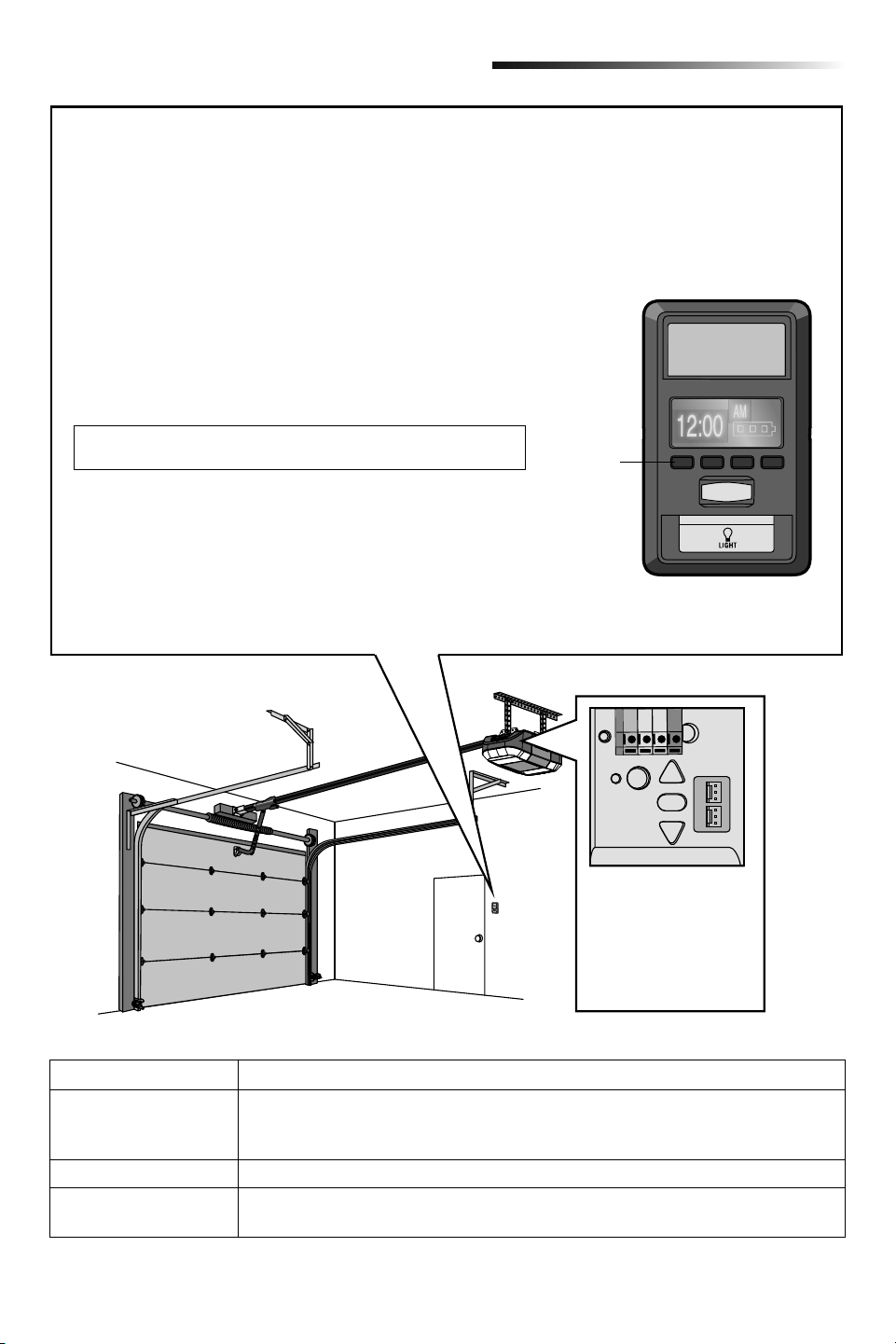
1. Use the Smart Control Panel
®
, go to Menu > Program > Wi-Fi
Setup. The garage door opener will beep once. You have 20
minutes to complete the connection process.
Navigation
Buttons
LED
An LED on the garage
door opener will indicate
Wi-Fi status.
See table below.
Actual product may differ
from image shown.
Connect With Your Smartphone
LED Definition
Blue Off - Wi-Fi is not turned on.
Blinking - Garage door opener is in Wi-Fi learn mode.
Solid - Mobile device connected to the garage door opener.
Blue and Green Blinking - Attempting to connect to router.
Green Blinking - Attempting to connect to the Internet server.
Solid - Wi-Fi has been set up and garage door opener is connected to the internet.
Connect Your Garage Door Opener to Your Home Wi-Fi
®
Network
Get connected and control your garage door opener with the MyQ
®
App.
2. On your mobile device, go to Settings > Wi-Fi and select the
network with the “MyQ-” prefix.
3. Launch the web browser on your smartphone or tablet. Enter
setup.myqdevice.com into the browser address bar. Follow the
on screen prompts to connect the garage door opener to your
Wi-Fi network. The MyQ serial number will display on screen.
Write the serial number in the space below.
4. Download the MyQ app from the App Store
®
or Google Play™
store. Sign up for your MyQ account and add the MyQ serial
number to your account.
To add a second Wi-Fi garage door opener, repeat steps 1-3. Add the
second MyQ serial number to your account in the MyQ app.
If you are unsuccessful adding your device, try an alternate web
browser or visit WiFiHelp.LiftMaster.com.
7
Select Menu > Program > Remote and
follow the on screen prompts.
Programming
Remote Control
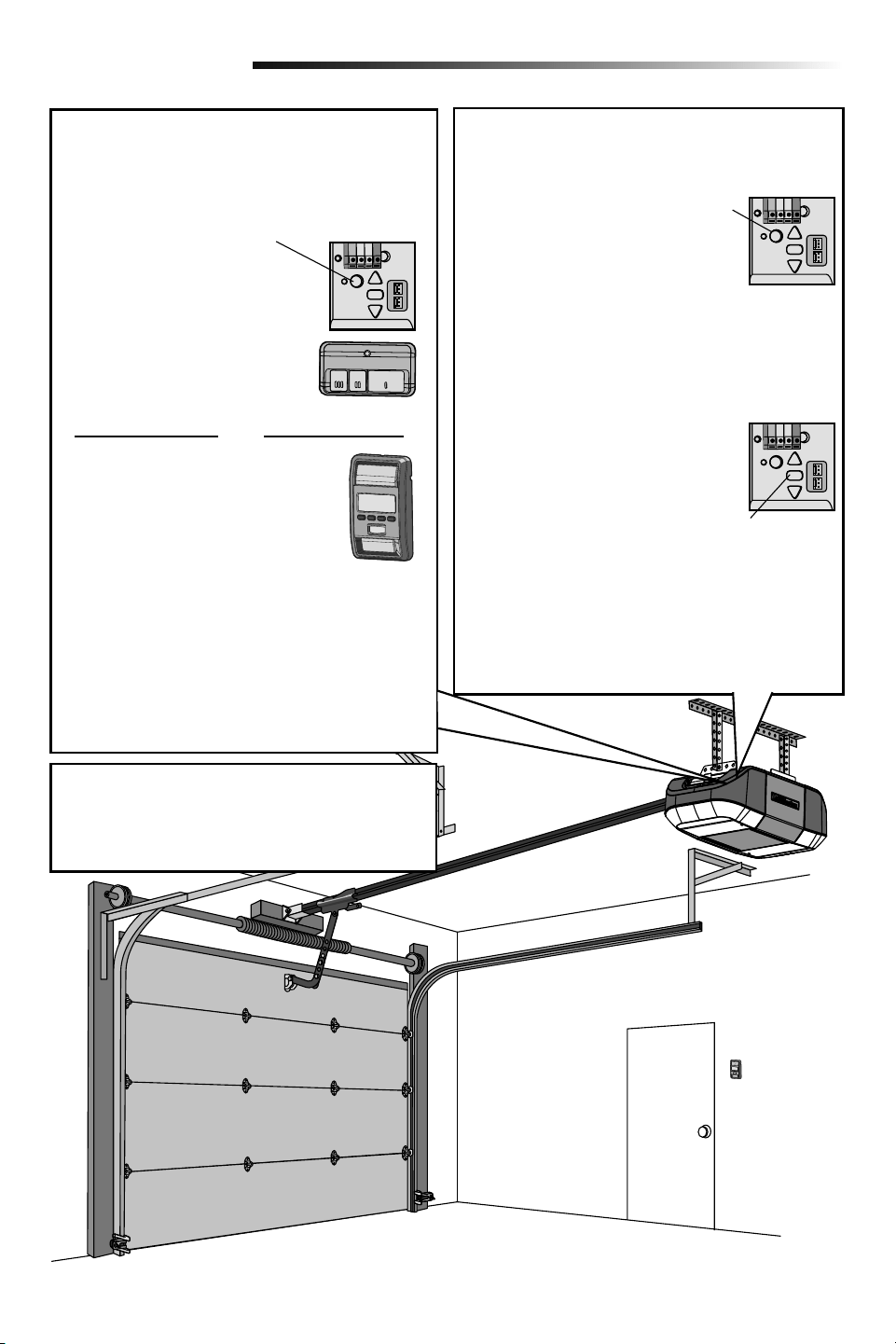
Below are the steps to program a new or existing
remote control. Test remote control before
reprogramming.
1. Press and release the LEARN
Button on the garage door
opener.
2. Press and hold the button on the
remote control that you wish to
use. Release the button when
the garage door opener lights
blink or two clicks are heard.
OR
If your vehicle is equipped with a Homelink
®
, you may
require an external adapter depending on the make,
model, and year of your vehicle.
Visit www.homelink.com for additional information.
Wireless Keyless Entry
Refer to the instructions provided with your
keyless entry OR go to LiftMaster.com to download
instructions.
To Erase the Memory
Erase ALL Remote Controls and Keyless Entries
Press and hold the LEARN button
until the LED goes out
(approximately 6 seconds).
All remote controls and
keyless entries are now erased.
Erase ALL Devices
(Including MyQ
®
enabled accessories)
1. Press and hold the LEARN button until the LED
goes out (approximately 6 seconds).
2. Immediately press and hold the LEARN button until
the LED goes out. All codes are now erased.
Erase the Wi-Fi Network from the
Garage Door Opener
Press and hold the adjustment
button until 3 beeps are heard
(approximately 6 seconds).
Erase a MyQ
®
Account
Go to myLiftMaster.com to delete your MyQ account.
LEARN
Button
Adjustment Button
8
For the complete manual visit LiftMaster.com/Customer-Support
Operation
To prevent possible SERIOUS INJURY or DEATH from a
falling garage door:
• If possible, use emergency release handle to
disengage trolley ONLY when garage door is
CLOSED. Weak or broken springs or unbalanced
door could result in an open door falling rapidly and/
or unexpectedly.
• NEVER use emergency release handle unless garage
doorway is clear of persons and obstructions.
• NEVER use emergency release handle to pull door
open or closed. If rope knot becomes untied, you
could fall.
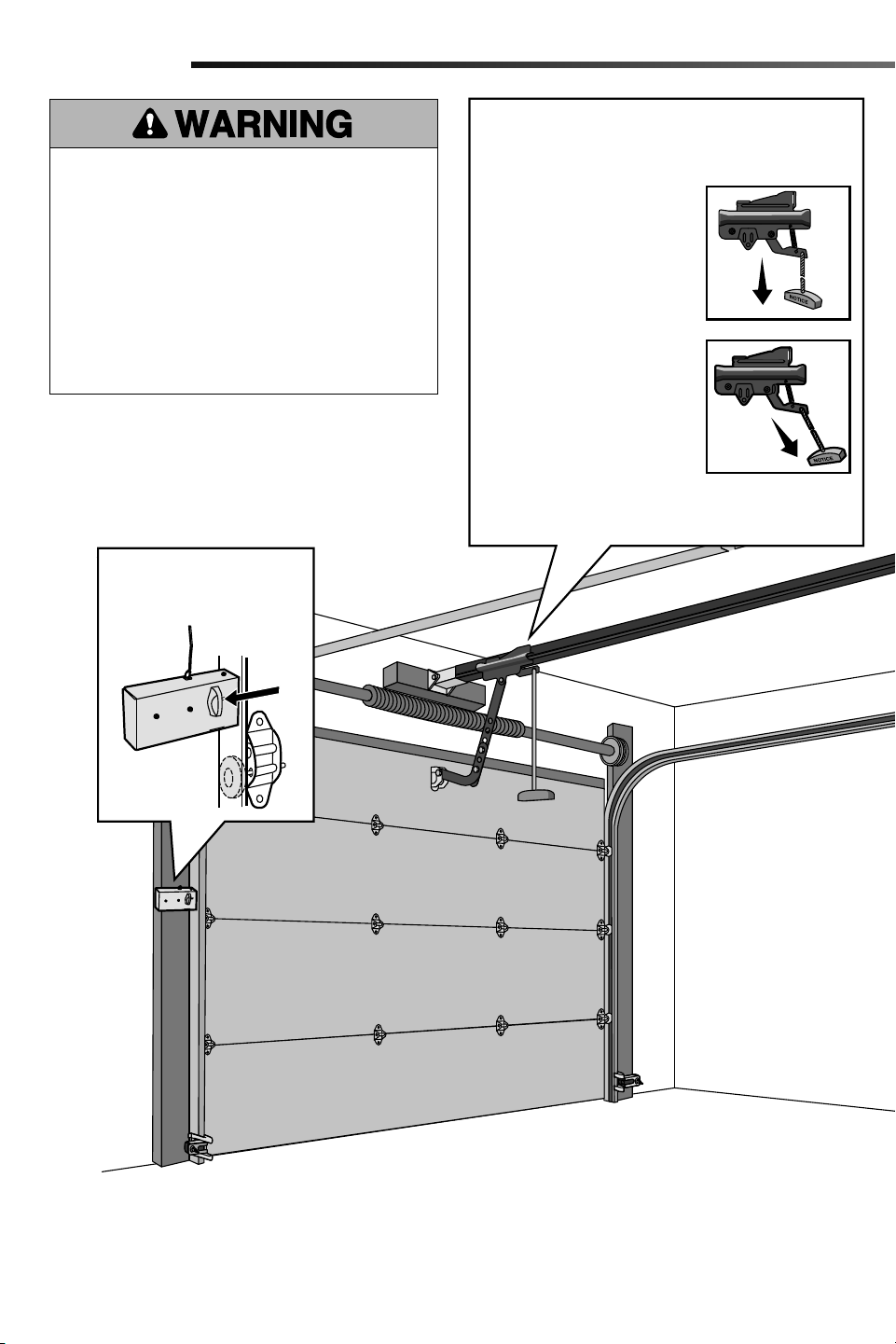
To Open the Door Manually
NOTE: Disengage any door locks before proceeding.
1. The door should be fully
closed if possible.
2. Pull down on the emergency
release handle.
Lockout Feature
1. Pull the emergency release
handle down and back. The
door can then be raised and
lowered manually as often as
necessary.
2. To disengage the lockout
feature, pull the handle
straight down.
The trolley will reconnect on the next time the opener
is activated.
Disengage automatic garage
door lock before opening
door manually (if applicable).
9
Door Control
Automatic Garage Door Lock
(If applicable)
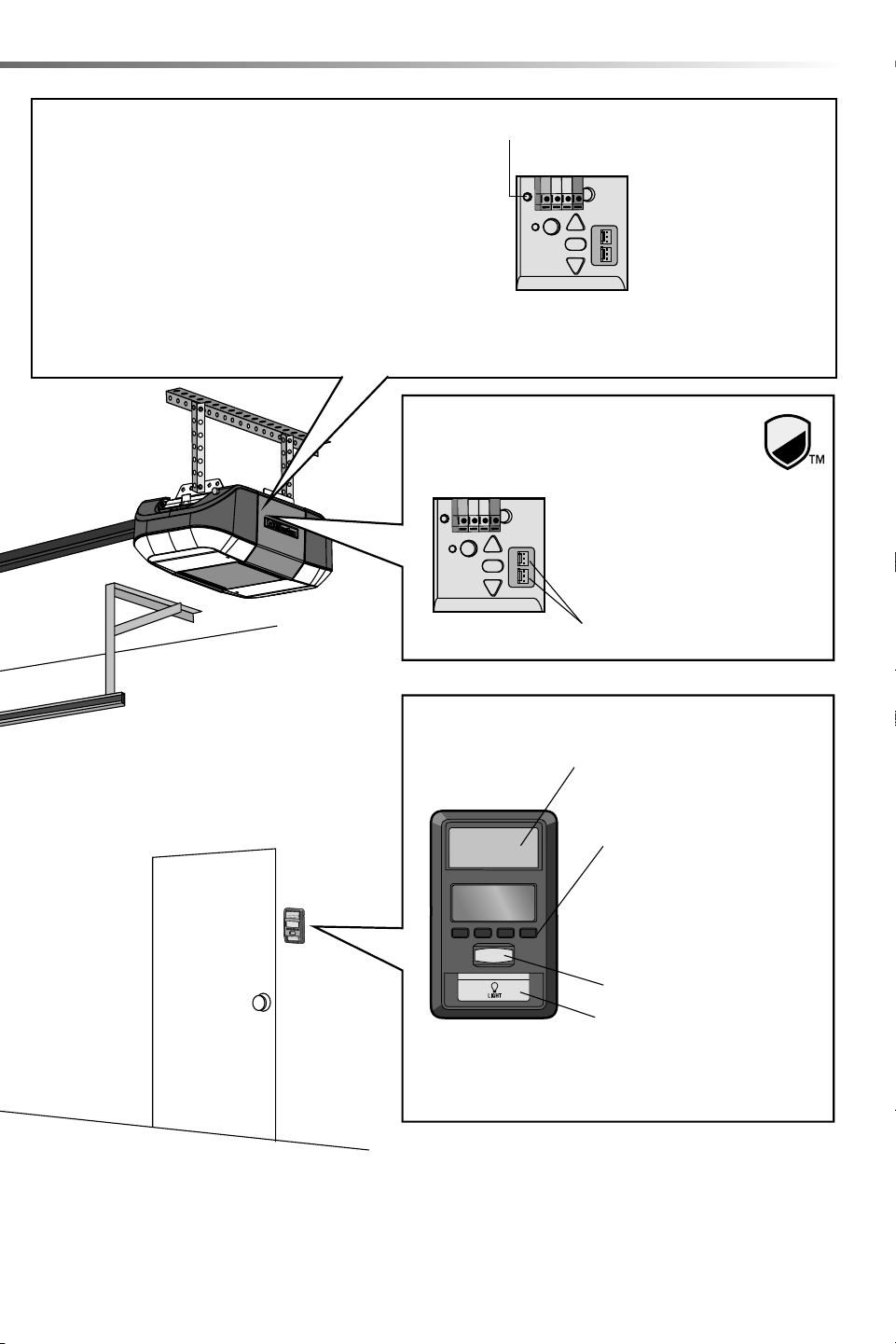
Push Bar:
Open/Close garage door.
Navigation Buttons:
Access menu:
Clock Setup, Timer-to-Close,
Lock, Program, Temperature,
Language, Light Settings,
Contrast Adjust, Maintenance
Alert System, and Wi-Fi Setup*.
Lock terminals
Garage door opener models
featuring the Security Shield on
the cover are compatible with
the Automatic Garage Door Lock
(Model 841LM).
Motion Sensor
Light Button
* The garage door opener must run through a complete cycle
before it will activate Wi-Fi
®
programming. For help related
to Wi-Fi, visit WiFiHelp.LiftMaster.com.
If the opener has LED lighting
issues, see Troubleshooting.
Battery Backup (If applicable)
The battery backup allows access in and out of your garage when
the power is out. When the garage door opener is operating on
battery power, the garage door opener will run slower and the
lights, Timer-to-Close, and remote close features (MyQ
®
App) are
disabled. In battery backup mode, the Automatic Garage Door
Lock will unlock when the garage door is opened, and will remain
disabled until power is restored. During a power outage the battery
supplies power for up to 24 hours of operation. For maximum
battery life and prevent damage, disconnect the battery when the
garage door opener is unplugged for an extended period of time.
Battery Status LED
• Solid green LED -
Charged battery
• Flashing green LED -
Charging battery
• Solid orange LED with
beep - Operating on
battery power
• Flashing orange LED with
beep - Low battery
• Solid red LED with beep -
Replace battery
10
For the complete manual visit LiftMaster.com/Customer-Support
Operation
The Protector System
®
(Safety Reversing Sensors)
Be sure power is NOT connected to the garage door
opener BEFORE installing the safety reversing sensor.
To prevent SERIOUS INJURY or DEATH from closing
garage door:
• Correctly connect and align the safety reversing
sensor. This required safety device MUST NOT be
disabled.
• Install the safety reversing sensor so beam is NO
HIGHER than 6" (15 cm) above garage floor.
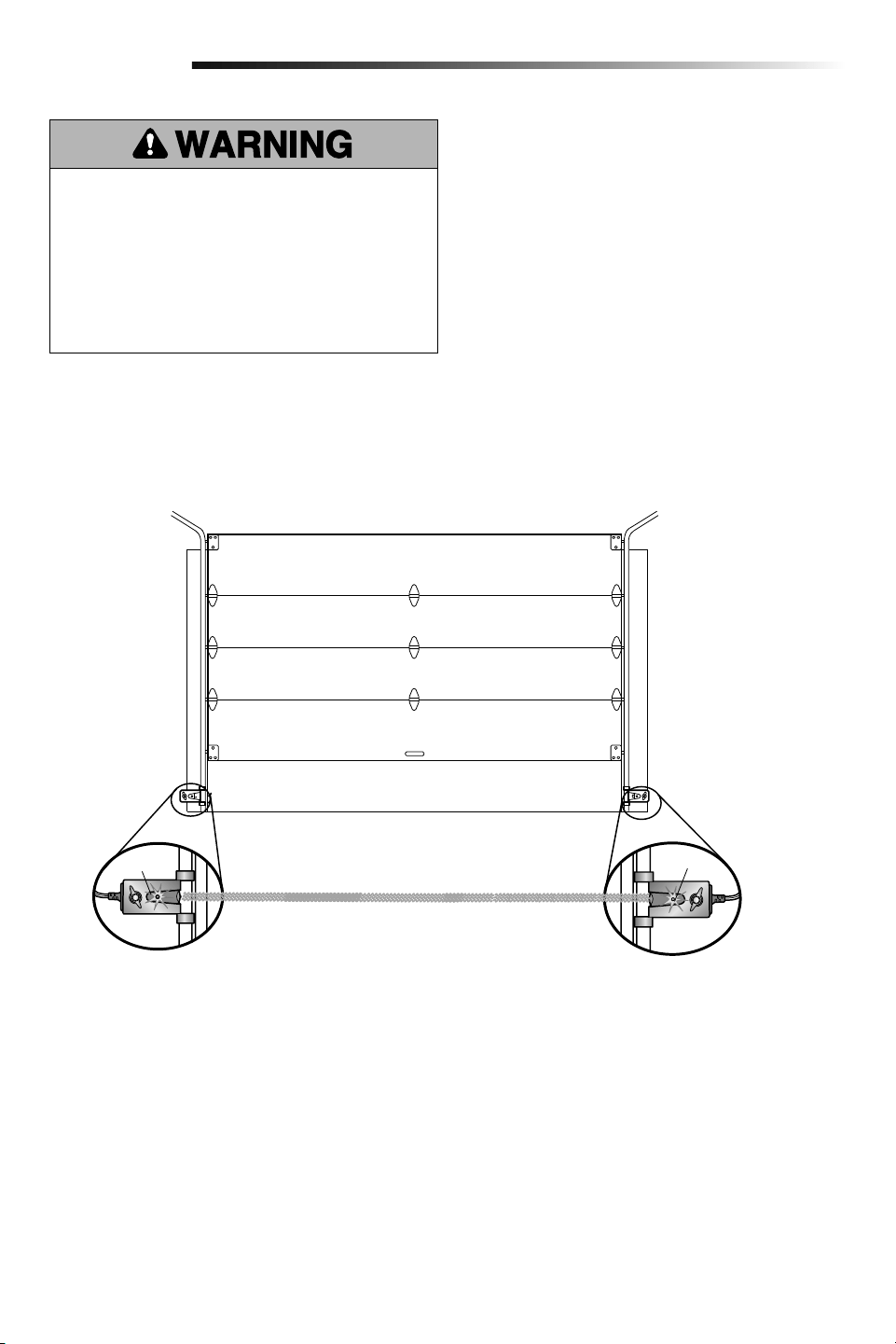
The safety reversing sensors must be connected and
aligned correctly before the garage door opener will
move in the down direction.
When the light beam is obstructed or misaligned while the
door is closing, the door will reverse and the garage door
opener lights will flash ten times. If the door is already
open, it will not close.
The sensors can be aligned by loosening the wing nuts,
aligning the sensors, and tightening the wing nuts. Check
to make sure the LEDs in both sensors are glowing
steadily. The LEDs in both sensors will glow steadily if they
are aligned and wired correctly.
Safety Reversing Sensor
6" (15 cm) max. above floor
Safety Reversing Sensor
6" (15 cm) max. above floor
Green LED
Amber LED
(invisible light beam)
11
Adjustment
Introduction
Without a properly installed safety reversal system,
persons (particularly small children) could be
SERIOUSLY INJURED or KILLED by a closing garage
door.
• Incorrect adjustment of garage door travel limits
will interfere with proper operation of safety reversal
system.
• After ANY adjustments are made, the safety reversal
system MUST be tested. Door MUST reverse on
contact with 1-1/2" (3.8 cm) high object (or 2x4 laid
flat) on floor.
Your garage door opener is designed with electronic
controls to make setup and adjustments easy. The
adjustments allow you to program where the door will
stop in the open (UP) and close (DOWN) position. The
electronic controls sense the amount of force required to
open and close the door.
NOTE: If anything interferes with the door’s upward travel
it will stop. If anything interferes with the door’s downward
travel, it will reverse.
To prevent damage to vehicles, be sure fully open door
provides adequate clearance.
Programming Buttons
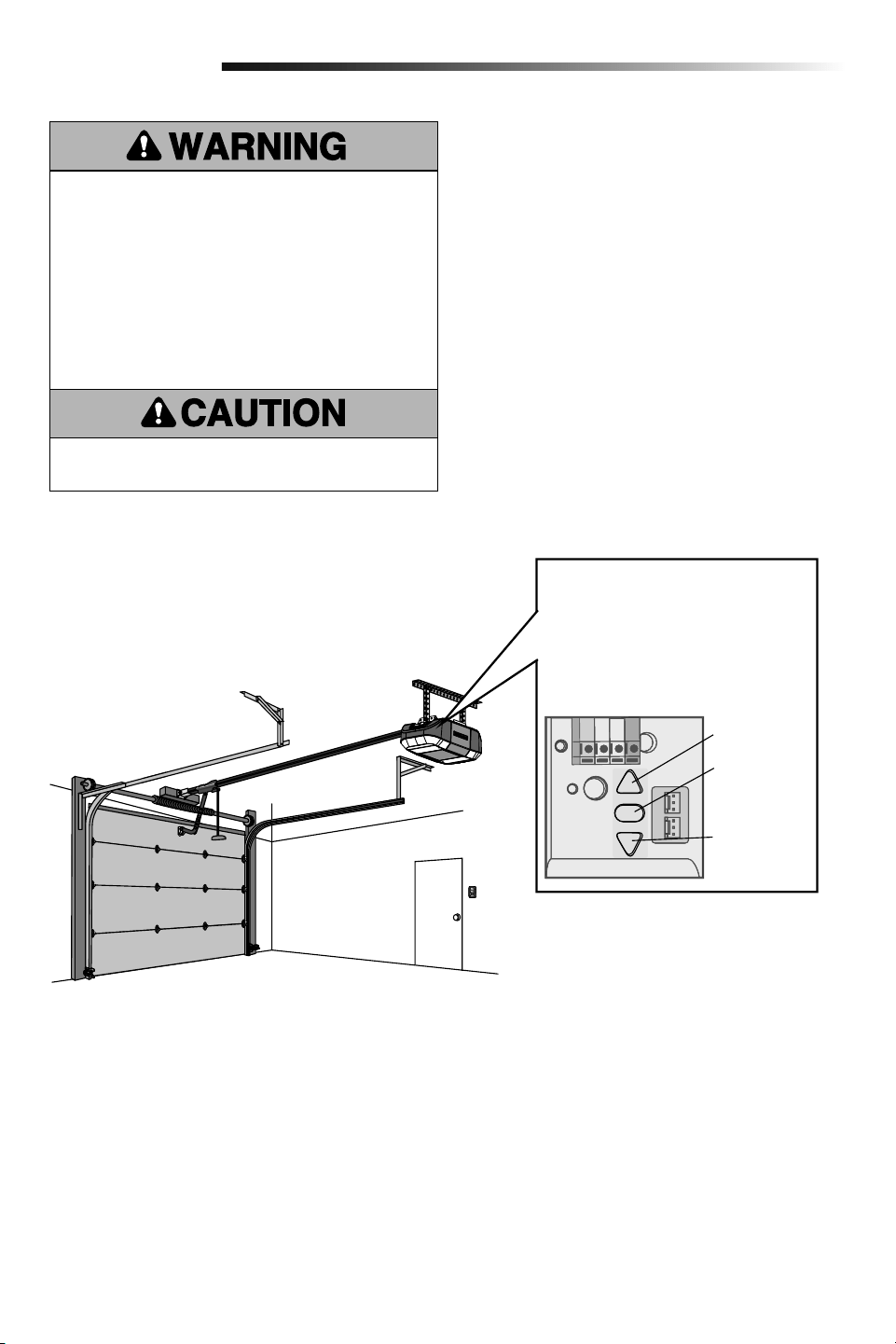
The programming buttons are
located on the left side panel of the
garage door opener and are used to
program the travel.
UP Button
Adjustment
Button
DOWN Button
12
For the complete manual visit LiftMaster.com/Customer-Support
Program the Travel
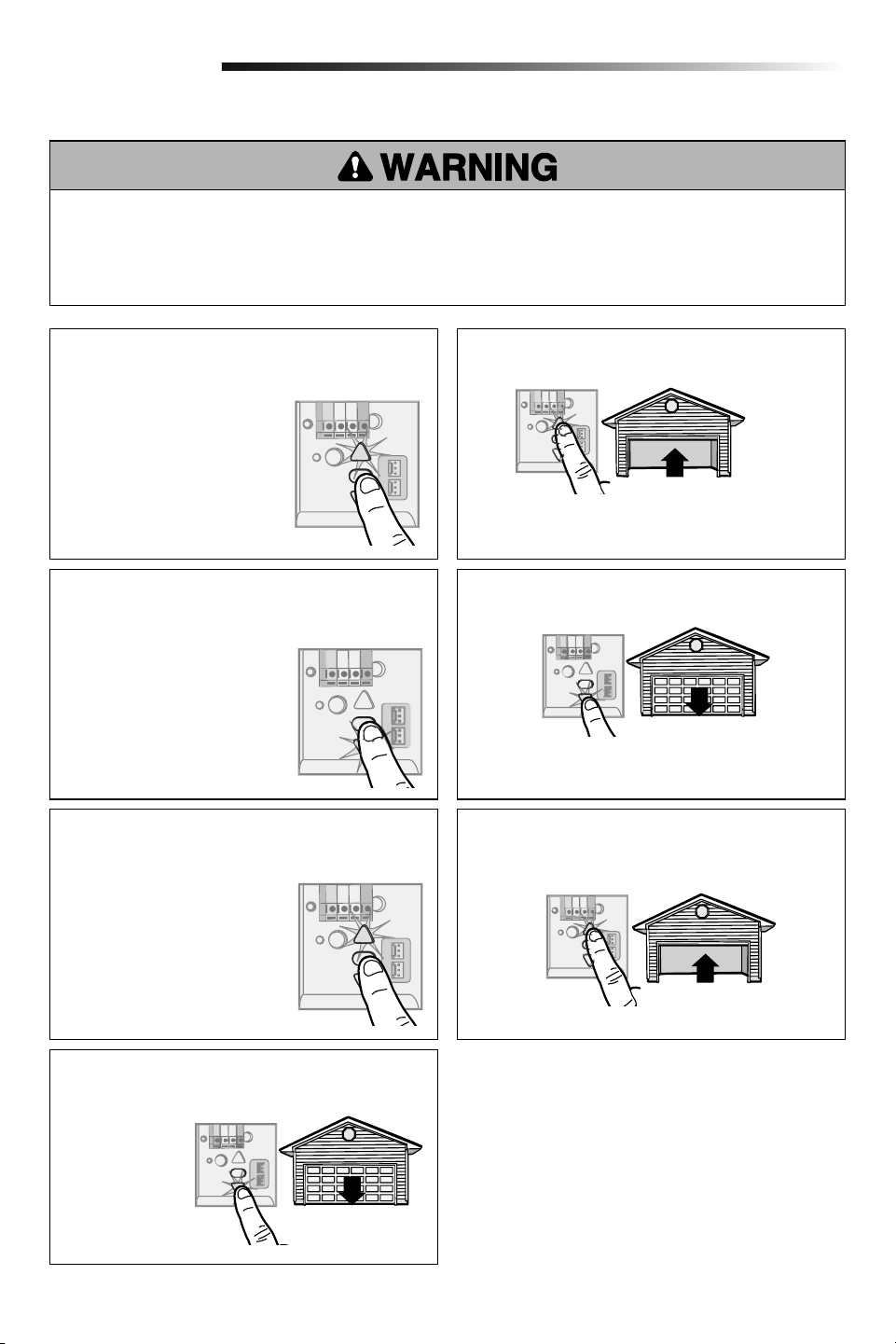
1
Without a properly installed safety reversal system, persons (particularly small children) could be SERIOUSLY
INJURED or KILLED by a closing garage door.
• Incorrect adjustment of garage door travel limits will interfere with proper operation of safety reversal system.
• After ANY adjustments are made, the safety reversal system MUST be tested. Door MUST reverse on contact with
1-1/2" (3.8 cm) high object (or 2x4 laid flat) on floor.
Adjustment
1.1 Press and hold the
Adjustment Button
until the UP Button
begins to flash and/or
a beep is heard.
1.5 Once the door is in the
desired DOWN position
press and release the
Adjustment Button. The
garage door opener lights
will flash twice and the UP
Button will begin to flash.
1.2 Press and hold the UP Button until the door is
in the desired UP position.
NOTE: The UP and DOWN Buttons can be used to
move the door up and down as needed.
1.6 Press and release the UP Button. When the door
travels to the programmed UP position, the
DOWN Button will begin to flash.
1.7 Press and release the DOWN Button. The door
will travel to the programmed DOWN position.
Programming is complete.
1.4 Press and hold the DOWN Button until the door is
in the desired DOWN position.
NOTE: The UP and DOWN Buttons can be used to
move the door up and down as needed.
* If the garage door opener lights are flashing 5
times during the steps for Program the Travel, the
programming has timed out. If the garage door opener
lights are flashing 10 times during the steps for Program
the Travel, the safety reversing sensors are misaligned
or obstructed. When the sensors are aligned and
unobstructed, cycle the door through a complete up
and down cycle using the remote control or the UP and
DOWN buttons. Programming is complete. If you are
unable to operate the door up and down, repeat the steps
for Program the Travel.
1.3 Once the door is in the
desired UP position press
and release the Adjustment
Button. The garage door
opener lights will flash
twice and the DOWN
Button will begin to flash.
13
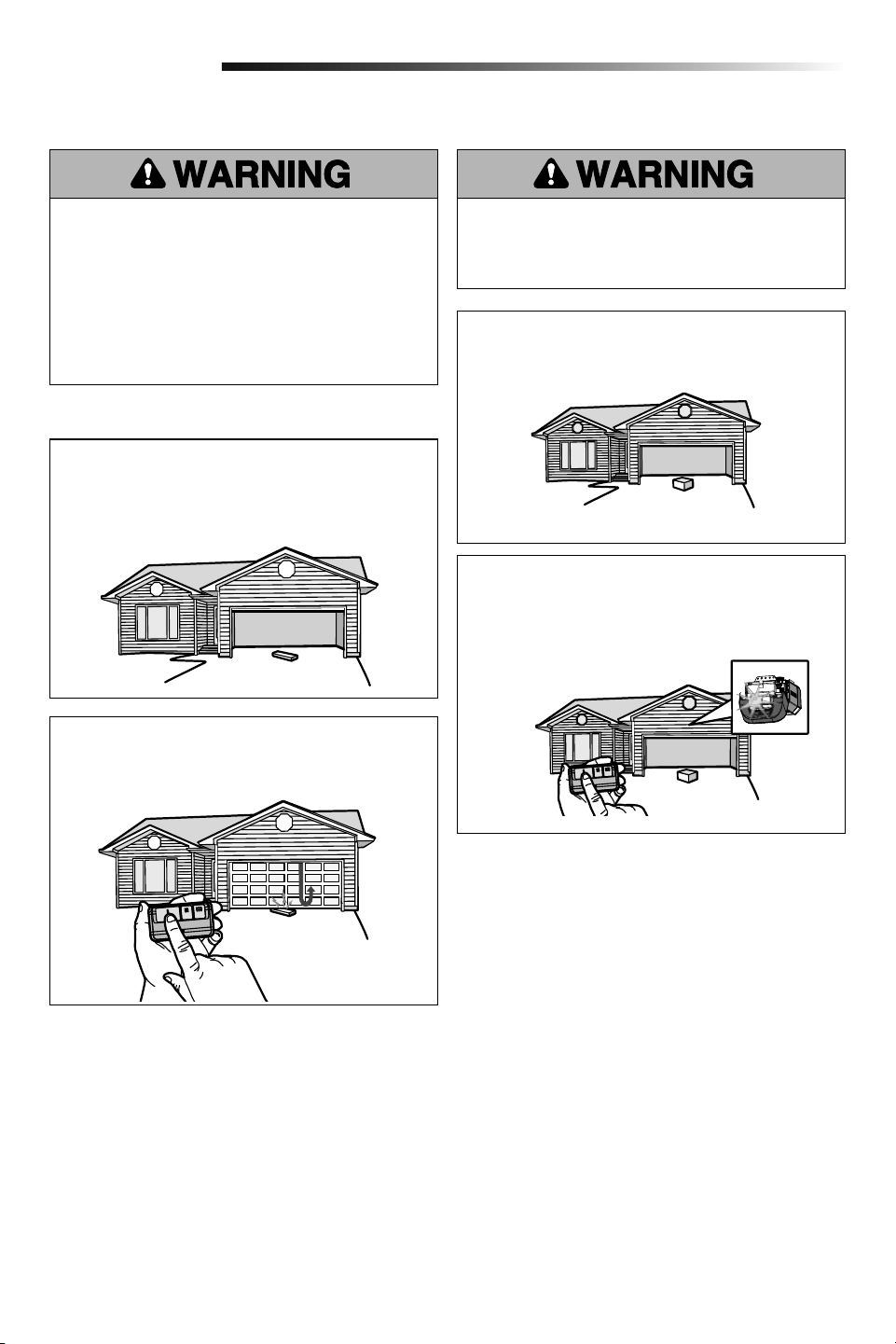
2.1 With the door fully open, place a 1-1/2 inch
(3.8 cm) board (or a 2x4 laid flat) on the floor,
centered under the garage door.
Test the Safety Reversal System
2.2 Press the remote control push button to close
the door. The door MUST reverse when it makes
contact with the board.
If the door stops and does not reverse on the obstruction,
increase the down travel (see Adjustment Step 1).
Repeat the test. When the door reverses upon contact with
the 1-1/2 inch (3.8 cm) board, remove the board and open/
close the door 3 or 4 times to test the adjustment.
If the test continues to fail, call a trained door systems
technician.
Without a properly installed safety reversal system,
persons (particularly small children) could be
SERIOUSLY INJURED or KILLED by a closing garage
door.
• Safety reversal system MUST be tested every month.
• After ANY adjustments are made, the safety reversal
system MUST be tested. Door MUST reverse on
contact with 1-1/2" high (3.8 cm) object (or 2x4 laid
flat) on the floor.
2
Test the Protector System
®
3.1 Open the door. Place an obstruction in the path of
the door.
The garage door opener will not close from a remote
control if the LED in either safety reversing sensor is off
(alerting you to the fact that the sensor is misaligned or
obstructed).
If the garage door opener closes the door when the safety
reversing sensor is obstructed (and the sensors are no
more than 6 inches [15 cm] above the floor), call for a
trained door systems technician.
Without a properly installed safety reversing sensor,
persons (particularly small children) could be
SERIOUSLY INJURED or KILLED by a closing garage
door.
3.2 Press the remote control push button to close the
door. The door will not move more than an inch
(2.5 cm), and the garage door opener lights will
flash 10 times.
3
Adjustment
14
For the complete manual visit LiftMaster.com/Customer-Support
To prevent possible SERIOUS INJURY or DEATH:
• NEVER allow small children near batteries.
• If battery is swallowed, immediately notify doctor.
To reduce risk of fire, explosion or chemical burn:
• Replace ONLY with 3V CR2032 coin batteries.
• DO NOT recharge, disassemble, heat above 212°F
(100°C) or incinerate.
The Remote Control Battery
Maintenance
EVERY MONTH
• Manually operate door. If it is unbalanced or binding,
call a trained door systems technician.
• Check to be sure door opens and closes fully. Adjust if
necessary, page 12.
• Test the safety reversal system. Adjust if necessary,
page 13.
EVERY YEAR
• Oil door rollers, bearings and hinges. The garage door
opener does not require additional lubrication. Do not
grease the door tracks.
• (If applicable) Test the battery backup and consider
replacing the battery to ensure the garage door opener
will operate during an electrical power outage.
Testing the Battery Backup:
1. Unplug the garage door opener from AC power. The
battery status LED will glow solid orange (opener
is operating on battery power) or will flash (low
battery power).
2. Open and close the door using the remote control
or door control.
3. In battery backup mode, the Automatic Garage
Door Lock will unlock when the garage door is
opened, and will remain disabled until power is
restored.
4. Plug in the garage door opener. Verify the battery
status LED is flashing green (battery is charging).
EVERY TWO TO THREE YEARS
• Use a rag to wipe away the existing grease from the
garage door opener rail. Reapply a small layer of white
lithium grease to the top and underside of the rail
surface where the trolley slides.
1
3
2
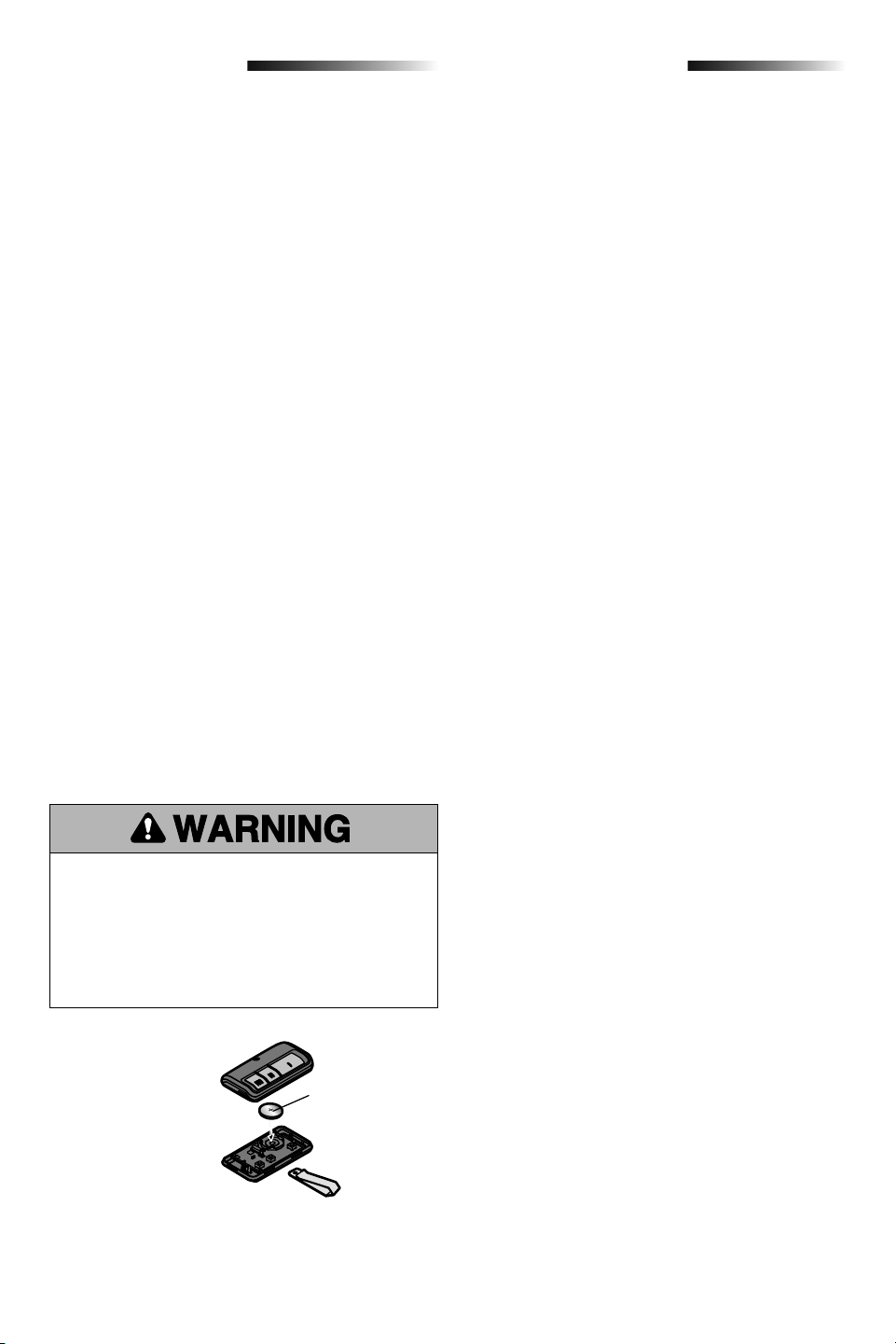
Replace with
only 3V CR2032
coin cell battery.
Pry open the case first
in the middle (1), then
at each side (2 and 3)
with visor clip.
Troubleshooting
Below are basic troubleshooting tips, for additional help
and support videos visit LiftMaster.com/Customer-Support
or contact your installing dealer. For help related to Wi-Fi
®
,
visit WiFiHelp.LiftMaster.com.
My garage door opener will not close and the garage
door opener's lights flash:
Check to make sure the LEDs in both sensors are glowing
steadily. The LEDs in both sensors will glow steadily if they
are aligned and wired correctly. See page 10.
My vehicle’s Homelink
®
is not programming to my
garage door opener:
Depending on the make, model, and year of your vehicle an
external adapter may be required. Visit www.homelink.com
for additional information.
My garage door opener beeps:
The garage door opener can beep for several reasons:
• Garage door opener has been activated through a device
or feature such as Timer-to-Close, garage door monitor
or LiftMaster Internet Gateway.
• Operating on battery power or the battery needs to be
replaced.
My neighbor’s remote control opens my garage door:
Erase the memory from your garage door opener and
reprogram the remote control(s).
The garage door moves 6-8", stops or reverses:
• Manually open and close the garage door. Garage door
may be binding or there may be an obstruction. If the
door is binding, call a trained door systems technician.
• Possible travel module failure.
My remote control will not activate the garage door:
Verify the lock feature is not activated on the door control
or reprogram the remote control.
The LED lighting will not turn on:
Check that the LED wiring harness is connected. If the
LED lighting still does not light, contact a trained Doors
Systems Technician.
My garage door opener light(s) will not turn off when the
door is open:
The garage door opener is equipped with a feature that
turns the light on when the safety reversing sensors have
been obstructed or when the motion sensor on the door
control detects movement in the garage. This feature can
be disabled using the door control.
Garage door opener hums for 1-2 seconds with no
movement:
Manually open and close the garage door. Garage door
may be binding or there may be an obstruction. If the door
is binding, call a trained door systems technician.
Cannot connect garage door opener to home Wi-Fi
network:
Ensure the MyQ Serial number was entered correctly and
try again. The MyQ characters are between A-F and 0-9
only.
To troubleshoot the optional automatic garage door lock
model 841LM, see the instructions provided with it.
15
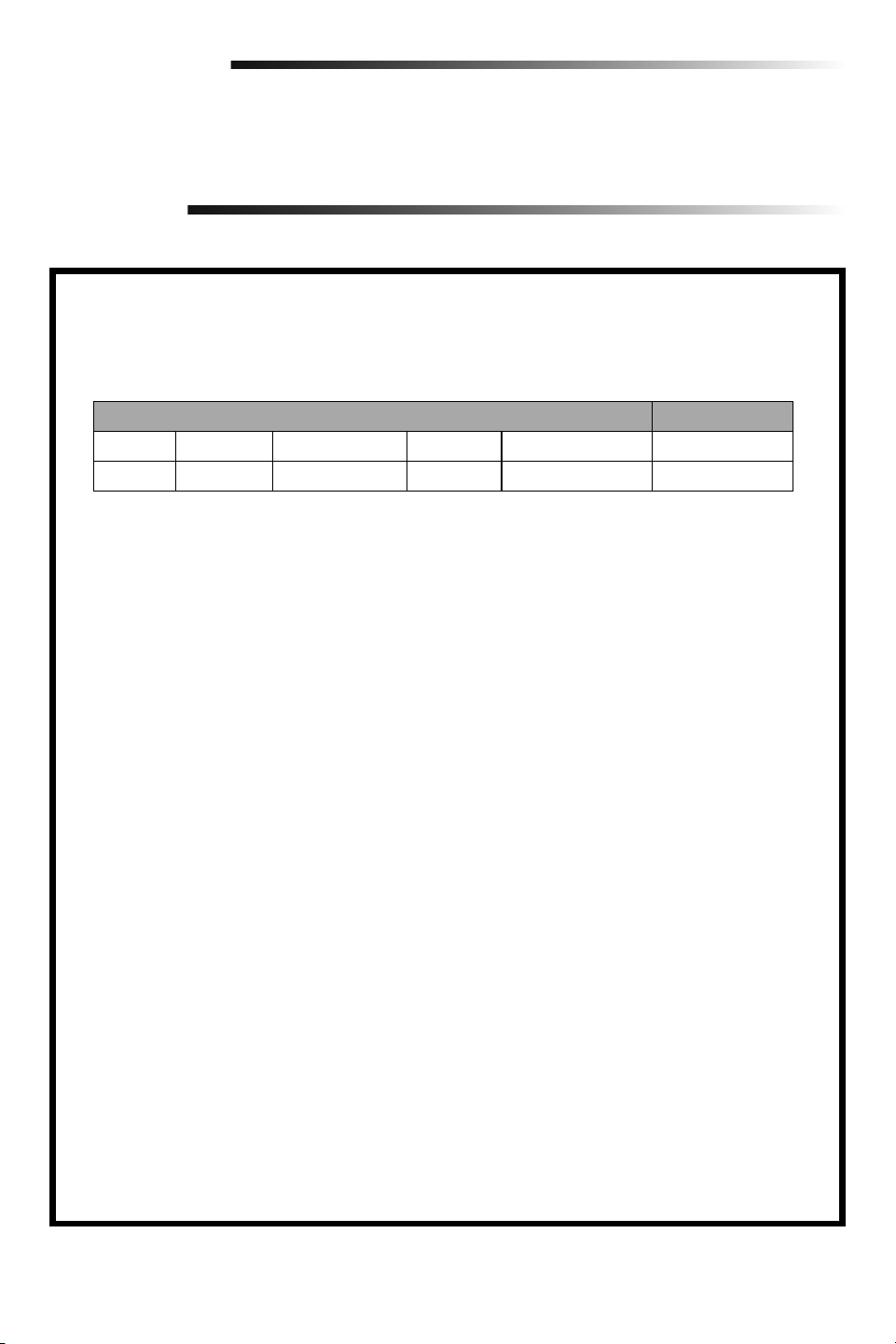
WARRANTY PERIOD
Parts Motor Accessories Belt Battery Backup* LED Light POD
5 Years Lifetime 1 year Lifetime 1 year 5 years
Repair Parts
To see repair parts for your garage door opener, identify the model number on the end panel of the opener and visit
LiftMaster.com/Customer-Support to download or print the installation manual.
Warranty
LIFTMASTER
®
LIMITED WARRANTY
LiftMaster (“Seller”) warrants to the first retail purchaser of this product, for the residence in which this product is
originally installed, that it is free from defects in materials and/or workmanship for a specific period of time as
defined below (the “Warranty Period”). The warranty period commences from the date of purchase.
The proper operation of this product is dependent on your compliance with the instructions regarding installation,
operation, and maintenance and testing. Failure to comply strictly with those instructions will void this limited
warranty in its entirety.
If, during the limited warranty period, this product appears to contain a defect covered by this limited warranty, call
1-800-528-9131, toll free, before dismantling this product. You will be advised of disassembly and shipping
instructions when you call. Then send the product or component, pre-paid and insured, as directed to our service
center for warranty repair. Please include a brief description of the problem and a dated proof-of-purchase receipt
with any product returned for warranty repair. Products returned to Seller for warranty repair, which upon receipt
by Seller are confirmed to be defective and covered by this limited warranty, will be repaired or replaced (at Seller’s
sole option) at no cost to you and returned pre- paid. Defective parts will be repaired or replaced with new or
factory-rebuilt parts at Seller’s sole option. [You are responsible for any costs incurred in removing and/or
reinstalling the product or any component].
ALL IMPLIED WARRANTIES FOR THE PRODUCT, INCLUDING BUT NOT LIMITED TO ANY IMPLIED WARRANTIES
OF MERCHANTABILITY AND FITNESS FOR A PARTICULAR PURPOSE, ARE LIMITED IN DURATION TO THE
APPLICABLE LIMITED WARRANTY PERIOD SET FORTH ABOVE FOR THE RELATED COMPONENT(S), AND NO
IMPLIED WARRANTIES WILL EXIST OR APPLY AFTER SUCH PERIOD. Some States and Provinces do not allow
limitations on how long an implied warranty lasts, so the above limitation may not apply to you. THIS LIMITED
WARRANTY DOES NOT COVER NON-DEFECT DAMAGE, DAMAGE CAUSED BY IMPROPER INSTALLATION,
OPERATION OR CARE (INCLUDING, BUT NOT LIMITED TO ABUSE, MISUSE, FAILURE TO PROVIDE REASONABLE
AND NECESSARY MAINTENANCE, UNAUTHORIZED REPAIRS OR ANY ALTERATIONS TO THIS PRODUCT), LABOR
CHARGES FOR REINSTALLING A REPAIRED OR REPLACED UNIT, REPLACEMENT OF CONSUMABLE ITEMS
(E.G., BATTERIES IN REMOTE CONTROL TRANSMITTERS), OR UNITS INSTALLED FOR NON-RESIDENTIAL USE.
THIS LIMITED WARRANTY DOES NOT COVER ANY PROBLEMS WITH, OR RELATING TO, THE GARAGE DOOR OR
GARAGE DOOR HARDWARE, INCLUDING BUT NOT LIMITED TO THE DOOR SPRINGS, DOOR ROLLERS, DOOR
ALIGNMENT OR HINGES. THIS LIMITED WARRANTY ALSO DOES NOT COVER ANY PROBLEMS CAUSED BY
INTERFERENCE. UNDER NO CIRCUMSTANCES SHALL SELLER BE LIABLE FOR CONSEQUENTIAL, INCIDENTAL
OR SPECIAL DAMAGES ARISING IN CONNECTION WITH USE, OR INABILITY TO USE, THIS PRODUCT. IN NO
EVENT SHALL SELLER’S LIABILITY FOR BREACH OF WARRANTY, BREACH OF CONTRACT, NEGLIGENCE OR
STRICT LIABILITY EXCEED THE COST OF THE PRODUCT COVERED HEREBY. NO PERSON IS AUTHORIZED TO
ASSUME FOR US ANY OTHER LIABILITY IN CONNECTION WITH THE SALE OF THIS PRODUCT.
Some states and provinces do not allow the exclusion or limitation of consequential, incidental or special damages,
so the above limitation or exclusion may not apply to you. This limited warranty gives you specific legal rights, and
you may also have other rights, which vary from state to state and province to province.
* If applicable
16
For the complete manual visit LiftMaster.com/Customer-Support
Automatic Garage Door Opener
Safety & Maintenance Guide
Garage Door Openers are Not Toys
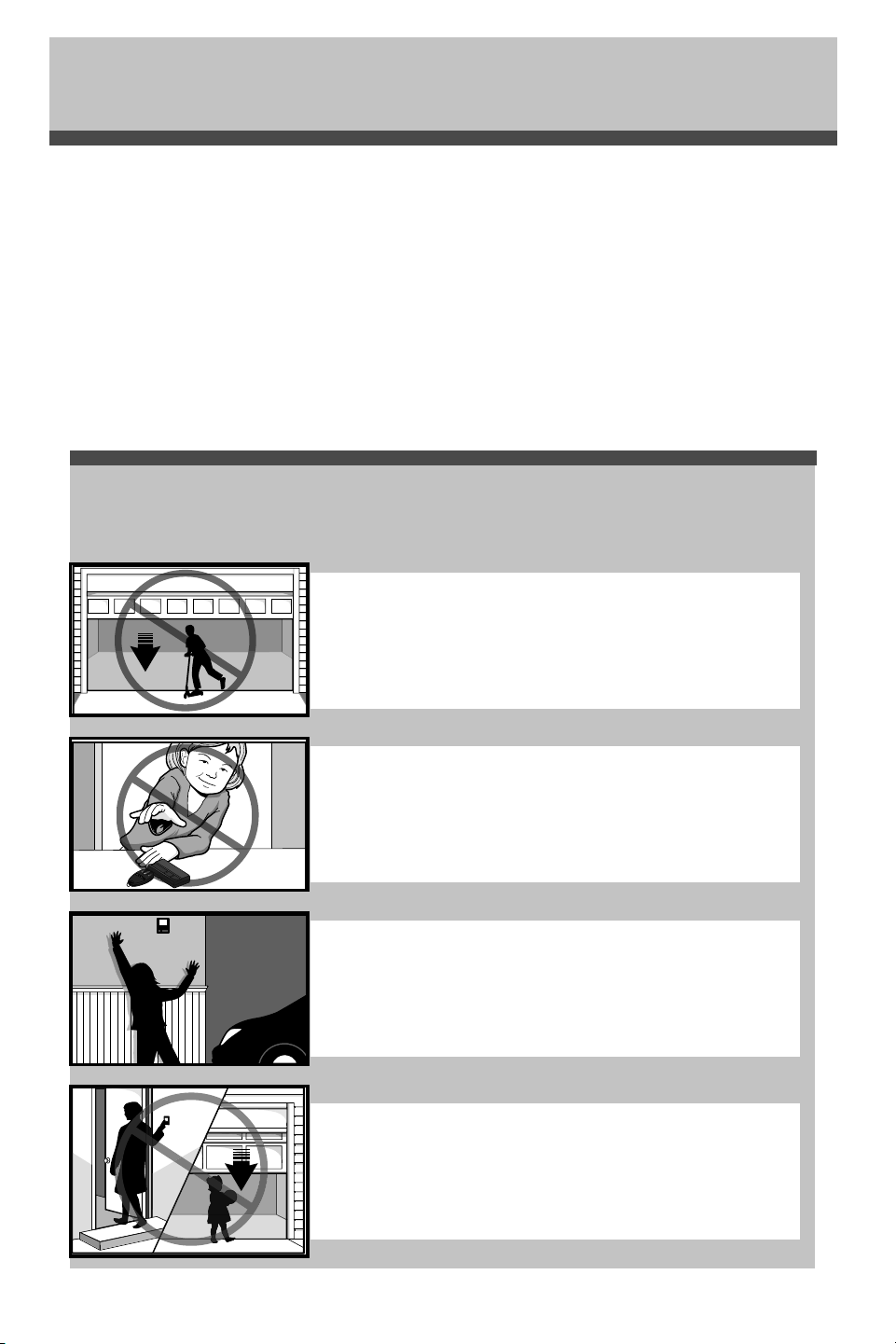
Discuss garage door and opener safety with your children. Explain the danger of
being trapped under the door.
Garage Door Opener Safety – An Automatic Decision
Stay away from a moving door.
Keep transmitters and remote controls out of reach
of children. Do not let children play with or use
transmitters or other remote control devices.
The wall-mounted push button should be out of reach of children,
at least 5 feet from the nearest standing surface and away from all
moving parts. Mount and use the button where you can clearly see
the closing garage door.
Keep the door in sight until it completely closes when using the
wall-mounted push button or transmitter.
A garage door is the largest moving object in the home. An improperly adjusted garage door and opener
can exert deadly force when the door closes – which could lead to entrapment of children or adults and
subsequent injury or death.
Proper installation, operation, maintenance, and testing of the garage door and automatic opener are necessary to
provide a safe, trouble-free system.
Careless operation or allowing children to play with or use garage door opener controls are also dangerous
situations that can lead to tragic results. A few simple precautions can protect your family and friends from
potential harm.
Please review the safety and maintenance tips in this guide carefully and keep it for reference. Check the operation
of your garage door and opener to ensure they function in a safe and trouble-free manner.
Be sure to read all Important Safety Information found in your garage door opener’s manual as it provides more
details and safety considerations than can be supplied with this guide.
17
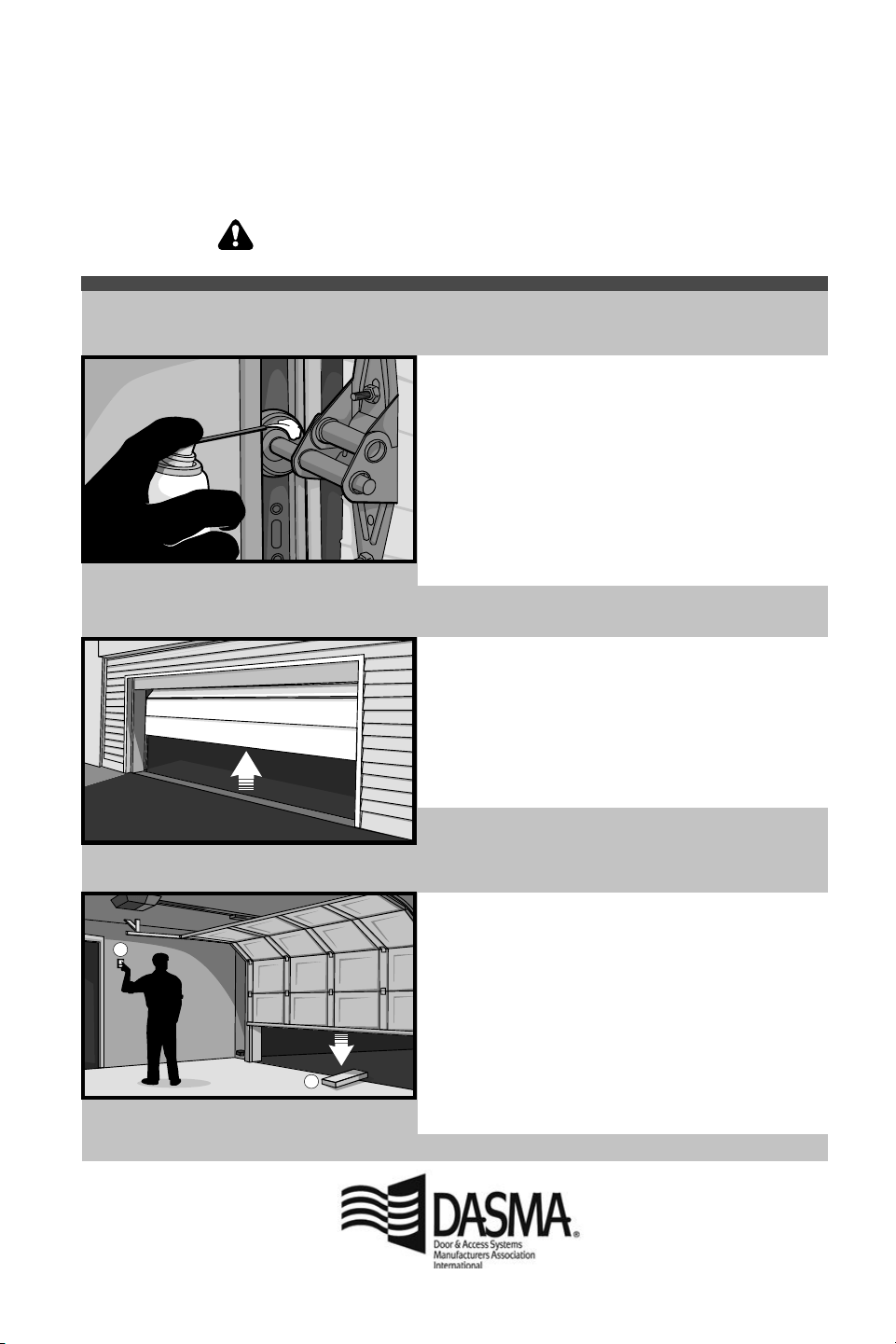
Routine Maintenance Can Prevent Tragedies
1
2
• Starting with the door in the closed position, use the
manual disconnect on the opener to disconnect the door.
• Look for signs of wear or damage on hinges, rollers,
springs, and door panels.
• These parts may require periodic lubrication. Check the
owner’s manual for suggested maintenance.
• If any signs of damage are evident, contact a trained door
systems technician for assistance.
• Verify the photoeye height is no higher than 6" from the
garage floor.
• Open and close the door manually using handles or
suitable gripping points.
• The door should move freely and without difficulty.
• The door should balance and stay partially open 3–4
feet above the floor.
• If you detect any signs of improper operation, contact a
trained door systems technician for assistance.
• Reconnect the opener to the door using the manual
disconnect and open the door.
• Place a 2x4 board flat in the path of the door (1) and try
to close it (2). The door should stop when it comes in
contact with the 2x4 and then reverse direction.
• Block the photoelectric sensor by waving an object in
front of the sensor and attempt to close the door. The
door should not close unless the wall-mounted push
button is manually held during operation.
• If the opener does not perform as described, contact a
trained door systems technician for assistance.
Make monthly inspection and testing of your garage door and opener system a part of your regular routine.
Review your owner’s manual for both the door and door opener. If you don’t have the owner’s manuals, contact
the manufacturer(s) and request a copy for your specific model(s). Look for the opener model number on the
back of the power unit.
Test the opener safety features:
Test the door for proper operation:
Visually check the door
and installation:
WARNING – Springs are under high tension.
Only qualified individuals should adjust them.

114A5150
LiftMaster
300 Windsor Drive
Oak Brook, IL 60523
LiftMaster.com
myLiftMaster.com
Wi-Fi
®
is a registered trademark of Wi-Fi Alliance.
App Store is a service mark of Apple Inc.
Google Play is a trademark of Google Inc.
© 2018, LiftMaster
All Rights Reserved