PERSONAL AUDIO SYSTEM
S-81
OPERATING INSTRUCTIONS
BEDIENUNGSANLEITUNG
MODE D’EMPLOI
ISTRUZIONI PER L’USO
INSTRUCCIONES DE FUNCIONAMIENTO
GEBRUIKSAANWIJZING
BRUKSANVISNING
I
2 SAFETY PRECAUTIONS
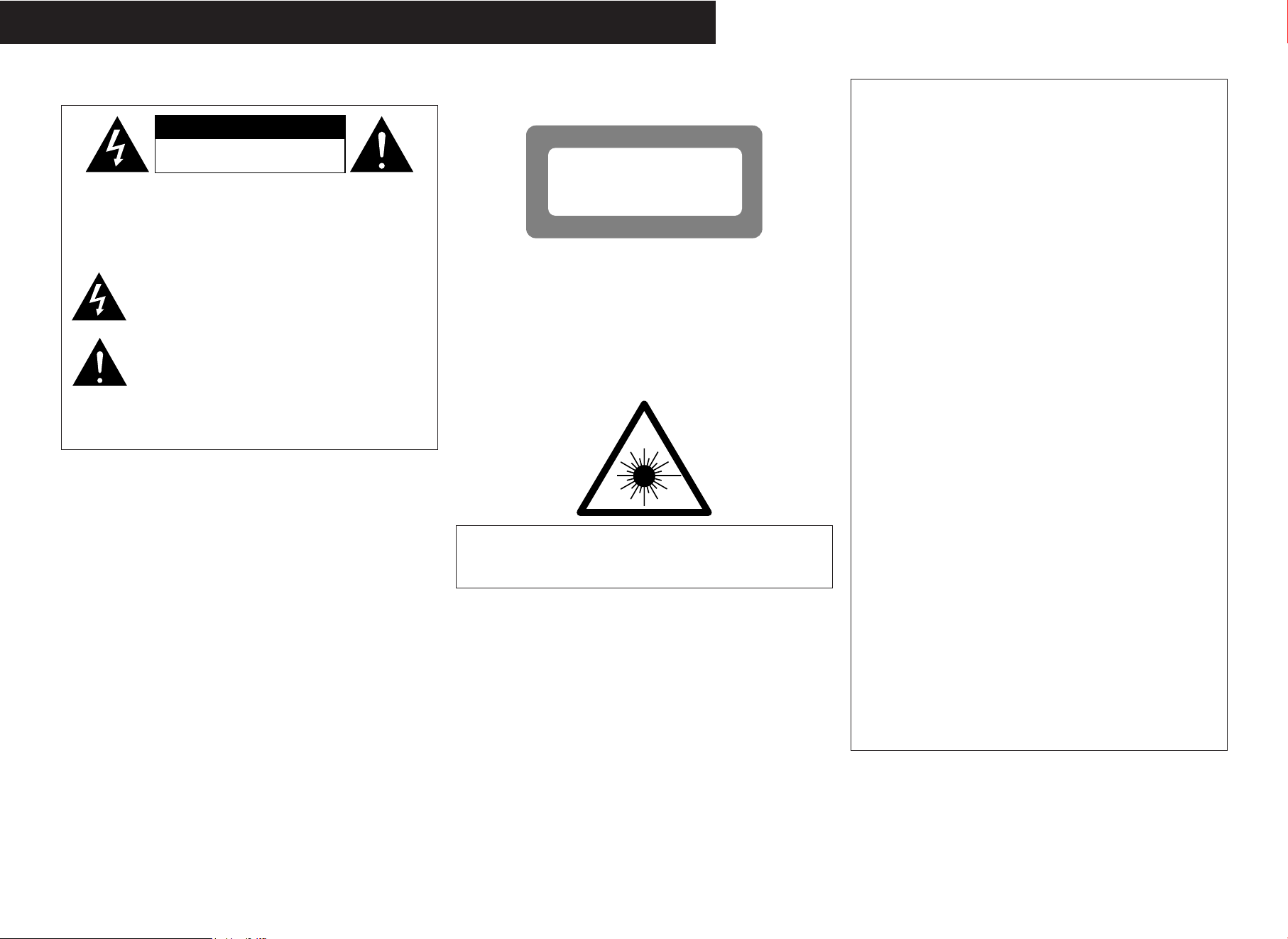
CAUTION
RISK OF ELECTRIC SHOCK
DO NOT OPEN
CAUTION:
TO REDUCE THE RISK OF ELECTRIC SHOCK, DO NOT
REMOVE COVER (OR BACK). NO USER-SERVICEABLE PARTS
INSIDE. REFER SERVICING TO QUALIFIED SERVICE
PERSONNEL.
The lightning flash with arrowhead symbol, within an
equilateral triangle, is intended to alert the user to the
presence of uninsulated “dangerous voltage” within the
product’s enclosure that may be of sufficient magnitude to
constitute a risk of electric shock t persons.
The exclamation point within an equilateral triangle is
intended to alert the user to the presence of important
operating and maintenance (servicing) instructions in the
literature accompanying the appliance.
WARNING:
TO REDUCE THE RISK OF FIRE OR ELECTRIC SHOCK, DO NOT
EXPOSE THIS APPLIANCE TO RAIN OR MOISTURE.
• DECLARATION OF CONFORMITY
We declare under our sole responsibility that this product, to which this
declaration relates, is in conformity with the following standards:
EN60065, EN55013, EN55020, EN61000-3-2 and EN61000-3-3.
Following the provisions of 73/23/EEC, 89/336/EEC and 93/68/EEC
Directive.
• ÜBEREINSTIMMUNGSERKLÄRUNG
Wir erklären unter unserer Verantwortung, daß dieses Produkt, auf das
sich diese Erklärung bezieht, den folgenden Standards entspricht:
EN60065, EN55013, EN55020, EN61000-3-2 und EN61000-3-3.
Entspricht den Verordnungen der Direktive 73/23/EEC, 89/336/EEC und
93/68/EEC.
• DECLARATION DE CONFORMITE
Nous déclarons sous notre seule responsabilité que l’appareil, auquel se
réfère cette déclaration, est conforme aux standards suivants:
EN60065, EN55013, EN55020, EN61000-3-2 et EN61000-3-3.
D’après les dispositions de la Directive 73/23/EEC, 89/336/EEC et
93/68/EEC.
• DICHIARAZIONE DI CONFORMITÀ
Dichiariamo con piena responsabilità che questo prodotto, al quale la
nostra dichiarazione si riferisce, è conforme alle seguenti normative:
EN60065, EN55013, EN55020, EN61000-3-2 e EN61000-3-3.
In conformità con le condizioni delle direttive 73/23/EEC, 89/336/EEC e
93/68/EEC.
QUESTO PRODOTTO E’ CONFORME
AL D.M. 28/08/95 N. 548
• DECLARACIÓN DE CONFORMIDAD
Declaramos bajo nuestra exclusiva responsabilidad que este producto al
que hace referencia esta declaración, está conforme con los siguientes
estándares:
EN60065, EN55013, EN55020, EN61000-3-2 y EN61000-3-3.
Siguiendo las provisiones de las Directivas 73/23/EEC, 89/336/EEC y
93/68/EEC.
• EENVORMIGHEIDSVERKLARING
Wij verklaren uitsluitend op onze verantwoordelijkheid dat dit produkt,
waarop deze verklaring betrekking heeft, in overeenstemming is met de
volgende normen:
EN60065, EN55013, EN55020, EN61000-3-2 en EN61000-3-3.
Volgens de bepalingen van de Richtlijnen 73/23/EEC, 89/336/EEC en
93/68/EEC.
• ÖVERENSSTÄMMELSESINTYG
Härmed intygas helt på eget ansvar att denna produkt, vilken detta intyg
avser, uppfyller följande standarder:
EN60065, EN55013, EN55020, EN61000-3-2 och EN61000-3-3.
Enligt stadgarna i direktiv 73/23/EEC, 89/336/EEC och 93/68/EEC.
DEUTSCH FRANCAIS ITALIANO ESPAÑOL NEDERLANDS SVENSKAENGLISH
CAUTION:
USE OF CONTROLS OR ADJUSTMENTS OR PERFORMANCE OF
PROCEDURES OTHER THAN THOSE SPECIFIED HEREIN MAY RESULT IN
HAZARDOUS RADIATION EXPOSURE.
THIS PRODUCT SHOULD NOT BE ADJUSTED OR REPAIRED BY ANYONE
EXCEPT PROPERLY QUALIFIED SERVICE PERSONNEL.
ADVARSEL: USYNLIG LASERSTRÅLING VED ÅBNING, NÅR
SIKKERHEDSAFBRYDERE ER UDE AF FUNKTION.
UNDGÅ UDSAETTELSE FOR STRÅLING.
VAROITUS! LAITTEEN KÄYTTÄMINEN MUULLA KUIN TÄSSÄ
KÄYTTÖOHJEESSA MAINITULLA TAVALLA SAATTAA
ALTISTAA KÄYTTÄJÄN TURVALLISUUSLUOKAN 1
YLITTÄVÄLLE NÄKYMÄMTTÖMÄLLE LASERSÄTEILYLLE.
VARNING: OM APPARATEN ANVÄNDS PÅ ANNAT SÄTT ÄN I DENNA
BRUKSANVISNING SPECIFICERATS, KAN ANVÄNDAREN
UTSÄTTAS FÖR OSYNLIG LASERSTRÅLNING SOM
ÖVERSKRIDER GRÄNSEN FÖR LASERKLASS 1.
CLASS 1 LASER PRODUCT
LUOKAN 1 LASERLAITE
KLASS 1 LASERAPPARAT
,
CLASS 1
LASER
PRODUCT
,
,,
ATTENZIONE: QUESTO APPARECCHIO E’ DOTATO DI DISPOSITIVO
OTTICO CON RAGGIO LASER.
L’USO IMPROPRIO DELL’APPARECCHIO PUO’ CAUSARE PERICOLOSE
ESPOSIZIONI A RADIAZIONI!
II
CAUTION:
• The ventilation should not be impeded by covering the ventilation openings with items,
such as newspapers, tablecloths, curtains, etc.
• No naked flame sources, such as lighted candles, should be placed on the apparatus.
•Attention should be drawn to the environmental aspects of battery disposal.
•Do not expose the set to dripping or splashing fluids.
• No objects filled with liquids, such as vases, shall be placed on the apparatus.
ACHTUNG:
• Die Belüftung sollte auf keinen Fall durch das Abdecken der Belüftungsöffnungen durch
Gegenstände wie beispielsweise Zeitungen, Tischtücher, Vorhänge o. Ä. behindert
werden.
• Auf dem Gerät sollten keinerlei direkten Feuerquellen wie beispielsweise angezündete
Kerzen aufgestellt werden.
•Bitte beachten Sie bei der Entsorgung der Batterien die geltenden
Umweltbestimmungen.
• Das Gerät sollte keinerlei Flüssigkeit, also keinem Tropfen oder Spritzen ausgesetzt
werden.
• Auf dem Gerät sollten keinerlei mit Flüssigkeit gefüllten Behälter wie beispielsweise
Vasen aufgestellt werden.
ATTENTION:
•La ventilation ne doit pas être gênée en recouvrant les ouvertures de la ventilation avec
des objets tels que journaux, rideaux, tissus, etc.
• Aucune flamme nue, par exemple une bougie, ne doit être placée sur l’appareil.
•Veillez à respecter l’environnement lorsque vous jetez les piles usagées.
•L’appareil ne doit pas être exposé à l’eau ou à l’humidité.
• Aucun objet contenant du liquide, par exemple un vase, ne doit être placé sur l’appareil.
PRECAUZIONI:
• Le aperture di ventilazione non devono essere ostruite coprendole con oggetti, quali
giornali, tovaglie, tende e così via.
• Non posizionare sull'apparecchiatura fiamme libere, come ad esempio le candele
accese.
•Prestare attenzione agli aspetti legati alla tutela dell’ambiente quando si smaltisce la
batteria.
•L’apparecchiatura non deve essere esposta a gocciolii o spruzzi.
• Non posizionare sull’apparecchiatura nessun oggetto contenete liquidi, come ad
esempio i vasi.
PRECAUCIÓN:
• La ventilación no debe quedar obstruida por hacerse cubierto las aperturas con objetos
como periódicos, manteles, cortinas, etc.
•No debe colocarse sobre el aparato ninguna fuente inflamable sin protección, como
velas encendidas.
•A la hora de deshacerse de las pilas, respete la normativa para el cuidado del medio
ambiente.
• No se expondrá el aparato al goteo o salpicaduras cuando se utilice.
• No se colocarán sobre el aparato objetos llenos de líquido, como jarros.
WAARSCHUWING:
• De ventilatie mag niet worden belemmerd door de ventilatieopeningen af te dekken met
bijvoorbeeld kranten, een tafelkleed, gordijnen, enz.
• Plaats geen open vlammen, bijvoorbeeld een brandende kaars, op het apparaat.
• Houd u steeds aan de milieuvoorschriften wanneer u gebruikte batterijen wegdoet.
•Stel het apparaat niet bloot aan druppels of spatten.
•Plaats geen voorwerpen gevuld met water, bijvoorbeeld een vaas, op het apparaat.
OBSERVERA:
•Ventilationen bör inte förhindras genom att täcka för ventilationsöppningarna med
föremål såsom tidningar, bordsdukar, gardiner osv.
• Inga blottade brandkällor, såsom tända ljus, bör placeras på apparaten.
• Tänk på miljöaspekterna när du bortskaffar batteri.
•Apparaten får inte utsättas för vätska.
•Inga objekt med vätskor, såsom vaser, får placeras på apparaten.
NOTE ON USE / HINWEISE ZUM GEBRAUCH / OBSERVATIONS RELATIVES A L’UTILISATION / NOTE SULL’USO /
NOTAS SOBRE EL USO / ALVORENS TE GEBRUIKEN / OBSERVERA
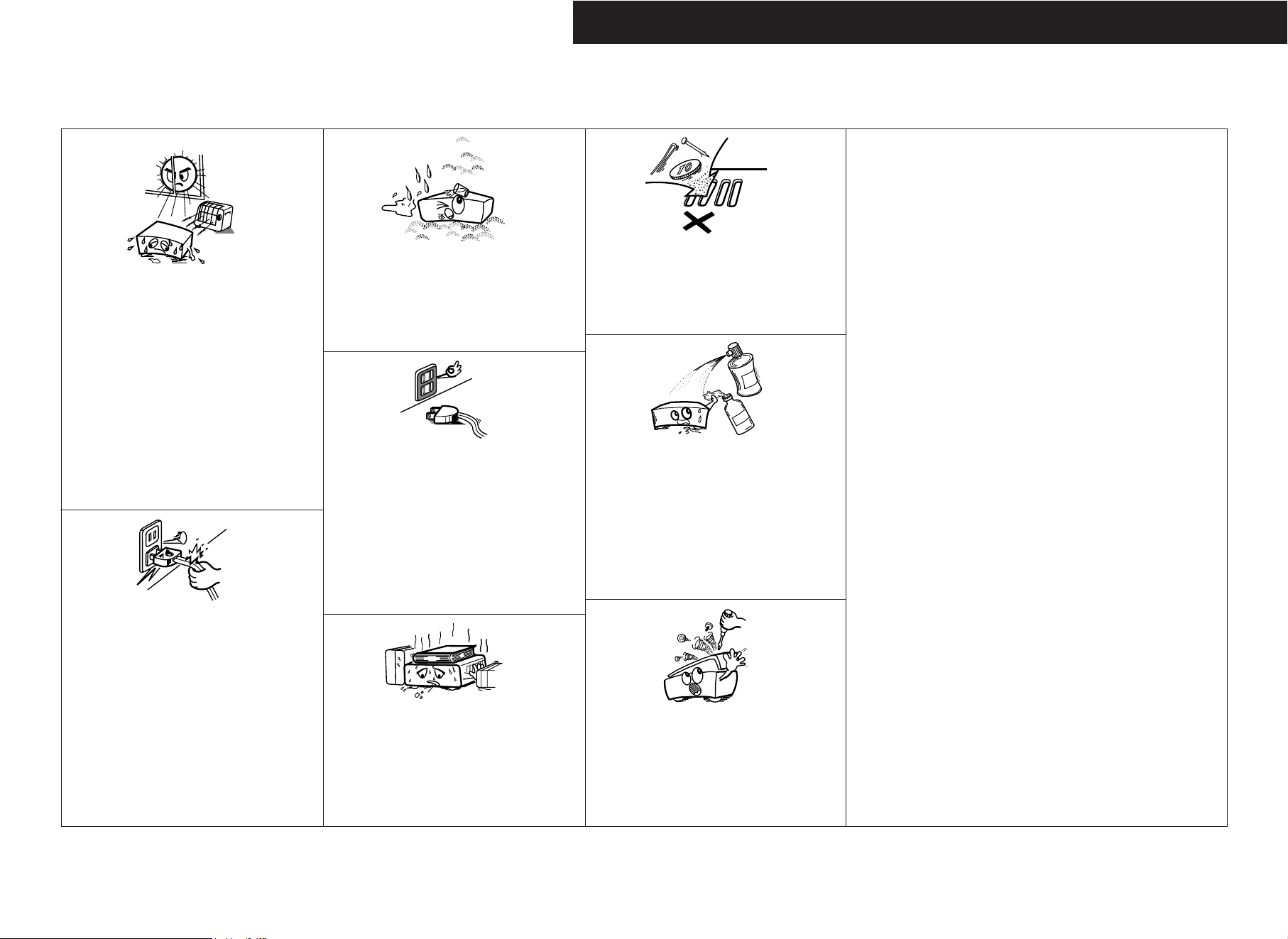
•Avoid high temperatures.
Allow for sufficient heat dispersion when installed in a rack.
•Vermeiden Sie hohe Temperaturen.
Beachten Sie, daß eine ausreichend Luftzirkulation
gewährleistet wird, wenn das Gerät auf ein Regal gestellt
wird.
• Eviter des températures élevées
Tenir compte d’une dispersion de chaleur suffisante lors de
l’installation sur une étagère.
• Evitate di esporre l’unità a temperature alte.
Assicuratevi che ci sia un’adeguata dispersione del calore
quando installate l’unità in un mobile per componenti audio.
•Evite altas temperaturas
Permite la suficiente dispersión del calor cuando está
instalado en la consola.
•Vermijd hoge temperaturen.
Zorg voor een degelijk hitteafvoer indien het apparaat op een
rek wordt geplaatst.
• Undvik höga temperaturer.
Se till att det finns möjlighet till god värmeavledning vid
montering i ett rack.
•Handle the power cord carefully.
Hold the plug when unplugging the cord.
• Gehen Sie vorsichtig mit dem Netzkabel um.
Halten Sie das Kabel am Stecker, wenn Sie den Stecker
herausziehen.
•Manipuler le cordon d’alimentation avec précaution.
Tenir la prise lors du débranchement du cordon.
•Manneggiate il filo di alimentazione con cura.
Agite per la spina quando scollegate il cavo dalla presa.
• Maneje el cordón de energía con cuidado.
Sostenga el enchufe cuando desconecte el cordón de
energía.
• Hanteer het netsnoer voorzichtig.
Houd het snoer bij de stekker vast wanneer deze moet
worden aan- of losgekoppeld.
•Hantera nätkabeln varsamt.
Håll i kabeln när den kopplas från el-uttaget.
• Keep the apparatus free from moisture, water, and dust.
• Halten Sie das Gerät von Feuchtigkeit, Wasser und Staub
fern.
•Protéger l’appareil contre l’humidité, l’eau et lapoussière.
•Tenete l’unità lontana dall’umidità, dall’acqua e dalla polvere.
•Mantenga el equipo libre de humedad, agua y polvo.
• Laat geen vochtigheid, water of stof in het apparaat
binnendringen.
•Utsätt inte apparaten för fukt, vatten och damm.
• Unplug the power cord when not using the apparatus for
long periods of time.
•Wenn das Gerät eine längere Zeit nicht verwendet werden soll,
trennen Sie das Netzkabel vom Netzstecker.
• Débrancher le cordon d’alimentation lorsque l’appareil n’est
pas utilisé pendant de longues périodes.
• Disinnestate il filo di alimentazione quando avete l’intenzione
di non usare il filo di alimentazione per un lungo periodo di
tempo.
• Desconecte el cordón de energía cuando no utilice el equipo
por mucho tiempo.
•Neem altijd het netsnoer uit het stopkontakt wanneer het
apparaat gedurende een lange periode niet wordt gebruikt.
• Koppla ur nätkabeln om apparaten inte kommer att användas
i lång tid.
* (For apparatuses with ventilation holes)
• Do not obstruct the ventilation holes.
•Die Belüftungsöffnungen dürfen nicht verdeckt werden.
•Ne pas obstruer les trous d’aération.
• Non coprite i fori di ventilazione.
• No obstruya los orificios de ventilación.
•De ventilatieopeningen mogen niet worden beblokkeerd.
• Täpp inte till ventilationsöppningarna.
•Do not let foreign objects into the apparatus.
•Keine fremden Gegenstände in das Gerät kommen lassen.
• Ne pas laisser des objets étrangers dans l’appareil.
• E’ importante che nessun oggetto è inserito all’interno
dell’unità.
•No deje objetos extraños dentro del equipo.
• Laat geen vreemde voorwerpen in dit apparaat vallen.
• Se till att främmande föremål inte tränger in i apparaten.
• Do not let insecticides, benzene, and thinner come in
contact with the apparatus.
• Lassen Sie das Gerät nicht mit Insektiziden, Benzin oder
Verdünnungsmitteln in Berührung kommen.
• Ne pas mettre en contact des insecticides, du benzène et
un diluant avec l’appareil.
•Assicuratevvi che l’unità non venga in contatto con
insetticidi, benzolo o solventi.
• No permita el contacto de insecticidas, gasolina y diluyentes
con el equipo.
• Laat geen insektenverdelgende middelen, benzine of
verfverdunner met dit apparaat in kontakt komen.
• Se till att inte insektsmedel på spraybruk, bensen och
thinner kommer i kontakt med apparatens hölje.
• Never disassemble or modify the apparatus in any way.
•Versuchen Sie niemals das Gerät auseinander zu nehmen
oder auf jegliche Art zu verändern.
• Ne jamais démonter ou modifier l’appareil d’une manière
ou d’une autre.
•Non smontate mai, nè modificate l’unità in nessun modo.
•Nunca desarme o modifique el equipo de ninguna manera.
• Nooit dit apparaat demonteren of op andere wijze
modifiëren.
•Ta inte isär apparaten och försök inte bygga om den.
ENGLISHDEUTSCHFRANCAISITALIANOESPAÑOLNEDERLANDSSVENSKA
III
A NOTE ABOUT RECYCLING:
This product’s packaging materials are recyclable and can be reused. Please dispose of any materials in accordance with the local recycling
regulations.
When discarding the unit, comply with local rules or regulations.
Batteries should never be thrown away or incinerated but disposed of in accordance with the local regulations concerning chemical waste.
This product and the accessories packed together constitute the applicable product according to the WEEE directive except batteries.
HINWEIS ZUM RECYCLING:
Das Verpackungsmaterial dieses Produktes ist für zum Recyceln geeignet und kann wieder verwendet werden. Bitte entsorgen Sie alle Materialien
entsprechend der örtlichen Recycling-Vorschriften.
Beachten Sie bei der Entsorgung des Gerätes die örtlichen Vorschriften und Bestimmungen.
Die Batterien dürfen nicht in den Hausmüll geworfen oder verbrannt werden; bitte geben Sie die Batterien gemäß örtlichen Bestimmungen an den
Sammelstellen oder Sondermüllplätzen ab.
Dieses Produkt zusammen mit den Zubehörteilen ist das geltende Produkt der WEEE-Direktive, davon ausgenommen sind die Batterien.
UNE REMARQUE CONCERNANT LE RECYCLAGE:
Les matériaux d’emballage de ce produit sont recyclables et peuvent être réutilisés. Veuillez disposer de tout matériau conformément aux réglements de
recylage locaux.
Lorsque vous mettez cet appareil au rebut, respectez les lois ou réglementations locales.
Les piles ne doivent jamais être jetées ou incinérées, mais mises au rebut conformément aux réglements locaux concernant les déchets chimiques.
Ce produit et les accessoires emballés ensemble sont des produits conformes à la directive DEEE sauf pour les piles.
NOTA RELATIVA AL RICICLAGGIO:
I materiali di imballaggio di questo prodotto sono riutilizzabili e riciclabili. Smaltire i materiali conformemente alle normative locali sul riciclaggio.
Per smaltire l’unità, osservare la normativa in vigore nel luogo di utilizzo.
Non gettare le batterie, né incenerirle, ma smaltirle conformemente alla normativa locale sui rifiuti chimici.
Questo prodotto e gli accessori inclusi nell’imballaggio sono applicabili alla direttiva RAEE, ad eccezione delle batterie.
ACERCA DEL RECICLAJE:
Los materiales de embalaje de este producto son reciclables y se pueden volver a utilizar. Disponga de estos materiales siguiendo los reglamentos de reciclaje
de su localidad.
Cuando se deshaga de la unidad, cumpla con las reglas o reglamentos locales.
Las pilas nunca deberán tirarse ni incinerarse. Deberá disponer de ellas siguiendo los reglamentos de su localidad relacionados con los desperdicios químicos.
Este producto junto con los accesorios empaquetados es el producto aplicable a la directiva RAEE excepto pilas.
EEN AANTEKENING WAT BETREFT HET RECYCLEREN:
Het inpakmateriaal van dit product is recycleerbaar en kan opnieuw gebruikt worden. Er wordt verzocht om zich van elk afvalmateriaal te ontdoen volgens de
plaatselijke voorschriften.
Volg voor het wegdoen van de speler de voorschriften voor de verwijdering van wit- en bruingoed op.
Batterijen mogen nooit worden weggegooid of verbrand, maar moeten volgens de plaatselijke voorschriften betreffende chemisch afval worden verwijderd.
Op dit product en de meegeleverde accessoires, m.u.v. de batterijen is de richtlijn voor afgedankte elektrische en elektronische apparaten (WEEE) van
toepassing.
EN KOMMENTAR OM ÅTERVINNING:
Produktens emballage är återvinningsbart och kan återanvändas. Kassera det enligt lokala återvinningsbestämmelser.
När du kasserar enheten ska du göra det i överensstämmelse med lokala regler och bestämmelser.
Batterier får absolut inte kastas i soporna eller brännas. Kassera dem enligt lokala bestämmelser för kemiskt avfall.
Denna apparat och de tillbehör som levereras med den är de som uppfyller gällande WEEE-direktiv, med undantag av batterierna.
DEUTSCH FRANCAIS ITALIANO ESPAÑOL NEDERLANDS SVENSKAENGLISH
CAUTION:
To completely disconnect this product from the mains, disconnect
the plug from the wall socket outlet.
The mains plug is used to completely interrupt the power supply
to the unit and must be within easy access by the user.
VORSICHT:
Um dieses Gerät vollständig von der Stromversorgung
abzutrennen, trennen Sie bitte den Netzstecker von der
Wandsteckdose ab.
Die Hauptstecker werden verwendet, um die Stromversorgung
zum Gerät völlig zu unterbrechen; er muss für den Benutzer gut
und einfach zu erreichen sein.
PRECAUTION:
Pour déconnecter complètement ce produit du courant secteur,
débranchez la prise de la prise murale.
La prise secteur est utilisée pour couper complètement
l’alimentation de l’appareil et l’utilisateur doit pouvoir y accéder
facilement.
ATTENZIONE:
Per scollegare definitivamente questo prodotto dalla rete di
alimentazione elettrica, togliere la spina dalla relativa presa.
La spina di rete viene utilizzata per interrompere completamente
l’alimentazione all’unità e deve essere facilmente accessibile
all’utente.
VOORZICHTIGHEID:
Om de voeding van dit product volledig te onderbreken moet de
stekker uit het stopcontact worden getrokken.
De netstekker wordt gebruikt om de stroomtoevoer naar het
toestel volledig te onderbreken en moet voor de gebruiker
gemakkelijk bereikbaar zijn.
FÖRSIKTIHETSMÅTT:
Koppla loss stickproppen från eluttaget för att helt skilja produkten
från nätet.
Stickproppen används för att helt bryta strömförsörjningen till
apparaten, och den måste vara lättillgänglig för användaren.
PRECAUCIÓN:
Para desconectar completamente este producto de la alimentación
eléctrica, desconecte el enchufe del enchufe de la pared.
El enchufe de la alimentación se utiliza para interrumpir por
completo el suministro de alimentación a la unidad y debe de
encontrarse en un lugar al que el usuario tenga fácil acceso.
1
ENGLISH
ENGLISH
Contents
Thank you for purchasing this DENON Personal Audio System.
Please read the operation instructions thoroughly in order to acquaint yourself with the CD Receiver and achieve maximum satisfaction from it.
Accessories······················································································2
Before using ····················································································2
Cautions on installation·································································2
Speaker system (SC-S81)·······························································3
About discs
Discs usable on this set·································································3
Holding discs··················································································3
Loading discs ·················································································3
Cautions on loading discs ······························································3
Cautions on handling······································································4
Cautions on storing discs·······························································4
Cleaning discs ················································································4
About the remote control unit
Inserting the batteries····································································4
Operating range of the remote control unit···································4
Part names and functions
Front panel ·····················································································5
Display····························································································5
Rear panel ······················································································6
Remote control unit ···································································6, 7
Getting Started
Cable indications ············································································7
Speaker connections······································································8
Changing the speaker cable···························································8
Antenna connections
Connecting the included antennas·················································9
Connecting an outdoor antenna·····················································9
Connecting a portable player······················································10
Connecting to an iPod
®
When using the included iPod cable············································10
When using an exclusive control Dock for iPod ··························10
When using an Apple iPod Dock ·················································11
Connecting a CD recorder····························································11
Connecting the power supply cord ············································11
Connections
Turning the power on···································································12
Loading discs ················································································12
Adjusting the volume···································································12
Adjusting the tone········································································12
Basic Operation
Starting playback··········································································20
To stop playback···········································································20
To pause playback (Pause) ···························································20
Fast-forwarding (Search) ······························································20
Fast-reversing (Search)·································································20
Moving to the beginning of tracks (Skip) ·····································20
Playing the desired track (Direct play) ·······································21
Listening to specific tracks in a specific order
(Programmed play)·······································································21
Listening in random order (Random playback)·························21
Listening to tracks repeatedly (Repeat play)
Listening to a specific track repeatedly (1-track repeat play)·······21
Listening to all the tracks repeatedly (All-track repeat play) ········21
Playing discs
Troubleshooting······································································26, 27
Specifications················································································28
Others
Selecting a radio station······························································13
Giving a name to the currently tuned in
broadcast station and presetting it ············································13
Presetting broadcast stations automatically (Auto preset)·····14
Listening to preset broadcast stations·······································14
RDS (Radio Data System)····························································15
RDS search ··················································································15
PTY search ···················································································15
TP search ·····················································································15
RT (Radio Text) ·············································································15
Listening to radio broadcasts
Setting the current time ······························································16
Before setting the timer·······························································16
Setting the everyday or once timer············································17
Operation of the everyday and once timers······························18
Setting the sleep timer ································································18
Using the timer function
Before playing MP3 or WMA files···············································22
Playing MP3 or WMA files ···························································23
Listening to MP3 or WMA files in random order
(Random folder/disc play) ···························································23
Listening to MP3 or WMA files repeatedly
(Repeat folder/disc play)······························································24
Playing MP3 or WMA (Windows Media
®
Audio) files
Playing an iPod
®
··········································································25
Using the included iPod cable······················································25
Using an exclusive control Dock for iPod ····································25
Using an Apple iPod Dock····························································25
Playing a portable player·····························································25
Other types of playback
Auto power on function·······························································25
Auto function selection································································25
System Operations
Setting the low-power standby mode
Setting the time display time in the standby mode·····················19
Setting the low-power standby mode (Eco mode) ······················19
Making the speaker settings
Setting the speakers low bass sound··········································19
Setting the speaker locations·······················································19
Making the room damping setting···············································19
Using other functions
2
ENGLISH
ENGLISH
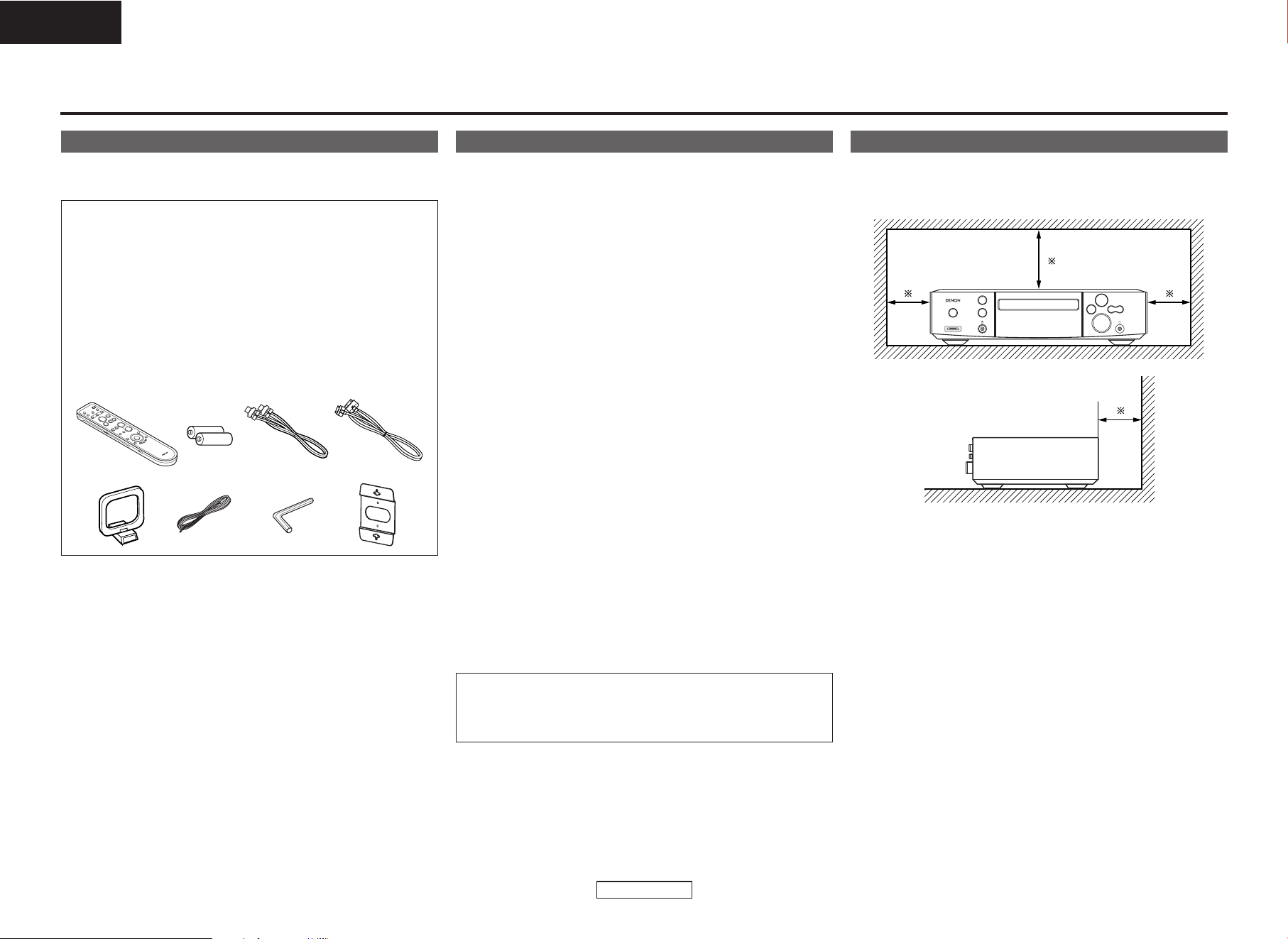
Accessories
Check that the following parts are attached in addition to the main
unit:
q Operating instructions .............................................................1
w Service station list....................................................................1
e Screw.......................................................................................4
r Remote control unit (RC-1035) ................................................1
t R6P/AA batteries .....................................................................2
y Speaker cable (Approx. 5 m)....................................................2
u iPod cable (Approx. 1 m)..........................................................1
i AM loop antenna .....................................................................1
o FM indoor antenna...................................................................1
!0 Hexagonal wrench ...................................................................1
!1 Wall bracket .............................................................................2
r
io!0
tyu
!1
Before using
Pay attention to the following before using this unit:
• Moving the unit.
To prevent short-circuits or damaged wires in the connection cables,
always unplug the power supply cord and disconnect the connection
cables between all other audio components when moving the unit.
•
Cautions on using mobile phones.
Using a mobile phone near this unit may result in noise. If so, move
the mobile phone away from this unit when it is in use.
• Condensation (dew).
Water droplets may condense on internal operation parts if the set
is brought into a heated room from the cold outdoors or when the
room is heated rapidly. If this happens, the set may not operate
properly.
•Should condensation occur.
The condensation will evaporate in one hour or less, at which time
the system will function normally.
•Before turning the power operation switch on.
Check once again that all connections are correct and that there are
not problems with the connection cables. Always set the power
operation switch to the standby position before connecting and
disconnecting connection cables.
• Store these instructions in a safe place.
After reading, store this instructions along with the warranty card in
a safe place.
• Power is supplied to some of the circuitry even when the power
is set to the standby mode using the power operation switch.
When traveling or leaving home for long periods of time, be
sure to unplug the power supply cord from the power outlet.
• Note that the illustrations in these instructions may differ from
the actual unit for explanation purposes.
NOTE:
• This personal audio system uses a semiconductor laser. To
ensure stable operation, it is recommended to use the set
indoors at a temperature of 5°C (41°F) ~ 35°C (95°F).
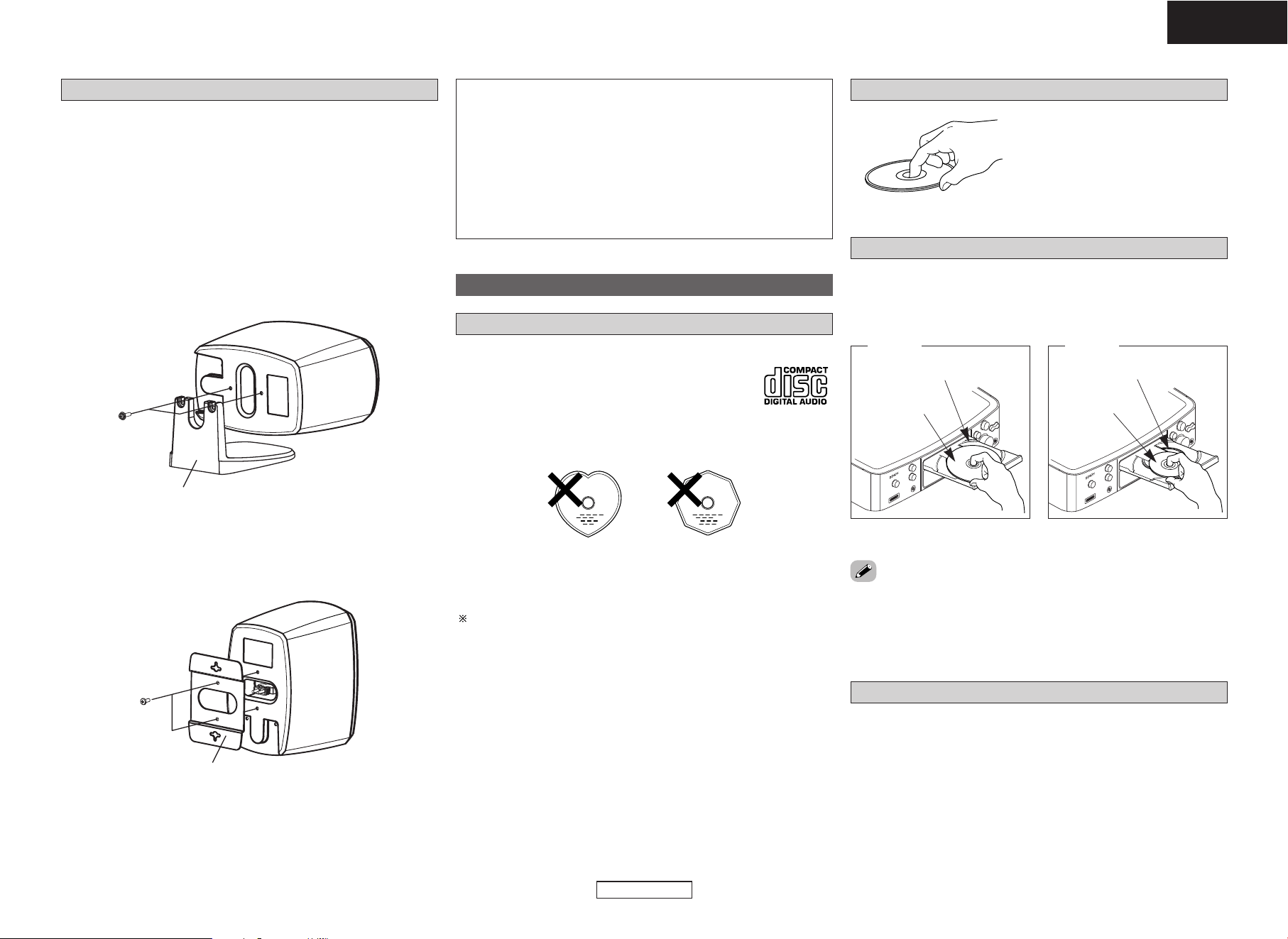
Cautions on installation
Wall
Note
Note:
For heat dispersal, do not install this unit in a confined space
such as a bookcase or similar enclosure.
Getting Started
Getting Started Getting Started
3
ENGLISH
ENGLISH
Cautions on loading discs
• Only load one disc at a time. Loading two or more discs can damage
the set or scratch the discs.
• Do not use cracked or warped discs or discs that have been repaired
with adhesive, etc.
• Do not use discs on which the sticky part of cellophane tape or
labels is exposed or on which there are traces of where labels have
been removed. Such discs could get caught inside the player and
damage it.
About discs
Discs usable on this set
q
Music CDs
Discs with the mark at the right can be used on
this set.
Note however that discs with special shapes
(heart-shaped discs, octagonal discs, etc.) cannot
be played. Do not attempt to play them, as doing
so could damage the set.
w
CD-R/CD-RW
• Some discs and some recording formats may not be playable.
• Non-finalized discs cannot be played.
Finalization:
Finalization is the process that makes recorded CD-R/CD-RW discs
playable on compatible players.
Holding discs
Do not touch the signal surface.
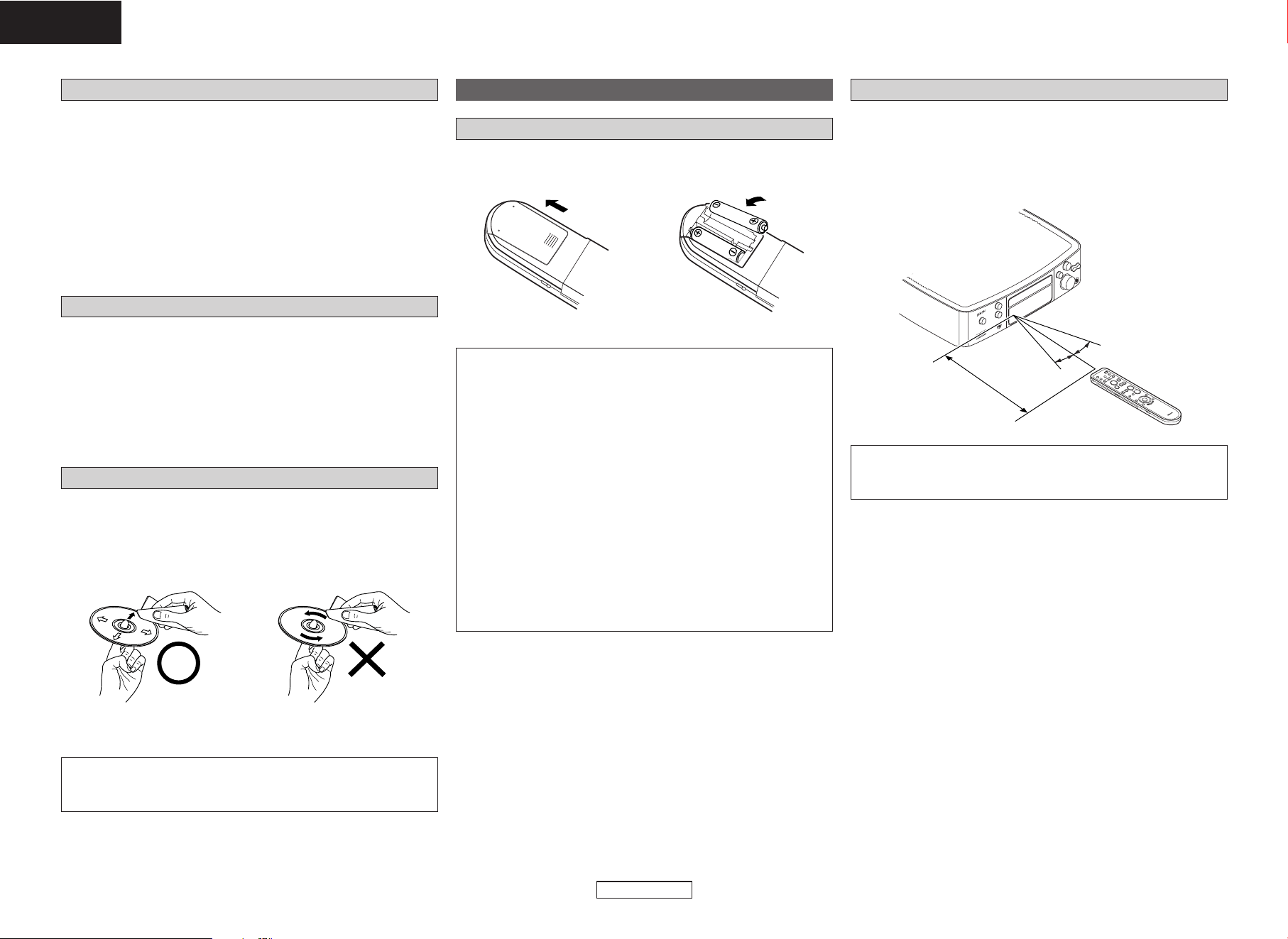
Loading discs
• Set the disc with the labeled side facing up.
• Make sure the disc tray is fully open when inserting the disc.
• Place the discs flatly, 12 cm discs in the outer tray guide (Figure 1),
8 cm discs in the inner tray guide (Figure 2).
Figure 1
Outer tray guide
12 cm discs
Figure 2
Inner tray guide
8 cm discs
• Place 8 cm discs in the inner tray guide without using an adapter.
• In the following cases, “00 Tr 00 : 00” is shown on the display:
• When no disc is loaded
• When the disc is loaded upside-down
• When the disc’s information could not be read properly
Speaker system (SC-S81)
When installing the speakers, pay attention to the points described
below.
• Note that placing the speaker system on the same stand or shelf as
a record player may result in howling.
• If a magnet or a piece of furniture or equipment using magnets is
placed near the speakers, note that interaction with the S-81 could
cause color blotching on the TV.
• The speakers can also be placed sideways.
Set the speaker sideways and fasten the stand securely to the
speaker using the two screws that previously fastened the stand.
Grasp the two edges of the saran net with your fingers and pull
towards you to remove the net, then press on the back of the badge
and turn the badge to set it sideways.
• The speakers can also be installed using the included wall
mount brackets.
Use the four included short screws to securely fasten the wall
mount bracket to the mount screw holes on the back of the speaker.
SC-S81
SC-S81
Screws
Screws
Speaker stand
Wall bracket
CAUTION:
• Mount on a wall sufficiently sturdy to bear the weight of the
speaker. Note that DENON will except no responsibility
whatsoever for damages or accidents caused by the speaker
falling.
•To ensure safety, have a specialist install the speakers on the
wall.
• Be sure to fasten the speaker connection cables to the wall, etc.,
so that you do not get your feet or hands caught in them, causing
the set to fall.
Getting Started Getting Started
4
ENGLISH
ENGLISH
About the remote control unit
Inserting the batteries
q Remove the remote control
unit’s rear cover.
w Set two R6P/AA batteries in
the battery compartment in
the indicated direction.
e Put the rear cover back on.
Notes on batteries:
• Replace the batteries with new ones if the set does not operate
even when the remote control unit is operated nearby the unit.
(The attached batteries are only for verifying operation.)
• When inserting the batteries, be sure to do so in the proper
direction, following the “<” and “>” marks in the battery
compartment.
•To prevent damage or leakage of battery fluid:
• Do not use a new battery together with an old one.
• Do not use two different types of batteries.
• Do not short-circuit, disassemble, heat or dispose of batteries
in flames.
• Remove the batteries from the remote control unit when you do
not plan to use it for an extended period of time.
• If the battery fluid should leak, carefully wipe the fluid off the
inside of the battery compartment and insert new batteries.
• Remove the batteries from the remote if it will not be in use for
long periods.
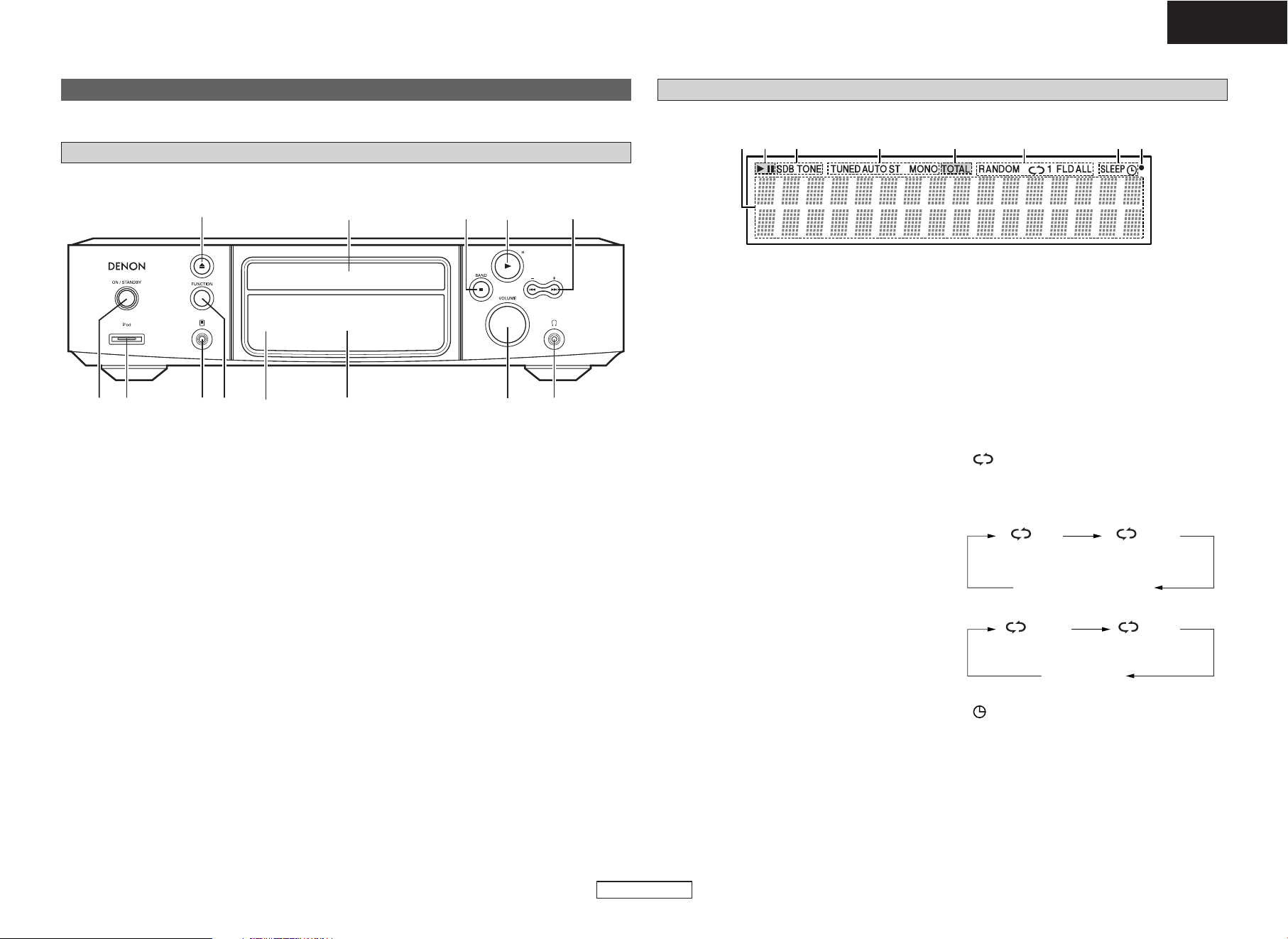
Operating range of the remote control unit
30°
30°
Approx. 7 m
• Point the remote control unit at the remote sensor when operating
it.
• The remote control unit can be used from a distance of up to about
7 meters, at a horizontal angle of up to 30° with respect to the
sensor.
NOTE:
• It may be difficult to operate the remote control unit if the remote
sensor is exposed to direct sunlight or strong artificial light.
Cautions on handling
• Do not get fingerprints, oil or dirt on discs.
•Take special care not to scratch discs when removing them from
their cases.
• Do not bend or heat discs.
• Do not enlarge the hole at the center.
• Do not write on the labeled (printed) surface with ball-point pens,
pencils, etc., or stick new labels on discs.
•Water droplets may form on discs if they are moved suddenly from
a cold place (outdoors for example) to a warm place, but do not try
to dry them off using a hairdryer, etc.
Cautions on storing discs
• Be sure to remove discs after using them.
• Be sure to store discs in their cases to protect them from dust,
scratches, warping, etc.
• Do not store discs in the following places:
1. Places exposed to direct sunlight for long periods of time
2. Dusty or humid places
3. Places exposed to heat from heating appliances, etc.
Cleaning discs
• If there are fingerprints or dirt on discs, wipe them off before using
the disc. If not the sound quality could be reduced and the sound
may be broken.
• Use a commercially available disc cleaning set or a soft cloth to clean
discs.
Gently wipe the disc from the
inside towards the outside.
Do not wipe with a circular motion.
NOTE:
• Do not use record spray, antistatic agents, or benzene, thinner or
other solvents.
r
Tuner reception mode indicators
TUNED: Lights when AM or FM broadcasts are
properly tuned in.
AUTO:Lights when in the auto stereo mode.
ST: Lights when a stereo broadcast is
received while in the auto stereo mode.
MONO: Lights when a monaural broadcast is
received while in the auto stereo mode.
t
CD/MP3/WMA play mode indicators
RANDOM: Lights when in the random play
mode.
: Lights when in the repeat play mode.
The display switches as follows each time the
REPEAT button is pressed.
• In modes other than the folder mode:
Getting Started Getting Started
5
ENGLISH
ENGLISH
Display
qw e r w t yu
q
Information display
Various types of information are displayed here.
• General operational indications:
• Function
•Time
•Volume level
•Tone adjustment level, etc.
• When the function is set to “TUNER”:
• Name of radio station
•Preset station name
• When the function is set to “CD”:
[For a music CD/MP3/WMA]
•Total number of folders
• Number of tracks
• Folder number
• Elapsed time
•Track name
•Artist name
• Album name, etc.
w
CD play mode indicators
1: Lights when a disc is playing.
3: Lights when the pause mode is set.
TOTAL: Lights when the total number of tracks
and total time are displayed at
q
.
e
Tone indicators
SDB: Lights when the super dynamic bass
function is set to “ON”.
TONE: Lights when the tone (bass/treble) is
being adjusted.
Part names and functions
Front panel
For buttons not explained here, see the page indicated in parentheses ( ).
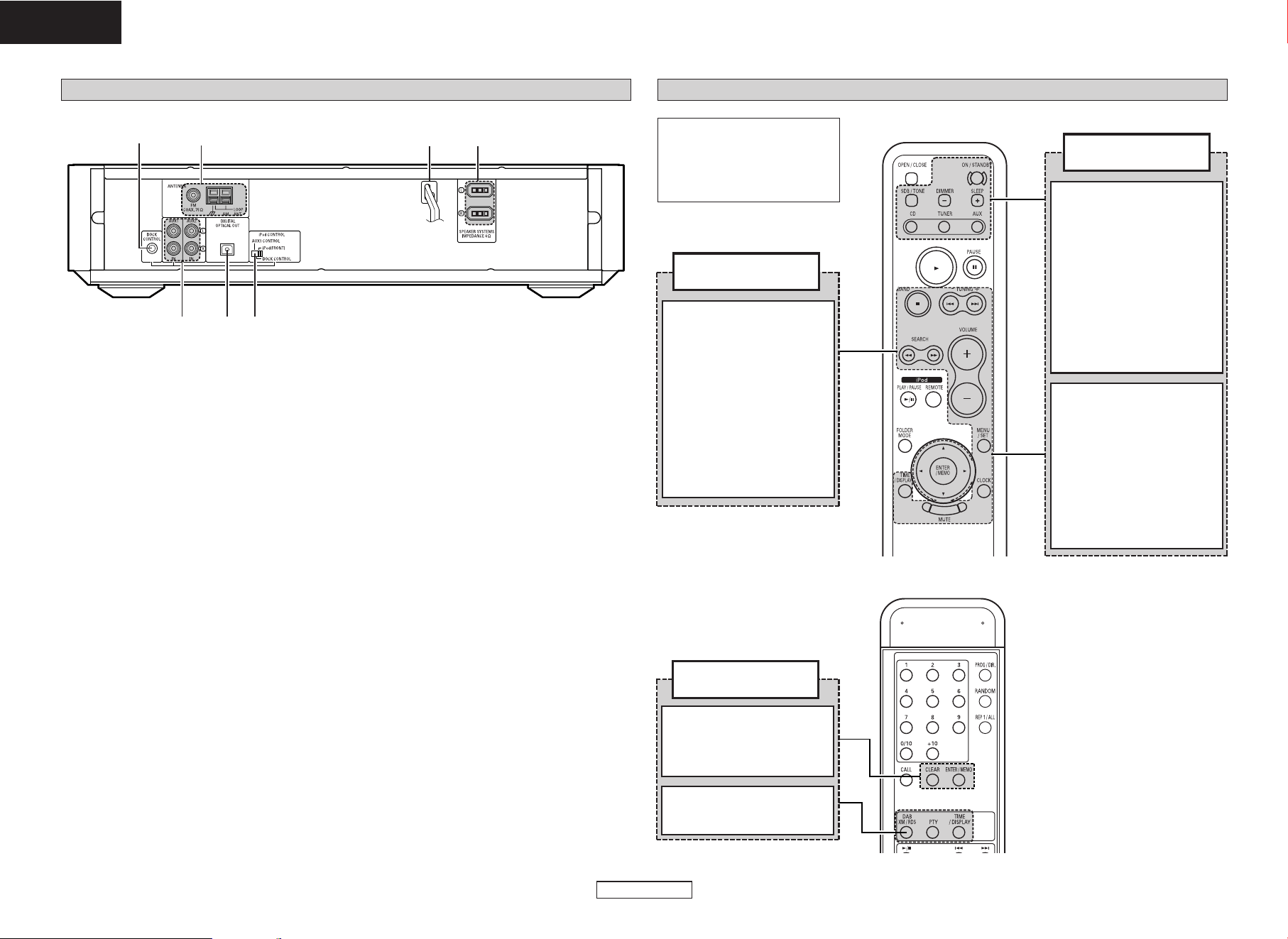
q e yw r u i
o
!0
t
!1!2!3
q
Power operation switch
(ON/STANDBY) ·········································(12)
w
iPod connector (iPod) ·························(10, 11)
e
Portable jack··············································(10)
r
FUNCTION button·······························(13, 14)
t
Remote control sensor·······························(4)
y
Display··························································(5)
u
VOLUME control knob ·····························(12)
i
Headphones jack
Use this jack to connect headphones
(commercially available).
When headphones are plugged in, the sound
can only be heard from the headphones.
o
Skip buttons (8, 9)·····(12 ~ 21, 23, 24)
Tuning buttons (
+,
–
) ·································(13)
!0
Play/Pause button (1/3) ·························(20)
!1
Stop button (2)·········································(20)
BAND button ····································(13 ~ 15)
!2
Disc tray ·······················································(3)
!3
Disc tray open/close button (5)··············(12)
ALL1
1 FLD FLD
FLD
• In the folder mode:
(All-track repeat)(1-track repeat)
Not displayed
(All-track repeat
between folders)
(1-track repeat)
y
Timer operation indicator
: Lights when the timer is in the standby
mode.
SLEEP: Lights when the sleep timer is
operating.
u
Remote control signal reception indicator
Lights when remote control signals are
received.
Getting Started Getting Started
6
ENGLISH
ENGLISH
Rear panel
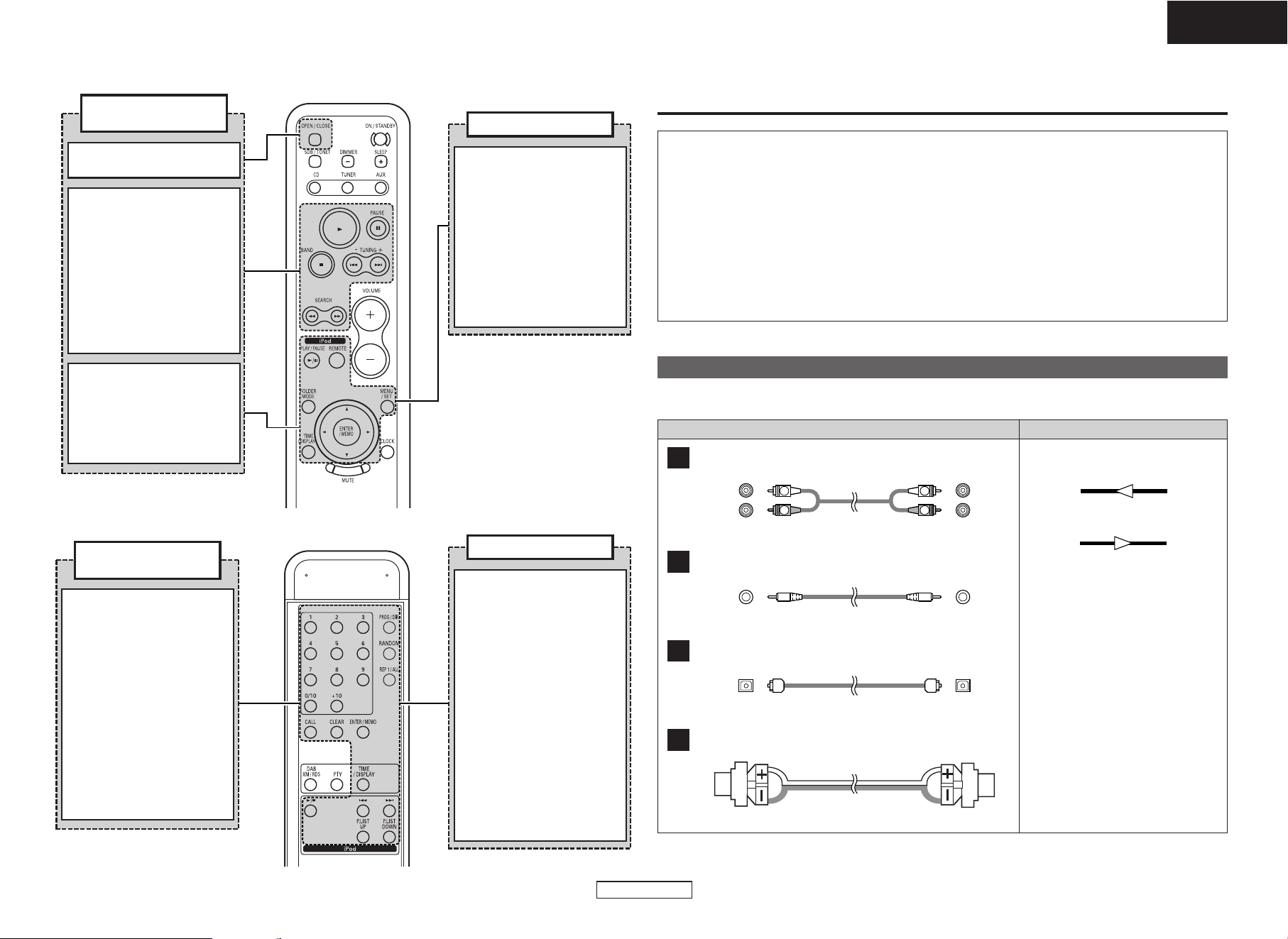
q
u
w e
rt
y
q
Analog input terminals ······················(10, 11)
w
DIGITAL OPTICAL OUT terminal ·············(11)
e
iPod CONTROL switch ·······················(10, 11)
r
SPEAKER SYSTEM terminals ····················(8)
t
Power supply cord····································(11)
y
ANTENNA terminals···································(9)
u
DOCK CONTROL jack································(10)
Remote control unit
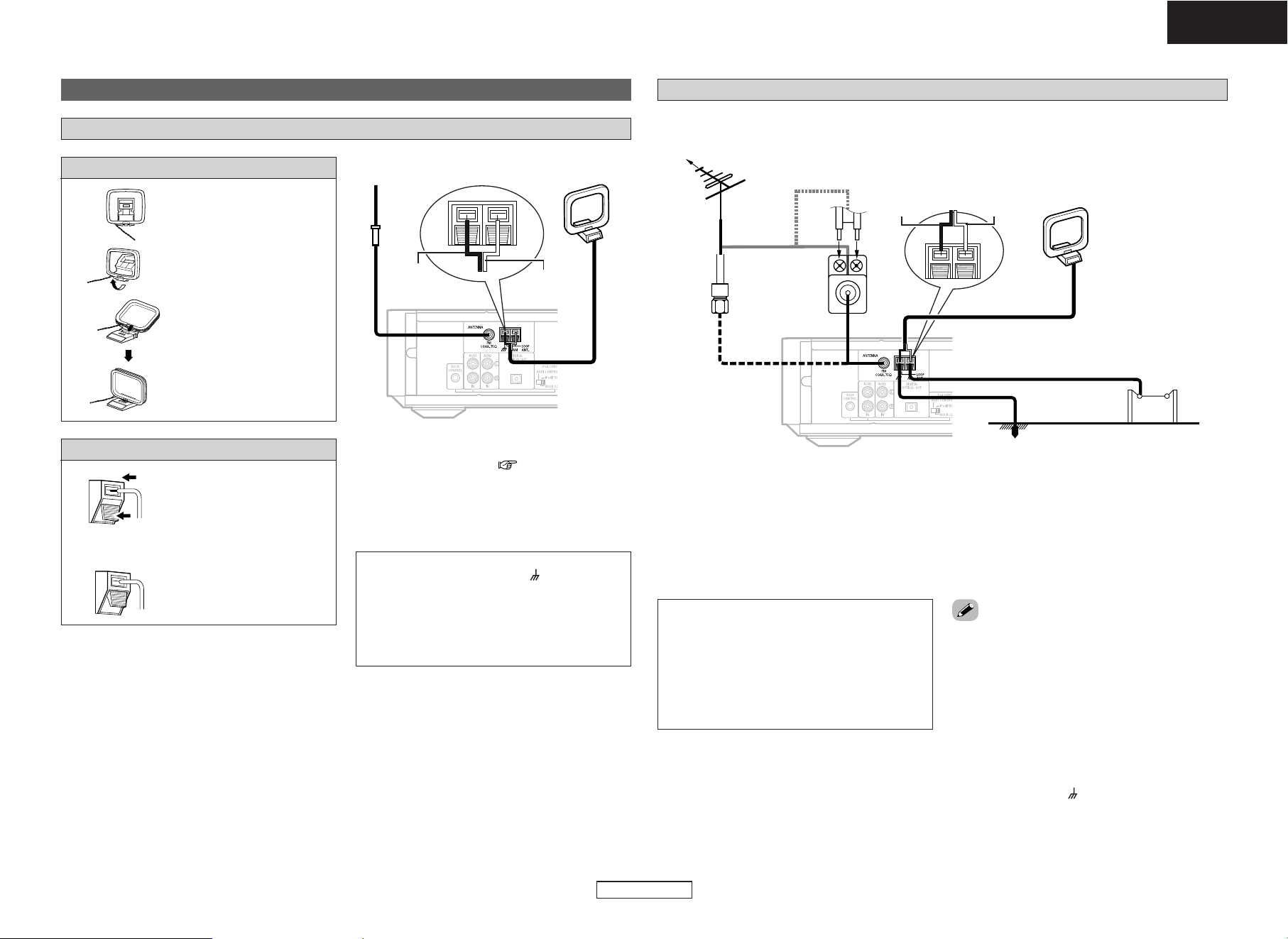
BAND button
·········································(13)
TUNING button
·········································(13)
ENTER/MEMO button
·········································(13)
Tuner operating
buttons
Cursor buttons
(
DD
,
HH
,
GG
,
FF
)························(13)
CLEAR button
·········································(13)
ENTER/MEMO button
·········································(13)
DAB/XM/RDS, PTY
TIME/DISPLAY buttons
·········································(15)
Tuner operating
buttons
ON/STANDBY button
·········································(12)
SLEEP button
·········································(18)
Function buttons
(CD, TUNER, AUX)
·····························(13, 20, 25)
Amplifier operating
buttons
DIMMER button
Adjusts the brightness of the
display.
SDB/TONE button
·········································(12)
Skip buttons
(8, 9)······················(12)
VOLUME button
·········································(12)
MENU/SET button
···································(16, 19)
CLOCK button
·········································(16)
MUTE button
Mutes the sound.
NOTE:
• If buttons on the front or rear
are pressed strongly, the
button on the opposite side
will be activated too.
[Front]
[Rear]
SEARCH buttons
(6, 7) ·······················(13)
TIME/DISPLAY button
·········································(15)
Audio cable
Getting Started
7
ENGLISH
ENGLISH
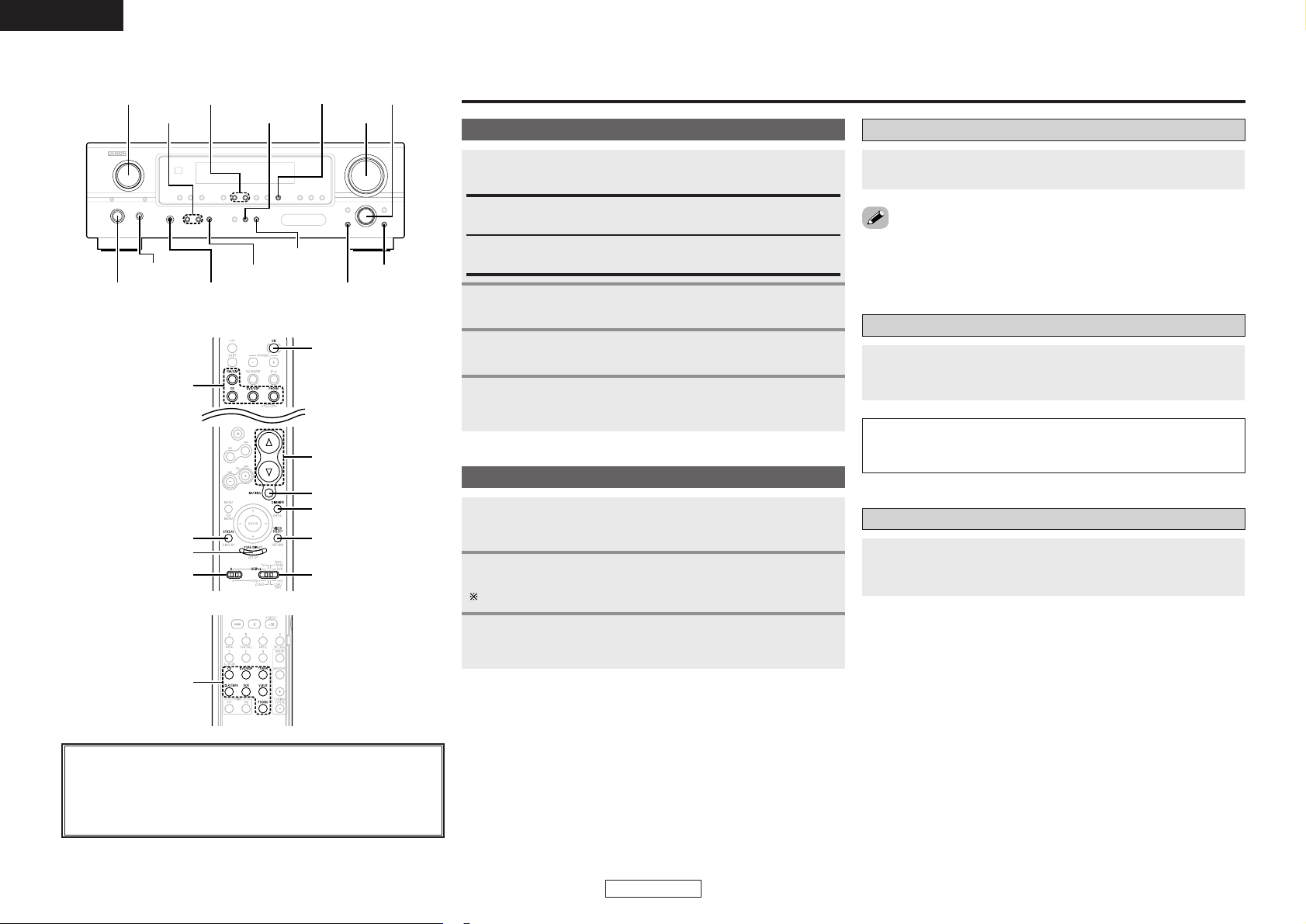
OPEN/CLOSE button
·········································(12)
Play button
(1) ···································(20)
CD player operating
buttons
PAUSE button
(3) ····································(20)
iPod REMOTE button
·········································(25)
iPod controls
MENU/SET button
Menu call
Cursor buttons (
DD
,
HH
)
Cursor movement (up/down)
[Front]
[Rear]
Stop button
(2) ····································(20)
Skip buttons
(8, 9)······················(20)
SEARCH buttons
(6, 7) ·······················(20)
FOLDER MODE button
·········································(23)
TIME/DISPLAY button
·········································(20)
Cursor buttons
(
DD
,
HH
)································(23)
iPod PLAY/PAUSE button
(iPod 1/3)
Play / Pause
ENTER/MEMO button
Enter
RANDOM button
Random playback
iPod controls
ENTER/MEMO button
Enter
TIME/DISPLAY button
Time/Display switching
REP 1/ALL button
Repeat playback
iPod PLAY/PAUSE button
(iPod
1/3)
Play / Pause
iPod P.LIST buttons
Playlist selection
iPod Skip button
(
8, 9)
Search / Fast-Rewind / Fast-
forward
Signal direction
Cable indications
Connect using the connection cables shown below.
Analog connections (Stereo)
A
R
L
R
L
Pin-plug cable
Analog connections (Stereo)
B
Stereo mini-plug cable
(White)
(Red)
Connections
NOTE:
• Do not plug in the power supply cord until all connections have been completed.
• When making connections, also refer to the operating instructions of the other components.
• Be sure to connect the left and right channels properly (left with left, right with right).
• Do not bundle power supply cords together with speaker cables. Doing so could result in humming
or noise.
• Making connections with the power turned on could result in noise or damage the speakers.
• Bunching the power supply cords and connection cables together could result in humming or noise.
• Connect all the connection cables between the different components firmly. The system may not
operate properly if the connections are incomplete.
• Be sure to disconnect the power supply cords when changing the connections. Changing the
connections while the system is operating could result in malfunction.
Audio signal
IN OUT
OUT IN
Digital connections (Optical)
C
Optical fiber cable
Speaker connections
D
Speaker cable
PROG/DIR. button
·········································(21)
RANDOM button
·········································(21)
CD player operating
buttons
Number buttons
(0 ~ 10, +10) ····················(21)
REP 1/ALL button
·········································(21)
CALL button
·········································(21)
CLEAR button
·········································(21)
TIME/DISPLAY button
·········································(24)

Connections Connections
8
ENGLISH
ENGLISH
Speaker connections
A CD receiver (RCD-S81) and speaker systems (SC-S81) can be easily connected to the S-81 using the
speaker cables included with the S-81.
Note on speaker impedance
If speakers with an impedance below the specified impedance (4 Ω/ohms) are used (for example,
speakers with an impedance of 3 Ω/ohms) with the volume turned up high for long periods of time,
the temperature may rise, activating the protective circuit.
When the protection circuit is activated, the output to the speakers is cut off and the power indicator
blinks. If this happens, unplug the power supply cord, wait for the set to cool off and improve
ventilation around the unit. Also check the wiring of the input cables and the speaker cables. After
doing this, plug the power supply cord back in and turn the unit’s power back on.
If the protection circuit is activated again even though there are no problems with the wiring or the
ventilation around the unit, switch off the power and contact a DENON service center.
D D
(
L
)(
R
)
Changing the speaker cable
The speaker cable can be replaced with another one of your choice.
Here we describe how to connect the “+” side cable to the connector. Connect the “–” side cable in
the same way.
Insert the hexagonal wrench (included)
into the hole in the side of the “+” side
connector (arrow A).
Turn the hexagonal wrench in the
direction of arrow B to loosen the cable.
Completely remove the cable (arrow C).
Check that there are no broken pieces of core
wire remaining inside the connector.
1
2
3
Peel some sheathing off the tip of the
cable (core sire, copper colored), then
either twist the core wire or terminate it
and insert it in the direction of arrow D.
4
Turn the hexagonal wrench in the
direction of arrow E and tighten securely
so that the cable cannot come out.
5
• Note that inverting the polarities will change
the phase and result in unnatural sound with
no bass range.
White Red
A
B
E
D
C
SC-S81
RCD-S81
White
Red
Connections Connections
9
ENGLISH
ENGLISH
Antenna connections
Connecting the included antennas
Assembling the AM loop antenna
2. Bend.
1. Remove.
3. Insert in holes.
Connecting the AM loop antenna
1. Insert the antenna wire while
pressing the lever.
2. Release the lever to fasten the
antenna wire in place.
¢ Installing the antenna
q Tuning in a broadcast ( page 13).
w Listening to the sound, move the antenna to
find the position in which there is less noise.
e Install the antenna.
• Fasten the tip of the antenna using tape, etc.
NOTE:
• The S-81’s ground terminal ( ) is the ground
for the AM loop antenna. It is not a safety
ground.
• It is not possible to achieve good reception for
AM broadcasts if the AM loop antenna is
placed near a metallic object.
Connecting an outdoor antenna
In some cases better reception can be achieved by using an outdoor antenna.
FM indoor antenna
(Included)
AM loop antenna
(Included)
FM outdoor antenna
AM loop antenna
(Included)
Ground
AM outdoor antenna
FM antenna
adapter
75Ω/ohms
coaxial
cable
300Ω/ohms feeder cable
¢ Where to install the outdoor
antenna
• Place the antenna in the position in which
reception is the best.
• Place away from streets or railroad tracks to
avoid the influence of cars or trains.
¢ Connecting the FM outdoor
antenna
•We recommend using a 75 Ω/ohms coaxial
cable to avoid interference from other
equipment.
• Be sure to disconnect the included FM antenna.
¢ Connecting an AM outdoor
antenna
• Be sure to connect the ground wire to the
ground terminal ( ).
• Be sure to also connect the included AM loop
antenna.
NOTE:
• Do not place under power transmission lines.
Doing so is extremely dangerous.
•To avoid attracting lightning, do not place in
too high a position.
• Connecting the ground wire to a gas pipe is
extremely dangerous. Never do so under any
circumstances.
• Use an FM antenna adapter (commercially
available) suited for the S-81’s antenna terminal.
• Refer to the FM antenna adapter’s operating
instructions for instructions on connecting the
antenna cable to the FM antenna adapter.
WhiteBlack
White
Black
Connections Connections
10
ENGLISH
ENGLISH
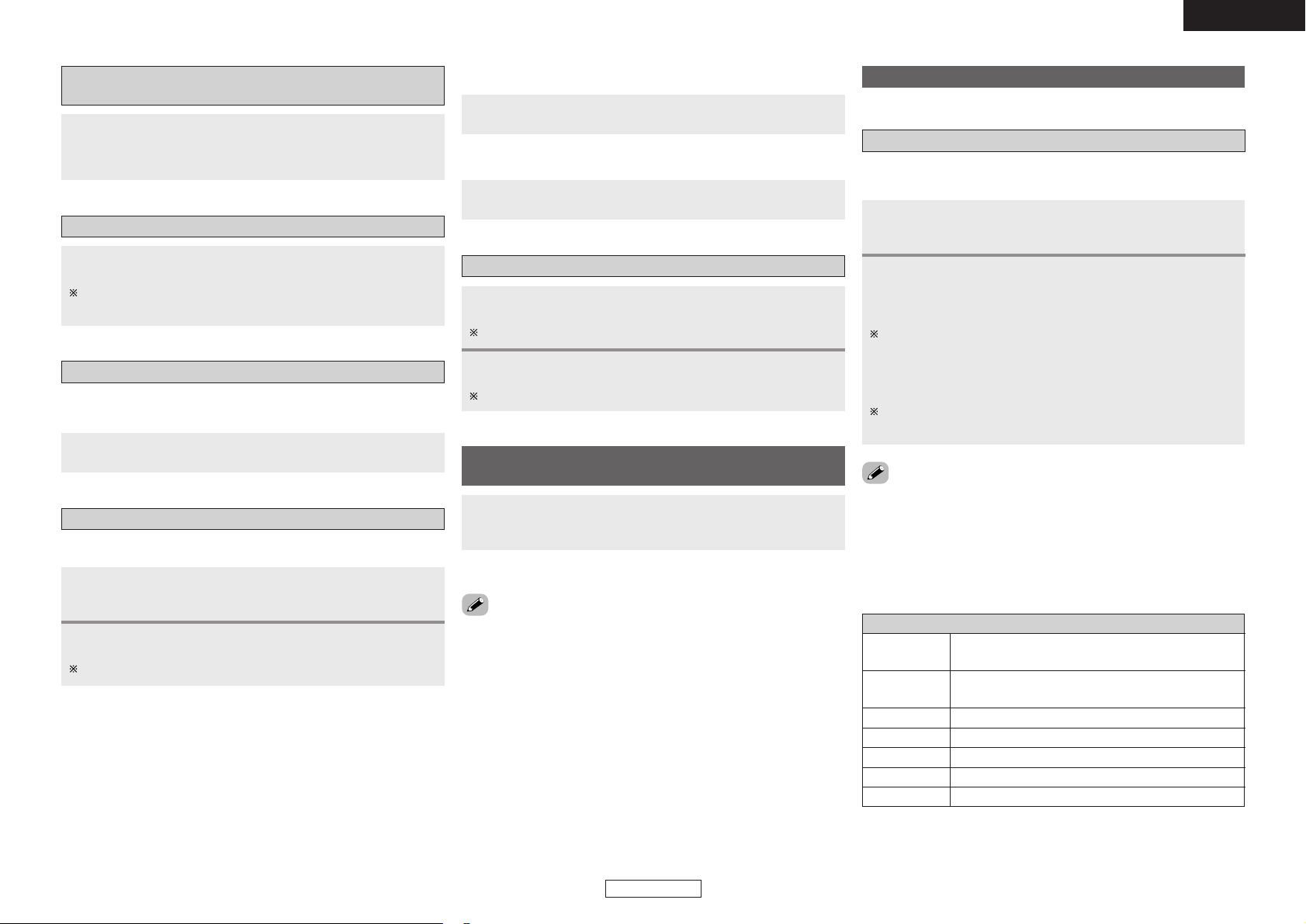
Connecting a portable player
AUDIO LINE
OUT
B
Connecting to an iPod
®
iPod is a trademark of Apple Computer, Inc., registered in the U.S. and other countries.
When using an exclusive control Dock for iPod
R
L
R
L
Included with
Control Dock for iPod
• When using an Control Dock for iPod, we recommend using the exclusive Control Dock for iPod (ASD-
1R (sold separately)).
•To connect the exclusive Control Dock for iPod (ASD-1R (sold separately)), use the system cable
included with the exclusive Control Dock for iPod (ASD-1R (sold separately)).
• When the exclusive control Dock for iPod (sold separately) or an Apple iPod dock (sold separately) is
connected, the function indication switches from “AUX1” to “AUX1/iPod”.
•Turn off the power before switching the iPod CONTROL switch on the rear panel. (Refer to “Turning
the power off (to the standby mode)” ( page 12).)
When using the included iPod cable
Portable player
iPod
•Switch iPod CONTROL on the rear panel to “iPod (FRONT)”.
•Switch iPod CONTROL on the rear panel to “DOCK CONTROL”.
ASD-1R
(
Sold separately
)
Connections Connections
11
ENGLISH
ENGLISH
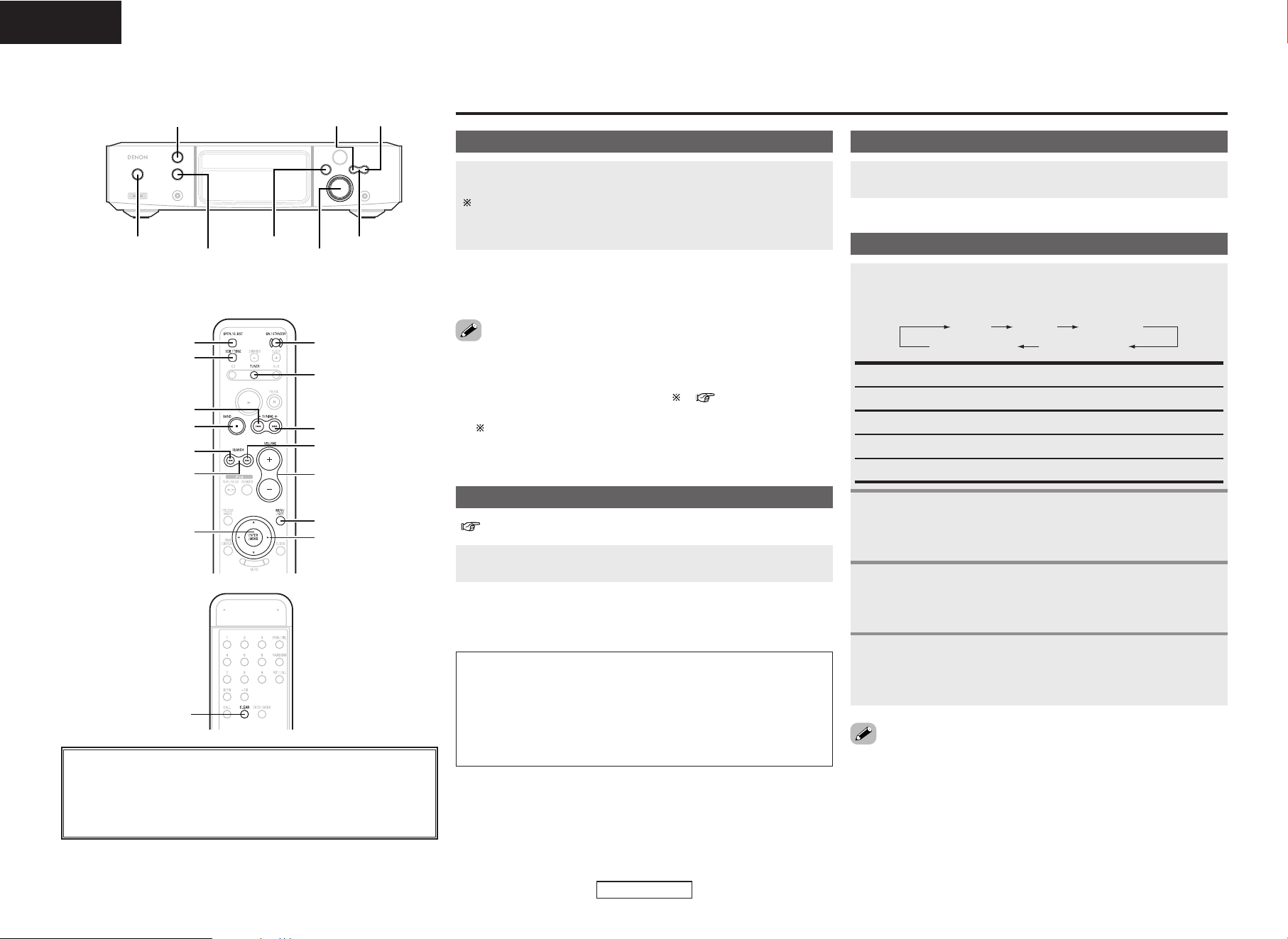
Connecting a CD recorder
R
L
AUDIO OUT
OPTICAL
IN
R
L
R
L
A
C
Connecting the power supply cord
AC 230 V, 50 Hz
AC outlet
(wall)
Power supply cord
CD recorder
When using an Apple iPod Dock
R
L
iPod
•Switch iPod CONTROL on the rear panel to “AUX1 CONTROL”.
iPod Dock
(
Sold separately
)
The following iPod docks can be used with this method:
•iPod Dock M9868G/A (For iPod with color displays)
•iPod Dock MA072G/A (For iPod nanos)
12
ENGLISH
ENGLISH
Turning the power on
[TUNER]
[
D
,
H
,
G
,
F
]
9
[MENU/SET]
[
7
]
BAND
SEARCH
[ENTER/MEMO]
[
6
]
8
ON/STANDBY
[VOLUME]
[OPEN/CLOSE]
[SDB/TONE]
8 9
<VOLUME><FUNCTION>
TUNINGBAND
<5>
ON/STANDBY
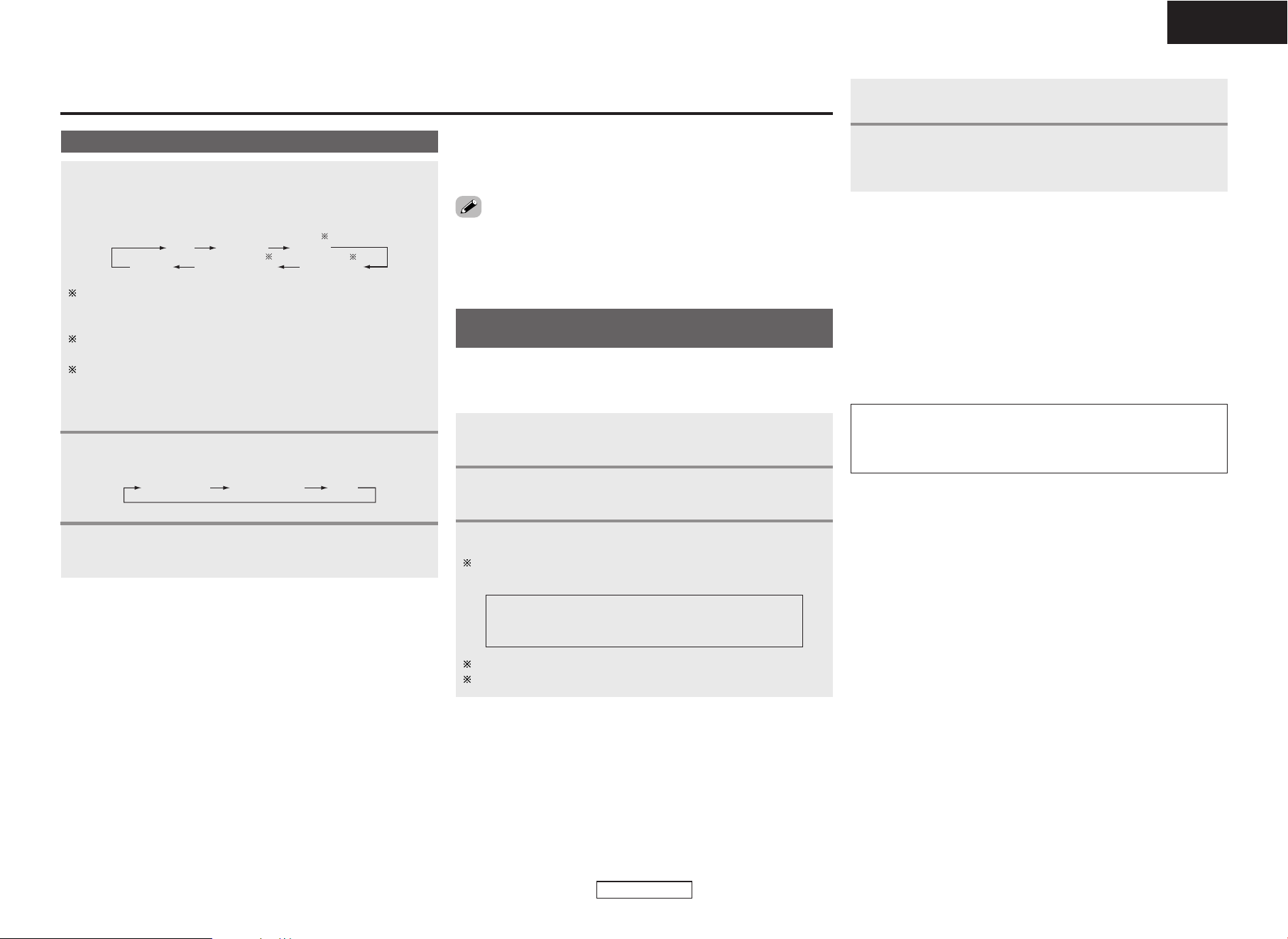
About the button names in this explanation
<>: Buttons on the main unit
[]: Buttons on the remote control unit
Button name only :
Buttons on the main unit and remote control unit
Basic Operation
Press ON/STANDBY.
When the power is turned on, the function that was being used
when the power was last turned off is selected (selector
function).
¢ Turning the power off (to the standby mode):
Press ON/STANDBY again.
Loading discs
Press
<
5
>
or [OPEN/CLOSE] to open the disc tray.
( page 3)
¢ To close the disc tray:
Press
<
5
>
or [OPEN/CLOSE] again.
NOTE:
• Be sure to turn on the power when opening and closing the disc
tray.
• Do not push the disc tray in by hand when the power is off. Doing
so could damage it.
• Do not insert foreign objects into the disc tray. Doing so will
damage it.
•Information on the power indicator
• Power on ..................................Blue
• Standby mode...........................Red
• Low-power standby mode........Off ( ) ( page 19)
•Timer standby mode .................Orange
When in the low-power standby mode, a very small amount of
power is consumed, even if all the indicators are turned off.
Adjusting the volume
Turn
<
VOLUME
>
or press [VOLUME].
Adjusting the tone
To emphasize the low bass sound:
When “SDB ON/OFF” is displayed, use
88
or
99
to select “ON” or “OFF”.
Use [SDB/TONE] to select the tone parameter to be
adjusted.
1
TREBLEBASSSDB
S. DIRECT BALANCE
SDB: Adjusts the low bass sound.
BASS: Adjusts the bass sound.
TREBLE: Adjusts the treble sound.
BALANCE: Adjusts the left/right volume balance.
S. DIRECT: The sound is played with the tone flat.
2
-1
To adjust the bass or treble sound:
When “BASS” or “TREBLE” level is displayed, use
88
or
99
to adjust.
2
-2
To adjust the left/right volume balance:
When “BALANCE” is displayed, use
88
or
99
to
adjust.
2
-3
• The tone is only flat when “S.DIRECT” is selected. To adjust the
tone controls set a made other than “S.DIRECT”.
[CLEAR]
1 Can be selected when iPod CONTROL on the rear panel is
switched to “iPod (FRONT)” and the included iPod cable is
used.
2 Front IN can only be selected when a portable player is
connected.
3 Can be selected when iPod CONTROL on the rear panel is
switched to “AUX1 CONTROL” or “DOCK CONTROL” and an
Apple iPod Dock (sold separately) or and exclusive control
Dock for iPod (ASD-1R (sold separately)) is connected.
Listening to radio broadcasts
13
ENGLISH
ENGLISH
Listening to radio broadcasts
• Noise may be produced in the sound when receiving AM broadcasts
if there is a monitor or other such device nearby. If so, move the S-
81 and monitor as far apart as possible.
Use BAND to select the reception band.
Use SEARCH to tune in the station.
• The “TUNED” indicator lights when a station is tuned in.
Selecting a radio station
Use
<
FUNCTION
>
or [TUNER] (FUNCTION) to select
“TUNER”.
• The reception frequency is displayed.
FM AUTO
FM MONO
AM
2
3
1
¢ FM station reception conditions
• When the reception mode is set to “FM AUTO”, the “ST”
indicator lights when a stereo broadcast is tuned in.
• If the signal is weak and the stereo broadcast reception is not
stable, set the reception band mode is set to “FM MONO”. The
“MONO” indicator lights.
¢ Manual tuning
The reception frequency changes one step each time one of [6],
[7] is pressed.
Press [ENTER/MEMO] twice.
• The name input mode is set.
Use [
DD
] or [
HH
] to select the desired character.
Up to 8 characters can be input.
The characters that can be input are as shown below.
Use [
FF
] or [
GG
] to move the cursor.
Press [CLEAR] to delete characters.
Giving a name to the currently tuned in
broadcast station and presetting it
Tune in the broadcast station.
• The reception frequency is displayed.
2
3
1
•A total of 60 FM and AM broadcast stations combined can be
preset.
•Preset stations can be given names of up to 8 characters.
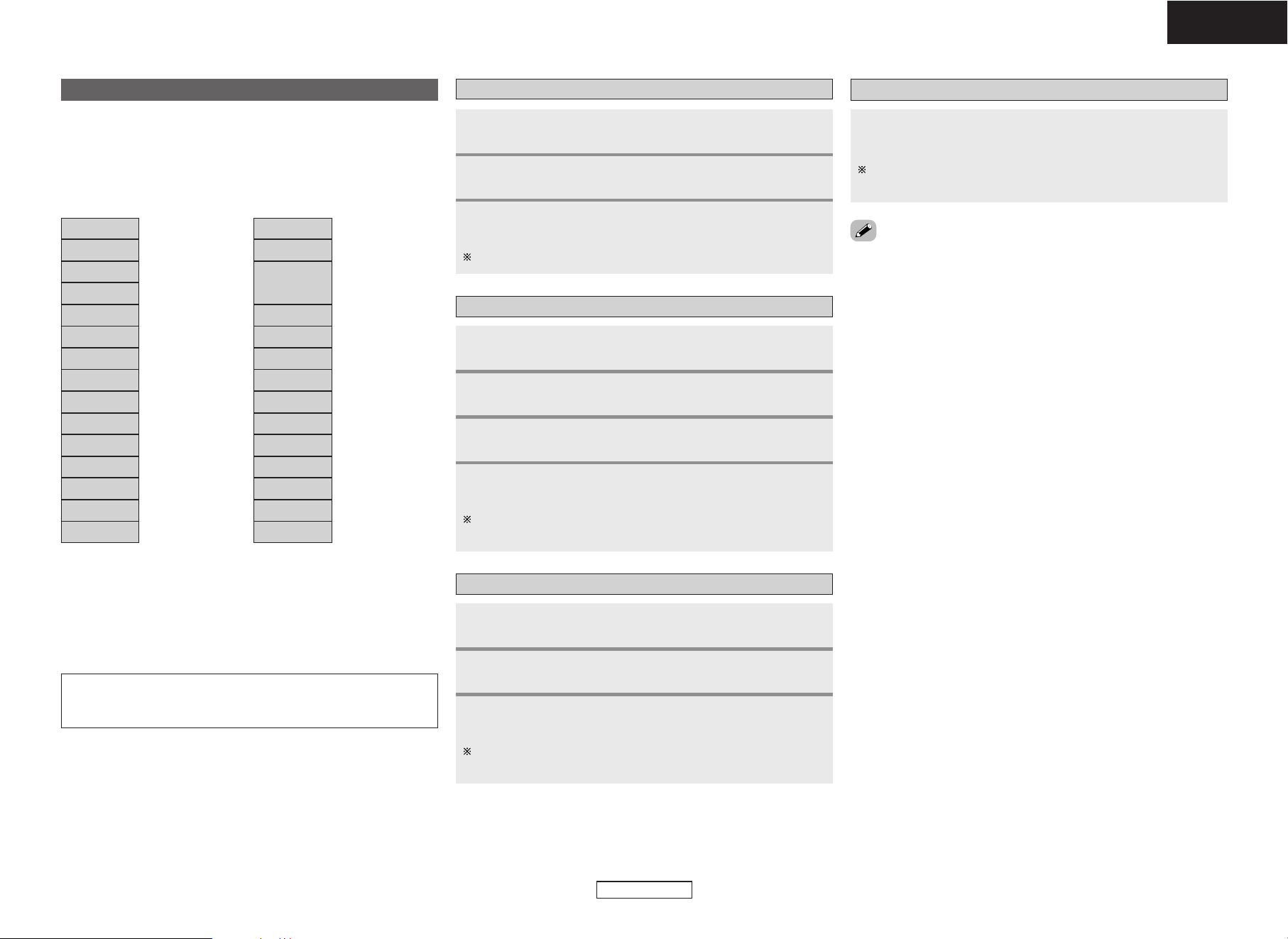
AB C D E F G H I J K L M N O P Q R S T U V W X Y Z
0 1 2 3 4 5 6 7 8 9
^ ’ ( )
*
+ , – . / = (space)
NOTE:
• If a station is preset at a number where a station has already
been preset, the old setting is deleted and replaced with the new
setting.
(iPod)TUNERCD
(Front.IN)
AUX2
AUX1 (/iPod)
1
2
3
¢ Auto tuning
If one of [6], [7] is pressed and held in, the next station is
searched for automatically.
Stations cannot be tuned in if their signal is weak.
•
To stop auto tuning
Press one of [6], [7].
Press [MENU/SET].
4
Use [
DD
] or [
HH
] to select the preset number, then press
[MENU/SET].
• The reception frequency and reception mode are preset.
5
¢ To change the name of a preset station:
q Call out the station whose name you want to change, then press
[ENTER/MEMO] twice.
w Perform step 3 under “Giving a name to the currently tuned in
broadcast station and presetting it”.
¢ To only preset the station:
q Press [ENTER/MEMO] while the station is tuned in.
The “preset number” display flashes.
w Perform step 5 under “Giving a name to the currently tuned in
broadcast station and presetting it”.
Use
<
FUNCTION
>
or [TUNER] (FUNCTION) to select
“TUNER”.
• The reception frequency is displayed.
Listening to radio broadcasts Listening to radio broadcasts
14
ENGLISH
ENGLISH
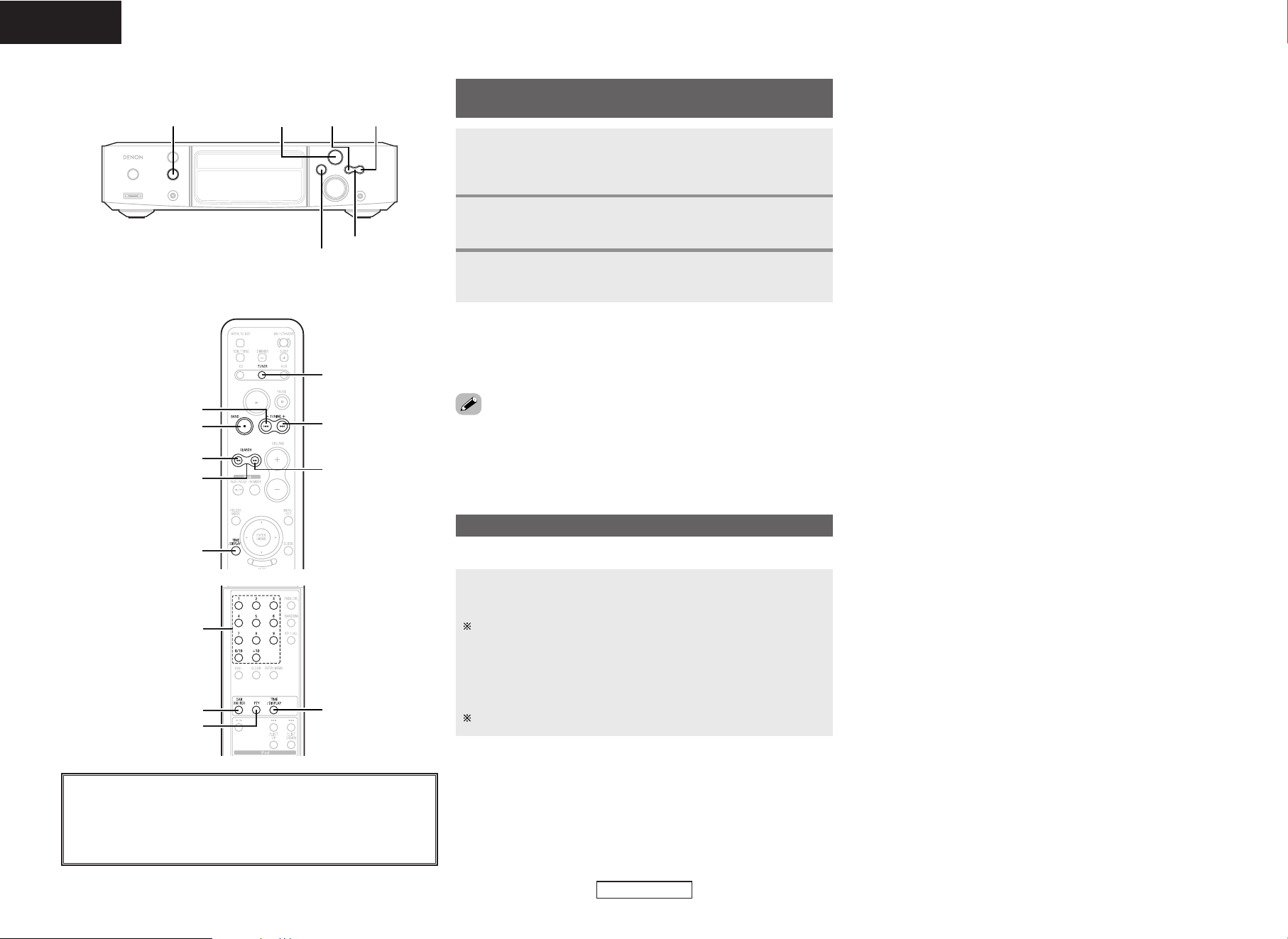
About the button names in this explanation
<>: Buttons on the main unit
[]: Buttons on the remote control unit
Button name only :
Buttons on the main unit and remote control unit
Presetting broadcast stations automatically
(Auto preset)
Listening to preset broadcast stations
Press and hold
<
1/3
>
.
• “AUTO PRESET” is displayed.
2
Press
<
1/3
>
.
• Broadcast stations are preset automatically.
3
1
¢ To stop the auto preset operation before it is
completed:
Press BAND.
• Broadcast stations whose signals are weak cannot be preset
automatically. To preset them, tune them in manually, then follow
the operation described at “Giving a name to the currently tuned in
broadcast station and presetting it”.
Example: To listen to the FM station preset at preset number 3.
Press [3] (NUMBER).
•Preset number “3” is displayed.
For track numbers 1 to 10, press the corresponding button ([1] to
[0/10]).
For track numbers 10 and on, first press [+ 10] then press buttons
[0] to [0/10].
Example: Track 12 : [+ 10] [2].
Example: Track 20 : [+ 10] [0/10].
The preset number can also be chosen using [
8] or [9].
[TUNER]
9
[
7
]
BAND
SEARCH
[
6
]
[TIME/DISPLAY]
8
8 <FUNCTION> 9
BAND
TUNING
<1/3>
¢ About the tuning and preset modes
<
8
>
and
<
9
> can be used both to select the reception
frequency (tuning mode) and to select the preset station (preset
mode).
• Switching between the tuning and preset modes
q To switch to the tuning mode:
Press
<
8
>
while pressing BAND. The “TUNING” indicator
flashes.
<
8
>
and
<
9
>
operate in the same way as [6] and [7].
w To switch to the preset mode:
Press
<
9
>
while pressing BAND. The “PRESET” indicator
flashes.
<
8
>
and
<
9
>
operate in the same way as [8] and [9].
[TIME/DISPLAY]
[NUMBER]
(1~9, 0/10, +10)
[RDS]
[PTY]
Listening to radio broadcasts Listening to radio broadcasts
15
ENGLISH
ENGLISH
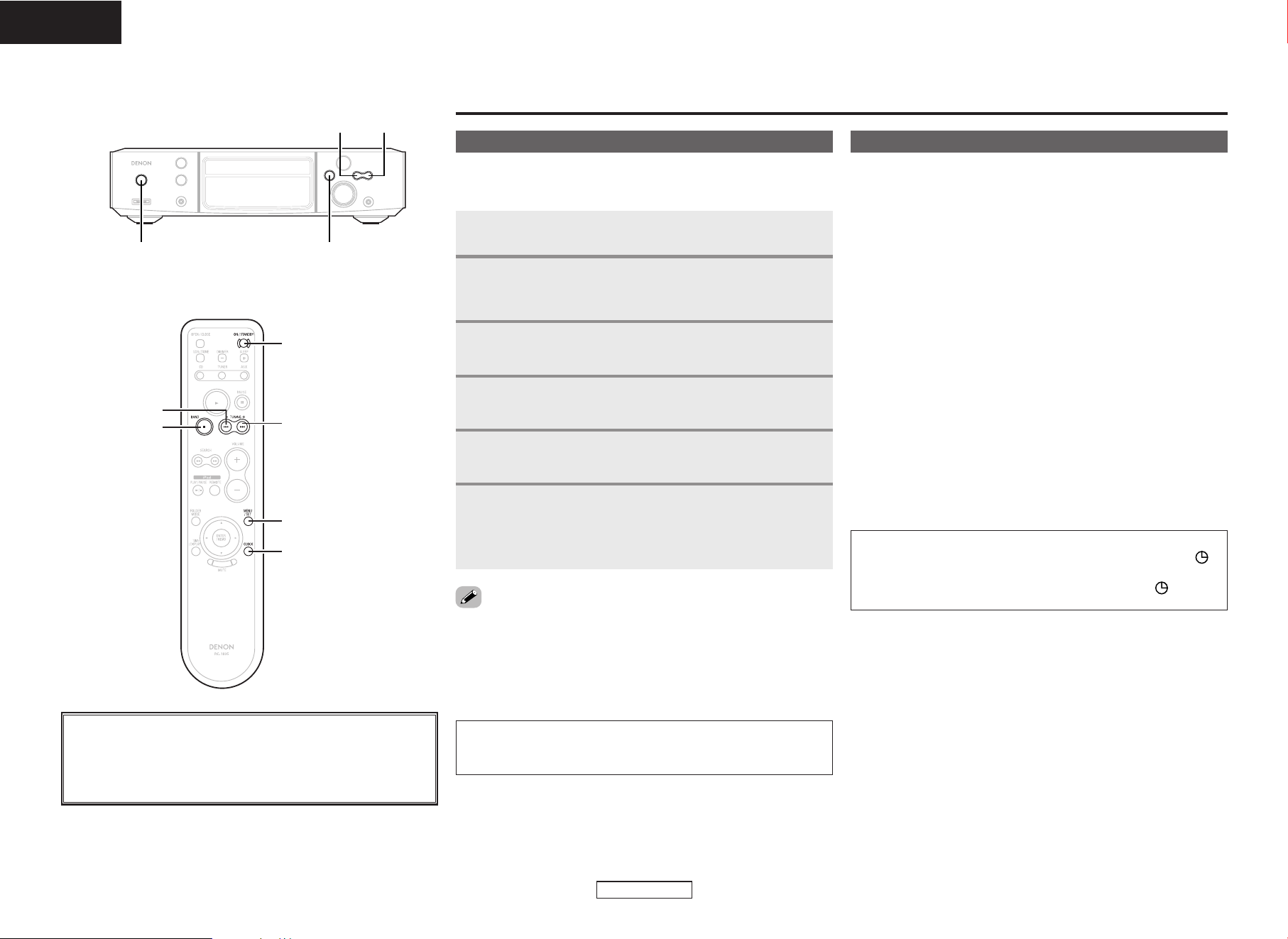
RDS (works only on the FM band) is a broadcasting service which
allows station to send additional information along with the regular
radio program signal.
¢ Program Type (PTY)
PTY identifies the type of RDS program.
News
Current Affairs
Information
Sports
Education
Drama
Culture
Science
NEWS
AFFAIRS
INFO
SPORT
EDUCATE
DRAMA
CULTURE
SCIENCE
Varied
Pop Music
Rock Music
Easy Listening
VARIED
POP M
ROCK M
EASY M
Light Classical
Serious Classical
Other Music
LIGHT M
CLASSICS
OTHER M
Weather
WEATHER
Finance
Children’s
Programs
Social Affairs
Religion
Phone In
Travel
FINANCE
CHILDREN
SOCIAL
RELIGION
PHONE IN
TRAVEL
Leisure
Jazz Music
LEISURE
JAZZ
Country Music
National Music
Oldies Music
COUNTRY
NATION M
OLDIES
Folk Music
Documentary
FOLK M
DOCUMENT
¢ Traffic Program (TP)
TP identifies programs that carry traffic announcements.
¢ Radio Text (RT)
RT allows the RDS station to send text messages that appear on
the display.
NOTE:
• The operations described below pressing [RDS] will not function
in areas in which there are no RDS broadcasts.
RDS (Radio Data System)
Use BAND to select “FM AUTO”.
1
Press
[
RDS
]
.
2
Press SEARCH.
• Automatically begin the RDS search operation.
If no RDS station is found, “NO PROGRAM” is displayed.
3
RDS search
Use BAND to select “FM AUTO”.
1
Press
[
RDS
]
twice.
2
Press SEARCH.
• Automatically begin the PTY search operation.
If no program of the specified type is found, “NO PROGRAM” is
displayed.
4
PTY search
Use
[
PTY
]
to select the type of program.
3
Use BAND to select “FM AUTO”.
1
Press
[
RDS
]
three times.
2
Press SEARCH.
• Automatically begin the TP search operation.
“NO PROGRAM” is displayed when there is no traffic information
broadcast station.
3
TP search
Press
[
TIME/DISPLAY
]
until “Radio Text” scrolls on the
display.
When the station currently tuned in is offering a radio text
message service, the message scrolls on the display.
RT (Radio Text)
• When the RT mode is turned on while an RDS radio station not
offering an RT service is tuned in, “NO TEXT” is displayed on the
display, then the mode automatically switches to the PS mode.
• In the same way, the mode automatically switches to the PS mode
when the RT service is finished. In this case, the mode automatically
switches from the PS mode back to the RT mode when an RT
broadcast is resumed.
• The RT mode cannot be set in the AM band or for FM stations not
offering RDS broadcasts.
•To turn the RT mode off, use [TIME/DISPLAY] and switch to the
desired display mode.
16
ENGLISH
ENGLISH
Using the timer function
Press and hold [MENU/SET].
• “TIME Adj” is displayed.
• The hour’s display flashes.
Use 8 or 9 to set the hours to “19”.
• “19” flashes.
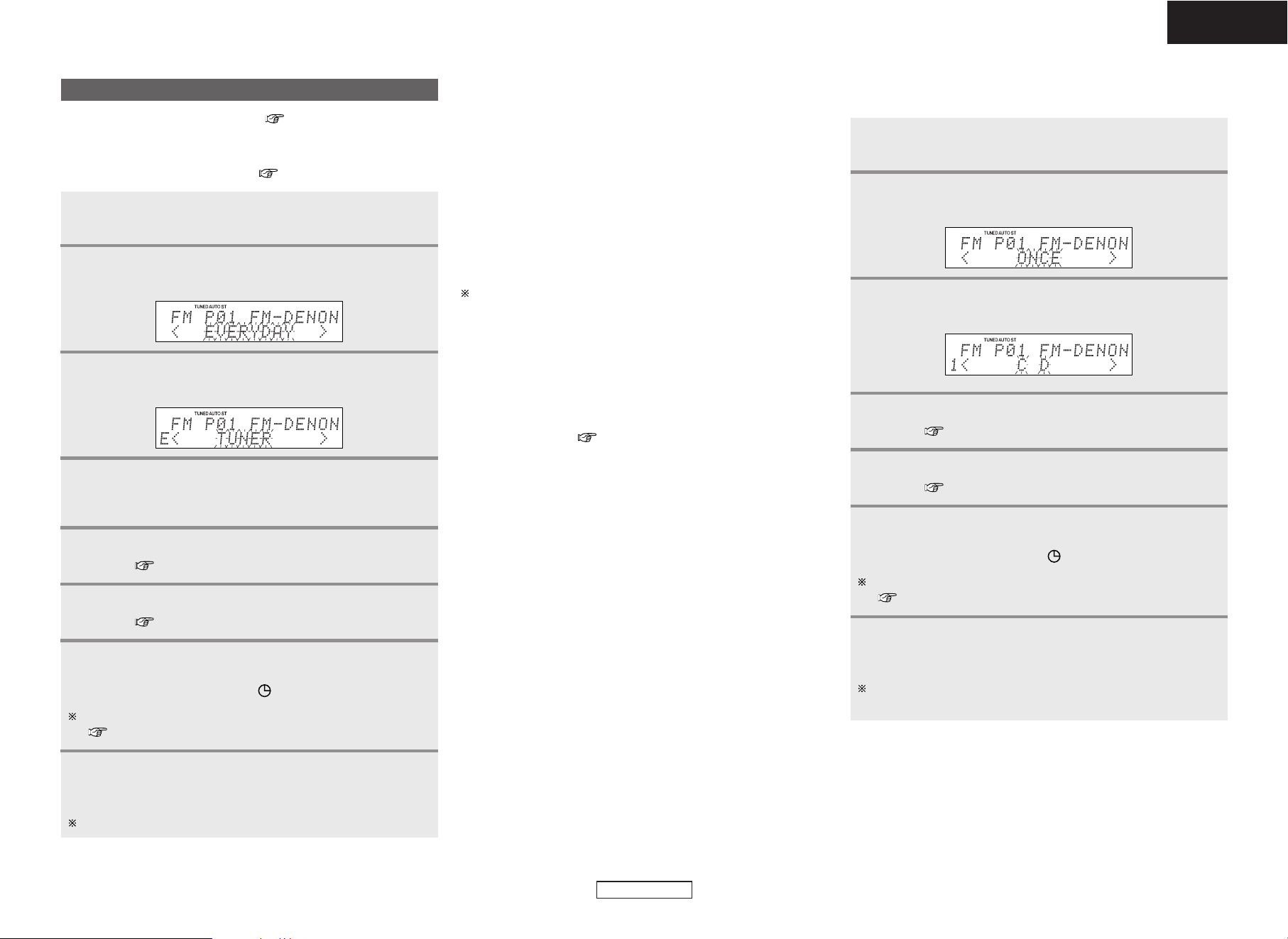
Setting the current time
Press [CLOCK].
2
Press [MENU/SET] simultaneously with the tone of a
time casting, etc.
• “TIME Adj” turns off.
• The current time is displayed.
6
3
1
The S-81’s clock displays the time in the 24-hour mode.
Example: To set the current time to “19:30”
Before setting the timer
Press [MENU/SET].
• The minute’s display flashes.
4
Use 8 or 9 to set the minutes to “30”.
• “30” flashes.
5
• If [MENU/SET] is pressed before the time is set, the time setting
mode is set.
• If the current time has been set, it can be displayed by pressing
[CLOCK].
• In the standby mode, the current time can also be displayed by
pressing [MENU/SET].
NOTE:
• The time cannot be set when in the standby mode. Turn on the
power first.
¢ Types of timers
The S-81 has three timer functions.
q Everyday timer:
Use this to play at the set time every day.
w Once timer:
Use this to play once only at the set time.
e Sleep timer:
Use this to turn off the power after up to 90 minutes, set in
intervals of 10 minutes.
¢ Order of priority for the timers
• If the times set for the three timers overlap, the sleep timer has
priority.
• If the times set for the everyday and once timers overlap, the once
timer has priority.
¢ If there is a power cut
• The current time setting is canceled. Turn the power on and reset
the current time.
• The timer settings are cleared. Set the timer again.
• The tuner’s presettings may be cleared. If so, perform the
presetting procedure again.
NOTE:
• If the current time is not set, the timer standby indicator “ ”
will not light.
• When the timer is set, the timer standby indicator “ ” lights.
About the button names in this explanation
<>: Buttons on the main unit
[]: Buttons on the remote control unit
Button name only :
Buttons on the main unit and remote control unit
[MENU/SET]
[CLOCK]
[ON/STANDBY]
9
BAND
8
8 9
<ON/STANDBY>
BAND
Using the timer function Using the timer function
17
ENGLISH
ENGLISH
¢ If you make a mistake while setting the timer:
q Press BAND at any step from 3 ~ 6.
w Use [MENU/SET] to select the item you want to correct, them make
the correct setting.
e Use [MENU/SET] to proceed to step 7.
¢ To check the timer settings:
q Perform steps 1 and 2 on page 17.
w Press [MENU/SET] repeatedly.
¢ To change the timer settings:
Perform steps 1 ~ 8 at the left to change the settings as desired.
The timer settings change to the new settings.
To change a setting while still in the timer setting mode, press
BAND then perform steps 3 ~ 8 at on page 17 and above.
¢ To delete the timer settings:
q Perform steps 1 and 2 on page 17.
w Press and hold BAND while “EVERYDAY” or “ONCE” is displayed.
¢ To stop the timer setting:
Select “1_off/E_off” at step 2 under “Operation of the everyday
and once timers” ( page 18).
Press [MENU/SET] once.
• “TIMER” flashes.
1
2
3
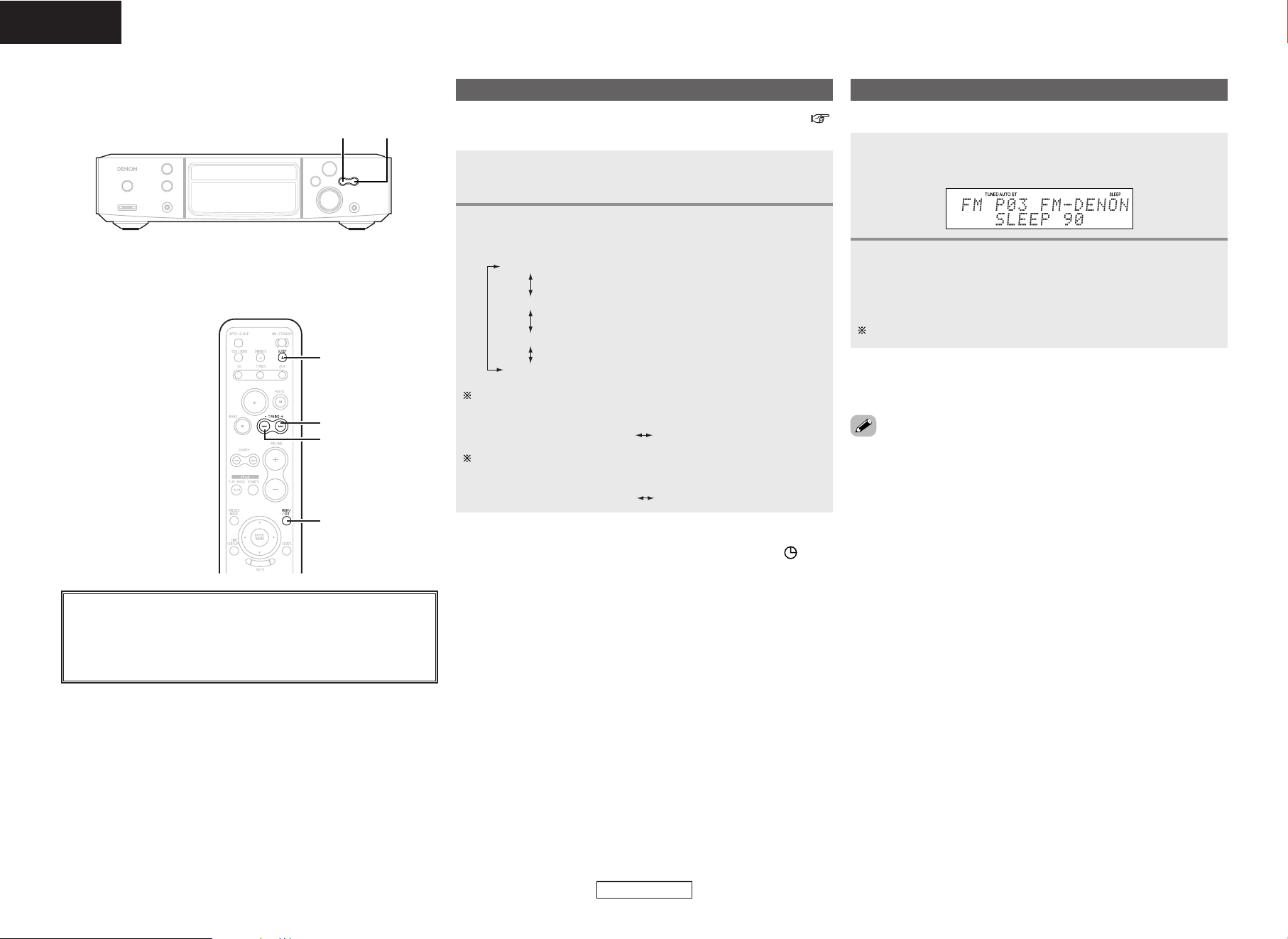
Example 2: Listening to a CD using the once timer
• Load the CD you want to play beforehand.
Use 8 or 9 to select “ONCE”, then press
[MENU/SET].
Use 8 or 9 to select “CD”, then press
[MENU/SET].
Setting the everyday or once timer
Be sure to set the current time first ( page 16).
Example 1: Listening to preset number “3” with the everyday timer
•To use the timer function to listen to AM or FM broadcasts, be sure
to preset the desired station first ( page 13).
Press [MENU/SET] once.
• “TIMER” flashes.
Use 8 or 9 to select “EVERYDAY”, then press
[MENU/SET].
1
2
Perform steps 3 to 5 under “Setting the current
time” ( page 16) to set the timer start time.
5
Perform steps 3 to 5 under “Setting the current
time” ( page 16) to set the timer stop time.
6
Use 8 or 9 to select “TUNER”, then press
[MENU/SET].
3
Use 8 or 9 to select preset number “3”, then
press [MENU/SET].
•The presettings are stored in the memory.
4
Use 8 or 9 to select “1_off / E_on”, then press
[MENU/SET].
• The timer standby indicator “ ” lights. The time is now set.
For details, see “Operation of the everyday and once timers”
( page 18).
7
Press ON/STANDBY.
• The power is set to the standby mode and the power indicator
lights orange.
When the timer start time is reached, the timer operates.
8
Perform steps 3 to 5 under “Setting the current
time” ( page 16) to set the timer start time.
4
Perform steps 3 to 5 under “Setting the current
time” ( page 16) to set the timer stop time.
5
Use 8 or 9 to select “1_off / E_on”, then press
[MENU/SET].
• The timer standby indicator “ ” lights. The time is now set.
For details, see “Operation of the everyday and once timers”
( page 18).
6
Press ON/STANDBY.
• The power is set to the standby mode and the power indicator
lights orange.
When the timer start time is reached, playback starts from the
first track on the CD.
7
Using the timer function Using the timer function
18
ENGLISH
ENGLISH
Setting the sleep timer
Example: Setting so that the power turns off in 80 minutes.
Press [SLEEP] during playback.
• The “SLEEP” indicator flashes.
Press [SLEEP] repeatedly while the “SLEEP” indicator
is flashing to select “80”.
• The “SLEEP” indicator stops flashing, remaining lit, after about
5 seconds.
The power is set to the standby mode after 80 minutes.
1
2
¢ Canceling the sleep timer:
Press [SLEEP] repeatedly to select “OFF”.
• The remaining time is displayed when [SLEEP] is pressed while the
sleep timer is operating.
• If [SLEEP] is pressed while the remaining time is displayed, “OFF” is
selected. Reset the timer as desired.
¢ If you do not want the timer to operate:
Use 8 or 9 to turn off the timer standby indicator “ ”.
About the button names in this explanation
<>: Buttons on the main unit
[]: Buttons on the remote control unit
Button name only :
Buttons on the main unit and remote control unit
9
8
[SLEEP]
[MENU/SET]
8 9
After setting the timer at “Setting the everyday or once timer” (
page 17), select the timer(s) you want to operate.
Press [MENU/SET] twice.
• The current settings are displayed.
Use 8 or 9 to select the timer(s) you want to
operate.
1
2
1 _ on / E _ on :
1 _ off / E _ on :
1 _ on / E _ off :
1 _ off / E _ off :
Neither the once nor the everyday timer
operates.
Both the once and the everyday timers
operate.
Only the everyday timer operates.
Only the once timer operates.
Operation of the everyday and once timers
If only the everyday timer is set, the display switches as follows
when 8 or 9 is pressed.
If only the once timer is set, the display switches as follows
when 8 or 9 is pressed.
1 _ off / E _ on 1 _ off / E _ off
1 _ off / E _ off 1 _ on / E _ off
Using other functions
19
ENGLISH
ENGLISH
Use 8 or 9 to select “ON” or “OFF”, then
press [MENU/SET].
Making the speaker settings
2
1
This procedure can be used to set the optimum sound quality for your
speakers and the installation conditions in your room.
Use [MENU/SET] to select “SPK OPTIMISE”.
Using other functions
10 SEC (Set upon purchase):
The display automatically turns off after approximately 10 seconds.
CONTINUE:
Displayed continuously.
Setting the low-power standby mode
Setting the time display time in the standby mode
Use 8 or 9 to select “10SEC” or
“CONTINUE”, then press [MENU/SET].
Use [MENU/SET] to select “TIME DISPLAY”.
2
1
ON (Set upon purchase):
Low-power standby mode.
OFF:
Normal mode.
Setting the low-power standby mode (Eco mode)
Use 8 or 9 to select “ON” or “OFF”, then
press [MENU/SET].
Use [MENU/SET] to select “ECO MODE”.
2
1
See page 12 for information on the power indicator.
ON WALL:
Set this when the speakers are installed on a wall or when there is
a wall directly behind them.
ON SHELF
(Set upon purchase):
Set this when using the included speaker stand.
Setting the speaker locations
Use 8 or 9 to select “ON WALL” or “ON
SHELF”, then press [MENU/SET].
Use [MENU/SET] to select “SPK LOCATION”.
2
1
Set the locations in which the speakers are installed.
This cannot be set when “SPK OPTIMISE” is set to “OFF”.
Setting the speakers low bass sound
ON (Set upon purchase):
This is the optimum setting for the SC-S81 (the speaker included
with the S-81). (We recommend using this setting normally.)
Set this according to the speakers being used.
LOW:
Set this when the reverberations in the room are too weak (when
there is not enough treble sound).
MID
(Set upon purchase):
Set this when the reverberations in the room are moderate.
Making the room damping setting
Use 8 or 9 to select “LOW”, “MID” or
“HIGH”, then press [MENU/SET].
Use [MENU/SET] to select “ROOM DAMPING”.
2
1
Set this according to the level of the reverberations in the room.
This cannot be set when “SPK OPTIMISE” is set to “OFF”.
HIGH:
Set this when the reverberations in the room are too strong (when
there is too much treble sound).
OFF:
Set this when using speakers other than the ones included. (For
directions and cautions on connecting the speakers, see “Speaker
connections” ( page 8).)
20
ENGLISH
ENGLISH
Press 8 or 9 during playback.
The operation is as follows if the button is held in:
9: Skip to the beginning of tracks several tracks on
8: Skip to the beginning of tracks several tracks before
Press and hold [7] during playback.
Normal playback resumes when you release your finger from the
button.
¢ To search forward at high speed:
In the pause mode, press and hold [7].
Press and hold [6] during playback.
Normal playback resumes when you release your finger from the
button.
¢ To search backward at high speed:
In the pause mode, press and hold [6].
Fast-forwarding (Search)
Fast-reversing (Search)
Moving to the beginning of tracks (Skip)
• The sound may be interrupted shortly when resuming normal
playback after searching.
• The sound may be interrupted shortly when resuming normal
playback after searching.
About the button names in this explanation
<>: Buttons on the main unit
[]: Buttons on the remote control unit
Button name only :
Buttons on the main unit and remote control unit
9
[
3
]
8
[
7
]
[
6
]
2
[CD]
[
1
]
[TIME/DISPLAY]
8
9
<1/3>
<FUNCTION> 2
[NUMBER]
(1~9, 0/10, +10)
[CALL]
[
PROG/DIR.
]
[
RANDOM
]
[
REP 1/ALL
]
[CLEAR]
[
TIME/DISPLAY
]
1 Can be selected when iPod CONTROL on the rear panel is
switched to “iPod (FRONT)” and the included iPod cable is
used.
2 Front IN can only be selected when a portable player is
connected.
3 Can be selected when iPod CONTROL on the rear panel is
switched to “AUX1 CONTROL” or “DOCK CONTROL” and an
Apple iPod Dock (sold separately) or and exclusive control
Dock for iPod (ASD-1R (sold separately)) is connected.
Playing discs
Starting playback
Use
<
FUNCTION
>
or [CD] (FUNCTION) to select
“CD”.
1
(iPod)TUNERCD
(Front.IN)
AUX2
AUX1 (/iPod)
1
2
3
Press
<
1/3
>
or [1].
• The “1” indicator lights and playback starts.
Once all the tracks recorded on the disc have been played, the
stop mode is set automatically.
[TIME/DISPLAY] can be used to switch the information displayed.
2
Elapsed time of
currently playing
track
Remaining time of
currently playing
track
Remaining time of all remaining tracks
To stop playback
Press 2 during playback.
To pause playback (Pause)
Press
<
1/3
>
or [3] during playback.
• The “3” indicator lights and the pause mode is set.
¢ To resume playback:
Press
<
1/3
>
or [1].
Playing discs Playing discs
21
ENGLISH
In the stop mode, press [RANDOM].
• The “RANDOM” indicator lights.
Press
<
1/3
>
or [1].
1
2
Listening in random order (Random playback)
• During programmed playback, press [REP 1/ALL] to play the
programmed tracks repeatedly.
¢ Stopping random playback:
Stop playback, then press [RANDOM].
The “RANDOM” indicator turns off.
• If [REP 1/ALL] is pressed during random playback, the tracks are
played once in one random pattern, then played again in a different
order. Enjoy listening to them in a different order each time.
¢ To change a programmed track:
In the stop mode, use [PROG/DIR.] to turn off the programmed track
number display, then perform steps 1 and 2 over.
¢ Clearing tracks from the program:
In the stop mode, press [CLEAR].
The last track in the program is deleted each time the button is
pressed.
¢ Stopping programmed playback:
In the stop mode, use [PROG/DIR.] to turn off the programmed track
number display.
NOTE:
• If the disc tray is opened after performing the program search
operation, the program is cleared.
Listening to all the tracks repeatedly
(All-track repeat play)
Press [REP 1/ALL] twice in a row in the stop or play
mode.
• The “ ALL” indicator lights.
Press
<
1/3
>
or [1].
• The currently playing disc is played repeatedly.
1
2
Listening to tracks repeatedly (Repeat play)
¢ Stopping all-track repeat playback:
Press [REP 1/ALL] until the “ ALL” indicator turns off.
¢ Stopping 1-track repeat playback:
Press [REP 1/ALL] until the “ 1” indicator turns off.
Press [REP 1/ALL] once in the stop or play mode.
• The “ 1” indicator lights.
Use 8 or 9 to select the track you want to hear.
1
2
Press
<
1/3
>
or [1].
• The selected track is played repeatedly.
3
ALL1
(All-track repeat)
Display off
(Repeat OFF)
(1-track repeat)
Listening to a specific track repeatedly
(1-track repeat play)
ENGLISH
Playing the desired track (Direct play)
Use [NUMBER] (1 ~ 9, 0/10, +10) to select the track.
For track numbers 1 to 10, press the corresponding button ([1] to
[0/10]).
For track numbers 11 and on, first press [+10] then press buttons
[1] to [0/10].
Example: Track 4 : [4]
Example: Track 12 : [+10] [2]
Example: Track 20 : [+10] [0/10]
In the stop mode, press [PROG/DIR.].
• “PGM” is displayed.
Use [NUMBER] (1 ~ 9, 0/10, +10) to select the track.
Example: To program tracks 3, 12, 7 to play in that order:
[3] [+10] [2] [7]
Press
<
1/3
>
or [1].
• The tracks are played in the programmed order.
Up to 25 tracks can be programmed.
1
2
3
Listening to specific tracks in a specific order
(Programmed play)
¢ Checking the programmed tracks:
In the stop mode, press [CALL].
Track number of first track in program
Track number of second track
in program
Track number of last track in
program
The total program time reappears if [CALL] is not operated for 5
seconds or more.
22
ENGLISH
ENGLISH
Before playing MP3 or WMA files
There are many music distribution sites on the Internet allowing you to download music files in MP3 or WMA (Windows Media
®
Audio) format.
The music (files) downloaded from such sites can be stored on CD-R or CD-RW discs and played on the S-81.
“Windows Media” and “Windows” are registered trademarks or trademarks in the United States and other countries of the
Microsoft Corporation of the United States.
According to copyright laws, recordings you have made should only be used for your personal enjoyment and must not be used
in other ways without the consent of the copyright holder.
¢ Order in which the folders are played
If there are multiple folders containing MP3 or WMA files, the S-81 automatically assigns the folders numbers when reading the disc.
The folders switch according to the numbers they have been assigned. If there are no playable files in a folder, that folder is ignored.
¢ Order in which files are played
The order in which the files are played depends on the folder structure attributed when the disc was created and other data recorded on
the disc when the files were recorded. With the folder structure shown in the following example, the files are played in numerical order (1,
2, 3 …).
The data stored on the disc depends on the writing software. Because of this, the files may not play in the desired order.
¢ Setting the folders and files to be played
(folder mode/file mode)
Use [FOLDER MODE] to switch between the modes.
•
Folder mode
The “FLD” indicator lights.
Only the selected folder is played.
Example: When folder r is selected
Files 4, 5 and 6 are played.
Folder t is treated as a separate folder, so files 7 and 8
are not played.
• Disc mode (folder mode: OFF)
The “FLD” indicator turns off.
All the files in all the folders from the selected folder or file on are
played.
Example: When file 3 in folder e is selected
All the files from file 3 on are played.
(ROOT folder)
Folder q Folder w Folder e
Folder r
Folder y
File 1
File 2
File 3
File 9
File 10
File 7
File 8
Folder t
File 4
File 5
File 6
Playing MP3 or WMA (Windows Media
®
Audio) files

Playing MP3 or WMA files Playing MP3 or WMA files
23
ENGLISH
ENGLISH
Load a CD-R or CD-RW disc containing music files
in MP3 or WMA (Windows Media Audio) format into
the disc tray ( page 3).
When in the folder mode:
Use [FOLDER MODE] to turn on the “FLD” indicator,
then use [
DD HH
] to select the folder to be played.
• The selected folder is displayed.
1
2
-1
About the disc mode:
Use [FOLDER MODE] to turn off the “FLD” indicator,
then use 8 or 9 to select the file to be played.
• The selected file is displayed.
2
-2
Press
<
1/3
>
or [1].
• The file name, title/artist name and title/album name scroll on
the display and playback starts.
The title name, artist name and album name are only displayed if
that information is recorded on the disc.
[TIME/DISPLAY] can be used to switch the information displayed.
3
¢ To change the folder to be played:
Use [
DD HH
] to select a different folder.
¢ To change the file to be played:
In the stop mode, use 8 or 9 to select a different file.
• If the folder is selected in the play or pause mode, playback starts
from or the pause mode is set at the first track in the selected folder.
• If a copyright-protected WMA file or a file that cannot be played
normally is selected, “Not Support” is displayed. Use
8 or 9
to select a different file.
Perform steps 2-1 or 2-2 under “Playing MP3 or
WMA files”.
Press [RANDOM].
• The “RANDOM” indicator lights.
1
2
Press
<
1/3
>
or [1].
• Either the files in the selected folder or all the files on the disc
are played in random order.
3
¢ To cancel the folder/disc random play mode:
Stop playback, then press [RANDOM].
The “RANDOM” indicator turns off.
• If [REP 1/ALL] is pressed during random playback, the tracks are
played once in one random pattern, then played again in a different
order. Enjoy listening to them in a different order each time.
File Name Title / Artist
Title / Album
About the button names in this explanation
<>: Buttons on the main unit
[]: Buttons on the remote control unit
Button name only :
Buttons on the main unit and remote control unit
9
[
3
]
8
[
1
]
[
FOLDER MODE
]
[
TIME/DISPLAY
]
[
D
,
H
]
<1/3>
8 9
[
RANDOM
]
[
REP 1/ALL
]
Playing MP3 or WMA files
Listening to MP3 or WMA files in random order
(Random folder/disc play)
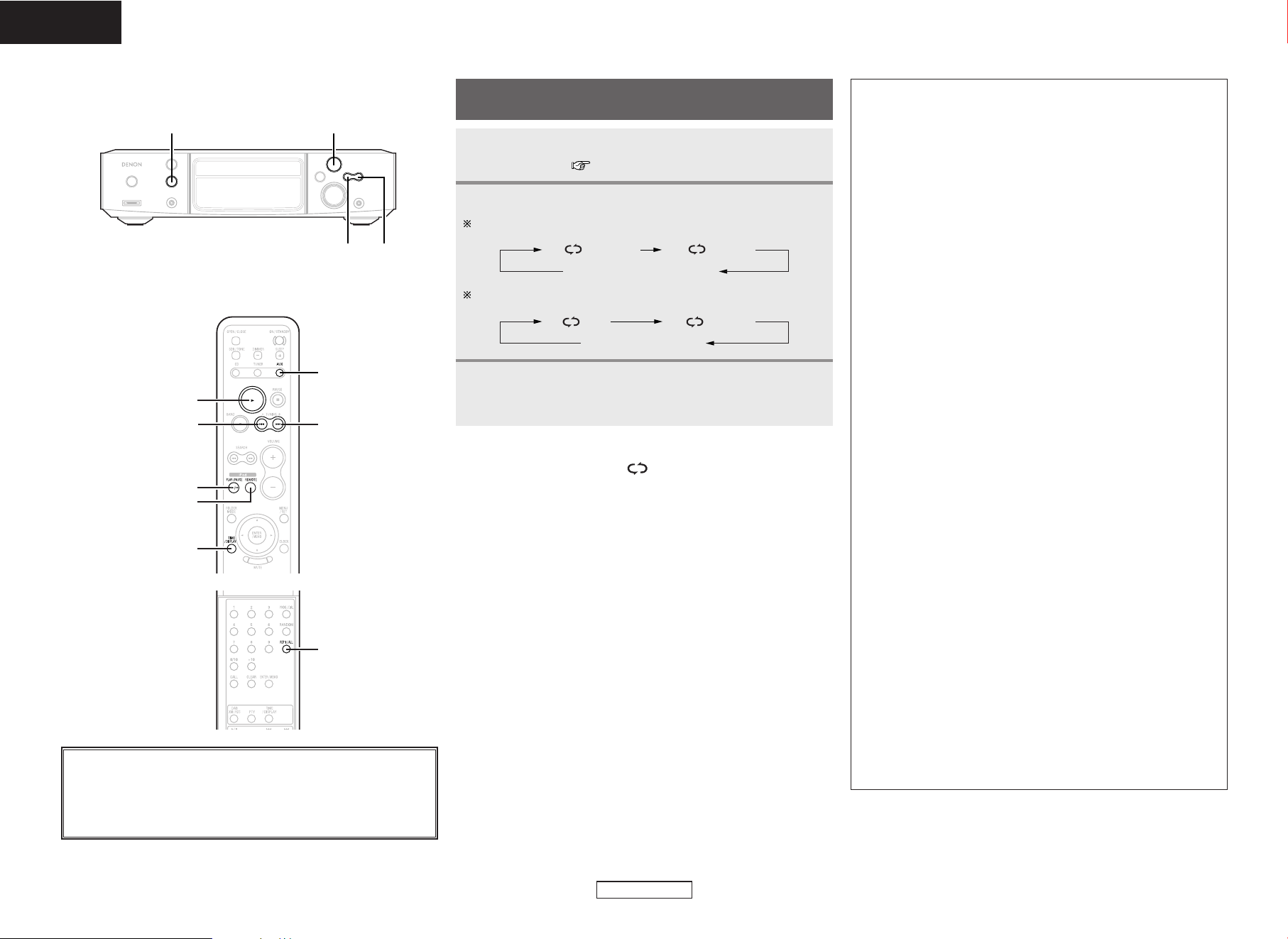
Playing MP3 or WMA files Playing MP3 or WMA files
24
ENGLISH
ENGLISH
About the button names in this explanation
<>: Buttons on the main unit
[]: Buttons on the remote control unit
Button name only :
Buttons on the main unit and remote control unit
[
AUX
]
[
1
]
[
iPod
1/3
]
[
iPod REMOTE
]
[
TIME/DISPLAY
]
98
<1/3><
FUNCTION
>
8 9
Perform steps 2-1 or 2-2 under “Playing MP3 or
WMA files” ( page 23).
1
Use [REP 1/ALL] to select the repeat mode.
When in the folder mode:
2
1 FLD FLD
About the disc mode:
1 ALL
(Repeat off) FLD
(Repeat off)
Listening to MP3 or WMA files repeatedly
(Repeat folder/disc play)
Press
<
1/3
>
or [1].
• Either the files in the selected folder or all the files on the disc
are played repeatedly.
3
¢ To stop repeat folder/disc playback:
Press [REP 1/ALL] until the “ ” indicator turns off.
NOTE:
• The S-81 is compatible with “MPEG-1 Audio Layer-3” standards
(sampling frequency of 44.1 and 48 kHz). It is not compatible
with “MPEG-2 Audio Layer-3”, “MPEG-2.5 Audio Layer-3”, MP1
or MP2 standards.
•Programmed playback is not possible with discs containing files
recorded in MP3 or WMA format.
• The signals are output with a sampling frequency of 44.1 kHz.
• When writing MP3 files on a CD-R or CD-RW disc, set the writing
software’s format to “ISO9660 Level 1”. The files may not play
properly if they are recorded in other formats. Also note that with
some writing software it is not possible to record in ISO9660
format. If so, use a different program allowing you to record in
ISO9660 format.
•With MP3 files, the higher the bit rate, the better the sound
quality. The compatible bit rate range is 32 to 320 kbps for MP3
files, 64 to 160 kbps for WMA files. We recommend using MP3
files with bit rates of 128 kbps or greater on the S-81.
• Be sure to add the extensions “.MP3” or “.WMA” to MP3 or
WMA files, respectively. Files with extensions other than
“.MP3” or “.WMA” or files without extensions cannot be
played. (On Macintosh computers, MP3 files can be played by
giving the extension “.MP3” after the file name consisting up a
maximum of 8 alphanumeric characters and storing the files on a
CD-R or CD-RW disc.)
• The S-81 is not compatible with packet write software or
playlists.
• Up to 32 characters of folder and file names can be displayed.
• The S-81 is compatible with MP3 ID3-Tag versions 1.x and 2.x.
• The time may not be displayed properly when searching or
pausing during variable bit rate playback.
• The time display cannot be switched using [TIME/DISPLAY].
• For files in which the title name and artist name data are stored,
the title name or artist name can be displayed in the play or pause
mode by pressing [TIME/DISPLAY].
• Multisession and CD-R/CD-RW discs that have not been
completely written can be played, but we recommend using
discs closed after a maximum of 10 sessions or discs that have
been completed.
• The S-81 is compatible with the titles, artists and albums of
WMA file meta tags.
• The maximum number of files and folders playable is 512 (total
of the number of folders and files). The maximum number of
folders is 256.
• Copyright-protected WMA files cannot be played. (“Not
Support” is displayed. Use 8 or 9 to select a different file.)
[
REP 1/ALL
]
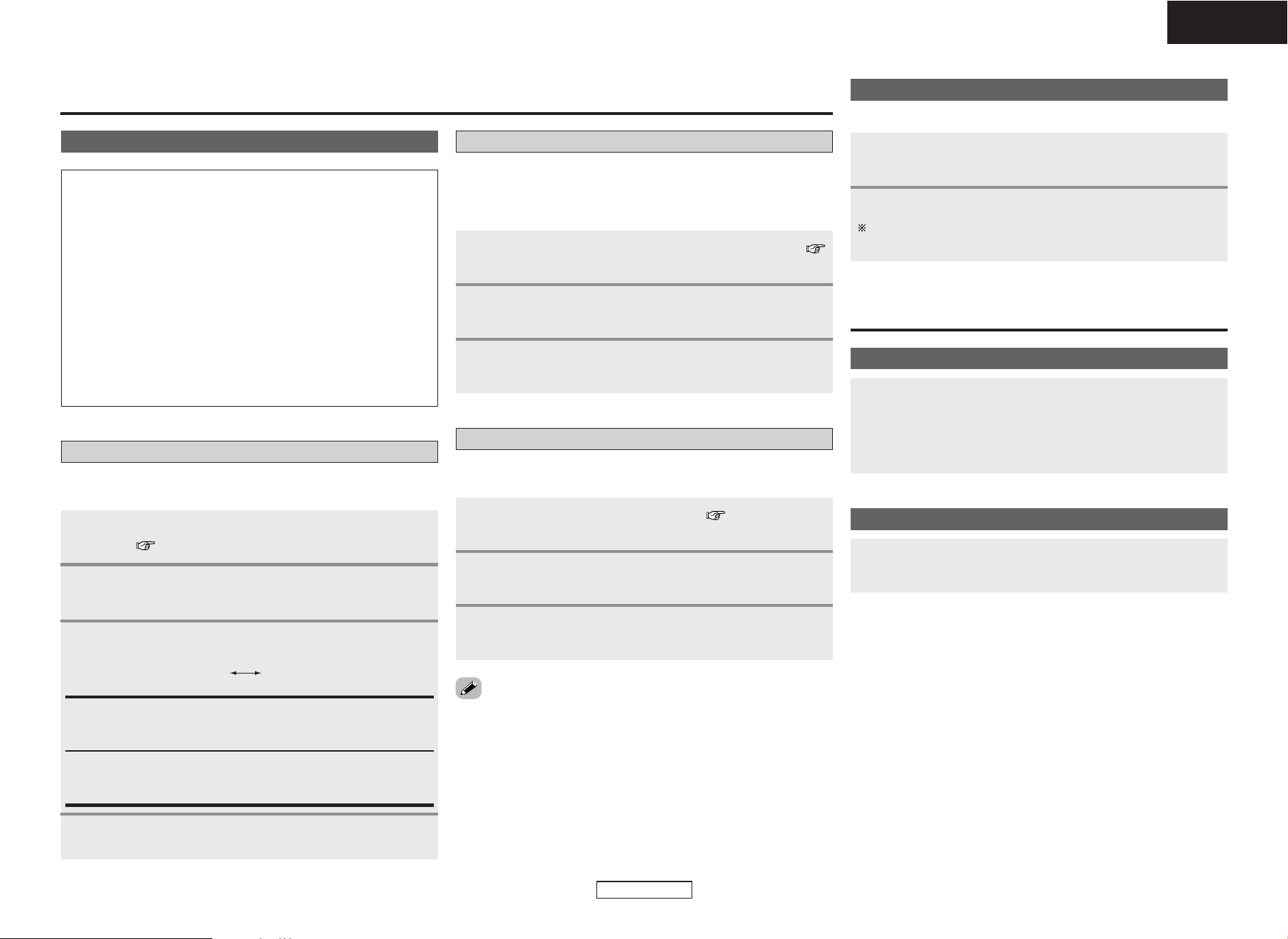
25
ENGLISH
ENGLISH
Connect the Control Dock for iPod and S-81 (
page 10).
1
Use
<
FUNCTION
>
or [AUX] (FUNCTION) to select
“AUX1/iPod”.
2
The music on an iPod can be listened to using an Control Dock for
iPod (ASD-1R (
Sold separately
)). For details on the Control Dock for
iPod, inquire at your store of purchase or a DENON customer service
center.
Using an exclusive control Dock for iPod
Perform steps 3 and 4 under “Using the included
iPod cable”.
3
Connect the iPod Dock and S-81 ( page 11).
1
Use
<
FUNCTION
>
or [AUX] (FUNCTION) to select
“AUX1/iPod”.
2
This operation allows you to listen to music on an iPod using an Apple
iPod Dock (sold separately).
Using an Apple iPod Dock
Perform steps 3 and 4 under “Using the included
iPod cable”.
3
• For the remote control unit buttons that can be operated when the
function is set to “iPod” or “AUX1/iPod”, see page 7.
• When operating the iPod, also refer to the iPod’s operating
instructions.
Playing a portable player
For instructions on connections, see page 10.
Use
<
FUNCTION
>
or [AUX] (FUNCTION) to select
“Front IN”.
1
Playing a portable player.
For instructions on operations, see the portable player’s
operating instructions.
2
System Operations
Auto power on function
When the S-81’s power is in the standby mode, press
<
1/3
>
, [1], or [iPod 1/3].
• The power turns on and the function switches automatically.
• If a disc is loaded in the set, use
<
1/3
>
or [1] to start playing the
disc.
Auto function selection
Press
<
1/3
>
, [1] or [iPod 1/3].
• The S-81’s function switches automatically and playback starts.
Use this procedure to connect the iPod to the S-81’s iPod connector
and listen to the iPod’s music.
Using the included iPod cable
Connect the S-81 and iPod using the included iPod
cable. ( page 10).
1
Use
<
FUNCTION
>
or [AUX] (FUNCTION) to select
“iPod”.
2
Press [iPod 1/ 3].
4
Use [iPod REMOTE] to select the play mode.
3
Browse iPod Remote iPod
Browse iPod:
The menu and information on the tracks is indicated on the S-81’s
display.
Remote iPod:
The menu and information on the tracks is indicated on the iPod’s
display.
Other types of playback
Playing an iPod
®
NOTE:
• The iPod may be used to copy or play contents that are not
copyrighted or contents for which copying or playback is legally
permitted for your private use as an individual. It is illegal to
violate copyrights.
• DENON will accept no responsibility whatsoever for loss or
damage of data on an iPod occurring when the iPod is used
connected to the S-81.
• Some of the functions may not operate, depending on the type
of iPod and the software version.
• Depending on your iPod’s software version, it may not be
possible to control your iPod from the S-81. We recommend
installing the latest software version.
For information and instructions on upgrading to the latest
software version, see the Apple Computer, Inc. website.
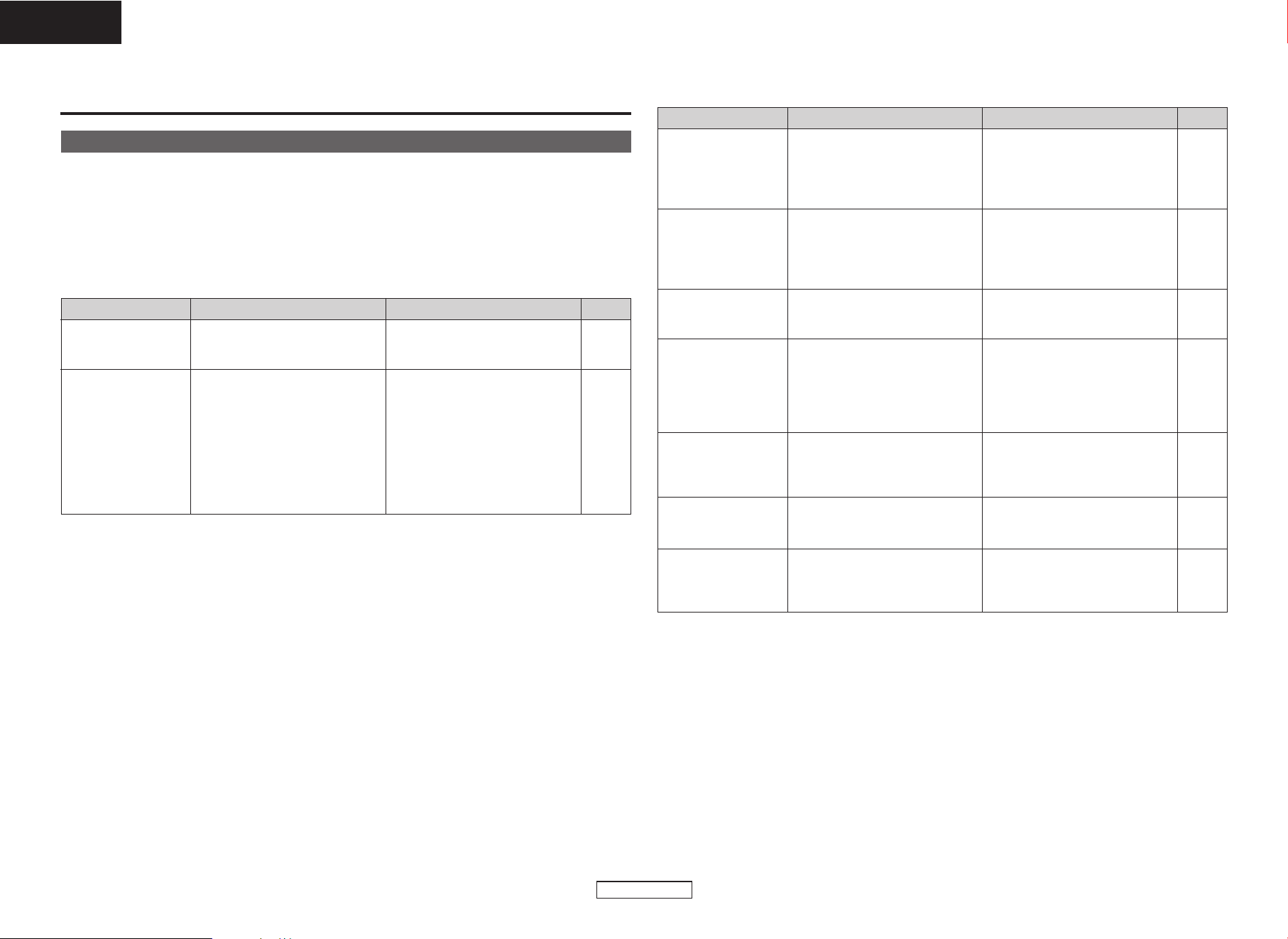
ENGLISH
ENGLISH
Others
26
Symptom Cause Measures Page
Others
If a problem should arise, first check the following.
1. Are all connections proper?
2. Is the set being operated as described in the operating instructions?
3. Are the speakers and other components operating properly?
If this unit is not operating properly, check the items listed in the table below. Should the problem persist,
there may be a malfunction. Disconnect the power immediately and contact your store of purchase.
Display does not light and
no sound is produced
when power is turned on.
• The power supply cord is not plugged
into a power outlet.
•Plug the power supply cord into a
power outlet.
11
Troubleshooting
¢ Common section
Remote control unit does
not operate.
• The batteries are flat.
• The remote control unit is too far
away.
• There is an obstacle between the
main unit and the remote control unit.
• The remote control unit is being
operated at an angle of over 30° with
respect to the front panel.
• The batteries are inserted in the
wrong direction.
• Replace with new batteries.
• Operate from closer to the main unit.
• Remove the obstacle.
•Operate the remote control unit from
directly in front of the main unit.
•Insert the batteries in the proper
direction.
4
4
4
4
4
Symptom Cause Measures Page
Display lights but no
sound is produced.
• The speaker cables are not properly
connected.
• The input is not properly selected.
• The volume is set too low.
• Connect securely.
• Connect in the proper position.
•Adjust the volume to an appropriate
level.
8
10, 11
12
No sound is produced
from once side.
• The speaker cables are not properly
connected.
• The input cables are not properly
connected.
• The left/right balance is off.
• Connect securely.
• Connect securely.
• Adjust the left/right balance.
8
10, 11
12
For stereo sources, the
positions of the
instruments are inverted.
• The connections of the speaker
cables or input cables are inverted.
• Check the connections. 8, 10,
11
Buzzing noise in FM
broadcasts.
• The antenna cable is not properly
connected.
• Noise is entering from an electronic
device equipped with a microprocessor,
or the signal from the broadcast
system is weak.
• Connect the antenna properly.
• Change the layout of the equipment
or the positions or directions of the
connection cables, antenna, etc.
•Connect an outdoor antenna.
9
9
9
Hissing or buzzing noise
is heard in AM broadcasts.
• Noise is entering from a monitor, etc.,
or there is interference.
•Turn off the monitor.
• Change the position or direction of
the AM loop antenna.
•Connect an outdoor antenna.
—
9
9
Humming noise is heard
in AM broadcasts.
• There is interference from signals
conveyed through the power supply
cord.
•Try plugging in the power plug in to
the opposite direction.
•Connect an outdoor antenna.
11
9
¢ Receiver section
10, 11
10, 11
No sound is produced
when an iPod is
connected and played.
•Connections are wrong.
• The “iPod CONTROL” switch on the
rear panel is not set to the right
position.
• Connect properly.
• Set the “iPod CONTROL” switch on
the rear panel to the proper position.
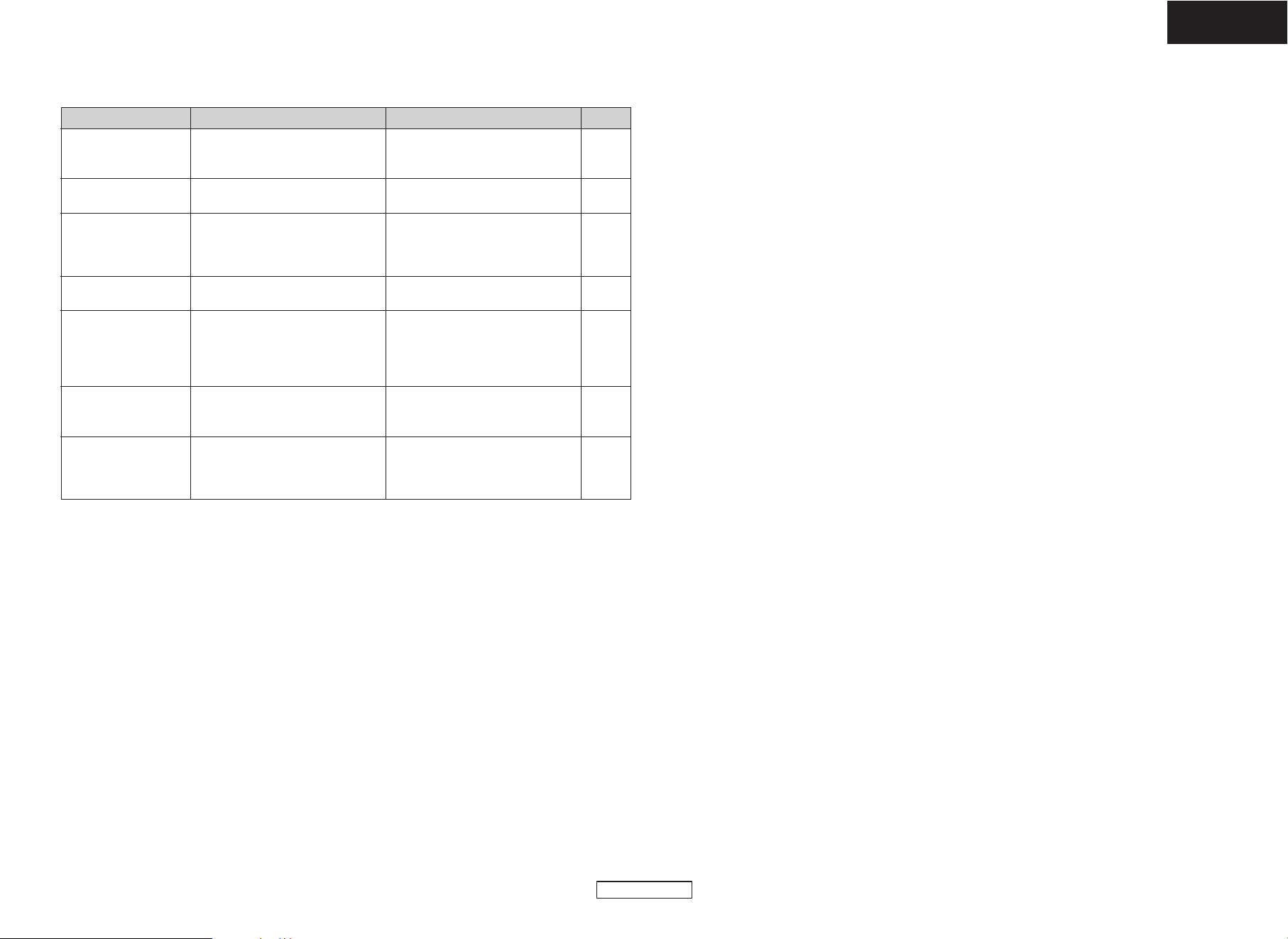
Others
27
ENGLISH
ENGLISH
¢ CD player section
PageMeasuresCauseSymptom
“00 Tr 00 : 00” is shown
on the display even
though a CD is loaded.
• The disc is not properly loaded. • Reload the disc.
3
Disc is not played when
play button is pressed.
• The disc is dirty or scratched. • Wipe the dirt off the disc or replace
the disc.
10, 11
—
No sound is produced or
sound is distorted.
• Incomplete connections with the
various devices.
• The receiver’s function setting or
adjustments are not right.
• Check the connections.
• Check the receiver’s function and
controls and adjust as necessary.
Specific section of the disc
cannot be played properly.
• The disc is dirty or scratched. • Wipe the dirt off the disc or replace
the disc.
3, 4
Programmed playback is
not possible.
• The tracks have not been programmed
properly.
•You are playing a disc containing files
in MP3 or WMA format.
•Program properly.
•Programmed playback is not possible
with containing files in MP3 or WMA
format.
21
—
A CD-R or CD-RW disc
cannot be played.
• The disc has not been finalized.
• The recording conditions are bad or
the quality of the disc itself it poor.
• Finalize the disc then play it.
• Use a properly recorded disc.
3
—
“Not Support” is
displayed when playing
riles recorded in MP3 or
WMA format.
•You have selected a copyright-
protected WMA file or a file that
cannot be played normally.
• Use the 8 or 9 button to select
a different file.
24
4
Others
28
ENGLISH
ENGLISH
Specifications
¢ Receiver section
Rated output: 50 W + 50 W (4 Ω/ohms, 1 kHz, T.H.D. 10 %)
Output terminals: Speaker: 4 Ω/ohms
Audio input/output terminals: AUX 1 input terminal, AUX 2 input terminal,
DIGITAL OPTICAL OUT terminal, iPod terminal,
Portable input jack, Headphone jack
Reception frequency range: FM: 87.50 MHz ~ 108.00 MHz AM: 522 kHz ~ 1611 kHz
Reception sensitivity: FM: 1.5 µV AM: 20 µV
FM stereo isolation: 35 dB (1 kHz)
¢ CD player section
Wow & flutter: Below measurable limits (± 0.001 % W. peak)
Sampling frequency: 44.1 kHz
Light source: Semiconductor laser
¢ Clock/Timer section
Clock type: Power line frequency synchronized method (± 30 seconds)
Timer: Everyday timer (1 set)
Once timer (1 set)
Sleep timer (Max. 90 minutes)
¢ Speakers
Speaker system: SC-S81
Type: 2-way, 2-speakers, Bass reflex type, antimagnetic design, bookshelf type
12 cm cone bass-mid x 1/2.5 cm high range x 1
Input impedance:
4 Ω/ohms
Max. allowable input: 60 W (IEC), 120 W (PEAK)
Dimensions: 150 (W) x 269 (H) x 190 (D) mm
(Including protruding parts)
Mass: 3.1 kg
¢ General
Power Supply: AC 230 V, 50 Hz
Power Consumption: 43 W
0.2 W Max (Standby) (In the low-power standby mode)
Dimensions: 380 (W) x 97 (H) x 265 (D) mm
(Including protruding parts)
Mass: 4.1 kg
¢ Remote control unit (RC-1035)
Remote control method: IR pulse method
Power supply: Two R6P/AA batteries
Maximum external dimensions: 52 (W) x 233 (H) x 21 (D) mm
Mass: 160 g (Including batteries)
* For purposes of improvement, specifications and design are subject to change without notice.

Denon Brand Company, D&M Holdings Inc.
Printed in China 00D 511 4480 003
TOKYO, JAPAN
www.denon.com