003-3790.060112.D

ParaobtenerestemanualenEspañolLatinoAmericanovayaa:http://www.schwinnfitness.com.
T T
T
able able
able
of of
of
Contents Contents
Contents
BeforeAssembly
2
Hardware
4
ImportantSafetyInstructions
2
Assembly
4
SpecificationsandTools
3
Adjustments
12
Parts
3
Nautilus,Inc.,(800)NAUTILUS/(800)628-8458,www.NautilusInc.com-CustomerService:NorthAmerica(800)605-3369,[email protected]|AsiaPacific&LatinAmerica(360)
859-5180,[email protected]|Patentinformation:ThisproductmaybecoveredbyUSandForeignPatentsandPatentsPending.SeeProductformoreinformation.|PrintedinChina|©2010
Nautilus,Inc.,Allrightsreserved.™and®indicateatrademarkorregisteredtrademark.Nautilus,Inc.(www.NautilusInc.com)trademarksincludeNAUTILUS®,BOWFLEX®,SCHWINN®and
UNIVERSAL®andrespectivelogos.Othertrademarksarethepropertyoftheirrespectiveowners.
Before Before
Before
Assembly Assembly
Assembly
Selecttheareawhereyouaregoingtosetupandoperateyourmachine.Forsafeoperation,thelocationmustbeonahard,levelsurface.Allowaworkoutarea
ofminimum70.5”x107”(179cmx272cm).
Followthesebasicpointswhenyouassembleyourmachine:
1.Readandunderstandthe“ImportantSafetyInstructions”beforeassembly.
2.Collectallthepiecesnecessaryforeachassemblystep.
3.Usingtherecommendedwrenches,turntheboltsandnutstotheright(clockwise)totighten,andtheleft(counterclockwise)toloosen,unlessinstructedotherwise.
4.Whenattaching2pieces,lightlyliftandlookthroughtheboltholestohelpinserttheboltthroughtheholes.
5.Theassemblyrequires2people.
Important Important
Important
Safety Safety
Safety
Instructions Instructions
Instructions
Thisiconmeansapotentiallyhazardoussituationwhich,ifnotavoided,couldresultindeathorseriousinjury.Obeythefollowingwarnings:
•Readandunderstandallwarningsonthismachine.
•CarefullyreadandunderstandtheAssemblyManual.
•Keepbystandersandchildrenawayfromtheproductyouareassemblingatalltimes.
•Donotconnectpowersupplytothemachineuntilinstructedtodoso.
•Donotassemblethismachineoutdoorsorinawetormoistlocation.
•Makesureassemblyisdoneinanappropriateworkspaceawayfromfoottrafficandexposuretobystanders.
•Somecomponentsofthemachinecanbeheavyorawkward.Useasecondpersonwhendoingtheassemblystepsinvolvingtheseparts.Donotdostepsthat
involveheavyliftingorawkwardmovementsonyourown.
•Setupthismachineonasolid,level,horizontalsurface.
•Donottrytochangethedesignorfunctionalityofthismachine.Thiscouldcompromisethesafetyofthismachineandcanvoidthewarranty.
•IfreplacementpartsarenecessaryuseonlygenuineNautilus
®
replacementpartsandhardware.Failuretousegenuinereplacementpartscancausearisktousers,keep
themachinefromoperatingcorrectlyandvoidthewarranty.
•DonotusethemachineuntilithasbeenfullyassembledandinspectedforcorrectperformanceinaccordancewiththeOwner’sManual.
•ReadandunderstandthecompleteOwner’sManualsuppliedwiththismachinebeforefirstuse.KeeptheOwner’sandAssemblyManualsforfuturereference.
•Doallassemblystepsinthesequencegiven.Incorrectassemblycanleadtoinjury.
2 2
2
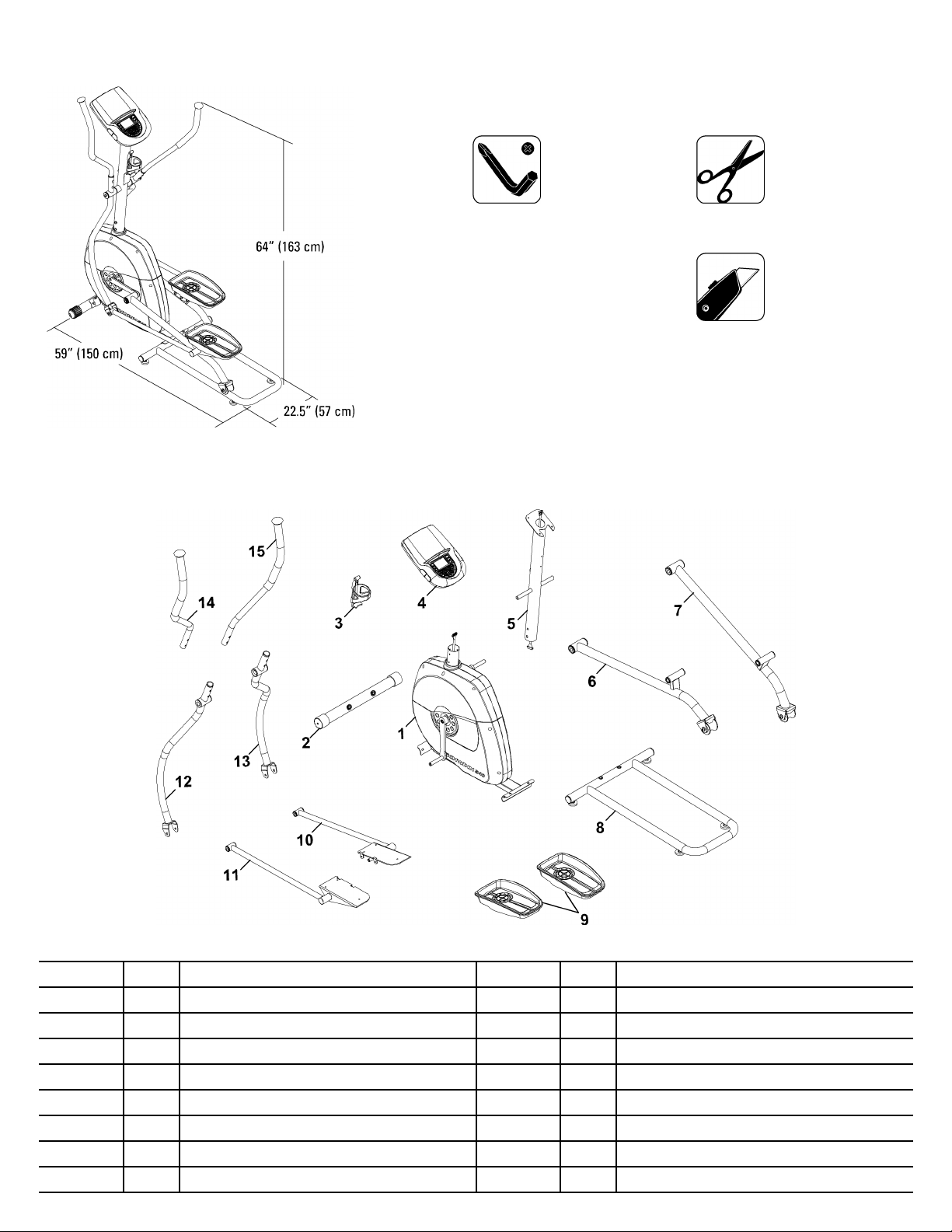
Specifications Specifications
Specifications
and and
and
T T
T
ools ools
ools
Included Included
Included
Not Not
Not
Included Included
Included
#2
4mm
5mm
6mm(x2)
(recommended)
(recommended)
Parts Parts
Parts
Adecalhasbeenappliedtoallright(“R R
R
”)andleft(“L L
L
”)partstoassistwithassembly.
Item Item
Item
Qty Qty
Qty
Description Description
Description
Item Item
Item
Qty Qty
Qty
Description Description
Description
11
Frame
92
Pedals
2
1
FrontStabilizer
10
1
Leg,Right
3
1
WaterBottleHolder
111
Leg,Left
41
Console
12
1
LowerLeftHandlebarArm
51
ConsoleMast
13
1
LowerRightHandlebarArm
6
1
PedalArm,Left
141
UpperLeftHandlebarArm
71
PedalArm,Right
151
UpperRightHandlebarArm
8
1
RailAssembly
3 3
3
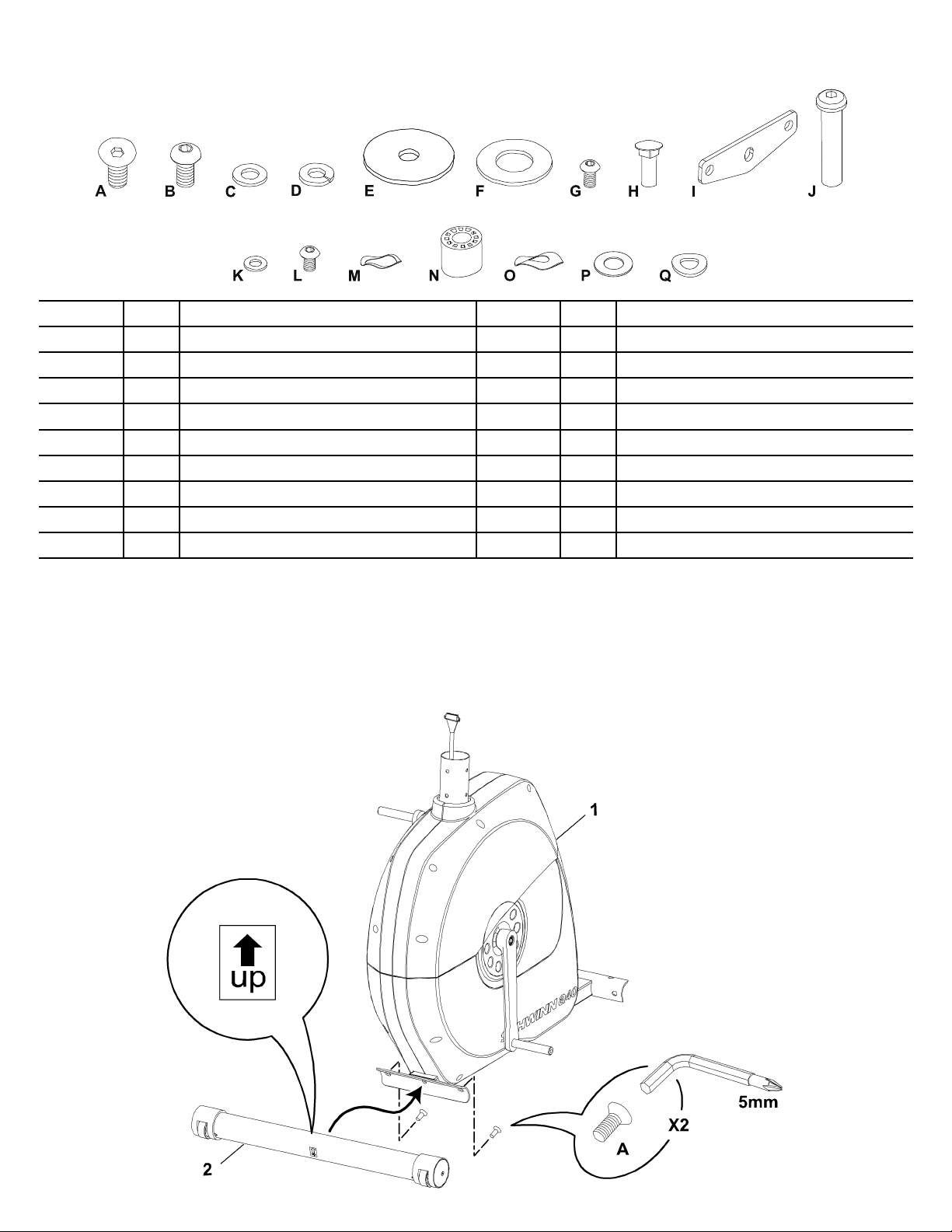
Hardware Hardware
Hardware
Assembly Assembly
Assembly
Note: Note:
Note:
DonotfullytightentheHardwareuntilthemachineiscompletelyassembled.
1. 1.
1.
Attach Attach
Attach
Front Front
Front
Stabilizer Stabilizer
Stabilizer
to to
to
Frame Frame
Frame
4 4
4
Item Item
Item
Qty Qty
Qty
Description Description
Description
Item Item
Item
Qty Qty
Qty
Description Description
Description
A
6
FlatHeadHexScrew,M8x25 J
2
Shaft
B
18
ButtonHeadHexScrew,M8x15
K
6
FlatWasher,M6
C
8
FlatWasher,M8L
4
ButtonHeadHexScrew,M6x12
D
18
SpringWasher,M8
M
2
WaveWasher,Small(D16.5)
E
4
FlatWasher,WideN
2
Sleeve,Plastic
F
2
Washer O 2WaveWasher,Large (D20)
G
6
ButtonHeadHexScrew,M6x15
P
4
PlasticWasher(D16.2)
H
4
CarriageBolt,M6x25Q
6
Washer,Curved
I
2
PedalMountPlate
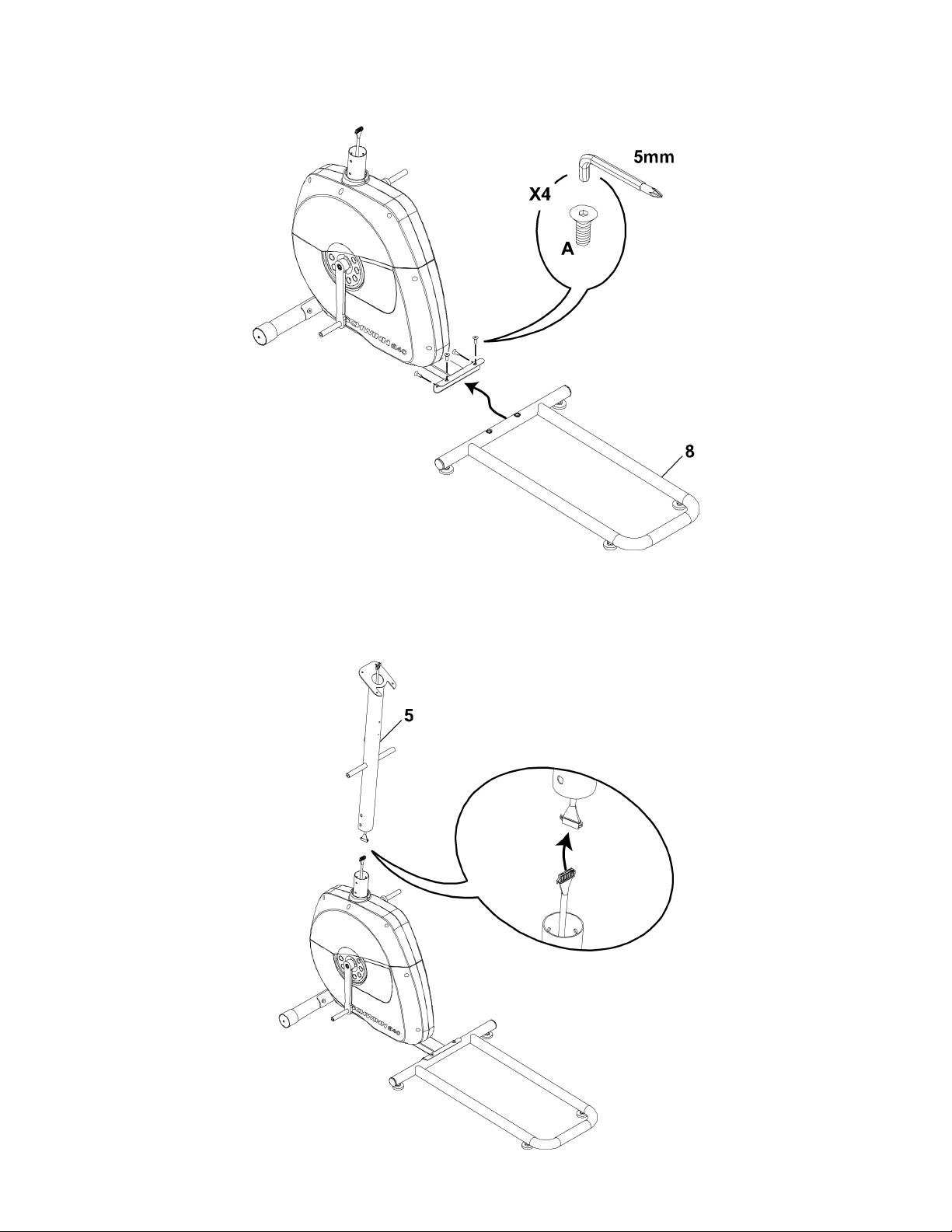
2. 2.
2.
Attach Attach
Attach
Rail Rail
Rail
Assembly Assembly
Assembly
to to
to
Frame Frame
Frame
Assembly Assembly
Assembly
3. 3.
3.
Connect Connect
Connect
the the
the
Console Console
Console
Cable Cable
Cable
Note: Note:
Note:
ThecablesmustbefullyconnectedfortheConsoletooperate.DonotcrimptheConsoleCable.
5 5
5
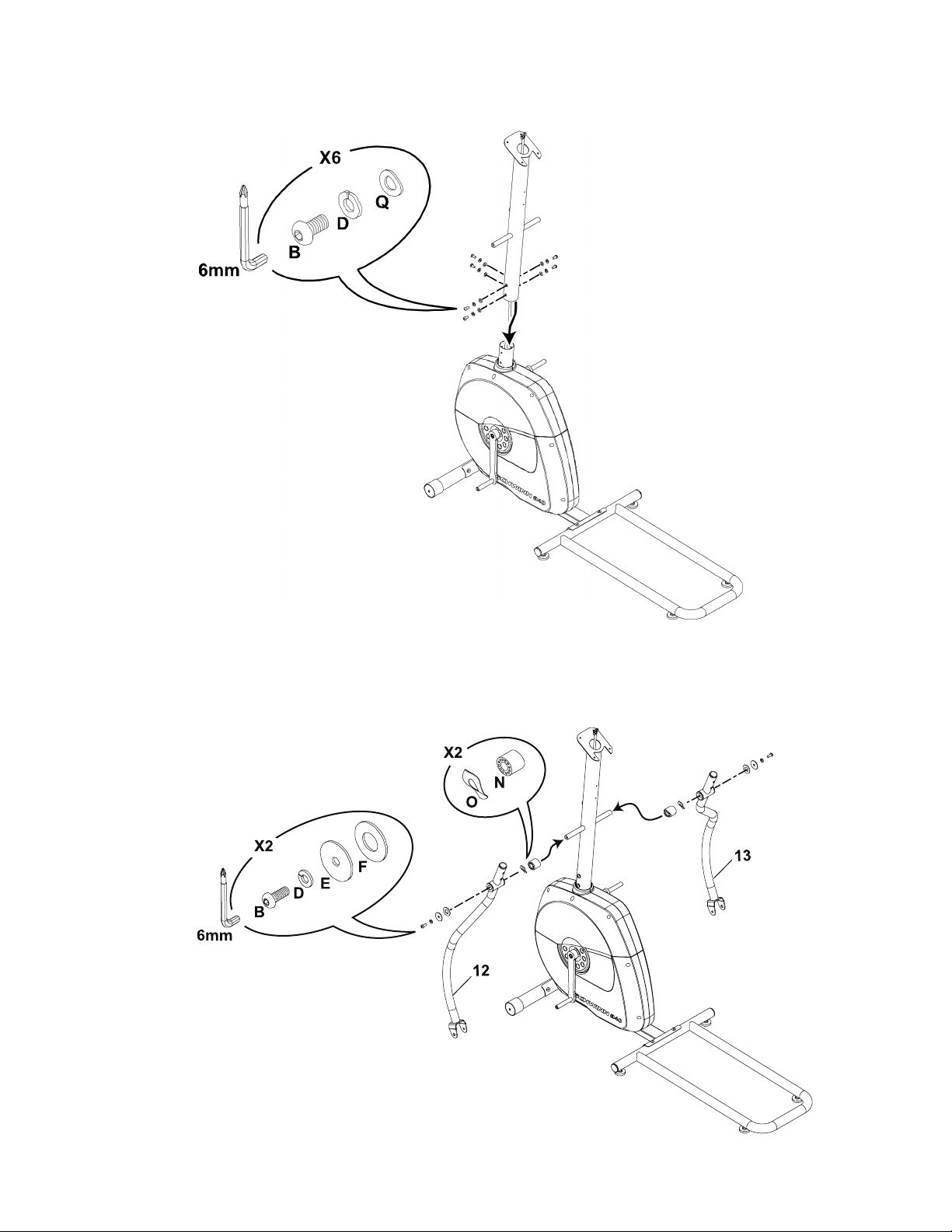
6 6
6
4. 4.
4.
Attach Attach
Attach
Console Console
Console
Mast Mast
Mast
to to
to
Frame Frame
Frame
Assembly Assembly
Assembly
Note: Note:
Note:
DonotcrimptheConsoleCable.
5. 5.
5.
Attach Attach
Attach
Lower Lower
Lower
Handlebar Handlebar
Handlebar
Arms Arms
Arms
to to
to
Frame Frame
Frame
Assembly Assembly
Assembly
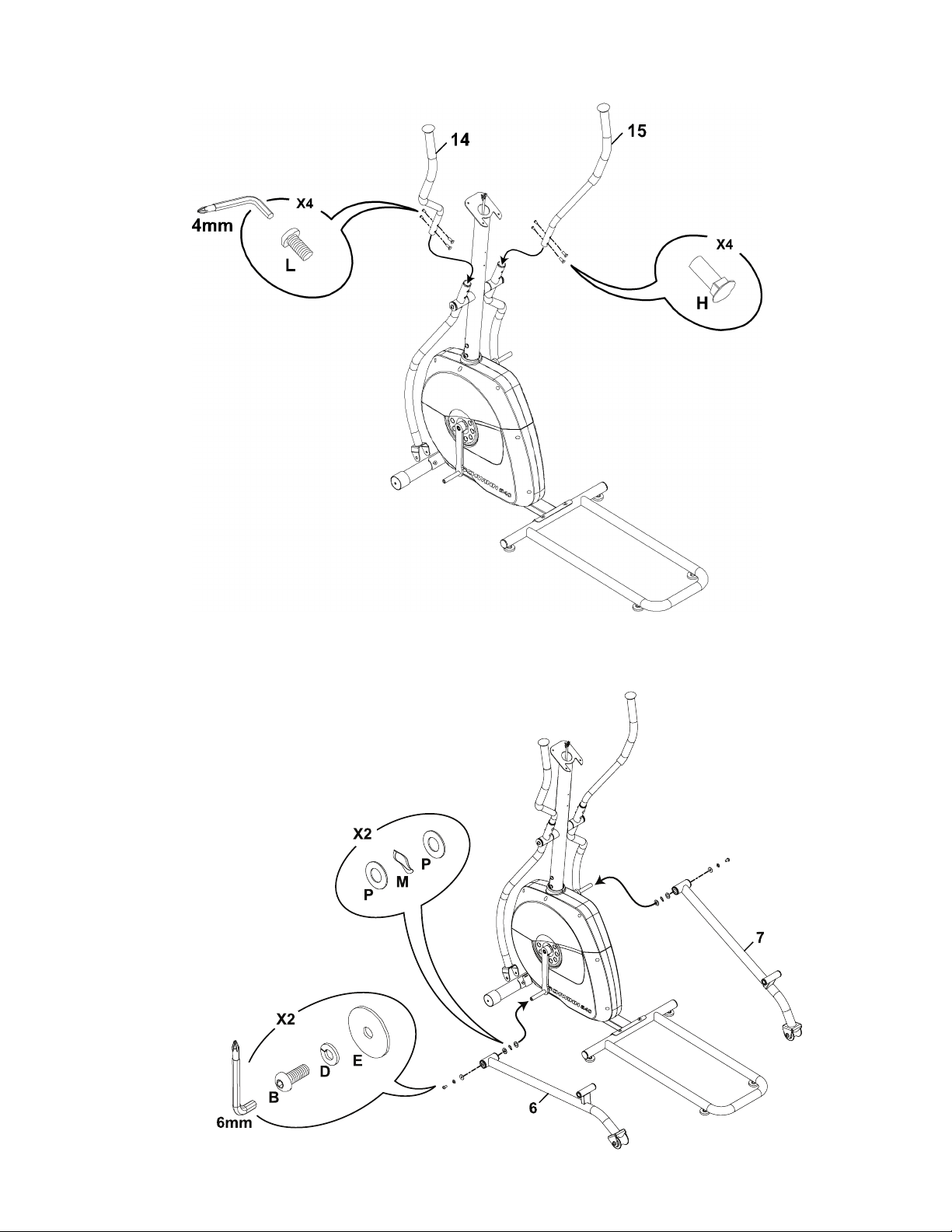
Note: Note:
Note:
OnlytightenthisHardwareuntilsecure.
7 7
7
6. 6.
6.
Attach Attach
Attach
Upper Upper
Upper
Handlebar Handlebar
Handlebar
Arms Arms
Arms
to to
to
Frame Frame
Frame
Assembly Assembly
Assembly
7. 7.
7.
Attach Attach
Attach
Pedal Pedal
Pedal
Arms Arms
Arms
to to
to
Frame Frame
Frame
Assembly Assembly
Assembly
Note: Note:
Note:
OnlytightenthisHardwareuntilsecure.
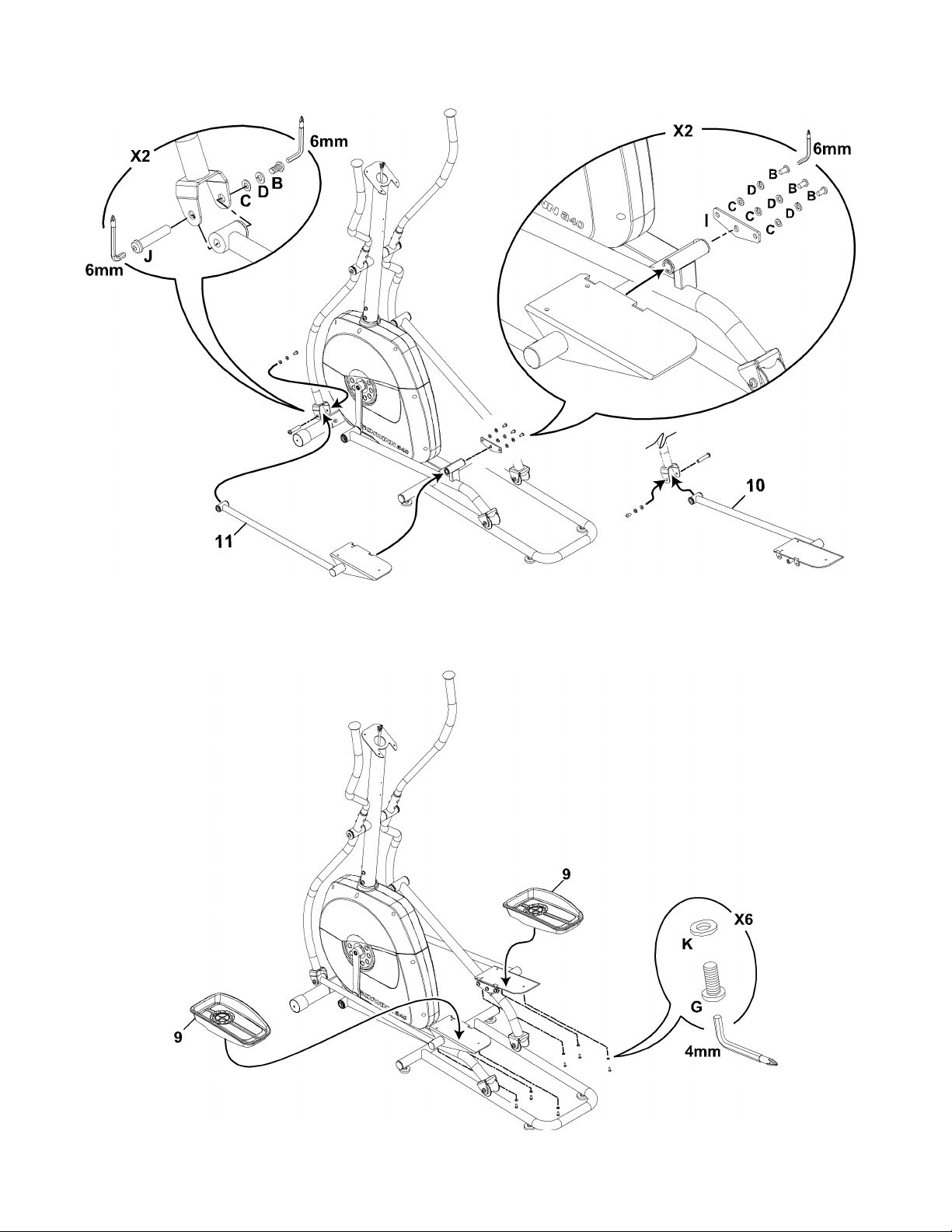
8. 8.
8.
Attach Attach
Attach
Legs Legs
Legs
to to
to
Frame Frame
Frame
Assembly Assembly
Assembly
9. 9.
9.
Attach Attach
Attach
Pedals Pedals
Pedals
to to
to
Legs Legs
Legs
8 8
8
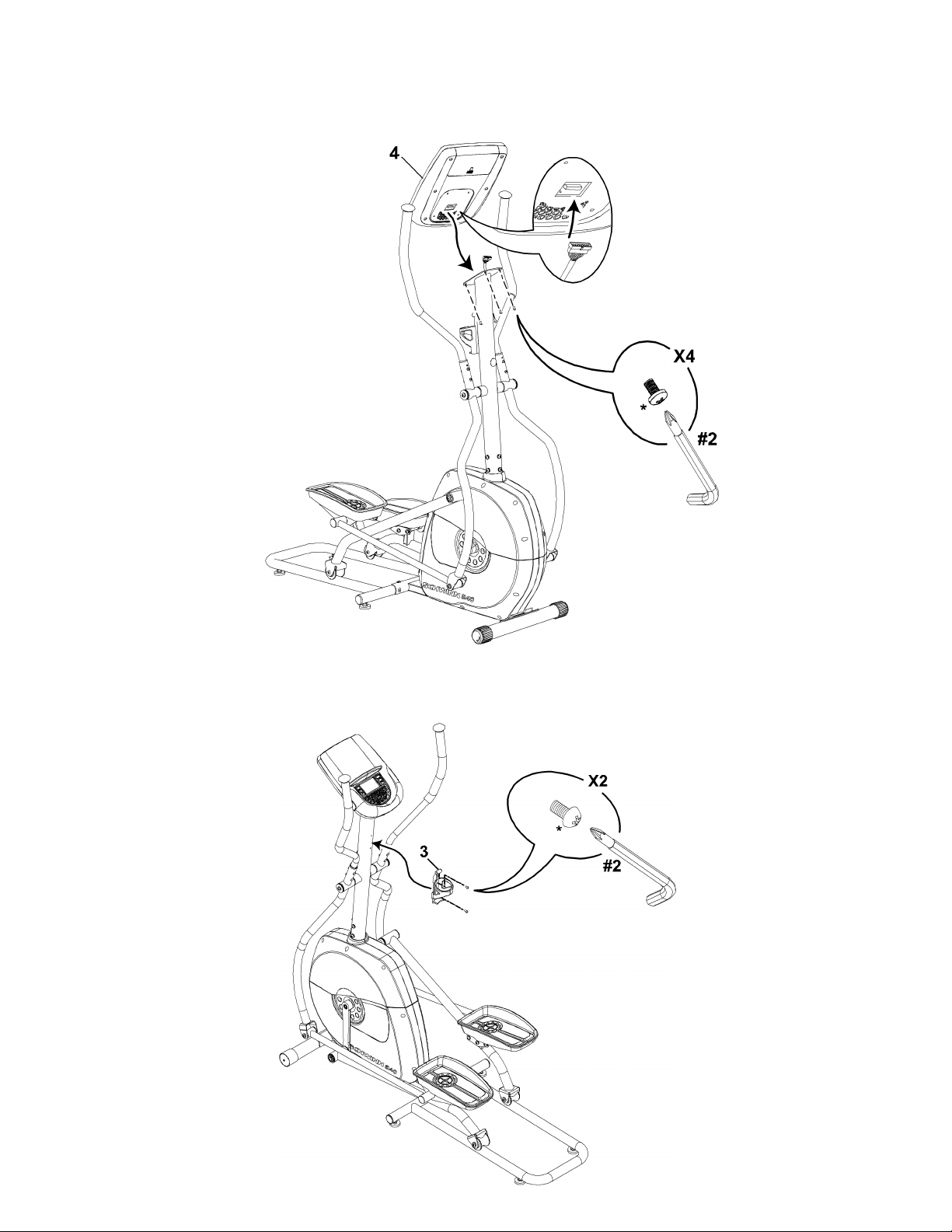
* *
*
Hardwareispre-installedonConsoleandnotontheHardwareCard.
11. 11.
11.
Attach Attach
Attach
W W
W
ater ater
ater
Bottle Bottle
Bottle
Holder Holder
Holder
to to
to
Frame Frame
Frame
Assembly Assembly
Assembly
* *
*
Hardwareispre-installedandnotontheHardwareCard.
9 9
9
10. 10.
10.
Attach Attach
Attach
Console Console
Console
to to
to
Frame Frame
Frame
Assembly Assembly
Assembly
Note: Note:
Note:
BesuretheswitchonthebackoftheConsoleissettoE E
E
.ThecablesmustbefullyconnectedfortheConsoletooperate.Donotcrimpthe
ConsoleCable.
Final Final
Final
Inspection Inspection
Inspection
Inspectyourmachinetoensurethatallfastenersaretightandcomponentsareproperlyassembled.
DonotuseuntilthemachinehasbeenfullyassembledandinspectedforcorrectperformanceinaccordancewiththeOwner’sManual.
10 10
10
12. 12.
12.
T T
T
ighten ighten
ighten
all all
all
Hardware Hardware
Hardware
Note: Note:
Note:
FullytightenallHardwarefromthepreviousstepsexceptwherenotedtoonlysecure.
13. 13.
13.
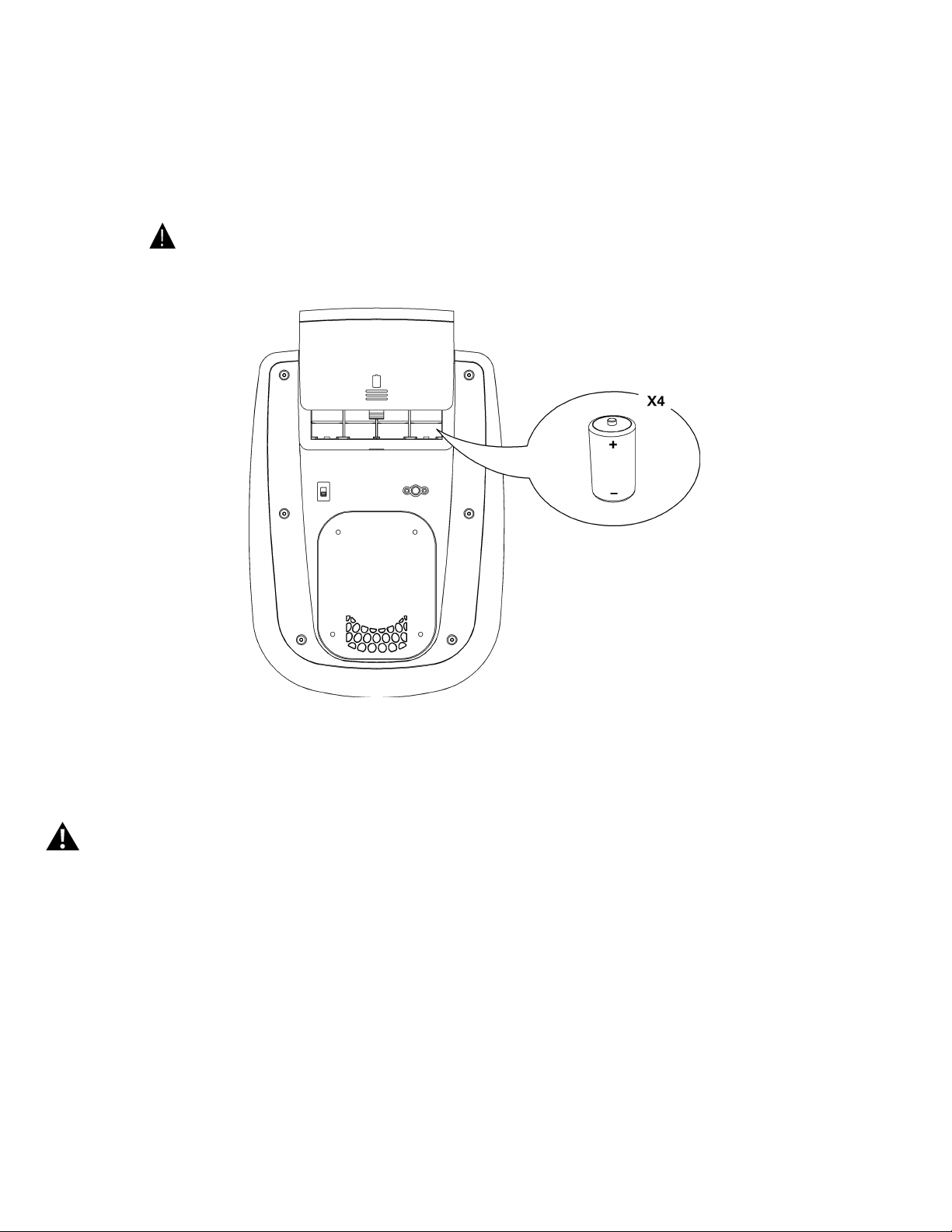
Install Install
Install
Batteries Batteries
Batteries
in in
in
Console Console
Console
Note: Note:
Note:
TheconsoleusesDsizebatteries(LR20),whicharenotincluded.Makesurethatthebatteriespointinthedirectionofthe+/–indicatorsin
thebatterybay.Ifyouuserechargeablebatteries,theoptionalpoweradapterwillnotrechargethebatteries.
Donotmixoldandnewbatteries.
Donotmixalkaline,standard(carbon-zinc),orrechargeable(Ni-Cd,Ni-MH,etc)batteries.
Optional Optional
Optional
Power Power
Power
Adapter Adapter
Adapter
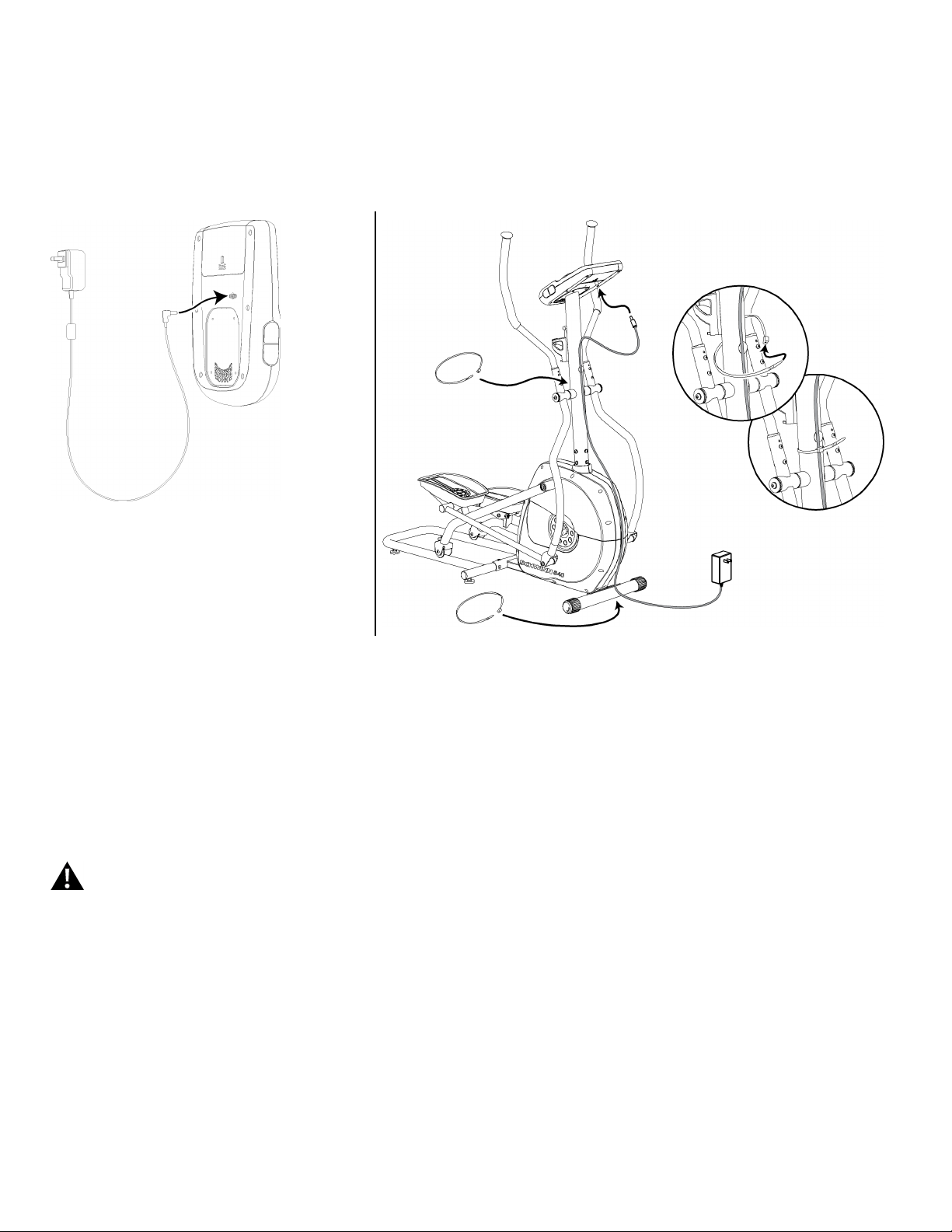
TheconsoleforyourmachinecanoperateonbatterypowerorACpower.ForACpower,itisnecessarytoordertheoptionalPowerAdapter.IfbatteriesandthePower
Adapterareinstalled,theconsolewillusethePowerAdaptertooperate.
Note: Note:
Note:
Ifyouuserechargeablebatteries,theoptionalPowerAdapterwillnotrechargethebatteries.
Afterthemachineisfullyassembled,connectthePowerAdaptortotheconsoleandthewalloutlet.
NOTICE:
Ifyouuseapoweradapterforyourelliptical,makesurethatthecordstaysclearofthepathofthearmsandpedals.Attachthecordto
themachineasshown:
NOTICE:
Itisrecommendedtoremovebatterieswhentheyarenotused,toavoiddamagefrombatterycorrosion.
ToordertheoptionalPowerAdapter,goto:
www.schwinnfitness.com/powersupply
Orcall1(800)605–3369.
FCC FCC
FCC
Compliance Compliance
Compliance
Changesormodificationstothisunitnotexpresslyapprovedbythepartyresponsibleforcompliancecouldvoidtheuser’sauthoritytooperatetheequipment.
Note: Note:
Note:
ThisequipmenthasbeentestedandfoundtocomplywiththelimitsforaClassBdigitaldevice,pursuanttoPart15oftheFCCRules.These
limitsaredesignedtoprovidereasonableprotectionagainstharmfulinterferenceinaresidentialinstallation.Thisequipmentgenerates,uses
andcanradiateradiofrequencyenergyand,ifnotinstalledandusedinaccordancewiththeinstructions,maycauseharmfulinterferenceto
radiocommunications.
However,thereisnoguaranteethatinterferencewillnotoccurinaparticularinstallation.Ifthisequipmentdoescauseharmfulinterference
toradioortelevisionreception,whichcanbedeterminedbyturningtheequipmentoffandon,theuserisencouragedtotrytocorrectthe
interferencebyoneormoreofthefollowingmeasures:
•Reorientorrelocatethereceivingantenna.
•Increasetheseparationbetweentheequipmentandreceiver.
•Connecttheequipmentintoanoutletonacircuitdifferentfromthattowhichthereceiverisconnected.
Consultthedealeroranexperiencedradio/TVtechnicianforhelp.
11 11
11

Adjustments Adjustments
Adjustments
Moving Moving
Moving
the the
the
Machine Machine
Machine
Donotmovethemachinewithoutaid.Injurytoyouordamagetothemachine
canoccur.
1.Removethepowercord(ifequipped).
2.UsethebackoftheRailAssemblytocarefullyliftthemachineontothetransport
rollers.
3.Pushthemachineintoposition.
4.Carefullylowerthemachineintoposition.
Leveling Leveling
Leveling
the the
the
Machine Machine
Machine
ThemachineneedstobeleveledifyourworkoutareaisunevenoriftheRailAssemblyis
slightlyoffthefloor.Toadjust:
1.Placethemachineinyourworkoutarea.
2.StandontheRailAssemblyforapproximately20seconds.
3.Stepoffofthemachine
4.Loosenthelocknutandadjustthelevelersuntiltheyallcontactthefloor.
5.Adjustuntilthemachineislevel.Tightenlocknuts.
12 12
12

13 13
13

14 14
14

15 15
15
PrintedinChina