
USER GUIDE
NZ AU UK IE EU
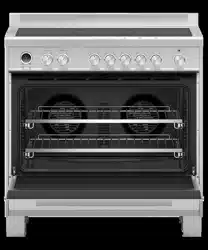
FREESTANDING COOKER
OR90SCI6, OR90SDI6 & OR90SPI6 models


3
CONTENTS
Safety and warnings 5
Introduction 10
First use 12
Cooking guide 19
Oven functions 21
Cooking charts 26
Setting the timer 32
Auto Cook 34
Using the rotisserie 38
Locking the oven controls 40
User preference settings 42
Sabbath Mode 44
Using your induction cooktop 46
Locking the cooktop controls 50
Using your cooktop’s special features 51
Choosing the right cookware 57
Cooking guidelines 59
Using the warming drawer 61
Care and cleaning 62
Using the Self Clean function 72
Troubleshooting 75
Alert codes 81
Energy guidelines 83
Energy guidelines (BI & EU only) 84
Warranty and service 86
Registration
To register your product visit our website: fisherpaykel.com/register
5
SAFETY AND WARNINGS
!
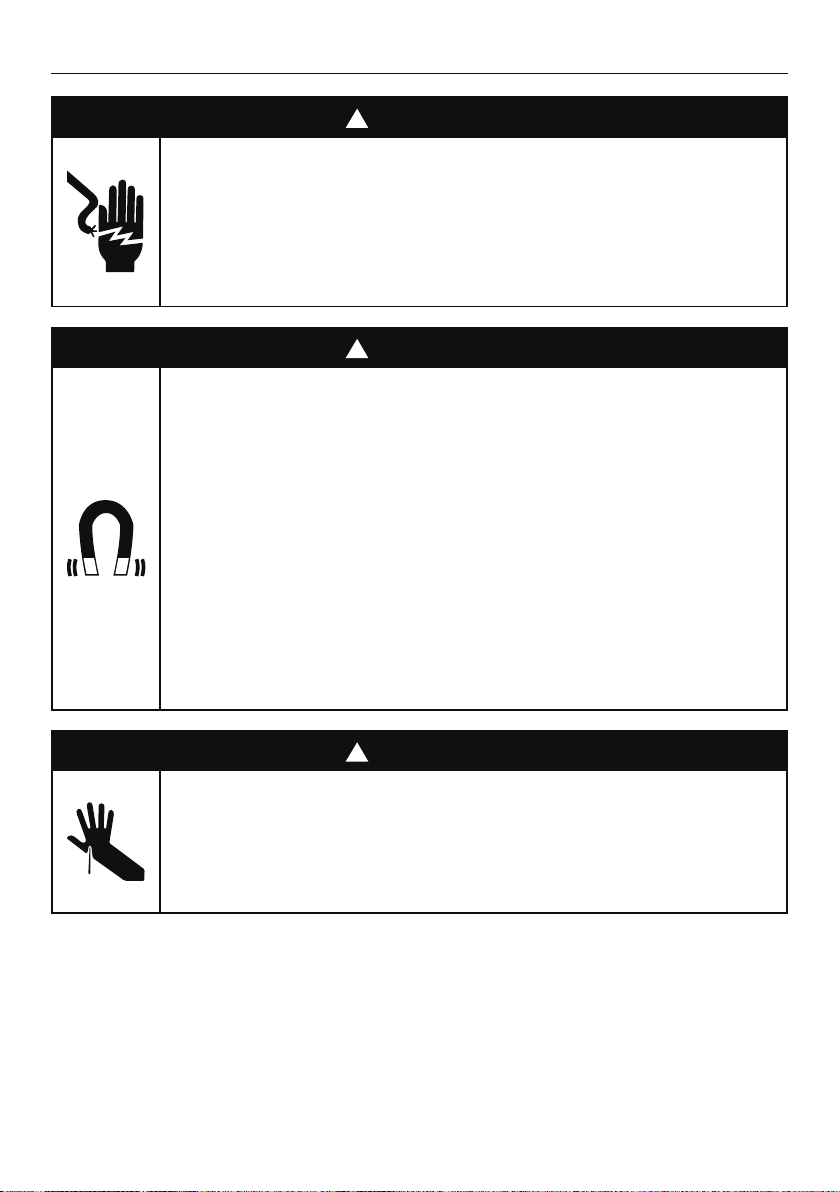
WARNING!
Electrical Shock Hazard
Failure to follow this advice may result in
electrical shock or death.
• Switch the cooker off at the wall before
replacing fuses or the oven lamp.
!
WARNING!
Health Hazard
Failure to follow this advice may result
in death.
• This appliance complies with electromagnetic
safety standards.
• However, persons with cardiac pacemakers or
other electrical implants (such as insulin pumps)
must consult with their doctor or implant
manufacturer before using this appliance
to make sure that their implants will not be
affected by the electromagnetic field.
!
WARNING!
Cut Hazard
Failure to use caution could result in injury
or cuts.
• Take care - some edges are sharp.
6
SAFETY AND WARNINGS
!
WARNING!
Fire Hazard
Failure to follow this advice may result in
overheating, burning, and injury.
• Unattended cooking on a hob with fat or oil can
be dangerous and may result in fire.
• NEVER try to extinguish a fire with water, but
switch off the appliance and cover flame, eg
with a lid or fire blanket.
• Do not place aluminium foil, dishes, trays, water
or ice on the oven floor during cooking, as
doing so will irreversibly damage the enamel;
lining the oven with aluminium foil may even
cause fire.
• Never use your appliance for warming or
heating the room. Persons could be burned or
injured or a fire could start.
• Storage in or on appliance: flammable materials
should not be stored in the oven or storage
compartment, or on the cooktop surface.

7
SAFETY AND WARNINGS
!
WARNING!
Hot Surface Hazard
Failure to follow this advice could result in
burns and scalds.
• During use, accessible parts of this appliance
will become hot enough to cause burns.
• Do not let body, clothing or any item other than
suitable cookware contact with the ceramic
glass until the surface is cool.
• Never leave metal objects (such as kitchen
utensils) or empty pans on the cooktop as they
can become hot very quickly.
• Beware: magnetisable metal objects worn on
the body may become hot in the vicinity of
the cooktop. Gold or silver jewellery will not
be affected.
• Handles of saucepans may be hot to touch.
Check saucepan handles do not overhang other
cooking zones that are on. Keep handles out of
reach of children.
• To avoid burns and scalds keep children away.
• Do not touch hot surfaces inside the oven.
• Use oven mitts or other protection when handling
hot surfaces such as oven shelves or dishes.
• Take care when opening the oven door.
• Let hot air or steam escape before removing or
replacing food.
• Do not touch the cooktop components, burners,
trivets/pan supports or the base when hot.
• Before cleaning, turn the cooker off and make
sure it is cool.

8
SAFETY AND WARNINGS
IMPORTANT SAFETY INSTRUCTIONS!
z
Read all the instructions before using the appliance. Use the appliance only for its
intended purpose as described in these instructions.
z
Proper installation: be sure your appliance is properly installed and earthed by a
qualified technician. A risk of tip-over exists when the appliance is not installed in
accordance with the installation instructions.
z
Do not operate the appliance if it is damaged or not working properly. If you received a
damaged product, contact your dealer or installer immediately.
z
Clean only the parts listed in this manual.
z
Do not modify this appliance.
z
This appliance is to be serviced only by a Fisher & Paykel trained and supported
service technician.
z
Isolating switch: make sure this cooker is connected to a circuit which incorporates an
isolating switch providing full disconnection from the power supply.
z
Household appliances are not intended to be played with by children.
z
Do not leave children alone – children should not be left alone or unattended in the
area where the appliance is in use. They should never be allowed to play with the
appliance or to sit or stand on any part of the appliance.
z
Do not store things children might want above the oven. Children could be burned or
injured while climbing on the oven to retrieve items.
z
The cooktop is not intended to be operated by means of an external timer or separate
remote control system.
z
CAUTION: the cooking process has to be supervised. A short-term cooking process has
to be supervised continuously.
z
Children of less than 8 years old must be kept away from the appliance unless
continuously supervised. This appliance can be used by children aged from 8 years
and above, and persons with reduced physical, sensory or mental capabilities
or lack of experience and knowledge, if they have been given supervision or
instruction concerning the use of the appliance in a safe way and they understand
the hazards involved. Cleaning and user maintenance shall not be done by children
without supervision.
z
Safe food handling: leave food in the oven for as short a time as possible before and
after cooking. This is to avoid contamination by organisms which may cause food
poisoning. Take particular care during warmer weather.
z
Do not place aluminium foil, dishes, trays, water or ice on the oven floor during cooking
as this will irreversibly damage the enamel.
z
Do not use aluminum foil to line any part of the oven, storage drawer or cooktop. This
will cause heat to be trapped underneath it. This trapped heat can upset the cooking
performance and damage the finish of the oven or cooktop parts.
z
Do not stand on the door, or place heavy objects on it.
z
Do not use harsh abrasive cleaners or sharp metal scrapers to clean the oven door glass
since they scratch the surface, which may result in shattering of the glass.
z
Do not use a steam cleaner to clean any part of the cooker.
z
Do not store flammable items in the oven or storage drawer or on the cooktop surface.
z
Do not place aluminium foil or plastic dishes on the cooktop.
z
Do not let large saucepans or frying pans overlap the bench as this can deflect heat
onto your benchtop and damage the surface.
z
Do not let large saucepans, frying pans or woks push any other pans aside. This could
make them unstable or deflect heat onto your benchtop and damage the surface.
9
SAFETY AND WARNINGS
IMPORTANT SAFETY INSTRUCTIONS!
z
Saucepan handles may be hot to touch. Keep handles out of reach of children.
z
If the electrical supply cord is damaged, it must only be replaced by a qualified repairer.
z
This oven is not to be used as a space heater, especially if it is installed in marine craft
or in a caravan.
z
Wear proper apparel. Do not wear loose fitting or hanging garments when using the
appliance. They could ignite or melt if they touch an element or hot surface and you
could be burned.
z
Always keep oven vents unobstructed.
z
Use only dry oven mitts or potholders. Moist or damp potholders on hot surfaces could
result in burns from steam. Do not let potholders touch hot areas or heating elements.
Do not use a towel or a bulky cloth for a potholder. It could catch fire.
z
Caution. Hot air can blow from the vent at the top of the oven as part of the oven’s
cooling system.
z
Placement of oven shelves: always position shelves in the desired location before
preheating the oven. If a shelf must be removed while the oven is hot, do not let
the oven mitts or potholder contact hot heating elements in the oven or the base of
the oven.
Light source information – EU/UK only
z
This product contains a light source of energy efficiency class G. The light source used
in this appliance is not suitable for room illumination.
10
INTRODUCTION
Before you start
1 Make sure that the anti-tip bracket at the rear of the cooker has been properly installed.
2 Make sure that the installer has completed the ‘Final checklist’ in the
Installation instructions.
3 Read this guide, taking special note of the ‘Safety and warnings’ section.
4 Remove all accessories and packaging from the oven and cooktop. Recycle items that
you can. If any adhesive residue is left on surfaces, remove this using dishwashing liquid
on a soft cloth. Do not use any harsh or abrasive cleaners.
5 Make sure you follow the instructions under ‘First use’ before using your
cooker for cooking.
11
A word on induction cooking
Induction cooking is a safe, advanced, efficient, and economical cooking technology.
It works by electromagnetic vibrations generating heat directly in the pan, rather than
indirectly through heating the glass surface. The glass becomes hot only because the pan
eventually warms it up. This technology has a number of advantages over traditional radiant
energy cooking:
z
Heat-up times are much faster.
z
Use is safer as no heating takes place unless a suitable pan is placed on the
cooking zone.
z
As heat is transferred without loss, you save energy.
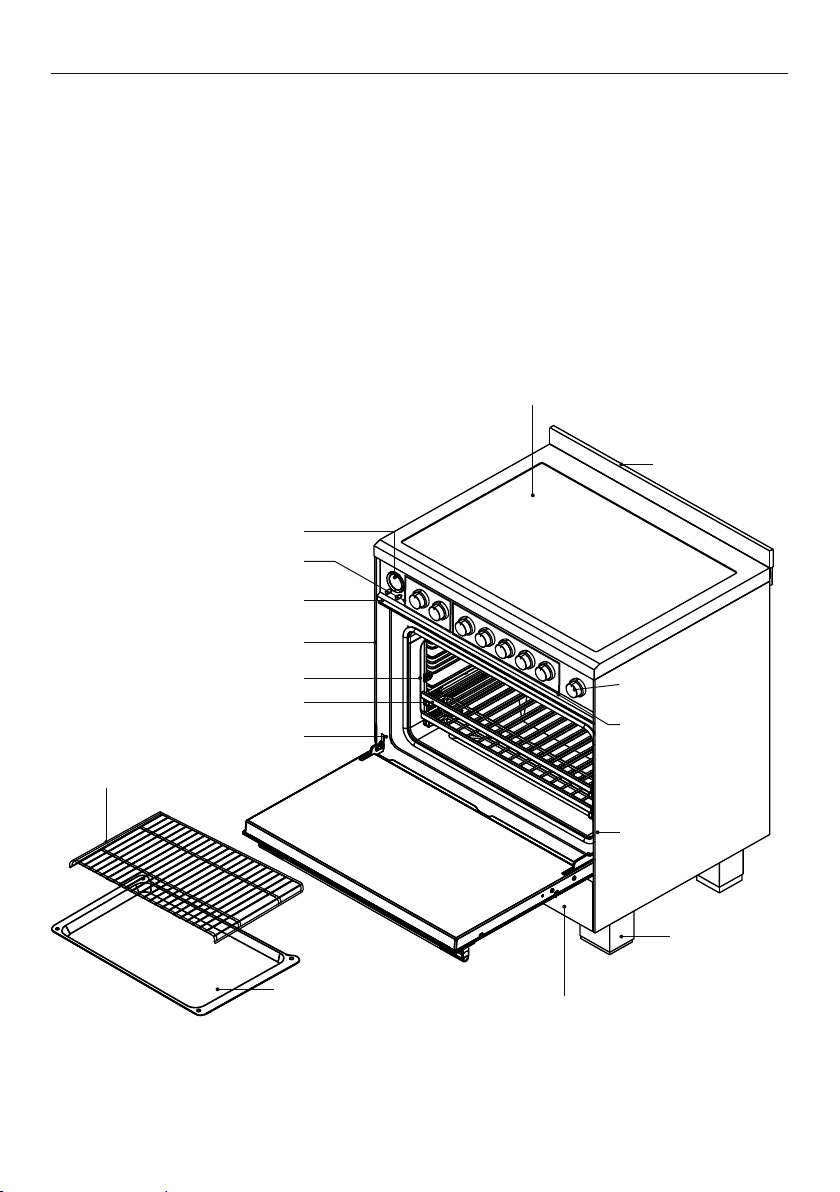
Overview
Features and styling may vary.
INTRODUCTION
Control panel
Oven frame
Oven door gasket
Oven function and
temperature dials
Foot (cover)
Warming drawer
Roasting dish
Grill rack
Full extension sliding shelves
Label
with model
and serial
numbers
Side racks
Back trim
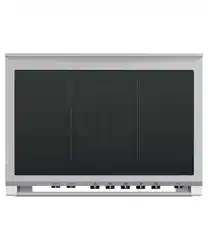
Induction cooktop
Clock display and controls
Cooktop
control dials
Warming drawer
control
12
NOV 25
CANCEL REMOTE
FIRST USE
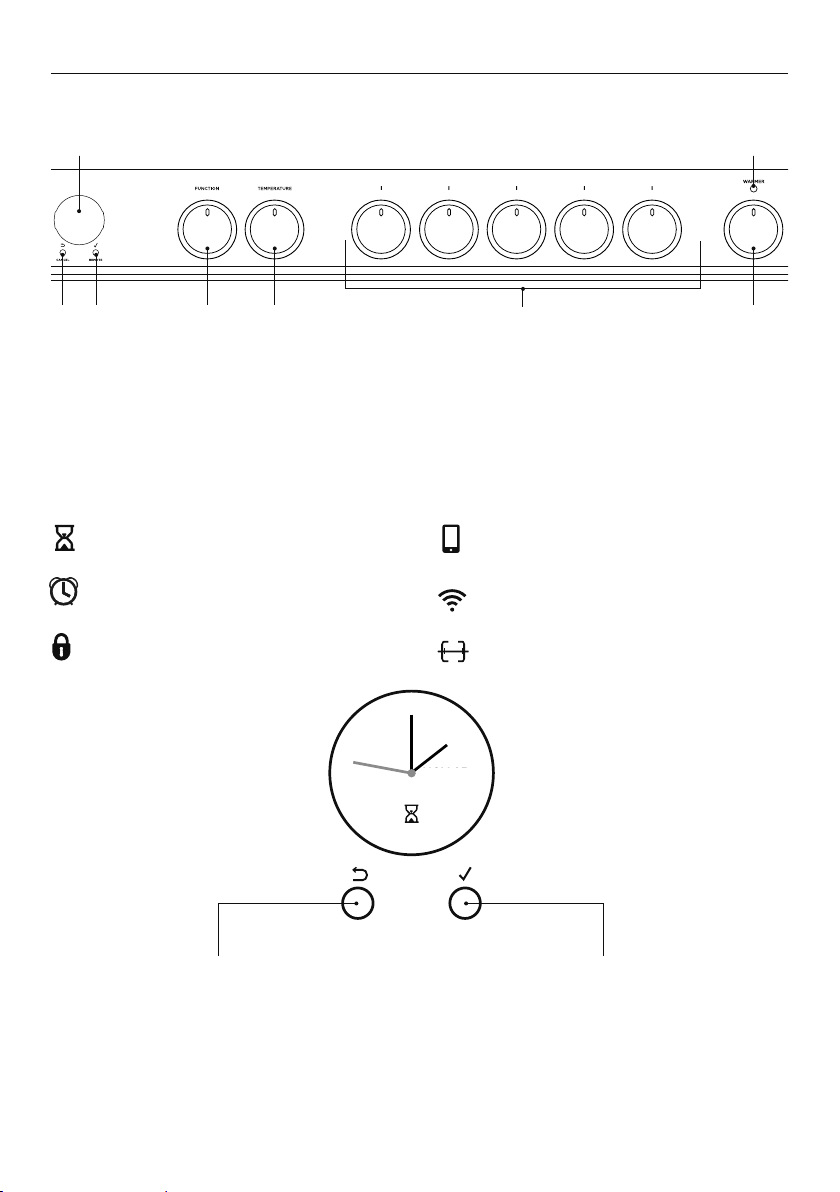
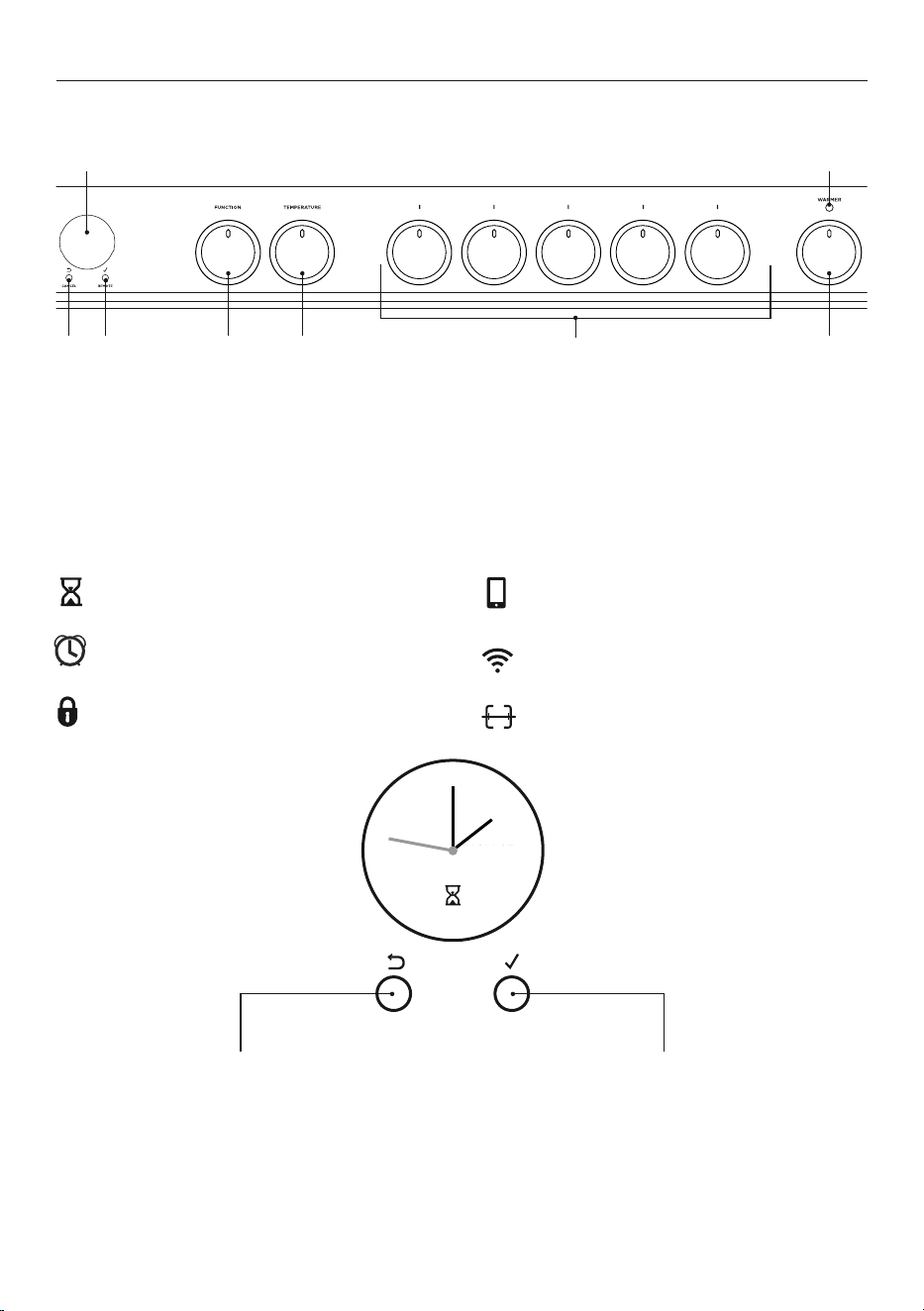
1 Oven display
2 Cancel/back button
3 Select/Scroll control
4 Function dial
5 Temperature dial
6 Cooktop control dials
7 Warming drawer dial
8 Warming drawer indicator
Control panel layout
Clock display and controls
1 8
23 4 5 6 7
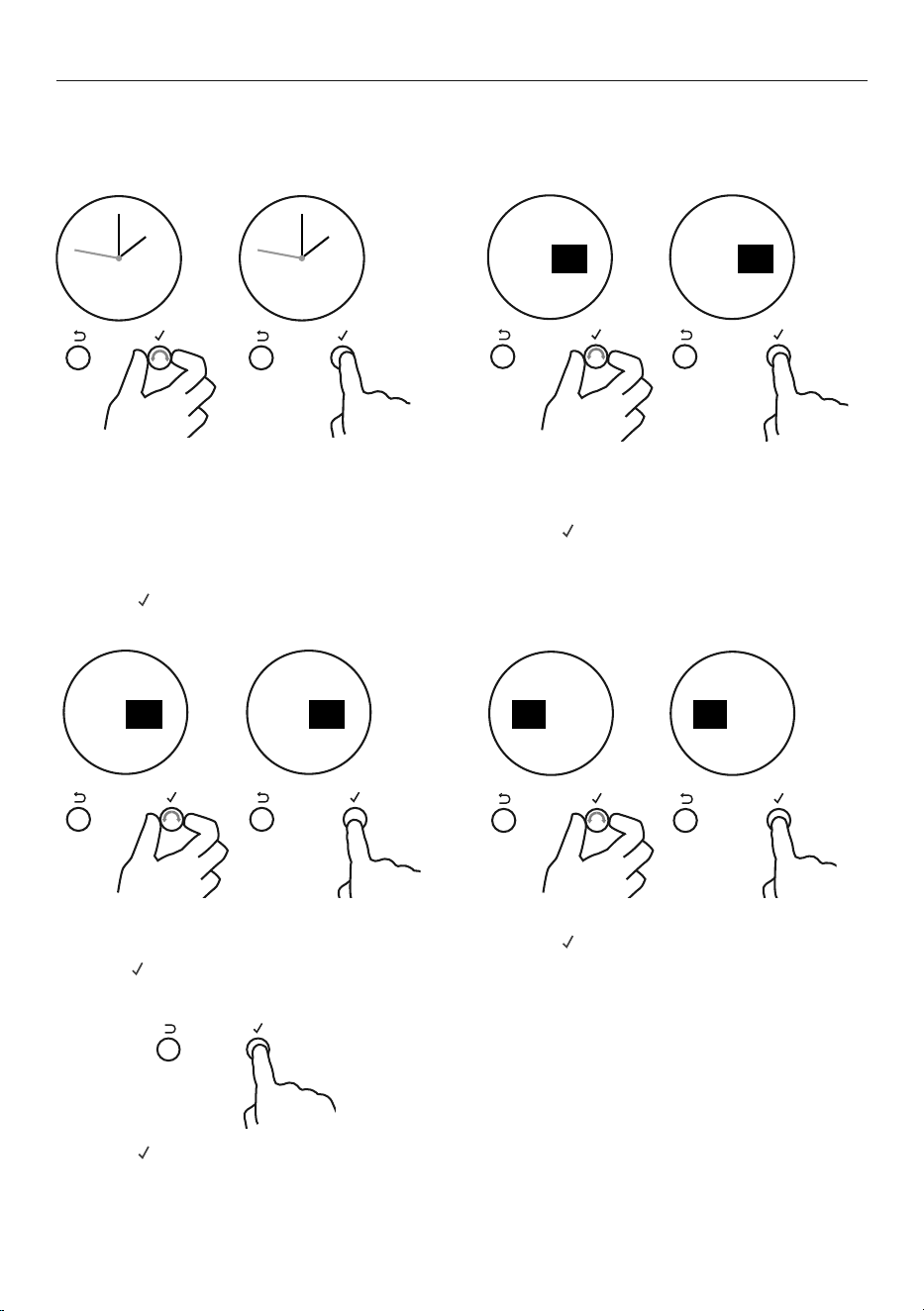
Cancel/back button
z
Press to go back
z
Press and hold to cancel
Select
z
Press to accept or to enter a menu
(Remote Mode is not available
on this product)
Scroll control
z
Turn clockwise or anticlockwise to
scroll through menu options
Timer (see ‘Setting the timer’)
Auto cook
(see ‘Auto Cook’)
Lock
(see ‘Locking the oven controls’)
Rotisserie (see ‘‘Using the rotisserie’’)
Remote Mode
(not available on this product)
Wireless connection
(not available on this product)
13
FIRST USE
Setting the clock
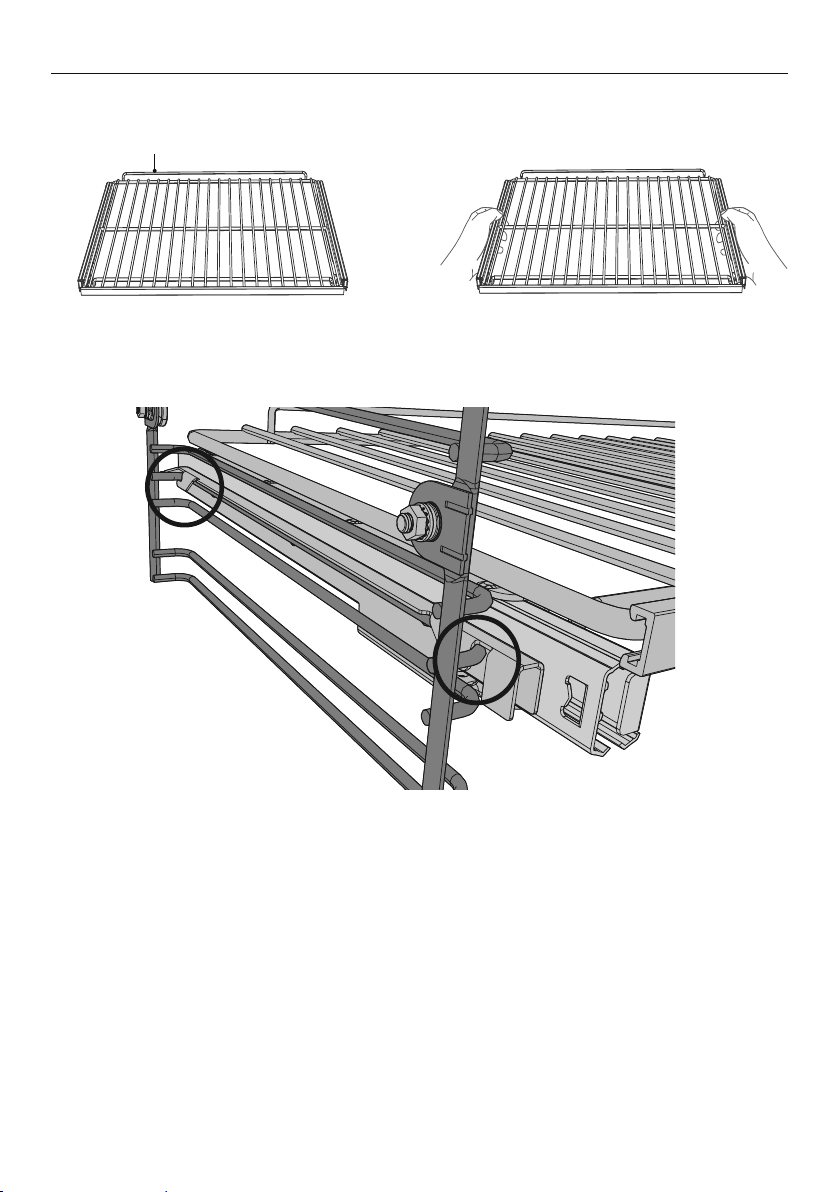
When your oven is first turned on, or after a power cut, the display will flash. You will need
to set the clock in order to use the oven.
1 Scroll to choose your preferred
clock display. Select between:
z
Analog
z
24-hr digital
z
12-hr digital
z
Display off**
2 Press
to confirm.
**With this option saved, you can still use
the oven and timer, however the display will
remain unlit. You cannot use any automatic
cooking functions when this option is
selected. To quit this option and enable the
display, press and hold CANCEL.
2 A If you have set analog or 12-hr
digital display:
z
Scroll to select am or pm.
z
Press to confirm.
3 Scroll to set the minutes.
z
Scroll to select am or pm.
z
Press to confirm.
4 Scroll to set the hours.
z
Press to confirm.
5 Press to confirm the time is
correctly set.
z
The clock is now set and you can
begin using your oven.
CANCEL REMOTE CANCEL REMOTE
REMOTE REMOTECANCELCANCEL
Set
Time of day
am
pm
Set
Time of day
pm
am
pm
pm
REMOTE REMOTECANCEL
Set
Time of day
12:00
pm
12:00
pm
minutes
CANCEL
Set
Time of day
minutes
REMOTEREMOTECANCEL
Set
Time of day
12:00
pm
hours
Set
Time of day
12:00
pm
hours
CANCEL
REMOTECANCEL
14
FIRST USE
1
2
3
4
5
6
7
Positioning the shelves
z
Shelf positions are numbered from the bottom.
z
Position the shelves you will need before turning the oven on.
z
For advice on which shelf position to use, see sections ‘Oven functions’, ‘Oven cooking
guidelines’, and ‘Cooking charts’.
IMPORTANT!
Always position the oven shelves before turning the oven on. Remove any unused shelves
and baking utensils from the oven.
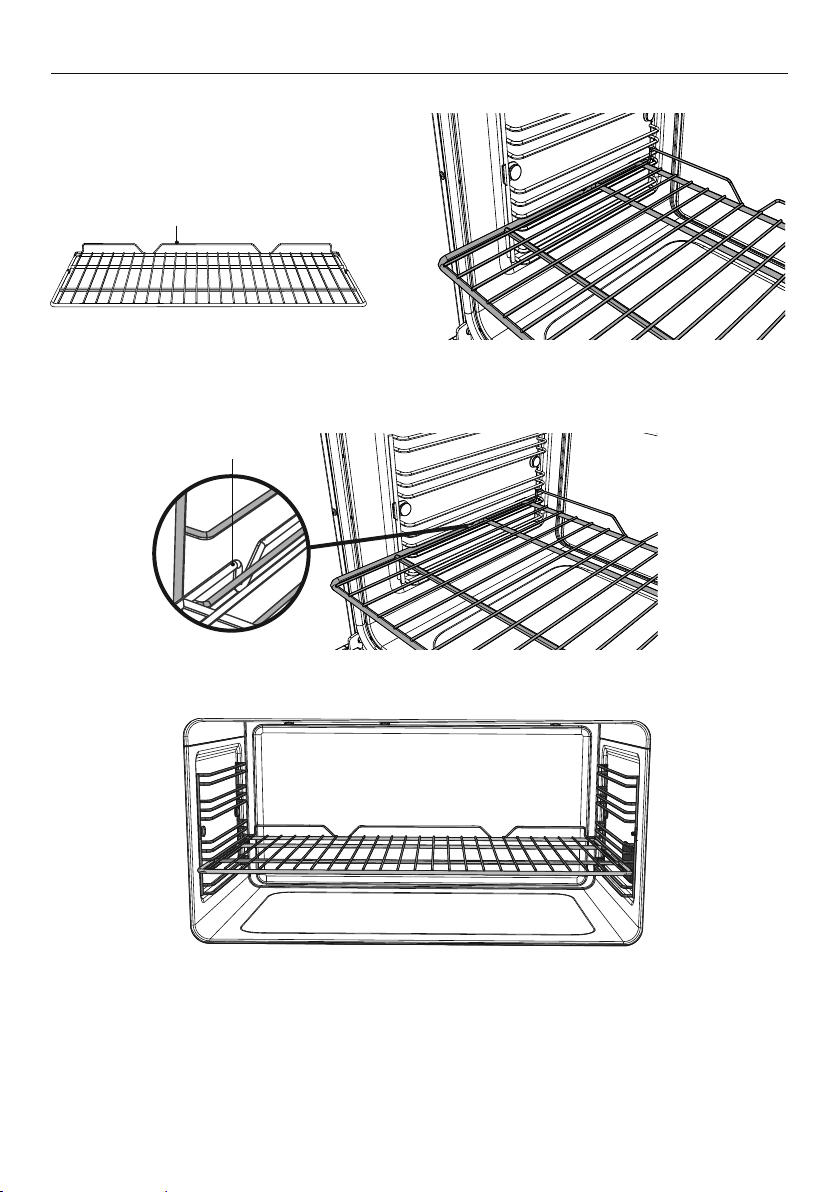
Oven shelves
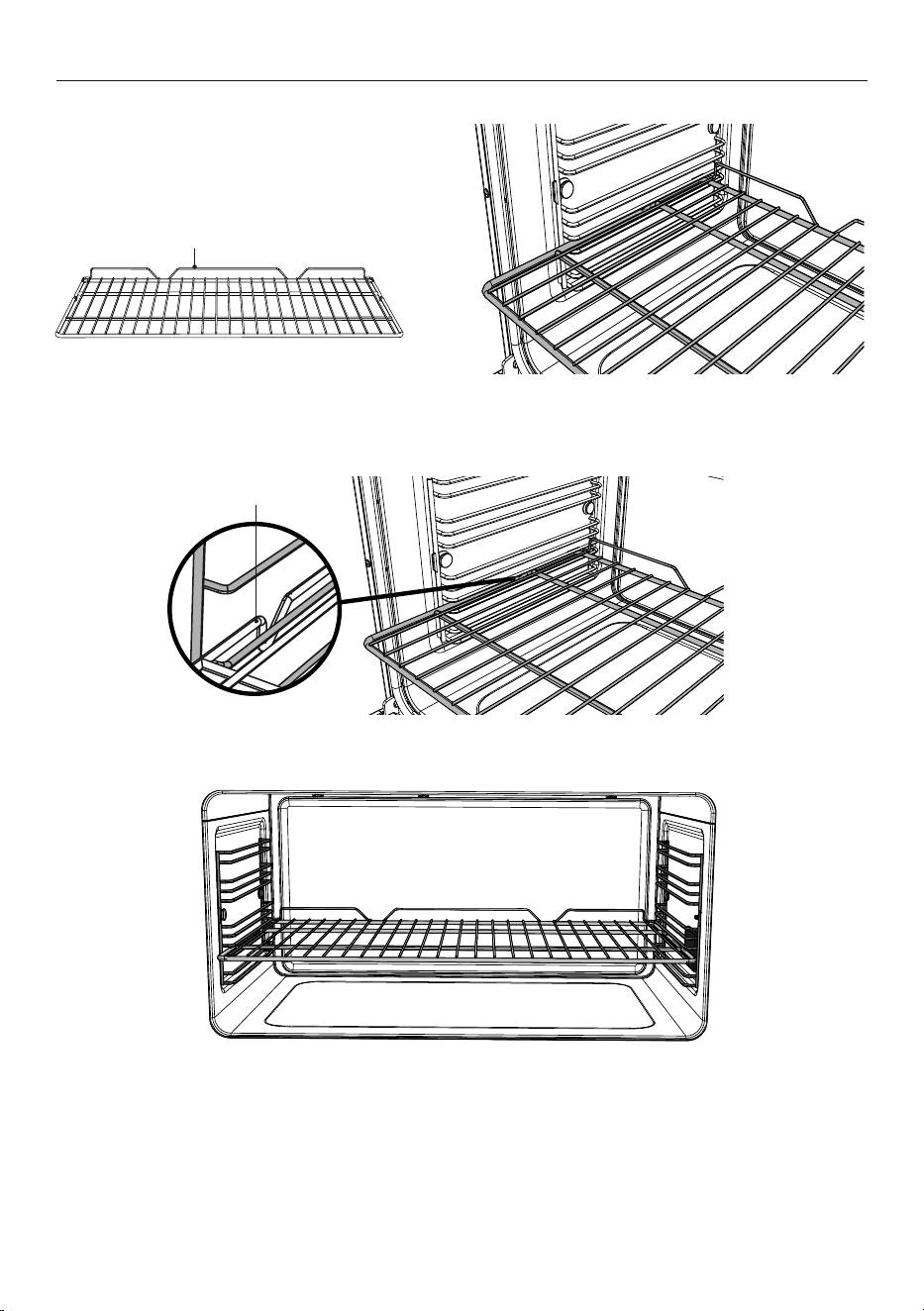
Wire shelf
Safety stop
Wire shelf
z
These shelves have safety stops to keep
them from sliding out of the oven when
pulled forward.
z
The front stops prevent the shelves from
hitting against the back of the oven.
Full extension sliding shelf
z
The wire shelves and slides are built
together as one unit.
z
When positioned correctly, the slides
will prevent the wire shelves from
tilting when pulled forward.
z
Beware: these shelves are heavy.
Slide
Front stop
Safety stop
Front safety stop
Wire shelf
15
FIRST USE
1 Make sure the guard rail is at the
back, facing up and the slides
are not extended.
3 Hook the rear tags over the wires of the
desired shelf position on both side racks.
To remove the shelves
1 Wait for the oven to cool down completely.
2 Hold the shelf firmly with both hands, making sure you grip the wire shelf too to stop it
sliding forward.
3 Pull the shelf forward about ¾ of the way.
4 Lift the rear of the shelf slightly so that the tags clear the side rack wires, then remove.
2 Hold the shelf firmly with both hands,
making sure you grip the wire shelf too
to stop it sliding forward.
4 Push the shelf all the way into the oven,
ensuring the front and rear tags either
side are securely locked behind the
side rack wires.
3
4
Guard rail
To insert the sliding shelves
16
FIRST USE
To insert the wire shelves
1 Make sure the guard rail is at the
back, facing up.
3 Tilt the front up slightly to help the safety stops clear the side rack wires.
4 Lower the shelf back onto the side rack wires and slide all the way into the oven.
To remove the shelves
1 Wait for the oven to cool down completely.
2 Pull the shelf forward about ¾ of the way.
3 Tilt the front up slightly to help the safety stops clear the side rack wires.
4 Remove the shelf.
2 Position the shelf: it should rest on
the side rack wires, as shown.
Safety stop
Guard rail
17
FIRST USE
Conditioning the oven
It is important to condition your oven before using it for cooking and baking. Conditioning
will burn off any manufacturing residues and ensure that you get the best results right from
the start.
Before you start:
z
Make sure you have removed all packaging and any cable ties used to secure the
shelving during transit.
z
Make sure all shelves are fitted in the oven.
z
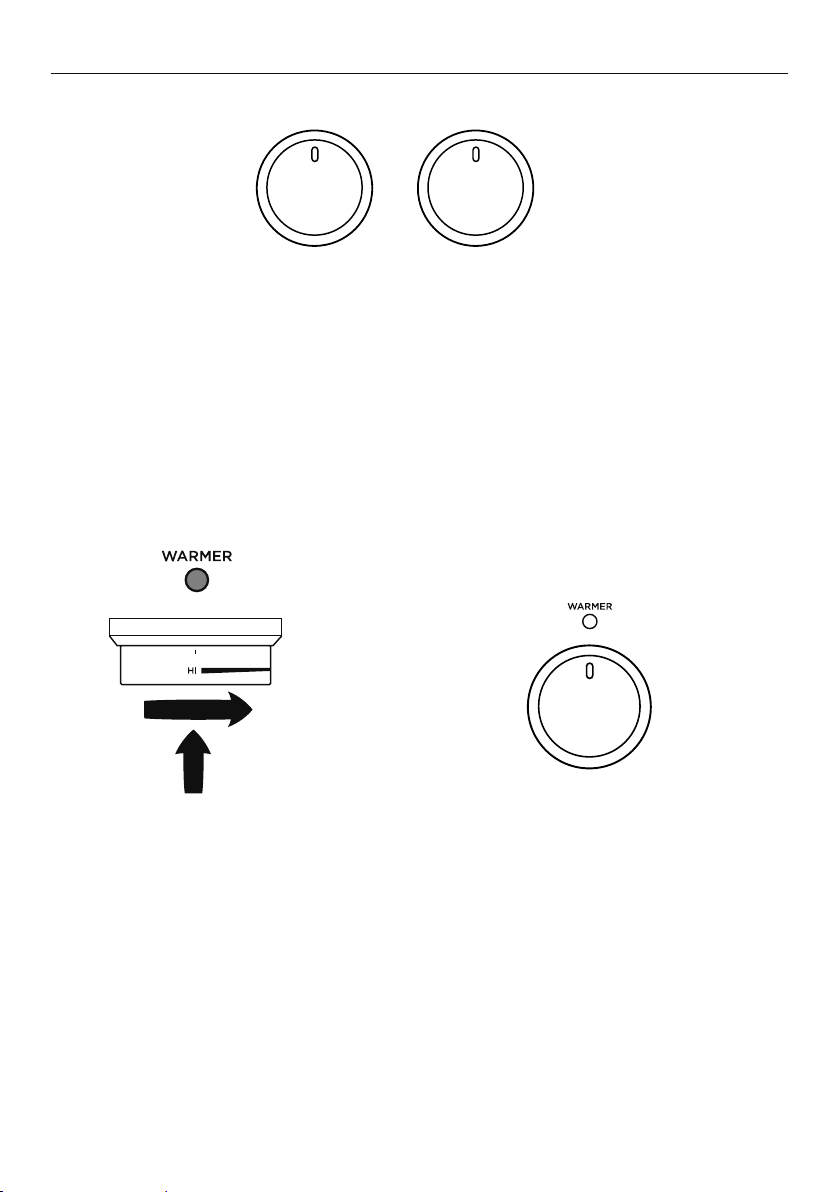
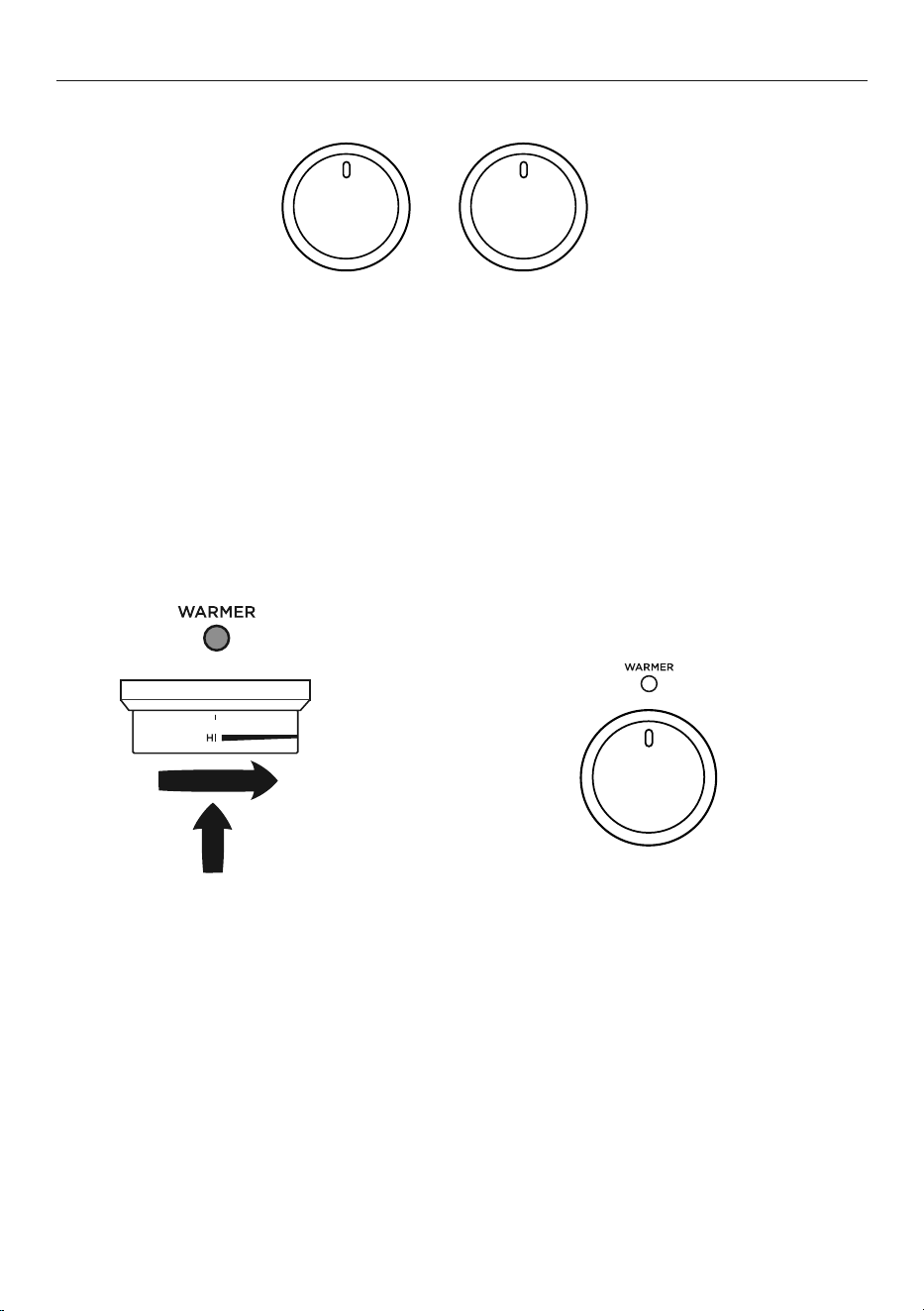
Make sure all oven control dials are turned to O (OFF).
1 Select the Bake function.
z
The halo will glow white.
3 After 30 minutes, select the
Fan Grill function.
z
Heat at 200°C for 10 minutes.
4 After 10 minutes, select the
Fan Forced function.
z
Heat at 200°C for 20 minutes.
2 Set the temperature to 200°C
for 30 minutes.
z
The halo will glow red while the oven
is heating up.
z
The actual temp will show
on the screen.
z
When the oven has heated a tone will
sound and the halo will turn white.
200C
--->
Fan
Grill
Fan
Forced
18
FIRST USE
5 After 20 minutes turn both the function and temperature dials to 0 (OFF).
6 The halos will go out.
z
There will be a distinctive smell and a small amount of smoke during the conditioning
process as manufacturing residue is burnt off. This is normal, but make sure the kitchen is
well ventilated during the conditioning.
z
Once cooled, wipe out the oven and warmer drawer with a damp cloth and mild
detergent, and dry thoroughly.
Conditioning the warming drawer
IMPORTANT!
Make sure the drawer is empty and all packaging has been removed.
1 Push in the warmer dial and turn
clockwise to HI.
z
The indicator will glow red.
z
Heat on HI for 2 hours.
2 After 2 hours turn warmer dial
to O (OFF).
z
The indicator will go out.
z
There will be a distinctive smell and a small amount of smoke during the conditioning
process as manufacturing residue is burnt off. This is normal, but make sure the kitchen is
well ventilated during the conditioning.
z
Once cooled, wipe out the drawer with a damp cloth and mild detergent, and
dry thoroughly.
FUNCTION TEMPERATURE
Rapid preheating stage
For some cooking functions, the oven will go through an initial rapid preheat stage. In this
stage, the fan and both bake and grill elements will turn on to quickly heat the oven to the
set temperature. Depending on the cooking function, the fan, bake and grill elements will
turn off once the oven reaches the set temperature.

19
COOKING GUIDE
z
For best results when baking, always preheat your oven. The temperature halo will
change from red to white when the set temperature is reached.
z
While the oven is heating the grill element will be on.
z
We advise you do not open the door until at least ¾ of the way through cooking.
z
Make sure cake pans do not touch each other or the sides of the oven.
z
When baking double the recipe (especially cookies) cook time may need to increase.
z
Your cookware will influence baking times. Dark pans absorb the heat more quickly than
reflective pans; glass cookware may require a lower temperature.
z
Multi-shelf baking may also require a slight increase in cooking time.
Shelf Position Guide
z
Single shelf: place your baking on a shelf that will have the top of your pan near
the center of the oven cavity.
z
Multi shelf: always leave a space between shelves to allow the air to circulate.
Oven cooking guidelines
IMPORTANT!
z
Use all the oven modes with the oven door closed.
z
Never use aluminum foil to cover the oven shelves or to line the floor of the oven.
The trapped heat can irreversibly damage the enamel and may even cause fire.
z
Do not place water, ice, or any dish or tray directly on the oven floor, as this will
irreversibly damage the enamel.
z
Do not cover the roasting dish with aluminum foil. This will catch the grease and
could cause fire.
z
Do not use plastic wrap or wax paper in the oven.
z
For food safety reasons, do not leave food in the oven for longer than two hours before
and after cooking or defrosting. This is to avoid contamination by organisms which may
cause food poisoning. Take particular care during warmer weather.
Baking
Lower
Element
(concealed)
Fans Upper Elements
Shelf positions
1
4
7
6
5
2
3
Air vents
(BI and EU models only)
20
COOKING GUIDE
Roasting
z
The Roast function is designed to brown the outside of the meat but still keep the inside
moist and juicy.
z
Boneless, rolled or stuffed roasts take longer than roasts containing bones.
z
Poultry should be well cooked with the juices running clear and an internal
temperature of 74°C.
z
If using a roasting bag, do not use the Roast function. The initial searing
stage is too hot for roasting bags. Use Fan Bake or Fan Forced and follow the
manufacturer’s instructions.
z
When using the Roast function, do not cover your roast, as this will stop the searing
process browning the outside of the meat. If you prefer to roast in a covered pan, use the
Fan Bake function instead and increase the temperature by 20°C.
z
Cook larger cuts of meat at a lower temperature for a longer time. The meat will
cook more evenly.
z
Always roast meat fat side up. That way, basting may not be required.
z
Always rest the meat for at least 10 minutes after roasting to allow the juices to settle.
z
Remember the meat will continue to cook for a few minutes after removing
it from the oven.
Shelf Position Guide
Place the meat on a shelf so that is is in the center of the oven or lower.
Grilling
z
This is a healthier alternative to frying.
z
Always grill with the oven door completely shut.
z
For best results allow 5 minutes of preheat before placing food in the oven.
z
If you use glass or ceramic pans, be sure they can withstand the high
temperatures of the grill.
z
To avoid piercing the meat and letting juices escape, use tongs or a spatula to turn the
meat halfway through cooking.
z
Brush meat with a little oil to help keep the meat moist during cooking. Alternatively
marinade the meat before grilling (but be aware that some marinades may burn easily).
z
Where possible grill cuts of meat of a similar thickness at the same time. This will
ensure even cooking.
z
Always keep a close watch on your food while broiling to avoid charring or burning.
Shelf Position Guide
z
For thinner cuts of meat, toasting or browning foods, use a higher shelf position.
z
Thicker cuts of meats should be grilled on lower shelves or at a lower grill setting to
ensure even cooking.
Reheating
z
Use Bake or Fan Bake to reheat food.
z
Bake and Fan Bake are particularly good for reheating pastry based items,
as the base heat will help re-crisp the pastry case.
z
Always reheat food to piping hot. This reduces the risk of contamination
by harmful bacteria.
z
Once hot, set the oven temperature to WARM or use the warming drawer
to keep food hot.
Never reheat food more than once.
21
OVEN FUNCTIONS
IMPORTANT!
z
Use all the functions with the oven door closed.
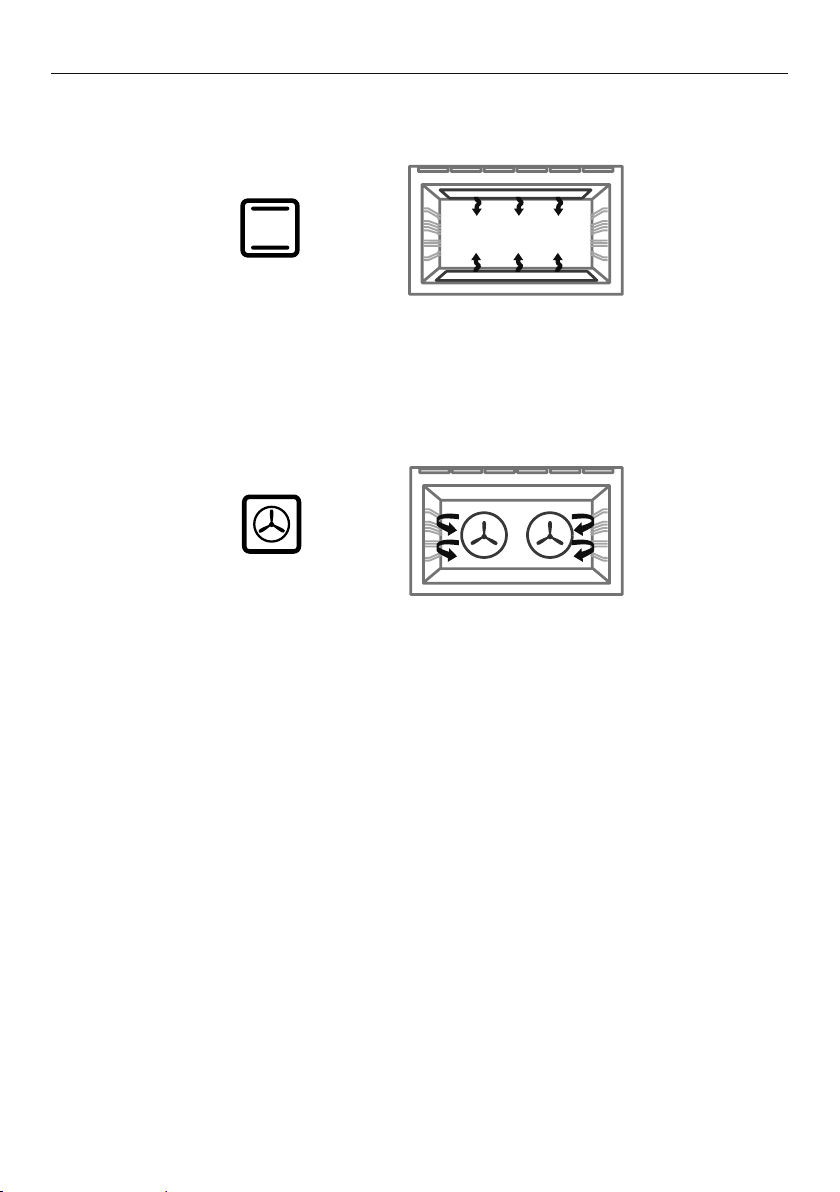
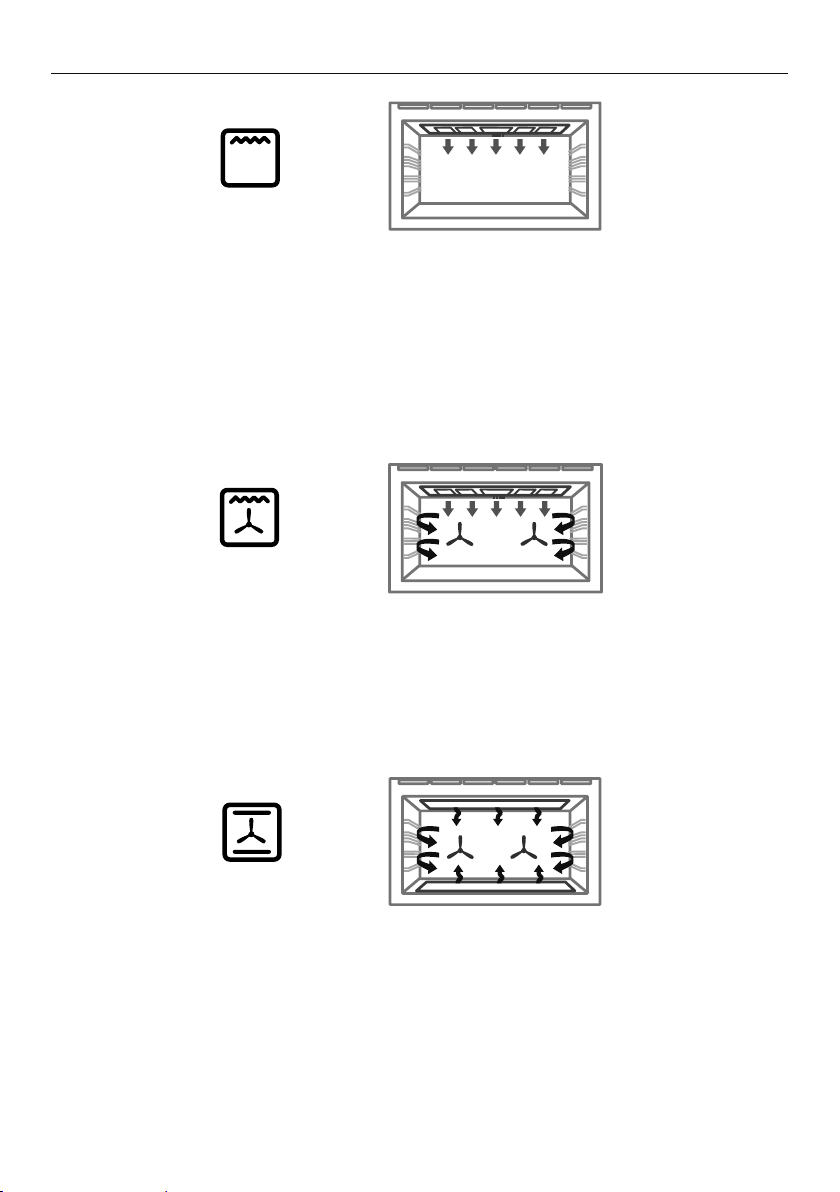
Upper outer and lower elements
z
Heat comes from both the upper and lower elements. The fan is not used in this function.
z
Ideal for cakes and foods that require baking for a long time or at low temperatures.
z
This function is not suitable for multi-shelf cooking.
Ideal for moist foods that take a longer time to cook eg rich fruit cake, or bread.
Bake
Fan and rear element
z
By using the central rear heating element and fan, hot air is blown into the cavity,
providing a consistent temperature at all levels, making it perfect for multi-shelf cooking.
z
Trays of cookies cooked on different shelves are crisp on the outside and
chewy in the middle.
z
Meat and poultry are deliciously browned and sizzling while remaining juicy and tender.
z
Casseroles are cooked to perfection and reheating is quick and efficient.
z
When multi-shelf cooking it is important to leave a gap between trays (eg use shelves 3
& 5) to allow the air to move freely. This enables the browning of foods on the lower tray.
z
If converting a recipe from Bake to Fan Forced, we recommend that you decrease the
bake time or decrease the temperature by approximately 20°C.
z
For items with longer bake times (eg over an hour) it may be necessary to decrease both
time and temperature.
Ideal for multi-shelf cooking biscuits, cookies, scones, muffins and cupcakes.
Fan Forced
22
OVEN FUNCTIONS
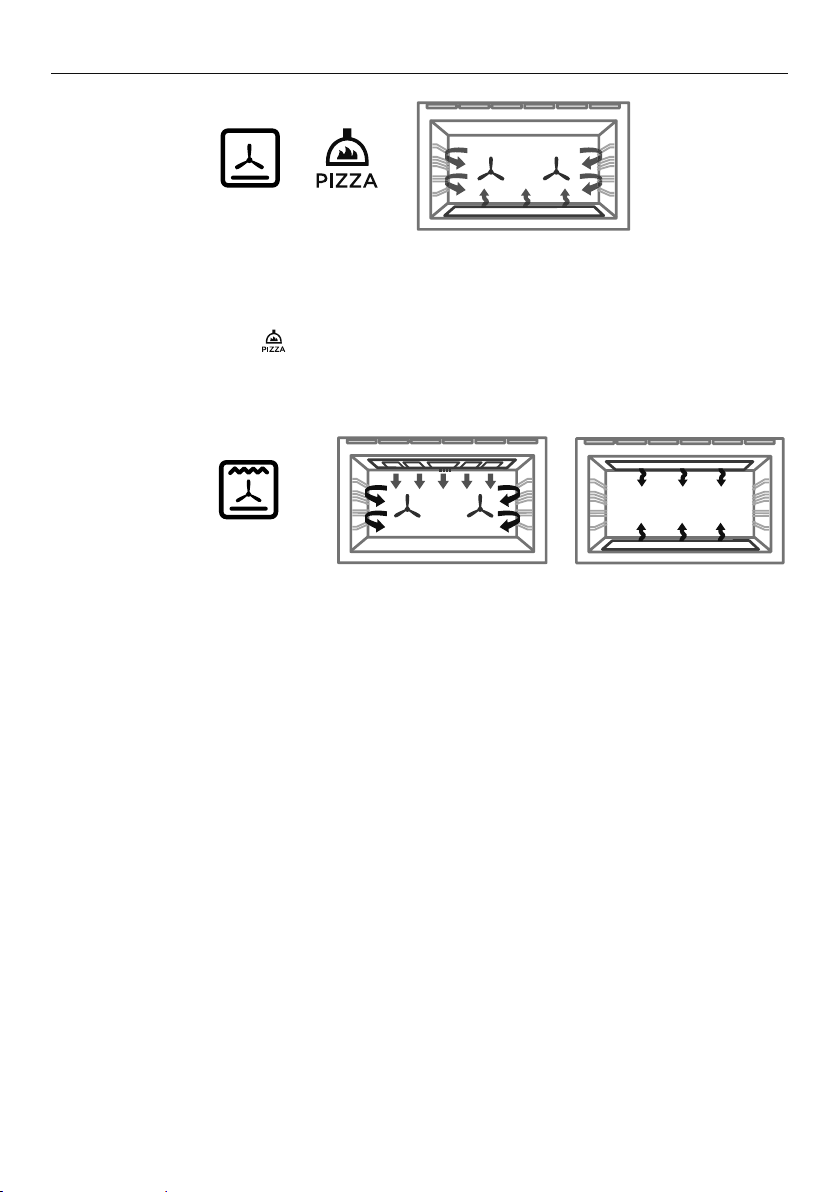
Fan plus upper inner and outer elements
z
This function uses the intense heat from the elements for top browning and the fan to
ensure even cooking of foods.
z
Meat, poultry and vegetables cook beautifully; food is crisp and brown on the outside
while the inside remains moist and tender.
Ideal for whole chicken, tenderloin of beef or broiling your favourite chicken, fish or steak.
Fan Grill
Upper inner and outer elements
z
Intense radiant heat is delivered from both top elements. You can use Grill on Low OR
High (100% power).
z
For best results allow 5 minutes of preheat before placing food in the oven.
z
The temperature halo will remain white while using the Grill function.
z
The most suitable function for ‘finishing off’ many meals, for example browning the top
of potato gratin and frittata.
z
Ensure you centre the dish under the inner grill element.
Ideal for toasting bread or for top browning to ‘finish off dishes’.
Grill
23
OVEN FUNCTIONS
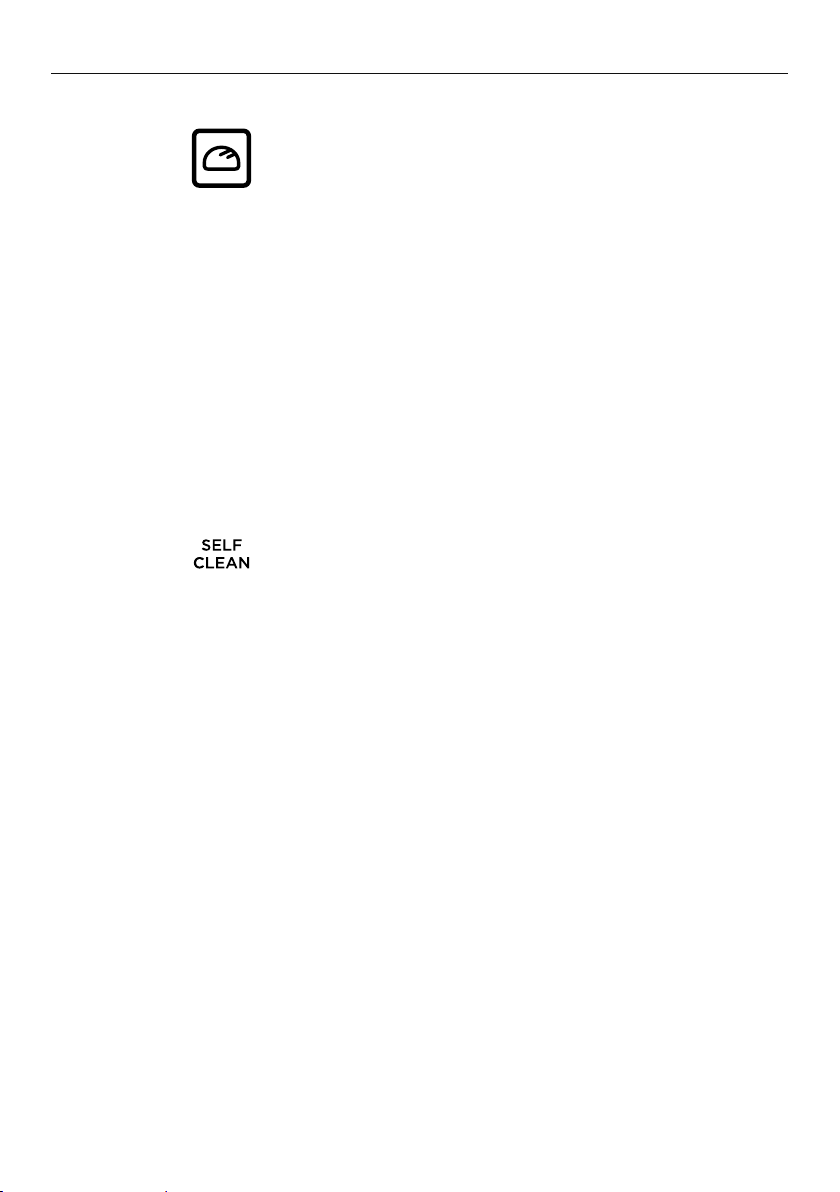
Fan plus lower element
z
The fan circulates heat from the lower element throughout the oven.
z
Excellent for cooking pizza and flatbreads as it crisps the base beautifully without
overcooking the top.
z
Set the temperature to for optimum pizza cooking temperature.
Ideal for foods such as sweet and savoury pastry foods and delicate foods that require
some top browning eg frittata, quiche.
Pastry Bake + Pizza
Fan plus upper outer and lower elements
z
The oven fan circulates hot air from the top outer and the lower elements and distributes
it around the oven cavity.
z
Food cooked tends to brown more quickly than foods cooked on the
traditional Bake function.
z
You may need to decrease the time from that recommended in traditional recipes.
Ideal for single shelf baking that takes less than an hour to cook – foods such as muffins,
biscuits and cupcakes or things like enchiladas.
Fan Bake
24
OVEN FUNCTIONS
Fan plus upper and lower elements
z
A two-step program. An initial 20 minute searing stage crisps and browns the roast and
caramelises the outside of the meat, then the temperature drops to the level you have
preset for the remainder of the cooking period, producing a tender and juicy roast that is
full of flavor.
z
Oven does not require preheating.
z
If desired, use the roasting dish, or place vegetables under the roast to allow the
juices to drain away from your meat. This will allow the hot air to circulate under
the meat as well.
Ideal for Roasting meat, chicken and vegetables.
Roast
Fan plus rear element
z
The fan circulates heat from the rear element to gently cook food.
z
This function has low energy consumption - oven lights will remain off and vents will
remain closed for the duration of cooking to conserve energy (you may observe some
moisture generation during this time).
z
Oven does not require preheating.
Ideal for slow-cooked dishes such as casseroles, stews and braises.
Slow Cook*
(BI and EU models only)
25
OVEN FUNCTIONS
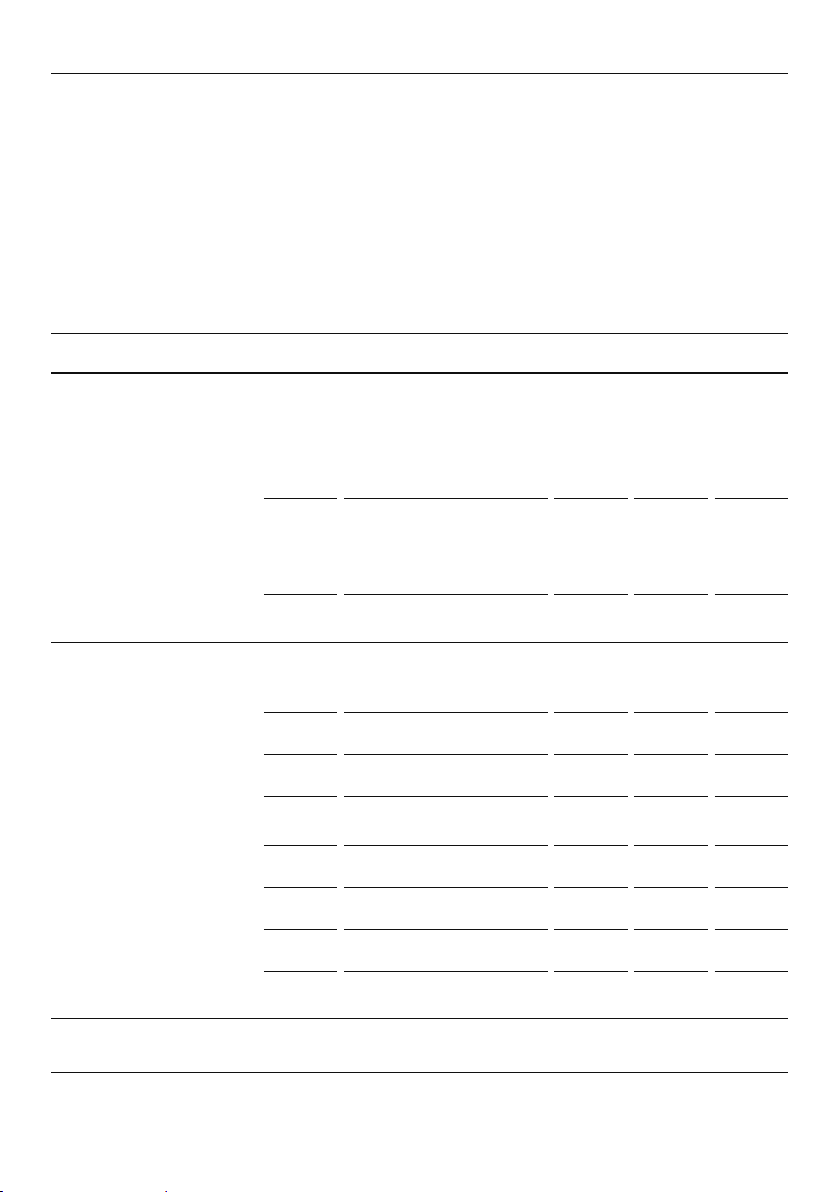
This is not a cooking function
z
Self Clean takes care of the mess and grime that is traditionally associated
with oven cleaning.
z
There are two Self Clean cycles available:
z
Standard clean (which takes a minimum of 4 hours) for normal to heavy cleaning.
z
Light clean (which takes a minimum of 3 hours) for lightly soiled ovens.
z
Always clean the inner door glass pane first.
z
See ‘Using the Self Clean function’ for details.
This is not a cooking function
z
Gentle heat is generated from the upper and lower elements.
z
Provides the optimum warm and draft-free environment for proving yeast dough.
z
This method provides a faster proof time than at room temperature.
z
To prevent overproofing we recommend you check the dough every 30mins.
Proving dough
1 Place dough in a lightly oiled bowl and cover with plastic wrap
and/or a clean damp cloth.
2 Position the bowl in the center of the oven.
3 Select Rapid Proof function.
Rapid Proof*
(NZ and AU models only)

26
COOKING CHARTS
z
Shelf positions are counted from the base up (1 is the lowest, 7 is the highest).
Position shelves before you turn the oven on.
z
For best results always preheat the oven to the required temperature.
z
The grill element may come on while the oven is heating up.
z
The temperature indicator light will go out when the oven has reached the
selected temperature.
z
Oven accessories may temporarily deform slightly when they become hot.
This is normal and does not affect their function.
The information in these charts is for guidance only. Refer to your recipe or the packaging
and be prepared to adjust the cooking times and settings accordingly.
BAKING
SHELVES FUNCTION
SHELF
POSITION
TEMP
(°C)
TIME
(MIN)
BISCUITS
Plain Single Fan Bake 3 210-220 8-10
Multi Fan Forced
1 and 4
or
2 and 5
215-230 10-12
Chewy chocolate chip
Single Fan Bake 3 180-190 10-15
Multi Fan Forced
1 and 4
or
2 and 5
160-170 10-15
Oatmeal Single Fan Bake 3 160-170 12-15
CAKES
Vanilla Single Bake 3 160-165 30-35
Pound cake Single Bake 3 160 70-80
Butter/chocolate Single Bake 3 160-180 50-60
Chocolate brownie
(20x20cm)
Single Bake or Classic Bake 3 175 20-25
Rich fruit Single Bake or Classic Bake 3 135-150 3-6 hrs
Light fruit Single Bake 3 155-165 60-90
Sponge
(single large) Single Bake 3 170-180 30-40
Sponge
(20x20cm) Single Bake 3 170-180 15-25
SHORTBREAD Single Pastry Bake 3 130-140 20-25
Multi Fan Forced 2 and 5 140 30-35
27
COOKING CHARTS
BAKING
SHELVES FUNCTION
SHELF
POSITION
TEMP
(°C)
TIME
(MIN)
MUFFINS/CUPCAKES
Cupcakes
Single Fan Bake 3 185 15-20
Multi Fan Forced
1 and 4
or
2 and 5
170 20-25
Muffins
Single Fan Bake 3 170 25-30
Multi Fan Forced
1 and 4
or
2 and 5
170 25-30
SCONES Single Bake 3 215-230 10-15
MERINGUES Single Bake 3 100-120 60-70
BREAD / BREAD ROLLS
Sandwich loaf
(23x13cm loaf tin)
Single Bake 3 200-220 40-50
Wholewheat loaf
(23x13cm loaf tin)
Single Bake 3 200-220 35-45
Soft bread rolls Single Bake 3 190 15-18
Dough Proof Single Rapid Proof 3 PrF 30
PASTRY
Pastry case
(baked blind) Single Pastry Bake 2 or 3 175 15
Filo Single Fan Bake 3 200 15-25
Flaky/puff Single Fan Bake 3 185-200 20-30
Choux Single Fan Bake 3 200-210 30-35
Multi Fan Forced
1 and 4
or
2 and 5
200-210 30-35
Croissants Single Fan Bake 3 190-200 15-25
Multi Fan Forced
1 and 4
or
2 and 5
190-200 15-25

28
COOKING CHARTS
BAKING
SHELVES FUNCTION
SHELF
POSITION
TEMP
(°C)
TIME
(MIN)
Apple pie Single Pastry Bake or Fan Bake 3 190-200 25-30
Lemon meringue Single Pastry Bake or Fan Bake 3 175-180 30-40
Baked cheesecake
(in water bath)
Single Classic Bake 3 160 50-60
Custard tart
(blind bake, then add filling)
Single Classic Bake 3 150-175 15-30
DESSERTS
Crème brulee
(in water bath) Single Classic Bake 3 135 35-45
Crème caramel
(in water bath) Single Classic Bake 3 175 35-45
SAVOURY
SHELVES FUNCTION
SHELF
POSITION
TEMP
(°C)
TIME
(MIN)
MEAT PIES Single Pastry Bake or Fan Bake 3 190-195 30-40
SAUSAGE ROLLS Single Pastry Bake or Fan Bake 3 190-200 20-25
VEGETABLES Single Fan Bake 3 175-190 30-50
LASAGNE Single Fan Bake 3 175-190 35-45
CASSEROLES Single Slow Cook or Classic Bake 2 120-150 2-4 hr
PIZZA Single Pizza 1 or 2
Pizza
(280)
10-15
QUICHE
(blind bake, then add filling)
Single Pastry Bake or Fan Bake 3 180-200 30-40
POTATOES, WHOLE
(baked) Single Bake 3 200 50-60
FRITTATA (shallow) Single Pastry Bake 3 170-180 15-20
OVEN MEALS Single Fan Forced 3 170-190 30-40
29
COOKING CHARTS
ROASTING
SHELVES FUNCTION
SHELF
POSITION
TEMP
(°C)
TIME
(MIN)
MEAT
PROBE
(°C)
BEEF, BONELESS (times per 450g)
Rare
Single Roast 2 or 3 160-170 18-32 54-59
Medium Single Roast 2 or 3 160-170 25-40 60-74
Well done Single Roast 2 or 3 160-170 30-55 74-79
PRIME RIB ROAST
(times per 450g)
Rare Single Roast 2 or 3 160-170 15-30 54-59
Medium Single Roast 2 or 3 160-170 20-35 60-74
Well done Single Roast 2 or 3 160-170 25-40 74-79
LAMB RACK
Medium rare Single Roast 3 200 20 50
LAMB LEG, BONE IN
(times per 450g)
Medium Single Roast 2 or 3 160-170 18-28 65-70
Well done Single Roast 2 or 3 160-170 20-33 74-79
LAMB LEG, BONLESS
(times per 450g)
Medium Single Roast 2 or 3 160-170 20-35 65-70
Well done Single Roast 2 or 3 160-170 25-45 77-79
VEAL
(times per 450g)
Medium Single Roast 2 or 3 160-170 20-40 71
Well done Single Roast 2 or 3 160-170 25-45 76
CHICKEN, WHOLE
(times per 450g, excl. butterflied)
Unstuffed Single Fan Grill 2 or 3 175 15-20 75
Stuffed Single Bake 2 or 3 175 17-22 75
Butterflied Single Fan Grill 3 or 4 175 40-50 75
TURKEY, WHOLE
(times per 450g)
Stuffed Single Bake 1 or 2 160-170 17-22 75
Unstuffed Single Bake 1 or 2 150-165 15-20 75

30
COOKING CHARTS
ROASTING
SHELVES FUNCTION
SHELF
POSITION
TEMP
(°C)
TIME
(MIN)
MEAT
PROBE
(°C)
PORK, BONELESS (times per 450g)
Medium Single Roast 2 or 3 170-175 25-40 63-68
Well done Single Roast 2 or 3 170-175 30-45 74-79
PORK CRACKLING
Crisp
(watch closely) Single Fan Grill 4 220 5-10 n/a
VENISON
(times per 2.5cm thickness
1
)
Rare Single* Fan Grill 4 225 7 49-54
Medium Single* Fan Grill 4 225 9 55-60
1
Brown in frying pan first.

31
COOKING CHARTS
GRILLING
SHELVES FUNCTION
SHELF
POSITION
TEMP
(°C)
TIME
(MIN)
BEEF
Steak, rare Single Grill 6 or 7 HI 8-10
Steak, medium Single Grill 6 or 7 HI 10-15
Burgers Single Grill 6 or 7 HI 12-15
Meatballs Single Grill 6 or 7 HI 12-15
LAMB
Chops, medium Single Grill 6 or 7 HI 15-20
Chops, well done Single Grill 6 or 7 250 20-25
PORK
Chops, well done Single Grill 6 or 7 HI 15-20
Ham steak Single Grill 6 or 7 HI 15-20
Bacon Single Grill 6 or 7 HI 4-7
CHICKEN
Boneless pieces Single Fan Grill 6 or 7 175 30-40
Bone in pieces Single Fan Grill 6 or 7 175 40-50
SAUSAGES Single Grill 6 or 7 HI 10-15
FISH
Fillets Single Fan Grill 6 or 7 200-220 8-12
Whole Single Fan Grill 6 or 7 200-220 15-20
VEGETABLES
Sliced Single Grill 6 or 7 HI 8-12
BREAD
Toast (10-15mm thick) Single Grill 5 HI 1-3
32
SETTING THE TIMER
z
You can use the timer at any time, even if you are not using the oven.
z
If the time is more than an hour, the display will count down in minutes (h:m). If it is less
than an hour, it will count down in seconds (m:s).
z
You can set the timer for up to 23 hours 59 minutes.
IMPORTANT!
The timer does NOT turn the oven off.
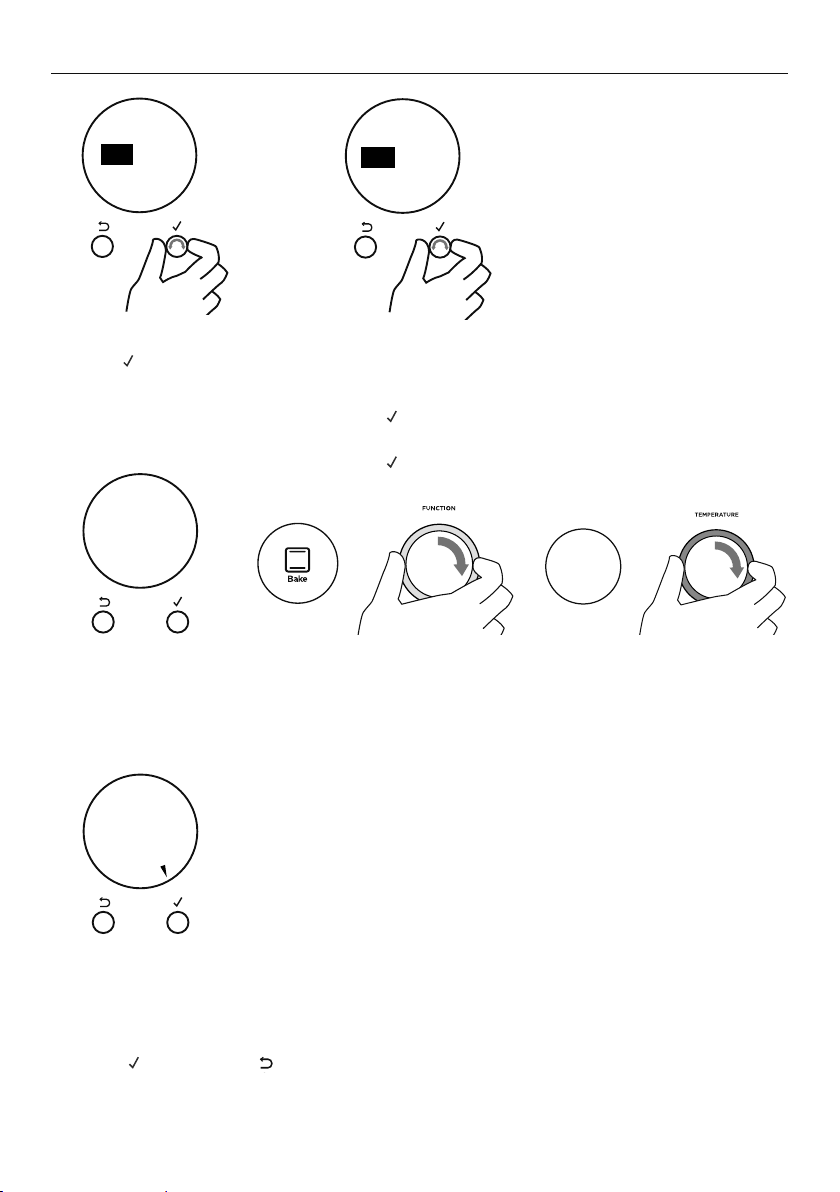
To set the timer
1 Press
to to enter the main menu.
z
The timer will be the first option.
z
Press to enter the timer.
2 Scroll to set the minutes.
z
Press to confirm.
3 Scroll to set hours.
z
Press to confirm.
The timer is now set and will begin
counting down. Press
or scroll to
return to the time of day.
Timer
24.59m
CANCEL REMOTE
CANCEL REMOTE
CANCEL REMOTE
Timer
00 25
mh
alarm sounds
00 25
mh
CANCEL REMOTE
Timer
alarm sounds
CANCEL REMOTE
Timer
mh
alarm sounds
03 25
CANCEL REMOTE
Timer
alarm sounds
mh
03 25
Timer
NOW SET
CANCEL REMOTE CANCEL REMOTE
33
SETTING THE TIMER
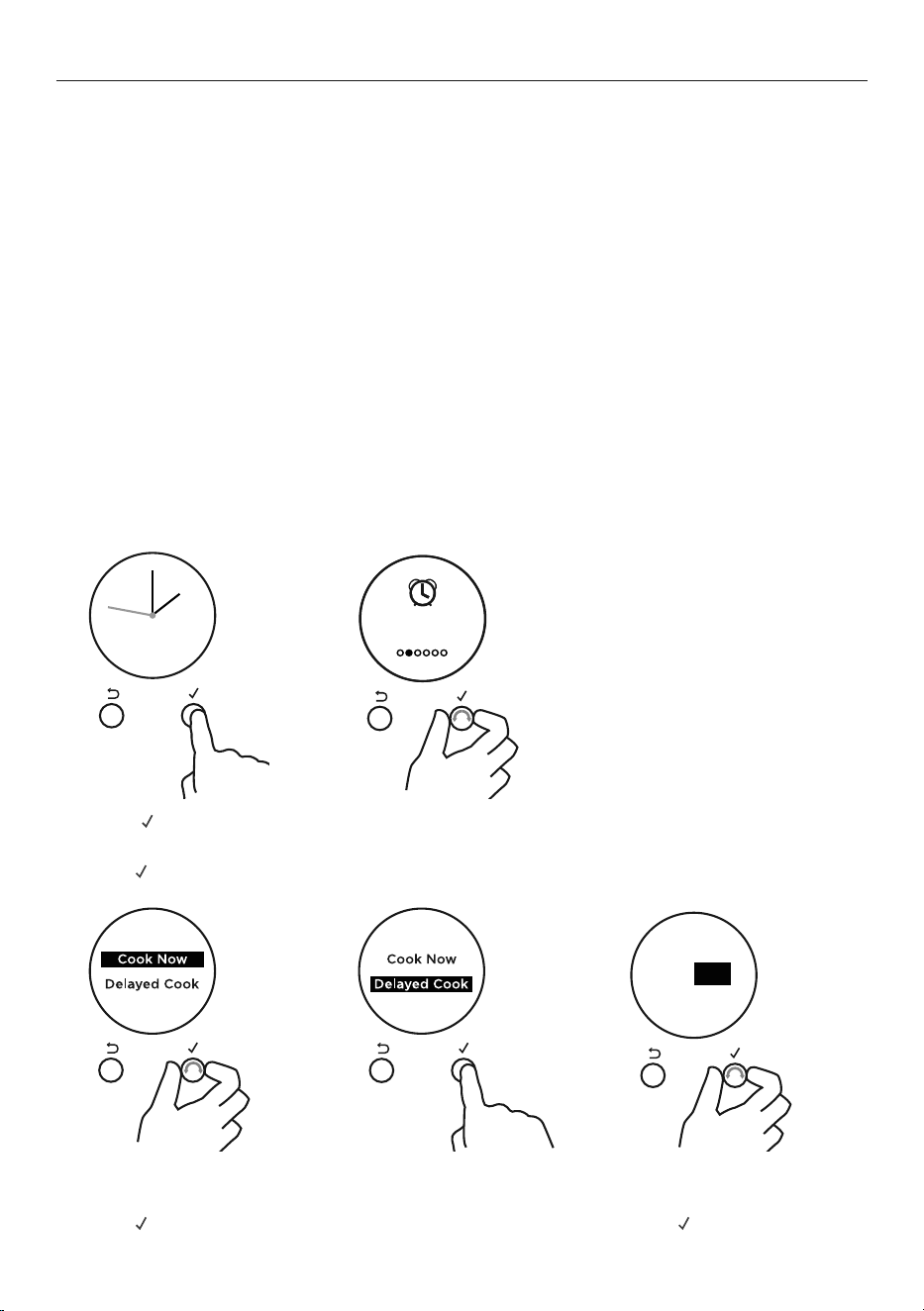
To edit the timer
When the set time is up
CANCEL REMOTE
CANCEL REMOTE
CANCEL REMOTE
Timer
Complete
CANCEL REMOTE
Timer
Complete
CANCEL
REMOTE
CANCEL
REMOTE
CANCEL REMOTE
to go
4
m
59
s
CANCEL REMOTE
to go
4
m
59
s
1 From the home screen, scroll to view the active timer.
2 Press
to enter the timer.
3 Scroll to select Edit.
4 Press to confirm.
5 Follow the steps previous
to adjust the timer.
2 Press
to enter the timer.
3 Scroll to select CANCEL.
4 Press
to confirm
and exit the menu.
1 Timer Complete will appear and the display will flash.
A tone will sound every few seconds.
2 Press
or CANCEL to stop the tone sounding.
1 From the home screen, scroll to view the active timer.
Press and hold CANCEL to cancel the timer, or follow
the steps below.
To cancel the timer
34
AUTO COOK
Use Auto Cook to
z
Turn off the oven automatically after a set period of time.
z
Set the oven for food to be ready at a specific time.
Before you start
z
Make sure that your oven is displaying the correct time of day and food is in the oven.
IMPORTANT!
Safe food handling: leave food in the oven for as short as time as possible before and
after cooking or defrosting. This is to avoid contamination by organisms which may cause
food poisoning. Take particular care during warmer weather.
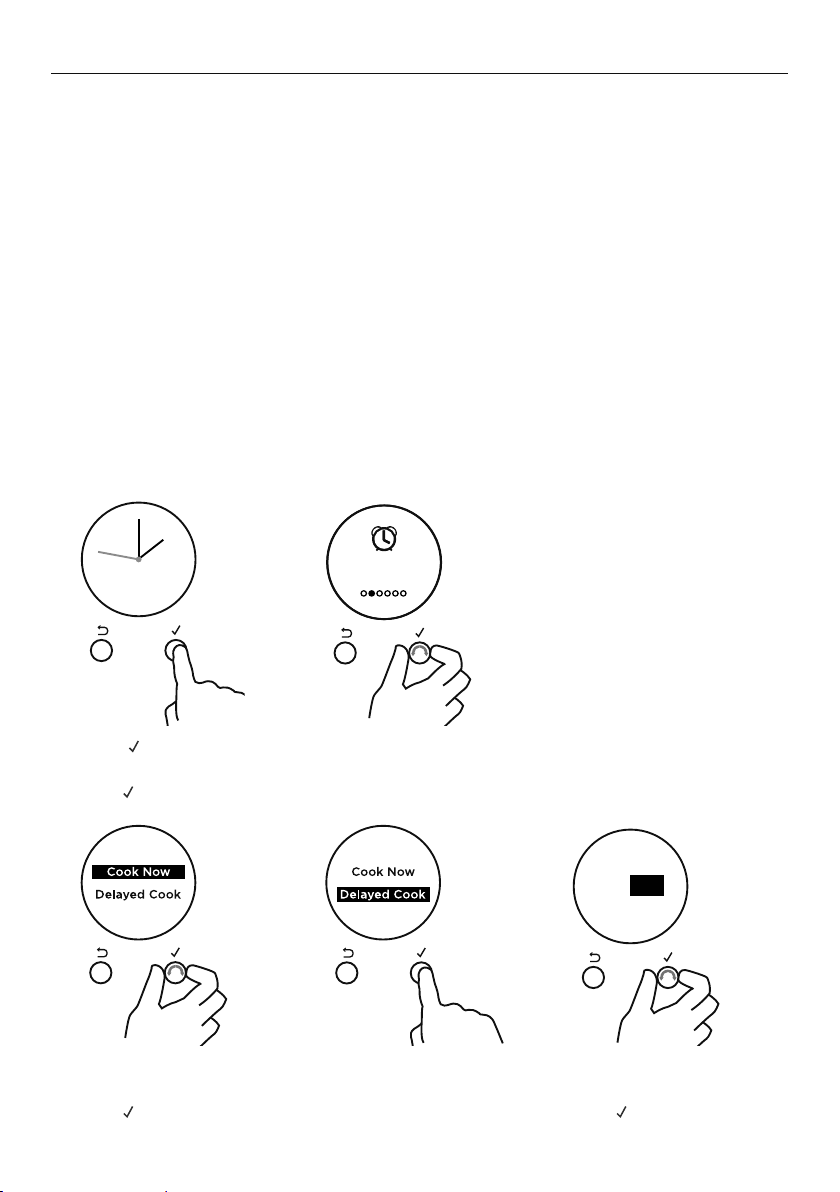
You can choose to either start cooking now or set a delayed cook.
z
Choose Start Now if you have started cooking and want to set the oven to turn off
automatically after a set period of time.
z
Choose Delayed Cook to set the oven to automatically turn on later and be
ready at a set time.
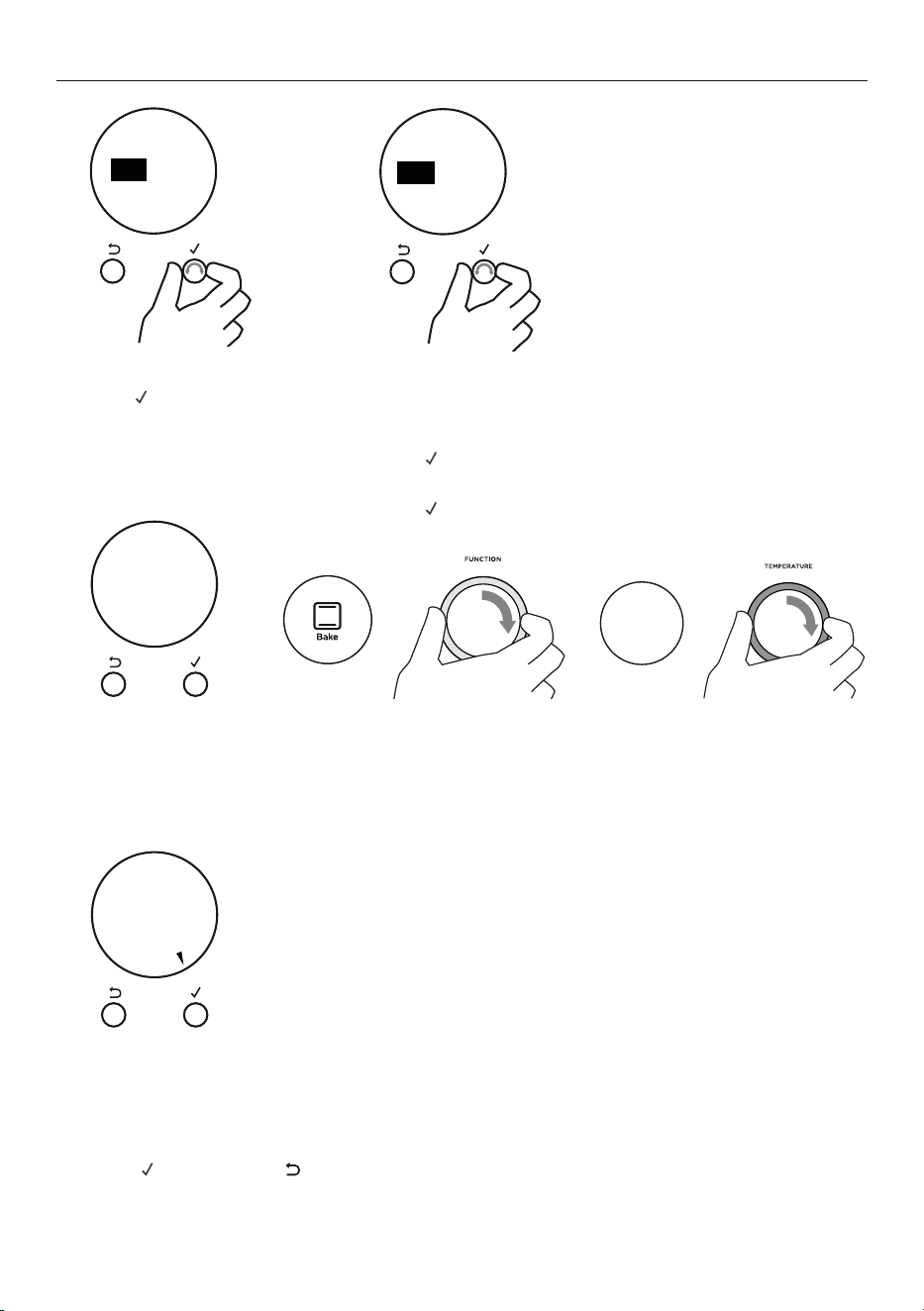
To set Auto Cook
CANCEL REMOTE
CANCEL REMOTE
Cook time
00 00
mh
CANCEL REMOTE
Auto Cook
1 Press to enter the main menu.
2 Scroll through the menu options to Auto Cook.
z
Press to enter Auto Cook.
4 Set the Cook time.
z
Scroll to set the minutes.
z
Press to accept.
CANCEL REMOTE
CANCEL REMOTE
3 Scroll to choose between Cook Now
and Delayed Cook.
z
Press to accept.
35
AUTO COOK
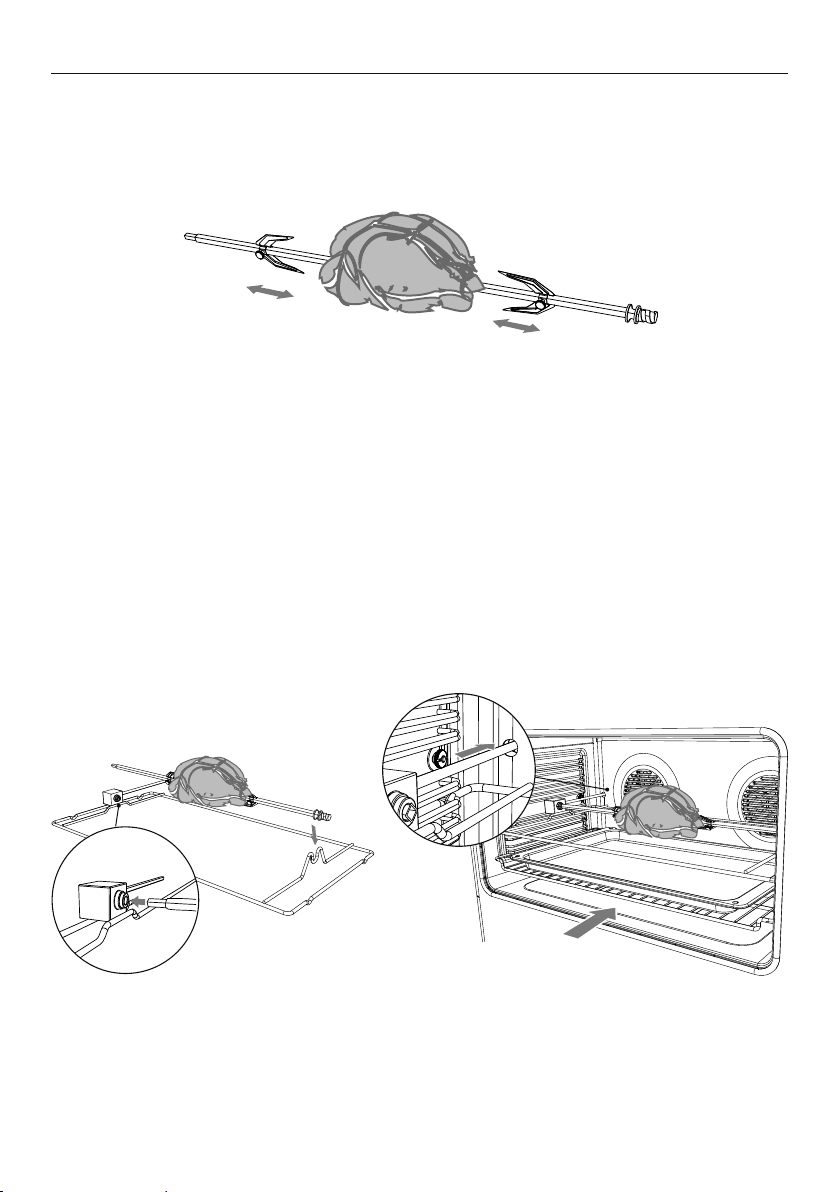
The display will show a summary of your settings, showing:
z
Start time
z
Cook time
z
End time
9 Press to confirm or to go back and adjust the settings.
Your oven is now set for automatic cooking.
Delayed Cook
To set Delayed Cook you will also need to set an End Time.
6 Scroll to set the minutes.
z
Press to accept.
7 Scroll to set the hours.
z
Press to accept
If you have not already set a function and temperature:
z
Set Function and Temp will appear in the display.
z
The halos on the oven dials will flash.
8 Set a function and temperature using the oven dials.
200C
--->
CANCEL REMOTE
Cook time
02 20
m
h
5 Scroll to set the hours.
z
Press to accept.
Set
Function
and
Temp
CANCEL REMOTE
Start Now
Cook
20
6:30
End
CONFIRM
min
pm
CANCEL REMOTE
CANCEL REMOTE
End time
06:00
pm
36
AUTO COOK
When Auto Cook is set
z
The oven and the lights will stay off, the halos will be unlit, but your oven is now set for
automatic cooking. It will automatically turn on at the required time.
z
You can modify the function and temperature while the oven is waiting to start cooking.
z
If setting Delayed Cook you will need to put the food in the oven before starting.
z
For safety reasons opening the door while the oven is waiting to start will
cancel Delayed Cook.
While the oven is heating up
IMPORTANT!
z
During Auto Cook the grill element will come on while the oven is heating up. Food
placed into a cold oven could be prone to burning as the oven heats up.
z
Large items and foods with a high fat or sugar content are especially prone to burning.
Take particular care with foods such as macaroni cheese, large poultry, and enchiladas.
z
Ideal foods for automatic cooking include stews, casseroles, braised meat and
potato top pie.
z
Position food on a lower shelf to prevent burning.
z
Where possible cook food in a pan with a lid, or cover food with foil.
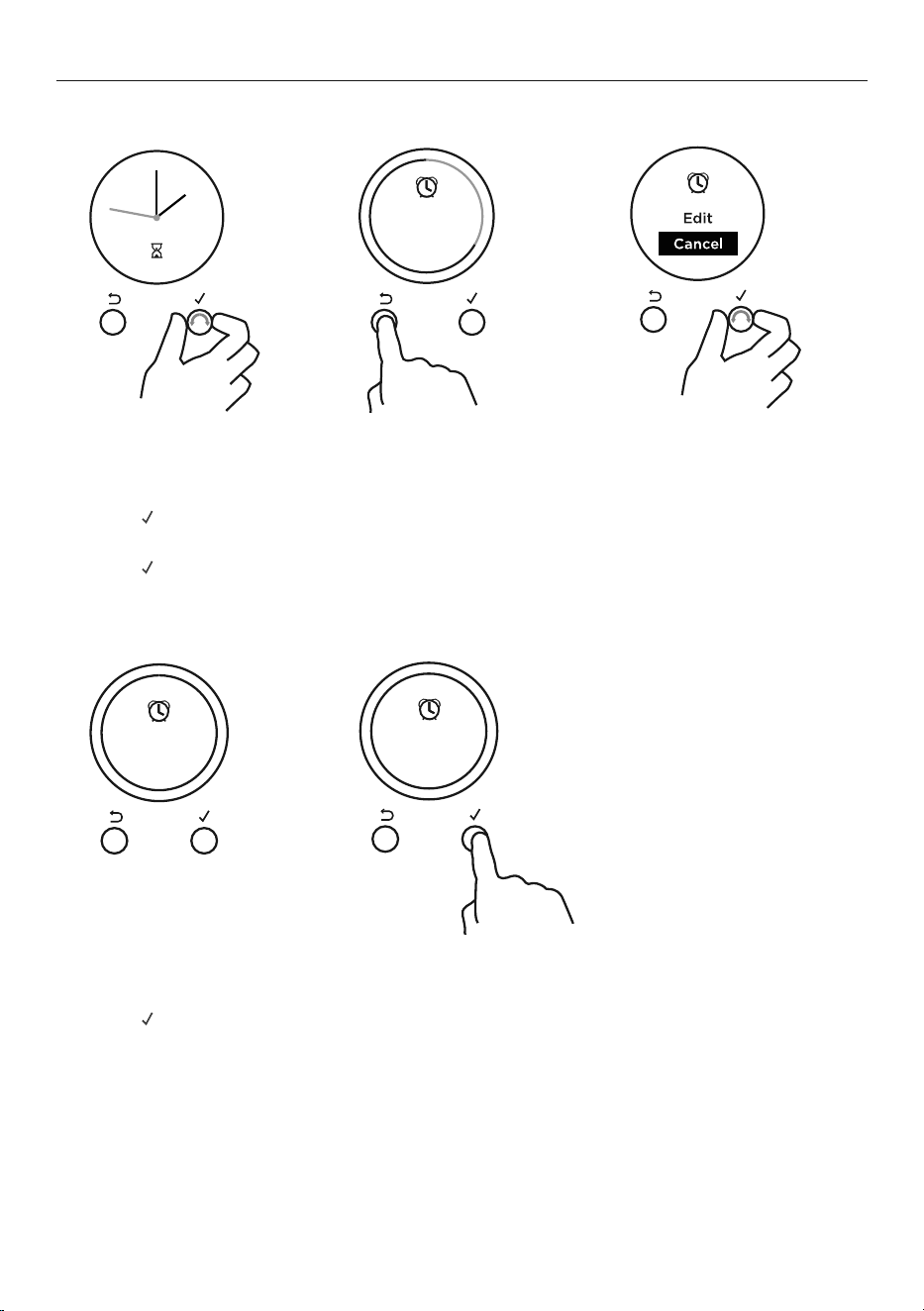
To edit Auto Cook
1 From the home screen, scroll to view Auto Cook.
2 Press
to enter Auto Cook.
3 Scroll to select Edit.
4 Press
to confirm.
5 Follow the steps previous to adjust the Cook or End time.
CANCEL REMOTE
CANCEL
REMOTE
Ends 7:00pm
4
m
59
s
CANCEL REMOTE
37
AUTO COOK
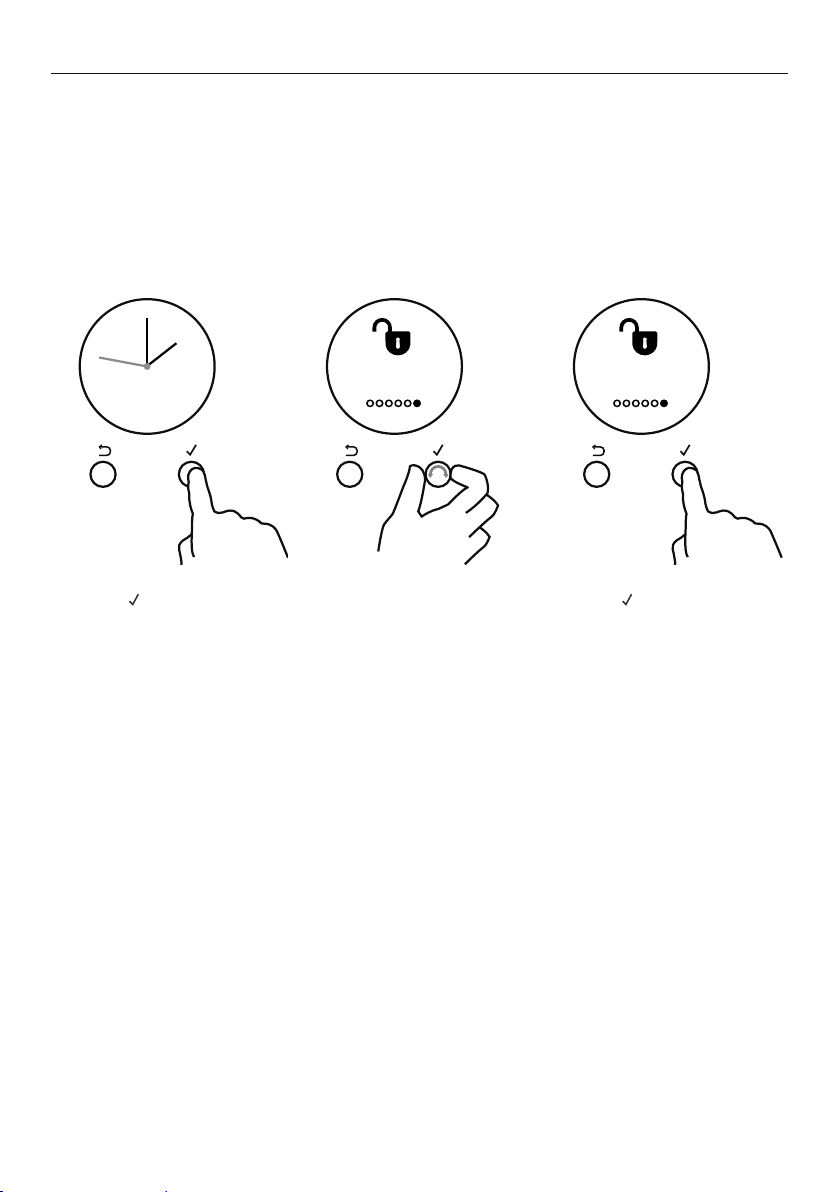
To cancel Auto Cook
1 From the home screen, scroll to view the active timer.
z
Press and hold CANCEL to cancel Auto Cook, or follow the steps below.
z
Turning both dials to O (OFF) will also cancel Auto Cook.
2 Press
to enter Auto Cook.
3 Scroll to select Cancel.
4 Press
to confirm.
When the set time is up
1 Auto Cook Complete will appear and the display will flash.
z
A tone will sound every few seconds.
2 Press
or CANCEL to stop the tone sounding.
3 Turn both the oven dials back to O (OFF).
Ends 7:00pm
4
m
59
s
CANCEL REMOTE
CANCEL REMOTE
CANCEL
REMOTE
CANCEL REMOTE
Auto Cook
Complete
CANCEL REMOTE
Auto Cook
Complete
38
USING THE ROTISSERIE
IMPORTANT!
z
If fitted, remove all shelving before using the rotisserie.
z
Slide the step-down wire rack into shelf position 1 and place the roasting dish
on top of this, to catch the drippings of the rotating meat.
3 Place the rotisserie in the oven.
z
Insert the drive rod into the rotisserie
drive hole (back wall of oven).
z
Ensure the skewer is properly located
on the supports.
2 Position the skewer on the supports.
z
Place the skewer on the supports, and
check that the meat does not touch
the roasting dish.
1 Secure the meat onto the rotisserie skewer.
IMPORTANT!
z
Take care, the forks are sharp!
z
Slide one fork on to the skewer (prongs facing inward) and tighten the fastening
screw to secure in place. Carefully slide the meat onto the skewer until it rests firmly
against the fork.
z
Fit the second fork, ensuring the meat is held firmly in place. Tighten the fastening
screw to secure.
z
When securing the meat, ensure that:
z
The skewer goes through the centre of the meat.
z
The forks hold the meat firmly in place.
z
There are no loose or projecting parts. Poultry should be trussed.
z
Note: the rotisserie can rotate up to 6 kg of meat and is long enough to cook two
chickens at the same time.
Rotisserie
drive hole
39
USING THE ROTISSERIE
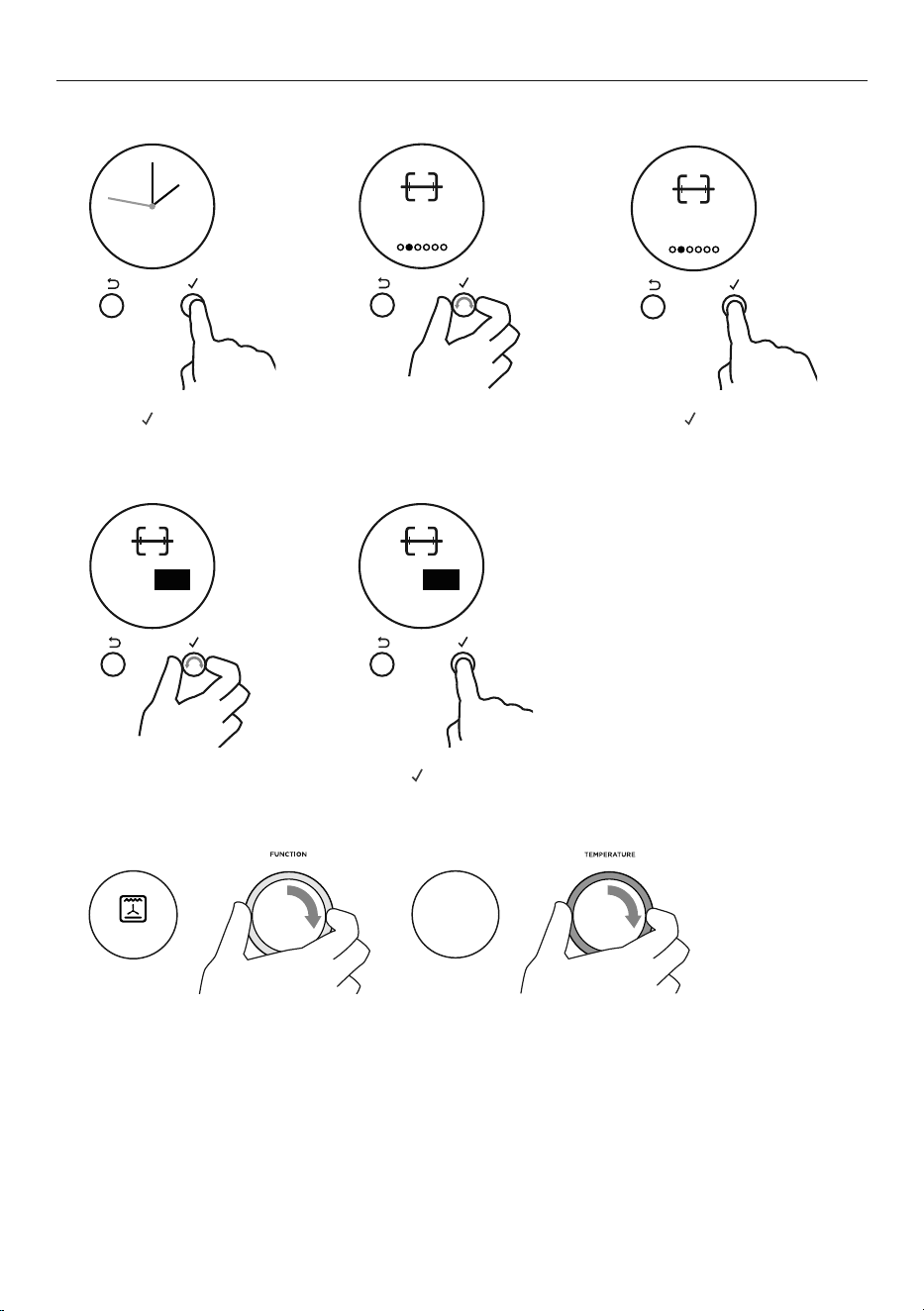
Select the Rotisserie function
CANCEL REMOTE
CANCEL
Rotisserie
OFF
REMOTE
CANCEL REMOTE
Rotisserie
OFF
CANCEL
O On
REMOTE
REMOTE
CANCEL
O On
1 Press to enter the
main menu.
2 Scroll through the
menu options to get
to Rotisserie.
4 Scroll through the
Rotisserie options
to ON.
3 Press to enter the
Rotisserie menu.
5 Press
to confirm.
6 Set the function and temperature.
z
We recommend using the Roast function for perfect results.
z
The rotisserie will start to rotate.
IMPORTANT!
z
Always turn the oven dials to O (OFF) before removing the rotisserie.
z
Always ensure that poultry is cooked thoroughly.
z
During use, the rotisserie components become hot. If you leave the oven door open
after using the rotisserie, parts of the control panel may also become hot. Use oven
mitts and take extra care, especially when removing both the meat and rotisserie parts.
200C
--->
ROAST
40
LOCKING THE OVEN CONTROLS
This function is to prevent accidental use of the oven (eg by children). When locked, the
controls are unresponsive and the oven will not turn on.
IMPORTANT!
z
This does not lock the cooktop controls.
z
For safety reasons it is not possible to lock the oven controls while the oven is in use
or if Auto Cook has been set.
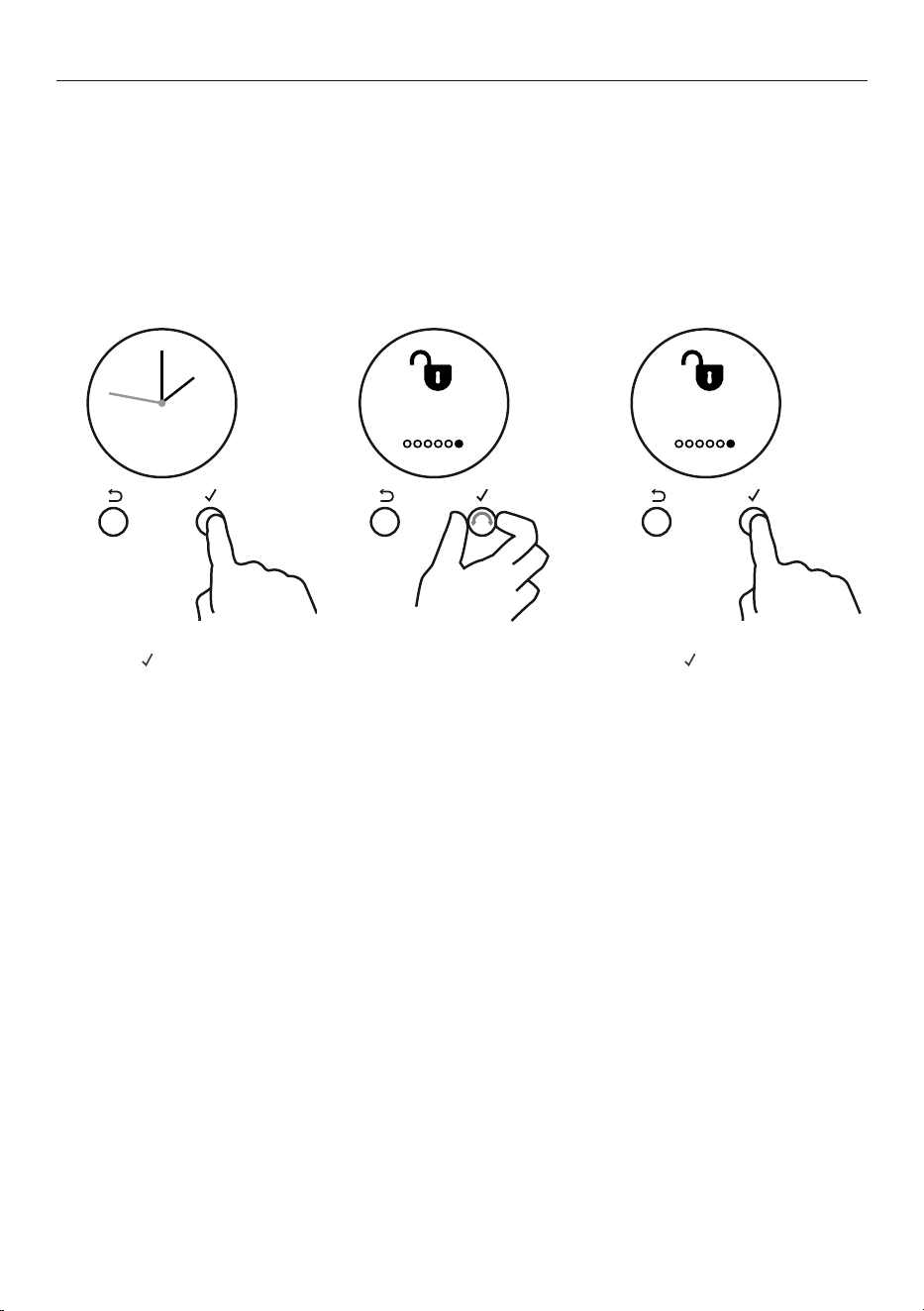
To lock:
1 Press
to enter the
main menu.
3 Press to enter the
Lock menu.
2 Scroll through the menu
options to get to Lock.
CANCEL REMOTE
CANCEL REMOTE
Lock
O
CANCEL REMOTE
Lock
O
41
LOCKING THE OVEN CONTROLS
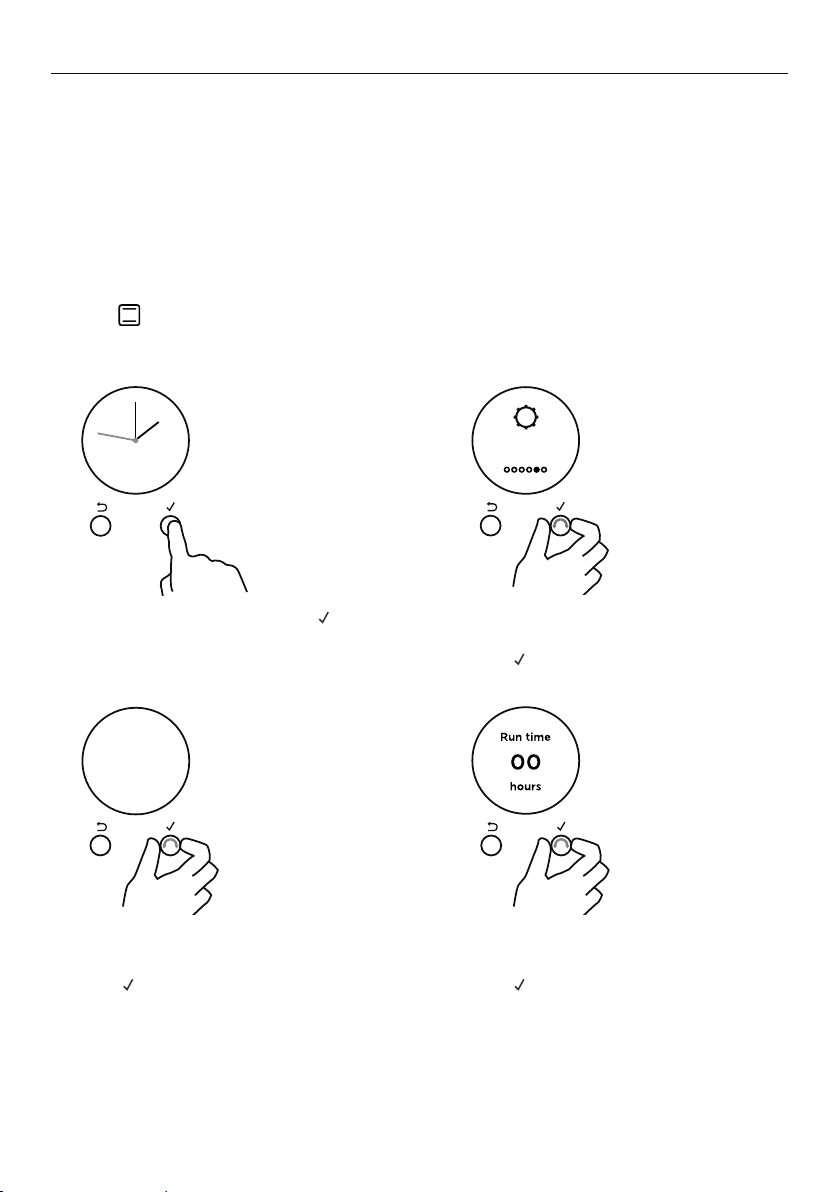
4 Scroll through the
Lock options to ON.
5 Press
to confirm.
z
The control panel is
now locked.
To unlock:
z
Press and hold
CANCEL to unlock
the oven controls.
CANCEL REMOTE
CANCEL REMOTE
OnO
CANCEL REMOTE
Oven
Locked
42
USER PREFERENCE SETTINGS
Adjust the user settings to suit your personal setup preferences.
You can set your oven to:
z
display the temperature in degrees Celsius or Fahrenheit
z
give audio feedback (tones and beeps) or operate quietly
z
display time as 12-hr or 24-hr
z
operate with the display off
z
have its lights on or off during cooking
z
operate in Sabbath Mode (see ‘Sabbath Mode’ following).
Note: you cannot change the user preference settings when you oven is operating or set for
automatic cooking.
How to change preference settings
1 From the home screen, press
to enter the main menu.
3 Scroll to the setting you
want to change.
z
Press to edit the setting.
2 Scroll through the menu options
to settings.
z
Press to enter the settings menu.
4 Scroll between the options for each
setting. Refer to the table following for
which options are available.
z
Press to confirm.
5 The display will confirm that you have
changed the setting.
CANCEL REMOTE
CANCEL REMOTE
Settings
CANCEL REMOTE
Sounds
On
CANCEL REMOTE
Sounds
O
CANCEL REMOTE
Setting
changed

43
USER PREFERENCE SETTINGS
SETTING
DEFAULT
OPTION
ALTERNATIVE OPTION(S)
CLOCK DISPLAY ANALOG 24H 12H DISPLAY OFF**
Select between:
• Analog and
digital display
• 12-hr and 24-hr display
• Display off**
Turn the display off if you
only want to use the basic
functionalities of your oven.
24:00 12:00
Clock display
Off
TEMPERATURE SCALE CELSIUS FAHRENHEIT
Select between degrees
Celsius or Fahrenheit.
Degrees
Celsius
Degrees
Fahrenheit
AUDIO FEEDBACK ON* OFF*
Turn the oven beeps
and tones on or off.*
Sounds
On
Sounds
Off
OVEN LIGHTS ON OFF
Have the light off during
cooking if you want to save
power or want the food
you cook to be a surprise
for others.
Lights
On
Lights
OFF
SABBATH MODE OFF
Sabbath
Off
See ‘Sabbath Mode’ for instructions.
LANGUAGE UK ENGLISH US ENGLISH SPANISH FRENCH
Choose the language you would
like the oven to display in.
UK English US English Espanol Francaise
WIRELESS CONNECTION OFF
Not available on this product.
OFF
USER SETTINGS RESET RESET
Use this to clear all changes
to settings and reset to the
factory settings.
Reset
Select this option and accept to reset
all user settings.
*The timer tone and alert beeps will sound even if you save the SOUNDS OFF option.
**With this option saved, you can still use the oven, and timer, however the display will remain unlit.
Any automatic functions will be cancelled when this option is selected. To quit this option and
enable the display, press and hold CANCEL.
44
SABBATH MODE
This setting is designed for religious faiths that observe a ‘no work’ requirement
on the Sabbath.
While your oven is in Sabbath Mode
z
The dial halos and indicators will be unlit and the controls will be unresponsive.
z
No tones or beeps will sound.
z
No alert codes or temperature changes will be displayed.
z
The oven lights will stay on. If you want the oven lights to be off during Sabbath Mode,
first select the ‘Lights off’ option as described in ‘User preference settings’, and then set
Sabbath Mode afterwards.
z
Bake is the only function available in Sabbath Mode.
How to set Sabbath Mode
3 Scroll through the menu options
to Sabbath Mode.
z
Press to enter the
Sabbath Mode setting.
4 Scroll to set the time. You may set
the time up to 48 hours.
z
Press to confirm.
1 From the home screen, press
to enter the main menu.
2 Scroll through the menu options
to settings.
z
Press to enter the settings menu.
CANCEL REMOTE
CANCEL REMOTE
Settings
CANCEL REMOTECANCEL REMOTE
Sabbath
Mode O
45
SABBATH MODE
The display, indicators and dial halos will be unlit and unresponsive, but the oven will bake
until you quit Sabbath Mode.
To quit Sabbath Mode
Press and hold CANCEL until the time of day appears in the display, or turn either oven dial
back to O (OFF).
5 Select the Bake
function.
6 Set the desired temperature.
The display will show a summmary of
your settings, showing:
z
Start time
z
Run time
z
End time
7 Press
to confirm or to go back
and adjust the settings.
Set Bake and
Temperature
CANCEL REMOTE
Sabbath
Mode
CANCEL REMOTE
CANCEL REMOTE
Start Now
Run 22h
End 5:20
CONFIRM
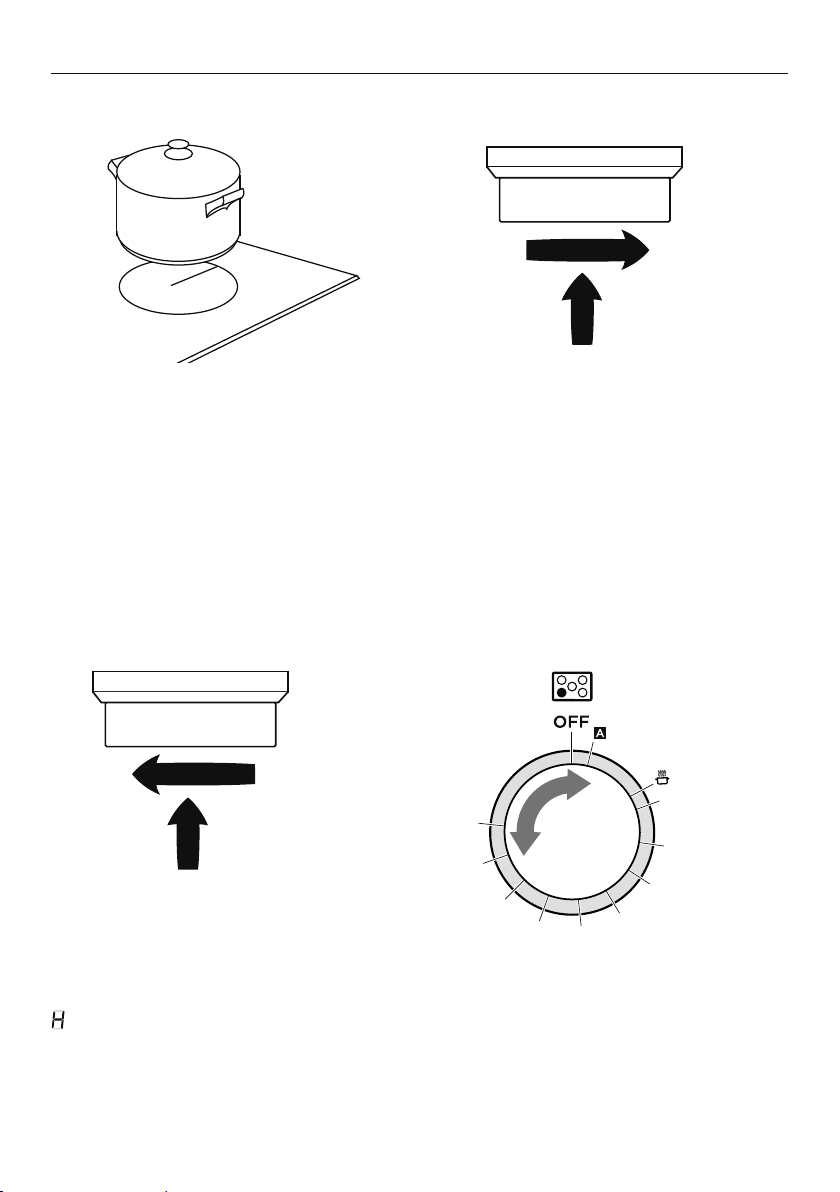
46
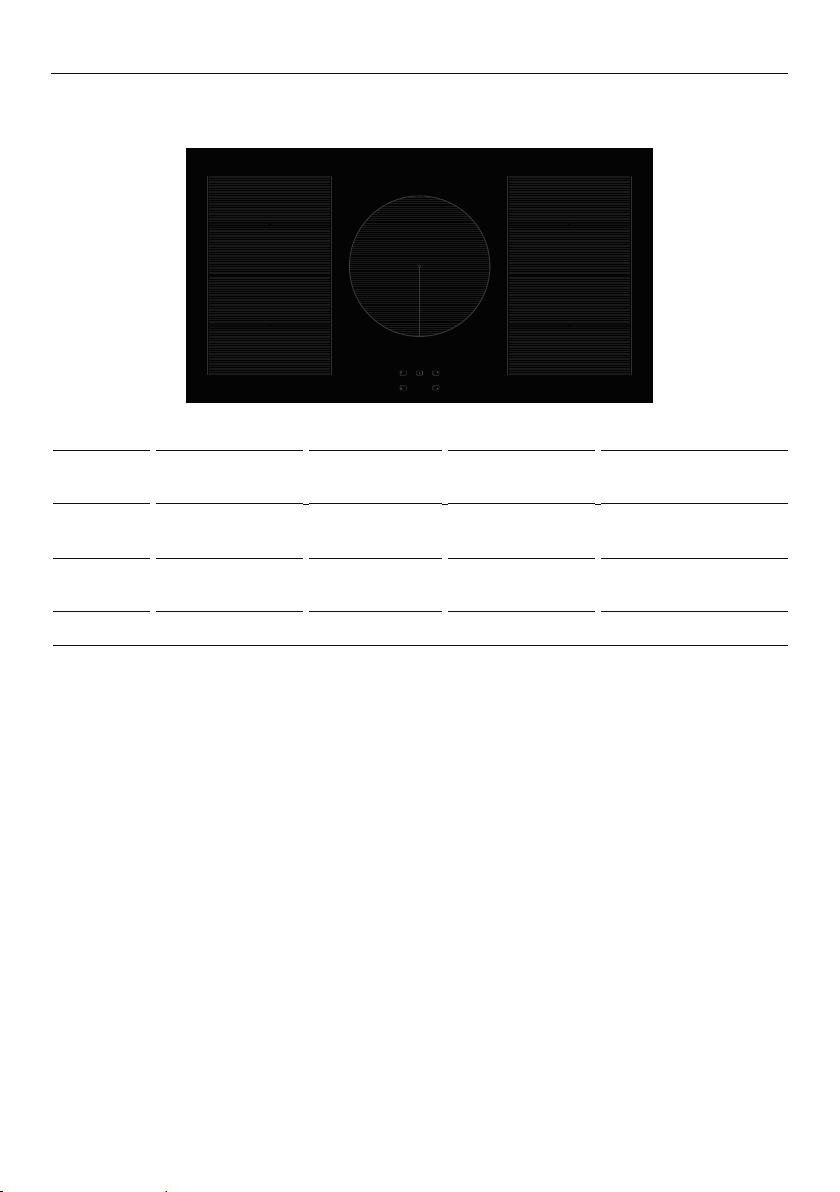
USING YOUR INDUCTION COOKTOP
COOKING
ZONE
ZONE
DIAMETER
POWER POWERBOOST
RECOMMENDED
MINIMUM PAN SIZE
1
SmartZone 1600 W 1850 W 120mm (unbridged)
250mm (bridged)
2
SmartZone 2100 W 3000 W 120mm (unbridged)
250mm (bridged)
3
250mm 2300 W 3000 W 145mm
OR90 models
2
1
3
2
1
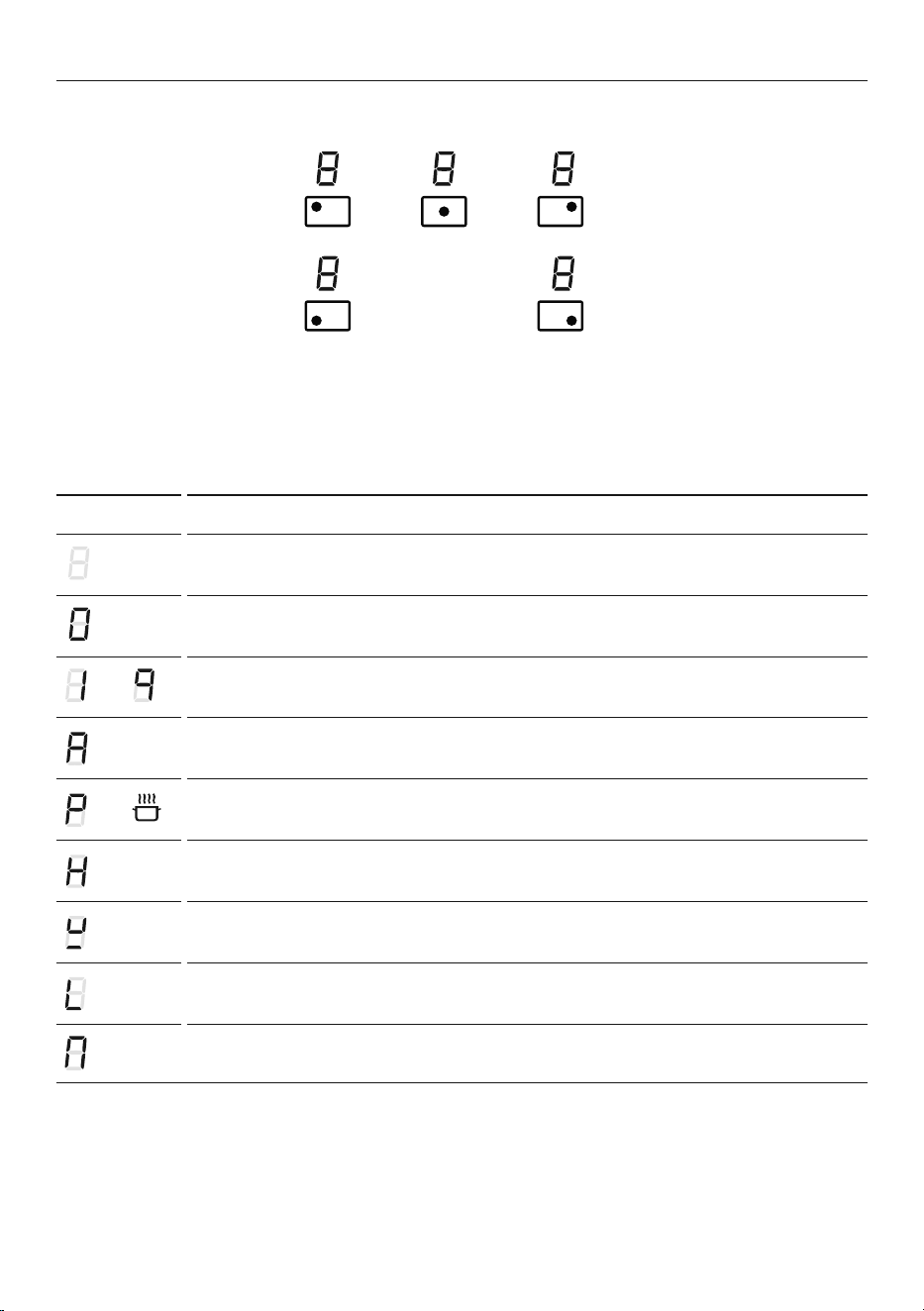
47
USING YOUR INDUCTION COOKTOP
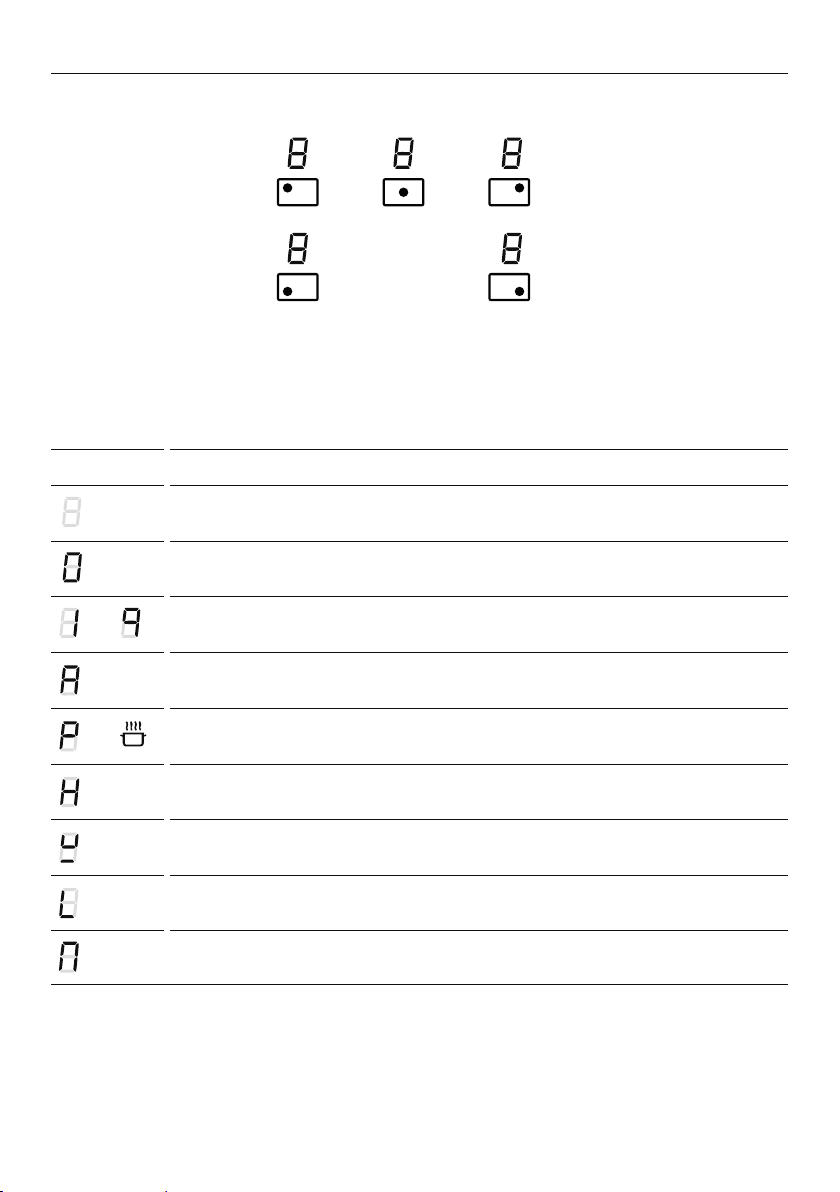
Cooking zones display
The ceramic cooktop is fitted with induction cooking zones. These circular zones are
controlled by separate dials positioned on the control panel below.
At the front, is the display for the cooking zones (one for each zone). Each zone display
is activated by it’s corresonding control dial and displays:
DISPLAY MEANING
Cooking zone Off (not activated)
Cooking zone On (activated but not operating).
If a zone is in zero setting, the display switches off automatically after about 10 seconds.
–
Power levels
Auto RapidHeat feature
–
PowerBoost feature
Hot Surface indicator
Pan detection indicator
Childlock
Bridged zone indicators
Note: each lit figure refers to the relevant cooking zone.

48
USING YOUR INDUCTION COOKTOP
To turn a cooking zone on:
When you have finished cooking: Control dials:
1 Place a suitable pan on
the cooking zone.
z
Make sure the bottom of the
pan and the surface of the
cooking zone are clean and dry.
IMPORTANT!
Always place small pans in the
centre of the cooking zone.
1 Turn the corresponding control
dial back to O (OFF).
Beware of hot surfaces
will show in the display of any cooking zones that are still too hot to touch. It will
disappear when the surface has cooled down to a safe temperature.
2 Turn the corresponding control dial
clockwise to the desired heat setting.
z
You can modify the heat setting at any
time during cooking.
4 3 2 1 0
2 1 0
1
2
3
4
5
6
7
8
9
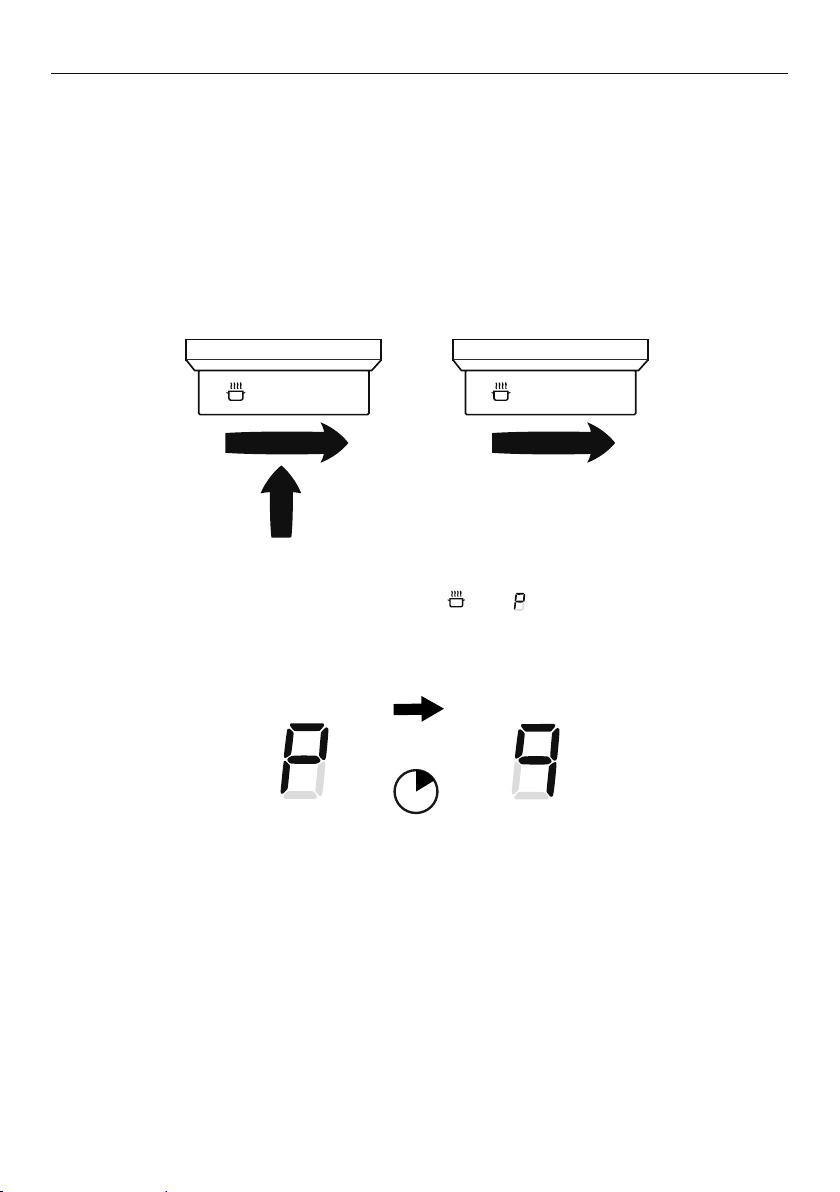
49
USING YOUR INDUCTION COOKTOP
If a display flashes alternately with the heat setting
This means that:
z
you have not placed a pan on the correct cooking zone or
z
the pan you’re using is not suitable for induction cooking or
z
the pan is too small or not properly centred on the cooking zone.
No heating takes place unless there is a suitable pan on the cooking zone.
The cooktop will automatically turn off after 10 minutes if no suitable pan is placed on it.
Dual zone cooking
When using a small pot on the dual cooking zone, be sure to centre it so that the inner zone
will detect the pan. If the pan covers the outer zone, then the outer zone will automatically
switch on.
SmartZones
The SmartZones are large. You may place several small pots on the SmartZone and they will
be detected as if they were one large pot.
IMPORTANT!
The whole of the SmartZone is activated when a pot is detected. This means that other
magnetisable items (such as cutlery) sitting in the cooking zone will heat up.
Never leave cutlery or other magnestisable items on your cooktop.

50
LOCKING THE COOKTOP CONTROLS
Locking the cooktop
z
You can lock the cooktop control dials for cleaning and to prevent unintended use.
(for example children accidentally turning cooking zones on).
z
When the cooktop is locked the controls and cooktop display will remain unresponsive.
To lock the cooktop
1 Make sure that all cooking zones are turned OFF.
2 Turn the control dials for the two left cooking zones anticlockwise to
.
3 Hold the dial at
until appears in the cooktop display.
To unlock the cooktop
Repeat the steps above. Your cooktop is now ready to be used again.
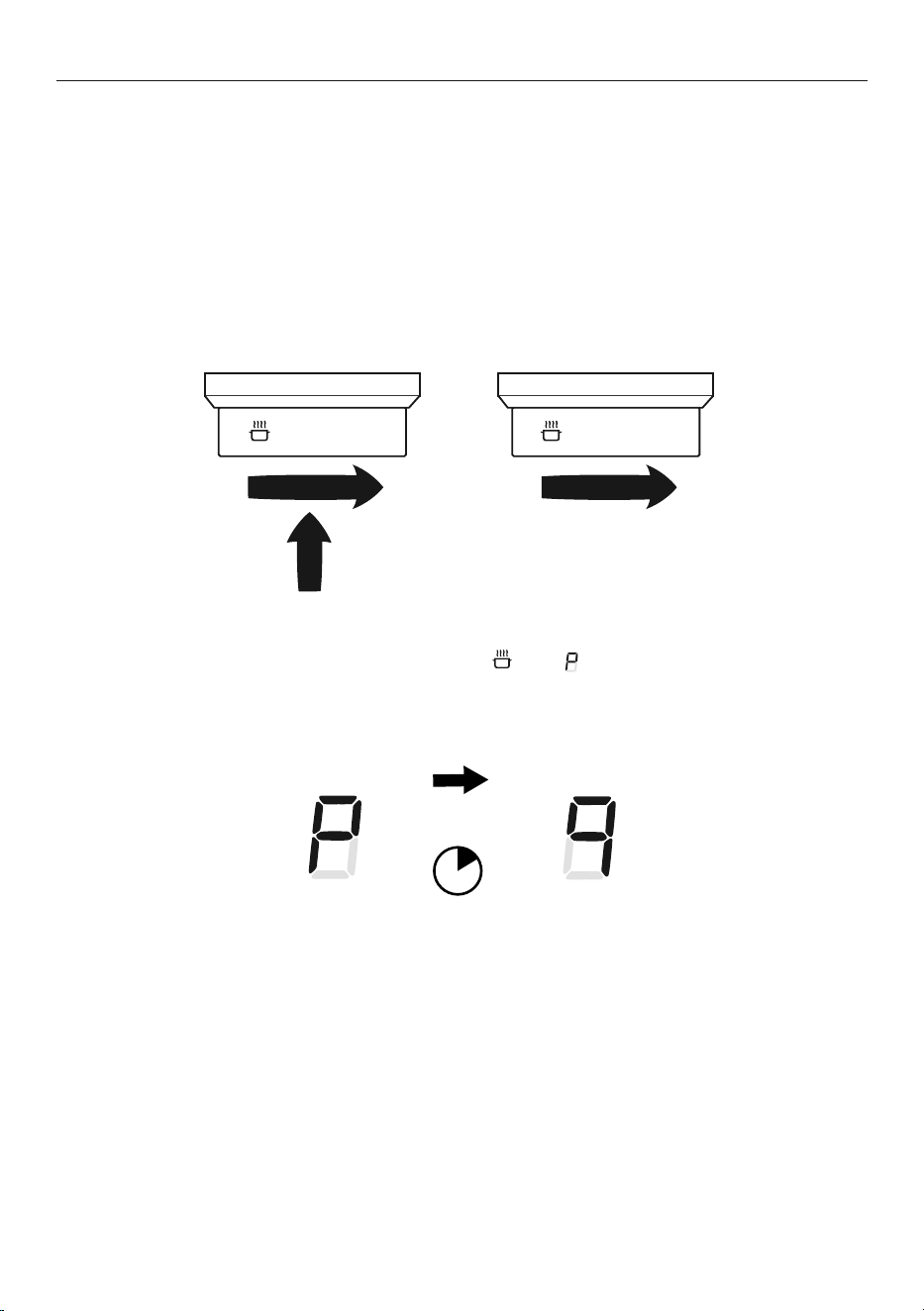
51
USING YOUR COOKTOP’S SPECIAL FEATURES
Using the PowerBoost feature
This feature enables you to sear meat or bring liquid to the boil very quickly. When a
cooking zone is set for PowerBoost, it uses more than 100% of the rated power of that
particular cooking zone, resulting in a boost of intense heat.
IMPORTANT!
PowerBoost heats food and liquids very quickly.
Do not leave the cooktop unattended when using this feature.
To set a cooking zone for PowerBoost
1 Turn the cooking zone on to its highest heat setting (9).
2 From heat setting 9, turn and hold the dial to
until appears in the display.
When PowerBoost is set
The cooking zone will remain on PowerBoost for a maximum of 10 minutes.
After 10 minutes the cooking zone will automatically reduce its heat to setting 9.
To turn PowerBoost off
Turn the control dial to a lower heat setting or back to O (OFF).
10 min
9 8 7 9 8 7
52
USING YOUR COOKTOP’S SPECIAL FEATURES
z
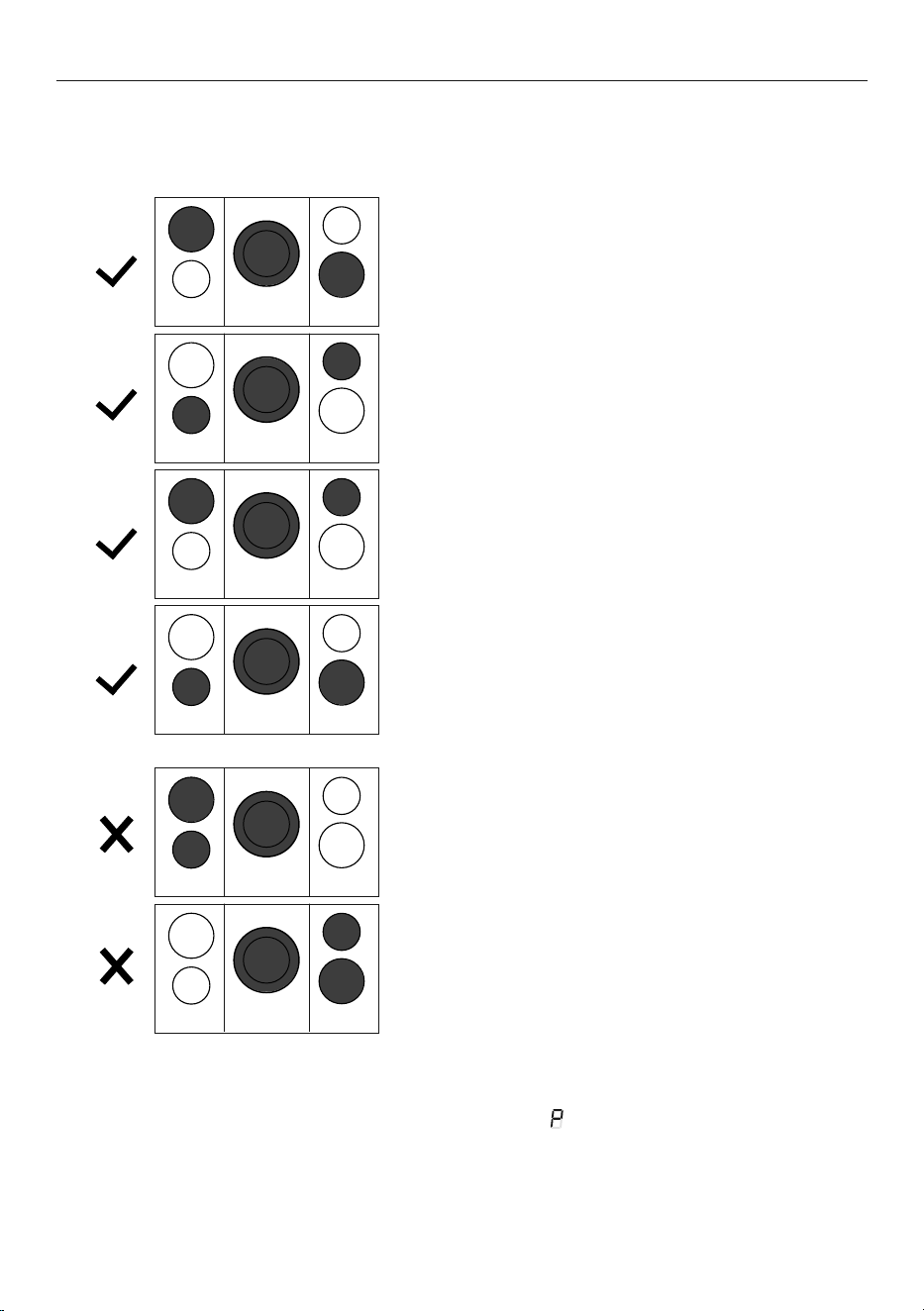
You can set three cooking zones for PowerBoost at the same time as long as one is not
behind the other.
z
It is not possible to set all the cooking zones for PowerBoost at the same time.
z
If one cooking zone is set to PowerBoost and you accidentally also set a second
cooking zone immediately in front or behind to PowerBoost, the first cooking zone will
warn you that the configuration is not possible, flash and then automatically reduce
its power level.
z
When a cooking zone is set for PowerBoost, the cooking zone immediately in front of or
behind may automatically reduce its power level.
z
PowerBoost is not available if cooking zones are bridged.
P
P
P
P
P
P
P
P
P
P
P
P
P
P
P
P
P
P
53
USING YOUR COOKTOP’S SPECIAL FEATURES
Using the Auto RapidHeat feature
This feature lets you rapidly heat up food or liquid then automatically reduce the
temperature to a pre-selected heat setting.
To set a cooking zone for Auto RapidHeat
1 Press in and turn the control dial
anticlockwise to A.
z
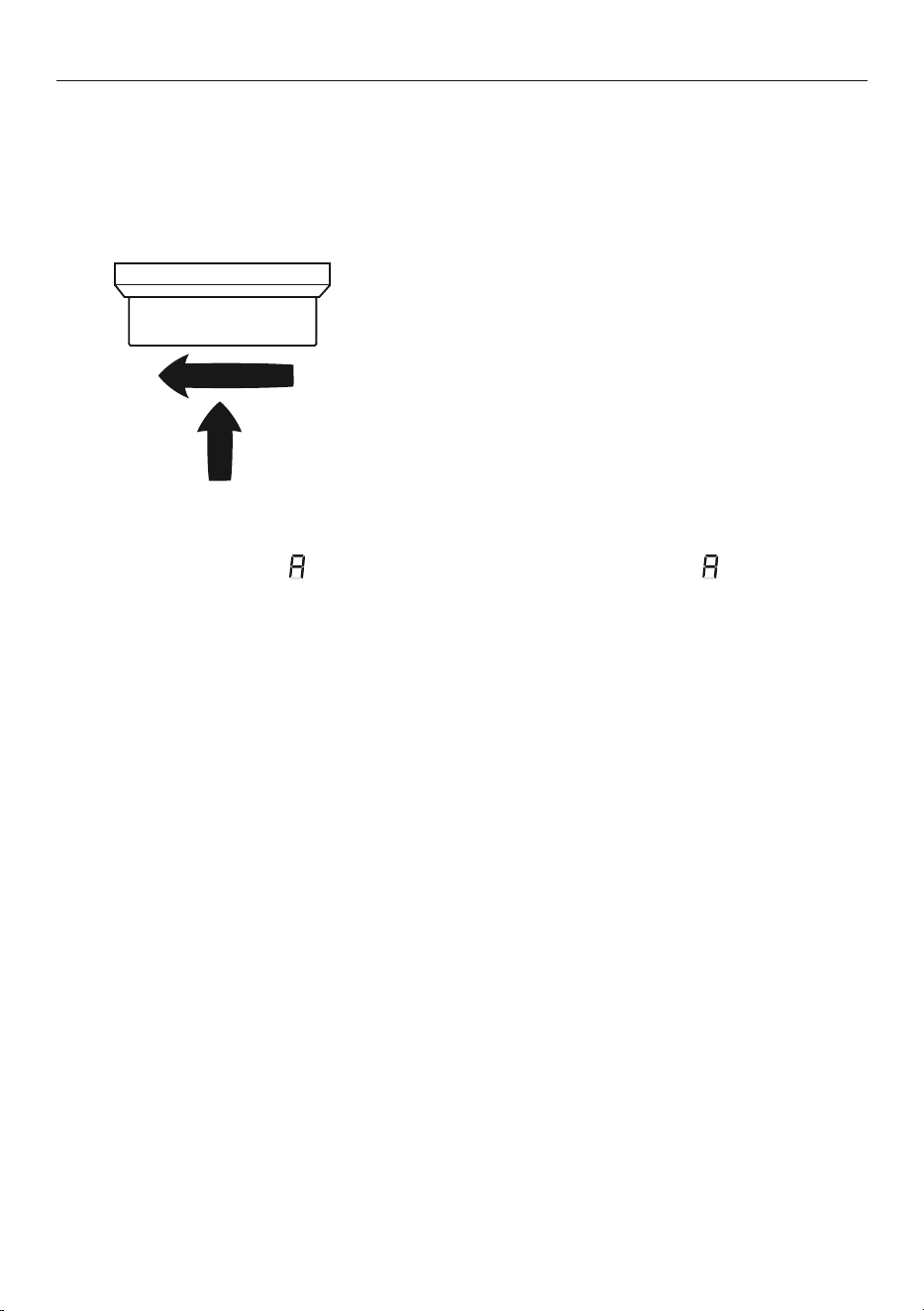
Hold the dial at A until appears
in the cooking zone display.
2 Turn the control dial to the desired
heat setting (1–8).
z
The heat setting and will alternate
in the display.
z
Auto RapidHeat is now set.
OFF A

54
USING YOUR COOKTOP’S SPECIAL FEATURES
When Auto RapidHeat is set
The amount of time the cooking zone will rapidly heat for depends on the heat setting you
have selected. See below chart for rapid heat times.
To cancel Auto RapidHeat (while A is still flashing)
z
Turn the control dial to a lower heat setting or back to O (OFF).
Increasing the heat setting to 9 will also cancel Auto RapidHeat.
Note:
The Auto RapidHeat and PowerBoost features cannot be used together. If you turn
PowerBoost on when Auto Heat-reduce is already set, the Auto RapidHeat will be cancelled.
When rapid heat is finished
will
stop flashing and the temperature will
automatically reduce to the heat setting
you have selected.
During rapid heat will flash
alternately with the heat setting you
have selected.
SELECTED
HEAT SETTING
APPROXIMATE TIME
AT RAPIDHEAT
1 40 seconds
2 1 minute
3 2 minutes
4 3 minutes
5 4 minutes
6 7 minutes
7 2 minutes
8 3 minutes
55
USING YOUR COOKTOP’S SPECIAL FEATURES
Bridging SmartZones
z
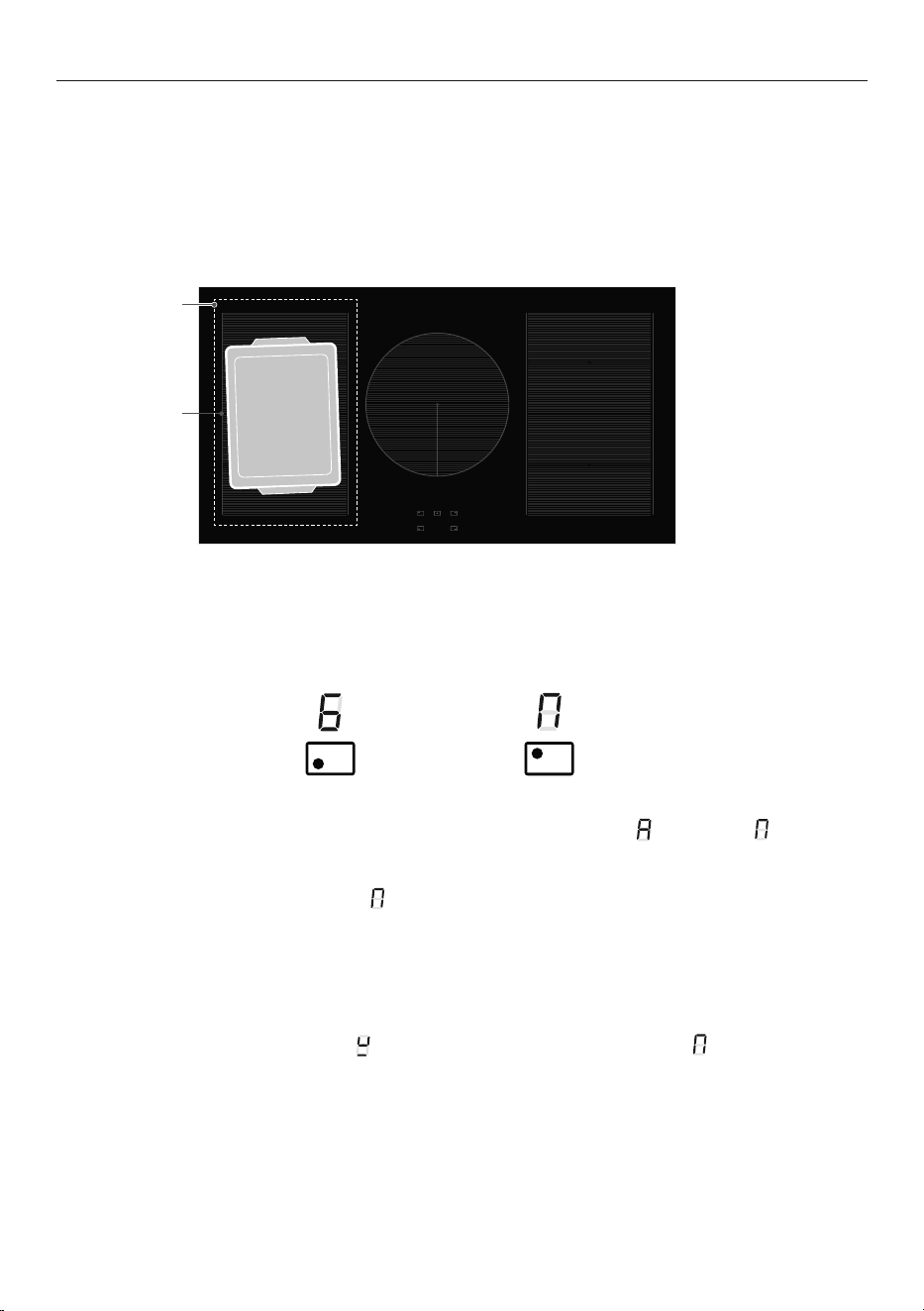
The bridging zone function allows you to use two SmartZones together giving you a
larger cooking area. Your pan(s) will need to cover both cooking zones.
z
There may be a cooler area in the centre of the cooktop between the cooking zones. You
may need to move food around the pan to ensure even cooking.
z
When using bridging zones it is not possible to use the PowerBoost function.
Cooler area
To select the bridging function
1 Place the pan on the cooktop over the two zones you wish to use, covering both
cooking zones (as shown above).
2 Press in and turn both dials for the selected cooking zones to
. Hold until appears
in the cooking zone displays and the displays stop flashing.
z
The front cooking zone display will show the heat setting.
z
The rear cooking zone will show .
3 Use the front cooking zone control dial to adjust the heat setting for the bridged zone.
z
Adjusting the rear cooking zone will cancel bridging.
If no pan is detected
If no pan is detected on either cooking zone the front cooking zone display will alternate
between the selected setting and
. The rear cooking display will show .
Bridging
zone
56
USING YOUR COOKTOP’S SPECIAL FEATURES
If no pan is detected on one cooking zone:
The front cooking zone display will still show the selected temperature and the rear cooking
zone display will still show
.
If after 10 minutes no pan is detected:
z
the bridging function will switch off.
z
the cooking zone without a detectable pan will continue to show .
z
the remaining cooking zone will continue cooking at the selected heat setting.
Using Auto RapidHeat in bridged mode
1 Bridge the cooking zones.
2 Turn the control dial for the front cooking zone back past OFF to A.
3 Hold the dial at A until
starts alternating in the display.
4 Turn the control dial to your selected heat setting. the Heat setting and
will alternate
in the display.
5 The bridged zone is now set for Auto RapidHeat.
To cancel bridging
Turn both control dials back to O (OFF).
57
CHOOSING THE RIGHT COOKWARE
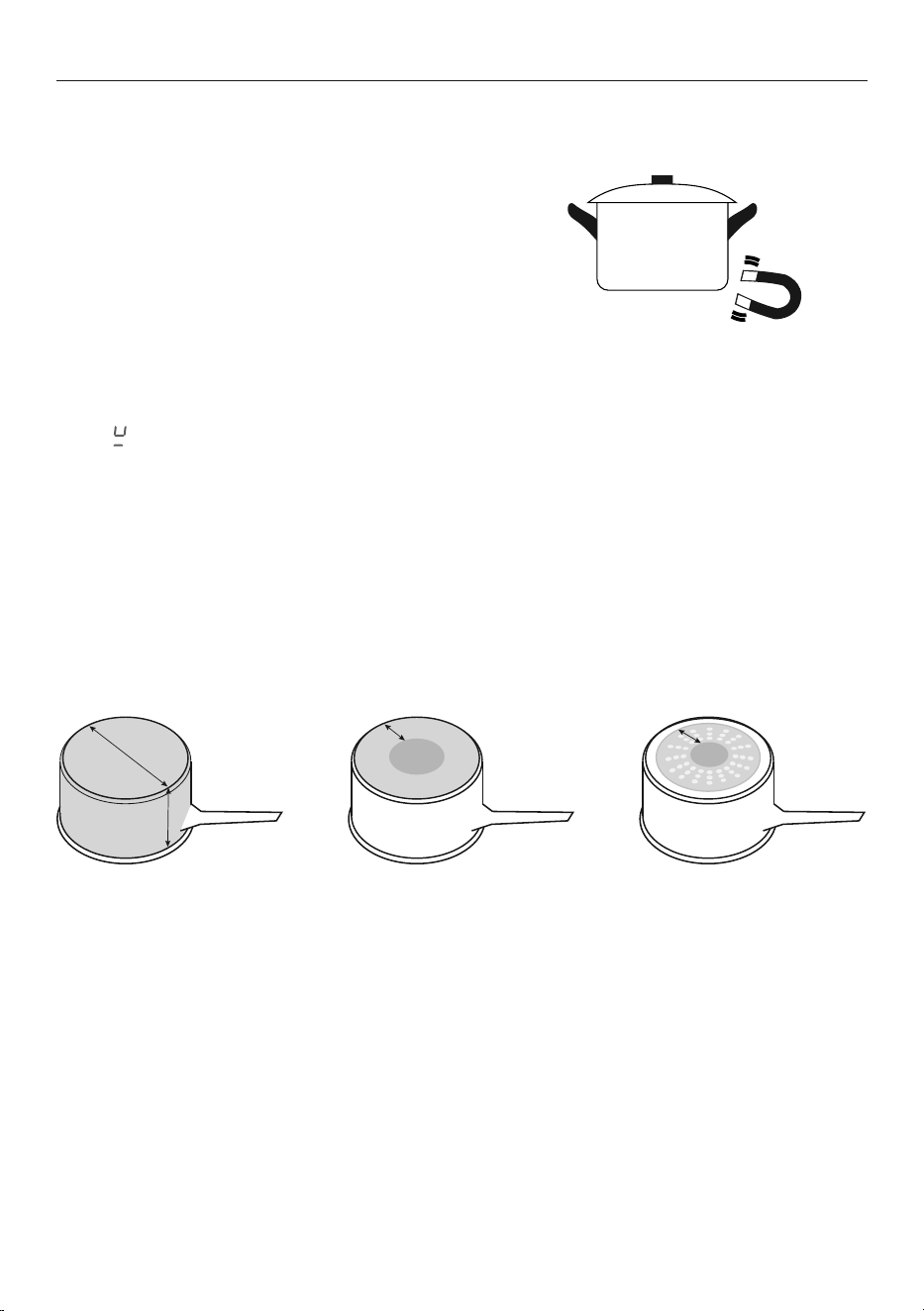
To check if cookware is suitable
Carry out a magnet test:
z
Move a magnet across the base of the pan.
If the magnet is attracted then the pan is
induction suitable.
z
Note: make sure attraction is consistent across
the base of the pan. If there are gaps, such
as an indented manufacturer’s logo, then the
performance of the pan will be impaired.
If you do not have a magnet:
1 Put some water in the pan you want to check.
2 Follow the steps under ‘To start cooking’.
3 If
does not flash in the display and the water is heating, the pan is suitable
Quality of cookware
IMPORTANT!
z
The quality of your cookware can affect cooking performance. Only use induction
compatible cookware that has been specifically designed for induction cooking.
Look for the induction symbol on the packaging or the bottom of the pan.
z
Cookware that has a high content of ferromagnetic material that continues up from
the base into the sides of the pan will give the best cooking performance.
See below:
Quickest heating
Performance
High content of
ferromagnetic material
Heating area is consistent
across the base and
continues up the sides
of pan.
Average heating
Performance
Reduced area of
ferromagnetic material
Reduced zone of
heating, results in poor
cooking performance
and slower heating.
Slow heating
Performance
Very limited area of
ferromagnetic material
Results in very slow
heating performance.
Note: this type of pot is
good for very delicate
tasks such as melting
chocolate, as heating is
very slow.
58
CHOOSING THE RIGHT COOKWARE
Cookware guidelines
Cookware made from the following materials is suitable:
z
stainless steel with a magnetic base or core
z
aluminium and copper with a magnetic base or core
z
cast iron
z
steel or enamelled steel.
Cookware made from the following materials is not suitable:
z
pure stainless steel
z
aluminium or copper without a magnetic base
z
glass
z
wood
z
porcelain
z
ceramic or earthenware.
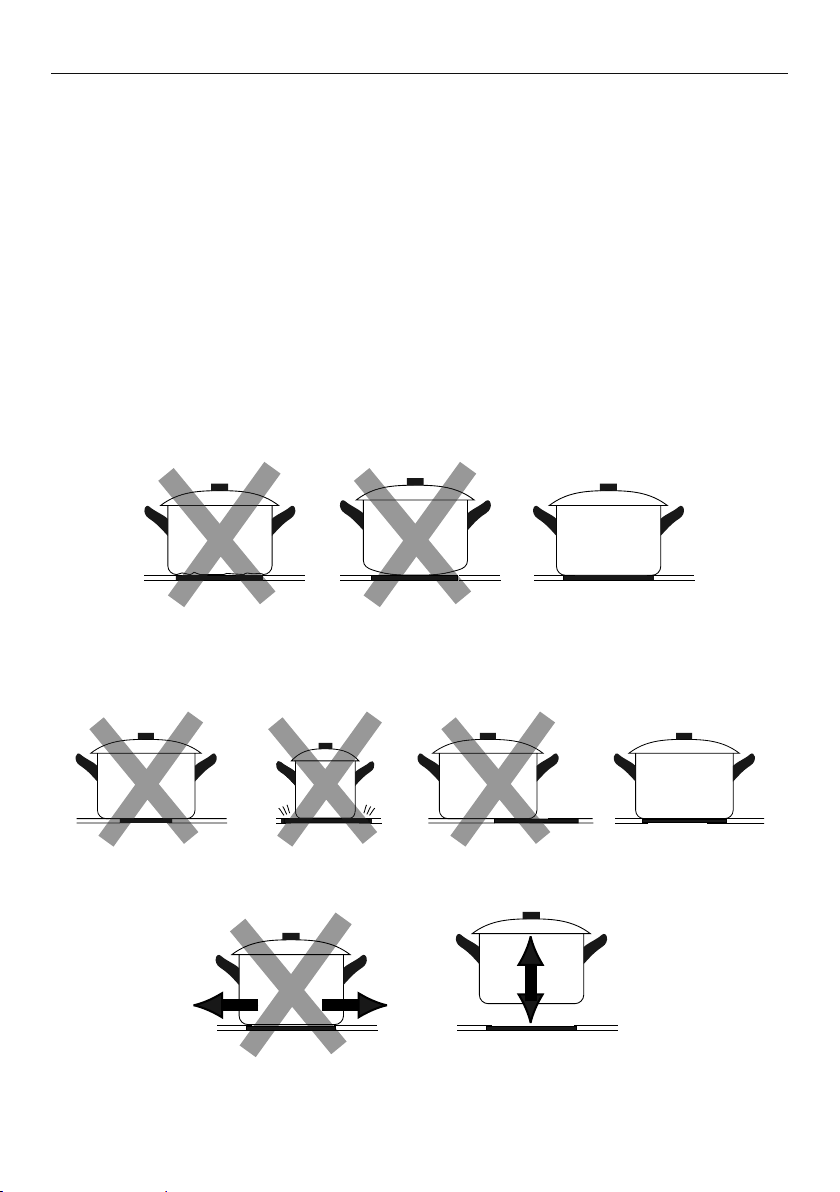
Do not use cookware with jagged edges or a curved base.
Make sure that the base of your pan is smooth, sits flat against the glass, and is similar in
size as the cooking zone. A small pot on a large cooking zone may not be detected. Always
centre your pan on the cooking zone.
Always lift pans off the cooktop – do not slide, or they may scratch the glass.
59
COOKING GUIDELINES
IMPORTANT!
Take care when frying: oil and fat heat up very quickly, particularly if you’re using
PowerBoost. At extremely high termperatures oil and fat will ignite spontaneously and
this presents a serious fire risk.
Cooking tips
z
When food comes to the boil, reduce the temperature setting.
z
Using a lid will reduce cooking times and save energy by retaining the heat.
z
Minimise the amount of liquid or fat to reduce cooking times.
z
Start cooking on a high setting and reduce the setting when the food has
heated through.
Simmering, cooking rice
z
Simmering occurs below boiling point, at around 85°C, when bubbles are just rising
occasionally to the surface of the cooking liquid. It is the key to delicious soups and
tender stews because the flavours develop without overcooking the food. You should
also cook egg-based and flour-thickened sauces below boiling point.
z
Some tasks, including cooking rice by the absorption method, may require a
setting higher than the lowest setting to ensure the food is cooked properly in the
time recommended.
Searing steak
To cook juicy flavoursome steaks:
1 Stand the meat at room temperature for about 20 minutes before cooking.
2 Heat up a heavy-based frying pan.
3 Brush both sides of the steak with oil. Drizzle a small amount of oil into the hot pan
and then lower the meat onto the hot pan.
4 Turn the steak only once during cooking. The exact cooking time will depend on the
thickness of the steak and how cooked you want it. Times may vary from about 2–8
minutes per side. Press the steak to gauge how cooked it is – the firmer it feels the
more ‘well done’ it will be.
5 Leave the steak to rest on a warm plate for a few minutes to allow it to relax and
become tender before serving.
Stir-frying
z
When stir-frying be careful to lift the pan clear of the surface if tossing the ingredients.
Sliding the pan across the cooktop surface may scratch it.
1 Choose an induction compatible flat-based wok or a large frying pan.
2 Have all the ingredients and equipment ready. Stir-frying should be quick. If cooking
large quantities, cook the food in several smaller batches.
3 Preheat the pan briefly and add two tablespoons of oil.
4 Cook any meat first, put it aside and keep warm.
5 Stir-fry the vegetables. When they are hot but still crisp, turn the cooking zone to a
lower setting, return the meat to the pan and add your sauce.
6 Stir the ingredients gently to make sure they are heated through.
7 Serve immediately.

60
COOKING GUIDELINES
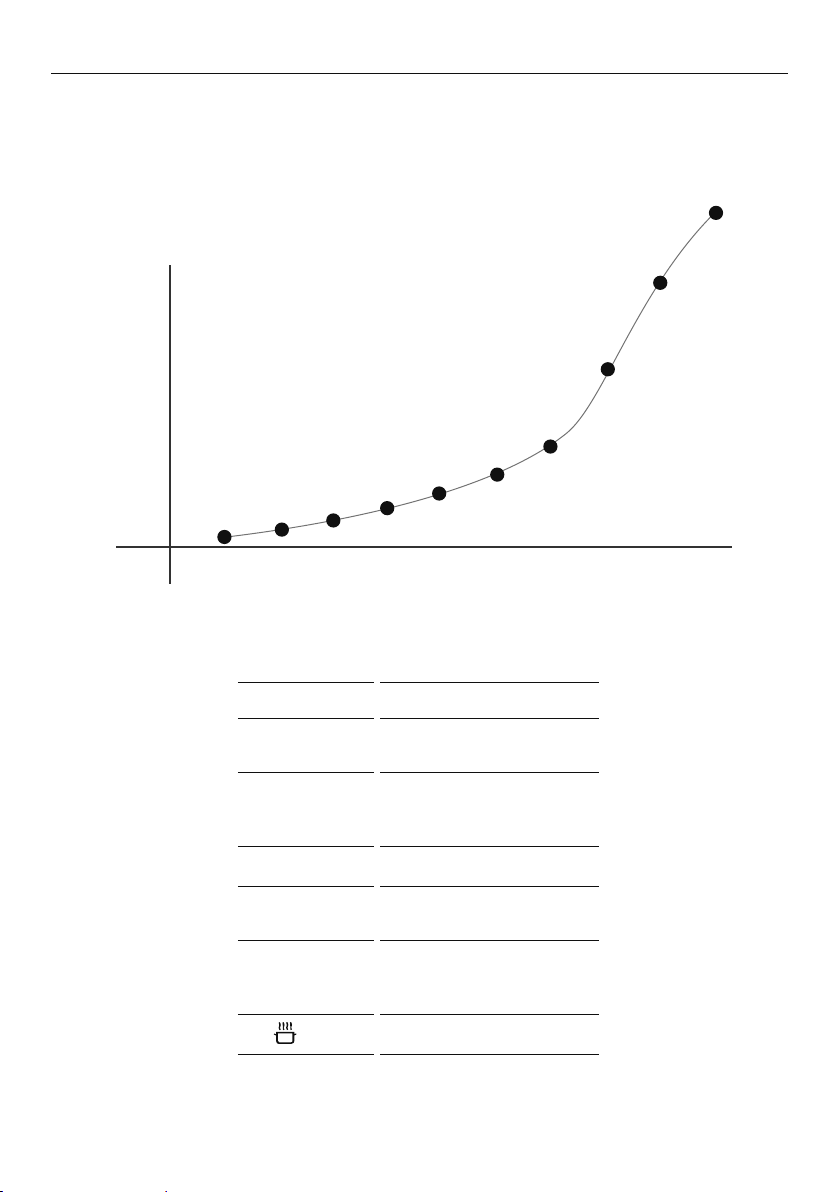
Heat settings
The settings below are guidelines only. The exact setting will depend on several factors,
including your cookware and the amount you are cooking. Experiment with the cooktop to
find the settings that best suit you.
Percentage of rated power %
100
80
60
40
20
0
3
Heat setting
HEAT SETTING SUITABILITY
• gentle simmering
• slow warming
• reheating
• rapid simmering
• cooking rice
• pancakes
• sautéing
• cooking pasta
• stir-frying
• searing
• bringing soup to the boil
3
• boiling water

61
USING THE WARMING DRAWER
Use the warming drawer to keep food warm after you have finished cooking and
to warm plates before serving. The warming drawer will keep hot cooked foods at
serving temperature.
z
Allow time for the drawer to preheat
z
Place hot food in a heatproof pan or serving dish.
z
Take care when opening the drawer. Position your hand at the bottom of the drawer and
open slowly to allow hot air and steam to escape.
z
Take care not to touch the inside surfaces of the drawer while it is hot.
z
When using the drawer to warm plates ensure the temperature is only set to LO. Ensure
plates are evenly spread out.
z
Do not stack dishes or plates as this may result in uneven heating.
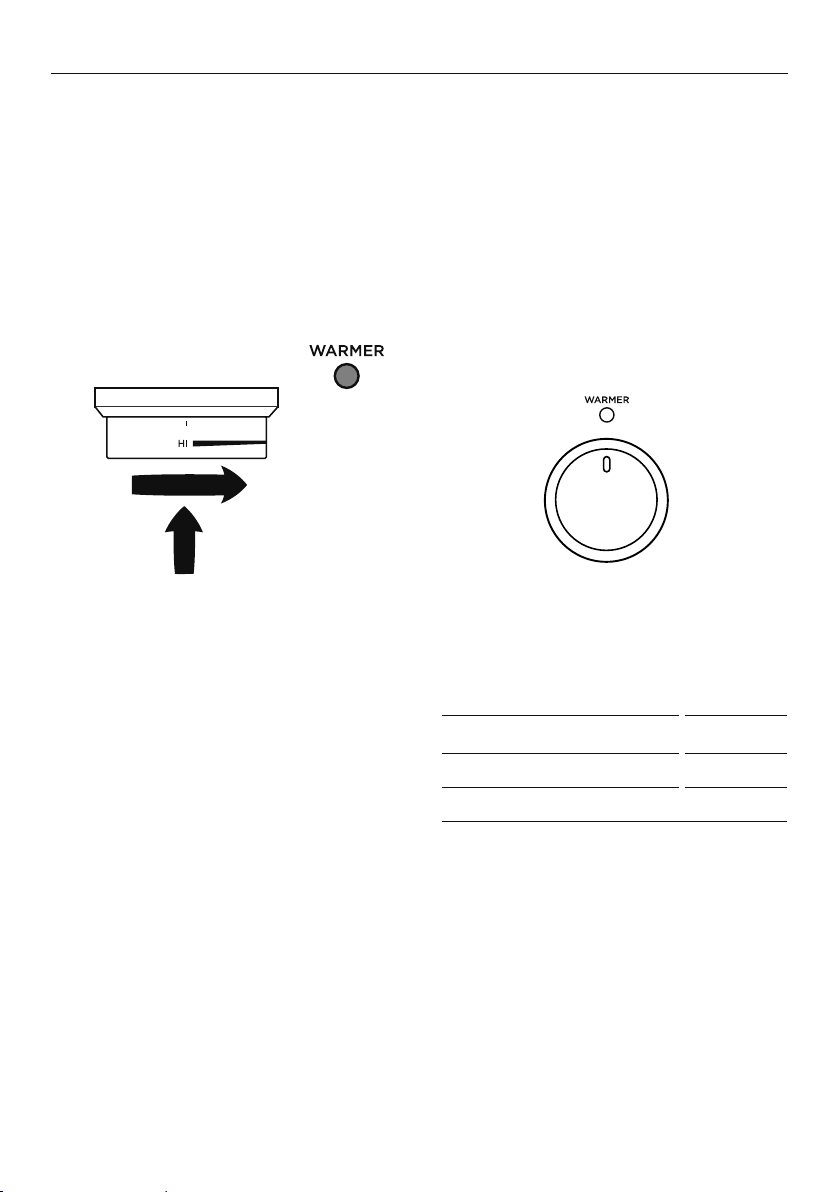
To use the warming drawer
Warmer dial
z
The temperature can be set
anywhere between LO (minimum)
and HI (maximum).
z
The warming drawer is fitted with an
heating element in the top.
z
See the below table for the
temperature settings.
IMPORTANT!
z
Do not use the drawer to re-heat food.
z
Do not place food in the drawer in unopened containers. Built up pressure could cause
the container to burst.
z
Do not use plastic containers
z
Use dry potholders to transfer dishes to and from the drawer. Take care not to let
potholders touch the hot upper element.
z
Do not store flammable items in the drawer.
z
Do not use the warmer drawer as a storage drawer.
z
Do not use aluminum foil to line the drawer.
z
Make sure the dial is always set to O (OFF) when running a self clean cycle and any
time when the drawer is not in use.
1 Push in the warmer dial and turn
clockwise to HI.
z
While the drawer is on the
indicator will glow red.
2 When you have finished using the
drawer turn the dial back to O (OFF).
z
The indicator will go out.
DIAL POSITION °C
LO 30
HI 75

62
CARE AND CLEANING
DOS DON’TS
• Read these cleaning instructions and the ‘Safety
and warnings’ section before you start cleaning
your cooker.
• Before cleaning or removing any part, make sure
that everything on the cooker has been turned off.
• Unless suggested otherwise in the chart following,
allow any part to cool to a safe temperature before
cleaning. If you do need to handle a warm or hot
part, take extreme care. Wear long protective mitts
to avoid burns from steam or hot surfaces.
• Try using any cleaner on a small area first, to ensure
it doesn’t stain.
• See the pages following this chart for instructions
on removing and replacing different parts of the
cooker for cleaning or maintenance.
• To help you identify any parts, see illustrations in
section ‘Introduction’ and after this cleaning chart.
• Ensure the anti-tip device is re-engaged if you
move the cooker for cleaning. Failure to do this
may result in the oven tipping, and adults and
children may be killed.
• To prevent soiling from becoming ‘baked on’ and
stubborn, we recommend removing any easy-to-
reach spills, food or grease stains from the oven
cavity enamel after each use.
• Always clean the inner glass pane before starting
a Self Clean cycle. Failure to do this will mean that
residue will bake on and be impossible to remove.
• Always remove oven shelves before starting a
Self Clean cycle.
• Do not use aerosol cleaners until the cooker
has completely cooled. The propellant
substance in these cleaners could catch fire in
the presence of heat.
• Do not let soiling or grease accumulate
anywhere in or on the cooker. This will
make future cleaning more difficult and may
present a fire hazard.
• Do not use any abrasive or harsh cleaners,
cloths, scouring pads or steel wool. These
will scratch your cooker and damage
its appearance.
• Do not use a steam cleaner to clean any part
of the cooker.
• Do not perform any cleaning or maintenance
on parts not specifically named in the chart
below. If in doubt, contact Customer Care.
• Only a Fisher & Paykel trained and supported
service technician can take apart the door.
• Do not attempt to take the door apart for
cleaning. If the inner panes of glass in the
door become dirty, please contact your
Fisher & Paykel trained and supported service
technician or Customer Care.

63
CARE AND CLEANING
Manual cleaning chart
WHAT? HOW? IMPORTANT!
COOKER EXTERIOR
Door frame
exterior,
Control panel,
Cooktop base
Back trim
Warming drawer
exterior
After every use
1 Soften any stubborn stains under
a hot soapy cloth.
2 Clean with a solution of mild
detergent and hot water, then
wipe dry with a microfiber cloth.
Stainless steel models: For extra
shine, use a suitable stainless
steel cleaner and polish, following
manufacturer’s instructions. Always
rub the stainless steel in the direction
of the polish lines.
• Always read the label to make sure
your stainless steel cleaner does not
contain chlorine compounds as these
are corrosive and may damage the
appearance of your cooktop.
• Do not use and take care not to spill
any stainless steel cleaner on the
dials, oven handles, or the kickstrip
grate. These are not stainless steel
parts and their surface may be
damaged by stainless steel cleaner.
Dials
Oven handles
1 Wipe with a damp cloth
using a solution of mild
detergent and hot water.
2 Dry thoroughly with
microfiber cloth.
• Do not use stainless steel cleaner on
these parts, as doing so may damage
their coating.
Clock display
and controls
Take particular care when cleaning
the clock and surrounding area. Only
use a damp cloth with detergent.
• Do not use any oven cleaners, harsh
or abrasive cleaners, scouring pads,
steel wool or sharp metal scrapers
on the glass. These may scratch and
damage the surface.
Oven door glass
(exterior)
Clean using a soft cloth and a mixture
of warm water and dishwashing
liquid or glass cleaner.

64
CARE AND CLEANING
WHAT? HOW? IMPORTANT!
OVEN PARTS
Enamel
oven interior –
light soiling
1 Wipe with a damp cloth and
a solution of hot water and
mild detergent.
2 Wipe dry with a soft cloth.
Note: the oven door may be removed
to make reaching into the oven easier.
• To prevent soiling from becoming
‘baked on’ and stubborn, we
recommend removing any easy-
to-reach spills, food or greasy
stains from the enamel after
each use. Doing so will reduce
the need for using the Self Clean
function frequently.
Enamel
oven interior –
stubborn,
‘baked-on’ soiling
Run the Self Clean cycle.
See ‘Using the Self Clean function’
for instructions.
• Oven cleaners are caustic and
may permanently stain or damage
some surfaces.
• When using, take care not to
let it come in contact with any
surface other than the oven
interior. If it accidentally does,
remove immediately.
Side racks For light soiling:
• Clean with a solution of mild
detergent and hot water.
For heavy soiling:
• Run a Self Clean cycle.
Oven shelves Wipe with a damp cloth and mild
detergent. Do not wipe off or wash
away the white lubricating grease
(visible when the shelf is extended).
• Never leave in the oven during
a Self Clean cycle.
• Do not wash the shelf in the
dishwasher, immerse in soapy water,
or use oven cleaner on it. Doing
so will prevent the slides from
running smoothly.
Roasting dish
and grill rack
Rotisserie parts
1 Pre-soak any stubborn
soiling in a solution of mild
detergent and hot water.
2 Wash by hand or in a dishwasher.
• Never leave any of these parts in the
oven during a Self Clean cycle. They
will become discoloured or damaged.
Bake and
grill burners
Do not clean these parts. They
self-clean during normal use.
Manual cleaning chart
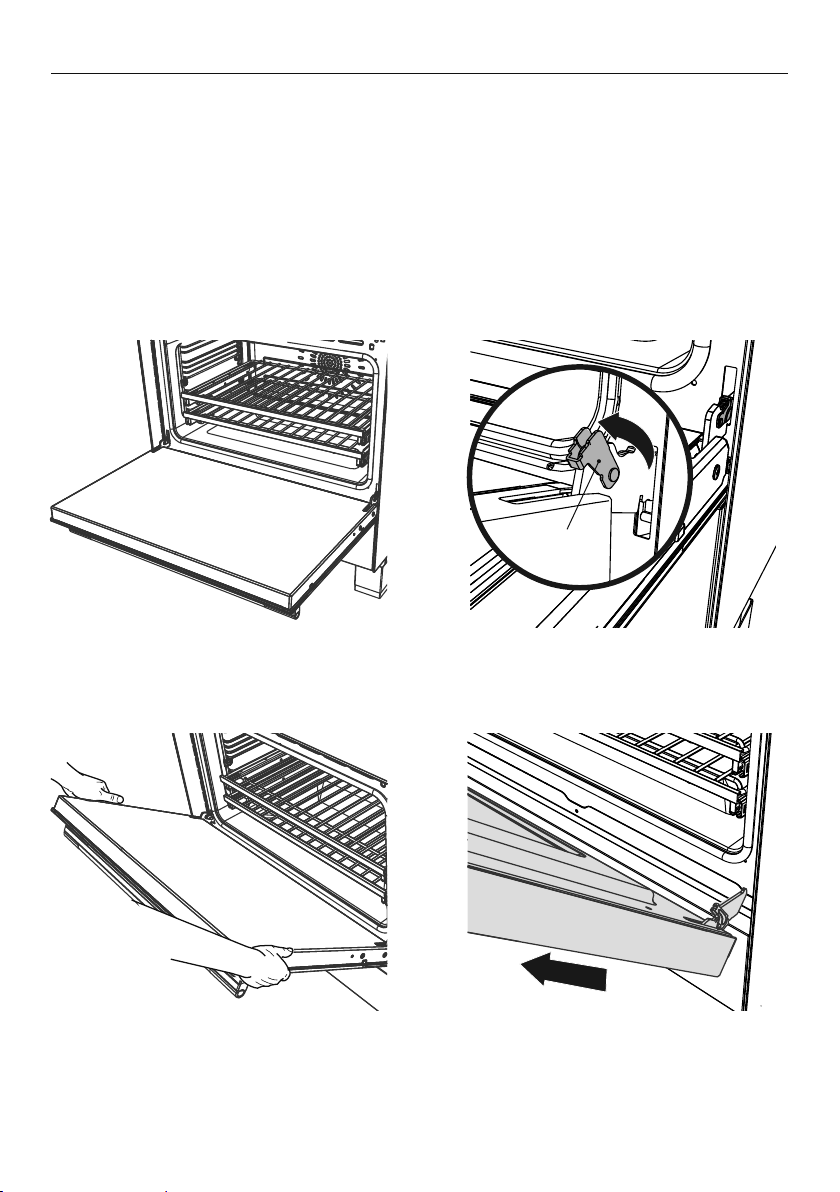
65
CARE AND CLEANING
WHAT? HOW? IMPORTANT!
OVEN PARTS
Oven door glass
(interior)
After every use
• Use a soft cloth and a mixture
of warm water and dishwashing
liquid to remove light soiling after
every use.
• For stubborn stains, try using
a mixture of baking soda and
warm water with a non-abrasive
scrubbing pad, then wipe dry with
a soft, lint-free cloth.
• Do not use oven cleaners or any
other harsh/abrasive cleaners, cloths,
scouring pads, steel wool or sharp
metal scrapers to clean the oven
door glass. These scratch the glass,
which in turn could result in the glass
cracking and shattering.
• Do not allow grease to build up on
the glass or become baked on as this
reduces visibility into the oven.
• Only a Fisher & Paykel trained and
supported service technician can take
apart the door.
• Do not attempt to take the door
apart for cleaning. If the inner panes
of glass in the door become dirty,
please contact your Fisher & Paykel
trained and supported service
technician or Customer Care.
Oven door gasket Avoid cleaning this part. If you need
to remove large food particles off it,
proceed as follows:
1 Dampen a sponge with
clean hot water.
2 Gently wipe off the soiling,
but do not rub.
3 Press a dry towel gently on
the gasket to dry.
• Do not use any cleaning agent on
the gasket.
• The gasket is essential for a good
seal. Take care not to rub, displace,
or damage it.
Warming drawer
(interior)
1 Wipe with a damp cloth and
a solution of hot water and
mild detergent.
2 Wipe dry with a soft cloth.
Note: the drawer may be removed
to make cleaning easier.
• To prevent soiling from becoming
‘baked on’ and stubborn, we
recommend removing any easy-to-
reach spills, food or greasy stains
from the enamel after each use.
Drip tray
under door
1 Remove oven door.
2 Wipe with a damp cloth and
a solution of hot water and
mild detergent.
Manual cleaning chart
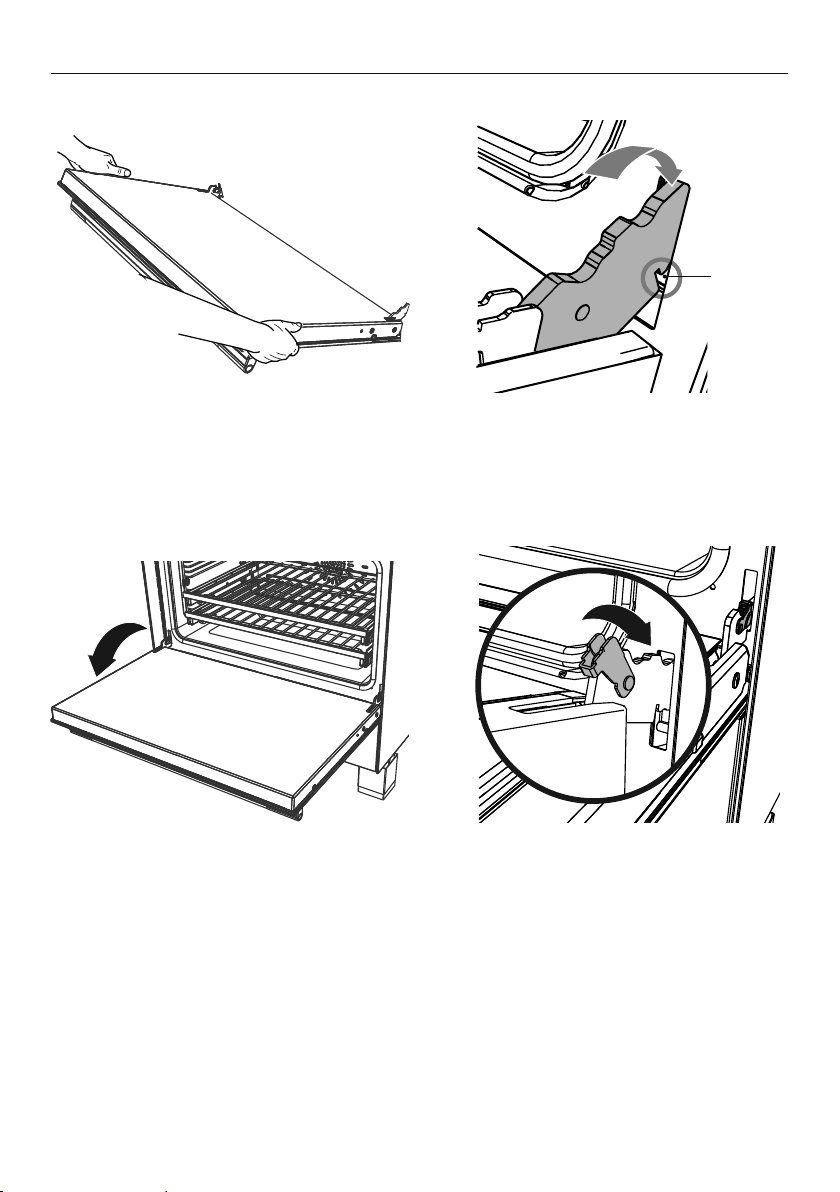
66
CARE AND CLEANING
WHAT? HOW? IMPORTANT!
COOKTOP
Everyday
soiling on glass
(fingerprints,
marks, stains left
by food or non-
sugary spillovers
on the glass)
1 Ensure the cooktop control dials are
all turned off.
2 Apply cooktop cleaner to a clean
lint-free cloth and rub gently while the
glass is still warm (but not hot!).
3 Rinse and wipe dry with a clean cloth
or paper towel.
4 Switch the power to the cooktop back
on at the wall.
• Heavy-duty scourers, some
nylon scourers and harsh/
abrasive cleaning agents may
scratch the glass. Always read
the label to check if your cleaner
or scourer is suitable.
• Never leave cleaning residue
on the cooktop: the glass may
become stained.
Boilovers, melts,
acidic sauces or
marinades and
hot sugary spills
on the glass
Remove these immediately with a fish slice,
palette knife or razor blade scraper suitable
for ceramic glass cooktops, but beware of hot
cooking zone surfaces:
1 Switch the power to the cooktop
off at the wall.
2 Hold the blade or utensil at a 30° angle
and scrape the soiling or spill to a cool
area of the cooktop.
3 Clean the soiling or spill up with a dish
cloth or paper towel.
4 Follow steps 2 to 4 for ‘Everyday soiling
on glass’ above.
• Remove stains left by melts and
sugary food or spillovers as soon
as possible. If left to cool on the
glass, they may be difficult to
remove or even permanently
damage the glass surface.
• Cut hazard: when the safety
cover is retracted, the blade in
a scraper is razor-sharp. Use
with extreme care and always
store safely and out of reach
of children.
• When the power to the cooktop
is switched off, there will be no
‘hot surface’ indication but the
cooking zone may still be hot!
Take extreme care.
Spillover on the
touch controls
and stainless
steel trim
1 Switch the power to the cooktop
off at the wall.
2 Soak up the spill.
3 Wipe the touch control area with a clean
damp sponge or cloth.
4 Wipe the area completely dry
with a paper towel.
5 Switch the power to the cooktop back
on at the wall.
Manual cleaning chart
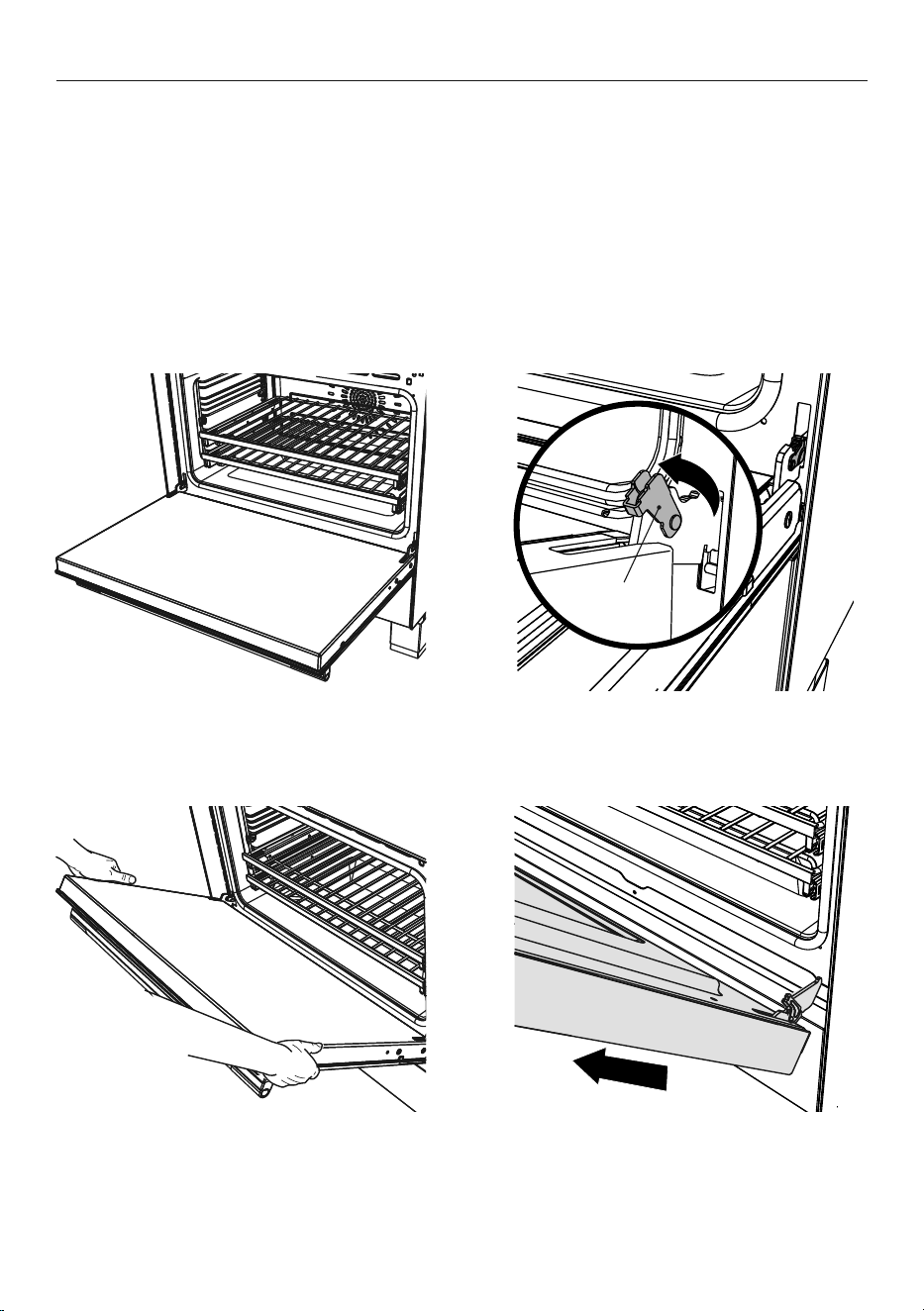
67
CARE AND CLEANING
Removing and replacing the oven door
IMPORTANT!
z
Switch the oven off at the wall before removing the door.
z
Do not lift the oven door by its handle. Doing so may damage the door.
z
Make sure the oven and the door are cool before you begin to remove the door.
z
Before removing the door, make sure there is a large enough clear, protected surface in
the kitchen to rest the door on.
z
Take care, the oven door is heavy!
To remove the oven door
1 Open the door fully.
3 Holding the door firmly on both sides,
gently close it about halfway.
4 Disengage the hinges and remove the
door. Place on a protected surface.
2 Open the levers fully on both sides.
Lever
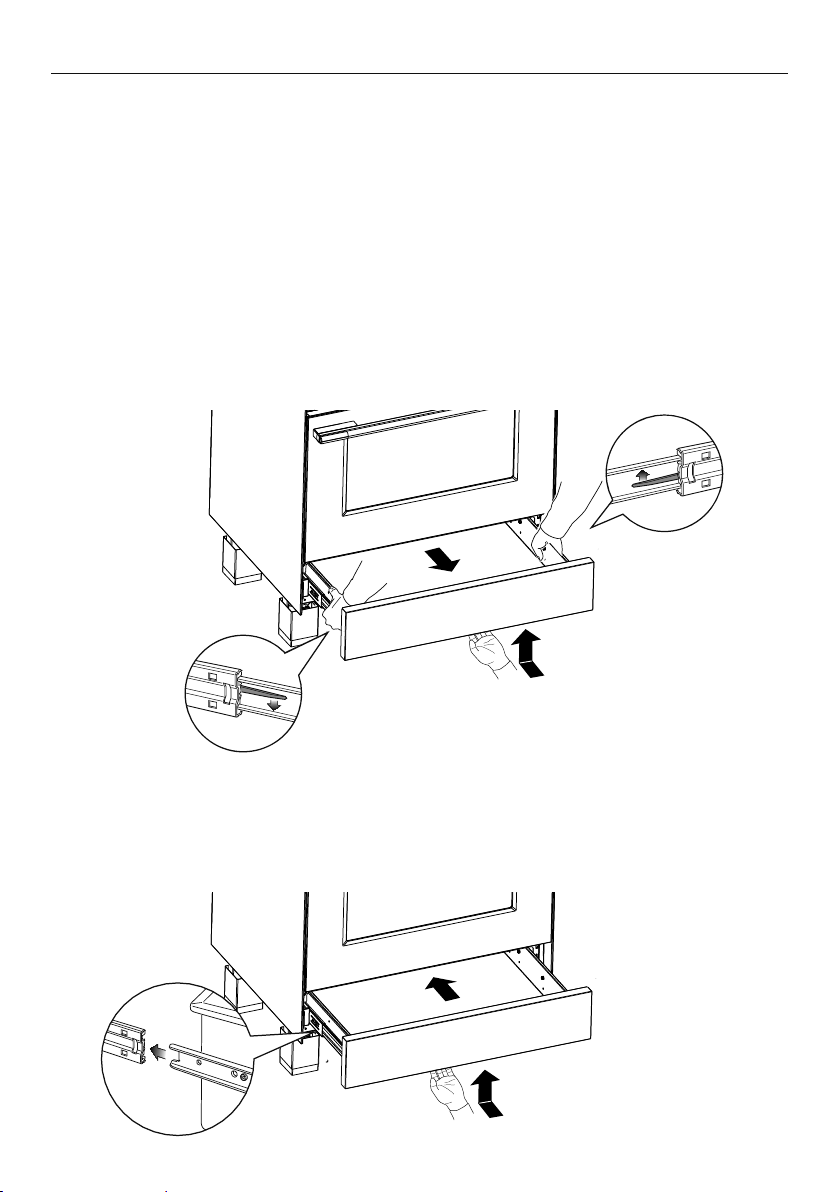
68
CARE AND CLEANING
To replace the oven door
1 Hold the door firmly in an approximately
halfway open position.
3 Open the door fully. 4 Fully close the levers on the left
and right hinges, as shown, then
close the door.
2 Insert the hinge tongues into the slots,
making sure that the notches on both
sides drop into place as shown.
Notch
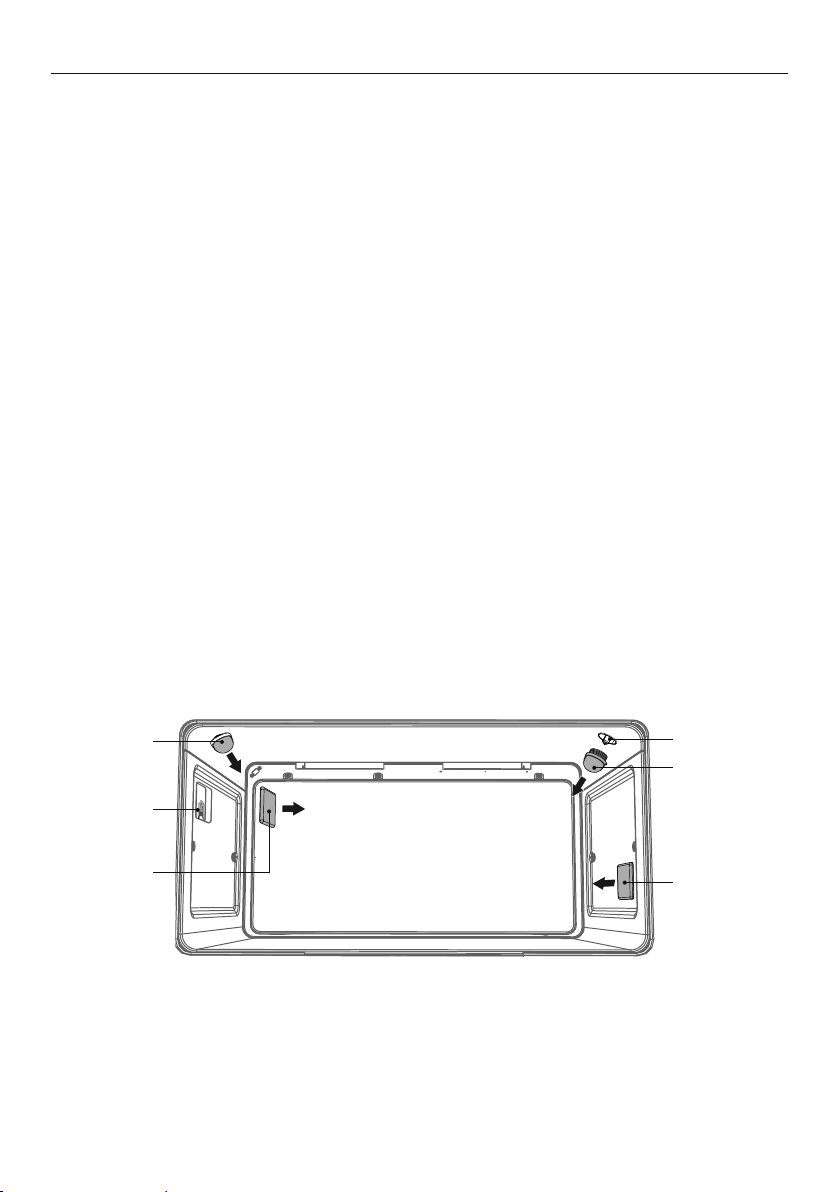
69
CARE AND CLEANING
Removing and replacing the oven side racks
IMPORTANT!
Always turn off the cooker at the wall first.
Ensure the oven has cooled down
completely before starting.
Remove all shelves
1 Slide out all shelves and remove.
For easier access we recommend removing
the oven door, see ‘Removing and refitting
the oven door’.
To remove the side racks
To replace the side racks
2 Refit the fixing screws and tighten.1 Make sure the side racks are the
right way up, as shown.
Remove all
shelves
2 Use a small coin or a flat-head
screwdriver to loosen and remove
the fixing screws.
3 Remove the side racks
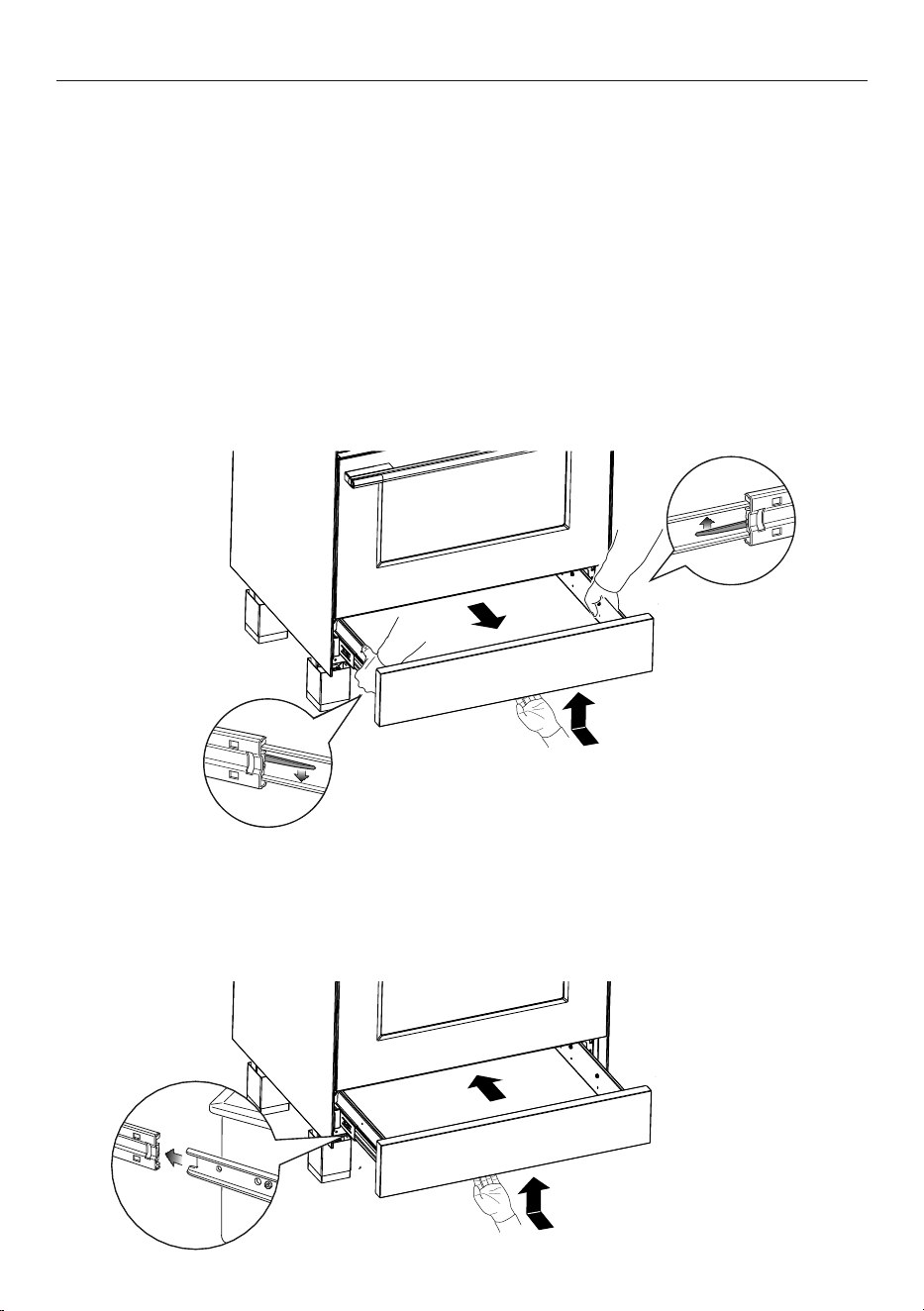
70
CARE AND CLEANING
Removing and replacing the warming drawer
IMPORTANT!
z
Always turn off the cooker at the wall first.
z
Ensure the oven and warming drawer have cooled down completely before starting.
z
Ensure the drawer is completely empty before removing it.
z
Always position your hand at the bottom of the drawer to open and close it.
To remove the warming drawer
1 Open the drawer completely.
2 Open the levers fully on both sides and hold in place:
z
On the left side push the lever down
z
On the right side push the lever up
3 Remove the drawer while holding the levers in position.
Fitting the warming drawer
1 Insert the drawer guides onto the sliding runners on either side of the cooker interior.
z
Make sure they are correctly lined up on both sides of the drawer.
2 Gently close the drawer completely. The safety catches will automatically
hook into place.
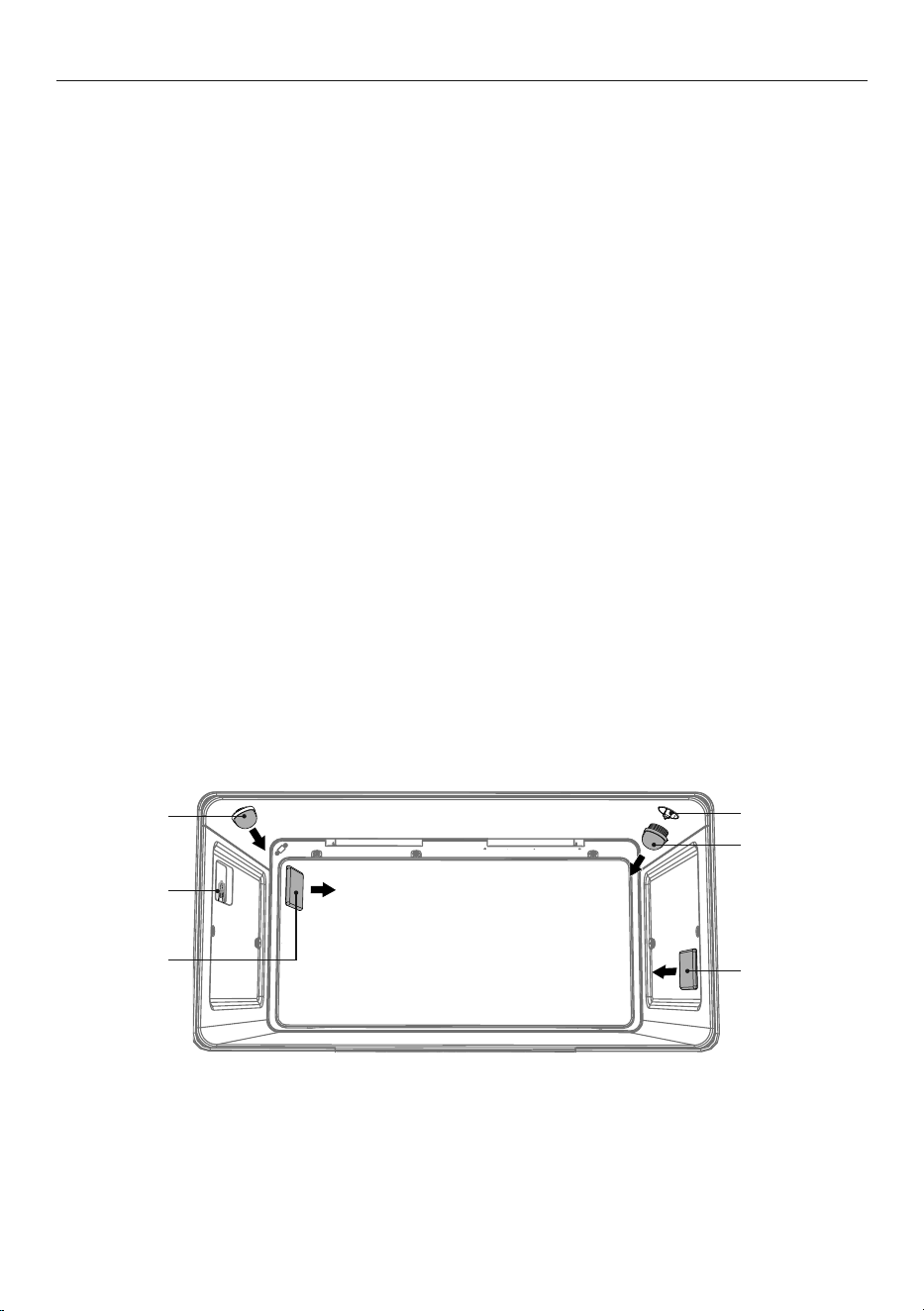
71
CARE AND CLEANING
Replacing an oven light bulb
IMPORTANT!
Use a 25W, 220-240V 50Hz G9 halogen bulb for replacement.
Do not use a standard light bulb in any oven, the heat will break it.
1 Allow the oven (including the lamp cover and the bulb) to cool completely.
2 Remove any shelves that may get in the way.
3 Remove the door if the lamp will be hard to reach.
4 Turn the power supply to the cooker off at the main fuse or circuit breaker panel.
If you don’t know how to do this, contact an electrician.
IMPORTANT!
Failure to disconnect the cooker from the power supply may result in death or
electrical shock.
5 Remove the lamp cover.
z
Upper lights: wearing a rubber glove to improve grip turn the cover
anticlockwise to unscrew.
z
Side lights: wearing a rubber glove to improve grip, hold the cover and prise out using
finger nails on other hand. If this does not work place a thin plastic spatula between the
cover and cavity wall and gently twist to prise the cover off. Take care not to chip the
glass covers or to damage the enamel finish inside the oven.
6 Remove the faulty bulb.
7 Holding the replacement bulb in a soft cloth or tissue insert it into the socket. Do not
touch the bulb with your fingers.
8 Replace the lamp cover.
z
Upper lights: turn the cover clockwise to tighten and then back a quarter turn
9 Turn the power supply to the cooker back on at the main fuse or circuit breaker panel.
Light bulb
Light bulb
Upper
lamp cover
Upper
lamp cover
Side
lamp cover
Side
lamp cover

72
USING THE SELF CLEAN FUNCTION
Using Self Clean
Self Clean uses extremely high temperatures to break down and burn off grease and grime.
All that is left is a small amount of grey ash that you can easily wipe up.
There are two self clean cycles:
z
Standard Clean: 4 hours, for normal or heavy soiling
z
Light Clean: 3 hours, for light or localised soiling
IMPORTANT!
z
You must clean the inside glass door panel BEFORE starting a self-clean cycle. Failure
to do this may result in permanent staining or marking of the door glass.
See ‘Care and cleaning’ for our recommendations on how to do this.
z
Do not use oven cleaners, any degreasing cleaners, or oven liners.
z
Remove all oven shelves, trays, bakeware and utensils from the oven before starting
a self clean cycle (except side racks). If left in the oven they will be permanently
damaged; items made from combustible material (eg wood, fabric, plastic) may
even catch fire.
z
Do not use your oven to clean miscellaneous parts.
z
Make sure the room is well ventilated.
z
Before starting a Self Clean cycle, make sure you move any pet birds to another,
closed and well-ventilated room. Some pet birds are extremely sensitive to the fumes
given off during a Self Clean cycle, and may die if left in the same room as the oven
during such a cycle.
z
During a Self Clean cycle, the oven reaches higher temperatures than it does for
cooking. Under such conditions, the surfaces may get hotter than usual and children
should be kept away.
z
The oven door will be locked during the Self Clean cycle.
z
If there are cracks or flaws on any of the oven door glass panes, if the oven seal is
damaged or worn, or if the door does not close properly, do not start a Self Clean
cycle. Call your Fisher & Paykel trained and supported service technician.
Before you start
1 Remove all oven shelves and any other accessories, bakeware, and utensils.
Note: you do not need to remove the side racks.
2 Wipe up any spills, and along the inner edge of the oven surface around the seal. Failure
to do so may discolour the oven surface.
IMPORTANT!
Avoid cleaning the seal itself as this may cause damage.
3 Check the inner glass pane of the oven door. If it has soiling on it (eg stains from greasy
splatter), you will need to clean it manually before starting a Self Clean cycle.
For instructions, see ‘Care and cleaning’.
IMPORTANT!
z
If soiling is left on the glass, it will become burnt on during the Self Clean cycle, making
it very difficult to remove.
4 Close the oven door firmly.

73
USING THE SELF CLEAN FUNCTION
To set Self Clean
Self Clean is now set.
z
The door will automatically lock and remain locked during the cycle.
z
The display will start counting down the time remaining.
1 Turn the function dial to Self Clean.
3 Scroll to choose between Standard
Clean and Light Clean.
4 Press
to confirm.
2 The display will prompt you to remove
the oven shelves.
z
Remove the oven shelves and any other
bakeware or accessories still in the oven.
z
Press and hold to confirm.
z
If the oven door is not closed properly,
the display will also prompt you to
close the door.
4 00
mh
CANCEL REMOTE
Standard
Clean
to go
3 59
mh
CANCEL REMOTE
CANCEL REMOTE
Remove
Shelves
Close
Door
74
USING THE SELF CLEAN FUNCTION
When Self Clean is finished
z
A tone will sound.
z
Self Clean Complete will show in the display.
z
The display will flash.
z
The door will unlock.
1 Press any button to stop the display flashing.
2 Wait for the oven to cool completely.
3 Wipe up the ash in the oven with a small brush
or a damp cloth.
4 Dry with a lint-free cloth.
5 Replace the oven shelves.
To cancel Self Clean
IMPORTANT!
z
A Self Clean cycle can be cancelled at any time.
z
The door will not unlock until the oven has cooled to a safe temperature.
z
Do NOT turn off the mains power supply to the oven (wall switch). Turning off the
power while the oven is too hot may damage the oven and its surrounding cabinetry.
1 Press
to cancel Self Clean.
z
Self Clean Cancelled will show in the display.
z
The door will remain locked and the display will remain lit until the oven has cooled
down to a safe temperature.
Self Clean
Complete
CANCEL REMOTE
Self Clean
Cancelled
CANCEL REMOTE

75
TROUBLESHOOTING
If there is a problem, check the chart below to see if you can fix it. If the problem cannot be
fixed or persists, call your Fisher & Paykel trained and supported service technician
or Customer Care.
General
PROBLEM POSSIBLE CAUSES WHAT TO DO
The oven does not work. No power. Check that the mains power
supply (wall switch) is turned on,
the fuse has not tripped and there
is no power outage in your area.
The clock has not been set The oven will not work unless
the clock is set. See ‘Setting the
clock’’.
The oven does not work but
the display is lit.
The oven is set for
automatic cooking.
See ‘Automatic cooking’
for instructions.
The oven is in Demo Mode Contact Customer Care
One or all of the lights
do not come on, but the
oven works.
The oven light bulb(s)
have blown.
Replace the light bulb(s). See
‘Care and cleaning’ for instructions.
The door is not correctly fitted. See ‘Care and cleaning’ for
instructions on fitting the
door correctly.
The oven is in Sabbath Mode
and the ‘Light off’ option has
been saved.
To quit Sabbath Mode, press
and hold CANCEL. See ‘User
preference settings’ for
instructions on changing the
‘Light off’ option.
The temperature indicator is
blank and the oven control
dials are unresponsive.
The control panel is locked. See ‘Locking the oven controls’
for instructions.
The oven is not heating. The door is not properly closed
or it is opened too frequently
during cooking.
The heating elements are
disabled while the door is open.
Make sure the door is properly
closed and avoid opening it
frequently during cooking.
A glass pane in the oven
door has cracked, chipped,
or shattered.
Incorrect cleaning or the edge of
the glass hitting against something.
You must NOT use the oven.
Call your Fisher & Paykel trained
and supported service technician
or Customer Care.
76
TROUBLESHOOTING
PROBLEM POSSIBLE CAUSES WHAT TO DO
I can feel hot air blowing
out of the vents after I have
turned the oven off.
This is normal. For safety reasons the cooling fans
will continue to run even when
you have turned the function
dial to ‘OFF’. The fans will switch
off automatically when the oven
has cooled.
The oven fan comes on
when I select a function
that does not use a fan
(eg bake)
This is normal.
The fan comes on while the oven
is preheating. It may turn off
when the oven has reached the
set temperature.
Wait until a long tone sounds and
the temperature dial halo turns
white: the oven will then be ready
to use.
The oven has reached the
set temperature but the
temperature dial halo is
still red (indicating that the
oven is not ready to use).
This is normal: when heating
up from cold, your oven is
designed to initially heat to a
temperature somewhat higher
than what you have set. This
is to provide optimal baking
conditions right from the start.
Wait until a long tone sounds and
the temperature dial halo turns
white: the oven will then be ready
to use.
The oven is heating but the
display is dark.
The oven is set to
‘Display off’ option.
To quit the ‘Display off’ option,
press and hold CANCEL until the
display shows the time of day.
The oven is in Sabbath Mode. To quit Sabbath Mode press and
hold CANCEL until the display
shows the time of day.
The oven cancels automatic
cooking when I try to adjust
the clock setting.
The oven was set for automatic
cooking when you were trying to
adjust the clock setting.
You can only adjust the clock
setting while the oven is not set
for automatic cooking.
The temperature dial halo
never turns red when I use
Grill
.
This is normal: the halo stays white
to indicate that the grill element
provides instant radiant heat.
The displays work, and the
function and temperature
dials halos come on but the
oven does not heat up.
The oven is in ‘Demo’ mode. Call Customer Care.
General

77
PROBLEM POSSIBLE CAUSES WHAT TO DO
During a Self Clean
cycle, the oven is louder
than usual.
This is normal: the oven’s cooling
fans operate at their highest speed.
The Self Clean cycle is
finished, but the oven door
will not open.
The oven door is locked because
the oven is still too hot to be used
for cooking.
Wait until the Self Clean cycle
has finished. If you cancelled
a Self Clean cycle which was
already underway, the oven still
needs to cool down before it
can be used. The oven door will
automatically unlock.
I have cancelled a
Self Clean cycle but
cannot use the oven:
• the oven door will
not open
• the display is still
counting down minutes
or showing
Self Clean Canceled
• the dials and controls
are unresponsive.
This is normal: if the function dial
halo is unlit, you have successfully
cancelled the Self Clean cycle.
However, the oven is still too hot to
be used for cooking and needs to
cool down.
Wait until the cool-down phase
has finished. A long tone will
sound and the oven door will
automatically unlock when the
oven is ready to use.
Note: depending on when the Self
Clean cycle was cancelled, the
cool-down phase may take up to
45 minutes.
The oven is beeping
and the display shows
D or D.
See section ‘Alert codes’
for instructions.
There is a power cut during
a Self Clean cycle.
Power cut. The door will remain locked.
Once the power is turned back
on, the door will remain locked
until the oven has cooled to a
safe temperature.
Self Clean function
TROUBLESHOOTING

78
TROUBLESHOOTING
Oven
PROBLEM POSSIBLE CAUSES WHAT TO DO
The cooktop cannot be
turned on.
No power. Make sure the cooktop is
connected to the power supply
and that it is switched on at the
wall. Check whether there is a
power outage in your home or
area. If you’ve checked everything
and the problem persists, call
your Fisher & Paykel trained and
supported service technician or
Customer Care.
The control dials
are unresponsive.
The controls are locked. Unlock the controls. See section
‘Using your induction cooktop’
for instructions.
The glass is being scratched. Rough-edged cookware. Use cookware with flat and
smooth bases. See ‘Choosing the
right cookware’.
Unsuitable, abrasive scourer or
cleaning products being used.
See ‘Care and cleaning’.
PROBLEM POSSIBLE CAUSES WHAT TO DO
Condensation around oven
(eg on control panel or top
of oven door).
Food has high moisture content
or local climate (temperature,
humidity) is contributing
to condensation.
Condensation is normal. You can
wipe the drops off the control
panel. If there is frequent or
excessive condensation, make sure
that cabinetry around the cooker
is moisture-proofed.
Condensation building up
in the oven while cooking
on Grill.
Food in your oven releasing
moisture as it cooks.
Allow the grill element to preheat
for 5 minutes before placing food
in the oven or try cooking on
Fan Grill instead.
Uneven baking. Oven not properly preheated. Wait until the halo around the
temperature dial has changed
from red to white before putting
food in.
Unsuitable or incorrectly
arranged bakeware.
See ‘Cooking guide’ for advice.

79
TROUBLESHOOTING
CooktopCooktop
PROBLEM POSSIBLE CAUSES WHAT TO DO
Some or all displays
flash
or there is a
continuous beep.
The control dials have been held in
either A or
position for too long.
Turn the control dial back to OFF
and wait until the error flash has
disappeared before trying to use
the cooktop again.
Pans do not become hot.
The heat setting display
comes on, but the
does
not flash when I remove
a pan.
shows in the timer
display when I turn on
the cooktop.
The cooktop is in ‘Display mode’. Contact Customer Care or your
Fisher & Paykel trained and
supported service technician.
Condensation is forming
on surrounding walls,
cabinetry or your overhead
rangehood.
This is a normal for induction
cooking.
Energy efficient technology
means that no heat is lost to
surrounding surfaces. This results
in condensation forming on these
cooler surfaces when steam is
produced by cooking.
This is normal for induction
cooking and does not indicate
a fault.
To minimise condensation:
• Ensure adequate ventilation
when cooking.
• Switch your rangehood on
5 minutes before cooking and
let it run for at least minutes
after cooking.
• Use your rangehood on a lower
speed setting when boiling.
• Use the cooktop on a lower
heat setting when boiling.
• Use pot lids to stop moisture
from escaping.
• If condensation forms, wipe
down surrounding walls and
cabinetry as needed.
Some pans make crackling
or clicking noises.
This may be caused by the
construction of your cookware
(layers of different metals
vibrating differently).
This is normal for induction
cookware and does not indicate
a fault.
The cooktop makes a low
humming noise when used
on a high heat setting
(especially PowerBoost).
This is caused by the technology
of induction cooking.
This is normal, but the noise
should quieten down or disappear
completely when you decrease the
heat setting.

80
TROUBLESHOOTING
Cooktop
PROBLEM POSSIBLE CAUSES WHAT TO DO
Fan noise coming from
the cooktop.
Oven fan comes on while
using the cooktop.
A cooling fan built into your
cooker has come on to prevent
the electronics from overheating.
It may continue to run even after
you’ve turned the cooktop off.
This is normal and needs no
action. Do not switch the power to
the cooktop off at the wall while
the fan is running.
Pans do not become
hot and
appears in
the display.
The cooktop cannot detect the
pan because it is not suitable for
induction cooking.
Use cookware suitable for
induction cooking. See section
‘Choosing the right cookware’.
The cooktop cannot detect the
pan because it is too small for
the cooking zone or not properly
centred on it.
Centre the pan and make sure that
its base matches the size of the
cooking zone.
3 flashes in the display
when you are trying to set
PowerBoost.
PowerBoost is temporarily
unavailable because the
cooktop needs to protect itself
from overheating.
Allow the cooktop to cool down.
The cooktop or a cooking
zone has turned itself
off unexpectedly, a tone
sounds and an error code
is displayed (typically
( or
(U alternating with one or
two digits in the cooking
zone displays).
Technical fault. lease note down the error
letters and numbers, switch
the power to the cooktop off
at the wall, and contact your
Fisher & Paykel trained and
supported service technician or
Customer Care with the error
code information.

81
ALERT CODES
If there is a problem with the oven, the cooker will:
z
automatically suspend all oven functions
z
beep five times
z
display an alert code.
IMPORTANT!
Do not turn off the mains power supply to the cooker (wall switch) if you get an alert
code, unless the instructions in the chart following specifically instruct you to. There
are cooling fans within the cooker which are needed to cool the cooker components.
Turning off the power while the cooker is too hot may damage the cooker and its
surrounding cabinetry.
What to do if an alert code is displayed
1 If the beeping hasn’t stopped already, touch any control to stop it.
2 Make a note of the alert code displayed. You may need this information.
3 Check the chart following to see if you can fix the problem yourself and follow
the instructions.
4 If you can fix the problem and the alert code does not reappear, you can keep
using your oven.
OR
If you can’t fix the problem yourself or the alert code reappears and the problem persists:
wait until the cooling fans have stopped and the oven has completely cooled down, then
turn the power to the cooker off at the wall and call your Fisher & Paykel trained and
supported service technician or Customer Care with the alert code information.

82
ALERT CODES
ALERT CODE POSSIBLE CAUSES WHAT TO DO
A1
The oven has overheated. 1 Allow the oven to cool down.
2 Once the oven has cooled
down and the door has
unlocked, the alert code will
disappear. You can now use
the oven again.
A2
Door lock error: the door cannot be
locked after you have started
a Self Clean cycle.
1 Turn the power to the oven
off at the wall and on again.
2 Wait approximately 10
seconds. This is to allow the
door lock to return to its
initial position.
3 Set the clock. See ‘Setting
the clock and first use’
for instructions.
4 Try starting a Self Clean cycle
again, making sure that you
close the door firmly. See
‘Using the Self Clean function’.
A3
Door lock error: the door cannot
be unlocked after a Self Clean cycle
has finished.
1 Turn the power to the oven
off at the wall and on again.
2 Try touching on the oven
door to help the door
lock disengage.
3 If this doesn’t help and the
alert code reappears, call your
Fisher & Paykel trained and
supported service technician
or Customer Care.
F2
F + number
Technical fault. 1 Note down the alert code.
2 Wait until the cooling fans
have stopped and the oven
has completely cooled down.
3 Turn the power to the oven
off at the wall.
4 Call your Fisher & Paykel
trained and supported
service technician or
Customer Care with the
alert code information.

83
ENERGY GUIDELINES
This induction range has been designed and constructed in accordance with the following
codes and specifications:
In New Zealand and Australia
z
AS/NZS 60335-1 Household and similar electrical appliances – Safety Part 1
General requirements
z
AS/NZS 60335-2-6 Household & similar electrical appliances – Safety Part 2.6 Particular
requirements for stationary cooking ranges, hobs, ovens & similar appliances
z
AS/NZS CISPR 14.1 2010 Electromagnetic compatibility – Requirements for household
appliances, electric tools and similar apparatus Part 1 – Emission
Europe and United Kingdom (GB/NI)
z
Restriction of the Use of Certain Hazardous Substances in Electrical and Electronic
Equipment (RoHS) Directive 2002/95/EC.
z
Safety requirement of EEC Low Voltage Directive 2006/95 and Electrical Equipment
(Safety) Regulations 2016:
BS EN IEC 60335-1 General Requirements for Domestic electrical appliances
BS EN IEC 60335-2-6 Particular Requirements for Domestic electrical cooking appliances
z
Electromagnetic compatibility requirements 2014/30/EU and Electromagnetic
Compatibility Regulations 2016:
BS EN IEC 55014-1, BS EN IEC 55014-2, BS EN IEC 61000-3-2, BS EN IEC 61000-3-3
Electromagnetic Compatibility Requirements.
z
The Ecodesign for Energy-Related Products and Energy Information (Amendment) (EU
Exit) Regulations 2019.
z
The Restriction of the Use of Certain Hazardous Substances in Electrical and Electronic
Equipment Regulations 2012.
Requirements of EEC Directive 93/68 (CE Marking Directive)
European directive 2012/19/EC on Waste Electrical and Electronic Equipment (WEEE)
(for European Union countries only)
This appliance is marked according to the European directive 2012/19/EC on Waste
Electrical and Electronic Equipment (WEEE). By ensuring this product is disposed of
correctly, you will help prevent potential negative consequences for the environment and
human health, which could otherwise be caused by inappropriate waste handling of this
product.
The symbol
on the product, or on the documents accompanying the product, indicates
that this appliance may not be treated as household waste. Instead it shall be handed over
to the applicable collection point for the recycling of electrical and electronic equipment.
Disposal must be carried out in accordance with local environmental regulations for waste
disposal. For more detailed information about treatment, recovery and recycling of this
product, please contact your local city office, your household waste disposal service or the
shop where you purchased the product.
This oven has been designed and constructed in accordance with the
following codes and specifications:

84
ENERGY GUIDELINES (BI & EU ONLY)
SPECIFICATIONS OR90SCI6 OR90SDI6
WEIGHT (KG) 123 123
NUMBER OF OVEN CAVITIES 11
CAVITY VOLUME (LITRES) 120 120
ENERGY CONSUMPTION* (KWH/CYCLE)
Conventional 1.62 1.62
Slow Cook 0.91 0.91
ENERGY INDEX
Conventional 153.50 153.50
Slow Cook 86.34 86.34
STANDBY POWER (WATTS)
Standard < 1 < 1
Networked < 2 < 2
TIME TO STANDBY (SECONDS)
Standard 20 20
Networked 20 20
*Energy consumption for electric cooking appliances are calculated using the following Standard:
BS EN 60350 Part 1- Ranges, ovens, steam ovens and grills – Methods for measuring performance.

85
ENERGY GUIDELINES (BI & EU ONLY)
Reducing the environmental impact of cooking
Reducing energy consumption will reduce the impact of cooking on the environment.
You can reduce energy consumption by:
z
Thawing frozen foods in the refrigerator first
z
Using a moderate setting to conserve energy
z
Using the correct sized pot
z
Using a pressure cooker
z
Cutting food into smaller pieces – this will reduce cooking time
z
Use a steamer or a pan with a divider to cook different vegetables at the same time
z
Using a cover when boiling water to reduce the time it takes to get to the boil.
z
Simmering liquid cooked foods instead of boiling vigorously
z
Keeping pot lids on to reduce heat loss.
MODEL NO. OF COOKING
ZONES
DIAMETER/AREA OF
COOKING ZONE
ENERGY
CONSUMPTION
(WH/KG)
ENERGY
CONSUMPTION
WHOLE HOB
(WH/KG)
Induction hob 5
LF (190 X 230mm) 184
188
RF (190 X 230mm) 184
Centre (250mm) 190
LR (190 X 230mm) 193
RR (190 X 230mm) 191
*Energy consumption for electric hob are calculated using the following Standard
BS EN 60350-2:2018 Household electric cooking appliance Part 2: Hobs — Methods for measuring
performance.

86
WARRANTY AND SERVICE
Before you call for service or assistance
Check the things you can do yourself. Refer to the installation instructions and your user
guide and check that:
1 Your product is correctly installed.
2 You are familiar with its normal operation.
If after checking these points you still need assistance or parts, please refer to the
Service & Warranty book for warranty details, contact your nearest Fisher & Paykel
service center, Customer Care, or get in touch via our website www.fisherpaykel.com.
Complete and keep for safe reference:
Model
Serial No.
Purchase Date
Purchaser
Dealer
Suburb
Town
Country


591515I 02.22
FISHERPAYKEL.COM
© Fisher & Paykel Appliances 2022. All rights reserved.
The models shown in this guide may not be available in all markets
and are subject to change at any time.
The product specifications in this guide apply to the specific products and
models described at the date of issue. Under our policy of continuous product
improvement, these specifications may change at any time.
For current details about model and specification availability in your country,
please go to our website or contact your local Fisher&Paykel dealer.